Cluster Suite Overview
Red Hat Cluster Suite for Red Hat Enterprise Linux
Edition 1.0
Abstract
Introduction
- Red Hat Enterprise Linux Installation Guide — Provides information regarding installation.
- Red Hat Enterprise Linux Introduction to System Administration — Provides introductory information for new Red Hat Enterprise Linux system administrators.
- Red Hat Enterprise Linux System Administration Guide — Provides more detailed information about configuring Red Hat Enterprise Linux to suit your particular needs as a user.
- Red Hat Enterprise Linux Reference Guide — Provides detailed information suited for more experienced users to reference when needed, as opposed to step-by-step instructions.
- Red Hat Enterprise Linux Security Guide — Details the planning and the tools involved in creating a secured computing environment for the data center, workplace, and home.
- Configuring and Managing a Red Hat Cluster — Provides information about installing, configuring and managing Red Hat Cluster components.
- LVM Administrator's Guide: Configuration and Administration — Provides a description of the Logical Volume Manager (LVM), including information on running LVM in a clustered environment.
- Global File System: Configuration and Administration — Provides information about installing, configuring, and maintaining Red Hat GFS (Red Hat Global File System).
- Using Device-Mapper Multipath — Provides information about using the Device-Mapper Multipath feature of Red Hat Enterprise Linux 4.
- Using GNBD with Global File System — Provides an overview on using Global Network Block Device (GNBD) with Red Hat GFS.
- Linux Virtual Server Administration — Provides information on configuring high-performance systems and services with the Linux Virtual Server (LVS).
- Red Hat Cluster Suite Release Notes — Provides information about the current release of Red Hat Cluster Suite.
1. Feedback
rh-cs-en.
Cluster_Suite_Overview(EN)-4.8 (2009-04-24:T15:25)
Chapter 1. Red Hat Cluster Suite Overview
1.1. Cluster Basics
- Storage
- High availability
- Load balancing
- High performance
Note
1.2. Red Hat Cluster Suite Introduction
- Cluster infrastructure — Provides fundamental functions for nodes to work together as a cluster: configuration-file management, membership management, lock management, and fencing.
- High-availability Service Management — Provides failover of services from one cluster node to another in case a node becomes inoperative.
- Cluster administration tools — Configuration and management tools for setting up, configuring, and managing a Red Hat cluster. The tools are for use with the Cluster Infrastructure components, the High-availability and Service Management components, and storage.
- Linux Virtual Server (LVS) — Routing software that provides IP-Load-balancing. LVS runs in a pair of redundant servers that distributes client requests evenly to real servers that are behind the LVS servers.
- Red Hat GFS (Global File System) — Provides a cluster file system for use with Red Hat Cluster Suite. GFS allows multiple nodes to share storage at a block level as if the storage were connected locally to each cluster node.
- Cluster Logical Volume Manager (CLVM) — Provides volume management of cluster storage.
Note
When you create or modify a CLVM volume for a clustered environment, you must ensure that you are running theclvmddaemon. For further information, refer to Section 1.6, “Cluster Logical Volume Manager”. - Global Network Block Device (GNBD) — An ancillary component of GFS that exports block-level storage to Ethernet. This is an economical way to make block-level storage available to Red Hat GFS.

Figure 1.1. Red Hat Cluster Suite Introduction
Note
1.3. Cluster Infrastructure
- Cluster management
- Lock management
- Fencing
- Cluster configuration management
1.3.1. Cluster Management
Note
- Configured with one GULM server — Quorum equals one GULM server.
- Configured with three GULM servers — Quorum equals two GULM servers.
- Configured with five GULM servers — Quorum equals three GULM servers.

Figure 1.2. CMAN/DLM Overview

Figure 1.3. GULM Overview
1.3.2. Lock Management
1.3.3. Fencing
- Configured with CMAN/DLM —
fenced, the fence daemon, performs fencing. - Configured with GULM servers — GULM performs fencing.
fenced or GULM), when notified of the failure, fences the failed node. Other cluster-infrastructure components determine what actions to take — that is, they perform any recovery that needs to done. For example, DLM and GFS (in a cluster configured with CMAN/DLM), when notified of a node failure, suspend activity until they detect that the fencing program has completed fencing the failed node. Upon confirmation that the failed node is fenced, DLM and GFS perform recovery. DLM releases locks of the failed node; GFS recovers the journal of the failed node.
- Power fencing — A fencing method that uses a power controller to power off an inoperable node
- Fibre Channel switch fencing — A fencing method that disables the Fibre Channel port that connects storage to an inoperable node
- GNBD fencing — A fencing method that disables an inoperable node's access to a GNBD server
- Other fencing — Several other fencing methods that disable I/O or power of an inoperable node, including IBM Bladecenters, PAP, DRAC/MC, HP ILO, IPMI, IBM RSA II, and others

Figure 1.4. Power Fencing Example

Figure 1.5. Fibre Channel Switch Fencing Example
Note

Figure 1.6. Fencing a Node with Dual Power Supplies

Figure 1.7. Fencing a Node with Dual Fibre Channel Connections
1.3.4. Cluster Configuration System

Figure 1.8. CCS Overview

Figure 1.9. Accessing Configuration Information
/etc/cluster/cluster.conf) is an XML file that describes the following cluster characteristics:
- Cluster name — Displays the cluster name, cluster configuration file revision level, locking type (either DLM or GULM), and basic fence timing properties used when a node joins a cluster or is fenced from the cluster.
- Cluster — Displays each node of the cluster, specifying node name, node ID, number of quorum votes, and fencing method for that node.
- Fence Device — Displays fence devices in the cluster. Parameters vary according to the type of fence device. For example for a power controller used as a fence device, the cluster configuration defines the name of the power controller, its IP address, login, and password.
- Managed Resources — Displays resources required to create cluster services. Managed resources includes the definition of failover domains, resources (for example an IP address), and services. Together the managed resources define cluster services and failover behavior of the cluster services.
1.4. High-availability Service Management
rgmanager, implements cold failover for off-the-shelf applications. In a Red Hat cluster, an application is configured with other cluster resources to form a high-availability cluster service. A high-availability cluster service can fail over from one cluster node to another with no apparent interruption to cluster clients. Cluster-service failover can occur if a cluster node fails or if a cluster system administrator moves the service from one cluster node to another (for example, for a planned outage of a cluster node).
Note

Figure 1.10. Failover Domains
- IP address resource — IP address 10.10.10.201.
- An application resource named "httpd-content" — a web server application init script
/etc/init.d/httpd(specifyinghttpd). - A file system resource — Red Hat GFS named "gfs-content-webserver".

Figure 1.11. Web Server Cluster Service Example
1.5. Red Hat GFS
- Simplifying your data infrastructure
- Install and patch applications once for the entire cluster.
- Eliminates the need for redundant copies of application data (duplication).
- Enables concurrent read/write access to data by many clients.
- Simplifies backup and disaster recovery (only one file system to back up or recover).
- Maximize the use of storage resources; minimize storage administration costs.
- Manage storage as a whole instead of by partition.
- Decrease overall storage needs by eliminating the need for data replications.
- Scale the cluster seamlessly by adding servers or storage on the fly.
- No more partitioning storage through complicated techniques.
- Add servers to the cluster on the fly by mounting them to the common file system.
Note
1.5.1. Superior Performance and Scalability

Figure 1.12. GFS with a SAN
1.5.2. Performance, Scalability, Moderate Price

Figure 1.13. GFS and GNBD with a SAN
1.5.3. Economy and Performance

Figure 1.14. GFS and GNBD with Directly Connected Storage
1.6. Cluster Logical Volume Manager
clvmd. clvmd is a daemon that provides clustering extensions to the standard LVM2 tool set and allows LVM2 commands to manage shared storage. clvmd runs in each cluster node and distributes LVM metadata updates in a cluster, thereby presenting each cluster node with the same view of the logical volumes (refer to Figure 1.15, “CLVM Overview”). Logical volumes created with CLVM on shared storage are visible to all nodes that have access to the shared storage. CLVM allows a user to configure logical volumes on shared storage by locking access to physical storage while a logical volume is being configured. CLVM uses the lock-management service provided by the cluster infrastructure (refer to Section 1.3, “Cluster Infrastructure”).
Note
clvmd) or the High Availability Logical Volume Management agents (HA-LVM). If you are not able to use either the clvmd daemon or HA-LVM for operational reasons or because you do not have the correct entitlements, you must not use single-instance LVM on the shared disk as this may result in data corruption. If you have any concerns please contact your Red Hat service representative.
Note
/etc/lvm/lvm.conf for cluster-wide locking.

Figure 1.15. CLVM Overview

Figure 1.16. LVM Graphical User Interface

Figure 1.17. Conga LVM Graphical User Interface

Figure 1.18. Creating Logical Volumes
1.7. Global Network Block Device

Figure 1.19. GNBD Overview
1.8. Linux Virtual Server
- To balance the load across the real servers.
- To check the integrity of the services on each real server.
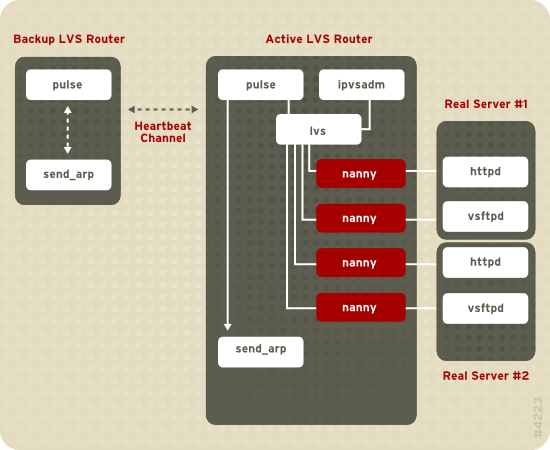
Figure 1.20. Components of a Running LVS Cluster
pulse daemon runs on both the active and passive LVS routers. On the backup LVS router, pulse sends a heartbeat to the public interface of the active router to make sure the active LVS router is properly functioning. On the active LVS router, pulse starts the lvs daemon and responds to heartbeat queries from the backup LVS router.
lvs daemon calls the ipvsadm utility to configure and maintain the IPVS (IP Virtual Server) routing table in the kernel and starts a nanny process for each configured virtual server on each real server. Each nanny process checks the state of one configured service on one real server, and tells the lvs daemon if the service on that real server is malfunctioning. If a malfunction is detected, the lvs daemon instructs ipvsadm to remove that real server from the IPVS routing table.
send_arp to reassign all virtual IP addresses to the NIC hardware addresses (MAC address) of the backup LVS router, sends a command to the active LVS router via both the public and private network interfaces to shut down the lvs daemon on the active LVS router, and starts the lvs daemon on the backup LVS router to accept requests for the configured virtual servers.
- Synchronize the data across the real servers.
- Add a third layer to the topology for shared data access.
rsync to replicate changed data across all nodes at a set interval. However, in environments where users frequently upload files or issue database transactions, using scripts or the rsync command for data synchronization does not function optimally. Therefore, for real servers with a high amount of uploads, database transactions, or similar traffic, a three-tiered topology is more appropriate for data synchronization.
1.8.1. Two-Tier LVS Topology
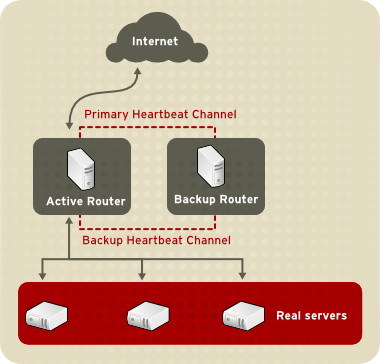
Figure 1.21. Two-Tier LVS Topology
eth0:1. Alternatively, each virtual server can be associated with a separate device per service. For example, HTTP traffic can be handled on eth0:1, and FTP traffic can be handled on eth0:2.
- Round-Robin Scheduling — Distributes each request sequentially around a pool of real servers. Using this algorithm, all the real servers are treated as equals without regard to capacity or load.
- Weighted Round-Robin Scheduling — Distributes each request sequentially around a pool of real servers but gives more jobs to servers with greater capacity. Capacity is indicated by a user-assigned weight factor, which is then adjusted up or down by dynamic load information. This is a preferred choice if there are significant differences in the capacity of real servers in a server pool. However, if the request load varies dramatically, a more heavily weighted server may answer more than its share of requests.
- Least-Connection — Distributes more requests to real servers with fewer active connections. This is a type of dynamic scheduling algorithm, making it a better choice if there is a high degree of variation in the request load. It is best suited for a real server pool where each server node has roughly the same capacity. If the real servers have varying capabilities, weighted least-connection scheduling is a better choice.
- Weighted Least-Connections (default) — Distributes more requests to servers with fewer active connections relative to their capacities. Capacity is indicated by a user-assigned weight, which is then adjusted up or down by dynamic load information. The addition of weighting makes this algorithm ideal when the real server pool contains hardware of varying capacity.
- Locality-Based Least-Connection Scheduling — Distributes more requests to servers with fewer active connections relative to their destination IPs. This algorithm is for use in a proxy-cache server cluster. It routes the packets for an IP address to the server for that address unless that server is above its capacity and has a server in its half load, in which case it assigns the IP address to the least loaded real server.
- Locality-Based Least-Connection Scheduling with Replication Scheduling — Distributes more requests to servers with fewer active connections relative to their destination IPs. This algorithm is also for use in a proxy-cache server cluster. It differs from Locality-Based Least-Connection Scheduling by mapping the target IP address to a subset of real server nodes. Requests are then routed to the server in this subset with the lowest number of connections. If all the nodes for the destination IP are above capacity, it replicates a new server for that destination IP address by adding the real server with the least connections from the overall pool of real servers to the subset of real servers for that destination IP. The most-loaded node is then dropped from the real server subset to prevent over-replication.
- Source Hash Scheduling — Distributes requests to the pool of real servers by looking up the source IP in a static hash table. This algorithm is for LVS routers with multiple firewalls.
1.8.2. Three-Tier LVS Topology
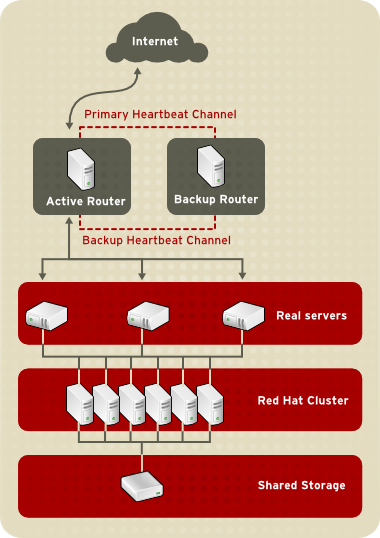
Figure 1.22. Three-Tier LVS Topology
1.8.3. Routing Methods
1.8.3.1. NAT Routing
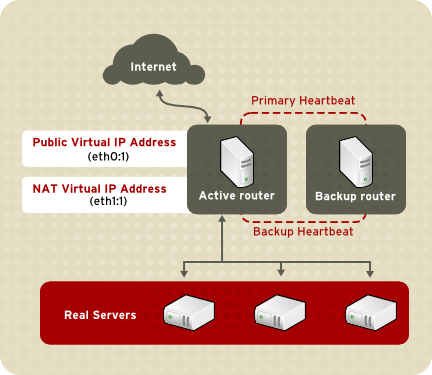
Figure 1.23. LVS Implemented with NAT Routing
1.8.3.2. Direct Routing
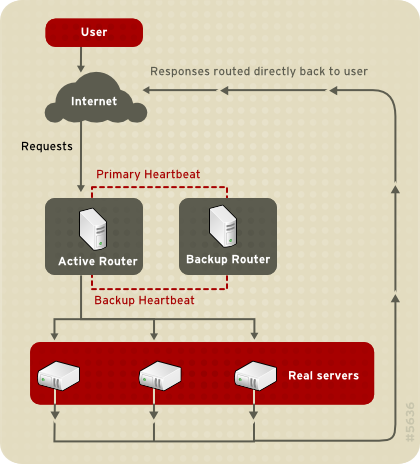
Figure 1.24. LVS Implemented with Direct Routing
arptables packet-filtering tool.
1.8.4. Persistence and Firewall Marks
1.8.4.1. Persistence
1.8.4.2. Firewall Marks
1.9. Cluster Administration Tools
1.9.1. Conga
- One Web interface for managing cluster and storage
- Automated Deployment of Cluster Data and Supporting Packages
- Easy Integration with Existing Clusters
- No Need to Re-Authenticate
- Integration of Cluster Status and Logs
- Fine-Grained Control over User Permissions
- — Provides tools for adding and deleting computers, adding and deleting users, and configuring user privileges. Only a system administrator is allowed to access this tab.
- — Provides tools for creating and configuring clusters. Each instance of luci lists clusters that have been set up with that luci. A system administrator can administer all clusters listed on this tab. Other users can administer only clusters that the user has permission to manage (granted by an administrator).
- — Provides tools for remote administration of storage. With the tools on this tab, you can manage storage on computers whether they belong to a cluster or not.

Figure 1.25. luci Tab

Figure 1.26. luci Tab

Figure 1.27. luci Tab
1.9.2. Cluster Administration GUI
system-config-cluster cluster administration graphical user interface (GUI) available with Red Hat Cluster Suite. The GUI is for use with the cluster infrastructure and the high-availability service management components (refer to Section 1.3, “Cluster Infrastructure” and Section 1.4, “High-availability Service Management”). The GUI consists of two major functions: the Cluster Configuration Tool and the Cluster Status Tool. The Cluster Configuration Tool provides the capability to create, edit, and propagate the cluster configuration file (/etc/cluster/cluster.conf). The Cluster Status Tool provides the capability to manage high-availability services. The following sections summarize those functions.
1.9.2.1. Cluster Configuration Tool

Figure 1.28. Cluster Configuration Tool
/etc/cluster/cluster.conf) with a hierarchical graphical display in the left panel. A triangle icon to the left of a component name indicates that the component has one or more subordinate components assigned to it. Clicking the triangle icon expands and collapses the portion of the tree below a component. The components displayed in the GUI are summarized as follows:
- Cluster Nodes — Displays cluster nodes. Nodes are represented by name as subordinate elements under Cluster Nodes. Using configuration buttons at the bottom of the right frame (below Properties), you can add nodes, delete nodes, edit node properties, and configure fencing methods for each node.
- Fence Devices — Displays fence devices. Fence devices are represented as subordinate elements under Fence Devices. Using configuration buttons at the bottom of the right frame (below Properties), you can add fence devices, delete fence devices, and edit fence-device properties. Fence devices must be defined before you can configure fencing (with the button) for each node.
- Managed Resources — Displays failover domains, resources, and services.
- Failover Domains — For configuring one or more subsets of cluster nodes used to run a high-availability service in the event of a node failure. Failover domains are represented as subordinate elements under Failover Domains. Using configuration buttons at the bottom of the right frame (below Properties), you can create failover domains (when Failover Domains is selected) or edit failover domain properties (when a failover domain is selected).
- Resources — For configuring shared resources to be used by high-availability services. Shared resources consist of file systems, IP addresses, NFS mounts and exports, and user-created scripts that are available to any high-availability service in the cluster. Resources are represented as subordinate elements under Resources. Using configuration buttons at the bottom of the right frame (below Properties), you can create resources (when Resources is selected) or edit resource properties (when a resource is selected).
Note
The Cluster Configuration Tool provides the capability to configure private resources, also. A private resource is a resource that is configured for use with only one service. You can configure a private resource within a Service component in the GUI. - Services — For creating and configuring high-availability services. A service is configured by assigning resources (shared or private), assigning a failover domain, and defining a recovery policy for the service. Services are represented as subordinate elements under Services. Using configuration buttons at the bottom of the right frame (below Properties), you can create services (when Services is selected) or edit service properties (when a service is selected).
1.9.2.2. Cluster Status Tool

Figure 1.29. Cluster Status Tool
/etc/cluster/cluster.conf). You can use the Cluster Status Tool to enable, disable, restart, or relocate a high-availability service.
1.9.3. Command Line Administration Tools
system-config-cluster Cluster Administration GUI, command line tools are available for administering the cluster infrastructure and the high-availability service management components. The command line tools are used by the Cluster Administration GUI and init scripts supplied by Red Hat. Table 1.1, “Command Line Tools” summarizes the command line tools.
| Command Line Tool | Used With | Purpose |
|---|---|---|
ccs_tool — Cluster Configuration System Tool | Cluster Infrastructure | ccs_tool is a program for making online updates to the cluster configuration file. It provides the capability to create and modify cluster infrastructure components (for example, creating a cluster, adding and removing a node). For more information about this tool, refer to the ccs_tool(8) man page. |
cman_tool — Cluster Management Tool | Cluster Infrastructure | cman_tool is a program that manages the CMAN cluster manager. It provides the capability to join a cluster, leave a cluster, kill a node, or change the expected quorum votes of a node in a cluster. cman_tool is available with DLM clusters only. For more information about this tool, refer to the cman_tool(8) man page. |
gulm_tool — Cluster Management Tool | Cluster Infrastructure | gulm_tool is a program used to manage GULM. It provides an interface to lock_gulmd, the GULM lock manager. gulm_tool is available with GULM clusters only. For more information about this tool, refer to the gulm_tool(8) man page. |
fence_tool — Fence Tool | Cluster Infrastructure | fence_tool is a program used to join or leave the default fence domain. Specifically, it starts the fence daemon (fenced) to join the domain and kills fenced to leave the domain. fence_tool is available with DLM clusters only. For more information about this tool, refer to the fence_tool(8) man page. |
clustat — Cluster Status Utility | High-availability Service Management Components | The clustat command displays the status of the cluster. It shows membership information, quorum view, and the state of all configured user services. For more information about this tool, refer to the clustat(8) man page. |
clusvcadm — Cluster User Service Administration Utility | High-availability Service Management Components | The clusvcadm command allows you to enable, disable, relocate, and restart high-availability services in a cluster. For more information about this tool, refer to the clusvcadm(8) man page. |
1.10. Linux Virtual Server Administration GUI
/etc/sysconfig/ha/lvs.cf.
piranha-gui service running on the active LVS router. You can access the Piranha Configuration Tool locally or remotely with a Web browser. You can access it locally with this URL: http://localhost:3636. You can access it remotely with either the hostname or the real IP address followed by :3636. If you are accessing the Piranha Configuration Tool remotely, you need an ssh connection to the active LVS router as the root user.
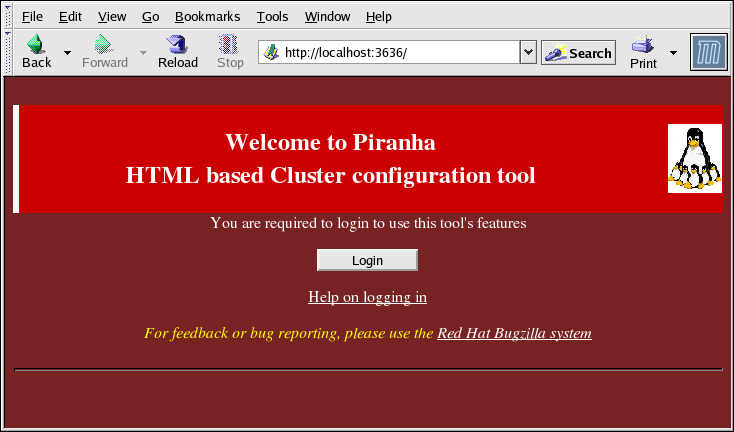
Figure 1.30. The Welcome Panel
1.10.1. CONTROL/MONITORING
pulse daemon, the LVS routing table, and the LVS-spawned nanny processes.
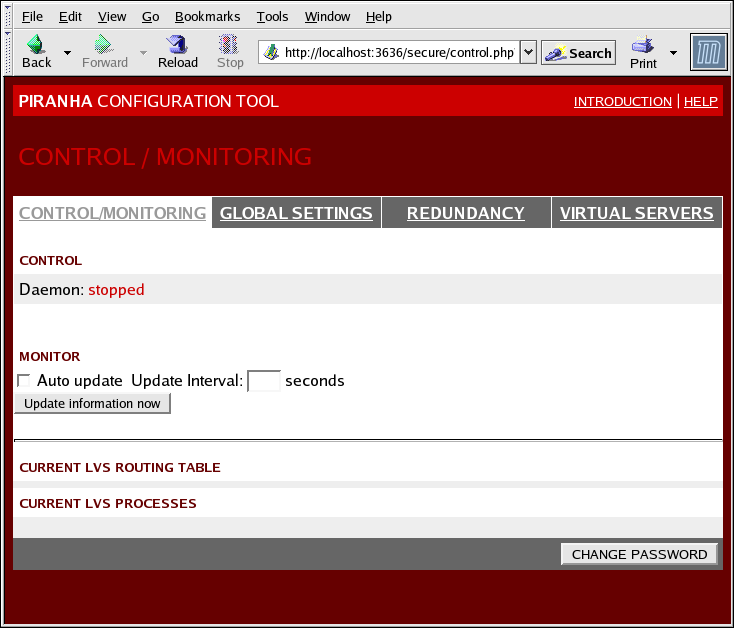
Figure 1.31. The CONTROL/MONITORING Panel
- Auto update
- Enables the status display to be updated automatically at a user-configurable interval set in the Update frequency in seconds text box (the default value is 10 seconds).It is not recommended that you set the automatic update to an interval less than 10 seconds. Doing so may make it difficult to reconfigure the Auto update interval because the page will update too frequently. If you encounter this issue, simply click on another panel and then back on CONTROL/MONITORING.
- Provides manual update of the status information.
- Clicking this button takes you to a help screen with information on how to change the administrative password for the Piranha Configuration Tool.
1.10.2. GLOBAL SETTINGS
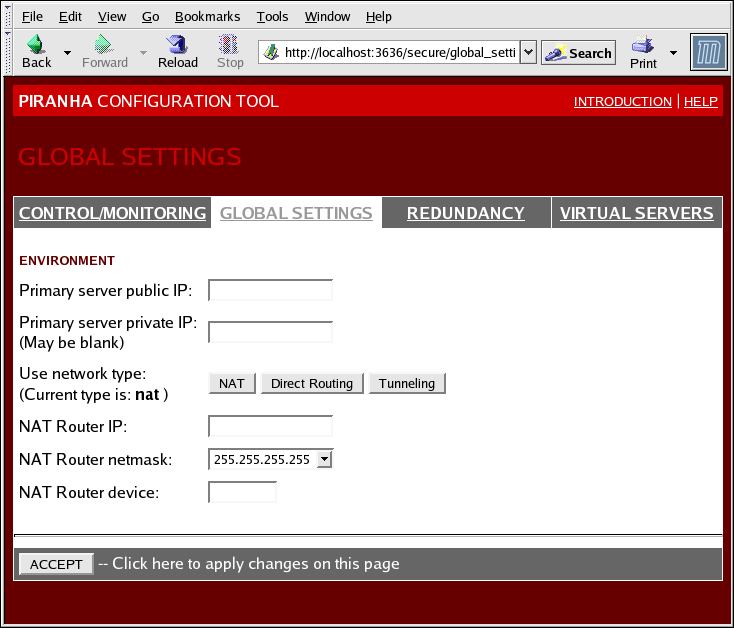
Figure 1.32. The GLOBAL SETTINGS Panel
- Primary server public IP
- The publicly routable real IP address for the primary LVS node.
- Primary server private IP
- The real IP address for an alternative network interface on the primary LVS node. This address is used solely as an alternative heartbeat channel for the backup router.
- Use network type
- Selects select NAT routing.
- NAT Router IP
- The private floating IP in this text field. This floating IP should be used as the gateway for the real servers.
- NAT Router netmask
- If the NAT router's floating IP needs a particular netmask, select it from drop-down list.
- NAT Router device
- Defines the device name of the network interface for the floating IP address, such as
eth1:1.
1.10.3. REDUNDANCY
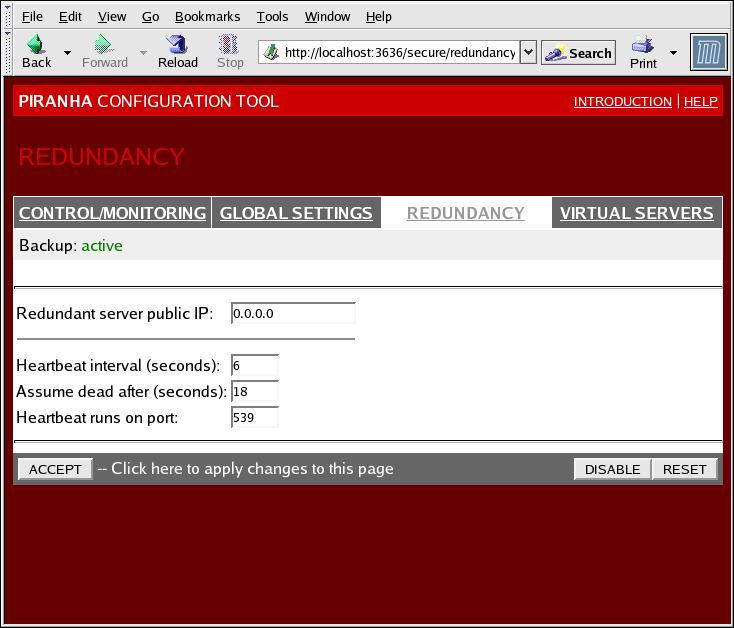
Figure 1.33. The REDUNDANCY Panel
- Redundant server public IP
- The public real IP address for the backup LVS router.
- Redundant server private IP
- The backup router's private real IP address.
- Heartbeat Interval (seconds)
- Sets the number of seconds between heartbeats — the interval that the backup node will check the functional status of the primary LVS node.
- Assume dead after (seconds)
- If the primary LVS node does not respond after this number of seconds, then the backup LVS router node will initiate failover.
- Heartbeat runs on port
- Sets the port at which the heartbeat communicates with the primary LVS node. The default is set to 539 if this field is left blank.
1.10.4. VIRTUAL SERVERS
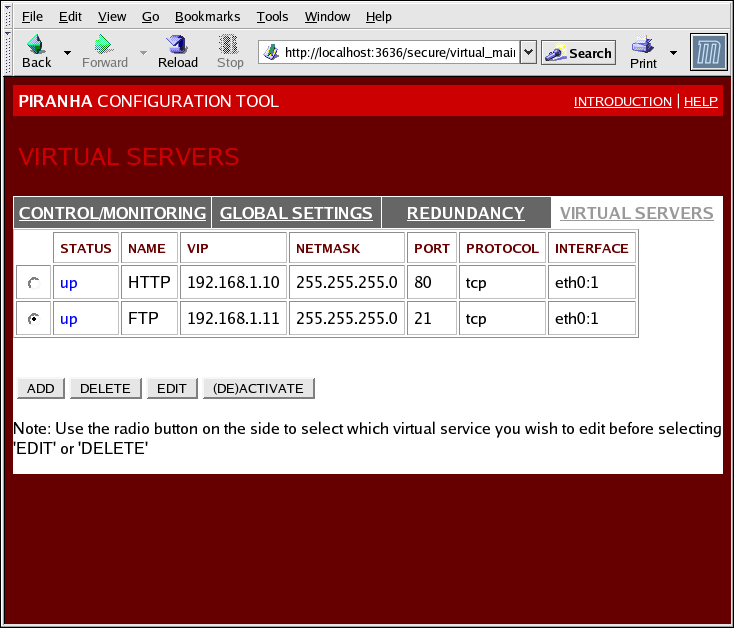
Figure 1.34. The VIRTUAL SERVERS Panel
1.10.4.1. The VIRTUAL SERVER Subsection
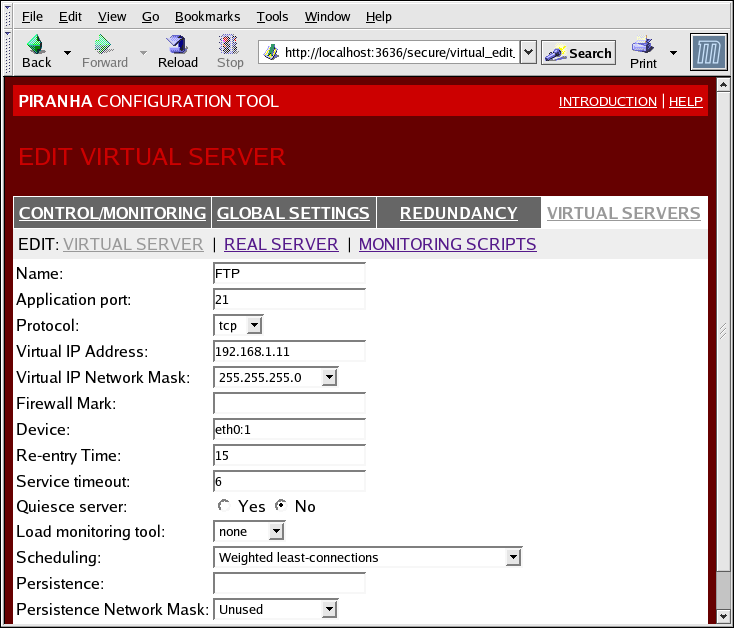
Figure 1.35. The VIRTUAL SERVERS Subsection
- Name
- A descriptive name to identify the virtual server. This name is not the hostname for the machine, so make it descriptive and easily identifiable. You can even reference the protocol used by the virtual server, such as HTTP.
- Application port
- The port number through which the service application will listen.
- Provides a choice of UDP or TCP, in a drop-down menu.
- Virtual IP Address
- The virtual server's floating IP address.
- The netmask for this virtual server, in the drop-down menu.
- Firewall Mark
- For entering a firewall mark integer value when bundling multi-port protocols or creating a multi-port virtual server for separate, but related protocols.
- Device
- The name of the network device to which you want the floating IP address defined in the Virtual IP Address field to bind.You should alias the public floating IP address to the Ethernet interface connected to the public network.
- Re-entry Time
- An integer value that defines the number of seconds before the active LVS router attempts to use a real server after the real server failed.
- Service Timeout
- An integer value that defines the number of seconds before a real server is considered dead and not available.
- Quiesce server
- When the Quiesce server radio button is selected, anytime a new real server node comes online, the least-connections table is reset to zero so the active LVS router routes requests as if all the real servers were freshly added to the cluster. This option prevents the a new server from becoming bogged down with a high number of connections upon entering the cluster.
- Load monitoring tool
- The LVS router can monitor the load on the various real servers by using either
ruporruptime. If you selectrupfrom the drop-down menu, each real server must run therstatdservice. If you selectruptime, each real server must run therwhodservice. - Scheduling
- The preferred scheduling algorithm from the drop-down menu. The default is
Weighted least-connection. - Persistence
- Used if you need persistent connections to the virtual server during client transactions. Specifies the number of seconds of inactivity allowed to lapse before a connection times out in this text field.
- To limit persistence to particular subnet, select the appropriate network mask from the drop-down menu.
1.10.4.2. REAL SERVER Subsection
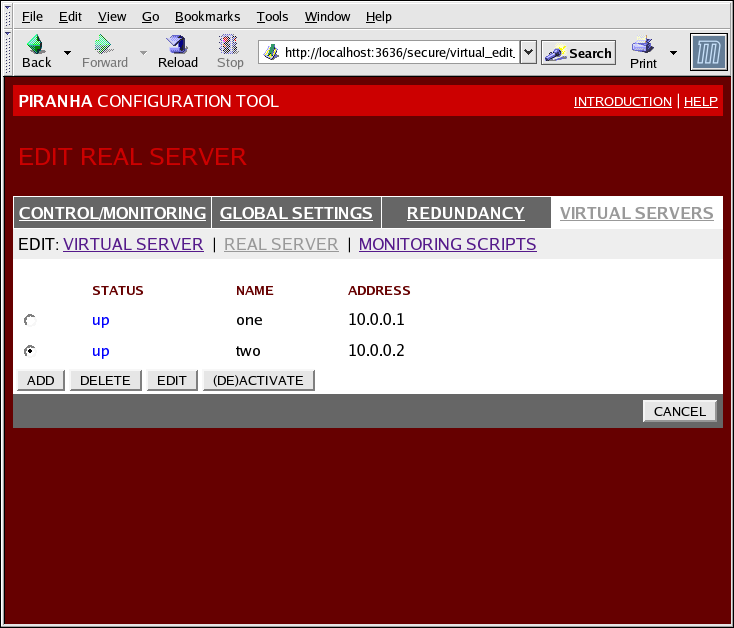
Figure 1.36. The REAL SERVER Subsection
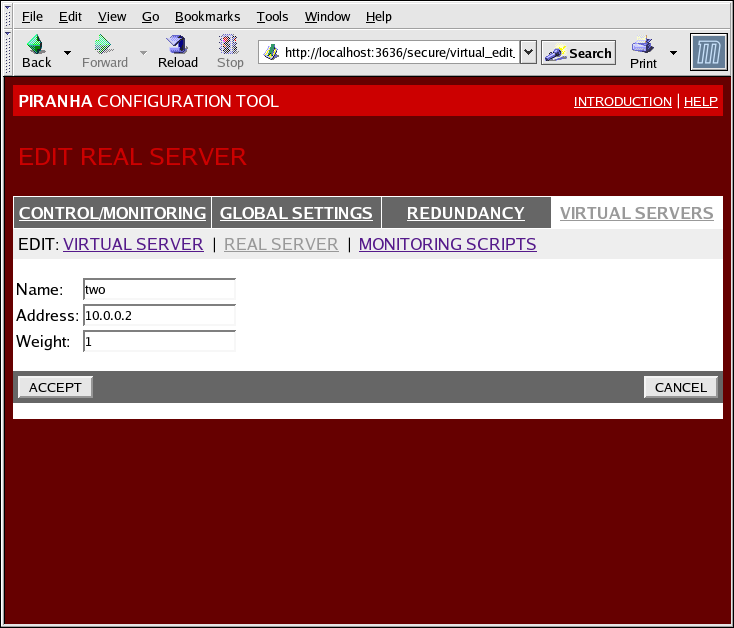
Figure 1.37. The REAL SERVER Configuration Panel
- Name
- A descriptive name for the real server.
Note
This name is not the hostname for the machine, so make it descriptive and easily identifiable. - Address
- The real server's IP address. Since the listening port is already specified for the associated virtual server, do not add a port number.
- Weight
- An integer value indicating this host's capacity relative to that of other hosts in the pool. The value can be arbitrary, but treat it as a ratio in relation to other real servers.
1.10.4.3. EDIT MONITORING SCRIPTS Subsection
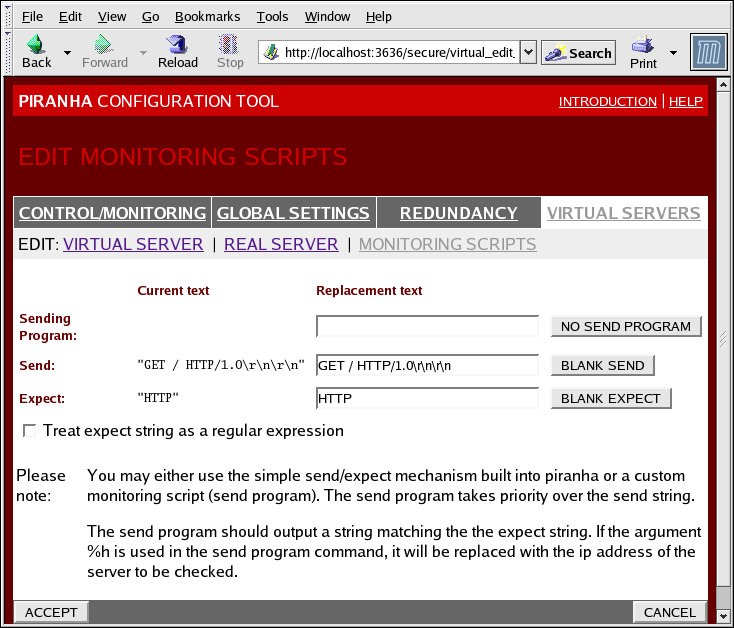
Figure 1.38. The EDIT MONITORING SCRIPTS Subsection
- Sending Program
- For more advanced service verification, you can use this field to specify the path to a service-checking script. This function is especially helpful for services that require dynamically changing data, such as HTTPS or SSL.To use this function, you must write a script that returns a textual response, set it to be executable, and type the path to it in the Sending Program field.
Note
If an external program is entered in the Sending Program field, then the Send field is ignored. - Send
- A string for the
nannydaemon to send to each real server in this field. By default the send field is completed for HTTP. You can alter this value depending on your needs. If you leave this field blank, thenannydaemon attempts to open the port and assume the service is running if it succeeds.Only one send sequence is allowed in this field, and it can only contain printable, ASCII characters as well as the following escape characters:- \n for new line.
- \r for carriage return.
- \t for tab.
- \ to escape the next character which follows it.
- Expect
- The textual response the server should return if it is functioning properly. If you wrote your own sending program, enter the response you told it to send if it was successful.
Chapter 2. Red Hat Cluster Suite Component Summary
2.1. Cluster Components
| Function | Components | Description |
|---|---|---|
| Conga | luci | Remote Management System - Management Station |
ricci | Remote Management System - Managed Station | |
| Cluster Configuration Tool | system-config-cluster | Command used to manage cluster configuration in a graphical setting. |
| Cluster Logical Volume Manager (CLVM) | clvmd | The daemon that distributes LVM metadata updates around a cluster. It must be running on all nodes in the cluster and will give an error if a node in the cluster does not have this daemon running. |
lvm | LVM2 tools. Provides the command-line tools for LVM2.. | |
system-config-lvm | Provides graphical user interface for LVM2. | |
lvm.conf | The LVM configuration file. The full path is /etc/lvm/lvm.conf.. | |
| Cluster Configuration System (CCS) | ccs_tool | ccs_tool is part of the Cluster Configuration System (CCS). It is used to make online updates of CCS configuration files. Additionally, it can be used to upgrade cluster configuration files from CCS archives created with GFS 6.0 (and earlier) to the XML format configuration format used with this release of Red Hat Cluster Suite. |
ccs_test | Diagnostic and testing command that is used to retrieve information from configuration files through ccsd. | |
ccsd | CCS daemon that runs on all cluster nodes and provides configuration file data to cluster software. | |
cluster.conf | This is the cluster configuration file. The full path is /etc/cluster/cluster.conf. | |
| Cluster Manager (CMAN) | cman.ko | The kernel module for CMAN. |
cman_tool | This is the administrative front end to CMAN. It starts and stops CMAN and can change some internal parameters such as votes. | |
libcman.so.<version number> | Library for programs that need to interact with cman.ko. | |
| Resource Group Manager (rgmanager) | clusvcadm | Command used to manually enable, disable, relocate, and restart user services in a cluster |
clustat | Command used to display the status of the cluster, including node membership and services running. | |
clurgmgrd | Daemon used to handle user service requests including service start, service disable, service relocate, and service restart | |
clurmtabd | Daemon used to handle Clustered NFS mount tables | |
| Fence | fence_apc | Fence agent for APC power switch. |
fence_bladecenter | Fence agent for for IBM Bladecenters with Telnet interface. | |
fence_bullpap | Fence agent for Bull Novascale Platform Administration Processor (PAP) Interface. | |
fence_drac | Fencing agent for Dell Remote Access Card | |
fence_ipmilan | Fence agent for machines controlled by IPMI (Intelligent Platform Management Interface) over LAN. | |
fence_wti | Fence agent for WTI power switch. | |
fence_brocade | Fence agent for Brocade Fibre Channel switch. | |
fence_mcdata | Fence agent for McData Fibre Channel switch. | |
fence_vixel | Fence agent for Vixel Fibre Channel switch. | |
fence_sanbox2 | Fence agent for SANBox2 Fibre Channel switch. | |
fence_ilo | Fence agent for HP ILO interfaces (formerly fence_rib). | |
fence_rsa | I/O Fencing agent for IBM RSA II. | |
fence_gnbd | Fence agent used with GNBD storage. | |
fence_scsi | I/O fencing agent for SCSI persistent reservations | |
fence_egenera | Fence agent used with Egenera BladeFrame system. | |
fence_manual | Fence agent for manual interaction. NOTE This component is not supported for production environments. | |
fence_ack_manual | User interface for fence_manual agent. | |
fence_node | A program which performs I/O fencing on a single node. | |
fence_xvm | I/O Fencing agent for Xen virtual machines. | |
fence_xvmd | I/O Fencing agent host for Xen virtual machines. | |
fence_tool | A program to join and leave the fence domain. | |
fenced | The I/O Fencing daemon. | |
| DLM | libdlm.so.<version number> | Library for Distributed Lock Manager (DLM) support. |
dlm.ko | Kernel module that is installed on cluster nodes for Distributed Lock Manager (DLM) support. | |
| GULM | lock_gulmd | Server/daemon that runs on each node and communicates with all nodes in GFS cluster. |
libgulm.so.xxx | Library for GULM lock manager support | |
gulm_tool | Command that configures and debugs the lock_gulmd server. | |
| GFS | gfs.ko | Kernel module that implements the GFS file system and is loaded on GFS cluster nodes. |
gfs_fsck | Command that repairs an unmounted GFS file system. | |
gfs_grow | Command that grows a mounted GFS file system. | |
gfs_jadd | Command that adds journals to a mounted GFS file system. | |
gfs_mkfs | Command that creates a GFS file system on a storage device. | |
gfs_quota | Command that manages quotas on a mounted GFS file system. | |
gfs_tool | Command that configures or tunes a GFS file system. This command can also gather a variety of information about the file system. | |
mount.gfs | Mount helper called by mount(8); not used by user. | |
lock_harness.ko | Implements a pluggable lock module interface for GFS that allows for a variety of locking mechanisms to be used. | |
lock_dlm.ko | A lock module that implements DLM locking for GFS. It plugs into the lock harness, lock_harness.ko and communicates with the DLM lock manager in Red Hat Cluster Suite. | |
lock_gulm.ko | A lock module that implements GULM locking for GFS. It plugs into the lock harness, lock_harness.ko and communicates with the GULM lock manager in Red Hat Cluster Suite. | |
lock_nolock.ko | A lock module for use when GFS is used as a local file system only. It plugs into the lock harness, lock_harness.ko and provides local locking. | |
| GNBD | gnbd.ko | Kernel module that implements the GNBD device driver on clients. |
gnbd_export | Command to create, export and manage GNBDs on a GNBD server. | |
gnbd_import | Command to import and manage GNBDs on a GNBD client. | |
gnbd_serv | A server daemon that allows a node to export local storage over the network. | |
| LVS | pulse | This is the controlling process which starts all other daemons related to LVS routers. At boot time, the daemon is started by the /etc/rc.d/init.d/pulse script. It then reads the configuration file /etc/sysconfig/ha/lvs.cf. On the active LVS router, pulse starts the LVS daemon. On the backup router, pulse determines the health of the active router by executing a simple heartbeat at a user-configurable interval. If the active LVS router fails to respond after a user-configurable interval, it initiates failover. During failover, pulse on the backup LVS router instructs the pulse daemon on the active LVS router to shut down all LVS services, starts the send_arp program to reassign the floating IP addresses to the backup LVS router's MAC address, and starts the lvs daemon. |
lvsd | The lvs daemon runs on the active LVS router once called by pulse. It reads the configuration file /etc/sysconfig/ha/lvs.cf, calls the ipvsadm utility to build and maintain the IPVS routing table, and assigns a nanny process for each configured LVS service. If nanny reports a real server is down, lvs instructs the ipvsadm utility to remove the real server from the IPVS routing table. | |
ipvsadm | This service updates the IPVS routing table in the kernel. The lvs daemon sets up and administers LVS by calling ipvsadm to add, change, or delete entries in the IPVS routing table. | |
nanny | The nanny monitoring daemon runs on the active LVS router. Through this daemon, the active LVS router determines the health of each real server and, optionally, monitors its workload. A separate process runs for each service defined on each real server. | |
lvs.cf | This is the LVS configuration file. The full path for the file is /etc/sysconfig/ha/lvs.cf. Directly or indirectly, all daemons get their configuration information from this file. | |
| Piranha Configuration Tool | This is the Web-based tool for monitoring, configuring, and administering LVS. This is the default tool to maintain the /etc/sysconfig/ha/lvs.cf LVS configuration file. | |
send_arp | This program sends out ARP broadcasts when the floating IP address changes from one node to another during failover. | |
| Quorum Disk | qdisk | A disk-based quorum daemon for CMAN / Linux-Cluster. |
mkqdisk | Cluster Quorum Disk Utility | |
qdiskd | Cluster Quorum Disk Daemon |
2.2. Man Pages
- Cluster Infrastructure
- ccs_tool (8) - The tool used to make online updates of CCS config files
- ccs_test (8) - The diagnostic tool for a running Cluster Configuration System
- ccsd (8) - The daemon used to access CCS cluster configuration files
- ccs (7) - Cluster Configuration System
- cman_tool (8) - Cluster Management Tool
- cluster.conf [cluster] (5) - The configuration file for cluster products
- qdisk (5) - a disk-based quorum daemon for CMAN / Linux-Cluster
- mkqdisk (8) - Cluster Quorum Disk Utility
- qdiskd (8) - Cluster Quorum Disk Daemon
- fence_ack_manual (8) - program run by an operator as a part of manual I/O Fencing
- fence_apc (8) - I/O Fencing agent for APC MasterSwitch
- fence_bladecenter (8) - I/O Fencing agent for IBM Bladecenter
- fence_brocade (8) - I/O Fencing agent for Brocade FC switches
- fence_bullpap (8) - I/O Fencing agent for Bull FAME architecture controlled by a PAP management console
- fence_drac (8) - fencing agent for Dell Remote Access Card
- fence_egenera (8) - I/O Fencing agent for the Egenera BladeFrame
- fence_gnbd (8) - I/O Fencing agent for GNBD-based GFS clusters
- fence_ilo (8) - I/O Fencing agent for HP Integrated Lights Out card
- fence_ipmilan (8) - I/O Fencing agent for machines controlled by IPMI over LAN
- fence_manual (8) - program run by fenced as a part of manual I/O Fencing
- fence_mcdata (8) - I/O Fencing agent for McData FC switches
- fence_node (8) - A program which performs I/O fencing on a single node
- fence_rib (8) - I/O Fencing agent for Compaq Remote Insight Lights Out card
- fence_rsa (8) - I/O Fencing agent for IBM RSA II
- fence_sanbox2 (8) - I/O Fencing agent for QLogic SANBox2 FC switches
- fence_scsi (8) - I/O fencing agent for SCSI persistent reservations
- fence_tool (8) - A program to join and leave the fence domain
- fence_vixel (8) - I/O Fencing agent for Vixel FC switches
- fence_wti (8) - I/O Fencing agent for WTI Network Power Switch
- fence_xvm (8) - I/O Fencing agent for Xen virtual machines
- fence_xvmd (8) - I/O Fencing agent host for Xen virtual machines
- fenced (8) - the I/O Fencing daemon
- High-availability Service Management
- clusvcadm (8) - Cluster User Service Administration Utility
- clustat (8) - Cluster Status Utility
- Clurgmgrd [clurgmgrd] (8) - Resource Group (Cluster Service) Manager Daemon
- clurmtabd (8) - Cluster NFS Remote Mount Table Daemon
- GFS
- gfs_fsck (8) - Offline GFS file system checker
- gfs_grow (8) - Expand a GFS filesystem
- gfs_jadd (8) - Add journals to a GFS filesystem
- gfs_mount (8) - GFS mount options
- gfs_quota (8) - Manipulate GFS disk quotas
- gfs_tool (8) - interface to gfs ioctl calls
- Cluster Logical Volume Manager
- clvmd (8) - cluster LVM daemon
- lvm (8) - LVM2 tools
- lvm.conf [lvm] (5) - Configuration file for LVM2
- lvmchange (8) - change attributes of the logical volume manager
- pvcreate (8) - initialize a disk or partition for use by LVM
- lvs (8) - report information about logical volumes
- Global Network Block Device
- gnbd_export (8) - the interface to export GNBDs
- gnbd_import (8) - manipulate GNBD block devices on a client
- gnbd_serv (8) - gnbd server daemon
- LVS
- pulse (8) - heartbeating daemon for monitoring the health of cluster nodes
- lvs.cf [lvs] (5) - configuration file for lvs
- lvscan (8) - scan (all disks) for logical volumes
- lvsd (8) - daemon to control the Red Hat clustering services
- ipvsadm (8) - Linux Virtual Server administration
- ipvsadm-restore (8) - restore the IPVS table from stdin
- ipvsadm-save (8) - save the IPVS table to stdout
- nanny (8) - tool to monitor status of services in a cluster
- send_arp (8) - tool to notify network of a new IP address / MAC address mapping
2.3. Compatible Hardware
Appendix A. Revision History
| Revision History | |||
|---|---|---|---|
| Revision 1.0-6.400 | 2013-10-31 | ||
| |||
| Revision 1.0-6 | 2012-07-18 | ||
| |||
| Revision 1.0-0 | Fri Apr 24 2009 | ||
|
| |||
Index
A
- about this document
- other Red Hat Enterprise Linux documents, Introduction
C
- cluster
- displaying status, Cluster Status Tool
- cluster administration
- displaying cluster and service status, Cluster Status Tool
- cluster component compatible hardware, Compatible Hardware
- cluster components table, Cluster Components
- Cluster Configuration Tool
- accessing, Cluster Configuration Tool
- cluster service
- displaying status, Cluster Status Tool
- command line tools table, Command Line Administration Tools
- compatible hardware
- cluster components, Compatible Hardware
- Conga
- overview, Conga
- Conga overview, Conga
F
- feedback, Feedback
I
- introduction, Introduction
L
- LVS
- direct routing
- requirements, hardware, Direct Routing
- requirements, network, Direct Routing
- requirements, software, Direct Routing
- routing methods
- NAT, Routing Methods
- three tiered
- high-availability cluster, Three-Tier LVS Topology
N
- NAT
- routing methods, LVS, Routing Methods
- network address translation (see NAT)
O
- overview
- economy, Red Hat GFS
- performance, Red Hat GFS
- scalability, Red Hat GFS
P
- Piranha Configuration Tool
- CONTROL/MONITORING, CONTROL/MONITORING
- EDIT MONITORING SCRIPTS Subsection, EDIT MONITORING SCRIPTS Subsection
- GLOBAL SETTINGS, GLOBAL SETTINGS
- login panel, Linux Virtual Server Administration GUI
- necessary software, Linux Virtual Server Administration GUI
- REAL SERVER subsection, REAL SERVER Subsection
- REDUNDANCY, REDUNDANCY
- VIRTUAL SERVER subsection, VIRTUAL SERVERS
- Firewall Mark, The VIRTUAL SERVER Subsection
- Persistence, The VIRTUAL SERVER Subsection
- Scheduling, The VIRTUAL SERVER Subsection
- Virtual IP Address, The VIRTUAL SERVER Subsection
- VIRTUAL SERVERS, VIRTUAL SERVERS
R
- Red Hat Cluster Manager
- components, Cluster Components
T
- table
- command line tools, Command Line Administration Tools
- tables
- cluster components, Cluster Components
