 Red Hat Summit
Dieser Inhalt ist in der von Ihnen ausgewählten Sprache nicht verfügbar.
Hot Rod Java Client Guide
Configure and use Hot Rod Java clients
Abstract
Red Hat Data Grid
Data Grid is a high-performance, distributed in-memory data store.
- Schemaless data structure
- Flexibility to store different objects as key-value pairs.
- Grid-based data storage
- Designed to distribute and replicate data across clusters.
- Elastic scaling
- Dynamically adjust the number of nodes to meet demand without service disruption.
- Data interoperability
- Store, retrieve, and query data in the grid from different endpoints.
Data Grid documentation
Documentation for Data Grid is available on the Red Hat customer portal.
Data Grid downloads
Access the Data Grid Software Downloads on the Red Hat customer portal.
You must have a Red Hat account to access and download Data Grid software.
Making open source more inclusive
Red Hat is committed to replacing problematic language in our code, documentation, and web properties. We are beginning with these four terms: master, slave, blacklist, and whitelist. Because of the enormity of this endeavor, these changes will be implemented gradually over several upcoming releases. For more details, see our CTO Chris Wright’s message.
Chapter 1. Hot Rod Java Clients
Access Data Grid remotely through the Hot Rod Java client API.
1.1. Hot Rod Protocol
Hot Rod is a binary TCP protocol that Data Grid offers high-performance client-server interactions with the following capabilities:
- Load balancing. Hot Rod clients can send requests across Data Grid clusters using different strategies.
- Failover. Hot Rod clients can monitor Data Grid cluster topology changes and automatically switch to available nodes.
- Efficient data location. Hot Rod clients can find key owners and make requests directly to those nodes, which reduces latency.
1.2. Configuring the Data Grid Maven Repository
Data Grid Java distributions are available from Maven.
You can download the Data Grid Maven repository from the customer portal or pull Data Grid dependencies from the public Red Hat Enterprise Maven repository.
1.2.1. Downloading the Data Grid Maven Repository
Download and install the Data Grid Maven repository to a local file system, Apache HTTP server, or Maven repository manager if you do not want to use the public Red Hat Enterprise Maven repository.
Procedure
- Log in to the Red Hat customer portal.
- Navigate to the Software Downloads for Data Grid.
- Download the Red Hat Data Grid 8.1 Maven Repository.
- Extract the archived Maven repository to your local file system.
-
Open the
README.mdfile and follow the appropriate installation instructions.
1.2.2. Adding Red Hat Maven Repositories
Include the Red Hat GA repository in your Maven build environment to get Data Grid artifacts and dependencies.
Procedure
Add the Red Hat GA repository to your Maven settings file, typically
~/.m2/settings.xml, or directly in thepom.xmlfile of your project.Copy to Clipboard Copied! Toggle word wrap Toggle overflow
Reference
1.2.3. Configuring Your Data Grid POM
Maven uses configuration files called Project Object Model (POM) files to define projects and manage builds. POM files are in XML format and describe the module and component dependencies, build order, and targets for the resulting project packaging and output.
Procedure
-
Open your project
pom.xmlfor editing. -
Define the
version.infinispanproperty with the correct Data Grid version. Include the
infinispan-bomin adependencyManagementsection.The Bill Of Materials (BOM) controls dependency versions, which avoids version conflicts and means you do not need to set the version for each Data Grid artifact you add as a dependency to your project.
-
Save and close
pom.xml.
The following example shows the Data Grid version and BOM:
Next Steps
Add Data Grid artifacts as dependencies to your pom.xml as required.
1.3. Getting the Hot Rod Java Client
Add the Hot Rod Java client to your project.
Prerequisites
Hot Rod Java clients can use Java 8 or Java 11.
Procedure
-
Add the
infinispan-client-hotrodartifact as a dependency in yourpom.xmlas follows:
<dependency>
  <groupId>org.infinispan</groupId>
  <artifactId>infinispan-client-hotrod</artifactId>
</dependency>
<dependency>
  <groupId>org.infinispan</groupId>
  <artifactId>infinispan-client-hotrod</artifactId>
</dependency>Reference
Chapter 2. Configuring Hot Rod Java Clients
2.1. Programmatically Configuring Hot Rod Java Clients
Use the ConfigurationBuilder class to generate immutable configuration objects that you can pass to RemoteCacheManager.
For example, create a client instance with the Java fluent API as follows:
2.2. Configuring Hot Rod Java Client Property Files
Add hotrod-client.properties to your classpath so that the client passes configuration to RemoteCacheManager.
Example hotrod-client.properties
To use hotrod-client.properties somewhere other than your classpath, do:
2.3. Client Intelligence
Hot Rod client intelligence refers to mechanisms for locating Data Grid servers to efficiently route requests.
Basic intelligence
Clients do not store any information about Data Grid clusters or key hash values.
Topology-aware
Clients receive and store information about Data Grid clusters. Clients maintain an internal mapping of the cluster topology that changes whenever servers join or leave clusters.
To receive a cluster topology, clients need the address (IP:HOST) of at least one Hot Rod server at startup. After the client connects to the server, Data Grid transmits the topology to the client. When servers join or leave the cluster, Data Grid transmits an updated topology to the client.
Distribution-aware
Clients are topology-aware and store consistent hash values for keys.
For example, take a put(k,v) operation. The client calculates the hash value for the key so it can locate the exact server on which the data resides. Clients can then connect directly to the owner to dispatch the operation.
The benefit of distribution-aware intelligence is that Data Grid servers do not need to look up values based on key hashes, which uses less resources on the server side. Another benefit is that servers respond to client requests more quickly because it skips additional network roundtrips.
2.3.1. Request Balancing
Clients that use topology-aware intelligence use request balancing for all requests. The default balancing strategy is round-robin, so topology-aware clients always send requests to servers in round-robin order.
For example, s1, s2, s3 are servers in a Data Grid cluster. Clients perform request balancing as follows:
Clients that use distribution-aware intelligence use request balancing only for failed requests. When requests fail, distribution-aware clients retry the request on the next available server.
Custom balancing policies
You can implement FailoverRequestBalancingStrategy and specify your class in your hotrod-client.properties configuration with the following property:
infinispan.client.hotrod.request_balancing_strategy
2.3.2. Client Failover
Hot Rod clients can automatically failover when Data Grid cluster topologies change. For instance, Hot Rod clients that are topology-aware can detect when one or more Data Grid servers fail.
In addition to failover between clustered Data Grid servers, Hot Rod clients can failover between Data Grid clusters.
For example, you have a Data Grid cluster running in New York (NYC) and another cluster running in London (LON). Clients sending requests to NYC detect that no nodes are available so they switch to the cluster in LON. Clients then maintain connections to LON until you manually switch clusters or failover happens again.
Transactional Caches with Failover
Conditional operations, such as putIfAbsent(), replace(), remove(), have strict method return guarantees. Likewise, some operations can require previous values to be returned.
Even though Hot Rod clients can failover, you should use transactional caches to ensure that operations do not partially complete and leave conflicting entries on different nodes.
2.4. Configuring Authentication Mechanisms for Hot Rod Clients
Data Grid servers use different mechanisms to authenticate Hot Rod client connections.
Procedure
-
Specify the authentication mechanisms that Data Grid server uses with the
saslMechanism()method from theSecurityConfigurationBuilderclass.
SCRAM
DIGEST
PLAIN
OAUTHBEARER
OAUTHBEARER authentication with TokenCallbackHandler
You can configure clients with a TokenCallbackHandler to refresh OAuth2 tokens before they expire, as in the following example:
EXTERNAL
GSSAPI
The preceding configuration uses the BasicCallbackHandler to retrieve the client subject and handle authentication. However, this actually invokes different callbacks:
-
NameCallbackandPasswordCallbackconstruct the client subject. -
AuthorizeCallbackis called during SASL authentication.
Custom CallbackHandler
Hot Rod clients set up a default CallbackHandler to pass credentials to SASL mechanisms. In some cases, you might need to provide a custom CallbackHandler.
Your CallbackHandler needs to handle callbacks that are specific to the authentication mechanism that you use. However, it is beyond the scope of this document to provide examples for each possible callback type.
2.4.1. Hot Rod Endpoint Authentication Mechanisms
Data Grid supports the following SASL authentications mechanisms with the Hot Rod connector:
| Authentication mechanism | Description | Related details |
|---|---|---|
|
|
Uses credentials in plain-text format. You should use |
Similar to the |
|
|
Uses hashing algorithms and nonce values. Hot Rod connectors support |
Similar to the |
|
|
Uses salt values in addition to hashing algorithms and nonce values. Hot Rod connectors support |
Similar to the |
|
|
Uses Kerberos tickets and requires a Kerberos Domain Controller. You must add a corresponding |
Similar to the |
|
|
Uses Kerberos tickets and requires a Kerberos Domain Controller. You must add a corresponding |
Similar to the |
|
| Uses client certificates. |
Similar to the |
|
|
Uses OAuth tokens and requires a |
Similar to the |
2.4.2. Creating GSSAPI Login Contexts
To use the GSSAPI mechanism, you must create a LoginContext so your Hot Rod client can obtain a Ticket Granting Ticket (TGT).
Procedure
Define a login module in a login configuration file.
gss.conf
GssExample {
    com.sun.security.auth.module.Krb5LoginModule required client=TRUE;
};
GssExample { com.sun.security.auth.module.Krb5LoginModule required client=TRUE; };Copy to Clipboard Copied! Toggle word wrap Toggle overflow For the IBM JDK:
gss-ibm.conf
GssExample {
    com.ibm.security.auth.module.Krb5LoginModule required client=TRUE;
};
GssExample { com.ibm.security.auth.module.Krb5LoginModule required client=TRUE; };Copy to Clipboard Copied! Toggle word wrap Toggle overflow Set the following system properties:
java.security.auth.login.config=gss.conf

java.security.krb5.conf=/etc/krb5.conf
java.security.auth.login.config=gss.conf

java.security.krb5.conf=/etc/krb5.conf
Copy to Clipboard Copied! Toggle word wrap Toggle overflow Notekrb5.confprovides the location of your KDC. Use the kinit command to authenticate with Kerberos and verifykrb5.conf.
2.5. Configuring Hot Rod Client Encryption
Data Grid servers that use SSL/TLS encryption present Hot Rod clients with certificates so they can establish trust and negotiate secure connections.
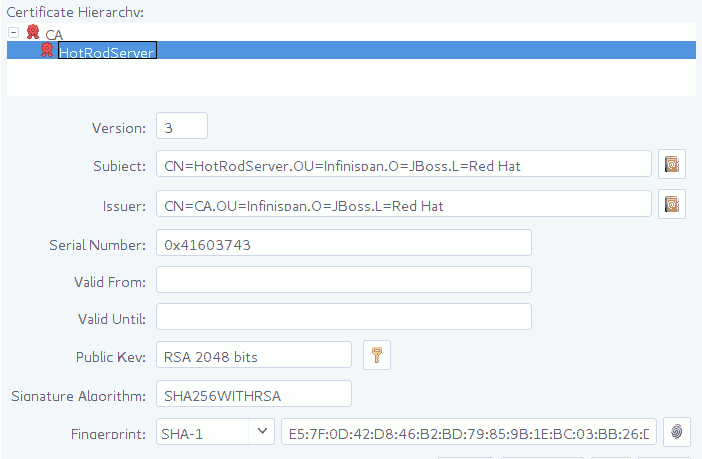
To verify server-issued certificates, Hot Rod clients require part of the TLS certificate chain. For example, the following image shows a certificate authority (CA), named "CA", that has issued a certificate for a server named "HotRodServer":
Figure 2.1. Certificate chain
Procedure
- Create a Java keystore with part of the server certificate chain. In most cases you should use the public certificate for the CA.
-
Specify the keystore as a TrustStore in the client configuration with the
SslConfigurationBuilderclass.
Specify a path that contains certificates in PEM format and Hot Rod clients automatically generate trust stores.
Use .trustStorePath("/path/to/certificate").
2.6. Monitoring Hot Rod Client Statistics
Enable Hot Rod client statistics that include remote and near-cache hits and misses as well as connection pool usage.
Procedure
-
Use the
StatisticsConfigurationBuilderclass to enable and configure Hot Rod client statistics.
2.7. Defining Data Grid Clusters in Client Configuration
Provide the locations of Data Grid clusters in Hot Rod client configuration.
Procedure
Provide at least one Data Grid cluster name, hostname, and port with the
ClusterConfigurationBuilderclass.Copy to Clipboard Copied! Toggle word wrap Toggle overflow
Default Cluster
When adding clusters to your Hot Rod client configuration, you can define a list of Data Grid servers in the format of hostname1:port; hostname2:port. Data Grid then uses the server list as the default cluster configuration.
2.7.1. Manually Switching Data Grid Clusters
Manually switch Hot Rod Java client connections between Data Grid clusters.
Procedure
Call one of the following methods in the
RemoteCacheManagerclass:switchToCluster(clusterName)switches to a specific cluster defined in the client configuration.switchToDefaultCluster()switches to the default cluster in the client configuration, which is defined as a list of Data Grid servers.
Reference
2.8. Creating Caches with Hot Rod Clients
Programmatically create caches on Data Grid Server through the RemoteCacheManager API.
The following procedure demonstrates programmatic cache creation with the Hot Rod Java client. However Hot Rod clients are available in different languages such as Javascript or C++.
Prerequisites
- Create a user and start at least one Data Grid server instance.
- Get the Hot Rod Java client.
Procedure
Configure your client with the
ConfigurationBuilderclass.Copy to Clipboard Copied! Toggle word wrap Toggle overflow -
Use the
XMLStringConfigurationclass to add cache definitions in XML format. Call the
getOrCreateCache()method to add the cache if it already exists or create it if not.Copy to Clipboard Copied! Toggle word wrap Toggle overflow Create caches with
org.infinispantemplates as in the following example with thecreateCache()invocation:private void createCacheWithTemplate() { manager.administration().createCache("myCache", "org.infinispan.DIST_SYNC"); System.out.println("Cache created."); }private void createCacheWithTemplate() { manager.administration().createCache("myCache", "org.infinispan.DIST_SYNC"); System.out.println("Cache created."); }Copy to Clipboard Copied! Toggle word wrap Toggle overflow
Next Steps
Try some working code examples that show you how to create remote caches with the Hot Rod Java client. Visit the Data Grid Tutorials.
2.9. Creating Caches on First Access
When Hot Rod Java clients attempt to access caches that do not exist, they return null for getCache("$cacheName") invocations.
You can change this default behavior so that clients automatically create caches on first access using default configuration templates or Data Grid cache definitions in XML format.
Programmatic procedure
-
Use the
remoteCache()method to create per-cache configurations in the Hot RodConfigurationBuilderclass as follows:
Hot Rod client properties
-
Add
infinispan.client.hotrod.cache.<cache-name>properties to yourhotrod-client.propertiesfile to create per-cache configurations as follows:
infinispan.client.hotrod.cache.my-cache.template_name=org.infinispan.DIST_SYNC
infinispan.client.hotrod.cache.another-cache.configuration=<infinispan><cache-container><distributed-cache name=\"another-cache\"/></cache-container></infinispan>
infinispan.client.hotrod.cache.my-other-cache.configuration_uri=file:/path/to/configuration.xml
infinispan.client.hotrod.cache.my-cache.template_name=org.infinispan.DIST_SYNC
infinispan.client.hotrod.cache.another-cache.configuration=<infinispan><cache-container><distributed-cache name=\"another-cache\"/></cache-container></infinispan>
infinispan.client.hotrod.cache.my-other-cache.configuration_uri=file:/path/to/configuration.xml 2.10. Creating Per-Cache Configurations
In addition to creating caches on first access, you can remotely configure certain aspects of individual caches such as:
- Force return values
- Near-caching
- Transaction modes
Procedure
-
Enable force return values for a cache named
a-cacheas follows:
-
Use wildcard globbing in the remote cache name to enable force return values for all caches that start with the string
somecaches:
When using declarative configuration and your cache names contain the . character, you must enclose the cache name in square brackets, for example infinispan.client.hotrod.cache.[example.MyCache].template=…
2.11. Configuring Near Caching
Hot Rod Java clients can keep local caches that store recently used data, which significantly increases performance of get() and getVersioned() operations because the data is local to the client.
When you enable near caching with Hot Rod Java clients, calls to get() or getVersioned() calls populate the near cache when entries are retrieved from servers. When entries are updated or removed on the server-side, entries in the near cache are invalidated. If keys are requested after they are invalidated, clients must fetch the keys from the server again.
You can also configure the number of entries that near caches can contain. When the maximum is reached, near-cached entries are evicted.
Do not use maximum idle expiration with near caches because near-cache reads do not propagate the last access time for entries.
- Near caches are cleared when clients failover to different servers when using clustered cache modes.
- You should always configure the maximum number of entries that can reside in the near cache. Unbounded near caches require you to keep the size of the near cache within the boundaries of the client JVM.
- Near cache invalidation messages can degrade performance of write operations
Procedure
-
Set the near cache mode to
INVALIDATEDin the client configuration for the caches you want - Define the size of the near cache by specifying the maximum number of entries.
You should always configure near caching on a per-cache basis. Even though Data Grid provides global near cache configuration properties, you should not use them.
2.12. Forcing Return Values
To avoid sending data unnecessarily, write operations on remote caches return null instead of previous values.
For example, the following method calls do not return previous values for keys:
V remove(Object key);
V put(K key, V value);
V remove(Object key);
V put(K key, V value);
You can change this default behavior with the FORCE_RETURN_VALUE flag so your invocations return previous values.
Procedure
-
Use the
FORCE_RETURN_VALUEflag to get previous values instead ofnullas in the following example:
cache.put("aKey", "initialValue");
assert null == cache.put("aKey", "aValue");
assert "aValue".equals(cache.withFlags(Flag.FORCE_RETURN_VALUE).put("aKey",
   "newValue"));
cache.put("aKey", "initialValue");
assert null == cache.put("aKey", "aValue");
assert "aValue".equals(cache.withFlags(Flag.FORCE_RETURN_VALUE).put("aKey",
"newValue"));Reference
2.13. Configuring Connection Pools
Hot Rod Java clients keep pools of persistent connections to Data Grid servers to reuse TCP connections instead of creating them on each request.
Clients use asynchronous threads that check the validity of connections by iterating over the connection pool and sending pings to Data Grid servers. This improves performance by finding broken connections while they are idle in the pool, rather than on application requests.
Procedure
-
Configure Hot Rod client connection pool settings with the
ConnectionPoolConfigurationBuilderclass.
2.14. Hot Rod Java Client Marshalling
Hot Rod is a binary TCP protocol that requires you to transform Java objects into binary format so they can be transferred over the wire or stored to disk.
By default, Data Grid uses a ProtoStream API to encode and decode Java objects into Protocol Buffers (Protobuf); a language-neutral, backwards compatible format. However, you can also implement and use custom marshallers.
2.14.1. Configuring SerializationContextInitializer Implementations
You can add implementations of the ProtoStream SerializationContextInitializer interface to Hot Rod client configurations so Data Grid marshalls custom Java objects.
Procedure
-
Add your
SerializationContextInitializerimplementations to your Hot Rod client configuration as follows:
hotrod-client.properties
infinispan.client.hotrod.context-initializers=org.infinispan.example.LibraryInitializerImpl,org.infinispan.example.AnotherExampleSciImpl
infinispan.client.hotrod.context-initializers=org.infinispan.example.LibraryInitializerImpl,org.infinispan.example.AnotherExampleSciImplProgrammatic configuration
2.14.2. Configuring Custom Marshallers
Configure Hot Rod clients to use custom marshallers.
Procedure
-
Implement the
org.infinispan.commons.marshall.Marshallerinterface. - Specify the fully qualified name of your class in your Hot Rod client configuration.
Add your Java classes to the Data Grid deserialization whitelist.
In the following example, only classes with fully qualified names that contain
PersonorEmployeeare allowed:ConfigurationBuilder clientBuilder = new ConfigurationBuilder(); clientBuilder.marshaller("org.infinispan.example.marshall.CustomMarshaller") .addJavaSerialWhiteList(".*Person.*", ".*Employee.*"); ...ConfigurationBuilder clientBuilder = new ConfigurationBuilder(); clientBuilder.marshaller("org.infinispan.example.marshall.CustomMarshaller") .addJavaSerialWhiteList(".*Person.*", ".*Employee.*"); ...Copy to Clipboard Copied! Toggle word wrap Toggle overflow
2.15. Configuring Hot Rod Client Data Formats
By default, Hot Rod client operations use the configured marshaller when reading and writing from Data Grid servers for both keys and values.
However, the DataFormat API lets you decorate remote caches so that all operations can happen with custom data formats.
Using different marshallers for key and values
Marshallers for keys and values can be overridden at run time. For example, to bypass all serialization in the Hot Rod client and read the byte[] as they are stored in the server:
Using different marshallers and formats for keys, with keyMarshaller() and keyType() methods might interfere with the client intelligence routing mechanism and cause extra hops within the Data Grid cluster to perform the operation. If performance is critical, you should use keys in the format stored by the server.
Returning XML Values
The preceding code example returns XML values as follows:
<?xml version="1.0" ?><string>Hello!</string>
<?xml version="1.0" ?><string>Hello!</string>Reading data in different formats
Request and send data in different formats specified by a org.infinispan.commons.dataconversion.MediaType as follows:
In the preceding example, data conversion happens in the Data Grid server. Data Grid throws an exception if it does not support conversion to and from a storage format.
Reference
Chapter 3. Hot Rod Client API
Data Grid Hot Rod client API provides interfaces for creating caches remotely, manipulating data, monitoring the topology of clustered caches, and more.
3.1. Basic API
Below is a sample code snippet on how the client API can be used to store or retrieve information from a Data Grid server using the Java Hot Rod client. It assumes that a Data Grid server is running at localhost:11222.
The client API maps the local API: RemoteCacheManager corresponds to DefaultCacheManager (both implement CacheContainer ). This common API facilitates an easy migration from local calls to remote calls through Hot Rod: all one needs to do is switch between DefaultCacheManager and RemoteCacheManager - which is further simplified by the common CacheContainer interface that both inherit.
3.2. RemoteCache API
The collection methods keySet, entrySet and values are backed by the remote cache. That is that every method is called back into the RemoteCache. This is useful as it allows for the various keys, entries or values to be retrieved lazily, and not requiring them all be stored in the client memory at once if the user does not want.
These collections adhere to the Map specification being that add and addAll are not supported but all other methods are supported.
One thing to note is the Iterator.remove and Set.remove or Collection.remove methods require more than 1 round trip to the server to operate. You can check out the RemoteCache Javadoc to see more details about these and the other methods.
Iterator Usage
The iterator method of these collections uses retrieveEntries internally, which is described below. If you notice retrieveEntries takes an argument for the batch size. There is no way to provide this to the iterator. As such the batch size can be configured via system property infinispan.client.hotrod.batch_size or through the ConfigurationBuilder when configuring the RemoteCacheManager.
Also the retrieveEntries iterator returned is Closeable as such the iterators from keySet, entrySet and values return an AutoCloseable variant. Therefore you should always close these `Iterator`s when you are done with them.
try (CloseableIterator<Map.Entry<K, V>> iterator = remoteCache.entrySet().iterator()) {

      }
try (CloseableIterator<Map.Entry<K, V>> iterator = remoteCache.entrySet().iterator()) {

}What if I want a deep copy and not a backing collection?
Previous version of RemoteCache allowed for the retrieval of a deep copy of the keySet. This is still possible with the new backing map, you just have to copy the contents yourself. Also you can do this with entrySet and values, which we didn’t support before.
Set<K> keysCopy = remoteCache.keySet().stream().collect(Collectors.toSet());
Set<K> keysCopy = remoteCache.keySet().stream().collect(Collectors.toSet());3.2.1. Unsupported Methods
The Data Grid RemoteCache API does not support all methods available in the Cache API and throws UnsupportedOperationException when unsupported methods are invoked.
Most of these methods do not make sense on the remote cache (e.g. listener management operations), or correspond to methods that are not supported by local cache as well (e.g. containsValue).
Certain atomic operations inherited from ConcurrentMap are also not supported with the RemoteCache API, for example:
boolean remove(Object key, Object value);
boolean replace(Object key, Object value);
boolean replace(Object key, Object oldValue, Object value);
boolean remove(Object key, Object value);
boolean replace(Object key, Object value);
boolean replace(Object key, Object oldValue, Object value);
However, RemoteCache offers alternative versioned methods for these atomic operations that send version identifiers over the network instead of whole value objects.
3.3. Remote Iterator API
Data Grid provides a remote iterator API to retrieve entries where memory resources are constrained or if you plan to do server-side filtering or conversion.
3.3.1. Deploying Custom Filters to Data Grid Server
Deploy custom filters to Data Grid server instances.
Procedure
Create a factory that extends
KeyValueFilterConverterFactory.Copy to Clipboard Copied! Toggle word wrap Toggle overflow Create a JAR that contains a
META-INF/services/org.infinispan.filter.KeyValueFilterConverterFactoryfile. This file should include the fully qualified class name of the filter factory class implementation.If the filter uses custom key/value classes, you must include them in your JAR file so that the filter can correctly unmarshall key and/or value instances.
-
Add the JAR file to the
server/libdirectory of your Data Grid server installation directory.
Reference
3.4. MetadataValue API
Use the MetadataValue interface for versioned operations.
The following example shows a remove operation that occurs only if the version of the value for the entry is unchanged:
3.5. Streaming API
Data Grid provides a Streaming API that implements methods that return instances of InputStream and OutputStream so you can stream large objects between Hot Rod clients and Data Grid servers.
Consider the following example of a large object:
StreamingRemoteCache<String> streamingCache = remoteCache.streaming();
OutputStream os = streamingCache.put("a_large_object");
os.write(...);
os.close();
StreamingRemoteCache<String> streamingCache = remoteCache.streaming();
OutputStream os = streamingCache.put("a_large_object");
os.write(...);
os.close();You could read the object through streaming as follows:
The Streaming API does not marshall values, which means you cannot access the same entries using both the Streaming and Non-Streaming API at the same time. You can, however, implement a custom marshaller to handle this case.
The InputStream returned by the RemoteStreamingCache.get(K key) method implements the VersionedMetadata interface, so you can retrieve version and expiration information as follows:
Conditional write methods (putIfAbsent(), replace()) perform the actual condition check after the value is completely sent to the server. In other words, when the close() method is invoked on the OutputStream.
3.6. Counter API
The CounterManager interface is the entry point to define, retrieve and remove counters.
Hot Rod clients can retrieve the CounterManager interface as in the following example:
// create or obtain your RemoteCacheManager
RemoteCacheManager manager = ...;

// retrieve the CounterManager
CounterManager counterManager = RemoteCounterManagerFactory.asCounterManager(manager);
// create or obtain your RemoteCacheManager
RemoteCacheManager manager = ...;

// retrieve the CounterManager
CounterManager counterManager = RemoteCounterManagerFactory.asCounterManager(manager);Reference
3.7. Creating Event Listeners
Java Hot Rod clients can register listeners to receive cache-entry level events. Cache entry created, modified and removed events are supported.
Creating a client listener is very similar to embedded listeners, except that different annotations and event classes are used. Here’s an example of a client listener that prints out each event received:
ClientCacheEntryCreatedEvent and ClientCacheEntryModifiedEvent instances provide information on the affected key, and the version of the entry. This version can be used to invoke conditional operations on the server, such as replaceWithVersion or removeWithVersion.
ClientCacheEntryRemovedEvent events are only sent when the remove operation succeeds. In other words, if a remove operation is invoked but no entry is found or no entry should be removed, no event is generated. Users interested in removed events, even when no entry was removed, can develop event customization logic to generate such events. More information can be found in the customizing client events section.
All ClientCacheEntryCreatedEvent, ClientCacheEntryModifiedEvent and ClientCacheEntryRemovedEvent event instances also provide a boolean isCommandRetried() method that will return true if the write command that caused this had to be retried again due to a topology change. This could be a sign that this event has been duplicated or another event was dropped and replaced (eg: ClientCacheEntryModifiedEvent replaced ClientCacheEntryCreatedEvent).
Once the client listener implementation has been created, it needs to be registered with the server. To do so, execute:
RemoteCache<?, ?> cache = ...
cache.addClientListener(new EventPrintListener());
RemoteCache<?, ?> cache = ...
cache.addClientListener(new EventPrintListener());3.7.1. Removing Event Listeners
When an client event listener is not needed any more, it can be removed:
EventPrintListener listener = ...
cache.removeClientListener(listener);
EventPrintListener listener = ...
cache.removeClientListener(listener);3.7.2. Filtering Events
In order to avoid inundating clients with events, users can provide filtering functionality to limit the number of events fired by the server for a particular client listener. To enable filtering, a cache event filter factory needs to be created that produces filter instances:
The cache event filter factory instance defined above creates filter instances which statically filter out all entries except the one whose key is 1.
To be able to register a listener with this cache event filter factory, the factory has to be given a unique name, and the Hot Rod server needs to be plugged with the name and the cache event filter factory instance.
Create a JAR file that contains the filter implementation.
If the cache uses custom key/value classes, these must be included in the JAR so that the callbacks can be executed with the correctly unmarshalled key and/or value instances. If the client listener has
useRawDataenabled, this is not necessary since the callback key/value instances will be provided in binary format.-
Create a
META-INF/services/org.infinispan.notifications.cachelistener.filter.CacheEventFilterFactoryfile within the JAR file and within it, write the fully qualified class name of the filter class implementation. -
Add the JAR file to the
server/libdirectory of your Data Grid server installation directory. Link the client listener with this cache event filter factory by adding the factory name to the
@ClientListenerannotation:@ClientListener(filterFactoryName = "static-filter") public class EventPrintListener { ... }@ClientListener(filterFactoryName = "static-filter") public class EventPrintListener { ... }Copy to Clipboard Copied! Toggle word wrap Toggle overflow Register the listener with the server:
RemoteCache<?, ?> cache = ...
cache.addClientListener(new EventPrintListener());
RemoteCache<?, ?> cache = ...
cache.addClientListener(new EventPrintListener());
Copy to Clipboard Copied! Toggle word wrap Toggle overflow
You can also register dynamic filter instances that filter based on parameters provided when the listener is registered are also possible. Filters use the parameters received by the filter factories to enable this option, for example:
The dynamic parameters required to do the filtering are provided when the listener is registered:
RemoteCache<?, ?> cache = ...
cache.addClientListener(new EventPrintListener(), new Object[]{1}, null);
RemoteCache<?, ?> cache = ...
cache.addClientListener(new EventPrintListener(), new Object[]{1}, null);
Filter instances have to marshallable when they are deployed in a cluster so that the filtering can happen right where the event is generated, even if the even is generated in a different node to where the listener is registered. To make them marshallable, either make them extend Serializable, Externalizable, or provide a custom Externalizer for them.
3.7.3. Skipping Notifications
Include the SKIP_LISTENER_NOTIFICATION flag when calling remote API methods to perform operations without getting event notifications from the server. For example, to prevent listener notifications when creating or modifying values, set the flag as follows:
remoteCache.withFlags(Flag.SKIP_LISTENER_NOTIFICATION).put(1, "one");
remoteCache.withFlags(Flag.SKIP_LISTENER_NOTIFICATION).put(1, "one");3.7.4. Customizing Events
The events generated by default contain just enough information to make the event relevant but they avoid cramming too much information in order to reduce the cost of sending them. Optionally, the information shipped in the events can be customised in order to contain more information, such as values, or to contain even less information. This customization is done with CacheEventConverter instances generated by a CacheEventConverterFactory:
In the example above, the converter generates a new custom event which includes the value as well as the key in the event. This will result in bigger event payloads compared with default events, but if combined with filtering, it can reduce its network bandwidth cost.
The target type of the converter must be either Serializable or Externalizable. In this particular case of converters, providing an Externalizer will not work by default since the default Hot Rod client marshaller does not support them.
Handling custom events requires a slightly different client listener implementation to the one demonstrated previously. To be more precise, it needs to handle ClientCacheEntryCustomEvent instances:
The ClientCacheEntryCustomEvent received in the callback exposes the custom event via getEventData method, and the getType method provides information on whether the event generated was as a result of cache entry creation, modification or removal.
Similar to filtering, to be able to register a listener with this converter factory, the factory has to be given a unique name, and the Hot Rod server needs to be plugged with the name and the cache event converter factory instance.
Create a JAR file with the converter implementation within it.
If the cache uses custom key/value classes, these must be included in the JAR so that the callbacks can be executed with the correctly unmarshalled key and/or value instances. If the client listener has
useRawDataenabled, this is not necessary since the callback key/value instances will be provided in binary format.-
Create a
META-INF/services/org.infinispan.notifications.cachelistener.filter.CacheEventConverterFactoryfile within the JAR file and within it, write the fully qualified class name of the converter class implementation. -
Add the JAR file to the
server/libdirectory of your Data Grid server installation directory. Link the client listener with this converter factory by adding the factory name to the
@ClientListenerannotation:@ClientListener(converterFactoryName = "static-converter") public class CustomEventPrintListener { ... }@ClientListener(converterFactoryName = "static-converter") public class CustomEventPrintListener { ... }Copy to Clipboard Copied! Toggle word wrap Toggle overflow Register the listener with the server:
RemoteCache<?, ?> cache = ...
cache.addClientListener(new CustomEventPrintListener());
RemoteCache<?, ?> cache = ...
cache.addClientListener(new CustomEventPrintListener());
Copy to Clipboard Copied! Toggle word wrap Toggle overflow
Dynamic converter instances that convert based on parameters provided when the listener is registered are also possible. Converters use the parameters received by the converter factories to enable this option. For example:
The dynamic parameters required to do the conversion are provided when the listener is registered:
RemoteCache<?, ?> cache = ...
cache.addClientListener(new EventPrintListener(), null, new Object[]{1});
RemoteCache<?, ?> cache = ...
cache.addClientListener(new EventPrintListener(), null, new Object[]{1});
Converter instances have to marshallable when they are deployed in a cluster, so that the conversion can happen right where the event is generated, even if the event is generated in a different node to where the listener is registered. To make them marshallable, either make them extend Serializable, Externalizable, or provide a custom Externalizer for them.
3.7.5. Filter and Custom Events
If you want to do both event filtering and customization, it’s easier to implement org.infinispan.notifications.cachelistener.filter.CacheEventFilterConverter which allows both filter and customization to happen in a single step. For convenience, it’s recommended to extend org.infinispan.notifications.cachelistener.filter.AbstractCacheEventFilterConverter instead of implementing org.infinispan.notifications.cachelistener.filter.CacheEventFilterConverter directly. For example:
Similar to filters and converters, to be able to register a listener with this combined filter/converter factory, the factory has to be given a unique name via the @NamedFactory annotation, and the Hot Rod server needs to be plugged with the name and the cache event converter factory instance.
Create a JAR file with the converter implementation within it.
If the cache uses custom key/value classes, these must be included in the JAR so that the callbacks can be executed with the correctly unmarshalled key and/or value instances. If the client listener has
useRawDataenabled, this is not necessary since the callback key/value instances will be provided in binary format.-
Create a
META-INF/services/org.infinispan.notifications.cachelistener.filter.CacheEventFilterConverterFactoryfile within the JAR file and within it, write the fully qualified class name of the converter class implementation. -
Add the JAR file to the
server/libdirectory of your Data Grid server installation directory.
From a client perspective, to be able to use the combined filter and converter class, the client listener must define the same filter factory and converter factory names, e.g.:
@ClientListener(filterFactoryName = "dynamic-filter-converter", converterFactoryName = "dynamic-filter-converter")
public class CustomEventPrintListener { ... }
@ClientListener(filterFactoryName = "dynamic-filter-converter", converterFactoryName = "dynamic-filter-converter")
public class CustomEventPrintListener { ... }The dynamic parameters required in the example above are provided when the listener is registered via either filter or converter parameters. If filter parameters are non-empty, those are used, otherwise, the converter parameters:
RemoteCache<?, ?> cache = ...
cache.addClientListener(new CustomEventPrintListener(), new Object[]{1}, null);
RemoteCache<?, ?> cache = ...
cache.addClientListener(new CustomEventPrintListener(), new Object[]{1}, null);3.7.6. Event Marshalling
Hot Rod servers can store data in different formats, but in spite of that, Java Hot Rod client users can still develop CacheEventConverter or CacheEventFilter instances that work on typed objects. By default, filters and converter will use data as POJO (application/x-java-object) but it is possible to override the desired format by overriding the method format() from the filter/converter. If the format returns null, the filter/converter will receive data as it’s stored.
Hot Rod Java clients can be configured to use different org.infinispan.commons.marshall.Marshaller instances. If doing this and deploying CacheEventConverter or CacheEventFilter instances, to be able to present filters/converter with Java Objects rather than marshalled content, the server needs to be able to convert between objects and the binary format produced by the marshaller.
To deploy a Marshaller instance server-side, follow a similar method to the one used to deploy CacheEventConverter or CacheEventFilter instances:
- Create a JAR file with the converter implementation within it.
-
Create a
META-INF/services/org.infinispan.commons.marshall.Marshallerfile within the JAR file and within it, write the fully qualified class name of the marshaller class implementation. -
Add the JAR file to the
server/libdirectory of your Data Grid server installation directory.
Note that the Marshaller could be deployed in either a separate jar, or in the same jar as the CacheEventConverter and/or CacheEventFilter instances.
3.7.6.1. Deploying Protostream Marshallers
If a cache stores Protobuf content, as it happens when using ProtoStream marshaller in the Hot Rod client, it’s not necessary to deploy a custom marshaller since the format is already support by the server: there are transcoders from Protobuf format to most common formats like JSON and POJO.
When using filters/converters with those caches, and it’s desirable to use filter/converters with Java Objects rather binary Protobuf data, it’s necessary to configure the extra ProtoStream marshallers so that the server can unmarshall the data before filtering/converting. To do so, you must configure the required SerializationContextInitializer(s) as part of the Data Grid server configuration.
See ProtoStream for more information.
3.7.7. Listener State Handling
Client listener annotation has an optional includeCurrentState attribute that specifies whether state will be sent to the client when the listener is added or when there’s a failover of the listener.
By default, includeCurrentState is false, but if set to true and a client listener is added in a cache already containing data, the server iterates over the cache contents and sends an event for each entry to the client as a ClientCacheEntryCreated (or custom event if configured). This allows clients to build some local data structures based on the existing content. Once the content has been iterated over, events are received as normal, as cache updates are received. If the cache is clustered, the entire cluster wide contents are iterated over.
3.7.8. Listener Failure Handling
When a Hot Rod client registers a client listener, it does so in a single node in a cluster. If that node fails, the Java Hot Rod client detects that transparently and fails over all listeners registered in the node that failed to another node.
During this fail over the client might miss some events. To avoid missing these events, the client listener annotation contains an optional parameter called includeCurrentState which if set to true, when the failover happens, the cache contents can iterated over and ClientCacheEntryCreated events (or custom events if configured) are generated. By default, includeCurrentState is set to false.
Use callbacks to handle failover events:
@ClientCacheFailover
public void handleFailover(ClientCacheFailoverEvent e) {
  ...
}
@ClientCacheFailover
public void handleFailover(ClientCacheFailoverEvent e) {
  ...
}This is very useful in use cases where the client has cached some data, and as a result of the fail over, taking in account that some events could be missed, it could decide to clear any locally cached data when the fail over event is received, with the knowledge that after the fail over event, it will receive events for the contents of the entire cache.
3.8. Hot Rod Java Client Transactions
You can configure and use Hot Rod clients in JTA {tx}s.
To participate in a transaction, the Hot Rod client requires the {tm} with which it interacts and whether it participates in the transaction through the {sync} or {xa} interface.
Transactions are optimistic in that clients acquire write locks on entries during the prepare phase. To avoid data inconsistency, be sure to read about Detecting Conflicts with Transactions.
3.8.1. Configuring the Server
Caches in the server must also be transactional for clients to participate in JTA {tx}s.
The following server configuration is required, otherwise transactions rollback only:
-
Isolation level must be
REPEATABLE_READ. -
Locking mode must be
PESSIMISTIC. In a future release,OPTIMISTIClocking mode will be supported. -
Transaction mode should be
NON_XAorNON_DURABLE_XA. Hot Rod transactions should not useFULL_XAbecause it degrades performance.
For example:
<replicated-cache name="hotrodReplTx">
  <locking isolation="REPEATABLE_READ"/>
  <transaction mode="NON_XA" locking="PESSIMISTIC"/>
</replicated-cache>
<replicated-cache name="hotrodReplTx">
  <locking isolation="REPEATABLE_READ"/>
  <transaction mode="NON_XA" locking="PESSIMISTIC"/>
</replicated-cache>Hot Rod transactions have their own recovery mechanism.
3.8.2. Configuring Hot Rod Clients
When you create the {rcm}, you can set the default {tm} and {tx-mode} that the {rc} uses.
The {rcm} lets you create only one configuration for transactional caches, as in the following example:
The preceding configuration applies to all instances of a remote cache. If you need to apply different configurations to remote cache instances, you can override the {rc} configuration. See Overriding RemoteCacheManager Configuration.
See {cb} Javadoc for documentation on configuration parameters.
You can also configure the Java Hot Rod client with a properties file, as in the following example:
infinispan.client.hotrod.transaction.transaction_manager_lookup = org.infinispan.client.hotrod.transaction.lookup.GenericTransactionManagerLookup
infinispan.client.hotrod.transaction.transaction_mode = NON_XA
infinispan.client.hotrod.transaction.timeout = 60000
infinispan.client.hotrod.transaction.transaction_manager_lookup = org.infinispan.client.hotrod.transaction.lookup.GenericTransactionManagerLookup
infinispan.client.hotrod.transaction.transaction_mode = NON_XA
infinispan.client.hotrod.transaction.timeout = 600003.8.2.1. TransactionManagerLookup Interface
TransactionManagerLookup provides an entry point to fetch a {tm}.
Available implementations of TransactionManagerLookup:
- {gtml}
- A lookup class that locates {tm}s running in Java EE application servers. Defaults to the {rtm} if it cannot find a {tm}. This is the default for Hot Rod Java clients.
In most cases, {gtml} is suitable. However, you can implement the TransactionManagerLookup interface if you need to integrate a custom {tm}.
- {rtml}
- A basic, and volatile, {tm} if no other implementation is available. Note that this implementation has significant limitations when handling concurrent transactions and recovery.
3.8.3. Transaction Modes
{tx-mode} controls how a {rc} interacts with the {tm}.
Configure transaction modes on both the Data Grid server and your client application. If clients attempt to perform transactional operations on non-transactional caches, runtime exceptions can occur.
Transaction modes are the same in both the Data Grid configuration and client settings. Use the following modes with your client, see the Data Grid configuration schema for the server:
NONE- The {rc} does not interact with the {tm}. This is the default mode and is non-transactional.
NON_XA- The {rc} interacts with the {tm} via {sync}.
NON_DURABLE_XA- The {rc} interacts with the {tm} via {xa}. Recovery capabilities are disabled.
FULL_XA-
The {rc} interacts with the {tm} via {xa}. Recovery capabilities are enabled. Invoke the
XaResource.recover()method to retrieve transactions to recover.
3.8.4. Overriding Configuration for Cache Instances
Because {rcm} does not support different configurations for each cache instance. However, {rcm} includes the getCache(String) method that returns the {rc} instances and lets you override some configuration parameters, as follows:
getCache(String cacheName, TransactionMode transactionMode)- Returns a {rc} and overrides the configured {tx-mode}.
getCache(String cacheName, boolean forceReturnValue, TransactionMode transactionMode)- Same as previous, but can also force return values for write operations.
getCache(String cacheName, TransactionManager transactionManager)- Returns a {rc} and overrides the configured {tm}.
getCache(String cacheName, boolean forceReturnValue, TransactionManager transactionManager)- Same as previous, but can also force return values for write operations.
getCache(String cacheName, TransactionMode transactionMode, TransactionManager transactionManager)-
Returns a {rc} and overrides the configured {tm} and {tx-mode}. Uses the configured values, if
transactionManagerortransactionModeis null. getCache(String cacheName, boolean forceReturnValue, TransactionMode transactionMode, TransactionManager transactionManager)- Same as previous, but can also force return values for write operations.
The getCache(String) method returns {rc} instances regardless of whether they are transaction or not. {rc} includes a getTransactionManager() method that returns the {tm} that the cache uses. If the {rc} is not transactional, the method returns null.
3.8.5. Detecting Conflicts with Transactions
Transactions use the initial values of keys to detect conflicts.
For example, "k" has a value of "v" when a transaction begins. During the prepare phase, the transaction fetches "k" from the server to read the value. If the value has changed, the transaction rolls back to avoid a conflict.
Transactions use versions to detect changes instead of checking value equality.
The forceReturnValue parameter controls write operations to the {rc} and helps avoid conflicts. It has the following values:
-
If
true, the {tm} fetches the most recent value from the server before performing write operations. However, theforceReturnValueparameter applies only to write operations that access the key for the first time. -
If
false, the {tm} does not fetch the most recent value from the server before performing write operations.
This parameter does not affect conditional write operations such as replace or putIfAbsent because they require the most recent value.
The following transactions provide an example where the forceReturnValue parameter can prevent conflicting write operations:
Transaction 1 (TX1)
Transaction 2 (TX2)
In this example, TX1 and TX2 are executed in parallel. The initial value of "k" is "v".
-
If
forceReturnValue = true, thecache.put()operation fetches the value for "k" from the server in both TX1 and TX2. The transaction that acquires the lock for "k" first then commits. The other transaction rolls back during the commit phase because the transaction can detect that "k" has a value other than "v". -
If
forceReturnValue = false, thecache.put()operation does not fetch the value for "k" from the server and returns null. Both TX1 and TX2 can successfully commit, which results in a conflict. This occurs because neither transaction can detect that the initial value of "k" changed.
The following transactions include cache.get() operations to read the value for "k" before doing the cache.put() operations:
Transaction 1 (TX1)
Transaction 2 (TX2)
In the preceding examples, TX1 and TX2 both read the key so the forceReturnValue parameter does not take effect. One transaction commits, the other rolls back. However, the cache.get() operation requires an additional server request. If you do not need the return value for the cache.put() operation that server request is inefficient.
3.8.6. Using the Configured Transaction Manager and Transaction Mode
The following example shows how to use the TransactionManager and TransactionMode that you configure in the RemoteCacheManager:
3.8.7. Overriding the Transaction Manager
The following example shows how to override TransactionManager with the getCache method:
3.8.8. Overriding the Transaction Mode
The following example shows how to override TransactionMode with the getCache method:

'%20d='M201.5%20305.5c-13.8%200-24.9-11.1-24.9-24.6%200-13.8%2011.1-24.9%2024.9-24.9%2013.6%200%2024.6%2011.1%2024.6%2024.9%200%2013.6-11.1%2024.6-24.6%2024.6zM504%20256c0%20137-111%20248-248%20248S8%20393%208%20256%20119%208%20256%208s248%20111%20248%20248zm-132.3-41.2c-9.4%200-17.7%203.9-23.8%2010-22.4-15.5-52.6-25.5-86.1-26.6l17.4-78.3%2055.4%2012.5c0%2013.6%2011.1%2024.6%2024.6%2024.6%2013.8%200%2024.9-11.3%2024.9-24.9s-11.1-24.9-24.9-24.9c-9.7%200-18%205.8-22.1%2013.8l-61.2-13.6c-3-.8-6.1%201.4-6.9%204.4l-19.1%2086.4c-33.2%201.4-63.1%2011.3-85.5%2026.8-6.1-6.4-14.7-10.2-24.1-10.2-34.9%200-46.3%2046.9-14.4%2062.8-1.1%205-1.7%2010.2-1.7%2015.5%200%2052.6%2059.2%2095.2%20132%2095.2%2073.1%200%20132.3-42.6%20132.3-95.2%200-5.3-.6-10.8-1.9-15.8%2031.3-16%2019.8-62.5-14.9-62.5zM302.8%20331c-18.2%2018.2-76.1%2017.9-93.6%200-2.2-2.2-6.1-2.2-8.3%200-2.5%202.5-2.5%206.4%200%208.6%2022.8%2022.8%2087.3%2022.8%20110.2%200%202.5-2.2%202.5-6.1%200-8.6-2.2-2.2-6.1-2.2-8.3%200zm7.7-75c-13.6%200-24.6%2011.1-24.6%2024.9%200%2013.6%2011.1%2024.6%2024.6%2024.6%2013.8%200%2024.9-11.1%2024.9-24.6%200-13.8-11-24.9-24.9-24.9z'/%3e%3c/svg%3e)