 Red Hat Summit
Transform product discovery with AI recommendations
Integrate AI-driven product recommendations, automated review summarization, and enhanced search capabilities into an e-commerce storefront.
This content is authored by Red Hat experts, but has not yet been tested on every supported configuration.
Transform product discovery with AI recommendations
Integrate AI-driven product recommendations, automated review summarization, and enhanced search capabilities into an e-commerce storefront.
Detailed description
This quickstart shows how an e-commerce storefront can seamlessly integrate AI-driven product recommendations, automated review summarization, and enhanced search capabilities to improve customer engagement and conversion rates.
- Product recommendations deliver personalized suggestions based on browsing history and product similarity, helping customers discover what they love.
- Review summaries distill countless reviews into actionable information, accelerating buying decisions.
- Intelligent search uses a hybrid approach with semantic and symbolic search understanding customer intent, making it easier to find the perfect item.
See how customers can get a better experience while business owners unlock higher click-through rates, better conversations and strong customer loyalty.
This quickstart is a complete, cloud-native product recommender system showcasing search, recommendations, reviews, and a Kubeflow training pipeline on OpenShift AI. Technical components include:
- Backend (FastAPI) with PostgreSQL + pgvector + Feast
- Frontend (React) with semantic text/image search
- Training pipeline (Kubeflow Pipelines) to build and push embeddings
- Helm charts for one-command install/uninstall on OpenShift
Architecture diagrams
- Feature Store: Feast (offline Parquet, online Postgres + pgvector)
- Embeddings: Two-tower training + BGE text encoding for search
- Search: Approximate Nearest Neighbor search over semantic vector embeddings
- Images: Synthetic catalog images; text-to-image generated assets
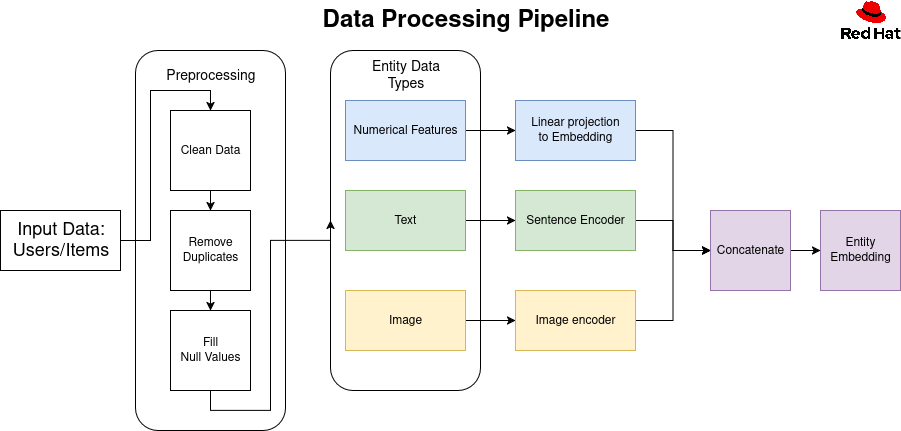
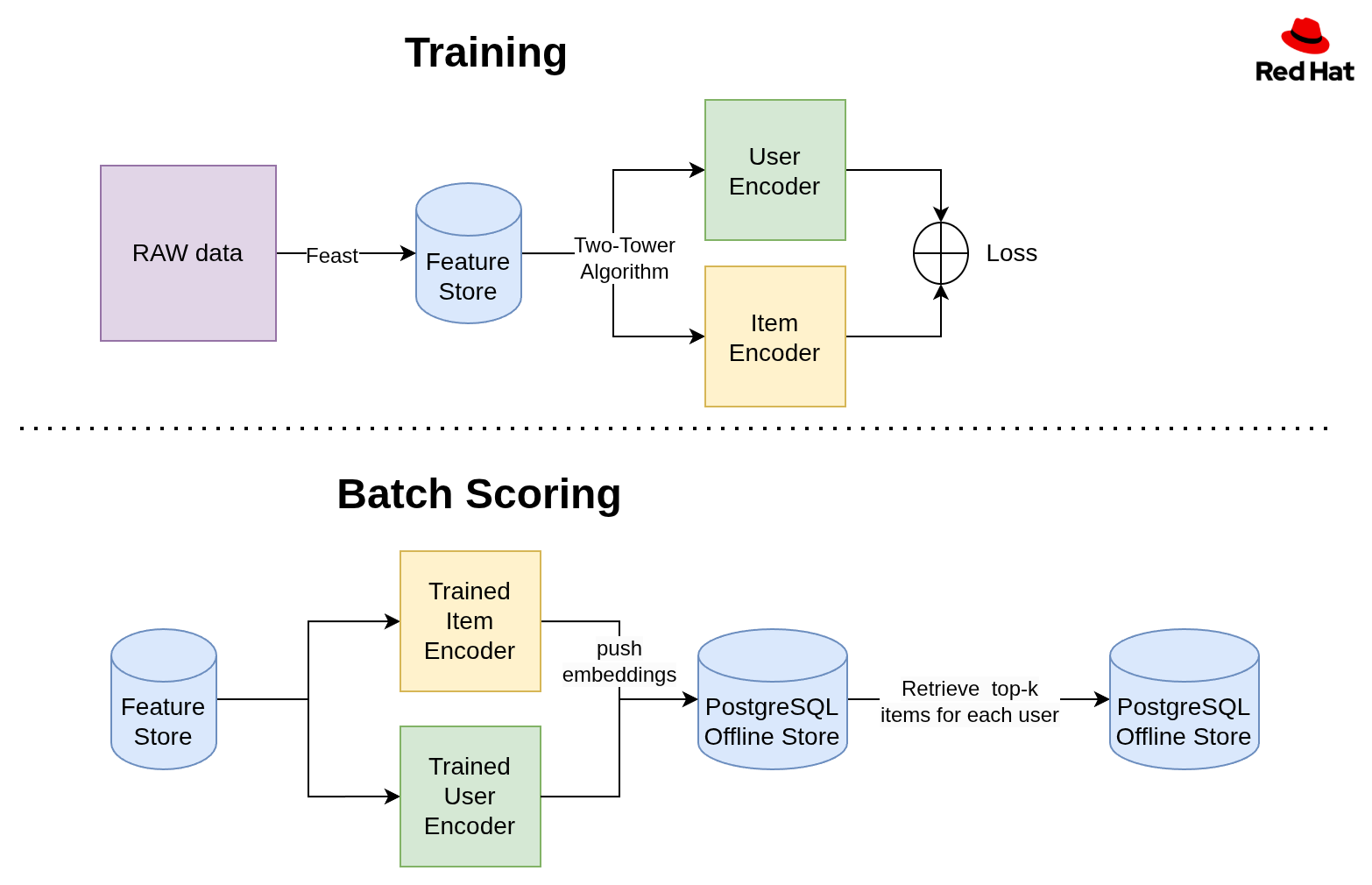
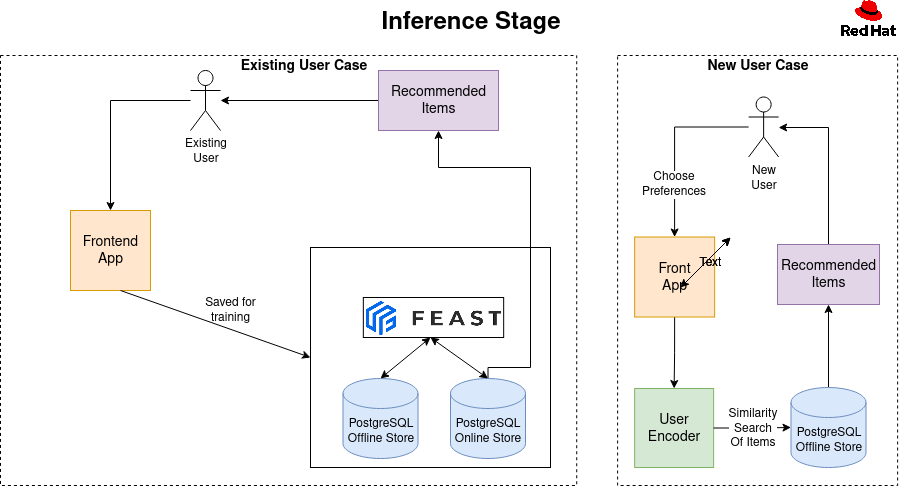
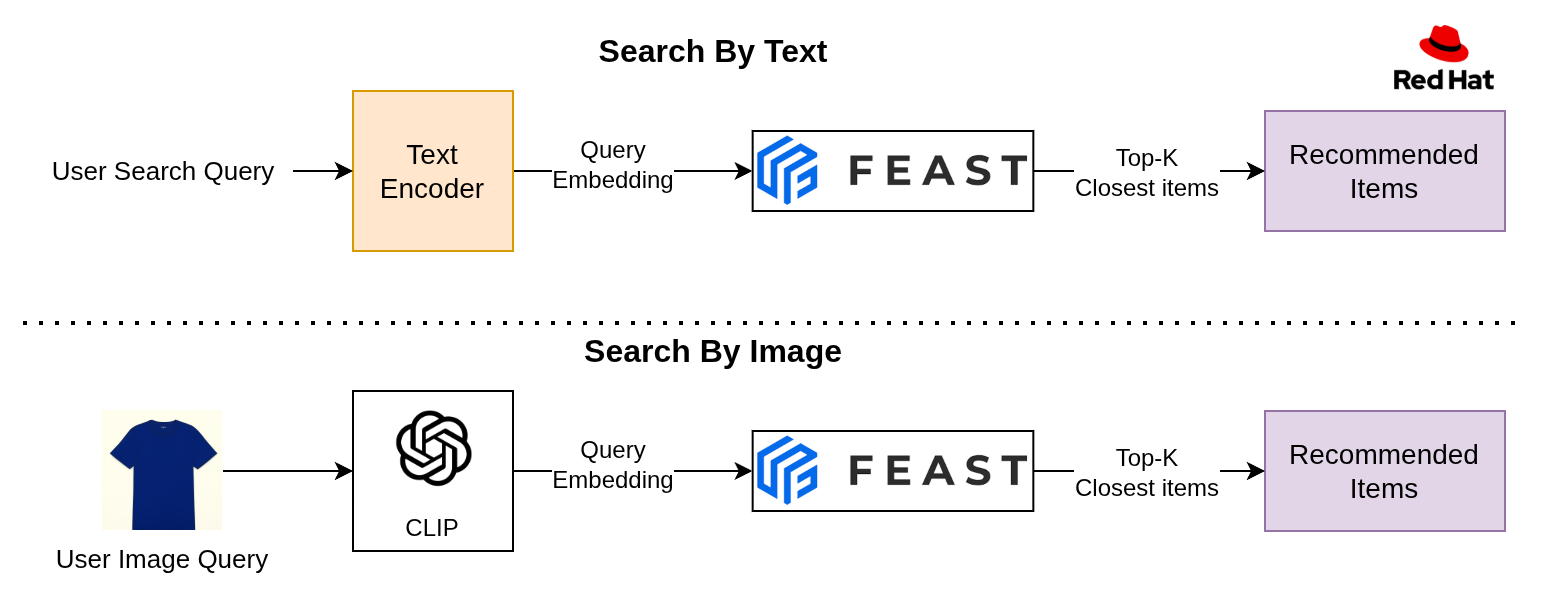
Requirements
Prerequisites
- Access to an OpenShift cluster (with OpenShift AI installed)
- CLI tools:
ocandhelm - Container registry access to push images (e.g., quay.io)
Recommended OpenShift AI components enabled: DataSciencePipelines, Feast Operator, Model Registry, KServe/ModelMesh (Managed in your DataScienceCluster).
Minimum hardware requirements
- CPU: 6-8 cores
- Memory: 16-20Gi
- Storage: 150-200Gi
Minimum software requirements
- OpenShift 4.17.0+ cluster with OpenShift AI
- oc CLI 4.17.0+ and Helm 3.x
- Access to quay.io to be able to pull down container images
Required user permissions
- Namespace admin permissions in the target OpenShift project
- Container registry access to pull images from quay.io and registry.redhat.io
- OpenShift AI access to create DataSciencePipelines and Feast components
- Storage provisioning rights to create persistent volumes (PVCs)
Deploy
- Clone and enter the repo
git clone https://github.com/<your-username>/product-recommender-system.git
cd product-recommender-system/helm
- Install
IMPORTANT: This application requires an LLM for product review summarization. The LLM is not installed automatically.
If you already have an LLM deployed, please provide the MODEL_NAME and MODEL_ENDPOINT in the make command below and the api key
in the helm/product-recommender-system/values.yaml file (see 'SUMMARY_LLM_API_KEY' in the values file).
You may also manually deploy an LLM by following the steps in this document below (see the "RHOAI 3.0 Model Deployment Steps" section).
make install NAMESPACE=<namespace> minio.userId=<minio user Id> minio.password=<minio password> MODEL_NAME=<model resource name> MODEL_ENDPOINT=<http://model-url.com>
The command above deploys the remaining components the application requires. NOTE: Don't add '/v1' to the model endpoint. Make sure to use your inference server's external endpoint.
- Access routes (after pods Ready)
# Frontend URL
FRONTEND=$(oc -n <ns> get route product-recommender-system-frontend -o jsonpath='{.spec.host}')
echo "https://$FRONTEND"

# Pipeline UI (DSP) URL
DSP=$(oc -n <ns> get route ds-pipeline-dspa -o jsonpath='{.spec.host}')
echo "https://$DSP"
Delete
make uninstall NAMESPACE=<ns>
Additional details
RHOAI 3.0 Model Deployment Steps
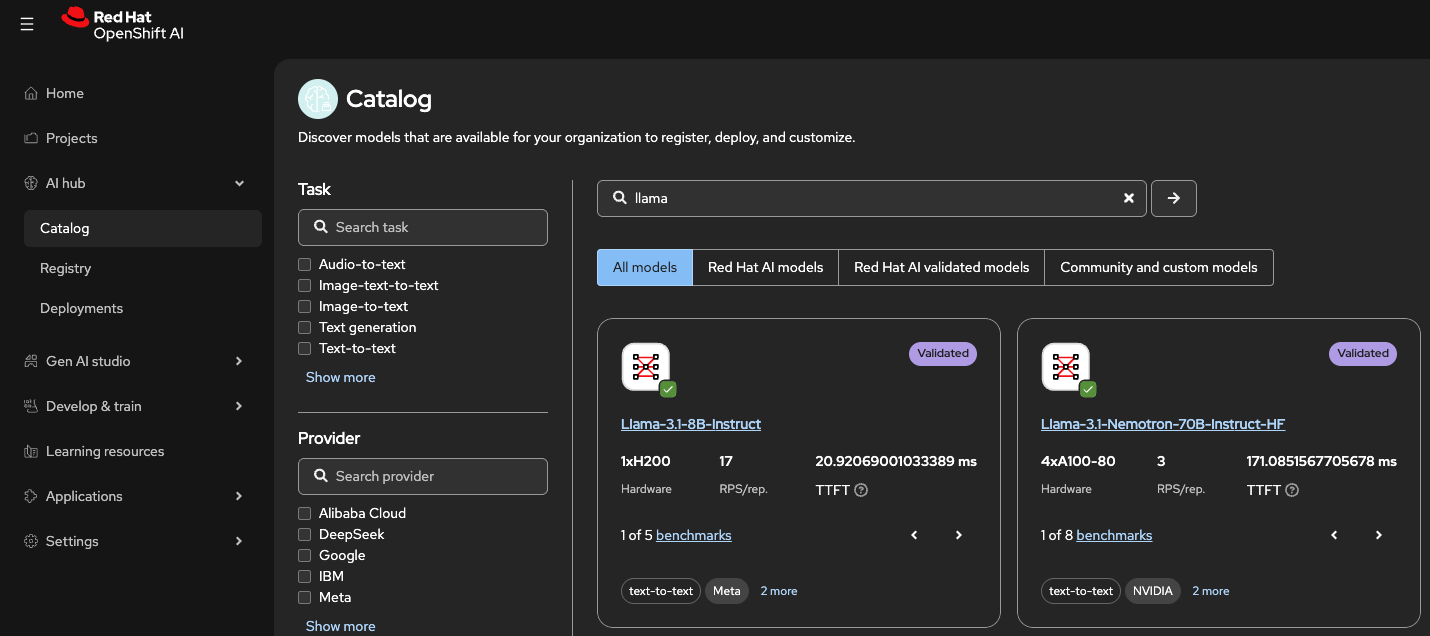
Open Catalog: In the left-hand menu, select AI Hub > Catalog. Choose the model you wish to deploy and click Deploy model.
Configure Deployment: In the deployment dialog, select your project and configure:
- Resource Name: Note the pre-populated name; you will need this later.
- Serving Runtime: Select the runtime appropriate for your hardware (e.g., vLLM NVIDIA GPU ServingRuntime for KServe).
- Deployment Mode: Choose KServe RawDeployment (unless scale-to-zero is required).
- Replicas & Size: Set the number of replicas (e.g., 1) and server size (e.g., Medium) based on pod requirements.
- Accelerator: Specify the hardware (e.g., A10G NVIDIA GPU) and count.
- Authentication & Access:
- Check Make deployed models available through an external route for outside access.
- Check Require token authentication. Always enable this for external routes and store the token securely.
- Configuration Parameters: Add required flags (e.g.,
--max-model-len=8096 --task=generate --trust_remote_code). Refer to the Red Hat AI Inference Server documentation for details.
Deploy: Click Deploy.
Retrieve Endpoints: Once deployed, go to Data Science Projects, select your project, and click the Models tab.
- Click Internal and external endpoint to view the URLs. Record both, as some client applications cannot resolve internal cluster addresses.
- Expand the model list item (using the arrow on the left) and scroll down to copy the Token authentication value.
Your model is now ready. Use the endpoint URL and resource name in the make install command.
IMPORTANT: Put the authentication key in your helm/product-recommender-system/values.yaml file (see SUMMARY_LLM_API_KEY in the values.yaml file).
Configuration you'll change most often
- Images
- Backend+Frontend:
frontendBackendImageinhelm/product-recommender-system/values.yaml - Training:
pipelineJobImage(training container image) - Core library (as a base in backend image):
applicationImage(if used)
- Backend+Frontend:
- LLM for review summarization
- Set
llm.secret.data.SUMMARY_LLM_API_KEY(or bring your own secret)
- Set
- Database/Feast integration
- DB connection comes from the
pgvectorsecret (created by the chart) - Feast TLS secret name:
feast-feast-recommendation-registry-tls(mounted in backend & training)
- DB connection comes from the
How search works
- Semantic Approximate Nearest Neighbor search over item text embeddings (BGE)
If you add more modalities (e.g., category vectors), stack only equal-dimension tensors or compute per-field similarities and fuse (max/weighted) without stacking.
AI Review Summarization
- What it does: Uses an LLM to condense recent product reviews into a short, helpful summary covering sentiment, pros, cons, and an overall recommendation.
- Endpoint:
GET /products/{product_id}/reviews/summarize— returns AI-generated summary text.
- Notes:
- Requires at least 4 reviews to produce a summary; otherwise returns a friendly message.
- Review summary generated real time upon clicking the 'AI Summarize' button on the product page.
Detailed docs live in component READMEs:
recommendation-core/README.mdrecommendation-training/README.mdbackend/README.mdfrontend/README.mdhelm/README.md
Contributions
- Contributions welcome via PRs; please update component READMEs when changing behavior
Tags
- Industry: Retail
- Product: OpenShift AI
- Use case: Personalization

'%20d='M201.5%20305.5c-13.8%200-24.9-11.1-24.9-24.6%200-13.8%2011.1-24.9%2024.9-24.9%2013.6%200%2024.6%2011.1%2024.6%2024.9%200%2013.6-11.1%2024.6-24.6%2024.6zM504%20256c0%20137-111%20248-248%20248S8%20393%208%20256%20119%208%20256%208s248%20111%20248%20248zm-132.3-41.2c-9.4%200-17.7%203.9-23.8%2010-22.4-15.5-52.6-25.5-86.1-26.6l17.4-78.3%2055.4%2012.5c0%2013.6%2011.1%2024.6%2024.6%2024.6%2013.8%200%2024.9-11.3%2024.9-24.9s-11.1-24.9-24.9-24.9c-9.7%200-18%205.8-22.1%2013.8l-61.2-13.6c-3-.8-6.1%201.4-6.9%204.4l-19.1%2086.4c-33.2%201.4-63.1%2011.3-85.5%2026.8-6.1-6.4-14.7-10.2-24.1-10.2-34.9%200-46.3%2046.9-14.4%2062.8-1.1%205-1.7%2010.2-1.7%2015.5%200%2052.6%2059.2%2095.2%20132%2095.2%2073.1%200%20132.3-42.6%20132.3-95.2%200-5.3-.6-10.8-1.9-15.8%2031.3-16%2019.8-62.5-14.9-62.5zM302.8%20331c-18.2%2018.2-76.1%2017.9-93.6%200-2.2-2.2-6.1-2.2-8.3%200-2.5%202.5-2.5%206.4%200%208.6%2022.8%2022.8%2087.3%2022.8%20110.2%200%202.5-2.2%202.5-6.1%200-8.6-2.2-2.2-6.1-2.2-8.3%200zm7.7-75c-13.6%200-24.6%2011.1-24.6%2024.9%200%2013.6%2011.1%2024.6%2024.6%2024.6%2013.8%200%2024.9-11.1%2024.9-24.6%200-13.8-11-24.9-24.9-24.9z'/%3e%3c/svg%3e)