 Red Hat Summit
Seam Reference Guide
for use with JBoss Enterprise Application Platform 5
Edition 5.2.0
Abstract
Chapter 1. Seam Tutorial
1.1. Using the Seam examples
examples subdirectory of the Seam distribution. The first example, on registration, is in the examples/registration directory.
- The
viewdirectory contains view-related files such as web page templates, images and stylesheets. - The
resourcesdirectory contains deployment descriptors and other configuration files. - The
srcdirectory contains the application source code.
build.xml, so you will need a recent version of Ant installed before you get started.
1.1.1. Running the examples on JBoss Enterprise Application Platform
jboss.home, in the shared build.properties file (in the root folder of your Seam installation) to the location of your JBoss Enterprise Application Platform installation.
ant explode in that example's directory. Any example that is packaged as an EAR (Enterprise Archive) deploys to a URL like /seam-example, where example is the name of the example folder, with one exception: if the example folder begins with "seam", the prefix "seam" is omitted. For instance, if JBoss Enterprise Application Platform is running on port 8080, the URL for the Registration example is http://localhost:8080/seam-registration/, whereas the URL for the SeamSpace example is http://localhost:8080/seam-space/.
/jboss-seam-example.
Note
1.1.2. Running the example tests
ant test.
readme.txt in the examples directory of the Seam distribution for more information.
1.2. Your first Seam application: the registration example

1.2.1. Understanding the code
1.2.1.1. The entity bean: User.java
Example 1.1. User.java
|
The EJB3 standard @Entity annotation indicates that the User class is an entity bean.
|
|
A Seam component needs a component name specified by the @Name annotation. This name must be unique within the Seam application. When JSF asks Seam to resolve a context variable with a name that is the same as a Seam component name, and the context variable is currently undefined (null), Seam will instantiate that component, and bind the new instance to the context variable. In this case, Seam will instantiate a User the first time JSF encounters a variable named user.
|
|
Whenever Seam instantiates a component, it binds the new instance to a context variable in the component's default context. The default context is specified using the @Scope annotation. The User bean is a session scoped component.
|
|
The EJB standard @Table annotation indicates that the User class is mapped to the users table.
|
| name, password and username are the persistent attributes of the entity bean. All of our persistent attributes define accessor methods. These are needed when this component is used by JSF in the render response and update model values phases.
|
|
An empty constructor is required by both the EJB specification and Seam.
|
|
The @NotNull and @Length annotations are part of the Hibernate Validator framework. Seam integrates Hibernate Validator and lets you use it for data validation (even if you are not using Hibernate for persistence).
|
|
The EJB standard @Id annotation indicates the primary key attribute of the entity bean.
|


@Name and @Scope annotations. These annotations establish that this class is a Seam component.
User class are bound directly to JSF components and populated by JSF during the update model values phase. There is no glue code to copy data back and forth between the JSP pages and the entity bean domain model.
1.2.1.2. The stateless session bean class: RegisterAction.java
User bean.
Example 1.2. RegisterAction.java
|
The EJB @Stateless annotation marks this class as a stateless session bean.
|
|
The @In annotation marks an attribute of the bean as injected by Seam. In this case, the attribute is injected from a context variable named user (the instance variable name).
|
|
The EJB standard @PersistenceContext annotation is used to inject the EJB3 entity manager.
|
|
The Seam @Logger annotation is used to inject the component's Log instance.
|
|
The action listener method uses the standard EJB3 EntityManager API to interact with the database, and returns the JSF outcome. Note that, since this is a session bean, a transaction is automatically begun when the register() method is called, and committed when it completes.
|
|
Notice that Seam lets you use a JSF EL expression inside EJB-QL. Under the covers, this results in an ordinary JPA setParameter() call on the standard JPA Query object.
|
|
The Log API lets us easily display templated log messages which can also make use of JSF EL expressions.
|
|
JSF action listener methods return a string-valued outcome that determines what page will be displayed next. A null outcome (or a void action listener method) redisplays the previous page. In plain JSF, it is normal to always use a JSF navigation rule to determine the JSF view id from the outcome. For complex applications this indirection is useful and a good practice. However, for very simple examples like this one, Seam lets you use the JSF view id as the outcome, eliminating the requirement for a navigation rule. Note that when you use a view id as an outcome, Seam always performs a browser redirect.
|
|
Seam provides a number of built-in components to help solve common problems. The FacesMessages component makes it easy to display templated error or success messages. (As of Seam 2.1, you can use StatusMessages instead to remove the semantic dependency on JSF). Built-in Seam components may be obtained by injection, or by calling the instance() method on the class of the built-in component.
|

@Scope this time. Each Seam component type has a default scope, which will be used if scope is not explicitly specified. For stateless session beans, the default scope is the stateless context.
Note
1.2.1.3. The session bean local interface: Register.java
Example 1.3. Register.java
@Local
public interface Register
{
public String register();
}
@Local
public interface Register
{
public String register();
}1.2.1.4. The view: register.xhtml and registered.xhtml
Example 1.4. register.xhtml
<s:validateAll>. This JSF component tells JSF to validate all the contained input fields against the Hibernate Validator annotations specified on the entity bean.
Example 1.5. registered.xhtml
1.2.1.5. The Seam component deployment descriptor: components.xml
components.xml, located in the WEB-INF directory. The components.xml file can be used to tell Seam how to find our EJB components in JNDI:
Example 1.6. components.xml example
jndiPattern, which belongs to a built-in Seam component named org.jboss.seam.core.init. The @ symbols are used to direct the Ant build script to insert the correct JNDI pattern from the components.properties file when the application is deployed. You will learn more about this process in Section 6.2, “Configuring components via components.xml”.
1.2.1.6. The web deployment description: web.xml
Example 1.7. web.xml
web.xml file configures both Seam and JSF. The configuration you see here changes very little between Seam applications.
1.2.1.7. The JSF configuration: faces-config.xml
faces-config.xml is usually a requirement. In this case, Facelets is used to define our views, so we need to tell JSF to use Facelets as its templating engine.
Example 1.8. faces-config.xml
faces-config.xml is used much less often than in plain JSF. Here, we use it simply to enable Facelets (and not JSP) as the view handler.
1.2.1.8. The EJB deployment descriptor: ejb-jar.xml
ejb-jar.xml file integrates Seam with EJB3 by attaching the SeamInterceptor to all session beans in the archive.
Example 1.9. ejb-jar.xml
1.2.1.9. The EJB persistence deployment descriptor: persistence.xml
persistence.xml file directs the EJB persistence provider to the appropriate datasource, and contains some vendor-specific settings. In this case, it enables automatic schema export at start time.
Example 1.10. persistence.xml
1.2.1.10. The EAR deployment descriptor: application.xml
Example 1.11. registration application
/seam-registration.
1.2.2. How it works
user. Since no value is yet bound to that name (in any Seam context), Seam instantiates the user component, and returns the resulting User entity bean instance to JSF after storing it in the Seam session context.
User entity. If the constraints are violated, JSF redisplays the page. Otherwise, JSF binds the form input values to properties of the User entity bean.
register. Seam uses the JNDI pattern mentioned earlier to locate the stateless session bean, wraps it as a Seam component, and returns it. Seam then presents this component to JSF and JSF invokes the register() action listener method.
User entity from the Seam session context, before allowing the invocation to continue.
register() method checks if a user with the entered username already exists. If so, an error message is queued with the FacesMessages component, and a null outcome is returned, causing a page redisplay. The FacesMessages component interpolates the JSF expression embedded in the message string and adds a JSF FacesMessage to the view.
"/registered.xhtml" outcome triggers a browser redirect to the registered.xhtml page. When JSF comes to render the page, it asks Seam to resolve the variable named user and uses property values of the returned User entity from Seam's session scope.
1.3. Clickable lists in Seam: the messages example
<h:dataTable>. The messages example demonstrates this functionality.

1.3.1. Understanding the code
Message), one session bean (MessageListBean), and one JSP.
1.3.1.1. The entity bean: Message.java
Message entity defines the title, text, date and time of a message, and a flag indicating whether the message has been read:
Example 1.12. Message.java
1.3.1.2. The stateful session bean: MessageManagerBean.java
MessageManagerBean) which defines the action listener methods for both of the buttons on our form. As in the previous example, one of the buttons selects a message from the list and displays that message; the other button deletes a message.
MessageManagerBean is also responsible for fetching the list of messages the first time we navigate to the message list page. There are various ways for users to navigate to the page, not all of which are preceded by a JSF action. (Navigating to the page from your favorites will not necessarily call the JSF action, for example.) Therefore, fetching the message list must take place in a Seam factory method, instead of in an action listener method.
Example 1.13. MessageManagerBean.java
|
The @DataModel annotation exposes an attributes of type java.util.List to the JSF page as an instance of javax.faces.model.DataModel. This allows us to use the list in a JSF <h:dataTable> with clickable links for each row. In this case, the DataModel is made available in a session context variable named messageList.
|
|
The @DataModelSelection annotation tells Seam to inject the List element that corresponded to the clicked link.
|
|
The @Out annotation then exposes the selected value directly to the page. So every time a row of the clickable list is selected, the Message is injected to the attribute of the stateful bean, and then subsequently outjected to the event context variable named message.
|
|
This stateful bean has an EJB3 extended persistence context. The messages retrieved in the query remain in the managed state as long as the bean exists, so any subsequent method calls to the stateful bean can update them without needing to make any explicit call to the EntityManager.
|
|
The first time we navigate to the JSP page, there will be no value in the messageList context variable. The @Factory annotation tells Seam to create an instance of MessageManagerBean and invoke the findMessages() method to initialize the value. We call findMessages() a factory method for messages.
|
|
The select() action listener method marks the selected Message as read, and updates it in the database.
|
|
The delete() action listener method removes the selected Message from the database.
|
|
All stateful session bean Seam components must define a parameterless method marked @Remove that Seam uses to remove the stateful bean when the Seam context ends, and clean up any server-side state.
|
Note
1.3.1.3. The session bean local interface: MessageManager.java
Example 1.14. MessageManager.java
Components.xml, persistence.xml, web.xml, ejb-jar.xml, faces-config.xml and application.xml operate in a similar fashion to the previous example, and go directly to the JSP.
1.3.1.4. The view: messages.jsp
<h:dataTable> component. Once again, these functions are not Seam-specific.
Example 1.15. messages.jsp
1.3.2. How it works
messages.jsp, the page will try to resolve the messageList context variable. Since this variable is not yet initialized, Seam calls the factory method findMessages, which queries the database and retrieves a DataModel. This provides the row data required to render the <h:dataTable>.
<h:commandLink>, JSF calls the select() action listener. Seam intercepts this call and injects the selected row data into the message attribute of the messageManager component. The action listener fires, marking the selected Message as read. At the end of the call, Seam outjects the selected Message to the message context variable. Next, the EJB container commits the transaction, and the change to the Message is flushed to the database. Finally, the page is re-rendered, redisplaying the message list, and displaying the selected message below it.
<h:commandButton>, JSF calls the delete() action listener. Seam intercepts this call and injects the selected row data into the message attribute of the messageList component. The action listener fires, which removes the selected Message from the list, and also calls remove() on the EntityManager. At the end of the call, Seam refreshes the messageList context variable and clears the message context variable. The EJB container commits the transaction, and deletes the Message from the database. Finally, the page is re-rendered, redisplaying the message list.
1.4. Seam and jBPM: the todo list example
1.4.1. Understanding the code
Example 1.16. todo.jpdl.xml
|
The <start-state> node represents the logical start of the process. When the process starts, it immediately transitions to the todo node.
|
|
The <task-node> node represents a wait state, where business process execution pauses, waiting for one or more tasks to be performed.
|
|
The <task> element defines a task to be performed by a user. Since there is only one task defined on this node, when it is complete, execution resumes, and we transition to the end state. The task gets its description from a Seam component named todoList (one of the JavaBeans).
|
|
Tasks need to be assigned to a user or group of users when they are created. In this case, the task is assigned to the current user, which we get from a built-in Seam component named actor. Any Seam component may be used to perform task assignment.
|
|
The <end-state> node defines the logical end of the business process. When execution reaches this node, the process instance is destroyed.
|

login.jsp. Here, it simply initializes the jBPM actor ID with the actor component. In a real application, it would also need to authenticate the user.
Example 1.17. Login.java
@In to inject the built-in Actor component.
Example 1.18. login.jsp
Example 1.19. TodoList.java
|
The description property accepts user input from the JSP page, and exposes it to the process definition, allowing the task description to be set.
|
|
The Seam @CreateProcess annotation creates a new jBPM process instance for the named process definition.
|
|
The Seam @StartTask annotation starts work on a task. The @EndTask ends the task, and allows the business process execution to resume.
|
@StartTask and @EndTask would not appear on the same method, because some work would need to be done with the application in order to complete the task.
todo.jsp:
Example 1.20. todo.jsp
taskInstanceList. The list is defined inside a JSF form.
Example 1.21. todo.jsp (taskInstanceList)
TaskInstance. The following code displays certain properties for every task in the list. Input controls are used for description, priority, and due date to allow users to update these values.
Example 1.22. TaskInstance List Properties
Note
#{task.dueDate}.
@StartTask @EndTask. It passes the task ID to Seam as a request parameter:
<s:button> JSF control from the seam-ui.jar package. This button updates the properties of the tasks. When the form is submitted, Seam and jBPM will make any changes to the tasks persistent. There is no need for any action listener method:
<h:commandButton value="Update Items" action="update"/>
<h:commandButton value="Update Items" action="update"/>@CreateProcess.
1.4.2. How it works
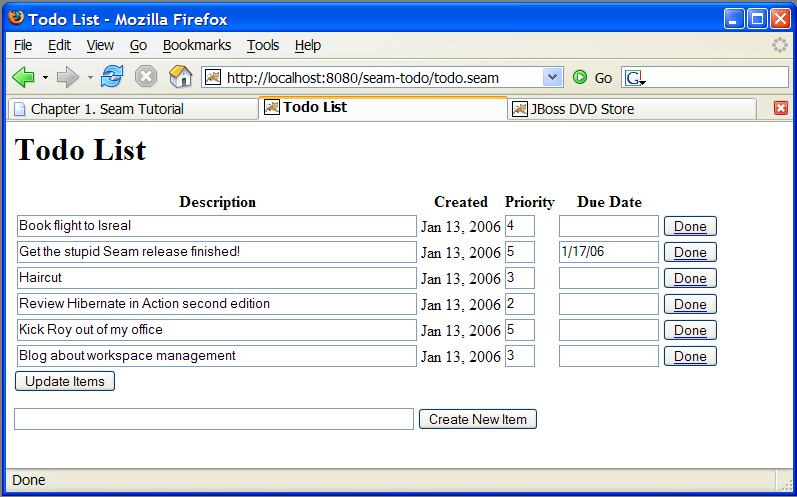
todo.jsp uses the taskInstanceList component to display a table of outstanding todo items for the current user. (Initially there are none.) The page also displays a form to enter a new task item. When the user types the todo item and clicks the button, #{todoList.createTodo} is called. This starts the todo process, as defined in todo.jpdl.xml.
todo state, where a new task is created. The task description is set based on the user input saved to #{todoList.description}. The task is then assigned to the current user, stored in the seam actor component. In this example, the process has no extra process state — all the state is stored in the task definition. The process and task information is stored in the database at the end of the request.
todo.jsp is redisplayed, taskInstanceList finds the newly-created task and displays it in an h:dataTable. The internal state of the task is displayed in each column: #{task.description}, #{task.priority}, #{task.dueDate}, etc. These fields can all be edited and saved to the database.
#{todoList.done}. Each button specifies taskInstance="#{task}" (the task for that particular row of the table) so that the todoList component is able to distinctly identify which task is complete. The @StartTask and @EndTask annotations activate and immediately complete the task. The original process then transitions into the done state (according to the process definition) and ends. The state of the task and process are both updated in the database.
todo.jsp is displayed again, the completed task is no longer shown in the taskInstanceList, since this component displays only incomplete tasks.
1.5. Seam pageflow: the numberguess example

1.5.1. Understanding the code
Example 1.23. pageflow.jpdl.xml
|
The <page> element defines a wait state where the system displays a particular JSF view and waits for user input. The view-id is the same JSF view id used in plain JSF navigation rules. The redirect attribute tells Seam to use post-then-redirect when navigating to the page. (This results in friendly browser URLs.)
|
|
The <transition> element names a JSF outcome. The transition is triggered when a JSF action results in that outcome. Execution will then proceed to the next node of the pageflow graph, after invocation of any jBPM transition actions.
|
|
A transition <action> is just like a JSF action, except that it occurs when a jBPM transition occurs. The transition action can invoke any Seam component.
|
|
A <decision> node branches the pageflow, and determines the next node to execute by evaluating a JSF EL expression.
|

numberGuess.jspx:
Example 1.24. numberGuess.jspx
guess transition instead of calling an action directly.
win.jspx page is predictable:
Example 1.25. win.jspx
lose.jspx is very similar, so we have not included it here.
Example 1.26. NumberGuess.java
|
The first time a JSP page asks for a numberGuess component, Seam will create a new one for it, and the @Create method will be invoked, allowing the component to initialize itself.
|
pages.xml file starts a Seam conversation, and specifies the pageflow definition to use for the conversation's page flow. Refer to Chapter 8, Conversations and workspace management for more information.
Example 1.27. pages.xml
1.5.2. How it works
numberGuess.jspx view. When the page is first displayed, the pages.xml configuration activates a conversation and associates it with the numberGuess pageflow. The pageflow starts with a start-page tag (a wait state), so the numberGuess.xhtml is rendered.
numberGuess component, which causes a new instance to be created and stored in the conversation. the @Create method is called, initializing the game's state. The view displays an h:form, which allows the user to edit #{numberGuess.currentGuess}.
guess action. Seam refers to the pageflow to handle the action, and the pageflow invokes #{numberGuess.guess} (which updates the guess count and highest/lowest suggestions in the numberGuess component), and transitions to the evaluateGuess state.
evaluateGuess state checks the value of #{numberGuess.correctGuess} and transitions to either the win or evaluatingRemainingGuesses state. Assuming the number was incorrect, the pageflow transitions to evaluatingRemainingGuesses. This is also a decision state, which tests the #{numberGuess.lastGuess} state to determine whether or not the user is allowed further guesses. If further guesses are allowed (lastGuess is false), we transition back to the original displayGuess state. Since this is a page state, the associated page /numberGuess.jspx is displayed. This page also contains a redirect element, so Seam sends a redirect to the user's browser, which begins the process again.
win or the lose transition were invoked, the user would be taken to /win.jspx or /lose.jspx respectively. Both states specify that Seam should end the conversation, stop holding game and pageflow state, and redirect the user to the final page.
cheat transition, which loads a sub-process to handle that particular flow. Although in this application this process is superfluous, this demonstrates how complex pageflows can be broken down into smaller, simpler structures to make them easier to understand.
1.6. A complete Seam application: the Hotel Booking example
1.6.1. Introduction
- User registration
- Login
- Logout
- Set password
- Hotel search
- Hotel selection
- Room reservation
- Reservation confirmation
- Existing reservation list
1.6.2. Overview of the booking example
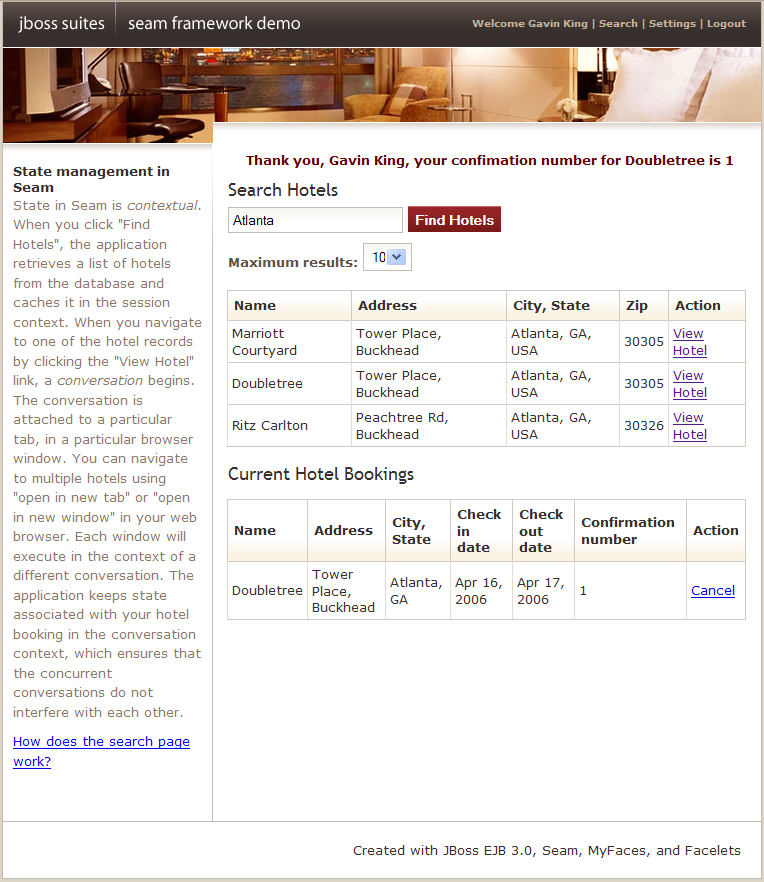
http://localhost:8080/seam-booking/
AuthenticatorActionprovides the log in authentication logic.BookingListActionretrieves existing bookings for the currently logged in user.ChangePasswordActionupdates the password of the currently logged in user.HotelBookingActionimplements booking and confirmation functionality. This is implemented as a conversation, so this is one of the more important classes in the application.HotelSearchingActionimplements the hotel search functionality.RegisterActionregisters a new system user.
Hotelis an entity bean that represents a hotelBookingis an entity bean that represents an existing bookingUseris an entity bean representing a user who can make hotel bookings
1.6.3. Understanding Seam conversations
HttpSession or recorded to the database at the beginning and end of each request.
HttpSession suffers similar issues. The HttpSession is fine for storing true session data — data common to all requests between user and application — but for data related to individual request series, it does not work so well. Conversations stored here quickly break down when dealing with multiple windows or the back button. Without careful programming, data in the HttpSession can also grow quite large, which makes the session difficult to cluster. Developing mechanisms to deal with the problems these methods present (by isolating session state associated with distinct concurrent conversations, and incorporating failsafes to ensure conversation state is destroyed when a conversation is aborted) can be complicated.
Example 1.28. HotelSearchingAction.java
|
The EJB standard @Stateful annotation identifies this class as a stateful session bean. Stateful session beans are scoped to the conversation context by default.
|
|
The @Restrict annotation applies a security restriction to the component. It restricts access to the component allowing only logged-in users. The security chapter explains more about security in Seam.
|
|
The @DataModel annotation exposes a List as a JSF ListDataModel. This makes it easy to implement clickable lists for search screens. In this case, the list of hotels is exposed to the page as a ListDataModel in the conversation variable named hotels.
|
|
The EJB standard @Remove annotation specifies that a stateful session bean should be removed and its state destroyed after invocation of the annotated method. In Seam, all stateful session beans must define a parameterless method marked @Remove. This method will be called when Seam destroys the session context.
|
Example 1.29. main.xhtml
|
The RichFaces Ajax <a:support> tag allows a JSF action event listener to be called by asynchronous XMLHttpRequest when a JavaScript event like onkeyup occurs. Even better, the reRender attribute lets us render a fragment of the JSF page and perform a partial page update when the asynchronous response is received.
|
|
The RichFaces Ajax <a:status> tag lets us display an animated image while we wait for asynchronous requests to return.
|
|
The RichFaces Ajax <a:outputPanel> tag defines a region of the page which can be re-rendered by an asynchronous request.
|
|
The Seam <s:link> tag lets us attach a JSF action listener to an ordinary (non-JavaScript) HTML link. The advantage of this over the standard JSF <h:commandLink> is that it preserves the operation of "open in new window" and "open in new tab". Also notice that we use a method binding with a parameter: #{hotelBooking.selectHotel(hot)}. This is not possible in the standard Unified EL, but Seam provides an extension to the EL that lets you use parameters on any method binding expression.
If you are wondering how navigation occurs, you can find all the rules in WEB-INF/pages.xml; this is discussed in Section 7.7, “Navigation”.
|
selectHotel() method of HotelBookingAction, where the real work occurs.
Example 1.30. HotelBookingAction.java
|
This bean uses an EJB3 extended persistence context, so that any entity instances remain managed for the whole life cycle of the stateful session bean.
|
|
The @Out annotation declares that an attribute value is outjected to a context variable after method invocations. In this case, the context variable named hotel will be set to the value of the hotel instance variable after every action listener invocation completes.
|
|
The @Begin annotation specifies that the annotated method begins a long-running conversation, so the current conversation context will not be destroyed at the end of the request. Instead, it will be reassociated with every request from the current window, and destroyed either by timeout due to conversation inactivity or invocation of a matching @End method.
|
|
The @End annotation specifies that the annotated method ends the current long-running conversation, so the current conversation context will be destroyed at the end of the request.
|
|
This EJB remove method will be called when Seam destroys the conversation context. Do not forget to define this method!
|
HotelBookingAction contains all the action listener methods that implement selection, booking and booking confirmation, and holds state related to this work in its instance variables. This code is much cleaner and simpler than getting and setting HttpSession attributes.
1.6.4. The Seam Debug Page
seam-debug.jar. To make the Seam debug page available, deploy this jar in WEB-INF/lib alongside Facelets, and set the debug property of the init component as shown here:
<core:init jndi-pattern="@jndiPattern@" debug="true"/>
<core:init jndi-pattern="@jndiPattern@" debug="true"/>http://localhost:8080/seam-booking/debug.seam .

1.7. Nested conversations: extending the Hotel Booking example
1.7.1. Introduction

1.7.2. Understanding Nested Conversations
Example 1.31. RoomPreferenceAction.java
|
The hotel instance is injected from the conversation context. The hotel is loaded through an extended persistence context so that the entity remains managed throughout the conversation. This allows us to lazily load the availableRooms through an @Factory method by simply walking the association.
|
|
When @Begin(nested=true) is encountered, a nested conversation is pushed onto the conversation stack. When executing within a nested conversation, components still have access to all outer conversation state, but setting any values in the nested conversation’s state container does not affect the outer conversation. In addition, nested conversations can exist concurrently stacked on the same outer conversation, allowing independent state for each.
|
|
The roomSelection is outjected to the conversation based on the @DataModelSelection. Note that because the nested conversation has an independent context, the roomSelection is only set into the new nested conversation. Should the user select a different preference in another window or tab a new nested conversation would be started.
|
|
The @End annotation pops the conversation stack and resumes the outer conversation. The roomSelection is destroyed along with the conversation context.
|
nestedbooking example, the conversation stack consists of the external long-running conversation (the booking) and each of the nested conversations (room selections).
Example 1.32. rooms.xhtml
|
When requested from EL, the #{availableRooms} are loaded by the @Factory method defined in RoomPreferenceAction. The @Factory method will only be executed once to load the values into the current context as a @DataModel instance.
|
|
Invoking the #{roomPreference.selectPreference} action results in the row being selected and set into the @DataModelSelection. This value is then outjected to the nested conversation context.
|
|
Revising the dates simply returns to the /book.xhtml. Note that we have not yet nested a conversation (no room preference has been selected), so the current conversation can simply be resumed. The <s:button> component simply propagates the current conversation when displaying the /book.xhtml view.
|
HotelBookingAction.
Example 1.33. HotelBookingAction.java
|
Annotating an action with @End(root=true) ends the root conversation which effectively destroys the entire conversation stack. When any conversation is ended, its nested conversations are ended as well. As the root is the conversation that started it all, this is a simple way to destroy and release all state associated with a workspace once the booking is confirmed.
|
|
The roomSelection is only associated with the booking on user confirmation. While outjecting values to the nested conversation context will not impact the outer conversation, any objects injected from the outer conversation are injected by reference. This means that any changing to these objects will be reflected in the parent conversation as well as other concurrent nested conversations.
|
|
By simply annotating the cancellation action with @End(root=true, beforeRedirect=true) we can easily destroy and release all state associated with the workspace prior to redirecting the user back to the hotel selection view.
|
1.8. A complete application featuring Seam and jBPM: the DVD Store example
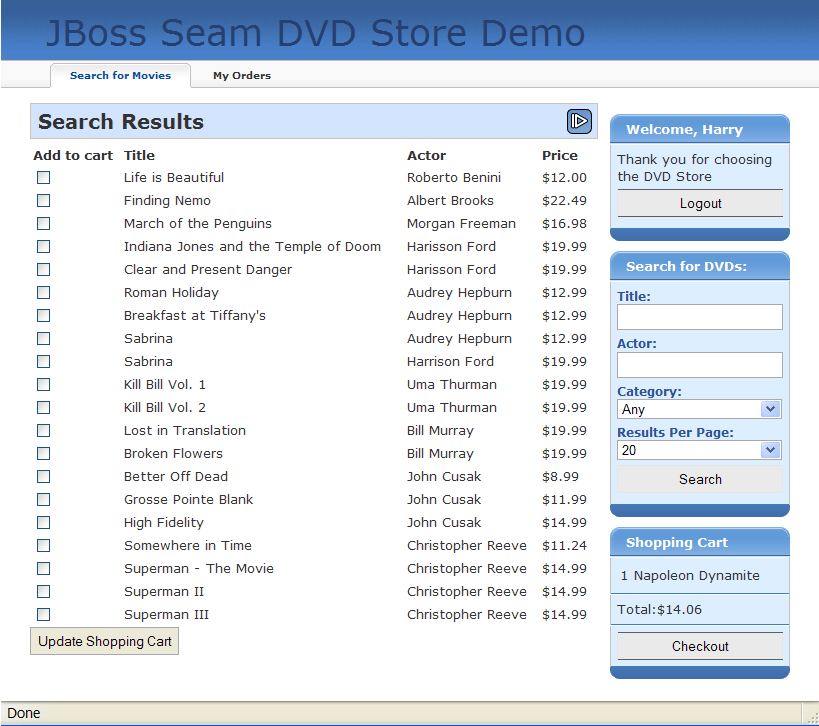
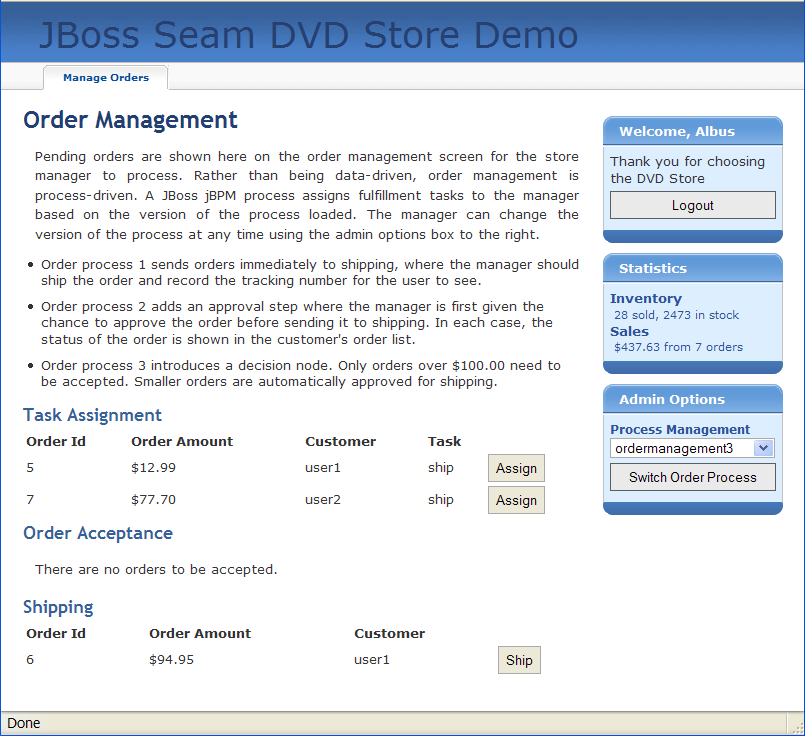
dvdstore directory, as with previous applications.
1.9. Bookmarkable URLs with the Blog example
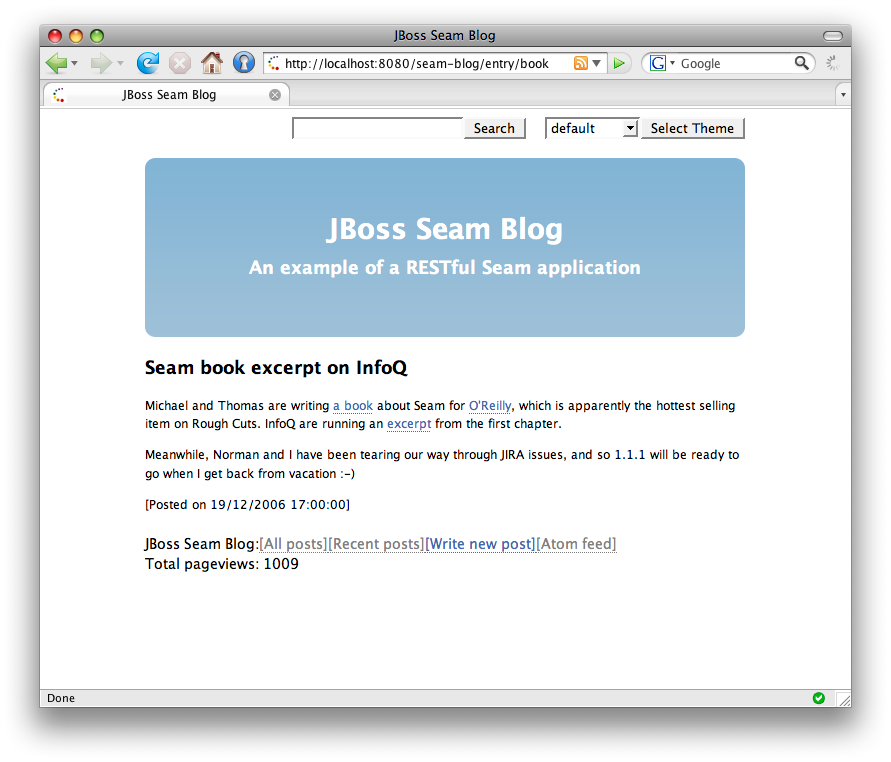
1.9.1. Using "pull"-style MVC
index.xhtml facelets page displays a list of recent blog entries:
#{blog.recentBlogEntries} data used by the <h:dataTable> is retrieved lazily — "pulled" — when required, by a Seam component named blog. This flow of control is the reverse of that used in traditional action-based web frameworks like Struts.
Example 1.34.
|
This component uses a seam-managed persistence context. Unlike the other examples we've seen, this persistence context is managed by Seam, instead of by the EJB3 container. The persistence context spans the entire web request, allowing us to avoid any exceptions that occur when accessing unfetched associations in the view.
|
|
The @Unwrap annotation tells Seam to provide the return value of the method — the Blog — instead of the actual BlogService component to clients. This is the Seam manager component pattern.
|
1.9.2. Bookmarkable search results page
menu.xhtml, which is included by the Facelets template template.xhtml:
http://localhost:8080/seam-blog/search/, the values submitted with the form must be included in the URL. There is no easy way to do this with JSF, but with Seam, only two features are required: page parameters and URL rewriting. Both are defined here in WEB-INF/pages.xml:
searchPattern request parameter to the value held by #{searchService.searchPattern}, whenever the search page is requested, and whenever a link to the search page is generated. Seam takes responsibility for maintaining the link between URL state and application state.
book would ordinarily be http://localhost:8080/seam-blog/seam/search.xhtml?searchPattern=book. Seam can simplify this URL by using a rewrite rule. The first rewrite rule, for the pattern /search/{searchPattern}, states that whenever a URL for search.xhtml contains a searchPattern request parameter, that URL can be compressed into a simplified URL. So, the earlier URL (http://localhost:8080/seam-blog/seam/search.xhtml?searchPattern= book) can instead be written as http://localhost:8080/seam-blog/search/book.
components.xml:
<web:rewrite-filter view-mapping="/seam/*" />
<web:rewrite-filter view-mapping="/seam/*" />search.xhtml page:
1.9.3. Using "push"-style MVC in a RESTful application
entry.xhtml.
Note
entryAction component works much like an action class in a traditional push-MVC action-oriented framework like Struts.
pages.xml:
Note
entry.xhtml page is requested, Seam first binds the blogEntryId page parameter to the model. Remember that, because of URL rewriting, the blogEntryId parameter name won't appear in the URL. Seam then runs the page action, which retrieves the required data — the blogEntry — and places it in the Seam event context. Finally, it renders the following:
EntryNotFoundException exception is thrown. We want this exception to result in a 404 error, not a 505, so we annotate the exception class:
Chapter 2. Migration
2.1. Migrating from Seam 1.2.x to Seam 2.0
2.1.1. Migrating to JavaServer Faces 1.2
web.xml:
- Remove the MyFaces
StartupServletContextListener. - Remove the AJAX4JSF filter, mappings, and
org.ajax4jsf.VIEW_HANDLERScontext parameter. - Rename
org.jboss.seam.web.SeamFilterasorg.jboss.seam.servlet.SeamFilter. - Rename
org.jboss.seam.servlet.ResourceServletasorg.jboss.seam.servlet.SeamResourceServlet. - Change the
web-appversion from2.4to2.5. In the namespace URL, changej2eetojavaee. For example:Copy to Clipboard Copied! Toggle word wrap Toggle overflow
SeamFilter in web.xml instead of explicitly declaring SeamExceptionFilter and SeamRedirectFilter in web.xml.
javax.faces.STATE_SAVING_METHOD context parameter.
faces-config.xml:
- Remove the
TransactionalSeamPhaseListenerorSeamPhaseListenerdeclaration, if in use. - Remove the
SeamELResolverdeclaration, if in use. - Change the
SeamFaceletViewHandlerdeclaration to the standardcom.sun.facelets.FaceletViewHandler, and ensure it is enabled. - Remove the Document Type Declaration (DTD) from the document and add the XML Schema declarations to the
<faces-config>root tag, like so:Copy to Clipboard Copied! Toggle word wrap Toggle overflow
2.1.2. Code Migration
- Persistence-related components have been moved to
org.jboss.seam.persistence. - jBPM-related components have been moved to
org.jboss.seam.bpm. - JSF-related components, most notably
org.jboss.seam.faces.FacesMessages, have been moved toorg.jboss.seam.faces. - Servlet-related components have been moved to
org.jboss.seam.web. - Components related to asynchronicity have been moved to
org.jboss.seam.async. - Internationalization-related components have been moved to
org.jboss.seam.international. - The Pageflow component has been moved to
org.jboss.seam.pageflow. - The Pages component has been moved to
org.jboss.seam.navigation.
- BPM-related annotations are now included in the
org.jboss.seam.annotations.bpmpackage. - JSF-related annotations are now included in the
org.jboss.seam.annotations.facespackage. - Interceptor annotations are now included in the
org.jboss.seam.annotations.interceptpackage. - Annotations related to asynchronicity are now included in the
org.jboss.seam.annotations.asyncpackage. @RequestParameteris now included in theorg.jboss.seam.annotations.webpackage.@WebRemoteis now included in theorg.jboss.seam.annotations.remotingpackage.@Restrictis now included in theorg.jboss.seam.annotations.securitypackage.- Exception handling annotations are now included in the
org.jboss.seam.annotations.exceptionpackage. - Use
@BypassInterceptorsinstead of@Intercept(NEVER).
2.1.3. Migrating components.xml
components.xml with the new schemas and namespaces.
org.jboss.seam.foobar. The new namespace format is http://jboss.com/products/seam/foobar, and the schema is of the form http://jboss.com/products/seam/foobar-2.0.xsd. You will need to update the format of the namespaces and schemas in your components.xml file so that the URLs correspond to the version of Seam that you wish to migrate to (2.0 or 2.1).
- Replace
<core:managed-persistence-context>with<persistence:managed-persistence-context>. - Replace
<core:entity-manager-factory>with<persistence:entity-manager-factory>. - Remove
conversation-is-long-runningparameter from<core:manager/>element. - Remove
<core:ejb/>. - Remove
<core:microcontainer/>. - Replace
<core:transaction-listener/>with<transaction:ejb-transaction/>. - Replace
<core:resource-bundle/>with<core:resource-loader/>.
Example 2.1. components.xml Notes
components.xml instead of a JSF phase listener declaration in faces-config.xml. To disable Seam-managed transactions, use the following:
<core:init transaction-management-enabled="false"/>
<core:init transaction-management-enabled="false"/> expression attribute on event actions has been deprecated in favor of execute. For example:
org.jboss.seam.security> prefix instead of org.jboss.seam (for example, org.jboss.seam.security.notLoggedIn.)
Note
org.jboss.seam.postAuthenticate event, use the org.jboss.seam.security.loginSuccessful event to return to the captured view.
2.1.4. Migrating to Embedded JBoss
- the
jars in Seam'slib/directory - the
bootstrap/directory
embeddded-ejb directory and jboss-beans.xml. (You can use the Seam examples as reference.)
Note
-ds.xml file, so the jboss-beans.xml file is no longer required.
2.1.5. Migrating to jBPM 3.2
tx service to jbpm.cfg.xml:
<service name="tx" factory="org.jbpm.tx.TxServiceFactory" />
<service name="tx" factory="org.jbpm.tx.TxServiceFactory" />2.1.6. Migrating to RichFaces 3.1
ajax4jsf.jar and richfaces.jar jars have been replaced with the richfaces-api.jar (to be placed in the EAR lib/ directory) and the richfaces-impl.jar and richfaces-ui.jar (to be placed in WEB-INF/lib).
<s:selectDate> has been deprecated in favor of <rich:calendar> . There will be no further development of <s:selectDate> . The styles associated with the data picker should be removed from your style sheet to reduce bandwidth use.
2.1.7. Changes to Components
All dependencies that were previously declared as modules in application.xml should now be placed in the lib/ directory of your EAR, except jboss-seam.jar, which should be declared as an EJB module in application.xml.
<s:decorate> has become a naming container. Client IDs have therefore changed from fooForm:fooInput to fooForm:foo:fooInput, assuming that the following has been declared:
<h:form id="fooForm">
<s:decorate id="foo">
<h:inputText id="fooInput" value="#{bean.property}"/>
</s:decorate>
</h:form>
<h:form id="fooForm">
<s:decorate id="foo">
<h:inputText id="fooInput" value="#{bean.property}"/>
</s:decorate>
</h:form> <s:decorate> , JSF will generate an ID automatically.
Since Seam 2.0.0.CR2, there have been changes to the organization of generated classes in seam-gen when generate-entities is executed.
src/model/com/domain/projectname/model/EntityName.java
src/action/com/domain/projectname/model/EntityNameHome.java
src/action/com/domain/projectname/model/EntityNameList.java
src/model/com/domain/projectname/model/EntityName.java
src/action/com/domain/projectname/model/EntityNameHome.java
src/action/com/domain/projectname/model/EntityNameList.java src/model/com/domain/projectname/model/EntityName.java
src/action/com/domain/projectname/action/EntityNameHome.java
src/action/com/domain/projectname/action/EntityNameList.java
src/model/com/domain/projectname/model/EntityName.java
src/action/com/domain/projectname/action/EntityNameHome.java
src/action/com/domain/projectname/action/EntityNameList.javaaction package. This makes generate-entities conventions consistent with those of the new-entity command.
build.xml file as a base for new projects. If you have made extensive changes to the build.xml, you can focus on migrating only test-related targets.
<datasource> element in resources/META-INF/persistence-test.xml (or persistence-test-war.xml) to java:/DefaultDS. Alternatively, you can deploy a -ds.xml file to the bootstrap/deploy folder and use the JNDI name defined in that file.
build.xml as described, you will also require the deployed-*.list files, which define the jar files that are packaged in the EAR or WAR archive. These were introduced to remove the jar set from the build.xml file.
generate-entities, the search criteria block will bleed into the results table.
.rich-stglpanel-body {
overflow: auto;
}
.rich-stglpanel-body {
overflow: auto;
}2.2. Migrating from Seam 2.0 to Seam 2.1 or 2.2
2.2.1. Changes to dependency jar names
| File Name | Description |
|---|---|
lib/commons-codec.jar
|
Apache Commons codec library.
|
lib/commons-httpclient.jar
|
Apache Commons HTTP client library.
|
lib/drools-api.jar
|
Drools API.
|
lib/drools-decisiontables.jar
|
Drools decision tables.
|
lib/drools-templates.jar
|
Drools templates.
|
lib/ecj.jar
|
Eclipse compiler for Java (required for Drools Compiler).
|
lib/ehcache.jar
|
EH Cache (alternative cache provider)
|
lib/emma.jar
|
Emma Code Coverage library.
|
lib/gen/ant.jar
|
Ant build tool.
|
lib/gen/cglib.jar
|
Code generation library.
|
lib/gen/common.jar
|
Eclipse Common library.
|
lib/gen/core.jar
|
Eclipse Core compiler.
|
lib/gen/darkX.jar
|
Richfaces DarkX skin library.
|
lib/gen/freemarker.jar
|
Freemarker templating engine.
|
lib/gen/glassX.jar
|
Richfaces GlassX skin library.
|
lib/gen/hibernate-tools.jar
|
Hibernate tools.
|
lib/gen/jboss-seam-gen.jar
|
JBoss Seam generator.
|
lib/gen/jtidy.jar
|
JTidy library.
|
lib/gen/laguna.jar
|
Richfaces Laguna skin library.
|
lib/gen/runtime.jar
|
Eclipse Runtime.
|
lib/gen/text.jar
|
Eclipse text library.
|
lib/guice.jar
|
Google dependency injection framework.
|
lib/hibernate-core.jar
|
Hibernate core.
|
lib/httpclient.jar
|
Apache HTTP client library.
|
lib/httpcore.jar
|
Apache HTTP commons library.
|
lib/itext-rtf.jar
|
IText RTF support for IText library (PDF generation)
|
lib/itext.jar
|
IText library (PDF generation)
|
lib/jaxrs-api.jar
|
JAVA Restful API for Web services
|
lib/jboss-seam-excel.jar
|
JBoss Seam Excel.
|
lib/jboss-seam-resteasy.jar
|
JBoss Seam Resteasy.
|
lib/jboss-transaction-api.jar
|
Java transaction API.
|
lib/jbosscache-core.jar
|
JBoss Cache provider.
|
lib/jcip-annotations.jar
|
Java Concurrency In Practice annotations.
|
lib/jcl-over-slf4j.jar
|
Java Commons Logging bridge over SLF4J library.
|
lib/jettison.jar
|
Jettison provider for processing JSON.
|
lib/jxl.jar
|
Exel API library for Java.
|
lib/mvel2.jar
|
Expressions Language library.
|
lib/nekohtml.jar
|
NekoHTML library for parsing HTML.
|
lib/openid4java-nodeps.jar
|
OpenID library for Java.
|
lib/resteasy-atom-provider.jar
|
Resteasy Atom provider.
|
lib/resteasy-jaxb-provider.jar
|
Resteasy JAXB provider.
|
lib/resteasy-jaxrs.jar
|
Resteasy JAXRS API
|
lib/resteasy-jettison-provider.jar
|
Resteasy Jettison provider.
|
lib/slf4j-api.jar
|
SLF4J API.
|
lib/slf4j-log4j12.jar
|
SLF4J Log4j binding library 1.2.
|
lib/testng-jdk15.jar
|
TestNG test framework.
|
| JAR | Reason for Removal |
|---|---|
activation.jar
|
Activation is bundled with Java 6, so it can be removed from the distribution.
|
commons-lang.jar
|
Commons Lang Library is no longer required.
|
geronimo-jms_1.1_spec.jar
| |
geronimo-jtaB_spec-1.0.1.jar
| |
hibernate3.jar
| |
jboss-cache-jdk50.jar
| |
jboss-jmx.jar
| |
jboss-system.jar
| |
mvel.jar
| |
testng.jar
| |
2.2.2. Changes to Components
SeamTest now boots Seam at the start of each suite, instead of the start of each class. This improves speed. Check the reference guide if you wish to alter the default.
Document Type Declarations (DTDs) for Seam XML files are no longer supported. XML Schema Declarations (XSDs) should be used for validation instead. Any file that uses Seam 2.0 XSDs should be updated to refer to the Seam 2.1 XSDs instead.
Caught exceptions are now available in EL as #{org.jboss.seam.caughtException}. They are no longer available in #{org.jboss.seam.exception} form.
You can now configure the entity manager used from the entity-loader component. For further details, see the documentation.
Several aspects of Seam, including the Seam Application Framework, rely upon the existence of a common naming convention between the Seam-managed Persistence Context (JPA) and the Hibernate Session. In versions earlier than Seam 2.1, the name of the managed Hibernate Session was assumed to be session. Since session is an overloaded term in Seam and the Java Servlet API, the default has been changed to hibernateSession to reduce ambiguity. This means that, when you inject or resolve the Hibernate Session, it is much easier to identify the appropriate session.
@In private Session hibernateSession;
@In private Session hibernateSession;
@In(name = "hibernateSession") private Session session;
@In(name = "hibernateSession") private Session session;
session, you can inject the reference explicitly with the session property:
<framework:hibernate-entity-home session="#{session}".../>
<transaction:entity-transaction session="#{session}".../>
<framework:hibernate-entity-home session="#{session}".../>
<transaction:entity-transaction session="#{session}".../>
getPersistenceContextName() method on any persistence controller in the Seam Application Framework with the following:
public String getPersistenceContextName() {
"session";
}
public String getPersistenceContextName() {
"session";
}
The configuration for security rules in components.xml has changed for projects that use rule-based security. Previously, rules were configured as a property of the identity component:
<security:identity security-rules="#{securityRules}"
authenticate-method="#{authenticator.authenticate}"/>
<security:identity security-rules="#{securityRules}"
authenticate-method="#{authenticator.authenticate}"/>
ruleBasedPermissionResolver component for its rule-based permission checks. You must activate this component and register the security rules with it instead of with the identity component:
<security:rule-based-permission-resolver
security-rules="#{securityRules}"/>
<security:rule-based-permission-resolver
security-rules="#{securityRules}"/>
Important
- name
- action
- contextual object (optional)
s:hasPermission('userManager', 'edit', user)
s:hasPermission('userManager', 'edit', user)- target
- action
s:hasPermission(user, 'edit')
s:hasPermission(user, 'edit')s:hasPermission('userManager', 'edit', user)
s:hasPermission('userManager', 'edit', user)s:hasPemrission(user, 'edit')
s:hasPemrission(user, 'edit')
This method will no longer attempt to perform an authentication check if credentials have been set. Instead, it will return true if the user is currently unauthenticated. To make use of the previous behavior, use Identity.tryLogin() instead.
components.xml to ensure that the user is logged in automatically when the application is first accessed:
The documentStore component has been moved from the external pdf/itext module into Seam itself. Any references to pdf:document-store in components.xml should therefore be replaced with document:document-store. Similarly, if your web.xml references org.jboss.seam.pdf.DocumentStoreServlet, you should change the reference to org.jboss.seam.document.DocumentStoreServlet.
Seam's ManagedEntityInterceptor (previously ManagedEntityIdentityInterceptor) is now disabled by default. If you need the ManagedEntityInterceptor for clustered conversation failover, you can enable it in components.xml with the following:
All asynchronous invocations are now wrapped by exception handling. By default, any exceptions that propagate out of an asynchronous call are caught and logged at the error level. You will find further information in Chapter 21, Asynchronicity and messaging.
The org.jboss.seam.postInitialization event is no longer called upon redeployment. org.jboss.seam.postReInitialization is called instead.
Cache support in Seam has been rewritten to support JBoss Cache 3.2, JBoss Cache 2 and Ehcache. Further information is available in Chapter 22, Caching.
<s:cache /> has not changed, but the pojoCache component can no longer be injected.
CacheProvider provides a Map-like interface. The getDelegate() method can then be used to retrieve the underlying cache.
The provided platform is now JBoss Enterprise Application Platform 5.1.0, so javaassist:javaassist and dom4j:dom4j are now marked as provided.
A number of properties now expect value expressions:
entityHome.createdMessageentityHome.updatedMessageentityHome.deletedMessageentityQuery.restrictions
components.xml, no changes are necessary. If you configure the objects with JavaScript, you must create a value expression as follows:
public ValueExpression getCreatedMessage() {
return createValueExpression("New person #{person.firstName}
#{person.lastName} created");
}
public ValueExpression getCreatedMessage() {
return createValueExpression("New person #{person.firstName}
#{person.lastName} created");
}
Chapter 3. Getting started with seam-gen
3.1. Before you start
WARs and EARs. Unfortunately, due to bugs in JVM, repeat redeployment of an EAR (common during development) uses all of the JVM's perm gen space. Therefore, we recommend running JBoss in a JVM with a large perm gen space during development.
-Xms512m -Xmx1024m -XX:PermSize=256m -XX:MaxPermSize=512m
-Xms512m -Xmx1024m -XX:PermSize=256m -XX:MaxPermSize=512m
-Xms256m -Xmx512m -XX:PermSize=128m -XX:MaxPermSize=256m
-Xms256m -Xmx512m -XX:PermSize=128m -XX:MaxPermSize=256m
bin/run.conf.
3.2. Setting up a new project
Task
Prerequisites:
- JDK 6 (see Section 37.1, “Java Development Kit Dependencies” for details)
- JBoss Enterprise Application Platform 5
- Ant 1.7.0
- A recent version of Eclipse.
- A recent version of the JBoss IDE plug-in for Eclipse.
- Add your EAP instance to the JBoss Server View in Eclipse.
- The TestNG plug-in for Eclipse.
- An EAP server running in debug mode.
- A command prompt in the directory where you unzipped the Seam distribution.
Procedure 3.1. Create a Seam project with seam-gen
- Configure seam-gen for your environment by typing the following in your command line interface:
cd seam_distribution_dir; ./seam setup
cd seam_distribution_dir; ./seam setupCopy to Clipboard Copied! Toggle word wrap Toggle overflow The following output will be displayed:Copy to Clipboard Copied! Toggle word wrap Toggle overflow You will then receive the following prompts for required information:[input] Enter the directory where you want the project to be created (should not contain spaces) [/home/<username>/projects] [/home/<username>/projects]
[input] Enter the directory where you want the project to be created (should not contain spaces) [/home/<username>/projects] [/home/<username>/projects]Copy to Clipboard Copied! Toggle word wrap Toggle overflow Pressing Enter will accept the shown default (/home/<username>/projects).Alternatively you can enter a different value.[input] Enter your JBoss AS home directory [/var/lib/jbossas] [/var/lib/jbossas]
[input] Enter your JBoss AS home directory [/var/lib/jbossas] [/var/lib/jbossas]Copy to Clipboard Copied! Toggle word wrap Toggle overflow Again, press Enter to accept the default or enter a new value:/home/<username>/path/to/jboss-as
/home/<username>/path/to/jboss-asCopy to Clipboard Copied! Toggle word wrap Toggle overflow [input] Enter your JBoss AS domain [default] [default]
[input] Enter your JBoss AS domain [default] [default]Copy to Clipboard Copied! Toggle word wrap Toggle overflow If you use a custom domain, enter it here.[input] Enter the project name [myproject] [myproject]
[input] Enter the project name [myproject] [myproject]Copy to Clipboard Copied! Toggle word wrap Toggle overflow Enter the name of your project. Not entering a name will default to naming your projectmyproject.For this example, the project will be calledhelloworld.[echo] Accepted project name as: helloworld
[echo] Accepted project name as: helloworldCopy to Clipboard Copied! Toggle word wrap Toggle overflow [input] Select a RichFaces skin [glassX] (blueSky, classic, darkX, deepMarine, DEFAULT, emeraldTown, [glassX], japanCherry, laguna, ruby, wine)
[input] Select a RichFaces skin [glassX] (blueSky, classic, darkX, deepMarine, DEFAULT, emeraldTown, [glassX], japanCherry, laguna, ruby, wine)Copy to Clipboard Copied! Toggle word wrap Toggle overflow You can choose a skin for your project from the list presented. You can see thatglassXis the default.[input] Is this project deployed as an EAR (with EJB components) or a WAR (with no EJB support)? [war] (ear, [war])
[input] Is this project deployed as an EAR (with EJB components) or a WAR (with no EJB support)? [war] (ear, [war])Copy to Clipboard Copied! Toggle word wrap Toggle overflow Enter the appropriate archive format.EARprojects support Enterprise JavaBeans 3.0 (EJB3) and require Java EE 5.WARprojects do not support EJB3, but can be deployed to a J2EE environment, and their packaging is simpler.If you have an EJB3-ready application server like JBoss installed, chooseear. Otherwise, choosewar. This tutorial assumes you are using anEARdeployment, but you can follow these steps even if your project isWAR-deployed.Copy to Clipboard Copied! Toggle word wrap Toggle overflow You will be prompted to nominate the package names for your Java classes, session beans, entity beans and test cases.[input] What kind of database are you using? [hsql] ([hsql], mysql, derby, oracle, postgres, mssql, db2, sybase, enterprisedb, h2)
[input] What kind of database are you using? [hsql] ([hsql], mysql, derby, oracle, postgres, mssql, db2, sybase, enterprisedb, h2)Copy to Clipboard Copied! Toggle word wrap Toggle overflow Nominate your database,mysql, for example. The default ishsql.[input] Enter the filesystem path to the JDBC driver jar [] []
[input] Enter the filesystem path to the JDBC driver jar [] []Copy to Clipboard Copied! Toggle word wrap Toggle overflow Enter the path to your system's JDBC driver;/usr/share/java/mysql.jarfor example.You may see the following output:[input] skipping input as property driver.license.jar.new has already been set.
[input] skipping input as property driver.license.jar.new has already been set.Copy to Clipboard Copied! Toggle word wrap Toggle overflow [input] Enter the Hibernate dialect for your database [org.hibernate.dialect.MySQLDialect] [org.hibernate.dialect.MySQLDialect]
[input] Enter the Hibernate dialect for your database [org.hibernate.dialect.MySQLDialect] [org.hibernate.dialect.MySQLDialect]Copy to Clipboard Copied! Toggle word wrap Toggle overflow Nominate the appropriate Hibernate dialect.[input] Enter the JDBC DataSource class for your database [com.mysql.jdbc.jdbc2.optional.MysqlDataSource] [com.mysql.jdbc.jdbc2.optional.MysqlDataSource] [input] Enter the JDBC driver class for your database [com.mysql.jdbc.Driver] [com.mysql.jdbc.Driver]
[input] Enter the JDBC DataSource class for your database [com.mysql.jdbc.jdbc2.optional.MysqlDataSource] [com.mysql.jdbc.jdbc2.optional.MysqlDataSource] [input] Enter the JDBC driver class for your database [com.mysql.jdbc.Driver] [com.mysql.jdbc.Driver]Copy to Clipboard Copied! Toggle word wrap Toggle overflow You will be prompted to nominate the JDBC classes for your instance.[input] Enter the JDBC URL for your database [jdbc:mysql:///test] [jdbc:mysql:///test]
[input] Enter the JDBC URL for your database [jdbc:mysql:///test] [jdbc:mysql:///test]Copy to Clipboard Copied! Toggle word wrap Toggle overflow The default URL will differ based on your response to the earlier database question.[input] Enter the database username [sa] [sa]
[input] Enter the database username [sa] [sa]Copy to Clipboard Copied! Toggle word wrap Toggle overflow Nominate the username for access to the database, for exampleroot.[input] Enter the database password [] []
[input] Enter the database password [] []Copy to Clipboard Copied! Toggle word wrap Toggle overflow Set the password for the above username.You may see the following message:[input] skipping input as property hibernate.default_schema.entered has already been set.
[input] skipping input as property hibernate.default_schema.entered has already been set.Copy to Clipboard Copied! Toggle word wrap Toggle overflow [input] Enter the database schema name (Enter '-' to clear previous value) [] [] [input] Enter the database catalog name (Enter '-' to clear previous value) [] []
[input] Enter the database schema name (Enter '-' to clear previous value) [] [] [input] Enter the database catalog name (Enter '-' to clear previous value) [] []Copy to Clipboard Copied! Toggle word wrap Toggle overflow Name the database schema and catalogue as prompted.[input] Are you working with tables that already exist in the database? [n] (y, [n])
[input] Are you working with tables that already exist in the database? [n] (y, [n])Copy to Clipboard Copied! Toggle word wrap Toggle overflow If you are working with an existing data model, make sure to tell seam-gen that tables already exist in the database.[input] Do you want to recreate the database tables and execute import.sql each time you deploy? [n] (y, [n])
[input] Do you want to recreate the database tables and execute import.sql each time you deploy? [n] (y, [n])Copy to Clipboard Copied! Toggle word wrap Toggle overflow Again, answer as appropriate.- You will see the following output. Some details will differ in your instance, based on answers you provided to the above questions:
Copy to Clipboard Copied! Toggle word wrap Toggle overflow The time shown in this example is non-indicative of the actual time it will take to complete this task.
- Create a new project in our Eclipse workspace directory by entering one of the following commands:
./seam create-project
./seam create-projectCopy to Clipboard Copied! Toggle word wrap Toggle overflow Or./seam new-project
./seam new-projectCopy to Clipboard Copied! Toggle word wrap Toggle overflow You will see the following output:Copy to Clipboard Copied! Toggle word wrap Toggle overflow This copies the SeamJARs, dependentJARs and the JDBC driverJARto a new Eclipse project. It generates all required resources and configuration files, a Facelets template file and stylesheet, along with Eclipse metadata and an Ant build script. The Eclipse project will be automatically deployed to an exploded directory structure in JBoss as soon as you add the project. To add the project, go to → → → → , type the Project name (in this case,helloworld), and then clickFinish. Do not selectJava Projectfrom the New Project wizard.
seam explode.
http://localhost:8080/helloworld. This is a Facelets page (view/home.xhtml) created using the template found at view/layout/template.xhtml. You can edit the welcome page or the template in Eclipse, and see the results immediately by refreshing your browser.
persistence-test.xml and import-test.sql are used while running TestNG unit tests against HSQLDB. The database schema and test data in import-test.sql is always exported to the database before tests are run. myproject-dev-ds.xml, persistence-dev.xml and import-dev.sql are used during application deployment to your development database. If you told seam-gen that you were working with an existing database, the schema may be exported automatically upon deployment. myproject-prod-ds.xml, persistence-prod.xml and import-prod.sql are used during application deployment to your production database. The schema will not be exported automatically upon deployment.
3.3. Creating a new action
Task:
Prerequisites:
- JDK 6 (see Section 37.1, “Java Development Kit Dependencies” for details)
- JBoss Enterprise Application Platform 5.
- Ant 1.7.0.
- Recent versions of Eclipse, the JBoss IDE plug-in and the TestNG plug-in correctly installed.
- Add your JBoss installation to the Server View in Eclipse.
- JBoss Enterprise Application Platform running in debug mode.
- A command prompt in the directory where you unzipped the Seam distribution.
Procedure 3.2.
- Execute the command:
seam new-action
seam new-actionCopy to Clipboard Copied! Toggle word wrap Toggle overflow - Seam prompts for some information, and generates a new Facelets page and Seam component for your project.
Copy to Clipboard Copied! Toggle word wrap Toggle overflow - Since we have added a new Seam component, it is necessary to restart the exploded directory deployment. You can do this by typing
seam restart, or by running therestarttarget in the generated project'sbuild.xmlfile from within Eclipse. Alternatively, you can edit theresources/META-INF/application.xmlfile in Eclipse.You do not need to restart JBoss each time you change the application. - Now go to
http://localhost:8080/helloworld/ping.seamand click the button. The code behind this action is in the projectsrcdirectory. Add a breakpoint to theping()method, and click the button again. - Finally, locate the
PingTest.xmlfile in the test package, and run the integration tests with the TestNG plug-in for Eclipse. You can also run the tests withseam testor thetesttarget of the generated build.
3.4. Creating a form with an action
seam new-form
http://localhost:8080/helloworld/hello.seam. Look at the generated code. Run the test. Experiment with adding new fields to the form and Seam component. (Remember to restart the deployment each time you alter the Java code.)
3.5. Generating an application from an existing database
seam setup again.) Now type:seam generate-entities
http://localhost:8080/helloworld. You can browse the database, edit existing objects, and create new objects. The code generated here is very simple. Seam was designed so that data access code is easy to write by hand, even without the assistance of seam-gen.
3.6. Generating an application from existing JPA/EJB3 entities
src/main directory. Now, type: seam generate-ui
http://localhost:8080/helloworld.
3.7. Deploying the application as an EAR
seam unexplode. To deploy the EAR, either type seam deploy at the command prompt, or run the deploy target of the generated project build script. To undeploy, use seam undeploy or the undeploy target.
persistence-dev.xml and import-dev.sql files, and deploys myproject-dev-ds.xml. You can change the profile to prod profile by typing: seam -Dprofile=prod deploy
persistence-staging.xml, import-staging.sql and myproject-staging-ds.xml — and select the name of the profile with -Dprofile=staging.
3.8. Seam and incremental hot deployment
components.xml to enable debug mode in Seam and Facelets:
<core:init debug="true">
<core:init debug="true">
Warning
- any Facelets page
- any
pages.xmlfile
application.xml for an EAR deployment, or web.xml for a WAR deployment.
WEB-INF/dev directory. Here, they will be loaded by a special Seam classloader instead of the WAR or EAR classloader.
- The components must be JavaBean components — they cannot be EJB3 beans. (Seam is working to remove this limitation.)
- Entities can never be hot-deployed.
- Components deployed with
components.xmlcannot be hot-deployed. - Hot-deployable components will not be visible to any classes deployed outside
WEB-INF/dev. - Seam debug mode must be enabled and
jboss-seam-debug.jarmust be included inWEB-INF/lib. - The Seam filter must be installed in
web.xml. - You may see errors if the system is placed under any load and debug is enabled.
src/hot source directory. However, seam-gen does not support incremental hot deployment for EAR projects.
Chapter 4. Getting started with JBoss Developer Studio
- Setting up a Seam project.
- Creating a new Seam action.
- Creating a new form with an action.
- Generating an application from an existing database.
4.1. Hot deployment with JBoss Developer Studio
pages.xml file out of the box. But if we want to change any Java code, we still need to do a full restart of the application by doing a Full Publish.
WEB-INF/dev directory. Here, they will be loaded by a special Seam classloader instead of the WAR or EAR classloader.
- the components must be JavaBean components — they cannot be EJB3 beans. (Seam is working to remove this limitation.)
- entities can never be hot-deployed
- components deployed via
components.xmlmay not be hot-deployed - the hot-deployable components will not be visible to any classes deployed outside of
WEB-INF/dev - Seam debug mode must be enabled and
jboss-seam-debug.jarmust be inWEB-INF/lib - the Seam filter must be installed in
web.xml - You may see errors if the system is placed under any load and debug is enabled.
Chapter 5. The contextual component model
5.1. Seam contexts
- Stateless context
- Event (for instance, a request) context
- Page context
- Conversation context
- Session context
- Business process context
- Application context
5.1.1. Stateless context
5.1.2. Event context
5.1.3. Page context
5.1.4. Conversation context
5.1.5. Session context
5.1.6. Business process context
5.1.7. Application context
5.1.8. Context variables
Contexts class, which provides access to several thread-bound instances of the Context interface:
User user = (User) Contexts.getSessionContext().get("user");
User user = (User) Contexts.getSessionContext().get("user");Contexts.getSessionContext().set("user", user);
Contexts.getSessionContext().set("user", user);5.1.9. Context search priority
- Event context
- Page context
- Conversation context
- Session context
- Business process context
- Application context
Contexts.lookupInStatefulContexts(). Whenever you access a component by name from a JSF page, a priority search occurs.
5.1.10. Concurrency model
@Synchronized annotation.
5.2. Seam components
- EJB3 stateless session beans
- EJB3 stateful session beans
- EJB3 entity beans (for instance, JPA entity classes)
- JavaBeans
- EJB3 message-driven beans
- Spring beans (see Chapter 26, Spring Framework integration)
5.2.1. Stateless session beans
Component.getInstance() or @In(create=true). They should not be directly instantiated via JNDI look up or the new operator.
5.2.2. Stateful session beans
HttpSession. This lets Seam manage state life cycle, and ensures there are no collisions between state relating to different concurrent conversations.
Component.getInstance() or @In(create=true). They should not be directly instantiated via JNDI look up or the new operator.
5.2.3. Entity beans
Note
Component.getInstance() or @In(create=true), or directly instantiated with the new operator.
5.2.4. JavaBeans
Note
Component.getInstance() or @In(create=true). They should not be directly instantiated using the new operator.
5.2.5. Message-driven beans
5.2.6. Interception
@Stateless
@Interceptors(SeamInterceptor.class)
public class LoginAction implements Login { ... }
@Stateless
@Interceptors(SeamInterceptor.class)
public class LoginAction implements Login { ... }ejb-jar.xml:
5.2.7. Component names
@Name annotation:
@Name("loginAction")
@Stateless
public class LoginAction implements Login { ... }
@Name("loginAction")
@Stateless
public class LoginAction implements Login { ... }@Name is not the only way to define a component name, but the name must always be specified. No other Seam annotation will function if a name is not defined.
User might be bound to the currentUser session context variable, while a User that is the subject of some administration functionality might be bound to the user conversation context variable. Take care when binding programmatically, because it is possible to overwrite context variables that reference Seam components.
@Name("com.jboss.myapp.loginAction")
@Stateless
public class LoginAction implements Login { ... }
@Name("com.jboss.myapp.loginAction")
@Stateless
public class LoginAction implements Login { ... }<h:commandButton type="submit" value="Login"
action="#{com.jboss.myapp.loginAction.login}"/>
<h:commandButton type="submit" value="Login"
action="#{com.jboss.myapp.loginAction.login}"/>components.xml file:
<factory name="loginAction" scope="STATELESS"
value="#{com.jboss.myapp.loginAction}"/>
<factory name="loginAction" scope="STATELESS"
value="#{com.jboss.myapp.loginAction}"/>components.xml file included in the Seam JAR defines the following namespaces:
components.xml file.
5.2.8. Defining the component scope
@Scope annotation lets us override the scope (context) of a component to define the context a component instance is bound to when instantiated by Seam.
@Name("user")
@Entity
@Scope(SESSION)
public class User { ... }
@Name("user")
@Entity
@Scope(SESSION)
public class User { ... }org.jboss.seam.ScopeType defines an enumeration of possible scopes.
5.2.9. Components with multiple roles
User class is usually a session-scoped component representing the current user, but in user administration screens becomes a conversation-scoped component. The @Role annotation lets us define an additional named role for a component, with a different scope — it lets us bind the same component class to different context variables. (Any Seam component instance can be bound to multiple context variables, but this lets us do it at the class level to take advantage of automatic instantiation.)
@Name("user")
@Entity
@Scope(CONVERSATION)
@Role(name="currentUser", scope=SESSION)
public class User { ... }
@Name("user")
@Entity
@Scope(CONVERSATION)
@Role(name="currentUser", scope=SESSION)
public class User { ... }@Roles annotation lets us specify additional roles as required.
5.2.10. Built-in components
org.jboss.seam.core, and in the Java package of the same name.
instance() methods:
FacesMessages.instance().add("Welcome back, #{user.name}!");
FacesMessages.instance().add("Welcome back, #{user.name}!");5.3. Bijection
- contextual
- Bijection is used to assemble stateful components from various different contexts. A component from a wider context can even refer to a component from a narrower context.
- bidirectional
- Values are injected from context variables into attributes of the invoked component, and returned (via outjection) to the context, allowing the invoked component to manipulate contextual variable values simply by setting its own instance variables.
- dynamic
- Since the value of contextual variables changes over time, and since Seam components are stateful, bijection takes place every time a component is invoked.
@In annotation specifies that a value should be injected, either into an instance variable:
@In("currentUser").
@In(create=true). If the value is optional (it can be null), specify @In(required=false).
@In(create=true) each time it is used can be repetitive. In such cases, annotate the component @AutoCreate. This way, it will always be created whenever required, even without the explicit use of create=true.
null) immediately after method completion and outjection.
@Out annotation specifies that an attribute should be outjected, either from an instance variable:
5.4. Life cycle methods
@PostConstruct, @PreDestroy, etc.), but Seam also supports the use of any of these callbacks with JavaBean components. However, since these annotations are not available in a J2EE environment, Seam defines two additional component life cycle callbacks, equivalent to @PostConstruct and @PreDestroy.
@Create method is called after Seam instantiates a component. Components may define only one @Create method.
@Destroy method is called when the context that the Seam component is bound to ends. Components may define only one @Destroy method.
@Remove. This method is called by Seam when the context ends.
@Startup annotation can be applied to any application- or session-scoped component. The @Startup annotation tells Seam to instantiate the component immediately, when the context begins, instead of waiting until it is first referenced by a client. It is possible to control the order of instantiation of start up components by specifying @Startup(depends={....}).
5.5. Conditional installation
@Install annotation controls conditional installation of components that are required in some deployment scenarios and not in others. This is useful when you want to:
- mock out an infrastructural component in a test,
- change a component's implementation in certain deployment scenarios, or
- install some components only if their dependencies are available. (This is useful for framework authors.)
@Install lets you specify precedence and dependencies.
BUILT_IN— the lowest precedence components are the components built in to Seam.FRAMEWORK— components defined by third-party frameworks may override built-in components, but are overridden by application components.APPLICATION— the default precedence. This is appropriate for most application components.DEPLOYMENT— for application components which are deployment-specific.MOCK— for mock objects used in testing.
messageSender that talks to a JMS queue.
precedence helps Seam decide which version to use when it finds both components in the classpath.
jars. We want to be able to decide which components to install based on other installed components, and classes available in the classpath. The @Install annotation also controls this functionality. Seam uses this mechanism internally to enable the conditional installation of many built-in components.
5.6. Logging
log variable to be static), this will work regardless of whether the log variable is declared static.
debug() method, so the verbose if ( log.isDebugEnabled() ) guard is unnecessary. Usually, we would not even need to explicitly specify the log category, since Seam knows where it is injecting the log.
User and Product are Seam components available in the current contexts, the code is even more concise:
5.7. The Mutable interface and @ReadOnly
HttpSession clustering where changes to the state of mutable objects bound to the session are replicated only when setAttribute is called explicitly. This can lead to bugs that manifest only upon failover, which cannot be effectively tested during development. Further, the replication messages themselves are inefficient, since they contain the entire serialized object graph, bound to the session attribute.
setAttribute() once in every request where the component was invoked by the application. However, this strategy is inefficient for read-mostly components. Control this behavior by implementing the org.jboss.seam.core.Mutable interface, or by extending org.jboss.seam.core.AbstractMutable and writing your own dirty-checking logic inside the component. For example,
@ReadOnly annotation to achieve a similar effect:
setAttribute() once in every request, unless the (conversation-scoped) entity is currently associated with a Seam-managed persistence context, in which case replication is unnecessary. This strategy is not necessarily efficient, so session or conversation scope entity beans should be used with care. You can always write a stateful session bean or JavaBean component to "manage" the entity bean instance. For example:
EntityHome class in the Seam Application Framework is an excellent example of managing an entity bean instance using a Seam component.
5.8. Factory and manager components
@In, use them in value- and method-binding expressions, and tie them into the Seam context life cycle (@Destroy, for example). Therefore, Seam contexts can hold objects that are not Seam components, and Seam provides several features that simplify working with non-component objects bound to contexts.
@Factory annotation. The factory method binds a value to the context variable, and determines the scope of the bound value. There are two styles of factory method. The first style returns a value, which is bound to the context by Seam:
@Factory(scope=CONVERSATION)
public List<Customer> getCustomerList() {
return ... ;
}
@Factory(scope=CONVERSATION)
public List<Customer> getCustomerList() {
return ... ;
}void, which binds the value to the context variable itself:
@DataModel List<Customer> customerList;
@Factory("customerList")
public void initCustomerList() {
customerList = ... ;
}
@DataModel List<Customer> customerList;
@Factory("customerList")
public void initCustomerList() {
customerList = ... ;
}customerList context variable is referenced, and its value is null. The factory method then has no further part in the life cycle of the value. The manager component pattern is an even more powerful pattern. In this case, a Seam component bound to a context variable manages the value of the context variable while remaining invisible to clients.
@Unwrap method. This method returns the value that will be visible to clients, and is called every time a context variable is referenced.
@Unwrap the object, and perform cleanup in the @Destroy method of the manager component.
Chapter 6. Configuring Seam components
web.xml, and via components.xml.
6.1. Configuring components via property settings
seam.properties in the root of the classpath.
com.jboss.myapp.settings has a setter method named setLocale(), we can provide either:
- a property named
com.jboss.myapp.settings.localein theseam.propertiesfile, - a system property named
org.jboss.seam.properties.com.jboss.myapp.settings.localevia-Dat start up, or - the same system property as a Servlet context parameter.
locale attribute in the root of the class path.
org.jboss.seam.core.manager.conversationTimeout in web.xml, seam.properties, or via a system property prefixed with org.jboss.seam.properties. (There is a built-in Seam component named org.jboss.seam.core.manager with a setter method named setConversationTimeout().)
6.2. Configuring components via components.xml
components.xml file is more powerful than property settings. It lets you:
- configure components that have been installed automatically, including built-in components, and application components that have been annotated with
@Nameand picked up by Seam's deployment scanner. - install classes with no
@Nameannotation as Seam components. This is most useful for infrastructural components which can be installed multiple times with different names (for example, Seam-managed persistence contexts). - install components that do have a
@Nameannotation but are not installed by default because of an@Installannotation that indicates the component should not be installed. - override the scope of a component.
components.xml file appears in one of three locations:
- The
WEB-INFdirectory of aWAR. - The
META-INFdirectory of aJAR. - Any
JARdirectory containing classes with a@Nameannotation.
@Name annotation in an archive with a seam.properties file, or a META-INF/components.xml file, unless the component also has an @Install annotation indicating that it should not be installed by default. The components.xml file handles special cases where the annotations must be overridden.
components.xml file installs jBPM:
<components> <component class="org.jboss.seam.bpm.Jbpm"/> </components>
<components>
<component class="org.jboss.seam.bpm.Jbpm"/>
</components>
auto-create option is commonly used for infrastructural objects such as persistence contexts, removing the need to specify create=true explicitly when using the @In annotation.
<factory> declaration specifies a value- or method-binding expression that will initialize the value of a context variable when it is first referenced.
<components>
<factory name="contact" method="#{contactManager.loadContact}"
scope="CONVERSATION"/>
</components>
<components>
<factory name="contact" method="#{contactManager.loadContact}"
scope="CONVERSATION"/>
</components>
<components>
<factory name="user" value="#{actor}" scope="STATELESS"/>
</components>
<components>
<factory name="user" value="#{actor}" scope="STATELESS"/>
</components>
<components>
<factory name="contact" value="#{contactManager.contact}"
scope="STATELESS"/>
</components>
<components>
<factory name="contact" value="#{contactManager.contact}"
scope="STATELESS"/>
</components>
auto-create="true" is often used with the <factory> declaration:
<components>
<factory name="session" value="#{entityManager.delegate}"
scope="STATELESS" auto-create="true"/>
</components>
<components>
<factory name="session" value="#{entityManager.delegate}"
scope="STATELESS" auto-create="true"/>
</components>
components.xml file is sometimes used (with minor changes) during both deployment and testing. Seam allows wildcards of the form @wildcard@ to be placed in components.xml, which can be replaced at deployment time by either your Ant build script, or providing a file named components.properties in the classpath. (The latter approach appears in the Seam examples.)
6.3. Fine-grained configuration files
components.xml into several smaller files. With Seam, configuration for a class named com.helloworld.Hello can be placed in a resource named com/helloworld/Hello.component.xml. (This pattern is also used in Hibernate.) The root element of the file may either be a <components> or <component> element.
<components> lets you define multiple components in the file:
<component> only lets you configure one component, but is less verbose:
<component name="hello">
<property name="name">#{user.name}</property>
</component>
<component name="hello">
<property name="name">#{user.name}</property>
</component>
com.helloworld package in com/helloworld/components.xml.
6.4. Configurable property types
- org.jboss.seam.core.manager.conversationTimeout 60000
- <core:manager conversation-timeout="60000"/>
<component name="org.jboss.seam.core.manager">
<property name="conversationTimeout">60000</property>
</component>
<component name="org.jboss.seam.core.manager">
<property name="conversationTimeout">60000</property>
</component>
org.jboss.seam.bpm.jbpm.processDefinitions order.jpdl.xml, return.jpdl.xml, inventory.jpdl.xml
org.jboss.seam.bpm.jbpm.processDefinitions
order.jpdl.xml,
return.jpdl.xml,
inventory.jpdl.xml
components.xml by default, unless SortedSet/SortedMap are used, in which case Seam refers to TreeMap/TreeSet. If the property has a concrete type (LinkedList, for example) Seam will use that type.
@In. It is more similar to the dependency injection facilities offered by traditional Inversion of Control containers such as JavaServer Faces (JSF) or Spring.
<drools:managed-working-memory name="policyPricingWorkingMemory"
rule-base="#{policyPricingRules}"/>
<drools:managed-working-memory name="policyPricingWorkingMemory"
rule-base="#{policyPricingRules}"/>
<component name="policyPricingWorkingMemory"
class="org.jboss.seam.drools.ManagedWorkingMemory">
<property name="ruleBase">#{policyPricingRules}</property>
</component>
<component name="policyPricingWorkingMemory"
class="org.jboss.seam.drools.ManagedWorkingMemory">
<property name="ruleBase">#{policyPricingRules}</property>
</component>
ValueExpression or MethodExpression, then the evaluation of the EL is deferred, and the appropriate expression wrapper is created and assigned to the property. The message templates on the Home component of the Seam Application Framework are a good example of this:
getExpressionString() on either ValueExpression or MethodExpression. If the property is a ValueExpression, resolve the value with getValue(). If the property is a MethodExpression, invoke the method with invoke({Object arguments}). To assign a value to a MethodExpression property, the entire initial value must be a single EL expression.
6.5. Using XML Namespaces
components.xml file that does not use namespaces:
components.xml files.
<component> declarations for user components, and namespaced declarations for built-in components. More importantly, Seam lets you quickly declare namespaces for your own components.
@Namespace. (Package-level annotations are declared in a file named package-info.java in the package directory.) An example of this from the seampay demo is:
@Namespace(value="http://jboss.com/products/seam/examples/ seampay") package org.jboss.seam.example.seampay; import org.jboss.seam.annotations.Namespace;
@Namespace(value="http://jboss.com/products/seam/examples/ seampay") package org.jboss.seam.example.seampay; import org.jboss.seam.annotations.Namespace;
components.xml is that simple. Now we can write:
<pay:payment-home> references the paymentHome component:
<pay:payment> element refers to the Payment class in the org.jboss.seam.example.seampay package. In this case, Payment is an entity that is being declared as a Seam component:
- components —
http://jboss.com/products/seam/components - core —
http://jboss.com/products/seam/core - drools —
http://jboss.com/products/seam/drools - framework —
http://jboss.com/products/seam/framework - jms —
http://jboss.com/products/seam/jms - remoting —
http://jboss.com/products/seam/remoting - theme —
http://jboss.com/products/seam/theme - security —
http://jboss.com/products/seam/security - mail —
http://jboss.com/products/seam/mail - web —
http://jboss.com/products/seam/web - pdf —
http://jboss.com/products/seam/pdf - spring —
http://jboss.com/products/seam/spring
Chapter 7. Events, interceptors and exception handling
7.1. Seam events
- JSF events
- jBPM transition events
- Seam page actions
- Seam component-driven events
- Seam contextual events
<h:commandButton value="Click me!" action="#{helloWorld.sayHello}"/>
<h:commandButton value="Click me!" action="#{helloWorld.sayHello}"/>
7.2. Page actions
WEB-INF/pages.xml. We can define a page action for a particular JSF view ID:
<pages>
<page view-id="/hello.jsp" action="#{helloWorld.sayHello}"/>
</pages>
<pages>
<page view-id="/hello.jsp" action="#{helloWorld.sayHello}"/>
</pages>
* wildcard as a suffix to the view-id to specify an action that applies to all view IDs that match that pattern:
<pages>
<page view-id="/hello/*" action="#{helloWorld.sayHello}"/>
</pages>
<pages>
<page view-id="/hello/*" action="#{helloWorld.sayHello}"/>
</pages>
Note
<page> element is defined in a fine-grained page descriptor, the view-id attribute can be omitted, as it is already implied.
<page> element need not correspond to a real JSP or Facelets page. This way, we can reproduce the functionality of a traditional action-oriented framework like Struts or WebWork using page actions. This is useful for performing complex actions in response to non-Faces requests like HTTP GET.
<action> tag:
true only upon an initial request.
ResponseStateManager#isPostback(FacesContext) to determine if the request is a postback. The ResponseStateManager is accessed using FacesContext.getCurrentInstance().getRenderKit(). getResponseStateManager().
on-postback attribute to false:
on-postback attribute defaults to true to maintain backwards compatibility. However, you are more likely to use false more often.
7.3. Page parameters
7.3.1. Mapping request parameters to the model
<param> declaration is bidirectional, as with value bindings for JSF input:
- When a non-Faces (GET) request for the view ID occurs, Seam sets the value of the named request parameter to the model object, after performing appropriate type conversions.
- Any
<s:link>or<s:button>includes the request parameter transparently. The parameter value is determined by evaluating the value binding during the render phase (when the<s:link>is rendered). - Any navigation rule with a
<redirect/>to the view ID includes the request parameter transparently. The parameter value is determined by evaluating the value binding at the end of the invoke application phase. - The value is transparently propagated with any JSF form submission for the page with the given view ID. This means that view parameters behave like
PAGE-scoped context variables for Faces requests.
/hello.jsp, the value of the model attribute referenced in the value binding is held in memory, without the need for a conversation (or other server-side state).
7.4. Propagating request parameters
name attribute is specified, the request parameter is propagated with the PAGE context (that is, it is not mapped to model property).
- Any
<s:link>or<s:button>transparently propagates the request parameter if that parameter is listed as a page parameter for the view. - The value is transparently propagated with any JSF form submission for the page with the given view ID. (This means that view parameters behave like
PAGE-scoped context variables for Faces requests.
7.5. URL rewriting with page parameters
pages.xml. Seam URL rewriting performs both incoming and outgoing URL rewriting based on the same pattern. A simple pattern for this process is:
<page view-id="/home.xhtml"> <rewrite pattern="/home" /> </page>
<page view-id="/home.xhtml">
<rewrite pattern="/home" />
</page>/home will be sent to /home.xhtml. Any link generated that would normally point to /home.seam will instead be rewritten as /home. Rewrite patterns only match the portion of the URL before the query parameters, so /home.seam?conversationId=13 and /home.seam?color=red will both be matched by this rewrite rule.
<page view-id="/home.xhtml">
<rewrite pattern="/home/{color}" />
<rewrite pattern="/home" />
</page>
<page view-id="/home.xhtml">
<rewrite pattern="/home/{color}" />
<rewrite pattern="/home" />
</page>/home/red will be served as if it were a request for /home.seam?color=red. Similarly, if color is a page parameter, an outgoing URL that would normally show as /home.seam?color=blue would instead be output as /home/blue. Rules are processed in order, so it is important to list more specific rules before more general rules.
/search.seam?conversationId=13 would be written as /search-13.
<page view-id="/search.xhtml">
<rewrite pattern="/search-{conversationId}" />
<rewrite pattern="/search" />
</page>
<page view-id="/search.xhtml">
<rewrite pattern="/search-{conversationId}" />
<rewrite pattern="/search" />
</page>org.tuckey.URLRewriteFilter, or apply rewriting rules at the web server.
7.6. Conversion and Validation
required="true" may also be used, in either of the following ways:
FacesMessage is added to the FacesContext.
7.8. Fine-grained files for defining navigation, page actions and parameters
/calc/calculator.jsp in a resource named calc/calculator.page.xml. In this case, <page> is the root element, and the view ID is implied:
<page action="#{calculator.calculate}">
<param name="x" value="#{calculator.lhs}"/>
<param name="y" value="#{calculator.rhs}"/>
<param name="op" converter="#{operatorConverter}" value="#{calculator.op}"/>
</page>
<page action="#{calculator.calculate}">
<param name="x" value="#{calculator.lhs}"/>
<param name="y" value="#{calculator.rhs}"/>
<param name="op" converter="#{operatorConverter}" value="#{calculator.op}"/>
</page>7.9. Component-driven events
components.xml.
components.xml. Seam provides a built-in component to raise events.
components.xml maps the event to the consumer. If you prefer, you can also do this with annotations:
7.10. Contextual events
| Event | Description |
|---|---|
org.jboss.seam.validationFailed
|
Called when JSFvalidation fails.
|
org.jboss.seam.noConversation
|
Called when there is nolong-running conversation and a long-running conversation is required.
|
org.jboss.seam.preSetVariable.<name>
|
called when the context variable <name> is set.
|
org.jboss.seam.postSetVariable.<name>
|
called when the context variable <name> is set.
|
org.jboss.seam.preRemoveVariable.<name>
|
Called when the context variable <name> is unset.
|
org.jboss.seam.postRemoveVariable.<name>
|
Called when the context variable <name> is unset.
|
org.jboss.seam.preDestroyContext.<SCOPE>
|
Called before the <SCOPE> context is destroyed.
|
org.jboss.seam.postDestroyContext.<SCOPE>
|
Called after the <SCOPE> context is destroyed.
|
org.jboss.seam.beginConversation
|
Called whenever along-running conversation begins.
|
org.jboss.seam.endConversation
|
Called whenever a long-running conversation ends.
|
org.jboss.seam.conversationTimeout
|
Called when a conversation timeout occurs. The conversation ID is passed as a parameter.
|
org.jboss.seam.beginPageflow
|
Called when a pageflowbegins.
|
org.jboss.seam.beginPageflow.<name>
|
Called when the pageflow <name> begins.
|
org.jboss.seam.endPageflow
|
Called when a pageflowends.
|
org.jboss.seam.endPageflow.<name>
|
Called when the pageflow <name> ends.
|
org.jboss.seam.createProcess.<name>
|
called when the process <name> is created.
|
org.jboss.seam.endProcess.<name>
|
called when the process <name> ends.
|
org.jboss.seam.initProcess.<name>
|
called when the process <name> is associated with the conversation.
|
org.jboss.seam.initTask.<name>
|
Called when the task <name> is associated with the conversation.
|
org.jboss.seam.startTask.<name>
|
Called when the task <name> is started.
|
org.jboss.seam.endTask.<name>
|
Called when the task <name> is ended.
|
org.jboss.seam.postCreate.<name>
|
Called when the component <name> is created.
|
org.jboss.seam.preDestroy.<name>
|
Called when the component <name> is destroyed.
|
org.jboss.seam.beforePhase
|
Called before the start of a JSF phase.
|
org.jboss.seam.afterPhase
|
Called after the end of a JSF phase.
|
org.jboss.seam.postInitialization
|
Called when Seam has initialized and started up all components.
|
org.jboss.seam.postReInitialization
|
Called when Seam has re-initialized and started up all components after a redeploy.
|
org.jboss.seam.exceptionHandled.<type>
|
Called when an uncaught exception is handled by Seam.
|
org.jboss.seam.exceptionHandled
|
Called when an uncaught exception is handled by Seam.
|
org.jboss.seam.exceptionNotHandled
|
Called when there was no handler for an uncaught exception.
|
org.jboss.seam.afterTransactionSuccess
|
Called when a transaction succeeds in the Seam Application Framework.
|
org.jboss.seam.afterTransactionSuccess.<name>
|
Called when a transaction succeeds in the Seam Application Framework managing the entity
<name> .
|
org.jboss.seam.security.loggedOut
|
Called when a user logs out.
|
org.jboss.seam.security.loginFailed
|
Called when a user authentication attempt fails.
|
org.jboss.seam.security.loginSuccessful
|
Called when a user is successfully authenticated.
|
org.jboss.seam.security.notAuthorized
|
Called when an authorization check fails.
|
org.jboss.seam.security.notLoggedIn
|
Called when there is no authenticated user and authentication is required.
|
org.jboss.seam.security.postAuthenticate
|
Called after a user is authenticated.
|
org.jboss.seam.security.preAuthenticate
|
Called before attempting to authenticate a user.
|
7.11. Seam interceptors
@AroundInvoke and annotate the bean with an @Interceptors annotation that specifies the name of the interceptor class. For example, the following interceptor checks that the user is logged in before allowing invoking an action listener method:
@Interceptors(LoggedInInterceptor.class). However, Seam builds upon the interceptor framework in EJB3 by allowing you to use @Interceptors as a meta-annotation for class level interceptors (those annotated @Target(TYPE)). In this example, we would create an @LoggedIn annotation, as follows:
@Target(TYPE)
@Retention(RUNTIME)
@Interceptors(LoggedInInterceptor.class)
public @interface LoggedIn {}
@Target(TYPE)
@Retention(RUNTIME)
@Interceptors(LoggedInInterceptor.class)
public @interface LoggedIn {}
@LoggedIn to apply the interceptor.
@Interceptor annotations to your interceptor classes to specify a particular order of interceptors.
@Interceptor(type=CLIENT)
public class LoggedInInterceptor {
...
}
@Interceptor(type=CLIENT)
public class LoggedInInterceptor {
...
}
@Interceptor(stateless=true) is specified.
@AroundInvoke), but also for the life cycle methods @PostConstruct, @PreDestroy, @PrePassivate and @PostActive. Seam supports these life cycle methods on both component and interceptor, not only for EJB3 beans, but also for JavaBean components (except @PreDestroy, which is not meaningful for JavaBean components).
7.12. Managing exceptions
@ApplicationException annotation, which specifies whether the exception should cause a transaction rollback.
7.12.1. Exceptions and transactions
@ApplicationException(rollback=true) is specified. (An application exception is any checked exception, or any unchecked exception annotated @ApplicationException. A system exception is any unchecked exception without an @ApplicationException annotation.)
Note
7.12.2. Enabling Seam exception handling
web.xml:
web.xml and Seam debug mode in components.xml.
7.12.3. Using annotations for exception handling
@HttpError(errorCode=404)
public class ApplicationException extends Exception {
...
}
@HttpError(errorCode=404)
public class ApplicationException extends Exception {
...
}
Note
RENDER_RESPONSE phase, as it is not possible to perform a redirect once writing to the response has begun.
viewId to redirect to.
@Redirect(viewId="/error.xhtml", message="Unexpected error")
public class SystemException extends RuntimeException {
...
}
@Redirect(viewId="/error.xhtml", message="Unexpected error")
public class SystemException extends RuntimeException {
...
}
7.12.4. Using XML for exception handling
pages.xml.
<exception> declaration does not specify a class, and acts as catch-all for any exception without specified handling via annotations or in pages.xml.
view-id to redirect to.
org.jboss.seam.handledException holds the nested exception that was handled by an exception handler. The outermost (wrapper) exception is also available as org.jboss.seam.caughtException.
7.12.4.1. Suppressing exception logging
pages.xml, it is possible to declare the level at which the exception will be logged, or to suppress exception logging altogether. The log and log-level attributes are used to control exception logging. No log message will be generated when the specified exception occurs when log="false" is set, as shown here:
log attribute is not specified, then it defaults to true — that is, the exception will be logged. Alternatively, you can specify the log-level to control the level at which the exception will be logged:
log-level are: fatal, error, warn, info, debug, and trace. If the log-level is not specified, or if an invalid value is configured, log-level will default to error.
7.12.5. Some common exceptions
<exception class="org.jboss.seam.framework.EntityNotFoundException">
<redirect view-id="/error.xhtml">
<message>Not found</message>
</redirect>
</exception>
<exception class="org.jboss.seam.framework.EntityNotFoundException">
<redirect view-id="/error.xhtml">
<message>Not found</message>
</redirect>
</exception><exception class="javax.Faces.application.ViewExpiredException">
<redirect view-id="/error.xhtml">
<message>Your session has timed out, please try again</message>
</redirect>
</exception>
<exception class="javax.Faces.application.ViewExpiredException">
<redirect view-id="/error.xhtml">
<message>Your session has timed out, please try again</message>
</redirect>
</exception>ViewExpiredException occurs when the user posts to a page after their session has expired. The conversation-required and no-conversation-view-id settings in the Seam page descriptor, discussed in Section 8.4, “Requiring a long-running conversation”, allow finer-grained control over session expiration while accessing a page used within a conversation.
Chapter 8. Conversations and workspace management
- the concept of a workspace, and effective workspace management.
- the concept of an application transaction with optimistic semantics. Existing frameworks, based around a stateless architecture, were unable to provide effective management of extended persistence contexts.
- the concept of a workflow task.
8.1. Seam's conversation model
- A conversation context is always active during the apply request values, process validation, update model values, invoke application and render response phases of the JSF request life cycle.
- At the end of the restore view phase of the JSF request life cycle, Seam attempts to restore any previous long-running conversation context. If none exists, Seam creates a new temporary conversation context.
- When a
@Beginmethod is encountered, the temporary conversation context is promoted to a long-running conversation. - When an
@Endmethod is encountered, any long-running conversation context is demoted to a temporary conversation. - At the end of the render response phase of the JSF request life cycle, Seam either stores the contents of a long-running conversation context, or destroys the contents of a temporary conversation context.
- Any Faces request (a JSF postback) will propagate the conversation context. By default, non-Faces requests (GET requests, for example) do not propagate the conversation context.
- If the JSF request life cycle is foreshortened by a redirect, Seam transparently stores and restores the current conversation context, unless the conversation was already ended via
@End(beforeRedirect=true).
<a href="main.jsf?#{manager.conversationIdParameter}=#{conversation.id}">
Continue
</a>
<a href="main.jsf?#{manager.conversationIdParameter}=#{conversation.id}">
Continue
</a><h:outputLink value="main.jsf">
<f:param name="#{manager.conversationIdParameter}"
value="#{conversation.id}"/>
<h:outputText value="Continue"/>
</h:outputLink>
<h:outputLink value="main.jsf">
<f:param name="#{manager.conversationIdParameter}"
value="#{conversation.id}"/>
<h:outputText value="Continue"/>
</h:outputLink><h:outputLink value="main.jsf"> <s:conversationId/> <h:outputText value="Continue"/> </h:outputLink>
<h:outputLink value="main.jsf">
<s:conversationId/>
<h:outputText value="Continue"/>
</h:outputLink><h:commandLink action="main" value="Exit"> <f:param name="conversationPropagation" value="none"/> </h:commandLink>
<h:commandLink action="main" value="Exit">
<f:param name="conversationPropagation" value="none"/>
</h:commandLink><h:commandLink action="main" value="Exit"> <s:conversationPropagation type="none"/> </h:commandLink>
<h:commandLink action="main" value="Exit">
<s:conversationPropagation type="none"/>
</h:commandLink>Note
conversationPropagation request parameter or <s:conversationPropagation> tag can also be used to begin and end conversations, or to begin a nested conversation.
<h:commandLink action="main" value="Exit"> <s:conversationPropagation type="end"/> </h:commandLink>
<h:commandLink action="main" value="Exit">
<s:conversationPropagation type="end"/>
</h:commandLink><h:commandLink action="main" value="Select Child"> <s:conversationPropagation type="nested"/> </h:commandLink>
<h:commandLink action="main" value="Select Child">
<s:conversationPropagation type="nested"/>
</h:commandLink><h:commandLink action="main" value="Select Hotel"> <s:conversationPropagation type="begin"/> </h:commandLink>
<h:commandLink action="main" value="Select Hotel">
<s:conversationPropagation type="begin"/>
</h:commandLink><h:commandLink action="main" value="Select Hotel"> <s:conversationPropagation type="join"/> </h:commandLink>
<h:commandLink action="main" value="Select Hotel">
<s:conversationPropagation type="join"/>
</h:commandLink>- A conversation spans many smaller units of user interaction, which execute serially or even concurrently. The smaller nested conversations have their own isolated set of conversation state, and have access to the state of the outer conversation.
- The user can switch between many conversations within the same browser window. This feature is called workspace management.
8.2. Nested conversations
@Begin(nested=true) within the scope of an existing conversation. A nested conversation has its own conversation context, but can read values from the outer conversation's context. The outer conversation's context is read-only within a nested conversation, but because objects are obtained by reference, changes to the objects themselves will be reflected in the outer context.
- Nesting a conversation initializes a context that is stacked on the context of the original, or outer, conversation. The outer conversation is considered the parent.
- Any values outjected or set directly into the nested conversation’s context do not affect the objects accessible in the parent conversation’s context.
- Injection, or a context look up from the conversation context, will first look up the value in the current conversation context. If no value is found, look up will continue down the conversation stack, if the conversation is nested. This behavior can be overridden.
@End is subsequently encountered, the nested conversation will be destroyed, and the outer conversation will resume, popping the conversation stack. Conversations may be nested to any arbitrary depth.
@End(root=true).
@PerNestedConversation.
8.3. Starting conversations with GET requests
<h:outputLink>.
@Begin.
@Create method. If not, we can define a @Factory method for the context variable.
pages.xml file.
<pages>
<page view-id="/messageList.jsp" action="#{messageManager.list}"/>
...
</pages>
<pages>
<page view-id="/messageList.jsp" action="#{messageManager.list}"/>
...
</pages><pages>
<page view-id="/messageList.jsp" action="#{conversation.begin}"/>
...
</pages>
<pages>
<page view-id="/messageList.jsp" action="#{conversation.begin}"/>
...
</pages>#{conversation.end} similarly ends conversations.
<begin-conversation> element can be used as follows for further control over joining existing conversations, or beginning a nested conversation, a pageflow, or an atomic conversation.
<end-conversation> element.
- Annotate the
@Createmethod with@Begin - Annotate the
@Factorymethod with@Begin - Annotate the Seam page action method with
@Begin - Use
<begin-conversation>inpages.xml. - Use
#{conversation.begin}as the Seam page action method
8.4. Requiring a long-running conversation
conversation-required attribute, which lets you indicate that the current conversation must be long-running (or nested) in order for a page to be rendered, like so:
<page view-id="/book.xhtml" conversation-required="true"/>
<page view-id="/book.xhtml" conversation-required="true"/>Note
- raises a contextual event called
org.jboss.seam.noConversation - registers a warning status message with the bundle key,
org.jboss.seam.NoConversation - redirects the user to an alternative page, if defined in the
no-conversation-view-idattribute, like so:<pages no-conversation-view-id="/main.xhtml"/>
<pages no-conversation-view-id="/main.xhtml"/>Copy to Clipboard Copied! Toggle word wrap Toggle overflow This page will be used across the entire application; at present, multiple alternative pages cannot be defined.
8.5. Using and
<h:outputLink>, but there are two major limitations to this method:
- JSF provides no way to attach an action listener to an
<h:outputLink>, and - JSF does not propagate the selected row of a
DataModel, since there is no actual form submission.
@DataModel and @DataModelSelection are transparent and convenient.
<s:link> JSF tag.
<s:link view="/login.xhtml" value="Login"/>
<s:link view="/login.xhtml" value="Login"/><s:link action="#{login.logout}" value="Logout"/>
<s:link action="#{login.logout}" value="Logout"/><s:link view="/loggedOut.xhtml" action="#{login.logout}" value="Logout"/>
<s:link view="/loggedOut.xhtml" action="#{login.logout}" value="Logout"/>DataModel inside <h:dataTable>:
<s:link view="/hotel.xhtml" action="#{hotelSearch.selectHotel}"
value="#{hotel.name}"/>
<s:link view="/hotel.xhtml" action="#{hotelSearch.selectHotel}"
value="#{hotel.name}"/><s:link view="/main.xhtml" propagation="none"/>
<s:link view="/main.xhtml" propagation="none"/><s:link action="#{issueEditor.viewComment}" propagation="nest"/>
<s:link action="#{issueEditor.viewComment}" propagation="nest"/><s:link action="#{documentEditor.getDocument}" propagation="begin"
pageflow="EditDocument"/>
<s:link action="#{documentEditor.getDocument}" propagation="begin"
pageflow="EditDocument"/>
taskInstance attribute is for use in jBPM task lists, as follows. See Section 1.8, “A complete application featuring Seam and jBPM: the DVD Store example” for an example.
<s:link action="#{documentApproval.approveOrReject}"
taskInstance="#{task}"/>
<s:link action="#{documentApproval.approveOrReject}"
taskInstance="#{task}"/><s:button> if you want the "link" rendered as a button:
<s:button action="#{login.logout}" value="Logout"/>
<s:button action="#{login.logout}" value="Logout"/>8.6. Success messages
FacesMessage is convenient for this function. However, a successful action often requires a browser redirect. Since JSF does not propagate Faces messages across redirects, it is difficult to display success messages in plain JSF.
facesMessages solves this problem. (This requires the Seam redirect filter.)
facesMessages, it is used in the nextg render response phase for the current conversation. Since Seam preserves even temporary conversation contexts across redirects, this works even without a long-running conversation.
facesMessages.add("Document #{document.title} was updated");
facesMessages.add("Document #{document.title} was updated");<h:messages globalOnly="true"/>
<h:messages globalOnly="true"/>8.7. Natural conversation IDs
http://seam-hotels/book.seam?hotel=BestWesternAntwerpen is rewritten as http://seam-hotels/book/BestWesternAntwerpen — much clearer. Note that URLRewrite relies upon parameters: hotel in the previous example must map to a unique parameter on the domain model.
8.8. Creating a natural conversation
pages.xml:
<conversation name="PlaceBid" parameter-name="auctionId"
parameter-value="#{auction.auctionId}"/>
<conversation name="PlaceBid" parameter-name="auctionId"
parameter-value="#{auction.auctionId}"/>
PlaceBid. The conversation name identifies this particular named conversation uniquely, and is used by the page definition to identify a named conversation in which to participate.
parameter-name attribute defines the request parameter that will hold the natural conversation ID, and replace the default conversation ID parameter. In this case, parameter-name is auctionId. This means that the URL of your page will contain auctionId=765432 instead of a conversation parameter like cid=123.
parameter-value, defines an EL expression to evaluate the value of the natural business key to use as the conversation ID. In this example, the conversation ID will be the primary key value of the auction instance currently in scope.
conversation attribute for a page definition:
8.9. Redirecting to a natural conversation
#{bidAction.placeBid} redirects us to /bid.xhtml, which is configured with the natural conversation ID PlaceBid. Our action method declaration looks like this:
@Begin(join = true) public void placeBid()
@Begin(join = true)
public void placeBid()<page/> element, redirection to the named conversation occurs as part of navigation rules following the invocation of the action method. This can cause problems when redirecting to an existing conversation, since redirection needs to occur before the action method is invoked. Therefore, the conversation name must be specified before the action is invoked. One method of doing this uses the <s:conversationName> tag:
<h:commandButton id="placeBidWithAmount" styleClass="placeBid"
action="#{bidAction.placeBid}">
<s:conversationName value="PlaceBid"/>
</h:commandButton>
<h:commandButton id="placeBidWithAmount" styleClass="placeBid"
action="#{bidAction.placeBid}">
<s:conversationName value="PlaceBid"/>
</h:commandButton>conversationName attribute for either the s:link or s:button:
<s:link value="Place Bid" action="#{bidAction.placeBid}"
conversationName="PlaceBid"/>
<s:link value="Place Bid" action="#{bidAction.placeBid}"
conversationName="PlaceBid"/>8.10. Workspace management
- Provide description text for each view ID (when using JSF or Seam navigation rules) or page node (when using jPDL pageflows). Workspace switchers display this description text to the user.
- Include one or more workspace switcher JSP or Facelets fragments in your page. Standard fragments support workspace management via a drop-down menu and a list of conversations, or "breadcrumbs".
8.10.1. Workspace management and JSF navigation
view-id for that conversation. The descriptive text for the workspace is defined in a file called pages.xml, which Seam expects to find in the WEB-INF directory alongside faces-config.xml:
Note
8.10.2. Workspace management and jPDL pageflow
view-id to have different descriptions depending on the current <page> node. The description text is defined by the <page> node:
8.10.3. The conversation switcher
pages.xml) will be included in the drop-down menu.

8.10.4. The conversation list

8.10.5. Breadcrumbs
<ui:repeat value="#{conversationStack}" var="entry">
<h:outputText value=" | "/>
<h:commandLink value="#{entry.description}" action="#{entry.select}"/>
</ui:repeat>
<ui:repeat value="#{conversationStack}" var="entry">
<h:outputText value=" | "/>
<h:commandLink value="#{entry.description}" action="#{entry.select}"/>
</ui:repeat>
8.11. Conversational components and JSF component bindings
facesMessages.
uiComponent handle. The following example accesses the getRowIndex() of the UIData component that backs the data table during iteration, and prints the current row number:
8.12. Concurrent calls to conversational components
<core:manager concurrent-request-timeout="500" />
<core:manager concurrent-request-timeout="500" /><page view-id="/book.xhtml" conversation-required="true"
login-required="true" concurrent-request-timeout="2000" />
<page view-id="/book.xhtml" conversation-required="true"
login-required="true" concurrent-request-timeout="2000" />
8.12.1. How should we design our conversational AJAX application?
@Asynchronous and decide on a polling interval:
8.12.2. Dealing with errors
concurrent-request-timeout period expires. In this case, Seam throws a ConcurrentRequestTimeoutException, which is handled in pages.xml. We recommend sending a HTTP 503 error:
<exception class="org.jboss.seam.ConcurrentRequestTimeoutException"
log-level="trace">
<http-error error-code="503" />
</exception>
<exception class="org.jboss.seam.ConcurrentRequestTimeoutException"
log-level="trace">
<http-error error-code="503" />
</exception>Note
<script type="text/javascript">
A4J.AJAX.onError = function(req,status,message) {
alert("An error occurred");
};
</script>
<script type="text/javascript">
A4J.AJAX.onError = function(req,status,message) {
alert("An error occurred");
};
</script><script type="text/javascript">
A4J.AJAX.onExpired = function(loc,message) {
alert("View expired");
};
</script>
<script type="text/javascript">
A4J.AJAX.onExpired = function(loc,message) {
alert("View expired");
};
</script>AJAX_VIEW_EXPIRED=View expired. Please reload the page.
AJAX_VIEW_EXPIRED=View expired. Please reload the page.8.12.3. RichFaces (Ajax4jsf)
eventsQueue- Provides a queue in which events are placed. All events are queued, and requests are sent to the server serially. This is useful if the request to the server can take some time to execute (for example, in heavy computation, retrieving information from a slow source) since it prevents server flooding.
ignoreDupResponses- Ignores the response produced by a request if a more recent "similar" request is already queued.
ignoreDupResponses="true"does not cancel the processing of the request on the server side; it only prevents unnecessary updates on the client side.With Seam conversations, this option should be used with care, since it allows multiple concurrent requests. requestDelay- Defines the time in milliseconds that the request will remain on the queue. If, at this time, the request has not been processed, the request will either be sent (regardless of whether a response has been received), or discarded (if there is a more recent "similar" event queued).With Seam conversations, this option should be used with care, as it allows multiple concurrent requests. The delay that you set (in combination with the concurrent request timeout) must be longer than the action will take to execute.
<a:poll reRender="total" interval="1000" />- Polls the server and rerenders an area, as required.
Chapter 9. Pageflows and business processes
Note
Note
9.1. Pageflow in Seam
- Using JavaServer Faces (JSF) or Seam navigation rules — the stateless navigation model
- Using jPDL — the stateful navigation model
9.1.1. The two navigation models
public String search() {
return "/searchResults.jsp?searchPattern=#{searchAction.searchPattern}";
}
public String search() {
return "/searchResults.jsp?searchPattern=#{searchAction.searchPattern}";
}

- The JSF and Seam navigation rules are much simpler. (However, this obscures the fact that the underlying Java code is more complex.)
- The jPDL makes the user interaction immediately comprehensible, and removes the need to look at JSP or Java code.
9.1.2. Seam and the back button
no-conversation-view-id with null checks at the beginning of action listener methods. Freeform navigation support is almost always desirable.
no-conversation-view-id declaration goes in pages.xml. This tells Seam to redirect to a different page if a request originates from a page that was rendered during a conversation that no longer exists:
<page view-id="/checkout.xhtml" no-conversation-view-id="/main.xhtml"/>
<page view-id="/checkout.xhtml" no-conversation-view-id="/main.xhtml"/>
back="enabled".
checkout state to any previous state.
Note
no-conversation-view-id declaration goes into the pageflow definition:
9.2. Using jPDL pageflows
9.2.1. Installing pageflows
.jpdl.xml extension) inside a Seam archive (an archive containing a seam.properties file):
<bpm:jbpm />
<bpm:jbpm />
components.xml:
9.2.2. Starting pageflows
@Begin, @BeginTask or @StartTask annotation:
@Begin(pageflow="numberguess") public void begin() { ... }
@Begin(pageflow="numberguess") public void begin() { ... }
pages.xml:
<page> <begin-conversation pageflow="numberguess"/> </page>
<page>
<begin-conversation pageflow="numberguess"/>
</page>
RENDER_RESPONSE phase — during a @Factory or @Create method, for example — we consider ourselves already at the rendered page, and use a <start-page> node as the first node in the pageflow, as in the example above.
<start-state> as the first node in the pageflow, and declare a transition for each possible outcome:
9.2.3. Page nodes and transitions
<page> node represents a state where the system is waiting for user input:
view-id is the JSF view ID. The <redirect/> element has the same effect as <redirect/> in a JSF navigation rule — that is, a post-then-redirect behavior, to overcome problems with the browser's refresh button. (Note that Seam propagates conversation contexts across these browser redirects, so Seam does not require a Ruby on Rails-style flash construct.)
numberGuess.jsp.
<h:commandButton type="submit" value="Guess" action="guess"/>
<h:commandButton type="submit" value="Guess" action="guess"/>
guess() method of the numberGuess component. The syntax used for specifying actions in the jPDL is a familiar JSF EL expression, and the transition handler is a method of a Seam component in the current Seam contexts. Thus, we have the same event model for jBPM events as we have for JSF events. This is one of the guiding principles of Seam.
action defined), Seam signals the transition with no name (if one exists), or simply redisplay the page if all transitions are named. Therefore we could simplify this button and our pageflow like so:
<h:commandButton type="submit" value="Guess"/>
<h:commandButton type="submit" value="Guess"/>
<h:commandButton type="submit" value="Guess"
action="#{numberGuess.guess}"/>
<h:commandButton type="submit" value="Guess"
action="#{numberGuess.guess}"/>
<page name="displayGuess" view-id="/numberGuess.jsp"> <transition name="correctGuess" to="win"/> <transition name="incorrectGuess" to="evaluateGuess"/> </page>
<page name="displayGuess" view-id="/numberGuess.jsp">
<transition name="correctGuess" to="win"/>
<transition name="incorrectGuess" to="evaluateGuess"/>
</page>
9.2.4. Controlling the flow
<decision> node:
<decision name="evaluateGuess" expression="#{numberGuess.correctGuess}">
<transition name="true" to="win"/>
<transition name="false" to="evaluateRemainingGuesses"/>
</decision>
<decision name="evaluateGuess" expression="#{numberGuess.correctGuess}">
<transition name="true" to="win"/>
<transition name="false" to="evaluateRemainingGuesses"/>
</decision>
9.2.5. Ending the flow
<end-conversation> or @End. For the sake of readability, we encourage you to use both.
<page name="win" view-id="/win.jsp"> <redirect/> <end-conversation/> </page>
<page name="win" view-id="/win.jsp">
<redirect/>
<end-conversation/>
</page>
transition name. In this case, Seam signals the end of the current task in the overarching business process.
<page name="win" view-id="/win.jsp"> <redirect/> <end-task transition="success"/> </page>
<page name="win" view-id="/win.jsp">
<redirect/>
<end-task transition="success"/>
</page>
9.2.6. Pageflow composition
<process-state> node pauses the outer pageflow, and begins execution of a named pageflow:
<process-state name="cheat"> <sub-process name="cheat"/> <transition to="displayGuess"/> </process-state>
<process-state name="cheat">
<sub-process name="cheat"/>
<transition to="displayGuess"/>
</process-state>
<start-state> node. When it reaches an <end-state> node, execution of the inner flow ends, and execution of the outer flow resumes with the transition defined by the <process-state> element.
9.3. Business process management in Seam
BUSINESS_PROCESS context, and makes that state persistent through jBPM variables.
<page> nodes, we use <task-node> nodes. In a long-running business process, the wait state occurs where the system is waiting for some user to log in and perform a task.

<task> in a business process corresponds to a whole pageflow <pageflow-definition>.
9.4. Using jPDL business process definitions
9.4.1. Installing process definitions
components.xml during application development.
9.4.2. Initializing actor IDs
actor:
9.4.3. Initiating a business process
@CreateProcess annotation:
@CreateProcess(definition="todo")
public void createTodo() { ... }
@CreateProcess(definition="todo")
public void createTodo() { ... }
pages.xml:
<page> <create-process definition="todo" /> </page>
<page>
<create-process definition="todo" />
</page>
9.4.4. Task assignment
<task name="todo" description="#{todoList.description}">
<assignment actor-id="#{actor.id}"/>
</task>
<task name="todo" description="#{todoList.description}">
<assignment actor-id="#{actor.id}"/>
</task>
<task name="todo" description="#{todoList.description}">
<assignment pooled-actors="employees"/>
</task>
<task name="todo" description="#{todoList.description}">
<assignment pooled-actors="employees"/>
</task>
9.4.5. Task lists
pooledTaskInstanceList is a list of pooled tasks that users may assign to themselves:
<s:link>, we can use a plain JSF <h:commandLink>:
<h:commandLink action="#{pooledTask.assignToCurrentActor}">
<f:param name="taskId" value="#{task.id}"/>
</h:commandLink>
<h:commandLink action="#{pooledTask.assignToCurrentActor}">
<f:param name="taskId" value="#{task.id}"/>
</h:commandLink>
pooledTask component is a built-in component that simply assigns the task to the current user.
taskInstanceListForType component includes tasks of a particular type that are assigned to the current user:
9.4.6. Performing a task
@StartTask or @BeginTask on the listener method:
@StartTask public String start() { ... }
@StartTask public String start() { ... }
pages.xml:
<page> <start-task /> </page>
<page>
<start-task />
</page>
@EndTask, Seam signals the completion of the task:
@EndTask(transition="completed")
public String completed() { ... }
@EndTask(transition="completed")
public String completed() { ... }
pages.xml:
<page> <end-task transition="completed" /> </page>
<page>
<end-task transition="completed" />
</page>
pages.xml.
Chapter 10. Seam and Object/Relational Mapping
10.1. Introduction
LazyInitializationException. A construct was required to represent an optimistic transaction in the application tier.
- The life cycle of the stateful session bean must be managed manually with code in the web tier.
- Propagation of the persistence context between stateful components in the same optimistic transaction is possible, but very complex.
10.2. Seam managed transactions
- when the request requires processing by several loosely-coupled components, with each component being called independently from the web layer. It is common to see multiple calls per request from the web layer to EJB components in Seam.
- when view rendering requires lazily-fetched associations.
LazyInitializationExceptions when unfetched associations were accessed.
- Seam uses an extended persistence context that is scoped to the conversation instead of the transaction.
- Seam uses two transactions per request. The first spans from the beginning of the restore view phase until the end of the invoke application phase; the second spans the length of the render response phase. (In some applications, the first phase will begin later, at the beginning of the apply request values phase.)
10.2.1. Disabling Seam-managed transactions
components.xml:
<core:init transaction-management-enabled="false"/> <transaction:no-transaction />
<core:init transaction-management-enabled="false"/>
<transaction:no-transaction />
10.2.2. Configuring a Seam transaction manager
components.xml:
<transaction:ejb-transaction />
<transaction:ejb-transaction />
- configure JPA RESOURCE_LOCAL managed transactions with the
javax.persistence.EntityTransactioninterface.EntityTransactionstarts the transaction at the beginning of the apply request values phase. - configure Hibernate managed transactions with the
org.hibernate.Transactioninterface.HibernateTransactionstarts the transaction at the beginning of the apply request values phase. - configure Spring managed transactions with the
org.springframework.transaction.PlatformTransactionManagerinterface. The SpringPlatformTransactionManagementmanager may begin the transaction at the beginning of the apply request values phase if theuserConversationContextattribute is set. - Explicitly disable Seam managed transactions
components.xml, where #{em} is the name of the persistence:managed-persistence-context component. If your managed persistence context is named entityManager, you may leave out the entity-manager attribute. (For further information, see Section 10.3, “Seam-managed persistence contexts”.)
<transaction:entity-transaction entity-manager="#{em}"/>
<transaction:entity-transaction entity-manager="#{em}"/>
components.xml, where #{hibernateSession} is the name of the project's persistence:managed-hibernate-session component. If your managed hibernate session is named session, you can opt to leave out the session attribute. (For further information, see Section 10.3, “Seam-managed persistence contexts”.)
<transaction:hibernate-transaction session="#{hibernateSession}"/>
<transaction:hibernate-transaction session="#{hibernateSession}"/>
components.xml:
<transaction:no-transaction />
<transaction:no-transaction />
10.2.3. Transaction synchronization
beforeCompletion() and afterCompletion(). By default, Seam uses its own transaction synchronization component, which requires explicit use of the Seam transaction component when committing transactions so that synchronization callbacks are correctly executed. If you work in a Java EE 5 environment, declare <transaction:ejb-transaction/> in components.xml to ensure that Seam synchronization callbacks are called correctly if the container commits a transaction outside Seam.
10.3. Seam-managed persistence contexts
EntityManager or Session in the conversation context. You can inject it with @In.
10.3.1. Using a Seam-managed persistence context with JPA
components.xml, write:
<persistence:managed-persistence-context name="bookingDatabase" auto-create="true" persistence-unit-jndi-name="java:/EntityManagerFactories/bookingData"/>
<persistence:managed-persistence-context name="bookingDatabase"
auto-create="true"
persistence-unit-jndi-name="java:/EntityManagerFactories/bookingData"/>
bookingDatabase, which manages the life cycle of EntityManager instances for the persistence unit (EntityManagerFactory instance) with JNDI name java:/EntityManagerFactories/bookingData.
EntityManagerFactory into JNDI. In JBoss, you can do this by adding the following property setting to persistence.xml.
<property name="jboss.entity.manager.factory.jndi.name"
value="java:/EntityManagerFactories/bookingData"/>
<property name="jboss.entity.manager.factory.jndi.name"
value="java:/EntityManagerFactories/bookingData"/>
EntityManager with:
@In EntityManager bookingDatabase;
@In EntityManager bookingDatabase;@TransactionAttribute(REQUIRES_NEW), then the transaction and persistence context should not propagate to method calls on this object. However, since the Seam-managed persistence context propagates to any component within the conversation, it propagates to methods marked REQUIRES_NEW. Therefore, if you mark a method REQUIRES_NEW, you should access the entity manager with @PersistenceContext.
10.3.2. Using a Seam-managed Hibernate session
components.xml:
java:/bookingSessionFactory is the name of the session factory specified in hibernate.cfg.xml.
Note
hibernate.transaction.flush_before_completion to ensure that the session is automatically synchronized before the JTA transaction commits.
Session into our JavaBean components with the following code:
@In Session bookingDatabase;
@In Session bookingDatabase;10.3.3. Seam-managed persistence contexts and atomic conversations
merge(), reloading data at the beginning of each request, or wrestling with exceptions (LazyInitializationException or NonUniqueObjectException).
@Version annotation.
FlushModeTypes defined by the specification. We expect other vendors will soon provide a similar extension.
FlushModeType.MANUAL when beginning a conversation. Currently, this works only when Hibernate is the underlying persistence provider, but we plan to support other equivalent vendor extensions.
claim object remains managed by the persistence context for the entire conversation. We can make changes to the claim:
public void addPartyToClaim() {
Party party = ....;
claim.addParty(party);
}
public void addPartyToClaim() {
Party party = ....;
claim.addParty(party);
}
@End public void commitClaim() {
em.flush();
}
@End public void commitClaim() {
em.flush();
}
flushMode to MANUAL from pages.xml, for example in a navigation rule:
<begin-conversation flush-mode="MANUAL" />
<begin-conversation flush-mode="MANUAL" />
10.4. Using the JPA "delegate"
EntityManager interface lets you access a vendor-specific API with the getDelegate() method. We recommend using Hibernate as your vendor, and org.hibernate.Session as your delegate interface, but if you require a different JPA provider, see Section 28.2, “Using Alternate JPA Providers” for further information.
@In EntityManager entityManager;
@Create public void init() {
((Session)entityManager.getDelegate() ).enableFilter("currentVersions");
}
@In EntityManager entityManager;
@Create public void init() {
((Session)entityManager.getDelegate() ).enableFilter("currentVersions");
}
components.xml:
<factory name="session" scope="STATELESS" auto-create="true"
value="#{entityManager.delegate}"/>
<factory name="session" scope="STATELESS" auto-create="true"
value="#{entityManager.delegate}"/>
10.5. Using EL in EJB-QL/HQL
EntityManager or Session object whenever you use a Seam-managed persistence context or inject a container-managed persistence context with @PersistenceContext. This lets you safely and efficiently use EL expressions in your query strings. For example, this:
User user = em.createQuery("from User where username=#{user.username}")
.getSingleResult();
User user = em.createQuery("from User where username=#{user.username}")
.getSingleResult();
User user = em.createQuery("from User where username=:username")
.setParameter("username", user.getUsername())
.getSingleResult();
User user = em.createQuery("from User where username=:username")
.setParameter("username", user.getUsername())
.getSingleResult();
Warning
User user = em.createQuery("from User where username=" + user.getUsername()).getSingleResult(); //BAD!
User user = em.createQuery("from User where username=" + user.getUsername()).getSingleResult(); //BAD!
10.6. Using Hibernate filters
EntityManager or Hibernate Session is first created. (These can only be used when Hibernate is the underlying persistence provider.)
Chapter 11. JSF form validation in Seam
Location class:
<s:validate> to validate against the constraint defined on the model object.
Note
@NotNull on the model does not eliminate the need for required="true" to appear on the control. This is a limitation of the JSF validation architecture.
<s:validateAll>:
<s:validate> to every input in the form. In a large form, this can save a lot of typing.
label attribute on the input component.
<h:inputText value="#{location.zip}" required="true" label="Zip:">
<s:validate/>
</h:inputText>
<h:inputText value="#{location.zip}" required="true" label="Zip:">
<s:validate/>
</h:inputText>Note
<s:decorate>:
location.zipCode.invalid = The zip code is not valid for #{location.name}
location.zipCode.invalid = The zip code is not valid for #{location.name}Chapter 12. Groovy integration
12.1. Groovy introduction
12.2. Writing Seam applications in Groovy
12.2.1. Writing Groovy components
12.2.1.1. Entity
Example 12.1. Using Groovy in a Seam Application
hotel.getCity() — the getters and setters are generated by the Groovy compiler. This makes the entity code very concise.
12.2.2. Seam component
Example 12.2. Writing Seam Components in Groovy
12.2.3. seam-gen
.groovy files in src/main. When writing an action, place your .groovy files in src/hot.
12.3. Deployment
12.3.1. Deploying Groovy code
groovyc ant task. Once compiled, a Groovy class is identical to a Java class, and the application server will treat them equally. This allows a seamless mix of Groovy and Java code.
12.3.2. Native .groovy file deployment at development time
.groovy file hot deployment (deployment without compilation) in incremental hot deployment mode. This mode is development-only, and enables a fast edit/test cycle. Follow the configuration instructions at Section 3.8, “Seam and incremental hot deployment” to set up .groovy hot deployment. Deploy your Groovy code (.groovy files) into the WEB-INF/dev directory. The GroovyBean components will deploy incrementally, without needing to restart either application or application server.
Note
.groovy file deployment has the same limitations as the regular Seam hot deployment:
- components must be either JavaBeans or GroovyBeans — they cannot be EJB3 beans.
- entities cannot be hot deployed.
- hot-deployable components are not visible to any classes deployed outside
WEB-INF/dev. - Seam debug mode must be enabled.
12.3.3. seam-gen
.groovy file hot deployment available during development. In WAR-type projects, Java and Groovy classes in src/hot are automatic candidates for incremental hot deployment. In production mode, Groovy files will be compiled prior to deployment.
examples/groovybooking.
Chapter 13. The Seam Application Framework
13.1. Introduction
components.xml, as with other built-in Seam components. For example, the following fragment (from components.xml) installs a component that performs basic CRUD operations for a Person entity:
<framework:entity-home name="personHome" entity-class="eg.Person"
entity-manager="#{personDatabase}">
<framework:id>#{param.personId}</framework:id>
</framework:entity-home>
<framework:entity-home name="personHome" entity-class="eg.Person"
entity-manager="#{personDatabase}">
<framework:id>#{param.personId}</framework:id>
</framework:entity-home>
@Stateful
@Name("personHome")
public class PersonHome extends EntityHome<Person>
implements LocalPersonHome { }
@Stateful
@Name("personHome")
public class PersonHome extends EntityHome<Person>
implements LocalPersonHome { }
entityManager:
EntityHome and HibernateEntityHome for CRUD, and EntityQuery and HibernateEntityQuery for queries.
entityManager.
13.2. Home objects
Person class:
personHome component either through configuration:
<framework:entity-home name="personHome" entity-class="eg.Person" />
<framework:entity-home name="personHome" entity-class="eg.Person" />
@Name("personHome")
public class PersonHome extends EntityHome<Person> {}
@Name("personHome")
public class PersonHome extends EntityHome<Person> {}
persist(), remove(), update() and getInstance(). Before you can call remove() or update(), you must set the identifier of the object you are interested in, using the setId() method.
Person as person, so we will add that line to components.xml (if we are using configuration):
<factory name="person" value="#{personHome.instance}"/>
<framework:entity-home name="personHome" entity-class="eg.Person" />
<factory name="person" value="#{personHome.instance}"/>
<framework:entity-home name="personHome" entity-class="eg.Person" />
@Factory method to PersonHome:
Person entries. If we want to be able to display, update, and delete pre-existing Person entries in the database, we need to be able to pass the entry identifier to the PersonHome. An excellent method is through page parameters:
personId request parameter, it will be an Edit Person page.
Person entries with their nationality initialized, we can do so easily. Via configuration:
Country could be an object managed by another Home object, for example, CountryHome.
PersonHome.
org.jboss.seam.afterTransactionSuccess event when a transaction (a call to persist(), update() or remove()) succeeds. By observing this event, we can refresh our queries when the underlying entities change. If we only want to refresh certain queries when a particular entry is persisted, updated, or removed, we can observe the org.jboss.seam.afterTransactionSuccess.<name> (where <name> is the name of the entity).
messages.
Person_created=New person #{person.firstName} #{person.lastName} created
Person_deleted=Person #{person.firstName} #{person.lastName} deleted
Person_updated=Person #{person.firstName} #{person.lastName} updated
Person_created=New person #{person.firstName} #{person.lastName} created
Person_deleted=Person #{person.firstName} #{person.lastName} deleted
Person_updated=Person #{person.firstName} #{person.lastName} updated
13.3. Query objects
Person instances in the database, we can use a Query object, like the following.
<framework:entity-query name="people" ejbql="select p from Person p"/>
<framework:entity-query name="people" ejbql="select p from Person p"/>
<framework:entity-query name="people" ejbql="select p from Person p"
order="lastName" max-results="20"/>
<framework:entity-query name="people" ejbql="select p from Person p"
order="lastName" max-results="20"/>
org.jboss.seam.afterTransactionSuccess event:
<event type="org.jboss.seam.afterTransactionSuccess">
<action execute="#{people.refresh}" />
</event>
<event type="org.jboss.seam.afterTransactionSuccess">
<action execute="#{people.refresh}" />
</event>
PersonHome:
<event type="org.jboss.seam.afterTransactionSuccess.Person">
<action execute="#{people.refresh}" />
</event>
<event type="org.jboss.seam.afterTransactionSuccess.Person">
<action execute="#{people.refresh}" />
</event>
getCountEjbql().
13.4. Controller objects
Controller and its subclasses (EntityController, HibernateEntityController and BusinessProcessController) are an optional part of the Seam Application Framework. These classes provide a convenient method to access frequently-used built-in components and component methods. They save keystrokes, and provide an excellent foothold for new users to explore the rich functionality built into Seam.
RegisterAction (from the Seam registration example) looks like this:
Chapter 14. Seam and JBoss Rules
14.1. Installing rules
org.drools.RuleBase available in a Seam context variable. For testing purposes, Seam provides a built-in component that compiles a static set of rules from the classpath. You can install this component via components.xml:
.drl) or decision table (.xls) files and caches an instance of org.drools.RuleBase in the Seam APPLICATION context. Note that you will likely need to install multiple rule bases in a rule-driven application.
components.xml:
<drools:rule-agent name="insuranceRules"
configurationFile="/WEB-INF/deployedrules.properties" />
<drools:rule-agent name="insuranceRules"
configurationFile="/WEB-INF/deployedrules.properties" />
org.drools.WorkingMemory available to each conversation. (Each WorkingMemory accumulates facts relating to the current conversation.)
<drools:managed-working-memory name="policyPricingWorkingMemory"
auto-create="true" rule-base="#{policyPricingRules}"/>
<drools:managed-working-memory name="policyPricingWorkingMemory"
auto-create="true" rule-base="#{policyPricingRules}"/>
policyPricingWorkingMemory back to our rule base via the ruleBase configuration property.
14.2. Using rules from a Seam component
WorkingMemory into any Seam component, assert facts, and fire rules:
14.3. Using rules from a jBPM process definition
<assertObjects> element specifies EL expressions that return an object or collection of objects to be asserted as facts into the WorkingMemory.
Assignable is available as assignable, and the Seam Decision object is available as decision. Rules that handle decisions should call decision.setOutcome("result") to determine the decision result. Rules that perform assignments should set the actor ID with Assignable.
Note
Important
Chapter 15. Security
15.1. Overview
- Authentication — an extensible, Java Authentication and Authorization Service (JAAS) based authentication layer that allows users to authenticate against any security provider.
- Identity Management — an API for managing the users and roles of a Seam application at runtime.
- Authorization — an extremely comprehensive authorization framework, supporting user roles, persistent and rule-based permissions, and a pluggable permission-resolver that makes it easy to implement customized security logic.
- Permission Management — a set of built-in Seam components that make it easy to manage an application's security policy.
- CAPTCHA support — to assist in the prevention of automated software/scripts abusing your Seam-based site.
15.2. Disabling Security
Identity.setSecurityEnabled(false). However, when you want to configure the application, a more convenient alternative is to control the following settings in components.xml:
- Entity Security
- Hibernate Security Interceptor
- Seam Security Interceptor
- Page restrictions
- Servlet API security integration
15.3. Authentication
15.3.1. Configuring an Authenticator component
Note
SeamLoginModule) to delegate authentication to one of your own Seam components. (This module requires no additional configuration files, and comes pre-configured within Seam.) With this, you can write an authentication method with the entity classes provided by your own application, or authenticate through another third-party provider. Configuring this simplified authentication requires the identity component to be configured in components.xml
#{authenticator.authenticate} is a method binding that indicates the authenticate method of the authenticator component will be used to authenticate the user.
15.3.2. Writing an authentication method
authenticate-method property specified for identity in components.xml specifies the method used by SeamLoginModule to authenticate users. This method takes no parameters, and is expected to return a Boolean indicating authentication success or failure. Username and password are obtained from Credentials.getUsername() and Credentials.getPassword() respectively. (A reference to the credentials component can be obtained via Identity.instance().getCredentials().) Any role that the user is a member of should be assigned with Identity.addRole(). The following is a complete example of an authentication method inside a POJO component:
User and UserRole are application-specific entity beans. The roles parameter is populated with roles that the user is a member of. This is added to the Set as literal string values — for example, "admin", "user", etc. If the user record is not found, and a NoResultException is thrown, the authentication method returns false to indicate authentication failure.
Note
15.3.2.1. Identity.addRole()
Identity.addRole() method's behavior depends upon current session authentication. If the session is not authenticated, addRole() should only be called during the authentication process. When called here, the role name is placed in a temporary list of pre-authenticated roles. Once authentication succeeds, the pre-authenticated roles then become "real" roles, and calling Identity.hasRole() for those roles returns true. The following sequence diagram represents the list of pre-authenticated roles as a first class object to clarify its position in the authentication process.

Identity.addRole() grants the specified role to the current user immediately.
15.3.2.2. Writing an event observer for security-related events
org.jboss.seam.security.loginSuccessful event, like this:
15.3.3. Writing a login form
credentials component provides both username and password properties, catering for the most common authentication scenario. These properties can be bound directly to the username and password fields on a login form. Once these properties are set, calling identity.login() authenticates the user with the credentials provided. An example of a simple login form is as follows:
#{identity.logout}. This action clears the security state of the currently authenticated user and invalidate the user's session.
15.3.4. Configuration Summary
- Configure an authentication method in
components.xml. - Write an authentication method.
- Write a login form so that the user can authenticate.
15.3.5. Remember Me
Warning
rememberMe.enabled, as seen in the following example:
15.3.5.1. Token-based Remember Me Authentication
org.jboss.seam.security.TokenStore interface. This section assumes that you will be using the provided JpaTokenStore implementation to store authentication tokens inside a database table.
@TokenUsername and @TokenValue, are used to configure the username and token properties of the entity. These annotations are required for the entity that holds the authentication tokens.
JpaTokenStore to store and retrieve authentication tokens with this entity bean. Do this by specifying the token-class attribute in components.xml:
<security:jpa-token-store
token-class="org.jboss.seam.example.seamspace.AuthenticationToken"/>
<security:jpa-token-store
token-class="org.jboss.seam.example.seamspace.AuthenticationToken"/>
RememberMe component in components.xml. Its mode should be set to autoLogin:
<security:remember-me mode="autoLogin"/>
<security:remember-me mode="autoLogin"/>
components.xml:
15.3.6. Handling Security Exceptions
pages.xml to redirect users to a more attractive page. The two main exceptions thrown by the security API are:
NotLoggedInException— This exception is thrown when the user attempts to access a restricted action or page when they are not logged in.AuthorizationException— This exception is only thrown if the user is already logged in, and they have attempted to access a restricted action or page for which they do not have the necessary privileges.
NotLoggedInException, we recommend the user be redirected to a login or registration page so that they can log in. For an AuthorizationException, it may be useful to redirect the user to an error page. Here's an example of a pages.xml file that redirects both of these security exceptions:
15.3.7. Login Redirection
Note
components.xml, attempts to access a restricted view while not logged in are remembered. Upon a successful log in, the user is redirected to the originally requested view, with any page parameters that existed in the original request.
Note
authenticate() method.
15.3.8. HTTP Authentication
authentication-filter component in components.xml:
<web:authentication-filter url-pattern="*.seam" auth-type="basic"/>
<web:authentication-filter url-pattern="*.seam" auth-type="basic"/>
auth-type to basic. For digest authentication, set it to digest. If you want to use digest authentication, you must also set the key and realm:
<web:authentication-filter url-pattern="*.seam" auth-type="digest"
key="AA3JK34aSDlkj" realm="My App"/>
<web:authentication-filter url-pattern="*.seam" auth-type="digest"
key="AA3JK34aSDlkj" realm="My App"/>
key can be any String value. The realm is the name of the authentication realm that is presented to the user when they authenticate.
15.3.8.1. Writing a Digest Authenticator
org.jboss.seam.security.digest.DigestAuthenticator, and use the validatePassword() method to validate the user's plain text password against the digest request. Here is an example:
15.3.9. Advanced Authentication Features
15.3.9.1. Using your container's JAAS configuration
jaas-config-name property to components.xml. For example, if you use JBoss Enterprise Application Platform and want to use the other policy (which uses the UsersRolesLoginModule login module provided by JBoss Enterprise Application Platform), then the entry in components.xml would look like this:
<security:identity jaas-config-name="other"/>
<security:identity jaas-config-name="other"/>
15.4. Identity Management
identityManager component is at the core of the Identity Management API, and provides all methods for creating, modifying, and deleting users, granting and revoking roles, changing passwords, enabling and disabling user accounts, authenticating users, and listing users and roles.
identityManager must be configured with at least one IdentityStore. These components interact with the back-end security provider.

15.4.1. Configuring IdentityManager
identityManager component allows you to configure separate identity stores for authentication and authorization. This means that users can be authenticated against one identity store (for example, an LDAP directory), but have their roles loaded from another identity store (such as a relational database).
IdentityStore implementations out of the box. The default, JpaIdentityStore, uses a relational database to store user and role information. The other implementation is LdapIdentityStore, which uses an LDAP directory to store users and roles.
identityManager component has two configurable properties: identityStore and roleIndentityStore. The value for these properties must be an EL expression that refers to a Seam component with the IdentityStore interface. If left unconfigured, the default (JpaIdentityStore) will be used. If only the identityStore property is configured, the same value will be used for roleIdentityStore. For example, the following entry in components.xml will configure identityManager to use an LdapIdentityStore for both user-related and role-related operations:
<security:identity-manager identity-store="#{ldapIdentityStore}"/>
<security:identity-manager identity-store="#{ldapIdentityStore}"/>
identityManager to use an LdapIdentityStore for user-related operations, and JpaIdentityStore for role-related operations:
<security:identity-manager identity-store="#{ldapIdentityStore}"
role-identity-store="#{jpaIdentityStore}"/>
<security:identity-manager identity-store="#{ldapIdentityStore}"
role-identity-store="#{jpaIdentityStore}"/>
15.4.2. JpaIdentityStore
15.4.2.1. Configuring JpaIdentityStore
user-class and role-class must be configured before JpaIdentityStore can be used. These properties refer to the entity classes used to store user and role records, respectively. The following example shows the components.xml file from the SeamSpace example:
15.4.2.2. Configuring the Entities
|
Annotation
|
Status
|
Description
|
|---|---|---|
@UserPrincipal
|
Required
|
This annotation marks the field or method containing the user's username.
|
@UserPassword
|
Required
|
This annotation marks the field or method containing the user's password. It allows a
hash algorithm to be specified for password hashing. Possible values for hash are md5, sha and none. For example:
@UserPassword(hash = "md5")
public String getPasswordHash() {
return passwordHash;
}
It is possible to extend the
PasswordHash component to implement other hashing algorithms, if required.
|
@UserFirstName
|
Optional
|
This annotation marks the field or method containing the user's first name.
|
@UserLastName
|
Optional
|
This annotation marks the field or method containing the user's last name.
|
@UserEnabled
|
Optional
|
This annotation marks the field or method containing the enabled user status. This should be a Boolean property. If not present, all user accounts are assumed to be enabled.
|
@UserRoles
|
Required
|
This annotation marks the field or method containing the roles of the user. This property will be described in more detail in a later section.
|
|
Annotation
|
Status
|
Description
|
|---|---|---|
@RoleName
|
Required
|
This annotation marks the field or method containing the name of the role.
|
@RoleGroups
|
Optional
|
This annotation marks the field or method containing the group memberships of the role.
|
@RoleConditional
|
Optional
|
This annotation marks the field or method that indicates whether a role is conditional. Conditional roles are explained later in this chapter.
|
15.4.2.3. Entity Bean Examples
JpaIdentityStore is designed to be as flexible as possible when it comes to the database schema design of your user and role tables. This section looks at a number of possible database schemas that can be used to store user and role records.
15.4.2.3.1. Minimal schema example
UserRoles.

15.4.2.3.2. Complex Schema Example

15.4.2.4. JpaIdentityStore Events
JpaIdentityStore with IdentityManager, several events are raised when certain IdentityManager methods are invoked.
15.4.2.4.1. JpaIdentityStore.EVENT_PRE_PERSIST_USER
IdentityManager.createUser(). Just before the user entity is persisted to the database, this event is raised to pass the entity instance as an event parameter. The entity will be an instance of the user-class configured for JpaIdentityStore.
createUser() functionality.
15.4.2.4.2. JpaIdentityStore.EVENT_USER_CREATED
IdentityManager.createUser(). However, it is raised after the user entity has already been persisted to the database. Like the EVENT_PRE_PERSIST_USER event, it also passes the entity instance as an event parameter. It may be useful to observe this event if you need to persist other entities that reference the user entity, such as contact detail records or other user-specific data.
15.4.2.4.3. JpaIdentityStore.EVENT_USER_AUTHENTICATED
IdentityManager.authenticate(). It passes the user entity instance as the event parameter, and is useful for reading additional properties from the user entity being authenticated.
15.4.3. LdapIdentityStore
15.4.3.1. Configuring LdapIdentityStore
components.xml for LdapIdentityStore.
|
Property
|
Default Value
|
Description
|
|---|---|---|
server-address
| localhost
|
The address of the LDAP server.
|
server-port
| 389
|
The port number that the LDAP server listens on.
|
user-context-DN
| ou=Person,dc=acme,dc=com
|
The Distinguished Name (DN) of the context containing user records.
|
user-DN-prefix
| uid=
|
This value is prefixed to the front of the username to locate the user's record.
|
user-DN-suffix
| ,ou=Person,dc=acme,dc=com
|
This value is appended to the end of the username to locate the user's record.
|
role-context-DN
| ou=Role,dc=acme,dc=com
|
The DN of the context containing role records.
|
role-DN-prefix
| cn=
|
This value is prefixed to the front of the role name to form the DN that locates the role record.
|
role-DN-suffix
| ,ou=Roles,dc=acme,dc=com
|
This value is appended to the role name to form the DN that locates the role record.
|
bind-DN
| cn=Manager,dc=acme,dc=com
|
This is the context used to bind to the LDAP server.
|
bind-credentials
| secret
|
These are the credentials (the password) used to bind to the LDAP server.
|
user-role-attribute
| roles
|
The attribute name of the user record containing the list of roles that the user is a member of.
|
role-attribute-is-DN
| true
|
This Boolean property indicates whether the role attribute of the user record is itself a distinguished name.
|
user-name-attribute
| uid
|
Indicates the user record attribute containing the username.
|
user-password-attribute
| userPassword
|
Indicates the user record attribute containing the user's password.
|
first-name-attribute
| null
|
Indicates the user record attribute containing the user's first name.
|
last-name-attribute
| sn
|
Indicates the user record attribute containing the user's last name.
|
full-name-attribute
| cn
|
Indicates the user record attribute containing the user's full (common) name.
|
enabled-attribute
| null
|
Indicates the user record attribute that determines whether the user is enabled.
|
role-name-attribute
| cn
|
Indicates the role record attribute containing the name of the role.
|
object-class-attribute
| objectClass
|
Indicates the attribute that determines the class of an object in the directory.
|
role-object-classes
| organizationalRole
|
An array of the object classes that new role records should be created as.
|
user-object-classes
| person,uidObject
|
An array of the object classes that new user records should be created as.
|
15.4.3.2. LdapIdentityStore Configuration Example
LdapIdentityStore can be configured for an LDAP directory running on fictional host directory.mycompany.com. The users are stored within this directory under the ou=Person,dc=mycompany,dc=com context, and are identified by the uid attribute (which corresponds to their username). Roles are stored in their own context, ou=Roles,dc=mycompany,dc=com, and are referenced from the user's entry via the roles attribute. Role entries are identified by their common name (the cn attribute), which corresponds to the role name. In this example, users can be disabled by setting the value of their enabled attribute to false.
15.4.4. Writing your own IdentityStore
org.jboss.seam.security.management.IdentityStore interface to achieve this.
IdentityStore for a description of the methods that must be implemented.
15.4.5. Authentication with Identity Management
authenticator-method from the identity configuration in components.xml, and the SeamLoginModule will use IdentityManager to authenticate your application's users without any special configuration.
15.4.6. Using IdentityManager
IdentityManager either by injecting it into your Seam component, like so:
@In IdentityManager identityManager;
@In IdentityManager identityManager;
instance() method:
IdentityManager identityManager = IdentityManager.instance();
IdentityManager identityManager = IdentityManager.instance();
IdentityManager's API methods:
|
Method
|
Returns
|
Description
|
|---|---|---|
createUser(String name, String password)
| boolean
|
Creates a new user account, with the specified name and password. Returns
true if successful; otherwise, returns false.
|
deleteUser(String name)
| boolean
|
Deletes the user account with the specified name. Returns
true if successful; otherwise, returns false.
|
createRole(String role)
| boolean
|
Creates a new role, with the specified name. Returns
true if successful; otherwise, returns false.
|
deleteRole(String name)
| boolean
|
Deletes the role with the specified name. Returns
true if successful; otherwise, returns false.
|
enableUser(String name)
| boolean
|
Enables the user account with the specified name. Accounts that are not enabled cannot authenticate. Returns
true if successful; otherwise, returns false.
|
disableUser(String name)
| boolean
|
Disables the user account with the specified name. Returns
true if successful; otherwise, returns false.
|
changePassword(String name, String password)
| boolean
|
Changes the password for the user account with the specified name. Returns
true if successful; otherwise, returns false.
|
isUserEnabled(String name)
| boolean
|
Returns
true if the specified user account is enabled; otherwise, returns false.
|
grantRole(String name, String role)
| boolean
|
Grants the specified role to the specified user or role. The role must already exist for it to be granted. Returns
true if the role is successfully granted, or false if the user has already been granted the role.
|
revokeRole(String name, String role)
| boolean
|
Revokes the specified role from the specified user or role. Returns
true if the specified user is a member of the role and it is successfully revoked, or false if the user is not a member of the role.
|
userExists(String name)
| boolean
|
Returns
true if the specified user exists, or false if it does not.
|
listUsers()
| List
|
Returns a list of all user names, sorted in alpha-numeric order.
|
listUsers(String filter)
| List
|
Returns a list of all user names filtered by the specified filter parameter, sorted in alpha-numeric order.
|
listRoles()
| List
|
Returns a list of all role names.
|
getGrantedRoles(String name)
| List
|
Returns a list of all roles explicitly granted to the specified user name.
|
getImpliedRoles(String name)
| List
|
Returns a list of all roles implicitly granted to the specified user name. Implicitly granted roles include those that are granted to the roles that the user is a member of, rather than granted directly to the user. For example, if the
admin role is a member of the user role, and a user is a member of the admin role, then the implied roles for the user are both the admin, and user roles.
|
authenticate(String name, String password)
| boolean
|
Authenticates the specified username and password using the configured Identity Store. Returns
true if successful or false if authentication failed. Successful authentication implies nothing beyond the return value of the method. It does not change the state of the Identity component - to perform a proper Seam log in the Identity.login() must be used instead.
|
addRoleToGroup(String role, String group)
| boolean
|
Adds the specified role as a member of the specified group. Returns true if the operation is successful.
|
removeRoleFromGroup(String role, String group)
| boolean
|
Removes the specified role from the specified group. Returns true if the operation is successful.
|
listRoles()
| List
|
Lists the names of all roles.
|
IdentityManager. The permission targets listed below are literal String values.
|
Method
|
Permission Target
|
Permission Action
|
|---|---|---|
createUser()
| seam.user
| create
|
deleteUser()
| seam.user
| delete
|
createRole()
| seam.role
| create
|
deleteRole()
| seam.role
| delete
|
enableUser()
| seam.user
| update
|
disableUser()
| seam.user
| update
|
changePassword()
| seam.user
| update
|
isUserEnabled()
| seam.user
| read
|
grantRole()
| seam.user
| update
|
revokeRole()
| seam.user
| update
|
userExists()
| seam.user
| read
|
listUsers()
| seam.user
| read
|
listRoles()
| seam.role
| read
|
addRoleToGroup()
| seam.role
| update
|
removeRoleFromGroup()
| seam.role
| update
|
admin role members access to all Identity Management-related methods:
15.5. Error Messages
message.properties resource file if you want to override the messages. To suppress a message, add the key (with an empty value) to the resource file.
|
Message Key
|
Description
|
|---|---|
org.jboss.seam.loginSuccessful
|
This message is produced when a user successfully logs in via the security API.
|
org.jboss.seam.loginFailed
|
This message is produced when the log in process fails, either because the user provided an incorrect username or password, or because authentication failed in some other way.
|
org.jboss.seam.NotLoggedIn
|
This message is produced when a user attempts to perform an action or access a page that requires a security check, and the user is not currently authenticated.
|
org.jboss.seam.AlreadyLoggedIn
|
This message is produced when a user that is already authenticated attempts to log in again.
|
15.6. Authorization
components.xml file — see the Configuration section previous.
15.6.1. Core concepts
15.6.1.1. What is a role?

15.6.1.2. What is a permission?

target:action, omitting the recipient. In reality, a recipient is always required.
15.6.2. Securing components
@Restrict annotation.
Note
@Restrict annotation is a powerful and flexible method for security components, it cannot support EL expressions. Therefore, we recommend using the typesafe equivalent (described later in this chapter) for its compile-time safety.
15.6.2.1. The @Restrict annotation
@Restrict annotation. If both a method and its declaring class are annotated with @Restrict, the method restriction will take precedence and the class restriction will not apply. If a method invocation fails a security check, an exception will be thrown as per the contract for Identity.checkRestriction(). (See the section following for more information on Inline Restrictions.) Placing @Restrict on the component class itself is the equivalent of adding @Restrict to each of its methods.
@Restrict implies a permission check of componentName:methodName. Take for example the following component method:
account:delete is the implied permission required to call the delete() method. This is equivalent to writing @Restrict("#{s:hasPermission('account','delete')}"). The following is another example:
@Restrict. This means that any methods without an overriding @Restrict annotation require an implicit permission check. In this case, the insert() method requires a permission of account:insert, while the delete() method requires that the user is a member of the admin role.
#{s:hasRole()} expression seen in the previous example. s:hasRole and s:hasPermission are EL functions that delegate to the correspondingly-named methods of the Identity class. These functions can be used within any EL expression throughout the entirety of the security API.
@Restrict annotation may refer to any object within a Seam context. This is extremely useful when checking permissions for a specific object instance. Take the following example:
hasPermission() function call refers to selectedAccount. The value of this variable will be looked up from within the Seam context, and passed to the hasPermission() method in Identity. This will determine whether the user has the required permissions to modify the specified Account object.
15.6.2.2. Inline restrictions
@Restrict annotation. To do so, use Identity.checkRestriction() to evaluate a security expression, like this:
public void deleteCustomer() {
Identity.instance().checkRestriction("#{s:hasPermission(selectedCustomer,
'delete')}");
}
public void deleteCustomer() {
Identity.instance().checkRestriction("#{s:hasPermission(selectedCustomer,
'delete')}");
}
true, one of two exceptions occurs. If the user is not logged in, a NotLoggedInException is thrown. If the user is logged in, an AuthorizationException is thrown.
hasRole() and hasPermission() methods directly from Java code:
15.6.3. Security in the user interface
identity.isLoggedIn() property:
<h:form class="loginForm" rendered="#{not identity.loggedIn}">
<h:form class="loginForm" rendered="#{not identity.loggedIn}">
manager role. One way you could write this is the following:
<h:outputLink action="#{reports.listManagerReports}"
rendered="#{s:hasRole('manager')}"> Manager Reports
</h:outputLink>
<h:outputLink action="#{reports.listManagerReports}"
rendered="#{s:hasRole('manager')}"> Manager Reports
</h:outputLink>
manager role, the outputLink will not be rendered. The rendered attribute can generally be used on the control itself, or on a surrounding <s:div> or <s:span> control.
h:dataTable control on a page, and you want to render action links on its records only for users with certain privileges. The s:hasPermission EL function lets us use an object parameter to determine whether the user has the necessary permission for that object. A dataTable with secured links might look like this:
15.6.4. Securing pages
pages.xml file. Page security is easy to configure: simply include a <restrict/> element in the page elements that you want to secure. If no explicit restriction is specified in the restrict element, access via a non-Faces (GET) request requires an implied /viewId.xhtml:render permission, and /viewId.xhtml:restore permission is required when any JSF postback (form submission) originates from the page. Otherwise, the specified restriction will be evaluated as a standard security expression. Some examples are:
<page view-id="/settings.xhtml"> <restrict/> </page>
<page view-id="/settings.xhtml">
<restrict/>
</page>
/settings.xhtml:render for non-Faces requests, and an implied permission of /settings.xhtml:restore for Faces requests.
<page view-id="/reports.xhtml">
<restrict>#{s:hasRole('admin')}</restrict>
</page>
<page view-id="/reports.xhtml">
<restrict>#{s:hasRole('admin')}</restrict>
</page>
admin role.
15.6.5. Securing Entities
@Restrict annotation on the class itself:
@Restrict annotation, the default action is a permission check of entity:action, where the permission target is the entity instance, and the action is either read, insert, update or delete.
@Restrict annotation on the relevant entity life cycle method (annotated as follows):
@PostLoad— Called after an entity instance is loaded from the database. Use this method to configure areadpermission.@PrePersist— Called before a new instance of the entity is inserted. Use this method to configure aninsertpermission.@PreUpdate— Called before an entity is updated. Use this method to configure anupdatepermission.@PreRemove— Called before an entity is deleted. Use this method to configure adeletepermission.
insert operations. Note that the method need not perform any action; it is only important that it be annotated correctly:
@PrePersist
@Restrict
public void prePersist() {}
@PrePersist
@Restrict
public void prePersist() {}
Note
/META-INF/orm.xml:
prePersist() method on Customer with @Restrict.
MemberBlog record. The entity being checked is automatically inserted into the working memory (in this case, MemberBlog):
memberBlog:insert if the name of the currently authenticated user (indicated by the Principal fact) matches that of the member for whom the blog entry is being created. The principal: Principal() structure is a variable binding. It binds the instance of the Principal object placed in the working memory during authentication, and assigns it to a variable called principal. Variable bindings let the variable be referenced in other places, such as the following line, which compares the member name to the Principal name. For further details, refer to the JBoss Rules documentation.
15.6.5.1. Entity security with JPA
EntityListener. Install this listener with the following META-INF/orm.xml file:
15.6.5.2. Entity security with a Managed Hibernate Session
SessionFactory configured with Seam, and use annotations or orm.xml, you do not need to make any changes to use entity security.
15.6.6. Typesafe Permission Annotations
@Restrict. These support arbitrary EL expressions differently, which gives them additional compile-time safety.
org.jboss.seam.annotations.security package:
- @Insert
- @Read
- @Update
- @Delete
@Insert(Customer.class)
public void createCustomer() { ... }
@Insert(Customer.class)
public void createCustomer() { ... }
Customer objects. The target of the permission check is Customer.class (the actual java.lang.Class instance itself), and the action is the lower case representation of the annotation name, which in this example is insert.
public void updateCustomer(@Update Customer customer) {
...
}
public void updateCustomer(@Update Customer customer) {
...
}
@PermissionCheck. For example:
@PermissionCheck annotation:
@PermissionCheck("upgrade")
@PermissionCheck("upgrade")15.6.7. Typesafe Role Annotations
org.jboss.seam.annotations.security.Admin) out of the box. This restricts access of a particular method to users that belong to the admin role, as long as such a role is supported by your application. To create your own role annotations, meta-annotate them with org.jboss.seam.annotations.security.RoleCheck as in the following example:
@User annotation will be automatically intercepted. The user will be checked for membership of the corresponding role name (the lower case version of the annotation name, in this case user).
15.6.8. The Permission Authorization Model

15.6.8.1. PermissionResolver
PermissionResolver implementations, which are described in greater detail later in the chapter:
RuleBasedPermissionResolver— Resolves rule-based permission checks with Drools.PersistentPermissionResolver— Stores object permissions in a permanent store, such as a relational database.
15.6.8.1.1. Writing your own PermissionResolver
PermissionResolver interface defines two methods that must be implemented, as seen in the following table. If your PermissionResolver is deployed in your Seam project, it will be scanned automatically during deployment and registered with the default ResolverChain.
|
Return type
|
Method
|
Description
|
|---|---|---|
boolean
| hasPermission(Object target, String action)
|
This method resolves whether the currently authenticated user (obtained via a call to
Identity.getPrincipal()) has the permission specified by the target and action parameters. It returns true if the user has the specified permission, or false if they do not.
|
void
| filterSetByAction(Set<Object> targets, String action)
|
This method removes any objects from the specified set that would return
true if passed to the hasPermission() method with the same action parameter value.
|
Note
PermissionResolver implementations must adhere to several restrictions. Firstly, they cannot contain any state that is more fine-grained than the session scope, and the component itself should be either application- or session-scoped. Secondly, they must not use dependency injection, as they may be accessed from multiple threads simultaneously. For optimal performance, we recommend annotating with @BypassInterceptors to bypass Seam's interceptor stack altogether.
15.6.8.2. ResolverChain
ResolverChain contains an ordered list of PermissionResolvers, to resolve object permissions for a particular object class or permission target.
ResolverChain consists of all permission resolvers discovered during application deployment. The org.jboss.seam.security.defaultResolverChainCreated event is raised (and the ResolverChain instance passed as an event parameter) when the default ResolverChain is created. This allows additional resolvers that were not discovered during deployment to be added, or for resolvers that are in the chain to be re-ordered or removed.
s:hasPermission EL function, or via an API call to Identity.checkPermission:

- 1. A permission check is initiated (either in code or via an EL expression), resulting in a call to
Identity.hasPermission(). - 1.1.
IdentityinvokesPermissionMapper.resolvePermission(), passing in the permission to be resolved. - 1.1.1.
PermissionMappermaintains aMapofResolverChaininstances, keyed by class. It uses this map to locate the correctResolverChainfor the permission's target object. Once it has the correctResolverChain, it retrieves the list ofPermissionResolvers it contains by callingResolverChain.getResolvers(). - 1.1.2. For each
PermissionResolverin theResolverChain, thePermissionMapperinvokes itshasPermission()method, passing in the permission instance to be checked. If thePermissionResolvers returntrue, the permission check has succeeded and thePermissionMapperalso returnstruetoIdentity. If none of thePermissionResolvers returntrue, then the permission check has failed.
15.6.9. RuleBasedPermissionResolver
15.6.9.1. Requirements
JAR files to be distributed with your project:
- drools-api.jar
- drools-compiler.jar
- drools-core.jar
- janino.jar
- antlr-runtime.jar
- mvel2.jar
15.6.9.2. Configuration
RuleBasedPermissionResolver requires that a Drools rule base is first configured in components.xml. By default, it expects the rule base to be named securityRules, as per the following example:
security-rules property for RuleBasedPermissionResolver:
<security:rule-based-permission-resolver
security-rules="#{prodSecurityRules}"/>
<security:rule-based-permission-resolver
security-rules="#{prodSecurityRules}"/>
RuleBase component is configured, you must write the security rules.
15.6.9.3. Writing Security Rules
/META-INF directory of your application's jar file. This file should be named security.drl or similar, but can be named anything as long as it is configured correspondingly in components.xml.
PermissionCheck and Role classes. These imports inform the rules engine that our rules will refer to these classes.
CanUserDeleteCustomers and will be used to check whether a user is allowed to delete a customer record.
when section. The RHS is the consequence or action section of the rule, which will only be fired if all conditions in the LHS are met. The RHS is represented by the then section. The end of the rule is denoted by the end line.
c: PermissionCheck(target == "customer", action == "delete")
c: PermissionCheck(target == "customer", action == "delete")
PermissionCheck object with a target property equal to customer, and an action property equal to delete within the working memory.
hasPermission() method is called, a temporary PermissionCheck object, or Fact, is inserted into the working memory. This PermissionCheck corresponds exactly to the permission being checked, so if you call hasPermission("account", "create"), a PermissionCheck object with a target equal to "account" and action equal to "create" will be inserted into the working memory for the duration of the permission check.
PermissionCheck facts, there is also an org.jboss.seam.security.Role fact for each role that the authenticated user is a member of. These Role facts are synchronized with the user's authenticated roles at the beginning of every permission check. As a consequence, any Role object inserted into the working memory during the course of a permission check will be removed before the next permission check occurs, unless the authenticated user is actually a member of that role. The working memory also contains the java.security.Principal object created as a result of the authentication process.
RuleBasedPermissionResolver.instance().getSecurityContext().insert (), which passes the object as a parameter. Role objects are the exception, here, since they are synchronized at the start of each permission check.
c:. This is a variable binding, and is used to refer back to the object matching the condition (in this case, the PermissionCheck). The second line of the LHS is:
Role(name == "admin")
Role(name == "admin")Role object with a name of "admin" within the working memory. So, if you are checking for the customer:delete permission and the user is a member of the admin role, this rule will fire.
c.grant()
c.grant()grant() method of the c object, which is a variable binding for the PermissionCheck object. Other than the name and action properties of the PermissionCheck object, there is also a granted property. This is initially set to false. Calling grant() on a PermissionCheck sets the granted property to true. This means the permission check succeeded, and the user has permission to carry out the action that prompted the permission check.
15.6.9.4. Non-String permission targets
MemberBlog, and that the currently authenticated user be a member of the user role:
15.6.9.5. Wildcard permission checks
action constraint for the PermissionCheck in your rule, like so:
admin role to perform any action for any customer permission check.
15.6.10. PersistentPermissionResolver
PersistentPermissionResolver, allows permissions to be loaded from persistent storage, such as a relational database. This permission resolver provides Access Control List-style instance-based security, allowing specific object permissions to be assigned to individual users and roles. It also allows persistent, arbitrarily-named permission targets (which are not necessarily object/class based) to be assigned in the same way.
15.6.10.1. Configuration
PersistentPermissionResolver, you must configure a valid PermissionStore in components.xml. If this is not configured, the PersistentPermissionResolver will attempt to use the default permission store, Section 15.4.2.4, “JpaIdentityStore Events”. To use a permission store other than the default, configure the permission-store property as follows:
<security:persistent-permission-resolver
permission-store="#{myCustomPermissionStore}"/>
<security:persistent-permission-resolver
permission-store="#{myCustomPermissionStore}"/>
15.6.10.2. Permission Stores
PersistentPermissionResolver requires a permission store to connect to the back-end storage where permissions are persisted. Seam provides one PermissionStore implementation out of the box, JpaPermissionStore, which stores permissions inside a relational database. You can write your own permission store by implementing the PermissionStore interface, which defines the following methods:
|
Return type
|
Method
|
Description
|
|---|---|---|
List<Permission>
| listPermissions(Object target)
|
This method should return a
List of Permission objects representing all the permissions granted for the specified target object.
|
List<Permission>
| listPermissions(Object target, String action)
|
This method should return a
List of Permission objects representing all the permissions with the specified action granted for the specified target object.
|
List<Permission>
| listPermissions(Set<Object> targets, String action)
|
This method should return a
List of Permission objects representing all the permissions with the specified action granted for the specified set of target objects.
|
boolean
| grantPermission(Permission)
|
This method should persist the specified
Permission object to the back-end storage, and return true if successful.
|
boolean
| grantPermissions(List<Permission> permissions)
|
This method should persist all of the
Permission objects contained in the specified List, and return true if successful.
|
boolean
| revokePermission(Permission permission)
|
This method should remove the specified
Permission object from persistent storage.
|
boolean
| revokePermissions(List<Permission> permissions)
|
This method should remove all of the
Permission objects in the specified list from persistent storage.
|
List<String>
| listAvailableActions(Object target)
|
This method should return a list of all available actions (as Strings) for the class of the specified target object. It is used in conjunction with permission management to build the user interface for granting specific class permissions.
|
15.6.10.3. JpaPermissionStore
PermissionStore implementation, which stores permissions in a relational database. It must be configured with either one or two entity classes for storing user and role permissions before it can be used. These entity classes must be annotated with a special set of security annotations to configure the entity properties that correspond to various aspects of the stored permissions.
user-permission-class property. To user separate tables for user and role permission storage, you must also configure the role-permission-class property.
<security:jpa-permission-store
user-permission-class="com.acme.model.AccountPermission"/>
<security:jpa-permission-store
user-permission-class="com.acme.model.AccountPermission"/>
<security:jpa-permission-store
user-permission-class="com.acme.model.UserPermission"
role-permission-class="com.acme.model.RolePermission"/>
<security:jpa-permission-store
user-permission-class="com.acme.model.UserPermission"
role-permission-class="com.acme.model.RolePermission"/>
15.6.10.3.1. Permission annotations
org.jboss.seam.annotations.security.permission package. The following table describes these annotations:
|
Annotation
|
Target
|
Description
|
|---|---|---|
@PermissionTarget
| FIELD,METHOD
|
This annotation identifies the entity property containing the permission target. The property should be of type
java.lang.String.
|
@PermissionAction
| FIELD,METHOD
|
This annotation identifies the entity property containing the permission action. The property should be of type
java.lang.String.
|
@PermissionUser
| FIELD,METHOD
|
This annotation identifies the entity property containing the recipient user for the permission. It should be of type
java.lang.String and contain the user's username.
|
@PermissionRole
| FIELD,METHOD
|
This annotation identifies the entity property containing the recipient role for the permission. It should be of type
java.lang.String and contain the role name.
|
@PermissionDiscriminator
| FIELD,METHOD
|
This annotation should be used when the same entity/table stores both user and role permissions. It identifies the property of the entity being used to discriminate between user and role permissions. By default, if the column value contains the string literal
user, then the record will be treated as a user permission. If it contains the string literal role, it will be treated as a role permission. You can also override these defaults by specifying the userValue and roleValue properties within the annotation. For example, to use u and r instead of user and role, write the annotation like so:
@PermissionDiscriminator( userValue = "u", roleValue = "r") |
15.6.10.3.2. Example Entity
getDiscriminator() method has been annotated with @PermissionDiscriminator, to allow JpaPermissionStore to determine which records represent user permissions and which represent role permissions. The getRecipient() method is annotated with both @PermissionUser and @PermissionRole. This means that the recipient property of the entity will either contain the name of the user or the name of the role, depending on the value of the discriminator property.
15.6.10.3.3. Class-specific Permission Configuration
org.jboss.seam.annotation.security.permission package can be used to configure a specific set of allowable permissions for a target class.
|
Annotation
|
Target
|
Description
|
|---|---|---|
@Permissions
| TYPE
|
A container annotation, which can contain an array of
@Permission annotations.
|
@Permission
| TYPE
|
This annotation defines a single allowable permission action for the target class. Its
action property must be specified, and an optional mask property may also be specified if permission actions are to be persisted as bitmasked values (see section following).
|
view and comment can be declared for the entity class MemberImage.
15.6.10.3.4. Permission masks
action property/column containing a list of granted actions, separated by commas. You can use a bitmasked integer value to store the list of permission actions — this reduces the amount of physical storage required to persist a large number of permissions.
view and comment permissions for a particular MemberImage (an entity bean) instance, then by default the action property of the permission entity will contain "view,comment", representing the two granted permission actions. Or, if you are using bitmasked values defined as follows:
action property will contain "3" (with both the 1 bit and 2 bit switched on). For a large number of allowable actions for any particular target class, the storage required for the permission records is greatly reduced by using bitmasked actions.
Important
mask values specified must be powers of 2.
15.6.10.3.5. Identifier Policy
JpaPermissionStore must be able to uniquely identify specific object instances. To achieve this, an identifier strategy may be assigned to each target class so that unique identifier values can be generated. Each identifier strategy implementation knows how to generate unique identifiers for a particular type of class, and creating new identifier strategies is simple.
IdentifierStrategy interface is very simple, declaring only two methods:
public interface IdentifierStrategy {
boolean canIdentify(Class targetClass);
String getIdentifier(Object target);
}
public interface IdentifierStrategy {
boolean canIdentify(Class targetClass);
String getIdentifier(Object target);
}
canIdentify(), returns true if the identifier strategy is capable of generating a unique identifier for the specified target class. The second method, getIdentifier(), returns the unique identifier value for the specified target object.
IdentifierStrategy implementations, ClassIdentifierStrategy and EntityIdentifierStrategy, which are described in the sections following.
org.jboss.seam.annotations.security.permission.Identifier and set the value to a concrete implementation of the IdentifierStrategy interface. You may also specify a name property. (The effect of this depends upon the IdentifierStrategy implementation used.)
15.6.10.3.6. ClassIdentifierStrategy
name (if specified) in the @Identifier annotation. If no name property is provided, the identifier strategy attempts to use the component name of the class (if the class is a Seam component). It will create an identifier based on the class name (excluding the package name) as a last resort. For example, the identifier for the following class will be customer:
@Identifier(name = "customer")
public class Customer {...}
@Identifier(name = "customer")
public class Customer {...}
customerAction:
@Name("customerAction")
public class CustomerAction {...}
@Name("customerAction")
public class CustomerAction {...}
Customer:
public class Customer {...}
public class Customer {...}15.6.10.3.7. EntityIdentifierStrategy
ClassIdentifierStrategy. The primary key value (that is, the entity ID) is obtained with the PersistenceProvider component, which can determine the value regardless of the persistence implementation being used in the Seam application. For entities not annotated with @Entity, you must explicitly configure the identifier strategy on the entity class itself, like this:
@Identifier(value = EntityIdentifierStrategy.class)
public class Customer {...}
@Identifier(value = EntityIdentifierStrategy.class)
public class Customer {...}
Customer instance with an id value of 1, the value of the identifier would be Customer:1. If the entity class is annotated with an explicit identifier name, like so:
@Entity @Identifier(name = "cust")
public class Customer {...}
@Entity @Identifier(name = "cust")
public class Customer {...}
Customer with an id value of 123 would have an identifier value of "cust:123".
15.7. Permission Management
PermissionManager component.
15.7.1. PermissionManager
PermissionManager component is an application-scoped Seam component that provides a number of permission-management methods. It must be configured with a permission store before use. By default, it will attempt to use JpaPermissionStore. To configure a custom permission store, specify the permission-store property in components.xml:
<security:permission-manager permission-store="#{ldapPermissionStore}"/>
<security:permission-manager permission-store="#{ldapPermissionStore}"/>
PermissionManager:
|
Return type
|
Method
|
Description
|
|---|---|---|
List<Permission>
| listPermissions(Object target, String action)
|
Returns a list of
Permission objects representing all of the permissions that have been granted for the specified target and action.
|
List<Permission>
| listPermissions(Object target)
|
Returns a list of
Permission objects representing all of the permissions that have been granted for the specified target and action.
|
boolean
| grantPermission(Permission permission)
|
Persists (grants) the specified
Permission to the back-end permission store. Returns true if the operation succeeds.
|
boolean
| grantPermissions(List<Permission> permissions)
|
Persists (grants) the specified list of
Permissions to the back-end permission store. Returns true if the operation succeeds.
|
boolean
| revokePermission(Permission permission)
|
Removes (revokes) the specified
Permission from the back-end permission store. Returns true if the operation succeeds.
|
boolean
| revokePermissions(List<Permission> permissions)
|
Removes (revokes) the specified list of
Permissions from the back-end permission store. Returns true if the operation succeeds.
|
List<String>
| listAvailableActions(Object target)
|
Returns a list of the available actions for the specified target object. The actions that this method returns are dependent on the
@Permission annotations configured on the target object's class.
|
15.7.2. Permission checks for PermissionManager operations
PermissionManager methods, the currently authenticated user must be authorized to perform that management operation. The following table lists the permissions required to invoke a particular method.
|
Method
|
Permission Target
|
Permission Action
|
|---|---|---|
listPermissions()
|
The specified
target.
| seam.read-permissions
|
grantPermission()
|
The target of the specified
Permission, or each of the targets for the specified list of Permissions (depending on the method called).
| seam.grant-permission
|
grantPermission()
|
The target of the specified
Permission.
| seam.grant-permission
|
grantPermissions()
|
Each of the targets of the specified list of
Permissions.
| seam.grant-permission
|
revokePermission()
|
The target of the specified
Permission.
| seam.revoke-permission
|
revokePermissions()
|
Each of the targets of the specified list of
Permissions.
| seam.revoke-permission
|
15.8. SSL Security
scheme for the page in pages.xml. The following example shows how the view /login.xhtml can be configured to use HTTPS:
<page view-id="/login.xhtml" scheme="https"/>
<page view-id="/login.xhtml" scheme="https"/>
s:link and s:button JSF controls, which (when specifying the view) will render the link under the correct protocol. Based on the previous example, the following link will use the HTTPS protocol because /login.xhtml is configured to use it:
<s:link view="/login.xhtml" value="Login"/>
<s:link view="/login.xhtml" value="Login"/>
scheme="https" page with HTTP triggers a redirect to the same page using HTTPS.
scheme, add this line to pages.xml:
<page view-id="*" scheme="http" />
<page view-id="*" scheme="http" />
components.xml:
<web:session invalidate-on-scheme-change="true"/>
<web:session invalidate-on-scheme-change="true"/>
15.8.1. Overriding the default ports
pages.xml by specifying the http-port and https-port attributes on the pages element:
15.9. CAPTCHA
15.9.1. Configuring the CAPTCHA Servlet
web.xml:
15.9.2. Adding a CAPTCHA to a form
graphicImage control displays the CAPTCHA challenge, and the inputText receives the user's response. The response is automatically validated against the CAPTCHA when the form is submitted.
15.9.3. Customizing the CAPTCHA algorithm
15.10. Security Events
|
Event Key
|
Description
|
|---|---|
org.jboss.seam.security.loginSuccessful
|
Raised when a log in attempt is successful.
|
org.jboss.seam.security.loginFailed
|
Raised when a log in attempt fails.
|
org.jboss.seam.security.alreadyLoggedIn
|
Raised when a user that is already authenticated attempts to log in again.
|
org.jboss.seam.security.notLoggedIn
|
Raised when a security check fails when the user is not logged in.
|
org.jboss.seam.security.notAuthorized
|
Raised when a security check fails because the user is logged in, but does not have sufficient privileges.
|
org.jboss.seam.security.preAuthenticate
|
Raised just prior to user authentication.
|
org.jboss.seam.security.postAuthenticate
|
Raised just after user authentication.
|
org.jboss.seam.security.loggedOut
|
Raised after the user has logged out.
|
org.jboss.seam.security.credentialsUpdated
|
Raised when the user's credentials have been changed.
|
org.jboss.seam.security.rememberMe
|
Raised when the Identity's rememberMe property is changed.
|
15.11. Run As
RunAsOperation class. This class allows either the Principal or Subject, or the user's roles, to be overridden for a single set of operations.
RunAsOperation usage. The addRole() method is called to provide a set of roles to 'borrow' for the duration of the operation. The execute() method contains the code that will be executed with the elevated privileges.
getPrincipal() or getSubject() methods can also be overidden to specify the Principal and Subject instances to use for the duration of the operation. Finally, the run() method is used to carry out the RunAsOperation.
15.12. Extending the Identity component
companyCode field to handle credentials. (Usually this would be handled by a Credentials component.) The install precedence of APPLICATION ensures that this extended Identity is installed instead of the built-in Identity.
Warning
Identity component must be marked @Startup so that it is available immediately after the SESSION context begins. Failing to do this may render certain Seam functionality inoperable in your application.
15.13. OpenID
Warning
http://maximoburrito.myopenid.com, for example. (The http:// portion of the identifier can be omitted when logging into a site.) The web application (known as a relying party) determines which OpenID server to contact and redirects the user to the remote site for authentication. When authentication succeeds, the user is given the (cryptographically secure) token proving his identity and is redirected back to the original web application. The local web application can then assume that the user accessing the application owns the OpenID presented.
15.13.1. Configuring OpenID
openid4java package, and requires four additional JARs to make use of Seam integration. These are htmlparser.jar, openid4java.jar, openxri-client.jar and openxri-syntax.jar.
OpenIdPhaseListener, which should be added to your faces-config.xml file. The phase listener processes the callback from the OpenID provider, allowing re-entry into the local application.
org.jboss.seam.security.openid.openid, is installed automatically if the openid4java classes are on the classpath.
15.13.2. Presenting an OpenIdLogin form
#{openid.id} value accepts the user's OpenID and the #{openid.login} action initiates an authentication request.
<h:form>
<h:inputText value="#{openid.id}" />
<h:commandButton action="#{openid.login}" value="OpenID Login"/>
</h:form>
<h:form>
<h:inputText value="#{openid.id}" />
<h:commandButton action="#{openid.login}" value="OpenID Login"/>
</h:form>
/openid.xhtml, provided by the OpenIdPhaseListener. Your application can handle the OpenID response with a pages.xml navigation from that view, just as if the user had never left your application.
15.13.3. Logging in immediately
#{openid.loginImmediately()} action.
loginImmediately() action checks whether the OpenID is valid. If it is valid, an OpenIdPrincipal is added to the identity component, and the user is marked as logged in (that is, #{identity.loggedIn} is marked true), and the loginImmediately() action returns true. If the OpenID is not validated, the method returns false, and the user re-enters the application un-authenticated. If the user's OpenID is valid, it will be accessible using the expression #{openid.validatedId} and #{openid.valid} will be true.
15.13.4. Deferring log in
#{openid.valid} property, and redirect the user to a local registration or processing page. Here, you can ask for more information and create a local user account, or present a CAPTCHA to avoid programmatic registrations. When your process is complete, you can log the user in by calling the loginImmediately method, either through EL (as shown previously), or direct interaction with the org.jboss.seam.security.openid.OpenId component. You can also write custom code to interact with the Seam identity component to create even more customized behavior.
15.13.5. Logging out
#{openid.logout}. You can call this method directly if you are not using Seam Security. If you are using Seam Security, you should continue to use #{identity.logout} and install an event handler to capture the log out event, calling the OpenID log out method.
<event type="org.jboss.seam.security.loggedOut">
<action execute="#{openid.logout}" />
</event>
<event type="org.jboss.seam.security.loggedOut">
<action execute="#{openid.logout}" />
</event>
Chapter 16. Internationalization, localization and themes
Note
16.1. Internationalizing your application
16.1.1. Application server configuration
URIEncoding="UTF-8" attribute to the connector configuration in $JBOSS_HOME/server/$PROFILE/deploy/jboss-web.deployer/server.xml:
<Connector port="8080" URIEncoding="UTF-8"/>
<Connector port="8080" URIEncoding="UTF-8"/>
<Connector port="8080" useBodyEncodingForURI="true"/>
<Connector port="8080" useBodyEncodingForURI="true"/>
16.1.2. Translated application strings
\uXXXX, where XXXX is the hexadecimal representation of the character.
native2ascii tool provided in the JDK lets you convert the contents of a file written in your native encoding into one that represents non-ASCII characters as Unicode escape sequences.
native2ascii -encoding UTF-8 messages_cs.properties > messages_cs_escaped.properties
$ native2ascii -encoding UTF-8 messages_cs.properties > messages_cs_escaped.properties 16.1.3. Other encoding settings
<f:view locale="cs_CZ"/> tag to set the display character encoding. (Note that this locale value sets JSF to use the Czech locale.) If you want to embed localized strings in the XML, you may want to change the XML document's encoding. To do so, alter the encoding attribute value in the XML declaration <?xml version="1.0" encoding="UTF-8"?>.
components.xml:
<web:character-encoding-filter encoding="UTF-8" override-client="true"
url-pattern="*.seam" />
<web:character-encoding-filter encoding="UTF-8" override-client="true"
url-pattern="*.seam" />
16.2. Locales
java.util.Locale, which is available to the application as a component named locale. Under normal circumstances, setting the locale requires no special configuration. Seam delegates to JSF to determine the active locale as follows:
- If a locale is associated with the HTTP request (the browser locale), and that locale is in the list of supported locales from
faces-config.xml, use that locale for the rest of the session. - Otherwise, if a default locale was specified in the
faces-config.xml, use that locale for the rest of the session. - Otherwise, use the default locale of the server.
org.jboss.seam.international.localeSelector.language, org.jboss.seam.international.localeSelector.country and org.jboss.seam.international.localeSelector.variant, but there is no good reason to use this method over those described above.
faces-config.xml, use:
org.jboss.seam.international.localeConfig component. First, declare an XML namespace for Seam's international package in the Seam component descriptor. Then, define the default locale and supported locales as follows:
<international:locale-config default-locale="fr_CA"
supported-locales="en fr_CA fr_FR"/>
<international:locale-config default-locale="fr_CA"
supported-locales="en fr_CA fr_FR"/>
16.3. Labels
<f:loadBundle />. In Seam applications, you can either take this approach, or use the Seam messages component to display templated labels with embedded EL expressions.
16.3.1. Defining labels
java.util.ResourceBundle, available to the application as a org.jboss.seam.core.resourceBundle. By default, Seam uses a resource bundle named messages, so you will need to define your labels in files named messages.properties, messages_en.properties, messages_en_AU.properties, etc. These files usually belong in the WEB-INF/classes directory.
messages_en.properties:
Hello=Hello
Hello=Hellomessages_en_AU.properties:
Hello=G'day
Hello=G'dayorg.jboss.seam.core.resourceLoader.bundleNames. You can even specify a list of resource bundle names to be searched (depth first) for messages.
/ and trailing file extension removed. So, we could put our message in welcome/hello_en.properties if we only needed to display the message on /welcome/hello.jsp.
pages.xml:
<page view-id="/welcome/hello.jsp" bundle="HelloMessages"/>
<page view-id="/welcome/hello.jsp" bundle="HelloMessages"/>
HelloMessages.properties on /welcome/hello.jsp.
16.3.2. Displaying labels
<f:loadBundle... /> on each page. Instead, you can type:
<h:outputText value="#{messages['Hello']}"/>
<h:outputText value="#{messages['Hello']}"/>
<h:outputText value="#{messages.Hello}"/>
<h:outputText value="#{messages.Hello}"/>
Hello=Hello, #{user.firstName} #{user.lastName}
Hello=Hello, #{user.firstName} #{user.lastName}Hello=G'day, #{user.firstName}
Hello=G'day, #{user.firstName}@In private Map<String, String> messages;
@In private Map<String, String> messages;@In("#{messages['Hello']}") private String helloMessage;
@In("#{messages['Hello']}") private String helloMessage;16.3.3. Faces messages
facesMessages component is a convenient way to display success or failure messages to the user. The functionality we just described also works for Faces messages:
Hello, Gavin King or G'day, Gavin, depending upon the user's locale.
16.4. Timezones
java.util.Timezone, named org.jboss.seam.international.timezone, and a Seam component for changing the timezone named org.jboss.seam.international.timezoneSelector. By default, the timezone is the default timezone of the server. Unfortunately, the JSF specification assumes all dates and times are UTC, and displayed as UTC, unless a different timezone is explicitly specified with <f:convertDateTime>.
<s:convertDateTime> tag, which always performs conversions in the Seam timezone.
16.5. Themes
default theme is defined as a set of entries in default.properties, which might define:
css ../screen.css template /template.xhtml
css ../screen.css template /template.xhtml
<link href="#{theme.css}" rel="stylesheet" type="text/css" />
<link href="#{theme.css}" rel="stylesheet" type="text/css" />
<link href="#{facesContext.externalContext.requestContextPath}#{theme.css}"
rel="stylesheet" type="text/css" />
<link href="#{facesContext.externalContext.requestContextPath}#{theme.css}"
rel="stylesheet" type="text/css" />
<ui:composition>:
<h:selectOneMenu value="#{themeSelector.theme}">
<f:selectItems value="#{themeSelector.themes}"/>
</h:selectOneMenu>
<h:commandButton action="#{themeSelector.select}" value="Select Theme"/>
<h:selectOneMenu value="#{themeSelector.theme}">
<f:selectItems value="#{themeSelector.themes}"/>
</h:selectOneMenu>
<h:commandButton action="#{themeSelector.select}" value="Select Theme"/>
16.6. Persisting locale and theme preferences via cookies
cookie-enabled property in components.xml:
Chapter 17. Seam Text
<s:formattedText/> control to display formatted text that conforms to the Seam Text language. Seam Text is implemented with an ANTLR-based parser. (Experience with ANTLR is not required.)
17.1. Basic formatting
It's easy to make *emphasized*, |monospaced|, ~deleted~, super^scripted^ or _underlined_ text.
<s:formattedText/>, the following HTML will be produced:
<p> It's easy to make <i>emphasized</i>, <tt>monospaced</tt>, <del>deleted</del>, super<sup>scripted</sup> or <u>underlined</u> text. </p>
<p>
It's easy to make <i>emphasized</i>, <tt>monospaced</tt>,
<del>deleted</del>, super<sup>scripted</sup> or
<u>underlined</u> text.
</p>+ to indicate a heading:
# character creates items in an ordered list. Unordered lists use the = character:
17.2. Entering code and text with special characters
*, | and #, and HTML characters such as <, > and & can be escaped with \:
You can write down equations like 2\*3\=6 and HTML tags like \<body\> using the escape character: \\.
You can write down equations like 2\*3\=6 and HTML tags like \<body\> using the escape character: \\.<p> You can write down equations like 2*3=6 and HTML tags like <body> using the escape character: \. </p>
<p>
You can write down equations like 2*3=6 and HTML tags
like <body> using the escape character: \.
</p>This is a |<tag attribute="value"/>| example.
This is a |<tag attribute="value"/>| example.17.3. Links
Go to the Seam website at [=>http://jboss.com/products/seam].
Go to the Seam website at [=>http://jboss.com/products/seam].Go to [the Seam website=>http://jboss.com/products/seam].
Go to [the Seam website=>http://jboss.com/products/seam].17.4. Entering HTML
You might want to link to
<a href="http://jboss.com/products/seam">something cool</a>,
or even include an image: <img src="/logo.jpg"/>
You might want to link to
<a href="http://jboss.com/products/seam">something cool</a>,
or even include an image: <img src="/logo.jpg"/>
<table> <tr><td>First name:</td><td>Gavin</td></tr> <tr><td>Last name:</td><td>King</td></tr> </table>
<table>
<tr><td>First name:</td><td>Gavin</td></tr>
<tr><td>Last name:</td><td>King</td></tr>
</table>17.5. Using the SeamTextParser
<s:formattedText/> JSF component uses the org.jboss.seam.text.SeamTextParser internally. You can use this class directly to implement your own text parsing, rendering, and HTML sanitation procedures. If you have a custom front-end interface for entering rich text, such as a JavaScript-based HTML editor, this can be useful for validating user input in order to defend against Cross-Site Scripting (XSS) attacks. You could also use it as a custom Wiki text-parsing and rendering engine.
linkTag() and paragraphOpenTag() methods are two of the methods you can override in order to customize rendered output. These methods usually return String output. For further details, refer to the Java Documentation. The org.jboss.seam.text.SeamTextParser.DefaultSanitizer Java Documentation also contains more information about the HTML elements, attributes, and attribute values that are filtered by default.
Chapter 18. iText PDF generation
18.1. Using PDF Support
jboss-seam-pdf.jar. This JAR contains the iText JSF controls (which construct views that can render to PDF) and the DocumentStore component (which serves the rendered documents to the user). To include PDF support in your application, place jboss-seam-pdf.jar in your WEB-INF/lib directory along with the iText JAR file. No further configuration is required to use Seam's iText support.
seam-ui package.
examples/itext project contains an example of the PDF support in action. It demonstrates proper deployment packaging, and contains several examples demonstrating the key PDF-generation features currently supported.
18.1.1. Creating a document
<p:document>
|
Description
Documents are generated by Facelet XHTML files using tags in the
http://jboss.com/products/seam/pdf namespace. Documents should always have the document tag at the root of the document. The document tag prepares Seam to generate a document into the DocumentStore and renders an HTML redirect to that stored content.
Attributes
Metadata Attributes
Usage
<p:document xmlns:p="http://jboss.com/products/seam/pdf"> The document goes here. </p:document> |
18.1.2. Basic Text Elements
<p:image> and <p:paragraph> tags form the foundations of simple documents. Tags like <p:font> provide style information.
<p:paragraph>
|
Description
For most purposes, text should be sectioned into paragraphs so that text fragments can be assigned a logical flow, format and style.
Attributes
Usage
<p:paragraph alignment="justify"> This is a simple document. It is not very fancy. </p:paragraph> |
<p:text>
|
Description
The
text tag lets application data produce text fragments using normal JSF converter mechanisms. It is very similar to the outputText tag used when rendering HTML documents.
Attributes
Usage
|
<p:html>
|
Description
The
html tag renders HTML content into the PDF.
Attributes
Usage
|
<p:font>
|
Description
The
font tag defines the default font to be used for all text inside of it.
Attributes
Usage
<p:font name="courier" style="bold" size="24"> <p:paragraph>My Title</p:paragraph> </p:font> |
<p:textcolumn>
|
Description
p:textcolumn inserts a text column that can be used to control the flow of text. The most common case is to support right to left direction fonts.
Attributes
Usage
<p:textcolumn left="400" right="600" direction="rtl">
<p:font name="/Library/Fonts/Arial Unicode.ttf"
encoding="Identity-H"
embedded="true">#{phrases.arabic}</p:font>
</p:textcolumn>
|
<p:newPage>
|
Description
p:newPage inserts a page break.
Usage
<p:newPage /> |
<p:image>
|
Description
p:image inserts an image into the document. Images can be loaded from the classpath or from the web application context using the value attribute.
Resources can also be dynamically generated by application code. The
imageData attribute can specify a value binding expression whose value is a java.awt.Image object.
Attributes
Usage
<p:image value="/jboss.jpg" /> <p:image value="#{images.chart}" />
|
<p:anchor>
|
Description
p:anchor defines clickable links from a document. It supports the following attributes:
Attributes
Usage
|
18.1.3. Headers and Footers
<p:header>
<p:footer>
|
Description
The
p:header and p:footer components let you place header and footer text on each page of a generated document. Header and footer declarations should appear at the beginning of a document.
Attributes
Usage
|
<p:pageNumber>
|
Description
The current page number can be placed inside a header or footer with the
p:pageNumber tag. The page number tag can only be used in the context of a header or footer and can only be used once.
Usage
<p:footer borderWidthTop="1" borderColorTop="blue" borderWidthBottom="0" alignment="center"> Why Seam? [<p:pageNumber />] </p:footer> |
18.1.4. Chapters and Sections
<p:chapter>
<p:section>
|
Description
If the generated document follows a book/article structure, the
p:chapter and p:section tags can be used to provide structure. Sections can only be used inside chapters, but they may be nested to any depth required. Most PDF viewers provide easy navigation between chapters and sections in a document.
Attributes
Usage
|
<p:header>
|
Description
Any chapter or section can contain a
p:title. The title will be displayed next to the chapter or section number. The body of the title may contain raw text or may be a p:paragraph.
|
18.1.5. Lists
p:list and p:listItem tags. Lists may contain arbitrarily-nested sublists. List items may not be used outside of a list. The following document uses the ui:repeat tag to display a list of values retrieved from a Seam component.
<p:list>
|
Attributes
Usage
|
<p:listItem>
|
Description
p:listItem supports the following attributes:
Attributes
Usage
... |
18.1.6. Tables
p:table and p:cell tags. Unlike many table structures, there is no explicit row declaration. If a table has three columns, then every three cells will automatically form a row. Header and footer rows can be declared, and the headers and footers will be repeated in the event a table structure spans multiple pages.
<p:table>
|
Description
p:table supports the following attributes.
Attributes
Usage
|
<p:cell>
|
Description
p:cell supports the following attributes:
Attributes
Usage
<p:cell>...</p:cell> |
18.1.7. Document Constants
18.1.7.1. Color Values
white, gray, lightgray, darkgray, black, red, pink, yellow, green, magenta, cyan and blue.
18.1.7.2. Alignment Values
left, right, center, justify and justifyall. The vertical alignment values are top, middle, bottom, and baseline.
18.2. Charting
jboss-seam-pdf.jar. Charts can be used in PDF documents, or as images in an HTML page. To use charting, you will need to add the JFreeChart library (jfreechart.jar and jcommon.jar) to the WEB-INF/lib directory. Three types of charts are currently supported: pie charts, bar charts and line charts.
<p:chart>
|
Description
Displays a chart already created in Java by a Seam component.
Attributes
Usage
<p:chart chart="#{mycomponent.chart}" width="500" height="500" />
|
<p:barchart>
|
Description
Displays a bar chart.
Attributes
Usage
|
<p:linechart>
|
Description
Displays a line chart.
Attributes
Usage
|
<p:piechart>
|
Description
Displays a pie chart.
Attributes
Usage
|
<p:series>
|
Description
Category data can be broken down into series. The series tag is used to categorize a data set with a series and apply styling to the entire series.
Attributes
Usage
|
<p:data>
|
Description
The data tag describes each data point to be displayed in the graph.
Attributes
Usage
<p:data key="foo" value="20" sectionPaint="#111111" explodedPercent=".2" /> <p:data key="bar" value="30" sectionPaint="#333333" /> <p:data key="baz" value="40" sectionPaint="#555555" sectionOutlineStroke="my-dot-style" /> |
<p:color>
|
Description
The color component declares a color or gradient for filled shapes.
Attributes
Usage
<p:color id="foo" color="#0ff00f"/> <p:color id="bar" color="#ff00ff" color2="#00ff00" point="50 50" point2="300 300"/> |
<p:stroke>
|
Description
Describes a stroke used to draw lines in a chart.
Attributes
Usage
<p:stroke id="dot2" width="2" cap="round" join="bevel" dash="2 3" /> |
18.3. Bar codes
<p:barCode>
|
Description
Displays a barcode image.
Attributes
Usage
<p:barCode type="code128" barHeight="80" textSize="20" code="(10)45566(17)040301" codeType="code128_ucc" altText="My BarCode" /> |
18.4. Fill-in-forms
<p:form>
|
Description
Defines a form template to populate.
Attributes
|
<p:field>
|
Description
Connects a field name to its value.
Attributes
|
18.5. Rendering Swing/AWT components
<p:swing>
|
Description
Renders a Swing component into a PDF document.
Attributes
Usage
<p:swing width="310" height="120" component="#{aButton}" />
|
18.6. Configuring iText
/seam-doc.seam. Many users prefer to see a URL that contains the actual document name and extension — /myDocument.pdf, for example. To serve fully named files, the DocumentStoreServlet must contain mappings for each document type:
*.pdf*.xls*.csv
<servlet-mapping> element, with <servlet-name> and <url-pattern> sub-elements, for each desired document type.
use-extensions option instructs the DocumentStore component to generate URLs with the correct filename extension for the generated document type.
error-page property of documentStore.
<document:document-store use-extensions="true"
error-page="/documentMissing.seam" />
<document:document-store use-extensions="true"
error-page="/documentMissing.seam" />
18.7. Further documentation
Chapter 19. The Microsoft® Excel® spreadsheet application
19.1. Microsoft Excel support
jboss-seam-excel.jar and jxl.jar in your WEB-INF/lib directory. jboss-seam-excel.jar contains the Microsoft Excel JSF controls used to construct views for document rendering, and the DocumentStore component, which serves the rendered document to the user. You will also need to configure the DocumentStore Servlet in your web.xml file. The Microsoft Excel Seam module requires the seam-ui package, and that Facelets be used as the view technology.
examples/excel project. This demonstrates the exposed functionality of the support, as well as correct deployment packaging.
ExcelWorkbook interface and register the following in components.xml:
xmlns:excel="http://jboss.com/products/seam/excel"
xmlns:excel="http://jboss.com/products/seam/excel"
myExcelExporter to use your own preferred exporter. The default here is jxl, but you can also use CSV with the csv type.
web.xml or browser security constraints (see http://www.nwnetworks.com/iezones.htm/) are not too strict.
19.2. Creating a simple workbook
<h:dataTable>, and can be bound to a List, Set, Map, Array or DataModel.
workbook element serves as the container, and has no attributes. The child element, worksheet, has two attributes: value="#{data}" is the EL-binding to the data, and var="item" is the name of the current item. The worksheet contains a single column. Within this is the cell, which is the final bind to the data in the currently iterated item.
19.3. Workbooks
<e:workbook>
|
Attributes
Child elements
Facets
|
19.4. Worksheets
<e:worksheet>
|
Child elements
Facets
|
19.5. Columns
<e:column>
|
Attributes
Child elements
Facets
|
19.6. Cells
column and row attributes) and are responsible for outputting the value, usually through an EL-expression involving the var attribute of the datatable. See Section 19.14.6, “Cell settings”.
<e:cell>
|
Attributes
Child elements
Facets
|
19.6.1. Validation
<e:numericValidation>
|
Attributes
Child elements
Facets
|
<e:rangeValidation>
|
Attributes
Child elements
Facets
|
<e:listValidation>
|
Attributes
Child elements
Facets
|
<e:listValidationItem>
|
Attributes
Child elements
Facets
|
19.6.2. Format masks
mask attribute in a cell or formula. There are two types of format masks: one for numbers, and one for dates.
19.6.2.1. Number masks
format1, accounting_float, etc. (See jxl.write.NumberFormats.)
0.00), and automatically converted to the closest match. (See java.text.DecimalFormat.)
19.6.2.2. Date masks
format1, format2, etc. (See jxl.write.DecimalFormats.)
dd.MM.yyyy), and automatically converted to the closest match. (See java. text.DateFormat.)
19.7. Formulas
column and row attributes), and add calculations or functions to ranges of cells. They are essentially cells, see Section 19.6, “Cells” for available attributes. They can apply templates and have their own font definitions, etc., just as normal cells can.
value attribute as a normal Microsoft Excel notation. When doing cross-sheet formulas, the worksheets must exist before referencing a formula against them. The value is a string.
19.8. Images
startColumn/startRow and rowSpan/columnSpan attributes). Span tags are optional, and the image will be inserted without resizing if they are omitted.
<e:image>
|
Attributes
Child elements
Facets
|
19.9. Hyperlinks
startColumn/startRow and endColumn/endRow attributes). They add link navigation to URIs.
<e:hyperlink>
|
Attributes
Child elements
Facets
|
19.11. Print areas and titles
<e:printArea>
|
Attributes
Child elements
Facets
|
19.12. Worksheet Commands
19.12.1. Grouping
<e:groupRows>
|
Attributes
Child elements
Facets
|
<e:groupColumns>
|
Attributes
Child elements
Facets
|
19.12.2. Page breaks
<e:rowPageBreak>
|
Attributes
Child elements
Facets
|
19.12.3. Merging
<e:mergeCells>
|
Attributes
Child elements
Facets
|
19.13. Datatable exporter
org.jboss.seam.excel.excelExporter.export component, passing in the ID of the datatable as an Seam EL parameter. For example, say you have the following datatable:
<h:commandLink value="Export"
action="#{excelExporter.export('theForm:theDataTable')}" />
<h:commandLink value="Export"
action="#{excelExporter.export('theForm:theDataTable')}" />
19.14. Fonts and layout
styleClass and style sheets.
'' characters such as xls-format-mask:'$;$'.
19.14.1. Stylesheet links
e:link tag. They are placed within the document as if they are children of the workbook tag.
<e:link>
|
Attributes
Child elements
Facets
|
<e:workbook> <e:link URL="/css/excel.css"/> </e:workbook>
<e:workbook>
<e:link URL="/css/excel.css"/>
</e:workbook>
/css/excel.css.
19.14.2. Fonts
|
xls-font-family
|
The name of the font. Make sure the font you enter here is supported by your system.
|
|
xls-font-size
|
A plain number value denoting the font size.
|
|
xls-font-color
|
The color of the font. (See jxl.format.Colour.)
|
|
xls-font-bold
|
A Boolean determining whether the font is bold. Valid values are
true and false.
|
|
xls-font-italic
|
A Boolean determining whether the font is italicized. Valid values are
true and false.
|
|
xls-font-script-style
|
The script style of the font. (See jxl.format.ScriptStyle.)
|
|
xls-font-underline-style
|
The underline style of the font. (See jxl.format.UnderlineStyle.)
|
|
xls-font-struck-out
|
A Boolean determining whether the font is struck-through. Valid values are
true and false.
|
|
xls-font
|
A shorthand notation for setting all values associated with font. Place the font name last. (If you wish to use a font with spaces in its name, use tick marks to surround the font. For example,
'Times New Roman'.) Here, defined italicized, bold, or struck-through text with italic, bold, or struckout.
For example:
style="xls-font: red bold italic 22 Verdana"
|
19.14.3. Borders
|
xls-border-left-color
|
The border color of the left edge of the cell. (See jxl.format.Colour.)
|
|
xls-border-left-line-style
|
The border line style of the left edge of the cell. (See jxl.format.LineStyle.)
|
|
xls-border-left
|
A shorthand notation for setting the line style and color of the left edge of the cell. Use like so:
style="xls-border-left: thick red"
|
|
xls-border-top-color
|
The border color of the top edge of the cell. (See jxl.format.Colour.)
|
|
xls-border-top-line-style
|
The border line style of the top edge of the cell. (See jxl.format.LineStyle.)
|
|
xls-border-top
|
A shorthand notation for setting the line style and color of the top edge of the cell. Use like so:
style="xls-border-top: red thick"
|
|
xls-border-right-color
|
The border color of the right edge of the cell. (See jxl.format.Colour.)
|
|
xls-border-right-line-style
|
The border line style of the right edge of the cell. (See jxl.format.LineStyle.)
|
|
xls-border-right
|
A shorthand notation for setting the line style and color of the right edge of the cell. Use like so:
style="xls-border-right: thick red"
|
|
xls-border-bottom-color
|
The border color of the bottom edge of the cell. (See jxl.format.Colour.)
|
|
xls-border-bottom-line-style
|
The border line style of the bottom edge of the cell. (See jxl.format.LineStyle.)
|
|
xls-border-bottom
|
A shorthand notation for setting the line style and color of the bottom edge of the cell. Use like so:
style="xls-border-bottom: thick red"
|
|
xls-border
|
A shorthand notation for setting the line style and color for all edges of the cell. Use like so:
style="xls-border: thick red"
|
19.14.4. Background
|
xls-background-color
|
The color of the background. (See jxl.format.LineStyle.)
|
|
xls-background-pattern
|
The pattern of the background. (See jxl.format.Pattern.)
|
|
xls-background
|
A shorthand for setting the background color and pattern.
|
19.14.5. Column settings
|
xls-column-width
|
The width of a column. We recommend beginning with values of approximately 5000, and adjusting as required. Used by the
e:column in XHTML mode.
|
|
xls-column-widths
|
The width of each column, respectively. We recommend beginning with values of approximately 5000, and adjusting as required. Used by the excel exporter, and placed in the datatable
style attribute. Use numerical values, or * to bypass a column.
For example:
style="xls-column-widths: 5000, 5000, *, 10000"
|
|
xls-column-autosize
|
Determines whether the column should be autosized. Valid values are
true and false.
|
|
xls-column-hidden
|
Determines whether the column is hidden. Valid values are
true and false.
|
|
xls-column-export
|
Determines whether the column is shown in export. Valid values are
true and false. Defaults to true.
|
19.14.6. Cell settings
|
xls-alignment
|
The alignment of the cell value. (See jxl.format.Alignment.)
|
|
xls-force-type
|
A string value determining the forced type of data in the cell. Valid values are
general, number, text, date, formula, and bool. The type is automatically detected so there is rarely any use for this attribute.
|
|
xls-format-mask
|
The format mask of the cell. (See Section 19.6.2, “Format masks”.)
|
|
xls-indentation
|
A number value determining the indentation of the cell's contents.
|
|
xls-locked
|
Determines whether a cell is locked. Used with workbook level
locked. Valid values are true or false.
|
|
xls-orientation
|
The orientation of the cell value. (See jxl.format.Orientation.)
|
|
xls-vertical-alignment
|
The vertical alignment of the cell value. (See jxl.format.VerticalAlignment.)
|
|
xls-shrink-to-fit
|
Determines whether cell values shrink to fit. Valid values are
true and false.
|
|
xls-wrap
|
Determines whether the cell wraps new lines. Valid values are
true and false.
|
19.14.7. The datatable exporter
xls-column-widths attribute on the datatable (since the UIColumn doesn't support the style or styleClass attributes).
19.14.8. Limitations
- When using
.xhtmldocuments, stylesheets must be referenced through the<e:link>tag. - When using the datatable exporter, CSS must be entered through style-attributes — external stylesheets are not supported.
19.15. Internationalization
org.jboss.seam.excel.not_a_number— When a value thought to be a number could not be treated as such.org.jboss.seam.excel.not_a_date— When a value thought to be a date could not be treated as such.
19.16. Links and further documentation
Note
Chapter 20. Email
jboss-seam-mail.jar. This JAR contains the mail JSF controls, used to construct emails, and the mailSession manager component.
examples/mail project. This demonstrates proper packaging, and contains a number of currently-supported key features.
20.1. Creating a message
<m:message> tag wraps the whole message, and tells Seam to start rendering an email. Inside the <m:message> tag, we use an <m:from> tag to specify the sender, a <m:to> tag to specify a recipient, and a <m:subject> tag. (Note that EL is used as it would be in a normal Facelet.)
<m:body> tag wraps the body of the email. You can use regular HTML tags inside the body, as well as JSF components.
m:message is rendered, the mailSession is called to send the email. To send your email, have Seam render the view:
20.1.1. Attachments
jboss-seam-mail.jar:
<m:attachment value="/WEB-INF/lib/jboss-seam-mail.jar"/>
<m:attachment value="/WEB-INF/lib/jboss-seam-mail.jar"/>jboss-seam-mail.jar, but you can change the attachment name by adding and editing the fileName attribute:
<m:attachment value="/WEB-INF/lib/jboss-seam-mail.jar"
fileName="this-is-so-cool.jar"/>
<m:attachment value="/WEB-INF/lib/jboss-seam-mail.jar"
fileName="this-is-so-cool.jar"/>java.io.File, a java.net.URL:
<m:attachment value="#{numbers}"/>
<m:attachment value="#{numbers}"/>byte[] or a java.io.InputStream:
<m:attachment value="#{person.photo}" contentType="image/png"/>
<m:attachment value="#{person.photo}" contentType="image/png"/>byte[] and java.io.InputStream, you will need to specify the MIME type of the attachment, since this information is not carried as part of the file.
<m:attachment> tag around your normal tags:
<m:attachment fileName="tiny.pdf">
<p:document>
A very tiny PDF
</p:document>
</m:attachment>
<m:attachment fileName="tiny.pdf">
<p:document>
A very tiny PDF
</p:document>
</m:attachment><ui:repeat>:
<ui:repeat value="#{people}" var="person">
<m:attachment value="#{person.photo}" contentType="image/jpeg"
fileName="#{person.firstname}_#{person.lastname}.jpg"/>
</ui:repeat>
<ui:repeat value="#{people}" var="person">
<m:attachment value="#{person.photo}" contentType="image/jpeg"
fileName="#{person.firstname}_#{person.lastname}.jpg"/>
</ui:repeat><m:attachment value="#{person.photo}" contentType="image/jpeg"
fileName="#{person.firstname}_#{person.lastname}.jpg"
status="personPhoto" disposition="inline" />
<img src="cid:#{personPhoto.contentId}" />
<m:attachment value="#{person.photo}" contentType="image/jpeg"
fileName="#{person.firstname}_#{person.lastname}.jpg"
status="personPhoto" disposition="inline" />
<img src="cid:#{personPhoto.contentId}" />cid:#{...} tag specifies that the attachments will be examined when attempting to locate the image. The cid — Content-ID — must match.
20.1.2. HTML/Text alternative part
20.1.3. Multiple recipients
<ui:repeat>:
<ui:repeat value="#{allUsers} var="user">
<m:to name="#{user.firstname} #{user.lastname}"
address="#{user.emailAddress}"/>
</ui:repeat>
<ui:repeat value="#{allUsers} var="user">
<m:to name="#{user.firstname} #{user.lastname}"
address="#{user.emailAddress}"/>
</ui:repeat>20.1.4. Multiple messages
<ui:repeat>:
20.1.5. Templating
template.xhtml contains:
templating.xhtml contains:
WEB-INF/lib because referencing the .taglib.xml from web.xml is not reliable when using Seam Mail. (When mail is sent asynchronously, Seam Mail cannot access the full JSF or Servlet context, so it does not acknowledge web.xml configuration parameters.)
20.1.6. Internationalization
<m:message charset="UTF-8"> ... </m:message>
<m:message charset="UTF-8">
...
</m:message><?xml version="1.0" encoding="UTF-8"?>
<?xml version="1.0" encoding="UTF-8"?>20.1.7. Other Headers
<m:message xmlns:m="http://jboss.com/products/seam/mail"
importance="low" requestReadReceipt="true"/>
<m:message xmlns:m="http://jboss.com/products/seam/mail"
importance="low" requestReadReceipt="true"/><m:header> tag:
<m:header name="X-Sent-From" value="JBoss Seam"/>
<m:header name="X-Sent-From" value="JBoss Seam"/>20.2. Receiving emails
mail-ra.rar). You can configure mail-ra.rar like this:
onMessage(Message message). Most Seam annotations work inside a MDB, but you must not access the persistence context.
20.3. Configuration
jboss-seam-mail.jar in your WEB-INF/lib directory to include email support in your application. If you use JBoss Enterprise Application Platform, no further configuration is required. If you do not use EAP, make sure you have the JavaMail API and a copy of the Java Active Framework. The versions distributed with Seam are lib/mail.jar and lib/activation.jar respectively.)
Note
seam-ui package, and that Facelets be used as the view technology. Future versions of the library may also support the use of JSP.
mailSession component uses JavaMail to talk to a 'real' SMTP server.
20.3.1. mailSession
mailSession component's properties are described in more detail in Section 30.9, “Mail-related components”.
20.3.1.1. JNDI look up in EAP
deploy/mail-service.xml configures a JavaMail session binding into JNDI. The default service configuration must be altered for your network. http://wiki.jboss. org/wiki/Wiki.jsp?page=JavaMail describes the service in more detail.
<components xmlns="http://jboss.com/products/seam/components"
xmlns:core="http://jboss.com/products/seam/core"
xmlns:mail="http://jboss.com/products/seam/mail">
<mail:mail-session session-jndi-name="java:/Mail"/>
</components>
<components xmlns="http://jboss.com/products/seam/components"
xmlns:core="http://jboss.com/products/seam/core"
xmlns:mail="http://jboss.com/products/seam/mail">
<mail:mail-session session-jndi-name="java:/Mail"/>
</components>java:/Mail from JNDI.
20.3.1.2. Seam-configured Session
components.xml. Here we tell Seam to use smtp.example.com as the SMTP server:
<components xmlns="http://jboss.com/products/seam/components"
xmlns:core="http://jboss.com/products/seam/core"
xmlns:mail="http://jboss.com/products/seam/mail">
<mail:mail-session host="smtp.example.com"/>
</components>
<components xmlns="http://jboss.com/products/seam/components"
xmlns:core="http://jboss.com/products/seam/core"
xmlns:mail="http://jboss.com/products/seam/mail">
<mail:mail-session host="smtp.example.com"/>
</components>20.4. Tags
http://jboss.com/products/seam/mail namespace. Documents should always have the message tag at the root of the message. The message tag prepares Seam to generate an email.
body, you can use any JSF tag. If the tag requires access to external resources such as stylesheets or JavaScript, be sure to set the urlBase.
- <m:message>
- Root tag of a mail message.
importance— Sets the importance of the mail message. Valid values arelow,normal, orhigh. Defaults tonormal.precedence— Sets the precedence of the message, for example,bulk.requestReadReceipt— If set, a read receipt request will be added, and the read receipt will be sent to theFrom:address. Defaults tofalse.urlBase— If set, the value is prepended to therequestContextPath, allowing you to use components such as<h:graphicImage>in your emails.messageId— Explicitly sets the Message-ID.
- <m:from>
- Sets the
From:address for the email. Only one exists per email.name— The name that the email comes from.address— The email address that the email comes from.
- <m:replyTo>
- Sets the
Reply-to:address for the email. Only one exists per email.address— the email address the email comes from.
- <m:to>
- Adds a recipient to the email. Use multiple
<m:to>tags for multiple recipients. This tag can be safely placed inside a repeat tag such as<ui:repeat>.name— The name of the recipient.address— The email address of the recipient.
- <m:cc>
- Adds a CC recipient to the email. Use multiple
<m:cc>tags for multiple CCs. This tag can be safely placed inside a iterator tag such as <ui:repeat>.name— The name of the recipient.address— The email address of the recipient.
- <m:bcc>
- Adds a BCC recipient to the email. Use multiple
<m:bcc>tags for multiple bccs. This tag can be safely placed inside a repeat tag such as<ui:repeat>.name— The name of the recipient.address— The email address of the recipient.
- <m:header>
- Adds a header to the email. (For example,
X-Sent-From: JBoss Seam.)name— The name of the header to add. (For example,X-Sent-From.)value— The value of the header to add. (For example,JBoss Seam.)
- <m:attachment>
- Adds an attachment to the email.
value— The file to attach:String— AStringis interpreted as a path to file within the classpath.java.io.File— An EL expression can reference aFileobject.java.net.URL— An EL expression can reference aURLobject.java.io.InputStream— An EL expression can reference anInputStream. In this case both afileNameand acontentTypemust be specified.byte[]— An EL expression can reference abyte[]. In this case both afileNameand acontentTypemust be specified.
If the value attribute is omitted:- If this tag contains a
<p:document>tag, the document described will be generated and attached to the email. AfileNameshould be specified. - If this tag contains other JSF tags, a HTML document will be generated from them and attached to the email. A
fileNameshould be specified.
fileName— Specifies the file name to use for the attached file.contentType— Specifies the MIME type of the attached file.
- <m:subject>
- Sets the subject for the email.
- <m:body>
- Sets the body for the email. Supports an
alternativefacet which, if a HTML email is generated, can contain alternative text for a mail reader which does not support HTML.type— If set toplain, a plain text email will be generated. Otherwise, a HTML email is generated.
Chapter 21. Asynchronicity and messaging
java.util.concurrent.ScheduledThreadPoolExecutor(by default)- the EJB timer service (for EJB 3.0 environments)
- Quartz
21.1. Asynchronicity
ScheduledThreadPoolExecutor performs efficiently but provides no support for persistent asynchronous tasks, and hence no guarantee that a task will ever actually be executed. If you are working in an environment that supports EJB 3.0, add the following line to components.xml to ensure that your asynchronous tasks are processed by the container's EJB timer service:
<async:timer-service-dispatcher/>
<async:timer-service-dispatcher/>
JAR (found in the lib directory) in your EAR, and declare it as a Java module in application.xml. You can configure the Quartz dispatcher by adding a Quartz property file to the classpath —this file must be named seam.quartz.properties. To install the Quartz dispatcher, you will also need to add the following line to components.xml:
<async:quartz-dispatcher/>
<async:quartz-dispatcher/>
ScheduledThreadPoolExecutor, the EJB3 Timer, and the Quartz Scheduler are very similar, you can "plug and play" by adding a line to components.xml.
21.1.1. Asynchronous methods
@Duration, @Expiration and @IntervalDuration annotations.
Timer object associated with the invocation. The Timer shown below is the EJB3 timer used with the EJB3 dispatcher. For the default ScheduledThreadPoolExecutor, the timer returns Future from the JDK. For the Quartz dispatcher, it returns QuartzTriggerHandle, which will be discussed in the next section.
21.1.2. Asynchronous methods with the Quartz Dispatcher
@Asynchronous, @Duration, @Expiration, and @IntervalDuration annotations, as above, but it also supports several additional annotations.
@FinalExpiration annotation specifies an end date for a recurring task. Note that you can inject the QuartzTriggerHandle.
QuartzTriggerHandle object, which can be used to stop, pause, and resume the scheduler. The QuartzTriggerHandle object is serializable, so it can be saved into the database if required for an extended period of time.
@IntervalCron annotation supports Unix cron job syntax for task scheduling. For example, the following asynchronous method runs at 2:10pm and at 2:44pm every Wednesday in the month of March.
@IntervalBusinessDay annotation supports invocation in the "nth Business Day" scenario. For instance, the following asynchronous method runs at 14:00 on the 2nd business day of each month. All weekends and US Federal holidays are excluded from the business days by default.
NthBusinessDay object contains the configuration of the invocation trigger. You can specify more holidays (company holidays and non-US holidays, for example) in the additionalHolidays property.
@IntervalDuration, @IntervalCron, and @IntervalNthBusinessDay annotations are mutually exclusive. Attempting to use them in the same method will cause a RuntimeException error.
21.1.3. Asynchronous events
raiseAsynchronousEvent() method of the Events class. To schedule a timed event, call the raisedTimedEvent() method and pass a schedule object. (For the default dispatcher or timer service dispatcher, use TimerSchedule.) Components can observe asynchronous events as usual, but only business process context is propagated to the asynchronous thread.
21.1.4. Handling exceptions from asynchronous calls
java.util.concurrent suspends further executions of a repeating call, and the EJB3 timer service swallows the exception, so Seam catches any exception that propagates from the asynchronous call before it reaches the dispatcher.
org.jboss.seam.async.asynchronousExceptionHandler component:
java.util.concurrent dispatcher, we inject its control object and cancel all future invocations when an exception is encountered.
public void handleAsynchronousException(Exception exception); method on that component, like so:
public void handleAsynchronousException(Exception exception) {
log.fatal(exception);
}
public void handleAsynchronousException(Exception exception) {
log.fatal(exception);
}
21.2. Messaging in Seam
21.2.1. Configuration
QueueConnectionFactory and TopicConnectionFactory, depending on your requirements.
UIL2ConnectionFactory, the default connection factory with JBossMQ. If you use another JMS provider, you must set one or both of queueConnection.queueConnectionFactoryJndiName and topicConnection.topicConnectionFactoryJndiName, in either seam.properties, web.xml, or components.xml.
TopicPublishers and QueueSenders, you must also list topics and queues in components.xml:
21.2.2. Sending messages
TopicPublisher and TopicSession into any component:
21.2.3. Receiving messages using a message-driven bean
Note
create attribute on the @In annotation to true so that Seam can create an instance of the component to be injected. (This is necessary only if the component does not support auto-creation — that is, it is not annotated with @Autocreate.)
21.2.4. Receiving messages in the client
Chapter 22. Caching
- A cache for the database. This is vital, but cannot scale like a cache in the application tier.
- A secondary cache of data from the database, provided by your ORM solution (Hibernate, or another JPA implementation). In a clustered environment, keeping cache data transactionally consistent with both the database and the rest of the cluster can be very expensive to implement effectively. Therefore, this secondary cache is best used to store data that is rarely updated, and shared between many users. In traditional stateless architectures, this space is often used (ineffectively) to store conversational state.
- The Seam conversational context, which is a cache of conversational state. Components in the conversation context store state relating to the current user interaction.
- The Seam-managed persistence context, which acts as a cache of data read in the current conversation. (An Enterprise JavaBean [EJB] container-managed persistence context associated with a conversation-scoped stateful session bean can be used in place of a Seam-managed persistence context.) Seam optimizes the replication of Seam-managed persistence contexts in a clustered environment, and optimistic locking provides sufficient transactional consistency with the database. Unless you read thousands of objects into a single persistence context, the performance implications of this cache are minimal.
- The Seam application context, which can be used to cache non-transactional state. State held here is not visible to other nodes in the cluster.
- The Seam
cacheProvidercomponent within the application, which integrates JBossCache, or Ehcache into the Seam environment. State held here is visible to other nodes if your cache supports running in clustered mode. - Finally, Seam can cache rendered fragments of a JSF page. Unlike the ORM secondary cache, this is not automatically invalidated when data is updated, so you will need to write application code to perform explicit invalidation, or set appropriate expiry policies.
cacheProvider component, or caching as stored page fragments, via the <s:cache> control.
22.1. Using Caching in Seam
cacheProvider component manages an instance of:
- JBoss Cache 3.2.x
org.jboss.cache.Cache- EhCache
net.sf.ehcache.CacheManager
cacheProvider, you need to include the JARs of the cache implementation in your project:
- JBoss Cache 3.2.x
jbosscache-core.jar— JBoss Cache 3.2.xjgroups.jar— JGroups 2.6.x
- Ehcache
ehcache.jar— Ehcache 1.2.3
EAR deployments of Seam, it is recommended that cache JARs and configuration go directly into the EAR.
cache-configuration.xml with an appropriate cache configuration into the classpath — for example, the EJB JAR or WEB-INF/classes. Refer to the JBossCache documentation for more information about configuring the JBossCache.
cache-configuration.xml in examples/blog/resources/META-INF/cache-configuration.xml.
components.xml:
components.xml to configure multiple cache providers:
22.2. Page fragment caching
<s:cache> tag is Seam's solution to the problem of page fragment caching in JSF. <s:cache> uses pojoCache internally, so you will need to follow the previous steps — place the JARs in the EAR and edit additional configuration options — before you can use it.
<s:cache> stores some rendered content that is rarely updated. For example, the welcome page of our blog displays recent blog entries:
key lets you store multiple versions of each page fragment. In this case, there is one cached version per blog. The region determines the cache or region node where all versions are stored. Different nodes may have differing expiry policies.
<s:cache> cannot tell when the underlying data is updated, so you will need to manually remove the cached fragment when a change occurs:
Chapter 23. Web Services
23.1. Configuration and Packaging
org.jboss.seam.webservice.SOAPRequestHandler is a SOAPHandler implementation that manages the Seam component life cycle during the scope of a web service request.
standard-jaxws-endpoint-config.xml (a configuration file) should be placed in the META-INF directory of the JAR file that contains the web service classes. This file contains the following SOAP handler configuration:
23.2. Conversational Web Services
conversationId element, which contains the conversation ID for the request — in this case, 2. Because web services can be consumed by a variety of web service clients written in a variety of languages, the developer is responsible for implementing conversation ID propagation between individual web services to be used in a single conversation's scope.
conversationId header element must be qualified with a namespace of http://www.jboss.org/seam/webservice, or Seam will be unable to read the conversation ID from the request. An example response to the above request message is:
conversationId element as the request.
23.2.1. A Recommended Strategy

@Name. This allows Seam bijection, and other features, to be used in the web service class itself.
23.3. An example web service
/examples directory, and follows the recommended strategy outlined in the previous section. First, we will look at the web service class and one of its web service methods:
javax.jws package, as defined by JSR-181. The @WebService annotation tells the container that this class implements a web service. The @WebMethod annotation on the login() method identifies the method as a web service method. The name and serviceName attributes in the @WebService annotation are optional.
AuctionServiceRemote interface is annotated as a @WebService, it must declare the login() method.
login() method that delegates to Seam's built-in Identity component. As our recommended strategy suggests, the web service is written as a simple facade. The real work takes place in a Seam component. This means that business logic is reused efficiently between web services and other clients.
AuctionAction.createAuction() method:
AuctionAction is as follows:
23.4. RESTful HTTP web services with RESTEasy
- RESTEasy bootstrap and configuration, with automatic resource detection. and providers.
- SeamResourceServlet-served HTTP/REST requests, without the need for an external servlet or configuration in
web.xml. - Resources written as Seam components with full Seam life cycle management and bijection.
23.4.1. RESTEasy configuration and request serving
jaxrs-api.jar, and deploy them alongside the integration library (jboss-seam-resteasy.jar) and any other libraries your application requires.
jaxrs-api.jar, resteasy-jaxrs.jar and jboss-seam-resteasy.jar to the deployed-jars.list (war deployment) or deployed-jars-ear.list (ear deployment) file. For a JBDS based project, copy the libraries mentioned above to the EarContent/lib (ear deployment) or WebContent/WEB-INF/lib (war deployment) folder and reload the project in the IDE.
@javax.ws.rs.Path will automatically be discovered and registered as HTTP resources at start up. Seam automatically accepts and serves HTTP requests with its built-in SeamResourceServlet. The URI of a resource is built like so:
- The URI begins with the pattern mapped in
web.xmlfor theSeamResourceServlet— in the examples provided,/seam/resource. Change this setting to expose your RESTful resources under a different base. Remember that this is a global change, and other Seam resources (s:graphicImage) will also be served under this base path. - Seam's RESTEasy integration then appends a configurable string to the base path (
/restby default). So, in the example, the full base path of your resources would be/seam/resource/rest. We recommend changing this string in your application to something more descriptive — add a version number to prepare for future REST API upgrades. This allows old clients to keep the old URI base. - Finally, the resource is made available under the defined
@Path. For example, a resource mapped with@Path("/customer")would be available under/seam/resource/rest/customer.
http://your.hostname/seam/resource/rest/customer/123:
resteasy namespace into your XML configuration file header:
<resteasy:application resource-path-prefix="/restv1"/>
<resteasy:application resource-path-prefix="/restv1"/>
/seam/resource/restv1/{resource}. Note that your @Path definitions and mappings do not change. This is an application-wide switch, usually used for versioning of the HTTP API.
<resteasy:application strip-seam-resource-path="false"/>
<resteasy:application strip-seam-resource-path="false"/>
@Path("/seam/resource/rest/customer"). Disabling this feature binds your resource class mappings to a particular deployment scenario. This is not recommended.
@javax.ws.rs.Path resources or @javax.ws.rs.ext.Provider classes. You can disable scanning and configure these classes manually like so:
use-built-in-providers switch enables (default) or disables the RESTEasy built-in providers. Since these provide plain text, JSON and JAXB marshaling, we recommend that these are left enabled.
web.xml (see RESTEasy documentation), you can simply list the EJB implementation classes, not the business interfaces, in components.xml as shown above. Note that you have to annotate the @Local interface of the EJB with @Path, @GET, and so on - not the bean implementation class. This allows you to keep your application deployment-portable with the global Seam jndi-pattern switch on <core:init/>. Note that plain (non-Seam component) EJB resources will not be found even if scanning of resources is enabled, you always have to list them manually. Again, this whole paragraph is only relevant for EJB resources that are not also Seam components and that do not have an @Name annotation.
.txt.deutsch to the additional Accept and Accept-Language header values, text/plain and de-DE.
23.4.2. Resources and providers as Seam components
customerResource instance is now handled by Seam when a request hits the server. This component is event-scoped, so its life cycle is identical to that of the JAX-RS. However, the Seam JavaBean component gives you full injection support, and full access to all other components and contexts. Session, application, and stateless resource components are also supported. These three scopes allow you to create an effectively stateless Seam middle-tier HTTP request-processing application.
SESSION-scoped Seam components. By default, the session will however be shortened to a single request. In other words, when an HTTP request is being processed by the RESTEasy integration code, an HTTP session will be created so that Seam components can utilize that context. When the request has been processed, Seam will look at the session and decide if the session was created only to serve that single request (no session identifier has been provided with the request, or no session existed for the request). If the session has been created only to serve this request, the session will be destroyed after the request!
<resteasy:application destroy-session-after-request="false"/>
<resteasy:application destroy-session-after-request="false"/>Session.instance().invalidate(). It is your responsibility to pass a valid session identifier along with your HTTP requests, if you want to utilize the session context across requests.
STATELESS.
Note
src/hot folder. The src/main folder should be used instead.
Note
23.4.3. Securing resources
components.xml:
<web:authentication-filter url-pattern="/seam/resource/rest/*" auth-type="basic"/>
<web:authentication-filter url-pattern="/seam/resource/rest/*" auth-type="basic"/>@Restrict and @PermissionCheck annotations are in effect. You can also access the client Identity, work with permission mapping, and so on. All regular Seam security features for authorization are available.
23.4.4. Mapping exceptions to HTTP responses
pages.xml. If you use pages.xml already, this is easier to maintain than many JAX RS exception mapper classes.
web.xml, not as a request URI pattern that does not cover your REST requests. The following example intercepts all HTTP requests and enables Seam exception handling:
UnsupportedOperationException thrown by your resource methods to a 501 Not Implemented HTTP status response, add the following to your pages.xml descriptor:
<exception class="java.lang.UnsupportedOperationException">
<http-error error-code="501">
<message>The requested operation is not supported</message>
</http-error>
</exception>
<exception class="java.lang.UnsupportedOperationException">
<http-error error-code="501">
<message>The requested operation is not supported</message>
</http-error>
</exception><exception class="my.CustomException" log="false">
<http-error error-code="503">
<message>Service not available: #{org.jboss.seam.handledException.message}</message>
</http-error>
</exception>
<exception class="my.CustomException" log="false">
<http-error error-code="503">
<message>Service not available: #{org.jboss.seam.handledException.message}</message>
</http-error>
</exception>pages.xml.
<error-page> mappings in your web.xml configuration. The HTTP status code would then be mapped to a rendered HTML error page with status 200 OK.
23.4.5. Exposing entities via RESTful API
ResourceHome and ResourceQuery, which benefit from the API provided by the Seam Application Framework (Chapter 13, The Seam Application Framework). These components allow you to bind domain model entity classes to an HTTP API.
23.4.5.1. ResourceQuery
<resteasy:resource-query path="/user" name="userResourceQuery" entity-class="com.example.User"/>
<resteasy:resource-query
path="/user"
name="userResourceQuery"
entity-class="com.example.User"/>- The component will return a list of
com.example.Userinstances. - The component will handle HTTP requests on the URI path
/user. - The component will by default transform the data into XML or JSON (based on client's preference). The set of supported mime types can be altered by using the
media-typesattribute, for example:
<resteasy:resource-query path="/user" name="userResourceQuery" entity-class="com.example.User" media-types="application/fastinfoset"/>
<resteasy:resource-query
path="/user"
name="userResourceQuery"
entity-class="com.example.User"
media-types="application/fastinfoset"/>@Name("userResourceQuery")
@Path("user")
public class UserResourceQuery extends ResourceQuery<User>
{
}
@Name("userResourceQuery")
@Path("user")
public class UserResourceQuery extends ResourceQuery<User>
{
}| Parameter name | Example | Description |
|---|---|---|
| start | /user?start=20 | Returns a subset of a database query result starting with the 20th entry. |
| show | /user?show=10 | Returns a subset of the database query result limited to 10 entries. |
/user?start=30&show=10 to get a list of entries representing 10 rows starting with row 30.
Note
@XMLRootElement. Consult the JAXB and RESTEasy documentation for more information.
23.4.5.2. ResourceHome
| HTTP method | Path | Function | ResourceHome method |
|---|---|---|---|
| GET | {path}/{id} | Read | getResource() |
| POST | {path} | Create | postResource() |
| PUT | {path}/{id} | Update | putResource() |
| DELETE | {path}/{id} | Delete | deleteResource() |
- You can GET, PUT, and DELETE a particular user instance by sending HTTP requests to /user/{userId}
- Sending a POST request to
/usercreates a new user entity instance and persists it. Usually, you leave it up to the persistence layer to provide the entity instance with an identifier value and thus an URI. Therefore, the URI is sent back to the client in theLocationheader of the HTTP response.
<resteasy:resource-home
path="/user"
name="userResourceHome"
entity-home="#{userHome}"
entity-id-class="java.lang.Integer"/>
<resteasy:resource-home
path="/user"
name="userResourceHome"
entity-home="#{userHome}"
entity-id-class="java.lang.Integer"/>23.4.6. Testing resources and providers
SeamTest class as usual and use the ResourceRequestEnvironment.ResourceRequest to emulate HTTP requests/response cycles:
SeamResourceServlet through TCP. The mock request is passed through the Seam servlet and filters and the response is then available for test assertions. Overriding the getDefaultHeaders() method in a shared instance of ResourceRequestEnvironment allows you to set request headers for every test method in the test class.
ResourceRequest has to be executed in a @Test method or in a @BeforeMethod callback. You can not execute it in any other callback, such as @BeforeClass.
Chapter 24. Remoting
24.1. Configuration
web.xml file:
<script type="text/javascript"
src="seam/resource/remoting/resource/remote.js">
</script>
<script type="text/javascript"
src="seam/resource/remoting/resource/remote.js">
</script>@Name("customerAction"), your script tag should look like this:
<script type="text/javascript"
src="seam/resource/remoting/interface.js?customerAction">
</script>
<script type="text/javascript"
src="seam/resource/remoting/interface.js?customerAction">
</script><script type="text/javascript"
src="seam/resource/remoting/interface.js?customerAction&accountAction">
</script>
<script type="text/javascript"
src="seam/resource/remoting/interface.js?customerAction&accountAction">
</script>s:remote tag to import the required JavaScript. Separate each component or class name that you want to import with a comma:
<s:remote include="customerAction,accountAction"/>
<s:remote include="customerAction,accountAction"/>24.2. The Seam object
Seam JavaScript object defined in remote.js. This is used to make asynchronous calls against your component. It is split into two areas of functionality: Seam.Component contains methods for working with components and Seam.Remoting contains methods for executing remote requests. The easiest way to become familiar with this object is to start with a simple example.
24.2.1. A Hello World example
Procedure 24.1. Hello World Example
- To show you how the
Seamobject works, we will first create a new Seam component calledhelloAction:Copy to Clipboard Copied! Toggle word wrap Toggle overflow - We will also need to create a local interface for our new component. In particular, note the
@WebRemoteannotation, as this is required to make our method accessible via remoting:Copy to Clipboard Copied! Toggle word wrap Toggle overflow - This is all the server-side code we require. Next, create a new web page and import the
helloActioncomponent:<s:remote include="helloAction"/>
<s:remote include="helloAction"/>Copy to Clipboard Copied! Toggle word wrap Toggle overflow - Add a button to the page to make this an interactive user experience:
<button onclick="javascript:sayHello()">Say Hello</button>
<button onclick="javascript:sayHello()">Say Hello</button>Copy to Clipboard Copied! Toggle word wrap Toggle overflow - You will also need script that performs an action when the button is clicked:
Copy to Clipboard Copied! Toggle word wrap Toggle overflow - Now deploy your application and browse to your page. Click the button, and enter a name when prompted. A message box will display the "Hello" message, confirming the call's success. (You can find the full source code for this Hello World example in Seam's
/examples/remoting/helloworlddirectory.)
Seam.Component.getInstance("helloAction").sayHello(name, sayHelloCallback);
Seam.Component.getInstance("helloAction").sayHello(name, sayHelloCallback);Seam.Component.getInstance("helloAction")) returns a proxy, or stub, for our helloAction component. The remainder of the line (sayHello(name,sayHelloCallback);) invokes our component methods against the stub.
sayHello method of our component, passing in name as a parameter. The second parameter, sayHelloCallback, is not a parameter of our component's sayHello method — it tells the Seam Remoting framework that, once a response to the request is received, the response should be passed to the sayHelloCallback JavaScript method. (This callback parameter is optional; you can leave it out if you are calling a method with a void return type, or if the result of the request is not important.)
sayHelloCallback method receives the response to our remote request, it displays an alert message with the result of our method call.
24.2.2. Seam.Component
Seam.Component JavaScript object provides a number of client-side methods for working with your Seam components. The two main methods, newInstance() and getInstance() are documented more thoroughly in the sections following. The main difference between them is that newInstance() will always create a new instance of a component type, and getInstance() will return a singleton instance.
24.2.2.1. Seam.Component.newInstance()
var customer = Seam.Component.newInstance("customer");
var customer = Seam.Component.newInstance("customer");customer.setFirstName("John"); // Or you can set the fields directly
// customer.lastName = "Smith";
customer.setFirstName("John"); // Or you can set the fields directly
// customer.lastName = "Smith";24.2.2.2. Seam.Component.getInstance()
getInstance() method is used to refer to a Seam session bean component stub, which can then be used to remotely execute methods against your component. This method returns a singleton for the specified component, so calling it twice in a row with the same component name will return the same instance of the component.
customer and we want to save it, we pass it to the saveCustomer() method of our customerAction component:
Seam.Component.getInstance("customerAction").saveCustomer( customer);
Seam.Component.getInstance("customerAction").saveCustomer( customer);24.2.2.3. Seam.Component.getComponentName()
null if it is not.
if (Seam.Component.getComponentName(instance) == "customer")
alert("Customer");
else if (Seam.Component.getComponentName(instance) == "staff")
alert("Staff member");
if (Seam.Component.getComponentName(instance) == "customer")
alert("Customer");
else if (Seam.Component.getComponentName(instance) == "staff")
alert("Staff member");24.2.3. Seam.Remoting
Seam.Remoting object. You should not need to directly call many of its methods, but there are several that are useful:
24.2.3.1. Seam.Remoting.createType()
createType() method to create an instance of your type. Pass in the fully-qualified Java class name as a parameter:
var widget = Seam.Remoting.createType("com.acme.widgets.MyWidget");
var widget = Seam.Remoting.createType("com.acme.widgets.MyWidget");24.2.3.2. Seam.Remoting.getTypeName()
Seam.Component.getComponentName(). It returns the name of the type for an object instance, or null if the type is not known. The name is the fully-qualified name of the type's Java class.
24.3. Evaluating EL Expressions
Seam.Remoting.eval() function lets the EL expression be remotely evaluated on the server, and returns the resulting value to a client-side callback method. This function accepts two parameters: the EL expression to evaluate, and the callback method to invoke with the expression value. For example:
#{customers} expression, and the value of the expression (in this case, a list of Customer objects) is returned to the customersCallback() method. Remember, objects returned this way must have their types imported with s:remote for you to work with them in JavaScript. To work with a list of customer objects, you must be able to import the customer type:
<s:remote include="customer"/>
<s:remote include="customer"/>24.4. Client Interfaces
seam/resource/remoting/interface.js, or with the s:remote tag:
<script type="text/javascript"
src="seam/resource/remoting/interface.js?customerAction">
</script>
<script type="text/javascript"
src="seam/resource/remoting/interface.js?customerAction">
</script><s:remote include="customerAction"/>
<s:remote include="customerAction"/>@WebRemote, an executable stub will be generated. This lets you call your JavaBean component's methods in a non-EJB environment, where you do not have access to session beans.
24.5. The Context
24.5.1. Setting and reading the Conversation ID
Seam.Remoting.getContext().getConversationId(). To set the conversation ID before making a request, call Seam.Remoting.getContext().setConversationId().
Seam.Remoting.getContext().setConversationId(), then the first valid conversation ID returned by any remoting call is assigned automatically. If you are working with multiple conversations within your page, you may need to set your conversation ID explicitly before each call. Single conversations do not require explicit ID setting.
24.5.2. Remote calls within the current conversation scope
Seam.Remoting.getContext().setConversationId( #{conversation.id} );
Seam.Remoting.getContext().setConversationId( #{conversation.id} );24.6. Batch Requests
Seam.Remoting.startBatch() method starts a new batch. Any component calls executed after starting a batch are queued, rather than being sent immediately. When all the desired component calls have been added to the batch, the Seam.Remoting.executeBatch() method sends a single request containing all of the queued calls to the server, where they will be executed in order. After the calls have been executed, a single response containing all return values is returned to the client, and the callback functions are triggered in their execution order.
Seam.Remoting.cancelBatch() method discards any queued calls and exits the batch mode.
/examples/remoting/chatroom.
24.7. Working with Data types
24.7.1. Primitives / Basic Types
24.7.1.1. String
24.7.1.2. Number
Byte, Double, Float, Integer, Long and Short types.
24.7.1.3. Boolean
24.7.2. JavaBeans
Seam.Component.newInstance() for Seam components, or Seam.Remoting.createType() for anything else.
myAction will not include myWidget, because it is not directly referenced by any of its methods. Therefore, you cannot pass in an instance of your myWidget component unless you import it explicitly:
<s:remote include="myAction,myWidget"/>
<s:remote include="myAction,myWidget"/>myWidget object to be created with Seam.Component.newInstance("myWidget"), which can then be passed to myAction.doSomethingWithObject().
24.7.3. Dates and Times
java.util.Date class (or a descendant class, such as java.sql.Date or java.sql.Timestamp.)
24.7.4. Enums
paint() method with the color red, pass the parameter value as a String literal:
Seam.Component.getInstance("paintAction").paint("red");
Seam.Component.getInstance("paintAction").paint("red");24.7.5. Collections
24.7.5.1. Bags
24.7.5.2. Maps
Seam.Remoting.Map object:
var map = new Seam.Remoting.Map();
var map = new Seam.Remoting.Map();size(), isEmpty(), keySet(), values(), get(key), put(key, value), remove(key) and contains(key). Each of these methods is equivalent to the Java method of the same name. Where the method returns a collection, as in keySet() and values(), a JavaScript array object will be returned that contains the key or value objects (respectively).
24.8. Debugging
setDebug() method in JavaScript, like so:
Seam.Remoting.setDebug(true);
Seam.Remoting.setDebug(true);components.xml:
<remoting:remoting debug="true"/>
<remoting:remoting debug="true"/>setDebug(false). If you want to write your own messages to the debug log, call Seam.Remoting.log(message).
24.9. Handling Exceptions
null in its place:
getMessage(), which returns the exception message belonging to the exception thrown by the @WebRemote method.
24.10. The Loading Message
24.10.1. Changing the message
Seam.Remoting.loadingMessage:
Seam.Remoting.loadingMessage = "Loading...";
Seam.Remoting.loadingMessage = "Loading...";24.10.2. Hiding the loading message
displayLoadingMessage() and hideLoadingMessage() with actionless functions:
// do not display the loading indicator
Seam.Remoting.displayLoadingMessage = function() {};
Seam.Remoting.hideLoadingMessage = function() {};
// do not display the loading indicator
Seam.Remoting.displayLoadingMessage = function() {};
Seam.Remoting.hideLoadingMessage = function() {};
24.10.3. A Custom Loading Indicator
displayLoadingMessage() and hideLoadingMessage() messages with your own implementations:
24.11. Controlling what data is returned
exclude field of the remote method's @WebRemote annotation. This field accepts a String array containing one or more paths specified with dot notation. When invoking a remote method, the objects in the result's object graph that match these paths are excluded from the serialized result packet.
Widget class:
24.11.1. Constraining normal fields
Widget, but you do not want to expose the secret field because it contains sensitive information, you would constrain it like so:
@WebRemote(exclude = {"secret"})
public Widget getWidget();
@WebRemote(exclude = {"secret"})
public Widget getWidget();secret field of the returned object.
Widget value has a field child that is also a Widget. If we want to hide the child's secret value, rather than the field itself, we can use dot notation to specify this field's path within the result object's graph:
@WebRemote(exclude = {"child.secret"})
public Widget getWidget();
@WebRemote(exclude = {"child.secret"})
public Widget getWidget();
24.11.2. Constraining Maps and Collections
Map or a Collection (that is, a List, a Set, an Array, etc.). Collections are treated like any other field — for example, if our Widget contained a list of other Widgets in its widgetList field, we would constrain the secret field of the Widgets in this list with the following notation:
@WebRemote(exclude = {"widgetList.secret"})
public Widget getWidget();
@WebRemote(exclude = {"widgetList.secret"})
public Widget getWidget();
Map's key or value, the notation is slightly different. Appending [key] after the Map's field name constrains the Map's key object values, while [value] constrains the value object values. The following example demonstrates how the values of the widgetMap field have their secret field constrained:
@WebRemote(exclude = {"widgetMap[value].secret"})
public Widget getWidget();
@WebRemote(exclude = {"widgetMap[value].secret"})
public Widget getWidget();
24.11.3. Constraining objects of a specific type
@WebRemote(exclude = {"[widget].secret"})
public Widget getWidget();
@WebRemote(exclude = {"[widget].secret"})
public Widget getWidget();
24.11.4. Combining Constraints
@WebRemote(exclude = {"widgetList.secret", "widgetMap[value].secret"})
public Widget getWidget();
@WebRemote(exclude = {"widgetList.secret", "widgetMap[value].secret"})
public Widget getWidget();24.12. Transactional Requests
@WebRemote method with @Transactional, like so:
24.13. JMS Messaging
24.13.1. Configuration
org.jboss.seam.remoting.messaging.subscriptionRegistry. allowedTopics in seam.properties, web.xml or components.xml:
<remoting:remoting poll-timeout="5" poll-interval="1"/>
<remoting:remoting poll-timeout="5" poll-interval="1"/>24.13.2. Subscribing to a JMS Topic
Seam.Remoting.subscribe() method accepts two parameters: the name of the JMS topic to subscribe to, and the callback function to invoke when a message is received.
instanceof operator. This tests whether the message is a Seam.Remoting.TextMessage or Seam.Remoting.ObjectMessage. A TextMessage contains the text value in its text field. (You can also fetch this value by calling the object's getText() method.) An ObjectMessage contains its object value in its value field. (You can also fetch this value by calling the object's getValue() method.)
24.13.3. Unsubscribing from a Topic
Seam.Remoting.unsubscribe() and pass in the topic name:
Seam.Remoting.unsubscribe("topicName");
Seam.Remoting.unsubscribe("topicName");24.13.4. Tuning the Polling Process
Seam.Remoting.pollInterval controls how long to wait between subsequent polls for new messages. This parameter is expressed in seconds, and its default setting is 10.
Seam.Remoting.pollTimeout is also expressed in seconds. It controls how long a request to the server should wait for a new message before timing out and sending an empty response. Its default is 0 seconds, which means that when the server is polled, if there are no messages ready for delivery, an empty response will be immediately returned.
pollTimeout value. Each request that has to wait for a message uses a server thread until either the message is received, or the request times out. If many such requests are served simultaneously, a large number of server threads will be used.
components.xml, but they can be overridden with JavaScript if desired. The following example demonstrates a more aggressive polling method. Set these parameters to values that suit your application:
components.xml:
<remoting:remoting poll-timeout="5" poll-interval="1"/>
<remoting:remoting poll-timeout="5" poll-interval="1"/>Chapter 25. Seam and the Google Web Toolkit
Warning
25.1. Configuration
25.2. Preparing your component
com.google.gwt.user.client.rpc.RemoteService:
public interface MyService extends RemoteService {
public String askIt(String question);
}
public interface MyService extends RemoteService {
public String askIt(String question);
}
AsyncCallback parameter for each of the methods it declares:
public interface MyServiceAsync extends RemoteService {
public void askIt(String question, AsyncCallback callback);
}
public interface MyServiceAsync extends RemoteService {
public void askIt(String question, AsyncCallback callback);
}
MyServiceAsync) is implemented by GWT, and should never be implemented directly.
@WebRemote.
25.3. Hooking up a GWT widget to the Seam component
askServer() method, passing the contents of the input text. In this example, it also validates that the input is a valid question. The askServer() method acquires a reference to the asynchronous client stub (returned by the getService() method) and invokes the askIt() method. The result (or error message, if the call fails) is shown in an alert window.

examples/remoting/gwt directory.
25.4. GWT Ant Targets
JAR in your Ant classpath.
<taskdef uri="antlib:de.samaflost.gwttasks"
resource="de/samaflost/gwttasks/antlib.xml"
classpath="./lib/gwttasks.jar"/>
<property file="build.properties"/>
<taskdef uri="antlib:de.samaflost.gwttasks"
resource="de/samaflost/gwttasks/antlib.xml"
classpath="./lib/gwttasks.jar"/>
<property file="build.properties"/>
build.properties file containing:
gwt.home=/gwt_home_dir
gwt.home=/gwt_home_dirwebapp section of your WAR).
Note
gwt-compile — if you need to edit, do so in the GWT source directory.
Chapter 26. Spring Framework integration
Note
jboss-seam-ioc library. This library is a required dependency for all Seam-Spring integration techniques covered in this chapter.
- Seam component injection into Spring beans,
- Spring bean injection into Seam components,
- Spring bean to Seam component transformation,
- the ability to place Spring beans in any Seam context,
- the ability to start a spring WebApplicationContext with a Seam component,
- support for using Spring PlatformTransactionManagement with your Seam-based applications,
- support for using a Seam-managed replacement for Spring's
OpenEntityManagerInViewFilterandOpenSessionInViewFilter, and - support for backing
@Asynchronouscalls with SpringTaskExecutors.
26.1. Injecting Seam components into Spring beans
<seam:instance/> namespace handler. To enable the Seam namespace handler, the Seam namespace must first be added to the Spring beans definition file:
<seam:instance/> tag lets us automatically proxy the Seam component.
OpenEntityManagerInView filter.
26.2. Injecting Spring beans into Seam components
DelegatingVariableResolver assists Spring integration with JavaServer Faces (JSF). This VariableResolver uses EL with bean IDs to make Spring beans available to JSF. You will need to add the DelegatingVariableResolver to faces-config.xml:
@In:
@In("#{bookingService}")
private BookingService bookingService;
@In("#{bookingService}")
private BookingService bookingService;
26.3. Making a Spring bean into a Seam component
<seam:component/> namespace handler can be used to transform any Spring bean into a Seam component. Just add the <seam:component/> tag to the declaration of the bean that you want to make into a Seam component:
<bean id="someSpringBean" class="SomeSpringBeanClass" scope="prototype"> <seam:component/> </bean>
<bean id="someSpringBean" class="SomeSpringBeanClass" scope="prototype">
<seam:component/>
</bean>
<seam:component/> creates a stateless Seam component with the class and name provided in the bean definition. Occasionally — when a FactoryBean is used, for example — the Spring bean class may differ from the class listed in the bean definition. In this case, specify the class explicitly. You should also explicitly specify a Seam component name where there is a potential naming conflict.
scope attribute of <seam:component/>. If the Seam scope specified is anything other than STATELESS, you must scope your Spring bean to prototype. Pre-existing Spring beans usually have a fundamentally stateless character, so this attribute is not usually necessary.
26.4. Seam-scoped Spring beans
<seam:configure-scopes/> in a Spring bean factory configuration to make all Seam scopes available to Spring beans as custom scopes. To associate a Spring bean with a particular Seam scope, specify the desired scope in the scope attribute of the bean definition.
prefix attribute in the configure-scopes definition. (The default prefix is seam..)
@In. To automatically create an instance, you must either specify @In(create=true) at the injection point (to auto-create a specific bean), or use the default-auto-create attribute of configure-scopes to auto-create all Seam-scoped Spring beans.
<seam:instance/>. However, you must be careful to maintain scope impedance. Normally, you would specify <aop:scoped-proxy/> in the bean definition, but Seam-scoped Spring beans are not compatible with <aop:scoped-proxy/>. Therefore, to inject a Seam-scoped Spring bean into a singleton, use <seam:instance/>:
26.5. Using Spring PlatformTransactionManagement
REQUIRES_NEW and NOT_SUPPORTED. See the Spring Documentation for further information.
SpringTransaction component, like so:
<spring:spring-transaction
platform-transaction-manager="#{transactionManager}"/>
<spring:spring-transaction
platform-transaction-manager="#{transactionManager}"/>
spring:spring-transaction component will utilizes Spring's transaction synchronization capabilities for synchronization callbacks.
26.6. Using a Seam-Managed Persistence Context in Spring
EntityManager open for the life of a conversation. These eliminate many problems associated with detaching and reattaching entities, and mitigate the occurrence of LazyInitializationException. Spring does not provide a way to manage persistence contexts beyond the scope of a single web request (OpenEntityManagerInViewFilter).
PersistenceAnnotationBeanPostProcessor, JpaTemplate, etc.)
- transparent access to a Seam-managed persistence context using Spring-provided tools
- access to Seam conversation-scoped persistence contexts in a non-web request — for example, an asynchronous Quartz job
- the ability to use Seam-managed persistence contexts with Spring-managed transactions. This requires manual flushing of the persistent context.
EntityManager per EntityManagerFactory, so the Seam integration works by wrapping an EntityManagerFactory around a Seam-managed persistence context, like so:
<bean id="seamEntityManagerFactory"
class="org.jboss.seam.ioc.spring.SeamManagedEntityManagerFactoryBean">
<property name="persistenceContextName" value="entityManager"/>
</bean>
<bean id="seamEntityManagerFactory"
class="org.jboss.seam.ioc.spring.SeamManagedEntityManagerFactoryBean">
<property name="persistenceContextName" value="entityManager"/>
</bean>
persistenceContextName is the name of the Seam-managed persistence context component. By default, this EntityManagerFactory has a unitName equal to the Seam component name — in this case, entityManager. If you wish to provide a different unitName, you can provide a persistenceUnitName like so:
EntityManagerFactory can now be used in any Spring-provided tools; in this case, you can use Spring's PersistenceAnnotationBeanPostProcessor just as you would in Spring.
<bean class="org.springframework.orm.jpa.support
.PersistenceAnnotationBeanPostProcessor"/>
<bean class="org.springframework.orm.jpa.support
.PersistenceAnnotationBeanPostProcessor"/>
EntityManagerFactory in Spring, but wish to use a Seam-managed persistence context, you can tell the PersistenceAnnotationBeanPostProcessor your desired default persistenctUnitName by specifying the defaultPersistenceUnitName property.
applicationContext.xml might look like:
component.xml might look like:
<persistence:managed-persistence-context name="entityManager"
auto-create="true" entity-manager-factory="#{entityManagerFactory}"/>
<persistence:managed-persistence-context name="entityManager"
auto-create="true" entity-manager-factory="#{entityManagerFactory}"/>
JpaTemplate and JpaDaoSupport have an identical configuration in a Spring-based persistence context and in a normal Seam-managed persistence context.
<bean id="bookingService"
class="org.jboss.seam.example.spring.BookingService">
<property name="entityManagerFactory" ref="seamEntityManagerFactory"/>
</bean>
<bean id="bookingService"
class="org.jboss.seam.example.spring.BookingService">
<property name="entityManagerFactory" ref="seamEntityManagerFactory"/>
</bean>
26.7. Using a Seam-Managed Hibernate Session in Spring
EntityManager per EntityManagerFactory to be available to Spring tools, so Seam integrates by wrapping a proxy SessionFactory around a Seam-managed Hibernate session context.
<bean id="seamSessionFactory"
class="org.jboss.seam.ioc.spring.SeamManagedSessionFactoryBean">
<property name="sessionName" value="hibernateSession"/>
</bean>
<bean id="seamSessionFactory"
class="org.jboss.seam.ioc.spring.SeamManagedSessionFactoryBean">
<property name="sessionName" value="hibernateSession"/>
</bean>
sessionName is the name of the persistence:managed-hibernate-session component. This SessionFactory can then be used with any Spring-provided tool. The integration also provides support for calls to SessionFactory.getCurrentInstance(), provided that getCurrentInstance() is called on the SeamManagedSessionFactory.
26.8. Spring Application Context as a Seam Component
ContextLoaderListener to start your application's Spring ApplicationContext, there are some limitations: the Spring ApplicationContext must be started after the SeamListener, and starting a Spring ApplicationContext for use in Seam unit and integration tests can be complicated.
ApplicationContext. To use this component, place the <spring:context-loader/> definition in the components.xml file. Specify your Spring context file location in the config-locations attribute. If more than one configuration file is required, you can place them in the nested <spring:config-locations/> element, as per standard components.xml multi-value practices.
26.9. Using a Spring TaskExecutor for @Asynchronous
TaskExecutor. The Spring-Seam integration lets you use a Spring TaskExecutor to execute immediate @Asynchronous method calls. To enable this functionality, install the SpringTaskExecutorDispatchor and provide a Spring -bean defined taskExecutor like so:
<spring:task-executor-dispatcher
task-executor="#{springThreadPoolTaskExecutor}"/>
<spring:task-executor-dispatcher
task-executor="#{springThreadPoolTaskExecutor}"/>
TaskExecutor does not support scheduling asynchronous events, you can provide handling with a fallback Seam Dispatcher, like so:
Chapter 27. Hibernate Search
27.1. Introduction
27.2. Configuration
META-INF/persistence.xml or hibernate.cfg.xml file.
Note
JARs must be deployed alongside the configuration file:
hibernate-search.jarhibernate-commons-annotations.jarlucene-core.jar
Note
EAR, remember to update application.xml.
27.3. Usage
FullTextSession API, which is a subclass of Hibernate's Session.
FullTextSession:
Note
FullTextSession extends org.hibernate.Session so that it can be used as a regular Hibernate Session.
FulltextEntityManager is injected where Hibernate Search is present. FullTextEntityManager extends EntityManager with search specific methods, the same way FullTextSession extends Session.
@PersistenceContext annotation), the EntityManager interface cannot be replaced by using the FullTextEntityManager interface in the declaration statement. However, the implementation injected will be a FullTextEntityManager implementation, which allows downcasting.
Note
Search.createFullTextSession when Hibernate Search is integrated with Seam.
Chapter 28. Configuring Seam and packaging Seam applications
28.1. Basic Seam configuration
28.1.1. Integrating Seam with JSF and your servlet container
web.xml file:
<listener> <listener-class>org.jboss.seam.servlet.SeamListener</listener-class> </listener>
<listener>
<listener-class>org.jboss.seam.servlet.SeamListener</listener-class>
</listener>
web.xml:
<context-param> <param-name>javax.faces.STATE_SAVING_METHOD</param-name> <param-value>client</param-value> </context-param>
<context-param>
<param-name>javax.faces.STATE_SAVING_METHOD</param-name>
<param-value>client</param-value>
</context-param>
PAGE scope, this can be problematic. If you use server-side state saving with the JSF-RI (JSF Reference Implementation), and you want a page-scoped bean to retain its exact value for a given page view, you must specify the context parameter as follows:
<context-param> <param-name>com.sun.faces.serializeServerState</param-name> <param-value>true</param-value> </context-param>
<context-param>
<param-name>com.sun.faces.serializeServerState</param-name>
<param-value>true</param-value>
</context-param>
28.1.2. Using Facelets
faces-config.xml:
<application> <view-handler>com.sun.facelets.FaceletViewHandler</view-handler> </application>
<application>
<view-handler>com.sun.facelets.FaceletViewHandler</view-handler>
</application>
web.xml:
<context-param> <param-name>javax.faces.DEFAULT_SUFFIX</param-name> <param-value>.xhtml</param-value> </context-param>
<context-param>
<param-name>javax.faces.DEFAULT_SUFFIX</param-name>
<param-value>.xhtml</param-value>
</context-param>
28.1.3. Seam Resource Servlet
web.xml:
28.1.4. Seam Servlet filters
web.xml:
web.xml.
components.xml, along with any parameters discussed below:
url-pattern— Specifies which requests are filtered. The default is all requests.url-patternis a pattern which allows a wildcard suffix.regex-url-pattern— Specifies which requests are filtered. The default is all requests.regex-url-patternis a true regular expression match for request path.disabled— Disables a built in filter.
HttpServletRequest.getURIPath()), and the name of the Servlet context is removed before matching occurs.
28.1.4.1. Exception handling
pages.xml. It also rolls back uncommitted transactions when uncaught exceptions occur. (The web container should do this automatically, but this does not occur reliably in some application servers.)
<web:exception-filter> entry to components.xml, like so:
<components xmlns="http://jboss.com/products/seam/components"
xmlns:web="http://jboss.com/products/seam/web">
<web:exception-filter url-pattern="*.seam"/>
</components>
<components xmlns="http://jboss.com/products/seam/components"
xmlns:web="http://jboss.com/products/seam/web">
<web:exception-filter url-pattern="*.seam"/>
</components>
28.1.4.2. Conversation propagation with redirects
components.xml:
<web:redirect-filter url-pattern="*.seam"/>
<web:redirect-filter url-pattern="*.seam"/>
28.1.4.3. URL rewriting
pages.xml. This filter is not active by default, but can be activated by adding the following configuration to components.xml:
<web:rewrite-filter view-mapping="*.seam"/>
<web:rewrite-filter view-mapping="*.seam"/>
view-mapping parameter must match the Servlet mapping defined for the Faces Servlet in the web.xml file. If omitted, the rewrite filter assumes the pattern *.seam.
28.1.4.4. Multipart form submissions
components.xml to override settings:
<web:multipart-filter create-temp-files="true"
max-request-size="1000000" url-pattern="*.seam"/>
<web:multipart-filter create-temp-files="true"
max-request-size="1000000" url-pattern="*.seam"/>
create-temp-files— Iftrue, uploaded files are written to a temporary file, rather than being held in memory. This can be important if you expect large file uploads. By default, this is set tofalse.max-request-size— If the size of a file upload request exceeds this value, the request will be aborted. The default setting is0(no size limit). (The size of a file upload is determined by reading theContent-Lengthheader in the request.)
28.1.4.5. Character encoding
components.xml to enable it:
<web:character-encoding-filter encoding="UTF-16"
override-client="true" url-pattern="*.seam"/>
<web:character-encoding-filter encoding="UTF-16"
override-client="true" url-pattern="*.seam"/>
encoding— The type of encoding to use.override-client— If set totrue, the request encoding will be set to that specified byencoding, regardless of whether the request specifies a particular encoding. If set tofalse, the request encoding will only be set if the client has not already specified the request encoding. By default, this is set tofalse.
28.1.4.6. RichFaces
web.xml manually.
JARs are present in your project.
components.xml. The options are the same as those specified in the RichFaces Developer Guide:
<web:ajax4jsf-filter force-parser="true" enable-cache="true"
log4j-init-file="custom-log4j.xml" url-pattern="*.seam"/>
<web:ajax4jsf-filter force-parser="true" enable-cache="true"
log4j-init-file="custom-log4j.xml" url-pattern="*.seam"/>
force-parser— forces all JSF pages to be validated by RichFaces's XML syntax checker. Iffalse, only AJAX responses are validated and converted to well-formed XML. Settingforce-parsertofalseimproves performance, but can provide visual artifacts on AJAX updates.enable-cache— enables caching of framework-generated resources, such as JavaScript, CSS, images, etc. When developing custom JavaScript or CSS, setting this totrueprevents the browser from caching the resource.log4j-init-file— is used to set up per-application logging. A path, relative to web application context, to thelog4j.xmlconfiguration file should be provided.
28.1.4.7. Identity Logging
log4j mapped diagnostic context, so that it can be included in formatted log output by adding %X{username} to the pattern.
<web:logging-filter> entry to components.xml, like so:
<components xmlns="http://jboss.com/products/seam/components"
xmlns:web="http://jboss.com/products/seam/web">
<web:logging-filter url-pattern="*.seam"/>
</components>
<components xmlns="http://jboss.com/products/seam/components"
xmlns:web="http://jboss.com/products/seam/web">
<web:logging-filter url-pattern="*.seam"/>
</components>
28.1.4.8. Context management for custom servlets
FacesServlet — Seam uses the phase listener to manage context in a JSF request.
components.xml:
<web:context-filter url-pattern="/media/*"/>
<web:context-filter url-pattern="/media/*"/>
conversationId request parameter. You are responsible for ensuring that this is included in the request.
conversation.
28.1.4.9. Adding custom filters
web.xml. Add a @Filter annotation to your Seam component. (Your Seam component must implement javax.servlet.Filter.)
@Startup annotation makes the component available during Seam start up. Bijection is not available here (@BypassInterceptors), and the filter should be further down the chain than the RichFaces filter (@Filter(within="org.jboss.seam.web.ajax4jsfFilter")).
28.1.5. Integrating Seam with your EJB container
SeamInterceptor to your Seam EJB components. This interceptor delegates to a set of built-in server-side interceptors that handle operations like bijection, conversation demarcation, and business process signals. The simplest way to do this across an entire application is to add the following interceptor configuration in ejb-jar.xml:
@JndiName annotation on every session bean Seam component. A better approach is to specify a pattern with which Seam can calculate the JNDI name from the EJB name. However, the EJB3 specification does not define a standard method of mapping to global JNDI — this mapping is vendor-specific, and can also depend upon your naming conventions. We specify this option in components.xml:
<core:init jndi-name="earName/#{ejbName}/local" />
<core:init jndi-name="earName/#{ejbName}/local" />
earName is the name of the EAR in which the bean is deployed. Seam replaces #{ejbName} with the name of the EJB, and the final segment represents the type of interface (local or remote).
EAR context (for example, when using the JBoss Embeddable EJB3 container), the first segment is dropped, since there is no EAR, which leaves us with the following pattern:
<core:init jndi-name="#{ejbName}/local" />
<core:init jndi-name="#{ejbName}/local" />
EAR name/EJB name/interface type) to automatically assign an EJB component a global JNDI name. The EJB name will be the first non-empty value out of the following:
- the
<ejb-name>element inejb-jar.xml, - the
nameattribute in the@Statelessor@Statefulannotation, or - the simple name of the bean class.
EAR named myapp, the global JNDI name assigned on the JBoss Enterprise Application Platform will be myapp/AuthenticatorBean/local. You can refer to this EJB component as a Seam component with the name authenticator, and Seam will use the JNDI pattern (or the @JndiName annotation) to locate it in JNDI.
web.xml. The EJB reference that would be required for our example is:\
@In annotation, you must define this EJB reference in a second location: ejb-jar.xml. This is slightly more complicated.
@In, the component will only be found if it is referenced in JNDI. JBoss automatically registers EJBs to the JNDI so that they are always available to the web and EJB containers. Other containers require you to define your EJBs explicitly.
RegisterAction, the following Seam injection applies:
@In(create = true) Authenticator authenticator;
@In(create = true) Authenticator authenticator;
ejb-jar.xml, like so:
web.xml. Identifying it here brings the reference into the EJB context, where it can be used by the RegisterAction bean. You must add one reference for each injection (via @In) of one Seam EJB component into another Seam EJB component. You can see an example of this setup in the jee5/booking example.
@EJB annotation, but this injects the EJB reference rather than the Seam EJB component instance. Because Seam's interceptor is invoked on any method call to an EJB component, and using @EJB only invokes Seam's server-side interceptor chain, some Seam features will not work with @EJB injection. (Seam's state management and Seam's client-side interceptor chain, which handles security and concurrency, are two affected features.) When a stateful session bean is injected using the @EJB annotation, it will not necessarily bind to the active session or conversation, either, so we recommend injecting with @In.
java:comp/env, so you must define the JNDI pattern as follows:
<core:init jndi-name="java:comp/env/earName/#{ejbName}/local" />
<core:init jndi-name="java:comp/env/earName/#{ejbName}/local" />
Events component. To tell Seam when container-managed transactions end, add the following line to your components.xml file:
<transaction:ejb-transaction/>
<transaction:ejb-transaction/>
28.1.6. Remember
seam.properties, META-INF/seam.properties or META-INF/components.xml file be placed in any archive in which your Seam components are deployed. For web archive (WAR) files, place a seam.properties file inside the WEB-INF/classes directory in which your components are deployed.
seam.properties files for Seam components at start up. The seam.properties file can be empty, but it must be included so that the component is recognized by Seam. This is a workaround for Java Virtual Machine (JVM) limitations — without the seam.properties file, you would need to list every component explicitly in components.xml.
28.2. Using Alternate JPA Providers
Note
components.xml so that the generic PersistenceProvider takes precedence over the Hibernate version. Simply add the following to the file:
<component name="org.jboss.seam.persistence.persistenceProvider"
class="org.jboss.seam.persistence.PersistenceProvider"
scope="stateless">
</component>
<component name="org.jboss.seam.persistence.persistenceProvider"
class="org.jboss.seam.persistence.PersistenceProvider"
scope="stateless">
</component>
PersistenceProvider. (You can use HibernatePersistenceProvider as a starting point.) Tell Seam to use this PersistenceProvider like so:
<component name="org.jboss.seam.persistence.persistenceProvider"
class="org.your.package.YourPersistenceProvider">
</component>
<component name="org.jboss.seam.persistence.persistenceProvider"
class="org.your.package.YourPersistenceProvider">
</component>
persistence.xml with the correct provider class, and any properties required by your provider. Remember to package any required JAR files with your application.
28.3. Configuring Seam in Java EE 5

28.3.1. Packaging
EAR, your archive will be structured similarly to the following:
jboss-seam.jar as an EJB module in META-INF/application.xml. Add jboss-el.jar to the EAR classpath by placing it in the EAR's lib directory.
JARs in the EAR's lib directory.
jsf-facelets.jar in the WEB-INF/lib directory of the WAR.
jboss-seam-ui.jar in the WEB-INF/lib directory of the WAR. To use the PDF or email tag libraries, you must also place jboss-seam-pdf.jar or jboss-seam-mail.jar in WEB-INF/lib.
jboss-seam-debug.jar in the WEB-INF/lib directory of the WAR. Seam's debug page only works for applications using Facelets.)
28.4. Configuring Seam in J2EE

UserTransaction, or declaratively with Seam's @Transactional annotation.
28.4.1. Boostrapping Hibernate in Seam
SessionFactory from your hibernate.cfg.xml file:
<persistence:hibernate-session-factory name="hibernateSessionFactory"/>
<persistence:hibernate-session-factory name="hibernateSessionFactory"/>
Session available via injection, configure a managed session as follows:
<persistence:managed-hibernate-session name="hibernateSession"
session-factory="#{hibernateSessionFactory}"/>
<persistence:managed-hibernate-session name="hibernateSession"
session-factory="#{hibernateSessionFactory}"/>
28.4.2. Boostrapping JPA in Seam
EntityManagerFactory from your persistence.xml file:
<persistence:entity-manager-factory name="entityManagerFactory"/>
<persistence:entity-manager-factory name="entityManagerFactory"/>
EntityManager available via injection, configure a managed persistence context as follows:
<persistence:managed-persistence-context name="entityManager"
entity-manager-factory="#{entityManagerFactory}"/>
<persistence:managed-persistence-context name="entityManager"
entity-manager-factory="#{entityManagerFactory}"/>
28.4.3. Packaging
WAR:
28.5. Configuring Seam in Java SE, without JBoss Embedded
EntityTransaction — like so:
<transaction:entity-transaction entity-manager="#{entityManager}"/>
<transaction:entity-transaction entity-manager="#{entityManager}"/>
<transaction:hibernate-transaction session="#{session}"/>
<transaction:hibernate-transaction session="#{session}"/>
28.6. Configuring Seam in Java SE, with JBoss Embedded
SeamTest.

28.6.1. Packaging
WAR-based deployment on a Servlet engine will be structured as follows:
28.7. Configuring jBPM in Seam
components.xml:
jbpm.cfg.xml and hibernate.cfg.xml files that will work with Seam:
28.7.1. Packaging
EAR, and follow this structure:
28.8. Configuring SFSB and Session Timeouts in EAP
server/default/conf/standardjboss.xml — to change this, replace default with your own preferred configuration.
LRUStatefulContextCachePolicy cache configuration, modify the value of max-bean-life to change the default stateful session bean timeout:
server/default/deployer/jbossweb.deployer/web.xml for JBoss Enterprise Application Platform 5.1. The following entry in the web.xml file controls the default session timeout for all web applications:
<session-config> <!-- HTTP Session timeout, in minutes --> <session-timeout>30</session-timeout> </session-config>
<session-config>
<!-- HTTP Session timeout, in minutes -->
<session-timeout>30</session-timeout>
</session-config>
web.xml.
28.9. Running Seam in a Portlet
Warning
28.10. Deploying custom resources
JARs containing /seam.properties, /META-INF/components.xml or /META-INF/seam.properties for resources. For example, all classes annotated with @Name are registered on start as Seam components.
/META-INF/seam-deployment.properties files, like so:
# A colon-separated list of annotation types to handle org.jboss.seam.deployment.annotationTypes=com.acme.Foo:com.acme.Bar
# A colon-separated list of annotation types to handle
org.jboss.seam.deployment.annotationTypes=com.acme.Foo:com.acme.Bar
@Foo on application start up:
.foo.xml extension, you can write a custom deployment handler:
.foo.xml suffix.
/META-INF/seam-deployment.properties:
handle() is called too early in Seam bootstrap to be useful. You can access the deployment handler easily during the start up of an application-scoped component:
Chapter 29. Seam annotations
org.jboss.seam.annotations package.
29.1. Annotations for component definition
-
@Name @Name("componentName")@Name("componentName")Copy to Clipboard Copied! Toggle word wrap Toggle overflow Defines the Seam component name for a class. This annotation is required for all Seam components.-
@Scope @Scope(ScopeType.CONVERSATION)
@Scope(ScopeType.CONVERSATION)Copy to Clipboard Copied! Toggle word wrap Toggle overflow Defines the default context of the component. The possible values are defined by theScopeTypeenumeration:EVENT,PAGE,CONVERSATION,SESSION,BUSINESS_PROCESS,APPLICATION, orSTATELESS.When no scope is explicitly specified, the default varies with the component type. For stateless session beans, the default isSTATELESS. For entity beans and stateful session beans, the default isCONVERSATION. For JavaBeans, the default isEVENT.-
@Role @Role(name="roleName", scope=ScopeType.SESSION)
@Role(name="roleName", scope=ScopeType.SESSION)Copy to Clipboard Copied! Toggle word wrap Toggle overflow Allows a Seam component to be bound to multiple context variables. The@Nameand@Scopeannotations define a default role. Each@Roleannotation defines an additional role.name— the context variable name.scope— the context variable scope. When no scope is explicitly specified, the default depends upon the component type, as above.
-
@Roles @Roles({ @Role(name="user", scope=ScopeType.CONVERSATION), @Role(name="currentUser", scope=ScopeType.SESSION) })@Roles({ @Role(name="user", scope=ScopeType.CONVERSATION), @Role(name="currentUser", scope=ScopeType.SESSION) })Copy to Clipboard Copied! Toggle word wrap Toggle overflow Allows you to specify multiple additional roles.-
@BypassInterceptors @BypassInterceptors
@BypassInterceptorsCopy to Clipboard Copied! Toggle word wrap Toggle overflow Disables all Seam interceptors on a particular component or component method.-
@JndiName @JndiName("my/jndi/name")@JndiName("my/jndi/name")Copy to Clipboard Copied! Toggle word wrap Toggle overflow Specifies the JNDI name that Seam will use to look up the EJB component. If no JNDI name is explicitly specified, Seam will use the JNDI pattern specified byorg.jboss.seam.core.init.jndiPattern.-
@Conversational @Conversational
@ConversationalCopy to Clipboard Copied! Toggle word wrap Toggle overflow Specifies that a conversation scope component is conversational, meaning that no method of the component may be called unless a long-running conversation is active.-
@PerNestedConversation @PerNestedConversation
@PerNestedConversationCopy to Clipboard Copied! Toggle word wrap Toggle overflow Limits the scope of a conversation-scoped component to the parent conversation in which it was instantiated. The component instance will not be visible to nested child conversations, which will operate within their own instances.Warning
This is not a recommended application feature. It implies that a component will be visible only for a specific part of a request cycle.-
@Startup @Scope(APPLICATION) @Startup(depends="org.jboss.seam.bpm.jbpm")
@Scope(APPLICATION) @Startup(depends="org.jboss.seam.bpm.jbpm")Copy to Clipboard Copied! Toggle word wrap Toggle overflow Specifies that an application-scoped component will start immediately at initialization time. This is used for built-in components that bootstrap critical infrastructure, such as JNDI, datasources, etc.@Scope(SESSION) @Startup
@Scope(SESSION) @StartupCopy to Clipboard Copied! Toggle word wrap Toggle overflow Specifies that a session-scoped component will start immediately at session creation time.depends— specifies that the named components must be started first, if they are installed.
-
@Install @Install(false)
@Install(false)Copy to Clipboard Copied! Toggle word wrap Toggle overflow Specifies that a component should not be installed by default. (If you do not specify this annotation, the component will be installed.)@Install(dependencies="org.jboss.seam.bpm.jbpm")
@Install(dependencies="org.jboss.seam.bpm.jbpm")Copy to Clipboard Copied! Toggle word wrap Toggle overflow Specifies that a component should only be installed if the components listed as dependencies are also installed.@Install(genericDependencies=ManagedQueueSender.class)
@Install(genericDependencies=ManagedQueueSender.class)Copy to Clipboard Copied! Toggle word wrap Toggle overflow Specifies that a component should only be installed if a component that is implemented by a certain class is installed. This is useful when a required dependency does not have a single well-known name.@Install(classDependencies="org.hibernate.Session")
@Install(classDependencies="org.hibernate.Session")Copy to Clipboard Copied! Toggle word wrap Toggle overflow Specifies that a component should only be installed if the named class is included on the classpath.@Install(precedence=BUILT_IN)
@Install(precedence=BUILT_IN)Copy to Clipboard Copied! Toggle word wrap Toggle overflow Specifies the precedence of the component. If multiple components with the same name exist, the one with the higher precedence will be installed. The defined precedence values are (in ascending order):BUILT_IN— precedence of all built-in Seam components.FRAMEWORK— precedence to use for components of frameworks which extend Seam.APPLICATION— precedence of application components (the default precedence).DEPLOYMENT— precedence to use for components which override application components in a particular deployment.MOCK— precedence for mock objects used in testing.
-
@Synchronized @Synchronized(timeout=1000)
@Synchronized(timeout=1000)Copy to Clipboard Copied! Toggle word wrap Toggle overflow Specifies that a component is accessed concurrently by multiple clients, and that Seam should serialize requests. If a request is not able to obtain its lock on the component in the given timeout period, an exception will be raised.-
@ReadOnly @ReadOnly
@ReadOnlyCopy to Clipboard Copied! Toggle word wrap Toggle overflow Specifies that a JavaBean component or component method does not require state replication at the end of the invocation.-
@AutoCreate @AutoCreate
@AutoCreateCopy to Clipboard Copied! Toggle word wrap Toggle overflow Specifies that a component will be automatically created, even if the client does not specifycreate=true.
29.2. Annotations for bijection
-
@In @In
@InCopy to Clipboard Copied! Toggle word wrap Toggle overflow Specifies that a component attribute is to be injected from a context variable at the beginning of each component invocation. If the context variable is null, an exception will be thrown.@In(required=false)
@In(required=false)Copy to Clipboard Copied! Toggle word wrap Toggle overflow Specifies that a component attribute is to be injected from a context variable at the beginning of each component invocation. The context variable may be null.@In(create=true)
@In(create=true)Copy to Clipboard Copied! Toggle word wrap Toggle overflow Specifies that a component attribute is to be injected from a context variable at the beginning of each component invocation. If the context variable is null, an instance of the component is instantiated by Seam.@In(value="contextVariableName")
@In(value="contextVariableName")Copy to Clipboard Copied! Toggle word wrap Toggle overflow Specifies the name of the context variable explicitly, instead of using the annotated instance variable name.@In(value="#{customer.addresses['shipping']}")@In(value="#{customer.addresses['shipping']}")Copy to Clipboard Copied! Toggle word wrap Toggle overflow Specifies that a component attribute is to be injected by evaluating a JSF EL expression at the beginning of each component invocation.value— specifies the name of the context variable. Defaults to the name of the component attribute. Alternatively, specifies a JSF EL expression, surrounded by#{...}.create— specifies that Seam should instantiate the component with the same name as the context variable, if the context variable is undefined (null) in all contexts. Defaults tofalse.required— specifies that Seam should throw an exception if the context variable is undefined in all contexts.
-
@Out @Out
@OutCopy to Clipboard Copied! Toggle word wrap Toggle overflow Specifies that a component attribute that is a Seam component is to be outjected to its context variable at the end of the invocation. If the attribute is null, an exception is thrown.@Out(required=false)
@Out(required=false)Copy to Clipboard Copied! Toggle word wrap Toggle overflow Specifies that a component attribute that is a Seam component is to be outjected to its context variable at the end of the invocation. The attribute can be null.@Out(scope=ScopeType.SESSION)
@Out(scope=ScopeType.SESSION)Copy to Clipboard Copied! Toggle word wrap Toggle overflow Specifies that a component attribute that is not a Seam component type is to be outjected to a specific scope at the end of the invocation.Alternatively, if no scope is explicitly specified, the scope of the component with the@Outattribute issued (or theEVENTscope if the component is stateless).@Out(value="contextVariableName")
@Out(value="contextVariableName")Copy to Clipboard Copied! Toggle word wrap Toggle overflow Specifies the name of the context variable explicitly, instead of using the annotated instance variable name.value— specifies the name of the context variable. Default to the name of the component attribute.required— specifies that Seam should throw an exception if the component attribute is null during outjection.
@In(create=true) @Out private User currentUser;
@In(create=true)
@Out private User currentUser;-
@Unwrap @Unwrap
@UnwrapCopy to Clipboard Copied! Toggle word wrap Toggle overflow Specifies that the object returned by the annotated getter method will be injected instead of the component.
-
@Factory @Factory("processInstance") public void createProcessInstance() { ... }@Factory("processInstance") public void createProcessInstance() { ... }Copy to Clipboard Copied! Toggle word wrap Toggle overflow Specifies that the component method be used to initialize the value of the named context variable, when the context variable has no value. This style is used with methods that returnvoid.@Factory("processInstance", scope=CONVERSATION) public ProcessInstance createProcessInstance() { ... }@Factory("processInstance", scope=CONVERSATION) public ProcessInstance createProcessInstance() { ... }Copy to Clipboard Copied! Toggle word wrap Toggle overflow Specifies that the value returned by the method should be used to initialize the value of the named context variable, if the context variable has no value. This style is used with methods that return a value. If no scope is explicitly specified, the scope of the component with the@Factorymethod is used (unless the component is stateless, in which case theEVENTcontext is used).value— specifies the name of the context variable. If the method is a getter method, this defaults to the JavaBeans property name.scope— specifies the scope to which Seam should bind the returned value. Only meaningful for factory methods that return a value.autoCreate— specifies that this factory method should be automatically called whenever the variable is asked for, even if@Indoes not specifycreate=true.
Log:
-
@Logger @Logger("categoryName")@Logger("categoryName")Copy to Clipboard Copied! Toggle word wrap Toggle overflow Specifies that a component field is to be injected with an instance oforg.jboss.seam.log.Log. For entity beans, the field must be declared asstatic.value— specifies the name of the log category. Defaults to the name of the component class.
-
@RequestParameter @RequestParameter("parameterName")@RequestParameter("parameterName")Copy to Clipboard Copied! Toggle word wrap Toggle overflow Specifies that a component attribute is to be injected with the value of a request parameter. Basic type conversions are performed automatically.value— specifies the name of the request parameter. Defaults to the name of the component attribute.
29.3. Annotations for component life cycle methods
-
@Create @Create
@CreateCopy to Clipboard Copied! Toggle word wrap Toggle overflow Specifies that the method should be called when an instance of the component is instantiated by Seam. Create methods are only supported for JavaBeans and stateful session beans.-
@Destroy @Destroy
@DestroyCopy to Clipboard Copied! Toggle word wrap Toggle overflow Specifies that the method should be called when the context ends and its context variables are destroyed. Destroy methods are only supported for JavaBeans and stateful session beans.Destroy methods should be used only for cleanup. Seam catches, logs and swallows any exception that propagates out of a destroy method.-
@Observer @Observer("somethingChanged")@Observer("somethingChanged")Copy to Clipboard Copied! Toggle word wrap Toggle overflow Specifies that the method should be called when a component-driven event of the specified type occurs.@Observer(value="somethingChanged",create=false)
@Observer(value="somethingChanged",create=false)Copy to Clipboard Copied! Toggle word wrap Toggle overflow Specifies that the method should be called when an event of the specified type occurs, but that an instance should not be created if it does not already exist. If an instance does not exist and create is set tofalse, the event will not be observed. The default value istrue.
29.4. Annotations for context demarcation
@Begin.
-
@Begin @Begin
@BeginCopy to Clipboard Copied! Toggle word wrap Toggle overflow Specifies that a long-running conversation begins when this method returns a non-null outcome without exception.@Begin(join=true)
@Begin(join=true)Copy to Clipboard Copied! Toggle word wrap Toggle overflow Specifies that, if a long-running conversation is already in progress, the conversation context is propagated.@Begin(nested=true)
@Begin(nested=true)Copy to Clipboard Copied! Toggle word wrap Toggle overflow Specifies that, if a long-running conversation is already in progress, a new nested conversation context should begin. The nested conversation will end when the next@Endis encountered, and the outer conversation will resume. Multiple nested conversations can exist concurrently in the same outer conversation.@Begin(pageflow="process definition name")
@Begin(pageflow="process definition name")Copy to Clipboard Copied! Toggle word wrap Toggle overflow Specifies a jBPM process definition name that defines the pageflow for this conversation.@Begin(flushMode=FlushModeType.MANUAL)
@Begin(flushMode=FlushModeType.MANUAL)Copy to Clipboard Copied! Toggle word wrap Toggle overflow Specifies the flush mode of any Seam-managed persistence contexts.flushMode=FlushModeType.MANUALsupports the use of atomic conversations, where all write operations are queued in the conversation context until an explicit call toflush()(which usually occurs at the end of the conversation) is made.join— determines the behavior when a long-running conversation is already in progress. Iftrue, the context is propagated. Iffalse, an exception is thrown. Defaults tofalse. This setting is ignored whennested=trueis specified.nested— specifies that a nested conversation should be started if a long-running conversation is already in progress.flushMode— sets the flush mode of any Seam-managed Hibernate sessions or JPA persistence contexts that are created during this conversation.pageflow— the name of a jBPM process definition deployed viaorg.jboss.seam.bpm.jbpm.pageflowDefinitions.
-
@End @End
@EndCopy to Clipboard Copied! Toggle word wrap Toggle overflow Specifies that a long-running conversation ends when this method returns a non-null outcome without exception.beforeRedirect— by default, the conversation will not actually be destroyed until after any redirect has occurred. SettingbeforeRedirect=truespecifies that the conversation should be destroyed at the end of the current request, and that the redirect will be processed in a new temporary conversation context.root— by default, ending a nested conversation simply pops the conversation stack and resumes the outer conversation. Settingroot=truespecifies that the root conversation should be destroyed, which destroys the entire conversation stack. If the conversation is not nested, the current conversation is destroyed.
-
@StartTask @StartTask
@StartTaskCopy to Clipboard Copied! Toggle word wrap Toggle overflow Starts a jBPM task. Specifies that a long-running conversation begins when this method returns a non-null outcome without exception. This conversation is associated with the jBPM task specified in the named request parameter. Within the context of this conversation, a business process context is also defined, for the business process instance of the task instance.- The jBPM
TaskInstanceis available in thetaskInstancerequest context variable. The jBPMProcessInstanceis available in theprocessInstancerequest context variable. These objects can be injected with@In. taskIdParameter— the name of a request parameter which holds the task ID. Default to"taskId", which is also the default used by the SeamtaskListJSF component.flushMode— sets the flush mode of any Seam-managed Hibernate sessions or JPA persistence contexts that are created during this conversation.
-
@BeginTask @BeginTask
@BeginTaskCopy to Clipboard Copied! Toggle word wrap Toggle overflow Resumes work on an incomplete jBPM task. Specifies that a long-running conversation begins when this method returns a non-null outcome without exception. This conversation is associated with the jBPM task specified in the named request parameter. Within the context of this conversation, a business process context is also defined, for the business process instance of the task instance.- The jBPM
org.jbpm.taskmgmt.exe.TaskInstanceis available in thetaskInstancerequest context variable. The jBPMorg.jbpm.graph.exe.ProcessInstanceis available in theprocessInstancerequest context variable. taskIdParameter— the name of a request parameter which holds the ID of the task. Defaults to"taskId", which is also the default used by the SeamtaskListJSF component.flushMode— sets the flush mode of any Seam-managed Hibernate sessions or JPA persistence contexts that are created during this conversation.
-
@EndTask @EndTask
@EndTaskCopy to Clipboard Copied! Toggle word wrap Toggle overflow Ends a jBPM task. Specifies that a long-running conversation ends when this method returns a non-null outcome, and that the current task is complete. Triggers a jBPM transition. The actual transition triggered will be the default transition unless the application has calledTransition.setName()on the built-in component namedtransition.@EndTask(transition="transitionName")
@EndTask(transition="transitionName")Copy to Clipboard Copied! Toggle word wrap Toggle overflow Triggers the specified jBPM transition.transition— the name of the jBPM transition to be triggered when ending the task. Defaults to the default transition.beforeRedirect— by default, the conversation will not actually be destroyed until after any redirect has occurred. SettingbeforeRedirect=truespecifies that the conversation should be destroyed at the end of the current request, and that the redirect will be processed in a new temporary conversation context.
-
@CreateProcess @CreateProcess(definition="process definition name")
@CreateProcess(definition="process definition name")Copy to Clipboard Copied! Toggle word wrap Toggle overflow Creates a new jBPM process instance when the method returns a non-null outcome without exception. TheProcessInstanceobject will be available in a context variable namedprocessInstance.definition— the name of the jBPM process definition deployed viaorg.jboss.seam.bpm.jbpm.processDefinitions.
-
@ResumeProcess @ResumeProcess(processIdParameter="processId")
@ResumeProcess(processIdParameter="processId")Copy to Clipboard Copied! Toggle word wrap Toggle overflow Re-enters the scope of an existing jBPM process instance when the method returns a non-null outcome without exception. TheProcessInstanceobject will be available in a context variable namedprocessInstance.processIdParameter— the name of the request parameter that holds the process ID. Defaults to"processId".
-
@Transition @Transition("cancel")@Transition("cancel")Copy to Clipboard Copied! Toggle word wrap Toggle overflow Marks a method as signalling a transition in the current jBPM process instance whenever the method returns a non-null result.
29.5. Annotations for use with Seam JavaBean components in a J2EE environment
-
@Transactional @Transactional
@TransactionalCopy to Clipboard Copied! Toggle word wrap Toggle overflow Specifies that a JavaBean component should have similar transactional behavior to the default behavior of a session bean component. That is, method invocations should take place in a transaction, and if no transaction exists when the method is called, a transaction will be started just for that method. This annotation can be applied at either class or method level.Note
This annotation should not be used on EJB3 components — use@TransactionAttributeinstead.-
@ApplicationException @ApplicationException
@ApplicationExceptionCopy to Clipboard Copied! Toggle word wrap Toggle overflow Applied to an exception to denote that it is an application exception and should be reported to the client directly — that is, unwrapped. Operates identically tojavax.ejb.ApplicationExceptionwhen used in a pre-Java EE 5 environment.Note
This annotation should not be used on EJB3 components — use@javax.ejb.ApplicationExceptioninstead.rollback— by defaultfalse, iftruethis exception sets the transaction to rollback only.end— by defaultfalse, iftrue, this exception ends the current long-running conversation.
-
@Interceptors @Interceptors({DVDInterceptor, CDInterceptor})@Interceptors({DVDInterceptor, CDInterceptor})Copy to Clipboard Copied! Toggle word wrap Toggle overflow Declares an ordered list of interceptors for a class or method. Operates identically tojavax.interceptors.Interceptorswhen used in a pre-Java EE 5 environment. Note that this may only be used as a meta-annotation.Note
This annotation should not be used on EJB3 components — use@javax.interceptor.Interceptorsinstead.
29.6. Annotations for exceptions
-
@Redirect @Redirect(viewId="error.jsp")
@Redirect(viewId="error.jsp")Copy to Clipboard Copied! Toggle word wrap Toggle overflow Specifies that the annotated exception causes a browser redirect to a specified view ID.viewId— specifies the JSF view ID to redirect to. You can use EL here.message— a message to be displayed. Defaults to the exception message.end— specifies that the long-running conversation should end. Defaults tofalse.
-
@HttpError @HttpError(errorCode=404)
@HttpError(errorCode=404)Copy to Clipboard Copied! Toggle word wrap Toggle overflow Specifies that the annotated exception causes a HTTP error to be sent.errorCode— the HTTP error code. Defaults to500.message— a message to be sent with the HTTP error. Defaults to the exception message.end— specifies that the long-running conversation should end. Defaults tofalse.
29.7. Annotations for Seam Remoting
-
@WebRemote @WebRemote(exclude="path.to.exclude")
@WebRemote(exclude="path.to.exclude")Copy to Clipboard Copied! Toggle word wrap Toggle overflow Indicates that the annotated method may be called from client-side JavaScript. Theexcludeproperty is optional, and allows objects to be excluded from the result's object graph. (See the Chapter 24, Remoting chapter for more details.)
29.8. Annotations for Seam interceptors
-
@Interceptor @Interceptor(stateless=true)
@Interceptor(stateless=true)Copy to Clipboard Copied! Toggle word wrap Toggle overflow Specifies that this interceptor is stateless and Seam may optimize replication.@Interceptor(type=CLIENT)
@Interceptor(type=CLIENT)Copy to Clipboard Copied! Toggle word wrap Toggle overflow Specifies that this interceptor is a "client-side" interceptor, called prior to the EJB container.@Interceptor(around={SomeInterceptor.class, OtherInterceptor.class})@Interceptor(around={SomeInterceptor.class, OtherInterceptor.class})Copy to Clipboard Copied! Toggle word wrap Toggle overflow Specifies that this interceptor is positioned higher in the stack than the given interceptors.@Interceptor(within={SomeInterceptor.class, OtherInterceptor.class})@Interceptor(within={SomeInterceptor.class, OtherInterceptor.class})Copy to Clipboard Copied! Toggle word wrap Toggle overflow Specifies that this interceptor is positioned deeper in the stack than the given interceptors.
29.9. Annotations for asynchronicity
@Asynchronous public void scheduleAlert(Alert alert,
@Expiration Date date) {
...
}
@Asynchronous public void scheduleAlert(Alert alert,
@Expiration Date date) {
...
}@Asynchronous public Timer scheduleAlerts(Alert alert,
@Expiration Date date,
@IntervalDuration long interval) {
...
}
@Asynchronous public Timer scheduleAlerts(Alert alert,
@Expiration Date date,
@IntervalDuration long interval) {
...
}-
@Asynchronous @Asynchronous
@AsynchronousCopy to Clipboard Copied! Toggle word wrap Toggle overflow Specifies that the method call is processed asynchronously.-
@Duration @Duration
@DurationCopy to Clipboard Copied! Toggle word wrap Toggle overflow Specifies the parameter of the asynchronous call that relates to the duration before the call is processed (or first processed, for recurring calls).-
@Expiration @Expiration
@ExpirationCopy to Clipboard Copied! Toggle word wrap Toggle overflow Specifies the parameter of the asynchronous call that relates to the date and time at which the call is processed (or first processed, for recurring calls).-
@IntervalDuration @IntervalDuration
@IntervalDurationCopy to Clipboard Copied! Toggle word wrap Toggle overflow Specifies that an asynchronous method call recurs. The associated parameter defines the duration of the interval between recurrences.
29.10. Annotations for use with JSF
-
@Converter - Allows a Seam component to act as a JSF converter. The annotated class must be a Seam component, and must implement
javax.faces.convert.Converter.id— the JSF converter ID. Defaults to the component name.forClass— if specified, registers this component as the default converter for a type.
-
@Validator - Allows a Seam component to act as a JSF validator. The annotated class must be a Seam component, and must implement
javax.faces.validator.Validator.id— the JSF validator ID. Defaults to the component name.
29.10.1. Annotations for use with dataTable
-
@DataModel @DataModel("variableName")@DataModel("variableName")Copy to Clipboard Copied! Toggle word wrap Toggle overflow Outjects a property of typeList,Map,SetorObject[]as a JSFDataModelinto the scope of the owning component (or theEVENTscope, if the owning component isSTATELESS). In the case ofMap, each row of theDataModelis aMap.Entry.value— name of the conversation context variable. Default to the attribute name.scope— ifscope=ScopeType.PAGEis explicitly specified, theDataModelwill be kept in thePAGEcontext.
-
@DataModelSelection @DataModelSelection
@DataModelSelectionCopy to Clipboard Copied! Toggle word wrap Toggle overflow Injects the selected value from the JSFDataModel. (This is the element of the underlying collection, or the map value.) If only one@DataModelattribute is defined for a component, the selected value from thatDataModelwill be injected. Otherwise, the component name of each@DataModelmust be specified in the value attribute for each@DataModelSelection.IfPAGEscope is specified on the associated@DataModel, then the associated DataModel will be injected in addition to the DataModel Selection. In this case, if the property annotated with@DataModelis a getter method, then a setter method for the property must also be part of the Business API of the containing Seam Component.value— name of the conversation context variable. Not needed if there is exactly one@DataModelin the component.
-
@DataModelSelectionIndex @DataModelSelectionIndex
@DataModelSelectionIndexCopy to Clipboard Copied! Toggle word wrap Toggle overflow Exposes the selection index of the JSFDataModelas an attribute of the component. (This is the row number of the underlying collection, or the map key.) If only one@DataModelattribute is defined for a component, the selected value from thatDataModelwill be injected. Otherwise, the component name of each@DataModelmust be specified in the value attribute for each@DataModelSelectionIndex.value— name of the conversation context variable. This is not required if there is exactly one@DataModelin the component.
29.11. Meta-annotations for databinding
@DataModel and @DataModelSelection for other datastructures apart from lists.
-
@DataBinderClass @DataBinderClass(DataModelBinder.class)
@DataBinderClass(DataModelBinder.class)Copy to Clipboard Copied! Toggle word wrap Toggle overflow Specifies that an annotation is a databinding annotation.-
@DataSelectorClass @DataSelectorClass(DataModelSelector.class)
@DataSelectorClass(DataModelSelector.class)Copy to Clipboard Copied! Toggle word wrap Toggle overflow Specifies that an annotation is a dataselection annotation.
29.12. Annotations for packaging
-
@Namespace @Namespace(value="http://jboss.com/products/seam/example/seampay")
@Namespace(value="http://jboss.com/products/seam/example/seampay")Copy to Clipboard Copied! Toggle word wrap Toggle overflow Specifies that components in the current package are associated with the given namespace. The declared namespace can be used as an XML namespace in acomponents.xmlfile to simplify application configuration.@Namespace(value="http://jboss.com/products/seam/core", prefix="org.jboss.seam.core")@Namespace(value="http://jboss.com/products/seam/core", prefix="org.jboss.seam.core")Copy to Clipboard Copied! Toggle word wrap Toggle overflow Specifies a namespace to associate with a given package. Additionally, it specifies a component name prefix to be applied to component names specified in the XML file. For example, an XML element namedinitthat is associated with this namespace would be understood to actually refer to a component namedorg.jboss.seam.core.init.
29.13. Annotations for integrating with the Servlet container
-
@Filter - When used to annotate a Seam component implementing
javax.servlet.Filter, designates that component as a servlet filter to be executed by Seam's master filter.@Filter(around={"seamComponent", "otherSeamComponent"})@Filter(around={"seamComponent", "otherSeamComponent"})Copy to Clipboard Copied! Toggle word wrap Toggle overflow Specifies that this filter is positioned higher in the stack than the given filters.@Filter(within={"seamComponent", "otherSeamComponent"})@Filter(within={"seamComponent", "otherSeamComponent"})Copy to Clipboard Copied! Toggle word wrap Toggle overflow Specifies that this filter is positioned deeper in the stack than the given filters.
Chapter 30. Built-in Seam components
components.xml file. However, if you need to override default properties or specify more than one component of a certain type, you can do so in components.xml.
@Name to name your own class after the appropriate built-in component.
30.1. Context injection components
@In private Context sessionContext;
@In private Context sessionContext;-
org.jboss.seam.core.contexts - Component that provides access to Seam Context objects such as
org.jboss.seam.core.contexts.sessionContext['user']. -
org.jboss.seam.faces.facesContext - Manager component for the
FacesContextcontext object. (This is not a true Seam context.)
30.2. JSF-related components
-
org.jboss.seam.faces.dateConverter - Provides a default JSF converter for properties of type
java.util.Date.This converter is automatically registered with JSF, so developers need not specify a DateTimeConverter on an input field or page parameter. By default, it assumes the type to be a date (as opposed to a time or date plus time), and uses the short input style adjusted to the user'sLocale. ForLocale.US, the input pattern ismm/dd/yy. However, to comply with Y2K, the year is changed from two digits to four —mm/dd/yyyy.You can override the input pattern globally by reconfiguring your component. Consult the JavaServer Faces documentation for this class to see examples. -
org.jboss.seam.faces.facesMessages - Allows Faces success messages to propagate across a browser redirect.
add(FacesMessage facesMessage)— adds a Faces message, which will be displayed during the next render response phase that occurs in the current conversation.add(String messageTemplate)— adds a Faces message, rendered from the given message template, which may contain EL expressions.add(Severity severity, String messageTemplate)— adds a Faces message, rendered from the given message template, which may contain EL expressions.addFromResourceBundle(String key)— adds a Faces message, rendered from a message template defined in the Seam resource bundle which may contain EL expressions.addFromResourceBundle(Severity severity, String key)— adds a Faces message, rendered from a message template defined in the Seam resource bundle, which may contain EL expressions.clear()— clears all messages.
-
org.jboss.seam.faces.redirect - A convenient API for performing redirects with parameters. This is particularly useful for bookmarkable search results screens.
redirect.viewId— the JSF view ID to redirect to.redirect.conversationPropagationEnabled— determines whether the conversation will propagate across the redirect.redirect.parameters— a map of request parameter name to value, to be passed in the redirect request.execute()— performs the redirect immediately.captureCurrentRequest()— stores the view ID and request parameters of the current GET request (in the conversation context) for later use by callingexecute().
-
org.jboss.seam.faces.httpError - A convenient API for sending HTTP errors.
-
org.jboss.seam.ui.renderStampStore - A component which maintains a collection of render stamps. A render stamp indicates whether a rendered form has been submitted. This is particularly useful in conjunction with JSF's client-side state saving method, because the form's status (posted or unposted) is controlled by the server rather than the client.Client-side state saving is often used to unbind this check from the session. To do so, you will need an implementation that can store render stamps within the application (valid while the application runs), or the database (valid across server restarts).
maxSize— The maximum number of stamps to keep in the store. The default is100.
javax.faces.context.FacesContext is available on the classpath.
30.3. Utility components
-
org.jboss.seam.core.events - An API for raising events that can be observed via
@Observermethods, or method bindings incomponents.xml.raiseEvent(String type)— raises an event of a particular type and distributes it to all observers.raiseAsynchronousEvent(String type)— raises an event to be processed asynchronously by the EJB3 timer service.raiseTimedEvent(String type, ....)— schedules an event to be processed asynchronously by the EJB3 timer service.addListener(String type, String methodBinding)— adds an observer for a particular event type.
-
org.jboss.seam.core.interpolator - An API for interpolating the values of JSF EL expressions in Strings.
interpolate(String template)— scans the template for JSF EL expressions of the form#{...}and replaces them with their evaluated values.
-
org.jboss.seam.core.expressions - An API for creating value and method bindings.
createValueBinding(String expression)— creates a value binding object.createMethodBinding(String expression)— creates a method binding object.
-
org.jboss.seam.core.pojoCache - Manager component for a JBoss Cache
PojoCacheinstance.pojoCache.cfgResourceName— the name of the configuration file. Defaults totreecache.xml.
30.4. Components for internationalization and themes
-
org.jboss.seam.core.locale - The Seam locale.
-
org.jboss.seam.international.timezone - The Seam timezone. The timezone is session-scoped.
-
org.jboss.seam.core.resourceBundle - The Seam resource bundle. The resource bundle is stateless. The Seam resource bundle performs a depth-first search for keys in a list of Java resource bundles.
-
org.jboss.seam.core.resourceLoader - The resource loader provides access to application resources and resource bundles.
resourceLoader.bundleNames— the names of the Java resource bundles to search when the Seam resource bundle is used. Default tomessages.
-
org.jboss.seam.international.localeSelector - Supports selection of the locale either at configuration time, or by the user at runtime.
select()— selects the specified locale.localeSelector.locale— the actualjava.util.Locale.localeSelector.localeString— the string representation of the locale.localeSelector.language— the language for the specified locale.localeSelector.country— the country for the specified locale.localeSelector.variant— the variant for the specified locale.localeSelector.supportedLocales— a list ofSelectItems representing the supported locales listed injsf-config.xml.localeSelector.cookieEnabled— specifies that the locale selection should be persisted via a cookie.
-
org.jboss.seam.international.timezoneSelector - Supports selection of the timezone either at configuration time, or by the user at runtime.
select()— selects the specified locale.timezoneSelector.timezone— the actualjava.util.TimeZone.timezoneSelector.timeZoneId— the string representation of the timezone.timezoneSelector.cookieEnabled— specifies that the timezone selection should be persisted via a cookie.
-
org.jboss.seam.international.messages - A map containing internationalized messages rendered from message templates defined in the Seam resource bundle.
-
org.jboss.seam.theme.themeSelector - Supports selection of the theme either at configuration time, or by the user at runtime.
select()— select the specified theme.theme.availableThemes— the list of defined themes.themeSelector.theme— the selected theme.themeSelector.themes— a list ofSelectItems representing the defined themes.themeSelector.cookieEnabled— specifies that the theme selection should be persisted via a cookie.
-
org.jboss.seam.theme.theme - A map containing theme entries.
30.5. Components for controlling conversations
-
org.jboss.seam.core.conversation - An API for controlling the current Seam conversation's attributes from within the application.
getId()— returns the current conversation ID.isNested()— specifies whether the current conversation is a nested conversation.isLongRunning()— specifies whether the current conversation is a long-running conversation.getId()— returns the current conversation ID.getParentId()— returns the conversation ID of the parent conversation.getRootId()— returns the conversation ID of the root conversation.setTimeout(int timeout)— sets the timeout for the current conversation.setViewId(String outcome)— sets the view ID to use when switching back to the current conversation from the conversation switcher, conversation list, or breadcrumbs.setDescription(String description)— sets the description of the current conversation to be displayed in the conversation switcher, conversation list, or breadcrumbs.redirect()— redirects to the last well-defined view ID for this conversation. This is useful after log in challenges.leave()— exits the scope of this conversation, without actually ending the conversation.begin()— begins a long-running conversation (equivalent to@Begin).beginPageflow(String pageflowName)— begin a long-running conversation with a pageflow (equivalent to@Begin(pageflow="...")).end()— ends a long-running conversation (equivalent to@End).pop()— pops the conversation stack, and returns to the parent conversation.root()— returns to the root conversation of the conversation stack.changeFlushMode(FlushModeType flushMode)— changes the flush mode of the conversation.
-
org.jboss.seam.core.conversationList - A manager component for the conversation list.
-
org.jboss.seam.core.conversationStack - A manager component for the conversation stack (breadcrumbs).
-
org.jboss.seam.faces.switcher - The conversation switcher.
30.6. jBPM-related components
-
org.jboss.seam.pageflow.pageflow - An API for controlling Seam pageflows.
isInProcess()— returnstrueif there is currently a pageflow in process.getProcessInstance()— returns jBPMProcessInstancefor the current pageflow.begin(String pageflowName)— begins a pageflow in the context of the current conversation.reposition(String nodeName)— repositions the current pageflow to a particular node.
-
org.jboss.seam.bpm.actor - An API that controls the attributes of the jBPM actor associated with the current session, from within the application.
setId(String actorId)— sets the jBPM actor ID of the current user.getGroupActorIds()— returns aSetto which jBPM actor IDs for the current users groups may be added.
-
org.jboss.seam.bpm.transition - An API that controls the current task's jBPM transition from within the application.
setName(String transitionName)— sets the jBPM transition name to be used when the current task is ended via@EndTask.
-
org.jboss.seam.bpm.businessProcess - An API for programmatic control of the association between the conversation and business process.
businessProcess.taskId— the ID of the task associated with the current conversation.businessProcess.processId— the ID of the process associated with the current conversation.businessProcess.hasCurrentTask()— specifies whether a task instance is associated with the current conversation.businessProcess.hasCurrentProcess()— specifies whether a process instance is associated with the current conversation.createProcess(String name)— creates an instance of the named process definition and associates it with the current conversation.startTask()— starts the task associated with the current conversation.endTask(String transitionName)— ends the task associated with the current conversation.resumeTask(Long id)— associates the task with the specified ID with the current conversation.resumeProcess(Long id)— associates the process with the specified ID with the current conversation.transition(String transitionName)— triggers the transition.
-
org.jboss.seam.bpm.taskInstance - A manager component for the jBPM
TaskInstance. -
org.jboss.seam.bpm.processInstance - A manager component for the jBPM
ProcessInstance. -
org.jboss.seam.bpm.jbpmContext - A manager component for an event-scoped
JbpmContext. -
org.jboss.seam.bpm.taskInstanceList - A manager component for the jBPM task list.
-
org.jboss.seam.bpm.pooledTaskInstanceList - A manager component for the jBPM pooled task list.
-
org.jboss.seam.bpm.taskInstanceListForType - A manager component for the jBPM task lists.
-
org.jboss.seam.bpm.pooledTask - An action handler for pooled task assignment.
-
org.jboss.seam.bpm.processInstanceFinder - A manager component for the process instance task list.
-
org.jboss.seam.bpm.processInstanceList - The process instance task list.
org.jboss.seam.bpm.jbpm is installed.
30.7. Security-related components
-
org.jboss.seam.web.userPrincipal - A manager component for the current user
Principal. -
org.jboss.seam.web.isUserInRole - Allows JSF pages to choose to render a control, depending upon the roles available to the current principal, for example:
<h:commandButton value="edit" rendered="#{isUserInRole['admin']}"/>.
30.8. JMS-related components
TopicPublishers and QueueSenders (see below).
-
org.jboss.seam.jms.queueSession - A manager component for a JMS
QueueSession. -
org.jboss.seam.jms.topicSession - A manager component for a JMS
TopicSession.
30.9. Mail-related components
-
org.jboss.seam.mail.mailSession - A manager component for a JavaMail
Session. The session can be either looked up in the JNDI context (by setting thesessionJndiNameproperty), or created from the configuration options. In this case, thehostis mandatory.org.jboss.seam.mail.mailSession.host— the hostname of the SMTP server to use.org.jboss.seam.mail.mailSession.port— the port of the SMTP server to use.org.jboss.seam.mail.mailSession.username— the username to use to connect to the SMTP server.org.jboss.seam.mail.mailSession.password— the password to use to connect to the SMTP server.org.jboss.seam.mail.mailSession.debug— enables JavaMail debugging (very verbose).org.jboss.seam.mail.mailSession.ssl— enables SSL connection to SMTP (will default to port 465).org.jboss.seam.mail.mailSession.tls— enables TLS support in the mail session. Defaults totrue.org.jboss.seam.mail.mailSession.sessionJndiName— name under which a javax.mail.Session is bound to JNDI. If this is supplied, all other properties will be ignored.
30.10. Infrastructural components
install="true" on the component in components.xml.
-
org.jboss.seam.core.init - This component contains initialization settings for Seam. Always installed.
org.jboss.seam.core.init.jndiPattern— the JNDI pattern used for looking up session beans.org.jboss.seam.core.init.debug— enables Seam debug mode. During production, this should be set tofalse; you may see errors if the system is placed under any load while debug is enabled.org.jboss.seam.core.init.clientSideConversations— whentrue, saves conversation context variables in the client rather than theHttpSession.
-
org.jboss.seam.core.manager - An internal component for Seam page and conversation context management. Always installed.
org.jboss.seam.core.manager.conversationTimeout— the conversation context timeout in milliseconds.org.jboss.seam.core.manager.concurrentRequestTimeout— the maximum wait time for a thread attempting to gain a lock on the long-running conversation context.org.jboss.seam.core.manager.conversationIdParameter— the request parameter used to propagate the conversation ID. The default isconversationId.org.jboss.seam.core.manager.conversationIsLongRunningParameter— the request parameter used to propagate that the conversation is long-running. The default isconversationIsLongRunning.org.jboss.seam.core.manager.defaultFlushMode— sets the default flush mode on any Seam-managed Persistence Context. This defaults toAUTO.
-
org.jboss.seam.navigation.pages - An internal component for Seam workspace management. Always installed.
org.jboss.seam.navigation.pages.noConversationViewId— specifies the view ID to redirect to, globally, when a conversation entry is not found on the server side.org.jboss.seam.navigation.pages.loginViewId— specifies the view ID to redirect to, globally, when an unauthenticated user attempts to access a protected view.org.jboss.seam.navigation.pages.httpPort— specifies the port to use, globally, when the HTTP scheme is requested.org.jboss.seam.navigation.pages.httpsPort— specifies the port to use, globally, when the HTTPS scheme is requested.org.jboss.seam.navigation.pages.resources— specifies a list of resources to search forpages.xmlstyle resources. The default isWEB-INF/pages.xml.
-
org.jboss.seam.bpm.jbpm - This component bootstraps a
JbpmConfiguration. Install it as theorg.jboss.seam.bpm.Jbpmclass.org.jboss.seam.bpm.jbpm.processDefinitions— specifies a list of jPDL file resource names to use for orchestrating business processes.org.jboss.seam.bpm.jbpm.pageflowDefinitions— specifies a list of jPDL file resource names to use for orchestrating conversation page flows.
-
org.jboss.seam.core.conversationEntries - An internal session-scoped component that records active long-running conversations between requests.
-
org.jboss.seam.faces.facesPage - An internal page-scoped component that records the conversation context associated with a page.
-
org.jboss.seam.persistence.persistenceContexts - An internal component that records the persistence contexts used in the current conversation.
-
org.jboss.seam.jms.queueConnection - Manages a JMS
QueueConnection. This is installed whenever managedQueueSenderis installed.org.jboss.seam.jms.queueConnection.queueConnectionFactoryJndiName— specifies the JNDI name of a JMSQueueConnectionFactory. The default isUIL2ConnectionFactory.
-
org.jboss.seam.jms.topicConnection - Manages a JMS
TopicConnection. This is installed whenever managedTopicPublisheris installed.org.jboss.seam.jms.topicConnection.topicConnectionFactoryJndiName— specifies the JNDI name of a JMSTopicConnectionFactory. The default isUIL2ConnectionFactory.
-
org.jboss.seam.persistence.persistenceProvider - An abstraction layer for non-standardized features of the JPA provider.
-
org.jboss.seam.core.validators - Caches instances of Hibernate Validator
ClassValidator. -
org.jboss.seam.faces.validation - Lets the application determine whether validation succeeded.
-
org.jboss.seam.debug.introspector - Provides support for the Seam Debug Page.
-
org.jboss.seam.debug.contexts - Provides support for the Seam Debug Page.
-
org.jboss.seam.exception.exceptions - An internal component for exception handling.
-
org.jboss.seam.transaction.transaction - An API for controlling transactions and abstracting the underlying transaction management implementation behind a JTA-compatible interface.
-
org.jboss.seam.faces.safeActions - Determines that an action expression in an incoming URL is safe by checking that the action expression exists in the view.
30.11. Miscellaneous components
-
org.jboss.seam.async.dispatcher - Dispatches stateless session beans for asynchronous methods.
-
org.jboss.seam.core.image - Used for image manipulation and interrogation.
-
org.jboss.seam.core.pojoCache - A manager component for a PojoCache instance.
-
org.jboss.seam.core.uiComponent - Manages a map of UIComponents keyed by component ID.
30.12. Special components
components.xml install and configure two Seam components:
bookingDatabase and userDatabase.
- <entityManager> ,
org.jboss.seam.persistence.ManagedPersistenceContext - A manager component for a conversation-scoped, managed
EntityManagerwith an extended persistence context.- <entityManager>.entityManagerFactory — a value binding expression that evaluates to an instance of
EntityManagerFactory.<entityManager>.persistenceUnitJndiName — the JNDI name of the entity manager factory. By default, this isjava:/.<managedPersistenceContext>
- <entityManagerFactory> ,
org.jboss.seam.persistence.EntityManagerFactory - Manages a JPA
EntityManagerFactory. This is most useful when using JPA outside of an environment with EJB3 support.entityManagerFactory.persistenceUnitName— the name of the persistence unit.
See the API JavaDoc for further configuration properties. - <session> ,
org.jboss.seam.persistence.ManagedSession - A manager component for a conversation-scoped, managed Hibernate
Session.- <session>.sessionFactory — a value binding expression that evaluates to an instance of
SessionFactory.<session>.sessionFactoryJndiName — the JNDI name of the session factory. By default, this isjava:/.<managedSession>
- <sessionFactory> ,
org.jboss.seam.persistence.HibernateSessionFactory - Manages a Hibernate
SessionFactory.<sessionFactory>.cfgResourceName— specifies the path to the configuration file. By default, this ishibernate.cfg.xml.
See the API JavaDoc for further configuration properties. - <managedQueueSender> ,
org.jboss.seam.jms.ManagedQueueSender - A manager component for an event scoped managed JMS
QueueSender.- <managedQueueSender>.queueJndiName — the JNDI name of the JMS queue.
- <managedTopicPublisher> ,
org.jboss.seam.jms.ManagedTopicPublisher - A manager component for an event-scoped, managed JMS
TopicPublisher.- <managedTopicPublisher>.topicJndiName — the JNDI name of the JMS topic.
- <managedWorkingMemory> ,
org.jboss.seam.drools.ManagedWorkingMemory - A manager component for a conversation-scoped, managed Drools
WorkingMemory.- <managedWorkingMemory>.ruleBase — a value expression that evaluates to an instance of
RuleBase.
- <ruleBase> ,
org.jboss.seam.drools.RuleBase - A manager component for an application-scoped Drools
RuleBase. Note that this does not support dynamic installation of new rules, so it is not appropriate for use in production.- <ruleBase>.ruleFiles — a list of files containing Drools rules.<ruleBase>.dslFile — a Drools DSL definition.
Chapter 31. Seam JSF controls
31.1. Tags
s namespace in your page as follows (Facelets only):
<html xmlns="http://www.w3.org/1999/xhtml"
xmlns:s="http://jboss.com/products/seam/taglib">
<html xmlns="http://www.w3.org/1999/xhtml"
xmlns:s="http://jboss.com/products/seam/taglib">
31.1.1. Navigation Controls
31.1.1.1.
value— the button label.action— a method binding that specifies the action listener.view— specifies the JSF view ID to link to.fragment— specifies the fragment identifier to link to.disabled— specifies whether the link is disabled.propagation— determines the conversation propagation style:begin,join,nest,noneorend.pageflow— specifies a pageflow definition to begin. (Effective only whenpropagation="begin"orpropagation="join"is used.)
<s:button id="cancel" value="Cancel" action="#{hotelBooking.cancel}"/>
<s:button id="cancel" value="Cancel" action="#{hotelBooking.cancel}"/>
view and action on <s:link />. In this case, the action will be called once the redirect to the specified view has occurred.
<s:button />.
31.1.1.2.
<h:commandLink />, <s:button />.
31.1.1.3.
#{task}.
31.1.1.4.
<s:link />.
value— specifies the link label.action— a method binding that specifies the action listener.view— specifies the JSF view ID to link to.fragment— specifies the fragment identifier to link to.disabled— specifies whether the link is disabled.propagation— determines the conversation propagation style:begin,join,nest,noneorend.pageflow— specifies a pageflow definition to begin. (Effective only when usingpropagation="begin"orpropagation="join".)
<s:link id="register" view="/register.xhtml" value="Register New User"/>
<s:link id="register" view="/register.xhtml" value="Register New User"/>
view and action on <s:link />. In this case, the action will be called once the redirect to the specified view has occurred.
31.1.1.5.
type— determines the conversation propagation style:begin,join,nest,noneorend.pageflow— specifies a pageflow definition to begin. (Effective only useful when usingpropagation="begin"orpropagation="join".)
<h:commandButton value="Apply" action="#{personHome.update}">
<s:conversationPropagation type="join" />
</h:commandButton>
<h:commandButton value="Apply" action="#{personHome.update}">
<s:conversationPropagation type="join" />
</h:commandButton>
31.1.1.6.
<h:commandButton />, <a:commandButton /> or <tr:commandButton />).
<h:commandButton id="foo" value="Foo" action="#{manager.foo}">
<s:defaultAction />
</h:commandButton>
<h:commandButton id="foo" value="Foo" action="#{manager.foo}">
<s:defaultAction />
</h:commandButton>
31.1.2. Converters and Validators
31.1.2.1.
<h:outputText value="#{item.orderDate}">
<s:convertDateTime type="both" dateStyle="full"/>
</h:outputText>
<h:outputText value="#{item.orderDate}">
<s:convertDateTime type="both" dateStyle="full"/>
</h:outputText>
31.1.2.2.
<s:convertEntity />.
entityManager — if it is not, you can change its named in components.xml:
<components xmlns="http://jboss.com/products/seam/components"
xmlns:ui="http://jboss.com/products/seam/ui">
<ui:jpa-entity-loader entity-manager="#{em}" />
<components xmlns="http://jboss.com/products/seam/components"
xmlns:ui="http://jboss.com/products/seam/ui">
<ui:jpa-entity-loader entity-manager="#{em}" />
components.xml:
<components xmlns="http://jboss.com/products/seam/components"
xmlns:ui="http://jboss.com/products/seam/ui">
<ui:hibernate-entity-loader />
<components xmlns="http://jboss.com/products/seam/components"
xmlns:ui="http://jboss.com/products/seam/ui">
<ui:hibernate-entity-loader />
session — if it is not, you can change its named in components.xml:
<components xmlns="http://jboss.com/products/seam/components"
xmlns:ui="http://jboss.com/products/seam/ui">
<ui:hibernate-entity-loader session="#{hibernateSession}" />
<components xmlns="http://jboss.com/products/seam/components"
xmlns:ui="http://jboss.com/products/seam/ui">
<ui:hibernate-entity-loader session="#{hibernateSession}" />
components.xml. The entity converter delegates to the entity loader to perform persistence operations like so:
31.1.2.3.
31.1.2.4.
javax.faces.convert.Converter for java.util.concurrent.atomic.AtomicBoolean.
<h:outputText value="#{item.valid}">
<s:convertAtomicBoolean />
</h:outputText>
<h:outputText value="#{item.valid}">
<s:convertAtomicBoolean />
</h:outputText>
31.1.2.5.
javax.faces.convert.Converter for java.util.concurrent.atomic.AtomicInteger.
<h:outputText value="#{item.id}">
<s:convertAtomicInteger />
</h:outputText>
<h:outputText value="#{item.id}">
<s:convertAtomicInteger />
</h:outputText>
31.1.2.6.
javax.faces.convert.Converter for java.util.concurrent.atomic.AtomicLong.
<h:outputText value="#{item.id}">
<s:convertAtomicLong />
</h:outputText>
<h:outputText value="#{item.id}">
<s:convertAtomicLong />
</h:outputText>
31.1.2.7.
for— The ID of a control to validate against.message— Message to show on failure.required— False will disable a check that a value at all is inputted in fields.messageId— Message ID to show on failure.operator— The operator to use when comparing values. Valid operators are:equal— validates thatvalue.equals(forValue).not_equal— validates that!value.equals(forValue)greater— validates that ((Comparable)value).compareTo(forValue) > 0greater_or_equal— validates that ((Comparable)value).compareTo(forValue) >= 0less— validates that ((Comparable)value).compareTo(forValue) < 0less_or_equal— validates that ((Comparable)value).compareTo(forValue) <= 0
<h:inputText id="name" value="#{bean.name}"/>
<h:inputText id="nameVerification" >
<s:validateEquality for="name" />
</h:inputText>
<h:inputText id="name" value="#{bean.name}"/>
<h:inputText id="nameVerification" >
<s:validateEquality for="name" />
</h:inputText>
31.1.2.8.
<h:inputText id="userName" required="true" value="#{customer.userName}">
<s:validate />
</h:inputText>
<h:message for="userName" styleClass="error" />
<h:inputText id="userName" required="true" value="#{customer.userName}">
<s:validate />
</h:inputText>
<h:message for="userName" styleClass="error" />
31.1.2.9.
31.1.3. Formatting
31.1.3.1.
required="true" is set.
template— the Facelets template used to decorate the component.enclose— iftrue, the template used to decorate the input field is enclosed by the element specified with the "element" attribute. (By default, this is adivelement.)element— the element enclosing the template that decorates the input field. By default, the template is enclosed with adivelement.
#{invalid} and #{required} are available inside s:decorate. #{required} evaluates to true if the input component being decorated is set to required. #{invalid} evaluates to true if a validation error occurs.
<s:decorate template="edit.xhtml">
<ui:define name="label">Country:</ui:define>
<h:inputText value="#{location.country}" required="true"/>
</s:decorate>
<s:decorate template="edit.xhtml">
<ui:define name="label">Country:</ui:define>
<h:inputText value="#{location.country}" required="true"/>
</s:decorate>
31.1.3.2.
<div>.
<s:div rendered="#{selectedMember == null}">
Sorry, but this member does not exist.
</s:div>
<s:div rendered="#{selectedMember == null}">
Sorry, but this member does not exist.
</s:div>
31.1.3.3.
<span>.
title— Title for a span.
<s:span styleClass="required" rendered="#{required}" title="Small tooltip">
*
</s:span>
<s:span styleClass="required" rendered="#{required}" title="Small tooltip">
*
</s:span>
31.1.3.4.
<s:fragment rendered="#{auction.highBidder ne null}">
Current bid:
</s:fragment>
<s:fragment rendered="#{auction.highBidder ne null}">
Current bid:
</s:fragment>
31.1.3.5.
<label> tag, and is associated with the nearest JSF input component. It is often used with <s:decorate>.
style— The control's style.styleClass— The control's style class.
<s:label styleClass="label"> Country: </s:label>
<h:inputText value="#{location.country}" required="true"/>
<s:label styleClass="label"> Country: </s:label>
<h:inputText value="#{location.country}" required="true"/>
31.1.3.6.
31.1.4. Seam Text
31.1.4.1.
31.1.4.2.
value— an EL expression specifying the rich text markup to render.
<s:formattedText value="#{blog.text}"/>
<s:formattedText value="#{blog.text}"/>

31.1.5. Form support
31.1.5.1.
requireSession— indicates whether the session ID should be included in the form signature to bind the token to the session. The default value isfalse, but this should only be used if Facelets is in "build before restore" mode. ("Build before restore" is the default mode in JSF 2.0.)enableCookieNotice— indicates that a JavaScript check should be inserted into the page to verify that cookies are enabled in the browser. If cookies are not enabled, present a notice to the user that form posts will not work. The default value isfalse.allowMultiplePosts— indicates whether the same form is allowed to submit multiple times with the same signature (where the view has not changed). This is often required when the form is performing AJAX calls without rerendering itself or the UIToken component. It is better to rerender the UIToken component upon any AJAX call where the UIToken component would be processed. The default value isfalse.
<h:form> <s:token enableCookieNotice="true" requireSession="false"/> ... </h:form>
<h:form>
<s:token enableCookieNotice="true" requireSession="false"/>
...
</h:form>
31.1.5.2.
SelectItem from an enum value.
enumValue— the string representation of the enum value.label— the label to be used when rendering theSelectItem.
31.1.5.3.
List<SelectItem> from a List, Set, DataModel or Array.
value— an EL expression specifying the data that backs theListSelectItem>var— defines the name of the local variable that holds the current object during iteration.label— the label to be used when rendering theSelectItem. Can reference thevarvariable.itemValue— specifies the value to return to the server if this option is selected. This is an optional attribute. If included,varis the default object used. Can reference thevarvariable.disabled— if this is set totrue, theSelectItemwill be rendered disabled. Can reference thevarvariable.noSelectionLabel— specifies the (optional) label to place at the top of list. Ifrequired="true"is also specified then selecting this value will cause a validation error.hideNoSelectionLabel— if true, thenoSelectionLabelwill be hidden when a value is selected.
<h:selectOneMenu value="#{person.age}" converter="ageConverter">
<s:selectItems value="#{ages}" var="age" label="#{age}" />
</h:selectOneMenu>
<h:selectOneMenu value="#{person.age}" converter="ageConverter">
<s:selectItems value="#{ages}" var="age" label="#{age}" />
</h:selectOneMenu>
31.1.5.4.
multipart/form-data:
<h:form enctype="multipart/form-data">
<h:form enctype="multipart/form-data">
web.xml:
components.xml:
createTempFiles— if this option is set totrue, uploaded files are streamed to a temporary file rather than being held in memory.maxRequestSize— the maximum size of a file upload request, in bytes.
<component class="org.jboss.seam.web.MultipartFilter"> <property name="createTempFiles">true</property> <property name="maxRequestSize">1000000</property> </component>
<component class="org.jboss.seam.web.MultipartFilter">
<property name="createTempFiles">true</property>
<property name="maxRequestSize">1000000</property>
</component>
data— specifies the value binding that receives the binary file data. The receiving field must be declared as either abyte[]orInputStream.contentType— an optional attribute specifying the value binding that receives the file's content type.fileName— an optional attribute specifying the value binding that receives the filename.fileSize— an optional attribute specifying the value binding that receives the file size.accept— a comma-separated list of acceptable content types, for example,"images/png,images/jpg","images/*". The types listed may not be supported by the browser.style— The control's style.styleClass— The control's style class.
<s:fileUpload id="picture"
data="#{register.picture}" accept="image/png"
contentType="#{register.pictureContentType}" />
<s:fileUpload id="picture"
data="#{register.picture}" accept="image/png"
contentType="#{register.pictureContentType}" />31.1.6. Other
31.1.6.1.
<s:cache> actually uses the instance of JBoss Cache managed by the built-in pojoCache component.
key— the key to cache rendered content, often a value expression. For example, if we were caching a page fragment that displays a document, we might usekey="Document-#{document.id}".enabled— a value expression that determines whether the cache should be used.region— specifies the JBoss Cache node to use. Different nodes can have different expiry policies.
31.1.6.2.
web.xml as follows:
data— specifies data that should be downloaded. May be a java.util.File, an InputStream or a byte array.fileName— the filename of the file to be served.contentType— the content type of the file to be downloaded.disposition— the disposition to use. The default disposition isinline.
<s:resource xmlns="http://www.w3.org/1999/xhtml"
xmlns:s="http://jboss.com/products/seam/taglib"
data="#{resources.data}" contentType="#{resources.contentType}"
fileName="#{resources.fileName}" />
<s:resource xmlns="http://www.w3.org/1999/xhtml"
xmlns:s="http://jboss.com/products/seam/taglib"
data="#{resources.data}" contentType="#{resources.contentType}"
fileName="#{resources.fileName}" />
resources is some backing bean that, given some request parameters, serves a specific file — see s:download.
31.1.6.3.
<s:resource>. Nested f:param build up the url.
src— Resource file serving files.
<s:download src="/resources.xhtml">
<f:param name="fileId" value="#{someBean.downloadableFileId}"/>
</s:download>
<s:download src="/resources.xhtml">
<f:param name="fileId" value="#{someBean.downloadableFileId}"/>
</s:download>
http://localhost/resources.seam?fileId=1
31.1.6.4.
<h:graphicImage> that allows the image to be created in a Seam Component. It is possible to transform the image further.
<h:graphicImage> attributes are supported, in addition to:
value— specifies the image to display. Can be a pathString(loaded from the classpath), abyte[], ajava.io.File, ajava.io.InputStreamor ajava.net.URL. Currently supported image formats areimage/bmp,image/png,image/jpegandimage/gif.fileName— specifies the filename of the image. This name should be unique. If left unspecified, a unique filename will be generated for the image.
-
<s:transformImageSize> width— specifies the new width of the image.height— specifies the new height of the image.maintainRatio— iftrue, and one of eitherwidthorheightis specified, the image will be resized to maintain theheight:widthaspect ratio.factor— scales the image by the specified factor.
-
<s:transformImageBlur> radius— performs a convolution blur with the specified radius.
-
<s:transformImageType> contentType— alters the image type to eitherimage/jpegorimage/png.
UIComponent that implements org.jboss.seam.ui.graphicImage.ImageTransform. Inside the applyTransform()method, use image.getBufferedImage() to get the original image and image.setBufferedImage() to set your transformed image. Transforms are applied in the order specified in the view.
<s:graphicImage rendered="#{auction.image ne null}"
value="#{auction.image.data}">
<s:transformImageSize width="200" maintainRatio="true"/>
</s:graphicImage>
<s:graphicImage rendered="#{auction.image ne null}"
value="#{auction.image.data}">
<s:transformImageSize width="200" maintainRatio="true"/>
</s:graphicImage>
31.1.6.5.
include— a comma-separated list of the component names (or fully qualified class names) for which to generate Seam Remoting Javascript stubs. See Chapter 24, Remoting for more details.
<s:remote include="customerAction,accountAction,com.acme.MyBean"/>
<s:remote include="customerAction,accountAction,com.acme.MyBean"/>
31.2. Annotations
-
@Converter Copy to Clipboard Copied! Toggle word wrap Toggle overflow <h:inputText value="#{shop.item}" converter="itemConverter" /><h:inputText value="#{shop.item}" converter="itemConverter" />Copy to Clipboard Copied! Toggle word wrap Toggle overflow Registers the Seam component as a JSF converter. Here, the converter accesses the JPA EntityManager inside a JTA transaction when converting the value back to its object representation.-
@Validator Copy to Clipboard Copied! Toggle word wrap Toggle overflow <h:inputText value="#{shop.item}" validator="itemValidator" /><h:inputText value="#{shop.item}" validator="itemValidator" />Copy to Clipboard Copied! Toggle word wrap Toggle overflow Registers the Seam component as a JSF validator. Here, the validator injects another Seam component; the injected component is used to validate the value.
Chapter 32. JBoss EL
32.1. Parameterized Expressions
<h:commandButton action="#{hotelBooking.bookHotel(hotel)}"
value="Book Hotel"/>
<h:commandButton action="#{hotelBooking.bookHotel(hotel)}"
value="Book Hotel"/>
32.1.1. Usage
<h:commandButton action="#{hotelBooking.bookHotel(hotel, user)}"
value="Book Hotel"/>
<h:commandButton action="#{hotelBooking.bookHotel(hotel, user)}"
value="Book Hotel"/>
hotel and user will be evaluated as value expressions and passed to the bookHotel() method of the component.
<h:commandButton action="#{hotelBooking.bookHotel(hotel.id,
user.username)}"
value="Book Hotel"/>
<h:commandButton action="#{hotelBooking.bookHotel(hotel.id,
user.username)}"
value="Book Hotel"/>
hotel.id and user.username —are stored, and evaluated as value expressions when the page is submitted. Objects cannot be passed as parameters.
null arguments.
<h:commandLink action="#{printer.println('Hello world!')}"
value="Hello"/>
<h:commandLink action="#{printer.println('Hello world!')}"
value="Hello"/>
rendered attribute), but many objects do not have appropriately named property accessors, or do not require parameters.
<h:outputText value="#{person.name}"
rendered="#{person.name.length() > 5}" />
<h:outputText value="#{person.name}"
rendered="#{person.name.length() > 5}" />
#{searchResults.size()}
#{searchResults.size()}
#{obj.property} would be identical to the expression #{obj.getProperty()}.
productsByColorMethod with a literal string argument:
#{controller.productsByColor('blue')}
#{controller.productsByColor('blue')}
32.1.2. Limitations and Hints
- Incompatibility with JSP 2.1 —JBoss EL cannot currently be used with JSP 2.1, because the compiler rejects expressions that include parameters. You will need Facelets if you want to use this extension with JSF 1.2. The extension works correctly with JSP 2.0.
- Use inside iterative components —Components like
<c:forEach />and<ui:repeat />iterate over a list or array, exposing each item in the list to nested components. This is effective if you are selecting a row with a<h:commandButton />or<h:commandLink />like so:@Factory("items") public List<Item> getItems() { return entityManager.createQuery("select ...").getResultList(); }@Factory("items") public List<Item> getItems() { return entityManager.createQuery("select ...").getResultList(); }Copy to Clipboard Copied! Toggle word wrap Toggle overflow Copy to Clipboard Copied! Toggle word wrap Toggle overflow However, if you want to use<s:link />or<s:button />you must expose the items as aDataModel, and use a<dataTable />(or equivalent from a component set like<rich:dataTable />). Neither<s:link />or<s:button />submit the form, so they do not produce a bookmarkable link. An additional parameter is required to recreate the item when the action method is called. This parameter can only be added when a data table backed by aDataModelis used. - Calling a
MethodExpressionfrom Java code —Normally, when aMethodExpressionis created, the parameter types are passed in by JSF. However, in a method binding, JSF assumes that there are no parameters to pass. With this extension, there is no way to know the parameter types prior to expression evaluation. This has two minor consequences:- When you invoke a
MethodExpressionin Java code, parameters you pass may be ignored. Parameters defined in the expression will take precedence. - Ordinarily, it is safe to call
methodExpression.getMethodInfo().getParamTypes()at any time. For an expression with parameters, you must first invoke theMethodExpressionbefore callinggetParamTypes().
Both of these cases are exceedingly rare and only apply when you want to invoke theMethodExpressionby hand in Java code.
32.2. Projection
#{company.departments}
#{company.departments}
#{company.departments.{d|d.name}}
#{company.departments.{d|d.name}}
d.name is evaluated for each department, using d as an alias to the department object. The result of this expression will be a list of String values.
#{company.departments.{d|d.size()}}
#{company.departments.{d|d.size()}}
#{company.departments.{d|d.employees.{emp|emp.lastName}}}
#{company.departments.{d|d.employees.{emp|emp.lastName}}}
#{company.departments.{d|d.employees}}
#{company.departments.{d|d.employees}}
#{company.departments.{d|d.employees.{e|e}}}
#{company.departments.{d|d.employees.{e|e}}}
Chapter 33. Clustering and EJB Passivation
33.1. Clustering
33.1.1. Programming for clustering
org.jboss.seam.core.Mutable interface from the Seam API. As part of the contract, the component must maintain a dirtyflag event, which indicates whether the user has made changes to the form that must be saved. This event is reported and reset by the clearDirty() method, which is called to determine whether the component must be replicated. This lets you avoid using the Servlet API to add and remove the session attribute for every change to an object.
@PrePassivate method. You can restore the value of a transient or nullified field in a @PostActivate method.
List.subList to create a list, because the list created is not serializable. A similar situation can occur for a number of methods that create objects automatically. If you encounter a java.io.NotSerializableException, you can place a breakpoint on this exception and run the application server in debug mode to find the problem method.
Note
33.1.2. Deploying a Seam application to a EAP cluster with session replication
192.168.1.2 and 192.168.1.3, respectively. The mod_jk load balancer was not use intentionally to make it easier to validate that both nodes are responding to requests and interchanging sessions.
vehicles.war, and its corresponding datasource, vehiclesDatasource. The Booking example fully supports this process, and you can find instructions about deploying it to a cluster in the examples/booking/readme.txt file.
Note
iptables rules (as root). The following commands apply to an IP address that matches 192.168.1.x:
/sbin/iptables -I RH-Firewall-1-INPUT 5 -p udp -d 224.0.0.0/4 -j ACCEPT /sbin/iptables -I RH-Firewall-1-INPUT 9 -p udp -s 192.168.1.0/24 -j ACCEPT /sbin/iptables -I RH-Firewall-1-INPUT 10 -p tcp -s 192.168.1.0/24 -j ACCEPT /etc/init.d/iptables save
/sbin/iptables -I RH-Firewall-1-INPUT 5 -p udp -d 224.0.0.0/4 -j ACCEPT
/sbin/iptables -I RH-Firewall-1-INPUT 9 -p udp -s 192.168.1.0/24 -j ACCEPT
/sbin/iptables -I RH-Firewall-1-INPUT 10 -p tcp -s 192.168.1.0/24 -j ACCEPT
/etc/init.d/iptables save
Note
@Clustered (from the JBoss EJB 3.0 annotation API) or marked as clustered in the jboss.xml descriptor. For details, see the Booking example.
33.1.3. Tutorial
- Create two instances of JBoss Enterprise Application Platform. (To do so, just extract the
ziptwice.)Deploy the JDBC driver toserver/all/lib/on both instances if you are not using HSQLDB. - Add
<distributable/>as the first child element inWEB-INF/web.xml. - Set the
distributableproperty onorg.jboss.seam.core.inittotrueto enable theManagedEntityInterceptor(that is,<core:init distributable="true">inWEB-INF/components.xml). - Ensure that you have two IP addresses available (two computers, two network cards, or two IP addresses bound to the same interface). We assume that these two IP addresses are
192.168.1.2and192.168.1.3. - Start the master JBoss Enterprise Application Platform instance on the first IP:
./bin/run.sh -c all -b 192.168.1.2
./bin/run.sh -c all -b 192.168.1.2Copy to Clipboard Copied! Toggle word wrap Toggle overflow The log should report one cluster member and zero other members. - Verify that the
server/all/farmdirectory in the slave JBoss Enterprise Application Platform instance is empty. - Start the slave JBoss Enterprise Application Platform instance on the second IP:
./bin/run.sh -c all -b 192.168.1.3
./bin/run.sh -c all -b 192.168.1.3Copy to Clipboard Copied! Toggle word wrap Toggle overflow The log should report two cluster members and one other member. It should also show the state being retrieved from the master instance. - Deploy the
-ds.xmlto theserver/all/farmof the master instance.In the log of the master instance you should see acknowledgement of this deployment. You should see a corresponding message acknowledging deployment to the slave instance. - Deploy the application to the server/all/farm directory. You should see acknowledgement of deployment in the log of the master instance after normal application start messages have finished. The slave instance log should show a corresponding message acknowledging deployment. (You may need to wait up to three minutes for the deployed archive to be transferred.)
33.1.4. Validating the distributable services of an application running in a EAP cluster
- Category: jboss.cache
- Entry: config=standard-session-cache,service=Cache
- Method: printDetails()
printDetails() method. This will present you with a tree of active HTTP Sessions. Verify that the session used by your browser corresponds to one of the sessions on the tree.
;jsessionid=XXXX immediately after the Servlet path and changing the IP address. (You should see that the session has carried over to the other instance.)
server/all/farm directory and restart the instance.
HttpSessionActivationListener interface (which is automatically registered on all non-EJB components):
public void sessionWillPassivate(HttpSessionEvent e); public void sessionDidActivate(HttpSessionEvent e);
public void sessionWillPassivate(HttpSessionEvent e);
public void sessionDidActivate(HttpSessionEvent e);@PrePassivate and @PostActivate respectively. Remember that passivation will occur at the end of every request, while activation will occur when a node is called.
dirtyflag on your session- or conversation-scoped component, and Seam will handle JPA entity instances for you.
33.2. EJB Passivation and the ManagedEntityInterceptor
ManagedEntityInterceptor (MEI) is an optional interceptor in Seam. When enabled, it is applied to conversation-scoped components. To enable the MEI, set distributable to true on the org.jboss.seam.init.core component. You can also add or update the following component declaration in your components.xml file:
<core:init distributable="true"/>
<core:init distributable="true"/>33.2.1. The friction between passivation and persistence
EntityManager#flush()).
33.2.2. Case #1: Surviving EJB passivation
EntityManagers that are injected into the stateful session bean with the @PersistenceContext(EXTENDED) annotation will be bound to the stateful session bean and remain active for the bean's lifetime. EntityManagers injected with the @In annotation are maintained by Seam and stored directly in the conversation context, so they remain active for the duration of the conversation, independent of the stateful session bean.
Important
33.2.3. Case #2: Surviving HTTP session replication
Important
Chapter 34. Performance Tuning
34.1. Bypassing Interceptors
ui:repeat, the full interceptor stack is invoked upon each invocation of the referenced Seam component. This can substantially decrease performance, particularly if the component is accessed many times. You can improve performance by disabling the interceptor stack for the invoked Seam component —annotate the component class with @BypassInterceptors.
Warning
@BypassInterceptors cannot use features such as bijection, annotated security restrictions, or synchronization. However, you can usually compensate for the loss of these features —for example, instead of injecting a component with @In, you can use Component.getInstance() instead.
Chapter 35. Testing Seam applications
35.1. Unit testing Seam components
calculateTotal method, which tests the component's business logic, as follows:
35.2. Integration testing Seam components
35.2.1. Using mocks in integration tests
@Name("paymentProcessor")
public class PaymentProcessor {
public boolean processPayment(Payment payment) { .... }
}
@Name("paymentProcessor")
public class PaymentProcessor {
public boolean processPayment(Payment payment) { .... }
}
MOCK precedence is higher than the default precedence of application components, so Seam will install the mock implementation whenever it is in the classpath. When deployed into production, the mock implementation is absent, so the real component will be installed.
35.3. Integration testing Seam application user interactions
SeamTest lets you write scripted tests in a simulated JSF environment. A scripted test reproduces the interaction between the view and the Seam components, so you play the role of the JSF implementation during testing. You can test everything but the view with this approach.
SeamTest to provide a Seam environment for our components, and our test script is written as an anonymous class that extends SeamTest.FacesRequest, which provides an emulated JSF request life cycle. (There is also a SeamTest.NonFacesRequest for testing GET requests.) Our code includes methods named for various JSF phases, to emulate the calls that JSF would make to our components. We have then included various assertions.
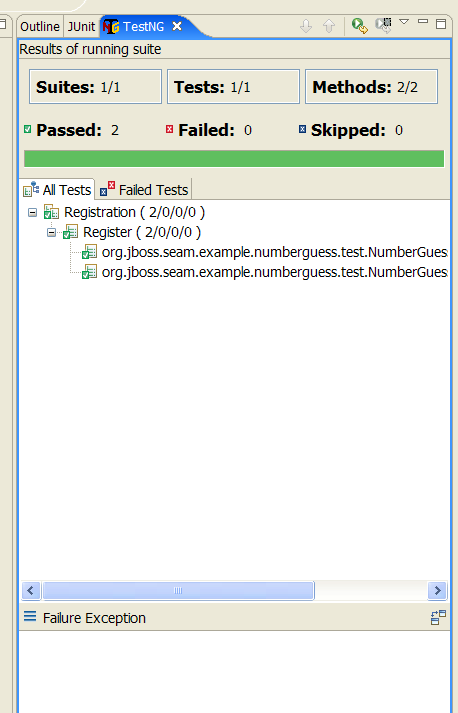
35.3.1. Configuration
| Group ID | Artifact ID | Location in Seam |
|---|---|---|
org.jboss.seam.embedded | hibernate-all | lib/test/hibernate-all.jar |
org.jboss.seam.embedded | jboss-embedded-all | lib/test/jboss-embedded-all.jar |
org.jboss.seam.embedded | thirdparty-all | lib/test/thirdparty-all.jar |
org.jboss.seam.embedded | jboss-embedded-api | lib/jboss-embedded-api.jar |
org.jboss.seam | jboss-seam | lib/jboss-seam.jar |
org.jboss.el | jboss-el | lib/jboss-el.jar |
javax.faces | jsf-api | lib/jsf-api.jar |
javax.el | el-api | lib/el-api.jar |
javax.activation | javax.activation | lib/activation.jar |
lib/ (such as jboss-system.jar) on the classpath, as this will prevent Embedded JBoss from booting. Add dependencies such as Drools and jBPM as you require them.
bootstrap/ directory on the classpath, since it contains the configuration for Embedded JBoss.
jar for your test framework on the classpath, as well as configuration files for JPA and Seam. Seam asks Embedded JBoss to deploy any resource (JAR or directory) with seam.properties in its root. If the structure of the directory containing your built project does not resemble that of a deployable archive, you must include seam.properties in each resource.
java:/DefaultDS (a built in HSQL datasource in Embedded JBoss) for testing. To use another datasource, place the foo-ds.xml into bootstrap/deploy directory.
35.3.2. Using SeamTest with another test framework
AbstractSeamTest that does the following:
- Calls
super.begin()before every test method. - Calls
super.end()after every test method. - Calls
super.setupClass()to set up the integration test environment. This should be called prior to any test methods. - Calls
super.cleanupClass()to clean up the integration test environment. - Calls
super.startSeam()to start Seam when integration testing begins. - Calls
super.stopSeam()to cleanly shut down Seam at the end of integration testing.
35.3.3. Integration Testing with Mock Data
SeamTest.
prepareDBUnitOperations() as follows:
DataSetOperation defaults to DatabaseOperation.CLEAN_INSERT if no other operation is specified as a constructor argument. The previous example cleans all tables defined BaseData.xml, then inserts all rows declared in BaseData.xml before each @Test method is invoked.
afterTestOperations list.
datasourceJndiName:
<parameter name="datasourceJndiName" value="java:/seamdiscsDatasource"/>
<parameter name="datasourceJndiName" value="java:/seamdiscsDatasource"/><parameter name="database" value="MYSQL" />
<parameter name="database" value="MYSQL" />
<parameter name="binaryDir" value="images/" />
<parameter name="binaryDir" value="images/" />
datasourceJndiName in your test configuration, you will have to call setDatabaseJndiName() before your test runs. If you are not using HSQL or MySQL, you need to override some methods. See the Javadoc of DBUnitSeamTest for more details.
35.3.4. Integration Testing Seam Mail
Warning
FacesRequest as normal. Inside the invokeApplication hook, we render the message using getRenderedMailMessage(viewId);, which passes the viewId of he message to be rendered. The method returns the rendered message on which you can perform tests. You can also use any standard JSF life cycle method.
Chapter 36. Seam tools
36.1. jBPM designer and viewer
36.1.1. Business process designer
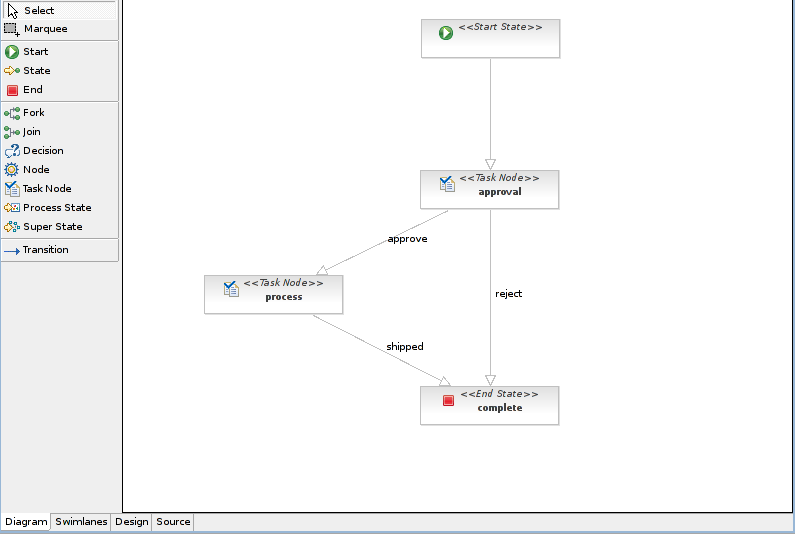
36.1.2. Pageflow viewer
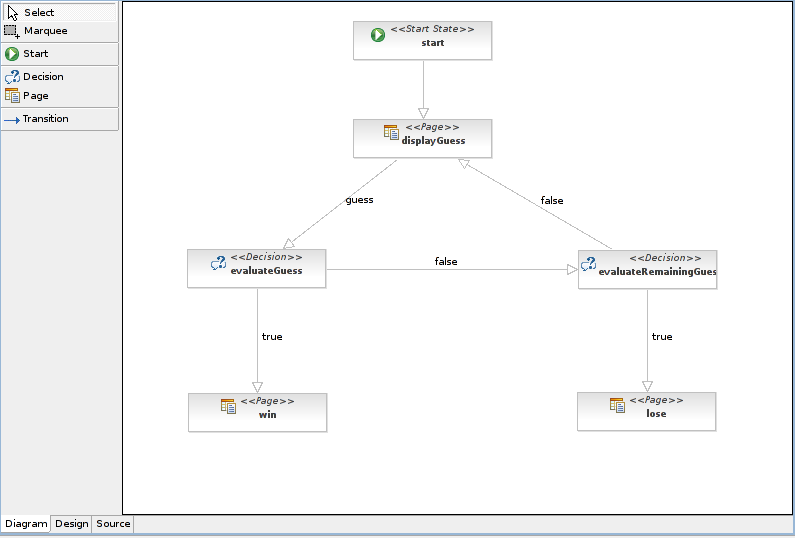
Chapter 37. Dependencies
37.1. Java Development Kit Dependencies
37.1.1. Sun's JDK 6 Considerations
-Dsun.lang.ClassLoader.allowArraySyntax=true
37.2. Project Dependencies
EAR-type dependencies, include the library in the /lib directory of your application's EAR file. For WAR-type dependencies, include the library in the /WEB-INF/lib directory of your application's WAR file. The scope of each dependency is either all, runtime or provided (by EAP 4.2 or 5.0).
/dependency-report.txt generated from the Maven POM stored in /build. You can generate this file by running ant dependencyReport.
37.2.1. Core
|
Name
|
Scope
|
Type
|
Notes
|
|---|---|---|---|
jboss-seam.jar
|
all
| EAR
|
The core Seam library. Always required.
|
jboss-seam-debug.jar
|
runtime
| WAR
|
Include during development when enabling Seam's debug feature.
|
jboss-seam-ioc.jar
|
runtime
| WAR
|
Required when using Seam with Spring.
|
jboss-seam-pdf.jar
|
runtime
| WAR
|
Required when using Seam's PDF features.
|
jboss-seam-excel.jar
|
runtime
| WAR
|
Required when using Seam's Microsoft® Excel® features.
|
jboss-seam-remoting.jar
|
runtime
| WAR
|
Required when using Seam Remoting.
|
jboss-seam-ui.jar
|
runtime
| WAR
|
Required to use the Seam JavaServer Faces (JSF) controls.
|
jsf-api.jar
|
provided
|
JSF API.
| |
jsf-impl.jar
|
provided
|
JSF Reference Implementation.
| |
jsf-facelets.jar
|
runtime
| WAR
|
Facelets.
|
urlrewritefilter.jar
|
runtime
| WAR
|
URL Rewrite library.
|
quartz.jar
|
runtime
| EAR
|
Required when using Quartz with Seam's asynchronous features.
|
37.2.2. RichFaces
|
Name
|
Scope
|
Type
|
Notes
|
|---|---|---|---|
richfaces-api.jar
|
all
| EAR
|
Required to use RichFaces. Provides API classes that can be used from your application, for example, to create a tree.
|
richfaces-impl.jar
|
runtime
| WAR
|
Required to use RichFaces.
|
richfaces-ui.jar
|
runtime
| WAR
|
Required to use RichFaces. Provides all the UI components.
|
37.2.3. Seam Mail
|
Name
|
Scope
|
Type
|
Notes
|
|---|---|---|---|
activation.jar
|
runtime
| EAR
|
Required for attachment support.
|
mail.jar
|
runtime
| EAR
|
Required for outgoing mail support.
|
mail-ra.jar
|
compile only
|
Required for incoming mail support.
| |
jboss-seam-mail.jar
|
runtime
| WAR
|
Seam Mail.
|
37.2.4. Seam PDF
|
Name
|
Type
|
Scope
|
Notes
|
|---|---|---|---|
itext.jar
|
runtime
| WAR
|
PDF Library
|
jfreechart.jar
|
runtime
| WAR
|
Charting library.
|
jcommon.jar
|
runtime
| WAR
|
Required by JFreeChart.
|
jboss-seam-pdf.jar
|
runtime
| WAR
|
Seam PDF core library.
|
37.2.5. Seam Microsoft®Excel®
|
Name
|
Type
|
Scope
|
Notes
|
|---|---|---|---|
jxl.jar
|
runtime
| WAR
|
JExcelAPI library.
|
jboss-seam-excel.jar
|
runtime
| WAR
|
Seam Microsoft® Excel® core library.
|
37.2.6. JBoss Rules
drools/lib directory in Seam.
|
Name
|
Scope
|
Type
|
Notes
|
|---|---|---|---|
antlr-runtime.jar
|
runtime
| EAR
|
ANTLR Runtime Library.
|
core.jar
|
runtime
| EAR
|
Eclipse JDT.
|
drools-api.jar
|
runtime
| EAR | |
drools-compiler.jar
|
runtime
| EAR
| |
drools-core.jar
|
runtime
| EAR
| |
drools-decisiontables.jar
|
runtime
| EAR | |
drools-templates.jar
|
runtime
| EAR | |
janino.jar
|
runtime
| EAR
| |
mvel2.jar
|
runtime
| EAR
|
37.2.7. JBPM
|
Name
|
Scope
|
Type
|
Notes
|
|---|---|---|---|
jbpm-jpdl.jar
|
runtime
| EAR
|
37.2.8. GWT
|
Name
|
Scope
|
Type
|
Notes
|
|---|---|---|---|
gwt-servlet.jar
|
runtime
| WAR
|
The GWT Servlet libraries.
|
37.2.9. Spring
|
Name
|
Scope
|
Type
|
Notes
|
|---|---|---|---|
spring.jar
|
runtime
| EAR
|
The Spring Framework library.
|
37.2.10. Groovy
|
Name
|
Scope
|
Type
|
Notes
|
|---|---|---|---|
groovy-all.jar
|
runtime
| EAR
|
The Groovy libraries.
|
Appendix A. Revision History
| Revision History | |||
|---|---|---|---|
| Revision 5.2.0-100.400 | 2013-10-31 | ||
| |||
| Revision 5.2.0-100 | Wed 23 Jan 2013 | ||
| |||
| Revision 5.1.2-101 | Fri 27 January 2012 | ||
| |||
| Revision 5.1.2-100 | Thu 8 December 2011 | ||
| |||

'%20d='M201.5%20305.5c-13.8%200-24.9-11.1-24.9-24.6%200-13.8%2011.1-24.9%2024.9-24.9%2013.6%200%2024.6%2011.1%2024.6%2024.9%200%2013.6-11.1%2024.6-24.6%2024.6zM504%20256c0%20137-111%20248-248%20248S8%20393%208%20256%20119%208%20256%208s248%20111%20248%20248zm-132.3-41.2c-9.4%200-17.7%203.9-23.8%2010-22.4-15.5-52.6-25.5-86.1-26.6l17.4-78.3%2055.4%2012.5c0%2013.6%2011.1%2024.6%2024.6%2024.6%2013.8%200%2024.9-11.3%2024.9-24.9s-11.1-24.9-24.9-24.9c-9.7%200-18%205.8-22.1%2013.8l-61.2-13.6c-3-.8-6.1%201.4-6.9%204.4l-19.1%2086.4c-33.2%201.4-63.1%2011.3-85.5%2026.8-6.1-6.4-14.7-10.2-24.1-10.2-34.9%200-46.3%2046.9-14.4%2062.8-1.1%205-1.7%2010.2-1.7%2015.5%200%2052.6%2059.2%2095.2%20132%2095.2%2073.1%200%20132.3-42.6%20132.3-95.2%200-5.3-.6-10.8-1.9-15.8%2031.3-16%2019.8-62.5-14.9-62.5zM302.8%20331c-18.2%2018.2-76.1%2017.9-93.6%200-2.2-2.2-6.1-2.2-8.3%200-2.5%202.5-2.5%206.4%200%208.6%2022.8%2022.8%2087.3%2022.8%20110.2%200%202.5-2.2%202.5-6.1%200-8.6-2.2-2.2-6.1-2.2-8.3%200zm7.7-75c-13.6%200-24.6%2011.1-24.6%2024.9%200%2013.6%2011.1%2024.6%2024.6%2024.6%2013.8%200%2024.9-11.1%2024.9-24.6%200-13.8-11-24.9-24.9-24.9z'/%3e%3c/svg%3e)