 Red Hat Summit
Common Criteria Configuration Guide
For Use with Red Hat JBoss Enterprise Application Platform 7
Abstract
Chapter 1. Introduction
1.1. Purpose of this Document
This document provides guidance to administrators and application developers who wish to use Red Hat JBoss Enterprise Application Platform 7 in a certified, Common Criteria compliant, secure configuration.
This document is intended to be self-contained in addressing the most important issues at a high level, and refers to existing documentation where more details are needed. Knowledge of the Common Criteria is not required for readers of this document.
JBoss EAP 7 is the subject of this document as the Target of Evaluation (TOE) for Common Criteria certification. JBoss EAP 7 has been evaluated under Common Criteria version 3.1 at level of assurance EAL4. This provides assurance that this product has been structurally tested.
This chapter contains a brief introduction to the Common Criteria certification and the structure of this book.
Requirements for the Evaluated Configuration contains the requirements for deploying the certified product.
Downloading and Verifying the Packages contains the steps that are required to ensure you are using the certified version of JBoss EAP 7.
Start and Stop JBoss EAP 7 provides instructions on how to start and stop the server, and the different modes of operation.
Development Guide for the Common Criteria Certified System contains guidelines for developers creating applications for JBoss EAP 7.
Overview of the Security Functions contains the details of the security implementation and usage limitations of JBoss EAP 7.
Should there be any discrepancy between information contained in this guide and any other product documentation, this guide takes precedence; it addresses the requirements for the evaluated configuration of JBoss EAP 7.
1.2. JBoss EAP-specific conventions
All instances of EAP_HOME in this guide refer to the JBoss EAP root installation directory. For example, if you used the ZIP installation package and extracted the JBoss EAP binary to your Linux /home/USER directory, EAP_HOME refers to the /home/USER/jboss-eap-[version]/ directory.
See About the Use of EAP_HOME in this Document topic in the Installation Guide for more information on this.
1.3. What is a Common Criteria Compliant System?
The Common Criteria for Information Technology Security Evaluation, usually known as Common Criteria or CC, is an internationally-recognized standard (ISO/IEC 15408) used as the basis for independent evaluation of the security properties of an IT product.
Common Criteria provides consumers with an impartial security assurance of a product to predefined levels. These levels range from EAL1 to EAL7, each placing increased demands on the developer for evidence of testing, in turn providing increased assurance within the product for consumers.
Under the Common Criteria Recognition Arrangement (CCRA), members agree to recognize Common Criteria certificates that have been produced by any certificate authorizing participant, in accordance with the terms laid out in the CCRA. Currently, the CCRA is comprised of more than 20 member nations: Australia, Austria, Canada, the Czech Republic, Finland, France, Germany, Greece, Hungary, India, Israel, Italy, Japan, the Netherlands, New Zealand, Norway, the Republic of Singapore, Spain, the United Kingdom, and the United States amongst others. New members are expected to join in the near future.
A system can be considered to be CC compliant if it matches an evaluated and certified configuration. This implies various requirements concerning hardware and software, as well as requirements concerning the operating environment, users, and the ongoing operating procedures.
You can find further information on Common Criteria at the Common Criteria Portal.
1.4. Certified Documentation
When installing, configuring, and operating JBoss EAP 7 in a Common Criteria evaluated configuration, you must only refer to the product documentation authorized for use with this Common Criteria certification.
The product documentation bundle is available in two certified formats from the Red Hat Customer Portal:
- PDF documentation bundle
- Online
All references to JBoss EAP documentation in this guide refer to the guides contained in the certified formats.
When operating an evaluated configuration, you must refer only to the Common Criteria version of the documentation for JBoss EAP 7. The standard product documentation version may contain information that could result in an evaluated configuration certification breach.
Chapter 2. Requirements for the Evaluated Configuration
2.1. Software Requirements
2.1.1. Operating System
A full range of platform tests have been performed on the following tested configurations.
| Operating System | OracleJDK 1.8.0 | IBMJDK 1.8.0 | OpenJDK 1.8.0 | Oracle JDK 11 | OpenJDK 11 |
|---|---|---|---|---|---|
| Red Hat Enterprise Linux 6 x86_64 | X | X | X | X | |
| Red Hat Enterprise Linux 7 x86_64 | X | X | X | X | X |
| Solaris 11 x86_64 | X | ||||
| Solaris 11 SPARC64 | X | X | |||
| Windows Server 2012 R2 Standard x86_64 | X | X | X | X | |
| Windows Server 2016 x86_64 | X | X | X | X |
2.1.2. Database JDBC Drivers
JBoss EAP 7 is evaluated with the following relational database systems. Only these database systems with the specific driver versions are acceptable for use with JBoss EAP 7.
| Databases | JDBC Driver Versions |
|---|---|
| IBM DB2 Enterprise e11.1 (FP1 11.1.1.1) | IBM DB2 JDBC Universal Driver Architecture 4.24.92 |
| Oracle 12cR1 RAC (12.1.0.2.0) | Oracle JDBC Driver v12.2.0.1 (ojdbc8.jar) |
| MySQL 5.7 (5.7.17) | MySQL Connector/J 8.0.12 |
| MariaDB 10.1.19 | MariaDB Connector/J 2.2.4 |
| MariaDB Galera Cluster 10.1.19 | MariaDB Connector/J 2.2.4 |
| Microsoft SQL Server 2016 SP1 | Microsoft JDBC Drivers 6.4.0 |
| PostgreSQL 10.1 | JDBC4 Postgresql Driver, Version 42.2.2 |
| Enterprise DB Postgres Plus Advanced Server 10.1 (10.1.5) | Postgres Plus Advanced Server Driver 10.1 (10.0.0.1) |
| Sybase ASE 16.0 (SP02) | JDBC™/16.0 GA (Build 27008)/P/EBF22326 |
For information on how to configure each database with JBoss EAP 7, refer to Database Configuration.
2.1.3. LDAP Servers
JBoss EAP 7 is evaluated with the following LDAP servers. Only these LDAP servers are acceptable for use with JBoss EAP 7.
- Red Hat Directory Server 10.1
- Red Hat Directory Server 10.0
- Microsoft Active Directory 2012 R2
- Microsoft Active Directory 2016
2.2. Physical Requirements
The hardware and software executing JBoss EAP 7, as well as the software critical to security policy enforcement must be protected from modification by unauthorized parties, whether internal or external. Reasonable physical security measures to ensure that unauthorized persons do not have physical access to the hardware running the JBoss EAP 7 software must be implemented.
2.3. Personnel Requirements
There must be one or more competent individuals who are assigned to manage JBoss EAP 7, its environment, and the security of the information it contains. The system administrator personnel must not be carelessly or willfully negligent, or hostile, and follow and abide by the instructions provided by the administrator documentation.
The developer of user applications executed by JBoss EAP 7, including web server applications and enterprise beans, must be trustworthy and comply with all instructions set forth by the user guidance and evaluated configuration guidance of JBoss EAP 7.
2.4. Connectivity Requirements
The operating system and the Java virtual machine operate according to their specification. These external systems shall be configured in accordance with this guidance.
Any other system with which JBoss EAP 7 communicates is assumed to be under the same management control and operate under the same security policy constraints as JBoss EAP 7.
2.4.1. Cluster Connectivity Requirements
JBoss EAP 7 instances must operate in a network segment that is logically separated from any other network segment by use of a packet filtering mechanism. This packet filter must only allow incoming communication that meets both the following criteria:
- The network protocol is TCP
- The destination port is 8080 or 8443
All outgoing communication from one of the JBoss EAP 7 instances must be allowed.
There are three defined interfaces to separate trusted and untrusted network traffic: public, cluster, and internal. Refer to Network Interfaces for more information.
Each cluster node communicates with the other nodes by means of standard network sockets. Whenever this occurs the client side of each connection has a port number assigned to it by the host operating system from a range of ports that are reserved for client sockets. These ports are referred to as dynamic or ephemeral ports. They are only used by a connection until it is closed. Once the connection is closed the port is made available for use by other new client connections. Refer to your operating system documentation if you need to configure this port range.
Chapter 3. Downloading and Verifying the Packages
JBoss EAP 7 is available in ZIP and RPM formats. ZIP files and ISO with RPMs are available from the Red Hat Customer Portal at https://access.redhat.com.
To guarantee authenticity of the downloaded software, verify the authenticity of the files and their source.
Other formats, like Installer Installation or containerized image for JBoss EAP that is designed for use with OpenShift, are not supported for a CC compliant system.
Unless specifically stated otherwise, the screen shots and other samples shown in this section are examples only. The actual presentation of the downloaded websites may change over time.
3.1. About the Red Hat Customer Portal
The Red Hat Customer Portal is the centralized platform for Red Hat knowledge and subscription resources. Use the Red Hat Customer Portal to:
- Manage and maintain Red Hat entitlements and support contracts
- Download officially-supported software
- Access product documentation and the Red Hat Knowledgebase
- Contact Red Hat Support
- File bugs against Red Hat products
The Customer Portal is available here: https://access.redhat.com.
3.2. Verify the Authenticity of the Download Site
Red Hat Customer Portal and Red Hat Network are both secure sites. This is indicated by the 'security padlock' icon in the browser status bar.
If the 'security padlock' is not visible, check the authenticity of the site by viewing the identity certificate.
Checking Site Security with Firefox
- In the address bar, click the padlock icon.
- From the pop-up box, click More Information.
- From the Page Info window, click Security.
- The certificate displays details such as who owns the site, who issued the certificate, when it was issued, when it expires and fingerprint verification strings.
Figure 3.1. Example of the Red Hat Network SSL Certificate
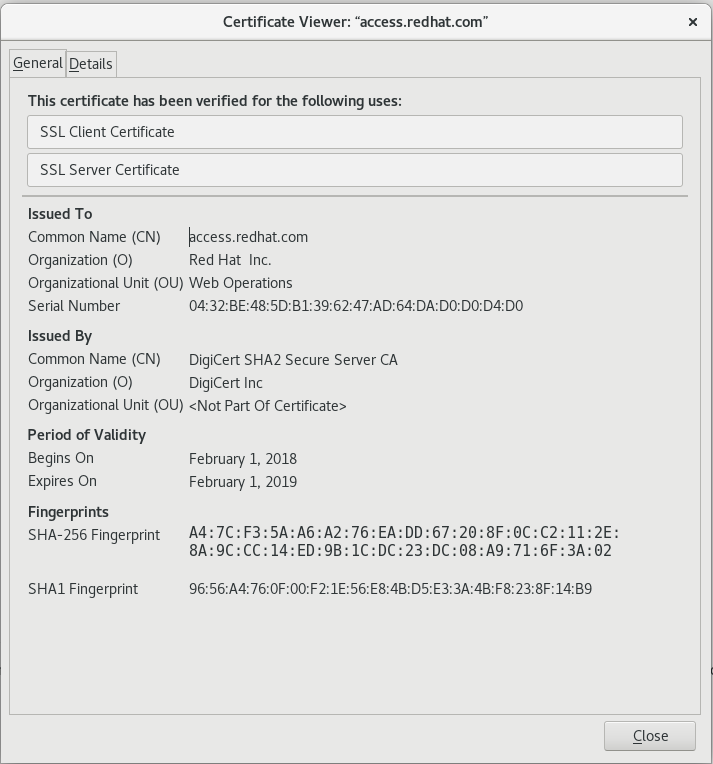
If neither of the lock icons are present in your browser and a verified certificate cannot be found, you may not be connected to the correct site. If you are unable to reach the secure Red Hat Customer Portal site, contact Red Hat Support and report this problem.
3.3. Verify the Downloaded Files
Each downloaded file needs to be checked to verify that it is for the certified version of JBoss EAP PROD_VER. The Red Hat Customer Portal lists the SHA-256 hash sum for each file. If the SHA-256 hash sum of a downloaded file matches that quoted on the Red Hat Customer Portal, you can assume it is verified.
For JBoss downloads, you can view the SHA-256 hash sum on the Software Details page for each file, by clicking on the file name in the Download File list. For Red Hat Enterprise Linux downloads, the SHA-256 hash sum is listed next to the ISO download link.
On Apple OSX, the sha256 command must be replaced with shasum -a 256. On Microsoft Windows, a third-party SHA256 hash sum utility is required as there is no native utility.
Using the sha256sum tool on Linux or Unix
- Open a terminal, and navigate to the directory where the file was downloaded.
-
Execute the
sha256sumcommand (or equivalent) on the file.
For example:
$ sha256sum jboss-eap-7.2.0.zip
682d2e7168c9f09cc019dce8f5a70e61169e2dc438dc44ba7352aba4e0634e20 *jboss-eap-7.2.0.zip
The value generated by the sha256sum utility must match the value displayed on the Red Hat Customer Portal for the file. If they are not the same, your download is either incomplete or corrupt, and you will need to download the file again. If the checksum will still not successfully validate after several attempted downloads, contact Red Hat Support for assistance.
To generate a checksum for a downloaded file, the sha256sum command can be used on most Linux and Unix operating systems. Mac OS X includes the equivalent command shasum -a 256.
If you are using Microsoft Windows you must download a third party utility to perform these steps because Microsoft Windows does not include a SHA-256 checksum tool.
3.4. Zip Installation
The JBoss EAP 7 ZIP file is available from the Customer Portal. The ZIP file installation is platform-independent and is the preferred way to install JBoss EAP 7 on all supported platforms.
3.4.1. Download JBoss EAP
This topic covers the steps to download the required archive.
Download the ZIP file
- Log into the Red Hat Customer Portal at https://access.redhat.com.
- Click Downloads.
- Click Red Hat JBoss Enterprise Application Platform in the Product Downloads list.
- Select 7.2 from the Version drop-down menu.
- Select Red Hat JBoss Enterprise Application Platform 7.2.0 from the list of Releases and click Download.
- Select Red Hat JBoss Enterprise Application Platform 7.2 Update 03 from the list of Patches and click Download.
- When the downloads have finished, verify that the checksum of the downloaded files match the checksum listed on the Customer Portal. See Verify the Downloaded Files.
JBoss EAP 7 has been downloaded successfully to the target machine, and is ready for installation.
3.4.2. Install JBoss EAP (ZIP Installation)
This topic covers the steps to install JBoss EAP 7 using the downloaded ZIP file.
Once the JBoss EAP ZIP installation file has been downloaded, it can be installed by extracting the package contents.
If necessary, move the ZIP file to the server and location where JBoss EAP should be installed.
NoteThe user who will be running JBoss EAP must have read and write access to this directory.
Extract the ZIP archive.
$ unzip JBossEAPZipNameNoteFor Windows Server, right-click the ZIP file and select Extract All.
The directory created by extracting the ZIP archive is the top-level directory for the JBoss EAP installation. This is referred to as
EAP_HOME.Apply required patches.
To apply this update using the CLI on Unix-based systems, run the following command from
JBOSS_HOME:bin/jboss-cli.sh "patch apply path/to/jboss-eap-7.2.3-patch.zip"To apply this update using the CLI on Windows-based systems, run the following command from
JBOSS_HOME:bin\jboss-cli.bat "patch apply path\to\jboss-eap-7.2.3-patch.zip"
3.5. RPM Installation from ISO
Download the ISO installation file for JBoss EAP 7 from the Red Hat Customer Portal. It contains all the security and patch errata.
Installing JBoss EAP 7 using the RPM method must be done from the ISO file for a certified configuration. Installing JBoss EAP 7 using RPMs directly from the Red Hat Network is not valid for a certified configuration.
Prerequisites
- Register the server on the Red Hat Network.
- Subscribe to the Red Hat Enterprise Linux Server base software channel appropriate to your Red Hat Enterprise Linux version.
- Do not subscribe to the JBoss Application Platform for Server sub-channel in the JBoss Enterprise Platform group.
3.5.1. Download JBoss EAP 7 ISO
Download the JBoss EAP 7 ISO
You must have an entitlement to access the ISO image. Contact the Red Hat Support for subscription management and customer support if you can not complete the procedure.
- Log into the Red Hat Customer Portal at https://access.redhat.com.
- Open the following link: https://access.redhat.com/downloads/content/183/ver=7.2/.
- Select JBoss Enterprise Application Platform in the Product Variant drop-down menu.
- Select 7.2 for RHEL 6 or RHEL 7 from the Version drop-down menu.
Click the Red Hat JBoss Enterprise Application Platform 7.2.3 (RHEL 6) ISO image file for RHEL 6 or the Red Hat JBoss Enterprise Application Platform 7.2.3 (RHEL 7) ISO image file for RHEL 7 to begin the download.
Ensure you download the correct ISO for your version of Red Hat Enterprise Linux.
- After the download has completed, confirm the checksum of the downloaded ISO matches the checksum listed on the Customer Portal. For instructions, see Verify the Downloaded Files.
3.5.2. Install JBoss EAP 7 from ISO
This procedure is applicable only to Red Hat Enterprise Linux.
All ISO images contain the relevant security errata and patches for the evaluated configuration. You do not need to install any other errata when you choose the ISO installation method.
You must activate superuser privileges to install the ISO image.
Install JBoss EAP 7 from ISO on Red Hat Enterprise Linux.
Mount ISO image
Mount the ISO image downloaded in Download JBoss EAP 7 ISO to
/mnt/jboss.[root ~]# mkdir /mnt/jboss [root ~]# mount -o loop PATH_TO_ISO_IMAGE /mnt/jbossCreate repository
Create a file named
jbosslocal.repoin/etc/yum.repos.d/.[root ~]# cat << EOF > /etc/yum.repos.d/jbosslocal.repo [jbosslocal] name=jbosslocal baseurl=file:///mnt/jboss enabled=1 gpgcheck=0 EOFInstall JBoss EAP 7
Run the following command:
[root ~]# yum groupinstall jboss-eap7
The default EAP_HOME path for the RPM installation is /usr/share/jbossas.
3.6. Confirming the Version of your JBoss EAP 7 Installation
There are three ways to verify the version number of your JBoss EAP 7 installation.
Using the -V with the startup script
Retrieve information about the version of your JBoss EAP 7 installation by running the same script used to start the server with only the -V switch. If your installation is a standalone or managed domain, for Red Hat Enterprise Linux and Solaris, this script is either standalone.sh or domain.sh, and on Microsoft Windows Server it is the equivalent .bat scripts. The startup scripts are located in EAP_HOME/bin.
Running the startup script with only the -V switch will not start the server, and does not require the server to be running. It displays information about the JBoss EAP version and its configured Java environment. Below is an example of using it on an installation of JBoss EAP 7 on Red Hat Enterprise Linux. Note the version number, JBoss EAP PROD_VER.GA, displayed as the last line of the output.
$ ./standalone.sh -V
=========================================================================

  JBoss Bootstrap Environment

  JBOSS_HOME: /home/user/EAP-7.2.GA

  JAVA: java

  JAVA_OPTS:  -server -verbose:gc -Xloggc:"/home/user/EAP-7.2.GA/standalone/log/gc.log" -XX:+PrintGCDetails -XX:+PrintGCDateStamps -XX:+UseGCLogFileRotation -XX:NumberOfGCLogFiles=5 -XX:GCLogFileSize=3M -XX:-TraceClassUnloading -Xms1303m -Xmx1303m -XX:MetaspaceSize=96M -XX:MaxMetaspaceSize=256m -Djava.net.preferIPv4Stack=true -Djboss.modules.system.pkgs=org.jboss.byteman -Djava.awt.headless=true

=========================================================================

17:57:11,912 INFO  [org.jboss.modules] (main) JBoss Modules version 1.6.0.Final-redhat-1
JBoss EAP 7.2.0.GA (WildFly Core 3.0.10.Final-redhat-1)
Using the Management Console
When the JBoss EAP 7 server is running, the version information is displayed at top of the home page of the Web Console, located at http://localhost:9990/console/.
View the console output, or server.log file
When a server is started, the version is echoed to the console, and written to the server log. For standalone configurations the server log is located at EAP_HOME/standalone/log/server.log, and for managed domain servers it is EAP_HOME/domain/servers/SERVER_NAME/log/server.log:
08:29:23,756 INFO [org.jboss.as] (Controller Boot Thread) WFLYSRV0025: JBoss EAP 7.2.0.GA (WildFly Core 3.0.10.Final-redhat-1) started in 3494ms - Started 299 of 560 services (348 services are lazy, passive or on-demand)3.7. Updating a Common Criteria Compliant JBoss EAP 7 Installation
Updates are regularly released for JBoss EAP, and these updates may include fixes for important security issues. However, with the exception of a JBoss EAP 7 ZIP installation, any updates to a Common Criteria compliant JBoss EAP installation will invalidate that installation’s Common Criteria certification.
Not applying security updates is potentially a serious risk. If security updates are released, it is at your discretion whether to apply them to a Common Criteria Compliant JBoss EAP installation. You may wish to forgo Common Criteria certification in favor of applying updates that resolve security issues.
3.7.1. Applying Patches to a ZIP Installation
Applying patches to a Common Criteria compliant installation will invalidate that installation’s Common Criteria certification.
Use the patch command to apply patches to your ZIP installation. See the Installation Guide for instructions.
3.7.2. Applying Patches to an RPM Installation from ISO
Applying patches to a Common Criteria compliant installation will invalidate that installation’s Common Criteria certification.
Remove the local repository
Remove the file named
jbosslocal.repofrom/etc/yum.repos.d/[root ~]# rm /etc/yum.repos.d/jbosslocal.repo- Update the installation as a normal RPM installation. See the Installation Guide for instructions.
Chapter 4. Start and Stop JBoss EAP 7
4.1. Start JBoss EAP 7
Start JBoss EAP 7 in one of the following ways:
The Java Security Manager needs to be turned on for EAL4 CC. The Java Security Manager is a class that manages the external boundary of the Java Virtual Machine (JVM) sandbox, controlling how code executing within the JVM can interact with resources outside the JVM. For information about Java Security Manager server configuration changes, see the How to Configure Server Security for JBoss EAP.
4.2. Start JBoss EAP 7 as a Standalone Server
This topic covers the steps to start JBoss EAP 7 as a Standalone Server.
-
For Red Hat Enterprise Linux, run the command:
EAP_HOME/bin/standalone.sh -
For Microsoft Windows Server, run the command:
EAP_HOME\bin\standalone.bat
To print a list of additional parameters to pass to the start-up scripts, use the -h parameter.
4.3. Start JBoss EAP 7 as a Managed Domain
Order of Operations
The domain controller must be started before any other host controllers in the domain. Use this procedure first on the domain controller, and then on each other host controller in the domain.
Start the Platform Service as a Managed Domain
-
For Red Hat Enterprise Linux, run the command,
EAP_HOME/bin/domain.sh For Microsoft Windows Server, run the command,
EAP_HOME\bin\domain.batNoteFor a list of parameters you can pass to the start-up script, use the
-hparameter.
4.4. Start JBoss EAP 7 with an Alternative Configuration
If you do not specify a configuration file, the server starts with the default file. However, when you start the server, you can specify a configuration manually. The process varies slightly, depending on whether you are using a managed domain or standalone server, and depending on which operating system you are using.
Prerequisite
Before using an alternative configuration file, prepare it using the default configuration as a template. For a managed domain, the configuration file needs to be placed in the EAP_HOME/domain/configuration/ directory. For a standalone server, the configuration file should be placed in the EAP_HOME/standalone/configuration/ directory.
Several example configurations are included in the EAP_HOME/docs/examples/configs/ directory. Use these examples to enable extra features such as clustering or the Transactions XTS API.
Start the Instance with an Alternative Configuration
Standalone server
For a standalone server, provide the file name of the configuration file as an option to the
--server-configparameter. The configuration file must be located in theEAP_HOME/standalone/configuration/directory, and you need to specify the file path relative to that directory.Example: Using an alternative configuration file for a standalone server in Red Hat Enterprise Linux
[user@host bin]$ ./standalone.sh --server-config=standalone-alternative.xmlThis example uses the
EAP_HOME/standalone/configuration/standalone-alternative.xmlconfiguration file.Example: Using an alternative configuration file for a Standalone Server in Microsoft Windows Server
C:\EAP_HOME\bin> standalone.bat --server-config=standalone-alternative.xmlThis example uses the
EAP_HOME\standalone\configuration\standalone-alternative.xmlconfiguration file.Managed Domain
For a managed domain, provide the file name of the configuration file as an option to the
--domain-configparameter. The file must be present in theEAP_HOME/domain/configuration/directory, and you need to specify the path relative to that directory.Example: Using an alternative configuration file for a managed domain in Red Hat Enterprise Linux
[user@host bin]$ ./domain.sh --domain-config=domain-alternative.xmlThis example uses the
EAP_HOME/domain/configuration/domain-alternative.xmlconfiguration file.Example: Using an alternative configuration file for a managed domain in Microsoft Windows Server
C:\EAP_HOME\bin> domain.bat --domain-config=domain-alternative.xmlThis example uses the
EAP_HOME\domain\configuration\domain-alternative.xmlconfiguration file.
JBoss EAP should now be running, using your alternative configuration file.
4.5. Reference of Switches and Arguments to pass at Server Runtime
The application server startup script accepts the addition of arguments and switches at runtime. The use of these parameters allows for the server to be started under alternative configurations to those defined in the standalone.xml, domain.xml and host.xml configuration files. This might include starting the server with an alternative set of socket bindings or a secondary configuration. A list of these available parameters can be accessed by passing the help switch at startup.
Example
The following example is similar to the server startup explained in Start JBoss EAP 7 as a Standalone Server and Start JBoss EAP 7 as a Managed Domain, with the addition of the -h or --help switch. The results of the help switch are explained in the table below.
Standalone server:
[localhost bin]$ standalone.sh -hManaged domain:
[localhost bin]$ domain.sh -h| Argument or Switch | Mode | Description |
|---|---|---|
|
| Standalone |
Set the server’s running type to |
|
| Domain |
Set the host controller’s running type to |
|
| Standalone, Domain |
Set system property |
|
| Standalone, Domain |
Set system property |
|
| Domain | Keep a copy of the persistent domain configuration even if this host is not the Domain Controller. |
|
| Standalone |
Name of the server configuration file to use. The default is |
|
| Domain |
Name of the server configuration file to use. The default is |
|
| Domain | If the host is not the Domain Controller and cannot contact the Domain Controller at boot, boot using a locally cached copy of the domain configuration. |
|
| Standalone | Activate debug mode with an optional argument to specify the port. Only works if the launch script supports it. |
|
| Standalone, Domain | Set a system property. |
|
| Domain |
Name of the server configuration file to use. The default is |
|
| Standalone, Domain | Display the help message and exit. |
|
| Domain |
Name of the host configuration file to use. The default is |
|
| Domain | Address on which the host controller should listen for communication from the process controller. |
|
| Domain | Port on which the host controller should listen for communication from the process controller. |
|
| Domain |
Set system property |
|
| Domain |
Set system property |
|
| Standalone |
Name of the server configuration file to use. This differs from |
|
| Domain |
Name of the domain configuration file to use. This differs from |
|
| Domain |
Name of the host configuration file to use. This differs from |
|
| Standalone, Domain | Load system properties from the given URL. |
|
| Domain | Address on which the process controller listens for communication from processes it controls. |
|
| Domain | Port on which the process controller listens for communication from processes it controls. |
|
| Standalone | Set a security property. |
|
| Standalone |
Name of the server configuration file to use. The default is |
|
| Standalone, Domain |
Set system property |
|
| Standalone, Domain | Display the application server version and exit. |
|
| Standalone, Domain | Runs the server with a security manager installed. |
|
| Standalone |
Set the start mode of the server. This option cannot be used in conjunction with
|
Chapter 5. Configuration Requirements
The following sections describe modifications to be made to the server configuration to comply with CC requirements. When changes are made using the management console or management CLI, the existing configuration is automatically backed up. You can use those backups for reference or to revert to an earlier configuration if required. See the Configuration Guide for further details of this feature.
5.1. Network Configuration
5.1.1. Network Interfaces
The following network interfaces are defined and created so that trusted and untrusted network traffic is separated.
- public
- For communication to and from external, potentially untrusted parties.
- cluster
- For communication between cluster nodes. Cannot be accessed by untrusted parties. This must be enforced as part of network/firewall configuration.
- internal
- For communication between trusted servers or users (such as administrators) via the internal network. Cannot be accessible to untrusted parties or general users of the system.
5.1.2. Network Interface Configuration
To ensure compliance with Common Criteria requirements, apply the relevant network configurations.
Define and Configure Network Interfaces
Create
internalandclusternetwork interfaces.[standalone@localhost:9990 /] /interface=cluster:add(inet-address=expression "${jboss.bind.address.cluster:127.0.0.1}") [standalone@localhost:9990 /] /interface=internal:add(inet-address=expression "${jboss.bind.address.internal:127.0.0.1}")Bind each socket to the specified network interface.
For each line in Network Bindings, use the following command to bind the socket to the specified network interface.
[standalone@localhost:9990 /] /socket-binding-group=standard-sockets/socket-binding=BINDING_NAME:write-attribute(name=interface,value=NETWORK_INTERFACE)NoteNot all socket bindings are relevant to the available configuration by default. Only those that are part of the product configuration are applicable.
For example, the following command binds
management-httpto theinternalnetwork interface:[standalone@localhost:9990 /] /socket-binding-group=standard-sockets/socket-binding=management-http:write-attribute(name=interface,value=internal)Remove the
unsecurenetwork interface from the following configuration files:standalone-full.xmlandstandalone-full-ha.xml.[standalone@localhost:9990 /] /interface=unsecure:removeRestart JBoss EAP.
Restart JBoss EAP so that the network bindings take effect.
| Binding Name | Network Interface | Port Number |
|---|---|---|
| ajp | internal | 8009 |
| http | public | 8080 |
| https | public | 8443 |
| iiop | internal | 3528 |
| iiop-ssl | internal | 3529 |
| jgroups-mping | cluster | 0 - multicast: 45700 |
| jgroups-tcp | cluster | 7600 |
| jgroups-udp | cluster | 55200 - multicast: 45688 |
| management-http | internal | 9990 |
| management-https | internal | 9993 |
| messaging | internal | 5445 |
| messaging-throughput | internal | 5455 |
| modcluster | public/internal | 0 - multicast: 23364 |
| txn-recovery-environment | internal | 4712 |
| txn-status-manager | internal | 4713 |
5.2. Security Configuration
The following configuration steps must be performed to ensure security compliance with Common Criteria requirements.
Enable Elytron Security Across the Server
The legacy security subsystem is not compliant with Common Criteria. Disable the legacy security subsystem and enable the elytron subsystem.
There is a simple way to enable Elytron across the server. JBoss EAP 7.2 introduced an example configuration script that enables Elytron as the security provider. This script resides in the EAP_HOME/docs/examples directory in the server installation.
The example configuration script includes references to the native interface, which is no longer supported. Remove the following lines from this script:
/host=master/core-service=management/management-interface=native-interface:write-attribute(name=sasl-authentication-factory,value=management-sasl-authentication) /host=master/core-service=management/management-interface=native-interface:undefine-attribute(name=security-realm)Execute the following command to enable Elytron security across the server. The server must be completely stopped before executing the command.
$ EAP_HOME/bin/jboss-cli.sh --file=EAP_HOME/docs/examples/enable-elytron.cli5.2.1. About Authorization
In JBoss EAP 7, a SecurityDomain references one or more SecurityRealms for loading identities. These identities are used for authentication. They also contain role decoder and mapper references to map the identity for authorization decisions.
Authorization is different from authentication, and usually happens after authentication.
XACML is not permitted in the Common Criteria Certified configuration.
5.2.2. Java Security Manager
The Java Security Manager is a class that manages the external boundary of the Java Virtual Machine (JVM) sandbox, controlling how code executing within the JVM can interact with resources outside the JVM. When the Java Security Manager is activated, the Java API checks with the security manager for approval before executing a wide range of potentially unsafe operations. The Java Security Manager uses a security policy to determine whether a given action will be allowed or denied.
JBoss EAP 7 defines Java Security Policies in two ways: the security-manager subsystem and through XML files in the individual deployments. The security-manager subsystem defines minimum and maximum permission for ALL deployments, while the XML files specify the permissions requested by the individual deployment. Before starting JBoss EAP with the Java Security Manager enabled, you need make sure all security policies are defined in the security-manager subsystem.
For more information on defining policies in the security-manager subsystem, refer the Java Security Manager section in the How to Configure Server Security for JBoss EAP.
Run JBoss EAP With the Java Security Manager
To run JBoss EAP with the Java Security Manager, you need to use the secmgr option during startup. There are two ways to do this:
Use the flag with the startup script To use the
-secmgrflag with the startup script, include it when starting up your JBoss EAP instance:Example: Startup Script
./standalone.sh -secmgrUsing the Startup Configuration File
ImportantThe domain or standalone server must be completely stopped before you edit any configuration files.
NoteIf you are using JBoss EAP in a managed domain, you must perform the following procedure on each physical host or instance in your domain.
To enable the Java Security Manager using the startup configuration file, you need to edit either the
standalone.confordomain.conffile, depending if you are running a standalone instance or managed domain. If running in Windows, thestandalone.conf.batordomain.conf.batfiles are used instead.Uncomment the
SECMGR="true"line in the configuration file:Example: standalone.conf or domain.conf
# Uncomment this to run with a security manager enabled
SECMGR="true"
Example: standalone.conf.bat or domain.conf.bat
rem # Uncomment this to run with a security manager enabled
set "SECMGR=true"
5.2.3. EJB Authorization Policy
Applications can implement custom authentication and authorization verification using a Java Authorization Contract for Containers (JACC) Authorization Module. In JBoss EAP 7, the JACC authorization module forms part of a JAAS security domain.
5.2.3.1. Enabling JACC Using the elytron Subsystem
Disable JACC in the Legacy Security Subsystem
By default, the application server uses the legacy security subsystem to configure the JACC policy provider and factory. The default configuration maps to implementations from PicketBox.
In order to use Elytron to manage JACC configuration, or any other policy you want to install to the application server, you must first disable JACC in the legacy security subsystem. For that, you can use the following management CLI command:
/subsystem=security:write-attribute(name=initialize-jacc, value=false)
Failure to do so can result in the following error in the server log: MSC000004: Failure during stop of service org.wildfly.security.policy: java.lang.StackOverflowError.
Define a JACC Policy Provider
The elytron subsystem provides a built-in policy provider based on JACC specification. To create the policy provider you can execute the following management CLI command:
/subsystem=elytron/policy=jacc:add(jacc-policy={})

reload
Enable JACC to a Web Deployment
Once a JACC policy provider is defined, you can enable JACC for web deployments by executing the following command:
/subsystem=undertow/application-security-domain=other:write-attribute(name=enable-jacc,value=true)The command above enables JACC for the "other" application-security-domain in the Undertow subsystem.
The "other" application-security-domain gets added when running the script that enables Elytron across the server. See Security Configuration.
If you have not run the script for enabling Elytron across the server, you must first run the following command:
/subsystem=undertow/application-security-domain=other:add(security-domain=ApplicationDomain)Enable JACC to an EJB Deployment
Once a JACC policy provider is defined, you can enable JACC for EJB deployments by executing the following command:
/subsystem=ejb3/application-security-domain=other:write-attribute(name=enable-jacc,value=true)The command above enables JACC for the "other" application-security-domain in the EJB subsystem.
The "other" application-security-domain gets added when running the script that enables Elytron across the server. See Security Configuration.
If you have not run the script for enabling Elytron across the server, you must first run the following command:
/subsystem=ejb3/application-security-domain=other:add(security-domain=ApplicationDomain)Creating a Custom Elytron Policy Provider
A custom policy provider is used when you need a custom java.security.Policy, like when you want to integrate with some external authorization service in order to check permissions. To create a custom policy provider, you will need to implement the java.security.Policy, create and plug in a custom module with the implementation and use the implementation from the module in the elytron subsystem.
/subsystem=elytron/policy=policy-provider-a:add(custom-policy={class-name=MyPolicyProviderA, module=x.y.z})For more information, see the Policy Provider Properties in the Development Guide.
In most cases, you can use the JACC policy provider as it is expected to be part of any Java EE compliant application server.
5.3. Elytron Subsystem
The elytron subsystem is new in JBoss EAP 7.2. It is based on the WildFly Elytron project, which is a security framework used to unify security across the entire application server. The elytron subsystem enables a single point of configuration for securing both applications and the management interfaces. WildFly Elytron also provides a set of APIs and SPIs for providing custom implementations of functionality and integrating with the elytron subsystem.
The elytron subsystem is responsible for the security of a CC compliant system. Legacy security subsystem and legacy security realms are not supported.
Vaults are not supported in the CC compliant system. Credential store is the recommended solution instead.
You can find more background information on different Elytron components in the Security Architecture guide.
5.3.1. Adding and Removing the Elytron Subsystem
If you are starting with JBoss EAP 7.2, the elytron subsystem is already present and no further configuration is required.
This is required only when you are using an older JBoss EAP installation.
To add the elytron extension required for the elytron subsystem:
/extension=org.wildfly.extension.elytron:add()
To add the elytron subsystem in JBoss EAP:
/subsystem=elytron:add

reload
To remove the elytron subsystem in JBoss EAP:
/subsystem=elytron:remove

reload
Other subsystems within JBoss EAP may have dependencies on the elytron subsystem. If these dependencies are not resolved before removing it, you will see errors when starting JBoss EAP.
5.4. Database Configuration
For better startup server behavior, the preferred installation method for JDBC drivers is to install them as a core module.
Security Permissions for JDBC Drivers
Security Permissions for JDBC Drivers in the Deployment
In JBoss EAP 7, you can add a
META-INF/permissions.xmlto your deployment, which is part of JSR 342 and is a part of the Java EE specification. This file allows you to specify the permissions needed by the deployment.All permissions required by the deployment can be found in the documentation for the respective drivers.
Security Permissions for JDBC Drivers in Modules
For all JDBC drivers installed as modules, no extra settings are required for their security manager permissions.
For more information, see the Java Security Manager section in the How to Configure Server Security guide.
5.5. Guidance on Configuring Java Security Permissions
The system administrator for the operation of the certified system is expected to configure the security permissions for all enterprise applications that are deployed on the certified system, when the certified system runs in the security manager enabled mode.
In addition to the General Restrictions, the following permissions must not be granted to any application in order to maintain a certified configuration:
- File permissions, except to files that are dedicated to the application
- Network permissions
- Permissions to load native code
For more information, refer the Define a Java Security Policy section in the How to Configure Server Security guide.
Chapter 6. Development Guide for the Common Criteria Certified System
6.1. Enterprise Application
JBoss EAP 7 implements the Java EE 7 Full Platform and Web Profile standards, including:
- Batch 1.0
- JSON-P 1.0
- Concurrency 1.0
- WebSocket 1.1
- JMS 2.0
- JPA 2.1
- JCA 1.7
- JAX-RS 2.0
- JAX-WS 2.2
- Servlet 3.1
- JSF 2.2
- JSP 2.3
- EL 3.0
- CDI 1.2
- JTA 1.2
- Interceptors 1.2
- Common Annotations 1.1
- Managed Beans 1.0
- EJB 3.2
- Bean Validation 1.1
Typically the application accepts requests from clients, does some processing and responds with results. The enterprise application that is developed by the trusted developer is hereby referred to as a user application.
6.2. General Restrictions
The trusted software developer must follow the following restrictions when developing secure software for the certified system.
- Application Programming Interfaces (APIs) that are not documented in the applicable product documentation must not be used.
- The programming restrictions mandated by the Enterprise JavaBeans Specification v3.2 must be strictly followed. For more information, refer to JSR 345: Enterprise JavaBeans 3.2 specification.
Enterprise Java Beans Specification Developer Restrictions
The restrictions are:
- An enterprise bean must not use read/write static fields. Using read-only static fields is allowed. Therefore, it is recommended that all static fields in the enterprise bean class be declared as final.
- An enterprise bean must not use thread synchronization primitives to synchronize execution of multiple instances.
- An enterprise bean must not use the AWT functionality to attempt to output information to a display or to input information from a keyboard.
-
An enterprise bean must not use the
java.iopackage to attempt to access files and directories in the file system. - An enterprise bean must not attempt to listen on a socket, accept connections on a socket, or use a socket for multicast.
- The enterprise bean must not attempt to query a class to obtain information about the declared members that are not otherwise accessible to the enterprise bean because of the security rules of the Java language. The enterprise bean must not attempt to use the Reflection API to access information that the security rules of the Java programming language make unavailable.
The enterprise bean must not attempt to
- create a class loader
- obtain the current class loader
- set the context class loader
- set security manager
- create a new security manager
- stop the JVM
- change the input, output, and error streams
- The enterprise bean must not attempt to set the socket factory used by ServerSocket, Socket, or the stream handler factory used by URL.
- The enterprise bean must not attempt to manage threads. The enterprise bean must not attempt to start, stop, suspend, or resume a thread, or to change a thread’s priority or name. The enterprise bean must not attempt to manage thread groups.
- The enterprise bean must not attempt to obtain the security policy information for a particular code source.
- The enterprise bean must not attempt to load a native library.
- The enterprise bean must not attempt to gain access to packages and classes that the usual rules of the Java programming language make unavailable to the enterprise bean.
- The enterprise bean must not attempt to define a class in a package.
- The enterprise bean must not attempt to access or modify the security configuration objects (Policy, Security, Provider, Signer, and Identity).
- The enterprise bean must not attempt to use the subclass and object substitution features of the Java Serialization Protocol.
-
The enterprise bean must not attempt to pass this as an argument or method result. The enterprise bean must pass the result of
SessionContext.getEJBObject,SessionContext.getEJBLocalObject,EntityContext.getEJBObject, orEntityContext.getEJBLocalObjectinstead. - The enterprise bean must not use Simple and Protected GSSAPI Negotiation Mechanism (SPNEGO).
The enterprise bean must not use annotations from PicketBox. The following annotations that modify the behavior of the JAAS module must not be used:
-
@AuthenticationMechanism -
@SecurityMapping -
@Authentication -
@Authorization -
@SecurityConfig -
@SecurityAudit
-
These restrictions are enforced by the Java Security Manager when the certified system runs in the security manager enabled mode. The following measures should also be taken to protect against endangering the security and stability of the certified system:
- System administrators of the certified system must ensure they do not provide user application security permissions that relax any of the aforementioned restrictions.
- Applications should be audited prior to deployment to ensure that the code contained within the deployments, including the code contained within bundles jars, does not make any calls to the APIs provided by the class ‘org.wildfly.security.manager.WildFlySecurityManager’.
6.3. Developer Advice for User Credentials
To configure authentication for an outbound invocation, the AuthenticationContext can be used. For this outbound invocation, SASL authentication will be used.
Example: Setting the AuthenticationContext
final AuthenticationContext authenticationContext = AuthenticationContext.empty()
.with(
MatchRule.ALL,
AuthenticationConfiguration.empty()
.useName("username")
.useRealm(null)
.usePassword("password"));
The AuthenticationContext can then wrap an outbound call to ensure this policy is used.
authenticationContext.runCallable(() -> {
     // Make Remote Call
}
Chapter 7. Overview of the Security Functions
7.1. Access Control
JBoss EAP 7 has access control mechanisms to restrict access for the following request types:
HTTP: URLs and paths provided with URLs, as well as Plain Old Java Objects (POJOs) deployed as servlets and session Beans, can be protected from access by subjects.
Obtain the names of the roles allowed to access the URL. The role names are determined by the
security-constraintelements defined for the invoked URL and optionally the HTTP request method as part of the HTTP deployment descriptor or the@ServletSecurityannotation.NoteJBoss EAP supports all HTTP request methods specified in the RFCs and custom methods.
In addition to the specification of the URL and HTTP request method, the access control mechanism can optionally require cryptographic protection of the user’s connection, which can be either none,
integrity-protectedorconfidentiality-protected.
EJB: EJBs and associated method names can be protected from invocation by subjects.
-
Obtain the names of the roles allowed to access the EJB method from the EJB container. The role names are determined by the
role-nameelements of allmethod-permissionelements containing the invoked method as defined in the EJB deployment descriptor or annotation. -
If no roles have been assigned, or the method is specified in an exclude-list element, then access to the method is denied. Otherwise, the
doesUserHaveRolemethod is invoked to see if the caller has one of the assigned role names. This method iterates through the role names and checks if the authenticated user’sSubject Rolesgroup contains role with the given name. Access is allowed if any role name is a member of theRolesgroup. Access is denied if none of the role names are members.
-
Obtain the names of the roles allowed to access the EJB method from the EJB container. The role names are determined by the
JMS: Message queue destinations and topic destinations can be protected from access by subjects:
-
Obtain the names of the roles allowed to access the message queue destination or topic destination. The role names are determined by the
security-settingelements defined for the message queue destination or topic destination in the JBoss EAP configuration file. Access to the message queue and topic destinations is controlled using the following permissions:
-
create-durable-queueallows the role to create a durable queue under matching addresses. -
delete-durable-queueallows the role to delete a durable queue under matching addresses. -
create-non-durable-queueallows the role to create a non-durable queue under matching addresses. -
delete-non-durable-queueallows the role to delete a non-durable queue under matching addresses. -
sendallows the role to send a message to matching addresses. -
consumeallows the role to consume a message from a queue bound to matching addresses. -
manageallows the role to invoke management operations by sending management messages to the management address.
-
-
The TSF permits to specify a global default access control rule which governs the access to the destinations if no access control rule is specified for the individual destination. If no roles have been assigned, or the destinations are not covered by an access control rule, including no global access control rule specified, then access to the method is denied. Otherwise, the
doesUserHaveRolemethod is invoked to see if the caller has one of the assigned role names. This method iterates through the role names and checks if the authenticated user’sSubject Rolesgroup contains the required role name. Access is allowed if any role name is a member of theRolesgroup. Access is denied if none of the role names are members.
-
Obtain the names of the roles allowed to access the message queue destination or topic destination. The role names are determined by the
For more information see the Configuration Guide.
7.2. Role-Based Access Control for Management Interfaces
The management interfaces of JBoss EAP 7, the management CLI and the web-based management console, allow access to the JBoss EAP system configuration in order to manage all configurable aspects of JBoss EAP 7. Administrators can access general system aspects, such as network port configurations, and container configurations. In addition, configuration aspects for services offered by containers are managed as well.
The configuration of applications, such as the application access control, are addressed in the deployment descriptors shipped with the application. Therefore, application configuration is generally not accessible via the management interfaces.
The administrative interfaces can be bound to a specific network interface. This allows for the management interfaces to be restricted to an administration LAN in order to prevent untrusted users from accessing the management interfaces. In order for administrators to interact with administrative interfaces, they must log in. Administration accounts are maintained separately from other user accounts.
Each action on an object that an administrative user can perform is subject to a role-based access control mechanism. The actions are classified into:
- Model operations, whose main function is to read/write from the model, although there will often be associated runtime services started/stopped as a consequence.
- RPC operations, which invokes some runtime that affects runtime state only. This may either read runtime state or change it. The model is not affected.
A set of object-action capabilities are mapped to a management role. This mapping defines the allowed access for the management role. A set of pre-defined management roles is included with JBoss EAP PROD_VER and is available after installation. The pre-configured roles are detailed below.
Role-based Access Control Pre-configured Management Roles
| Role | Description |
|---|---|
| Monitor | The Monitor role has the fewest permissions and restricts the user to viewing the configuration and the current state. The monitor role does not have permission to modify the server configuration, or access sensitive data or operations. |
| Operator | The Operator role extends the Monitor role by adding the ability to modify the runtime state of the server, but not the persistent configuration. For example, the operator can start or stop servers, and pause and resume JMS destinations. The operator role does not have permission to modify the server configuration, or access sensitive data or operations. |
| Maintainer | The Maintainer role has access to view and modify the runtime state and all configurations except sensitive data and operations. The Maintainer role has almost complete access to administer the server without giving those users access to passwords and other sensitive information. |
| Administrator | The Administrator role has unrestricted access to all resources and operations on the server except the audit logging system. The Administrator role has access to sensitive data and operations, and can also configure the access control system. |
| SuperUser | The SuperUser role does not have any restrictions, and it has complete access to all resources and operations of the server, including the audit logging system. If RBAC is disabled, all management users have permissions equivalent to the SuperUser role. |
| Deployer | The Deployer role has the same permissions as the Monitor, but it can modify the configuration and state for deployments and any other resource type enabled as an application resource. |
| Auditor | The Auditor role has all the permissions of the Monitor role and can also view, but not modify, sensitive data. The Auditor role has full access to the audit logging system. |
A role is a named set of permissions. These permissions include constraints, for example the read permissions for the Monitor role is constrained to non-sensitive actions and targets. Redefinition of the permissions and constraints associated with the above mentioned standard roles is not permitted.
A limited form of creation of new roles is allowed. These new roles are equivalent to the standard roles, but with an additional constraint applied to all permission, for example the target must be related to a particular host or server group.
All administrative operations are stored in configuration files (either domain.xml or standalone.xml depending on the startup mode). The administrative interfaces are an in-memory image of the data stored in the configuration file. Once the in-memory image is modified, the modified configuration file is stored.
The role-based access control mechanism can only be enforced if the administrator accesses the JBoss EAP PROD_VER system configuration using the management CLI or management console. If an administrator has shell access to the host, the underlying operating system may grant direct read or write access to the JBoss EAP system configuration files. Such access would imply that the role-based access control mechanism is not enforced. It is assumed that the host is located in a protected environment where direct access to the JBoss EAP system configuration files is not allowed.
7.3. Audit
JBoss EAP 7 can generate audit records for access control events. Attempts to access web resources, invocation of EJB methods, unauthorized message destinations, and regular web service related access control can all be logged. As the administrator you can select the level of events to audit.
The audit facility is based on the integrated log4j mechanism. log4j has three main components: loggers, appenders, and layouts. These three types of components work together to enable developers to log messages according to message type and level, and to control at run-time how these messages are formatted and where they are reported.
The audit information is recorded in text files which can be reviewed using tools from the underlying operating system, such as pagers or editors. Audit records can also be forwarded to a syslog server for additional audit controls.
User information, principal name, appears only in the first log that records the authentication request, and also in the ERROR log generated if the authentication is unsuccessful. Subsequent log events do not explicitly record the user executing the methods.
User information can be obtained by using the container and thread IDs that are recorded in each audit log and remain during the life of the user session.
7.4. Clustering
A cluster is a set of nodes. In a JBoss EAP 7 cluster, a node is a JBoss EAP 7 server instance. To build a cluster, several JBoss EAP 7 instances have to be grouped together, also known as a partition.
Clustering allows the execution of applications on several parallel nodes. Two cluster concepts are possible with JBoss EAP 7: a failover cluster, and a load-distribution cluster. In both cases, the server state is distributed across different servers, and if any server fails, the application is still accessible via other cluster nodes.
Cluster communication establishes data consistency between different cluster nodes. JGroups and Infinispan provide the underlying communication, node replication, and caching services for JBoss EAP 7 clusters. These services are configured as MBeans. There is a set of Infinispan and JGroups MBeans for each type of clustering applications (for example, the Stateful Session EJBs, the distributed entity EJBs, etc.).
Infinispan provides distributed cache and state replication services for the JBoss EAP 7 cluster. A JBoss EAP 7 cluster can have multiple Infinispan MBeans: one for HTTP session replication, one for stateful session beans, one for cached entity beans, and so on.
The following information is replicated as part of cluster communication:
- Replication of the state of a node includes the replication of HTTP sessions, EJB 3.0 session beans, EJB 3.0 entity beans, as well as Hibernate persistence objects (distributed state replication service using Infinispan).
- Replication of the state of a node covering the replication of HTTP sessions, and EJB 2.x session beans.
- Replication of JBoss Messaging queues. Messages sent to a distributed queue or topic on one node are consumable on other nodes.
JBoss EAP 7 does not perform an automated replication of the JNDI state. When applications defining JNDI resources are replicated to different cluster nodes, they are newly deployed at the nodes. With this deployment, the JNDI resources are created similar to a regular deployment. System configuration changes that involve modifications of JNDI resources are replicated to the cluster nodes, and applied similarly to a local reconfiguration. The JNDI registry maintaining the JNDI mappings is managed consistently between the different cluster nodes. As JNDI does not maintain a state other than the JNDI registry, this is sufficient to ensure cluster-wide consistency of the JNDI service.
7.5. Identification and Authentication
Users are assigned unique user identifiers which are used as the basis for access control decisions and auditing.
JBoss EAP 7 authenticates the identity of the user before allowing the user to perform any further security-mediated actions.
JBoss EAP 7 internally maintains the identifier associated with the thread spawned for a user after a successful authentication.
JBoss EAP 7 provides different identification and authentication mechanisms for different request types:
- HTTP and web services: HTTP-basic authentication, HTTP-digest authentication, form-based authentication, client certificate-based authentication.
- EJB: Username and password-based authentication, client certificate-based authentication.
- JMS: Username and password-based authentication.
7.6. Transaction Rollback
JBoss EAP 7 supports the aggregation of operations into transactions, which can be applied and rolled back consistently.
A transaction is a unit of work containing one or more operations involving one or more shared resources having atomicity, consistency, isolation and durability (ACID) properties - the four important properties of transactions.
- Atomicity: A transaction must be atomic. This means that either all the work done in the transaction must be performed, or none of it must be performed. Doing only part of a transaction is not allowed.
- Consistency: When a transaction is completed, the system must be in a stable and consistent condition.
- Isolation: Different transactions must be isolated from each other. This means that the partial work done in one transaction is not visible to other transactions until the transaction is committed, and that each process in a multi-user system can be programmed as if it was the only process accessing the system.
- Durability: The changes made during a transaction are made persistent when it is committed. When a transaction is committed, its changes will not be lost, even if the server crashes afterward.
The default transaction manager for JBoss EAP 7 is JBoss Transactions, a fast in-VM transaction manager implementation.
Traditionally, ACID transaction systems have shared the following characteristics:
- Transactions are short lived
- Resources (such as databases) are locked for the duration of the transaction
- Participants have a high degree of trust with each other
The advent of the Internet and web services has given rise to distributed transactions between participants unknown to each other. JBoss Transactions adds native support for web services transactions by providing the components necessary to build interoperable, reliable, multi-party, web services-based applications with minimum effort.
The programming interfaces are based on the Java API for XML Transactions (JAXTX) and include protocol support for the WS-AtomicTransaction and WS-BusinessActivity specifications. JBoss is designed to support multiple coordination protocols.
JBoss EAP 7 supports both local and distributed transactions. A transaction is considered to be distributed if it spans multiple process instances, i.e. virtual machines (VMs). Typically a distributed transaction will contain participants that are located within multiple VMs but the transaction is coordinated in a separate VM, or co-located with one of the participants. If the deployment requires distributed transactions then the web services transactions component can be utilized, which uses SOAP/HTTP.

'%20d='M201.5%20305.5c-13.8%200-24.9-11.1-24.9-24.6%200-13.8%2011.1-24.9%2024.9-24.9%2013.6%200%2024.6%2011.1%2024.6%2024.9%200%2013.6-11.1%2024.6-24.6%2024.6zM504%20256c0%20137-111%20248-248%20248S8%20393%208%20256%20119%208%20256%208s248%20111%20248%20248zm-132.3-41.2c-9.4%200-17.7%203.9-23.8%2010-22.4-15.5-52.6-25.5-86.1-26.6l17.4-78.3%2055.4%2012.5c0%2013.6%2011.1%2024.6%2024.6%2024.6%2013.8%200%2024.9-11.3%2024.9-24.9s-11.1-24.9-24.9-24.9c-9.7%200-18%205.8-22.1%2013.8l-61.2-13.6c-3-.8-6.1%201.4-6.9%204.4l-19.1%2086.4c-33.2%201.4-63.1%2011.3-85.5%2026.8-6.1-6.4-14.7-10.2-24.1-10.2-34.9%200-46.3%2046.9-14.4%2062.8-1.1%205-1.7%2010.2-1.7%2015.5%200%2052.6%2059.2%2095.2%20132%2095.2%2073.1%200%20132.3-42.6%20132.3-95.2%200-5.3-.6-10.8-1.9-15.8%2031.3-16%2019.8-62.5-14.9-62.5zM302.8%20331c-18.2%2018.2-76.1%2017.9-93.6%200-2.2-2.2-6.1-2.2-8.3%200-2.5%202.5-2.5%206.4%200%208.6%2022.8%2022.8%2087.3%2022.8%20110.2%200%202.5-2.2%202.5-6.1%200-8.6-2.2-2.2-6.1-2.2-8.3%200zm7.7-75c-13.6%200-24.6%2011.1-24.6%2024.9%200%2013.6%2011.1%2024.6%2024.6%2024.6%2013.8%200%2024.9-11.1%2024.9-24.6%200-13.8-11-24.9-24.9-24.9z'/%3e%3c/svg%3e)