 Red Hat Summit
Backup and restore
Read more to learn about backup and restore.
Abstract
Chapter 1. Backup and restore
The cluster backup and restore operator runs on the hub cluster and provides disaster recovery solutions for Red Hat Advanced Cluster Management for Kubernetes hub cluster failures. When the hub cluster fails, some features like policy configuration-based alerting or cluster updates stop working, even if all managed clusters still work fine. Once the hub cluster is unavailable, you need a recovery plan to decide if recovery is possible, or if the data needs to be recovered from a newly deployed hub cluster.
Learn how to configure an active-passive hub cluster configuration, where the initial hub cluster backs up data and one, or more passive hub clusters are on stand-by to control the managed clusters when the active cluster becomes unavailable.
Also learn more on how the backup and restore component sends alerts using a policy that is configured to let the administrator know when the main hub cluster is unavailable, and a restore operation might be required. The same policy alerts the administrator if the backup solution is not functioning as expected, even if the main hub cluster is active and managing the clusters. It reports any issues with the backup data not being produced, or any other issues that can result in backup data and an unavailable hub cluster.
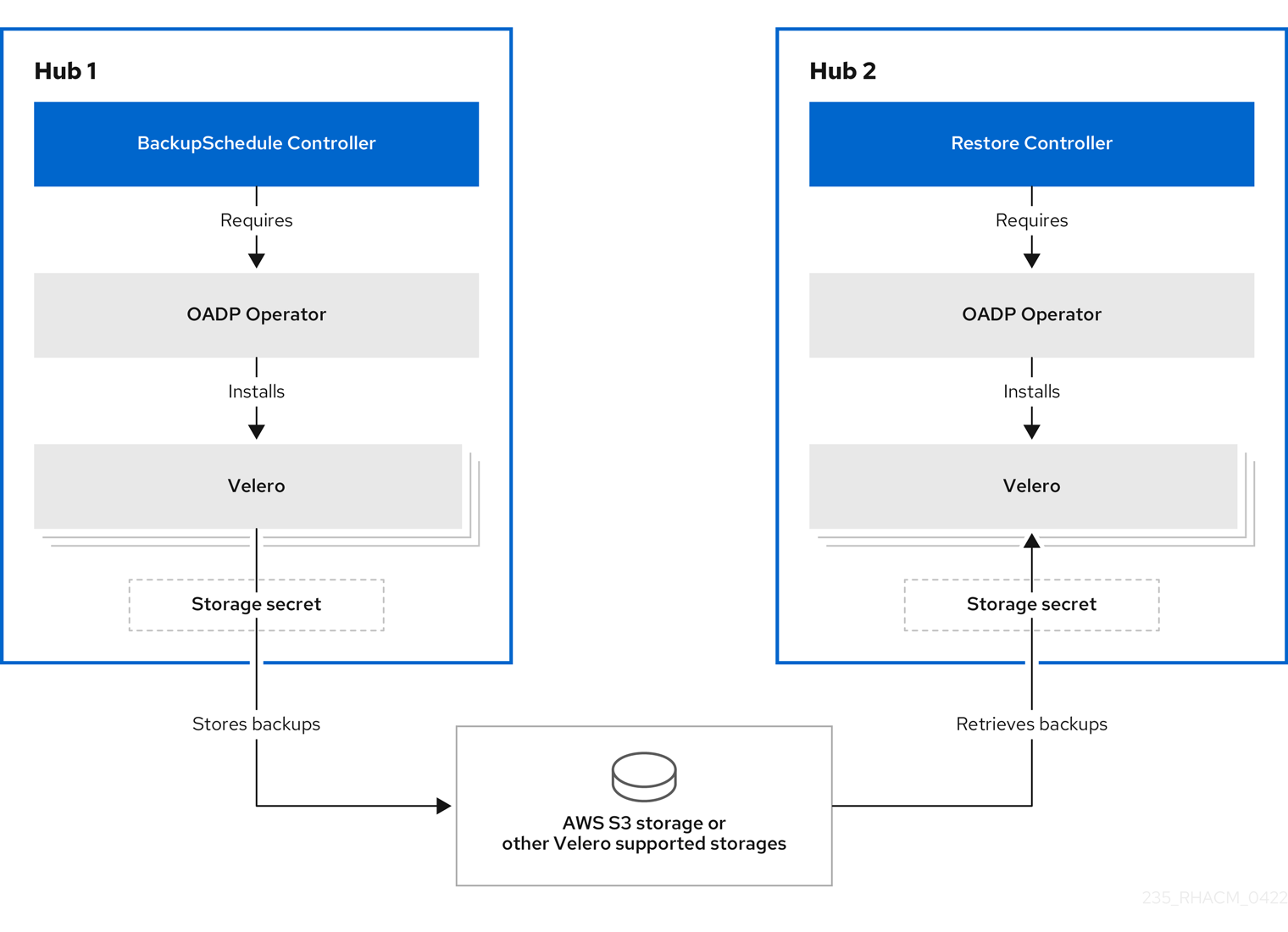
The cluster backup and restore operator depends on the OADP Operator to install Velero, and to create a connection from the hub cluster to the backup storage location where the data is stored. Velero is the component that runs the backup and restore operations. The cluster backup and restore operator solution provides backup and restore support for all Red Hat Advanced Cluster Management hub cluster resources, including managed clusters, applications, and policies.
The cluster backup and restore operator supports backups of any third-party resources that extend the hub cluster installation. With this backup solution, you can define cron-based backup schedules which run at specified time intervals. When the hub cluster goes down, a new hub cluster can be deployed and the backed up data is moved to the new hub cluster.
Continue reading the following topics to learn more about the backup and restore operator:
1.1. Active passive configuration
In an active passive configuration, there is one active hub cluster and passive hub clusters. An active hub cluster is also considered the primary hub cluster, which manages clusters and backs up resources at defined time intervals, using the BackupSchedule.cluster.open-cluster-management.io resource.
Passive hub clusters continuously retrieve the latest backups and restore the passive data. The passive hubs use the Restore.cluster.open-cluster-management.io resource to restore passive data from the primary hub cluster when new backup data is available. These hub clusters are on standby to become a primary hub when the primary hub cluster goes down.
Active and passive hub clusters are connected to the same storage location, where the primary hub cluster backs up data for passive hub clusters to access the primary hub cluster backups. For more details on how to set up this automatic restore configuration, see the Restoring passive resources while checking for backups>> section.
In the following diagram, the active hub cluster manages the local clusters and backs up the hub cluster data at regular intervals:
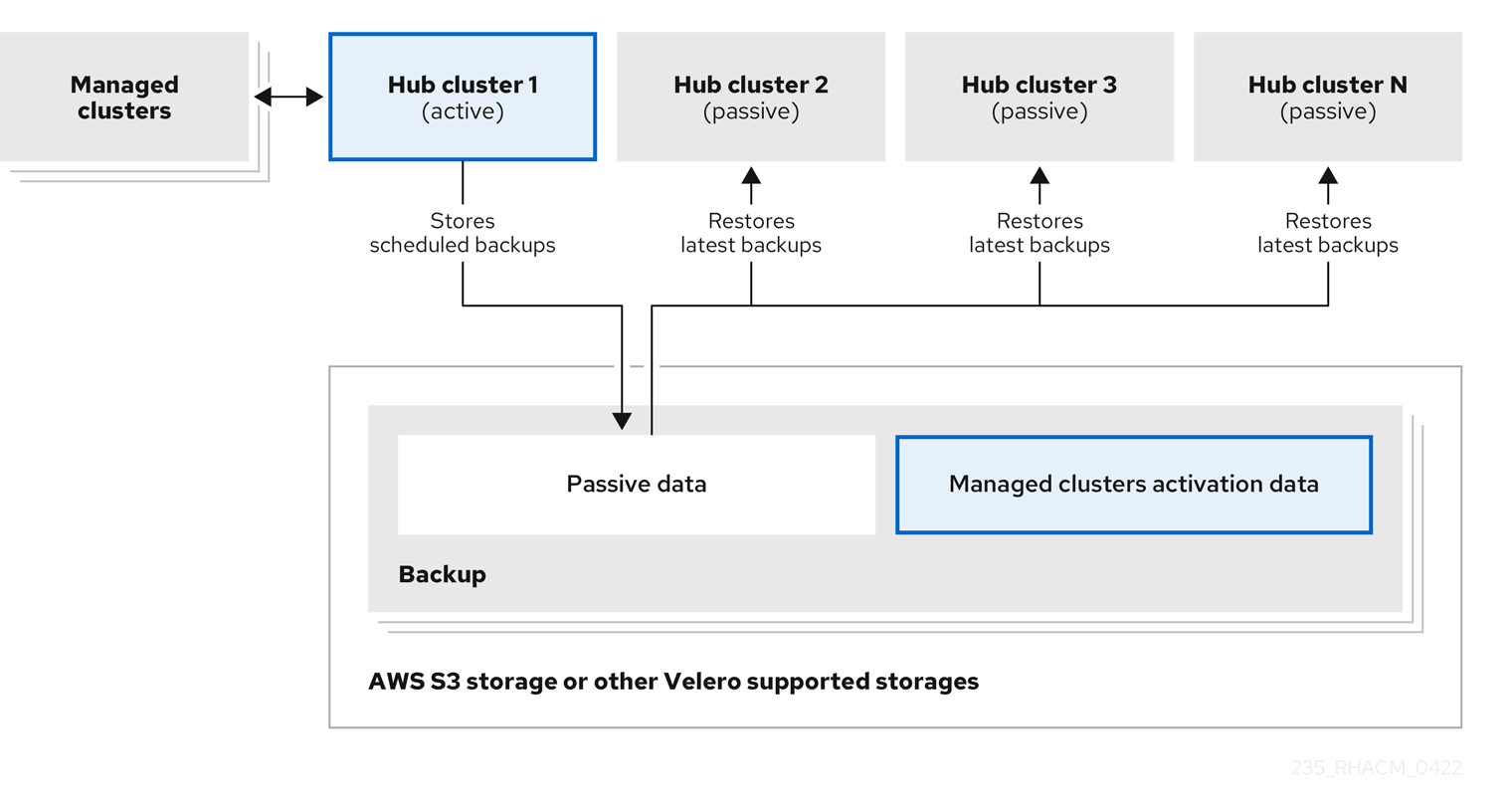
The passive hub cluster restores this data, except for the managed cluster activation data, which moves the managed clusters to the passive hub cluster. The passive hub clusters can restore the passive data continuously, see the Restoring passive resources while checking for backups section. Passive hub clusters can restore passive data as a one-time operation, see Restoring passive resources section for more details.
1.2. Disaster recovery
When the primary hub cluster fails, the administrator chooses a passive hub cluster to take over the managed clusters. In the following image, the administrator decides to use Hub cluster N as the new primary hub cluster:
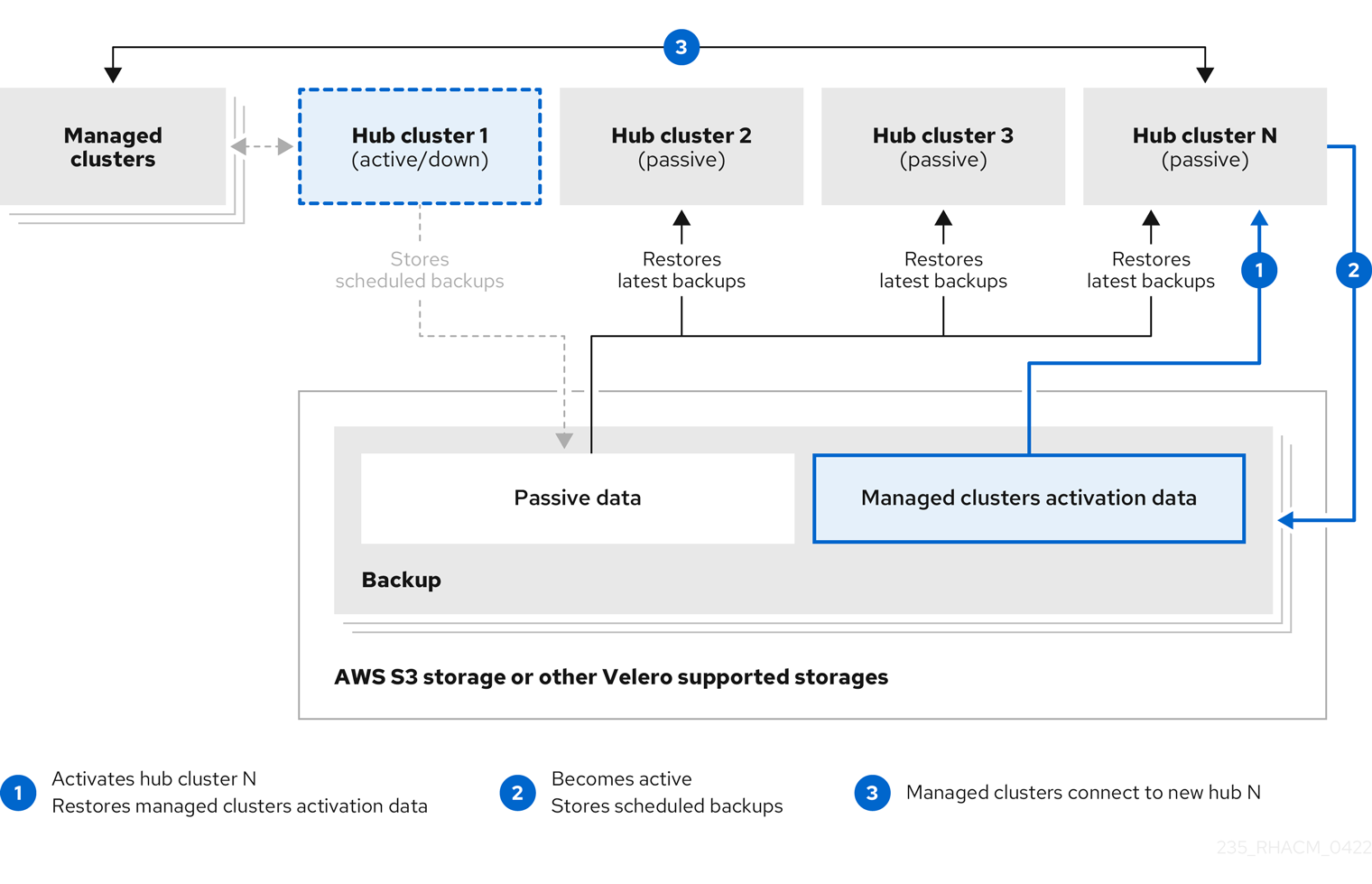
Hub cluster N restores the managed cluster activation data. At this point, the managed clusters connect with Hub cluster N. The administrator activates a backup on the new primary hub cluster, Hub cluster N, by creating a BackupSchedule.cluster.open-cluster-management.io resource, and storing the backups at the same storage location as the initial primary hub cluster.
All other passive hub clusters now restore passive data using the backup data created by the new primary hub cluster. Hub N is now the primary hub cluster, managing clusters and backing up data.
Notes:
- Process 1 in the previous diagram is not automated because the administrator must decide if the primary hub cluster has failed and needs to be replaced, or if there is a network communication error between the hub cluster and the managed clusters. The administrator also decides which passive hub cluster becomes the primary hub cluster. The policy integration with Ansible jobs can help you automate this step by making an Ansible job run when the backup policy reports backup errors.
- Process 2 in the previous diagram is manual. If the administrator does not create backups from the new primary hub cluster, the administrator is notified by using the backups that are actively running as a cron job.
1.3. Backup and restore operator architecture
The operator defines the BackupSchedule.cluster.open-cluster-management.io resource, which is used to set up Red Hat Advanced Cluster Management backup schedules, and restore.cluster.open-cluster-management.io resource, which is used to process and restore these backups. The operator creates corresponding Velero resources, and defines the options needed to backup remote clusters and any other hub cluster resources that need to be restored. View the following diagram:
1.3.1. Resources that are backed up
The cluster backup and restore operator solution provides backup and restore support for all hub cluster resources like managed clusters, applications, and policies. You can use the solution to back up any third-party resources extending the basic hub cluster installation. With this backup solution, you can define a cron-based backup schedule, which runs at specified time intervals and continuously backs up the latest version of the hub cluster content.
When the hub cluster needs to be replaced or is in a disaster scenario when the hub cluster fails, a new hub cluster can be deployed and backed up data is moved to the new hub cluster.
View the following ordered list of the cluster backup and restore process for identifying backup data:
-
Exclude all resources in the
MultiClusterHubnamespace. This is to avoid backing up installation resources that are linked to the current hub cluster identity and should not be backed up. -
Backup all CRDs with an API version suffixed by
.open-cluster-management.io. This suffix indicates that all Red Hat Advanced Cluster Management resources are backed up. -
Backup all CRDs from the following API groups:
argoproj.io,app.k8s.io,core.observatorium.io,hive.openshift.io. -
Exclude all CRDs from the following API groups:
admission.cluster.open-cluster-management.io,admission.work.open-cluster-management.io,internal.open-cluster-management.io,operator.open-cluster-management.io,work.open-cluster-management.io,search.open-cluster-management.io,admission.hive.openshift.io,velero.io. -
Exclude the following CRDs that are a part of the included API groups, but are either not needed or are being recreated by owner-resources, which are also backed up:
clustermanagementaddon,observabilityaddon,applicationmanager,certpolicycontroller,iampolicycontroller,policycontroller,searchcollector,workmanager,backupschedule,restore,clusterclaim.cluster.open-cluster-management.io. -
Backup secrets and ConfigMaps with one of the following labels:
cluster.open-cluster-management.io/type,hive.openshift.io/secret-type,cluster.open-cluster-management.io/backup. Use the
cluster.open-cluster-management.io/backuplabel for any other resources that you want to be backed up and are not included in the previously mentioned criteria. See the following example:apiVersion: my.group/v1alpha1 kind: MyResource metadata: labels: cluster.open-cluster-management.io/backup: ""Note: Secrets used by the
hive.openshift.io.ClusterDeploymentresource need to be backed up, and are automatically annotated with thecluster.open-cluster-management.io/backuplabel only when the cluster is created using the console. If the Hive cluster is deployed using GitOps instead, thecluster.open-cluster-management.io/backuplabel must be manually added to the secrets used by theClusterDeployment.Exclude specific resources that you do not want backed up. For example, see the following example to exclude Velero resources from the backup process:
apiVersion: my.group/v1alpha1
kind: MyResource
 metadata:
  labels:
    velero.io/exclude-from-backup: "true"
1.3.2. Resources restored at managed clusters activation time
When you add the cluster.open-cluster-management.io/backup label to a resource, the resource is automatically backed up in the acm-resources-generic-schedule backup. You must set the label value to cluster-activation if any of the resources need to be restored, only after the managed clusters are moved to the new hub cluster and when the veleroManagedClustersBackupName:latest is used on the restored resource. This ensures the resource is not restored unless the managed cluster activation is called. View the following example:
apiVersion: my.group/v1alpha1
kind: MyResource
 metadata:
  labels:
    cluster.open-cluster-management.io/backup: cluster-activation
Aside from the activation data resources that are identified by using the cluster.open-cluster-management.io/backup: cluster-activation label and stored by the acm-resources-generic-schedule backup, the cluster backup and restore operator includes a few resources in the activation set, by default. The following resources are backed up by the acm-managed-clusters-schedule backup:
-
managedcluster.cluster.open-cluster-management.io -
managedcluster.clusterview.open-cluster-management.io -
klusterletaddonconfig.agent.open-cluster-management.io -
managedclusteraddon.addon.open-cluster-management.io -
managedclusterset.cluster.open-cluster-management.io -
managedclusterset.clusterview.open-cluster-management.io -
managedclustersetbinding.cluster.open-cluster-management.io -
clusterpool.hive.openshift.io -
clusterclaim.hive.openshift.io -
clustercurator.cluster.open-cluster-management.io
1.3.3. Resource requests and limits customization
When Velero is initially installed, Velero pod is set to the default CPU and memory limits as defined in the following sample:
resources:
 limits:
   cpu: "1"
   memory: 256Mi
 requests:
   cpu: 500m
   memory: 128Mi
The limits from the previous sample work well with some scenarios, but might need to be updated when your cluster backs up a large number of resources. For instance, when back up is run on a hub cluster that manages 2000 clusters, then the Velero pod fails due to the out-of-memory error (OOM). The following configuration allows for the backup to complete for this scenario:
  limits:
    cpu: "2"
    memory: 1Gi
  requests:
    cpu: 500m
    memory: 256Mi
To update the limits and requests for the Velero pod resource, you need to update the DataProtectionApplication resource and insert the resourceAllocation template for the Velero pod. View the following sample:
apiVersion: oadp.openshift.io/v1alpha1
kind: DataProtectionApplication
metadata:
  name: velero
  namespace: open-cluster-management-backup
spec:
...
  configuration:
...
    velero:
      podConfig:
        resourceAllocations:
          limits:
            cpu: "2"
            memory: 1Gi
          requests:
            cpu: 500m
memory: 256Mi-
Refer to the Default Velero cloud provider plugins topic in the Red Hat OpenShift Container Platform documentation to find out more about the
DataProtectionApplicationparameters. - Refer to the CPU and memory requirement for configurations topic in the OpenShift Container Platform documentation for more details about the backup and restore CPU and memory requirements based on cluster usage.
1.4. Preparing clusters before restoring activation data
Before restoring activation data on the new hub cluster, complete the following steps to avoid data corruption or cluster loss:
Shut down the primary cluster.
See Shutting down the primary cluster for more information.
If you want to use an existing managed cluster as the restore hub, set
disableHubSelfManagementtotruein theMultiClusterHub.For more information, see the disableHubSelfManagement topic.
See the following example where
spec.disableHubSelfManagementis set totrue:apiVersion: operator.open-cluster-management.io/v1 kind: MultiClusterHub metadata: name: multiclusterhub namespace: <namespace> spec: disableHubSelfManagement: true
Note: If the self managing option is not disabled on the restore hub cluster before the activation data is moved to the restore hub cluster, the local-cluster klusterlet and the klusterlet in the managed cluster namespace conflict. As a result, the restore hub cluster is managed by itself by using the managed cluster and by using the restored managed cluster. If you detach the managed cluster as part of the detach operation, the managed cluster receives a deprovision request, which results in restore hub cluster removal.
1.5. Managing the backup and restore operator
The cluster backup and restore operator is not installed automatically. Enable the backup component by setting the cluster-backup parameter to true, in the MultiClusterHub resource. When enabled, the cluster backup and restore operator is installed in the open-cluster-management-backup namespace. When you install the cluster backup operator, the OADP Operator is also automatically installed in the same namespace as the cluster backup and restore operator.
Notes:
- Custom resource definitons are cluster-scoped, so you cannot have two different versions of OADP or Velero installed on the same cluster. If you have two different versions, one version runs with the wrong custom resource definitions.
-
If you did not enable the cluster backup and restore operator on the
MultiClusterHubresource, the OADP Operator and Velero custom resource definition are still installed on the hub cluster. TheMultiClusterHubresource reconciles the OADP and Velero custom resource definitions with the version that is used by the OADP Operator, which is installed when you enabled the cluster backup and restore operator. As a result, you cannot install another version of OADP or Velero on the hub cluster, unless your version uses the same custom resource definitions as the OADP Operator that is installed when you enabled the backup and restore operator. - The backup component works with the OADP Operator that is installed in the component namespace.
Velero is installed with the OADP Operator on the Red Hat Advanced Cluster Management hub cluster; Velero is used to backup and restore Red Hat Advanced Cluster Management hub cluster resources.
For a list of supported storage providers for Velero, see AWS S3 compatible backup storage providers in the OpenShift Container Platform documentation.
1.5.1. Prerequisites
You must meet the following prerequisites to enable and use the backup and restore operator:
- Be sure to complete the steps for Creating a default Secret for the cloud storage where the backups are saved. The secret resource must be created in the OADP Operator namespace, which is located in the backup component namespace.
For both active and passive hub clusters:
-
From your Red Hat OpenShift Container Platform cluster, install the Red Hat Advanced Cluster Management for Kubernetes operator version 2.7.x. The
MultiClusterHubresource is automatically created when you install Red Hat Advanced Cluster Management, and displays the following status:Running. -
The cluster backup and restore operator must be installed manually. Enable the cluster backup and restore operator (
cluster-backup). Edit theMultiClusterHubresource by setting thecluster-backupparameter totrue. This installs the OADP operator in the same namespace with the backup component.
-
From your Red Hat OpenShift Container Platform cluster, install the Red Hat Advanced Cluster Management for Kubernetes operator version 2.7.x. The
For passive hub clusters:
- Before you run the restore operation on the passive hub cluster, you must manually configure the hub cluster and install all operators on the active hub cluster, and in the same namespace as the active hub cluster.
-
Ensure that the Red Hat Advanced Cluster Management operator is installed in the same namespace as the initial hub cluster. Then create the
DataProtectionApplicationresource and connect to the same storage location where the initial hub cluster backed up data.
Use the created secret when you create a
DataProtectionApplicationresource.Complete the following steps to create an instance of the
DataProtectionApplicationresource:- From the Red Hat OpenShift Container Platform console, select Operators > Installed Operators.
-
Click
Create instanceunder DataProtectionApplication. -
Create the Velero instance by selecting configurations using the {ocp-short) console or by using a YAML file as mentioned in the
DataProtectionApplicationexample. -
Set the
DataProtectionApplicationnamespace toopen-cluster-management-backup. Set the specification (
spec:) values appropriately for theDataProtectionApplicationresource. Then click Create.If you intend on using the default backup storage location, set the following value,
default: truein thebackupStorageLocationssection. View the followingDataProtectionApplicationresource sample:apiVersion: oadp.openshift.io/v1alpha1 kind: DataProtectionApplication metadata: name: dpa-sample spec: configuration: velero: defaultPlugins: - openshift - aws restic: enable: true backupLocations: - name: default velero: provider: aws default: true objectStorage: bucket: my-bucket prefix: my-prefix config: region: us-east-1 profile: "default" credential: name: cloud-credentials key: cloud snapshotLocations: - name: default velero: provider: aws config: region: us-west-2 profile: "default"See an example to create the
DataProtectionApplicationresource.- Before you run the restore operation, verify that other operators, such as Ansible Automation Platform, Red Hat OpenShift Container Platform GitOps, or certificate manager are installed. This ensures that the new hub cluster is configured the same way as the initial hub cluster.
- The passive hub cluster must use the same namespace names as the initial hub cluster when you install the backup and restore operator, and any other operators that are configured on the previous hub cluster.
For disconnected environments:
Complete the following additional steps when you enable the backup and restore component with Red Hat OpenShift Container Platform in a disconnected environment:
Update the
MultiClusterHubresource with the follwing annotation to override the source from which the OADP operator is installed. Create the annotation before thecluster-backupcomponent is enabled on theMultiClusterHubresource:apiVersion: operator.open-cluster-management.io/v1 kind: MultiClusterHub metadata: annotations: installer.open-cluster-management.io/oadp-subscription-spec: '{"source": "redhat-operator-index"}'The
redhat-operator-indexis a custom name and represents the name of theCatalogSourceresource that you define and use to access Red Hat OpenShift Operators in the disconnected environment. Run the following command to retrieve thecatalogsource:oc get catalogsource -AThe output might resemble the following:
NAMESPACE               NAME                         DISPLAY                       TYPE   PUBLISHER   AGE
openshift-marketplace   acm-custom-registry          Advanced Cluster Management   grpc   Red Hat     42h
openshift-marketplace   multiclusterengine-catalog   MultiCluster Engine           grpc   Red Hat     42h
openshift-marketplace   redhat-operator-index                                      grpc               42h
1.5.2. Enabling the backup and restore operator
The cluster backup and restore operator can be enabled when the MultiClusterHub resource is created for the first time. The cluster-backup parameter is set to true. When the operator is enabled, the operator resources are installed.
If the MultiClusterHub resource is already created, you can install or uninstall the cluster backup operator by editing the MultiClusterHub resource. Set cluster-backup to false, if you want to uninstall the cluster backup operator.
When the backup and restore operator is enabled, your MultiClusterHub resource might resemble the following YAML file:
apiVersion: operator.open-cluster-management.io/v1
  kind: MultiClusterHub
  metadata:
    name: multiclusterhub
    namespace: open-cluster-management
  spec:
    availabilityConfig: High
    enableClusterBackup: false
    imagePullSecret: multiclusterhub-operator-pull-secret
    ingress:
      sslCiphers:
        - ECDHE-ECDSA-AES256-GCM-SHA384
        - ECDHE-RSA-AES256-GCM-SHA384
        - ECDHE-ECDSA-AES128-GCM-SHA256
        - ECDHE-RSA-AES128-GCM-SHA256
    overrides:
      components:
        - enabled: true
          name: multiclusterhub-repo
        - enabled: true
          name: search
        - enabled: true
          name: management-ingress
        - enabled: true
          name: console
        - enabled: true
          name: insights
        - enabled: true
          name: grc
        - enabled: true
          name: cluster-lifecycle
        - enabled: true
          name: volsync
        - enabled: true
          name: multicluster-engine
        - enabled: true
          name: cluster-backup
    separateCertificateManagement: false
1.5.3. Using the backup and restore operator
Complete the following steps to schedule and restore backups:
-
Use the backup and restore operator,
backupschedule.cluster.open-cluster-management.io, to create a backup schedule and use therestore.cluster.open-cluster-management.ioresources to restore a backup. Run the following command to create a
backupschedule.cluster.open-cluster-management.ioresource:kubectl create -f cluster_v1beta1_backupschedule.yamlYour
cluster_v1beta1_backupschedule.yamlresource might resemble the following file:apiVersion: cluster.open-cluster-management.io/v1beta1 kind: BackupSchedule metadata: name: schedule-acm namespace: open-cluster-management-backup spec: veleroSchedule: 0 */2 * * * # Create a backup every 2 hours veleroTtl: 120h # deletes scheduled backups after 120h; optional, if not specified, the maximum default value set by velero is used - 720hView the following descriptions of the
backupschedule.cluster.open-cluster-management.iospecproperties:-
veleroScheduleis a required property and defines a cron job for scheduling the backups. -
veleroTtlis an optional property and defines the expiration time for a scheduled backup resource. If not specified, the maximum default value set by Velero is used, which is720h.
-
Check the status of your
backupschedule.cluster.open-cluster-management.ioresource, which displays the definition for the threeschedule.velero.ioresources. Run the following command:oc get BackupSchedule -n open-cluster-management-backupAs a reminder, the restore operation is run on a different hub cluster for restore scenarios. To initiate a restore operation, create a
restore.cluster.open-cluster-management.ioresource on the hub cluster where you want to restore backups.Note: When you restore a backup on a new hub cluster, make sure that the previous hub cluster, where the backup was created, is shut down. If it is running, the previous hub cluster tries to reimport the managed clusters as soon as the managed cluster reconciliation finds that the managed clusters are no longer available.
You can use the cluster backup and restore operator,
backupschedule.cluster.open-cluster-management.ioandrestore.cluster.open-cluster-management.ioresources, to create a backup or restore resource. See thecluster-backup-operatorsamples.Run the following command to create a
restore.cluster.open-cluster-management.ioresource:kubectl create -f cluster_v1beta1_backupschedule.yamlYour resource might resemble the following file:
apiVersion: cluster.open-cluster-management.io/v1beta1
kind: Restore
metadata:
  name: restore-acm
  namespace: open-cluster-management-backup
spec:
  veleroManagedClustersBackupName: latest
  veleroCredentialsBackupName: latest
  veleroResourcesBackupName: latest
View the Velero
Restoreresource by running the following command:oc get restore.velero.io -n open-cluster-management-backupView the Red Hat Advanced Cluster Management
Restoreevents by running the following command:oc describe restore.cluster.open-cluster-management.io -n open-cluster-management-backup
For descriptions of the parameters and samples of Restore YAML resources, see the Restoring a backup section.
1.5.4. Extending backup data
You can backup third-party resources with cluster backup and restore by adding the cluster.open-cluster-management.io/backup label to the resources. The value of the label can be any string, including an empty string. Use a value that can help you identify the component that you are backing up. For example, use the cluster.open-cluster-management.io/backup: idp label if the components are provided by an IDP solution.
Note: Use the cluster-activation value for the cluster.open-cluster-management.io/backup label if you want the resources to be restored when the managed clusters activation resources are restored. Restoring the managed clusters activation resources result in managed clusters being actively managed by the hub cluster, where the restore was started.
1.5.5. Scheduling a cluster backup
A backup schedule is activated when you create the backupschedule.cluster.open-cluster-management.io resource. View the following backupschedule.cluster.open-cluster-management.io sample:
apiVersion: cluster.open-cluster-management.io/v1beta1
kind: BackupSchedule
metadata:
  name: schedule-acm
  namespace: open-cluster-management-backup
spec:
  veleroSchedule: 0 */2 * * *
  veleroTtl: 120h
After you create a backupschedule.cluster.open-cluster-management.io resource, run the following command to get the status of the scheduled cluster backups:
oc get BackupSchedule -n open-cluster-management-backup
The backupschedule.cluster.open-cluster-management.io resource creates six schedule.velero.io resources, which are used to generate backups. Run the following command to view the list of the backups that are scheduled:
os get schedules -A | grep acmResources are separately backed up in the following groups:
- Credentials backup, which is a backup file that stores Hive credentials, Red Hat Advanced Cluster Management, and user-created credentials and ConfigMaps.
-
Resources backup, which contains one backup for the Red Hat Advanced Cluster Management resources and one for generic resources. These resources use the following label,
cluster.open-cluster-management.io/backup. - Managed clusters backup, which contains only resources that activate the managed cluster connection to the hub cluster, where the backup is restored.
Note: The resources backup file contains managed cluster-specific resources, but does not contain the subset of resources that connect managed clusters to the hub cluster. The resources that connect managed clusters are called activation resources and are contained in the managed clusters backup. When you restore backups only for the credentials and resources backup on a new hub cluster, the new hub cluster shows all managed clusters that are created by using the Hive API in a detached state. However, the managed clusters that are imported on the primary hub cluster using the import operation appear only when the activation data is restored on the passive hub cluster. The managed clusters are still connected to the original hub cluster that created the backup files.
When the activation data is restored, only managed clusters created using the Hive API are automatically connected with the new hub cluster. All other managed clusters appear in a Pending state and must be manually reattached to the new cluster.
1.5.5.1. Avoiding backup collisions
Backup collisions might occur if the hub cluster changes from being a passive hub cluster to becoming a primary hub cluster, or the other way around, and different managed clusters back up data at the same storage location.
As a result, the latest backups are generated by a hub cluster that is no longer set as the primary hub cluster. This hub cluster still produces backups because the BackupSchedule.cluster.open-cluster-management.io resource is still enabled.
See the following list to learn about two scenarios that might cause a backup collision:
The primary hub cluster fails unexpectedly, which is caused by the following conditions:
- Communication from the primary hub cluster to Hub1 fails.
- The Hub1 backup data is restored on a secondary hub cluster, called Hub2.
-
The administrator creates the
BackupSchedule.cluster.open-cluster-management.ioresource on Hub2, which is now the primary hub cluster and generates backup data to the common storage location. Hub1 unexpectedly starts working again.
Since the
BackupSchedule.cluster.open-cluster-management.ioresource is still enabled on Hub1, Hub1 resumes writing backups to the same storage location as Hub2. Both hub clusters are now writing backup data at the same storage location. Any hub cluster restoring the latest backups from this storage location might use Hub1 data instead of Hub2 data.
The administrator tests a disaster scenario by making Hub2 a primary hub cluster, which is caused by the following conditions:
- Hub1 is stopped.
- Hub1 backup data is restored on Hub2.
-
The administrator creates the
BackupSchedule.cluster.open-cluster-management.ioresource on Hub2, which is now the primary hub cluster and generates backup data to the common storage location. - After the disaster test is completed, the administrator reverts to the previous state and makes Hub1 the primary hub cluster again.
Hub1 starts while Hub2 is still active.
Since the
BackupSchedule.cluster.open-cluster-management.ioresource is still enabled on Hub2, it writes backups at the same storage location that corrupts the backup data. Any hub cluster restoring the latest backups from this location might use Hub2 data instead of Hub1 data. In this scenario, stopping Hub2 first or deleting theBackupSchedule.cluster.open-cluster-management.ioresource on Hub2 before starting Hub1 fixes the backup collision issue.
To avoid and report backup collisions, a BackupCollision state exists for the BackupSchedule.cluster.open-cluster-management.io resource. The controller checks regularly if the latest backup in the storage location has been generated from the current hub cluster. If not, a different hub cluster has recently written backup data to the storage location, indicating that the hub cluster is colliding with a different hub cluster.
In this case, the current hub cluster BackupSchedule.cluster.open-cluster-management.io resource status is set to BackupCollision and the Schedule.velero.io resources created by this resource are deleted to avoid data corruption. The BackupCollision is reported by the backup policy. The administrator verifies which hub cluster writes to the storage location, before removing the BackupSchedule.cluster.open-cluster-management.io resource from the invalid hub cluster and creating a new BackupSchedule.cluster.open-cluster-management.io resource on the valid primary hub cluster, to resume the backup.
Run the following command to check if there is a backup collision:
oc get backupschedule -AIf there is a backup collision, the output might resemble the following example:
NAMESPACE       NAME               PHASE             MESSAGE
openshift-adp   schedule-hub-1   BackupCollision   Backup acm-resources-schedule-20220301234625, from cluster with id [be97a9eb-60b8-4511-805c-298e7c0898b3] is using the same storage location. This is a backup collision with current cluster [1f30bfe5-0588-441c-889e-eaf0ae55f941] backup. Review and resolve the collision then create a new BackupSchedule resource to  resume backups from this cluster.
1.5.6. Restoring a backup
In a usual restore scenario, the hub cluster where the backups are run becomes unavailable, and the backed up data needs to be moved to a new hub cluster. This is done by running the cluster restore operation on the new hub cluster. In this case, the restore operation runs on a different hub cluster than the one where the backup is created.
There are also cases where you want to restore the data on the same hub cluster where the backup was collected, so the data from a previous snapshot can be recovered. In this case, both restore and backup operations are run on the same hub cluster.
After you create a restore.cluster.open-cluster-management.io resource on the hub cluster, you can run the following command to get the status of the restore operation:
oc get restore -n open-cluster-management-backupYou should also be able to verify that the backed up resources that are contained by the backup file are created.
Note: The restore.cluster.open-cluster-management.io resource runs once, unless you use the syncRestoreWithNewBackups option and set it to true, as mentioned in the Restore passive resources section. If you want to run the same restore operation again after the restore operation is complete, you must create a new restore.cluster.open-cluster-management.io resource with the same spec options.
The restore operation is used to restore all three backup types that are created by the backup operation. However, you can choose to install only a certain type of backup (only managed clusters, only user credentials, or only hub cluster resources).
The restore defines the following three required spec properties, where the restore logic is defined for the types of backed up files:
-
veleroManagedClustersBackupNameis used to define the restore option for the managed clusters activation resources. -
veleroCredentialsBackupNameis used to define the restore option for the user credentials. veleroResourcesBackupNameis used to define the restore option for the hub cluster resources (Applications,Policy, and other hub cluster resources like managed cluster passive data).The valid options for the previously mentioned properties are following values:
-
latest- This property restores the last available backup file for this type of backup. -
skip- This property does not attempt to restore this type of backup with the current restore operation. -
<backup_name>- This property restores the specified backup pointing to it by name.
-
The name of the restore.velero.io resources that are created by the restore.cluster.open-cluster-management.io is generated using the following template rule, <restore.cluster.open-cluster-management.io name>-<velero-backup-resource-name>. View the following descriptions:
-
restore.cluster.open-cluster-management.io nameis the name of the currentrestore.cluster.open-cluster-management.ioresource, which initiates the restore. velero-backup-resource-nameis the name of the Velero backup file that is used for restoring the data. For example, therestore.cluster.open-cluster-management.ioresource namedrestore-acmcreatesrestore.velero.iorestore resources. View the following examples for the format:-
restore-acm-acm-managed-clusters-schedule-20210902205438is used for restoring managed cluster activation data backups. In this sample, thebackup.velero.iobackup name used to restore the resource isacm-managed-clusters-schedule-20210902205438. -
restore-acm-acm-credentials-schedule-20210902206789is used for restoring credential backups. In this sample, thebackup.velero.iobackup name used to restore the resource isacm-managed-clusters-schedule-20210902206789. -
restore-acm-acm-resources-schedule-20210902201234is used for restoring application, policy, and other hub cluster resources like managed cluster passive data backups. In this sample, thebackup.velero.iobackup name used to restore the resource isacm-managed-clusters-schedule-20210902201234.
-
Note: If skip is used for a backup type, restore.velero.io is not created.
View the following YAML sample of the cluster Restore resource. In this sample, all three types of backed up files are being restored, using the latest available backed up files:
apiVersion: cluster.open-cluster-management.io/v1beta1
kind: Restore
metadata:
  name: restore-acm
  namespace: open-cluster-management-backup
spec:
  veleroManagedClustersBackupName: latest
  veleroCredentialsBackupName: latest
  veleroResourcesBackupName: latest
Note: Only managed clusters created by the Hive API are automatically connected with the new hub cluster when the acm-managed-clusters backup from the managed clusters backup is restored on another hub cluster. All other managed clusters remain in the Pending Import state and must be imported back onto the new hub cluster. For more information, see Restoring imported managed clusters (Technology Preview).
1.5.6.1. Preparing the new hub cluster
Before running the restore operation on a new hub cluster, you need to manually configure the hub cluster and install the same operators as on the initial hub cluster. You must install the Red Hat Advanced Cluster Management operator in the same namespace as the initial hub cluster, create the DataProtectionApplication resource, and then connect to the same storage location where the initial hub cluster previously backed up data.
Use the same configuration as on the initial hub cluster for the MultiClusterHub resource created by the Red Hat Advanced Cluster Management operator, including any changes to the MultiClusterEngine resource.
For example, if the initial hub cluster has any other operators installed, such as Ansible Automation Platform, Red Hat OpenShift GitOps, cert-manager, you have to install them before running the restore operation. This ensures that the new hub cluster is configured in the same way as the initial hub cluster.
1.5.6.2. Cleaning the hub cluster after restore
Velero updates existing resources if they have changed with the currently restored backup. Velero does not clean up delta resources, which are resources created by a previous restore and not part of the currently restored backup. This limits the scenarios you can use when restoring hub cluster data on a new hub cluster. Unless the restore is applied only once, you cannot reliably use the new hub cluster as a passive configuration. The data on the hub cluster does not reflect the data available with the restored resources.
To address this limitation, when a Restore.cluster.open-cluster-management.io resource is created, the backup operator runs a post restore operation that cleans up the hub cluster. The operation removes any resources created by a previous Red Hat Advanced Cluster Management restore that are not part of the currently restored backup.
The post restore cleanup uses the cleanupBeforeRestore property to identify the subset of objects to clean up. You can use the following two options for the post restore cleanup:
-
None: No clean up necessary, just begin Velero restore. UseNoneon a brand new hub cluster. -
CleanupRestored: Clean up all resources created by a previous Red Hat Advanced Cluster Management restore that are not part of the currently restored backup. CleanupAll: Clean up all resources on the hub cluster that might be part of a Red Hat Advanced Cluster Management backup, even if they were not created as a result of a restore operation. This is to be used when extra content is created on a hub cluster before the restore operation starts.Best Practice: Avoid using the
CleanupAlloption. Only use it as a last resort with extreme caution.CleanupAllalso cleans up resources on the hub cluster created by the user, in addition to resources created by a previously restored backup. Instead, use the `CleanupRestored `option to prevent updating the hub cluster content when the hub cluster is designated as a passive candidate for a disaster scenario. Use a clean hub cluster as a passive cluster.
Notes:
-
Velero sets the status,
PartiallyFailed, for a velero restore resource if the restored backup has no resources. This means that arestore.cluster.open-cluster-management.ioresource can be inPartiallyFailedstatus if any of the createdrestore.velero.ioresources do not restore any resources because the corresponding backup is empty. -
The
restore.cluster.open-cluster-management.ioresource is run once, unless you use thesyncRestoreWithNewBackups:trueto keep restoring passive data when new backups are available. For this case, follow the restore passive with sync sample. See Restoring passive resources while checking for backups. After the restore operation is complete and you want to run another restore operation on the same hub cluster, you have to create a newrestore.cluster.open-cluster-management.ioresource. -
Although you can create multiple
restore.cluster.open-cluster-management.ioresources, only one can be active at any moment in time.
1.5.6.3. Restoring passive resources while checking for backups
Use the restore-passive-sync sample to restore passive data, while continuing to check if new backups are available and restore them automatically. To automatically restore new backups, you must set the syncRestoreWithNewBackups parameter to true. You must also only restore the latest passive data. You can find the sample example at the end of this section.
Set the VeleroResourcesBackupName and VeleroCredentialsBackupName parameters to latest, and the VeleroManagedClustersBackupName parameter to skip. Immediately after the VeleroManagedClustersBackupName is set to latest, the managed clusters are activated on the new hub cluster and is now the primary hub cluster.
When the activated managed cluster becomes the primary hub cluster, the restore resource is set to Finished and the syncRestoreWithNewBackups is ignored, even if set to true.
By default, the controler checks for new backups every 30 minutes when the syncRestoreWithNewBackups is set to true. If new backups are found, it restores the backed up resources. You can change the duration of the check by updating the restoreSyncInterval parameter.
For example, see the following resource that checks for backups every 10 minutes:
apiVersion: cluster.open-cluster-management.io/v1beta1
kind: Restore
metadata:
  name: restore-acm-passive-sync
  namespace: open-cluster-management-backup
spec:
  syncRestoreWithNewBackups: true # restore again when new backups are available
  restoreSyncInterval: 10m # check for new backups every 10 minutes
  cleanupBeforeRestore: CleanupRestored
  veleroManagedClustersBackupName: skip
  veleroCredentialsBackupName: latest
  veleroResourcesBackupName: latest
1.5.6.4. Restoring passive resources
Use the restore-acm-passive sample to restore hub cluster resources in a passive configuration. Passive data is backup data such as secrets, ConfigMaps, applications, policies, and all the managed cluster custom resources, which do not activate a connection between managed clusters and hub clusters. The backup resources are restored on the hub cluster by the credentials backup and restore resources.
See the following sample:
apiVersion: cluster.open-cluster-management.io/v1beta1
kind: Restore
metadata:
  name: restore-acm-passive
  namespace: open-cluster-management-backup
spec:
  cleanupBeforeRestore: CleanupRestored
  veleroManagedClustersBackupName: skip
  veleroCredentialsBackupName: latest
  veleroResourcesBackupName: latest
1.5.6.5. Restoring activation resources
Before you restore the activation data on the passive hub cluster, shut down the previous hub cluster where the backup was created. If the primary hub cluster is still running, it attempts to reconnect with the managed clusters that are no longer available, based on the reconciliation procedure running on this hub cluster.
Use the restore-acm-passive-activate sample when you want the hub cluster to manage the clusters. In this case it is assumed that the other data has been restored already on the hub cluster that using the passive resource.
apiVersion: cluster.open-cluster-management.io/v1beta1
kind: Restore
metadata:
  name: restore-acm-passive-activate
  namespace: open-cluster-management-backup
spec:
  cleanupBeforeRestore: CleanupRestored
  veleroManagedClustersBackupName: latest
  veleroCredentialsBackupName: skip
  veleroResourcesBackupName: skip
You have some options to restore activation resources, depending on how you restored the passive resources:
-
If you used the
restore-acm-passive-sync cluster.open-cluster-management.ioresource as documented in the Restore passive resources while checking for backups to restore passive data section, update theveleroManagedClustersBackupNamevalue tolateston this resource. As a result, the managed cluster resources and therestore-acm-passive-syncresource are restored. - If you restored the passive resources as a one time operation, or did not restore any resources yet, choose to restore all resources as specified in the Restoring all resources section.
1.5.7. Restoring managed cluster activation data
Managed cluster activation data or other activation data resources are stored by the managed clusters backup and by the resource-generic backups, when you use the cluster.open-cluster-management.io/backup: cluster-activation label. When the activation data is restored on a new hub cluster, managed clusters are being actively managed by the hub cluster where the restore is run. See Scheduling a cluster backup to learn how you can use the operator.
1.5.7.1. Restoring all resources
Use the restore-acm sample if you want to restore all data at once and make the hub cluster manage the managed clusters in one step. After you create a restore.cluster.open-cluster-management.io resource on the hub cluster, run the following command to get the status of the restore operation:
oc get restore -n open-cluster-management-backupYour sample might resemble the following resource:
apiVersion: cluster.open-cluster-management.io/v1beta1
kind: Restore
metadata:
  name: restore-acm
  namespace: open-cluster-management-backup
spec:
  cleanupBeforeRestore: CleanupRestored
  veleroManagedClustersBackupName: latest
  veleroCredentialsBackupName: latest
  veleroResourcesBackupName: latest
From your hub cluster, verify that the backed up resources contained by the backup file are created.
1.5.7.2. Restoring imported managed clusters
Only managed clusters connected with the primary hub cluster using the Hive API are automatically connected with the new hub cluster, where the activation data is restored. These clusters have been created on the primary hub cluster using the Create cluster button in the Clusters tab. Managed clusters connected with the initial hub cluster using the Import cluster button appear as Pending Import when the activation data is restored, and must be imported back on the new hub cluster.
The Hive managed clusters can be connected with the new hub cluster because Hive stores the managed cluster kubeconfig in the managed cluster namespace on the hub cluster. This is backed up and restored on the new hub cluster. The import controller then updates the bootstrap kubeconfig on the managed cluster using the restored configuration, which is only available for managed clusters created using the Hive API. It is not available for imported clusters.
To reconnect imported clusters on the new hub cluster, manually create the auto-import-secret resource after your start the restore operation. See Importing the cluster with the auto import secret for more details.
Create the auto-import-secret resource in the managed cluster namespace for each cluster in Pending Import state. Use a kubeconfig or token with enough permissions for the import component to start the automatic import on the new hub cluster. You must have access for each managed cluster by using a token to connect with the managed cluster. The token must have a klusterlet role binding or a role with the same permissions.
1.5.7.2.1. Automatically connecting clusters by using a Managed Service Account
The backup controller automatically connects imported clusters to the new hub cluster by using the Managed Service Account component. The Managed Service Account creates a token that is backed up for each imported cluster in each managed cluster namespace. The token uses a klusterlet-bootstrap-kubeconfig ClusterRole binding, which allows the token to be used by an automatic import operation. The klusterlet-bootstrap-kubeconfig ClusterRole can only get or update the bootstrap-hub-kubeconfig secret. To learn more about the Managed Service Account component, see What is Managed Service Account?.
When the activation data is restored on the new hub cluster, the restore controller runs a post restore operation and looks for all managed clusters in the Pending Import state. If a valid token generated by the Managed Service Account is found, the controller creates an auto-import-secret using the token. As a result, the import component tries to reconnect the managed cluster. If the cluster is accessible, the operation is successful.
1.5.7.2.1.1. Enabling automatic import
The automatic import feature using the Managed Service Account component is disabled by default. To enable the automatic import feature, complete the following steps:
Enable the Managed Service Account component by setting the
managedserviceaccount-previewenabledparameter totruein theMultiClusterEngineresource. See the following example:apiVersion: multicluster.openshift.io/v1 kind: MultiClusterEngine metadata: name: multiclusterhub spec: overrides: components: - enabled: true name: managedserviceaccount-previewEnable the automatic import feature for the
BackupSchedule.cluster.open-cluster-management.ioresource by setting theuseManagedServiceAccountparameter totrue. See the following example:apiVersion: cluster.open-cluster-management.io/v1beta1 kind: BackupSchedule metadata: name: schedule-acm-msa namespace: open-cluster-management-backup spec: veleroSchedule: veleroTtl: 120h useManagedServiceAccount: trueThe default token validity duration is set to twice the value of
veleroTtlto increase the chance of the token being valid for all backups storing the token for their entire lifecycle. In some cases, you might need to control how long a token is valid by setting a value for the optionalmanagedServiceAccountTTLproperty.Use
managedServiceAccountTTLwith caution if you need to update the default token expiration time for the generated tokens. Changing the token expiration time from the default value might result in producing backups with tokens set to expire during the lifecycle of the backup. As a result, the import feature does not work for the managed clusters.Important: Do not use
managedServiceAccountTTLunless you need to control how long the token is valid.See the following example for using the
managedServiceAccountTTLproperty:apiVersion: cluster.open-cluster-management.io/v1beta1 kind: BackupSchedule metadata: name: schedule-acm-msa namespace: open-cluster-management-backup spec: veleroSchedule: veleroTtl: 120h useManagedServiceAccount: true managedServiceAccountTTL: 300h
After you enable the automatic import feature, the backup component starts processing imported managed clusters by creating the following:
-
A
ManagedServiceAddonnamedmanaged-serviceaccount. -
A
ManagedServiceAccountnamedauto-import-account. -
A
ManifestWorkfor eachManagedServiceAccountto set up aklusterlet-bootstrap-kubeconfigRoleBindingfor theManagedServiceAccounttoken on the managed cluster.
The token is only created if the managed cluster is accessible when you create the Managed Service Account, otherwise it is created later once the managed cluster becomes available.
1.5.7.2.1.2. Automatic import considerations
The following scenarios can prevent the managed cluster from being automatically imported when moving to a new hub cluster:
-
When running a hub backup without a
ManagedServiceAccounttoken, for example when you create theManagedServiceAccountresource while the managed cluster is not accessible, the backup does not contain a token to auto import the managed cluster. -
The auto import operation fails if the
auto-import-accountsecret token is valid and is backed up but the restore operation is run when the token available with the backup has already expired. Therestore.cluster.open-cluster-management.ioresource reports invalid token issues for each managed cluster. Since the
auto-import-secretcreated on restore uses theManagedServiceAccounttoken to connect to the managed cluster, the managed cluster must also provide the kubeapiserverinformation. Theapiservermust be set on theManagedClusterresource. See the following example:apiVersion: cluster.open-cluster-management.io/v1 kind: ManagedCluster metadata: name: managed-cluster-name spec: hubAcceptsClient: true leaseDurationSeconds: 60 managedClusterClientConfigs: url: <apiserver>When a cluster is imported on the hub cluster, the
apiserveris only set up automatically on OpenShift Container Platform clusters. You must set theapiservermanually on other types of managed clusters, such as EKS clusters, otherwise the automatic import feature ignores the clusters. As a result, the clusters remain in thePending Importstate when you move them to the restore hub cluster.-
It is possible that a
ManagedServiceAccountsecret might not be included in a backup if the backup schedule runs before the backup label is set on theManagedServiceAccountsecret.ManagedServiceAccountsecrets don’t have the clusteropen-cluster-management.io/backuplabel set on creation. For this reason, the backup controller regularly searches forManagedServiceAccountsecrets under the managed cluster’s namespaces, and adds the backup label if not found.
1.5.7.2.1.3. Disabling automatic import
You can disable the automatic import cluster feature by setting the useManagedServiceAccount parameter to false in the BackupSchedule resource. See the following example:
apiVersion: cluster.open-cluster-management.io/v1beta1
kind: BackupSchedule
metadata:
  name: schedule-acm-msa
  namespace: open-cluster-management-backup
spec:
  veleroSchedule:
  veleroTtl: 120h
  useManagedServiceAccount: false
The default value is false. After setting the value to false, the backup operator removes all created resources, including ManagedServiceAddon, ManagedServiceAccount, and ManifestWork. Removing the resources deletes the automatic import token on the hub cluster and managed cluster.
1.5.7.3. Using other restore samples
View the following Restore section to view the YAML examples to restore different types of backed up files.
Restore all three types of backed up resources:
apiVersion: cluster.open-cluster-management.io/v1beta1
kind: Restore
metadata:
  name: restore-acm
  namespace: open-cluster-management-backup
spec:
  veleroManagedClustersBackupSchedule: latest
  veleroCredentialsBackupSchedule: latest
  veleroResourcesBackupSchedule: latest
Restore only managed cluster resources:
apiVersion: cluster.open-cluster-management.io/v1beta1
kind: Restore
metadata:
  name: restore-acm
  namespace: open-cluster-management-backup
spec:
  veleroManagedClustersBackupName: latest
  veleroCredentialsBackupName: skip
  veleroResourcesBackupName: skip
Restore the resources for managed clusters only, using the
acm-managed-clusters-schedule-20210902205438backup:apiVersion: cluster.open-cluster-management.io/v1beta1 kind: Restore metadata: name: restore-acm namespace: open-cluster-management-backup spec: veleroManagedClustersBackupName: acm-managed-clusters-schedule-20210902205438 veleroCredentialsBackupName: skip veleroResourcesBackupName: skipNotes:
-
The
restore.cluster.open-cluster-management.ioresource is run once. After the restore operation is completed, you can optionally run another restore operation on the same hub cluster. You must create a newrestore.cluster.open-cluster-management.ioresource to run a new restore operation. -
You can create multiple
restore.cluster.open-cluster-management.io, however only one can be run at any moment.
-
The
1.5.7.4. Viewing restore events
Use the following command to get information about restore events:
oc describe -n open-cluster-management-backup <restore-name>Your list of events might resemble the following sample:
Spec:
  Cleanup Before Restore:               CleanupRestored
  Restore Sync Interval:                4m
  Sync Restore With New Backups:        true
  Velero Credentials Backup Name:       latest
  Velero Managed Clusters Backup Name:  skip
  Velero Resources Backup Name:         latest
Status:
  Last Message:                     Velero restores have run to completion, restore will continue to sync with new backups
  Phase:                            Enabled
  Velero Credentials Restore Name:  example-acm-credentials-schedule-20220406171919
  Velero Resources Restore Name:    example-acm-resources-schedule-20220406171920
Events:
  Type    Reason                   Age   From                Message
  ----    ------                   ----  ----                -------
  Normal  Prepare to restore:      76m   Restore controller  Cleaning up resources for backup acm-credentials-hive-schedule-20220406155817
  Normal  Prepare to restore:      76m   Restore controller  Cleaning up resources for backup acm-credentials-cluster-schedule-20220406155817
  Normal  Prepare to restore:      76m   Restore controller  Cleaning up resources for backup acm-credentials-schedule-20220406155817
  Normal  Prepare to restore:      76m   Restore controller  Cleaning up resources for backup acm-resources-generic-schedule-20220406155817
  Normal  Prepare to restore:      76m   Restore controller  Cleaning up resources for backup acm-resources-schedule-20220406155817
  Normal  Velero restore created:  74m   Restore controller  example-acm-credentials-schedule-20220406155817
  Normal  Velero restore created:  74m   Restore controller  example-acm-resources-generic-schedule-20220406155817
  Normal  Velero restore created:  74m   Restore controller  example-acm-resources-schedule-20220406155817
  Normal  Velero restore created:  74m   Restore controller  example-acm-credentials-cluster-schedule-20220406155817
  Normal  Velero restore created:  74m   Restore controller  example-acm-credentials-hive-schedule-20220406155817
  Normal  Prepare to restore:      64m   Restore controller  Cleaning up resources for backup acm-resources-schedule-20220406165328
  Normal  Prepare to restore:      62m   Restore controller  Cleaning up resources for backup acm-credentials-hive-schedule-20220406165328
  Normal  Prepare to restore:      62m   Restore controller  Cleaning up resources for backup acm-credentials-cluster-schedule-20220406165328
  Normal  Prepare to restore:      62m   Restore controller  Cleaning up resources for backup acm-credentials-schedule-20220406165328
  Normal  Prepare to restore:      62m   Restore controller  Cleaning up resources for backup acm-resources-generic-schedule-20220406165328
  Normal  Velero restore created:  61m   Restore controller  example-acm-credentials-cluster-schedule-20220406165328
  Normal  Velero restore created:  61m   Restore controller  example-acm-credentials-schedule-20220406165328
  Normal  Velero restore created:  61m   Restore controller  example-acm-resources-generic-schedule-20220406165328
  Normal  Velero restore created:  61m   Restore controller  example-acm-resources-schedule-20220406165328
  Normal  Velero restore created:  61m   Restore controller  example-acm-credentials-hive-schedule-20220406165328
  Normal  Prepare to restore:      38m   Restore controller  Cleaning up resources for backup acm-resources-generic-schedule-20220406171920
  Normal  Prepare to restore:      38m   Restore controller  Cleaning up resources for backup acm-resources-schedule-20220406171920
  Normal  Prepare to restore:      36m   Restore controller  Cleaning up resources for backup acm-credentials-hive-schedule-20220406171919
  Normal  Prepare to restore:      36m   Restore controller  Cleaning up resources for backup acm-credentials-cluster-schedule-20220406171919
  Normal  Prepare to restore:      36m   Restore controller  Cleaning up resources for backup acm-credentials-schedule-20220406171919
  Normal  Velero restore created:  36m   Restore controller  example-acm-credentials-cluster-schedule-20220406171919
  Normal  Velero restore created:  36m   Restore controller  example-acm-credentials-schedule-20220406171919
  Normal  Velero restore created:  36m   Restore controller  example-acm-resources-generic-schedule-20220406171920
  Normal  Velero restore created:  36m   Restore controller  example-acm-resources-schedule-20220406171920
  Normal  Velero restore created:  36m   Restore controller  example-acm-credentials-hive-schedule-20220406171919
1.5.7.5. Shutting down the primary cluster
Before you restore the activation data on the passive hub cluster, shut down the previous hub cluster where the backup was created. If the primary hub cluster is still running, it attempts to reconnect with the managed clusters that are no longer available, based on the reconciliation procedure running on this hub cluster.
1.5.8. Validating your backup or restore configurations
The cluster backup and restore operator Helm chart (cluster-backup-chart) installs the backup-restore-enabled policy on your hub cluster, which is used to inform you about issues with the backup and restore component. The backup-restore-enabled policy includes a set of templates that check for the following constraints:
Pod validation
The following templates check the pod status for the backup component and dependencies:
-
acm-backup-pod-runningtemplate checks if the backup and restore operator pod is running. -
oadp-pod-runningtemplate checks if the OADP operator pod is running. -
velero-pod-runningtemplate checks if the Velero pod is running.
-
Data Protection Application validation
-
data-protection-application-availabletemplate checks if aDataProtectioApplicatio.oadp.openshift.ioresource is created. This OADP resource sets up Velero configurations.
-
Backup storage validation
-
backup-storage-location-availabletemplate checks if aBackupStorageLocation.velero.ioresource is created and if the status value isAvailable. This implies that the connection to the backup storage is valid.
-
BackupSchedule collision validation
acm-backup-clusters-collision-reporttemplate verifies that the status is notBackupCollision, if aBackupSchedule.cluster.open-cluster-management.ioexists on the current hub cluster. This verifies that the current hub cluster is not in collision with any other hub cluster when you write backup data to the storage location.For a definition of the
BackupCollision, see Avoiding backup collisions.
BackupSchedule and restore status validation
-
acm-backup-phase-validationtemplate checks that the status is not inFailed, orEmptystate, if aBackupSchedule.cluster.open-cluster-management.ioexists on the current cluster. This ensures that if this cluster is the primary hub cluster and is generating backups, theBackupSchedule.cluster.open-cluster-management.iostatus is healthy. -
The same template checks that the status is not in a
Failed, orEmptystate, if aRestore.cluster.open-cluster-management.ioexists on the current cluster. This ensures that if this cluster is the secondary hub cluster and is restoring backups, theRestore.cluster.open-cluster-management.iostatus is healthy.
-
Backups exist validation
-
acm-managed-clusters-schedule-backups-availabletemplate checks ifBackup.velero.ioresources are available at the location specified by theBackupStorageLocation.velero.io, and if the backups are created by aBackupSchedule.cluster.open-cluster-management.ioresource. This validates that the backups have been run at least once, using the backup and restore operator.
-
Backups for completion
-
An
acm-backup-in-progress-reporttemplate checks ifBackup.velero.ioresources are stuck in theInProgressstate. This validation is added because with a large number of resources, the velero pod restarts as the backup runs, and the backup stays in progress without proceeding to completion. During a normal backup, the backup resources are in progress at some point when it is run, but are not stuck and run to completion. It is normal to see theacm-backup-in-progress-reporttemplate report a warning during the time the schedule is running and backups are in progress.
-
An
Backups that actively run as a cron job
A
BackupSchedule.cluster.open-cluster-management.ioactively runs and saves new backups at the storage location. This validation is done by thebackup-schedule-cron-enabledpolicy template. The template checks that there is aBackup.velero.iowithvelero.io/schedule-name: acm-validation-policy-schedulelabel at the storage location.The
acm-validation-policy-schedulebackups are set to expire after the time is set for the backups cron schedule. If no cron job is running to create backups, the oldacm-validation-policy-schedulebackup is deleted because it expired and a new one is not created. As a result, if noacm-validation-policy-schedule backupsexist at any moment, it means that there are no active cron jobs generating backups.This policy is intended to help notify the hub cluster administrator of any backup issues when the hub cluster is active and produces or restore backups.
1.5.9. Protecting data using server-side encryption
Server-side encryption is data encryption for the application or service that receives the data at the storage location. The backup mechanism itself does not encrypt data while in-transit (as it travels to and from backup storage location), or at rest (while it is stored on disks at backup storage location). Instead it relies on the native mechanisms in the object and snapshot systems.
Best practice: Encrypt the data at the destination using the available backup storage server-side encryption. The backup contains resources, such as credentials and configuration files that need to be encrypted when stored outside of the hub cluster.
You can use serverSideEncryption and kmsKeyId parameters to enable encryption for the backups stored in Amazon S3. For more details, see the Backup Storage Location YAML. The following sample specifies an AWS KMS key ID when setting up the DataProtectionApplication resource:
spec:
  backupLocations:
    - velero:
        config:
          kmsKeyId: 502b409c-4da1-419f-a16e-eif453b3i49f
          profile: default
          region: us-east-1
Refer to Velero supported storage providers to find out about all of the configurable parameters of other storage providers.

'%20d='M201.5%20305.5c-13.8%200-24.9-11.1-24.9-24.6%200-13.8%2011.1-24.9%2024.9-24.9%2013.6%200%2024.6%2011.1%2024.6%2024.9%200%2013.6-11.1%2024.6-24.6%2024.6zM504%20256c0%20137-111%20248-248%20248S8%20393%208%20256%20119%208%20256%208s248%20111%20248%20248zm-132.3-41.2c-9.4%200-17.7%203.9-23.8%2010-22.4-15.5-52.6-25.5-86.1-26.6l17.4-78.3%2055.4%2012.5c0%2013.6%2011.1%2024.6%2024.6%2024.6%2013.8%200%2024.9-11.3%2024.9-24.9s-11.1-24.9-24.9-24.9c-9.7%200-18%205.8-22.1%2013.8l-61.2-13.6c-3-.8-6.1%201.4-6.9%204.4l-19.1%2086.4c-33.2%201.4-63.1%2011.3-85.5%2026.8-6.1-6.4-14.7-10.2-24.1-10.2-34.9%200-46.3%2046.9-14.4%2062.8-1.1%205-1.7%2010.2-1.7%2015.5%200%2052.6%2059.2%2095.2%20132%2095.2%2073.1%200%20132.3-42.6%20132.3-95.2%200-5.3-.6-10.8-1.9-15.8%2031.3-16%2019.8-62.5-14.9-62.5zM302.8%20331c-18.2%2018.2-76.1%2017.9-93.6%200-2.2-2.2-6.1-2.2-8.3%200-2.5%202.5-2.5%206.4%200%208.6%2022.8%2022.8%2087.3%2022.8%20110.2%200%202.5-2.2%202.5-6.1%200-8.6-2.2-2.2-6.1-2.2-8.3%200zm7.7-75c-13.6%200-24.6%2011.1-24.6%2024.9%200%2013.6%2011.1%2024.6%2024.6%2024.6%2013.8%200%2024.9-11.1%2024.9-24.6%200-13.8-11-24.9-24.9-24.9z'/%3e%3c/svg%3e)