 Red Hat Summit
Red Hat AMQ 6
As of February 2025, Red Hat is no longer supporting Red Hat AMQ 6. If you are using AMQ 6, please upgrade: Migrating to AMQ 7.Security Guide
Making Red Hat JBoss A-MQ secure
Copyright © 2013 Red Hat, Inc. and/or its affiliates.
| Revision History | |
|---|---|
| 06/01/12 | |
| Updated so that JMX config is only for distro releases. | |
Abstract
Chapter 1. Security Architecture
Abstract
1.1. OSGi Container Security
Overview
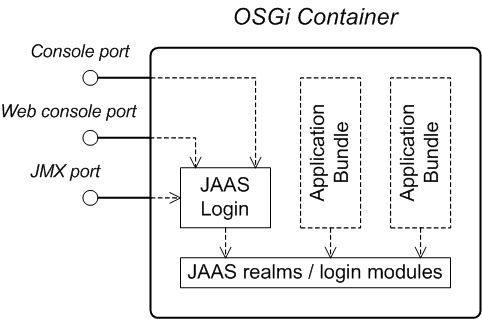
Figure 1.1. OSGi Container Security Architecture
JAAS realms
karaf realm
karaf realm. Red Hat JBoss A-MQ uses the karaf realm to provide authentication for remote administration of the OSGi runtime, for the Web Console, and for JMX management. The karaf realm uses a simple file-based repository, where authentication data is stored in the InstallDir/etc/users.properties file.
karaf realm in your own applications. Simply configure karaf as the name of the JAAS realm that you want to use. Your application then performs authentication using the data from the users.properties file.
Console port
ssh:ssh command. The console port is secured by a JAAS login feature that connects to the karaf realm. Users that try to connect to the console port will be prompted to enter a username and password that must match one of the accounts from the karaf realm.
JMX port
karaf realm.
Application bundles and JAAS security
1.2. Apache ActiveMQ Security
Overview
Figure 1.2. Apache ActiveMQ Security Architecture
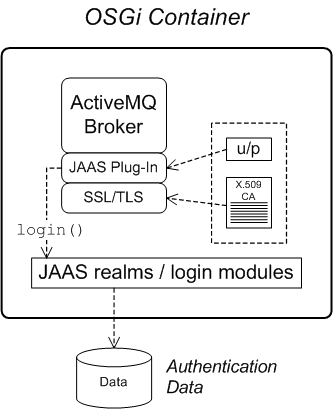
SSL/TLS security
JAAS security
Chapter 2. Securing the Red Hat JBoss A-MQ Container
Abstract
2.1. JAAS Authentication
Abstract
2.1.1. Default JAAS Realm
Overview
Default JAAS realm
karaf realm, which is used by default to secure all aspects of the container.
How to integrate an application with JAAS
karaf realm in your own applications. Simply configure karaf as the name of the JAAS realm that you want to use.
Default JAAS login modules
karaf default realm. In this default configuration, the karaf realm deploys two JAAS login modules, which are enabled simultaneously. To see the deployed login modules, enter the jaas:realms console command, as follows:
JBossFuse:karaf@root> jaas:realms
Index Realm                Module Class
    1 karaf                org.apache.karaf.jaas.modules.properties.PropertiesLoginModule
    2 karaf                org.apache.karaf.jaas.modules.publickey.PublickeyLoginModule
JBossFuse:karaf@root> jaas:realms
Index Realm                Module Class
    1 karaf                org.apache.karaf.jaas.modules.properties.PropertiesLoginModule
2 karaf org.apache.karaf.jaas.modules.publickey.PublickeyLoginModuleConfiguring the properties login module
InstallDir/etc/users.properties file using a text editor and add a line with the following syntax:
Username=Password[,Role1][,Role2]...
Username=Password[,Role1][,Role2]...jdoe user with password, topsecret, and role, admin, you could create an entry like the following:
jdoe=topsecret,admin
jdoe=topsecret,adminadmin role gives full administrative privileges to the jdoe user.
Configuring the public key login module
InstallDir/etc/keys.properties file using a text editor and add a line with the following syntax:
Username=PublicKey,Role1,Role2,...
Username=PublicKey,Role1,Role2,...jdoe user with the admin role by adding the following entry to the InstallDir/etc/keys.properties file (on a single line):
id_rsa.pub file here. Insert just the block of symbols which represents the public key itself.
Encrypting the stored passwords
InstallDir/etc/users.properties file in plaintext format. To protect the passwords in this file, you must set the file permissions of the users.properties file so that it can be read only by administrators. To provide additional protection, you can optionally encrypt the stored passwords using a message digest algorithm.
InstallDir/etc/org.apache.karaf.jaas.cfg file and set the encryption properties as described in the comments. For example, the following settings would enable basic encryption using the MD5 message digest algorithm:
org.apache.karaf.jaas.cfg file are applied only to the default karaf realm in a standalone container. The have no effect on a fabric container and no effect on a custom realm.
Overriding the default realm
karaf realm by defining a higher ranking karaf realm. This ensures that all of the Red Hat JBoss A-MQ security components switch to use your custom realm. For details of how to define and deploy custom JAAS realms, see Section 2.1.2, “Defining JAAS Realms”.
2.1.2. Defining JAAS Realms
Overview
jaas:config element for defining JAAS realms in a blueprint configuration file. The JAAS realms defined in this way are made available to all of the application bundles deployed in the container, making it possible to share the JAAS security infrastructure across the whole container.
Namespace
jaas:config element is defined in the http://karaf.apache.org/xmlns/jaas/v1.0.0 namespace. When defining a JAAS realm you will need to include the line shown in Example 2.1, “JAAS Blueprint Namespace”.
Example 2.1. JAAS Blueprint Namespace
xmlns:jaas="http://karaf.apache.org/xmlns/jaas/v1.0.0"
xmlns:jaas="http://karaf.apache.org/xmlns/jaas/v1.0.0"Configuring a JAAS realm
jaas:config element is shown in Example 2.2, “Defining a JAAS Realm in Blueprint XML”.
Example 2.2. Defining a JAAS Realm in Blueprint XML
jaas:config- Defines the JAAS realm. It has the following attributes:
name—specifies the name of the JAAS realm.rank—specifies an optional rank for resolving naming conflicts between JAAS realms . When two or more JAAS realms are registered under the same name, the OSGi container always picks the realm instance with the highest rank.
jaas:module- Defines a JAAS login module in the current realm.
jaas:modulehas the following attributes:className—the fully-qualified class name of a JAAS login module. The specified class must be available from the bundle classloader.flags—determines what happens upon success or failure of the login operation. Table 2.1, “Flags for Defining a JAAS Module” describes the valid values.Expand Table 2.1. Flags for Defining a JAAS Module Value Description requiredAuthentication of this login module must succeed. Always proceed to the next login module in this entry, irrespective of success or failure. requisiteAuthentication of this login module must succeed. If success, proceed to the next login module; if failure, return immediately without processing the remaining login modules. sufficientAuthentication of this login module is not required to succeed. If success, return immediately without processing the remaining login modules; if failure, proceed to the next login module. optionalAuthentication of this login module is not required to succeed. Always proceed to the next login module in this entry, irrespective of success or failure.
The contents of ajaas:moduleelement is a space separated list of property settings, which are used to initialize the JAAS login module instance. The specific properties are determined by the JAAS login module and must be put into the proper format.NoteYou can define multiple login modules in a realm.
Converting standard JAAS login properties to XML
PropertiesLogin realm using the Apache ActiveMQ properties login module class, PropertiesLoginModule:
Example 2.3. Standard JAAS Properties
PropertiesLogin {
    org.apache.activemq.jaas.PropertiesLoginModule required
        org.apache.activemq.jaas.properties.user="users.properties"
        org.apache.activemq.jaas.properties.group="groups.properties";
};
PropertiesLogin {
    org.apache.activemq.jaas.PropertiesLoginModule required
        org.apache.activemq.jaas.properties.user="users.properties"
        org.apache.activemq.jaas.properties.group="groups.properties";
};jaas:config element in a blueprint file, is shown in Example 2.4, “Blueprint JAAS Properties”.
Example 2.4. Blueprint JAAS Properties
Example
LDAPLogin realm to use JBoss A-MQ's LDAPLoginModule class, which connects to the LDAP server located at ldap://localhost:10389.
Example 2.5. Configuring a JAAS Realm
2.1.3. JAAS Properties Login Module
Overview
jaas:* console commands.
InstallDir/etc/users.properties file.
Supported credentials
Implementation classes
org.apache.karaf.jaas.modules.properties.PropertiesLoginModule- Implements the JAAS login module.
org.apache.karaf.jaas.modules.properties.PropertiesBackingEngineFactory- Must be exposed as an OSGi service. This service makes it possible for you to manage the user data using the
jaas:*console commands from the Apache Karaf shell (see chapter "JAAS Console Commands" in "Console Reference").
Options
users- Location of the user properties file.
Format of the user properties file
Username=Password[,Role][,Role]...
Username=Password[,Role][,Role]...Sample Blueprint configuration
karaf realm using the properties login module, where the default karaf realm is overridden by setting the rank attribute to 2:
BackingEngineFactory bean as an OSGi service, so that the jaas:* console commands can manage the user data.
2.1.4. JAAS OSGi Config Login Module
Overview
etc/PersistentID.cfg or using any method of configuration that is supported by the OSGi Config Admin Service. The jaas:* console commands are not supported, however.
Supported credentials
Implementation classes
org.apache.karaf.jaas.modules.osgi.OsgiConfigLoginModule- Implements the JAAS login module.
jaas:* console commands.
Options
pid- The persistent ID of the OSGi configuration containing the user data. In the OSGi Config Admin standard, a persistent ID references a set of related configuration properties.
Location of the configuration file
PersistentID, is stored in the following file:
InstallDir/etc/PersistentID.cfg
InstallDir/etc/PersistentID.cfgFormat of the configuration file
PersistentID.cfg configuration file is used to store username, password, and role data for the OSGi config login module. Each user is represented by a single line in the configuration file, where a line has the following form:
Username=Password[,Role][,Role]...
Username=Password[,Role][,Role]...Sample Blueprint configuration
karaf realm using the OSGi config login module, where the default karaf realm is overridden by setting the rank attribute to 2:
InstallDir/etc/org.jboss.example.osgiconfigloginmodule.cfg, and it is not possible to edit the configuration using the jaas:* console commands.
2.1.5. JAAS Public Key Login Module
Overview
jaas:* console commands are not supported, however.
InstallDir/etc/keys.properties file.
Supported credentials
Implementation classes
org.apache.karaf.jaas.modules.publickey.PublickeyLoginModule- Implements the JAAS login module.
jaas:* console commands.
Options
users- Location of the user properties file for the public key login module.
Format of the user properties file
Username=PublicKey[,Role][,Role]...
Username=PublicKey[,Role][,Role]...~/.ssh/id_rsa.pub in a UNIX system).
jdoe with the admin role, you would create an entry like the following:
id_rsa.pub file here. Insert just the block of symbols which represents the public key itself.
Sample Blueprint configuration
karaf realm using the public key login module, where the default karaf realm is overridden by setting the rank attribute to 2:
InstallDir/etc/keys.properties, and it is not possible to edit the configuration using the jaas:* console commands.
2.1.6. JAAS JDBC Login Module
Overview
jaas:* console commands (where the backing engine uses configured SQL queries to perform the relevant database updates).
Supported credentials
Implementation classes
org.apache.karaf.jaas.modules.jdbc.JDBCLoginModule- Implements the JAAS login module.
org.apache.karaf.jaas.modules.jdbc.JDBCBackingEngineFactory- Must be exposed as an OSGi service. This service makes it possible for you to manage the user data using the
jaas:*console commands from the Apache Karaf shell (see chapter "JAAS Console Commands" in "Console Reference").
Options
- datasource
- The JDBC data source, specified either as an OSGi service or as a JNDI name. You can specify a data source's OSGi service using the following syntax:
osgi:ServiceInterfaceName[/ServicePropertiesFilter]
osgi:ServiceInterfaceName[/ServicePropertiesFilter]Copy to Clipboard Copied! Toggle word wrap Toggle overflow The ServiceInterfaceName is the interface or class that is exported by the data source's OSGi service (usuallyjavax.sql.DataSource).Because multiple data sources can be exported as OSGi services in a container, it is usually necessary to specify a filter, ServicePropertiesFilter, to select the particular data source that you want. Filters on OSGi services are applied to the service property settings and follow a syntax that is borrowed from LDAP filter syntax. - query.password
- The SQL query that retrieves the user's password. The query can contain a single question mark character,
?, which is substituted by the username at run time. - query.role
- The SQL query that retrieves the user's roles. The query can contain a single question mark character,
?, which is substituted by the username at run time. - insert.user
- The SQL query that creates a new user entry. The query can contain two question marks,
?, characters: the first question mark is substituted by the username and the second question mark is substituted by the password at run time. - insert.role
- The SQL query that adds a role to a user entry. The query can contain two question marks,
?, characters: the first question mark is substituted by the username and the second question mark is substituted by the role at run time. - delete.user
- The SQL query that deletes a user entry. The query can contain a single question mark character,
?, which is substituted by the username at run time. - delete.role
- The SQL query that deletes a role from a user entry. The query can contain two question marks,
?, characters: the first question mark is substituted by the username and the second question mark is substituted by the role at run time. - delete.roles
- The SQL query that deletes multiple roles from a user entry. The query can contain a single question mark character,
?, which is substituted by the username at run time.
Example of setting up a JDBC login module
Create the database tables
users table and roles table:
users table stores username/password data and the roles table associates a username with one or more roles.
Create the data source
javax.sql.DataSource type) using code like the following in a Blueprint file:
Specify the data source as an OSGi service
datasource option of the JDBC login module can reference the data source's OSGi service using the following syntax:
osgi:javax.sql.DataSource/(osgi.jndi.service.name=jdbc/karafdb)
osgi:javax.sql.DataSource/(osgi.jndi.service.name=jdbc/karafdb)javax.sql.DataSource is the interface type of the exported OSGi service and the filter, (osgi.jndi.service.name=jdbc/karafdb), selects the particular javax.sql.DataSource instance whose osgi.jndi.service.name service property has the value, jdbc/karafdb.
karaf realm with a JDBC login module that references the sample MySQL data source:
JDBCBackingEngineFactory instance, which enables you to manage the user data using the jaas:* console commands.
2.1.7. JAAS LDAP Login Module
Overview
jaas:* console commands are not supported.
Supported credentials
Implementation classes
org.apache.karaf.jaas.modules.ldap.LDAPLoginModule- Implements the JAAS login module.
jaas:* console commands.
Options
connection.url- The LDAP connection URL—for example,
ldap://hostname. connection.username- Admin username to connect to the LDAP server. This parameter is optional: if it is not provided, the LDAP connection will be anonymous.
connection.password- Admin password to connect to the LDAP server. Used only if the
connection.usernameis also specified. user.base.dn- The LDAP base DN used to look up roles—for example,
ou=role,dc=apache,dc=org. user.filter- The LDAP filter used to look up a user's role—for example,
(member:=uid=%u). user.search.subtree- If
true, the user lookup is recursive (SUBTREE). Iffalse, the user lookup is performed only at the first level (ONELEVEL). role.base.dn- The LDAP base DN used to look up roles—for example,
ou=role,dc=apache,dc=org. role.filter- The LDAP filter used to look up a user's role—for example,
(member:=uid=%u). role.name.attribute- The LDAP role attribute containing the role value used by Apache Karaf—for example,
cn. role.search.subtree- If
true, the role lookup is recursive (SUBTREE). Iffalse, the role lookup is performed only at the first level (ONELEVEL). authentication- Define the authentication back-end used on the LDAP server. The default is
simple. initial.context.factory- Define the initial context factory used to connect to the LDAP server. The default is
com.sun.jndi.ldap.LdapCtxFactory. ssl- If
trueor if the protocol on theconnection.urlisldaps, an SSL connection will be used. ssl.provider- Specifies the SSL provider.
ssl.protocol- The protocol version to use. You must set this property to
TLSv1, in order to prevent the SSLv3 protocol from being used (POODLE vulnerability). ssl.algorithm- The algorithm to use for the
KeyManagerFactoryand theTrustManagerFactory—for example,PKIX. ssl.keystore- The ID of the keystore that stores the LDAP client's own X.509 certificate (required only if SSL client authentication is enabled on the LDAP server). The keystore must be deployed using a
jaas:keystoreelement (see the section called “Sample Blueprint configuration”). ssl.keyalias- The keystore alias of the LDAP client's own X.509 certificate (required only if there is more than one certificate stored in the keystore specified by
ssl.keystore). ssl.truststore- The ID of the keystore that stores trusted CA certificates, which are used to verify the LDAP server's certificate (the LDAP server's certificate chain must be signed by one of the certificates in the truststore). The keystore must be deployed using a
jaas:keystoreelement.
Sample Blueprint configuration
karaf realm using the LDAP login module, where the default karaf realm is overridden by setting the rank attribute to 2:
ssl.protocol to TLSv1, in order to protect against the Poodle vulnerability (CVE-2014-3566)
2.1.8. Encrypting Stored Passwords
Overview
Options
encryption.enabled- Set to
true, to enable password encryption. encryption.name- Name of the encryption service, which has been registered as an OSGi service.
encryption.prefix- Prefix for encrypted passwords.
encryption.suffix- Suffix for encrypted passwords.
encryption.algorithm- Specifies the name of the encryption algorithm—for example,
MD5orSHA-1. You can specify one of the following encryption algorithms:MD2MD5SHA-1SHA-256SHA-384SHA-512
encryption.encoding- Encrypted passwords encoding:
hexadecimalorbase64. encryption.providerName(Jasypt only)- Name of the
java.security.Providerinstance that is to provide the digest algorithm. encryption.providerClassName(Jasypt only)- Class name of the security provider that is to provide the digest algorithm
encryption.iterations(Jasypt only)- Number of times to apply the hash function recursively.
encryption.saltSizeBytes(Jasypt only)- Size of the salt used to compute the digest.
encryption.saltGeneratorClassName(Jasypt only)- Class name of the salt generator.
role.policy- Specifies the policy for identifying role principals. Can have the values,
prefixorgroup. role.discriminator- Specifies the discriminator value to be used by the role policy.
Encryption services
org.apache.karaf.jaas.modules.EncryptionService interface and exporting an instance of the encryption service as an OSGi service. Two alternative implementations of the encryption service are provided:
Basic encryption service
encryption.name property to the value, basic. In the basic encryption service, the message digest algorithms are provided by the SUN security provider (the default security provider in the Oracle JDK).
Jasypt encryption
jasypt-encryption feature. For example, you can install Jasypt encryption by entering the following console command:
JBossFuse:karaf@root> features:install jasypt-encryption
JBossFuse:karaf@root> features:install jasypt-encryptionencryption.name property to the value, jasypt.
Example of a login module with Jasypt encryption
jasypt-encryption feature, you could deploy a properties login module with Jasypt encryption using the following Blueprint configuration:
2.2. Enabling LDAP Authentication
Overview
org.apache.karaf.jaas.modules.ldap.LDAPLoginModule class. It is preloaded in the container, so you do not need to install its bundle.
Procedure
jaas:module element to the realm and setting its className attribute to org.apache.karaf.jaas.modules.ldap.LDAPLoginModule.
Example 2.6. Red Hat JBoss A-MQ LDAP JAAS Login Module
LDAP properties
Example
Example 2.7. Configuring a JAAS Realm that Uses LDAP Authentication
ssl.protocol to TLSv1, in order to protect against the Poodle vulnerability (CVE-2014-3566)
2.3. Configuring Roles for the Administrative Protocols
Overview
Administration protocols
- SSH (remote console login)
- JMX management
- Web console
Default role
karaf.admin.role property in the Red Hat JBoss A-MQ's etc/system.properties file. For example, the default setting of karaf.admin.role is:
karaf.admin.role=admin
karaf.admin.role=adminadmin role set by karaf.admin.role for each of the administrative protocols.
Changing the remote console's role
sshRole property to the org.apache.karaf.shell PID. The following sets the role to admin:
sshRole=admin
sshRole=adminChanging the JMX role
jmxRole property to the org.apache.karaf.management PID. The following sets the role to jmx:
jmxRole=jmx
jmxRole=jmx2.4. Using Encrypted Property Placeholders
Overview
- Create a properties file with encrypted values.
- Add the proper namespaces to your blueprint file.
- Import the properties using the Aries property placeholder extension.
- Configure the Jasypt encryption algorithm.
- Use the placeholders in your blueprint file.
- Ensure that the Jasypt features are installed into the JBoss A-MQ container.
Encrypted properties
ENC() function as shown in Example 2.8, “Property File with an Encrypted Property”.
Example 2.8. Property File with an Encrypted Property
#ldap.properties
ldap.password=ENC(amIsvdqno9iSwnd7kAlLYQ==)
ldap.url=ldap://192.168.1.74:10389
#ldap.properties
ldap.password=ENC(amIsvdqno9iSwnd7kAlLYQ==)
ldap.url=ldap://192.168.1.74:10389Namespaces
- Aries extensions—
http://aries.apache.org/blueprint/xmlns/blueprint-ext/v1.0.0 - Apache Karaf Jasypt—
http://karaf.apache.org/xmlns/jasypt/v1.0.0
Example 2.9. Encrypted Property Namespaces
<blueprint xmlns="http://www.osgi.org/xmlns/blueprint/v1.0.0"
 	xmlns:ext="http://aries.apache.org/blueprint/xmlns/blueprint-ext/v1.0.0"
 	xmlns:enc="http://karaf.apache.org/xmlns/jasypt/v1.0.0">
...
</blueprint>
<blueprint xmlns="http://www.osgi.org/xmlns/blueprint/v1.0.0"
 	xmlns:ext="http://aries.apache.org/blueprint/xmlns/blueprint-ext/v1.0.0"
 	xmlns:enc="http://karaf.apache.org/xmlns/jasypt/v1.0.0">
...
</blueprint>Placeholder extension
property-paceholder element to you blueprint file. As shown in Example 2.10, “Aries Placeholder Extension”, it must come before the Jasypt configuration or the use of placeholders.
Example 2.10. Aries Placeholder Extension
property-paceholder element's location child specifies the location of the property file that contains the properties to use for the configuration. You can specify multiple files by using multiple location children.
Jasypt configuration
property-placeholder element. It has one child, encoder, that contains the actual Jasypt configuration.
encoder element's mandatory class attribute specifies the fully qualified classname of the Jasypt encryptor to use for decrypting the properties. The encoder element can take a property child that defines a Jasypt PBEConfig bean for configuring the encryptor.
Example 2.11. Jasypt Blueprint Configuration
Placeholders
${prop.name}.
Example 2.12. Jasypt Blueprint Configuration
${ldap.password} placeholder will be replaced with the decrypted value of the ldap.password property from the properties file.
Installing the Jasypt features
jasypt-encryption feature using JBoss A-MQ's features:install command as shown in Example 2.13, “Installing the Jasypt Feature”.
Example 2.13. Installing the Jasypt Feature
JBossFuse:karaf@root> features:install jasypt-encryption
JBossFuse:karaf@root> features:install jasypt-encryptionChapter 3. Securing the Web Console
Abstract
etc/org.ops4j.pax.web.cfg configuration file.
Prerequisites
JBossFuse:karaf@root> features:install webconsole
JBossFuse:karaf@root> features:install webconsoleCreate X.509 certificate and private key
Enabling SSL/TLS
- Open
etc/org.ops4j.pax.web.cfgin a text editor. - Disable the insecure HTTP port by adding the org.osgi.service.http.enabled and setting it to false as shown in Example 3.1, “Pax Web Property for Disabling the HTTP Port”.
Example 3.1. Pax Web Property for Disabling the HTTP Port
org.osgi.service.http.enabled=false
org.osgi.service.http.enabled=falseCopy to Clipboard Copied! Toggle word wrap Toggle overflow - Enable the secure HTTPS port by adding the org.osgi.service.http.secure.enabled and setting it to
trueas shown in Example 3.2, “Pax Web Property for Enabling the HTTPS Port”.Example 3.2. Pax Web Property for Enabling the HTTPS Port
org.osgi.service.http.secure.enabled=true
org.osgi.service.http.secure.enabled=trueCopy to Clipboard Copied! Toggle word wrap Toggle overflow - If you followed the preceding instructions, the
etc/org.ops4j.pax.web.cfgfile should now have the following contents:# Configures the SMX Web Console to use SSL org.osgi.service.http.enabled=false org.osgi.service.http.port=8181 org.osgi.service.http.secure.enabled=true
# Configures the SMX Web Console to use SSL org.osgi.service.http.enabled=false org.osgi.service.http.port=8181 org.osgi.service.http.secure.enabled=trueCopy to Clipboard Copied! Toggle word wrap Toggle overflow - Edit the
etc/jetty.xmlfile and add the followingCallelement to configure the SSL connector for Jetty:Copy to Clipboard Copied! Toggle word wrap Toggle overflow ImportantThe preceding configuration explicitly disables the SSLv3 protocol, in order to safeguard against the Poodle vulnerability (CVE-2014-3566). For more details, see Disabling SSLv3 in JBoss Fuse 6.x and JBoss A-MQ 6.x. - Customize the properties of the
SslSocketConnectorinstance defined in theetc/jetty.xmlfile, as follows:Port- The secure HTTPS port number.
keystore- The location of the Java keystore file on the file system. Relative paths are resolved relative to the
KARAF_HOMEenvironment variable (by default, the install directory). password- The store password that unlocks the Java keystore file.
keyPassword- The key password that decrypts the private key stored in the keystore (usually the same as the store password).
Connect to the secure Web console
webconsole feature, you should be able to open the Web console by browsing to the following URL:
https: scheme, instead of http:, in this URL.
smx and the password smx.
Chapter 4. Securing an Apache ActiveMQ Broker
Abstract
4.1. Programming Client Credentials
Overview
ActiveMQConnectionFactory(String userName, String password, String brokerURL);
ActiveMQConnectionFactory(String userName, String password, URI brokerURL);
Connection createConnection(String userName, String password);
QueueConnection createQueueConnection(String userName, String password);
TopicConnection createTopicConnection(String userName, String password);
ActiveMQConnectionFactory(String userName, String password, String brokerURL);
ActiveMQConnectionFactory(String userName, String password, URI brokerURL);
Connection createConnection(String userName, String password);
QueueConnection createQueueConnection(String userName, String password);
TopicConnection createTopicConnection(String userName, String password);createConnection(String userName, String password) is the most flexible, since it enables you to specify credentials on a connection-by-connection basis.
Setting login credentials for the Openwire protocol
ActiveMQConnectionFactory.createConnection() method, as shown in the following example:
4.2. Configuring Credentials for Broker Components
Overview
Command agent
username attribute and the password attribute on the commandAgent element in the broker configuration file, InstallDir/etc/activemq.xml. By default, the command agent is configured to pick up its credentials from the activemq.username property and the activemq.password property as shown in the following example:
Apache Camel
activemq:. For example, the URI, activemq:example.A, represents a queue named example.A and the endpoint URI, activemq:example.B, represents a queue named example.B.
activemq. When the broker has authentication enabled, it is necessary to configure this component with a userName property and a password property, as follows:
4.3. Broker-to-Broker Authentication
Overview
Configuring the network connector
userName attribute and the password attribute in the networkConnector element, as follows:
networkConnector element must also be configured with username/password credentials, even if Broker B is not configured to perform authentication. This is because Broker A's authentication plug-in checks for Broker A's username.
4.4. Tutorial I: JAAS Authentication
Overview
Prerequisites
- Apache Ant—Apache Ant is a free, open source build tool from Apache. You can download the latest version from http://ant.apache.org/bindownload.cgi (minimum is 1.8).
- Apache ActiveMQ installation—the standalone installation of Apache ActiveMQ has some demonstration code that is not available in Red Hat JBoss A-MQ. The Apache ActiveMQ distribution is provided in the
InstallDir/extrasdirectory in an archive format. Uncompress and extract the archive to a convenient installation location,ActiveMQInstallDir.
Tutorial steps
Install the consumer and producer JMS clients
InstallDir/extras directory in an archive format. Uncompress and extract the archive to a convenient installation location, ActiveMQInstallDir (the consumer and producer clients can be accessed by running ant targets under the ActiveMQInstallDir/example directory).
Customize the users.properties file
karaf JAAS realm can be administered by editing the InstallDir/etc/users.properties file, where the file contains entries in the following format:
Username=Password,Role1,Role2,...
Username=Password,Role1,Role2,...users.properties file shows a sample entry (which is commented out) for the user, admin, with password, admin, as follows:
#admin=admin,admin
#admin=admin,adminusers.properties file by adding at least one user entry with the admin role. For example:
Username=Password,admin
Username=Password,adminStart the JBoss A-MQ container
InstallDir/bin and enter the following command:
./amq
./amqRun the consumer with JMS credentials
tcp://localhost:61616 endpoint, change directory to ActiveMQInstallDir/example and enter the following command:
ant consumer -Duser=admin -Dpassword=admin -Durl=tcp://localhost:61616 -Dmax=100
ant consumer -Duser=admin -Dpassword=admin -Durl=tcp://localhost:61616 -Dmax=100Run the producer with JMS credentials
tcp://localhost:61616 endpoint, open a new command prompt, change directory to example and enter the following command:
ant producer -Duser=admin -Dpassword=admin -Durl=tcp://localhost:61616 -Dmax=100
ant producer -Duser=admin -Dpassword=admin -Durl=tcp://localhost:61616 -Dmax=100[java] [Thread-2] Received: 'Message: 0 sent at: Mon Mar 18 17:12:16 CET 2013 ...' (length 1000) [java] [Thread-2] Received: 'Message: 1 sent at: Mon Mar 18 17:12:16 CET 2013 ...' (length 1000) [java] [Thread-2] Received: 'Message: 2 sent at: Mon Mar 18 17:12:16 CET 2013 ...' (length 1000) [java] [Thread-2] Received: 'Message: 3 sent at: Mon Mar 18 17:12:16 CET 2013 ...' (length 1000) [java] [Thread-2] Received: 'Message: 4 sent at: Mon Mar 18 17:12:16 CET 2013 ...' (length 1000)
[java] [Thread-2] Received: 'Message: 0 sent at: Mon Mar 18 17:12:16 CET 2013  ...' (length 1000)
[java] [Thread-2] Received: 'Message: 1 sent at: Mon Mar 18 17:12:16 CET 2013  ...' (length 1000)
[java] [Thread-2] Received: 'Message: 2 sent at: Mon Mar 18 17:12:16 CET 2013  ...' (length 1000)
[java] [Thread-2] Received: 'Message: 3 sent at: Mon Mar 18 17:12:16 CET 2013  ...' (length 1000)
[java] [Thread-2] Received: 'Message: 4 sent at: Mon Mar 18 17:12:16 CET 2013 ...' (length 1000)4.5. Tutorial II: SSL/TLS Security
Overview
Tutorial steps
Install sample keystore files
- Key store containing broker's own certificate and private key—used to identify the broker during an SSL handshake.
- Trust store containing CA certificate—used to verify that a received client certificate is correctly signed (strictly speaking, the trust store file is only needed by the broker, if the
transport.needClientAuthoptions is set totrueon the broker URI).
ActiveMQInstallDir.
broker.ks and broker.ts files from the Apache ActiveMQ distribution's conf directory, ActiveMQInstallDir/conf, to the InstallDir/etc directory of JBoss A-MQ.
Configure the broker
InstallDir/etc/activemq.xml, adding the highlighted XML fragments:
- The Openwire network connector is configured to use SSL,
ssl://localhost:61617?.... - The enabled protocols are specified explicitly, using the
transport.enabledProtocolsoption. This setting effectively disables the SSLv3 protocol, which must not be used because of the POODLE security vulnerability. - The key store and trust store file locations and passwords are specified by the broker's
sslContextelement.
Start the JBoss A-MQ container
InstallDir/bin and enter the following command:
./amq
./amqConfigure the consumer and the producer clients
ActiveMQInstallDir/example/build.xml, and add the javax.net.ssl.trustStore and javax.net.ssl.trustStorePassword JSSE system properties to the consumer target and the producer target as shown in the following example:
Run the consumer with the SSL protocol
ssl://localhost:61617 endpoint (Openwire over SSL), change directory to ActiveMQInstallDir/example and enter the following command:
ant consumer -Duser=admin -Dpassword=admin -Durl=ssl://localhost:61617 -Dmax=100
ant consumer -Duser=admin -Dpassword=admin -Durl=ssl://localhost:61617 -Dmax=100Run the producer with the SSL protocol
ssl://localhost:61617 endpoint, open a new command prompt, change directory to example and enter the following command:
ant producer -Duser=admin -Dpassword=admin -Durl=ssl://localhost:61617 -Dmax=100
ant producer -Duser=admin -Dpassword=admin -Durl=ssl://localhost:61617 -Dmax=100[java] [Thread-2] Received: 'Message: 0 sent at: Tue Mar 19 10:07:25 CET 2013 ...' (length 1000) [java] [Thread-2] Received: 'Message: 1 sent at: Tue Mar 19 10:07:25 CET 2013 ...' (length 1000) [java] [Thread-2] Received: 'Message: 2 sent at: Tue Mar 19 10:07:26 CET 2013 ...' (length 1000) [java] [Thread-2] Received: 'Message: 3 sent at: Tue Mar 19 10:07:26 CET 2013 ...' (length 1000) [java] [Thread-2] Received: 'Message: 4 sent at: Tue Mar 19 10:07:26 CET 2013 ...' (length 1000)
[java] [Thread-2] Received: 'Message: 0 sent at: Tue Mar 19 10:07:25 CET 2013  ...' (length 1000)
[java] [Thread-2] Received: 'Message: 1 sent at: Tue Mar 19 10:07:25 CET 2013  ...' (length 1000)
[java] [Thread-2] Received: 'Message: 2 sent at: Tue Mar 19 10:07:26 CET 2013  ...' (length 1000)
[java] [Thread-2] Received: 'Message: 3 sent at: Tue Mar 19 10:07:26 CET 2013  ...' (length 1000)
[java] [Thread-2] Received: 'Message: 4 sent at: Tue Mar 19 10:07:26 CET 2013 ...' (length 1000)Chapter 5. Securing the Camel ActiveMQ Component
Abstract
5.1. Secure ActiveMQ Connection Factory
Overview
Programming the security properties
ActiveMQSslConnectionFactory JMS connection factory. Programming the JMS connection factory is the correct approach to use in the context of the containers such as OSGi, J2EE, Tomcat, and so on, because these settings are local to the application using the JMS connection factory instance.
Defining a secure connection factory
Example 5.1. Defining a Secure Connection Factory Bean
ActiveMQSslConnectionFactory class:
brokerURL- The URL of the remote broker to connect to.
userNameandpassword- Any valid JAAS login credentials. This example shows the sample user,
admin, with the password,admin, but you should customize the JAAS credentials to use a robust password. trustStore- Location of the Java keystore file containing the certificate trust store for SSL connections. The location is specified as a classpath resource.
trustStorePassword- The password that unlocks the keystore file containing the trust store.
keyStore and keyStorePassword properties, but these are only needed, if SSL mutual authentication is enabled (where the client presents an X.509 certificate to the broker during the SSL handshake).
Chapter 6. SSL/TLS Security
Abstract
6.1. Introduction to SSL/TLS
Overview
SSL/TLS security features
- Privacy—messages are encrypted using a secret symmetric key, making it impossible for eavesdroppers to read messages sent over the connection.
- Message integrity—messages are digitally signed, to ensure that they cannot be tampered with.
- Authentication—the identity of the target (server program) is authenticated and (optionally) the client as well.
- Immunity to man-in-the-middle attacks—because of the way authentication is performed in SSL/TLS, it is impossible for an attacker to interpose itself between a client and a target.
Cipher suites
Public key cryptography
- It becomes extremely easy to establish secure communications with people you have never previously had any contact with. Simply publish the public key in some accessible place. Anyone can now download the public key and use it to encrypt a message that only you can decrypt, using your private key.
- You can use your private key to digitally sign messages. Given a message to sign, simply generate a hash value from the message, encrypt that hash value using your private key, and append it to the message. Now, anyone can use the public key to decrypt the hash value and check that the message has not been tampered with.
X.509 certificates
- Self—if the certificate signs itself, it is called a self-signed certificate. If you need to deploy a self-signed certificate, the certificate must be obtained from a secure channel. The only guarantee you have of the certificate's authenticity is that you obtained it from a trusted source.
- CA certificate—a more scalable solution is to sign certificates using a Certificate Authority (CA) certificate. In this case, you only need to be careful about deploying the original CA certificate (that is, obtaining it through a secure channel). All of the certificates signed by this CA, on the other hand, can be distributed over insecure, public channels. The trusted CA can then be used to verify the signature on the certificates. In this case, the CA certificate is self-signed.
- Chain of CA certificates—an extension of the idea of signing with a CA certificate is to use a chain of CA certificates. For example, certificate X could be signed by CA foo, which is signed by CA bar. The last CA certificate in the chain (the root certificate) is self-signed.
Target-only authentication
6.2. Secure Transport Protocols
Overview
Transport protocols
| URL | Description |
|---|---|
ssl://Host:Port | Endpoint URL for Openwire over TCP/IP, where the socket layer is secured using SSL or TLS. |
https://Host:Port | Endpoint URL for Openwire over HTTP, where the socket layer is secured using SSL or TLS. |
stomp+ssl://Host:Port | Endpoint URL for Stomp over TCP/IP, where the socket layer is secured using SSL or TLS. |
mqtt+nio+ssl://Host:Port | Endpoint URL for MQTT over Java NIO, where the socket layer is secured using SSL or TLS. |
6.3. Java Keystores
Overview
Prerequisites
bin directory is on your path. See Java SE.
Default keystore provider
java.security file (located either in JavaInstallDir/lib/security or JavaInstallDir/jre/lib/security):
keystore.type=jks
keystore.type=jksjks (or JKS) keystore type represents the standard keystore.
Customizing the keystore provider
java.security.KeystoreSpi class. For details of how to do this see the following references:
Store password
Keystore entries
- Key entries—each key entry contains the following components:
- A private key.
- An X.509 certificate (can be v1, v2, or v3) containing the public key that matches this entry’s private key.
- Optionally, one or more CA certificates that belong to the preceding certificate’s trust chain.
NoteThe CA certificates belonging to a certificate’s trust chain can be stored either in its key entry or in trusted certificate entries.In addition, each key entry is tagged by an alias and protected by a key password. To access a particular key entry in the keystore, you must provide both the alias and the key password. - Trusted certificate entries—each trusted certificate entry contains just a single X.509 certificate.Each trusted certificate entry is tagged by an alias. There is no need to protect the entry with a password, however, because the X.509 certificate contains only a public key.
Keystore utilities
keytool and jarsigner. Only the keytool utility is needed here.
6.4. How to Use X.509 Certificates
| Revision History | |
|---|---|
| 8/29/12 | |
| changed supported status of mutual auth to address MB-1216 | |
Overview
Target-only authentication
Figure 6.1. Target-Only Authentication Scenario
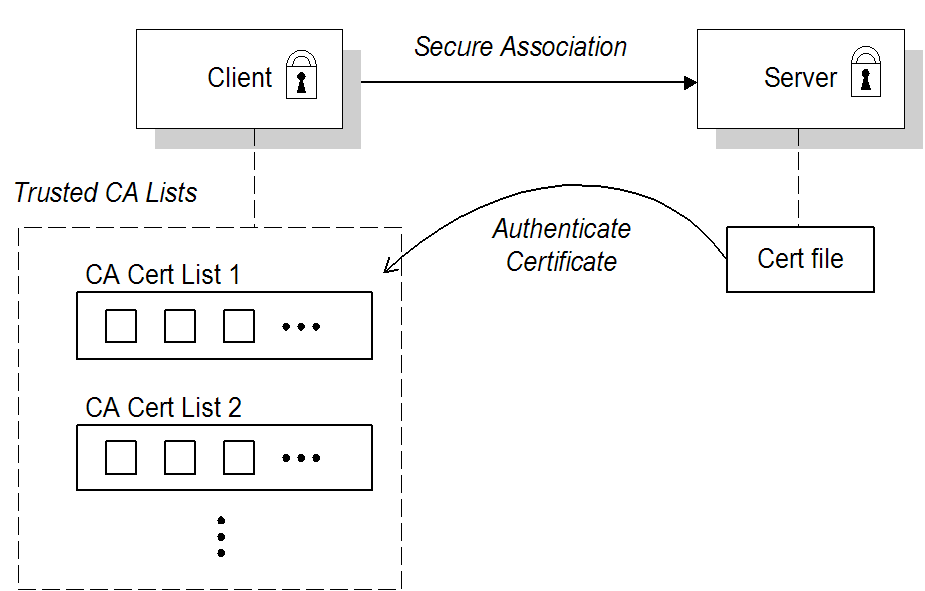
broker.ks. The client is configured to have a trust store, client.ts, that contains the certificate that originally signed the broker certificate. Normally, the trusted certificate is a Certificate Authority (CA) certificate.
Mutual authentication
Figure 6.2. Mutual Authentication Scenario

client.ks, and a trust store, client.ts, which contains the certificate that signed the target certificate. The target is configured to have its own certificate and private key in the file, broker.ks, and a trust store, broker.ts, which contains the certificate that signed the client certificate.
Selecting the authentication scenario
WantClientAuth or NeedClientAuth flags in the SSL/TLS protocol layer. The following list describes all of the possible authentication scenarios:
- Target-only authentication—this is the most important authentication scenario. If you want to authenticate the client as well, the most common approach is to let the client log on using username/password credentials, which can be sent securely through the encrypted channel established by the SSL/TLS session.
- Target authentication and optional client authentication—if you want to authenticate the client using an X.509 certificate, simply configure the client to have its own certificate. By default, the target will authenticate the client's certificate, if it receives one.
- Target authentication and required client authentication—if want to enforce client authentication using an X.509 certificate, you can set the
NeedClientAuthflag on the SSL/TLS protocol layer. When this flag is set, the target would raise an error if the client fails to send a certificate during the SSL/TLS handshake. - No authentication—this scenario is potentially dangerous from a security perspective, because it is susceptible to a man-in-the-middle attack. It is therefore recommended that you always avoid using this (non-)authentication scenario.NoteIt is theoretically possible to get this scenario, if you select one of the anonymous Diffie-Hellman cipher suites for the SSL/TLS session. In practice, however, you normally do not need to worry about these cipher suites, because they have a low priority amongst the cipher suites supported by the
SunJSSEsecurity provider. Other, more secure cipher suites normally take precedence.
Custom certificates
6.5. Configuring JSSE System Properties
Overview
JSSE system properties
| System Property Name | Description |
|---|---|
javax.net.ssl.keyStore | Location of the Java keystore file containing an application process's own certificate and private key. On Windows, the specified pathname must use forward slashes, /, in place of backslashes, \. |
javax.net.ssl.keyStorePassword |
Password to access the private key from the keystore file specified by
javax.net.ssl.keyStore. This password is used twice:
In other words, the JSSE framework requires these passwords to be identical.
|
javax.net.ssl.keyStoreType | (Optional) For Java keystore file format, this property has the value jks (or JKS). You do not normally specify this property, because its default value is already jks. |
javax.net.ssl.trustStore |
Location of the Java keystore file containing the collection of CA certificates trusted by this application process (trust store). On Windows, the specified pathname must use forward slashes,
/, in place of backslashes, \.
If a trust store location is not specified using this property, the SunJSSE implementation searches for and uses a keystore file in the following locations (in order):
|
javax.net.ssl.trustStorePassword | Password to unlock the keystore file (store password) specified by javax.net.ssl.trustStore. |
javax.net.ssl.trustStoreType | (Optional) For Java keystore file format, this property has the value jks (or JKS). You do not normally specify this property, because its default value is already jks. |
javax.net.debug | To switch on logging for the SSL/TLS layer, set this property to ssl. |
jssecacerts and the cacerts directories) present a potential security hazard. If you do not take care to manage the trust stores under the JDK installation or if you do not have control over which JDK installation is used, you might find that the effective trust store is too lax.
javax.net.ssl.trustStore property for a secure client or server, so that you have control over the CA certificates trusted by your application.
Setting properties at the command line
-DProperty=Value. For example, to specify JSSE system properties to a client program, com.redhat.Client:
java -Djavax.net.ssl.trustStore=truststores/client.ts com.redhat.Client
java -Djavax.net.ssl.trustStore=truststores/client.ts com.redhat.ClientSSL_OPTS environment variable as follows, on Windows:
set SSL_OPTS=-Djavax.net.ssl.keyStore=C:/Programs/FUSE/fuse-message-broker-6.0.0.redhat-024/conf/broker.ks
         -Djavax.net.ssl.keyStorePassword=password
         -Djavax.net.ssl.trustStore=C:/Programs/FUSE/fuse-message-broker-6.0.0.redhat-024/conf/broker.ts
         -Djavax.net.ssl.trustStorePassword=password
set SSL_OPTS=-Djavax.net.ssl.keyStore=C:/Programs/FUSE/fuse-message-broker-6.0.0.redhat-024/conf/broker.ks
         -Djavax.net.ssl.keyStorePassword=password
         -Djavax.net.ssl.trustStore=C:/Programs/FUSE/fuse-message-broker-6.0.0.redhat-024/conf/broker.ts
-Djavax.net.ssl.trustStorePassword=passwordSSL_OPTS=-Djavax.net.ssl.keyStore=/local/FUSE/fuse-message-broker-6.0.0.redhat-024/conf/broker.ks
-Djavax.net.ssl.keyStorePassword=password
-Djavax.net.ssl.trustStore=/local/FUSE/fuse-message-broker-6.0.0.redhat-024/conf/broker.ts
-Djavax.net.ssl.trustStorePassword=password
export SSL_OPTS
SSL_OPTS=-Djavax.net.ssl.keyStore=/local/FUSE/fuse-message-broker-6.0.0.redhat-024/conf/broker.ks
         -Djavax.net.ssl.keyStorePassword=password
         -Djavax.net.ssl.trustStore=/local/FUSE/fuse-message-broker-6.0.0.redhat-024/conf/broker.ts
         -Djavax.net.ssl.trustStorePassword=password
export SSL_OPTSbin/activemq[.bat|.sh] script
SSL_OPTS environment variable is simply a convenient way of passing command-line properties to the bin/activemq[.bat|.sh] script. It is not accessed directly by the broker runtime or the JSSE package.
Setting properties by programming
6.6. Setting Security Context for the Openwire/SSL Protocol
Overview
ssl:) also supports an option to set its SSL security context using the broker configuration file.
Setting security context in the broker configuration file
sslContext element. For example, the default broker configuration file, conf/activemq.xml, includes the following entry:
activemq.base property is defined in the activemq[.bat|.sh] script. You can specify any of the following sslContext attributes:
keyStore—equivalent to settingjavax.net.ssl.keyStore.keyStorePassword—equivalent to settingjavax.net.ssl.keyStorePassword.keyStoreType—equivalent to settingjavax.net.ssl.keyStoreType.keyStoreAlgorithm—defaults to JKS.trustStore—equivalent to settingjavax.net.ssl.trustStore.trustStorePassword—equivalent to settingjavax.net.ssl.trustStorePassword.trustStoreType—equivalent to settingjavax.net.ssl.trustStoreType.
6.7. Securing Java Clients
ActiveMQSslConnectionFactory class
org.apache.activemq.ActiveMQSslConnectionFactory class. Use the ActiveMQSslConnectionFactory class in place of the insecure ActiveMQConnectionFactory class in order to enable SSL/TLS security in your clients.
ActiveMQSslConnectionFactory class exposes the following methods for configuring SSL/TLS security:
setTrustStore(String)- Specifies the location of the client's trust store file, in JKS format (as managed by the Java
keystoreutility). setTrustStorePassword(String)- Specifies the password that unlocks the client trust store.
setKeyStore(String)- (Optional) Specifies the location of the client's own X.509 certificate and private key in a key store file, in JKS format (as managed by the Java
keystoreutility). Clients normally do not need to provide their own certificate, unless the broker SSL/TLS configuration specifies that client authentication is required. setKeyStorePassword(String)- (Optional) Specifies the password that unlocks the client key store. This password is also used to decrypt the private key from in the key store.
ActiveMQSslConnectionFactory also exposes the setKeyAndTrustManagers method, which lets you specify the javax.net.ssl.KeyManager[] array and the javax.net.ssl.TrustManager[] array directly.
Specifying the trust store and key store locations
setTrustStore and setKeyStore methods can have either of the following formats:
- A pathname—where no scheme is specified, for example,
/conf/client.ts. In this case the resource is loaded from the classpath, which is convenient to use when the client and its certificates are packaged in a JAR file. - A Java URL—where you can use any of the standard Java URL schemes, such as
httporfile. For example, to reference the file,C:\ActiveMQ\conf\client.ts, in the filesystem on a Windows O/S, use the URL,file:///C:/ActiveMQ/conf/client.ts.
Sample client code
ActiveMQSslConnectionFactory class to create the connection, also setting the trust store and trust store password (no key store is required here, because we are assuming that the broker port does not require client authentication).
Example 6.1. Java Client Using the ActiveMQSslConnectionFactory Class
Chapter 7. Authorization
Abstract
7.1. Simple Authorization Plug-In
Overview
Configuring the simple authorization plug-in
authorizationPlugin element to the list of plug-ins in the broker's configuration, as shown in Example 7.1, “Simple Authorization Plug-In Configuration”.
Example 7.1. Simple Authorization Plug-In Configuration
authorizationMap element wrapped in a map element.
authorizationEntries—a collection ofauthroizationEntryelements that define the permissions assigned to authorized users have for destinations whose name matches the selectortempDestinationAuthorizationEntry—defines the permissions assigned to authorized users have for temporary destinations
Named destinations
authorizationEntry element, which supports the following attributes:
queueortopic—specifies the name of the queue or topic to which you are assigning permissions. The greater-than symbol,>, acts as a name segment wildcard. For example, an entry with,queue="USERS.>", would match any queue name beginning with theUSERS.string.ImportantIn order for the>wildcard to match multiple segments, it must be preceded by the.segment-delimiter character. Hence,USERS.>matches any queue name beginning withUSERS., butUSERS>does not match.read—specifies a comma-separated list of roles that have permission to consume messages from the matching destinations.write—specifies a comma-separated list of roles that have permission to publish messages to the matching destinations.admin—specifies a comma-separated list of roles that have permission to create destinations in the destination subtree.
Temporary destinations
tempDestinationAuthorizationEntry element the contains a tempDestinationAuthorizationEntry child element. The permissions set by this entry are for all temporary destinations. The attributes supported by the inner tempDestinationAuthorizationEntry element are:
read—specifies a comma-separated list of roles that have permission to consume messages from all temporary destinations.write—specifies a comma-separated list of roles that have permission to publish messages to all temporary destinations.admin—specifies a comma-separated list of roles that have permission to create temporary destinations.
Advisory destinations
authorizationEntry element. For advisory destinations, however, the topic attribute is always used and the name is always starts with ActiveMQ.Advisory.
Example 7.2. Setting Access Permissions for Advisory Destinations
<authorizationEntry topic="ActiveMQ.Advisory.>"
                   read="guests,users"
                   write="guests,users"
                   admin="guests,users" />
<authorizationEntry topic="ActiveMQ.Advisory.>"
                   read="guests,users"
                   write="guests,users"
admin="guests,users" />7.2. Cached LDAP Authorization Plug-In
Overview
Updating the cache
- Push mechanism—some LDAP directory server implementations support a persistent search feature, which enables applications to receive live updates from the LDAP server (push mechanism). By default, the cached LDAP authorization plug-in attempts to register with the LDAP server to receive these updates.
- Pull mechanism—if your LDAP directory server does not support live updates, you can configure the cached LDAP authorization plug-in to poll the LDAP server at regular intervals instead (pull mechanism). To enable the pull mechanism, you must set the
refreshIntervalproperty on the cached LDAP authorization plug-in.
Sample configuration
authorizationPlugin element must be added as a child of the plugins element.
Example 7.3. Cached LDAP Authorization Plug-In Configuration
Configuration properties
connectionURL- Specifies the location of the directory server using an LDAP URL,
ldap://Host:Port.Default isldap://localhost:1024. connectionUsername- The DN of the user that opens the connection to the directory server.Default is
uid=admin,ou=system. connectionPassword- The password that matches the DN from
connectionUsername. In the directory server, the password is normally stored as auserPasswordattribute in the corresponding directory entry.Default issecret. connectionProtocol- The connection protocol to use when connecting to the LDAP server.Default is
s. authentication- The authentication method to use when connecting to the LDAP server.Default is
simple. queueSearchBase- The base DN of queue authorization entries.Default is
ou=Queue,ou=Destination,ou=ActiveMQ,ou=system. topicSearchBase- The base DN of topic authorization entries.Default is
ou=Topic,ou=Destination,ou=ActiveMQ,ou=system. tempSearchBase- The base DN of authorization entries for temporary destinations.Default is
ou=Temp,ou=Destination,ou=ActiveMQ,ou=system. refreshInterval- Time interval between refreshes of the cache, expressed in milliseconds (where the cache is refreshed by pulling data from the LDAP server). The special value,
-1, disables the pull mechanism for refreshing the cache (but does not affect the push mechanism, if the LDAP server supports it).Default is-1. legacyGroupMapping- If
true, specifies that the role members of a privilege group must be specified using just the Common Name RDN,cn=CNValue, of the role group; or iffalse, specifies that the role members of a privilege group must be specified using the full Distinguished Name.Default istrue. baseDn- Base DN of the directory sub-tree that contains data for Apache ActiveMQ.Default is
ou=system. groupClass- Type of the class that implements the role principal. For example, in order to reuse roles defined for the Apache Karaf JAAS authentication plug-in, you would need to set this property to
org.apache.karaf.jaas.boot.principal.RolePrincipal.Default isorg.apache.activemq.jaas.GroupPrincipal.
7.3. LDAP Authorization Plug-In
Overview
Configuring the LDAP authorization plug-in
authorizationPlugin element to the list of plug-ins in the broker configuration and configure it to use the LDAPAuthorizationMap authorization map, as shown in Example 7.4, “LDAP Authorization Plug-In Configuration”.
Example 7.4. LDAP Authorization Plug-In Configuration
LDAP authorization plug-in properties
initialContextFactory- Must always be set to
com.sun.jndi.ldap.LdapCtxFactory. connectionURL- Specify the location of the directory server using an ldap URL,
ldap://Host:Port. You can optionally qualify this URL, by adding a forward slash,/, followed by the DN of a particular node in the directory tree. For example,ldap://ldapserver:10389/ou=system. authentication- Specifies the authentication method used when binding to the LDAP server. Can take either of the values,
simple(username and password) ornone(anonymous).NoteSimple Authentication and Security Layer (SASL) authentication is currently not supported. connectionUsername- The DN of the user that opens the connection to the directory server. For example,
uid=admin,ou=system. connectionPassword- The password that matches the DN from
connectionUsername. In the directory server, in the DIT, the password is normally stored as auserPasswordattribute in the corresponding directory entry. connectionProtocol- Currently, the only supported value is a blank string. In future, this option will allow you to select the Secure Socket Layer (SSL) for the connection to the directory server.NoteThis option must be set explicitly to an empty string, because it has no default value.
topicSearchMatchingFormat- Specifies the DN of the node whose children provide the permissions for the current topic. Before passing to the LDAP search operation, the string value you provide here is subjected to string substitution, as implemented by the
java.text.MessageFormatclass. Essentially, this means that the special string,{0}, is substituted by the name of the current topic.For example, if this property is set tocn={0},ou=Topic,ou=Destination,ou=ActiveMQ,ou=systemand the current topic isTEST.FOO, the DN becomescn=TEST.FOO,ou=Topic,ou=Destination,ou=ActiveMQ,ou=system. topicSearchSubtreeBool- Specify the search depth for permission entries (admin, read or write entries), relative to the node specified by
topicSearchMatchingFormat. This option can take boolean values, as follows:false—(default) try to match one of the child entries of thetopicSearchMatchingFormatnode (maps tojavax.naming.directory.SearchControls.ONELEVEL_SCOPE).true—try to match any entry belonging to the subtree of thetopicSearchMatchingFormatnode (maps tojavax.naming.directory.SearchControls.SUBTREE_SCOPE).
queueSearchMatchingFormat- Specifies the DN of the node whose children provide the permissions for the current queue. The special string,
{0}, is substituted by the name of the current queue.For example, if this property is set tocn={0},ou=Queue,ou=Destination,ou=ActiveMQ,ou=systemand the current queue isTEST.FOO, the DN becomescn=TEST.FOO,ou=Queue,ou=Destination,ou=ActiveMQ,ou=system. queueSearchSubtreeBool- Specify the search depth for permission entries (admin, read or write entries), relative to the node specified by
topicSearchMatchingFormat. This option can take boolean values, as follows:false—(default) try to match one of the child entries of thetopicSearchMatchingFormatnode (maps tojavax.naming.directory.SearchControls.ONELEVEL_SCOPE).true—try to match any entry belonging to the subtree of thetopicSearchMatchingFormatnode (maps tojavax.naming.directory.SearchControls.SUBTREE_SCOPE).
advisorySearchBase- Specifies the DN of the node whose children provide the permissions for all advisory topics. In this case the DN is a literal value (that is, no string substitution is performed on the property value).For example, a typical value of this property is
cn=ActiveMQ.Advisory,ou=Topic,ou=Destination,ou=ActiveMQ,ou=system. tempSearchBase- Specifies the DN of the node whose children provide the permissions for all temporary queues and topics (apart from advisory topics). In this case the DN is a literal value (that is, no string substitution is performed on the property value).For example, a typical value of this property is
cn=ActiveMQ.Temp,ou=Topic,ou=Destination,ou=ActiveMQ,ou=system. adminBase- Specifies an LDAP search filter, which is used when looking up the admin permissions for any kind of queue or topic. The search filter attempts to match one of the children (or descendants, if
SUBTREE_SCOPEis enabled) of the queue or topic node.For example, if this property is set to(cn=admin), it will match any child whosecnattribute is set toadmin. adminAttribute- Specifies an attribute of the node matched by
adminBase, whose value is the DN of a role/group that has admin permissions.For example, consider acn=adminnode that is a child of the node,cn=TEST.FOO,ou=Queue,ou=Destination,ou=ActiveMQ,ou=system, as shown:Thecn=adminnode might typically have some attributes, as follows:If you now set theadminAttributeproperty tomember, the authorization plug-in grants admin privileges over theTEST.FOOqueue to thecn=adminsgroup and thecn=usersgroup. readBase- Specifies an LDAP search filter, which is used when looking up the read permissions for any kind of queue or topic. The search filter attempts to match one of the children (or descendants, if
SUBTREE_SCOPEis enabled) of the queue or topic node.For example, if this property is set to(cn=read), it will match any child whosecnattribute is set toread. readAttribute- Specifies an attribute of the node matched by
readBase, whose value is the DN of a role/group that has read permissions. writeBase- Specifies an LDAP search filter, which is used when looking up the write permissions for any kind of queue or topic. The search filter attempts to match one of the children (or descendants, if
SUBTREE_SCOPEis enabled) of the queue or topic node.For example, if this property is set to(cn=write), it will match any child whosecnattribute is set towrite. writeAttribute- Specifies an attribute of the node matched by
writeBase, whose value is the DN of a role/group that has write permissions.


7.4. Programming Message-Level Authorization
Overview
Implement the MessageAuthorizationPolicy interface
WebServer application to reach only the admin user, with all other users blocked from reading these messages. This example presupposes that the WebServer application is configured to set the JMSXAppID property in the message's JMS header.
Example 7.5. Implementation of MessageAuthorizationPolicy
org.apache.activemq.broker.ConnectionContext class stores details of the current client connection and the org.apache.activemq.command.Message class is essentially an implementation of the standard javax.jms.Message interface.
$ACTIVEMQ_HOME/lib directory.
Configure the messageAuthorizationPolicy element
conf/activemq.xml, inside the broker element:
Chapter 8. LDAP Authentication Tutorial
Abstract
8.1. Tutorial Overview
Goals
- install Apache Directory Studio
- add user entries into the LDAP server
- add groups to manage security roles
- configure Red Hat JBoss A-MQ to use LDAP authentication
- configure JBoss A-MQ to use roles for authorization
- configure SSL/TLS connections to the LDAP server
Tutorial stages
8.2. Set-up a Directory Server and Browser
Overview
Install Apache Directory Studio
- Download the Apache Directory Studio RCP Application (Eclipse-based, standalone executable) for your platform:
- Follow the Installation instructions on the relevant download page.
- Start Apache Directory Studio by double-clicking the relevant icon to launch the application.
Create an embedded Directory Server instance
- Start up Apache Directory Studio.
- In the lower left corner of the screen, click on the LDAP Server tab to access the LDAP Server view.
- While hovering your mouse over the LDAP Server view, open the context menu and select New | New Server. The Create an LDAP Server dialog opens, as shown. Select Apache 2.0.0 and click Finish.
- To start the new Directory Server instance, select Apache 2.0.0 in the LDAP Server view and click the Run icon
 (or select Run from the context menu).


Connect the LDAP browser to the server
- Right-click inside the Connections view.
- Select .The New LDAP Connection wizard opens.
- In the Connection name field, enter
Apache Directory Server. - In the Hostname field enter
localhost. - In the Port field, enter
10389.Figure 8.1. New LDAP Connection Wizard
- Click Next.
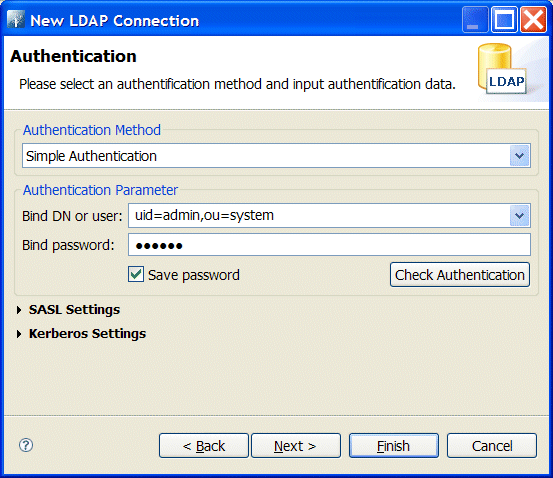
- In the Bind DN or user field, enter
uid=admin,ou=system). - In the Bind password field, enter
secret).Figure 8.2. Authentication Step of New LDAP Connection
- Click Finish.

8.3. Add User Entries to the Directory Server
Overview
Goals
Adding user entries
- Ensure that the LDAP server and browser are running.
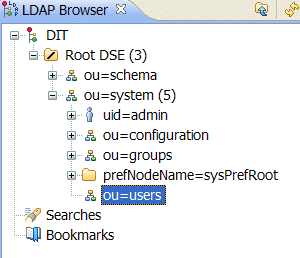
- In the LDAP Browser view, drill down to the ou=users node.
- Select the ou=users node.
- Open the context menu.
- Select → .The New Entry wizard appears.
- In the Entry Creation Method pane, check Create entry from scratch.
- Click Next.The Object Classes pane opens.
- In the Object Classes pane, select
inetOrgPersonfrom the list of Available object classes on the left. - Click Add to populate the list of Selected object classes.
Figure 8.3. New Entry Wizard
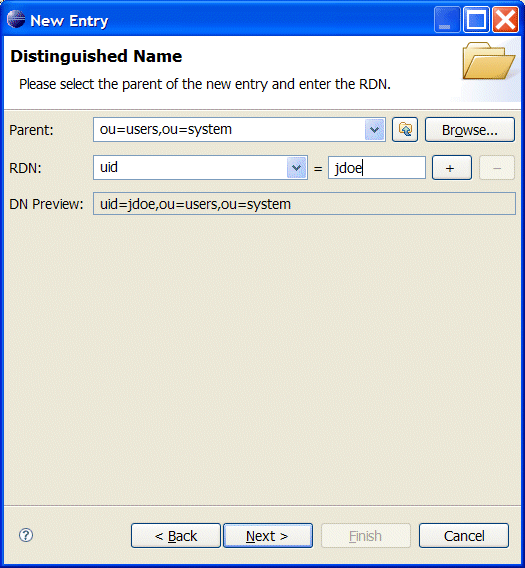
- Click .The Distinguished Name pane opens.
- In the the RDN field, enter
uidin front andjdoeafter the equals sign.Figure 8.4. Distinguished Name Step of New Entry Wizard
- Click .The Attributes pane opens.
- Fill in the remaining mandatory attributes in the Attributes pane.
- Set the cn (common name) attribute to
John Doe - Set the sn (surname) attribute to
Doe.
Figure 8.5. Attributes Step of New Entry Wizard
- Add a
userPasswordattribute to the user entry.- Open the context menu in the Attributes pane.
- Select .The New Attribute wizard appears.
- From the Attribute type drop-down list, select .
- Click .The Password Editor dialog appears.
- In the Enter New Password field, enter the password,
secret. - Click OK.The userPassword attribute will appear in the attributes editor.
- Click .


Adding groups for the roles
- Create a new organizational unit to contain the role groups.
- In the LDAP Browser view, select the ou=system node.
- Open the context menu.
- Select → .The New Entry wizard appears.
- In the Entry Creation Method pane, check Create entry from scratch.
- Click Next.The Object Classes pane opens.
- Select
organizationalUnitfrom the list of Available object classes on the left. - Click Add to populate the list of Selected object classes.
- Click .The Distinguished Name pane opens.
- In the the RDN field, enter
ouin front androlesafter the equals sign. - Click .The Attributes pane opens.
- Click .
NoteThis step is required because Apache DS only allows administrators access to entries inou=system,ou=groups. - In the LDAP Browser view, drill down to the ou=roles node.
- Select the ou=roles node.
- Open the context menu.
- Select → .The New Entry wizard appears.
- In the Entry Creation Method pane, check Create entry from scratch.
- Click Next.The Object Classes pane opens.
- Select
groupOfNamesfrom the list of Available object classes on the left. - Click Add to populate the list of Selected object classes.
- Click .The Distinguished Name pane opens.
- In the the RDN field, enter
cnin front andadminafter the equals sign. - Click .The Attributes pane opens and you are presented with a DN editor.
- Enter
uid=jdoe. - Click .
- Click .
- In Step 13, use
uid=janedoe. - In Step 13, use
uid=janedoe. - In Step 13, use
uid=crider.
8.4. Enable LDAP Authentication in the OSGi Container
Overview
Procedure
- Ensure that the X.500 directory server is running.
- Start Red Hat JBoss A-MQ by entering the following command in a terminal window:
amq
amqCopy to Clipboard Copied! Toggle word wrap Toggle overflow - Create a Blueprint configuration file called
ldap-module.xml. - Copy Example 8.1, “Blueprint JAAS Realm” into
ldap-module.xml.Example 8.1. Blueprint JAAS Realm
Copy to Clipboard Copied! Toggle word wrap Toggle overflow This login module creates a JAAS realm calledkaraf, which is the same name as the default JAAS realm used by Red Hat JBoss A-MQ. By redefining this realm with arankattribute value greater than0, it overrides the standardkarafrealm which has the rank0. For more information on configuring a JAAS realm see Section 2.1.2, “Defining JAAS Realms”.For a detailed description of configuring JBoss A-MQ to use LDAP see Section 2.2, “Enabling LDAP Authentication”.ImportantWhen setting the JAAS properties above, do not enclose the property values in double quotes.TipIf you use OpenLDAP, the syntax of the role filter is(member:=uid=%u). - To deploy the new LDAP module, copy the
ldap-module.xmlinto the JBoss A-MQdeploy/directory.The LDAP module is automatically activated. - Test the new LDAP realm by connecting to the running container using the Red Hat JBoss A-MQ
clientutility.- Open a new command prompt.
- change directory to the JBoss A-MQ
InstallDir/bindirectory. - Enter the following command to log on to the running container instance using the identity
janedoe:client -u janedoe -p secret
client -u janedoe -p secretCopy to Clipboard Copied! Toggle word wrap Toggle overflow You should receive the following message:Authentication failure
Authentication failureCopy to Clipboard Copied! Toggle word wrap Toggle overflow This fails becausejanedoedoes not have theadminrole which is required for using the remote console. - Enter the following command to log on to the running container instance using the identity
jdoe:client -u jdoe -p secret
client -u jdoe -p secretCopy to Clipboard Copied! Toggle word wrap Toggle overflow You should successfully log into the container's remote console becausejdoedoes have theadminrole. - Log off the remote console by entering the logout command.
8.5. Configuring Access to OSGi Administrative Functions
Overview
role.* properties in the jaas:module element.
cn property of all entries selected by the filter member=uid=%u which is run on the tree selected using the base DN uo=roles,ou=system. In the section called “Adding groups for the roles”, you added three groups to the uo=roles,ou=system tree. The filter will match with any group that has a member specified by uid=%u.
jdoe the filter searched for a group with a member uid=jdoe and matched on the group cn=admin,uo=roles,ou=system. The LDAP module extracted the cn property's value of admin and used it as the role for authorizing user jdoe.
Goals
Prerequisites
Configure a role for the remote console
- Open
InstallDir/etc/org.apache.karaf.shell.cfgin a text editor. - Add the following line:
sshRole=sshConsole
sshRole=sshConsoleCopy to Clipboard Copied! Toggle word wrap Toggle overflow - Save the changes.
- Start Red Hat JBoss A-MQ by entering the following command in a terminal window:
amq
amqCopy to Clipboard Copied! Toggle word wrap Toggle overflow - Open a new command prompt.
- Change directory to the JBoss A-MQ
InstallDir/bindirectory. - Enter the following command to log on to the running container instance using the identity
janedoe:client -u janedoe -p secret
client -u janedoe -p secretCopy to Clipboard Copied! Toggle word wrap Toggle overflow You should successfully log into the container's remote console becausejanedoedoes have thesshConsolerole.
Configure a role for JMX access
- Open
InstallDir/etc/org.apache.karaf.management.cfgin a text editor. - Add the following line:
jmxRole=jmxUser
jmxRole=jmxUserCopy to Clipboard Copied! Toggle word wrap Toggle overflow - Save the changes.
- Start JBoss A-MQ by entering the following command in a terminal window:
amq
amqCopy to Clipboard Copied! Toggle word wrap Toggle overflow - Start JConsole or another JMX console.
- Connect to JBoss A-MQ's JMX server using the following settings:
- JMX URL:
service:jmx:rmi://localhost:44444/jndi/rmi://localhost:1099/karaf-root - User:
jdoe - Password:
secret
The connection will fail becausejdoeuser does not have thejmxUserrole.NoteTo test security, you must log on using the Remote process option (even though you are logging on to a JVM instance that is running on your local machine). If you log on using the Local process option, JConsole bypasses the authentication check. - Connect to JBoss A-MQ's JMX server as using the following settings:
- JMX URL:
service:jmx:rmi://localhost:44444/jndi/rmi://localhost:1099/karaf-root - User:
crider - Password:
secret
The connection will succeed becausecrideruser does have thejmxUserrole.
More information
8.6. Tutorial: Add Authorization Entries
Overview
- Queue entries
- Each queue entry has a Common Name (
cn), which can be the name of a specific queue or a wildcard pattern that matches multiple queues. Under each queue entry, you must create sub-entries for the admin, read, and write permissions. - Topic entries
- Each topic entry has a Common Name (
cn), which can be the name of a specific topic or a wildcard pattern that matches multiple topics. Under each topic entry, you must create sub-entries for the admin, read, and write permissions. - Advisory topics entry
- In particular, you must define one topic entry with the Common Name,
ActiveMQ.Advisory.$, which is a wildcard pattern that matches all advisory topics. - Temporary queues entry
- A single
Tempentry contains the admin, read, and write permissions that apply to all temporary queues.
Using wildcards in queue and topic entries
| Wildcard | Description |
|---|---|
. | Separates segments in a path name. |
* | Matches any single segment in a path name. |
$ | Matches any number of segments in a path name. |
FOO.*, will match FOO.BAR, but not FOO.BAR.LONG; whereas the pattern, FOO.$, will match FOO.BAR and FOO.BAR.LONG.
$ character is used instead of the usual > character to match multiple destination name segments.
Steps to add authorization entries
- The next few steps describe how to create the
ou=ActiveMQnode.- Right-click on the
ou=systemnode and select → . The New Entry wizard appears. - In the Entry Creation Method pane, select the Create entry from scratch radiobutton. Click Next.
- In the Object Classes pane, select
organisationalUnitfrom the list of Available object classes on the left and then click Add to populate the list of Selected object classes. Click Next. - In the Distinguished Name pane, complete the RDN field, putting
ouin front andDestinationafter the equals sign. Click Next and then click Finish.
- The next few steps describe how to create the
ou=Destination,ou=Queue,ou=Topic, andou=Tempnodes.- Right-click on the
ou=ActiveMQnode and select → . The New Entry wizard appears. - In the Entry Creation Method pane, select the Create entry from scratch radiobutton. Click Next.
- In the Object Classes pane, select
organisationalUnitfrom the list of Available object classes on the left and then click Add to populate the list of Selected object classes. Click Next. - In the Distinguished Name pane, complete the RDN field, putting
ouin front andDestinationafter the equals sign. Click Next and then click Finish. - In a similar manner to the preceding steps, by right-clicking on the
ou=Destinationnode and invoking the New Entry wizard, create the followingorganisationalUnitnodes as children of theou=Destinationnode:ou=Queue,ou=Destination,ou=ActiveMQ,ou=system ou=Topic,ou=Destination,ou=ActiveMQ,ou=system ou=Temp,ou=Destination,ou=ActiveMQ,ou=system
ou=Queue,ou=Destination,ou=ActiveMQ,ou=system ou=Topic,ou=Destination,ou=ActiveMQ,ou=system ou=Temp,ou=Destination,ou=ActiveMQ,ou=systemCopy to Clipboard Copied! Toggle word wrap Toggle overflow
- In the LDAP Browser window, you should now see the following tree:
Figure 8.6. DIT after Creating Destination, Queue, Topic and Temp Nodes
- The next few steps describe how to create the following nodes:
cn=$,ou=Queue,ou=Destination,ou=ActiveMQ,ou=system
cn=ActiveMQ.Advisory.$,ou=Topic,ou=Destination,ou=ActiveMQ,ou=system
cn=$,ou=Queue,ou=Destination,ou=ActiveMQ,ou=system
cn=ActiveMQ.Advisory.$,ou=Topic,ou=Destination,ou=ActiveMQ,ou=system
Copy to Clipboard Copied! Toggle word wrap Toggle overflow These nodes represent name patterns that match queue names and topic names, respectively. Thecn=$queue node defines an entry that matches all queue names, so it can be used to define access rights for all queues. Thecn=ActiveMQ.Advisory.$node defines a topic entry that matches all advisory topics.- Right-click on the
ou=Queuenode and select → . The New Entry wizard appears. - In the Entry Creation Method pane, select the Create entry from scratch radiobutton. Click Next.
- In the Object Classes pane, select
applicationProcessfrom the list of Available object classes on the left and then click Add to populate the list of Selected object classes. Click Next. - In the Distinguished Name pane, complete the RDN field, putting
cnin front and$after the equals sign (where$represents the wildcard that matches any queue name). Click Next and then click Finish. - In a similar manner to the preceding steps, by right-clicking on the
ou=Topicnode and invoking the New Entry wizard, create the followingapplicationProcessnode as a child of theou=Topicnode:cn=ActiveMQ.Advisory.$,ou=Topic,ou=Destination,ou=ActiveMQ,ou=system
cn=ActiveMQ.Advisory.$,ou=Topic,ou=Destination,ou=ActiveMQ,ou=systemCopy to Clipboard Copied! Toggle word wrap Toggle overflow
- In the LDAP Browser window, you should now see the following tree:
Figure 8.7. DIT after Creating Children of Queue and Topic Nodes
- The next few steps describe how to create nodes that represent
admin,read, andwritepermissions for the queues and topics.- Right-click on the
cn=$node and select → . The New Entry wizard appears. - In the Entry Creation Method pane, select the Create entry from scratch radiobutton. Click Next.
- In the Object Classes pane, select
groupOfNamesfrom the list of Available object classes on the left and then click Add to populate the list of Selected object classes. Click Next. - In the Distinguished Name pane, complete the RDN field, putting
cnin front andadminafter the equals sign. Click Next. - You are now prompted to provide a value for the mandatory
memberattribute, through the DN Editor dialog. In the text field, entercn=admin,ou=roles,ou=system. Click Ok.NoteThecn=admin,ou=roles,ou=systemreferences a role that was created for the Apache Karaf JAAS authentication plug-in in a previous tutorial. These roles can be reused by the Apache ActiveMQ authorization plug-in, under certain conditions. See the section called “Compatibility with Apache Karaf principals” for details. - Click Finish, to close the New Entry wizard.
- In a similar manner to the preceding steps, by right-clicking on the
cn=$node and invoking the New Entry wizard, create the following additionalgroupOfNamesnodes as children of thecn=$node:cn=read,cn=$,ou=Queue,ou=Destination,ou=ActiveMQ,ou=system cn=write,cn=$,ou=Queue,ou=Destination,ou=ActiveMQ,ou=system
cn=read,cn=$,ou=Queue,ou=Destination,ou=ActiveMQ,ou=system cn=write,cn=$,ou=Queue,ou=Destination,ou=ActiveMQ,ou=systemCopy to Clipboard Copied! Toggle word wrap Toggle overflow
- Copy the
cn=admin,cn=read, andcn=writepermission nodes and paste them as children of thecn=ActiveMQ.Advisory.$node, as follows.Using a combination of mouse and keyboard, select the three nodes,cn=admin,cn=read, andcn=write, and typeCtrl-Cto copy them. Select thecn=ActiveMQ.Advisory.$node and typeCtrl-Vto paste the copied nodes as children. - Similarly, copy the
cn=admin,cn=read, andcn=writepermission nodes and paste them as children of theou=Tempnode. - In the LDAP Browser window, you should now see the following tree:
Figure 8.8. DIT after Creating Children of Queue, Topic and Temp Nodes

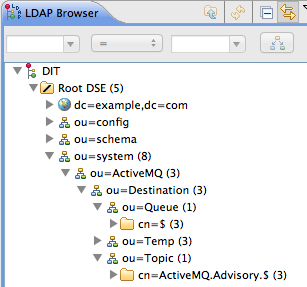
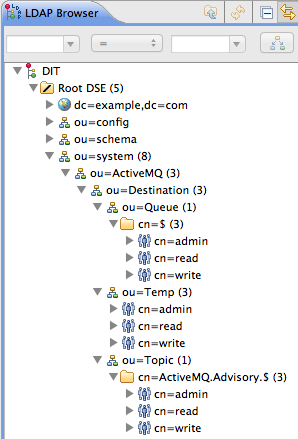
8.7. Tutorial: Enable LDAP Authorization in the Broker
Overview
Compatibility with Apache Karaf principals
- When you create authorization entries in the LDAP server (as described in Section 8.6, “Tutorial: Add Authorization Entries”), you must specify the full DN of the roles that are being authorized. This enables you to specify roles from any location in the LDAP tree (previously, the LDAP authorization plug-in could only read roles from a fixed location under the
ou=ActiveMQ,ou=systemnode). - To enable the use of full DNs when specifying roles, you must set the
legacyGroupMappingproperty tofalsein the LDAP authorization plug-in (the default istrue). - Because the Apache Karaf roles are of a different type from the roles natively supported by the LDAP authorization plug-in, you must also specify the type of the Karaf roles, by setting the
groupClassproperty.
Enable LDAP authorization in the broker
- Shut down the JBoss A-MQ container, if it is currently running. In the console window, enter the following command:
JBossA-MQ:karaf@root> shutdown -f
JBossA-MQ:karaf@root> shutdown -fCopy to Clipboard Copied! Toggle word wrap Toggle overflow - Add the LDAP authorization plug-in to the broker configuration. Open the broker configuration file,
InstallDir/etc/activemq.xml, with a text editor and add theauthorizationPluginelement, as follows:Copy to Clipboard Copied! Toggle word wrap Toggle overflow - Ensure that the X.500 directory server is running. If necessary, manually restart the X.500 directory server—see Section 8.2, “Set-up a Directory Server and Browser”. If the server is not running, all broker connections will fail.
- Restart the JBoss A-MQ container. Open a new command prompt and start the broker by entering the following command:
amq
amqCopy to Clipboard Copied! Toggle word wrap Toggle overflow
Install the Apache ActiveMQ kit
apache-activemq-5.8.0.redhat-60024-bin.zip, provided in the extras/ directory of the JBoss A-MQ installation.
- Find the Apache ActiveMQ kit at the following location:
InstallDir/extras/apache-activemq-5.8.0.redhat-60024-bin.zip
InstallDir/extras/apache-activemq-5.8.0.redhat-60024-bin.zipCopy to Clipboard Copied! Toggle word wrap Toggle overflow - Using a suitable archive utility on your platform, unzip the
apache-activemq-5.8.0.redhat-60024-bin.zipfile and extract it to a convenient location,ActiveMQInstallDir.
Test the new configuration
- Run the consumer client with the
jdoeuser credentials. Open a new command prompt, change directory toActiveMQInstallDir/example, and enter the following Ant command:ant consumer -Durl=tcp://localhost:61616 -Dmax=100 -Duser=jdoe -Dpassword=secret
ant consumer -Durl=tcp://localhost:61616 -Dmax=100 -Duser=jdoe -Dpassword=secretCopy to Clipboard Copied! Toggle word wrap Toggle overflow - Run the producer client with the
jdoeuser credentials. Open a new command prompt, change directory toActiveMQInstallDir/example, and enter the following Ant command:ant producer -Durl=tcp://localhost:61616 -Dmax=100 -Duser=jdoe -Dpassword=secret
ant producer -Durl=tcp://localhost:61616 -Dmax=100 -Duser=jdoe -Dpassword=secretCopy to Clipboard Copied! Toggle word wrap Toggle overflow - Run a negative test, to demonstrate that unauthorized users are blocked from accessing the broker queues.Run the consumer client with the
janedoeuser credentials. Open a new command prompt, change directory toActiveMQInstallDir/example, and enter the following Ant command:ant consumer -Durl=tcp://localhost:61616 -Dmax=100 -Duser=janedoe -Dpassword=secret
ant consumer -Durl=tcp://localhost:61616 -Dmax=100 -Duser=janedoe -Dpassword=secretCopy to Clipboard Copied! Toggle word wrap Toggle overflow This time, the consumer client fails, becausejanedoedoes not belong to theadmingroup.
8.8. Enable SSL/TLS on the LDAP Connection
Overview
10636. The directory server automatically generates a self-signed X.509 certificate which it uses to identify itself during the SSL/TLS handshake.
Procedure
- Obtain a copy of the server's self-signed certificate.
- Using a Web browser , navigate to the following URL:
https://localhost:10636
https://localhost:10636Copy to Clipboard Copied! Toggle word wrap Toggle overflow ImportantRemember to specify the scheme ashttps, not justhttp.The Web browser now signals an error, because the certificate it receives from the server is untrusted. In the case of Firefox, you will see the following error in the browser window:Figure 8.9. Obtaining the Certificate
- Click I Understand the Risks.
- Click Add Exception.The Add Security Exception dialog opens.
- In the Add Security Exception dialog, click .
- Click .The Certificate Viewer dialog opens.
- In the Certificate Viewer dialog, select the Details tab.
- Click .The Save Certificate To File dialog opens.
- In the Save Certificate To File dialog, use the drop-down list to set the Save as type to X.509 Certificate (DER).
- Save the certificate,
ApacheDS.der, to a convenient location on the filesystem.
- Convert the DER format certificate into a keystore.
- From a command prompt, change directory to the directory where you have stored the
ApacheDS.derfile. - Enter the following
keytoolcommand:keytool -import -file ApacheDS.der -alias server -keystore truststore.ks -storepass secret
keytool -import -file ApacheDS.der -alias server -keystore truststore.ks -storepass secretCopy to Clipboard Copied! Toggle word wrap Toggle overflow
- Copy the newly created keystore file,
truststore.ks, into the Red Hat JBoss A-MQetc/directory. - Open the
ldap-module.xmlfile you created in Section 8.4, “Enable LDAP Authentication in the OSGi Container” in a text editor. - Edit the connection.url to use ldaps://localhost:10636.
- Add the highlighted lines in Example 8.2, “LDAP Configuration for Using SSL/TLS”.
Example 8.2. LDAP Configuration for Using SSL/TLS
Copy to Clipboard Copied! Toggle word wrap Toggle overflow - Copy the
ldap-module.xmlfile into the Red Hat JBoss A-MQdeploy/directory.The LDAP module is automatically activated. - Test the new LDAP realm by connecting to the running container using the JBoss A-MQ
clientutility.- Open a new command prompt.
- Change to the JBoss A-MQ install directory.
- Enter the following command to log on to the running container instance using the identity
jdoe:client -u jdoe -p secret
client -u jdoe -p secretCopy to Clipboard Copied! Toggle word wrap Toggle overflow You should successfully log into the container's remote console becausejdoedoes have theadminrole.
Tightening up security
- Delete all entries from the Red Hat JBoss A-MQ's
etc/users.propertiesfile.If theldap-module.xmlbundle fails to start up properly, JAAS authentication reverts to the built-in file-basedkarafrealm, which takes its user data from theusers.propertiesfile. - Disable the insecure LDAP endpoint on the Apache Directory Server.
- Create and deploy a properly signed X.509 certificate on the Apache Directory Server.
- Make sure that the LDAP server is configured to use the TLSv1 protocol (POODLE vulnerability). Do not enable the SSLv3 protocol. For more information, see Poodle vulnerability (CVE-2014-3566).
Apache Directory Server Reference
Appendix A. Managing Certificates
Abstract
A.1. What is an X.509 Certificate?
Role of certificates
Integrity of the public key
Digital signatures
Contents of an X.509 certificate
- A subject distinguished name (DN) that identifies the certificate owner.
- The public key associated with the subject.
- X.509 version information.
- A serial number that uniquely identifies the certificate.
- An issuer DN that identifies the CA that issued the certificate.
- The digital signature of the issuer.
- Information about the algorithm used to sign the certificate.
- Some optional X.509 v.3 extensions; for example, an extension exists that distinguishes between CA certificates and end-entity certificates.
Distinguished names
A.2. Certification Authorities
- commercial CAs are companies that sign certificates for many systems.
- private CAs are trusted nodes that you set up and use to sign certificates for your system only.
A.2.1. Commercial Certification Authorities
Signing certificates
Advantages of commercial CAs
Criteria for choosing a CA
- What are the certificate-signing policies of the commercial CAs?
- Are your applications designed to be available on an internal network only?
- What are the potential costs of setting up a private CA compared to the costs of subscribing to a commercial CA?
A.2.2. Private Certification Authorities
Choosing a CA software package
OpenSSL software package
eay@cryptsoft.com). The OpenSSL package includes basic command line utilities for generating and signing certificates. Complete documentation for the OpenSSL command line utilities is available at http://www.openssl.org/docs.
Setting up a private CA using OpenSSL
Choosing a host for a private certification authority
Security precautions
- Do not connect the CA to a network.
- Restrict all access to the CA to a limited set of trusted users.
- Use an RF-shield to protect the CA from radio-frequency surveillance.
A.3. Certificate Chaining
Certificate chain
Figure A.1. A Certificate Chain of Depth 2
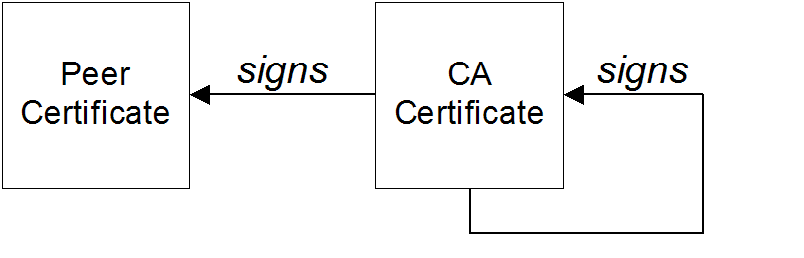
Self-signed certificate
Chain of trust
Certificates signed by multiple CAs
Figure A.2. A Certificate Chain of Depth 3

Trusted CAs
A.4. Special Requirements on HTTPS Certificates
Overview
HTTPS URL integrity check
Reference
How to specify the certificate identity
Using commonName
https://www.redhat.com/secure
https://www.redhat.com/secureC=IE,ST=Co. Dublin,L=Dublin,O=Progress, OU=System,CN=www.redhat.com
C=IE,ST=Co. Dublin,L=Dublin,O=Progress,
OU=System,CN=www.redhat.comwww.redhat.com.
Using subjectAltName (multi-homed hosts)
subjectAltName certificate extension.
www.redhat.com
fusesource.com
www.redhat.com
fusesource.comsubjectAltName that explicitly lists both of these DNS host names. If you generate your certificates using the openssl utility, edit the relevant line of your openssl.cfg configuration file to specify the value of the subjectAltName extension, as follows:
subjectAltName=DNS:www.redhat.com,DNS:fusesource.com
subjectAltName=DNS:www.redhat.com,DNS:fusesource.comsubjectAltName (the subjectAltName takes precedence over the Common Name).
*, in host names. For example, you can define the subjectAltName as follows:
subjectAltName=DNS:*.fusesource.com
subjectAltName=DNS:*.fusesource.com., delimiter in front of the domain name). For example, if you specified *fusesource.com, your certificate could be used on any domain that ends in the letters fusesource.
A.5. Creating Your Own Certificates
Overview
OpenSSL utilities
Procedure
- Add the OpenSSL
bindirectory to your path. - Create your own private CA.
- Create the directory structure for the CA.The directory structure should be:
X509CA/caX509CA/certsX509CA/newcertsX509CA/crl
WhereX509CAis the name of the CA's home directory. - Copy the
openssl.cfgfile from your OpenSSL installation to yourX509CAdirectory. - Open your copy of
openssl.cfgin a text editor. - Edit the
[CA_default]section to look like Example A.1, “OpenSSL Configuration”.Example A.1. OpenSSL Configuration
Copy to Clipboard Copied! Toggle word wrap Toggle overflow NoteYou might decide to edit other details of the OpenSSL configuration at this point. For more details, see the OpenSSL documentation. - Initialize the CA database as described in the section called “CA database files”.
- Create a new self-signed CA certificate and private key with the command:
openssl req -x509 -new -config X509CA/openssl.cfg -days 365 -out X509CA/ca/new_ca.pem -keyout X509CA/ca/new_ca_pk.pem
openssl req -x509 -new -config X509CA/openssl.cfg -days 365 -out X509CA/ca/new_ca.pem -keyout X509CA/ca/new_ca_pk.pemCopy to Clipboard Copied! Toggle word wrap Toggle overflow You are prompted for a pass phrase for the CA private key and details of the CA distinguished name as shown in Example A.2, “Creating a CA Certificate”.Example A.2. Creating a CA Certificate
Copy to Clipboard Copied! Toggle word wrap Toggle overflow NoteThe security of the CA depends on the security of the private key file and the private key pass phrase used in this step.You must ensure that the file names and location of the CA certificate and private key,new_ca.pemandnew_ca_pk.pem, are the same as the values specified inopenssl.cfgduring Step 2.d.
- Create signed certificates in a Java keystore.
- Generate a certificate and private key pair using the keytool -genkeypair command.For details on the options to use when using keytool -genkeypair see the section called “Generate a certificate and private key pair”.
- Create a certificate signing request using the keystore -certreq command.Example A.3, “Creating a CSR” creates a new certificate signing request for the
fusesample.jkscertificate and exports it to thefusesample_csr.pemfile.Example A.3. Creating a CSR
keytool -certreq -alias fuse -file fusesample_csr.pem -keypass fusepass -keystore fusesample.jks -storepass fusestorepass
keytool -certreq -alias fuse -file fusesample_csr.pem -keypass fusepass -keystore fusesample.jks -storepass fusestorepassCopy to Clipboard Copied! Toggle word wrap Toggle overflow - Sign the CSR using the openssl ca command.You will prompted to enter the CA private key pass phrase you used when creating the CA in Step 2.f).See the section called “Signing a CSR” for details on the options to use when signing the CSR.
- Convert the signed certificate to PEM only format using the openssl x509 command with the
-outformoption set toPEM.Example A.4, “Converting a Signed Certificate to PEM” converts the signed certificatefusesigned.pem.Example A.4. Converting a Signed Certificate to PEM
openssl x509 -in fusesigned.pem -out fusesigned.pem -outform PEM
openssl x509 -in fusesigned.pem -out fusesigned.pem -outform PEMCopy to Clipboard Copied! Toggle word wrap Toggle overflow - Concatenate the CA certificate file and the converted, signed certificate file to form a certificate chain.The CA certificate file is stored in the CA's
cadirectory. For example, the certificate file for the CA created in Step 2.f would beca/new_ca.pem. - Import the new certificate's full certificate chain into the Java keystore using the keytool -import command.Example A.5, “Importing a Certificate Chain” imports the chain
fusesample.chaininto thefusesample.jkskeystore.Example A.5. Importing a Certificate Chain
keytool -import -file fusesample.chain -keypass fusepass -keystore fusesample.jks -storepass fusestorepass
keytool -import -file fusesample.chain -keypass fusepass -keystore fusesample.jks -storepass fusestorepassCopy to Clipboard Copied! Toggle word wrap Toggle overflow
- Repeat Step 3 to create a full set of certificates for your system.
- Add trusted CAs to your Java trust store.
- Assemble the collection of trusted CA certificates that you want to deploy.The trusted CA certificates can be obtained from public CAs or private CAs. The trusted CA certificates can be in any format that is compatible with the Java keystore utility; for example, PEM format. All you need are the certificates themselves—the private keys and passwords are not required.
- Add a CA certificate to the trust store using the keytool -import command.Example A.6, “Adding a CA to the Trust Store” adds the CA certificate
cacert.pem, in PEM format, to a JKS trust store.Example A.6. Adding a CA to the Trust Store
keytool -import -file cacert.pem -alias CAAlias -keystore truststore.ts -storepass StorePass
keytool -import -file cacert.pem -alias CAAlias -keystore truststore.ts -storepass StorePassCopy to Clipboard Copied! Toggle word wrap Toggle overflow truststore.tsis a keystore file containing CA certificates. If this file does not already exist, the keytool command creates one.StorePassis the password required to access the keystore file. - Repeat Step 5.b to add all of the CA certificates to the trust store.
CA database files
serial and index.txt to maintain its database of certificate files. Both files must be stored in the X509CA directory.
serialThe initial contents of this file must be01.index.txtInitially this file must be completely empty. It cannot even contain white space.
Generate a certificate and private key pair
fusesample.jks. The generated key store entry will use the alias fuse and the password fusepass.
Example A.7. Creating a Certificate and Private Key using Keytool
keytool -genkeypair -dname "CN=Alice, OU=Engineering, O=Progress, ST=Co. Dublin, C=IE" -validity 365 -alias fuse -keypass fusepass -keystore fusesample.jks -storepass fusestorepass
keytool -genkeypair -dname "CN=Alice, OU=Engineering, O=Progress, ST=Co. Dublin, C=IE" -validity 365 -alias fuse -keypass fusepass -keystore fusesample.jks -storepass fusestorepassfusessample.jks, did not exist prior to issuing the command implicitly creates a new keystore and sets its password to fusestorepass.
-dname and -validity flags define the contents of the newly created X.509 certificate.
-dname flag specifies the subject DN. For more details about DN format, see Appendix B, ASN.1 and Distinguished Names. Some parts of the subject DN must match the values in the CA certificate (specified in the CA Policy section of the openssl.cfg file). The default openssl.cfg file requires the following entries to match:
- Country Name (C)
- State or Province Name (ST)
- Organization Name (O)
-validity flag specifies the number of days for which the certificate is valid.
Signing a CSR
-config—the path to the CA'sopenssl.cfgfile-in—the path to certificate to be signed-out—the path to the signed certificates
fusesample_csr.pem certificate using the CA stored at /etc/fuseCA.
Example A.8. Signing a CSR
openssl ca -config /etc/fuse/openssl.cfg -days 365 -in fusesample_csr.pem -out fusesigned.pem
openssl ca -config /etc/fuse/openssl.cfg -days 365 -in fusesample_csr.pem -out fusesigned.pemAppendix B. ASN.1 and Distinguished Names
Abstract
B.1. ASN.1
Overview
BER
DER
References
- ASN.1 is defined in X.208.
- BER is defined in X.209.
B.2. Distinguished Names
Overview
- X.509 certificates—for example, one of the DNs in a certificate identifies the owner of the certificate (the security principal).
- LDAP—DNs are used to locate objects in an LDAP directory tree.
String representation of DN
RFC 2253). The string representation provides a convenient basis for describing the structure of a DN.
DN string example
C=US,O=IONA Technologies,OU=Engineering,CN=A. N. Other
C=US,O=IONA Technologies,OU=Engineering,CN=A. N. OtherStructure of a DN string
OID
Attribute types
| String Representation | X.500 Attribute Type | Size of Data | Equivalent OID |
|---|---|---|---|
|
C
|
countryName
|
2
|
2.5.4.6
|
|
O
|
organizationName
|
1...64
|
2.5.4.10
|
|
OU
|
organizationalUnitName
|
1...64
|
2.5.4.11
|
|
CN
|
commonName
|
1...64
|
2.5.4.3
|
| ST |
stateOrProvinceName
|
1...64
|
2.5.4.8
|
|
L
|
localityName
|
1...64
|
2.5.4.7
|
|
STREET
|
streetAddress
| ||
|
DC
|
domainComponent
| ||
|
UID
|
userid
|
AVA
<attr-type>=<attr-value>
<attr-type>=<attr-value>CN=A. N. Other
CN=A. N. Other2.5.4.3=A. N. Other
2.5.4.3=A. N. OtherRDN
<attr-type>=<attr-value>[+<attr-type>=<attr-value> ...]
<attr-type>=<attr-value>[+<attr-type>=<attr-value> ...]OU=Eng1+OU=Eng2+OU=Eng3
OU=Eng1+OU=Eng2+OU=Eng3OU=Engineering
OU=EngineeringIndex
A
- Abstract Syntax Notation One (see ASN.1)
- ActiveMQSslConnectionFactory, ActiveMQSslConnectionFactory class
- administration
- OpenSSL command-line utilities, OpenSSL utilities
- Aries
- namespaces, Namespaces
- placeholder extension, Placeholder extension
- ASN.1, Contents of an X.509 certificate, ASN.1 and Distinguished Names
- attribute types, Attribute types
- AVA, AVA
- OID, OID
- RDN, RDN
- attribute value assertion (see AVA)
- authentication, LDAP properties
- authorization
- temporary destinations, Temporary destinations
- authorizationEntries, Configuring the simple authorization plug-in
- authorizationEntry, Named destinations
- authorizationMap, Configuring the simple authorization plug-in
- authorizationPlugin, Configuring the simple authorization plug-in
- AVA, AVA
B
- Basic Encoding Rules (see BER)
- BER, BER
C
- CA, Integrity of the public key
- choosing a host, Choosing a host for a private certification authority
- commercial CAs, Commercial Certification Authorities
- index file, CA database files
- list of trusted, Trusted CAs
- multiple CAs, Certificates signed by multiple CAs
- private CAs, Private Certification Authorities
- private key, creating, Procedure
- security precautions, Security precautions
- self-signed, Procedure
- serial file, CA database files
- setting up, Procedure
- certificate signing request, Procedure
- signing, Procedure
- certificates
- chaining, Certificate chain
- peer, Chain of trust
- public key, Contents of an X.509 certificate
- self-signed, Self-signed certificate, Procedure
- signing, Integrity of the public key, Procedure
- signing request, Procedure
- X.509, Role of certificates
- chaining of certificates, Certificate chain
- connection.password, LDAP properties
- connection.url, LDAP properties
- connection.username, LDAP properties
- CSR, Procedure
D
- DER, DER
- Distinguished Encoding Rules (see DER)
- distinguished names
- definition, Overview
- DN
- definition, Overview
- string representation, String representation of DN
E
- encryptor, Jasypt configuration
F
- features:install, Installing the Jasypt features
I
- index file, CA database files
- initial.context.factory, LDAP properties
J
- JAAS
- configuration syntax, Configuring a JAAS realm
- converting to blueprint, Converting standard JAAS login properties to XML
- namespace, Namespace
- jaas:config, Configuring a JAAS realm
- jaas:module, Configuring a JAAS realm
- Jasypt
- configuration, Jasypt configuration
- libraries, Installing the Jasypt features
- namespaces, Namespaces
- jasypt-encryption, Installing the Jasypt features
- JMX
- roles, Changing the JMX role
L
- LDAP
- authentication, LDAP properties
- configuration, LDAP properties
- connection.password, LDAP properties
- connection.url, LDAP properties
- connection.username, LDAP properties
- enabling, Enabling LDAP Authentication
- initial.context.factory, LDAP properties
- properties, LDAP properties
- role.base.dn, LDAP properties
- role.filter, LDAP properties
- role.name.attribute, LDAP properties
- role.search.subtree, LDAP properties
- ssl, LDAP properties
- ssl.algorithm, LDAP properties
- ssl.keyalias, LDAP properties
- ssl.keystore, LDAP properties
- ssl.protocol, LDAP properties
- ssl.provider, LDAP properties
- ssl.truststore, LDAP properties
- user.base.dn, LDAP properties
- user.filter, LDAP properties
- user.search.subtree, LDAP properties
- LDAPLoginModule, Enabling LDAP Authentication
M
- multiple CAs, Certificates signed by multiple CAs
N
- namespaces
- Aries, Namespaces
- Jasypt, Namespaces
O
- OpenSSL, OpenSSL software package
- OpenSSL command-line utilities, OpenSSL utilities
P
- peer certificate, Chain of trust
- private key, Procedure
- properties
- Apache Karaf placeholder extension, Jasypt configuration
- Aries placeholder extension, Placeholder extension
- encrypted, Encrypted properties
- LDAP, LDAP properties
- placeholder, Placeholders
- property-placeholder, Placeholder extension, Jasypt configuration
- public keys, Contents of an X.509 certificate
R
- RDN, RDN
- relative distinguished name (see RDN)
- remote console
- role.base.dn, LDAP properties
- role.filter, LDAP properties
- role.name.attribute, LDAP properties
- role.search.subtree, LDAP properties
- roles
- default, Default role
- JMX, Changing the JMX role
- LDAP configuration, LDAP properties
- remote console, Changing the remote console's role
- root certificate directory, Trusted CAs
S
- self-signed CA, Procedure
- self-signed certificate, Self-signed certificate
- serial file, CA database files
- signing certificates, Integrity of the public key
- ssl, LDAP properties
- ssl.algorithm, LDAP properties
- ssl.keyalias, LDAP properties
- ssl.keystore, LDAP properties
- ssl.protocol, LDAP properties
- ssl.provider, LDAP properties
- ssl.truststore, LDAP properties
- SSLeay, OpenSSL software package
T
- tempDestinationAuthorizationEntry, Configuring the simple authorization plug-in, Temporary destinations
- temporary destinations
- authorization, Temporary destinations
- trusted CAs, Trusted CAs
U
- user.base.dn, LDAP properties
- user.filter, LDAP properties
- user.search.subtree, LDAP properties
X
- X.500, ASN.1 and Distinguished Names
- X.509 certificate
- definition, Role of certificates
Legal Notice
Trademark Disclaimer
Legal Notice
Third Party Acknowledgements
- JLine (http://jline.sourceforge.net) jline:jline:jar:1.0License: BSD (LICENSE.txt) - Copyright (c) 2002-2006, Marc Prud'hommeaux
mwp1@cornell.eduAll rights reserved.Redistribution and use in source and binary forms, with or without modification, are permitted provided that the following conditions are met:- Redistributions of source code must retain the above copyright notice, this list of conditions and the following disclaimer.
- Redistributions in binary form must reproduce the above copyright notice, this list of conditions and the following disclaimer in the documentation and/or other materials provided with the distribution.
- Neither the name of JLine nor the names of its contributors may be used to endorse or promote products derived from this software without specific prior written permission.
THIS SOFTWARE IS PROVIDED BY THE COPYRIGHT HOLDERS AND CONTRIBUTORS "AS IS" AND ANY EXPRESS OR IMPLIED WARRANTIES, INCLUDING, BUT NOT LIMITED TO, THE IMPLIED WARRANTIES OF MERCHANTABILITY AND FITNESS FOR A PARTICULAR PURPOSE ARE DISCLAIMED. IN NO EVENT SHALL THE COPYRIGHT OWNER OR CONTRIBUTORS BE LIABLE FOR ANY DIRECT, INDIRECT, INCIDENTAL, SPECIAL, EXEMPLARY, OR CONSEQUENTIAL DAMAGES (INCLUDING, BUT NOT LIMITED TO, PROCUREMENT OF SUBSTITUTE GOODS OR SERVICES; LOSS OF USE, DATA, OR PROFITS; OR BUSINESS INTERRUPTION) HOWEVER CAUSED AND ON ANY THEORY OF LIABILITY, WHETHER IN CONTRACT, STRICT LIABILITY, OR TORT (INCLUDING NEGLIGENCE OR OTHERWISE) ARISING IN ANY WAY OUT OF THE USE OF THIS SOFTWARE, EVEN IF ADVISED OF THE POSSIBILITY OF SUCH DAMAGE. - Stax2 API (http://woodstox.codehaus.org/StAX2) org.codehaus.woodstox:stax2-api:jar:3.1.1License: The BSD License (http://www.opensource.org/licenses/bsd-license.php)Copyright (c) <YEAR>, <OWNER> All rights reserved.Redistribution and use in source and binary forms, with or without modification, are permitted provided that the following conditions are met:
- Redistributions of source code must retain the above copyright notice, this list of conditions and the following disclaimer.
- Redistributions in binary form must reproduce the above copyright notice, this list of conditions and the following disclaimer in the documentation and/or other materials provided with the distribution.
THIS SOFTWARE IS PROVIDED BY THE COPYRIGHT HOLDERS AND CONTRIBUTORS "AS IS" AND ANY EXPRESS OR IMPLIED WARRANTIES, INCLUDING, BUT NOT LIMITED TO, THE IMPLIED WARRANTIES OF MERCHANTABILITY AND FITNESS FOR A PARTICULAR PURPOSE ARE DISCLAIMED. IN NO EVENT SHALL THE COPYRIGHT HOLDER OR CONTRIBUTORS BE LIABLE FOR ANY DIRECT, INDIRECT, INCIDENTAL, SPECIAL, EXEMPLARY, OR CONSEQUENTIAL DAMAGES (INCLUDING, BUT NOT LIMITED TO, PROCUREMENT OF SUBSTITUTE GOODS OR SERVICES; LOSS OF USE, DATA, OR PROFITS; OR BUSINESS INTERRUPTION) HOWEVER CAUSED AND ON ANY THEORY OF LIABILITY, WHETHER IN CONTRACT, STRICT LIABILITY, OR TORT (INCLUDING NEGLIGENCE OR OTHERWISE) ARISING IN ANY WAY OUT OF THE USE OF THIS SOFTWARE, EVEN IF ADVISED OF THE POSSIBILITY OF SUCH DAMAGE. - jibx-run - JiBX runtime (http://www.jibx.org/main-reactor/jibx-run) org.jibx:jibx-run:bundle:1.2.3License: BSD (http://jibx.sourceforge.net/jibx-license.html) Copyright (c) 2003-2010, Dennis M. Sosnoski.All rights reserved.Redistribution and use in source and binary forms, with or without modification, are permitted provided that the following conditions are met:
- Redistributions of source code must retain the above copyright notice, this list of conditions and the following disclaimer.
- Redistributions in binary form must reproduce the above copyright notice, this list of conditions and the following disclaimer in the documentation and/or other materials provided with the distribution.
- Neither the name of JiBX nor the names of its contributors may be used to endorse or promote products derived from this software without specific prior written permission.
THIS SOFTWARE IS PROVIDED BY THE COPYRIGHT HOLDERS AND CONTRIBUTORS "AS IS" AND ANY EXPRESS OR IMPLIED WARRANTIES, INCLUDING, BUT NOT LIMITED TO, THE IMPLIED WARRANTIES OF MERCHANTABILITY AND FITNESS FOR A PARTICULAR PURPOSE ARE DISCLAIMED. IN NO EVENT SHALL THE COPYRIGHT OWNER OR CONTRIBUTORS BE LIABLE FOR ANY DIRECT, INDIRECT, INCIDENTAL, SPECIAL, EXEMPLARY, OR CONSEQUENTIAL DAMAGES (INCLUDING, BUT NOT LIMITED TO, PROCUREMENT OF SUBSTITUTE GOODS OR SERVICES; LOSS OF USE, DATA, OR PROFITS; OR BUSINESS INTERRUPTION) HOWEVER CAUSED AND ON ANY THEORY OF LIABILITY, WHETHER IN CONTRACT, STRICT LIABILITY, OR TORT (INCLUDING NEGLIGENCE OR OTHERWISE) ARISING IN ANY WAY OUT OF THE USE OF THIS SOFTWARE, EVEN IF ADVISED OF THE POSSIBILITY OF SUCH DAMAGE. - JavaAssist (http://www.jboss.org/javassist) org.jboss.javassist:com.springsource.javassist:jar:3.9.0.GA:compileLicense: MPL (http://www.mozilla.org/MPL/MPL-1.1.html)
- HAPI-OSGI-Base Module (http://hl7api.sourceforge.net/hapi-osgi-base/) ca.uhn.hapi:hapi-osgi-base:bundle:1.2License: Mozilla Public License 1.1 (http://www.mozilla.org/MPL/MPL-1.1.txt)

'%20d='M201.5%20305.5c-13.8%200-24.9-11.1-24.9-24.6%200-13.8%2011.1-24.9%2024.9-24.9%2013.6%200%2024.6%2011.1%2024.6%2024.9%200%2013.6-11.1%2024.6-24.6%2024.6zM504%20256c0%20137-111%20248-248%20248S8%20393%208%20256%20119%208%20256%208s248%20111%20248%20248zm-132.3-41.2c-9.4%200-17.7%203.9-23.8%2010-22.4-15.5-52.6-25.5-86.1-26.6l17.4-78.3%2055.4%2012.5c0%2013.6%2011.1%2024.6%2024.6%2024.6%2013.8%200%2024.9-11.3%2024.9-24.9s-11.1-24.9-24.9-24.9c-9.7%200-18%205.8-22.1%2013.8l-61.2-13.6c-3-.8-6.1%201.4-6.9%204.4l-19.1%2086.4c-33.2%201.4-63.1%2011.3-85.5%2026.8-6.1-6.4-14.7-10.2-24.1-10.2-34.9%200-46.3%2046.9-14.4%2062.8-1.1%205-1.7%2010.2-1.7%2015.5%200%2052.6%2059.2%2095.2%20132%2095.2%2073.1%200%20132.3-42.6%20132.3-95.2%200-5.3-.6-10.8-1.9-15.8%2031.3-16%2019.8-62.5-14.9-62.5zM302.8%20331c-18.2%2018.2-76.1%2017.9-93.6%200-2.2-2.2-6.1-2.2-8.3%200-2.5%202.5-2.5%206.4%200%208.6%2022.8%2022.8%2087.3%2022.8%20110.2%200%202.5-2.2%202.5-6.1%200-8.6-2.2-2.2-6.1-2.2-8.3%200zm7.7-75c-13.6%200-24.6%2011.1-24.6%2024.9%200%2013.6%2011.1%2024.6%2024.6%2024.6%2013.8%200%2024.9-11.1%2024.9-24.6%200-13.8-11-24.9-24.9-24.9z'/%3e%3c/svg%3e)