 Red Hat Summit
Red Hat AMQ 6
As of February 2025, Red Hat is no longer supporting Red Hat AMQ 6. If you are using AMQ 6, please upgrade: Migrating to AMQ 7.Client Connectivity Guide
Creating and tuning clients connections to message brokers
Copyright © 2011-2014 Red Hat, Inc. and/or its affiliates.
Abstract
Chapter 1. Introduction
Abstract
1.1. JBoss A-MQ Client APIs
Transports and protocols
- Simple Text Orientated Messaging Protocol(STOMP)—allows developers to use a wide variety of client APIs to connect to a broker.
- Discovery—allows clients to connect to one or more brokers without knowing the connection details for a specific broker. See Using Networks of Brokers.
- VM—allows clients to directly communicate with other clients in the same virtual machine. See Chapter 5, Intra-JVM Connections.
- Peer—allows clients to communicate with each other without using an external message broker. See Chapter 6, Peer Protocol.
Supported Client APIs
- C clients
- C++ clients
- C# and .NET clients
- Delphi clients
- Flash clients
- Perl clients
- PHP clients
- Pike clients
- Python clients
Configuration
- transport options—configured on the connection. These options are configured using the connection URI and may be set by the broker. They apply to all clients using the connection.
- destination options—configured on a per destination basis. These options are configured when the destination is created and impact all of the clients that send or receive messages using the destination. They are always set by clients.
1.2. Preparing to use Maven
Overview
Prerequisites
- Maven installation—Maven is a free, open source build tool from Apache. You can download the latest version from the Maven download page.
- Network connection—whilst performing a build, Maven dynamically searches external repositories and downloads the required artifacts on the fly. By default, Maven looks for repositories that are accessed over the Internet. You can change this behavior so that Maven will prefer searching repositories that are on a local network.NoteMaven can run in an offline mode. In offline mode Maven will only look for artifacts in its local repository.
Adding the Red Hat JBoss A-MQ repository
settings.xml file. Maven looks for your settings.xml file in the .m2 directory of the user's home directory. If there is not a user specified settings.xml file, Maven will use the system-level settings.xml file at M2_HOME/conf/settings.xml.
.m2/settings.xml file or modify the system-level settings. In the settings.xml file, add the repository element for the JBoss A-MQ repository as shown in bold text in Example 1.1, “Adding the Red Hat JBoss A-MQ Repositories to Maven”.
Example 1.1. Adding the Red Hat JBoss A-MQ Repositories to Maven
fusesource-snapshotrepository—if you want to experiment with building your application using an Red Hat JBoss A-MQ snapshot kit, you can include this repository.apache-publicrepository—you might not always need this repository, but it is often useful to include it, because JBoss A-MQ depends on many of the artifacts from Apache.
Artifacts
Maven coordinates
{groupId, artifactId, version}. Sometimes Maven augments the basic set of coordinates with the additional coordinates, packaging and classifier. A tuple can be written with the basic coordinates, or with the additional packaging coordinate, or with the addition of both the packaging and classifier coordinates, as follows:
groupdId:artifactId:version
groupdId:artifactId:packaging:version
groupdId:artifactId:packaging:classifier:version
groupdId:artifactId:version
groupdId:artifactId:packaging:version
groupdId:artifactId:packaging:classifier:version- groupdId
- Defines a scope for the name of the artifact. You would typically use all or part of a package name as a group ID—for example,
org.fusesource.example. - artifactId
- Defines the artifact name (relative to the group ID).
- version
- Specifies the artifact's version. A version number can have up to four parts:
n.n.n.n, where the last part of the version number can contain non-numeric characters (for example, the last part of1.0-SNAPSHOTis the alphanumeric substring,0-SNAPSHOT). - packaging
- Defines the packaged entity that is produced when you build the project. For OSGi projects, the packaging is
bundle. The default value isjar. - classifier
- Enables you to distinguish between artifacts that were built from the same POM, but have different content.
dependency element to a POM:
bundle package type in the preceding dependency, because a bundle is just a particular kind of JAR file and jar is the default Maven package type. If you do need to specify the packaging type explicitly in a dependency, however, you can use the type element.
Chapter 2. Native ActiveMQ Client APIs
Abstract
- Get an instance of the Red Hat JBoss A-MQ connection factory.Depending on the environment, the application can create a new instance of the connection factory or use JNDI, or another mechanism, to look up the connection factory.
- Use the connection factory to create a connection.
- Get an instance of the destination used for sending or receiving messages.Destinations are administered objects that are typically created by the broker. The JBoss A-MQ allows clients to create destinations on-demand. You can also look up destinations using JNDI or another mechanism.
- Use the connection to create a session.The session is the factory for creating producers and consumers. The session also is a factory for creating messages.
- Use the session to create the message consumer or message producer.
- Start the connection.
2.1. Native JMS Client API
Overview
The connection factory
ActiveMQConnectionFactory, is used to create connections to brokers and does not need to be looked up using JNDI. Instances are created using a broker URI that specifies one of the transport connectors configured on a broker and the connection factory will do the heavy lifting.
ActiveMQConnectionFactory constructors.
Example 2.1. Connection Factory Constructors
ActiveMQConnectionFactory(String brokerURI);ActiveMQConnectionFactory(URI brokerURI);ActiveMQConnectionFactory(String username,
String password,
String brokerURI);ActiveMQConnectionFactory(String username,
String password,
URI brokerURI);The connection
Connection object will suffice. However, JBoss A-MQ does provide an implementation, ActiveMQConnection, that provides a number of additional methods for working with the broker. Using ActiveMQConnection will make your client code less portable between JMS providers.
The session
Example
EXAMPLE.FOO.
Example 2.2. JMS Producer Connection
2.2. Native C++ Client API
Overview
The connection factory
ConnectionFactory. A ConnectionFactory allows you to create connections which maintain a connection to a message broker.
ConnectionFactory is to use the static createCMSConnectionFactory() method that all CMS provider libraries are required to implement. Example 2.3, “Creating a Connection Factory” demonstrates how to obtain a new ConnectionFactory.
Example 2.3. Creating a Connection Factory
std::auto_ptr<cms::ConnectionFactory> connectionFactory(
        cms::ConnectionFactory::createCMSConnectionFactory( "tcp://127.0.0.1:61616" ) );
std::auto_ptr<cms::ConnectionFactory> connectionFactory(
cms::ConnectionFactory::createCMSConnectionFactory( "tcp://127.0.0.1:61616" ) );createCMSConnectionFactory() takes a single string parameter which a URI that defines the connection that will be created by the factory. Additionally configuration information can be encoded in the URI. For details on how to construct a broker URI see the Connection Reference.
The connection
Connection is a object that manages the client's connection to the broker. Example 2.4, “Creating a Connection” shows the code to create a connection.
Example 2.4. Creating a Connection
std::auto_ptr<cms::Connection> connection( connectionFactory->createConnection() );
std::auto_ptr<cms::Connection> connection( connectionFactory->createConnection() );CMSException is thrown with a description of the error that occurred stored in its message property.
- It encapsulates an open connection with a JMS provider. It typically represents an open TCP/IP socket between a client and a provider service daemon.
- Its creation is where client authentication takes place.
- It can specify a unique client identifier.
- It provides a
ConnectionMetaDataobject. - It supports an optional
ExceptionListenerobject.
The session
Example 2.5. Creating a Session
std::auto_ptr<cms::Session> session( connection->createSession(cms::Session::CLIENT_ACKNOWLEDGE) );
std::auto_ptr<cms::Session> session( connection->createSession(cms::Session::CLIENT_ACKNOWLEDGE) );| Acknowledge Mode | Description |
|---|---|
AUTO_ACKNOWLEDGE | The session automatically acknowledges a client's receipt of a message either when the session has successfully returned from a call to receive or when the message listener the session has called to process the message successfully returns. |
CLIENT_ACKNOWLEDGE | The client acknowledges a consumed message by calling the message's acknowledge method. Acknowledging a consumed message acknowledges all messages that the session has consumed. |
DUPS_OK_ACKNOWLEDGE | The session to lazily acknowledges the delivery of messages. This is likely to result in the delivery of some duplicate messages if the broker fails, so it should only be used by consumers that can tolerate duplicate messages. Use of this mode can reduce session overhead by minimizing the work the session does to prevent duplicates. |
SESSION_TRANSACTED | The session is transacted and the acknowledge of messages is handled internally. |
INDIVIDUAL_ACKNOWLEDGE | Acknowledges are applied to a single message only. |
AUTO_ACKNOWLEDGE.
- It is a factory for producers and consumers.
- It supplies provider-optimized message factories.
- It is a factory for temporary topics and temporary queues.
- It provides a way to create a queue or a topic for those clients that need to dynamically manipulate provider-specific destination names.
- It supports a single series of transactions that combine work spanning its producers and consumers into atomic units.
- It defines a serial order for the messages it consumes and the messages it produces.
- It retains messages it consumes until they have been acknowledged.
- It serializes execution of message listeners registered with its message consumers.
Resources
Example
EXAMPLE.FOO.
Example 2.6. CMS Producer Connection
2.3. Native .Net Client API
Overview
Resources
Example
EXAMPLE.FOO.
Example 2.7. NMS Producer Connection
2.4. Configuring NMS.ActiveMQ
Abstract
Connection configuration using the generic NMSConnectionFactory class
NMSConnectionFactory class, you can configure an ActiveMQ endpoint as follows:
var cf = new NMSConnectionFactory(
    "activemq:tcp://localhost:61616?wireFormat.tightEncodingEnabled=true");
var cf = new NMSConnectionFactory(
"activemq:tcp://localhost:61616?wireFormat.tightEncodingEnabled=true");Connection configuration using the ActiveMQ ConnectionFactory class
ConnectionFactory class, you can configure an ActiveMQ endpoint as follows:
var cf = new Apache.NMS.ActiveMQ.ConnectionFactory(
    "tcp://localhost:61616?wireFormat.tightEncodingEnabled=true");
var cf = new Apache.NMS.ActiveMQ.ConnectionFactory(
"tcp://localhost:61616?wireFormat.tightEncodingEnabled=true");Protocol variants
|
Option Name
|
Description
|
|---|---|
tcp
|
Uses TCP/IP Sockets to connect to the Broker.
|
ssl
|
Uses TCP/IP Sockets to connect to the Broker with an added SSL layer.
|
discovery
|
Uses The Discovery Transport to find a Broker.
|
failover
|
Uses the Failover Transport to connect and reconnect to one or more Brokers.
|
TCP transport options
tcp transport supports the following options:
|
Option Name
|
Default
|
Description
|
|---|---|---|
transport.useLogging
|
false
|
Log data that is sent across the Transport.
|
transport.receiveBufferSize
|
8192
|
Amount of Data to buffer from the Socket.
|
transport.sendBufferSize
|
8192
|
Amount of Data to buffer before writing to the Socket.
|
transport.receiveTimeout
|
0
|
Time to wait for more data, zero means wait infinitely.
|
transport.sendTimeout
|
0
|
Timeout on sends, 0 means wait forever for completion.
|
transport.requestTimeout
|
0
|
Time to wait before a Request Command is considered to have failed.
|
Failover transport options
failover transport supports the following options:
|
Option Name
|
Default
|
Description
|
|---|---|---|
transport.timeout
|
-1
|
Time that a send operation blocks before failing.
|
transport.initialReconnectDelay
|
10
|
Time in Milliseconds that the transport waits before attempting to reconnect the first time.
|
transport.maxReconnectDelay
|
30000
|
The max time in Milliseconds that the transport will wait before attempting to reconnect.
|
transport.backOffMultiplier
|
2
|
The amount by which the reconnect delay will be multiplied by if useExponentialBackOff is enabled.
|
transport.useExponentialBackOff
|
true
|
Should the delay between connection attempt grow on each try up to the max reconnect delay.
|
transport.randomize
|
true
|
Should the Uri to connect to be chosen at random from the list of available Uris.
|
transport.maxReconnectAttempts
|
0
|
Maximum number of time the transport will attempt to reconnect before failing (0 means infinite retries)
|
transport.startupMaxReconnectAttempts
|
0
|
Maximum number of time the transport will attempt to reconnect before failing when there has never been a connection made. (0 means infinite retries) (included in NMS.ActiveMQ v1.5.0+)
|
transport.reconnectDelay
|
10
|
The delay in milliseconds that the transport waits before attempting a reconnection.
|
transport.backup
|
false
|
Should the Failover transport maintain hot backups.
|
transport.backupPoolSize
|
1
|
If enabled, how many hot backup connections are made.
|
transport.trackMessages
|
false
|
keep a cache of in-flight messages that will flushed to a broker on reconnect
|
transport.maxCacheSize
|
256
|
Number of messages that are cached if trackMessages is enabled.
|
transport.updateURIsSupported
|
true
|
Update the list of known brokers based on BrokerInfo messages sent to the client.
|
Connection Options
connection. prefix or the nms. prefix (in a similar way to the Java client's jms. prefixed settings).
|
Option Name
|
Default
|
Description
|
|---|---|---|
connection.AsyncSend
|
false
|
Are message sent Asynchronously.
|
connection.AsyncClose
|
true
|
Should the close command be sent Asynchronously
|
connection.AlwaysSyncSend
|
false
|
Causes all messages a Producer sends to be sent Asynchronously.
|
connection.CopyMessageOnSend
|
true
|
Copies the Message objects a Producer sends so that the client can reuse Message objects without affecting an in-flight message.
|
connection.ProducerWindowSize
|
0
|
The ProducerWindowSize is the maximum number of bytes in memory that a producer will transmit to a broker before waiting for acknowledgement messages from the broker that it has accepted the previously sent messages. In other words, this how you configure the producer flow control window that is used for async sends where the client is responsible for managing memory usage. The default value of 0 means no flow control at the client. See also Producer Flow Control
|
connection.useCompression
|
false
|
Should message bodies be compressed before being sent.
|
connection.sendAcksAsync
|
false
|
Should message acks be sent asynchronously
|
connection.messagePrioritySupported
|
true
|
Should messages be delivered to the client based on the value of the Message Priority header.
|
connection.dispatchAsync
|
false
|
Should the broker dispatch messages asynchronously to the connection's consumers.
|
connection.watchTopicAdvisories
|
true
|
Should the client watch for advisory messages from the broker to track the creation and deletion of temporary destinations.
|
OpenWire options
|
Option Name
|
Default
|
Description
|
|---|---|---|
wireFormat.stackTraceEnabled
|
false
|
Should the stack trace of exception that occur on the broker be sent to the client? Only used by openwire protocol.
|
wireFormat.cacheEnabled
|
false
|
Should commonly repeated values be cached so that less marshalling occurs? Only used by openwire protocol.
|
wireFormat.tcpNoDelayEnabled
|
false
|
Does not affect the wire format, but provides a hint to the peer that TCP nodelay should be enabled on the communications Socket. Only used by openwire protocol.
|
wireFormat.sizePrefixDisabled
|
false
|
Should serialized messages include a payload length prefix? Only used by openwire protocol.
|
wireFormat.tightEncodingEnabled
|
false
|
Should wire size be optimized over CPU usage? Only used by the openwire protocol.
|
wireFormat.maxInactivityDuration
|
30000
|
The maximum inactivity duration (before which the socket is considered dead) in milliseconds. On some platforms it can take a long time for a socket to appear to die, so we allow the broker to kill connections if they are inactive for a period of time. Use by some transports to enable a keep alive heart beat feature. Set to a value <= 0 to disable inactivity monitoring.
|
maxInactivityDurationInitalDelay
|
10000
|
The initial delay in starting the maximum inactivity checks (and, yes, the word 'Inital' is supposed to be misspelled like that)
|
Destination configuration
d = session.CreateTopic("com.foo?consumer.prefetchSize=2000&consumer.noLocal=true");
d = session.CreateTopic("com.foo?consumer.prefetchSize=2000&consumer.noLocal=true");General options
|
Option Name
|
Default
|
Description
|
|---|---|---|
consumer.prefetchSize
|
1000
|
The number of message the consumer will prefetch.
|
consumer.maximumPendingMessageLimit
|
0
|
Use to control if messages are dropped if a slow consumer situation exists.
|
consumer.noLocal
|
false
|
Same as the noLocal flag on a Topic consumer. Exposed here so that it can be used with a queue.
|
consumer.dispatchAsync
|
false
|
Should the broker dispatch messages asynchronously to the consumer.
|
consumer.retroactive
|
false
|
Is this a Retroactive Consumer.
|
consumer.selector
|
null
|
JMS Selector used with the consumer.
|
consumer.exclusive
|
false
|
Is this an Exclusive Consumer.
|
consumer.priority
|
0
|
Allows you to configure a Consumer Priority.
|
OpenWire specific options
|
Option Name
|
Default
|
Description
|
|---|---|---|
consumer.browser
|
false
|
|
consumer.networkSubscription
|
false
|
|
consumer.optimizedAcknowledge
|
false
|
Enables an optimised acknowledgement mode where messages are acknowledged in batches rather than individually. Alternatively, you could use
Session.DUPS_OK_ACKNOWLEDGE acknowledgement mode for the consumers which can often be faster. WARNING: enabling this issue could cause some issues with auto-acknowledgement on reconnection
|
consumer.noRangeAcks
|
false
|
|
consumer.retroactive
|
false
|
Sets whether or not retroactive consumers are enabled. Retroactive consumers allow non-durable topic subscribers to receive old messages that were published before the non-durable subscriber started.
|
Chapter 3. Qpid JMS Client API
3.1. Getting Started with AMQP
3.1.1. Introduction to AMQP
What is AMQP?
- Open standard (defined by the OASIS AMQP Technical Committee)
- Defines a wire protocol
- Defines APIs for multiple languages (C++, Java)
- Interoperability between different AMQP implementations
JMS is an API
AMQP is a wire protocol
AMQP-to-JMS requires message conversion
AMQP support in JBoss A-MQ
- AMQP endpoint in the broker—an endpoint on the broker that supports the AMQP wire protocol and implicitly converts messages between AMQP format and JMS format (which is used inside the JBoss A-MQ broker).
- AMQP JMS client—is based on the Apache Qpid JMS client, which is compatible with the broker's AMQP endpoint.
Getting started with AMQP
- Configure the broker to use AMQP—to enable AMQP in the broker, add an AMQP endpoint to the broker's configuration. This implicitly activates the broker's AMQP integration, ensuring that incoming messages are converted from AMQP message format to JMS message format, as required.
- Implement the AMQP clients—the AMQP clients are based on the Apache Qpid JMS client libraries.
3.1.2. Configuring the Broker for AMQP
Overview
- Make sure that you have appropriate user entries in the
etc/users.propertiesfile, so that the AMQP clients will be able to log on to the broker. - Add an AMQP endpoint to the broker (by inserting a
transportConnectorelement into the broker's XML configuration).
Steps to configure the broker
- This example assumes that you are working with a fresh install of a standalone JBoss A-MQ broker, InstallDir.
- Define a JAAS user for the AMQP clients, so that the AMQP clients can authenticate themselves to the broker using JAAS security (security is enabled by default in the broker). Edit the
InstallDir/etc/users.propertiesfile and add a new user entry, as follows:Copy to Clipboard Copied! Toggle word wrap Toggle overflow At this point, you can add entries for any other secure users you want. In particular, it is advisable to have at least one user with theadminrole, so that you can log into the secure container remotely (remembering to choose a secure password for the admin user). - Add an AMQP endpoint to the broker configuration. Edit the broker configuration file,
InstallDir/etc/activemq.xml. As shown in the following XML fragment, add the highlightedtransportConnectorelement as a child of thetransportConnectorselement in the broker configuration:Copy to Clipboard Copied! Toggle word wrap Toggle overflow - To start the broker, open a new command prompt, change directory to
InstallDir/bin, and enter the following command:./amq
./amqCopy to Clipboard Copied! Toggle word wrap Toggle overflow
Message conversion
Reference
3.1.3. AMQP Example Clients
Overview
Prerequisites
AMQP connection URI
jndi.properties file, in this demonstration). This example uses the following AMQP URI for the clients:
amqp://amqpuser:secret@localhost/test/?brokerlist='tcp://localhost:5672'
amqp://amqpuser:secret@localhost/test/?brokerlist='tcp://localhost:5672'amqpuser:secret@localhost, has the format Username:Password@ClientID. In order to authenticate the clients successfully with the broker, it is essential that there is a corresponding JAAS user entry on the broker side.
brokerlist option defines the location of the AMQP port on the broker, which is tcp://localhost:5672 for this example.
Steps to implement and run the AMQP clients
- At any convenient location, create the directory,
activemq-amqp-example, to hold the example code:mkdir activemq-amqp-example
mkdir activemq-amqp-exampleCopy to Clipboard Copied! Toggle word wrap Toggle overflow - Create the directory hierarchy for the example code. Change directory to
activemq-amqp-exampleand run the following script at a command prompt:Copy to Clipboard Copied! Toggle word wrap Toggle overflow After executing the preceding commands, you should have the following directory structure for theactivemq-amqp-exampleproject:Copy to Clipboard Copied! Toggle word wrap Toggle overflow - Create a POM file for the Maven project. Using a text editor, create a new file,
activemq-amqp-example/pom.xml, with the following contents:Copy to Clipboard Copied! Toggle word wrap Toggle overflow - Define the Java implementation of an AMQP consumer class,
SimpleConsumer. Using a text editor, create theSimpleConsumer.javafile under theactivemq-amqp-example/src/main/java/org/fusebyexample/activemq/directory, with the following contents:Copy to Clipboard Copied! Toggle word wrap Toggle overflow - Define the Java implementation of an AMQP producer class,
SimpleProducer. Using a text editor, create theSimpleProducer.javafile under theactivemq-amqp-example/src/main/java/org/fusebyexample/activemq/directory, with the following contents:Copy to Clipboard Copied! Toggle word wrap Toggle overflow - Configure the JNDI properties for the AMQP clients. Using a text editor, create the
jndi.propertiesfile under theactivemq-amqp-example/src/main/resources/directory, with the following contents:Copy to Clipboard Copied! Toggle word wrap Toggle overflow - Configure the client logging with log4j. Using a text editor, create the
log4j.propertiesfile under theactivemq-amqp-example/src/main/resources/directory, with the following contents:Copy to Clipboard Copied! Toggle word wrap Toggle overflow - Make sure that the broker is already configured and running with an AMQP endpoint, as described in Section 3.1.2, “Configuring the Broker for AMQP”.
- Run the AMQP producer client as follows. Open a new command prompt, change directory to the project directory,
activemq-amqp-example/, and enter the following Maven command:mvn -P producer
mvn -P producerCopy to Clipboard Copied! Toggle word wrap Toggle overflow After building the code (and downloading any packages required by Maven), this target proceeds to run the producer client, which sends 100 messages to thetest.queue.simplequeue in the broker. If the producer runs successfully, you should see output like the following in the console window:Copy to Clipboard Copied! Toggle word wrap Toggle overflow - Run the AMQP consumer client as follows. Open a new command prompt, change directory to the project directory,
activemq-amqp-example/, and enter the following Maven command:mvn -P consumer
mvn -P consumerCopy to Clipboard Copied! Toggle word wrap Toggle overflow After building the code, this target proceeds to run the consumer client, which reads messages from thetest.queue.simplequeue. You should see output like the following in the console window:Copy to Clipboard Copied! Toggle word wrap Toggle overflow
3.2. A Simple Messaging Program in Java JMS
Example 3.1. "Hello world!" in Java
- 1
- Loads the JNDI properties file, which specifies connection properties, queues, topics, and addressing options. See Section 3.3, “Apache Qpid JNDI Properties for AMQP Messaging” for details.
- 2
- Creates the JNDI initial context.
- 3
- Creates a JMS connection factory for Qpid.
- 4
- Creates a JMS connection.
- 5
- Activates the connection.
- 6
- Creates a session. This session is not transactional (transactions='false'), and messages are automatically acknowledged.
- 7
- Creates a destination for the topic exchange, so senders and receivers can use it.
- 8
- Creates a producer that sends messages to the topic exchange.
- 9
- Creates a consumer that reads messages from the topic exchange.
- 10
- Reads the next available message.
- 11
- Closes the connection, all sessions managed by the connection, and all senders and receivers managed by each session.
- 12
- Closes the JNDI context.
Example 3.2. JNDI Properties File for "Hello world!" example
- 1
- Defines a connection factory from which connections can be created. The syntax of a ConnectionURL is given in Section 3.3, “Apache Qpid JNDI Properties for AMQP Messaging”.
- 2
- Defines a destination for which MessageProducers and/or MessageConsumers can be created to send and receive messages. The value for the destination in the properties file is an address string. In the JMS implementation MessageProducers are analogous to senders in the Qpid Message API, and MessageConsumers are analogous to receivers.
3.3. Apache Qpid JNDI Properties for AMQP Messaging
Example 3.3. JNDI Properties File
3.3.1. JNDI Properties for Apache Qpid
| Property | Purpose |
|---|---|
connectionfactory.<jndiname> |
The Connection URL that the connection factory uses to perform connections.
|
queue.<jndiname> |
A JMS queue, which is implemented as an amq.direct exchange in Apache Qpid.
|
topic.<jndiname> |
A JMS topic, which is implemented as an amq.topic exchange in Apache Qpid.
|
destination.<jndiname> |
Can be used for defining all amq destinations, queues, topics and header matching, using an address string. [a]
|
[a]
Binding URLs, which were used in earlier versions of the Qpid Java JMS client, can still be used instead of address strings.
| |
3.3.2. Connection URLs
amqp://[<user>:<pass>@][<clientid>]<virtualhost>[?<option>='<value>'[&<option>='<value>']]
amqp://[<user>:<pass>@][<clientid>]<virtualhost>[?<option>='<value>'[&<option>='<value>']]
amqp://username:password@clientid/test?brokerlist='tcp://localhost:5672'
amqp://username:password@clientid/test?brokerlist='tcp://localhost:5672'
| Option | Type | Description |
|---|---|---|
brokerlist | see below | List of one or more broker addresses. |
maxprefetch | integer |
The maximum number of pre-fetched messages per consumer. If not specified, default value of 500 is used.
Note: You can also set the default per-consumer prefetch value on a client-wide basis by configuring the client using Java system properties.
|
sync_publish | {'persistent' | 'all'} | A sync command is sent after every persistent message to guarantee that it has been received; if the value is 'persistent', this is done only for persistent messages. |
sync_ack | boolean | A sync command is sent after every acknowledgement to guarantee that it has been received. |
use_legacy_map_msg_format | boolean | If you are using JMS Map messages and deploying a new client with any JMS client older than 0.8 release, you must set this to true to ensure the older clients can understand the map message encoding. |
failover | {'singlebroker' | 'roundrobin' | 'failover_exchange' | 'nofailover' | '<class>'} |
This option controls failover behaviour. The method
singlebroker uses only the first broker in the list, roundrobin will try each broker given in the broker list until a connection is established, failover_exchange connects to the initial broker given in the broker URL and will receive membership updates via the failover exchange. nofailover disables all retry and failover logic. Any other value is interpreted as a classname which must implement the org.apache.qpid.jms.failover.FailoverMethod interface.
The broker list options
retries and connectdelay (described below) determine the number of times a connection to a broker will be retried and the the length of time to wait between successive connection attempts before moving on to the next broker in the list. The failover option cyclecount controls the number of times to loop through the list of available brokers before finally giving up.
Defaults to
roundrobin if the brokerlist contains multiple brokers, or singlebroker otherwise.
|
ssl | boolean |
If
ssl='true', use SSL for all broker connections. Overrides any per-broker settings in the brokerlist (see below) entries. If not specified, the brokerlist entry for each given broker is used to determine whether SSL is used.
Introduced in version 0.22.
|
brokerlist=<transport>://<host>[:<port>](?<param>='<value>')(&<param>='<value>')*
brokerlist=<transport>://<host>[:<port>](?<param>='<value>')(&<param>='<value>')*brokerlist='tcp://localhost:5672'
brokerlist='tcp://localhost:5672'Example 3.4. Broker Lists
amqp://guest:guest@test/test?sync_ack='true'
&brokerlist='tcp://ip1:5672?sasl_mechs='GSSAPI''
amqp://guest:guest@test/test?sync_ack='true'
&brokerlist='tcp://ip1:5672?sasl_mechs='GSSAPI''amqp://guest:guest@test/test?sync_ack='true' &brokerlist='tcp://ip1:5672?ssl='true'&ssl_cert_alias='cert1''
amqp://guest:guest@test/test?sync_ack='true'
&brokerlist='tcp://ip1:5672?ssl='true'&ssl_cert_alias='cert1''amqp://guest:guest@/test?failover='roundrobin?cyclecount='2'' &brokerlist='tcp://ip1:5672?retries='5'&connectdelay='2000';tcp://ip2:5672?retries='5'&connectdelay='2000''
amqp://guest:guest@/test?failover='roundrobin?cyclecount='2''
&brokerlist='tcp://ip1:5672?retries='5'&connectdelay='2000';tcp://ip2:5672?retries='5'&connectdelay='2000''| Option | Type | Description |
|---|---|---|
heartbeat | integer | frequency of heartbeat messages (in seconds) |
sasl_mechs | -- | For secure applications, we suggest CRAM-MD5, DIGEST-MD5, or GSSAPI. The ANONYMOUS method is not secure. The PLAIN method is secure only when used together with SSL. For Kerberos, sasl_mechs must be set to GSSAPI, sasl_protocol must be set to the principal for the qpidd broker, e.g. qpidd/, and sasl_server must be set to the host for the SASL server, e.g. sasl.com. SASL External is supported using SSL certification, e.g. ssl='true'&sasl_mechs='EXTERNAL' |
sasl_encryption | Boolean | If sasl_encryption='true', the JMS client attempts to negotiate a security layer with the broker using GSSAPI to encrypt the connection. Note that for this to happen, GSSAPI must be selected as the sasl_mech. |
sasl_protocol | -- | Used only for Kerberos. sasl_protocol must be set to the principal for the qpidd broker, e.g. qpidd/ |
sasl_server | -- | For Kerberos, sasl_mechs must be set to GSSAPI, sasl_server must be set to the host for the SASL server, e.g. sasl.com. |
trust_store | -- | path to trust store |
trust_store_password | -- | Trust store password |
key_store | -- | path to key store |
key_store_password | -- | key store password |
ssl | Boolean |
If
ssl='true', the JMS client will encrypt the connection to this broker using SSL.
This can also be set/overridden for all brokers using the Connection URL options.
|
ssl_verify_hostname | Boolean | When using SSL you can enable hostname verification by using ssl_verify_hostname='true' in the broker URL. |
ssl_cert_alias | -- | If multiple certificates are present in the keystore, the alias will be used to extract the correct certificate. |
retries | integer | The number of times to retry connection to each broker in the broker list. Defaults to 1. |
connectdelay | integer | Length of time (in milliseconds) to wait before attempting to reconnect. Defaults to 0. |
connecttimeout | integer | Length of time (in milliseconds) to wait for the socket connection to succeed. A value of 0 represents an infinite timeout, i.e. the connection attempt will block until established or an error occurs. Defaults to 30000. |
tcp_nodelay | Boolean | If tcp_nodelay='true', TCP packet batching is disabled. Defaults to true since Qpid 0.14. |
3.4. Java JMS Message Properties
msg refers to the Message class defined in the Qpid Messaging API, mp refers to an AMQP 0-10 message-properties struct, and dp refers to an AMQP 0-10 delivery-properties struct.
| Java JMS Message Property | AMQP 0-10 Property[a] |
|---|---|
| JMSMessageID | mp.message_id |
| qpid.subject[b] | mp.application_headers["qpid.subject"] |
| JMSXUserID | mp.user_id |
| JMSReplyTo | mp.reply_to[c] |
| JMSCorrelationID | mp.correlation_id |
| JMSDeliveryMode | dp.delivery_mode |
| JMSPriority | dp.priority |
| JMSExpiration | dp.ttl[d] |
| JMSRedelivered | dp.redelivered |
| JMS Properties | mp.application_headers |
| JMSType | mp.content_type |
[a]
In these entries, mp refers to an AMQP message property, and dp refers to an AMQP delivery property.
[b]
This is a custom JMS property, set automatically by the Java JMS client implementation.
[c]
The reply_to is converted from the protocol representation into an address.
[d]
JMSExpiration = dp.ttl + currentTime
| |
3.5. JMS MapMessage Types
MapMessage interface, which provides support for maps in messages. The following code shows how to send a MapMessage in Java JMS.
Example 3.5. Sending a Java JMS MapMessage
MapMessage, and the corresponding datatypes that will be received by clients in Python or C++.
| Java Datatype | Python | C++ |
|---|---|---|
| boolean | bool | bool |
| short | int | long | int16 |
| int | int | long | int32 |
| long | int | long | int64 |
| float | float | float |
| double | float | double |
| java.lang.String | unicode | std::string |
| java.util.UUID | uuid | qpid::types::Uuid |
| java.util.Map[a] | dict | Variant::Map |
| java.util.List | list | Variant::List |
[a]
In Qpid, maps can nest. This goes beyond the functionality required by the JMS specification.
| ||
3.6. JMS Client Logging
WARN.
CLASSPATH, or they can be set explicitly using the -Dlog4j.configuration property.
Example 3.6. log4j Logging Properties
3.7. Configuring the JMS Client
- JVM level using JVM arguments : Configuration that affects all connections, sessions, consumers and producers created within that JVM.Ex.
-Dmax_prefetch=1000property specifies the message credits to use. - Connection level using Connection/Broker properties : Affects the respective connection and sessions, consumers and produces created by that connection.Ex.
amqp://guest:guest@test/test?max_prefetch='1000' &brokerlist='tcp://localhost:5672'property specifies the message credits to use. This overrides any value specified via the JVM argumentmax_prefetch.Please refer to the Section 3.3.2, “Connection URLs” section for a complete list of all properties and how to use them. - Destination level using Addressing options : Affects the producer(s) and consumer(s) created using the respective destination.Ex.
my-queue; {create: always, link:{capacity: 10}}, wherecapacityoption specifies the message credits to use. This overrides any connection level configuration.
max_prefetch), while others are available only at JVM or connection level.
3.7.1. Qpid JVM Arguments
| Property Name | Type | Default Value | Description |
|---|---|---|---|
| qpid.amqp.version | string | 0-10 |
Sets the AMQP version to be used - currently supports one of {0-8,0-9,0-91,0-10}.
The client will begin negotiation at the specified version and only negotiate downwards if the Broker does not support the specified version.
|
| qpid.heartbeat | int | 120 (secs) |
The heartbeat interval in seconds. Two consective misssed heartbeats will result in the connection timing out. This can also be set per connection using the Connection URL options.
|
| ignore_setclientID | boolean | false |
If a client ID is specified in the connection URL it's used or else an ID is generated. If an ID is specified after it's been set Qpid will throw an exception. Setting this property to 'true' will disable that check and allow you to set a client ID of your choice later on.
|
| Property Name | Type | Default Value | Description |
|---|---|---|---|
| qpid.session.command_limit | int | 65536 | Limits the # of unacked commands |
| qpid.session.byte_limit | int | 1048576 | Limits the # of unacked commands in terms of bytes |
| qpid.use_legacy_map_message | boolean | false |
If set will use the old map message encoding. By default the Map messages are encoded using the 0-10 map encoding.
This can also be set per connection using the Connection URL options.
|
| qpid.jms.daemon.dispatcher | boolean | false |
Controls whether the Session dispatcher thread is a daemon thread or not. If this system property is set to true then the Session dispatcher threads will be created as daemon threads. This setting is introduced in version 0.16.
|
| Property Name | Type | Default Value | Description |
|---|---|---|---|
| max_prefetch | int | 500 |
Maximum number of pre-fetched messages per consumer. This can also be defaulted for consumers created on a particular connection using the Connection URL options, or per destination (see the
capacity option under link properties in addressing)
|
| qpid.session.max_ack_delay | long | 1000 (ms) |
Timer interval to flush message acks in buffer when using AUTO_ACK and DUPS_OK.
When using the above ack modes, message acks are batched and sent if one of the following conditions are met (which ever happens first).
The ack timer can be disabled by setting it to 0.
|
| sync_ack | boolean | false |
If set, each message will be acknowledged synchronously. When using AUTO_ACK mode, you need to set this to "true", in order to get the correct behaviour as described by the JMS spec.
This is set to false by default for performance reasons, therefore by default AUTO_ACK behaves similar to DUPS_OK.
This can also be set per connection using the Connection URL options.
|
| Property Name | Type | Default Value | Description |
|---|---|---|---|
| sync_publish | string | "" (disabled) |
If one of {persistent|all} is set then persistent messages or all messages will be sent synchronously.
This can also be set per connection using the Connection URL options.
|
| Property Name | Type | Default Value | Description |
|---|---|---|---|
| qpid.thread_factory | string | org.apache.qpid.thread.DefaultThreadFactory |
Specifies the thread factory to use.
If using a real time JVM, you need to set the above property to
org.apache.qpid.thread.RealtimeThreadFactory.
|
| qpid.rt_thread_priority | int | 20 |
Specifies the priority (1-99) for Real time threads created by the real time thread factory.
|
| Property Name | Type | Default Value | Description |
|---|---|---|---|
| qpid.transport | string | org.apache.qpid.transport.network.io.IoNetworkTransport |
The transport implementation to be used.
A user could specify an alternative transport mechanism that implements the interface
org.apache.qpid.transport.network.OutgoingNetworkTransport.
|
| qpid.sync_op_timeout | long | 60000 |
The length of time (in milliseconds) to wait for a synchronous operation to complete.
For compatibility with older clients, the synonym
amqj.default_syncwrite_timeout is supported.
|
| qpid.tcp_nodelay | boolean | true |
Sets the TCP_NODELAY property of the underlying socket. The default was changed to true as of Qpid 0.14.
This can also be set per connection using the Connection URL options.
For compatibility with older clients, the synonym
amqj.tcp_nodelay is supported.
|
| qpid.send_buffer_size | integer | 65535 |
Sets the SO_SNDBUF property of the underlying socket. Added in Qpid 0.16.
For compatibility with older clients, the synonym
amqj.sendBufferSize is supported.
|
| qpid.receive_buffer_size | integer | 65535 |
Sets the SO_RCVBUF property of the underlying socket. Added in Qpid 0.16.
For compatibility with older clients, the synonym
amqj.receiveBufferSize is supported.
|
| qpid.failover_method_timeout | long | 60000 |
During failover, this is the timeout for each attempt to try to re-establish the connection. If a reconnection attempt exceeds the timeout, the entire failover process is aborted.
It is only applicable for AMQP 0-8/0-9/0-9-1 clients.
|
| Property Name | Type | Default Value | Description |
|---|---|---|---|
| qpid.sasl_mechs | string | PLAIN |
The SASL mechanism to be used. More than one could be specified as a comma separated list.
We currently support the following mechanisms {PLAIN | GSSAPI | EXTERNAL}.
This can also be set per connection using the Connection URL options.
|
| qpid.sasl_protocol | string | AMQP |
When using GSSAPI as the SASL mechanism,
sasl_protocol must be set to the principal for the qpidd broker, e.g. qpidd.
This can also be set per connection using the Connection URL options.
|
| qpid.sasl_server_name | string | localhost |
When using GSSAPI as the SASL mechanism,
sasl_server must be set to the host for the SASL server, e.g. example.com.
This can also be set per connection using the Connection URL options.
|
| Property Name | Type | Default Value | Description |
|---|---|---|---|
| javax.security.auth.useSubjectCredsOnly | boolean | true |
If set to 'false', forces the SASL GASSPI client to obtain the kerberos credentials explicitly instead of obtaining from the "subject" that owns the current thread.
|
| java.security.auth.login.config | string |
Specifies the jass configuration file.
Ex-Djava.security.auth.login.config=myjas.conf
Here is the sample myjas.conf JASS configuration file:
		com.sun.security.jgss.initiate {
		com.sun.security.auth.module.Krb5LoginModule required useTicketCache=true;
		};
| |
[a]
Please refer to the Java security documentation for a complete understanding of the above properties.
| |||
| Property Name | Type | Default Value | Description |
|---|---|---|---|
| qpid.ssl_timeout | long | 60000 |
Timeout value used by the Java SSL engine when waiting on operations.
|
| qpid.ssl.KeyManagerFactory.algorithm | string | - |
The key manager factory algorithm name. If not set, defaults to the value returned from the Java runtime call
KeyManagerFactory.getDefaultAlgorithm()
For compatibility with older clients, the synonym
qpid.ssl.keyStoreCertType is supported.
|
| qpid.ssl.TrustManagerFactory.algorithm | string | - |
The trust manager factory algorithm name. If not set, defaults to the value returned from the Java runtime call
TrustManagerFactory.getDefaultAlgorithm()
For compatibility with older clients, the synonym
qpid.ssl.trustStoreCertType is supported.
|
| Property Name | Type | Default Value | Description |
|---|---|---|---|
| javax.net.ssl.keyStore | string | jvm default |
Specifies the key store path.
This can also be set per connection using the Connection URL options.
|
| javax.net.ssl.keyStorePassword | string | jvm default |
Specifies the key store password.
This can also be set per connection using the Connection URL options.
|
| javax.net.ssl.trustStore | string | jvm default |
Specifies the trust store path.
This can also be set per connection using the Connection URL options.
|
| javax.net.ssl.trustStorePassword | string | jvm default |
Specifies the trust store password.
This can also be set per connection using the Connection URL options.
|
[a]
Qpid allows you to have per connection key and trust stores if required. If specified per connection, the JVM arguments are ignored.
| |||
Chapter 4. Stomp Heartbeats
Abstract
Stomp 1.1 heartbeats
CONNECT
heart-beat:CltSend,CltRecv

CONNECTED:
heart-beat:SrvSend,SrvRecv
CONNECT
heart-beat:CltSend,CltRecv

CONNECTED:
heart-beat:SrvSend,SrvRecv- CltSend
- Indicates the minimum frequency of messages sent from the client, expressed as the maximum time between messages in units of milliseconds. If the client does not send a regular Stomp message within this time limit, it must send a special heartbeat message, in order to keep the connection alive.A value of zero indicates that the client does not send heartbeats.
- CltRecv
- Indicates how often the client expects to receive message from the server, expressed as the maximum time between messages in units of milliseconds. If the client does not receive any messages from the server within this time limit, it would time out the connection.A value of zero indicates that the client does not expect heartbeats and will not time out the connection.
- SrvSend
- Indicates the minimum frequency of messages sent from the server, expressed as the maximum time between messages in units of milliseconds. If the server does not send a regular Stomp message within this time limit, it must send a special heartbeat message, in order to keep the connection alive.A value of zero indicates that the server does not send heartbeats.
- SrvRecv
- Indicates how often the server expects to receive message from the client, expressed as the maximum time between messages in units of milliseconds. If the server does not receive any messages from the client within this time limit, it would time out the connection.A value of zero indicates that the server does not expect heartbeats and will not time out the connection.
Stomp 1.0 heartbeat compatibility
transport.defaultHeartBeat option in the broker's transportConnector element, as follows:
<transportConnector name="stomp" uri="stomp://0.0.0.0:0?transport.defaultHeartBeat=5000,0" />
<transportConnector name="stomp" uri="stomp://0.0.0.0:0?transport.defaultHeartBeat=5000,0" />CONNECT heart-beat:5000,0
CONNECT
heart-beat:5000,00, indicates that the client does not expect to receive any heartbeats from the server (which makes sense, because Stomp 1.0 clients do not understand heartbeats).
transport.defaultHeartBeat such that the connection will stay alive, as long as the Stomp 1.0 clients are sending messages at their normal rate.
Chapter 5. Intra-JVM Connections
Abstract
Overview
Figure 5.1. Clients Connected through the VM Transport
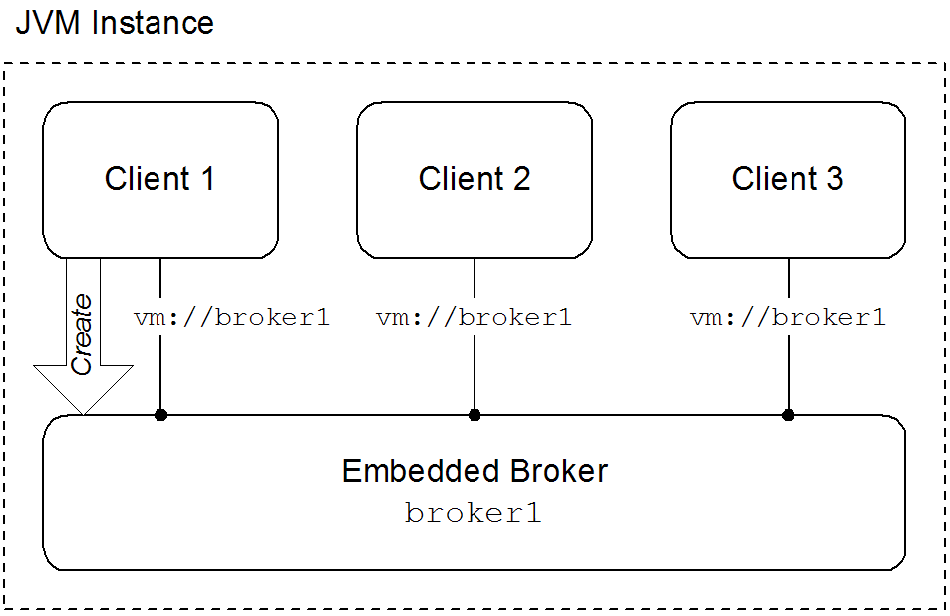
Embedded brokers
- explicitly defining the broker in the application's configuration
- explicitly creating the broker using the Java APIs
- automatically when the first client attempts to connect to it using the VM transport
waitForStart option or the create=false option to manage how the VM transport determines when to create a new embedded broker.
Using the VM transport
- simpleThe simple VM URI is used in most situations. It allows you to specify the name of the embedded broker to which the client will connect. It also allows for some basic broker configuration.Example 5.1, “Simple VM URI Syntax” shows the syntax for a simple VM URI.
Example 5.1. Simple VM URI Syntax
vm://BrokerName?TransportOptions
vm://BrokerName?TransportOptionsCopy to Clipboard Copied! Toggle word wrap Toggle overflow - BrokerName specifies the name of the embedded broker to which the client connects.
- TransportOptions specifies the configuration for the transport. They are specified in the form of a query list. For details about the available options see the Connection Reference.ImportantThe broker configuration options specified on the VM URI are only meaningful if the client is responsible for instantiating the embedded broker. If the embedded broker is already started, the transport will ignore the broker configuration properties.
- advancedThe advanced VM URI provides you full control over how the embedded broker is configured. It uses a broker configuration URI similar to the one used by the administration tool to configure the embedded broker.Example 5.2, “Advanced VM URI Syntax” shows the syntax for an advanced VM URI.
Example 5.2. Advanced VM URI Syntax
vm://(BrokerConfigURI)?TransportOptions
vm://(BrokerConfigURI)?TransportOptionsCopy to Clipboard Copied! Toggle word wrap Toggle overflow - BrokerConfigURI is a broker configuration URI.
- TransportOptions specifies the configuration for the transport. They are specified in the form of a query list. For details about the available options see the Connection Reference.
Examples
broker1.
Example 5.3. Basic VM URI
vm://broker1
vm://broker1Example 5.4. Simple URI with broker options
vm://broker1?broker.persistent=false
vm://broker1?broker.persistent=falseExample 5.5. Advanced VM URI
vm:(broker:(tcp://localhost:6000)?persistent=false)?marshal=false
vm:(broker:(tcp://localhost:6000)?persistent=false)?marshal=falseChapter 6. Peer Protocol
Abstract
Overview
Figure 6.1. Peer Protocol Endpoints with Embedded Brokers
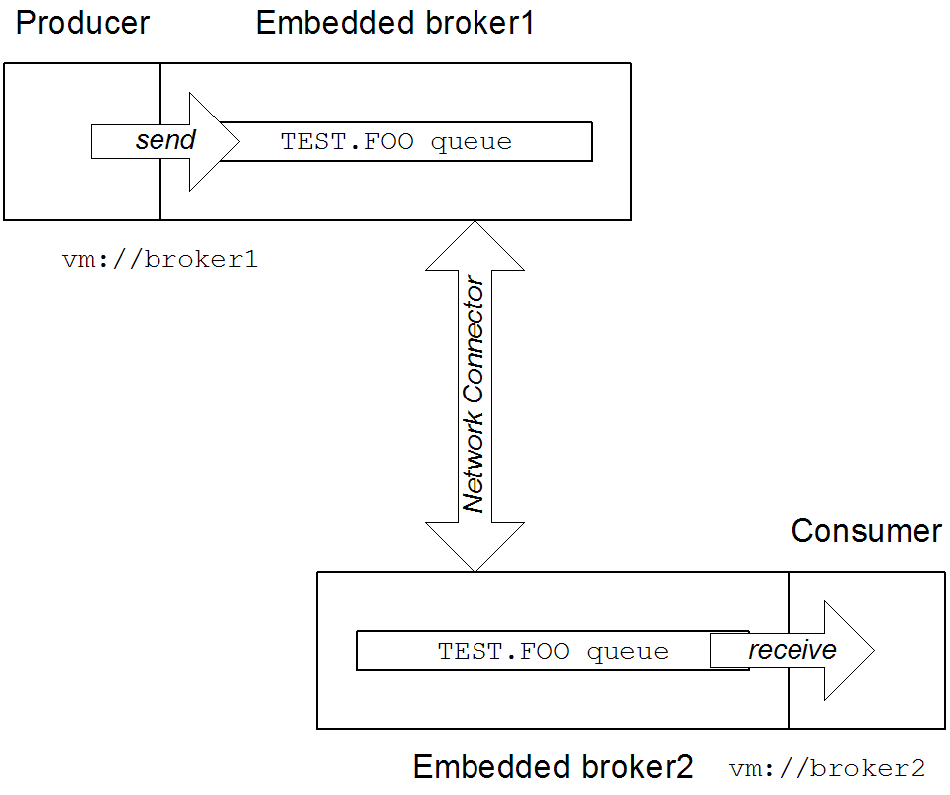
broker1, by connecting to the local VM endpoint, vm://broker1. The embedded brokers, broker1 and broker2, are linked together using a network connector which allows messages to flow in either direction between the brokers. When the producer sends a message to the queue, broker1 pushes the message across the network connector to broker2. The consumer receives the message from broker2.
Peer endpoint discovery
URI syntax
peer URI must conform to the following syntax:
peer://PeerGroup/BrokerName?BrokerOptions
peer://PeerGroup/BrokerName?BrokerOptionsSample URI
groupA, and creates an embedded broker with broker name, broker1:
peer://groupA/broker1?persistent=false
peer://groupA/broker1?persistent=falseChapter 7. Message Prefetch Behavior
Overview
Figure 7.1. Consumer Prefetch Limit
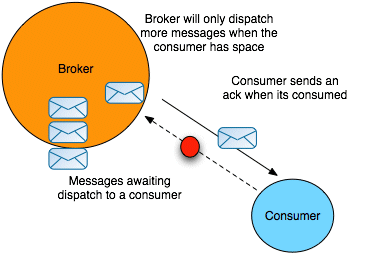
Consumer specific prefetch limits
| Consumer Type | Property | Default |
|---|---|---|
| Queue consumer | queuePrefetch | 1000 |
| Queue browser | queueBrowserPrefetch | 500 |
| Topic consumer | topicPrefetch | 32766 |
| Durable topic subscriber | durableTopicPrefetch | 100 |
Setting prefetch limits per broker
destinationPolicy element as a child of the broker element in the broker's configuration, as shown in Example 7.1, “Configuring a Destination Policy”.
Example 7.1. Configuring a Destination Policy
queue. is set to 1 (the > character is a wildcard symbol that matches one or more name segments); and the topic prefetch limit for all topics whose names start with topic. is set to 1000.
Setting prefetch limits per connection
ActiveMQConnectionFactory instance. Example 7.2, “Setting Prefetch Limit Properties Per Connection” shows how to specify the prefetch limits for all consumer types on a connection factory.
Example 7.2. Setting Prefetch Limit Properties Per Connection
Setting prefetch limits per destination
TEST.QUEUE with a prefetch limit of 10. The option is set as a destination option as part of the URI used to create the queue.
Example 7.3. Setting the Prefect Limit on a Destination
Queue queue = new ActiveMQQueue("TEST.QUEUE?consumer.prefetchSize=10");

MessageConsumer consumer = session.createConsumer(queue);
Queue queue = new ActiveMQQueue("TEST.QUEUE?consumer.prefetchSize=10");

MessageConsumer consumer = session.createConsumer(queue);Disabling the prefetch extension logic
Example 7.4. Disabling the Prefetch Extension
Chapter 8. Message Redelivery
Overview
- A transacted session is used and
rollback()is called. - A transacted session is closed before commit is called.
- A session is using
CLIENT_ACKNOWLEDGEandSession.recover()is called.
- On the broker, using the broker's redelivery plug-in,
- On the connection factory, using the connection URI,
- On the connection, using the
RedeliveryPolicy, - On destinations, using the connection's
RedeliveryPolicyMap.
Redelivery properties
| Option | Default | Description |
|---|---|---|
collisionAvoidanceFactor | 0.15 | Specifies the percentage of range of collision avoidance. |
maximumRedeliveries | 6 | Specifies the maximum number of times a message will be redelivered before it is considered a poisoned pill and returned to the broker so it can go to a dead letter queue. -1 specifies an infinite number of redeliveries. |
maximumRedeliveryDelay | -1 | Specifies the maximum delivery delay that will be applied if the useExponentialBackOff option is set. -1 specifies that no maximum be applied. |
initialRedeliveryDelay | 1000 | Specifies the initial redelivery delay in milliseconds. |
redeliveryDelay | 1000 | Specifies the delivery delay, in milliseconds, if initialRedeliveryDelay is 0. |
useCollisionAvoidance | false | Specifies if the redelivery policy uses collision avoidance. |
useExponentialBackOff | false | Specifies if the redelivery time out should be increased exponentially. |
backOffMultiplier | 5 | Specifies the back-off multiplier. |
Configuring the broker's redelivery plug-in
maximumRedeliveries to 0 on the destination).
redeliveryPlugin element. As shown in Example 8.1, “Configuring the Redelivery Plug-In” this element is a child of the broker's plugins element and contains a policy map defining the desired behavior.
Example 8.1. Configuring the Redelivery Plug-In
- 1
- The
redeliveryPolicyEntrieselement contains a list ofredeliveryPolicyelements that configures redelivery policies on a per-destination basis. - 2
- The
defaultEntryelement contains a singleredeliveryPolicyelement that configures the redelivery policy used by all destinations that do not match the one with a specific policy.
Configuring the redelivery using the broker URI
Example 8.2. Setting the Redelivery Policy using a Connection URI
ActiveMQConnectionFactory connectionFactory =
  new ActiveMQConnectionFactory("tcp://localhost:61616?jms.redeliveryPolicy.maximumRedeliveries=4");
ActiveMQConnectionFactory connectionFactory =
new ActiveMQConnectionFactory("tcp://localhost:61616?jms.redeliveryPolicy.maximumRedeliveries=4");Setting the redelivery policy on a connection
ActiveMQConnection class' getRedeliveryPolicy() method allows you to configure the redelivery policy for all consumer's using that connection.
getRedeliveryPolicy() returns a RedeliveryPolicy object that controls the redelivery policy for the connection. The RedeliveryPolicy object has setters for each of the properties listed in Table 8.1, “Redelivery Policy Options”.
Example 8.3. Setting the Redelivery Policy for a Connection
Setting the redelivery policy on a destination
ActiveMQConnection class' getRedeliveryPolicyMap() method returns a RedeliveryPolicyMap object that is a map of RedeliveryPolicy objects with destination names as the key.
RedeliveryPolicy object controls the redelivery policy for all destinations whose name match the destination name specified in the map's key.
FRED.JOE can only be redelivered 4 times.
Example 8.4. Setting the Redelivery Policy for a Destination
Index
A
- ActiveMQConnection, The connection, Setting the redelivery policy on a connection, Setting the redelivery policy on a destination
- ActiveMQConnectionFactory, The connection factory
B
- backOffMultiplier, Redelivery properties
C
- collisionAvoidanceFactor, Redelivery properties
- Connection, The connection
- ConnectionFactory, The connection factory
D
- durableTopicPrefetch, Consumer specific prefetch limits
E
- embedded broker, Embedded brokers
G
- getRedeliveryPolicy(), Setting the redelivery policy on a connection
- getRedeliveryPolicyMap(), Setting the redelivery policy on a destination
I
- initialRedeliveryDelay, Redelivery properties
M
- maximumRedeliveries, Redelivery properties
- maximumRedeliveryDelay, Redelivery properties
P
- prefetch
- per broker, Setting prefetch limits per broker
- per connection, Setting prefetch limits per connection
- per destination, Setting prefetch limits per destination
Q
- queueBrowserPrefetch, Consumer specific prefetch limits
- queuePrefetch, Consumer specific prefetch limits
R
- redeliveryDelay, Redelivery properties
- redeliveryPlugin, Configuring the broker's redelivery plug-in
- RedeliveryPolicy, Setting the redelivery policy on a connection, Setting the redelivery policy on a destination
- RedeliveryPolicyMap, Setting the redelivery policy on a destination
T
- topicPrefetch, Consumer specific prefetch limits
U
- useCollisionAvoidance, Redelivery properties
- useExponentialBackOff, Redelivery properties
- usePrefetchExtension, Disabling the prefetch extension logic
V
- VM
- advanced URI, Using the VM transport
- broker name, Using the VM transport
- create, Embedded brokers
- embedded broker, Embedded brokers
- simple URI, Using the VM transport
- waitForStart, Embedded brokers
- VM URI
- advanced, Using the VM transport
- simple, Using the VM transport
Legal Notice
Trademark Disclaimer
Legal Notice
Third Party Acknowledgements
- JLine (http://jline.sourceforge.net) jline:jline:jar:1.0License: BSD (LICENSE.txt) - Copyright (c) 2002-2006, Marc Prud'hommeaux
mwp1@cornell.eduAll rights reserved.Redistribution and use in source and binary forms, with or without modification, are permitted provided that the following conditions are met:- Redistributions of source code must retain the above copyright notice, this list of conditions and the following disclaimer.
- Redistributions in binary form must reproduce the above copyright notice, this list of conditions and the following disclaimer in the documentation and/or other materials provided with the distribution.
- Neither the name of JLine nor the names of its contributors may be used to endorse or promote products derived from this software without specific prior written permission.
THIS SOFTWARE IS PROVIDED BY THE COPYRIGHT HOLDERS AND CONTRIBUTORS "AS IS" AND ANY EXPRESS OR IMPLIED WARRANTIES, INCLUDING, BUT NOT LIMITED TO, THE IMPLIED WARRANTIES OF MERCHANTABILITY AND FITNESS FOR A PARTICULAR PURPOSE ARE DISCLAIMED. IN NO EVENT SHALL THE COPYRIGHT OWNER OR CONTRIBUTORS BE LIABLE FOR ANY DIRECT, INDIRECT, INCIDENTAL, SPECIAL, EXEMPLARY, OR CONSEQUENTIAL DAMAGES (INCLUDING, BUT NOT LIMITED TO, PROCUREMENT OF SUBSTITUTE GOODS OR SERVICES; LOSS OF USE, DATA, OR PROFITS; OR BUSINESS INTERRUPTION) HOWEVER CAUSED AND ON ANY THEORY OF LIABILITY, WHETHER IN CONTRACT, STRICT LIABILITY, OR TORT (INCLUDING NEGLIGENCE OR OTHERWISE) ARISING IN ANY WAY OUT OF THE USE OF THIS SOFTWARE, EVEN IF ADVISED OF THE POSSIBILITY OF SUCH DAMAGE. - Stax2 API (http://woodstox.codehaus.org/StAX2) org.codehaus.woodstox:stax2-api:jar:3.1.1License: The BSD License (http://www.opensource.org/licenses/bsd-license.php)Copyright (c) <YEAR>, <OWNER> All rights reserved.Redistribution and use in source and binary forms, with or without modification, are permitted provided that the following conditions are met:
- Redistributions of source code must retain the above copyright notice, this list of conditions and the following disclaimer.
- Redistributions in binary form must reproduce the above copyright notice, this list of conditions and the following disclaimer in the documentation and/or other materials provided with the distribution.
THIS SOFTWARE IS PROVIDED BY THE COPYRIGHT HOLDERS AND CONTRIBUTORS "AS IS" AND ANY EXPRESS OR IMPLIED WARRANTIES, INCLUDING, BUT NOT LIMITED TO, THE IMPLIED WARRANTIES OF MERCHANTABILITY AND FITNESS FOR A PARTICULAR PURPOSE ARE DISCLAIMED. IN NO EVENT SHALL THE COPYRIGHT HOLDER OR CONTRIBUTORS BE LIABLE FOR ANY DIRECT, INDIRECT, INCIDENTAL, SPECIAL, EXEMPLARY, OR CONSEQUENTIAL DAMAGES (INCLUDING, BUT NOT LIMITED TO, PROCUREMENT OF SUBSTITUTE GOODS OR SERVICES; LOSS OF USE, DATA, OR PROFITS; OR BUSINESS INTERRUPTION) HOWEVER CAUSED AND ON ANY THEORY OF LIABILITY, WHETHER IN CONTRACT, STRICT LIABILITY, OR TORT (INCLUDING NEGLIGENCE OR OTHERWISE) ARISING IN ANY WAY OUT OF THE USE OF THIS SOFTWARE, EVEN IF ADVISED OF THE POSSIBILITY OF SUCH DAMAGE. - jibx-run - JiBX runtime (http://www.jibx.org/main-reactor/jibx-run) org.jibx:jibx-run:bundle:1.2.3License: BSD (http://jibx.sourceforge.net/jibx-license.html) Copyright (c) 2003-2010, Dennis M. Sosnoski.All rights reserved.Redistribution and use in source and binary forms, with or without modification, are permitted provided that the following conditions are met:
- Redistributions of source code must retain the above copyright notice, this list of conditions and the following disclaimer.
- Redistributions in binary form must reproduce the above copyright notice, this list of conditions and the following disclaimer in the documentation and/or other materials provided with the distribution.
- Neither the name of JiBX nor the names of its contributors may be used to endorse or promote products derived from this software without specific prior written permission.
THIS SOFTWARE IS PROVIDED BY THE COPYRIGHT HOLDERS AND CONTRIBUTORS "AS IS" AND ANY EXPRESS OR IMPLIED WARRANTIES, INCLUDING, BUT NOT LIMITED TO, THE IMPLIED WARRANTIES OF MERCHANTABILITY AND FITNESS FOR A PARTICULAR PURPOSE ARE DISCLAIMED. IN NO EVENT SHALL THE COPYRIGHT OWNER OR CONTRIBUTORS BE LIABLE FOR ANY DIRECT, INDIRECT, INCIDENTAL, SPECIAL, EXEMPLARY, OR CONSEQUENTIAL DAMAGES (INCLUDING, BUT NOT LIMITED TO, PROCUREMENT OF SUBSTITUTE GOODS OR SERVICES; LOSS OF USE, DATA, OR PROFITS; OR BUSINESS INTERRUPTION) HOWEVER CAUSED AND ON ANY THEORY OF LIABILITY, WHETHER IN CONTRACT, STRICT LIABILITY, OR TORT (INCLUDING NEGLIGENCE OR OTHERWISE) ARISING IN ANY WAY OUT OF THE USE OF THIS SOFTWARE, EVEN IF ADVISED OF THE POSSIBILITY OF SUCH DAMAGE. - JavaAssist (http://www.jboss.org/javassist) org.jboss.javassist:com.springsource.javassist:jar:3.9.0.GA:compileLicense: MPL (http://www.mozilla.org/MPL/MPL-1.1.html)
- HAPI-OSGI-Base Module (http://hl7api.sourceforge.net/hapi-osgi-base/) ca.uhn.hapi:hapi-osgi-base:bundle:1.2License: Mozilla Public License 1.1 (http://www.mozilla.org/MPL/MPL-1.1.txt)

'%20d='M201.5%20305.5c-13.8%200-24.9-11.1-24.9-24.6%200-13.8%2011.1-24.9%2024.9-24.9%2013.6%200%2024.6%2011.1%2024.6%2024.9%200%2013.6-11.1%2024.6-24.6%2024.6zM504%20256c0%20137-111%20248-248%20248S8%20393%208%20256%20119%208%20256%208s248%20111%20248%20248zm-132.3-41.2c-9.4%200-17.7%203.9-23.8%2010-22.4-15.5-52.6-25.5-86.1-26.6l17.4-78.3%2055.4%2012.5c0%2013.6%2011.1%2024.6%2024.6%2024.6%2013.8%200%2024.9-11.3%2024.9-24.9s-11.1-24.9-24.9-24.9c-9.7%200-18%205.8-22.1%2013.8l-61.2-13.6c-3-.8-6.1%201.4-6.9%204.4l-19.1%2086.4c-33.2%201.4-63.1%2011.3-85.5%2026.8-6.1-6.4-14.7-10.2-24.1-10.2-34.9%200-46.3%2046.9-14.4%2062.8-1.1%205-1.7%2010.2-1.7%2015.5%200%2052.6%2059.2%2095.2%20132%2095.2%2073.1%200%20132.3-42.6%20132.3-95.2%200-5.3-.6-10.8-1.9-15.8%2031.3-16%2019.8-62.5-14.9-62.5zM302.8%20331c-18.2%2018.2-76.1%2017.9-93.6%200-2.2-2.2-6.1-2.2-8.3%200-2.5%202.5-2.5%206.4%200%208.6%2022.8%2022.8%2087.3%2022.8%20110.2%200%202.5-2.2%202.5-6.1%200-8.6-2.2-2.2-6.1-2.2-8.3%200zm7.7-75c-13.6%200-24.6%2011.1-24.6%2024.9%200%2013.6%2011.1%2024.6%2024.6%2024.6%2013.8%200%2024.9-11.1%2024.9-24.6%200-13.8-11-24.9-24.9-24.9z'/%3e%3c/svg%3e)