 Red Hat Summit
Product Introduction
Red Hat AMQ
How can Red Hat AMQ help integrate your environment
Version 6.3
Copyright © 2011-2017 Red Hat, Inc. and/or its affiliates.
23 Oct 2020
Abstract
This guide introduces you the features of Red Hat AMQ and provides some insight into how they can be used to solve integration problems.
Chapter 1. What is JBoss A-MQ?
Copy linkLink copied to clipboard!
Abstract
Red Hat AMQ, based on Apache ActiveMQ, is a standards compliant messaging system that is tailored for use in mission critical applications. It provides unmatched flexibility in the types of applications it can facilitate. It has a small footprint, but also can be configured to handle high-volume reliable message delivery.
Overview
Copy linkLink copied to clipboard!
Red Hat AMQ, based on Apache ActiveMQ, is a JMS 1.1-compliant messaging system. It consists of a broker and client-side libraries that enable remote communication among distributed client applications. AMQ provides numerous connectivity options and can communicate with a wide variety of non-JMS clients through its support of the OpenWire and STOMP wire protocols.
Broker
Copy linkLink copied to clipboard!
The broker is the heart of a messaging system. It handles the exchange of messages between messaging clients. It does so by managing the transport connections used for communication with messaging clients, coordinating with other brokers, managing the database for persistent messages, monitoring and managing various components of the messaging system, and so on.
Messaging clients
Copy linkLink copied to clipboard!
Client applications send or receive messages. Message producers create and send messages. Message consumers receive and process them. JMS clients use the JMS API to interact with the broker. Non-JMS clients use any of AMQ's other client APIs to interact with the broker.
Messages
Copy linkLink copied to clipboard!
Messages are the means by which client applications transmit business data and events. Messages can contain either textual or binary payloads. They also contain metadata, which provides additional information about the message. Applications can use the metadata programmatically to modify or fine tune message delivery or administratively to monitor the health of the messaging system. For details, see Section 2.2, “JMS Message Basics”.
Features
Copy linkLink copied to clipboard!
Besides providing the features required by the JMS 1.1 specification, AMQ provides additional features and enhancements that support the special needs of large, complex enterprise messaging applications, including:
- centralized configuration for brokers
- centralized provisioning of networks brokers
- centralized provisioning of master/slave groups
- high-speed journalling
- fail-over capabilities
- blob messages
- extensive connectivity options
For details, see Chapter 3, Red Hat JBoss A-MQ Features.
Chapter 2. Introduction to JMS
Copy linkLink copied to clipboard!
Abstract
The JMS specification defines a standardized means for transmitting messages between distributed applications. It defines a specific message anatomy, a set of interactions between client applications and the message broker, and a specific set of required features.
2.1. Standard JMS Features
Copy linkLink copied to clipboard!
Overview
Copy linkLink copied to clipboard!
Red Hat AMQ adheres to the JMS 1.1 specification in implementing all of the standard JMS features including:
- point-to-point messaging
- publish and subscribe messaging
- request/reply messaging
- persistent and non-persistent messages
- JMS transactions
- XA transactions
Point-to-point messaging
Copy linkLink copied to clipboard!
Point-to-point (PTP) messaging uses queue destinations. Queues handle messages in a first in, first out (FIFO) manner. Messages are consumed from the queue in the order in which they are received. Once a message is consumed from a queue it is removed from the queue.
PTP messaging is similar to person-to-person email sent and received through a mail server. Each message dispatched to a queue is delivered only once to only one receiver. The queue stores all messages until they either expire or are retrieved by a receiver.
Clients that produce messages are referred to as senders. Messages are sent either synchronously or asynchronously. When sending messages synchronously, the producer waits until the broker, not a receiver, acknowledges receipt of the messages.
Clients that consume messages are referred to as receivers. Receivers consume messages from the end of the queue. Multiple receivers can register concurrently on the same queue, but only one of them will receive any given message. It is the receiver's responsibility to acknowledge the receipt of a message. By default, AMQ guarantees once-only delivery of any message to the next available, registered consumer, thus distributing messages in a quasi round-robin fashion across them.
Publish/subscribe messaging
Copy linkLink copied to clipboard!
Publish and subscribe (Pub/Sub) messaging uses topic destinations. Topics distribute published messages to any clients that are currently subscribed and waiting to consume them. Once all of the clients that are subscribed to the topic have consumed a message it is removed from the destination.
Pub/sub messaging is similar to a mailing list subscription, where all clients currently subscribed to the list receive every message sent to it. Any message dispatched to a topic is automatically delivered to all of the topic's subscribers.
Clients that produce messages are referred to as publishers. Messages are sent either synchronously or asynchronously. When sending messages synchronously, the producer waits until the broker, not a consumer, acknowledges receipt of the messages.
Clients that consume messages are referred to as subscribers. Topics typically have multiple subscribers concurrently registered to receive messages from it. Typically, subscribers must be actively connected to a topic to receive published messages. They will miss messages that are published while they are disconnected.
To ensure that they do not miss messages due to connectivity issues, a subscriber can register as a durable subscriber. The topic will store messages for a durable subscriber and deliver the messages when the durable subscriber reconnects.
Request/reply messaging
Copy linkLink copied to clipboard!
AMQ supports the request/reply messaging paradigm, which provides a mechanism for a consumer to inform the producer whether it has successfully retrieved and processed a message dispatched to a queue or a topic destination.
AMQ's request/reply mechanism implements a two-way conversation in which a temporary destination is used for the reply message. The producer specifies the temporary destination in the request message's
JMSReplyTo header, and the consumer identifies the request message to which the reply corresponds using the reply message's JMSCorrelationID property.
Persistent and non-persistent messages
Copy linkLink copied to clipboard!
Persistent messaging ensures no message is lost due to a system failure, a broker failure, or an inactive consumer. This is so because the broker always stores persistent messages in its stable message store before dispatching them to their intended destination. This guarantee comes at a cost to performance. Persistent messages are sent synchronously—producers block until the broker confirms receipt and storage of each message. Writes to disk, typical for a message store, are slow compared to network transmissions.
Because non-persistent messages are sent asynchronously and are not written to disk by the broker, they are significantly faster than persistent messages. But non-persistent messages can be lost when the system or broker fails or when a consumer becomes inactive before the broker dispatches the messages to their destination.
The default behavior of JMS brokers and consumers is to use persistent messaging. JBoss A-MQ defaults to storing persistent messages in a lightweight, file-based message store. The default is intended to provide persistence at the lowest cost. If you need to use a more robust (RDBMS) message store or want to forgo persistence in favor of performance, you can change the defaults.
There are several ways to alter the default persistence behavior when using AMQ:
- disable persistence from a message producer by changing its default delivery mode to non-persistent
- disable persistence for a specific message by changing the messages delivery mode to non-persistent
- change the message store the broker uses to persist messagesAMQ provides a number of persistence adapters for connecting to different message stores.
- deactivate the broker's persistence mechanismWarningDeactivating the broker's persistence mechanism means that no messages will be persisted even if their delivery mode is set to persistent. This step should only be used for testing or situations where persistence will never be needed.
For details, see the guide, Configuring Broker Persistence, on the Red Hat Customer Portal.
JMS transactions
Copy linkLink copied to clipboard!
AMQ supports JMS transactions that occur between a client and broker.
A transaction consists of a number of messages grouped into a single unit. If any one of the messages in the transaction fails, the producer can rollback the entire transaction, so that the broker flushes all of the transacted messages. If all messages in the transaction succeed, the producer can commit the entire transaction, so that the broker dispatches all of the transacted messages.
Transactions improve the efficiency of the broker because they enable it to process messages in batch. A batch consists of all messages a producer sends to the broker before calling
commit(). The broker caches all of these messages in a transaction store until it receives the commit command, then dispatches all of them, in batch, to their destination.
For details, see ActiveMQ in Action (Snyder, Bosanac, and Davies).
XA transactions
Copy linkLink copied to clipboard!
AMQ supports XA transactions that occur between a client and broker.
XA transactions work similarly to JMS transactions, except XA transactions use a two-phase commit scheme and require an XA Transaction Manager and persistent messaging. The Transaction Manager and two-phase commit scheme are used because the broker is required to write every message in an XA transaction to a persistent message store, rather than caching them locally, until the producer calls
commit().
XA transactions are recommended when you are using more than one resource, such as reading a message and writing to a database. This is so because XA transactions provide atomic transactions for multiple transactional resources, which prevents duplicate messages resulting from system failures.
For more information, see ActiveMQ in Action (Snyder, Bosanac, and Davies) and What are XA transactions? What is a XA datasource?.
2.2. JMS Message Basics
Copy linkLink copied to clipboard!
Overview
Copy linkLink copied to clipboard!
Messages are the backbone of a messaging system and the most important part of the JMS specification. A messages is a self-contained autonomous entity that may be resent several times across many clients throughout its life span. Each consumer along a message's route will examine it and, depending on its contents, may execute some business logic, modify it, or create new messages to accomplish a communicated task.
Message anatomy
Copy linkLink copied to clipboard!
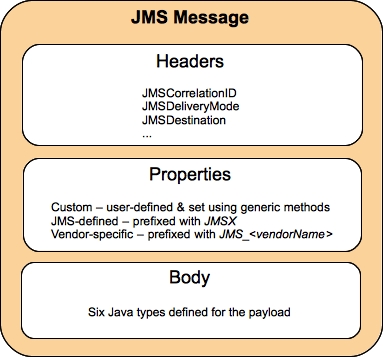
As shown in Figure 2.1, “Anatomy of a JMS message”, a JMS message consists of three components:
- headers
- properties
- body
Figure 2.1. Anatomy of a JMS message
Message body
Copy linkLink copied to clipboard!
The body component contains the payload, which can be textual or binary data, as specified by using one of the six supported Java message types:
| Message Type | Description |
|---|---|
Message | Base message type. Payload is empty; only headers and properties are active. Typically used for simple event notification. |
TextMessage | Payload of type String. Typically used to transmit simple text and XML data. |
MapMessage | Payload of name/value pairs, with names of type String and values of Java primitive type. |
BytesMessage | Payload is an array of uninterpreted bytes. |
StreamMessage | Payload is a stream of Java primitive types, filled and read sequentially. |
ObjectMessage | Payload is a serializable Java object. Usually used for complex Java objects, but also supports Java collections. |
Message headers
Copy linkLink copied to clipboard!
Message headers contain a predefined set of metadata that are used to communicate information about a message between the different parties that handle the message. The header properties are identified by a
JMS prefix and outlined in the JMS specification.
A number of the headers are automatically assigned by the producer's
send() method and some are automatically set by the broker. The remaining headers are left to the user to set when a message is created.
Message properties
Copy linkLink copied to clipboard!
Message properties, like message headers, provide metadata about a message to the different parties that handle the message. The difference between message headers and message properties is that message properties are not standardized. They allow JMS providers and client applications to add their own metadata to a message. A messaging client does not need to understand the properties to consume a message containing them. Unrecognized properties are simply ignored.
Client applications can create user-defined properties based on Java primitive types. The JMS API also provides generic methods for working with these user-defined properties.
Red Hat AMQ has a number of vendor specific message properties that are used to control how the broker treats messages, The AMQ specific properties are identified by the
JMSActiveMQBroker prefix.
There are a few JMS-defined properties that are identified by the
JMSX prefix. Vendors are not required to support all of these properties.
For a list of supported headers and properties, see ActiveMQ in Action (Snyder, Bosanac, and Davies).
2.3. JMS Development
Copy linkLink copied to clipboard!
Overview
Copy linkLink copied to clipboard!
Developing applications using the JMS APIs is a straightforward process. The APIs facilitate the creation of objects that mitigate the interface between client applications and the message broker. Once connected to a broker, clients can create, send and receive messages.
Basic application components
Copy linkLink copied to clipboard!
A JMS application typically consist of these basic interfaces and classes:
- Connection factory
- Connection factories are administered objects that clients use to create connections to a message broker. You can optimize some messaging characteristics by enabling, disabling, or otherwise modifying the values of certain connection factory properties.
- Connection
- Connections are the objects clients use to specify a transport protocol and credentials for sustained interaction with a broker.
- Session
- Sessions are created by a client on a connection established with a broker. They define whether its messages will be transacted and the acknowledgement mode when they are not. Clients can create multiple sessions on a single connection.
- Destinations
- Destinations are created by a client on a per-session basis. They are client-side representations of the queue or topic to which messages are sent. The message broker maintains its own representations of the destinations as well.
- Producer
- Producers are client-side objects that create and send messages to a broker. They are instances of the
MessageProducerinterface and are created on a per-session basis.TheMessageProducerinterface provides methods not only for sending messages, but also for setting various message headers, includingJMSDeliveryModewhich controls message persistence,JMSPrioritywhich controls message priority, andJMSExpirationwhich controls a message's lifespan. - Consumer
- Consumers are client-side objects that process messages retrieved from a broker. They are instances of the
MessageConsumerinterface and are created on a per-session basis.TheMessageConsumerinterface can consume messages synchronously by using one of theMessageConsumer.receive()methods, or asynchronously by registering aMessageListenerwith theMessageConsumer.setMessageListener()method. With aMessageListenerregistered on a destination, messages arriving at the destination invoke the consumer'sMessageListener.onMessage()method, freeing the consumer from having to repeatedly poll the destination for messages. - Messages
- Messages are the backbone of a messaging system. They are objects that contain not only the data payload, but also the required header and optional properties needed to transfer them from one client application to another. See Section 2.2, “JMS Message Basics”.
Development steps
Copy linkLink copied to clipboard!
Figure 2.2, “Messaging sequence” shows the typical sequence of events involved in sending or receiving messages in a Red Hat AMQ client application.
Figure 2.2. Messaging sequence
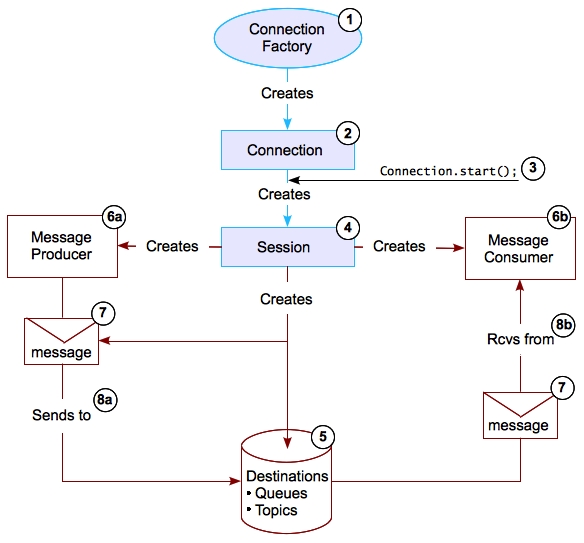
The following procedure shows how to implement the sequence of events shown in Figure 2.2, “Messaging sequence”:
- Get a connection factory.The process for getting a connection factory depends on your environment. It is typical to use JNDI to obtain the connection factory. AMQ allows you to instantiate connection factories directly in consumer code or obtain connection factories using Spring in addition to using JNDI.
- Create a connection from the connection factory as shown in Example 2.1, “Getting a Connection”.
Example 2.1. Getting a Connection
connection=connectionFactory.createConnection();
connection=connectionFactory.createConnection();Copy to Clipboard Copied! Toggle word wrap Toggle overflow - Start the connection using the connection's
start()method. - Create a session from the connection.
Example 2.2. Creating a Session
session=connection.createSession(false,
                                 Session.AUTO_ACKNOWLEDGE);
session=connection.createSession(false, Session.AUTO_ACKNOWLEDGE);Copy to Clipboard Copied! Toggle word wrap Toggle overflow - Create a destination from the session.Example 2.3, “Creating a Queue” shows code for creating a queue called
foo.Example 2.3. Creating a Queue
destination=session.createQueue("FOO.QUEUE");destination=session.createQueue("FOO.QUEUE");Copy to Clipboard Copied! Toggle word wrap Toggle overflow - Create objects for producing and consuming messages.
- Create a producer as shown in Example 2.4, “Creating a Message Producer”.
Example 2.4. Creating a Message Producer
producer=session.createProducer(destination);
producer=session.createProducer(destination);Copy to Clipboard Copied! Toggle word wrap Toggle overflow - Create a consumer as shown in Example 2.5, “Creating a Consumer”.
Example 2.5. Creating a Consumer
consumer=session.createConsumer(destination);
consumer=session.createConsumer(destination);Copy to Clipboard Copied! Toggle word wrap Toggle overflow
- Create a message from the session object.Example 2.6, “Creating a Text Message” shows code for creating a text message.
Example 2.6. Creating a Text Message
message=session.createTextMessage("This is a foo test.");message=session.createTextMessage("This is a foo test.");Copy to Clipboard Copied! Toggle word wrap Toggle overflow - Send and receive messages.
- Send messages from the producer as shown in Example 2.7, “Sending a Message”.
Example 2.7. Sending a Message
producer.send(message);
producer.send(message);Copy to Clipboard Copied! Toggle word wrap Toggle overflow - Receive messages from the consumer.Example 2.8, “Receiving a Message” shows code for synchronously receiving a text message.
Example 2.8. Receiving a Message
message = (TextMessage)consumer.receive();
message = (TextMessage)consumer.receive();Copy to Clipboard Copied! Toggle word wrap Toggle overflow
- Close all JMS resources.
Chapter 3. Red Hat JBoss A-MQ Features
Copy linkLink copied to clipboard!
Abstract
Red Hat AMQ extends the basic JMS feature set to enable developers to build messaging applications that are flexible, highly available, reliable, scalable, highly performant, and easily administered.
3.1. Flexibility
Copy linkLink copied to clipboard!
Overview
Copy linkLink copied to clipboard!
Red Hat AMQ provides a variety of ways for building and deploying messaging applications including:
- support for a variety of transport protocols
- APIs for non-Java clients
- deployment and container options
- specialized destination types
Connectivity options
Copy linkLink copied to clipboard!
AMQ provides a variety network protocols that enable producers and consumers to communicate with a broker:
- OpenWire—The default wire protocol used to serialize data for transmission over the network connection. It uses a binary encoding format. OpenWire supports native JMS client applications and provides client libraries for C, C++, and .NET.
- Extensive Messaging and Presence Protocol (XMPP)—Enables instant messaging clients to communicate with the broker.
- Hypertext Transfer Protocol/Hypertext Transfer Protocol over SSL (HTTP/S)—Favored protocol for dealing with a firewall inserted between the broker and its clients.
- IP multicast—Provides one-to-many communications over an IP network. It enables brokers to discover other brokers in setting up a network of brokers, and clients to discover and establish connections with brokers.
- New I/O API (NIO)—Provides better scalability than TCP for client connections to the broker.
- Secure Sockets Layer (SSL)—Provides secure communications between clients and the broker.
- Streaming Text Oriented Messaging Protocol (STOMP)—A platform-neutral protocol that supports clients written in scripting languages (Perl, PHP, Python, and Ruby) in addition to clients written in Java, .NET, C, and C++.
- Transmission Control Protocol (TCP)—For most use cases, this is the default network protocol.
- User Datagram Protocol (UDP)—Also deals with a firewall inserted between the broker and its clients. However, UDP guarantees neither packet delivery nor packet order.
- Virtual Machine (VM)—Provides connection between an embedded broker and its clients.
For details, see the Client Connectivity Guide on the Red Hat Customer Portal.
Client-side APIs
Copy linkLink copied to clipboard!
AMQ provides client-side APIs for variety of programming languages. The language support varies based on the transport connection used by the client.
When using OpenWire you can use the following client APIs:
- C
- C++
- .NET
When using STOMP you can use the following client APIs:
- Perl
- PHP
- Python
- Ruby
Container options
Copy linkLink copied to clipboard!
In addition to being deployed as a standalone Java application, AMQ can be embedded in other Java applications. Embedded brokers can run client and broker functions concurrently in one process. Clients that run in the same processes as an embedded broker can use the VM transport to improve communication speed with the broker. Embedded brokers can still connect to external clients.
Red Hat AMQ can be deployed in a number of JEE and OSGi containers including:
- Red Hat JBoss Fuse
- Apache Tomcat
- Apache Geronimo
- Jetty
- JBoss
- WebSphere
Composite destinations
Copy linkLink copied to clipboard!
Composite destinations provide a mechanism for producers to send the same message to multiple destinations at the same time.
For an enterprise that needs real-time analytics, this feature enables its messaging application to send one message concurrently to many different client applications to process. For example, only one producer need send a single message to the warehouse to request more inventory and, at the same time, to broadcast that message to an in-store monitoring system that tracks customer purchases, current stock levels, and inventory replacement.
A composite destination treats a string of multiple, comma-separated destinations as one destination, but sends messages to each of the individual destinations. Composite destinations must be made up of comma separated lists that that are made up of either all topics or all queues.
For details, see the Client Connectivity Guide on the Red Hat Customer Portal
Virtual destinations
Copy linkLink copied to clipboard!
Virtual destinations provide a mechanism for publishers to broadcast messages via a topic to a pool of receivers subscribing through queues.
To do so, consumers register a subscription to a queue that is backed by a virtual topic, like this:
Consumer.<qname>.VirtualTopic.<tname>.
When the producer publishes messages to the virtual topic, the broker pushes the messages out to each consumer's queue, from which the consumers retrieve them. This feature enables you to failover queue subscribers, to load balance messages across competing queue subscribers, and to use message groups on queue subscribers.
For details, see ActiveMQ in Action (Snyder, Bosanac, and Davies).
3.2. Centralized Configuration, Deployment, and Management
Copy linkLink copied to clipboard!
Abstract
Red Hat AMQ incorporates Fuse Fabric to enable the creation of clusters of brokers called fabrics. When brokers are deployed into a fabric they can be configured, deployed, and managed from a central location. In addition, brokers in a fabric can capitalize on the fabric's ability provide dynamic failover among the brokers in a fabric.
Overview
Copy linkLink copied to clipboard!
Red Hat AMQ allows you deploy a group of brokers into a fabric. All of the brokers in a fabric are managed by a distributed Fabric Ensemble that stores runtime and configuration information for all of the brokers in the fabric. Using this information the ensemble enables you to manage large deployments by:
- automating the configuration of failover groups, networks of brokers, and master/slave groupsThe ensemble knows the connection details for all of the brokers in the fabric and uses that information to configure brokers into different configurations. Because the information is updated in real time, the broker configurations are always correct.
- automating client connection and failover configurationWhen brokers are configured into a fabric, messaging clients can use a special discovery protocol that discovers broker connection details from the fabric's ensemble. The fabric discovery connection will also automatically failover to other brokers in a failover cluster without needing to know any details about what brokers are deployed.
- centralizing configuration informationAll of the configuration for each container in the fabric, including details about which bundles are deployed, are stored in the ensemble. Any of the configurations can be edited from a remote location and directly applied to any container in the fabric.
- simplifying the enforcement of common configuration policiesThe ensemble organizes configuration information into profiles that can inherit from each other. This makes it easy to enforce common policies about how brokers need to be configured using base profiles.
- centralizing management and monitoring functionalityUsing the management console or the AMQ command console you can update configuration profiles, deploy new containers, shutdown containers, and get runtime metrics for any of the containers in the fabric
Anatomy of a fabric
Copy linkLink copied to clipboard!
Figure 3.1, “A Fabric” shows the components of a fabric with seven brokers and an ensemble consisting of three servers.
Figure 3.1. A Fabric
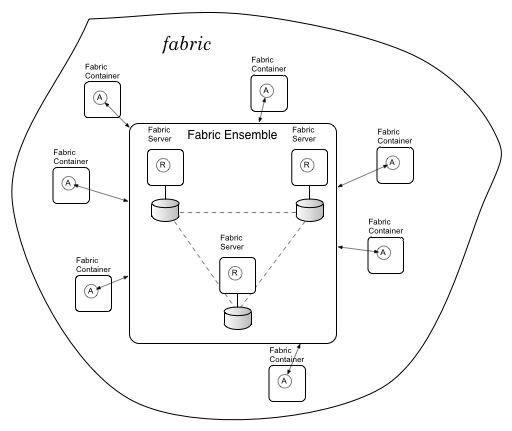
The key components of the fabric are:
- Fabric Ensemble—a group of one or more Fabric Servers that work together to maintain the registry and other services that provide the glue for the fabric
- Fabric Server—a container that hosts the runtime functionality for the ensemble
- Fabric Container—an Apache Karaf container that is managed by a Fabric Agent
- Fabric Agent—a process that communicates with the ensemble to manage the container's configuration
Fabric Ensemble
Copy linkLink copied to clipboard!
The Fabric Ensemble, based on Apache Zookeeper, maintains two databases:
- centralized configuration—stores the configuration profiles for all of the containers in the fabric. The configuration profiles are organized by versions and allow for inheritance between profiles.
- runtime information—stores status for all of the containers in the fabric. The runtime information stored in the database includes the status of the container, the address of any endpoints and messaging destinations exposed by the container, the JMX URL used to monitor the container, the number of client's accessing services deployed in the container, etc.
The ensemble is intended to be distributed across multiple machines to provide a level of high-availability. The servers in the ensemble use a quorum policy to elect the master server and will re-elect a new master when the current master fails. To ensure optimal performance of the ensemble you should deploy an odd number of Fabric Servers to maintain the ensemble. The more servers in the ensemble, the more failures it can endure.
The ensemble is dynamically updated by the Fabric Agents running in the containers that make up the fabric. The agents routinely report the status of their container to the ensemble. Configuration profiles are also updated dynamically when they are edited.
Profiles
Copy linkLink copied to clipboard!
A profile is a collection of configuration data that defines the runtime parameters for a container. It contains details about:
- features—XML specifications that define a collection of bundles, jars, and other artifacts needed to implement a set of functionality
- bundles—the OSGi bundles or Fuse Application Bundles to load into a container
- repositories—the URIs from which the container can download artifacts
- configuration files—OSGI Admin PIDs that are loaded by the container's OSGi admin service and applied to the services running in the container
Profiles are additive and can inherit properties from parent profiles. This makes it possible to create standardized configurations that can be used throughout your deployment. The profile for a specific container will inherit the standard configuration from the base profile and add any specific settings needed to tailor the container for its specific deployment environment.
Profiles are organized into versions. A version is a collection of profiles. Creating a new version copies all of the profiles from the parent version and stores them in a new collection. A Fabric Container can access only one version at a time, so changes made to the profiles in one version will only effect the containers that are assigned to the version being edited. This makes it easy to roll out changes to a fabric incrementally.
Fabric Agents
Copy linkLink copied to clipboard!
A Fabric Agent is the link between the ensemble and a Fabric Container. It communicates with the ensemble to:
- manage a container's configuration and provisioning—the agent regularly checks to see what profiles are assigned to the container and if the container is properly configured and running the appropriate set of services. If there is a discrepancy, the agent updates the container to eliminate the discrepancy. It flushes any extraneous bundles and services and installs any bundles and services that are missing.
- updating the ensemble's runtime information—the agent reports back any changes to the container's runtime status. This includes information about the containers provisioning status, the endpoints and messaging destination exposed by the container, etc.
Working with a fabric
Copy linkLink copied to clipboard!
One of the advantages of a fabric is that you can manage it from any of the containers in the fabric. The fabric command shell interacts directly with the ensemble, so all changes are immediately picked up by all of the containers in the fabric.
You can also use the Web-based Fuse Management Console, included in the AMQ distribution, to work with a fabric. When AMQ is running, the Fuse Management Console is available at
http://localhost:8181. The Fuse Management Console allows you to:
- add containers to a fabric
- create profiles and versions
- edit profiles
- assign profiles to containers
- monitor the health of all containers in a fabric
For AMQ, the Fuse Management Console allows you to manage and monitor broker instances, destinations, and consumers. For example, you can:
- create and delete queues and topics
- inspect all MBeans registered by AMQ
- browse the messages on a queue or topic
- send messages to a queue or topic
- graphically view the producers, destinations, and consumers for all queues or topics or for a single queue or topic
- chart the performance metrics of all queues and topics or for a single queue or topic
3.3. Fault Tolerance
Copy linkLink copied to clipboard!
Overview
Copy linkLink copied to clipboard!
If planned for, disaster scenarios that result in the loss of a message broker need not obstruct message delivery. Making a messaging system fault tolerant involves:
- deploying multiple brokers into a topology that allows one broker to pick up the duties of a failed broker
- configuring clients to fail over to a new broker in the event that its current broker fails
Red Hat AMQ provides mechanisms that make building fault tolerant messaging systems easy.
Master/Slave topologies
Copy linkLink copied to clipboard!
A master/slave topology defines a master broker that actively processes messages and one or more slave brokers that replicate the master broker's state. When the master broker fails, one of the slave brokers takes over, becoming the new master broker. Client applications can reconnect to the new master broker and resume processing as normal.
AMQ supports two types of master/slave clusters:
- Shared file system—the brokers in the cluster use the same file system to maintain their state. The master broker maintains a lock to the file system. Brokers polling for the lock or attempting to connect to the message store after the master is established automatically become slaves.
- Shared database—the brokers in the cluster share the same database. The broker that gets the lock to the database becomes the master. Brokers polling for the lock after the master is established automatically become slaves.
For details, see the Fault Tolerant Messaging guide on the Red Hat Customer Portal.
Failover protocol
Copy linkLink copied to clipboard!
The failover protocol allows you to configure a client with a list of brokers to which it can connect. When one broker fails, a client using the failover protocol will automatically reconnect to a new broker from its list. As long as one of the brokers on the list is running, the client can continue to function uninterrupted.
When combined with brokers deployed in a master/slave topology, the failover protocol is a key part of a fault-tolerant messaging system. The clients will automatically fail over to the slave broker if the master fails. The clients will remain functional and continue working as if nothing had happened.
For more information, see Client Failover in the Fault Tolerant Messaging guide on the Red Hat Customer Portal.
3.4. Reliability
Copy linkLink copied to clipboard!
Overview
Copy linkLink copied to clipboard!
A reliable messaging system guarantees that messages are delivered to their intended recipients in the correct order. JMS guaranteed messaging relies on three mechanisms:
- message autonomy
- store and forward delivery for persistent messages
- message acknowledgments
Red Hat AMQ provides additional features for ensuring reliable messaging, including the recovery of failed messages.
Message redelivery
Copy linkLink copied to clipboard!
AMQ's redelivery policy provides a mechanism for modifying the maximum number of times and the frequency at which the broker attempts to redeliver expired and undeliverable messages.
Normally, the broker tries to redeliver messages to consumers when:
- Using a transacted session, the producer calls
rollback()on the session, or closes before callingcommit(). - With
CLIENT_ACKNOWLEDGEspecified on a transacted session, the producer callsrecover()on the session. - The consumer rejects delivery of a message (as when a message is incorrectly formatted).
You can tune the client's redelivery policy by editing its connection in the broker's configuration file.
For details, see ActiveMQ in Action (Snyder, Bosanac, and Davies).
Dead letter queue
Copy linkLink copied to clipboard!
When a message cannot be delivered to its destination, AMQ sends it to the dead letter queue,
ActiveMQ.DLQ. When a message is sent to the dead letter queue, an advisory message is sent to the topic ActiveMQ.Advisory.MessageDLQd.*.
Messages held in the dead letter queue can be consumed or reviewed by an administrator at a later time. This can help with debugging delivery issues and ensures that messages are not lost.
For details, see ActiveMQ in Action (Snyder, Bosanac, and Davies).
Durable subscribers
Copy linkLink copied to clipboard!
If a subscriber's connection to a topic fails it will typically miss messages that arrive before it can reconnect. To prevent this from happening subscribers can register a durable subscription. A durable subscription instructs the broker to store all messages arriving at the topic while the durable subscriber is disconnected from it. The broker delivers all accumulated messages that have not expired to the durable subscriber when it reconnects to the topic. If the durable subscriber unsubscribes from the topic without first reconnecting, the broker discards all of the subscriber's accumulated messages.
As with nondurable subscriptions, each durable subscriber gets a copy of the messages sent to the topic. For durable messages, the broker saves only one copy of a message in its durable message store. For each durable subscriber, a durable subscription object in the broker's message store maintains a pointer to its next stored message and dispatches a copy of the message to its subscriber.
For details, see ActiveMQ in Action (Snyder, Bosanac, and Davies).
Exclusive consumers
Copy linkLink copied to clipboard!
Messages are consumed off of a queue in FIFO order. If multiple consumers are connected to the queue, there is no way to ensure that any one consumer will receive a particular message or sequence of messages. Using an exclusive consumer, you can direct the broker to select one of a queue's consumers to receive all messages from the queue. If that consumer stops or fails, the broker selects another of the queue's consumers to take its place.
Exclusive consumers can also be used as a distributed locking mechanism. Because messaging is often used to broadcast data from an external resource, you'd probably build redundancy into the system to ensure that the broadcast application continues functioning should individual processes fail. Distributed locks on resources are typically used to limit access of the resource's data to only one process at a time, but they incur overhead and don't work for processes running across multiple machines. In this case, you can employ exclusive consumer functionality to create distributed locks for all processes that access the external resource.
For details, see ActiveMQ in Action (Snyder, Bosanac, and Davies).
Message groups
Copy linkLink copied to clipboard!
This feature enables multiple consumers on the same queue to process, in FIFO order, messages tagged with the same
JMSXGroupID. It also facilitates concurrency as multiple consumers can parallel process different message groups, each identified by a unique JMSXGroupID.
The producer assigns a message to a group by setting the
JMSXGroupID property in the message header. The broker dispatches all messages tagged with the same JMSXGroupID value to a single consumer. If that consumer becomes unavailable, the broker dispatches subsequent messages in the group to another consumer.
Message groups are similar to message selectors, except that the broker selects which consumer receives a particular message group and automatically reassigns the message group to another consumer when the current one becomes unavailable.
For details, see ActiveMQ in Action (Snyder, Bosanac, and Davies).
Retroactive consumers
Copy linkLink copied to clipboard!
This feature provides a caching mechanism that improves reliability without the overhead of persistent messaging. It enables consumers to retrieve nonpersistent messages that were sent before the consumer started or that went undelivered because the consumer had to restart.
The broker can cache a configurable number of nonpersistent messages for topic destinations. Enabling this feature requires two steps:
- Identifying the consumer as retroactive; for example:
Topic topic=session.createTopic("foo.bar.topicA?consumer.retroactive=true");Topic topic=session.createTopic("foo.bar.topicA?consumer.retroactive=true");Copy to Clipboard Copied! Toggle word wrap Toggle overflow - Setting the cache size for the topic destination in the broker's
<destinationPolicy>
For details, see ActiveMQ in Action (Snyder, Bosanac, and Davies).
3.5. Scalability and High Performance
Copy linkLink copied to clipboard!
Overview
Copy linkLink copied to clipboard!
In a scalable messaging system, brokers can support an increasing number of concurrently connected clients. In a high-performance messaging system, brokers can process messages through the system, from producers to consumers, at a high rate. In a scalable high-performance messaging system, multiple brokers can concurrently process a large volume of messages for a large number of concurrently connected clients.
You can scale up Red Hat AMQ to provide connectivity for thousands of concurrent client connections and many more destinations.
- Horizontal scalingCreate networks of brokers to vastly increase the number of brokers and potentially the number of producers and consumers.
- Vertical scalingEnable individual brokers to handle more connections—for example (when possible), use embedded brokers and VM transports, transactions, nonpersistent messages with the failover transport set to cache asynchronous messages; allocate additional memory; tune the OpenWire protocol; optimize the TCP transport.
Besides the obvious components—network and system hardware, transport protocols, message compression—which you can tune to increase application performance, AMQ provides means for avoiding bottlenecks caused by large messages and for scheduling message dispatches.
Network of brokers
Copy linkLink copied to clipboard!
As shown in Figure 3.2, “Network of Brokers Example”, the brokers in a network of brokers are connected together by network connectors, which define the broker-to-broker links that form the basis of the network. Through network connectors, a network of brokers keeps track of all active consumers, receiving notifications whenever a consumer connects to or disconnects from the network. Using the information provided through client registration, brokers can determine where and how to route messages to any consumer in a network of brokers.
Figure 3.2. Network of Brokers Example

The brokers use a store-and-forward delivery method to move messages between them. A broker first stores messages locally before passing them on to another broker in its network. This scheme supports the distribution of queues and topics across a network of brokers.
A network of brokers can be employed in a variety of network topologies, such as hub-and-spoke, daisy chain, or mesh.
For details, see Using Networks of Brokers on the Red Hat Customer Portal.
Note
You can incorporate multiple master/slave topologies in networks of brokers to ensure a fault tolerant messaging system.
Blob messages
Copy linkLink copied to clipboard!
Blob(binary large object) messages provide a mechanism for robust transfers of very large files, avoiding the bottlenecks often associated with them. Retrieval of a blob message is atomic. Blob messages are transferred out-of-bounds (outside the broker application) via FTP or HTTP. The blob message does not contain the file. It is only a notification that a blob is available for retrieval. The blob message contains the producer-supplied URL of the blob's location and a helper method for acquiring an
InputStream to the actual data.
Though blob transfers are more robust than stream transfers, blobs rely on an external server for data storage.
For details, see ActiveMQ in Action (Snyder, Bosanac, and Davies).
Stream messages
Copy linkLink copied to clipboard!
Stream messages provide a mechanism for efficiently transferring very large files, avoiding the bottlenecks often associated with them. A stream message induces a client to function as a Java
IOStream. The broker chunks OutputStream data received from the producer and dispatches each chunk as a JMS message. On the consumer, a corresponding InputStream must reassemble the data chunks.
This feature employs message groups so that messages with the same
JMSXGroupID value are pinned to a single consumer. Using streams with queue destinations that connect to multiple receivers, regular or exclusive, does not affect message order. However, using streams with more than one producer could interfere with message ordering.
For details, see ActiveMQ in Action (Snyder, Bosanac, and Davies).
Scheduled message delivery
Copy linkLink copied to clipboard!
Using properties in the
org.apache.activemq.ScheduledMessage interface, you can schedule when messages are dispatched to a consumer. The broker stores scheduled messages persistently, so they survive broker failure and are dispatched upon broker startup.
Four
ScheduledMessage properties appended to the transport connector enable fine-grained scheduling:
AMQ_SCHEDULED_DELAY—Time in milliseconds to delay dispatch.AMQ_SCHEDULED_PERIOD—Time in milliseconds to wait after invoking schedule to dispatch first message.AMQ_SCHEDULED_REPEAT—Maximum number of times to reschedule any message for dispatch.AMQ_SCHEDULED_CRON—Use the specifiedcronentry [string] to schedule a single-message dispatch.
For details, see ActiveMQ in Action (Snyder, Bosanac, and Davies).
Consumer clusters
Copy linkLink copied to clipboard!
AMQ supports reliable, high-performance load balancing on queues distributed across multiple consumers. If one of the consumers fails, AMQ redelivers any unacknowledged messages to a queue's other consumers, by default, in round-robin order. When one consumer is faster than the others, it receives more messages, and when any consumer slows down, other consumers take up the slack. This enables a queue to reliably load balance processing across multiple consumer processes.
Using queues this way in a network of brokers, you can implement a grid-style processing model, in which a cluster of worker processes, in a scalable and efficient Staged Event-Driven Architecture (SEDA) way, asynchronously process messages sent to a queue.
For details, see Balancing Consumer Load in Using Networks of Brokers on the Red Hat Customer Portal.
3.6. Simplified Administration
Copy linkLink copied to clipboard!
Overview
Copy linkLink copied to clipboard!
Red Hat AMQ provides many ways to manage and administer a messaging system. Some of these are built into the broker. Others are add-ons that you can download separately.
Advisory messages
Copy linkLink copied to clipboard!
Act as administrative channels from which you can receive status on events taking place on the broker and on producers, consumers, and destinations in real time. They provide an alternative to JMX for discovering the running state of an active broker. Using Red Hat AMQ advisory messages, you can monitor the messaging system using regular JMS messages, which are generated on system-defined topics. You can also use advisory messages to modify an application's behavior dynamically.
AMQ uses advisory messages internally to notify connections on the availability of temporary destinations and to notify a network of brokers on the availability of consumers.
All advisory topics, except message delivery, are enabled by default. To enable the message delivery advisory topic, you must configure it in the destination policy in the broker's configuration file.
For details, see ActiveMQ in Action (Snyder, Bosanac, and Davies).
Command Agent
Copy linkLink copied to clipboard!
Enabling a Command Agent on the broker, you can communicate with it directly to issue administrative queries and commands, such as listing available queues, topics, and subscriptions; or to view metadata, browse queues, and so on.
When enabled, the command agent listens to the
ActiveMQ.Agent topic for messages. It processes all commands that are submitted as JMS text messages and posts the results back to ActiveMQ.Agent.
Interceptor plug-ins
Copy linkLink copied to clipboard!
AMQ provides several plug-ins for visualizing broker components and for retrieving statistics collected on a running broker.
- Authentication—Two plug-ins; one provides Simple authentication, and the other provides JAAS authentication.
- Central timestamp—Updates the timestamp on messages as they arrive at the broker. Useful when clients' system clocks are out-of-sync with the broker's clock.
- Enhanced logging—Enables you to log messages sent or acknowledged on the broker.
- Statistics—Sends statistics about a running broker to the destination
ActiveMQ.Statistics.Brokerand statistics about a destination to the destinationActiveMQ.Statistics.Destination.<destination_name>.You retrieve these statistics by sending an empty message to their corresponding destination. - Visualization—Two plug-ins; each generates a graph file for different broker components, which you can display using several publicly available visualization tools.The
connectionDotFilePlugingenerates graphs of the broker's connections and associated clients. ThedestinationDotFilePlugingenerates a graph of the destination hierarchies for all queues and topics in the broker.
For more information, see ActiveMQ in Action (Snyder, Bosanac, and Davies).
JMX
Copy linkLink copied to clipboard!
AMQ provides extensive support for monitoring and controlling the broker's behavior from a JMX console, such as jConsole.
management console
Copy linkLink copied to clipboard!
The Red Hat AMQ management console provides centralized provisioning and monitoring of brokers deployed in a fabric.
JBoss Operations Network
Copy linkLink copied to clipboard!
JBoss Operations Network is a web-based SOA management and monitoring system based on Hyperic HQ Enterprise. It takes advantage of AMQ's JMX-based reporting capabilities to provide real time administration and control of all runtime components.
For details, see the JBoss Operations Network Documentation.
Other 3rd party administrative tools
Copy linkLink copied to clipboard!
Many third-party tools are available for administering Red Hat AMQ. Here are a few:
Chapter 4. The Major Widgets Use Case
Copy linkLink copied to clipboard!
Abstract
This chapter introduces the Major Widgets use case to demonstrate how Red Hat AMQ can be used to solve a simple integration problem.
Overview
Copy linkLink copied to clipboard!
When Major Widgets, a small auto parts supply store, decided to buy three more auto part supply stores, they knew they'd have to change their business model and integrate the systems located in all four stores. They needed a low-cost, flexible, and easy to maintain solution that could reliably handle a high volume of message traffic. They also lacked the IT knowledge to dive head first into an open-source solution without some support.
Major Widgets business model
Copy linkLink copied to clipboard!
Major Widgets, and each of the three stores it bought, routinely supply a number of auto repair shops that are located near them. Each store delivers parts to customers free of charge, as long as the customer is located within twenty-five miles of the store. Each store has its own databases for storing auto repair customer accounts, store inventory, and part suppliers.
Business was done over the phone, but Major Widgets wants to implement a Web-based order service so that their regular customers can order parts more quickly. The Web-based service will take orders, schedule deliveries, bill customers, and allow customers to check the status of their orders.
All four stores also sell parts to walk-in customers. The in-store ordering system will also be tied to the central ordering system.
In the long run, Major Widgets would also like to centralize all of the inventory tracking and ordering for each of the stores. This will make it easier to keep inventory at each store at an optimal level. It will also make it easier to analyze trends in their network.
Major Widgets integration solution
Copy linkLink copied to clipboard!
Figure 4.1, “Major Widgets integration solution” shows how the Major Widgets integration might be implemented using Red Hat AMQ. Specifically, it shows that:
- Web service clients are provided for customers to make orders
- a content-based router is used to receive orders from the Web service ordering clients and to send the order to the appropriate store's message queue
- two AMQ instances are deployed in a master/slave cluster to ensure that orders are never lost due to a broker failure
- each store uses a AMQ client to do the in-store order processing
Figure 4.1. Major Widgets integration solution
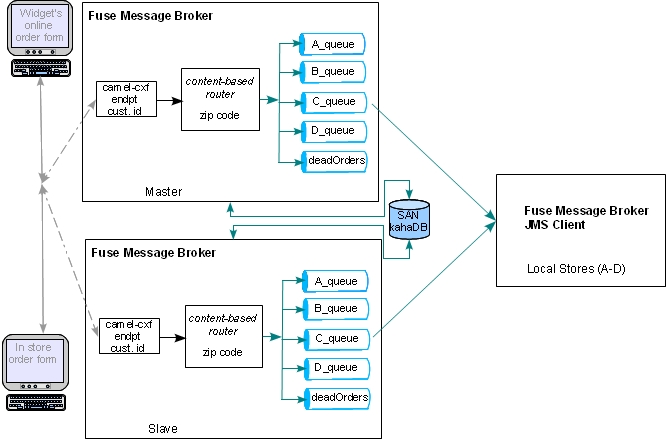
The first piece in the order processing system consists of a pair of brokers deployed in a shared database master/slave cluster. Each broker in the cluster is configured to host the content-based route used to receive and distribute the orders. The router uses persistent messages when distributing messages. Each broker also maintains five message queues: one for each store in the network and one for bad orders. The combination of a master/slave cluster and persistent messages provide a high-degree of reliability to the system as explained in the section called “Fault tolerance”.
The second piece of the order processing system is distributed across the four stores in the Major Widgets chain. Each of the stores (A-D) run a back-end order processing application that listens for messages on the store's order queue using a AMQ client. This application consumes order messages from the store's order queue, checks the order against the store's inventory, and determines how to process the order. The back-end processing logic can be implemented using any one of the AMQ client APIs or a dynamic router with a AMQ entry point.
Fault tolerance
Copy linkLink copied to clipboard!
Figure 4.1, “Major Widgets integration solution” shows that the Major Widgets integration plan uses a master/slave cluster as a fault tolerant mechanism to protect against loss of orders due to broker failure.
For this to provide maximum resiliency, each broker would be running on its own server. The shared database would be hosted on a third server or on a dedicated SAN. Separating the brokers and the shared database means that a single hardware failure cannot bring down the order processing system. At least two pieces of hardware would need to fail before the system stopped functioning. Major Widgets could add more brokers to the cluster to provide even more resiliency.
When the brokers initially start up, they determine who is master by attempting to grab a lock on the shared database. The first one to get the lock becomes master and begins listening for messages. The other broker(s) in the cluster become slaves and wait until the lock becomes available. If the master fails, the slave will be able to grab the lock on the shared database and will then start listening for messages. For details on how master/slave clusters work see Master/Slave in Fault Tolerant Messaging on the Red Hat Customer Portal.
For this to work smoothly, the back-end order processing clients must be configured to switch to the new master so that they can continue to receive messages. AMQ makes this easy by providing a failover transport. The failover transport allows you to provide a AMQ client with a list of broker URIs. The client will attempt to connect to the first URI in the list. If it cannot, or if the connection subsequently fails, the client will automatically move to the next URI. For details on using the failover transport see Failover Protocol in Fault Tolerant Messaging on the Red Hat Customer Portal.
In addition to the master/slave cluster, the plan uses persistent messaging to ensure that messages are not lost before the back-end processing system can consume them. Every message is stored in the cluster's shared persistence store until it is consumed by a back-end ordering system. If there is a broker failure, or even a cluster failure, all messages that have not been processed will be redelivered when the system recovers.
Chapter 5. Getting More Information
Copy linkLink copied to clipboard!
Abstract
There is a wealth of information about Red Hat AMQ. Most of it is written and maintained by Red Hat or our engineers.
5.1. Red Hat Documentation
Copy linkLink copied to clipboard!
Overview
Copy linkLink copied to clipboard!
The Red Hat AMQ documentation is designed to be task oriented and to quickly lead a user to the information they need. The reading lists below are broken up by user type and organized in the order in which a user will likely want to read the content.
Note
Except where expressly noted, you can find the books listed in this chapter on the Red Hat Customer Portal.
Basics
Copy linkLink copied to clipboard!
The books listed here provide information about JMS messaging and the basic information needed to develop messaging applications with Red Hat AMQ.
- Red Hat AMQ Installation GuideProvides detailed instructions for installing the Red Hat AMQ software on Windows, Linux, Unix, and OS X platforms, using the binary distributions or building from source code. It also lays out the prerequisites needed to ensure a successful installation.
- Red Hat AMQ Migration GuideDescribes all changes made to the Red Hat AMQ software and provides instructions for integrating the changes into existing applications.
- Red Hat AMQ Client Connectivity GuideDescribes each of the supported transport options and connectivity protocols in detail and includes code examples.
- Red Hat AMQ Configuring Broker PersistenceDescribes the basic concepts of message persistence and provides detailed information on the supported message stores: KahaDB and JDBC database with/without journaling. It also describes how to use message cursors to improve the scalability of the message store.
- Red Hat AMQ Using Networks of BrokersDescribes basic network of brokers concepts and topologies, network connectors, discovery protocols for dynamically discovering and reconnecting to brokers in a network, and balancing consumer and producer loads.
- Red Hat AMQ Fault Tolerant MessagingDescribes how to implement fault tolerance using a master/slave cluster.
- Red Hat AMQ Tuning GuideDescribes techniques for fine tuning your broker's performance.
- Red Hat AMQ Security GuideDescribes how to secure the communications between your client applications and the broker. It also describes how to secure access to the broker's administrative interfaces.
System administrators
Copy linkLink copied to clipboard!
The books listed here provide information and instructions to support system administrator functions.
- Red Hat AMQ Installation GuideProvides detailed instructions for installing the Red Hat AMQ software on Windows, Linux, Unix, and OS X platforms, using the binary distributions or building from source code. It also lays out the prerequisites needed to ensure a successful installation.
- Red Hat AMQ Migration GuideDescribes all of the latest changes made to the Red Hat AMQ software and, where necessary, provides instructions for integrating the changes into existing systems.
- Red Hat AMQ Managing and Monitoring a BrokerProvides detailed instructions for managing a Red Hat AMQ deployment.
- Red Hat AMQ Security GuideDescribes how to secure transport protocols and Java clients, how to set up JAAS authentication on broker-to-broker configurations, and how to secure Red Hat AMQ JMX connectors.
- Red Hat JBoss Fuse Fuse Management Console User GuideDescribes how to use the management console to monitor distributed Red Hat AMQ deployments.
- Describes how to use JBoss Operations Network to monitor Red Hat AMQ.
5.2. Other Resources
Copy linkLink copied to clipboard!
Webinars and Videos
Copy linkLink copied to clipboard!
Red Hat runs a series of webinars and makes the recordings available at Open Source SOA Webinars.
Red Hat also offers articles, reference architectures and other resources at https://access.redhat.com/knowledge/.
Third party books and articles
Copy linkLink copied to clipboard!
The books and reference materials listed here provide detailed information and instructions for designing, building, and deploying enterprise integration solutions and for using the tools that make it easier to do so. The books and reference materials in this list were authored by leading experts in this domain.
- ActiveMQ in Action (Snyder, Bosanac, & Davies)Written by the ActiveMQ developers, ActiveMQ in Action is the definitive guide to understanding and working with Apache ActiveMQ.Starting off with explaining JMS fundamentals, it uses a running use case to quickly explain and demonstrate how to use ActiveMQ's many features and functionality to build increasingly complex and robust messaging systems.
- Camel in Action (Ibsen & Anstey)Written by the Camel developers, Camel in Action is the definitive guide to understanding and working with Apache Camel.Tutorial-like and full of small examples, it shows how to work with the integration patterns. Starting with core concepts (sending, receiving, routing, and transforming data), it then shows the entire life cycle—diving into testing, dealing with errors, scaling, deploying, and monitoring applications.
- Spring into Action (Craig Walls)Spring in Action, Third Edition, describes the latest features, tools, and practices that Spring offers Java developers. It introduces Spring's core concepts, then launches into a hands-on exploration of the framework.It shows how to build simple and efficient JEE applications, then goes on to describe how to handle and solve more complex integration problems, such as persistence, asynchronous messaging, creating and consuming remote services, and so on.
- ActiveMQ is Ready for Prime Time (Rob Davies)This blog describes the many ways ActiveMQ has been deployed in demanding enterprise environments and provides case studies that demonstrate how ActiveMQ provides reliable connectivity not only between remote data centers, but also over unreliable transports, such as dial-up and satellite communications.You can read this article on Rob Davies blog.
Apache documentation
Copy linkLink copied to clipboard!
Red Hat provides mirrors of the documentation for the the Apache Software Foundation projects that form the basis of Red Hat AMQ:
Index
Copy linkLink copied to clipboard!
A
- active consumers, Network of brokers
- ActiveMQ.Agent topic, Command Agent
- administration
- JBoss Operations Network, JBoss Operations Network
- JMX, JMX
- management console, management console
- third-party tools, Other 3rd party administrative tools
- advisory messages, Advisory messages
- authentication interceptors, Interceptor plug-ins
B
- blob (binary large objects) messages, Blob messages
- broker
- advisory topics, Advisory messages
- described, Broker
- feature set, Features
C
- central timestamp interceptor, Interceptor plug-ins
- client-side APIs, Client-side APIs
- clients, Messaging clients
- active consumers, Network of brokers
- broadcasting messages through a topic to a pool of queue subscribers, Virtual destinations
- consumer, Basic application components
- multiple destinations, concurrently sending the same message to, Composite destinations
- producer, Basic application components
- publishers, Publish/subscribe messaging
- receivers, Point-to-point messaging
- senders, Point-to-point messaging
- subscribers, Publish/subscribe messaging
- command agent, Command Agent
- composite destinations, Composite destinations
- configuration
- connection, Basic application components
- creating, Development steps
- connection factory, Basic application components
- connectivity options, Connectivity options
- consumer, Basic application components
- creating, Development steps
- MessageConsumer interface, Basic application components
- receiving messages, Basic application components, Development steps
- consumer clusters, Consumer clusters
- container options, Container options
D
- dead letter queue, Dead letter queue
- Destination, Basic application components
- creating, Development steps
- durable subscribers, Durable subscribers
E
- enhanced logging interceptor, Interceptor plug-ins
- ensemble, Fabric Ensemble
- exclusive consumers, Exclusive consumers
F
- fabric
- agent, Fabric Agents
- ensemble, Fabric Ensemble
- profiles, Profiles
- versions, Profiles
- Fabric Agent, Fabric Agents
- Fabric Ensemble, Fabric Ensemble
- failover protocol, Failover protocol
- fault tolerance, Fault Tolerance, Major Widgets integration solution, Fault tolerance
- master/slave broker topologies, Master/Slave topologies
- network of brokers, Network of brokers
H
- horizontal scaling, Overview
I
- interceptor plug-ins, Interceptor plug-ins
J
- JBoss Operations Network, JBoss Operations Network
- JMS application components, Basic application components
- JMS message headers, Message headers
- JMSDeliveryMode, Persistent and non-persistent messages
- JMSReplyTo, Request/reply messaging
- JMSXGroupID, Message groups, Stream messages
- send(), Message headers
- JMS message properties, Message properties
- JMS-defined, Message properties
- JMSCorrelationID, Request/reply messaging
- user-defined, Message properties
- vendor-specific, Message properties
- JMS messages, Messages, Overview, Basic application components
- anatomy, Message anatomy
- body, Message body
- creating, Development steps
- headers, Message headers
- properties, Message properties
- receiving, Development steps
- sending, Development steps
- types, Message body
- JMS transactions, JMS transactions
- JMX, JMX
M
- management console, management console
- master/slave broker topologies, Master/Slave topologies
- network of brokers, Network of brokers
- shared file system, Master/Slave topologies
- shared JDBC database, Master/Slave topologies
- message groups, Message groups
- JMSXGroupID header, Stream messages
- stream messages, Stream messages
- message redelivery, Message redelivery
- MessageConsumer, Basic application components
- MessageProducer, Basic application components
- messages, Messages
- messaging clients (see clients)
- messaging domains
- point-to-point, Point-to-point messaging
- publish/subscribe (Pub/Sub), Publish/subscribe messaging
N
- network connectors, Network of brokers
- network of brokers, Network of brokers
- non-persistent messages, Persistent and non-persistent messages
- non-persistent messaging, Persistent and non-persistent messages
P
- persistent messages, Persistent and non-persistent messages
- persistent messaging, Persistent and non-persistent messages
- point-to-point messaging, Point-to-point messaging
- policies
- destination, Advisory messages
- redelivery, Message redelivery
- producer, Basic application components
- creating, Development steps
- default destination, Basic application components
- described, Point-to-point messaging
- MessageProducer interface, Basic application components
- sending messages, Basic application components, Development steps
- setting JMS headers and properties, Basic application components
- publish/subscribe (Pub/Sub) messaging, Publish/subscribe messaging
Q
- queue-based messaging, Point-to-point messaging
R
- reliability, Overview
- reliable messaging system, Overview
- request/reply messaging, Request/reply messaging
- JMSCorrelationID message property, Request/reply messaging
- JMSReplyTo message header, Request/reply messaging
- retroactive consumers, Retroactive consumers
S
- scheduled message delivery, Scheduled message delivery
- Session, Basic application components
- creating, Development steps
- statistics interceptor, Interceptor plug-ins
- store and forward delivery mode, Network of brokers
- stream messages, Stream messages
- vs blob messages, Blob messages
T
- topic-based messaging, Publish/subscribe messaging
- transactions
- JMS, JMS transactions
- XA, XA transactions
V
- vertical scaling, Overview
- virtual destinations, Virtual destinations
- visualization interceptors, Interceptor plug-ins
W
- wildcards
- composite destinations, Composite destinations
X
- XA transactions, XA transactions
Legal Notice
Copy linkLink copied to clipboard!
Trademark Disclaimer
The text of and illustrations in this document are licensed by Red Hat under a Creative Commons Attribution–Share Alike 3.0 Unported license ("CC-BY-SA"). An explanation of CC-BY-SA is available at http://creativecommons.org/licenses/by-sa/3.0/. In accordance with CC-BY-SA, if you distribute this document or an adaptation of it, you must provide the URL for the original version.
Red Hat, as the licensor of this document, waives the right to enforce, and agrees not to assert, Section 4d of CC-BY-SA to the fullest extent permitted by applicable law.
Red Hat, Red Hat Enterprise Linux, the Shadowman logo, JBoss, MetaMatrix, Fedora, the Infinity Logo, and RHCE are trademarks of Red Hat, Inc., registered in the United States and other countries.
Apache, ServiceMix, Camel, CXF, and ActiveMQ are trademarks of Apache Software Foundation. Any other names contained herein may be trademarks of their respective owners.

'%20d='M201.5%20305.5c-13.8%200-24.9-11.1-24.9-24.6%200-13.8%2011.1-24.9%2024.9-24.9%2013.6%200%2024.6%2011.1%2024.6%2024.9%200%2013.6-11.1%2024.6-24.6%2024.6zM504%20256c0%20137-111%20248-248%20248S8%20393%208%20256%20119%208%20256%208s248%20111%20248%20248zm-132.3-41.2c-9.4%200-17.7%203.9-23.8%2010-22.4-15.5-52.6-25.5-86.1-26.6l17.4-78.3%2055.4%2012.5c0%2013.6%2011.1%2024.6%2024.6%2024.6%2013.8%200%2024.9-11.3%2024.9-24.9s-11.1-24.9-24.9-24.9c-9.7%200-18%205.8-22.1%2013.8l-61.2-13.6c-3-.8-6.1%201.4-6.9%204.4l-19.1%2086.4c-33.2%201.4-63.1%2011.3-85.5%2026.8-6.1-6.4-14.7-10.2-24.1-10.2-34.9%200-46.3%2046.9-14.4%2062.8-1.1%205-1.7%2010.2-1.7%2015.5%200%2052.6%2059.2%2095.2%20132%2095.2%2073.1%200%20132.3-42.6%20132.3-95.2%200-5.3-.6-10.8-1.9-15.8%2031.3-16%2019.8-62.5-14.9-62.5zM302.8%20331c-18.2%2018.2-76.1%2017.9-93.6%200-2.2-2.2-6.1-2.2-8.3%200-2.5%202.5-2.5%206.4%200%208.6%2022.8%2022.8%2087.3%2022.8%20110.2%200%202.5-2.2%202.5-6.1%200-8.6-2.2-2.2-6.1-2.2-8.3%200zm7.7-75c-13.6%200-24.6%2011.1-24.6%2024.9%200%2013.6%2011.1%2024.6%2024.6%2024.6%2013.8%200%2024.9-11.1%2024.9-24.6%200-13.8-11-24.9-24.9-24.9z'/%3e%3c/svg%3e)