 Red Hat Summit
Troubleshooting
Troubleshooting common issues
Abstract
Chapter 1. Checking which version you have installed
To begin troubleshooting, determine which version of Red Hat build of MicroShift you have installed.
1.1. Checking the Red Hat build of MicroShift version using the command-line interface
To begin troubleshooting, you must know your Red Hat build of MicroShift version. One way to get this information is by using the CLI.
Procedure
Run the following command to check the version information:
microshift version
$ microshift versionCopy to Clipboard Copied! Toggle word wrap Toggle overflow Example output
Red Hat build of MicroShift Version: 4.12-0.microshift-e6980e25
Base OCP Version: 4.12
Red Hat build of MicroShift Version: 4.12-0.microshift-e6980e25
Base OCP Version: 4.12
Copy to Clipboard Copied! Toggle word wrap Toggle overflow
1.2. Checking the Red Hat build of MicroShift version using the API
To begin troubleshooting, you must know your Red Hat build of MicroShift version. One way to get this information is by using the API.
Procedure
To get the version number using the OpenShift CLI (
oc), view thekube-public/microshift-versionconfig map by running the following command:oc get configmap -n kube-public microshift-version -o yaml
$ oc get configmap -n kube-public microshift-version -o yamlCopy to Clipboard Copied! Toggle word wrap Toggle overflow Example output
Copy to Clipboard Copied! Toggle word wrap Toggle overflow
Chapter 2. Responsive restarts and security certificates
Red Hat build of MicroShift responds to system configuration changes and restarts after alterations are detected, including IP address changes, clock adjustments, and security certificate age.
2.1. IP address changes or clock adjustments
Red Hat build of MicroShift depends on device IP addresses and system-wide clock settings to remain consistent during its runtime. However, these settings may occasionally change on edge devices, such as DHCP or Network Time Protocol (NTP) updates.
When such changes occur, some Red Hat build of MicroShift components may stop functioning properly. To mitigate this situation, Red Hat build of MicroShift monitors the IP address and system time and restarts if either setting change is detected.
The threshold for clock changes is a time adjustment of greater than 10 seconds in either direction. Smaller drifts on regular time adjustments performed by the Network Time Protocol (NTP) service do not cause a restart.
2.2. Security certificate lifetime
Red Hat build of MicroShift certificates are separated into two basic groups:
- Short-lived certificates having certificate validity of one year.
- Long-lived certificates having certificate validity of 10 years.
Most server or leaf certificates are short-lived.
An example of a long-lived certificate is the client certificate for system:admin user authentication, or the certificate of the signer of the kube-apiserver external serving certificate.
2.2.1. Certificate rotation
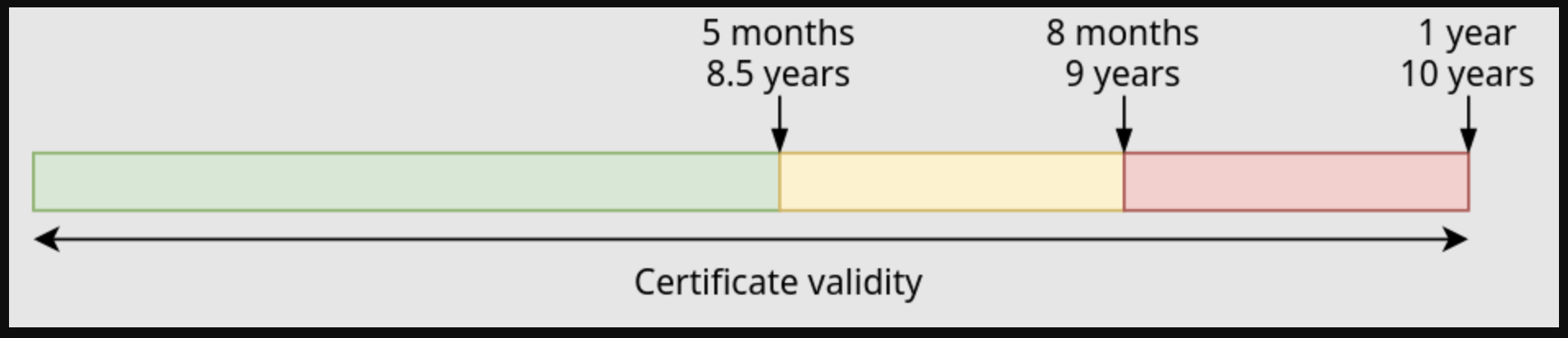
As certificates age, Red Hat build of MicroShift can be restarted to rotate certificates. A certificate that is close to expiring might also automatically cause a restart. Read the following situation overviews to understand the actions at each moment in time:
Green zone:
- When a short-term certificate is 5 months old, no rotation occurs.
- When a long-term certificate is 8.5 years old, no rotation occurs.
Yellow zone:
- When a short-term certificate is 8 months old, it is rotated when Red Hat build of MicroShift starts or restarts.
- When a long-term certificate is 9 years old, it is rotated when Red Hat build of MicroShift starts or restarts.
Red zone
- When a short-term certificate is 8 months old, Red Hat build of MicroShift restarts to rotate and apply a new certificate.
- When a long-term certificate is 9 years old, Red Hat build of MicroShift restarts to rotate and apply a new certificate.
If the rotated certificate is a Certificate Authority, all of the certificates it signed rotate.
Figure 2.1. Stoplight timeline of Red Hat build of MicroShift certificate validity.
Chapter 3. Troubleshooting
Read about troubleshooting and possible solutions for known issues.
3.1. Troubleshooting the NodePort service iptable rules
OVN-Kubernetes sets up an iptable chain in the network address translation (NAT) table to handle incoming traffic to the NodePort service. When the NodePort service is not reachable or the connection is refused, check the iptable rules on the host to make sure the relevant rules are properly inserted.
Procedure
View the iptable rules for the NodePort service by running the following command:
iptables-save | grep NODEPORT
$ iptables-save | grep NODEPORTCopy to Clipboard Copied! Toggle word wrap Toggle overflow Example output
-A OUTPUT -j OVN-KUBE-NODEPORT
-A OVN-KUBE-NODEPORT -p tcp -m addrtype --dst-type LOCAL -m tcp --dport 30326 -j DNAT --to-destination 10.43.95.170:80
-A OUTPUT -j OVN-KUBE-NODEPORT
-A OVN-KUBE-NODEPORT -p tcp -m addrtype --dst-type LOCAL -m tcp --dport 30326 -j DNAT --to-destination 10.43.95.170:80
Copy to Clipboard Copied! Toggle word wrap Toggle overflow OVN-Kubernetes configures the
OVN-KUBE-NODEPORTiptable chain in the NAT table to match the destination port and Destination Network Address Translates (DNATs) the packet to theclusterIPservice. The packet is then routed to the OVN network through the gateway bridgebr-exvia routing rules on the host.Route the packet through the network with routing rules by running the following command:
ip route
$ ip routeCopy to Clipboard Copied! Toggle word wrap Toggle overflow Example output
10.43.0.0/16 via 192.168.122.1 dev br-ex mtu 1400
10.43.0.0/16 via 192.168.122.1 dev br-ex mtu 1400Copy to Clipboard Copied! Toggle word wrap Toggle overflow This routing rule matches the Kubernetes service IP address range and forwards the packet to the gateway bridge
br-ex. You must enableip_forwardon the host. After the packet is forwarded to the OVS bridgebr-ex, it is handled by OpenFlow rules in OVS which steers the packet to the OVN network and eventually to the pod.

'%20d='M201.5%20305.5c-13.8%200-24.9-11.1-24.9-24.6%200-13.8%2011.1-24.9%2024.9-24.9%2013.6%200%2024.6%2011.1%2024.6%2024.9%200%2013.6-11.1%2024.6-24.6%2024.6zM504%20256c0%20137-111%20248-248%20248S8%20393%208%20256%20119%208%20256%208s248%20111%20248%20248zm-132.3-41.2c-9.4%200-17.7%203.9-23.8%2010-22.4-15.5-52.6-25.5-86.1-26.6l17.4-78.3%2055.4%2012.5c0%2013.6%2011.1%2024.6%2024.6%2024.6%2013.8%200%2024.9-11.3%2024.9-24.9s-11.1-24.9-24.9-24.9c-9.7%200-18%205.8-22.1%2013.8l-61.2-13.6c-3-.8-6.1%201.4-6.9%204.4l-19.1%2086.4c-33.2%201.4-63.1%2011.3-85.5%2026.8-6.1-6.4-14.7-10.2-24.1-10.2-34.9%200-46.3%2046.9-14.4%2062.8-1.1%205-1.7%2010.2-1.7%2015.5%200%2052.6%2059.2%2095.2%20132%2095.2%2073.1%200%20132.3-42.6%20132.3-95.2%200-5.3-.6-10.8-1.9-15.8%2031.3-16%2019.8-62.5-14.9-62.5zM302.8%20331c-18.2%2018.2-76.1%2017.9-93.6%200-2.2-2.2-6.1-2.2-8.3%200-2.5%202.5-2.5%206.4%200%208.6%2022.8%2022.8%2087.3%2022.8%20110.2%200%202.5-2.2%202.5-6.1%200-8.6-2.2-2.2-6.1-2.2-8.3%200zm7.7-75c-13.6%200-24.6%2011.1-24.6%2024.9%200%2013.6%2011.1%2024.6%2024.6%2024.6%2013.8%200%2024.9-11.1%2024.9-24.6%200-13.8-11-24.9-24.9-24.9z'/%3e%3c/svg%3e)