 Red Hat Summit
Configuration Guide
Configuration settings for Red Hat Ceph Storage
Abstract
Chapter 1. The basics of Ceph configuration
As a storage administrator, you need to have a basic understanding of how to view the Ceph configuration, and how to set the Ceph configuration options for the Red Hat Ceph Storage cluster. You can view and set the Ceph configuration options at runtime.
1.1. Prerequisites
- Installation of the Red Hat Ceph Storage software.
1.2. Ceph configuration
All Red Hat Ceph Storage clusters have a configuration, which defines:
- Cluster Identity
- Authentication settings
- Ceph daemons
- Network configuration
- Node names and addresses
- Paths to keyrings
- Paths to OSD log files
- Other runtime options
A deployment tool such as Ansible will typically create an initial Ceph configuration file for you. However, you can create one yourself if you prefer to bootstrap a Red Hat Ceph Storage cluster without using a deployment tool.
1.3. The Ceph configuration database
The Ceph Monitor manages a configuration database of Ceph options which centralizes configuration management by storing configuration options for the entire storage cluster. By centralizing the Ceph configuration in a database, this helps with storage cluster administration. There are still a handful of Ceph options that can be defined in the local Ceph configuration file, by default, /etc/ceph/ceph.conf. These few Ceph configuration options control how other Ceph components connect to the Ceph Monitors to authenticate, and fetch the configuration information from the database.
Ceph allows you to make changes to the configuration of a daemon at runtime. This capability can be useful for increasing or decreasing the logging output, by enabling or disabling debug settings, and can even be used for runtime optimization.
When the same option exists in the configuration database and the Ceph configuration file, the configuration database option has a lower priority than what is set in the Ceph configuration file.
Sections and Masks
Just as you can configure Ceph options globally, per daemon type, or by a specific daemon in the Ceph configuration file, you can also configure the Ceph options in the configuration database according to these sections. Ceph configuration options can have a mask associated with them. These masks can further restrict which daemons or clients the options apply to.
Masks have two forms:
type:location-
The
typeis a CRUSH property, for example,rackorhost. Thelocationis a value for the property type. For example,host:foolimits the option only to daemons or clients running on a particular node,fooin this example. class:device-class-
The
device-classis the name of the CRUSH device class, such ashddorssd. For example,class:ssdlimits the option only to Ceph OSDs backed by solid state drives (SSD). This mask has no effect on non-OSD daemons of clients.
Administrative Commands
The Ceph configuration database can be administered with the sub-command ceph config ACTION. These are the actions you can do:
dump- Dumps the entire configuration database of options for the storage cluster.
get WHO-
Dumps the configuration for a specific daemon or client. For example, WHO can be a daemon, like
mds.a. set WHO OPTION VALUE- Sets a configuration option in the Ceph configuration database.
show WHO- Shows the reported running configuration for a running daemon. These options might be different from those stored by the Ceph Monitors, if there is a local configuration file in use or options have been overridden on the command line or at run time. Also, the source of the option values is reported as part of the output.
assimilate-conf -i INPUT_FILE -o OUTPUT_FILE- Assimilate a configuration file from the INPUT_FILE and move any valid options into the Ceph Monitors’ configuration database. Any options that are unrecognized, invalid, or cannot be controlled by the Ceph Monitor return in an abbreviated configuration file stored in the OUTPUT_FILE. This command can be useful for transitioning from legacy configuration files to a centralized configuration database.
help OPTION -f json-pretty- Displays help for a particular OPTION using a JSON-formatted output.
1.4. The Ceph configuration file
The Ceph configuration file configures the Ceph daemons at start time, which will override their default values.
Each Ceph daemon has a series of default values, which are set by the ceph/src/common/config_opts.h file.
The location of Ceph’s default configuration file is /etc/ceph/ceph.conf. You can change that location by setting a different path by:
-
Setting the path in the
$CEPH_CONFenvironment variable. -
Specifying the
-ccommand line argument, for example,-c path/ceph.conf.
Ceph configuration files use an ini style syntax. You can add comments by preceding comments with a pound sign (#) or a semi-colon (;).
Example
# <--A pound sign (#) sign precedes a comment.
# Comments always follow a semi-colon (;) or a pound (#) on each line.
# The end of the line terminates a comment.
# We recommend that you provide comments in your configuration file(s).
; A comment may be anything.
# <--A pound sign (#) sign precedes a comment.
# Comments always follow a semi-colon (;) or a pound (#) on each line.
# The end of the line terminates a comment.
# We recommend that you provide comments in your configuration file(s).
; A comment may be anything.The configuration file can configure all Ceph daemons in a Ceph storage cluster or all Ceph daemons of a particular type at start time. To configure a series of daemons, the settings must be included under the processes that will receive the configuration as follows:
[global]- Description
-
Settings under
[global]affect all daemons in a Ceph Storage Cluster. - Example
-
auth supported = cephx
[osd]- Description
-
Settings under
[osd]affect allceph-osddaemons in the Ceph storage cluster, and override the same setting in[global].
[mon]- Description
-
Settings under
[mon]affect allceph-mondaemons in the Ceph storage cluster, and override the same setting in[global]. - Example
[client]- Description
-
Settings under
[client]affect all Ceph clients. For example, mounted Ceph block devices, Ceph object gateways, and so on. - Example
-
log file = /var/log/ceph/radosgw.log
Global settings affect all instances of all daemon in the Ceph storage cluster. Use the [global] heading for values that are common for all daemons in the Ceph storage cluster. You can override each [global] option by:
Changing the options for a particular process type:
Example
[osd],[mon]
OR
Changing the options for a particular process:
Example
[osd.1]
Overriding a global setting affects all child processes, except those that you specifically override in a particular daemon.
A typical global setting involves activating authentication.
Example
[global]
#Enable authentication between hosts within the cluster.
auth_cluster_required = cephx
auth_service_required = cephx
auth_client_required = cephx
[global]
#Enable authentication between hosts within the cluster.
auth_cluster_required = cephx
auth_service_required = cephx
auth_client_required = cephx
You can specify settings that apply to a particular type of daemon. When you specify settings under [osd] or [mon] without specifying a particular instance, the setting will apply to all OSD or monitor daemons respectively. One example of a daemon-wide setting is the osd memory target.
Example
[osd]
osd_memory_target = 5368709120
[osd]
osd_memory_target = 5368709120You can specify settings for particular instances of a daemon. You might specify an instance by entering its type, delimited by a period (.) and by the instance ID. The instance ID for a Ceph OSD daemons is always numeric, but it may be alphanumeric for Ceph monitors.
Example
[osd.1]
# settings affect osd.1 only.

[mon.a]
# settings affect mon.a only.
[osd.1]
# settings affect osd.1 only.

[mon.a]
# settings affect mon.a only.A typical Ceph configuration file has at least the following settings:
Example
1.5. Using the Ceph metavariables
Metavariables simplify Ceph storage cluster configuration dramatically. When a metavariable is set in a configuration value, Ceph expands the metavariable into a concrete value.
Metavariables are very powerful when used within the [global], [osd], [mon], or [client] sections of the Ceph configuration file. However, you can also use them with the administration socket. Ceph metavariables are similar to Bash shell expansion.
Ceph supports the following metavariables:
$cluster- Description
- Expands to the Ceph storage cluster name. Useful when running multiple Ceph storage clusters on the same hardware.
- Example
-
/etc/ceph/$cluster.keyring - Default
-
ceph
$type- Description
-
Expands to one of
osdormon, depending on the type of the instance daemon. - Example
-
/var/lib/ceph/$type
$id- Description
-
Expands to the daemon identifier. For
osd.0, this would be0. - Example
-
/var/lib/ceph/$type/$cluster-$id
$host- Description
- Expands to the host name of the instance daemon.
$name- Description
-
Expands to
$type.$id. - Example
-
/var/run/ceph/$cluster-$name.asok
1.6. Viewing the Ceph configuration at runtime
The Ceph configuration files can be viewed at boot time and run time.
Prerequisites
- Root-level access to the Ceph node.
- Access to admin keyring.
Procedure
To view a runtime configuration, log in to a Ceph node running the daemon and execute:
Syntax
ceph daemon DAEMON_TYPE.ID config show
ceph daemon DAEMON_TYPE.ID config showCopy to Clipboard Copied! Toggle word wrap Toggle overflow To see the configuration for
osd.0, you can log into the node containingosd.0and execute this command:Example
ceph daemon osd.0 config show
[root@osd ~]# ceph daemon osd.0 config showCopy to Clipboard Copied! Toggle word wrap Toggle overflow For additional options, specify a daemon and
help.Example
ceph daemon osd.0 help
[root@osd ~]# ceph daemon osd.0 helpCopy to Clipboard Copied! Toggle word wrap Toggle overflow
1.7. Viewing a specific configuration at runtime
Configuration settings for Red Hat Ceph Storage can be viewed at runtime from the Ceph Monitor node.
Prerequisites
- A running Red Hat Ceph Storage cluster.
- Root-level access to the Ceph Monitor node.
Procedure
Log into a Ceph node and execute:
Syntax
ceph daemon DAEMON_TYPE.ID config get PARAMETER
ceph daemon DAEMON_TYPE.ID config get PARAMETERCopy to Clipboard Copied! Toggle word wrap Toggle overflow Example
ceph daemon osd.0 config get public_addr
[root@mon ~]# ceph daemon osd.0 config get public_addrCopy to Clipboard Copied! Toggle word wrap Toggle overflow
1.8. Setting a specific configuration at runtime
There are two general ways to set a runtime configuration.
- Using the Ceph Monitor.
- Using the Ceph administration socket.
You can set a Ceph runtime configuration option by contacting the monitor using the tell and injectargs command.
Prerequisites
- A running Red Hat Ceph Storage cluster.
- Root-level access to the Ceph Monitor or OSD nodes.
Procedure
Using the Ceph Monitor by injecting options:
ceph tell DAEMON_TYPE.DAEMON_ID or * injectargs --NAME VALUE [--NAME VALUE]
ceph tell DAEMON_TYPE.DAEMON_ID or * injectargs --NAME VALUE [--NAME VALUE]Copy to Clipboard Copied! Toggle word wrap Toggle overflow Replace DAEMON_TYPE with one of
osdormon.You can apply the runtime setting to all daemons of a particular type with
*, or specify a specific DAEMON_ID, a number or name..For example, to change the debug logging for a
ceph-osddaemon namedosd.0to0/5, execute the following command:ceph tell osd.0 injectargs '--debug-osd 0/5'
[root@osd ~]# ceph tell osd.0 injectargs '--debug-osd 0/5'Copy to Clipboard Copied! Toggle word wrap Toggle overflow NoteThe
tellcommand takes multiple arguments, so each argument fortellmust be within single quotes, and the configuration prepended with two dashes ('--NAME VALUE [--NAME VALUE]' ['--NAME VALUE [--NAME VALUE]']). Theceph tellcommand goes through the monitors.If you cannot bind to the monitor, you can still make the change by using the Ceph administration socket.
Log into the node of the daemon whose configuration you want to change.
Issue the configuration change directly to the Ceph daemon:
ceph osd.0 config set debug_osd 0/5
[root@osd ~]# ceph osd.0 config set debug_osd 0/5Copy to Clipboard Copied! Toggle word wrap Toggle overflow NoteQuotes are not necessary for the
daemoncommand, because it only takes one argument.
1.9. OSD Memory Target
BlueStore keeps OSD heap memory usage under a designated target size with the osd_memory_target configuration option.
The option osd_memory_target sets OSD memory based upon the available RAM in the system. By default, Ansible sets the value to 4 GB. You can change the value, expressed in bytes, in the /usr/share/ceph-ansible/group_vars/all.yml file when deploying the daemon. You can also use the Ceph overrides in the ceph.conf file to manually set the osd memory target, for example to 6 GB.
Example
ceph_conf_overrides:
  osd:
    osd memory target: 6442450944
ceph_conf_overrides:
  osd:
osd memory target: 6442450944When setting the option using Ceph overrides, use the option without the underscores.
Ceph OSD memory caching is more important when the block device is slow, for example, traditional hard drives, because the benefit of a cache hit is much higher than it would be with a solid state drive. However, this has to be weighed-in to co-locate OSDs with other services, such as in a hyper-converged infrastructure (HCI), or other applications.
The value of osd_memory_target is one OSD per device for traditional hard drive device, and two OSDs per device for NVMe SSD devices. The osds_per_device is defined in group_vars/osds.yml file.
Additional Resources
-
For setting
osd_memory_targetsee Setting OSD Memory Target
1.10. MDS Memory Cache Limit
MDS servers keep their metadata in a separate storage pool, named cephfs_metadata, and are the users of Ceph OSDs. For Ceph File Systems, MDS servers have to support an entire Red Hat Ceph Storage cluster, not just a single storage device within the storage cluster, so their memory requirements can be significant, particularly if the workload consists of small-to-medium-size files, where the ratio of metadata to data is much higher.
Example: Set the mds_cache_memory_limit to 2 GiB
ceph_conf_overrides:
  osd:
    mds_cache_memory_limit: 2147483648
ceph_conf_overrides:
  osd:
mds_cache_memory_limit: 2147483648For a large Red Hat Ceph Storage cluster with a metadata-intensive workload, do not put an MDS server on the same node as other memory-intensive services, doing so gives you the option to allocate more memory to MDS, for example, sizes greater than 100 GB.
Additional Resources
- See Understanding MDS Cache Size Limits in Red Hat Ceph Storage File System Guide.
1.11. Additional Resources
- See the general Ceph configuration options in Appendix A for specific option descriptions and usage.
Chapter 2. Ceph network configuration
As a storage administrator, you must understand the network environment that the Red Hat Ceph Storage cluster will operate in, and configure the Red Hat Ceph Storage accordingly. Understanding and configuring the Ceph network options will ensure optimal performance and reliability of the overall storage cluster.
2.1. Prerequisites
- Network connectivity.
- Installation of the Red Hat Ceph Storage software.
2.2. Network configuration for Ceph
Network configuration is critical for building a high performance Red Hat Ceph Storage cluster. The Ceph storage cluster does not perform request routing or dispatching on behalf of the Ceph client. Instead, Ceph clients make requests directly to Ceph OSD daemons. Ceph OSDs perform data replication on behalf of Ceph clients, which means replication and other factors impose additional loads on the networks of Ceph storage clusters.
All Ceph clusters must use a public network. However, unless you specify an internal cluster network, Ceph assumes a single public network. Ceph can function with a public network only, but for large storage clusters you will see significant performance improvement with a second private network for carrying only cluster-related traffic.
Red Hat recommends running a Ceph storage cluster with two networks. One public network and one private network.
To support two networks, each Ceph Node will need to have more than one network interface card (NIC).
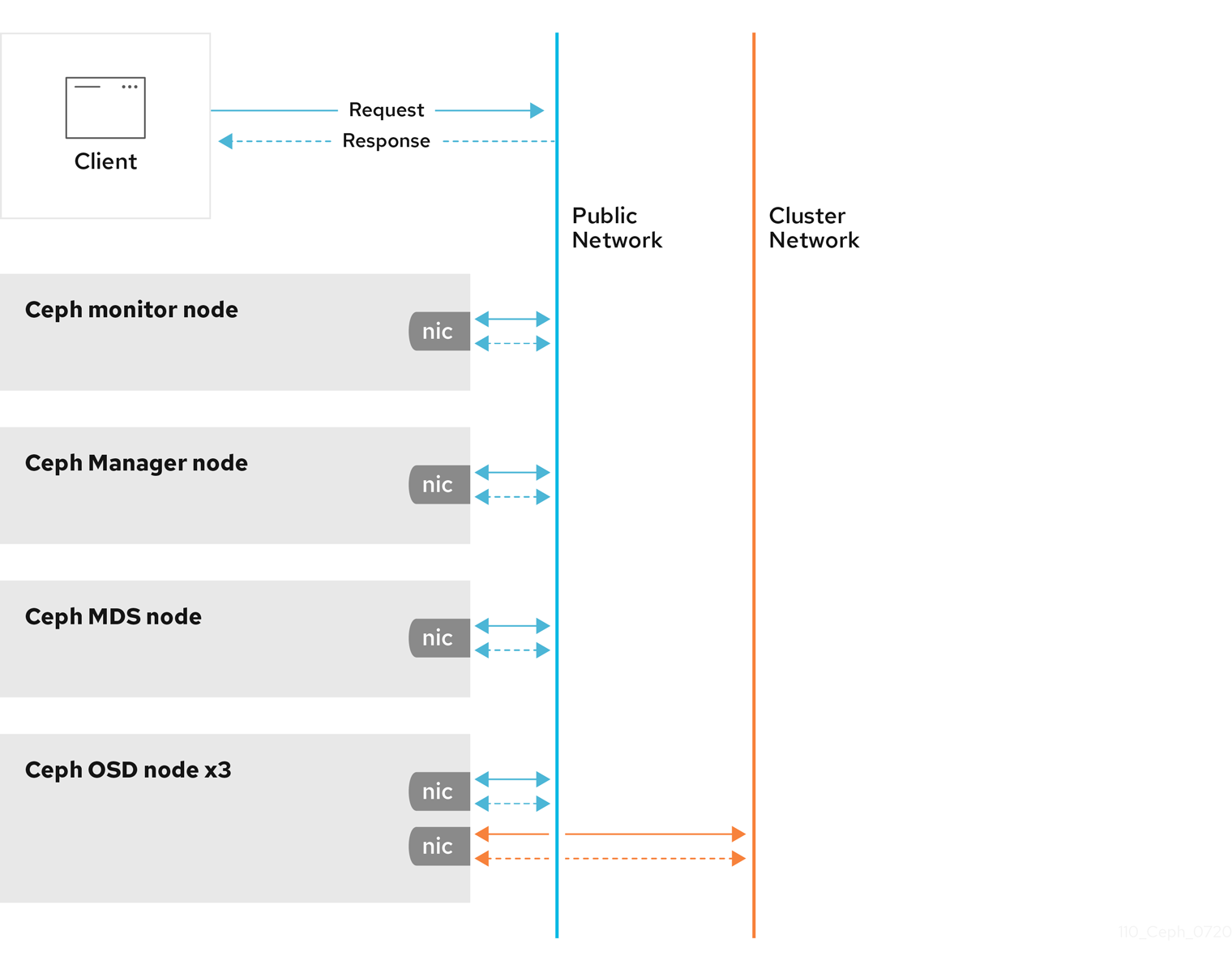
There are several reasons to consider operating two separate networks:
- Performance: Ceph OSDs handle data replication for the Ceph clients. When Ceph OSDs replicate data more than once, the network load between Ceph OSDs easily dwarfs the network load between Ceph clients and the Ceph storage cluster. This can introduce latency and create a performance problem. Recovery and rebalancing can also introduce significant latency on the public network.
-
Security: While most people are generally civil, some actors will engage in what is known as a Denial of Service (DoS) attack. When traffic between Ceph OSDs gets disrupted, peering may fail and placement groups may no longer reflect an
active + cleanstate, which may prevent users from reading and writing data. A great way to defeat this type of attack is to maintain a completely separate cluster network that does not connect directly to the internet.
Network configuration settings are not required. Ceph can function with a public network only, assuming a public network is configured on all hosts running a Ceph daemon. However, Ceph allows you to establish much more specific criteria, including multiple IP networks and subnet masks for your public network. You can also establish a separate cluster network to handle OSD heartbeat, object replication, and recovery traffic.
Do not confuse the IP addresses you set in the configuration with the public-facing IP addresses network clients might use to access your service. Typical internal IP networks are often 192.168.0.0 or 10.0.0.0.
Ceph uses CIDR notation for subnets, for example, 10.0.0.0/24.
If you specify more than one IP address and subnet mask for either the public or the private network, the subnets within the network must be capable of routing to each other. Additionally, make sure you include each IP address and subnet in your IP tables and open ports for them as necessary.
When you configured the networks, you can restart the cluster or restart each daemon. Ceph daemons bind dynamically, so you do not have to restart the entire cluster at once if you change the network configuration.
2.3. Configuration requirements for Ceph daemons
Ceph has one network configuration requirement that applies to all daemons. The Ceph configuration file must specify the host for each daemon.
Some deployment utilities might create a configuration file for you. Do not set these values if the deployment utility does it for you.
The host option is the short name of the node, not its FQDN. It is not an IP address.
You can set the host names and the IP addresses for where the daemon resides by specifying the host name.
Example
You do not have to set the node IP address for a daemon, it is optional. If you have a static IP configuration and both public and private networks running, the Ceph configuration file might specify the IP address of the node for each daemon. Setting a static IP address for a daemon must appear in the daemon instance sections of the Ceph configuration file.
Example
[osd.0]
    public_addr = 10.74.250.101/21
    cluster_addr = 10.74.250.101/21
[osd.0]
    public_addr = 10.74.250.101/21
    cluster_addr = 10.74.250.101/21
You can deploy an OSD host with a single NIC in a cluster with two networks by forcing the OSD host. You can force the OSD host to operate on the public network by adding a public addr entry to the [osd.n] section of the Ceph configuration file, where n refers to the number of the OSD with one NIC. Additionally, the public network and cluster network must be able to route traffic to each other, which Red Hat does not recommend for security reasons.
Red Hat does not recommend deploying an OSD node with a single NIC with two networks for security reasons.
Additional Resources
- See the host options in Red Hat Ceph Storage Configuration Guide, Appendix B for specific option descriptions and usage.
- See the common options in Red Hat Ceph Storage Configuration Guide, Appendix B for specific option descriptions and usage.
2.4. Ceph network messenger
Messenger is the Ceph network layer implementation. Red Hat supports two messenger types:
-
simple -
async
In Red Hat Ceph Storage 3 and higher, async is the default messenger type. To change the messenger type, specify the ms_type configuration setting in the [global] section of the Ceph configuration file.
For the async messenger, Red Hat supports the posix transport type, but does not currently support rdma or dpdk. By default, the ms_type setting in Red Hat Ceph Storage 3 or higher reflects async+posix, where async is the messenger type and posix is the transport type.
SimpleMessenger
The SimpleMessenger implementation uses TCP sockets with two threads per socket. Ceph associates each logical session with a connection. A pipe handles the connection, including the input and output of each message. While SimpleMessenger is effective for the posix transport type, it is not effective for other transport types such as rdma or dpdk.
AsyncMessenger
Consequently, AsyncMessenger is the default messenger type for Red Hat Ceph Storage 3 or higher. For Red Hat Ceph Storage 3 or higher, the AsyncMessenger implementation uses TCP sockets with a fixed-size thread pool for connections, which should be equal to the highest number of replicas or erasure-code chunks. The thread count can be set to a lower value if performance degrades due to a low CPU count or a high number of OSDs per server.
Red Hat does not support other transport types such as rdma or dpdk at this time.
Additional Resources
- See the AsyncMessenger options in Red Hat Ceph Storage Configuration Guide, Appendix B for specific option descriptions and usage.
- See the Red Hat Ceph Storage Architecture Guide for details about using on-wire encryption with the Ceph messenger version 2 protocol.
2.5. Configuring a public network
The public network configuration allows you specifically define IP addresses and subnets for the public network. You may specifically assign static IP addresses or override public network settings using the public addr setting for a specific daemon.
Prerequisites
- Installation of the Red Hat Ceph Storage software.
Procedure
-
Add the following option to the
[global]section of the Ceph configuration file:
[global]
    ...
    public_network = PUBLIC-NET/NETMASK
[global]
    ...
public_network = PUBLIC-NET/NETMASKAdditional Resources
- See the common options in Red Hat Ceph Storage Configuration Guide, Appendix B for specific option descriptions and usage.
2.6. Configuring a private network
If you declare a cluster network, OSDs will route heartbeat, object replication, and recovery traffic over the cluster network. This can improve performance compared to using a single network.
It is preferable, that the cluster network is not reachable from the public network or the Internet for added security.
The cluster network configuration allows you to declare a cluster network, and specifically define IP addresses and subnets for the cluster network. You can specifically assign static IP addresses or override cluster network settings using the cluster addr setting for specific OSD daemons.
Prerequisites
- A running Red Hat Ceph Storage cluster.
- Access to the Ceph software repository.
Procedure
-
Add the following option to the
[global]section of the Ceph configuration file:
[global]
    ...
    cluster_network = CLUSTER-NET/NETMASK
[global]
    ...
cluster_network = CLUSTER-NET/NETMASK2.7. Verify the firewall settings
By default, daemons bind to ports within the 6800:7100 range. You can configure this range at your discretion. Before configuring the firewall, check the default firewall configuration.
Prerequisites
- A running Red Hat Ceph Storage cluster.
- Access to the Ceph software repository.
- Root-level access to the Ceph Monitor node.
Procedure
You can configure this range at your discretion:
sudo iptables -L
[root@mon ~]# sudo iptables -LCopy to Clipboard Copied! Toggle word wrap Toggle overflow For the
firewallddaemon, execute the following command:firewall-cmd --list-all-zones
[root@mon ~]# firewall-cmd --list-all-zonesCopy to Clipboard Copied! Toggle word wrap Toggle overflow Some Linux distributions include rules that reject all inbound requests except SSH from all network interfaces.
Example
REJECT all -- anywhere anywhere reject-with icmp-host-prohibited
REJECT all -- anywhere anywhere reject-with icmp-host-prohibitedCopy to Clipboard Copied! Toggle word wrap Toggle overflow
2.8. Firewall settings for Ceph Monitor node
Ceph monitors listen on port 3300 and 6789 by default. Additionally, Ceph monitors always operate on the public network.
Prerequisites
- A running Red Hat Ceph Storage cluster.
- Access to the Ceph software repository.
- Root-level access to the Ceph Monitor node.
Procedure
Add rules using the following example:
sudo iptables -A INPUT -i IFACE -p tcp -s IP-ADDRESS/NETMASK --dport 6789 -j ACCEPT
sudo iptables -A INPUT -i IFACE -p tcp -s IP-ADDRESS/NETMASK --dport 3300 -j ACCEPT
[root@mon ~]# sudo iptables -A INPUT -i IFACE -p tcp -s IP-ADDRESS/NETMASK --dport 6789 -j ACCEPT
[root@mon ~]# sudo iptables -A INPUT -i IFACE -p tcp -s IP-ADDRESS/NETMASK --dport 3300 -j ACCEPT
Copy to Clipboard Copied! Toggle word wrap Toggle overflow -
Replace
IFACEwith the public network interface. For example,eth0,eth1, and so on. -
Replace
IP-ADDRESSwith the IP address of the public network andNETMASKwith the netmask for the public network.
-
Replace
For the
firewallddaemon, execute the following commands:firewall-cmd --zone=public --add-port=6789/tcp firewall-cmd --zone=public --add-port=6789/tcp --permanent firewall-cmd --zone=public --add-port=3300/tcp firewall-cmd --zone=public --add-port=3300/tcp --permanent
[root@mon ~]# firewall-cmd --zone=public --add-port=6789/tcp
[root@mon ~]# firewall-cmd --zone=public --add-port=6789/tcp --permanent
[root@mon ~]# firewall-cmd --zone=public --add-port=3300/tcp
[root@mon ~]# firewall-cmd --zone=public --add-port=3300/tcp --permanent
Copy to Clipboard Copied! Toggle word wrap Toggle overflow
2.9. Firewall settings for Ceph OSDs
By default, Ceph OSDs bind to the first available ports on a Ceph node beginning at port 6800. Ensure to open at least four ports beginning at port 6800 for each OSD that runs on the node:
- One for talking to clients and monitors on the public network.
- One for sending data to other OSDs on the cluster network.
- Two for sending heartbeat packets on the cluster network.
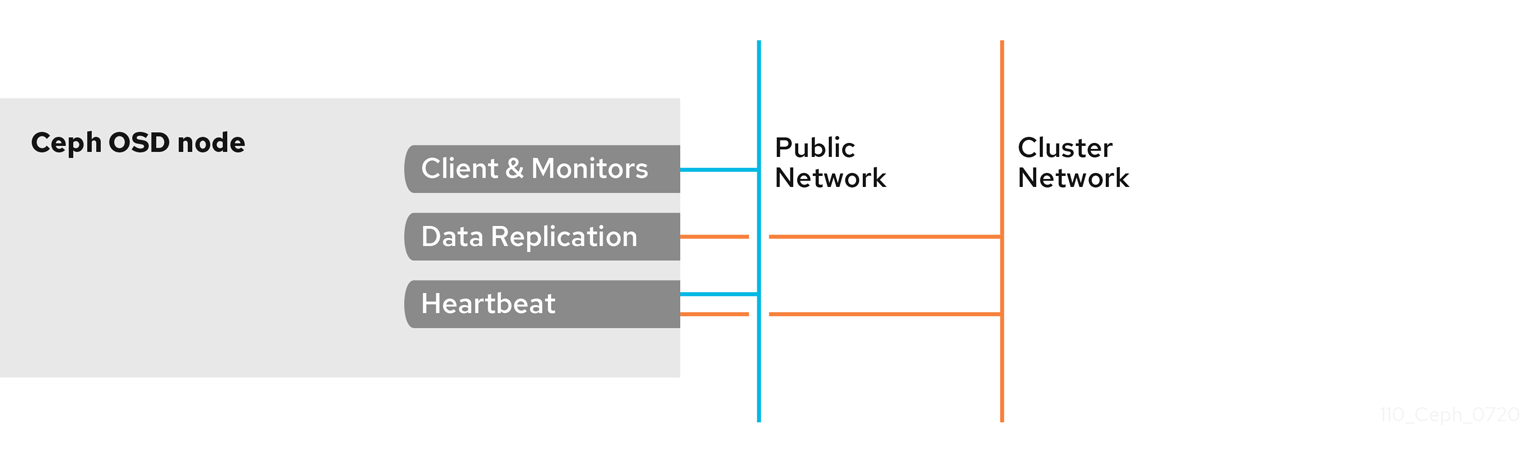
Ports are node-specific. However, you might need to open more ports than the number of ports needed by Ceph daemons running on that Ceph node in the event that processes get restarted and the bound ports do not get released. Consider to open a few additional ports in case a daemon fails and restarts without releasing the port such that the restarted daemon binds to a new port. Also, consider opening the port range of 6800:7300 on each OSD node.
If you set separate public and cluster networks, you must add rules for both the public network and the cluster network, because clients will connect using the public network and other Ceph OSD Daemons will connect using the cluster network.
Prerequisites
- A running Red Hat Ceph Storage cluster.
- Access to the Ceph software repository.
- Root-level access to the Ceph OSD nodes.
Procedure
Add rules using the following example:
sudo iptables -A INPUT -i IFACE -m multiport -p tcp -s IP-ADDRESS/NETMASK --dports 6800:6810 -j ACCEPT
[root@mon ~]# sudo iptables -A INPUT -i IFACE -m multiport -p tcp -s IP-ADDRESS/NETMASK --dports 6800:6810 -j ACCEPTCopy to Clipboard Copied! Toggle word wrap Toggle overflow -
Replace
IFACEwith the public network interface (for example,eth0,eth1, and so on). -
Replace
IP-ADDRESSwith the IP address of the public network andNETMASKwith the netmask for the public network.
-
Replace
For the
firewallddaemon, execute the following:[root@mon ~] # firewall-cmd --zone=public --add-port=6800-6810/tcp [root@mon ~] # firewall-cmd --zone=public --add-port=6800-6810/tcp --permanent
[root@mon ~] # firewall-cmd --zone=public --add-port=6800-6810/tcp [root@mon ~] # firewall-cmd --zone=public --add-port=6800-6810/tcp --permanentCopy to Clipboard Copied! Toggle word wrap Toggle overflow
If you put the cluster network into another zone, open the ports within that zone as appropriate.
2.10. Verifying and configuring the MTU value
The maximum transmission unit (MTU) value is the size, in bytes, of the largest packet sent on the link layer. The default MTU value is 1500 bytes. Red Hat recommends using jumbo frames, a MTU value of 9000 bytes, for a Red Hat Ceph Storage cluster.
Red Hat Ceph Storage requires the same MTU value throughout all networking devices in the communication path, end-to-end for both public and cluster networks. Verify that the MTU value is the same on all nodes and networking equipment in the environment before using a Red Hat Ceph Storage cluster in production.
When bonding network interfaces together, the MTU value only needs to be set on the bonded interface. The new MTU value propagates from the bonding device to the underlying network devices.
Prerequisites
- Root-level access to the node.
Procedure
Verify the current MTU value:
Example
ip link list
1: lo: <LOOPBACK,UP,LOWER_UP> mtu 65536 qdisc noqueue state UNKNOWN mode DEFAULT group default qlen 1000
    link/loopback 00:00:00:00:00:00 brd 00:00:00:00:00:00
2: enp22s0f0: <BROADCAST,MULTICAST,UP,LOWER_UP> mtu 1500 qdisc mq state UP mode DEFAULT group default qlen 1000
    link/ether 40:f2:e9:b8:a0:48 brd ff:ff:ff:ff:ff:ff
[root@mon ~]# ip link list 1: lo: <LOOPBACK,UP,LOWER_UP> mtu 65536 qdisc noqueue state UNKNOWN mode DEFAULT group default qlen 1000 link/loopback 00:00:00:00:00:00 brd 00:00:00:00:00:00 2: enp22s0f0: <BROADCAST,MULTICAST,UP,LOWER_UP> mtu 1500 qdisc mq state UP mode DEFAULT group default qlen 1000 link/ether 40:f2:e9:b8:a0:48 brd ff:ff:ff:ff:ff:ffCopy to Clipboard Copied! Toggle word wrap Toggle overflow For this example, the network interface is
enp22s0f0and it has a MTU value of1500.To temporarily change the MTU value online:
Syntax
ip link set dev NET_INTERFACE mtu NEW_MTU_VALUE
ip link set dev NET_INTERFACE mtu NEW_MTU_VALUECopy to Clipboard Copied! Toggle word wrap Toggle overflow Example
ip link set dev enp22s0f0 mtu 9000
[root@mon ~]# ip link set dev enp22s0f0 mtu 9000Copy to Clipboard Copied! Toggle word wrap Toggle overflow To permanently change the MTU value.
Open for editing the network configuration file for that particular network interface:
Syntax
vim /etc/sysconfig/network-scripts/ifcfg-NET_INTERFACE
vim /etc/sysconfig/network-scripts/ifcfg-NET_INTERFACECopy to Clipboard Copied! Toggle word wrap Toggle overflow Example
vim /etc/sysconfig/network-scripts/ifcfg-enp22s0f0
[root@mon ~]# vim /etc/sysconfig/network-scripts/ifcfg-enp22s0f0Copy to Clipboard Copied! Toggle word wrap Toggle overflow On a new line, add the
MTU=9000option:Example
Copy to Clipboard Copied! Toggle word wrap Toggle overflow Restart the network service:
Example
systemctl restart network
[root@mon ~]# systemctl restart networkCopy to Clipboard Copied! Toggle word wrap Toggle overflow
2.11. Additional Resources
- See the Red Hat Ceph Storage network configuration options in Appendix B for specific option descriptions and usage.
- See the Red Hat Ceph Storage Architecture Guide for details about using on-wire encryption with the Ceph messenger version 2 protocol.
Chapter 3. Ceph Monitor configuration
As a storage administrator, you can use the default configuration values for the Ceph Monitor or customize them according to the intended workload.
3.1. Prerequisites
- Installation of the Red Hat Ceph Storage software.
3.2. Ceph Monitor configuration
Understanding how to configure a Ceph Monitor is an important part of building a reliable Red Hat Ceph Storage cluster. All storage clusters have at least one monitor. A Ceph Monitor configuration usually remains fairly consistent, but you can add, remove or replace a Ceph Monitor in a storage cluster.
Ceph monitors maintain a "master copy" of the cluster map. That means a Ceph client can determine the location of all Ceph monitors and Ceph OSDs just by connecting to one Ceph monitor and retrieving a current cluster map.
Before Ceph clients can read from or write to Ceph OSDs, they must connect to a Ceph Monitor first. With a current copy of the cluster map and the CRUSH algorithm, a Ceph client can compute the location for any object. The abilityto compute object locations allows a Ceph client to talk directly to Ceph OSDs, which is a very important aspect of Ceph’s high scalability and performance.
The primary role of the Ceph Monitor is to maintain a master copy of the cluster map. Ceph Monitors also provide authentication and logging services. Ceph Monitors write all changes in the monitor services to a single Paxos instance, and Paxos writes the changes to a key-value store for strong consistency. Ceph Monitors can query the most recent version of the cluster map during synchronization operations. Ceph Monitors leverage the key-value store’s snapshots and iterators, using the rocksdb database, to perform store-wide synchronization.
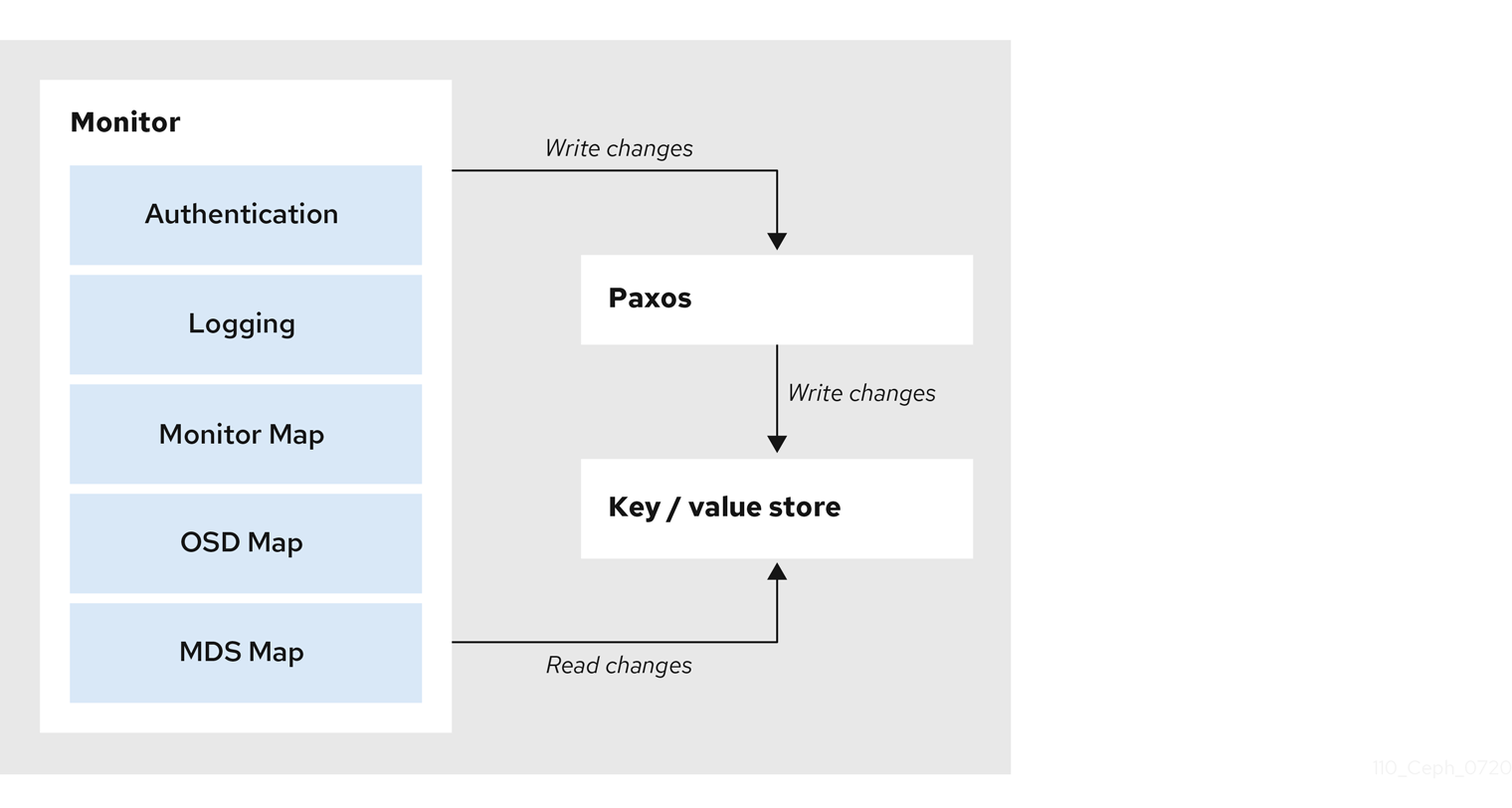
3.3. Ceph cluster maps
The cluster map is a composite of maps, including the monitor map, the OSD map, and the placement group map. The cluster map tracks a number of important events:
-
Which processes are
inthe Red Hat Ceph Storage cluster. -
Which processes that are
inthe Red Hat Ceph Storage cluster areupand running ordown. -
Whether, the placement groups are
activeorinactive, andcleanor in some other state. other details that reflect the current state of the cluster such as:
- the total amount of storage space or
- the amount of storage used.
When there is a significant change in the state of the cluster for example, a Ceph OSD goes down, a placement group falls into a degraded state, and so on. The cluster map gets updated to reflect the current state of the cluster. Additionally, the Ceph monitor also maintains a history of the prior states of the cluster. The monitor map, OSD map, and placement group map each maintain a history of their map versions. Each version is called an epoch.
When operating the Red Hat Ceph Storage cluster, keeping track of these states is an important part of the cluster administration.
3.4. Ceph Monitor quorum
A cluster will run sufficiently with a single monitor. However, a single monitor is a single-point-of-failure. To ensure high availability in a production Ceph storage cluster, run Ceph with multiple monitors so that the failure of a single monitor will not cause a failure of the entire storage cluster.
When a Ceph storage cluster runs multiple Ceph Monitors for high availability, Ceph Monitors use the Paxos algorithm to establish consensus about the master cluster map. A consensus requires a majority of monitors running to establish a quorum for consensus about the cluster map. For example, 1; 2 out of 3; 3 out of 5; 4 out of 6; and so on.
Red Hat recommends running a production Red Hat Ceph Storage cluster with at least three Ceph Monitors to ensure high availability. When you run multiple monitors, you can specify the initial monitors that must be members of the storage cluster in order to establish a quorum. This may reduce the time it takes for the storage cluster to come online.
[mon]
mon_initial_members = a,b,c
[mon]
mon_initial_members = a,b,c
A majority of the monitors in the storage cluster must be able to reach each other in order to establish a quorum. You can decrease the initial number of monitors to establish a quorum with the mon_initial_members option.
3.5. Ceph Monitor consistency
When you add monitor settings to the Ceph configuration file, you need to be aware of some of the architectural aspects of Ceph Monitors. Ceph imposes strict consistency requirements for a Ceph Monitor when discovering another Ceph Monitor within the cluster. Whereas, Ceph clients and other Ceph daemons use the Ceph configuration file to discover monitors, monitors discover each other using the monitor map (monmap), not the Ceph configuration file.
A Ceph Monitor always refers to the local copy of the monitor map when discovering other Ceph Monitors in the Red Hat Ceph Storage cluster. Using the monitor map instead of the Ceph configuration file avoids errors that could break the cluster. For example, typos in the Ceph configuration file when specifying a monitor address or port. Since monitors use monitor maps for discovery and they share monitor maps with clients and other Ceph daemons, the monitor map provides monitors with a strict guarantee that their consensus is valid.
Strict consistency when applying updates to the monitor maps
As with any other updates on the Ceph Monitor, changes to the monitor map always run through a distributed consensus algorithm called Paxos. The Ceph Monitors must agree on each update to the monitor map, such as adding or removing a Ceph Monitor, to ensure that each monitor in the quorum has the same version of the monitor map. Updates to the monitor map are incremental so that Ceph Monitors have the latest agreed upon version, and a set of previous versions.
Maintaining history
Maintaining a history enables a Ceph Monitor that has an older version of the monitor map to catch up with the current state of the Red Hat Ceph Storage cluster.
If Ceph Monitors discovered each other through the Ceph configuration file instead of through the monitor map, it would introduce additional risks because the Ceph configuration files are not updated and distributed automatically. Ceph Monitors might inadvertently use an older Ceph configuration file, fail to recognize a Ceph Monitor, fall out of a quorum, or develop a situation where Paxos is not able to determine the current state of the system accurately.
3.6. Bootstrap the Ceph Monitor
In most configuration and deployment cases, tools that deploy Ceph such as Ansible might help bootstrap the Ceph monitors by generating a monitor map for you.
A Ceph monitor requires a few explicit settings:
-
File System ID: The
fsidis the unique identifier for your object store. Since you can run multiple storage clusters on the same hardware, you must specify the unique ID of the object store when bootstrapping a monitor. Using deployment tools, such as Ansible will generate a file system identifier, but you can specify thefsidmanually too. -
Monitor ID: A monitor ID is a unique ID assigned to each monitor within the cluster. It is an alphanumeric value, and by convention the identifier usually follows an alphabetical increment. For example,
a,b, and so on. This can be set in the Ceph configuration file. For example,[mon.a],[mon.b], and so on, by a deployment tool, or using thecephcommand. - Keys: The monitor must have secret keys.
3.7. Ceph Monitor section in the configuration file
To apply configuration settings to the entire cluster, enter the configuration settings under the [global] section. To apply configuration settings to all monitors in the cluster, enter the configuration settings under the [mon] section. To apply configuration settings to specific monitors, specify the monitor instance.
Example
[mon.a]
By convention, monitor instance names use alpha notation.
3.8. Minimum configuration for a Ceph Monitor
The bare minimum monitor settings for a Ceph monitor in the Ceph configuration file includes a host name for each monitor if it is not configured for DNS and the monitor address. You can configure these under [mon] or under the entry for a specific monitor.
[mon]
mon_host = hostname1,hostname2,hostname3
mon_addr = 10.0.0.10:6789,10.0.0.11:6789,10.0.0.12:6789,10.0.0.10:3300,10.0.0.11:3300,10.0.0.12:3300
[mon]
mon_host = hostname1,hostname2,hostname3
mon_addr = 10.0.0.10:6789,10.0.0.11:6789,10.0.0.12:6789,10.0.0.10:3300,10.0.0.11:3300,10.0.0.12:3300Or
[mon.a]
host = hostname1
mon_addr = 10.0.0.10:6789, 10.0.0.10:3300
[mon.a]
host = hostname1
mon_addr = 10.0.0.10:6789, 10.0.0.10:3300
This minimum configuration for monitors assumes that a deployment tool generates the fsid and the mon. key for you.
Once you deploy a Ceph cluster, do not change the IP address of the monitors.
To configure the Ceph cluster for DNS lookup, set the mon_dns_srv_name setting in the Ceph configuration file.
Once set, configure the DNS. Create records either IPv4 (A) or IPv6 (AAAA) for the monitors in the DNS zone.
Example
Where: example.com is the DNS search domain.
Then, create the SRV TCP records with the name mon_dns_srv_name configuration setting pointing to the three Monitors. The following example uses the default ceph-mon value.
Example
Monitors run on port 6789 and 3300 by default, and their priority and weight are all set to 10 and 60 respectively in the foregoing example.
3.9. Unique identifier for Ceph
Each Red Hat Ceph Storage cluster has a unique identifier (fsid). If specified, it usually appears under the [global] section of the configuration file. Deployment tools usually generate the fsid and store it in the monitor map, so the value may not appear in a configuration file. The fsid makes it possible to run daemons for multiple clusters on the same hardware.
Do not set this value if you use a deployment tool that does it for you.
3.10. Ceph Monitor data store
Ceph provides a default path where Ceph monitors store data.
Red Hat recommends running Ceph monitors on separate hosts and drives from Ceph OSDs for optimal performance in a production Red Hat Ceph Storage cluster.
Ceph monitors call the fsync() function often, which can interfere with Ceph OSD workloads.
Ceph monitors store their data as key-value pairs. Using a data store prevents recovering Ceph monitors from running corrupted versions through Paxos, and it enables multiple modification operations in one single atomic batch, among other advantages.
Red Hat does not recommend changing the default data location. If you modify the default location, make it uniform across Ceph monitors by setting it in the [mon] section of the configuration file.
Disks that store the monitor database need to be encrypted, for more information see LUKS disk encryption.
3.11. Ceph storage capacity
When a Red Hat Ceph Storage cluster gets close to its maximum capacity (specified by the mon_osd_full_ratio parameter), Ceph prevents you from writing to Ceph OSDs as a safety measure to prevent data loss. Therefore, letting a production Red Hat Ceph Storage cluster approach its full ratio is not a good practice, because it sacrifices high availability. The default full ratio is .95, or 95% of capacity. This a very aggressive setting for a test cluster with a small number of OSDs.
When monitoring a cluster, be alert to warnings related to the nearfull ratio. This means that a failure of some OSDs could result in a temporary service disruption if one or more OSDs fails. Consider adding more OSDs to increase storage capacity.
A common scenario for test clusters involves a system administrator removing a Ceph OSD from the Red Hat Ceph Storage cluster to watch the cluster re-balance. Then, removing another Ceph OSD, and so on until the Red Hat Ceph Storage cluster eventually reaches the full ratio and locks up.
Red Hat recommends a bit of capacity planning even with a test cluster. Planning enables you to gauge how much spare capacity you will need in order to maintain high availability.
Ideally, you want to plan for a series of Ceph OSD failures where the cluster can recover to an active + clean state without replacing those Ceph OSDs immediately. You can run a cluster in an active + degraded state, but this is not ideal for normal operating conditions.
The following diagram depicts a simplistic Red Hat Ceph Storage cluster containing 33 Ceph Nodes with one Ceph OSD per host, each Ceph OSD Daemon reading from and writing to a 3TB drive. So this exemplary Red Hat Ceph Storage cluster has a maximum actual capacity of 99TB. With a mon osd full ratio of 0.95, if the Red Hat Ceph Storage cluster falls to 5 TB of remaining capacity, the cluster will not allow Ceph clients to read and write data. So the Red Hat Ceph Storage cluster’s operating capacity is 95 TB, not 99 TB.

It is normal in such a cluster for one or two OSDs to fail. A less frequent but reasonable scenario involves a rack’s router or power supply failing, which brings down multiple OSDs simultaneously for example, OSDs 7-12. In such a scenario, you should still strive for a cluster that can remain operational and achieve an active + clean state, even if that means adding a few hosts with additional OSDs in short order. If your capacity utilization is too high, you might not lose data, but you could still sacrifice data availability while resolving an outage within a failure domain if capacity utilization of the cluster exceeds the full ratio. For this reason, Red Hat recommends at least some rough capacity planning.
Identify two numbers for your cluster:
- the number of OSDs
- the total capacity of the cluster
To determine the mean average capacity of an OSD within a cluster, divide the total capacity of the cluster by the number of OSDs in the cluster. Consider multiplying that number by the number of OSDs you expect to fail simultaneously during normal operations (a relatively small number). Finally, multiply the capacity of the cluster by the full ratio to arrive at a maximum operating capacity. Then, subtract the number of amount of data from the OSDs you expect to fail to arrive at a reasonable full ratio. Repeat the foregoing process with a higher number of OSD failures (for example, a rack of OSDs) to arrive at a reasonable number for a near full ratio.
3.12. Ceph heartbeat
Ceph monitors know about the cluster by requiring reports from each OSD, and by receiving reports from OSDs about the status of their neighboring OSDs. Ceph provides reasonable default settings for interaction between monitor and OSD, however, you can modify them as needed.
3.13. Ceph Monitor synchronization role
When you run a production cluster with multiple monitors which is recommended, each monitor checks to see if a neighboring monitor has a more recent version of the cluster map. For example, a map in a neighboring monitor with one or more epoch numbers higher than the most current epoch in the map of the instant monitor. Periodically, one monitor in the cluster might fall behind the other monitors to the point where it must leave the quorum, synchronize to retrieve the most current information about the cluster, and then rejoin the quorum.
Synchronization roles
For the purposes of synchronization, monitors can assume one of three roles:
- Leader: The Leader is the first monitor to achieve the most recent Paxos version of the cluster map.
- Provider: The Provider is a monitor that has the most recent version of the cluster map, but was not the first to achieve the most recent version.
- Requester: The Requester is a monitor that has fallen behind the leader and must synchronize in order to retrieve the most recent information about the cluster before it can rejoin the quorum.
These roles enable a leader to delegate synchronization duties to a provider, which prevents synchronization requests from overloading the leader and improving performance. In the following diagram, the requester has learned that it has fallen behind the other monitors. The requester asks the leader to synchronize, and the leader tells the requester to synchronize with a provider.
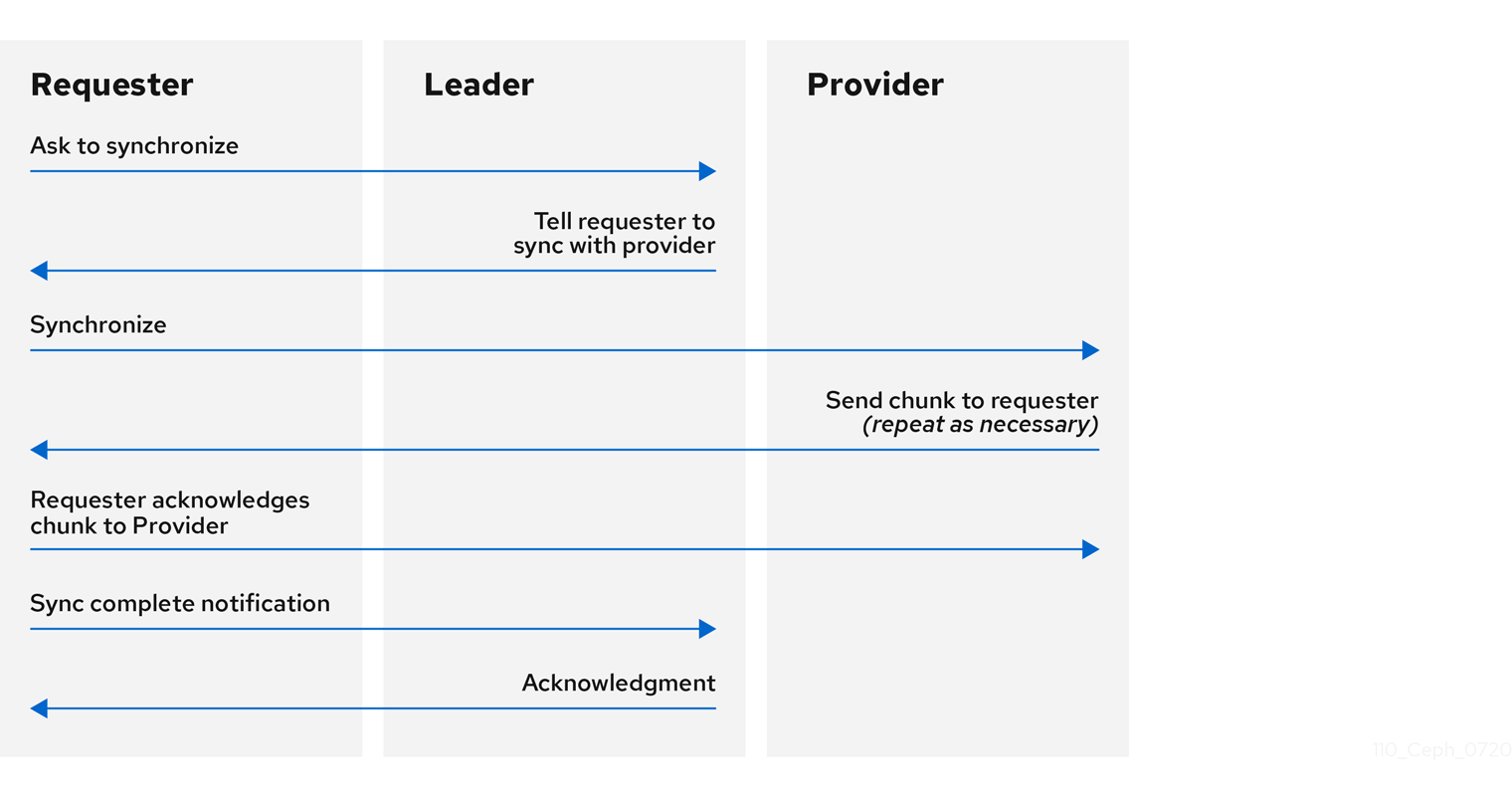
Monitor synchronization
Synchronization always occurs when a new monitor joins the cluster. During runtime operations, monitors can receive updates to the cluster map at different times. This means the leader and provider roles may migrate from one monitor to another. If this happens while synchronizing for example, a provider falls behind the leader, the provider can terminate synchronization with a requester.
Once synchronization is complete, Ceph requires trimming across the cluster. Trimming requires that the placement groups are active + clean.
3.14. Ceph time synchronization
Ceph daemons pass critical messages to each other, which must be processed before daemons reach a timeout threshold. If the clocks in Ceph monitors are not synchronized, it can lead to a number of anomalies.
For example:
- Daemons ignoring received messages such as outdated timestamps.
- Timeouts triggered too soon or late when a message was not received in time.
Install NTP on the Ceph monitor hosts to ensure that the monitor cluster operates with synchronized clocks.
Clock drift may still be noticeable with NTP even though the discrepancy is not yet harmful. Ceph clock drift and clock skew warnings can get triggered even though NTP maintains a reasonable level of synchronization. Increasing your clock drift may be tolerable under such circumstances. However, a number of factors such as workload, network latency, configuring overrides to default timeouts and other synchronization options that can influence the level of acceptable clock drift without compromising Paxos guarantees.
Additional Resources
- See section on Ceph time synchronization for more details.
3.15. Additional Resources
- See all the Red Hat Ceph Storage Monitor configuration options in Appendix C for specific option descriptions and usage.
Chapter 4. Ceph authentication configuration
As a storage administrator, authenticating users and services is important to the security of the Red Hat Ceph Storage cluster. Red Hat Ceph Storage includes the Cephx protocol, as the default, for cryptographic authentication, and the tools to manage authentication in the storage cluster.
4.1. Prerequisites
- Installation of the Red Hat Ceph Storage software.
4.2. Cephx authentication
The cephx protocol is enabled by default. Cryptographic authentication has some computational costs, though they are generally quite low. If the network environment connecting clients and hosts is considered safe and you cannot afford authentication computational costs, you can disable it. When deploying a Ceph storage cluster, the deployment tool will create the client.admin user and keyring.
Red Hat recommends using authentication.
If you disable authentication, you are at risk of a man-in-the-middle attack altering client and server messages, which could lead to significant security issues.
Enabling and disabling Cephx
Enabling Cephx requires that you have deployed keys for the Ceph Monitors and OSDs. When toggling Cephx authentication on or off, you do not have to repeat the deployment procedures.
4.3. Enabling Cephx
When cephx is enabled, Ceph will look for the keyring in the default search path, which includes /etc/ceph/$cluster.$name.keyring. You can override this location by adding a keyring option in the [global] section of the Ceph configuration file, but this is not recommended.
Execute the following procedures to enable cephx on a cluster with authentication disabled. If you or your deployment utility have already generated the keys, you may skip the steps related to generating keys.
Prerequisites
- A running Red Hat Ceph Storage cluster.
- Root-level access to the Ceph Monitor node.
Procedure
Create a
client.adminkey, and save a copy of the key for your client host:ceph auth get-or-create client.admin mon 'allow *' osd 'allow *' -o /etc/ceph/ceph.client.admin.keyring
[root@mon ~]# ceph auth get-or-create client.admin mon 'allow *' osd 'allow *' -o /etc/ceph/ceph.client.admin.keyringCopy to Clipboard Copied! Toggle word wrap Toggle overflow WarningThis will erase the contents of any existing
/etc/ceph/client.admin.keyringfile. Do not perform this step if a deployment tool has already done it for you.Create a keyring for the monitor cluster and generate a monitor secret key:
ceph-authtool --create-keyring /tmp/ceph.mon.keyring --gen-key -n mon. --cap mon 'allow *'
[root@mon ~]# ceph-authtool --create-keyring /tmp/ceph.mon.keyring --gen-key -n mon. --cap mon 'allow *'Copy to Clipboard Copied! Toggle word wrap Toggle overflow Copy the monitor keyring into a
ceph.mon.keyringfile in every monitormon datadirectory. For example, to copy it tomon.ain clusterceph, use the following:cp /tmp/ceph.mon.keyring /var/lib/ceph/mon/ceph-a/keyring
[root@mon ~]# cp /tmp/ceph.mon.keyring /var/lib/ceph/mon/ceph-a/keyringCopy to Clipboard Copied! Toggle word wrap Toggle overflow Generate a secret key for every OSD, where
IDis the OSD number:ceph auth get-or-create osd.ID mon 'allow rwx' osd 'allow *' -o /var/lib/ceph/osd/ceph-ID/keyring
ceph auth get-or-create osd.ID mon 'allow rwx' osd 'allow *' -o /var/lib/ceph/osd/ceph-ID/keyringCopy to Clipboard Copied! Toggle word wrap Toggle overflow By default the
cephxauthentication protocol is enabled.NoteIf the
cephxauthentication protocol was disabled previously by setting the authentication options tonone, then by removing the following lines under the[global]section in the Ceph configuration file (/etc/ceph/ceph.conf) will reenable thecephxauthentication protocol:auth_cluster_required = none auth_service_required = none auth_client_required = none
auth_cluster_required = none auth_service_required = none auth_client_required = noneCopy to Clipboard Copied! Toggle word wrap Toggle overflow Start or restart the Ceph storage cluster.
ImportantEnabling
cephxrequires downtime because the cluster needs to be completely restarted, or it needs to be shut down and then started while client I/O is disabled.These flags need to be set before restarting or shutting down the storage cluster:
Copy to Clipboard Copied! Toggle word wrap Toggle overflow Once
cephxis enabled and all PGs are active and clean, unset the flags:Copy to Clipboard Copied! Toggle word wrap Toggle overflow
4.4. Disabling Cephx
The following procedure describes how to disable Cephx. If your cluster environment is relatively safe, you can offset the computation expense of running authentication.
Red Hat recommends enabling authentication.
However, it may be easier during setup or troubleshooting to temporarily disable authentication.
Prerequisites
- A running Red Hat Ceph Storage cluster.
- Root-level access to the Ceph Monitor node.
Procedure
Disable
cephxauthentication by setting the following options in the[global]section of the Ceph configuration file:auth_cluster_required = none auth_service_required = none auth_client_required = none
auth_cluster_required = none
auth_service_required = none
auth_client_required = none
Copy to Clipboard Copied! Toggle word wrap Toggle overflow - Start or restart the Ceph storage cluster.
4.5. Cephx user keyrings
When you run Ceph with authentication enabled, the ceph administrative commands and Ceph clients require authentication keys to access the Ceph storage cluster.
The most common way to provide these keys to the ceph administrative commands and clients is to include a Ceph keyring under the /etc/ceph/ directory. The file name is usually ceph.client.admin.keyring or $cluster.client.admin.keyring. If you include the keyring under the /etc/ceph/ directory, you do not need to specify a keyring entry in the Ceph configuration file.
Red Hat recommends copying the Red Hat Ceph Storage cluster keyring file to nodes where you will run administrative commands, because it contains the client.admin key.
To do so, execute the following command:
scp USER@HOSTNAME:/etc/ceph/ceph.client.admin.keyring /etc/ceph/ceph.client.admin.keyring
# scp USER@HOSTNAME:/etc/ceph/ceph.client.admin.keyring /etc/ceph/ceph.client.admin.keyring
Replace USER with the user name used on the host with the client.admin key and HOSTNAME with the host name of that host.
Ensure the ceph.keyring file has appropriate permissions set on the client machine.
You can specify the key itself in the Ceph configuration file using the key setting, which is not recommended, or a path to a key file using the keyfile setting.
4.6. Cephx daemon keyrings
Administrative users or deployment tools might generate daemon keyrings in the same way as generating user keyrings. By default, Ceph stores daemons keyrings inside their data directory. The default keyring locations, and the capabilities necessary for the daemon to function.
The monitor keyring contains a key but no capabilities, and is not part of the Ceph storage cluster auth database.
The daemon data directory locations default to directories of the form:
/var/lib/ceph/$type/CLUSTER-ID
/var/lib/ceph/$type/CLUSTER-IDExample
/var/lib/ceph/osd/ceph-12
/var/lib/ceph/osd/ceph-12You can override these locations, but it is not recommended.
4.7. Cephx message signatures
Ceph provides fine-grained control so you can enable or disable signatures for service messages between the client and Ceph. You can enable or disable signatures for messages between Ceph daemons.
Red Hat recommends that Ceph authenticate all ongoing messages between the entities using the session key set up for that initial authentication.
Ceph kernel modules do not support signatures yet.
4.8. Additional Resources
- See all the Red Hat Ceph Storage Cephx configuration options in Appendix D for specific option descriptions and usage.
Chapter 5. Pools, placement groups, and CRUSH configuration
As a storage administrator, you can choose to use the Red Hat Ceph Storage default options for pools, placement groups, and the CRUSH algorithm or customize them for the intended workload.
5.1. Prerequisites
- Installation of the Red Hat Ceph Storage software.
5.2. Pools placement groups and CRUSH
When you create pools and set the number of placement groups for the pool, Ceph uses default values when you do not specifically override the defaults.
Red Hat recommends overriding some of the defaults. Specifically, set a pool’s replica size and override the default number of placement groups.
You can set these values when running pool commands. You can also override the defaults by adding new ones in the [global] section of the Ceph configuration file.
Example
5.3. Additional Resources
- See all the Red Hat Ceph Storage pool, placement group, and CRUSH configuration options in Appendix E for specific option descriptions and usage.
Chapter 6. Ceph Object Storage Daemon (OSD) configuration
As a storage administrator, you can configure the Ceph Object Storage Daemon (OSD) to be redundant and optimized based on the intended workload.
6.1. Prerequisites
- Installation of the Red Hat Ceph Storage software.
6.2. Ceph OSD configuration
All Ceph clusters have a configuration, which defines:
- Cluster identity
- Authentication settings
- Ceph daemon membership in the cluster
- Network configuration
- Host names and addresses
- Paths to keyrings
- Paths to OSD log files
- Other runtime options
A deployment tool such as Red Hat Ceph Storage Console or Ansible will typically create an initial Ceph configuration file for you. However, you can create one yourself if you prefer to bootstrap a cluster without using a deployment tool.
For your convenience, each daemon has a series of default values, that is, many are set by the ceph/src/common/config_opts.h script. You can override these settings with a Ceph configuration file or at runtime by using the monitor tell command or connecting directly to a daemon socket on a Ceph node.
Red Hat does not recommend changing the default paths, as it makes it more problematic to troubleshoot Ceph later.
6.3. Scrubbing the OSD
In addition to making multiple copies of objects, Ceph insures data integrity by scrubbing placement groups. Ceph scrubbing is analogous to the fsck command on the object storage layer.
For each placement group, Ceph generates a catalog of all objects and compares each primary object and its replicas to ensure that no objects are missing or mismatched.
Light scrubbing (daily) checks the object size and attributes. Deep scrubbing (weekly) reads the data and uses checksums to ensure data integrity.
Scrubbing is important for maintaining data integrity, but it can reduce performance. Adjust the following settings to increase or decrease scrubbing operations.
Additional Resources
- See all the Red Hat Ceph Storage Ceph scrubbing options in Appendix I for specific option descriptions and usage.
6.4. Backfilling an OSD
When you add Ceph OSDs to a cluster or remove them from the cluster, the CRUSH algorithm rebalances the cluster by moving placement groups to or from Ceph OSDs to restore the balance. The process of migrating placement groups and the objects they contain can reduce the cluster operational performance considerably. To maintain operational performance, Ceph performs this migration with the 'backfill' process, which allows Ceph to set backfill operations to a lower priority than requests to read or write data.
6.5. OSD recovery
When the cluster starts or when a Ceph OSD terminates unexpectedly and restarts, the OSD begins peering with other Ceph OSDs before write operation can occur.
If a Ceph OSD crashes and comes back online, usually it will be out of sync with other Ceph OSDs containing more recent versions of objects in the placement groups. When this happens, the Ceph OSD goes into recovery mode and seeks to get the latest copy of the data and bring its map back up to date. Depending upon how long the Ceph OSD was down, the OSD’s objects and placement groups may be significantly out of date. Also, if a failure domain went down for example, a rack, more than one Ceph OSD may come back online at the same time. This can make the recovery process time consuming and resource intensive.
To maintain operational performance, Ceph performs recovery with limitations on the number recovery requests, threads and object chunk sizes which allows Ceph to perform well in a degraded state.
6.6. Additional Resources
- See all the Red Hat Ceph Storage Ceph OSD configuration options in Appendix F for specific option descriptions and usage.
Chapter 7. Ceph Monitor and OSD interaction configuration
As a storage administrator, you must properly configure the interactions between the Ceph Monitors and OSDs to ensure a stable working environment.
7.1. Prerequisites
- Installation of the Red Hat Ceph Storage software.
7.2. Ceph Monitor and OSD interaction
After you have completed your initial Ceph configuration, you can deploy and run Ceph. When you execute a command such as ceph health or ceph -s, the Ceph Monitor reports on the current state of the Ceph storage cluster. The Ceph Monitor knows about the Ceph storage cluster by requiring reports from each Ceph OSD daemon, and by receiving reports from Ceph OSD daemons about the status of their neighboring Ceph OSD daemons. If the Ceph Monitor does not receive reports, or if it receives reports of changes in the Ceph storage cluster, the Ceph Monitor updates the status of the Ceph cluster map.
Ceph provides reasonable default settings for Ceph Monitor and OSD interaction. However, you can override the defaults. The following sections describe how Ceph Monitors and Ceph OSD daemons interact for the purposes of monitoring the Ceph storage cluster.
7.3. OSD heartbeat
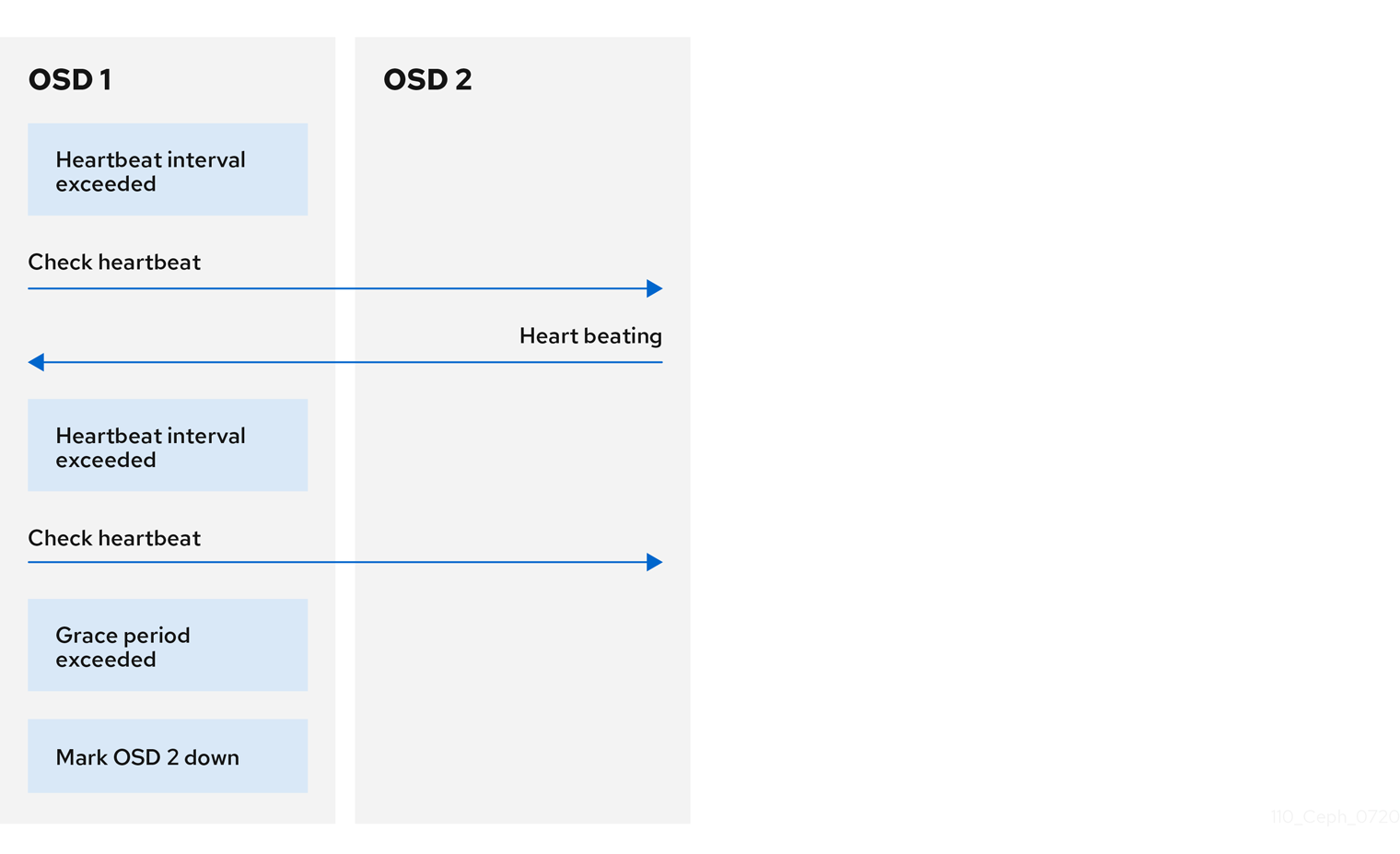
Each Ceph OSD daemon checks the heartbeat of other Ceph OSD daemons every 6 seconds. To change the heartbeat interval, add the osd heartbeat interval setting under the [osd] section of the Ceph configuration file, or change its value at runtime.
If a neighboring Ceph OSD daemon does not send heartbeat packets within a 20 second grace period, the Ceph OSD daemon might consider the neighboring Ceph OSD daemon down. It can report it back to a Ceph Monitor, which will update the Ceph cluster map. To change this grace period, add the osd heartbeat grace setting under the [osd] section of the Ceph configuration file, or set its value at runtime.
7.4. Reporting an OSD as down
By default, two Ceph OSD Daemons from different hosts must report to the Ceph Monitors that another Ceph OSD Daemon is down before the Ceph Monitors acknowledge that the reported Ceph OSD Daemon is down.
However, there is chance that all the OSDs reporting the failure are in different hosts in a rack with a bad switch that causes connection problems between OSDs.
To avoid a "false alarm," Ceph considers the peers reporting the failure as a proxy for a "subcluster" that is similarly laggy. While this is not always the case, it may help administrators localize the grace correction to a subset of the system that is performing poorly.
Ceph uses the mon_osd_reporter_subtree_level setting to group the peers into the "subcluster" by their common ancestor type in the CRUSH map.
By default, only two reports from a different subtree are required to report another Ceph OSD Daemon down. Administrators can change the number of reporters from unique subtrees and the common ancestor type required to report a Ceph OSD Daemon down to a Ceph Monitor by adding the mon_osd_min_down_reporters and mon_osd_reporter_subtree_level settings under the [mon] section of the Ceph configuration file, or by setting the value at runtime.

7.5. Reporting a peering failure
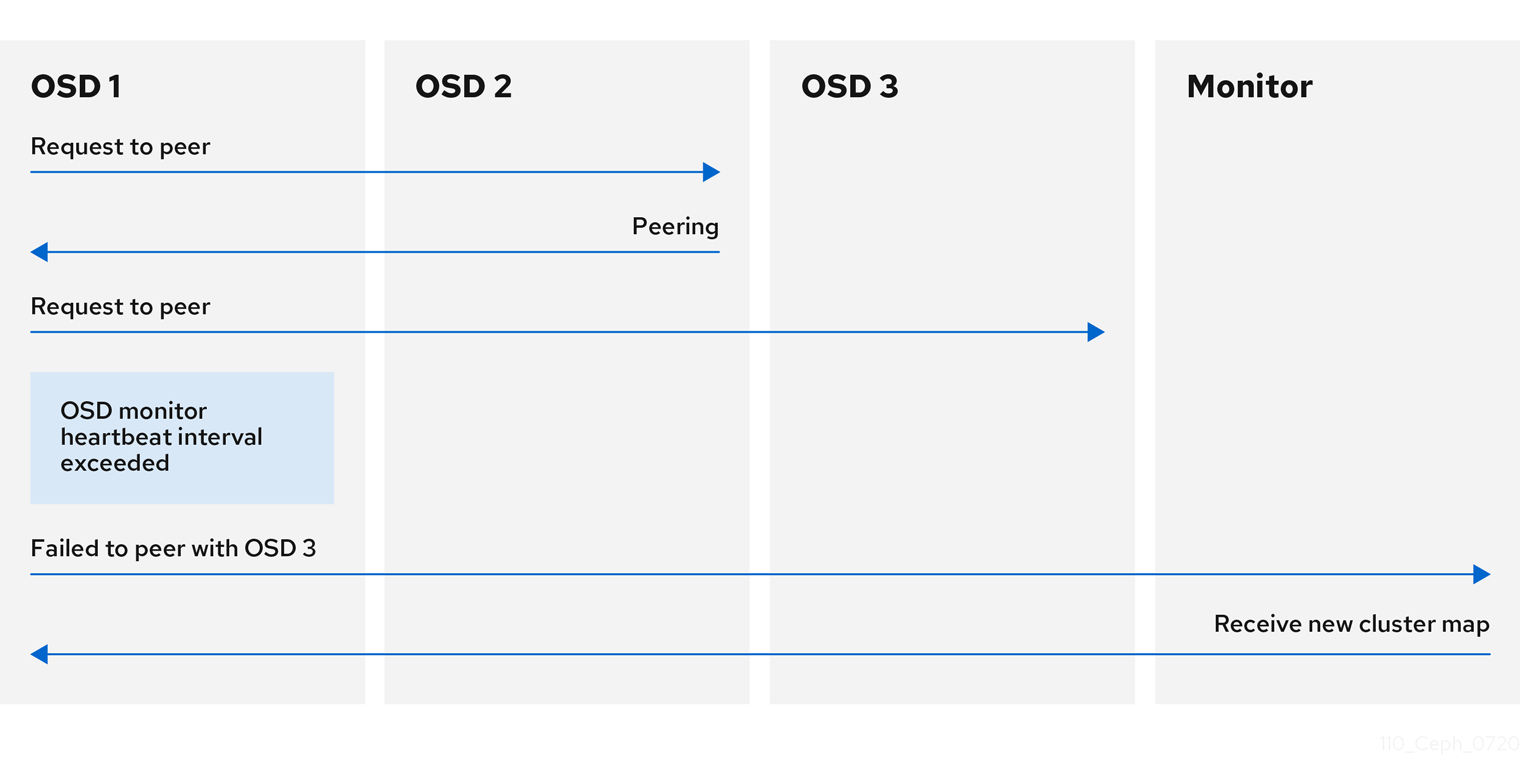
If a Ceph OSD daemon cannot peer with any of the Ceph OSD daemons defined in its Ceph configuration file or the cluster map, it will ping a Ceph Monitor for the most recent copy of the cluster map every 30 seconds. You can change the Ceph Monitor heartbeat interval by adding the osd mon heartbeat interval setting under the [osd] section of the Ceph configuration file, or by setting the value at runtime.
7.6. OSD reporting status
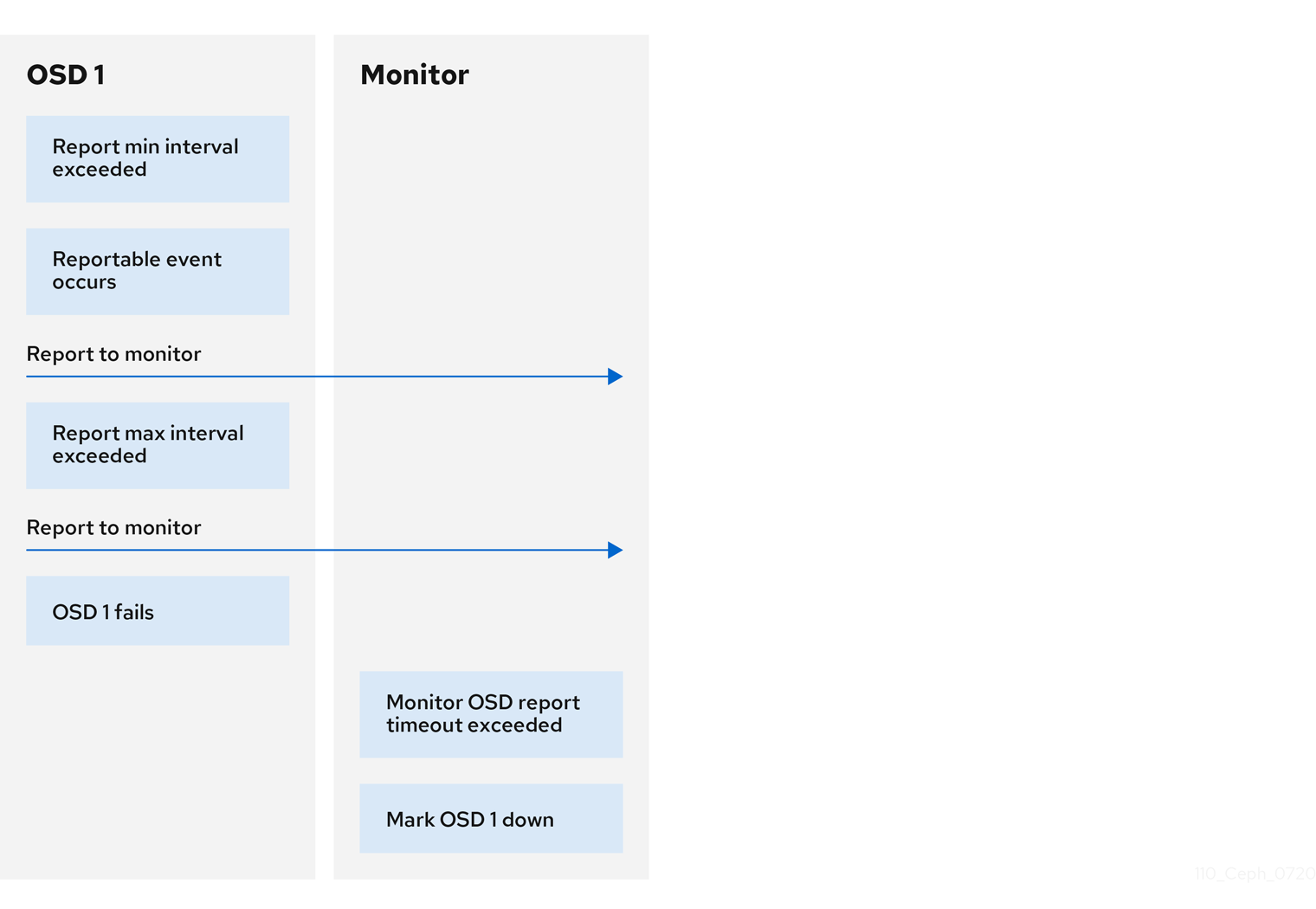
If a Ceph OSD Daemon does not report to a Ceph Monitor, the Ceph Monitor will consider the Ceph OSD Daemon down after the mon osd report timeout elapses. A Ceph OSD Daemon sends a report to a Ceph Monitor when a reportable event such as a failure, a change in placement group stats, a change in up_thru or when it boots within 5 seconds. You can change the Ceph OSD Daemon minimum report interval by adding the osd mon report interval min setting under the [osd] section of the Ceph configuration file, or by setting the value at runtime.
A Ceph OSD Daemon sends a report to a Ceph Monitor every 120 seconds irrespective of whether any notable changes occur. You can change the Ceph Monitor report interval by adding the osd mon report interval max setting under the [osd] section of the Ceph configuration file, or by setting the value at runtime.
7.7. Additional Resources
- See all the Red Hat Ceph Storage Ceph Monitor and OSD configuration options in Appendix G for specific option descriptions and usage.
Chapter 8. Ceph debugging and logging configuration
As a storage administrator, you can increase the amount of debugging and logging information to help diagnose problems with the Red Hat Ceph Storage.
8.1. Prerequisites
- Installation of the Red Hat Ceph Storage software.
8.2. Ceph debugging and logging
Debug settings are NOT required in the Ceph configuration file, but can be added to optimize logging. Changes to the Ceph logging configuration usually occur at runtime when a problem occurs, but may also be modified in the Ceph configuration file. For example, if there are issues when starting the cluster, consider increasing log settings in the Ceph configuration file. When the problem is resolved, remove the settings or restore them to optimal settings for runtime operations.
By default, view Ceph log files under /var/log/ceph.
When debug output slows down the cluster, the latency can hide race conditions.
Logging is resource intensive. If there is a problem in a specific area of the cluster, enable logging for that area of the cluster. For example, if OSDs are running fine but Ceph Object Gateways are not, start by enabling debug logging for the specific gateway instances encountering problems. Increase or decrease logging for each subsystem as needed.
Verbose logging can generate over 1GB of data per hour. If the OS disk reaches its capacity, the node will stop working.
If Ceph logging is enabled or the rate of logging increased, ensure that the OS disk has sufficient capacity.
When the cluster is running well, remove unnecessary debugging settings to ensure the cluster runs optimally. Logging debug output messages is relatively slow, and a waste of resources when operating your cluster.
8.3. Additional Resources
- See all the Red Hat Ceph Storage Ceph debugging and logging configuration options in Appendix J for specific option descriptions and usage.
Appendix A. General configuration options
These are the general configuration options for Ceph.
Typically, these will be set automatically by deployment tools, such as Ansible.
fsid- Description
- The file system ID. One per cluster.
- Type
- UUID
- Required
- No.
- Default
- N/A. Usually generated by deployment tools.
admin_socket- Description
- The socket for executing administrative commands on a daemon, irrespective of whether Ceph monitors have established a quorum.
- Type
- String
- Required
- No
- Default
-
/var/run/ceph/$cluster-$name.asok
pid_file- Description
-
The file in which the monitor or OSD will write its PID. For instance,
/var/run/$cluster/$type.$id.pidwill create /var/run/ceph/mon.a.pid for themonwith idarunning in thecephcluster. Thepid fileis removed when the daemon stops gracefully. If the process is not daemonized (meaning it runs with the-for-doption), thepid fileis not created. - Type
- String
- Required
- No
- Default
- No
chdir- Description
-
The directory Ceph daemons change to once they are up and running. Default
/directory recommended. - Type
- String
- Required
- No
- Default
-
/
max_open_files- Description
-
If set, when the Red Hat Ceph Storage cluster starts, Ceph sets the
max_open_fdsat the OS level (that is, the max # of file descriptors). It helps prevents Ceph OSDs from running out of file descriptors. - Type
- 64-bit Integer
- Required
- No
- Default
-
0
fatal_signal_handlers- Description
- If set, we will install signal handlers for SEGV, ABRT, BUS, ILL, FPE, XCPU, XFSZ, SYS signals to generate a useful log message.
- Type
- Boolean
- Default
-
true
Appendix B. Ceph network configuration options
These are the common network configuration options for Ceph.
public_network- Description
-
The IP address and netmask of the public (front-side) network (for example,
192.168.0.0/24). Set in[global]. You can specify comma-delimited subnets. - Type
-
<ip-address>/<netmask> [, <ip-address>/<netmask>] - Required
- No
- Default
- N/A
public_addr- Description
- The IP address for the public (front-side) network. Set for each daemon.
- Type
- IP Address
- Required
- No
- Default
- N/A
cluster_network- Description
-
The IP address and netmask of the cluster network (for example,
10.0.0.0/24). Set in[global]. You can specify comma-delimited subnets. - Type
-
<ip-address>/<netmask> [, <ip-address>/<netmask>] - Required
- No
- Default
- N/A
cluster_addr- Description
- The IP address for the cluster network. Set for each daemon.
- Type
- Address
- Required
- No
- Default
- N/A
ms_type- Description
-
The messenger type for the network transport layer. Red Hat supports the
simpleand theasyncmessenger type usingposixsemantics. - Type
- String.
- Required
- No.
- Default
-
async+posix
ms_public_type- Description
-
The messenger type for the network transport layer of the public network. It operates identically to
ms_type, but is applicable only to the public or front-side network. This setting enables Ceph to use a different messenger type for the public or front-side and cluster or back-side networks. - Type
- String.
- Required
- No.
- Default
- None.
ms_cluster_type- Description
-
The messenger type for the network transport layer of the cluster network. It operates identically to
ms_type, but is applicable only to the cluster or back-side network. This setting enables Ceph to use a different messenger type for the public or front-side and cluster or back-side networks. - Type
- String.
- Required
- No.
- Default
- None.
Host options
You must declare at least one Ceph Monitor in the Ceph configuration file, with a mon addr setting under each declared monitor. Ceph expects a host setting under each declared monitor, metadata server and OSD in the Ceph configuration file.
Do not use localhost. Use the short name of the node, not the fully-qualified domain name (FQDN). Do not specify any value for host when using a third party deployment system that retrieves the node name for you.
mon_addr- Description
-
A list of
<hostname>:<port>entries that clients can use to connect to a Ceph monitor. If not set, Ceph searches[mon.*]sections. - Type
- String
- Required
- No
- Default
- N/A
host- Description
-
The host name. Use this setting for specific daemon instances (for example,
[osd.0]). - Type
- String
- Required
- Yes, for daemon instances.
- Default
-
localhost
TCP options
Ceph disables TCP buffering by default.
ms_tcp_nodelay- Description
-
Ceph enables
ms_tcp_nodelayso that each request is sent immediately (no buffering). Disabling Nagle’s algorithm increases network traffic, which can introduce congestion. If you experience large numbers of small packets, you may try disablingms_tcp_nodelay, but be aware that disabling it will generally increase latency. - Type
- Boolean
- Required
- No
- Default
-
true
ms_tcp_rcvbuf- Description
- The size of the socket buffer on the receiving end of a network connection. Disabled by default.
- Type
- 32-bit Integer
- Required
- No
- Default
-
0
ms_tcp_read_timeout- Description
-
If a client or daemon makes a request to another Ceph daemon and does not drop an unused connection, the
tcp read timeoutdefines the connection as idle after the specified number of seconds. - Type
- Unsigned 64-bit Integer
- Required
- No
- Default
-
90015 minutes.
Bind options
The bind options configure the default port ranges for the Ceph OSD daemons. The default range is 6800:7100. You can also enable Ceph daemons to bind to IPv6 addresses.
Verify that the firewall configuration allows you to use the configured port range.
ms_bind_port_min- Description
- The minimum port number to which an OSD daemon will bind.
- Type
- 32-bit Integer
- Default
-
6800 - Required
- No
ms_bind_port_max- Description
- The maximum port number to which an OSD daemon will bind.
- Type
- 32-bit Integer
- Default
-
7300 - Required
- No.
ms_bind_ipv6- Description
- Enables Ceph daemons to bind to IPv6 addresses.
- Type
- Boolean
- Default
-
false - Required
- No
Asynchronous messenger options
These Ceph messenger options configure the behavior of AsyncMessenger.
ms_async_transport_type- Description
-
Transport type used by the
AsyncMessenger. Red Hat supports theposixsetting, but does not support thedpdkorrdmasettings at this time. POSIX uses standard TCP/IP networking and is the default value. Other transport types are experimental and are NOT supported. - Type
- String
- Required
- No
- Default
-
posix
ms_async_op_threads- Description
-
Initial number of worker threads used by each
AsyncMessengerinstance. This configuration setting SHOULD equal the number of replicas or erasure code chunks, but it may be set lower if the CPU core count is low or the number of OSDs on a single server is high. - Type
- 64-bit Unsigned Integer
- Required
- No
- Default
-
3
ms_async_max_op_threads- Description
-
The maximum number of worker threads used by each
AsyncMessengerinstance. Set to lower values if the OSD host has limited CPU count, and increase if Ceph is underutilizing CPUs are underutilized. - Type
- 64-bit Unsigned Integer
- Required
- No
- Default
-
5
ms_async_set_affinity- Description
-
Set to
trueto bindAsyncMessengerworkers to particular CPU cores. - Type
- Boolean
- Required
- No
- Default
-
true
ms_async_affinity_cores- Description
-
When
ms_async_set_affinityistrue, this string specifies howAsyncMessengerworkers are bound to CPU cores. For example,0,2will bind workers #1 and #2 to CPU cores #0 and #2, respectively. NOTE: When manually setting affinity, make sure to not assign workers to virtual CPUs created as an effect of hyper threading or similar technology, because they are slower than physical CPU cores. - Type
- String
- Required
- No
- Default
-
(empty)
ms_async_send_inline- Description
-
Send messages directly from the thread that generated them instead of queuing and sending from the
AsyncMessengerthread. This option is known to decrease performance on systems with a lot of CPU cores, so it’s disabled by default. - Type
- Boolean
- Required
- No
- Default
-
false
Appendix C. Ceph Monitor configuration options
The following are Ceph monitor configuration options that can be set up during deployment.
mon_initial_members- Description
- The IDs of initial monitors in a cluster during startup. If specified, Ceph requires an odd number of monitors to form an initial quorum (for example, 3).
- Type
- String
- Default
- None
mon_force_quorum_join- Description
- Force monitor to join quorum even if it has been previously removed from the map
- Type
- Boolean
- Default
-
False
mon_dns_srv_name- Description
- The service name used for querying the DNS for the monitor hosts/addresses.
- Type
- String
- Default
-
ceph-mon
fsid- Description
- The cluster ID. One per cluster.
- Type
- UUID
- Required
- Yes.
- Default
- N/A. May be generated by a deployment tool if not specified.
mon_data- Description
- The monitor’s data location.
- Type
- String
- Default
-
/var/lib/ceph/mon/$cluster-$id
mon_data_size_warn- Description
-
Ceph issues a
HEALTH_WARNstatus in the cluster log when the monitor’s data store reaches this threshold. The default value is 15GB. - Type
- Integer
- Default
-
15*1024*1024*1024*`
mon_data_avail_warn- Description
-
Ceph issues a
HEALTH_WARNstatus in cluster log when the available disk space of the monitor’s data store is lower than or equal to this percentage. - Type
- Integer
- Default
-
30
mon_data_avail_crit- Description
-
Ceph issues a
HEALTH_ERRstatus in cluster log when the available disk space of the monitor’s data store is lower or equal to this percentage. - Type
- Integer
- Default
-
5
mon_warn_on_cache_pools_without_hit_sets- Description
-
Ceph issues a
HEALTH_WARNstatus in cluster log if a cache pool does not have thehit_set_typeparamater set. - Type
- Boolean
- Default
- True
mon_warn_on_crush_straw_calc_version_zero- Description
-
Ceph issues a
HEALTH_WARNstatus in the cluster log if the CRUSH’sstraw_calc_versionis zero. See CRUSH tunables for details. - Type
- Boolean
- Default
- True
mon_warn_on_legacy_crush_tunables- Description
-
Ceph issues a
HEALTH_WARNstatus in the cluster log if CRUSH tunables are too old (older thanmon_min_crush_required_version). - Type
- Boolean
- Default
- True
mon_crush_min_required_version- Description
- This setting defines the minimum tunable profile version required by the cluster.
- Type
- String
- Default
-
firefly
mon_warn_on_osd_down_out_interval_zero- Description
-
Ceph issues a
HEALTH_WARNstatus in the cluster log if themon_osd_down_out_intervalsetting is zero, because the Leader behaves in a similar manner when thenooutflag is set. Administrators find it easier to troubleshoot a cluster by setting thenooutflag. Ceph issues the warning to ensure administrators know that the setting is zero. - Type
- Boolean
- Default
- True
mon_cache_target_full_warn_ratio- Description
-
Ceph issues a warning when between the ratio of
cache_target_fullandtarget_max_object. - Type
- Float
- Default
-
0.66
mon_health_data_update_interval- Description
- How often (in seconds) a monitor in the quorum shares its health status with its peers. A negative number disables health updates.
- Type
- Float
- Default
-
60
mon_health_to_clog- Description
- This setting enable Ceph to send a health summary to the cluster log periodically.
- Type
- Boolean
- Default
- True
mon_health_detail_to_clog- Description
- This setting enable Ceph to send a health details to the cluster log periodically.
- Type
- Boolean
- Default
- True
mon_op_complaint_time- Description
- Number of seconds after which the Ceph Monitor operation is considered blocked after no updates.
- Type
- Integer
- Default
- 30
mon_health_to_clog_tick_interval- Description
- How often (in seconds) the monitor sends a health summary to the cluster log. A non-positive number disables it. If the current health summary is empty or identical to the last time, the monitor will not send the status to the cluster log.
- Type
- Integer
- Default
- 3600
mon_health_to_clog_interval- Description
- How often (in seconds) the monitor sends a health summary to the cluster log. A non-positive number disables it. The monitor will always send the summary to cluster log.
- Type
- Integer
- Default
- 60
mon_osd_full_ratio- Description
-
The percentage of disk space used before an OSD is considered
full. - Type
- Float:
- Default
-
.95
mon_osd_nearfull_ratio- Description
-
The percentage of disk space used before an OSD is considered
nearfull. - Type
- Float
- Default
-
.85
mon_sync_trim_timeout- Description, Type
- Double
- Default
-
30.0
mon_sync_heartbeat_timeout- Description, Type
- Double
- Default
-
30.0
mon_sync_heartbeat_interval- Description, Type
- Double
- Default
-
5.0
mon_sync_backoff_timeout- Description, Type
- Double
- Default
-
30.0
mon_sync_timeout- Description
- Number of seconds the monitor will wait for the next update message from its sync provider before it gives up and bootstraps again.
- Type
- Double
- Default
-
30.0
mon_sync_max_retries- Description, Type
- Integer
- Default
-
5
mon_sync_max_payload_size- Description
- The maximum size for a sync payload (in bytes).
- Type
- 32-bit Integer
- Default
-
1045676
paxos_max_join_drift- Description
- The maximum Paxos iterations before we must first sync the monitor data stores. When a monitor finds that its peer is too far ahead of it, it will first sync with data stores before moving on.
- Type
- Integer
- Default
-
10
paxos_stash_full_interval- Description
-
How often (in commits) to stash a full copy of the PaxosService state. Current this setting only affects
mds,mon,authandmgrPaxosServices. - Type
- Integer
- Default
- 25
paxos_propose_interval- Description
- Gather updates for this time interval before proposing a map update.
- Type
- Double
- Default
-
1.0
paxos_min- Description
- The minimum number of paxos states to keep around
- Type
- Integer
- Default
- 500
paxos_min_wait- Description
- The minimum amount of time to gather updates after a period of inactivity.
- Type
- Double
- Default
-
0.05
paxos_trim_min- Description
- Number of extra proposals tolerated before trimming
- Type
- Integer
- Default
- 250
paxos_trim_max- Description
- The maximum number of extra proposals to trim at a time
- Type
- Integer
- Default
- 500
paxos_service_trim_min- Description
- The minimum amount of versions to trigger a trim (0 disables it)
- Type
- Integer
- Default
- 250
paxos_service_trim_max- Description
- The maximum amount of versions to trim during a single proposal (0 disables it)
- Type
- Integer
- Default
- 500
mon_max_log_epochs- Description
- The maximum amount of log epochs to trim during a single proposal
- Type
- Integer
- Default
- 500
mon_max_pgmap_epochs- Description
- The maximum amount of pgmap epochs to trim during a single proposal
- Type
- Integer
- Default
- 500
mon_mds_force_trim_to- Description
- Force monitor to trim mdsmaps to this point (0 disables it. dangerous, use with care)
- Type
- Integer
- Default
- 0
mon_osd_force_trim_to- Description
- Force monitor to trim osdmaps to this point, even if there is PGs not clean at the specified epoch (0 disables it. dangerous, use with care)
- Type
- Integer
- Default
- 0
mon_osd_cache_size- Description
- The size of osdmaps cache, not to rely on underlying store’s cache
- Type
- Integer
- Default
- 10
mon_election_timeout- Description
- On election proposer, maximum waiting time for all ACKs in seconds.
- Type
- Float
- Default
-
5
mon_lease- Description
- The length (in seconds) of the lease on the monitor’s versions.
- Type
- Float
- Default
-
5
mon_lease_renew_interval_factor- Description
-
mon lease*mon lease renew interval factorwill be the interval for the Leader to renew the other monitor’s leases. The factor should be less than1.0. - Type
- Float
- Default
-
0.6
mon_lease_ack_timeout_factor- Description
-
The Leader will wait
mon lease*mon lease ack timeout factorfor the Providers to acknowledge the lease extension. - Type
- Float
- Default
-
2.0
mon_accept_timeout_factor- Description
-
The Leader will wait
mon lease*mon accept timeout factorfor the Requesters to accept a Paxos update. It is also used during the Paxos recovery phase for similar purposes. - Type
- Float
- Default
-
2.0
mon_min_osdmap_epochs- Description
- Minimum number of OSD map epochs to keep at all times.
- Type
- 32-bit Integer
- Default
-
500
mon_max_pgmap_epochs- Description
- Maximum number of PG map epochs the monitor should keep.
- Type
- 32-bit Integer
- Default
-
500
mon_max_log_epochs- Description
- Maximum number of Log epochs the monitor should keep.
- Type
- 32-bit Integer
- Default
-
500
clock_offset- Description
-
How much to offset the system clock. See
Clock.ccfor details. - Type
- Double
- Default
-
0
mon_tick_interval- Description
- A monitor’s tick interval in seconds.
- Type
- 32-bit Integer
- Default
-
5
mon_clock_drift_allowed- Description
- The clock drift in seconds allowed between monitors.
- Type
- Float
- Default
-
.050
mon_clock_drift_warn_backoff- Description
- Exponential backoff for clock drift warnings.
- Type
- Float
- Default
-
5
mon_timecheck_interval- Description
- The time check interval (clock drift check) in seconds for the leader.
- Type
- Float
- Default
-
300.0
mon_timecheck_skew_interval- Description
- The time check interval (clock drift check) in seconds when in the presence of a skew in seconds for the Leader.
- Type
- Float
- Default
-
30.0
mon_max_osd- Description
- The maximum number of OSDs allowed in the cluster.
- Type
- 32-bit Integer
- Default
-
10000
mon_globalid_prealloc- Description
- The number of global IDs to pre-allocate for clients and daemons in the cluster.
- Type
- 32-bit Integer
- Default
-
100
mon_sync_fs_threshold- Description
-
Synchronize with the filesystem when writing the specified number of objects. Set it to
0to disable it. - Type
- 32-bit Integer
- Default
-
5
mon_subscribe_interval- Description
- The refresh interval, in seconds, for subscriptions. The subscription mechanism enables obtaining the cluster maps and log information.
- Type
- Double
- Default
-
300
mon_stat_smooth_intervals- Description
-
Ceph will smooth statistics over the last
NPG maps. - Type
- Integer
- Default
-
2
mon_probe_timeout- Description
- Number of seconds the monitor will wait to find peers before bootstrapping.
- Type
- Double
- Default
-
2.0
mon_daemon_bytes- Description
- The message memory cap for metadata server and OSD messages (in bytes).
- Type
- 64-bit Integer Unsigned
- Default
-
400ul << 20
mon_max_log_entries_per_event- Description
- The maximum number of log entries per event.
- Type
- Integer
- Default
-
4096
mon_osd_prime_pg_temp- Description
-
Enables or disable priming the PGMap with the previous OSDs when an out OSD comes back into the cluster. With the
truesetting the clients will continue to use the previous OSDs until the newly in OSDs as that PG peered. - Type
- Boolean
- Default
-
true
mon_osd_prime_pg_temp_max_time- Description
- How much time in seconds the monitor should spend trying to prime the PGMap when an out OSD comes back into the cluster.
- Type
- Float
- Default
-
0.5
mon_osd_prime_pg_temp_max_time_estimate- Description
- Maximum estimate of time spent on each PG before we prime all PGs in parallel.
- Type
- Float
- Default
-
0.25
mon_osd_allow_primary_affinity- Description
-
allow
primary_affinityto be set in the osdmap. - Type
- Boolean
- Default
- False
mon_osd_pool_ec_fast_read- Description
-
Whether turn on fast read on the pool or not. It will be used as the default setting of newly created erasure pools if
fast_readis not specified at create time. - Type
- Boolean
- Default
- False
mon_mds_skip_sanity- Description
- Skip safety assertions on FSMap, in case of bugs where we want to continue anyway. Monitor terminates if the FSMap sanity check fails, but we can disable it by enabling this option.
- Type
- Boolean
- Default
- False
mon_max_mdsmap_epochs- Description
- The maximum amount of mdsmap epochs to trim during a single proposal.
- Type
- Integer
- Default
- 500
mon_config_key_max_entry_size- Description
- The maximum size of config-key entry (in bytes).
- Type
- Integer
- Default
- 4096
mon_scrub_interval- Description
- How often, in seconds, the monitor scrub its store by comparing the stored checksums with the computed ones of all the stored keys.
- Type
- Integer
- Default
- 3600*24
mon_scrub_max_keys- Description
- The maximum number of keys to scrub each time.
- Type
- Integer
- Default
- 100
mon_compact_on_start- Description
-
Compact the database used as Ceph Monitor store on
ceph-monstart. A manual compaction helps to shrink the monitor database and improve the performance of it if the regular compaction fails to work. - Type
- Boolean
- Default
- False
mon_compact_on_bootstrap- Description
- Compact the database used as Ceph Monitor store on on bootstrap. Monitor starts probing each other for creating a quorum after bootstrap. If it times out before joining the quorum, it will start over and bootstrap itself again.
- Type
- Boolean
- Default
- False
mon_compact_on_trim- Description
- Compact a certain prefix (including paxos) when we trim its old states.
- Type
- Boolean
- Default
- True
mon_cpu_threads- Description
- Number of threads for performing CPU intensive work on monitor.
- Type
- Boolean
- Default
- True
mon_osd_mapping_pgs_per_chunk- Description
- We calculate the mapping from placement group to OSDs in chunks. This option specifies the number of placement groups per chunk.
- Type
- Integer
- Default
- 4096
mon_osd_max_split_count- Description
-
Largest number of PGs per "involved" OSD to let split create. When we increase the
pg_numof a pool, the placement groups will be splitted on all OSDs serving that pool. We want to avoid extreme multipliers on PG splits. - Type
- Integer
- Default
- 300
rados_mon_op_timeout- Description
- Number of seconds to wait for a response from the monitor before returning an error from a rados operation. 0 means at limit, or no wait time.
- Type
- Double
- Default
- 0
Additional Resources
Appendix D. Cephx configuration options
The following are Cephx configuration options that can be set up during deployment.
- auth_cluster_required
- Description
-
If enabled, the Red Hat Ceph Storage cluster daemons,
ceph-monandceph-osd, must authenticate with each other. Valid settings arecephxornone. - Type
- String
- Required
- No
- Default
-
cephx.
- auth_service_required
- Description
-
If enabled, the Red Hat Ceph Storage cluster daemons require Ceph clients to authenticate with the Red Hat Ceph Storage cluster in order to access Ceph services. Valid settings are
cephxornone. - Type
- String
- Required
- No
- Default
-
cephx.
- auth_client_required
- Description
-
If enabled, the Ceph client requires the Red Hat Ceph Storage cluster to authenticate with the Ceph client. Valid settings are
cephxornone. - Type
- String
- Required
- No
- Default
-
cephx.
- keyring
- Description
- The path to the keyring file.
- Type
- String
- Required
- No
- Default
-
/etc/ceph/$cluster.$name.keyring,/etc/ceph/$cluster.keyring,/etc/ceph/keyring,/etc/ceph/keyring.bin
- keyfile
- Description
- The path to a key file (that is. a file containing only the key).
- Type
- String
- Required
- No
- Default
- None
- key
- Description
- The key (that is, the text string of the key itself). Not recommended.
- Type
- String
- Required
- No
- Default
- None
- ceph-mon
- Location
-
$mon_data/keyring - Capabilities
-
mon 'allow *'
- ceph-osd
- Location
-
$osd_data/keyring - Capabilities
-
mon 'allow profile osd' osd 'allow *'
- radosgw
- Location
-
$rgw_data/keyring - Capabilities
-
mon 'allow rwx' osd 'allow rwx'
- cephx_require_signatures
- Description
-
If set to
true, Ceph requires signatures on all message traffic between the Ceph client and the Red Hat Ceph Storage cluster, and between daemons comprising the Red Hat Ceph Storage cluster. - Type
- Boolean
- Required
- No
- Default
-
false
- cephx_cluster_require_signatures
- Description
-
If set to
true, Ceph requires signatures on all message traffic between Ceph daemons comprising the Red Hat Ceph Storage cluster. - Type
- Boolean
- Required
- No
- Default
-
false
- cephx_service_require_signatures
- Description
-
If set to
true, Ceph requires signatures on all message traffic between Ceph clients and the Red Hat Ceph Storage cluster. - Type
- Boolean
- Required
- No
- Default
-
false
- cephx_sign_messages
- Description
- If the Ceph version supports message signing, Ceph will sign all messages so they cannot be spoofed.
- Type
- Boolean
- Default
-
true
- auth_service_ticket_ttl
- Description
- When the Red Hat Ceph Storage cluster sends a Ceph client a ticket for authentication, the cluster assigns the ticket a time to live.
- Type
- Double
- Default
-
60*60
Additional Resources
- <additional resource 1>
- <additional resource 2>
Appendix E. Pools, placement groups and CRUSH configuration options
The Ceph options that govern pools, placement groups, and the CRUSH algorithm.
- mon_allow_pool_delete
- Description
- Allows a monitor to delete a pool. In RHCS 3 and later releases, the monitor cannot delete the pool by default as an added measure to protect data.
- Type
- Boolean
- Default
-
false
- mon_max_pool_pg_num
- Description
- The maximum number of placement groups per pool.
- Type
- Integer
- Default
-
65536
- mon_pg_create_interval
- Description
- Number of seconds between PG creation in the same Ceph OSD Daemon.
- Type
- Float
- Default
-
30.0
- mon_pg_stuck_threshold
- Description
- Number of seconds after which PGs can be considered as being stuck.
- Type
- 32-bit Integer
- Default
-
300
- mon_pg_min_inactive
- Description
-
Ceph issues a
HEALTH_ERRstatus in the cluster log if the number of PGs that remain inactive longer than themon_pg_stuck_thresholdexceeds this setting. The default setting is one PG. A non-positive number disables this setting. - Type
- Integer
- Default
-
1
- mon_pg_warn_min_per_osd
- Description
-
Ceph issues a
HEALTH_WARNstatus in the cluster log if the average number of PGs per OSD in the cluster is less than this setting. A non-positive number disables this setting. - Type
- Integer
- Default
-
30
- mon_pg_warn_max_per_osd
- Description
-
Ceph issues a
HEALTH_WARNstatus in the cluster log if the average number of PGs per OSD in the cluster is greater than this setting. A non-positive number disables this setting. - Type
- Integer
- Default
-
300
- mon_pg_warn_min_objects
- Description
- Do not warn if the total number of objects in the cluster is below this number.
- Type
- Integer
- Default
-
1000
- mon_pg_warn_min_pool_objects
- Description
- Do not warn on pools whose object number is below this number.
- Type
- Integer
- Default
-
1000
- mon_pg_check_down_all_threshold
- Description
-
The threshold of
downOSDs by percentage after which Ceph checks all PGs to ensure they are not stuck or stale. - Type
- Float
- Default
-
0.5
- mon_pg_warn_max_object_skew
- Description
-
Ceph issue a
HEALTH_WARNstatus in the cluster log if the average number of objects in a pool is greater thanmon pg warn max object skewtimes the average number of objects for all pools. A non-positive number disables this setting. - Type
- Float
- Default
-
10
- mon_delta_reset_interval
- Description
- The number of seconds of inactivity before Ceph resets the PG delta to zero. Ceph keeps track of the delta of the used space for each pool to aid administrators in evaluating the progress of recovery and performance.
- Type
- Integer
- Default
-
10
- mon_osd_max_op_age
- Description
-
The maximimum age in seconds for an operation to complete before issuing a
HEALTH_WARNstatus. - Type
- Float
- Default
-
32.0
- osd_pg_bits
- Description
- Placement group bits per Ceph OSD Daemon.
- Type
- 32-bit Integer
- Default
-
6
- osd_pgp_bits
- Description
- The number of bits per Ceph OSD Daemon for Placement Groups for Placement purpose (PGPs).
- Type
- 32-bit Integer
- Default
-
6
- osd_crush_chooseleaf_type
- Description
-
The bucket type to use for
chooseleafin a CRUSH rule. Uses ordinal rank rather than name. - Type
- 32-bit Integer
- Default
-
1. Typically a host containing one or more Ceph OSD Daemons.
- osd_pool_default_crush_replicated_ruleset
- Description
- The default CRUSH ruleset to use when creating a replicated pool.
- Type
- 8-bit Integer
- Default
-
0
- osd_pool_erasure_code_stripe_unit
- Description
-
Sets the default size, in bytes, of a chunk of an object stripe for erasure coded pools. Every object of size S will be stored as N stripes, with each data chunk receiving
stripe unitbytes. Each stripe ofN * stripe unitbytes will be encoded/decoded individually. This option can is overridden by thestripe_unitsetting in an erasure code profile. - Type
- Unsigned 32-bit Integer
- Default
-
4096
- osd_pool_default_size
- Description
-
Sets the number of replicas for objects in the pool. The default value is the same as
ceph osd pool set {pool-name} size {size}. - Type
- 32-bit Integer
- Default
-
3
- osd_pool_default_min_size
- Description
-
Sets the minimum number of written replicas for objects in the pool in order to acknowledge a write operation to the client. If minimum is not met, Ceph will not acknowledge the write to the client. This setting ensures a minimum number of replicas when operating in
degradedmode. - Type
- 32-bit Integer
- Default
-
0, which means no particular minimum. If0, minimum issize - (size / 2).
- osd_pool_default_pg_num
- Description
-
The default number of placement groups for a pool. The default value is the same as
pg_numwithmkpool. - Type
- 32-bit Integer
- Default
-
8
- osd_pool_default_pgp_num
- Description
-
The default number of placement groups for placement for a pool. The default value is the same as
pgp_numwithmkpool. PG and PGP should be equal. - Type
- 32-bit Integer
- Default
-
8
- osd_pool_default_flags
- Description
- The default flags for new pools.
- Type
- 32-bit Integer
- Default
-
0
- osd_max_pgls
- Description
- The maximum number of placement groups to list. A client requesting a large number can tie up the Ceph OSD Daemon.
- Type
- Unsigned 64-bit Integer
- Default
-
1024 - Note
- Default should be fine.
- osd_min_pg_log_entries
- Description
- The minimum number of placement group logs to maintain when trimming log files.
- Type
- 32-bit Int Unsigned
- Default
-
1000
- osd_deep_scrub_large_omap_object_value_sum_threshold
- Description
-
Sets a threshold value for number of omap keys that a RADOS object may have. If the number of omap keys exceeds the threshold value, the placement group that contains the RADOS object logs messages when the group is deep-scrubbed. One message is logged to the cluster log
ceph.log. It includes the warningcluster [WRN] Large omap object found, the key count, and the size of the object in bytes. The second message adds the cluster status messageLarge OMAP countto HEALTH_WARN. For more information, refer to link:https://access.redhat.com/solutions/3660171 - Type
- 64-bit Unsigned Integer
- Default
-
20000
Appendix F. Object Storage Daemon (OSD) configuration options
The following are Ceph Object Storage Daemon (OSD) configuration options that can be set during deployment.
- osd_uuid
- Description
- The universally unique identifier (UUID) for the Ceph OSD.
- Type
- UUID
- Default
- The UUID.
- Note
-
The
osd uuidapplies to a single Ceph OSD. Thefsidapplies to the entire cluster.
- osd_data
- Description
The path to the OSD’s data. You must create the directory when deploying Ceph. Mount a drive for OSD data at this mount point.
IMPORTANT: Red Hat does not recommend changing the default.
IMPORTANT: Red Hat does not recommend changing the default.Copy to Clipboard Copied! Toggle word wrap Toggle overflow - Type
- String
- Default
-
/var/lib/ceph/osd/$cluster-$id
- osd_max_write_size
- Description
- The maximum size of a write in megabytes.
- Type
- 32-bit Integer
- Default
-
90
- osd_client_message_size_cap
- Description
- The largest client data message allowed in memory.
- Type
- 64-bit Integer Unsigned
- Default
-
500MB default.
500*1024L*1024L
- osd_class_dir
- Description
- The class path for RADOS class plug-ins.
- Type
- String
- Default
-
$libdir/rados-classes
- osd_max_scrubs
- Description
- The maximum number of simultaneous scrub operations for a Ceph OSD.
- Type
- 32-bit Int
- Default
-
1
- osd_scrub_thread_timeout
- Description
- The maximum time in seconds before timing out a scrub thread.
- Type
- 32-bit Integer
- Default
-
60
- osd_scrub_finalize_thread_timeout
- Description
- The maximum time in seconds before timing out a scrub finalize thread.
- Type
- 32-bit Integer
- Default
-
60*10
- osd_scrub_begin_hour
- Description
-
The earliest hour that light or deep scrubbing can begin. It is used with the
osd scrub end hourparameter to define a scrubbing time window and allows constraining scrubbing to off-peak hours. The setting takes an integer to specify the hour on the 24-hour cycle where0represents the hour from 12:01 a.m. to 1:00 a.m., 13 represents the hour from 1:01 p.m. to 2:00 p.m., and so on. - Type
- 32-bit Integer
- Default
-
0for 12:01 to 1:00 a.m.
- osd_scrub_end_hour
- Description
-
The latest hour that light or deep scrubbing can begin. It is used with the
osd scrub begin hourparameter to define a scrubbing time window and allows constraining scrubbing to off-peak hours. The setting takes an integer to specify the hour on the 24-hour cycle where0represents the hour from 12:01 a.m. to 1:00 a.m., 13 represents the hour from 1:01 p.m. to 2:00 p.m., and so on. Theendhour must be greater than thebeginhour. - Type
- 32-bit Integer
- Default
-
24for 11:01 p.m. to 12:00 a.m.
- osd_scrub_load_threshold
- Description
-
The maximum load. Ceph will not scrub when the system load (as defined by the
getloadavg()function) is higher than this number. Default is0.5. - Type
- Float
- Default
-
0.5
- osd_scrub_min_interval
- Description
- The minimum interval in seconds for scrubbing the Ceph OSD when the Red Hat Ceph Storage cluster load is low.
- Type
- Float
- Default
-
Once per day.
60*60*24
- osd_scrub_max_interval
- Description
- The maximum interval in seconds for scrubbing the Ceph OSD irrespective of cluster load.
- Type
- Float
- Default
-
Once per week.
7*60*60*24
- osd_scrub_interval_randomize_ratio
- Description
-
Takes the ratio and randomizes the scheduled scrub between
osd scrub min intervalandosd scrub max interval. - Type
- Float
- Default
-
0.5.
- mon_warn_not_scrubbed
- Description
-
Number of seconds after
osd_scrub_intervalto warn about any PGs that were not scrubbed. - Type
- Integer
- Default
-
0(no warning).
- osd_scrub_chunk_min
- Description
-
The object store is partitioned into chunks which end on hash boundaries. For chunky scrubs, Ceph scrubs objects one chunk at a time with writes blocked for that chunk. The
osd scrub chunk minsetting represents minimum number of chunks to scrub. - Type
- 32-bit Integer
- Default
-
5
- osd_scrub_chunk_max
- Description
- The maximum number of chunks to scrub.
- Type
- 32-bit Integer
- Default
-
25
- osd_scrub_sleep
- Description
- The time to sleep between deep scrub operations.
- Type
- Float
- Default
-
0(or off).
- osd_scrub_during_recovery
- Description
- Allows scrubbing during recovery.
- Type
- Bool
- Default
-
false
- osd_scrub_invalid_stats
- Description
- Forces extra scrub to fix stats marked as invalid.
- Type
- Bool
- Default
-
true
- osd_scrub_priority
- Description
- Controls queue priority of scrub operations versus client I/O.
- Type
- Unsigned 32-bit Integer
- Default
-
5
- osd_scrub_cost
- Description
- Cost of scrub operations in megabytes for queue scheduling purposes.
- Type
- Unsigned 32-bit Integer
- Default
-
50 << 20
- osd_deep_scrub_interval
- Description
-
The interval for deep scrubbing, that is fully reading all data. The
osd scrub load thresholdparameter does not affect this setting. - Type
- Float
- Default
-
Once per week.
60*60*24*7
- osd_deep_scrub_stride
- Description
- Read size when doing a deep scrub.
- Type
- 32-bit Integer
- Default
-
512 KB.
524288
- mon_warn_not_deep_scrubbed
- Description
-
Number of seconds after
osd_deep_scrub_intervalto warn about any PGs that were not scrubbed. - Type
- Integer
- Default
-
0(no warning).
- osd_deep_scrub_randomize_ratio
- Description
-
The rate at which scrubs will randomly become deep scrubs (even before
osd_deep_scrub_intervalhas past). - Type
- Float
- Default
-
0.15or 15%.
- osd_deep_scrub_update_digest_min_age
- Description
- How many seconds old objects must be before scrub updates the whole-object digest.
- Type
- Integer
- Default
-
120(2 hours).
- osd_op_num_shards
- Description
- The number of shards for client operations.
- Type
- 32-bit Integer
- Default
-
0
- osd_op_num_threads_per_shard
- Description
- The number of threads per shard for client operations.
- Type
- 32-bit Integer
- Default
-
0
- osd_op_num_shards_hdd
- Description
- The number of shards for HDD operations.
- Type
- 32-bit Integer
- Default
-
5
- osd_op_num_threads_per_shard_hdd
- Description
- The number of threads per shard for HDD operations.
- Type
- 32-bit Integer
- Default
-
1
- osd_op_num_shards_ssd
- Description
- The number of shards for SSD operations.
- Type
- 32-bit Integer
- Default
-
8
- osd_op_num_threads_per_shard_ssd
- Description
- The number of threads per shard for SSD operations.
- Type
- 32-bit Integer
- Default
-
2
- osd_client_op_priority
- Description
-
The priority set for client operations. It is relative to
osd recovery op priority. - Type
- 32-bit Integer
- Default
-
63 - Valid Range
- 1-63
- osd_recovery_op_priority
- Description
-
The priority set for recovery operations. It is relative to
osd client op priority. - Type
- 32-bit Integer
- Default
-
3 - Valid Range
- 1-63
- osd_op_thread_timeout
- Description
- The Ceph OSD operation thread timeout in seconds.
- Type
- 32-bit Integer
- Default
-
30
- osd_op_complaint_time
- Description
- An operation becomes complaint worthy after the specified number of seconds have elapsed.
- Type
- Float
- Default
-
30
- osd_disk_threads
- Description
- The number of disk threads, which are used to perform background disk intensive OSD operations such as scrubbing and snap trimming.
- Type
- 32-bit Integer
- Default
-
1
- osd_op_history_size
- Description
- The maximum number of completed operations to track.
- Type
- 32-bit Unsigned Integer
- Default
-
20
- osd_op_history_duration
- Description
- The oldest completed operation to track.
- Type
- 32-bit Unsigned Integer
- Default
-
600
- osd_op_log_threshold
- Description
- How many operations logs to display at once.
- Type
- 32-bit Integer
- Default
-
5
- osd_op_timeout
- Description
- The time in seconds after which running OSD operations time out.
- Type
- Integer
- Default
-
0
Do not set the osd op timeout option unless your clients can handle the consequences. For example, setting this parameter on clients running in virtual machines can lead to data corruption because the virtual machines interpret this timeout as a hardware failure.
- osd_max_backfills
- Description
- The maximum number of backfill operations allowed to or from a single OSD.
- Type
- 64-bit Unsigned Integer
- Default
-
1
- osd_backfill_scan_min
- Description
- The minimum number of objects per backfill scan.
- Type
- 32-bit Integer
- Default
-
64
- osd_backfill_scan_max
- Description
- The maximum number of objects per backfill scan.
- Type
- 32-bit Integer
- Default
-
512
- osd_backfillfull_ratio
- Description
- Refuse to accept backfill requests when the Ceph OSD’s full ratio is above this value.
- Type
- Float
- Default
-
0.85
- osd_backfill_retry_interval
- Description
- The number of seconds to wait before retrying backfill requests.
- Type
- Double
- Default
-
10.0
- osd_map_dedup
- Description
- Enable removing duplicates in the OSD map.
- Type
- Boolean
- Default
-
true
- osd_map_cache_size
- Description
- The size of the OSD map cache in megabytes.
- Type
- 32-bit Integer
- Default
-
50
- osd_map_cache_bl_size
- Description
- The size of the in-memory OSD map cache in OSD daemons.
- Type
- 32-bit Integer
- Default
-
50
- osd_map_cache_bl_inc_size
- Description
- The size of the in-memory OSD map cache incrementals in OSD daemons.
- Type
- 32-bit Integer
- Default
-
100
- osd_map_message_max
- Description
- The maximum map entries allowed per MOSDMap message.
- Type
- 32-bit Integer
- Default
-
40
- osd_snap_trim_thread_timeout
- Description
- The maximum time in seconds before timing out a snap trim thread.
- Type
- 32-bit Integer
- Default
-
60*60*1
- osd_pg_max_concurrent_snap_trims
- Description
- The max number of parallel snap trims/PG. This controls how many objects per PG to trim at once.
- Type
- 32-bit Integer
- Default
-
2
- osd_snap_trim_sleep
- Description
- Insert a sleep between every trim operation a PG issues.
- Type
- 32-bit Integer
- Default
-
0
- osd_max_trimming_pgs
- Description
- The max number of trimming PGs
- Type
- 32-bit Integer
- Default
-
2
- osd_backlog_thread_timeout
- Description
- The maximum time in seconds before timing out a backlog thread.
- Type
- 32-bit Integer
- Default
-
60*60*1
- osd_default_notify_timeout
- Description
- The OSD default notification timeout (in seconds).
- Type
- 32-bit Integer Unsigned
- Default
-
30
- osd_check_for_log_corruption
- Description
- Check log files for corruption. Can be computationally expensive.
- Type
- Boolean
- Default
-
false
- osd_remove_thread_timeout
- Description
- The maximum time in seconds before timing out a remove OSD thread.
- Type
- 32-bit Integer
- Default
-
60*60
- osd_command_thread_timeout
- Description
- The maximum time in seconds before timing out a command thread.
- Type
- 32-bit Integer
- Default
-
10*60
- osd_command_max_records
- Description
- Limits the number of lost objects to return.
- Type
- 32-bit Integer
- Default
-
256
- osd_auto_upgrade_tmap
- Description
-
Uses
tmapforomapon old objects. - Type
- Boolean
- Default
-
true
- osd_tmapput_sets_users_tmap
- Description
-
Uses
tmapfor debugging only. - Type
- Boolean
- Default
-
false
- osd_preserve_trimmed_log
- Description
- Preserves trimmed log files, but uses more disk space.
- Type
- Boolean
- Default
-
false
- osd_recovery_delay_start
- Description
- After peering completes, Ceph delays for the specified number of seconds before starting to recover objects.
- Type
- Float
- Default
-
0
- osd_recovery_max_active
- Description
- The number of active recovery requests per OSD at one time. More requests will accelerate recovery, but the requests place an increased load on the cluster.
- Type
- 32-bit Integer
- Default
-
3
- osd_recovery_max_chunk
- Description
- The maximum size of a recovered chunk of data to push.
- Type
- 64-bit Integer Unsigned
- Default
-
8 << 20
- osd_recovery_threads
- Description
- The number of threads for recovering data.
- Type
- 32-bit Integer
- Default
-
1
- osd_recovery_thread_timeout
- Description
- The maximum time in seconds before timing out a recovery thread.
- Type
- 32-bit Integer
- Default
-
30
- osd_recover_clone_overlap
- Description
-
Preserves clone overlap during recovery. Should always be set to
true. - Type
- Boolean
- Default
-
true
- rados_osd_op_timeout
- Description
- Number of seconds that RADOS waits for a response from the OSD before returning an error from a RADOS operation. A value of 0 means no limit.
- Type
- Double
- Default
- 0
Appendix G. Ceph Monitor and OSD configuration options
When modifying heartbeat settings, include them in the [global] section of the Ceph configuration file.
- mon_osd_min_up_ratio
- Description
-
The minimum ratio of
upCeph OSD Daemons before Ceph will mark Ceph OSD Daemonsdown. - Type
- Double
- Default
-
.3
- mon_osd_min_in_ratio
- Description
-
The minimum ratio of
inCeph OSD Daemons before Ceph will mark Ceph OSD Daemonsout. - Type
- Double
- Default
-
0.75
- mon_osd_laggy_halflife
- Description
-
The number of seconds
laggyestimates will decay. - Type
- Integer
- Default
-
60*60
- mon_osd_laggy_weight
- Description
-
The weight for new samples in
laggyestimation decay. - Type
- Double
- Default
-
0.3
- mon_osd_laggy_max_interval
- Description
-
Maximum value of
laggy_intervalin laggy estimations (in seconds). The monitor uses an adaptive approach to evaluate thelaggy_intervalof a certain OSD. This value will be used to calculate the grace time for that OSD. - Type
- Integer
- Default
-
300
- mon_osd_adjust_heartbeat_grace
- Description
-
If set to
true, Ceph will scale based onlaggyestimations. - Type
- Boolean
- Default
-
true
- mon_osd_adjust_down_out_interval
- Description
-
If set to
true, Ceph will scaled based onlaggyestimations. - Type
- Boolean
- Default
-
true
- mon_osd_auto_mark_in
- Description
-
Ceph will mark any booting Ceph OSD Daemons as
inthe Ceph Storage Cluster. - Type
- Boolean
- Default
-
false
- mon_osd_auto_mark_auto_out_in
- Description
-
Ceph will mark booting Ceph OSD Daemons auto marked
outof the Ceph Storage Cluster asinthe cluster. - Type
- Boolean
- Default
-
true
- mon_osd_auto_mark_new_in
- Description
-
Ceph will mark booting new Ceph OSD Daemons as
inthe Ceph Storage Cluster. - Type
- Boolean
- Default
-
true
- mon_osd_down_out_interval
- Description
-
The number of seconds Ceph waits before marking a Ceph OSD Daemon
downandoutif it does not respond. - Type
- 32-bit Integer
- Default
-
600
- mon_osd_downout_subtree_limit
- Description
-
The largest CRUSH unit type that Ceph will automatically mark
out. - Type
- String
- Default
-
rack
- mon_osd_reporter_subtree_level
- Description
-
This setting defines the parent CRUSH unit type for the reporting OSDs. The OSDs send failure reports to the monitor if they find an unresponsive peer. The monitor may mark the reported OSD
downand thenoutafter a grace period. - Type
- String
- Default
-
host
- mon_osd_report_timeout
- Description
-
The grace period in seconds before declaring unresponsive Ceph OSD Daemons
down. - Type
- 32-bit Integer
- Default
-
900
- mon_osd_min_down_reporters
- Description
-
The minimum number of Ceph OSD Daemons required to report a
downCeph OSD Daemon. - Type
- 32-bit Integer
- Default
-
2
- osd_heartbeat_address
- Description
- An Ceph OSD Daemon’s network address for heartbeats.
- Type
- Address
- Default
- The host address.
- osd_heartbeat_interval
- Description
- How often an Ceph OSD Daemon pings its peers (in seconds).
- Type
- 32-bit Integer
- Default
-
6
- osd_heartbeat_grace
- Description
-
The elapsed time when a Ceph OSD Daemon has not shown a heartbeat that the Ceph Storage Cluster considers it
down. - Type
- 32-bit Integer
- Default
-
20
- osd_mon_heartbeat_interval
- Description
- How often the Ceph OSD Daemon pings a Ceph Monitor if it has no Ceph OSD Daemon peers.
- Type
- 32-bit Integer
- Default
-
30
- osd_mon_report_interval_max
- Description
- The maximum time in seconds that a Ceph OSD Daemon can wait before it must report to a Ceph Monitor.
- Type
- 32-bit Integer
- Default
-
120
- osd_mon_report_interval_min
- Description
- The minimum number of seconds a Ceph OSD Daemon may wait from startup or another reportable event before reporting to a Ceph Monitor.
- Type
- 32-bit Integer
- Default
-
5 - Valid Range
-
Should be less than
osd mon report interval max
- osd_mon_ack_timeout
- Description
- The number of seconds to wait for a Ceph Monitor to acknowledge a request for statistics.
- Type
- 32-bit Integer
- Default
-
30
Appendix H. Ceph debugging and logging configuration options
Logging and debugging settings are not required in a Ceph configuration file, but you can override default settings as needed.
The options take a single item that is assumed to be the default for all daemons regardless of channel. For example, specifying "info" is interpreted as "default=info". However, options can also take key/value pairs. For example, "default=daemon audit=local0" is interpreted as "default all to 'daemon', override 'audit' with 'local0'."
- log_file
- Description
- The location of the logging file for the cluster.
- Type
- String
- Required
- No
- Default
-
/var/log/ceph/$cluster-$name.log
- mon_cluster_log_file
- Description
- The location of the monitor cluster’s log file.
- Type
- String
- Required
- No
- Default
-
/var/log/ceph/$cluster.log
- log_max_new
- Description
- The maximum number of new log files.
- Type
- Integer
- Required
- No
- Default
-
1000
- log_max_recent
- Description
- The maximum number of recent events to include in a log file.
- Type
- Integer
- Required
- No
- Default
-
10000
- log_flush_on_exit
- Description
- Determines if Ceph flushes the log files after exit.
- Type
- Boolean
- Required
- No
- Default
-
true
- mon_cluster_log_file_level
- Description
- The level of file logging for the monitor cluster. Valid settings include "debug", "info", "sec", "warn", and "error".
- Type
- String
- Default
-
"info"
- log_to_stderr
- Description
-
Determines if logging messages appear in
stderr. - Type
- Boolean
- Required
- No
- Default
-
true
- err_to_stderr
- Description
-
Determines if error messages appear in
stderr. - Type
- Boolean
- Required
- No
- Default
-
true
- log_to_syslog
- Description
-
Determines if logging messages appear in
syslog. - Type
- Boolean
- Required
- No
- Default
-
false
- err_to_syslog
- Description
-
Determines if error messages appear in
syslog. - Type
- Boolean
- Required
- No
- Default
-
false
- clog_to_syslog
- Description
-
Determines if
clogmessages will be sent tosyslog. - Type
- Boolean
- Required
- No
- Default
-
false
- mon_cluster_log_to_syslog
- Description
-
Determines if the cluster log will be output to
syslog. - Type
- Boolean
- Required
- No
- Default
-
false
- mon_cluster_log_to_syslog_level
- Description
- The level of syslog logging for the monitor cluster. Valid settings include "debug", "info", "sec", "warn", and "error".
- Type
- String
- Default
-
"info"
- mon_cluster_log_to_syslog_facility
- Description
- The facility generating the syslog output. This is usually set to "daemon" for the Ceph daemons.
- Type
- String
- Default
-
"daemon"
- clog_to_monitors
- Description
-
Determines if
clogmessages will be sent to monitors. - Type
- Boolean
- Required
- No
- Default
-
true
- mon_cluster_log_to_graylog
- Description
- Determines if the cluster will output log messages to graylog.
- Type
- String
- Default
-
"false"
- mon_cluster_log_to_graylog_host
- Description
- The IP address of the graylog host. If the graylog host is different from the monitor host, override this setting with the appropriate IP address.
- Type
- String
- Default
-
"127.0.0.1"
- mon_cluster_log_to_graylog_port
- Description
- Graylog logs will be sent to this port. Ensure the port is open for receiving data.
- Type
- String
- Default
-
"12201"
- osd_preserve_trimmed_log
- Description
- Preserves trimmed logs after trimming.
- Type
- Boolean
- Required
- No
- Default
-
false
- osd_tmapput_sets_uses_tmap
- Description
-
Uses
tmap. For debug only. - Type
- Boolean
- Required
- No
- Default
-
false
- osd_min_pg_log_entries
- Description
- The minimum number of log entries for placement groups.
- Type
- 32-bit Unsigned Integer
- Required
- No
- Default
- 1000
- osd_op_log_threshold
- Description
- How many op log messages to show up in one pass.
- Type
- Integer
- Required
- No
- Default
- 5
Appendix I. Ceph scrubbing options
Ceph ensures data integrity by scrubbing placement groups. The following are the Ceph scrubbing options that can be adjusted to increase or decrease scrubbing operations.
- osd_max_scrubs
- Description
- The maximum number of simultaneous scrub operations for a Ceph OSD Daemon.
- Type
- integer
- Default
- 1
- osd_scrub_begin_hour
- Description
-
The specific hour at which the scrubbing begins. Along with
osd_scrub_end_hour, you can define a time window in which the scrubs can happen. Useosd_scrub_begin_hour = 0andosd_scrub_end_hour = 0to allow scrubbing the entire day. - Type
- integer
- Default
- 0
- Allowed range
-
[0, 23]
- osd_scrub_end_hour
- Description
-
The specific hour at which the scrubbing ends. Along with
osd_scrub_begin_hour, you can define a time window, in which the scrubs can happen. Useosd_scrub_begin_hour = 0andosd_scrub_end_hour = 0to allow scrubbing for the entire day. - Type
- integer
- Default
- 0
- Allowed range
-
[0, 23]
- osd_scrub_begin_week_day
- Description
-
The specific day on which the scrubbing begins. 0 = Sunday, 1 = Monday, etc. Along with “osd_scrub_end_week_day”, you can define a time window in which scrubs can happen. Use
osd_scrub_begin_week_day = 0andosd_scrub_end_week_day = 0to allow scrubbing for the entire week. - Type
- integer
- Default
- 0
- Allowed range
-
[0, 6]
- osd_scrub_end_week_day
- Description
-
This defines the day on which the scrubbing ends. 0 = Sunday, 1 = Monday, etc. Along with
osd_scrub_begin_week_day, they define a time window, in which the scrubs can happen. Useosd_scrub_begin_week_day = 0andosd_scrub_end_week_day = 0to allow scrubbing for the entire week. - Type
- integer
- Default
- 0
- Allowed range
-
[0, 6]
- osd_scrub_during_recovery
- Description
-
Allow scrub during recovery. Setting this to
falsedisables scheduling new scrub, and deep-scrub, while there is an active recovery. The already running scrubs continue which is useful to reduce load on busy storage clusters. - Type
- boolean
- Default
- false
- osd_scrub_load_threshold
- Description
- The normalized maximum load. Scrubbing does not happen when the system load, as defined by getloadavg() / number of online CPUs, is higher than this defined number.
- Type
- float
- Default
- 0.5
- osd_scrub_min_interval
- Description
- The minimal interval in seconds for scrubbing the Ceph OSD daemon when the Ceph storage Cluster load is low.
- Type
- float
- Default
- 1 day
- osd_scrub_max_interval
- Description
- The maximum interval in seconds for scrubbing the Ceph OSD daemon irrespective of cluster load.
- Type
- float
- Default
- 7 days
- osd_scrub_chunk_min
- Description
- The minimal number of object store chunks to scrub during a single operation. Ceph blocks writes to a single chunk during scrub.
- type
- integer
- Default
- 5
- osd_scrub_chunk_max
- Description
- The maximum number of object store chunks to scrub during a single operation.
- type
- integer
- Default
- 25
- osd_scrub_sleep
- Description
- Time to sleep before scrubbing the next group of chunks. Increasing this value slows down the overall rate of scrubbing, so that client operations are less impacted.
- type
- float
- Default
- 0.0
- osd_deep_scrub_interval
- Description
-
The interval for
deepscrubbing, fully reading all data. Theosd_scrub_load_thresholddoes not affect this setting. - type
- float
- Default
- 7 days
- osd_scrub_interval_randomize_ratio
- Description
-
Add a random delay to
osd_scrub_min_intervalwhen scheduling the next scrub job for a placement group. The delay is a random value less thanosd_scrub_min_interval*osd_scrub_interval_randomized_ratio. The default setting spreads scrubs throughout the allowed time window of[1, 1.5]*osd_scrub_min_interval. - type
- float
- Default
- 0.5
- osd_deep_scrub_stride
- Description
- Read size when doing a deep scrub.
- type
- size
- Default
- 512 KB
- osd_scrub_auto_repair_num_errors
- Description
- Auto repair does not occur if more than these many errors are found.
- type
- integer
- Default
- 5
- osd_scrub_auto_repair
- Description
-
Setting this to
trueenables automatic Placement Group (PG) repair when errors are found by scrubs or deep-scrubs. However, if more thanosd_scrub_auto_repair_num_errorserrors are found, a repair is NOT performed. This option is for periodic scrubs and not for operator-initiated scrubs. - type
- boolean
- Default
- false
Appendix J. BlueStore configuration options
The following are Ceph BlueStore configuration options that can be configured during deployment.
This list is not complete.
- rocksdb_cache_size
- Description
- The size of the RocksDB cache in MB.
- Type
- 32-bit Integer
- Default
-
512

'%20d='M201.5%20305.5c-13.8%200-24.9-11.1-24.9-24.6%200-13.8%2011.1-24.9%2024.9-24.9%2013.6%200%2024.6%2011.1%2024.6%2024.9%200%2013.6-11.1%2024.6-24.6%2024.6zM504%20256c0%20137-111%20248-248%20248S8%20393%208%20256%20119%208%20256%208s248%20111%20248%20248zm-132.3-41.2c-9.4%200-17.7%203.9-23.8%2010-22.4-15.5-52.6-25.5-86.1-26.6l17.4-78.3%2055.4%2012.5c0%2013.6%2011.1%2024.6%2024.6%2024.6%2013.8%200%2024.9-11.3%2024.9-24.9s-11.1-24.9-24.9-24.9c-9.7%200-18%205.8-22.1%2013.8l-61.2-13.6c-3-.8-6.1%201.4-6.9%204.4l-19.1%2086.4c-33.2%201.4-63.1%2011.3-85.5%2026.8-6.1-6.4-14.7-10.2-24.1-10.2-34.9%200-46.3%2046.9-14.4%2062.8-1.1%205-1.7%2010.2-1.7%2015.5%200%2052.6%2059.2%2095.2%20132%2095.2%2073.1%200%20132.3-42.6%20132.3-95.2%200-5.3-.6-10.8-1.9-15.8%2031.3-16%2019.8-62.5-14.9-62.5zM302.8%20331c-18.2%2018.2-76.1%2017.9-93.6%200-2.2-2.2-6.1-2.2-8.3%200-2.5%202.5-2.5%206.4%200%208.6%2022.8%2022.8%2087.3%2022.8%20110.2%200%202.5-2.2%202.5-6.1%200-8.6-2.2-2.2-6.1-2.2-8.3%200zm7.7-75c-13.6%200-24.6%2011.1-24.6%2024.9%200%2013.6%2011.1%2024.6%2024.6%2024.6%2013.8%200%2024.9-11.1%2024.9-24.6%200-13.8-11-24.9-24.9-24.9z'/%3e%3c/svg%3e)