 Red Hat Summit
Edge Guide
Guide on Edge Clusters for Red Hat Ceph Storage
Abstract
Chapter 1. Edge clusters
Edge clusters are a solution for cost-efficient object storage configurations.
Red Hat supports the following minimum configuration of an Red Hat Ceph Storage cluster:
- A three node cluster with two replicas for SSDs.
- A four-node cluster with three replicas for HDDs.
- A four-node cluster with EC pool with 2+2 configuration.
With smaller clusters, the utilization goes down because of the amount of usage and the loss of resiliency.
Chapter 2. Pools overview
Ceph clients store data in pools. When you create pools, you are creating an I/O interface for clients to store data.
From the perspective of a Ceph client, that is, block device, gateway, and the rest, interacting with the Ceph storage cluster is remarkably simple:
- Create a cluster handle.
- Connect the cluster handle to the cluster.
- Create an I/O context for reading and writing objects and their extended attributes.
Creating a cluster handle and connecting to the cluster
To connect to the Ceph storage cluster, the Ceph client needs the following details:
- The cluster name (which Ceph by default) - not using usually because it sounds ambiguous.
- An initial monitor address.
Ceph clients usually retrieve these parameters using the default path for the Ceph configuration file and then read it from the file, but a user might also specify the parameters on the command line too. The Ceph client also provides a user name and secret key, authentication is on by default. Then, the client contacts the Ceph monitor cluster and retrieves a recent copy of the cluster map, including its monitors, OSDs and pools.
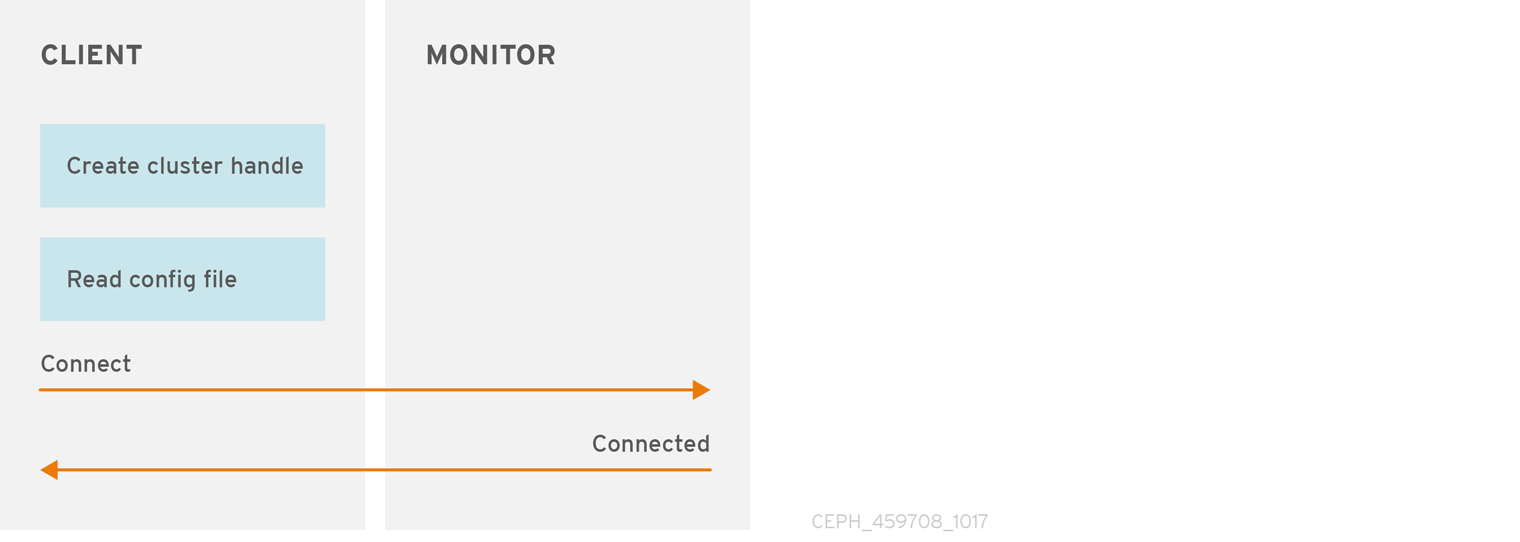
Creating a pool I/O context
To read and write data, the Ceph client creates an I/O context to a specific pool in the Ceph storage cluster. If the specified user has permissions for the pool, the Ceph client can read from and write to the specified pool.

Ceph’s architecture enables the storage cluster to provide this remarkably simple interface to Ceph clients so that clients might select one of the sophisticated storage strategies you define simply by specifying a pool name and creating an I/O context. Storage strategies are invisible to the Ceph client in all but capacity and performance. Similarly, the complexities of Ceph clients, such as mapping objects into a block device representation or providing an S3/Swift RESTful service, are invisible to the Ceph storage cluster.
A pool provides you with resilience, placement groups, CRUSH rules, and quotas.
-
Resilience: You can set how many OSD are allowed to fail without losing data. For replicated pools, it is the desired number of copies or replicas of an object. A typical configuration stores an object and one additional copy, that is,
size = 2, but you can determine the number of copies or replicas. For erasure coded pools, it is the number of coding chunks, that ism=2in the erasure code profile. - Placement Groups: You can set the number of placement groups for the pool. A typical configuration uses approximately 50-100 placement groups per OSD to provide optimal balancing without using up too many computing resources. When setting up multiple pools, be careful to ensure you set a reasonable number of placement groups for both the pool and the cluster as a whole.
- CRUSH Rules: When you store data in a pool, a CRUSH rule mapped to the pool enables CRUSH to identify the rule for the placement of each object and its replicas, or chunks for erasure coded pools, in your cluster. You can create a custom CRUSH rule for your pool.
-
Quotas: When you set quotas on a pool with
ceph osd pool set-quotacommand, you might limit the maximum number of objects or the maximum number of bytes stored in the specified pool.
Chapter 3. Resilient and non-resilient data pools
What are resilient pools and a non-resilient pools?
A resilient data pool enables data to replicate or encode its data.
The non-resilient data pool does not enable to replicate or encode its data.
A non-resilient pool is also called replica1, and is not protected from data loss. A small cluster with non-resilient data pools does its own replication and does not need replication from Red Hat Ceph Storage as it does its own replication.
Cluster utilization with data pools
With smaller configurations, the cluster utilization reduces because of the loss of resiliency. The recovery is limited by host utilization and might potentially impact production input/output operations per second (IOPS). When there is a single node of failure, you can add a third node to limit the host utilization and for Red Hat Ceph Storage to recover to full replication.
Chapter 4. Ceph erasure coding
Ceph can load one of many erasure code algorithms. The earliest and most commonly used is the Reed-Solomon algorithm. An erasure code is actually a forward error correction (FEC) code. FEC code transforms a message of K chunks into a longer message called a 'code word' of N chunks, such that Ceph can recover the original message from a subset of the N chunks.
More specifically, N = K+M where the variable K is the original amount of data chunks. The variable M stands for the extra or redundant chunks that the erasure code algorithm adds to provide protection from failures. The variable N is the total number of chunks created after the erasure coding process. The value of M is simply N-K which means that the algorithm computes N-K redundant chunks from K original data chunks. This approach guarantees that Ceph can access all the original data. The system is resilient to arbitrary N-K failures. For instance, in a 10 K of 16 N configuration, or erasure coding 10/16, the erasure code algorithm adds six extra chunks to the 10 base chunks K. For example, in a M = K-N or 16-10 = 6 configuration, Ceph will spread the 16 chunks N across 16 OSDs. The original file could be reconstructed from the 10 verified N chunks even if 6 OSDs fail—ensuring that the Red Hat Ceph Storage cluster will not lose data, and thereby ensures a very high level of fault tolerance.
Like replicated pools, in an erasure-coded pool the primary OSD in the up set receives all write operations. In replicated pools, Ceph makes a deep copy of each object in the placement group on the secondary OSDs in the set. For erasure coding, the process is a bit different. An erasure coded pool stores each object as K+M chunks. It is divided into K data chunks and M coding chunks. The pool is configured to have a size of K+M so that Ceph stores each chunk in an OSD in the acting set. Ceph stores the rank of the chunk as an attribute of the object. The primary OSD is responsible for encoding the payload into K+M chunks and sends them to the other OSDs. The primary OSD is also responsible for maintaining an authoritative version of the placement group logs.
For example, in a typical configuration a system administrator creates an erasure coded pool to use six OSDs and sustain the loss of two of them. That is, (K+M = 6) such that (M = 2).
When Ceph writes the object NYAN containing ABCDEFGHIJKL to the pool, the erasure encoding algorithm splits the content into four data chunks by simply dividing the content into four parts: ABC, DEF, GHI, and JKL. The algorithm will pad the content if the content length is not a multiple of K. The function also creates two coding chunks: the fifth with YXY and the sixth with QGC. Ceph stores each chunk on an OSD in the acting set, where it stores the chunks in objects that have the same name, NYAN, but reside on different OSDs. The algorithm must preserve the order in which it created the chunks as an attribute of the object shard_t, in addition to its name. For example, Chunk 1 contains ABC and Ceph stores it on OSD5 while chunk 5 contains YXY and Ceph stores it on OSD4.
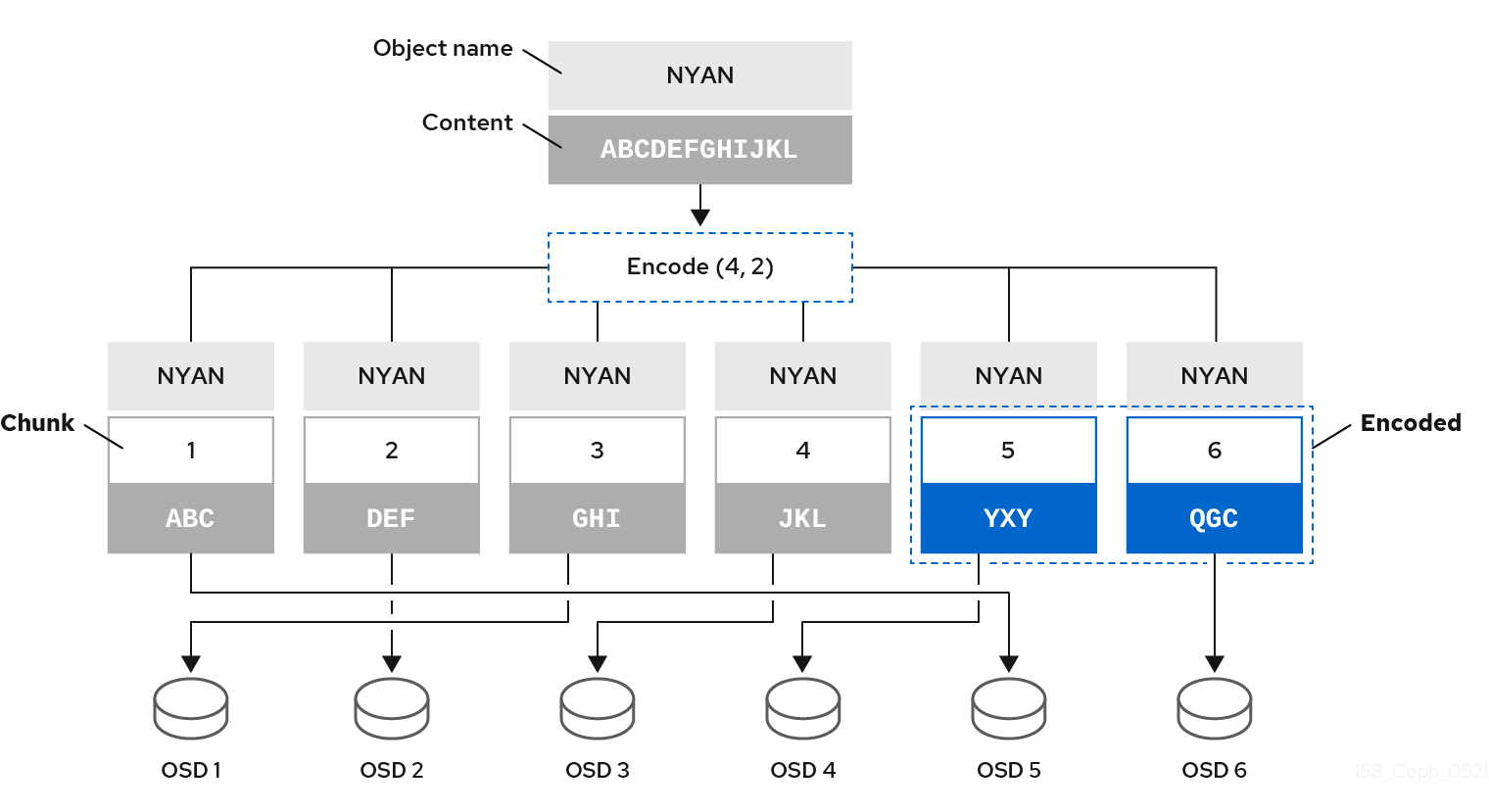
In a recovery scenario, the client attempts to read the object NYAN from the erasure-coded pool by reading chunks 1 through 6. The OSD informs the algorithm that chunks 2 and 6 are missing. These missing chunks are called 'erasures'. For example, the primary OSD could not read chunk 6 because the OSD6 is out, and could not read chunk 2, because OSD2 was the slowest and its chunk was not taken into account. However, as soon as the algorithm has four chunks, it reads the four chunks: chunk 1 containing ABC, chunk 3 containing GHI, chunk 4 containing JKL, and chunk 5 containing YXY. Then, it rebuilds the original content of the object ABCDEFGHIJKL, and original content of chunk 6, which contained QGC.
Splitting data into chunks is independent from object placement. The CRUSH ruleset along with the erasure-coded pool profile determines the placement of chunks on the OSDs. For instance, using the Locally Repairable Code (lrc) plugin in the erasure code profile creates additional chunks and requires fewer OSDs to recover from. For example, in an lrc profile configuration K=4 M=2 L=3, the algorithm creates six chunks (K+M), just as the jerasure plugin would, but the locality value (L=3) requires that the algorithm create 2 more chunks locally. The algorithm creates the additional chunks as such, (K+M)/L. If the OSD containing chunk 0 fails, this chunk can be recovered by using chunks 1, 2 and the first local chunk. In this case, the algorithm only requires 3 chunks for recovery instead of 5.
Using erasure-coded pools disables Object Map.
For an erasure-coded pool with 2+2 configuration, replace the input string from ABCDEFGHIJKL to ABCDEF and replace the coding chunks from 4 to 2.
Additional Resources
- For more information about CRUSH, the erasure-coding profiles, and plugins, see the Storage Strategies Guide for Red Hat Ceph Storage 7.
- For more details on Object Map, see the Ceph client object map section.
Chapter 5. Erasure code pools overview
Ceph uses replicated pools by default, meaning that Ceph copies every object from a primary OSD node to one or more secondary OSDs. The erasure-coded pools reduce the amount of disk space required to ensure data durability but it is computationally a bit more expensive than replication.
Ceph storage strategies involve defining data durability requirements. Data durability means the ability to sustain the loss of one or more OSDs without losing data.
Ceph stores data in pools and there are two types of the pools:
- replicated
- erasure-coded
Erasure coding is a method of storing an object in the Ceph storage cluster durably where the erasure code algorithm breaks the object into data chunks (k) and coding chunks (m), and stores those chunks in different OSDs.
In the event of the failure of an OSD, Ceph retrieves the remaining data (k) and coding (m) chunks from the other OSDs and the erasure code algorithm restores the object from those chunks.
Red Hat recommends min_size for erasure-coded pools to be K+1 or more to prevent loss of writes and data.
Erasure coding uses storage capacity more efficiently than replication. The n-replication approach maintains n copies of an object (3x by default in Ceph), whereas erasure coding maintains only k + m chunks. For example, 3 data and 2 coding chunks use 1.5x the storage space of the original object.
While erasure coding uses less storage overhead than replication, the erasure code algorithm uses more RAM and CPU than replication when it accesses or recovers objects. Erasure coding is advantageous when data storage must be durable and fault tolerant, but do not require fast read performance (for example, cold storage, historical records, and so on).
For the mathematical and detailed explanation on how erasure code works in Ceph, see the Ceph Erasure Coding section in the Architecture Guide for Red Hat Ceph Storage 7.
Ceph creates a default erasure code profile when initializing a cluster with k=2 and m=2, This mean that Ceph will spread the object data over three OSDs (k+m == 4) and Ceph can lose one of those OSDs without losing data. To know more about erasure code profiling see the Erasure Code Profiles section.
Configure only the .rgw.buckets pool as erasure-coded and all other Ceph Object Gateway pools as replicated, otherwise an attempt to create a new bucket fails with the following error:
set_req_state_err err_no=95 resorting to 500
set_req_state_err err_no=95 resorting to 500
The reason for this is that erasure-coded pools do not support the omap operations and certain Ceph Object Gateway metadata pools require the omap support.
5.1. Creating a sample erasure-coded pool
Create an erasure-coded pool and specify the placement groups. The ceph osd pool create command creates an erasure-coded pool with the default profile, unless another profile is specified. Profiles define the redundancy of data by setting two parameters, k, and m. These parameters define the number of chunks a piece of data is split and the number of coding chunks are created.
The simplest erasure coded pool is equivalent to RAID5 and requires at least four hosts. You can create an erasure-coded pool with 2+2 profile.
Procedure
Set the following configuration for an erasure-coded pool on four nodes with 2+2 configuration.
Syntax
ceph config set mon mon_osd_down_out_subtree_limit host
ceph config set osd osd_async_recovery_min_cost 1099511627776
ceph config set mon mon_osd_down_out_subtree_limit host
ceph config set osd osd_async_recovery_min_cost 1099511627776
Copy to Clipboard Copied! Toggle word wrap Toggle overflow ImportantThis is not needed for an erasure-coded pool in general.
ImportantThe async recovery cost is the number of PG log entries behind on the replica and the number of missing objects. The
osd_target_pg_log_entries_per_osdis30000. Hence, an OSD with a single PG could have30000entries. Since theosd_async_recovery_min_costis a 64-bit integer, set the value ofosd_async_recovery_min_costto1099511627776for an EC pool with 2+2 configuration.NoteFor an EC cluster with four nodes, the value of K+M is 2+2. If a node fails completely, it does not recover as four chunks and only three nodes are available. When you set the value of
mon_osd_down_out_subtree_limittohost, during a host down scenario, it prevents the OSDs from marked out, so as to prevent the data from re balancing and the waits until the node is up again.For an erasure-coded pool with a 2+2 configuration, set the profile.
Syntax
ceph osd erasure-code-profile set ec22 k=2 m=2 crush-failure-domain=host
ceph osd erasure-code-profile set ec22 k=2 m=2 crush-failure-domain=hostCopy to Clipboard Copied! Toggle word wrap Toggle overflow Example
[ceph: root@host01 /]# ceph osd erasure-code-profile set ec22 k=2 m=2 crush-failure-domain=host

Pool : ceph osd pool create test-ec-22 erasure ec22
[ceph: root@host01 /]# ceph osd erasure-code-profile set ec22 k=2 m=2 crush-failure-domain=host

Pool : ceph osd pool create test-ec-22 erasure ec22
Copy to Clipboard Copied! Toggle word wrap Toggle overflow Create an erasure-coded pool.
Example
Copy to Clipboard Copied! Toggle word wrap Toggle overflow 32 is the number of placement groups.
Chapter 6. Back-end compression
Compress an edge cluster of a smaller capacity with the compression options.
BlueStore allows two types of compression:
- BlueStore level of compression for general workload.
- Ceph Object Gateway level of compression for S3 workload.
For more information on compression algorithms, see Pool values.
You need to enable compression and ensure that no crashes occur on the cluster upon enabling compression on pools.
You can enable compression on the pools of the edge cluster in the following ways:
Enable supported compression algorithms such as snappy, zlib, and zstd and enable supported compression modes such as
None,passive,aggressive, andforcewith the following commands:Syntax
ceph osd pool set POOL_NAME compression_algorithm ALGORITHM
ceph osd pool set POOL_NAME compression_mode MODE
ceph osd pool set POOL_NAME compression_algorithm ALGORITHM
ceph osd pool set POOL_NAME compression_mode MODE
Copy to Clipboard Copied! Toggle word wrap Toggle overflow Enable various compression ratios with the following commands:
Syntax
ceph osd pool set POOL_NAME compression_required_ratio RATIO
ceph osd pool set POOL_NAME compression_min_blob_size SIZE
ceph osd pool set POOL_NAME compression_max_blob_size SIZE
ceph osd pool set POOL_NAME compression_required_ratio RATIO
ceph osd pool set POOL_NAME compression_min_blob_size SIZE
ceph osd pool set POOL_NAME compression_max_blob_size SIZE
Copy to Clipboard Copied! Toggle word wrap Toggle overflow - Create three pools and enable different compressions on those pools to ensure that no IO stoppage occurs on the pools.
- Create a fourth pool without any compression created on the pools. Write the same amount of data as pools with compression. The pool with compression uses less RAW space that the pool without compression.
To verify these algorithms are set, use ceph osd pool get POOL_NAME OPTION_NAME command.
To unset these algorithms, use ceph osd pool unset POOL_NAME OPTION_NAME command with the appropriate options.
Chapter 7. Cluster topology and colocation
Understand the topology needed and the factors to be considers for collocation for an edge cluster.
For information on cluster topology, hyper convergence with OpenStack, collocating nodes On OpenStack, and limitations of OpenStack minimum configuration, see Ceph configuration overrides for HCI.
For more information on colocation, see Colocation.

'%20d='M201.5%20305.5c-13.8%200-24.9-11.1-24.9-24.6%200-13.8%2011.1-24.9%2024.9-24.9%2013.6%200%2024.6%2011.1%2024.6%2024.9%200%2013.6-11.1%2024.6-24.6%2024.6zM504%20256c0%20137-111%20248-248%20248S8%20393%208%20256%20119%208%20256%208s248%20111%20248%20248zm-132.3-41.2c-9.4%200-17.7%203.9-23.8%2010-22.4-15.5-52.6-25.5-86.1-26.6l17.4-78.3%2055.4%2012.5c0%2013.6%2011.1%2024.6%2024.6%2024.6%2013.8%200%2024.9-11.3%2024.9-24.9s-11.1-24.9-24.9-24.9c-9.7%200-18%205.8-22.1%2013.8l-61.2-13.6c-3-.8-6.1%201.4-6.9%204.4l-19.1%2086.4c-33.2%201.4-63.1%2011.3-85.5%2026.8-6.1-6.4-14.7-10.2-24.1-10.2-34.9%200-46.3%2046.9-14.4%2062.8-1.1%205-1.7%2010.2-1.7%2015.5%200%2052.6%2059.2%2095.2%20132%2095.2%2073.1%200%20132.3-42.6%20132.3-95.2%200-5.3-.6-10.8-1.9-15.8%2031.3-16%2019.8-62.5-14.9-62.5zM302.8%20331c-18.2%2018.2-76.1%2017.9-93.6%200-2.2-2.2-6.1-2.2-8.3%200-2.5%202.5-2.5%206.4%200%208.6%2022.8%2022.8%2087.3%2022.8%20110.2%200%202.5-2.2%202.5-6.1%200-8.6-2.2-2.2-6.1-2.2-8.3%200zm7.7-75c-13.6%200-24.6%2011.1-24.6%2024.9%200%2013.6%2011.1%2024.6%2024.6%2024.6%2013.8%200%2024.9-11.1%2024.9-24.6%200-13.8-11-24.9-24.9-24.9z'/%3e%3c/svg%3e)