 Red Hat Summit
Configuring Data Grid Caches
Configure Data Grid caches to customize your deployment
Abstract
Red Hat Data Grid
Data Grid is a high-performance, distributed in-memory data store.
- Schemaless data structure
- Flexibility to store different objects as key-value pairs.
- Grid-based data storage
- Designed to distribute and replicate data across clusters.
- Elastic scaling
- Dynamically adjust the number of nodes to meet demand without service disruption.
- Data interoperability
- Store, retrieve, and query data in the grid from different endpoints.
Data Grid documentation
Documentation for Data Grid is available on the Red Hat customer portal.
Data Grid downloads
Access the Data Grid Software Downloads on the Red Hat customer portal.
You must have a Red Hat account to access and download Data Grid software.
Making open source more inclusive
Red Hat is committed to replacing problematic language in our code, documentation, and web properties. We are beginning with these four terms: master, slave, blacklist, and whitelist. Because of the enormity of this endeavor, these changes will be implemented gradually over several upcoming releases. For more details, see our CTO Chris Wright’s message.
Chapter 1. Data Grid caches
Data Grid caches provide flexible, in-memory data stores that you can configure to suit use cases such as:
- Boosting application performance with high-speed local caches.
- Optimizing databases by decreasing the volume of write operations.
- Providing resiliency and durability for consistent data across clusters.
1.1. Cache API
Cache<K,V> is the central interface for Data Grid and extends java.util.concurrent.ConcurrentMap.
Cache entries are highly concurrent data structures in key:value format that support a wide and configurable range of data types, from simple strings to much more complex objects.
1.2. Cache managers
The CacheManager API is the starting point for interacting with Data Grid caches. Cache managers control cache lifecycle; creating, modifying, and deleting cache instances.
Data Grid provides two CacheManager implementations:
EmbeddedCacheManager- Entry point for caches when running Data Grid inside the same Java Virtual Machine (JVM) as the client application.
RemoteCacheManager-
Entry point for caches when running Data Grid Server in its own JVM. When you instantiate a
RemoteCacheManagerit establishes a persistent TCP connection to Data Grid Server through the Hot Rod endpoint.
Both embedded and remote CacheManager implementations share some methods and properties. However, semantic differences do exist between EmbeddedCacheManager and RemoteCacheManager.
1.3. Cache modes
Data Grid cache managers can create and control multiple caches that use different modes. For example, you can use the same cache manager for local caches, distributed caches, and caches with invalidation mode.
- Local
- Data Grid runs as a single node and never replicates read or write operations on cache entries.
- Replicated
- Data Grid replicates all cache entries on all nodes in a cluster and performs local read operations only.
- Distributed
-
Data Grid replicates cache entries on a subset of nodes in a cluster and assigns entries to fixed owner nodes.
Data Grid requests read operations from owner nodes to ensure it returns the correct value. - Invalidation
- Data Grid evicts stale data from all nodes whenever operations modify entries in the cache. Data Grid performs local read operations only.
- Scattered
-
Data Grid stores cache entries across a subset of nodes.
By default Data Grid assigns a primary owner and a backup owner to each cache entry in scattered caches.
Data Grid assigns primary owners in the same way as with distributed caches, while backup owners are always the nodes that initiate the write operations.
Data Grid requests read operations from at least one owner node to ensure it returns the correct value.
1.3.1. Comparison of cache modes
The cache mode that you should choose depends on the qualities and guarantees you need for your data.
The following table summarizes the primary differences between cache modes:
| Cache mode | Clustered? | Read performance | Write performance | Capacity | Availability | Capabilities |
|---|---|---|---|---|---|---|
| Local | No | High (local) | High (local) | Single node | Single node | Complete |
| Simple | No | Highest (local) | Highest (local) | Single node | Single node | Partial: no transactions, persistence, or indexing. |
| Invalidation | Yes | High (local) | Low (all nodes, no data) | Single node | Single node | Partial: no indexing. |
| Replicated | Yes | High (local) | Lowest (all nodes) | Smallest node | All nodes | Complete |
| Distributed | Yes | Medium (owners) | Medium (owner nodes) | Sum of all nodes capacity divided by the number of owners. | Owner nodes | Complete |
| Scattered | Yes | Medium (primary) | Higher (single RPC) | Sum of all nodes capacity divided by 2. | Owner nodes | Partial: no transactions. |
1.4. Local caches
Data Grid offers a local cache mode that is similar to a ConcurrentHashMap.
Caches offer more capabilities than simple maps, including write-through and write-behind to persistent storage as well as management capabilities such as eviction and expiration.
The Data Grid Cache API extends the ConcurrentMap API in Java, making it easy to migrate from a map to a Data Grid cache.
Local cache configuration
XML
<local-cache name="mycache"
             statistics="true">
  <encoding media-type="application/x-protostream"/>
</local-cache>
JSON
{
  "local-cache": {
    "name": "mycache",
    "statistics": "true",
    "encoding": {
      "media-type": "application/x-protostream"
    }
  }
}
YAML
localCache:
  name: "mycache"
  statistics: "true"
  encoding:
    mediaType: "application/x-protostream"
1.4.1. Simple caches
A simple cache is a type of local cache that disables support for the following capabilities:
- Transactions and invocation batching
- Persistent storage
- Custom interceptors
- Indexing
- Transcoding
However, you can use other Data Grid capabilities with simple caches such as expiration, eviction, statistics, and security features. If you configure a capability that is not compatible with a simple cache, Data Grid throws an exception.
Simple cache configuration
XML
<local-cache simple-cache="true" />JSON
{
  "local-cache" : {
    "simple-cache" : "true"
  }
}
YAML
localCache:
  simpleCache: "true"
Chapter 2. Clustered caches
You can create embedded and remote caches on Data Grid clusters that replicate data across nodes.
2.1. Replicated caches
Data Grid replicates all entries in the cache to all nodes in the cluster. Each node can perform read operations locally.
Replicated caches provide a quick and easy way to share state across a cluster, but is suitable for clusters of less than ten nodes. Because the number of replication requests scales linearly with the number of nodes in the cluster, using replicated caches with larger clusters reduces performance. However you can use UDP multicasting for replication requests to improve performance.
Each key has a primary owner, which serializes data container updates in order to provide consistency.
Figure 2.1. Replicated cache

Synchronous or asynchronous replication
-
Synchronous replication blocks the caller (e.g. on a
cache.put(key, value)) until the modifications have been replicated successfully to all the nodes in the cluster. - Asynchronous replication performs replication in the background, and write operations return immediately. Asynchronous replication is not recommended, because communication errors, or errors that happen on remote nodes are not reported to the caller.
Transactions
If transactions are enabled, write operations are not replicated through the primary owner.
With pessimistic locking, each write triggers a lock message, which is broadcast to all the nodes. During transaction commit, the originator broadcasts a one-phase prepare message and an unlock message (optional). Either the one-phase prepare or the unlock message is fire-and-forget.
With optimistic locking, the originator broadcasts a prepare message, a commit message, and an unlock message (optional). Again, either the one-phase prepare or the unlock message is fire-and-forget.
2.2. Distributed caches
Data Grid attempts to keep a fixed number of copies of any entry in the cache, configured as numOwners. This allows distributed caches to scale linearly, storing more data as nodes are added to the cluster.
As nodes join and leave the cluster, there will be times when a key has more or less than numOwners copies. In particular, if numOwners nodes leave in quick succession, some entries will be lost, so we say that a distributed cache tolerates numOwners - 1 node failures.
The number of copies represents a trade-off between performance and durability of data. The more copies you maintain, the lower performance will be, but also the lower the risk of losing data due to server or network failures.
Data Grid splits the owners of a key into one primary owner, which coordinates writes to the key, and zero or more backup owners.
The following diagram shows a write operation that a client sends to a backup owner. In this case the backup node forwards the write to the primary owner, which then replicates the write to the backup.
Figure 2.2. Cluster replication
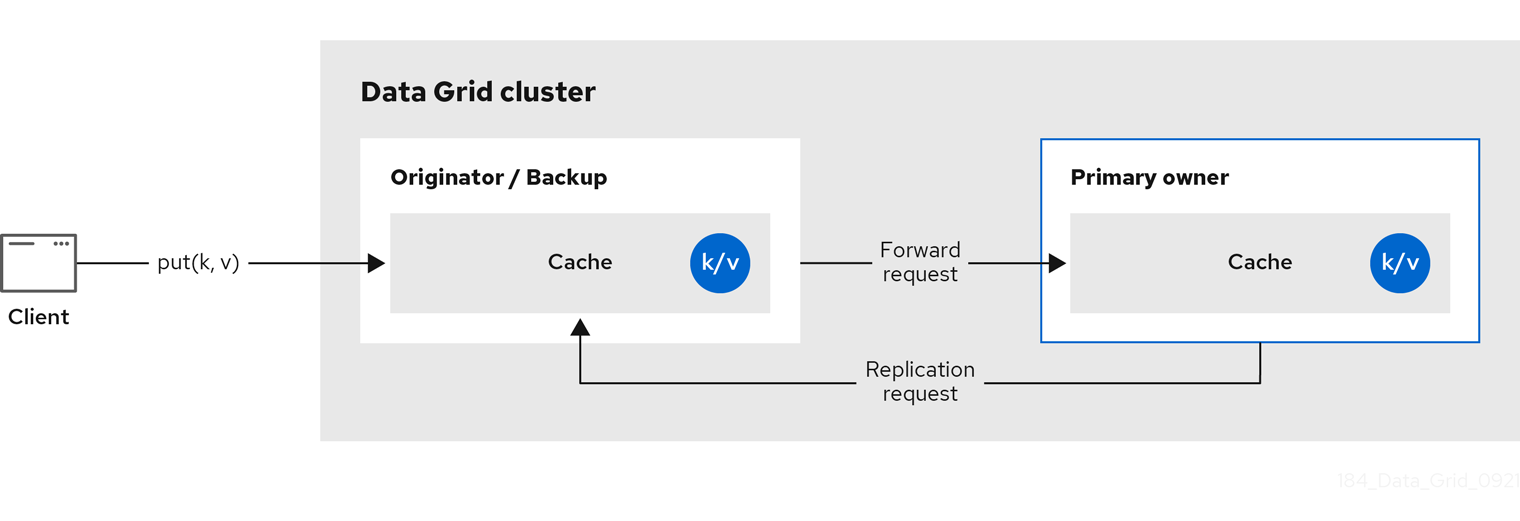
Figure 2.3. Distributed cache

Read operations
Read operations request the value from the primary owner. If the primary owner does not respond in a reasonable amount of time, Data Grid requests the value from the backup owners as well.
A read operation may require 0 messages if the key is present in the local cache, or up to 2 * numOwners messages if all the owners are slow.
Write operations
Write operations result in at most 2 * numOwners messages. One message from the originator to the primary owner and numOwners - 1 messages from the primary to the backup nodes along with the corresponding acknowledgment messages.
Cache topology changes may cause retries and additional messages for both read and write operations.
Synchronous or asynchronous replication
Asynchronous replication is not recommended because it can lose updates. In addition to losing updates, asynchronous distributed caches can also see a stale value when a thread writes to a key and then immediately reads the same key.
Transactions
Transactional distributed caches send lock/prepare/commit/unlock messages to the affected nodes only, meaning all nodes that own at least one key affected by the transaction. As an optimization, if the transaction writes to a single key and the originator is the primary owner of the key, lock messages are not replicated.
2.2.1. Read consistency
Even with synchronous replication, distributed caches are not linearizable. For transactional caches, they do not support serialization/snapshot isolation.
For example, a thread is carrying out a single put request:
cache.get(k) -> v1
cache.put(k, v2)
cache.get(k) -> v2
But another thread might see the values in a different order:
cache.get(k) -> v2
cache.get(k) -> v1
The reason is that read can return the value from any owner, depending on how fast the primary owner replies. The write is not atomic across all the owners. In fact, the primary commits the update only after it receives a confirmation from the backup. While the primary is waiting for the confirmation message from the backup, reads from the backup will see the new value, but reads from the primary will see the old one.
2.2.2. Key ownership
Distributed caches split entries into a fixed number of segments and assign each segment to a list of owner nodes. Replicated caches do the same, with the exception that every node is an owner.
The first node in the list of owners is the primary owner. The other nodes in the list are backup owners. When the cache topology changes, because a node joins or leaves the cluster, the segment ownership table is broadcast to every node. This allows nodes to locate keys without making multicast requests or maintaining metadata for each key.
The numSegments property configures the number of segments available. However, the number of segments cannot change unless the cluster is restarted.
Likewise the key-to-segment mapping cannot change. Keys must always map to the same segments regardless of cluster topology changes. It is important that the key-to-segment mapping evenly distributes the number of segments allocated to each node while minimizing the number of segments that must move when the cluster topology changes.
| Consistent hash factory implementation | Description |
|---|---|
|
| Uses an algorithm based on consistent hashing. Selected by default when server hinting is disabled. This implementation always assigns keys to the same nodes in every cache as long as the cluster is symmetric. In other words, all caches run on all nodes. This implementation does have some negative points in that the load distribution is slightly uneven. It also moves more segments than strictly necessary on a join or leave. |
|
|
Equivalent to |
|
|
Achieves a more even distribution than |
|
|
Equivalent to |
|
| Used internally to implement replicated caches. You should never explicitly select this algorithm in a distributed cache. |
Hashing configuration
You can configure ConsistentHashFactory implementations, including custom ones, with embedded caches only.
XML
<distributed-cache name="distributedCache"
                   owners="2"
                   segments="100"
                   capacity-factor="2" />
ConfigurationBuilder
Configuration c = new ConfigurationBuilder()
   .clustering()
      .cacheMode(CacheMode.DIST_SYNC)
      .hash()
         .numOwners(2)
         .numSegments(100)
         .capacityFactor(2)
.build();2.2.3. Capacity factors
Capacity factors allocate the number of segments based on resources available to each node in the cluster.
The capacity factor for a node applies to segments for which that node is both the primary owner and backup owner. In other words, the capacity factor specifies is the total capacity that a node has in comparison to other nodes in the cluster.
The default value is 1 which means that all nodes in the cluster have an equal capacity and Data Grid allocates the same number of segments to all nodes in the cluster.
However, if nodes have different amounts of memory available to them, you can configure the capacity factor so that the Data Grid hashing algorithm assigns each node a number of segments weighted by its capacity.
The value for the capacity factor configuration must be a positive number and can be a fraction such as 1.5. You can also configure a capacity factor of 0 but is recommended only for nodes that join the cluster temporarily and should use the zero capacity configuration instead.
2.2.3.1. Zero capacity nodes
You can configure nodes where the capacity factor is 0 for every cache, user defined caches, and internal caches. When defining a zero capacity node, the node does not hold any data.
Zero capacity node configuration
XML
<infinispan>
  <cache-container zero-capacity-node="true" />
</infinispan>
JSON
{
  "infinispan" : {
    "cache-container" : {
      "zero-capacity-node" : "true"
    }
  }
}
YAML
infinispan:
  cacheContainer:
    zeroCapacityNode: "true"
ConfigurationBuilder
new GlobalConfigurationBuilder().zeroCapacityNode(true);2.2.4. Level one (L1) caches
Data Grid nodes create local replicas when they retrieve entries from another node in the cluster. L1 caches avoid repeatedly looking up entries on primary owner nodes and adds performance.
The following diagram illustrates how L1 caches work:
Figure 2.4. L1 cache
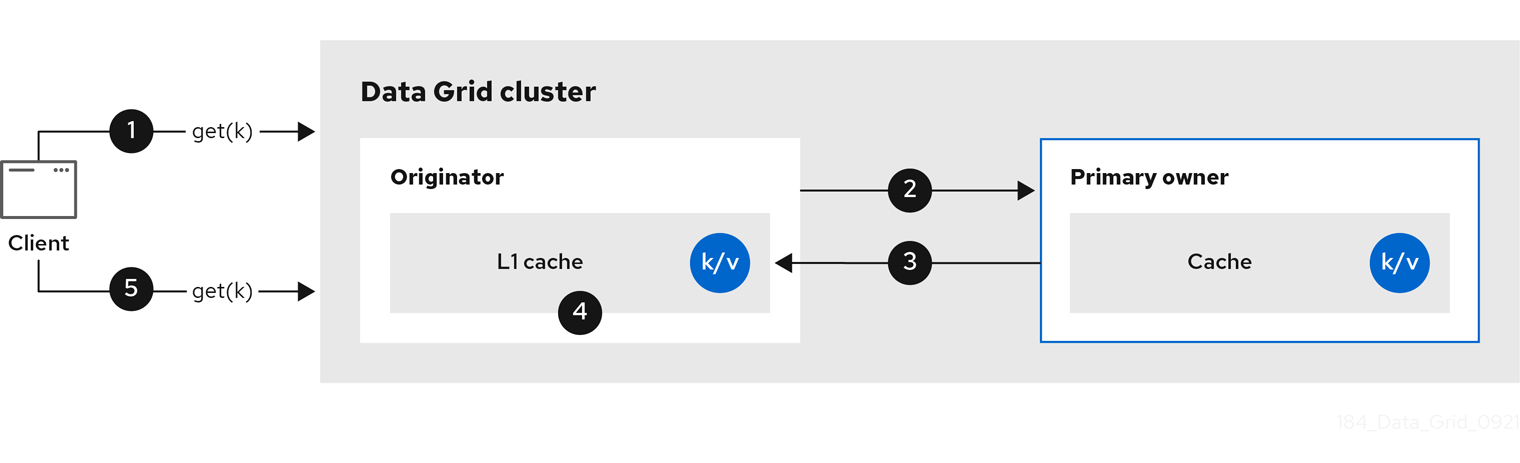
In the "L1 cache" diagram:
-
A client invokes
cache.get()to read an entry for which another node in the cluster is the primary owner. - The originator node forwards the read operation to the primary owner.
- The primary owner returns the key/value entry.
- The originator node creates a local copy.
-
Subsequent
cache.get()invocations return the local entry instead of forwarding to the primary owner.
L1 caching performance
Enabling L1 improves performance for read operations but requires primary owner nodes to broadcast invalidation messages when entries are modified. This ensures that Data Grid removes any out of date replicas across the cluster. However this also decreases performance of write operations and increases memory usage, reducing overall capacity of caches.
Data Grid evicts and expires local replicas, or L1 entries, like any other cache entry.
L1 cache configuration
XML
<distributed-cache l1-lifespan="5000"
                   l1-cleanup-interval="60000">
</distributed-cache>
JSON
{
  "distributed-cache": {
    "l1-lifespan": "5000",
    "l1-cleanup-interval": "60000"
  }
}
YAML
distributedCache:
  l1Lifespan: "5000"
  l1-cleanup-interval: "60000"
ConfigurationBuilder
ConfigurationBuilder builder = new ConfigurationBuilder();
builder.clustering().cacheMode(CacheMode.DIST_SYNC)
         .l1()
         .lifespan(5000, TimeUnit.MILLISECONDS)
         .cleanupTaskFrequency(60000, TimeUnit.MILLISECONDS);
2.2.5. Server hinting
Server hinting increases availability of data in distributed caches by replicating entries across as many servers, racks, and data centers as possible.
Server hinting applies only to distributed caches.
When Data Grid distributes the copies of your data, it follows the order of precedence: site, rack, machine, and node. All of the configuration attributes are optional. For example, when you specify only the rack IDs, then Data Grid distributes the copies across different racks and nodes.
Server hinting can impact cluster rebalancing operations by moving more segments than necessary if the number of segments for the cache is too low.
An alternative for clusters in multiple data centers is cross-site replication.
Server hinting configuration
XML
<cache-container>
  <transport cluster="MyCluster"
            machine="LinuxServer01"
            rack="Rack01"
            site="US-WestCoast"/>
</cache-container>
JSON
{
  "infinispan" : {
    "cache-container" : {
      "transport" : {
        "cluster" : "MyCluster",
        "machine" : "LinuxServer01",
        "rack" : "Rack01",
        "site" : "US-WestCoast"
      }
    }
  }
}
YAML
cacheContainer:
  transport:
    cluster: "MyCluster"
    machine: "LinuxServer01"
    rack: "Rack01"
    site: "US-WestCoast"
GlobalConfigurationBuilder
GlobalConfigurationBuilder global = GlobalConfigurationBuilder.defaultClusteredBuilder()
  .transport()
  .clusterName("MyCluster")
  .machineId("LinuxServer01")
  .rackId("Rack01")
.siteId("US-WestCoast");2.2.6. Key affinity service
In a distributed cache, a key is allocated to a list of nodes with an opaque algorithm. There is no easy way to reverse the computation and generate a key that maps to a particular node. However, Data Grid can generate a sequence of (pseudo-)random keys, see what their primary owner is, and hand them out to the application when it needs a key mapping to a particular node.
Following code snippet depicts how a reference to this service can be obtained and used.
// 1. Obtain a reference to a cache
Cache cache = ...
Address address = cache.getCacheManager().getAddress();

// 2. Create the affinity service
KeyAffinityService keyAffinityService = KeyAffinityServiceFactory.newLocalKeyAffinityService(
      cache,
      new RndKeyGenerator(),
      Executors.newSingleThreadExecutor(),
      100);

// 3. Obtain a key for which the local node is the primary owner
Object localKey = keyAffinityService.getKeyForAddress(address);

// 4. Insert the key in the cache
cache.put(localKey, "yourValue");
The service is started at step 2: after this point it uses the supplied Executor to generate and queue keys. At step 3, we obtain a key from the service, and at step 4 we use it.
Lifecycle
KeyAffinityService extends Lifecycle, which allows stopping and (re)starting it:
public interface Lifecycle {
   void start();
   void stop();
}
The service is instantiated through KeyAffinityServiceFactory. All the factory methods have an Executor parameter, that is used for asynchronous key generation (so that it won’t happen in the caller’s thread). It is the user’s responsibility to handle the shutdown of this Executor.
The KeyAffinityService, once started, needs to be explicitly stopped. This stops the background key generation and releases other held resources.
The only situation in which KeyAffinityService stops by itself is when the cache manager with which it was registered is shutdown.
Topology changes
When the cache topology changes, the ownership of the keys generated by the KeyAffinityService might change. The key affinity service keep tracks of these topology changes and doesn’t return keys that would currently map to a different node, but it won’t do anything about keys generated earlier.
As such, applications should treat KeyAffinityService purely as an optimization, and they should not rely on the location of a generated key for correctness.
In particular, applications should not rely on keys generated by KeyAffinityService for the same address to always be located together. Collocation of keys is only provided by the Grouping API.
2.2.7. Grouping API
Complementary to the Key affinity service, the Grouping API allows you to co-locate a group of entries on the same nodes, but without being able to select the actual nodes.
By default, the segment of a key is computed using the key’s hashCode(). If you use the Grouping API, Data Grid will compute the segment of the group and use that as the segment of the key.
When the Grouping API is in use, it is important that every node can still compute the owners of every key without contacting other nodes. For this reason, the group cannot be specified manually. The group can either be intrinsic to the entry (generated by the key class) or extrinsic (generated by an external function).
To use the Grouping API, you must enable groups.
Configuration c = new ConfigurationBuilder()
   .clustering().hash().groups().enabled()
   .build();
<distributed-cache>
<groups enabled="true"/>
</distributed-cache>
If you have control of the key class (you can alter the class definition, it’s not part of an unmodifiable library), then we recommend using an intrinsic group. The intrinsic group is specified by adding the @Group annotation to a method, for example:
class User {
   ...
   String office;
   ...

   public int hashCode() {
      // Defines the hash for the key, normally used to determine location
      ...
   }

   // Override the location by specifying a group
   // All keys in the same group end up with the same owners
   @Group
   public String getOffice() {
      return office;
   }
   }
}
The group method must return a String
If you don’t have control over the key class, or the determination of the group is an orthogonal concern to the key class, we recommend using an extrinsic group. An extrinsic group is specified by implementing the Grouper interface.
public interface Grouper<T> {
    String computeGroup(T key, String group);

    Class<T> getKeyType();
}
If multiple Grouper classes are configured for the same key type, all of them will be called, receiving the value computed by the previous one. If the key class also has a @Group annotation, the first Grouper will receive the group computed by the annotated method. This allows you even greater control over the group when using an intrinsic group.
Example Grouper implementation
public class KXGrouper implements Grouper<String> {

   // The pattern requires a String key, of length 2, where the first character is
   // "k" and the second character is a digit. We take that digit, and perform
   // modular arithmetic on it to assign it to group "0" or group "1".
   private static Pattern kPattern = Pattern.compile("(^k)(<a>\\d</a>)$");

   public String computeGroup(String key, String group) {
      Matcher matcher = kPattern.matcher(key);
      if (matcher.matches()) {
         String g = Integer.parseInt(matcher.group(2)) % 2 + "";
         return g;
      } else {
         return null;
      }
   }

   public Class<String> getKeyType() {
      return String.class;
   }
}
Grouper implementations must be registered explicitly in the cache configuration. If you are configuring Data Grid programmatically:
Configuration c = new ConfigurationBuilder()
   .clustering().hash().groups().enabled().addGrouper(new KXGrouper())
   .build();
Or, if you are using XML:
<distributed-cache>
   <groups enabled="true">
      <grouper class="com.example.KXGrouper" />
   </groups>
</distributed-cache>
Advanced API
AdvancedCache has two group-specific methods:
-
getGroup(groupName)retrieves all keys in the cache that belong to a group. -
removeGroup(groupName)removes all the keys in the cache that belong to a group.
Both methods iterate over the entire data container and store (if present), so they can be slow when a cache contains lots of small groups.
2.3. Invalidation caches
You can use Data Grid in invalidation mode to optimize systems that perform high volumes of read operations. A good example is to use invalidation to prevent lots of database writes when state changes occur.
This cache mode only makes sense if you have another, permanent store for your data such as a database and are only using Data Grid as an optimization in a read-heavy system, to prevent hitting the database for every read. If a cache is configured for invalidation, every time data is changed in a cache, other caches in the cluster receive a message informing them that their data is now stale and should be removed from memory and from any local store.
Figure 2.5. Invalidation cache
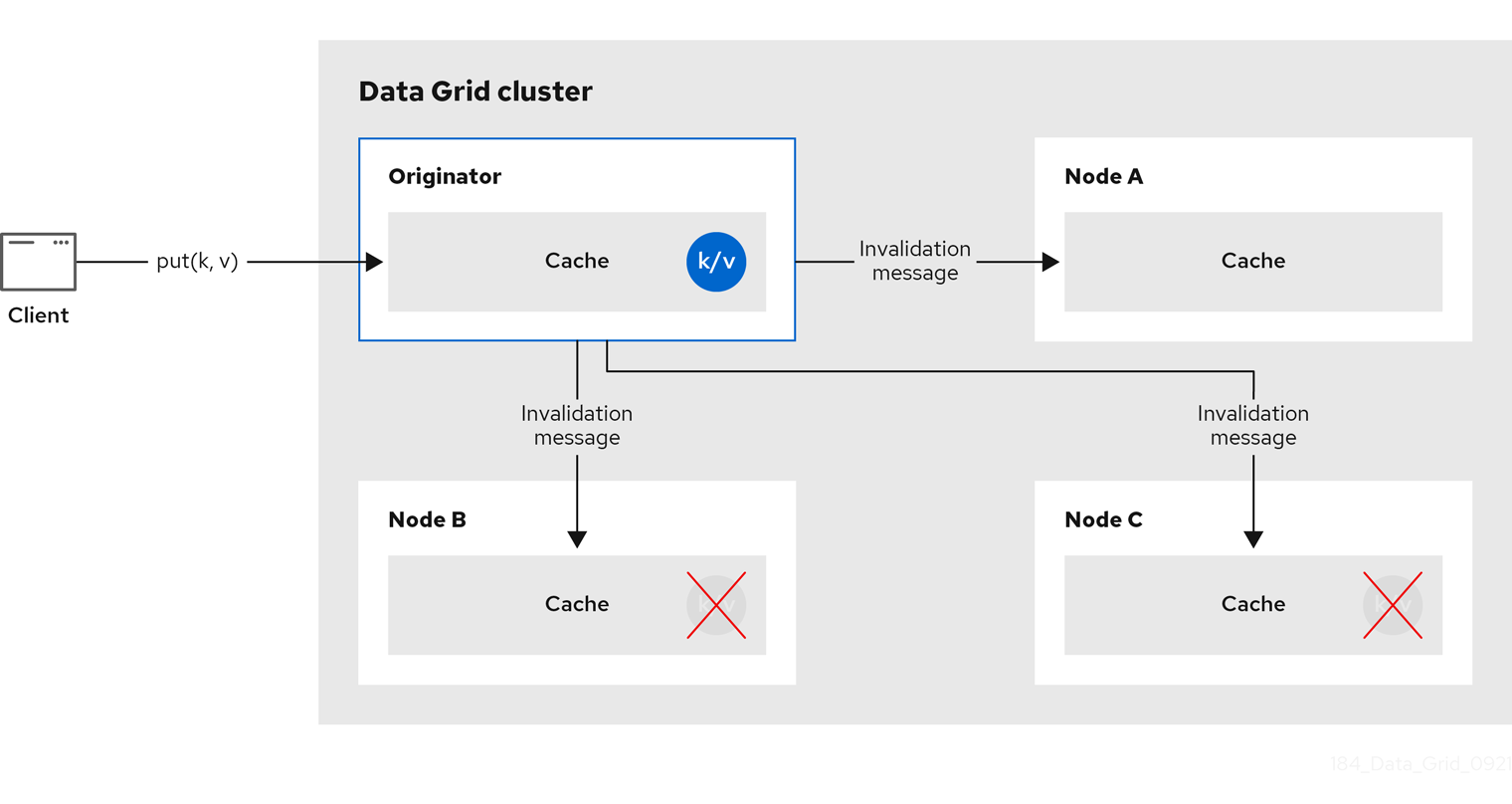
Sometimes the application reads a value from the external store and wants to write it to the local cache, without removing it from the other nodes. To do this, it must call Cache.putForExternalRead(key, value) instead of Cache.put(key, value).
Invalidation mode can be used with a shared cache store. A write operation will both update the shared store, and it would remove the stale values from the other nodes' memory. The benefit of this is twofold: network traffic is minimized as invalidation messages are very small compared to replicating the entire value, and also other caches in the cluster look up modified data in a lazy manner, only when needed.
Never use invalidation mode with a local, non-shared, cache store. The invalidation message will not remove entries in the local store, and some nodes will keep seeing the stale value.
An invalidation cache can also be configured with a special cache loader, ClusterLoader. When ClusterLoader is enabled, read operations that do not find the key on the local node will request it from all the other nodes first, and store it in memory locally. In certain situation it will store stale values, so only use it if you have a high tolerance for stale values.
Synchronous or asynchronous replication
When synchronous, a write blocks until all nodes in the cluster have evicted the stale value. When asynchronous, the originator broadcasts invalidation messages but does not wait for responses. That means other nodes still see the stale value for a while after the write completed on the originator.
Transactions
Transactions can be used to batch the invalidation messages. Transactions acquire the key lock on the primary owner.
With pessimistic locking, each write triggers a lock message, which is broadcast to all the nodes. During transaction commit, the originator broadcasts a one-phase prepare message (optionally fire-and-forget) which invalidates all affected keys and releases the locks.
With optimistic locking, the originator broadcasts a prepare message, a commit message, and an unlock message (optional). Either the one-phase prepare or the unlock message is fire-and-forget, and the last message always releases the locks.
2.4. Scattered caches
Scattered caches are very similar to distributed caches as they allow linear scaling of the cluster. Scattered caches allow single node failure by maintaining two copies of the data (numOwners=2). Unlike distributed caches, the location of data is not fixed; while we use the same Consistent Hash algorithm to locate the primary owner, the backup copy is stored on the node that wrote the data last time. When the write originates on the primary owner, backup copy is stored on any other node (the exact location of this copy is not important).
This has the advantage of single Remote Procedure Call (RPC) for any write (distributed caches require one or two RPCs), but reads have to always target the primary owner. That results in faster writes but possibly slower reads, and therefore this mode is more suitable for write-intensive applications.
Storing multiple backup copies also results in slightly higher memory consumption. In order to remove out-of-date backup copies, invalidation messages are broadcast in the cluster, which generates some overhead. This lowers the performance of scattered caches in clusters with a large number of nodes.
When a node crashes, the primary copy may be lost. Therefore, the cluster has to reconcile the backups and find out the last written backup copy. This process results in more network traffic during state transfer.
Since the writer of data is also a backup, even if we specify machine/rack/site IDs on the transport level the cluster cannot be resilient to more than one failure on the same machine/rack/site.
You cannot use scattered caches with transactions or asynchronous replication.
The cache is configured in a similar way as the other cache modes, here is an example of declarative configuration:
<scattered-cache name="scatteredCache" />Configuration c = new ConfigurationBuilder()
.clustering().cacheMode(CacheMode.SCATTERED_SYNC)
.build();Scattered mode is not exposed in the server configuration as the server is usually accessed through the Hot Rod protocol. The protocol automatically selects primary owner for the writes and therefore the write (in distributed mode with two owner) requires single RPC inside the cluster, too. Therefore, scattered cache would not bring the performance benefit.
2.5. Asynchronous replication
All clustered cache modes can be configured to use asynchronous communications with the mode="ASYNC" attribute on the <replicated-cache/>, <distributed-cache>, or <invalidation-cache/> element.
With asynchronous communications, the originator node does not receive any acknowledgement from the other nodes about the status of the operation, so there is no way to check if it succeeded on other nodes.
We do not recommend asynchronous communications in general, as they can cause inconsistencies in the data, and the results are hard to reason about. Nevertheless, sometimes speed is more important than consistency, and the option is available for those cases.
Asynchronous API
The Asynchronous API allows you to use synchronous communications, but without blocking the user thread.
There is one caveat: The asynchronous operations do NOT preserve the program order. If a thread calls cache.putAsync(k, v1); cache.putAsync(k, v2), the final value of k may be either v1 or v2. The advantage over using asynchronous communications is that the final value can’t be v1 on one node and v2 on another.
2.5.1. Return values with asynchronous replication
Because the Cache interface extends java.util.Map, write methods like put(key, value) and remove(key) return the previous value by default.
In some cases, the return value may not be correct:
-
When using
AdvancedCache.withFlags()withFlag.IGNORE_RETURN_VALUE,Flag.SKIP_REMOTE_LOOKUP, orFlag.SKIP_CACHE_LOAD. -
When the cache is configured with
unreliable-return-values="true". - When using asynchronous communications.
- When there are multiple concurrent writes to the same key, and the cache topology changes. The topology change will make Data Grid retry the write operations, and a retried operation’s return value is not reliable.
Transactional caches return the correct previous value in cases 3 and 4. However, transactional caches also have a gotcha: in distributed mode, the read-committed isolation level is implemented as repeatable-read. That means this example of "double-checked locking" won’t work:
Cache cache = ...
TransactionManager tm = ...

tm.begin();
try {
   Integer v1 = cache.get(k);
   // Increment the value
   Integer v2 = cache.put(k, v1 + 1);
   if (Objects.equals(v1, v2) {
      // success
   } else {
      // retry
   }
} finally {
  tm.commit();
}
The correct way to implement this is to use cache.getAdvancedCache().withFlags(Flag.FORCE_WRITE_LOCK).get(k).
In caches with optimistic locking, writes can also return stale previous values. Write skew checks can avoid stale previous values.
2.6. Configuring initial cluster size
Data Grid handles cluster topology changes dynamically. This means that nodes do not need to wait for other nodes to join the cluster before Data Grid initializes the caches.
If your applications require a specific number of nodes in the cluster before caches start, you can configure the initial cluster size as part of the transport.
Procedure
- Open your Data Grid configuration for editing.
-
Set the minimum number of nodes required before caches start with the
initial-cluster-sizeattribute orinitialClusterSize()method. -
Set the timeout, in milliseconds, after which the cache manager does not start with the
initial-cluster-timeoutattribute orinitialClusterTimeout()method. - Save and close your Data Grid configuration.
Initial cluster size configuration
XML
<infinispan>
  <cache-container>
    <transport initial-cluster-size="4"
               initial-cluster-timeout="30000" />
  </cache-container>
</infinispan>
JSON
{
  "infinispan" : {
    "cache-container" : {
      "transport" : {
        "initial-cluster-size" : "4",
        "initial-cluster-timeout" : "30000"
      }
    }
  }
}
YAML
infinispan:
  cacheContainer:
    transport:
      initialClusterSize: "4"
      initialClusterTimeout: "30000"
ConfigurationBuilder
GlobalConfiguration global = GlobalConfigurationBuilder.defaultClusteredBuilder()
   .transport()
   .initialClusterSize(4)
   .initialClusterTimeout(30000, TimeUnit.MILLISECONDS);
Chapter 3. Data Grid cache configuration
Cache configuration controls how Data Grid stores your data.
As part of your cache configuration, you declare the cache mode you want to use. For instance, you can configure Data Grid clusters to use replicated caches or distributed caches.
Your configuration also defines the characteristics of your caches and enables the Data Grid capabilities that you want to use when handling data. For instance, you can configure how Data Grid encodes entries in your caches, whether replication requests happen synchronously or asynchronously between nodes, if entries are mortal or immortal, and so on.
3.1. Declarative cache configuration
You can configure caches declaratively, in XML or JSON format, according to the Data Grid schema.
Declarative cache configuration has the following advantages over programmatic configuration:
- Portability
-
Define each configuration in a standalone file that you can use to create embedded and remote caches.
You can also use declarative configuration to create caches with Data Grid Operator for clusters running on OpenShift. - Simplicity
-
Keep markup languages separate to programming languages.
For example, to create remote caches it is generally better to not add complex XML directly to Java code.
Data Grid Server configuration extends infinispan.xml to include cluster transport mechanisms, security realms, and endpoint configuration. If you declare caches as part of your Data Grid Server configuration you should use management tooling, such as Ansible or Chef, to keep it synchronized across the cluster.
To dynamically synchronize remote caches across Data Grid clusters, create them at runtime.
3.1.1. Cache configuration
You can create declarative cache configuration in XML, JSON, and YAML format.
All declarative caches must conform to the Data Grid schema. Configuration in JSON format must follow the structure of an XML configuration, elements correspond to objects and attributes correspond to fields.
Data Grid restricts characters to a maximum of 255 for a cache name or a cache template name. If you exceed this character limit, the Data Grid server might abruptly stop without issuing an exception message. Write succinct cache names and cache template names.
A file system might set a limitation for the length of a file name, so ensure that a cache’s name does not exceed this limitation. If a cache name exceeds a file system’s naming limitation, general operations or initialing operations towards that cache might fail. Write succinct cache names and cache template names.
Distributed caches
XML
<distributed-cache owners="2"
                   segments="256"
                   capacity-factor="1.0"
                   l1-lifespan="5000"
                   mode="SYNC"
                   statistics="true">
  <encoding media-type="application/x-protostream"/>
  <locking isolation="REPEATABLE_READ"/>
  <transaction mode="FULL_XA"
               locking="OPTIMISTIC"/>
  <expiration lifespan="5000"
              max-idle="1000" />
  <memory max-count="1000000"
          when-full="REMOVE"/>
  <indexing enabled="true"
            storage="local-heap">
    <index-reader refresh-interval="1000"/>
  </indexing>
  <partition-handling when-split="ALLOW_READ_WRITES"
                      merge-policy="PREFERRED_NON_NULL"/>
  <persistence passivation="false">
    <!-- Persistent storage configuration. -->
  </persistence>
</distributed-cache>
JSON
{
  "distributed-cache": {
    "mode": "SYNC",
    "owners": "2",
    "segments": "256",
    "capacity-factor": "1.0",
    "l1-lifespan": "5000",
    "statistics": "true",
    "encoding": {
      "media-type": "application/x-protostream"
    },
    "locking": {
      "isolation": "REPEATABLE_READ"
    },
    "transaction": {
      "mode": "FULL_XA",
      "locking": "OPTIMISTIC"
    },
    "expiration" : {
      "lifespan" : "5000",
      "max-idle" : "1000"
    },
    "memory": {
      "max-count": "1000000",
      "when-full": "REMOVE"
    },
    "indexing" : {
      "enabled" : true,
      "storage" : "local-heap",
      "index-reader" : {
        "refresh-interval" : "1000"
      }
    },
    "partition-handling" : {
      "when-split" : "ALLOW_READ_WRITES",
      "merge-policy" : "PREFERRED_NON_NULL"
    },
    "persistence" : {
      "passivation" : false
    }
  }
}
YAML
distributedCache:
  mode: "SYNC"
  owners: "2"
  segments: "256"
  capacityFactor: "1.0"
  l1Lifespan: "5000"
  statistics: "true"
  encoding:
    mediaType: "application/x-protostream"
  locking:
    isolation: "REPEATABLE_READ"
  transaction:
    mode: "FULL_XA"
    locking: "OPTIMISTIC"
  expiration:
    lifespan: "5000"
    maxIdle: "1000"
  memory:
    maxCount: "1000000"
    whenFull: "REMOVE"
  indexing:
    enabled: "true"
    storage: "local-heap"
    indexReader:
      refreshInterval: "1000"
  partitionHandling:
    whenSplit: "ALLOW_READ_WRITES"
    mergePolicy: "PREFERRED_NON_NULL"
  persistence:
    passivation: "false"
    # Persistent storage configuration.
Replicated caches
XML
<replicated-cache segments="256"
                  mode="SYNC"
                  statistics="true">
  <encoding media-type="application/x-protostream"/>
  <locking isolation="REPEATABLE_READ"/>
  <transaction mode="FULL_XA"
               locking="OPTIMISTIC"/>
  <expiration lifespan="5000"
              max-idle="1000" />
  <memory max-count="1000000"
          when-full="REMOVE"/>
  <indexing enabled="true"
            storage="local-heap">
    <index-reader refresh-interval="1000"/>
  </indexing>
  <partition-handling when-split="ALLOW_READ_WRITES"
                      merge-policy="PREFERRED_NON_NULL"/>
  <persistence passivation="false">
    <!-- Persistent storage configuration. -->
  </persistence>
</replicated-cache>
JSON
{
  "replicated-cache": {
    "mode": "SYNC",
    "segments": "256",
    "statistics": "true",
    "encoding": {
      "media-type": "application/x-protostream"
    },
    "locking": {
      "isolation": "REPEATABLE_READ"
    },
    "transaction": {
      "mode": "FULL_XA",
      "locking": "OPTIMISTIC"
    },
    "expiration" : {
      "lifespan" : "5000",
      "max-idle" : "1000"
    },
    "memory": {
      "max-count": "1000000",
      "when-full": "REMOVE"
    },
    "indexing" : {
      "enabled" : true,
      "storage" : "local-heap",
      "index-reader" : {
        "refresh-interval" : "1000"
      }
    },
    "partition-handling" : {
      "when-split" : "ALLOW_READ_WRITES",
      "merge-policy" : "PREFERRED_NON_NULL"
    },
    "persistence" : {
      "passivation" : false
    }
  }
}
YAML
replicatedCache:
  mode: "SYNC"
  segments: "256"
  statistics: "true"
  encoding:
    mediaType: "application/x-protostream"
  locking:
    isolation: "REPEATABLE_READ"
  transaction:
    mode: "FULL_XA"
    locking: "OPTIMISTIC"
  expiration:
    lifespan: "5000"
    maxIdle: "1000"
  memory:
    maxCount: "1000000"
    whenFull: "REMOVE"
  indexing:
    enabled: "true"
    storage: "local-heap"
    indexReader:
      refreshInterval: "1000"
  partitionHandling:
    whenSplit: "ALLOW_READ_WRITES"
    mergePolicy: "PREFERRED_NON_NULL"
  persistence:
    passivation: "false"
    # Persistent storage configuration.
Multiple caches
XML
<infinispan
      xmlns:xsi="http://www.w3.org/2001/XMLSchema-instance"
      xsi:schemaLocation="urn:infinispan:config:13.0 https://infinispan.org/schemas/infinispan-config-13.0.xsd
                          urn:infinispan:server:13.0 https://infinispan.org/schemas/infinispan-server-13.0.xsd"
      xmlns="urn:infinispan:config:13.0"
      xmlns:server="urn:infinispan:server:13.0">
  <cache-container name="default"
                   statistics="true">
    <distributed-cache name="mycacheone"
                       mode="ASYNC"
                       statistics="true">
      <encoding media-type="application/x-protostream"/>
      <expiration lifespan="300000"/>
      <memory max-size="400MB"
              when-full="REMOVE"/>
    </distributed-cache>
    <distributed-cache name="mycachetwo"
                       mode="SYNC"
                       statistics="true">
      <encoding media-type="application/x-protostream"/>
      <expiration lifespan="300000"/>
      <memory max-size="400MB"
              when-full="REMOVE"/>
    </distributed-cache>
  </cache-container>
</infinispan>
YAML
infinispan:
  cacheContainer:
    name: "default"
    statistics: "true"
    caches:
      mycacheone:
       distributedCache:
          mode: "ASYNC"
          statistics: "true"
          encoding:
            mediaType: "application/x-protostream"
          expiration:
            lifespan: "300000"
          memory:
            maxSize: "400MB"
            whenFull: "REMOVE"
      mycachetwo:
        distributedCache:
          mode: "SYNC"
          statistics: "true"
          encoding:
            mediaType: "application/x-protostream"
          expiration:
            lifespan: "300000"
          memory:
            maxSize: "400MB"
            whenFull: "REMOVE"
JSON
{
  "infinispan" : {
    "cache-container" : {
      "name" : "default",
      "statistics" : "true",
      "caches" : {
        "mycacheone" : {
          "distributed-cache" : {
            "mode": "ASYNC",
            "statistics": "true",
            "encoding": {
              "media-type": "application/x-protostream"
            },
            "expiration" : {
              "lifespan" : "300000"
            },
            "memory": {
              "max-size": "400MB",
              "when-full": "REMOVE"
            }
          }
        },
        "mycachetwo" : {
          "distributed-cache" : {
            "mode": "SYNC",
            "statistics": "true",
            "encoding": {
              "media-type": "application/x-protostream"
            },
            "expiration" : {
              "lifespan" : "300000"
            },
            "memory": {
              "max-size": "400MB",
              "when-full": "REMOVE"
            }
          }
        }
      }
    }
  }
}3.2. Adding cache templates
The Data Grid schema includes *-cache-configuration elements that you can use to create templates. You can then create caches on demand, using the same configuration multiple times.
Procedure
- Open your Data Grid configuration for editing.
-
Add the cache configuration with the appropriate
*-cache-configurationelement or object to the cache manager. - Save and close your Data Grid configuration.
Cache template example
XML
<infinispan>
   <cache-container>
      <distributed-cache-configuration name="my-dist-template"
                                       mode="SYNC"
                                       statistics="true">
        <encoding media-type="application/x-protostream"/>
        <memory max-count="1000000"
                when-full="REMOVE"/>
        <expiration lifespan="5000"
                    max-idle="1000"/>
      </distributed-cache-configuration>
   </cache-container>
</infinispan>
JSON
{
  "infinispan" : {
    "cache-container" : {
      "distributed-cache-configuration" : {
        "name" : "my-dist-template",
        "mode": "SYNC",
        "statistics": "true",
        "encoding": {
          "media-type": "application/x-protostream"
        },
        "expiration" : {
          "lifespan" : "5000",
          "max-idle" : "1000"
        },
        "memory": {
          "max-count": "1000000",
          "when-full": "REMOVE"
        }
      }
    }
  }
}
YAML
infinispan:
  cacheContainer:
    distributedCacheConfiguration:
      name: "my-dist-template"
      mode: "SYNC"
      statistics: "true"
      encoding:
        mediaType: "application/x-protostream"
      expiration:
        lifespan: "5000"
        maxIdle: "1000"
      memory:
        maxCount: "1000000"
        whenFull: "REMOVE"
3.2.1. Creating caches from templates
Create caches from configuration templates.
Templates for remote caches are available from the Cache templates menu in Data Grid Console.
Prerequisites
- Add at least one cache template to the cache manager.
Procedure
- Open your Data Grid configuration for editing.
-
Specify the template from which the cache inherits with the
configurationattribute or field. - Save and close your Data Grid configuration.
Cache configuration inherited from a template
XML
<distributed-cache configuration="my-dist-template" />JSON
{
  "distributed-cache": {
    "configuration": "my-dist-template"
  }
}
YAML
distributedCache:
  configuration: "my-dist-template"
3.2.2. Cache template inheritance
Cache configuration templates can inherit from other templates to extend and override settings.
Cache template inheritance is hierarchical. For a child configuration template to inherit from a parent, you must include it after the parent template.
Additionally, template inheritance is additive for elements that have multiple values. A cache that inherits from another template merges the values from that template, which can override properties.
Template inheritance example
XML
<infinispan>
  <cache-container>
    <distributed-cache-configuration name="base-template">
      <expiration lifespan="5000"/>
    </distributed-cache-configuration>
    <distributed-cache-configuration name="extended-template"
                                     configuration="base-template">
      <encoding media-type="application/x-protostream"/>
      <expiration lifespan="10000"
                  max-idle="1000"/>
    </distributed-cache-configuration>
  </cache-container>
</infinispan>
JSON
{
  "infinispan" : {
    "cache-container" : {
      "caches" : {
        "base-template" : {
          "distributed-cache-configuration" : {
            "expiration" : {
              "lifespan" : "5000"
            }
          }
        },
        "extended-template" : {
          "distributed-cache-configuration" : {
            "configuration" : "base-template",
            "encoding": {
              "media-type": "application/x-protostream"
              },
            "expiration" : {
              "lifespan" : "10000",
              "max-idle" : "1000"
            }
          }
        }
      }
    }
  }
}
YAML
infinispan:
  cacheContainer:
    caches:
      base-template:
        distributedCacheConfiguration:
          expiration:
            lifespan: "5000"
      extended-template:
        distributedCacheConfiguration:
          configuration: "base-template"
          encoding:
            mediaType: "application/x-protostream"
          expiration:
            lifespan: "10000"
            maxIdle: "1000"
3.2.3. Cache template wildcards
You can add wildcards to cache configuration template names. If you then create caches where the name matches the wildcard, Data Grid applies the configuration template.
Data Grid throws exceptions if cache names match more than one wildcard.
Template wildcard example
XML
<infinispan>
   <cache-container>
      <distributed-cache-configuration name="async-dist-cache-*"
                                       mode="ASYNC"
                                       statistics="true">
        <encoding media-type="application/x-protostream"/>
      </distributed-cache-configuration>
   </cache-container>
</infinispan>
JSON
{
  "infinispan" : {
    "cache-container" : {
      "distributed-cache-configuration" : {
        "name" : "async-dist-cache-*",
        "mode": "ASYNC",
        "statistics": "true",
        "encoding": {
          "media-type": "application/x-protostream"
        }
      }
    }
  }
}
YAML
infinispan:
  cacheContainer:
    distributedCacheConfiguration:
      name: "async-dist-cache-*"
      mode: "ASYNC"
      statistics: "true"
      encoding:
        mediaType: "application/x-protostream"
Using the preceding example, if you create a cache named "async-dist-cache-prod" then Data Grid uses the configuration from the async-dist-cache-* template.
3.2.4. Cache templates from multiple XML files
Split cache configuration templates into multiple XML files for granular flexibility and reference them with XML inclusions (XInclude).
Data Grid provides minimal support for the XInclude specification. This means you cannot use the xpointer attribute, the xi:fallback element, text processing, or content negotiation.
You must also add the xmlns:xi="http://www.w3.org/2001/XInclude" namespace to infinispan.xml to use XInclude.
Xinclude cache template
<infinispan xmlns:xi="http://www.w3.org/2001/XInclude">
  <cache-container default-cache="cache-1">
    <!-- References files that contain cache configuration templates. -->
    <xi:include href="distributed-cache-template.xml" />
    <xi:include href="replicated-cache-template.xml" />
  </cache-container>
</infinispan>
Data Grid also provides an infinispan-config-fragment-13.0.xsd schema that you can use with configuration fragments.
Configuration fragment schema
<local-cache xmlns:xsi="http://www.w3.org/2001/XMLSchema-instance"
             xsi:schemaLocation="urn:infinispan:config:13.0 https://infinispan.org/schemas/infinispan-config-fragment-13.0.xsd"
             xmlns="urn:infinispan:config:13.0"
name="mycache"/>3.3. Creating remote caches
When you create remote caches at runtime, Data Grid Server synchronizes your configuration across the cluster so that all nodes have a copy. For this reason you should always create remote caches dynamically with the following mechanisms:
- Data Grid Console
- Data Grid Command Line Interface (CLI)
- Hot Rod or HTTP clients
3.3.1. Default Cache Manager
Data Grid Server provides a default Cache Manager that controls the lifecycle of remote caches. Starting Data Grid Server automatically instantiates the Cache Manager so you can create and delete remote caches and other resources like Protobuf schema.
After you start Data Grid Server and add user credentials, you can view details about the Cache Manager and get cluster information from Data Grid Console.
-
Open
127.0.0.1:11222in any browser.
You can also get information about the Cache Manager through the Command Line Interface (CLI) or REST API:
- CLI
Run the
describecommand in the default container.[//containers/default]> describe- REST
-
Open
127.0.0.1:11222/rest/v2/cache-managers/default/in any browser.
Default Cache Manager configuration
XML
<infinispan>
  <!-- Creates a Cache Manager named "default" and enables metrics. -->
  <cache-container name="default"
                   statistics="true">
     <!-- Adds cluster transport that uses the default JGroups TCP stack. -->
     <transport cluster="${infinispan.cluster.name:cluster}"
                stack="${infinispan.cluster.stack:tcp}"
                node-name="${infinispan.node.name:}"/>
     <!-- Requires user permission to access caches and perform operations. -->
     <security>
        <authorization/>
     </security>
  </cache-container>
</infinispan>
JSON
{
  "infinispan" : {
    "jgroups" : {
      "transport" : "org.infinispan.remoting.transport.jgroups.JGroupsTransport"
    },
    "cache-container" : {
      "name" : "default",
      "statistics" : "true",
      "transport" : {
        "cluster" : "cluster",
        "node-name" : "",
        "stack" : "tcp"
      },
      "security" : {
        "authorization" : {}
      }
    }
  }
}
YAML
infinispan:
  jgroups:
    transport: "org.infinispan.remoting.transport.jgroups.JGroupsTransport"
  cacheContainer:
    name: "default"
    statistics: "true"
    transport:
      cluster: "cluster"
      nodeName: ""
      stack: "tcp"
    security:
      authorization: ~
3.3.2. Creating caches with Data Grid Console
Use Data Grid Console to create remote caches in an intuitive visual interface from any web browser.
Prerequisites
-
Create a Data Grid user with
adminpermissions. - Start at least one Data Grid Server instance.
- Have a Data Grid cache configuration.
Procedure
-
Open
127.0.0.1:11222/console/in any browser. - Select Create Cache and follow the steps as Data Grid Console guides you through the process.
3.3.3. Creating remote caches with the Data Grid CLI
Use the Data Grid Command Line Interface (CLI) to add remote caches on Data Grid Server.
Prerequisites
-
Create a Data Grid user with
adminpermissions. - Start at least one Data Grid Server instance.
- Have a Data Grid cache configuration.
Procedure
Start the CLI and enter your credentials when prompted.
bin/cli.shUse the
create cachecommand to create remote caches.For example, create a cache named "mycache" from a file named
mycache.xmlas follows:create cache --file=mycache.xml mycache
Verification
List all remote caches with the
lscommand.ls caches mycacheView cache configuration with the
describecommand.describe caches/mycache
3.3.4. Creating remote caches from Hot Rod clients
Use the Data Grid Hot Rod API to create remote caches on Data Grid Server from Java, C++, .NET/C#, JS clients and more.
This procedure shows you how to use Hot Rod Java clients that create remote caches on first access. You can find code examples for other Hot Rod clients in the Data Grid Tutorials.
Prerequisites
-
Create a Data Grid user with
adminpermissions. - Start at least one Data Grid Server instance.
- Have a Data Grid cache configuration.
Procedure
-
Invoke the
remoteCache()method as part of your theConfigurationBuilder. -
Set the
configurationorconfiguration_uriproperties in thehotrod-client.propertiesfile on your classpath.
ConfigurationBuilder
File file = new File("path/to/infinispan.xml")
ConfigurationBuilder builder = new ConfigurationBuilder();
builder.remoteCache("another-cache")
       .configuration("<distributed-cache name=\"another-cache\"/>");
builder.remoteCache("my.other.cache")
       .configurationURI(file.toURI());
hotrod-client.properties
infinispan.client.hotrod.cache.another-cache.configuration=<distributed-cache name=\"another-cache\"/>
infinispan.client.hotrod.cache.[my.other.cache].configuration_uri=file:///path/to/infinispan.xml
If the name of your remote cache contains the . character, you must enclose it in square brackets when using hotrod-client.properties files.
3.3.5. Creating remote caches with the REST API
Use the Data Grid REST API to create remote caches on Data Grid Server from any suitable HTTP client.
Prerequisites
-
Create a Data Grid user with
adminpermissions. - Start at least one Data Grid Server instance.
- Have a Data Grid cache configuration.
Procedure
-
Invoke
POSTrequests to/rest/v2/caches/<cache_name>with cache configuration in the payload.
3.4. Creating embedded caches
Data Grid provides an EmbeddedCacheManager API that lets you control both the Cache Manager and embedded cache lifecycles programmatically.
3.4.1. Adding Data Grid to your project
Add Data Grid to your project to create embedded caches in your applications.
Prerequisites
- Configure your project to get Data Grid artifacts from the Maven repository.
Procedure
-
Add the
infinispan-coreartifact as a dependency in yourpom.xmlas follows:
<dependencies>
  <dependency>
    <groupId>org.infinispan</groupId>
    <artifactId>infinispan-core</artifactId>
  </dependency>
</dependencies>
3.4.2. Configuring embedded caches
Data Grid provides a GlobalConfigurationBuilder API that controls the cache manager and a ConfigurationBuilder API that configures embedded caches.
Prerequisites
-
Add the
infinispan-coreartifact as a dependency in yourpom.xml.
Procedure
- Initialize the default cache manager so you can add embedded caches.
-
Add at least one embedded cache with the
ConfigurationBuilderAPI. -
Invoke the
getOrCreateCache()method that either creates embedded caches on all nodes in the cluster or returns caches that already exist.
// Set up a clustered cache manager.
GlobalConfigurationBuilder global = GlobalConfigurationBuilder.defaultClusteredBuilder();
// Initialize the default cache manager.
DefaultCacheManager cacheManager = new DefaultCacheManager(global.build());
// Create a distributed cache with synchronous replication.
ConfigurationBuilder builder = new ConfigurationBuilder();
                     builder.clustering().cacheMode(CacheMode.DIST_SYNC);
// Obtain a volatile cache.
Cache<String, String> cache = cacheManager.administration().withFlags(CacheContainerAdmin.AdminFlag.VOLATILE).getOrCreateCache("myCache", builder.build());Chapter 4. Enabling and configuring Data Grid statistics and JMX monitoring
Data Grid can provide Cache Manager and cache statistics as well as export JMX MBeans.
4.1. Configuring Data Grid metrics
Data Grid generates metrics that are compatible with the MicroProfile Metrics API.
- Gauges provide values such as the average number of nanoseconds for write operations or JVM uptime.
- Histograms provide details about operation execution times such as read, write, and remove times.
By default, Data Grid generates gauges when you enable statistics but you can also configure it to generate histograms.
Procedure
- Open your Data Grid configuration for editing.
-
Add the
metricselement or object to the cache container. -
Enable or disable gauges with the
gaugesattribute or field. -
Enable or disable histograms with the
histogramsattribute or field. - Save and close your client configuration.
Metrics configuration
XML
<infinispan>
  <cache-container statistics="true">
    <metrics gauges="true"
             histograms="true" />
  </cache-container>
</infinispan>
JSON
{
  "infinispan" : {
    "cache-container" : {
      "statistics" : "true",
      "metrics" : {
        "gauges" : "true",
        "histograms" : "true"
      }
    }
  }
}
YAML
infinispan:
  cacheContainer:
    statistics: "true"
    metrics:
      gauges: "true"
histograms: "true"4.2. Registering JMX MBeans
Data Grid can register JMX MBeans that you can use to collect statistics and perform administrative operations. You must also enable statistics otherwise Data Grid provides 0 values for all statistic attributes in JMX MBeans.
Procedure
- Open your Data Grid configuration for editing.
-
Add the
jmxelement or object to the cache container and specifytrueas the value for theenabledattribute or field. -
Add the
domainattribute or field and specify the domain where JMX MBeans are exposed, if required. - Save and close your client configuration.
JMX configuration
XML
<infinispan>
  <cache-container statistics="true">
    <jmx enabled="true"
         domain="example.com"/>
  </cache-container>
</infinispan>
JSON
{
  "infinispan" : {
    "cache-container" : {
      "statistics" : "true",
      "jmx" : {
        "enabled" : "true",
        "domain" : "example.com"
      }
    }
  }
}
YAML
infinispan:
  cacheContainer:
    statistics: "true"
    jmx:
      enabled: "true"
      domain: "example.com"
4.2.1. Enabling JMX remote ports
Provide unique remote JMX ports to expose Data Grid MBeans through connections in JMXServiceURL format.
You can enable remote JMX ports using one of the following approaches:
- Enable remote JMX ports that require authentication to one of the Data Grid Server security realms.
- Enable remote JMX ports manually using the standard Java management configuration options.
Prerequisites
-
For remote JMX with authentication, define user roles using the default security realm. Users must have
controlRolewith read/write access or themonitorRolewith read-only access to access any JMX resources.
Procedure
Start Data Grid Server with a remote JMX port enabled using one of the following ways:
Enable remote JMX through port
9999.bin/server.sh --jmx 9999WarningUsing remote JMX with SSL disabled is not intended for production environments.
Pass the following system properties to Data Grid Server at startup.
bin/server.sh -Dcom.sun.management.jmxremote.port=9999 -Dcom.sun.management.jmxremote.authenticate=false -Dcom.sun.management.jmxremote.ssl=falseWarningEnabling remote JMX with no authentication or SSL is not secure and not recommended in any environment. Disabling authentication and SSL allows unauthorized users to connect to your server and access the data hosted there.
4.2.2. Data Grid MBeans
Data Grid exposes JMX MBeans that represent manageable resources.
org.infinispan:type=Cache- Attributes and operations available for cache instances.
org.infinispan:type=CacheManager- Attributes and operations available for cache managers, including Data Grid cache and cluster health statistics.
For a complete list of available JMX MBeans along with descriptions and available operations and attributes, see the Data Grid JMX Components documentation.
4.2.3. Registering MBeans in custom MBean servers
Data Grid includes an MBeanServerLookup interface that you can use to register MBeans in custom MBeanServer instances.
Prerequisites
-
Create an implementation of
MBeanServerLookupso that thegetMBeanServer()method returns the custom MBeanServer instance. - Configure Data Grid to register JMX MBeans.
Procedure
- Open your Data Grid configuration for editing.
-
Add the
mbean-server-lookupattribute or field to the JMX configuration for the cache manager. -
Specify fully qualified name (FQN) of your
MBeanServerLookupimplementation. - Save and close your client configuration.
JMX MBean server lookup configuration
XML
<infinispan>
  <cache-container statistics="true">
    <jmx enabled="true"
         domain="example.com"
         mbean-server-lookup="com.example.MyMBeanServerLookup"/>
  </cache-container>
</infinispan>
JSON
{
  "infinispan" : {
    "cache-container" : {
      "statistics" : "true",
      "jmx" : {
        "enabled" : "true",
        "domain" : "example.com",
        "mbean-server-lookup" : "com.example.MyMBeanServerLookup"
      }
    }
  }
}
YAML
infinispan:
  cacheContainer:
    statistics: "true"
    jmx:
      enabled: "true"
      domain: "example.com"
      mbeanServerLookup: "com.example.MyMBeanServerLookup"
Chapter 5. Configuring JVM memory usage
Control how Data Grid stores data in JVM memory by:
- Managing JVM memory usage with eviction that automatically removes data from caches.
- Adding lifespan and maximum idle times to expire entries and prevent stale data.
- Configuring Data Grid to store data in off-heap, native memory.
5.1. Default memory configuration
By default Data Grid stores cache entries as objects in the JVM heap. Over time, as applications add entries, the size of caches can exceed the amount of memory that is available to the JVM. Likewise, if Data Grid is not the primary data store, then entries become out of date which means your caches contain stale data.
XML
<distributed-cache>
  <memory storage="HEAP"/>
</distributed-cache>
JSON
{
  "distributed-cache": {
    "memory" : {
      "storage": "HEAP"
    }
  }
}
YAML
distributedCache:
  memory:
    storage: "HEAP"
5.2. Eviction and expiration
Eviction and expiration are two strategies for cleaning the data container by removing old, unused entries. Although eviction and expiration are similar, they have some important differences.
- ✓ Eviction lets Data Grid control the size of the data container by removing entries when the container becomes larger than a configured threshold.
-
✓ Expiration limits the amount of time entries can exist. Data Grid uses a scheduler to periodically remove expired entries. Entries that are expired but not yet removed are immediately removed on access; in this case
get()calls for expired entries return "null" values. - ✓ Eviction is local to Data Grid nodes.
- ✓ Expiration takes place across Data Grid clusters.
- ✓ You can use eviction and expiration together or independently of each other.
-
✓ You can configure eviction and expiration declaratively in
infinispan.xmlto apply cache-wide defaults for entries. - ✓ You can explicitly define expiration settings for specific entries but you cannot define eviction on a per-entry basis.
- ✓ You can manually evict entries and manually trigger expiration.
5.3. Eviction with Data Grid caches
Eviction lets you control the size of the data container by removing entries from memory in one of two ways:
-
Total number of entries (
max-count). -
Maximum amount of memory (
max-size).
Eviction drops one entry from the data container at a time and is local to the node on which it occurs.
Eviction removes entries from memory but not from persistent cache stores. To ensure that entries remain available after Data Grid evicts them, and to prevent inconsistencies with your data, you should configure persistent storage.
When you configure memory, Data Grid approximates the current memory usage of the data container. When entries are added or modified, Data Grid compares the current memory usage of the data container to the maximum size. If the size exceeds the maximum, Data Grid performs eviction.
Eviction happens immediately in the thread that adds an entry that exceeds the maximum size.
5.3.1. Eviction strategies
When you configure Data Grid eviction you specify:
- The maximum size of the data container.
- A strategy for removing entries when the cache reaches the threshold.
You can either perform eviction manually or configure Data Grid to do one of the following:
- Remove old entries to make space for new ones.
Throw
ContainerFullExceptionand prevent new entries from being created.The exception eviction strategy works only with transactional caches that use 2 phase commits; not with 1 phase commits or synchronization optimizations.
Refer to the schema reference for more details about the eviction strategies.
Data Grid includes the Caffeine caching library that implements a variation of the Least Frequently Used (LFU) cache replacement algorithm known as TinyLFU. For off-heap storage, Data Grid uses a custom implementation of the Least Recently Used (LRU) algorithm.
5.3.2. Configuring maximum count eviction
Limit the size of Data Grid caches to a total number of entries.
Procedure
- Open your Data Grid configuration for editing.
-
Specify the total number of entries that caches can contain before Data Grid performs eviction with either the
max-countattribute ormaxCount()method. Set one of the following as the eviction strategy to control how Data Grid removes entries with the
when-fullattribute orwhenFull()method.-
REMOVEData Grid performs eviction. This is the default strategy. -
MANUALYou perform eviction manually for embedded caches. -
EXCEPTIONData Grid throws an exception instead of evicting entries.
-
- Save and close your Data Grid configuration.
Maximum count eviction
In the following example, Data Grid removes an entry when the cache contains a total of 500 entries and a new entry is created:
XML
<distributed-cache>
  <memory max-count="500" when-full="REMOVE"/>
</distributed-cache>
JSON
{
  "distributed-cache" : {
    "memory" : {
      "max-count" : "500",
      "when-full" : "REMOVE"
    }
  }
}
YAML
distributedCache:
  memory:
    maxCount: "500"
    whenFull: "REMOVE"
ConfigurationBuilder
ConfigurationBuilder builder = new ConfigurationBuilder();
builder.memory().maxCount(500).whenFull(EvictionStrategy.REMOVE);5.3.3. Configuring maximum size eviction
Limit the size of Data Grid caches to a maximum amount of memory.
Procedure
- Open your Data Grid configuration for editing.
Specify
application/x-protostreamas the media type for cache encoding.You must specify a binary media type to use maximum size eviction.
-
Configure the maximum amount of memory, in bytes, that caches can use before Data Grid performs eviction with the
max-sizeattribute ormaxSize()method. Optionally specify a byte unit of measurement.
The default is B (bytes). Refer to the configuration schema for supported units.
Set one of the following as the eviction strategy to control how Data Grid removes entries with either the
when-fullattribute orwhenFull()method.-
REMOVEData Grid performs eviction. This is the default strategy. -
MANUALYou perform eviction manually for embedded caches. -
EXCEPTIONData Grid throws an exception instead of evicting entries.
-
- Save and close your Data Grid configuration.
Maximum size eviction
In the following example, Data Grid removes an entry when the size of the cache reaches 1.5 GB (gigabytes) and a new entry is created:
XML
<distributed-cache>
  <encoding media-type="application/x-protostream"/>
  <memory max-size="1.5GB" when-full="REMOVE"/>
</distributed-cache>
JSON
{
  "distributed-cache" : {
    "encoding" : {
      "media-type" : "application/x-protostream"
    },
    "memory" : {
      "max-size" : "1.5GB",
      "when-full" : "REMOVE"
    }
  }
}
YAML
distributedCache:
  encoding:
    mediaType: "application/x-protostream"
  memory:
    maxSize: "1.5GB"
    whenFull: "REMOVE"
ConfigurationBuilder
ConfigurationBuilder builder = new ConfigurationBuilder();
builder.encoding().mediaType("application/x-protostream")
       .memory()
         .maxSize("1.5GB")
.whenFull(EvictionStrategy.REMOVE);5.3.4. Manual eviction
If you choose the manual eviction strategy, Data Grid does not perform eviction. You must do so manually with the evict() method.
You should use manual eviction with embedded caches only. For remote caches, you should always configure Data Grid with the REMOVE or EXCEPTION eviction strategy.
This configuration prevents a warning message when you enable passivation but do not configure eviction.
XML
<distributed-cache>
  <memory max-count="500" when-full="MANUAL"/>
</distributed-cache>
JSON
{
  "distributed-cache" : {
    "memory" : {
      "max-count" : "500",
      "when-full" : "MANUAL"
    }
  }
 }
YAML
distributedCache:
  memory:
    maxCount: "500"
    whenFull: "MANUAL"
ConfigurationBuilder
ConfigurationBuilder builder = new ConfigurationBuilder();
builder.encoding().mediaType("application/x-protostream")
       .memory()
         .maxSize("1.5GB")
         .whenFull(EvictionStrategy.REMOVE);
5.3.5. Passivation with eviction
Passivation persists data to cache stores when Data Grid evicts entries. You should always enable eviction if you enable passivation, as in the following examples:
XML
<distributed-cache>
  <persistence passivation="true">
    <!-- Persistent storage configuration. -->
  </persistence>
  <memory max-count="100"/>
</distributed-cache>
JSON
{
  "distributed-cache": {
    "memory" : {
      "max-count" : "100"
    },
    "persistence" : {
      "passivation" : true
    }
  }
}
YAML
distributedCache:
  memory:
    maxCount: "100"
  persistence:
    passivation: "true"
ConfigurationBuilder
ConfigurationBuilder builder = new ConfigurationBuilder();
builder.memory().maxCount(100);
builder.persistence().passivation(true); //Persistent storage configuration
5.4. Expiration with lifespan and maximum idle
Expiration configures Data Grid to remove entries from caches when they reach one of the following time limits:
- Lifespan
- Sets the maximum amount of time that entries can exist.
- Maximum idle
- Specifies how long entries can remain idle. If operations do not occur for entries, they become idle.
Maximum idle expiration does not currently support caches with persistent storage.
If you use expiration and eviction with the EXCEPTION eviction strategy, entries that are expired, but not yet removed from the cache, count towards the size of the data container.
5.4.1. How expiration works
When you configure expiration, Data Grid stores keys with metadata that determines when entries expire.
-
Lifespan uses a
creationtimestamp and the value for thelifespanconfiguration property. -
Maximum idle uses a
last usedtimestamp and the value for themax-idleconfiguration property.
Data Grid checks if lifespan or maximum idle metadata is set and then compares the values with the current time.
If (creation + lifespan < currentTime) or (lastUsed + maxIdle < currentTime) then Data Grid detects that the entry is expired.
Expiration occurs whenever entries are accessed or found by the expiration reaper.
For example, k1 reaches the maximum idle time and a client makes a Cache.get(k1) request. In this case, Data Grid detects that the entry is expired and removes it from the data container. The Cache.get(k1) request returns null.
Data Grid also expires entries from cache stores, but only with lifespan expiration. Maximum idle expiration does not work with cache stores. In the case of cache loaders, Data Grid cannot expire entries because loaders can only read from external storage.
Data Grid adds expiration metadata as long primitive data types to cache entries. This can increase the size of keys by as much as 32 bytes.
5.4.2. Expiration reaper
Data Grid uses a reaper thread that runs periodically to detect and remove expired entries. The expiration reaper ensures that expired entries that are no longer accessed are removed.
The Data Grid ExpirationManager interface handles the expiration reaper and exposes the processExpiration() method.
In some cases, you can disable the expiration reaper and manually expire entries by calling processExpiration(); for instance, if you are using local cache mode with a custom application where a maintenance thread runs periodically.
If you use clustered cache modes, you should never disable the expiration reaper.
Data Grid always uses the expiration reaper when using cache stores. In this case you cannot disable it.
5.4.3. Maximum idle and clustered caches
Because maximum idle expiration relies on the last access time for cache entries, it has some limitations with clustered cache modes.
With lifespan expiration, the creation time for cache entries provides a value that is consistent across clustered caches. For example, the creation time for k1 is always the same on all nodes.
For maximum idle expiration with clustered caches, last access time for entries is not always the same on all nodes. To ensure that entries have the same relative access times across clusters, Data Grid sends touch commands to all owners when keys are accessed.
The touch commands that Data Grid send have the following considerations:
-
Cache.get()requests do not return until all touch commands complete. This synchronous behavior increases latency of client requests. - The touch command also updates the "recently accessed" metadata for cache entries on all owners, which Data Grid uses for eviction.
- With scattered cache mode, Data Grid sends touch commands to all nodes, not just primary and backup owners.
Additional information
- Maximum idle expiration does not work with invalidation mode.
- Iteration across a clustered cache can return expired entries that have exceeded the maximum idle time limit. This behavior ensures performance because no remote invocations are performed during the iteration. Also note that iteration does not refresh any expired entries.
5.4.4. Configuring lifespan and maximum idle times for caches
Set lifespan and maximum idle times for all entries in a cache.
Procedure
- Open your Data Grid configuration for editing.
-
Specify the amount of time, in milliseconds, that entries can stay in the cache with the
lifespanattribute orlifespan()method. -
Specify the amount of time, in milliseconds, that entries can remain idle after last access with the
max-idleattribute ormaxIdle()method. - Save and close your Data Grid configuration.
Expiration for Data Grid caches
In the following example, Data Grid expires all cache entries after 5 seconds or 1 second after the last access time, whichever happens first:
XML
<replicated-cache>
  <expiration lifespan="5000" max-idle="1000" />
</replicated-cache>
JSON
{
  "replicated-cache" : {
    "expiration" : {
      "lifespan" : "5000",
      "max-idle" : "1000"
    }
  }
}
YAML
replicatedCache:
  expiration:
    lifespan: "5000"
    maxIdle: "1000"
ConfigurationBuilder
ConfigurationBuilder builder = new ConfigurationBuilder();
builder.expiration().lifespan(5000, TimeUnit.MILLISECONDS)
                    .maxIdle(1000, TimeUnit.MILLISECONDS);
5.4.5. Configuring lifespan and maximum idle times per entry
Specify lifespan and maximum idle times for individual entries. When you add lifespan and maximum idle times to entries, those values take priority over expiration configuration for caches.
When you explicitly define lifespan and maximum idle time values for cache entries, Data Grid replicates those values across the cluster along with the cache entries. Likewise, Data Grid writes expiration values along with the entries to persistent storage.
Procedure
For remote caches, you can add lifespan and maximum idle times to entries interactively with the Data Grid Console.
With the Data Grid Command Line Interface (CLI), use the
--max-idle=and--ttl=arguments with theputcommand.For both remote and embedded caches, you can add lifespan and maximum idle times with
cache.put()invocations.//Lifespan of 5 seconds. //Maximum idle time of 1 second. cache.put("hello", "world", 5, TimeUnit.SECONDS, 1, TimeUnit.SECONDS); //Lifespan is disabled with a value of -1. //Maximum idle time of 1 second. cache.put("hello", "world", -1, TimeUnit.SECONDS, 1, TimeUnit.SECONDS);
5.5. JVM heap and off-heap memory
Data Grid stores cache entries in JVM heap memory by default. You can configure Data Grid to use off-heap storage, which means that your data occupies native memory outside the managed JVM memory space.
The following diagram is a simplified illustration of the memory space for a JVM process where Data Grid is running:
Figure 5.1. JVM memory space

JVM heap memory
The heap is divided into young and old generations that help keep referenced Java objects and other application data in memory. The GC process reclaims space from unreachable objects, running more frequently on the young generation memory pool.
When Data Grid stores cache entries in JVM heap memory, GC runs can take longer to complete as you start adding data to your caches. Because GC is an intensive process, longer and more frequent runs can degrade application performance.
Off-heap memory
Off-heap memory is native available system memory outside JVM memory management. The JVM memory space diagram shows the Metaspace memory pool that holds class metadata and is allocated from native memory. The diagram also represents a section of native memory that holds Data Grid cache entries.
Off-heap memory:
- Uses less memory per entry.
- Improves overall JVM performance by avoiding Garbage Collector (GC) runs.
One disadvantage, however, is that JVM heap dumps do not show entries stored in off-heap memory.
5.5.1. Off-heap data storage
When you add entries to off-heap caches, Data Grid dynamically allocates native memory to your data.
Data Grid hashes the serialized byte[] for each key into buckets that are similar to a standard Java HashMap. Buckets include address pointers that Data Grid uses to locate entries that you store in off-heap memory.
Even though Data Grid stores cache entries in native memory, run-time operations require JVM heap representations of those objects. For instance, cache.get() operations read objects into heap memory before returning. Likewise, state transfer operations hold subsets of objects in heap memory while they take place.
Object equality
Data Grid determines equality of Java objects in off-heap storage using the serialized byte[] representation of each object instead of the object instance.
Data consistency
Data Grid uses an array of locks to protect off-heap address spaces. The number of locks is twice the number of cores and then rounded to the nearest power of two. This ensures that there is an even distribution of ReadWriteLock instances to prevent write operations from blocking read operations.
5.5.2. Configuring off-heap memory
Configure Data Grid to store cache entries in native memory outside the JVM heap space.
Procedure
- Open your Data Grid configuration for editing.
-
Set
OFF_HEAPas the value for thestorageattribute orstorage()method. - Set a boundary for the size of the cache by configuring eviction.
- Save and close your Data Grid configuration.
Off-heap storage
Data Grid stores cache entries as bytes in native memory. Eviction happens when there are 100 entries in the data container and Data Grid gets a request to create a new entry:
XML
<replicated-cache>
  <memory storage="OFF_HEAP" max-count="500"/>
</replicated-cache>
JSON
{
  "replicated-cache" : {
    "memory" : {
      "storage" : "OBJECT",
      "max-count" : "500"
    }
  }
}
YAML
replicatedCache:
  memory:
    storage: "OFF_HEAP"
    maxCount: "500"
ConfigurationBuilder
ConfigurationBuilder builder = new ConfigurationBuilder();
builder.memory().storage(StorageType.OFF_HEAP).maxCount(500);Chapter 6. Configuring persistent storage
Data Grid uses cache stores and loaders to interact with persistent storage.
- Durability
- Adding cache stores allows you to persist data to non-volatile storage so it survives restarts.
- Write-through caching
- Configuring Data Grid as a caching layer in front of persistent storage simplifies data access for applications because Data Grid handles all interactions with the external storage.
- Data overflow
- Using eviction and passivation techniques ensures that Data Grid keeps only frequently used data in-memory and writes older entries to persistent storage.
6.1. Passivation
Passivation configures Data Grid to write entries to cache stores when it evicts those entries from memory. In this way, passivation ensures that only a single copy of an entry is maintained, either in-memory or in a cache store, which prevents unnecessary and potentially expensive writes to persistent storage.
Activation is the process of restoring entries to memory from the cache store when there is an attempt to access passivated entries. For this reason, when you enable passivation, you must configure cache stores that implement both CacheWriter and CacheLoader interfaces so they can write and load entries from persistent storage.
When Data Grid evicts an entry from the cache, it notifies cache listeners that the entry is passivated then stores the entry in the cache store. When Data Grid gets an access request for an evicted entry, it lazily loads the entry from the cache store into memory and then notifies cache listeners that the entry is activated.
- Passivation uses the first cache loader in the Data Grid configuration and ignores all others.
Passivation is not supported with:
- Transactional stores. Passivation writes and removes entries from the store outside the scope of the actual Data Grid commit boundaries.
- Shared stores. Shared cache stores require entries to always exist in the store for other owners. For this reason, passivation is not supported because entries cannot be removed.
If you enable passivation with transactional stores or shared stores, Data Grid throws an exception.
6.1.1. How passivation works
Passivation disabled
Writes to data in memory result in writes to persistent storage.
If Data Grid evicts data from memory, then data in persistent storage includes entries that are evicted from memory. In this way persistent storage is a superset of the in-memory cache.
If you do not configure eviction, then data in persistent storage provides a copy of data in memory.
Passivation enabled
Data Grid adds data to persistent storage only when it evicts data from memory.
When Data Grid activates entries, it restores data in memory and deletes data from persistent storage. In this way, data in memory and data in persistent storage form separate subsets of the entire data set, with no intersection between the two.
Entries in persistent storage can become stale when using shared cache stores. This occurs because Data Grid does not delete passivated entries from shared cache stores when they are activated.
Values are updated in memory but previously passivated entries remain in persistent storage with out of date values.
The following table shows data in memory and in persistent storage after a series of operations:
| Operation | Passivation disabled | Passivation enabled | Passivation enabled with shared cache store |
|---|---|---|---|
| Insert k1. |
Memory: k1 |
Memory: k1 |
Memory: k1 |
| Insert k2. |
Memory: k1, k2 |
Memory: k1, k2 |
Memory: k1, k2 |
| Eviction thread runs and evicts k1. |
Memory: k2 |
Memory: k2 |
Memory: k2 |
| Read k1. |
Memory: k1, k2 |
Memory: k1, k2 |
Memory: k1, k2 |
| Eviction thread runs and evicts k2. |
Memory: k1 |
Memory: k1 |
Memory: k1 |
| Remove k2. |
Memory: k1 |
Memory: k1 |
Memory: k1 |
6.2. Write-through cache stores
Write-through is a cache writing mode where writes to memory and writes to cache stores are synchronous. When a client application updates a cache entry, in most cases by invoking Cache.put(), Data Grid does not return the call until it updates the cache store. This cache writing mode results in updates to the cache store concluding within the boundaries of the client thread.
The primary advantage of write-through mode is that the cache and cache store are updated simultaneously, which ensures that the cache store is always consistent with the cache.
However, write-through mode can potentially decrease performance because the need to access and update cache stores directly adds latency to cache operations.
Write-through configuration
Data Grid uses write-through mode unless you explicitly add write-behind configuration to your caches. There is no separate element or method for configuring write-through mode.
For example, the following configuration adds a file-based store to the cache that implicitly uses write-through mode:
<distributed-cache>
  <persistence passivation="false">
    <file-store fetch-state="true">
      <index path="path/to/index" />
      <data path="path/to/data" />
    </file-store>
  </persistence>
</distributed-cache>
6.3. Write-behind cache stores
Write-behind is a cache writing mode where writes to memory are synchronous and writes to cache stores are asynchronous.
When clients send write requests, Data Grid adds those operations to a modification queue. Data Grid processes operations as they join the queue so that the calling thread is not blocked and the operation completes immediately.
If the number of write operations in the modification queue increases beyond the size of the queue, Data Grid adds those additional operations to the queue. However, those operations do not complete until Data Grid processes operations that are already in the queue.
For example, calling Cache.putAsync returns immediately and the Stage also completes immediately if the modification queue is not full. If the modification queue is full, or if Data Grid is currently processing a batch of write operations, then Cache.putAsync returns immediately and the Stage completes later.
Write-behind mode provides a performance advantage over write-through mode because cache operations do not need to wait for updates to the underlying cache store to complete. However, data in the cache store remains inconsistent with data in the cache until the modification queue is processed. For this reason, write-behind mode is suitable for cache stores with low latency, such as unshared and local file-based cache stores, where the time between the write to the cache and the write to the cache store is as small as possible.
Write-behind configuration
XML
<distributed-cache>
  <persistence>
    <table-jdbc-store xmlns="urn:infinispan:config:store:sql:13.0"
                      dialect="H2"
                      shared="true"
                      table-name="books">
      <connection-pool connection-url="jdbc:h2:mem:infinispan"
                       username="sa"
                       password="changeme"
                       driver="org.h2.Driver"/>
      <write-behind modification-queue-size="2048"
                    fail-silently="true"/>
    </table-jdbc-store>
  </persistence>
</distributed-cache>
JSON
{
  "distributed-cache": {
    "persistence" : {
      "table-jdbc-store": {
        "dialect": "H2",
        "shared": "true",
        "table-name": "books",
        "connection-pool": {
          "connection-url": "jdbc:h2:mem:infinispan",
          "driver": "org.h2.Driver",
          "username": "sa",
          "password": "changeme"
        },
        "write-behind" : {
          "modification-queue-size" : "2048",
          "fail-silently" : true
        }
      }
    }
  }
}
YAML
distributedCache:
  persistence:
    tableJdbcStore:
      dialect: "H2"
      shared: "true"
      tableName: "books"
      connectionPool:
        connectionUrl: "jdbc:h2:mem:infinispan"
        driver: "org.h2.Driver"
        username: "sa"
        password: "changeme"
      writeBehind:
        modificationQueueSize: "2048"
        failSilently: "true"
ConfigurationBuilder
ConfigurationBuilder builder = new ConfigurationBuilder();
builder.persistence()
       .async()
       .modificationQueueSize(2048)
       .failSilently(true);
Failing silently
Write-behind configuration includes a fail-silently parameter that controls what happens when either the cache store is unavailable or the modification queue is full.
-
If
fail-silently="true"then Data Grid logs WARN messages and rejects write operations. If
fail-silently="false"then Data Grid throws exceptions if it detects the cache store is unavailable during a write operation. Likewise if the modification queue becomes full, Data Grid throws an exception.In some cases, data loss can occur if Data Grid restarts and write operations exist in the modification queue. For example the cache store goes offline but, during the time it takes to detect that the cache store is unavailable, write operations are added to the modification queue because it is not full. If Data Grid restarts or otherwise becomes unavailable before the cache store comes back online, then the write operations in the modification queue are lost because they were not persisted.
6.4. Segmented cache stores
Cache stores can organize data into hash space segments to which keys map.
Segmented stores increase read performance for bulk operations; for example, streaming over data (Cache.size, Cache.entrySet.stream), pre-loading the cache, and doing state transfer operations.
However, segmented stores can also result in loss of performance for write operations. This performance loss applies particularly to batch write operations that can take place with transactions or write-behind stores. For this reason, you should evaluate the overhead for write operations before you enable segmented stores. The performance gain for bulk read operations might not be acceptable if there is a significant performance loss for write operations.
The number of segments you configure for cache stores must match the number of segments you define in the Data Grid configuration with the clustering.hash.numSegments parameter.
If you change the numSegments parameter in the configuration after you add a segmented cache store, Data Grid cannot read data from that cache store.
6.6. Transactions with persistent cache stores
Data Grid supports transactional operations with JDBC-based cache stores only. To configure caches as transactional, you set transactional=true to keep data in persistent storage synchronized with data in memory.
For all other cache stores, Data Grid does not enlist cache loaders in transactional operations. This can result in data inconsistency if transactions succeed in modifying data in memory but do not completely apply changes to data in the cache store. In these cases manual recovery is not possible with cache stores.
6.7. Global persistent location
Data Grid preserves global state so that it can restore cluster topology and cached data after restart.
Remote caches
Data Grid Server saves cluster state to the $RHDG_HOME/server/data directory.
You should never delete or modify the server/data directory or its content. Data Grid restores cluster state from this directory when you restart your server instances.
Changing the default configuration or directly modifying the server/data directory can cause unexpected behavior and lead to data loss.
Embedded caches
Data Grid defaults to the user.dir system property as the global persistent location. In most cases this is the directory where your application starts.
For clustered embedded caches, such as replicated or distributed, you should always enable and configure a global persistent location to restore cluster topology.
You should never configure an absolute path for a file-based cache store that is outside the global persistent location. If you do, Data Grid writes the following exception to logs:
ISPN000558: "The store location 'foo' is not a child of the global persistent location 'bar'"6.7.1. Configuring the global persistent location
Enable and configure the location where Data Grid stores global state for clustered embedded caches.
Data Grid Server enables global persistence and configures a default location. You should not disable global persistence or change the default configuration for remote caches.
Prerequisites
- Add Data Grid to your project.
Procedure
Enable global state in one of the following ways:
-
Add the
global-stateelement to your Data Grid configuration. -
Call the
globalState().enable()methods in theGlobalConfigurationBuilderAPI.
-
Add the
Define whether the global persistent location is unique to each node or shared between the cluster.
Expand Location type Configuration Unique to each node
persistent-locationelement orpersistentLocation()methodShared between the cluster
shared-persistent-locationelement orsharedPersistentLocation(String)methodSet the path where Data Grid stores cluster state.
For example, file-based cache stores the path is a directory on the host filesystem.
Values can be:
- Absolute and contain the full location including the root.
- Relative to a root location.
If you specify a relative value for the path, you must also specify a system property that resolves to a root location.
For example, on a Linux host system you set
global/stateas the path. You also set themy.dataproperty that resolves to the/opt/dataroot location. In this case Data Grid uses/opt/data/global/stateas the global persistent location.
Global persistent location configuration
XML
<infinispan>
  <cache-container>
    <global-state>
      <persistent-location path="global/state" relative-to="my.data"/>
    </global-state>
  </cache-container>
</infinispan>
JSON
{
  "infinispan" : {
    "cache-container" : {
      "global-state": {
        "persistent-location" : {
          "path" : "global/state",
          "relative-to" : "my.data"
        }
      }
    }
  }
}
YAML
cacheContainer:
  globalState:
      persistentLocation:
        path: "global/state"
        relativeTo : "my.data"
GlobalConfigurationBuilder
new GlobalConfigurationBuilder().globalState()
                                .enable()
.persistentLocation("global/state", "my.data");6.8. File-based cache stores
File-based cache stores provide persistent storage on the local host filesystem where Data Grid is running. For clustered caches, file-based cache stores are unique to each Data Grid node.
Never use filesystem-based cache stores on shared file systems, such as an NFS or Samba share, because they do not provide file locking capabilities and data corruption can occur.
Additionally if you attempt to use transactional caches with shared file systems, unrecoverable failures can happen when writing to files during the commit phase.
Soft-Index File Stores
SoftIndexFileStore is the default implementation for file-based cache stores and stores data in a set of append-only files.
When append-only files:
- Reach their maximum size, Data Grid creates a new file and starts writing to it.
- Reach the compaction threshold of less than 50% usage, Data Grid overwrites the entries to a new file and then deletes the old file.
B+ trees
To improve performance, append-only files in a SoftIndexFileStore are indexed using a B+ Tree that can be stored both on disk and in memory. The in-memory index uses Java soft references to ensure it can be rebuilt if removed by Garbage Collection (GC) then requested again.
Because SoftIndexFileStore uses Java soft references to keep indexes in memory, it helps prevent out-of-memory exceptions. GC removes indexes before they consume too much memory while still falling back to disk.
You can configure any number of B+ trees with the segments attribute on the index element declaratively or with the indexSegments() method programmatically. By default Data Grid creates up to 16 B+ trees, which means there can be up to 16 indexes. Having multiple indexes prevents bottlenecks from concurrent writes to an index and reduces the number of entries that Data Grid needs to keep in memory. As it iterates over a soft-index file store, Data Grid reads all entries in an index at the same time.
Each entry in the B+ tree is a node. By default, the size of each node is limited to 4096 bytes. SoftIndexFileStore throws an exception if keys are longer after serialization occurs.
Segmentation
Soft-index file stores are always segmented.
The AdvancedStore.purgeExpired() method is not implemented in SoftIndexFileStore.
Single File Cache Stores
Single file cache stores are now deprecated and planned for removal.
Single File cache stores, SingleFileStore, persist data to file. Data Grid also maintains an in-memory index of keys while keys and values are stored in the file.
Because SingleFileStore keeps an in-memory index of keys and the location of values, it requires additional memory, depending on the key size and the number of keys. For this reason, SingleFileStore is not recommended for use cases where the keys are larger or there can be a larger number of them.
In some cases, SingleFileStore can also become fragmented. If the size of values continually increases, available space in the single file is not used but the entry is appended to the end of the file. Available space in the file is used only if an entry can fit within it. Likewise, if you remove all entries from memory, the single file store does not decrease in size or become defragmented.
Segmentation
Single file cache stores are segmented by default with a separate instance per segment, which results in multiple directories. Each directory is a number that represents the segment to which the data maps.
6.8.1. Configuring file-based cache stores
Add file-based cache stores to Data Grid to persist data on the host filesystem.
Prerequisites
- Enable global state and configure a global persistent location if you are configuring embedded caches.
Procedure
-
Add the
persistenceelement to your cache configuration. -
Optionally specify
trueas the value for thepassivationattribute to write to the file-based cache store only when data is evicted from memory. -
Include the
file-storeelement and configure attributes as appropriate. Specify
falseas the value for thesharedattribute.File-based cache stores should always be unique to each Data Grid instance. If you want to use the same persistent across a cluster, configure shared storage such as a JDBC string-based cache store .
-
Configure the
indexanddataelements to specify the location where Data Grid creates indexes and stores data. -
Include the
write-behindelement if you want to configure the cache store with write-behind mode.
File-based cache store configuration
XML
<distributed-cache>
  <persistence passivation="true">
     <file-store shared="false">
        <data path="data"/>
        <index path="index"/>
        <write-behind modification-queue-size="2048" />
     </file-store>
  </persistence>
</distributed-cache>
JSON
{
  "distributed-cache": {
    "persistence": {
      "passivation": true,
      "file-store" : {
        "shared": false,
        "data": {
          "path": "data"
        },
        "index": {
          "path": "index"
        },
        "write-behind": {
          "modification-queue-size": "2048"
        }
      }
    }
  }
}
YAML
distributedCache:
  persistence:
    passivation: "true"
    fileStore:
      shared: "false"
      data:
        path: "data"
      index:
        path: "index"
      writeBehind:
        modificationQueueSize: "2048"
ConfigurationBuilder
ConfigurationBuilder builder = new ConfigurationBuilder();
builder.persistence().passivation(true)
       .addSoftIndexFileStore()
          .shared(false)
          .dataLocation("data")
          .indexLocation("index")
          .modificationQueueSize(2048);
6.8.2. Configuring single file cache stores
If required, you can configure Data Grid to create single file stores.
Single file stores are deprecated. You should use soft-index file stores for better performance and data consistency in comparison with single file stores.
Prerequisites
- Enable global state and configure a global persistent location if you are configuring embedded caches.
Procedure
-
Add the
persistenceelement to your cache configuration. -
Optionally specify
trueas the value for thepassivationattribute to write to the file-based cache store only when data is evicted from memory. -
Include the
single-file-storeelement. -
Specify
falseas the value for thesharedattribute. - Configure any other attributes as appropriate.
-
Include the
write-behindelement to configure the cache store as write behind instead of as write through.
Single file cache store configuration
XML
<distributed-cache>
  <persistence passivation="true">
    <single-file-store shared="false"
                       preload="true"
                       fetch-state="true"/>
  </persistence>
</distributed-cache>
JSON
{
  "distributed-cache": {
    "persistence" : {
      "passivation" : true,
      "single-file-store" : {
        "shared" : false,
        "preload" : true,
        "fetch-state" : true
      }
    }
  }
}
YAML
distributedCache:
  persistence:
    passivation: "true"
    singleFileStore:
      shared: "false"
      preload: "true"
      fetchState: "true"
ConfigurationBuilder
ConfigurationBuilder builder = new ConfigurationBuilder();
builder.persistence().passivation(true)
       .addStore(SingleFileStoreConfigurationBuilder.class)
          .shared(false)
          .preload(true)
          .fetchPersistentState(true);
6.9. JDBC connection factories
Data Grid provides different ConnectionFactory implementations that allow you to connect to databases. You use JDBC connections with SQL cache stores and JDBC string-based caches stores.
Connection pools
Connection pools are suitable for standalone Data Grid deployments and are based on Agroal.
XML
<distributed-cache>
  <persistence>
     <connection-pool connection-url="jdbc:h2:mem:infinispan;DB_CLOSE_DELAY=-1"
                      username="sa"
                      password="changeme"
                      driver="org.h2.Driver"/>
  </persistence>
</distributed-cache>
JSON
{
  "distributed-cache": {
    "persistence": {
      "connection-pool": {
        "connection-url": "jdbc:h2:mem:infinispan_string_based",
        "driver": "org.h2.Driver",
        "username": "sa",
        "password": "changeme"
      }
    }
  }
}
YAML
distributedCache:
  persistence:
    connectionPool:
      connectionUrl: "jdbc:h2:mem:infinispan_string_based;DB_CLOSE_DELAY=-1"
      driver: org.h2.Driver
      username: sa
      password: changeme
ConfigurationBuilder
ConfigurationBuilder builder = new ConfigurationBuilder();
builder.persistence()
       .connectionPool()
         .connectionUrl("jdbc:h2:mem:infinispan_string_based;DB_CLOSE_DELAY=-1")
         .username("sa")
         .driverClass("org.h2.Driver");
Managed datasources
Datasource connections are suitable for managed environments such as application servers.
XML
<distributed-cache>
  <persistence>
    <data-source jndi-url="java:/StringStoreWithManagedConnectionTest/DS" />
  </persistence>
</distributed-cache>
JSON
{
  "distributed-cache": {
    "persistence": {
      "data-source": {
        "jndi-url": "java:/StringStoreWithManagedConnectionTest/DS"
      }
    }
  }
}
YAML
distributedCache:
  persistence:
    dataSource:
      jndiUrl: "java:/StringStoreWithManagedConnectionTest/DS"
ConfigurationBuilder
ConfigurationBuilder builder = new ConfigurationBuilder();
builder.persistence()
       .dataSource()
         .jndiUrl("java:/StringStoreWithManagedConnectionTest/DS");
Simple connections
Simple connection factories create database connections on a per invocation basis and are intended for use with test or development environments only.
XML
<distributed-cache>
  <persistence>
    <simple-connection connection-url="jdbc:h2://localhost"
                       username="sa"
                       password="changeme"
                       driver="org.h2.Driver"/>
  </persistence>
</distributed-cache>
JSON
{
  "distributed-cache": {
    "persistence": {
      "simple-connection": {
        "connection-url": "jdbc:h2://localhost",
        "driver": "org.h2.Driver",
        "username": "sa",
        "password": "changeme"
      }
    }
  }
}
YAML
distributedCache:
  persistence:
    simpleConnection:
      connectionUrl: "jdbc:h2://localhost"
      driver: org.h2.Driver
      username: sa
      password: changeme
ConfigurationBuilder
ConfigurationBuilder builder = new ConfigurationBuilder();
builder.persistence()
       .simpleConnection()
         .connectionUrl("jdbc:h2://localhost")
         .driverClass("org.h2.Driver")
         .username("admin")
.password("changeme");6.9.1. Configuring managed datasources
Create managed datasources as part of your Data Grid Server configuration to optimize connection pooling and performance for JDBC database connections. You can then specify the JDNI name of the managed datasources in your caches, which centralizes JDBC connection configuration for your deployment.
Prerequisites
-
Copy database drivers to the
server/libdirectory in your Data Grid Server installation.
Procedure
- Open your Data Grid Server configuration for editing.
-
Add a new
data-sourceto thedata-sourcessection. -
Uniquely identify the datasource with the
nameattribute or field. Specify a JNDI name for the datasource with the
jndi-nameattribute or field.TipYou use the JNDI name to specify the datasource in your JDBC cache store configuration.
-
Set
trueas the value of thestatisticsattribute or field to enable statistics for the datasource through the/metricsendpoint. Provide JDBC driver details that define how to connect to the datasource in the
connection-factorysection.-
Specify the name of the database driver with the
driverattribute or field. -
Specify the JDBC connection url with the
urlattribute or field. -
Specify credentials with the
usernameandpasswordattributes or fields. - Provide any other configuration as appropriate.
-
Specify the name of the database driver with the
-
Define how Data Grid Server nodes pool and reuse connections with connection pool tuning properties in the
connection-poolsection. - Save the changes to your configuration.
Verification
Use the Data Grid Command Line Interface (CLI) to test the datasource connection, as follows:
Start a CLI session.
bin/cli.shList all datasources and confirm the one you created is available.
server datasource lsTest a datasource connection.
server datasource test my-datasource
Managed datasource configuration
XML
<server xmlns="urn:infinispan:server:13.0">
  <data-sources>
     <!-- Defines a unique name for the datasource and JNDI name that you
          reference in JDBC cache store configuration.
          Enables statistics for the datasource, if required. -->
     <data-source name="ds"
                  jndi-name="jdbc/postgres"
                  statistics="true">
        <!-- Specifies the JDBC driver that creates connections. -->
        <connection-factory driver="org.postgresql.Driver"
                            url="jdbc:postgresql://localhost:5432/postgres"
                            username="postgres"
                            password="changeme">
           <!-- Sets optional JDBC driver-specific connection properties. -->
           <connection-property name="name">value</connection-property>
        </connection-factory>
        <!-- Defines connection pool tuning properties. -->
        <connection-pool initial-size="1"
                         max-size="10"
                         min-size="3"
                         background-validation="1000"
                         idle-removal="1"
                         blocking-timeout="1000"
                         leak-detection="10000"/>
     </data-source>
  </data-sources>
</server>
JSON
{
  "server": {
    "data-sources": [{
      "name": "ds",
      "jndi-name": "jdbc/postgres",
      "statistics": true,
      "connection-factory": {
        "driver": "org.postgresql.Driver",
        "url": "jdbc:postgresql://localhost:5432/postgres",
        "username": "postgres",
        "password": "changeme",
        "connection-properties": {
          "name": "value"
        }
      },
      "connection-pool": {
        "initial-size": 1,
        "max-size": 10,
        "min-size": 3,
        "background-validation": 1000,
        "idle-removal": 1,
        "blocking-timeout": 1000,
        "leak-detection": 10000
      }
    }]
  }
}
YAML
server:
  dataSources:
    - name: ds
      jndiName: 'jdbc/postgres'
      statistics: true
      connectionFactory:
        driver: "org.postgresql.Driver"
        url: "jdbc:postgresql://localhost:5432/postgres"
        username: "postgres"
        password: "changeme"
        connectionProperties:
          name: value
      connectionPool:
        initialSize: 1
        maxSize: 10
        minSize: 3
        backgroundValidation: 1000
        idleRemoval: 1
        blockingTimeout: 1000
        leakDetection: 10000
6.9.1.1. Configuring caches with JNDI names
When you add a managed datasource to Data Grid Server you can add the JNDI name to a JDBC-based cache store configuration.
Prerequisites
- Configure Data Grid Server with a managed datasource.
Procedure
- Open your cache configuration for editing.
-
Add the
data-sourceelement or field to the JDBC-based cache store configuration. -
Specify the JNDI name of the managed datasource as the value of the
jndi-urlattribute. - Configure the JDBC-based cache stores as appropriate.
- Save the changes to your configuration.
JNDI name in cache configuration
XML
<distributed-cache>
  <persistence>
    <jdbc:string-keyed-jdbc-store>
      <!-- Specifies the JNDI name of a managed datasource on Data Grid Server. -->
      <jdbc:data-source jndi-url="jdbc/postgres"/>
      <jdbc:string-keyed-table drop-on-exit="true" create-on-start="true" prefix="TBL">
        <jdbc:id-column name="ID" type="VARCHAR(255)"/>
        <jdbc:data-column name="DATA" type="BYTEA"/>
        <jdbc:timestamp-column name="TS" type="BIGINT"/>
        <jdbc:segment-column name="S" type="INT"/>
      </jdbc:string-keyed-table>
    </jdbc:string-keyed-jdbc-store>
  </persistence>
</distributed-cache>
JSON
{
  "distributed-cache": {
    "persistence": {
      "string-keyed-jdbc-store": {
        "data-source": {
          "jndi-url": "jdbc/postgres"
          },
        "string-keyed-table": {
          "prefix": "TBL",
          "drop-on-exit": true,
          "create-on-start": true,
          "id-column": {
            "name": "ID",
            "type": "VARCHAR(255)"
          },
          "data-column": {
            "name": "DATA",
            "type": "BYTEA"
          },
          "timestamp-column": {
            "name": "TS",
            "type": "BIGINT"
          },
          "segment-column": {
            "name": "S",
            "type": "INT"
          }
        }
      }
    }
  }
}
YAML
distributedCache:
  persistence:
    stringKeyedJdbcStore:
      dataSource:
        jndi-url: "jdbc/postgres"
      stringKeyedTable:
        prefix: "TBL"
        dropOnExit: true
        createOnStart: true
        idColumn:
          name: "ID"
          type: "VARCHAR(255)"
        dataColumn:
          name: "DATA"
          type: "BYTEA"
        timestampColumn:
          name: "TS"
          type: "BIGINT"
        segmentColumn:
          name: "S"
          type: "INT"
6.9.1.2. Connection pool tuning properties
You can tune JDBC connection pools for managed datasources in your Data Grid Server configuration.
| Property | Description |
|---|---|
|
| Initial number of connections the pool should hold. |
|
| Maximum number of connections in the pool. |
|
| Minimum number of connections the pool should hold. |
|
|
Maximum time in milliseconds to block while waiting for a connection before throwing an exception. This will never throw an exception if creating a new connection takes an inordinately long period of time. Default is |
|
|
Time in milliseconds between background validation runs. A duration of |
|
|
Connections idle for longer than this time, specified in milliseconds, are validated before being acquired (foreground validation). A duration of |
|
| Time in minutes a connection has to be idle before it can be removed. |
|
| Time in milliseconds a connection has to be held before a leak warning. |
6.9.2. Configuring JDBC connection pools with Agroal properties
You can use a properties file to configure pooled connection factories for JDBC string-based cache stores.
Procedure
Specify JDBC connection pool configuration with
org.infinispan.agroal.*properties, as in the following example:org.infinispan.agroal.metricsEnabled=false org.infinispan.agroal.minSize=10 org.infinispan.agroal.maxSize=100 org.infinispan.agroal.initialSize=20 org.infinispan.agroal.acquisitionTimeout_s=1 org.infinispan.agroal.validationTimeout_m=1 org.infinispan.agroal.leakTimeout_s=10 org.infinispan.agroal.reapTimeout_m=10 org.infinispan.agroal.metricsEnabled=false org.infinispan.agroal.autoCommit=true org.infinispan.agroal.jdbcTransactionIsolation=READ_COMMITTED org.infinispan.agroal.jdbcUrl=jdbc:h2:mem:PooledConnectionFactoryTest;DB_CLOSE_DELAY=-1 org.infinispan.agroal.driverClassName=org.h2.Driver.class org.infinispan.agroal.principal=sa org.infinispan.agroal.credential=saConfigure Data Grid to use your properties file with the
properties-fileattribute or thePooledConnectionFactoryConfiguration.propertyFile()method.XML
<connection-pool properties-file="path/to/agroal.properties"/>JSON
"persistence": {
  "connection-pool": {
    "properties-file": "path/to/agroal.properties"
  }
}
YAML
persistence:
  connectionPool:
    propertiesFile: path/to/agroal.properties
ConfigurationBuilder
.connectionPool().propertyFile("path/to/agroal.properties")
6.10. SQL cache stores
SQL cache stores let you load Data Grid caches from existing database tables. Data Grid offers two types of SQL cache store:
- Table
- Data Grid loads entries from a single database table.
- Query
- Data Grid uses SQL queries to load entries from single or multiple database tables, including from sub-columns within those tables, and perform insert, update, and delete operations.
Visit the code tutorials to try a SQL cache store in action. See the Persistence code tutorial with remote caches.
Both SQL table and query stores:
- Allow read and write operations to persistent storage.
- Can be read-only and act as a cache loader.
Support keys and values that correspond to a single database column or a composite of multiple database columns.
For composite keys and values, you must provide Data Grid with Protobuf schema (
.protofiles) that describe the keys and values. With Data Grid Server you can add schema through the Data Grid Console or Command Line Interface (CLI) with theschemacommand.
SQL cache stores do not support expiration or segmentation.
6.10.1. Data types for keys and values
Data Grid loads keys and values from columns in database tables via SQL cache stores, automatically using the appropriate data types. The following CREATE statement adds a table named "books" that has two columns, isbn and title:
Database table with two columns
CREATE TABLE books (
    isbn NUMBER(13),
    title varchar(120)
    PRIMARY KEY(isbn)
);
When you use this table with a SQL cache store, Data Grid adds an entry to the cache using the isbn column as the key and the title column as the value.
6.10.1.1. Composite keys and values
You can use SQL stores with database tables that contain composite primary keys or composite values.
To use composite keys or values, you must provide Data Grid with Protobuf schema that describe the data types. You must also add schema configuration to your SQL store and specify the message names for keys and values.
Data Grid recommends generating Protobuf schema with the ProtoStream processor. You can then upload your Protobuf schema for remote caches through the Data Grid Console, CLI, or REST API.
Composite values
The following database table holds a composite value of the title and author columns:
CREATE TABLE books (
    isbn NUMBER(13),
    title varchar(120),
    author varchar(80)
    PRIMARY KEY(isbn)
);
Data Grid adds an entry to the cache using the isbn column as the key. For the value, Data Grid requires a Protobuf schema that maps the title column and the author columns:
package library;

message books_value {
    optional string title = 1;
    optional string author = 2;
}
Composite keys and values
The following database table holds a composite primary key and a composite value, with two columns each:
CREATE TABLE books (
    isbn NUMBER(13),
    reprint INT,
    title varchar(120),
    author varchar(80)
    PRIMARY KEY(isbn, reprint)
);
For both the key and the value, Data Grid requires a Protobuf schema that maps the columns to keys and values:
package library;

message books_key {
    required string isbn = 1;
    required int32 reprint = 2;
}

message books_value {
    optional string title = 1;
    optional string author = 2;
}6.10.1.2. Embedded keys
Protobuf schema can include keys within values, as in the following example:
Protobuf schema with an embedded key
package library;

message books_key {
    required string isbn = 1;
    required int32 reprint = 2;
}

message books_value {
    required string isbn = 1;
    required string reprint = 2;
    optional string title = 3;
    optional string author = 4;
}
To use embedded keys, you must include the embedded-key="true" attribute or embeddedKey(true) method in your SQL store configuration.
6.10.1.3. SQL types to Protobuf types
The following table contains default mappings of SQL data types to Protobuf data types:
| SQL type | Protobuf type |
|---|---|
|
|
|
|
|
|
|
|
|
|
|
|
|
|
|
|
|
|
|
|
|
|
|
|
|
|
|
|
|
|
6.10.2. Loading Data Grid caches from database tables
Add a SQL table cache store to your configuration if you want Data Grid to load data from a database table. When it connects to the database, Data Grid uses metadata from the table to detect column names and data types. Data Grid also automatically determines which columns in the database are part of the primary key.
Prerequisites
-
Have JDBC connection details.
You can add JDBC connection factories directly to your cache configuration.
For remote caches in production environments, you should add managed datasources to Data Grid Server configuration and specify the JNDI name in the cache configuration. Generate Protobuf schema for any composite keys or composite values and register your schemas with Data Grid.
TipData Grid recommends generating Protobuf schema with the ProtoStream processor. For remote caches, you can register your schemas by adding them through the Data Grid Console, CLI, or REST API.
Procedure
Add database drivers to your Data Grid deployment.
-
Remote caches: Copy database drivers to the
server/libdirectory in your Data Grid Server installation. Embedded caches: Add the
infinispan-cachestore-sqldependency to yourpomfile.<dependency> <groupId>org.infinispan</groupId> <artifactId>infinispan-cachestore-sql</artifactId> </dependency>
-
Remote caches: Copy database drivers to the
- Open your Data Grid configuration for editing.
Add a SQL table cache store.
Declarative
table-jdbc-store xmlns="urn:infinispan:config:store:sql:13.0"Programmatic
persistence().addStore(TableJdbcStoreConfigurationBuilder.class)-
Specify the database dialect with either
dialect=""ordialect(), for exampledialect="H2"ordialect="postgres". Configure the SQL cache store with the properties you require, for example:
-
To use the same cache store across your cluster, set
shared="true"orshared(true). -
To create a read only cache store, set
read-only="true"or.ignoreModifications(true).
-
To use the same cache store across your cluster, set
-
Name the database table that loads the cache with
table-name="<database_table_name>"ortable.name("<database_table_name>"). Add the
schemaelement or the.schemaJdbcConfigurationBuilder()method and add Protobuf schema configuration for composite keys or values.-
Specify the package name with the
packageattribute orpackage()method. -
Specify composite values with the
message-nameattribute ormessageName()method. -
Specify composite keys with the
key-message-nameattribute orkeyMessageName()method. -
Set a value of
truefor theembedded-keyattribute orembeddedKey()method if your schema includes keys within values.
-
Specify the package name with the
- Save the changes to your configuration.
SQL table store configuration
The following example loads a distributed cache from a database table named "books" using composite values defined in a Protobuf schema:
XML
<distributed-cache>
  <persistence>
    <table-jdbc-store xmlns="urn:infinispan:config:store:sql:13.0"
                      dialect="H2"
                      shared="true"
                      table-name="books">
      <schema message-name="books_value"
              package="library"/>
    </table-jdbc-store>
  </persistence>
</distributed-cache>
JSON
{
  "distributed-cache": {
    "persistence": {
      "table-jdbc-store": {
        "dialect": "H2",
        "shared": "true",
        "table-name": "books",
        "schema": {
          "message-name": "books_value",
          "package": "library"
        }
      }
    }
  }
}
YAML
distributedCache:
  persistence:
    tableJdbcStore:
      dialect: "H2"
      shared: "true"
      tableName: "books"
      schema:
        messageName: "books_value"
        package: "library"
ConfigurationBuilder
ConfigurationBuilder builder = new ConfigurationBuilder();
builder.persistence().addStore(TableJdbcStoreConfigurationBuilder.class)
      .dialect(DatabaseType.H2)
      .shared("true")
      .tableName("books")
      .schemaJdbcConfigurationBuilder()
        .messageName("books_value")
.packageName("library");6.10.3. Using SQL queries to load data and perform operations
SQL query cache stores let you load caches from multiple database tables, including from sub-columns in database tables, and perform insert, update, and delete operations.
Prerequisites
-
Have JDBC connection details.
You can add JDBC connection factories directly to your cache configuration.
For remote caches in production environments, you should add managed datasources to Data Grid Server configuration and specify the JNDI name in the cache configuration. Generate Protobuf schema for any composite keys or composite values and register your schemas with Data Grid.
TipData Grid recommends generating Protobuf schema with the ProtoStream processor. For remote caches, you can register your schemas by adding them through the Data Grid Console, CLI, or REST API.
Procedure
Add database drivers to your Data Grid deployment.
-
Remote caches: Copy database drivers to the
server/libdirectory in your Data Grid Server installation. Embedded caches: Add the
infinispan-cachestore-sqldependency to yourpomfile and make sure database drivers are on your application classpath.<dependency> <groupId>org.infinispan</groupId> <artifactId>infinispan-cachestore-sql</artifactId> </dependency>
-
Remote caches: Copy database drivers to the
- Open your Data Grid configuration for editing.
Add a SQL query cache store.
Declarative
query-jdbc-store xmlns="urn:infinispan:config:store:jdbc:13.0"Programmatic
persistence().addStore(QueriesJdbcStoreConfigurationBuilder.class)-
Specify the database dialect with either
dialect=""ordialect(), for exampledialect="H2"ordialect="postgres". Configure the SQL cache store with the properties you require, for example:
-
To use the same cache store across your cluster, set
shared="true"orshared(true). -
To create a read only cache store, set
read-only="true"or.ignoreModifications(true).
-
To use the same cache store across your cluster, set
Define SQL query statements that load caches with data and modify database tables with the
querieselement or thequeries()method.Expand Query statement Description SELECTLoads a single entry into caches. You can use wildcards but must specify parameters for keys. You can use labelled expressions.
SELECT ALLLoads multiple entries into caches. You can use the
*wildcard if the number of columns returned match the key and value columns. You can use labelled expressions.SIZECounts the number of entries in the cache.
DELETEDeletes a single entry from the cache.
DELETE ALLDeletes all entries from the cache.
UPSERTModifies entries in the cache.
NoteDELETE,DELETE ALL, andUPSERTstatements do not apply to read only cache stores but are required if cache stores allow modifications.Parameters in
DELETEstatements must match parameters inSELECTstatements exactly.Variables in
UPSERTstatements must have the same number of uniquely named variables thatSELECTandSELECT ALLstatements return. For example, ifSELECTreturnsfooandbarthis statement must take only:fooand:baras variables. However you can apply the same named variable more than once in a statement.SQL queries can include
JOIN,ON, and any other clauses that the database supports.Add the
schemaelement or the.schemaJdbcConfigurationBuilder()method and add Protobuf schema configuration for composite keys or values.-
Specify the package name with the
packageattribute orpackage()method. -
Specify composite values with the
message-nameattribute ormessageName()method. -
Specify composite keys with the
key-message-nameattribute orkeyMessageName()method. -
Set a value of
truefor theembedded-keyattribute orembeddedKey()method if your schema includes keys within values.
-
Specify the package name with the
- Save the changes to your configuration.
6.10.3.1. SQL query store configuration
This section provides an example configuration for a SQL query cache store that loads a distributed cache with data from two database tables: "person" and "address".
SQL statements
SQL data definition language (DDL) statements for the "person" and "address" tables are as follows:
SQL statement for the "person" table
CREATE TABLE Person (
  name VARCHAR(255) NOT NULL,
  picture VARBINARY(255),
  sex VARCHAR(255),
  birthdate TIMESTAMP,
  accepted_tos BOOLEAN,
  notused VARCHAR(255),
  PRIMARY KEY (name)
);
SQL statement for the "address" table
CREATE TABLE Address (
  name VARCHAR(255) NOT NULL,
  street VARCHAR(255),
  city VARCHAR(255),
  zip INT,
  PRIMARY KEY (name)
);
Protobuf schemas
Protobuf schema for the "person" and "address" tables are as follows:
Protobuf schema for the "person" table
package com.example

enum Sex {
   FEMALE = 1;
   MALE = 2;
}

message Person {
   optional string name = 1;
   optional Address address = 2;
   optional bytes picture = 3;
   optional Sex sex = 4;
   optional fixed64 birthDate = 5 [default = 0];
   optional bool accepted_tos = 6 [default = false];
}
Protobuf schema for the "address" table
package com.example

message Address {
   optional string street = 1;
   optional string city = 2 [default = "San Jose"];
   optional int32 zip = 3 [default = 0];
}
Cache configuration
The following example loads a distributed cache from the "person" and "address" tables using a SQL query that includes a JOIN clause:
XML
<distributed-cache>
  <persistence>
    <query-jdbc-store xmlns="urn:infinispan:config:store:jdbc:13.0"
                      dialect="POSTGRES"
                      shared="true">
      <queries key-columns="name">
        <select-single>SELECT t1.name, t1.picture, t1.sex, t1.birthdate, t1.accepted_tos, t2.street, t2.city, t2.zip FROM Person t1 JOIN Address t2 ON t1.name = t2.name WHERE t1.name = :name</select-single>
        <select-all>SELECT t1.name, t1.picture, t1.sex, t1.birthdate, t1.accepted_tos, t2.street, t2.city, t2.zip FROM Person t1 JOIN Address t2 ON t1.name = t2.name</select-all>
        <delete-single>DELETE FROM Person t1 WHERE t1.name = :name; DELETE FROM Address t2 where t2.name = :name</delete-single>
        <delete-all>DELETE FROM Person; DELETE FROM Address</delete-all>
        <upsert>INSERT INTO Person (name,  picture, sex, birthdate, accepted_tos) VALUES (:name, :picture, :sex, :birthdate, :accepted_tos); INSERT INTO Address(name, street, city, zip) VALUES (:name, :street, :city, :zip)</upsert>
        <size>SELECT COUNT(*) FROM Person</size>
      </queries>
      <schema message-name="Person"
              package="com.example"
              embedded-key="true"/>
    </query-jdbc-store>
  </persistence>
<distributed-cache>
JSON
{
  "distributed-cache": {
    "persistence": {
      "query-jdbc-store": {
        "dialect": "POSTGRES",
        "shared": "true",
        "key-columns": "name",
        "queries": {
          "select-single": "SELECT t1.name, t1.picture, t1.sex, t1.birthdate, t1.accepted_tos, t2.street, t2.city, t2.zip FROM Person t1 JOIN Address t2 ON t1.name = t2.name WHERE t1.name = :name",
          "select-all": "SELECT t1.name, t1.picture, t1.sex, t1.birthdate, t1.accepted_tos, t2.street, t2.city, t2.zip FROM Person t1 JOIN Address t2 ON t1.name = t2.name",
          "delete-single": "DELETE FROM Person t1 WHERE t1.name = :name; DELETE FROM Address t2 where t2.name = :name",
          "delete-all": "DELETE FROM Person; DELETE FROM Address",
          "upsert": "INSERT INTO Person (name,  picture, sex, birthdate, accepted_tos) VALUES (:name, :picture, :sex, :birthdate, :accepted_tos); INSERT INTO Address(name, street, city, zip) VALUES (:name, :street, :city, :zip)",
          "size": "SELECT COUNT(*) FROM Person"
        },
        "schema": {
          "message-name": "Person",
          "package": "com.example",
          "embedded-key": "true"
        }
      }
    }
  }
}
YAML
distributedCache:
  persistence:
    queryJdbcStore:
      dialect: "POSTGRES"
      shared: "true"
      keyColumns: "name"
      queries:
        selectSingle: "SELECT t1.name, t1.picture, t1.sex, t1.birthdate, t1.accepted_tos, t2.street, t2.city, t2.zip FROM Person t1 JOIN Address t2 ON t1.name = t2.name WHERE t1.name = :name"
        selectAll: "SELECT t1.name, t1.picture, t1.sex, t1.birthdate, t1.accepted_tos, t2.street, t2.city, t2.zip FROM Person t1 JOIN Address t2 ON t1.name = t2.name"
        deleteSingle: "DELETE FROM Person t1 WHERE t1.name = :name; DELETE FROM Address t2 where t2.name = :name"
        deleteAll: "DELETE FROM Person; DELETE FROM Address"
        upsert: "INSERT INTO Person (name,  picture, sex, birthdate, accepted_tos) VALUES (:name, :picture, :sex, :birthdate, :accepted_tos); INSERT INTO Address(name, street, city, zip) VALUES (:name, :street, :city, :zip)"
        size: "SELECT COUNT(*) FROM Person"
      schema:
        messageName: "Person"
        package: "com.example"
        embeddedKey: "true"
ConfigurationBuilder
ConfigurationBuilder builder = new ConfigurationBuilder();
builder.persistence().addStore(QueriesJdbcStoreConfigurationBuilder.class)
      .dialect(DatabaseType.POSTGRES)
      .shared("true")
      .keyColumns("name")
      .queriesJdbcConfigurationBuilder()
         .select("SELECT t1.name, t1.picture, t1.sex, t1.birthdate, t1.accepted_tos, t2.street, t2.city, t2.zip FROM Person t1 JOIN Address t2 ON t1.name = t2.name WHERE t1.name = :name")
         .selectAll("SELECT t1.name, t1.picture, t1.sex, t1.birthdate, t1.accepted_tos, t2.street, t2.city, t2.zip FROM Person t1 JOIN Address t2 ON t1.name = t2.name")
         .delete("DELETE FROM Person t1 WHERE t1.name = :name; DELETE FROM Address t2 where t2.name = :name")
         .deleteAll("DELETE FROM Person; DELETE FROM Address")
         .upsert("INSERT INTO Person (name,  picture, sex, birthdate, accepted_tos) VALUES (:name, :picture, :sex, :birthdate, :accepted_tos); INSERT INTO Address(name, street, city, zip) VALUES (:name, :street, :city, :zip)")
         .size("SELECT COUNT(*) FROM Person")
      .schemaJdbcConfigurationBuilder()
         .messageName("Person")
         .packageName("com.example")
.embeddedKey(true);6.10.4. SQL cache store troubleshooting
Find out about common issues and errors with SQL cache stores and how to troubleshoot them.
ISPN008064: No primary keys found for table <table_name>, check case sensitivityData Grid logs this message in the following cases:
- The database table does not exist.
- The database table name is case sensitive and needs to be either all lower case or all upper case, depending on the database provider.
- The database table does not have any primary keys defined.
To resolve this issue you should:
- Check your SQL cache store configuration and ensure that you specify the name of an existing table.
- Ensure that the database table name conforms to an case sensitivity requirements.
- Ensure that your database tables have primary keys that uniquely identify the appropriate rows.
6.11. JDBC string-based cache stores
JDBC String-Based cache stores, JdbcStringBasedStore, use JDBC drivers to load and store values in the underlying database.
JDBC String-Based cache stores:
- Store each entry in its own row in the table to increase throughput for concurrent loads.
-
Use a simple one-to-one mapping that maps each key to a
Stringobject using thekey-to-string-mapperinterface.
Data Grid provides a default implementation,DefaultTwoWayKey2StringMapper, that handles primitive types.
In addition to the data table used to store cache entries, the store also creates a _META table for storing metadata. This table is used to ensure that any existing database content is compatible with the current Data Grid version and configuration.
By default Data Grid shares are not stored, which means that all nodes in the cluster write to the underlying store on each update. If you want operations to write to the underlying database once only, you must configure JDBC store as shared.
Segmentation
JdbcStringBasedStore uses segmentation by default and requires a column in the database table to represent the segments to which entries belong.
6.11.1. Configuring JDBC string-based cache stores
Configure Data Grid caches with JDBC string-based cache stores that can connect to databases.
Prerequisites
-
Remote caches: Copy database drivers to the
server/libdirectory in your Data Grid Server installation. Embedded caches: Add the
infinispan-cachestore-jdbcdependency to yourpomfile.<dependency> <groupId>org.infinispan</groupId> <artifactId>infinispan-cachestore-jdbc</artifactId> </dependency>
Procedure
Create a JDBC string-based cache store configuration in one of the following ways:
Declaratively, add the
persistenceelement or field then addstring-keyed-jdbc-storewith the following schema namespace:xmlns="urn:infinispan:config:store:jdbc:13.0"Programmatically, add the following methods to your
ConfigurationBuilder:persistence().addStore(JdbcStringBasedStoreConfigurationBuilder.class)
-
Specify the dialect of the database with either the
dialectattribute or thedialect()method. Configure any properties for the JDBC string-based cache store as appropriate.
For example, specify if the cache store is shared with multiple cache instances with either the
sharedattribute or theshared()method.- Add a JDBC connection factory so that Data Grid can connect to the database.
- Add a database table that stores cache entries.
JDBC string-based cache store configuration
XML
<distributed-cache>
  <persistence>
    <string-keyed-jdbc-store xmlns="urn:infinispan:config:store:jdbc:13.0"
                             dialect="H2">
      <connection-pool connection-url="jdbc:h2:mem:infinispan"
                       username="sa"
                       password="changeme"
                       driver="org.h2.Driver"/>
      <string-keyed-table create-on-start="true"
                          prefix="ISPN_STRING_TABLE">
        <id-column name="ID_COLUMN"
                   type="VARCHAR(255)" />
        <data-column name="DATA_COLUMN"
                     type="BINARY" />
        <timestamp-column name="TIMESTAMP_COLUMN"
                          type="BIGINT" />
        <segment-column name="SEGMENT_COLUMN"
                        type="INT"/>
      </string-keyed-table>
    </string-keyed-jdbc-store>
  </persistence>
</distributed-cache>
JSON
{
  "distributed-cache": {
    "persistence": {
      "string-keyed-jdbc-store": {
        "dialect": "H2",
        "string-keyed-table": {
          "prefix": "ISPN_STRING_TABLE",
          "create-on-start": true,
          "id-column": {
            "name": "ID_COLUMN",
            "type": "VARCHAR(255)"
          },
          "data-column": {
            "name": "DATA_COLUMN",
            "type": "BINARY"
          },
          "timestamp-column": {
            "name": "TIMESTAMP_COLUMN",
            "type": "BIGINT"
          },
          "segment-column": {
            "name": "SEGMENT_COLUMN",
            "type": "INT"
          }
        },
        "connection-pool": {
          "connection-url": "jdbc:h2:mem:infinispan",
          "driver": "org.h2.Driver",
          "username": "sa",
          "password": "changeme"
        }
      }
    }
  }
}
YAML
distributedCache:
  persistence:
    stringKeyedJdbcStore:
      dialect: "H2"
      stringKeyedTable:
        prefix: "ISPN_STRING_TABLE"
        createOnStart: true
        idColumn:
          name: "ID_COLUMN"
          type: "VARCHAR(255)"
        dataColumn:
          name: "DATA_COLUMN"
          type: "BINARY"
        timestampColumn:
          name: "TIMESTAMP_COLUMN"
          type: "BIGINT"
        segmentColumn:
          name: "SEGMENT_COLUMN"
          type: "INT"
      connectionPool:
        connectionUrl: "jdbc:h2:mem:infinispan"
        driver: "org.h2.Driver"
        username: "sa"
        password: "changeme"
ConfigurationBuilder
ConfigurationBuilder builder = new ConfigurationBuilder();
builder.persistence().addStore(JdbcStringBasedStoreConfigurationBuilder.class)
      .dialect(DatabaseType.H2)
      .table()
         .dropOnExit(true)
         .createOnStart(true)
         .tableNamePrefix("ISPN_STRING_TABLE")
         .idColumnName("ID_COLUMN").idColumnType("VARCHAR(255)")
         .dataColumnName("DATA_COLUMN").dataColumnType("BINARY")
         .timestampColumnName("TIMESTAMP_COLUMN").timestampColumnType("BIGINT")
         .segmentColumnName("SEGMENT_COLUMN").segmentColumnType("INT")
      .connectionPool()
         .connectionUrl("jdbc:h2:mem:infinispan")
         .username("sa")
         .password("changeme")
.driverClass("org.h2.Driver");6.12. RocksDB cache stores
RocksDB provides key-value filesystem-based storage with high performance and reliability for highly concurrent environments.
RocksDB cache stores, RocksDBStore, use two databases. One database provides a primary cache store for data in memory; the other database holds entries that Data Grid expires from memory.
| Parameter | Description |
|---|---|
|
| Specifies the path to the RocksDB database that provides the primary cache store. If you do not set the location, it is automatically created. Note that the path must be relative to the global persistent location. |
|
| Specifies the path to the RocksDB database that provides the cache store for expired data. If you do not set the location, it is automatically created. Note that the path must be relative to the global persistent location. |
|
| Sets the size of the in-memory queue for expiring entries. When the queue reaches the size, Data Grid flushes the expired into the RocksDB cache store. |
|
| Sets the maximum number of entries before deleting and re-initializing (re-init) the RocksDB database. For smaller size cache stores, iterating through all entries and removing each one individually can provide a faster method. |
Tuning parameters
You can also specify the following RocksDB tuning parameters:
-
compressionType -
blockSize -
cacheSize
Configuration properties
Optionally set properties in the configuration as follows:
-
Prefix properties with
databaseto adjust and tune RocksDB databases. -
Prefix properties with
datato configure the column families in which RocksDB stores your data.
<property name="database.max_background_compactions">2</property>
<property name="data.write_buffer_size">64MB</property>
<property name="data.compression_per_level">kNoCompression:kNoCompression:kNoCompression:kSnappyCompression:kZSTD:kZSTD</property>
Segmentation
RocksDBStore supports segmentation and creates a separate column family per segment. Segmented RocksDB cache stores improve lookup performance and iteration but slightly lower performance of write operations.
You should not configure more than a few hundred segments. RocksDB is not designed to have an unlimited number of column families. Too many segments also significantly increases cache store start time.
RocksDB cache store configuration
XML
<local-cache>
   <persistence>
      <rocksdb-store xmlns="urn:infinispan:config:store:rocksdb:13.0"
                     path="rocksdb/data">
         <expiration path="rocksdb/expired"/>
      </rocksdb-store>
   </persistence>
</local-cache>
JSON
{
  "local-cache": {
    "persistence": {
      "rocksdb-store": {
        "path": "rocksdb/data",
        "expiration": {
          "path": "rocksdb/expired"
        }
      }
    }
  }
}
YAML
localCache:
  persistence:
    rocksdbStore:
      path: "rocksdb/data"
      expiration:
        path: "rocksdb/expired"
ConfigurationBuilder
Configuration cacheConfig = new ConfigurationBuilder().persistence()
				.addStore(RocksDBStoreConfigurationBuilder.class)
				.build();
EmbeddedCacheManager cacheManager = new DefaultCacheManager(cacheConfig);

Cache<String, User> usersCache = cacheManager.getCache("usersCache");
usersCache.put("raytsang", new User(...));
ConfigurationBuilder with properties
Properties props = new Properties();
props.put("database.max_background_compactions", "2");
props.put("data.write_buffer_size", "512MB");

Configuration cacheConfig = new ConfigurationBuilder().persistence()
				.addStore(RocksDBStoreConfigurationBuilder.class)
				.location("rocksdb/data")
				.expiredLocation("rocksdb/expired")
				.properties(props)
.build();6.13. Remote cache stores
Remote cache stores, RemoteStore, use the Hot Rod protocol to store data on Data Grid clusters.
If you configure remote cache stores as shared you cannot preload data. In other words if shared="true" in your configuration then you must set preload="false".
Segmentation
RemoteStore supports segmentation and can publish keys and entries by segment, which makes bulk operations more efficient. However, segmentation is available only with Data Grid Hot Rod protocol version 2.3 or later.
When you enable segmentation for RemoteStore, it uses the number of segments that you define in your Data Grid server configuration.
If the source cache is segmented and uses a different number of segments than RemoteStore, then incorrect values are returned for bulk operations. In this case, you should disable segmentation for RemoteStore.
Remote cache store configuration
XML
<distributed-cache>
  <persistence>
    <remote-store xmlns="urn:infinispan:config:store:remote:13.0"
                  cache="mycache"
                  raw-values="true">
      <remote-server host="one"
                     port="12111" />
      <remote-server host="two" />
      <connection-pool max-active="10"
                       exhausted-action="CREATE_NEW" />
    </remote-store>
  </persistence>
</distributed-cache>
JSON
{
  "distributed-cache": {
    "remote-store": {
      "cache": "mycache",
      "raw-values": "true",
      "remote-server": [
        {
          "host": "one",
          "port": "12111"
        },
        {
          "host": "two"
        }
      ],
      "connection-pool": {
        "max-active": "10",
        "exhausted-action": "CREATE_NEW"
      }
    }
  }
}
YAML
distributedCache:
  remoteStore:
    cache: "mycache"
    rawValues: "true"
    remoteServer:
      - host: "one"
        port: "12111"
      - host: "two"
    connectionPool:
      maxActive: "10"
      exhaustedAction: "CREATE_NEW"
ConfigurationBuilder
ConfigurationBuilder b = new ConfigurationBuilder();
b.persistence().addStore(RemoteStoreConfigurationBuilder.class)
      .fetchPersistentState(false)
      .ignoreModifications(false)
      .purgeOnStartup(false)
      .remoteCacheName("mycache")
      .rawValues(true)
.addServer()
      .host("one").port(12111)
      .addServer()
      .host("two")
      .connectionPool()
      .maxActive(10)
      .exhaustedAction(ExhaustedAction.CREATE_NEW)
.async().enable();6.14. JPA cache stores
JPA (Java Persistence API) cache stores, JpaStore, use formal schema to persist data.
Other applications can then read from persistent storage to load data from Data Grid. However, other applications should not use persistent storage concurrently with Data Grid.
When using JPA cache stores, you should take the following into consideration:
- Keys should be the ID of the entity. Values should be the entity object.
-
Only a single
@Idor@EmbeddedIdannotation is allowed. -
Auto-generated IDs with the
@GeneratedValueannotation are not supported. - All entries are stored as immortal.
- JPA cache stores do not support segmentation.
You should use JPA cache stores with embedded Data Grid caches only.
JPA cache store configuration
XML
<local-cache name="vehicleCache">
   <persistence passivation="false">
      <jpa-store xmlns="urn:infinispan:config:store:jpa:13.0"
         persistence-unit="org.infinispan.persistence.jpa.configurationTest"
         entity-class="org.infinispan.persistence.jpa.entity.Vehicle">
		/>
   </persistence>
</local-cache>
ConfigurationBuilder
Configuration cacheConfig = new ConfigurationBuilder().persistence()
             .addStore(JpaStoreConfigurationBuilder.class)
             .persistenceUnitName("org.infinispan.loaders.jpa.configurationTest")
             .entityClass(User.class)
             .build();
Configuration parameters
| Declarative | Programmatic | Description |
|---|---|---|
|
|
|
Specifies the JPA persistence unit name in the JPA configuration file, |
|
|
| Specifies the fully qualified JPA entity class name that is expected to be stored in this cache. Only one class is allowed. |
6.14.1. JPA cache store example
This section provides an example for using JPA cache stores.
Prerequistes
- Configure Data Grid to marshall your JPA entities.
Procedure
Define a persistence unit "myPersistenceUnit" in
persistence.xml.<persistence-unit name="myPersistenceUnit"> <!-- Persistence configuration goes here. --> </persistence-unit>Create a user entity class.
@Entity
public class User implements Serializable {
	@Id
	private String username;
	private String firstName;
	private String lastName;

	...
}
Configure a cache named "usersCache" with a JPA cache store.
Then you can configure a cache "usersCache" to use JPA Cache Store, so that when you put data into the cache, the data would be persisted into the database based on JPA configuration.
EmbeddedCacheManager cacheManager = ...;

Configuration cacheConfig = new ConfigurationBuilder().persistence()
            .addStore(JpaStoreConfigurationBuilder.class)
            .persistenceUnitName("org.infinispan.loaders.jpa.configurationTest")
            .entityClass(User.class)
            .build();
cacheManager.defineCache("usersCache", cacheConfig);

Cache<String, User> usersCache = cacheManager.getCache("usersCache");
usersCache.put("raytsang", new User(...));
Caches that use a JPA cache store can store one type of data only, as in the following example:
Cache<String, User> usersCache = cacheManager.getCache("myJPACache");
// Cache is configured for the User entity class
usersCache.put("username", new User());
// Cannot configure caches to use another entity class with JPA cache stores
Cache<Integer, Teacher> teachersCache = cacheManager.getCache("myJPACache");
teachersCache.put(1, new Teacher());
// The put request does not work for the Teacher entity class
The
@EmbeddedIdannotation allows you to use composite keys, as in the following example:@Entity public class Vehicle implements Serializable { @EmbeddedId private VehicleId id; private String color; ... } @Embeddable public class VehicleId implements Serializable { private String state; private String licensePlate; ... }
6.15. Cluster cache loaders
ClusterCacheLoader retrieves data from other Data Grid cluster members but does not persist data. In other words, ClusterCacheLoader is not a cache store.
ClusterLoader is deprecated and planned for removal in a future version.
ClusterCacheLoader provides a non-blocking partial alternative to state transfer. ClusterCacheLoader fetches keys from other nodes on demand if those keys are not available on the local node, which is similar to lazily loading cache content.
The following points also apply to ClusterCacheLoader:
-
Preloading does not take effect (
preload=true). -
Fetching persistent state is not supported (
fetch-state=true). - Segmentation is not supported.
Cluster cache loader configuration
XML
<distributed-cache>
  <persistence>
    <cluster-loader preload="true" remote-timeout="500"/>
  </persistence>
</distributed-cache>
JSON
{
  "distributed-cache": {
    "persistence" : {
      "cluster-loader" : {
        "preload" : true,
        "remote-timeout" : "500"
      }
    }
  }
}
YAML
distributedCache:
  persistence:
    clusterLoader:
      preload: "true"
      remoteTimeout: "500"
ConfigurationBuilder
ConfigurationBuilder b = new ConfigurationBuilder();
b.persistence()
    .addClusterLoader()
.remoteCallTimeout(500);6.16. Creating custom cache store implementations
You can create custom cache stores through the Data Grid persistent SPI.
6.16.1. Data Grid Persistence SPI
The Data Grid Service Provider Interface (SPI) enables read and write operations to external storage through the NonBlockingStore interface and has the following features:
- Portability across JCache-compliant vendors
-
Data Grid maintains compatibility between the
NonBlockingStoreinterface and theJSR-107JCache specification by using an adapter that handles blocking code. - Simplified transaction integration
- Data Grid automatically handles locking so your implementations do not need to coordinate concurrent access to persistent stores. Depending on the locking mode you use, concurrent writes to the same key generally do not occur. However, you should expect operations on the persistent storage to originate from multiple threads and create implementations to tolerate this behavior.
- Parallel iteration
- Data Grid lets you iterate over entries in persistent stores with multiple threads in parallel.
- Reduced serialization resulting in less CPU usage
- Data Grid exposes stored entries in a serialized format that can be transmitted remotely. For this reason, Data Grid does not need to deserialize entries that it retrieves from persistent storage and then serialize again when writing to the wire.
6.16.2. Creating cache stores
Create custom cache stores with implementations of the NonBlockingStore API.
Procedure
- Implement the appropriate Data Grid persistent SPIs.
-
Annotate your store class with the
@ConfiguredByannotation if it has a custom configuration. Create a custom cache store configuration and builder if desired.
-
Extend
AbstractStoreConfigurationandAbstractStoreConfigurationBuilder. Optionally add the following annotations to your store Configuration class to ensure that your custom configuration builder parses your cache store configuration from XML:
-
@ConfigurationFor @BuiltByIf you do not add these annotations, then
CustomStoreConfigurationBuilderparses the common store attributes defined inAbstractStoreConfigurationand any additional elements are ignored.NoteIf a configuration does not declare the
@ConfigurationForannotation, a warning message is logged when Data Grid initializes the cache.
-
-
Extend
6.16.3. Examples of custom cache store configuration
The following are examples show how to configure Data Grid with custom cache store implementations:
XML
<distributed-cache>
  <persistence>
    <store class="org.infinispan.persistence.example.MyInMemoryStore" />
  </persistence>
</distributed-cache>
JSON
{
  "distributed-cache": {
    "persistence" : {
      "store" : {
        "class" : "org.infinispan.persistence.example.MyInMemoryStore"
      }
    }
  }
}
YAML
distributedCache:
  persistence:
    store:
      class: "org.infinispan.persistence.example.MyInMemoryStore"
ConfigurationBuilder
Configuration config = new ConfigurationBuilder()
            .persistence()
            .addStore(CustomStoreConfigurationBuilder.class)
            .build();
6.16.4. Deploying custom cache stores
To use your cache store implementation with Data Grid Server, you must provide it with a JAR file.
Prerequisites
Stop Data Grid Server if it is running.
Data Grid loads JAR files at startup only.
Procedure
- Package your custom cache store implementation in a JAR file.
-
Add your JAR file to the
server/libdirectory of your Data Grid Server installation.
6.17. Migrating data between cache stores
Data Grid provides a utility to migrate data from one cache store to another.
6.17.1. Cache store migrator
Data Grid provides the StoreMigrator.java utility that recreates data for the latest Data Grid cache store implementations.
StoreMigrator takes a cache store from a previous version of Data Grid as source and uses a cache store implementation as target.
When you run StoreMigrator, it creates the target cache with the cache store type that you define using the EmbeddedCacheManager interface. StoreMigrator then loads entries from the source store into memory and then puts them into the target cache.
StoreMigrator also lets you migrate data from one type of cache store to another. For example, you can migrate from a JDBC string-based cache store to a RocksDB cache store.
StoreMigrator cannot migrate data from segmented cache stores to:
- Non-segmented cache store.
- Segmented cache stores that have a different number of segments.
6.17.2. Getting the cache store migrator
StoreMigrator is available as part of the Data Grid tools library, infinispan-tools, and is included in the Maven repository.
Procedure
Configure your
pom.xmlforStoreMigratoras follows:<?xml version="1.0" encoding="UTF-8"?> <project xmlns="http://maven.apache.org/POM/4.0.0" xmlns:xsi="http://www.w3.org/2001/XMLSchema-instance" xsi:schemaLocation="http://maven.apache.org/POM/4.0.0 http://maven.apache.org/xsd/maven-4.0.0.xsd"> <modelVersion>4.0.0</modelVersion> <groupId>org.infinispan.example</groupId> <artifactId>jdbc-migrator-example</artifactId> <version>1.0-SNAPSHOT</version> <dependencies> <dependency> <groupId>org.infinispan</groupId> <artifactId>infinispan-tools</artifactId> </dependency> <!-- Additional dependencies --> </dependencies> <build> <plugins> <plugin> <groupId>org.codehaus.mojo</groupId> <artifactId>exec-maven-plugin</artifactId> <version>1.2.1</version> <executions> <execution> <goals> <goal>java</goal> </goals> </execution> </executions> <configuration> <mainClass>org.infinispan.tools.store.migrator.StoreMigrator</mainClass> <arguments> <argument>path/to/migrator.properties</argument> </arguments> </configuration> </plugin> </plugins> </build> </project>
6.17.3. Configuring the cache store migrator
Set properties for source and target cache stores in a migrator.properties file.
Procedure
-
Create a
migrator.propertiesfile. Configure the source cache store in
migrator.properties.Prepend all configuration properties with
source.as in the following example:source.type=SOFT_INDEX_FILE_STORE source.cache_name=myCache source.location=/path/to/source/sifs source.version=<version>
Configure the target cache store in
migrator.properties.Prepend all configuration properties with
target.as in the following example:target.type=SINGLE_FILE_STORE target.cache_name=myCache target.location=/path/to/target/sfs.dat
6.17.3.1. Configuration properties for the cache store migrator
Configure source and target cache stores in a StoreMigrator properties.
| Property | Description | Required/Optional |
|---|---|---|
|
| Specifies the type of cache store type for a source or target.
| Required |
| Property | Description | Example Value | Required/Optional |
|---|---|---|---|
|
| Names the cache that the store backs. |
| Required |
|
| Specifies the number of segments for target cache stores that can use segmentation.
The number of segments must match In other words, the number of segments for a cache store must match the number of segments for the corresponding cache. If the number of segments is not the same, Data Grid cannot read data from the cache store. |
| Optional |
| Property | Description | Required/Optional |
|---|---|---|
|
| Specifies the dialect of the underlying database. | Required |
|
|
Specifies the marshaller version for source cache stores.
*
*
*
*
*
* | Required for source stores only. |
|
| Specifies a custom marshaller class. | Required if using custom marshallers. |
|
|
Specifies a comma-separated list of custom | Optional |
|
| Specifies the JDBC connection URL. | Required |
|
| Specifies the class of the JDBC driver. | Required |
|
| Specifies a database username. | Required |
|
| Specifies a password for the database username. | Required |
|
| Sets the database major version. | Optional |
|
| Sets the database minor version. | Optional |
|
| Disables database upsert. | Optional |
|
| Specifies if table indexes are created. | Optional |
|
| Specifies additional prefixes for the table name. | Optional |
|
| Specifies the column name. | Required |
|
| Specifies the column type. | Required |
|
|
Specifies the | Optional |
To migrate from Binary cache stores in older Data Grid versions, change table.string.* to table.binary.\* in the following properties:
-
source.table.binary.table_name_prefix -
source.table.binary.<id\|data\|timestamp>.name -
source.table.binary.<id\|data\|timestamp>.type
# Example configuration for migrating to a JDBC String-Based cache store
target.type=STRING
target.cache_name=myCache
target.dialect=POSTGRES
target.marshaller.class=org.example.CustomMarshaller
target.marshaller.externalizers=25:Externalizer1,org.example.Externalizer2
target.connection_pool.connection_url=jdbc:postgresql:postgres
target.connection_pool.driver_class=org.postrgesql.Driver
target.connection_pool.username=postgres
target.connection_pool.password=redhat
target.db.major_version=9
target.db.minor_version=5
target.db.disable_upsert=false
target.db.disable_indexing=false
target.table.string.table_name_prefix=tablePrefix
target.table.string.id.name=id_column
target.table.string.data.name=datum_column
target.table.string.timestamp.name=timestamp_column
target.table.string.id.type=VARCHAR
target.table.string.data.type=bytea
target.table.string.timestamp.type=BIGINT
target.key_to_string_mapper=org.infinispan.persistence.keymappers. DefaultTwoWayKey2StringMapper| Property | Description | Required/Optional |
|---|---|---|
|
| Sets the database directory. | Required |
|
| Specifies the compression type to use. | Optional |
# Example configuration for migrating from a RocksDB cache store.
source.type=ROCKSDB
source.cache_name=myCache
source.location=/path/to/rocksdb/database
source.compression=SNAPPY| Property | Description | Required/Optional |
|---|---|---|
|
|
Sets the directory that contains the cache store | Required |
# Example configuration for migrating to a Single File cache store.
target.type=SINGLE_FILE_STORE
target.cache_name=myCache
target.location=/path/to/sfs.dat| Property | Description | Value |
|---|---|---|
| Required/Optional |
| Sets the database directory. |
| Required |
| Sets the database index directory. |
# Example configuration for migrating to a Soft-Index File cache store.
target.type=SOFT_INDEX_FILE_STORE
target.cache_name=myCache
target.location=path/to/sifs/database
target.location=path/to/sifs/index
6.17.4. Migrating Data Grid cache stores
Run StoreMigrator to migrate data from one cache store to another.
Prerequisites
-
Get
infinispan-tools.jar. -
Create a
migrator.propertiesfile that configures the source and target cache stores.
Procedure
If you build
infinispan-tools.jarfrom source, do the following:-
Add
infinispan-tools.jarand dependencies for your source and target databases, such as JDBC drivers, to your classpath. -
Specify
migrator.propertiesfile as an argument forStoreMigrator.
-
Add
If you pull
infinispan-tools.jarfrom the Maven repository, run the following command:mvn exec:java
Chapter 7. Configuring Data Grid to handle network partitions
Data Grid clusters can split into network partitions in which subsets of nodes become isolated from each other. This condition results in loss of availability or consistency for clustered caches. Data Grid automatically detects crashed nodes and resolves conflicts to merge caches back together.
7.1. Split clusters and network partitions
Network partitions are the result of error conditions in the running environment, such as when a network router crashes. When a cluster splits into partitions, nodes create a JGroups cluster view that includes only the nodes in that partition. This condition means that nodes in one partition can operate independently of nodes in the other partition.
Detecting a split
To automatically detect network partitions, Data Grid uses the FD_ALL protocol in the default JGroups stack to determine when nodes leave the cluster abruptly.
Data Grid cannot detect what causes nodes to leave abruptly. This can happen not only when there is a network failure but also for other reasons, such as when Garbage Collection (GC) pauses the JVM.
Data Grid suspects that nodes have crashed after the following number of milliseconds:
FD_ALL.timeout + FD_ALL.interval + VERIFY_SUSPECT.timeout + GMS.view_ack_collection_timeoutWhen it detects that the cluster is split into network partitions, Data Grid uses a strategy for handling cache operations. Depending on your application requirements Data Grid can:
- Allow read and/or write operations for availability
- Deny read and write operations for consistency
Merging partitions together
To fix a split cluster, Data Grid merges the partitions back together. During the merge, Data Grid uses the .equals() method for values of cache entries to determine if any conflicts exist. To resolve any conflicts between replicas it finds on partitions, Data Grid uses a merge policy that you can configure.
7.1.1. Data consistency in a split cluster
Network outages or errors that cause Data Grid clusters to split into partitions can result in data loss or consistency issues regardless of any handling strategy or merge policy.
Between the split and detection
If a write operation takes place on a node that is in a minor partition when a split occurs, and before Data Grid detects the split, that value is lost when Data Grid transfers state to that minor partition during the merge.
In the event that all partitions are in the DEGRADED mode that value is not lost because no state transfer occurs but the entry can have an inconsistent value. For transactional caches write operations that are in progress when the split occurs can be committed on some nodes and rolled back on other nodes, which also results in inconsistent values.
During the split and the time that Data Grid detects it, it is possible to get stale reads from a cache in a minor partition that has not yet entered DEGRADED mode.
During the merge
When Data Grid starts removing partitions nodes reconnect to the cluster with a series of merge events. Before this merge process completes it is possible that write operations on transactional caches succeed on some nodes but not others, which can potentially result in stale reads until the entries are updated.
7.2. Cache availability and degraded mode
To preserve data consistency, Data Grid can put caches into DEGRADED mode if you configure them to use either the DENY_READ_WRITES or ALLOW_READS partition handling strategy.
Data Grid puts caches in a partition into DEGRADED mode when the following conditions are true:
-
At least one segment has lost all owners.
This happens when a number of nodes equal to or greater than the number of owners for a distributed cache have left the cluster. -
There is not a majority of nodes in the partition.
A majority of nodes is any number greater than half the total number of nodes in the cluster from the most recent stable topology, which was the last time a cluster rebalancing operation completed successfully.
When caches are in DEGRADED mode, Data Grid:
- Allows read and write operations only if all replicas of an entry reside in the same partition.
Denies read and write operations and throws an
AvailabilityExceptionif the partition does not include all replicas of an entry.NoteWith the
ALLOW_READSstrategy, Data Grid allows read operations on caches inDEGRADEDmode.
DEGRADED mode guarantees consistency by ensuring that write operations do not take place for the same key in different partitions. Additionally DEGRADED mode prevents stale read operations that happen when a key is updated in one partition but read in another partition.
If all partitions are in DEGRADED mode then the cache becomes available again after merge only if the cluster contains a majority of nodes from the most recent stable topology and there is at least one replica of each entry. When the cluster has at least one replica of each entry, no keys are lost and Data Grid can create new replicas based on the number of owners during cluster rebalancing.
In some cases a cache in one partition can remain available while entering DEGRADED mode in another partition. When this happens the available partition continues cache operations as normal and Data Grid attempts to rebalance data across those nodes. To merge the cache together Data Grid always transfers state from the available partition to the partition in DEGRADED mode.
7.2.1. Degraded cache recovery example
This topic illustrates how Data Grid recovers from split clusters with caches that use the DENY_READ_WRITES partition handling strategy.
As an example, a Data Grid cluster has four nodes and includes a distributed cache with two replicas for each entry (owners=2). There are four entries in the cache, k1, k2, k3 and k4.
With the DENY_READ_WRITES strategy, if the cluster splits into partitions, Data Grid allows cache operations only if all replicas of an entry are in the same partition.
In the following diagram, while the cache is split into partitions, Data Grid allows read and write operations for k1 on partition 1 and k4 on partition 2. Because there is only one replica for k2 and k3 on either partition 1 or partition 2, Data Grid denies read and write operations for those entries.
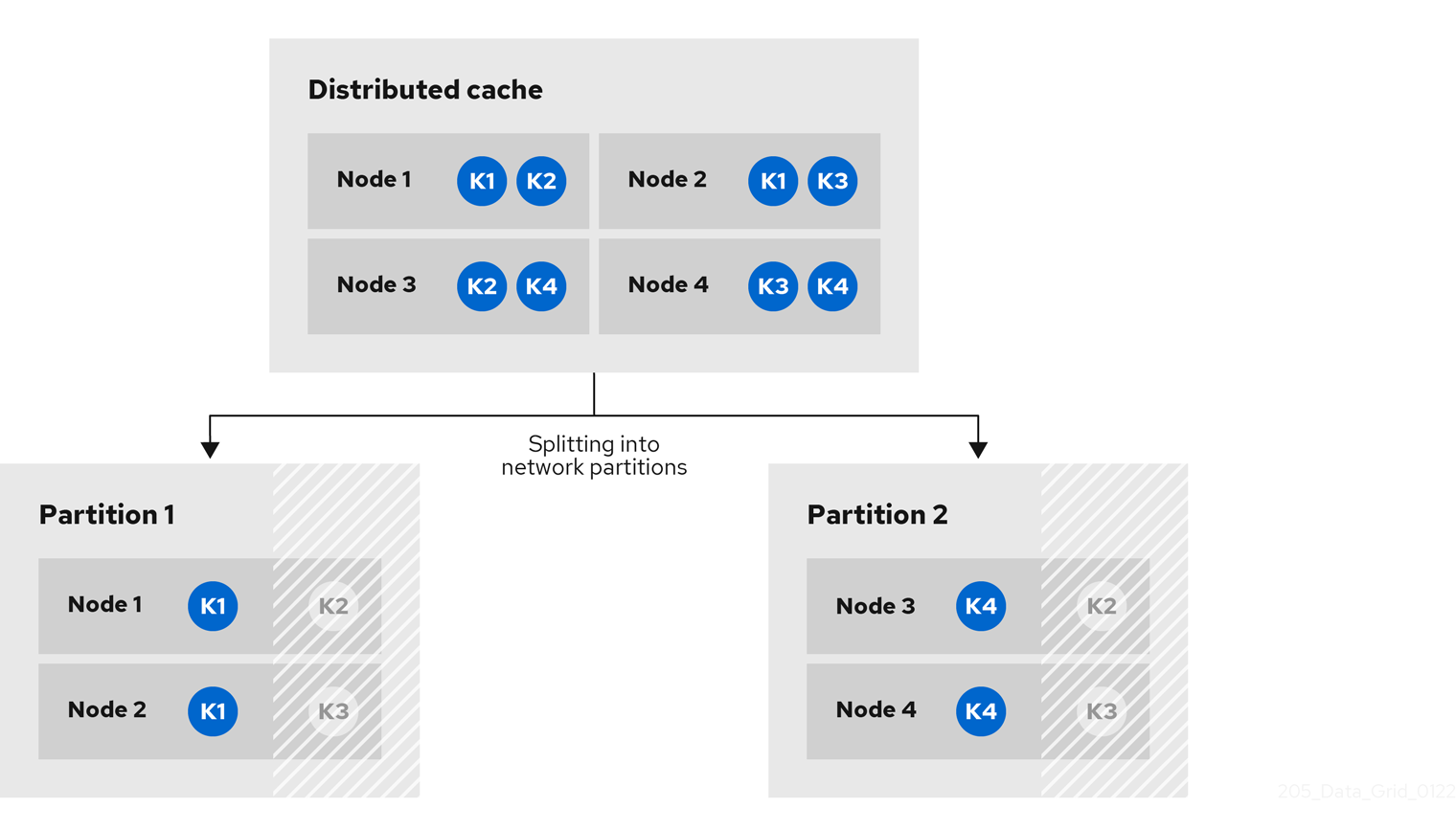
When network conditions allow the nodes to re-join the same cluster view, Data Grid merges the partitions without state transfer and restores normal cache operations.
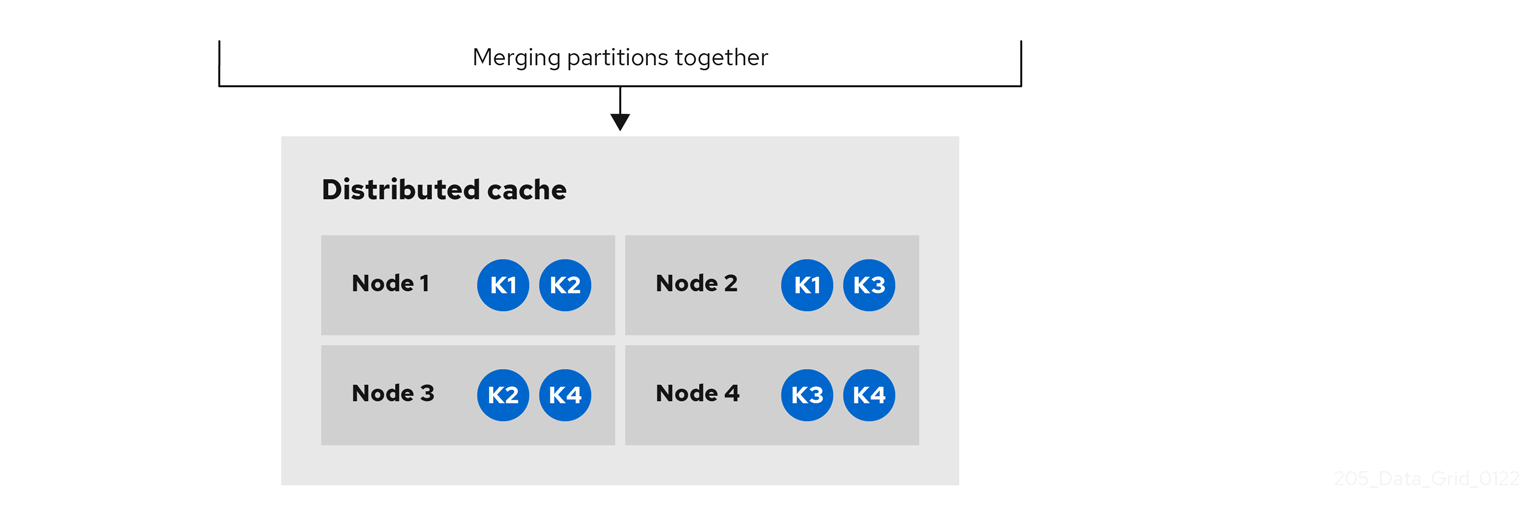
7.2.2. Verifying cache availability during network partitions
Determine if caches on Data Grid clusters are in AVAILABLE mode or DEGRADED mode during a network partition.
When Data Grid clusters split into partitions, nodes in those partitions can enter DEGRADED mode to guarantee data consistency. In DEGRADED mode clusters do not allow cache operations resulting in loss of availability.
Procedure
Verify availability of clustered caches in network partitions in one of the following ways:
-
Check Data Grid logs for
ISPN100011messages that indicate if the cluster is available or if at least one cache is inDEGRADEDmode. Get the availability of remote caches through the Data Grid Console or with the REST API.
- Open the Data Grid Console in any browser, select the Data Container tab, and then locate the availability status in the Health column.
Retrieve cache health from the REST API.
GET /rest/v2/cache-managers/<cacheManagerName>/health
-
Programmatically retrieve the availability of embedded caches with the
getAvailability()method in theAdvancedCacheAPI.
7.2.3. Making caches available
Make caches available for read and write operations by forcing them out of DEGRADED mode.
You should force clusters out of DEGRADED mode only if your deployment can tolerate data loss and inconsistency.
Procedure
Make caches available in one of the following ways:
Change the availability of remote caches with the REST API.
POST /v2/caches/<cacheName>?action=set-availability&availability=AVAILABLEProgrammatically change the availability of embedded caches with the
AdvancedCacheAPI.AdvancedCache ac = cache.getAdvancedCache(); // Retrieve cache availability boolean available = ac.getAvailability() == AvailabilityMode.AVAILABLE; // Make the cache available if (!available) { ac.setAvailability(AvailabilityMode.AVAILABLE); }
7.3. Configuring partition handling
Configure Data Grid to use a partition handling strategy and merge policy so it can resolve split clusters when network issues occur. By default Data Grid uses a strategy that provides availability at the cost of lowering consistency guarantees for your data. When a cluster splits due to a network partition clients can continue to perform read and write operations on caches.
If you require consistency over availability, you can configure Data Grid to deny read and write operations while the cluster is split into partitions. Alternatively you can allow read operations and deny write operations. You can also specify custom merge policy implementations that configure Data Grid to resolve splits with custom logic tailored to your requirements.
Prerequisites
Have a Data Grid cluster where you can create either a replicated or distributed cache.
NotePartition handling configuration applies only to replicated and distributed caches.
Procedure
- Open your Data Grid configuration for editing.
-
Add partition handling configuration to your cache with either the
partition-handlingelement orpartitionHandling()method. Specify a strategy for Data Grid to use when the cluster splits into partitions with the
when-splitattribute orwhenSplit()method.The default partition handling strategy is
ALLOW_READ_WRITESso caches remain availabile. If your use case requires data consistency over cache availability, specify theDENY_READ_WRITESstrategy.Specify a policy that Data Grid uses to resolve conflicting entries when merging partitions with the
merge-policyattribute ormergePolicy()method.By default Data Grid does not resolve conflicts on merge.
- Save the changes to your Data Grid configuration.
Partition handling configuration
XML
<distributed-cache>
<partition-handling when-split="DENY_READ_WRITES"
merge-policy="PREFERRED_ALWAYS"/>
</distributed-cache>JSON
{
"distributed-cache": {
"partition-handling" : {
"when-split": "DENY_READ_WRITES",
"merge-policy": "PREFERRED_ALWAYS"
}
}
}YAML
distributedCache:
partitionHandling:
whenSplit: DENY_READ_WRITES
mergePolicy: PREFERRED_ALWAYSConfigurationBuilder
ConfigurationBuilder builder = new ConfigurationBuilder();
builder.clustering().cacheMode(CacheMode.DIST_SYNC)
.partitionHandling()
.whenSplit(PartitionHandling.DENY_READ_WRITES)
.mergePolicy(MergePolicy.PREFERRED_NON_NULL);7.4. Partition handling strategies
Partition handling strategies control if Data Grid allows read and write operations when a cluster is split. The strategy you configure determines whether you get cache availability or data consistency.
| Strategy | Description | Availability or consistency |
|---|---|---|
|
| Data Grid allows read and write operations on caches while a cluster is split into network partitions. Nodes in each partition remain available and function independently of each other. This is the default partition handling strategy. | Availability |
|
| Data Grid allows read and write operations only if all replicas of an entry are in the partition. If a partition does not include all replicas of an entry, Data Grid prevents cache operations for that entry. | Consistency |
|
| Data Grid allows read operations for entries and prevents write operations unless the partition includes all replicas of an entry. | Consistency with read availability |
7.5. Merge policies
Merge policies control how Data Grid resolves conflicts between replicas when bringing cluster partitions together. You can use one of the merge policies that Data Grid provides or you can create a custom implementation of the EntryMergePolicy API.
| Merge policy | Description | Considerations |
|---|---|---|
|
| Data Grid does not resolve conflicts when merging split clusters. This is the default merge policy. | Nodes drop segments for which they are not the primary owner, which can result in data loss. |
|
| Data Grid finds the value that exists on the majority of nodes in the cluster and uses it to resolve conflicts. | Data Grid could use stale values to resolve conflicts. Even if an entry is available the majority of nodes, the last update could happen on the minority partition. |
|
| Data Grid uses the first non-null value that it finds on the cluster to resolve conflicts. | Data Grid could restore deleted entries. |
|
| Data Grid removes any conflicting entries from the cache. | Results in loss of any entries that have different values when merging split clusters. |
7.6. Configuring custom merge policies
Configure Data Grid to use custom implementations of the EntryMergePolicy API when handling network partitions.
Prerequisites
Implement the
EntryMergePolicyAPI.public class CustomMergePolicy implements EntryMergePolicy<String, String> { @Override public CacheEntry<String, String> merge(CacheEntry<String, String> preferredEntry, List<CacheEntry<String, String>> otherEntries) { // Decide which entry resolves the conflict return the_solved_CacheEntry; }
Procedure
Deploy your merge policy implementation to Data Grid Server if you use remote caches.
Package your classes as a JAR file that includes a
META-INF/services/org.infinispan.conflict.EntryMergePolicyfile that contains the fully qualified class name of your merge policy.# List implementations of EntryMergePolicy with the full qualified class name org.example.CustomMergePolicy-
Add the JAR file to the
server/libdirectory.
- Open your Data Grid configuration for editing.
Configure cache encoding with the
encodingelement orencoding()method as appropriate.For remote caches, if you use only object metadata for comparison when merging entries then you can use
application/x-protostreamas the media type. In this case Data Grid returns entries to theEntryMergePolicyasbyte[].If you require the object itself when merging conflicts then you should configure caches with the
application/x-java-objectmedia type. In this case you must deploy the relevant ProtoStream marshallers to Data Grid Server so it can performbyte[]to object transformations if clients use Protobuf encoding.-
Specify your custom merge policy with the
merge-policyattribute ormergePolicy()method as part of the partition handling configuration. - Save your changes.
Custom merge policy configuration
XML
<distributed-cache name="mycache">
<partition-handling when-split="DENY_READ_WRITES"
merge-policy="org.example.CustomMergePolicy"/>
</distributed-cache>JSON
{
"distributed-cache": {
"partition-handling" : {
"when-split": "DENY_READ_WRITES",
"merge-policy": "org.example.CustomMergePolicy"
}
}
}YAML
distributedCache:
partitionHandling:
whenSplit: DENY_READ_WRITES
mergePolicy: org.example.CustomMergePolicyConfigurationBuilder
ConfigurationBuilder builder = new ConfigurationBuilder();
builder.clustering().cacheMode(CacheMode.DIST_SYNC)
.partitionHandling()
.whenSplit(PartitionHandling.DENY_READ_WRITES)
.mergePolicy(new CustomMergePolicy());7.7. Manually merging partitions in embedded caches
Detect and resolve conflicting entries to manually merge embedded caches after network partitions occur.
Procedure
Retrieve the
ConflictManagerfrom theEmbeddedCacheManagerto detect and resolve conflicting entries in a cache, as in the following example:EmbeddedCacheManager manager = new DefaultCacheManager("example-config.xml"); Cache<Integer, String> cache = manager.getCache("testCache"); ConflictManager<Integer, String> crm = ConflictManagerFactory.get(cache.getAdvancedCache()); // Get all versions of a key Map<Address, InternalCacheValue<String>> versions = crm.getAllVersions(1); // Process conflicts stream and perform some operation on the cache Stream<Map<Address, CacheEntry<Integer, String>>> conflicts = crm.getConflicts(); conflicts.forEach(map -> { CacheEntry<Integer, String> entry = map.values().iterator().next(); Object conflictKey = entry.getKey(); cache.remove(conflictKey); }); // Detect and then resolve conflicts using the configured EntryMergePolicy crm.resolveConflicts(); // Detect and then resolve conflicts using the passed EntryMergePolicy instance crm.resolveConflicts((preferredEntry, otherEntries) -> preferredEntry);
Although the ConflictManager::getConflicts stream is processed per entry, the underlying spliterator lazily loads cache entries on a per segment basis.
Chapter 8. Configuring user roles and permissions
Authorization is a security feature that requires users to have certain permissions before they can access caches or interact with Data Grid resources. You assign roles to users that provide different levels of permissions, from read-only access to full, super user privileges.
8.1. Security authorization
Data Grid authorization secures your deployment by restricting user access.
User applications or clients must belong to a role that is assigned with sufficient permissions before they can perform operations on Cache Managers or caches.
For example, you configure authorization on a specific cache instance so that invoking Cache.get() requires an identity to be assigned a role with read permission while Cache.put() requires a role with write permission.
In this scenario, if a user application or client with the io role attempts to write an entry, Data Grid denies the request and throws a security exception. If a user application or client with the writer role sends a write request, Data Grid validates authorization and issues a token for subsequent operations.
Identities
Identities are security Principals of type java.security.Principal. Subjects, implemented with the javax.security.auth.Subject class, represent a group of security Principals. In other words, a Subject represents a user and all groups to which it belongs.
Identities to roles
Data Grid uses role mappers so that security principals correspond to roles, which you assign one or more permissions.
The following image illustrates how security principals correspond to roles:
8.1.1. User roles and permissions
Data Grid includes a default set of roles that grant users with permissions to access data and interact with Data Grid resources.
ClusterRoleMapper is the default mechanism that Data Grid uses to associate security principals to authorization roles.
ClusterRoleMapper matches principal names to role names. A user named admin gets admin permissions automatically, a user named deployer gets deployer permissions, and so on.
| Role | Permissions | Description |
|---|---|---|
|
| ALL | Superuser with all permissions including control of the Cache Manager lifecycle. |
|
| ALL_READ, ALL_WRITE, LISTEN, EXEC, MONITOR, CREATE |
Can create and delete Data Grid resources in addition to |
|
| ALL_READ, ALL_WRITE, LISTEN, EXEC, MONITOR |
Has read and write access to Data Grid resources in addition to |
|
| ALL_READ, MONITOR |
Has read access to Data Grid resources in addition to |
|
| MONITOR |
Can view statistics via JMX and the |
8.1.2. Permissions
Authorization roles have different permissions with varying levels of access to Data Grid. Permissions let you restrict user access to both Cache Managers and caches.
8.1.2.1. Cache Manager permissions
| Permission | Function | Description |
|---|---|---|
| CONFIGURATION |
| Defines new cache configurations. |
| LISTEN |
| Registers listeners against a Cache Manager. |
| LIFECYCLE |
| Stops the Cache Manager. |
| CREATE |
| Create and remove container resources such as caches, counters, schemas, and scripts. |
| MONITOR |
|
Allows access to JMX statistics and the |
| ALL | - | Includes all Cache Manager permissions. |
8.1.2.2. Cache permissions
| Permission | Function | Description |
|---|---|---|
| READ |
| Retrieves entries from a cache. |
| WRITE |
| Writes, replaces, removes, evicts data in a cache. |
| EXEC |
| Allows code execution against a cache. |
| LISTEN |
| Registers listeners against a cache. |
| BULK_READ |
| Executes bulk retrieve operations. |
| BULK_WRITE |
| Executes bulk write operations. |
| LIFECYCLE |
| Starts and stops a cache. |
| ADMIN |
| Allows access to underlying components and internal structures. |
| MONITOR |
|
Allows access to JMX statistics and the |
| ALL | - | Includes all cache permissions. |
| ALL_READ | - | Combines the READ and BULK_READ permissions. |
| ALL_WRITE | - | Combines the WRITE and BULK_WRITE permissions. |
8.1.3. Role mappers
Data Grid includes a PrincipalRoleMapper API that maps security Principals in a Subject to authorization roles that you can assign to users.
8.1.3.1. Cluster role mappers
ClusterRoleMapper uses a persistent replicated cache to dynamically store principal-to-role mappings for the default roles and permissions.
By default uses the Principal name as the role name and implements org.infinispan.security.MutableRoleMapper which exposes methods to change role mappings at runtime.
-
Java class:
org.infinispan.security.mappers.ClusterRoleMapper -
Declarative configuration:
<cluster-role-mapper />
8.1.3.2. Identity role mappers
IdentityRoleMapper uses the Principal name as the role name.
-
Java class:
org.infinispan.security.mappers.IdentityRoleMapper -
Declarative configuration:
<identity-role-mapper />
8.1.3.3. CommonName role mappers
CommonNameRoleMapper uses the Common Name (CN) as the role name if the Principal name is a Distinguished Name (DN).
For example this DN, cn=managers,ou=people,dc=example,dc=com, maps to the managers role.
-
Java class:
org.infinispan.security.mappers.CommonRoleMapper -
Declarative configuration:
<common-name-role-mapper />
8.1.3.4. Custom role mappers
Custom role mappers are implementations of org.infinispan.security.PrincipalRoleMapper.
-
Declarative configuration:
<custom-role-mapper class="my.custom.RoleMapper" />
8.2. Access control list (ACL) cache
Data Grid caches roles that you grant to users internally for optimal performance. Whenever you grant or deny roles to users, Data Grid flushes the ACL cache to ensure user permissions are applied correctly.
If necessary, you can disable the ACL cache or configure it with the cache-size and cache-timeout attributes.
XML
<infinispan>
<cache-container name="acl-cache-configuration">
<security cache-size="1000"
cache-timeout="300000">
<authorization/>
</security>
</cache-container>
</infinispan>JSON
{
"infinispan" : {
"cache-container" : {
"name" : "acl-cache-configuration",
"security" : {
"cache-size" : "1000",
"cache-timeout" : "300000",
"authorization" : {}
}
}
}
}YAML
infinispan:
cacheContainer:
name: "acl-cache-configuration"
security:
cache-size: "1000"
cache-timeout: "300000"
authorization: ~8.3. Customizing roles and permissions
You can customize authorization settings in your Data Grid configuration to use role mappers with different combinations of roles and permissions.
Procedure
- Declare a role mapper and a set of custom roles and permissions in the Cache Manager configuration.
- Configure authorization for caches to restrict access based on user roles.
Custom roles and permissions configuration
XML
<infinispan>
<cache-container name="custom-authorization">
<security>
<authorization>
<!-- Declare a role mapper that associates a security principal
to each role. -->
<identity-role-mapper />
<!-- Specify user roles and corresponding permissions. -->
<role name="admin" permissions="ALL" />
<role name="reader" permissions="READ" />
<role name="writer" permissions="WRITE" />
<role name="supervisor" permissions="READ WRITE EXEC"/>
</authorization>
</security>
</cache-container>
</infinispan>JSON
{
"infinispan" : {
"cache-container" : {
"name" : "custom-authorization",
"security" : {
"authorization" : {
"identity-role-mapper" : null,
"roles" : {
"reader" : {
"role" : {
"permissions" : "READ"
}
},
"admin" : {
"role" : {
"permissions" : "ALL"
}
},
"writer" : {
"role" : {
"permissions" : "WRITE"
}
},
"supervisor" : {
"role" : {
"permissions" : "READ WRITE EXEC"
}
}
}
}
}
}
}
}YAML
infinispan:
cacheContainer:
name: "custom-authorization"
security:
authorization:
identityRoleMapper: "null"
roles:
reader:
role:
permissions:
- "READ"
admin:
role:
permissions:
- "ALL"
writer:
role:
permissions:
- "WRITE"
supervisor:
role:
permissions:
- "READ"
- "WRITE"
- "EXEC"8.4. Configuring caches with security authorization
Use authorization in your cache configuration to restrict user access. Before they can read or write cache entries, or create and delete caches, users must have a role with a sufficient level of permission.
Prerequisites
Ensure the
authorizationelement is included in thesecuritysection of thecache-containerconfiguration.Data Grid enables security authorization in the Cache Manager by default and provides a global set of roles and permissions for caches.
- If necessary, declare custom roles and permissions in the Cache Manager configuration.
Procedure
- Open your cache configuration for editing.
-
Add the
authorizationelement to caches to restrict user access based on their roles and permissions. - Save the changes to your configuration.
Authorization configuration
The following configuration shows how to use implicit authorization configuration with default roles and permissions:
XML
<distributed-cache>
<security>
<!-- Inherit authorization settings from the cache-container. --> <authorization/>
</security>
</distributed-cache>JSON
{
"distributed-cache": {
"security": {
"authorization": {
"enabled": true
}
}
}
}YAML
distributedCache:
security:
authorization:
enabled: trueCustom roles and permissions
XML
<distributed-cache>
<security>
<authorization roles="admin supervisor"/>
</security>
</distributed-cache>JSON
{
"distributed-cache": {
"security": {
"authorization": {
"enabled": true,
"roles": ["admin","supervisor"]
}
}
}
}YAML
distributedCache:
security:
authorization:
enabled: true
roles: ["admin","supervisor"]8.5. Disabling security authorization
In local development environments you can disable authorization so that users do not need roles and permissions. Disabling security authorization means that any user can access data and interact with Data Grid resources.
Procedure
- Open your Data Grid configuration for editing.
-
Remove any
authorizationelements from thesecurityconfiguration for the Cache Manager. -
Remove any
authorizationconfiguration from your caches. - Save the changes to your configuration.

'%20d='M201.5%20305.5c-13.8%200-24.9-11.1-24.9-24.6%200-13.8%2011.1-24.9%2024.9-24.9%2013.6%200%2024.6%2011.1%2024.6%2024.9%200%2013.6-11.1%2024.6-24.6%2024.6zM504%20256c0%20137-111%20248-248%20248S8%20393%208%20256%20119%208%20256%208s248%20111%20248%20248zm-132.3-41.2c-9.4%200-17.7%203.9-23.8%2010-22.4-15.5-52.6-25.5-86.1-26.6l17.4-78.3%2055.4%2012.5c0%2013.6%2011.1%2024.6%2024.6%2024.6%2013.8%200%2024.9-11.3%2024.9-24.9s-11.1-24.9-24.9-24.9c-9.7%200-18%205.8-22.1%2013.8l-61.2-13.6c-3-.8-6.1%201.4-6.9%204.4l-19.1%2086.4c-33.2%201.4-63.1%2011.3-85.5%2026.8-6.1-6.4-14.7-10.2-24.1-10.2-34.9%200-46.3%2046.9-14.4%2062.8-1.1%205-1.7%2010.2-1.7%2015.5%200%2052.6%2059.2%2095.2%20132%2095.2%2073.1%200%20132.3-42.6%20132.3-95.2%200-5.3-.6-10.8-1.9-15.8%2031.3-16%2019.8-62.5-14.9-62.5zM302.8%20331c-18.2%2018.2-76.1%2017.9-93.6%200-2.2-2.2-6.1-2.2-8.3%200-2.5%202.5-2.5%206.4%200%208.6%2022.8%2022.8%2087.3%2022.8%20110.2%200%202.5-2.2%202.5-6.1%200-8.6-2.2-2.2-6.1-2.2-8.3%200zm7.7-75c-13.6%200-24.6%2011.1-24.6%2024.9%200%2013.6%2011.1%2024.6%2024.6%2024.6%2013.8%200%2024.9-11.1%2024.9-24.6%200-13.8-11-24.9-24.9-24.9z'/%3e%3c/svg%3e)