 Red Hat Summit
JBoss Rules 5 Reference Guide
This guide is for developers
Edition 5.3.1
Abstract
Preface
Chapter 1. Introduction
1.1. Intended Audience
1.2. Aim of the Guide
Chapter 2. Key Terminology
2.1. The Basics
2.1.1. JBoss Rules
2.1.2. The JBoss Rules Engine
2.1.3. Expert Systems
2.1.4. Production Rules
when <conditions> then <actions>
when
<conditions>
then
<actions>
2.1.5. The Inference Engine
2.1.6. Production Memory
production memory is where rules are stored.
2.1.7. Working Memory
working memory is the part of the JBoss Rules engine where facts are asserted. From here, the facts can be modified or retracted.
2.1.8. Conflict Resolution Strategy
2.1.9. Hybrid Rule Systems
2.1.10. Forward-Chaining
2.1.11. Backward-Chaining
Prolog is an example of a backward-chaining engine.
Important
2.1.12. Reasoning Capabilities
2.2. Rete Algorithm
2.2.1. The Rete Root Node
2.2.2. The ObjectTypeNode
instanceof check.
2.2.3. AlphaNodes
2.2.4. Hashing
2.2.5. BetaNodes
2.2.6. Alpha Memory
2.2.7. Beta Memory
2.2.8. Lookups with BetaNodes
2.2.9. LeftInputNodeAdapters
2.2.10. Terminal Nodes
2.2.11. Node Sharing
2.2.12. Node Sharing Example
2.3. Strong and Loose Coupling
2.3.1. Loose Coupling
2.3.2. Strong Coupling
2.4. Advantages of a Rule Engine
2.4.1. Declarative Programming
2.4.2. Logic and Data Separation
2.4.3. Knowledge Base
KnowledgeBuilder. It is a repository of all the application's knowledge definitions. It may contain rules, processes, functions, and type models. The Knowledge Base itself does not contain instance data (known as facts). Instead, sessions are created from the Knowledge Base into which data can be inserted and where process instances may be started. It is recommended that Knowledge Bases be cached where possible to allow for repeated session creation.
Chapter 3. Quick Start
3.1. Rule Basics
3.1.1. Stateless Knowledge Sessions
3.1.2. Configuring Rules in a Stateless Session
Procedure 3.1. Task
- Create a data model like the driver's license example below:
Copy to Clipboard Copied! Toggle word wrap Toggle overflow - Write the first rule. In this example, a rule is added to disqualify any applicant younger than 18:
Copy to Clipboard Copied! Toggle word wrap Toggle overflow - When the
Applicantobject is inserted into the rule engine, each rule's constraints evaluate it and search for a match. (There is always an implied constraint of "object type" after which there can be any number of explicit field constraints.)In theIs of valid agerule there are two constraints:- The fact being matched must be of type Applicant
- The value of Age must be less than eighteen.
$ais a binding variable. It exists to make possible a reference to the matched object in the rule's consequence (from which place the object's properties can be updated).Note
Use of the dollar sign ($) is optional. It helps to differentiate between variable names and field names.Note
If the rules are in the same folder as the classes, the classpath resource loader can be used to build the first knowledge base. - Use the KnowledgeBuilder to to compile the list of rules into a knowledge base as shown:
Copy to Clipboard Copied! Toggle word wrap Toggle overflow The above code snippet looks on the classpath for thelicenseApplication.drlfile, using the methodnewClassPathResource(). (The resource type is DRL, short for "Drools Rule Language".) - Check the KnowledgeBuilder for any errors. If there are none, you can build the session.
- Execute the data against the rules. (Since the applicant is under the age of eighteen, their application will be marked as "invalid.")
Copy to Clipboard Copied! Toggle word wrap Toggle overflow
The preceding code executes the data against the rules. Since the applicant is under the age of 18, the application is marked as invalid.
3.1.3. Configuring Rules with Multiple Objects
Procedure 3.2. Task
- To execute rules against any object-implementing
iterable(such as a collection), add another class as shown in the example code below:Copy to Clipboard Copied! Toggle word wrap Toggle overflow - In order to check that the application was made within a legitimate time-frame, add this rule:
Copy to Clipboard Copied! Toggle word wrap Toggle overflow - Use the JDK converter to implement the iterable interface. (This method commences with the line
Arrays.asList(...).) The code shown below executes rules against an iterable list. Every collection element is inserted before any matched rules are fired:Copy to Clipboard Copied! Toggle word wrap Toggle overflow Note
Theexecute(Object object)andexecute(Iterable objects)methods are actually "wrappers" around a further method calledexecute(Command command)which comes from theBatchExecutorinterface. - Use the
CommandFactoryto create instructions, so that the following is equivalent toexecute( Iterable it ):ksession.execute( CommandFactory.newInsertIterable( new Object[] { application, applicant } ) );ksession.execute( CommandFactory.newInsertIterable( new Object[] { application, applicant } ) );Copy to Clipboard Copied! Toggle word wrap Toggle overflow - Use the
BatchExecutorandCommandFactorywhen working with many different commands or result output identifiers:Copy to Clipboard Copied! Toggle word wrap Toggle overflow Note
CommandFactorysupports many other commands that can be used in theBatchExecutor. Some of these areStartProcess,QueryandSetGlobal.
3.1.4. Stateful Sessions
StatelessKnowledgeSession, the StatefulKnowledgeSession supports the BatchExecutor interface. The only difference is the FireAllRules command is not automatically called at the end.
Warning
dispose() method is called after running a stateful session. This is to ensure that there are no memory leaks. This is due to the fact that knowledge bases will obtain references to stateful knowledge sessions when they are created.
3.1.5. Common Use Cases for Stateful Sessions
- Monitoring
- For example, you can monitor a stock market and automate the buying process.
- Diagnostics
- Stateful sessions can be used to run fault-finding processes. They could also be used for medical diagnostic processes.
- Logistical
- For example, they could be applied to problems involving parcel tracking and delivery provisioning.
- Ensuring compliance
- For example, to validate the legality of market trades.
3.1.6. Stateful Session Monitoring Example
Procedure 3.3. Task
- Create a model of what you want to monitor. In this example involving fire alarms, the rooms in a house have been listed. Each has one sprinkler. A fire can start in any of the rooms:
Copy to Clipboard Copied! Toggle word wrap Toggle overflow - The rules must express the relationships between multiple objects (to define things such as the presence of a sprinkler in a certain room). To do this, use a binding variable as a constraint in a pattern. This results in a cross-product.
- Create an instance of the
Fireclass and insert it into the session.The rule below adds a binding toFireobject's room field to constrain matches. This so that only the sprinkler for that room is checked. When this rule fires and the consequence executes, the sprinkler activates:Copy to Clipboard Copied! Toggle word wrap Toggle overflow Whereas the stateless session employed standard Java syntax to modify a field, the rule above uses themodifystatement. (It acts much like a "with" statement.)
3.1.7. First Order Logic
3.1.8. Configuring Rules with First Order Logic
Procedure 3.4. Task
- Configure a pattern featuring the keyword
Not. First order logic ensures rules will only be matched when no other keywords are present. In this example, the rule turns the sprinkler off when the fire is extinguished:Copy to Clipboard Copied! Toggle word wrap Toggle overflow - An
Alarmobject is created when there is a fire, but only oneAlarmis needed for the entire building no matter how many fires there might be.Not's complement,existscan now be introduced. It matches one or more instances of a category:Copy to Clipboard Copied! Toggle word wrap Toggle overflow - If there are no more fires, the alarm must be deactivated. To turn it off, use
Notagain:Copy to Clipboard Copied! Toggle word wrap Toggle overflow - Use this code to print a general health status message when the application first starts and also when the alarm and all of the sprinklers have been deactivated:
Copy to Clipboard Copied! Toggle word wrap Toggle overflow - Store the rules in a file called
fireAlarm.drl. Save this file in a sub-directory on the class-path. - Finally, build a
knowledge base, using the new name,fireAlarm.drl:Copy to Clipboard Copied! Toggle word wrap Toggle overflow
3.1.9. Rule System Sample Configuration
Procedure 3.5. Task
- Insert
ksession.fireAllRules(). This grants the matched rules permission to run but, since there is no fire in this example, they will merely produce the health message:Copy to Clipboard Copied! Toggle word wrap Toggle overflow The resulting message reads:> Everything is okay
> Everything is okayCopy to Clipboard Copied! Toggle word wrap Toggle overflow - Create and insert two fires. (A fact handle will be kept.)
- With the fires now in the engine, call
fireAllRules(). The alarm will be raised and the respective sprinklers will be turned on:Copy to Clipboard Copied! Toggle word wrap Toggle overflow The resulting message reads:> Raise the alarm > Turn on the sprinkler for room kitchen > Turn on the sprinkler for room office
> Raise the alarm > Turn on the sprinkler for room kitchen > Turn on the sprinkler for room officeCopy to Clipboard Copied! Toggle word wrap Toggle overflow - When the fires are extinguished, the fire objects are retracted and the sprinklers are turned off. At this point in time, the alarm is canceled and the health message displays once more:
ksession.retract( kitchenFireHandle ); ksession.retract( officeFireHandle ); ksession.fireAllRules();
ksession.retract( kitchenFireHandle ); ksession.retract( officeFireHandle ); ksession.fireAllRules();Copy to Clipboard Copied! Toggle word wrap Toggle overflow The resulting message reads:Copy to Clipboard Copied! Toggle word wrap Toggle overflow
3.2. JBoss Rules Theory
3.2.1. Methods in JBoss Rules
3.2.2. Method Example
3.2.3. Rule Example
3.2.4. Cross-Products
3.2.5. Cross-Product Constraining
Procedure 3.6. Task
- To prevent a rule from outputting a huge amount of cross-products, you should constrain the cross-products themselves. Do this using the variable constraint seen below:
Copy to Clipboard Copied! Toggle word wrap Toggle overflow The following output will be displayed:room:office sprinkler:office room:kitchen sprinkler:kitchen room:livingroom sprinkler:livingroom room:bedroom sprinkler:bedroom
room:office sprinkler:office room:kitchen sprinkler:kitchen room:livingroom sprinkler:livingroom room:bedroom sprinkler:bedroomCopy to Clipboard Copied! Toggle word wrap Toggle overflow
Only four rows are outputted with the correct sprinkler for each room. Without this variable, every row in the Room table would have been joined with every row in the Sprinkler table resulting in many lines of output.
3.2.6. The Inference Engine
3.2.7. Inference Example
$p : Person() IsAdult( person == $p )
$p : Person()
IsAdult( person == $p )3.3. Advanced Concepts and Theory
3.3.1. Logical Assertions
3.3.2. Stated Insertions
HashMap and a counter, you can track how many times a particular equality is stated. This means you can count how many different instances are equal.
3.3.3. Justified Insertions
3.3.4. The WM_BEHAVIOR_PRESERVE Setting
WM_BEHAVIOR_PRESERVE. When the property is set to discard, you can use the existing handle and replace the existing instance with the new Object, which is the default behavior. Otherwise you should override it to stated but create an new FactHandle.


3.3.7. The Truth Maintenance System
Important
3.3.8. The insertLogical Fact
insertLogical fact is part of the JBoss Rules TMS. It "inserts logic" so that rules behave and are modified according to the situation. For example, the insertLogical fact can be added to a set of rules so that when a rule becomes false, the fact is automatically retracted.
3.3.9. Using Inference and TMS
Procedure 3.7. Task
- In this example we will use a bus pass issuing system. See the code snippet below:
Copy to Clipboard Copied! Toggle word wrap Toggle overflow - Insert the
insertLogicalproperty to provide inference:Copy to Clipboard Copied! Toggle word wrap Toggle overflow - Re-enter the code to issue the passes. These two configurations can also be logically inserted, as the TMS supports chaining of logical insertions for a cascading set of retracts:
Copy to Clipboard Copied! Toggle word wrap Toggle overflow Now when the person changes from being 15 to 16, both theIsChildfact and the person'sChildBusPassfact are automatically retracted. - Optionally, insert the
notconditional element to handle notifications. (In this example, a request for the returning of the pass.) When the TMS automatically retracts theChildBusPassobject, this rule triggers and sends a request to the person:Copy to Clipboard Copied! Toggle word wrap Toggle overflow
Chapter 4. Processing
4.1. Agenda
WorkingMemory, rules may become fully matched and eligible for execution. A single Working Memory Action can result in multiple eligible rules. When a rule is fully matched an Activation is created, referencing the rule and the matched facts, and placed onto the Agenda. The Agenda controls the execution order of these Activations using a Conflict Resolution strategy.
4.2. Agenda Processing
- Working Memory Actions. This is where most of the work takes place, either in the Consequence (the RHS itself) or the main Java application process. Once the Consequence has finished or the main Java application process calls
fireAllRules()the engine switches to the Agenda Evaluation phase. - Agenda Evaluation. This attempts to select a rule to fire. If no rule is found it exits, otherwise it fires the found rule, switching the phase back to Working Memory Actions.
4.3. Default Conflict Resolution Strategies
- Salience (Priority)
- A user can specify that a certain rule has a higher priority (by giving it a higher number) than other rules. In that case, the rule with higher salience will be preferred.
- LIFO (last in, first out)
- LIFO priorities are based on the assigned Working Memory Action counter value, with all rules created during the same action receiving the same value. The execution order of a set of firings with the same priority value is arbitrary.
Note
4.4. AgendaGroup
4.5. setFocus()
setFocus() is called it pushes the specified Agenda Group onto a stack. When the focus group is empty it is popped from the stack and the focus group that is now on top evaluates. An Agenda Group can appear in multiple locations on the stack. The default Agenda Group is "MAIN", with all rules which do not specify an Agenda Group being in this group. It is also always the first group on the stack, given focus initially, by default.
4.6. setFocus() Example
ksession.getAgenda().getAgendaGroup( "Group A" ).setFocus();
ksession.getAgenda().getAgendaGroup( "Group A" ).setFocus();4.7. ActivationGroup
clear() method can be called at any time, which cancels all of the activations before one has had a chance to fire.
4.8. ActivationGroup Example
ksession.getAgenda().getActivationGroup( "Group B" ).clear();
ksession.getAgenda().getActivationGroup( "Group B" ).clear();4.9. RuleFlowGroup
clear() method can be called at any time to cancels all activations still remaining on the Agenda.
4.10. RuleFlowGroup Example
ksession.getAgenda().getRuleFlowGroup( "Group C" ).clear();
ksession.getAgenda().getRuleFlowGroup( "Group C" ).clear();4.11. The Difference Between Rules and Methods
- Methods are called directly.
- Specific instances are passed.
- One call results in a single execution.
- Rules execute by matching against any data as long it is inserted into the engine.
- Rules can never be called directly.
- Specific instances cannot be passed to a rule.
- Depending on the matches, a rule may fire once or several times, or not at all.
4.12. Cross Product Example
select * from Room, Sprinkler and every row in the Room table would be joined with every row in the Sprinkler table resulting in the following output:
select * from Room, Sprinkler where Room == Sprinkler.room.
room:office sprinkler:office room:kitchen sprinkler:kitchen room:livingroom sprinkler:livingroom room:bedroom sprinkler:bedroom
room:office sprinkler:office
room:kitchen sprinkler:kitchen
room:livingroom sprinkler:livingroom
room:bedroom sprinkler:bedroom4.13. Activations, Agenda and Conflict Sets Example
|
|
|
AccountPeriod is set to the first quarter we constrain the rule "increase balance for credits" to fire on two rows of data and "decrease balance for debits" to act on one row of data.
fireAllRules() is called. Meanwhile, the rule plus its matched data is placed on the Agenda and referred to as an Activation. The Agenda is a table of Activations that are able to fire and have their consequences executed, as soon as fireAllRules() is called. Activations on the Agenda are executed in turn. Notice that the order of execution so far is considered arbitrary.
AccountPeriod is updated to the second quarter, we have just a single matched row of data, and thus just a single Activation on the Agenda.
4.14. Conflict Resolver Strategy
4.15. Conflict Resolver Strategy Example
4.16. Trigger Example
| Rule View | View Trigger |
|---|---|
|
|
|
trigger : acc.balance += cf.amount |
trigger : acc.balance -= cf.amount |
4.17. ruleflow-group Example
4.18. Inference Example
$p : Person() IsAdult( person == $p )
$p : Person()
IsAdult( person == $p )4.19. Implementing Inference and TruthMaintenance
Procedure 4.1. Task
- Open a set of rules. In this example, a buss pass issuing system will be used:
Copy to Clipboard Copied! Toggle word wrap Toggle overflow - Insert the fact
insertLogicaland add the terms you wish to be inferred.Copy to Clipboard Copied! Toggle word wrap Toggle overflow The fact has been logically inserted. This fact is dependent on the truth of the "when" clause. It means that when the rule becomes false the fact is automatically retracted. This works particularly well as the two rules are mutually exclusive. In the above rules, the IsChild fact is inserted if the child is under 16. It is then automatically retracted if the person is over 16 and the IsAdult fact is inserted. - Insert the code to issue the passes. These can also be logically inserted as the TMS supports chaining of logical insertions for a cascading set of retracts.
Copy to Clipboard Copied! Toggle word wrap Toggle overflow Now when the person changes from being 15 to 16, not only is the IsChild fact automatically retracted, so is the person's ChildBusPass fact. - Insert the 'not' conditional element to handle notifications. (In this situation, a request for the returning of the pass.) When the TMS automatically retracts the ChildBusPass object, this rule triggers and sends a request to the person:
Copy to Clipboard Copied! Toggle word wrap Toggle overflow
Chapter 5. The Rule Language
5.1. Rule Language
5.1.1. Overview
5.1.2. A rule file
5.1.3. The structure of a rule file
Example 5.1. Rules file
5.1.4. What is a rule
5.1.5. Hard Keywords
true, false, and null.
5.1.6. Soft Keywords
5.1.7. List of Soft Keywords
lock-on-activedate-effectivedate-expiresno-loopauto-focusactivation-groupagenda-groupruleflow-groupentry-pointdurationpackageimportdialectsalienceenabledattributesruleextend- when
- then
templatequerydeclarefunctionglobalevalnotinorandexistsforall- accumulate
- collect
- from
actionreverseresultend- over
init
5.1.8. Comments
5.1.9. Single Line Comment Example
5.1.10. Multi-Line Comment Example
5.1.11. Error Messages
5.1.12. Error Message Format

Figure 5.1. Error Message Format Example
5.1.13. Error Messages Description
| Error Message | Description | Example | |
|---|---|---|---|
|
[ERR 101] Line 4:4 no viable alternative at input 'exits' in rule one
|
Indicates when the parser came to a decision point but couldn't identify an alternative.
|
| |
|
[ERR 101] Line 3:2 no viable alternative at input 'WHEN'
|
This message means the parser has encountered the token
WHEN (a hard keyword) which is in the wrong place, since the rule name is missing.
|
| |
|
[ERR 101] Line 0:-1 no viable alternative at input '<eof>' in rule simple_rule in pattern [name]
|
Indicates an open quote, apostrophe or parentheses.
|
1: rule simple_rule 2: when 3: Student( name == "Andy ) 4: then 5: end | |
|
[ERR 102] Line 0:-1 mismatched input '<eof>' expecting ')' in rule simple_rule in pattern Bar
|
Indicates that the parser was looking for a particular symbol that it didn't end at the current input position.
|
1: rule simple_rule 2: when 3: foo3 : Bar( | |
|
[ERR 102] Line 0:-1 mismatched input '<eof>' expecting ')' in rule simple_rule in pattern [name]
|
This error is the result of an incomplete rule statement. Usually when you get a 0:-1 position, it means that parser reached the end of source. To fix this problem, it is necessary to complete the rule statement.
|
| |
|
[ERR 103] Line 7:0 rule 'rule_key' failed predicate: {(validateIdentifierKey(DroolsSoftKeywords.RULE))}? in rule
|
A validating semantic predicate evaluated to false. Usually these semantic predicates are used to identify soft keywords.
|
| |
|
[ERR 104] Line 3:4 trailing semi-colon not allowed in rule simple_rule
|
This error is associated with the
eval clause, where its expression may not be terminated with a semicolon. This problem is simple to fix: just remove the semi-colon.
|
1: rule simple_rule 2: when 3: eval(abc();) 4: then 5: end | |
|
[ERR 105] Line 2:2 required (...)+ loop did not match anything at input 'aa' in template test_error
|
The recognizer came to a subrule in the grammar that must match an alternative at least once, but the subrule did not match anything. To fix this problem it is necessary to remove the numeric value as it is neither a valid data type which might begin a new template slot nor a possible start for any other rule file construct.
|
1: template test_error 2: aa s 11; 3: end |
5.1.14. Package
5.1.15. Import Statements
java.lang.
5.1.16. Using Globals
- Declare the global variable in the rules file and use it in rules. Example:
Copy to Clipboard Copied! Toggle word wrap Toggle overflow - Set the global value on the working memory. It is best practice to set all global values before asserting any fact to the working memory. Example:
List list = new ArrayList(); WorkingMemory wm = rulebase.newStatefulSession(); wm.setGlobal( "myGlobalList", list );
List list = new ArrayList(); WorkingMemory wm = rulebase.newStatefulSession(); wm.setGlobal( "myGlobalList", list );Copy to Clipboard Copied! Toggle word wrap Toggle overflow
5.1.17. The From Element
5.1.18. Using Globals with an e-Mail Service
Procedure 5.1. Task
- Open the integration code that is calling the rule engine.
- Obtain your emailService object and then set it in the working memory.
- In the DRL, declare that you have a global of type emailService and give it the name "email".
- In your rule consequences, you can use things like email.sendSMS(number, message).
Warning
Globals are not designed to share data between rules and they should never be used for that purpose. Rules always reason and react to the working memory state, so if you want to pass data from rule to rule, assert the data as facts into the working memory.Important
Do not set or change a global value from inside the rules. We recommend to you always set the value from your application using the working memory interface.
5.2. KnowledgeBuilder
5.2.1. The KnowledgeBuilder
ResourceType indicates the type of resource the builder is being asked to process.
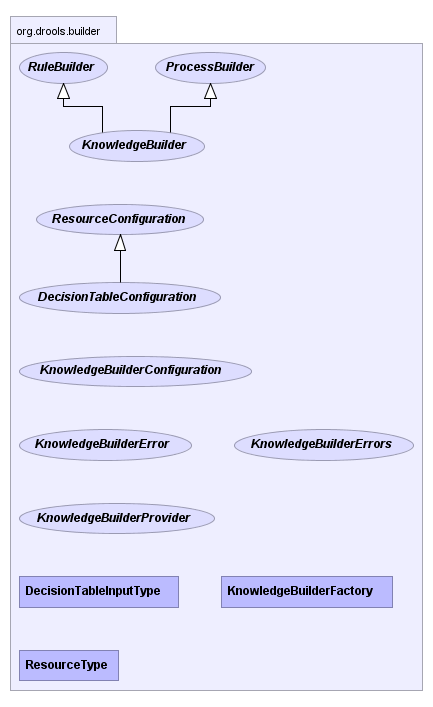
Figure 5.2. Builder Chart
5.2.2. The ResourceFactory
ResourceFactory provides capabilities to load resources from a number of sources: java.io.Reader, the classpath, a URL, a java.io.File, or a byte array. Binary files, such as decision tables (Excel's .xls files), should not be passed in with Reader, which is only suitable for text based resources.
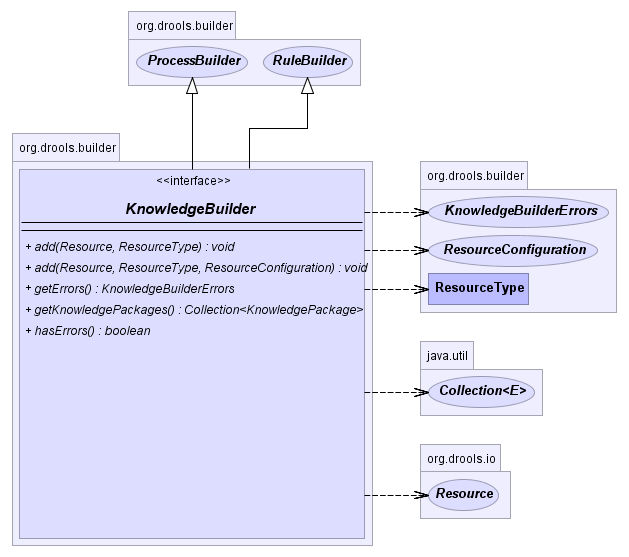
Figure 5.3. KnowledgeBuilder Chart
5.2.3. Creating a new KnowledgeBuilder
Procedure 5.2. Task
- Open the KnowledgeBuilderFactory.
- Create a new default configuration.
- Enter this into the configuration:
KnowledgeBuilder kbuilder = KnowledgeBuilderFactory.newKnowledgeBuilder();
KnowledgeBuilder kbuilder = KnowledgeBuilderFactory.newKnowledgeBuilder();Copy to Clipboard Copied! Toggle word wrap Toggle overflow The first parameter is for properties and is optional. If left blank, the default options will be used. The options parameter can be used for things like changing the dialect or registering new accumulator functions. - To add a KnowledgeBuilder with a custom ClassLoader, use this code:
KnowledgeBuilderConfiguration kbuilderConf = KnowledgeBuilderFactory.newKnowledgeBuilderConfiguration(null, classLoader ); KnowledgeBuilder kbuilder = KnowledgeBuilderFactory.newKnowledgeBuilder(kbuilderConf);
KnowledgeBuilderConfiguration kbuilderConf = KnowledgeBuilderFactory.newKnowledgeBuilderConfiguration(null, classLoader ); KnowledgeBuilder kbuilder = KnowledgeBuilderFactory.newKnowledgeBuilder(kbuilderConf);Copy to Clipboard Copied! Toggle word wrap Toggle overflow
5.2.4. Adding DRL Resources
Procedure 5.3. Task
- Resources of any type can be added iteratively. Below, a DRL file is added. The Knowledge Builder can handle multiple namespaces, so you can combine resources regardless of their namespace:
kbuilder.add( ResourceFactory.newFileResource( "/project/myrules.drl" ), ResourceType.DRL);kbuilder.add( ResourceFactory.newFileResource( "/project/myrules.drl" ), ResourceType.DRL);Copy to Clipboard Copied! Toggle word wrap Toggle overflow - Check the compilation results after each resource addition. The KnowledgeBuilder can report compilation results of 3 different severities: ERROR, WARNING and INFO.
- An
ERRORindicates that the compilation of the resource failed. You should not add more resources or retrieve the Knowledge Packages if there are errors.getKnowledgePackages()returns an empty list if there are errors. WARNINGandINFOresults can be ignored, but are available for inspection nonetheless.
5.2.5. KnowledgeBuilder Result Inspection Methods
hasErrors() and getErrors():
if( kbuilder.hasErrors() ) {
System.out.println( kbuilder.getErrors() );
return;
}
if( kbuilder.hasErrors() ) {
System.out.println( kbuilder.getErrors() );
return;
}
5.2.6. Getting the KnowledgePackages
Collection<KnowledgePackage> kpkgs = kbuilder.getKnowledgePackages();
Collection<KnowledgePackage> kpkgs = kbuilder.getKnowledgePackages();
5.2.7. Extended KnowledgeBuilder Example
5.2.8. Using KnowledgeBuilder in Batch Mode
5.2.9. Discard the Build of the Last Added DRL
kbuilder.add( ResourceFactory.newFileResource( "/project/wrong.drl" ), ResourceType.DRL );
if ( kbuilder.hasErrors() ) {
kbuilder.undo();
}
kbuilder.add( ResourceFactory.newFileResource( "/project/wrong.drl" ), ResourceType.DRL );
if ( kbuilder.hasErrors() ) {
kbuilder.undo();
}
5.3. ChangeSets
5.3.1. Changesets
changeset.xml contains a list of resources for this. It can also point recursively to another changeset XML file.
5.3.2. Changeset Example
java.net.URL, such as "file" and "http", are supported, as well as an additional "classpath". Currently the type attribute must always be specified for a resource, as it is not inferred from the file name extension. This is demonstrated in the example below:
CHANGE_SET:
5.3.3. Extended Changeset Example
5.3.4. Changesets and Directories Example
5.3.5. Building Using Configuration and the ChangeSet XML
Note
5.3.6. ChangeSet XML Example
5.3.7. ChangeSet Protocols
file: prefix to signify the protocol for the resource.
Note
5.3.8. Loading the ChangeSet XML
Procedure 5.4. Task
- Use the API to load your ChangeSet.
- Use this code to access the ChangeSet XML:
kbuilder.add( ResourceFactory.newUrlResource( url ), ResourceType.CHANGE_SET );
kbuilder.add( ResourceFactory.newUrlResource( url ), ResourceType.CHANGE_SET );Copy to Clipboard Copied! Toggle word wrap Toggle overflow
5.3.9. ChangeSet XML with Resource Configuration Example
5.3.10. ChangeSet XML and Directories
Note
Chapter 6. Building
6.1. Result Severity
6.1.1. Build Result Severity
6.1.2. Setting the Default Build Result Severity
Procedure 6.1. Task
- To configure it using system properties or configuration files, insert the following properties:
// sets the severity of rule updates drools.kbuilder.severity.duplicateRule = <INFO|WARNING|ERROR> // sets the severity of function updates drools.kbuilder.severity.duplicateFunction = <INFO|WARNING|ERROR>
// sets the severity of rule updates drools.kbuilder.severity.duplicateRule = <INFO|WARNING|ERROR> // sets the severity of function updates drools.kbuilder.severity.duplicateFunction = <INFO|WARNING|ERROR>Copy to Clipboard Copied! Toggle word wrap Toggle overflow - To use the API to change the severities, use this code:
Copy to Clipboard Copied! Toggle word wrap Toggle overflow
6.2. Building and Deploying
6.2.1. KnowledgePackage

Figure 6.1. KnowledgePackage interface
Note
6.2.2. Creating a new KnowledgeBase
Procedure 6.2. Task
- Use this default configuration to create a new KnowledgeBase:
KnowledgeBase kbase = KnowledgeBaseFactory.newKnowledgeBase();
KnowledgeBase kbase = KnowledgeBaseFactory.newKnowledgeBase();Copy to Clipboard Copied! Toggle word wrap Toggle overflow - If a custom class loader was used with the
KnowledgeBuilderto resolve types not in the default class loader, then that must also be set on theKnowledgeBase. The technique for this is the same as with theKnowledgeBuilderand is shown below:KnowledgeBaseConfiguration kbaseConf = KnowledgeBaseFactory.createKnowledgeBaseConfiguration( null, cl ); KnowledgeBase kbase = KnowledgeBaseFactory.newKnowledgeBase( kbaseConf );KnowledgeBaseConfiguration kbaseConf = KnowledgeBaseFactory.createKnowledgeBaseConfiguration( null, cl ); KnowledgeBase kbase = KnowledgeBaseFactory.newKnowledgeBase( kbaseConf );Copy to Clipboard Copied! Toggle word wrap Toggle overflow
6.2.3. Add KnowledgePackages to a KnowledgeBase
drools-core.jar and drools-compiler.jar to be on the classpath.
Procedure 6.3. Task
- To add KnowledgePackages to a KnowledgeBase, use this code:
Collection<KnowledgePackage> kpkgs = kbuilder.getKnowledgePackages(); KnowledgeBase kbase = KnowledgeBaseFactory.newKnowledgeBase(); kbase.addKnowledgePackages( kpkgs );
Collection<KnowledgePackage> kpkgs = kbuilder.getKnowledgePackages(); KnowledgeBase kbase = KnowledgeBaseFactory.newKnowledgeBase(); kbase.addKnowledgePackages( kpkgs );Copy to Clipboard Copied! Toggle word wrap Toggle overflow TheaddKnowledgePackages(kpkgs)method can be called iteratively to add additional knowledge.
6.2.4. Building and Deployment in Separate Processes
KnowledgeBase and the KnowledgePackage are units of deployment and serializable. This means you can have one machine do any necessary building, requiring drools-compiler.jar, and have another machine deploy and execute everything, needing only drools-core.jar.
6.2.5. Writing the KnowledgePackage to an OutputStream
ObjectOutputStream out = new ObjectOutputStream( new FileOutputStream( fileName ) ); out.writeObject( kpkgs ); out.close();
ObjectOutputStream out = new ObjectOutputStream( new FileOutputStream( fileName ) );
out.writeObject( kpkgs );
out.close();
6.2.6. Reading the KnowledgePackage from an InputStream
6.2.7. StatefulknowledgeSessions and KnowledgeBase Modifications
KnowledgeBase creates and returns StatefulKnowledgeSession objects and can optionally keep references to them.
KnowledgeBase modifications occur, they are applied against the data in the sessions. This reference is a weak reference and it is also optional. It is controlled by a boolean flag.
6.3. The Knowledge Agent
6.3.1. Knowledge Agent
KnowledgeAgent kagent = KnowledgeAgentFactory.newKnowledgeAgent( "MyAgent" ); kagent.applyChangeSet( ResourceFactory.newUrlResource( url ) ); KnowledgeBase kbase = kagent.getKnowledgeBase();
KnowledgeAgent kagent = KnowledgeAgentFactory.newKnowledgeAgent( "MyAgent" );
kagent.applyChangeSet( ResourceFactory.newUrlResource( url ) );
KnowledgeBase kbase = kagent.getKnowledgeBase();KnowledgeAgent kagent = KnowledgeAgentFactory.newKnowledgeAgent( "MyAgent" );
KnowledgeAgent kagent = KnowledgeAgentFactory.newKnowledgeAgent( "MyAgent" );
6.3.2. KnowledgeAgent Objects
KnowledgeAgent object will continuously scan all resources using a default polling interval of 60 seconds. When a modification date is updated, it will applied the changes into the cached Knowledge Base using the new resources. The previous KnowledgeBase reference will still exist and you'll have to call getKnowledgeBase() to access the newly built KnowledgeBase. If a directory is specified as part of the change set, the entire contents of that directory will be scanned for changes. The way modifications are applied depends on drools.agent.newInstance property present in the KnowledgeAgentConfiguration object passed to the agent.
6.3.3. Writing the KnowledgePackage to an OutputStream
KnowledgeAgent kagent = KnowledgeAgentFactory.newKnowledgeAgent( "MyAgent" ); kagent.applyChangeSet( ResourceFactory.newUrlResource( url ) ); KnowledgeBase kbase = kagent.getKnowledgeBase();
KnowledgeAgent kagent = KnowledgeAgentFactory.newKnowledgeAgent( "MyAgent" );
kagent.applyChangeSet( ResourceFactory.newUrlResource( url ) );
KnowledgeBase kbase = kagent.getKnowledgeBase();
6.3.4. ClassLoaders
6.3.4.1. Custom ClassLoaders for KnowledgeBuilder
Procedure 6.4. Custom Classloaders for KnowledgeBuilder
- Open a KnowledgeBuilderConfiguration and specify a custom classloader.
- If you need to pass custom configuration to these compilers, sends a KnowledgeBuilderConfiguration object to KnowledgeAgentFactory.newKnowledgeAgent().
Procedure 6.5. Reusing the KnowledgeBase ClassLoader
- Determine if the classloader you want to use in the compilation process of remote resources is the same needed in the Knowledge Agent's kbase, so the rules can be executed.
- Set up the desired ClassLoader to the agent kbase and use the
drools.agent.useKBaseClassLoaderForCompilingproperty of KnowledgeAgentConfiguration object. - Modify the agent's kbuilder classloader in runtime by modifying the agent's kbase classloader.
6.3.5. newInstance
6.3.5.1. The newInstance Property
6.3.6. Resource Scanning
6.3.6.1. Starting the Scanning and Notification Services
ResourceFactory.getResourceChangeNotifierService().start(); ResourceFactory.getResourceChangeScannerService().start();
ResourceFactory.getResourceChangeNotifierService().start();
ResourceFactory.getResourceChangeScannerService().start();
Note
6.3.6.2. The ResourceChangeScanner
ResourceChangeScannerService. A suitably updated ResourceChangeScannerConfiguration object is passed to the service's configure() method, which allows for the service to be reconfigured on demand.
6.3.6.3. Changing the Scanning Intervals
6.3.6.4. The KnowledgeAgentConfiguration Property
KnowledgeAgentConfiguration can be used to modify a Knowledge Agent's default behavior. You can use this to load the resources from a directory while inhibiting the continuous scan for changes of that directory.
6.3.6.5. Change the Scanning Behavior
6.3.7. Knowledge Bases and applyChangeSet()
6.3.7.1. Interactions Between Knowledge Agents and Knowledge Bases
applyChangeSet(Resource) method are monitored.
KnowledgeBase as the starting point is that you can provide it with a KnowledgeBaseConfiguration. When resource changes are detected and a new KnowledgeBase object is instantiated, it will use the KnowledgeBaseConfiguration of the previous KnowledgeBase object.
6.3.7.2. Using an Existing KnowledgeBase
getKnowledgeBase() will return the same provided kbase instance until resource changes are detected and a new Knowledge Base is built. When the new Knowledge Base is built, it will be done with the KnowledgeBaseConfiguration that was provided to the previous KnowledgeBase.
6.3.7.3. The applyChangeSet() Method
applyChangeSet() method it will add any directories to the scanning process. When the directory scan detects an additional file, it will be added to the Knowledge Base. Any removed file is removed from the Knowledge Base, and modified files will be removed from the Knowledge Base.
6.3.7.4. ChangeSet XML to Add Directory Contents
Note
6.3.8. Resource Caching
6.3.8.1. Restoring Resource Caching After a Restart
Procedure 6.6. Resource Restart
- To survive a restart when a resource is no longer available remotely (for example, the remote server is being restarted), set a System Property:
drools.resource.urlcache. - Make sure that System Property is set to a directory that has write permissions for the application. The Knowledge Agent will cache copies of the remote resources in that directory.
- Using the java command line
-Ddrools.resource.urlcache=/users/someone/KnowledgeCache- will keep local copies of the resources (rules, packages etc) in that directory for the agent to use should it be restarted. (When a remote resource becomes available, and is updated, it will automatically update the local cache copy.)
Chapter 7. Sessions
7.1. Sessions in JBoss Rules
KnowledgeBase into which data can be inserted and from which process instances may be started. Creating the KnowledgeBase can be resource-intensive, whereas session creation is not. For this reason, it is recommended that KnowledgeBases be cached where possible to allow for repeated session creation.
7.2. Create a StatefulKnowledgeSession From a KnowledgeBase
StatefulKnowledgeSession ksession = kbase.newStatefulKnowledgeSession();
StatefulKnowledgeSession ksession = kbase.newStatefulKnowledgeSession();
7.3. KnowledgeRuntime
7.3.1. The WorkingMemoryEntryPoint Method
WorkingMemoryEntryPoint provides the methods around inserting, updating and retrieving facts. The term "entry point" is related to the fact that there are multiple partitions in a Working Memory and you can choose which one you are inserting into. Most rule based applications will work with the default entry point alone.
7.3.2. The KnowledgeRuntime Interface
KnowledgeRuntime interface provides the main interaction with the engine. It is available in rule consequences and process actions. The KnowledgeRuntime inherits methods from both the WorkingMemory and the ProcessRuntime, thereby providing a unified API to work with processes and rules. When working with rules, three interfaces form the KnowledgeRuntime: WorkingMemoryEntryPoint, WorkingMemory and the KnowledgeRuntime itself.
7.3.3. Fact Insertion
WorkingMemory about a fact. You can do this by using ksession.insert(yourObject), for example. When you insert a fact, it is examined for matches against the rules. This means all of the work for deciding about firing or not firing a rule is done during insertion. However, no rule is executed until you call fireAllRules(), which you call after you have finished inserting your facts.
7.3.4. The FactHandle Token
FactHandle. This FactHandle is the token used to represent your inserted object within the WorkingMemory. It is also used for interactions with the WorkingMemory when you wish to retract or modify an object. Below is an example of code implementing a FactHandle:
Job accountant = new Job("accountant");
FactHandle accountantHandle = ksession.insert( accountant );
Job accountant = new Job("accountant");
FactHandle accountantHandle = ksession.insert( accountant );
7.3.5. Identity and Equality
- Identity
- This means that the Working Memory uses an
IdentityHashMapto store all asserted objects. New instance assertions always result in the return of newFactHandle, but if an instance is asserted again then it returns the original fact handle (that is, it ignores repeated insertions for the same object). - Equality
- This means that the Working Memory uses a
HashMapto store all asserted objects. An object instance assertion will only return a newFactHandleif the inserted object is not equal (according to itsequalmethod) to an already existing fact.
Note
FactHandle, but if an instance is asserted again then it returns the original fact handle (that is, it ignores repeated insertions for the same object).
7.3.6. Retraction
FactHandle that was returned by the insert call. On the right hand side of a rule the retract statement is used, which works with a simple object reference. Implemented below is example Retraction code:
Job accountant = new Job("accountant");
FactHandle accountantHandle = ksession.insert( accountant );
....
ksession.retract( accountantHandle );
Job accountant = new Job("accountant");
FactHandle accountantHandle = ksession.insert( accountant );
....
ksession.retract( accountantHandle );
7.3.7. The update() Method
update() method can be used to notify the WorkingMemory of changed objects for those objects that are not able to notify the WorkingMemory themselves. The update() method always takes the modified object as a second parameter, which allows you to specify new instances for immutable objects. The following is an update() example:
Note
modify statement is recommended, as it makes the changes and notifies the engine in a single statement. Alternatively, after changing a fact object's field values through calls of setter methods you must invoke update immediately, event before changing another fact, or you will cause problems with the indexing within the rule engine. The modify statement avoids this problem.
7.4. Working Memory
7.4.1. Queries
get method with the binding variable's name as its argument. If the binding refers to a fact object, its FactHandle can be retrieved by calling getFactHandle, again with the variable's name as the parameter. Illustrated below is a Query example:
QueryResults results =
ksession.getQueryResults( "my query", new Object[] { "string" } );
for ( QueryResultsRow row : results ) {
System.out.println( row.get( "varName" ) );
}
QueryResults results =
ksession.getQueryResults( "my query", new Object[] { "string" } );
for ( QueryResultsRow row : results ) {
System.out.println( row.get( "varName" ) );
}7.4.2. Live Queries
dispose method terminates the query and discontinues this reactive scenario.
7.4.3. ViewChangedEventListener Implementation Example
Note
7.5. KnowledgeRuntime
KnowledgeRuntime provides further methods that are applicable to both rules and processes, such as setting globals and registering channels. ("Exit point" is an obsolete synonym for "channel".)
Chapter 8. Objects and Interfaces
8.1. Globals
8.2. Working With Globals
Procedure 8.1. Task
- To start implementing globals into the Working Memory, declare a global in a rules file and back it up with a Java object:
global java.util.List list
global java.util.List listCopy to Clipboard Copied! Toggle word wrap Toggle overflow - With the Knowledge Base now aware of the global identifier and its type, you can call
ksession.setGlobal()with the global's name and an object (for any session) to associate the object with the global:List list = new ArrayList(); ksession.setGlobal("list", list);List list = new ArrayList(); ksession.setGlobal("list", list);Copy to Clipboard Copied! Toggle word wrap Toggle overflow Important
Failure to declare the global type and identifier in DRL code will result in an exception being thrown from this call. - Set the global before it is used in the evaluation of a rule. Failure to do so results in a
NullPointerException.
8.3. Resolving Globals
- getGlobals()
- The Stateless Knowledge Session method
getGlobals()returns a Globals instance which provides access to the session's globals. These are shared for all execution calls. Exercise caution regarding mutable globals because execution calls can be executing simultaneously in different threads. - Delegates
- Using a delegate is another way of providing global resolution. Assigning a value to a global (with
setGlobal(String, Object)) results in the value being stored in an internal collection mapping identifiers to values. Identifiers in this internal collection will have priority over any supplied delegate. If an identifier cannot be found in this internal collection, the delegate global (if any) will be used. - Execution
- Execution scoped globals use a
Commandto set a global which is then passed to theCommandExecutor.
8.4. Session Scoped Global Example
StatelessKnowledgeSession ksession = kbase.newStatelessKnowledgeSession(); // Set a global hbnSession, that can be used for DB interactions in the rules. ksession.setGlobal( "hbnSession", hibernateSession ); // Execute while being able to resolve the "hbnSession" identifier. ksession.execute( collection );
StatelessKnowledgeSession ksession = kbase.newStatelessKnowledgeSession();
// Set a global hbnSession, that can be used for DB interactions in the rules.
ksession.setGlobal( "hbnSession", hibernateSession );
// Execute while being able to resolve the "hbnSession" identifier.
ksession.execute( collection );8.5. StatefulRuleSessions
StatefulRuleSession property is inherited by the StatefulKnowledgeSession and provides the rule-related methods that are relevant from outside of the engine.
8.6. AgendaFilter Objects
AgendaFilter objects are optional implementations of the filter interface which are used to allow or deny the firing of an activation. What is filtered depends on the implementation.
8.7. Using the AgendaFilter
Procedure 8.2. Task
- To use a filter specify it while calling
fireAllRules(). The following example permits only rules ending in the string"Test". All others will be filtered out:ksession.fireAllRules( new RuleNameEndsWithAgendaFilter( "Test" ) );
ksession.fireAllRules( new RuleNameEndsWithAgendaFilter( "Test" ) );Copy to Clipboard Copied! Toggle word wrap Toggle overflow
8.8. Rule Engine Phases
- Working Memory Actions
- This is where most of the work takes place, either in the Consequence (the RHS itself) or the main Java application process. Once the Consequence has finished or the main Java application process calls
fireAllRules()the engine switches to the Agenda Evaluation phase. - Agenda Evaluation
- This attempts to select a rule to fire. If no rule is found it exits. Otherwise it fires the found rule, switching the phase back to Working Memory Actions.
8.9. The Event Model
8.10. The KnowlegeRuntimeEventManager
KnowlegeRuntimeEventManager interface is implemented by the KnowledgeRuntime which provides two interfaces, WorkingMemoryEventManager and ProcessEventManager.
8.11. The WorkingMemoryEventManager
WorkingMemoryEventManager allows for listeners to be added and removed, so that events for the working memory and the agenda can be listened to.
8.12. Adding an AgendaEventListener
8.13. Printing Working Memory Events
ksession.addEventListener( new DebugWorkingMemoryEventListener() );
ksession.addEventListener( new DebugWorkingMemoryEventListener() );8.14. KnowlegeRuntimeEvents
KnowlegeRuntimeEvent interface which can be used to retrieve the actual KnowlegeRuntime the event originated from.
8.15. Supported Events for the KnowledgeRuntimeEvent Interface
- ActivationCreatedEvent
- ActivationCancelledEvent
- BeforeActivationFiredEvent
- AfterActivationFiredEvent
- AgendaGroupPushedEvent
- AgendaGroupPoppedEvent
- ObjectInsertEvent
- ObjectRetractedEvent
- ObjectUpdatedEvent
- ProcessCompletedEvent
- ProcessNodeLeftEvent
- ProcessNodeTriggeredEvent
- ProcessStartEvent
8.16. The KnowledgeRuntimeLogger
8.17. Enabling a FileLogger
KnowledgeRuntimeLogger logger = KnowledgeRuntimeLoggerFactory.newFileLogger(ksession, "logdir/mylogfile"); ... logger.close();
KnowledgeRuntimeLogger logger =
KnowledgeRuntimeLoggerFactory.newFileLogger(ksession, "logdir/mylogfile");
...
logger.close();8.18. Using StatelessKnowledgeSession in JBoss Rules
StatelessKnowledgeSession wraps the StatefulKnowledgeSession, instead of extending it. Its main focus is on decision service type scenarios. It avoids the need to call dispose(). Stateless sessions do not support iterative insertions and the method call fireAllRules() from Java code. The act of calling execute() is a single-shot method that will internally instantiate a StatefulKnowledgeSession, add all the user data and execute user commands, call fireAllRules(), and then call dispose(). While the main way to work with this class is via the BatchExecution (a subinterface of Command) as supported by the CommandExecutor interface, two convenience methods are provided for when simple object insertion is all that's required. The CommandExecutor and BatchExecution are talked about in detail in their own section.
8.19. Performing a StatelessKnowledgeSession Execution with a Collection
8.20. Performing a StatelessKnowledgeSession Execution with the InsertElements Command
ksession.execute( CommandFactory.newInsertElements( collection ) );
ksession.execute( CommandFactory.newInsertElements( collection ) );Note
CommandFactory.newInsert(collection).
8.21. The BatchExecutionHelper
CommandFactory create the supported commands, all of which can be marshaled using XStream and the BatchExecutionHelper. BatchExecutionHelper provides details on the XML format as well as how to use JBoss Rules Pipeline to automate the marshaling of BatchExecution and ExecutionResults.
8.22. The CommandExecutor Interface
CommandExecutor interface allows users to export data using "out" parameters. This means that inserted facts, globals and query results can all be returned using this interface.
8.23. Out Identifiers
Chapter 9. Modes and Methods
9.1. Sequential Mode
9.2. Sequential Mode Options
- Order the Rules by salience and position in the ruleset (by setting a sequence attribute on the rule terminal node).
- Create an array (one element for each possible rule activation). Element position indicates firing order.
- Turn off all node memories, except the right-input Object memory.
- Disconnect the Left Input Adapter Node propagation and let the Object and the Node be referenced in a Command object. This is added to a list in the Working Memory for later execution.
- Assert all objects. When all assertions are finished and the right-input node memories are populated, you can check the Command list and execute each in turn.
- All resulting Activations should be placed in the array, based upon the determined sequence number of the Rule. Record the first and last populated elements, to reduce the iteration range.
- Iterate the array of Activations, executing populated element in turn.
- If there is a maximum number of allowed rule executions, exit the network evaluations early to fire all the rules in the array.
9.3. Activating Sequential Mode
Procedure 9.1. Task
- Start a stateless session.
- The sequential mode will be turned off by default. To turn it on, call
RuleBaseConfiguration.setSequential(true). Alternatively, set the rulebase configuration propertydrools.sequentialto true. - To allow sequential mode to fall back to a dynamic agenda, call
setSequentialAgendawithSequentialAgenda.DYNAMIC. - Optionally, set the
JBossRules.sequential.agendaproperty tosequentialordynamic.
9.4. The CommandFactory
CommandFactory object allows for commands to be executed on stateless sessions. Upon its conclusion, the factory will execute fireAllRules() before disposing the session.
9.5. Supported CommandFactory Options
- FireAllRules
- GetGlobal
- SetGlobal
- InsertObject
- InsertElements
- Query
- StartProcess
- BatchExecution
9.6. The Insert Command
InsertObject will insert a single object with an optional "out" identifier. InsertElements will iterate an Iterable, inserting each of the elements. This allows a Stateless Knowledge Session to process or execute queries in any order.
9.7. Insert Command Example
StatelessKnowledgeSession ksession = kbase.newStatelessKnowledgeSession(); ExecutionResults bresults = ksession.execute( CommandFactory.newInsert( new Car( "sedan" ), "sedan_id" ) ); Sedan sedan = bresults.getValue( "sedan_id" );
StatelessKnowledgeSession ksession = kbase.newStatelessKnowledgeSession();
ExecutionResults bresults =
ksession.execute( CommandFactory.newInsert( new Car( "sedan" ), "sedan_id" ) );
Sedan sedan = bresults.getValue( "sedan_id" );
9.8. The Execute Method
ExecutionResults instance, which allows access to any command results if they specify an out identifier such as stilton_id.
9.9. Execute Method Example
9.10. The BatchExecution Command
BatchExecution command allows you to execute multiple commands at once. It represents a composite command that is created from a list of commands. Execute will iterate over the list and execute each command in turn. This means you can insert some objects, start a process, call fireAllRules and execute a query, all in a single execute(...) call.
9.11. The FireAllRules Command
FireAllRules command disables the automatic execution of rules at the end. It is a type of manual override function.
9.12. Out Identifiers
9.13. Out Identifier Example
ExecutionResults. The query command defaults to use the same identifier as the query name, but it can also be mapped to a different identifier.
9.14. Execution XML Examples
9.15. Execution Marshalling Examples
CommandExecutor returns an ExecutionResults, and this is handled by the pipeline code snippet as well. A similar output for the <batch-execution> XML sample above would be:
9.16. Batch-execution and Command Examples
- There is currently no XML schema to support schema validation. This is the basic format. The root element is <batch-execution> and it can contain zero or more commands elements:
<batch-execution> ... </batch-execution>
<batch-execution> ... </batch-execution>Copy to Clipboard Copied! Toggle word wrap Toggle overflow - The insert element features an "out-identifier" attribute so the inserted object will be returned as part of the result payload:
Copy to Clipboard Copied! Toggle word wrap Toggle overflow - It's also possible to insert a collection of objects using the <insert-elements> element. This command does not support an out-identifier. The
org.domain.UserClassis just an illustrative user object that XStream would serialize:Copy to Clipboard Copied! Toggle word wrap Toggle overflow - The
<set-global>element sets a global for the session:Copy to Clipboard Copied! Toggle word wrap Toggle overflow <set-global>also supports two other optional attributes:outandout-identifier. A true value for the booleanoutwill add the global to the<batch-execution-results>payload, using the name from theidentifierattribute.out-identifierworks likeoutbut additionally allows you to override the identifier used in the<batch-execution-results>payload:Copy to Clipboard Copied! Toggle word wrap Toggle overflow - There is a
<get-global>element without contents. It only has anout-identifierattribute. There is no need for anoutattribute because retrieving the value is the sole purpose of a<get-global>element:<batch-execution> <get-global identifier='userVar1' /> <get-global identifier='userVar2' out-identifier='alternativeUserVar2'/> </batch-execution>
<batch-execution> <get-global identifier='userVar1' /> <get-global identifier='userVar2' out-identifier='alternativeUserVar2'/> </batch-execution>Copy to Clipboard Copied! Toggle word wrap Toggle overflow - The query command supports both parameter and parameterless queries. The
nameattribute is the name of the query to be called, and theout-identifieris the identifier to be used for the query results in the<execution-results>payload:Copy to Clipboard Copied! Toggle word wrap Toggle overflow - The
<start-process>command accepts optional parameters:Copy to Clipboard Copied! Toggle word wrap Toggle overflow - The signal event command allows you to identify processes:
<signal-event process-instance-id='1' event-type='MyEvent'> <string>MyValue</string> </signal-event>
<signal-event process-instance-id='1' event-type='MyEvent'> <string>MyValue</string> </signal-event>Copy to Clipboard Copied! Toggle word wrap Toggle overflow - The complete work item command notifies users when a process is completed:
Copy to Clipboard Copied! Toggle word wrap Toggle overflow - The abort work item command lets you cancel a process while it is running:
<abort-work-item id='21' />
<abort-work-item id='21' />Copy to Clipboard Copied! Toggle word wrap Toggle overflow
9.17. The MarshallerFactory
MarshallerFactory is used to marshal and unmarshal Stateful Knowledge Sessions.
9.18. Marshaller Example
9.19. Marshalling Options
| Option | Description |
|---|---|
| ObjectMarshallingStrategy | This interface provides implementations for marshalling and allows for greater flexibility. |
| SerializeMarshallingStrategy |
This is the default strategy for calling the
Serializable or Externalizable methods on a user instance.
|
| IdentityMarshallingStrategy |
This strategy creates an integer id for each user object and stores them in a Map, while the id is written to the stream.
When unmarshalling it accesses the
IdentityMarshallingStrategy map to retrieve the instance. This means that if you use the IdentityMarshallingStrategy, it is stateful for the life of the Marshaller instance and will create ids and keep references to all objects that it attempts to marshal.
|
9.20. IdentityMarshallingStrategy Example
9.21. The ObjectMarshallingStrategyAcceptor
ObjectMarshallingStrategyAcceptor is the interface that each Object Marshalling Strategy contains. The Marshaller has a chain of strategies. When it attempts to read or write a user object, it uses the ObjectMarshallingStrategyAcceptor to determine if they are to be used for marshalling the user object.
9.22. The ClassFilterAcceptor Implementation
ClassFilterAcceptor implementation allows strings and wild cards to be used to match class names. The default is "*.*".
9.23. IdentityMarshallingStrategy with Acceptor Example
9.24. Persistence and Transactions in JBoss Rules
9.25. Transaction Example
9.26. Using a JPA
Procedure 9.2. Task
- Make sure the environment is set with both the
EntityManagerFactoryand theTransactionManager. - Launch the JPA from your GUI or command line.
- Use the id to load a previously persisted Stateful Knowledge Session. If rollback occurs the ksession state is also rolled back, you can continue to use it after a rollback.
9.27. Loading a StatefulKnowledgeSession with JPA
StatefulKnowledgeSession ksession = JPAKnowledgeService.loadStatefulKnowledgeSession( sessionId, kbase, null, env );
StatefulKnowledgeSession ksession =
JPAKnowledgeService.loadStatefulKnowledgeSession( sessionId, kbase, null, env );
9.28. Configuring JPA
9.29. Configuring JTA DataSource
9.30. JNDI Properties
java.naming.factory.initial=bitronix.tm.jndi.BitronixInitialContextFactory
java.naming.factory.initial=bitronix.tm.jndi.BitronixInitialContextFactory
9.31. KnowledgeBase Namespaces
- deftemplate
- defrule
- deffunction
- and/or/not/exists/test conditional elements
- Literal, Variable, Return Value and Predicate field constraints
Chapter 10. Functions
10.1. Functions
then) part of a rule, especially if that particular action is used repeatedly.
10.2. Function Declaration Example
function String hello(String name) {
return "Hello "+name+"!";
}
function String hello(String name) {
return "Hello "+name+"!";
}
Note
function keyword is used, even though it's not technically part of Java. Parameters to the function are defined as for a method. You don't have to have parameters if they are not needed. The return type is defined just like in a regular method.
10.3. Function Declaration with Static Method Example
Foo.hello(). JBoss Rules supports the use of function imports, so the following code is all you would need to enter the following:
import function my.package.Foo.hello
import function my.package.Foo.hello10.4. Calling a Function Declaration Example
10.5. Type Declarations
10.6. Type Declaration Roles
| Role | Description |
|---|---|
| Declaring new types |
JBoss Rules out of the box with plain Java objects as facts. However, should a user wish to define the model directly to the rules engine, they can do so by declaring a new type. This can also be used when there is a domain model already built, but the user wants to complement this model with additional entities that are used mainly during the reasoning process.
|
| Declaring metadata |
Facts may have meta information associated to them. Examples of meta information include any kind of data that is not represented by the fact attributes and is consistent among all instances of that fact type. This meta information may be queried at runtime by the engine and used in the reasoning process.
|
10.7. Declaring New Types
declare is used, followed by the list of fields and the keyword end. A new fact must have a list of fields, otherwise the engine will look for an existing fact class in the classpath and raise an error if not found.
10.8. Declaring a New Fact Type Example
Address is used. This fact type will have three attributes: number, streetName and city. Each attribute has a type that can be any valid Java type, including any other class created by the user or other fact types previously declared:
declare Address number : int streetName : String city : String end
declare Address
number : int
streetName : String
city : String
end10.9. Declaring a New Fact Type Additional Example
Person example. dateOfBirth is of the type java.util.Date (from the Java API) and address is of the fact type Address.
declare Person
name : String
dateOfBirth : java.util.Date
address : Address
end
declare Person
name : String
dateOfBirth : java.util.Date
address : Address
end10.10. Using Import Example
import feature to avoid he need to use fully qualified class names:
10.11. Generated Java Classes
10.12. Generated Java Class Example
Person fact type:
10.13. Using the Declared Types in Rules Example
10.14. Declaring Metadata
@metadata_key( metadata_value )
@metadata_key( metadata_value )10.15. Working with Metadata Attributes
10.16. Declaring a Metadata Attribute with Fact Types Example
@author and @dateOfCreation) and two more defined for the name attribute (@key and @maxLength). The @key metadata has no required value, and so the parentheses and the value were omitted:
10.17. The @position Attribute
@position attribute can be used to declare the position of a field, overriding the default declared order. This is used for positional constraints in patterns.
10.18. @position Example
10.19. Predefined Class Level Annotations
| Annotation | Description |
|---|---|
| @role( <fact | event> ) |
This attribute can be used to assign roles to facts and events.
|
| @typesafe( <boolean> ) |
By default, all type declarations are compiled with type safety enabled.
@typesafe( false ) provides a means to override this behavior by permitting a fall-back, to type unsafe evaluation where all constraints are generated as MVEL constraints and executed dynamically. This is useful when dealing with collections that do not have any generics or mixed type collections.
|
| @timestamp( <attribute name> ) |
Creates a timestamp.
|
| @duration( <attribute name> ) |
Sets a duration for the implementation of an attribute.
|
| @expires( <time interval> ) |
Allows you to define when the attribute should expire.
|
| @propertyChangeSupport |
Facts that implement support for property changes as defined in the Javabean spec can now be annotated so that the engine register itself to listen for changes on fact properties. .
|
| @propertyReactive | Makes the type property reactive. |
10.20. @key Attribute Functions
- The attribute will be used as a key identifier for the type, and as so, the generated class will implement the equals() and hashCode() methods taking the attribute into account when comparing instances of this type.
- JBoss Rules will generate a constructor using all the key attributes as parameters.
10.21. @key Declaration Example
10.22. Creating an Instance with the Key Constructor Example
Person person = new Person( "John", "Doe" );
Person person = new Person( "John", "Doe" );10.23. Positional Arguments
@position attribute.
10.24. Positional Argument Example
10.25. The @Position Annotation
10.26. Example Patterns
Cheese( "stilton", "Cheese Shop", p; ) Cheese( "stilton", "Cheese Shop"; p : price ) Cheese( "stilton"; shop == "Cheese Shop", p : price ) Cheese( name == "stilton"; shop == "Cheese Shop", p : price )
Cheese( "stilton", "Cheese Shop", p; )
Cheese( "stilton", "Cheese Shop"; p : price )
Cheese( "stilton"; shop == "Cheese Shop", p : price )
Cheese( name == "stilton"; shop == "Cheese Shop", p : price )
Chapter 11. Additional Declarations
11.1. Declaring Metadata for Existing Types
11.2. Declaring Metadata for Existing Types Example
11.3. Declaring Metadata Using a Fully Qualified Class Name Example
declare org.drools.examples.Person
@author( Bob )
@dateOfCreation( 01-Feb-2009 )
end
declare org.drools.examples.Person
@author( Bob )
@dateOfCreation( 01-Feb-2009 )
end11.4. Parametrized Constructors for Declared Types Example
Person() // parameterless constructor Person( String firstName, String lastName ) Person( String firstName, String lastName, int age )
Person() // parameterless constructor
Person( String firstName, String lastName )
Person( String firstName, String lastName, int age )11.5. Non-Typesafe Classes
11.6. Accessing Declared Types from the Application Code
11.7. Declaring a Type
11.8. Handling Declared Fact Types Through the API Example
11.9. Type Declaration Extends
11.10. Type Declaration Extends Example
extends annotation:
11.11. Traits
@format(trait) annotation is added to its declaration in DRL.
11.12. Traits Example
when
$c : Customer()
then
GoldenCustomer gc = don( $c, Customer.class );
end
when
$c : Customer()
then
GoldenCustomer gc = don( $c, Customer.class );
end11.13. Core Objects and Traits
11.14. @Traitable Example
declare Customer
@Traitable
code : String
balance : long
end
declare Customer
@Traitable
code : String
balance : long
end11.15. Writing Rules with Traits
11.16. Rules with Traits Example
11.17. Hidden Fields
11.18. The Two-Part Proxy
11.19. Wrappers
11.20. Wrapper Example
11.21. Wrapper with isA Annotation Example
$sc : GoldenCustomer( $maxExpense : maxExpense > 1000,
this isA "SeniorCustomer"
)
$sc : GoldenCustomer( $maxExpense : maxExpense > 1000,
this isA "SeniorCustomer"
)11.22. Removing Traits
- Logical don
- Results in a logical insertion of the proxy resulting from the traiting operation.
Copy to Clipboard Copied! Toggle word wrap Toggle overflow - The shed keyword
- The shed keyword causes the retraction of the proxy corresponding to the given argument type
then Thing t = shed( $x, GoldenCustomer.class )then Thing t = shed( $x, GoldenCustomer.class )Copy to Clipboard Copied! Toggle word wrap Toggle overflow This operation returns another proxy implementing the org.drools.factmodel.traits.Thing interface, where the getFields() and getCore() methods are defined. Internally, all declared traits are generated to extend this interface (in addition to any others specified). This allows to preserve the wrapper with the soft fields which would otherwise be lost.
11.23. Rule Syntax Example
11.24. Rule Attributes
| Attribute Name | Default Value | Type | Description |
|---|---|---|---|
|
no-loop
|
false
|
Boolean
|
When a rule's consequence modifies a fact it may cause the rule to activate again, causing an infinite loop. Setting no-loop to true will skip the creation of another Activation for the rule with the current set of facts.
|
|
ruleflow-group
|
N/A
|
String
|
Ruleflow is a Drools feature that lets you exercise control over the firing of rules. Rules that are assembled by the same ruleflow-group identifier fire only when their group is active.
|
|
lock-on-active
|
false
|
Boolean
|
Whenever a ruleflow-group becomes active or an agenda-group receives the focus, any rule within that group that has lock-on-active set to true will not be activated any more; irrespective of the origin of the update, the activation of a matching rule is discarded. This is a stronger version of no-loop, because the change could now be caused not only by the rule itself. It's ideal for calculation rules where you have a number of rules that modify a fact and you don't want any rule re-matching and firing again. Only when the ruleflow-group is no longer active or the agenda-group loses the focus those rules with lock-on-active set to true become eligible again for their activations to be placed onto the agenda.
|
|
salience
|
0
|
Integer
|
Each rule has an integer salience attribute which defaults to zero and can be negative or positive. Salience is a form of priority where rules with higher salience values are given higher priority when ordered in the Activation queue.
|
|
agenda-group
|
MAIN
|
String
|
Agenda groups allow the user to partition the Agenda providing more execution control. Only rules in the agenda group that has acquired the focus are allowed to fire.
|
|
auto-focus
|
false
|
Boolean
|
When a rule is activated where the auto-focus value is true and the rule's agenda group does not have focus yet, then it is given focus, allowing the rule to potentially fire.
|
|
activation-group
|
N/A
|
String
|
Rules that belong to the same activation-group, identified by this attribute's string value, will only fire exclusively. In other words, the first rule in an activation-group to fire will cancel the other rules' activations, i.e., stop them from firing.
|
|
dialect
|
As specified by the package
|
String
|
The dialect species the language to be used for any code expressions in the LHS or the RHS code block. Currently two dialects are available, Java and MVEL. While the dialect can be specified at the package level, this attribute allows the package definition to be overridden for a rule.
|
|
date-effective
|
N/A
|
String, containing a date and time definition
|
A rule can only activate if the current date and time is after date-effective attribute.
|
|
date-expires
|
N/A
|
String, containing a date and time definition
|
A rule cannot activate if the current date and time is after the date-expires attribute.
|
|
duration
|
no default value
|
long
|
The duration dictates that the rule will fire after a specified duration, if it is still true.
|
11.25. Rule Attribute Example
rule "my rule"
salience 42
agenda-group "number-1"
when ...
rule "my rule"
salience 42
agenda-group "number-1"
when ...11.26. Timer Attribute Example
timer attribute looks like:
11.27. Timers
- Interval
- Interval (indicated by "int:") timers follow the semantics of java.util.Timer objects, with an initial delay and an optional repeat interval.
- Cron
- Cron (indicated by "cron:") timers follow standard Unix cron expressions.
11.28. Cron Timer Example
11.29. Calendars
11.30. Quartz Calendar Example
Calendar weekDayCal = QuartzHelper.quartzCalendarAdapter(org.quartz.Calendar quartzCal)
Calendar weekDayCal = QuartzHelper.quartzCalendarAdapter(org.quartz.Calendar quartzCal)11.31. Registering a Calendar
Procedure 11.1. Task
- Start a StatefulKnowledgeSession.
- Use the following code to register the calendar:
ksession.getCalendars().set( "weekday", weekDayCal );
ksession.getCalendars().set( "weekday", weekDayCal );Copy to Clipboard Copied! Toggle word wrap Toggle overflow - If you wish to utilize the calendar and a timer together, use the following code:
Copy to Clipboard Copied! Toggle word wrap Toggle overflow
11.32. Left Hand Side
11.33. Conditional Elements
and. It is implicit when you have multiple patterns in the LHS of a rule that is not connected in any way.
11.34. Rule Without a Conditional Element Example
Chapter 12. Patterns
12.1. Patterns
12.2. Pattern Example
Note
and cannot have a leading declaration binding. This is because a declaration can only reference a single fact at a time, and when the and is satisfied it matches both facts.
12.3. Pattern Matching
12.4. Pattern Binding
$p.
12.5. Pattern Binding with Variable Example
Note
$) is not mandatory.
12.6. Constraints
true or false. For example, you can have a constraint that states five is smaller than six.
Chapter 13. Elements and Variables
13.1. Property Access on Java Beans (POJOs)
getMyProperty() (or isMyProperty() for a primitive boolean) which takes no arguments and return something.
Introspector class to do this mapping, so it follows the standard Java bean specification.
Warning
13.2. POJO Example
Person( age == 50 ) // this is the same as: Person( getAge() == 50 )
Person( age == 50 )
// this is the same as:
Person( getAge() == 50 )- The age property
- The age property is written as
agein DRL instead of the gettergetAge() - Property accessors
- You can use property access (
age) instead of getters explicitly (getAge()) because of performance enhancements through field indexing.
13.3. Working with POJOs
Procedure 13.1. Task
- Observe the example below:
public int getAge() { Date now = DateUtil.now(); // Do NOT do this return DateUtil.differenceInYears(now, birthday); }public int getAge() { Date now = DateUtil.now(); // Do NOT do this return DateUtil.differenceInYears(now, birthday); }Copy to Clipboard Copied! Toggle word wrap Toggle overflow - To solve this, insert a fact that wraps the current date into working memory and update that fact between
fireAllRulesas needed.
13.4. POJO Fallbacks
13.5. Fallback Example
Person( age == 50 ) // If Person.getAge() does not exists, this falls back to: Person( age() == 50 )
Person( age == 50 )
// If Person.getAge() does not exists, this falls back to:
Person( age() == 50 )Person( address.houseNumber == 50 ) // this is the same as: Person( getAddress().getHouseNumber() == 50 )
Person( address.houseNumber == 50 )
// this is the same as:
Person( getAddress().getHouseNumber() == 50 )Warning
houseNumber changes, any Person with that Address must be marked as updated.
13.6. Java Expressions
| Capability | Example |
|---|---|
|
You can use any Java expression that returns a
boolean as a constraint inside the parentheses of a pattern. Java expressions can be mixed with other expression enhancements, such as property access.
|
Person( age == 50 ) |
|
You can change the evaluation priority by using parentheses, as in any logic or mathematical expression.
|
Person( age > 100 && ( age % 10 == 0 ) ) |
|
You can reuse Java methods.
|
Person( Math.round( weight / ( height * height ) ) < 25.0 ) |
|
Type coercion is always attempted if the field and the value are of different types; exceptions will be thrown if a bad coercion is attempted.
|
Person( age == "10" ) // "10" is coerced to 10 |
Warning
Warning
Person( System.currentTimeMillis() % 1000 == 0 ) // Do NOT do this
Person( System.currentTimeMillis() % 1000 == 0 ) // Do NOT do thisImportant
== and !=.
== operator has null-safe equals() semantics:
// Similar to: java.util.Objects.equals(person.getFirstName(), "John") // so (because "John" is not null) similar to: // "John".equals(person.getFirstName()) Person( firstName == "John" )
// Similar to: java.util.Objects.equals(person.getFirstName(), "John")
// so (because "John" is not null) similar to:
// "John".equals(person.getFirstName())
Person( firstName == "John" )!= operator has null-safe !equals() semantics:
// Similar to: !java.util.Objects.equals(person.getFirstName(), "John") Person( firstName != "John" )
// Similar to: !java.util.Objects.equals(person.getFirstName(), "John")
Person( firstName != "John" )13.7. Comma-Separated Operators
,') is used to separate constraint groups. It has implicit and connective semantics.
13.8. Comma-Separated Operator Example
// Person is at least 50 and weighs at least 80 kg Person( age > 50, weight > 80 )
// Person is at least 50 and weighs at least 80 kg
Person( age > 50, weight > 80 )// Person is at least 50, weighs at least 80 kg and is taller than 2 meter. Person( age > 50, weight > 80, height > 2 )
// Person is at least 50, weighs at least 80 kg and is taller than 2 meter.
Person( age > 50, weight > 80, height > 2 )Note
,) operator cannot be embedded in a composite constraint expression, such as parentheses.
13.9. Binding Variables
13.10. Binding Variable Examples
// 2 persons of the same age Person( $firstAge : age ) // binding Person( age == $firstAge ) // constraint expression
// 2 persons of the same age
Person( $firstAge : age ) // binding
Person( age == $firstAge ) // constraint expressionNote
// Not recommended Person( $age : age * 2 < 100 )
// Not recommended
Person( $age : age * 2 < 100 )// Recommended (separates bindings and constraint expressions) Person( age * 2 < 100, $age : age )
// Recommended (separates bindings and constraint expressions)
Person( age * 2 < 100, $age : age )13.11. Unification
13.12. Unification Example
Person( $age := age ) Person( $age := age)
Person( $age := age )
Person( $age := age)13.13. Options and Operators in JBoss Rules
| Option | Description | Example |
|---|---|---|
|
Date literal
|
The date format
dd-mmm-yyyy is supported by default. You can customize this by providing an alternative date format mask as the System property named drools.dateformat. If more control is required, use a restriction.
|
Cheese( bestBefore < "27-Oct-2009" ) |
| List and Map access |
You can directly access a
List value by index.
|
// Same as childList(0).getAge() == 18 Person( childList[0].age == 18 ) |
| Value key |
You can directly access a
Map value by key.
|
// Same as credentialMap.get("jsmith").isValid()
Person( credentialMap["jsmith"].valid )
|
|
Abbreviated combined relation condition
|
This allows you to place more than one restriction on a field using the restriction connectives
&& or ||. Grouping via parentheses is permitted, resulting in a recursive syntax pattern.
|
// Simple abbreviated combined relation condition using a single && Person( age > 30 && < 40 ) // Complex abbreviated combined relation using groupings
Person( age ( (> 30 && < 40) ||
(> 20 && < 25) ) )
// Mixing abbreviated combined relation with constraint connectives Person( age > 30 && < 40 || location == "london" ) |
| Operators |
Operators can be used on properties with natural ordering. For example, for Date fields,
< means before, for String fields, it means alphabetically lower.
|
Person( firstName < $otherFirstName ) Person( birthDate < $otherBirthDate ) |
|
Operator matches
|
Matches a field against any valid Java
regular expression. Typically that regexp is a string literal, but variables that resolve to a valid regexp are also allowed. It only applies on String properties. Using matches against a null value always evaluates to false.
|
Cheese( type matches "(Buffalo)?\\S*Mozarella" ) |
|
Operator not matches
|
The operator returns true if the String does not match the regular expression. The same rules apply as for the
matches operator. It only applies on String properties.
|
Cheese( type not matches "(Buffulo)?\\S*Mozarella" ) |
|
The operator contains
|
CheeseCounter( cheeses contains "stilton" ) // contains with a String literal CheeseCounter( cheeses contains $var ) // contains with a variable | |
|
The operator not contains
|
The operator
not contains is used to check whether a field that is a Collection or array does not contain the specified value. It only applies on Collection properties.
|
CheeseCounter( cheeses not contains "cheddar" ) // not contains with a String literal CheeseCounter( cheeses not contains $var ) // not contains with a variable |
|
The operator memberOf
|
The operator
memberOf is used to check whether a field is a member of a collection or array; that collection must be a variable.
|
CheeseCounter( cheese memberOf $matureCheeses ) |
|
The operator not memberOf
|
The operator
not memberOf is used to check whether a field is not a member of a collection or array. That collection must be a variable.
|
CheeseCounter( cheese not memberOf $matureCheeses ) |
|
The operator soundslike
|
This operator is similar to
matches, but it checks whether a word has almost the same sound (using English pronunciation) as the given value.
|
// match cheese "fubar" or "foobar" Cheese( name soundslike 'foobar' ) |
|
The operator str
|
The operator
str is used to check whether a field that is a String starts with or ends with a certain value. It can also be used to check the length of the String.
|
Message( routingValue str[startsWith] "R1" ) Message( routingValue str[endsWith] "R2" ) Message( routingValue str[length] 17 ) |
|
Compound Value Restriction
|
Compound value restriction is used where there is more than one possible value to match. Currently only the
in and not in evaluators support this. The second operand of this operator must be a comma-separated list of values, enclosed in parentheses. Values may be given as variables, literals, return values or qualified identifiers. Both evaluators are actually syntactic sugar, internally rewritten as a list of multiple restrictions using the operators != and ==.
|
Person( $cheese : favouriteCheese ) Cheese( type in ( "stilton", "cheddar", $cheese ) ) |
|
Inline Eval Operator (deprecated)
|
An inline eval constraint can use any valid dialect expression as long as it results to a primitive boolean. The expression must be constant over time. Any previously bound variable, from the current or previous pattern, can be used; autovivification is also used to auto-create field binding variables. When an identifier is found that is not a current variable, the builder looks to see if the identifier is a field on the current object type, if it is, the field binding is auto-created as a variable of the same name. This is called autovivification of field variables inside of inline eval's.
|
Person( girlAge : age, sex = "F" ) Person( eval( age == girlAge + 2 ), sex = 'M' ) // eval() is actually obsolete in this example |
13.14. Operator Precedence
| Operator type | Operators | Notes |
|---|---|---|
| (nested) property access | . | Not normal Java semantics |
| List/Map access | [ ] | Not normal Java semantics |
| constraint binding | : | Not normal Java semantics |
| multiplicative | * /% | |
| additive | + - | |
| shift | << >>>>> | |
| relational | < ><= >=instanceof | |
| equality | == != | Does not use normal Java (not) same semantics: uses (not) equals semantics instead. |
| non-short circuiting AND | & | |
| non-short circuiting exclusive OR | ^ | |
| non-short circuiting inclusive OR | | | |
| logical AND | && | |
| logical OR | || | |
| ternary | ? : | |
| Comma separated AND | , | Not normal Java semantics |
13.15. Fine Grained Property Change Listeners
Note
13.16. Fine Grained Property Change Listener Example
- DRL example
declare Person @propertyReactive firstName : String lastName : String enddeclare Person @propertyReactive firstName : String lastName : String endCopy to Clipboard Copied! Toggle word wrap Toggle overflow - Java class example
@PropertyReactive public static class Person { private String firstName; private String lastName; }@PropertyReactive public static class Person { private String firstName; private String lastName; }Copy to Clipboard Copied! Toggle word wrap Toggle overflow
13.17. Working with Fine Grained Property Change Listeners
13.18. Using Patterns with @watch
! and to make the pattern to listen for all or none of the properties of the type used in the pattern respectively with the wildcards * and !*.
13.19. @watch Example
Note
13.20. Using @PropertySpecificOption
on option of the KnowledgeBuilderConfiguration. This new PropertySpecificOption can have one of the following 3 values:
- DISABLED => the feature is turned off and all the other related annotations are just ignored
- ALLOWED => this is the default behavior: types are not property reactive unless they are not annotated with @PropertySpecific
- ALWAYS => all types are property reactive by default
- DISABLED => the feature is turned off and all the other related annotations are just ignored
- ALLOWED => this is the default behavior: types are not property reactive unless they are not annotated with @PropertySpecific
- ALWAYS => all types are property reactive by default13.21. Basic Conditional Elements
| Name | Description | Example | Additional options |
|---|---|---|---|
|
and
|
The Conditional Element
and is used to group other Conditional Elements into a logical conjunction. JBoss Rules supports both prefix and and infix and. It supports explicit grouping with parentheses. You can also use traditional infix and prefix and.
|
//infixAnd Cheese( cheeseType : type ) and Person( favouriteCheese == cheeseType ) //infixAnd with grouping
( Cheese( cheeseType : type ) and
( Person( favouriteCheese == cheeseType ) or
Person( favouriteCheese == cheeseType ) )
|
Prefix
and is also supported:
(and Cheese( cheeseType : type )
Person( favouriteCheese == cheeseType ) )
The root element of the LHS is an implicit prefix
and and doesn't need to be specified:
when
Cheese( cheeseType : type )
Person( favouriteCheese == cheeseType )
then
...
|
|
or
|
This is a shortcut for generating two or more similar rules. JBoss Rules supports both prefix
or and infix or. You can use traditional infix, prefix and explicit grouping parentheses.
|
//infixOr Cheese( cheeseType : type ) or Person( favouriteCheese == cheeseType ) //infixOr with grouping
( Cheese( cheeseType : type ) or
( Person( favouriteCheese == cheeseType ) and
Person( favouriteCheese == cheeseType ) )
(or Person( sex == "f", age > 60 )
Person( sex == "m", age > 65 )
|
Allows for optional pattern binding. Each pattern must be bound separately, using eponymous variables:
pensioner : ( Person( sex == "f", age > 60 ) or Person( sex == "m", age > 65 ) ) (or pensioner : Person( sex == "f", age > 60 )
pensioner : Person( sex == "m", age > 65 ) )
|
|
not
|
This checks to ensure an object specified as absent is not included in the Working Memory. It may be followed by parentheses around the condition elements it applies to. (In a single pattern you can omit the parentheses.)
|
| |
| exists |
This checks the working memory to see if a specified item exists. The keyword
exists must be followed by parentheses around the CEs that it applies to. (In a single pattern you can omit the parentheses.)
|
| |
Note
or is different from the connective || for constraints and restrictions in field constraints. The engine cannot interpret the Conditional Element or. Instead, a rule with or is rewritten as a number of subrules. This process ultimately results in a rule that has a single or as the root node and one subrule for each of its CEs. Each subrule can activate and fire like any normal rule; there is no special behavior or interaction between these subrules.
13.22. The Conditional Element Forall
Forall can be nested inside other CEs. For instance, forall can be used inside a not CE. Only single patterns have optional parentheses, so with a nested forall parentheses must be used.
13.23. Forall Examples
- Evaluating to true
Copy to Clipboard Copied! Toggle word wrap Toggle overflow - Single pattern forall
Copy to Clipboard Copied! Toggle word wrap Toggle overflow - Multi-pattern forall
Copy to Clipboard Copied! Toggle word wrap Toggle overflow - Nested forall
Copy to Clipboard Copied! Toggle word wrap Toggle overflow
13.24. The Conditional Element From
from enables users to specify an arbitrary source for data to be matched by LHS patterns. This allows the engine to reason over data not in the Working Memory. The data source could be a sub-field on a bound variable or the results of a method call. It is a powerful construction that allows out of the box integration with other application components and frameworks. One common example is the integration with data retrieved on-demand from databases using hibernate named queries.
Important
from with lock-on-active rule attribute can result in rules not being fired.
- Avoid the use of
fromwhen you can assert all facts into working memory or use nested object references in your constraint expressions (shown below). - Place the variable assigned used in the modify block as the last sentence in your condition (LHS).
- Avoid the use of
lock-on-activewhen you can explicitly manage how rules within the same rule-flow group place activations on one another.
13.25. From Examples
- Reasoning and binding on patterns
Copy to Clipboard Copied! Toggle word wrap Toggle overflow - Using a graph notation
Copy to Clipboard Copied! Toggle word wrap Toggle overflow - Iterating over all objects
Copy to Clipboard Copied! Toggle word wrap Toggle overflow - Use with lock-on-active
Copy to Clipboard Copied! Toggle word wrap Toggle overflow
13.26. The Conditional Element Collect
collect allows rules to reason over a collection of objects obtained from the given source or from the working memory. In First Oder Logic terms this is the cardinality quantifier.
collect can be any concrete class that implements the java.util.Collection interface and provides a default no-arg public constructor. You can use Java collections like ArrayList, LinkedList and HashSet or your own class, as long as it implements the java.util.Collection interface and provide a default no-arg public constructor.
collect CE are in the scope of both source and result patterns and therefore you can use them to constrain both your source and result patterns. Any binding made inside collect is not available for use outside of it.
13.27. The Conditional Element Accumulate
accumulate is a more flexible and powerful form of collect, in the sense that it can be used to do what collect does and also achieve results that the CE collect is not capable of doing. It allows a rule to iterate over a collection of objects, executing custom actions for each of the elements. At the end it returns a result object.
13.28. Syntax for the Conditional Element Accumulate
- Top level accumulate syntax
accumulate( <source pattern>; <functions> [;<constraints>] )
accumulate( <source pattern>; <functions> [;<constraints>] )Copy to Clipboard Copied! Toggle word wrap Toggle overflow - Syntax example
Copy to Clipboard Copied! Toggle word wrap Toggle overflow In the above example, min, max and average are Accumulate Functions and will calculate the minimum, maximum and average temperature values over all the readings for each sensor.
13.29. Functions of the Conditional Element Accumulate
- average
- min
- max
- count
- sum
- collectList
- collectSet
13.30. The Conditional Element accumulate and Pluggability
org.drools.runtime.rule.TypedAccumulateFunction interface and add a line to the configuration file or set a system property to let the engine know about the new function.
13.31. The Conditional Element accumulate and Pluggability Example
average function:
13.32. Code for the Conditional Element Accumulate's Functions
- Code for plugging in functions (to be entered into the config file)
jbossrules.accumulate.function.average = org.jbossrules.base.accumulators.AverageAccumulateFunction
jbossrules.accumulate.function.average = org.jbossrules.base.accumulators.AverageAccumulateFunctionCopy to Clipboard Copied! Toggle word wrap Toggle overflow - Alternate Syntax: single function with return type
Copy to Clipboard Copied! Toggle word wrap Toggle overflow - ** item name **
- ** item description **
13.33. Accumulate with Inline Custom Code
Warning
accumulate CE with inline custom code is:
<result pattern> from accumulate( <source pattern>,
init( <init code> ),
action( <action code> ),
reverse( <reverse code> ),
result( <result expression> ) )
<result pattern> from accumulate( <source pattern>,
init( <init code> ),
action( <action code> ),
reverse( <reverse code> ),
result( <result expression> ) )- <source pattern>: the source pattern is a regular pattern that the engine will try to match against each of the source objects.
- <init code>: this is a semantic block of code in the selected dialect that will be executed once for each tuple, before iterating over the source objects.
- <action code>: this is a semantic block of code in the selected dialect that will be executed for each of the source objects.
- <reverse code>: this is an optional semantic block of code in the selected dialect that if present will be executed for each source object that no longer matches the source pattern. The objective of this code block is to undo any calculation done in the <action code> block, so that the engine can do decremental calculation when a source object is modified or retracted, hugely improving performance of these operations.
- <result expression>: this is a semantic expression in the selected dialect that is executed after all source objects are iterated.
- <result pattern>: this is a regular pattern that the engine tries to match against the object returned from the <result expression>. If it matches, the
accumulateconditional element evaluates to true and the engine proceeds with the evaluation of the next CE in the rule. If it does not matches, theaccumulateCE evaluates to false and the engine stops evaluating CEs for that rule.
13.34. Accumulate with Inline Custom Code Examples
- Inline custom code
Copy to Clipboard Copied! Toggle word wrap Toggle overflow In the above example, for eachOrderin the Working Memory, the engine will execute the init code initializing the total variable to zero. Then it will iterate over allOrderItemobjects for that order, executing the action for each one (in the example, it will sum the value of all items into the total variable). After iterating over allOrderItemobjects, it will return the value corresponding to the result expression (in the above example, the value of variabletotal). Finally, the engine will try to match the result with theNumberpattern, and if the double value is greater than 100, the rule will fire.- Instantiating and populating a custom object
Copy to Clipboard Copied! Toggle word wrap Toggle overflow
13.35. Conditional Element Eval
eval is essentially a catch-all which allows any semantic code (that returns a primitive boolean) to be executed. This code can refer to variables that were bound in the LHS of the rule, and functions in the rule package. Overuse of eval reduces the declarativeness of your rules and can result in a poorly performing engine. While eval can be used anywhere in the patterns, the best practice is to add it as the last conditional element in the LHS of a rule.
13.36. Conditional Element Eval Examples
eval looks like in use:
p1 : Parameter() p2 : Parameter() eval( p1.getList().containsKey( p2.getItem() ) )
p1 : Parameter()
p2 : Parameter()
eval( p1.getList().containsKey( p2.getItem() ) )p1 : Parameter() p2 : Parameter() // call function isValid in the LHS eval( isValid( p1, p2 ) )
p1 : Parameter()
p2 : Parameter()
// call function isValid in the LHS
eval( isValid( p1, p2 ) )13.37. The Right Hand Side
Note
13.38. RHS Convenience Methods
| Name | Description |
|---|---|
update(object, handle);
|
Tells the engine that an object has changed (one that has been bound to something on the LHS) and rules that need to be reconsidered.
|
update(object);
|
Using
update(), the Knowledge Helper will look up the facthandle via an identity check for the passed object. (If you provide Property Change Listeners to your Java beans that you are inserting into the engine, you can avoid the need to call update() when the object changes.). After a fact's field values have changed you must call update before changing another fact, or you will cause problems with the indexing within the rule engine. The modify keyword avoids this problem.
|
insert(newobject());
|
Places a new object of your creation into the Working Memory.
|
insertLogical(newobject());
|
Similar to insert, but the object will be automatically retracted when there are no more facts to support the truth of the currently firing rule.
|
retract(handle);
|
Removes an object from Working Memory.
|
13.39. Convenience Methods using the Drools Variable
- The call
drools.halt()terminates rule execution immediately. This is required for returning control to the point whence the current session was put to work withfireUntilHalt(). - Methods
insert(Object o),update(Object o)andretract(Object o)can be called ondroolsas well, but due to their frequent use they can be called without the object reference. drools.getWorkingMemory()returns theWorkingMemoryobject.drools.setFocus( String s)sets the focus to the specified agenda group.drools.getRule().getName(), called from a rule's RHS, returns the name of the rule.drools.getTuple()returns the Tuple that matches the currently executing rule, anddrools.getActivation()delivers the corresponding Activation. (These calls are useful for logging and debugging purposes.)
13.40. Convenience Methods using the Kcontext Variable
- The call
kcontext.getKnowledgeRuntime().halt()terminates rule execution immediately. - The accessor
getAgenda()returns a reference to the session'sAgenda, which in turn provides access to the various rule groups: activation groups, agenda groups, and rule flow groups. A fairly common paradigm is the activation of some agenda group, which could be done with the lengthy call:// give focus to the agenda group CleanUp kcontext.getKnowledgeRuntime().getAgenda().getAgendaGroup( "CleanUp" ).setFocus();
// give focus to the agenda group CleanUp kcontext.getKnowledgeRuntime().getAgenda().getAgendaGroup( "CleanUp" ).setFocus();Copy to Clipboard Copied! Toggle word wrap Toggle overflow (You can achieve the same usingdrools.setFocus( "CleanUp" ).) - To run a query, you call
getQueryResults(String query), whereupon you may process the results. - A set of methods dealing with event management lets you add and remove event listeners for the Working Memory and the Agenda.
- Method
getKnowledgeBase()returns theKnowledgeBaseobject, the backbone of all the Knowledge in your system, and the originator of the current session. - You can manage globals with
setGlobal(...),getGlobal(...)andgetGlobals(). - Method
getEnvironment()returns the runtime'sEnvironment.
13.41. The Modify Statement
| Name | Description | Syntax | Example |
|---|---|---|---|
| modify |
This provides a structured approach to fact updates. It combines the update operation with a number of setter calls to change the object's fields.
|
modify ( <fact-expression> ) {
<expression> [ , <expression> ]*
}
The parenthesized <fact-expression> must yield a fact object reference. The expression list in the block should consist of setter calls for the given object, to be written without the usual object reference, which is automatically prepended by the compiler.
| |
13.42. Query Examples
Note
ksession.getQueryResults("name"), where "name" is the query's name. This returns a list of query results, which allow you to retrieve the objects that matched the query.
- Query for people over the age of 30
query "people over the age of 30" person : Person( age > 30 ) endquery "people over the age of 30" person : Person( age > 30 ) endCopy to Clipboard Copied! Toggle word wrap Toggle overflow - Query for people over the age of X, and who live in Y
query "people over the age of x" (int x, String y) person : Person( age > x, location == y ) endquery "people over the age of x" (int x, String y) person : Person( age > x, location == y ) endCopy to Clipboard Copied! Toggle word wrap Toggle overflow
13.43. QueryResults Example
13.44. Queries Calling Other Queries
Note
13.45. Queries Calling Other Queries Example
- Query calling another query
Copy to Clipboard Copied! Toggle word wrap Toggle overflow - Using live queries to reactively receive changes over time from query results
Copy to Clipboard Copied! Toggle word wrap Toggle overflow
13.46. Unification for Derivation Queries
Note
Chapter 14. Domain Specific Languages (DSLs)
14.1. Domain Specific Languages
14.2. Using DSLs
14.3. DSL Example
| Example | Description |
|---|---|
[when]Something is {colour}=Something(colour=="{colour}")
| [when] indicates the scope of the expression (that is, whether it is valid for the LHS or the RHS of a rule).
The part after the bracketed keyword is the expression that you use in the rule.
The part to the right of the equal sign ("=") is the mapping of the expression into the rule language. The form of this string depends on its destination, RHS or LHS. If it is for the LHS, then it ought to be a term according to the regular LHS syntax; if it is for the RHS then it might be a Java statement.
|
14.4. How the DSL Parser Works
- The DSL extracts the string values appearing where the expression contains variable names in brackets.
- The values obtained from these captures are interpolated wherever that name occurs on the right hand side of the mapping.
- The interpolated string replaces whatever was matched by the entire expression in the line of the DSL rule file.
Note
14.5. The DSL Compiler
14.6. DSL Syntax Examples
| Name | Description | Example |
|---|---|---|
| Quotes | Use quotes for textual data that a rule editor may want to enter. You can also enclose the capture with words to ensure that the text is correctly matched. |
[when]something is "{color}"=Something(color=="{color}")
[when]another {state} thing=OtherThing(state=="{state}"
|
| Braces | In a DSL mapping, the braces "{" and "}" should only be used to enclose a variable definition or reference, resulting in a capture. If they should occur literally, either in the expression or within the replacement text on the right hand side, they must be escaped with a preceding backslash ("\"). |
[then]do something= if (foo) \{ doSomething(); \}
|
| Mapping with correct syntax example | n/a |
|
| Expanded DSL example | n/a |
|
Note
14.7. Chaining DSL Expressions
14.8. Adding Constraints to Facts
| Name | Description | Example |
|---|---|---|
| Expressing LHS conditions |
The DSL facility allows you to add constraints to a pattern by a simple convention: if your DSL expression starts with a hyphen (minus character, "-") it is assumed to be a field constraint and, consequently, is is added to the last pattern line preceding it.
In the example, the class
Cheese, has these fields: type, price, age and country. You can express some LHS condition in normal DRL.
|
Cheese(age < 5, price == 20, type=="stilton", country=="ch") |
| DSL definitions |
The DSL definitions given in this example result in three DSL phrases which may be used to create any combination of constraint involving these fields.
|
[when]There is a Cheese with=Cheese()
[when]- age is less than {age}=age<{age}
[when]- type is '{type}'=type=='{type}'
[when]- country equal to '{country}'=country=='{country}'
|
| "-" |
The parser will pick up a line beginning with "-" and add it as a constraint to the preceding pattern, inserting a comma when it is required.
| There is a Cheese with
- age is less than 42
- type is 'stilton'
Cheese(age<42, type=='stilton') |
| Defining DSL phrases |
Defining DSL phrases for various operators and even a generic expression that handles any field constraint reduces the amount of DSL entries.
|
|
| DSL definition rule | n/a |
There is a Cheese with - age is less than 42 - rating is greater than 50 - type equals 'stilton'
In this specific case, a phrase such as "is less than" is replaced by
<, and then the line matches the last DSL entry. This removes the hyphen, but the final result is still added as a constraint to the preceding pattern. After processing all of the lines, the resulting DRL text is:
Cheese(age<42, rating > 50, type=='stilton') |
Note
14.9. Tips for Developing DSLs
- Write representative samples of the rules your application requires and test them as you develop.
- Rules, both in DRL and in DSLR, refer to entities according to the data model representing the application data that should be subject to the reasoning process defined in rules.
- Writing rules is easier if most of the data model's types are facts.
- Mark variable parts as parameters. This provides reliable leads for useful DSL entries.
- You may postpone implementation decisions concerning conditions and actions during this first design phase by leaving certain conditional elements and actions in their DRL form by prefixing a line with a greater sign (">"). (This is also handy for inserting debugging statements.)
- New rules can be written by reusing the existing DSL definitions, or by adding a parameter to an existing condition or consequence entry.
- Keep the number of DSL entries small. Using parameters lets you apply the same DSL sentence for similar rule patterns or constraints.
14.10. DSL and DSLR Reference
- A line starting with "#" or "//" (with or without preceding white space) is treated as a comment. A comment line starting with "#/" is scanned for words requesting a debug option, see below.
- Any line starting with an opening bracket ("[") is assumed to be the first line of a DSL entry definition.
- Any other line is appended to the preceding DSL entry definition, with the line end replaced by a space.
14.11. The Make Up of a DSL Entry
- A scope definition, written as one of the keywords "when" or "condition", "then" or "consequence", "*" and "keyword", enclosed in brackets ("[" and "]"). This indicates whether the DSL entry is valid for the condition or the consequence of a rule, or both. A scope indication of "keyword" means that the entry has global significance, that is, it is recognized anywhere in a DSLR file.
- A type definition, written as a Java class name, enclosed in brackets. This part is optional unless the next part begins with an opening bracket. An empty pair of brackets is valid, too.
- A DSL expression consists of a (Java) regular expression, with any number of embedded variable definitions, terminated by an equal sign ("="). A variable definition is enclosed in braces ("{" and "}"). It consists of a variable name and two optional attachments, separated by colons (":"). If there is one attachment, it is a regular expression for matching text that is to be assigned to the variable. If there are two attachments, the first one is a hint for the GUI editor and the second one the regular expression.Note that all characters that are "magic" in regular expressions must be escaped with a preceding backslash ("\") if they should occur literally within the expression.
- The remaining part of the line after the delimiting equal sign is the replacement text for any DSLR text matching the regular expression. It may contain variable references, i.e., a variable name enclosed in braces. Optionally, the variable name may be followed by an exclamation mark ("!") and a transformation function, see below.Note that braces ("{" and "}") must be escaped with a preceding backslash ("\") if they should occur literally within the replacement string.
14.12. Debug Options for DSL Expansion
| Word | Description |
|---|---|
| result | Prints the resulting DRL text, with line numbers. |
| steps | Prints each expansion step of condition and consequence lines. |
| keyword | Dumps the internal representation of all DSL entries with scope "keyword". |
| when | Dumps the internal representation of all DSL entries with scope "when" or "*". |
| then | Dumps the internal representation of all DSL entries with scope "then" or "*". |
| usage | Displays a usage statistic of all DSL entries. |
14.13. DSL Definition Example
14.14. Transformation of a DSLR File
- The text is read into memory.
- Each of the "keyword" entries is applied to the entire text. The regular expression from the keyword definition is modified by replacing white space sequences with a pattern matching any number of white space characters, and by replacing variable definitions with a capture made from the regular expression provided with the definition, or with the default (".*?"). Then, the DSLR text is searched exhaustively for occurrences of strings matching the modified regular expression. Substrings of a matching string corresponding to variable captures are extracted and replace variable references in the corresponding replacement text, and this text replaces the matching string in the DSLR text.
- Sections of the DSLR text between "when" and "then", and "then" and "end", respectively, are located and processed in a uniform manner, line by line, as described below.For a line, each DSL entry pertaining to the line's section is taken in turn, in the order it appears in the DSL file. Its regular expression part is modified: white space is replaced by a pattern matching any number of white space characters; variable definitions with a regular expression are replaced by a capture with this regular expression, its default being ".*?". If the resulting regular expression matches all or part of the line, the matched part is replaced by the suitably modified replacement text.Modification of the replacement text is done by replacing variable references with the text corresponding to the regular expression capture. This text may be modified according to the string transformation function given in the variable reference; see below for details.If there is a variable reference naming a variable that is not defined in the same entry, the expander substitutes a value bound to a variable of that name, provided it was defined in one of the preceding lines of the current rule.
- If a DSLR line in a condition is written with a leading hyphen, the expanded result is inserted into the last line, which should contain a pattern CE, that is, a type name followed by a pair of parentheses. if this pair is empty, the expanded line (which should contain a valid constraint) is simply inserted, otherwise a comma (",") is inserted beforehand.If a DSLR line in a consequence is written with a leading hyphen, the expanded result is inserted into the last line, which should contain a "modify" statement, ending in a pair of braces ("{" and "}"). If this pair is empty, the expanded line (which should contain a valid method call) is simply inserted, otherwise a comma (",") is inserted beforehand.
Note
14.15. String Transformation Functions
| Name | Description |
|---|---|
| uc | Converts all letters to upper case. |
| lc | Converts all letters to lower case. |
| ucfirst | Converts the first letter to upper case, and all other letters to lower case. |
| num | Extracts all digits and "-" from the string. If the last two digits in the original string are preceded by "." or ",", a decimal period is inserted in the corresponding position. |
| a?b/c | Compares the string with string a, and if they are equal, replaces it with b, otherwise with c. But c can be another triplet a, b, c, so that the entire structure is, in fact, a translation table. |
14.16. Stringing DSL Transformation Functions
| Name | Description | Example |
|---|---|---|
| .dsl |
A file containing a DSL definition is customarily given the extension
.dsl. It is passed to the Knowledge Builder with ResourceType.DSL. For a file using DSL definition, the extension .dslr should be used. The Knowledge Builder expects ResourceType.DSLR. The IDE, however, relies on file extensions to correctly recognize and work with your rules file.
|
definitions for conditions
[when][]There is an? {entity}=${entity!lc}: {entity!ucfirst}()
[when][]- with an? {attr} greater than {amount}={attr} <= {amount!num}
[when][]- with a {what} {attr}={attr} {what!positive?>0/negative?%lt;0/zero?==0/ERROR}
|
| DSL passing |
The DSL must be passed to the Knowledge Builder ahead of any rules file using the DSL.
For parsing and expanding a DSLR file the DSL configuration is read and supplied to the parser. Thus, the parser can "recognize" the DSL expressions and transform them into native rule language expressions.
|
|
Chapter 15. XML
15.1. The XML Format
Warning
15.2. XML Rule Example
15.3. XML Elements
| Name | Description |
|---|---|
| global |
Defines global objects that can be referred to in the rules.
|
| function |
Contains a function declaration for a function to be used in the rules. You have to specify a return type, a unique name and parameters, in the body goes a snippet of code.
|
| import |
Imports the types you wish to use in the rule.
|
15.4. Detail of a Rule Element
15.5. XML Rule Elements
| Element | Description |
|---|---|
| Pattern |
This allows you to specify a type (class) and perhaps bind a variable to an instance of that class. Nested under the pattern object are constraints and restrictions that have to be met. The Predicate and Return Value constraints allow Java expressions to be embedded.
|
| Conditional elements (not, exists, and, or) |
These work like their DRL counterparts. Elements that are nested under and an "and" element are logically "anded" together. Likewise with "or" (and you can nest things further). "Exists" and "Not" work around patterns, to check for the existence or nonexistence of a fact meeting the pattern's constraints.
|
| Eval |
Allows the execution of a valid snippet of Java code as long as it evaluates to a boolean (do not end it with a semi-colon, as it is just a fragment). This can include calling a function. The Eval is less efficient than the columns, as the rule engine has to evaluate it each time, but it is a "catch all" feature for when you can express what you need to do with Column constraints.
|
15.6. Automatic Transforming Between XML and DRL
15.7. Classes for Automatic Transforming Between XML and DRL
- DrlDumper - for exporting DRL
- DrlParser - for reading DRL
- XmlPackageReader - for reading XML
Note
Chapter 16. Decision Tables
16.1. Decision Tables
16.2. Decision Tables in Spreadsheets
16.3. Open Office Example
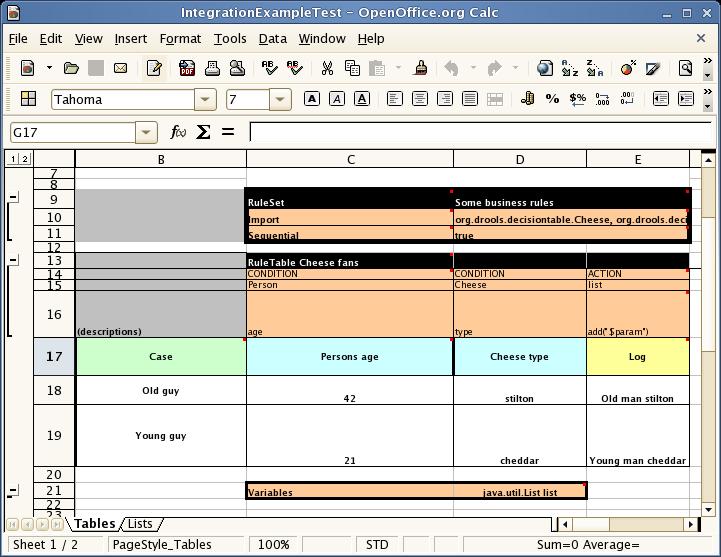
Figure 16.1. Open Office Screenshot
Note
16.4. Rules and Spreadsheets
- Rules inserted into rows
- As each row is a rule, the same principles apply as with written code. As the rule engine processes the facts, any rules that match may fire.
- Agendas
- It is possible to clear the agenda when a rule fires and simulate a very simple decision table where only the first match effects an action.
- Multiple tables
- You can have multiple tables on one spreadsheet. This way, rules can be grouped where they share common templates, but are still all combined into one rule package.
16.5. The RuleTable Keyword
Important
16.6. The RuleSet Keyword
16.7. Rule Template Example
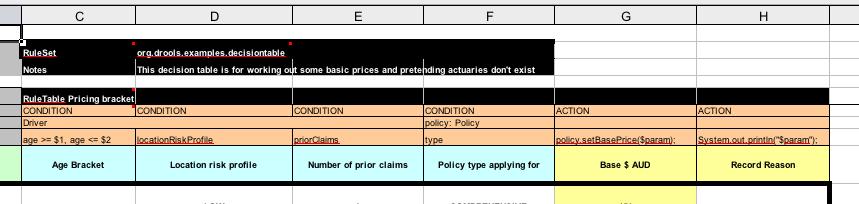
Figure 16.2. Rule Template
- The RuleSet keyword indicates the name to be used in the rule package that will encompass all the rules. This name is optional, using a default, but it must have the RuleSet keyword in the cell immediately to the right. The other keywords visible in Column C are Import and Sequential.
- After the RuleTable keyword there is a name, used to prefix the names of the generated rules. The row numbers are appended to guarantee unique rule names.
- The column of RuleTable indicates the column in which the rules start; columns to the left are ignored.
- Referring to row 14 (the row immediately after RuleTable), the keywords CONDITION and ACTION indicate that the data in the columns below are for either the LHS or the RHS parts of a rule. There are other attributes on the rule which can also be optionally set this way.
- Row 15 contains declarations of ObjectTypes. The content in this row is optional, but if this option is not in use, the row must be left blank. When using this row, the values in the cells below (row 16) become constraints on that object type. In the above case, it generates
Person(age=="42")andCheese(type=="stilton"), where 42 and "stilton" come from row 18. In the above example, the "==" is implicit. If just a field name is given, the translator assumes that it is to generate an exact match. - Row 16 contains the rule templates themselves. They can use the "$param" placeholder to indicate where data from the cells below should be interpolated. (For multiple insertions, use "$1", "$2", etc., indicating parameters from a comma-separated list in a cell below.) Row 17 is ignored. It may contain textual descriptions of the column's purpose.
- Rows 18 and 19 show data, which will be combined (interpolated) with the templates in row 15, to generate rules. If a cell contains no data, then its template is ignored. (This would mean that some condition or action does not apply for that rule row.) Rule rows are read until there is a blank row. Multiple RuleTables can exist in a sheet.
- Row 20 contains another keyword, and a value. The row positions of keywords like this do not matter (most people put them at the top) but their column should be the same one where the RuleTable or RuleSet keywords should appear. In our case column C has been chosen to be significant, but any other column could be used instead.
Note
Note
age=="42" and type=="stilton" are interpreted as single constraints, to be added to the respective ObjectType in the cell above. If the cells above were spanned, then there could be multiple constraints on one "column".
Warning
16.8. Data-Defining Cells
RuleSet, defines all DRL items except rules. The other one may occur repeatedly and is to the right and below a cell whose contents begin with RuleTable. These areas represent the actual decision tables, each area resulting in a set of rules of similar structure.
RuleSet cell and containing a keyword designating the kind of value contained in the other one that follows in the same row.
16.9. Rule Table Columns
RuleTable are earmarked as header area, mostly used for the definition of code to construct the rules. It is any additional row below these four header rows that spawns another rule, with its data providing for variations in the code defined in the Rule Table header.
Note
16.10. Rule Set Entries
RuleSet is upheld as the one containing the keyword.
16.11. Entries in the Rule Set Area
| Keyword | Value | Usage |
|---|---|---|
| RuleSet | The package name for the generated DRL file. Optional, the default is rule_table. | Must be First entry. |
| Sequential | "true" or "false". If "true", then salience is used to ensure that rules fire from the top down. | Optional, at most once. If omitted, no firing order is imposed. |
| EscapeQuotes | "true" or "false". If "true", then quotation marks are escaped so that they appear literally in the DRL. | Optional, at most once. If omitted, quotation marks are escaped. |
| Import | A comma-separated list of Java classes to import. | Optional, may be used repeatedly. |
| Variables | Declarations of DRL globals, i.e., a type followed by a variable name. Multiple global definitions must be separated with a comma. | Optional, may be used repeatedly. |
| Functions | One or more function definitions, according to DRL syntax. | Optional, may be used repeatedly. |
| Queries | One or more query definitions, according to DRL syntax. | Optional, may be used repeatedly. |
| Declare | One or more declarative types, according to DRL syntax. | Optional, may be used repeatedly. |
16.12. Rule Attribute Entries in the Rule Set Area
| Keyword | Initial | Value |
|---|---|---|
| PRIORITY | P | An integer defining the "salience" value for the rule. Overridden by the "Sequential" flag. |
| DURATION | D | A long integer value defining the "duration" value for the rule. |
| TIMER | T | A timer definition. See "Timers and Calendars". |
| CALENDARS | E | A calendars definition. See "Timers and Calendars". |
| NO-LOOP | U | A Boolean value. "true" inhibits looping of rules due to changes made by its consequence. |
| LOCK-ON-ACTIVE | L | A Boolean value. "true" inhibits additional activations of all rules with this flag set within the same ruleflow or agenda group. |
| AUTO-FOCUS | F | A Boolean value. "true" for a rule within an agenda group causes activations of the rule to automatically give the focus to the group. |
| ACTIVATION-GROUP | X | A string identifying an activation (or XOR) group. Only one rule within an activation group will fire, i.e., the first one to fire cancels any existing activations of other rules within the same group. |
| AGENDA-GROUP | G | A string identifying an agenda group, which has to be activated by giving it the "focus", which is one way of controlling the flow between groups of rules. |
| RULEFLOW-GROUP | R | A string identifying a rule-flow group. |
16.13. The RuleTable Cell
16.14. Column Types
16.15. Column Headers in the Rule Table
| Keyword | Initial | Value | Usage |
|---|---|---|---|
| NAME | N | Provides the name for the rule generated from that row. The default is constructed from the text following the RuleTable tag and the row number. | At most one column |
| DESCRIPTION | I | A text, resulting in a comment within the generated rule. | At most one column |
| CONDITION | C | Code snippet and interpolated values for constructing a constraint within a pattern in a condition. | At least one per rule table |
| ACTION | A | Code snippet and interpolated values for constructing an action for the consequence of the rule. | At least one per rule table |
| METADATA | @ | Code snippet and interpolated values for constructing a metadata entry for the rule. | Optional, any number of columns |
16.16. Conditional Elements
- Text in the first cell below CONDITION develops into a pattern for the rule condition, with the snippet in the next line becoming a constraint. If the cell is merged with one or more neighbours, a single pattern with multiple constraints is formed: all constraints are combined into a parenthesized list and appended to the text in this cell. The cell may be left blank, which means that the code snippet in the next row must result in a valid conditional element on its own.To include a pattern without constraints, you can write the pattern in front of the text for another pattern.The pattern may be written with or without an empty pair of parentheses. A "from" clause may be appended to the pattern.If the pattern ends with "eval", code snippets are supposed to produce boolean expressions for inclusion into a pair of parentheses after "eval".
- Text in the second cell below CONDITION is processed in two steps.
- The code snippet in this cell is modified by interpolating values from cells farther down in the column. If you want to create a constraint consisting of a comparison using "==" with the value from the cells below, the field selector alone is sufficient. Any other comparison operator must be specified as the last item within the snippet, and the value from the cells below is appended. For all other constraint forms, you must mark the position for including the contents of a cell with the symbol
$param. Multiple insertions are possible by using the symbols$1,$2, etc., and a comma-separated list of values in the cells below.A text according to the patternforall(delimiter){snippet}is expanded by repeating the snippet once for each of the values of the comma-separated list of values in each of the cells below, inserting the value in place of the symbol$and by joining these expansions by the given delimiter. Note that the forall construct may be surrounded by other text. - If the cell in the preceding row is not empty, the completed code snippet is added to the conditional element from that cell. A pair of parentheses is provided automatically, as well as a separating comma if multiple constraints are added to a pattern in a merged cell.If the cell above is empty, the interpolated result is used as is.
- Text in the third cell below CONDITION is for documentation only. It should be used to indicate the column's purpose to a human reader.
- From the fourth row on, non-blank entries provide data for interpolation as described above. A blank cell results in the omission of the conditional element or constraint for this rule.
16.17. Action Statements
- Text in the first cell below ACTION is optional. If present, it is interpreted as an object reference.
- Text in the second cell below ACTION is processed in two steps.
- The code snippet in this cell is modified by interpolating values from cells farther down in the column. For a singular insertion, mark the position for including the contents of a cell with the symbol
$param. Multiple insertions are possible by using the symbols$1,$2, etc., and a comma-separated list of values in the cells below.A method call without interpolation can be achieved by a text without any marker symbols. In this case, use any non-blank entry in a row below to include the statement.The forall construct is available here, too. - If the first cell is not empty, its text, followed by a period, the text in the second cell and a terminating semicolon are stringed together, resulting in a method call which is added as an action statement for the consequence.If the cell above is empty, the interpolated result is used as is.
- Text in the third cell below ACTION is for documentation only. It should be used to indicate the column's purpose to a human reader.
- From the fourth row on, non-blank entries provide data for interpolation as described above. A blank cell results in the omission of the action statement for this rule.
Note
$1 instead of $param will fail if the replacement text contains a comma.
16.18. Metadata Statements
- Text in the first cell below METADATA is ignored.
- Text in the second cell below METADATA is subject to interpolation, as described above, using values from the cells in the rule rows. The metadata marker character
@is prefixed automatically, and should not be included in the text for this cell. - Text in the third cell below METADATA is for documentation only. It should be used to indicate the column's purpose to a human reader.
- From the fourth row on, non-blank entries provide data for interpolation as described above. A blank cell results in the omission of the metadata annotation for this rule.
16.19. Interpolating Cell Data Example
- If the template is
Foo(bar == $param)and the cell is42, then the result isFoo(bar == 42). - If the template is
Foo(bar < $1, baz == $2)and the cell contains42,43, the result will beFoo(bar < 42, baz ==43). - The template
forall(&&){bar != $}with a cell containing42,43results inbar != 42 && bar != 43.
16.20. Tips for Working Within Cells
- Multiple package names within the same cell must be comma-separated.
- Pairs of type and variable names must be comma-separated.
- Functions must be written as they appear in a DRL file. This should appear in the same column as the "RuleSet" keyword. It can be above, between or below all the rule rows.
- You can use Import, Variables, Functions and Queries repeatedly instead of packing several definitions into a single cell.
- Trailing insertion markers can be omitted.
- You can provide the definition of a binding variable.
- Anything can be placed in the object type row. Apart from the definition of a binding variable, it could also be an additional pattern that is to be inserted literally.
- The cell below the ACTION header can be left blank. Using this style, anything can be placed in the consequence, not just a single method call. (The same technique is applicable within a CONDITION column.)
16.21. The SpreadsheetCompiler Class
SpreadsheetCompiler class is the main class used with API spreadsheet-based decision tables in the drools-decisiontables module. This class takes spreadsheets in various formats and generates rules in DRL.
SpreadsheetCompiler can be used to generate partial rule files and assemble them into a complete rule package after the fact. This allows the separation of technical and non-technical aspects of the rules if needed.
16.22. Using Spreadsheet-Based Decision Tables
Procedure 16.1. Task
- Generate a sample spreadsheet can to use as the base.
- If the Rule Workbench IDE plug-in is being used, use the wizard to generate a spreadsheet from a template.
- Use an XSL-compatible spreadsheet editor to modify the XSL.
16.23. Lists
lists of values. These can be stored in other worksheets to provide valid lists of values for cells.
16.24. Revision Control
16.25. Tabular Data Sources
Chapter 17. The Java Rule Engine Application Programming Interface
17.1. JSR94
Note
17.2. Javax.rules Interfaces
HandleThe Handle is used to retrieve an Object back from theWorkingMemorywhich was added in aStatefulRuleSession. With theHandleyou can modify or remove anObjectfrom theWorkingMemory. To modify an Object callupdateObject()from theStatefulRuleSession. To remove it, callremoveObject()with theHandleas the Parameter. Inside of the implementation of the Java Rule Engine API will be called themodifyObject()andretractObject()methods of the encapsulated Knowledge (Drools and jBPM) API.ObjectFilterThis interface is used to filter objects for RuleSession.RuleExecutionSetMetadataThe RuleExecutionSetMetadata is used to store name, description and URI for a RuleExecutionSet.RuleRuntimeThe RuleRuntime is the key to a RuleSession. The RuleRuntime obtained from the RuleServiceProvider.If you retrieve a RuleRuntime call createRuleSession() to open a RuleSession.Through the RuleRuntime you can retrieve a list of URIs of all RuleExecutionSets, which were registered by a RuleAdministrator. You need the URI as a String to open a RuleSession to the rule engine. The rule engine will use the rules of the RuleExecutionSet inside of the RuleSession.The Map is used for Globals. Globals were formerly called ApplicationData (in Drools 2.x). The key needs to be the identifier of the Global and the Value the object you want to use as a Global.RuleSessionThe RuleSession is the object you are working with if you want to contact the rule engine.If you are getting a RuleSession from the RuleRuntime, then it will be either a StatefulRuleSession or a StatelessRuleSession.Call the release()-method so that all resources will be freed.StatefulRuleSessionIf you need to run the rule engine more than once, run a StatefulRuleSession. You can assert objects, execute rules and so on.You will get a Handle for every object which you are asserting to the Rule Session. Do not lose it, you will need it, to retract or modify objects in the Working Memory. You are having no direct contact to Drools´ Working Memory which is used inside the implementation, for this you got the RuleSession.StatelessRuleSessionA StatelessRuleSession means that you are having only one contact to the rule engine. You are giving a list of objects to the rule engine and the rule engine asserts them all and starts execution immediately. The result is a list of objects. The content of the result list depends on your rules. If your rules are not modifying or retracting any objects from the Working Memory, you should get all objects you re-added.You can use the ObjectFilter which will filter the resulting list of objects before you get it.
17.3. Javax.rules Classes
RuleServiceProviderThe RuleServiceProvider gives you access to the RuleAdministrator or a RuleRuntime, which you need to open a new Rule Session. To get the RuleServiceProvider call RuleServiceProviderManager.getRuleServiceProvider().In a J2EE environment you can bind the RuleServiceProvider to the JNDI and create a lookup to place it in all your applications.RuleServiceProviderManagerThe RuleServiceProvider is often compared with the DriverManager, which you use in JDBC. It works like setting up the Driver for a DataBase.
17.4. Javax.rules Exceptions
ConfigurationExceptionThis exception is thrown when a user configuration error has been made.InvalidHandleExceptionThis exception is thrown when a client passes an invalid Handle to the rule engine.InvalidRuleSessionExceptionThe InvalidRuleSessionException should be thrown when a method is invoked on a RuleSession and the internal state of the RuleSession is invalid. This may have occurred because a StatefulRuleSession has been serialized and external resources can no longer be accessed. This exception is also used to signal that a RuleSession is in an invalid state (such as an attempt to use it after the release method has been called) (Taken from JCP API Documentation).RuleExceptionBase class for all Exception classes in the javax.rules package.RuleExecutionExceptionThis exception is not thrown in the Drools 3 JSR 94 implementationRuleExecutionSetNotFoundExceptionThis exception is thrown if a client requests a RuleExecutionSet from the RuleRuntime and the URI or RuleExecutionSet cannot be found (Taken from JCP API Documentation).RuleSessionCreateExceptionThis exception is thrown when a client requests a RuleSession from the RuleRuntime and an error occurs that prevents a RuleSession from being returned (Taken from JCP API Documentation).RuleSessionTypeUnsupportedExceptionThis exception is thrown when a client requests a RuleSession and the vendor does not support the given type (defined in the RuleRuntime) or the RuleExecutionSet itself does not support the requested mode (Taken from JCP API Documentation).
17.5. Using a Rule Service Provider
Procedure 17.1. Task
- Use the following code to load the JBoss Rules rule service provider:
Class ruleServiceProviderClass = Class.forName("org.drools.jsr94.rules.RuleServiceProviderImpl"); - Use the following code to register it:
RuleServiceProviderManager.registerRuleServiceProvider( "http://jboss.com/products/rules", ruleServiceProviderClass); - Call to the RuleServiceProvider using the following code:
RuleServiceProviderManager.getRuleServiceProvider("http://jboss.com/products/rules"); - To stop the rule service, deregister it with this code:
RuleServiceProviderManager.deregisterRuleServiceProvider( "http://jboss.com/products/rules");
17.6. Javax.rules.admin Interfaces
LocalRuleExecutionSetProviderRuleRuleAdministratorRuleExecutionSetRuleExecutionSetProvider
17.7. Javax.rules.admin Exceptions
RuleAdministrationExceptionBase class for all administration RuleException classes in the javax.rules.admin package (Taken from JCP API Documentation).RuleExecutionSetCreateExceptionOccurs when there is an error in creating a rule execution set.RuleExecutionSetDeregistrationExceptionOccurs if there is an error upon attempting to unregister a rule execution set from a URI.RuleExecutionSetRegisterExceptionOccurs if there is an error upon attempting to register a rule execution set to a URI.
17.8. The RuleServiceProvider
17.9. The RuleServiceProviderManager
17.10. Automatic RuleServiceProvider Registration Example
17.11. Registering a LocalRuleExecutionSet with the RuleAdministrator API
Procedure 17.2. Task
- Create a RuleExecutionSet. You can do so by using the RuleAdministrator which provides factory methods to return an empty LocalRuleExecutionSetProvider or RuleExecutionSetProvider.
- Specify the name for the RuleExecutionSet.
- Register the RuleExecutionSet as shown below:
// Register the RuleExecutionSet with the RuleAdministrator String uri = ruleExecutionSet.getName(); ruleAdministrator.registerRuleExecutionSet(uri, ruleExecutionSet, null);
// Register the RuleExecutionSet with the RuleAdministrator String uri = ruleExecutionSet.getName(); ruleAdministrator.registerRuleExecutionSet(uri, ruleExecutionSet, null);Copy to Clipboard Copied! Toggle word wrap Toggle overflow - Use the LocalRuleExecutionSetProvider to load a RuleExecutionSets from local sources that are not serializable, like Streams.
- Use the RuleExecutionSetProvider to load RuleExecutionSets from serializable sources, like DOM Elements or Packages. Both the "ruleAdministrator.getLocalRuleExecutionSetProvider( null );" and the "ruleAdministrator.getRuleExecutionSetProvider( null );" (use null as a parameter).
- The example below shoes you how to register the LocalRuleExecutionSet:
Copy to Clipboard Copied! Toggle word wrap Toggle overflow - You can use the "ruleExecutionSetProvider.createRuleExecutionSet( reader, null )" property to provide configuration for the incoming source. When null is passed the default is used to load the input as a drl. Allowed keys for a map are "source" and "dsl". The key "source" takes "drl" or "xml" as its value.
- Set "source" to "drl" to load a DRL, or to "xml" to load an XML source. "xml" will ignore any "dsl" key/value settings. The "dsl" key can take a Reader or a String (the contents of the dsl) as a value. See the following dsl example:
Copy to Clipboard Copied! Toggle word wrap Toggle overflow
17.12. Using Stateful and Stateless RuleSessions
Procedure 17.3. Task
- Get the runtime by accessing the RuleServiceProvider as shown:
RuleRuntime ruleRuntime = ruleServiceProvider.getRuleRuntime();
RuleRuntime ruleRuntime = ruleServiceProvider.getRuleRuntime();Copy to Clipboard Copied! Toggle word wrap Toggle overflow - To create a rule session, use one of the two RuleRuntime public constants. These are "RuleRuntime.STATEFUL_SESSION_TYPE" and "RuleRuntime.STATELESS_SESSION_TYPE", accompanying the URI to the RuleExecutionSet you wish to instantiate a RuleSession for.
- Optionally, access the properties to specify globals.
- The createRuleSession(...) method will return a RuleSession instance. You should cast it to StatefulRuleSession or StatelessRuleSession:
Copy to Clipboard Copied! Toggle word wrap Toggle overflow - When using a StatelessRuleSession, you can only call executeRules(List list) passing a list of objects, and an optional filter, the resulting objects are then returned:
Copy to Clipboard Copied! Toggle word wrap Toggle overflow
17.13. Using Globals with JSR94
17.14. Using Globals with JSR94 Example
17.15. Further Reading About JSR94
- Official JCP Specification for Java Rule Engine API (JSR 94)
- The Java Rule Engine API documentation
- The Logic From The Bottom Line: An Introduction to The Drools Project. By N. Alex Rupp, published on TheServiceSide.com in 2004
- Getting Started With the Java Rule Engine API (JSR 94): Toward Rule-Based Applications. By Dr. Qusay H. Mahmoud, published on Sun Developer Network in 2005
- Jess and the javax.rules API. By Ernest Friedman-Hill, published on TheServerSide.com in 2003
Chapter 18. JBoss Developer Studio
18.1. The Rules Integrated Development Environment (IDE)
18.2. Rules IDE Features
- Textual/graphical rule editor
- An editor that is aware of DRL syntax, and provides content assistance (including an outline view)
- An editor that is aware of DSL (domain specific language) extensions, and provides content assistance.
- RuleFlow graphical editorYou can edit visual graphs which represent a process (a rule flow). The RuleFlow can then be applied to your rule package to have imperative control.
- Wizards for fast creation of
- a "rules" project
- a rule resource, (a DRL file)
- a Domain Specific language
- a decision table
- a ruleflow
- A domain specific language editor
- Create and manage mappings from your user's language to the rule language
- Rule validation
- As rules are entered, the rule is "built" in the background and errors reported via the problem view where possible
18.3. JBoss Rules Runtimes
18.4. Defining a JBoss Rules Runtime
Procedure 18.1. Task
- Create a new session in JBoss Rules.
- Select . A "Preferences" dialog will appear.
- On the left side of this dialog, under the JBoss Rules category, select "Installed JBoss Rules runtimes". The panel on the right should then show the currently defined JBoss Rules runtimes.
- Click on the button. A dialog will pop up asking for the name of your runtime and the location on your file system where it can be found.
- To use the default jar files from the JBoss Rules Eclipse plugin, create a new JBoss Rules runtime automatically by clicking the button. A file browser will appear, asking you to select the folder on your file system where you want this runtime to be created. The plugin will then automatically copy all required dependencies to the specified folder.
- To use one specific release of the JBoss Rules project, create a folder on your file system that contains all the necessary JBoss Rules libraries and dependencies. Give your runtime a name and select the location of this folder containing all the required jars. Click OK.
- The runtime will appear in your table of installed JBoss Rules runtimes. Click on checkbox in front of the newly created runtime to make it the default JBoss Rules runtime. The default JBoss Rules runtime will be used as the runtime of all your JBoss Rules projects that have not selected a project-specific runtime.
- Restart Eclipse if you changed the default runtime and you want to make sure that all the projects that are using the default runtime update their classpath accordingly.
18.5. Selecting a Runtime for JBoss Rules Projects
Procedure 18.2. Task
- Use the
New JBoss Rules Projectwizard to create a new JBoss Rules Project. - Alternatively, convert an existing Java project to a JBoss Rules project using the action by right-clicking on a Java object then clicking the
Convert to JBoss Rules Projectdialogue. The plugin will automatically add all the required jars to the classpath of your project. - Optionally, on the last page of the
New JBoss Rules Projectwizard you can choose to have a project-specific runtime. Uncheck theUse default JBoss Rules runtimecheckbox and select the appropriate runtime in the drop-down box. - To access the preferences and add runtimes, go to the workspace preferences and click
Configure workspace settings .... - You can change the runtime of a JBoss Rules project at any time by opening the project properties and selecting the JBoss Rules category. Mark the
Enable project specific settingscheckbox and select the appropriate runtime from the drop-down box. - Click the
Configure workspace settings ...link. This opens the workspace preferences showing the currently installed runtimes. Use the menu to add new runtimes in this space. If you deselect theEnable project specific settingscheckbox, it will use the default runtime as defined in your global preferences.
18.6. Example Rule Files
18.7. The JBoss Rules Builder
Note
18.8. Creating a New Rule
Procedure 18.3. Task
- Create an empty text .drl file.
- Copy and paste your rule into it.
- Save and exit.
- Alternatively, use the Rules Wizard to create a rule but pressing
Ctrl+Nor by choosing it from the toolbar. - The wizard will ask for some basic options for generating a rule resource. For storing rule files you would typically create a directory src/rules and create suitably named subdirectories. The package name is mandatory, and is similar to a package name in Java. (That is, it establishes a namespace for grouping related rules.)
- Select the options that suit you and click
Finish.
You now have a rule skeleton which you can expand upon.
18.9. The Rule Editor
Ctrl+Space.
18.10. JBoss Rules Views
- Working Memory View
- Shows all elements in the JBoss Rules working memory.
- Agenda View
- Shows all elements on the agenda. For each rule on the agenda, the rule name and bound variables are shown.
- Global Data View
- Shows all global data currently defined in the JBoss Rules working memory.
- Audit View
- Can be used to display audit logs containing events that were logged during the execution of a rules engine, in tree form.
- Rete View
- This shows you the current Rete Network for your DRL file. You display it by clicking on the tab "Rete Tree" at the bottom of the DRL Editor window. With the Rete Network visualization being open, you can use drag-and-drop on individual nodes to arrange optimal network overview. You may also select multiple nodes by dragging a rectangle over them so the entire group can be moved around.
Note
The Rete view works only in projects where the JBoss Rules Builder is set in the project´s properties. For other projects, you can use a workaround. Set up a JBoss Rule Project next to your current project and transfer the libraries and the DRLs you want to inspect with the Rete view. Click on the right tab below in the DRL Editor, then click "Generate Rete View".
18.11. Using JBoss Rules Views
Procedure 18.4. Task
- To be able to use JBoss Rules views, create breakpoints in your code by invoking the working memory. For example, the line where you call
workingMemory.fireAllRules()is an ideal place to place a break. - If the debugger halts at a joinpoint, select the working memory variable in the debug variables view. The available views can then be used to show the details of the selected working memory.
18.12. The Show Logical Structure
18.13. Creating Audit Logs
Procedure 18.5. Task
- To create an audit log, execute the rules engine. You will be given the option of creating a new audit log.
- Enter the following code:
Copy to Clipboard Copied! Toggle word wrap Toggle overflow - Open the log by clicking the Open Log action, the first icon in the Audit View, and select the file. The Audit View now shows all events that where logged during the executing of the rules.
18.14. Event Icons in Audit View
| Icon | Description |
|---|---|
| Green square | Object has been inserted. |
| Yellow square | Object has been updated. |
| Red square | Object has been removed. |
| Right arrow | Activation has been created. |
| Left arrow | Activation has been canceled. |
| Blue diamond | Activation has been executed. |
| Process icon | Ruleflow has started or ended. |
| Activity icon | Ruleflow-group activation or deactivation. |
| JBoss Rules icon | Rule or rule package has been added or removed. |
18.15. Methods for Retrieving Causes
- The cause of an object modified or retracted event is the last object event for that object. This is either the object asserted event, or the last object modified event for that object.
- The cause of an activation canceled or executed event is the corresponding activation created event.
Note
18.16. The DSL Editor
18.17. Rule Language Mapping
scope item indicates where the expression belongs, the when item indicates the LHS, then the RHS, and the * item means it can go anywhere. It's also possible to create aliases for keywords.
18.18. Working with Rule Language Mapping
Procedure 18.6. Task
- Open the DSL editor and select the mapping tab.
- Select a mapping item (a row in the table) to see the expression and mapping in the text fields below the table.
- Double click or press the edit button to open the edit dialog.
- Other buttons let you remove and add mappings. Don't remove mappings while they are still in use.
18.19. DSL Translation Components
| Name | Duty |
|---|---|
| Parser | The parser reads the rule text in a DSL line by line and tries to match some of the Language Expression. After a match, the values that correspond to a placeholder between curly braces (for example, {age}) are extracted from the rule source. |
| Placeholders | The placeholders in the corresponding rule expression are replaced by their corresponding value. For example, a natural language expression maps to two constraints on a fact of type Person based on the fields age and location. The {age} and {location} values are then extracted from the original rule text. |
Note
18.20. Tips for Working with Large DRL Files
- Depending on the JDK you use,you can increase the maximum size of the permanent generation. Do this by starting Eclipse with
-XX:MaxPermSize=###m - Rulesets of 4000 rules or greater should have the permanent generation set to at least 128Mb.
- You can put rules in a file with the
.ruleextension. The background builder will not try to compile them every time there is a change which will help the IDE run faster.
18.21. Creating Breakpoints
Procedure 18.7. Task
- To create breakpoints for easier debugging of rules, open the DRL editor and load the DRL file you wish to use.
- Double-click the ruler of the DRL editor at the line where you want to add a breakpoint. Note that rule breakpoints can only be created in the consequence of a rule. Double-clicking on a line where no breakpoint is allowed will do nothing. A breakpoint can be removed by double-clicking the ruler once more.
- Right-click the ruler. A popup menu will show up, containing the
Toggle breakpointaction. Note that rule breakpoints can only be created in the consequence of a rule. The action is automatically disabled if no rule breakpoint is allowed at that line. - Click the action to add a breakpoint at the selected line, or remove it if there was one already.
Note
The Debug Perspective contains a Breakpoints view which can be used to see all defined breakpoints, get their properties, enable/disable or remove them, and so on.
18.22. Debugging as a JBoss Rules Application
Procedure 18.8. Task
- Open the DRL Editor.
- Select the main class of your application.
- Right-click on it and select the
Debug As >sub-menu and selectJBoss Rules Application.Alternatively, you can also select theDebug ...menu item to open a new dialog for creating, managing and running debug configurations. - Select the
Drools Applicationitem in the left tree and click theNew launch configurationbutton (leftmost icon in the toolbar above the tree). This will create a new configuration with some of the properties already filled in based on the main class you selected in the beginning. - Change the name of your debug configuration to something meaningful. You can accept the defaults for all other properties.
- Click the
Debugbutton on the bottom to start debugging your application. You only have to define your debug configuration once. The next time you run your JBoss Rules application, you can select the previously defined configuration in the tree as a sub-element of the JBoss Rules tree node, and then click the JBoss Rules button. The Eclipse toolbar also contains shortcut buttons to quickly re-execute one of your previous configurations.
After clicking the Debug button, the application starts executing and will halt if any breakpoint is encountered. Whenever a JBoss Rules breakpoint is encountered, the corresponding DRL file is opened and the active line is highlighted. The Variables view also contains all rule parameters and their value. You can then use the default Java debug actions to decide what to do next: resume, terminate, step over, and so on. The debug view can also be used to inspect the contents of the Working Memory and the Agenda at that time as well. You don't have to select a Working Memory as the current executing working memory is automatically shown.
18.23. Rules IDE Preferences
- Automatically reparse all rules if a Java resource is changed
- Triggers a rebuilding of all the rules when a Java class is modified.
- Allow cross reference in DRL files
- Makes it possible to have a resource in a DRL file reference another resource defined in a different file. For example you could have a rule in a file using a type declared in another file. By enabling this option it will no longer possible to declare the same resource (that is, two rule with the same name in the same package) in two different DRL files.
- Internal Drools classes use
- Allows, disallows or discourages (generating warning) the use of JBoss Rules classes not exposed in the public API.
Chapter 19. Hello World Example
19.1. HelloWorld Example: Creating the KnowledgeBase and Session
- A
KnowledgeBuilderis used to turn a DRL source file intoPackageobjects which the Knowledge Base can consume. - The add method takes a
Resourceinterface and a Resource Type as parameters. TheResourcecan be used to retrieve a DRL source file from various locations; in this case the DRL file is being retrieved from the classpath using aResourceFactory, but it could come from a disk file or a URL. - Multiple packages of different namespaces can be added to the same Knowledge Base.
- While the Knowledge Base will validate the package, it will only have access to the error information as a String, so if you wish to debug the error information you should do it on the
KnowledgeBuilderinstance. - Once the builder is error free, get the
Packagecollection, instantiate aKnowledgeBasefrom theKnowledgeBaseFactoryand add the package collection.
19.2. HelloWorld Example: Event Logging and Auditing
- Two default debug listeners are supplied:
DebugAgendaEventListenerandDebugWorkingMemoryEventListener. These print out debug event information to theSystem.errstream displayed in the Console window. - The
KnowledgeRuntimeLoggerprovides execution auditing which can be viewed in a graphical viewer. This logger is a specialised implementation built on the Agenda and Working Memory listeners. - When the engine has finished executing,
logger.close()must be called.
19.3. HelloWorld Example: Message Class
- The single class used in this example has two fields: the message, which is a String, and the status which can be one of the two integers
HELLOorGOODBYE.
19.4. HelloWorld Example: Execution
- A single
Messageobject is created with the message text "Hello World" and the statusHELLOand then inserted into the engine, at which pointfireAllRules()is executed. - All network evaluation is done during the insert time. By the time the program execution reaches the
fireAllRules()method call the engine already knows which rules are fully matches and able to fire.
Note
- Open the class
org.drools.examples.helloworld.HelloWorldExamplein your Eclipse IDE. - Right-click the class and select
Run as...and thenJava application
19.5. HelloWorld Example: System.out in the Console Window
Hello Goodbye
Hello
Goodbye- By putting a breakpoint on the
fireAllRules()method and select theksessionvariable, you can see that the "Hello World" rule is already activated and on the Agenda, confirming that all the pattern matching work was already done during the insert. - The application print outs go to
System.outwhile the debug listener print outs go toSystem.err.
19.6. HelloWorld Example: Rule "Hello World"
- The LHS (after
when) section of the rule states that it will be activated for eachMessageobject inserted into the Working Memory whose status isMessage.HELLO. - Two variable bindings are created: the variable
messageis bound to themessageattribute and the variablemis bound to the matchedMessageobject itself. - The RHS (after
then) or consequence part of the rule is written using the MVEL expression language, as declared by the rule's attributedialect. - After printing the content of the bound variable
messagetoSystem.out, the rule changes the values of themessageandstatusattributes of theMessageobject bound tom. - MVEL's
modifystatement allows you to apply a block of assignments in one statement, with the engine being automatically notified of the changes at the end of the block.
19.7. HelloWorld Example: Using the "Debug as..." Option
Procedure 19.1. Task
- To access this debugging option, open the class
org.drools.examples.HelloWorldin your Eclipse IDE. - Right-click the class and select "Debug as..." and then "Drools application". The rule will be shown along with information about where it is.
19.8. HelloWorld Example: Rule "Good Bye"
- The "Good Bye" rule, which specifies the "java" dialect, is similar to the "Hello World" rule except that it matches
Messageobjects whose status isMessage.GOODBYE
Chapter 20. Salience State Example
20.1. Salience State Example: State Class Example
- Each
Stateclass has fields for its name and its current state (see the classorg.drools.examples.state.State). The two possible states for each objects areNOTRUNandFINISHED.
20.2. Salience State Example: Execution
- Each instance is asserted in turn into the Session and then
fireAllRules()is called.
20.3. Salience State Example: Executing Applications
Procedure 20.1. Task
- Open the class
org.drools.examples.state.StateExampleUsingSaliencein the Eclipse IDE. - Right-click the class and select
Run as...and thenJava application. The following output will appear:A finished B finished C finished D finished
A finished B finished C finished D finishedCopy to Clipboard Copied! Toggle word wrap Toggle overflow
20.4. Salience State Example: Using Audit Logging with Operations
Procedure 20.2. Task
- To view the Audit log generated by an operation, open the IDE and click on
Windowand then selectShow View, thenOther...,DroolsandAudit View. - In the "Audit View" click the
Open Logbutton and select the file<drools-examples-dir>/log/state.log.
20.5. Salience State Example: Rule "Bootstrap"
- Every action and the corresponding changes appear in the Working Memory.
- The assertion of the State object A in the state
NOTRUNactivates theBootstraprule, while the assertions of the otherStateobjects have no immediate effect. - The execution of rule Bootstrap changes the state of A to
FINISHED, which, in turn, activates rule "A to B".
20.6. Salience State Example: Rule "B to C"
- The conflict resolution strategy allows the engine's Agenda to decide which rule to fire.
- As rule "B to C" has the higher salience value (10 versus the default salience value of 0), it fires first, modifying object C to state
FINISHED. - The Agenda view can also be used to investigate the state of the Agenda, with debug points being placed in the rules themselves and the Agenda view opened.
20.7. Salience State Example: Rule "B to D"
- Rule "B to D" fires last, modifying object D to state
FINISHED. - There are no more rules to execute and so the engine stops.
20.8. Salience State Example: Inserting a Dynamic Fact
- For the engine to see and react to changes of fact properties, the application must tell the engine that changes occurred. This can be done explicitly in the rules by using the
modifystatement, or implicitly by letting the engine know that the facts implementPropertyChangeSupportas defined by the JavaBeans specification. - The above example demonstrates how to use
PropertyChangeSupportto avoid the need for explicitmodifystatements in the rules. - Ensure that your facts implement
PropertyChangeSupport, the same way the classorg.drools.example.Statedoes.
20.9. Salience State Example: Setter with PropertyChangeSupport
- The setter for
statein the classorg.drools.examples. - When using
PropertyChangeListenerobjects, each setter must implement a little extra code for the notification.
20.10. Salience State Example: Agenda Group Rules "B to C"
- By default, all rules are in the agenda group "MAIN".
- The "agenda-group" attribute lets you specify a different agenda group for the rule. Initially, a Working Memory has its focus on the Agenda group "MAIN".
- A group's rules will only fire when the group receives the focus. This can be achieved either by using the method
setFocus()or the rule attributeauto-focus. auto-focusmeans that the rule automatically sets the focus to its agenda group when the rule is matched and activated. It is this "auto-focus" that enables rule "B to C" to fire before "B to D".- The rule "B to C" calls
setFocus()on the agenda group "B to D", allowing its active rules to fire, which allows the rule "B to D" to fire.
20.11. Salience State Example: Agenda Group Rules "B to D"
20.12. Salience State Example: Agenda Group Rules "D to E"
StateExampleWithDynamicRulesadds another rule to the Rule Base afterfireAllRules().
Chapter 21. Fibonacci Example
21.1. Fibonacci Example: The Class
- The sequence field is used to indicate the position of the object in the Fibonacci number sequence.
- The value field shows the value of that Fibonacci object for that sequence position, using -1 to indicate a value that still needs to be computed.
21.2. Fibonacci Example: Execution
Procedure 21.1. Task
- Launch the Eclipse IED.
- Open the class
org.drools.examples.fibonacci.FibonacciExample. - Right-click the class and select
Run as...and thenJava application.
Eclipse shows the following output in its console window (with "...snip..." indicating lines that were removed to save space):
21.3. Fibonacci Example: Execution Details
ksession.insert( new Fibonacci( 50 ) ); ksession.fireAllRules();
ksession.insert( new Fibonacci( 50 ) );
ksession.fireAllRules();- To use this with Java, a single Fibonacci object is inserted with a sequence field of 50.
- A recursive rule is used to insert the other 49
Fibonacciobjects. - This example uses the MVEL dialect. This means you can use the
modifykeyword, which allows a block setter action which also notifies the engine of changes.
21.4. Fibonacci Example: Recurse Rule
- The Recurse rule matches each asserted
Fibonacciobject with a value of -1, creating and asserting a newFibonacciobject with a sequence of one less than the currently matched object. - Each time a Fibonacci object is added while the one with a sequence field equal to 1 does not exist, the rule re-matches and fires again.
- The
notconditional element is used to stop the rule's matching once we have all 50 Fibonacci objects in memory. - The Recurse rule has a salience value so all 50
Fibonacciobjects are asserted before the Bootstrap rule is executed. - You can switch to the Audit view to show the original assertion of the
Fibonacciobject with a sequence field of 50, done with Java code. From there on, the Audit view shows the continual recursion of the rule, where each assertedFibonacciobject causes the Recurse rule to become activated and to fire again.
21.5. Fibonacci Example: Bootstrap Rule
- When a
Fibonacciobject with a sequence field of 2 is asserted the Bootstrap rule is matched and activated along with the Recurse rule. - Note the multi-restriction on field
sequence, testing for equality with 1 or 2. - When a
Fibonacciobject with a sequence of 1 is asserted the Bootstrap rule is matched again, causing two activations for this rule. The Recurse rule does not match and activate because thenotconditional element stops the rule's matching as soon as aFibonacciobject with a sequence of 1 exists.
21.6. Fibonacci Example: Calculate Rule
- When there are two
Fibonacciobjects with values not equal to -1, the Calculate rule is able to match them. - There are 50 Fibonacci objects in the Working Memory. A suitable triple should be selected to calculate each of value in turn.
- Using three Fibonacci patterns in a rule without field constraints to confine the possible cross products would result in many incorrect rule firings. The Calculate rule uses field constraints to correctly constraint the Fibonacci patterns in the correct order. This technique is called cross product matching.
- The first pattern finds any Fibonacci with a value != -1 and binds both the pattern and the field. The second Fibonacci does this too, but it adds an additional field constraint to ensure that its sequence is greater by one than the Fibonacci bound to
f1. When this rule fires for the first time, the two constraints ensure thatf1references sequence 1 andf2references sequence 2. The final pattern finds the Fibonacci with a value equal to -1 and with a sequence one greater thanf2. - There are three
Fibonacciobjects correctly selected from the available cross products. You can calculate the value for the thirdFibonacciobject that's bound tof3. - The
modifystatement updates the value of theFibonacciobject bound tof3. This means there is now another new Fibonacci object with a value not equal to -1, which allows the Calculate rule to rematch and calculate the next Fibonacci number. - Switching to the Audit view will show how the firing of the last Bootstrap modifies the
Fibonacciobject, enabling the "Calculate" rule to match. This then modifies another Fibonacci object allowing the Calculate rule to match again. This continues till the value is set for allFibonacciobjects.
Chapter 22. Banking Example
22.1. Banking Example: RuleRunner
- The class
RuleRunneris used to execute one or more DRL files against a set of data. It compiles the Packages and creates the Knowledge Base for each execution, allowing us to easily execute each scenario and inspect the outputs.
22.2. Banking Example: Rule in Example1.drl
Loading file: Example1.drl Rule 01 Works
Loading file: Example1.drl
Rule 01 Works- This rule has a single
evalcondition that will always be true, so that this rule will match and fire after it has been started. - The output shows the rule matches and executes the single print statement.
22.3. Banking Example: Java Example 2
- This example asserts basic facts and prints them out.
22.4. Banking Example: Rule in Example2.drl
- This is a basic rule for printing out the specified numbers. It identifies any facts that are
Numberobjects and prints out the values. Notice the use of the abstract classNumber. - The pattern matching engine is able to match interfaces and superclasses of asserted objects.
- The output shows the DRL being loaded, the facts inserted and then the matched and fired rules. You can see that each inserted number is matched and fired and thus printed.
22.5. Banking Example: Example3.java
- This is a basic rule-based sorting technique.
22.6. Banking Example: Rule in Example3.drl
- The first line of the rule identifies a
Numberand extracts the value. - The second line ensures that there does not exist a smaller number than the one found by the first pattern. The retraction of the number after it has been printed means that the smallest number has been removed, revealing the next smallest number, and so on.
22.7. Banking Example: Class Cashflow
- Class
Cashflowhas two simple attributes, a date and an amount. (Using the typedoublefor monetary units is generally bad practice because floating point numbers cannot represent most numbers accurately.) - There is an overloaded constructor to set the values and a method
toStringto print a cashflow.
22.8. Banking Example: Example4.java
- The Java code in this example inserts five Cashflow objects, with varying dates and amounts.
22.9. Banking Example: Class SimpleDate
- The convenience class
SimpleDateextendsjava.util.Date, providing a constructor taking a String as input and defining a date format.
22.10. Banking Example: Rule in Example4.drl
- A
Cashflowis identified and the date and amount are extracted. - In the second line of the rule in it is determined that there is no Cashflow with an earlier date than the one found.
- In the consequence, the
Cashflowis printed. This satisfies the rule and then retracts it, making way for the next earliestCashflow.
22.11. Banking Example: Class TypedCashflow
- When the
Cashflowis extended it results in aTypedCashflow, which can be a credit or a debit operation.
22.12. Banking Example: Example5.java
- Both the class and the .drl are supplied to the rule engine.
- In the class, a set of
Cashflowobjects are created which are either credit or debit operations. - A
Cashflowfact is identified with a type ofCREDITand extract the date and the amount. In the second line of the rule we ensure that there is noCashflowof the same type with an earlier date than the one found. In the consequence, we print the cashflow satisfying the patterns and then retract it, making way for the next earliest cashflow of type
22.13. Banking Example: Class Account
- Two separate
Accountobjects are created and injected into theCashflowsobjects before being passed to the Rule Engine.
22.14. Banking Example: Class AllocatedCashflow
- Extending the
TypedCashflow, results inAllocatedCashflow, which includes anAccountreference.
22.15. Banking Example: Extending Example5.java
- This Java code creates two
Accountobjects and passes one of them into each cashflow in the constructor call.
22.16. Banking Example: Rule in Example6.drl
- In this example, each cashflow in date order is applied and calculated, resulting in a print of the balance.
- Although there are separate rules for credits and debits, there is no type specified when checking for earlier cashflows. This is so that all cashflows are applied in date order, regardless of the cashflow type.
- In the conditions the account has identified and in the consequences, the cashflow amount is updated.
Chapter 23. Pricing Rule Example
23.1. Pricing Rule Example: Executing the Pricing Rule Example
Procedure 23.1. Task
- Open your console.
- Open the file
PricingRuleDTExample.javaand execute it as a Java application. It will produce the following output in the console window:Cheapest possible BASE PRICE IS: 120 DISCOUNT IS: 20
Cheapest possible BASE PRICE IS: 120 DISCOUNT IS: 20Copy to Clipboard Copied! Toggle word wrap Toggle overflow - Use the following code to execute the example:
Copy to Clipboard Copied! Toggle word wrap Toggle overflow TheDecisionTableConfigurationobject's type is set toDecisionTableInputType.XLS.There are two fact types used in this example,DriverandPolicy. Both are used with their default values. TheDriveris 30 years old, has had no prior claims and currently has a risk profile ofLOW. ThePolicybeing applied for isCOMPREHENSIVE, and it has not yet been approved.
23.2. Pricing Rule Example: Decision Table Configuration

Figure 23.1. Decision Table Configuration
- The
RuleSetdeclaration provides the package name. There are also other optional items you can put here, such asVariablesfor global variables, andImportsfor importing classes. In this case, the namespace of the rules is the same as the fact classes and thus can be omitted. - The name after the
RuleTabledeclaration (Pricing bracket) is used as the prefix for all the generated rules. - "CONDITION or ACTION", indicates the purpose of the column, that is, whether it forms part of the condition or the consequence of the rule that will be generated.
- The driver's data is spread across three cells which means that the template expressions below it are applied. You can observe the driver's age range (which uses
$1and$2with comma-separated values),locationRiskProfile, andpriorClaimsin the respective columns. - You can set a policy base price and message log in the Action column.
23.3. Pricing Rule Example: Base Price Calculation Example
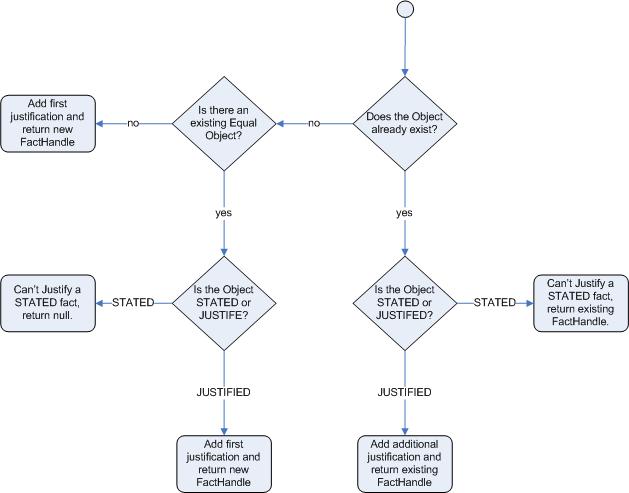
Figure 23.2. Base Price Calculation Example
- Broad category brackets are indicated by the comment in the leftmost column.
- The details of the drivers match row number 18 as they have no prior accidents and are 30 years old. This gives us a base price of 120.
23.4. Pricing Rule Example: Discount Calculation Example
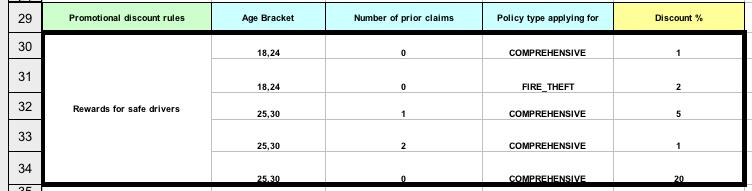
Figure 23.3. Discount Calculation Example
- The discount results from the
Agebracket, the number of prior claims, and the policy type. - The driver is 30 with no prior claims and is applying for a
COMPREHENSIVEpolicy. This means a 20% discount can be applied. Note that this is actually a separate table in the same worksheet, so different templates apply. - The evaluation of the rules is not necessarily in the given order, since all the normal mechanics of the rule engine still apply.
Chapter 24. Pet Store Example
24.1. Pet Store Example
PetStore.java. It defines the following principal classes (in addition to several classes to handle Swing Events):
Petstorecontains themain()method.PetStoreUIis responsible for creating and displaying the Swing based GUI. It contains several smaller classes, mainly for responding to various GUI events such as mouse button clicks.TableModelholds the table data. It is a JavaBean that extends the Swing classAbstractTableModel.CheckoutCallbackallows the GUI to interact with the Rules.Ordershowkeeps the items that the customer wishes to buy.Purchasestores details of the order and the products the customer is buying.Productis a JavaBean holding details of the product available for purchase and its price.
24.2. Pet Store Example: Creating the PetStore RuleBase in PetStore.main
- The code shown above loads the rules from a DRL file on the classpath. It does so via the second last line where a
PetStoreUIobject is created using a constructor. This accepts theVectorobjectstockthat collects the products. - The
CheckoutCallbackclass contains the Rule Base that has been loaded.
24.3. Pet Store Example: Firing Rules from CheckoutCallBack.checkout()
- The Java code that fires the rules is within the
CheckoutCallBack.checkout()method. This is triggered (eventually) when the Checkout button is pressed by the user. - Two items get passed into this method. One is the handle to the
JFrameSwing component surrounding the output text frame, at the bottom of the GUI. The second is a list of order items. This comes from theTableModelstoring the information from the "Table" area at the top right section of the GUI. - The for loop transforms the list of order items coming from the GUI into the
OrderJavaBean, also contained in the filePetStore.java. - All states in this example are stored in the Swing components. The rules are effectively stateless.
- Each time the "Checkout" button is pressed, the code copies the contents of the Swing
TableModelinto the Session's Working Memory. - There are nine calls to the Working Memory. The first creates a new Working Memory as a Stateful Knowledge Session from the Knowledge Base. The next two pass in two objects that will be held as global variables in the rules. The Swing text area and the Swing frame used for writing messages.
- More inserts put information on products into the Working Memory and the order list. The final call is the standard
fireAllRules().
24.4. Pet Store Example: Package, Imports, Globals and Dialect from PetStore.drl
- The first part of file
PetStore.drlcontains the standard package and import statements to make various Java classes available to the rules. - The two globals
frameandtextAreahold references to the Swing componentsJFrameandJTextAreacomponents that were previously passed on by the Java code calling thesetGlobal()method. These global variables retain their value for the lifetime of the Session.
24.5. Pet Store Example: Java Functions in the Rules Extracted from PetStore.drl
- Having these functions in the rules file makes the Pet Store example more compact.
- You can have the functions in a file of their own, within the same rules package, or as a static method on a standard Java class, and import them using
import function my.package.Foo.hello. doCheckout()displays a dialog asking users whether they wish to checkout. If they do, focus is set to thecheckOutagenda-group, allowing rules in that group to (potentially) fire.requireTank()displays a dialog asking users whether they wish to buy a tank. If so, a new fish tankProductis added to the order list in Working Memory.
24.6. Pet Store Example: Putting Items Into Working Memory from PetStore.drl
- The first extract fires first because it has the
auto-focusattribute set totrue. - This rule matches against all orders that do not yet have their
grossTotalcalculated . It loops for each purchase item in that order. Some parts of the "Explode Cart" rule should be familiar: the rule name, the salience (suggesting the order for the rules being fired) and the dialect set tojava. agenda-groupinitdefines the name of the agenda group. In this case, there is only one rule in the group. However, neither the Java code nor a rule consequence sets the focus to this group, and therefore it relies on the next attribute for its chance to fire.auto-focustrueensures that this rule, while being the only rule in the agenda group, can fire whenfireAllRules()is called from the Java code.kcontext....setFocus()sets the focus to theshow itemsandevaluateagenda groups in turn, permitting their rules to fire. In practice, you can loop through all items on the order, inserting them into memory, then firing the other rules after each insert.
24.7. Pet Store Example: Show Items in the GUI from PetStore.drl
- The
show itemsagenda-group has only one rule, called "Show Items" (note the difference in case). For each purchase on the order currently in the Working Memory (or Session), it logs details to the text area at the bottom of the GUI. ThetextAreavariable used for this is a global variables. - The
evaluateAgenda group also gains focus from theExplode Cartrule.
24.8. Pet Store Example: Evaluate Agenda Group from PetStore.drl
"Free Fish Food Sample" will only fire if:
- The store does not already have any fish food, and
- The store does not already have a free fish food sample, and
- The store does have a Gold Fish in its order.
"Suggest Tank" will only fire if
- The store does notalready have a Fish Tank in its order, and
- The store does have more than five Gold Fish Products in its order.
- If the rule does fire, it calls the
requireTank()function . This shows a Dialog to the user, and adding a Tank to the order and Working Memory if confirmed. - When calling the requireTank() function the rule passes the global frame variable so that the function has a handle to the Swing GUI.
- If the rule does fire, it creates a new product (Fish Food Sample), and adds it to the order in Working Memory.
24.9. Pet Store Example: Doing the Checkout Extract from PetStore.drl
- The rule
"do checkout"has no agenda group set and no auto-focus attribute. As such, it is deemed part of the default (MAIN) agenda group. This group gets focus by default when all the rules in agenda-groups that explicitly had focus set to them have run their course. - There is no LHS to the rule, so the RHS will always call the
doCheckout()function. - When calling the
doCheckout()function, the rule passes the globalframevariable to give the function a handle to the Swing GUI. - The
doCheckout()function shows a confirmation dialog to the user. If confirmed, the function sets the focus to the checkout agenda-group, allowing the next lot of rules to fire.
24.10. Pet Store Example: Checkout Rules from PetStore.drl
Gross Totalaccumulates the product prices into a total, puts it into Working Memory, and displays it via the SwingJTextAreausing thetextAreaglobal variable.- If the gross total is between 10 and 20,
Apply 5% Discountcalculates the discounted total and adds it to the Working Memory and displays it in the text area. - If the gross total is not less than 20,
Apply 10% Discountcalculates the discounted total and adds it to the Working Memory and displays it in the text area.
24.11. Pet Store Example: Running PetStore.java
- The
main()method has run and loaded the Rule Base but not yet fired the rules. So far, this is the only code in connection with rules that has been run. - A new
PetStoreUIobject has been created and given a handle to the Rule Base, for later use. - Swing components are deployed and the console waits for user input.
- The file
PetStore.javacontains amain()method, so that it can be run as a standard Java application, either from the command line or via the IDE. This assumes you have your classpath set correctly. - The first screen that appears is the Pet Store Demo. It has a list of available products, an empty list of selected products, checkout and reset buttons, and an empty system messages area.
- Method
CheckOutCallBack.checkout()is called by the Swing class waiting for the click on the "Checkout" button. This inserts the data from theTableModelobject and inserts it into the Session's Working Memory. It then fires the rules. - The first rule to fire will be the one with
auto-focusset to true. It loops through all the products in the cart, ensures that the products are in the Working Memory, and then gives theShow ItemsandEvaluationagenda groups a chance to fire. The rules in these groups add the contents of the cart to the text area (at the bottom of the window), decide whether or not to give the user free fish food, and to ask us whether they want to buy a fish tank.
24.12. Pet Store Example: The Do Checkout Rule
- The Do Checkout rule is part of the default (MAIN) agenda group. It always calls the doCheckout() functionwhich displays a 'Would you like to Checkout?' dialog box.
- The
doCheckout()function sets the focus to thecheckoutagenda-group, giving the rules in that group the option to fire. - The rules in the
checkoutagenda-group display the contents of the cart and apply the appropriate discount. - Swing then waits for user input to either checkout more products (and to cause the rules to fire again), or to close the GUI.
Chapter 25. Sudoku Example
25.1. Sudoku Example: Loading the Example
Procedure 25.1. Task
- Open
sudoku.drlin the IDE. - Execute
java org.drools.examples.DroolsExamplesAppand click onSudokuExample. The window contains an empty grid, but the program comes with a number of grids stored internally which can be loaded and solved. - Click on → → to load one of the examples. All buttons are disabled until a grid is loaded. Loading the
Simpleexample fills the grid according to the puzzle's initial state. - Click on the
Solvebutton and the JBoss Rules engine will fill out the remaining values. The buttons will be inactive again. - Alternatively, click on the
Stepbutton to see the next digit found by the rule set. The Console window will display detailed information about the rules which are executing to solve the step in a readable format like the example below:Copy to Clipboard Copied! Toggle word wrap Toggle overflow - Click on the
Dumpbutton to see the state of the grid. The cells show either the established value or the remaining possible candidates. See the example below:Copy to Clipboard Copied! Toggle word wrap Toggle overflow
25.2. Sudoku Example: Debugging a Broken Example
Procedure 25.2. Task
- Open
sudoku.drlin your IDE. - Click on → → . The JBoss Rules engine will inspect the grid and produce the following output:
Copy to Clipboard Copied! Toggle word wrap Toggle overflow - Click on the
Solvebutton to apply the solving rules to this invalid grid. These rules use the values of the cells for problem solving. The rules detecting these situations insert a Setting fact including the solution value for the specified cell. This fact removes the incorrect value from all cells in the group.
25.3. Sudoku Example: Java Source and Rules
- The Java source code can be found in the
/src/main/java/org/drools/examples/sudokudirectory, with the two DRL files defining the rules located in the/src/main/rules/org/drools/examples/sudokudirectory. - The package
org.drools.examples.sudoku.swingcontains a set of classes which implement a framework for Sudoku puzzles. This package does not have any dependencies on the JBoss Rules libraries. SudokuGridModeldefines an interface which can be implemented to store a Sudoku puzzle as a 9x9 grid ofCellobjects.SudokuGridViewis a Swing component which can visualize any implementation ofSudokuGridModel.SudokuGridEventandSudokuGridListenerare used to communicate state changes between the model and the view. Events are fired when a cell's value is resolved or changed.SudokuGridSamplesprovides a number of partially filled Sudoku puzzles for demonstration purposes.- The package
org.drools.examples.sudoku.rulescontains a utility class with a method for compiling DRL files. - The package
org.drools.examples.sudokucontains a set of classes implementing the elementaryCellobject and its various aggregations. It contains theCellFilesubtypesCellRow,CellColandCellSqr, all of which are subtypes ofCellGroup.
25.4. Sudoku Example: Cell Objects
CellandCellGroupare subclasses ofSetOfNine, which provides a propertyfreewith the typeSet<Integer>. For aCellit represents the individual candidate set. For aCellGroupthe set is the union of all candidate sets of its cells, or the set of digits that still need to be allocated.- You can write rules that detect the specific situations that permit the allocation of a value to a cell or the elimination of a value from some candidate set. For example, you can create a list of
Cellobjects with 81Celland 27CellGroupobjects. You can also combine the linkage provided by theCellpropertiescellRow,cellCol,cellSqrand theCellGrouppropertycells.
25.5. Sudoku Example: Classes and Objects
- An object belonging to the
Settingclass is used for triggering the operations that accompany the allocation of a value. The presence of aSettingfact is used in all rules that should detect changes in the process. This is to avoid reactions to inconsistent intermediary states. - An object of class
Steppingis used in a low priority rule to execute an emergency halt when a "Step" ends unexpectedly. This indicates that the puzzle cannot be solved by the program. - The class
org.drools.examples.sudoku.SudokuExampleimplements a Java application combining the above components.
25.6. Sudoku Example: Validate.drl
- Sudoku Validator Rules (validate.drl) detect duplicate numbers in cell groups. They are combined in an agenda group which enables them to be activated after loading a puzzle.
- The three rules
duplicate in cell...are very similar. The first pattern locates a cell with an allocated value. The second pattern pulls in any of the three cell groups the cell belongs to. The final pattern finds a cell with the same value as the first cell and in the same row, column or square, respectively. - Rule
terminate groupfires last. It prints a message and calls halt.
25.7. Sudoku Example: Sudoku.drl
- There are three types of solving rules in Sudoku.drl: one group handles the allocation of a number to a cell, another group detects feasible allocations, and the third group eliminates values from candidate sets.
- The rules
set a value,eliminate a value from Cellandretract settingdepend on the presence of aSettingobject. Set a valuehandles the assignment to the cell and the operations for removing the value from the "free" sets of the cell's three groups. Also, it decrements a counter that, when zero, returns control to the Java application that has calledfireUntilHalt().Eliminate a value from Cellreduces the candidate lists of all cells that are related to the newly assigned cell.Retract settingretracts the triggeringSettingfact when all of the eliminations have been made.- There are just two rules that detect a situation where an allocation of a number to a cell is possible. Rule
singlefires for aCellwith a candidate set containing a single number. Rulehidden singlefires when there is a cell containing a candidate but this candidate is absent from all other cells in one of the groups the cell belongs to. Both rules create and insert aSettingfact. - Rules from the largest group of rules implement, singly or in groups of two or three, various solving techniques, as they are employed when solving Sudoku puzzles manually.
- Rule
naked pairdetects two identical candidate sets in two cells of a group. These two values may be removed from all other candidate sets of that group. - In
hidden pair inrules, the rules look for a subset of two numbers in exactly two cells of a group, with neither value occurring in any of the other cells of this group. This means that all other candidates can be eliminated from the two cells harbouring the hidden pair. - A pair of rules deals with
X-wingsin rows and columns. When there are only two possible cells for a value in each of two different rows (or columns) and these candidates are in the same columns (or rows), then all other candidates for this value in the columns (or rows) can be eliminated. The conditionssameoronlyresult in patterns with suitable constraints or prefixed withnot. - The rule pair
intersection removal...is based on the restricted occurrence of a number within one square, either in a single row or in a single column. This means that this number must be in one of those two or three cells of the row or column. It can be removed from the candidate sets of all other cells of the group. The pattern establishes the restricted occurrence and then fires for each cell outside the square and within the same cell file. - To solve very difficult grids, the rule set would need to be extended with more complex rules. (Ultimately, there are puzzles that cannot be solved except by trial and error.)
Chapter 26. Number Guess Example
26.1. Number Guess Example: Loading the Example
- The Number Guess example located in
NumberGuess.drlshows the use of Rule Flow, a way of controlling the order in which rules are fired. It is loaded as shown above.
26.2. Number Guess Example: Starting the RuleFlow
- The above code demonstrates the creation of the package and the loading of the rules (using the
add()method). - There is an additional line to add the Rule Flow (
NumberGuess.rf), which provides the option of specifying different rule flows for the same Knowledge Base. - Once the Knowledge Base is created it can be used to obtain a Stateful Session. The facts are then inserted.
26.3. Number Guess Example: Classes and Methods
Note
NumberGuessExample.java file.
- Class
GameRulesprovides the maximum range and the number of guesses allowed. - Class
RandomNumberautomatically generates a number between 0 and 100 and makes it available to the rules. It does so by insertion via thegetValue()method. - Class
Gamekeeps track of the number of guesses made. - To start the process, the
startProcess()method is called. - To execute the rules, the
fireAllRules()method is called. - To clear the Working Memory session, the
dispose()method is called.
26.4. Number Guess Example: Observing the RuleFlow
Procedure 26.1. Task
- Open the
NumberGuess.rffile in the Drools IDE. A diagram will appear that works much like a standard flowchart. - To edit the diagram, use the menu of available components to the left of the diagram in the IDE. This is called a palette.
- Save the diagram in XML. (If installed, you can utilise XStream to do this.)
- If it is not already open, ensure that the Properties View is visible in the IDE. It can be opened by clicking → → where you can select the
Propertiesview. If you do this before you select an item on the rule flow (or click on the blank space in the rule flow) you will see the properties. You can use these properties to identify processes and observe changes.
26.5. Number Guess Example: RuleFlow Nodes
- The Start node (white arrow in a green circle) and the End node (red box) mark beginning and end of the rule flow.
- A Rule Flow Group box (yellow, without an icon) represents a Rule Flow Groups defined in the rules (DRL) file. For example, when the flow reaches the Rule Flow Group "Too High", only those rules marked with an attribute of
ruleflow-group"Too High"can potentially fire. - Action nodes (yellow cog-shaped icon) perform standard Java method calls. Most action nodes in this example call
System.out.println(), indicating the program's progress to the user. - Split and Join Nodes (blue ovals, no icon) such as "Guess Correct?" and "More guesses Join" mark places where the flow of control can split and rejoin.
- Arrows indicate the flow between the various nodes.
26.6. Number Guess Example: Firing Rules at a Specific Point in NumberGuess.drl
- The various nodes in combination with the rules make the Number Guess game work. For example, the "Guess" Rule Flow Group allows only the rule "Get user Guess" to fire, because only that rule has a matching attribute of
ruleflow-group"Guess". - The LHS section (after
when) of the rule states that it will be activated for eachRandomNumberobject inserted into the Working Memory whereguessCountis less thanallowedGuessesfrom theGameRulesobject and where the user has not guessed the correct number. - The RHS section (or consequence, after
then) prints a message to the user and then awaits user input fromSystem.in. After obtaining this input (thereadLine()method call blocks until the return key is pressed) it modifies the guess count and inserts the new guess, making both available to the Working Memory. - The package declares the dialect as MVEL and various Java classes are imported.
- Get User Guess, the Rule examined above.
- A Rule to record the highest guess.
- A Rule to record the lowest guess.
- A Rule to inspect the guess and retract it from memory if incorrect.
- A Rule that notifies the user that all guesses have been used up.
26.7. Number Guess Example: Viewing RuleFlow Constraints
Procedure 26.2. Task
- In the IDE, go to the
Propertiesview and open the Constraints Editor by clicking on the "Constraints" property line. - Click on the
Editbutton besideTo node Too Highto open the dialogue which will present you with various options. The values in theTextual Editorwindow follow the standard rule format for the LHS and can refer to objects in Working Memory. The consequence (RHS) is that the flow of control follows this node (that is,To node Too High) if the LHS expression evaluates to true.
26.8. Number Guess Example: Console Output
- Since the file
NumberGuess.javacontains amain()method, it can be run as a standard Java application, either from the command line or via the IDE. A typical game might result in the interaction above. The numbers in bold were typed in by the user. - The
main()method ofNumberGuessExample.javaloads a Rule Base, creates a Stateful Session and insertsGame,GameRulesandRandomNumber(containing the target number) objects into it. The method also sets the process flow to be used and fires all rules. Control passes to the RuleFlow. - The RuleFlow file
NumberGuess.rfbegins at the "Start" node. - At the Guess node, the appropriate Rule Flow Group ("Get user Guess") is enabled. In this case the Rule "Guess" (in the
NumberGuess.drlfile) is triggered. This rule displays a message to the user, takes the response, and puts it into Working Memory. Flow passes to the next Rule Flow Node. - At the next node, "Guess Correct", constraints inspect the current session and decide which path to take.If the guess in step 4 was too high or too low, flow proceeds along a path which has an action node with normal Java code printing a suitable message and a Rule Flow Group causing a highest guess or lowest guess rule to be triggered. Flow passes from these nodes to step 6.If the guess in step 4 was right, we proceed along the path towards the end of the RuleFlow. Before this, an action node with normal Java code prints a statement "you guessed correctly". There is a join node here (just before the Rule Flow end) so the no-more-guesses path (step 7) can also terminate the RuleFlow.
- Control passes as per the RuleFlow via a join node to a "guess incorrect" RuleFlow Group (triggering a rule to retract a guess from Working Memory) and onto the "More guesses" decision node.
- The "More guesses" decision node (on the right hand side of the rule flow) uses constraints, again looking at values that the rules have put into the working memory, to decide if the user has more guesses and. If so, it moves to step 3. If not, the user proceeds to the end of the RuleFlow via a RuleFlow Group that triggers a rule stating "you have no more guesses".
- The loop over steps 3 to 7 continues until the number is guessed correctly or the user runs out of guesses.
Appendix A. Revision History
| Revision History | |||
|---|---|---|---|
| Revision 5.3.1-33.400 | 2013-10-31 | ||
| |||
| Revision 5.3.1-33 | Tue Aug 20 2013 | ||
| |||

'%20d='M201.5%20305.5c-13.8%200-24.9-11.1-24.9-24.6%200-13.8%2011.1-24.9%2024.9-24.9%2013.6%200%2024.6%2011.1%2024.6%2024.9%200%2013.6-11.1%2024.6-24.6%2024.6zM504%20256c0%20137-111%20248-248%20248S8%20393%208%20256%20119%208%20256%208s248%20111%20248%20248zm-132.3-41.2c-9.4%200-17.7%203.9-23.8%2010-22.4-15.5-52.6-25.5-86.1-26.6l17.4-78.3%2055.4%2012.5c0%2013.6%2011.1%2024.6%2024.6%2024.6%2013.8%200%2024.9-11.3%2024.9-24.9s-11.1-24.9-24.9-24.9c-9.7%200-18%205.8-22.1%2013.8l-61.2-13.6c-3-.8-6.1%201.4-6.9%204.4l-19.1%2086.4c-33.2%201.4-63.1%2011.3-85.5%2026.8-6.1-6.4-14.7-10.2-24.1-10.2-34.9%200-46.3%2046.9-14.4%2062.8-1.1%205-1.7%2010.2-1.7%2015.5%200%2052.6%2059.2%2095.2%20132%2095.2%2073.1%200%20132.3-42.6%20132.3-95.2%200-5.3-.6-10.8-1.9-15.8%2031.3-16%2019.8-62.5-14.9-62.5zM302.8%20331c-18.2%2018.2-76.1%2017.9-93.6%200-2.2-2.2-6.1-2.2-8.3%200-2.5%202.5-2.5%206.4%200%208.6%2022.8%2022.8%2087.3%2022.8%20110.2%200%202.5-2.2%202.5-6.1%200-8.6-2.2-2.2-6.1-2.2-8.3%200zm7.7-75c-13.6%200-24.6%2011.1-24.6%2024.9%200%2013.6%2011.1%2024.6%2024.6%2024.6%2013.8%200%2024.9-11.1%2024.9-24.6%200-13.8-11-24.9-24.9-24.9z'/%3e%3c/svg%3e)