 Red Hat Summit
Planning and designing Directory Server
Concepts and configuration options for planning an effective directory service
Abstract
Providing feedback on Red Hat Directory Server
We appreciate your input on our documentation and products. Please let us know how we could make it better. To do so:
For submitting feedback on the Red Hat Directory Server (RHDS) documentation through Jira (account required):
- Go to the Red Hat Issue Tracker for the RHDS project.
- Enter a descriptive title in the Summary field.
- Enter your suggestion for improvement in the Description field. Include links to the relevant parts of the documentation.
Click Create at the bottom of the dialogue.
Alternatively, you can use the Share Feedback option on the product documentation page.
For submitting feedback on the RHDS product through Jira (account required):
- Go to the Red Hat Issue Tracker for the RHDS project.
- Enter a descriptive title in the Summary field.
- Select the component in the Component field.
Fill in the Description field including:
- The version number of the selected component.
- Steps to reproduce the problem or your suggestion for improvement.
- Click Create at the bottom of the dialogue.
Chapter 1. Introduction to directory services
Red Hat Directory Server provides a centralized directory service. Directory Server integrates with existing systems and acts as a centralized repository for the consolidation of employee, customer, supplier, and partner information. With Directory Server, you can manage user profiles and authentication.
Learn what you need to understand before designing your directory in the following chapters.
1.1. About directory services
A directory service is a collection of software, hardware, and processes that store information about an enterprise and provides access to this information to users. The directory service consists of at least one Directory Server instance and one directory client application. Client application can access names, phone numbers, addresses, and other data stored in the directory.
An example of the directory service is a domain name system (DNS) server. DNS maps computer hostnames to IP addresses. A DNS client sends request to a DNS server and the server replies which IP address the server.example.com has. Therefore, all hosts become clients of the DNS server. In addition, users can easily locate computers on a network by remembering hostnames rather than IP addresses. A limitation of a DNS server is that it stores only two types of information: hostnames and IP addresses. A true directory service stores virtually unlimited types of information.
In Red Hat Directory Server, you can store the following data in one network-accessible repository:
- Physical device information, such as data about the printers in an organization: location, manufacturer, date of purchase, and serial number.
- Public employee information: name, email address, and department.
- Private employee information: salary, government identification numbers, home addresses, phone numbers, and pay grade.
- Contract or account information: the name of a client, final delivery date, bidding information, contract numbers, and project dates.
Directory Server provides a standard protocol and application programming interfaces (APIs) to access the information it contains and serves the needs of many applications.
1.1.1. About global directory services
Red Hat Directory Server provides global directory services by providing information to a wide variety of applications. Until recently, many applications came bundled with their own proprietary user databases, with information about the users specific to that application. While a proprietary database is convenient if you use only one application, multiple databases become an administrative burden if the databases manage the same information.
For example, a company runs three different proprietary email systems, and each email system has its own proprietary directory service. If users change their passwords in one directory, the changes are not automatically replicated to other directories. Management of the same information in different places increases the hardware and personnel costs. The increased maintenance overhead is referred to as the n+1 directory problem.
A global directory service solves the n+1 directory problem by offering a centralized repository accessible to any application. However, giving a wide variety of applications access to the directory service requires a network-based means of communicating between the applications and the directory service.
Red Hat Directory Server uses LDAP for applications to access to its global directory service.
1.1.2. About LDAP
LDAP provides a common language that client applications and servers use to communicate with one another. LDAP is a "lightweight" version of the Directory Access Protocol (DAP) that the ISO X.500 standard describes.
DAP gives any application access to the directory through an extensible and robust information framework but at a high administrative cost. DAP uses a communications layer that is not the Internet standard protocol and has complex directory-naming conventions.
LDAP preserves the best features of DAP while reducing administrative costs. LDAP uses an open directory access protocol running over TCP/IP and simplified encoding methods. It retains the data model and can support millions of entries for a modest investment in hardware and network infrastructure.
1.2. Introduction to Directory Server
Red Hat Directory Server has several components. The directory core is the server that implements the LDAP protocol. You can use different LDAP clients, third-party and custom applications written by using LDAP SDKs, with Red Hat Directory Server.
Red Hat Directory Server installation includes the following elements:
-
The core Directory Server LDAP server, the LDAP v3-compliant network daemon (
ns-slapd) and all the associated plug-ins, command-line tools for managing the server and its databases, and its configuration and schema files. Learn more in Configuring directory databases, and Configuration and schema reference. - Web console, a graphical management console that simplifies directory service set up and maintenance. Learn more in Logging in to the Directory Server by using the web console.
- SNMP agent to monitor Directory Server using the Simple Network Management Protocol (SNMP). Learn more in Monitoring Directory Server using SNMP.
Directory Server provides a foundation for an intranet or extranet without other LDAP client applications. Compatible server applications use the directory as a central repository for shared server information, such as employee, customer, supplier, and partner data. Directory Server manages user authentication, access control, user preferences. In hosted environments, partners, customers, and suppliers can manage their directory parts, reducing administrative costs.
Directory Server relies on plug-ins for added functionality, like the database layer, replication, and chaining databases. You can disable plug-ins that are not related to the core directory services operations.
1.2.1. Overview of the Directory Server frontend
Directory Server is a multi-threaded application. It means that multiple clients can bind to the server at the same time over the same network. When directory services expand to include larger numbers of entries or geographically-distributed clients, the services also include multiple Directory Servers placed in strategic places around the network.
The server frontend of Directory Server manages communications with directory client applications using LDAP over TCP/IP and LDAP over Unix sockets (LDAPI).
Directory Server can establish a secure (encrypted) connection with Transport Layer Security (TLS), depending on if the client negotiates to use TLS for the connection. If clients were issued certificates, Directory Server can use TLS to confirm that the client has the right to access the server. In addition, TLS is used to perform other security activities, such as message integrity checks, digital signatures, and mutual authentication between servers.
1.2.2. Overview of the basic Directory Server tree
The directory tree, also known as a directory information tree (DIT), mirrors the tree model used by most file systems. During installation, Directory Server creates a default directory tree.
A default directory tree

After an installation, the directory contains the following root suffix and subtrees:
-
Root DSE(Root DSA-specific entry) is a a special entry of LDAP servers. TheRoot DSEdistinguished name (DN) is the zero-length string. -
cn=configcontains information about the server internal configuration. -
cn=monitorcontains server and database monitoring statistics. -
cn=schemacontains the schema elements currently loaded in the server. -
user root suffix, the suffix for the default user database that Directory Server creates during setup. You define the user root suffix name when you create the Directory Server instance. The user root suffix often has adcnaming convention, such asdc=example,dc=com, or it uses theoattribute for organizations, such aso=example.com. For information about naming the user suffixes, see Choosing the suffix. The root user suffix is associated with theuserRootdatabase. You populate the database later by importing LDIF files or creating entries.
You can extend the default directory tree by adding any data relevant to the directory installation. For more information about directory trees, see Designing the directory tree.
1.3. Directory server data storage
A database is the basic unit of storage, performance, replication, and indexing. You can do operations such as importing, exporting, backing up, restoring, indexing on the database. Directory Server stores the data in the LDAP Database Manager (LDBM) database. The LDBM database is implemented as a plug-in that is automatically installed with the directory and is enabled by default.
By default, Directory Server uses one backend database instance for a root suffix, and a single database is sufficient to contain the directory tree. This database can manage millions of entries. This database supports advanced methods of backing up and restoring data to minimize data loss.
However, you can use multiple databases to support the entire Directory Server deployment to manage more data than can be stored in a single database.
1.3.1. About directory entries
LDAP Data Interchange Format (LDIF) is a standard text-based format for describing directory entries. An entry consists of a number of lines in the LDIF file and contains information about an object, such as a person in the organization or a printer on the network.
Information about the entry is represented as a set of attributes and their values. Each entry has an object class attribute that specifies the type of an object the entry describes and defines the set of additional attributes it contains. Each attribute describes a particular trait of an entry.
For example, an entry can have organizationalPerson object class indicating that the entry represents a person in an organization. This object class supports the givenName and telephoneNumber attributes. The values assigned to these attributes define the name and phone number of the person the entry presents.
Directory Server also uses read-only operational attributes that the server calculates. Administrators can manually set these operational attributes for access control and other server functions.
Performing searches of directory entries
The directory tree stores entries in a hierarchical structure. LDAP supports tools that query the database for an entry and request all entries below branches in the directory tree. The root of branch subtree is called the base distinguished name, or base DN. For example, if performing an LDAP search request specifying a base DN of ou=people,dc=example,dc=com, the search operation checks only the ou=people subtree in the dc=example,dc=com directory tree.
By default, an LDAP search does not return all entries and excludes administrative entries that have the ldapsubentry object class. Administrative entries can be used to define a role or a class of service. To include these entries in the search response, client applications need to additionally search for entries with the ldapsubentry object class.
1.3.2. Distributing directory data
If you store parts of the directory tree in a separate database, the directory can process client requests in parallel improving performance. You can even store databases on different machines for further performance improvement. To connect part of the directory, Directory Server uses database links and chaining. For more information about database links and chaining, see Using referrals in Directory Server.
1.4. Design process outline
The directory contains data, such as user names, telephone numbers, and group details. The planning chapter help you to analyze various sources of data in the organization and understand their relationship. Understand which types of data your directory can store and tasks to perform to design the contents of the Directory Server.
Designing the directory schema
The directory is designed to support one or more directory-enabled applications. These applications have requirements of the data that the directory stores, such as the file format. The directory schema determines the characteristics of this data. Learn about the standard schema shipped with Directory Server, description of how to customize the schema, and tips for maintaining a consistent schema.
Determine how you will organize and reference stored data after reading the overview of the data hierarchy design and examples.
Designing the directory topology
Learn about the topology design if you plan to divide the directory among multiple physical Directory Servers and how these servers communicate with one another.
Designing the replication process
Learn about replication concepts, types of replicable data, various replication scenarios, and high-availability directory service tips.
Find how you can protect your directory. Learn about security threats, security methods overview, steps in analyzing security, and tips for designing access controls to protect directory data integrity.
Designing synchronization
In a mixed-platform infrastructure, consider synchronization with information stored in Microsoft Active Directory databases.
1.5. Deploying the directory
First, install a test server instance to ensure the service can handle the user load. If the service does not have optimal initial configuration, adjust the design and test it again. Adjust the design until it meets the enterprise needs.
After creating and tuning a successful test Directory Server instance, develop a plan to move the directory service to production with the following considerations:
- An estimate of the required resources
- A schedule of what needs to be accomplished and when
- A set of criteria for measuring the success of the deployment
Chapter 2. Planning the directory data
The directory data can contain user names, email addresses, telephone numbers, user groups, and other information. The types of data you want to store in the directory determines the directory structure, access given to the data, and how this access is requested and granted.
2.1. Introduction to directory data
The suitable data for a directory has the following characteristics:
- The data is read more often than written.
-
The data is expressible in attribute-value format (for example,
surname=jensen). - The data is useful for not only one person or a group. For example, several people and applications can use an employee name or a printer location.
- The data is accessed from more than one physical location.
For example, preference settings of an employee for a software application are not good for the directory because only a single instance of the application needs access to the information. However, if the application can read the preference settings from the directory and users want to use the application according to their preferences from different sites, then including such settings in the directory is useful.
2.1.1. Information to include in the directory
You can add to an entry useful information about a person or asset as an attribute. For example:
- Contact information, such as telephone numbers, physical addresses, and email addresses.
- Descriptive information, such as an employee number, job title, manager or administrator identification, and job-related interests.
- Organization contact information, such as a telephone number, physical address, administrator identification, and business description.
- Device information, such as a printer physical location, a printer type, and the number of pages per minute that the printer can produce.
- Contact and billing information for a corporation trading partners, clients, and customers.
- Contract information, such as the customer name, due dates, job description, and pricing information.
- Individual software preferences or software configuration information.
- Resource sites, such as pointers to web servers or the file system of a certain file or application.
Using the Directory Server for purposes beyond server administration requires planning what other types of information to store in the directory. For example, you may include the following information types:
- Contract or client account details
- Payroll data
- Physical device information
- Home contact information
- Office contact information of different sites within the enterprise
2.1.2. Information to exclude from the directory
Red Hat Directory Server manages well large data volumes that client applications read and occasionally update, but Directory Server is not designed for handling large, unstructured objects, such as images or other media. You should maintain these objects in a file system. However, the directory can store pointers to these types of applications by using FTP, HTTPs, and other URL types.
2.2. Defining directory needs
When designing the directory data, you can think not only of the data that is currently required but also how the directory (and organization) is likely to change over time. Considering the future needs of the directory during the design process influences how the data in the directory is structured and distributed.
Consider the following points:
- What do you want to have in the directory today?
- What immediate problem you want to solve by deploying a directory?
- What immediate needs of the directory-enabled application that you use?
- What do you want to add to the directory in the near future? For example, an enterprise uses an accounting package that does not currently support LDAP, however this accounting package will be LDAP-enabled in a few months. Identify the data used by LDAP-compatible applications, and plan for the migration of the data into the directory as the technology becomes available.
- What information you want to store in the directory in the future? For example, a hosting company can have future customers with different data requirements than the current customers, such as storing images or media files. Planning this way helps you to identify data sources that you have not even considered.
2.3. Performing a site survey
A site survey is a formal method for discovering and characterizing the directory contents. Plan more time for performing the survey, because preparation is crucial for the directory architecture. The site survey consists of the following tasks:
Identify the applications that use the directory.
Determine the directory-enabled applications you deploy across the enterprise and their data needs.
Identify data sources.
Survey the enterprise and identify data sources, including Active Directory, other LDAP servers, PBX systems, human resources databases, and email systems.
Characterize the data the directory needs to contain.
Determine what objects should be in the directory (for example, people or groups) and what attributes of these objects to maintain in the directory (such as usernames and passwords).
Determine the level of service to provide.
Decide the availability of directory data for client applications, and design the architecture accordingly. The directory availability influences how you configure data replication and chaining policies to connect data stored on remote servers.
Identify a data supplier.
A data supplier contains the primary source for directory data. You may mirror this data to other servers for load balancing and recovery purposes. Determine the data supplier for each piece of data.
Determine data ownership.
For every piece of data, determine the person responsible for the data update.
Determine data access.
When importing data from other sources, develop a strategy for both bulk imports and incremental updates. As a part of this strategy, try to manage data in a single place, and restrict the number of applications that can change the data. Also, limit the number of people who write to any given piece of data. Smaller groups ensure data integrity while reducing the administrative overhead.
- Document the site survey.
If the directory affects several organizations by the directory, consider creating a directory deployment team that includes representatives from each affected organization to conduct the site survey.
Corporations generally have a human resources department, an accounting or accounts receivable department, manufacturing organizations, sales organizations, and development organizations. Including representatives from each of these organizations can help to perform the survey process and migrate from local data stores to a centralized directory.
2.3.1. Identifying the applications that use the directory
The applications that access the directory and the data needs of these applications guide the planning of the directory contents. The various common applications using the directory include:
- Directory browser applications, such as online telephone books. Decide what information users need, and include it in the directory.
- Email applications, especially email servers. All email servers require some routing information to be available in the directory. However, some can require more advanced information, such as the place on disk where a user mailbox is stored, vacation notification details, and protocol information, for example, IMAP versus POP.
- Directory-enabled human resources applications. These require additional personal information such as government identification numbers, home addresses, home telephone numbers, birth dates, salary, and job title.
- Microsoft Active Directory. Through Windows User Sync, Windows directory services can be integrated to function together with Directory Server. Both directories can store user information and group information. Configure the Directory Server deployment after the existing Windows server deployment so that users, groups, and other directory data can synchronize.
When assessing the applications that will use the directory, consider the types of information each application uses. The following table gives an example of applications and the information that the application uses:
Table 2.1. Example Application Data Needs
| Application | Class of data | Data |
|---|---|---|
| Phonebook | People | Name, email address, phone number, user ID, password, department number, manager, mail stop |
| Web server | People, groups | User ID, password, group name, group members, group owner |
| Calendar server | People, meeting rooms | Name, user ID, cube number, conference room name |
When you identify the applications and information that each application uses, you will understand which types of data are used by more than one application. This step in planning can prevent data redundancy in the directory, and show clearly what data directory-dependent applications require.
The following factors affect the final decision about the types of data maintained in the directory and when you migrate the information to the directory:
- The data required by various legacy applications and users
- The ability of legacy applications to communicate with an LDAP directory
2.3.2. Identifying data sources
To determine all the data to include in the directory, perform a survey of the existing data stores. The survey should include the following:
Identify organizations that provide information.
Locate all the organizations managing crucial information, such as the information services, human resources, payroll, and accounting departments.
Identify the tools and processes that are information sources.
Common sources for information include networking operating systems (such as Windows, Novell Netware, UNIX NIS), email systems, security systems, PBX (telephone switching) systems, and human resources applications.
Determine how centralizing each piece of data affects the management of data.
Centralized data management can require new tools and new processes. In some cases, centralization might require staffing and unstaffing in organizations.
During the survey, develop a matrix that identifies all the information sources in the enterprise as in the table below:
Table 2.2. Information sources example
| Data Source | Class of Data | Data |
|---|---|---|
| Human resources database | People | Name, address, phone number, department number, manager |
| Email system | People, Groups | Name, email address, user ID, password, email preferences |
| Facilities system | Facilities | Building names, floor names, cube numbers, access codes |
2.3.3. Characterizing the directory data
Characterize the data you want to include in the directory in the following ways:
- Format
- Size
- Number of occurrences in various applications
- Data owner
- Relationship to other directory data
Find common characteristics in the data you want to include in the directory. This helps save time during the schema design stage described Designing the directory schema.
Consider the table below that characterizes the directory data:
Table 2.3. Directory data characteristics
| Data | Format | Size | Owner | Related to |
|---|---|---|---|---|
| Employee Name | Text string | 128 characters | Human resources | User entry |
| Fax number | Phone number | 14 digits | Facilities | User entry |
| Email address | Text | Many characters | IS department | User entry |
2.3.4. Determining level of service
The service level you provide depends on the expectations of the people who rely on directory-enabled applications. To determine the service level that each application requires, determine how and when the application is used.
As the directory evolves, the directory may need to support various service levels, from production to mission-critical level. Raising the service level after the directory deployment is difficult, so ensure the initial design meets the future needs.
For example, to eliminate the risk of total failure, use a multi-supplier configuration, where several suppliers handles the same data.
2.3.5. Considering a data supplier
A data supplier is a server that supplies the data. Storing the same information in multiple locations degrades the data integrity. A data supplier ensures that all information stored in multiple locations is consistent and accurate. The following scenarios require a data supplier:
- Replication between Directory Servers
- Synchronization between Directory Server and Active Directory
- Independent client applications which access the Directory Server data
With multi-supplier replication, Directory Server can contain the main copy of information on multiple servers. Multiple suppliers keep changelogs and safely resolve conflicts. You can configure a limited number of supplier servers that can accept changes and replicate the data to replica or consumer servers [1]. Several data supplier servers provide safe failover if a server goes off-line. See TBA[Designing the replication process] for more information about multi-supplier replication.
Using synchronization, you can integrate Directory Server users, groups, attributes, and passwords with Microsoft Active Directory users, groups, attributes, and passwords. If you have two directory services, decide whether they will manage the same information, what amount of that information will be shared, and which service will supply data. Preferably, select one application to manage the data and let the synchronization process to add, update, or delete the entries on the other service.
Consider the supplier source of the data if you use applications that communicate indirectly with the directory. Keep the data changing processes as simple as possible. After deciding on the place for managing a piece of data, use the same place to manage all of the other data contained there. A single place simplifies troubleshooting when databases lose synchronization across the enterprise.
You can implement the following ways to supply data supplying:
Managing the data in both the directory and all applications that do not use the directory.
Maintaining multiple data suppliers does not require custom scripts for transfering data. In this case, someone must change data on all the other sites to prevent data desynchronization across the enterprise, however this goes against the directory purpose.
Managing the data in a non-directory application, and writing scripts, programs, or gateways to import that data into the directory.
Managing data in non-directory applications is the most ideal when you already use applications to manage data. Also, you will use the directory only for lookups, for example, for online corporate telephone books.
How you maintain the main copies of data depends on the specific directory needs. However, always keep the maintenance simple and consistent. For example, do not attempt to manage data in multiple places and then automatically exchange data between competing applications. Doing so leads to an update loss and increases the administrative overhead.
For example, the directory manages an employee home telephone number that is stored in both the LDAP directory and a human resources database. The human resources application is LDAP-enabled and can automatically transfer data from the LDAP directory to the human resources database, and vice versa.
If you try to manage changes to that employee telephone number in both the LDAP directory and the human resources database then the last place where the telephone number was changed overwrites the information in the other database. This is only acceptable if the last application that wrote the data had the correct information.
If that information is outdated (for example, because the human resources data were restored from a backup), then the correct telephone number in the LDAP directory will be deleted.
2.3.6. Determining data ownership
Data ownership refers to the person or organization responsible for making sure the data is up-to-date. During the data design phase, decide who can write data to the directory. Here are some common strategies for deciding data ownership:
- Allow read-only access to the directory for everyone except a small group of directory content managers.
- Allow individual users to manage their strategic subset of information, such as their passwords, their role within the organization, their automobile license plate number, and contact information such as telephone numbers or office numbers, descriptive information of themselves.
- Allow a person manager to write a strategic subset of that person information, such as contact information or job title.
- Allow an organization administrator to create and manage entries for that organization, enabling them to function as the directory content managers.
- Create roles that give groups of people read or write access privileges. You can create roles for human resources, finance, or accounting. Allow each of these roles to have read access, write access, or both to the data that the group require. This could include salary information, government identification numbers, and home phone numbers and address.
Multiple individuals might require write access to the same information. For example, an information systems or directory management group may require write access to employee passwords. Also employees require the write access to their own passwords. While multiple people can have access to the same information, try to keep this group small and identifiable to ensure data integrity.
Additional resources
2.3.7. Determining data access
After determining data ownership, decide who gets access to read each piece of data. For example, employees home phone numbers can be stored in the directory. This data may be useful for a number of users, including the employee manager and human resources department. Employees should be able to read this information for verification purposes. However, home contact information can be considered sensitive.
Consider the following for every information stored in the directory:
Can someone read the data anonymously?
The LDAP protocol supports anonymous access and allows easy lookups for information. However, due to this anonymity, where anyone can access the directory, use this feature wisely.
Can someone read the data widely across the enterprise?
You can set access control the way that a client must log in to (or bind to) the directory to read specific information. Unlike anonymous access, this type of access control ensures that only members of the organization have access to directory information. In addition, the Directory Server access log contains a record about who accessed the information.
For more information about access controls, see Designing access control.
Is there an identifiable group of people or applications that must access the data?
Anyone who has write privileges to the data also needs read access (with the exception of write access to passwords). The directory can also contain data specific to a particular organization or project group. Identifying these access needs helps determine what groups, roles, and access controls the directory needs.
For information about groups and roles, see Designing the directory tree. For information about access controls, see Designing access control.
Making these decisions for each piece of directory data defines a security policy for the directory. These decisions depend upon the nature of the site and the security already available at the site. For example, having a firewall or no direct access to the Internet means it is safer to support anonymous access than if the directory is placed directly on the Internet. Additionally, some information may only need access controls and authentication measures to restrict access adequately. Other sensitive information may need to be encrypted within the database as it is stored.
Data protection laws in most countries govern how enterprises maintain and access personal information. For example, the laws may prohibit anonymous access to information or require users to have the ability to view and edit information in entries that represent them. Check with the organization legal department to ensure that the directory deployment complies with data protection laws in countries where the enterprise operates.
The creation of a security policy and the way it is implemented is described in detail in Designing a secure directory.
In replication, a consumer server, or replica server, receives updates from a supplier server or hub server.
2.4. Documenting the site survey
Due to the complexity of data design, document the results of the site surveys. Every step of the site survey can use simple tables to track data. You can build a supplier table that outlines the decisions and outstanding concerns. Preferably, use a spreadsheet where you can easily sort and search the content.
The table below identifies data ownership and data access for each piece of data identified by the site survey.
| Data Name | Owner | Supplier Server/Application | Self Read/Write | Global Read | HR Writable | IS Writable |
|---|---|---|---|---|---|---|
| Employee name | HR | PeopleSoft | Read-only | Yes (anonymous) | Yes | Yes |
| User password | IS | Directory US-1 | Read/Write | No | No | Yes |
| Home phone number | HR | PeopleSoft | Read/Write | No | Yes | No |
| Employee location | IS | Directory US-1 | Read-only | Yes (must log in) | No | Yes |
| Office phone number | Facilities | Phone switch | Read-only | Yes (anonymous) | No | No |
Each row in the table indicates the type of information being assessed, the departments that have an interest in it, and how to use and access the information. For example, on the first row, the employee names data have the following management considerations:
- Owner. Human Resources owns this information and therefore is responsible for its updates and changes.
- Supplier Server/Application. The PeopleSoft application manages employee name information.
- Self Read/Write. One can read their own name but not write (or change) it.
- Global Read. Employee names can be read anonymously by everyone who has access to the directory.
- HR Writable. Human resources group members can change, add, and delete employee names in the directory.
- IS Writable. Information services (IS) group members can change, add, and delete employee names in the directory.
2.5. Repeating the site survey
You might need more than one site survey, particularly if an enterprise has offices in multiple cities or countries. The informational needs might be so complex that several different organizations have to keep information at their local offices rather than at a single, centralized site.
In this case, each office that keeps a main copy of information should perform its own site survey. After the completion of the site survey, the results of each survey should be returned to a central team (probably consisting of representatives from each office) for use in the design of the enterprise-wide data schema model and directory tree.
Chapter 3. Designing the directory schema
The directory schema describes the types of data in the directory. You can determine which schema to use when you know the representation of data stored in the directory. Each data element is mapped to an LDAP attribute, and related elements are gathered into LDAP object classes, during the schema design process. A well-designed schema helps to maintain the integrity of the directory data.
3.1. Overview of the schema design process
You can select and define the object classes and attributes to represent the entries stored by Directory Server during the schema design process. The following steps are performed during schema design process:
- Choosing predefined schema elements to meet data requirements.
- Extending the standard Directory Server schema to define new elements to meet the requirements.
- Planning the schema maintenance.
You can use the existing schema elements defined in the standard schema provided by Directory Server. Standard schema elements help to ensure compatibility with directory-enabled applications. The schema is reviewed and agreed to by a wide number of directory users because the schema is based on the LDAP standard.
3.2. Standard schema
The directory schema maintains the integrity of the data stored in the directory by setting constraints on the size, range, and format of data values. The schema identifies different types of entries the directory contains (like people, devices, and organizations) and the attributes available for each entry.
The predefined schema in Directory Server contains both the standard LDAP schema and application-specific schema to support the features of the server. You can extend the schema by adding new object classes and attributes to accommodate the unique needs of the directory.
3.2.1. Schema format
The schema format of Directory Server is built on version 3 of the LDAP protocol. This protocol requires Directory Server to publish their schema through LDAP itself allowing directory client applications to retrieve the schema programmatically and adapt their behavior. You can find the global set of schema for Directory Server in the cn=schema entry.
The Directory Server schema is different from the LDAPv3 schema, because it uses its proprietary object classes and attributes. Additionally, it uses a private field in the schema entries called X-ORIGIN 389 Directory Server which describes where the schema entry was defined originally.
When you define a schema entry in the standard LDAPv3 schema, the X-ORIGIN 389 Directory Server field refers to RFC 2252. If the entry is defined by Red Hat for the Directory Server’s use, the X-ORIGIN 389 Directory Server field contains the value 389 Directory Server. For example, the standard person object class appears in the schema:
# objectclasses: ( 2.5.6.6 NAME 'person' DESC 'Standard Person Object Class' SUP top
MUST (objectclass $ sn $ cn) MAY (description $ seeAlso $ telephoneNumber $ userPassword)
X-ORIGIN 'RFC 2252' )
This schema entry states:
-
The object identifier(OID) for the class (
2.5.6.6) -
The name of the object class (
person) -
Description of the class (
Standard Person) -
The required attributes (
objectclass, sn, and cn) -
The optional attributes (
description,seeAlso,telephoneNumber, anduserPassword)
3.2.2. Standard attributes
Attributes contain specific data elements such as a name or a fax number. Directory Server represents data as attribute-data pairs which is a descriptive schema attribute associated with a specific piece of information. These are also called attribute-value assertions or AVAs.
For example, the directory can store a piece of data, such as a person’s name, in a pair with the standard attribute. An entry for a person named Babs Jensen has the attribute-data pair cn: Babs Jensen.
The entire entry is represented as a series of attribute-data pairs. The entire entry for Babs Jensen is as follows:
dn: uid=bjensen,ou=people,dc=example,dc=com
objectClass: top
objectClass: person
objectClass: organizationalPerson
objectClass: inetOrgPerson
cn: Babs Jensen
sn: Jensen
givenName: Babs
givenName: Barbara
mail: bjensen@example.com
Each attribute definition in the schema contains the following information:
- A unique name
- An object identifier (OID) for the attribute
- A text description of the attribute
- The OID of the attribute syntax
Indications for the following:
- The attribute is single-valued or multi-valued
- The attribute is for the directory’s own use
- The origin of the attribute
- Additional matching rules associated with the attribute.
The cn attribute definition appears in the schema as follows:
attributetypes: ( 2.5.4.3 NAME 'cn' DESC 'commonName Standard Attribute'
     SYNTAX 1.3.6.1.4.1.1466.115.121.1.15 )
Using the attribute’s syntax, you can define the format of the values that can be stored in the attribute. The Directory Server supports all standard attribute syntaxes.
3.2.3. Standard object classes
An object class represents a real object, such as a person or a fax machine. It is used to group related information. You must identify an object class and its attributes in the schema before you use the object classes. The directory recognizes a standard list of object classes by default.
Each directory entry belongs to at least one object classes. When you place an object class identified in the schema on an entry, it informs the Directory Server that the entry can have a specific set of attribute values and must have another smaller set of required attribute values.
The following information is available in object class definitions:
- A unique name
- An object identifier (OID)
- A set of mandatory attributes
- A set of either allowed or optional attributes
The standard person object class in the schema:
objectclasses: ( 2.5.6.6 NAME 'person' DESC 'Standard Person Object Class' SUP top
     MUST (objectclass $ sn $ cn) MAY (description $ seeAlso $ telephoneNumber $ userPassword)
X-ORIGIN 'RFC 2252' )You can query and change the directory schema with standard LDAP operations because object classes are defined and directly stored in Directory Server.
3.3. Mapping the data to the default schema
You must map the data identified during the site survey to the existing default directory schema. If the elements in the schema do not match the existing default schema, you can create custom object classes and attributes.
The default directory schema is stored in the /usr/share/dirsrv/schema/ directory, containing all the common schema for the Directory Server. You can find the LDAPv3 standard user and organization schema in the 00core.ldif file. You can also find the configuration schema used by earlier versions of the directory in the 50ns-directory.ldif file.
Do not modify the default directory schema.
3.3.1. Data matched to schema elements
You can map the data identified in the site survey to the existing directory schema. This process involves the following steps:
- You must identify the type of object the data describes.
Sometimes, a piece of data can describe multiple objects. Determine if the difference needs to be noted in the directory schema. For example, a telephone number can describe an employee’s telephone number and a conference room’s telephone number. Determine if these different sorts of data need to be considered different objects in the directory schema.
- You must select a similar object class from the default schema. It is best to use the common object classes, such as groups, people, and organizations.
- You must select a similar attribute from the matching object class.
- You must identify the unmatched data from the site survey. If some pieces of data that do not match the object classes and attributes defined by the default directory schema, customize the schema.
The Directory Server Configuration, Command, and File Reference is useful for determining what attributes are available for your data. Each attribute is listed with object classes which accept it, and each object class is cross-listed with required and allowed attributes.
3.4. Customization of schema
You can extend the standard schema by using the web console in Directory Server by adding the attributes and object classes. You can also create an LDIF file and add schema elements manually.
The following rules are applicable while customizing the schema:
- You must keep the schema simple.
- You must reuse the schema elements.
- You must minimize the number of mandatory attributes defined for each object class.
- Do not define more than one object class or attribute for the same purpose (data).
- Do not modify any existing definitions of attributes or object classes.
You cannot delete or replace the standard schema when customizing the schema. Doing so can lead to compatibility problems with other directories or LDAP client applications.
Custom object classes and attributes are defined in the 99user.ldif file. Each instance maintains its own 99user.ldif file in the /etc/dirsrv/slapd-instance_name/schema/ directory. You can also create custom schema files and dynamically reload the schema into the server.
You can extend the schema when a given object class can not store specialized information about an organization, while the object classes and attributes supplied with the Directory Server should meet the most common corporate needs. You can also extend the schema to support the object classes and attributes required by an LDAP-enabled application’s unique data needs.
3.4.1. Assignment of object identifiers
You must assign a unique name and object identifier (OID) for each LDAP object class or attribute. When you define a schema,the elements require a base OID unique to your organization. Add another level of hierarchy to create new branches for attributes and object classes. Getting and assigning OIDs in schema involves the following steps:
-
Obtain an OID from the
Internet Assigned Numbers Authority(IANA) or a national organization. In some countries, corporations already have OIDs assigned to them. - Create an OID registry to track OID assignments. An OID registry is a list of the OIDs and descriptions of the OIDs used in the directory schema. This ensures that no OID is ever used for more than one purpose. Then publish the OID registry with the schema.
-
Create branches in the OID tree to accommodate schema elements. Create at least two branches under the OID branch or the directory schema, using OID.
1for attributes and OID.2for object classes. Add new branches as needed to define custom matching rules or controls (for example, OID.`3).
3.4.2. Strategies for defining new object classes
You can create new object classes in the following two ways:
- Create new object classes, one for each object class structure where you can add an attribute.
- Create a single object class that supports all the custom attributes created for the directory. You can create this object class by defining it as an auxiliary object class.
You can mix the two methods. For example, you want to create the attributes exampleDateOfBirth, examplePreferredOS, exampleBuildingFloor, and exampleVicePresident. A simple solution is to create several object classes that allow some subset of these attributes.
-
The
examplePersonobject class allowsexampleDateOfBirthandexamplePreferredOS. The parent ofexamplePersonisinetOrgPerson. -
The
exampleOrganizationobject class allowsexampleBuildingFloorandexampleVicePresident. The parent of exampleOrganization is theorganizationobject class.
The new object classes appear in LDAPv3 schema format as follows:
objectclasses: ( 2.16.840.1.117370.999.1.2.3 NAME 'examplePerson' DESC 'Example Person Object Class'
     SUP inetorgPerson MAY (exampleDateOfBirth $ examplePreferredOS) )

objectclasses: ( 2.16.840.1.117370.999.1.2.4 NAME 'exampleOrganization' DESC 'Organization Object Class'
     SUP organization MAY (exampleBuildingFloor $ exampleVicePresident) )
Alternatively, you can create a single object class that allows all of these attributes and use it with any entry that needs them. The single object class appears as follows:
objectclasses: (2.16.840.1.117370.999.1.2.5 NAME 'exampleEntry' DESC 'Standard Entry Object Class' SUP top
     AUXILIARY MAY (exampleDateOfBirth $ examplePreferredOS $ exampleBuildingFloor $ exampleVicePresident) )
The new exampleEntry object class is marked AUXILIARY which means that it can be used with any entry regardless of its structural object class.
You can organize new object class depending on the organization environment. Consider the following when you decide on the implementation of the new object classes:
- You must use a single object class if more than two or three object classes are added to the schema.
- Multiple object classes need a rigid data design. Rigid data design forces attention to the object class structure under which every piece of data is placed that can either be helpful or cumbersome.
-
You can use data by using single object classes when data can be applied to more than one type of object class, such as people and asset entries. For example, you can set a custom
preferredOSattribute on both a person and a group entry. A single object class can allow this attribute on both types of entries. -
You must avoid required attributes for new object classes. When you are specifying
requireinstead ofallowfor attributes in new object classes it can make the schema inflexible. After you define a new object class decide what attributes it allows and requires, and from what object classes it inherits attributes.
3.4.3. Strategies for defining new attributes
You must use standard attributes for both application compatibility and long-term maintenance. You must search the attributes already existing in the default directory schema and use them with a new object class or check the Directory Server schema guide. However, if the standard schema does not contain all the necessary information, add new attributes and new object classes.
For example, a person entry may need more attributes than the person, organizationalPerson, or inetOrgPerson object classes support by default. No attribute exists within the standard Directory Server schema to store birth dates. You can create and set a new attribute, dateOfBirth as an allowed attribute within a new auxiliary object class, examplePerson:
attributetypes: ( dateofbirth-oid NAME 'dateofbirth' DESC 'For employee birthdays'
     SYNTAX 1.3.6.1.4.1.1466.115.121.1.15 X-ORIGIN 'Example defined')

objectclasses: ( 2.16.840.1.117370.999.1.2.3 NAME 'examplePerson' DESC 'Example Person Object Class'
SUP inetorgPerson MAY (exampleDateOfBirth $ cn) X-ORIGIN 'Example defined')You cannot add or delete custom attributes to standard schema elements. If the directory requires custom attributes, add custom object classes to contain them.
3.4.4. Deletion of schema elements
You cannot delete the schema elements included by default in Directory Server. Unused schema elements represent no operational or administrative overhead. Deleting parts of the standard LDAP schema it can cause compatibility problems with future installations of Directory Server and other directory-enabled applications.
You can, however, delete the unused custom schema elements. Before removing the object class definitions from the schema, modify each entry using the object class. Removing the definition first might prevent the entries that use the object class from being modified later. The schema checks on modified entries also fails unless the unknown object class values are removed from the entry.
3.4.5. Creation of custom schema files
You can create custom schema files for the Directory Server to use it in addition to the 99user.ldif file provided with Directory Server. These schema files have new, custom attributes and object classes specific to the organization. The new schema files are located in the schema directory, /etc/dirsrv/slapd-instance_name/schema/. All standard attributes and object classes are loaded only after custom schema elements have been loaded.
Custom schema files can not be numerically or alphabetically higher than 99user.ldif.
After you create the custom schema files, the schema changes can be distributed among all servers in the following way:
-
You can manually copy these custom schema files to the instance’s schema directory
/etc/dirsrv/slapd-instance/schemaand load the schema, restart the server or reload the schema dynamically by running theschema-reload.plscript. -
You can modify the schema on the server with an LDAP client, such as the web console or by using
ldapmodifycommand. -
With replication, all of the replicated schema elements are copied into the consumer servers
99user.ldiffile. To keep the schema in a custom schema file, like90example_schema.ldif, the file has to be copied over to the consumer server manually. Replication does not copy schema files.
When you do not copy these custom schema files to all of the servers, the schema information is only replicated to the consumer server when changes are made to the schema on the supplier server. When the schema definitions are replicated to a consumer server where they do not already exist, they are stored in the 99user.ldif file.
The directory does not track where schema definitions are stored. You can store schema elements in the 99user.ldif file of consumers if the schema is maintained on the supplier server only.
3.4.6. Best practices for custom schema
Following suggestions help you to define a compatible and manageable custom schema.
Naming Schema Files
Name custom schema files numerically and alphabetically lower than 99user.ldif. The 99user.ldif file contains attributes with an X-ORIGIN value of 'user defined'. The Directory Server writes all 'user defined' schema elements to the highest named file, numerically then alphabetically. If a name of the schema file is 99zzz.ldif and the schema is updated, all attributes with an X-ORIGIN value of 'user defined' are written to the 99zzz.ldif file. As a result, both LDIF files that contain duplicate information, and some information in the 99zzz.ldif file might be erased.
When naming custom schema files, use the following naming format: [00-99]yourName.ldif.
Using 'user defined' as the origin
Do not use 'user defined' in the X-ORIGIN field of custom schema files, for example 60example.ldif, because 'user defined' is used internally by the Directory Server when a schema is added over LDAP.
If the custom schema elements are added directly to the 99user.ldif manually, use 'user defined' as the value of X-ORIGIN. If a different X-ORIGIN value is set, the server simply may overwrites it.
Using an X-ORIGIN of value 'user defined' prevents removing schema definitions in the 99user.ldif file by the Directory Server.
For example:
attributetypes: ( exampleContact-oid NAME 'exampleContact'
DESC 'Example Corporate contact'
SYNTAX 1.3.6.1.4.1.1466.115.121.1.15
X-ORIGIN 'Example defined')
After the Directory Server loads the schema entry, it appears as follows:
attributetypes: ( exampleContact-oid NAME 'exampleContact'
DESC 'Example Corporate contact'
SYNTAX 1.3.6.1.4.1.1466.115.121.1.15
X-ORIGIN ('Example defined' 'user defined') )
Defining Attributes before Object Classes
When you add new schema elements, define all attributes before they are used in an object class. Attributes and object classes can be defined in the same schema file.
Defining Schema in a Single File
Define each custom attribute or object class in one schema file to prevent the server from overriding any previous definitions when it loads the most recently created schema. The server loads the schema in numerical order first, then alphabetical order. Decide how to keep from having schema in duplicate files:
- Be careful with what schema elements are included in each schema file.
-
Be careful in naming and updating the schema files. When schema elements are edited through LDAP tools, the changes are automatically written alphabetically to the last file. Most schema changes, are written to the default
99user.ldiffile and not to the custom schema file, such as60example.ldif. The schema elements in99user.ldiffile override duplicate elements in other schema files. -
If you manage the schema by using the web console, add all the schema definitions to the
99user.ldiffile.
3.5. Consistent schema overview
The LDAP client applications locates directory entries by using a consistent schema in Directory Server. You cannot locate information in the directory tree by using an inconsistent schema because it uses different attributes or formats to store the same information.
You can maintain schema consistency in the following ways:
- You can use schema checking to ensure that attributes and object classes confirm to the schema rules.
- You can use syntax validation to ensure that attribute values match the required attribute syntax.
- You can select and apply a consistent data format.
3.5.1. Schema checking
Schema checking validates that all new or modified directory entries conform to the schema rules. By default, directory enables schema checking. When the rules are violated, the directory rejects the requested change.
Schema checking validates that the proper attributes are present. You can use syntax validation to verify that attribute values are in the correct syntax. Do not disable this feature.
When schema checking is enabled, you must pay attention to required and allowed attributes as defined by the object classes. The Directory Server can return an object class violation message when you add an attribute to an entry that is neither required nor allowed according to the entry’s object class definition.
For example, if an entry is defined to use the organizationalPerson object class, then the common name (cn) and surname (sn) attributes are required for the entry. The values for these attributes must be set when the entry is created. In addition, there is a long list of attributes that can optionally be used on the entry, including descriptive attributes like telephoneNumber, uid, streetAddress, and userPassword.
3.5.2. Overview of syntax validation
Syntax validation means the Directory Server validates that the value of an attribute matches the required syntax for that attribute. For example, syntax validation can confirm that a new telephoneNumber attribute has a valid telephone number for its value. It is enabled by default.
You can optionally configure additional settings for syntax validation to log warning messages about syntax violations and then either reject the modification or allow the modification process to succeed.
Syntax validation checks the LDAP operations if a new attribute value is added. It does not process existing attributes or attributes added through database operations like replication. Existing attributes can be validated using the dsconf schema validate-syntax command.
This feature validates all attribute syntaxes except the binary syntaxes and non-standard syntaxes, which do not have a defined required format. The syntaxes are validated against RFC 4514, except for DNs, which are validated against the less strict RFC 1779 or RFC 2253.
You can configure strict DN validation.
3.5.2.1. Syntax validation for directory server operations
Syntax validation is applicable for standard LDAP operations like creating entries (add) or editing attributes (modify). When you validate attribute syntax it can impact other Directory Server operations.
Database Encryption
You can encrypt an attribute before the value is written in the database for LDAP operations. This means that encryption is performed after the attribute syntax is validated. You can import and export encrypted database.
You must perform export and import operations with the flag --encrypted(dsctl), which allows syntax validation to occur for the import operation.
If you export the encrypted database without using the --encrypted flag (which is not supported), then an LDIF with encrypted values is created. You cannot validate the encrypted attributes, a warning is logged, and attribute validation is skipped in the imported entry when this LDIF is imported.
Synchronization
There can be differences in the allowed or enforced syntaxes for attributes in Windows Active Directory entries and Directory Server entries. You cannot sync the Active Directory values because syntax validation enforces the RFC standards in the Directory Server entries.
Replication
You can use syntax validation if the Directory Server 11.0 instance is a supplier which replicates its changes to a consumer. However, suppose the supplier in replication is an older version of the Directory Server or has syntax validation disabled. In that case, syntax validation can not be used on the 11.0 consumer because the Directory Server 11.0 consumer can reject attribute values that the supplier allows.
3.5.3. Consistent data formats
You can place data with attribute value by using LDAP schema. However, it is important to store data consistently in the directory tree by selecting a format appropriate for the LDAP client applications and directory users.
You can represent data in the data formats specified in RFC 2252 by using the LDAP protocol and Directory Server. For example, the correct LDAP format for telephone numbers is defined in two ITU-T recommendations documents:
-
ITU-T Recommendation E.123. Notation for national and international telephone numbers. -
ITU-T Recommendation E.163. Numbering plan for the international telephone services. For example, a US phone number is formatted as+1 555 222 1717.
As another example, the postalAddress attribute has an attribute value in the form of a multi-line string that uses dollar signs ($) as line delimiters. A properly formatted directory entry appears as follows:
postalAddress: 1206 Directory Drive$Pleasant View, MN$34200Attributes require strings, binary input, integers, and other formats. You can set the format in the schema definition for the attribute.
3.5.4. About maintaining consistency in replicated schema
The changes are recorded in the changelog when you edit the directory schema. During replication, the changelog is scanned for changes and if any changes are being replicated. Maintaining consistency in replicated schema allows replication to continue without any error.
Consider the following points for maintaining consistent schema in a replicated environment:
Do not modify the schema on a read-only replica.
When you modify the schema on a read-only replica, it introduces an inconsistency in the schema and causes replication to fail.
Do not create two attributes with the same name that use different syntaxes.
When you create an attribute in a read-write replica with the same name as an attribute on the supplier replica but with a different syntax from the attribute on the supplier, replication will fail.
Chapter 4. Designing the directory tree
You can see the data stored with Directory Server by using the directory tree. The design of the directory tree is based on the types of information stored in the directory, the physical nature of the enterprise, the applications used with the directory, and the types of replication implemented.
4.1. Introduction to the directory tree
You can name the directory data and refer to a client application by using the directory tree. The directory tree can interact with other design decisions, including the choices available for distributing, replicating or controlling access to the directory data. You can design the directory tree before deployment which can save time and effort both during the deployment phase and later when the directory service is in operation.
With a well-designed directory tree, you can:
- Simply maintain the directory data.
- Flexibly create replication policies and access controls.
- Support the applications using the directory service.
- Simplify directory navigation for users.
The structure of the directory tree follows the hierarchical LDAP model. A directory tree provides a way to organize the data in different logical ways, such as by group, personnel, or place. You can also determine how to partition data across multiple servers by using the directory tree. For example, each database needs data to be partitioned at the suffix level. You cannot spread the data across multiple servers efficiently without the proper directory tree structure.
In addition, replication is constrained by the type of directory tree structure used. When you want to replicate only portions of the directory tree, take that into account during the design process.
4.2. Designing a directory tree
When you plan the directory tree, you make the following major decisions:
- You choose a suffix to contain the data.
- You determine the hierarchical relationship among data entries by creating the directory tree structure.
- You name the entries in the directory tree hierarchy.
4.2.1. Choosing the suffix
A suffix is the name of the entry at the root of the directory tree, and the directory data is stored beneath it. The directory can contain more than one suffix. You can use multiple suffixes if there are two or more directory trees of information that do not have a natural common root. By default, the standard Directory Server deployment contains multiple suffixes, one for storing data and the others for data required by internal directory operations, such as configuration information and the directory schema.
Conventions for naming suffix
You should locate all entries in the directory in a common base entry, the root suffix. When you choose a name for the root directory suffix, to make the name effective it must be:
- Globally unique
- Static
- Short, so that you can read the entries beneath it easily
- Easy, for a person to type and remember
In a single enterprise environment, you can choose a directory suffix that aligns with a DNS name or Internet domain name of the enterprise. For example, if the enterprise owns the domain name of example.com, then the directory suffix is dc=example,dc=com. The dc attribute represents the suffix by breaking the domain name into its component parts. Normally, you can use any attribute to name the root suffix. However, for a hosting organization, you must limit the root suffix to the following attributes:
dc- Defines a component of the domain name.
c- Contains the two-digit code representing the country name, as defined by ISO.
l- Identifies the county, city, or other geographical area where the entry is located or that is associated with the entry.
st- Identifies the state or province where the entry is located.
o- Identifies the name of the organization to which the entry belongs.
These attributes provide interoperability with subscriber applications. For example, a hosting organization can use these attributes to create a root suffix o=example_a, st=Washington,c=US for one of its clients example_a.
Using an organization name followed by a country designation is typical according to the X.500 naming convention for suffixes.
Naming multiple suffixes
Each suffix in a directory is a unique directory tree. You can create multiple directory trees stored in separate databases Directory Server serves.
For example, you can create separate suffixes for example_a and example_b and store them in separate databases.

You can store databases on a single server or multiple servers depending on resources limits.
4.2.2. Creating the directory tree structure
Decide whether to use a flat or a hierarchical tree structure. Try to make the directory tree as flat as possible. However, a certain amount of hierarchy can be important later when information is partitioned across multiple databases, when preparing replication, or when setting access controls.
The structure of the tree involves the following steps and considerations:
- Branching the directory
- Identifying branch points
- Replication considerations
- Access control considerations
4.2.2.1. Branching the directory
The namespace must be as flat as possible to avoid problematic name changes. The more hierarchical the directory tree, the more components in the names, and the more likely the names are to change.
Use the following guidelines for designing the directory tree hierarchy:
- Branch the tree to represent only the largest organizational sub-divisions in the enterprise. You should limit branch points to divisions, such as Corporate Information Services, Customer Support, Sales, and Engineering. Make sure that the divisions used to branch the directory tree are stable. Do not perform this kind of branching if the enterprise reorganizes frequently.
-
Use functional or generic names rather than actual organizational names for the branch points. When you rename sub-trees, if suffixes have many children, the name change process is resource-intensive and long. For example, use
Engineeringinstead ofWidget Research and Development. -
If you have multiple organizations that perform similar function, try creating a single branch point for that function. For example, even if there are multiple marketing organizations, each of which is responsible for a specific product line, create a single
ou=Marketingsub-tree. All marketing entries then belong to that tree.
Branching in an enterprise environment
You can avoid name changes if you plan the directory tree structure based on information that is not likely to change. For example, if you base the structure on types of objects in the tree rather than organizations.
Use the following common objects to define the structure:
-
ou=people -
ou=groups -
ou=contracts -
ou=services
The following diagram presents a directory tree organized by using these objects:

Branching in a hosting environment
For a hosting environment, create a tree that contains two entries of the object class organization (o) and one entry of the object class organizationalUnit (ou) beneath the root suffix. For example, internet service provider named Example ISP branches their directory the following way:

4.2.2.2. Identifying branch points
When planning the branches in the directory tree, decide what attributes to use to identify the branch points. A branch point is an attribute-data pair, such as ou=people, l=Japan, cn=Barbara Jansen or another. Remember that a DN is a unique string composed of these attribute-data pairs. For example, the DN of an entry for Barbara Jensen, an employee of Example Company, will be as follows:
uid=bjensen,ou=people,dc=example,dc=com.
See the example of a directory tree for Example Company that has ou=people, ou=groups, cn=Barbara Jensen, cn=Billie Holiday branch points in the following diagram:

See the example of a directory tree for an internet provider Example ISP in the following diagram:

Beneath the root suffix entry o=example,c=US the tree is split into three branches. The o=ISP branch contains customer data and internal information for Example ISP. The o=internet branch is the domain tree. The ou=groups branch contains information about the administrative groups.
Consider the following recommendation when choosing attributes for the branch points:
Be consistent.
Some LDAP client applications may not find the distinguished name (DN) if the DN format is inconsistent across the directory tree. If
ouis underoin one part of the directory tree, then make sureouis underoin all other parts of the directory service.Try to use only the traditional attributes.
When you use traditional attributes, it increases the likelihood that Directory Server is compatible with third-party LDAP client applications. Using the traditional attributes also means that the default directory schema knows them.
| Traditional attribute | Description |
|---|---|
|
|
An element of the domain name, such as |
|
| A country name. |
|
| An organization name. Used this attribute to represent a large divisional branching such as a corporate division, academic discipline (the humanities, the sciences), subsidiary, or other major branching within the enterprise. You can use this attribute to represent a domain name. |
|
| An organizational unit. Used this attribute to represent a smaller divisional branching of the enterprise than an organization. Organizational units are generally subordinate to the preceding organization. |
|
| A state or province name. |
|
| A locality, such as a city, country, office, or facility name. |
A common mistake is to assume that the directory is searched based on the attributes used in the distinguished name. The distinguished name is only a unique identifier for the directory entry and cannot be used as a search key. Instead, search for entries based on the attribute-data pairs stored on the entry itself. Thus, if the distinguished name of an entry is uid=bjensen,ou=People,dc=example,dc=com, then a search for dc=example does not match that entry unless dc:example has explicitly been added as an attribute in that entry.
4.2.2.3. Replication considerations
Plan which entries you want to replicate. You can specify the DN at the top of a subtree and replicate all entries below it. This subtree also corresponds to a database, a directory part that contains a portion of the directory data.
For example, in an enterprise environment, you can organize the directory tree so that it corresponds to the network names in the enterprise. Network names tend not to change, so the directory tree structure is stable.
For example, the Example Company has three primary networks known as flightdeck.example.com, tickets.example.com, and hangar.example.com. The company initially branches its directory tree into three main groups for their major organizational divisions. See the initial branching of the directory tree in the following picture:

After creating the initial structure of the tree, the company creates additional branches. See extended branching in the following picture:

In another example, the internet provider Example ISP has the following initial branching to meet the provider needs:

Later, Example ISP creates additional branches for logical subgroups. See extended branching in the following picture:

Both the enterprise Example Company and the hosting organization Example ISP design their data hierarchies based on information that do not change often.
4.2.2.4. Access control considerations
You can use a hierarchy in the directory tree to enable certain types of access control. As with replication, it is easier to group similar entries and then administer them from a single branch.
You can administer through a hierarchical directory tree. For example, to give an administrator from the marketing department access to the marketing entries and an administrator from the sales department access to the sales entries, design the directory tree according to those divisions.
In addition, you can set access control based on the directory content rather than the directory tree. With the access control instruction (ACI) mechanism, you can allow a particular entry to have access to all entries that contain a particular attribute value. For example, set an ACI that gives the sales administrator access to all the entries that contain the attribute value ou=Sales.
However, ACIs can be difficult to manage. Decide the best method of access control: organizational branching in the directory tree hierarchy, ACIs, or a combination of the two.
4.2.3. Naming entries
You need to decide which attributes to use when naming the entries within the structure after designing the hierarchy of the directory tree. When you choose one or several attribute values, you form a relative distinguished name (RDN). The RDN is the left-most part of a DN, and the attribute you choose for that part is the naming attribute. The naming attribute sets a unique name for the entry. For example, the DN uid=bjensen,ou=people,dc=example,dc=com has the RDN uid=bjensen.
The attributes you choose depend on the type of entry you are naming.
Consider the following when naming entries:
- You should not change the attribute selected for naming.
- The name must be unique across the directory. A unique name ensures that a DN refers to only one entry in the directory.
When you create entries, define the RDN within the entry. With the defined RDN within the entry, the entry can be located more easily. This is because searches look for entries based on attribute values stored in the entry itself and not based on the actual DN.
Attribute names have a meaning, so try to use the attribute name that matches the type of entry it represents. For example, do not use l (location) to represent an organization, or c (country) to represent an organizational unit.
4.2.3.1. Naming the person entries in the directory tree
The person entry name must be unique. Usually, to name person entries, you use the commonName, or cn, attribute to form a relative distinguished name (RDN). For example, an entry for a person named Babs Jensen may have the distinguished name (DN) as cn=Babs Jensen,dc=example,dc=com.
Note that using only common names in RDNs may not be enough to make the entry name unique and several identical entries may be created leading to DN name collisions.
Avoid common name collisions by adding a unique identifier to the common name, such as cn=Babs Jensen+employeeNumber=23,dc=example,dc=com. However, this can lead to awkward common names for large directories and can be difficult to maintain.
A better method is to identify the person entries with some attribute other than cn. Consider using one of the following attributes:
- uid
-
Use the
uidattribute to specify some unique value of the person, such as a user login ID or an employee number. Identify a subscriber in a hosting environment by theuidattribute. -
The
mailattribute contains a person email address that is always unique. This attribute can lead to awkward DNs that include duplicate attribute values, such asmail=bjensen@example.com,dc=example,dc=com. Use this option only if you can not find some unique value for theuidattribute. For example, use themailattribute instead of theuidattribute if the enterprise does not assign employee numbers or user IDs for temporary or contract employees. - employeeNumber
-
For employees of the
inetOrgPersonobject class, use theemployeeNumberattribute.
Whatever you use for an attribute-data pair for person entry RDNs, make sure that they are unique, permanent values. Person entry RDNs should also be readable. For example, the DN uid=bjensen,dc=example,dc=com is more preferable than uid=b12r56A,dc=example,dc=com and it simplifies some directory tasks, such as changing directory entries based on their distinguished names. Also, some directory client applications assume that the uid and cn attributes use human-readable names.
Considerations for person entries in a hosted environment
If a person is a subscriber to a service, the entry should have inetUser object class and contain the uid attribute. The attribute must be unique within a customer subtree.
If a person is a part of the hosting organization, use the inetOrgPerson attribute with the nsManagedPerson object class.
Placing person entries in the directory tree
Use the following guidelines for placing person entries in the directory tree:
- Locate people in an enterprise below the organization entry in the directory tree.
-
Locate subscribers to a hosting organization below the
ou=peoplebranch for the hosted organization.
4.2.3.2. Naming group entries in the directory tree
You can use the following ways to represent a group:
A static group explicitly defines its members. The
groupOfNamesorgroupOfUniqueNamesobject classes contain values that name the members of the group. Static groups are suitable for groups with few members, such as the group of directory administrators, and not suitable for groups with thousands of members.Static group entries must contain a
uniqueMemberattribute value becauseuniqueMemberis a mandatory attribute of thegroupOfUniqueNamesobject. This object class requires thecnattribute, which you can use to form the DN of the group entry.- A dynamic group specifies a filter, and all entries that match the filter are members of the this group.
- Roles unify the static and dynamic group concept.
In a hosted environment, consider using the groupOfUniqueNames object class to contain the values naming the members of groups used in directory administration.
Also, locate group entries that you use for directory administration under the ou=Groups branch.
4.2.3.3. Naming organization entries
The organization entry name must be unique. When you use the legal name of the organization with other attribute values it helps to ensure the name is unique, such as o=example_a+st=Washington,o=ISP,c=US.
You can also use trademarks, however they may not be unique.
In a hosting environment, include the following attributes in the organization entry:
-
o(organizationName) -
objectClasswith values oftop,organization, andnsManagedDomain
4.2.3.4. Naming other entries
The directory contains entries that represent different information, such as localities, states, countries, devices, servers, network information, and other data types. Use the cn attribute in the RDN for these types of entries. You can also name a group entry as cn=administrators,dc=example,dc=com.
Sometimes an entry object class does not support the commonName attribute. Instead, use an attribute that the entry object class supports. The naming attributes do not have to correspond to the attributes you actually use in the entry. However, administration of the directory tree is easier if you have some correlation between the DN attributes and attributes used in the entry.
4.2.4. Renaming entries and subtrees
The entry names define the directory tree structure. Each branch point creates a new link in the hierarchy.
                                                                  dc=example,dc=com  =>  root suffix
                                                        ou=People,dc=example,dc=com  =>  org unit
                                          st=California,ou=People,dc=example,dc=com  =>  state/province
                          l=Mountain View,st=California,ou=People,dc=example,dc=com  =>  city
           ou=Engineering,l=Mountain View,st=California,ou=People,dc=example,dc=com  =>  org unit
uid=jsmith,ou=Engineering,l=Mountain View,st=California,ou=People,dc=example,dc=com  =>  leaf entry
When you change the naming attribute of an entry, the entry RDN, you perform a modrdn operation. This modifying operation moves the entry within the directory tree. For leaf entries (entries with no children), modrdn operations change only an RDN part, the parent entries stay the same.

For subtree entries, the modrdn operation renames the subtree entry itself and also changes the DN components of all of the children entries under the subtree.

Subtree modrdn operations also move and rename all of the child entries under the subtree entry. For large subtrees, this can be a time and resource-intensive process. Plan the naming structure of your directory tree hierarchy so that it will not require frequent subtree rename operations.
A similar action to renaming a subtree is moving an entry from one subtree to another. This expanded type of modrdn operation simultaneously renames the entry, even if it is the same name, and sets a newsuperior attribute that moves the entry from one parent to another.

Directory Server uses entryrdn.db index to perform new superior and subtree rename operations. Directory Server identifies each entry by a self link, parent link, and any children links. The entryrdn.db index presents parents and children as attributes to an entry and describes every entry by a unique ID and its RDN, rather than the full DN.
The entryrdn.db index has the following format:
numeric_id:RDN => self link
     ID: ; RDN: "rdn"; NRDN: normalized_rdn P:RDN => parent link
     ID: ; RDN: "rdn"; NRDN: normalized_rdn C:RDN => child link
     ID: #; RDN: "rdn"; NRDN: normalized_rdn
For example, the ou=people subtree has the dc=example,dc=com parent and the uid=jsmith child entries. The entryrdn.db index has the following content:
4:ou=people
   ID: 4; RDN: "ou=people"; NRDN: "ou=people"
P4:ou=people
   ID: 1; RDN: "dc=example,dc=com"; NRDN: "dc=example,dc=com"
C4:ou=people
   ID: 10; RDN: "uid=jsmith"; NRDN: "uid=jsmith"
Consider the following when you perform rename operations:
- You cannot rename the root suffix.
- You do not need to reconfigure a replication agreement. Directory Server applies replication agreements to an entire database, not a subtree within the database.
- You may need to reconfigure all synchronization agreements after subtree rename operations. Sync agreements are set at the suffix or subtree level, so renaming a subtree may break synchronization.
- You need to reconfigure manually all subtree-level ACIs set for the subtree and all entry-level ACIs set for child entries of the subtree.
- You can rename a subtree with children, but you cannot delete a subtree with children.
-
When you try to change the component of a subtree, like moving from
outodc, it may fail with a schema violation. For example, theorganizationalUnitobject class requires theouattribute. The subtree operation fails if the operation tries to removeouattribute from theorganizationalUnitobject class.
4.3. Grouping directory entries
To simplify directory administration, group entries that you created. Directory Server supports the following ways to group entries methods:
- Groups
- Roles
4.3.1. About groups in Directory Server
A group is a collection of users. Directory Server has several group types that reflect the type of memberships allowed, such as certificate groups, URL groups, and unique groups that have only unique members. You define each type of group by an object class, such as groupOfUniqueNames, and a corresponding member attribute, such as uniqueMember.
The type of group identifies the type of members. The group configuration depends on how Directory Server adds members to the group. Directory Server has two group types:
- Static groups
- A static group has a finite and defined list of members. You add members manually to the group entry.
- Dynamic groups
- A dynamic group uses filters to add members to the group. Thus, the number of members constantly changes because the number of entries that match the group filter changes.
Groups do not perform any operation on entries, however LDAP clients can manage groups to perform operations.
4.3.1.1. Listing group membership in user entries
Groups are lists of user DNs. By default, only group entries contain membership information and user entries do not contain this information.
The MemberOf plug-in uses the group member entries to update user entries dynamically and reflect to which groups the user belongs. The plug-in automatically scans group entries with a specified member attribute, traces back all of the user DNs, and creates a corresponding memberOf attribute in the user entry with the name of the group.
The name of every group to which a user belongs is listed as a memberOf attribute and you can manage the values of memberOf attributes.
By default, the MemberOf plug-in only searches for potential members within users that Directory Server stores in the same database as a group. If Directory Server stores users and the group in different databases, then the MemberOf plug-in does not update user entries because the plug-in can not define the relationship between users and the group.
Enable memberOfAllBackends attributes to configure the MemberOf plug-in to search through all configured databases.
You can configure a single instance of the MemberOf plug-in to manage multiple types of groups by setting the multi-valued memberofgroupattr in the plug-in entry.
4.3.1.2. Adding automatically new entries to groups
You can apply password policies, access control lists, and other rules based on group membership. With groups, you can apply policies consistently and reliably across the directory.
Automatically assigning new entries to groups when a new entry is created ensures that Directory Server immediately applies appropriate policies and functionality to those entries without administrator actions.
With the Automembership plug-in, a static group can act like a dynamic group. The Automembership plug-in uses a set of rules based on entry attributes, directory location, and regular expressions to assign a user automatically to a specified group.
There can be instances where the entries that match the LDAP search filter should be added to different groups depending on the value of other attributes. For example, you need to add machines to different groups depending on their IP address or physical location. Or you need to place users to different groups depending on their employee ID number.
Automember definitions are a set of nested entries, with the Auto Membership plug-in container, then the automember definition, and then any regular expression conditions for that definition.

Directory Server assigns entries to a group automatically only when entries are newly added to Directory Server. For existing entries or entries that you modified to meet an automember rule, run the fix-up task to assign the proper group membership.
4.3.2. About roles in Directory Server
Roles behave as both a static and a dynamic group. With a group, Directory Server adds entries to a group entry as members. With a role, Directory Server adds the role attribute to an entry and then uses that attribute to identify members in the role entry automatically.
With roles, you can organize users in the following ways:
- Explicitly list role members. When you view a role, you can see the complete list of members for this role. You can query the role to check membership which is not possible with a dynamic group.
-
View to which roles an entry belongs. When you view an entry, you can see the roles to which the entry belongs because Directory Server determines role membership by an attribute in the entry. It is similar to the
memberOfattributes for groups, the only difference is that you do not need to enable or configure a plug-in instance for this functionality to work. - Assign the appropriate roles. Directory Server assigns role membership through an entry, not through a role. Thus, you can easily assign and remove the roles to which a user belongs by editing the entry, in a single step.
Managed roles can do everything that you can do with static groups. You can filter the role members by using filtered roles, similar to the filtering with dynamic groups. Roles are easier to use than groups because they are more flexible in their implementation and reduce client complexity.
You can specify members explicitly or dynamically by using role types. Directory Server supports the following types of roles:
- Managed roles
- Managed roles have an explicit list of members.
- Filtered roles
- Directory Server assigns entries to a filtered role if the entry has a specific attribute defined in the role. The role definition specifies an LDAP filter for the target attributes. Entries that match the filter possess (are members of) the role.
- Nested roles
- Nested roles are roles that contain other roles.
You can activate or inactivate entire groups of entries in just one operation. You can temporarily disable the members of a role by inactivating the role to which they belong.
When you inactivate a role, a user still can bind to the server by using a role entry. However, the user cannot bind to the server by using any of the entries that belong to this role. Entries that belong to an inactivated role have the nsAccountLock attribute set to true.
When you inactivate a nested role, a user cannot bind to the server if it is a member of any role within the nested role. All entries that belong to a role that are direct or indirect members of the nested role have nsAccountLock set to true. Inactivating a nested role at any point in the nesting inactivates all roles and users under it.
4.3.3. Deciding between groups and roles
Roles and groups can accomplish the same goals. Managed roles can do everything that static groups can do, while filtered roles can filter and identify members the same way as dynamic groups. Both roles and groups have advantages and disadvantages. Deciding whether to use roles, or groups, or a mix depends on balancing your requirements and server resources.
Roles reduce client-side complexity. With roles, the client application can check role membership by searching the nsRole operational attribute in entries. This multi-valued attribute identifies every role to which the entry belongs. From the client application point of view, the method for checking membership is uniform and is performed on the server side.
However, roles require increased server complexity. Evaluating roles is more resource-intensive for the Directory Server than evaluating groups because the server does the work for the client application.
Groups require smarter and more complex clients to use them effectively. For example, dynamic groups, from an application point of view, offer no support from the server to provide a list of group members. Instead, the application retrieves the group definitions and then runs the filter. User entries contain group membership information only if you configure the appropriate plug-ins.
You can use MemberOf plug-in to balance managing group membership. The MemberOf plug-in dynamically creates memberOf attribute in a user entry whenever a user is added to a group. A client can run a single search on a group entry to get a list of all of its members, or a single search on a user entry to get a complete list of all the groups it belongs to.
The server only has maintenance overhead when the membership is modified. Since Directory Server stores both the specified member (group) and memberOf (user) attributes in the database, searches do not require extra processing, which makes the searches from the clients very efficient.
4.4. Virtual directory information tree views
Directory Server supports virtual directory information tree views, virtual views. Virtual views are an optional layer of structure in addition to your standard directory tree to categorize and search entries.
Virtual views are not entirely compatible with multiple backends. Entries that virtual views return must reside in the same backend because the search is limited to one backend.
For more information about virtual DIT views, see Using views to create a virtual directory hierarchy
4.4.1. Virtual DIT view example
The LDIF entries below show a virtual view hierarchy that is based on location. Any entry that resides below dc=example,dc=com and fits the view description appears in this view, organized by location.
dn: ou=Location Views,dc=example,dc=com
objectclass: top
objectclass: organizationalUnit
objectclass: nsView
ou: Location Views
description: views categorized by location


dn: ou=Sunnyvale,ou=Location Views,dc=example,dc=com
objectclass: top
objectclass: organizationalUnit
objectclass: nsView
ou: Sunnyvale
nsViewFilter: (l=Sunnyvale)
description: views categorized by location


dn: ou=Santa Clara,ou=Location Views,dc=example,dc=com
objectclass: top
objectclass: organizationalUnit
objectclass: nsView
ou: Santa Clara
nsViewFilter: (l=Santa Clara)
description: views categorized by location


dn: ou=Cupertino,ou=Location Views,dc=example,dc=com
objectclass: top
objectclass: organizationalUnit
objectclass: nsView
ou: Cupertino
nsViewFilter: (l=Cupertino)
description: views categorized by location
A subtree search based at ou=Location Views,dc=example,dc=com returns all entries below dc=example,dc=com which match the filters (l=Sunnyvale), (l=Santa Clara), or (l=Cupertino). However, a one-level search returns no entries other than the child view entries because all qualifying entries reside in the three descendant views.
The ou=Location Views,dc=example,dc=com view entry itself does not contain a filter. This feature facilitates hierarchical organization without the requirement to further restrict the entries contained in the view. Any view may omit the filter.
Although the example filters are very simple, the filters you use can be as complex as necessary. You can limit the type of entry that the view should contain. For example, to limit this hierarchy to contain only people entries, add an nsfilter attribute to ou=Location Views,dc=example,dc=com with the filter value (objectclass=organizationalperson).
Each view with a filter restricts the content of all descendant views, while descendant views with filters also restrict their ancestor contents. For example, creating the top view ou=Location Views first together with the new filter mentioned above would create a view with all entries with the organization object class. When the descendant views are added that further restrict entries, the entries that now appear in the descendant views are removed from the ancestor views. This demonstrates how virtual DIT views emulate the behavior of traditional DITs.
Although virtual DIT views emulate the behavior of traditional DITs, views can do something that traditional DITs cannot: entries can appear in more than one location. For example, to associate Entry B with both Mountain View and Sunnyvale, add the Sunnyvale value to the location attribute, and the entry appears in both views.

4.5. Directory tree design examples
Find examples of a directory tree for an international enterprise and for an ISP.
Directory tree for an international enterprise
Use the Internet domain name as the root entry for the directory tree. Then branch the tree below that root entry for each country where the enterprise has operations.
To represent different countries, use the l (location) attribute:

However, the c (country) attribute also can represent each country branch:

LDAP places no restrictions on the order of the attributes in your DNs.
Directory tree for ISP
Internet service providers (ISP) can support multiple enterprises with their directories. An ISP should consider each customer as a unique enterprise and design its directory trees accordingly. For security reasons, provide a unique directory tree with a unique suffix and an independent security policy for each customer.
Assign each customer a separate database and store these databases on separate servers. When you place each directory tree in its own database, you can back up and restore the data for each directory tree without affecting the other customers.
In addition, partitioning reduces performance problems caused by disk contention and the number of customers that disk outage can potentially affect.

Chapter 5. Designing the directory topology
Red Hat Directory Server can store a large number of entries, and, as a result, you may need to distribute your entries across several servers. The directory topology describes how you divide your directory tree among multiple physical Directory Servers and how these servers are linked.
5.1. Topology overview
Directory Server supports a distributed directory where you spread the directory tree you designed in Designing-the-directory-tree across multiple physical Directory Servers. How you divide the directory across those servers influences the following performance-related points:
- Performance for directory-enabled applications.
- Availability of the directory service.
- Management of the directory service.
The directory topology has the following key meanings:
- Database
The database is the basic unit for jobs such as replication, backups, and data restoration. You can divide a single directory into several pieces and assign them to separate databases. You can then distribute these databases between servers, reducing the workload for each server. You can store more than one database on a single server. For example, one server might contain three different databases.
For more details about multiple databases, About using multiple databases.
- Suffix
When you divide the directory tree across several databases, each database contains a portion of the directory tree called a suffix. For example, you can use one database to store only entries in the
ou=people,dc=example,dc=comsuffix (branch) of the directory tree.For more details about suffixes, see About suffixes.
- Knowledge references (referrals and chaining)
Directory Server provides knowledge references mechanisms, such as referrals and chaining, for linking directory data stored in different databases.
For more details about referrals and chaining, see Using referrals and Using chaining.
5.2. Distributing the directory data
By distributing the directory data, you can scale the directory across multiple servers without physically containing directory entries on each server in the enterprise. A distributed directory can therefore hold a much larger number of entries than would be possible with a single server.
Additionally, you can configure the directory to hide the distribution details from the user.
5.2.1. Using multiple databases in Directory Server
Directory Server stores data in LDAP Database Manager (LDBM). Each database consists of a set of large files that contain all the data assigned to it.
You can store different portions of the directory trees in different databases. For example, your directory tree can appear in the following way:
Figure 5.1. Example directory tree

The directory in the example consist of following three sub-suffixes:
-
ou=people,dc=example,dc=com -
ou=groups,dc=example,dc=com -
ou=services,dc=example,dc=com
You can store the data of the three sub-suffixes in three separate databases in the following way:
Figure 5.2. Storing suffix data in separate databases

-
DB1forou=people,dc=example,dc=com -
DB2forou=groups,dc=example,dc=com -
DB3forou=services,dc=example,dc=com
When you divide the directory tree among several databases, you can distribute these databases across multiple servers to reduce the workload on each server. For example, you can store three databases (DB1, DB2, and DB3) on two servers (Server A and Server B).
Figure 5.3. Dividing suffix databases between separate servers

Server A contains DB1 and DB2, and Server B contains DB3.
Directory Server supports adding databases dynamically, without stopping the entire directory service.
5.2.2. Suffixes in Directory Server
A database contains the data for a specific suffix (a portion of the directory tree). In Directory Server, you can create a root suffix or sub-suffix.
- Root suffix
- A root suffix is the entry at the top of a tree. It can be the root of your directory tree or part of a larger tree you have designed for your Directory Server.
- Sub-suffix
- A sub-suffix is a branch under a root suffix.
For example, ExampleCom creates suffixes to represent the distribution of its directory data in the following way:
Figure 5.4. Directory tree for ExampleCom

ExampleCom spreads its directory tree across four different databases in the following way:
Figure 5.5. Directory tree spread across multiple databases

The four databases contain the data for the following suffixes:
-
The root suffix
dc=example,dc=com. Along withdc=example,dc=comdata, this database contains and the data for theou=marketing,dc=example,dc=combranch of the original directory tree. -
The
ou=testing,dc=example,dc=comsub-suffix. -
The
ou=development,dc=example,dc=comsub-suffix. -
The
ou=partners,ou=development,dc=example,dc=comsub-suffix.
Using multiple root suffixes
The directory service can contain more than one root suffix. For example, an ISP called hosts several websites, one for example_a.com and one for example_b.com. ExampleISP has the following directory structure:
Figure 5.6. Directory tree with multiple root suffixes

The ISP creates the following root suffixes:
dc=exampleISP,dc=comwith the data for the following entries:-
dc=exampleISP,dc=com -
o=ISP,dc=exampleISP,dc=com -
o=internet,dc=exampleISP,dc=com -
ou=groups,dc=exampleISP,dc=com
-
o=example_a.comwith the data for the following entries:-
o=example_a.com,o=ISP,dc=exampleISP,dc=com -
ou=people,o=example_a.com,o=ISP,dc=exampleISP,dc=com -
ou=groups,o=example_a.com,o=ISP,dc=exampleISP,dc=com
-
o=example_b.comwith the data for the following entries:-
o=example_b.com,o=ISP,dc=exampleISP,dc=com -
ou=people,o=example_b.com,o=ISP,dc=exampleISP,dc=com -
ou=groups,o=example_b.com,o=ISP,dc=exampleISP,dc=com
-
5.3. Knowledge references in Directory Server
Knowledge references define the relationship between the distributed data. Knowledge references are pointers to directory information held in different databases. The Directory Server provides the following types of knowledge references to link the distributed data into a single directory tree:
- Referrals
- Directory Server returns a piece of information to the client application indicating that the client application needs to contact another server to fulfill the request.
- Chaining
- Directory Server contacts other servers on behalf of the client application and returns the combined results to the client application when the operation is finished.
5.4. Using referrals in Directory Server
A referral is the information returned by Directory Server that informs a client application which server to contact to proceed with a request. This redirection mechanism occurs when a client application requests a directory entry that the local server does not contain.
Directory Server supports the following types of referrals:
- Default referrals
- The directory returns a default referral when a client application requests for an entry that does not belong to the local tree. You can configure default referrals at the server and suffix levels.
- Smart referrals
- Directory Server stores smart referrals on entries within the directory. Smart referrals point to servers that contain information about the sub-tree whose DN matches the DN of the entry containing the smart referral.
Directory Server returns all referrals in the format of an LDAP uniform resource locator, or LDAP URL.
5.4.1. The structure of an LDAP referral
Directory Server returns all referrals in the format of an LDAP URL. The LDAP URL contains the following information:
- The host name of the server to contact.
- The port number on the server that is configured to listen for LDAP requests.
- The base DN (for search operations) or target DN (for add, delete, and modify operations).
For example, a client application searches though dc=example,dc=com branch for entries with the surname Jensen. However, a part of the directory tree is stored on the European server. A referral returns the following LDAP URL to the client application:
ldap://europe.example.com:389/ou=people,l=europe,dc=example,dc=com
This referral instructs the client application to contact the host europe.example.com on port 389 and submit a new search though the European branch ou=people,l=europe,dc=example,dc=com.
The LDAP client application you use determines how a referral is handled. Some client applications automatically retry the operation on the server to which they have been referred. Other client applications return the referral information to the user. Most LDAP client applications that Red Hat Directory Server provides, such as the command-line utilities, automatically follow the referral. Directory Server uses the same bind credentials supplied on the initial directory request to access the server.
Most client applications follow a limited number of referrals, or hops. The limit on the number of referrals reduces the time a client application spends trying to complete a directory lookup request and helps to eliminate hung processes caused by circular referral patterns.
5.4.2. Default referrals in Directory Server
Directory Server returns a default referral to clients when the server or database that was contacted does not contain the requested data.
For example, a client requests the following directory entry: uid=bjensen,ou=people,dc=example,dc=com.
However, the server only manages entries stored under the dc=europe,dc=example,dc=com suffix. The directory returns a referral to the client with information which server to contact for entries stored under the dc=example,dc=com suffix. The client then contacts the appropriate server and resubmits the original request.
You can configure default referrals at the server and suffix levels:
-
To set the server level referral, use the server level configuration attribute
nsslapd-referral. Directory Server stores the attribute value in thedse.ldifconfiguration file. When the server is unavailable or a client does not have permission to access the data on the local server, Directory Server returns the default referrals. -
To set the suffix level referral, use the suffix configuration attributes
nsslapd-referralandnsslapd-state. When an entire suffix goes offline, Directory Server returns the referrals to client requests made to that suffix.
5.4.3. Smart referrals in Directory Server
In addition to default referrals, Directory Server supports smart referrals that associate a directory entry or directory tree with a specific LDAP URL. Therefore, Directory Server can forward client requests to any of the following:
- The same namespace contained on a different server.
- Different namespaces on a different server.
- Different namespaces on the same server.
Unlike default referrals, Directory Server stores smart referrals within the directory, and not in the configuration file.
For example, the directory for the American office of the ExampleCom contains the ou=people,dc=example,dc=com directory branch point.
To redirect requests on this branch to the ou=people branch of the European office of ExampleCom you can specify a smart referral on the ou=people entry itself. The smart referral has the following value:
ldap://europe.example.com:389/ou=people,dc=example,dc=com
The requests to the ou=people branch of the American directory are redirected to the European directory in the following way:
Figure 5.7. Using smart referrals to redirect requests

You can use the same mechanism to redirect queries to a different server that uses a different namespace. For example, an employee working in the Italian office of ExampleCom makes a request to the European directory service for the phone number of an ExampleCom employee in America. Directory Server returns the following referral:
ldap://america.example.com:389/ou=people,dc=example,dc=com
The following diagram shows how a referral to a different namespace works:
Figure 5.8. Redirecting a query to a different server and namespace

Finally, when serving multiple suffixes on the same server, you can redirect queries from one namespace to another served on the same server. For example, to redirect all queries for o=example,c=us on the local server to dc=example,dc=com, set the smart referral ldap:///dc=example,dc=com on the o=example,c=us entry. The third slash in the LDAP URL indicates that the URL points to the same server.
A referral from one namespace to another works only for clients whose searches are based at that distinguished name. Other types of operations, such as searches below ou=people,o=example,c=US, are not performed correctly.
5.4.4. Considerations in using smart referrals
Consider the following points before using smart referrals:
Keep the design simple.
A complex referrals web makes administration difficult. Smart referrals overuse can also lead to circular referral patterns. For example, a referral points to an LDAP URL, which in turn points to another LDAP URL, and so on until a referral somewhere in the chain points back to the original server. The following diagram shows a circular referral pattern:
Figure 5.9. A circular referral pattern

Redirect at major branch points.
To improve security and reduce maintenance costs, limit referral usage to handle redirection at the suffix and major branch points level. Do not use smart referrals as an aliasing mechanism.
Consider the security implications.
Access control does not cross referral boundaries. Even if the server where the request was sent originally allows access to an entry, when a smart referral sends a client request to another server, the client application may be denied access.
In addition, a client application needs credentials to authenticate to the server to which the client is referred.
5.5. Using chaining
Chaining is a method for redirecting requests to another server on behalf of the client application. Chaining is implemented in the server as a plug-in. The plug-in is enabled by default. Using this plug-in, you create database links, special entries that point to data stored remotely. When a client application requests data from a database link, the database link retrieves the data from the remote database and returns it to the client.
Figure 5.10. Sending a client request to a server using chaining

Each database link is associated with a remote server holding data. You can also configure alternate remote servers containing replicas of the data for the database link to use when a failure occurs.
For more information about configuring database links, see Creating and maintaining database links.
Database links provide the following features:
Invisible access to remote data
The database link resolves client requests, completely hiding data distribution from the client.
Dynamic management
You can add or remove a part of the directory from the system while the entire system remains available to client applications. You can use the database link to temporarily return referrals to the application until you redistribute entries across the directory.
You can also implement this by using a suffix that returns a referral instead of forwarding a client application to the database.
Access control
The database link impersonates the client application, providing the appropriate authorization identity to the remote server. You can disable user impersonation on the remote servers when you do not need access control evaluation.
For more information about database links and access control evaluation, see Database links and access control evaluation.
5.6. Deciding between referrals and chaining
Choose between referrals and chaining based on the specific needs of your directory.
- Chaining reduces client complexity at the cost of increased server complexity. However, with chaining, client applications can interact with a single server and still access the data stored on several servers. Client applications do not need to authenticate to the servers to which their requests are chained.
With referrals, the client application must locate the referral and resubmit search results. A client must also be able to authenticate correctly to referred server.
In addition, sometimes referrals fail when a company network uses proxies. For example, a client application may have permission to communicate with only one server inside a firewall. If that application is referred to a different server, the application might not contact it successfully.
However, referrals offer more flexibility for the writers of client applications, and developers can provide better feedback to users about the progress of a distributed directory operation.
5.6.1. Evaluating access controls
Chaining evaluates access controls differently from referrals. With referrals, a client entry (bind DN) must exist on all of the target servers. With chaining, the client entry does not need to be on all of the target servers.
5.6.1.1. Performing search requests using referrals
The following diagram shows a client request to a server using referrals:
Figure 5.11. Sending a client request to a server using referrals

A search request occurs in the following way:
- The client application first binds with Server A.
- Server A contains an entry for the client that provides a user name and password, so it returns a bind acceptance message. In order for the referral to work, the client entry must be present on Server A.
- The client application sends the operation request to Server A.
- However, Server A does not contain the requested information. Instead, Server A returns a referral to the client application instructing it to contact Server B.
- The client application then sends a bind request to Server B. To bind successfully, Server B must also contain an entry for the client application.
- The bind is successful, and the client application can now resubmit its search operation to Server B.
This approach requires Server B to have a replicated copy of the client entry from Server A.
5.6.1.2. Performing search requests using chaining
You can resolve the problem of replicating client entries across servers through chaining.
Figure 5.12. Sending a client request to a server using chaining

A search request occurs in the following way:
- The client application binds with Server A, and Server A tries to confirm that the user name and password are correct.
- Server A does not contain an entry corresponding to the client application. Instead, it contains a database link to Server B that contains the actual entry of the client. Server A sends a bind request to Server B.
- Server B sends an acceptance response to Server A.
- Server A then processes the client application request using the database link. The database link contacts a remote data store located on Server B to process the search operation.
In a chained system, the entry corresponding to the client application does not need to be located on the same server as the data the client requests. The following diagrams shoes how two chained servers can be used to complete a client search request.
Figure 5.13. Authenticating a client and retrieving data using two different servers

A search request occurs in the following way:
- The client application binds with Server A, and Server A confirms that the user name and password are correct.
- Server A does not contain an entry corresponding to the client application. Instead, it contains a database link to Server B that contains the actual entry of the client. Server A sends a bind request to Server B.
- Server B sends an acceptance response to Server A.
- Server A then processes the client request using another database link. The database link contacts a remote data store located on Server C to process the search operation.
5.6.1.3. Unsupported access controls
Database links do not support the following access controls:
- Controls that must access the content of the user entry when the user entry is located on a different server. This includes access controls based on groups, filters, and roles.
- Controls based on client IP addresses or DNS domains may be denied. This is because the database link impersonates the client when it contacts remote servers. If the remote database contains IP-based access controls, it evaluates them using the database link domain rather than the original client domain.
5.7. Using indexes to improve database performance
Depending on the size of the databases, searches performed by client applications can take a lot of time and resources. Therefore, to improve search performance, you can use indexes.
Indexes are files that directory databases store. Separate index files are maintained for each database in your directory. Each file is named according to the attribute it indexes. The index file for a particular attribute can contain multiple types of indexes. For example, a file called cn.db contains all of the indexes for the common name (cn) attribute.
Use different types of indexes depending on the types of applications that use your directory. Different applications may frequently search for a particular attribute, or may search your directory in a different language, or may require data in a particular format.
5.7.1. Overview of directory index types
Directory Server supports the following index types:
- Presence index
-
Lists entries that possess a particular attribute, such as
uid. - Equality index
-
Lists entries that contain a specific attribute value, such as
cn=Babs Jensen. - Approximate index
-
Allows approximate (or "sounds-like") searches. For example, an entry might contain the attribute value of
cn=Babs L. Jensen. An approximate search would return this value for searches againstcn~=Babs Jensen,cn~=Babs, andcn~=Jensen.
Approximate indexes require names to be written in English using ASCII characters.
- Substring index
-
Allows searches against substrings within entries. For example, your search for
cn=*dersonwould match common names like Bill Anderson, Norma Henderson, and Steve Sanderson that contain this string. - International index
- Improves the performance of searches for information in international directories. You can configure the index to apply a matching rule by associating a locale (internationalization OID) with the attribute you are indexing.
- Browsing index or virtual list view (VLV) index
- Improves the display performance of entries in the web console. You can create a browsing index on any directory tree branch to improve the display performance.
5.7.2. Evaluating the costs of indexing
Consider the following points when using indexes to improve search performance:
Indexes increase the time it takes to modify entries.
The more indexes you maintain, the longer it takes the directory to update the database.
Index files use disk space.
The more attributes you index, the more files you create. In addition, if you create approximate and substring indexes for attributes that contain long strings, the index files can grow rapidly.
Index files use memory.
To run more efficiently, Directory Server puts as many index files into memory as possible. Index files use memory out of the pool available depending on the database cache size. A large number of index files requires a larger database cache.
Index files take time to create.
Although index files save time during searches, maintaining unnecessary indexes can waste time. Maintain only the files that client applications need when using the directory.
Chapter 6. Designing the replication process
Replicating the directory information increases the availability and performance of the directory. Design the replication process to ensure the data is available when and where it is needed.
6.1. Introduction to replication
Replication is the mechanism that automatically copies directory data from one Directory Server to another. Using replication, any directory tree or sub-tree stored in its own databases (replicas) can be copied between servers. The server holding the main copy of the information automatically copies any updates to all replicas.
Replication provides a high-availability directory service and can distribute data geographically. The following is a list of replication benefits:
Fault tolerance and failover
Replicating directory trees to multiple servers ensures that your directory is available even if client applications cannot access a particular Directory Server because of hardware, software, or network problems. Clients are referred to another Directory Server for read and write operations.
NoteFailover for add, modify, and delete operations is possible only with multi-supplier replication.
Load balancing
Replicating the directory tree across servers reduces the access load on any given server resulting in improved server response times.
Higher performance
Replicating directory entries to a location close to users improves Directory Server performance.
Local data management
With replication, you can own and manage information locally while sharing it with other Directory Server across the enterprise.
6.1.1. Replication concepts
When you consider implementing replication, answer the following fundamental questions:
- What information do you need to replicate?
- Which servers hold the main copy, or supplier replica, of that information?
- Which servers hold the read-only copy, or consumer replica, of that information.
- What happens when a consumer replica receives a modify request from a client application? To which server must the request be redirected?
Learn about the concepts that provide understanding of how Directory Server implements replication:
6.1.1.1. Replica
A replica is a database that participates in replication. Directory Server supports the following types of replicas:
- Supplier replica (read-write)
- A read-write database that contains the main copy of the directory data. Only the supplier replica processes modify requests from directory clients.
- Consumer replica (read-only)
- A read-only database that contains another copy of the information held on the supplier replica. A consumer replica can process search requests from directory clients but refers modify requests to the supplier replica.
Directory Server can manage several databases with different roles in replication. For example, you can have the dc=accounting,dc=example,dc=com suffix stored in a supplier replica, and the dc=sales,dc=example,dc=com suffix in a consumer replica.
6.1.1.2. Replication unit
The smallest unit of replication is a suffix (namespace). The replication mechanism requires that one suffix corresponds to one database. Directory Server cannot replicate a suffix that is distributed over two or more databases using custom distribution logic.
6.1.1.3. Suppliers and consumers
- Supplier server
- A supplier server is a server that replicates updates to other servers. The supplier server maintains a changelog that contains records of each update operation.
- Consumer server
- A consumer server is a server that receives updates from other servers.
A server can play the role of a supplier and consumer at the same time in the following situations:
- In cascading replication, when some servers play the role of a hub server. For more information, see Cascading replication.
- In multi-supplier replication, when several servers manage the supplier read-write replica. Each server sends and receives updates from other servers. For more information, see Multi-supplier replication.
In Red Hat Directory Server, the supplier server always initiates replication, never the consumer.
The supplier server must perform the following actions:
- Respond to read requests and update requests from directory clients.
- Maintain state information and a changelog for the replica. The supplier server is always responsible for recording changes made to the read-write replicas that it manages. This ensures that any changes are replicated to consumer servers.
- Initiate replication to consumer servers.
The consumer server must perform the following actions:
- Respond to read requests.
- Refer update requests to a supplier server for the replica. When a consumer server receives a request to add, delete, or change an entry, the request is referred to a supplier server. The supplier server then performs the request and replicates these changes.
In the special case of cascading replication, the hub server performs the following actions:
- Respond to read requests.
- Refer update requests to a supplier server.
- Initiate replication to consumer servers.
6.1.1.4. Changelog
Every supplier server maintains a changelog. The changelog is a record of the modifications that have occurred on a supplier replica. The supplier server pushes these modifications to the replicas stored on other servers.
When an entry is added, modified, or deleted, Directory Server records the performed LDAP operation in the changelog file.
The changelog is intended only for internal use by the server. If you have applications that need to read the changelog, you need to use the Retro Changelog plug-in for backward compatibility.
For details about changelog attributes, refer to Database attributes under cn=changelog.
6.1.1.5. Replication agreements
Servers use replication agreements to define how replication is performed between two servers. A replication agreement describes replication between one supplier and one consumer. The agreement is configured on the supplier server and identifies the following information:
- The database to replicate.
- The consumer server to which the data is pushed.
- The time when replication can occur.
- The DN and credentials the supplier server must use to bind on the consumer, called the Replication Manager entry or supplier bind DN.
- How the connection is secured, for example, TLS, StartTLS, client authentication, SASL, or simple authentication.
- Attributes that you want to replicate. For more details about fractional replication, see Fractional replication.
6.1.2. Data consistency
Data consistency refers to how closely the contents of replicated databases match each other at a given time. A supplier determines when consumers must be updated, and initiates replication. Replication can start only after consumers have been initialized.
Directory Server can always keep replicas synchronized or schedule updates for a particular time of day or day in a week.
Constantly synchronized replicas
Constantly synchronized replicas provide better data consistency, however they increase network traffic because of frequent updates.
Use constantly synchronized replicas when:
- You have a reliable, high-speed connection between servers.
- Your client applications mainly send search, read,and compare to Directory Server and only a few update operations.
Schedule updates of consumers
Choose to schedule updates if your directory can have a lower level of data consistency and you want to lower the impact on network traffic.
Use scheduled updates when:
- You have unreliable or periodically available network connections.
- Client applications mainly send add and modify operations to Directory Server.
- You need to reduce the connection costs.
Data consistency in multi-supplier replication
When you have multi-supplier replication, each supplier has loosely consistent replicas, because at any given time, suppliers can have differences in the stored data, even if the replicas are constantly synchronized.
The main reasons for the loose consistency are the following:
- The propagation of modify operations between suppliers has latency.
- The supplier that serviced the modify operation does not wait for the second supplier to validate it before returning an "operation successful" message to the client.
6.2. Common replication scenarios
You can use the following common scenarios to build the replication topology that best suits your needs:
6.2.1. Single-supplier replication
In the single-supplier replication scenario, a supplier server maintains the main copy of the directory data (read-write replica) and sends updates of this data to one or more consumer servers. All directory modifications occur on the read-write replica on the supplier server, and the consumer servers contain read-only replicas of the data.
The supplier server maintains a changelog that records all the changes made to the supplier replica.
The following diagram shows the single-supplier replication scenario:
Figure 6.1. Single-supplier replication

The total number of consumer servers that a single supplier server can manage depends on the speed of the networks and the total number of entries that are modified on a daily basis.
6.2.2. Multi-supplier replication
In a multi-supplier replication environment, main copies of the same information can exist on multiple servers, and the directory data can be updated simultaneously in different locations. The changes that occur on each server are replicated to the other servers meaning that each server functions as both a supplier and a consumer.
When the same data is modified on multiple servers, replication conflicts occur. Using a conflict resolution procedure, Directory Server uses the most recent change as the valid one.
In a multi-supplier environment, each supplier needs to have replication agreements that point to consumers and other suppliers. For example, you configure replication with two suppliers, Supplier A and Supplier B, and two consumers, Consumer C and Consumer D. In addition, you decide that one supplier updates only one consumer. On Supplier A, you create a replication agreement that points to Supplier B and Consumer C. On Supplier B, you create a replication agreement that points to Supplier A and Consumer D. The following diagram illustrates the replication agreements:
Figure 6.2. Multi-supplier replication with two suppliers

Red Hat Directory Server supports a maximum of 20 supplier servers in any replication environment and an unlimited number of hub and consumer servers.
Using many suppliers requires creating a range of replication agreements. In addition, each supplier can be configured in different topologies meaning that your Directory Server environment can have 20 different directory trees and even schema differences. Many other variables may have a direct impact on the topology selection.
Suppliers can send updates to all other suppliers or to some subset of suppliers. When updates are sent to all suppliers, changes are propagated faster and the overall scenario has better failure tolerance. However, it increases the complexity of supplier configuration and introduces high network and high server demand. Sending updates to a subset of suppliers is much simpler to configure and reduces the network and server loads, but increases the risk of data loss if multiple server failures occur.
Fully connected mesh topology
The following diagram shows a fully connected mesh topology where four supplier servers replicate data to all other supplier servers. In total, twelve replication agreements exist between the four supplier servers because one replication agreement describes relations between only one supplier and one consumer.

If you have 20 suppliers, then you need to create 380 replication agreements in total (20 suppliers with 19 agreements each).
If the possibility of two or more servers failing at the same time is small or connection between certain suppliers is better, consider using a partly connected topology.
Partly connected topology
The following diagram shows a topology where each supplier server replicates data to two supplier servers. Only eight replication agreements exist between the four supplier servers compared to the previous example topology.

6.2.3. Cascading replication
In a cascading replication scenario, a hub server receives updates from a supplier server and sends those updates to consumer servers. The hub server is a hybrid, because it holds a read-only replica, like a typical consumer server, and it also maintains a changelog like a typical supplier server.
Hub server forward the supplier data to consumers and refer update requests from directory clients to suppliers.
The following diagram shows the cascading replication scenario:
Figure 6.3. Cascading replication scenario

The following diagram shows how replicas are configured on each server (read-write or read-only) and which servers maintain the changelog.
Figure 6.4. Replication traffic and changelogs in cascading replication

Cascading replication is useful in the following cases:
- To balance heavy traffic loads. Because the suppliers in a replication topology manage all update traffic, it may put them under a heavy load to support replication traffic to consumers as well. You can redirect replication traffic to a hub that can service replication updates to a large number of consumers.
- To reduce connection costs by using a local hub supplier in geographically distributed environments.
- To increase the performance of your directory service. If you direct all read operations to the consumers, and all update operations to the supplier, you can remove all of the indexes (except system indexes) from your hub server. This will dramatically increase the speed of replication between the supplier and the hub server.
6.2.4. Mixed scenarios
Any of the replication scenarios can be combined to suit the needs of the network and directory environment. One common combination is to use a multi-supplier configuration with a cascading configuration.
The following diagram shows an example topology for a mixed scenario:
Figure 6.5. Combined multi-supplier and cascading replication

6.3. Defining a replication strategy
You can determine your replication strategy based on the services you want to provide. The following are common replication strategies that you can implement:
If high availability is the primary concern, create a data center with multiple Directory Servers on a single site. Single-supplier replication provides read-failover, while multi-supplier replication provides write-failover.
For more details, see Using replication for high availability.
If local availability is the primary concern, use replication to distribute data geographically to Directory Servers in local offices around the world. You can maintain the main copy of all information in a single location, such as the company headquarters, or each local site can manage the parts of the directory that are relevant to them.
For more details, see Using replication for local availability.
To balance the load of requests that Directory Server manages and avoid network congestion, use replication configuration for load balancing.
For more details, see Using replication for load balancing.
If you use multiple consumers for different locations or sections of the company or if some servers are insecure, then use fractional replication to exclude sensitive or rarely modified information to maintain data integrity without compromising sensitive information.
For more details, see Fractional replication.
If the network is stretched across a wide geographical area with multiple Directory Servers at multiple sites and local data suppliers connected by multi-supplier replication, use the replication configuration for a wide-area network.
For more details, see Replication across a wide-area network.
To determine the replication strategy, start by performing a survey of the network, users, applications, and how they use the directory service.
6.3.1. Performing a replication survey
Gather information about the network quality and usage to help define the replication strategy:
- The quality of the LANs and WANs that connect different buildings or remote sites and the amount of available bandwidth.
The physical location of users, how many users are at each site, and their usage patterns for understanding how they intend to use the directory service.
A site that manages human resource databases or financial information usually creates a heavier load on the directory than a site containing engineering staff that uses the directory only for telephone book purposes.
The number of applications that access the directory and the relative percentage of read, search, and compare operations to write operations.
If the messaging server uses the directory, find out how many operations it performs for each email message it handles. Other products that use the directory are typically products such as authentication applications or meta-directory applications. For each application, determine the type and frequency of operations that are performed in the directory.
- The number and size of the entries stored in the directory.
6.3.2. Replication resource requirements
Replication requires resources. Consider the following resource requirements when defining the replication strategy:
- Disk usage
- On supplier servers, Directory Server writes a changelog after each update operation. Therefore, supplier servers that receive many update operations have higher disk usage.
- Server threads
- Each replication agreement creates a dedicated threads, and the CPU load depends on the replication throughput.
- File descriptors
- A server uses one file descriptor for a changelog and one file descriptor for each replication agreement.
6.3.3. Managing disk space required for multi-supplier replication
In multi-supplier topologies, suppliers maintain additional logs required for replication, including the changelog of the directory edits, state information for updated entries, and tombstone entries for deleted entries. Because these log files can become very large, you must periodically clean up these files to avoid unnecessary usage of the disk space.
On each server, you can use the following attributes to configure the replication logs maintenance in a replicated environment:
-
The
nsslapd-changelogmaxageattribute sets the maximum age of entries in the changelog. Once an entry is older than the maximum age value, Directory Server deletes the entry. Setting the maximum age of entries keeps the changelog from growing indefinitely. -
The
nsslapd-changelogmaxentriesattribute sets the maximum number of entries that the changelog can contain. Note that thensslapd-changelogmaxentriesvalue must be large enough to contain a complete set of directory information. Otherwise, multi-supplier replication may function with issues. -
The
nsDS5ReplicaPurgeDelaysets the maximum age of tombstone (deleted) entries and state information in the changelog. Once a tombstone or state information entry is older than that age, Directory Server deletes the entry. ThensDS5ReplicaPurgeDelayvalue applies only to tombstone and state information entries, whilensslapd-changelogmaxageapplies to every entry in the changelog, including directory modifications. -
The
nsDS5ReplicaTombstonePurgeIntervalattribute sets how often the server runs a purge operation to clean the tombstone and state entries out of the changelog. Ensure that the maximum age is longer than the longest replication update schedule. Otherwise, multi-supplier replication can have issues when updating replicas.
6.3.4. Using replication for high availability
Use replication to prevent directory unavailability when a single server fails. At a minimum, replicate the local directory tree to at least one backup server. How often you replicate for fault tolerance depends on your requirements. However, base this decision on the quality of the hardware and networks used by your directory. Unreliable hardware requires more backup servers.
Do not use replication as a replacement for a regular data backup policy because replication and backups have different purposes. For information on backing up the directory data, see Backing up and restoring Red Hat Directory Server.
You can choose the following strategies to prevent directory unavailability:
- To guarantee write-failover for all directory clients, use a multi-supplier replication.
- To guarantee read-failover, use single-supplier replication.
LDAP client applications are usually configured to search only one LDAP server. If you do not have a custom client application to rotate through LDAP servers located at different DNS hostnames, you can only configure your LDAP client application to look at a single DNS hostname for Directory Server. Therefore, you may need to use either DNS round-robins or network sorts to provide failover to your backup Directory Server.
6.3.5. Using replication for local availability
You may need to use replication for local availability depending on the quality of your network and if your data is mission-critical.
Use replication for local availability for the following reasons:
You require a local main copy of the data.
Large, multinational enterprises may need to maintain directory information of interest only to the employees in a certain country. In addition, having a local main copy of the data is important to any enterprise where interoffice politics dictate to control the data at a divisional or organizational level.
You have unreliable or intermittently available network connections.
International networks have unreliable WANs that cause intermittent network connections.
You have periodic, extremely heavy network loads that impact Directory Server performance.
Enterprises with aging networks may experience heavy network loads during normal business hours.
You want to reduce the network load and the workload on the suppliers.
Even if the network is reliable and available, you may want to reduce network costs.
6.3.6. Using replication for load balancing
One of the main reasons to replicate directory data is to balance the workload of your network and to improve the directory performance.
As directory entries are usually 1 KB in size, every directory search adds approximately 1 KB to your network load. If your directory users perform ten directory searches per day, then the increased network load for every directory user is around 10 KB per day. If you have a slow, heavily loaded, or unreliable WAN, you may need to replicate your directory tree to a local server.
However, determine if locally available data is worth the cost of the increased network load caused by replication. If you replicate an entire directory tree to a remote site, you potentially add a larger load on your network in comparison to the traffic that results from users' searches. This is especially true if your directory changes frequently, yet you have only a few users at the remote site who perform a few directory searches per day.
The following table compares the load impact of replicating a directory with one million entries, where 100,000 of the entries undergo daily change, with the load impact of having a small remote site of 100 employees that perform 10 searches per day each.
| Load type | Access/day | Average entry size | Load |
|---|---|---|---|
| Replication | 100,000 | 1KB | 100MB/day |
| Remote searches | 1,000 | 1KB | 1MB/day |
A compromise between making data available to local sites without overloading the network is to use scheduled replication. For more information on data consistency and replication schedules, see Data consistency.
6.3.6.1. Example of network load balancing
This example describes an enterprise that has offices in New York (NY) and Los Angeles (LA), and each office manages a separate sub-tree.
The following diagram show how the enterprise manages the sub-trees:
Figure 6.6. The enterprise NY and LA sub-trees

Each office contains a high-speed network, but the connection between the two cities is unreliable. To balance the network load, use the following strategy:
Select one server in each office to be the supplier server for the locally managed data.
Replicate locally managed data from that supplier to the corresponding supplier server in the remote office. When you have main copy of the data in each location, users do not perform update and search operations over the unreliable connection. As a result, performance is optimized.
- Replicate the directory tree on each supplier server (including data supplied from the remote office) to at least one local Directory Server to ensure availability of the directory data.
Configure cascading replication in each location with an increased number of consumers dedicated to search on the local data to provide further load balancing.
The NY office generates more NY specific searches than LA specific searches. The example shows the NY office with three NY data consumers and one LA consumer. The LA office has three LA data consumers and one NY data consumer.
Figure 6.7. Example of load balancing for the enterprise

6.3.6.2. Example of load balancing for improved performance
This example describes an enterprise that has the following characteristics:
- The directory includes 1,500,000 entries in support of 1,000,000 users.
- Each user performs ten directory searches per day.
- A messaging server handles 25,000,000 mail messages per day and performs five directory searches for every mail message.
- Users are spread across four time zones.
This equates to 135,000,000 directory searches per day in total:
1,000,000 users x 10 searches = 10,000,000 user searches per day
25,000,000 mails x 5 searches = 125,000,000 mail searches per day
10,000,000 + 125,000,000 = 135,000,000 all searches per day
With an eight-hour business day and users spread across four time zone, the peak usage across four time zones extends to 12 hours. Therefore, the Directory Server must support 135,000,000 directory searches in a 12-hour day. This equates to 3,125 searches per second (135,000,000 / (60*60*12)).
If the hardware that runs Directory Server supports 500 reads per second, you must use at least six or seven Directory Servers to support this load. For enterprises with a million directory users, add more Directory Servers for local availability purposes.
In such a scenario, you can use the following replication strategy:
Place two Directory Servers in a multi-supplier configuration in one city to handle all write traffic.
This configuration assumes that you want a single point of control for all directory data.
Use supplier servers to replicate to one or more hubs.
Point the read, search, and compare requests at the consumers freeing the suppliers to handle only write requests. For more information about hubs, see Cascading-replication.
Use the hub to replicate to local sites throughout the enterprise.
Replicating to local sites helps balance the load on your servers and your network, and ensures high availability of directory data.
At each site, replicate at least once to ensure high availability, at a minimum for read operations.
Use DNS sort to ensure that local users always find a local Directory Server they can use for directory searches.
6.3.6.3. Example replication strategy for a small site
The example enterprise has the following characteristics:
- The entire enterprise is contained within a single building.
- The building has a very fast (100 Mb per second) and lightly used network.
- The network is very stable, and the server hardware and OS platforms are reliable.
- A single server can handle the load easily.
With such conditions, you need to replicate at least one time to ensure availability when you shut down the primary server for maintenance or hardware upgrades. Also, set up a DNS round-robin to improve LDAP connection performance when one of the Directory Servers becomes unavailable.
6.3.6.4. Example replication strategy for a large site
The example enterprise from Example replication strategy for a small site has grown to a larger one and now has the following characteristics:
- The company is contained within two separate buildings, Building A and Building B.
- The connection between buildings is slow and very busy during normal business hours.
- Each building has a very fast (100 Mb per second) and lightly used network.
- The network within each building is very stable, and the server hardware and OS platforms are reliable.
- A single server can handle the load within one building easily.
With such conditions, your replication strategy contains the following steps:
Choose a single server in one of the two buildings to contain the main copy of the directory data.
Place the server in the building that contains the largest number of people responsible for the main copy of the directory data, for example, Building A.
Replicate at least once within Building A for high availability of directory data.
Use a multi-supplier replication configuration to ensure write-failover.
- Create two replicas in the second Building B.
- If you do not need close consistency between the supplier and consumer servers, schedule replication to occur only during off-peak hours.
6.3.7. Fractional replication
With fractional replication, you can choose a set of attributes that Directory Server does not replicate from a supplier to a consumer or another supplier. Therefore, a database can be replicated without replicating all the information that the database contains.
Fractional replication is enabled and configured per replication agreement. Directory Server applies the exclusion of attributes equally to all entries. The excluded attributes always have no value on consumers. Therefore, a client performing a search against the consumer server never sees the excluded attributes, even if search filters explicitly specify these attributes.
Use fractional replication in the following situations:
-
A consumer server is connected using a slow network. Excluding rarely changed attributes or larger attributes, such as
jpegPhoto, decreases network traffic. - A consumer server is placed on an untrusted network such as the public Internet. Excluding sensitive attributes, such as telephone numbers, provides an extra level of protection that ensures no access to the sensitive attributes even if the server access control measures are defeated or the machine is compromised by an attacker.
For more details, see Managing attributes within fractional replication.
6.3.8. Replication across a wide area network
Wide area networks (WAN) typically have higher latency, a higher bandwidth-delay product, and lower speeds than local area networks. Directory Server supports efficient replication when a supplier and consumer are connected using a wide-area network.
Previously, the replication protocols that Directory Server used were highly latency-sensitive, because the supplier sent only one update operation and then waited for a response from the consumer. This led to reduced throughput with higher latencies.
Currently, a supplier sends many updates and entries to the consumer without waiting for a response, and the replication throughput is similar to throughput of a local area network.
Consider the following performance and security issues when using a WAN:
- Use the Transport Layer Security (TLS) protocol to secure replication performed across a public network, such as the Internet.
- Use a T1 or faster internet connection for the network.
- Avoid constant synchronization between the servers when creating agreements for replication over a WAN. Replication traffic can consume a large portion of the bandwidth and slow down the overall network and internet connections.
6.4. Using replication with other Directory Server features
To design the replication strategy better, learn about the interaction between replication and other Directory Server features.
6.4.1. Replication and access control
The directory stores access control instructions (ACIs) as attributes of entries and Directory Server replicates these ACIs together with other directory content. For example, to restrict access to the directory from a certain host, use only host-specific settings in the ACI. Otherwise, when the ACI is replicated to other servers, the access to the directory will be denied on all servers because Directory Server evaluates ACIs locally.
For more information about designing access control for the directory, see Designing access control.
6.4.2. Replication and Directory Server plugins
Replication works with most of the plugins delivered with Directory Server. However, the following plugins have limitations and exceptions in multi-supplier environments.
Attribute Uniqueness plugin
The Attribute Uniqueness plugin validates the uniqueness of attribute values added to entries only on a local server. For example, a company requires the
mailattribute to be unique for user entries. If two different users are added with the same value for themailattribute on two different supplier servers at the same time, Directory Server adds these users to the directory because no naming conflict and, as a result, no replication conflict occurs. The Attribute Uniqueness plugin does not check replicated changes and, as a result, themailattribute value becomes non-unique in the directory.Referential Integrity plugin
Referential integrity works with multi-supplier replication when it is enabled on all suppliers in the multi-supplier set. However, hubs or consumers must have the Referential Integrity plugin disabled.
Auto Membership and MemberOf plugins
For these two plugins to work correctly in a replication environment, configure the plugins to perform updates locally on each server.
By default, only the Auto Membership plugin is enabled. You must enable other plugins manually.
6.4.3. Replication and database links
When you use chaining to distribute entries across the directory, the server containing the database link refers to a remote server that contains the actual data. In this environment, you cannot replicate the database link. However, you might replicate the database that contains the actual data on the remote server.
6.4.4. Schema replication
In a replicated environment, the schema must be consistent across all of the servers that participate in replication. To ensure schema consistency, make schema modifications only on a single supplier server.
If you configured replication between servers, schema replication occurs by default.
Standard schema
Directory Server uses the following scenario for the standard schema replication:
- Before pushing data to consumer servers, the supplier server checks if its version of the schema is the same as the version of the schema held on the consumer servers.
- If the schema entries on both the supplier and the consumers are the same, the replication operation proceeds.
- If the supplier schema version is more recent than the consumer schema version, the supplier server replicates its schema to the consumer before proceeding with the data replication.
- If the supplier schema version is older than the consumer schema version, the replication may fail or the server may return errors during replication because the schema on the consumer cannot support the new data. Therefore, never update the schema on a consumer server. You must maintain the schema only on a supplier server in a replicated topology.
Directory Server replicates changes to the schema made by using dsconf command, the web console, LDAP modify operations, or made directly to the 99user.ldif file.
If you make schema modifications on two supplier servers, consumers receive the data from the two suppliers, each with a different schema. The consumer applies the modifications of the supplier that has the more recent schema version. In this situation, the schema of the consumers always differs from one of the suppliers. To avoid this, always make sure you make schema modifications on one supplier only.
You do not need to create special replication agreements to replicate a schema. However, the same Directory Server can hold supplier and consumer replicas. Therefore, always identify the server that functions as a supplier for the schema, and then set up replication agreements between this supplier and all other servers in the replication environment that will function as consumers for the schema information.
For more information on standard schema files, see Standard schema.
Custom schema
Directory Server replicates only a custom schema to all consumers if you use the standard 99user.ldif file as your custom schema. Directory Server does not replicate other custom schema files, or changes to these files, even if you made changes through the web console or the dsconf command.
If you use other custom files, you must copy these files to all servers in your topology manually after making changes on the supplier.
Chapter 7. Designing a secure directory
How Red Hat Directory Server secures the data affects all previous design areas. Any security design needs to protect the data in the directory and meet the security and privacy needs of both users and applications.
Learn how to analyze the security needs and how to design the directory to meet these needs.
7.1. About security threats
The directory may be at risk of potential security threats. Understanding the most common threats helps to outline the overall security design. Threats to directory security fall into three main categories:
- Unauthorized access
- Unauthorized tampering
- Denial of service
7.1.1. Unauthorized access
Protecting the directory from unauthorized access may seem straightforward, however implementing a secure solution may be more complex than it first appears. The directory information delivery path has a number of potential access points where an unauthorized client may gain access to data.
The following scenarios describe just a few examples of how an unauthorized client might access the directory data:
- An unauthorized client can use another client credentials to access the data. This is particularly likely when the directory uses unprotected passwords. An unauthorized client can also eavesdrop on the information exchanged between a legitimate client and Directory Server.
- Unauthorized access can occur from inside the company or, if the company is connected to an extranet or to the Internet, from outside the company.
The authentication methods, password policies, and access control mechanisms provided by the Directory Server offer efficient ways of preventing unauthorized access.
7.1.2. Unauthorized tampering
If intruders gain access to the directory or intercept communications between Directory Server and a client application, they have the potential to modify or tamper with the directory data. The directory service is useless if clients do not trust the data or if the directory itself can not trust the modifications and queries it receives from clients.
For example, if the directory can not detect tampering, an attacker can change a client request to the server, or not forward it, and change the server response to the client. TLS and similar technologies can solve this problem by signing information at either end of the connection.
7.1.3. Denial of service
In a denial of service attack, the attacker goal is to prevent the directory from providing service to its clients. For example, an attacker might use all of the system resources, therefore preventing anyone else from using these resources. Directory Server can prevent denial of service attacks by setting limits on the resources allocated to a particular bind DN. For more information about setting resource limits based on the user bind DN, see the User management and authentication guide.
7.2. Analyzing security needs
Analyze the environment and users to identify specific security needs. The site survey in the chapter Designing the secure directory clarifies some basic decisions about who can read and write the individual pieces of data in the directory. This information forms the basis of the security design.
How the directory service is used to support the business defines how security is implemented. A directory that serves an intranet does not require the same security measures as a directory that supports an extranet or e-commerce applications that are open to the Internet.
If the directory only serves an intranet, consider what level of access is needed for information:
- How to provide users and applications with access to the information they need to perform their jobs.
- How to protect sensitive data regarding employees or the business from general access.
If the directory serves an extranet or supports e-commerce applications over the Internet, consider the following additional points:
- How to offer customers a guarantee of privacy.
- How to guarantee information integrity.
7.2.1. Determining access rights
The data analysis identifies what information users, groups, partners, customers, and applications need to access the directory service. Access rights can be granted in one of two ways:
Grant all categories of users as many rights as possible while still protecting sensitive data.
An open method requires accurately determining what data is sensitive or critical to the business.
Grant each category of users the minimum access they require to do their jobs.
A restrictive method requires detailed understanding of the information needs of each category of user inside, and possibly outside, of the organization.
Regardless of the method used to determine access rights, create a simple table that lists the categories of users in the organization and the access rights granted to each. Consider creating a table that lists the sensitive data held in the directory and, for each piece of data, the steps taken to protect it.
7.2.2. Ensuring data privacy and integrity
When using the directory to support exchanges with business partners over an extranet or to support e-commerce applications with customers on the Internet, ensure the privacy and the integrity of the exchanged data.
Use the following ways to ensure data privacy and integrity:
- Encrypt data transfers.
- Use certificates to sign data transfers.
7.2.3. Conducting regular audits
As an extra security measure, conduct regular audits to verify the efficiency of the overall security policy by examining the log files and the information that SNMP agents record.
7.2.4. Example security needs analysis
The examples show how the imaginary ISP company example.com analyzes its security needs. The example.com offers web hosting and Internet access. Part of example.com activity is to host the directories of client companies. It also provides Internet access to a number of individual subscribers. Therefore, example.com has three main categories of information in its directory:
-
The
example.cominternal information - Information belonging to corporate customers
- Information pertaining to individual subscribers
The example.com needs the following access controls:
-
Provide access to the directory administrators of hosted companies, such as
example_aandexample_b, to their own directory information. - Implement access control policies for hosted companies directory information.
-
Implement a standard access control policy for all individual clients who use
example.comfor Internet access from their homes. -
Deny access to
example.comcorporate directory to all outsiders. -
Grant read access to
example.comdirectory of subscribers to the world.
7.3. Overview of security methods
Directory Server offers several methods to design an overall security policy that is adapted to specific needs. The security policy should be strong enough to prevent unauthorized users to modify or retrieve sensitive information, but also simple enough to administer easily. A complex security policy can lead to mistakes that either prevent people from accessing information that they need to access or, worse, allow people to modify or retrieve directory information that they should not be allowed to access.
| Security method | Description |
|---|---|
| Authentication | Verifies the identity of the other party. For example, a client gives a password to Directory Server during an LDAP bind operation. |
| Password policies | Defines the criteria that a password must satisfy to consider this password valid. For example, age, length, and syntax. |
| Encryption | Protects the privacy of information. When data is encrypted, only the recipient can understand the data. |
| Access control | Tailors the access rights granted to different directory users and provides a way to specify required credentials or bind attributes. |
| Account deactivation | Disables a user account, group of accounts, or an entire domain so that Directory Server automatically rejects all authentication attempts. |
| Secure connections | Maintains the integrity of information by encrypting connections with TLS, StartTLS, or SASL. If information is encrypted during transmission, the recipient can determine that it was not modified during transit. Secure connections can be required by setting a minimum security strength factor. |
| Auditing | Determines if the security of the directory has been compromised. One simple auditing method is reviewing the log files the directory maintains. |
| SELinux | Uses security policies on the Red Hat Directory Server machine to restrict and control access to Directory Server files and processes. |
Combine any number of these tools for maintaining security in the security design, and incorporate other features of the directory service, such as replication and data distribution, to support the security design.
7.4. Selecting appropriate authentication methods
A basic decision regarding the security policy is how users access the directory. Are anonymous users allowed to access the directory, or is every user required to log into the directory with a username and password (authenticate)?
Learn about authentication methods that Directory Server provides. The directory uses the same authentication mechanism for all users, whether they are people or LDAP-aware applications.
7.4.1. Anonymous and unauthenticated access
Anonymous access provides the easiest form of access to the directory. With anonymous access, anyone who connects to the directory can access the data.
When you configure anonymous access, you cannot track who performs what kinds of searches, only that someone performs searches. You may attempt to block a specific user or group of users from accessing some kinds of directory data, but, if anonymous access is allowed to that data, those users can still access the data simply by binding to the directory anonymously.
You can limit anonymous access. Usually, directory administrators only allow anonymous access for read, search, and compare privileges, not for write, add, delete, or self-write privileges. Often, administrators limit access to a subset of attributes that contain general information, such as names, telephone numbers, and email addresses. You should never allow anonymous access to more sensitive data, such as government identification numbers, for example, Social Security Numbers in the US, home telephone numbers and addresses, and salary information.
You can disable anonymous access entirely if you need to tighten rules on who accesses the directory data.
An unauthenticated bind is when a user attempts to bind with a user name but without a user password attribute. For example:
ldapsearch -x -D "cn=jsmith,ou=people,dc=example,dc=com" -b "dc=example,dc=com" "(cn=joe)"Directory Server grants anonymous access if the user does not attempt to provide a password. An unauthenticated bind does not require that the bind DN be an existing entry.
As with anonymous binds, you can disable unauthenticated binds to increase security by limiting access to the database. In addition, you can disable unauthenticated binds to prevent silent bind failures for clients. Some applications may believe that it authenticated successfully to the directory because it received a bind success message when, in reality, it failed to pass a password and simply connected with an unauthenticated bind.
7.4.2. Simple binds and secure binds
If anonymous access is not allowed, users must authenticate to the directory before they can access the directory contents. With simple password authentication, a client authenticates to the server by sending a reusable password.
For example, a client authenticates to the directory using a bind operation, which provides a distinguished name and a set of credentials. The server locates the entry in the directory that corresponds to the client DN and checks whether the password given by the client matches the value stored with the entry. If it does, the server authenticates the client. If it does not, the authentication operation fails, and the client receives an error message.
The bind DN often corresponds to the entry of a person. However, some directory administrators prefer to bind as an organizational entry rather than as a person. The directory requires the entry used to bind to have an object class that allows the userPassword attribute. This ensures that the directory recognizes the bind DN and password.
Most LDAP clients hide the bind DN from the user because users may find the long strings of DN characters hard to remember. When a client attempts to hide the bind DN from the user, it uses the following bind algorithm:
-
The user enters a unique identifier, such as a user ID. For example,
fchen. -
The LDAP client application searches the directory for that identifier and returns the associated distinguished name. For example,
uid=fchen,ou=people,dc=example,dc=com. - The LDAP client application binds to the directory using the retrieved distinguished name and the password the user supplies.
Simple password authentication offers an easy way to authenticate users, however it requires extra security methods. Consider restricting its use to the organization intranet. To use with connections between business partners over an extranet or for transmissions with customers on the Internet, it may be best to require a secure (encrypted) connection.
The drawback of simple password authentication is that the password is sent in plain text. If an unauthorized user is listening, this can compromise the security of the directory because that person can impersonate an authorized user. The nsslapd-require-secure-binds configuration attribute requires simple password authentication to occur over a secure connection, using TLS or Start TLS. This effectively encrypts the plaintext password so it cannot be sniffed by a malicious actor.
Use the nsslapd-require-secure-binds configuration attribute to turn on a secure connection by using TLS or the Start TLS. The SASL authentication or certificate-based authentication are also possible. When Directory Server and a client application establish a secure connection with each other, the client performs a simple bind with an extra level of protection by not transmitting the password in plaintext.
7.4.3. Certificate-based authentication
An alternative form of directory authentication involves using digital certificates to bind to the directory. The directory prompts users for a password when they first access it. However, rather than matching a password stored in the directory, the password opens the user certificate database.
If the user supplies the correct password, the directory client application obtains authentication information from the certificate database. The client application and the directory then use this information to identify the user by mapping the user certificate to a directory DN. The directory allows or denies access based on the directory DN identified during this authentication process.
7.4.4. Proxy authentication
Proxy authentication is a special form of authentication because the user requesting access to the directory does not bind with its own DN but with a proxy DN.
The proxy DN is an entity that has appropriate permissions to perform the operation the user requests. When a person or an application receives proxy permissions, they can specify any DN as a proxy DN, with the exception of the Directory Manager DN.
One of the main advantages of proxy permissions is that an LDAP application can use a single thread with a single bind to service multiple users making requests against Directory Server. Instead of having to bind and authenticate for each user, the client application binds to the Directory Server using a proxy DN.
The proxy DN is specified in the LDAP operation the client application submits. For example:
ldapmodify -D "cn=Directory Manager" -W -H ldap://server.example.com -X "dn:cn=joe,dc=example,dc=com" -f mods.ldif
With this command, the manager entry cn=Directory Manager receives permissions of a user cn=joe to apply the modifications to the mods.ldif file. The manager does not need to provide the user password to make this change.
The proxy mechanism is very powerful and you must use it carefully. Proxy rights are granted within the scope of the access control list (ACL), and when you grant proxy permissions to a user, this user can proxy for any user under the target. You can not restrict the proxy permissions to only certain users.
For example, if an entry has proxy permissions to the dc=example,dc=com tree, this entry can do anything. Therefore, ensure that you set the proxy access control instruction (ACI) at the lowest possible level of the directory.
7.4.5. Pass-through authentication (PTA)
Pass-through authentication (PTA) is when Directory Server forwards any authentication request from one server to another server.
For example, when Directory Server stores all configuration information for an instance in another directory instance, Directory Server uses pass-through authentication for the User Directory Server to connect to the Configuration Directory Server. PTA plug-in handles Directory Server-to-Directory Server pass-through authentication.

Many systems already have authentication mechanisms for Unix and Linux users, such as Pluggable Authentication Modules (PAM). You can configure a PAM module to tell Directory Server to use an existing authentication store for LDAP clients. Directory Server interacts with the PAM service to authenticate LDAP clients by using PAM Pass-through Authentication plug-in.

With PAM pass-through authentication, when a user attempts to bind to Directory Server, Directory Server forwards the credentials to the PAM service. If the credentials match the information in the PAM service, then the user can successfully bind to the Directory Server, with all of the Directory Server access control restrictions and account settings.
You can configure Directory Server to use PAM, however you can not configure PAM to use Directory Server for authentication.
You can configure the PAM service by using the System Security Services Daemon (SSSD). Simply point the PAM Pass-through Authentication plug-in to the PAM file that SSSD uses, such as /etc/pam.d/system-auth by default. SSSD can use a variety of different identity providers, including Active Directory, Red Hat Directory Server, or other directories like OpenLDAP, or local system settings.
7.4.6. Passwordless authentication
An authentication attempt first evaluates if the user account can authenticate. The account must fall under the following criteria:
- It must be active.
- It must not be locked.
- It must have a valid password according to any applicable password policy.
Sometimes a client application needs to perform the authentication of a user account when the user should not or cannot bind to Directory Server for real. For example, a system may be using PAM to manage system accounts, and you configured PAM to use the LDAP directory as its identity store. However, the system uses passwordless credentials, such as SSH keys or RSA tokens, and those credentials cannot be passed to authenticate to the Directory Server.
Red Hat Directory Server supports the Account Usability Extension Control extension for LDAP searches. This extension returns an extra line for each returned entry that gives the account status and some information about the password policy for that account. A client or application can then use that status to evaluate authentication attempts made outside Directory Server for that user account. Basically, this control signals whether a user should be allowed to authenticate without having to perform an authentication operation.
In addition, you can use this extension with system-level services like PAM to allow passwordless logins which still use Directory Server to store identities and even control account status.
By default, only the Directory Manager can use the Account Usability Extension Control. To allow other users to use the control, set the appropriate ACI on the supported control entry, oid=1.3.6.1.4.1.42.2.27.9.5.8,cn=features,cn=config.
7.5. Designing an account lockout policy
An account lockout policy can protect both directory data and user passwords by preventing unauthorized or compromised access to the directory. After Directory Server locks, or deactivates, an account, that user cannot bind to the directory, and any authentication operation fails.
Use the nsAccountLock operational attribute to implement the account deactivation. When an entry contains the nsAccountLock attribute with a value of true, the server rejects a bind attempt by that account.
Directory Server can define an account lockout policy based on specific, automatic criteria:
Directory Server can associate an account lockout policy with the password policy. When a user fails to log in with the proper credentials after a specified number of times, Directory Server locks the account until an administrator manually unlocks it.
Such a policy protects against malicious actors who try to break into the directory by repeatedly trying to guess a user password.
Directory Server can lock an account after a certain amount of time passed. You can use this policy to control access for temporary users, such as interns, students, or seasonal workers, who have time-limited access based on the time the account was created. Alternatively, you can create an account policy that inactivates user accounts if the account has been inactive for a certain amount of time since the last login time.
Use the Account Policy Plug-in to implement a time-based account lockout policy and set global settings for the directory. You can create multiple account policy subentries for different expiration times and types and then apply these policies to entries through classes of service.
7.6. Designing a password policy
A password policy is a set of rules that manage how passwords are used in a given system. The Directory Server password policy specifies the criteria that a password must satisfy to be considered valid, like the age, length, and whether users can reuse passwords.
7.6.1. How password policy works
Directory Server supports fine-grained password policies, which means Directory Server defines a password policy at any point in the directory tree. Directory Server defines password policies at the following levels:
- The entire directory
Such a policy is known as the global password policy. When you configure and enable this policy, Directory Server applies it to all users within the directory except for the Directory Manager entry and those user entries that have local password policies enabled.
This policy type can define a common, single password policy for all directory users.
- A particular subtree of the directory
Such a policy is known as the subtree level or local password policy. When you configure and enable this policy, Directory Server applies it to all users under the specified subtree.
This policy type is good in a hosting environment to support different password policies for each hosted company rather than enforcing a single policy for all the hosted companies.
- A particular user of the directory
Such a policy is known as the user level or local password policy. When you configure and enable this policy, Directory Server applies it to the specified user only.
This policy type can define different password policies for different directory users. For example, specify that some users change their passwords daily, some users change it monthly, and all other users change it every six months.
By default, Directory Server includes entries and attributes that are relevant to the global password policy, meaning the same policy is applied to all users. To set up a password policy for a subtree or user, add additional entries at the subtree or user level and enable the nsslapd-pwpolicy-local attribute of the cn=config entry. This attribute acts as a switch turning fine-grained password policy on and off.
You can change password policies by using the command line or the web console. In the command line, the dsconf pwpolicy command changes global policies and the dsconf localpwp command changes local policies. You can find the procedures for setting password policies in the Configuring password policies section.
Password policy checking process
The password policy entries that you add to the directory determine the type (global or local) of the password policy the Directory Server should enforce.
When a user attempts to bind to the directory, Directory Server determines whether a local policy has been defined and enabled for the user entry. Directory Server checks policy settings in the following order:
-
Directory Server determines whether the fine-grained password policy is enabled. The server checks the value (
onoroff) of thensslapd-pwpolicy-localattribute in thecn=configentry. If the value is set tooff, the server ignores the policies defined at the subtree and user levels and enforces the global password policy. Directory Server determines whether a local policy is defined for a subtree or user. The server checks for the
pwdPolicysubentryattribute in the corresponding user entry:- If the attribute is present, the server enforces the local password policy configured for the user. If the entry has the attribute but the value is empty or invalid (for example, points to a non-existent entry), the server logs an error message.
-
If the
pwdPolicysubentryattribute is not found in the user entry, the server checks the parent entry, grandparent entry, and other upper-level entries until the top is reached. -
If the
pwdPolicysubentryattribute is not found in any upper-level entries, the server applies a global policy.
- The server compares the user-supplied password with the value specified in the user directory entry to make sure they match. The server also uses the rules that the password policy defines to ensure that the password is valid before allowing the user to bind to the directory.
In addition to bind requests, password policy checking also occurs during add and modify operations if the userPassword attribute is present in the request.
Modifying the value of userPassword checks two password policy settings:
-
The password minimum age policy is activated. If the minimum age requirement is not satisfied, the server returns the
constraintViolationerror. The password update operation fails. -
The password history policy is activated. If the new value of the
userPasswordattribute is in the password history, or if it is the same as the current password, the server returns aconstraintViolationerror. The password update operation fails.
Both adding and modifying the value of userPassword checks password policies set for the password syntax:
-
The password minimum length policy is activated. If the new value of the
userPasswordattribute is less than the required minimum length, the server returns theconstraintViolationerror. The password update operation fails. -
The password syntax checking policy is activated. If the new value of
userPasswordis the same as another attribute of the entry, the server returns aconstraintViolationerror. The password update operation fails.
7.6.2. Password policy attributes
Learn about the attributes that you can use to create a password policy for the server. Directory Server stores password policy attributes in the cn=config entry, and you can change these settings by using dsconf utility.
Maximum number of failures
This setting enables password-based account lockouts in the password policy. If a user attempts to log in a certain number of times and fails, Directory Server locks that account until an administrator unlocks it or, optionally, a certain amount of time passes. Use passwordMaxFailure configuration parameter to set the maximum number of failures.
Directory Server has two ways to count login attempts and lock an account when login attempts reach the limit:
-
Directory Server locks the account when the number hits (
n) -
Directory Server locks the account only when the count exceeds (
n+1).
For example, if the failure limit is three attempts, the account can be locked at the third failed attempt (n) or at the fourth failed attempt (n+1). The n+1 behavior is the historical behavior for LDAP servers, so it is considered as legacy behavior. Newer LDAP clients expect a stricter hard limit. By default, Directory Server uses the strict limit (n), but you can change the legacy behavior in the passwordLegacyPolicy configuration parameter.
Password change after reset
The Directory Server password policy can specify whether users must change their passwords after the first login or after the administrator has reset the password. The default passwords that the administrator sets typically follow a company convention, such as the user initials, user ID, or company name. If this convention is discovered, it is usually the first value that a malicious actor uses in an attempt to break into the system. Therefore, it is recommended to require users to change their password after an administrator resets these passwords.
If you configure this setting for the password policy, users are required to change their password even if user-defined passwords are disabled. If the password policy does not require or does not allow the password change by a user, administrator-assigned passwords should not follow any obvious convention and should be difficult to discover.
The default configuration does not require that users change their password after it has been reset.
User-defined passwords
You can set a password policy to allow or not allow users to change their own passwords. A good password is the key to a strong password policy. Good passwords should not use trivial words, such as dictionary words, names of pets or children, birthdays, user IDs, or any other information about the user that can be easily discovered (or stored in the directory itself). A good password should contain a combination of letters, numbers, and special characters. For the sake of convenience, however, users often use passwords that are easy to remember. Consequently, some enterprises choose to set passwords for users that meet the criteria of a strong password and do not allow users to change their passwords.
Setting passwords by administrators for users has the following disadvantages:
- It requires a substantial amount of administrator time.
- Because administrator-specified passwords are typically more difficult to remember, users are more likely to write their password down, increasing the risk of discovery.
By default, user-defined passwords are allowed.
Password expiration
The password policy can allow users to use the same passwords indefinitely or specify that passwords expire after a given time. In general, the longer a password is in use, the more likely it is to be discovered. However, if passwords expire too often, users may have trouble remembering them and resort to writing their passwords down. A common policy is to have passwords expire every 30 to 90 days. The server remembers the password expiration specification even if password expiration is disabled. If the password expiration is re-enabled, passwords are valid only for the duration set before it was last disabled. For example, if you configure passwords to expire every 90 days, and then you disable and re-enable the password expiration, the default password expiration duration stays 90 days.
By default, user passwords never expire.
Expiration warning
If you set a password expiration period, it is a good idea to send users a warning before their passwords expire.
Directory Server displays the warning when a user binds to the server. If password expiration is enabled, by default, Directory Server sends a warning to a user, by using an LDAP message, one day before the user password expires. The user client application should support this feature.
The valid range for a password expiration warning is from one to 24,855 days.
The password never expires until Directory Server has sent the expiration warning.
Grace login limit
A grace period for expired passwords means that users can still log in to the system, even if their passwords have expired. To allow some users to log in using an expired password, specify the number of grace login attempts that are allowed to a user after the password has expired.
By default, Directory Server does not permit grace logins.
Password syntax checking
Password syntax checking enforces rules for password strings so that any password has to meet or exceed certain criteria. All password syntax checks can be applied globally, per a subtree, or per a user. The passwordCheckSyntax attribute manages the password syntax checking.
The default password syntax requires a minimum password length of eight characters and that no trivial words are used in the password. A trivial word is any value stored in the uid, cn, sn, givenName, ou, or mailattributes of the user entry.
Additionally, you can use other forms of password syntax enforcement, providing different optional categories for the password syntax:
-
Minimum number of required characters in the password (
passwordMinLength). -
Minimum number of digit characters, meaning numbers between zero and nine (
passwordMinDigits). -
Minimum number of ASCII alphabetic characters, both upper- and lower-case (
passwordMinAlphas). -
Minimum number of uppercase ASCII alphabetic characters (
passwordMinUppers). -
Minimum number of lowercase ASCII alphabetic characters (
passwordMinLowers). -
Minimum number of special ASCII characters, such as
!@#$(passwordMinSpecials). - Minimum number of 8-bit characters (passwordMin8bit).
-
Maximum number of times that the same character can be immediately repeated, such as
aaabbb(passwordMaxRepeats). -
Minimum number of character categories a password requires; a category can be upper-case or lower-case letters, special characters, digits, or 8-bit characters (
passwordMinCategories). -
Directory Server checks the password against the
CrackLibdictionary (passwordDictCheck). -
Directory Server checks if the password contains a palindrome (
passwordPalindrome). -
Directory Server prevents setting a password that has more consecutive characters from the same category (
passwordMaxClassChars). -
Directory Server prevents setting a password that contains certain strings (
passwordBadWords). -
Directory Server prevents setting a password that contains strings set in administrator-defined attributes (
passwordUserAttributes).
The more categories of syntax required, the stronger the password.
By default, password syntax checking is disabled.
Password length
The password policy can require a minimum length for user passwords. In general, shorter passwords are easier to crack. A recommended minimal length for passwords is eight characters. This is long enough to be difficult to crack but short enough that users can remember the password without writing it down. The valid range of values for this attribute is from two to 512 characters.
By default, the server does not have a minimum password length.
Password minimum age
The password policy can prevent users from changing their passwords for a specified time. When you set the passwordMinAge attribute in conjunction with the passwordHistory attribute, users cannot reuse old passwords. For example, if the password minimum age (passwordMinAge) attribute is two days, users cannot repeatedly change their passwords during a single session. This prevents them from cycling through the password history so that they can reuse an old password.
The valid range of values for the passwordMinAge attribute is from zero to 24 855 days. A value of zero (0) indicates that the user can change the password immediately.
Password history
The Directory Server can store from two to 24 passwords in the password history. If a password is in the history, a user cannot reset his password to that old password. This prevents users from reusing a couple of passwords that are easy to remember. Alternatively, you can disable the password history, thus allowing users to reuse passwords.
The passwords remain in history even if the password history is off. If the password history is turned back on, users cannot reuse the passwords that were in the history before you disabled the password history.
The server does not maintain a password history by default.
Password storage schemes
The password storage scheme specifies the type of encryption used to store Directory Server passwords within the directory. The Directory Server supports several different password storage schemes:
- Password-Based Key Derivation Function 2 (PBKDF2_SHA256, PBKDF2-SHA1, PBKDF2-SHA256, PBKDF2-SHA512)
- This is the most secure password storage scheme. The default storage scheme is PBKDF2-SHA512.
- Salted Secure Hash Algorithm (SSHA, SSHA-256, SSHA-384, and SSHA-512)
- The recommended SSHA scheme is SSHA-256 or stronger.
- CLEAR
- This means no encryption and is the only option that can be used with SASL Digest-MD5, so using SASL requires the CLEAR password storage scheme. Although passwords a directory stores can be protected through the use of access control information (ACI) instructions, it is still not a good idea to store plain text passwords in the directory.
- Secure Hash Algorithm (SHA, SHA-256, SHA-384, and SHA-512)
- This is less secure than SSHA.
- UNIX CRYPT
- This algorithm provides compatibility with UNIX passwords.
- MD5
- This storage scheme is less secure than SSHA, but it is included for legacy applications that require MD5.
- Salted MD5
- This storage scheme is more secure than plain MD5 hash, but still less secure than SSHA. This storage scheme is not included for use with new passwords but to help with migrating user accounts from directories that support salted MD5.
Password last change time
The passwordTrackUpdateTime configuration attribute tells the server to record a timestamp for the last time Directory Server updated a password for an entry. Directory Server stores the password change time as an operational attribute pwdUpdateTime in the user entry, which is separate from the modifyTimestamp or lastModified operational attributes.
By default, the server does not store the password last change time.
7.6.3. Designing a password policy in a replicated environment
Directory Server enforces password and account lockout policies in a replicated environment as follows:
- Password policies are enforced on the data supplier.
- Account lockout is enforced on all servers in the replication setup.
Directory Server replicates password policy information in the directory, such as password age, the account lockout counter, and the expiration warning counter. However, Directory Server does not replicate the configuration information, such as the password syntax and the history of password modifications. Directory Server stores this information locally.
When configuring a password policy in a replicated environment, consider the following points:
- All replicas issue warnings of an impending password expiration. Directory Server keeps this information locally on each server, so if a user binds to several replicas in turn, the user receives the same warning several times. In addition, if the user changes the password, it may take time for replicas to receive this information. If a user changes a password and then immediately rebinds, the bind may fail until the replica registers the changes.
- The same bind behavior should occur on all servers, including suppliers and replicas. Always create the same password policy configuration information on each server.
- Account lockout counters may not work as expected in a multi-supplier environment.
7.7. Designing access control
After deciding on the authentication schemes, decide how to use those schemes to protect the information contained in the directory. Access control can specify that certain clients have access to particular information, while other clients do not.
Use one or more access control lists (ACLs) to define access control. The directory ACLs consist of a series of one or more access control information (ACI) statements that either allow or deny permissions, such as read, write, search, and compare, to specified entries and their attributes.
Using the ACL, you can set permissions at any level of the directory tree:
- The entire directory
- A particular subtree of the directory
- Specific entries in the directory
- A specific set of entry attributes
- Any entry that matches a given LDAP search filter
In addition, you can set permissions for a specific user, for all users belonging to a specific group, or for all users of the directory. You can define access for a network location, such as an IP address (IPv4 or IPv6) or a DNS name.
7.7.1. About the ACI format
When designing the security policy, you need to understand how ACIs are represented in the directory, and what permissions you can set.
Directory ACIs use the following general form:
target permission bind_ruleThe ACI variables have the following description:
- Target
- Specifies the entry, usually a subtree, that the ACI targets, the attribute it targets, or both. The target identifies the directory element that the ACI applies to. An ACI can target only one entry, but it can target multiple attributes. In addition, the target can contain an LDAP search filter. You can set permissions for widely scattered entries that contain common attribute values.
- Permission
- Identifies the actual permission the ACI sets. The permission variable states that the ACI allows or denies a specific type of directory access, such as read or search, to the specified target.
- Bind rule
- Identifies the bind DN or network location to which the permission applies. The bind rule may also specify an LDAP filter, and if that filter is evaluated to be true for the binding client application, then the ACI applies to the client application.
Therefore, for the directory object target, ACIs allow or deny permission if a bind rule is true.
Permission and a bind rule are set as a pair, and every target can have multiple permission-bind rule pairs. You can set multiple access controls for any given target effectively. For example:
target (permission bind_rule)(permission bind_rule) ...7.7.1.1. Targets
An ACI can target a directory entry and attributes on the entry.
Targeting a directory entry includes that entry and all of its child entries in the scope of the permission. If you do not explicitly define a target entry for the ACI, then the ACI targets to the directory entry that contains the ACI statement. An ACI can target only one entry or only those entries that match a single LDAP search filter.
Targeting attributes applies the permission to only a subset of attribute values. When you target a set of attributes, specify which attributes an ACI targets or which attributes an ACI does not target explicitly. Excluding attributes in the target sets permission for all but a few attributes an object class structure allows.
7.7.1.2. Permissions
Permissions can allow or deny access. Avoid denying permissions, for more details, see Allowing or denying access
Permissions can be any operation performed on the directory service:
| Permission | Description |
|---|---|
| Read | Indicates if a user can read directory data. |
| Write | Indicates if a user can change or create a directory. In addition, this permission allows the user to delete directory data but not the entry itself. However, to delete an entire entry, the user must have the delete permissions. |
| Search | Indicates if a user can search the directory data. This differs from read permission in that read permission allows a user to view the directory data if it is returned as part of a search operation.
For example, if you allow searching for common names ( |
| Compare |
Indicates if a user can compare the data. The compare permission implies the ability to search, however, Directory Server does not return actual directory information as a result of the search. Instead, Directory Server returns a simple Boolean value that indicates whether the compared values match. Use compare operation to match |
| Self-write | Use the self-write permission only for group management. With this permission, a user can add to or delete themselves from a group. |
| Add | Indicates if a user can create child entries under the targeted entry. |
| Delete | Indicates if a user can delete the targeted entry. |
| Proxy | Indicates that the user can use any other DN, except Directory Manager, to access the directory with the rights of this DN. |
7.7.1.3. Bind rules
The bind rule defines the bind DNs (users) to which an ACI applies. It can also specify bind attributes, such as time of day or IP address.
In addition, bind rules easily define that the ACI applies only to a user own entry. Users can update their own entries without running the risk of a user updating another user entry.
Bind rules indicate the following situations when an ACI applies:
- If the bind operation arrives from a specific IP address (IPv4 or IPv6) or DNS hostname. You can use it to force all directory updates to occur from a given machine or network domain.
- If a user binds anonymously. Setting permission for anonymous bind means that the permission applies to anyone who binds to the directory.
- For anyone who successfully binds to the directory. You can use it to allow general access while preventing anonymous access.
- If a user has bound as the immediate parent of the entry.
- If a user meets a specific LDAP search criteria.
Directory Server provides the following keywords for bind rules:
- Parent
- If the bind DN is the immediate parent entry, then the bind rule is true. You can grant specific permissions that allow a directory entry to manage its immediate child entries.
- Self
- If the bind DN is the same as the entry requesting access, then the bind rule is true. You can grant specific permissions to allow individuals to update their own entries.
- All
- The bind rule is true for anyone who has successfully bound to the directory.
- Anyone
- The bind rule is true for everyone. Use this keyword to allow or deny anonymous access.
7.7.2. Setting permissions
By default, Directory Server denies access of any kind to all users, with the exception of the Directory Manager. Consequently, you must set ACIs for users to be able to access the directory.
7.7.2.1. The precedence rule
When a user attempts any type of access to a directory entry, Directory Server checks the access control set in the directory. To determine access, Directory Server applies the precedence rule. This rule states that when two conflicting permissions exist, the permission that denies access always takes precedence over the permission that grants access.
For example, if Directory Server denies write permission at the directory root level, and that permission applies to everyone accessing the directory, then no user can write to the directory regardless of any other permissions that may allow write access. To allow a specific user to write permissions to the directory, you need to set the scope of the original deny-for-write so that it does not include that user. Then, you need to set an additional allow-for-write permission for the user.
7.7.2.2. Allowing or denying access
You can allow or deny access to the directory tree, but be careful of explicitly denying the access. Because of the precedence rule, if Directory Server finds rules that deny access at a higher level of the directory, it denies access at lower levels regardless of any conflicting permissions that may grant access.
Limit the scope of allow access rules to include only the smallest possible subset of users or client applications. For example, you can set permissions to allow users to write to any attribute on their directory entry, but then deny all users except members of the Directory Administrators group the privilege of writing to the uid attribute.
Alternatively, write two access rules that allow write access in the following ways:
-
Create one rule that allows write privileges to every attribute except the
uidattribute. This rule should apply to everyone. -
Create one rule that allows write privileges to the
uidattribute. This rule should apply only to members of the Directory Administrators group.
Providing only allow privileges avoids the need to set an explicit deny privilege.
7.7.2.3. When to deny access
It is rarely necessary to set an explicit deny privilege, however it is useful in the following cases:
You have a large directory tree with a complex ACL spread across it.
For security reasons, Directory Server may need to suddenly deny access to a particular user, group, or physical location. Rather than spending the time to carefully examine the existing ACL to understand how to restrict the allow permissions, temporarily set the explicit deny privilege until you have time to do the analysis. If the ACL becomes this complex, then the deny ACI only adds costs to the administrative overhead in the future. As soon as possible, rework the ACL to avoid the explicit deny privilege and then simplify the overall access control scheme.
You set access control based on a day of the week or an hour of the day.
For example, Directory Server can deny all writing activities from Sunday at 11:00 p.m. (
2300) to Monday at 1:00 a.m. (0100). From an administrative point of view, it may be easier to manage an ACI that explicitly restricts time-based access of this type than to search through the directory for all the allow-for-write ACIs and restrict their scopes in this time frame.You restrict privileges when delegating directory administration authority to multiple people.
To allow a person or group of people to manage some part of the directory tree, without allowing them to modify some aspect of the tree, use an explicit deny privilege.
For example, to make sure that Mail Administrators do not allow write access to the common name (
cn) attribute, set an ACI that explicitly denies write access to the common name attribute.
7.7.2.4. Where to place access control rules
You can add access control rules to any entry in the directory. Often, administrators add access control rules to entries with the object classes domainComponent, country, organization, organizationalUnit, inetOrgPerson, or group. Organize rules into groups as much as possible in order to simplify ACL management. Rules apply to their target entry and to all of that entry children. Consequently, it is best to place access control rules on root points in the directory or on directory branch points, rather than scatter them across individual leaf entries, such as person.
7.7.2.5. Using filtered access control rules
You can use LDAP search filters to set access to any directory entry that matches a defined set of criteria. For example, allow read access for any entry that contains an organizationalUnit attribute that is set to Marketing.
Filtered access control rules allow predefined levels of access. For example, the directory contains home address and telephone number information. Some people want to publish this information, while others want to be unlisted.
You can use the following way to configure access:
-
Add an attribute to every user directory entry called
publishHomeContactInfo. -
Set an access control rule that grants read access to the
homePhoneandhomePostalAddressattributes only for entries whosepublishHomeContactInfoattribute is set to true (enabled). Use an LDAP search filter to express the target for this rule. -
Allow the directory users to change the value of their own
publishHomeContactInfoattribute to true or false. In this way, the directory user can decide whether this information is publicly available.
7.7.3. Viewing ACIs: Get effective rights
Get effective rights (GER) is an extended ldapsearch command which returns the access control permissions set on each attribute within an entry. With this search, an LDAP client can determine what operations the server access control configuration allows a user to perform.
The access control information is divided into two groups of access: entry rights and attribute rights. Entry rights are the rights, such as modify or delete, that are limited to that specific entry. Attribute rights are the access rights to every instance of that attribute throughout the directory.
Such a detailed access control may be necessary in the following situations:
-
You can use the GER commands to better organize access control instructions for the directory. It is often necessary to restrict what one group of users can view or edit compared to another group. For example, members of the
QA Managersgroup may have the right to search and read attributes likemanagerandsalarybut onlyHR Groupmembers have the right to modify or delete them. Checking effective rights for a user or group is one way to verify that an administrator sets the appropriate access controls. -
You can use the GER commands to see what attributes you can view or modify on your personal entry. For example, a user should have access to attributes such as
homePostalAddressandcn, but may only have read access tomanagerandsalaryattributes.
7.7.4. Using ACIs: Some hints and tricks
The following tips can help to lower the administrative burden of managing the directory security model and improve the directory performance characteristics:
Minimize the number of ACIs in the directory.
Although the Directory Server can evaluate over 50,000 ACIs, it is difficult to manage a large number of ACI statements. A large number of ACIs makes it hard for human administrators to immediately determine the directory object available to particular clients.
Directory Server minimizes the number of ACIs in the directory by using macros. Use the macro to represent a DN, or its part, in the ACI target or in the bind rule, or both.
Balance allow and deny permissions.
Although the default rule is to deny access to any user who does not have specifically granted access, it may be better to reduce the number of ACIs by using one ACI to allow access close to the root of the tree, and a small number of deny ACIs close to the leaf entries. This scenario avoids the use of multiple allow ACIs close to the leaf entries.
Identify the smallest set of attributes in an ACI.
When allowing or denying access to a subset of attributes, choose if the smallest list is the set of attributes that are allowed or the set of attributes that are denied. Then set the ACI so that it only requires managing the smallest list.
For example, the
personobject class contains a large number of attributes. To allow a user to update only a few attributes, write the ACI that allows write access for only those attributes. However, to allow a user to update all attributes, except the few attributes, create the ACI that allows write access for everything except these few named attributes.Use LDAP search filters carefully.
Search filters do not directly name the object for which you manage access. Consequently, their use can produce unexpected results. Especially, when the directory becomes more complex. Before using search filters in ACIs, run an
ldapsearchoperation using the same filter to make the result clear.Do not duplicate ACIs in differing parts of the directory tree.
Guard against overlapping ACIs. For example, if there is an ACI at the directory root point that allows a group write access to the
commonNameandgivenNameattributes, and another ACI that allows the same group write access for only thecommonNameattribute, then consider updating the ACIs so that only one control grants the write access to the group.When the directory grows more complex, the risk of accidentally overlapping ACIs quickly increases. By avoiding ACI overlap, security management becomes easier by reducing the total number of ACIs contained in the directory.
Name ACIs.
While naming ACIs is optional, giving each ACI a short, meaningful name helps with managing the security model.
Group ACIs as closely together as possible within the directory.
Try to limit ACI location to the directory root point and to major directory branch points. Grouping ACIs helps to manage the total list of ACIs, as well as helping keep the total number of ACIs in the directory to a minimum.
Avoid using double negatives, such as deny write if the bind DN is not equal to
cn=Joe.Although this syntax is perfectly acceptable for the server, it is not human-readable.
7.7.5. Applying ACIs to the root DN (Directory Manager)
Normally, access control rules do not apply to the Directory Manager user. The Directory Manager is defined in the dse.ldif file, not in the regular user database, and ACI targets do not include that user.
The Directory Manager requires a high level of access in order to perform maintenance tasks and to respond to incidents. However, you can grant a certain level of access control to the Directory Manager to prevent unauthorized access or attacks from being performed as the root user.
Use the RootDN Access Control plug-in to sets certain access control rules specific to the Directory Manager user:
- Time-based access controls, to allow or deny access on certain days and specific time ranges.
- IP address rules, to allow or deny access from defined IP addresses, subnets, and domains.
- Host access rules, to allow or deny access from specific hosts, domains, and subdomains.
You can set only one access control rule for the Directory Manager. It is in the plug-in entry, and it applies to the entire directory.
Ensure that the Directory Manager account has an appropriate level of access. This administrative user might need to perform maintenance operations in off-hours or to respond to failures. In this case, setting a too restrictive time or day rule can prevent the Directory Manager user from managing the directory effectively.
7.8. Encrypting the database
Database stores information in plain text. Consequently, access control measures may not sufficiently protect some extremely sensitive information, such as government identification numbers or passwords. It may be possible to gain access to a server persistent storage files, either directly through the file system or by accessing discarded disk drives or archive media.
With database encryption, individual attributes can be encrypted as they are stored in the database. When configured, every instance of a particular attribute, even index data, is encrypted and can only be accessed using a secure channel, such as TLS.
7.9. Securing server connections
After designing the authentication scheme for identified users and the access control scheme for protecting information in the directory, the next step is to design a way to protect the integrity of the information as it passes between servers and client applications.
For both server-to-client connections and server-to-server connections, the Directory Server supports a variety of secure connection types:
- Transport Layer Security (TLS)
- Directory Server can use LDAP over the TLS to provide secure communications over the network. The encryption method selected for a particular connection is the result of a negotiation between the client application and Directory Server.
- Start TLS
- Directory Server also supports Start TLS, a method of initiating a Transport Layer Security (TLS) connection over a regular, unencrypted LDAP port.
- Simple Authentication and Security Layer (SASL)
- SASL is a security framework that you can use to configure different mechanisms to authenticate a user to the server, depending on what mechanism you enable in both client and server applications. In addition, SASL can establish an encrypted session between the client and a server. Directory Server uses SASL with GSS-API, to enable Kerberos logins, and for almost all server-to-server connections, including replication, chaining, and pass-through authentication. Directory Server cannot use SASL with Windows synchronization.
Secure connections are recommended for any operations which handle sensitive information, such as replication, and are mandatory for some operations, such as Windows password synchronization. Directory Server can support TLS connections, SASL, and non-secure connections simultaneously.
Directory Server can support both SASL authentication and TLS connections at the same time. For example, you configured a Directory Server instance to require TLS connections to the server and also support SASL authentication for replication connections. This means it is not necessary to choose whether to use TLS or SASL in a network environment.
In addition, you can set a minimum level of security for connections to the server. The security strength factor measures, in key strength, how strong a secure connection is. You can set an ACI that requires certain operations, such as password changes, occur only if the connection is of a certain strength or higher. You can also set a minimum SSF that can essentially disable standard connections and requires TLS, Start TLS, or SASL for every connection. The Directory Server supports TLS and SASL simultaneously, and the server calculates the SSF of all available connection types and selects the strongest one.
7.10. Using SELinux policies
SELinux is a collection of security policies that define access controls for the applications, processes, and files on a system. Security policies are a set of rules that tell SELinux what can or cannot be accessed to prevent unauthorized access and tampering.
SELinux categorizes files, directories, ports, processes, users, and other objects on the server. SELinux places each object in an appropriate security context to define how the object is allowed to behave on the server through its role, user, and security level. SELinux groups these roles for objects into domains, and SELinux rules define how the objects in one domain are allowed to interact with objects in another domain.
Directory Server has the following domains:
-
dirsrv_tfor the Directory Server -
dirsrv_snmp_tfor the SNMP -
ldap_port_tfor LDAP ports
These domains provide security contexts for all of the processes, files, directories, ports, sockets, and users for the Directory Server:
- SELinux labels files and directories for each instance with a specific security context. Most of the main directories that Directory Server uses have subdirectories for all local instances, no matter how many, therefore SELinux easily applies a single policy to new instances.
- SELinux labels ports for each instance with a specific security context.
- SELinux constrains all Directory Server processes within an appropriate domain.
- Each domain has specific rules that define what actions are authorized for the domain.
- SELinux denies any access to the instance if SELinux policy does not specify it.
SELinux has three different levels of enforcement:
- disabled
- No SELinux
- permissive
- SELinux processes rules are processed, however does not enforce them.
- enforcing
- SELinux strictly enforces all rules.
Red Hat Directory Server has defined SELinux policies that allow it to run as normal under strict SELinux enforcing mode. Directory Server can run in different modes, one for normal operations and one for database operations, such as import (ldif2db mode). The SELinux policies for Directory Server apply only to normal mode.
By default, Directory Server runs in normal mode with SELinux policies.
Chapter 8. Directory design examples
The design of the directory service depends on the size and nature of the enterprise. The following examples are a starting point for developing a real-life directory service deployment plan.
8.1. Local enterprise design example
A small company ExampleCom is an automobile parts manufacturer and has 500 employees. ExampleCom decides to deploy Red Hat Directory Server to support the directory-enabled applications it uses.
8.1.1. Data design of the local enterprise
To decide which type of data the directory will store, ExampleCom creates a deployment team that performs a site survey. The deployment team determines the following key points:
- A messaging server, a web server, a calendar server, a human resources application, and a white pages application will use the directory.
The messaging server performs exact searches on attributes such as
uid,mailServerName, andmailAddress. To improve database performance, ExampleCom will maintain indexes for these attributes.For more information about using indexes, see Using indexes to improve database performance.
The white pages application searches for user names and phone numbers. Therefore, the directory must handle lots of frequent substring, wildcard, and fuzzy searches that return large sets of results. The ExampleCom company decides to maintain the following indexes:
-
The presence, equality, approximate, and substring indexes for the
cn,sn, andgivenNameattributes. -
The presence, equality, and substring indexes for the
telephoneNumberattribute.
-
The presence, equality, approximate, and substring indexes for the
- The directory must maintain user and group information to support an LDAP server-based intranet deployed in the organization. A directory administrator group will manage most of the ExampleCom user and group information. However, ExampleCom wants a separate group of mail administrators to manage the email information.
- The directory must store user public key certificates to support public key infrastructure (PKI) applications, such as S/MIME email.
8.1.2. Schema design of the local enterprise
Applications that the ExampleCom directory supports require the userCertificate and uid (userID) attributes. Therefore, the ExampleCom deployment team decides to use the inetOrgPerson object class to represent the entries in the directory because it allows both attributes.
In addition, ExampleCom wants to customize the default directory schema by creating the examplePerson object class to represent employees. This object class is derived from the inetOrgPerson object class. examplePerson allows one exampleID attribute. This attribute contains the special employee number assigned to each employee. In the future, ExampleCom can add new attributes to the examplePerson object class.
8.1.3. Directory tree design of the local enterprise
Based on the prepared data and schema design, the ExampleCom creates the following directory tree:
Figure 8.1. Directory tree of ExampleCom

-
The root of the directory tree is
dc=example,dc=com, which is the company Internet domain name. The directory tree has four branch points:
-
ou=people -
ou=groups -
ou=resources -
ou=roles
-
All ExampleCom people entries are created under the
ou=peoplebranch.The people entries are all members of the
person,organizationalPerson,inetOrgPerson, andexamplePersonobject classes. Theuidattribute uniquely identifies a distinguished name (DN) for each entry. For example, the company contains entries for Babs Jensen (uid=bjensen) and Emily Stanton (uid=estanton).For each department in ExampleCom, the
sales,marketing, andaccountingroles are created.Each person entry contains a role attribute that identifies the department to which the person belongs. The company can now create access control instructions (ACIs) based on these roles.
For more information about roles, see Section 4.3.2, “About roles in Directory Server”
The following group branches are created under the
ou=groupsbranch:-
The
cn=administratorsgroup contains entries for the directory administrators that manage the directory contents. -
The
cn=messaging adminsgroup contains entries for the mail administrators that manage only mail accounts. This group corresponds to the administrator group that the messaging server uses.
-
The
The following branches under the
ou=resourcesbranch are created:-
The
ou=conference roomsbranch for conference rooms. -
The
ou=officesbranch for offices.
-
The
-
A class of service (CoS) is created that provides values for the
mailquotaattribute depending on whether an entry belongs to the administrative group. This CoS provides administrators with a mail quota of 100GB, while ordinary ExampleCom employees have a mail quota of 5GB.
8.1.4. Topology design of the local enterprise
The ExampleCom deployment team starts to design the directory database and server topologies.
ExamleCom designs the following database topology:
Figure 8.2. Local enterprise database topology
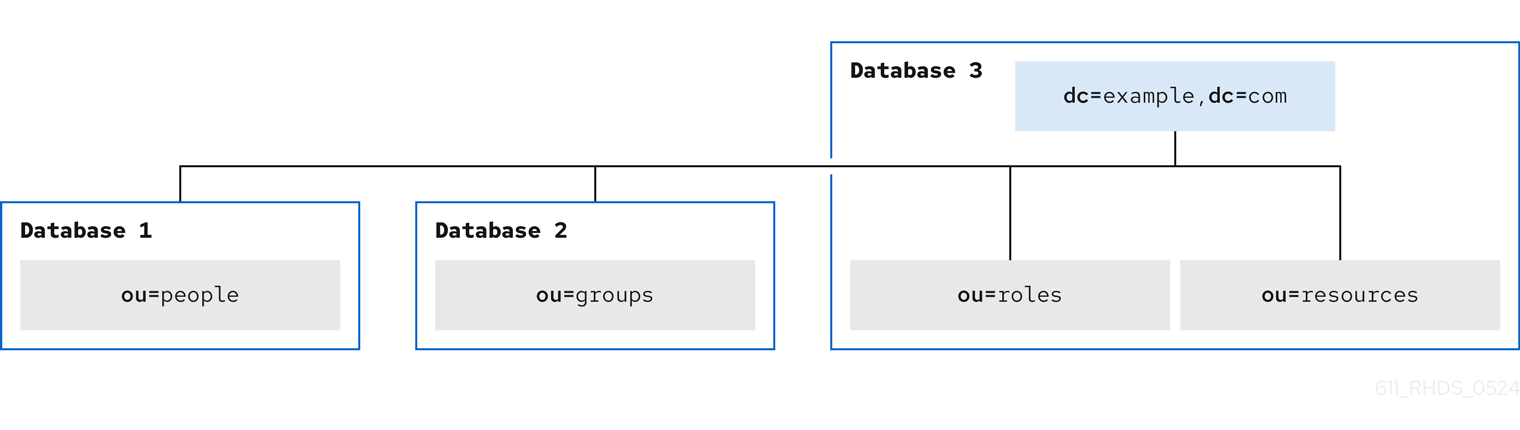
-
Database 1stores theou=peoplebranch. -
Database 2stores theou=groupsbranch. -
Database 3stores theou=resourcesandou=rolesbranches and thedc=example,dc=comroot suffix.
ExamleCom designs the following server topology:
Figure 8.3. Local enterprise server topology

ExampleCom decides to have the server topology with two supplier servers and three consumer servers. Each of the two suppliers updates all three consumers in the deployment of Directory Server.
The consumers supply data to one messaging server and the other servers. Modify requests from compatible servers are routed to the appropriate consumer server. The consumer server uses smart referrals to route the request to the supplier server that is responsible for the main copy of the data being modified.
8.1.5. Replication design of the local enterprise
ExampleCom decides to use a multi-supplier replication design to ensure the high availability of its directory data. For more information about multi-supplier replication, see Multi-supplier replication.
Multi-supplier architecture
ExampleCom uses two supplier servers in a multi-supplier replication architecture. The suppliers update one another so that the directory data remains consistent. The following diagram shows the supplier-supplier architecture for ExampleCom.
Figure 8.4. ExampleCom multi-supplier architecture

Supplier-consumer architecture
The following diagram describes how the supplier servers replicate to each consumer in the ExampleCom deployment of the directory.
Figure 8.5. ExampleCom supplier-consumer architecture

Both supplier servers update the three consumer servers. This ensures that the consumers will not be affected if one of the supplier servers fails.
8.1.6. Local enterprise security design
To protect the directory data, ExampleCom creates the following access control instructions (ACIs):
-
An ACI that allows employees to modify their entries. Users can modify all attributes except the
uid,manageranddepartmentattributes. - An ACI that allows only the employee and employee manager to see the employee home address and phone number to protect the privacy of employee data.
An ACI at the root of the directory tree that grants the two administrator groups the appropriate directory permissions:
- The directory administrators group needs full access to the directory.
-
The messaging administrators group needs
writeanddeleteaccess to themailRecipientandmailGroupobject classes and the attributes allowed by these object classes, including themailattribute. ExampleCom also grants the messaging administrators group thewrite,delete, andaddpermissions to the group subdirectory to create mail groups.
-
A general ACI at the root of the directory tree that allows anonymous access for the
read,search, andcompareaccess. In addition, this ACI denies anonymous users access to the password information. - An ACI that gives members of the accounting role access to all payroll information.
In addition, ExampleCom decides on the following security measures:
To protect the server from denial of service attacks and inappropriate use, ExampleCom sets resource limits based on the DN used by directory clients to bind:
- Anonymous users can receive 100 entries at a time in response to search requests.
- Messaging administrators can receive 1,000 entries.
- Directory administrators can receive the unlimited number of entries.
ExampleCom creates a password policy where passwords must be at least eight characters long and expire after 90 days.
For more information about password policies, see Designing a password policy.
8.1.7. Operations decisions of the local enterprise
The company makes the following decisions regarding the day-to-day operation of its directory:
- Back up the databases every night.
- Use SNMP to monitor the server status.
- Auto-rotate the access and error logs.
- Monitor the error log to ensure that the server is performing as expected.
- Monitor the access log to indicate searches that could be indexed.
8.2. Multinational enterprise design example
ExampleCom, previously a small company from the Local enterprise design example, has grown into a larger organization distributed across three geographic locations: USA, Europe, and Asia. The company now has more than 20,000 employees and all employees live and work in the countries where the ExampleCom offices are located.
ExampleCom decides to launch a company-wide LDAP directory to improve internal communication to make it easier to develop and deploy web applications and to increase security and privacy.
When designing a directory tree for an international company, ExampleCom needs to find the solution to the following questions:
- How to collect directory entries logically?
- How to support data management?
- How to support replication on a global scale?
In addition, ExampleCom wants to create an extranet that suppliers and trading partners can use and implement this extranet as an extension of the company intranet to external clients.
8.2.1. Data design for the multinational enterprise
ExampleCom International creates a deployment team to perform a site survey. The deployment team determines the following key points from the site survey:
- A messaging server is used to provide email routing, delivery, and reading services for most of ExampleCom sites. An enterprise server provides document publishing services. All servers run on Red Hat Directory Server 12.
- ExampleCom International needs to allow administrators to manage data locally. For example, the European site is responsible for managing the Europe branch of the directory and for the main copy of this branch data.
- Because of the geographic distribution of ExampleCom International offices, users and applications must access the directory 24 hours a day.
Data values for certain data elements must be in several languages.
NoteAll data use the UTF-8 character set. Any other character set violates LDAP standards.
In addition, the data design of the extranet must ensure that the following conditions are fulfilled:
- Parts suppliers need to log in to the ExampleCom International directory to manage their contracts with the company. Parts suppliers depend on data elements used for authentication, such as name and user password.
- Trading partners will use the directory to look up contact details of people in the partner network, such as email addresses and phone numbers.
8.2.2. Schema design for the multinational enterprise
ExampleCom International uses its original schema design and adds two new object classes to support the extranet:
-
The
exampleSupplierobject class allows theexampleSupplierIDattribute. This attribute contains the unique ID that ExampleCom International assigns to each automobile parts supplier. -
The
examplePartnerobject class allows theexamplePartnerIDattribute. This attribute contains the unique ID that ExampleCom International assigns to each trade partner.
For information about customizing the default directory schema, see Customization of schema.
8.2.3. Directory tree design for the multinational enterprise
ExampleCom International creates the following directory tree:
Figure 8.6. Basic directory tree of ExampleCom International
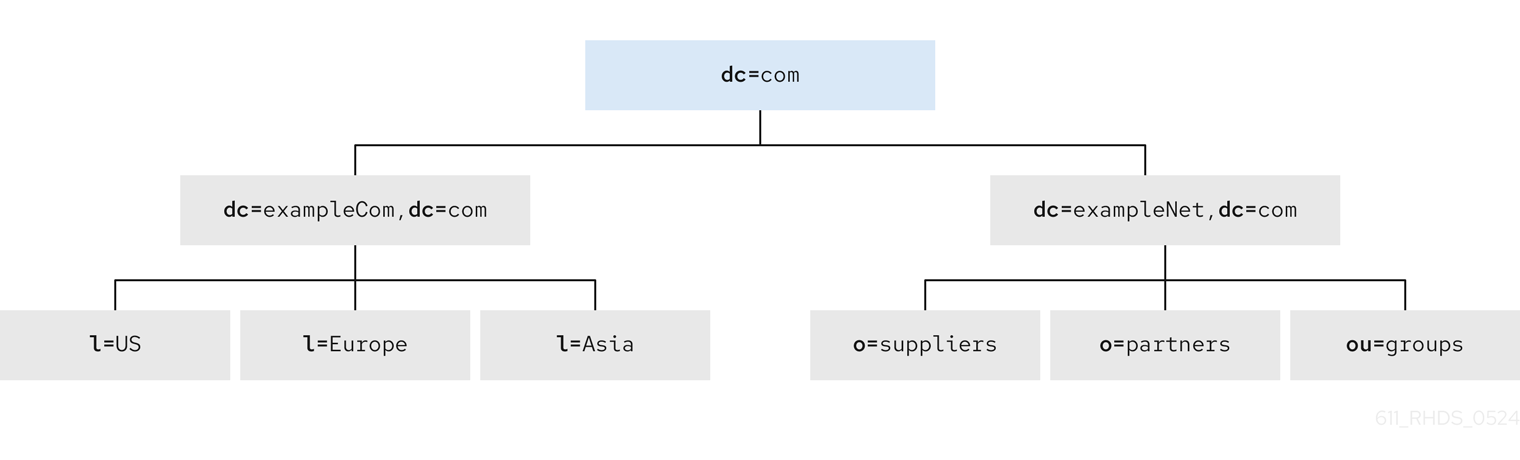
The dc=com suffix is the root of the directory tree. Under this suffix, the company creates the following branches:
-
The
dc=exampleCom,dc=combranch that contains internal data of ExampleCom International. -
The
dc=exampleNet,dc=combranch that contains data for the extranet.
The directory tree for the intranet under dc=exampleCom,dc=com has three main branches. Each branch corresponds to one of the regions where ExampleCom International has offices. These branches are identified by using the l (locality) attribute.
Under the dc=exampleNet,dc=com branch, ExampleCom International creates the following branches:
-
The
o=suppliersbranch for suppliers the company works with. -
The
o=partnersbranch for trading partners. -
The
ou=groupsbranch that contains entries for the administrators of the extranet and for mailing lists that partners subscribe to for up-to-date information on automobile parts manufacturing.
8.2.3.1. Intranet design of ExampleCom International
Each branch under dc=exampleCom,dc=com repeats the original directory tree design of ExampleCom from the Directory tree design of the local enterprise example.
Figure 8.7. Directory tree example for intranet

Under each locality, ExampleCom International creates the following branch points:
-
ou=people -
ou=groups -
ou=roles -
ou=resources
The entry for the l=Asia locality appears in LDIF as follows:
dn: l=Asia,dc=exampleCom,dc=com
objectclass: top
objectclass: locality
l: Asia
description: includes all sites in Asia
8.2.3.2. Extranet design of ExampleCom International
The following diagram shows the directory tree for ExampleCom extranet:
Figure 8.8. Directory tree example for extranet

8.2.4. Topology design for the multinational enterprise
The ExampleCom International deployment team starts to design the directory database and server topologies.
8.2.4.1. Database topology for ExampleCom International
ExampleCom International uses the same topology design for all its localities. However, the Europe locality stores the main copies of the data for the following branches:
-
The
dc=comroot entry -
The intranet under
dc=exampleCom,dc=com -
The extranet under
dc=exampleNet,dc=com
The following diagram shows the database topology for locality Europe:
Figure 8.9. Database topology for ExampleCom Europe

The l=Europe database stores the main copy of the dc=exampleCom,dc=com and dc=com entries.
Database link 1 and Database link 2 point to databases stored locally in each country. For example, operation requests that ExampleCom Europe server receives for the data under the l=USA branch are chained by a database link to a database on a server in the USA. For more information about database links and chaining, see Using chaining.
The Europe servers contain the main copy of the data for the extranet. The extranet data is stored in three databases the following way:
-
Database 1stores the main copy of theo=suppliersbranch. -
Database 2stores the main copy of theo=partnersbranch. -
Database 3stores the main copy of theou=groupsbranch.
The following diagram shows the database topology for the extranet:
Figure 8.10. Database topology for ExampleCom International Extranet
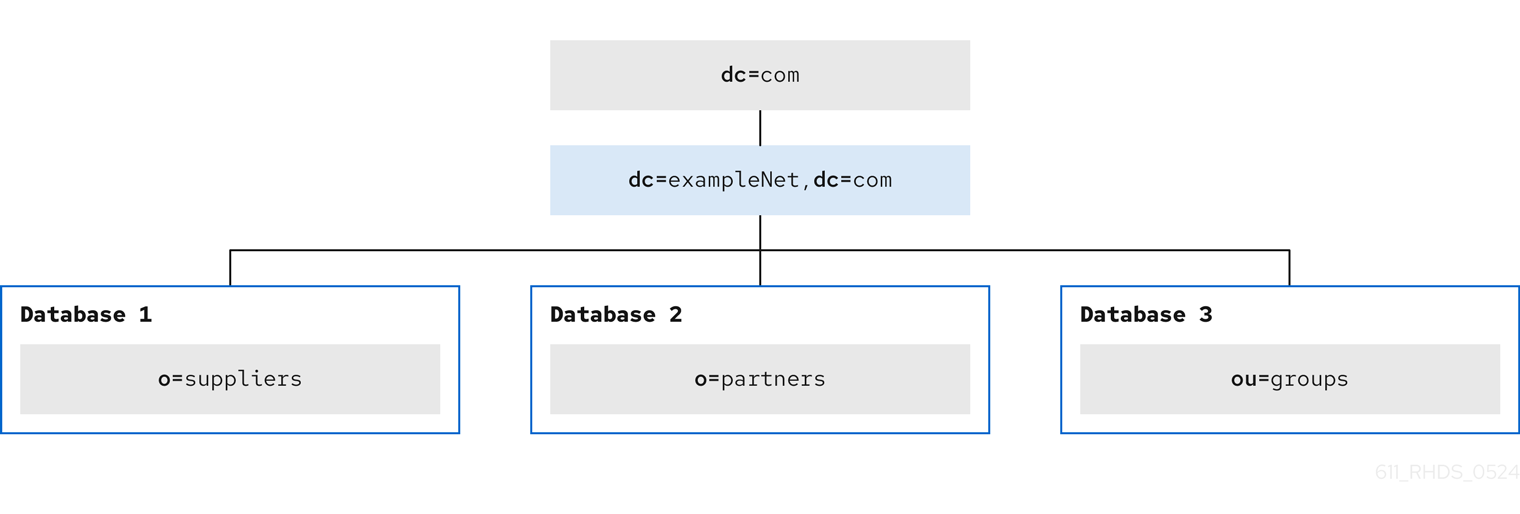
8.2.4.2. Server topology for ExampleCom International
ExampleCom International develops the following types of server topologies:
A topology for the corporate intranet. ExampleCom decides to have three data centers, one for each major locality: Europe, the USA, and Asia. Each data center contains the following servers:
- two supplier servers.
- two hub servers.
- three consumer servers.
- A topology for the partner extranet.
The following diagram shows architecture of ExampleCom Europe data center:
Figure 8.11. Server topology for ExampleCom Europe

The Europe data center contains the main copy of the ExampleCom extranet. This data is replicated to two consumer servers in the USA data center and two consumer servers in the Asia data center. Overall, ExampleCom requires ten servers to support the extranet.
The following diagram shows the server architecture of ExampleCom extranet in the Europe data center:
Figure 8.12. Server topology for ExampleCom International extranet

The hub servers replicate the data to two consumer servers of each data center: Europe, the USA, and Asia.
8.2.5. Replication design for the multinational enterprise
ExampleCom International considers the following points when designing replication for its directory:
- Data is managed locally.
- The quality of network connections varies from site to site.
- Database links are used to connect data on remote servers.
- Hub servers that contain read-only copies of the data are used to replicate data to consumer servers.
The hub servers are located near important directory-enabled applications, such as a mail server or a web server.
To let supplier servers focus on write operations, only hub servers perform replication.
In the future, when ExampleCom expands and needs to add more consumer servers, the additional consumers do not affect the performance of the supplier servers.
Multi-supplier architecture
For the ExampleCom intranet, each locality stores the main copy of its data and uses database links to chain to the data in other localities.
For the main copy of its data, each locality uses a multi-supplier replication architecture.
The following diagram shows the multi-supplier architecture for the locality Europe that includes the dc=exampleCom,dc=com and dc=com branches:
Figure 8.13. Multi-supplier architecture for ExampleCom Europe

Each locality contains two suppliers that share main copies of the data for that site. Each locality is responsible for the main copy of its data.
Using a multi-supplier architecture ensures the availability of the data and helps to balance the workload managed by each supplier server.
To reduce the risk of total failure, ExampleCom uses multiple read-write supplier Directory Servers at each site.
The following diagram shows the interaction between two supplier servers in Europe and two supplier servers in the USA:
Figure 8.14. Multi-supplier architecture for ExampleCom Europe and ExampleCom USA

The same relationship exists between ExampleCom USA and ExampleCom Asia and between ExampleCom Europe and ExampleCom Asia.
8.2.6. Security design for the multinational enterprise
ExampleCom International uses its previous security design adding the following access controls to support its new multinational intranet:
- ExampleCom adds general ACIs to the root of the intranet creating more restrictive ACIs in each country and the branches beneath each country.
ExampleCom decides to use macro ACIs to minimize the number of ACIs in the directory.
ExampleCom uses a macro to represent a DN in the target or bind rule portion of the ACI. When the directory gets an incoming LDAP operation, the ACI macros are matched against the resource that the LDAP operation targets. If a match occurs, Directory Server replaces the macro with the value of the DN of the targeted resource.
For more information about macro ACIs, see Using macro access control instructions.
ExampleCom adds the following access controls to support its extranet:
- ExampleCom decides to use certificate-based authentication for all extranet activities. When logging in to the extranet, users need a digital certificate. The directory stores the certificates. Therefore, users can send encrypted emails by looking up public keys stored in the directory.
- ExampleCom creates an ACI that forbids anonymous access to the extranet. This protects the extranet from denial-of-service attacks.
- ExampleCom wants updates to the directory data to come only from an ExampleCom-hosted application. This means that partners and suppliers that use the extranet can only use the tools provided by ExampleCom. By restricting extranet users to ExampleCom preferred tools, ExampleCom administrators can use the audit logs to track the usage of the directory and limit the types of problems that can be introduced by extranet users outside of ExampleCom International.
Chapter 9. Directory Server RFC support
Find the list of notable supported LDAP-related RFCs. Note that it is not a complete list of RFCs that Directory Server supports.
9.1. LDAPv3 Features
- Technical Specification Road Map (RFC 4510)
- This is a tracking document and does not contain requirements.
- The Protocol (RFC 4511)
Supported with the following exceptions:
- RFC 4511 Section 4.4.1. Notice of Disconnection: Directory Server terminates the connections in this case.
- RFC 4511 Section 4.5.1.3. SearchRequest.derefAliases: LDAP aliases are not supported.
- RFC 4511 Section 4.13. IntermediateResponse Message
- Directory Information Models (RFC 4512)
Supported with the following exceptions:
- RFC 4512 Section 2.4.2. Structural Object Classes: Directory Server supports entries with multiple structural object classes.
- RFC 4512 Section 2.6. Alias Entries
- RFC 4512 Section 4.1.2. Attribute Types: The attribute type COLLECTIVE is not supported.
- RFC 4512 Section 4.1.4. Matching Rule Uses
- RFC 4512 Section 4.1.6. DIT Content Rules
- RFC 4512 Section 4.1.7. DIT Structure Rules and Name Forms
RFC 4512 Section 5.1.1. altServer
Note that RFC 4512 enables LDAP servers to not support the previously listed exceptions. For further details, see RFC 4512 Section 7.1. Server Guidelines.
- Authentication Methods and Security Mechanisms (RFC 4513)
- Supported.
- String Representation of Distinguished Names (RFC 4514)
- Supported.
- String Representation of Search Filters (RFC 4515)
- Supported.
- Uniform Resource Locator (RFC 4516)
- Supported. However, this RFC is mainly focused on LDAP clients.
- Syntaxes and Matching Rules (RFC 4517)
Supported. Exceptions:
-
directoryStringFirstComponentMatch -
integerFirstComponentMatch -
objectIdentifierFirstComponentMatch -
objectIdentifierFirstComponentMatch -
keywordMatch -
wordMatch
-
- Internationalized String Preparation (RFC 4518)
- Supported.
- Schema for User Applications (RFC 4519)
- Supported.
- entryUUID Operational Attribute (RFC 4530)
- Supported.
- Content Synchronization Operation (RFC 4533)
- Supported.
9.2. Authentication methods
- Anonymous SASL Mechanism (RFC 4505)
-
Not supported. Note that RFC 4512 does not require the
ANONYMOUSSASL mechanism. However, Directory Server supports LDAP anonymous binds. - External SASL Mechanism (RFC 4422)
- Supported.
- Plain SASL Mechanism (RFC 4616)
-
Not supported. Note that RFC 4512 does not require the
PLAINSASL mechanism. However, Directory Server supports LDAP anonymous binds. - SecurID SASL Mechanism (RFC 2808)
- Not supported. However if a Cyrus SASL plug-in exists, Directory Server can use it.
- Kerberos V5 (GSSAPI) SASL Mechanism (RFC 4752)
- Supported.
- CRAM-MD5 SASL Mechanism (RFC 2195)
- Supported.
- Digest-MD5 SASL Mechanism (RFC 2831)
- Supported.
- One-time Password SASL Mechanism (RFC 2444)
- Not supported. However if a Cyrus SASL plug-in exists, Directory Server can use it.
9.3. X.509 Certificates schema and attributes support
LDAP Schema Definitions for X.509 Certificates (RFC 4523)
- Attribute types and object classes: Supported.
- Syntaxes: Not supported. Directory Server uses binary and octet syntax.
- Matching rules: Not supported.

'%20d='M201.5%20305.5c-13.8%200-24.9-11.1-24.9-24.6%200-13.8%2011.1-24.9%2024.9-24.9%2013.6%200%2024.6%2011.1%2024.6%2024.9%200%2013.6-11.1%2024.6-24.6%2024.6zM504%20256c0%20137-111%20248-248%20248S8%20393%208%20256%20119%208%20256%208s248%20111%20248%20248zm-132.3-41.2c-9.4%200-17.7%203.9-23.8%2010-22.4-15.5-52.6-25.5-86.1-26.6l17.4-78.3%2055.4%2012.5c0%2013.6%2011.1%2024.6%2024.6%2024.6%2013.8%200%2024.9-11.3%2024.9-24.9s-11.1-24.9-24.9-24.9c-9.7%200-18%205.8-22.1%2013.8l-61.2-13.6c-3-.8-6.1%201.4-6.9%204.4l-19.1%2086.4c-33.2%201.4-63.1%2011.3-85.5%2026.8-6.1-6.4-14.7-10.2-24.1-10.2-34.9%200-46.3%2046.9-14.4%2062.8-1.1%205-1.7%2010.2-1.7%2015.5%200%2052.6%2059.2%2095.2%20132%2095.2%2073.1%200%20132.3-42.6%20132.3-95.2%200-5.3-.6-10.8-1.9-15.8%2031.3-16%2019.8-62.5-14.9-62.5zM302.8%20331c-18.2%2018.2-76.1%2017.9-93.6%200-2.2-2.2-6.1-2.2-8.3%200-2.5%202.5-2.5%206.4%200%208.6%2022.8%2022.8%2087.3%2022.8%20110.2%200%202.5-2.2%202.5-6.1%200-8.6-2.2-2.2-6.1-2.2-8.3%200zm7.7-75c-13.6%200-24.6%2011.1-24.6%2024.9%200%2013.6%2011.1%2024.6%2024.6%2024.6%2013.8%200%2024.9-11.1%2024.9-24.6%200-13.8-11-24.9-24.9-24.9z'/%3e%3c/svg%3e)