 Red Hat Summit
7.1 Release Notes
Red Hat Enterprise Linux 7
Release Notes for Red Hat Enterprise Linux 7.1
Abstract
The Release Notes document the major new features and enhancements implemented in Red Hat Enterprise Linux 7.1 and the known issues in this release. For detailed information regarding the changes between Red Hat Enterprise Linux 6 and Red Hat Enterprise Linux 7, see the Migration Planning Guide.
Acknowledgements
Red Hat Global Support Services would like to recognize Sterling Alexander and Michael Everette for their outstanding contributions in testing Red Hat Enterprise Linux 7.
Preface
Red Hat Enterprise Linux minor releases are an aggregation of individual enhancement, security, and bug fix errata. The Red Hat Enterprise Linux 7.1 Release Notes document the major changes, features, and enhancements introduced in the Red Hat Enterprise Linux 7 operating system and its accompanying applications for this minor release. In addition, the Red Hat Enterprise Linux 7.1 Release Notes document the known issues in Red Hat Enterprise Linux 7.1.
For information regarding the Red Hat Enterprise Linux life cycle, refer to https://access.redhat.com/support/policy/updates/errata/.
Part I. New Features
Copy linkLink copied to clipboard!
This part describes new features and major enhancements introduced in Red Hat Enterprise Linux 7.1.
Chapter 1. Architectures
Copy linkLink copied to clipboard!
Red Hat Enterprise Linux 7.1 is available as a single kit on the following architectures: [1]
In this release, Red Hat brings together improvements for servers and systems, as well as for the overall Red Hat open source experience.
1.1. Red Hat Enterprise Linux for POWER, little endian
Copy linkLink copied to clipboard!
Red Hat Enterprise Linux 7.1 introduces little endian support on IBM Power Systems servers using IBM POWER8 processors. Previously in Red Hat Enterprise Linux 7, only the big endian variant was offered for IBM Power Systems. Support for little endian on POWER8-based servers aims to improve portability of applications between 64-bit Intel compatible systems (
x86_64) and IBM Power Systems.
- Separate installation media are offered for installing Red Hat Enterprise Linux on IBM Power Systems servers in little endian mode. These media are available from the section of the Red Hat Customer Portal.
- Only IBM POWER8 processor-based servers are supported with Red Hat Enterprise Linux for POWER, little endian.
- Currently, Red Hat Enterprise Linux for POWER, little endian is supported only as a KVM guest under Red Hat Enteprise Virtualization for Power. Installation on bare metal hardware is currently not supported.
- The GRUB2 boot loader is used on the installation media and for network boot. The Installation Guide has been updated with instructions for setting up a network boot server for IBM Power Systems clients using GRUB2.
- All software packages for IBM Power Systems are available for both the little endian and the big endian variant of Red Hat Enterprise Linux for POWER.
- Packages built for Red Hat Enterprise Linux for POWER, little endian use the the
ppc64learchitecture code - for example, gcc-4.8.3-9.ael7b.ppc64le.rpm.
[1]
Note that the Red Hat Enterprise Linux 7.1 installation is supported only on 64-bit hardware. Red Hat Enterprise Linux 7.1 is able to run 32-bit operating systems, including previous versions of Red Hat Enterprise Linux, as virtual machines.
[2]
Red Hat Enterprise Linux 7.1 (little endian) is currently only supported as a KVM guest under Red Hat Enteprise Virtualization for Power and PowerVM hypervisors.
[3]
Note that Red Hat Enterprise Linux 7.1 supports IBM zEnterprise 196 hardware or later; IBM System z10 mainframe systems are no longer supported and will not boot Red Hat Enterprise Linux 7.1.
Chapter 2. Hardware Enablement
Copy linkLink copied to clipboard!
2.1. Intel Broadwell Processor and Graphics Support
Copy linkLink copied to clipboard!
Red Hat Enterprise Linux 7.1 added initial support for 5th generation Intel processors (code named
Broadwell) with the enablement of the Intel Xeon E3-12xx v4 processor family. Support includes the CPUs themselves, integrated graphics in both 2D and 3D mode, and audio support (Broadwell High Definition Legacy Audio, HDMI audio, and DisplayPort audio).
For detailed information regarding CPU enablement in Red Hat Enterprise Linux, please see the Red Hat Knowledgebase article available at https://access.redhat.com/support/policy/intel .
The turbostat tool (part of the kernel-tools package) has also been updated with support for the new processors.
2.2. Support for TCO Watchdog and I2C (SMBUS) on Intel Communications Chipset 89xx Series
Copy linkLink copied to clipboard!
Red Hat Enterprise Linux 7.1 adds support for TCO Watchdog and I2C (SMBUS) on the 89xx series Intel Communications Chipset (formerly Coleto Creek).
2.3. Intel Processor Microcode Update
Copy linkLink copied to clipboard!
CPU microcode for Intel processors in the microcode_ctl package has been updated from version
0x17 to version 0x1c in Red Hat Enterprise Linux 7.1.
2.4. AMD Hawaii GPU Support
Copy linkLink copied to clipboard!
Red Hat Enterprise Linux 7.1 enables support for hardware acceleration on AMD graphics cards using the Hawaii core (AMD Radeon R9 290 and AMD Radeon R9 290X).
2.5. OSA-Express5s Cards Support in qethqoat
Copy linkLink copied to clipboard!
Support for OSA-Express5s cards has been added to the
qethqoat tool, part of the s390utils package. This enhancement extends the serviceability of network and card setups for OSA-Express5s cards, and is included as a Technology Preview with Red Hat Enterprise Linux 7.1 on IBM System z.
Chapter 3. Installation and Booting
Copy linkLink copied to clipboard!
3.1. Installer
Copy linkLink copied to clipboard!
The Red Hat Enterprise Linux installer, Anaconda, has been enhanced in order to improve the installation process for Red Hat Enterprise Linux 7.1.
Interface
- The graphical installer interface now contains one additional screen which enables configuring the Kdump kernel crash dumping mechanism during the installation. Previously, this was configured after the installation using the firstboot utility, which was not accessible without a graphical interface. Now, you can configure Kdump as part of the installation process on systems without a graphical environment. The new screen is accessible from the main installer menu (Installation Summary).
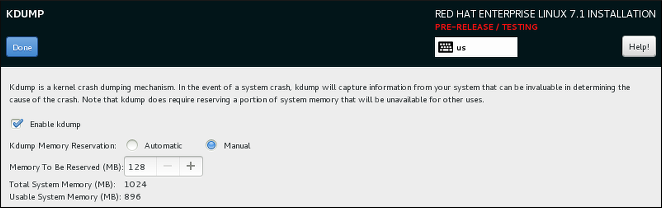
Figure 3.1. The new Kdump screen
- The manual partitioning screen has been redesigned to improve user experience. Some of the controls have been moved to different locations on the screen.
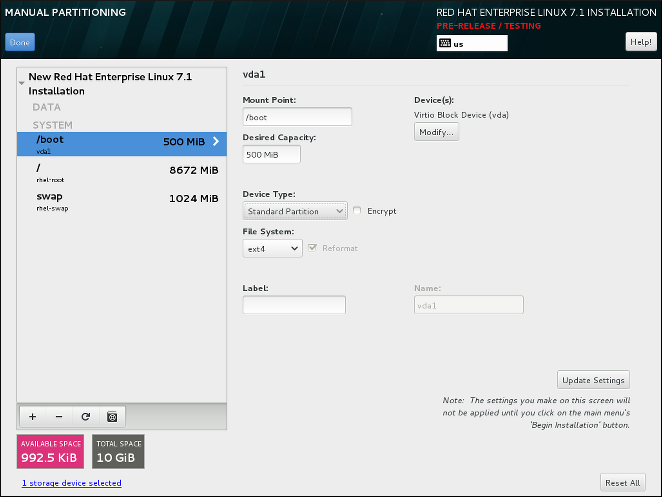
Figure 3.2. The redesigned Manual Partitioning screen
- You can now configure a network bridge in the Network & Hostname screen of the installer. To do so, click the + button at the bottom of the interface list, select Bridge from the menu, and configure the bridge in the Editing bridge connection dialog window which appears afterwards. This dialog is provided by NetworkManager and is fully documented in the Red Hat Enterprise Linux 7.1 Networking Guide.Several new Kickstart options have also been added for bridge configuration. See below for details.
- The installer no longer uses multiple consoles to display logs. Instead, all logs are in tmux panes in virtual console 1 (
tty1). To access logs during the installation, press Ctrl+Alt+F1 to switch to tmux, and then use Ctrl+b X to switch between different windows (replace X with the number of a particular window as displayed at the bottom of the screen).To switch back to the graphical interface, press Ctrl+Alt+F6. - The command-line interface for Anaconda now includes full help. To view it, use the
anaconda -hcommand on a system with the anaconda package installed. The command-line interface allows you to run the installer on an installed system, which is useful for disk image installations.
Kickstart Commands and Options
- The
logvolcommand has a new option,--profile=. This option enables the user to specify the configuration profile name to use with thin logical volumes. If used, the name will also be included in the metadata for the logical volume.By default, the available profiles aredefaultandthin-performanceand are defined in the/etc/lvm/profiledirectory. See thelvm(8)man page for additional information. - The behavior of the
--size=and--percent=options of thelogvolcommand has changed. Previously, the--percent=option was used together with--growand--size=to specify how much a logical volume should expand after all statically-sized volumes have been created.Since Red Hat Enterprise Linux 7.1,--size=and--percent=can not be used on the samelogvolcommand. - The
--autoscreenshotoption of theautostepKickstart command has been fixed, and now correctly saves a screenshot of each screen into the/tmp/anaconda-screenshotsdirectory upon exiting the screen. After the installation completes, these screenshots are moved into/root/anaconda-screenshots. - The
liveimgcommand now supports installation from tar files as well as disk images. The tar archive must contain the installation media root file system, and the file name must end with.tar,.tbz,.tgz,.txz,.tar.bz2,.tar.gz, or.tar.xz. - Several new options have been added to the
networkcommand for configuring network bridges:- When the
--bridgeslaves=option is used, the network bridge with device name specified using the--device=option will be created and devices defined in the--bridgeslaves=option will be added to the bridge. For example:network --device=bridge0 --bridgeslaves=em1 - The
--bridgeopts=option requires an optional comma-separated list of parameters for the bridged interface. Available values arestp,priority,forward-delay,hello-time,max-age, andageing-time. For information about these parameters, see thenm-settings(5)man page.
- The
autopartcommand has a new option,--fstype. This option allows you to change the default file system type (xfs) when using automatic partitioning in a Kickstart file. - Several new features have been added to Kickstart for better container support. These features include:
- The new
--installoption for therepocommand saves the provided repository configuration on the installed system in the/etc/yum.repos.d/directory. Without using this option, a repository configured in a Kickstart file will only be available during the installation process, not on the installed system. - The
--disabledoption for thebootloadercommand prevents the boot loader from being installed. - The new
--nocoreoption for the%packagessection of a Kickstart file prevents the system from installing the@corepackage group. This enables installing extremely minimal systems for use with containers.
Note
Please note that the described options are useful only when combined with containers. Using these options in a general-purpose installation could result in an unusable system.
Entropy Gathering for LUKS Encryption
- If you choose to encrypt one or more partitions or logical volumes during the installation (either during an interactive installation or in a Kickstart file), Anaconda will attempt to gather 256 bits of entropy (random data) to ensure the encryption is secure. The installation will continue after 256 bits of entropy are gathered or after 10 minutes. The attempt to gather entropy happens at the beginning of the actual installation phase when encrypted partitions or volumes are being created. A dialog window will open in the graphical interface, showing progress and remaining time.The entropy gathering process can not be skipped or disabled. However, there are several ways to speed the process up:
- If you can access the system during the installation, you can supply additional entropy by pressing random keys on the keyboard and moving the mouse.
- If the system being installed is a virtual machine, you can attach a virtio-rng device (a virtual random number generator) as described in the Red Hat Enterprise Linux 7.1 Virtualization Deployment and Administration Guide.

Figure 3.3. Gathering Entropy for Encryption
Built-in Help in the Graphical Installer
Each screen in the installer's graphical interface and in the Initial Setup utility now has a Help button in the top right corner. Clicking this button opens the section of the Installation Guide relevant to the current screen using the Yelp help browser.
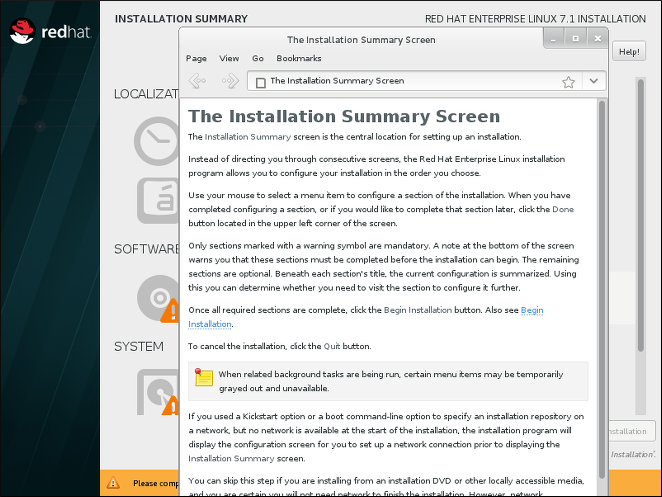
Figure 3.4. Anaconda built-in help
3.2. Boot Loader
Copy linkLink copied to clipboard!
Installation media for IBM Power Systems now use the GRUB2 boot loader instead of the previously offered yaboot. For the big endian variant of Red Hat Enterprise Linux for POWER, GRUB2 is preferred but yaboot can also be used. The newly introduced little endian variant requires GRUB2 to boot.
The Installation Guide has been updated with instructions for setting up a network boot server for IBM Power Systems using GRUB2.
Chapter 4. Storage
Copy linkLink copied to clipboard!
LVM Cache
As of Red Hat Enterprise Linux 7.1, LVM cache is fully supported. This feature allows users to create logical volumes with a small fast device performing as a cache to larger slower devices. Please refer to the
lvm(7) manual page for information on creating cache logical volumes.
Note that the following restrictions on the use of cache logical volumes (LV):
- The cache LV must be a top-level device. It cannot be used as a thin-pool LV, an image of a RAID LV, or any other sub-LV type.
- The cache LV sub-LVs (the origin LV, metadata LV, and data LV) can only be of linear, stripe, or RAID type.
- The properties of the cache LV cannot be changed after creation. To change cache properties, remove the cache and recreate it with the desired properties.
Storage Array Management with libStorageMgmt API
Since Red Hat Enterprise Linux 7.1, storage array management with
libStorageMgmt, a storage array independent API, is fully supported. The provided API is stable, consistent, and allows developers to programmatically manage different storage arrays and utilize the hardware-accelerated features provided. System administrators can also use libStorageMgmt to manually configure storage and to automate storage management tasks with the included command-line interface. Please note that the Targetd plug-in is not fully supported and remains a Technology Preview. Supported hardware:
- NetApp Filer (ontap 7-Mode)
- Nexenta (nstor 3.1.x only)
- SMI-S, for the following vendors:
- HP 3PAR
- OS release 3.2.1 or later
- EMC VMAX and VNX
- Solutions Enabler V7.6.2.48 or later
- SMI-S Provider V4.6.2.18 hotfix kit or later
- HDS VSP Array non-embedded provider
- Hitachi Command Suite v8.0 or later
For more information on
libStorageMgmt, refer to the relevant chapter in the Storage Administration Guide.
Support for LSI Syncro
Red Hat Enterprise Linux 7.1 includes code in the
megaraid_sas driver to enable LSI Syncro CS high-availability direct-attached storage (HA-DAS) adapters. While the megaraid_sas driver is fully supported for previously enabled adapters, the use of this driver for Syncro CS is available as a Technology Preview. Support for this adapter will be provided directly by LSI, your system integrator, or system vendor. Users deploying Syncro CS on Red Hat Enterprise Linux 7.1 are encouraged to provide feedback to Red Hat and LSI. For more information on LSI Syncro CS solutions, please visit http://www.lsi.com/products/shared-das/pages/default.aspx.
DIF/DIX Support
DIF/DIX is a new addition to the SCSI Standard and a Technology Preview in Red Hat Enterprise Linux 7.1. DIF/DIX increases the size of the commonly used 512-byte disk block from 512 to 520 bytes, adding the Data Integrity Field (DIF). The DIF stores a checksum value for the data block that is calculated by the Host Bus Adapter (HBA) when a write occurs. The storage device then confirms the checksum on receive, and stores both the data and the checksum. Conversely, when a read occurs, the checksum can be verified by the storage device, and by the receiving HBA.
For more information, refer to the section Block Devices with DIF/DIX Enabled in the Storage Administration Guide.
Enhanced device-mapper-multipath Syntax Error Checking and Output
The
device-mapper-multipath tool has been enhanced to verify the multipath.conf file more reliably. As a result, if multipath.conf contains any lines that cannot be parsed, device-mapper-multipath reports an error and ignores these lines to avoid incorrect parsing.
In addition, the following wildcard expressions have been added for the
multipathd show paths format command:
- %N and %n for the host and target Fibre Channel World Wide Node Names, respectively.
- %R and %r for the host and target Fibre Channel World Wide Port Names, respectively.
Now, it is easier to associate multipaths with specific Fibre Channel hosts, targets, and their ports, which allows users to manage their storage configuration more effectively.
Chapter 5. File Systems
Copy linkLink copied to clipboard!
Support of Btrfs File System
The
Btrfs (B-Tree) file system is supported as a Technology Preview in Red Hat Enterprise Linux 7.1. This file system offers advanced management, reliability, and scalability features. It enables users to create snapshots, it enables compression and integrated device management.
OverlayFS
The
OverlayFS file system service allows the user to "overlay" one file system on top of another. Changes are recorded in the upper file system, while the lower file system remains unmodified. This can be useful because it allows multiple users to share a file-system image, for example containers, or when the base image is on read-only media, for example a DVD-ROM.
In Red Hat Enterprise Linux 7.1, OverlayFS is supported as a Technology Preview. There are currently two restrictions:
- It is recommended to use
ext4as the lower file system; the use ofxfsandgfs2file systems is not supported. - SELinux is not supported, and to use OverlayFS, it is required to disable enforcing mode.
Support of Parallel NFS
Parallel NFS (pNFS) is a part of the NFS v4.1 standard that allows clients to access storage devices directly and in parallel. The pNFS architecture can improve the scalability and performance of NFS servers for several common workloads.
pNFS defines three different storage protocols or layouts: files, objects, and blocks. The client supports the files layout, and since Red Hat Enterprise Linux 7.1, the blocks and object layouts are fully supported.
Red Hat continues to work with partners and open source projects to qualify new pNFS layout types and to provide full support for more layout types in the future.
For more information on pNFS, refer to http://www.pnfs.com/.
Chapter 6. Kernel
Copy linkLink copied to clipboard!
Support for Ceph Block Devices
The
libceph.ko and rbd.ko modules have been added to the Red Hat Enterprise Linux 7.1 kernel. These RBD kernel modules allow a Linux host to see a Ceph block device as a regular disk device entry which can be mounted to a directory and formatted with a standard file system, such as XFS or ext4.
Note that the CephFS module,
ceph.ko, is currently not supported in Red Hat Enterprise Linux 7.1.
Concurrent Flash MCL Updates
Microcode level upgrades (MCL) are enabled in Red Hat Enterprise Linux 7.1 on the IBM System z architecture. These upgrades can be applied without impacting I/O operations to the flash storage media and notify users of the changed flash hardware service level.
Dynamic kernel Patching
Red Hat Enterprise Linux 7.1 introduces kpatch, a dynamic "kernel patching utility", as a Technology Preview. The kpatch utility allows users to manage a collection of binary kernel patches which can be used to dynamically patch the kernel without rebooting. Note that kpatch is supported to run only on AMD64 and Intel 64 architectures.
Crashkernel with More than 1 CPU
Red Hat Enterprise Linux 7.1 enables booting crashkernel with more than one CPU. This function is supported as a Technology Preview.
dm-era Target
Red Hat Enterprise Linux 7.1 introduces the dm-era device-mapper target as a Technology Preview. dm-era keeps track of which blocks were written within a user-defined period of time called an "era". Each era target instance maintains the current era as a monotonically increasing 32-bit counter. This target enables backup software to track which blocks have changed since the last backup. It also enables partial invalidation of the contents of a cache to restore cache coherency after rolling back to a vendor snapshot. The dm-era target is primarily expected to be paired with the dm-cache target.
Cisco VIC kernel Driver
The Cisco VIC Infiniband kernel driver has been added to Red Hat Enterprise Linux 7.1 as a Technology Preview. This driver allows the use of Remote Directory Memory Access (RDMA)-like semantics on proprietary Cisco architectures.
Enhanced Entropy Management in hwrng
The paravirtualized hardware RNG (hwrng) support for Linux guests via virtio-rng has been enhanced in Red Hat Enterprise Linux 7.1. Previously, the
rngd daemon needed to be started inside the guest and directed to the guest kernel's entropy pool. Since Red Hat Enterprise Linux 7.1, the manual step has been removed. A new khwrngd thread fetches entropy from the virtio-rng device if the guest entropy falls below a specific level. Making this process transparent helps all Red Hat Enterprise Linux guests in utilizing the improved security benefits of having the paravirtualized hardware RNG provided by KVM hosts.
Scheduler Load-Balancing Performance Improvement
Previously, the scheduler load-balancing code balanced for all idle CPUs. In Red Hat Enterprise Linux 7.1, idle load balancing on behalf of an idle CPU is done only when the CPU is due for load balancing. This new behavior reduces the load-balancing rate on non-idle CPUs and therefore the amount of unnecessary work done by the scheduler, which improves its performance.
Improved newidle Balance in Scheduler
The behavior of the scheduler has been modified to stop searching for tasks in the
newidle balance code if there are runnable tasks, which leads to better performance.
HugeTLB Supports Per-Node 1GB Huge Page Allocation
Red Hat Enterprise Linux 7.1 has added support for gigantic page allocation at runtime, which allows the user of 1GB
hugetlbfs to specify which Non-Uniform Memory Access (NUMA) Node the 1GB should be allocated on during runtime.
New MCS-based Locking Mechanism
Red Hat Enterprise Linux 7.1 introduces a new locking mechanism, MCS locks. This new locking mechanism significantly reduces
spinlock overhead in large systems, which makes spinlocks generally more efficient in Red Hat Enterprise Linux 7.1.
Process Stack Size Increased from 8KB to 16KB
Since Red Hat Enterprise Linux 7.1, the kernel process stack size has been increased from 8KB to 16KB to help large processes that use stack space.
uprobe and uretprobe Features Enabled in perf and systemtap
In Red Hat Enterprise Linux 7.1, the
uprobe and uretprobe features work correctly with the perf command and the systemtap script.
End-To-End Data Consistency Checking
End-To-End data consistency checking on IBM System z is fully supported in Red Hat Enterprise Linux 7.1. This enhances data integrity and more effectively prevents data corruption as well as data loss.
DRBG on 32-Bit Systems
In Red Hat Enterprise Linux 7.1, the deterministic random bit generator (DRBG) has been updated to work on 32-bit systems.
NFSoRDMA Available
As a Technology Preview, the NFSoRDMA service has been enabled for Red Hat Enterprise Linux 7.1. This makes the
svcrdma module available for users who intend to use Remote Direct Memory Access (RDMA) transport with the Red Hat Enterprise Linux 7 NFS server.
Support for Large Crashkernel Sizes
The Kdump kernel crash dumping mechanism on systems with large memory, that is up to the Red Hat Enterprise Linux 7.1 maximum memory supported limit of 6TB, has become fully supported in Red Hat Enterprise Linux 7.1.
Kdump Supported on Secure Boot Machines
With Red Hat Enterprise Linux 7.1, the Kdump crash dumping mechanism is supported on machines with enabled Secure Boot.
Firmware-assisted Crash Dumping
Red Hat Enterprise Linux 7.1 introduces support for firmware-assisted dump (fadump), which provides an alternative crash dumping tool to kdump. The firmware-assisted feature provides a mechanism to release the reserved dump memory for general use once the crash dump is saved to the disk. This avoids the need to reboot the system after performing the dump, and thus reduces the system downtime. In addition, fadump uses of the kdump infrastructure already present in the user space, and works seamlessly with the existing kdump init scripts.
Runtime Instrumentation for IBM System z
As a Technology Preview, support for the Runtime Instrumentation feature has been added for Red Hat Enterprise Linux 7.1 on IBM System z. Runtime Instrumentation enables advanced analysis and execution for a number of user-space applications available with the IBM zEnterprise EC12 system.
Cisco usNIC Driver
Cisco Unified Communication Manager (UCM) servers have an optional feature to provide a Cisco proprietary User Space Network Interface Controller (usNIC), which allows performing Remote Direct Memory Access (RDMA)-like operations for user-space applications. As a Technology Preview, Red Hat Enterprise Linux 7.1 includes the
libusnic_verbs driver, which makes it possible to use usNIC devices via standard InfiniBand RDMA programming based on the Verbs API.
Intel Ethernet Server Adapter X710/XL710 Driver Update
The
i40e and i40evf kernel drivers have been updated to their latest upstream versions. These updated drivers are included as a Technology Preview in Red Hat Enterprise Linux 7.1.
Chapter 7. Virtualization
Copy linkLink copied to clipboard!
Increased Maximum Number of vCPUs in KVM
The maximum number of supported virtual CPUs (vCPUs) in a KVM guest has been increased to 240. This increases the amount of virtual processing units that a user can assign to the guest, and therefore improves its performance potential.
5th Generation Intel Core New Instructions Support in QEMU, KVM, and libvirt API
In Red Hat Enterprise Linux 7.1, the support for 5th Generation Intel Core processors has been added to the QEMU hypervisor, the KVM kernel code, and the
libvirt API. This allows KVM guests to use the following instructions and features: ADCX, ADOX, RDSFEED, PREFETCHW, and supervisor mode access prevention (SMAP).
USB 3.0 Support for KVM Guests
Red Hat Enterprise Linux 7.1 features improved USB support by adding USB 3.0 host adapter (xHCI) emulation as a Technology Preview.
Compression for the dump-guest-memory Command
Since Red Hat Enterprise Linux 7.1, the
dump-guest-memory command supports crash dump compression. This makes it possible for users who cannot use the virsh dump command to require less hard disk space for guest crash dumps. In addition, saving a compressed guest crash dump usually takes less time than saving a non-compressed one.
Open Virtual Machine Firmware
The Open Virtual Machine Firmware (OVMF) is available as a Technology Preview in Red Hat Enterprise Linux 7.1. OVMF is a UEFI secure boot environment for AMD64 and Intel 64 guests.
Improve Network Performance on Hyper-V
Several new features of the Hyper-V network driver have been introduced to improve network performance. For example, Receive-Side Scaling, Large Send Offload, Scatter/Gather I/O are now supported, and network throughput is increased.
hypervfcopyd in hyperv-daemons
The
hypervfcopyd daemon has been added to the hyperv-daemons packages. hypervfcopyd is an implementation of file copy service functionality for Linux Guest running on Hyper-V 2012 R2 host. It enables the host to copy a file (over VMBUS) into the Linux Guest.
New Features in libguestfs
Red Hat Enterprise Linux 7.1 introduces a number of new features in
libguestfs, a set of tools for accessing and modifying virtual machine disk images. Namely:
virt-builder— a new tool for building virtual machine images. Usevirt-builderto rapidly and securely create guests and customize them.
virt-customize— a new tool for customizing virtual machine disk images. Usevirt-customizeto install packages, edit configuration files, run scripts, and set passwords.
virt-diff— a new tool for showing differences between the file systems of two virtual machines. Usevirt-diffto easily discover what files have been changed between snapshots.
virt-log— a new tool for listing log files from guests. Thevirt-logtool supports a variety of guests including Linux traditional, Linux using journal, and Windows event log.
virt-v2v— a new tool for converting guests from a foreign hypervisor to run on KVM, managed by libvirt, OpenStack, oVirt, Red Hat Enterprise Virtualization (RHEV), and several other targets. Currently,virt-v2vcan convert Red Hat Enterprise Linux and Windows guests running on Xen and VMware ESX.
Flight Recorder Tracing
Support for flight recorder tracing has been introduced in Red Hat Enterprise Linux 7.1. Flight recorder tracing uses
SystemTap to automatically capture qemu-kvm data as long as the guest machine is running. This provides an additional avenue for investigating qemu-kvm problems, more flexible than qemu-kvm core dumps.
For detailed instructions on how to configure and use flight recorder tracing, see the Virtualization Deployment and Administration Guide.
LPAR Watchdog for IBM System z
As a Technology Preview, Red Hat Enterprise Linux 7.1 introduces a new watchdog driver for IBM System z. This enhanced watchdog supports Linux logical partitions (LPAR) as well as Linux guests in the z/VM hypervisor, and provides automatic reboot and automatic dump capabilities if a Linux system becomes unresponsive.
RDMA-based Migration of Live Guests
The support for Remote Direct Memory Access (RDMA)-based migration has been added to
libvirt. As a result, it is now possible to use the new rdma:// migration URI to request migration over RDMA, which allows for significantly shorter live migration of large guests. Note that prior to using RDMA-based migration, RDMA has to be configured and libvirt has to be set up to use it.
Removal of Q35 Chipset, PCI Express Bus, and AHCI Bus Emulation
Red Hat Enterprise Linux 7.1 removes the emulation of the Q35 machine type, required also for supporting the PCI Express (PCIe) bus and the Advanced Host Controller Interface (AHCI) bus in KVM guest virtual machines. These features were previously available on Red Hat Enterprise Linux as Technology Previews. However, they are still being actively developed and might become available in the future as part of Red Hat products.
Chapter 8. Clustering
Copy linkLink copied to clipboard!
Dynamic Token Timeout for Corosync
The
token_coefficient option has been added to the Corosync Cluster Engine. The value of token_coefficient is used only when the nodelist section is specified and contains at least three nodes. In such a situation, the token timeout is computed as follows:
[token + (amount of nodes - 2)] * token_coefficient
This allows the cluster to scale without manually changing the token timeout every time a new node is added. The default value is 650 milliseconds, but it can be set to 0, resulting in effective removal of this feature.
This feature allows
Corosync to handle dynamic addition and removal of nodes.
Corosync Tie Breaker Enhancement
The
auto_tie_breaker quorum feature of Corosync has been enhanced to provide options for more flexible configuration and modification of tie breaker nodes. Users can now select a list of nodes that will retain a quorum in case of an even cluster split, or choose that a quorum will be retained by the node with the lowest node ID or the highest node ID.
Enhancements for Red Hat High Availability
For the Red Hat Enterprise Linux 7.1 release, the
Red Hat High Availability Add-On supports the following features. For information on these features, see the High Availability Add-On Reference manual.
- The
pcs resource cleanupcommand can now reset the resource status andfailcountfor all resources. - You can specify a
lifetimeparameter for thepcs resource movecommand to indicate a period of time that the resource constraint this command creates will remain in effect. - You can use the
pcs aclcommand to set permissions for local users to allow read-only or read-write access to the cluster configuration by using access control lists (ACLs). - The
pcs constraintcommand now supports the configuration of specific constraint options in addition to general resource options. - The
pcs resource createcommand supports thedisabledparameter to indicate that the resource being created is not started automatically. - The
pcs cluster quorum unblockcommand prevents the cluster from waiting for all nodes when establishing a quorum. - You can configure resource group order with the
beforeandafterparameters of thepcs resource createcommand. - You can back up the cluster configuration in a tarball and restore the cluster configuration files on all nodes from backup with the
backupandrestoreoptions of thepcs configcommand.
Chapter 9. Compiler and Tools
Copy linkLink copied to clipboard!
Hot-patching Support for Linux on System z Binaries
GNU Compiler Collection (GCC) implements support for on-line patching of multi-threaded code for Linux on System z binaries. Selecting specific functions for hot-patching is enabled by using a "function attribute" and hot-patching for all functions can be enabled using the
-mhotpatch command-line option.
Enabling hot-patching has a negative impact on software size and performance. It is therefore recommended to use hot-patching for specific functions instead of enabling hot patch support for all functions.
Hot-patching support for Linux on System z binaries was a Technology Preview for Red Hat Enterprise Linux 7.0. With the release of Red Hat Enterprise Linux 7.1, it is now fully supported.
Performance Application Programming Interface Enhancement
Red Hat Enterprise Linux 7 includes the Performance Application Programming Interface (PAPI). PAPI is a specification for cross-platform interfaces to hardware performance counters on modern microprocessors. These counters exist as a small set of registers that count events, which are occurrences of specific signals related to a processor's function. Monitoring these events has a variety of uses in application performance analysis and tuning.
In Red Hat Enterprise Linux 7.1, PAPI and the related
libpfm libraries have been enhanced to provide support for IBM POWER8, Applied Micro X-Gene, ARM Cortex A57, and ARM Cortex A53 processors. In addition, the events sets have been updated for Intel Xeon, Intel Xeon v2, and Intel Xeon v3 procesors.
OProfile
OProfile is a system-wide profiler for Linux systems. The profiling runs transparently in the background and profile data can be collected at any time. In Red Hat Enterprise Linux 7.1, OProfile has been enhanced to provide support for the following processor families: Intel Atom Processor C2XXX, 5th Generation Intel Core Processors, IBM POWER8, AppliedMicro X-Gene, and ARM Cortex A57.
OpenJDK8
Red Hat Enterprise Linux 7.1 features the java-1.8.0-openjdk packages, which contain the latest version of the Open Java Development Kit, OpenJDK8, that is now fully supported. These packages provide a fully compliant implementation of Java SE 8 and may be used in parallel with the existing java-1.7.0-openjdk packages, which remain available in Red Hat Enterprise Linux 7.1.
Java 8 brings numerous new improvements, such as Lambda expressions, default methods, a new Stream API for collections, JDBC 4.2, hardware AES support, and much more. In addition to these, OpenJDK8 contains numerous other performance updates and bug fixes.
sosreport Replaces snap
The deprecated snap tool has been removed from the powerpc-utils package. Its functionality has been integrated into the sosreport tool.
GDB Support for Little-Endian 64-bit PowerPC
Red Hat Enterprise Linux 7.1 implements support for the 64-bit PowerPC little-endian architecture in the GNU Debugger (GDB).
Tuna Enhancement
Tuna is a tool that can be used to adjust scheduler tunables, such as scheduler policy, RT priority, and CPU affinity. In Red Hat Enterprise Linux 7.1, the Tuna GUI has been enhanced to request root authorization when launched, so that the user does not have to run the desktop as root to invoke the Tuna GUI. For further information on Tuna, see the Tuna User Guide.
crash Moved to Debugging Tools
With Red Hat Enterprise Linux 7.1, the crash packages are no longer a dependency of the abrt packages. Therefore, crash has been removed from the default installation of Red Hat Enterprise Linux 7 in order to keep the installation minimal. Now, users have to select the
Debugging Tools option in the Anaconda installer GUI for the crash packages to be installed.
Accurate ethtool Output
As a Technology Preview, the network-querying capabilities of the
ethtool utility have been enhanced for Red Hat Enterprise Linux 7.1 on IBM System z. As a result, when using hardware compatible with the improved querying, ethtool now provides improved monitoring options, and displays network card settings and values more accurately.
Concerns Regarding Transactional Synchronization Extensions
Intel has issued erratum HSW136 concerning Transactional Synchronization Extensions (TSX) instructions. Under certain circumstances, software using the Intel TSX instructions may result in unpredictable behavior. TSX instructions may be executed by applications built with the Red Hat Enterprise Linux 7.1 GCC under certain conditions. These include the use of GCC's experimental Transactional Memory support (
-fgnu-tm) when executed on hardware with TSX instructions enabled. Users of Red Hat Enterprise Linux 7.1 are advised to exercise further caution when experimenting with Transaction Memory at this time, or to disable TSX instructions by applying an appropriate hardware or firmware update.
Chapter 10. Networking
Copy linkLink copied to clipboard!
Trusted Network Connect
Red Hat Enterprise Linux 7.1 introduces the Trusted Network Connect functionality as a Technology Preview. Trusted Network Connect is used with existing network access control (NAC) solutions, such as TLS, 802.1X, or IPsec to integrate endpoint posture assessment; that is, collecting an endpoint's system information (such as operating system configuration settings, installed packages, and others, termed as integrity measurements). Trusted Network Connect is used to verify these measurements against network access policies before allowing the endpoint to access the network.
SR-IOV Functionality in the qlcnic Driver
Support for Single-Root I/O virtualization (SR-IOV) has been added to the
qlcnic driver as a Technology Preview. Support for this functionality will be provided directly by QLogic, and customers are encouraged to provide feedback to QLogic and Red Hat. Other functionality in the qlcnic driver remains fully supported.
Berkeley Packet Filter
Support for a Berkeley Packet Filter (BPF) based traffic classifier has been added to Red Hat Enterprise Linux 7.1. BPF is used in packet filtering for packet sockets, for sand-boxing in secure computing mode (seccomp), and in Netfilter. BPF has a just-in-time implementation for the most important architectures and has a rich syntax for building filters.
Improved Clock Stability
Previously, test results indicated that disabling the tickless kernel capability could significantly improve the stability of the system clock. The kernel tickless mode can be disabled by adding
nohz=off to the kernel boot option parameters. However, recent improvements applied to the kernel in Red Hat Enterprise Linux 7.1 have greatly improved the stability of the system clock and the difference in stability of the clock with and without nohz=off should be much smaller now for most users. This is useful for time synchronization applications using PTP and NTP.
libnetfilter_queue Packages
The libnetfilter_queue package has been added to Red Hat Enterprise Linux 7.1.
libnetfilter_queue is a user space library providing an API to packets that have been queued by the kernel packet filter. It enables receiving queued packets from the kernel nfnetlink_queue subsystem, parsing of the packets, rewriting packet headers, and re-injecting altered packets.
Teaming Enhancements
The libteam packages have been updated to version
1.15 in Red Hat Enterprise Linux 7.1. It provides a number of bug fixes and enhancements, in particular, teamd can now be automatically re-spawned by systemd, which increases overall reliability.
Intel QuickAssist Technology Driver
Intel QuickAssist Technology (QAT) driver has been added to Red Hat Enterprise Linux 7.1. The QAT driver enables QuickAssist hardware which adds hardware offload crypto capabilities to a system.
LinuxPTP timemaster Support for Failover between PTP and NTP
The linuxptp package has been updated to version
1.4 in Red Hat Enterprise Linux 7.1. It provides a number of bug fixes and enhancements, in particular, support for failover between PTP domains and NTP sources using the timemaster application. When there are multiple PTP domains available on the network, or fallback to NTP is needed, the timemaster program can be used to synchronize the system clock to all available time sources.
Network initscripts
Support for custom VLAN names has been added in Red Hat Enterprise Linux 7.1. Improved support for
IPv6 in GRE tunnels has been added; the inner address now persists across reboots.
TCP Delayed ACK
Support for a configurable TCP Delayed ACK has been added to the iproute package in Red Hat Enterprise Linux 7.1. This can be enabled by the
ip route quickack command.
NetworkManager
NetworkManager has been updated to version
1.0 in Red Hat Enterprise Linux 7.1.
The support for Wi-Fi, Bluetooth, wireless wide area network (WWAN), ADSL, and
team has been split into separate subpackages to allow for smaller installations.
To support smaller environments, this update introduces an optional built-in Dynamic Host Configuration Protocol (DHCP) client that uses less memory.
A new NetworkManager mode for static networking configurations that starts NetworkManager, configures interfaces and then quits, has been added.
NetworkManager provides better cooperation with non-NetworkManager managed devices, specifically by no longer setting the IFF_UP flag on these devices. In addition, NetworkManager is aware of connections created outside of itself and is able to save these to be used within NetworkManager if desired.
In Red Hat Enterprise Linux 7.1, NetworkManager assigns a default route for each interface allowed to have one. The metric of each default route is adjusted to select the global default interface, and this metric may be customized to prefer certain interfaces over others. Default routes added by other programs are not modified by NetworkManager.
Improvements have been made to NetworkManager's IPv6 configuration, allowing it to respect IPv6 router advertisement MTUs and keeping manually configured static IPv6 addresses even if automatic configuration fails. In addition, WWAN connections now support IPv6 if the modem and provider support it.
Various improvements to dispatcher scripts have been made, including support for a pre-up and pre-down script.
Bonding option
lacp_rate is now supported in Red Hat Enterprise Linux 7.1. NetworkManager has been enhanced to provide easy device renaming when renaming master interfaces with slave interfaces.
A priority setting has been added to the auto-connect function of NetworkManager. Now, if more than one eligible candidate is available for auto-connect, NetworkManager selects the connection with the highest priority. If all available connections have equal priority values, NetworkManager uses the default behavior and selects the last active connection.
This update also introduces numerous improvements to the
nmcli command-line utility, including the ability to provide passwords when connecting to Wi-Fi or 802.1X networks.
Network Namespaces and VTI
Support for virtual tunnel interfaces (VTI) with network namespaces has been added in Red Hat Enterprise Linux 7.1. This enables traffic from a VTI to be passed between different namespaces when packets are encapsulated or de-encapsulated.
Alternative Configuration Storage for the MemberOf Plug-In
The configuration of the
MemberOf plug-in for the Red Hat Directory Server can now be stored in a suffix mapped to a back-end database. This allows the MemberOf plug-in configuration to be replicated, which makes it easier for the user to maintain a consistent MemberOf plug-in configuration in a replicated environment.
Chapter 11. Red Hat Enterprise Linux Atomic Host
Copy linkLink copied to clipboard!
Included in the release of Red Hat Enterprise Linux 7.1 is Red Hat Enterprise Linux Atomic Host - a secure, lightweight, and minimal-footprint operating system optimized to run Linux containers. It has been designed to take advantage of the powerful technology available in Red Hat Enterprise Linux 7. Red Hat Enterprise Linux Atomic Host uses SELinux to provide strong safeguards in multi-tenant environments, and provides the ability to perform atomic upgrades and rollbacks, enabling quicker and easier maintenance with less downtime. Red Hat Enterprise Linux Atomic Host uses the same upstream projects delivered via the same RPM packaging as Red Hat Enterprise Linux 7.
Red Hat Enterprise Linux Atomic Host is pre-installed with the following tools to support Linux containers:
- Docker - For more information, see Get Started with Docker Formatted Container Images on Red Hat Systems.
- Kubernetes, flannel, etcd - For more information, see Get Started Orchestrating Containers with Kubernetes.
Red Hat Enterprise Linux Atomic Host makes use of the following technologies:
- OSTree and rpm-OSTree - These projects provide atomic upgrades and rollback capability.
- systemd - The powerful new init system for Linux that enables faster boot times and easier orchestration.
- SELinux - Enabled by default to provide complete multi-tenant security.
New features in Red Hat Enterprise Linux Atomic Host 7.1.4
- The iptables-service package has been added.
- It is now possible to enable automatic "command forwarding" when commands that are not found on Red Hat Enterprise Linux Atomic Host, are seamlessly retried inside the RHEL Atomic Tools container. The feature is disabled by default (it requires a RHEL Atomic Tools pulled on the system). To enable it, uncomment the
exportline in the/etc/sysconfig/atomicfile so it looks like this:export TOOLSIMG=rhel7/rhel-tools - The
atomiccommand:- You can now pass three options (
OPT1,OPT2,OPT3) to theLABELcommand in a Dockerfile. Developers can add environment variables to the labels to allow users to pass additional commands usingatomic. The following is an example from a Dockerfile:This line means that running the following command:LABEL docker run ${OPT1}${IMAGE}is identical to runningatomic run --opt1="-ti" image_namedocker run -ti image_name - You can now use
${NAME}and${IMAGE}anywhere in your label, andatomicwill substitute it with an image and a name. - The
${SUDO_UID}and${SUDO_GID}options are set and can be used in imageLABEL. - The
atomic mountcommand attempts to mount the file system belonging to a given container/image ID or image to the given directory. Optionally, you can provide a registry and tag to use a specific version of an image.
New features in Red Hat Enterprise Linux Atomic Host 7.1.3
- Enhanced rpm-OSTee to provide a unique machine ID for each machine provisioned.
- Support for remote-specific GPG keyring has been added, specifically to associate a particular GPG key with a particular OSTree remote.
- the
atomiccommand:atomic upload— allows the user to upload a container image to a docker repository or to a Pulp/Crane instance.atomic version— displays the "Name Version Release" container label in the following format:ContainerID;Name-Version-Release;Image/Tagatomic verify— inspects an image to verify that the image layers are based on the latest image layers available. For example, if you have a MongoDB application based on rhel7-1.1.2 and a rhel7-1.1.3 base image is available, the command will inform you there is a later image.- A dbus interface has been added to verify and version commands.
New features in Red Hat Enterprise Linux Atomic Host 7.1.2
The atomic command-line interface is now available for Red Hat Enterprise Linux 7.1 as well as Red Hat Enterprise Linux Atomic Host. Note that the feature set is different on both systems. Only Red Hat Enterprise Linux Atomic Host includes support for OSTree updates. The
atomic run command is supported on both platforms.
atomic runallows a container to specify its run-time options via theRUNmeta-data label. This is used primarily with privileges.atomic installandatomic uninstallallow a container to specify install and uninstall scripts via theINSTALLandUNINSTALLmeta-data labels.atomicnow supports container upgrade and checking for updated images.
The iscsi-initiator-utils package has been added to Red Hat Enterprise Linux Atomic Host. This allows the system to mount iSCSI volumes; Kubernetes has gained a storage plugin to set up iSCSI mounts for containers.
You will also find Integrity Measurement Architecture (IMA), audit and libwrap available from systemd.
Important
Red Hat Enterprise Linux Atomic Host is not managed in the same way as other Red Hat Enterprise Linux 7 variants. Specifically:
- The Yum package manager is not used to update the system and install or update software packages. For more information, see Installing Applications on Red Hat Enterprise Linux Atomic Host.
- There are only two directories on the system with write access for storing local system configuration:
/etc/and/var/. The/usr/directory is mounted read-only. Other directories are symbolic links to a writable location - for example, the/home/directory is a symlink to/var/home/. For more information, see Red Hat Enterprise Linux Atomic Host File System. - The default partitioning dedicates most of available space to containers, using direct Logical Volume Management (LVM) instead of the default loopback.
For more information, see Getting Started with Red Hat Enterprise Linux Atomic Host.
Red Hat Enterprise Linux Atomic Host 7.1.1 provides new versions of Docker and etcd, and maintenance fixes for the
atomic command and other components.
Chapter 12. Linux Containers
Copy linkLink copied to clipboard!
12.1. Linux Containers Using Docker Technology
Copy linkLink copied to clipboard!
Red Hat Enterprise Linux Atomic Host 7.1.4 includes the following updates:
The docker packages have been upgraded to upstream version 1.7.1, which contains various improvements over version 1.7, which, in its turn, contains significant changes from version 1.6 included in Red Hat Enterprise Linux Atomic Host 7.1.3. See the following change log for the full list of fixes and features between version 1.6 and 1.7.1: https://github.com/docker/docker/blob/master/CHANGELOG.md. Additionally, Red Hat Enterprise Linux Atomic Host 7.1.4 includes the following changes:
- Firewalld is now supported for docker containers. If firewalld is running on the system, the rules will be added via the firewalld passthrough. If firewalld is reloaded, the configuration will be re-applied.
- Docker now mounts the cgroup information specific to a container under the
/sys/fs/cgroupdirectory. Some applications make decisions based on the amount of resources available to them. For example, a Java Virtual Machines (JVMs) would want to check how much memory is available to them so they can allocate a large enough pool to improve their performance. This allows applications to discover the maximum about of memory available to the container, by reading/sys/fs/cgroup/memory. - The
docker runcommand now emits a warning message if you are using a device mapper on a loopback device. It is strongly recommended to use thedm.thinpooldevoption as a storage option for a production environment. Do not useloopbackin a production environment. - You can now run containers in systemd mode with the
--init=systemdflag. If you are running a container with systemd as PID 1, this flag will turn on all systemd features to allow it to run in a non-privileged container. Setcontainer_uuidas an environment variable to pass to systemd what to store in the/etc/machine-idfile. This file links the journald within the container to to external log. Mount host directories into a container so systemd will not require privileges then mount the journal directory from the host into the container. If you run journald within the container, the host journalctl utility will be able to display the content. Mount the/rundirectory as a tmpfs. Then automatically mount the/sys/fs/cgroupdirectory as read-only into a container if--systemdis specified. Send proper signal to systemd when running in systemd mode. - The search experience within containers using the
docker searchcommand has been improved:- You can now prepend indices to search results.
- You can prefix a remote name with a registry name.
- You can shorten the index name if it is not an IP address.
- The
--no-indexoption has been added to avoid listing index names. - The sorting of entries when the index is preserved has been changed: You can sort by
index_name,start_count,registry_name,nameanddescription. - The sorting of entries when the index is omitted has been changed: You can sort by
registry_name,star_count,nameanddescription.
- You can now expose configured registry list using the Docker info API.
Red Hat Enterprise Linux Atomic Host 7.1.3 includes the following updates:
- docker-storage-setup
- docker-storage-setup now relies on the Logical Volume Manager (LVM) to extend thin pools automatically. By default, 60% of free space in the volume group is used for a thin pool and it is grown automatically by LVM. When the thin pool is full 60%, it will be grown by 20%.
- A default configuration file for docker-storage-setup is now in
/usr/lib/docker-storage-setup/docker-storage-setup. You can override the settings in this file by editing the/etc/sysconfig/docker-storage-setupfile. - Support for passing raw block devices to the docker service for creating a thin pool has been removed. Now the docker-storage-setup service creates an LVM thin pool and passes it to docker.
- The chunk size for thin pools has been increased from 64K to 512K.
- By default, the partition table for the root user is not grown. You can change this behavior by setting the
GROWPART=trueoption in the/etc/sysconfig/docker-storage-setupfile. - A thin pool is now set up with the
skip_block_zeroingfeature. This means that when a new block is provisioned in the pool, it will not be zeroed. This is done for performance reasons. One can change this behavior by using the--zerooption:lvchange --zero y thin-pool - By default, docker storage using the devicemapper graphdriver runs on loopback devices. It is strongly recommended to not use this setup, as it is not production ready. A warning message is displayed to warn the user about this. The user has the option to suppress this warning by passing this storage flag
dm.no_warn_on_loop_devices=true.
- Updates related to handling storage on Docker-formatted containers:
- NFS Volume Plugins validated with SELinux have been added. This includes using the NFS Volume Plugin to NFS Mount GlusterFS.
- Persistent volume support validated for the NFS volume plugin only has been added.
- Local storage (HostPath volume plugin) validated with SELinux has been added. (requires workaround described in the docs)
- iSCSI Volume Plugins validated with SELinux has been added.
- GCEPersistentDisk Volume Plugins validated with SELinux has been added. (requires workaround described in the docs)
Red Hat Enterprise Linux Atomic Host 7.1.2 includes the following updates:
- docker-1.6.0-11.el7
- A completely re-architected Registry and a new Registry API supported by Docker 1.6 that enhance significantly image pulls performance and reliability.
- A new logging driver API which allows you to send container logs to other systems has been added to the docker utilty. The
--log driveroption has been added to thedocker runcommand and it takes three sub-options: a JSON file, syslog, or none. Thenoneoption can be used with applications with verbose logs that are non-essential. - Dockerfile instructions can now be used when committing and importing. This also adds the ability to make changes to running images without having to re-build the entire image. The
commit --changeandimport --changeoptions allow you to specify standard changes to be applied to the new image. These are expressed in the Dockerfile syntax and used to modify the image. - This release adds support for custom cgroups. Using the
--cgroup-parentflag, you can pass a specific cgroup to run a container in. This allows you to create and manage cgroups on their own. You can define custom resources for those cgroups and put containers under a common parent group. - With this update, you can now specify the default ulimit settings for all containers, when configuring the Docker daemon. For example:This command sets a soft limit of 1024 and a hard limit of 2048 child processes for all containers. You can set this option multiple times for different ulimit values, for example:
docker -d --default-ulimit nproc=1024:2048These settings can be overwritten when creating a container as such:--default-ulimit nproc=1024:2408 --default-ulimit nofile=100:200This will overwrite the default nproc value passed into the daemon.docker run -d --ulimit nproc=2048:4096 httpd - The ability to block registries with the
--block-registryflag. - Support for searching multiple registries at once.
- Pushing local images to a public registry requires confirmation.
- Short names are resolved locally against a list of registries configured in an order, with the docker.io registry last. This way, pulling is always done with a fully qualified name.
Red Hat Enterprise Linux Atomic Host 7.1.1 includes the following updates:
- docker-1.5.0-28.el7
- IPv6 support: Support is available for globally routed and local link addresses.
- Read-only containers: This option is used to restrict applications in a container from being able to write to the entire file system.
- Statistics API and endpoint: Statistics on live CPU, memory, network IO and block IO can now be streamed from containers.
- The
docker build -f docker_filecommand to specify a file other than Dockerfile to be used by docker build. - The ability to specify additional registries to use for unqualified pulls and searches. Prior to this an unqualified name was only searched in the public Docker Hub.
- The ability to block communication with certain registries with
--block-registry=<registry>flag. This includes the ability to block the public Docker Hub and the ability to block all but specified registries. - Confirmation is required to push to a public registry.
- All repositories are now fully qualified when listed. The output of
docker imageslists the source registry name for all images pulled. The output ofdocker searchshows the source registry name for all results.
For more information, see Get Started with Docker Formatted Container Images on Red Hat Systems
12.2. Container Orchestration
Copy linkLink copied to clipboard!
Red Hat Enterprise Linux Atomic Host 7.1.5 and Red Hat Enterprise Linux 7.1 include the following updates:
- kubernetes-1.0.3-0.1.gitb9a88a7.el7
- The new kubernetes-client subpackage which provides the
kubectlcommand has been added to the kubernetes component.
- etcd-2.1.1-2.el7
- etcd now provides improved performance when using the peer TLS protocol.
Red Hat Enterprise Linux Atomic Host 7.1.4 and Red Hat Enterprise Linux 7.1 include the following updates:
- kubernetes-1.0.0-0.8.gitb2dafda.el7
- You can now set up a Kubernetes cluster using the Ansible automation platform.
Red Hat Enterprise Linux Atomic Host 7.1.3 and Red Hat Enterprise Linux 7.1 include the following updates:
- kubernetes-0.17.1-4.el7
- kubernetes nodes no longer need to be explicitly created in the API server, they will automatically join and register themselves.
- NFS, GlusterFS and Ceph block plugins have been added to Red Hat Enterprise Linux, and NFS support has been added to Red Hat Enterprise Linux Atomic Host.
- etcd-2.0.11-2.el7
- Fixed bugs with adding or removing cluster members, performance and resource usage improvements.
- The
GOMAXPROCSenvironment variable has been set to use the maximum number of available processors on a system, now etcd will use all processors concurrently. - The configuration file must be updated to include the
-advertise-client-urlsflag when setting the-listen-client-urlsflag.
Red Hat Enterprise Linux Atomic Host 7.1.2 and Red Hat Enterprise Linux 7.1 include the following updates:
- kubernetes-0.15.0-0.3.git0ea87e4.el7
- Enabled the v1beta3 API and sets it as the default API version.
- Added multi-services.
- The Kubelet now listens on a secure HTTPS port.
- The API server now supports client certificate authentication.
- Enabled log collection from the master pod.
- New volume support: iSCSI volume plug-in, GlusterFS volume plug-in, Amazon Elastic Block Store (Amazon EBS) volume support.
- Fixed the NFS volume plug-in * configure scheduler using JSON.
- Improved messages on scheduler failure.
- Improved messages on port conflicts.
- Improved responsiveness of the master when creating new pods.
- Added support for inter-process communication (IPC) namespaces.
- The
--etcd_config_fileand--etcd_serversoptions have been removed from the kube-proxy utility; use the--masteroption instead.
- etcd-2.0.9-2.el7
- The configuration file format has changed significantly; using old configuration files will cause upgrades of etcd to fail.
- The
etcdctlcommand now supports importing hidden keys from the given snapshot. - Added support for IPv6.
- The etcd proxy no longer fails to restart after initial configuration.
- The
-initial-clusterflag is no longer required when bootstrapping a single member cluster with the-nameflag set. - etcd 2 now uses its own implementation of the Raft distributed consensus protocol; previous versions of etcd used the goraft implementation.
- Added the
etcdctlimport command to import the migration snap generated in etcd 0.4.8 to the etcd cluster version 2.0. - The
etcdctlutility now takes port 2379 as its default port.
- The cadvisor package has been obsoleted by the kubernetes package. The functionality of cadvisor is now part of the kubelet sub-package.
Red Hat Enterprise Linux 7.1 includes support for orchestration Linux Containers built using docker technology via kubernetes, flannel and etcd.
Red Hat Enterprise Linux Atomic Host 7.1.1 and Red Hat Enterprise Linux 7.1 include the following updates:
- etcd 0.4.6-0.13.el7 - a new command,
etcdctlwas added to make browsing and editing etcd easier for a system administrator. - flannel 0.2.0-7.el7 - a bug fix to support delaying startup until after network interfaces are up.
For more information see Get Started Orchestrating Containers with Kubernetes.
12.3. Cockpit Enablement
Copy linkLink copied to clipboard!
Red Hat Enterprise Linux Atomic Host 7.1.5 and Red Hat Enterprise Linux 7.1 include the following updates:
- The Cockpit Web Service is now available as a privileged container. This allows you to run Cockpit on systems like Red Hat Enterprise Linux Atomic Host where the cockpit-ws package cannot be installed, but other prerequisites of Cockpit are included. To use this privileged container, use the following command:
$ sudo atomic run rhel7/cockpit-ws - Cockpit now includes the ability to access other hosts using a single instance of the Cockpit Web Service. This is useful when only one machine is reachable by the user, or to manage other hosts that do not have the Cockpit Web Service installed. The other hosts should have the cockpit-bridge and cockpit-shell packages installed.
- The authorized SSH keys for a particular user and system can now be configured using the "Administrator Accounts" section.
- Cockpit now uses the new
storagedsystem API to configure and monitor disks and file systems.
Red Hat Enterprise Linux Atomic Host 7.1.2 and Red Hat Enterprise Linux 7.1 include the following updates:
- libssh — a multiplatform C library which implements the SSHv1 and SSHv2 protocol on client and server side. It can be used to remotely execute programs, transfer files, use a secure and transparent tunnel for remote programs. The Secure FTP implementation makes it easier to manager remote files.
- cockpit-ws — The cockpit-ws package contains the web server component used for communication between the browser application and various configuration tools and services like
cockpitd. cockpit-ws is automatically started on system boot. The cockpit-ws package has been included in Red Hat Enterprise Linux 7.1 only.
12.4. Containers Using the libvirt-lxc Tooling Have Been Deprecated
Copy linkLink copied to clipboard!
The following libvirt-lxc packages are deprecated since Red Hat Enterprise Linux 7.1:
- libvirt-daemon-driver-lxc
- libvirt-daemon-lxc
- libvirt-login-shell
Future development on the Linux containers framework is now based on the docker command-line interface. libvirt-lxc tooling may be removed in a future release of Red Hat Enterprise Linux (including Red Hat Enterprise Linux 7) and should not be relied upon for developing custom container management applications.
Chapter 13. Authentication and Interoperability
Copy linkLink copied to clipboard!
Manual Backup and Restore Functionality
This update introduces the
ipa-backup and ipa-restore commands to Identity Management (IdM), which allow users to manually back up their IdM data and restore them in case of a hardware failure. For further information, see the ipa-backup(1) and ipa-restore(1) manual pages or the documentation in the Linux Domain Identity, Authentication, and Policy Guide.
Support for Migration from WinSync to Trust
This update implements the new
ID Views mechanism of user configuration. It enables the migration of Identity Management users from a WinSync synchronization-based architecture used by Active Directory to an infrastructure based on Cross-Realm Trusts. For the details of ID Views and the migration procedure, see the documentation in the Windows Integration Guide.
One-Time Password Authentication
One of the best ways to increase authentication security is to require two factor authentication (2FA). A very popular option is to use one-time passwords (OTP). This technique began in the proprietary space, but over time some open standards emerged (HOTP: RFC 4226, TOTP: RFC 6238). Identity Management in Red Hat Enterprise Linux 7.1 contains the first implementation of the standard OTP mechanism. For further details, see the documentation in the System-Level Authentication Guide.
SSSD Integration for the Common Internet File System
A plug-in interface provided by
SSSD has been added to configure the way in which the cifs-utils utility conducts the ID-mapping process. As a result, an SSSD client can now access a CIFS share with the same functionality as a client running the Winbind service. For further information, see the documentation in the Windows Integration Guide.
Certificate Authority Management Tool
The
ipa-cacert-manage renew command has been added to the Identity management (IdM) client, which makes it possible to renew the IdM Certification Authority (CA) file. This enables users to smoothly install and set up IdM using a certificate signed by an external CA. For details on this feature, see the ipa-cacert-manage(1) manual page.
Increased Access Control Granularity
It is now possible to regulate read permissions of specific sections in the Identity Management (IdM) server UI. This allows IdM server administrators to limit the accessibility of privileged content only to chosen users. In addition, authenticated users of the IdM server no longer have read permissions to all of its contents by default. These changes improve the overall security of the IdM server data.
Limited Domain Access for Unprivileged Users
The
domains= option has been added to the pam_sss module, which overrides the domains= option in the /etc/sssd/sssd.conf file. In addition, this update adds the pam_trusted_users option, which allows the user to add a list of numerical UIDs or user names that are trusted by the SSSD daemon, and the pam_public_domains option and a list of domains accessible even for untrusted users. The mentioned additions allow the configuration of systems, where regular users are allowed to access the specified applications, but do not have login rights on the system itself. For additional information on this feature, see the documentation in the Linux Domain Identity, Authentication, and Policy Guide.
Automatic data provider configuration
The
ipa-client-install command now by default configures SSSD as the data provider for the sudo service. This behavior can be disabled by using the --no-sudo option. In addition, the --nisdomain option has been added to specify the NIS domain name for the Identity Management client installation, and the --no_nisdomain option has been added to avoid setting the NIS domain name. If neither of these options are used, the IPA domain is used instead.
Use of AD and LDAP sudo Providers
The AD provider is a back end used to connect to an Active Directory server. In Red Hat Enterprise Linux 7.1, using the AD sudo provider together with the LDAP provider is supported as a Technology Preview. To enable the AD sudo provider, add the
sudo_provider=ad setting in the domain section of the sssd.conf file.
32-bit Version of krb5-server and krb5-server-ldap Deprecated
The 32-bit version of
Kerberos 5 Server is no longer distributed, and the following packages are deprecated since Red Hat Enterprise Linux 7.1: krb5-server.i686, krb5-server.s390, krb5-server.ppc, krb5-server-ldap.i686, krb5-server-ldap.s390, and krb5-server-ldap.ppc. There is no need to distribute the 32-bit version of krb5-server on Red Hat Enterprise Linux 7, which is supported only on the following architectures: AMD64 and Intel 64 systems (x86_64), 64-bit IBM Power Systems servers (ppc64), and IBM System z (s390x).
SSSD Leverages GPO Policies to Define HBAC
SSSD is now able to use GPO objects stored on an AD server for access control. This enhancement mimics the functionality of Windows clients, allowing to use a single set of access control rules to handle both Windows and Unix machines. In effect, Windows administrators can now use GPOs to control access to Linux clients.
Apache Modules for IPA
A set of Apache modules has been added to Red Hat Enterprise Linux 7.1 as a Technology Preview. The Apache modules can be used by external applications to achieve tighter interaction with Identity Management beyond simple authentication.
Chapter 14. Security
Copy linkLink copied to clipboard!
SCAP Security Guide
The scap-security-guide package has been included in Red Hat Enterprise Linux 7.1 to provide security guidance, baselines, and associated validation mechanisms. The guidance is specified in the Security Content Automation Protocol (SCAP), which constitutes a catalog of practical hardening advice. SCAP Security Guide contains the necessary data to perform system security compliance scans regarding prescribed security policy requirements; both a written description and an automated test (probe) are included. By automating the testing, SCAP Security Guide provides a convenient and reliable way to verify system compliance regularly.
The Red Hat Enterprise Linux 7.1 version of the SCAP Security Guide includes the Red Hat Corporate Profile for Certified Cloud Providers (RH CCP), which can be used for compliance scans of Red Hat Enterprise Linux Server 7.1 cloud systems.
Also, the Red Hat Enterprise Linux 7.1 scap-security-guide package contains SCAP datastream content format files for Red Hat Enterprise Linux 6 and Red Hat Enterprise Linux 7, so that remote compliance scanning of both of these products is possible.
The Red Hat Enterprise Linux 7.1 system administrator can use the
oscap command line tool from the openscap-scanner package to verify that the system conforms to the provided guidelines. See the scap-security-guide(8) manual page for further information.
SELinux Policy
In Red Hat Enterprise Linux 7.1, the SELinux policy has been modified; services without their own SELinux policy that previously ran in the
init_t domain now run in the newly-added unconfined_service_t domain. See the Unconfined Processes chapter in the SELinux User's and Administrator's Guide for Red Hat Enterprise Linux 7.1.
New Features in OpenSSH
The OpenSSH set of tools has been updated to version 6.6.1p1, which adds several new features related to cryptography:
- Key exchange using elliptic-curve
Diffie-Hellmanin Daniel Bernstein'sCurve25519is now supported. This method is now the default provided both the server and the client support it. - Support has been added for using the
Ed25519elliptic-curve signature scheme as a public key type.Ed25519, which can be used for both user and host keys, offers better security thanECDSAandDSAas well as good performance. - A new private-key format has been added that uses the
bcryptkey-derivation function (KDF). By default, this format is used forEd25519keys but may be requested for other types of keys as well. - A new transport cipher,
chacha20-poly1305@openssh.com, has been added. It combines Daniel Bernstein'sChaCha20stream cipher and thePoly1305message authentication code (MAC).
New Features in Libreswan
The Libreswan implementation of IPsec VPN has been updated to version 3.12, which adds several new features and improvements:
- New ciphers have been added.
IKEv2support has been improved.- Intermediary certificate chain support has been added in
IKEv1andIKEv2. - Connection handling has been improved.
- Interoperability has been improved with OpenBSD, Cisco, and Android systems.
- systemd support has been improved.
- Support has been added for hashed
CERTREQand traffic statistics.
New Features in TNC
The Trusted Network Connect (TNC) Architecture, provided by the strongimcv package, has been updated and is now based on strongSwan 5.2.0. The following new features and improvements have been added to the TNC:
- The
PT-EAPtransport protocol (RFC 7171) for Trusted Network Connect has been added. - The Attestation Integrity Measurement Collector (IMC)/Integrity Measurement Verifier (IMV) pair now supports the IMA-NG measurement format.
- The Attestation IMV support has been improved by implementing a new TPMRA work item.
- Support has been added for a JSON-based REST API with SWID IMV.
- The SWID IMC can now extract all installed packages from the dpkg, rpm, or pacman package managers using the swidGenerator, which generates SWID tags according to the new ISO/IEC 19770-2:2014 standard.
- The
libtlsTLS 1.2implementation as used byEAP-(T)TLSand other protocols has been extended by AEAD mode support, currently limited toAES-GCM. - Improved (IMV) support for sharing access requestor ID, device ID, and product information of an access requestor via a common
imv_sessionobject. - Several bugs have been fixed in existing
IF-TNCCS(PB-TNC,IF-M(PA-TNC)) protocols, and in theOS IMC/IMVpair.
New Features in GnuTLS
The GnuTLS implementation of the
SSL, TLS, and DTLS protocols has been updated to version 3.3.8, which offers a number of new features and improvements:
- Support for
DTLS 1.2has been added. - Support for Application Layer Protocol Negotiation (ALPN) has been added.
- The performance of elliptic-curve cipher suites has been improved.
- New cipher suites,
RSA-PSKandCAMELLIA-GCM, have been added. - Native support for the Trusted Platform Module (TPM) standard has been added.
- Support for
PKCS#11smart cards and hardware security modules (HSM) has been improved in several ways. - Compliance with the FIPS 140 security standards (Federal Information Processing Standards) has been improved in several ways.
Chapter 15. Desktop
Copy linkLink copied to clipboard!
Mozilla Thunderbird
Mozilla Thunderbird, provided by the thunderbird package, has been added in Red Hat Enterprise Linux 7.1 and offers an alternative to the Evolution mail and newsgroup client.
Support for Quad-buffered OpenGL Stereo Visuals
GNOME Shell and the Mutter compositing window manager now allow you to use quad-buffered OpenGL stereo visuals on supported hardware. You need to have the NVIDIA Display Driver version 337 or later installed to be able to properly use this feature.
Online Account Providers
A new GSettings key
org.gnome.online-accounts.whitelisted-providers has been added to GNOME Online Accounts (provided by the gnome-online-accounts package). This key provides a list of online account providers that are explicitly allowed to be loaded on startup. By specifying this key, system administrators can enable appropriate providers or selectively disable others.
Chapter 16. Supportability and Maintenance
Copy linkLink copied to clipboard!
ABRT Authorized Micro-Reporting
In Red Hat Enterprise Linux 7.1, the Automatic Bug Reporting Tool (ABRT) receives tighter integration with the Red Hat Customer Portal and is capable of directly sending micro-reports to the Portal. ABRT provides a utility,
abrt-auto-reporting, to easily configure user's Portal credentials necessary to authorize micro-reports.
The integrated authorization allows ABRT to reply to a micro-report with a rich text which may include possible steps to fix the cause of the micro-report. For example, ABRT can suggest which packages are supposed to be upgraded or offer Knowledge base articles related to the issue.
See the Customer Portal for more information on this feature.
Chapter 17. Red Hat Software Collections
Copy linkLink copied to clipboard!
Red Hat Software Collections is a Red Hat content set that provides a set of dynamic programming languages, database servers, and related packages that you can install and use on all supported releases of Red Hat Enterprise Linux 6 and Red Hat Enterprise Linux 7 on AMD64 and Intel 64 architectures.
Dynamic languages, database servers, and other tools distributed with Red Hat Software Collections do not replace the default system tools provided with Red Hat Enterprise Linux, nor are they used in preference to these tools.
Red Hat Software Collections uses an alternative packaging mechanism based on the
scl utility to provide a parallel set of packages. This set enables use of alternative package versions on Red Hat Enterprise Linux. By using the scl utility, users can choose at any time which package version they want to run.
Important
Red Hat Software Collections has a shorter life cycle and support term than Red Hat Enterprise Linux. For more information, see the Red Hat Software Collections Product Life Cycle.
Red Hat Developer Toolset is now a part of Red Hat Software Collections, included as a separate Software Collection. Red Hat Developer Toolset is designed for developers working on the Red Hat Enterprise Linux platform. It provides the current versions of the GNU Compiler Collection, GNU Debugger, Eclipse development platform, and other development, debugging, and performance monitoring tools.
See the Red Hat Software Collections documentation for the components included in the set, system requirements, known problems, usage, and specifics of individual Software Collections.
See the Red Hat Developer Toolset documentation for more information about the components included in this Software Collection, installation, usage, known problems, and more.
Chapter 18. Red Hat Enterprise Linux for Real Time
Copy linkLink copied to clipboard!
Red Hat Enterprise Linux for Real Time is a new offering in Red Hat Enterprise Linux 7.1 comprised of a special kernel build and several user space utilities. With this kernel and appropriate system configuration, Red Hat Enterprise Linux for Real Time brings deterministic workloads, which allow users to rely on consistent response times and low and predictable latency. These capabilities are critical in strategic industries such as financial service marketplaces, telecommunications, or medical research.
For instructions on how to install Red Hat Enterprise Linux for Real Time, and how to set up and tune the system so that you can take full advantage of this offering, refer to the Red Hat Enterprise Linux for Real Time 7 Installation Guide.
Part II. Technology Previews
Copy linkLink copied to clipboard!
This part provides an overview of Technology Previews introduced or updated in Red Hat Enterprise Linux 7.1.
For more information on Red Hat Technology Previews, see https://access.redhat.com/support/offerings/techpreview/.
Chapter 19. Hardware Enablement
Copy linkLink copied to clipboard!
- OSA-Express5s Cards Support in
qethqoat, see Section 2.5, “OSA-Express5s Cards Support in qethqoat”
Chapter 20. Storage
Copy linkLink copied to clipboard!
Targetdplug-in from thelibStorageMgmtAPI, see the section called “Storage Array Management with libStorageMgmt API”- LSI Syncro CS HA-DAS adapters, see the section called “Support for LSI Syncro”
- DIF/DIX, see the section called “DIF/DIX Support”
Chapter 21. File Systems
Copy linkLink copied to clipboard!
Btrfsfile system, see the section called “Support of Btrfs File System”OverlayFS, see the section called “OverlayFS”
Chapter 22. Kernel
Copy linkLink copied to clipboard!
- kpatch, see the section called “Dynamic kernel Patching”
crashkernelwith more than one CPU, see the section called “Crashkernel with More than 1 CPU”dm-eradevice-mapper target, see the section called “dm-era Target”- Cisco VIC kernel driver, see the section called “Cisco VIC kernel Driver”
- NFSoRDMA Available, see the section called “NFSoRDMA Available”
- Runtime Instrumentation for IBM System z, see the section called “Runtime Instrumentation for IBM System z”
- Cisco usNIC Driver, see the section called “Cisco usNIC Driver”
- Intel Ethernet Server Adapter X710/XL710 Driver Update, see the section called “Intel Ethernet Server Adapter X710/XL710 Driver Update”
Chapter 23. Virtualization
Copy linkLink copied to clipboard!
- USB 3.0 host adapter (xHCI) emulation, see the section called “USB 3.0 Support for KVM Guests”
- Open Virtual Machine Firmware (OVMF), see the section called “Open Virtual Machine Firmware”
- LPAR Watchdog for IBM System z, see the section called “LPAR Watchdog for IBM System z”
Chapter 24. Compiler and Tools
Copy linkLink copied to clipboard!
- Accurate ethtool Output, see the section called “Accurate ethtool Output”
Chapter 25. Networking
Copy linkLink copied to clipboard!
- Trusted Network Connect, see the section called “Trusted Network Connect”
- SR-IOV runctionality in the
qlcnicdriver, see the section called “SR-IOV Functionality in the qlcnic Driver”
Chapter 26. Authentication and Interoperability
Copy linkLink copied to clipboard!
- Use of AD sudo provider together with the LDAP provider, see the section called “Use of AD and LDAP sudo Providers”
- Apache Modules for IPA, see the section called “Apache Modules for IPA”
Part III. Device Drivers
Copy linkLink copied to clipboard!
This chapter provides a comprehensive listing of all device drivers which were updated in Red Hat Enterprise Linux 7.1.
Chapter 27. Storage Driver Updates
Copy linkLink copied to clipboard!
- The
hpsadriver has been upgraded to version 3.4.4-1-RH1. - The
qla2xxxdriver has been upgraded to version 8.07.00.08.07.1-k1. - The
qla4xxxdriver has been upgraded to version 5.04.00.04.07.01-k0. - The
qlcnicdriver has been upgraded to version 5.3.61. - The
netxen_nicdriver has been upgraded to version 4.0.82. - The
qlgedriver has been upgraded to version 1.00.00.34. - The
bnx2fcdriver has been upgraded to version 2.4.2. - The
bnx2idriver has been upgraded to version 2.7.10.1. - The
cnicdriver has been upgraded to version 2.5.20. - The
bnx2xdriver has been upgraded to version 1.710.51-0. - The
bnx2driver has been upgraded to version 2.2.5. - The
megaraid_sasdriver has been upgraded to version 06.805.06.01-rc1. - The
mpt2sasdriver has been upgraded to version 18.100.00.00. - The
iprdriver has been upgraded to version 2.6.0. - The kmod-lpfc packages have been added to Red Hat Enterprise Linux 7, which ensures greater stability when using the lpfc driver with Fibre Channel (FC) and Fibre Channel over Ethernet (FCoE) adapters. The
lpfcdriver has been upgraded to version 0:10.2.8021.1. - The
be2iscsidriver has been upgraded to version 10.4.74.0r. - The
nvmedriver has been upgraded to version 0.9.
Chapter 28. Network Driver Updates
Copy linkLink copied to clipboard!
- The
bnadriver has been upgraded to version 3.2.23.0r. - The
cxgb3driver has been upgraded to version 1.1.5-ko. - The
cxgb3idriver has been upgraded to version 2.0.0. - The
iw_cxgb3driver has been upgraded to version 1.1. - The
cxgb4driver has been upgraded to version 2.0.0-ko. - The
cxgb4vfdriver has been upgraded to version 2.0.0-ko. - The
cxgb4idriver has been upgraded to version 0.9.4. - The
iw_cxgb4driver has been upgraded to version 0.1. - The
e1000edriver has been upgraded to version 2.3.2-k. - The
igbdriver has been upgraded to version 5.2.13-k. - The
igbvfdriver has been upgraded to version 2.0.2-k. - The
ixgbedriver has been upgraded to version 3.19.1-k. - The
ixgbevfdriver has been upgraded to version 2.12.1-k. - The
i40edriver has been upgraded to version 1.0.11-k. - The
i40evfdriver has been upgraded to version 1.0.1. - The
e1000driver has been upgraded to version 7.3.21-k8-NAPI. - The
mlx4_endriver has been upgraded to version 2.2-1. - The
mlx4_ibdriver has been upgraded to version 2.2-1. - The
mlx5_coredriver has been upgraded to version 2.2-1. - The
mlx5_ibdriver has been upgraded to version 2.2-1. - The
ocrdmadriver has been upgraded to version 10.2.287.0u. - The
ib_ipoibdriver has been upgraded to version 1.0.0. - The
ib_qibdriver has been upgraded to version 1.11. - The
enicdriver has been upgraded to version 2.1.1.67. - The
be2netdriver has been upgraded to version 10.4r. - The
tg3driver has been upgraded to version 3.137. - The
r8169driver has been upgraded to version 2.3LK-NAPI.
Chapter 29. Graphics Driver Updates
Copy linkLink copied to clipboard!
- The
vmwgfxdriver has been upgraded to version 2.6.0.0.
Part IV. Deprecated Functionality
Copy linkLink copied to clipboard!
This part provides an overview of functionality that has been deprecated in all minor releases up to Red Hat Enterprise Linux 7.1.
Chapter 30. Deprecated Functionality in Red Hat Enterprise Linux 7
Copy linkLink copied to clipboard!
Symbols from libraries linked as dependencies no longer resolved by ld
Previously, the
ld linker resolved any symbols present in any linked library, even if some libraries were linked only implicitly as dependencies of other libraries. This allowed developers to use symbols from the implicitly linked libraries in application code and omit explicitly specifying these libraries for linking.
For security reasons,
ld has been changed to not resolve references to symbols in libraries linked implicitly as dependencies.
As a result, linking with
ld fails when application code attempts to use symbols from libraries not declared for linking and linked only implicitly as dependencies. To use symbols from libraries linked as dependencies, developers must explicitly link against these libraries as well.
To restore the previous behavior of
ld, use the -copy-dt-needed-entries command-line option. (BZ#1292230)
Windows guest virtual machine support limited
As of Red Hat Enterprise Linux 7, Windows guest virtual machines are supported only under specific subscription programs, such as Advanced Mission Critical (AMC).
Part V. Known Issues
Copy linkLink copied to clipboard!
This part describes known issues in Red Hat Enterprise Linux 7.1.
Chapter 31. Installation and Booting
Copy linkLink copied to clipboard!
-
anacondacomponent, BZ#1067868 - Under certain circumstances, when installing the system from the boot DVD or ISO image, not all assigned IP addresses are shown in the network spoke once network connectivity is configured and enabled. To work around this problem, leave the network spoke and enter it again. After re-entering, all assigned addresses are shown correctly.
anacondacomponent, BZ#1085310- Network devices are not automatically enabled during installation unless the installation method requires network connectivity. As a consequence, a traceback error can occur during Kickstart installation due to inactive network devices. To work around this problem, set the
ksdevice=linkoption on boot or add the--device=linkoption to theks.cfgfile to enable network devices with active links during Kickstart installation. anacondacomponent, BZ#1185280- An interface with IPv6-only configuration does not bring up the network interface after manual graphical installation from an IPv6 source. Consequently, the system boots with the interface set to ONBOOT=no, and consequently the network connection does not work. Select the check box if available, or use kickstart with a command as follows:In both cases IPv6 will be configured to be active on system start.
network --noipv4 --bootproto=dhcp --activateIf the network interface is set to IPv4 and IPv6 configuration, and is installed from an IPv6 address, after installation it will be configured to be active on system start (ONBOOT=yes). anacondacomponent, BZ#1085325- The
anacondainstaller does not correctly handle adding of FCoE disks. As a consequence, adding FCoE disks on theanacondaadvance storage page fails with the following error message:No Fibre Channel Forwarders or VN2VN Responders FoundTo work around this problem, simply repeat the steps to add the FCoE disks; the configuration process produces the correct outcome when repeated. Alternatively, run thelldpad -dcommand in theanacondashell before adding the FCoE disks in theanacondauser interface to avoid the described problem. anacondacomponent, BZ#1087774- The source code does not handle booting on a
bnx2iiSCI driver correctly. As a consequence, when installing Red Hat Enterprise Linux 7.1, the server does not reboot automatically after the installation is completed. No workaround is currently available. anacondacomponent, BZ#965985- When booting in rescue mode on IBM System z architecture, the second and third rescue screens in the rescue shell are incomplete and not displayed properly.
anacondacomponent, BZ#1190146- When the
/bootpartition is not separated and theboot=parameter is specified on the kernel command line, an attempt to boot the system in the FIPS mode fails. To work around this issue, remove theboot=parameter from the kernel command line. anacondacomponent, BZ#1174451- When the user inserts a space character anywhere between nameservers while configuring the nameservers in the Network Configuration dialog during a text-mode installation, the installer terminates unexpectedly. To work around this problem, if you want to configure multiple nameservers during the Network Configuration step of the installation, enter them in a comma-separated list without spaces between the nameservers. For example, while entering
1.1.1.1, 2.1.2.1with a space in this situation causes the installer to crash, entering1.1.1.1,2.1.2.1without a space ensures the installer handles configuring multiple nameservers correctly and does not crash. anacondacomponent, BZ#1166652- If the installation system has multiple iSCSI storage targets connected over separate active physical network interfaces, the installer will hang when starting iSCSI target discovery in the Installation Destination screen.The same issue also appears with an iSCSI multipath target accessible over two different networks, and happens no matter whether the Bind targets to network interfaces option is selected.To work around this problem, make sure only one active physical network interface has an available iSCSI target, and attach any additional targets on other interfaces after the installation.
anacondacomponent, BZ#1168169- When using a screen resolution of less than 1024x768 (such as 800x600) during a manual installation, some of the controls in the Manual Partitioning screen become unreachable. This problem commonly appears when connecting to the installation system using a VNC viewer, because by default the VNC server is set to 800x600.To work around this issue, set the resolution to 1024x768 or higher using a boot option. For example:
linux inst.vnc inst.resolution=1024x768For information about Anaconda boot options, see the Red Hat Enterprise Linux 7.1 Installation Guide. dracutcomponent, BZ#1192480- A system booting with iSCSI using IPv6 times out while trying to connect to the iSCSI server after about 15 minutes, but then connects successfully and boots as expected.
kernelcomponent, BZ#1055814- When installing Red Hat Enterprise Linux 7 on UEFI-based systems, the Anaconda installer terminates unexpectedly with the following error:
BootLoaderError: failed to remove old efi boot entryTo work around this problem, edit theInstall Red Hat Enterprise Linux 7option in the boot menu by pressing the e key and append theefi_no_storage_paranoiakernel parameter to the end of the line that begins withlinuxefi. Then press the F10 key to boot the modified option and start installation. sg3_utilscomponent, BZ#1186462- Due to the conversion of the iprutils package to use
systemdinstead of legacy init scripts, thesgdriver is no longer loaded during system boot. Consequently, if thesgdriver is not loaded, the/dev/sg*devices will not be present.To work around this issue, manually issuemodprobe sgor add it to an init script. Once thesgdriver is loaded, the/dev/sg*devices will be present and thesgdriver may be used to access SCSI devices. anacondacomponent, BZ#1072619- It is not possible to use read-only disks as hard drive installation repository sources. When specifying the
inst.repo=hd:device:pathoption ensure that device is writable. kernelcomponent, BZ#1067292, BZ#1008348- Various platforms include BIOS or UEFI-assisted software RAID provided by LSI. This hardware requires the closed-source
megasrdriver, which is not included in Red Hat Enterprise Linux. Thus, platforms and adapters that depend onmegasrare not supported by Red Hat. Also, the use of certain open-source RAID alternatives, such as thedmraidDisk Data Format 1 (DDF1) capability, is not currently supported on these systems.However, on certain systems, such as IBM System x servers with the ServeRAID adapter, it is possible to disable the BIOS RAID function. To do this, enter the UEFI menu and navigate through the and submenus to the submenu. Then change the SCU setting fromRAIDtononRAID. Save your changes and reboot the system. In this mode, the storage is configured using an open-source non-RAID LSI driver shipped with Red Hat Enterprise Linux, such asmptsas,mpt2sas, ormpt3sas.To obtain themegasrdriver for IBM systems, refer to the IBM support page.Certain Cisco Unified Computing System (UCS) platforms are also impacted by this restriction. However, it is not possible to disable the BIOS RAID function on these systems. To obtain themegasrdriver, refer to the Cisco support page.Note
The described restriction does not apply to LSI adapters that use themegaraiddriver. Those adapters implement the RAID functions in the adapter firmware. kernelcomponent, BZ#1168074- During CPU hot plugging, the kernel can sometimes issue the following warning message:
WARNING: at block/blk-mq.c:701__blk_mq_run_hw_queue+0x31d/0x330()The message is harmless, and you can ignore it. kernelcomponent, BZ#1097468- The Linux kernel Non-Uniform Memory Access (NUMA) balancing does not always work correctly. As a consequence, when the
numa_balancingparameter is set, some of the memory can move to an arbitrary non-destination node before moving to the constrained nodes, and the memory on the destination node also decreases under certain circumstances. There is currently no known workaround available. kernelcomponent, BZ#1087796- An attempt to remove the
bnx2xmodule while thebnx2fcdriver is processing a corrupted frame causes a kernel panic. To work around this problem, shut down any active FCoE interfaces before executing themodprobe -r bnx2xcommand. kernelcomponent, BZ#915855- The QLogic 1G iSCSI Adapter present in the system can cause a call trace error when the
qla4xxdriver is sharing the interrupt line with the USB sub-system. This error has no impact on the system functionality. The error can be found in the kernel log messages located in the/var/log/messagesfile. To prevent the call trace from logging into the kernel log messages, add thenousbkernel parameter when the system is booting. kernelcomponent, BZ#1164997- When using the
bnx2xdriver with a BCM57711 device and sending traffic over Virtual Extensible LAN (VXLAN), the transmitted packets have bad checksums. Consequently, communication fails, andUDP: bad checksummessages are displayed in the kernel log on the receiving side. To work around this problem, disable checksum offload on thebnx2xdevice using theethtoolutility. kernelcomponent, BZ#1164114- If you change certain parameters while the Network Interface Card (NIC) is set to
down, the system can become unresponsive if you are using aqlgedriver. This problem occurs due to a race condition between the New API (NAPI) registration and unregistration. There is no workaround currently available. system-config-kdumpcomponent, BZ#1077470- In the Kernel Dump Configuration window, selecting the Raw device option in the Target settings tab does not work. To work around this problem, edit the
kdump.conffile manually. yabootcomponent, BZ#1032149- Due to a bug in the
yabootboot loader, upgrading from Red Hat Enterprise Linux 6 to Red Hat Enterprise Linux 7 can fail on the IBM Power Systems with anUnknown or corrupt filesystemerror. util-linuxcomponent, BZ#1171155- The
anacondainstaller cannot handle disks with labels from the IBM AIX operating systems correctly. As a consequence, an attempt to install Red Hat Enterprise Linux on such a disk fails. Users are advised to not use disks with AIX labels in order prevent the installation failures. kernelcomponent, BZ#1192470- If you attempt to perform an in-place upgrade from Red Hat Enterprise Linux 6.6 running on IBM System z architecture to Red Hat Enterprise Linux 7.1 and have the
kernel-kdumppackage installed on Red Hat Enterprise Linux 6.6, thekdumpboot record is not removed. Consequently, the upgrade fails when theziplutility is called. To work around this problem, remove thekdumpboot record from the/etc/zipl.conffile before performing the upgrade. anacondacomponent, BZ#1171778- Setting only full name and no user name for a new user in text installation does not require root password to be set. As a consequence, when such a user is configured and no root password is set, the user is not able to log in either, and neither is root. There is also no straightforward way to create a user or set the root password after such an installation since initial-setup crashes due to this bug. To work around this problem, set the root password during installation or set the user name for the user during text installation.
python-blivetcomponent, BZ#1192004- The installer terminates unexpectedly if you set up partitioning before adding an iSCSI disk and then set up partitioning again. As a consequence, it is impossible to successfully complete the installation in this situation. To work around this problem, reset storage or reboot before adding iSCSI or FCoE disks during installation.
anacondacomponent, BZ#1168902- The
anacondainstaller expects aks.cfgfile if booting with theinst.ks=cdrom:/ks.cfgparameter, and enters the emergency mode if theks.cfgfile is not provided within several minutes. With some enterprise servers that take a long time to boot, Anaconda does not wait long enough to enable the user to provide theks.cfgfile in time.To work around this problem, add therd.retryboot parameter and use a large value. For example, usingrd.retry=86400causes a time-out after 24 hours, and usingrd.retry=1<<15should, in theory, time out after about 34 years, which provides the user with sufficient time in all known scenarios. subscription-managercomponent, BZ#1158396- The button used in the
firstbootutility is not working properly. It is often disabled, and if it is enabled, pressing it has no effect. Consequently, during Subscription Management Registration, clicking does not return you to the previous panel. If you want to go back, enter an invalid server or invalid credentials and click . After this, either an Unable to reach the server dialog or an Unable to register the system dialog appears at the top of the initialfirstbootpanel. Dismiss the error dialog, and choose the No, I prefer to register at a later time option. kernelcomponent, BZ#1076374- The GRUB2 bootloader supports network booting over the Hypertext Transfer Protocol (HTTP) and the Trivial File Transfer Protocol (TFTP). However, under heavy network traffic, network boot over HTTP is very slow and may cause timeout failures. If this problem occurs, use TFTP to load the kernel and initrd images. To do so, put the boot files in the TFTP server directory and add the following to the
grub.cfgfile where1.1.1.1is the address of the TFTP server:insmod tftp set root=tftp,1.1.1.1 anacondacomponent, BZ#1164131- The Driver Update Disk loader does not reconfigure network devices if they have already been configured. Consequently, installations that use a Driver Update Disk to replace an existing, functional network driver with a different version will not be able to use the network to fetch the installer runtime image.To work around this problem, use the provided network driver during the installation process and update the network driver after the installation.
Chapter 32. Storage
Copy linkLink copied to clipboard!
kernelcomponent, BZ#1170328- When the Internet Small Computer System Interface (iSCSI) target is set up using the iSCSI Extensions for RDMA (iSER) interface, an attempt to run a discovery over iSER fails. Consequently, in some cases, the target panics. Users are advised to not use iSER for discovery but use iSER only for the login phase.
kernelcomponent, BZ#1185396- When using the server as an iSER-enabled iSCSI target and connection losses occur repeatedly, the target can stop responding. Consequently, the kernel becomes unresponsive. To work around this issue, minimize iSER connection losses or revert to non-iSER iSCSI mode.
kernelcomponent, BZ#1061871, BZ#1201247- When a storage array returns a CHECK CONDITION status but the sense data is invalid, the Small Computer Systems Interface (SCSI) mid-layer code retries the I/O operation. If subsequent I/O operations receive the same result, I/O operations are retried indefinitely. For this bug, no workaround is currently available.
Chapter 33. File Systems
Copy linkLink copied to clipboard!
kernelcomponent, BZ#1172496- Due to a bug in the ext4 code, it is currently impossible to resize ext4 file systems that have 1 kilobyte block size and are smaller than 32 megabytes.
Chapter 34. Virtualization
Copy linkLink copied to clipboard!
netcfcomponent, BZ#1100588- When installing Red Hat Enterprise Linux 7 from sources other than the network, the network devices are not specified by default in the interface configuration files. As a consequence, creating a bridge by using the
iface-bridgecommand in thevirshutility fails with an error message. To work around the problem, add theDEVICE=lines in the/etc/sysconfig/network-scripts/ifcfg-*files. grub2component, BZ#1045127- Nesting more than 7 PCI bridges is known to cause segmentation fault errors. It is not recommended to create more than 7 nested PCI bridges.
kernelcomponent, BZ#1075857- The kernel
sym53c8xxmodule is not supported in Red Hat Enterprise Linux 7. Therefore, it is not possible to use an emulated Small Computer System Interface (SCSI) disk when Red Hat Enterprise Linux is running as a guest on top of the Xen hypervisor or Amazon Web Services (AWS) Elastic Compute Cloud (EC2). Red Hat recommends to use paravirtualized devices instead. kernelcomponent, BZ#1081851- When the
xen_emulated_unplug=neverorxen_emulated_unplug=unnecessaryoptions are passed to the guest kernel command line, an attempt to hot plug a new device to the Xen guest does not work. Running thexlcommand in the host succeeds but no devices appear in the guest. To work around this issue, remove the aforementioned options from the guest kernel command line and use paravirtualized drivers to allow hot plugging. Note thatxen_emulated_unplug=neverandxen_emulated_unplug=unnecessaryare supposed to be used for debugging purposes only. kernelcomponent, BZ#1035213- After multiple hot plugs and hot unplugs of a SCSI disk in the Hyper-V environment, the disk in some cases logs an error, becomes unusable for several minutes, and displays incorrect information when explored with the
partprobecommand. kernelcomponent, BZ#1183960- A prior Intel microcode update removed the Hardware Lock Elision (HLE) and Restricted Transactional Memory (RTM) features from 4th Generation Intel Core Processors, Intel Xeon v3 Processors, and some 5th Generation Intel Core Processors. However, after performing a live migration of a KVM guest from a host containing a CPU without the microcode update to a host containing a CPU with the update, the guest may attempt to continue using HLE and RTM. This can lead to applications on the guest terminating unexpectedly with an
Illegal Instructionerror. To work around this problem, shut down the guest and perform a non-live migration if moving from a CPU with HLE and RTM to a CPU without the features. This ensures that HLE and RTM are unavailable on the guest after the migration, and thus prevents the described crashes. systemdcomponent, BZ#1151604, BZ#1147876- Due to an unintended incompatibility between QEMU and the pSeries platform, the
systemd-detect-virtandvirt-whatcommands cannot properly detect PowerKVM virtualization on IBM Power Systems. There is currently no known workaround. kernelcomponent, BZ#1153521- When the kernel shared memory (KSM) feature is enabled with the
merge_across_nodes=1parameter, KSM ignores memory policies set by thembind()function, and may merge pages from some memory areas to Non-Uniform Memory Access (NUMA) nodes that do not match the policies. To work around this issue, disable KSM or set themerge_across_nodesparameter to0if using NUMA memory binding with QEMU, as this leads to NUMA memory policies configured for the KVM VM working as expected.
Chapter 35. Deployment and Tools
Copy linkLink copied to clipboard!
systemdcomponent, BZ#1178848- The
systemdservice cannot setcgroupproperties oncgrouptrees that are mounted as read-only. Consequently, the following error message can ocasionally appear in the logs:Failed to reset devices.list on /machine.slice: Invalid argumentYou can ignore this problem, as it should not have any significant effect on you system. systemdcomponent, BZ#978955- When attempting to start, stop, or restart a service or unit using the
systemctl [start|stop|restart] NAMEcommand, no message is displayed to inform the user whether the action has been successful. subscription-managercomponent, BZ#1166333- The Assamese (as-IN), Punjabi (pa-IN), and Korean (ko-KR) translations of
subscription-manager's user interface are incomplete. As a consequence, users ofsubscription-managerrunning in one these locales may see labels in English rather than the configured language. systemtapcomponent, BZ#1184374- Certain functions in the kernel are not probed as expected. To work around this issue, try to probe by a statement or by a related function.
systemtapcomponent, BZ#1183038- Certain parameters or functions cannot be accessible within function probes. As a consequence, the
$parameteraccesses can be rejected. To work around this issue, activate thesystemtapprologue-searching heuristics.
Chapter 36. Compiler and Tools
Copy linkLink copied to clipboard!
java-1.8.0-openjdkcomponent, BZ#1189530- With Red Hat Enterprise Linux 7.1, the java-1.8.0-openjdk packages do not provide "java" in the RPM metadata, which breaks compatibility with packages that require
Javaand are available from the Enterprise Application Platform (EAP) channel. To work around this problem, install another package that provides "java" in the RPM metadata before installing java-1.8.0-openjdk.
Chapter 37. Networking
Copy linkLink copied to clipboard!
rsynccomponent, BZ#1082496- The
rsyncutility cannot be run as a socket-activated service because thersyncd@.servicefile is missing from the rsync package. Consequently, thesystemctl start rsyncd.socketcommand does not work. However, runningrsyncas a daemon by executing thesystemctl start rsyncd.servicecommand works as expected. InfiniBandcomponent, BZ#1172783- The libocrdma package is not included in the default package set of the InfiniBand Support group. Consequently, when users select the InfiniBand Support group and are expecting RDMA over Converged Ethernet (RoCE) to work on Emulex OneConnect adapters, the necessary driver,
libocrdma, is not installed by default. On first boot, the user can manually install the missing package by issuing this command:As a result, the user will now be able to use the Emulex OneConnect devices in RoCE mode.~]# yum install libocrdma vsftpdcomponent, BZ#1058712- The
vsftpddaemon does not currently support ciphers suites based on the Elliptic Curve Diffie–Hellman Exchange (ECDHE) key-exchange protocol. Consequently, whenvsftpdis configured to use such suites, the connection is refused with ano shared cipher SSLalert. arptablescomponent, BZ#1018135- Red Hat Enterprise Linux 7 introduces the arptables packages, which replace the arptables_jf packages included in Red Hat Enterprise Linux 6. All users of arptables are advised to update their scripts because the syntax of this version differs from arptables_jf.
opensslcomponent, BZ#1062656- It is not possible to connect to any Wi-Fi Protected Access (WPA) Enterprise Access Point (AP) that requires MD5-signed certificates. To work around this problem, copy the
wpa_supplicant.servicefile from the/usr/lib/systemd/system/directory to the/etc/systemd/system/directory and add the following line to theServicesection of the file:Environment=OPENSSL_ENABLE_MD5_VERIFY=1Then run thesystemctl daemon-reloadcommand as root to reload the service file.Important
Note that MD5 certificates are highly insecure and Red Hat does not recommend using them.
Chapter 38. Red Hat Enterprise Linux Atomic Host
Copy linkLink copied to clipboard!
dracutcomponent, BZ#1160691- Red Hat Enterprise Linux Atomic Host 7.1.0 allows configuring encrypted root installation in the Anaconda installer, but the system will not boot afterwards. Choosing this option in the installer is not recommended.
dracutcomponent, BZ#1189407- Red Hat Enterprise Linux Atomic Host 7.1.0 offers iSCSI support during Anaconda installation, but the current content set does not include iSCSI support, so the system will not be able to access the storage. Choosing this option in the installer is not recommended.
kexec-toolscomponent, BZ#1180703- Due to some parsing problems in the code, the kdump utility currently saves the kernel crash drumps in the
/sysroot/crash/directory instead of in/var/crash/. rhel-server-atomiccomponent, BZ#1186923- Red Hat Enterprise Linux Atomic Host 7.1.0 does not currently support systemtap, unless the host-kernel-matching packages which contain kernel-devel and other packages are installed into the rheltools container image.
rhel-server-atomiccomponent, BZ#1193704- Red Hat Enterprise Linux Atomic Host allocates 3GB of storage to the root partition, which includes the docker volumes. In order to support more volume space, more physical storage must be added to the system, or the root Logical Volume must be extended. The Managing Storage with Red Hat Enterprise Linux Atomic Host section from the Getting Started with Red Hat Enterprise Linux Atomic Host article describes the workaround methods for this issue.
rhel-server-atomiccomponent, BZ#1186922- If the
ltracecommand is executed inside a Super-Privileged Container (SPC) to trace a process that is running on Red Hat Enterprise Linux Atomic Host, theltracecommand is unable to locate the binary images of the shared libraries that are attached to the process to be traced. As a consequence,ltracedisplays a series of error messages, similar to the following example:Can't open /lib64/libwrap.so.0: No such file or directory Couldn't determine base address of /lib64/libwrap.so.0 ltrace: ltrace-elf.c:426: ltelf_destroy: Assertion `(<e->plt_relocs)->elt_size == sizeof(GElf_Rela)' failed. rhel-server-atomiccomponent, BZ#1187119- Red Hat Enterprise Linux Atomic Host does not include a mechanism to customize or override the content of the host itself, for example it does not include a tool to use a custom kernel for debugging.
rhel-server-atomiccomponent, BZ#1187119- Red Hat Enterprise Linux Atomic Host does not include a mechanism to customize or override the content of the host itself, for example it does not include a tool to use a custom kernel for debugging.
Chapter 39. Linux Containers
Copy linkLink copied to clipboard!
dockercomponent, BZ#1193609- If docker is setting up loop devices for docker thin pool setup, docker operations like docker deletion and container I/O operations can be slow. The strongly recommended alternative configuration is to set up an LVM thin pool and use it as storage back-end for docker. Instructions on setting up an LVM thin pool can be found in the
lvmthin(7)manual page. Then modify the/etc/sysconfig/docker-storagefile to include the following line to make use of the LVM thin pool for container storage.DOCKER_STORAGE_OPTIONS= --storage-opt dm.thinpooldev=<pool-device> dockercomponent, BZ#1190492- A Super-Privileged Container (SPC) that is launched while some application containers are already active has access to the file system trees of these application containers. The file system trees reside in device mapper "thin target" devices. Since the SPC holds references on these file system trees, the docker daemon fails to clean up the "thin target" (the device is still "busy") at the time when an application container is terminated. As a consequence, the following error message is logged in the journal of systemd:where
Cannot destroy container {Id}: Driver devicemapper failed to remove root filesystem {Id}: Device is Busy{Id}is a placeholder for the container runtime ID, and a stale device mapper "thin target" is left behind after an application container is terminated. dockercomponent, BZ#1190492- A Super-Privileged Container (SPC) that is launched while some application containers are already active has access to the file system trees of these application containers. The file system trees reside in device mapper "thin target" devices. Since the SPC holds references on these file system trees, the docker daemon fails to clean up the "thin target" (the device is still "busy") at the time when an application container is terminated. As a consequence, the following error message is logged in the journal of systemd:where
Cannot destroy container {Id}: Driver devicemapper failed to remove root filesystem {Id}: Device is Busy{Id}is a placeholder for the container runtime ID, and a stale device mapper "thin target" is left behind after an application container is terminated. dockercomponent, BZ#1188252- The docker daemon can occasionally terminate unexpectedly while a Super-Privileged Container (SPC) is running. Consequently, a stale entry related to the Super-Privileged Container is left behind in
/var/lib/docker/linkgraph.db, and the container cannot be restarted correctly afterwards. gdbcomponent, BZ#1186918- If the GNU debugger (GDB) is executing inside a Super-Privileged Container (SPC) and attaches to a process that is running in another container on Red Hat Enterprise Linux Atomic Host, GDB does not locate the binary images of the main executable or any shared libraries loaded by the process to be debugged. As a consequence, GDB may display error messages relating to files not being present, or being present but mismatched, or GDB may seem to attach correctly but then subsequent commands may fail or display corrupted information. A workaround is to specify the sysroot and file prior to issuing the command, as follows:
set sysroot /proc/PID/root
file /proc/PID/exe
attach PID
Chapter 40. Authentication and Interoperability
Copy linkLink copied to clipboard!
bind-dyndb-ldapcomponent, BZ#1139776- The latest version of the
bind-dyndb-ldapsystem plug-in offers significant improvements over the previous versions, but currently has some limitations. One of the limitations is missing support for the LDAP rename (MODRDN) operation. As a consequence, DNS records renamed in LDAP are not served correctly. To work around this problem, restart thenameddaemon to resynchronize data after each MODRDN operation. In an Identity Management (IdM) cluster, restart thenameddaemon on all IdM replicas. ipacomponent, BZ#1187524- The
userRoot.ldifandipaca.ldiffiles, from which Identity Management (IdM) reimports the back end when restoring from backup, cannot be opened during a full-server restore even though they are present in the tar archive containing the IdM backup. Consequently, these files are skipped during the full-server restore. If you restore from a full-server backup, the restored back end can receive some updates from after the backup was created. This is not expected because all updates received between the time the backup was created and the time the restore is performed should be lost. The server is successfully restored, but can contain invalid data. If the restored server containing invalid data is then used to reinitialize a replica, the replica reinitialization succeeds, but the data on the replica is invalid.No workaround is currently available. It is recommended that you do not use a server restored from a full-server IdM backup to reinitialize a replica, which ensures that no unexpected updates are present at the end of the restore and reinitialization process.Note that this known issue relates only to the full-server IdM restore, not to the data-only IdM restore. ipa (slapi-nis)component, BZ#1157757- When the Schema Compatibility plug-in is configured to provide Active Directory (AD) users access to legacy clients using the Identity Management (IdM) cross-forest trust to AD, the 389 Directory Server can under certain conditions increase CPU consumption upon receiving a request to resolve complex group membership of an AD user.
ipacomponent, BZ#1186352- When you restore an Identity Management (IdM) server from backup and re-initalize the restored data to other replicas, the Schema Compatibility plug-in can still maintain a cache of the old data from before performing the restore and re-initialization. Consequently, the replicas might behave unexpectedly. For example, if you attempt to add a user that was originally added after performing the backup, and thus removed during the restore and re-initialization steps, the operation might fail with an error, because the Schema Compatibility cache contains a conflicting user entry. To work around this problem, restart the IdM replicas after re-intializing them from the master server. This clears the Schema Compatibility cache and ensures that the replicas behave as expected in the described situation.
ipacomponent, BZ#1188195- Both anonymous and authenticated users lose the default permission to read the
facsimiletelephonenumberuser attribute after upgrading to the Red Hat Enterprise Linux 7.1 version of Identity Management (IdM). To manually change the new default setting and make the attribute readable again, run the following command:ipa permission-mod 'System: Read User Addressbook Attributes' --includedattrs facsimiletelephonenumber ipacomponent, BZ#1189034- The
ipa host-del --updatednscommand does not update the host DNS records if the DNS zone of the host is not fully qualified. Creating unqualified zones was possible in Red Hat Enterprise Linux 7.0 and 6. If you executeipa host-del --updatednson an unqualified DNS zone, for example, example.test instead of the fully qualified example.test. with the dot (.) at the end, the command fails with an internal error and deletes the host but not its DNS records. To work around this problem, executeipa host-del --updatednscommand on an IdM server running Red Hat Enterprise Linux 7.0 or 6, where updating the host DNS records works as expected, or update the host DNS records manually after running the command on Red Hat Enterprise Linux 7.1. ipacomponent, BZ#1193578- Kerberos libraries on Identity Management (IdM) clients communicate by default over the User Datagram Protocol (UDP). Using a one-time password (OTP) can cause additional delay and breach of Kerberos timeouts. As a consequence, the
kinitcommand and other Kerberos operations can report communication errors, and the user can get locked out. To work around this problem, make communication using the slightly slower Transmission Control Protocol (TCP) default by setting theudp_preference_limitoption to0in the/etc/krb5.conffile. ipacomponent, BZ#1170770- Hosts enrolled to IdM cannot belong to the same DNS domains as the DNS domains belonging to an AD forest. When any of the DNS domains in an Active Directory (AD) forest are marked as belonging to the Identity Management (IdM) realm, cross-forest trust with AD does not work even though the trust status reports success. To work around this problem, use DNS domains separate from an existing AD forest to deploy IdM.If you are already using the same DNS domains for both AD and IdM, first run the
ipa realmdomains-showcommand to display the list of IdM realm domains. Then remove the DNS domains belonging to AD from the list by running theipa realmdomains-mod --del-domain=wrong.domaincommand. Un-enroll the hosts from the AD forest DNS domains from IdM, and choose DNS names that are not in conflict with the AD forest DNS domains for these hosts. Finally, refresh the status of the cross-forest trust to the AD forest by reestablishing the trust with theipa trust-addcommand. ipacomponent, BZ#988473- Access control to Lightweight Directory Access Protocol (LDAP) objects representing trust with Active Directory (AD) is given to the
Trusted Adminsgroup in Identity Management (IdM). In order to establish the trust, the IdM administrator should belong to a group which is a member of theTrusted Adminsgroup and this group should have relative identifier (RID) 512 assigned. To ensure this, run theipa-adtrust-installcommand and then theipa group-show admins --allcommand to verify that theipantsecurityidentifierfield contains a value ending with the-512string. If the field does not end with-512, use theipa group-mod admins --setattr=ipantsecurityidentifier=SIDcommand, where SID is the value of the field from theipa group-show admins --allcommand output with the last component value (-XXXX) replaced by the-512string. sssdcomponent, BZ#1024744- The OpenLDAP server and the 389 Directory Server (389 DS) treat grace logins differently. 389 DS treats them as the number of grace logins left, while OpenLDAP treats them as the number of grace logins used. Currently, SSSD only handles the semantics used by 389 DS. As a result, when using OpenLDAP, the grace password warning can be incorrect.
sssdcomponent, BZ#1081046- The
accountExpiresattribute that SSSD uses to see whether an account has expired is not replicated to the global catalog by default. As a result, users with expired accounts can be allowed to log in when using GSSAPI authentication. To work around this problem, the global catalog support can be disabled by specifyingad_enable_gc=Falsein thesssd.conffile. With this setting, users with expired accounts will be denied access when using GSSAPI authentication. Note that SSSD connects to each LDAP server individually in this scenario, which can increase the connection count. sssdcomponent, BZ#1103249- Under certain circumstances, the algorithm in the Privilege Attribute Certificate (PAC) responder component of the SSSD service does not effectively handle users who are members of a large number of groups. As a consequence, logging from Windows clients to Red Hat Enterprise Linux clients with Kerberos single sign-on (SSO) can be noticeably slow. There is currently no known workaround available.
sssdcomponent, BZ#1194345- The SSSD service uses the global catalog (GC) for initgroup lookups but the POSIX attributes, such as the user home directory or shell, are not replicated to the GC set by default. Consequently, when SSSD requests the POSIX attributes during SSSD lookups, SSSD incorrectly considers the attributes to be removed from the server, because they are not present in the GC, and removes them from the SSSD cache as well.To work around this problem, either disable the GC support by setting the
ad_enable_gc=Falseparameter in thesssd-ad.conffile, or replicate the POSIX attributes to the GC. Disabling the GC support is easier but results in the client being unable to resolve cross-domain group memberships. Replicating POSIX attributes to the GC is a more systematic solution but requires changing the Active Directory (AD) schema. As a result of either one of the aforementioned workarounds, running thegetent passwd usercommand shows the POSIX attributes. Note that running theid usercommand might not show the POSIX attributes even if they are set properly. sambacomponent, BZ#1186403- Binaries in the samba-common.x86_64 and samba-common.i686 packages contain the same file paths but differ in their contents. As a consequence, the packages cannot be installed together, because the RPM database forbids this scenario.To work around this problem, do not install samba-common.i686 if you primarily need samba-common.x86_64; neither in a kickstart file, nor on an already installed system. If you need samba-common.i686, avoid samba-common.x86_64. As a result, the system can be installed, but with only one architecture of the samba-common package at a time.
Chapter 41. Entitlement
Copy linkLink copied to clipboard!
subscription-managercomponent, BZ#1189006- The button in the Proxy Configuration dialog is available only in English. When Proxy Configuration is displayed in a different language, the button is always rendered in English.
Chapter 42. Desktop
Copy linkLink copied to clipboard!
spicecomponent, BZ#1030024- Video playback on a Red Hat Enterprise Linux 7.1 guest with GNOME Shell is sometimes not detected as a video stream by spice-server. The video stream is therefore not compressed in such a case.
gobject-introspectioncomponent, BZ#1076414- The
gobject-introspectionlibrary is not available in a 32-bit multilib package. Users who wish to compile 32-bit applications that rely on GObject introspection or libraries that use it, such asGTK+orGLib, should use the mock package to set up a build environment for their applications. kernelcomponent, BZ#1183631- Due to a bug, the X.Org X server running on a Lenovo T440s laptop crashes if the laptop is removed from a docking station while an external monitor is attached. All applications running in the GUI are terminated, which leads to potential loss of unsaved data. To work around this problem, detach the laptop from the docking station while the laptop's lid is closed, or unplug all monitors from the docking station first.
firefoxcomponent, BZ#1162691- The
icedtea-webJava plugin does not load in Firefox when running on Red Hat Enterprise Linux for POWER, little endian, architecture. Consequently, Java Web Start (javaws) does not work in this environment. Firefox supports NPAPI plugins for Intel P6, AMD64 and Intel 64 systems, PowerPC platform (32bit), and ARM architectures. All other architectures are not supported by Firefox at the moment and there is no plan to extend it.
Appendix A. Revision History
Copy linkLink copied to clipboard!
| Revision History | |||
|---|---|---|---|
| Revision 1.0-27 | Mon Oct 30 2017 | ||
| |||
| Revision 1.0-26 | Mon Aug 01 2016 | ||
| |||
| Revision 1.0-25 | Fri Jun 03 2016 | ||
| |||
| Revision 1.0-24 | Thu May 26 2016 | ||
| |||
| Revision 1.0-22 | Wed Apr 20 2016 | ||
| |||
| Revision 1.0-21 | Wed Oct 14 2015 | ||
| |||
| Revision 1.0-20 | Mon May 04 2015 | ||
| |||
| Revision 1.0-13 | Tue Mar 03 2015 | ||
| |||
Legal Notice
Copy linkLink copied to clipboard!
Copyright © 2015-2017 Red Hat, Inc.
This document is licensed by Red Hat under the Creative Commons Attribution-ShareAlike 3.0 Unported License. If you distribute this document, or a modified version of it, you must provide attribution to Red Hat, Inc. and provide a link to the original. If the document is modified, all Red Hat trademarks must be removed.
Red Hat, as the licensor of this document, waives the right to enforce, and agrees not to assert, Section 4d of CC-BY-SA to the fullest extent permitted by applicable law.
Red Hat, Red Hat Enterprise Linux, the Shadowman logo, JBoss, OpenShift, Fedora, the Infinity logo, and RHCE are trademarks of Red Hat, Inc., registered in the United States and other countries.
Linux® is the registered trademark of Linus Torvalds in the United States and other countries.
Java® is a registered trademark of Oracle and/or its affiliates.
XFS® is a trademark of Silicon Graphics International Corp. or its subsidiaries in the United States and/or other countries.
MySQL® is a registered trademark of MySQL AB in the United States, the European Union and other countries.
Node.js® is an official trademark of Joyent. Red Hat Software Collections is not formally related to or endorsed by the official Joyent Node.js open source or commercial project.
The OpenStack® Word Mark and OpenStack logo are either registered trademarks/service marks or trademarks/service marks of the OpenStack Foundation, in the United States and other countries and are used with the OpenStack Foundation's permission. We are not affiliated with, endorsed or sponsored by the OpenStack Foundation, or the OpenStack community.
All other trademarks are the property of their respective owners.

'%20d='M201.5%20305.5c-13.8%200-24.9-11.1-24.9-24.6%200-13.8%2011.1-24.9%2024.9-24.9%2013.6%200%2024.6%2011.1%2024.6%2024.9%200%2013.6-11.1%2024.6-24.6%2024.6zM504%20256c0%20137-111%20248-248%20248S8%20393%208%20256%20119%208%20256%208s248%20111%20248%20248zm-132.3-41.2c-9.4%200-17.7%203.9-23.8%2010-22.4-15.5-52.6-25.5-86.1-26.6l17.4-78.3%2055.4%2012.5c0%2013.6%2011.1%2024.6%2024.6%2024.6%2013.8%200%2024.9-11.3%2024.9-24.9s-11.1-24.9-24.9-24.9c-9.7%200-18%205.8-22.1%2013.8l-61.2-13.6c-3-.8-6.1%201.4-6.9%204.4l-19.1%2086.4c-33.2%201.4-63.1%2011.3-85.5%2026.8-6.1-6.4-14.7-10.2-24.1-10.2-34.9%200-46.3%2046.9-14.4%2062.8-1.1%205-1.7%2010.2-1.7%2015.5%200%2052.6%2059.2%2095.2%20132%2095.2%2073.1%200%20132.3-42.6%20132.3-95.2%200-5.3-.6-10.8-1.9-15.8%2031.3-16%2019.8-62.5-14.9-62.5zM302.8%20331c-18.2%2018.2-76.1%2017.9-93.6%200-2.2-2.2-6.1-2.2-8.3%200-2.5%202.5-2.5%206.4%200%208.6%2022.8%2022.8%2087.3%2022.8%20110.2%200%202.5-2.2%202.5-6.1%200-8.6-2.2-2.2-6.1-2.2-8.3%200zm7.7-75c-13.6%200-24.6%2011.1-24.6%2024.9%200%2013.6%2011.1%2024.6%2024.6%2024.6%2013.8%200%2024.9-11.1%2024.9-24.6%200-13.8-11-24.9-24.9-24.9z'/%3e%3c/svg%3e)