 Red Hat Summit
Automating SAP HANA Scale-Up System Replication using the RHEL HA Add-On
Abstract
Making open source more inclusive
Red Hat is committed to replacing problematic language in our code and documentation. We are beginning with these four terms: master, slave, blacklist, and whitelist. Due to the enormity of this endeavor, these changes will be gradually implemented over upcoming releases. For more details on making our language more inclusive, see our CTO Chris Wright’s message.
Providing feedback on Red Hat documentation
We appreciate your feedback on our documentation. Let us know how we can improve it.
Submitting feedback through Jira (account required)
- Make sure you are logged in to the Jira website.
- Provide feedback by clicking on this link.
- Enter a descriptive title in the Summary field.
- Enter your suggestion for improvement in the Description field. Include links to the relevant parts of the documentation.
- If you want to be notified about future updates, please make sure you are assigned as Reporter.
- Click Create at the bottom of the dialogue.
Chapter 1. Introduction
This document describes how to use the RHEL HA Add-On on RHEL 9 to set up an HA cluster to automate a ‘performance-optimized’ SAP HANA Scale-Up System Replication setup.
‘Performance-optimized’ means that there is only a single SAP HANA instance running on each node that has control over most of the resources (CPU, RAM) on each node, which means the SAP HANA instances can run with as much performance as possible. Since the secondary SAP HANA instance is configured to pre-load all data in this scenario, a takeover in case of a failure of the primary SAP HANA instance should happen quickly.
The following diagram shows an overview of what the setup looks like:
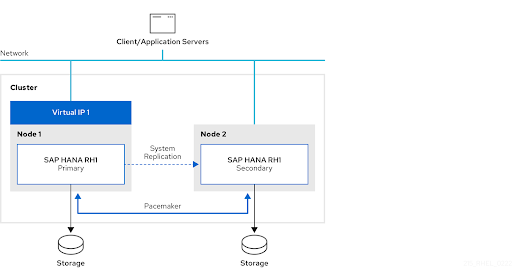
With a ‘performance-optimized’ SAP HANA System Replication setup it is also possible to use the Active/Active (Read Enabled) SAP HANA System Replication configuration, which will allow read-only access for clients on the secondary SAP HANA instance. In addition to the basic setup for managing ‘performance-optimized ‘ SAP HANA Scale-Up System Replication this document also provides optional instructions for the additional cluster configuration that is required for managing an Active/Active (Read Enabled) SAP HANA Scale-Up System Replication configuration.
The resource agents and the cluster configuration used for the setup described in this document have been developed based on guidelines provided by SAP in SAP Note 2063657 - SAP HANA System Replication Takeover Decision Guideline.
This document does not cover the installation and configuration of RHEL 9 for running SAP HANA or the SAP HANA installation procedure. Please take a look at Installing RHEL 9 for SAP Solutions for information on how to install and configure RHEL 9 for running SAP HANA on each HA cluster node and refer to the SAP HANA Installation guide and the guidelines from the hardware vendor/cloud provider for installing the SAP HANA instances.
The setup described in this document was done using on-premise 'bare-metal' servers. If you plan to use such a setup on a public cloud environment like AWS, Azure or GCP, please check the documentation for the specific platform: HA Solutions for 'performance optimized' SAP HANA Scale-Up System Replication- Configuration Guides.
1.1. Support policies
Please refer to Support Policies for RHEL High Availability Clusters - Management of SAP HANA in a Cluster.
1.2. Required subscription and repositories
As documented in SAP Note 3108302 - SAP HANA DB: Recommended OS Settings for RHEL 9, a RHEL for SAP Solutions subscription is required for every RHEL 9 system running SAP HANA. In addition to the standard repos for running SAP HANA on RHEL 9, all HA cluster nodes must also have the repo for the RHEL HA Add-On enabled. The list of enabled repos should look similar to the following:
[root]# dnf repolist
repo id                                 repo name                                                      status
rhel-9-for-x86_64-appstream-rpms        Red Hat Enterprise Linux 9 for x86_64 - AppStream (RPMs)       8,603
rhel-9-for-x86_64-baseos-rpms           Red Hat Enterprise Linux 9 for x86_64 - BaseOS (RPMs)          3,690
rhel-9-for-x86_64-highavailability-rpms Red Hat Enterprise Linux 9 for x86_64 - High Availability (RPMs)   156
rhel-9-for-x86_64-sap-solutions-rpms    Red Hat Enterprise Linux 9 for x86_64 - SAP Solutions (RPMs)      10
See RHEL for SAP Subscriptions and Repositories, for more information on how to ensure the correct subscription and repos are enabled on each HA cluster node.
Chapter 2. Configuring SAP HANA System Replication
Before the HA cluster can be configured, SAP HANA System Replication must be configured and tested according to the guidelines from SAP: SAP HANA System Replication: Configuration.
The following example shows how to enable SAP HANA System Replication on the nodes that will later become part of the HA cluster that will manage the SAP HANA System Replication setup.
Please refer to RHEL for SAP Subscriptions and Repositories, for more information on how to ensure the correct subscription and repos are enabled on each HA cluster node.
SAP HANA configuration used in the example:
SID: RH1
Instance Number: 02
node1 FQDN: node1.example.com
node2 FQDN: node2.example.com
node1 SAP HANA site name: DC1
node2 SAP HANA site name: DC2
SAP HANA 'SYSTEM' user password: <HANA_SYSTEM_PASSWORD>
SAP HANA administrative user: rh1adm
2.1. Prerequisites
Ensure that both systems can resolve the FQDN of both systems without issues. To ensure that FQDNs can be resolved even without DNS you can place them into /etc/hosts like in the example below:
[root]# cat /etc/hosts
...
192.168.0.11 node1.example.com node1
192.168.0.12 node2.example.com node2As documented at hostname | SAP Help Portal SAP HANA only supports hostnames with lowercase characters.
For the system replication to work, the SAP HANA log_mode variable must be set to normal, which is also the default value. Please refer to SAP Note 3221437 - System replication is failed due to "Connection refused: Primary has to run in log mode normal for system replication!", for more information. This can be verified as the SAP HANA administrative user using the command below on both nodes.
[rh1adm]$ hdbsql -u system -p <HANA_SYSTEM_PASSWORD> -i 02 "select value from "SYS"."M_INIFILE_CONTENTS" where key='log_mode'"
VALUE "normal"
1 row selected
A lot of the configuration steps are performed by the SAP HANA administrative user for the SID that was selected during installation. For the example setup described in this document, the user id rh1adm is used for the SAP HANA administrative user, since the SID used is RH1.
To switch from the root user to the SAP HANA administrative user, you can use the following command:
[root]# sudo -i -u rh1adm
[rh1adm]$
2.2. Performing an initial SAP HANA database backup
SAP HANA System Replication will only work after an initial backup has been performed on the HANA instance that will be the primary instance for the SAP HANA System Replication setup.
The following shows an example for creating an initial backup in /tmp/foo directory.
Please note that the size of the backup depends on the database size and may take some time to complete. The directory to which the backup will be placed must be writable by the SAP HANA administrative user.
On single-tenant SAP HANA setups, the following command can be used to create the initial backup:
[rh1adm]$ hdbsql -i 02 -u system -p <HANA_SYSTEM_PASSWORD> "BACKUP DATA USING FILE ('/tmp/foo')"
0 rows affected (overall time xx.xxx sec; server time xx.xxx sec)
On multi-tenant SAP HANA setups, the SYSTEMDB and all tenant databases need to be backed up. The following example shows how to backup the SYSTEMDB:
[rh1adm]$ hdbsql -i 02 -u system -p <HANA_SYSTEM_PASSWORD> -d SYSTEMDB "BACKUP DATA USING FILE ('/tmp/foo')"
0 rows affected (overall time xx.xxx sec; server time xx.xxx sec)
[rh1adm]# hdbsql -i 02 -u system -p <HANA_SYSTEM_PASSWORD> -d SYSTEMDB "BACKUP DATA FOR RH1 USING FILE ('/tmp/foo-RH1')"
0 rows affected (overall time xx.xxx sec; server time xx.xxx sec)
Please check the SAP HANA documentation on how to backup the tenant databases.
2.3. Configuring the SAP HANA primary replication instance
After the initial backup has been successfully completed, initialize SAP HANA System Replication with the following command:
[rh1adm]$ hdbnsutil -sr_enable --name=DC1
checking for active nameserver ...
nameserver is active, proceeding ...
successfully enabled system as system replication source site done.
Verify that after the initialization the SAP HANA System Replication status shows the current node as 'primary':
[rh1adm]#$ hdbnsutil -sr_state
checking for active or inactive nameserver ...
System Replication State
~~~~~~~~~~~~~~~~~~~~~~~~
mode: primary
site id: 1
site name: DC1
Host Mappings:
2.4. Configuring the SAP HANA secondary replication instance
After installing the secondary SAP HANA instance on the other HA cluster node using the same SID and instance number as the SAP HANA primary instance, it needs to be registered to the already running SAP HANA primary instance.
The SAP HANA instance that will become the secondary replication instance needs to be stopped first before it can be registered to the primary instance:
[rh1adm]$ HDB stop
When the secondary SAP HANA instance has been stopped, copy the SAP HANA system PKI SSFS_RH1.KEY and SSFS_RH1.DAT files from the primary SAP HANA instance to the secondary SAP HANA instance:
[rh1adm]$ scp root@node1:/usr/sap/RH1/SYS/global/security/rsecssfs/key/SSFS_RH1.KEY /usr/sap/RH1/SYS/global/security/rsecssfs/key/SSFS_RH1.KEY
...
[rh1adm]$ scp root@node1:/usr/sap/RH1/SYS/global/security/rsecssfs/data/SSFS_RH1.DAT /usr/sap/RH1/SYS/global/security/rsecssfs/data/SSFS_RH1.DAT
...
Please refer to SAP Note 2369981 - Required configuration steps for authentication with HANA System Replication, for more information.
Now the SAP HANA secondary replication instance can be registered to the SAP HANA primary replication instance with the following command:
[rh1adm]$ hdbnsutil -sr_register --remoteHost=node1 --remoteInstance=${TINSTANCE} --replicationMode=syncmem --operationMode=logreplay --name=DC2
adding site ...
checking for inactive nameserver ...
nameserver node2:30201 not responding.
collecting information ...
updating local ini files ...
done.
Please choose the values for replicationMode and operationMode according to your requirements for HANA System Replication. Please refer to Replication Modes for SAP HANA System Replication and Operation Modes for SAP HANA System Replication, for more information.
When the registration is successful, the SAP HANA secondary replication instance can be started again:
[rh1adm]$ HDB start
Verify that the secondary node is running and that 'mode' matches the value used for the replicationMode parameter in the hdbnsutil -sr_register command. If registration was successful, the SAP HANA System Replication status on the SAP HANA secondary replication instance should look similar to the following:
[rh1adm]$ hdbnsutil -sr_state
checking for active or inactive nameserver ...
System Replication State
~~~~~~~~~~~~~~~~~~~~~~~~
mode: syncmem
site id: 2
site name: DC2
active primary site: 1
Host Mappings:
~~~~~~~~~~~~~~
node2 -> [DC1] node1
node2 -> [DC2] node2
2.5. Checking SAP HANA System Replication state
To check the current state of SAP HANA System Replication, you can use the systemReplicationStatus.py Python script provided by SAP HANA as the SAP HANA administrative user on the current primary SAP HANA node.
On single tenant SAP HANA setups, the output should look similar to the following:
[rh1adm]$ python /usr/sap/RH1/HDB02/exe/python_support/systemReplicationStatus.py
| Host | Port | Service Name | Volume ID | Site ID | Site Name | Secondary | Secondary | Secondary | Secondary | Secondary | Replication | Replication | Replication | | | | | | | | Host | Port | Site ID | Site Name | Active Status | Mode | Status | Status Details |
| ----- | ----- | ------------ | --------- | ------- | --------- | --------- | --------- | --------- | --------- | ------------- | ----------- | ----------- | -------------- | | node1 | 30201 | nameserver | 1 | 1 | DC1 | node2 | 30201 | 2 | DC2 | YES | SYNCMEM | ACTIVE | |
| node1 | 30207 | xsengine | 2 | 1 | DC1 | node2 | 30207 | 2 | DC2 | YES | SYNCMEM | ACTIVE | |
| node1 | 30203 | indexserver | 3 | 1 | DC1 | node2 | 30203 | 2 | DC2 | YES | SYNCMEM | ACTIVE | |


status system replication site "2": ACTIVE
overall system replication status: ACTIVE

Local System Replication State
~~~~~~~~~~~~~~~~~~~~~~~~~~~~~~
mode: PRIMARY
site id: 1
site name: DC1
On multi-tenant SAP HANA setups, the output should look similar to the following:
[rh1adm]$ python /usr/sap/RH1/HDB02/exe/python_support/systemReplicationStatus.py
| Database | Host | Port | Service Name | Volume ID | Site ID | Site Name | Secondary | Secondary | Secondary | Secondary | Secondary | Replication | Replication | Replication | | | | | | | | | Host | Port | Site ID | Site Name | Active Status | Mode | Status | Status Details |
| -------- | ----- | ----- | ------------ | --------- | ------- | --------- | ----------| --------- | --------- | --------- | ------------- | ----------- | ----------- | -------------- |
| SYSTEMDB | node1 | 30201 | nameserver | 1 | 1 | DC1 | node2 | 30201 | 2 | DC2 | YES | SYNCMEM | ACTIVE | |
| RH1 | node1 | 30207 | xsengine | 2 | 1 | DC1 | node2 | 30207 | 2 | DC2 | YES | SYNCMEM | ACTIVE | |
| RH1 | node1 | 30203 | indexserver | 3 | 1 | DC1 | node2 | 30203 | 2 | DC2 | YES | SYNCMEM | ACTIVE | |

status system replication site "2": ACTIVE
overall system replication status: ACTIVE

Local System Replication State
~~~~~~~~~~~~~~~~~~~~~~~~~~~~~~
mode: PRIMARY
site id: 1
site name: DC1
In both cases, please also check the return code:
echo $?
15
A return code of 15 (Active) is fine. 14 means synchronizing and 13 is initiaizing.
2.6. Testing SAP HANA System Replication
The test phase is a very important phase to verify if the KPIs are met and the landscape performs the way it was configured. If the SAP HANA System Replication setup does not work as expected without the HA cluster, it can lead to unexpected behavior when the HA cluster is configured later on to manage the SAP HANA System Replication setup.
Therefore, a few test cases are suggested below as guidelines, which should be enhanced by your specific requirements. The tests should be performed with realistic data loads and sizes.
| Test case | Description |
|---|---|
| Full Replication | Measure how long the initial synchronization takes, from when |
| Lost Connection | Measure how long it takes until primary and secondary are |
| Takeover | Measure how long it takes for the secondary system to be fully |
| Data Consistency | Create or change data, then perform a takeover and check if the data is still available. |
| Client Reconnect | Test client access after a take-over, to check if the DNS/Virtual IP switch worked. |
| Primary becomes secondary | Measure how long it takes until both systems are in sync, when the former primary becomes the secondary after a takeover. |
Please refer to section “9. Testing”, in How To Perform System Replication for SAP HANA, for more information.
Chapter 3. Configuring the HA cluster to manage the SAP HANA Scale-Up System Replication setup
Please refer to the following documentation for general guidance on setting up pacemaker-based HA clusters on RHEL:
The remainder of this guide will assume that the following things are configured and working properly:
- The basic HA cluster is configured according to the official Red Hat documentation and has proper and working fencing (please see the support policies for Fencing/STONITH for guidelines on which fencing mechanism to use according to the platform the setup is running on.
Using fence_scsi/fence_mpath as fencing/STONITH mechanism is not supported for this solution, since there is no shared storage that is accessed by the SAP HANA instances managed by the HA cluster.
- SAP HANA System Replication has been configured and it has been verified that manual takeovers between the SAP HANA instances are working correctly.
- Automatic startup on boot of the SAP HANA instances is disabled on all HA cluster nodes (the start and stop of the SAP HANA instances will be managed by the HA cluster).
If the SAP HANA instances that will be managed by the HA cluster are systemd enabled (SAP HANA 2.0 SPS07 and later), additional configuration changes are required to ensure that systemd does not interfere with the management of the SAP instances by the HA cluster. Please check out section 2. Red Hat HA Solutions for SAP in The Systemd-Based SAP Startup Framework for information.
3.1. Installing resource agents and other components required for managing SAP HANA Scale-Up System Replication using the RHEL HA Add-On
The resource agents and other SAP HANA specific components required for setting up an HA cluster for managing SAP HANA Scale-Up System Replication setup are provided via the resource-agents-sap-hana RPM package from the “RHEL for SAP Solutions” repo.
To install the package please use the following command:
[root]# dnf install resource-agents-sap-hana3.2. Enabling the SAP HANA srConnectionChanged() hook
As documented in SAP’s Implementing a HA/DR Provider, recent versions of SAP HANA provide so-called "hooks" that allow SAP HANA to send out notifications for certain events. The srConnectionChanged() hook can be used to improve the ability of the HA cluster to detect when a change in the status of the SAP HANA System Replication occurs that requires the HA cluster to take action and to avoid data loss/data corruption by preventing accidental takeovers from being triggered in situations where this should be avoided.
When using SAP HANA 2.0 SPS0 or later and a version of the resource-agents-sap-hana package that provides the components for supporting the srConnectionChanged() hook, it is mandatory to enable the hook before proceeding with the HA cluster setup.
3.2.1. Verifying the version of the resource-agents-sap-hana package
Please verify that the correct version of the resource-agents-sap-hana package providing the components required to enable the srConnectionChanged() hook for your version of RHEL 9 is installed, as documented in How can the srConnectionChanged() hook be used to improve the detection of situations where a takeover is required, in a Red Hat Pacemaker cluster managing HANA Scale-up or Scale-out System Replication?.
3.2.2. Activating the srConnectionChanged() hook on all SAP HANA instances
The steps to activate the srConnectionChanged() hook need to be performed for each SAP HANA instance on all HA cluster nodes.
Stop the HA cluster on both nodes (this command only needs to be run on one HA cluster node):
[root]# pcs cluster stop --allVerify that all SAP HANA instances are stopped completely.
Update the SAP HANA
global.inifile on each node to enable use of the hook script by both SAP HANA instances (e.g., in file/hana/shared/RH1/global/hdb/custom/config/global.ini):[ha_dr_provider_SAPHanaSR] provider = SAPHanaSR path = /usr/share/SAPHanaSR/srHook execution_order = 1 [trace] ha_dr_saphanasr = infoOn each HA cluster node, create the file
/etc/sudoers.d/20-saphanaby running the following command and adding the contents below to allow the hook script to update the node attributes when thesrConnectionChanged()hook is called.[root]# visudo -f /etc/sudoers.d/20-saphana Cmnd_Alias DC1_SOK = /usr/sbin/crm_attribute -n hana_rh1_site_srHook_DC1 -v SOK -t crm_config -s SAPHanaSR Cmnd_Alias DC1_SFAIL = /usr/sbin/crm_attribute -n hana_rh1_site_srHook_DC1 -v SFAIL -t crm_config -s SAPHanaSR Cmnd_Alias DC2_SOK = /usr/sbin/crm_attribute -n hana_rh1_site_srHook_DC2 -v SOK -t crm_config -s SAPHanaSR Cmnd_Alias DC2_SFAIL = /usr/sbin/crm_attribute -n hana_rh1_site_srHook_DC2 -v SFAIL -t crm_config -s SAPHanaSR rh1adm ALL=(ALL) NOPASSWD: DC1_SOK, DC1_SFAIL, DC2_SOK, DC2_SFAIL Defaults!DC1_SOK, DC1_SFAIL, DC2_SOK, DC2_SFAIL !requirettyReplace
rh1with the lowercase SID of your SAP HANA installation and replaceDC1andDC2with your SAP HANA site names.For further information on why the
Defaultssetting is needed, refer to The srHook attribute is set to SFAIL in a Pacemaker cluster managing SAP HANA system replication, even though replication is in a healthy state.Start the SAP HANA instances on both HA cluster nodes manually without starting the HA cluster:
[rh1adm]$ HDB startVerify that the hook script is working as expected. Perform some action to trigger the hook, such as stopping a SAP HANA instance. Then check whether the hook logged anything using a method such as the one below:
[rh1adm]$ cdtrace [rh1adm]$ awk '/ha_dr_SAPHanaSR.*crm_attribute/ { printf "%s %s %s %s\n",$2,$3,$5,$16 }' nameserver_* 2018-05-04 12:34:04.476445 ha_dr_SAPHanaSR SFAIL 2018-05-04 12:53:06.316973 ha_dr_SAPHanaSR SOK [rh1adm]# grep ha_dr_ *NoteFor more information on how to verify that the SAP HANA hook is working correctly, please check the SAP documentation: Install and Configure a HA/DR Provider Script.
When the functionality of the hook has been verified, the HA cluster can be started again.
[root]# pcs cluster start --all
3.3. Configuring general HA cluster properties
To avoid unnecessary failovers of the resources, the following default values for the resource-stickiness and migration-threshold parameters must be set (this only needs to be done on one node):
[root]# pcs resource defaults update resource-stickiness=1000
[root]# pcs resource defaults update migration-threshold=5000
resource-stickiness=1000 will encourage the resource to stay running where it is, while migration-threshold=5000 will cause the resource to move to a new node only after 5000 failures. 5000 is generally sufficient to prevent the resource from prematurely failing over to another node. This also ensures that the resource failover time stays within a controllable limit.
3.4. Creating cloned SAPHanaTopology resource
The SAPHanaTopology resource agent gathers information about the status and configuration of SAP HANA System Replication on each node. In addition, it starts and monitors the local SAP HostAgent, which is required for starting, stopping, and monitoring the SAP HANA instances.
The SAPHanaTopology resource agent has the following attributes:
| Attribute Name | Required? | Default value | Description |
|---|---|---|---|
| SID | yes | null | The SAP System Identifier (SID) of the SAP HANA installation (must be identical for all nodes). Example: RH1 |
| InstanceNumber | yes | null | The Instance Number of the SAP HANA installation (must be identical for all nodes). Example: 02 |
Below is an example command to create the SAPHanaTopology cloned resource.
[root]# pcs resource create SAPHanaTopology_RH1_02 SAPHanaTopology SID=RH1 InstanceNumber=02 \
op start timeout=600 \
op stop timeout=300 \
op monitor interval=10 timeout=600 \
clone clone-max=2 clone-node-max=1 interleave=true
The resulting resource should look like the following:
[root]# pcs resource config SAPHanaTopology_RH1_02-clone
Clone: SAPHanaTopology_RH1_02-clone
Meta Attrs: clone-max=2 clone-node-max=1 interleave=true Resource: SAPHanaTopology_RH1_02 (class=ocf provider=heartbeat type=SAPHanaTopology)
  Attributes: SID=RH1 InstanceNumber=02
  Operations: start interval=0s timeout=600 (SAPHanaTopology_RH1_02-start-interval-0s)
              stop interval=0s timeout=300 (SAPHanaTopology_RH1_02-stop-interval-0s)
monitor interval=10 timeout=600 (SAPHanaTopology_RH1_02-monitor-interval-10s)The timeouts shown for the resource operations are only examples and may need to be adjusted depending on the actual SAP HANA setup (for example, large SAP HANA databases can take longer to start up, therefore the start timeout may have to be increased).
Once the resource is started, you will see the collected information stored in the form of node attributes that can be viewed with the command pcs status --full. Below is an example of what attributes can look like when only SAPHanaTopology is started.
[root]# pcs status --full
...
Node Attributes:
* Node node1:
    + hana_rh1_remoteHost               : node2
    + hana_rh1_roles                    : 1:P:master1::worker:
    + hana_rh1_site                     : DC1
    + hana_rh1_srmode                   : syncmem
    + hana_rh1_vhost                    : node1
* Node node2:
    + hana_rh1_remoteHost               : node1
    + hana_rh1_roles                    : 1:S:master1::worker:
    + hana_rh1_site                     : DC2
    + hana_rh1_srmode                   : syncmem
    + hana_rh1_vhost                    : node2
...
3.5. Creating Promotable SAPHana resource
The SAPHana resource agent manages the SAP HANA instances that are part of the SAP HANA Scale-Up System Replication and also monitors the status of SAP HANA System Replication. In the event of a failure of the SAP HANA primary replication instance, the SAPHana resource agent can trigger a takeover of SAP HANA System Replication based on how the resource agent parameters have been set.
The SAPHana resource agent has the following attributes:
| Attribute Name | Required? | Default value | Description |
|---|---|---|---|
| SID | yes | null | The SAP System Identifier (SID) of the SAP HANA installation (must be identical for all nodes). Example: RH1 |
| InstanceNumber | yes | null | The Instance Number of the SAP HANA installation (must be identical for all nodes). Example: 02 |
| PREFER_SITE_TAKEOVER | no | null | Should the resource agent prefer to switch over to the secondary instance instead of restarting the primary locally? true: do prefer takeover to the secondary site; false: do prefer restart locally; never: under no circumstances do a takeover of the other node |
| AUTOMATED_REGISTER | no | false | If a takeover event has occurred, should the former primary instance be registered as secondary? ("false": no, manual intervention will be needed; "true": yes, the former primary will be registered by the resource agent as secondary) |
| DUPLICATE_PRIMARY_TIMEOUT | no | 7200 | A time difference is needed between two primary time stamps if a dual-primary situation occurs before the cluster will react. If the time difference is less than the time gap, the cluster holds one or both instances in "WAITING" status. This is to give an administrator the chance to react to a failover. If the complete node of the former primary crashes, the former primary will be registered after the time difference has passed. If "only" the SAP HANA instance has crashed, the former primary will be registered immediately. After this registration to the new primary, all data will be overwritten by the system replication. |
The PREFER_SITE_TAKEOVER, AUTOMATED_REGISTER and DUPLICATE_PIMARY_TIMEOUT parameters must be set according to the requirements for availability and data protection of the SAP HANA System Replication that is managed by the HA cluster.
In general, PREFER_SITE_TAKEOVER should be set to true, to allow the HA cluster to trigger a takeover in case a failure of the primary SAP HANA instance has been detected, since it usually takes less time for the new SAP HANA primary instance to become fully active than it would take for the original SAP HANA primary instance to restart and reload all data back from disk into memory.
To be able to verify that all data on the new primary SAP HANA instance is correct after a takeover triggered by the HA cluster has occurred, AUTOMATED_REGISTER should be set to false. This will give an operator the possibility to either switch back to the old primary SAP HANA instance in case a takeover happened by accident, or if the takeover was correct, the old primary SAP HANA instance can be registered as the new secondary SAP HANA instance to get SAP HANA System Replication working again.
If AUTOMATED_REGISTER is set to true, then an old primary SAP HANA instance will be automatically registered as the new secondary SAP HANA instance by the SAPHana resource agent after a takeover by the HA cluster has occurred. This will increase the availability of the SAP HANA System Replication setup and prevent so-called “dual-primary” situations in the SAP HANA System Replication environment. But it can potentially increase the risk of data-loss/data-corruption, because if a takeover was triggered by the HA cluster even though the data on the secondary SAP HANA instance wasn’t fully in sync, then the automatic registration of the old primary SAP HANA instance as the new secondary SAP HANA instance would result in all data on this instance being deleted and therefore any data that has not been synced before the takeover occurred won’t be available anymore.
The promotable SAPHana cluster resource for managing the SAP HANA instances and SAP HANA System Replication can be created as in the following example:
[root]# pcs resource create SAPHana_RH1_02 SAPHana SID=RH1 InstanceNumber=02 \
PREFER_SITE_TAKEOVER=true DUPLICATE_PRIMARY_TIMEOUT=7200 AUTOMATED_REGISTER=true \
op start timeout=3600 \
op stop timeout=3600 \
op monitor interval=61 role="Slave" timeout=700 \
op monitor interval=59 role="Master" timeout=700 \
op promote timeout=3600 \
op demote timeout=3600 \
promotable notify=true clone-max=2 clone-node-max=1 interleave=true
The resulting HA cluster resource should look like the following:
[root]# pcs resource config SAPHana_RH1_02-clone
Clone: SAPHana_RH1_02-clone
Meta Attrs: clone-max=2 clone-node-max=1 interleave=true notify=true promotable=true
Resource: SAPHana_RH1_02 (class=ocf provider=heartbeat type=SAPHana)
  Attributes: AUTOMATED_REGISTER=true DUPLICATE_PRIMARY_TIMEOUT=180 InstanceNumber=02 PREFER_SITE_TAKEOVER=true SID=RH1
  Operations: methods interval=0s timeout=5 (SAPHana_RH1_02-methods-interval-0s)
              monitor interval=61 role=Slave timeout=700 (SAPHana_RH1_02-monitor-interval-61)
              monitor interval=59 role=Master timeout=700 (SAPHana_RH1_02-monitor-interval-59)
              promote interval=0s timeout=3600 (SAPHana_RH1_02-promote-interval-0s)
              demote interval=0s timeout=3600 (SAPHana_RH1_02-demote-interval-0s)
              start interval=0s timeout=3600 (SAPHana_RH1_02-start-interval-0s)
stop interval=0s timeout=3600 (SAPHana_RH1_02-stop-interval-0s)The timeouts for the resource operations are only examples and may need to be adjusted depending on the actual SAP HANA setup (for example, large SAP HANA databases can take longer to start up, therefore the start timeout may have to be increased).
Once the resource is started and the HA cluster has executed the first monitor operation, it will add additional node attributes describing the current state of SAP HANA databases on nodes, as seen below:
[root]# pcs status --full
...
Node Attributes:
* Node node1:
    + hana_rh1_clone_state              : PROMOTED
    + hana_rh1_op_mode                  : delta_datashipping
    + hana_rh1_remoteHost               : node2
    + hana_rh1_roles                    : 4:P:master1:master:worker:master
    + hana_rh1_site                     : DC1
    + hana_rh1_sync_state               : PRIM
    + hana_rh1_srmode                   : syncmem
    + hana_rh1_version                	: 2.00.064.00.1660047502
    + hana_rh1_vhost                    : node1
    + lpa_rh1_lpt                       : 1495204085
    + master-SAPHana_RH1_02             : 150
* Node node2:
    + hana_r12_clone_state              : DEMOTED
    + hana_rh1_op_mode                  : delta_datashipping
    + hana_rh1_remoteHost               : node1
    + hana_rh1_roles                    : 4:S:master1:master:worker:master
    + hana_rh1_site                     : DC2
    + hana_rh1_srmode                   : syncmem
    + hana_rh1_sync_state               : SOK
    + hana_rh1_version                	: 2.00.064.00.1660047502
    + hana_rh1_vhost                    : node2
    + lpa_rh1_lpt                       : 30
    + master-SAPHana_RH1_02             : -INFINITY
...
3.6. Creating virtual IP address resource
In order for clients to be able to access the primary SAP HANA instance independently from the HA cluster node it is currently running on, a virtual IP address is needed, which the HA cluster will enable on the node where the primary SAP HANA instance is running.
To allow the HA cluster to manage the VIP, create IPaddr2 resource with IP 192.168.0.15.
[root]# pcs resource create vip_RH1_02 IPaddr2 ip="192.168.0.15"Please use the appropriate resource agent for managing the virtual IP address based on the platform on which the HA cluster is running.
The resulting HA cluster resource should look as follows:
[root]# pcs resource show vip_RH1_02
Resource: vip_RH1_02 (class=ocf provider=heartbeat type=IPaddr2)
Attributes: ip=192.168.0.15
Operations: start interval=0s timeout=20s (vip_RH1_02-start-interval-0s)
            stop interval=0s timeout=20s (vip_RH1_02-stop-interval-0s)
            monitor interval=10s timeout=20s (vip_RH1_02-monitor-interval-10s)
3.7. Creating constraints
For correct operation, we need to ensure that SAPHanaTopology resources are started before starting SAPHana resources and also that the virtual IP address is present on the node where the primary SAP HANA instance is running.
To achieve this, the following constraints are required.
3.7.1. Constraint - start SAPHanaTopology before SAPHana
The example command below will create the constraint that mandates the start order of these resources. There are two things worth mentioning here:
-
symmetrical=falseattribute defines that we care only about the start of resources and they don’t need to be stopped in reverse order. -
Both resources (
SAPHanaandSAPHanaTopology) have the attributeinterleave=truethat allows the parallel start of these resources on nodes. This permits that, despite setting the order constraints, we will not wait for all nodes to startSAPHanaTopology, but we can start theSAPHanaresource on any of the nodes as soon asSAPHanaTopologyis running there.
Command for creating the constraint:
[root]# pcs constraint order SAPHanaTopology_RH1_02-clone then SAPHana_RH1_02-clone symmetrical=falseThe resulting constraint should look like the one in the example below:
[root]# pcs constraint
...
Ordering Constraints:
  start SAPHanaTopology_RH1_02-clone then start SAPHana_RH1_02-clone (kind:Mandatory) (non-symmetrical)
...
3.7.2. Constraint - colocate the IPaddr2 resource with Master of SAPHana resource
Below is an example command that will colocate the IPaddr2 resource with SAPHana resource that was promoted as Master.
[root]# pcs constraint colocation add vip_RH1_02 with master SAPHana_RH1_02-clone 2000
Note that the constraint is using a score of 2000 instead of the default INFINITY. This allows the IPaddr2 resource to stay active in case there is no Master promoted in the SAPHana resource, so it is still possible to use tools like SAP Management Console (MMC) or SAP Landscape Management (LaMa) that can use this address to query the status information about the SAP Instance.
The resulting constraint should look like the following:
[root]# pcs constraint
...
Colocation Constraints:
  vip_RH1_02 with SAPHana_RH1_02-clone (score:2000) (rsc-role:Started) (with-rsc-role:Master)
...
3.8. Adding a secondary virtual IP address for an Active/Active (Read-Enabled) SAP HANA System Replication setup (optional)
Starting with SAP HANA 2.0 SPS1, SAP HANA supports Active/Active (Read Enabled) setups for SAP HANA System Replication, where the secondary instance of a SAP HANA System Replication setup can be used for read-only access.
To be able to support such setups, a second virtual IP address is required, which enables clients to access the secondary SAP HANA instance. To ensure that the secondary replication site can still be accessed after a takeover has occurred, the HA cluster needs to move the virtual IP address around with the slave of the promotable SAPHana resource.
To enable the Active/Active (Read Enabled) mode in SAP HANA, the operationMode must be set to logreplay_readaccess when registering the secondary SAP HANA instance.
3.8.1. Creating the resource for managing the secondary virtual IP address
[root]# pcs resource create vip2_RH1_02 IPaddr2 ip="192.168.1.11"Please use the appropriate resource agent for managing the virtual IP address based on the platform on which the HA cluster is running.
3.8.2. Creating location constraints
This is to ensure that the secondary virtual IP address is placed on the right HA cluster node.
[root]# pcs constraint location vip2_RH1_02 rule score=INFINITY hana_rh1_sync_state eq SOK and hana_rh1_roles eq 4:S:master1:master:worker:master
[root]# pcs constraint location vip2_RH1_02 rule score=2000 hana_rh1_sync_state eq PRIM and hana_rh1_roles eq 4:P:master1:master:worker:master
These location constraints ensure that the second virtual IP resource will have the following behavior:
- If the primary SAP HANA instance and the secondary SAP HANA instance are both up and running, and SAP HANA System Replication is in sync, the second virtual IP will be active on the HA cluster node where the secondary SAP HANA instance is running.
- If the secondary SAP HANA instance is not running or the SAP HANA System Replication is not in sync, the second virtual IP will be active on the HA cluster node where the primary SAP HANA instance is running. When the secondary SAP HANA instance is running and SAP HANA System Replication is in sync again, the second virtual IP will move back to the HA cluster node where the secondary SAP HANA instance is running.
- If the primary SAP HANA instance is not running and a SAP HANA takeover is triggered by the HA cluster, the second virtual IP will continue running on the same node until the SAP HANA instance on the other node is registered as the new secondary and the SAP HANA System Replication is in sync again.
This maximizes the time that the second virtual IP resource will be assigned to a node where a healthy SAP HANA instance is running.
3.9. Enabling the SAP HANA srServiceStateChanged() hook for hdbindexserver process failure action (optional)
When HANA detects an issue with an indexserver process, it recovers it by stopping and restarting it automatically via the in-built functionality built into SAP HANA.
However, in some cases, the service can take a very long time for the "stopping" phase. During that time, the System Replication may get out of sync, while HANA still proceeds to work and accept new connections. Eventually, the service completes the stop-and-restart process and recovers.
Instead of waiting for this long-running restart, which poses a risk to data consistency, should anything else fail in the instance during that time, the ChkSrv.py hook script can react to the situation and stop the HANA instance for a faster recovery. In a setup with automated failover enabled, the instance stop leads to a takeover being initiated, if the secondary node is in a healthy state. Otherwise, recovery would continue locally, but the enforced instance restart would speed it up.
When configured in the global.ini config file, SAP HANA calls the ChkSrv.py hook script for any events in the instance. The script processes the events and executes actions based on the results of the filters it applies to event details. This way, it can distinguish a HANA indexserver process that is being stopped-and-restarted by HANA after a failure from the same process being stopped as part of an instance shutdown.
Below are the different possible actions that can be taken:
- Ignore: This action just writes the parsed events and decision information to a dedicated logfile, which is useful for verifying what the hook script would do.
-
Stop: This action executes a graceful
StopSystemfor the instance through thesapcontrolcommand. -
Kill: This action executes the
HDB kill-<signal>command with a default signal 9, which can be configured.
Please note that both the stop and kill actions lead to a stopped HANA instance, with the kill being a bit faster in the end.
At this point, the cluster notices the failure of the HANA resource and reacts to it in the way it has been configured; typically, it restarts the instance, and if enabled, it also takes care of a takeover.
3.9.1. Verifying the version of the resource-agents-sap-hana package
Please verify that the correct version of the resource-agents-sap-hana package providing the components required to enable the srServiceStateChanged() hook for your version of RHEL 9 is installed, as documented in Pacemaker cluster does not trigger a takeover of HANA System Replication when the hdbindexserver process of the primary HANA instance hangs/crashes.
3.9.2. Activating the srServiceStateChanged() hook on all SAP HANA instances
The steps to activate the srServiceStateChanged() hook need to be performed for each SAP HANA instance on all HA cluster nodes.
Update the SAP HANA
global.inifile on each node to enable use of the hook script by both SAP HANA instances (e.g., in file/hana/shared/RH1/global/hdb/custom/config/global.ini):[ha_dr_provider_chksrv] provider = ChkSrv path = /usr/share/SAPHanaSR/srHook execution_order = 2 action_on_lost = stop [trace] ha_dr_saphanasr = info ha_dr_chksrv = infoSet the optional parameters as shown below:
-
action_on_lost(default: ignore) -
stop_timeout(default: 20) -
kill_signal(default: 9)
Below is an explanation of the available options for
action_on_lost:-
ignore: This enables the feature, but only log events. This is useful for monitoring the hook’s activity in the configured environment. -
stop: This executes a gracefulsapcontrol -nr <nr> -function StopSystem. -
kill: This executes HDBkill-<signal>for the fastest stop. -
Please note that
stop_timeoutis added to the command execution of the stop and kill actions, andkill_signalis used in the kill action as part of theHDB kill-<signal>command.
-
Activate the new hook while HANA is running by reloading the
HA/DRproviders:[rh1adm]$ hdbnsutil -reloadHADRProvidersVerify the hook initialization by checking the new trace file:
[rh1adm]$ cdtrace
[rh1adm]$ cat nameserver_chksrv.trc
Chapter 4. Testing the setup
Before the HA cluster setup is put into production, it needs to be thoroughly tested to verify that everything works as expected and also to allow the operators to get experience with how the HA cluster will behave in certain situations and how to bring the setup back to a healthy state in case a failure occurs.
At least the following tests should be carried out:
Perform a manual move of the primary SAP HANA instance via HA cluster commands.
Expected result: a takeover should be triggered on the SAP HANA side, promoting the secondary SAP HANA instance to become the new primary SAP HANA instance. Depending on the configuration of the
AUTOMATED_REGISTERparameter of theSAPHanaresource, the HA cluster will either register the former primary instance, as the new secondary automatically, or an operator will have to determine what should happen with the former primary instanceCrash the HA cluster node where the primary SAP HANA instance is running.
Expected result: the HA cluster node should be fenced and a takeover should be triggered on the SAP HANA side, promoting the secondary SAP HANA instance to become the new primary SAP HANA instance. Depending on the configuration of the
AUTOMATED_REGISTERparameter of theSAPHanaresource, the HA cluster will either register the former primary instance as the new secondary automatically, or an operator will have to determine what should happen with the former primary instance.Manually stop primary SAP HANA instance outside of HA cluster.
Expected result: a takeover should be triggered on the SAP HANA side, promoting the secondary SAP HANA instance to become the new primary SAP HANA instance. Depending on the configuration of the
AUTOMATED_REGISTERparameter of theSAPHanaresource, the HA cluster will either register the former primary instance as the new secondary automatically, or an operator will have to determine what should happen with the former primary instance.Crash the node where the secondary SAP HANA instance is running.
Expected result: the HA cluster node should be fenced and the secondary SAP HANA instance should be started when the HA cluster node is back online and SAP HANA System Replication should resume.
Manually stop the secondary SAP HANA instance outside of HA cluster
Expected result: the secondary SAP HANA instance should be restarted by the HA cluster
Disable the network connection used by SAP HANA System Replication
Expected result: the HA cluster should detect that a failure of SAP HANA System Replication has occurred, but should keep the SAP HANA instances running on both nodes
Chapter 5. Maintenance procedures
5.1. Updating the OS and HA cluster components
Please refer to Recommended Practices for Applying Software Updates to a RHEL High Availability or Resilient Storage Cluster, for more information.
5.2. Updating the SAP HANA instances
If the SAP HANA System Replication setup is managed using the HA cluster configuration described in this document, some additional steps are needed in addition to the actual process of updating the SAP HANA instances before and after the update. Execute the following steps:
Put the SAPHana resource in unmanaged mode.
[root]# pcs resource unmanage SAPHana_RH1_02-clone- Update the SAP HANA instances using the procedure provided by SAP.
When the update of the SAP HANA instances has been completed and it has been verified that SAP HANA System Replication is working again, the status of the SAPHana resource needs to be refreshed to make sure the cluster is aware of the current state of the SAP HANA System Replication setup.
[root]# pcs resource refresh SAPHana_RH1_02-cloneWhen the HA cluster has correctly picked up the current status of the SAP HANA System Replication setup, put the SAPHana resource back into managed mode so that the HA cluster will be able to react to any issues in the SAP HANA System Replication setup again.
[root]# pcs resource manage SAPHana_RH1_02-clone
5.3. Manually moving the SAPHana resource to another node (SAP HANA System Replication takeover by a HA cluster)
A manual takeover of SAP HANA System Replication can be triggered by moving the promotable clone resource:
[root]# pcs resource move SAPHana_RH1_02-clone
See Moving a resource from its current node in the Configuring and managing high availability clusters document for more information. In RHEL 9, you no longer have to remove the location constraint created with the pcs resource move command because it is automatically removed when the resource move is finished.
What happens to the former SAP HANA primary instance after the takeover has been completed and the constraint has been removed depends on the setting of the AUTOMATED_REGISTER parameter of the SAPHana resource:
-
If
Automated_REGISTER=true, then the former SAP HANA primary instance is registered as the new secondary, and SAP HANA System Replication becomes active again. -
If
AUTOMATED_REGISTER=false, then it is up to the operator to decide what should happen with the former SAP HANA primary instance after the takeover.
Chapter 6. References
6.1. Red Hat
- Installing RHEL 9 for SAP Solutions
- Configuring and managing high availability clusters on RHEL 9
- Support Policies for RHEL High Availability Clusters
- Support Policies for RHEL High Availability Clusters - Fencing/STONITH
- Support Policies for RHEL High Availability Clusters - Management of SAP HANA in a Cluster
- Red Hat HA Solutions for SAP HANA, S/4HANA and NetWeaver based SAP Applications

'%20d='M201.5%20305.5c-13.8%200-24.9-11.1-24.9-24.6%200-13.8%2011.1-24.9%2024.9-24.9%2013.6%200%2024.6%2011.1%2024.6%2024.9%200%2013.6-11.1%2024.6-24.6%2024.6zM504%20256c0%20137-111%20248-248%20248S8%20393%208%20256%20119%208%20256%208s248%20111%20248%20248zm-132.3-41.2c-9.4%200-17.7%203.9-23.8%2010-22.4-15.5-52.6-25.5-86.1-26.6l17.4-78.3%2055.4%2012.5c0%2013.6%2011.1%2024.6%2024.6%2024.6%2013.8%200%2024.9-11.3%2024.9-24.9s-11.1-24.9-24.9-24.9c-9.7%200-18%205.8-22.1%2013.8l-61.2-13.6c-3-.8-6.1%201.4-6.9%204.4l-19.1%2086.4c-33.2%201.4-63.1%2011.3-85.5%2026.8-6.1-6.4-14.7-10.2-24.1-10.2-34.9%200-46.3%2046.9-14.4%2062.8-1.1%205-1.7%2010.2-1.7%2015.5%200%2052.6%2059.2%2095.2%20132%2095.2%2073.1%200%20132.3-42.6%20132.3-95.2%200-5.3-.6-10.8-1.9-15.8%2031.3-16%2019.8-62.5-14.9-62.5zM302.8%20331c-18.2%2018.2-76.1%2017.9-93.6%200-2.2-2.2-6.1-2.2-8.3%200-2.5%202.5-2.5%206.4%200%208.6%2022.8%2022.8%2087.3%2022.8%20110.2%200%202.5-2.2%202.5-6.1%200-8.6-2.2-2.2-6.1-2.2-8.3%200zm7.7-75c-13.6%200-24.6%2011.1-24.6%2024.9%200%2013.6%2011.1%2024.6%2024.6%2024.6%2013.8%200%2024.9-11.1%2024.9-24.6%200-13.8-11-24.9-24.9-24.9z'/%3e%3c/svg%3e)