 Red Hat Summit
Fuse 6 is no longer supported
As of February 2025, Red Hat Fuse 6 is no longer supported. If you are using Fuse 6, please upgrade to Red Hat build of Apache Camel.Using Java Business Integration
Using an alternative packaging standard
Copyright © 2013 Red Hat, Inc. and/or its affiliates.
Abstract
Part I. Overview of Java Business Integration
Chapter 1. Introduction to JBI
Abstract
Figure 1.1. The JBI architecture
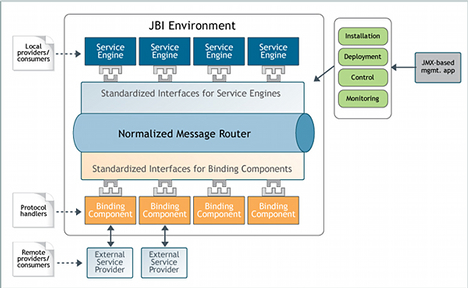
- The JBI component framework hosts and manages the JBI components. For more information see Chapter 2, The Component Framework.
- The normalized message router provides message mediation among the JBI components. For more information see Chapter 3, The Normalized Message Router.
- The management structure controls the life-cycle of the JBI components and the functional units deployed into the JBI components. It also provides mechanisms for monitoring the artifacts that are deployed into the JBI environment. For more information see Chapter 4, Management Structure.
Chapter 2. The Component Framework
Abstract
Overview
Component types
- Service Engine — Component that provides some of the logic required to provide services inside of the JBI environment. For example:
- message transformation
- orchestration
- advanced message routing
A service engine can communicate only with other components inside of the JBI environment. Service engines act as containers for the functional units deployed into the Red Hat JBoss Fuse. - Binding Component — Provides access to services outside the JBI environment using a particular protocol. Binding components implement the logic required to connect to a transport, and consume the messages received over that transport. Binding components are also responsible for the normalization of messages as they enter the JBI environment.
Packaging
META-INF/jbi.xml. The packages differ based on the root element of the JBI descriptor and the contents of the package. The JBI environment uses four types of packaging to install and deploy functionality. The two most common types used by an application developer are:
- Service Assembly — A collection of service units. The root element of the JBI descriptor is a
service-assemblyelement. The contents of the package is a collection of ZIP archives containing service units. The JBI descriptor specifies the target JBI component for each of the bundled service units. - Service Unit — A package that contains functionality to be deployed into a JBI component. For example, a service unit intended for a routing service engine contains the definition for one or more routes. Note that service units are packaged as a ZIP file. The root element of the JBI descriptor is a
service-unitelement. The contents of the package are specific to the service engine for which the service unit is intended.ImportantService units cannot be installed without being bundled into a service assembly.
Component roles
Chapter 3. The Normalized Message Router
Abstract
Overview
Message exchange patterns
- in-out
- A consumer sends a request message to a provider, which then responds to the request with a response message. The provider might also respond with a fault message if an error occured during processing.
- in-optional-out
- A consumer sends a request message to a provider. The provider might send a response message back to the consumer, but the consumer does not require a response. The provider might also respond with a fault message if an error occurred during processing. The consumer can also send a fault message to the provider.
- in-only
- A consumer sends a message to a provider, but the provider does not send a response, and, if an error occurs, the provider does not send fault messages back to the consumer.
- robust-in-only
- A consumer sends a message to a provider. The provider does not respond to the consumer except to send a fault message back to the consumer to signal an error condition.
Normalized messages
- meta-data, properties
- Holds information about the message. This information can include transaction contexts, security information, or other QoS information. The meta-data can also hold transport headers.
- payload
- An XML document that conforms to the XML Schema definition in the WSDL document that defines the message exchange. The XML document holds the substance of the message.
- attachments
- Hold any binary data associated with the message. For example, an attachment can be an image file sent as an attachment to a SOAP message.
- security
Subject - Holds security information associated with the message, such as authentication credentials. For more information about the security
Sublect, see Sun's API documentation.
Chapter 4. Management Structure
Abstract
Overview
JMX
MBean interface.
Installing and uninstalling artifacts into the JBI Environment
- JBI components
- Shared libraries
- Service assemblies
- Service units
InstallationService MBean that is exposed through the JMX console. In addition, the following Ant tasks are provided for installing and uninstalling JBI components and shared libraries:
- InstallComponentTask
- UninstallComponentTask
- InstallSharedLibraryTask
- UninstallSharedLibraryTask
DeploymentService MBean that is exposed through the JMX console. In addition to the MBean, the following Ant tasks are provided for installing service assemblies and service units:
- DeployServiceAssemblyTask
- UndeployServiceAssemblyTask
Managing JBI components
Figure 4.1. JBI component life-cycle
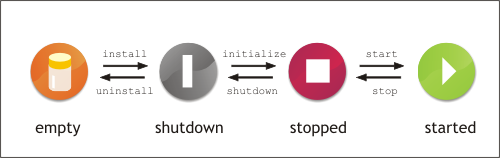
InstallationService MBean and the component's ComponentLifeCycle MBean. In addition, you can manage a component's lifecycle using the following Ant tasks:
- StartComponentTask
- StopComponentTask
- ShutDownComponentTask
Managing service units
Figure 4.2. Service unit life-cycle
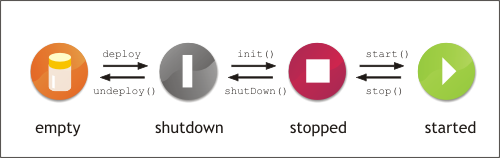
DeploymentService MBean. In addition, you can manage service units using the following Ant tasks:
- DeployServiceAssemblyTask
- UndeployServiceAssemblyTask
- StartServiceAssemblyTask
- StopServiceAssemblyTask
- ShutDownServiceAssemblyTask
- ListServiceAssembliesTask
Part II. Deploying JBI Artifacts into the Red Hat JBoss Fuse Runtime
Abstract
Chapter 5. Clustering JBI Endpoints
Overview
Features
- Connect JBI containers to form a network, and dynamically add and remove the containers from the network.
- Enable rollback and redelivery when a JBI exchange fails.
- Implement load balancing among JBI containers capable of handling a given exchange. For example:
- Install the same component in multiple JBI containers to provide increased capacity and high availability (if one container fails, the same component in another container can service the request).
- Partition the workload among multiple JBI container instances to enable different containers to handle different tasks, spreading the workload across multiple containers.
- Remote component awareness means each clustered JBI container is aware of the components in its peer containers. Networked containers listen for remote component registration/deregistration events and can route requests to those components.
Steps to set up clustering
- Install the jbi-cluster feature included in Red Hat JBoss Fuse. See the section called “Installing the clustering feature”.
- Optionally, configure the clustering engine with a JMS broker other than the Red Hat JBoss A-MQ. See the section called “Changing the JMS broker”.
- Optionally, change the default clustering engine configuration to specify different cluster and destination names. See the section called “Changing the default configuration”.
- Add endpoints and register the endpoint definition in the Spring configuration. See the section called “Using clustering in an application”.
Installing the clustering feature
- Start Red Hat JBoss Fuse.
- At the
JBossFuse:karaf@root>prompt, type:features:install jbi-cluster - Type
featuresL:listto list the existing features and their installation state. Verify that the jbi-cluster feature is installed.
Default clustering engine configuration
jbi-cluster.xml file in the org.apache.servicemix.jbi.cluster.config bundle. This bundle is located in the installation directory in \system\org\apache\servicemix\jbi\cluster.
Example 5.1. Default cluster engine configuration
Changing the default configuration
org.apache.servicemix.jbi.cluster.config. This added configuration file enables you to change both the clusterName and the destinationName.
Changing the JMS broker
InstallDir\deploy directory.
Using clustering in an application
Example 5.2. OSGi packaged JBI endpoint
<http:consumer id="myHttpConsumer" service="test:myService" endpoint="myEndpoint" />
<bean class="org.apache.servicemix.jbi.cluster.engine.OsgiSimpleClusterRegistration">
  <property name="endpoint" ref="myHttpConsumer" />
</bean>
<http:consumer id="myHttpConsumer" service="test:myService" endpoint="myEndpoint" />
<bean class="org.apache.servicemix.jbi.cluster.engine.OsgiSimpleClusterRegistration">
  <property name="endpoint" ref="myHttpConsumer" />
</bean>Example 5.3. JBI packaged endpoint
<http:consumer id="myHttpConsumer" service="test:myService" endpoint="myEndpoint" />
<bean class="org.apache.servicemix.jbi.cluster.engine.OsgiSimpleClusterRegistration">
  <property name="serviceName" value="test:myService" />
  <property name="endpointName" value="myEndpoint" />
</bean>
<http:consumer id="myHttpConsumer" service="test:myService" endpoint="myEndpoint" />
<bean class="org.apache.servicemix.jbi.cluster.engine.OsgiSimpleClusterRegistration">
  <property name="serviceName" value="test:myService" />
  <property name="endpointName" value="myEndpoint" />
</bean>Establishing network connections between containers
- Static network connections — Configure each
networkConnectorin the cluster in the broker configuration fileinstall_dir/conf/activemq.xml.Example 5.4 shows an example of a staticnetworkConnectordiscovery configuration.Example 5.4. Static configuration
Copy to Clipboard Copied! Toggle word wrap Toggle overflow - Multicast network connections — Enable multicast on your network and configure multicast in the broker configuration file
installation_directory/conf/activemq.xmlfor each container in the network. When the containers start they detect each other and transparently connect to one another.Example 5.5 shows an example of a multicastnetworkConnectordiscovery configuration.Example 5.5. Multicast configuration
<networkConnectors>
  <!-- by default just auto discover the other brokers -->
            <networkConnector name="default-nc" uri="multicast://default"/>
    </networkConnectors>
<networkConnectors> <!-- by default just auto discover the other brokers --> <networkConnector name="default-nc" uri="multicast://default"/> </networkConnectors>Copy to Clipboard Copied! Toggle word wrap Toggle overflow
High availability
ACTIVE mode and the slave is in STANDBY mode waiting for a failover event to trigger the slave to take over.
- Shared file system master-slave — In a shared database master-slave configuration, two containers use the same physical data store for the container state. You should ensure that the file system supports file level locking, as this is the mechanism used to elect the master. If the master process exits, the database lock is released and the slave acquires it. The slave then becomes the master.
- JDBC master-slave — In a JDBC master-slave configuration, the master locks a table in the backend database. The failover event in this case is that the lock is released from the database.
- Pure master-slave — A pure master-slave configuration can use either a shared database or a shared file system. The master replicates all state changes to the slave so additional overhead is incurred. The failover trigger in a pure master-slave configuration is that the slave loses its network connection to its master. Because of the additional overhead and maintenance involved, this option is less desirable than the other two options.
Cluster configuration conventions
- Don't use static and multicast
networkConnectorsat the same time. If you enable staticnetworkConnectors, then you should disable any multicastnetworkConnectors, and vice versa. - When configuring a network of containers in
installation_directory/conf/activemq.xml, ensure that thebrokerNameattribute is unique for each node in the cluster. This will enable the instances in the network to uniquely identify each other. - When configuring a network of containers you must ensure that you have unique persistent stores for each
ACTIVEinstance. If you have a JDBC data source, you must use a separate database for eachACTIVEinstance. For example:<property name="url" value="jdbc:mysql://localhost/broker_activemq_host1?relaxAutoCommit=true"/><property name="url" value="jdbc:mysql://localhost/broker_activemq_host1?relaxAutoCommit=true"/>Copy to Clipboard Copied! Toggle word wrap Toggle overflow - You can setup a network of containers on the same host. To do this, you must change the JMS ports and
transportConnectorports to avoid any port conflicts. Edit theinstallation_directory/conf/activemq.xmlfile, changing thermi.portandactivemq.portas appropriate. For example:Copy to Clipboard Copied! Toggle word wrap Toggle overflow
Chapter 6. Using the JBI Ant Tasks
6.1. Using the tasks as commands
Usage
ant
-f InstallDir/ant/servicemix-ant-tasks.xml
[
-Doption=value
...]
task
-Doption=value flag.
Installing a component
Example 6.1. Installing a component using an Ant command
>ant -f ant/servicemix-ant-task.xml -Dsm.port=1000 -Dsm.install.file=servicemix-camel-3.3.0.6-fuse-installer.zip install-component
Buildfile: ant\servicemix-ant-task.xml install-component: [echo] install-component [echo] Installing a service engine or binding component. [echo] host=localhost [echo] port=1000 [echo] file=hotdeploy\servicemix-camel-3.3.0.6-fuse-installer.zip BUILD SUCCESSFUL Total time: 7 seconds
>ant -f ant/servicemix-ant-task.xml -Dsm.port=1000 -Dsm.install.file=servicemix-camel-3.3.0.6-fuse-installer.zip install-component
Buildfile: ant\servicemix-ant-task.xml install-component: [echo] install-component [echo] Installing a service engine or binding component. [echo] host=localhost [echo] port=1000 [echo] file=hotdeploy\servicemix-camel-3.3.0.6-fuse-installer.zip BUILD SUCCESSFUL Total time: 7 secondsRemoving a component
Example 6.2. Removing a component using an Ant command
>ant -f ant\servicemix-ant-task.xml -Dsm.port=1000 -Dsm.component.name=servicemix-drools uninstall-component
Buildfile: ant\servicemix-ant-task.xml uninstall-component: [echo] uninstall-component [echo] Uninstalling a Service Engine or Binding Component. [echo] host=localhost [echo] port=1000 [echo] name=servicemix-drools BUILD SUCCESSFUL Total time: 1 second
>ant -f ant\servicemix-ant-task.xml -Dsm.port=1000 -Dsm.component.name=servicemix-drools uninstall-component
Buildfile: ant\servicemix-ant-task.xml uninstall-component: [echo] uninstall-component [echo] Uninstalling a Service Engine or Binding Component. [echo] host=localhost [echo] port=1000 [echo] name=servicemix-drools BUILD SUCCESSFUL Total time: 1 secondStarting a component
Example 6.3. Starting a component using an Ant command
>ant -f ant\servicemix-ant-task.xml -Dsm.port=1000 -Dsm.component.name=servicemix-cxf-se start-component
Buildfile: ant\servicemix-ant-task.xml start-component: [echo] start-component [echo] starts a particular component (service engine or binding component) in Servicemix [echo] host=localhost [echo] port=1000 [echo] name=servicemix-cxf-se BUILD SUCCESSFUL Total time: 1 second
>ant -f ant\servicemix-ant-task.xml -Dsm.port=1000 -Dsm.component.name=servicemix-cxf-se start-component
Buildfile: ant\servicemix-ant-task.xml start-component: [echo] start-component [echo] starts a particular component (service engine or binding component) in Servicemix [echo] host=localhost [echo] port=1000 [echo] name=servicemix-cxf-se BUILD SUCCESSFUL Total time: 1 secondStopping a component
Example 6.4. Stopping a component using an Ant command
>ant -f ant\servicemix-ant-task.xml -Dsm.port=1000 -Dsm.component.name=servicemix-cxf-se stop-component
                Buildfile: ant\servicemix-ant-task.xml stop-component: [echo] stop-component [echo] stops a particular component (service engine or binding component) in Servicemix [echo] host=localhost [echo] port=1000 [echo] name=servicemix-cxf-se BUILD SUCCESSFUL Total time: 1 second
>ant -f ant\servicemix-ant-task.xml -Dsm.port=1000 -Dsm.component.name=servicemix-cxf-se stop-component
Buildfile: ant\servicemix-ant-task.xml stop-component: [echo] stop-component [echo] stops a particular component (service engine or binding component) in Servicemix [echo] host=localhost [echo] port=1000 [echo] name=servicemix-cxf-se BUILD SUCCESSFUL Total time: 1 secondShutting down a component
Installing a shared library
Removing a shared library
6.2. Using the tasks in build files
Adding the JBI tasks to build an Ant file
taskdef element, as shown in Example 6.5.
Example 6.5. Adding the JBI tasks to an Ant build file
Installing a component
jbi-install-component. Its attributes are listed in Table 6.8.
Example 6.6. Ant target that installs a JBI component
Removing a component
jbi-uninstall-component. Its attributes are listed in Table 6.9.
Example 6.7. Ant target that removes a JBI component
Starting a component
jbi-start-component. Its attributes are listed in Table 6.10.
Example 6.8. Ant target that starts a JBI component
...
<target name="startDrools" description="Starts the drools engine.">
  <jbi-start-component port="1099" name="servicemix-drools" />
</target>
...
...
<target name="startDrools" description="Starts the drools engine.">
  <jbi-start-component port="1099" name="servicemix-drools" />
</target>
...Stopping a component
jbi-start-component. Its attributes are listed in Table 6.11.
Example 6.9. Ant target that stops a JBI component
...
<target name="stopDrools" description="Stops the drools engine.">
  <jbi-stop-component port="1099" name="servicemix-drools" />
</target>
...
...
<target name="stopDrools" description="Stops the drools engine.">
  <jbi-stop-component port="1099" name="servicemix-drools" />
</target>
...Shutting down a component
jbi-shut-down-component. Its attributes are listed in Table 6.12.
Example 6.10. Ant target that shuts down a JBI component
...
<target name="shutdownDrools" description="Stops the drools engine.">
  <jbi-shut-down-component port="1099" name="servicemix-drools" />
</target>
...
...
<target name="shutdownDrools" description="Stops the drools engine.">
  <jbi-shut-down-component port="1099" name="servicemix-drools" />
</target>
...Installing a shared library
jbi-install-shared-library. Its attributes are listed in Table 6.13.
Removing a shared library
jbi-uninstall-shared-library. Its attributes are listed in Table 6.14.
Chapter 7. Building JBI Components Using Maven
Overview
- Plug-ins for packaging JBI components
- A plug-in for packaging shared libraries
- Archetypes that create starting point projects for JBI artifacts
Setting up the Maven tools
Example 7.1. POM elements for using Red Hat JBoss Fuse Maven tools
Creating a JBI Maven project
Example 7.2. Command for JBI maven archetypes
mvn
archetype:create
-DarchetypeGroupId=org.apache.servicemix.tooling
-DarchetypeArtifactId=servicemix-archetype-name
-DarchetypeVersion=fuse-4.0.0.0
[
-DgroupId=org.apache.servicemix.samples.embedded
] [
-DartifactId=servicemix-embedded-example
]
-DarchetypeArtifactId argument specifies the type of project you are creating.
JBI components
jbi-component for the project's packaging element, which informs the Red Hat JBoss Fuse Maven tooling that the project is for a JBI component.
Example 7.3. Specifying that a maven project results in a JBI component
plugin element responsible for packaging the JBI component is shown in Example 7.4. The groupId element, the artifactId element, the version element, and the extensions element are common to all instances of the Red Hat JBoss Fuse Maven plug-in. If you use the Maven archetypes to generate the project, you should not have to change them.
Example 7.4. Plug-in specification for packaging a JBI component
configuration element, along with its children, provides the Red Hat JBoss Fuse tooling with the metadata necessary to construct the jbi.xml file required by the component.
-
type - Specifies the type of JBI component the project is building. Valid values are:
service-enginefor creating a service enginebinding-componentfor creating a binding component
-
bootstrap - Specifies the name of the class that implements the JBI
Bootstrapinterface for the component.TipYou can omit this element if you intend to use the defaultBootstrapimplementation provided with Red Hat JBoss Fuse. -
component - Specifies the name of the class that implements the JBI
Componentinterface for that component.
Shared libraries
jbi-shared-library for the project's packaging element.
Chapter 8. Deploying JBI Endpoints Using Maven
Abstract
- Automatic generation of JBI descriptors
- Dependency checking
- Service assembly deployment
- Set up a top-level project to build all of the service units and the final service assembly (see Section 8.1, “Setting up a Red Hat JBoss Fuse JBI project”).
- Create a project for each of your service units (see Section 8.2, “A service unit project”).
- Create a project for the service assembly (see Section 8.3, “A service assembly project”).
8.1. Setting up a Red Hat JBoss Fuse JBI project
Overview
- It allows you to control the dependencies for all of the parts of an application in a central location.
- It limits the number of times you need to specify the proper repositories to load.
- It provides you a central location from which to build and deploy the application.
Directory structure
- A source directory containing the information required for the Maven assembly plug-in
- A directory to store the service assembly project
- At least one directory containing a service unit projectTipYou will need a project folder for each service unit that is to be included in the generated service assembly.
Setting up the Maven tools
Example 8.1. POM elements for using Red Hat JBoss Fuse Maven tooling
Listing the sub-projects
modules element. The modules element contains one module element for each service unit in the assembly. You also need a module element for the service assembly.
Example JBI project pOM
Example 8.2. Top-level POM for a Red Hat JBoss Fuse JBI project
- 1
- Configures Maven to use the FuseSource repositories for loading the JBoss Fuse plug-ins.
- 2
- Lists the sub-projects used for this application. The
wsdl-first-cxfse-sumodule is the module for the service unit. Thewsdl-first-cxf-samodule is the module for the service assembly - 3
- Configures the Maven assembly plug-in.
- 4
- Loads the JBoss Fuse JBI plug-in.
8.2. A service unit project
Overview
Seeding a project using a Maven artifact
groupId value and the artifactId values correspond to the project's group ID and artifact ID.
Example 8.3. Maven archetype command for service units
smx-arch
su suArchetypeName
[
"-DgroupId=my.group.id"
] [
"-DartifactId=my.artifact.id"
]
") are required when using the -DgroupId argument and the -DartifactId argument.
| Name | Description |
|---|---|
| camel | Creates a project for using the Apache Camel service engine |
| cxf-se | Creates a project for developing a Java-first service using the Apache CXF service engine |
| cxf-se-wsdl-first | Creates a project for developing a WSDL-first service using the Apache CXF service engine |
| cxf-bc | Creates an endpoint project targeted at the Apache CXF binding component |
| http-consumer | Creates a consumer endpoint project targeted at the HTTP binding component |
| http-provider | Creates a provider endpoint project targeted at the HTTP binding component |
| jms-consumer | Creates a consumer endpoint project targeted at the JMS binding component (see "Using the JMS Binding Component") |
| jms-provider | Creates a provider endpoint project targeted at the JMS binding component (see "Using the JMS Binding Component") |
| file-poller | Creates a polling (consumer) endpoint project targeted at the file binding component (see chapter "Using Poller Endpoints" in "Using the File Binding Component") |
| file-sender | Creates a sender (provider) endpoint project targeted at the file binding component (see chapter "Using Sender Endpoints" in "Using the File Binding Component") |
| ftp-poller | Creates a polling (consumer) endpoint project targeted at the FTP binding component |
| ftp-sender | Creates a sender (provider) endpoint project targeted at the FTP binding component |
| jsr181-annotated | Creates a project for developing an annotated Java service to be run by the JSR181 service engine [a] |
| jsr181-wsdl-first | Creates a project for developing a WSDL generated Java service to be run by the JSR181 service engine [a] |
| saxon-xquery | Creates a project for executing xquery statements using the Saxon service engine |
| saxon-xslt | Creates a project for executing XSLT scripts using the Saxon service engine |
| eip | Creates a project for using the EIP service engine. [b] |
| lwcontainer | Creates a project for deploying functionality into the lightweight container [c] |
| bean | Creates a project for deploying a POJO to be executed by the bean service engine |
| ode | Create a project for deploying a BPEL process into the ODE service engine |
[a]
The JSR181 has been deprecated. The Apache CXF service engine has superseded it.
[b]
The EIP service engine has been deprecated. The Apache Camel service engine has superseded it.
[c]
The lightweight container has been deprecated.
| |
Contents of a project
- a POM file that configures the JBI plug-in to create a service unit
- an XML configuration file stored in
src/main/resourcesFor many of the components, the XML configuration file is calledxbean.xml. The Apache Camel component uses a file calledcamel-context.xml.
Configuring the Maven plug-in
packaging element to jbi-service-unit as shown in Example 8.4.
Example 8.4. Configuring the maven plug-in to build a service unit
Specifying the target components
- List the targeted component as a dependency
- Add a
componentNameproperty specifying the targeted component
- Add a
componentNameproperty specifying the targeted component. - Add the remaining components to the list dependencies.
Example 8.5. Specifying the target components for a service unit
componentName element. This element is added to the standard Maven properties block and it specifies the name of a targeted component, as specified in Example 8.6.
Example 8.6. Specifying a target component for a service unit
...
<properties>
  <componentName>servicemix-bean</componentName>
</properties>
...
...
<properties>
  <componentName>servicemix-bean</componentName>
</properties>
...componentName element, Maven does not check to see if the component is installed, nor does it download the required component.
Example
Example 8.7. POM file for a service unit project
- 1
- Specifies that it is a part of the top-level project shown in Example 8.2, “Top-level POM for a Red Hat JBoss Fuse JBI project”
- 2
- Specifies that this project builds a service unit
- 3
- Specifies that the service unit targets the Apache CXF binding component
- 4
- Specifies to use the Red Hat JBoss Fuse Maven plug-in
8.3. A service assembly project
Overview
Seeding a project using a Maven artifact
groupId value and the artifactId values, which correspond to the project's group ID and artifact ID.
Example 8.8. Maven archetype command for service assemblies
smx-arch
sa
[
"-DgroupId=my.group.id"
] [
"-DartifactId=my.artifact.id"
]
-DgroupId argument and the -DartifactId argument.
Contents of a project
Configuring the Maven plug-in
packaging element to jbi-service-assembly, as shown in Example 8.9.
Example 8.9. Configuring the Maven plug-in to build a service assembly
Specifying the target components
dependencies element. Add a dependency child element for each service unit. Example 8.10 shows the configuration for a service assembly that bundles two service units.
Example 8.10. Specifying the target components for a service unit
Example
Example 8.11. POM for a service assembly project
- 1
- Specifies that it is a part of the top-level project shown in Example 8.2, “Top-level POM for a Red Hat JBoss Fuse JBI project”
- 2
- Specifies that this project builds a service assembly
- 3
- Specifies the service units being bundled by the service assembly
- 4
- Specifies to use the JBoss Fuse Maven plug-in
Appendix A. Using the JBI Console Commands
Accessing the JBI commands
jbi: then press Tab at the JBossFuse:karaf@root> prompt to view the available commands.
Commands
| Command | Description |
|---|---|
| jbi:list | Lists all of the JBI artifacts deployed into the Red Hat JBoss Fuse container. The list is separated into JBI components and JBI service assemblies. It displays the name of the artifact and its life-cycle state. |
| jbi:shutdown artifact | Moves the specified artifact from the stopped state to the shutdown state. |
| jbi:stop artifact | Moves the specified artifact into the stopped state. |
| jbi:start artifact | Moves the specified artifact into the started state. |
Index
A
- Ant task
- install-component, Installing a component
- install-shared-library, Installing a shared library
- installing components, Installing a component, Installing a component
- installing shared libraries, Installing a shared library, Installing a shared library
- jbi-install-component, Installing a component
- jbi-install-shared-library, Installing a shared library
- jbi-shut-down-component, Shutting down a component
- jbi-start-component, Starting a component
- jbi-stop-component, Stopping a component
- jbi-uninstall-component, Removing a component
- jbi-uninstall-shared-library, Removing a shared library
- removing components, Removing a component, Removing a shared library, Removing a component
- removing shared libraries, Removing a shared library
- shutdown-component, Shutting down a component
- shutting down components, Shutting down a component, Shutting down a component
- start-component, Starting a component
- starting components, Starting a component, Starting a component
- stop-component, Stopping a component
- stopping components, Stopping a component, Stopping a component
- uninstall-component, Removing a component
- uninstall-shared-library, Removing a shared library
- uninstalling components, Removing a component, Removing a shared library, Removing a component
B
- binding component, Component types
C
- clustering JBI endpoints, Overview
- component life-cycle, Managing JBI components
- componentName, Specifying the target components
- consumer, Component roles
I
- install-component, Installing a component
- sm.host, Installing a component
- sm.install.file, Installing a component
- sm.password, Installing a component
- sm.port, Installing a component
- sm.username, Installing a component
- install-shared-library, Installing a shared library
- sm.host, Installing a shared library
- sm.install.file, Installing a shared library
- sm.password, Installing a shared library
- sm.port, Installing a shared library
- sm.username, Installing a shared library
- installing components, Installing a component, Installing a component
J
- Java Management Extenstions, JMX
- JBI clustering, Overview
- jbi-install-component, Installing a component
- failOnError, Installing a component
- file, Installing a component
- host, Installing a component
- password, Installing a component
- port, Installing a component
- username, Installing a component
- jbi-install-shared-library, Installing a shared library
- failOnError, Installing a shared library
- file, Installing a shared library
- host, Installing a shared library
- password, Installing a shared library
- port, Installing a shared library
- username, Installing a shared library
- jbi-shut-down-component, Shutting down a component
- failOnError, Shutting down a component
- host, Shutting down a component
- name, Shutting down a component
- password, Shutting down a component
- port, Shutting down a component
- username, Shutting down a component
- jbi-start-component, Starting a component
- failOnError, Starting a component
- host, Starting a component
- name, Starting a component
- password, Starting a component
- port, Starting a component
- username, Starting a component
- jbi-stop-component, Stopping a component
- failOnError, Stopping a component
- host, Stopping a component
- name, Stopping a component
- password, Stopping a component
- port, Stopping a component
- username, Stopping a component
- jbi-uninstall-component, Removing a component
- failOnError, Removing a component
- host, Removing a component
- name, Removing a component
- password, Removing a component
- port, Removing a component
- username, Removing a component
- jbi-uninstall-shared-library, Removing a shared library
- failOnError, Removing a shared library
- host, Removing a shared library
- name, Removing a shared library
- password, Removing a shared library
- port, Removing a shared library
- username, Removing a shared library
- JMX, JMX
M
- Maven tooling
- binding component, JBI components
- component bootstrap class, JBI components
- component implementation class, JBI components
- component type, JBI components
- JBI component, JBI components
- project creation, Creating a JBI Maven project
- service engine, JBI components
- set up, Setting up the Maven tools, Setting up the Maven tools
- shared libraries, Shared libraries
- message exchange patterns, Message exchange patterns
- in-only, Message exchange patterns
- in-optional-out, Message exchange patterns
- in-out, Message exchange patterns
- robust-in-only, Message exchange patterns
P
- provider, Component roles
S
- service assembly, Packaging
- seeding, Seeding a project using a Maven artifact
- specifying the service units, Specifying the target components
- service consumer, Component roles
- service engine, Component types
- service provider, Component roles
- service unit, Packaging
- seeding, Seeding a project using a Maven artifact
- specifying the target component, Specifying the target components
- service unit life-cycle, Managing service units
- shutdown-component, Shutting down a component
- sm.component.name, Shutting down a component
- sm.host, Shutting down a component
- sm.password, Shutting down a component
- sm.port, Shutting down a component
- sm.username, Shutting down a component
- sm.component.name, Removing a component, Starting a component, Stopping a component, Shutting down a component
- sm.host, Installing a component, Removing a component, Starting a component, Stopping a component, Shutting down a component, Installing a shared library, Removing a shared library
- sm.install.file, Installing a component, Installing a shared library
- sm.password, Installing a component, Removing a component, Starting a component, Stopping a component, Shutting down a component, Installing a shared library, Removing a shared library
- sm.port, Installing a component, Removing a component, Starting a component, Stopping a component, Shutting down a component, Installing a shared library, Removing a shared library
- sm.shared.library.name, Removing a shared library
- sm.username, Installing a component, Removing a component, Starting a component, Stopping a component, Shutting down a component, Installing a shared library, Removing a shared library
- smx-arch, Seeding a project using a Maven artifact, Seeding a project using a Maven artifact
- start-component, Starting a component
- sm.component.name, Starting a component
- sm.host, Starting a component
- sm.password, Starting a component
- sm.port, Starting a component
- sm.username, Starting a component
- stop-component, Stopping a component
- sm.component.name, Stopping a component
- sm.host, Stopping a component
- sm.password, Stopping a component
- sm.port, Stopping a component
- sm.username, Stopping a component
U
- uninstall-component, Removing a component
- sm.component.name, Removing a component
- sm.host, Removing a component
- sm.password, Removing a component
- sm.port, Removing a component
- sm.username, Removing a component
- uninstall-shared-library, Removing a shared library
- sm.host, Removing a shared library
- sm.password, Removing a shared library
- sm.port, Removing a shared library
- sm.shared.library.name, Removing a shared library
- sm.username, Removing a shared library
Legal Notice
Trademark Disclaimer
Legal Notice
Third Party Acknowledgements
- JLine (http://jline.sourceforge.net) jline:jline:jar:1.0License: BSD (LICENSE.txt) - Copyright (c) 2002-2006, Marc Prud'hommeaux
mwp1@cornell.eduAll rights reserved.Redistribution and use in source and binary forms, with or without modification, are permitted provided that the following conditions are met:- Redistributions of source code must retain the above copyright notice, this list of conditions and the following disclaimer.
- Redistributions in binary form must reproduce the above copyright notice, this list of conditions and the following disclaimer in the documentation and/or other materials provided with the distribution.
- Neither the name of JLine nor the names of its contributors may be used to endorse or promote products derived from this software without specific prior written permission.
THIS SOFTWARE IS PROVIDED BY THE COPYRIGHT HOLDERS AND CONTRIBUTORS "AS IS" AND ANY EXPRESS OR IMPLIED WARRANTIES, INCLUDING, BUT NOT LIMITED TO, THE IMPLIED WARRANTIES OF MERCHANTABILITY AND FITNESS FOR A PARTICULAR PURPOSE ARE DISCLAIMED. IN NO EVENT SHALL THE COPYRIGHT OWNER OR CONTRIBUTORS BE LIABLE FOR ANY DIRECT, INDIRECT, INCIDENTAL, SPECIAL, EXEMPLARY, OR CONSEQUENTIAL DAMAGES (INCLUDING, BUT NOT LIMITED TO, PROCUREMENT OF SUBSTITUTE GOODS OR SERVICES; LOSS OF USE, DATA, OR PROFITS; OR BUSINESS INTERRUPTION) HOWEVER CAUSED AND ON ANY THEORY OF LIABILITY, WHETHER IN CONTRACT, STRICT LIABILITY, OR TORT (INCLUDING NEGLIGENCE OR OTHERWISE) ARISING IN ANY WAY OUT OF THE USE OF THIS SOFTWARE, EVEN IF ADVISED OF THE POSSIBILITY OF SUCH DAMAGE. - Stax2 API (http://woodstox.codehaus.org/StAX2) org.codehaus.woodstox:stax2-api:jar:3.1.1License: The BSD License (http://www.opensource.org/licenses/bsd-license.php)Copyright (c) <YEAR>, <OWNER> All rights reserved.Redistribution and use in source and binary forms, with or without modification, are permitted provided that the following conditions are met:
- Redistributions of source code must retain the above copyright notice, this list of conditions and the following disclaimer.
- Redistributions in binary form must reproduce the above copyright notice, this list of conditions and the following disclaimer in the documentation and/or other materials provided with the distribution.
THIS SOFTWARE IS PROVIDED BY THE COPYRIGHT HOLDERS AND CONTRIBUTORS "AS IS" AND ANY EXPRESS OR IMPLIED WARRANTIES, INCLUDING, BUT NOT LIMITED TO, THE IMPLIED WARRANTIES OF MERCHANTABILITY AND FITNESS FOR A PARTICULAR PURPOSE ARE DISCLAIMED. IN NO EVENT SHALL THE COPYRIGHT HOLDER OR CONTRIBUTORS BE LIABLE FOR ANY DIRECT, INDIRECT, INCIDENTAL, SPECIAL, EXEMPLARY, OR CONSEQUENTIAL DAMAGES (INCLUDING, BUT NOT LIMITED TO, PROCUREMENT OF SUBSTITUTE GOODS OR SERVICES; LOSS OF USE, DATA, OR PROFITS; OR BUSINESS INTERRUPTION) HOWEVER CAUSED AND ON ANY THEORY OF LIABILITY, WHETHER IN CONTRACT, STRICT LIABILITY, OR TORT (INCLUDING NEGLIGENCE OR OTHERWISE) ARISING IN ANY WAY OUT OF THE USE OF THIS SOFTWARE, EVEN IF ADVISED OF THE POSSIBILITY OF SUCH DAMAGE. - jibx-run - JiBX runtime (http://www.jibx.org/main-reactor/jibx-run) org.jibx:jibx-run:bundle:1.2.3License: BSD (http://jibx.sourceforge.net/jibx-license.html) Copyright (c) 2003-2010, Dennis M. Sosnoski.All rights reserved.Redistribution and use in source and binary forms, with or without modification, are permitted provided that the following conditions are met:
- Redistributions of source code must retain the above copyright notice, this list of conditions and the following disclaimer.
- Redistributions in binary form must reproduce the above copyright notice, this list of conditions and the following disclaimer in the documentation and/or other materials provided with the distribution.
- Neither the name of JiBX nor the names of its contributors may be used to endorse or promote products derived from this software without specific prior written permission.
THIS SOFTWARE IS PROVIDED BY THE COPYRIGHT HOLDERS AND CONTRIBUTORS "AS IS" AND ANY EXPRESS OR IMPLIED WARRANTIES, INCLUDING, BUT NOT LIMITED TO, THE IMPLIED WARRANTIES OF MERCHANTABILITY AND FITNESS FOR A PARTICULAR PURPOSE ARE DISCLAIMED. IN NO EVENT SHALL THE COPYRIGHT OWNER OR CONTRIBUTORS BE LIABLE FOR ANY DIRECT, INDIRECT, INCIDENTAL, SPECIAL, EXEMPLARY, OR CONSEQUENTIAL DAMAGES (INCLUDING, BUT NOT LIMITED TO, PROCUREMENT OF SUBSTITUTE GOODS OR SERVICES; LOSS OF USE, DATA, OR PROFITS; OR BUSINESS INTERRUPTION) HOWEVER CAUSED AND ON ANY THEORY OF LIABILITY, WHETHER IN CONTRACT, STRICT LIABILITY, OR TORT (INCLUDING NEGLIGENCE OR OTHERWISE) ARISING IN ANY WAY OUT OF THE USE OF THIS SOFTWARE, EVEN IF ADVISED OF THE POSSIBILITY OF SUCH DAMAGE. - JavaAssist (http://www.jboss.org/javassist) org.jboss.javassist:com.springsource.javassist:jar:3.9.0.GA:compileLicense: MPL (http://www.mozilla.org/MPL/MPL-1.1.html)
- HAPI-OSGI-Base Module (http://hl7api.sourceforge.net/hapi-osgi-base/) ca.uhn.hapi:hapi-osgi-base:bundle:1.2License: Mozilla Public License 1.1 (http://www.mozilla.org/MPL/MPL-1.1.txt)

'%20d='M201.5%20305.5c-13.8%200-24.9-11.1-24.9-24.6%200-13.8%2011.1-24.9%2024.9-24.9%2013.6%200%2024.6%2011.1%2024.6%2024.9%200%2013.6-11.1%2024.6-24.6%2024.6zM504%20256c0%20137-111%20248-248%20248S8%20393%208%20256%20119%208%20256%208s248%20111%20248%20248zm-132.3-41.2c-9.4%200-17.7%203.9-23.8%2010-22.4-15.5-52.6-25.5-86.1-26.6l17.4-78.3%2055.4%2012.5c0%2013.6%2011.1%2024.6%2024.6%2024.6%2013.8%200%2024.9-11.3%2024.9-24.9s-11.1-24.9-24.9-24.9c-9.7%200-18%205.8-22.1%2013.8l-61.2-13.6c-3-.8-6.1%201.4-6.9%204.4l-19.1%2086.4c-33.2%201.4-63.1%2011.3-85.5%2026.8-6.1-6.4-14.7-10.2-24.1-10.2-34.9%200-46.3%2046.9-14.4%2062.8-1.1%205-1.7%2010.2-1.7%2015.5%200%2052.6%2059.2%2095.2%20132%2095.2%2073.1%200%20132.3-42.6%20132.3-95.2%200-5.3-.6-10.8-1.9-15.8%2031.3-16%2019.8-62.5-14.9-62.5zM302.8%20331c-18.2%2018.2-76.1%2017.9-93.6%200-2.2-2.2-6.1-2.2-8.3%200-2.5%202.5-2.5%206.4%200%208.6%2022.8%2022.8%2087.3%2022.8%20110.2%200%202.5-2.2%202.5-6.1%200-8.6-2.2-2.2-6.1-2.2-8.3%200zm7.7-75c-13.6%200-24.6%2011.1-24.6%2024.9%200%2013.6%2011.1%2024.6%2024.6%2024.6%2013.8%200%2024.9-11.1%2024.9-24.6%200-13.8-11-24.9-24.9-24.9z'/%3e%3c/svg%3e)