 Red Hat Summit
Fuse 6 is no longer supported
As of February 2025, Red Hat Fuse 6 is no longer supported. If you are using Fuse 6, please upgrade to Red Hat build of Apache Camel.Configuring Web Service Endpoints
Deploy service endpoints
Copyright © 2013 Red Hat, Inc. and/or its affiliates.
Abstract
Chapter 1. Configuring JAX-WS Endpoints
Abstract
jaxws:client element. For service providers you can use either the jaxws:endpoint element or the jaxws:server element.
1.1. Configuring Service Providers
jaxws:endpoint element injects properties into the org.apache.cxf.jaxws.EndpointImpl object created to support a service endpoint. The jaxws:server element injects properties into the org.apache.cxf.jaxws.support.JaxWsServerFactoryBean object created to support the endpoint. The EndpointImpl object passes the configuration data to the JaxWsServerFactoryBean object. The JaxWsServerFactoryBean object is used to create the actual service object. Because either configuration element will configure a service endpoint, you can choose based on the syntax you prefer.
1.1.1. Using the jaxws:endpoint Element
Overview
jaxws:endpoint element is the default element for configuring JAX-WS service providers. Its attributes and children specify all of the information needed to instantiate a service provider. Many of the attributes map to information in the service's contract. The children are used to configure interceptors and other advanced features.
Identifying the endpoint being configured
jaxws:endpoint element's implementor attribute.
- a combination of the
serviceNameattribute and theendpointNameattributeTheserviceNameattribute specifies thewsdl:serviceelement defining the service's endpoint. TheendpointNameattribute specifies the specificwsdl:portelement defining the service's endpoint. Both attributes are specified as QNames using the formatns:name. ns is the namespace of the element and name is the value of the element'snameattribute.TipIf thewsdl:serviceelement only has onewsdl:portelement, theendpointNameattribute can be omitted. - the
nameattributeThenameattribute specifies the QName of the specificwsdl:portelement defining the service's endpoint. The QName is provided in the format{ns}localPart. ns is the namespace of thewsdl:portelement and localPart is the value of thewsdl:portelement'snameattribute.
Attributes
jaxws:endpoint element configure the basic properties of the endpoint. These properties include the address of the endpoint, the class that implements the endpoint, and the bus that hosts the endpoint.
jaxws:endpoint Element” describes the attribute of the jaxws:endpoint element.
| Attribute | Description |
|---|---|
id | Specifies a unique identifier that other configuration elements can use to refer to the endpoint. |
implementor | Specifies the class implementing the service. You can specify the implementation class using either the class name or an ID reference to a Spring bean configuring the implementation class. This class must be on the classpath. |
implementorClass | Specifies the class implementing the service. This attribute is useful when the value provided to the implementor attribute is a reference to a bean that is wrapped using Spring AOP. |
address | Specifies the address of an HTTP endpoint. This value overrides the value specified in the services contract. |
wsdlLocation | Specifies the location of the endpoint's WSDL contract. The WSDL contract's location is relative to the folder from which the service is deployed. |
endpointName | Specifies the value of the service's wsdl:port element's name attribute. It is specified as a QName using the format ns:name where ns is the namespace of the wsdl:port element. |
serviceName | Specifies the value of the service's wsdl:service element's name attribute. It is specified as a QName using the format ns:name where ns is the namespace of the wsdl:service element. |
publish | Specifies if the service should be automatically published. If this is set to false, the developer must explicitly publish the endpoint. |
bus | Specifies the ID of the Spring bean configuring the bus used to manage the service endpoint. This is useful when configuring several endpoints to use a common set of features. |
bindingUri | Specifies the ID of the message binding the service uses. A list of valid binding IDs is provided in Appendix A, Apache CXF Binding IDs. |
name | Specifies the stringified QName of the service's wsdl:port element. It is specified as a QName using the format {ns}localPart. ns is the namespace of the wsdl:port element and localPart is the value of the wsdl:port element's name attribute. |
abstract | Specifies if the bean is an abstract bean. Abstract beans act as parents for concrete bean definitions and are not instantiated. The default is false. Setting this to true instructs the bean factory not to instantiate the bean. |
depends-on | Specifies a list of beans that the endpoint depends on being instantiated before it can be instantiated. |
createdFromAPI |
Specifies that the user created that bean using Apache CXF APIs, such as
Endpoint.publish() or Service.getPort().
The default is
false.
Setting this to
true does the following:
|
publishedEndpointUrl | The URL that is placed in the address element of the generated WSDL. If this value is not specified, the value of the address attribute is used. This attribute is useful when the "public" URL is not be the same as the URL on which the service is deployed. |
jaxws:endpoint Element”, you might need to use multiple xmlns:shortName attributes to declare the namespaces used by the endpointName and serviceName attributes.
Example
Example 1.1. Simple JAX-WS Endpoint Configuration
serviceName attribute.
Example 1.2. JAX-WS Endpoint Configuration with a Service Name
xmlns:samp attribute specifies the namespace in which the WSDL service element is defined.
1.1.2. Using the jaxws:server Element
Overview
jaxws:server element is an element for configuring JAX-WS service providers. It injects the configuration information into the org.apache.cxf.jaxws.support.JaxWsServerFactoryBean. This is a Apache CXF specific object. If you are using a pure Spring approach to building your services, you will not be forced to use Apache CXF specific APIs to interact with the service.
jaxws:server element specify all of the information needed to instantiate a service provider. The attributes specify the information that is required to instantiate an endpoint. The children are used to configure interceptors and other advanced features.
Identifying the endpoint being configured
jaxws:server element's serviceBean attribute.
- a combination of the
serviceNameattribute and theendpointNameattributeTheserviceNameattribute specifies thewsdl:serviceelement defining the service's endpoint. TheendpointNameattribute specifies the specificwsdl:portelement defining the service's endpoint. Both attributes are specified as QNames using the formatns:name. ns is the namespace of the element and name is the value of the element'snameattribute.TipIf thewsdl:serviceelement only has onewsdl:portelement, theendpointNameattribute can be omitted. - the
nameattributeThenameattribute specifies the QName of the specificwsdl:portelement defining the service's endpoint. The QName is provided in the format{ns}localPart. ns is the namespace of thewsdl:portelement and localPart is the value of thewsdl:portelement'snameattribute.
Attributes
jaxws:server element configure the basic properties of the endpoint. These properties include the address of the endpoint, the class that implements the endpoint, and the bus that hosts the endpoint.
jaxws:server Element” describes the attribute of the jaxws:server element.
| Attribute | Description |
|---|---|
id | Specifies a unique identifier that other configuration elements can use to refer to the endpoint. |
serviceBean | Specifies the class implementing the service. You can specify the implementation class using either the class name or an ID reference to a Spring bean configuring the implementation class. This class must be on the classpath. |
serviceClass | Specifies the class implementing the service. This attribute is useful when the value provided to the implementor attribute is a reference to a bean that is wrapped using Spring AOP. |
address | Specifies the address of an HTTP endpoint. This value will override the value specified in the services contract. |
wsdlLocation | Specifies the location of the endpoint's WSDL contract. The WSDL contract's location is relative to the folder from which the service is deployed. |
endpointName | Specifies the value of the service's wsdl:port element's name attribute. It is specified as a QName using the format ns:name, where ns is the namespace of the wsdl:port element. |
serviceName | Specifies the value of the service's wsdl:service element's name attribute. It is specified as a QName using the format ns:name, where ns is the namespace of the wsdl:service element. |
start | Specifies if the service should be automatically published. If this is set to false, the developer must explicitly publish the endpoint. |
bus | Specifies the ID of the Spring bean configuring the bus used to manage the service endpoint. This is useful when configuring several endpoints to use a common set of features. |
bindingId | Specifies the ID of the message binding the service uses. A list of valid binding IDs is provided in Appendix A, Apache CXF Binding IDs. |
name | Specifies the stringified QName of the service's wsdl:port element. It is specified as a QName using the format {ns}localPart, where ns is the namespace of the wsdl:port element and localPart is the value of the wsdl:port element's name attribute. |
abstract | Specifies if the bean is an abstract bean. Abstract beans act as parents for concrete bean definitions and are not instantiated. The default is false. Setting this to true instructs the bean factory not to instantiate the bean. |
depends-on | Specifies a list of beans that the endpoint depends on being instantiated before the endpoint can be instantiated. |
createdFromAPI |
Specifies that the user created that bean using Apache CXF APIs, such as
Endpoint.publish() or Service.getPort().
The default is
false.
Setting this to
true does the following:
|
jaxws:server Element”, you might need to use multiple xmlns:shortName attributes to declare the namespaces used by the endpointName and serviceName attributes.
Example
Example 1.3. Simple JAX-WS Server Configuration
1.1.3. Adding Functionality to Service Providers
Overview
jaxws:endpoint and the jaxws:server elements provide the basic configuration information needed to instantiate a service provider. To add functionality to your service provider or to perform advanced configuration you must add child elements to the configuration.
Elements
jaxws:endpoint supports.
| Element | Description |
|---|---|
jaxws:handlers | Specifies a list of JAX-WS Handler implementations for processing messages. |
jaxws:inInterceptors | Specifies a list of interceptors that process inbound requests. For more information see "Developing Apache CXF Interceptors". |
jaxws:inFaultInterceptors | Specifies a list of interceptors that process inbound fault messages. For more information see "Developing Apache CXF Interceptors". |
jaxws:outInterceptors | Specifies a list of interceptors that process outbound replies. For more information see "Developing Apache CXF Interceptors". |
jaxws:outFaultInterceptors | Specifies a list of interceptors that process outbound fault messages. For more information see "Developing Apache CXF Interceptors". |
jaxws:binding | Specifies a bean configuring the message binding used by the endpoint. Message bindings are configured using implementations of the org.apache.cxf.binding.BindingFactory interface.[a] |
jaxws:dataBinding [b] | Specifies the class implementing the data binding used by the endpoint. This is specified using an embedded bean definition. |
jaxws:executor | Specifies a Java executor that is used for the service. This is specified using an embedded bean definition. |
jaxws:features | Specifies a list of beans that configure advanced features of Apache CXF. You can provide either a list of bean references or a list of embedded beans. |
jaxws:invoker | Specifies an implementation of the org.apache.cxf.service.Invoker interface used by the service. [c] |
jaxws:properties | Specifies a Spring map of properties that are passed along to the endpoint. These properties can be used to control features like enabling MTOM support. |
jaxws:serviceFactory | Specifies a bean configuring the JaxWsServiceFactoryBean object used to instantiate the service. |
[a]
The SOAP binding is configured using the soap:soapBinding bean.
[c]
The Invoker implementation controls how a service is invoked. For example, it controls whether each request is handled by a new instance of the service implementation or if state is preserved across invocations.
| |
1.2. Configuring Consumer Endpoints
Overview
jaxws:client element. The element's attributes provide the basic information necessary to create a consumer.
jaxws:client element. Child elements are also used to configure the endpoint's logging behavior and to inject other properties into the endpoint's implementation.
Basic Configuration Properties
| Attribute | Description |
|---|---|
address | Specifies the HTTP address of the endpoint where the consumer will make requests. This value overrides the value set in the contract. |
bindingId | Specifies the ID of the message binding the consumer uses. A list of valid binding IDs is provided in Appendix A, Apache CXF Binding IDs. |
bus | Specifies the ID of the Spring bean configuring the bus managing the endpoint. |
endpointName | Specifies the value of the wsdl:port element's name attribute for the service on which the consumer is making requests. It is specified as a QName using the format ns:name, where ns is the namespace of the wsdl:port element. |
serviceName | Specifies the value of the wsdl:service element's name attribute for the service on which the consumer is making requests. It is specified as a QName using the format ns:name where ns is the namespace of the wsdl:service element. |
username | Specifies the username used for simple username/password authentication. |
password | Specifies the password used for simple username/password authentication. |
serviceClass | Specifies the name of the service endpoint interface(SEI). |
wsdlLocation | Specifies the location of the endpoint's WSDL contract. The WSDL contract's location is relative to the folder from which the client is deployed. |
name | Specifies the stringified QName of the wsdl:port element for the service on which the consumer is making requests. It is specified as a QName using the format {ns}localPart, where ns is the namespace of the wsdl:port element and localPart is the value of the wsdl:port element's name attribute. |
abstract | Specifies if the bean is an abstract bean. Abstract beans act as parents for concrete bean definitions and are not instantiated. The default is false. Setting this to true instructs the bean factory not to instantiate the bean. |
depends-on | Specifies a list of beans that the endpoint depends on being instantiated before it can be instantiated. |
createdFromAPI |
Specifies that the user created that bean using Apache CXF APIs like
Service.getPort().
The default is
false.
Setting this to
true does the following:
|
xmlns:shortName attributes to declare the namespaces used by the endpointName and the serviceName attributes.
Adding functionality
| Element | Description |
|---|---|
jaxws:binding | Specifies a bean configuring the message binding used by the endpoint. Message bindings are configured using implementations of the org.apache.cxf.binding.BindingFactory interface.[a] |
jaxws:dataBinding | Specifies the class implementing the data binding used by the endpoint. You specify this using an embedded bean definition. The class implementing the JAXB data binding is org.apache.cxf.jaxb.JAXBDataBinding. |
jaxws:features | Specifies a list of beans that configure advanced features of Apache CXF. You can provide either a list of bean references or a list of embedded beans. |
jaxws:handlers | Specifies a list of JAX-WS Handler implementations for processing messages. |
jaxws:inInterceptors | Specifies a list of interceptors that process inbound responses. For more information see "Developing Apache CXF Interceptors". |
jaxws:inFaultInterceptors | Specifies a list of interceptors that process inbound fault messages. For more information see "Developing Apache CXF Interceptors". |
jaxws:outInterceptors | Specifies a list of interceptors that process outbound requests. For more information see "Developing Apache CXF Interceptors". |
jaxws:outFaultInterceptors | Specifies a list of interceptors that process outbound fault messages. For more information see "Developing Apache CXF Interceptors". |
jaxws:properties | Specifies a map of properties that are passed to the endpoint. |
jaxws:conduitSelector | Specifies an org.apache.cxf.endpoint.ConduitSelector implementation for the client to use. A ConduitSelector implementation will override the default process used to select the Conduit object that is used to process outbound requests. |
[a]
The SOAP binding is configured using the soap:soapBinding bean.
| |
Example
Example 1.4. Simple Consumer Configuration
Chapter 2. Configuring the HTTP Transport
Abstract
2.1. Configuring a Consumer
2.1.1. Using Configuration
Namespace
http-conf. In order to use the HTTP configuration elements you must add the lines shown in Example 2.1, “HTTP Consumer Configuration Namespace” to the beans element of your endpoint's configuration file. In addition, you must add the configuration elements' namespace to the xsi:schemaLocation attribute.
Example 2.1. HTTP Consumer Configuration Namespace
The conduit element
http-conf:conduit element and its children. The http-conf:conduit element takes a single attribute, name, that specifies the WSDL port element corresponding to the endpoint. The value for the name attribute takes the form portQName.http-conduit. Example 2.2, “http-conf:conduit Element” shows the http-conf:conduit element that would be used to add configuration for an endpoint that is specified by the WSDL fragment <port binding="widgetSOAPBinding" name="widgetSOAPPort> when the endpoint's target namespace is http://widgets.widgetvendor.net.
Example 2.2. http-conf:conduit Element
...
  <http-conf:conduit name="{http://widgets/widgetvendor.net}widgetSOAPPort.http-conduit">
    ...
  </http-conf:conduit>
...
...
  <http-conf:conduit name="{http://widgets/widgetvendor.net}widgetSOAPPort.http-conduit">
    ...
  </http-conf:conduit>
...http-conf:conduit element has child elements that specify configuration information. They are described in Table 2.1, “Elements Used to Configure an HTTP Consumer Endpoint”.
| Element | Description |
|---|---|
http-conf:client |
Specifies the HTTP connection properties such as timeouts, keep-alive requests, content types, etc. See the section called “The
client element”.
|
http-conf:authorization |
Specifies the parameters for configuring the basic authentication method that the endpoint uses preemptively.
The preferred approach is to supply a Basic Authentication Supplier object.
|
http-conf:proxyAuthorization |
Specifies the parameters for configuring basic authentication against outgoing HTTP proxy servers.
|
http-conf:tlsClientParameters |
Specifies the parameters used to configure SSL/TLS.
|
http-conf:basicAuthSupplier |
Specifies the bean reference or class name of the object that supplies the basic authentication information used by the endpoint, either preemptively or in response to a
401 HTTP challenge.
|
http-conf:trustDecider |
Specifies the bean reference or class name of the object that checks the HTTP(S)
URLConnection object to establish trust for a connection with an HTTPS service provider before any information is transmitted.
|
The client element
http-conf:client element is used to configure the non-security properties of a consumer endpoint's HTTP connection. Its attributes, described in Table 2.2, “HTTP Consumer Configuration Attributes”, specify the connection's properties.
| Attribute | Description |
|---|---|
ConnectionTimeout |
Specifies the amount of time, in milliseconds, that the consumer attempts to establish a connection before it times out. The default is
30000.
0 specifies that the consumer will continue to send the request indefinitely.
|
ReceiveTimeout |
Specifies the amount of time, in milliseconds, that the consumer will wait for a response before it times out. The default is
30000.
0 specifies that the consumer will wait indefinitely.
|
AutoRedirect |
Specifies if the consumer will automatically follow a server issued redirection. The default is
false.
|
MaxRetransmits |
Specifies the maximum number of times a consumer will retransmit a request to satisfy a redirect. The default is
-1 which specifies that unlimited retransmissions are allowed.
|
AllowChunking |
Specifies whether the consumer will send requests using chunking. The default is
true which specifies that the consumer will use chunking when sending requests.
Chunking cannot be used if either of the following are true:
In both cases the value of
AllowChunking is ignored and chunking is disallowed.
|
Accept |
Specifies what media types the consumer is prepared to handle. The value is used as the value of the HTTP Accept property. The value of the attribute is specified using multipurpose internet mail extensions (MIME) types.
|
AcceptLanguage |
Specifies what language (for example, American English) the consumer prefers for the purpose of receiving a response. The value is used as the value of the HTTP AcceptLanguage property.
Language tags are regulated by the International Organization for Standards (ISO) and are typically formed by combining a language code, determined by the ISO-639 standard, and country code, determined by the ISO-3166 standard, separated by a hyphen. For example, en-US represents American English.
|
AcceptEncoding |
Specifies what content encodings the consumer is prepared to handle. Content encoding labels are regulated by the Internet Assigned Numbers Authority (IANA). The value is used as the value of the HTTP AcceptEncoding property.
|
ContentType |
Specifies the media type of the data being sent in the body of a message. Media types are specified using multipurpose internet mail extensions (MIME) types. The value is used as the value of the HTTP ContentType property. The default is
text/xml.
For web services, this should be set to
text/xml. If the client is sending HTML form data to a CGI script, this should be set to application/x-www-form-urlencoded. If the HTTP POST request is bound to a fixed payload format (as opposed to SOAP), the content type is typically set to application/octet-stream.
|
Host |
Specifies the Internet host and port number of the resource on which the request is being invoked. The value is used as the value of the HTTP Host property.
This attribute is typically not required. It is only required by certain DNS scenarios or application designs. For example, it indicates what host the client prefers for clusters (that is, for virtual servers mapping to the same Internet protocol (IP) address).
|
Connection |
Specifies whether a particular connection is to be kept open or closed after each request/response dialog. There are two valid values:
|
CacheControl |
Specifies directives about the behavior that must be adhered to by caches involved in the chain comprising a request from a consumer to a service provider. See Section 2.1.3, “Consumer Cache Control Directives”.
|
Cookie |
Specifies a static cookie to be sent with all requests.
|
BrowserType |
Specifies information about the browser from which the request originates. In the HTTP specification from the World Wide Web consortium (W3C) this is also known as the user-agent. Some servers optimize based on the client that is sending the request.
|
Referer |
Specifies the URL of the resource that directed the consumer to make requests on a particular service. The value is used as the value of the HTTP Referer property.
This HTTP property is used when a request is the result of a browser user clicking on a hyperlink rather than typing a URL. This can allow the server to optimize processing based upon previous task flow, and to generate lists of back-links to resources for the purposes of logging, optimized caching, tracing of obsolete or mistyped links, and so on. However, it is typically not used in web services applications.
If the
AutoRedirect attribute is set to true and the request is redirected, any value specified in the Referer attribute is overridden. The value of the HTTP Referer property is set to the URL of the service that redirected the consumer’s original request.
|
DecoupledEndpoint |
Specifies the URL of a decoupled endpoint for the receipt of responses over a separate provider->consumer connection. For more information on using decoupled endpoints see, Section 2.3, “Using the HTTP Transport in Decoupled Mode”.
You must configure both the consumer endpoint and the service provider endpoint to use WS-Addressing for the decoupled endpoint to work.
|
ProxyServer |
Specifies the URL of the proxy server through which requests are routed.
|
ProxyServerPort |
Specifies the port number of the proxy server through which requests are routed.
|
ProxyServerType |
Specifies the type of proxy server used to route requests. Valid values are:
|
Example
Example 2.3. HTTP Consumer Endpoint Configuration
More information
2.1.2. Using WSDL
Namespace
http-conf. In order to use the HTTP configuration elements you must add the line shown in Example 2.4, “HTTP Consumer WSDL Element's Namespace” to the definitions element of your endpoint's WSDL document.
Example 2.4. HTTP Consumer WSDL Element's Namespace
<definitions ...
       xmlns:http-conf="http://cxf.apache.org/transports/http/configuration"
<definitions ...
xmlns:http-conf="http://cxf.apache.org/transports/http/configuration"The client element
http-conf:client element is used to specify the connection properties of an HTTP consumer in a WSDL document. The http-conf:client element is a child of the WSDL port element. It has the same attributes as the client element used in the configuration file. The attributes are described in Table 2.2, “HTTP Consumer Configuration Attributes”.
Example
Example 2.5. WSDL to Configure an HTTP Consumer Endpoint
2.1.3. Consumer Cache Control Directives
http-conf:client Cache Control Directives” lists the cache control directives supported by an HTTP consumer.
| Directive | Behavior |
|---|---|
| no-cache |
Caches cannot use a particular response to satisfy subsequent requests without first revalidating that response with the server. If specific response header fields are specified with this value, the restriction applies only to those header fields within the response. If no response header fields are specified, the restriction applies to the entire response.
|
| no-store |
Caches must not store either any part of a response or any part of the request that invoked it.
|
| max-age |
The consumer can accept a response whose age is no greater than the specified time in seconds.
|
| max-stale |
The consumer can accept a response that has exceeded its expiration time. If a value is assigned to max-stale, it represents the number of seconds beyond the expiration time of a response up to which the consumer can still accept that response. If no value is assigned, the consumer can accept a stale response of any age.
|
| min-fresh |
The consumer wants a response that is still fresh for at least the specified number of seconds indicated.
|
| no-transform |
Caches must not modify media type or location of the content in a response between a provider and a consumer.
|
| only-if-cached |
Caches should return only responses that are currently stored in the cache, and not responses that need to be reloaded or revalidated.
|
| cache-extension |
Specifies additional extensions to the other cache directives. Extensions can be informational or behavioral. An extended directive is specified in the context of a standard directive, so that applications not understanding the extended directive can adhere to the behavior mandated by the standard directive.
|
2.2. Configuring a Service Provider
2.2.1. Using Configuration
Namespace
http-conf. In order to use the HTTP configuration elements you must add the lines shown in Example 2.6, “HTTP Provider Configuration Namespace” to the beans element of your endpoint's configuration file. In addition, you must add the configuration elements' namespace to the xsi:schemaLocation attribute.
Example 2.6. HTTP Provider Configuration Namespace
The destination element
http-conf:destination element and its children. The http-conf:destination element takes a single attribute, name, that specifies the WSDL port element that corresponds to the endpoint. The value for the name attribute takes the form portQName.http-destination. Example 2.7, “http-conf:destination Element” shows the http-conf:destination element that is used to add configuration for an endpoint that is specified by the WSDL fragment <port binding="widgetSOAPBinding" name="widgetSOAPPort> when the endpoint's target namespace is http://widgets.widgetvendor.net.
Example 2.7. http-conf:destination Element
...
  <http-conf:destination name="{http://widgets/widgetvendor.net}widgetSOAPPort.http-destination">
    ...
  </http-conf:destination>
...
...
  <http-conf:destination name="{http://widgets/widgetvendor.net}widgetSOAPPort.http-destination">
    ...
  </http-conf:destination>
...http-conf:destination element has a number of child elements that specify configuration information. They are described in Table 2.4, “Elements Used to Configure an HTTP Service Provider Endpoint”.
| Element | Description |
|---|---|
http-conf:server |
Specifies the HTTP connection properties. See the section called “The
server element”.
|
http-conf:contextMatchStrategy |
Specifies the parameters that configure the context match strategy for processing HTTP requests.
|
http-conf:fixedParameterOrder |
Specifies whether the parameter order of an HTTP request handled by this destination is fixed.
|
The server element
http-conf:server element is used to configure the properties of a service provider endpoint's HTTP connection. Its attributes, described in Table 2.5, “HTTP Service Provider Configuration Attributes”, specify the connection's properties.
| Attribute | Description |
|---|---|
ReceiveTimeout |
Sets the length of time, in milliseconds, the service provider attempts to receive a request before the connection times out. The default is
30000.
0 specifies that the provider will not timeout.
|
SuppressClientSendErrors |
Specifies whether exceptions are to be thrown when an error is encountered on receiving a request. The default is
false; exceptions are thrown on encountering errors.
|
SuppressClientReceiveErrors |
Specifies whether exceptions are to be thrown when an error is encountered on sending a response to a consumer. The default is
false; exceptions are thrown on encountering errors.
|
HonorKeepAlive |
Specifies whether the service provider honors requests for a connection to remain open after a response has been sent. The default is
false; keep-alive requests are ignored.
|
RedirectURL |
Specifies the URL to which the client request should be redirected if the URL specified in the client request is no longer appropriate for the requested resource. In this case, if a status code is not automatically set in the first line of the server response, the status code is set to
302 and the status description is set to Object Moved. The value is used as the value of the HTTP RedirectURL property.
|
CacheControl |
Specifies directives about the behavior that must be adhered to by caches involved in the chain comprising a response from a service provider to a consumer. See Section 2.2.3, “Service Provider Cache Control Directives”.
|
ContentLocation |
Sets the URL where the resource being sent in a response is located.
|
ContentType |
Specifies the media type of the information being sent in a response. Media types are specified using multipurpose internet mail extensions (MIME) types. The value is used as the value of the HTTP ContentType location.
|
ContentEncoding |
Specifies any additional content encodings that have been applied to the information being sent by the service provider. Content encoding labels are regulated by the Internet Assigned Numbers Authority (IANA). Possible content encoding values include
zip, gzip, compress, deflate, and identity. This value is used as the value of the HTTP ContentEncoding property.
The primary use of content encodings is to allow documents to be compressed using some encoding mechanism, such as zip or gzip. Apache CXF performs no validation on content codings. It is the user’s responsibility to ensure that a specified content coding is supported at application level.
|
ServerType |
Specifies what type of server is sending the response. Values take the form
program-name/version; for example, Apache/1.2.5.
|
Example
Example 2.8. HTTP Service Provider Endpoint Configuration
2.2.2. Using WSDL
Namespace
http-conf. To use the HTTP configuration elements you must add the line shown in Example 2.9, “HTTP Provider WSDL Element's Namespace” to the definitions element of your endpoint's WSDL document.
Example 2.9. HTTP Provider WSDL Element's Namespace
<definitions ...
       xmlns:http-conf="http://cxf.apache.org/transports/http/configuration"
<definitions ...
xmlns:http-conf="http://cxf.apache.org/transports/http/configuration"The server element
http-conf:server element is used to specify the connection properties of an HTTP service provider in a WSDL document. The http-conf:server element is a child of the WSDL port element. It has the same attributes as the server element used in the configuration file. The attributes are described in Table 2.5, “HTTP Service Provider Configuration Attributes”.
Example
Example 2.10. WSDL to Configure an HTTP Service Provider Endpoint
2.2.3. Service Provider Cache Control Directives
http-conf:server Cache Control Directives” lists the cache control directives supported by an HTTP service provider.
| Directive | Behavior |
|---|---|
| no-cache |
Caches cannot use a particular response to satisfy subsequent requests without first revalidating that response with the server. If specific response header fields are specified with this value, the restriction applies only to those header fields within the response. If no response header fields are specified, the restriction applies to the entire response.
|
| public |
Any cache can store the response.
|
| private |
Public (shared) caches cannot store the response because the response is intended for a single user. If specific response header fields are specified with this value, the restriction applies only to those header fields within the response. If no response header fields are specified, the restriction applies to the entire response.
|
| no-store |
Caches must not store any part of the response or any part of the request that invoked it.
|
| no-transform |
Caches must not modify the media type or location of the content in a response between a server and a client.
|
| must-revalidate |
Caches must revalidate expired entries that relate to a response before that entry can be used in a subsequent response.
|
| proxy-revalidate |
Does the same as must-revalidate, except that it can only be enforced on shared caches and is ignored by private unshared caches. When using this directive, the public cache directive must also be used.
|
| max-age |
Clients can accept a response whose age is no greater that the specified number of seconds.
|
| s-max-age |
Does the same as max-age, except that it can only be enforced on shared caches and is ignored by private unshared caches. The age specified by s-max-age overrides the age specified by max-age. When using this directive, the proxy-revalidate directive must also be used.
|
| cache-extension |
Specifies additional extensions to the other cache directives. Extensions can be informational or behavioral. An extended directive is specified in the context of a standard directive, so that applications not understanding the extended directive can adhere to the behavior mandated by the standard directive.
|
2.3. Using the HTTP Transport in Decoupled Mode
Overview
200.
202 Accepted response to the consumer over the back-channel of the HTTP connection on which the request was received. It then processes the request and sends the response back to the consumer using a new decoupled server->client HTTP connection. The consumer runtime receives the incoming response and correlates it with the appropriate request before returning to the application code.
Configuring decoupled interactions
- Configure the consumer to use WS-Addressing.
- Configure the consumer to use a decoupled endpoint.
- Configure any service providers that the consumer interacts with to use WS-Addressing.
Configuring an endpoint to use WS-Addressing
- Adding the
wswa:UsingAddressingelement to the endpoint's WSDLportelement as shown in Example 2.11, “Activating WS-Addressing using WSDL”.Example 2.11. Activating WS-Addressing using WSDL
Copy to Clipboard Copied! Toggle word wrap Toggle overflow - Adding the WS-Addressing policy to the endpoint's WSDL
portelement as shown in Example 2.12, “Activating WS-Addressing using a Policy”.Example 2.12. Activating WS-Addressing using a Policy
Copy to Clipboard Copied! Toggle word wrap Toggle overflow
wswa:UsingAddressing WSDL element.
Configuring the consumer
DecoupledEndpoint attribute of the http-conf:conduit element.
Example 2.13. Configuring a Consumer to Use a Decoupled HTTP Endpoint
How messages are processed
Figure 2.1. Message Flow in for a Decoupled HTTP Transport
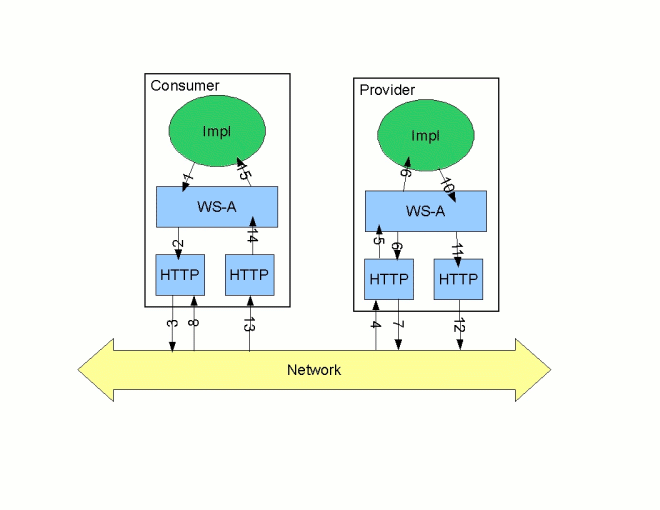
- The consumer implementation invokes an operation and a request message is generated.
- The WS-Addressing layer adds the WS-A headers to the message.When a decoupled endpoint is specified in the consumer's configuration, the address of the decoupled endpoint is placed in the WS-A ReplyTo header.
- The message is sent to the service provider.
- The service provider receives the message.
- The request message from the consumer is dispatched to the provider's WS-A layer.
- Because the WS-A ReplyTo header is not set to anonymous, the provider sends back a message with the HTTP status code set to
202, acknowledging that the request has been received. - The HTTP layer sends a
202 Acceptedmessage back to the consumer using the original connection's back-channel. - The consumer receives the
202 Acceptedreply on the back-channel of the HTTP connection used to send the original message.When the consumer receives the202 Acceptedreply, the HTTP connection closes. - The request is passed to the service provider's implementation where the request is processed.
- When the response is ready, it is dispatched to the WS-A layer.
- The WS-A layer adds the WS-Addressing headers to the response message.
- The HTTP transport sends the response to the consumer's decoupled endpoint.
- The consumer's decoupled endpoint receives the response from the service provider.
- The response is dispatched to the consumer's WS-A layer where it is correlated to the proper request using the WS-A RelatesTo header.
- The correlated response is returned to the client implementation and the invoking call is unblocked.
Chapter 3. Using SOAP Over JMS
Abstract
3.1. Basic configuration
Overview
- Specify that the transport type is SOAP/JMS.
- Specify the target destination using a JMS URI.
- Optionally, configure the JNDI connection.
- Optionally, add additional JMS configuration.
Specifying the JMS transport type
soap:binding element's transport attribute to http://www.w3.org/2010/soapjms/. Example 3.1, “SOAP over JMS binding specification” shows a WSDL binding that uses SOAP/JMS.
Example 3.1. SOAP over JMS binding specification
<wsdl:binding ... >
  <soap:binding style="document"
                transport="http://www.w3.org/2010/soapjms/" />
  ...
</wsdl:binding>
<wsdl:binding ... >
  <soap:binding style="document"
                transport="http://www.w3.org/2010/soapjms/" />
  ...
</wsdl:binding>Specifying the target destination
soap:address element and attribute as a SOAP/HTTP endpoint. The difference is the address specification. JMS endpoints use a JMS URI as defined in the URI Scheme for JMS 1.0. Example 3.2, “JMS URI syntax” shows the syntax for a JMS URI.
Example 3.2. JMS URI syntax
jms:variant:destination?options
jms:variant:destination?options| Variant | Description |
|---|---|
| jndi | Specifies that the destination is a JNDI name for the target destination. When using this variant, you must provide the configuration for accessing the JNDI provider. |
| topic | Specifies that the destination is the name of the topic to be used as the target destination. The string provided is passed into Session.createTopic() to create a representation of the destination. |
| queue | Specifies that the destination is the name of the queue to be used as the target destination. The string provided is passed into Session.createQueue() to create a representation of the destination. |
Example 3.3. SOAP/JMS endpoint address
<wsdl:port ... >
  ...
  <soap:address location="jms:jndi:dynamicQueues/test.cxf.jmstransport.queue" />
</wsdl:port>
<wsdl:port ... >
  ...
  <soap:address location="jms:jndi:dynamicQueues/test.cxf.jmstransport.queue" />
</wsdl:port>Configuring JNDI and the JMS transport
3.2. JMS URIs
Overview
Syntax
?). Multiple options are separated by an ampersand(&). Example 3.4, “Syntax for JMS URI options” shows the syntax for using multiple options in a JMS URI.
Example 3.4. Syntax for JMS URI options
jmsAddress?option1=value1&option2=value2&...optionN=valueN
jmsAddress?option1=value1&option2=value2&...optionN=valueNJMS properties
| Property | Default | Description |
|---|---|---|
deliveryMode | PERSISTENT | Specifies whether to use JMS PERSISTENT or NON_PERSISTENT message semantics. In the case of PERSISTENT delivery mode, the JMS broker stores messages in persistent storage before acknowledging them; whereas NON_PERSISTENT messages are kept in memory only. |
replyToName |
Explicitly specifies the reply destination to appear in the
JMSReplyTo header. Setting this property is recommended for applications that have request-reply semantics because the JMS provider will assign a temporary reply queue if one is not explicitly set.
The value of this property has an interpretation that depends on the variant specified in the JMS URI:
| |
priority | 4 | Specifies the JMS message priority, which ranges from 0 (lowest) to 9 (highest). |
timeToLive | 0 | Time (in milliseconds) after which the message will be discarded by the JMS provider. A value of 0 represents an infinite lifetime (the default). |
JNDI properties
| Property | Description |
|---|---|
jndiConnectionFactoryName | Specifies the JNDI name of the JMS connection factory. |
jndiInitialContextFactory | Specifies the fully qualified Java class name of the JNDI provider (which must be of javax.jms.InitialContextFactory type). Equivalent to setting the java.naming.factory.initial Java system property. |
jndiURL | Specifies the URL that initializes the JNDI provider. Equivalent to setting the java.naming.provider.url Java system property. |
Additional JNDI properties
java.naming.factory.initial and java.naming.provider.url, are standard properties, which are required to initialize any JNDI provider. Sometimes, however, a JNDI provider might support custom properties in addition to the standard ones. In this case, you can set an arbitrary JNDI property by setting a URI option of the form jndi-PropertyName.
java.naming.factory.control, in a JMS URI as shown in Example 3.5, “Setting a JNDI property in a JMS URI”.
Example 3.5. Setting a JNDI property in a JMS URI
jms:queue:FOO.BAR?jndi-java.naming.factory.control=com.sun.jndi.ldap.ResponseControlFactory
jms:queue:FOO.BAR?jndi-java.naming.factory.control=com.sun.jndi.ldap.ResponseControlFactoryExample
test.cxf.jmstransport.queue, use the URI shown in Example 3.6, “JMS URI that configures a JNDI connection”.
Example 3.6. JMS URI that configures a JNDI connection
jms:jndi:dynamicQueues/test.cxf.jmstransport.queue
?jndiInitialContextFactory=org.apache.activemq.jndi.ActiveMQInitialContextFactory
&jndiConnectionFactoryName=ConnectionFactory
&jndiURL=tcp://localhost:61616
jms:jndi:dynamicQueues/test.cxf.jmstransport.queue
?jndiInitialContextFactory=org.apache.activemq.jndi.ActiveMQInitialContextFactory
&jndiConnectionFactoryName=ConnectionFactory
&jndiURL=tcp://localhost:616163.3. WSDL extensions
Overview
InitialContext, which can then be used to look up JMS destinations. You can also set some properties that affect the behavior of the JMS transport layer.
SOAP/JMS namespace
http://www.w3.org/2010/soapjms/ namespace. To use them in your WSDL contracts add the following setting to the wsdl:definitions element:
<wsdl:definitions ...
    xmlns:soapjms="http://www.w3.org/2010/soapjms/"
  ... >
<wsdl:definitions ...
    xmlns:soapjms="http://www.w3.org/2010/soapjms/"
... >WSDL extension elements
| Element | Default | Description |
|---|---|---|
soapjms:jndiInitialContextFactory | Specifies the fully qualified Java class name of the JNDI provider. Equivalent to setting the java.naming.factory.initial Java system property. | |
soapjms:jndiURL | Specifies the URL that initializes the JNDI provider. Equivalent to setting the java.naming.provider.url Java system property. | |
soapjms:jndiContextParameter | Enables you to specify an additional property for creating the JNDI InitialContext. Use the name and value attributes to specify the property. | |
soapjms:jndiConnectionFactoryName | Specifies the JNDI name of the JMS connection factory. | |
soapjms:deliveryMode | PERSISTENT | Specifies whether to use JMS PERSISTENT or NON_PERSISTENT message semantics. In the case of PERSISTENT delivery mode, the JMS broker stores messages in persistent storage before acknowledging them; whereas NON_PERSISTENT messages are kept in memory only. |
soapjms:replyToName |
Explicitly specifies the reply destination to appear in the
JMSReplyTo header. Setting this property is recommended for SOAP invocations that have request-reply semantics. If this property is not set the JMS provider allocates a temporary queue with an automatically generated name.
The value of this property has an interpretation that depends on the variant specified in the JMS URI, as follows:
| |
soapjms:priority | 4 | Specifies the JMS message priority, which ranges from 0 (lowest) to 9 (highest). |
soapjms:timeToLive | 0 | Time, in milliseconds, after which the message will be discarded by the JMS provider. A value of 0 represents an infinite lifetime. |
Configuration scopes
wsdl:binding element, the wsdl:service element, or the wsdl:port element. The parent of the SOAP/JMS elements determine which of the following scopes the configuration is placed into.
- Binding scope
- You can configure the JMS transport at the binding scope by placing extension elements inside the
wsdl:bindingelement. Elements in this scope define the default configuration for all endpoints that use this binding. Any settings in the binding scope can be overridden at the service scope or the port scope. - Service scope
- You can configure the JMS transport at the service scope by placing extension elements inside a
wsdl:serviceelement. Elements in this scope define the default configuration for all endpoints in this service. Any settings in the service scope can be overridden at the port scope. - Port scope
- You can configure the JMS transport at the port scope by placing extension elements inside a
wsdl:portelement. Elements in the port scope define the configuration for this port. They override any defaults defined at the service scope or at the binding scope.
Example
Example 3.7. WSDL contract with SOAP/JMS configuration
- 1
- Declare the namespace for the SOAP/JMS extensions.
- 2
- Configure the JNDI connections in the binding scope.
- 3
- Configure the JMS delivery style to non-persistent and each message to live for one minute.
- 4
- Specify the target destination.
- 5
- Configure the JMS transport so that reply messages are delivered on the
greeterReply.queuequeue.
Chapter 4. Using Generic JMS
Abstract
TextMessage or ByteMessage.
4.1. Using the JMS configuration bean
Overview
org.apache.cxf.transport.jms.JMSConfiguration class. It can be used to either configure endpoint's directly or to configure the JMS conduits and destinations.
Configuration namespace
Example 4.1. Declaring the Spring p-namespace
<beans ...
  xmlns:p="http://www.springframework.org/schema/p"
  ... >
  ...
</beans>
<beans ...
  xmlns:p="http://www.springframework.org/schema/p"
  ... >
  ...
</beans>Specifying the configuration
org.apache.cxf.transport.jms.JMSConfiguration. The properties of the bean provide the configuration settings for the transport.
| Property | Default | Description |
|---|---|---|
connectionFactory-ref | Specifies a reference to a bean that defines a JMS ConnectionFactory. | |
wrapInSingleConnectionFactory | true | Specifies whether to wrap the ConnectionFactory with a Spring SingleConnectionFactory. Doing so can improve the performance of the JMS transport when the specified connection factory does not pool connections. |
reconnectOnException | false | Specifies whether to create a new connection in the case of an exception. This property is only used when wrapping the connection factory with a Spring SingleConnectionFactory. |
targetDestination | Specifies the JNDI name or provider specific name of a destination. | |
replyDestination | Specifies the JMS name of the JMS destinations where replies are sent. This attribute allows you to use a user defined destination for replies. For more details see Section 4.3, “Using a Named Reply Destination”. | |
destinationResolver | Specifies a reference to a Spring DestinationResolver. This allows you to define how destination names are resolved. By default a DynamicDestinationResolver is used. It resolves destinations using the JMS providers features. If you reference a JndiDestinationResolver you can resolve the destination names using JNDI. | |
transactionManager | Specifies a reference to a Spring transaction manager. This allows the service to participate in JTA Transactions. | |
taskExecutor | Specifies a reference to a Spring TaskExecutor. This is used in listeners to decide how to handle incoming messages. By default the transport uses the Spring SimpleAsyncTaskExecutor. | |
useJms11 | false | Specifies whether JMS 1.1 features are available. |
messageIdEnabled | true | Specifies whether the JMS transport wants the JMS broker to provide message IDs. Setting this to false causes the endpoint to call its message producer's setDisableMessageID() method with a value of true. The JMS broker is then given a hint that it does not need to generate message IDs or add them to the messages from the endpoint. The JMS broker can choose to accept the hint or ignore it. |
messageTimestampEnabled | true | Specifies whether the JMS transport wants the JMS broker to provide message time stamps. Setting this to false causes the endpoint to call its message producer's setDisableMessageTimestamp() method with a value of true. The JMS broker is then given a hint that it does not need to generate time stamps or add them to the messages from the endpoint. The JMS broker can choose to accept the hint or ignore it. |
cacheLevel | 3 | Specifies the level of caching allowed by the listener. Valid values are 0(CACHE_NONE), 1(CACHE_CONNECTION), 2(CACHE_SESSION), 3(CACHE_CONSUMER), 4(CACHE_AUTO). |
pubSubNoLocal | false | Specifies whether to receive messages produced from the same connection. |
receiveTimeout | 0 | Specifies, in milliseconds, the amount of time to wait for response messages. 0 means wait indefinitely. |
explicitQosEnabled | false | Specifies whether the QoS settings like priority, persistence, and time to live are explicitly set for each message or if they are allowed to use default values. |
deliveryMode | 1 |
Specifies if a message is persistent. The two values are:
|
priority | 4 | Specifies the message's priority for the messages. JMS priority values can range from 0 to 9. The lowest priority is 0 and the highest priority is 9. |
timeToLive | 0 | Specifies, in milliseconds, the message will be available after it is sent. 0 specifies an infinite time to live. |
sessionTransacted | false | Specifies if JMS transactions are used. |
concurrentConsumers | 1 | Specifies the minimum number of concurrent consumers created by the listener. |
maxConcurrentConsumers | 1 | Specifies the maximum number of concurrent consumers by listener. |
messageSelector | Specifies the string value of the selector. For more information on the syntax used to specify message selectors, see the JMS 1.1 specification. | |
subscriptionDurable | false | Specifies whether the server uses durrable subscriptions. |
durableSubscriptionName | Specifies the string used to register the durable subscription. | |
messageType | text | Specifies how the message data will be packaged as a JMS message. text specifies that the data will be packaged as a TextMessage. binary specifies that the data will be packaged as an ByteMessage. |
pubSubDomain | false | Specifies whether the target destination is a topic. |
jmsProviderTibcoEms | false | Specifies if your JMS provider is Tibco EMS. This causes the principal in the security context to be populated from the JMS_TIBCO_SENDER header. |
useMessageIDAsCorrelationID | false | Specifies whether JMS will use the message ID to correlate messages. If not, the client will set a generated correlation ID. |
bean element. They are all declared in the Spring p namespace.
Example 4.2. JMS configuration bean
<bean id="jmsConfig"
      class="org.apache.cxf.transport.jms.JMSConfiguration"
      p:connectionFactory-ref="connectionFactory"
      p:targetDestination="dynamicQueues/greeter.request.queue"
      p:pubSubDomain="false" />
<bean id="jmsConfig"
      class="org.apache.cxf.transport.jms.JMSConfiguration"
      p:connectionFactory-ref="connectionFactory"
      p:targetDestination="dynamicQueues/greeter.request.queue"
p:pubSubDomain="false" />Applying the configuration to an endpoint
JMSConfiguration bean can be applied directly to both server and client endpoints using the Apache CXF features mechanism. To do so:
- Set the endpoint's
addressattribute tojms://. - Add a
jaxws:featureelement to the endpoint's configuration. - Add a bean of type
org.apache.cxf.transport.jms.JMSConfigFeatureto the feature. - Set the
beanelement'sp:jmsConfig-refattribute to the ID of theJMSConfigurationbean.
Example 4.3. Adding JMS configuration to a JAX-WS client
Applying the configuration to the transport
JMSConfiguration bean can be applied to JMS conduits and JMS destinations using the jms:jmsConfig-ref element. The jms:jmsConfig-ref element's value is the ID of the JMSConfiguration bean.
Example 4.4. Adding JMS configuration to a JMS conduit
<jms:conduit name="{http://cxf.apache.org/jms_conf_test}HelloWorldQueueBinMsgPort.jms-conduit">
  ...
  <jms:jmsConfig-ref>jmsConf</jms:jmsConfig-ref>
</jms:conduit>
<jms:conduit name="{http://cxf.apache.org/jms_conf_test}HelloWorldQueueBinMsgPort.jms-conduit">
  ...
  <jms:jmsConfig-ref>jmsConf</jms:jmsConfig-ref>
</jms:conduit>4.2. Using WSDL to configure JMS
Example 4.5. JMS WSDL extension namespace
xmlns:jms="http://cxf.apache.org/transports/jms"
xmlns:jms="http://cxf.apache.org/transports/jms"4.2.1. Basic JMS configuration
Overview
jms:address element and its child, the jms:JMSNamingProperties element. The jms:address element’s attributes specify the information needed to identify the JMS broker and the destination. The jms:JMSNamingProperties element specifies the Java properties used to connect to the JNDI service.
Specifying the JMS address
jms:address element as the child of your service’s port element. The jms:address element used in WSDL is identical to the one used in the configuration file. Its attributes are listed in Table 4.2, “JMS endpoint attributes”.
| Attribute | Description |
|---|---|
destinationStyle | Specifies if the JMS destination is a JMS queue or a JMS topic. |
jndiConnectionFactoryName | Specifies the JNDI name bound to the JMS connection factory to use when connecting to the JMS destination. |
jmsDestinationName | Specifies the JMS name of the JMS destination to which requests are sent. |
jmsReplyDestinationName | Specifies the JMS name of the JMS destinations where replies are sent. This attribute allows you to use a user defined destination for replies. For more details see Section 4.3, “Using a Named Reply Destination”. |
jndiDestinationName | Specifies the JNDI name bound to the JMS destination to which requests are sent. |
jndiReplyDestinationName | Specifies the JNDI name bound to the JMS destinations where replies are sent. This attribute allows you to use a user defined destination for replies. For more details see Section 4.3, “Using a Named Reply Destination”. |
connectionUserName | Specifies the user name to use when connecting to a JMS broker. |
connectionPassword | Specifies the password to use when connecting to a JMS broker. |
jms:address WSDL element uses a jms:JMSNamingProperties child element to specify additional information needed to connect to a JNDI provider.
Specifying JNDI properties
jms:address element has a child element, jms:JMSNamingProperties, that allows you to specify the values used to populate the properties used when connecting to the JNDI provider. The jms:JMSNamingProperties element has two attributes: name and value. name specifies the name of the property to set. value attribute specifies the value for the specified property. jms:JMSNamingProperties element can also be used for specification of provider specific properties.
java.naming.factory.initialjava.naming.provider.urljava.naming.factory.objectjava.naming.factory.statejava.naming.factory.url.pkgsjava.naming.dns.urljava.naming.authoritativejava.naming.batchsizejava.naming.referraljava.naming.security.protocoljava.naming.security.authenticationjava.naming.security.principaljava.naming.security.credentialsjava.naming.languagejava.naming.applet
Example
port specification.
Example 4.6. JMS WSDL port specification
4.2.2. JMS client configuration
Overview
ByteMessage or a JMS TextMessage.
ByteMessage the consumer endpoint uses a byte[] as the method for storing data into and retrieving data from the JMS message body. When messages are sent, the message data, including any formating information, is packaged into a byte[] and placed into the message body before it is placed on the wire. When messages are received, the consumer endpoint will attempt to unmarshall the data stored in the message body as if it were packed in a byte[].
TextMessage, the consumer endpoint uses a string as the method for storing and retrieving data from the message body. When messages are sent, the message information, including any format-specific information, is converted into a string and placed into the JMS message body. When messages are received the consumer endpoint will attempt to unmarshall the data stored in the JMS message body as if it were packed into a string.
TextMessage, the receiving JMS application will get a text message containing all of the SOAP envelope information.
Specifying the message type
jms:client element. The jms:client element is a child of the WSDL port element and has one attribute:
Example
Example 4.7. WSDL for a JMS consumer endpoint
4.2.3. JMS provider configuration
Overview
- how messages are correlated
- the use of durable subscriptions
- if the service uses local JMS transactions
- the message selectors used by the endpoint
Specifying the configuration
jms:server element. The jms:server element is a child of the WSDL wsdl:port element and has the following attributes:
| Attribute | Description |
|---|---|
useMessageIDAsCorrealationID | Specifies whether JMS will use the message ID to correlate messages. The default is false. |
durableSubscriberName | Specifies the name used to register a durable subscription. |
messageSelector | Specifies the string value of a message selector to use. For more information on the syntax used to specify message selectors, see the JMS 1.1 specification. |
transactional | Specifies whether the local JMS broker will create transactions around message processing. The default is false. [a] |
Example
Example 4.8. WSDL for a JMS provider endpoint
4.3. Using a Named Reply Destination
Overview
Setting the reply destination name
jmsReplyDestinationName attribute or the jndiReplyDestinationName attribute in the endpoint's JMS configuration. A client endpoint will listen for replies on the specified destination and it will specify the value of the attribute in the ReplyTo field of all outgoing requests. A service endpoint will use the value of the jndiReplyDestinationName attribute as the location for placing replies if there is no destination specified in the request’s ReplyTo field.
Example
Example 4.9. JMS Consumer Specification Using a Named Reply Queue
Chapter 5. Apache CXF Logging
Abstract
5.1. Overview of Apache CXF Logging
Overview
java.util.logging. Logging is configured in a logging configuration file that is written using the standard java.util.Properties format. To run logging on an application, you can specify logging programmatically or by defining a property at the command that points to the logging configuration file when you start the application.
Default logging.properties file
logging.properties file, which is located in your InstallDir/etc directory. This file configures both the output destination for the log messages and the message level that is published. The default configuration sets the loggers to print message flagged with the WARNING level to the console. You can either use the default file without changing any of the configuration settings or you can change the configuration settings to suit your specific application.
Logging feature
Example 5.1. Configuration for Enabling Logging
<jaxws:endpoint...>
  <jaxws:features>
    <bean class="org.apache.cxf.feature.LoggingFeature"/>
  </jaxws:features>
</jaxws:endpoint>
<jaxws:endpoint...>
  <jaxws:features>
    <bean class="org.apache.cxf.feature.LoggingFeature"/>
  </jaxws:features>
</jaxws:endpoint>Where to begin?
More information on java.util.logging
java.util.logging utility is one of the most widely used Java logging frameworks. There is a lot of information available online that describes how to use and extend this framework. As a starting point, however, the following documents gives a good overview of java.util.logging:
5.2. Simple Example of Using Logging
Changing the log levels and output destination
- Run the sample server as described in the Running the demo using java section of the
README.txtfile in theInstallDir/samples/wsdl_firstdirectory. Note that the server start command specifies the defaultlogging.propertiesfile, as follows:Expand Platform Command Windows start java -Djava.util.logging.config.file=%CXF_HOME%\etc\logging.properties demo.hw.server.ServerUNIX java -Djava.util.logging.config.file=$CXF_HOME/etc/logging.properties demo.hw.server.Server &The defaultlogging.propertiesfile is located in theInstallDir/etcdirectory. It configures the Apache CXF loggers to printWARNINGlevel log messages to the console. As a result, you see very little printed to the console. - Stop the server as described in the
README.txtfile. - Make a copy of the default
logging.propertiesfile, name itmylogging.propertiesfile, and save it in the same directory as the defaultlogging.propertiesfile. - Change the global logging level and the console logging levels in your
mylogging.propertiesfile toINFOby editing the following lines of configuration:.level= INFO java.util.logging.ConsoleHandler.level = INFO
.level= INFO java.util.logging.ConsoleHandler.level = INFOCopy to Clipboard Copied! Toggle word wrap Toggle overflow - Restart the server using the following command:
Expand Platform Command Windows start java -Djava.util.logging.config.file=%CXF_HOME%\etc\mylogging.properties demo.hw.server.ServerUNIX java -Djava.util.logging.config.file=$CXF_HOME/etc/mylogging.properties demo.hw.server.Server &Because you configured the global logging and the console logger to log messages of levelINFO, you see a lot more log messages printed to the console.
5.3. Default logging configuration file
logging.properties, is located in the InstallDir/etc directory. It configures the Apache CXF loggers to print WARNING level messages to the console. If this level of logging is suitable for your application, you do not have to make any changes to the file before using it. You can, however, change the level of detail in the log messages. For example, you can change whether log messages are sent to the console, to a file or to both. In addition, you can specify logging at the level of individual packages.
logging.properties file. There are, however, many other java.util.logging configuration properties that you can set. For more information on the java.util.logging API, see the java.util.logging javadoc at: http://java.sun.com/j2se/1.5/docs/api/java/util/logging/package-summary.html.
5.3.1. Configuring Logging Output
java.util.logging, uses handler classes to output log messages. Table 5.1, “Java.util.logging Handler Classes” shows the handlers that are configured in the default logging.properties file.
| Handler Class | Outputs to |
|---|---|
ConsoleHandler | Outputs log messages to the console |
FileHandler | Outputs log messages to a file |
Configuring the console handler
Example 5.2. Configuring the Console Handler
handlers= java.util.logging.ConsoleHandler
handlers= java.util.logging.ConsoleHandlerExample 5.3. Console Handler Properties
java.util.logging.ConsoleHandler.level = WARNING 1 java.util.logging.ConsoleHandler.formatter = java.util.logging.SimpleFormatter 2
java.util.logging.ConsoleHandler.level = WARNING 1
java.util.logging.ConsoleHandler.formatter = java.util.logging.SimpleFormatter 2- 1
- The console handler supports a separate log level configuration property. This allows you to limit the log messages printed to the console while the global logging setting can be different (see Section 5.3.2, “Configuring Logging Levels”). The default setting is
WARNING. - 2
- Specifies the
java.util.loggingformatter class that the console handler class uses to format the log messages. The default setting is thejava.util.logging.SimpleFormatter.
Configuring the file handler
Example 5.4. Configuring the File Handler
handlers= java.util.logging.FileHandler
handlers= java.util.logging.FileHandlerExample 5.5. File Handler Configuration Properties
java.util.logging.FileHandler.pattern = %h/java%u.log 1 java.util.logging.FileHandler.limit = 50000 2 java.util.logging.FileHandler.count = 1 3 java.util.logging.FileHandler.formatter = java.util.logging.XMLFormatter 4
java.util.logging.FileHandler.pattern = %h/java%u.log 1
java.util.logging.FileHandler.limit = 50000 2
java.util.logging.FileHandler.count = 1 3
java.util.logging.FileHandler.formatter = java.util.logging.XMLFormatter 4- 1
- Specifies the location and pattern of the output file. The default setting is your home directory.
- 2
- Specifies, in bytes, the maximum amount that the logger writes to any one file. The default setting is
50000. If you set it to zero, there is no limit on the amount that the logger writes to any one file. - 3
- Specifies how many output files to cycle through. The default setting is
1. - 4
- Specifies the
java.util.loggingformatter class that the file handler class uses to format the log messages. The default setting is thejava.util.logging.XMLFormatter.
Configuring both the console handler and the file handler
Example 5.6. Configuring Both Console Logging and File Logging
handlers= java.util.logging.FileHandler, java.util.logging.ConsoleHandler
handlers= java.util.logging.FileHandler, java.util.logging.ConsoleHandler5.3.2. Configuring Logging Levels
Logging levels
java.util.logging framework supports the following levels of logging, from the least verbose to the most verbose:
SEVEREWARNINGINFOCONFIGFINEFINERFINEST
Configuring the global logging level
Example 5.7. Configuring Global Logging Levels
.level= WARNING
.level= WARNINGConfiguring logging at an individual package level
java.util.logging framework supports configuring logging at the level of an individual package. For example, the line of code shown in Example 5.8, “Configuring Logging at the Package Level” configures logging at a SEVERE level on classes in the com.xyz.foo package.
Example 5.8. Configuring Logging at the Package Level
com.xyz.foo.level = SEVERE
com.xyz.foo.level = SEVERE5.4. Enabling Logging at the Command Line
Overview
java.util.logging.config.file property when you start the application. You can either specify the default logging.properties file or a logging.properties file that is unique to that application.
Specifying the log configuration file on application start-up
Example 5.9. Flag to Start Logging on the Command Line
-Djava.util.logging.config.file=myfile
-Djava.util.logging.config.file=myfile5.5. Logging for Subsystems and Services
com.xyz.foo.level configuration property described in the section called “Configuring logging at an individual package level” to set fine-grained logging for specified Apache CXF logging subsystems.
Apache CXF logging subsystems
| Subsystem | Description |
|---|---|
org.apache.cxf.aegis | Aegis binding |
org.apache.cxf.binding.coloc | colocated binding |
org.apache.cxf.binding.http | HTTP binding |
org.apache.cxf.binding.jbi | JBI binding |
org.apache.cxf.binding.object | Java Object binding |
org.apache.cxf.binding.soap | SOAP binding |
org.apache.cxf.binding.xml | XML binding |
org.apache.cxf.bus | Apache CXF bus |
org.apache.cxf.configuration | configuration framework |
org.apache.cxf.endpoint | server and client endpoints |
org.apache.cxf.interceptor | interceptors |
org.apache.cxf.jaxws | Front-end for JAX-WS style message exchange, JAX-WS handler processing, and interceptors relating to JAX-WS and configuration |
org.apache.cxf.jbi | JBI container integration classes |
org.apache.cxf.jca | JCA container integration classes |
org.apache.cxf.js | JavaScript front-end |
org.apache.cxf.transport.http | HTTP transport |
org.apache.cxf.transport.https | secure version of HTTP transport, using HTTPS |
org.apache.cxf.transport.jbi | JBI transport |
org.apache.cxf.transport.jms | JMS transport |
org.apache.cxf.transport.local | transport implementation using local file system |
org.apache.cxf.transport.servlet | HTTP transport and servlet implementation for loading JAX-WS endpoints into a servlet container |
org.apache.cxf.ws.addressing | WS-Addressing implementation |
org.apache.cxf.ws.policy | WS-Policy implementation |
org.apache.cxf.ws.rm | WS-ReliableMessaging (WS-RM) implementation |
org.apache.cxf.ws.security.wss4j | WSS4J security implementation |
Example
InstallDir/samples/ws_addressing directory. Logging is configured in the logging.properties file located in that directory. The relevant lines of configuration are shown in Example 5.10, “Configuring Logging for WS-Addressing”.
Example 5.10. Configuring Logging for WS-Addressing
java.util.logging.ConsoleHandler.formatter = demos.ws_addressing.common.ConciseFormatter ... org.apache.cxf.ws.addressing.soap.MAPCodec.level = INFO
java.util.logging.ConsoleHandler.formatter = demos.ws_addressing.common.ConciseFormatter
...
org.apache.cxf.ws.addressing.soap.MAPCodec.level = INFOREADME.txt file located in the InstallDir/samples/ws_addressing directory.
5.6. Logging Message Content
Configuring message content logging
Adding the logging feature to an endpoint
Example 5.11. Adding Logging to Endpoint Configuration
<jaxws:endpoint ...>
<jaxws:features>
<bean class="org.apache.cxf.feature.LoggingFeature"/>
</jaxws:features>
</jaxws:endpoint>
<jaxws:endpoint ...>
<jaxws:features>
<bean class="org.apache.cxf.feature.LoggingFeature"/>
</jaxws:features>
</jaxws:endpoint>Adding the logging feature to a consumer
Example 5.12. Adding Logging to Client Configuration
<jaxws:client ...>
<jaxws:features>
<bean class="org.apache.cxf.feature.LoggingFeature"/>
</jaxws:features>
</jaxws:client>
<jaxws:client ...>
<jaxws:features>
<bean class="org.apache.cxf.feature.LoggingFeature"/>
</jaxws:features>
</jaxws:client>Set logging to log INFO level messages
logging.properties file associated with your service is configured to log INFO level messages, as shown in Example 5.13, “Setting the Logging Level to INFO”.
Example 5.13. Setting the Logging Level to INFO
.level= INFO
java.util.logging.ConsoleHandler.level = INFO
.level= INFO
java.util.logging.ConsoleHandler.level = INFOLogging SOAP messages
InstallDir/samples/wsdl_first directory, as follows:
- Add the
jaxws:featureselement shown in Example 5.14, “Endpoint Configuration for Logging SOAP Messages” to thecxf.xmlconfiguration file located in the wsdl_first sample's directory:Example 5.14. Endpoint Configuration for Logging SOAP Messages
Copy to Clipboard Copied! Toggle word wrap Toggle overflow - The sample uses the default
logging.propertiesfile, which is located in theInstallDir/etcdirectory. Make a copy of this file and name itmylogging.properties. - In the
mylogging.propertiesfile, change the logging levels toINFOby editing the.leveland thejava.util.logging.ConsoleHandler.levelconfiguration properties as follows:.level= INFO java.util.logging.ConsoleHandler.level = INFO
.level= INFO
java.util.logging.ConsoleHandler.level = INFO
Copy to Clipboard Copied! Toggle word wrap Toggle overflow - Start the server using the new configuration settings in both the
cxf.xmlfile and themylogging.propertiesfile as follows:Expand Platform Command Windows start java -Djava.util.logging.config.file=%CXF_HOME%\etc\mylogging.properties demo.hw.server.ServerUNIX java -Djava.util.logging.config.file=$CXF_HOME/etc/mylogging.properties demo.hw.server.Server & - Start the hello world client using the following command:
Expand Platform Command Windows java -Djava.util.logging.config.file=%CXF_HOME%\etc\mylogging.properties demo.hw.client.Client .\wsdl\hello_world.wsdlUNIX java -Djava.util.logging.config.file=$CXF_HOME/etc/mylogging.properties demo.hw.client.Client ./wsdl/hello_world.wsdl
Chapter 6. Deploying WS-Addressing
Abstract
6.1. Introduction to WS-Addressing
Overview
- A structure for communicating a reference to a Web service endpoint
- A set of Message Addressing Properties (MAP) that associate addressing information with a particular message
Supported specifications
Further information
6.2. WS-Addressing Interceptors
Overview
WS-Addressing Interceptors
| Interceptor | Description |
|---|---|
org.apache.cxf.ws.addressing.MAPAggregator | A logical interceptor responsible for aggregating the Message Addressing Properties (MAPs) for outgoing messages. |
org.apache.cxf.ws.addressing.soap.MAPCodec | A protocol-specific interceptor responsible for encoding and decoding the Message Addressing Properties (MAPs) as SOAP headers. |
6.3. Enabling WS-Addressing
Overview
- RMAssertion and WS-Policy Framework
- Using Policy Assertion in a WS-Addressing Feature
Adding WS-Addressing as a Feature
Example 6.1. client.xml—Adding WS-Addressing Feature to Client Configuration
Example 6.2. server.xml—Adding WS-Addressing Feature to Server Configuration
6.4. Configuring WS-Addressing Attributes
Overview
http://cxf.apache.org/ws/addressing. It supports the two attributes described in Table 6.2, “WS-Addressing Attributes”.
| Attribute Name | Value |
|---|---|
allowDuplicates | A boolean that determines if duplicate MessageIDs are tolerated. The default setting is true. |
usingAddressingAdvisory | A boolean that indicates if the presence of the UsingAddressing element in the WSDL is advisory only; that is, its absence does not prevent the encoding of WS-Addressing headers. |
Configuring WS-Addressing attributes
allowDublicates attribute to false on the server endpoint:
Using a WS-Policy assertion embedded in a feature
policies element.
Example 6.3. Using the Policies to Configure WS-Addressing
Chapter 7. Enabling Reliable Messaging
Abstract
7.1. Introduction to WS-RM
Overview
How WS-RM works
Figure 7.1. Web Services Reliable Messaging
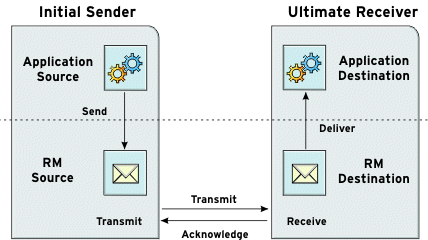
- The RM source sends a
CreateSequenceprotocol message to the RM destination. This contains a reference for the endpoint that receives acknowledgements (thewsrm:AcksToendpoint). - The RM destination sends a
CreateSequenceResponseprotocol message back to the RM source. This message contains the sequence ID for the RM sequence session. - The RM source adds an RM
Sequenceheader to each message sent by the application source. This header contains the sequence ID and a unique message ID. - The RM source transmits each message to the RM destination.
- The RM destination acknowledges the receipt of the message from the RM source by sending messages that contain the RM
SequenceAcknowledgementheader. - The RM destination delivers the message to the application destination in an exactly-once-in-order fashion.
- The RM source retransmits a message that it has not yet received an acknowledgement.The first retransmission attempt is made after a base retransmission interval. Successive retransmission attempts are made, by default, at exponential back-off intervals or, alternatively, at fixed intervals. For more details, see Section 7.4, “Configuring WS-RM”.
WS-RM delivery assurances
Supported specifications
Further information
7.2. WS-RM Interceptors
Overview
Apache CXF WS-RM Interceptors
| Interceptor | Description |
|---|---|
org.apache.cxf.ws.rm.RMOutInterceptor |
Deals with the logical aspects of providing reliability guarantees for outgoing messages.
Responsible for sending the
CreateSequence requests and waiting for their CreateSequenceResponse responses.
Also responsible for aggregating the sequence properties—ID and message number—for an application message.
|
org.apache.cxf.ws.rm.RMInInterceptor | Responsible for intercepting and processing RM protocol messages and SequenceAcknowledgement messages that are piggybacked on application messages. |
org.apache.cxf.ws.rm.soap.RMSoapInterceptor | Responsible for encoding and decoding the reliability properties as SOAP headers. |
org.apache.cxf.ws.rm.RetransmissionInterceptor | Responsible for creating copies of application messages for future resending. |
Enabling WS-RM
RMOutInterceptor sends a CreateSequence request and waits to process the original application message until it receives the CreateSequenceResponse response. In addition, the WS-RM interceptors add the sequence headers to the application messages and, on the destination side, extract them from the messages. It is not necessary to make any changes to your application code to make the exchange of messages reliable.
Configuring WS-RM Attributes
1).
7.3. Enabling WS-RM
Overview
- Explicitly, by adding them to the dispatch chains using Spring beans
- Implicitly, using WS-Policy assertions, which cause the Apache CXF runtime to transparently add the interceptors on your behalf.
Spring beans—explicitly adding interceptors
InstallDir/samples/ws_rm directory. The configuration file, ws-rm.cxf, shows the WS-RM and WS-Addressing interceptors being added one-by-one as Spring beans (see Example 7.1, “Enabling WS-RM Using Spring Beans”).
Example 7.1. Enabling WS-RM Using Spring Beans
- 1
- A Apache CXF configuration file is a Spring XML file. You must include an opening Spring
beanselement that declares the namespaces and schema files for the child elements that are encapsulated by thebeanselement. - 2
- Configures each of the WS-Addressing interceptors—
MAPAggregatorandMAPCodec. For more information on WS-Addressing, see Chapter 6, Deploying WS-Addressing. - 3
- Configures each of the WS-RM interceptors—
RMOutInterceptor,RMInInterceptor, andRMSoapInterceptor. - 4
- Adds the WS-Addressing and WS-RM interceptors to the interceptor chain for inbound messages.
- 5
- Adds the WS-Addressing and WS-RM interceptors to the interceptor chain for inbound faults.
- 6
- Adds the WS-Addressing and WS-RM interceptors to the interceptor chain for outbound messages.
- 7
- Adds the WS-Addressing and WS-RM interceptors to the interceptor chain for outbound faults.
WS-Policy framework—implicitly adding interceptors
- Add the policy feature to your client and server endpoint. Example 7.2, “Configuring WS-RM using WS-Policy” shows a reference bean nested within a
jaxws:featureelement. The reference bean specifies theAddressingPolicy, which is defined as a separate element within the same configuration file.Example 7.2. Configuring WS-RM using WS-Policy
Copy to Clipboard Copied! Toggle word wrap Toggle overflow - Add a reliable messaging policy to the
wsdl:serviceelement—or any other WSDL element that can be used as an attachment point for policy or policy reference elements—to your WSDL file, as shown in Example 7.3, “Adding an RM Policy to Your WSDL File”.Example 7.3. Adding an RM Policy to Your WSDL File
Copy to Clipboard Copied! Toggle word wrap Toggle overflow
7.4. Configuring WS-RM
- Setting Apache CXF-specific attributes that are defined in the Apache CXF WS-RM manager namespace,
http://cxf.apache.org/ws/rm/manager. - Setting standard WS-RM policy attributes that are defined in the http://schemas.xmlsoap.org/ws/2005/02/rm/policy namespace.
7.4.1. Configuring Apache CXF-Specific WS-RM Attributes
Overview
rmManager Spring bean. Add the following to your configuration file:
- The
http://cxf.apache.org/ws/rm/managernamespace to your list of namespaces. - An
rmManagerSpring bean for the specific attribute that your want to configure.
Example 7.4. Configuring Apache CXF-Specific WS-RM Attributes
Children of the rmManager Spring bean
rmManager Spring bean, defined in the http://cxf.apache.org/ws/rm/manager namespace.
| Element | Description |
|---|---|
RMAssertion | An element of type RMAssertion |
deliveryAssurance | An element of type DeliveryAssuranceType that describes the delivery assurance that should apply |
sourcePolicy | An element of type SourcePolicyType that allows you to configure details of the RM source |
destinationPolicy | An element of type DestinationPolicyType that allows you to configure details of the RM destination |
Example
7.4.2. Configuring Standard WS-RM Policy Attributes
Overview
WS-Policy RMAssertion Children
http://schemas.xmlsoap.org/ws/2005/02/rm/policy namespace:
| Name | Description |
|---|---|
InactivityTimeout | Specifies the amount of time that must pass without receiving a message before an endpoint can consider an RM sequence to have been terminated due to inactivity. |
BaseRetransmissionInterval | Sets the interval within which an acknowledgement must be received by the RM Source for a given message. If an acknowledgement is not received within the time set by the BaseRetransmissionInterval, the RM Source will retransmit the message. |
ExponentialBackoff |
Indicates the retransmission interval will be adjusted using the commonly known exponential backoff algorithm (Tanenbaum).
For more information, see Computer Networks, Andrew S. Tanenbaum, Prentice Hall PTR, 2003.
|
AcknowledgementInterval | In WS-RM, acknowledgements are sent on return messages or sent stand-alone. If a return message is not available to send an acknowledgement, an RM Destination can wait for up to the acknowledgement interval before sending a stand-alone acknowledgement. If there are no unacknowledged messages, the RM Destination can choose not to send an acknowledgement. |
More detailed reference information
RMAssertion in rmManager Spring bean
RMAssertion within a Apache CXF rmManager Spring bean. This is the best approach if you want to keep all of your WS-RM configuration in the same configuration file; that is, if you want to configure Apache CXF-specific attributes and standard WS-RM policy attributes in the same file.
- A standard WS-RM policy attribute,
BaseRetransmissionInterval, configured using anRMAssertionwithin anrmManagerSpring bean. - An Apache CXF-specific RM attribute,
intraMessageThreshold, configured in the same configuration file.
Example 7.5. Configuring WS-RM Attributes Using an RMAssertion in an rmManager Spring Bean
Policy within a feature
Example 7.6. Configuring WS-RM Attributes as a Policy within a Feature
WSDL file
External attachment
Example 7.7. Configuring WS-RM in an External Attachment
7.4.3. WS-RM Configuration Use Cases
Overview
RMAssertion within an rmManager Spring bean is shown. For details of how to set such attributes as a policy within a feature; in a WSDL file, or in an external attachment, see Section 7.4.2, “Configuring Standard WS-RM Policy Attributes”.
Base retransmission interval
BaseRetransmissionInterval element specifies the interval at which an RM source retransmits a message that has not yet been acknowledged. It is defined in the http://schemas.xmlsoap.org/ws/2005/02/rm/wsrm-policy.xsd schema file. The default value is 3000 milliseconds.
Example 7.8. Setting the WS-RM Base Retransmission Interval
Exponential backoff for retransmission
ExponentialBackoff element determines if successive retransmission attempts for an unacknowledged message are performed at exponential intervals.
ExponentialBackoff element enables this feature. An exponential backoff ratio of 2 is used by default.
Example 7.9. Setting the WS-RM Exponential Backoff Property
Acknowledgement interval
AcknowledgementInterval element specifies the interval at which the WS-RM destination sends asynchronous acknowledgements. These are in addition to the synchronous acknowledgements that it sends on receipt of an incoming message. The default asynchronous acknowledgement interval is 0 milliseconds. This means that if the AcknowledgementInterval is not configured to a specific value, acknowledgements are sent immediately (that is, at the first available opportunity).
- The RM destination is using a non-anonymous
wsrm:acksToendpoint. - The opportunity to piggyback an acknowledgement on a response message does not occur before the expiry of the acknowledgement interval.
Example 7.10. Setting the WS-RM Acknowledgement Interval
Maximum unacknowledged messages threshold
maxUnacknowledged attribute sets the maximum number of unacknowledged messages that can accrue per sequence before the sequence is terminated.
Example 7.11. Setting the WS-RM Maximum Unacknowledged Message Threshold
Maximum length of an RM sequence
maxLength attribute sets the maximum length of a WS-RM sequence. The default value is 0, which means that the length of a WS-RM sequence is unbound.
Example 7.12. Setting the Maximum Length of a WS-RM Message Sequence
Message delivery assurance policies
AtMostOnce— The RM destination delivers the messages to the application destination only once. If a message is delivered more than once an error is raised. It is possible that some messages in a sequence may not be delivered.AtLeastOnce— The RM destination delivers the messages to the application destination at least once. Every message sent will be delivered or an error will be raised. Some messages might be delivered more than once.InOrder— The RM destination delivers the messages to the application destination in the order that they are sent. This delivery assurance can be combined with theAtMostOnceorAtLeastOnceassurances.
Example 7.13. Setting the WS-RM Message Delivery Assurance Policy
7.5. Configuring WS-RM Persistence
Overview
How it works
- At the RM source endpoint, an outgoing message is persisted before transmission. It is evicted from the persistent store after the acknowledgement is received.
- After a recovery from crash, it recovers the persisted messages and retransmits until all the messages have been acknowledged. At that point, the RM sequence is closed.
- At the RM destination endpoint, an incoming message is persisted, and upon a successful store, the acknowledgement is sent. When a message is successfully dispatched, it is evicted from the persistent store.
- After a recovery from a crash, it recovers the persisted messages and dispatches them. It also brings the RM sequence to a state where new messages are accepted, acknowledged, and delivered.
Enabling WS-persistence
Example 7.14. Configuration for the Default WS-RM Persistence Store
<bean id="RMTxStore" class="org.apache.cxf.ws.rm.persistence.jdbc.RMTxStore"/>
<wsrm-mgr:rmManager id="org.apache.cxf.ws.rm.RMManager">
    <property name="store" ref="RMTxStore"/>
</wsrm-mgr:rmManager>
<bean id="RMTxStore" class="org.apache.cxf.ws.rm.persistence.jdbc.RMTxStore"/>
<wsrm-mgr:rmManager id="org.apache.cxf.ws.rm.RMManager">
    <property name="store" ref="RMTxStore"/>
</wsrm-mgr:rmManager>Configuring WS-persistence
Example 7.15. Configuring the JDBC Store for WS-RM Persistence
<bean id="RMTxStore" class="org.apache.cxf.ws.rm.persistence.jdbc.RMTxStore">
    <property name="driverClassName" value="com.acme.jdbc.Driver"/>
    <property name="url" value="jdbc:acme:rmdb;create=true"/>
</bean>
<bean id="RMTxStore" class="org.apache.cxf.ws.rm.persistence.jdbc.RMTxStore">
    <property name="driverClassName" value="com.acme.jdbc.Driver"/>
    <property name="url" value="jdbc:acme:rmdb;create=true"/>
</bean>Chapter 8. Enabling High Availability
Abstract
8.1. Introduction to High Availability
Overview
HA with static failover
8.2. Enabling HA with Static Failover
Overview
Encode replica details in your service WSDL file
Example 8.1. Enabling HA with Static Failover—WSDL File
- 1
- Defines a service,
ClusterService, which is exposed on three ports:Replica1Replica2Replica3
- 2
- Defines
Replica1to expose theClusterServiceas a SOAP over HTTP endpoint on port9001. - 3
- Defines
Replica2to expose theClusterServiceas a SOAP over HTTP endpoint on port9002. - 4
- Defines
Replica3to expose theClusterServiceas a SOAP over HTTP endpoint on port9003.
Add the clustering feature to your client configuration
Example 8.2. Enabling HA with Static Failover—Client Configuration
8.3. Configuring HA with Static Failover
Overview
Configuring a random strategy
Example 8.3. Configuring a Random Strategy for Static Failover
Chapter 9. Enabling High Availability in Fuse Fabric
Abstract
9.1. Load Balancing Cluster
9.1.1. Introduction to Load Balancing
Overview
Fuse Fabric
Load-balancing cluster
Figure 9.1. Fabric Load Balancing for Apache CXF
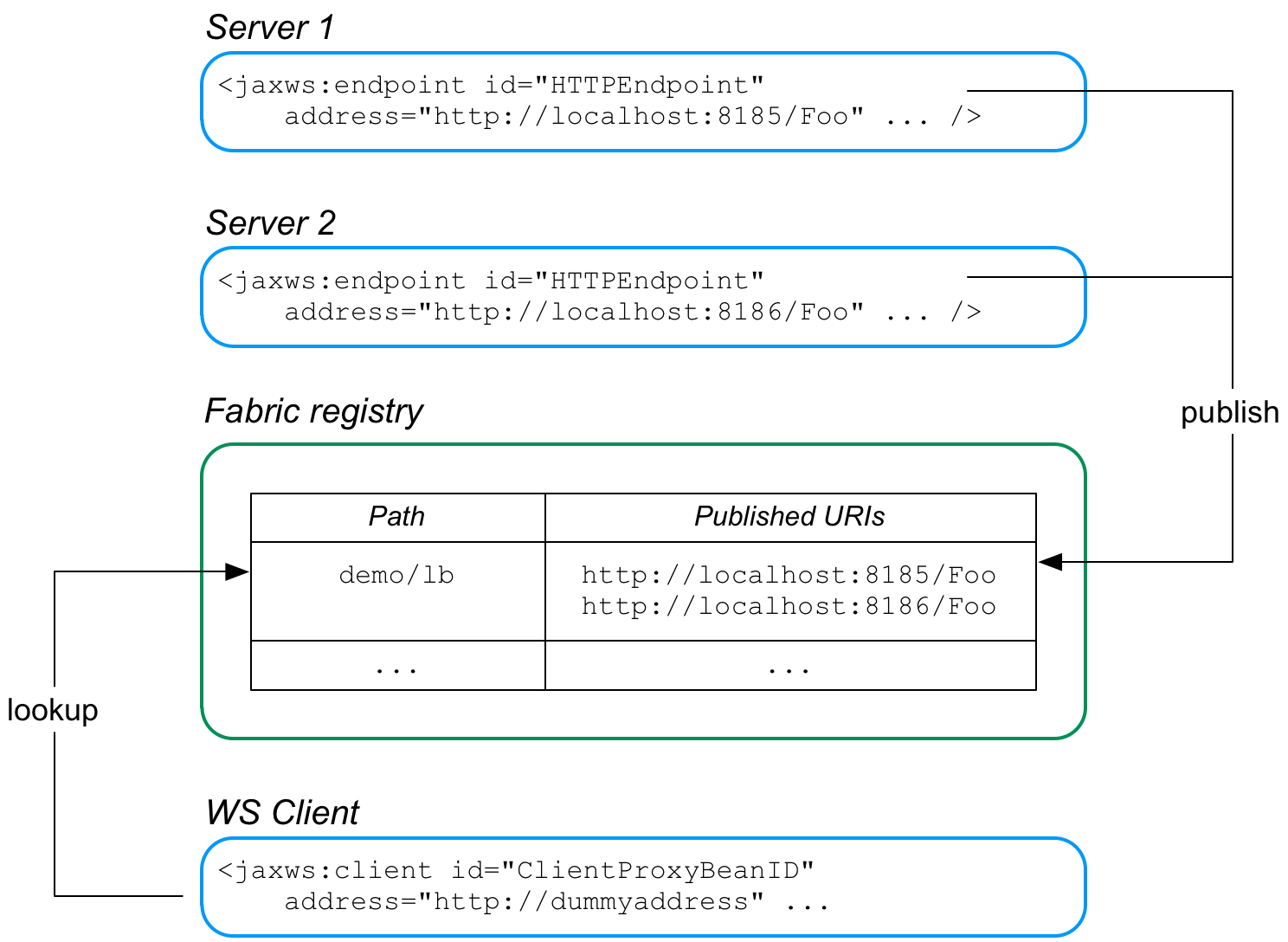
http://localhost:8185/Foo and http://localhost:8186/Foo. For both of these servers, the load balancer feature is configured to store the cluster endpoints under the path, demo/lb, in the fabric registry.
demo/lb, in the fabric registry. Because the demo/lb path is associated with multiple endpoint addresses, fabric implements a random load balancing algorithm to choose one of the available URIs to connect to.
FabricLoadBalancerFeature
org.fusesource.fabric.cxf.FabricLoadBalancerFeature
org.fusesource.fabric.cxf.FabricLoadBalancerFeatureFabricLoadBalancerFeature class exposes the following bean properties:
-
fabricPath - This property specifies a node in the fabric registry (specified relative to the base node,
/fabric/cxf/endpoints) that is used to store the data for a particular endpoint cluster. -
zkClient - A proxy reference to the OSGi service exposed by the fabric agent (of type,
org.linkedin.zookeeper.client.IZKClient). -
maximumConnectionTimeout - The maximum length of time to attempt to connect to the fabric agent, specified in milliseconds. The default is 10000 (10 seconds).
-
connectionRetryTime - How long to wait between connection attempts, specified in milliseconds. The default is 100.
-
loadBalanceStrategy - By implementing a bean of type
org.fusesource.fabric.cxf.LoadBalanceStrategyand setting this property, you can customise the load balancing algorithm used by the load balancing feature.
Prerequisites
Maven dependency
fabric-cxf Maven artifact. Add the following dependency to your project's POM file:
<dependency>
    <groupId>org.fusesource.fabric</groupId>
    <artifactId>fabric-cxf</artifactId>
    <version>6.0.0.redhat-024</version>
</dependency>
<dependency>
    <groupId>org.fusesource.fabric</groupId>
    <artifactId>fabric-cxf</artifactId>
    <version>6.0.0.redhat-024</version>
</dependency>OSGi package import
org.fusesource.fabric.cxf to the list of imported packages. For example, using the Maven bundle plug-in, you can specify this package import by adding org.fusesource.fabric.cxf to the comma-separated list in the Import-Package element, as follows:
Fabric deployment
Required feature
fabric-cxf Apache Karaf feature to be installed in the container. In the context of a fabric, this means you must add the fabric-cxf feature to the relevant deployment profile. For example, if you are using the cxf-lb-server profile to deploy a load-balancing WS server, you can add the fabric-cxf feature by entering the following console command:
JBossFuse:karaf@root> profile-edit -f fabric-cxf cxf-lb-server
JBossFuse:karaf@root> profile-edit -f fabric-cxf cxf-lb-server9.1.2. Configure the Server
Overview
Prerequisites
Spring XML
FabricLoadBalancerFeature, to an Apache CXF bus. Any Apache CXF endpoints subsequently created on this bus will automatically have the load-balancer feature enabled.
IZKClientOSGi service reference- The
IZKClientreference is a proxy of the local fabric agent, which it accesses through theorg.linkedin.zookeeper.client.IZKClientinterface. This reference is needed in order to integrate the load balancer feature with the underlying fabric. FabricLoadBalancerFeaturebean- The
FabricLoadBalancerFeaturebean is initialised with the following properties:-
zkClient - A reference to the fabric agent proxy,
IZKClient. -
fabricPath - The path of a node in the fabric registry, where the cluster data is stored (for example, the addresses of the endpoints in the load-balancing cluster). The node path is specified relative to the base node,
/fabric/cxf/endpoints.
-
- Apache CXF bus
- The
cxfcore:buselement installs the fabric load balancer feature in the default bus instance.
Blueprint XML
FabricLoadBalancerFeature, to an Apache CXF bus. Any Apache CXF endpoints subsequently created on this bus will automatically have the load-balancer feature enabled.
IZKClientreference- The
IZKClientreference is a proxy of the local fabric agent, which it accesses through theorg.linkedin.zookeeper.client.IZKClientinterface. This reference is needed in order to integrate the load balancer feature with the underlying fabric. FabricLoadBalancerFeaturebean- The
FabricLoadBalancerFeaturebean is initialised with the following properties:-
zkClient - A reference to the fabric agent proxy,
IZKClient. -
fabricPath - The path of a node in the fabric registry, where the cluster data is stored (for example, the addresses of the endpoints in the load-balancing cluster). The node path is specified relative to the base node,
/fabric/cxf/endpoints.
-
- Apache CXF bus
- The
cxf:buselement installs the fabric load balancer feature in the default bus instance.
Example using Spring XML
Example 9.1. WS Server with Fabric Load Balancer Feature
- Setting up OSGi Configuration Admin—the
osgix:cm-propertieselement and thectx:property-placeholderelement set up the OSGi Configuration Admin service, enabling you to substitute the WS endpoint's IP port number using the placeholder,${portNumber}.Use of the OSGi Configuration Admin service is optional, but it provides a convenient way of creating a cluster of WS servers listening on different ports. With the configuration shown here, you can deploy the same server bundle into different container instances, using the OSGi Configuration Admin service to customise the IP port of each deployed server instance. - Creating the WS endpoint—create the WS endpoint in the usual way, using the
jaxws:endpointelement. By default, this endpoint is automatically associated with the default bus instance, which has load balancing enabled. The only unusual aspect of this endpoint definition is that the OSGi Configuration Admin service is used to define the port number in the endpoint's address (through the${portNumber}placeholder). - Enabling the fabric load balancing feature—the fabric load balancing feature is installed in the default bus instance, as previously described. In this example, the
fabricPathproperty is set to the value,demo/lb.
Creating fabric profiles for the example
-
cxf-lb-server - A base profile, containing details common to all of the cluster endpoints.
-
cxf-lb-server-8185 - A profile that inherits from
cxf-lb-serverand sets theportNumberproperty to 8185. -
cxf-lb-server-8186 - A profile that inherits from
cxf-lb-serverand sets theportNumberproperty to 8186.
org.fusesource.example/cxf-lb-server/1.0-SNAPSHOT, you can create the cxf-lb-server base profile by entering the following console commands:
JBossFuse:karaf@root> profile-create --parents cxf cxf-lb-server
JBossFuse:karaf@root> profile-edit -f fabric-cxf cxf-lb-server
JBossFuse:karaf@root> profile-edit -b mvn:org.fusesource.example/cxf-lb-server/1.0-SNAPSHOT cxf-lb-server
JBossFuse:karaf@root> profile-create --parents cxf cxf-lb-server
JBossFuse:karaf@root> profile-edit -f fabric-cxf cxf-lb-server
JBossFuse:karaf@root> profile-edit -b mvn:org.fusesource.example/cxf-lb-server/1.0-SNAPSHOT cxf-lb-servercxf-lb-server-8185 profile and the cxf-lb-server-8186 profile as follows:
JBossFuse:karaf@root> profile-create --parents cxf-lb-server cxf-lb-server-8185
JBossFuse:karaf@root> profile-create --parents cxf-lb-server cxf-lb-server-8186
JBossFuse:karaf@root> profile-edit -p org.fusesource.example.fabric.lb/portNumber=8185 cxf-lb-server-8185
JBossFuse:karaf@root> profile-edit -p org.fusesource.example.fabric.lb/portNumber=8186 cxf-lb-server-8186
JBossFuse:karaf@root> profile-create --parents cxf-lb-server cxf-lb-server-8185
JBossFuse:karaf@root> profile-create --parents cxf-lb-server cxf-lb-server-8186
JBossFuse:karaf@root> profile-edit -p org.fusesource.example.fabric.lb/portNumber=8185 cxf-lb-server-8185
JBossFuse:karaf@root> profile-edit -p org.fusesource.example.fabric.lb/portNumber=8186 cxf-lb-server-8186cxf-lb-server-8185 profile and the cxf-lb-server-8186 profile are now ready to be deployed to the container of your choice, using the fabric:container-change-profile command.
9.1.3. Configure the Client
Overview
Prerequisites
Spring XML
FabricLoadBalancerFeature, directly into a WS client proxy instance.
jaxws:features element (or, as in this case, by inserting a bean reference to the actual instance). The following beans are used to initialise the fabric load-balancer feature:
IZKClientOSGi service reference- The
IZKClientreference is a proxy of the local fabric agent, which it accesses through theorg.linkedin.zookeeper.client.IZKClientinterface. This reference is needed in order to integrate the load balancer feature with the underlying fabric. FabricLoadBalancerFeaturebean- The
FabricLoadBalancerFeaturebean is initialised with the following properties:-
zkClient - A reference to the fabric agent proxy,
IZKClient. -
fabricPath - The path of a node in the fabric registry, where the cluster data is stored (for example, the addresses of the endpoints in the load-balancing cluster). The node path is specified relative to the base node,
/fabric/cxf/endpoints.
-
Blueprint XML
FabricLoadBalancerFeature, directly into a WS client proxy instance.
jaxws:features element (or, as in this case, by inserting a bean reference to the actual instance). The following beans are used to initialise the fabric load-balancer feature:
IZKClientreference- The
IZKClientreference is a proxy of the local fabric agent, which it accesses through theorg.linkedin.zookeeper.client.IZKClientinterface. This reference is needed in order to integrate the load balancer feature with the underlying fabric. FabricLoadBalancerFeaturebean- The
FabricLoadBalancerFeaturebean is initialised with the following properties:-
zkClient - A reference to the fabric agent proxy,
IZKClient. -
fabricPath - The path of a node in the fabric registry, where the cluster data is stored (for example, the addresses of the endpoints in the load-balancing cluster). The node path is specified relative to the base node,
/fabric/cxf/endpoints.
-
Java
Hello Web service.
fabricPath property is set to the value, demo/lb (which matches the example value used by the server in Example 9.1, “WS Server with Fabric Load Balancer Feature”).
http://dummyaddress, because this value is not used. When the client is initialized, the load balancer feature substitutes the address value retrieved from the demo/lb node of the fabric registry.
Example using Spring XML
Example 9.2. Client Proxy with Fabric Load Balancer Feature
Creating a fabric profile for the client
org.fusesource.example/cxf-lb-client/1.0-SNAPSHOT, you can create the cxf-lb-client profile by entering the following console commands:
JBossFuse:karaf@root> profile-create --parents cxf cxf-lb-client
JBossFuse:karaf@root> profile-edit -f fabric-cxf cxf-lb-client
JBossFuse:karaf@root> profile-edit -b mvn:org.fusesource.example/cxf-lb-client/1.0-SNAPSHOT cxf-lb-client
JBossFuse:karaf@root> profile-create --parents cxf cxf-lb-client
JBossFuse:karaf@root> profile-edit -f fabric-cxf cxf-lb-client
JBossFuse:karaf@root> profile-edit -b mvn:org.fusesource.example/cxf-lb-client/1.0-SNAPSHOT cxf-lb-clientcxf-lb-client profile is now ready to be deployed to the container of your choice, using the fabric:container-change-profile command.
9.2. Failover Cluster
Overview
Failover cluster
Figure 9.2. Fabric Failover for Apache CXF

http://localhost:8185/Foo and http://localhost:8186/Foo. In both servers, the failover feature is configured to store the cluster endpoints under the path, demo/fo, in the fabric registry. The cluster endpoints stored under demo/fo are ordered. The first endpoint in the cluster is the master and all of the other endpoints are slaves.
- When the WS client starts, it is configured to look up the cluster path,
demo/fo, in the fabric registry. The failover feature initially returns the first address registered underdemo/fo(the master). - At some point, the master server could fail. The client determines whether the master has failed by catching the exception that occurs when it tries to make an invocation: if the caught exception matches one of the exceptions in a specified list (by default, just the
java.io.IOException), the master is deemed to have failed and the client now ignores the corresponding address entry underdemo/fo. - The client selects the next address entry under
demo/foand attempts to connect to that server. Assuming that this server is healthy, it is effectively the new master. - At some point in the future, if the failed old master is restarted successfully, it creates a new address entry under
demo/foafter the existing entries, and is then available to clients, in case the other server (or servers) fail.
FabricFailOverFeature
org.fusesource.fabric.cxf.FabricFailOverFeature
org.fusesource.fabric.cxf.FabricFailOverFeatureFabricFailOverFeature class exposes the following bean properties:
-
fabricPath - This property specifies a node in the fabric registry (specified relative to the base node,
/fabric/cxf/endpoints) that is used to store the data for a particular endpoint cluster. -
zkClient - A proxy reference to the OSGi service exposed by the fabric agent (of type,
org.linkedin.zookeeper.client.IZKClient). -
maximumConnectionTimeout - The maximum length of time to attempt to connect to the fabric agent, specified in milliseconds. The default is 10000 (10 seconds).
-
connectionRetryTime - How long to wait between connection attempts, specified in milliseconds. The default is 100.
-
exceptions - A semicolon-separated list of exceptions that signal to the client that a server has failed. If not set, this property defaults to
java.io.IOException.For example, you could set theexceptionsproperty to a value like the following:java.io.IOException;javax.xml.ws.soap.SOAPFaultException
java.io.IOException;javax.xml.ws.soap.SOAPFaultExceptionCopy to Clipboard Copied! Toggle word wrap Toggle overflow
Spring XML
FabricLoadBalancerFeature bean, you must instantiate and reference a FabricFailOverFeature bean.
FabricFailOverFeature bean instance as follows:
fabricPath property and to reference the appropriate bean ID (failoverFeature in the preceding example).
Blueprint XML
FabricFailOverFeature bean instance as follows:
Chapter 10. Packaging an Application
Abstract
Creating a bundle
Required bundle
org.apache.cxf.cxf-bundle. This bundle needs to be installed in the JBoss Fuse container before your application's bundle can be started.
Required packages
- javax.jws
- javax.wsdl
- META-INF.cxf
- META-INF.cxf.osgi
- org.apache.cxf.bus
- org.apache.cxf.bus.spring
- org.apache.cxf.bus.resource
- org.apache.cxf.configuration.spring
- org.apache.cxf.resource
- org.apache.servicemix.cxf.transport.http_osgi
- org.springframework.beans.factory.config
Example
Example 10.1. Apache CXF Application Manifest
Chapter 11. Deploying an Application
Abstract
Overview
- Rely on the hot deployment mechanism.
- Use the console.
Hot deployment
/deploy. Any bundle placed in this folder is installed into the container. If its dependencies can be resolved, the bundle is activated.
Deploying from the console
servicemix>osgi install -s file:/home/finn/ws/widgetapp.jar
servicemix>osgi install -s file:/home/finn/ws/widgetapp.jarwidgetapp.jar which is located in /home/finn/ws.
-s flag. That will install the bundle without attempting to start it. You will then have to manually start the bundle using the osgi start command.
Refreshing an application
Stopping an application
Uninstalling an application
Appendix A. Apache CXF Binding IDs
| Binding | ID |
|---|---|
| CORBA | http://cxf.apache.org/bindings/corba |
| HTTP/REST | http://apache.org/cxf/binding/http |
| SOAP 1.1 | http://schemas.xmlsoap.org/wsdl/soap/http |
| SOAP 1.1 w/ MTOM | http://schemas.xmlsoap.org/wsdl/soap/http?mtom=true |
| SOAP 1.2 | http://www.w3.org/2003/05/soap/bindings/HTTP/ |
| SOAP 1.2 w/ MTOM | http://www.w3.org/2003/05/soap/bindings/HTTP/?mtom=true |
| XML | http://cxf.apache.org/bindings/xformat |
Appendix B. Using the Maven OSGi Tooling
Abstract
B.1. Setting up a Red Hat JBoss Fuse OSGi project
Overview
Directory structure
src folder. As in all Maven projects, you place all Java source code in the src/java folder, and you place any non-Java resources in the src/resources folder.
beans.xml file located in the src/resources/META-INF/spring folder.
Adding a bundle plug-in
Example B.1. Adding an OSGi bundle plug-in to a POM
- 1
- Adds the dependency on Apache Felix
- 2
- Adds the bundle plug-in to your project
- 3
- Configures the plug-in to use the project's artifact ID as the bundle's symbolic name
- 4
- Configures the plug-in to include all Java packages imported by the bundled classes; also imports the org.apache.camel.osgi package
- 5
- Configures the plug-in to bundle the listed class, but not to include them in the list of exported packages
Activating a bundle plug-in
packaging element to bundle.
Useful Maven archetypes
Spring OSGi archetype
org.springframework.osgi/spring-bundle-osgi-archetype/1.1.2
org.springframework.osgi/spring-bundle-osgi-archetype/1.1.2mvn archetype:create -DarchetypeGroupId=org.springframework.osgi -DarchetypeArtifactId=spring-osgi-bundle-archetype -DarchetypeVersion=1.12 -DgroupId=groupId -DartifactId=artifactId -Dversion=version
mvn archetype:create -DarchetypeGroupId=org.springframework.osgi -DarchetypeArtifactId=spring-osgi-bundle-archetype -DarchetypeVersion=1.12 -DgroupId=groupId -DartifactId=artifactId -Dversion=versionApache CXF code-first archetype
org.apache.servicemix.tooling/servicemix-osgi-cxf-code-first-archetype/2008.01.0.3-fuse
org.apache.servicemix.tooling/servicemix-osgi-cxf-code-first-archetype/2008.01.0.3-fusemvn archetype:create -DarchetypeGroupId=org.apache.servicemix.tooling -DarchetypeArtifactId=spring-osgi-bundle-archetype -DarchetypeVersion=2008.01.0.3-fuse -DgroupId=groupId -DartifactId=artifactId -Dversion=version
mvn archetype:create -DarchetypeGroupId=org.apache.servicemix.tooling -DarchetypeArtifactId=spring-osgi-bundle-archetype -DarchetypeVersion=2008.01.0.3-fuse -DgroupId=groupId -DartifactId=artifactId -Dversion=versionApache CXF wsdl-first archetype
org.apache.servicemix.tooling/servicemix-osgi-cxf-wsdl-first-archetype/2008.01.0.3-fuse
org.apache.servicemix.tooling/servicemix-osgi-cxf-wsdl-first-archetype/2008.01.0.3-fusemvn archetype:create -DarchetypeGroupId=org.apache.servicemix.tooling -DarchetypeArtifactId=servicemix-osgi-cxf-wsdl-first-archetype -DarchetypeVersion=2008.01.0.3-fuse -DgroupId=groupId -DartifactId=artifactId -Dversion=version
mvn archetype:create -DarchetypeGroupId=org.apache.servicemix.tooling -DarchetypeArtifactId=servicemix-osgi-cxf-wsdl-first-archetype -DarchetypeVersion=2008.01.0.3-fuse -DgroupId=groupId -DartifactId=artifactId -Dversion=versionApache Camel archetype
org.apache.servicemix.tooling/servicemix-osgi-camel-archetype/2008.01.0.3-fuse
org.apache.servicemix.tooling/servicemix-osgi-camel-archetype/2008.01.0.3-fusemvn archetype:create -DarchetypeGroupId=org.apache.servicemix.tooling -DarchetypeArtifactId=servicemix-osgi-camel-archetype -DarchetypeVersion=2008.01.0.3-fuse -DgroupId=groupId -DartifactId=artifactId -Dversion=version
mvn archetype:create -DarchetypeGroupId=org.apache.servicemix.tooling -DarchetypeArtifactId=servicemix-osgi-camel-archetype -DarchetypeVersion=2008.01.0.3-fuse -DgroupId=groupId -DartifactId=artifactId -Dversion=version B.2. Configuring the Bundle Plug-In
Overview
instructions element.
Configuration properties
Setting a bundle's symbolic name
+ "." + artifactId, with the following exceptions:
- If groupId has only one section (no dots), the first package name with classes is returned.For example, if the group Id is
commons-logging:commons-logging, the bundle's symbolic name isorg.apache.commons.logging. - If artifactId is equal to the last section of groupId, then groupId is used.For example, if the POM specifies the group ID and artifact ID as
org.apache.maven:maven, the bundle's symbolic name isorg.apache.maven. - If artifactId starts with the last section of groupId, that portion is removed.For example, if the POM specifies the group ID and artifact ID as
org.apache.maven:maven-core, the bundle's symbolic name isorg.apache.maven.core.
Bundle-SymbolicName child in the plug-in's instructions element, as shown in Example B.2.
Example B.2. Setting a bundle's symbolic name
Setting a bundle's name
${project.name}.
Bundle-Name child to the plug-in's instructions element, as shown in Example B.3.
Example B.3. Setting a bundle's name
Setting a bundle's version
${project.version}. Any dashes (-) are replaced with dots (.) and the number is padded up to four digits. For example, 4.2-SNAPSHOT becomes 4.2.0.SNAPSHOT.
Bundle-Version child to the plug-in's instructions element, as shown in Example B.4.
Example B.4. Setting a bundle's version
Specifying exported packages
Export-Package list is populated by all of the packages in your local Java source code (under src/main/java), except for the deault package, ., and any packages containing .impl or .internal.
Private-Package element in your plug-in configuration and you do not specify a list of packages to export, the default behavior includes only the packages listed in the Private-Package element in the bundle. No packages are exported.
Export-Package child to the plug-in's instructions element.
Export-Package element specifies a list of packages that are to be included in the bundle and that are to be exported. The package names can be specified using the * wildcard symbol. For example, the entry com.fuse.demo.* includes all packages on the project's classpath that start with com.fuse.demo.
!. For example, the entry !com.fuse.demo.private excludes the package com.fuse.demo.private.
!com.fuse.demo.private,com.fuse.demo.*
!com.fuse.demo.private,com.fuse.demo.*Specifying private packages
Private-Package instruction to the bundle plug-in configuration. By default, if you do not specify a Private-Package instruction, all packages in your local Java source are included in the bundle.
Private-Package element and the Export-Package element, the Export-Package element takes precedence. The package is added to the bundle and exported.
Private-Package element works similarly to the Export-Package element in that you specify a list of packages to be included in the bundle. The bundle plug-in uses the list to find all classes on the project's classpath that are to be included in the bundle. These packages are packaged in the bundle, but not exported (unless they are also selected by the Export-Package instruction).
Example B.5. Including a private package in a bundle
Specifying imported packages
Import-Package property with a list of all the packages referred to by the contents of the bundle.
Import-Package child to the plug-in's instructions element. The syntax for the package list is the same as for the Export-Package element and the Private-Package element.
Import-Package element, the plug-in does not automatically scan the bundle's contents to determine if there are any required imports. To ensure that the contents of the bundle are scanned, you must place an * as the last entry in the package list.
Example B.6. Specifying the packages imported by a bundle
More information
Appendix C. Conduits
Abstract
Overview
Conduit interface. This allows for a standardized interface between the application level functionality and the transports.
- Implementing a custom transport
- Advanced application tuning to manage limited resources
Conduit life-cycle
- When the client implementation object is created, it is given a reference to a
ConduitSelectorobject. - When the client needs to send a message is request's a reference to a conduit from the conduit selector.If the message is for a new endpoint, the conduit selector creates a new conduit and passes it to the client implementation. Otherwise, it passes the client a reference to the conduit for the target endpoint.
- The conduit sends messages when needed.
- When the client implementation object is destroyed, all of the conduits associated with it are destroyed.
Conduit weight
Session object and one or more JMSListenerContainer objects.
Index
A
- AcknowledgementInterval, Acknowledgement interval
- application source, How WS-RM works
- AtLeastOnce, Message delivery assurance policies
- AtMostOnce, Message delivery assurance policies
B
- BaseRetransmissionInterval, Base retransmission interval
- Bundle-Name, Setting a bundle's name
- Bundle-SymbolicName, Setting a bundle's symbolic name
- Bundle-Version, Setting a bundle's version
- bundles
- exporting packages, Specifying exported packages
- importing packages, Specifying imported packages
- name, Setting a bundle's name
- private packages, Specifying private packages
- symbolic name, Setting a bundle's symbolic name
- version, Setting a bundle's version
C
- configuration
- HTTP consumer connection properties, The client element
- HTTP consumer endpoint, Using Configuration
- HTTP service provider connection properties, The server element
- HTTP service provider endpoint, Using Configuration
- CreateSequence, How WS-RM works
- CreateSequenceResponse, How WS-RM works
D
- driverClassName, Configuring WS-persistence
E
- ExponentialBackoff, Exponential backoff for retransmission
- Export-Package, Specifying exported packages
H
- high availability
- client configuration, Add the clustering feature to your client configuration
- configuring random strategy, Configuring a random strategy
- configuring static failover, Overview
- enabling static failover, Overview
- static failover, HA with static failover
- http-conf:authorization, The conduit element
- http-conf:basicAuthSupplier, The conduit element
- http-conf:client, The client element
- Accept, The client element
- AcceptEncoding, The client element
- AcceptLanguage, The client element
- AllowChunking, The client element
- AutoRedirect, The client element
- BrowserType, The client element
- CacheControl, The client element, Consumer Cache Control Directives
- Connection, The client element
- ConnectionTimeout, The client element
- ContentType, The client element
- Cookie, The client element
- DecoupledEndpoint, The client element, Configuring the consumer
- Host, The client element
- MaxRetransmits, The client element
- ProxyServer, The client element
- ProxyServerPort, The client element
- ProxyServerType, The client element
- ReceiveTimeout, The client element
- Referer, The client element
- http-conf:conduit, The conduit element
- name attribute, The conduit element
- http-conf:contextMatchStrategy, The destination element
- http-conf:destination, The destination element
- name attribute, The destination element
- http-conf:fixedParameterOrder, The destination element
- http-conf:proxyAuthorization, The conduit element
- http-conf:server, The destination element, The server element
- CacheControl, The server element, Service Provider Cache Control Directives
- ContentEncoding, The server element
- ContentLocation, The server element
- ContentType, The server element
- HonorKeepAlive, The server element
- ReceiveTimeout, The server element
- RedirectURL, The server element
- ServerType, The server element
- SuppressClientReceiveErrors, The server element
- SuppressClientSendErrors, The server element
- http-conf:tlsClientParameters, The conduit element
- http-conf:trustDecider, The conduit element
I
- Import-Package, Specifying imported packages
- InOrder, Message delivery assurance policies
J
- jaxws:binding, Elements, Adding functionality
- jaxws:client
- abstract, Basic Configuration Properties
- address, Basic Configuration Properties
- bindingId, Basic Configuration Properties
- bus, Basic Configuration Properties
- createdFromAPI, Basic Configuration Properties
- depends-on, Basic Configuration Properties
- endpointName, Basic Configuration Properties
- name, Basic Configuration Properties
- password, Basic Configuration Properties
- serviceClass, Basic Configuration Properties
- serviceName, Basic Configuration Properties
- username, Basic Configuration Properties
- wsdlLocation, Basic Configuration Properties
- jaxws:conduitSelector, Adding functionality
- jaxws:dataBinding, Elements, Adding functionality
- jaxws:endpoint
- abstract, Attributes
- address, Attributes
- bindingUri, Attributes
- bus, Attributes
- createdFromAPI, Attributes
- depends-on, Attributes
- endpointName, Attributes
- id, Attributes
- implementor, Attributes
- implementorClass, Attributes
- name, Attributes
- publish, Attributes
- publishedEndpointUrl, Attributes
- serviceName, Attributes
- wsdlLocation, Attributes
- jaxws:exector, Elements
- jaxws:features, Elements, Adding functionality
- jaxws:handlers, Elements, Adding functionality
- jaxws:inFaultInterceptors, Elements, Adding functionality
- jaxws:inInterceptors, Elements, Adding functionality
- jaxws:invoker, Elements
- jaxws:outFaultInterceptors, Elements, Adding functionality
- jaxws:outInterceptors, Elements, Adding functionality
- jaxws:properties, Elements, Adding functionality
- jaxws:server
- abstract, Attributes
- address, Attributes
- bindingId, Attributes
- bus, Attributes
- createdFromAPI, Attributes
- depends-on, Attributes
- endpointName, Attributes
- id, Attributes
- name, Attributes
- publish, Attributes
- serviceBean, Attributes
- serviceClass, Attributes
- serviceName, Attributes
- wsdlLocation, Attributes
- jaxws:serviceFactory, Elements
- JMS
- specifying the message type, Specifying the message type
- JMS destination
- specifying, Specifying the JMS address
- jms:address, Specifying the JMS address
- connectionPassword attribute, Specifying the JMS address
- connectionUserName attribute, Specifying the JMS address
- destinationStyle attribute, Specifying the JMS address
- jmsDestinationName attribute, Specifying the JMS address
- jmsiReplyDestinationName attribute, Using a Named Reply Destination
- jmsReplyDestinationName attribute, Specifying the JMS address
- jndiConnectionFactoryName attribute, Specifying the JMS address
- jndiDestinationName attribute, Specifying the JMS address
- jndiReplyDestinationName attribute, Specifying the JMS address, Using a Named Reply Destination
- jms:client, Specifying the message type
- messageType attribute, Specifying the message type
- jms:JMSNamingProperties, Specifying JNDI properties
- jms:server, Specifying the configuration
- durableSubscriberName, Specifying the configuration
- messageSelector, Specifying the configuration
- transactional, Specifying the configuration
- useMessageIDAsCorrealationID, Specifying the configuration
- JMSConfiguration, Specifying the configuration
- JNDI
- specifying the connection factory, Specifying the JMS address
M
- Maven archetypes, Useful Maven archetypes
- Maven tooling
- adding the bundle plug-in, Adding a bundle plug-in
- maxLength, Maximum length of an RM sequence
- maxUnacknowledged, Maximum unacknowledged messages threshold
N
- named reply destination
- specifying in WSDL, Specifying the JMS address
- using, Using a Named Reply Destination
O
- osgi install, Deploying from the console
- osgi refresh, Refreshing an application
- osgi start, Deploying from the console
- osgi stop, Stopping an application
- osgi uninstall, Uninstalling an application
P
- passWord, Configuring WS-persistence
- Private-Package, Specifying private packages
R
- random strategy, Configuring a random strategy
- replicated services, Overview
- RMAssertion, WS-Policy RMAssertion Children
S
- Sequence, How WS-RM works
- SequenceAcknowledgment, How WS-RM works
- static failover, HA with static failover
U
- userName, Configuring WS-persistence
W
- WS-Addressing
- WS-RM
- AcknowledgementInterval, Acknowledgement interval
- AtLeastOnce, Message delivery assurance policies
- AtMostOnce, Message delivery assurance policies
- BaseRetransmissionInterval, Base retransmission interval
- configuring, Configuring WS-RM
- destination, How WS-RM works
- driverClassName, Configuring WS-persistence
- enabling, Enabling WS-RM
- ExponentialBackoff, Exponential backoff for retransmission
- externaL attachment, External attachment
- initial sender, How WS-RM works
- InOrder, Message delivery assurance policies
- interceptors, Apache CXF WS-RM Interceptors
- maxLength, Maximum length of an RM sequence
- maxUnacknowledged, Maximum unacknowledged messages threshold
- passWord, Configuring WS-persistence
- rmManager, Children of the rmManager Spring bean
- source, How WS-RM works
- ultimate receiver, How WS-RM works
- url, Configuring WS-persistence
- userName, Configuring WS-persistence
- wsam:Addressing, Configuring an endpoint to use WS-Addressing
- WSDL extensors
- jms:address (see jms:address)
- jms:client (see jms:client)
- jms:JMSNamingProperties (see jms:JMSNamingProperties)
- jms:server (see jms:server)
- wsrm:AcksTo, How WS-RM works
- wswa:UsingAddressing, Configuring an endpoint to use WS-Addressing
Legal Notice
Trademark Disclaimer
Legal Notice
Third Party Acknowledgements
- JLine (http://jline.sourceforge.net) jline:jline:jar:1.0License: BSD (LICENSE.txt) - Copyright (c) 2002-2006, Marc Prud'hommeaux
mwp1@cornell.eduAll rights reserved.Redistribution and use in source and binary forms, with or without modification, are permitted provided that the following conditions are met:- Redistributions of source code must retain the above copyright notice, this list of conditions and the following disclaimer.
- Redistributions in binary form must reproduce the above copyright notice, this list of conditions and the following disclaimer in the documentation and/or other materials provided with the distribution.
- Neither the name of JLine nor the names of its contributors may be used to endorse or promote products derived from this software without specific prior written permission.
THIS SOFTWARE IS PROVIDED BY THE COPYRIGHT HOLDERS AND CONTRIBUTORS "AS IS" AND ANY EXPRESS OR IMPLIED WARRANTIES, INCLUDING, BUT NOT LIMITED TO, THE IMPLIED WARRANTIES OF MERCHANTABILITY AND FITNESS FOR A PARTICULAR PURPOSE ARE DISCLAIMED. IN NO EVENT SHALL THE COPYRIGHT OWNER OR CONTRIBUTORS BE LIABLE FOR ANY DIRECT, INDIRECT, INCIDENTAL, SPECIAL, EXEMPLARY, OR CONSEQUENTIAL DAMAGES (INCLUDING, BUT NOT LIMITED TO, PROCUREMENT OF SUBSTITUTE GOODS OR SERVICES; LOSS OF USE, DATA, OR PROFITS; OR BUSINESS INTERRUPTION) HOWEVER CAUSED AND ON ANY THEORY OF LIABILITY, WHETHER IN CONTRACT, STRICT LIABILITY, OR TORT (INCLUDING NEGLIGENCE OR OTHERWISE) ARISING IN ANY WAY OUT OF THE USE OF THIS SOFTWARE, EVEN IF ADVISED OF THE POSSIBILITY OF SUCH DAMAGE. - Stax2 API (http://woodstox.codehaus.org/StAX2) org.codehaus.woodstox:stax2-api:jar:3.1.1License: The BSD License (http://www.opensource.org/licenses/bsd-license.php)Copyright (c) <YEAR>, <OWNER> All rights reserved.Redistribution and use in source and binary forms, with or without modification, are permitted provided that the following conditions are met:
- Redistributions of source code must retain the above copyright notice, this list of conditions and the following disclaimer.
- Redistributions in binary form must reproduce the above copyright notice, this list of conditions and the following disclaimer in the documentation and/or other materials provided with the distribution.
THIS SOFTWARE IS PROVIDED BY THE COPYRIGHT HOLDERS AND CONTRIBUTORS "AS IS" AND ANY EXPRESS OR IMPLIED WARRANTIES, INCLUDING, BUT NOT LIMITED TO, THE IMPLIED WARRANTIES OF MERCHANTABILITY AND FITNESS FOR A PARTICULAR PURPOSE ARE DISCLAIMED. IN NO EVENT SHALL THE COPYRIGHT HOLDER OR CONTRIBUTORS BE LIABLE FOR ANY DIRECT, INDIRECT, INCIDENTAL, SPECIAL, EXEMPLARY, OR CONSEQUENTIAL DAMAGES (INCLUDING, BUT NOT LIMITED TO, PROCUREMENT OF SUBSTITUTE GOODS OR SERVICES; LOSS OF USE, DATA, OR PROFITS; OR BUSINESS INTERRUPTION) HOWEVER CAUSED AND ON ANY THEORY OF LIABILITY, WHETHER IN CONTRACT, STRICT LIABILITY, OR TORT (INCLUDING NEGLIGENCE OR OTHERWISE) ARISING IN ANY WAY OUT OF THE USE OF THIS SOFTWARE, EVEN IF ADVISED OF THE POSSIBILITY OF SUCH DAMAGE. - jibx-run - JiBX runtime (http://www.jibx.org/main-reactor/jibx-run) org.jibx:jibx-run:bundle:1.2.3License: BSD (http://jibx.sourceforge.net/jibx-license.html) Copyright (c) 2003-2010, Dennis M. Sosnoski.All rights reserved.Redistribution and use in source and binary forms, with or without modification, are permitted provided that the following conditions are met:
- Redistributions of source code must retain the above copyright notice, this list of conditions and the following disclaimer.
- Redistributions in binary form must reproduce the above copyright notice, this list of conditions and the following disclaimer in the documentation and/or other materials provided with the distribution.
- Neither the name of JiBX nor the names of its contributors may be used to endorse or promote products derived from this software without specific prior written permission.
THIS SOFTWARE IS PROVIDED BY THE COPYRIGHT HOLDERS AND CONTRIBUTORS "AS IS" AND ANY EXPRESS OR IMPLIED WARRANTIES, INCLUDING, BUT NOT LIMITED TO, THE IMPLIED WARRANTIES OF MERCHANTABILITY AND FITNESS FOR A PARTICULAR PURPOSE ARE DISCLAIMED. IN NO EVENT SHALL THE COPYRIGHT OWNER OR CONTRIBUTORS BE LIABLE FOR ANY DIRECT, INDIRECT, INCIDENTAL, SPECIAL, EXEMPLARY, OR CONSEQUENTIAL DAMAGES (INCLUDING, BUT NOT LIMITED TO, PROCUREMENT OF SUBSTITUTE GOODS OR SERVICES; LOSS OF USE, DATA, OR PROFITS; OR BUSINESS INTERRUPTION) HOWEVER CAUSED AND ON ANY THEORY OF LIABILITY, WHETHER IN CONTRACT, STRICT LIABILITY, OR TORT (INCLUDING NEGLIGENCE OR OTHERWISE) ARISING IN ANY WAY OUT OF THE USE OF THIS SOFTWARE, EVEN IF ADVISED OF THE POSSIBILITY OF SUCH DAMAGE. - JavaAssist (http://www.jboss.org/javassist) org.jboss.javassist:com.springsource.javassist:jar:3.9.0.GA:compileLicense: MPL (http://www.mozilla.org/MPL/MPL-1.1.html)
- HAPI-OSGI-Base Module (http://hl7api.sourceforge.net/hapi-osgi-base/) ca.uhn.hapi:hapi-osgi-base:bundle:1.2License: Mozilla Public License 1.1 (http://www.mozilla.org/MPL/MPL-1.1.txt)

'%20d='M201.5%20305.5c-13.8%200-24.9-11.1-24.9-24.6%200-13.8%2011.1-24.9%2024.9-24.9%2013.6%200%2024.6%2011.1%2024.6%2024.9%200%2013.6-11.1%2024.6-24.6%2024.6zM504%20256c0%20137-111%20248-248%20248S8%20393%208%20256%20119%208%20256%208s248%20111%20248%20248zm-132.3-41.2c-9.4%200-17.7%203.9-23.8%2010-22.4-15.5-52.6-25.5-86.1-26.6l17.4-78.3%2055.4%2012.5c0%2013.6%2011.1%2024.6%2024.6%2024.6%2013.8%200%2024.9-11.3%2024.9-24.9s-11.1-24.9-24.9-24.9c-9.7%200-18%205.8-22.1%2013.8l-61.2-13.6c-3-.8-6.1%201.4-6.9%204.4l-19.1%2086.4c-33.2%201.4-63.1%2011.3-85.5%2026.8-6.1-6.4-14.7-10.2-24.1-10.2-34.9%200-46.3%2046.9-14.4%2062.8-1.1%205-1.7%2010.2-1.7%2015.5%200%2052.6%2059.2%2095.2%20132%2095.2%2073.1%200%20132.3-42.6%20132.3-95.2%200-5.3-.6-10.8-1.9-15.8%2031.3-16%2019.8-62.5-14.9-62.5zM302.8%20331c-18.2%2018.2-76.1%2017.9-93.6%200-2.2-2.2-6.1-2.2-8.3%200-2.5%202.5-2.5%206.4%200%208.6%2022.8%2022.8%2087.3%2022.8%20110.2%200%202.5-2.2%202.5-6.1%200-8.6-2.2-2.2-6.1-2.2-8.3%200zm7.7-75c-13.6%200-24.6%2011.1-24.6%2024.9%200%2013.6%2011.1%2024.6%2024.6%2024.6%2013.8%200%2024.9-11.1%2024.9-24.6%200-13.8-11-24.9-24.9-24.9z'/%3e%3c/svg%3e)