 Red Hat Summit
Developing Apache CXF Interceptors
Extending the functionality of your services
Copyright © 2013 Red Hat, Inc. and/or its affiliates.
Abstract
Chapter 1. Interceptors in the Apache CXF Runtime
Abstract
Overview
Figure 1.1. Apache CXF interceptor chains
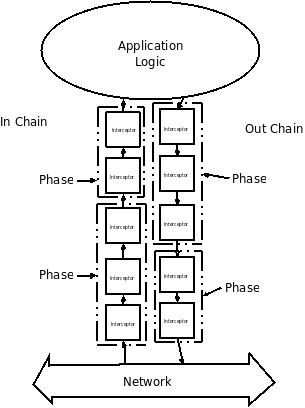
Message processing in Apache CXF
- The Apache CXF runtime creates an outbound interceptor chain to process the request.
- If the invocation starts a two-way message exchange, the runtime creates an inbound interceptor chain and a fault processing interceptor chain.
- The request message is passed sequentially through the outbound interceptor chain.Each interceptor in the chain performs some processing on the message. For example, the Apache CXF supplied SOAP interceptors package the message in a SOAP envelope.
- If any of the interceptors on the outbound chain create an error condition the chain is unwound and control is returned to the application level code.An interceptor chain is unwound by calling the fault processing method on all of the previously invoked interceptors.
- The request is dispatched to the appropriate service provider.
- When the response is received, it is passed sequentially through the inbound interceptor chain.NoteIf the response is an error message, it is passed into the fault processing interceptor chain.
- If any of the interceptors on the inbound chain create an error condition, the chain is unwound.
- When the message reaches the end of the inbound interceptor chain, it is passed back to the application code.
- The Apache CXF runtime creates an inbound interceptor chain to process the request message.
- If the request is part of a two-way message exchange, the runtime also creates an outbound interceptor chain and a fault processing interceptor chain.
- The request is passed sequentially through the inbound interceptor chain.
- If any of the interceptors on the inbound chain create an error condition, the chain is unwound and a fault is dispatched to the consumer.An interceptor chain is unwound by calling the fault processing method on all of the previously invoked interceptors.
- When the request reaches the end of the inbound interceptor chain, it is passed to the service implementation.
- When the response is ready it is passed sequentially through the outbound interceptor chain.NoteIf the response is an exception, it is passed through the fault processing interceptor chain.
- If any of the interceptors on the outbound chain create an error condition, the chain is unwound and a fault message is dispatched.
- Once the request reaches the end of the outbound chain, it is dispatched to the consumer.
Interceptors
- the interceptor's chain
- the interceptor's phase
- the other interceptors that occur earlier in the chain
Phases
Interceptor chains
- a chain for inbound messages
- a chain for outbound messages
- a chain for error messages
Developing interceptors
- Apache CXF provides a number of abstract interceptors to make it easier to develop custom interceptors.
- Interceptors require certain parts of a message to be available and require the data to be in a certain format. The contents of the message and the format of the data is partially determined by an interceptor's phase.
- In general, the ordering of interceptors within a phase is not important. However, in certain situations it may be important to ensure that an interceptor is executed before, or after, other interceptors in the same phase.
- If an error occurs in the active interceptor chain after the interceptor has executed, its fault processing logic is invoked.
Chapter 2. The Interceptor APIs
Abstract
PhaseInterceptor interface which extends the base Interceptor interface. This interface defines a number of methods used by the Apache CXF's runtime to control interceptor execution and are not appropriate for application developers to implement. To simplify interceptor development, Apache CXF provides a number of abstract interceptor implementations that can be extended.
Interfaces
Interceptor interface shown in Example 2.1, “Base interceptor interface”.
Example 2.1. Base interceptor interface
package org.apache.cxf.interceptor;

public interface Interceptor<T extends Message>
{

  void handleMessage(T message) throws Fault;

  void handleFault(T message);

}Interceptor interface defines the two methods that a developer needs to implement for a custom interceptor:
- handleMessage()
- The
handleMessage()method does most of the work in an interceptor. It is called on each interceptor in a message chain and receives the contents of the message being processed. Developers implement the message processing logic of the interceptor in this method. For detailed information about implementing thehandleMessage()method, see Section 4.1, “Processing messages”. - handleFault()
- The
handleFault()method is called on an interceptor when normal message processing has been interrupted. The runtime calls thehandleFault()method of each invoked interceptor in reverse order as it unwinds an interceptor chain. For detailed information about implementing thehandleFault()method, see Section 4.2, “Unwinding after an error”.
Interceptor interface. Instead, they implement the PhaseInterceptor interface shown in Example 2.2, “The phase interceptor interface”. The PhaseInterceptor interface adds four methods that allow an interceptor the participate in interceptor chains.
Example 2.2. The phase interceptor interface
package org.apache.cxf.phase;
...

public interface PhaseInterceptor<T extends Message> extends Interceptor<T>
{

    Set<String> getAfter();

    Set<String> getBefore();

    String getId();

    String getPhase();

}
Abstract interceptor class
PhaseInterceptor interface, developers should extend the AbstractPhaseInterceptor class. This abstract class provides implementations for the phase management methods of the PhaseInterceptor interface. The AbstractPhaseInterceptor class also provides a default implementation of the handleFault() method.
handleMessage() method. They can also provide a different implementation for the handleFault() method. The developer-provided implementations can manipulate the message data using the methods provided by the generic org.apache.cxf.message.Message interface.
AbstractSoapInterceptor class. Extending this class provides the handleMessage() method and the handleFault() method with access to the message data as an org.apache.cxf.binding.soap.SoapMessage object. SoapMessage objects have methods for retrieving the SOAP headers, the SOAP envelope, and other SOAP metadata from the message.
Chapter 3. Determining When the Interceptor is Invoked
Abstract
- Specifying the interceptor's phase
- Specifying constraints on the location of the interceptor within the phase
3.1. Specifying an interceptor's phase
Overview
Phase
Figure 3.1. An interceptor phase

RECEIVE phase of an inbound interceptor chain processes transport level details using the raw message data picked up from the wire.
Specifying a phase
org.apache.cxf.Phase class to use for specifying a phase. The class is a collection of constants. Each phase defined by Apache CXF has a corresponding constant in the Phase class. For example, the RECEIVE phase is specified by the value Phase.RECEIVE.
Setting the phase
AbstractPhaseInterceptor class defines three constructors for instantiating an interceptor:
public AbstractPhaseInterceptor(String phase)—sets the phase of the interceptor to the specified phase and automatically sets the interceptor's id to the interceptor's class name.TipThis constructor will satisfy most use cases.public AbstractPhaseInterceptor(String id, String phase)—sets the interceptor's id to the string passed in as the first parameter and the interceptor's phase to the second string.public AbstractPhaseInterceptor(String phase, boolean uniqueId)—specifies if the interceptor should use a unique, system generated id. If theuniqueIdparameter istrue, the interceptor's id will be calculated by the system. If theuniqueIdparameter isfalsethe interceptor's id is set to the interceptor's class name.
AbstractPhaseInterceptor constructor using the super() method as shown in Example 3.1, “Setting an interceptor's phase”.
Example 3.1. Setting an interceptor's phase
import org.apache.cxf.message.Message;
import org.apache.cxf.phase.AbstractPhaseInterceptor;
import org.apache.cxf.phase.Phase;

public class StreamInterceptor extends AbstractPhaseInterceptor<Message>
 {

    public StreamInterceptor()
   {
     super(Phase.PRE_STREAM);
    }
}StreamInterceptor interceptor shown in Example 3.1, “Setting an interceptor's phase” is placed into the PRE_STREAM phase.
3.2. Constraining an interceptors placement in a phase
Overview
Add to the chain before
AbstractPhaseInterceptor class provides two addBefore() methods.
Example 3.2. Methods for adding an interceptor before other interceptors
public void addBefore(String i);public void addBefore(Collection<String> i);addBefore() method in the constuctor of a custom interceptor.
Example 3.3. Specifying a list of interceptors that must run after the current interceptor
public class MyPhasedOutInterceptor extends AbstractPhaseInterceptor
{

    public MyPhasedOutInterceptor() {
        super(Phase.PRE_LOGICAL);
        addBefore(HolderOutInterceptor.class.getName());
    }

...

}Add to the chain after
AbstractPhaseInterceptor class provides two addAfter() methods for cases where an interceptor needs to be placed after one or more other interceptors.
Example 3.4. Methods for adding an interceptor after other interceptors
public void addAfter(String i);public void addAfter(Collection<String> i);addAfter() method in the constuctor of a custom interceptor.
Example 3.5. Specifying a list of interceptors that must run before the current interceptor
public class MyPhasedOutInterceptor extends AbstractPhaseInterceptor
{

    public MyPhasedOutInterceptor() {
        super(Phase.PRE_LOGICAL);
        addAfter(StartingOutInterceptor.class.getName());
    }

...

}Chapter 4. Implementing the Interceptors Processing Logic
Abstract
handleMessage() method. This method receives the message data and manipulates it as needed. Developers may also want to add some special logic to handle fault processing cases.
Figure 4.1. Flow through an interceptor

handleMessage() method is called. The handleMessage() method is where the interceptor's message processing logic is placed.
handleMessage() method of the interceptor, or any subsequent interceptor in the interceptor chain, the handleFault() method is called. The handleFault() method is useful for cleaning up after an interceptor in the event of an error. It can also be used to alter the fault message.
4.1. Processing messages
Overview
handleMessage() method is invoked. It receives that message data as a Message object. Along with the actual contents of the message, the Message object may contain a number of properties related to the message or the message processing state. The exact contents of the Message object depends on the interceptors preceding the current interceptor in the chain.
Getting the message contents
Message interface provides two methods that can be used in extracting the message contents:
public <T> T getContent(java.lang.Class<T> format);ThegetContent()method returns the content of the message in an object of the specified class. If the contents are not available as an instance of the specified class, null is returned. The list of available content types is determined by the interceptor's location on the interceptor chain and the direction of the interceptor chain.public Collection<Attachment> getAttachments();ThegetAttachments()method returns a JavaCollectionobject containing any binary attachments associated with the message. The attachments are stored inorg.apache.cxf.message.Attachmentobjects.Attachmentobjects provide methods for managing the binary data.ImportantAttachments are only available after the attachment processing interceptors have executed.
Determining the message's direction
getExchange() method. As shown in Example 4.1, “Getting the message exchange”, getExchange() does not take any parameters and returns the message exchange as a org.apache.cxf.message.Exchange object.
Example 4.1. Getting the message exchange
Exchange getExchange();Exchange object has four methods, shown in Example 4.2, “Getting messages from a message exchange”, for getting the messages associated with an exchange. Each method will either return the message as a org.apache.cxf.Message object or it will return null if the message does not exist.
Example 4.2. Getting messages from a message exchange
Message getInMessage();Message getInFaultMessage();Message getOutMessage();Message getOutFaultMessage();Example 4.3. Checking the direction of a message chain
public static boolean isOutbound()
{
   Exchange exchange = message.getExchange();
        return message != null
               && exchange != null
               && (message == exchange.getOutMessage()
                   || message == exchange.getOutFaultMessage());
}
Example
Example 4.4. Example message processing method
import java.io.IOException;
import java.io.InputStream;
import java.util.zip.GZIPInputStream;

import org.apache.cxf.message.Message;
import org.apache.cxf.phase.AbstractPhaseInterceptor;
import org.apache.cxf.phase.Phase;

public class StreamInterceptor extends AbstractPhaseInterceptor<Message>
{

  ...

  public void handleMessage(Message message)
  {

        boolean isOutbound = false;
        isOutbound = message == message.getExchange().getOutMessage()
               || message == message.getExchange().getOutFaultMessage();

        if (!isOutbound)
        {
          try
          {
             InputStream is = message.getContent(InputStream.class);
             GZIPInputStream zipInput = new GZIPInputStream(is);
             message.setContent(InputStream.class, zipInput);
          }
          catch (IOException ioe)
          {
             ioe.printStackTrace();
           }
        }
         else
        {
         // zip the outbound message
        }
    }
  ...
}
4.2. Unwinding after an error
Overview
handleFault() method of any interceptors in the chain that have already been executed.
handleFault() method can be used to clean up any resources used by an interceptor during normal message processing. It can also be used to rollback any actions that should only stand if message processing completes successfully. In cases where the fault message will be passed on to an outbound fault processing interceptor chain, the handleFault() method can also be used to add information to the fault message.
Getting the message payload
handleFault() method receives the same Message object as the handleMessage() method used in normal message processing. Getting the message contents from the Message object is described in the section called “Getting the message contents”.
Example
Example 4.5. Handling an unwinding interceptor chain
@Override
public void handleFault(SoapMessage message)
{
  super.handleFault(message);
  XMLStreamWriter writer = (XMLStreamWriter)message.get(ORIGINAL_XML_WRITER);
  if (writer != null)
  {
    message.setContent(XMLStreamWriter.class, writer);
  }
}Chapter 5. Configuring Endpoints to Use Interceptors
Abstract
5.1. Deciding where to attach interceptors
Overview
- the endpoint object
- the service object
- the proxy object
- the factory object used to create the endpoint or the proxy
- the binding
- the central
Busobject
Endpoints and proxies
Factories
Bindings
Buses
Combining attachment points
5.2. Adding interceptors using configuration
Overview
Configuration elements
list child element. The list element has one child for each of the interceptors being attached to the chain. Interceptors can be specified using either a bean element directly configuring the interceptor or a ref element that refers to a bean element that configures the interceptor.
Examples
Example 5.1. Attaching interceptors to the bus
<beans xmlns="http://www.springframework.org/schema/beans"
       xmlns:xsi="http://www.w3.org/2001/XMLSchema-instance"
       xmlns:cxf="http://cxf.apache.org/core"
       xmlns:http="http://cxf.apache.org/transports/http/configuration"
       xsi:schemaLocation="
       http://cxf.apache.org/core http://cxf.apache.org/schemas/core.xsd
       http://cxf.apache.org/transports/http/configuration http://cxf.apache.org/schemas/configuration/http-conf.xsd
       http://www.springframework.org/schema/beans http://www.springframework.org/schema/beans/spring-beans.xsd">
  ...
  <bean id="GZIPStream" class="demo.stream.interceptor.StreamInterceptor"/>

  <cxf:bus>
    <cxf:inInterceptors>
      <list>
        <ref bean="GZIPStream"/>
      </list>
    </cxf:inInterceptors>
  </cxf:bus>
</beans>
Example 5.2. Attaching interceptors to a JAX-WS service provider
<beans xmlns="http://www.springframework.org/schema/beans"
       xmlns:xsi="http://www.w3.org/2001/XMLSchema-instance"
       xmlns:jaxws="http://cxf.apache.org/jaxws"
       xmlns:wsa="http://cxf.apache.org/ws/addressing"
       xsi:schemaLocation="
http://www.springframework.org/schema/beans
http://www.springframework.org/schema/beans/spring-beans.xsd">

  <jaxws:endpoint ...>
    <jaxws:outInterceptors>
      <list>
        <bean id="GZIPStream" class="demo.stream.interceptor.StreamInterceptor" />
      </list>
    </jaxws:outInterceptors>
  </jaxws:endpoint>
</beans>
More information
5.3. Adding interceptors programmatically
- the
InterceptorProviderAPI - Java annotations
InterceptorProvider API allows the developer to attach interceptors to any of the runtime components that have interceptor chains, but it requires working with the underlying Apache CXF classes. The Java annotations can only be added to service interfaces or service implementations, but they allow developers to stay within the JAX-WS API or the JAX-RS API.
5.3.1. Using the interceptor provider API
Overview
InterceptorProvider interface shown in Example 5.3, “The interceptor provider interface”.
Example 5.3. The interceptor provider interface
package org.apache.cxf.interceptor;

import java.util.List;

public interface InterceptorProvider
{
    List<Interceptor<? extends Message>> getInInterceptors();

    List<Interceptor<? extends Message>> getOutInterceptors();

    List<Interceptor<? extends Message>> getInFaultInterceptors();

    List<Interceptor<? extends Message>> getOutFaultInterceptors();
}List object. Using the methods offered by the Java List object, developers can add and remove interceptors to any of the chains.
Procedure
InterceptorProvider API to attach an interceptor to a runtime component's interceptor chain, you must:
- Get access to the runtime component with the chain to which the interceptor is being attached.Developers must use Apache CXF specific APIs to access the runtime components from standard Java application code. The runtime components are usually accessible by casting the JAX-WS or JAX-RS artifacts into the underlying Apache CXF objects.
- Create an instance of the interceptor.
- Use the proper get method to retrieve the desired interceptor chain.
- Use the
Listobject'sadd()method to attach the interceptor to the interceptor chain.TipThis step is usually combined with retrieving the interceptor chain.
Attaching an interceptor to a consumer
Example 5.4. Attaching an interceptor to a consumer programmatically
package com.fusesource.demo;

import java.io.File;
import java.net.URL;
import javax.xml.namespace.QName;
import javax.xml.ws.Service;

import org.apache.cxf.endpoint.ClientProxy;
import org.apache.cxf.endpoint.ClientProxy;

public class Client
{
  public static void main(String args[])
  {
    QName serviceName = new QName("http://demo.eric.org", "stockQuoteReporter");
    Service s = Service.create(serviceName); 1

    QName portName = new QName("http://demo.eric.org", "stockQuoteReporterPort");
    s.addPort(portName, "http://schemas.xmlsoap.org/soap/", "http://localhost:9000/EricStockQuote"); 2

    quoteReporter proxy = s.getPort(portName, quoteReporter.class); 3

    Client cxfClient = ClientProxy.getClient(proxy); 4

    ValidateInterceptor validInterceptor = new ValidateInterceptor(); 5
    cxfClient.getInInterceptor().add(validInterceptor); 6

    ...
  }
}- 1
- Creates a JAX-WS
Serviceobject for the consumer. - 2
- Adds a port to the
Serviceobject that provides the consumer's target address. - 3
- Creates the proxy used to invoke methods on the service provider.
- 4
- Gets the Apache CXF
Clientobject associated with the proxy. - 5
- Creates an instance of the interceptor.
- 6
- Attaches the interceptor to the inbound interceptor chain.
Attaching an interceptor to a service provider
Example 5.5. Attaching an interceptor to a service provider programmatically
package com.fusesource.demo;
import java.util.*;

import org.apache.cxf.endpoint.Server;
import org.apache.cxf.frontend.ServerFactoryBean;
import org.apache.cxf.frontend.EndpointImpl;

public class stockQuoteReporter implements quoteReporter
{
  ...
  public stockQuoteReporter()
  {
    ServerFactoryBean sfb = new ServerFactoryBean(); 1
    Server server = sfb.create(); 2
    EndpointImpl endpt = server.getEndpoint(); 3

    AuthTokenInterceptor authInterceptor = new AuthTokenInterceptor(); 4

    endpt.getOutInterceptor().add(authInterceptor); 5
  }
}- 1
- Creates a
ServerFactoryBeanobject that will provide access to the underlying Apache CXF objects. - 2
- Gets the
Serverobject that Apache CXF uses to represent the endpoint. - 3
- Gets the Apache CXF
EndpointImplobject for the service provider. - 4
- Creates an instance of the interceptor.
- 5
- Attaches the interceptor to the endpoint;s outbound interceptor chain.
Attaching an interceptor to a bus
Example 5.6. Attaching an interceptor to a bus
import org.apache.cxf.BusFactory;
org.apache.cxf.Bus;

...

Bus bus = BusFactory.getDefaultBus(); 1

WatchInterceptor watchInterceptor = new WatchInterceptor(); 2

bus..getInInterceptor().add(watchInterceptor); 3

...WatchInterceptor will be attached to the inbound interceptor chain of all endpoints created by the runtime instance.
5.3.2. Using Java annotations
Overview
Where to place the annotations
- the service endpoint interface(SEI) defining the endpointIf the annotations are placed on an SEI, all of the service providers that implement the interface and all of the consumers that use the SEI to create proxies will be affected.
- a service implementation classIf the annotations are placed on an implementation class, all of the service providers using the implementation class will be affected.
The annotations
Listing the interceptors
Example 5.7. Syntax for listing interceptors in a chain annotation
interceptors={"interceptor1", "interceptor2", ..., "interceptorN"}Example
SayHiImpl.
Example 5.8. Attaching interceptors to a service implementation
import org.apache.cxf.interceptor.InInterceptors;

@InInterceptors(interceptors={"com.sayhi.interceptors.FirstLast", "com.sayhi.interceptors.LogName"})
public class SayHiImpl implements SayHi
{
  ...
}
Chapter 6. Manipulating Interceptor Chains on the Fly
Abstract
Overview
Chain life-cycle
Getting the interceptor chain
Message.getInterceptorChain() method shown in Example 6.1, “Method for getting an interceptor chain”. The interceptor chain is returned as a org.apache.cxf.interceptor.InterceptorChain object.
Example 6.1. Method for getting an interceptor chain
InterceptorChain getInterceptorChain();Adding interceptors
InterceptorChain object has two methods, shown in Example 6.2, “Methods for adding interceptors to an interceptor chain”, for adding interceptors to an interceptor chain. One allows you to add a single interceptor and the other allows you to add multiple interceptors.
Example 6.2. Methods for adding interceptors to an interceptor chain
void add(Interceptor<? extends Message> i);void add(Collection<Interceptor<? extends Message>> i);Example 6.3. Adding an interceptor to an interceptor chain on-the-fly
void handleMessage(Message message)
{
  ...
  AddledIntereptor addled = new AddledIntereptor(); 1
  InterceptorChain chain = message.getInterceptorChain(); 2
  chain.add(addled); 3
  ...
}- 1
- Instantiates a copy of the interceptor to be added to the chain.ImportantThe interceptor being added to the chain should be in either the same phase as the current interceptor or a latter phase than the current interceptor.
- 2
- Gets the interceptor chain for the current message.
- 3
- Adds the new interceptor to the chain.
Removing interceptors
InterceptorChain object has one method, shown in Example 6.4, “Methods for removing interceptors from an interceptor chain”, for removing an interceptor from an interceptor chain.
Example 6.4. Methods for removing interceptors from an interceptor chain
void remove(Interceptor<? extends Message> i);Example 6.5. Removing an interceptor from an interceptor chain on-the-fly
void handleMessage(Message message)
{
  ...
  SackedIntereptor sacked = new SackedIntereptor(); 1
  InterceptorChain chain = message.getInterceptorChain(); 2
  chain.remove(sacked); 3
  ...
}- 1
- Instantiates a copy of the interceptor to be removed from the chain.ImportantThe interceptor being removed from the chain should be in either the same phase as the current interceptor or a latter phase than the current interceptor.
- 2
- Gets the interceptor chain for the current message.
- 3
- Removes the interceptor from the chain.
Appendix A. Apache CXF Message Processing Phases
Inbound phases
| Phase | Description |
|---|---|
RECEIVE | Performs transport specific processing, such as determining MIME boundaries for binary attachments. |
PRE_STREAM | Processes the raw data stream received by the transport. |
USER_STREAM | |
POST_STREAM | |
READ | Determines if a request is a SOAP or XML message and builds adds the proper interceptors. SOAP message headers are also processed in this phase. |
PRE_PROTOCOL | Performs protocol level processing. This includes processing of WS-* headers and processing of the SOAP message properties. |
USER_PROTOCOL | |
POST_PROTOCOL | |
UNMARSHAL | Unmarshals the message data into the objects used by the application level code. |
PRE_LOGICAL | Processes the unmarshalled message data. |
USER_LOGICAL | |
POST_LOGICAL | |
PRE_INVOKE | |
INVOKE | Passes the message to the application code. On the server side, the service implementation is invoked in this phase. On the client side, the response is handed back to the application. |
POST_INVOKE | Invokes the outbound interceptor chain. |
Outbound phases
| Phase | Description |
|---|---|
SETUP | Performs any set up that is required by later phases in the chain. |
PRE_LOGICAL | Performs processing on the unmarshalled data passed from the application level. |
USER_LOGICAL | |
POST_LOGICAL | |
PREPARE_SEND | Opens the connection for writing the message on the wire. |
PRE_STREAM | Performs processing required to prepare the message for entry into a data stream. |
PRE_PROTOCOL | Begins processing protocol specific information. |
WRITE | Writes the protocol message. |
PRE_MARSHAL | Marshals the message. |
MARSHAL | |
POST_MARSHAL | |
USER_PROTOCOL | Process the protocol message. |
POST_PROTOCOL | |
USER_STREAM | Process the byte-level message. |
POST_STREAM | |
SEND | Sends the message and closes the transport stream. |
_ENDING. The ending phases are used interceptors that require some terminal action to occur before data is written on the wire.
Appendix B. Apache CXF Provided Interceptors
B.1. Core Apache CXF Interceptors
Inbound
| Class | Phase | Description |
|---|---|---|
ServiceInvokerInterceptor | INVOKE | Invokes the proper method on the service. |
Outbound
B.2. Front-Ends
JAX-WS
| Class | Phase | Description |
|---|---|---|
HolderInInterceptor | PRE_INVOKE | Creates holder objects for any out or in/out parameters in the message. |
WrapperClassInInterceptor | POST_LOGICAL | Unwraps the parts of a wrapped doc/literal message into the appropriate array of objects. |
LogicalHandlerInInterceptor | PRE_PROTOCOL | Passes message processing to the JAX-WS logical handlers used by the endpoint. When the JAX-WS handlers complete, the message is passed along to the next interceptor on the inbound chain. |
SOAPHandlerInterceptor | PRE_PROTOCOL | Passes message processing to the JAX-WS SOAP handlers used by the endpoint. When the SOAP handlers finish with the message, the message is passed along to the next interceptor in the chain. |
| Class | Phase | Description |
|---|---|---|
HolderOutInterceptor | PRE_LOGICAL | Removes the values of any out and in/out parameters from their holder objects and adds the values to the message's parameter list. |
WebFaultOutInterceptor | PRE_PROTOCOL | Processes outbound fault messages. |
WrapperClassOutInterceptor | PRE_LOGICAL | Makes sure that wrapped doc/literal messages and rpc/literal messages are properly wrapped before being added to the message. |
LogicalHandlerOutInterceptor | PRE_MARSHAL | Passes message processing to the JAX-WS logical handlers used by the endpoint. When the JAX-WS handlers complete, the message is passed along to the next interceptor on the outbound chain. |
SOAPHandlerInterceptor | PRE_PROTOCOL | Passes message processing to the JAX-WS SOAP handlers used by the endpoint. When the SOAP handlers finish processing the message, it is passed along to the next interceptor in the chain. |
MessageSenderInterceptor | PREPARE_SEND | Calls back to the Destination object to have it setup the output streams, headers, etc. to prepare the outgoing transport. |
JAX-RS
| Class | Phase | Description |
|---|---|---|
JAXRSInInterceptor | PRE_STREAM | Selects the root resource class, invokes any configured JAX-RS request filters, and determines the method to invoke on the root resource. |
ServiceInvokerInInterceptor interceptor. No other interceptors will be invoked after the JAXRSInInterceptor.
| Class | Phase | Description |
|---|---|---|
JAXRSOutInterceptor | MARSHAL | Marshals the response into the proper format for transmission. |
B.3. Message bindings
SOAP
| Class | Phase | Description |
|---|---|---|
CheckFaultInterceptor | POST_PROTOCOL | Checks if the message is a fault message. If the message is a fault message, normal processing is aborted and fault processing is started. |
MustUnderstandInterceptor | PRE_PROTOCOL | Processes the must understand headers. |
RPCInInterceptor | UNMARSHAL | Unmarshals rpc/literal messages. If the message is bare, the message is passed to a BareInInterceptor object to deserialize the message parts. |
ReadsHeadersInterceptor | READ | Parses the SOAP headers and stores them in the message object. |
SoapActionInInterceptor | READ | Parses the SOAP action header and attempts to find a unique operation for the action. |
SoapHeaderInterceptor | UNMARSHAL | Binds the SOAP headers that map to operation parameters to the appropriate objects. |
AttachmentInInterceptor | RECEIVE | Parses the mime headers for mime boundaries, finds the root part and resets the input stream to it, and stores the other parts in a collection of Attachment objects. |
DocLiteralInInterceptor | UNMARSHAL | Examines the first element in the SOAP body to determine the appropriate operation and calls the data binding to read in the data. |
StaxInInterceptor | POST_STREAM | Creates an XMLStreamReader object from the message. |
URIMappingInterceptor | UNMARSHAL | Handles the processing of HTTP GET methods. |
SwAInInterceptor | PRE_INVOKE | Creates the required MIME handlers for binary SOAP attachments and adds the data to the parameter list. |
| Class | Phase | Description |
|---|---|---|
RPCOutInterceptor | MARSHAL | Marshals rpc style messages for transmission. |
SoapHeaderOutFilterInterceptor | PRE_LOGICAL | Removes all SOAP headers that are marked as inbound only. |
SoapPreProtocolOutInterceptor | POST_LOGICAL | Sets up the SOAP version and the SOAP action header. |
AttachmentOutInterceptor | PRE_STREAM | Sets up the attachment marshalers and the mime stuff required to process any attachments that might be in the message. |
BareOutInterceptor | MARSHAL | Writes the message parts. |
StaxOutInterceptor | PRE_STREAM | Creates an XMLStreamWriter object from the message. |
WrappedOutInterceptor | MARSHAL | Wraps the outbound message parameters. |
SoapOutInterceptor | WRITE | Writes the soap:envelope element and the elements for the header blocks in the message. Also writes an empty soap:body element for the remaining interceptors to populate. |
SwAOutInterceptor | PRE_LOGICAL | Removes any binary data that will be packaged as a SOAP attachment and stores it for later processing. |
XML
| Class | Phase | Description |
|---|---|---|
AttachmentInInterceptor | RECEIVE | Parses the mime headers for mime boundaries, finds the root part and resets the input stream to it, and then stores the other parts in a collection of Attachment objects. |
DocLiteralInInterceptor | UNMARSHAL | Examines the first element in the message body to determine the appropriate operation and then calls the data binding to read in the data. |
StaxInInterceptor | POST_STREAM | Creates an XMLStreamReader object from the message. |
URIMappingInterceptor | UNMARSHAL | Handles the processing of HTTP GET methods. |
XMLMessageInInterceptor | UNMARSHAL | Unmarshals the XML message. |
| Class | Phase | Description |
|---|---|---|
StaxOutInterceptor | PRE_STREAM | Creates an XMLStreamWriter objects from the message. |
WrappedOutInterceptor | MARSHAL | Wraps the outbound message parameters. |
XMLMessageOutInterceptor | MARSHAL | Marshals the message for transmission. |
CORBA
| Class | Phase | Description |
|---|---|---|
CorbaStreamInInterceptor | PRE_STREAM | Deserializes the CORBA message. |
BareInInterceptor | UNMARSHAL | Deserializes the message parts. |
| Class | Phase | Description |
|---|---|---|
CorbaStreamOutInterceptor | PRE_STREAM | Serializes the message. |
BareOutInterceptor | MARSHAL | Writes the message parts. |
CorbaStreamOutEndingInterceptor | USER_STREAM | Creates a streamable object for the message and stores it in the message context. |
B.4. Other features
Logging
| Class | Phase | Description |
|---|---|---|
LoggingInInterceptor | RECEIVE | Writes the raw message data to the logging system. |
| Class | Phase | Description |
|---|---|---|
LoggingOutInterceptor | PRE_STREAM | Writes the outbound message to the logging system. |
WS-Addressing
| Class | Phase | Description |
|---|---|---|
MAPCodec | PRE_PROTOCOL | Decodes the message addressing properties. |
| Class | Phase | Description |
|---|---|---|
MAPAggregator | PRE_LOGICAL | Aggregates the message addressing properties for a message. |
MAPCodec | PRE_PROTOCOL | Encodes the message addressing properties. |
WS-RM
| Class | Phase | Description |
|---|---|---|
RMInInterceptor | PRE_LOGICAL | Handles the aggregation of message parts and acknowledgement messages. |
RMSoapInterceptor | PRE_PROTOCOL | Encodes and decodes the WS-RM properties from messages. |
| Class | Phase | Description |
|---|---|---|
RMOutInterceptor | PRE_LOGICAL | Handles the chunking of messages and the transmission of the chunks. Also handles the processing of acknowledgements and resend requests. |
RMSoapInterceptor | PRE_PROTOCOL | Encodes and decodes the WS-RM properties from messages. |
Appendix C. Interceptor Providers
Overview
org.apache.cxf.interceptor.InterceptorProvider interface. Developers can attach their own interceptors to any interceptor provider.
List of providers
AddressingPolicyInterceptorProviderClientFactoryBeanClientImplClientProxyFactoryBeanCorbaBindingCXFBusImplorg.apache.cxf.jaxws.EndpointImplorg.apache.cxf.endpoint.EndpointImplExtensionManagerBusJAXRSClientFactoryBeanJAXRSServerFactoryBeanJAXRSServiceImplJaxWsClientEndpointImplJaxWsClientFactoryBeanJaxWsEndpointImplJaxWsProxyFactoryBeanJaxWsServerFactoryBeanJaxwsServiceBuilderMTOMPolicyInterceptorProviderNoOpPolicyInterceptorProviderObjectBindingRMPolicyInterceptorProviderServerFactoryBeanServiceImplSimpleServiceBuilderSoapBindingWrappedEndpointWrappedServiceXMLBinding
Index
Symbols
- @InFaultInterceptors, The annotations
- @InInterceptors, The annotations
- @OutFaultInterceptors, The annotations
- @OutInterceptors, The annotations
A
- AbstractPhaseInterceptor, Abstract interceptor class
- addAfter(), Add to the chain after
- addBefore(), Add to the chain before
- constructor, Setting the phase
C
- configuration
- inbound fault interceptors, Configuration elements, The annotations
- inbound interceptors, Configuration elements, The annotations
- outbound fault interceptors, Configuration elements, The annotations
- outbound interceptors, Configuration elements, The annotations
E
- Exchange
- getInFaultMessage(), Determining the message's direction
- getInMessage(), Determining the message's direction
- getOutFaultMessage(), Determining the message's direction
- getOutMessage(), Determining the message's direction
H
- handleFault(), Unwinding after an error
- handleMessage(), Processing messages
I
- inFaultInterceptors, Configuration elements
- inInterceptors, Configuration elements
- interceptor
- definition, Interceptors
- life-cycle, Chain life-cycle
- Interceptor, Interfaces
- interceptor chain
- definition, Interceptor chains
- life-cycle, Chain life-cycle
- programmatic configuration, Adding interceptors programmatically
- Spring configuration, Adding interceptors using configuration
- InterceptorChain
- add(), Adding interceptors
- remove(), Removing interceptors
M
- Message
- getAttachments(), Getting the message contents
- getContent(), Getting the message contents
- getExchange(), Determining the message's direction
- getInterceptorChain(), Getting the interceptor chain
O
- org.apache.cxf.Phase, Specifying a phase
- outFaultInterceptors, Configuration elements
- outInterceptors, Configuration elements
P
- PhaseInterceptor, Interfaces
- phases
- definition, Phases
- inbound, Inbound phases
- outbound, Outbound phases
- setting, Setting the phase
Legal Notice
Trademark Disclaimer
Legal Notice
Third Party Acknowledgements
- JLine (http://jline.sourceforge.net) jline:jline:jar:1.0License: BSD (LICENSE.txt) - Copyright (c) 2002-2006, Marc Prud'hommeaux
mwp1@cornell.eduAll rights reserved.Redistribution and use in source and binary forms, with or without modification, are permitted provided that the following conditions are met:- Redistributions of source code must retain the above copyright notice, this list of conditions and the following disclaimer.
- Redistributions in binary form must reproduce the above copyright notice, this list of conditions and the following disclaimer in the documentation and/or other materials provided with the distribution.
- Neither the name of JLine nor the names of its contributors may be used to endorse or promote products derived from this software without specific prior written permission.
THIS SOFTWARE IS PROVIDED BY THE COPYRIGHT HOLDERS AND CONTRIBUTORS "AS IS" AND ANY EXPRESS OR IMPLIED WARRANTIES, INCLUDING, BUT NOT LIMITED TO, THE IMPLIED WARRANTIES OF MERCHANTABILITY AND FITNESS FOR A PARTICULAR PURPOSE ARE DISCLAIMED. IN NO EVENT SHALL THE COPYRIGHT OWNER OR CONTRIBUTORS BE LIABLE FOR ANY DIRECT, INDIRECT, INCIDENTAL, SPECIAL, EXEMPLARY, OR CONSEQUENTIAL DAMAGES (INCLUDING, BUT NOT LIMITED TO, PROCUREMENT OF SUBSTITUTE GOODS OR SERVICES; LOSS OF USE, DATA, OR PROFITS; OR BUSINESS INTERRUPTION) HOWEVER CAUSED AND ON ANY THEORY OF LIABILITY, WHETHER IN CONTRACT, STRICT LIABILITY, OR TORT (INCLUDING NEGLIGENCE OR OTHERWISE) ARISING IN ANY WAY OUT OF THE USE OF THIS SOFTWARE, EVEN IF ADVISED OF THE POSSIBILITY OF SUCH DAMAGE. - Stax2 API (http://woodstox.codehaus.org/StAX2) org.codehaus.woodstox:stax2-api:jar:3.1.1License: The BSD License (http://www.opensource.org/licenses/bsd-license.php)Copyright (c) <YEAR>, <OWNER> All rights reserved.Redistribution and use in source and binary forms, with or without modification, are permitted provided that the following conditions are met:
- Redistributions of source code must retain the above copyright notice, this list of conditions and the following disclaimer.
- Redistributions in binary form must reproduce the above copyright notice, this list of conditions and the following disclaimer in the documentation and/or other materials provided with the distribution.
THIS SOFTWARE IS PROVIDED BY THE COPYRIGHT HOLDERS AND CONTRIBUTORS "AS IS" AND ANY EXPRESS OR IMPLIED WARRANTIES, INCLUDING, BUT NOT LIMITED TO, THE IMPLIED WARRANTIES OF MERCHANTABILITY AND FITNESS FOR A PARTICULAR PURPOSE ARE DISCLAIMED. IN NO EVENT SHALL THE COPYRIGHT HOLDER OR CONTRIBUTORS BE LIABLE FOR ANY DIRECT, INDIRECT, INCIDENTAL, SPECIAL, EXEMPLARY, OR CONSEQUENTIAL DAMAGES (INCLUDING, BUT NOT LIMITED TO, PROCUREMENT OF SUBSTITUTE GOODS OR SERVICES; LOSS OF USE, DATA, OR PROFITS; OR BUSINESS INTERRUPTION) HOWEVER CAUSED AND ON ANY THEORY OF LIABILITY, WHETHER IN CONTRACT, STRICT LIABILITY, OR TORT (INCLUDING NEGLIGENCE OR OTHERWISE) ARISING IN ANY WAY OUT OF THE USE OF THIS SOFTWARE, EVEN IF ADVISED OF THE POSSIBILITY OF SUCH DAMAGE. - jibx-run - JiBX runtime (http://www.jibx.org/main-reactor/jibx-run) org.jibx:jibx-run:bundle:1.2.3License: BSD (http://jibx.sourceforge.net/jibx-license.html) Copyright (c) 2003-2010, Dennis M. Sosnoski.All rights reserved.Redistribution and use in source and binary forms, with or without modification, are permitted provided that the following conditions are met:
- Redistributions of source code must retain the above copyright notice, this list of conditions and the following disclaimer.
- Redistributions in binary form must reproduce the above copyright notice, this list of conditions and the following disclaimer in the documentation and/or other materials provided with the distribution.
- Neither the name of JiBX nor the names of its contributors may be used to endorse or promote products derived from this software without specific prior written permission.
THIS SOFTWARE IS PROVIDED BY THE COPYRIGHT HOLDERS AND CONTRIBUTORS "AS IS" AND ANY EXPRESS OR IMPLIED WARRANTIES, INCLUDING, BUT NOT LIMITED TO, THE IMPLIED WARRANTIES OF MERCHANTABILITY AND FITNESS FOR A PARTICULAR PURPOSE ARE DISCLAIMED. IN NO EVENT SHALL THE COPYRIGHT OWNER OR CONTRIBUTORS BE LIABLE FOR ANY DIRECT, INDIRECT, INCIDENTAL, SPECIAL, EXEMPLARY, OR CONSEQUENTIAL DAMAGES (INCLUDING, BUT NOT LIMITED TO, PROCUREMENT OF SUBSTITUTE GOODS OR SERVICES; LOSS OF USE, DATA, OR PROFITS; OR BUSINESS INTERRUPTION) HOWEVER CAUSED AND ON ANY THEORY OF LIABILITY, WHETHER IN CONTRACT, STRICT LIABILITY, OR TORT (INCLUDING NEGLIGENCE OR OTHERWISE) ARISING IN ANY WAY OUT OF THE USE OF THIS SOFTWARE, EVEN IF ADVISED OF THE POSSIBILITY OF SUCH DAMAGE. - JavaAssist (http://www.jboss.org/javassist) org.jboss.javassist:com.springsource.javassist:jar:3.9.0.GA:compileLicense: MPL (http://www.mozilla.org/MPL/MPL-1.1.html)
- HAPI-OSGI-Base Module (http://hl7api.sourceforge.net/hapi-osgi-base/) ca.uhn.hapi:hapi-osgi-base:bundle:1.2License: Mozilla Public License 1.1 (http://www.mozilla.org/MPL/MPL-1.1.txt)

'%20d='M201.5%20305.5c-13.8%200-24.9-11.1-24.9-24.6%200-13.8%2011.1-24.9%2024.9-24.9%2013.6%200%2024.6%2011.1%2024.6%2024.9%200%2013.6-11.1%2024.6-24.6%2024.6zM504%20256c0%20137-111%20248-248%20248S8%20393%208%20256%20119%208%20256%208s248%20111%20248%20248zm-132.3-41.2c-9.4%200-17.7%203.9-23.8%2010-22.4-15.5-52.6-25.5-86.1-26.6l17.4-78.3%2055.4%2012.5c0%2013.6%2011.1%2024.6%2024.6%2024.6%2013.8%200%2024.9-11.3%2024.9-24.9s-11.1-24.9-24.9-24.9c-9.7%200-18%205.8-22.1%2013.8l-61.2-13.6c-3-.8-6.1%201.4-6.9%204.4l-19.1%2086.4c-33.2%201.4-63.1%2011.3-85.5%2026.8-6.1-6.4-14.7-10.2-24.1-10.2-34.9%200-46.3%2046.9-14.4%2062.8-1.1%205-1.7%2010.2-1.7%2015.5%200%2052.6%2059.2%2095.2%20132%2095.2%2073.1%200%20132.3-42.6%20132.3-95.2%200-5.3-.6-10.8-1.9-15.8%2031.3-16%2019.8-62.5-14.9-62.5zM302.8%20331c-18.2%2018.2-76.1%2017.9-93.6%200-2.2-2.2-6.1-2.2-8.3%200-2.5%202.5-2.5%206.4%200%208.6%2022.8%2022.8%2087.3%2022.8%20110.2%200%202.5-2.2%202.5-6.1%200-8.6-2.2-2.2-6.1-2.2-8.3%200zm7.7-75c-13.6%200-24.6%2011.1-24.6%2024.9%200%2013.6%2011.1%2024.6%2024.6%2024.6%2013.8%200%2024.9-11.1%2024.9-24.6%200-13.8-11-24.9-24.9-24.9z'/%3e%3c/svg%3e)