 Red Hat Summit
Programming EIP Components
Using the Apache Camel API to create better routes
Copyright © 2013 Red Hat, Inc. and/or its affiliates.
Abstract
Chapter 1. Understanding Message Formats
Abstract
1.1. Exchanges
Overview
Figure 1.1. Exchange Object Passing through a Route
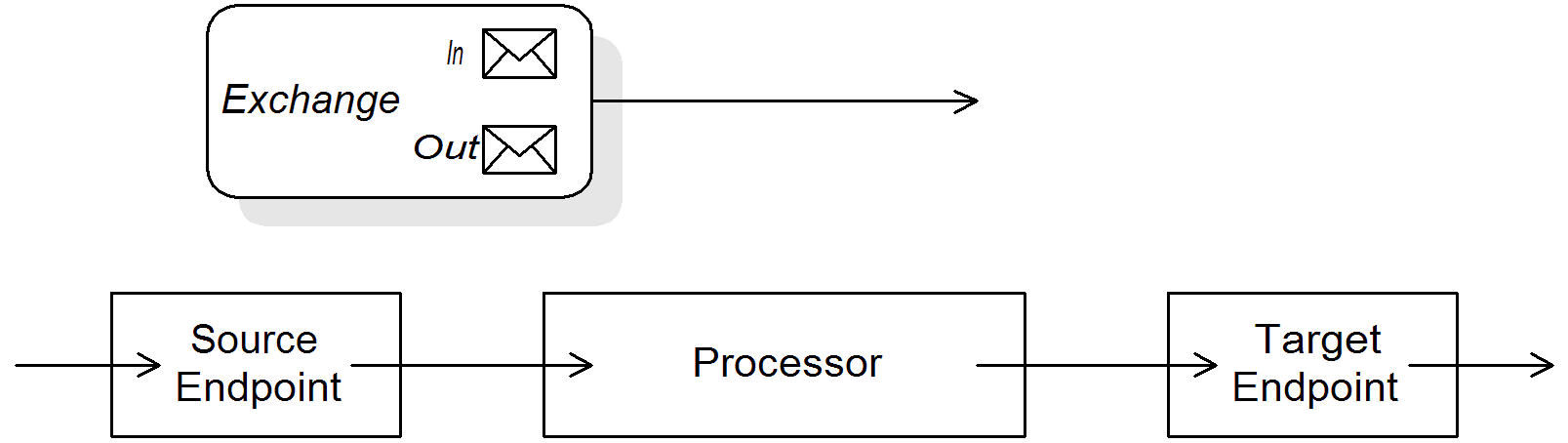
Processor.process() method. This means that the exchange object is directly accessible to the source endpoint, the target endpoint, and all of the processors in between.
The Exchange interface
org.apache.camel.Exchange interface defines methods to access In and Out messages, as shown in Example 1.1, “Exchange Methods”.
Example 1.1. Exchange Methods
Exchange interface, see Section 10.1, “The Exchange Interface”.
Lazy creation of messages
getIn() or getOut()). The lazy message creation semantics are implemented by the org.apache.camel.impl.DefaultExchange class.
getIn() or getOut()), or if you call an accessor with the boolean argument equal to true (that is, getIn(true) or getOut(true)), the default method implementation creates a new message instance, if one does not already exist.
false (that is, getIn(false) or getOut(false)), the default method implementation returns the current message value.[1]
Lazy creation of exchange IDs
getExchangeId() on any exchange to obtain a unique ID for that exchange instance, but the ID is generated only when you actually call the method. The DefaultExchange.getExchangeId() implementation of this method delegates ID generation to the UUID generator that is registered with the CamelContext.
CamelContext, see Section 1.4, “Built-In UUID Generators”.
1.2. Messages
Overview
- Message body
- Message headers
- Message attachments
Object) and the message attachments are declared to be of type javax.activation.DataHandler , which can contain arbitrary MIME types. If you need to obtain a concrete representation of the message contents, you can convert the body and headers to another type using the type converter mechanism and, possibly, using the marshalling and unmarshalling mechanism.
The Message interface
org.apache.camel.Message interface defines methods to access the message body, message headers and message attachments, as shown in Example 1.2, “Message Interface”.
Example 1.2. Message Interface
Message interface, see Section 11.1, “The Message Interface”.
Lazy creation of bodies, headers, and attachments
foo message header from the In message:
from("SourceURL")
    .filter(header("foo")
    .isEqualTo("bar"))
    .to("TargetURL");
from("SourceURL")
    .filter(header("foo")
    .isEqualTo("bar"))
.to("TargetURL");header("foo") call is executed. At that point, the underlying message implementation parses the headers and populates the header map. The message body is not parsed until you reach the end of the route, at the to("TargetURL") call. At that point, the body is converted into the format required for writing it to the target endpoint, TargetURL.
Lazy creation of message IDs
getMessageId() method. The DefaultExchange.getExchangeId() implementation of this method delegates ID generation to the UUID generator that is registered with the CamelContext.
getMessageId() method implicitly, if the endpoint implements a protocol that requires a unique message ID. In particular, JMS messages normally include a header containing unique message ID, so the JMS component automatically calls getMessageId() to obtain the message ID (this is controlled by the messageIdEnabled option on the JMS endpoint).
CamelContext, see Section 1.4, “Built-In UUID Generators”.
Initial message format
byte[], ByteBuffer, InputStream, or OutputStream. This ensures that the overhead required for creating the initial message is minimal. Where more elaborate message formats are required components usually rely on type converters or marshalling processors.
Type converters
convertBodyTo(Class type) method can be inserted into a route to convert the body of an In message, as follows:
from("SourceURL").convertBodyTo(String.class).to("TargetURL");
from("SourceURL").convertBodyTo(String.class).to("TargetURL");java.lang.String. The following example shows how to append a string to the end of the In message body:
from("SourceURL").setBody(bodyAs(String.class).append("My Special Signature")).to("TargetURL");
from("SourceURL").setBody(bodyAs(String.class).append("My Special Signature")).to("TargetURL");from("SourceURL").setBody(body().append("My Special Signature")).to("TargetURL");
from("SourceURL").setBody(body().append("My Special Signature")).to("TargetURL");append() method automatically converts the message body to a string before appending its argument.
Type conversion methods in Message
org.apache.camel.Message interface exposes some methods that perform type conversion explicitly:
getBody(Class<T> type)—Returns the message body as type,T.getHeader(String name, Class<T> type)—Returns the named header value as type,T.
Converting to XML
byte[], ByteBuffer, String, and so on), the built-in type converter also supports conversion to XML formats. For example, you can convert a message body to the org.w3c.dom.Document type. This conversion is more expensive than the simple conversions, because it involves parsing the entire message and then creating a tree of nodes to represent the XML document structure. You can convert to the following XML document types:
org.w3c.dom.Documentjavax.xml.transform.sax.SAXSource
Marshalling and unmarshalling
marshal()unmarshal()
Example 1.3. Unmarshalling a Java Object
from("file://tmp/appfiles/serialized")
    .unmarshal()
    .serialization()
    .<FurtherProcessing>
    .to("TargetURL");
from("file://tmp/appfiles/serialized")
    .unmarshal()
    .serialization()
    .<FurtherProcessing>
.to("TargetURL");Final message format
byte[] array to an InputStream type.
1.3. Built-In Type Converters
Overview
Message.getBody(Class<T> type) or Message.getHeader(String name, Class<T> type). It is also possible to invoke the master type converter directly. For example, if you have an exchange object, exchange, you could convert a given value to a String as shown in Example 1.4, “Converting a Value to a String”.
Example 1.4. Converting a Value to a String
org.apache.camel.TypeConverter tc = exchange.getContext().getTypeConverter();
String str_value = tc.convertTo(String.class, value);
org.apache.camel.TypeConverter tc = exchange.getContext().getTypeConverter();
String str_value = tc.convertTo(String.class, value);Basic type converters
java.io.FileStringbyte[]andjava.nio.ByteBufferjava.io.InputStreamandjava.io.OutputStreamjava.io.Readerandjava.io.Writerjava.io.BufferedReaderandjava.io.BufferedWriterjava.io.StringReader
File and String types. The File type can be converted to any of the preceding types, except Reader, Writer, and StringReader. The String type can be converted to File, byte[], ByteBuffer, InputStream, or StringReader. The conversion from String to File works by interpreting the string as a file name. The trio of String, byte[], and ByteBuffer are completely inter-convertible.
byte[] to String and from String to byte[] by setting the Exchange.CHARSET_NAME exchange property in the current exchange. For example, to perform conversions using the UTF-8 character encoding, call exchange.setProperty("Exchange.CHARSET_NAME", "UTF-8"). The supported character sets are described in the java.nio.charset.Charset class.
Collection type converters
Object[]java.util.Setjava.util.List
Map type converters
java.util.Mapjava.util.HashMapjava.util.Hashtablejava.util.Properties
java.util.Set type, where the set elements are of the MapEntry<K,V> type.
DOM type converters
org.w3c.dom.Document—convertible frombyte[],String,java.io.File, andjava.io.InputStream.org.w3c.dom.Nodejavax.xml.transform.dom.DOMSource—convertible fromString.javax.xml.transform.Source—convertible frombyte[]andString.
SAX type converters
javax.xml.transform.sax.SAXSource type, which supports the SAX event-driven XML parser (see the SAX Web site for details). You can convert to SAXSource from the following types:
StringInputStreamSourceStreamSourceDOMSource
Custom type converters
1.4. Built-In UUID Generators
Overview
CamelContext. This UUID generator is then used whenever Apache Camel needs to generate a unique ID—in particular, the registered UUID generator is called to generate the IDs returned by the Exchange.getExchangeId() and the Message.getMessageId() methods.
SimpleUuidGenerator) for testing purposes.
Provided UUID generators
org.apache.camel.impl.ActiveMQUuidGenerator—(Default) generates the same style of ID as is used by Apache ActiveMQ. This implementation might not be suitable for all applications, because it uses some JDK APIs that are forbidden in the context of cloud computing (such as the Google App Engine).org.apache.camel.impl.SimpleUuidGenerator—implements a simple counter ID, starting at1. The underlying implementation uses thejava.util.concurrent.atomic.AtomicLongtype, so that it is thread-safe.org.apache.camel.impl.JavaUuidGenerator—implements an ID based on thejava.util.UUIDtype. Becausejava.util.UUIDis synchronized, this might affect performance on some highly concurrent systems.
Custom UUID generator
org.apache.camel.spi.UuidGenerator interface, which is shown in Example 1.5, “UuidGenerator Interface”. The generateUuid() must be implemented to return a unique ID string.
Example 1.5. UuidGenerator Interface
Specifying the UUID generator using Java
setUuidGenerator() method on the current CamelContext object. For example, you can register a SimpleUuidGenerator instance with the current CamelContext, as follows:
// Java
getContext().setUuidGenerator(new org.apache.camel.impl.SimpleUuidGenerator());
// Java
getContext().setUuidGenerator(new org.apache.camel.impl.SimpleUuidGenerator());setUuidGenerator() method should be called during startup, before any routes are activated.
Specifying the UUID generator using Spring
bean element. When a camelContext instance is created, it automatically looks up the Spring registry, searching for a bean that implements org.apache.camel.spi.UuidGenerator. For example, you can register a SimpleUuidGenerator instance with the CamelContext as follows:
Chapter 2. Implementing a Processor
Abstract
2.1. Processing Model
Pipelining model
Figure 2.1. Pipelining Model
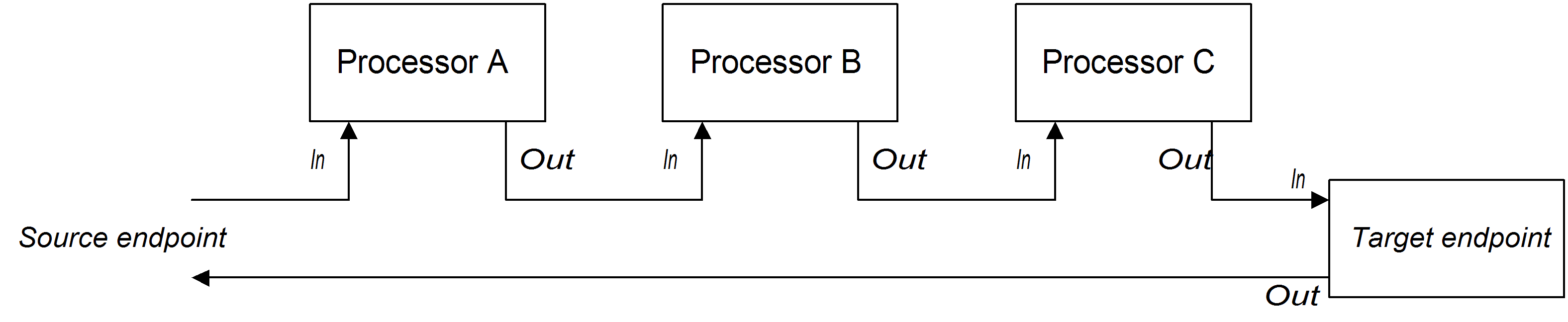
ProcessorA, ProcessorB, and a producer endpoint, TargetURI.
Example 2.1. Java DSL Pipeline
from(SourceURI).pipeline(ProcessorA, ProcessorB, TargetURI);
from(SourceURI).pipeline(ProcessorA, ProcessorB, TargetURI);2.2. Implementing a Simple Processor
Overview
Processor interface
org.apache.camel.Processor interface. As shown in Example 2.2, “Processor Interface”, the interface defines a single method, process(), which processes an exchange object.
Example 2.2. Processor Interface
package org.apache.camel;

public interface Processor {
    void process(Exchange exchange) throws Exception;
}
package org.apache.camel;

public interface Processor {
    void process(Exchange exchange) throws Exception;
}Implementing the Processor interface
Processor interface and provide the logic for the process() method. Example 2.3, “Simple Processor Implementation” shows the outline of a simple processor implementation.
Example 2.3. Simple Processor Implementation
process() method gets executed before the exchange object is delegated to the next processor in the chain.
Inserting the simple processor into a route
process() DSL command to insert a simple processor into a route. Create an instance of your custom processor and then pass this instance as an argument to the process() method, as follows:
org.apache.camel.Processor myProc = new MyProcessor();

from("SourceURL").process(myProc).to("TargetURL");
org.apache.camel.Processor myProc = new MyProcessor();

from("SourceURL").process(myProc).to("TargetURL");2.3. Accessing Message Content
Accessing message headers
Exchange.getIn()), and then use the Message interface to retrieve the individual headers (for example, using Message.getHeader()).
Authorization. This example uses the ExchangeHelper.getMandatoryHeader() method, which eliminates the need to test for a null header value.
Example 2.4. Accessing an Authorization Header
Message interface, see Section 1.2, “Messages”.
Accessing the message body
Example 2.5. Accessing the Message Body
Accessing message attachments
Message.getAttachment() method or the Message.getAttachments() method. See Example 1.2, “Message Interface” for more details.
2.4. The ExchangeHelper Class
Overview
org.apache.camel.util.ExchangeHelper class is a Apache Camel utility class that provides methods that are useful when implementing a processor.
Resolve an endpoint
resolveEndpoint() method is one of the most useful methods in the ExchangeHelper class. You use it inside a processor to create new Endpoint instances on the fly.
Example 2.6. The resolveEndpoint() Method
resolveEndpoint() is an exchange instance, and the second argument is usually an endpoint URI string. Example 2.7, “Creating a File Endpoint” shows how to create a new file endpoint from an exchange instance exchange
Example 2.7. Creating a File Endpoint
Endpoint file_endp = ExchangeHelper.resolveEndpoint(exchange, "file://tmp/messages/in.xml");
Endpoint file_endp = ExchangeHelper.resolveEndpoint(exchange, "file://tmp/messages/in.xml");Wrapping the exchange accessors
ExchangeHelper class provides several static methods of the form getMandatoryBeanProperty(), which wrap the corresponding getBeanProperty() methods on the Exchange class. The difference between them is that the original getBeanProperty() accessors return null, if the corresponding property is unavailable, and the getMandatoryBeanProperty() wrapper methods throw a Java exception. The following wrapper methods are implemented in the ExchangeHelper class:
Testing the exchange pattern
ExchangeHelper class provides the following methods:
Get the In message's MIME content type
ExchangeHelper.getContentType(exchange) method. To implement this, the ExchangeHelper object looks up the value of the In message's Content-Type header—this method relies on the underlying component to populate the header value).
Chapter 3. Type Converters
Abstract
3.1. Type Converter Architecture
Overview
Type converter interface
org.apache.camel.TypeConverter interface, which all type converters must implement.
Example 3.1. TypeConverter Interface
package org.apache.camel;

public interface TypeConverter {
    <T> T convertTo(Class<T> type, Object value);
}
package org.apache.camel;

public interface TypeConverter {
    <T> T convertTo(Class<T> type, Object value);
}Master type converter
CamelContext object. To obtain a reference to the master type converter, you call the CamelContext.getTypeConverter() method. For example, if you have an exchange object, exchange, you can obtain a reference to the master type converter as shown in Example 3.2, “Getting a Master Type Converter”.
Example 3.2. Getting a Master Type Converter
org.apache.camel.TypeConverter tc = exchange.getContext().getTypeConverter();
org.apache.camel.TypeConverter tc = exchange.getContext().getTypeConverter();Type converter loader
TypeConverterLoader interface. Apache Camel currently uses only one kind of type converter loader—the annotation type converter loader (of AnnotationTypeConverterLoader type).
Type conversion process
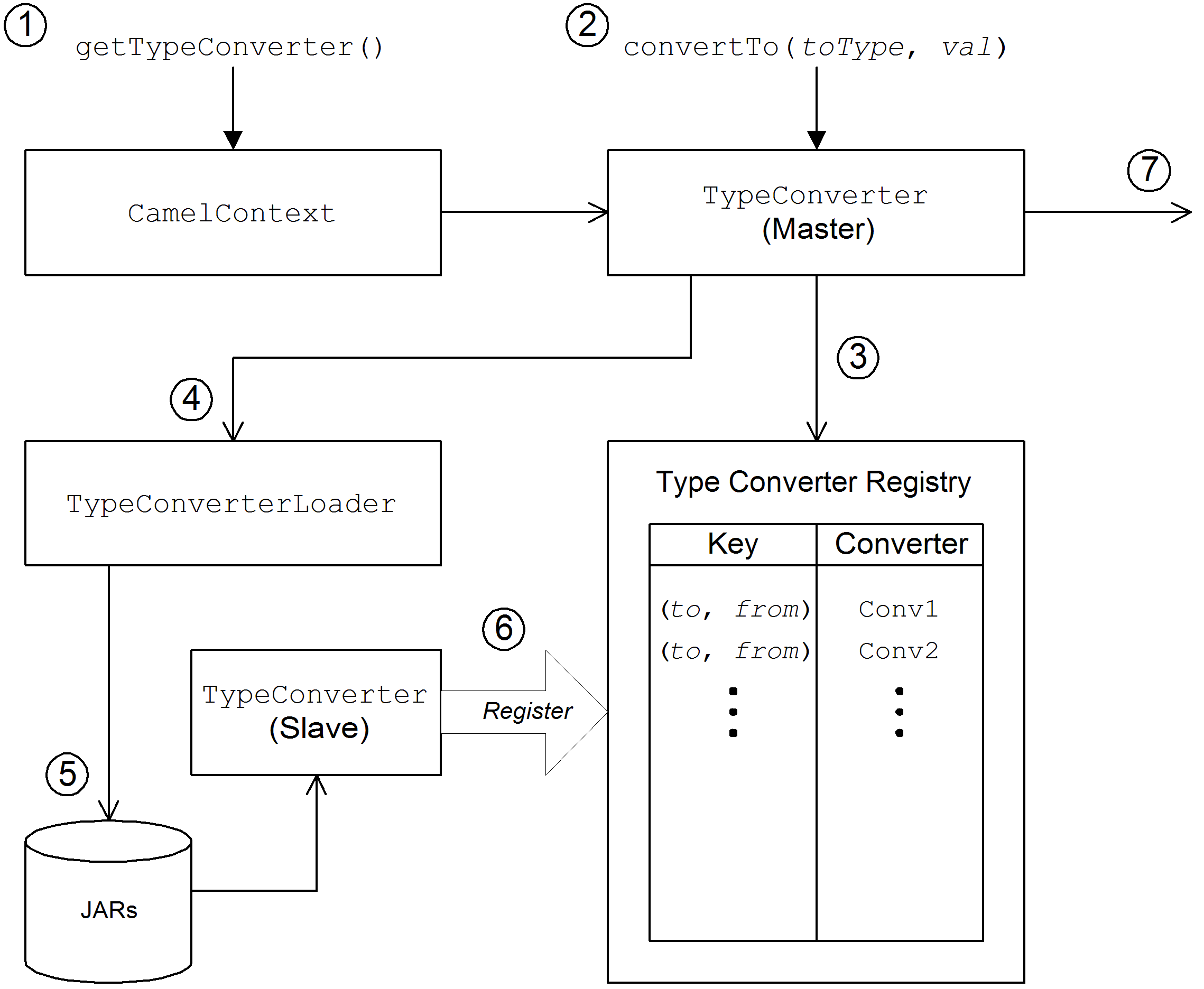
value, to a specified type, toType.
Figure 3.1. Type Conversion Process
- The
CamelContextobject holds a reference to the masterTypeConverterinstance. The first step in the conversion process is to retrieve the master type converter by callingCamelContext.getTypeConverter(). - Type conversion is initiated by calling the
convertTo()method on the master type converter. This method instructs the type converter to convert the data object,value, from its original type to the type specified by thetoTypeargument. - Because the master type converter is a front end for many different slave type converters, it looks up the appropriate slave type converter by checking a registry of type mappings The registry of type converters is keyed by a type mapping pair
(toType, fromType). If a suitable type converter is found in the registry, the master type converter calls the slave'sconvertTo()method and returns the result. - If a suitable type converter cannot be found in the registry, the master type converter loads a new type converter, using the type converter loader.
- The type converter loader searches the available JAR libraries on the classpath to find a suitable type converter. Currently, the loader strategy that is used is implemented by the annotation type converter loader, which attempts to load a class annotated by the
org.apache.camel.Converterannotation. See the section called “Create a TypeConverter file”. - If the type converter loader is successful, a new slave type converter is loaded and entered into the type converter registry. This type converter is then used to convert the
valueargument to thetoTypetype. - If the data is successfully converted, the converted data value is returned. If the conversion does not succeed,
nullis returned.
3.2. Implementing Type Converter Using Annotations
Overview
How to implement a type converter
Implement an annotated converter class
@Converter annotation. You must annotate the class itself and each of the static methods intended to perform type conversion. Each converter method takes an argument that defines the from type, optionally takes a second Exchange argument, and has a non-void return value that defines the to type. The type converter loader uses Java reflection to find the annotated methods and integrate them into the type converter mechanism. Example 3.3, “Example of an Annotated Converter Class” shows an example of an annotated converter class that defines a converter method for converting from java.io.File to java.io.InputStream and another converter method (with an Exchange argument) for converting from byte[] to String.
Example 3.3. Example of an Annotated Converter Class
toInputStream() method is responsible for performing the conversion from the File type to the InputStream type and the toString() method is responsible for performing the conversion from the byte[] type to the String type.
@Converter annotation.
Create a TypeConverter file
TypeConverter file at the following location:
META-INF/services/org/apache/camel/TypeConverter
META-INF/services/org/apache/camel/TypeConverterTypeConverter file must contain a comma-separated list of package names identifying the packages that contain type converter classes. For example, if you want the type converter loader to search the com.YourDomain.YourPackageName package for annotated converter classes, the TypeConverter file would have the following contents:
com.YourDomain.YourPackageName
com.YourDomain.YourPackageNamePackage the type converter
META-INF directory. Put this JAR file on your classpath to make it available to your Apache Camel application.
Fallback converter method
@Converter annotation, you can optionally define a fallback converter method using the @FallbackConverter annotation. The fallback converter method will only be tried, if the master type converter fails to find a regular converter method in the type registry.
byte[] to String), a fallback converter can potentially perform conversion between any pair of types. It is up to the code in the body of the fallback converter method to figure out which conversions it is able to perform. At run time, if a conversion cannot be performed by a regular converter, the master type converter iterates through every available fallback converter until it finds one that can perform the conversion.
GenericFile object, exploiting the type converters already available in the type converter registry:
3.3. Implementing a Type Converter Directly
Overview
Implement the TypeConverter interface
TypeConverter interface. For example, the following MyOrderTypeConverter class converts an integer value to a MyOrder object, where the integer value is used to initialize the order ID in the MyOrder object.
Add the type converter to the registry
// Add the custom type converter to the type converter registry
context.getTypeConverterRegistry().addTypeConverter(MyOrder.class, String.class, new MyOrderTypeConverter());
// Add the custom type converter to the type converter registry
context.getTypeConverterRegistry().addTypeConverter(MyOrder.class, String.class, new MyOrderTypeConverter());context is the current org.apache.camel.CamelContext instance. The addTypeConverter() method registers the MyOrderTypeConverter class against the specific type conversion, from String.class to MyOrder.class.
Chapter 4. Producer and Consumer Templates
Abstract
4.1. Using the Producer Template
4.1.1. Introduction to the Producer Template
Overview
Exchange object, as a message body, as a message body with a single header setting, and so on) and there are methods to support both the synchronous and the asynchronous style of invocation. Overall, producer template methods can be grouped into the following categories:
Synchronous invocation
sendSuffix() and requestSuffix(). For example, the methods for invoking an endpoint using either the default message exchange pattern (MEP) or an explicitly specified MEP are named send(), sendBody(), and sendBodyAndHeader() (where these methods respectively send an Exchange object, a message body, or a message body and header value). If you want to force the MEP to be InOut (request/reply semantics), you can call the request(), requestBody(), and requestBodyAndHeader() methods instead.
ProducerTemplate instance and use it to send a message body to the activemq:MyQueue endpoint. The example also shows how to send a message body and header value using sendBodyAndHeader().
Synchronous invocation with a processor
send() method with a Processor argument instead of an Exchange argument. In this case, the producer template implicitly asks the specified endpoint to create an Exchange instance (typically, but not always having the InOnly MEP by default). This default exchange is then passed to the processor, which initializes the contents of the exchange object.
MyProcessor processor to the activemq:MyQueue endpoint.
MyProcessor class is implemented as shown in the following example. In addition to setting the In message body (as shown here), you could also initialize message heades and exchange properties.
Asynchronous invocation
asyncSendSuffix() and asyncRequestSuffix(). For example, the methods for invoking an endpoint using either the default message exchange pattern (MEP) or an explicitly specified MEP are named asyncSend() and asyncSendBody() (where these methods respectively send an Exchange object or a message body). If you want to force the MEP to be InOut (request/reply semantics), you can call the asyncRequestBody(), asyncRequestBodyAndHeader(), and asyncRequestBodyAndHeaders() methods instead.
direct:start endpoint. The asyncSend() method returns a java.util.concurrent.Future object, which is used to retrieve the invocation result at a later time.
asyncSendBody() or asyncRequestBody()). In this case, you can use one of the following helper methods to extract the returned message body from the Future object:
<T> T extractFutureBody(Future future, Class<T> type);
<T> T extractFutureBody(Future future, long timeout, TimeUnit unit, Class<T> type) throws TimeoutException;
<T> T extractFutureBody(Future future, Class<T> type);
<T> T extractFutureBody(Future future, long timeout, TimeUnit unit, Class<T> type) throws TimeoutException;extractFutureBody() method blocks until the invocation completes and the reply message is available. The second version of the extractFutureBody() method allows you to specify a timeout. Both methods have a type argument, type, which casts the returned message body to the specified type using a built-in type converter.
asyncRequestBody() method to send a message body to the direct:start endpoint. The blocking extractFutureBody() method is then used to retrieve the reply message body from the Future object.
Asynchronous invocation with a callback
asyncCallback(), asyncCallbackSendBody(), or asyncCallbackRequestBody() methods. In this case, you supply a callback object (of org.apache.camel.impl.SynchronizationAdapter type), which automatically gets invoked in the sub-thread as soon as a reply message arrives.
Synchronization callback interface is defined as follows:
onComplete() method is called on receipt of a normal reply and the onFailure() method is called on receipt of a fault message reply. Only one of these methods gets called back, so you must override both of them to ensure that all types of reply are processed.
direct:start endpoint, where the reply message is processed in the sub-thread by the SynchronizationAdapter callback object.
SynchronizationAdapter class is a default implementation of the Synchronization interface, which you can override to provide your own definitions of the onComplete() and onFailure() callback methods.
asyncCallback() method also returns a Future object—for example:
// Retrieve the reply from the main thread, specifying a timeout
Exchange reply = future.get(10, TimeUnit.SECONDS);
// Retrieve the reply from the main thread, specifying a timeout
Exchange reply = future.get(10, TimeUnit.SECONDS);4.1.2. Synchronous Send
Overview
Send an exchange
send() method is a general-purpose method that sends the contents of an Exchange object to an endpoint, using the message exchange pattern (MEP) of the exchange. The return value is the exchange that you get after it has been processed by the producer endpoint (possibly containing an Out message, depending on the MEP).
send() method for sending an exchange that let you specify the target endpoint in one of the following ways: as the default endpoint, as an endpoint URI, or as an Endpoint object.
Exchange send(Exchange exchange);
Exchange send(String endpointUri, Exchange exchange);
Exchange send(Endpoint endpoint, Exchange exchange);
Exchange send(Exchange exchange);
Exchange send(String endpointUri, Exchange exchange);
Exchange send(Endpoint endpoint, Exchange exchange);Send an exchange populated by a processor
send() method is to use a processor to populate a default exchange, instead of supplying the exchange object explicitly (see the section called “Synchronous invocation with a processor” for details).
send() methods for sending an exchange populated by a processor let you specify the target endpoint in one of the following ways: as the default endpoint, as an endpoint URI, or as an Endpoint object. In addition, you can optionally specify the exchange's MEP by supplying the pattern argument, instead of accepting the default.
Send a message body
sendBody() methods to provide the message body as an argument and let the producer template take care of inserting the body into a default exchange object.
sendBody() methods let you specify the target endpoint in one of the following ways: as the default endpoint, as an endpoint URI, or as an Endpoint object. In addition, you can optionally specify the exchange's MEP by supplying the pattern argument, instead of accepting the default. The methods without a pattern argument return void (even though the invocation might give rise to a reply in some cases); and the methods with a pattern argument return either the body of the Out message (if there is one) or the body of the In message (otherwise).
Send a message body and header(s)
sendBodyAndHeader() methods are useful for this kind of header testing. You supply the message body and header setting as arguments to sendBodyAndHeader() and let the producer template take care of inserting the body and header setting into a default exchange object.
sendBodyAndHeader() methods let you specify the target endpoint in one of the following ways: as the default endpoint, as an endpoint URI, or as an Endpoint object. In addition, you can optionally specify the exchange's MEP by supplying the pattern argument, instead of accepting the default. The methods without a pattern argument return void (even though the invocation might give rise to a reply in some cases); and the methods with a pattern argument return either the body of the Out message (if there is one) or the body of the In message (otherwise).
sendBodyAndHeaders() methods are similar to the sendBodyAndHeader() methods, except that instead of supplying just a single header setting, these methods allow you to specify a complete hash map of header settings.
Send a message body and exchange property
sendBodyAndProperty() methods. You supply the message body and property setting as arguments to sendBodyAndProperty() and let the producer template take care of inserting the body and exchange property into a default exchange object.
sendBodyAndProperty() methods let you specify the target endpoint in one of the following ways: as the default endpoint, as an endpoint URI, or as an Endpoint object. In addition, you can optionally specify the exchange's MEP by supplying the pattern argument, instead of accepting the default. The methods without a pattern argument return void (even though the invocation might give rise to a reply in some cases); and the methods with a pattern argument return either the body of the Out message (if there is one) or the body of the In message (otherwise).
4.1.3. Synchronous Request with InOut Pattern
Overview
Request an exchange populated by a processor
request() method is a general-purpose method that uses a processor to populate a default exchange and forces the message exchange pattern to be InOut (so that the invocation obeys request/reply semantics). The return value is the exchange that you get after it has been processed by the producer endpoint, where the Out message contains the reply message.
request() methods for sending an exchange populated by a processor let you specify the target endpoint in one of the following ways: as an endpoint URI, or as an Endpoint object.
Exchange request(String endpointUri, Processor processor);
Exchange request(Endpoint endpoint, Processor processor);
Exchange request(String endpointUri, Processor processor);
Exchange request(Endpoint endpoint, Processor processor);
Request a message body
requestBody() methods to provide the request message body as an argument and let the producer template take care of inserting the body into a default exchange object.
requestBody() methods let you specify the target endpoint in one of the following ways: as the default endpoint, as an endpoint URI, or as an Endpoint object. The return value is the body of the reply message (Out message body), which can either be returned as plain Object or converted to a specific type, T, using the built-in type converters (see Section 1.3, “Built-In Type Converters”).
Request a message body and header(s)
requestBodyAndHeader() methods. You supply the message body and header setting as arguments to requestBodyAndHeader() and let the producer template take care of inserting the body and exchange property into a default exchange object.
requestBodyAndHeader() methods let you specify the target endpoint in one of the following ways: as an endpoint URI, or as an Endpoint object. The return value is the body of the reply message (Out message body), which can either be returned as plain Object or converted to a specific type, T, using the built-in type converters (see Section 1.3, “Built-In Type Converters”).
requestBodyAndHeaders() methods are similar to the requestBodyAndHeader() methods, except that instead of supplying just a single header setting, these methods allow you to specify a complete hash map of header settings.
4.1.4. Asynchronous Send
Overview
Send an exchange
asyncSend() method takes an Exchange argument and invokes an endpoint asynchronously, using the message exchange pattern (MEP) of the specified exchange. The return value is a java.util.concurrent.Future object, which is a ticket you can use to collect the reply message at a later time—for details of how to obtain the return value from the Future object, see the section called “Asynchronous invocation”.
asyncSend() methods let you specify the target endpoint in one of the following ways: as an endpoint URI, or as an Endpoint object.
Future<Exchange> asyncSend(String endpointUri, Exchange exchange);
Future<Exchange> asyncSend(Endpoint endpoint, Exchange exchange);
Future<Exchange> asyncSend(String endpointUri, Exchange exchange);
Future<Exchange> asyncSend(Endpoint endpoint, Exchange exchange);
Send an exchange populated by a processor
asyncSend() method is to use a processor to populate a default exchange, instead of supplying the exchange object explicitly.
asyncSend() methods let you specify the target endpoint in one of the following ways: as an endpoint URI, or as an Endpoint object.
Future<Exchange> asyncSend(String endpointUri, Processor processor);
Future<Exchange> asyncSend(Endpoint endpoint, Processor processor);
Future<Exchange> asyncSend(String endpointUri, Processor processor);
Future<Exchange> asyncSend(Endpoint endpoint, Processor processor);
Send a message body
asyncSendBody() methods to send a message body asynchronously and let the producer template take care of inserting the body into a default exchange object.
asyncSendBody() methods let you specify the target endpoint in one of the following ways: as an endpoint URI, or as an Endpoint object.
Future<Object> asyncSendBody(String endpointUri, Object body);
Future<Object> asyncSendBody(Endpoint endpoint, Object body);
Future<Object> asyncSendBody(String endpointUri, Object body);
Future<Object> asyncSendBody(Endpoint endpoint, Object body);
4.1.5. Asynchronous Request with InOut Pattern
Overview
Request a message body
requestBody() methods to provide the request message body as an argument and let the producer template take care of inserting the body into a default exchange object.
asyncRequestBody() methods let you specify the target endpoint in one of the following ways: as an endpoint URI, or as an Endpoint object. The return value that is retrievable from the Future object is the body of the reply message (Out message body), which can be returned either as a plain Object or converted to a specific type, T, using a built-in type converter (see the section called “Asynchronous invocation”).
Request a message body and header(s)
asyncRequestBodyAndHeader() methods. You supply the message body and header setting as arguments to asyncRequestBodyAndHeader() and let the producer template take care of inserting the body and exchange property into a default exchange object.
asyncRequestBodyAndHeader() methods let you specify the target endpoint in one of the following ways: as an endpoint URI, or as an Endpoint object. The return value that is retrievable from the Future object is the body of the reply message (Out message body), which can be returned either as a plain Object or converted to a specific type, T, using a built-in type converter (see the section called “Asynchronous invocation”).
asyncRequestBodyAndHeaders() methods are similar to the asyncRequestBodyAndHeader() methods, except that instead of supplying just a single header setting, these methods allow you to specify a complete hash map of header settings.
4.1.6. Asynchronous Send with Callback
Overview
Send an exchange
asyncCallback() method takes an Exchange argument and invokes an endpoint asynchronously, using the message exchange pattern (MEP) of the specified exchange. This method is similar to the asyncSend() method for exchanges, except that it takes an additional org.apache.camel.spi.Synchronization argument, which is a callback interface with two methods: onComplete() and onFailure(). For details of how to use the Synchronization callback, see the section called “Asynchronous invocation with a callback”.
asyncCallback() methods let you specify the target endpoint in one of the following ways: as an endpoint URI, or as an Endpoint object.
Send an exchange populated by a processor
asyncCallback() method for processors calls a processor to populate a default exchange and forces the message exchange pattern to be InOut (so that the invocation obeys request/reply semantics).
asyncCallback() methods let you specify the target endpoint in one of the following ways: as an endpoint URI, or as an Endpoint object.
Send a message body
asyncCallbackSendBody() methods to send a message body asynchronously and let the producer template take care of inserting the body into a default exchange object.
asyncCallbackSendBody() methods let you specify the target endpoint in one of the following ways: as an endpoint URI, or as an Endpoint object.
Request a message body
asyncCallbackRequestBody() methods to provide the request message body as an argument and let the producer template take care of inserting the body into a default exchange object.
asyncCallbackRequestBody() methods let you specify the target endpoint in one of the following ways: as an endpoint URI, or as an Endpoint object.
4.2. Using the Consumer Template
Overview
Example of polling exchanges
receive(); receive() with a timeout; or receiveNoWait(), which returns immediately. Because a consumer endpoint represents a service, it is also essential to start the service thread by calling start() before you attempt to poll for exchanges.
seda:foo consumer endpoint using the blocking receive() method:
consumer, is instantiated using the CamelContext.createConsumerTemplate() method and the consumer service thread is started by calling ConsumerTemplate.start().
Example of polling message bodies
receiveBody(); receiveBody() with a timeout; or receiveBodyNoWait(), which returns immediately. As in the previous example, it is also essential to start the service thread by calling start() before you attempt to poll for exchanges.
seda:foo consumer endpoint using the blocking receiveBody() method:
Methods for polling exchanges
receive() without a timeout blocks indefinitely; receive() with a timeout blocks for the specified period of milliseconds; and receiveNoWait() is non-blocking. You can specify the consumer endpoint either as an endpoint URI or as an Endpoint instance.
Methods for polling message bodies
receiveBody() without a timeout blocks indefinitely; receiveBody() with a timeout blocks for the specified period of milliseconds; and receiveBodyNoWait() is non-blocking. You can specify the consumer endpoint either as an endpoint URI or as an Endpoint instance. Moreover, by calling the templating forms of these methods, you can convert the returned body to a particular type, T, using a built-in type converter.
Chapter 5. Implementing a Component
Abstract
5.1. Component Architecture
5.1.1. Factory Patterns for a Component
Overview
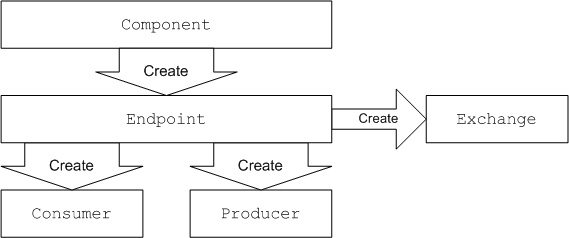
Component object itself (an instance of org.apache.camel.Component type). You can use the Component object as a factory to create Endpoint objects, which in turn act as factories for creating Consumer, Producer, and Exchange objects. These relationships are summarized in Figure 5.1, “Component Factory Patterns”
Figure 5.1. Component Factory Patterns
Component
Component.createEndpoint() method, which is responsible for creating new endpoints on demand.
Endpoint
org.apache.camel.Endpoint interface. The Endpoint interface defines the following factory methods:
createConsumer()andcreatePollingConsumer()—Creates a consumer endpoint, which represents the source endpoint at the beginning of a route.createProducer()—Creates a producer endpoint, which represents the target endpoint at the end of a route.createExchange()—Creates an exchange object, which encapsulates the messages passed up and down the route.
Consumer
org.apache.camel.Consumer interface. There are a number of different patterns you can follow when implementing a consumer. These patterns are described in Section 5.1.3, “Consumer Patterns and Threading”.
Producer
org.apache.camel.Producer interface. You can optionally implement the producer to support an asynchronous style of processing. See Section 5.1.4, “Asynchronous Processing” for details.
Exchange
org.apache.camel.Exchange interface. The default implementation, DefaultExchange, is sufficient for many component implementations. However, if you want to associated extra data with the exchanges or have the exchanges preform additional processing, it can be useful to customize the exchange implementation.
Message
Exchange object:
- In message—holds the current message.
- Out message—temporarily holds a reply message.
org.apache.camel.Message. It is not always necessary to customize the message implementation—the default implementation, DefaultMessage, is usually adequate.
5.1.2. Using a Component in a Route
Overview
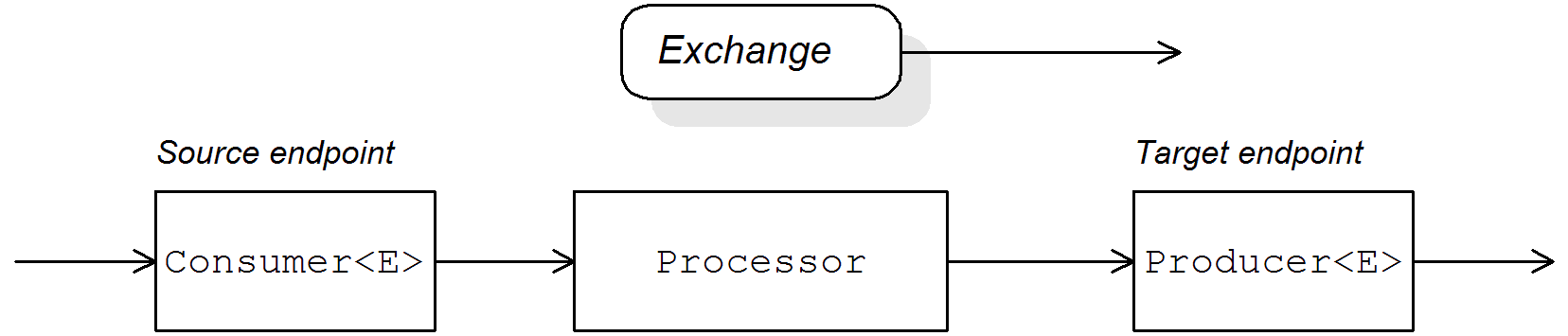
org.apache.camel.Processor type. Messages are encapsulated in an exchange object, E, which gets passed from node to node by invoking the process() method. The architecture of the processor pipeline is illustrated in Figure 5.2, “Consumer and Producer Instances in a Route”.
Figure 5.2. Consumer and Producer Instances in a Route
Source endpoint
org.apache.camel.Consumer object. The source endpoint is responsible for accepting incoming request messages and dispatching replies. When constructing the route, Apache Camel creates the appropriate Consumer type based on the component prefix from the endpoint URI, as described in Section 5.1.1, “Factory Patterns for a Component”.
Processors
org.apache.camel.Processor interface). You can insert either standard processors (for example, filter, throttler, or delayer) or insert your own custom processor implementations.
Target endpoint
org.apache.camel.Producer object. Because it comes at the end of a processor pipeline, the producer is also a processor object (implementing the org.apache.camel.Processor interface). The target endpoint is responsible for sending outgoing request messages and receiving incoming replies. When constructing the route, Apache Camel creates the appropriate Producer type based on the component prefix from the endpoint URI.
5.1.3. Consumer Patterns and Threading
Overview
- Event-driven pattern—The consumer is driven by an external thread.
- Scheduled poll pattern—The consumer is driven by a dedicated thread pool.
- Polling pattern—The threading model is left undefined.
Event-driven pattern
handleNotification() method to initiate request processing—see Example 8.4, “JMXConsumer Implementation” for details.
notify() method.
Figure 5.3. Event-Driven Consumer

- The consumer must implement a method to receive the incoming event (in Figure 5.3, “Event-Driven Consumer” this is represented by the
notify()method). The thread that callsnotify()is normally a separate part of the application, so the consumer's threading policy is externally driven.For example, in the case of the JMX consumer implementation, the consumer implements theNotificationListener.handleNotification()method to receive notifications from JMX. The threads that drive the consumer processing are created within the JMX layer. - In the body of the
notify()method, the consumer first converts the incoming event into an exchange object,E, and then callsprocess()on the next processor in the route, passing the exchange object as its argument.
Scheduled poll pattern
Figure 5.4. Scheduled Poll Consumer
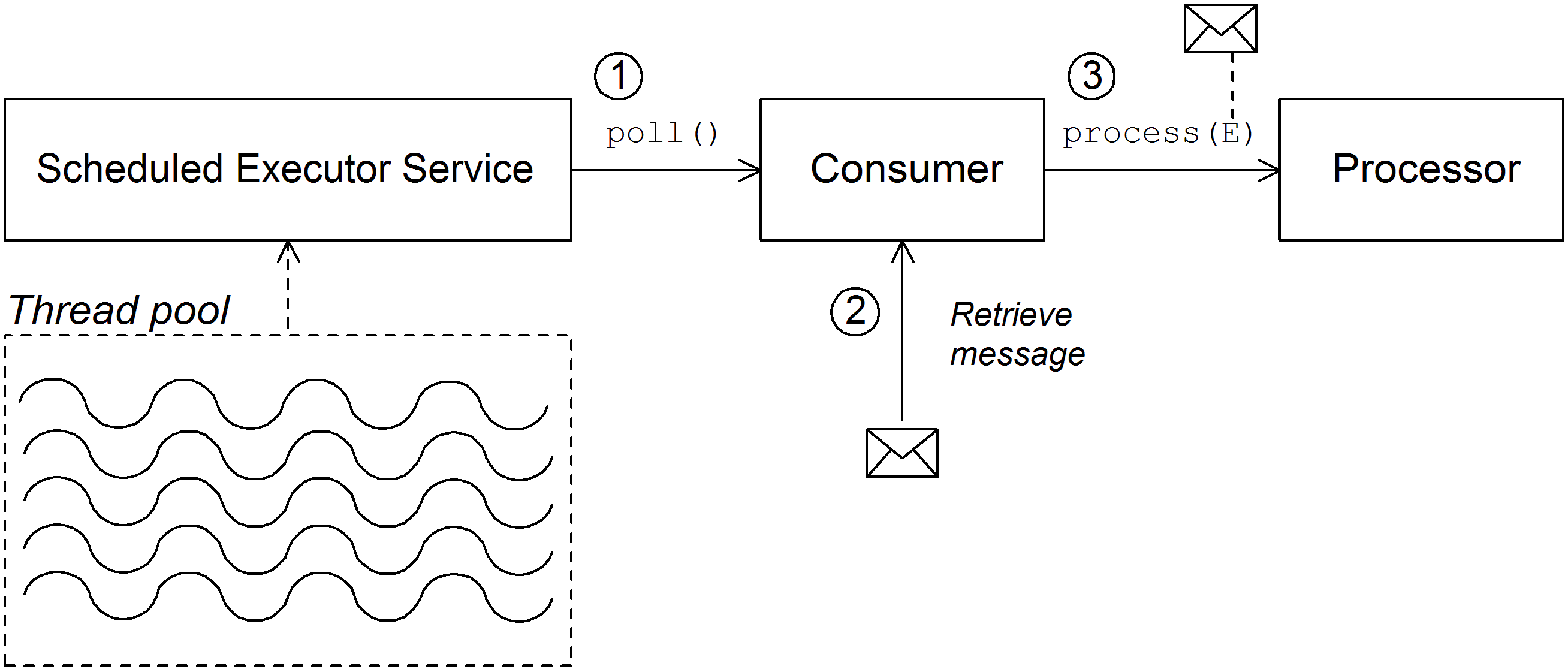
- The scheduled executor service has a pool of threads at its disposal, that can be used to initiate consumer processing. After each scheduled time interval has elapsed, the scheduled executor service attempts to grab a free thread from its pool (there are five threads in the pool by default). If a free thread is available, it uses that thread to call the
poll()method on the consumer. - The consumer's
poll()method is intended to trigger processing of an incoming request. In the body of thepoll()method, the consumer attempts to retrieve an incoming message. If no request is available, thepoll()method returns immediately. - If a request message is available, the consumer inserts it into an exchange object and then calls
process()on the next processor in the route, passing the exchange object as its argument.
Polling pattern
receive()receiveNoWait()receive(long timeout)
Figure 5.5. Polling Consumer
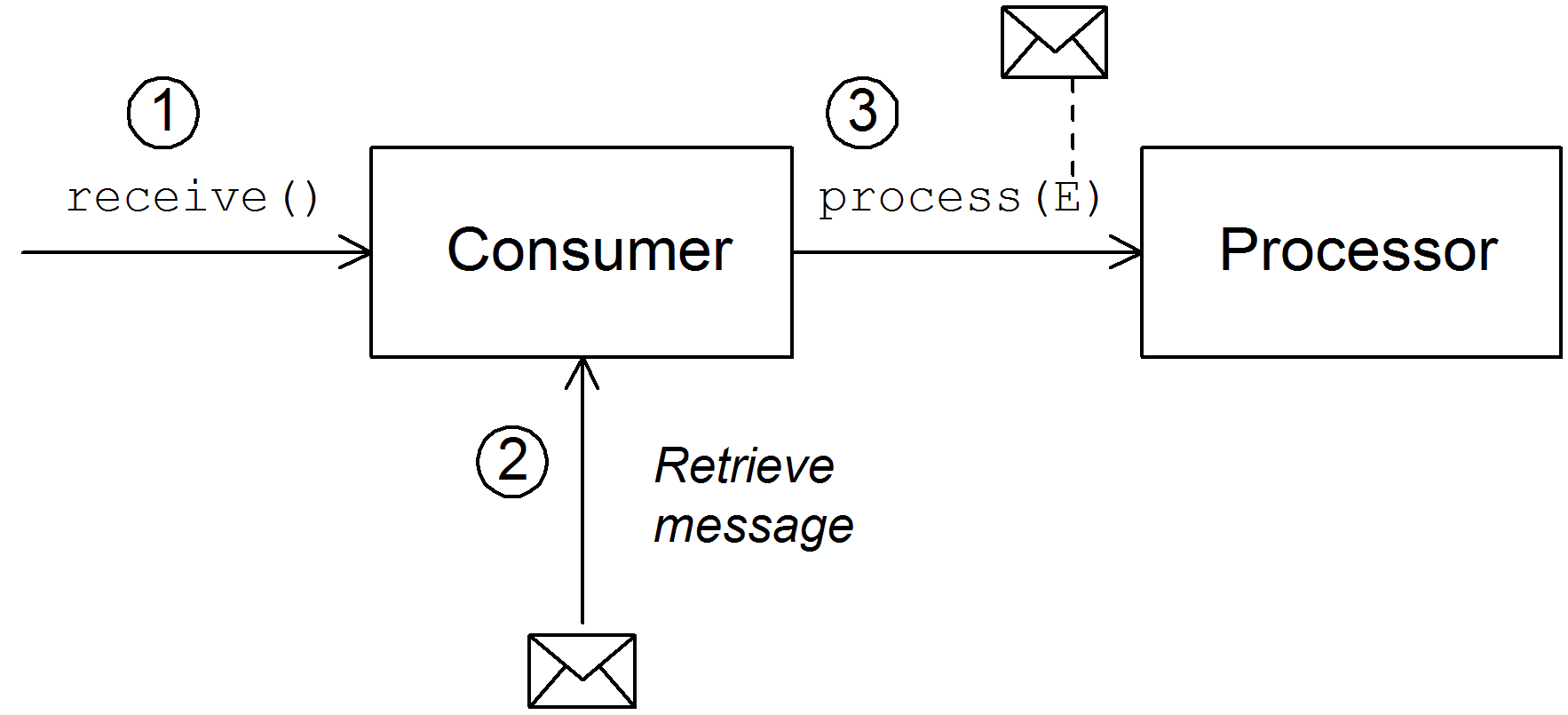
- Processing of an incoming request is initiated whenever one of the consumer's polling methods is called. The mechanism for calling these polling methods is implementation defined.
- In the body of the
receive()method, the consumer attempts to retrieve an incoming request message. If no message is currently available, the behavior depends on which receive method was called.receiveNoWait()returns immediatelyreceive(long timeout)waits for the specified timeout interval[2] before returningreceive()waits until a message is received
- If a request message is available, the consumer inserts it into an exchange object and then calls
process()on the next processor in the route, passing the exchange object as its argument.
5.1.4. Asynchronous Processing
Overview
process() on a producer, the process() method blocks until a reply is received. In this case, the processor's thread remains blocked until the producer has completed the cycle of sending the request and receiving the reply.
process() call does not block. In this case, you should implement the producer using an asynchronous pattern, which gives the preceding processor the option of invoking a non-blocking version of the process() method.
Synchronous producer
Figure 5.6. Synchronous Producer
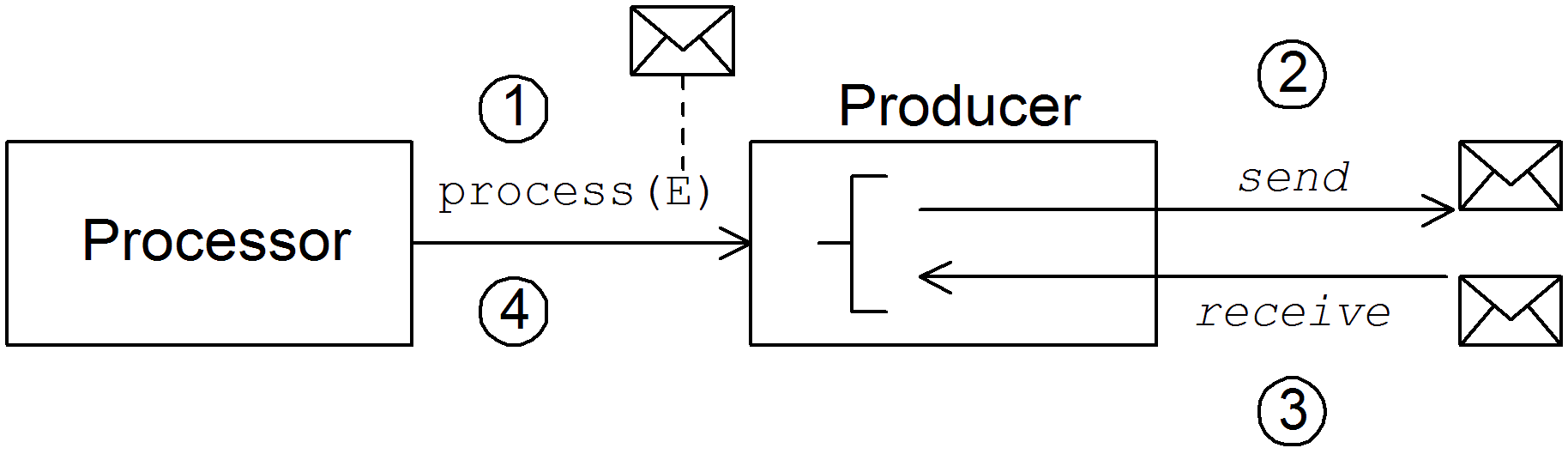
- The preceding processor in the pipeline calls the synchronous
process()method on the producer to initiate synchronous processing. The synchronousprocess()method takes a single exchange argument. - In the body of the
process()method, the producer sends the request (In message) to the endpoint. - If required by the exchange pattern, the producer waits for the reply (Out message) to arrive from the endpoint. This step can cause the
process()method to block indefinitely. However, if the exchange pattern does not mandate a reply, theprocess()method can return immediately after sending the request. - When the
process()method returns, the exchange object contains the reply from the synchronous call (an Out message message).
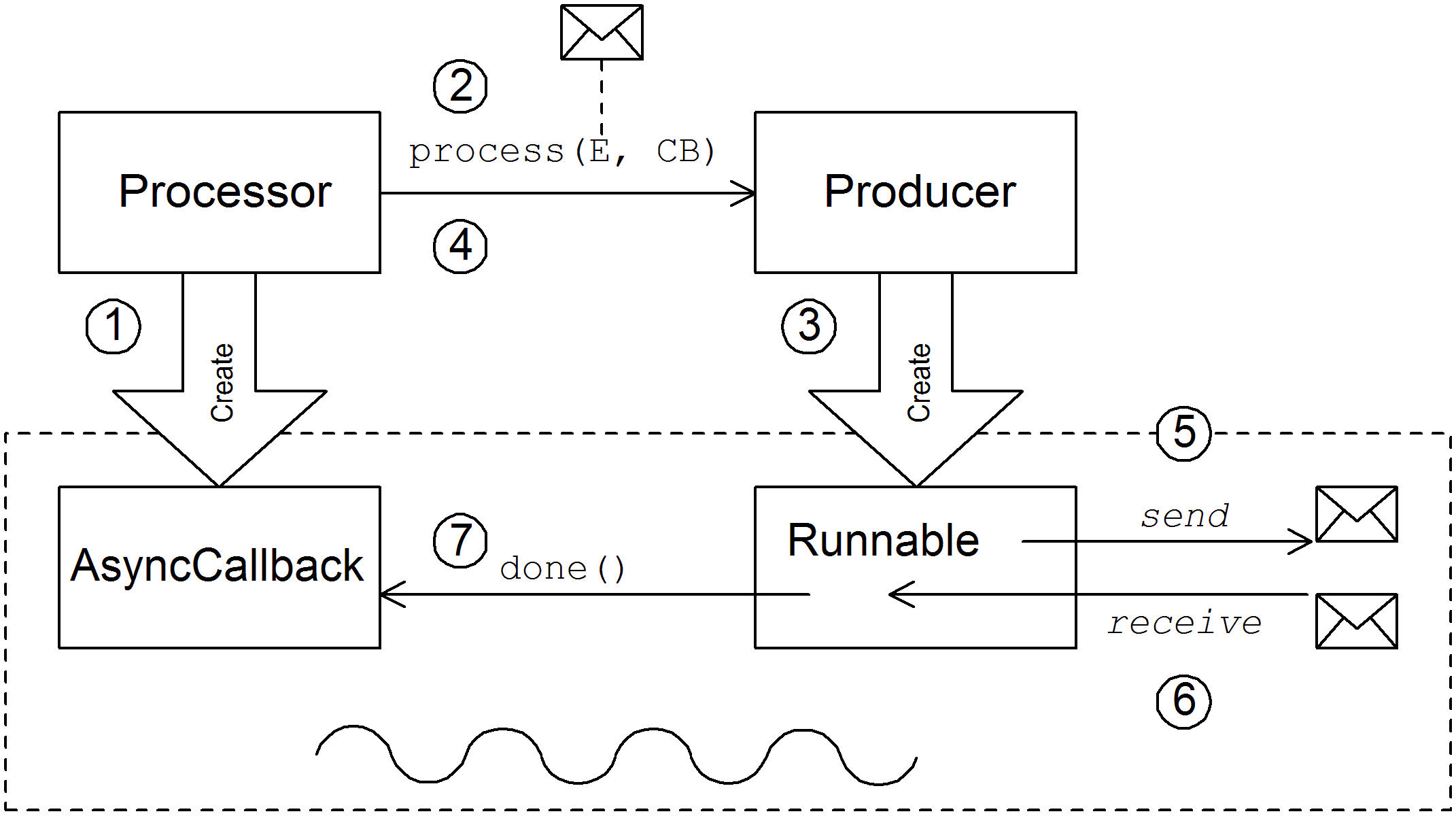
Asynchronous producer
Figure 5.7. Asynchronous Producer
- Before the processor can call the asynchronous
process()method, it must create an asynchronous callback object, which is responsible for processing the exchange on the return portion of the route. For the asynchronous callback, the processor must implement a class that inherits from theAsyncCallbackinterface. - The processor calls the asynchronous
process()method on the producer to initiate asynchronous processing. The asynchronousprocess()method takes two arguments:- an exchange object
- a synchronous callback object
- In the body of the
process()method, the producer creates aRunnableobject that encapsulates the processing code. The producer then delegates the execution of thisRunnableobject to a sub-thread. - The asynchronous
process()method returns, thereby freeing up the processor's thread. The exchange processing continues in a separate sub-thread. - The
Runnableobject sends the In message to the endpoint. - If required by the exchange pattern, the
Runnableobject waits for the reply (Out or Fault message) to arrive from the endpoint. TheRunnableobject remains blocked until the reply is received. - After the reply arrives, the
Runnableobject inserts the reply (Out message) into the exchange object and then callsdone()on the asynchronous callback object. The asynchronous callback is then responsible for processing the reply message (executed in the sub-thread).
5.2. How to Implement a Component
Overview
Which interfaces do you need to implement?
org.apache.camel.Componentorg.apache.camel.Endpointorg.apache.camel.Consumerorg.apache.camel.Producer
org.apache.camel.Exchangeorg.apache.camel.Message
Implementation steps
- Implement the
Componentinterface—A component object acts as an endpoint factory. You extend theDefaultComponentclass and implement thecreateEndpoint()method. - Implement the
Endpointinterface—An endpoint represents a resource identified by a specific URI. The approach taken when implementing an endpoint depends on whether the consumers follow an event-driven pattern, a scheduled poll pattern, or a polling pattern.For an event-driven pattern, implement the endpoint by extending theDefaultEndpointclass and implementing the following methods:createProducer()createConsumer()
For a scheduled poll pattern, implement the endpoint by extending theScheduledPollEndpointclass and implementing the following methods:createProducer()createConsumer()
For a polling pattern, implement the endpoint by extending theDefaultPollingEndpointclass and implementing the following methods:createProducer()createPollConsumer()
- Implement the
Consumerinterface—There are several different approaches you can take to implementing a consumer, depending on which pattern you need to implement (event-driven, scheduled poll, or polling). The consumer implementation is also crucially important for determining the threading model used for processing a message exchange. - Implement the
Producerinterface—To implement a producer, you extend theDefaultProducerclass and implement theprocess()method. - Optionally implement the Exchange or the Message interface—The default implementations of
ExchangeandMessagecan be used directly, but occasionally, you might find it necessary to customize these types.
Installing and configuring the component
- Add the component directly to the CamelContext—The
CamelContext.addComponent()method adds a component programatically. - Add the component using Spring configuration—The standard Spring
beanelement creates a component instance. The bean'sidattribute implicitly defines the component prefix. For details, see Section 5.3.2, “Configuring a Component”. - Configure Apache Camel to auto-discover the component—Auto-discovery, ensures that Apache Camel automatically loads the component on demand. For details, see Section 5.3.1, “Setting Up Auto-Discovery”.
5.3. Auto-Discovery and Configuration
5.3.1. Setting Up Auto-Discovery
Overview
Availability of component classes
Configuring auto-discovery
/META-INF/services/org/apache/camel/component/component-prefix
/META-INF/services/org/apache/camel/component/component-prefixclass=component-class-name
class=component-class-nameExample
/META-INF/services/org/apache/camel/component/ftp
/META-INF/services/org/apache/camel/component/ftpclass=org.apache.camel.component.file.remote.RemoteFileComponent
class=org.apache.camel.component.file.remote.RemoteFileComponentcamel-ftp-Version.jar.
5.3.2. Configuring a Component
Overview
META-INF/spring/camel-context.xml. To find the component, the component's URI prefix is matched against the ID attribute of a bean element in the Spring configuration. If the component prefix matches a bean element ID, Apache Camel instantiates the referenced class and injects the properties specified in the Spring configuration.
Define bean properties on your component class
getProperty() method and the setProperty() method access the value of property.
Configure the component in Spring
META-INF/spring/camel-context.xml, as shown in Example 5.1, “Configuring a Component in Spring”.
Example 5.1. Configuring a Component in Spring
bean element with ID component-prefix configures the component-class-name component. You can inject properties into the component instance using property elements. For example, the property element in the preceding example would inject the value, propertyValue, into the property property by calling setProperty() on the component.
Examples
jms. These settings are added to the Spring configuration file, camel-context.xml.
Example 5.2. JMS Component Spring Configuration
- 1
- The
CamelContextautomatically instantiates anyRouteBuilderclasses that it finds in the specified Java package, org.apache.camel.example.spring. - 2
- The bean element with ID,
jms, configures the JMS component. The bean ID corresponds to the component's URI prefix. For example, if a route specifies an endpoint with the URI, jms://MyQName, Apache Camel automatically loads the JMS component using the settings from thejmsbean element. - 3
- JMS is just a wrapper for a messaging service. You must specify the concrete implementation of the messaging system by setting the
connectionFactoryproperty on theJmsComponentclass. - 4
- In this example, the concrete implementation of the JMS messaging service is Apache ActiveMQ. The
brokerURLproperty initializes a connection to an ActiveMQ broker instance, where the message broker is embedded in the local Java virtual machine (JVM). If a broker is not already present in the JVM, ActiveMQ will instantiate it with the optionsbroker.persistent=false(the broker does not persist messages) andbroker.useJmx=false(the broker does not open a JMX port).
Chapter 6. Component Interface
Abstract
Component interface.
6.1. The Component Interface
Overview
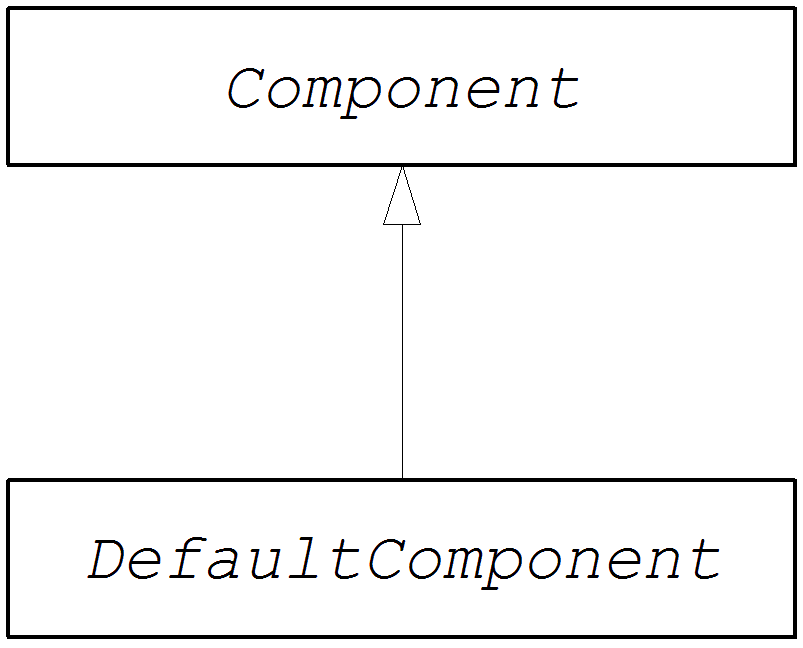
org.apache.camel.Component interface. An instance of Component type provides the entry point into a custom component. That is, all of the other objects in a component are ultimately accessible through the Component instance. Figure 6.1, “Component Inheritance Hierarchy” shows the relevant Java interfaces and classes that make up the Component inheritance hierarchy.
Figure 6.1. Component Inheritance Hierarchy
The Component interface
org.apache.camel.Component interface.
Example 6.1. Component Interface
Component methods
Component interface defines the following methods:
getCamelContext()andsetCamelContext()—References theCamelContextto which thisComponentbelongs. ThesetCamelContext()method is automatically called when you add the component to aCamelContext.createEndpoint()—The factory method that gets called to createEndpointinstances for this component. Theuriparameter is the endpoint URI, which contains the details required to create the endpoint.
6.2. Implementing the Component Interface
The DefaultComponent class
org.apache.camel.impl.DefaultComponent class, which provides some standard functionality and default implementations for some of the methods. In particular, the DefaultComponent class provides support for URI parsing and for creating a scheduled executor (which is used for the scheduled poll pattern).
URI parsing
createEndpoint(String uri) method defined in the base Component interface takes a complete, unparsed endpoint URI as its sole argument. The DefaultComponent class, on the other hand, defines a three-argument version of the createEndpoint() method with the following signature:
uri is the original, unparsed URI; remaining is the part of the URI that remains after stripping off the component prefix at the start and cutting off the query options at the end; and parameters contains the parsed query options. It is this version of the createEndpoint() method that you must override when inheriting from DefaultComponent. This has the advantage that the endpoint URI is already parsed for you.
file component shows how URI parsing works in practice:
file:///tmp/messages/foo?delete=true&moveNamePostfix=.old
file:///tmp/messages/foo?delete=true&moveNamePostfix=.oldcreateEndpoint():
| Argument | Sample Value |
|---|---|
uri | file:///tmp/messages/foo?delete=true&moveNamePostfix=.old |
remaining | /tmp/messages/foo |
parameters |
Two entries are set in
java.util.Map:
|
Parameter injection
DefaultComponent class automatically injects the parameters for you.
delete and moveNamePostfix. All you must do is define the corresponding bean methods (getters and setters) in the endpoint class:
Disabling endpoint parameter injection
Endpoint class, you can optimize the process of endpoint creation by disabling endpoint parameter injection. To disable parameter injection on endpoints, override the useIntrospectionOnEndpoint() method and implement it to return false, as follows:
protected boolean useIntrospectionOnEndpoint() {
  return false;
}
protected boolean useIntrospectionOnEndpoint() {
  return false;
}useIntrospectionOnEndpoint() method does not affect the parameter injection that might be performed on a Consumer class. Parameter injection at that level is controlled by the Endpoint.configureProperties() method (see Section 7.2, “Implementing the Endpoint Interface”).
Scheduled executor service
ExecutorServiceStrategy object that is returned by the CamelContext.getExecutorServiceStrategy() method. For details of the Apache Camel threading model, see section "Threading Model" in "Implementing Enterprise Integration Patterns".
DefaultComponent class provided a getExecutorService() method for creating thread pool instances. Since 2.3, however, the creation of thread pools is now managed centrally by the ExecutorServiceStrategy object.
Validating the URI
validateURI() method from the DefaultComponent class, which has the following signature:
protected void validateURI(String uri,
                           String path,
                           Map parameters)
throws ResolveEndpointFailedException;validateURI() should throw the org.apache.camel.ResolveEndpointFailedException exception.
Creating an endpoint
createEndpoint()” outlines how to implement the DefaultComponent.createEndpoint() method, which is responsible for creating endpoint instances on demand.
Example 6.2. Implementation of createEndpoint()
- 1
- The CustomComponent is the name of your custom component class, which is defined by extending the
DefaultComponentclass. - 2
- When extending
DefaultComponent, you must implement thecreateEndpoint()method with three arguments (see the section called “URI parsing”). - 3
- Create an instance of your custom endpoint type, CustomEndpoint, by calling its constructor. At a minimum, this constructor takes a copy of the original URI string,
uri, and a reference to this component instance,this.
Example
FileComponent class.
Example 6.3. FileComponent Implementation
- 1
- Always define a no-argument constructor for the component class in order to facilitate automatic instantiation of the class.
- 2
- A constructor that takes the parent
CamelContextinstance as an argument is convenient when creating a component instance by programming. - 3
- The implementation of the
FileComponent.createEndpoint()method follows the pattern described in Example 6.2, “Implementation ofcreateEndpoint()”. The implementation creates aFileEndpointobject.
Chapter 7. Endpoint Interface
Abstract
Endpoint interface, which is an essential step in the implementation of a Apache Camel component.
7.1. The Endpoint Interface
Overview
org.apache.camel.Endpoint type encapsulates an endpoint URI, and it also serves as a factory for Consumer, Producer, and Exchange objects. There are three different approaches to implementing an endpoint:
- Event-driven
- scheduled poll
- polling
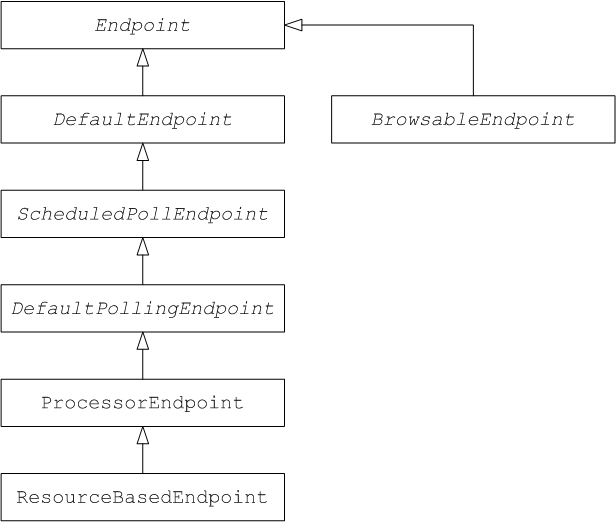
Endpoint inheritance hierarchy.
Figure 7.1. Endpoint Inheritance Hierarchy
The Endpoint interface
org.apache.camel.Endpoint interface.
Example 7.1. Endpoint Interface
Endpoint methods
Endpoint interface defines the following methods:
isSingleton()—Returnstrue, if you want to ensure that each URI maps to a single endpoint within a CamelContext. When this property istrue, multiple references to the identical URI within your routes always refer to a single endpoint instance. When this property isfalse, on the other hand, multiple references to the same URI within your routes refer to distinct endpoint instances. Each time you refer to the URI in a route, a new endpoint instance is created.getEndpointUri()—Returns the endpoint URI of this endpoint.getEndpointKey()—Used byorg.apache.camel.spi.LifecycleStrategywhen registering the endpoint.getCamelContext()—return a reference to theCamelContextinstance to which this endpoint belongs.setCamelContext()—Sets theCamelContextinstance to which this endpoint belongs.configureProperties()—Stores a copy of the parameter map that is used to inject parameters when creating a newConsumerinstance.isLenientProperties()—Returnstrueto indicate that the URI is allowed to contain unknown parameters (that is, parameters that cannot be injected on theEndpointor theConsumerclass). Normally, this method should be implemented to returnfalse.createExchange()—An overloaded method with the following variants:Exchange createExchange()—Creates a new exchange instance with a default exchange pattern setting.Exchange createExchange(ExchangePattern pattern)—Creates a new exchange instance with the specified exchange pattern.Exchange createExchange(Exchange exchange)—Converts the givenexchangeargument to the type of exchange needed for this endpoint. If the given exchange is not already of the correct type, this method copies it into a new instance of the correct type. A default implementation of this method is provided in theDefaultEndpointclass.
createProducer()—Factory method used to create newProducerinstances.createConsumer()—Factory method to create new event-driven consumer instances. Theprocessorargument is a reference to the first processor in the route.createPollingConsumer()—Factory method to create new polling consumer instances.
Endpoint singletons
isSingleton() to return true.
7.2. Implementing the Endpoint Interface
Alternative ways of implementing an endpoint
Event-driven endpoint implementation
org.apache.camel.impl.DefaultEndpoint, as shown in Example 7.2, “Implementing DefaultEndpoint”.
Example 7.2. Implementing DefaultEndpoint
- 1
- Implement an event-driven custom endpoint, CustomEndpoint, by extending the
DefaultEndpointclass. - 2
- You must have at least one constructor that takes the endpoint URI,
endpointUri, and the parent component reference,component, as arguments. - 3
- Implement the
createProducer()factory method to create producer endpoints. - 4
- Implement the
createConsumer()factory method to create event-driven consumer instances.ImportantDo not override thecreatePollingConsumer()method. - 5
- In general, it is not necessary to override the
createExchange()methods. The implementations inherited fromDefaultEndpointcreate aDefaultExchangeobject by default, which can be used in any Apache Camel component. If you need to initialize some exchange properties in theDefaultExchangeobject, however, it is appropriate to override thecreateExchange()methods here in order to add the exchange property settings.
DefaultEndpoint class provides default implementations of the following methods, which you might find useful when writing your custom endpoint code:
getEndpointUri()—Returns the endpoint URI.getCamelContext()—Returns a reference to theCamelContext.getComponent()—Returns a reference to the parent component.createPollingConsumer()—Creates a polling consumer. The created polling consumer's functionality is based on the event-driven consumer. If you override the event-driven consumer method,createConsumer(), you get a polling consumer implementation for free.createExchange(Exchange e)—Converts the given exchange object,e, to the type required for this endpoint. This method creates a new endpoint using the overriddencreateExchange()endpoints. This ensures that the method also works for custom exchange types.
Scheduled poll endpoint implementation
org.apache.camel.impl.ScheduledPollEndpoint, as shown in Example 7.3, “ScheduledPollEndpoint Implementation”.
Example 7.3. ScheduledPollEndpoint Implementation
- 1
- Implement a scheduled poll custom endpoint, CustomEndpoint, by extending the
ScheduledPollEndpointclass. - 2
- You must to have at least one constructor that takes the endpoint URI,
endpointUri, and the parent component reference,component, as arguments. - 3
- Implement the
createProducer()factory method to create a producer endpoint. - 4
- Implement the
createConsumer()factory method to create a scheduled poll consumer instance.ImportantDo not override thecreatePollingConsumer()method. - 5
- The
configureConsumer()method, defined in theScheduledPollEndpointbase class, is responsible for injecting consumer query options into the consumer. See the section called “Consumer parameter injection”. - 6
- In general, it is not necessary to override the
createExchange()methods. The implementations inherited fromDefaultEndpointcreate aDefaultExchangeobject by default, which can be used in any Apache Camel component. If you need to initialize some exchange properties in theDefaultExchangeobject, however, it is appropriate to override thecreateExchange()methods here in order to add the exchange property settings.
Polling endpoint implementation
org.apache.camel.impl.DefaultPollingEndpoint, as shown in Example 7.4, “DefaultPollingEndpoint Implementation”.
Example 7.4. DefaultPollingEndpoint Implementation
createPollingConsumer() method instead of the createConsumer() method. The consumer instance returned from createPollingConsumer() must inherit from the PollingConsumer interface. For details of how to implement a polling consumer, see the section called “Polling consumer implementation”.
createPollingConsumer() method, the steps for implementing a DefaultPollingEndpoint are similar to the steps for implementing a ScheduledPollEndpoint. See Example 7.3, “ScheduledPollEndpoint Implementation” for details.
Implementing the BrowsableEndpoint interface
org.apache.camel.spi.BrowsableEndpoint interface, as shown in Example 7.5, “BrowsableEndpoint Interface”. It makes sense to implement this interface if the endpoint performs some sort of buffering of incoming events. For example, the Apache Camel SEDA endpoint implements the BrowsableEndpoint interface—see Example 7.6, “SedaEndpoint Implementation”.
Example 7.5. BrowsableEndpoint Interface
Example
SedaEndpoint. The SEDA endpoint is an example of an event-driven endpoint. Incoming events are stored in a FIFO queue (an instance of java.util.concurrent.BlockingQueue) and a SEDA consumer starts up a thread to read and process the events. The events themselves are represented by org.apache.camel.Exchange objects.
Example 7.6. SedaEndpoint Implementation
- 1
- The
SedaEndpointclass follows the pattern for implementing an event-driven endpoint by extending theDefaultEndpointclass. TheSedaEndpointclass also implements theBrowsableEndpointinterface, which provides access to the list of exchange objects in the queue. - 2
- Following the usual pattern for an event-driven consumer,
SedaEndpointdefines a constructor that takes an endpoint argument,endpointUri, and a component reference argument,component. - 3
- Another constructor is provided, which delegates queue creation to the parent component instance.
- 4
- The
createProducer()factory method creates an instance ofCollectionProducer, which is a producer implementation that adds events to the queue. - 5
- The
createConsumer()factory method creates an instance ofSedaConsumer, which is responsible for pulling events off the queue and processing them. - 6
- The
getQueue()method returns a reference to the queue. - 7
- The
isSingleton()method returnstrue, indicating that a single endpoint instance should be created for each unique URI string. - 8
- The
getExchanges()method implements the corresponding abstract method fromBrowsableEndpoint.
Chapter 8. Consumer Interface
Abstract
Consumer interface, which is an essential step in the implementation of a Apache Camel component.
8.1. The Consumer Interface
Overview
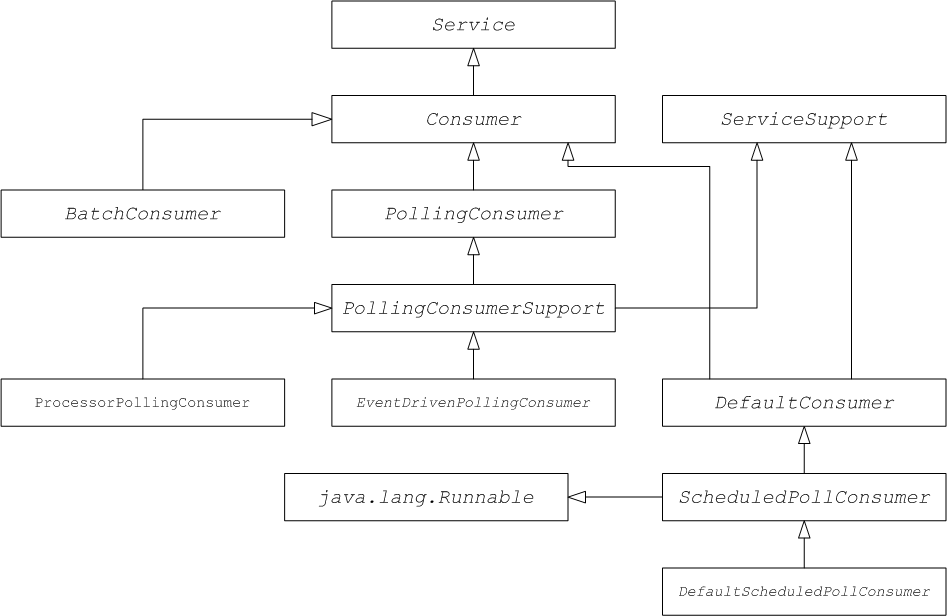
org.apache.camel.Consumer type represents a source endpoint in a route. There are several different ways of implementing a consumer (see Section 5.1.3, “Consumer Patterns and Threading”), and this degree of flexibility is reflected in the inheritance hierarchy ( see Figure 8.1, “Consumer Inheritance Hierarchy”), which includes several different base classes for implementing a consumer.
Figure 8.1. Consumer Inheritance Hierarchy
Consumer parameter injection
custom prefix:
custom:destination?consumer.myConsumerParam
custom:destination?consumer.myConsumerParamconsumer.*. For the consumer.myConsumerParam parameter, you need to define corresponding setter and getter methods on the Consumer implementation class as follows:
configureConsumer() method in the implementation of Endpoint.createConsumer(). See the section called “Scheduled poll endpoint implementation”). Example 8.1, “FileEndpoint createConsumer() Implementation” shows an example of a createConsumer() method implementation, taken from the FileEndpoint class in the file component:
Example 8.1. FileEndpoint createConsumer() Implementation
- When the endpoint is created, the default implementation of
DefaultComponent.createEndpoint(String uri)parses the URI to extract the consumer parameters, and stores them in the endpoint instance by callingScheduledPollEndpoint.configureProperties(). - When
createConsumer()is called, the method implementation callsconfigureConsumer()to inject the consumer parameters (see Example 8.1, “FileEndpoint createConsumer() Implementation”). - The
configureConsumer()method uses Java reflection to call the setter methods whose names match the relevant options after theconsumer.prefix has been stripped off.
Scheduled poll parameters
| Name | Default | Description |
|---|---|---|
initialDelay | 1000 | Delay, in milliseconds, before the first poll. |
delay | 500 | Depends on the value of the useFixedDelay flag (time unit is milliseconds). |
useFixedDelay | false |
If
false, the delay parameter is interpreted as the polling period. Polls will occur at initialDelay, initialDelay+delay, initialDelay+2*delay, and so on.
If
true, the delay parameter is interpreted as the time elapsed between the previous execution and the next execution. Polls will occur at initialDelay, initialDelay+[ProcessingTime]+delay, and so on. Where ProcessingTime is the time taken to process an exchange object in the current thread.
|
Converting between event-driven and polling consumers
org.apache.camel.impl.EventDrivenPollingConsumer—Converts an event-driven consumer into a polling consumer instance.org.apache.camel.impl.DefaultScheduledPollConsumer—Converts a polling consumer into an event-driven consumer instance.
Endpoint type. The Endpoint interface defines the following two methods for creating a consumer instance:
createConsumer() returns an event-driven consumer and createPollingConsumer() returns a polling consumer. You would only implement one these methods. For example, if you are following the event-driven pattern for your consumer, you would implement the createConsumer() method provide a method implementation for createPollingConsumer() that simply raises an exception. With the help of the conversion classes, however, Apache Camel is able to provide a more useful default implementation.
DefaultEndpoint and implementing the createConsumer() method. The implementation of createPollingConsumer() is inherited from DefaultEndpoint, where it is defined as follows:
public PollingConsumer<E> createPollingConsumer() throws Exception {
    return new EventDrivenPollingConsumer<E>(this);
}
public PollingConsumer<E> createPollingConsumer() throws Exception {
    return new EventDrivenPollingConsumer<E>(this);
}EventDrivenPollingConsumer constructor takes a reference to the event-driven consumer, this, effectively wrapping it and converting it into a polling consumer. To implement the conversion, the EventDrivenPollingConsumer instance buffers incoming events and makes them available on demand through the receive(), the receive(long timeout), and the receiveNoWait() methods.
DefaultPollingEndpoint and implementing the createPollingConsumer() method. In this case, the implementation of the createConsumer() method is inherited from DefaultPollingEndpoint, and the default implementation returns a DefaultScheduledPollConsumer instance (which converts the polling consumer into an event-driven consumer).
ShutdownPrepared interface
org.apache.camel.spi.ShutdownPrepared interface, which enables your custom consumer endpoint to receive shutdown notifications.
ShutdownPrepared interface.
Example 8.2. ShutdownPrepared Interface
ShutdownPrepared interface defines the following methods:
prepareShutdown- Receives notifications to shut down the consumer endpoint in one or two phases, as follows:
- Graceful shutdown—where the
forcedargument has the valuefalse. Attempt to clean up resources gracefully. For example, by stopping threads gracefully. - Forced shutdown—where the
forcedargument has the valuetrue. This means that the shutdown has timed out, so you must clean up resources more aggressively. This is the last chance to clean up resources before the process exits.
ShutdownAware interface
org.apache.camel.spi.ShutdownAware interface, which interacts with the graceful shutdown mechanism, enabling a consumer to ask for extra time to shut down. This is typically needed for components such as SEDA, which can have pending exchanges stored in an internal queue. Normally, you would want to process all of the exchanges in the queue before shutting down the SEDA consumer.
ShutdownAware interface.
Example 8.3. ShutdownAware Interface
ShutdownAware interface defines the following methods:
deferShutdown- Return
truefrom this method, if you want to delay shutdown of the consumer. TheshutdownRunningTaskargument is anenumwhich can take either of the following values:ShutdownRunningTask.CompleteCurrentTaskOnly—finish processing the exchanges that are currently being processed by the consumer's thread pool, but do not attempt to process any more exchanges than that.ShutdownRunningTask.CompleteAllTasks—process all of the pending exchanges. For example, in the case of the SEDA component, the consumer would process all of the exchanges from its incoming queue.
getPendingExchangesSize- Indicates how many exchanges remain to be processed by the consumer. A zero value indicates that processing is finished and the consumer can be shut down.
ShutdownAware methods, see Example 8.7, “Custom Threading Implementation”.
8.2. Implementing the Consumer Interface
Alternative ways of implementing a consumer
Event-driven consumer implementation
JMXConsumer class, which is taken from the Apache Camel JMX component implementation. The JMXConsumer class is an example of an event-driven consumer, which is implemented by inheriting from the org.apache.camel.impl.DefaultConsumer class. In the case of the JMXConsumer example, events are represented by calls on the NotificationListener.handleNotification() method, which is a standard way of receiving JMX events. In order to receive these JMX events, it is necessary to implement the NotificationListener interface and override the handleNotification() method, as shown in Example 8.4, “JMXConsumer Implementation”.
Example 8.4. JMXConsumer Implementation
- 1
- The
JMXConsumerpattern follows the usual pattern for event-driven consumers by extending theDefaultConsumerclass. Additionally, because this consumer is designed to receive events from JMX (which are represented by JMX notifications), it is necessary to implement theNotificationListenerinterface. - 2
- You must implement at least one constructor that takes a reference to the parent endpoint,
endpoint, and a reference to the next processor in the chain,processor, as arguments. - 3
- The
handleNotification()method (which is defined inNotificationListener) is automatically invoked by JMX whenever a JMX notification arrives. The body of this method should contain the code that performs the consumer's event processing. Because thehandleNotification()call originates from the JMX layer, the consumer's threading model is implicitly controlled by the JMX layer, not by theJMXConsumerclass.NoteThehandleNotification()method is specific to the JMX example. When implementing your own event-driven consumer, you must identify an analogous event listener method to implement in your custom consumer. - 4
- This line of code combines two steps. First, the JMX notification object is converted into an exchange object, which is the generic representation of an event in Apache Camel. Then the newly created exchange object is passed to the next processor in the route (invoked synchronously).
- 5
- The
handleException()method is implemented by theDefaultConsumerbase class. By default, it handles exceptions using theorg.apache.camel.impl.LoggingExceptionHandlerclass.
Scheduled poll consumer implementation
java.util.concurrent.ScheduledExecutorService. To receive the generated polling events, you must implement the ScheduledPollConsumer.poll() method (see Section 5.1.3, “Consumer Patterns and Threading”).
ScheduledPollConsumer class.
Example 8.5. ScheduledPollConsumer Implementation
- 1
- Implement a scheduled poll consumer class, CustomConsumer, by extending the
org.apache.camel.impl.ScheduledPollConsumerclass. - 2
- You must implement at least one constructor that takes a reference to the parent endpoint,
endpoint, and a reference to the next processor in the chain,processor, as arguments. - 3
- Override the
poll()method to receive the scheduled polling events. This is where you should put the code that retrieves and processes incoming events (represented by exchange objects). - 4
- In this example, the event is processed synchronously. If you want to process events asynchronously, you should use a reference to an asynchronous processor instead, by calling
getAsyncProcessor(). For details of how to process events asynchronously, see Section 5.1.4, “Asynchronous Processing”. - 5
- (Optional) If you want some lines of code to execute as the consumer is starting up, override the
doStart()method as shown. - 6
- (Optional) If you want some lines of code to execute as the consumer is stopping, override the
doStop()method as shown.
Polling consumer implementation
PollingConsumerSupport class.
Example 8.6. PollingConsumerSupport Implementation
- 1
- Implement your polling consumer class, CustomConsumer, by extending the
org.apache.camel.impl.PollingConsumerSupportclass. - 2
- You must implement at least one constructor that takes a reference to the parent endpoint,
endpoint, as an argument. A polling consumer does not need a reference to a processor instance. - 3
- The
receiveNoWait()method should implement a non-blocking algorithm for retrieving an event (exchange object). If no event is available, it should returnnull. - 4
- The
receive()method should implement a blocking algorithm for retrieving an event. This method can block indefinitely, if events remain unavailable. - 5
- The
receive(long timeout)method implements an algorithm that can block for as long as the specified timeout (typically specified in units of milliseconds). - 6
- If you want to insert code that executes while a consumer is starting up or shutting down, implement the
doStart()method and thedoStop()method, respectively.
Custom threading implementation
Consumer interface directly and write the threading code yourself. When writing the threading code, however, it is important that you comply with the standard Apache Camel threading model, as described in section "Threading Model" in "Implementing Enterprise Integration Patterns".
camel-core implements its own consumer threading, which is consistent with the Apache Camel threading model. Example 8.7, “Custom Threading Implementation” shows an outline of how the SedaConsumer class implements its threading.
Example 8.7. Custom Threading Implementation
- 1
- The
SedaConsumerclass is implemented by extending theorg.apache.camel.impl.ServiceSupportclass and implementing theConsumer,Runnable, andShutdownAwareinterfaces. - 2
- Implement the
Runnable.run()method to define what the consumer does while it is running in a thread. In this case, the consumer runs in a loop, polling the queue for new exchanges and then processing the exchanges in the latter part of the queue. - 3
- The
doStart()method is inherited fromServiceSupport. You override this method in order to define what the consumer does when it starts up. - 4
- Instead of creating threads directly, you should create a thread pool using the
ExecutorServiceStrategyobject that is registered with theCamelContext. This is important, because it enables Apache Camel to implement centralized management of threads and support such features as graceful shutdown. - 5
- Kick off the threads by calling the
ExecutorService.execute()methodpoolSizetimes. - 6
- The
doStop()method is inherited fromServiceSupport. You override this method in order to define what the consumer does when it shuts down. - 7
- Shut down the thread pool, which is represented by the
executorinstance.
Chapter 9. Producer Interface
Abstract
Producer interface, which is an essential step in the implementation of a Apache Camel component.
9.1. The Producer Interface
Overview
org.apache.camel.Producer type represents a target endpoint in a route. The role of the producer is to send requests (In messages) to a specific physical endpoint and to receive the corresponding response (Out or Fault message). A Producer object is essentially a special kind of Processor that appears at the end of a processor chain (equivalent to a route). Figure 9.1, “Producer Inheritance Hierarchy” shows the inheritance hierarchy for producers.
Figure 9.1. Producer Inheritance Hierarchy
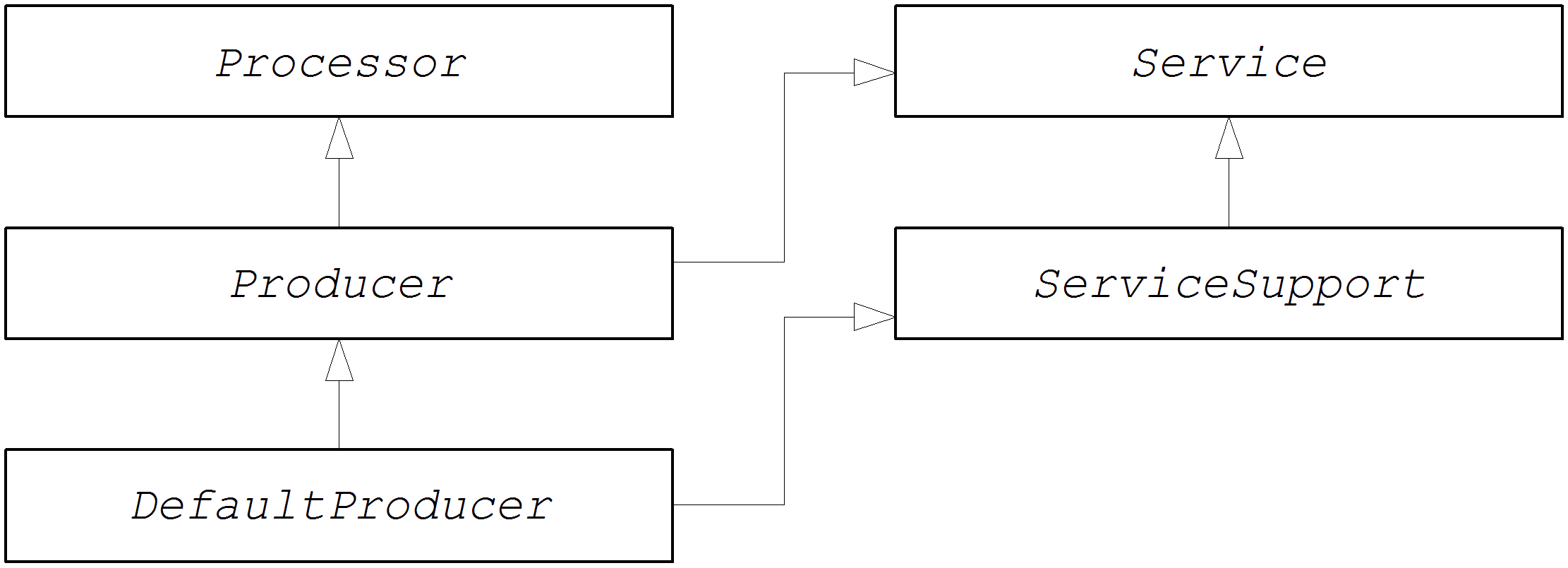
The Producer interface
org.apache.camel.Producer interface.
Example 9.1. Producer Interface
Producer methods
Producer interface defines the following methods:
process()(inherited from Processor)—The most important method. A producer is essentially a special type of processor that sends a request to an endpoint, instead of forwarding the exchange object to another processor. By overriding theprocess()method, you define how the producer sends and receives messages to and from the relevant endpoint.getEndpoint()—Returns a reference to the parent endpoint instance.createExchange()—These overloaded methods are analogous to the corresponding methods defined in theEndpointinterface. Normally, these methods delegate to the corresponding methods defined on the parentEndpointinstance (this is what theDefaultEndpointclass does by default). Occasionally, you might need to override these methods.
Asynchronous processing
process() method returns without delay. See Section 5.1.4, “Asynchronous Processing”.
org.apache.camel.AsyncProcessor interface. On its own, this is not enough to ensure that the asynchronous processing model will be used: it is also necessary for the preceding processor in the chain to call the asynchronous version of the process() method. The definition of the AsyncProcessor interface is shown in Example 9.2, “AsyncProcessor Interface”.
Example 9.2. AsyncProcessor Interface
package org.apache.camel;

public interface AsyncProcessor extends Processor {
    boolean process(Exchange exchange, AsyncCallback callback);
}
package org.apache.camel;

public interface AsyncProcessor extends Processor {
    boolean process(Exchange exchange, AsyncCallback callback);
}process() method takes an extra argument, callback, of org.apache.camel.AsyncCallback type. The corresponding AsyncCallback interface is defined as shown in Example 9.3, “AsyncCallback Interface”.
Example 9.3. AsyncCallback Interface
package org.apache.camel;

public interface AsyncCallback {
    void done(boolean doneSynchronously);
}
package org.apache.camel;

public interface AsyncCallback {
    void done(boolean doneSynchronously);
}AsyncProcessor.process() must provide an implementation of AsyncCallback to receive the notification that processing has finished. The AsyncCallback.done() method takes a boolean argument that indicates whether the processing was performed synchronously or not. Normally, the flag would be false, to indicate asynchronous processing. In some cases, however, it can make sense for the producer not to process asynchronously (in spite of being asked to do so). For example, if the producer knows that the processing of the exchange will complete rapidly, it could optimise the processing by doing it synchronously. In this case, the doneSynchronously flag should be set to true.
ExchangeHelper class
org.apache.camel.util.ExchangeHelper utility class. For full details of the ExchangeHelper class, see Section 2.4, “The ExchangeHelper Class”.
9.2. Implementing the Producer Interface
Alternative ways of implementing a producer
How to implement a synchronous producer
Producer.process() blocks until a reply is received.
Example 9.4. DefaultProducer Implementation
- 1
- Implement a custom synchronous producer class, CustomProducer, by extending the
org.apache.camel.impl.DefaultProducerclass. - 2
- Implement a constructor that takes a reference to the parent endpoint.
- 3
- The
process()method implementation represents the core of the producer code. The implementation of theprocess()method is entirely dependent on the type of component that you are implementing. In outline, theprocess()method is normally implemented as follows:- If the exchange contains an In message, and if this is consistent with the specified exchange pattern, then send the In message to the designated endpoint.
- If the exchange pattern anticipates the receipt of an Out message, then wait until the Out message has been received. This typically causes the
process()method to block for a significant length of time. - When a reply is received, call
exchange.setOut()to attach the reply to the exchange object. If the reply contains a fault message, set the fault flag on the Out message usingMessage.setFault(true).
How to implement an asynchronous producer
process() method and an asynchronous process() method (which takes an additional AsyncCallback argument).
Example 9.5. CollectionProducer Implementation
- 1
- Implement a custom asynchronous producer class, CustomProducer, by extending the
org.apache.camel.impl.DefaultProducerclass, and implementing theAsyncProcessorinterface. - 2
- Implement a constructor that takes a reference to the parent endpoint.
- 3
- Implement the synchronous
process()method. - 4
- Implement the asynchronous
process()method. You can implement the asynchronous method in several ways. The approach shown here is to create ajava.lang.Runnableinstance,task, that represents the code that runs in a sub-thread. You then use the Java threading API to run the task in a sub-thread (for example, by creating a new thread or by allocating the task to an existing thread pool). - 5
- Normally, you return
falsefrom the asynchronousprocess()method, to indicate that the exchange was processed asynchronously. - 6
- The CustomProducer
Taskclass encapsulates the processing code that runs in a sub-thread. This class must store a copy of theExchangeobject,exchange, and theAsyncCallbackobject,callback, as private member variables. - 7
- The
run()method contains the code that sends the In message to the producer endpoint and waits to receive the reply, if any. After receiving the reply (Out message or Fault message) and inserting it into the exchange object, you must callcallback.done()to notify the caller that processing is complete.
Chapter 10. Exchange Interface
Abstract
Exchange interface. Since the refactoring of the camel-core module performed in Apache Camel 2.0, there is no longer any necessity to define custom exchange types. The DefaultExchange implementation can now be used in all cases.
10.1. The Exchange Interface
Overview
org.apache.camel.Exchange type encapsulates the current message passing through a route, with additional metadata encoded as exchange properties.
DefaultExchange, is always used.
Figure 10.1. Exchange Inheritance Hierarchy
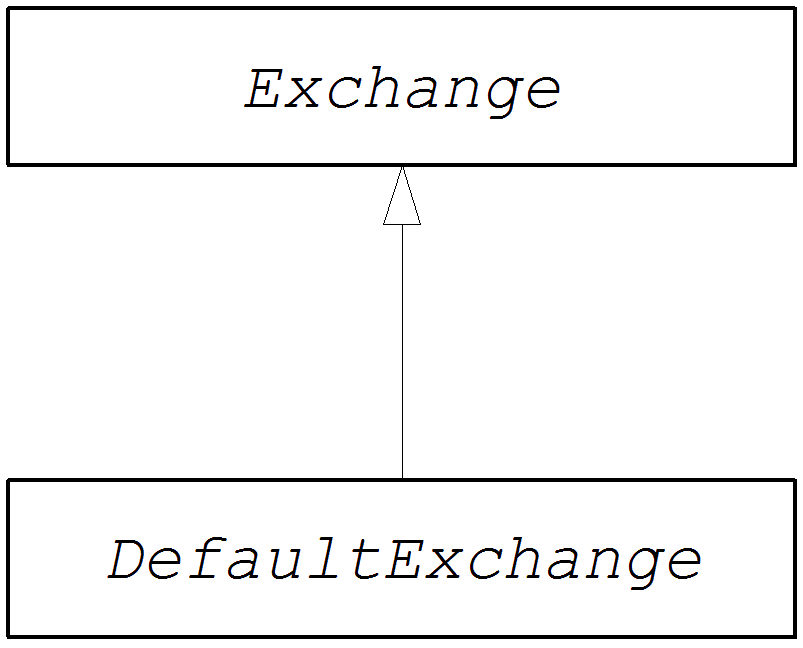
The Exchange interface
org.apache.camel.Exchange interface.
Example 10.1. Exchange Interface
Exchange methods
Exchange interface defines the following methods:
getPattern(),setPattern()—The exchange pattern can be one of the values enumerated inorg.apache.camel.ExchangePattern. The following exchange pattern values are supported:InOnlyRobustInOnlyInOutInOptionalOutOutOnlyRobustOutOnlyOutInOutOptionalIn
setProperty(),getProperty(),getProperties(),removeProperty(),hasProperties()—Use the property setter and getter methods to associate named properties with the exchange instance. The properties consist of miscellaneous metadata that you might need for your component implementation.setIn(),getIn()—Setter and getter methods for the In message.ThegetIn()implementation provided by theDefaultExchangeclass implements lazy creation semantics: if the In message is null whengetIn()is called, theDefaultExchangeclass creates a default In message.setOut(),getOut(),hasOut()—Setter and getter methods for the Out message.ThegetOut()method implicitly supports lazy creation of an Out message. That is, if the current Out message isnull, a new message instance is automatically created.setException(),getException()—Getter and setter methods for an exception object (ofThrowabletype).isFailed()—Returnstrue, if the exchange failed either due to an exception or due to a fault.isTransacted()—Returnstrue, if the exchange is transacted.isRollback()—Returnstrue, if the exchange is marked for rollback.getContext()—Returns a reference to the associatedCamelContextinstance.copy()—Creates a new, identical (apart from the exchange ID) copy of the current custom exchange object. The body and headers of the In message, the Out message (if any), and the Fault message (if any) are also copied by this operation.setFromEndpoint(),getFromEndpoint()—Getter and setter methods for the consumer endpoint that orginated this message (which is typically the endpoint appearing in thefrom()DSL command at the start of a route).setFromRouteId(),getFromRouteId()—Getters and setters for the route ID that originated this exchange. ThegetFromRouteId()method should only be called internally.setUnitOfWork(),getUnitOfWork()—Getter and setter methods for theorg.apache.camel.spi.UnitOfWorkbean property. This property is only required for exchanges that can participate in a transaction.setExchangeId(),getExchangeId()—Getter and setter methods for the exchange ID. Whether or not a custom component uses and exchange ID is an implementation detail.addOnCompletion()—Adds anorg.apache.camel.spi.Synchronizationcallback object, which gets called when processing of the exchange has completed.handoverCompletions()—Hands over all of the OnCompletion callback objects to the specified exchange object.
Chapter 11. Message Interface
Abstract
Message interface, which is an optional step in the implementation of a Apache Camel component.
11.1. The Message Interface
Overview
org.apache.camel.Message type can represent any kind of message (In or Out). Figure 11.1, “Message Inheritance Hierarchy” shows the inheritance hierarchy for the message type. You do not always need to implement a custom message type for a component. In many cases, the default implementation, DefaultMessage, is adequate.
Figure 11.1. Message Inheritance Hierarchy
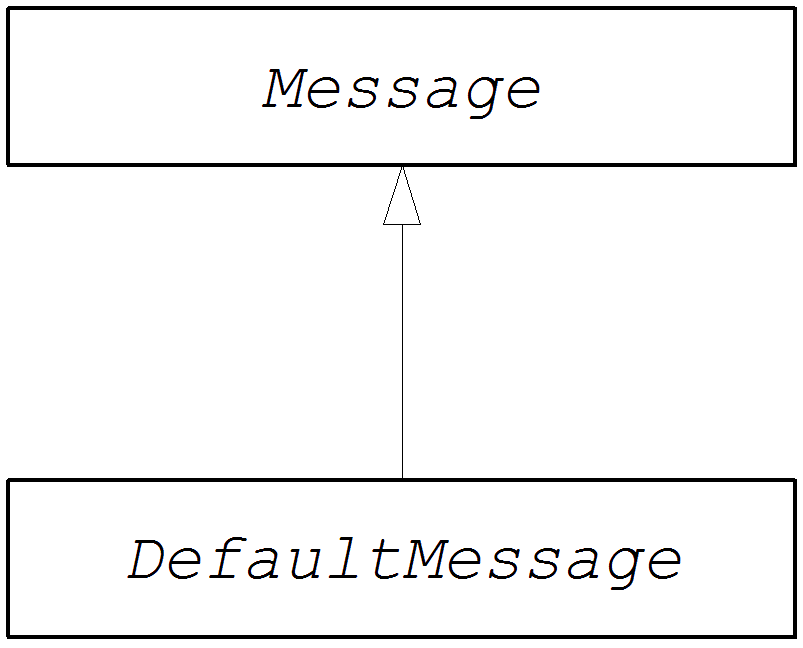
The Message interface
org.apache.camel.Message interface.
Example 11.1. Message Interface
Message methods
Message interface defines the following methods:
setMessageId(),getMessageId()—Getter and setter methods for the message ID. Whether or not you need to use a message ID in your custom component is an implementation detail.getExchange()—Returns a reference to the parent exchange object.isFault(),setFault()—Getter and setter methods for the fault flag, which indicates whether or not this message is a fault message.getHeader(),getHeaders(),setHeader(),setHeaders(),removeHeader(),hasHeaders()—Getter and setter methods for the message headers. In general, these message headers can be used either to store actual header data, or to store miscellaneous metadata.getBody(),getMandatoryBody(),setBody()—Getter and setter methods for the message body. The getMandatoryBody() accessor guarantees that the returned body is non-null, otherwise theInvalidPayloadExceptionexception is thrown.getAttachment(),getAttachments(),getAttachmentNames(),removeAttachment(),addAttachment(),setAttachments(),hasAttachments()—Methods to get, set, add, and remove attachments.copy()—Creates a new, identical (including the message ID) copy of the current custom message object.copyFrom()—Copies the complete contents (including the message ID) of the specified generic message object,message, into the current message instance. Because this method must be able to copy from any message type, it copies the generic message properties, but not the custom properties.createExchangeId()—Returns the unique ID for this exchange, if the message implementation is capable of providing an ID; otherwise, returnnull.
11.2. Implementing the Message Interface
How to implement a custom message
DefaultMessage class.
Example 11.2. Custom Message Implementation
- 1
- Implements a custom message class, CustomMessage, by extending the
org.apache.camel.impl.DefaultMessageclass. - 2
- Typically, you need a default constructor that creates a message with default properties.
- 3
- Override the
toString()method to customize message stringification. - 4
- The
newInstance()method is called from inside theMessageSupport.copy()method. Customization of thenewInstance()method should focus on copying all of the custom properties of the current message instance into the new message instance. TheMessageSupport.copy()method copies the generic message properties by callingcopyFrom(). - 5
- The
createBody()method works in conjunction with theMessageSupport.getBody()method to implement lazy access to the message body. By default, the message body isnull. It is only when the application code tries to access the body (by callinggetBody()), that the body should be created. TheMessageSupport.getBody()automatically callscreateBody(), when the message body is accessed for the first time. - 6
- The
populateInitialHeaders()method works in conjunction with the header getter and setter methods to implement lazy access to the message headers. This method parses the message to extract any message headers and inserts them into the hash map,map. ThepopulateInitialHeaders()method is automatically called when a user attempts to access a header (or headers) for the first time (by callinggetHeader(),getHeaders(),setHeader(), orsetHeaders()). - 7
- The
populateInitialAttachments()method works in conjunction with the attachment getter and setter methods to implement lazy access to the attachments. This method extracts the message attachments and inserts them into the hash map,map. ThepopulateInitialAttachments()method is automatically called when a user attempts to access an attachment (or attachments) for the first time by callinggetAttachment(),getAttachments(),getAttachmentNames(), oraddAttachment().
Index
Symbols
- @Converter, Implement an annotated converter class
A
- AsyncCallback, Asynchronous processing
- asynchronous producer
- implementing, How to implement an asynchronous producer
- AsyncProcessor, Asynchronous processing
- auto-discovery
- configuration, Configuring auto-discovery
C
- Component
- createEndpoint(), URI parsing
- definition, The Component interface
- methods, Component methods
- component prefix, Component
- components, Component
- bean properties, Define bean properties on your component class
- configuring, Installing and configuring the component
- implementation steps, Implementation steps
- installing, Installing and configuring the component
- interfaces to implement, Which interfaces do you need to implement?
- parameter injection, Parameter injection
- Spring configuration, Configure the component in Spring
- Consumer, Consumer
- consumers, Consumer
- event-driven, Event-driven pattern, Implementation steps
- polling, Polling pattern, Implementation steps
- scheduled, Scheduled poll pattern, Implementation steps
- threading, Overview
D
- DefaultComponent
- createEndpoint(), URI parsing
- DefaultEndpoint, Event-driven endpoint implementation
- createExchange(), Event-driven endpoint implementation
- createPollingConsumer(), Event-driven endpoint implementation
- getCamelConext(), Event-driven endpoint implementation
- getComponent(), Event-driven endpoint implementation
- getEndpointUri(), Event-driven endpoint implementation
E
- Endpoint, Endpoint
- createConsumer(), Endpoint methods
- createExchange(), Endpoint methods
- createPollingConsumer(), Endpoint methods
- createProducer(), Endpoint methods
- getCamelContext(), Endpoint methods
- getEndpointURI(), Endpoint methods
- interface definition, The Endpoint interface
- isLenientProperties(), Endpoint methods
- isSingleton(), Endpoint methods
- setCamelContext(), Endpoint methods
- endpoint
- event-driven, Event-driven endpoint implementation
- scheduled, Scheduled poll endpoint implementation
- endpoints, Endpoint
- Exchange, Exchange, The Exchange interface
- copy(), Exchange methods
- getExchangeId(), Exchange methods
- getIn(), Accessing message headers, Exchange methods
- getOut(), Exchange methods
- getPattern(), Exchange methods
- getProperties(), Exchange methods
- getProperty(), Exchange methods
- getUnitOfWork(), Exchange methods
- removeProperty(), Exchange methods
- setExchangeId(), Exchange methods
- setIn(), Exchange methods
- setOut(), Exchange methods
- setProperty(), Exchange methods
- setUnitOfWork(), Exchange methods
- exchange
- in capable, Testing the exchange pattern
- out capable, Testing the exchange pattern
- exchange properties
- accessing, Wrapping the exchange accessors
- ExchangeHelper, The ExchangeHelper Class
- getContentType(), Get the In message's MIME content type
- getMandatoryHeader(), Accessing message headers, Wrapping the exchange accessors
- getMandatoryInBody(), Wrapping the exchange accessors
- getMandatoryOutBody(), Wrapping the exchange accessors
- getMandatoryProperty(), Wrapping the exchange accessors
- isInCapable(), Testing the exchange pattern
- isOutCapable(), Testing the exchange pattern
- resolveEndpoint(), Resolve an endpoint
- exchanges, Exchange
I
- in message
- MIME type, Get the In message's MIME content type
M
- Message, Message
- getHeader(), Accessing message headers
- message headers
- accessing, Accessing message headers
- messages, Message
P
- pipeline, Pipelining model
- Processor, Processor interface
- implementing, Implementing the Processor interface
- producer, Producer
- Producer, Producer
- createExchange(), Producer methods
- getEndpoint(), Producer methods
- process(), Producer methods
- producers
- asynchronous, Asynchronous producer
- synchronous, Synchronous producer
S
- ScheduledPollEndpoint, Scheduled poll endpoint implementation
- simple processor
- implementing, Implementing the Processor interface
- synchronous producer
- implementing, How to implement a synchronous producer
T
- type conversion
- runtime process, Type conversion process
- type converter
- annotating the implementation, Implement an annotated converter class
- discovery file, Create a TypeConverter file
- implementation steps, How to implement a type converter
- mater, Master type converter
- packaging, Package the type converter
- slave, Master type converter
- TypeConverter, Type converter interface
- TypeConverterLoader, Type converter loader
U
- useIntrospectionOnEndpoint(), Disabling endpoint parameter injection
Legal Notice
Trademark Disclaimer
Legal Notice
Third Party Acknowledgements
- JLine (http://jline.sourceforge.net) jline:jline:jar:1.0License: BSD (LICENSE.txt) - Copyright (c) 2002-2006, Marc Prud'hommeaux
mwp1@cornell.eduAll rights reserved.Redistribution and use in source and binary forms, with or without modification, are permitted provided that the following conditions are met:- Redistributions of source code must retain the above copyright notice, this list of conditions and the following disclaimer.
- Redistributions in binary form must reproduce the above copyright notice, this list of conditions and the following disclaimer in the documentation and/or other materials provided with the distribution.
- Neither the name of JLine nor the names of its contributors may be used to endorse or promote products derived from this software without specific prior written permission.
THIS SOFTWARE IS PROVIDED BY THE COPYRIGHT HOLDERS AND CONTRIBUTORS "AS IS" AND ANY EXPRESS OR IMPLIED WARRANTIES, INCLUDING, BUT NOT LIMITED TO, THE IMPLIED WARRANTIES OF MERCHANTABILITY AND FITNESS FOR A PARTICULAR PURPOSE ARE DISCLAIMED. IN NO EVENT SHALL THE COPYRIGHT OWNER OR CONTRIBUTORS BE LIABLE FOR ANY DIRECT, INDIRECT, INCIDENTAL, SPECIAL, EXEMPLARY, OR CONSEQUENTIAL DAMAGES (INCLUDING, BUT NOT LIMITED TO, PROCUREMENT OF SUBSTITUTE GOODS OR SERVICES; LOSS OF USE, DATA, OR PROFITS; OR BUSINESS INTERRUPTION) HOWEVER CAUSED AND ON ANY THEORY OF LIABILITY, WHETHER IN CONTRACT, STRICT LIABILITY, OR TORT (INCLUDING NEGLIGENCE OR OTHERWISE) ARISING IN ANY WAY OUT OF THE USE OF THIS SOFTWARE, EVEN IF ADVISED OF THE POSSIBILITY OF SUCH DAMAGE. - Stax2 API (http://woodstox.codehaus.org/StAX2) org.codehaus.woodstox:stax2-api:jar:3.1.1License: The BSD License (http://www.opensource.org/licenses/bsd-license.php)Copyright (c) <YEAR>, <OWNER> All rights reserved.Redistribution and use in source and binary forms, with or without modification, are permitted provided that the following conditions are met:
- Redistributions of source code must retain the above copyright notice, this list of conditions and the following disclaimer.
- Redistributions in binary form must reproduce the above copyright notice, this list of conditions and the following disclaimer in the documentation and/or other materials provided with the distribution.
THIS SOFTWARE IS PROVIDED BY THE COPYRIGHT HOLDERS AND CONTRIBUTORS "AS IS" AND ANY EXPRESS OR IMPLIED WARRANTIES, INCLUDING, BUT NOT LIMITED TO, THE IMPLIED WARRANTIES OF MERCHANTABILITY AND FITNESS FOR A PARTICULAR PURPOSE ARE DISCLAIMED. IN NO EVENT SHALL THE COPYRIGHT HOLDER OR CONTRIBUTORS BE LIABLE FOR ANY DIRECT, INDIRECT, INCIDENTAL, SPECIAL, EXEMPLARY, OR CONSEQUENTIAL DAMAGES (INCLUDING, BUT NOT LIMITED TO, PROCUREMENT OF SUBSTITUTE GOODS OR SERVICES; LOSS OF USE, DATA, OR PROFITS; OR BUSINESS INTERRUPTION) HOWEVER CAUSED AND ON ANY THEORY OF LIABILITY, WHETHER IN CONTRACT, STRICT LIABILITY, OR TORT (INCLUDING NEGLIGENCE OR OTHERWISE) ARISING IN ANY WAY OUT OF THE USE OF THIS SOFTWARE, EVEN IF ADVISED OF THE POSSIBILITY OF SUCH DAMAGE. - jibx-run - JiBX runtime (http://www.jibx.org/main-reactor/jibx-run) org.jibx:jibx-run:bundle:1.2.3License: BSD (http://jibx.sourceforge.net/jibx-license.html) Copyright (c) 2003-2010, Dennis M. Sosnoski.All rights reserved.Redistribution and use in source and binary forms, with or without modification, are permitted provided that the following conditions are met:
- Redistributions of source code must retain the above copyright notice, this list of conditions and the following disclaimer.
- Redistributions in binary form must reproduce the above copyright notice, this list of conditions and the following disclaimer in the documentation and/or other materials provided with the distribution.
- Neither the name of JiBX nor the names of its contributors may be used to endorse or promote products derived from this software without specific prior written permission.
THIS SOFTWARE IS PROVIDED BY THE COPYRIGHT HOLDERS AND CONTRIBUTORS "AS IS" AND ANY EXPRESS OR IMPLIED WARRANTIES, INCLUDING, BUT NOT LIMITED TO, THE IMPLIED WARRANTIES OF MERCHANTABILITY AND FITNESS FOR A PARTICULAR PURPOSE ARE DISCLAIMED. IN NO EVENT SHALL THE COPYRIGHT OWNER OR CONTRIBUTORS BE LIABLE FOR ANY DIRECT, INDIRECT, INCIDENTAL, SPECIAL, EXEMPLARY, OR CONSEQUENTIAL DAMAGES (INCLUDING, BUT NOT LIMITED TO, PROCUREMENT OF SUBSTITUTE GOODS OR SERVICES; LOSS OF USE, DATA, OR PROFITS; OR BUSINESS INTERRUPTION) HOWEVER CAUSED AND ON ANY THEORY OF LIABILITY, WHETHER IN CONTRACT, STRICT LIABILITY, OR TORT (INCLUDING NEGLIGENCE OR OTHERWISE) ARISING IN ANY WAY OUT OF THE USE OF THIS SOFTWARE, EVEN IF ADVISED OF THE POSSIBILITY OF SUCH DAMAGE. - JavaAssist (http://www.jboss.org/javassist) org.jboss.javassist:com.springsource.javassist:jar:3.9.0.GA:compileLicense: MPL (http://www.mozilla.org/MPL/MPL-1.1.html)
- HAPI-OSGI-Base Module (http://hl7api.sourceforge.net/hapi-osgi-base/) ca.uhn.hapi:hapi-osgi-base:bundle:1.2License: Mozilla Public License 1.1 (http://www.mozilla.org/MPL/MPL-1.1.txt)

'%20d='M201.5%20305.5c-13.8%200-24.9-11.1-24.9-24.6%200-13.8%2011.1-24.9%2024.9-24.9%2013.6%200%2024.6%2011.1%2024.6%2024.9%200%2013.6-11.1%2024.6-24.6%2024.6zM504%20256c0%20137-111%20248-248%20248S8%20393%208%20256%20119%208%20256%208s248%20111%20248%20248zm-132.3-41.2c-9.4%200-17.7%203.9-23.8%2010-22.4-15.5-52.6-25.5-86.1-26.6l17.4-78.3%2055.4%2012.5c0%2013.6%2011.1%2024.6%2024.6%2024.6%2013.8%200%2024.9-11.3%2024.9-24.9s-11.1-24.9-24.9-24.9c-9.7%200-18%205.8-22.1%2013.8l-61.2-13.6c-3-.8-6.1%201.4-6.9%204.4l-19.1%2086.4c-33.2%201.4-63.1%2011.3-85.5%2026.8-6.1-6.4-14.7-10.2-24.1-10.2-34.9%200-46.3%2046.9-14.4%2062.8-1.1%205-1.7%2010.2-1.7%2015.5%200%2052.6%2059.2%2095.2%20132%2095.2%2073.1%200%20132.3-42.6%20132.3-95.2%200-5.3-.6-10.8-1.9-15.8%2031.3-16%2019.8-62.5-14.9-62.5zM302.8%20331c-18.2%2018.2-76.1%2017.9-93.6%200-2.2-2.2-6.1-2.2-8.3%200-2.5%202.5-2.5%206.4%200%208.6%2022.8%2022.8%2087.3%2022.8%20110.2%200%202.5-2.2%202.5-6.1%200-8.6-2.2-2.2-6.1-2.2-8.3%200zm7.7-75c-13.6%200-24.6%2011.1-24.6%2024.9%200%2013.6%2011.1%2024.6%2024.6%2024.6%2013.8%200%2024.9-11.1%2024.9-24.6%200-13.8-11-24.9-24.9-24.9z'/%3e%3c/svg%3e)