 Red Hat Summit
Apache CXF Security Guide
Protecting your services and their consumers
Copyright © 2011-2020 Red Hat, Inc. and/or its affiliates.
Abstract
Chapter 1. Security for HTTP-Compatible Bindings
Abstract
Overview
Generating X.509 certificates
- Use a commercial third-party to tool to generate and manage your X.509 certificates.
- Use the free openssl utility (which can be downloaded from http://www.openssl.org) and the Java keystore utility to generate certificates (see Section 2.5.3, “Use the CA to Create Signed Certificates in a Java Keystore”).
Certificate format
Enabling HTTPS
- HTTPS specified in the WSDL contract—you must specify the endpoint address in the WSDL contract to be a URL with the https: prefix, as shown in Example 1.1, “Specifying HTTPS in the WSDL”.
Example 1.1. Specifying HTTPS in the WSDL
<wsdl:definitions name="HelloWorld"
                targetNamespace="http://apache.org/hello_world_soap_http"
                xmlns:soap="http://schemas.xmlsoap.org/wsdl/soap/"
                xmlns:wsdl="http://schemas.xmlsoap.org/wsdl/" ... >
  ...
  <wsdl:service name="SOAPService">
    <wsdl:port binding="tns:Greeter_SOAPBinding"
               name="SoapPort">
      <soap:address location="https://localhost:9001/SoapContext/SoapPort"/>
    </wsdl:port>
  </wsdl:service>
</wsdl:definitions>
Where thelocationattribute of thesoap:addresselement is configured to use a HTTPS URL. For bindings other than SOAP, you edit the URL appearing in thelocationattribute of thehttp:addresselement. - HTTPS specified in the server code—you must ensure that the URL published in the server code by calling
Endpoint.publish()is defined with a https: prefix, as shown in Example 1.2, “Specifying HTTPS in the Server Code”.Example 1.2. Specifying HTTPS in the Server Code
// Java
package demo.hw_https.server;
import javax.xml.ws.Endpoint;

public class Server {
  protected Server() throws Exception {
    Object implementor = new GreeterImpl();
    String address = "https://localhost:9001/SoapContext/SoapPort";
    Endpoint.publish(address, implementor);
  }
  ...
  }
HTTPS client with no certificate
Example 1.3. Sample HTTPS Client with No Certificate
<?xml version="1.0" encoding="UTF-8"?>
<beans xmlns="http://www.springframework.org/schema/beans"
       xmlns:xsi="http://www.w3.org/2001/XMLSchema-instance"
       xmlns:sec="http://cxf.apache.org/configuration/security"
       xmlns:http="http://cxf.apache.org/transports/http/configuration"
       xmlns:jaxws="http://java.sun.com/xml/ns/jaxws"
       xsi:schemaLocation="...">

    <http:conduit name="{http://apache.org/hello_world_soap_http}SoapPort.http-conduit"> 1
      <http:tlsClientParameters> 2
        <sec:trustManagers> 3
          <sec:keyStore type="JKS" password="password"
                        file="certs/truststore.jks"/>
        </sec:trustManagers>
        <sec:cipherSuitesFilter> 4
        <sec:include>.*_WITH_3DES_.*</sec:include>
        <sec:include>.*_WITH_DES_.*</sec:include>
        <sec:exclude>.*_WITH_NULL_.*</sec:exclude>
        <sec:exclude>.*_DH_anon_.*</sec:exclude>
      </sec:cipherSuitesFilter>
    </http:tlsClientParameters>
  </http:conduit>

</beans>- 1
- The TLS security settings are defined on a specific WSDL port. In this example, the WSDL port being configured has the QName,
{http://apache.org/hello_world_soap_http}SoapPort. - 2
- The
http:tlsClientParameterselement contains all of the client’s TLS configuration details. - 3
- The
sec:trustManagerselement is used to specify a list of trusted CA certificates (the client uses this list to decide whether or not to trust certificates received from the server side).Thefileattribute of thesec:keyStoreelement specifies a Java keystore file,truststore.jks, containing one or more trusted CA certificates. Thepasswordattribute specifies the password required to access the keystore,truststore.jks. See Section 3.2.2, “Specifying Trusted CA Certificates for HTTPS”.NoteInstead of thefileattribute, you can specify the location of the keystore using either theresourceattribute (where the keystore file is provided on the classpath) or theurlattribute. In particular, theresourceattribute must be used with applications that are deployed into an OSGi container. You must be extremely careful not to load the truststore from an untrustworthy source. - 4
- The
sec:cipherSuitesFilterelement can be used to narrow the choice of cipher suites that the client is willing to use for a TLS connection. See Chapter 4, Configuring HTTPS Cipher Suites for details.
HTTPS client with certificate
Example 1.4. Sample HTTPS Client with Certificate
<?xml version="1.0" encoding="UTF-8"?>
<beans xmlns="http://www.springframework.org/schema/beans"
 xmlns:xsi="http://www.w3.org/2001/XMLSchema-instance"
 xmlns:sec="http://cxf.apache.org/configuration/security"
 xmlns:http="http://cxf.apache.org/transports/http/configuration"
 xmlns:jaxws="http://java.sun.com/xml/ns/jaxws"
 xsi:schemaLocation="...">

  <http:conduit name="{http://apache.org/hello_world_soap_http}SoapPort.http-conduit">
    <http:tlsClientParameters>
      <sec:trustManagers>
          <sec:keyStore type="JKS" password="password"
               file="certs/truststore.jks"/>
      </sec:trustManagers>
      <sec:keyManagers keyPassword="password"> 1
           <sec:keyStore type="JKS" password="password" 2
                file="certs/wibble.jks"/>
      </sec:keyManagers>
      <sec:cipherSuitesFilter>
        <sec:include>.*_WITH_3DES_.*</sec:include>
        <sec:include>.*_WITH_DES_.*</sec:include>
        <sec:exclude>.*_WITH_NULL_.*</sec:exclude>
        <sec:exclude>.*_DH_anon_.*</sec:exclude>
      </sec:cipherSuitesFilter>
    </http:tlsClientParameters>
   </http:conduit>

    <bean id="cxf" class="org.apache.cxf.bus.CXFBusImpl"/>
</beans>- 1
- The
sec:keyManagerselement is used to attach an X.509 certificate and a private key to the client. The password specified by thekeyPasswodattribute is used to decrypt the certificate’s private key. - 2
- The
sec:keyStoreelement is used to specify an X.509 certificate and a private key that are stored in a Java keystore. This sample declares that the keystore is in Java Keystore format (JKS).Thefileattribute specifies the location of the keystore file,wibble.jks, that contains the client’s X.509 certificate chain and private key in a key entry. Thepasswordattribute specifies the keystore password which is required to access the contents of the keystore.It is expected that the keystore file contains just one key entry, so it is not necessary to specify a key alias to identify the entry. If you are deploying a keystore file with multiple key entries, however, it is possible to specify the key in this case by adding thesec:certAliaselement as a child of thehttp:tlsClientParameterselement, as follows:<http:tlsClientParameters> ... <sec:certAlias>CertAlias</sec:certAlias> ... </http:tlsClientParameters>For details of how to create a keystore file, see Section 2.5.3, “Use the CA to Create Signed Certificates in a Java Keystore”.NoteInstead of thefileattribute, you can specify the location of the keystore using either theresourceattribute (where the keystore file is provided on the classpath) or theurlattribute. In particular, theresourceattribute must be used with applications that are deployed into an OSGi container. You must be extremely careful not to load the truststore from an untrustworthy source.
HTTPS server configuration
Example 1.5. Sample HTTPS Server Configuration
<?xml version="1.0" encoding="UTF-8"?>
<beans xmlns="http://www.springframework.org/schema/beans"
xmlns:xsi="http://www.w3.org/2001/XMLSchema-instance"
xmlns:sec="http://cxf.apache.org/configuration/security"
xmlns:http="http://cxf.apache.org/transports/http/configuration"
xmlns:httpj="http://cxf.apache.org/transports/http-jetty/configuration"
xmlns:jaxws="http://java.sun.com/xml/ns/jaxws"
xsi:schemaLocation="...">

  <httpj:engine-factory bus="cxf"> 1
   <httpj:engine port="9001"> 2
    <httpj:tlsServerParameters secureSocketProtocol="TLSv1"> 3
      <sec:keyManagers keyPassword="password"> 4
           <sec:keyStore type="JKS" password="password" 5
                file="certs/cherry.jks"/>
      </sec:keyManagers>
      <sec:trustManagers> 6
          <sec:keyStore type="JKS" password="password"
               file="certs/truststore.jks"/>
      </sec:trustManagers>
      <sec:cipherSuitesFilter> 7
        <sec:include>.*_WITH_3DES_.*</sec:include>
        <sec:include>.*_WITH_DES_.*</sec:include>
        <sec:exclude>.*_WITH_NULL_.*</sec:exclude>
        <sec:exclude>.*_DH_anon_.*</sec:exclude>
      </sec:cipherSuitesFilter>
      <sec:clientAuthentication want="true" required="true"/> 8
    </httpj:tlsServerParameters>
   </httpj:engine>
  </httpj:engine-factory>

</beans>
- 1
- The
busattribute references the relevant CXF Bus instance. By default, a CXF Bus instance with the ID,cxf, is automatically created by the Apache CXF runtime. - 2
- On the server side, TLS is not configured for each WSDL port. Instead of configuring each WSDL port, the TLS security settings are applied to a specific TCP port, which is
9001in this example. All of the WSDL ports that share this TCP port are therefore configured with the same TLS security settings. - 3
- The
http:tlsServerParameterselement contains all of the server’s TLS configuration details.ImportantYou must setsecureSocketProtocoltoTLSv1on the server side, in order to protect against the Poodle vulnerability (CVE-2014-3566) - 4
- The
sec:keyManagerselement is used to attach an X.509 certificate and a private key to the server. The password specified by thekeyPasswodattribute is used to decrypt the certificate’s private key. - 5
- The
sec:keyStoreelement is used to specify an X.509 certificate and a private key that are stored in a Java keystore. This sample declares that the keystore is in Java Keystore format (JKS).Thefileattribute specifies the location of the keystore file,cherry.jks, that contains the client’s X.509 certificate chain and private key in a key entry. Thepasswordattribute specifies the keystore password, which is needed to access the contents of the keystore.It is expected that the keystore file contains just one key entry, so it is not necessary to specify a key alias to identify the entry. If you are deploying a keystore file with multiple key entries, however, it is possible to specify the key in this case by adding thesec:certAliaselement as a child of thehttp:tlsClientParameterselement, as follows:<http:tlsClientParameters> ... <sec:certAlias>CertAlias</sec:certAlias> ... </http:tlsClientParameters>NoteInstead of thefileattribute, you can specify the location of the keystore using either theresourceattribute or theurlattribute. You must be extremely careful not to load the truststore from an untrustworthy source.For details of how to create such a keystore file, see Section 2.5.3, “Use the CA to Create Signed Certificates in a Java Keystore”. - 6
- The
sec:trustManagerselement is used to specify a list of trusted CA certificates (the server uses this list to decide whether or not to trust certificates presented by clients).Thefileattribute of thesec:keyStoreelement specifies a Java keystore file,truststore.jks, containing one or more trusted CA certificates. Thepasswordattribute specifies the password required to access the keystore,truststore.jks. See Section 3.2.2, “Specifying Trusted CA Certificates for HTTPS”.NoteInstead of thefileattribute, you can specify the location of the keystore using either theresourceattribute or theurlattribute. - 7
- The
sec:cipherSuitesFilterelement can be used to narrow the choice of cipher suites that the server is willing to use for a TLS connection. See Chapter 4, Configuring HTTPS Cipher Suites for details. - 8
- The
sec:clientAuthenticationelement determines the server’s disposition towards the presentation of client certificates. The element has the following attributes:wantattribute—Iftrue(the default), the server requests the client to present an X.509 certificate during the TLS handshake; iffalse, the server does not request the client to present an X.509 certificate.requiredattribute—Iftrue, the server raises an exception if a client fails to present an X.509 certificate during the TLS handshake; iffalse(the default), the server does not raise an exception if the client fails to present an X.509 certificate.
Chapter 2. Managing Certificates
Abstract
2.1. What is an X.509 Certificate?
Role of certificates
Integrity of the public key
Digital signatures
Contents of an X.509 certificate
- A subject distinguished name (DN) that identifies the certificate owner.
- The public key associated with the subject.
- X.509 version information.
- A serial number that uniquely identifies the certificate.
- An issuer DN that identifies the CA that issued the certificate.
- The digital signature of the issuer.
- Information about the algorithm used to sign the certificate.
- Some optional X.509 v.3 extensions; for example, an extension exists that distinguishes between CA certificates and end-entity certificates.
Distinguished names
2.2. Certification Authorities
2.2.1. Introduction to Certificate Authorities
- commercial CAs are companies that sign certificates for many systems.
- private CAs are trusted nodes that you set up and use to sign certificates for your system only.
2.2.2. Commercial Certification Authorities
Signing certificates
Advantages of commercial CAs
Criteria for choosing a CA
- What are the certificate-signing policies of the commercial CAs?
- Are your applications designed to be available on an internal network only?
- What are the potential costs of setting up a private CA compared to the costs of subscribing to a commercial CA?
2.2.3. Private Certification Authorities
Choosing a CA software package
OpenSSL software package
Setting up a private CA using OpenSSL
Choosing a host for a private certification authority
Security precautions
- Do not connect the CA to a network.
- Restrict all access to the CA to a limited set of trusted users.
- Use an RF-shield to protect the CA from radio-frequency surveillance.
2.3. Certificate Chaining
Certificate chain
Figure 2.1. A Certificate Chain of Depth 2
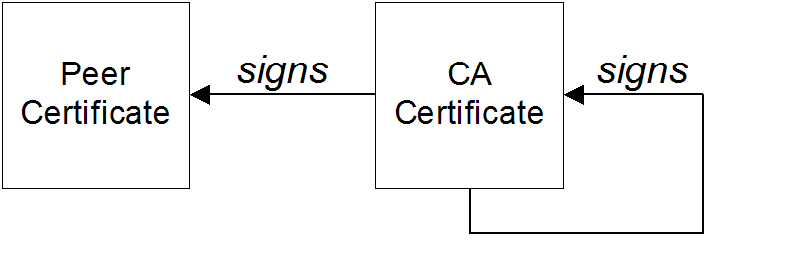
Self-signed certificate
Chain of trust
Certificates signed by multiple CAs
Figure 2.2. A Certificate Chain of Depth 3
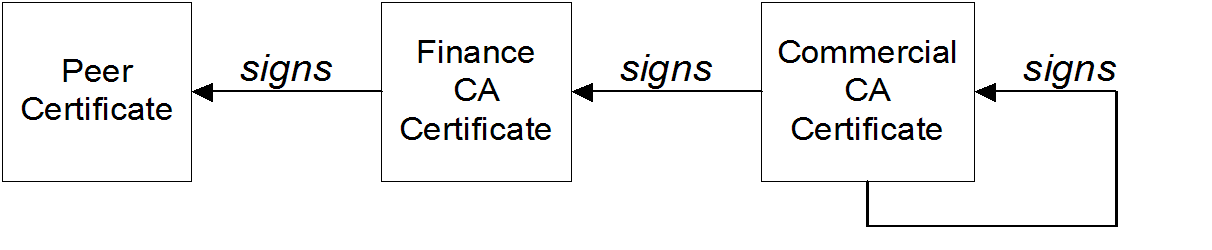
Trusted CAs
2.4. Special Requirements on HTTPS Certificates
Overview
HTTPS URL integrity check
Reference
How to specify the certificate identity
Using commonName
https://www.redhat.com/secureC=IE,ST=Co. Dublin,L=Dublin,O=RedHat,
OU=System,CN=www.redhat.comwww.redhat.com.
Using subjectAltName (multi-homed hosts)
subjectAltName certificate extension.
www.redhat.com
www.jboss.orgsubjectAltName that explicitly lists both of these DNS host names. If you generate your certificates using the openssl utility, edit the relevant line of your openssl.cnf configuration file to specify the value of the subjectAltName extension, as follows:
subjectAltName=DNS:www.redhat.com,DNS:www.jboss.orgsubjectAltName (the subjectAltName takes precedence over the Common Name).
*, in host names. For example, you can define the subjectAltName as follows:
subjectAltName=DNS:*.jboss.org., delimiter in front of the domain name). For example, if you specified *jboss.org, your certificate could be used on any domain that ends in the letters jboss.
2.5. Creating Your Own Certificates
2.5.1. Prerequisites
OpenSSL utilities
Sample CA directory structure
X509CA/ca |
X509CA/certs |
X509CA/newcerts |
X509CA/crl |
2.5.2. Set Up Your Own CA
Substeps to perform
Add the bin directory to your PATH
bin directory to your path:
> set PATH=OpenSSLDir\bin;%PATH%% PATH=OpenSSLDir/bin:$PATH; export PATHCreate the CA directory hierarchy
X509CA/ca |
X509CA/certs |
X509CA/newcerts |
X509CA/crl |
Copy and edit the openssl.cnf file
openssl.cnf from your OpenSSL installation to the X509CA directory.
openssl.cnf to reflect the directory structure of the X509CA directory, and to identify the files used by the new CA.
[CA_default] section of the openssl.cnf file to look like the following:
#############################################################
[ CA_default ]

dir        = X509CA            # Where CA files are kept
certs      = $dir/certs  # Where issued certs are kept
crl_dir    = $dir/crl          # Where the issued crl are kept
database   = $dir/index.txt    # Database index file
new_certs_dir = $dir/newcerts  # Default place for new certs

certificate   = $dir/ca/new_ca.pem # The CA certificate
serial        = $dir/serial        # The current serial number
crl           = $dir/crl.pem       # The current CRL
private_key   = $dir/ca/new_ca_pk.pem  # The private key
RANDFILE      = $dir/ca/.rand
# Private random number file

x509_extensions = usr_cert  # The extensions to add to the cert
...
Initialize the CA database
serial and index.txt.
serial file in Windows, enter the following command:
> echo 01 > serialindex.txt, in Windows start Windows Notepad at the command line in the X509CA directory, as follows:
> notepad index.txtCannot find the text.txt file. Do you want to create a new file?, click , and close Notepad.
serial file and the index.txt file in UNIX, enter the following command:
% echo "01" > serial
% touch index.txtindex.txt file must initially be completely empty, not even containing white space.
Create a self-signed CA certificate and private key
openssl req -x509 -new -config X509CA/openssl.cnf -days 365 -out X509CA/ca/new_ca.pem -keyout X509CA/ca/new_ca_pk.pemUsing configuration from X509CA/openssl.cnf
Generating a 512 bit RSA private key
....+++++
.+++++
writing new private key to 'new_ca_pk.pem'
Enter PEM pass phrase:
Verifying password - Enter PEM pass phrase:
-----
You are about to be asked to enter information that will be
incorporated into your certificate request.
What you are about to enter is what is called a Distinguished
Name or a DN. There are quite a few fields but you can leave
some blank. For some fields there will be a default value,
If you enter '.', the field will be left blank.
-----
Country Name (2 letter code) []:IE
State or Province Name (full name) []:Co. Dublin
Locality Name (eg, city) []:Dublin
Organization Name (eg, company) []:Red Hat
Organizational Unit Name (eg, section) []:Finance
Common Name (eg, YOUR name) []:Gordon Brown
Email Address []:gbrown@redhat.comnew_ca.pem and new_ca_pk.pem, are the same as the values specified in openssl.cnf (see the preceding step).
2.5.3. Use the CA to Create Signed Certificates in a Java Keystore
Substeps to perform
CertName.jks, perform the following substeps:
Add the Java bin directory to your PATH
bin directory to your path:
> set PATH=JAVA_HOME\bin;%PATH%% PATH=JAVA_HOME/bin:$PATH; export PATHGenerate a certificate and private key pair
keytool -genkey -dname "CN=Alice, OU=Engineering, O=Progress, ST=Co. Dublin, C=IE" -validity 365 -alias CertAlias -keypass CertPassword -keystore CertName.jks -storepass CertPasswordkeytool command, invoked with the -genkey option, generates an X.509 certificate and a matching private key. The certificate and the key are both placed in a key entry in a newly created keystore, CertName.jks. Because the specified keystore, CertName.jks, did not exist prior to issuing the command, keytool implicitly creates a new keystore.
-dname and -validity flags define the contents of the newly created X.509 certificate, specifying the subject DN and the days before expiration respectively. For more details about DN format, see Appendix A, ASN.1 and Distinguished Names.
openssl.cnf file). The default openssl.cnf file requires the following entries to match:
- Country Name (C)
- State or Province Name (ST)
- Organization Name (O)
Create a certificate signing request
CertName.jks certificate, as follows:
keytool -certreq -alias CertAlias -file CertName_csr.pem -keypass CertPassword -keystore CertName.jks -storepass CertPasswordCertName_csr.pem.
Sign the CSR
openssl ca -config X509CA/openssl.cnf -days 365 -in CertName_csr.pem -out CertName.pem-cert and -keyfile options to specify the CA certificate and its private key file, respectively.
Convert to PEM format
CertName.pem, to PEM only format, as follows:
openssl x509 -in CertName.pem -out CertName.pem -outform PEMConcatenate the files
CertName.pem certificate file, as follows:
copy CertName.pem + X509CA\ca\new_ca.pem CertName.chaincat CertName.pem X509CA/ca/new_ca.pem > CertName.chainUpdate keystore with the full certificate chain
CertName.jks, by importing the full certificate chain for the certificate, as follows:
keytool -import -file CertName.chain -keypass CertPassword -keystore CertName.jks -storepass CertPasswordRepeat steps as required
2.5.4. Use the CA to Create Signed PKCS#12 Certificates
Substeps to perform
CertName.p12, perform the following substeps:
Add the bin directory to your PATH
bin directory to your path, as follows:
> set PATH=OpenSSLDir\bin;%PATH%% PATH=OpenSSLDir/bin:$PATH; export PATHConfigure the subjectAltName extension (Optional)
subjectAltName certificate extension (see Section 2.4, “Special Requirements on HTTPS Certificates”).
subjectAltName extension, edit your CA’s openssl.cnf file as follows:
- Add the following
req_extensionssetting to the[req]section (if not already present in youropenssl.cnffile):# openssl Configuration File ... [req] req_extensions=v3_req - Add the
[v3_req]section header (if not already present in youropenssl.cnffile). Under the[v3_req]section, add or modify thesubjectAltNamesetting, setting it to the list of your DNS host names. For example, if the server host supports the alternative DNS names,www.redhat.comandjboss.org, set thesubjectAltNameas follows:# openssl Configuration File ... [v3_req] subjectAltName=DNS:www.redhat.com,DNS:jboss.org - Add a
copy_extensionssetting to the appropriate CA configuration section. The CA configuration section used for signing certificates is one of the following:- The section specified by the
-nameoption of the openssl ca command, - The section specified by the
default_casetting under the[ca]section (usually[CA_default]).
For example, if the appropriate CA configuration section is[CA_default], set thecopy_extensionsproperty as follows:# openssl Configuration File ... [CA_default] copy_extensions=copyThis setting ensures that certificate extensions present in the certificate signing request are copied into the signed certificate.
Create a certificate signing request
CertName.p12 certificate, as shown:
openssl req -new -config X509CA/openssl.cnf -days 365 -out X509CA/certs/CertName_csr.pem -keyout X509CA/certs/CertName_pk.pemopenssl.cnf file). The default openssl.cnf file requires that the following entries match:
- Country Name
- State or Province Name
- Organization Name
- The Common Name must be distinct for every certificate generated by the OpenSSL certificate authority.
- If your HTTPS clients implement the URL integrity check, you must ensure that the Common Name is identical to the DNS name of the host where the certificate is to be deployed (see Section 2.4, “Special Requirements on HTTPS Certificates”).
subjectAltName extension takes precedence over the Common Name.
Using configuration from X509CA/openssl.cnf
Generating a 512 bit RSA private key
.+++++
.+++++
writing new private key to
      'X509CA/certs/CertName_pk.pem'
Enter PEM pass phrase:
Verifying password - Enter PEM pass phrase:
-----
You are about to be asked to enter information that will be
incorporated into your certificate request.
What you are about to enter is what is called a Distinguished
Name or a DN. There are quite a few fields but you can leave
some blank. For some fields there will be a default value,
If you enter '.', the field will be left blank.
-----
Country Name (2 letter code) []:IE
State or Province Name (full name) []:Co. Dublin
Locality Name (eg, city) []:Dublin
Organization Name (eg, company) []:Red Hat
Organizational Unit Name (eg, section) []:Systems
Common Name (eg, YOUR name) []:Artix
Email Address []:info@redhat.com

Please enter the following 'extra' attributes
to be sent with your certificate request
A challenge password []:password
An optional company name []:Red Hat
Sign the CSR
openssl ca -config X509CA/openssl.cnf -days 365 -in X509CA/certs/CertName_csr.pem -out X509CA/certs/CertName.pemnew_ca.pem CA certificate. For example:
Using configuration from X509CA/openssl.cnf
Enter PEM pass phrase:
Check that the request matches the signature
Signature ok
The Subjects Distinguished Name is as follows
countryName :PRINTABLE:'IE'
stateOrProvinceName :PRINTABLE:'Co. Dublin'
localityName :PRINTABLE:'Dublin'
organizationName :PRINTABLE:'Red Hat'
organizationalUnitName:PRINTABLE:'Systems'
commonName :PRINTABLE:'Bank Server Certificate'
emailAddress :IA5STRING:'info@redhat.com'
Certificate is to be certified until May 24 13:06:57 2000 GMT (365 days)
Sign the certificate? [y/n]:y
1 out of 1 certificate requests certified, commit? [y/n]y
Write out database with 1 new entries
Data Base Updatedcopy_extensions=copy under the [CA_default] section in the openssl.cnf file, the signed certificate will not include any of the certificate extensions that were in the original CSR.
Concatenate the files
CertName.pem certificate file, and CertName_pk.pem private key file as follows:
copy X509CA\ca\new_ca.pem + X509CA\certs\CertName.pem + X509CA\certs\CertName_pk.pem X509CA\certs\CertName_list.pemcat X509CA/ca/new_ca.pem X509CA/certs/CertName.pem X509CA/certs/CertName_pk.pem > X509CA/certs/CertName_list.pemCreate a PKCS#12 file
CertName_list.pem file as follows:
openssl pkcs12 -export -in X509CA/certs/CertName_list.pem -out X509CA/certs/CertName.p12 -name "New cert"Repeat steps as required
(Optional) Clear the subjectAltName extension
subjectAltName setting in the openssl.cnf file to avoid accidentally assigning the wrong DNS names to another set of certificates.
openssl.cnf file, comment out the subjectAltName setting (by adding a # character at the start of the line), and also comment out the copy_extensions setting.
Chapter 3. Configuring HTTPS
Abstract
3.1. Authentication Alternatives
3.1.1. Target-Only Authentication
Overview
Figure 3.1. Target Authentication Only
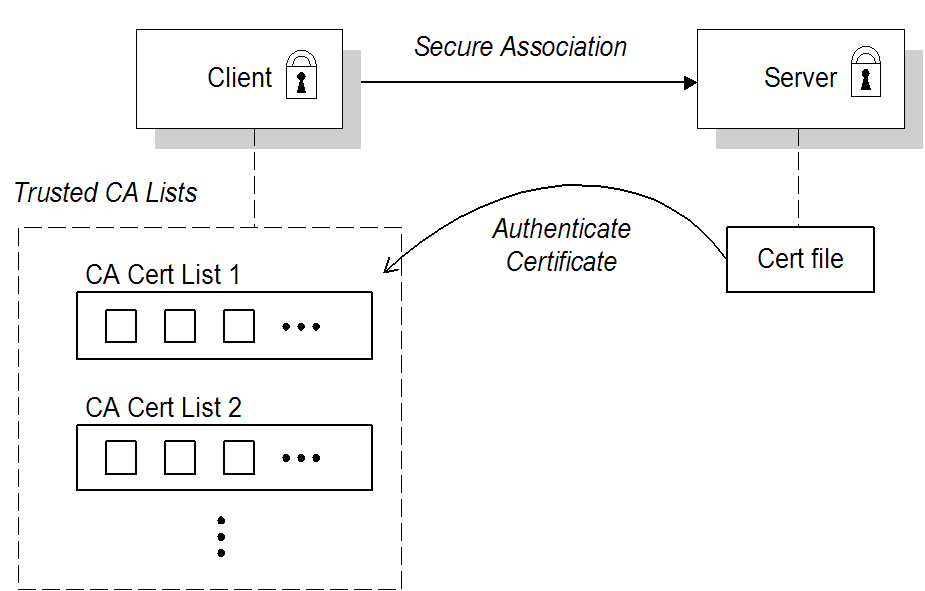
Security handshake
- A certificate chain is associated with the server. The certificate chain is provided in the form of a Java keystore (ee Section 3.3, “Specifying an Application's Own Certificate”).
- One or more lists of trusted certification authorities (CA) are made available to the client. (see Section 3.2, “Specifying Trusted CA Certificates”).
HTTPS example
sec:clientAuthentication element does not require client authentication. This element can be omitted, in which case the default policy is to not require client authentication. However, if the sec:clientAuthentication element is present, it should be configured as follows:
<http:destination id="{Namespace}PortName.http-destination">
  <http:tlsServerParameters secureSocketProtocol="TLSv1">
    ...

    <sec:clientAuthentication want="false" required="false"/>
  </http:tlsServerParameters>
</http:destination>secureSocketProtocol to TLSv1 on the server side, in order to protect against the Poodle vulnerability (CVE-2014-3566)
want attribute is set to false (the default), specifying that the server does not request an X.509 certificate from the client during a TLS handshake. The required attribute is also set to false (the default), specifying that the absence of a client certificate does not trigger an exception during the TLS handshake.
want attribute can be set either to true or to false. If set to true, the want setting causes the server to request a client certificate during the TLS handshake, but no exception is raised for clients lacking a certificate, so long as the required attribute is set to false.
3.1.2. Mutual Authentication
Overview
Figure 3.2. Mutual Authentication
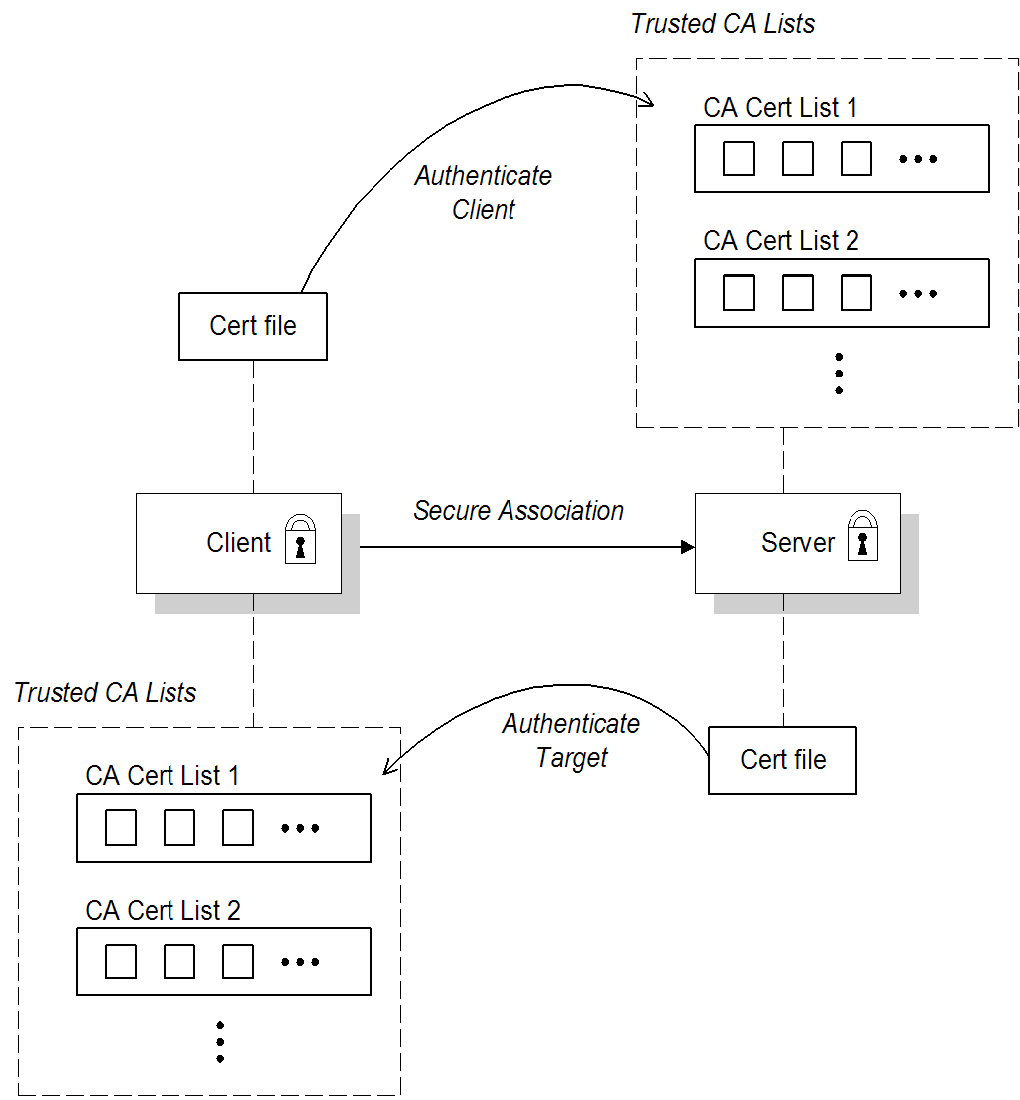
Security handshake
- Both client and server have an associated certificate chain (see Section 3.3, “Specifying an Application's Own Certificate”).
- Both client and server are configured with lists of trusted certification authorities (CA) (see Section 3.2, “Specifying Trusted CA Certificates”).
HTTPS example
sec:clientAuthentication element is configured to require client authentication. For example:
<http:destination id="{Namespace}PortName.http-destination">
  <http:tlsServerParameters secureSocketProtocol="TLSv1">
    ...
    <sec:clientAuthentication want="true" required="true"/>
  </http:tlsServerParameters>
</http:destination>secureSocketProtocol to TLSv1 on the server side, in order to protect against the Poodle vulnerability (CVE-2014-3566)
want attribute is set to true, specifying that the server requests an X.509 certificate from the client during a TLS handshake. The required attribute is also set to true, specifying that the absence of a client certificate triggers an exception during the TLS handshake.
3.2. Specifying Trusted CA Certificates
3.2.1. When to Deploy Trusted CA Certificates
Overview
Which applications need to specify trusted CA certificates?
- All HTTPS clients.
- Any HTTPS servers that support mutual authentication.
3.2.2. Specifying Trusted CA Certificates for HTTPS
CA certificate format
CA certificate deployment in the Apache CXF configuration file
- Assemble the collection of trusted CA certificates that you want to deploy. The trusted CA certificates can be obtained from public CAs or private CAs (for details of how to generate your own CA certificates, see Section 2.5, “Creating Your Own Certificates”). The trusted CA certificates can be in any format that is compatible with the Java
keystoreutility; for example, PEM format. All you need are the certificates themselves—the private keys and passwords are not required. - Given a CA certificate,
cacert.pem, in PEM format, you can add the certificate to a JKS truststore (or create a new truststore) by entering the following command:keytool -import -file cacert.pem -alias CAAlias -keystore truststore.jks -storepass StorePassWhere CAAlias is a convenient tag that enables you to access this particular CA certificate using thekeytoolutility. The file,truststore.jks, is a keystore file containing CA certificates—if this file does not already exist, thekeytoolutility creates one. The StorePass password provides access to the keystore file,truststore.jks. - Repeat step 2 as necessary, to add all of the CA certificates to the truststore file,
truststore.jks. - Edit the relevant XML configuration files to specify the location of the truststore file. You must include the
sec:trustManagerselement in the configuration of the relevant HTTPS ports.For example, you can configure a client port as follows:<!-- Client port configuration --> <http:conduit id="{Namespace}PortName.http-conduit"> <http:tlsClientParameters> ... <sec:trustManagers> <sec:keyStore type="JKS" password="StorePass" file="certs/truststore.jks"/> </sec:trustManagers> ... </http:tlsClientParameters> </http:conduit>Where thetypeattribute specifes that the truststore uses the JKS keystore implementation and StorePass is the password needed to access thetruststore.jkskeystore.Configure a server port as follows:<!-- Server port configuration --> <http:destination id="{Namespace}PortName.http-destination"> <http:tlsServerParameters secureSocketProtocol="TLSv1"> ... <sec:trustManagers> <sec:keyStore type="JKS" password="StorePass" file="certs/truststore.jks"/> </sec:trustManagers> ... </http:tlsServerParameters> </http:destination>ImportantYou must setsecureSocketProtocoltoTLSv1on the server side, in order to protect against the Poodle vulnerability (CVE-2014-3566)WarningThe directory containing the truststores (for example, X509Deploy/truststores/) should be a secure directory (that is, writable only by the administrator).
3.3. Specifying an Application's Own Certificate
3.3.1. Deploying Own Certificate for HTTPS
Overview
Procedure
- Obtain an application certificate in Java keystore format, CertName
.jks. For instructions on how to create a certificate in Java keystore format, see Section 2.5.3, “Use the CA to Create Signed Certificates in a Java Keystore”.NoteSome HTTPS clients (for example, Web browsers) perform a URL integrity check, which requires a certificate's identity to match the hostname on which the server is deployed. See Section 2.4, “Special Requirements on HTTPS Certificates” for details. - Copy the certificate's keystore, CertName
.jks, to the certificates directory on the deployment host; for example, X509Deploy/certs.The certificates directory should be a secure directory that is writable only by administrators and other privileged users. - Edit the relevant XML configuration file to specify the location of the certificate keystore, CertName
.jks. You must include thesec:keyManagerselement in the configuration of the relevant HTTPS ports.For example, you can configure a client port as follows:<http:conduit id="{Namespace}PortName.http-conduit"> <http:tlsClientParameters> ... <sec:keyManagers keyPassword="CertPassword"> <sec:keyStore type="JKS" password="KeystorePassword" file="certs/CertName.jks"/> </sec:keyManagers> ... </http:tlsClientParameters> </http:conduit>Where thekeyPasswordattribute specifies the password needed to decrypt the certificate's private key (that is, CertPassword), thetypeattribute specifes that the truststore uses the JKS keystore implementation, and thepasswordattribute specifies the password required to access the CertName.jkskeystore (that is, KeystorePassword).Configure a server port as follows:<http:destination id="{Namespace}PortName.http-destination"> <http:tlsServerParameters secureSocketProtocol="TLSv1"> ... <sec:keyManagers keyPassword="CertPassword"> <sec:keyStore type="JKS" password="KeystorePassword" file="certs/CertName.jks"/> </sec:keyManagers> ... </http:tlsServerParameters> </http:destination>ImportantYou must setsecureSocketProtocoltoTLSv1on the server side, in order to protect against the Poodle vulnerability (CVE-2014-3566)WarningThe directory containing the application certificates (for example, X509Deploy/certs/) should be a secure directory (that is, readable and writable only by the administrator).WarningThe directory containing the XML configuration file should be a secure directory (that is, readable and writable only by the administrator), because the configuration file contains passwords in plain text.
Chapter 4. Configuring HTTPS Cipher Suites
Abstract
4.1. Supported Cipher Suites
Overview
JCE/JSSE and security providers
SunJSSE provider
SunJSSE.
Cipher suites supported by SunJSSE
- Standard ciphers:
SSL_DHE_DSS_EXPORT_WITH_DES40_CBC_SHA SSL_DHE_DSS_WITH_3DES_EDE_CBC_SHA SSL_DHE_DSS_WITH_DES_CBC_SHA SSL_DHE_RSA_EXPORT_WITH_DES40_CBC_SHA SSL_DHE_RSA_WITH_3DES_EDE_CBC_SHA SSL_DHE_RSA_WITH_DES_CBC_SHA SSL_RSA_EXPORT_WITH_DES40_CBC_SHA SSL_RSA_EXPORT_WITH_RC4_40_MD5 SSL_RSA_WITH_3DES_EDE_CBC_SHA SSL_RSA_WITH_DES_CBC_SHA SSL_RSA_WITH_RC4_128_MD5 SSL_RSA_WITH_RC4_128_SHA TLS_DHE_DSS_WITH_AES_128_CBC_SHA TLS_DHE_DSS_WITH_AES_256_CBC_SHA TLS_DHE_RSA_WITH_AES_128_CBC_SHA TLS_DHE_RSA_WITH_AES_256_CBC_SHA TLS_KRB5_EXPORT_WITH_DES_CBC_40_MD5 TLS_KRB5_EXPORT_WITH_DES_CBC_40_SHA TLS_KRB5_EXPORT_WITH_RC4_40_MD5 TLS_KRB5_EXPORT_WITH_RC4_40_SHA TLS_KRB5_WITH_3DES_EDE_CBC_MD5 TLS_KRB5_WITH_3DES_EDE_CBC_SHA TLS_KRB5_WITH_DES_CBC_MD5 TLS_KRB5_WITH_DES_CBC_SHA TLS_KRB5_WITH_RC4_128_MD5 TLS_KRB5_WITH_RC4_128_SHA TLS_RSA_WITH_AES_128_CBC_SHA TLS_RSA_WITH_AES_256_CBC_SHA - Null encryption, integrity-only ciphers:
SSL_RSA_WITH_NULL_MD5 SSL_RSA_WITH_NULL_SHA - Anonymous Diffie-Hellman ciphers (no authentication):
SSL_DH_anon_EXPORT_WITH_DES40_CBC_SHA
SSL_DH_anon_EXPORT_WITH_RC4_40_MD5
SSL_DH_anon_WITH_3DES_EDE_CBC_SHA
SSL_DH_anon_WITH_DES_CBC_SHA
SSL_DH_anon_WITH_RC4_128_MD5
TLS_DH_anon_WITH_AES_128_CBC_SHA
TLS_DH_anon_WITH_AES_256_CBC_SHA
JSSE reference guide
4.2. Cipher Suite Filters
Overview
sec:cipherSuitesFilter element, instead of the sec:cipherSuites element to select the cipher suites you want to use.
sec:cipherSuites element is not recommended for general use, because it has rather non-intuitive semantics: you can use it to require that the loaded security provider supports at least the listed cipher suites. But the security provider that is loaded might support many more cipher suites than the ones that are specified. Hence, when you use the sec:cipherSuites element, it is not clear exactly which cipher suites are supported at run time.
Namespaces
| Prefix | Namespace URI |
|---|---|
http | http://cxf.apache.org/transports/http/configuration |
httpj | http://cxf.apache.org/transports/http-jetty/configuration |
sec | http://cxf.apache.org/configuration/security |
sec:cipherSuitesFilter element
sec:cipherSuitesFilter element, which can be a child of either a http:tlsClientParameters element or a httpj:tlsServerParameters element. A typical sec:cipherSuitesFilter element has the outline structure shown in Example 4.1, “Structure of a sec:cipherSuitesFilter Element” .
Example 4.1. Structure of a sec:cipherSuitesFilter Element
<sec:cipherSuitesFilter>
    <sec:include>RegularExpression</sec:include>
    <sec:include>RegularExpression</sec:include>
    ...
    <sec:exclude>RegularExpression</sec:exclude>
    <sec:exclude>RegularExpression</sec:exclude>
    ...
</sec:cipherSuitesFilter>
Semantics
sec:cipherSuitesFilter element:
- If a
sec:cipherSuitesFilterelement does not appear in an endpoint’s configuration (that is, it is absent from the relevanthttp:conduitorhttpj:engine-factoryelement), the following default filter is used:<sec:cipherSuitesFilter> <sec:include>.*_EXPORT_.*</sec:include> <sec:include>.*_EXPORT1024.*</sec:include> <sec:include>.*_DES_.*</sec:include> <sec:include>.*_WITH_NULL_.*</sec:include> </sec:cipherSuitesFilter> - If the
sec:cipherSuitesFilterelement does appear in an endpoint’s configuration, all cipher suites are excluded by default. - To include cipher suites, add a
sec:includechild element to thesec:cipherSuitesFilterelement. The content of thesec:includeelement is a regular expression that matches one or more cipher suite names (for example, see the cipher suite names in the section called “Cipher suites supported by SunJSSE”). - To refine the selected set of cipher suites further, you can add a
sec:excludeelement to thesec:cipherSuitesFilterelement. The content of thesec:excludeelement is a regular expression that matches zero or more cipher suite names from the currently included set.NoteSometimes it makes sense to explicitly exclude cipher suites that are currently not included, in order to future-proof against accidental inclusion of undesired cipher suites.
Regular expression matching
sec:include and sec:exclude elements is defined by the Java regular expression utility, java.util.regex.Pattern. For a detailed description of the grammar, please consult the Java reference guide, http://download.oracle.com/javase/1.5.0/docs/api/java/util/regex/Pattern.html.
Client conduit example
{WSDLPortNamespace}PortName. Whenever the client attempts to open an SSL/TLS connection to this endpoint, it restricts the available cipher suites to the set selected by the sec:cipherSuitesFilter element.
<beans ... >
  <http:conduit name="{WSDLPortNamespace}PortName.http-conduit">
    <http:tlsClientParameters>
      ...
      <sec:cipherSuitesFilter>
        <sec:include>.*_WITH_3DES_.*</sec:include>
        <sec:include>.*_WITH_DES_.*</sec:include>
        <sec:exclude>.*_WITH_NULL_.*</sec:exclude>
        <sec:exclude>.*_DH_anon_.*</sec:exclude>
      </sec:cipherSuitesFilter>
    </http:tlsClientParameters>
  </http:conduit>

  <bean id="cxf" class="org.apache.cxf.bus.CXFBusImpl"/>
</beans>
4.3. SSL/TLS Protocol Version
Overview
SSL/TLS protocol versions supported by SunJSSE
| Protocol | Description |
|---|---|
SSLv2Hello
|
Do not use! (POODLE security vulnerability)
|
SSLv3
|
Do not use! (POODLE security vulnerability)
|
TLSv1
|
Supports TLS version 1
|
TLSv1.1 | Supports TLS version 1.1 (JDK 7 or later) |
TLSv1.2 | Supports TLS version 1.2 (JDK 7 or later) |
Excluding specific SSL/TLS protocol versions
SSLv2Hello and SSLv3 protocols, which have been specifically excluded by the CXF runtime since JBoss Fuse version 6.2.0, because of the Poodle vulnerability (CVE-2014-3566)).
sec:excludeProtocols element in the endpoint configuration. You can configure the sec:excludeProtocols element as a child of the httpj:tlsServerParameters element (server side).
sec:excludeProtocols element as follows (assuming you are using JDK 7 or later):
<?xml version="1.0" encoding="UTF-8"?>
<beans ... >
  ...
  <httpj:engine-factory bus="cxf">
    <httpj:engine port="9001">
      ...
      <httpj:tlsServerParameters>
        ...
        <sec:excludeProtocols>
          <sec:excludeProtocol>SSLv2Hello</sec:excludeProtocol>
          <sec:excludeProtocol>SSLv3</sec:excludeProtocol>
          <sec:excludeProtocol>TLSv1</sec:excludeProtocol>
          <sec:excludeProtocol>TLSv1.1</sec:excludeProtocol>
        </sec:excludeProtocols>
      </httpj:tlsServerParameters>
    </httpj:engine>
  </httpj:engine-factory>
  ...
</beans>SSLv2Hello and SSLv3 protocols, to protect against the Poodle vulnerability (CVE-2014-3566).
secureSocketProtocol attribute
http:tlsClientParameters element and the httpj:tlsServerParameters element support the secureSocketProtocol attribute, which enables you to specify a particular protocol.
secureSocketProtocol attribute in your code.
Chapter 5. The WS-Policy Framework
Abstract
5.1. Introduction to WS-Policy
Overview
Policies and policy references
<wsdl:definitions targetNamespace="http://tempuri.org/"
    xmlns:wsdl="http://schemas.xmlsoap.org/wsdl/"
    xmlns:soap="http://schemas.xmlsoap.org/wsdl/soap/"
    xmlns:wsu="http://docs.oasis-open.org/wss/2004/01/oasis-200401-wss-wssecurity-utility-1.0.xsd"
    xmlns:wsp="http://schemas.xmlsoap.org/ws/2004/09/policy" ... >
  ...
  <wsdl:service name="PingService10">
    <wsdl:port name="UserNameOverTransport_IPingService" binding="BindingName">
      <wsp:Policy>
        <!-- Policy expression comes here! -->
      </wsp:Policy>
      <soap:address location="SOAPAddress"/>
    </wsdl:port>
  </wsdl:service>
</wsdl:definitions>wsp:PolicyReference, at the point where you want to apply the policy and then insert the policy element, wsp:Policy, at some other point in the XML file. For example, to associate a policy with a specific port using a policy reference, you could use a configuration like the following:
<wsdl:definitions targetNamespace="http://tempuri.org/"
    xmlns:wsdl="http://schemas.xmlsoap.org/wsdl/"
    xmlns:soap="http://schemas.xmlsoap.org/wsdl/soap/"
    xmlns:wsu="http://docs.oasis-open.org/wss/2004/01/oasis-200401-wss-wssecurity-utility-1.0.xsd"
    xmlns:wsp="http://schemas.xmlsoap.org/ws/2004/09/policy" ... >
  ...
  <wsdl:service name="PingService10">
    <wsdl:port name="UserNameOverTransport_IPingService" binding="BindingName">
 <wsp:PolicyReference URI="#PolicyID"/>
      <soap:address location="SOAPAddress"/>
    </wsdl:port>
  </wsdl:service>
  ...
  <wsp:Policy wsu:Id="PolicyID">
    <!-- Policy expression comes here ... -->
  </wsp:Policy>
</wsdl:definitions>wsp:PolicyReference, locates the referenced policy using the ID, PolicyID (note the addition of the # prefix character in the URI attribute). The policy itself, wsp:Policy, must be identified by adding the attribute, wsu:Id="PolicyID".
Policy subjects
Service policy subject
<wsp:Policy> element or a <wsp:PolicyReference> element as a sub-element of the following WSDL 1.1 element:
wsdl:service—apply the policy to all of the ports (endpoints) offered by this service.
Endpoint policy subject
<wsp:Policy> element or a <wsp:PolicyReference> element as a sub-element of any of the following WSDL 1.1 elements:
wsdl:portType—apply the policy to all of the ports (endpoints) that use this port type.wsdl:binding—apply the policy to all of the ports that use this binding.wsdl:port—apply the policy to this endpoint only.
<wsdl:definitions targetNamespace="http://tempuri.org/"
    xmlns:wsdl="http://schemas.xmlsoap.org/wsdl/"
    xmlns:wsu="http://docs.oasis-open.org/wss/2004/01/oasis-200401-wss-wssecurity-utility-1.0.xsd"
    xmlns:wsp="http://schemas.xmlsoap.org/ws/2004/09/policy" ... >
  ...
  <wsdl:binding name="EndpointBinding" type="i0:IPingService">
    <wsp:PolicyReference URI="#PolicyID"/>
    ...
  </wsdl:binding>
  ...
  <wsp:Policy wsu:Id="PolicyID"> ... </wsp:Policy>
  ...
</wsdl:definitions>
Operation policy subject
<wsp:Policy> element or a <wsp:PolicyReference> element as a sub-element of any of the following WSDL 1.1 elements:
wsdl:portType/wsdl:operationwsdl:binding/wsdl:operation
<wsdl:definitions targetNamespace="http://tempuri.org/"
    xmlns:wsdl="http://schemas.xmlsoap.org/wsdl/"
    xmlns:soap="http://schemas.xmlsoap.org/wsdl/soap/"
    xmlns:wsu="http://docs.oasis-open.org/wss/2004/01/oasis-200401-wss-wssecurity-utility-1.0.xsd"
    xmlns:wsp="http://schemas.xmlsoap.org/ws/2004/09/policy" ... >
  ...
  <wsdl:binding name="EndpointBinding" type="i0:IPingService">
    <wsdl:operation name="Ping">
      <wsp:PolicyReference URI="#PolicyID"/>
      <soap:operation soapAction="http://xmlsoap.org/Ping" style="document"/>
      <wsdl:input name="PingRequest"> ... </wsdl:input>
      <wsdl:output name="PingResponse"> ... </wsdl:output>
    </wsdl:operation>
    ...
  </wsdl:binding>
  ...
  <wsp:Policy wsu:Id="PolicyID"> ... </wsp:Policy>
  ...
</wsdl:definitions>
Message policy subject
<wsp:Policy> element or a <wsp:PolicyReference> element as a sub-element of any of the following WSDL 1.1 elements:
wsdl:messagewsdl:portType/wsdl:operation/wsdl:inputwsdl:portType/wsdl:operation/wsdl:outputwsdl:portType/wsdl:operation/wsdl:faultwsdl:binding/wsdl:operation/wsdl:inputwsdl:binding/wsdl:operation/wsdl:outputwsdl:binding/wsdl:operation/wsdl:fault
<wsdl:definitions targetNamespace="http://tempuri.org/"
    xmlns:wsdl="http://schemas.xmlsoap.org/wsdl/"
    xmlns:soap="http://schemas.xmlsoap.org/wsdl/soap/"
    xmlns:wsu="http://docs.oasis-open.org/wss/2004/01/oasis-200401-wss-wssecurity-utility-1.0.xsd"
    xmlns:wsp="http://schemas.xmlsoap.org/ws/2004/09/policy" ... >
  ...
  <wsdl:binding name="EndpointBinding" type="i0:IPingService">
    <wsdl:operation name="Ping">
      <soap:operation soapAction="http://xmlsoap.org/Ping" style="document"/>
      <wsdl:input name="PingRequest">
        <wsp:PolicyReference URI="#PolicyID"/>
        <soap:body use="literal"/>
      </wsdl:input>
      <wsdl:output name="PingResponse"> ... </wsdl:output>
    </wsdl:operation>
    ...
  </wsdl:binding>
  ...
  <wsp:Policy wsu:Id="PolicyID"> ... </wsp:Policy>
  ...
</wsdl:definitions>
5.2. Policy Expressions
Overview
wsp:Policy element is composed of multiple different policy settings (where individual policy settings are specified as policy assertions). Hence, the policy defined by a wsp:Policy element is really a composite object. The content of the wsp:Policy element is called a policy expression, where the policy expression consists of various logical combinations of the basic policy assertions. By tailoring the syntax of the policy expression, you can determine what combinations of policy assertions must be satisfied at runtime in order to satisfy the policy overall.
Policy assertions
<sp:SupportingTokens xmlns:sp="http://schemas.xmlsoap.org/ws/2005/07/securitypolicy">
  <wsp:Policy>
    <sp:UsernameToken/>
  </wsp:Policy>
</sp:SupportingTokens>- The Web service endpoint marshales/unmarshals the UsernameToken credentials.
- At runtime, the policy assertion returns
true, if UsernameToken credentials are provided (on the client side) or received in the incoming message (on the server side); otherwise the policy assertion returnsfalse.
false, this does not necessarily result in an error. The net effect of a particular policy assertion depends on how it is inserted into a policy and on how it is combined with other policy assertions.
Policy alternatives
wsp:Optional attribute, and various nested combinations of the wsp:All and wsp:ExactlyOne elements. The net effect of composing these elements is to produce a range of acceptable policy alternatives. As long as one of these acceptable policy alternatives is satisfied, the overall policy is also satisified (evaluates to true).
wsp:All element
wsp:All element, all of the policy assertions in the list must evaluate to true. For example, consider the following combination of authentication and authorization policy assertions:
<wsp:Policy wsu:Id="AuthenticateAndAuthorizeWSSUsernameTokenPolicy">
  <wsp:All>
    <sp:SupportingTokens>
      <wsp:Policy>
        <sp:UsernameToken/>
      </wsp:Policy>
    </sp:SupportingTokens>
    <sp:SupportingTokens>
      <wsp:Policy>
        <sp:SamlToken/>
      </wsp:Policy>
    </sp:SupportingTokens>
  </wsp:All>
</wsp:Policy>- WS-Security UsernameToken credentials must be present; and
- A SAML token must be present.
wsp:Policy element is semantically equivalent to wsp:All. Hence, if you removed the wsp:All element from the preceding example, you would obtain a semantically equivalent example
wsp:ExactlyOne element
wsp:ExactlyOne element, at least one of the policy assertions in the list must evaluate to true. The runtime goes through the list, evaluating policy assertions until it finds a policy assertion that returns true. At that point, the wsp:ExactlyOne expression is satisfied (returns true) and any remaining policy assertions from the list will not be evaluated. For example, consider the following combination of authentication policy assertions:
<wsp:Policy wsu:Id="AuthenticateUsernamePasswordPolicy">
  <wsp:ExactlyOne>
    <sp:SupportingTokens>
      <wsp:Policy>
        <sp:UsernameToken/>
      </wsp:Policy>
    </sp:SupportingTokens>
    <sp:SupportingTokens>
      <wsp:Policy>
        <sp:SamlToken/>
      </wsp:Policy>
    </sp:SupportingTokens>
  </wsp:ExactlyOne>
</wsp:Policy>- WS-Security UsernameToken credentials are present; or
- A SAML token is present.
The empty policy
Example 5.1. The Empty Policy
<wsp:Policy ... >
   <wsp:ExactlyOne>
      <wsp:All/>
   </wsp:ExactlyOne>
</wsp:Policy><wsp:All/>, represents an alternative for which no policy assertions need be satisfied. In other words, it always returns true. When <wsp:All/> is available as an alternative, the overall policy can be satisified even when no policy assertions are true.
The null policy
Example 5.2. The Null Policy
<wsp:Policy ... >
   <wsp:ExactlyOne/>
</wsp:Policy><wsp:ExactlyOne/>, represents an alternative that is never satisfied. In other words, it always returns false.
Normal form
<wsp:All> and <wsp:ExactlyOne> elements, you can produce fairly complex policy expressions, whose policy alternatives might be difficult to work out. To facilitate the comparison of policy expressions, the WS-Policy specification defines a canonical or normal form for policy expressions, such that you can read off the list of policy alternatives unambiguously. Every valid policy expression can be reduced to the normal form.
Example 5.3. Normal Form Syntax
<wsp:Policy ... >
   <wsp:ExactlyOne>
        <wsp:All> <Assertion .../> ... <Assertion .../> </wsp:All>
        <wsp:All> <Assertion .../> ... <Assertion .../> </wsp:All>
        ...
   </wsp:ExactlyOne>
</wsp:Policy><wsp:All>...</wsp:All>, represents a valid policy alternative. If one of these policy alternatives is satisfied, the policy is satisfied overall.
Chapter 6. Message Protection
Abstract
6.1. Transport Layer Message Protection
Overview
Prerequisites
sec:keyManagers element specifies the client's own certificate, alice.pfx, and the sec:trustManagers element specifies the trusted CA list. Note how the http:conduit element's name attribute uses wildcards to match the endpoint address. For details of how to configure HTTPS on the client side, see Chapter 3, Configuring HTTPS.
Example 6.1. Client HTTPS Configuration in Spring
<beans xmlns="http://www.springframework.org/schema/beans"
       xmlns:http="http://cxf.apache.org/transports/http/configuration"
       xmlns:sec="http://cxf.apache.org/configuration/security" ... >

  <http:conduit name="https://.*/UserNameOverTransport.*">
    <http:tlsClientParameters disableCNCheck="true">
      <sec:keyManagers keyPassword="password">
        <sec:keyStore type="pkcs12" password="password" resource="certs/alice.pfx"/>
      </sec:keyManagers>
      <sec:trustManagers>
        <sec:keyStore type="pkcs12" password="password" resource="certs/bob.pfx"/>
      </sec:trustManagers>
    </http:tlsClientParameters>
  </http:conduit>
  ...
</beans>sec:keyManagers element specifies the server's own certificate, bob.pfx, and the sec:trustManagers element specifies the trusted CA list. For details of how to configure HTTPS on the server side, see Chapter 3, Configuring HTTPS.
Example 6.2. Server HTTPS Configuration in Spring
<beans xmlns="http://www.springframework.org/schema/beans"
       xmlns:httpj="http://cxf.apache.org/transports/http-jetty/configuration"
       xmlns:sec="http://cxf.apache.org/configuration/security" ... >

  <httpj:engine-factory id="tls-settings">
    <httpj:engine port="9001">
      <httpj:tlsServerParameters secureSocketProtocol="TLSv1">
        <sec:keyManagers keyPassword="password">
          <sec:keyStore type="pkcs12" password="password" resource="certs/bob.pfx"/>
        </sec:keyManagers>
        <sec:trustManagers>
          <sec:keyStore type="pkcs12" password="password" resource="certs/alice.pfx"/>
        </sec:trustManagers>
      </httpj:tlsServerParameters>
    </httpj:engine>
  </httpj:engine-factory>
  ...
</beans>secureSocketProtocol to TLSv1 on the server side, in order to protect against the Poodle vulnerability (CVE-2014-3566)
Policy subject
UserNameOverTransport_IPingService_policy, you could apply the policy to an endpoint binding as follows:
<wsdl:binding name="UserNameOverTransport_IPingService" type="i0:IPingService">
  <wsp:PolicyReference URI="#UserNameOverTransport_IPingService_policy"/>
  ...
</wsdl:binding>
Syntax
TransportBinding element has the following syntax:
<sp:TransportBinding xmlns:sp="..." ... >
  <wsp:Policy xmlns:wsp="...">
    <sp:TransportToken ... >
      <wsp:Policy> ... </wsp:Policy>
      ...
    </sp:TransportToken>
    <sp:AlgorithmSuite ... > ... </sp:AlgorithmSuite>
    <sp:Layout ... > ... </sp:Layout> ?
    <sp:IncludeTimestamp ... /> ?
      ...
  </wsp:Policy>
  ...
</sp:TransportBinding>
Sample policy
sp:HttpsToken element) and a 256-bit algorithm suite (specified by the sp:Basic256 element).
Example 6.3. Example of a Transport Binding
<wsp:Policy wsu:Id="UserNameOverTransport_IPingService_policy">
  <wsp:ExactlyOne>
    <wsp:All>
      <sp:TransportBinding xmlns:sp="http://schemas.xmlsoap.org/ws/2005/07/securitypolicy">
        <wsp:Policy>
          <sp:TransportToken>
            <wsp:Policy>
              <sp:HttpsToken RequireClientCertificate="false"/>
            </wsp:Policy>
          </sp:TransportToken>
          <sp:AlgorithmSuite>
            <wsp:Policy>
              <sp:Basic256/>
            </wsp:Policy>
          </sp:AlgorithmSuite>
          <sp:Layout>
            <wsp:Policy>
              <sp:Lax/>
            </wsp:Policy>
          </sp:Layout>
          <sp:IncludeTimestamp/>
        </wsp:Policy>
      </sp:TransportBinding>
      ...
      <sp:Wss10 xmlns:sp="http://schemas.xmlsoap.org/ws/2005/07/securitypolicy">
        <wsp:Policy>
          <sp:MustSupportRefKeyIdentifier/>
          <sp:MustSupportRefIssuerSerial/>
        </wsp:Policy>
      </sp:Wss10>
    </wsp:All>
  </wsp:ExactlyOne>
</wsp:Policy>
sp:TransportToken
sp:HttpsToken, you indicate that the connection is secured by the HTTPS protocol and the security tokens are X.509 certificates.
sp:AlgorithmSuite
sp:Layout
sp:Lax element specifies that no conditions are imposed on the order of security headers. The alternatives to sp:Lax are sp:Strict, sp:LaxTimestampFirst, or sp:LaxTimestampLast.
sp:IncludeTimestamp
wsu:Timestamp element to the wsse:Security header. By default, the timestamp is not included.
sp:MustSupportRefKeyIdentifier
sp:MustSupportRefIssuerSerial
6.2. SOAP Message Protection
6.2.1. Introduction to SOAP Message Protection
Overview
Security bindings
sp:TransportBinding—the transport binding refers to message protection provided at the transport level (for example, through HTTPS). This binding can be used to secure any message type, not just SOAP, and it is described in detail in the preceding section, Section 6.1, “Transport Layer Message Protection”.sp:AsymmetricBinding—the asymmetric binding refers to message protection provided at the SOAP message encoding layer, where the protection features are implemented using asymmetric cryptography (also known as public key cryptography).sp:SymmetricBinding—the symmetric binding refers to message protection provided at the SOAP message encoding layer, where the protection features are implemented using symmetric cryptography. Examples of symmetric cryptography are the tokens provided by WS-SecureConversation and Kerberos tokens.
Message protection
- Encryption.
- Signing.
- Signing+encryption (sign before encrypting).
- Encryption+signing (encrypt before signing).
sp:AsymmetricBinding or sp:SymmetricBinding). The transport layer (sp:TransportBinding) only gives you the option of applying protection to the whole message.
Specifying parts of the message to protect
- Body—sign and/or encrypt the whole of the
soap:BODYelement in a SOAP message. - Header(s)—sign and/or encrypt one or more SOAP message headers. You can specify the quality of protection for each header individually.
- Attachments—sign and/or encrypt all of the attachments in a SOAP message.
- Elements—sign and/or encrypt specific XML elements in a SOAP message.
Role of configuration
6.2.2. Basic Signing and Encryption Scenario
Overview
Example scenario
Figure 6.1. Basic Signing and Encryption Scenario
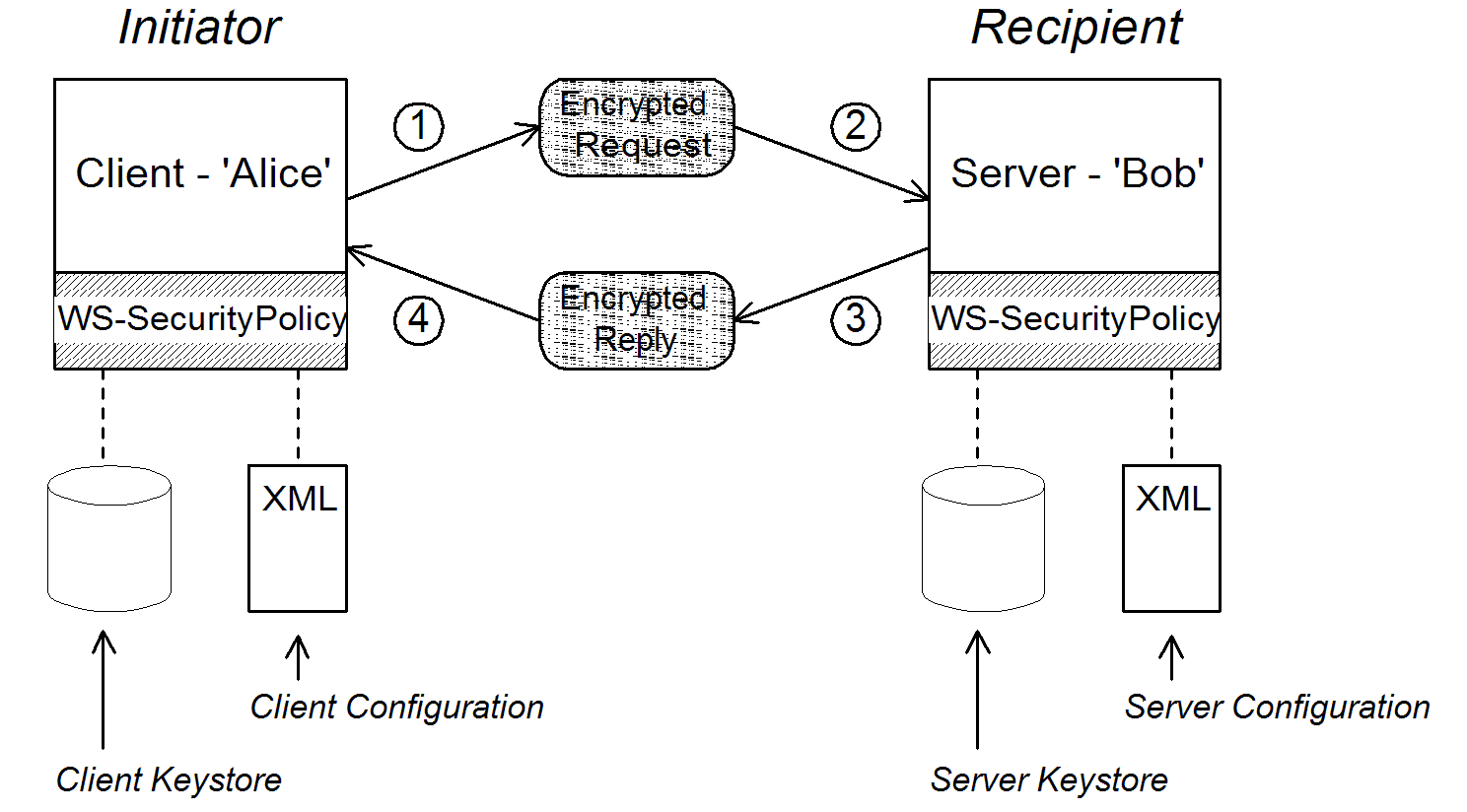
Scenario steps
- As the outgoing request message passes through the WS-SecurityPolicy handler, the handler processes the message in accordance with the policies specified in the client’s asymmetric binding policy. In this example, the handler performs the following processing:
- Encrypt the SOAP body of the message using Bob’s public key.
- Sign the encrypted SOAP body using Alice’s private key.
- As the incoming request message passes through the server's WS-SecurityPolicy handler, the handler processes the message in accordance with the policies specified in the server’s asymmetric binding policy. In this example, the handler performs the following processing:
- Verify the signature using Alice’s public key.
- Decrypt the SOAP body using Bob’s private key.
- As the outgoing reply message passes back through the server's WS-SecurityPolicy handler, the handler performs the following processing:
- Encrypt the SOAP body of the message using Alice’s public key.
- Sign the encrypted SOAP body using Bob’s private key.
- As the incoming reply message passes back through the client's WS-SecurityPolicy handler, the handler performs the following processing:
- Verify the signature using Bob’s public key.
- Decrypt the SOAP body using Alice’s private key.
6.2.3. Specifying an AsymmetricBinding Policy
Overview
Policy subject
MutualCertificate10SignEncrypt_IPingService_policy, you could apply the policy to an endpoint binding as follows:
<wsdl:binding name="MutualCertificate10SignEncrypt_IPingService" type="i0:IPingService">
  <wsp:PolicyReference URI="#MutualCertificate10SignEncrypt_IPingService_policy"/>
  ...
</wsdl:binding>
Syntax
AsymmetricBinding element has the following syntax:
<sp:AsymmetricBinding xmlns:sp="..." ... >
  <wsp:Policy xmlns:wsp="...">
  (
   <sp:InitiatorToken>
     <wsp:Policy> ... </wsp:Policy>
   </sp:InitiatorToken>
  ) | (
   <sp:InitiatorSignatureToken>
     <wsp:Policy> ... </wsp:Policy>
   </sp:InitiatorSignatureToken>
   <sp:InitiatorEncryptionToken>
     <wsp:Policy> ... </wsp:Policy>
   </sp:InitiatorEncryptionToken>
  )
  (
   <sp:RecipientToken>
     <wsp:Policy> ... </wsp:Policy>
   </sp:RecipientToken>
  ) | (
   <sp:RecipientSignatureToken>
     <wsp:Policy> ... </wsp:Policy>
   </sp:RecipientSignatureToken>
   <sp:RecipientEncryptionToken>
     <wsp:Policy> ... </wsp:Policy>
   </sp:RecipientEncryptionToken>
  )
   <sp:AlgorithmSuite ... > ... </sp:AlgorithmSuite>
   <sp:Layout ... > ... </sp:Layout> ?
   <sp:IncludeTimestamp ... /> ?
   <sp:EncryptBeforeSigning ... /> ?
   <sp:EncryptSignature ... /> ?
   <sp:ProtectTokens ... /> ?
   <sp:OnlySignEntireHeadersAndBody ... /> ?
   ...
  </wsp:Policy>
  ...
</sp:AsymmetricBinding>
Sample policy
Example 6.4. Example of an Asymmetric Binding
<wsp:Policy wsu:Id="MutualCertificate10SignEncrypt_IPingService_policy">
  <wsp:ExactlyOne>
    <wsp:All>
      <sp:AsymmetricBinding
          xmlns:sp="http://schemas.xmlsoap.org/ws/2005/07/securitypolicy">
        <wsp:Policy>
          <sp:InitiatorToken>
            <wsp:Policy>
              <sp:X509Token
                  sp:IncludeToken="http://schemas.xmlsoap.org/ws/2005/07/securitypolicy/IncludeToken/AlwaysToRecipient">
                <wsp:Policy>
                  <sp:WssX509V3Token10/>
                </wsp:Policy>
              </sp:X509Token>
            </wsp:Policy>
          </sp:InitiatorToken>
          <sp:RecipientToken>
            <wsp:Policy>
              <sp:X509Token
                  sp:IncludeToken="http://schemas.xmlsoap.org/ws/2005/07/securitypolicy/IncludeToken/Never">
                <wsp:Policy>
                  <sp:WssX509V3Token10/>
                </wsp:Policy>
              </sp:X509Token>
            </wsp:Policy>
          </sp:RecipientToken>
          <sp:AlgorithmSuite>
            <wsp:Policy>
              <sp:Basic256/>
            </wsp:Policy>
          </sp:AlgorithmSuite>
          <sp:Layout>
            <wsp:Policy>
              <sp:Lax/>
            </wsp:Policy>
          </sp:Layout>
          <sp:IncludeTimestamp/>
          <sp:EncryptSignature/>
          <sp:OnlySignEntireHeadersAndBody/>
        </wsp:Policy>
      </sp:AsymmetricBinding>
      <sp:Wss10 xmlns:sp="http://schemas.xmlsoap.org/ws/2005/07/securitypolicy">
        <wsp:Policy>
          <sp:MustSupportRefKeyIdentifier/>
          <sp:MustSupportRefIssuerSerial/>
        </wsp:Policy>
      </sp:Wss10>
    </wsp:All>
  </wsp:ExactlyOne>
</wsp:Policy>
sp:InitiatorToken
- The token's private key signs messages sent from initiator to recipient.
- The token's public key verifies signatures received by the recipient.
- The token's public key encrypts messages sent from recipient to initiator.
- The token's private key decrypts messages received by the initiator.
wsp:Policy element and sp:X509Token element as shown. The sp:IncludeToken attribute is set to AlwaysToRecipient, which instructs the runtime to include Alice's public key with every message sent to the recipient. This option is useful, in case the recipient wants to use the initiator's certificate to perform authentication. The most deeply nested element, WssX509V3Token10 is optional. It specifies what specification version the X.509 certificate should conform to. The following alternatives (or none) can be specified here:
- sp:WssX509V3Token10
- This optional element is a policy assertion that indicates that an X509 Version 3 token should be used.
- sp:WssX509Pkcs7Token10
- This optional element is a policy assertion that indicates that an X509 PKCS7 token should be used.
- sp:WssX509PkiPathV1Token10
- This optional element is a policy assertion that indicates that an X509 PKI Path Version 1 token should be used.
- sp:WssX509V1Token11
- This optional element is a policy assertion that indicates that an X509 Version 1 token should be used.
- sp:WssX509V3Token11
- This optional element is a policy assertion that indicates that an X509 Version 3 token should be used.
- sp:WssX509Pkcs7Token11
- This optional element is a policy assertion that indicates that an X509 PKCS7 token should be used.
- sp:WssX509PkiPathV1Token11
- This optional element is a policy assertion that indicates that an X509 PKI Path Version 1 token should be used.
sp:RecipientToken
- The token's public key encrypts messages sent from initiator to recipient.
- The token's private key decrypts messages received by the recipient.
- The token's private key signs messages sent from recipient to initiator.
- The token's public key verifies signatures received by the initiator.
wsp:Policy element and sp:X509Token element as shown. The sp:IncludeToken attribute is set to Never, because there is no need to include Bob's public key in the reply messages.
sp:AlgorithmSuite
sp:Layout
sp:Lax element specifies that no conditions are imposed on the order of security headers. The alternatives to sp:Lax are sp:Strict, sp:LaxTimestampFirst, or sp:LaxTimestampLast.
sp:IncludeTimestamp
wsu:Timestamp element to the wsse:Security header. By default, the timestamp is not included.
sp:EncryptBeforeSigning
sp:EncryptSignature
sp:EndorsingSupportingTokens element is applied to an endpoint, you can have a chain of signatures: the primary signature, which signs the message itself, and the secondary signature, which signs the primary signature.
sp:ProtectTokens
sp:OnlySignEntireHeadersAndBody
sp:SignedElements assertion (see Section 6.2.5, “Specifying Parts of Message to Encrypt and Sign”).
6.2.4. Specifying a SymmetricBinding Policy
Overview
Policy subject
SecureConversation_MutualCertificate10SignEncrypt_IPingService_policy, you could apply the policy to an endpoint binding as follows:
<wsdl:binding name="SecureConversation_MutualCertificate10SignEncrypt_IPingService" type="i0:IPingService">
  <wsp:PolicyReference URI="#SecureConversation_MutualCertificate10SignEncrypt_IPingService_policy"/>
  ...
</wsdl:binding>
Syntax
SymmetricBinding element has the following syntax:
<sp:SymmetricBinding xmlns:sp="..." ... >
  <wsp:Policy xmlns:wsp="...">
  (
   <sp:EncryptionToken ... >
     <wsp:Policy> ... </wsp:Policy>
   </sp:EncryptionToken>
   <sp:SignatureToken ... >
     <wsp:Policy> ... </wsp:Policy>
   </sp:SignatureToken>
  ) | (
   <sp:ProtectionToken ... >
     <wsp:Policy> ... </wsp:Policy>
   </sp:ProtectionToken>
  )
   <sp:AlgorithmSuite ... > ... </sp:AlgorithmSuite>
   <sp:Layout ... > ... </sp:Layout> ?
   <sp:IncludeTimestamp ... /> ?
   <sp:EncryptBeforeSigning ... /> ?
   <sp:EncryptSignature ... /> ?
   <sp:ProtectTokens ... /> ?
   <sp:OnlySignEntireHeadersAndBody ... /> ?
   ...
  </wsp:Policy>
  ...
</sp:SymmetricBinding>
Sample policy
Example 6.5. Example of a Symmetric Binding
<wsp:Policy wsu:Id="SecureConversation_MutualCertificate10SignEncrypt_IPingService_policy">
  <wsp:ExactlyOne>
    <wsp:All>
      <sp:SymmetricBinding xmlns:sp="http://schemas.xmlsoap.org/ws/2005/07/securitypolicy">
        <wsp:Policy>
          <sp:ProtectionToken>
            <wsp:Policy>
              <sp:SecureConversationToken>
                ...
              </sp:SecureConversationToken>
            </wsp:Policy>
          </sp:ProtectionToken>
          <sp:AlgorithmSuite>
            <wsp:Policy>
              <sp:Basic256/>
            </wsp:Policy>
          </sp:AlgorithmSuite>
          <sp:Layout>
            <wsp:Policy>
              <sp:Lax/>
            </wsp:Policy>
          </sp:Layout>
          <sp:IncludeTimestamp/>
          <sp:EncryptSignature/>
          <sp:OnlySignEntireHeadersAndBody/>
        </wsp:Policy>
      </sp:SymmetricBinding>
      <sp:Wss10 xmlns:sp="http://schemas.xmlsoap.org/ws/2005/07/securitypolicy">
        <wsp:Policy>
          <sp:MustSupportRefKeyIdentifier/>
          <sp:MustSupportRefIssuerSerial/>
        </wsp:Policy>
      </sp:Wss10>
      ...
    </wsp:All>
  </wsp:ExactlyOne>
</wsp:Policy>
sp:ProtectionToken
sp:SignatureToken element and the sp:EncryptionToken element in place of this element.
sp:SignatureToken
sp:EncryptionToken element.
sp:EncryptionToken
sp:SignatureToken element.
sp:AlgorithmSuite
sp:Layout
sp:Lax element specifies that no conditions are imposed on the order of security headers. The alternatives to sp:Lax are sp:Strict, sp:LaxTimestampFirst, or sp:LaxTimestampLast.
sp:IncludeTimestamp
wsu:Timestamp element to the wsse:Security header. By default, the timestamp is not included.
sp:EncryptBeforeSigning
sp:EncryptSignature
sp:ProtectTokens
sp:OnlySignEntireHeadersAndBody
sp:SignedElements assertion (see Section 6.2.5, “Specifying Parts of Message to Encrypt and Sign”).
6.2.5. Specifying Parts of Message to Encrypt and Sign
Overview
Policy subject
wsdl:input, wsdl:output, or wsdl:fault element in a WSDL binding. For example, given the protection policy with ID, MutualCertificate10SignEncrypt_IPingService_header_Input_policy, you could apply the policy to a wsdl:input message part as follows:
<wsdl:operation name="header">
  <soap:operation soapAction="http://InteropBaseAddress/interop/header" style="document"/>
  <wsdl:input name="headerRequest">
    <wsp:PolicyReference
        URI="#MutualCertificate10SignEncrypt_IPingService_header_Input_policy"/>
      <soap:header message="i0:headerRequest_Headers" part="CustomHeader" use="literal"/>
      <soap:body use="literal"/>
    </wsdl:input>
    ...
</wsdl:operation>
Protection assertions
SignedPartsEncryptedPartsSignedElementsEncryptedElementsContentEncryptedElementsRequiredElementsRequiredParts
Syntax
SignedParts element has the following syntax:
<sp:SignedParts xmlns:sp="..." ... >
  <sp:Body />?
  <sp:Header Name="xs:NCName"? Namespace="xs:anyURI" ... />*
  <sp:Attachments />?
  ...
</sp:SignedParts>EncryptedParts element has the following syntax:
<sp:EncryptedParts xmlns:sp="..." ... >
  <sp:Body/>?
  <sp:Header Name="xs:NCName"? Namespace="xs:anyURI" ... />*
  <sp:Attachments />?
  ...
</sp:EncryptedParts>
Sample policy
CustomHeader is signed.
Example 6.6. Integrity and Encryption Policy Assertions
<wsp:Policy wsu:Id="MutualCertificate10SignEncrypt_IPingService_header_Input_policy">
    <wsp:ExactlyOne>
        <wsp:All>
            <sp:SignedParts xmlns:sp="http://schemas.xmlsoap.org/ws/2005/07/securitypolicy">
                <sp:Body/>
                <sp:Header Name="CustomHeader" Namespace="http://InteropBaseAddress/interop"/>
            </sp:SignedParts>
            <sp:EncryptedParts xmlns:sp="http://schemas.xmlsoap.org/ws/2005/07/securitypolicy">
                <sp:Body/>
            </sp:EncryptedParts>
        </wsp:All>
    </wsp:ExactlyOne>
</wsp:Policy>
sp:Body
soap:Body element, its attributes, and its content.
sp:Header
Name attribute, and namespace, using the Namespace attribute. The protection is applied to the entire message header, including its attributes and its content.
sp:Attachments
6.2.6. Providing Encryption Keys and Signing Keys
Overview
Configuring encryption keys and signing keys
| Property | Description |
|---|---|
security.signature.properties | The WSS4J properties file/object that contains the WSS4J properties for configuring the signature keystore (which is also used for decrypting) and Crypto objects. |
security.signature.username | (Optional) The username or alias of the key in the signature keystore to use. If not specified, the alias set in the properties file is used. If that is also not set, and the keystore only contains a single key, that key will be used. |
security.encryption.properties | The WSS4J properties file/object that contains the WSS4J properties for configuring the encryption keystore (which is also used for validating signatures) and Crypto objects. |
security.encryption.username | (Optional) The username or alias of the key in the encryption keystore to use. If not specified, the alias set in the properties file is used. If that is also not set, and the keystore only contains a single key, that key will be used. |
security.signature.properties is actually used both for signing and decrypting. The key specified by security.encryption.properties is actually used both for encrypting and for validating signatures.
Add encryption and signing properties to Spring configuration
p:policies element to the CXF bus, as shown in the following Spring configuration fragment:
<beans xmlns="http://www.springframework.org/schema/beans"
       xmlns:jaxws="http://cxf.apache.org/jaxws"
       xmlns:cxf="http://cxf.apache.org/core"
       xmlns:p="http://cxf.apache.org/policy" ... >

    <cxf:bus>
        <cxf:features>
            <p:policies/>
            <cxf:logging/>
        </cxf:features>
    </cxf:bus>
    ...
</beans>name attribute of the jaxws:client element). The properties are stored in WSS4J property files, where alice.properties contains the properties for the signature key and bob.properties contains the properties for the encryption key.
<beans ... >
    <jaxws:client name="{http://InteropBaseAddress/interop}MutualCertificate10SignEncrypt_IPingService"
                  createdFromAPI="true">
        <jaxws:properties>
            <entry key="ws-security.signature.properties" value="etc/alice.properties"/>
            <entry key="ws-security.encryption.properties" value="etc/bob.properties"/>
        </jaxws:properties>
    </jaxws:client>
    ...
</beans>alice.properties(that is, the key specified bysecurity.signature.properties) is used on the client side as follows:- For signing outgoing messages.
- For decrypting incoming messages.
bob.properties(that is, the key specified bysecurity.encryption.properties) is used on the client side as follows:- For encrypting outgoing messages.
- For verifying signatures on incoming messages.
bob.properties, contains the properties for the signature key and the properties file, alice.properties, contains the properties for the encryption key (this is the inverse of the client configuration).
<beans ... >
    <jaxws:endpoint
       name="{http://InteropBaseAddress/interop}MutualCertificate10SignEncrypt_IPingService"
       id="MutualCertificate10SignEncrypt"
       address="http://localhost:9002/MutualCertificate10SignEncrypt"
       serviceName="interop:PingService10"
       endpointName="interop:MutualCertificate10SignEncrypt_IPingService"
       implementor="interop.server.MutualCertificate10SignEncrypt">

        <jaxws:properties>
            <entry key="security.signature.properties" value="etc/bob.properties"/>
            <entry key="security.encryption.properties" value="etc/alice.properties"/>
        </jaxws:properties>

    </jaxws:endpoint>
    ...
</beans>bob.properties(that is, the key specified bysecurity.signature.properties) is used on the server side as follows:- For signing outgoing messages.
- For decrypting incoming messages.
alice.properties(that is, the key specified bysecurity.encryption.properties) is used on the server side as follows:- For encrypting outgoing messages.
- For verifying signatures on incoming messages.
Define the WSS4J property files
| Property | Description |
|---|---|
org.apache.ws.security. crypto.provider
|
Specifies an implementation of the
Crypto interface (see the section called “WSS4J Crypto interface”). Normally, you specify the default WSS4J implementation of Crypto, org.apache.ws.security.components.crypto.Merlin.
The rest of the properties in this table are specific to the Merlin implementation of the
Crypto interface.
|
org.apache.ws.security. crypto.merlin.keystore.provider
|
(Optional) The name of the JSSE keystore provider to use. The default keystore provider is Bouncy Castle. You can switch provider to Sun's JSSE keystore provider by setting this property to
SunJSSE.
|
org.apache.ws.security. crypto.merlin.keystore.type
| The Bouncy Castle keystore provider supports the following types of keystore: JKS and PKCS12. In addition, Bouncy Castle supports the following proprietary keystore types: BKS and UBER. |
org.apache.ws.security. crypto.merlin.keystore.file
| Specifies the location of the keystore file to load, where the location is specified relative to the Classpath. |
org.apache.ws.security. crypto.merlin.keystore.alias
| (Optional) If the keystore type is JKS (Java keystore), you can select a specific key from the keystore by specifying its alias. If the keystore contains only one key, there is no need to specify an alias. |
org.apache.ws.security. crypto.merlin.keystore.password
| The password specified by this property is used for two purposes: to unlock the keystore (keystore password) and to decrypt a private key that is stored in the keystore (private key password). Hence, the keystore password must be same as the private key password. |
etc/alice.properties file contains property settings to load the PKCS#12 file, certs/alice.pfx, as follows:
org.apache.ws.security.crypto.provider=org.apache.ws.security.components.crypto.Merlin

org.apache.ws.security.crypto.merlin.keystore.type=PKCS12
org.apache.ws.security.crypto.merlin.keystore.password=password
org.apache.ws.security.crypto.merlin.keystore.file=certs/alice.pfxetc/bob.properties file contains property settings to load the PKCS#12 file, certs/bob.pfx, as follows:
org.apache.ws.security.crypto.provider=org.apache.ws.security.components.crypto.Merlin

org.apache.ws.security.crypto.merlin.keystore.password=password

# for some reason, bouncycastle has issues with bob.pfx
org.apache.ws.security.crypto.merlin.keystore.provider=SunJSSE
org.apache.ws.security.crypto.merlin.keystore.type=PKCS12
org.apache.ws.security.crypto.merlin.keystore.file=certs/bob.pfx
Programming encryption keys and signing keys
Crypto objects that load the relevant keys. This requires you to provide your own implementation of the WSS4J Crypto interface, org.apache.ws.security.components.crypto.Crypto.
| Property | Description |
|---|---|
security.signature.crypto | Specifies an instance of a Crypto object that is responsible for loading the keys for signing and decrypting messages. |
security.encryption.crypto | Specifies an instance of a Crypto object that is responsible for loading the keys for encrypting messages and verifying signatures. |
WSS4J Crypto interface
Crypto interface that you can implement, if you want to provide encryption keys and signing keys by programming. For more information, see the WSS4J home page.
Example 6.7. WSS4J Crypto Interface
// Java
package org.apache.ws.security.components.crypto;

import org.apache.ws.security.WSSecurityException;

import java.io.InputStream;
import java.math.BigInteger;
import java.security.KeyStore;
import java.security.PrivateKey;
import java.security.cert.Certificate;
import java.security.cert.CertificateFactory;
import java.security.cert.X509Certificate;

public interface Crypto {
    X509Certificate loadCertificate(InputStream in)
    throws WSSecurityException;

    X509Certificate[] getX509Certificates(byte[] data, boolean reverse)
    throws WSSecurityException;

    byte[] getCertificateData(boolean reverse, X509Certificate[] certs)
    throws WSSecurityException;

    public PrivateKey getPrivateKey(String alias, String password)
    throws Exception;

    public X509Certificate[] getCertificates(String alias)
    throws WSSecurityException;

    public String getAliasForX509Cert(Certificate cert)
    throws WSSecurityException;

    public String getAliasForX509Cert(String issuer)
    throws WSSecurityException;

    public String getAliasForX509Cert(String issuer, BigInteger serialNumber)
    throws WSSecurityException;

    public String getAliasForX509Cert(byte[] skiBytes)
    throws WSSecurityException;

    public String getDefaultX509Alias();

    public byte[] getSKIBytesFromCert(X509Certificate cert)
    throws WSSecurityException;

    public String getAliasForX509CertThumb(byte[] thumb)
    throws WSSecurityException;

    public KeyStore getKeyStore();

    public CertificateFactory getCertificateFactory()
    throws WSSecurityException;

    public boolean validateCertPath(X509Certificate[] certs)
    throws WSSecurityException;

    public String[] getAliasesForDN(String subjectDN)
    throws WSSecurityException;
}
6.2.7. Specifying the Algorithm Suite
Overview
Syntax
AlgorithmSuite element has the following syntax:
<sp:AlgorithmSuite xmlns:sp="..." ... >
  <wsp:Policy xmlns:wsp="...">
   (<sp:Basic256 ... /> |
    <sp:Basic192 ... /> |
    <sp:Basic128 ... /> |
    <sp:TripleDes ... /> |
    <sp:Basic256Rsa15 ... /> |
    <sp:Basic192Rsa15 ... /> |
    <sp:Basic128Rsa15 ... /> |
    <sp:TripleDesRsa15 ... /> |
    <sp:Basic256Sha256 ... /> |
    <sp:Basic192Sha256 ... /> |
    <sp:Basic128Sha256 ... /> |
    <sp:TripleDesSha256 ... /> |
    <sp:Basic256Sha256Rsa15 ... /> |
    <sp:Basic192Sha256Rsa15 ... /> |
    <sp:Basic128Sha256Rsa15 ... /> |
    <sp:TripleDesSha256Rsa15 ... /> |
    ...)
    <sp:InclusiveC14N ... /> ?
    <sp:SOAPNormalization10 ... /> ?
    <sp:STRTransform10 ... /> ?
   (<sp:XPath10 ... /> |
    <sp:XPathFilter20 ... /> |
    <sp:AbsXPath ... /> |
    ...)?
    ...
  </wsp:Policy>
  ...
</sp:AlgorithmSuite>Basic256). For a detailed description of the algorithm suite alternatives, see Table 6.4, “Algorithm Suites”.
Algorithm suites
| Algorithm Suite | [Dig] | [Enc] | [Sym KW] | [Asym KW] | [Enc KD] | [Sig KD] |
|---|---|---|---|---|---|---|
Basic256 | Sha1 | Aes256 | KwAes256 | KwRsaOaep | PSha1L256 | PSha1L192 |
Basic192 | Sha1 | Aes192 | KwAes192 | KwRsaOaep | PSha1L192 | PSha1L192 |
Basic128 | Sha1 | Aes128 | KwAes128 | KwRsaOaep | PSha1L128 | PSha1L128 |
TripleDes | Sha1 | TripleDes | KwTripleDes | KwRsaOaep | PSha1L192 | PSha1L192 |
Basic256Rsa15 | Sha1 | Aes256 | KwAes256 | KwRsa15 | PSha1L256 | PSha1L192 |
Basic192Rsa15 | Sha1 | Aes192 | KwAes192 | KwRsa15 | PSha1L192 | PSha1L192 |
Basic128Rsa15 | Sha1 | Aes128 | KwAes128 | KwRsa15 | PSha1L128 | PSha1L128 |
TripleDesRsa15 | Sha1 | TripleDes | KwTripleDes | KwRsa15 | PSha1L192 | PSha1L192 |
Basic256Sha256 | Sha256 | Aes256 | KwAes256 | KwRsaOaep | PSha1L256 | PSha1L192 |
Basic192Sha256 | Sha256 | Aes192 | KwAes192 | KwRsaOaep | PSha1L192 | PSha1L192 |
Basic128Sha256 | Sha256 | Aes128 | KwAes128 | KwRsaOaep | PSha1L128 | PSha1L128 |
TripleDesSha256 | Sha256 | TripleDes | KwTripleDes | KwRsaOaep | PSha1L192 | PSha1L192 |
Basic256Sha256Rsa15 | Sha256 | Aes256 | KwAes256 | KwRsa15 | PSha1L256 | PSha1L192 |
Basic192Sha256Rsa15 | Sha256 | Aes192 | KwAes192 | KwRsa15 | PSha1L192 | PSha1L192 |
Basic128Sha256Rsa15 | Sha256 | Aes128 | KwAes128 | KwRsa15 | PSha1L128 | PSha1L128 |
TripleDesSha256Rsa15 | Sha256 | TripleDes | KwTripleDes | KwRsa15 | PSha1L192 | PSha1L192 |
Types of cryptographic algorithm
Symmetric key signature
HmacSha1 algorithm is always used.
HmacSha1 algorithm is identified by the following URI:
http://www.w3.org/2000/09/xmldsig#hmac-sha1Asymmetric key signature
RsaSha1 algorithm is always used.
RsaSha1 algorithm is identified by the following URI:
http://www.w3.org/2000/09/xmldsig#rsa-sha1Digest
Sha1 and Sha256.
Sha1 algorithm is identified by the following URI:
http://www.w3.org/2000/09/xmldsig#sha1Sha256 algorithm is identified by the following URI:
http://www.w3.org/2001/04/xmlenc#sha256Encryption
Aes256, Aes192, Aes128, TripleDes.
Aes256 algorithm is identified by the following URI:
http://www.w3.org/2001/04/xmlenc#aes256-cbcAes192 algorithm is identified by the following URI:
http://www.w3.org/2001/04/xmlenc#aes192-cbcAes128 algorithm is identified by the following URI:
http://www.w3.org/2001/04/xmlenc#aes128-cbcTripleDes algorithm is identified by the following URI:
http://www.w3.org/2001/04/xmlenc#tripledes-cbcSymmetric key wrap
KwAes256, KwAes192, KwAes128, KwTripleDes.
KwAes256 algorithm is identified by the following URI:
http://www.w3.org/2001/04/xmlenc#kw-aes256KwAes192 algorithm is identified by the following URI:
http://www.w3.org/2001/04/xmlenc#kw-aes192KwAes128 algorithm is identified by the following URI:
http://www.w3.org/2001/04/xmlenc#kw-aes128KwTripleDes algorithm is identified by the following URI:
http://www.w3.org/2001/04/xmlenc#tripledes-cbcAsymmetric key wrap
KwRsaOaep, KwRsa15.
KwRsaOaep algorithm is identified by the following URI:
http://www.w3.org/2001/04/xmlenc#rsa-oaep-mgf1pKwRsa15 algorithm is identified by the following URI:
http://www.w3.org/2001/04/xmlenc#rsa-1_5Computed key
PSha1 algorithm is always used.
PSha1 algorithm is identified by the following URI:
http://docs.oasis-open.org/ws-sx/ws-secureconversation/200512/dk/p_sha1Encryption key derivation
PSha1L256, PSha1L192, PSha1L128.
PSha1 algorithm is identified by the following URI (the same algorithm is used for PSha1L256, PSha1L192, and PSha1L128; just the key lengths differ):
http://docs.oasis-open.org/ws-sx/ws-secureconversation/200512/dk/p_sha1Signature key derivation
PSha1L192, PSha1L128.
Key length properties
| Property | Key Length |
|---|---|
| Minimum symmetric key length [Min SKL] | 128, 192, 256 |
| Maximum symmetric key length [Max SKL] | 256 |
| Minimum asymmetric key length [Min AKL] | 1024 |
| Maximum asymmetric key length [Max AKL] | 4096 |
Chapter 7. Authentication
Abstract
7.1. Introduction to Authentication
Overview
Steps to set up authentication
- Add a supporting tokens policy to an endpoint in the WSDL contract. This has the effect of requiring the endpoint to include a particular type of token (client credentials) in its request messages.
- On the client side, provide credentials to send by configuring the relevant endpoint in Spring XML.
- (Optional) On the client side, if you decide to provide passwords using a callback handler, implement the callback handler in Java.
- On the server side, associate a callback handler class with the endpoint in Spring XML. The callback handler is then responsible for authenticating the credentials received from remote clients.
7.2. Specifying an Authentication Policy
Overview
*SupportingTokens (for example, SupportingTokens, SignedSupportingTokens, and so on). For a complete list, see the section called “SupportingTokens assertions”.
- Messages to or from the endpoint are required to include the specified token type (where the token's direction is specified by the
sp:IncludeTokenattribute). - Depending on the particular type of supporting tokens element you use, the endpoint might be required to sign and/or encrypt the token.
Syntax
*SupportingTokens elements (that is, all elements with the SupportingTokens suffix—see the section called “SupportingTokens assertions”) have the following syntax:
<sp:SupportingTokensElement xmlns:sp="..." ... >
  <wsp:Policy xmlns:wsp="...">
    [Token Assertion]+
    <sp:AlgorithmSuite ... > ... </sp:AlgorithmSuite> ?
    (
      <sp:SignedParts ... > ... </sp:SignedParts> |
      <sp:SignedElements ... > ... </sp:SignedElements> |
      <sp:EncryptedParts ... > ... </sp:EncryptedParts> |
      <sp:EncryptedElements ... > ... </sp:EncryptedElements> |
    ) *
    ...
  </wsp:Policy>
  ...
</sp:SupportingTokensElement>*SupportingTokens.Typically, if you simply want to include a token (or tokens) in the security header, you would include one or more token assertions, [Token Assertion], in the policy. In particular, this is all that is required for authentication.
sp:AlgorithmSuite, sp:SignedParts, sp:SignedElements, sp:EncryptedParts, and sp:EncryptedElements elements. This functionality is currently not supported by Apache CXF, however.
Sample policy
sp:SignedSupportingTokens element, the policy requires that the token is signed. This example uses a transport binding, so it is the underlying transport that is responsible for signing the message.
Example 7.1. Example of a Supporting Tokens Policy
<wsp:Policy wsu:Id="UserNameOverTransport_IPingService_policy">
  <wsp:ExactlyOne>
    <wsp:All>
      <sp:TransportBinding> ... </sp:TransportBinding>
      <sp:SignedSupportingTokens
          xmlns:sp="http://schemas.xmlsoap.org/ws/2005/07/securitypolicy">
        <wsp:Policy>
          <sp:UsernameToken
              sp:IncludeToken="http://schemas.xmlsoap.org/ws/2005/07/securitypolicy/IncludeToken/AlwaysToRecipient">
            <wsp:Policy>
              <sp:WssUsernameToken10/>
            </wsp:Policy>
          </sp:UsernameToken>
        </wsp:Policy>
      </sp:SignedSupportingTokens>
      ...
    </wsp:All>
  </wsp:ExactlyOne>
</wsp:Policy>sp:WssUsernameToken10 sub-element indicates that the UsernameToken header should conform to version 1.0 of the WS-Security UsernameToken specification.
Token types
sp:UsernameToken token type is relevant.
sp:UsernameToken
sp:UsernameToken element has the following syntax:
<sp:UsernameToken sp:IncludeToken="xs:anyURI"? xmlns:sp="..." ... >
  (
    <sp:Issuer>wsa:EndpointReferenceType</sp:Issuer> |
    <sp:IssuerName>xs:anyURI</sp:IssuerName>
  ) ?
  <wst:Claims Dialect="..."> ... </wst:Claims> ?
  <wsp:Policy xmlns:wsp="...">
    (
      <sp:NoPassword ... /> |
      <sp:HashPassword ... />
    ) ?
    (
      <sp:RequireDerivedKeys /> |
      <sp:RequireImpliedDerivedKeys ... /> |
      <sp:RequireExplicitDerivedKeys ... />
    ) ?
    (
      <sp:WssUsernameToken10 ... /> |
      <sp:WssUsernameToken11 ... />
    ) ?
    ...
  </wsp:Policy>
  ...
</sp:UsernameToken>sp:UsernameToken are all optional and are not needed for ordinary authentication. Normally, the only part of this syntax that is relevant is the sp:IncludeToken attribute.
sp:UsernameToken syntax, only the sp:WssUsernameToken10 sub-element is supported in Apache CXF.
sp:IncludeToken attribute
sp:IncludeToken must match the WS-SecurityPolicy version from the enclosing policy. The current version is 1.2, but legacy WSDL might use version 1.1. Valid values of the sp:IncludeToken attribute are as follows:
- Never
- The token MUST NOT be included in any messages sent between the initiator and the recipient; rather, an external reference to the token should be used. Valid URI values are:
Expand 1.2 http://docs.oasis-open.org/ws-sx/ws-securitypolicy/200702/IncludeToken/Never1.1 http://schemas.xmlsoap.org/ws/2005/07/securitypolicy/IncludeToken/Never - Once
- The token MUST be included in only one message sent from the initiator to the recipient. References to the token MAY use an internal reference mechanism. Subsequent related messages sent between the recipient and the initiator may refer to the token using an external reference mechanism. Valid URI values are:
Expand 1.2 http://docs.oasis-open.org/ws-sx/ws-securitypolicy/200702/IncludeToken/Once1.1 http://schemas.xmlsoap.org/ws/2005/07/securitypolicy/IncludeToken/Once - AlwaysToRecipient
- The token MUST be included in all messages sent from initiator to the recipient. The token MUST NOT be included in messages sent from the recipient to the initiator. Valid URI values are:
Expand 1.2 http://docs.oasis-open.org/ws-sx/ws-securitypolicy/200702/IncludeToken/AlwaysToRecipient1.1 http://schemas.xmlsoap.org/ws/2005/07/securitypolicy/IncludeToken/AlwaysToRecipient - AlwaysToInitiator
- The token MUST be included in all messages sent from the recipient to the initiator. The token MUST NOT be included in messages sent from the initiator to the recipient. Valid URI values are:
Expand 1.2 http://docs.oasis-open.org/ws-sx/ws-securitypolicy/200702/IncludeToken/AlwaysToInitiator1.1 http://schemas.xmlsoap.org/ws/2005/07/securitypolicy/IncludeToken/AlwaysToInitiator - Always
- The token MUST be included in all messages sent between the initiator and the recipient. This is the default behavior. Valid URI values are:
Expand 1.2 http://docs.oasis-open.org/ws-sx/ws-securitypolicy/200702/IncludeToken/Always1.1 http://schemas.xmlsoap.org/ws/2005/07/securitypolicy/IncludeToken/Always
SupportingTokens assertions
sp:SupportingTokens
wsse:Security header. No additional requirements are imposed.
sp:SignedSupportingTokens
wsse:Security header. In addition, this policy requires that the token is signed, in order to guarantee token integrity.
sp:EncryptedSupportingTokens
wsse:Security header. In addition, this policy requires that the token is encrypted, in order to guarantee token confidentiality.
sp:SignedEncryptedSupportingTokens
wsse:Security header. In addition, this policy requires that the token is both signed and encrypted, in order to guarantee token integrity and confidentiality.
sp:EndorsingSupportingTokens
sp:SignedEndorsingSupportingTokens
sp:EndorsingEncryptedSupportingTokens
sp:SignedEndorsingEncryptedSupportingTokens
7.3. Providing Client Credentials
Overview
UsernameToken client credentials: you can either set both the username and the password directly in the client's Spring XML configuration; or you can set the username in the client's configuration and implement a callback handler to provide passwords programmatically. The latter approach (by programming) has the advantage that passwords are easier to hide from view.
Client credentials properties
| Properties | Description |
|---|---|
security.username | Specifies the username for UsernameToken policy assertions. |
security.password | Specifies the password for UsernameToken policy assertions. If not specified, the password is obtained by calling the callback handler. |
security.callback-handler |
Specifies the class name of the WSS4J callback handler that retrieves passwords for UsernameToken policy assertions. Note that the callback handler can also handle other kinds of security events.
|
Configuring client credentials in Spring XML
security.username and security.password properties as follows:
<beans ... >
    <jaxws:client name="{NamespaceName}LocalPortName"
                  createdFromAPI="true">
        <jaxws:properties>
            <entry key="security.username" value="Alice"/>
            <entry key="security.password" value="abcd!1234"/>
        </jaxws:properties>
    </jaxws:client>
    ...
</beans>Programming a callback handler for passwords
security.password setting by a security.callback-handler setting, as follows:
<beans ... >
    <jaxws:client name="{NamespaceName}LocalPortName"
                  createdFromAPI="true">
        <jaxws:properties>
            <entry key="security.username" value="Alice"/>
            <entry key="security.callback-handler" value="interop.client.UTPasswordCallback"/>
        </jaxws:properties>
    </jaxws:client>
    ...
</beans>UTPasswordCallback class. You can write a callback handler by implementing the javax.security.auth.callback.CallbackHandler interface, as shown in Example 7.2, “Callback Handler for UsernameToken Passwords”.
Example 7.2. Callback Handler for UsernameToken Passwords
package interop.client;

import java.io.IOException;
import java.util.HashMap;
import java.util.Map;

import javax.security.auth.callback.Callback;
import javax.security.auth.callback.CallbackHandler;
import javax.security.auth.callback.UnsupportedCallbackException;

import org.apache.ws.security.WSPasswordCallback;

public class UTPasswordCallback implements CallbackHandler {

    private Map<String, String> passwords =
        new HashMap<String, String>();

    public UTPasswordCallback() {
        passwords.put("Alice", "ecilA");
        passwords.put("Frank", "invalid-password");
        //for MS clients
        passwords.put("abcd", "dcba");
    }

    public void handle(Callback[] callbacks) throws IOException, UnsupportedCallbackException {
        for (int i = 0; i < callbacks.length; i++) {
            WSPasswordCallback pc = (WSPasswordCallback)callbacks[i];

            String pass = passwords.get(pc.getIdentifier());
            if (pass != null) {
                pc.setPassword(pass);
                return;
            }
        }

        throw new IOException();
    }

    // Add an alias/password pair to the callback mechanism.
    public void setAliasPassword(String alias, String password) {
        passwords.put(alias, password);
    }
}CallbackHandler.handle() method. In this example, it assumed that the callback objects passed to the handle() method are all of org.apache.ws.security.WSPasswordCallback type (in a more realistic example, you would check the type of the callback objects).
WSPasswordCallback class
CallbackHandler is called in a Apache CXF client for the purpose of setting a UsernameToken password, the corresponding WSPasswordCallback object has the USERNAME_TOKEN usage code.
WSPasswordCallback class, see org.apache.ws.security.WSPasswordCallback.
WSPasswordCallback class defines several different usage codes, as follows:
- USERNAME_TOKEN
- Obtain the password for UsernameToken credentials. This usage code is used both on the client side (to obtain a password to send to the server) and on the server side (to obtain a password in order to compare it with the password received from the client).On the server side, this code is set in the following cases:
- Digest password—if the UsernameToken contains a digest password, the callback must return the corresponding password for the given user name (given by
WSPasswordCallback.getIdentifier()). Verification of the password (by comparing with the digest password) is done by the WSS4J runtime. - Plaintext password—implemented the same way as the digest password case (since Apache CXF 2.4.0).
- Custom password type—if
getHandleCustomPasswordTypes()istrueonorg.apache.ws.security.WSSConfig, this case is implemented the same way as the digest password case (since Apache CXF 2.4.0). Otherwise, an exception is thrown.
If noPasswordelement is included in a received UsernameToken on the server side, the callback handler is not called (since Apache CXF 2.4.0). - DECRYPT
- Need a password to retrieve a private key from a Java keystore, where
WSPasswordCallback.getIdentifier()gives the alias of the keystore entry. WSS4J uses this private key to decrypt the session (symmetric) key. - SIGNATURE
- Need a password to retrieve a private key from a Java keystore, where
WSPasswordCallback.getIdentifier()gives the alias of the keystore entry. WSS4J uses this private key to produce a signature. - SECRET_KEY
- Need a secret key for encryption or signature on the outbound side, or for decryption or verification on the inbound side. The callback handler must set the key using the
setKey(byte[])method. - SECURITY_CONTEXT_TOKEN
- Need the key for a
wsc:SecurityContextToken, which you provide by calling thesetKey(byte[])method. - CUSTOM_TOKEN
- Need a token as a DOM element. For example, this is used for the case of a reference to a SAML Assertion or SecurityContextToken that is not in the message. The callback handler must set the token using the
setCustomToken(Element)method. - KEY_NAME
- (Obsolete) Since Apache CXF 2.4.0, this usage code is obsolete.
- USERNAME_TOKEN_UNKNOWN
- (Obsolete) Since Apache CXF 2.4.0, this usage code is obsolete.
- UNKNOWN
- Not used by WSS4J.
7.4. Authenticating Received Credentials
Overview
Configuring a server callback handler in Spring XML
UsernameToken credentials received from clients, set the security.callback-handler property in the server's Spring XML configuration, as follows:
<beans ... >
    <jaxws:endpoint
       id="UserNameOverTransport"
       address="https://localhost:9001/UserNameOverTransport"
       serviceName="interop:PingService10"
       endpointName="interop:UserNameOverTransport_IPingService"
       implementor="interop.server.UserNameOverTransport"
       depends-on="tls-settings">

       <jaxws:properties>
            <entry key="security.username" value="Alice"/>
            <entry key="security.callback-handler" value="interop.client.UTPasswordCallback"/>
        </jaxws:properties>

    </jaxws:endpoint>
    ...
</beans>UTPasswordCallback class.
Implementing the callback handler to check passwords
javax.security.auth.callback.CallbackHandler interface. The general approach to implementing the CallbackHandler interface for a server is similar to implementing a CallbackHandler for a client. The interpretation given to the returned password on the server side is different, however: the password from the callback handler is compared against the received client password in order to verify the client's credentials.
Chapter 8. WS-Trust
Abstract
8.1. Introduction to WS-Trust
Overview
WS-Trust specification
http://docs.oasis-open.org/ws-sx/ws-trust/v1.4/ws-trust.htmlSupporting specifications
WS-Trust architecture
Figure 8.1. WS-Trust Architecture
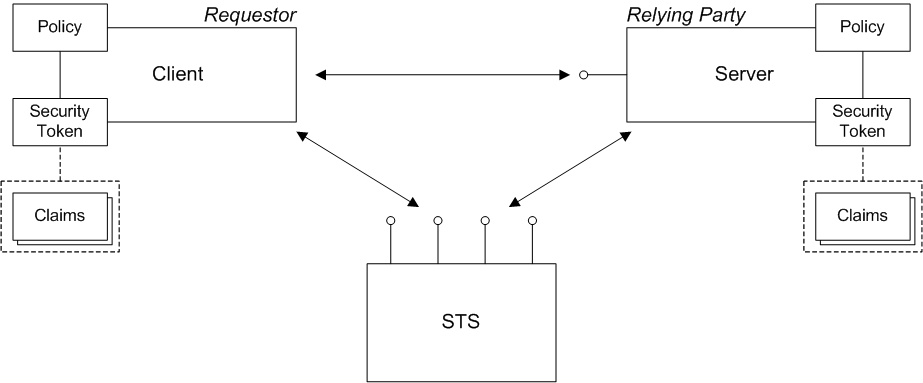
Requestor
Relying party
Security token
- SAML token.
- UsernameToken token.
- X.509 certificate token.
- Kerberos token.
SAML token
Claims
Policy
Security token service
- Issue binding—the specification defines this binding as follows: Based on the credential provided/proven in the request, a new token is issued, possibly with new proof information.
- Validate binding—the specification defines this binding as follows: The validity of the specified security token is evaluated and a result is returned. The result may be a status, a new token, or both.
- Renew binding—the specification defines this binding as follows: A previously issued token with expiration is presented (and possibly proven) and the same token is returned with new expiration semantics.
- Cancel binding—the specification defines this binding as follows: When a previously issued token is no longer needed, the Cancel binding can be used to cancel the token, terminating its use.
8.2. Basic Scenarios
Overview
SAML architecture
- Assertions—specifies the format of a SAML token, which is a standardized packet of XML containing security data. SAML tokens can contain authentication data (such as username/password, X.509 certificate, and so on), authorization data (such as roles, permissions, privileges), security attributes (such as issuer identity, name and address of subject). A SAML token can also optionally be encrypted and/or signed.
- Protocol—describes request and response messages for operations such as issuing, validating, and renewing SAML tokens.
- Bindings—maps the abstract SAML protocol to specific network protocols.
- Profiles—describes particular use cases for building a security system based on SAML.
WS-Trust and SAML
Scenarios
Bearer scenario
Figure 8.2. Bearer Scenario
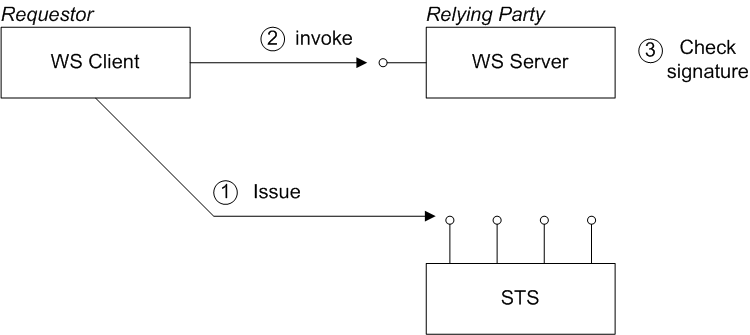
Steps in the bearer scenario
- Before invoking an operation on the server, the client sends a RequestSecurityToken (RST) message to the Issue binding of the STS. The RST specifies a KeyType of
Bearer.The STS generates a SAML token with subject confirmation type bearer, signs the token using its private key, and then returns the token in a RequestSecurityTokenReply (RSTR) message. - The client attempts to invoke an operation on the server, with the SAML token embedded in the SOAP header of the request message, where either the SOAP header or the transport connection must be encrypted, to protect the token.
- The server checks the signature of the SAML token (using a local copy of the STS public key), to ensure that it has not been tampered with.
Holder-of-key scenario
PublicKey—the client must prove to the WS server that it possesses a particular private key.SymmetricKey—the client must prove to the WS server that it possesses a particular symmetric session key.
Figure 8.3. Holder-of-Key Scenario
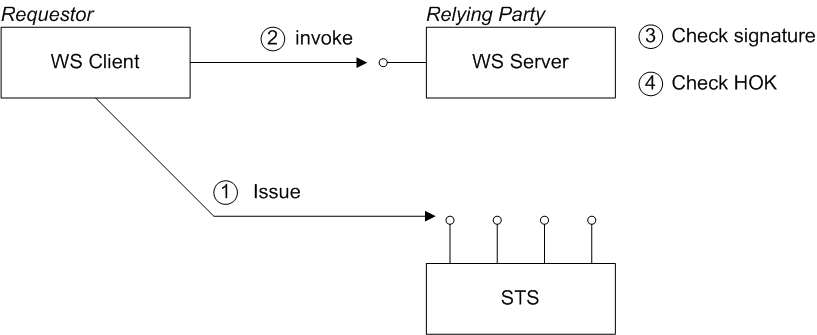
Steps in the holder-of-key scenario
- Before invoking an operation on the server, the client sends a RequestSecurityToken (RST) message to the Issue binding of the STS. The STS generates a SAML token with subject confirmation type holder-of-key, embeds the client identity in the token (the holder-of-key identity), signs the token using its private key, and then returns the token in a RequestSecurityTokenReply (RSTR) message.
- The client attempts to invoke an operation on the server, with the SAML token embedded in the SOAP header of the request message.
- The server checks the signature of the SAML token (using a local copy of the STS public key), to ensure that it has not been tampered with.
- The server attempts to authenticate the client (for example, by requiring a client X.509 certificate or by checking WS-Security UsernameToken credentials) and checks that the client's identity matches the holder-of-key identity.
8.3. Defining an IssuedToken Policy
Overview
sp:IssuedToken element appears in a policy, it indicates that the application must call out to the STS to obtain a token (as specified in the sp:IssuedToken element) and then use the token in the current context.
sp:RequestSecurityTokenTemplate. All of the children of this element will be copied directly into the body of the RequestSecurityToken (RST) message that is sent to the STS when the client asks the STS to issue a token, as shown in Figure 8.4, “Injecting Parameters into the Outgoing RequestSecurityToken Message”.
Figure 8.4. Injecting Parameters into the Outgoing RequestSecurityToken Message
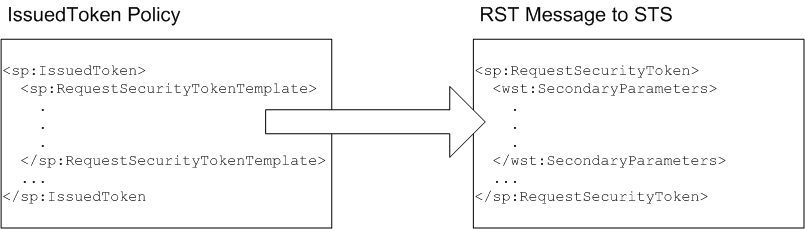
Namespaces
| Prefix | XML Namespace |
|---|---|
wsp: | http://schemas.xmlsoap.org/ws/2004/09/policy |
sp: | http://docs.oasis-open.org/ws-sx/ws-securitypolicy/200702 |
wst: | http://docs.oasis-open.org/ws-sx/ws-trust/200512 |
Sample policy
trust:TokenType element). The issued token will be included in the client's request header (indicated by setting the sp:IncludeToken attribute to AlwaysToRecipient).
<sp:IssuedToken
    sp:IncludeToken="http://docs.oasis-open.org/ws-sx/ws-securitypolicy/200702/IncludeToken/AlwaysToRecipient">
  <sp:RequestSecurityTokenTemplate>
    <trust:TokenType
        xmlns:trust="http://docs.oasis-open.org/ws-sx/ws-trust/200512"
      >urn:oasis:names:tc:SAML:2.0:assertion</trust:TokenType>
  </sp:RequestSecurityTokenTemplate>
  <wsp:Policy>
    <!-- No extra policies needed in this demo. -->
  </wsp:Policy>
</sp:IssuedToken>Syntax
IssuedToken element is defined with the following syntax:
<sp:IssuedToken
    sp:IncludeToken="xs:anyURI"?
    xmlns:sp="..." ... >
  (
   <sp:Issuer>wsa:EndpointReferenceType</sp:Issuer> |
   <sp:IssuerName>xs:anyURI</sp:IssuerName>
  ) ?
  <sp:RequestSecurityTokenTemplate TrustVersion="xs:anyURI"? >
    <wst:TokenType>...</wst:TokenType> ?
    <wst:KeyType>...</wst:KeyType> ?
    <wsp:AppliesTo>...</wsp:AppliesTo> ?
    <wst:Claims Dialect="..."> ... </wst:Claims> ?
    <!-- Many other WS-Trust elements allowed here -->
    ...
  </sp:RequestSecurityTokenTemplate>
  <wsp:Policy xmlns:wsp="...">
    (
     <sp:RequireDerivedKeys ... /> |
     <sp:RequireImpliedDerivedKeys ... /> |
     <sp:RequireExplicitDerivedKeys ... />
    ) ?
    <sp:RequireExternalReference ... /> ?
    <sp:RequireInternalReference ... /> ?
    ...
  </wsp:Policy>
  ...
</sp:IssuedToken>
XML elements
sp:IssuedToken- The element containing the IssuedToken policy assertion. The
IncludeTokenattribute specifies whether the issued token is meant to be included in the security header of the client's request messages. The allowed values of this attribute are given in the section called “sp:IncludeToken attribute”.On the client side, the presence of this assertion signals that the client should attempt to obtain a token by contacting a remote STS. sp:IssuedToken/sp:Issuer- (Optional) Contains a reference to the issuer of the token, of
wsa:EndpointReferenceTypetype.There is no need to specify the issuer's endpoint reference usingsp:Issuerin Apache CXF, because the issuer endpoint (that is, the STS address) is taken directly from the STS WSDL file instead. sp:IssuedToken/sp:IssuerName- (Optional) The name of the issuing service (that is, the STS), in the format of a URI.
sp:IssuedToken/sp:RequestSecurityTokenTemplate- (Required) This element contains a list of WS-Trust policy assertions to be included in the outgoing RequestSecurityToken (RST) message that is sent to the STS. In other words, this element enables you to modify the Issue query that is sent to the STS to obtain the issued token. Thie element can contain any of the WS-Trust assertions that are valid children of the
sp:RequestSecurityTokenelement, as specified by WS-Trust. sp:IssuedToken/sp:RequestSecurityTokenTemplate/wst:TokenType- (Optional) The type of security token to issue, specified as a URI string. This element is usually specified together with a
wst:KeyTypeelement. Table 8.2, “Token Type URIs” shows the list of standard token type URIs for the following token types: SAML 1.1, SAML 2.0, UsernameToken, X.509v3 single certificate, X509v1 single certificate, X.509 PKI certificate chain, X.509 PKCS7, and Kerberos.Expand Table 8.2. Token Type URIs Token Type URI http://docs.oasis-open.org/wss/oasis-wss-saml-token-profile-1.1#SAMLV1.1http://docs.oasis-open.org/wss/oasis-wss-saml-token-profile-1.1#SAMLV2.0http://docs.oasis-open.org/wss/2004/01/oasis-200401-wss-username-token-profile-1.0#UsernameTokenhttp://docs.oasis-open.org/wss/2004/01/oasis-200401-wss-x509-token-profile-1.0#X509v3http://docs.oasis-open.org/wss/2004/01/oasis-200401-wss-x509-token-profile-1.0#X509v1http://docs.oasis-open.org/wss/2004/01/oasis-200401-wss-x509-token-profile-1.0#X509PKIPathv1http://docs.oasis-open.org/wss/2004/01/oasis-200401-wss-x509-token-profile-1.0#PKCS7http://docs.oasisopen.org/wss/oasiswss-kerberos-tokenprofile-1.1#Kerberosv5APREQSHA1Consult the documentation for your third-party STS to find out what token types it supports. An STS can also support custom token types not listed in the preceding table. sp:IssuedToken/sp:RequestSecurityTokenTemplate/wst:KeyType- (Optional) The type of key that the client will use to establish its identity to the WS server. The key type indirectly determines the subject confirmation type as either Holder-of-Key or bearer (see Section 8.2, “Basic Scenarios”). Table 8.3, “Key Type URIs” shows the list of standard key type URIs.
Expand Table 8.3. Key Type URIs Key Type URI http://docs.oasis-open.org/ws-sx/ws-trust/200512/PublicKeyhttp://docs.oasis-open.org/ws-sx/ws-trust/200512/SymmetricKeyhttp://docs.oasis-open.org/ws-sx/ws-trust/200512/Bearer sp:IssuedToken/sp:RequestSecurityTokenTemplate/wsp:AppliesTo- (Optional) This WS-PolicyAttachment assertion can be specified as an alternative to or in addition to the
wst:TokenTypeassertion (in the latter case, it takes precedence over thewst:TokenTypeassertion). It is used to specify the policy scope for which this token is required. In practice, this enables you to refer to a service or group of services for which this token is issued. The STS can then be configured to specify what kind of token to issue for that service (or services).For more details, see Enabling AppliesTo in the STS. sp:IssuedToken/sp:RequestSecurityTokenTemplate/wst:Claims- (Optional) Specifies the required claims that the issued token must contain in order to satisfy the IssuedToken policy assertion. Claims are used to provide additional data about the token subject—for example, e-mail address, first name, surname, and so on.For more details, see Enabling Claims in the STS.
sp:IssuedToken/sp:RequestSecurityTokenTemplate/wst:OtherElements- (Optional) You can optionally include many other WS-Trust assertions in the RST template. The purpose of these assertions is to specify exactly what the content of the issued token should be and whether it is signed, encrypted, and so on. In practice, however, the details of the issued token are often configured in the STS, which makes it unnecessary to include all of these details in the RST template.For a full list of of WS-Trust assertions that can be included in the RST template, see the OASIS WS-Trust 1.4 Specification.
sp:IssuedToken/sp:Policy- (Required) This element must be included in the IssuedToken, even if it is empty.
sp:IssuedToken/sp:Policy/sp:RequireDerivedKeys- (Optional) Only applicable when using WS-SecureConversation. The WS-SecureConversation specification enables you to establish a security context (analogous to a session), which is used for sending multiple secured messages to a given service. Normally, if you use the straightforward approach of authenticating every message sent to a particular service, the authentication adds a considerable overhead to secure communications. If you know in advance that a client will be sending multiple messages to a Web service, however, it makes sense to establish a security context between the client and the server, in order to cut the overheads of secure communication. This is the basic idea of WS-SecureConversation.When a security context is established, the client and the server normally establish a shared secret. In order to prevent the shared secret being discovered, it is better to avoid using the shared secret directly and use it instead to generate the keys needed for encryption, signing, and so on—that is, to generate derived keys.When the
sp:RequireDerivedKeyspolicy assertion is included, the use of derived keys is enabled in WS-SecureConversation and both implied derived keys and explicit derived keys are allowed.NoteOnly one ofsp:RequireDerivedKeys,sp:RequireImpliedDerivedKeys, orsp:RequireExplicitDerivedKeys, can be included insp:IssuedToken. sp:IssuedToken/sp:Policy/sp:RequireImpliedDerivedKeys- (Optional) When the
sp:RequireImpliedDerivedKeyspolicy assertion is included, the use of derived keys is enabled in WS-SecureConversation, but only implied derived keys are allowed. sp:IssuedToken/sp:Policy/sp:RequireExplicitDerivedKeys- (Optional) When the
sp:RequireExplicitDerivedKeyspolicy assertion is included, the use of derived keys is enabled in WS-SecureConversation, but only explicit derived keys are allowed. sp:IssuedToken/sp:Policy/sp:RequireExternalReference- (Optional) When included, requires that external references to the issued token must be enabled.
sp:IssuedToken/sp:Policy/sp:RequireInternalReference- (Optional) When included, requires that internal references to the issued token must be enabled, where an internal reference uses one of the elements,
wsse:Reference,wsse:KeyIdentifier, orwsse:Embedded.
8.4. Creating an STSClient Instance
Overview
org.apache.cxf.ws.security.trust.STSClient- Direct configuration—the client proxy is configured with the
security.sts.clientproperty, which contains a reference to anSTSClientinstance. - Indirect configuration—no change is made to the client proxy definition, but if the Apache CXF runtime finds an appropriately named
STSClientbean in the bean registry, it will automatically inject thatSTSClientbean into the client proxy.
STSClient instance, it is usually also necessary to enable SSL/TLS security on the STS proxy.
Direct configuration
STSClient instance directly, by setting the security.sts.client property on the client proxy. The value of security.sts.client must be a reference to an STSClient instance.
STSClient with bean ID equal to default.sts-client (the bean ID is the same as the value of the name attribute):
<beans ...>
  ...
  <jaxws:client
    id="helloWorldProxy"
    serviceClass="org.apache.hello_world_soap_http.Greeter"
    address="https://localhost:9001/SoapContext/SoapPort">
    <jaxws:properties>
      <entry key="security.sts.client"
             value-ref="default.sts-client" />
    </jaxws:properties>
  </jaxws:client>
  ...
  <bean name="default.sts-client"
    class="org.apache.cxf.ws.security.trust.STSClient">
    <constructor-arg ref="cxf"/>
    <property name="wsdlLocation" value="sts/wsdl/ws-trust-1.4-service.wsdl"/>
    <property name="serviceName"
        value="{http://docs.oasis-open.org/ws-sx/ws-trust/200512/wsdl}SecurityTokenServiceProvider"/>
    <property name="endpointName"
        value="{http://docs.oasis-open.org/ws-sx/ws-trust/200512/wsdl}SecurityTokenServiceSOAP"/>
  </bean>
  ...
</beans>
Indirect configuration
STSClient bean named, WSDLPortQName.sts-client. To configure the STSClient bean indrectly, perform the following steps:
- Define an
STSClientbean, whosenameattribute has the value,WSDLPortQName.sts-client. - Set
abstract="true"on the bean element. This prevents Spring from instantiating the bean. The reason for this is that the runtime is responsible for the lifecycle of theSTSClientobject. - Set the relevant properties of the
STSClientbean (typically, thewsdlLocation,serviceName, andendpointNameproperties). After theSTSClientis instantiated in Java, the properties specified in XML will be injected into theSTSClientinstance.
{http://apache.org/hello_world_soap_http}SoapPort port (this is specified in an annotation on the service class, Greeter). When the client proxy needs to fetch an issued token for the first time, the runtime automatically creates an STSClient instance, searches for the bean named WSDLPortQName.sts-client, and injects the properties from that bean into the STSClient instance.
<beans ...>
  ...
  <jaxws:client
    id="helloWorldProxy"
    serviceClass="org.apache.hello_world_soap_http.Greeter"
    address="https://localhost:9001/SoapContext/SoapPort"
    />
  ...
  <bean name="{http://apache.org/hello_world_soap_http}SoapPort.sts-client"
    class="org.apache.cxf.ws.security.trust.STSClient"
    abstract="true">
    <constructor-arg ref="cxf"/>
    <property name="wsdlLocation" value="sts/wsdl/ws-trust-1.4-service.wsdl"/>
    <property name="serviceName"
        value="{http://docs.oasis-open.org/ws-sx/ws-trust/200512/wsdl}SecurityTokenServiceProvider"/>
    <property name="endpointName"
        value="{http://docs.oasis-open.org/ws-sx/ws-trust/200512/wsdl}SecurityTokenServiceSOAP"/>
  </bean>
  ...
</beans>
Chapter 9. The Security Token Service
Abstract
9.1. STS Architecture
9.1.1. Overview of the STS
Architecture
Figure 9.1. STS Architecture
STS WSDL
- Logical part of the WSDL—consists of WSDL type definitions and the STS WSDL port type. In other words, this part of the WSDL provides an abstract definition of the STS interface.The logical part is defined exactly in the WSDL appendix of the WS-Trust specification.
- Physical part of the WSDL—consists of the WSDL binding and WSDL service definitions. In other words, this part of the WSDL specifies the details of the message encoding and the transport protocol used to access the STS.In contrast to the logical part, the physical part of the WSDL can be customized, enabling you to choose what kind of protocol to use when accessing the STS. The most common choice is SOAP/HTTP, but in principle you could use other SOAP-compatible transports supported by Apache CXF—for example, SOAP/JMS.
STS operations
- Issue binding—the specification defines this binding as follows: Based on the credential provided/proven in the request, a new token is issued, possibly with new proof information.
- Validate binding—the specification defines this binding as follows: The validity of the specified security token is evaluated and a result is returned. The result may be a status, a new token, or both.
- Renew binding—the specification defines this binding as follows: A previously issued token with expiration is presented (and possibly proven) and the same token is returned with new expiration semantics.
- Cancel binding—the specification defines this binding as follows: When a previously issued token is no longer needed, the Cancel binding can be used to cancel the token, terminating its use.
- Key Exchange Token binding (not supported)—in the context of the WS-Trust negotiation and challenge extensions, this binding is used for requesting a new Key Exchange Token.
- RequestCollection binding (not supported)—similar to the Issue binding, except that it allows you to request multiple tokens in a single operation (the request message is a
wst:RequestSecurityTokenCollectionelement, which consists of a list ofwst:RequestSecurityTokenelements).
STS policies
Abstract STS provider framework
SecurityTokenServiceProvider class from the org.apache.cxf.ws.security.sts.provider package, which provides the Java implementation of the STS WSDL interface.
IssueOperationIssueSingleOperationValidateOperationRenewOperationCancelOperation
SecurityTokenServiceProvider instance, you can customize the implementation of each STS operation.
TokenIssueOperation class
TokenIssueOperation class from the org.apache.cxf.ws.security.sts.operation package is the default implementation of the Issue operation.
TokenIssueOperation instance, you would normally just provide it with a reference to a SAMLTokenProvider instance (which enables it to issue SAML tokens). For details, see Section 9.1.3, “Customizing the Issue Operation”.
TokenValidateOperation class
TokenValidateOperation class from the org.apache.cxf.ws.security.sts.operation package is the default implementation of the Validate operation.
TokenValidateOperation instance, you need to provide it with a list of token validators. For details, see Section 9.1.4, “Customizing the Validate Operation”.
TokenCancelOperation class
TokenCancelOperation class from the org.apache.cxf.ws.security.sts.operation package is the default implementation of the Cancel operation.
TokenCancelOperation instance, you need to provide it with a list of cancellers. At the moment, only the SCTCanceller canceller is available, which is used for cancelling Security Context Tokens in the context of secure conversations (WS-SecureConversation specification). For details, see Section 9.1.4, “Customizing the Validate Operation”.
9.1.2. Customizing the STS WSDL
Overview
- Address of the STS WSDL port—the host, TCP port, and context path of the STS Web service endpoint can be customized by editing the address attribute of the WSDL port.NoteMoreover, it is possible to define multiple Web service ports for a single STS, where each port can specify a different address and different WS policies.
- WS security policies—you can customize the WS security policies that apply to the STS WSDL binding. For example, you can choose between a symmetric, asymmetric, or transport binding and you can choose how clients authenticate themselves to the STS.
WSDL types and portType
<?xml version="1.0" encoding="UTF-8"?>
<wsdl:definitions
        targetNamespace="http://docs.oasis-open.org/ws-sx/ws-trust/200512/"
        xmlns:tns="http://docs.oasis-open.org/ws-sx/ws-trust/200512/"
        xmlns:wstrust="http://docs.oasis-open.org/ws-sx/ws-trust/200512/"
        xmlns:wsdl="http://schemas.xmlsoap.org/wsdl/"
        xmlns:soap="http://schemas.xmlsoap.org/wsdl/soap/"
        xmlns:wsap10="http://www.w3.org/2006/05/addressing/wsdl"
        xmlns:wsu="http://docs.oasis-open.org/wss/2004/01/oasis-200401-wss-wssecurity-utility-1.0.xsd"
        xmlns:wsp="http://www.w3.org/ns/ws-policy"
    xmlns:wst="http://docs.oasis-open.org/ws-sx/ws-trust/200512"
    xmlns:xs="http://www.w3.org/2001/XMLSchema"
    xmlns:wsam="http://www.w3.org/2007/05/addressing/metadata">
    >

  <wsdl:types>
    ...
  </wsdl:types>
  ...
  <!-- This portType is an example of an STS supporting full protocol -->
  <wsdl:portType name="STS">
    <wsdl:operation name="Cancel">
      <wsdl:input
        wsam:Action="http://docs.oasis-open.org/ws-sx/ws-trust/200512/RST/Cancel"
        message="tns:RequestSecurityTokenMsg"/>
      <wsdl:output
        wsam:Action="http://docs.oasis-open.org/ws-sx/ws-trust/200512/RSTR/CancelFinal"
        message="tns:RequestSecurityTokenResponseMsg"/>
    </wsdl:operation>
    <wsdl:operation name="Issue"> ... </wsdl:operation>
    <wsdl:operation name="Renew"> ... </wsdl:operation>
    <wsdl:operation name="Validate"> ... </wsdl:operation>
    <wsdl:operation name="KeyExchangeToken"> ... </wsdl:operation>
    <wsdl:operation name="RequestCollection"> ... </wsdl:operation>
  </wsdl:portType>
  ...
</wsdl:definitions>- Request message types—are either:
RequestSecurityToken(RST) type, for theIssue,Renew,Validate,Cancel, andKeyExchangeTokenoperations; orRequestSecurityTokenCollectiontype, for theRequestCollectionoperation.
- Response message types—are either:
RequestSecurityTokenResponse(RSTR) type, for theRenew,Validate,Cancel, andKeyExchangeTokenoperations; orRequestSecurityTokenResponseCollectiontype, for theIssueandRequestCollectionoperations.
CXFInstallDir/samples/sts/wsdl/ws-trust-1.4-service.wsdlChoosing a WSDL binding
- SOAP/HTTP (either SOAP 1.1 or SOAP 1.2)
- SOAP/JMS
SOAP/HTTP binding
wsdl:binding element) and a HTTP port (defined by the wsdl:service element):
<?xml version="1.0" encoding="UTF-8"?>
<wsdl:definitions ... >
  ...
  <wsdl:binding name="UT_Binding" type="wstrust:STS">
      ...
      <soap:binding style="document"
          transport="http://schemas.xmlsoap.org/soap/http" />
      <wsdl:operation name="Issue"> ... </wsdl:operation>
      <wsdl:operation name="Validate"> ... </wsdl:operation>
      <wsdl:operation name="Cancel"> ... </wsdl:operation>
      <wsdl:operation name="Renew"> ... </wsdl:operation>
      <wsdl:operation name="KeyExchangeToken"> ... </wsdl:operation>
      <wsdl:operation name="RequestCollection"> ... </wsdl:operation>
  </wsdl:binding>

  <wsdl:service name="SecurityTokenService">
      <wsdl:port name="UT_Port" binding="tns:UT_Binding">
         <soap:address location="http://localhost:8080/SecurityTokenService/UT" />
      </wsdl:port>
  </wsdl:service>
  ...
</wsdl:definitions>soap:binding element is used to specify that this is a SOAP binding and the transport attribute identifies the transport type as HTTP. Inside the wsdl:port element, the location attribute of the soap:address element specifies the URL that is used to access the STS.
Choosing policies
- Transport binding—security is provided by the HTTPS transport (that is, in the SSL/TLS layer). In this case, an initiator (for example, a WS client) authenticates itself by providing either of the following credentials:
- X.509 certificate (sent through the SSL/TLS layer, during the TLS security handshake), or
- WSS UsernameToken (sent through the SOAP layer, in a SOAP security header)
- Symmetric binding—security is provided at the SOAP layer. An initiator must authenticate itself by providing WSS UsernameToken credentials.
- Asymmetric binding—security is provided at the SOAP layer. An initiator must authenticate itself by providing an X.509 certificate.
Inserting policy references
wsp:PolicyReference element, which references the relevant WS policy (see Policies and policy references). The following extract from the STS WSDL shows how to apply policies to the SOAP/HTTP binding:
<?xml version="1.0" encoding="UTF-8"?>
<wsdl:definitions ... >
  ...
  <wsdl:binding name="UT_Binding" type="wstrust:STS">
 <wsp:PolicyReference URI="#UT_policy" />
      <soap:binding style="document"
          transport="http://schemas.xmlsoap.org/soap/http" />
      <wsdl:operation name="Issue">
          <soap:operation
              soapAction="http://docs.oasis-open.org/ws-sx/ws-trust/200512/RST/Issue" />
          <wsdl:input>
 <wsp:PolicyReference URI="#Input_policy" />
              <soap:body use="literal" />
          </wsdl:input>
          <wsdl:output>
 <wsp:PolicyReference URI="#Output_policy" />
              <soap:body use="literal" />
          </wsdl:output>
      </wsdl:operation>
      <wsdl:operation name="Validate"> ... </wsdl:operation>
      <wsdl:operation name="Cancel"> ... </wsdl:operation>
      <wsdl:operation name="Renew"> ... </wsdl:operation>
      <wsdl:operation name="KeyExchangeToken"> ... </wsdl:operation>
      <wsdl:operation name="RequestCollection"> ... </wsdl:operation>
  </wsdl:binding>
  ...
</wsdl:definitions>wsp:PolicyReference element applies the UT_Policy policy (in the sample/sts demonstration, this is a symmetric binding policy) to the SOAP binding. This implies that the policy applies to all endpoints that use this SOAP binding.
wsp:PolicyReference element applies the Input_policy policy to the Issue operation's request message, and the third wsp:PolicyReference element applies the Output_policy policy to the Issue operation's response message. The Input_policy policy and the Output_policy policy are used to specify which parts of the SOAP messages to protect (see Specifying Parts of Message to Encrypt and Sign).
Example of SymmetricBinding and UsernameToken policy
  <wsp:Policy wsu:Id="UT_policy">
      <wsp:ExactlyOne>
         <wsp:All>
            <wsap10:UsingAddressing/>
            <sp:SymmetricBinding
               xmlns:sp="http://docs.oasis-open.org/ws-sx/ws-securitypolicy/200702">
               <wsp:Policy>
                  <sp:ProtectionToken>
                     <wsp:Policy>
                        <sp:X509Token
                           sp:IncludeToken="http://docs.oasis-open.org/ws-sx/ws-securitypolicy/200702/IncludeToken/Never">
                           <wsp:Policy>
                              <sp:RequireDerivedKeys />
                              <sp:RequireThumbprintReference />
                              <sp:WssX509V3Token10 />
                           </wsp:Policy>
                        </sp:X509Token>
                     </wsp:Policy>
                  </sp:ProtectionToken>
                  <sp:AlgorithmSuite>
                     <wsp:Policy>
                        <sp:Basic128 />
                     </wsp:Policy>
                  </sp:AlgorithmSuite>
                  <sp:Layout>
                     <wsp:Policy>
                        <sp:Lax />
                     </wsp:Policy>
                  </sp:Layout>
                  <sp:IncludeTimestamp />
                  <sp:EncryptSignature />
                  <sp:OnlySignEntireHeadersAndBody />
               </wsp:Policy>
            </sp:SymmetricBinding>
            <sp:SignedSupportingTokens
               xmlns:sp="http://docs.oasis-open.org/ws-sx/ws-securitypolicy/200702">
               <wsp:Policy>
                  <sp:UsernameToken
                     sp:IncludeToken="http://docs.oasis-open.org/ws-sx/ws-securitypolicy/200702/IncludeToken/AlwaysToRecipient">
                     <wsp:Policy>
                        <sp:WssUsernameToken10 />
                     </wsp:Policy>
                  </sp:UsernameToken>
               </wsp:Policy>
            </sp:SignedSupportingTokens>
            <sp:Wss11
               xmlns:sp="http://docs.oasis-open.org/ws-sx/ws-securitypolicy/200702">
               <wsp:Policy>
                  <sp:MustSupportRefKeyIdentifier />
                  <sp:MustSupportRefIssuerSerial />
                  <sp:MustSupportRefThumbprint />
                  <sp:MustSupportRefEncryptedKey />
               </wsp:Policy>
            </sp:Wss11>
            <sp:Trust13
               xmlns:sp="http://docs.oasis-open.org/ws-sx/ws-securitypolicy/200702">
               <wsp:Policy>
                  <sp:MustSupportIssuedTokens />
                  <sp:RequireClientEntropy />
                  <sp:RequireServerEntropy />
               </wsp:Policy>
            </sp:Trust13>
         </wsp:All>
      </wsp:ExactlyOne>
   </wsp:Policy>
9.1.3. Customizing the Issue Operation
TokenIssueOperation
TokenIssueOperation class provides the overall coordination of the token issuing process. There are some important aspects of a TokenIssueOperation instance that can be customized. In particular, because the TokenIssueOperation instance delegates token generation to token providers—where each token provider is capable of generating a particular kind of token—the token provider beans play a particularly important role in issuing tokens.
Figure 9.2. Configuring TokenIssueOperation
Plug-in framework
TokenIssueOperation has a modular structure. You can inject various plug-ins into the TokenIssueOperation instance in order to customize the behavior of the Issue operation. The following properties can be set on the TokenIssueOperation class:
tokenProviders- Specifies a list of token providers, where each token provider is capable of generating tokens of a specific type. Whenever an STS client asks the Issue operation to issue a token of a specific type, the
TokenIssueOperationclass iterates over all of the token providers specified by this property, asking each of them whether they can handle the required token type (by invoking thecanHandle()method on each token provider).The available token providers are described in the section called “Token providers”. stsProperties- References a bean that encapsulates generic configuration properties for the STS (normally an instance of
StaticSTSProperties). This configuration data mainly consists of the details needed to access a signing certificate and an encrypting certificate. services- Specifies a list of known services and their corresponding token requirements. This property must be set, if you want to support the
AppliesTopolicy in a token request. For details, see Section 9.4, “Enabling AppliesTo in the STS”. encryptIssuedToken- Specifies whether or not to encrypt an issued token. Default is
false.If you enable this option, you must also associate an encryption key with theTokenIssueOperation, through the properties defined on theStaticSTSPropertiesinstance—see the section called “Encrypting key”
Token providers
SAMLTokenProvider
SAMLTokenProvider token provider is used to generate SAML tokens. This is the most commonly used token provider.
SAMLTokenProvider instance is triggered to issue a token, if the token type specified by the requesting STS client is one of the following:
| Token Type URIs handled by the SAMLTokenProvider |
|---|
http://docs.oasis-open.org/wss/oasis-wss-saml-token-profile-1.1#SAMLV1.1 |
urn:oasis:names:tc:SAML:1.0:assertion |
http://docs.oasis-open.org/wss/oasis-wss-saml-token-profile-1.1#SAMLV2.0 |
urn:oasis:names:tc:SAML:2.0:assertion |
SAMLTokenProvider class comes pre-configured with sensible default behaviors, so it is normally acceptable to instantiate it without setting any of its properties. If you want to customize its behavior, however, you can set some or all of the following properties:
attributeStatementProviders- You can optionally use this property to add attribute statement providers, if you want to define your own custom attribute statements in the generated SAML token. If this property is not set, the
DefaultAttributeStatementProviderclass is automatically invoked, which generates the following attribute statements:- An attribute statement that confirms the SAML token has been authenticated.
- An attribute statements containing a username, if an
OnBehalfOfelement or anActAselement containing aUsernameTokenwas present in the Issue request. - An attribute statements containing a subject name, if an
OnBehalfOfelement or anActAselement containing a SAML token was present in the Issue request.
authenticationStatementProviders- You can optionally add authentication statement providers, if you want to define your own custom authentication statements in the generated SAML token. No authentication statements are added by default.
authDecisionStatementProviders- You can optionally add authorization decision statement providers, if you want to define your own custom authorization decision statements in the generated SAML token. No authorization decision statements are added by default.
subjectProvider- You can optionally set this property to define a custom SAML subject provider.If this property is not set, the
DefaultSubjectProviderclass is automatically invoked. The default implementation automatically populates the SAML subject with all of the fields needed to support the standard scenarios: Holder-of-Key withSymmetricKey; Holder-of-Key withPublicKeyalgorithm; andBearer. conditionsProvider- You can optionally set this property to define a custom conditions provider.If this property is not set, the
DefaultConditionsProviderclass is automatically invoked. The default implementation applies a default lifetime of five minutes to the token and sets the audience restriction URI to the value of the receivedAppliesToaddress (if any). signToken- Specifies whether or not to sign the SAML token. Default is
true. realmMap- Specifies a map that associates realm names with
SAMLRealmobjects. Only required, if you want to enable support for realms. For details, see Section 9.5, “Enabling Realms in the STS”.
SCTProvider
SCTProvider token provider is used to generate security context tokens, which you only need if you are using the WS-SecureConversation protocol.
SCTProvider instance is triggered to issue a token, if the token type specified by the requesting STS client is one of the following:
| Token Type URIs handled by the SCTProvider |
|---|
http://docs.oasis-open.org/ws-sx/ws-secureconversation/200512/sct |
http://schemas.xmlsoap.org/ws/2005/02/sc/sct |
SCTProvider instance:
lifetime- Specifies the lifetime of the generated security context token. Default is five minutes.
returnEntropy- Specifies whether to return entropy to the STS client. Default is
true.
Sample configuration of SAMLTokenProvider
TokenIssueOperation class is configured to use a SAMLTokenProvider token provider.
Example 9.1. Configuring the STS Issue Operation
<beans ... >
    ...
    <bean id="utSTSProviderBean"
        class="org.apache.cxf.ws.security.sts.provider.SecurityTokenServiceProvider">
        <property name="issueOperation" ref="utIssueDelegate"/>
        ...
    </bean>

    <bean id="utIssueDelegate"
        class="org.apache.cxf.sts.operation.TokenIssueOperation">
        <property name="tokenProviders" ref="utSamlTokenProvider"/>
        ...
        <property name="stsProperties" ref="utSTSProperties"/>
    </bean>
    ...
    <bean id="utSamlTokenProvider"
        class="org.apache.cxf.sts.token.provider.SAMLTokenProvider">
    </bean>
    ...
    <bean id="utSTSProperties"
         class="org.apache.cxf.sts.StaticSTSProperties">
        <property name="signaturePropertiesFile" value="stsKeystore.properties"/>
        <property name="signatureUsername" value="mystskey"/>
        <property name="callbackHandlerClass" value="demo.wssec.sts.STSCallbackHandler"/>
        <property name="issuer" value="DoubleItSTSIssuer"/>
    </bean>
    ...
</beans>
9.1.4. Customizing the Validate Operation
TokenValidateOperation
TokenValidateOperation class provides the overall coordination of the token validation process. The TokenValidateOperation instance delegates token validation to token validators—where each token validator is capable of validating a particular kind of token.
TokenValidateOperation class can also support token transformation and this capability is discussed in detail in the context of realms, Section 9.5.3, “Token Transformation across Realms”.
Figure 9.3. Configuring TokenValidateOperation
Plug-in framework
TokenValidateOperation instance in order to customize the behavior of the Validate operation. The following properties can be set on the TokenValidateOperation class:
tokenValidators- Specifies a list of token validators, where each token validator is capable of validating tokens of a specific type. Whenever an STS client asks the Validate operation to validate a token of a specific type, the
TokenValidateOperationclass iterates over all of the token validators specified by this property, asking each of them whether they can handle the required token type (by invoking thecanHandle()method on each token validator).The available token validators are described in the section called “Token validators”. stsProperties- References a bean that encapsulates generic configuration properties for the STS (normally an instance of
StaticSTSProperties). This configuration data mainly consists of the details needed to access a signing certificate and an encrypting certificate. services- (Only relevant, if token transformation is requested) Specifies a list of known services and their corresponding token requirements. This property must be set, if you want to support the
AppliesTopolicy in a token request. For details, see Section 9.4, “Enabling AppliesTo in the STS”. tokenProviders- (Only relevant, if token transformation is requested) Specifies a list of token providers, where each token provider is capable of generating tokens of a specific type.For details of token transformation, see Section 9.5.3, “Token Transformation across Realms”.
Token validators
SAMLTokenValidator
SAMLTokenValidator instance is triggered to validate a token, if the received token is a SAML assertion and its token type is one of the following:
| Token Type URIs handled by the SAMLTokenValidator |
|---|
urn:oasis:names:tc:SAML:1.0:assertion |
urn:oasis:names:tc:SAML:2.0:assertion |
<saml2:Assertion xmlns:saml2="urn:oasis:names:tc:SAML:2.0:assertion"
                 ID="_181835fb981efecaf71d80ecd5fc3c74"
                 IssueInstant="2011-05-09T09:36:37.359Z" Version="2.0">
    <saml2:Issuer> ... </saml2:Issuer>
    <saml2:Subject> ... </saml2:Subject>
    <saml2:Conditions NotBefore=" ... " NotOnOrAfter=" ... "/>
    ...
    <Signature:Signature xmlns:Signature="http://www.w3.org/2000/09/xmldsig#"
                         xmlns="http://www.w3.org/2000/09/xmldsig#">
        <SignedInfo>
            <!-- Details of the signing algorithm used -->
        </SignedInfo>
        <SignatureValue>
            <!-- The signature value -->
        </SignatureValue>
        <KeyInfo>
            <X509Data>
                <X509SubjectName> ... </X509SubjectName>
                <X509Certificate>
                    <!-- The certificate that can decrypt the signature value -->
                </X509Certificate>
            </X509Data>
        </KeyInfo>
    </Signature:Signature>
</saml2:Assertion>SAMLTokenValidator class uses the following algorithm to validate the received SAML token:
- The SAML assertion is first checked, to ensure that it is well-formed.
- If the assertion is not signed, it is rejected.
- The signature is checked, using the X.509 certificate embedded in the assertion's signature. If the signature is verified, this proves that whoever signed the SAML token is in possession of the private key corresponding to the embedded X.509 certificate.
- The embedded X.509 certificate is checked to make sure that it is trusted. The validator looks up the trusted certificates stored in the STS properties signature trust store (as configured by the
signaturePropertiesFileproperty or thesignatureCryptoproperty on theStaticSTSPropertiesobject—see Section 9.1.6, “Configuring STS Properties”) and checks that the certificate is either present in the trust store or is signed by a private key corresponding to one of the certificates in the trust store (certificate chaining). - If the
subjectConstraintsproperty is set on theSAMLTokenValidatorinstance, the validator checks that the Subject DN string from the embedded X.509 certificate matches one of the specified regular expressions. If there is no match, the SAML assertion is rejected.This optional feature gives you more fine-grained control over which signing certificates to trust.
SAMLTokenValidator is made indirectly, by specifying the signature trust store for the parent TokenValidateOperation instance. The signature trust store is usually configured by setting the signaturePropertiesFile property on the StaticSTSProperties bean, and then injecting the StaticSTSProperties bean into the TokenValidateOperation instance. For example, see Example 9.2, “Configuring the STS Validate Operation”.
SAMLTokenValidator class, you can set some or all of the following properties:
subjectConstraints- Specifies a list of regular expression strings. If this property is set, the subject DN extracted from the X.509 embedded in the SAML assertion must match one of the specified regular expressions. If this property is not set, no test is applied to the subject DN.
validator- You can optionally set this property to customize the step that checks whether or not the embedded X.509 certificate is trusted or not. By default, the WSS4J
SignatureTrustValidatorclass is used. samlRealmCodec- If you want to use realms with SAML tokens, you must implement the
SAMLRealmCodecinterface and inject an instance into this property. The purpose of the SAML realm codec is to assign a realm to the SAML token, based on the contents of the SAML assertion. No SAML realm codec is set by default.For more details about using realms with the STS, see Section 9.5, “Enabling Realms in the STS”.
UsernameTokenValidator
UsernameTokenValidator instance is triggered to validate a token, if the received token can be parsed as a UsernameToken.
UsernameTokenValidator- (Default) This WSS4J validator implementation uses a
CallbackHandlerobject to look up passwords, where the callback handler, is specified by setting thecallbackHandlerproperty on theStaticSTSPropertiesobject—see Section 9.1.6, “Configuring STS Properties”.To use this validator, you must provide your ownCallbackHandlerimplementation. For example, see the section called “STS callback handler ” JAASUsernameTokenValidator- This WSS4J validator implementation integrates password lookup with JAAS, so that the UsernameToken credentials are checked using a JAAS login module. In particular, by configuring an appropriate JAAS login module, you could integrate the UsernameToken validator with an LDAP database.To use this token validator, create an instance of
JAASUsernameTokenValidatorand inject it into thevalidatorproperty of theUsernameTokenValidatorbean.
UsernameTokenRealmCodec interface and registering it with the UsernameTokenValidator bean—for details, see Section 9.5, “Enabling Realms in the STS”.
X509TokenValidator
X509TokenValidator instance is triggered to validate a token, if the received token can be parsed as a BinarySecurityToken type.
BinarySecurityToken in Base-64 encoding) consists of checking that the received certificate is trusted.
X509TokenValidator class is the WSS4J SignatureTrustValidator, which checks that the X.509 certificate is either present in the trust store or is signed by a private key corresponding to one of the certificates in the trust store (certificate chaining). The trust store that is used for this purpose is the signature trust store on the StaticSTSProperties object—see Section 9.1.6, “Configuring STS Properties”.
SCTValidator
SCTValidator instance is triggered to validate a token, if the received token can be parsed as a SecurityContextToken type and belongs to one of the following namespaces:
| Namespaces handled by SCTValidator |
|---|
http://schemas.xmlsoap.org/ws/2005/02/sc |
http://docs.oasis-open.org/ws-sx/ws-secureconversation/200512 |
SCTValidator is used to validate security context tokens in the context of WS-SecureConversation sessions, which is currently not covered by this documentation.
Sample configuration
TokenValidateOperation class is configured to use a SAMLTokenValidator token validator.
Example 9.2. Configuring the STS Validate Operation
<beans ... >
    ...
    <bean id="utSTSProviderBean"
        class="org.apache.cxf.ws.security.sts.provider.SecurityTokenServiceProvider">
        ...
        <property name="validateOperation" ref="utValidateDelegate"/>
    </bean>
    ...
    <bean id="utValidateDelegate"
        class="org.apache.cxf.sts.operation.TokenValidateOperation">
        <property name="tokenValidators" ref="utSamlTokenValidator"/>
        <property name="stsProperties" ref="utSTSProperties"/>
    </bean>
    ...
    <bean id="utSamlTokenValidator"
        class="org.apache.cxf.sts.token.validator.SAMLTokenValidator">
    </bean>
    ...
    <bean id="utSTSProperties"
         class="org.apache.cxf.sts.StaticSTSProperties">
        <property name="signaturePropertiesFile" value="stsKeystore.properties"/>
        <property name="signatureUsername" value="mystskey"/>
        <property name="callbackHandlerClass" value="demo.wssec.sts.STSCallbackHandler"/>
        <property name="issuer" value="DoubleItSTSIssuer"/>
    </bean>
    ...
</beans>
9.1.5. Customizing the Cancel Operation
TokenCancelOperation
Figure 9.4. Configuring TokenCancelOperation
Plug-in framework
TokenCancelOperation class:
tokencancellers- Specifies a list of token cancellers, where each token canceller is capable of canceling tokens of a particular type. Currently, the only token canceller implementation provided is the
SCTCanceller, for canceling WS-SecureConversation tokens.
SCTCanceller
SCTCanceller token canceller is used in the context of WS-SecureConversation to cancel security context tokens.
SCTCanceller instance is triggered to cancel a token, if the token namespace specified by the requesting STS client is one of the following:
| Namespaces handled by the SCTCanceller |
|---|
http://docs.oasis-open.org/ws-sx/ws-secureconversation/200512 |
http://schemas.xmlsoap.org/ws/2005/02/sc |
SCTCanceller instance:
verifyProofOfPossession- When the
verifyProofOfPossessionflag is enabled, only the owner of the security context token is allowed to cancel the token. To prove possession of the token, the client must demonstrate that it knows the secret key associated with the security context token. The client demonstrates knowledge of the key by signing some part of the SOAP message using the secret key.Default istrue.
Sample configuration of SCTCanceller
TokenCancelOperation class is configured to use an SCTCanceller token canceller.
Example 9.3. Configuring the STS Cancel Operation
<beans ... >
    ...
    <bean id="utSTSProviderBean"
        class="org.apache.cxf.ws.security.sts.provider.SecurityTokenServiceProvider">
        <property name="cancelOperation" ref="utCancelDelegate"/>
        ...
    </bean>

    <bean id="utCancelDelegate"
        class="org.apache.cxf.sts.operation.TokenCancelOperation">
        <property name="tokencancellers" ref="utSctCanceller"/>
        ...
        <property name="stsProperties" ref="utSTSProperties"/>
    </bean>
    ...
    <bean id="utSctCanceller"
        class="org.apache.cxf.sts.token.canceller.SCTCanceller">
        <property name="verifyProofOfPossession" value="false"/>
    </bean>
    ...
    <bean id="utSTSProperties"
         class="org.apache.cxf.sts.StaticSTSProperties">
        <property name="signaturePropertiesFile" value="stsKeystore.properties"/>
        <property name="signatureUsername" value="mystskey"/>
        <property name="callbackHandlerClass" value="demo.wssec.sts.STSCallbackHandler"/>
        <property name="issuer" value="DoubleItSTSIssuer"/>
    </bean>
    ...
</beans>
9.1.6. Configuring STS Properties
Overview
StaticSTSProperties instance (which implements the STSPropertiesMBean interface) and can be injected into the various operation implementations (TokenIssueOperation, TokenValidateOperation, and so on).
What you can configure with STS properties
Issuer
<beans ... >
    ...
    <bean id="utSTSProperties"
         class="org.apache.cxf.sts.StaticSTSProperties">
        ...
        <property name="issuer" value="DoubleItSTSIssuer"/>
    </bean>
    ...
</beans>
Callback handler
javax.security.auth.callback.CallbackHandler interface. The purpose of the callback handler is to provide any passwords required by the STS. In particular, the callback handler is normally used to provide the password to access the STS signing key.
<beans ... >
    ...
    <bean id="utSTSProperties"
         class="org.apache.cxf.sts.StaticSTSProperties">
        ...
        <property name="callbackHandlerClass" value="demo.wssec.sts.STSCallbackHandler"/>
        ...
    </bean>
    ...
</beans>
Signing key
signatureCrypto- Specifies the signing key directly as an
org.apache.ws.security.components.crypto.Cryptoinstance. This is the most flexible way of configuring the signing key, but also the most complicated. ThesignaturePropertiesFileproperty offers an easier alternative for specifying the signing key. signaturePropertiesFile- Specifies the location of a file containing WSS4J keystore properties, that provide access to the signing key in a Java keystore file. For details of the WSS4J keystore properties that you can set in this file, see Table 6.2.
signatureUsername- Specifies the alias of the signing key in the specified Java keystore.
signatureProperties- (Optional) By injecting an
org.apache.cxf.sts.SignaturePropertiesinstance into this property, you can fine-tune the signing algorithm used by the STS.
signaturePropertiesFile property, where the private key with the alias, mystskey, is selected from the specified Java keystore.
<beans ... >
    ...
    <bean id="utSTSProperties"
         class="org.apache.cxf.sts.StaticSTSProperties">
        <property name="signaturePropertiesFile" value="stsKeystore.properties"/>
        <property name="signatureUsername" value="mystskey"/>
        ...
    </bean>
    ...
</beans>stsKeystore.properties file typically contains WSS4J keystore properties like the following:
org.apache.ws.security.crypto.provider=org.apache.ws.security.components.crypto.Merlin
org.apache.ws.security.crypto.merlin.keystore.type=jks
org.apache.ws.security.crypto.merlin.keystore.password=stsspass
org.apache.ws.security.crypto.merlin.keystore.file=keys/stsstore.jksstsstore.jks Java keystore file and the stsspass password unlocks the keystore file.
Encrypting key
encryptIssuedToken option is set to true on the TokenIssueOperation instance—see Section 9.1.3, “Customizing the Issue Operation”.
encryptionCrypto- Specifies the encryption key directly as an
org.apache.ws.security.components.crypto.Cryptoinstance. This is the most flexible way of configuring the encryption key, but also the most complicated. TheencryptionPropertiesFileproperty offers an easier alternative for specifying the encryption key. encryptionPropertiesFile- Specifies the location of a file containing WSS4J keystore properties, that provide access to the encryption key in a Java keystore file. For details of the WSS4J keystore properties that you can set in this file, see Table 6.2.
encryptionUsername- Specifies the alias of the encryption key in the specified Java keystore.
encryptionProperties- (Optional) By injecting an
org.apache.cxf.sts.service.EncryptionPropertiesinstance into this property, you can fine-tune the encryption algorithm used by the STS.
Realm settings
realmParser- (Optional) In the context of enabling realms in the STS, you would inject an
org.apache.cxf.sts.RealmParserinstance into this property, to give STS the ability to decide which realm the current token should be issued in. For more details, see Section 9.5.1, “Issuing Tokens in Multiple Realms”. identityMapper- (Optional) In the context of token transformation in the STS, you would inject an
org.apache.cxf.sts.IdentityMapperinstance into this property, which has the capability to map a principal in the context of one realm to the corresponding principal in the context of another realm. For more details, see Section 9.5.3, “Token Transformation across Realms”.
9.2. STS Demonstration
9.2.1. Overview of the Demonstration
Overview
CXFInstallDir/samples/stsThe demonstration scenario
Figure 9.5. STS Demonstration Scenario
The client-STS connection
The client-server connection
greetMe WSDL operation. This connection is secured by an asymmetric binding (for message protection and authentication).
Invocation steps
- The secure invocation is initiated when the client calls the
greetMe()method. - Before sending a request message to the server, the client must ask the STS to issue the token that will be used for single sign-on. The client delegates this task to the
STSClientbean, which is itself a fully-fledged WS client that can communicate with the STS.To establish the connection to the STS, theSTSClientbean must initialize a symmetric binding, as follows:- The
STSClientgenerates an ephemeral key (the symmetric session key). - The
STSClientencrypts the ephemeral key using the STS public key (X.509 certificate). - The ephemeral key is then used for signing and encrypting the SOAP message parts sent between the
STSClientbean and the STS.
- The
STSClientbean now constructs the RequestSecurityToken (RST) message, which it sends to the STS. TheSTSClientembeds the client's X.509 certificate (to be used as the client's identity in the Holder-of-Key scenario) and the client's UsernameToken credentials (UT) into the RST message.TheSTSClientbean now uses the RST message to invoke the STS Issue operation. - When the RST message arrives in the STS, the STS endpoint immediately tries to authenticate the embedded UsernameToken credentials. If the UsernameToken credentials could not be authenticated, the message would be rejected.
- The STS now processes the issue token request. The RST asks the STS to generate a SAML token, using the client's X.509 certificate as the Holder-of-Key identity. The STS constructs a RequestSecurityTokenResponse (RSTR) message containing a SAML token, taking care to sign the generated SAML token using the STS signing key.
- The STS returns the RSTR message containing the signed SAML token.
- The client is now ready to send the
greetMerequest to the server. The signed SAML token that was issued by the STS is embedded in the SOAP security header of the request message. - The first thing that the server does is to check that the SAML token is signed by the STS public key. To be more precise, what the server actually does is to check whether the SAML token is signed by any trusted key—that is, any of the public keys that can be found in the
servicestore.jkskeystore file.If the SAML token is not signed by a trusted key, the message is rejected, because it is then impossible to establish trust in the SAML token. - The server now performs the Holder-of-Key check, to establish the client's identity (effectively, authenticating the client).The X.509 certificate embedded in the SAML token is meant to be the client identity, but the client must also prove that it possesses the corresponding private key for the certificate, in order to be authentic. It turns out that, as part of the natural configuration of the asymmetric binding policy, the client is configured to sign various parts of the SOAP message using the
myclientkeyprivate key. The server therefore checks all of the message's signing keys and if it finds one that matches the X.509 certificate in the SAML token, it knows that the client is in possession of the private key. - If all of the security checks have been successful, the server now invokes the implementation of the
greetMeWSDL operation.
Single-sign on and scalability
myservicekey certificate). The server's certificate must be distributed to the clients using some out-of-band approach, which creates some extra work when scaling up to a large system.
9.2.2. STS WSDL Contract
Overview
Location of the STS WSDL contract
CXFInstallDir/samples/sts/wsdl/ws-trust-1.4-service.wsdlParts of the contract
- STS port type—the standard WSDL port type for the STS, as defined the WS-Trust specification.NoteThere are some other standard WSDL port types defined in the WSDL file, but these port types are not used in this demonstration.
- WSDL binding—the SOAP binding for the STS port type. Policies are enabled by applying them to various parts of the WSDL binding.
- WSDL service and port—the WSDL port element specifies the address of the STS Web service endpoint.
- Binding policy—a WS-Policy element that specifies how connections to the STS must be secured.
- Signed/encrypted parts policies—a WS-Policy element for input messages and a WS-Policy element for output messages, specifying which parts of the incoming SOAP messages and the outgoing SOAP messages must be signed and encrypted.
STS port type
<?xml version="1.0" encoding="UTF-8"?>
<wsdl:definitions
        targetNamespace="http://docs.oasis-open.org/ws-sx/ws-trust/200512/"
        xmlns:tns="http://docs.oasis-open.org/ws-sx/ws-trust/200512/"
        xmlns:wstrust="http://docs.oasis-open.org/ws-sx/ws-trust/200512/"
        xmlns:wsdl="http://schemas.xmlsoap.org/wsdl/"
        xmlns:soap="http://schemas.xmlsoap.org/wsdl/soap/"
        xmlns:wsap10="http://www.w3.org/2006/05/addressing/wsdl"
        xmlns:wsu="http://docs.oasis-open.org/wss/2004/01/oasis-200401-wss-wssecurity-utility-1.0.xsd"
        xmlns:wsp="http://www.w3.org/ns/ws-policy"
    xmlns:wst="http://docs.oasis-open.org/ws-sx/ws-trust/200512"
    xmlns:xs="http://www.w3.org/2001/XMLSchema"
    xmlns:wsam="http://www.w3.org/2007/05/addressing/metadata"
    >
  ...
  <!-- This portType is an example of an STS supporting full protocol -->
  <wsdl:portType name="STS">
    <wsdl:operation name="Cancel"> ... </wsdl:operation>
    <wsdl:operation name="Issue"> ... </wsdl:operation>
    <wsdl:operation name="Renew"> ... </wsdl:operation>
    <wsdl:operation name="Validate"> ... </wsdl:operation>
    <wsdl:operation name="KeyExchangeToken"> ... </wsdl:operation>
    <wsdl:operation name="RequestCollection"> ... </wsdl:operation>
  </wsdl:portType>
  ...
</wsdl:definitions>
WSDL binding
wsdl2soap utility), except for the wsp:PolicyReference elements, which are used to apply the relevant security policies to the binding. Hence, the policy identified by UT_policy is applied to the whole binding and the Input_policy and the Output_policy are applied respectively to the input messages and the output messages of each operation.
<?xml version="1.0" encoding="UTF-8"?>
<wsdl:definitions ... >
  ...
  <wsdl:binding name="UT_Binding" type="wstrust:STS">
      <wsp:PolicyReference URI="#UT_policy" />
      <soap:binding style="document"
          transport="http://schemas.xmlsoap.org/soap/http" />
      <wsdl:operation name="Issue">
          <soap:operation
              soapAction="http://docs.oasis-open.org/ws-sx/ws-trust/200512/RST/Issue" />
          <wsdl:input>
              <wsp:PolicyReference URI="#Input_policy" />
              <soap:body use="literal" />
          </wsdl:input>
          <wsdl:output>
              <wsp:PolicyReference URI="#Output_policy" />
              <soap:body use="literal" />
          </wsdl:output>
      </wsdl:operation>
      <wsdl:operation name="Validate"> ... </wsdl:operation>
      <wsdl:operation name="Cancel"> ... </wsdl:operation>
      <wsdl:operation name="Renew"> ... </wsdl:operation>
      <wsdl:operation name="KeyExchangeToken"> ... </wsdl:operation>
      <wsdl:operation name="RequestCollection"> ... </wsdl:operation>
  </wsdl:binding>
  ...
</wsdl:definitions>WSDL service and port
location attribute of soap:address).
<?xml version="1.0" encoding="UTF-8"?>
<wsdl:definitions ... >
  ...
  <wsdl:service name="SecurityTokenService">
      <wsdl:port name="UT_Port" binding="tns:UT_Binding">
         <soap:address location="http://localhost:8080/SecurityTokenService/UT" />
      </wsdl:port>
  </wsdl:service>
  ...
</wsdl:definitions>
Binding policy
UT_policy, defines what kind of security is applied to incoming STS connections.
<?xml version="1.0" encoding="UTF-8"?>
<wsdl:definitions ... >
  ...
  <wsp:Policy wsu:Id="UT_policy">
      <wsp:ExactlyOne>
         <wsp:All>
            <wsap10:UsingAddressing/>
            <sp:SymmetricBinding
               xmlns:sp="http://docs.oasis-open.org/ws-sx/ws-securitypolicy/200702">
               <wsp:Policy>
                  <sp:ProtectionToken>
                     <wsp:Policy>
                        <sp:X509Token
                           sp:IncludeToken="http://docs.oasis-open.org/ws-sx/ws-securitypolicy/200702/IncludeToken/Never">
                           <wsp:Policy>
                              <sp:RequireDerivedKeys />
                              <sp:RequireThumbprintReference />
                              <sp:WssX509V3Token10 />
                           </wsp:Policy>
                        </sp:X509Token>
                     </wsp:Policy>
                  </sp:ProtectionToken>
                  <sp:AlgorithmSuite>
                     <wsp:Policy>
                        <sp:Basic128 />
                     </wsp:Policy>
                  </sp:AlgorithmSuite>
                  <sp:Layout>
                     <wsp:Policy>
                        <sp:Lax />
                     </wsp:Policy>
                  </sp:Layout>
                  <sp:IncludeTimestamp />
                  <sp:EncryptSignature />
                  <sp:OnlySignEntireHeadersAndBody />
               </wsp:Policy>
            </sp:SymmetricBinding>
            <sp:SignedSupportingTokens
               xmlns:sp="http://docs.oasis-open.org/ws-sx/ws-securitypolicy/200702">
               <wsp:Policy>
                  <sp:UsernameToken
                     sp:IncludeToken="http://docs.oasis-open.org/ws-sx/ws-securitypolicy/200702/IncludeToken/AlwaysToRecipient">
                     <wsp:Policy>
                        <sp:WssUsernameToken10 />
                     </wsp:Policy>
                  </sp:UsernameToken>
               </wsp:Policy>
            </sp:SignedSupportingTokens>
            <sp:Wss11
               xmlns:sp="http://docs.oasis-open.org/ws-sx/ws-securitypolicy/200702">
               <wsp:Policy>
                  <sp:MustSupportRefKeyIdentifier />
                  <sp:MustSupportRefIssuerSerial />
                  <sp:MustSupportRefThumbprint />
                  <sp:MustSupportRefEncryptedKey />
               </wsp:Policy>
            </sp:Wss11>
            <sp:Trust13
               xmlns:sp="http://docs.oasis-open.org/ws-sx/ws-securitypolicy/200702">
               <wsp:Policy>
                  <sp:MustSupportIssuedTokens />
                  <sp:RequireClientEntropy />
                  <sp:RequireServerEntropy />
               </wsp:Policy>
            </sp:Trust13>
         </wsp:All>
      </wsp:ExactlyOne>
   </wsp:Policy>
  ...
</wsdl:definitions>sp:ProtectionToken element (which is ultimately configured to be the mystskey private key and X.509 certificate on the STS server). The client is required to include a WSS UsernameToken in the SOAP security header, which is used by the STS to authenticate the client.
Signed parts and encrypted parts policies
Input_policy policy is used to specify exactly which parts of an input message should be encrypted and/or signed by the symmetric session keys. In addition to signing and encrypting the SOAP body, the standard WS-Addressing SOAP headers are also signed (which protects them from tampering by third-parties).
<?xml version="1.0" encoding="UTF-8"?>
<wsdl:definitions ... >
  ...
   <wsp:Policy wsu:Id="Input_policy">
      <wsp:ExactlyOne>
         <wsp:All>
            <sp:SignedParts
               xmlns:sp="http://docs.oasis-open.org/ws-sx/ws-securitypolicy/200702">
               <sp:Body />
               <sp:Header Name="To"
                  Namespace="http://www.w3.org/2005/08/addressing" />
               ...
            </sp:SignedParts>
            <sp:EncryptedParts
               xmlns:sp="http://docs.oasis-open.org/ws-sx/ws-securitypolicy/200702">
               <sp:Body />
            </sp:EncryptedParts>
         </wsp:All>
      </wsp:ExactlyOne>
   </wsp:Policy>
  ...
</wsdl:definitions>Output_policy policy is used to specify exactly which parts of an output message should be encrypted and/or signed by the symmetric session keys.
<?xml version="1.0" encoding="UTF-8"?>
<wsdl:definitions ... >
  ...
   <wsp:Policy wsu:Id="Output_policy">
      <wsp:ExactlyOne>
         <wsp:All>
            <sp:SignedParts
               xmlns:sp="http://docs.oasis-open.org/ws-sx/ws-securitypolicy/200702">
               <sp:Body />
               <sp:Header ... />
               ...
            </sp:SignedParts>
            <sp:EncryptedParts
               xmlns:sp="http://docs.oasis-open.org/ws-sx/ws-securitypolicy/200702">
               <sp:Body />
            </sp:EncryptedParts>
         </wsp:All>
      </wsp:ExactlyOne>
   </wsp:Policy>
  ...
</wsdl:definitions>
9.2.3. Security Token Service Configuration
Overview
Figure 9.6. Demonstration STS Configuration
Aspects of configuration
- WSDL contract and security policies—as already discussed in Section 9.2.2, “STS WSDL Contract”, the policies in the WSDL contract are used to define the type of security that protects incoming connections to the STS. In particular, it is important that some form of client authentication is required by these security policies.
- STS plug-in configuration—as described in Section 9.1.1, “Overview of the STS”, the STS has a plug-in architecture. In order to instantiate an STS server, you must assemble and configure the STS plug-ins that you want to use.
- STS signing key—you must configure the STS with its own signing key, which effectively provides the stamp of authenticity for any tokens issued by the STS.
- List of known Web service endpoints—you can optionally install a service plug-in into the STS, which is used to define a list of known Web service endpoints that can use the STS (see Section 9.4, “Enabling AppliesTo in the STS”).
- JAX-WS endpoint configuration—you must define a Web service endpoint for the STS, which clients use to connect to the STS. In the JAX-WS endpoint you specify the X.509 certificate and private key that are used as the protection token in the symmetric binding and you also specify a callback handler, that accesses the database of UsernameToken credentials for authenticating clients.
Location of the STS Spring configuration
CXFInstallDir/samples/sts/src/main/resources/wssec-sts.xmlSTS plug-in configuration
wssec-sts.xml Spring configuration file is concerned with instantiating the STS implementation and specifying the relevant STS plug-ins to use:
<beans
    xmlns="http://www.springframework.org/schema/beans"
    xmlns:cxf="http://cxf.apache.org/core"
    xmlns:jaxws="http://cxf.apache.org/jaxws"
    xmlns:test="http://apache.org/hello_world_soap_http"
    xmlns:xsi="http://www.w3.org/2001/XMLSchema-instance"
    xmlns:util="http://www.springframework.org/schema/util"
    xsi:schemaLocation="
        http://cxf.apache.org/core
        http://cxf.apache.org/schemas/core.xsd
        http://www.springframework.org/schema/beans
        http://www.springframework.org/schema/beans/spring-beans-2.0.xsd
        http://cxf.apache.org/jaxws
        http://cxf.apache.org/schemas/jaxws.xsd
        http://www.springframework.org/schema/util
        http://www.springframework.org/schema/util/spring-util-2.0.xsd">
  ...
    <bean id="utSTSProviderBean"
        class="org.apache.cxf.ws.security.sts.provider.SecurityTokenServiceProvider">
        <property name="issueOperation" ref="utIssueDelegate"/>
        <property name="validateOperation" ref="utValidateDelegate"/>
    </bean>

    <bean id="utIssueDelegate"
        class="org.apache.cxf.sts.operation.TokenIssueOperation">
        <property name="tokenProviders" ref="utSamlTokenProvider"/>
        <property name="services" ref="utService"/>
        <property name="stsProperties" ref="utSTSProperties"/>
    </bean>

    <bean id="utValidateDelegate"
        class="org.apache.cxf.sts.operation.TokenValidateOperation">
        <property name="tokenValidators" ref="utSamlTokenValidator"/>
        <property name="stsProperties" ref="utSTSProperties"/>
    </bean>

    <bean id="utSamlTokenProvider"
        class="org.apache.cxf.sts.token.provider.SAMLTokenProvider">
    </bean>

    <bean id="utSamlTokenValidator"
        class="org.apache.cxf.sts.token.validator.SAMLTokenValidator">
    </bean>
  ...
</beans>utIssueDelegate bean, and Validate, implemented by the utValidateDelegate bean. The Validate operation is not used in the current demonstration.
utIssueDelegate bean is configured with the following properties:
tokenProviders- A list of plug-ins that can generate various kinds of token. In this demonstration, this list is initialized with a single provider,
SAMLTokenProvider, which is capable of generating SAML tokens. services- (Optional) The
servicesproperty enables you to specify the Web services that are secured by the STS, by specifying a list of regular expressions that must match the Web service URLs. stsProperties- The
stsPropertiesspecifies some generic configuration settings that are common to many of the plug-ins in the STS.
STS signing key
StaticSTSProperties class:
signaturePropertiesFile- A WSS4J properties file that defines the properties for accessing the
keys/stsstore.jksJava keystore file. signatureUsername- The alias of the STS signing key in the Java keystore file.
callbackHandlerClass- A callback handler class that returns the password for accessing the STS signing key.
StaticSTSProperties class is instantiated as the utSTSProperties bean in the wssec-sts.xml configuration file:
<beans ... >
    ...
    <bean id="utSTSProperties"
         class="org.apache.cxf.sts.StaticSTSProperties">
        <property name="signaturePropertiesFile" value="stsKeystore.properties"/>
        <property name="signatureUsername" value="mystskey"/>
        <property name="callbackHandlerClass" value="demo.wssec.sts.STSCallbackHandler"/>
        <property name="issuer" value="DoubleItSTSIssuer"/>
    </bean>
    ...
</beans>
List of known Web service endpoints
utService bean enables you to specify the Web service endpoints that are known to the STS, as follows:
<beans ... >
    ...
    <bean id="utService"
        class="org.apache.cxf.sts.service.StaticService">
        <property name="endpoints" ref="utEndpoints"/>
    </bean>

    <util:list id="utEndpoints">
        <value>http://localhost:(\d)*/SoapContext/SoapPort</value>
    </util:list>
    ...
</beans>utEndpoints bean instantiates a java.util.List object containing a list of regular expressions that must match the server's endpoint URL. When a client requests a new token from the STS, it includes the server's endpoint URL in the request, so that the STS can check whether or not the target endpoint is a known endpoint.
JAX-WS endpoint configuration
jaxws:element, as follows:
<beans ... >
  ...
    <jaxws:endpoint id="UTSTS"
        implementor="#utSTSProviderBean"
        address="http://localhost:8080/SecurityTokenService/UT"
        wsdlLocation="wsdl/ws-trust-1.4-service.wsdl"
        xmlns:ns1="http://docs.oasis-open.org/ws-sx/ws-trust/200512/"
        serviceName="ns1:SecurityTokenService"
        endpointName="ns1:UT_Port">
        <jaxws:properties>
            <entry key="security.callback-handler" value="demo.wssec.sts.STSCallbackHandler"/>
            <entry key="security.signature.properties" value="stsKeystore.properties"/>
            <entry key="security.signature.username" value="mystskey"/>
        </jaxws:properties>
    </jaxws:endpoint>
  ...
</beans>jaxws:endpoint element defines properties for accessing the protection token and a reference to a callback handler instance.
Protection token for the symmetric binding
jaxws:endpoint are, in fact, used to specify the protection token:
security.signature.properties- A WSS4J properties file that defines the properties for accessing the
keys/stsstore.jksJava keystore file. security.signature.username- The alias of the protection token (X.509 certificate and private key pair) in the Java keystore file.
security.callback-handler- A callback handler class that returns the password for accessing the protection token.
STS callback handler
jaxws:endpoint element is also configured with a callback handler (through the security.callback-handler property), as follows:
// Java
package demo.wssec.sts;

import java.io.IOException;
import javax.security.auth.callback.Callback;
import javax.security.auth.callback.CallbackHandler;
import javax.security.auth.callback.UnsupportedCallbackException;
import org.apache.ws.security.WSPasswordCallback;

public class STSCallbackHandler implements CallbackHandler {

    public void handle(Callback[] callbacks) throws IOException,
            UnsupportedCallbackException {
        for (int i = 0; i < callbacks.length; i++) {
            if (callbacks[i] instanceof WSPasswordCallback) {
                WSPasswordCallback pc = (WSPasswordCallback) callbacks[i];
                if ("mystskey".equals(pc.getIdentifier())) {
                    pc.setPassword("stskpass");
                    break;
                } else if ("alice".equals(pc.getIdentifier())) {
                    pc.setPassword("clarinet");
                    break;
                }
            }
        }
    }
}jaxws:element is used for the following purposes:
- Retrieving the password for the protection tokenthe protection token consists of a private key/public key pair and a password is needed to access the private key (which is stored in a Java keystore file).
- Retrieving the password for a client's UsernameToken credentialsthe symmetric binding policy in this demonstration requires the client to send UsernameToken credentials to the STS, for the purpose of authenticating the client. The callback handler must therefore have access to a database of UsernameToken credentials, in order to authenticate the incoming UsernameToken credentials. In this example, just a single UsernameToken credential is supported, with username,
alice, and password,clarinet.NoteIn an enterprise security system, it is more likely that you would use an LDAP server to store the client UsernameToken credentials.
9.2.4. Server WSDL Contract
Overview
InitiatorToken is specified by an IssuedToken policy element. It is the presence of the IssuedToken element in the policy which triggers the client to call out to the STS, requesting the STS to issue a SAML token for single sign-on.
Location of the server WSDL contract
CXFInstallDir/samples/sts/wsdl/hello_world.wsdlParts of the contract
- Greeter port type—a simple hello world interface consisting of a single WSDL operation,
greetMe. - WSDL binding—the SOAP binding for the
Greeterport type. Policies are enabled by applying them to various parts of the WSDL binding. - WSDL service and port—the WSDL port element specifies the address of the
GreeterWeb service endpoint. - Binding policy—a WS-Policy element that specifies how connections to the server must be secured.
- Signed/encrypted parts policies—a WS-Policy element for input messages and a WS-Policy element for output messages, specifying which parts of the incoming SOAP messages and the outgoing SOAP messages must be signed and encrypted.
Greeter port type
Greeter port type defines the logical interface to the Web service provided by the server, as follows:
<?xml version="1.0" encoding="UTF-8"?>
<wsdl:definitions name="HelloWorld" targetNamespace="http://apache.org/hello_world_soap_http"
    xmlns="http://schemas.xmlsoap.org/wsdl/"
    xmlns:soap="http://schemas.xmlsoap.org/wsdl/soap/"
    xmlns:tns="http://apache.org/hello_world_soap_http"
    xmlns:x1="http://apache.org/hello_world_soap_http/types"
    xmlns:wsdl="http://schemas.xmlsoap.org/wsdl/"
    xmlns:wsu="http://docs.oasis-open.org/wss/2004/01/oasis-200401-wss-wssecurity-utility-1.0.xsd"
    xmlns:wsp="http://www.w3.org/ns/ws-policy"
    xmlns:wsam="http://www.w3.org/2007/05/addressing/metadata"
    xmlns:sp="http://docs.oasis-open.org/ws-sx/ws-securitypolicy/200702"
    xmlns:t="http://docs.oasis-open.org/ws-sx/ws-trust/200512"
    xmlns:wsaw="http://www.w3.org/2005/08/addressing"
    xmlns:xsd="http://www.w3.org/2001/XMLSchema">
    ...
    <wsdl:portType name="Greeter">

        <wsdl:operation name="greetMe">
            <wsdl:input message="tns:greetMeRequest" name="greetMeRequest"/>
            <wsdl:output message="tns:greetMeResponse" name="greetMeResponse"/>
        </wsdl:operation>

    </wsdl:portType>
    ...
</wsdl:definitions>
Binding
Greeter port type is a regular SOAP binding, except for the wsp:PolicyReference elements, which are used to apply the relevant security policies to the binding. Hence, the policy identified by AsymmetricSAML2Policy is applied to the whole binding and the Input_policy and the Output_policy are applied respectively to the input messages and the output messages of each operation.
<?xml version="1.0" encoding="UTF-8"?>
<wsdl:definitions ... >
    ...
    <wsdl:binding name="Greeter_SOAPBinding" type="tns:Greeter">
        <wsp:PolicyReference URI="#AsymmetricSAML2Policy" />
        <soap:binding style="document" transport="http://schemas.xmlsoap.org/soap/http"/>

        <wsdl:operation name="greetMe">
            <soap:operation soapAction="" style="document"/>
            <wsdl:input name="greetMeRequest">
                <soap:body use="literal"/>
                <wsp:PolicyReference URI="#Input_Policy" />
            </wsdl:input>
            <wsdl:output name="greetMeResponse">
                <soap:body use="literal"/>
                <wsp:PolicyReference URI="#Output_Policy" />
            </wsdl:output>
        </wsdl:operation>

    </wsdl:binding>
    ...
</wsdl:definitions>Service and port
Greeter WS endpoint (specified by the location attribute of soap:address).
<?xml version="1.0" encoding="UTF-8"?>
<wsdl:definitions ... >
    ...
    <wsdl:service name="SOAPService">
        <wsdl:port binding="tns:Greeter_SOAPBinding" name="SoapPort">
            <soap:address location="http://localhost:9001/SoapContext/SoapPort"/>
        </wsdl:port>
    </wsdl:service>
    ...
</wsdl:definitions>
Binding policy
AsymmetricSAML2Policy, defines what kind of security is applied to incoming server connections.
<?xml version="1.0" encoding="UTF-8"?>
<wsdl:definitions ... >
    ...
    <wsp:Policy wsu:Id="AsymmetricSAML2Policy">
        <wsp:ExactlyOne>
            <wsp:All>
                <wsam:Addressing wsp:Optional="false">
                    <wsp:Policy />
                </wsam:Addressing>
                <sp:AsymmetricBinding>
                    <wsp:Policy>
                        <sp:InitiatorToken>
                            <wsp:Policy>
                                <sp:IssuedToken
                                    sp:IncludeToken="http://docs.oasis-open.org/ws-sx/ws-securitypolicy/200702/IncludeToken/AlwaysToRecipient">
                                    <sp:RequestSecurityTokenTemplate>
                                        <t:TokenType>http://docs.oasis-open.org/wss/oasis-wss-saml-token-profile-1.1#SAMLV2.0</t:TokenType>
                                        <t:KeyType>http://docs.oasis-open.org/ws-sx/ws-trust/200512/PublicKey</t:KeyType>
                                    </sp:RequestSecurityTokenTemplate>
                                    <wsp:Policy>
                                        <sp:RequireInternalReference />
                                    </wsp:Policy>
                                    <sp:Issuer>
                                        <wsaw:Address>http://localhost:8080/SecurityTokenService/
                                        </wsaw:Address>
                                    </sp:Issuer>
                                </sp:IssuedToken>
                            </wsp:Policy>
                        </sp:InitiatorToken>
                        <sp:RecipientToken>
                            <wsp:Policy>
                                <sp:X509Token
                                    sp:IncludeToken="http://docs.oasis-open.org/ws-sx/ws-securitypolicy/200702/IncludeToken/Never">
                                    <wsp:Policy>
                                        <sp:WssX509V3Token10 />
                                        <sp:RequireIssuerSerialReference />
                                    </wsp:Policy>
                                </sp:X509Token>
                            </wsp:Policy>
                        </sp:RecipientToken>
                        <sp:Layout>
                            <wsp:Policy>
                                <sp:Lax />
                            </wsp:Policy>
                        </sp:Layout>
                        <sp:IncludeTimestamp />
                        <sp:OnlySignEntireHeadersAndBody />
                        <sp:AlgorithmSuite>
                            <wsp:Policy>
                                <sp:Basic128 />
                            </wsp:Policy>
                        </sp:AlgorithmSuite>
                    </wsp:Policy>
                </sp:AsymmetricBinding>
                <sp:Wss11>
                    <wsp:Policy>
                        <sp:MustSupportRefIssuerSerial />
                        <sp:MustSupportRefThumbprint />
                        <sp:MustSupportRefEncryptedKey />
                    </wsp:Policy>
                </sp:Wss11>
                <sp:Trust13>
                    <wsp:Policy>
                        <sp:MustSupportIssuedTokens />
                        <sp:RequireClientEntropy />
                        <sp:RequireServerEntropy />
                    </wsp:Policy>
                </sp:Trust13>
            </wsp:All>
        </wsp:ExactlyOne>
    </wsp:Policy>
    ...
</wsdl:definitions>Greeter server security policy to be an asymmetric binding. This implies that security is applied at the SOAP message level, where parts of the SOAP payload are liable to be encrypted and/or signed. Because this is an asymmetric binding, two keys must be provided:
- Initiator token—a SAML token, which has the client's X.509 certificate embedded inside it. Because the initiator token is defined to be an
IssuedTokentoken, it is actually obtained by the querying the STS (using anSTSClientobject). - Recipient token—an X.509 certificate (public key) and private key pair, which is provided by the server side.
IssuedToken policy
IssuedToken policy, which is the IntiatorToken in the server's asymmetric binding. It is defined as follows:
<sp:IssuedToken
      sp:IncludeToken="http://docs.oasis-open.org/ws-sx/ws-securitypolicy/200702/IncludeToken/AlwaysToRecipient">
    <sp:RequestSecurityTokenTemplate>
        <t:TokenType>http://docs.oasis-open.org/wss/oasis-wss-saml-token-profile-1.1#SAMLV2.0</t:TokenType>
        <t:KeyType>http://docs.oasis-open.org/ws-sx/ws-trust/200512/PublicKey</t:KeyType>
    </sp:RequestSecurityTokenTemplate>
    <wsp:Policy>
        <sp:RequireInternalReference />
    </wsp:Policy>
    <sp:Issuer>
        <wsaw:Address>http://localhost:8080/SecurityTokenService/</wsaw:Address>
    </sp:Issuer>
</sp:IssuedToken>IssuedToken policy is the key component of WS-Trust. It triggers the client to request an issued token from the STS. The sp:RequestSecurityTokenTemplate element specifies some elements that are to be included in the request that is sent to the STS. It includes the following elements:
<t:TokenType>...#SAMLV2.0</t:TokenType>- Indicates that the client wishes the STS to issue a SAML 2.0 token.
<t:KeyType>.../PublicKey</t:KeyType>- Indicates that the client wants the STS to support the Holder-of-Key scenario, where an X.509 certificate (public key) is used to verify the client identity. This implies that the client's X.509 certificate will be included in the request sent to the STS.
Signed parts and encrypted parts policies
Input_policy policy is used to specify exactly which parts of an input message should be encrypted and/or signed by the asymmetric session keys (initiator token and recipient token). In addition to signing and encrypting the SOAP body, the standard WS-Addressing SOAP headers are also signed (which protects them from tampering by third-parties).
<?xml version="1.0" encoding="UTF-8"?>
<wsdl:definitions ... >
    ...
    <wsp:Policy wsu:Id="Input_Policy">
        <wsp:ExactlyOne>
            <wsp:All>
                <sp:EncryptedParts>
                    <sp:Body />
                </sp:EncryptedParts>
                <sp:SignedParts>
                    <sp:Body />
                    <sp:Header ... />
                    ...
                </sp:SignedParts>
            </wsp:All>
        </wsp:ExactlyOne>
    </wsp:Policy>
    ...
</wsdl:definitions>Output_policy policy is used to specify exactly which parts of an output message should be encrypted and/or signed by the asymmetric session keys (initiator token and recipient token).
<?xml version="1.0" encoding="UTF-8"?>
<wsdl:definitions ... >
    ...
    <wsp:Policy wsu:Id="Output_Policy">
        <wsp:ExactlyOne>
            <wsp:All>
                <sp:EncryptedParts>
                    <sp:Body />
                </sp:EncryptedParts>
                <sp:SignedParts>
                    <sp:Body />
                    <sp:Header ... />
                    ...
                </sp:SignedParts>
            </wsp:All>
        </wsp:ExactlyOne>
    </wsp:Policy>
    ...
</wsdl:definitions>
9.2.5. Server Configuration
Overview
Figure 9.7. Demonstration Server Configuration
Aspects of configuration
- WSDL contract and security policies—as already discussed in Section 9.2.4, “Server WSDL Contract”, the policies in the WSDL contract are used to define the type of security that protects incoming connections to the
Greeterserver. - JAX-WS endpoint configuration—in the JAX-WS endpoint you specify the X.509 certificate and private key that are used as the recipient token in the asymmetric binding and you also specify the certificate (or certificates) for checking the signature of a SAML token.
- Recipient token—is specified by setting the relevant properties in the JAX-WS endpoint configuration.
- Server-side SAML token interceptor—the SAML token interceptor checks the signature of the SAML token, using the X.509 certificates (public keys) stored in the keystore file referenced by the
security.encryption.propertiesproperty. - Server callback handler—is used to provide the passwords for private keys.
- Related STS configuration—when setting up a new server, you must remember to add an appropriate regular expression to the list of known Web service endpoints in the STS, or the STS will refuse to perform any operations for this server.
JAX-WS endpoint configuration
jaxws:element, as follows:
<beans xmlns="http://www.springframework.org/schema/beans"
  xmlns:cxf="http://cxf.apache.org/core"
  xmlns:xsi="http://www.w3.org/2001/XMLSchema-instance"
  xmlns:sec="http://cxf.apache.org/configuration/security"
  xmlns:http="http://cxf.apache.org/transports/http/configuration"
  xmlns:httpj="http://cxf.apache.org/transports/http-jetty/configuration"
  xmlns:jaxws="http://cxf.apache.org/jaxws"
  xsi:schemaLocation="
            http://cxf.apache.org/core
            http://cxf.apache.org/schemas/core.xsd
            http://cxf.apache.org/configuration/security
            http://cxf.apache.org/schemas/configuration/security.xsd
            http://cxf.apache.org/jaxws
            http://cxf.apache.org/schemas/jaxws.xsd
            http://cxf.apache.org/transports/http/configuration
            http://cxf.apache.org/schemas/configuration/http-conf.xsd
            http://cxf.apache.org/transports/http-jetty/configuration
            http://cxf.apache.org/schemas/configuration/http-jetty.xsd
            http://www.springframework.org/schema/beans
            http://www.springframework.org/schema/beans/spring-beans.xsd">
    ...
    <jaxws:endpoint id="server"
      implementor="demo.wssec.server.GreeterImpl"
      endpointName="s:SoapPort"
      serviceName="s:SOAPService"
      address="http://localhost:9001/SoapContext/SoapPort"
      wsdlLocation="wsdl/hello_world.wsdl"
      xmlns:s="http://apache.org/hello_world_soap_http">

      <jaxws:properties>
         <entry key="security.signature.username" value="myservicekey"/>
         <entry key="security.callback-handler"
                value="demo.wssec.server.ServerCallbackHandler"/>
         <entry key="security.signature.properties" value="serviceKeystore.properties"/>
         <entry key="security.encryption.properties" value="serviceKeystore.properties"/>
      </jaxws:properties>
    </jaxws:endpoint>
    ...
</beans>jaxws:endpoint element defines properties for accessing the recipient token, properties for accessing SAML signature-checking tokens, and a reference to a callback handler instance.
Recipient token
jaxws:endpoint element:
security.signature.properties- A WSS4J properties file that defines the properties for accessing the private key part of the recipient token.
security.signature.username- The alias of the recipient token (X.509 certificate and private key pair) in the Java keystore file.
security.callback-handler- A callback handler class that returns the password for accessing the private key part of the recipient token.
security.encryption.properties- A WSS4J properties file that defines the properties for accessing the public key part of the recipient token.
Server-side SAML token interceptor
IssuedToken policy. The SAML token interceptor is responsible for verifying the signature of the SAML token received from the client (initiator token).
security.encryption.properties property. Any trusted certificates found in the Java keystore file specified by security.encryption.properties will be used for checking the signature of the SAML token. The configuration of the SAML token interceptor is thus the very same configuration that was used to specify the public key part of the recipient token:
<jaxws:endpoint ... >

  <jaxws:properties>
    ...
    <entry key="security.encryption.properties" value="serviceKeystore.properties"/>
  </jaxws:properties>
</jaxws:endpoint>security.encryption.properties.
Server callback handler
jaxws:endpoint element is also configured with a callback handler (through the security.callback-handler property), as follows:
// Java
package demo.wssec.server;

import java.io.IOException;
import javax.security.auth.callback.Callback;
import javax.security.auth.callback.CallbackHandler;
import javax.security.auth.callback.UnsupportedCallbackException;
import org.apache.ws.security.WSPasswordCallback;

public class ServerCallbackHandler implements CallbackHandler {

    public void handle(Callback[] callbacks) throws IOException,
            UnsupportedCallbackException {
        for (int i = 0; i < callbacks.length; i++) {
            if (callbacks[i] instanceof WSPasswordCallback) { // CXF
                WSPasswordCallback pc = (WSPasswordCallback) callbacks[i];
                if ("myservicekey".equals(pc.getIdentifier())) {
                    pc.setPassword("skpass");
                    break;
                }
            }
        }
    }
}myservicekey).
Related STS configuration
wssec-sts.xml file as follows:
<beans ... >
    ...
    <bean id="utService"
        class="org.apache.cxf.sts.service.StaticService">
        <property name="endpoints" ref="utEndpoints"/>
    </bean>

    <util:list id="utEndpoints">
        <value>http://localhost:(\d)*/SoapContext/SoapPort</value>
    </util:list>
    ...
</beans>
9.2.6. Client Configuration
Overview
Figure 9.8. Demonstration Client Configuration
Aspects of configuration
- Configure the connection to the STS (STSClient)—the client uses an
STSClientinstance to connect to the STS. TheSTSClientinstance is a complete client in itself, requiring you to specify the STS Web service address and to specify the relevant security properties for the connection. - Configure the connection to the server—the client must also be configured to connect to the server, including the relevant security properties for the connection and a reference to the
STSClientinstance. - Client callback handler—is used to provide the passwords for private keys and to provide the passwords for UsernameToken credentials.
- Related STS configuration—you must ensure that the client's UsernameToken credentials are made available to the STS, so that the client can be authenticated.
Configure the connection to the STS
security.sts.client property with an STSClient instance, as follows:
<?xml version="1.0" encoding="UTF-8"?>
<beans xmlns="http://www.springframework.org/schema/beans"
  xmlns:cxf="http://cxf.apache.org/core"
  xmlns:xsi="http://www.w3.org/2001/XMLSchema-instance"
  xmlns:sec="http://cxf.apache.org/configuration/security"
  xmlns:http="http://cxf.apache.org/transports/http/configuration"
  xmlns:jaxws="http://cxf.apache.org/jaxws"
  xsi:schemaLocation="
           http://cxf.apache.org/core
           http://cxf.apache.org/schemas/core.xsd
           http://cxf.apache.org/configuration/security
           http://cxf.apache.org/schemas/configuration/security.xsd
           http://cxf.apache.org/jaxws
           http://cxf.apache.org/schemas/jaxws.xsd
           http://cxf.apache.org/transports/http/configuration
           http://cxf.apache.org/schemas/configuration/http-conf.xsd
           http://www.springframework.org/schema/beans
           http://www.springframework.org/schema/beans/spring-beans.xsd">
    ...
    <jaxws:client name="{http://apache.org/hello_world_soap_http}SoapPort"
                  createdFromAPI="true">
       <jaxws:properties>
           ...
           <entry key="security.sts.client">
               <bean class="org.apache.cxf.ws.security.trust.STSClient">
                   <constructor-arg ref="cxf"/>
                   <property name="wsdlLocation"
                             value="http://localhost:8080/SecurityTokenService/UT?wsdl"/>
                   <property name="serviceName"
                             value="{http://docs.oasis-open.org/ws-sx/ws-trust/200512/}SecurityTokenService"/>
                   <property name="endpointName"
                             value="{http://docs.oasis-open.org/ws-sx/ws-trust/200512/}UT_Port"/>
                   <property name="properties">
                       <map>
                           <entry key="security.username" value="alice"/>
                           <entry key="security.callback-handler"
                                  value="demo.wssec.client.ClientCallbackHandler"/>
                           <entry key="security.encryption.properties"
                                  value="clientKeystore.properties"/>
                           <entry key="security.encryption.username" value="mystskey"/>
                           <entry key="security.sts.token.username" value="myclientkey"/>
                           <entry key="security.sts.token.properties"
                                  value="clientKeystore.properties"/>
                           <entry key="security.sts.token.usecert" value="true"/>
                       </map>
                   </property>
               </bean>
           </entry>
       </jaxws:properties>
   </jaxws:client>
    ...
</beans>wsdlLocation, serviceName, and endpointName properties), you must set the following security-related properties:
security.username- In this demonstration, the STS is configured to authenticate the client using UsernameToken credentials. This property specifies the username part of the UsernameToken credentials.
security.callback-handler- The callback handler class provides both private key passwords and UsernameToken passwords.
security.encryption.properties- A WSS4J properties file that defines the properties for accessing the STS X.509 certificate. This certificate is needed by the symmetric binding protocol, which uses it to generate a symmetric session key.
security.encryption.username- The alias of the X.509 certificate referenced by
security.encryption.properties. security.sts.token.properties- A WSS4J properties file that defines the properties for accessing the client's X.509 certificate. This is the certificate that is used to identify the client to the server in the Holder-of-Key scenario. This token gets embedded in the request that is sent to the STS (and is also embedded in the SAML token returned from the STS).
security.sts.token.username- The alias of the STS X.509 certificate referenced by
security.sts.token.properties. security.sts.token.usecert- Setting this boolean property to
trueindicates that the specified token should be included in the request sent to the STS (theRequestSecurityTokenmessage).
Configure the connection to the server
<?xml version="1.0" encoding="UTF-8"?>
<beans ... >
    ...
    <jaxws:client name="{http://apache.org/hello_world_soap_http}SoapPort" createdFromAPI="true">
       <jaxws:properties>
           <entry key="security.signature.properties" value="clientKeystore.properties"/>
           <entry key="security.signature.username" value="myclientkey"/>
           <entry key="security.callback-handler"
                  value="demo.wssec.client.ClientCallbackHandler"/>
           <entry key="security.encryption.properties" value="clientKeystore.properties"/>
           <entry key="security.encryption.username" value="myservicekey"/>
           <entry key="security.sts.client">
               <bean class="org.apache.cxf.ws.security.trust.STSClient">
                   ...
               </bean>
           </entry>
       </jaxws:properties>
   </jaxws:client>
    ...
</beans>security.signature.properties- A WSS4J properties file that defines the properties for accessing the client's signing key.
security.signature.username- The alias of the client's signing key in the corresponding Java keystore file.
security.callback-handler- The callback handler instance that can return the password for accessing the client's signing key.
security.encryption.properties- A WSS4J properties file that defines the properties for accessing the client's encryption key (X.509 certificate).
security.encryption.username- The alias of the client's encryption key in the corresponding Java keystore file.
security.sts.client property, as already described in the section called “Configure the connection to the STS”.
Client callback handler
// Java
package demo.wssec.client;

import java.io.IOException;
import javax.security.auth.callback.Callback;
import javax.security.auth.callback.CallbackHandler;
import javax.security.auth.callback.UnsupportedCallbackException;
import org.apache.ws.security.WSPasswordCallback;

public class ClientCallbackHandler implements CallbackHandler {

    public void handle(Callback[] callbacks) throws IOException,
            UnsupportedCallbackException {
        for (int i = 0; i < callbacks.length; i++) {
            if (callbacks[i] instanceof WSPasswordCallback) {
                WSPasswordCallback pc = (WSPasswordCallback) callbacks[i];
                if ("myclientkey".equals(pc.getIdentifier())) {
                    pc.setPassword("ckpass");
                    break;
                } else if ("alice".equals(pc.getIdentifier())) {
                    pc.setPassword("clarinet");
                    break;
                } else if ("bob".equals(pc.getIdentifier())) {
                    pc.setPassword("trombone");
                    break;
                } else if ("eve".equals(pc.getIdentifier())) {
                    pc.setPassword("evekpass");
                    break;
                }
            }
        }
    }
}
Related STS configuration
9.2.7. Build and Run the Demonstration
Steps to run the demonstration
- Open a command prompt and change directory to the
CXFInstallDir/samples/stsdirectory. Enter the following command to build the demonstration:mvn clean install - To start the STS process, enter the following command:
mvn -Psts - To start the WS server process, open a new command prompt, change directory to the
CXFInstallDir/samples/stsdirectory, and enter the following command:mvn -Pserver - To run the WS client, open a new command prompt, change directory to the
CXFInstallDir/samples/stsdirectory, and enter the following command:mvn -PclientBecause CXF logging has been enabled, you should see the SOAP messages being logged to each of the command windows. If the client runs successfully, you should see the following message in the client command window:... -------------------------------------- Server responded with: Hello YourName
9.3. Enabling Claims in the STS
Demonstration location
CXFInstallDir/services/sts/systests/advanced/src/test/java/org/apache/cxf/systest/stsCXFInstallDir/services/sts/systests/advanced/src/test/resources/org/apache/cxf/systest/stsWhat is a claim?
Requesting claims in an IssuedToken policy
Claims element to the RequestSecurityTokenTemplate part of the issued token policy, as follows:
<sp:IssuedToken
      sp:IncludeToken="http://docs.oasis-open.org/ws-sx/ws-securitypolicy/200702/IncludeToken/AlwaysToRecipient">
    <sp:RequestSecurityTokenTemplate>
        <t:TokenType>http://docs.oasis-open.org/wss/oasis-wss-saml-token-profile-1.1#SAMLV1.1</t:TokenType>
        <t:KeyType>http://docs.oasis-open.org/ws-sx/ws-trust/200512/PublicKey</t:KeyType>
        <t:Claims Dialect="http://schemas.xmlsoap.org/ws/2005/05/identity"
                  xmlns:ic="http://schemas.xmlsoap.org/ws/2005/05/identity">
            <ic:ClaimType Uri="http://schemas.xmlsoap.org/ws/2005/05/identity/claims/email"/>
            <ic:ClaimType Uri="http://schemas.xmlsoap.org/ws/2005/05/identity/claims/surname"/>
            <ic:ClaimType Uri="http://schemas.xmlsoap.org/ws/2005/05/identity/claims/phone"
                          Optional="true"/>
        </t:Claims>
    </sp:RequestSecurityTokenTemplate>
    <wsp:Policy>
        <sp:RequireInternalReference />
    </wsp:Policy>
    <sp:Issuer>
        <wsaw:Address>http://localhost:8080/SecurityTokenService/UT</wsaw:Address>
    </sp:Issuer>
</sp:IssuedToken>Claims element to the RequestSecurityTokenTemplate element, you ensure that the STS client includes the specified claims in the token issue request that is sent to the STS. The STS responds to this request by retrieving the relevant claim data for the principal and embedding it into the issued token.
Processing claims
Figure 9.9. Processing Claims
Steps to process claims
- One of the first things the
TokenIssueOperationmust do is to prepare for parsing the incoming request message.If aClaimsManagerobject is registered with theTokenIssueOperation, theTokenIssueOperationinvokesgetClaimsParserson theClaimsManagerinstance, to obtain the list of available claims parsers. - The
TokenIssueOperationinitiates parsing of the request message by invoking theparseRequestmethod on theRequestParserobject, passing the list ofClaimsParserobjects as one of the arguments toparseRequest. This ensures that theRequestParseris capable of parsing anyClaimselements that might appear in the request message. - If no claims parsers are configured on the claims manager (so that list of claims parsers is
null), theRequestParsertries theIdentityClaimsParserclaims parser by default. But theIdentityClaimsParseris applied to theClaimselement, only if theDialectattribute of theClaimselement is equal to the identity claims dialect URI. - After parsing the request message, the
TokenIssueOperationtries to find the appropriate token provider, by callingcanHandleTokenon each of the registered token providers. - In the current scenario, we assume that the client has requested the STS to issue a SAML token, so that the
SAMLTokenProvideris selected to issue the token. TheTokenIssueOperationinvokescreateTokenon theSAMLTokenProvider. - Before proceeding to issue the token, the
SAMLTokenProviderchecks whether handlers are available to process all of the non-optional claims. If the required claim handlers are not available, an exception is raised and the SAML token is not issued.For example, in the identity claims dialect, a claim can be tagged as non-optional by setting theOptionalattribute tofalseon aClaimsTypeelement in theIssuedTokenpolicy, as follows:<t:Claims Dialect="http://schemas.xmlsoap.org/ws/2005/05/identity" xmlns:ic="http://schemas.xmlsoap.org/ws/2005/05/identity"> <ic:ClaimType Uri="http://schemas.xmlsoap.org/ws/2005/05/identity/claims/email" Optional="false"/> ... </t:Claims>ImportantIn the identity claims dialect, all claims are required (that is, non-optional) by default. - When specifying the list of SAML attribute statement providers explicitly, it is good practice to include the
DefaultAttributeStatementProviderinstance in the list, so that the default token issuing behavior of theSAMLTokenProvideris preserved. - In this example, the
CustomAttributeStatementProviderencapsulates the code that embeds the requisite claim values into the issued SAML token. TheSAMLTokenProviderinvokes thegetStatementmethod to obtain the SAML attribute statements containing the required claim values. - The
CustomAttributeStatementProviderobtains the claim values for the current principal, by invoking theretrieveClaimValuesmethod on theClaimsManagerobject.For example, if the request message included claims for the principal's e-mail address and phone number, it is at this point that the STS actually retrieves the principal's e-mail address and phone number. - The
ClaimsManagerretrieves the claim values by iterating over all of the claims handlers, where each claims handler returns data for as many claims as it can.A claims handler implementation is effectively an intermediate layer between theClaimsManagerand a database. The database stores secure data about each user—such as, address, e-mail, telephone number, department, and so on—which can be used to populate claim values. For example, the database could be an LDAP server and Apache CXF provides anLdapClaimsHandlerclass for this scenario—see the section called “The LdapClaimsHandler”. - After retrieving all of the claim values, the
CustomAttributeStatementProviderproceeds to repackage the claim values as attribute statements, so that they can be embedded in the issued SAML token.
Claim dialects
Claims element is left unspecified by WS-Trust.
Dialect attribute, as follows:
<t:Claims Dialect="DialectURI" xmlns:DialectPrefix="DialectURI">
    ...
</t:Claims>Claims element.
- Identity claim dialect—defines the kind of data that is typically associated with a user account (for example, address, e-mail, telephone number) and is specified by the Identity Metasystem Interoperability Specification.
- Common claim dialect—(not supported) defines data that is used in WS-Federation and is specified by the WS-Federation Specification. Apache CXF does not provide an implementation of this claims dialect, but you could plug in a custom implementation to the STS, if you wish.
- XSPA claim dialect—(not supported) defines a claim dialect that is used in Cross-Enterprise Security and Privacy Authorization XSPA Specification, which is a security standard used in the context of healthcare organizations. Apache CXF does not provide an implementation of this claims dialect, but you could plug in a custom implementation to the STS, if you wish.
Identity claim dialect
http://schemas.xmlsoap.org/ws/2005/05/identity<t:Claims Dialect="http://schemas.xmlsoap.org/ws/2005/05/identity"
xmlns:ic="http://schemas.xmlsoap.org/ws/2005/05/identity">
<ic:ClaimType Uri="ClaimTypeURI" Optional="[true|false]"/>
...
</t:Claims>
ic:ClaimType, which has the following attributes:
Uri- Specifies the type of claim value that you want to include in the issued token. For example, the ClaimTypeURI might identify an e-mail address claim value, a phone number claim value, and so on.
Optional- Specifies whether or not this particular claim is optional or not. Setting to
truemeans that the STS must be capable of populating the issued token with the claim value for the principal, otherwise the token cannot be issued. Default istrue.
Claim type URIs for the identity claim dialect
http://schemas.xmlsoap.org/ws/2005/05/identity/claims/givenname- The subject's first name.
http://schemas.xmlsoap.org/ws/2005/05/identity/claims/surname- The subject's surname.
http://schemas.xmlsoap.org/ws/2005/05/identity/claims/emailaddress- The subject's e-mail address.
http://schemas.xmlsoap.org/ws/2005/05/identity/claims/streetaddress- The subject's street address.
http://schemas.xmlsoap.org/ws/2005/05/identity/claims/locality- The subject's locality, which could be a city, county, or other geographic region.
http://schemas.xmlsoap.org/ws/2005/05/identity/claims/stateorprovince- The subject's state or province.
http://schemas.xmlsoap.org/ws/2005/05/identity/claims/postalcode- The subject's postal code.
http://schemas.xmlsoap.org/ws/2005/05/identity/claims/country- The subject's country.
http://schemas.xmlsoap.org/ws/2005/05/identity/claims/homephone- The subject's home phone number.
http://schemas.xmlsoap.org/ws/2005/05/identity/claims/otherphone- The subject's secondary phone number (for example, at work).
http://schemas.xmlsoap.org/ws/2005/05/identity/claims/mobilephone- The subject's mobile phone number.
http://schemas.xmlsoap.org/ws/2005/05/identity/claims/dateofbirth- The subject's date of birth.
http://schemas.xmlsoap.org/ws/2005/05/identity/claims/gender- The subject's gender.
http://schemas.xmlsoap.org/ws/2005/05/identity/claims/privatepersonalidentifier- The subject's Private Personal Identifier (PPID). The PPID is described in detail in the Identity Metasystem Interoperability Oasis standard.
http://schemas.xmlsoap.org/ws/2005/05/identity/claims/webpage- The subject's Web page.
Claims parsers
The IdentityClaimsParser
org.apache.cxf.sts.claims.IdentityClaimsParser, which can parse the identity claim dialect.
ClaimsManager instance. But this is not strictly necessary, because the request parser automatically defaults to the identity claims parser, even if you have not explicitly configured it.
Implementing a custom claims parser
// Java
package org.apache.cxf.sts.claims;

import org.w3c.dom.Element;

public interface ClaimsParser {

    /**
     * @param claim Element to parse claim request from
     * @return RequestClaim parsed from claim
     */
    RequestClaim parse(Element claim);

    /**
     * This method indicates the claims dialect this Parser can handle.
     *
     * @return Name of supported Dialect
     */
    String getSupportedDialect();

}
Claims handlers
Alice, for example, the claims handler would contact a database to retrieve Alice's e-mail address and phone number.
The LdapClaimsHandler
org.apache.cxf.sts.claims.LdapClaimsHandler, which is capable of retrieving claim values from an LDAP server.
Implementing a custom claims handler
// Java
package org.apache.cxf.sts.claims;

import java.net.URI;
import java.security.Principal;
import java.util.List;

import javax.xml.ws.WebServiceContext;

/**
 * This interface provides a pluggable way to handle Claims.
 */
public interface ClaimsHandler {

    List<URI> getSupportedClaimTypes();

    ClaimCollection retrieveClaimValues(
            RequestClaimCollection claims,
            ClaimsParameters parameters);

    @Deprecated
    ClaimCollection retrieveClaimValues(
            Principal principal,
            RequestClaimCollection claims,
            WebServiceContext context,
            String realm);
}
Configuring the ClaimsManager
ClaimsManager class encapsulates most of the functionality required to support claims and you must configure it if you want to support claims in the STS. In particular, the claims manager encapsulates a list of claims parsers and a list of claims handlers. In practice, if you are using just the identity claims dialect, there is no need to configure the list of claims parsers explicitly; it is sufficient to configure just the list of claims handlers.
ClaimsManager instance with the TokenIssueOperation bean, where the claims manager is initialized with a claims handler list containing one claims handler, CustomClaimsHandler.
<beans xmlns="http://www.springframework.org/schema/beans"
  xmlns:cxf="http://cxf.apache.org/core"
  xmlns:xsi="http://www.w3.org/2001/XMLSchema-instance"
  xmlns:sec="http://cxf.apache.org/configuration/security"
  xmlns:http="http://cxf.apache.org/transports/http/configuration"
  xmlns:httpj="http://cxf.apache.org/transports/http-jetty/configuration"
  xmlns:jaxws="http://cxf.apache.org/jaxws"
  xmlns:util="http://www.springframework.org/schema/util"
  xsi:schemaLocation="
            http://cxf.apache.org/core
            http://cxf.apache.org/schemas/core.xsd
            http://cxf.apache.org/configuration/security
            http://cxf.apache.org/schemas/configuration/security.xsd
            http://cxf.apache.org/jaxws
            http://cxf.apache.org/schemas/jaxws.xsd
            http://cxf.apache.org/transports/http/configuration
            http://cxf.apache.org/schemas/configuration/http-conf.xsd
            http://cxf.apache.org/transports/http-jetty/configuration
            http://cxf.apache.org/schemas/configuration/http-jetty.xsd
            http://www.springframework.org/schema/beans
            http://www.springframework.org/schema/beans/spring-beans.xsd
            http://www.springframework.org/schema/util
            http://www.springframework.org/schema/util/spring-util-2.0.xsd">
    ...
    <bean id="transportSTSProviderBean"
        class="org.apache.cxf.ws.security.sts.provider.SecurityTokenServiceProvider">
        <property name="issueOperation" ref="transportIssueDelegate" />
        <property name="validateOperation" ref="transportValidateDelegate" />
    </bean>

    <bean id="transportIssueDelegate" class="org.apache.cxf.sts.operation.TokenIssueOperation">
        ...
        <property name="claimsManager" ref="claimsManager" />
        ...
    </bean>
    ...
    <bean id="claimsManager" class="org.apache.cxf.sts.claims.ClaimsManager">
        <property name="claimHandlers" ref="claimHandlerList" />
    </bean>

 <util:list id="claimHandlerList"> <ref bean="customClaimsHandler" /> </util:list> <bean id="customClaimsHandler" class="org.apache.cxf.systest.sts.deployment.CustomClaimsHandler"> </bean>
    ...
</beans>CustomClaimsHandler class is a trivial implementation of a claims handler that appears in one of the STS system tests. For the purposes of the test, it returns a few fixed claim values for a couple of different principals.
Embedding claim values in a SAML token
AttributeStatementProvider class and to register this class with the SAMLTokenProvider instance (see the section called “SAMLTokenProvider”).
Sample AttributeStatementProvider
AttributeStatementProvider class, which is capable of embedding claim values in a SAML token. This sample implementation, CustomAttributeStatementProvider, is taken from the STS system tests, but it is generally quite useful as a starting point for a custom attribute statement provider implementation.
Example 9.4. The CustomAttributeStatementProvider Class
package org.apache.cxf.systest.sts.deployment;

import java.net.URI;
import java.util.ArrayList;
import java.util.Collections;
import java.util.Iterator;
import java.util.List;

import org.apache.cxf.sts.claims.Claim;
import org.apache.cxf.sts.claims.ClaimCollection;
import org.apache.cxf.sts.claims.ClaimsManager;
import org.apache.cxf.sts.claims.ClaimsParameters;
import org.apache.cxf.sts.token.provider.AttributeStatementProvider;
import org.apache.cxf.sts.token.provider.TokenProviderParameters;
import org.apache.ws.security.WSConstants;
import org.apache.ws.security.saml.ext.bean.AttributeBean;
import org.apache.ws.security.saml.ext.bean.AttributeStatementBean;

public class CustomAttributeStatementProvider implements AttributeStatementProvider {

    public AttributeStatementBean getStatement(TokenProviderParameters providerParameters) {

        // Handle Claims
        ClaimsManager claimsManager = providerParameters.getClaimsManager();
        ClaimCollection retrievedClaims = new ClaimCollection();
        if (claimsManager != null) {
            ClaimsParameters params = new ClaimsParameters(); 1
            params.setAdditionalProperties(providerParameters.getAdditionalProperties());
            params.setAppliesToAddress(providerParameters.getAppliesToAddress());
            params.setEncryptionProperties(providerParameters.getEncryptionProperties());
            params.setKeyRequirements(providerParameters.getKeyRequirements());
            params.setPrincipal(providerParameters.getPrincipal());
            params.setRealm(providerParameters.getRealm());
            params.setStsProperties(providerParameters.getStsProperties());
            params.setTokenRequirements(providerParameters.getTokenRequirements());
            params.setTokenStore(providerParameters.getTokenStore());
            params.setWebServiceContext(providerParameters.getWebServiceContext());
            retrievedClaims =
                claimsManager.retrieveClaimValues( 2
                    providerParameters.getRequestedClaims(),
                    params
                );
        }
        if (retrievedClaims == null) {
            return null;
        }

        Iterator<Claim> claimIterator = retrievedClaims.iterator();
        if (!claimIterator.hasNext()) {
            return null;
        }

        List<AttributeBean> attributeList = new ArrayList<AttributeBean>();
        String tokenType = providerParameters.getTokenRequirements().getTokenType();

        AttributeStatementBean attrBean = new AttributeStatementBean(); 3
        while (claimIterator.hasNext()) {
            Claim claim = claimIterator.next();
            AttributeBean attributeBean = new AttributeBean(); 4
            URI name = claim.getNamespace().relativize(claim.getClaimType());
            if (WSConstants.WSS_SAML2_TOKEN_TYPE.equals(tokenType)
                    || WSConstants.SAML2_NS.equals(tokenType)) {
                attributeBean.setQualifiedName(name.toString());
                attributeBean.setNameFormat(claim.getNamespace().toString());
            } else {
                attributeBean.setSimpleName(name.toString());
                attributeBean.setQualifiedName(claim.getNamespace().toString());
            }
            attributeBean.setAttributeValues(Collections.singletonList(claim.getValue())); 5
            attributeList.add(attributeBean);
        }
        attrBean.setSamlAttributes(attributeList);

        return attrBean;
    }

}- 1
- The first part of the
getStatementmethod implementation is centered around the invocation of theClaimsManager.retrieveClaimValuesmethod.In preparation for invoking theretrieveClaimValuesmethod, you populate theClaimsParametersobject, which encapsulates most of the parameters needed to invokeretrieveClaimValues. TheClaimsParametersobject is initialized simply by copying the relevant parameters from theTokenProviderParametersobject. - 2
- Invoke the
retrieveClaimValuesmethod on the claims manager instance. This has the effect of retrieving the requested claim values from persistent storage, with the help of the claims handlers plug-ins (see Figure 9.9, “Processing Claims”). - 3
- The
AttributeStatementBeanclass is a WSS4J class that is used to encapsulate a SAML attribute statement. - 4
- The WSS4J
AttributeBeanclass encapsulates a single SAML attribute. - 5
- Each claim value is inserted into an
AttributeBeaninstance.
Configuring the custom AttributeStatementProvider
SAMLTokenProvider instance, as follows:
<beans ...>
    ...
    <bean id="transportSTSProviderBean"
        class="org.apache.cxf.ws.security.sts.provider.SecurityTokenServiceProvider">
        <property name="issueOperation" ref="transportIssueDelegate" />
        <property name="validateOperation" ref="transportValidateDelegate" />
    </bean>

    <bean id="transportIssueDelegate" class="org.apache.cxf.sts.operation.TokenIssueOperation">
        ...
        <property name="tokenProviders" ref="transportTokenProviders" />
        <property name="claimsManager" ref="claimsManager" />
        ...
    </bean>

    <util:list id="transportTokenProviders">
        <ref bean="transportSamlTokenProvider" />
        ...
    </util:list>
    ...
    <bean id="transportSamlTokenProvider"
          class="org.apache.cxf.sts.token.provider.SAMLTokenProvider">
        <property name="attributeStatementProviders" ref="attributeStatementProvidersList" />
    </bean>

    <util:list id="attributeStatementProvidersList">
        <ref bean="defaultAttributeProvider" />
        <ref bean="customAttributeProvider" />
    </util:list>

    <bean id="defaultAttributeProvider"
        class="org.apache.cxf.sts.token.provider.DefaultAttributeStatementProvider">
    </bean>

    <bean id="customAttributeProvider"
        class="org.apache.cxf.systest.sts.deployment.CustomAttributeStatementProvider">
    </bean>
    ...
</beans>DefaultAttributeStatementProvider instance should also be included in the list of attribute statement providers, so that the issued SAML token also includes the default attribute statement.
9.4. Enabling AppliesTo in the STS
Overview
IssuedToken policy, you can replace both of the TokenType and KeyType elements by a single AppliesTo element, which specifies the identity of the server that the client wants to communicate with. The idea behind this approach is that the STS already knows what type of token the server wants and what kind of single sign-on scenario the server supports. In other words, this information is centralized in the STS (and the STS must be configured with this information).
AppliesTo policy.
Figure 9.10. Processing the AppliesTo Policy
Steps to process the AppliesTo policy
IssuedToken policy includes the AppliesTo policy, the STS processes the client's issue token request as follows:
- The trigger that enables the
AppliesTopolicy is when the client encounters anIssuedTokenpolicy with aRequestSecurityTokenTemplatethat contains theAppliesTopolicy element. In this case, theSTSClientconstructs aRequestSecurityTokenrequest message containing the specifiedAppliesToelement and uses this message to invoke the Issue operation on the STS.In the example shown in Figure 9.10, “Processing the AppliesTo Policy”, theAppliesToelement references theFooAddressendpoint URL, which is the URL of the WS endpoint in the server that the client wants to invoke. - After detecting the presence of the
AppliesToelement in the incoming request, theTokenIssueOperationinstance iterates over the list of registeredStaticServiceobjects, trying to find a regular expression that matches the target address,FooAddress, that was specified by theAppliesToelement.If a match is found, theTokenIssueOperationchecks whether thetokenTypeandkeyTypeproperties are set on theStaticServiceobject. If these properties are set, they override the values (if any) that were specified in the incoming request.If a match is not found, theTokenIssueOperationraises an error.NoteIf a list of services is registered with theTokenIssueOperationinstance, one of the registered services must match the address specified byAppliesTo. - Now that the requested token type and key type have been determined, the
TokenIssueOperationobject proceeds as usual to issue the requested token (for example, see Section 9.1.3, “Customizing the Issue Operation”). - The STS returns the issued token to the client.
- The client can now send a secure invocation to the
FooAddressendpoint on the server, including the issued token in the SOAP security header.
IssuedToken policy without AppliesTo enabled
AppliesTo policy, it is worth reminding ourselves what a typical IssuedToken policy looks like without the AppliesTo policy enabled. For example, the following IssuedToken policy requests a SAML 2.0 token that embeds a key of type public key (an X.509 certificate) for the purpose of identifying the client (Holder-of-Key scenario):
<sp:IssuedToken
      sp:IncludeToken="http://docs.oasis-open.org/ws-sx/ws-securitypolicy/200702/IncludeToken/AlwaysToRecipient">
    <sp:RequestSecurityTokenTemplate>
        <t:TokenType>http://docs.oasis-open.org/wss/oasis-wss-saml-token-profile-1.1#SAMLV2.0</t:TokenType>
        <t:KeyType>http://docs.oasis-open.org/ws-sx/ws-trust/200512/PublicKey</t:KeyType>
    </sp:RequestSecurityTokenTemplate>
    <wsp:Policy>
        <sp:RequireInternalReference />
    </wsp:Policy>
    <sp:Issuer>
        <wsaw:Address>http://localhost:8080/SecurityTokenService/</wsaw:Address>
    </sp:Issuer>
</sp:IssuedToken>AppliesTo enabled, the IssuedToken policy specifies the required token type and key type explicitly.
IssuedToken policy with AppliesTo enabled
AppliesTo policy is enabled, it is no longer necessary to specify the required token type and key type in the message that is sent to the STS. You use the AppliesTo policy to specify which target endpoint the issued token is needed for and the STS looks up the target endpoint to discover the policies that apply to the issued token.
RequestSecurityTokenTemplate element in the IssuedToken policy, you need only specify the AppliesTo element, as shown in the following example:
<sp:IssuedToken
      sp:IncludeToken="http://docs.oasis-open.org/ws-sx/ws-securitypolicy/200702/IncludeToken/AlwaysToRecipient">
    <sp:RequestSecurityTokenTemplate>
        <wsp:AppliesTo>
            <wsa:EndpointReference>
                <wsa:Address>http://localhost:9001/SoapContext/SoapPort</wsa:Address>
            </wsa:EndpointReference>
        </wsp:AppliesTo>
    </sp:RequestSecurityTokenTemplate>
    <wsp:Policy>
        <sp:RequireInternalReference />
    </wsp:Policy>
    <sp:Issuer>
        <wsaw:Address>http://localhost:8080/SecurityTokenService/</wsaw:Address>
    </sp:Issuer>
</sp:IssuedToken>AppliesTo policy specifies that the token is issued for the server endpoint, http://localhost:9001/SoapContext/SoapPort.
Configuring the list of services
AppliesTo policy, you must configure the STS to recognize the relevant target endpoint and provide the appropriate policies for issuing tokens (in particular, the TokenType and KeyType policies).
TokenIssueOperation with a list of services (in this example, the list is just a singleton).
<beans ... >
    <bean id="utIssueDelegate" class="org.apache.cxf.sts.operation.TokenIssueOperation">
        <property name="tokenProviders" ref="utTokenProviders" />
        <property name="services" ref="utService" />
        <property name="stsProperties" ref="utSTSProperties" />
    </bean>
    ...
    <bean id="utService"
        class="org.apache.cxf.sts.service.StaticService">
        <property name="endpoints" ref="utEndpoints"/>
        <property name="tokenType"
            value="http://docs.oasis-open.org/wss/oasis-wss-saml-token-profile-1.1#SAMLV2.0"/>
        <property name="keyType"
            value="http://docs.oasis-open.org/ws-sx/ws-trust/200512/PublicKey"/>
    </bean>

    <util:list id="utEndpoints">
        <value>http://localhost:(\d)*/SoapContext/SoapPort</value>
    </util:list>
    ...
</beans>StaticService instances. Each StaticService instance holds a list of regular expressions, which are matched against the AppliesTo address URL. If a match is found, the specified properties of the StaticService instance are then used for issuing the token.
9.5. Enabling Realms in the STS
9.5.1. Issuing Tokens in Multiple Realms
Overview
Figure 9.11. Realm-Aware SAML Token Issuer
Realm aware token issuing steps
- When a realm-aware STS receives an issue token request, it tries to find out what realm to issue the token in, by calling out to the realm parser instance.WS-Trust does not define a standard way to associate a token with a realm. Hence, you must work out your own approach for indicating the realm and codify this approach by providing a custom implementation of the
RealmParserinterface. The realm parser'sparseRealmmethod returns a string, which is the name of the realm to issue the token in.For example, you could identify the realm, by inspecting the URL of the STS Web service endpoint that was invoked. The pathname of the URL could include a segment that identifies the realm. - The
TokenIssueOperationinstance then calls thecanHandleTokenmethod on each of the registered token providers. In this example, only theSAMLTokenProvidertoken provider is registered. ThecanHandleTokenmethod parameters include the token type and the realm name. - Assuming that the token type matches (for example, the client is requesting a SAML token), the
SAMLTokenProviderlooks up the realm name in its realm map to make sure that it can handle this realm. If theSAMLTokenProviderfinds the realm name in its map, it returnstruefrom thecanHandleTokenmethod. - The
TokenIssueOperationinstance now calls thecreateTokenmethod on theSAMLTokenProviderinstance, in order to issue the token in the specified realm. - The
SAMLTokenProviderlooks up the specified realm in the realm map and retrieves the correspondingSAMLRealminstance. TheSAMLRealminstance encapsulates the data that is specific to this realm.For example, if the specified realm isA, theSAMLRealminstance records that the corresponding issuer name isA-Issuerand the alias of the signing key to use for this realm isStsKeyA. - The
SAMLTokenProvidernow uses the realm-specific data in combination with the generic data from the STS properties instance to issue the SAML token in the specified realm.For example, if the specified realm isA, theSAMLTokenProviderembeds theA-Issuerstring in the SAML token's issuer element and the SAML token is signed using theStsKeyAprivate key from thestsstore.jksJava keystore file.
Configuring the realm parser
RealmParser interface and then register your custom realm parser by injecting it into the realmParser property of the STS properties bean.
URLRealmParser instance with the StaticSTSProperties bean as follows:
<beans ... >
    ...
    <bean id="transportSTSProperties" class="org.apache.cxf.sts.StaticSTSProperties">
        ...
        <property name="realmParser" ref="customRealmParser" />
        ...
    </bean>

    <bean id="customRealmParser"
          class="org.apache.cxf.systest.sts.realms.URLRealmParser" />
    ...
</beans>
Sample URL realm parser
RealmParser interface:
public String parseRealm(WebServiceContext context) throws STSException;parseRealm passes an instance of javax.xml.ws.WebServiceContext, which provides access to message context and security information about the current request message (issue token request). You can use this message context information to identify the current realm.
URLRealmParser used in the previous example works by examining the URL of the invoked STS Web service endpoint and checking whether any known realm names are embedded in the URL. The realm name embedded in the URL is then taken to be the realm to issue the token in and the realm is then returned from the parseRealm method.
// Java
package org.apache.cxf.systest.sts.realms;

import javax.xml.ws.WebServiceContext;

import org.apache.cxf.sts.RealmParser;
import org.apache.cxf.ws.security.sts.provider.STSException;

/**
 * A test implementation of RealmParser which returns a realm depending on a String contained
 * in the URL of the service request.
 */
public class URLRealmParser implements RealmParser {

    public String parseRealm(WebServiceContext context) throws STSException {
        String url = (String)context.getMessageContext().get("org.apache.cxf.request.url");
        if (url.contains("realmA")) {
            return "A";
        } else if (url.contains("realmB")) {
            return "B";
        } else if (url.contains("realmC")) {
            return "C";
        }

        return null;
    }

}null return value indicates that the STS should use the default realm (as defined by the issuer and signatureUsername properties of the STS properties bean).
Configuring the realm map
SAMLTokenProvider token provider must be initialized with a realm map, which provides the requisite data about each realm. For example, the scenario shown in Figure 9.11, “Realm-Aware SAML Token Issuer” uses a realm map like the following:
<beans ... >
    ...
    <bean id="transportIssueDelegate" class="org.apache.cxf.sts.operation.TokenIssueOperation">
        <property name="tokenProviders" ref="transportTokenProviders" />
        <property name="services" ref="transportService" />
        <property name="stsProperties" ref="transportSTSProperties" />
    </bean>

    <util:list id="transportTokenProviders">
        <ref bean="transportSAMLProvider" />
    </util:list>

    <bean id="transportSAMLProvider" class="org.apache.cxf.sts.token.provider.SAMLTokenProvider">
        <property name="realmMap" ref="realms" />
    </bean>

    <util:map id="realms">
        <entry key="A" value-ref="realmA" />
        <entry key="B" value-ref="realmB" />
        <entry key="C" value-ref="realmC" />
    </util:map>

    <bean id="realmA" class="org.apache.cxf.sts.token.realm.SAMLRealm">
        <property name="issuer" value="A-Issuer" />
        <property name="signatureAlias" value="StsKeyA" />
    </bean>

    <bean id="realmB" class="org.apache.cxf.sts.token.realm.SAMLRealm">
        <property name="issuer" value="B-Issuer" />
        <property name="signatureAlias" value="StsKeyB" />
    </bean>

    <bean id="realmC" class="org.apache.cxf.sts.token.realm.SAMLRealm">
        <property name="issuer" value="C-Issuer" />
        <property name="signatureAlias" value="StsKeyC" />
    </bean>
    ...
</beans>
9.5.2. Validating Tokens in Multiple Realms
Overview
Figure 9.12. Realm-Aware SAML Token Validation
Realm aware token validating steps
- When a realm-aware STS receives a validate token request, it tries to find out what realm to issue the token in, by calling out to the realm parser instance.NoteThe realm identified by the realm parser in this step is not necessarily the same realm that the token was originally issued in. See the section called “Validating tokens across realms”.
- The
TokenValidateOperationinstance then calls thecanHandleTokenmethod on each of the registered token validators. In this example, only theSAMLTokenValidatortoken validator is registered. ThecanHandleTokenmethod parameters include the token type and the realm name.NoteThe defaultSAMLTokenValidatorclass ignores the realm parameter in thecanHandleTokenmethod, so it will attempt to validate the token in any realm. If you need to implement realm-specific validation steps, however, you have the option of implementing a custom SAML token validator that pays attention to the realm parameter. - The
TokenValidateOperationinstance then calls thevalidateTokenmethod on theSAMLTokenValidator, in order to validate the token in the specified realm. - The
SAMLTokenValidatorattempts to validate the received SAML token by checking whether it has been signed by a trusted key. The public part of the signing key pair must match one of the trusted certificates stored in the signature trust store (as configured by thesignaturePropertiesFileproperty in the STS properties instance).Hence, for each of the supported realms, the public part of the realm's signing key must be present in the signature trust store (or at least one of the certificate's in that realm's trust chain). Otherwise, theSAMLTokenValidatorwill not be able to validate tokens that were issued in that realm.For example, if you want to be able to validate tokens in the realms,A,B, andC, you must store the corresponding certificates (public part of the signature keys),StsKeyA,StsKeyB, andStsKeyC, in thestsstore.jksJava keystore file. - In case the client needs the information, the
SAMLTokenValidatoralso embeds the name of the realm where the token was originally issued into the Validate response message. This is not necessarily the same realm as the realm that the token has just been validated in.To find the original realm that the token was issued in, theSAMLTokenValidatorcalls out to the customSAMLRealmCodecinstance. TheSAMLRealmCodecinstance tries to figure out the issuing realm by examining the token contents. If the issuing realm can be established, this information is included in the Validate response message.
Configuring the realm parser
Validating tokens across realms
Response from Validate operation
SAMLTokenValidator can be configured to discover the token's issuing realm and embed this information in the Validate operation's response. To give the SAMLTokenValidator the ability to discover the token's issuing realm, you must implement and register a SAMLRealmCodec instance.
Configuring the SAMLRealmCodec
IssuerSAMLRealmCodec instance, which implements the SAMLRealmCodec interface:
<beans ... >
    ...
    <bean id="transportValidateDelegate" class="org.apache.cxf.sts.operation.TokenValidateOperation">
        <property name="tokenProviders" ref="transportTokenProviders" />
        <property name="tokenValidators" ref="transportTokenValidators" />
        <property name="stsProperties" ref="transportSTSProperties" />
    </bean>
    ...
    <util:list id="transportTokenValidators">
        <ref bean="transportSAMLValidator" />
    </util:list>

    <bean id="transportSAMLValidator"
          class="org.apache.cxf.sts.token.validator.SAMLTokenValidator">
        ...
        <property name="samlRealmCodec" ref="customSAMLRealmCodec" />
    </bean>

    <bean id="customSAMLRealmCodec"
          class="org.apache.cxf.systest.sts.realms.IssuerSAMLRealmCodec" />
    ...
</beans>
Sample implementation of SAMLRealmCodec
public String getRealmFromToken(AssertionWrapper assertion)assertion parameter holds the contents of the SAML token. The assumption made here is that the realm name is either embedded in the SAML token somehow or the identity of the realm can somehow be inferred from the SAML token contents. For example, the SAML issuer name can typically be identified with a security realm.
IssuerSAMLRealmCodec, which infers the realm name from the value of the issuer string:
// Java
package org.apache.cxf.systest.sts.realms;

import org.apache.cxf.sts.token.realm.SAMLRealmCodec;
import org.apache.ws.security.saml.ext.AssertionWrapper;


/**
 * This class returns a realm associated with a SAML Assertion depending on the issuer.
 */
public class IssuerSAMLRealmCodec implements SAMLRealmCodec {

    /**
     * Get the realm associated with the AssertionWrapper parameter
     * @param assertion a SAML Assertion wrapper object
     * @return the realm associated with the AssertionWrapper parameter
     */
    public String getRealmFromToken(AssertionWrapper assertion) {
        if ("A-Issuer".equals(assertion.getIssuerString())) {
            return "A";
        } else if ("B-Issuer".equals(assertion.getIssuerString())) {
            return "B";
        }
        return null;
    }

}
9.5.3. Token Transformation across Realms
Overview
Triggering token transformation
<beans ... >
   ...
   <jaxws:endpoint id="doubleitrealmtransform"
      implementor="org.apache.cxf.systest.sts.common.DoubleItPortTypeImpl"
      endpointName="s:DoubleItRealmTransformPort"
      serviceName="s:DoubleItService"
      depends-on="ClientAuthHttpsSettings"
      address="https://localhost:${testutil.ports.Server}/doubleit/services/doubleitrealmtransform"
      wsdlLocation="org/apache/cxf/systest/sts/realms/DoubleIt.wsdl"
      xmlns:s="http://www.example.org/contract/DoubleIt">

      <jaxws:properties>
         <entry key="ws-security.saml2.validator">
            <bean class="org.apache.cxf.ws.security.trust.STSTokenValidator"/>
         </entry>
         <entry key="security.sts.client">
               <bean class="org.apache.cxf.ws.security.trust.STSClient">
                   <constructor-arg ref="cxf"/>
                   <property name="wsdlLocation"
                       value="https://localhost:${testutil.ports.STSServer}/SecurityTokenService/realmB?wsdl"/>
                   <property name="serviceName"
                       value="{http://docs.oasis-open.org/ws-sx/ws-trust/200512/}SecurityTokenService"/>
                   <property name="endpointName"
                       value="{http://docs.oasis-open.org/ws-sx/ws-trust/200512/}Transport_Port"/>
                   <property name="properties">
                       <map>
                           <entry key="security.username" value="alice"/>
                           <entry key="security.callback-handler"
                                  value="org.apache.cxf.systest.sts.common.CommonCallbackHandler"/>
                           <entry key="security.sts.token.username" value="myclientkey"/>
                           <entry key="security.sts.token.properties" value="clientKeystore.properties"/>
                           <entry key="security.sts.token.usecert" value="true"/>
                       </map>
                   </property>
                   <property name="tokenType"
                        value="http://docs.oasis-open.org/wss/oasis-wss-saml-token-profile-1.1#SAMLV2.0"/>
               </bean>
         </entry>
      </jaxws:properties>
   </jaxws:endpoint>
   ...
</beans>jaxws:endpoint element are of key importance in configuring token transformation:
ws-security.saml2.validator- By initializing this property with an instance of the
STSTokenValidatorclass, you are instructing the JAX-WS endpoint to validate incoming tokens by contacting the STS and invoking the Validate operation. security.sts.client- When validation is enabled on the JAX-WS endpoint, you must also configure an
STSClientinstance, which encapsulates all of the settings required to connect to the STS. The properties you can set on theSTSClientinstance are discussed in detail in Creating an STSClient Instance. tokenType- In order to enable a token transformation request (as distinct from a simple validation request), you must also set the
tokenTypeproperty on theSTSClientinstance. This is the key setting that triggers token transformation. When this setting is present, the Validate operation will perform token transformation and return a newly issued token of the specified type in the Validate response message.For the list of possible token type URIs you can specify here, see Table 8.2.
Relying party as a gateway service
Transformation algorithm
- When the STS receives the Validate request message, it performs all of the usual tests to validate the received token (see Section 9.1.4, “Customizing the Validate Operation”).
- After validating the token successfully, the STS checks whether the
TokenTypehas been explicitly set in the Validate request message (that is, whether the token type has some value other than the default dummy value). - If the token type was explicitly set, the STS proceeds to transform the token, which means that it issues a new token to replace the validated token.
- The STS now checks whether the current realm (as determined by the realm parser—see the section called “Configuring the realm parser”) is the same as the realm that issued the received token (as determined by the configured
SAMLRealmCodec—see the section called “Configuring the SAMLRealmCodec”). If the realms are different, the STS checks whether anIdentityMapperinstance is configured on the STS properties object. - If an
IdentityMapperis configured, the STS transforms the validated token's principal by calling themapPrincipalmethod on theIdentityMapper. The mapped identity will now be used as the transformed token's principal.NoteIn the context of SAML tokens, the principal corresponds to the value of theSubject/NameIDelement in the SAML token. - The STS now proceeds to issue a new token in the current realm using the (possibly transformed) principal, based on the data in the validated token. The STS iterates over all of the registered token providers, until it finds a token provider that can handle the requested token type in the current realm.
- The STS then issues a new token by calling out to the token provider and returns the newly issued token in the Validate response message.
Configuring the TokenValidateOperation
TokenValidateOperation instance is configured in an STS that supports token transformation:
<beans ... >
   ...
    <bean id="transportValidateDelegate" class="org.apache.cxf.sts.operation.TokenValidateOperation">
        <property name="tokenProviders" ref="transportTokenProviders" />
        <property name="tokenValidators" ref="transportTokenValidators" />
        <property name="stsProperties" ref="transportSTSProperties" />
    </bean>
   ...
</beans>tokenValidators property (as is usual for the Valdate operation—for example, see Section 9.1.4, “Customizing the Validate Operation”). What you might not expect, however, is that you are also required to provide a list of token providers to the tokenProviders property: this is because the Validate operation is also responsible for issuing new tokens, in the token transformation scenario.
Implementing an IdentityMapper
IdentityMapper interface and implement the mapPrincipal method, as shown in the following example:
// Java
package org.apache.cxf.systest.sts.realms;

import java.security.Principal;

import org.apache.cxf.sts.IdentityMapper;
import org.apache.ws.security.CustomTokenPrincipal;

/**
 * A test implementation of RealmParser.
 */
public class CustomIdentityMapper implements IdentityMapper {

    /**
     * Map a principal in the source realm to the target realm
     * @param sourceRealm the source realm of the Principal
     * @param sourcePrincipal the principal in the source realm
     * @param targetRealm the target realm of the Principal
     * @return the principal in the target realm
     */
    public Principal mapPrincipal(String sourceRealm, Principal sourcePrincipal, String targetRealm) {
        if ("A".equals(sourceRealm) && "B".equals(targetRealm)) {
            return new CustomTokenPrincipal("B-Principal");
        } else if ("B".equals(sourceRealm) && "A".equals(targetRealm)) {
            return new CustomTokenPrincipal("A-Principal");
        }
        return null;
    }

}CustomTokenPrincipal class is just a simple implementation of the java.security.Principal interface, which holds the string value of the returned principal.
Configuring the IdentityMapper
IdentityMapper instance is configured by setting the identityMapper property on the STS properties instance, as follows:
<beans ... >
    ...
    <bean id="transportSTSProperties" class="org.apache.cxf.sts.StaticSTSProperties">
        ...
        <property name="identityMapper" ref="customIdentityMapper" />
        <property name="realmParser" ref="customRealmParser" />
    </bean>

    <bean id="customIdentityMapper"
          class="org.apache.cxf.systest.sts.realms.CustomIdentityMapper" />

    <bean id="customRealmParser"
          class="org.apache.cxf.systest.sts.realms.URLRealmParser" />
    ...
</beans>
9.5.4. Realms Demonstration
Overview
Demonstration location
CXFInstallDir/services/sts/systests/advanced/src/test/java/org/apache/cxf/systest/sts/realmsCXFInstallDir/services/sts/systests/advanced/src/test/resources/org/apache/cxf/systest/sts/realmsFirst STS server for A and C realms
Figure 9.13. STS Server for A and C realms
STS for realms A and C
STS endpoint configuration for realms A and C
<beans xmlns="http://www.springframework.org/schema/beans"
  xmlns:cxf="http://cxf.apache.org/core"
  xmlns:xsi="http://www.w3.org/2001/XMLSchema-instance"
  xmlns:sec="http://cxf.apache.org/configuration/security"
  xmlns:http="http://cxf.apache.org/transports/http/configuration"
  xmlns:httpj="http://cxf.apache.org/transports/http-jetty/configuration"
  xmlns:jaxws="http://cxf.apache.org/jaxws"
  xmlns:util="http://www.springframework.org/schema/util"
  xsi:schemaLocation="
            http://cxf.apache.org/core
            http://cxf.apache.org/schemas/core.xsd
            http://cxf.apache.org/configuration/security
            http://cxf.apache.org/schemas/configuration/security.xsd
            http://cxf.apache.org/jaxws
            http://cxf.apache.org/schemas/jaxws.xsd
            http://cxf.apache.org/transports/http/configuration
            http://cxf.apache.org/schemas/configuration/http-conf.xsd
            http://cxf.apache.org/transports/http-jetty/configuration
            http://cxf.apache.org/schemas/configuration/http-jetty.xsd
            http://www.springframework.org/schema/beans
            http://www.springframework.org/schema/beans/spring-beans.xsd
            http://www.springframework.org/schema/util
            http://www.springframework.org/schema/util/spring-util-2.0.xsd">

    <bean class="org.springframework.beans.factory.config.PropertyPlaceholderConfigurer"/>

    <cxf:bus>
        <cxf:features>
            <cxf:logging/>
        </cxf:features>
    </cxf:bus>

    <bean id="transportSTSProviderBean"
        class="org.apache.cxf.ws.security.sts.provider.SecurityTokenServiceProvider">
        <property name="issueOperation" ref="transportIssueDelegate" />
        <property name="validateOperation" ref="transportValidateDelegate" />
    </bean>
    ...
    <jaxws:endpoint id="RealmASTS" implementor="#transportSTSProviderBean"
        address="https://localhost:${testutil.ports.STSServer.2}/SecurityTokenService/realmA"
        ...
    </jaxws:endpoint>

    <jaxws:endpoint id="RealmCSTS" implementor="#transportSTSProviderBean"
        address="https://localhost:${testutil.ports.STSServer.2}/SecurityTokenService/realmC"
        ...
    </jaxws:endpoint>

    <jaxws:endpoint id="DefaultRealmSTS" implementor="#transportSTSProviderBean"
        address="https://localhost:${testutil.ports.STSServer.2}/SecurityTokenService/realmdefault"
        ...
    </jaxws:endpoint>

    <httpj:engine-factory id="ClientAuthHttpsSettings"
        bus="cxf">
        <httpj:engine port="${testutil.ports.STSServer.2}">
            <httpj:tlsServerParameters>
                ...
                <sec:clientAuthentication want="true" required="true" />
            </httpj:tlsServerParameters>
        </httpj:engine>
    </httpj:engine-factory>

</beans>A, for realm C, and for the default realm. The endpoint URL that the client connects to, determines the realm in which the token is issued (see Example 9.5, “Demonstration RealmParser Implementation”).
Issue configuration for realms A and C
TokenIssueOperation instance is configured as follows:
<beans ... >
    ...
    <bean id="transportIssueDelegate" class="org.apache.cxf.sts.operation.TokenIssueOperation">
        <property name="tokenProviders" ref="transportTokenProviders" />
        <property name="services" ref="transportService" />
        <property name="stsProperties" ref="transportSTSProperties" />
    </bean>

    <util:list id="transportTokenProviders">
        <ref bean="transportSAMLProvider" />
    </util:list>

    <bean id="transportSAMLProvider" class="org.apache.cxf.sts.token.provider.SAMLTokenProvider">
        <property name="realmMap" ref="realms" />
    </bean>

    <util:map id="realms">
        <entry key="A" value-ref="realmA" />
        <entry key="C" value-ref="realmC" />
    </util:map>

    <bean id="realmA" class="org.apache.cxf.sts.token.realm.SAMLRealm">
        <property name="issuer" value="A-Issuer" />
        <property name="signatureAlias" value="myclientkey" />
    </bean>

    <bean id="realmC" class="org.apache.cxf.sts.token.realm.SAMLRealm">
        <property name="issuer" value="C-Issuer" />
        <property name="signatureAlias" value="myservicekey" />
    </bean>

    <!-- List of Web service endpoints that can use this STS -->
    <bean id="transportService" class="org.apache.cxf.sts.service.StaticService">
        <property name="endpoints" ref="transportEndpoints" />
    </bean>

    <util:list id="transportEndpoints">
        <value>https://localhost:(\d)*/doubleit/services/doubleitrealm.*
        </value>
    </util:list>
    ...
</beans>TokenIssueOperation is configured with a SAML token provider, but this SAML token provider is also configured with a realm map (through the realmMap property). The SAML token provider uses the realm map to retrieve the extra data that it needs to generate and sign a SAML token in each of the supported realms (see Section 9.5.1, “Issuing Tokens in Multiple Realms”).
Validate configuration for realms A and C
TokenValidateOperation instance is configured as follows:
<beans ... >
    ...
    <bean id="transportValidateDelegate" class="org.apache.cxf.sts.operation.TokenValidateOperation">
        <property name="tokenProviders" ref="transportTokenProviders" />
        <property name="tokenValidators" ref="transportTokenValidators" />
        <property name="stsProperties" ref="transportSTSProperties" />
    </bean>

    <util:list id="transportTokenProviders">
        <ref bean="transportSAMLProvider" />
    </util:list>
    ...
    <util:list id="transportTokenValidators">
        <ref bean="transportSAMLValidator" />
    </util:list>

    <bean id="transportSAMLValidator"
          class="org.apache.cxf.sts.token.validator.SAMLTokenValidator">
    </bean>
    ...
</beans>TokenValidateOperation instance. The token provider list is needed in case the STS is asked to issue a new token, in the context of token transformation (see Section 9.5.3, “Token Transformation across Realms”).
STS properties for realms A and C
<beans ... >
    ...
    <bean id="transportSTSProperties" class="org.apache.cxf.sts.StaticSTSProperties">
        <property name="signaturePropertiesFile"
            value="org/apache/cxf/systest/sts/realms/stsKeystoreRealms.properties" />
        <property name="signatureUsername" value="mystskey" />
        <property name="callbackHandlerClass"
            value="org.apache.cxf.systest.sts.common.CommonCallbackHandler" />
        <property name="realmParser" ref="customRealmParser" />
        <property name="issuer" value="saml1-issuer" />
    </bean>

    <bean id="customRealmParser"
          class="org.apache.cxf.systest.sts.realms.URLRealmParser" />
    ...
</beans>realmParser property is initialized with an instance of the URLRealmParser class, whose implementation is shown in Example 9.5, “Demonstration RealmParser Implementation”. The realm parser figures out the current realm by examining the message context.
Second STS server for B realm
Figure 9.14. STS Server for B realm
STS for realm B
STS configuration for realm B
<beans ... >

    <bean class="org.springframework.beans.factory.config.PropertyPlaceholderConfigurer"/>

    <cxf:bus>
        <cxf:features>
            <cxf:logging/>
        </cxf:features>
    </cxf:bus>

    <bean id="transportSTSProviderBean"
        class="org.apache.cxf.ws.security.sts.provider.SecurityTokenServiceProvider">
        <property name="issueOperation" ref="transportIssueDelegate" />
        <property name="validateOperation" ref="transportValidateDelegate" />
    </bean>
    ...
    <jaxws:endpoint id="RealmBSTS" implementor="#transportSTSProviderBean"
        address="https://localhost:${testutil.ports.STSServer}/SecurityTokenService/realmB"
        ...
    </jaxws:endpoint>

    <httpj:engine-factory id="ClientAuthHttpsSettings"
        bus="cxf">
        <httpj:engine port="${testutil.ports.STSServer}">
            <httpj:tlsServerParameters>
                ...
                <sec:clientAuthentication want="true"
                    required="true" />
            </httpj:tlsServerParameters>
        </httpj:engine>
    </httpj:engine-factory>

</beans>realmB, in the WS endpoint address URL. The endpoint URL that the client connects to, determines the realm in which the token is issued (see Example 9.5, “Demonstration RealmParser Implementation”).
Issue configuration for realm B
TokenIssueOperation instance is configured as follows:
<beans ... >
    ...
    <bean id="transportIssueDelegate" class="org.apache.cxf.sts.operation.TokenIssueOperation">
        <property name="tokenProviders" ref="transportTokenProviders" />
        <property name="services" ref="transportService" />
        <property name="stsProperties" ref="transportSTSProperties" />
    </bean>

    <util:list id="transportTokenProviders">
        <ref bean="transportSAMLProvider" />
    </util:list>

    <bean id="transportSAMLProvider"
          class="org.apache.cxf.sts.token.provider.SAMLTokenProvider">
        <property name="realmMap" ref="realms" />
    </bean>

    <util:map id="realms">
        <entry key="B" value-ref="realmB" />
    </util:map>

    <bean id="realmB" class="org.apache.cxf.sts.token.realm.SAMLRealm">
        <property name="issuer" value="B-Issuer" />
    </bean>

    <!-- List of Web service endpoints that can use this STS -->
    <bean id="transportService" class="org.apache.cxf.sts.service.StaticService">
        <property name="endpoints" ref="transportEndpoints" />
    </bean>

    <util:list id="transportEndpoints">
        <value>https://localhost:(\d)*/doubleit/services/doubleitrealm.*
        </value>
    </util:list>
    ...
</beans>TokenIssueOperation is configured with a SAML token provider, but this SAML token provider is also configured with a realm map (through the realmMap property). The SAML token provider uses the realm map to retrieve the extra data that it needs to generate and sign a SAML token in each of the supported realms (see Section 9.5.1, “Issuing Tokens in Multiple Realms”).
Validate configuration for realm B
TokenValidateOperation instance is configured as follows:
<beans ... >
    ...
    <bean id="transportValidateDelegate" class="org.apache.cxf.sts.operation.TokenValidateOperation">
        <property name="tokenProviders" ref="transportTokenProviders" />
        <property name="tokenValidators" ref="transportTokenValidators" />
        <property name="stsProperties" ref="transportSTSProperties" />
    </bean>

    <util:list id="transportTokenProviders">
        <ref bean="transportSAMLProvider" />
    </util:list>
    ...
    <util:list id="transportTokenValidators">
        <ref bean="transportSAMLValidator" />
    </util:list>

    <bean id="transportSAMLValidator" class="org.apache.cxf.sts.token.validator.SAMLTokenValidator">
        <property name="subjectConstraints" ref="subjectConstraintList" />
        <property name="samlRealmCodec" ref="customSAMLRealmCodec" />
    </bean>

    <util:list id="subjectConstraintList">
        <value>.*CN=www.client.com.*</value>
        <value>.*CN=www.sts.com.*</value>
    </util:list>

    <bean id="customSAMLRealmCodec"
          class="org.apache.cxf.systest.sts.realms.IssuerSAMLRealmCodec" />
    ...
</beans>samlRealmCodec property with a reference to the SAML realm codec implementation, IssuerSAMLRealmCodec. The SAML realm codec parses the received token in order to discover what realm it was originally issued in. See Example 9.6, “Demonstration SAMLRealmCodec Implementation”.
STS properties for realm B
<beans ... >
    ...
    <bean id="transportSTSProperties" class="org.apache.cxf.sts.StaticSTSProperties">
        <property name="signaturePropertiesFile" value="stsKeystore.properties" />
        <property name="signatureUsername" value="mystskey" />
        <property name="callbackHandlerClass"
            value="org.apache.cxf.systest.sts.common.CommonCallbackHandler" />
        <property name="issuer" value="saml2-issuer" />
        <property name="identityMapper" ref="customIdentityMapper" />
        <property name="realmParser" ref="customRealmParser" />
    </bean>

    <bean id="customIdentityMapper"
          class="org.apache.cxf.systest.sts.realms.CustomIdentityMapper" />

    <bean id="customRealmParser"
          class="org.apache.cxf.systest.sts.realms.URLRealmParser" />
    ...
</beans>Realm parser implementation
parseRealm method returns null, to select the default realm (that is, the realm configured by default, by the STS properties instance).
Example 9.5. Demonstration RealmParser Implementation
// Java
package org.apache.cxf.systest.sts.realms;

import javax.xml.ws.WebServiceContext;

import org.apache.cxf.sts.RealmParser;
import org.apache.cxf.ws.security.sts.provider.STSException;

/**
 * A test implementation of RealmParser which returns a realm depending on a String contained
 * in the URL of the service request.
 */
public class URLRealmParser implements RealmParser {

    public String parseRealm(WebServiceContext context) throws STSException {
        String url = (String)context.getMessageContext().get("org.apache.cxf.request.url");
        if (url.contains("realmA")) {
            return "A";
        } else if (url.contains("realmB")) {
            return "B";
        } else if (url.contains("realmC")) {
            return "C";
        }

        return null;
    }

}
SAMLRealmCodec implementation
SAMLRealmCodec. The purpose of the codec is to determine the realm that originally issued the received token, by inspecting the contents of the token. In this implementation, it is assumed the SAML assertion's Issuer string uniquely identifies the issuing realm.
Example 9.6. Demonstration SAMLRealmCodec Implementation
// Java
package org.apache.cxf.systest.sts.realms;

import org.apache.cxf.sts.token.realm.SAMLRealmCodec;
import org.apache.ws.security.saml.ext.AssertionWrapper;


/**
 * This class returns a realm associated with a SAML Assertion depending on the issuer.
 */
public class IssuerSAMLRealmCodec implements SAMLRealmCodec {

    /**
     * Get the realm associated with the AssertionWrapper parameter
     * @param assertion a SAML Assertion wrapper object
     * @return the realm associated with the AssertionWrapper parameter
     */
    public String getRealmFromToken(AssertionWrapper assertion) {
        if ("A-Issuer".equals(assertion.getIssuerString())) {
            return "A";
        } else if ("B-Issuer".equals(assertion.getIssuerString())) {
            return "B";
        }
        return null;
    }

}
IdentityMapper implementation
Example 9.7. Demonstration IdentityMapper Implementation
// Java
package org.apache.cxf.systest.sts.realms;

import java.security.Principal;

import org.apache.cxf.sts.IdentityMapper;
import org.apache.ws.security.CustomTokenPrincipal;

/**
 * A test implementation of RealmParser.
 */
public class CustomIdentityMapper implements IdentityMapper {

    /**
     * Map a principal in the source realm to the target realm
     * @param sourceRealm the source realm of the Principal
     * @param sourcePrincipal the principal in the source realm
     * @param targetRealm the target realm of the Principal
     * @return the principal in the target realm
     */
    public Principal mapPrincipal(String sourceRealm, Principal sourcePrincipal, String targetRealm) {
        if ("A".equals(sourceRealm) && "B".equals(targetRealm)) {
            return new CustomTokenPrincipal("B-Principal");
        } else if ("B".equals(sourceRealm) && "A".equals(targetRealm)) {
            return new CustomTokenPrincipal("A-Principal");
        }
        return null;
    }

}
Appendix A. ASN.1 and Distinguished Names
Abstract
A.1. ASN.1
Overview
BER
DER
References
A.2. Distinguished Names
Overview
- X.509 certificates—for example, one of the DNs in a certificate identifies the owner of the certificate (the security principal).
- LDAP—DNs are used to locate objects in an LDAP directory tree.
String representation of DN
DN string example
C=US,O=IONA Technologies,OU=Engineering,CN=A. N. OtherStructure of a DN string
OID
Attribute types
| String Representation | X.500 Attribute Type | Size of Data | Equivalent OID |
|---|---|---|---|
|
C
|
countryName
|
2
|
2.5.4.6
|
|
O
|
organizationName
|
1...64
|
2.5.4.10
|
|
OU
|
organizationalUnitName
|
1...64
|
2.5.4.11
|
|
CN
|
commonName
|
1...64
|
2.5.4.3
|
| ST |
stateOrProvinceName
|
1...64
|
2.5.4.8
|
|
L
|
localityName
|
1...64
|
2.5.4.7
|
|
STREET
|
streetAddress
| ||
|
DC
|
domainComponent
| ||
|
UID
|
userid
|
AVA
<attr-type>=<attr-value>CN=A. N. Other2.5.4.3=A. N. OtherRDN
<attr-type>=<attr-value>[+<attr-type>=<attr-value> ...]OU=Eng1+OU=Eng2+OU=Eng3OU=EngineeringIndex
A
- Abstract Syntax Notation One (see ASN.1)
- administration
- OpenSSL command-line utilities, OpenSSL utilities
- ASN.1, Contents of an X.509 certificate, ASN.1 and Distinguished Names
- attribute types, Attribute types
- AVA, AVA
- OID, OID
- RDN, RDN
- attribute value assertion (see AVA)
- authentication
- own certificate, specifying, Specifying an Application's Own Certificate
- SSL/TLS, Overview
- AVA, AVA
B
- Basic Encoding Rules (see BER)
- BER, BER
C
- CA, Integrity of the public key
- choosing a host, Choosing a host for a private certification authority
- commercial CAs, Commercial Certification Authorities
- index file, Initialize the CA database
- list of trusted, Trusted CAs
- multiple CAs, Certificates signed by multiple CAs
- private CAs, Private Certification Authorities
- private key, creating, Create a self-signed CA certificate and private key
- security precautions, Security precautions
- self-signed, Create a self-signed CA certificate and private key
- serial file, Initialize the CA database
- trusted list, Overview
- CA, setting up, Substeps to perform
- CAs, Substeps to perform
- certificate signing request, Create a certificate signing request, Create a certificate signing request
- signing, Sign the CSR, Sign the CSR
- certificates
- chaining, Certificate chain
- creating and signing, Substeps to perform
- own, specifying, Specifying an Application's Own Certificate
- peer, Chain of trust
- public key, Contents of an X.509 certificate
- security handshake, Security handshake, Security handshake
- self-signed, Self-signed certificate, Create a self-signed CA certificate and private key
- signing, Integrity of the public key, Sign the CSR, Sign the CSR
- signing request, Create a certificate signing request, Create a certificate signing request
- trusted CA list, Overview
- X.509, Role of certificates
- chaining of certificates, Certificate chain
- CSR, Create a certificate signing request, Create a certificate signing request
D
- DER, DER
- Distinguished Encoding Rules (see DER)
- distinguished names
- definition, Overview
- DN
- definition, Overview
- string representation, String representation of DN
I
- index file, Initialize the CA database
M
- multiple CAs, Certificates signed by multiple CAs
- mutual authentication, Overview
O
- OpenSSL, OpenSSL software package
- OpenSSL command-line utilities, OpenSSL utilities
P
- peer certificate, Chain of trust
- PKCS#12 files
- creating, Substeps to perform
- private key, Create a self-signed CA certificate and private key
- public keys, Contents of an X.509 certificate
R
- RDN, RDN
- relative distinguished name (see RDN)
- root certificate directory, Trusted CAs
S
- security handshake
- SSL/TLS, Security handshake, Security handshake
- self-signed CA, Create a self-signed CA certificate and private key
- self-signed certificate, Self-signed certificate
- serial file, Initialize the CA database
- signing certificates, Integrity of the public key
- SSL/TLS
- security handshake, Security handshake, Security handshake
- SSLeay, OpenSSL software package
T
- target authentication, Overview
- target only, Overview
- trusted CA list policy, Overview
- trusted CAs, Trusted CAs
X
- X.500, ASN.1 and Distinguished Names
- X.509 certificate
- definition, Role of certificates
Legal Notice
Trademark Disclaimer

'%20d='M201.5%20305.5c-13.8%200-24.9-11.1-24.9-24.6%200-13.8%2011.1-24.9%2024.9-24.9%2013.6%200%2024.6%2011.1%2024.6%2024.9%200%2013.6-11.1%2024.6-24.6%2024.6zM504%20256c0%20137-111%20248-248%20248S8%20393%208%20256%20119%208%20256%208s248%20111%20248%20248zm-132.3-41.2c-9.4%200-17.7%203.9-23.8%2010-22.4-15.5-52.6-25.5-86.1-26.6l17.4-78.3%2055.4%2012.5c0%2013.6%2011.1%2024.6%2024.6%2024.6%2013.8%200%2024.9-11.3%2024.9-24.9s-11.1-24.9-24.9-24.9c-9.7%200-18%205.8-22.1%2013.8l-61.2-13.6c-3-.8-6.1%201.4-6.9%204.4l-19.1%2086.4c-33.2%201.4-63.1%2011.3-85.5%2026.8-6.1-6.4-14.7-10.2-24.1-10.2-34.9%200-46.3%2046.9-14.4%2062.8-1.1%205-1.7%2010.2-1.7%2015.5%200%2052.6%2059.2%2095.2%20132%2095.2%2073.1%200%20132.3-42.6%20132.3-95.2%200-5.3-.6-10.8-1.9-15.8%2031.3-16%2019.8-62.5-14.9-62.5zM302.8%20331c-18.2%2018.2-76.1%2017.9-93.6%200-2.2-2.2-6.1-2.2-8.3%200-2.5%202.5-2.5%206.4%200%208.6%2022.8%2022.8%2087.3%2022.8%20110.2%200%202.5-2.2%202.5-6.1%200-8.6-2.2-2.2-6.1-2.2-8.3%200zm7.7-75c-13.6%200-24.6%2011.1-24.6%2024.9%200%2013.6%2011.1%2024.6%2024.6%2024.6%2013.8%200%2024.9-11.1%2024.9-24.6%200-13.8-11-24.9-24.9-24.9z'/%3e%3c/svg%3e)