 Red Hat Summit
Fuse 6 is no longer supported
As of February 2025, Red Hat Fuse 6 is no longer supported. If you are using Fuse 6, please upgrade to Red Hat build of Apache Camel.Managing OSGi Dependencies
Red Hat JBoss Fuse
How to package applications for OSGi containers
Version 6.3
Copyright © 2011-2020 Red Hat, Inc. and/or its affiliates.
27 Oct 2020
Abstract
The guide describes how Red Hat JBoss Fuse resolves dependencies and how to package applications to load properly.
Chapter 1. Bundle Class Loader
Copy linkLink copied to clipboard!
Abstract
This chapter introduces some basic OSGi class loading concepts. Ultimately, in order to understand the relationship between a bundle and its dependencies, and to understand the meaning of importing and exporting packages, it is essential to learn about the bundle class loader.
1.1. Class Loader Basics
Copy linkLink copied to clipboard!
Overview
Copy linkLink copied to clipboard!
If you are concerned about which version of a class your application uses, you inevitably have to start dealing with class loaders. In Java, the class loader is the mechanism that controls where class definitions come from and decides whether or not to allow a particular class definition to be used. So, when it comes to versioning and security, class loaders play a central role.
Because version control is also important in OSGi, it follows that class loaders play a key role in the OSGi architecture. One of the main aims of OSGi is to make class loading more flexible and more manageable.
Bundle class loader
Copy linkLink copied to clipboard!
A fundamental rule in OSGi is that every bundle has its own class loader and this class loader is known as the bundle class loader.
You might wonder whether it is really necessary to have a class loader for every bundle. The class loader per bundle architecture is chosen for the following reasons:
- A class loader encapsulates knowledge about where to find classes and a particular bundle might have knowledge about finding classes that other bundles do not possess. For example, a bundle can have private classes, not directly visible to other bundles.
- In order to support the flexible OSGi class loading architecture, each bundle needs to be in control of how and where it finds its classes.
Identity of a loaded class
Copy linkLink copied to clipboard!
In the context of OSGi, where a typical application depends on multiple class loaders (one for each bundle), it is important to understand that the fully-qualified class name—for example,
org.foo.Hello—is not sufficient to identify a loaded class uniquely. In general, a loaded class is uniquely identified by combining the classloader identity with the fully-qualified class name.
For example, if the class,
org.foo.Hello, gets loaded by the bundle classloader for version 1.3 of bundle A, the loaded class is uniquely identified by the combination of the class loader, A;1.3, and the class name, org.foo.Hello. In this chapter, the following notation is used for the unique identity of the loaded class:
A;1.3/org.foo.Hello
A;1.3/org.foo.HelloBundle class space
Copy linkLink copied to clipboard!
The OSGi specification defines a bundle's class space to be the set of all classes accessible to the bundle's class loader, where each class in the set is a unique instance, qualified by the class loader that loaded it.
A bundle class space includes a bundle's private classes, as well as any public classes imported from the bundle's dependencies.
Multiple copies of a loaded class
Copy linkLink copied to clipboard!
When you have multiple class loaders at parallel locations in the class loader hierarchy (which is the case with the bundle class loaders), it is actually possible to load multiple, distinct, copies of the same class.
For example, given the appropriate conditions, it is possible that version 1.3 of bundle A and version 2.0 of bundle B could both independently load the class,
org.foo.Hello. In this case, you would have two distinct loaded classes, as follows:
A;1.3/org.foo.Hello
B;2.0/org.foo.Hello
A;1.3/org.foo.Hello
B;2.0/org.foo.Hello
The OSGi framework is designed to prevent multiple copies of a class ever appearing in the same class space, because this almost always causes errors at run time. On the other hand, it is permissible for different copies of a class to be loaded into different class spaces. For example, it is perfectly alright for separate applications running in an OSGi container to use different versions of the same class.
Class loader delegation
Copy linkLink copied to clipboard!
One of the key class loader concepts is class loader delegation, which is where a class loader, instead of loading a class itself, asks another class loader to load the class. When class loader delegation occurs, you need to distinguish between:[1]
- Initial class loader
- The class loader that is initially asked to load the class.
- Effective class loader
- The class loader that actually loads the class, after delegation is taken into account.
1.2. Conflicting Classes
Copy linkLink copied to clipboard!
Overview
Copy linkLink copied to clipboard!
One of the main aims of the OSGi class loading architecture is to avoid loading conflicting class definitions into the same bundle class space. This section explains how such conflicts can arise in practice.
Symbolic references
Copy linkLink copied to clipboard!
To explain the difficulties that can be caused by having multiple copies of a loaded class, we need the concept of a symbolic reference to a class or interface. A symbolic reference is a point in your code where a class name is used, except the actual definition of the class. For example, when a class name is used to specify a return type, a parameter type, or a variable type, the class name is a symbolic reference.
At run time, the JVM must resolve each symbolic reference by linking it to a specific instance of a loaded class. Symbolic references are resolved using the same class loader as the class in which they appear. For example, Example 1.1, “Symbolic Reference Used in a Class Cast” shows the definition of the
TestHello class, which is loaded by the class loader, A.
Example 1.1. Symbolic Reference Used in a Class Cast
Important
Although the symbolic reference,
org.foo.Hello, is initially loaded by class loader A, this does not imply that the symbolic references must be resolved to A/org.foo.Hello. If the initial class loader A decides to delegate to another class loader, B, the symbolic reference could be resolved to B/org.foo.Hello instead (so that B is the effective class loader). The delegation mechanism is crucial, because it enables an OSGi bundle to re-use existing loaded classes and avoid class space inconsistencies.
Class cast exceptions
Copy linkLink copied to clipboard!
When multiple class loaders are used in parallel (as happens in OSGi), there is a danger that a class could be loaded more than once. This is undesirable, because it almost inevitably causes class cast exceptions at run time.
For example, consider the
TestHello class shown in Example 1.1, “Symbolic Reference Used in a Class Cast”, where the org.foo.Hello symbolic reference has been resolved to A/org.foo.Hello. If you also have a Hello object that is an instance of B/org.foo.Hello type, you will get a class cast exception when you pass this object to the TestHello.useHelloObj(Object) method. Specifically, in the line of code that performs the following cast:
org.foo.Hello h = (org.foo.Hello) hello;
org.foo.Hello h = (org.foo.Hello) hello;
The
org.foo.Hello symbolic reference has been resolved to the A/org.foo.Hello type, but the hello object is of B/org.foo.Hello type. Because the types do not match, you get the class cast exception.
1.3. Class Loading Algorithm
Copy linkLink copied to clipboard!
Overview
Copy linkLink copied to clipboard!
The OSGi bundle class loading algorithm plays a key role in the OSGi framework. Ultimately, it is this algorithm that defines the relationship between a bundle and its dependencies.
Requirements on a bundle class loader
Copy linkLink copied to clipboard!
Here are some of the requirements that a bundle class loader must satisfy in order to support a flexible and consistent class loading architecture:
- In order to avoid loading multiple copies of a class, the bundle class loader must first of all try to find the class in one of its dependent bundles.
- The bundle class loader must never load a duplicate copy of a class into its class space.
Bundle class loading algorithm
Copy linkLink copied to clipboard!
The following is a simplified description of the bundle class loading algorithm (for example, it does not enumerate all of the ways in which class loading can fail). For a full description of the algorithm, see the Runtime Class Loading section of the OSGi Core Specification.
- If the class belongs to one of the
java.*packages or any packages listed in theorg.osgi.framework.bootdelegationproperty, the bundle class loader delegates to the parent class loader. - If the class belongs to one of the packages listed in
Import-Package, the bundle class loader delegates loading to the corresponding exporter bundle. - If the class belongs to one of the packages imported by
Require-Bundle, the bundle class loader delegates loading to the corresponding exporter bundle.NoteIt is strongly recommended that you avoid using theRequire-Bundleheader. OSGi dependencies are meant to be defined at package granularity, not bundle granularity. - Next, the bundle class loader looks for the class amongst its internal classes (inside its own JAR file).
- Next, the bundle class loader searches the internal classes of any fragments attached to the bundle.
- Finally, if the class belongs to one of the packages imported using
DynamicImport-Package, the bundle class loader delegates loading to the corresponding exporter bundle (if there is one).
Chapter 2. Importing and Exporting Packages
Copy linkLink copied to clipboard!
Abstract
The key to understanding the rules for importing and exporting packages is to know what type of bundle you are dealing with. This chapter aims to show that, once you have figured out the role played by a particular bundle, you will quickly be able to figure out the requisite Maven bundle configuration.
2.1. Overview of Bundle Types
Copy linkLink copied to clipboard!
Overview
Copy linkLink copied to clipboard!
The Maven bundle plug-in is a powerful tool for generating OSGi bundle header information. When set up correctly, it can generate most of the bundle header information for you automatically. The bundle plug-in has, however, a bewildering array of options available. In order to make sense of the bundle plug-in configuration, the first question question you need to answer is: what type of bundle do I have?
Figure 2.1, “Relationship between API, Provider, and Consumer Bundles” shows the most important bundle types and bundle relationships that you will come across in a typical OSGi application.
Figure 2.1. Relationship between API, Provider, and Consumer Bundles
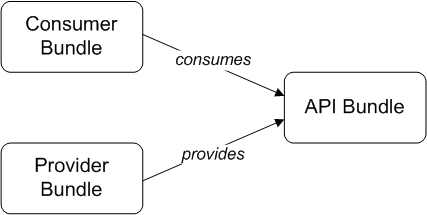
A well-designed application normally exposes a block of functionality through a collection of abstract Java interfaces, which constitute a pure API package. To provide a clean separation of implementation and interface description, the API package is normally deployed in one bundle, the API bundle, and the API implementation is deployed in a separate bundle, the provider bundle. The code that actually uses the API is referred to as a consumer and is packaged in a consumer bundle. Each of these bundle types have differing requirements when it comes to configuring their Maven bundle plug-in instructions.
Bundle Types
Copy linkLink copied to clipboard!
We can identify the following typical bundle types:
- Library bundle
- A library bundle contains Java classes and interfaces, which are public and intended to be used by other bundles. Often, in a library, there is no formal separation between API interfaces and implementation classes. Instead, developers simply instantiate and use the classes provided by the library.A library bundle does not publish or access any OSGi services.
- API bundle
- A pure API bundle contains only Java interfaces (or abstract classes), which are public. The implementation of the API is meant to be provided in a separate bundle or JAR.An API bundle does not publish or access any OSGi services.
- Provider bundle
- A provider bundle contains the classes that implement an API. Usually, the classes in a provider bundle are all private and are not exported from the bundle.The natural mechanism for a provider bundle to expose its functionality is to create and publish one or more OSGi services (where the OSGi services are then accessed through the public API).
- Consumer bundle
- A consumer bundle contains code that uses an API.A consumer bundle typically accesses one or more OSGi services; it does not usually publish an OSGi service itself (unless it is acting as a hybrid of a consumer and a provider).
- API/provider combination bundle
- In some cases, it can make sense to package API packages and implementation packages together, resulting in an API/provider combination bundle. For example, if you intend to provide only one implementation of an API, it can be simpler to package the API and its implementation in a single bundle.For the API/provider combination bundle, it is assumed that the API code and the implementation code belong to the same Maven project.
- API/provider build-time combination bundle
- Even if you opt for a formal separation of API code and implementation code—that is, where the API code and the implementation code are developed in separate Maven projects—you might nevertheless want to add the API interfaces to the provider bundle. Peter Kriens (creator of the Bnd tool, on which the Maven bundle plug-in is based) recommends that a provider bundle should always include its API interfaces. One reason for this is that, when you deploy a provider bundle without embedding the API, there always a risk that the required version of the API will not be available in the OSGi container at deploy time. By embedding the API interfaces in the provider, you eliminate that risk and improve the reliability of your deployment.When you develop your API interfaces and your implementation classes in separate Maven projects, the bundle plug-in supports a special configuration that enables you to embed the API in the provider bundle at build-time. Hence, this bundle is called an API/provider build-time combination.
Summary of import/export rules
Copy linkLink copied to clipboard!
Table 2.1, “Import/Export Rules for Bundles” summarizes the import/export rules for the various bundle types.
| Bundle Type | Export Own Packages | Import Own Packages | Publish OSGi Service | Access OSGi Service |
|---|---|---|---|---|
| Library | Yes | |||
| API | Yes | |||
| Provider | Yes | |||
| Consumer | Maybe | Maybe | Yes | |
| API/provider combination | Yes (API only) | Yes (API only) | Yes |
Importing and exporting own packages
Copy linkLink copied to clipboard!
The basic rule for exporting a bundle's own packages is as follows: a bundle should export any of its own packages that are public and intended to be used by other bundles; private packages should not be exported.
The basic rule for importing a bundle's own packages is as follows: a bundle does not import any of its own packages, because those packages are already available from the bundle's own classpath (external dependencies, on the other hand, must of course be imported).
But there is a special case where it makes sense for a bundle both to export and to import its own packages. The OSGi container interprets this in a special way: the bundle either imports the package (thus using the classes from another bundle, and ignoring its own copy of those classes) or exports the package (thus using its own copy of the classes and making these classes available to other bundles).
For example, an API/provider combination bundle exports and imports its own API packages. This ensures the bundle is able to use the API interfaces from another bundle, if a suitable version is available. Re-using existing packages and classes is an important strategy to avoid duplicate class instances in the same class space (see Section 1.2, “Conflicting Classes”).
When to publish an OSGi service
Copy linkLink copied to clipboard!
An OSGi service is essentially a plain Java object, made accessible to other bundles by being published in the OSGi service registry (see section "Exporting a Service" in "Deploying into Apache Karaf").
Provider bundles demonstrate a typical use case of an OSGi service. The classes in a provider bundle are only meant to be accessed indirectly—that is, through the relevant API interfaces. But there must be some mechanism that enables you to instantiate one or more of the implementation classes, in order to bootstrap the implementation. Typically, the mechanism for bootstrapping an implementation depends on the framework or container you are currently using. For example, in Spring you would typically use a
bean element to create an instance of an implementation class.
In the context of OSGi, however, the natural mechanism for bootstrapping an implementation is to create and publish one or more OSGi services.
Default bundle plug-in settings
Copy linkLink copied to clipboard!
Example 2.1, “Maven Bundle Plug-In Settings” shows a minimal configuration of the Maven bundle plug-in, which you can use for basic Maven projects.
Example 2.1. Maven Bundle Plug-In Settings
Although the preceding minimal configuration is not ideal for all bundle projects, it does have a useful default behavior that is often good enough to get your project started:
- Import rules—when you build your Maven project, the bundle plug-in tries to discover all of the bundle's package dependencies automatically. By default, the bundle plug-in then adds all of the discovered package dependencies to the
Import-Packageheader in the Manifest file (equivalent to the wildcard instruction,*).However, the effectiveness of the initial scan depends on where the dependencies actually arise, as follows:- Java source code—Bnd scans the Java source code in your project to discover package dependencies. There is one blind spot in this process, however: the scan cannot detect dependencies that arise from using Java reflection and explicit calls on a class loader.
- Spring configuration file—Bnd is not capable of scanning Spring configuration files to discover package dependencies. Any dependencies arising from Spring configuration must be added manually to the
Import-Packageinstruction. - Blueprint configuration file—the Apache Karaf implementation of blueprint is capable of mapping XML namespaces to Java packages and dynamically resolving the resulting dependencies at run time. Hence, there is no need for blueprint's dependencies to be added to the
Import-Packageinstruction.This is one of the major benefits of using blueprint configuration.
Provided that the dependent bundles define a version for their exported packages, the bundle plug-in also automatically assigns a version range to the imported packages (see Section 3.3, “Automatic Import Versioning”). - Export rules—by default, the Maven bundle plug-in exports all of the packages in your project, except for packages that match the patterns
*.implor*.internal. It is therefore recommended that you follow the convention of naming all of your private packages with the suffix*.implor*.internal.By default, the bundle plug-in does not assign a version to the exported packages. This is a major disadvantage of the default export instruction (see Section 3.2, “Export Versioning”).
2.2. Sample OSGi Application
Copy linkLink copied to clipboard!
Example of bundle dependencies
Copy linkLink copied to clipboard!
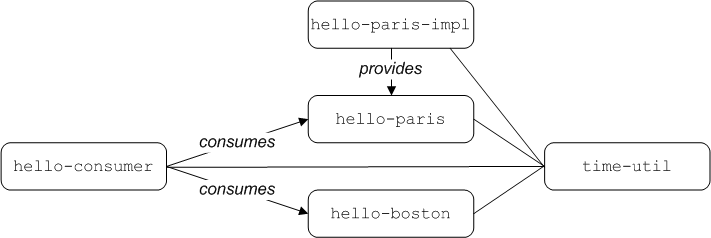
Figure 2.2, “Sample OSGi Application” shows an overview of a sample OSGi application consisting of five bundles, which illustrates the basic bundle types discussed in the previous section. The application is driven by the
hello-consumer bundle, which imports a HelloParis service from the hello-paris bundle and imports a HelloBoston service from the hello-boston bundle.
Figure 2.2. Sample OSGi Application
The sample bundles
Copy linkLink copied to clipboard!
The sample OSGi application consists of the following bundles:
time-util- Fits the pattern of a library bundle. The
time-utilbundle is a utility library that can createClockinstances that tell the time in a particular time zone.Thetime-utilbundle is implemented using classes from the JDK and thus has no external package dependencies. hello-paris- Fits the pattern of an API bundle. The
hello-parisbundle consists of a single Java interface, which returns a greeting,getGreeting(), and gives the local time in Paris,getLocalTime().Thehello-parisbundle has the following external package dependency:org.fusesource.example.time
org.fusesource.example.timeCopy to Clipboard Copied! Toggle word wrap Toggle overflow hello-paris-impl- Fits the pattern of a provider bundle. The
hello-paris-implbundle implements thehello-parisAPI bundle.Thehello-paris-implbundle has the following external package dependencies:org.fusesource.example.hello.paris org.fusesource.example.time
org.fusesource.example.hello.paris org.fusesource.example.timeCopy to Clipboard Copied! Toggle word wrap Toggle overflow hello-boston- Fits the pattern of an API/provider combination bundle. The
hello-bostonbundle combines a Java interface and its implementation, where the Java interface returns a greeting,getGreeting(), and gives the local time in Boston,getLocalTime().Thehello-bostonbundle has the following external package dependency:org.fusesource.example.time
org.fusesource.example.timeCopy to Clipboard Copied! Toggle word wrap Toggle overflow hello-consumer- Fits the pattern of a consumer bundle. The
hello-consumerbundle imports theHelloParisOSGi service and theHelloBostonOSGi service and then invokes on these services to report the local times in Paris and in Boston.Thehello-consumerbundle has the following external package dependencies:org.fusesource.example.hello.paris org.fusesource.example.hello.boston org.fusesource.example.time
org.fusesource.example.hello.paris org.fusesource.example.hello.boston org.fusesource.example.timeCopy to Clipboard Copied! Toggle word wrap Toggle overflow
2.3. Library Bundle
Copy linkLink copied to clipboard!
Overview
Copy linkLink copied to clipboard!
This section explains how to set up a Maven project for a typical library bundle.
The
time-util bundle exemplifies a library bundle, where the main purpose of a library is to make interfaces and classes available to other bundles. Hence, the library should export all of its own packages and associate a version number with the exported packages.
Directory structure
Copy linkLink copied to clipboard!
Assuming it is built as a Maven project, the
time-util bundle has the following directory structure:
The Java source code is located under the
src/main/java sub-directory. The org.fusesource.example.time package is public and all of its classes and interfaces can be exported from the bundle.
There are no blueprint resources associated with this bundle.
Sample implementation
Copy linkLink copied to clipboard!
The
time-util bundle is essentially a wrapper around some of the standard time utilities in Java. It provides a Clock class, which returns the local time in a particular time zone when you invoke the Clock.getLocalTime() method. The Clock class is defined as follows:
The
TimeUtil class is a factory that is used to create Clock instances for particular time zones. Two time zones are supported: TimeZone.BOSTON and TimeZone.PARIS. The TimeUtil class is defined as follows:
Import and export rules
Copy linkLink copied to clipboard!
The following import and export rules apply to the
time-util bundle:
- Exporting own packages—the
org.fusesource.example.timepackage is public, and must be exported. - Importing own packages—none of the bundle's own packages should be imported, which is the usual case for a library bundle.
- Importing dependent packages—any external package dependencies must be imported. In this particular example, however, there are none (the
time-utilbundle depends only on classes from the JVM).
Maven bundle plug-in settings
Copy linkLink copied to clipboard!
The Maven bundle plug-in is configured to export the library package,
org.fusesource.example.time (coded as ${project.groupId}.time). The Export-Package instruction also contains entries to block the export of any packages containing .impl or .internal. In this case, the bundle plug-in instructions are as follows:
Generated MANIFEST.MF file
Copy linkLink copied to clipboard!
When you build the bundle using Maven, the Maven bundle plug-in automatically generates the following
MANIFEST.MF file:
2.4. API Bundle
Copy linkLink copied to clipboard!
Overview
Copy linkLink copied to clipboard!
This section explains how to set up a Maven project for a typical API bundle.
The
hello-paris bundle exemplifies an API bundle, which contains only public Java interfaces. Hence, the API bundle should export all of its own packages and associate a version number with the exported packages.
Directory structure
Copy linkLink copied to clipboard!
The
hello-paris bundle has the following directory structure:
The Java source code is located under the
src/main/java sub-directory. The org.fusesource.example.hello.paris package is public and all of its classes and interfaces can be exported from the bundle.
There are no blueprint resources associated with this bundle.
Sample API
Copy linkLink copied to clipboard!
The
hello-paris bundle is a pure API, which means it contains only Java interfaces. In this example, there is a single interface, HelloParis, which returns a localized greeting and a Clock object that tells the local time. The HelloParis interface is defined as follows:
Maven dependencies
Copy linkLink copied to clipboard!
In the Maven POM file, the
hello-paris bundle defines dependencies on the following Maven artifact:
time-util
Import and export rules
Copy linkLink copied to clipboard!
The following import and export rules apply to the
hello-paris bundle:
- Exporting own packages—the
org.fusesource.example.hello.parispackage is public, and must be exported. - Importing own packages—none of the bundle's own packages should be imported.
- Importing dependent packages—any external package dependencies must be imported.
Maven bundle plug-in settings
Copy linkLink copied to clipboard!
The Maven bundle plug-in is configured to export the API package,
org.fusesource.example.hello.paris (coded as ${project.groupId}.hello.paris*). The Export-Package instruction also contains entries to block the export of any packages containing .impl or .internal. In this case, the bundle plug-in instructions are as follows:
Generated MANIFEST.MF file
Copy linkLink copied to clipboard!
When you build the bundle using Maven, the Maven bundle plug-in automatically generates the following
MANIFEST.MF file:
The
Import-Package header lists one external package dependency, org.fusesource.example.time. None of the bundle's own packages are imported.
The
Export-Package header is used to export the API package, org.fusesource.example.hello.paris, while the uses clause declares a transitive dependency on the org.fusesource.example.time package.
2.5. Provider Bundle
Copy linkLink copied to clipboard!
Overview
Copy linkLink copied to clipboard!
This section explains how to set up a Maven project for a typical provider bundle.
The
hello-paris-impl bundle exemplifies a provider bundle, which provides the implementation of an API. The provider does not export any of its own packages, because the implementation classes are private. But the provider does instantiate and export an OSGi service, which is accessed through the HelloParis interface.
Directory structure
Copy linkLink copied to clipboard!
The
hello-paris-impl bundle has the following directory structure:
The
org.fusesource.example.hello.paris.impl package is private. By default, the Maven bundle plug-in treats any packages containing the segments .impl or .internal, as private packages.
The
src/main/resources/OSGI-INF/blueprint directory contains a single blueprint file, paris-svc.xml. Any file matching the pattern, *.xml, in this directory is assumed to be a blueprint configuration file.
Sample implementation
Copy linkLink copied to clipboard!
The
hello-paris-impl bundle is intended to implement all of the interfaces appearing in the hello-paris API bundle. In this example, a single HelloParisImpl class implements the HelloParis interface, as follows:
Publish OSGi service
Copy linkLink copied to clipboard!
The natural way to bootstrap the
HelloParis implementation in OSGi is to publish the class, HelloParisImpl, as an OSGi service. Use the bean element to create a HelloParisImpl instance and use the service element to publish the bean, advertising it as a service of HelloParis type.
For example, the blueprint file,
OSGI-INF/blueprint/paris-svc.xml, has the following contents:
Maven dependencies
Copy linkLink copied to clipboard!
In the Maven POM file, the
hello-paris-impl bundle defines dependencies on the following Maven artifacts:
time-utilhello-paris
Import and export rules
Copy linkLink copied to clipboard!
The following import and export rules apply to the
hello-paris-impl bundle:
- Exporting own packages—none of the bundle's own packages should be exported; they are all private.
- Importing own packages—none of the bundle's own packages should be imported.
- Importing dependent packages—any external package dependencies must be imported.
Maven bundle plug-in settings
Copy linkLink copied to clipboard!
You can use the default export rules (that is, omitting the
Export-Package instruction), as long as you take care to put all of your code into packages containing .impl or .internal (which are not exported by default). You should explicitly list the implemented API, org.fusesource.example.hello.paris, in the Import-Package instruction and add the provide:=true clause to it. This signals that this bundle is acting as the provider of the hello.paris package (and ensures that the API is imported with the correct version range—see Section 3.3, “Automatic Import Versioning”). In this case, the bundle plug-in instructions are as follows:
Generated MANIFEST.MF file
Copy linkLink copied to clipboard!
When you build the bundle using Maven, the Maven bundle plug-in automatically generates the following
MANIFEST.MF file:
The
Import-Package header imports external package dependencies only—for example, org.fusesource.example.hello.paris and org.fusesource.example.time.
The
Export-Service header advertises the OSGi service as a HelloParis instance. This enables clients to find the HelloParisImpl instance by searching for a service of HelloParis type.
2.6. API/Provider Combination
Copy linkLink copied to clipboard!
Overview
Copy linkLink copied to clipboard!
This section explains how to set up a Maven project for an API/provider bundle.
The
hello-boston bundle exemplifies an API/provider combination bundle. The API/provider bundle exports only its API packages, while the implementation packages are kept private. The API/provider bundle also instantiates and exports an OSGi service, which is accessed through the HelloBoston interface.
Directory structure
Copy linkLink copied to clipboard!
The
hello-boston bundle has the following directory structure:
The
org.fusesource.example.hello.boston package is public and all of its classes and interfaces are exported from the bundle.
The
org.fusesource.example.hello.boston.impl package is private. By default, the Maven bundle plug-in treats any packages containing the segments .impl or .internal, as private packages.
The
src/main/resources/OSGI-INF/blueprint directory contains a single blueprint file, boston-svc.xml. Any file matching the pattern, *.xml, in this directory is assumed to be a blueprint configuration file.
Sample API
Copy linkLink copied to clipboard!
The
hello-boston bundle contains an API, which consists of the interface, HelloBoston. The HelloBoston interface returns a localized greeting and a Clock object that tells the local time. It is defined as follows:
Sample implementation
Copy linkLink copied to clipboard!
The
hello-boston bundle also implements the API. In this example, a single HelloBostonImpl class implements the HelloBoston interface, as follows:
Publish OSGi service
Copy linkLink copied to clipboard!
The natural way to bootstrap the
HelloBoston implementation in OSGi is to publish the class, HelloBostonImpl, as an OSGi service. Use the bean element to create a HelloBostonImpl instance and use the service element to publish the bean, advertising it as a service of HelloBoston type.
For example, the blueprint file,
OSGI-INF/blueprint/boston-svc.xml, has the following contents:
Maven dependencies
Copy linkLink copied to clipboard!
In the Maven POM file, the
hello-boston bundle defines dependencies on the following Maven artifact:
time-util
Import and export rules
Copy linkLink copied to clipboard!
The following import and export rules apply to the
hello-boston bundle:
- Exporting own packages—export the public API package,
org.fusesource.example.hello.boston. Do not export the private package,org.fusesource.example.hello.boston.impl. - Importing own packages—import the public API package,
org.fusesource.example.hello.boston. - Importing dependent packages—any external package dependencies must be imported.
Maven bundle plug-in settings
Copy linkLink copied to clipboard!
You must export the API package,
org.fusesource.example.hello.boston, by including it in the Export-Package instruction, and add the provide:=true clause to it. This signals that this bundle is acting as the provider of the hello.boston package (and ensures that the API is imported with the correct version range—see Section 3.3, “Automatic Import Versioning”). In this case, the bundle plug-in instructions are as follows:
Example 2.2. Plug-In Settings for API/Provider Combination
Generated MANIFEST.MF file
Copy linkLink copied to clipboard!
When you build the bundle using Maven, the Maven bundle plug-in automatically generates the following
MANIFEST.MF file:
The
Import-Package header imports both the public API package, org.fusesource.example.hello.boston, and the external package dependencies—for example, org.fusesource.example.time.
The
Export-Package header exports the public API package, org.fusesource.example.hello.boston, while the uses clause declares a transitive dependency on the org.fusesource.example.time package.
The
Export-Service header advertises the OSGi service as a HelloBoston instance. This enables clients to find the HelloBostonImpl instance by searching for a service of HelloBoston type.
2.7. API/Provider Build-Time Combination
Copy linkLink copied to clipboard!
Overview
Copy linkLink copied to clipboard!
This section explains how to set up a Maven project for an API/provider bundle, where the API packages and implementation packages are kept in separate Maven projects, but then combined into a single bundle at build-time.
You can demonstrate an API/provider build-time combination bundle by modifying the Maven configuration of the
hello-paris-impl bundle. By exploiting the Bnd utility's provide:=true clause, you can modify the instructions for the Maven bundle plug-in, so that the org.fusesource.example.hello.paris API package gets included in the hello-paris-impl bundle at build time.
provide:=true clause
Copy linkLink copied to clipboard!
Whenever a bundle plays the role of provider with respect to a particular API package, you must indicate this explicitly by attaching the
provide:=true clause to the API package, either in an import instruction or in an export instruction (otherwise, by default, the bundle plug-in would assume that the bundle is a consumer of the API package). In particular, for an API/provider build-time combination bundle, you must export the org.fusesource.example.hello.paris API package and attach the provide:=true clause, as follows:
Exporting a package with the
provide:=true clause has a very important side effect: if the code for the exported package is not in the current Maven project, the Maven bundle plug-in adds the package code to the bundle at build time.
Included Maven projects
Copy linkLink copied to clipboard!
Code from the following Maven projects is included in the
hello-paris-impl bundle:
hello-paris-impl- Contains the private package,
org.fusesource.example.hello.paris.impl. Build this bundle to create the API/provider build-time combination bundle,hello-paris-impl. hello-paris- Contains the public API package,
org.fusesource.example.hello.paris. This project is a prerequisite forhello-paris-impland must be built (usingmvn install) before thehello-paris-implproject. You do not deploy thehello-parisbundle directly into the OSGi container, however.
Import and export rules
Copy linkLink copied to clipboard!
The following import and export rules apply to the
hello-paris-impl bundle, when it is configured as an API/provider build-time combination:
- Exporting own packages—no own packages to export, because the
hello-paris-implMaven project contains only private implementation packages. - Exporting dependent packages—export the public API package,
org.fusesource.example.hello.paris, with theprovide:=trueclause, which causes the API code to be included in thehello-paris-implbundle at build time. - Importing own packages—import the public API package,
org.fusesource.example.hello.paris. - Importing dependent packages—any external package dependencies must be imported.
Maven bundle plug-in settings
Copy linkLink copied to clipboard!
To include the API from the
hello-paris bundle in the hello-paris-impl bundle, add the org.fusesource.example.hello.paris package to the Export-Package instruction with the provide:=true clause attached, as shown in Example 2.3, “Plug-In Settings for Build-Time Combination”. Compare this with the regular API/provider case, Example 2.2, “Plug-In Settings for API/Provider Combination”, which takes the same approach of exporting the API package with the provide:=true clause. The semantics, however, are a bit different, because the current example pulls in the API package from a separate Maven project.
Example 2.3. Plug-In Settings for Build-Time Combination
Assigning versions at package granularity
Copy linkLink copied to clipboard!
In the preceding example, the included
org.fusesource.example.hello.paris API package is given the same version as the hello-paris-impl Maven project, by adding the version=${project.version} clause to the export instruction. In practice, however, you might not always want to assign versions in this way. You might prefer to assign distinct versions to the API package (from the hello-paris Maven project) and the implementation package (from the hello-paris-impl Maven project).
The alternative approach you can take is to store version information at package granularity in a
packageinfo file (see the section called “Export versions at package granularity” for details). The Maven bundle plug-in automatically scans your source code, looking for packageinfo files and extracting the version information from them. In this case, you must omit the version clause from the export instruction, as follows:
Generated MANIFEST.MF file
Copy linkLink copied to clipboard!
When you build the bundle using Maven, the Maven bundle plug-in automatically generates the following
MANIFEST.MF file:
The
Import-Package header imports both the public API package, org.fusesource.example.hello.paris, and the external package dependencies—for example, org.fusesource.example.time.
The
Export-Package header exports the public API package, org.fusesource.example.hello.paris, while the uses clause declares a transitive dependency on the org.fusesource.example.time package.
The
Export-Service header advertises the OSGi service as a HelloParis instance.
Bundle deployment
Copy linkLink copied to clipboard!
Because the
hello-paris-impl bundle includes all of the code from the hello-paris Maven project, it is unnecessary to deploy the hello-paris bundle in this case.
2.8. Consumer Bundle
Copy linkLink copied to clipboard!
Overview
Copy linkLink copied to clipboard!
This section explains how to set up a Maven project for a consumer bundle.
The
hello-consumer bundle exemplifies a consumer bundle, which imports OSGi services and accesses the services through the relevant API packages. This is the bundle that drives the sample application and, therefore, it relies on a blueprint lifecycle callback (through the blueprint bean element's init-method attribute) to initiate processing.
Note
Being a consumer is just a role, not an absolute category, so you will commonly come across bundles that behave both as a consumer and a provider. In the current example, however,
hello-consumer behaves as a pure consumer.
Directory structure
Copy linkLink copied to clipboard!
The
hello-consumer bundle has the following directory structure:
The
org.fusesource.example.hello.consumer package is public and all of its classes and interfaces are exported from the bundle. It would not matter, however, if you made this package private instead, because it is not needed by any other bundles.
The
src/main/resources/OSGI-INF/blueprint directory contains a single blueprint file, client.xml. Any file matching the pattern, *.xml, in this directory is assumed to be a blueprint configuration file.
Sample consumer code
Copy linkLink copied to clipboard!
The
hello-consumer bundle effectively drives the sample application, obtaining references to the HelloBoston and HelloParis OSGi services, and then invoking methods on these services to obtain localised greetings and times.
The
hello-consumer bundle contains the class, ConsumeHello, which is a client of the OSGi services, HelloBoston and HelloParis. To gain access to the OSGi services, ConsumeHello defines the setter methods, getHelloBoston() and getHelloParis(), and relies on the blueprint framework to inject the references. The entry point is the init() method, which gets invoked after the ConsumeHello bean is created and injected with the service references. The ConsumeHello class is defined as follows:
Access OSGi service
Copy linkLink copied to clipboard!
The
ConsumeHello class needs to obtain a reference to the HelloBoston service and a reference to the HelloParis service. Use the reference element to create proxies for the HelloBoston service and for the HelloParis service. Use the bean element to create a ConsumeHello instance and inject the helloBoston and helloParis proxies.
The
ConsumeHello bean also requires an entry point to initiate processing. By setting the bean element's init-method attribute to init, you ensure that the blueprint framework calls the ConsumeHello.init() method after all of the bean's properties have been injected.
For example, the blueprint file,
OSGI-INF/blueprint/client.xml, has the following contents:
Maven dependencies
Copy linkLink copied to clipboard!
In the Maven POM file, the
hello-consumer bundle defines dependencies on the following Maven artifacts:
time-utilhello-parishello-boston
Import and export rules
Copy linkLink copied to clipboard!
The following import and export rules apply to the
hello-consumer bundle:
- Exporting own packages—a client typically does not need to export its own packages, because a client does not usually expose an API.
- Importing own packages—a client does not import its own packages.
- Importing dependent packages—any external package dependencies must be imported.
Maven bundle plug-in settings
Copy linkLink copied to clipboard!
The Maven bundle plug-in is configured to export the package,
org.fusesource.example.hello.consumer, although the export is unnecessary in this particular example. The Export-Package instruction also contains entries to block the export of any packages containing .impl or .internal. In this case, the bundle plug-in instructions are as follows:
Generated MANIFEST.MF file
Copy linkLink copied to clipboard!
When you build the bundle using Maven, the Maven bundle plug-in automatically generates the following
MANIFEST.MF file:
The
Import-Package header imports the external package dependencies—for example, org.fusesource.example.hello.boston.
The
Export-Package header exports the package, org.fusesource.example.hello.consumer. In this case, however, the export is not really needed and the package could have been declared private instead (for example, using the Private-Package instruction).
The
Import-Service header declares the OSGi services accessed by this bundle. The services are accessed respectively through the HelloBoston interface and through the HelloParis interface.
Chapter 3. Versioning
Copy linkLink copied to clipboard!
Abstract
For the stability of an OSGi application, it is essential that a bundle restricts the range of acceptable versions of its dependencies; otherwise, the bundle could be wired to an incompatible version of an imported package, with disastrous results. On the other hand, an application cannot afford to be too restrictive: a complex application might re-use a package in many different places. If a strict version restriction is placed on such a package every time it occurs, it might prove impossible to deploy the application, due to conflicting version requirements. Also, a certain amount of version flexibility is required in order to deploy patched bundles as hot fixes. This chapter describes the OSGi version policies that help you to achieve these goals and explains how to implement version polices using the Maven bundle plug-in.
3.1. Semantic Versioning
Copy linkLink copied to clipboard!
Overview
Copy linkLink copied to clipboard!
The basic principle of semantic versioning is that an increment to a major, minor, or micro part of a version signals a particular degree of compatibility or incompatibility with previous versions of a package. The Semantic Versioning technical white paper from the OSGi Alliance makes specific recommendations about how to interpret each of the major, minor, and micro parts of a version. Based on these definitions, the paper explains how to assign a version number to an exported package and how to assign a version range to an imported package.
This section summarizes the recommendations of the OSGi technical white paper.
Version fidelity
Copy linkLink copied to clipboard!
Consider a bundle (the importer) that has package dependencies on another bundle (the exporter). At build time, the importer is compiled and tested against a specific version of the exporter. It follows that the build-time version of the exporter bundle is the version least likely to cause any problems or bugs, because it has already been tested against the importer.
If you deploy the importer together with the original build-time version of the exporter, you have perfect version fidelity between the two bundles. Unfortunately, fidelity cannot usually be achieved in real deployments, because the exporter bundle is often used by many other bundles, compiled against slightly different versions of the exporter. Particularly in a modern open-source programming environment, where an application might pull in hundreds of bundles from many third-party projects and companies, it becomes essential to allow for version flexibility when matching bundles to their dependencies.
Backward compatibility in Java
Copy linkLink copied to clipboard!
To figure out how much version flexibility we can allow, we first need to consider the rules for backward compatibility in Java. Java is one of the few languages that explicitly considers issues of binary compatibility in its specification and the detailed rules can be found in the Binary Compatibility chapter of The Java Language Specification. The following is an incomplete list of changes that are binary compatibility with consumers of particular classes or interfaces:
- Adding new fields, methods, or constructors to an existing class or interface.
- Deleting private fields, methods, or constructors of a class.
- Deleting package-only access fields, methods, or constructors of a class or interface.
- Re-ordering the fields, methods, or constructors in an existing type declaration.
- Moving a method upward in the class hierarchy.
- Reordering the list of direct super-interfaces of a class or interface.
- Inserting new class or interface types in the type hierarchy.
Consumers and providers
Copy linkLink copied to clipboard!
In a well-structured Java application, bundles often fall into one of the following categories: API, consumer, and provider. The consumer and provider roles can be defined as follows:
- Consumer—a bundle that uses the functionality exposed by an API, invoking methods on the API's Java interfaces.
- Provider—a bundle that provides the functionality of an API, containing classes that implement the API's Java interfaces.
Both the consumer and the provider import packages from an API bundle, as illustrated in Figure 3.1, “Consumers and Provider of API Interfaces”. Hence, the consumer and the provider are both sensitive to changes in the API bundle.
Figure 3.1. Consumers and Provider of API Interfaces
It turns out that the rules of binary compatibility are quite different for consumers and providers. The coupling between consumer, provider and API can be described as follows:
- Compatibility between consumer and API—this coupling obeys the rules from the Binary Compatibility chapter of the Java Language Specification. There is quite a lot of scope for altering the API without breaking backward compatibility; in particular, it is possible to add methods to Java interfaces without breaking compatibility.
- Compatibility between provider and API—this coupling is not explicitly considered in the Java Language Specification. It turns out that this coupling is much more restrictive than the consumer case. For example, adding methods to Java interfaces breaks backward compatibility with the provider.
Callback interfaces
Copy linkLink copied to clipboard!
The role of a consumer is not always as clear cut as initially suggested here. Although consumers mostly interact with an API by invoking methods on the API's interfaces, there are some cases where a consumer actually implements one of the API interfaces (thus muddying the distinction between a consumer and a provider). A classic example of where this might happen is when an API defines a callback interface, which a consumer can implement in order to receive event notifications.
For example, consider the
javax.jms.MessageListener interface from the JMS API, which is defined as follows:
A consumer is expected to implement the
onMessage() method in order to receive messages from the underlying JMS service. So, in this case, the more restrictive binary compatibility rules (the same ones that apply to a provider) must be applied to the MessageListener interface.
Note
It is recommended that you try to be as conservative as possible with callback interfaces, changing them as infrequently as possible, in order to avoid breaking binary compatibility with consumers.
OSGi version syntax
Copy linkLink copied to clipboard!
The OSGi version syntax defines a version to have up to four parts, as follows:
<major> [ '.' <minor> [ '.' <micro> [ '.' <qualifier> ]]]
<major> [ '.' <minor> [ '.' <micro> [ '.' <qualifier> ]]]
Where
<major>, <minor>, and <micro> are positive integers and <qualifier> is an arbitrary string. For example, the following are valid OSGi versions:
4
2.1
3.99.12.0
2.0.0.07-Feb-2011
4
2.1
3.99.12.0
2.0.0.07-Feb-2011OSGi version ranges
Copy linkLink copied to clipboard!
When declaring dependencies on imported packages in OSGi, you can declare a range of acceptable versions. An OSGi version range is defined using a notation borrowed from mathematics: square brackets—that is,
[ and ]— denote an inclusive range; and parentheses—that is, ( and )—denote an exclusive range. You can also mix a parenthesis with a bracket to define a half-inclusive range. Here are some examples:
| OSGi Version Range | Restriction on Version, v |
|---|---|
[1.0, 2.0) | 1.0 <= v < 2.0 |
[1.0, 2.0] | 1.0 <= v <= 2.0 |
(1.4.1, 1.5.5) | 1.4.1 < v < 1.5.5 |
(1.5, 1.9] | 1.5 < v <= 1.9 |
1.0 | 1.0 <= v < ∞ |
Of the preceding examples, the most useful style is the half-inclusive range,
[1.0, 2.0). A simple version number on its own, 1.0, is interpreted as an inclusive range up to positive infinity.
Semantic versioning rules
Copy linkLink copied to clipboard!
The fundamental idea of semantic versioning is that a bundle's version should indicate when the bundle breaks binary compatibility with its preceding version, bearing in mind that there are different kinds of binary compatibility: compatibility of consumers and compatibility of providers. The OSGi Semantic Versioning technical white paper proposes the following versioning conventions:
<major>- When a change breaks binary compabitility with both consumers and providers, increment the bundle's major version number. For example, a version change from
1.3to2.0signals that the new bundle version is incompatible with older consumers and providers. <minor>- When a change breaks binary compatibility with providers, but not consumers, increment the bundle's minor version number. For example, a version change from
1.3to1.4signals that the new bundle version is incompatible with older providers, but compatible with older consumers. <micro>- A change in micro version does not signal any backward compatibility issues. The micro version can be incremented for bug fixes that affect neither consumers nor providers of the API.
<qualifier>- The qualifier is typically used as a build identifier—for example, a time stamp.
Consumer import range
Copy linkLink copied to clipboard!
Assuming that an exporter bundle obeys the preceding OSGi semantic versioning rules, it is possible to work out the range of versions that are compatible with a consumer. For example, if a consumer is built against an exporter with version
1.3, the next version that would break binary compatibility with the consumer is 2.0. It follows that all exporter versions up to, but excluding, 2.0 ought to be compatible with the consumer.
In general, the consumer import range is calculated from the build-time version of the exporter according to the following rule: given the build-time version,
<major>.<minor>.<micro>.<qual>, define the corresponding consumer import range to be [<major>.<minor>, <major>+1).
Table 3.1, “Example Consumer Import Ranges” shows some examples of how to choose the correct consumer import range for a given exporter version.
| Build-Time Version of Exporter | Consumer Import Range |
|---|---|
3.0 | [3.0, 4) |
2.0.1 | [2.0, 3) |
2.1.4 | [2.1, 3) |
2.1.5.2011-02-07-LATEST | [2.1, 3) |
Provider import range
Copy linkLink copied to clipboard!
According to the OSGi semantic versioning rules, providers are compatible with a narrower range of versions than consumers. For example, if a provider is built against an exporter with version
1.3, the next version that would break binary compatibility with the provider is 1.4. It follows that all exporter versions up to, but excluding, 1.4 ought to be compatible with the provider.
In general, the provider import range is calculated from the build-time version of the exporter according to the following rule: given the build-time version,
<major>.<minor>.<micro>.<qual>, define the corresponding provider import range to be [<major>.<minor>, <major>.<minor>+1).
Table 3.2, “Example Provider Import Ranges” shows some examples of how to choose the correct provider import range for a given exporter version.
| Build-Time Version of Exporter | Provider Import Range |
|---|---|
3.0 | [3.0, 3.1) |
2.0.1 | [2.0, 2.1) |
2.1.4 | [2.1, 2.2) |
2.1.5.2011-02-07-LATEST | [2.1, 2.2) |
3.2. Export Versioning
Copy linkLink copied to clipboard!
Overview
Copy linkLink copied to clipboard!
OSGi allows you to associate a single version with an exported package. The version that you choose for your package (or packages) should conform to the conventions of semantic versioning, as defined in the section called “Semantic versioning rules”.
Export version at bundle granularity
Copy linkLink copied to clipboard!
The simplest approach to export versioning is where you use the bundle version as the export version and you assign the same export version to all exported packages in the bundle.
Using the Maven bundle plug-in, you can implement this versioning policy using instructions like the following:
Where the
${project.version} macro returns the the contents of the project/version element in the POM file (the version of the current Maven artifact).
Export versions at package granularity
Copy linkLink copied to clipboard!
Strictly speaking, importing and exporting works at the granularity level of packages, not of bundles. In principle, therefore, it is possible to assign versions at the level of individual packages, so that one bundle contains multiple packages with different versions. There are some scenarios where it can be useful to assign versions at package granularity.
For example, consider a bundle that contains both an API package and a package that implements the API (see Section 2.7, “API/Provider Build-Time Combination”). In this case, it makes more sense to use separate versions for the API package and the implementation package.
Using the Maven bundle plug-in, you can specify the version of an individual Java package by creating or modifying the standard Java
packageinfo file in the corresponding package directory. For example, if you want to assign version 1.2.1 to the org.fusesource.example.time package, create a file called packageinfo (no suffix) in the src/main/java/org/fusesource/example/time directory and add the following line:
version 1.2.1
version 1.2.1
Alternatively, since Java 5 it is also possible to specify version information using annotations in a
package-info.java file, for example:
@Version("1.2.1")
package org.fusesource.example.time;
@Version("1.2.1")
package org.fusesource.example.time;3.3. Automatic Import Versioning
Copy linkLink copied to clipboard!
Overview
Copy linkLink copied to clipboard!
By default, the Maven bundle plug-in automatically assigns a version range to imported packages, following the semantic versioning rules outlined in Section 3.1, “Semantic Versioning”. You need to provide an additional hint to the bundle plug-in, to indicate whether the bundle imports a package in the role of a consumer or a provider (the bundle plug-in presumes the consumer role).
For automatic import versioning to work, the package dependency must be versioned at build time, otherwise the importing bundle cannot calculate the import range.
Automatic consumer import range
Copy linkLink copied to clipboard!
The Maven bundle plug-in automatically generates consumer import ranges that conform to the rules of semantic versioning, as defined in the section called “Consumer import range”. The only prerequisite is that the corresponding exporter actually defines a package version.
For example, given that the
hello-paris bundle consumes version 1.2.1 of the org.fusesource.example.time package, the Maven bundle plug-in automatically generates a manifest with the following import:
Import-Package: org.fusesource.example.time;version="[1.0,2)"
Import-Package: org.fusesource.example.time;version="[1.0,2)"Automatic provider import range
Copy linkLink copied to clipboard!
Because the Maven bundle plug-in assumes by default that an importer is acting in the role of consumer, it is necessary to specify explicitly when an importer is acting in the role of provider, using the
provide:=true clause. There are two different approaches you can take to specifying the provider import range, depending on how you package the API and provider bundles, as follows:
Separate API and provider bundles
Copy linkLink copied to clipboard!
When the API and the provider are to be packaged in separate bundles, append the
provide:=true clause to the relevant API packages listed in the Import-Package instruction.
For example, given that the
hello-paris-impl bundle provides the implementation of the org.fusesource.example.hello.paris package from the hello-paris API bundle, you would define the Import-Package instructions for the hello-paris-impl bundle as follows:
Given that the
org.fusesource.example.hello.paris package has version 1.0, the Maven bundle plug-in generates a manifest with the following imports:
Import-Package: org.fusesource.example.hello.paris;version="[1.0,1.1)"
 ,org.fusesource.example.time;version="[1.0,2)",org.osgi.service.bluep
 rint;version="[1.0.0,2.0.0)"
Import-Package: org.fusesource.example.hello.paris;version="[1.0,1.1)"
 ,org.fusesource.example.time;version="[1.0,2)",org.osgi.service.bluep
rint;version="[1.0.0,2.0.0)"Combined API and provider bundle
Copy linkLink copied to clipboard!
When the API and the provider are to be combined in the same bundle, append the
provide:=true clause to the relevant API packages listed in the Export-Package instruction (this is the correct setting to use both for an API/provider combination bundle and for an API/provider build-time combination bundle).
For example, given that the
hello-boston bundle includes both the org.fusesource.example.hello.boston API and its implementation classes, you would define the Export-Package instructions for the hello-boston bundle as follows:
Given that the
org.fusesource.example.hello.boston package has version 1.0, the Maven bundle plug-in generates a manifest with the following highlighted import and export:
Import-Package: org.fusesource.example.hello.boston;version="[1.0,1.1)
 ",org.fusesource.example.time;version="[1.0,2)",org.osgi.service.blue
 print;version="[1.0.0,2.0.0)"
Export-Package: org.fusesource.example.hello.boston;uses:="org.fusesou
 rce.example.time";version="1.0"
Import-Package: org.fusesource.example.hello.boston;version="[1.0,1.1)
 ",org.fusesource.example.time;version="[1.0,2)",org.osgi.service.blue
 print;version="[1.0.0,2.0.0)"
Export-Package: org.fusesource.example.hello.boston;uses:="org.fusesou
rce.example.time";version="1.0"Note
In the case where the API and the provider code are located in separate Maven projects, setting
provide:=true on an exported API package in the provider's POM has the important side-effect that the API interfaces are included in the provider bundle. For a detailed explanation, see Section 2.7, “API/Provider Build-Time Combination”.
Customize import range
Copy linkLink copied to clipboard!
Occasionally, it will be necessary to customize the import version range—for example, if the corresponding exporter does not follow the OSGi semantic versioning conventions. The simplest case is where you specify the import range explicitly, as in the following example:
<Import-Package>
  com.package.with.wrong.semantics*;version="[1.3,1.3.4]",
  *
</Import-Package>
<Import-Package>
  com.package.with.wrong.semantics*;version="[1.3,1.3.4]",
  *
</Import-Package>Custom import rule
Copy linkLink copied to clipboard!
Sometimes, a third-party exporter might follow a consistent versioning convention, but this convention is different from the OSGi convention. In this case, it make sense to define a custom import rule that codifies the alternative convention. For example, if a third-party exporter increments the minor version number whenever binary compatibility with consumers is broken, you could use Bnd's
range macro to codify this rule on consumer imports, as follows:
<Import-Package><![CDATA[
  com.package.with.wrong.semantics*;version="$<range;[==,=+)>",
  *
  ]]>
</Import-Package>
<Import-Package><![CDATA[
  com.package.with.wrong.semantics*;version="$<range;[==,=+)>",
  *
  ]]>
</Import-Package>
Where the Bnd macro is written in the format,
$<Macro> and must be enclosed in a CDATA section to avoid clashing with the XML interpretations of < and > (actually, Bnd supports a variety of different macro delimiters, most of which cannot be used here: braces, ${...}, clash with Maven properties; while square brackets, $[...], and parentheses, $(...), clash with the syntax of version ranges).
Entries like
== and =+ are masks that return a version based on the version of the corresponding exporter. The equals sign, =, returns the corresponding version part unchanged; the plus sign, +, returns the corresponding version part plus one; and the minus sign, -, returns the corresponding version part minus one. For example, if the corresponding exporter has the version, 1.3.0.4, the range mask, [==,=+), resolves to [1.3,1.4). For more details, consult the Bnd documentation for the range macro.
The
range macro is a relatively new addition to Bnd. In POMs that were written before the range macro became available, you might come across ranges written using the Bnd version macro. For example, the range, $<range;[==,=+)>, could also be written using the version macro as follows:
<Import-Package><![CDATA[
  com.package.with.wrong.semantics*;version="[$<version;==>,$<version;=+>)",
  *
  ]]>
</Import-Package>
<Import-Package><![CDATA[
  com.package.with.wrong.semantics*;version="[$<version;==>,$<version;=+>)",
  *
  ]]>
</Import-Package>Note
At the time of writing, the Bnd tool has a bug that causes two
NullPointerException exceptions, accompanied by lengthy stack traces, to be generated whenever you build a Maven project featuring the range or version macros as shown above. Although alarming, these exceptions are harmless non-fatal errors. If you check the generated bundle after building, you will see that the Manifest.mf file is generated exactly as specified by the bundle instructions.
Customize version policies
Copy linkLink copied to clipboard!
Bnd and the Maven bundle plug-in support directives that enable you to override the default versioning policies. Occasionally, you might come across an entire subsystem that consistently follows a different versioning convention from OSGi and, in this case, it makes sense to override the default versioning policies.
Since Bnd version 1.15 (version 2.2.0 of the Maven bundle plug-in), the following directives can be used to specify versioning policies:
-consumer-policy- Specifies a macro to calculate the consumer import range.
-provider-policy- Specifies a macro to calculate the provider import range.
In the Maven bundle plug-in, these directives are set using the elements,
_consumer-policy and _provider-policy—for example:
Where the macro,
$<Macro>, is escaped as, $<Macro>, in XML (or you could use a CDATA section).
Note
Any Bnd directives that start with the hyphen character,
-, can also be set in the Maven bundle plug-in using an element whose name is obtained by changing the initial hyphen, -, to an underscore, _.
Legal Notice
Copy linkLink copied to clipboard!
Trademark Disclaimer
The text of and illustrations in this document are licensed by Red Hat under a Creative Commons Attribution–Share Alike 3.0 Unported license ("CC-BY-SA"). An explanation of CC-BY-SA is available at http://creativecommons.org/licenses/by-sa/3.0/. In accordance with CC-BY-SA, if you distribute this document or an adaptation of it, you must provide the URL for the original version.
Red Hat, as the licensor of this document, waives the right to enforce, and agrees not to assert, Section 4d of CC-BY-SA to the fullest extent permitted by applicable law.
Red Hat, Red Hat Enterprise Linux, the Shadowman logo, JBoss, MetaMatrix, Fedora, the Infinity Logo, and RHCE are trademarks of Red Hat, Inc., registered in the United States and other countries.
Apache, ServiceMix, Camel, CXF, and ActiveMQ are trademarks of Apache Software Foundation. Any other names contained herein may be trademarks of their respective owners.

'%20d='M201.5%20305.5c-13.8%200-24.9-11.1-24.9-24.6%200-13.8%2011.1-24.9%2024.9-24.9%2013.6%200%2024.6%2011.1%2024.6%2024.9%200%2013.6-11.1%2024.6-24.6%2024.6zM504%20256c0%20137-111%20248-248%20248S8%20393%208%20256%20119%208%20256%208s248%20111%20248%20248zm-132.3-41.2c-9.4%200-17.7%203.9-23.8%2010-22.4-15.5-52.6-25.5-86.1-26.6l17.4-78.3%2055.4%2012.5c0%2013.6%2011.1%2024.6%2024.6%2024.6%2013.8%200%2024.9-11.3%2024.9-24.9s-11.1-24.9-24.9-24.9c-9.7%200-18%205.8-22.1%2013.8l-61.2-13.6c-3-.8-6.1%201.4-6.9%204.4l-19.1%2086.4c-33.2%201.4-63.1%2011.3-85.5%2026.8-6.1-6.4-14.7-10.2-24.1-10.2-34.9%200-46.3%2046.9-14.4%2062.8-1.1%205-1.7%2010.2-1.7%2015.5%200%2052.6%2059.2%2095.2%20132%2095.2%2073.1%200%20132.3-42.6%20132.3-95.2%200-5.3-.6-10.8-1.9-15.8%2031.3-16%2019.8-62.5-14.9-62.5zM302.8%20331c-18.2%2018.2-76.1%2017.9-93.6%200-2.2-2.2-6.1-2.2-8.3%200-2.5%202.5-2.5%206.4%200%208.6%2022.8%2022.8%2087.3%2022.8%20110.2%200%202.5-2.2%202.5-6.1%200-8.6-2.2-2.2-6.1-2.2-8.3%200zm7.7-75c-13.6%200-24.6%2011.1-24.6%2024.9%200%2013.6%2011.1%2024.6%2024.6%2024.6%2013.8%200%2024.9-11.1%2024.9-24.6%200-13.8-11-24.9-24.9-24.9z'/%3e%3c/svg%3e)