 Red Hat Summit
Fuse 6 is no longer supported
As of February 2025, Red Hat Fuse 6 is no longer supported. If you are using Fuse 6, please upgrade to Red Hat build of Apache Camel.Security on JBoss EAP
Security Guide for JBoss Fuse on JBoss EAP
Copyright © 2011-2020 Red Hat, Inc. and/or its affiliates.
Abstract
Chapter 1. SwitchYard Security
- Specifying a list of security policies that are required for that service.
- Configuring application-level security processing details for the services within a domain.
- Configuring system-level security processing details.
- Storing sensitive information, such as passwords, in the JBoss AS password vault.
See Also:
1.1. About SwitchYard Security
- Specify a list of security policies that are required for that service in the SwitchYard application descriptor (
switchyard.xml). Edit theswitchyard.xmlfile using the SwitchYard editor plug-in and specify the security policy by using the requires attribute of a component service definition as shown below:<service name="WorkService" requires="authorization clientAuthentication confidentiality">
<service name="WorkService" requires="authorization clientAuthentication confidentiality">Copy to Clipboard Copied! Toggle word wrap Toggle overflow
- You can configure the security processing details for the services within a domain in the following ways:
- Select the Service for a component and view the Properties View in the SwitchYard editor.
- Hover over the Service for a component. A list of tools including the appears. It contains the security information.
- Ensure Authorization, Client Authentication and Confidentiality are checked.
1.2. Configuring Security for SwitchYard
META-INF/switchyard.xml file.
1.3. SwitchYard Security Configuration
META-INF/switchyard.xml:
- The <security> element
- This is an optional element. If not specified, the callbackHandler and moduleName attributes described below will fallback to their default values.
- The callbackHandler attribute
- This is an optional attribute. If not specified, a default value of
org.switchyard.security.callback.NamePasswordCallbackHandlerwill be used. - The moduleName attribute
- This is an optional attribute. If not specified, a default value of other will be used. The value maps to a JAAS security domain name.
- The rolesAllowed attribute
- This is an optional attribute. If specified, and if a Service has an authorization security policy requirement, the authenticated user must be in one of the roles listed. The value is a comma-separated list of roles (whitespace gets trimmed).
- The runAs attribute
- This is an optional attribute. If specified, the value of this attribute will be added as a role to the authenticated user.
- The <properties> and <property> elements
- A <security> element can optionally specify a <properties> element. This can be adjusted to specify zero to many (0..*) <property> elements. Each <property> element requires a name and a value attribute.
1.4. Using Security Elements and Attributes
- The <component><service> and <component><reference> security Attribute
- Component Services and Component References can specify an optional sy:security attribute. This attribute points to a named <security> element in the domain section. If not defined, use the default value.
- The callbackHandler Attribute
- This is an optional attribute. If not specified, use the default value of
org.switchyard.security.callback.NamePasswordCallbackHandler. - The name Attribute
- This is an optional attribute. If not specified, use the default value of default. Component Services and Component References point to this name.
- The rolesAllowed Attribute
- This is an optional attribute. If specified, and if a Service has an authorization security policy requirement, the authenticated user must be in one of the roles listed.
- The runAs Attribute
- This is an optional attribute. If specified, add the value of this attribute as a role to the authenticated user.
- The securityDomain Attribute
- This is an optional attribute. If not specified, use the default value.
- The <properties> and <property> Elements
- A <security> element can optionally specify a <properties> element, which can optionally specify zero to many <property> elements. Each <property> element has two required attributes: name and value. The list of specified name/value properties are made available to the SwitchYard Security configuration, as well as the configured callbackHandler.
- The <securities> Element
- This is an optional element. Contains any number of <security> elements. If not defined, use the default security configuration.
- The <security> Element
- This is an optional element. If not specified, the callbackHandler, name, and securityDomain attributes will fallback to their default values.
1.5. Security
1.6. Callback Handlers
org.switchyard.security.callback Java package:
- NamePasswordCallbackHandler
- Provides name and password credentials to a configured LoginModule stack.
- STSTokenCallbackHandler
- Provides assertion credentials to a configured LoginModule stack.
- STSIssueCallbackHandler
- Utilizes the NamePasswordCallbackHandler and the STSTokenCallbackHandler to provide name, password and assertion credentials to a configured LoginModule stack.
- CertificateCallbackHandler
- Provides Certificate credentials to a configured LoginModule stack.
1.7. Login Modules
1.8. SwitchYard Security Quickstarts
EAP_HOME/quickstarts/switchyard/demos directory. You can find out more information from the Readme.md file packaged with each.
- policy-security-basic
- This quickstart exposes a bean service through a soap binding. Confidentiality is provided via SSL, and client authentication via a HTTP Basic Authorization header.
- policy-security-basic-propagate
- This quickstart is similar to policy-security-basic, however the bean service additionally invokes a different back end bean service which also has security policy requirements. The client's security context (authenticated subject and credentials) is propagated to this secondary service.
- policy-security-cert
- This quickstart exposes a bean service through a soap binding. Confidentiality is provided via SSL, and client authentication via an X509 Certificate.
- policy-security-saml
- This quickstart exposes a bean service through a soap binding. Confidentiality is provided via SSL, and client authentication via a SAML assertion in the form of a token retrieved from PicketLink STS.
- policy-security-wss-signencrypt
- This quickstart exposes a bean service through a soap binding. Proper Signature and Encryption are enforced by JBossWS-CXF.
- policy-security-wss-username
- This quickstart exposes a bean service through a soap binding. Confidentiality is provided via SSL, and client authentication via a WS-Security UsernameToken which is handled by JBossWS-CXF.
1.9. Secure Ways of Running Red Hat JBoss Fuse
- If you run Red Hat JBoss Fuse without Runtime Governance, you can disable JSM as it does not introduce MVEL security risks.
- If you need Runtime Governance in high performance environment, Red Hat recommends running Runtime Governance in a separate JVM. The JVM instance running Runtime Governance must have JSM enabled, whereas other application server instances can run without JSM.
- If you are working on testing and development environments without high loads, it is okay to run one JVM with the server, Runtime Governance, and JSM enabled as the performance hit is not dramatic.
Chapter 2. Patch Installation
2.1. About Patching Mechanisms
- Asynchronous updates: one-off patches which are released outside the normal update cycle of the existing product. These may include security patches, as well as other one-off patches provided by Red Hat Global Support Services (GSS) to fix specific issues.
- Planned updates: These include cumulative patches, as well as micro, minor or major upgrades of an existing product. Cumulative patches include all previously developed asynchronous updates for that version of the product.
2.2. Subscribe to Patch Mailing Lists
Summary
The JBoss team at Red Hat maintains a mailing list for security announcements for Red Hat JBoss Enterprise Middleware products. This section covers what you need to do to subscribe to this list.
Prerequisites
- None
Procedure 2.1. Subscribe to the JBoss Watch List
- Click the following link to go to the JBoss Watch mailing list page: JBoss Watch Mailing List.
- Enter your email address in the Subscribing to Jboss-watch-list section.
- [You may also wish to enter your name and select a password. Doing so is optional but recommended.]
- Press the button to start the subscription process.
- You can browse the archives of the mailing list by going to: JBoss Watch Mailing List Archives.
Result
After confirmation of your email address, you will be subscribed to receive security related announcements from the JBoss patch mailing list.
2.3. Install Patches in zip form
Summary
JBoss bug fix patches are distributed in zip format. This task describes the steps you need to take to install the patches (security or bug fixes) via the zip format.
Prerequisites
- Valid access and subscription to the Red Hat Customer Portal.
- A current subscription to a JBoss product installed in a zip format.
Procedure 2.2. Apply a patch to a JBoss product via the zip method
- Get notified about the security patch either via being a subscriber to the JBoss watch mailing list or by browsing the JBoss watch mailing list archives.NoteOnly security patches are announced on the JBoss watch mailing list.
- Read the ERRATA for the security patch and confirm that it applies to a JBoss product in your environment.
- If the security patch applies to a JBoss product in your environment, then follow the link to download the patch from the Red Hat Customer Portal.
- The downloadable zip file from the customer portal will contain all the files required to fix the security issue or bug. Download this patch zip file in the same location as your JBoss product.
- Unzip the patch file in the same location where the JBoss product is installed. The patched versions overwrite the existing files.
Result
The JBoss product is patched with the latest update using the zip format.
2.4. Severity and Impact Rating of JBoss Security Patches
| Severity | Description |
|---|---|
| Critical |
This rating is given to flaws that could be easily exploited by a remote unauthenticated attacker and lead to system compromise (arbitrary code execution) without requiring user interaction. These are the types of vulnerabilities that can be exploited by worms. Flaws that require an authenticated remote user, a local user, or an unlikely configuration are not classed as critical impact.
|
| Important |
This rating is given to flaws that can easily compromise the confidentiality, integrity, or availability of resources. These are the types of vulnerabilities that allow local users to gain privileges, allow unauthenticated remote users to view resources that should otherwise be protected by authentication, allow authenticated remote users to execute arbitrary code, or allow local or remote users to cause a denial of service.
|
| Moderate |
This rating is given to flaws that may be more difficult to exploit but could still lead to some compromise of the confidentiality, integrity, or availability of resources, under certain circumstances. These are the types of vulnerabilities that could have had a critical impact or important impact but are less easily exploited based on a technical evaluation of the flaw, or affect unlikely configurations.
|
| Low |
This rating is given to all other issues that have a security impact. These are the types of vulnerabilities that are believed to require unlikely circumstances to be able to be exploited, or where a successful exploit would give minimal consequences.
|
Example 2.1. CVSS v2 Impact Score
C:N/I:P/A:C
C:N/I:P/A:CChapter 3. Known Security Issues
3.1. The Poodle Issue and JBoss Fuse
Chapter 4. WS-Security
4.1. WS-Security Overview
- Pass authentication tokens between services
- Encrypt messages or parts of messages
- Sign messages
- Timestamp messages
4.2. JBoss WS-Security Support
4.3. Apache CXF WS-Security Implementation
4.3.1. WS-Security Policy Support
| Property | Description |
|---|---|
| ws-security.username |
The username used for UsernameToken policy assertions.
|
| ws-security.password |
The password used for UsernameToken policy assertions. If not specified, the callback handler is called.
|
| ws-security.callback-handler |
The WSS4J security CallbackHandler that is used to retrieve passwords for keystores and UsernameTokens.
|
| ws-security.signature.properties |
The properties file or object that contains the WSS4J properties for configuring the signature keystore and crypto objects.
|
| ws-security.encryption.properties |
The properties file or object that contains the WSS4J properties for configuring the encryption keystore and crypto objects.
|
| ws-security.signature.username |
The username or alias for the key in the signature keystore. If not specified, it uses the default alias set in the properties file. If that is also not set, and the keystore only contains a single key, that key is used.
|
| ws-security.encryption.username |
The username or alias for the key in the encryption keystore. If not specified, it uses the default alias set in the properties file. If that is also not set, and the keystore only contains a single key, that key is used. For the web service provider, the useReqSigCert keyword can be used to accept (encrypt to) any client whose public key is in the service's truststore (defined in
ws-security.encryption.properties.)
|
| ws-security.signature.crypto |
Instead of specifying the signature properties, this can point to the full WSS4J Crypto object. This can allow easier programmatic configuration of the Crypto information.
|
| ws-security.encryption.crypto |
Instead of specifying the encryption properties, this can point to the full WSS4J Crypto object. This can allow easier programmatic configuration of the Crypto information.
|
    Map<String, Object> ctx = ((BindingProvider)port).getRequestContext();
ctx.put("ws-security.encryption.properties", properties);
port.echoString("hello");
    Map<String, Object> ctx = ((BindingProvider)port).getRequestContext();
ctx.put("ws-security.encryption.properties", properties);
port.echoString("hello");
4.3.2. JBossWS Configuration Additions
4.3.3. Apache CXF Annotations
4.4. Enable WS-Security
Procedure 4.1. Enable WS-Security
- Define a Policy within your WSDL and reference it with a PolicyReference inside your binding.
- Configure your <soap.binding> with <securityAction>.This is so that JBossWS-CXF knows which tokens to respect within incoming SOAP requests.
- Include a
WEB-INF/jboss-web.xmlfile in your application with a <security-domain> specified.This is so that JBossWS-CXF knows which modules to use for authentication and rolemapping.
4.5. Sample WS-Security Configurations
policy-security-wss-username quickstart application as an example. The following are the pertinent sections:
META-INF/WorkService.wsdl:Copy to Clipboard Copied! Toggle word wrap Toggle overflow META-INF/switchyard.xml:Copy to Clipboard Copied! Toggle word wrap Toggle overflow META-INF/jaxws-endpoint-config.xml:Copy to Clipboard Copied! Toggle word wrap Toggle overflow WEB-INF/jboss-web.xml:<jboss-web> <security-domain>java:/jaas/other</security-domain> </jboss-web><jboss-web> <security-domain>java:/jaas/other</security-domain> </jboss-web>Copy to Clipboard Copied! Toggle word wrap Toggle overflow
UsernameToken, attempt to authenticate it against the LoginModule(s) configured in the application server's "other" security domain, and provide any authorized roles. If successful, the request is handed over to SwitchYard, which processes it further, including enforcing your own policies. In the case of WS-Security, SwitchYard does not attempt a second clientAuthentication, but instead respects the outcome from JBossWS-CXF.
4.6. Signature and Encryption Support
- Include the added requirements to the Policy in your WSDL. See Section 4.7, “Sample Endpoint Configurations”, Section 4.8, “Sample Client Configurations”, and Section 4.9, “Endpoint Serving Multiple Clients”.
- Add a CXF Interceptor which sets certain CXF security properties. See Section 4.10, “Sample CXF Interceptor Configurations”.
4.7. Sample Endpoint Configurations
- Create the web service endpoint using JAX-WS. Use a contract-first approach when using WS-Security as the policies declared in the WSDL are parsed by the Apache CXF engine on both server and client sides. Here is an example of WSDL contract enforcing signature and encryption using X 509 certificates:
Copy to Clipboard Copied! Toggle word wrap Toggle overflow You can generate the service endpoint using the wsconsume tool and then use a @EndpointConfig annotation as shown below:Copy to Clipboard Copied! Toggle word wrap Toggle overflow - Use the referenced
jaxws-endpoint-config.xmldescriptor to provide a custom endpoint configuration with the required server side configuration properties as shown below. This tells the engine which certificate or key to use for signature, signature verification, encryption, and decryption.Here,Copy to Clipboard Copied! Toggle word wrap Toggle overflow - The
bob.propertiesconfiguration file includes the WSS4J Crypto properties which in turn links to the keystore file, type, alias, and password for accessing it. For example:Copy to Clipboard Copied! Toggle word wrap Toggle overflow - The callback handler enables Apache CXF to access the keystore. For example:
Copy to Clipboard Copied! Toggle word wrap Toggle overflow
- Assuming the
bob.jkskeystore is properly generated and contains the server Bob's full key as well as the client Alice's public key, you can proceed to packaging the endpoint. Here is the expected content:Here, the jaxws classes generated by the tools and a basic web.xml referencing the endpoint bean are also included:Copy to Clipboard Copied! Toggle word wrap Toggle overflow Copy to Clipboard Copied! Toggle word wrap Toggle overflow NoteIf you are deploying the endpoint archive to JBoss Application Server 7, add a dependency toorg.apache.ws.securitymodule in theMANIFEST.MFfile:Manifest-Version: 1.0 Ant-Version: Apache Ant 1.7.1 Created-By: 17.0-b16 (Sun Microsystems Inc.) Dependencies: org.apache.ws.security
Manifest-Version: 1.0 Ant-Version: Apache Ant 1.7.1 Created-By: 17.0-b16 (Sun Microsystems Inc.) Dependencies: org.apache.ws.securityCopy to Clipboard Copied! Toggle word wrap Toggle overflow
4.8. Sample Client Configurations
KeystorePasswordCallback is same as that on the server side. The alice.properties file is the client side equivalent of the server side bob.properties file and references the alice.jks keystore file, which has been populated with client Alice's full key as well as server Bob's public key:
4.9. Endpoint Serving Multiple Clients
useReqSigCert value for the ws-security.encryption.username configuration parameter. The referenced server side keystore then needs to contain the public key of all the clients that are expected to be served.
4.10. Sample CXF Interceptor Configurations
META-INF/switchyard.xmlCopy to Clipboard Copied! Toggle word wrap Toggle overflow com/example/MyInterceptor.javaCopy to Clipboard Copied! Toggle word wrap Toggle overflow META-INF/bob.propertiesCopy to Clipboard Copied! Toggle word wrap Toggle overflow
Chapter 5. S-RAMP Security
5.1. S-RAMP Browser
5.1.1. S-RAMP Browser Authentication
- Security domain configuration (for both S-RAMP Browser and S-RAMP Server)
- Web based single-sign-on configuration
- IDP web application configuration
- Managing Admin user
5.1.2. S-RAMP Browser Authorization
overlorduser
overlorduser5.2. S-RAMP Server
- JCR (ModeShape): Used as the persistence engine, where all S-RAMP data is stored. Artifacts and ontologies are both stored as nodes in a JCR tree. All S-RAMP queries are mapped to JCRSQL2 queries for processing by the JCR API. The ModeShape JCR implementation is used by default. However, the persistence layer is pluggable allowing alternative providers to be implemented in the future.
- JAX-RS (RESTEasy): Used to provide the S-RAMP Atom based REST API. The S-RAMP specification documents an Atom based REST API that implementations should make available. The S-RAMP implementation uses JAX-RS (specifically RESTEasy) to expose all of the REST endpoints defined by the specification.
- JAXB: Used to expose a Java data model based on the S-RAMP data structures defined by the specification (S-RAMP XSD schemas).
5.2.1. S-RAMP Server Authorization
admin.sramp
admin.srampoverlorduser
overlorduserChapter 6. Policy
6.1. About Policy
6.2. Configuring Policy
- Policy that the service provider requires
- Policy support that the service consumer provides
6.3. Interaction Policy
requires attribute. You can use the Interaction policy on component service and component reference and is not allowed to be marked on component implementation. This policy enables you to manage the communication between the service provider and consumer.
6.4. Implementation Policy
requires attribute. You can use the Implementation policy on component implementation and is not allowed to be marked on component service nor component reference.
6.5. Transaction Policy
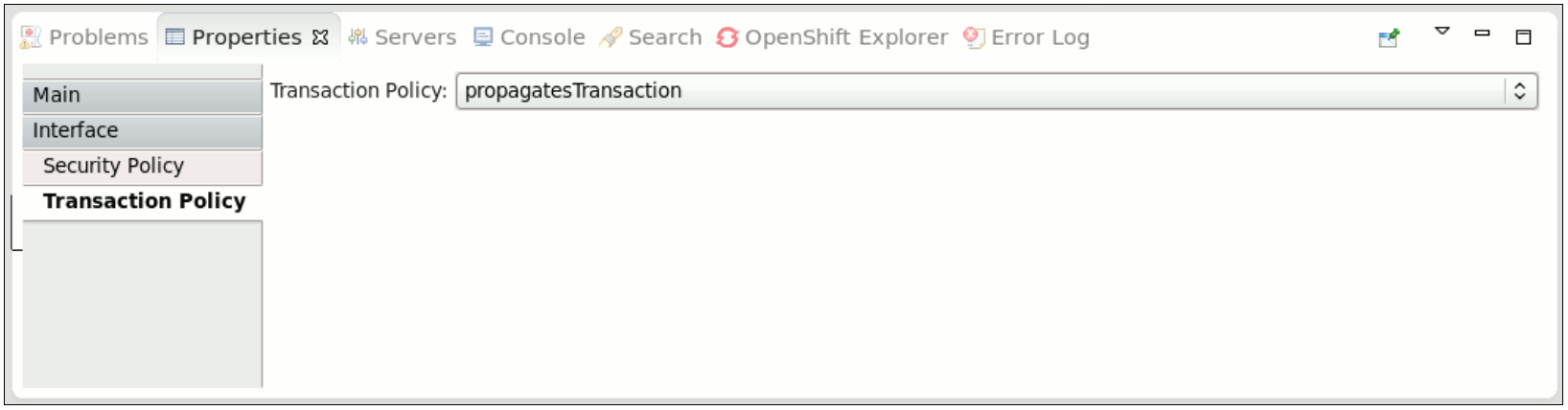
6.5.1. Transaction Interaction Policy
requires attribute. Here is an example:
<service name="WorkService" requires="propagatesTransaction">
<service name="WorkService" requires="propagatesTransaction">propagatesTransaction: Indicates that a global transaction is required when a service is invoked. If no transaction is present, the SwitchYard generates an error at runtime.suspendsTransaction: Indicates that if a transaction exists, the SwitchYard runtime suspends it before the service implementation is invoked and resumes it after the service invocation. This setting allows you to separate a gateway binding's transactional context from the transactional context of the service implementation.
propagatesTransaction and suspendsTransaction intents either to an interface or explicitly to a service and reference XML element in order to describe how any client transaction context is made available and used by the target service component.
Figure 6.1. Transaction Interaction Policy
6.5.2. Transaction Implementation Policy
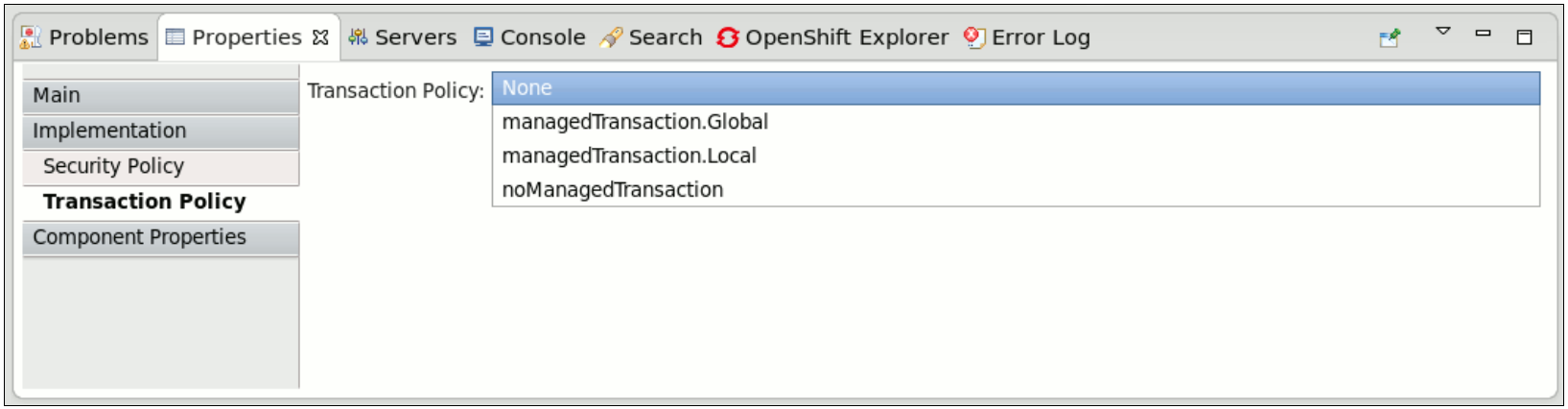
requires attribute. Here is an example:
<implementation.bean class="org.switchyard.quickstarts.demo.policy.transaction.WorkServiceBean" requires="managedTransaction.Global">
<implementation.bean class="org.switchyard.quickstarts.demo.policy.transaction.WorkServiceBean" requires="managedTransaction.Global">managedTransaction.Global: Indicates that this service implementation runs under a global transaction. If no transaction is present, the SwitchYard runtime creates a new JTA transaction before the execution. The SwitchYard runtime commits this newly created transaction at the end of service execution.managedTransaction.Local: Indicates that this service implementation runs under a local transaction. If a transaction exists, the SwitchYard runtime suspends it. SwitchYard always creates a new JTA transaction before execution. The SwitchYard runtime commits this newly created transaction and resumes the suspended transcation after the service invocation.NoteAs the local transaction does not propagate its transaction through the reference, you must mark all of the component reference assuspendsTransaction. If not, the SwitchYard runtime generates an error.noManagedTransaction: Indicates that this service implementation does not run under any managed transaction. If a transaction exists, the SwitchYard runtime suspends it before the service implementation is invoked and resumes it after the service invocation.
managedTransaction and noManagedTransaction intents to describe the transactional environment required by a service component.
Scope of Support
Currently, the following gateways are transaction aware:
- Camel JMS Gateway (binding.jms)
- Camel JPA Gateway (binding.jpa)
- Camel SQL Gateway (binding.sql)
- JCA Gateway (binding.jca)
- SCA Gateway (binding.sca)
Figure 6.2. Transaction Implementation Policy
6.6. Security Policy
- security.policy- It defines a JVM level permitAll policy.
- kie.policy- It is used by Rule-based services.
- rtgov.policy- It is used for the Runtime Governance REST API.
6.6.1. Security Interaction Policy
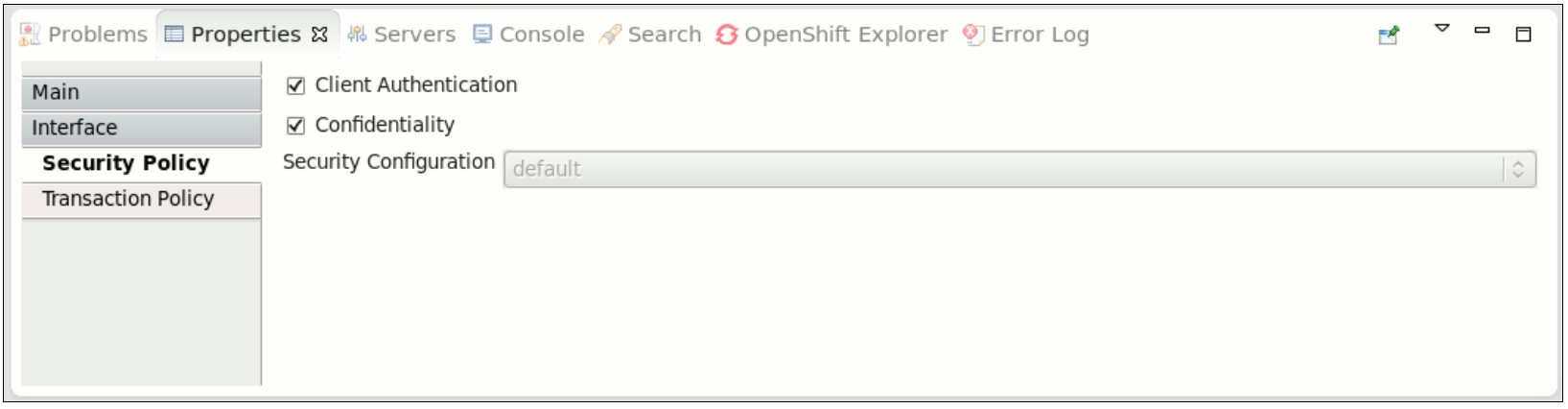
requires attribute of a component service definition.
<service name="WorkService" requires="authorization clientAuthentication confidentiality">
<service name="WorkService" requires="authorization clientAuthentication confidentiality">- clientAuthentication: indicates that the client has been authenticated when a service is invoked. If the associated authenticated user principal is not available, SwitchYard runtime generates an error.NoteThere are multiple reasons for why the clientAuthentication policy may not be fulfilled, including incorrect username, incorrect password, or configuration issues. Please check the credentials again. If they seem to be in order engage the support team for further analysis.
- confidentiality: indicates that the request has been made over a secure channel. When a SOAP request is made over SSL and its confidentiality is not verified, SwitchYard runtime generates an error,
Figure 6.3. Security Interaction Policy
6.6.2. Security Implementation Policy
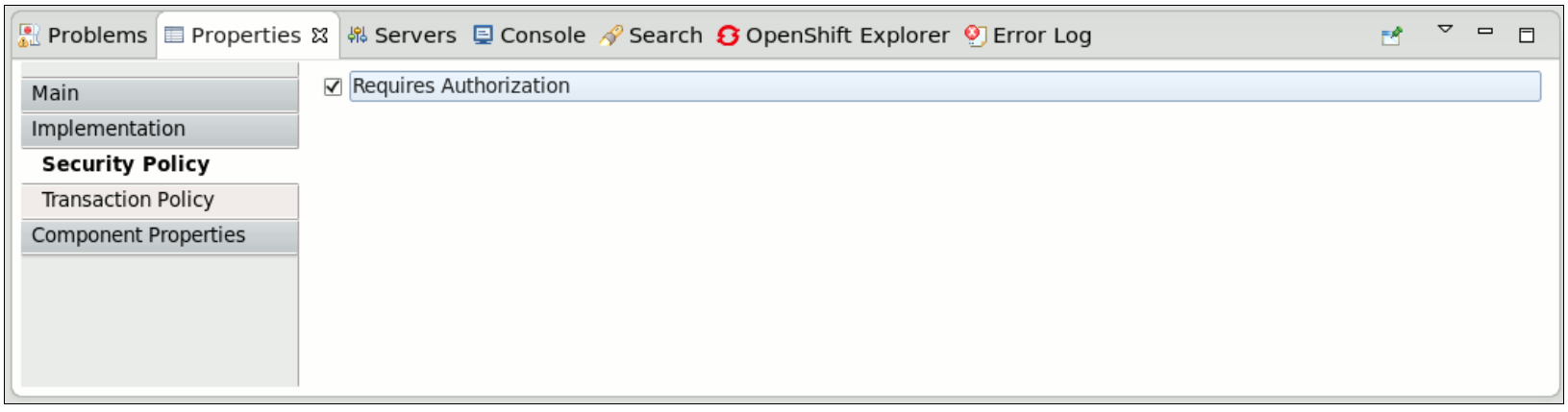
- authorization: indicates that the client is authorized to invoke the service. If the associated authenticated subject does not have an allowed role, SwitchYard runtime generates an error.
Figure 6.4. Security Implementation Policy
6.6.3. Setting Security Policy
- Edit the SwitchYard application descriptor (
switchyard.xml) and add therequiresattribute to a service definition.
- Use the
@Requiresattribute in your service implementation to declare security policy for the service. When the application project is built, the SwitchYard application finds@Requiresannotations and automatically generates the required configuration.
6.6.4. Security Processing
switchyard.xml.
Legal Notice
Trademark Disclaimer

'%20d='M201.5%20305.5c-13.8%200-24.9-11.1-24.9-24.6%200-13.8%2011.1-24.9%2024.9-24.9%2013.6%200%2024.6%2011.1%2024.6%2024.9%200%2013.6-11.1%2024.6-24.6%2024.6zM504%20256c0%20137-111%20248-248%20248S8%20393%208%20256%20119%208%20256%208s248%20111%20248%20248zm-132.3-41.2c-9.4%200-17.7%203.9-23.8%2010-22.4-15.5-52.6-25.5-86.1-26.6l17.4-78.3%2055.4%2012.5c0%2013.6%2011.1%2024.6%2024.6%2024.6%2013.8%200%2024.9-11.3%2024.9-24.9s-11.1-24.9-24.9-24.9c-9.7%200-18%205.8-22.1%2013.8l-61.2-13.6c-3-.8-6.1%201.4-6.9%204.4l-19.1%2086.4c-33.2%201.4-63.1%2011.3-85.5%2026.8-6.1-6.4-14.7-10.2-24.1-10.2-34.9%200-46.3%2046.9-14.4%2062.8-1.1%205-1.7%2010.2-1.7%2015.5%200%2052.6%2059.2%2095.2%20132%2095.2%2073.1%200%20132.3-42.6%20132.3-95.2%200-5.3-.6-10.8-1.9-15.8%2031.3-16%2019.8-62.5-14.9-62.5zM302.8%20331c-18.2%2018.2-76.1%2017.9-93.6%200-2.2-2.2-6.1-2.2-8.3%200-2.5%202.5-2.5%206.4%200%208.6%2022.8%2022.8%2087.3%2022.8%20110.2%200%202.5-2.2%202.5-6.1%200-8.6-2.2-2.2-6.1-2.2-8.3%200zm7.7-75c-13.6%200-24.6%2011.1-24.6%2024.9%200%2013.6%2011.1%2024.6%2024.6%2024.6%2013.8%200%2024.9-11.1%2024.9-24.6%200-13.8-11-24.9-24.9-24.9z'/%3e%3c/svg%3e)