 Red Hat Summit
Cache User Guide
JBoss Enterprise Application Platform 5
for Use with JBoss Enterprise Application Platform 5
Edition 5.2.0
Abstract
This book is the User Guide for Cache of the JBoss Enterprise Application Platform 5 and its patch releases.
JBoss Cache is deprecated
JBoss Cache is deprecated and will be removed in a future major release of JBoss Enterprise Application Platform. Customers are advised to migrate away from this feature in existing implementations, and not use it in new implementations.
Part I. Introduction to JBoss Cache
Copy linkLink copied to clipboard!
This section covers what developers would need to quickly start using JBoss Cache in their projects. It covers an overview of the concepts and API, configuration and deployment information.
Chapter 1. Overview
Copy linkLink copied to clipboard!
1.1. What is JBoss Cache?
Copy linkLink copied to clipboard!
JBoss Cache is a tree-structured, clustered, transactional cache. It can be used in a standalone, non-clustered environment, to cache frequently accessed data in memory thereby removing data retrieval or calculation bottlenecks while providing "enterprise" features such as JTA compatibility, eviction and persistence.
JBoss Cache is also a clustered cache, and can be used in a cluster to replicate state providing a high degree of failover. A variety of replication modes are supported, including invalidation and buddy replication, and network communications can either be synchronous or asynchronous.
When used in a clustered mode, the cache is an effective mechanism of building high availability, fault tolerance and even load balancing into custom applications and frameworks. For example, the JBoss Application Server and Red Hat's Enterprise Application Platform make extensive use of JBoss Cache to cluster services such as HTTP and EJB sessions, as well as providing a distributed entity cache for JPA.
1.1.1. And what is POJO Cache?
Copy linkLink copied to clipboard!
POJO Cache is an extension of the core JBoss Cache API. POJO Cache offers additional functionality such as:
- maintaining object references even after replication or persistence
- fine grained replication, where only modified object fields are replicated
- "API-less" clustering model where POJOs are simply annotated as being clustered
POJO Cache has a complete and separate set of documentation, including a Users' Guide, FAQ and tutorial all available on the JBoss Cache documentation website. As such, POJO Cache will not be discussed further in this book.
1.2. Summary of Features
Copy linkLink copied to clipboard!
1.2.1. Caching objects
Copy linkLink copied to clipboard!
JBoss Cache offers a simple and straightforward API, where data - simple Java objects - can be placed in the cache. Based on configuration options selected, this data may be one or all of:
In addition, JBoss Cache offers a rich set of enterprise-class features:
- cached in-memory for efficient, thread-safe retrieval
- replicated to some or all cache instances in a cluster
- persisted to disk and/or a remote, in-memory cache cluster ("far-cache")
- garbage collected from memory when memory runs low, and passivated to disk so state is not lost
- being able to participate in JTA transactions (works with most Java EE compliant transaction managers);
- attach to JMX consoles and provide runtime statistics on the state of the cache;
- allow client code to attach listeners and receive notifications on cache events;
- allow grouping of cache operations into batches, for efficient replication.
1.2.2. Local and clustered modes
Copy linkLink copied to clipboard!
The cache is organized as a tree, with a single root. Each node in the tree essentially contains a map, which acts as a store for key/value pairs. The only requirement placed on objects that are cached is that they implement
java.io.Serializable.
JBoss Cache can be either local or replicated. Local caches exist only within the scope of the JVM in which they are created, whereas replicated caches propagate any changes to some or all other caches in the same cluster. A cluster may span different hosts on a network or just different JVMs on a single host.
1.2.3. Clustered caches and transactions
Copy linkLink copied to clipboard!
When a change is made to an object in the cache and that change is done in the context of a transaction, the replication of changes is deferred until the transaction completes successfully. All modifications are kept in a list associated with the transaction of the caller. When the transaction commits, changes are replicated. Otherwise, on a rollback, we simply undo the changes locally and discard the modification list, resulting in zero network traffic and overhead. For example, if a caller makes 100 modifications and then rolls back the transaction, nothing is replicated, resulting in no network traffic.
If a caller has no transaction or batch associated with it, modifications are replicated immediately. E.g. in the example used earlier, 100 messages would be broadcast for each modification. In this sense, running without a batch or transaction can be thought of as analogous as running with auto-commit switched on in JDBC terminology, where each operation is committed automatically and immediately.
JBoss Cache works out of the box with most popular transaction managers, and even provides an API where custom transaction manager lookups can be written.
All of the above holds true for batches as well, which has similar behavior.
1.2.4. Thread safety
Copy linkLink copied to clipboard!
The cache is completely thread-safe. It employs multi-versioned concurrency control (MVCC) to ensure thread safety between readers and writers, while maintaining a high degree of concurrency. The specific MVCC implementation used in JBoss Cache allows for reader threads to be completely free of locks and synchronized blocks, ensuring a very high degree of performance for read-heavy applications. It also uses custom, highly performant lock implementations that employ modern compare-and-swap techniques for writer threads, which are tuned to multi-core CPU architectures.
Multi-versioned concurrency control (MVCC) is the default locking scheme since JBoss Cache 3.x. Optimistic and pessimistic locking schemes from older versions of JBoss Cache are still available but are deprecated in favor of MVCC, and will be removed in future releases. Use of these deprecated locking schemes are strongly discouraged.
The JBoss Cache MVCC implementation only supports READ_COMMITTED and REPEATABLE_READ isolation levels, corresponding to their database equivalents. See the section on Chapter 11, Transactions and Concurrency for details on MVCC.
1.3. Requirements
Copy linkLink copied to clipboard!
JBoss Cache requires a Java 5.0 (or newer) compatible virtual machine and set of libraries, and is developed and tested on Sun's JDK 5.0 and JDK 6.
In addition to Java 5.0, at a minimum, JBoss Cache has dependencies on JGroups, and Apache's commons-logging. JBoss Cache ships with all dependent libraries necessary to run out of the box, as well as several optional jars for optional features.
1.4. License
Copy linkLink copied to clipboard!
JBoss Cache is an open source project, using the business and OEM-friendly OSI-approved LGPL license. Commercial development support, production support and training for JBoss Cache is available through JBoss, a division of Red Hat Inc.
Chapter 2. User API
Copy linkLink copied to clipboard!
2.1. API Classes
Copy linkLink copied to clipboard!
The
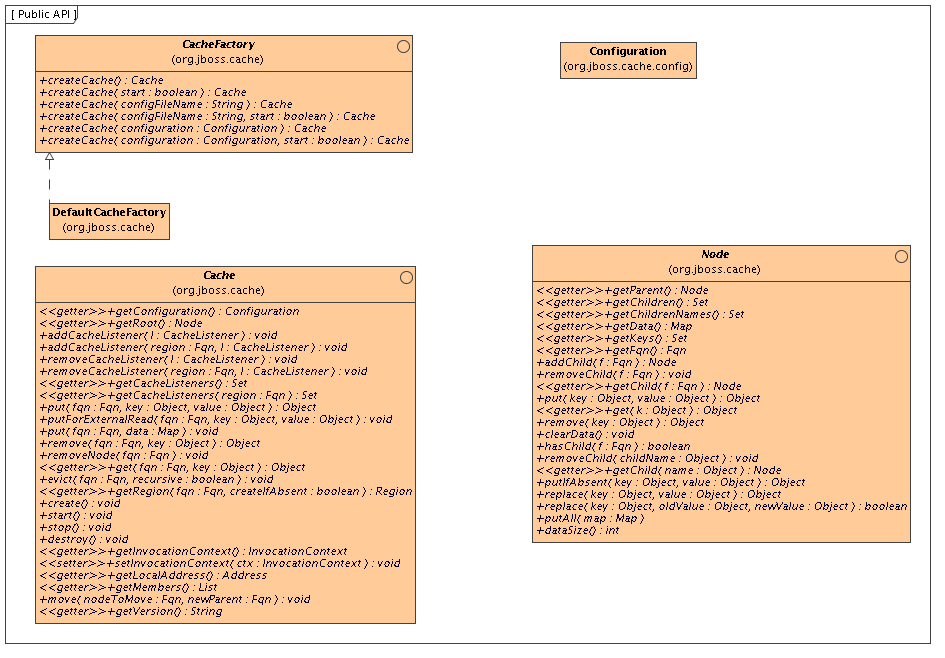
Cache interface is the primary mechanism for interacting with JBoss Cache. It is constructed and optionally started using the CacheFactory. The CacheFactory allows you to create a Cache either from a Configuration object or an XML file. The cache organizes data into a tree structure, made up of nodes. Once you have a reference to a Cache, you can use it to look up Node objects in the tree structure, and store data in the tree.
Note that the diagram above only depicts some of the more popular API methods. Reviewing the Javadoc for the above interfaces is the best way to learn the API. Below, we cover some of the main points.
2.2. Instantiating and Starting the Cache
Copy linkLink copied to clipboard!
An instance of the
Cache interface can only be created via a CacheFactory. This is unlike JBoss Cache 1.x, where an instance of the old TreeCache class could be directly instantiated.
The
CacheFactory provides a number of overloaded methods for creating a Cache, but they all fundamentally do the same thing:
- Gain access to a
Configuration, either by having one passed in as a method parameter or by parsing XML content and constructing one. The XML content can come from a provided input stream, from a classpath or file system location. See the Chapter 3, Configuration for more on obtaining aConfiguration. - Instantiate the
Cacheand provide it with a reference to theConfiguration. - Optionally invoke the cache's
create()andstart()methods.
Here is an example of the simplest mechanism for creating and starting a cache, using the default configuration values:
   CacheFactory factory = new DefaultCacheFactory();
   Cache cache = factory.createCache();
   CacheFactory factory = new DefaultCacheFactory();
   Cache cache = factory.createCache();
In this example, we tell the
CacheFactory to find and parse a configuration file on the classpath:
   CacheFactory factory = new DefaultCacheFactory();
   Cache cache = factory.createCache("cache-configuration.xml");
   CacheFactory factory = new DefaultCacheFactory();
   Cache cache = factory.createCache("cache-configuration.xml");
In this example, we configure the cache from a file, but want to programmatically change a configuration element. So, we tell the factory not to start the cache, and instead do it ourselves:
2.3. Caching and Retrieving Data
Copy linkLink copied to clipboard!
Next, lets use the
Cache API to access a Node in the cache and then do some simple reads and writes to that node.
The
Cache interface also exposes put/get/remove operations that take an Section 2.4, “ The Fqn Class ” as an argument, for convenience:
2.3.1. Organizing Your Data and Using the Node Structure
Copy linkLink copied to clipboard!
A Node should be viewed as a named logical grouping of data. A node should be used to contain data for a single data record, for example information about a particular person or account. It should be kept in mind that all aspects of the cache - locking, cache loading, replication and eviction - happen on a per-node basis. As such, anything grouped together by being stored in a single node will be treated as a single atomic unit.
2.4. The Fqn Class
Copy linkLink copied to clipboard!
The previous section used the
Fqn class in its examples; now let us learn a bit more about that class.
A Fully Qualified Name (Fqn) encapsulates a list of names which represent a path to a particular location in the cache's tree structure. The elements in the list are typically
Strings but can be any Object or a mix of different types.
This path can be absolute (i.e., relative to the root node), or relative to any node in the cache. Reading the documentation on each API call that makes use of
Fqn will tell you whether the API expects a relative or absolute Fqn.
The
Fqn class provides are variety of factory methods; see the Javadoc for all the possibilities. The following illustrates the most commonly used approaches to creating an Fqn:
Note that
Fqn f = Fqn.fromElements("a", "b", "c");
Fqn f = Fqn.fromElements("a", "b", "c");
is the same as
Fqn f = Fqn.fromString("/a/b/c");
Fqn f = Fqn.fromString("/a/b/c");2.5. Stopping and Destroying the Cache
Copy linkLink copied to clipboard!
It is good practice to stop and destroy your cache when you are done using it, particularly if it is a clustered cache and has thus used a JGroups channel. Stopping and destroying a cache ensures resources like network sockets and maintenance threads are properly cleaned up.
   cache.stop();
   cache.destroy();
   cache.stop();
   cache.destroy();
Not also that a cache that has had
stop() invoked on it can be started again with a new call to start() . Similarly, a cache that has had destroy() invoked on it can be created again with a new call to create() (and then started again with a start() call).
2.6. Cache Modes
Copy linkLink copied to clipboard!
Although technically not part of the API, the mode in which the cache is configured to operate affects the cluster-wide behavior of any
put or remove operation, so we will briefly mention the various modes here.
JBoss Cache modes are denoted by the
org.jboss.cache.config.Configuration.CacheMode enumeration. They consist of:
- LOCAL - local, non-clustered cache. Local caches do not join a cluster and do not communicate with other caches in a cluster.
- REPL_SYNC - synchronous replication. Replicated caches replicate all changes to the other caches in the cluster. Synchronous replication means that changes are replicated and the caller blocks until replication acknowledgements are received.
- REPL_ASYNC - asynchronous replication. Similar to REPL_SYNC above, replicated caches replicate all changes to the other caches in the cluster. Being asynchronous, the caller does not block until replication acknowledgements are received.
- INVALIDATION_SYNC - if a cache is configured for invalidation rather than replication, every time data is changed in a cache other caches in the cluster receive a message informing them that their data is now stale and should be evicted from memory. This reduces replication overhead while still being able to invalidate stale data on remote caches.
- INVALIDATION_ASYNC - as above, except this invalidation mode causes invalidation messages to be broadcast asynchronously.
See the Chapter 8, Cache Modes and Clustering for more details on how cache mode affects behavior. See the Chapter 3, Configuration for info on how to configure things like cache mode.
2.7. Adding a Cache Listener - registering for cache events
Copy linkLink copied to clipboard!
JBoss Cache provides a convenient mechanism for registering notifications on cache events.
   Object myListener = new MyCacheListener();
   cache.addCacheListener(myListener);
   Object myListener = new MyCacheListener();
   cache.addCacheListener(myListener);
Similar methods exist for removing or querying registered listeners. See the Javadocs on the
Cache interface for more details.
Basically any public class can be used as a listener, provided it is annotated with the
@CacheListener annotation. In addition, the class needs to have one or more methods annotated with one of the method-level annotations (in the org.jboss.cache.notifications.annotation package). Methods annotated as such need to be public, have a void return type, and accept a single parameter of type org.jboss.cache.notifications.event.Event or one of its subtypes.
@CacheStarted- methods annotated such receive a notification when the cache is started. Methods need to accept a parameter type which is assignable fromCacheStartedEvent.@CacheStopped- methods annotated such receive a notification when the cache is stopped. Methods need to accept a parameter type which is assignable fromCacheStoppedEvent.@NodeCreated- methods annotated such receive a notification when a node is created. Methods need to accept a parameter type which is assignable fromNodeCreatedEvent.@NodeRemoved- methods annotated such receive a notification when a node is removed. Methods need to accept a parameter type which is assignable fromNodeRemovedEvent.@NodeModified- methods annotated such receive a notification when a node is modified. Methods need to accept a parameter type which is assignable fromNodeModifiedEvent.@NodeMoved- methods annotated such receive a notification when a node is moved. Methods need to accept a parameter type which is assignable fromNodeMovedEvent.@NodeVisited- methods annotated such receive a notification when a node is started. Methods need to accept a parameter type which is assignable fromNodeVisitedEvent.@NodeLoaded- methods annotated such receive a notification when a node is loaded from aCacheLoader. Methods need to accept a parameter type which is assignable fromNodeLoadedEvent.@NodeEvicted- methods annotated such receive a notification when a node is evicted from memory. Methods need to accept a parameter type which is assignable fromNodeEvictedEvent.@NodeInvalidated- methods annotated such receive a notification when a node is evicted from memory due to a remote invalidation event. Methods need to accept a parameter type which is assignable fromNodeInvalidatedEvent.@NodeActivated- methods annotated such receive a notification when a node is activated. Methods need to accept a parameter type which is assignable fromNodeActivatedEvent.@NodePassivated- methods annotated such receive a notification when a node is passivated. Methods need to accept a parameter type which is assignable fromNodePassivatedEvent.@TransactionRegistered- methods annotated such receive a notification when the cache registers ajavax.transaction.Synchronizationwith a registered transaction manager. Methods need to accept a parameter type which is assignable fromTransactionRegisteredEvent.@TransactionCompleted- methods annotated such receive a notification when the cache receives a commit or rollback call from a registered transaction manager. Methods need to accept a parameter type which is assignable fromTransactionCompletedEvent.@ViewChanged- methods annotated such receive a notification when the group structure of the cluster changes. Methods need to accept a parameter type which is assignable fromViewChangedEvent.@CacheBlocked- methods annotated such receive a notification when the cluster requests that cache operations are blocked for a state transfer event. Methods need to accept a parameter type which is assignable fromCacheBlockedEvent.@CacheUnblocked- methods annotated such receive a notification when the cluster requests that cache operations are unblocked after a state transfer event. Methods need to accept a parameter type which is assignable fromCacheUnblockedEvent.@BuddyGroupChanged- methods annotated such receive a notification when a node changes its buddy group, perhaps due to a buddy falling out of the cluster or a newer, closer buddy joining. Methods need to accept a parameter type which is assignable fromBuddyGroupChangedEvent.
Refer to the Javadocs on the annotations as well as the
Event subtypes for details of what is passed in to your method, and when.
Example:
2.7.1. Synchronous and Asynchronous Notifications
Copy linkLink copied to clipboard!
By default, all notifications are synchronous, in that they happen on the thread of the caller which generated the event. As such, it is good practice to ensure cache listener implementations do not hold up the thread in long-running tasks. Alternatively, you could set the
CacheListener.sync attribute to false, in which case you will not be notified in the caller's thread. See the Table 12.13, “The <listeners /> Element” on tuning this thread pool and size of blocking queue.
2.8. Using Cache Loaders
Copy linkLink copied to clipboard!
Cache loaders are an important part of JBoss Cache. They allow persistence of nodes to disk or to remote cache clusters, and allow for passivation when caches run out of memory. In addition, cache loaders allow JBoss Cache to perform 'warm starts', where in-memory state can be preloaded from persistent storage. JBoss Cache ships with a number of cache loader implementations.
These cache loaders, along with advanced aspects and tuning issues, are discussed in the Chapter 9, Cache Loaders.
org.jboss.cache.loader.FileCacheLoader- a basic, file system based cache loader that persists data to disk. Non-transactional and not very performant, but a very simple solution. Used mainly for testing and not recommended for production use.org.jboss.cache.loader.JDBCCacheLoader- uses a JDBC connection to store data. Connections could be created and maintained in an internal pool (uses the c3p0 pooling library) or from a configured DataSource. The database this CacheLoader connects to could be local or remotely located.org.jboss.cache.loader.BdbjeCacheLoader- uses Oracle's BerkeleyDB file-based transactional database to persist data. Transactional and very performant, but potentially restrictive license.org.jboss.cache.loader.JdbmCacheLoader- an open source alternative to the BerkeleyDB.org.jboss.cache.loader.tcp.TcpCacheLoader- uses a TCP socket to "persist" data to a remote cluster, using a "far cache" pattern.org.jboss.cache.loader.ClusteredCacheLoader- used as a "read-only" cache loader, where other nodes in the cluster are queried for state. Useful when full state transfer is too expensive and it is preferred that state is lazily loaded.
2.9. Using Eviction Policies
Copy linkLink copied to clipboard!
Eviction policies are the counterpart to cache loaders. They are necessary to make sure the cache does not run out of memory and when the cache starts to fill, an eviction algorithm running in a separate thread evicts in-memory state and frees up memory. If configured with a cache loader, the state can then be retrieved from the cache loader if needed.
Eviction policies can be configured on a per-region basis, so different subtrees in the cache could have different eviction preferences. JBoss Cache ships with several eviction policies:
Detailed configuration and implementing custom eviction policies are discussed in the Chapter 10, Eviction.
org.jboss.cache.eviction.LRUPolicy- an eviction policy that evicts the least recently used nodes when thresholds are hit.org.jboss.cache.eviction.LFUPolicy- an eviction policy that evicts the least frequently used nodes when thresholds are hit.org.jboss.cache.eviction.MRUPolicy- an eviction policy that evicts the most recently used nodes when thresholds are hit.org.jboss.cache.eviction.FIFOPolicy- an eviction policy that creates a first-in-first-out queue and evicts the oldest nodes when thresholds are hit.org.jboss.cache.eviction.ExpirationPolicy- an eviction policy that selects nodes for eviction based on an expiry time each node is configured with.org.jboss.cache.eviction.ElementSizePolicy- an eviction policy that selects nodes for eviction based on the number of key/value pairs held in the node.
Chapter 3. Configuration
Copy linkLink copied to clipboard!
3.1. Configuration Overview
Copy linkLink copied to clipboard!
The
org.jboss.cache.config.Configuration class (along with its Section 3.3, “Composition of a Configuration Object ”) is a Java Bean that encapsulates the configuration of the Cache and all of its architectural elements (cache loaders, evictions policies, etc.)
The
Configuration exposes numerous properties which are summarized in the Section 12.2, “Configuration File Quick Reference” section of this book and many of which are discussed in later chapters. Any time you see a configuration option discussed in this book, you can assume that the Configuration class or one of its component parts exposes a simple property setter/getter for that configuration option.
3.2. Creating a Configuration
Copy linkLink copied to clipboard!
As discussed in the Section 2.2, “Instantiating and Starting the Cache”, before a
Cache can be created, the CacheFactory must be provided with a Configuration object or with a file name or input stream to use to parse a Configuration from XML. The following sections describe how to accomplish this.
3.2.1. Parsing an XML-based Configuration File
Copy linkLink copied to clipboard!
The most convenient way to configure JBoss Cache is via an XML file. The JBoss Cache distribution ships with a number of configuration files for common use cases. It is recommended that these files be used as a starting point, and tweaked to meet specific needs.
The simplest example of a configuration XML file, a cache configured to run in LOCAL mode, looks like this:
This file uses sensible defaults for isolation levels, lock acquisition timeouts, locking modes, etc. Another, more complete, sample XML file is included in the Section 12.1, “Sample XML Configuration File” section of this book, along with Section 12.2, “Configuration File Quick Reference” explaining the various options.
3.2.2. Validating Configuration Files
Copy linkLink copied to clipboard!
By default JBoss Cache will validate your XML configuration file against an XML schema and throw an exception if the configuration is invalid. This can be overridden with the
-Djbosscache.config.validate=false JVM parameter. Alternately, you could specify your own schema to validate against, using the -Djbosscache.config.schemaLocation=url parameter.
By default though, configuration files are validated against the JBoss Cache configuration schema, which is included in the
jbosscache-core.jar. Most XML editing tools can be used with this schema to ensure the configuration file you create is correct and valid.
3.2.3. Programmatic Configuration
Copy linkLink copied to clipboard!
In addition to the XML-based configuration above, the
Configuration can be built up programmatically, using the simple property mutators exposed by Configuration and its components. When constructed, the Configuration object is preset with JBoss Cache defaults and can even be used as-is for a quick start.
Even the above fairly simple configuration is pretty tedious programming; hence the preferred use of XML-based configuration. However, if your application requires it, there is no reason not to use XML-based configuration for most of the attributes, and then access the
Configuration object to programmatically change a few items from the defaults, add an eviction region, etc.
Note that configuration values may not be changed programmatically when a cache is running, except those annotated as
@Dynamic . Dynamic properties are also marked as such in the Section 12.2, “Configuration File Quick Reference” table. Attempting to change a non-dynamic property will result in a ConfigurationException .
3.2.4. Using an IOC Framework
Copy linkLink copied to clipboard!
The
Configuration class and its Section 3.3, “Composition of a Configuration Object ” are all Java Beans that expose all configuration elements via simple setters and getters. Therefore, any good IOC framework such as JBoss Microcontainer should be able to build up a Configuration from an XML file in the framework's own format. See the Section 5.2, “Via JBoss Microcontainer (EAP 5.x)” section for an example of this.
3.3. Composition of a Configuration Object
Copy linkLink copied to clipboard!
A

Configuration is composed of a number of subobjects:
Following is a brief overview of the components of a
Configuration . See the Javadoc and the linked chapters in this book for a more complete explanation of the configurations associated with each component.
Configuration: top level object in the hierarchy; exposes the configuration properties listed in the Section 12.2, “Configuration File Quick Reference” section of this book.BuddyReplicationConfig: only relevant if Section 8.1.2.2, “Buddy Replication” is used. General buddy replication configuration options. Must include a:BuddyLocatorConfig: implementation-specific configuration object for theBuddyLocatorimplementation being used. What configuration elements are exposed depends on the needs of theBuddyLocatorimplementation.EvictionConfig: only relevant if Chapter 10, Eviction is used. General eviction configuration options. Must include at least one:EvictionRegionConfig: one for each eviction region; names the region, etc. Must include a:EvictionAlgorithmConfig: implementation-specific configuration object for theEvictionAlgorithmimplementation being used. What configuration elements are exposed depends on the needs of theEvictionAlgorithmimplementation.CacheLoaderConfig: only relevant if a Chapter 9, Cache Loaders is used. General cache loader configuration options. Must include at least one:IndividualCacheLoaderConfig: implementation-specific configuration object for theCacheLoaderimplementation being used. What configuration elements are exposed depends on the needs of theCacheLoaderimplementation.RuntimeConfig: exposes to cache clients certain information about the cache's runtime environment (e.g. membership in buddy replication groups if Section 8.1.2.2, “Buddy Replication” is used.) Also allows direct injection into the cache of needed external services like a JTATransactionManageror a JGroupsChannelFactory.
3.4. Dynamic Reconfiguration
Copy linkLink copied to clipboard!
Dynamically changing the configuration of some options while the cache is running is supported, by programmatically obtaining the
Configuration object from the running cache and changing values. E.g.,
   Configuration liveConfig = cache.getConfiguration();
   liveConfig.setLockAcquisitionTimeout(2000);
   Configuration liveConfig = cache.getConfiguration();
   liveConfig.setLockAcquisitionTimeout(2000);
A complete listing of which options may be changed dynamically is in the Section 12.2, “Configuration File Quick Reference” section. An
org.jboss.cache.config.ConfigurationException will be thrown if you attempt to change a setting that is not dynamic.
3.4.1. Overriding the Configuration via the Option API
Copy linkLink copied to clipboard!
The Option API allows you to override certain behaviors of the cache on a per invocation basis. This involves creating an instance of
org.jboss.cache.config.Option , setting the options you wish to override on the Option object and passing it in the InvocationContext before invoking your method on the cache.
E.g., to force a write lock when reading data (when used in a transaction, this provides semantics similar to SELECT FOR UPDATE in a database)
E.g., to suppress replication of a put call in a REPL_SYNC cache:
      Node node = cache.getChild(Fqn.fromString("/a/b/c"));
      cache.getInvocationContext().getOptionOverrides().setLocalOnly(true);
      node.put("localCounter", new Integer(2));
      Node node = cache.getChild(Fqn.fromString("/a/b/c"));
      cache.getInvocationContext().getOptionOverrides().setLocalOnly(true);
      node.put("localCounter", new Integer(2));
See the Javadocs on the
Option class for details on the options available.
Chapter 4. Batching API
Copy linkLink copied to clipboard!
4.1. Introduction
Copy linkLink copied to clipboard!
The batching API, introduced in JBoss Cache 3.x, is intended as a mechanism to batch the way calls are replicated independent of JTA transactions.
This is useful when you want to batch up replication calls within a scope finer than that of any ongoing JTA transactions.
4.2. Configuring batching
Copy linkLink copied to clipboard!
To use batching, you need to enable invocation batching in your cache configuration, either on the
Configuration object:
Configuration.setInvocationBatchingEnabled(true);
Configuration.setInvocationBatchingEnabled(true);
or in your XML file:
<invocationBatching enabled="true"/>
<invocationBatching enabled="true"/>
By default, invocation batching is disabled. Note that you do not have to have a transaction manager defined to use batching.
4.3. Batching API
Copy linkLink copied to clipboard!
Once you have configured your cache to use batching, you use it by calling
startBatch() and endBatch() on Cache. E.g.,
Chapter 5. Deploying JBoss Cache
Copy linkLink copied to clipboard!
5.1. Standalone Use/Programatic Deployment
Copy linkLink copied to clipboard!
When used in a standalone Java program, all that needs to be done is to instantiate the cache using the
CacheFactory and a Configuration instance or an XML file, as discussed in the Section 2.2, “Instantiating and Starting the Cache” and Section 3.2, “Creating a Configuration ” chapters.
The same techniques can be used when an application running in an application server wishes to programmatically deploy a cache rather than relying on an application server's deployment features. An example of this would be a webapp deploying a cache via a
javax.servlet.ServletContextListener.
After creation, you could share your cache instance among different application components either by using an IOC container such as JBoss Microcontainer, or by binding it to JNDI, or simply holding a static reference to the cache.
If, after deploying your cache you wish to expose a management interface to it in JMX, see Section 5.4.2, “Registering the CacheJmxWrapper with the MBeanServer”.
5.2. Via JBoss Microcontainer (EAP 5.x)
Copy linkLink copied to clipboard!
Beginning with version 5, EAP supports deployment of POJO services via deployment of a file whose name ends with
-jboss-beans.xml. A POJO service is one whose implementation is via a "Plain Old Java Object", meaning a simple java bean that is not required to implement any special interfaces or extend any particular superclass. A Cache is a POJO service, and all the components in a Configuration are also POJOs, so deploying a cache in this way is a natural step.
Deployment of the cache is done using the JBoss Microcontainer that forms the core of EAP. JBoss Microcontainer is a sophisticated IOC framework similar to Spring. A
-jboss-beans.xml file is basically a descriptor that tells the IOC framework how to assemble the various beans that make up a POJO service.
For each configurable option exposed by the
Configuration components, a getter/setter must be defined in the configuration class. This is required so that JBoss Microcontainer can, in typical IOC way, call these methods when the corresponding properties have been configured.
You need to ensure that the
jbosscache-core.jar and jgroups.jar libraries are in your server's lib directory. This is usually the case when you use EAP in its all configuration. Note that you will have to bring in any optional jars you require, such as jdbm.jar based on your cache configuration.
The following is an example
-beans.xml file. If you look in the server/all/deploy directory of a EAP 5 installation, you can find several more examples.
See the JBoss Microcontainer documentation for details on the above syntax. Basically, each
bean element represents an object and is used to create a Configuration and its Section 3.3, “Composition of a Configuration Object ” The DefaultCacheFactory bean constructs the cache, conceptually doing the same thing as is shown in the Section 2.2, “Instantiating and Starting the Cache” chapter.
An interesting thing to note in the above example is the use of the
RuntimeConfig object. External resources like a TransactionManager and a JGroups ChannelFactory that are visible to the microcontainer are dependency injected into the RuntimeConfig. The assumption here is that in some other deployment descriptor in the AS, the referenced beans have already been described.
5.3. Automatic binding to JNDI in EAP
Copy linkLink copied to clipboard!
This feature is not available as of the time of this writing. We will add a wiki page describing how to use it once it becomes available.
5.4. Runtime Management Information
Copy linkLink copied to clipboard!
JBoss Cache includes JMX MBeans to expose cache functionality and provide statistics that can be used to analyze cache operations. JBoss Cache can also broadcast cache events as MBean notifications for handling via JMX monitoring tools.
5.4.1. JBoss Cache MBeans
Copy linkLink copied to clipboard!
JBoss Cache provides an MBean that can be registered with your environments JMX server to allow access to the cache instance via JMX. This MBean is the
See the
org.jboss.cache.jmx.CacheJmxWrapper. It is a StandardMBean, so its MBean interface is org.jboss.cache.jmx.CacheJmxWrapperMBean. This MBean can be used to:
- Get a reference to the underlying
Cache. - Invoke create/start/stop/destroy lifecycle operations on the underlying
Cache. - Inspect various details about the cache's current state (number of nodes, lock information, etc.)
- See numerous details about the cache's configuration, and change those configuration items that can be changed when the cache has already been started.
CacheJmxWrapperMBean Javadoc for more details.
If a
CacheJmxWrapper is registered, JBoss Cache also provides MBeans for several other internal components and subsystems. These MBeans are used to capture and expose statistics related to the subsystems they represent. They are hierarchically associated with the CacheJmxWrapper MBean and have service names that reflect this relationship. For example, a replication interceptor MBean for the jboss.cache:service=TomcatClusteringCache instance will be accessible through the service named jboss.cache:service=TomcatClusteringCache,cache-interceptor=ReplicationInterceptor.
5.4.2. Registering the CacheJmxWrapper with the MBeanServer
Copy linkLink copied to clipboard!
The best way to ensure the
CacheJmxWrapper is registered in JMX depends on how you are deploying your cache.
5.4.2.1. Programatic Registration with a Cache instance
Copy linkLink copied to clipboard!
Simplest way to do this is to create your
Cache and pass it to the JmxRegistrationManager constructor.
5.4.2.2. Programatic Registration with a Configuration instance
Copy linkLink copied to clipboard!
Alternatively, build a
Configuration object and pass it to the CacheJmxWrapper. The wrapper will construct the Cache on your behalf.
5.4.2.3. JMX-Based Deployment in EAP (EAP 5.x)
Copy linkLink copied to clipboard!
CacheJmxWrapper is a POJO, so the microcontainer has no problem creating one. The trick is getting it to register your bean in JMX. This can be done by specifying the org.jboss.aop.microcontainer.aspects.jmx.JMX annotation on the CacheJmxWrapper bean:
As discussed in the Section 5.4.2, “Registering the CacheJmxWrapper with the MBeanServer” section,
CacheJmxWrapper can do the work of building, creating and starting the Cache if it is provided with a Configuration. With the microcontainer, this is the preferred approach, as it saves the boilerplate XML needed to create the CacheFactory.
5.4.3. JBoss Cache Statistics
Copy linkLink copied to clipboard!
JBoss Cache captures statistics in its interceptors and various other components, and exposes these statistics through a set of MBeans. Gathering of statistics is enabled by default; this can be disabled for a specific cache instance through the
Configuration.setExposeManagementStatistics() setter. Note that the majority of the statistics are provided by the CacheMgmtInterceptor, so this MBean is the most significant in this regard. If you want to disable all statistics for performance reasons, you set Configuration.setExposeManagementStatistics(false) and this will prevent the CacheMgmtInterceptor from being included in the cache's interceptor stack when the cache is started.
If a
CacheJmxWrapper is registered with JMX, the wrapper also ensures that an MBean is registered in JMX for each interceptor and component that exposes statistics.
Note
Note that if the
CacheJmxWrapper is not registered in JMX, the interceptor MBeans will not be registered either. The JBoss Cache 1.4 releases included code that would try to "discover" an MBeanServer and automatically register the interceptor MBeans with it. For JBoss Cache 2.x we decided that this sort of "discovery" of the JMX environment was beyond the proper scope of a caching library, so we removed this functionality.
5.4.4. Receiving JMX Notifications
Copy linkLink copied to clipboard!
JBoss Cache users can register a listener to receive cache events described earlier in the Section 2.7, “ Adding a Cache Listener - registering for cache events ” chapter. Users can alternatively utilize the cache's management information infrastructure to receive these events via JMX notifications. Cache events are accessible as notifications by registering a
NotificationListener for the CacheJmxWrapper.
See the section in the Section 13.2, “JMX MBean Notifications” pertaining to JMX notifications for a list of notifications that can be received through the
CacheJmxWrapper.
The following is an example of how to programmatically receive cache notifications when running in a EAP environment. In this example, the client uses a filter to specify which events are of interest.
The following is the simple notification listener implementation used in the previous example.
Note that the JBoss Cache management implementation only listens to cache events after a client registers to receive MBean notifications. As soon as no clients are registered for notifications, the MBean will remove itself as a cache listener.
5.4.5. Accessing Cache MBeans in a Standalone Environment using the jconsole Utility
Copy linkLink copied to clipboard!
JBoss Cache MBeans are easily accessed when running cache instances in an application server that provides an MBean server interface such as JBoss JMX Console. Refer to your server documentation for instructions on how to access MBeans running in a server's MBean container.
In addition, though, JBoss Cache MBeans are also accessible when running in a non-server environment using your JDK's
jconsole tool. When running a standalone cache outside of an application server, you can access the cache's MBeans as follows.
- Set the system property
-Dcom.sun.management.jmxremotewhen starting the JVM where the cache will run. - Once the JVM is running, start the
jconsoleutility, located in your JDK's/bindirectory. - When the utility loads, you will be able to select your running JVM and connect to it. The JBoss Cache MBeans will be available on the MBeans panel.
Note that the
jconsole utility will automatically register as a listener for cache notifications when connected to a JVM running JBoss Cache instances.
Chapter 6. Version Compatibility and Interoperability
Copy linkLink copied to clipboard!
6.1. API compatibility
Copy linkLink copied to clipboard!
Within a major version, releases of JBoss Cache are meant to be compatible and interoperable. Compatible in the sense that it should be possible to upgrade an application from one version to another by simply replacing jars. Interoperable in the sense that if two different versions of JBoss Cache are used in the same cluster, they should be able to exchange replication and state transfer messages. Note however that interoperability requires use of the same JGroups version in all nodes in the cluster. In most cases, the version of JGroups used by a version of JBoss Cache can be upgraded.
As such, JBoss Cache 2.x.x is not API or binary compatible with prior 1.x.x versions. On the other hand, JBoss Cache 2.1.x will be API and binary compatible with 2.0.x.
We have made best efforts, however, to keep JBoss Cache 3.x both binary and API compatible with 2.x. Still, it is recommended that client code is updated not to use deprecated methods, classes and configuration files.
6.2. Wire-level interoperability
Copy linkLink copied to clipboard!
A configuration parameter,
Configuration.setReplicationVersion(), is available and is used to control the wire format of inter-cache communications. They can be wound back from more efficient and newer protocols to "compatible" versions when talking to older releases. This mechanism allows us to improve JBoss Cache by using more efficient wire formats while still providing a means to preserve interoperability.
6.3. Compatibility Matrix
Copy linkLink copied to clipboard!
A compatibility matrix is maintained on the JBoss Cache website, which contains information on different versions of JBoss Cache, JGroups and JBoss Application Server.
Part II. JBoss Cache Architecture
Copy linkLink copied to clipboard!
This section digs deeper into the JBoss Cache architecture, and is meant for developers wishing to use the more advanced cache features,extend or enhance the cache, write plug-ins, or are just looking for detailed knowledge of how things work under the hood.
Chapter 7. Architecture
Copy linkLink copied to clipboard!
7.1. Data Structures Within The Cache
Copy linkLink copied to clipboard!
A
Cache consists of a collection of Node instances, organized in a tree structure. Each Node contains a Map which holds the data objects to be cached. It is important to note that the structure is a mathematical tree, and not a graph; each Node has one and only one parent, and the root node is denoted by the constant fully qualified name, Fqn.ROOT.
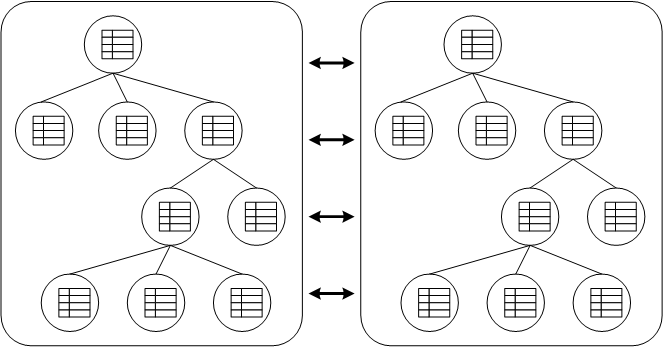
Figure 7.1. Data structured as a tree
Any modifications (see Chapter 2, User API) in one cache instance will be replicated to the other cache. Naturally, you can have more than 2 caches in a cluster. Depending on the transactional settings, this replication will occur either after each modification or at the end of a transaction, at commit time. When a new cache is created, it can optionally acquire the contents from one of the existing caches on start up.
7.2. SPI Interfaces
Copy linkLink copied to clipboard!
In addition to
Cache and Node interfaces, JBoss Cache exposes more powerful CacheSPI and NodeSPI interfaces, which offer more control over the internals of JBoss Cache. These interfaces are not intended for general use, but are designed for people who wish to extend and enhance JBoss Cache, or write custom Interceptor or CacheLoader instances.
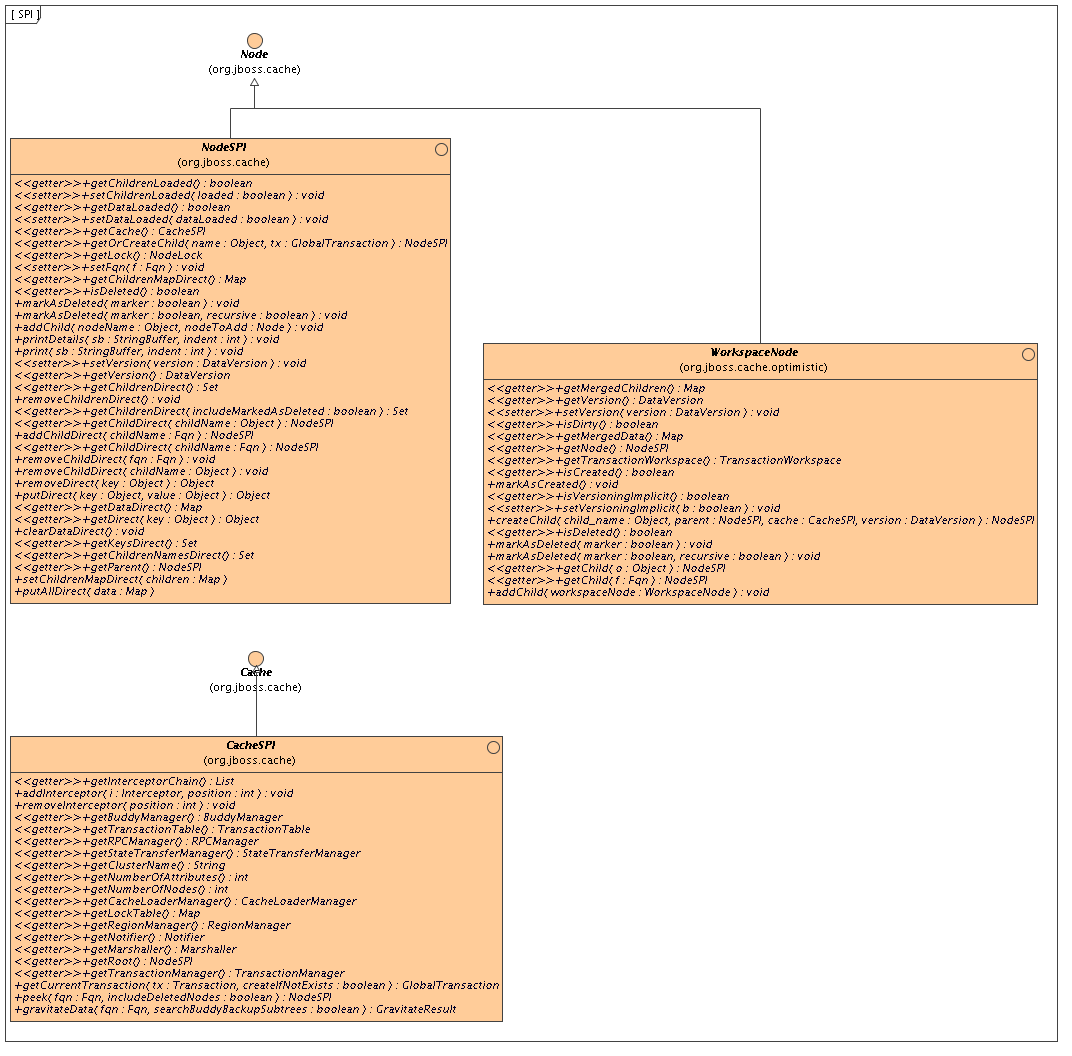
Figure 7.2. SPI Interfaces
The
CacheSPI interface cannot be created, but is injected into Interceptor and CacheLoader implementations by the setCache(CacheSPI cache) methods on these interfaces. CacheSPI extends Cache so all the functionality of the basic API is also available.
Similarly, a
NodeSPI interface cannot be created. Instead, one is obtained by performing operations on CacheSPI, obtained as above. For example, Cache.getRoot() : Node is overridden as CacheSPI.getRoot() : NodeSPI.
It is important to note that directly casting a
Cache or Node to its SPI counterpart is not recommended and is bad practice, since the inheritance of interfaces it is not a contract that is guaranteed to be upheld moving forward. The exposed public APIs, on the other hand, is guaranteed to be upheld.
7.3. Method Invocations On Nodes
Copy linkLink copied to clipboard!
Since the cache is essentially a collection of nodes, aspects such as clustering, persistence, eviction, etc. need to be applied to these nodes when operations are invoked on the cache as a whole or on individual nodes. To achieve this in a clean, modular and extensible manner, an interceptor chain is used. The chain is built up of a series of interceptors, each one adding an aspect or particular functionality. The chain is built when the cache is created, based on the configuration used.
It is important to note that the
NodeSPI offers some methods (such as the xxxDirect() method family) that operate on a node directly without passing through the interceptor stack. Plug-in authors should note that using such methods will affect the aspects of the cache that may need to be applied, such as locking, replication, etc. To put it simply, do not use such methods unless you really know what you are doing!
7.3.1. Interceptors
Copy linkLink copied to clipboard!
JBoss Cache essentially is a core data structure - an implementation of
DataContainer - and aspects and features are implemented using interceptors in front of this data structure. A CommandInterceptor is an abstract class, interceptor implementations extend this.
CommandInterceptor implements the Visitor interface so it is able to alter commands in a strongly typed manner as the command makes its way to the data structure. More on visitors and commands in the next section.
Interceptor implementations are chained together in the
InterceptorChain class, which dispatches a command across the chain of interceptors. A special interceptor, the CallInterceptor, always sits at the end of this chain to invoke the command being passed up the chain by calling the command's process() method.
JBoss Cache ships with several interceptors, representing different behavioral aspects, some of which are:
The interceptor chain configured for your cache instance can be obtained and inspected by calling
TxInterceptor- looks for ongoing transactions and registers with transaction managers to participate in synchronization eventsReplicationInterceptor- replicates state across a cluster using the RpcManager classCacheLoaderInterceptor- loads data from a persistent store if the data requested is not available in memory
CacheSPI.getInterceptorChain(), which returns an ordered List of interceptors in the order in which they would be encountered by a command.
7.3.1.1. Writing Custom Interceptors
Copy linkLink copied to clipboard!
Custom interceptors to add specific aspects or features can be written by extending
CommandInterceptor and overriding the relevant visitXXX() methods based on the commands you are interested in intercepting. There are other abstract interceptors you could extend instead, such as the PrePostProcessingCommandInterceptor and the SkipCheckChainedInterceptor. Please see their respective javadocs for details on the extra features provided.
The custom interceptor will need to be added to the interceptor chain by using the
Cache.addInterceptor() methods. See the javadocs on these methods for details.
Adding custom interceptors via XML is also supported, please see the Chapter 12, Configuration References for details.
7.3.2. Commands and Visitors
Copy linkLink copied to clipboard!
Internally, JBoss Cache uses a command/visitor pattern to execute API calls. Whenever a method is called on the cache interface, the
CacheInvocationDelegate, which implements the Cache interface, creates an instance of VisitableCommand and dispatches this command up a chain of interceptors. Interceptors, which implement the Visitor interface, are able to handle VisitableCommands they are interested in, and add behavior to the command.
Each command contains all knowledge of the command being executed such as parameters used and processing behavior, encapsulated in a
process() method. For example, the RemoveNodeCommand is created and passed up the interceptor chain when Cache.removeNode() is called, and RemoveNodeCommand.process() has the necessary knowledge of how to remove a node from the data structure.
In addition to being visitable, commands are also replicable. The JBoss Cache marshalers know how to efficiently marshal commands and invoke them on remote cache instances using an internal RPC mechanism based on JGroups.
7.3.3. InvocationContexts
Copy linkLink copied to clipboard!
InvocationContext holds intermediate state for the duration of a single invocation, and is set up and destroyed by the InvocationContextInterceptor which sits at the start of the interceptor chain.
InvocationContext, as its name implies, holds contextual information associated with a single cache method invocation. Contextual information includes associated javax.transaction.Transaction or org.jboss.cache.transaction.GlobalTransaction, method invocation origin ( InvocationContext.isOriginLocal() ) as well as Section 3.4.1, “Overriding the Configuration via the Option API”, and information around which nodes have been locked, etc.
The
InvocationContext can be obtained by calling Cache.getInvocationContext().
7.4. Managers For Subsystems
Copy linkLink copied to clipboard!
Some aspects and functionality is shared by more than a single interceptor. Some of these have been encapsulated into managers, for use by various interceptors, and are made available by the
CacheSPI interface.
7.4.1. RpcManager
Copy linkLink copied to clipboard!
This class is responsible for calls made via the JGroups channel for all RPC calls to remote caches, and encapsulates the JGroups channel used.
7.4.2. BuddyManager
Copy linkLink copied to clipboard!
This class manages buddy groups and invokes group organization remote calls to organize a cluster of caches into smaller sub-groups.
7.4.3. CacheLoaderManager
Copy linkLink copied to clipboard!
Sets up and configures cache loaders. This class wraps individual
CacheLoader instances in delegating classes, such as SingletonStoreCacheLoader or AsyncCacheLoader, or may add the CacheLoader to a chain using the ChainingCacheLoader.
7.5. Marshaling And Wire Formats
Copy linkLink copied to clipboard!
Early versions of JBoss Cache simply wrote cached data to the network by writing to an
ObjectOutputStream during replication. Over various releases in the JBoss Cache 1.x.x series this approach was gradually deprecated in favor of a more mature marshaling framework. In the JBoss Cache 2.x.x series, this is the only officially supported and recommended mechanism for writing objects to datastreams.

Figure 7.3. The Marshaler interface
7.5.1. The Marshaler Interface
Copy linkLink copied to clipboard!
The
Marshaler interface extends RpcDispatcher.Marshaler from JGroups. This interface has two main implementations - a delegating VersionAwareMarshaller and a concrete CacheMarshaller300 .
The Marshaler can be obtained by calling
CacheSPI.getMarshaller(), and defaults to the VersionAwareMarshaller. Users may also write their own marshalers by implementing the Marshaler interface or extending the AbstractMarshaller class, and adding it to their configuration by using the Configuration.setMarshallerClass() setter.
7.5.2. VersionAwareMarshaller
Copy linkLink copied to clipboard!
As the name suggests, this Marshaler adds a version
short to the start of any stream when writing, enabling similar VersionAwareMarshaller instances to read the version short and know which specific Marshaler implementation to delegate the call to. For example, CacheMarshaller200 is the Marshaler for JBoss Cache 2.0.x. JBoss Cache 3.0.x ships with CacheMarshaller300 with an improved wire protocol. Using a VersionAwareMarshaller helps achieve wire protocol compatibility between minor releases but still affords us the flexibility to tweak and improve the wire protocol between minor or micro releases.
7.6. Class Loading and Regions
Copy linkLink copied to clipboard!
When used to cluster state of application servers, applications deployed in the application tend to put instances of objects specific to their application in the cache (or in an
HttpSession object) which would require replication. It is common for application servers to assign separate ClassLoader instances to each application deployed, but have JBoss Cache libraries referenced by the application server's ClassLoader.
To enable us to successfully marshal and unmarshal objects from such class loaders, we use a concept called regions. A region is a portion of the cache which share a common class loader (a region also has other uses - see Chapter 10, Eviction).
A region is created by using the
Cache.getRegion(Fqn fqn, boolean createIfNotExists) method, and returns an implementation of the Region interface. Once a region is obtained, a class loader for the region can be set or unset, and the region can be activated/deactivated. By default, regions are active unless the InactiveOnStartup configuration attribute is set to true.
Chapter 8. Cache Modes and Clustering
Copy linkLink copied to clipboard!
This chapter talks about aspects around clustering JBoss Cache.
8.1. Cache Replication Modes
Copy linkLink copied to clipboard!
JBoss Cache can be configured to be either local (standalone) or clustered. If in a cluster, the cache can be configured to replicate changes, or to invalidate changes. A detailed discussion on this follows.
8.1.1. Local Mode
Copy linkLink copied to clipboard!
Local caches do not join a cluster and do not communicate with other caches in a cluster. The dependency on the JGroups library is still there, although a JGroups channel is not started.
8.1.2. Replicated Caches
Copy linkLink copied to clipboard!
Replicated caches replicate all changes to some or all of the other cache instances in the cluster. Replication can either happen after each modification (no transactions or batches), or at the end of a transaction or batch.
Replication can be synchronous or asynchronous. Use of either one of the options is application dependent. Synchronous replication blocks the caller (e.g. on a
put() ) until the modifications have been replicated successfully to all nodes in a cluster. Asynchronous replication performs replication in the background (the put() returns immediately). JBoss Cache also offers a replication queue, where modifications are replicated periodically (i.e. interval-based), or when the queue size exceeds a number of elements, or a combination thereof. A replication queue can therefore offer much higher performance as the actual replication is performed by a background thread.
Asynchronous replication is faster (no caller blocking), because synchronous replication requires acknowledgments from all nodes in a cluster that they received and applied the modification successfully (round-trip time). However, when a synchronous replication returns successfully, the caller knows for sure that all modifications have been applied to all cache instances, whereas this is not be the case with asynchronous replication. With asynchronous replication, errors are simply written to a log. Even when using transactions, a transaction may succeed but replication may not succeed on all cache instances.
8.1.2.1. Replicated Caches and Transactions
Copy linkLink copied to clipboard!
When using transactions, replication only occurs at the transaction boundary - i.e., when a transaction commits. This results in minimizing replication traffic since a single modification is broadcast rather than a series of individual modifications, and can be a lot more efficient than not using transactions. Another effect of this is that if a transaction were to roll back, nothing is broadcast across a cluster.
Depending on whether you are running your cluster in asynchronous or synchronous mode, JBoss Cache will use either a single phase or two-phase commit protocol, respectively.
8.1.2.1.1. One Phase Commits
Copy linkLink copied to clipboard!
Used when your cache mode is REPL_ASYNC. All modifications are replicated in a single call, which instructs remote caches to apply the changes to their local in-memory state and commit locally. Remote errors/rollbacks are never fed back to the originator of the transaction since the communication is asynchronous.
8.1.2.1.2. Two Phase Commits
Copy linkLink copied to clipboard!
Used when your cache mode is REPL_SYNC. Upon committing your transaction, JBoss Cache broadcasts a prepare call, which carries all modifications relevant to the transaction. Remote caches then acquire local locks on their in-memory state and apply the modifications. Once all remote caches respond to the prepare call, the originator of the transaction broadcasts a commit. This instructs all remote caches to commit their data. If any of the caches fail to respond to the prepare phase, the originator broadcasts a rollback.
Note that although the prepare phase is synchronous, the commit and rollback phases are asynchronous. This is because Sun's JTA specification does not specify how transactional resources should deal with failures at this stage of a transaction; and other resources participating in the transaction may have indeterminate state anyway. As such, we do away with the overhead of synchronous communication for this phase of the transaction. That said, they can be forced to be synchronous using the
SyncCommitPhase and SyncRollbackPhase configuration attributes.
8.1.2.2. Buddy Replication
Copy linkLink copied to clipboard!
Buddy Replication allows you to suppress replicating your data to all instances in a cluster. Instead, each instance picks one or more 'buddies' in the cluster, and only replicates to these specific buddies. This greatly helps scalability as there is no longer a memory and network traffic impact every time another instance is added to a cluster.
One of the most common use cases of Buddy Replication is when a replicated cache is used by a servlet container to store HTTP session data. One of the pre-requisites to buddy replication working well and being a real benefit is the use of session affinity , more casually known as sticky sessions in HTTP session replication speak. What this means is that if certain data is frequently accessed, it is desirable that this is always accessed on one instance rather than in a round-robin fashion as this helps the cache cluster optimize how it chooses buddies, where it stores data, and minimizes replication traffic.
If this is not possible, Buddy Replication may prove to be more of an overhead than a benefit.
8.1.2.2.1. Selecting Buddies
Copy linkLink copied to clipboard!
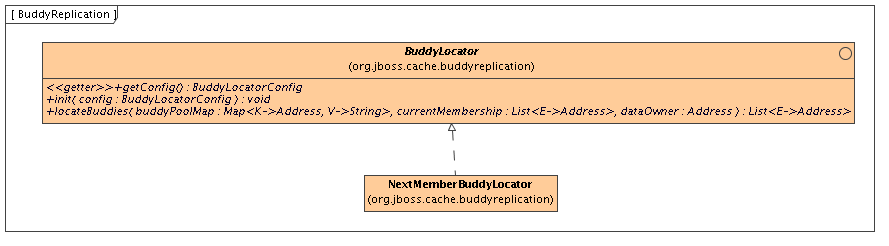
Figure 8.1. BuddyLocator
Buddy Replication uses an instance of a
BuddyLocator which contains the logic used to select buddies in a network. JBoss Cache currently ships with a single implementation, NextMemberBuddyLocator, which is used as a default if no implementation is provided. The NextMemberBuddyLocator selects the next member in the cluster, as the name suggests, and guarantees an even spread of buddies for each instance.
The
NextMemberBuddyLocator takes in 2 parameters, both optional.
numBuddies- specifies how many buddies each instance should pick to back its data onto. This defaults to 1.ignoreColocatedBuddies- means that each instance will try to select a buddy on a different physical host. If not able to do so though, it will fall back to co-located instances. This defaults totrue.
8.1.2.2.2. BuddyPools
Copy linkLink copied to clipboard!
Also known as replication groups, a buddy pool is an optional construct where each instance in a cluster may be configured with a buddy pool name. Think of this as an 'exclusive club membership' where when selecting buddies,
BuddyLocator s that support buddy pools would try and select buddies sharing the same buddy pool name. This allows system administrators a degree of flexibility and control over how buddies are selected. For example, a sysadmin may put two instances on two separate physical servers that may be on two separate physical racks in the same buddy pool. So rather than picking an instance on a different host on the same rack, BuddyLocator s would rather pick the instance in the same buddy pool, on a separate rack which may add a degree of redundancy.
8.1.2.2.3. Failover
Copy linkLink copied to clipboard!
In the unfortunate event of an instance crashing, it is assumed that the client connecting to the cache (directly or indirectly, via some other service such as HTTP session replication) is able to redirect the request to any other random cache instance in the cluster. This is where a concept of Data Gravitation comes in.
Data Gravitation is a concept where if a request is made on a cache in the cluster and the cache does not contain this information, it asks other instances in the cluster for the data. In other words, data is lazily transferred, migrating only when other nodes ask for it. This strategy prevents a network storm effect where lots of data is pushed around healthy nodes because only one (or a few) of them die.
If the data is not found in the primary section of some node, it would (optionally) ask other instances to check in the backup data they store for other caches. This means that even if a cache containing your session dies, other instances will still be able to access this data by asking the cluster to search through their backups for this data.
Once located, this data is transferred to the instance which requested it and is added to this instance's data tree. The data is then (optionally) removed from all other instances (and backups) so that if session affinity is used, the affinity should now be to this new cache instance which has just taken ownership of this data.
Data Gravitation is implemented as an interceptor. The following (all optional) configuration properties pertain to data gravitation.
dataGravitationRemoveOnFind- forces all remote caches that own the data or hold backups for the data to remove that data, thereby making the requesting cache the new data owner. This removal, of course, only happens after the new owner finishes replicating data to its buddy. If set tofalsean evict is broadcast instead of a remove, so any state persisted in cache loaders will remain. This is useful if you have a shared cache loader configured. Defaults totrue.dataGravitationSearchBackupTrees- Asks remote instances to search through their backups as well as main data trees. Defaults totrue. The resulting effect is that if this istruethen backup nodes can respond to data gravitation requests in addition to data owners.autoDataGravitation- Whether data gravitation occurs for every cache miss. By default this is set tofalseto prevent unnecessary network calls. Most use cases will know when it may need to gravitate data and will pass in anOptionto enable data gravitation on a per-invocation basis. IfautoDataGravitationistruethisOptionis unnecessary.
8.1.2.2.4. Configuration
Copy linkLink copied to clipboard!
See the Chapter 12, Configuration References for details on configuring buddy replication.
8.2. Invalidation
Copy linkLink copied to clipboard!
If a cache is configured for invalidation rather than replication, every time data is changed in a cache other caches in the cluster receive a message informing them that their data is now stale and should be evicted from memory. Invalidation, when used with a shared cache loader (see chapter on Chapter 9, Cache Loaders) would cause remote caches to refer to the shared cache loader to retrieve modified data. The benefit of this is twofold: network traffic is minimized as invalidation messages are very small compared to replicating updated data, and also that other caches in the cluster look up modified data in a lazy manner, only when needed.
Invalidation messages are sent after each modification (no transactions or batches), or at the end of a transaction or batch, upon successful commit. This is usually more efficient as invalidation messages can be optimized for the transaction as a whole rather than on a per-modification basis.
Invalidation too can be synchronous or asynchronous, and just as in the case of replication, synchronous invalidation blocks until all caches in the cluster receive invalidation messages and have evicted stale data while asynchronous invalidation works in a 'fire-and-forget' mode, where invalidation messages are broadcast but does not block and wait for responses.
8.3. State Transfer
Copy linkLink copied to clipboard!
State Transfer refers to the process by which a JBoss Cache instance prepares itself to begin providing a service by acquiring the current state from another cache instance and integrating that state into its own state.
8.3.1. State Transfer Types
Copy linkLink copied to clipboard!
There are three divisions of state transfer types depending on a point of view related to state transfer. First, in the context of particular state transfer implementation, the underlying plumbing, there are two starkly different state transfer types: byte array and streaming based state transfer. Second, state transfer can be full or partial state transfer depending on a subtree being transferred. Entire cache tree transfer represents full transfer while transfer of a particular subtree represents partial state transfer. And finally state transfer can be "in-memory" and "persistent" transfer depending on a particular use of cache.
8.3.2. Byte array and streaming based state transfer
Copy linkLink copied to clipboard!
Byte array based transfer was a default and only transfer methodology for cache in all previous releases up to 2.0. Byte array based transfer loads entire state transferred into a byte array and sends it to a state receiving member. Major limitation of this approach is that the state transfer that is very large (>1GB) would likely result in OutOfMemoryException. Streaming state transfer provides an InputStream to a state reader and an OutputStream to a state writer. OutputStream and InputStream abstractions enable state transfer in byte chunks thus resulting in smaller memory requirements. For example, if application state is represented as a tree whose aggregate size is 1GB, rather than having to provide a 1GB byte array streaming state transfer transfers the state in chunks of N bytes where N is user configurable.
Byte array and streaming based state transfer are completely API transparent, interchangeable, and statically configured through a standard cache configuration XML file. Refer to JGroups documentation on how to change from one type of transfer to another.
8.3.3. Full and partial state transfer
Copy linkLink copied to clipboard!
If either in-memory or persistent state transfer is enabled, a full or partial state transfer will be done at various times, depending on how the cache is used. "Full" state transfer refers to the transfer of the state related to the entire tree -- i.e. the root node and all nodes below it. A "partial" state transfer is one where just a portion of the tree is transferred -- i.e. a node at a given Fqn and all nodes below it.
If either in-memory or persistent state transfer is enabled, state transfer will occur at the following times:
- Initial state transfer. This occurs when the cache is first started (as part of the processing of the
start()method). This is a full state transfer. The state is retrieved from the cache instance that has been operational the longest. [1] If there is any problem receiving or integrating the state, the cache will not start.Initial state transfer will occur unless:- The cache's
InactiveOnStartupproperty istrue. This property is used in conjunction with region-based marshaling. - Buddy replication is used. See below for more on state transfer with buddy replication.
- Partial state transfer following region activation. When region-based marshaling is used, the application needs to register a specific class loader with the cache. This class loader is used to unmarshal the state for a specific region (subtree) of the cache.After registration, the application calls
cache.getRegion(fqn, true).activate(), which initiates a partial state transfer of the relevant subtree's state. The request is first made to the oldest cache instance in the cluster. However, if that instance responds with no state, it is then requested from each instance in turn until one either provides state or all instances have been queried.Typically when region-based marshaling is used, the cache'sInactiveOnStartupproperty is set totrue. This suppresses initial state transfer, which would fail due to the inability to deserialize the transferred state. - Buddy replication. When buddy replication is used, initial state transfer is disabled. Instead, when a cache instance joins the cluster, it becomes the buddy of one or more other instances, and one or more other instances become its buddy. Each time an instance determines it has a new buddy providing backup for it, it pushes its current state to the new buddy. This "pushing" of state to the new buddy is slightly different from other forms of state transfer, which are based on a "pull" approach (i.e. recipient asks for and receives state). However, the process of preparing and integrating the state is the same.This "push" of state upon buddy group formation only occurs if the
InactiveOnStartupproperty is set tofalse. If it istrue, state transfer amongst the buddies only occurs when the application activates the region on the various members of the group.Partial state transfer following a region activation call is slightly different in the buddy replication case as well. Instead of requesting the partial state from one cache instance, and trying all instances until one responds, with buddy replication the instance that is activating a region will request partial state from each instance for which it is serving as a backup.
8.3.4. Transient ("in-memory") and persistent state transfer
Copy linkLink copied to clipboard!
The state that is acquired and integrated can consist of two basic types:
- "Transient" or "in-memory" state. This consists of the actual in-memory state of another cache instance - the contents of the various in-memory nodes in the cache that is providing state are serialized and transferred; the recipient deserializes the data, creates corresponding nodes in its own in-memory tree, and populates them with the transferred data."In-memory" state transfer is enabled by setting the cache's
FetchInMemoryStateconfiguration attribute totrue. - "Persistent" state. Only applicable if a non-shared cache loader is used. The state stored in the state-provider cache's persistent store is deserialized and transferred; the recipient passes the data to its own cache loader, which persists it to the recipient's persistent store."Persistent" state transfer is enabled by setting a cache loader's
fetchPersistentStateattribute totrue. If multiple cache loaders are configured in a chain, only one can have this property set to true; otherwise you will get an exception at start up.Persistent state transfer with a shared cache loader does not make sense, as the same persistent store that provides the data will just end up receiving it. Therefore, if a shared cache loader is used, the cache will not allow a persistent state transfer even if a cache loader hasfetchPersistentStateset totrue.
Which of these types of state transfer is appropriate depends on the usage of the cache.
- If a write-through cache loader is used, the current cache state is fully represented by the persistent state. Data may have been evicted from the in-memory state, but it will still be in the persistent store. In this case, if the cache loader is not shared, persistent state transfer is used to ensure the new cache has the correct state. In-memory state can be transferred as well if the desire is to have a "hot" cache -- one that has all relevant data in memory when the cache begins providing service. (Note that the
<preload>element in the<loaders>configuration element can be used as well to provide a "warm" or "hot" cache without requiring an in-memory state transfer. This approach somewhat reduces the burden on the cache instance providing state, but increases the load on the persistent store on the recipient side.) - If a cache loader is used with passivation, the full representation of the state can only be obtained by combining the in-memory (i.e. non-passivated) and persistent (i.e. passivated) states. Therefore an in-memory state transfer is necessary. A persistent state transfer is necessary if the cache loader is not shared.
- If no cache loader is used and the cache is solely a write-aside cache (i.e. one that is used to cache data that can also be found in a persistent store, e.g. a database), whether or not in-memory state should be transferred depends on whether or not a "hot" cache is desired.
8.3.5. Configuring State Transfer
Copy linkLink copied to clipboard!
To ensure state transfer behaves as expected, it is important that all nodes in the cluster are configured with the same settings for persistent and transient state. This is because byte array based transfers, when requested, rely only on the requester's configuration while stream based transfers rely on both the requester and sender's configuration, and this is expected to be identical.
Chapter 9. Cache Loaders
Copy linkLink copied to clipboard!
JBoss Cache can use a
CacheLoader to back up the in-memory cache to a back end datastore. If JBoss Cache is configured with a cache loader, then the following features are provided:
- Whenever a cache element is accessed, and that element is not in the cache (e.g. due to eviction or due to server restart), then the cache loader transparently loads the element into the cache if found in the back end store.
- Whenever an element is modified, added or removed, then that modification is persisted in the back end store via the cache loader. If transactions are used, all modifications created within a transaction are persisted. To this end, the
CacheLoadertakes part in the two phase commit protocol run by the transaction manager, although it does not do so explicitly.
9.1. The CacheLoader Interface and Lifecycle
Copy linkLink copied to clipboard!
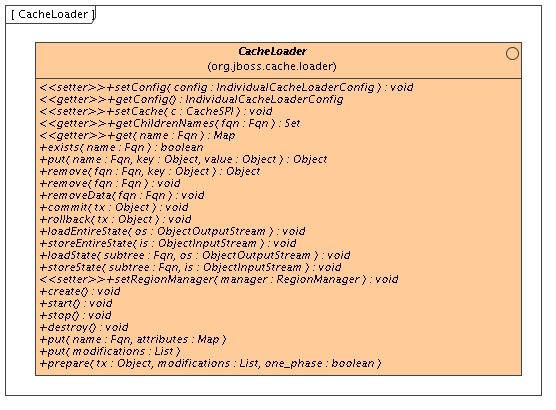
Figure 9.1. The CacheLoader interface
The interaction between JBoss Cache and a
CacheLoader implementation is as follows. When CacheLoaderConfiguration (see below) is non-null, an instance of each configured CacheLoader is created when the cache is created, and started when the cache is started.
CacheLoader.create() and CacheLoader.start() are called when the cache is started. Correspondingly, stop() and destroy() are called when the cache is stopped.
Next,
setConfig() and setCache() are called. The latter can be used to store a reference to the cache, the former is used to configure this instance of the CacheLoader . For example, here a database cache loader could establish a connection to the database.
The
CacheLoader interface has a set of methods that are called when no transactions are used: get() , put() , remove() and removeData() : they get/set/remove the value immediately. These methods are described as javadoc comments in the interface.
Then there are three methods that are used with transactions:
prepare() , commit() and rollback() . The prepare() method is called when a transaction is to be committed. It has a transaction object and a list of modifications as argument. The transaction object can be used as a key into a hashmap of transactions, where the values are the lists of modifications. Each modification list has a number of Modification elements, which represent the changes made to a cache for a given transaction. When prepare() returns successfully, then the cache loader must be able to commit (or rollback) the transaction successfully.
JBoss Cache takes care of calling prepare(), commit() and rollback() on the cache loaders at the right time.
The
commit() method tells the cache loader to commit the transaction, and the rollback() method tells the cache loader to discard the changes associated with that transaction.
See the javadocs on this interface for a detailed explanation on each method and the contract implementations would need to fulfill.
9.2. Configuration
Copy linkLink copied to clipboard!
Cache loaders are configured as follows in the JBoss Cache XML file. Note that you can define several cache loaders, in a chain. The impact is that the cache will look at all of the cache loaders in the order they've been configured, until it finds a valid, non-null element of data. When performing writes, all cache loaders are written to, except if the
ignoreModifications element has been set to true for a specific cache loader. See the configuration section below for details.
The
class element defines the class of the cache loader implementation. (Note that, because of a bug in the properties editor in EAP, backslashes in variables for Windows file names might not get expanded correctly, so replace="false" may be necessary). Note that an implementation of cache loader has to have an empty constructor.
The
properties element defines a configuration specific to the given implementation. The file system-based implementation for example defines the root directory to be used, whereas a database implementation might define the database URL, name and password to establish a database connection. This configuration is passed to the cache loader implementation via CacheLoader.setConfig(Properties). Note that backspaces may have to be escaped.
preload allows us to define a list of nodes, or even entire subtrees, that are visited by the cache on start up, in order to preload the data associated with those nodes. The default ("/") loads the entire data available in the back end store into the cache, which is probably not a good idea given that the data in the back end store might be large. As an example, /a, /product/catalogue loads the subtrees /a and /product/catalogue into the cache, but nothing else. Anything else is loaded lazily when accessed. Preloading makes sense when one anticipates using elements under a given subtree frequently. .
fetchPersistentState determines whether or not to fetch the persistent state of a cache when joining a cluster. Only one configured cache loader may set this property to true; if more than one cache loader does so, a configuration exception will be thrown when starting your cache service.
async determines whether writes to the cache loader block until completed, or are run on a separate thread so writes return immediately. If this is set to true, an instance of org.jboss.cache.loader.AsyncCacheLoader is constructed with an instance of the actual cache loader to be used. The AsyncCacheLoader then delegates all requests to the underlying cache loader, using a separate thread if necessary. See the Javadocs on AsyncCacheLoader for more details. If unspecified, the async element defaults to false.
Note
There is always the possibility of dirty reads since all writes are performed asynchronously, and it is thus impossible to guarantee when (and even if) a write succeeds. This needs to be kept in mind when setting the
async element to true.
ignoreModifications determines whether write methods are pushed down to the specific cache loader. Situations may arise where transient application data should only reside in a file based cache loader on the same server as the in-memory cache, for example, with a further shared JDBCCacheLoader used by all servers in the network. This feature allows you to write to the 'local' file cache loader but not the shared JDBCCacheLoader. This property defaults to false, so writes are propagated to all cache loaders configured.
purgeOnStatup empties the specified cache loader (if ignoreModifications is false) when the cache loader starts up.
shared indicates that the cache loader is shared among different cache instances, for example where all instances in a cluster use the same JDBC settings t talk to the same remote, shared database. Setting this to true prevents repeated and unnecessary writes of the same data to the cache loader by different cache instances. Default value is false .
9.2.1. Singleton Store Configuration
Copy linkLink copied to clipboard!
singletonStore element enables modifications to be stored by only one node in the cluster, the coordinator. Essentially, whenever any data comes in to some node it is always replicated so as to keep the caches' in-memory states in sync; the coordinator, though, has the sole responsibility of pushing that state to disk. This functionality can be activated setting the enabled subelement to true in all nodes, but again only the coordinator of the cluster will store the modifications in the underlying cache loader as defined in loader element. You cannot define a cache loader as shared and with singletonStore enabled at the same time. Default value for enabled is false.
Optionally, within the
singletonStore element, you can define a class element that specifies the implementation class that provides the singleton store functionality. This class must extend org.jboss.cache.loader.AbstractDelegatingCacheLoader, and if absent, it defaults to org.jboss.cache.loader.SingletonStoreCacheLoader.
The
properties subelement defines properties that allow changing the behavior of the class providing the singleton store functionality. By default, pushStateWhenCoordinator and pushStateWhenCoordinatorTimeout properties have been defined, but more could be added as required by the user-defined class providing singleton store functionality.
pushStateWhenCoordinator allows the in-memory state to be pushed to the cache store when a node becomes the coordinator, as a result of the new election of coordinator due to a cluster topology change. This can be very useful in situations where the coordinator crashes and there's a gap in time until the new coordinator is elected. During this time, if this property was set to false and the cache was updated, these changes would never be persisted. Setting this property to true would ensure that any changes during this process also get stored in the cache loader. You would also want to set this property to true if each node's cache loader is configured with a different location. Default value is true.
pushStateWhenCoordinatorTimeout is only relevant if pushStateWhenCoordinator is true in which case, sets the maximum number of milliseconds that the process of pushing the in-memory state to the underlying cache loader should take, reporting a PushStateException if exceeded. Default value is 20000.
Note
Setting up a cache loader as a singleton and using cache passivation (via evictions) can lead to undesired effects. If a node is to be passivated as a result of an eviction, while the cluster is in the process of electing a new coordinator, the data will be lost. This is because no coordinator is active at that time and therefore, none of the nodes in the cluster will store the passivated node. A new coordinator is elected in the cluster when either, the coordinator leaves the cluster, the coordinator crashes or stops responding.
9.3. Shipped Implementations
Copy linkLink copied to clipboard!
The currently available implementations shipped with JBoss Cache are as follows.
9.3.1. File system based cache loaders
Copy linkLink copied to clipboard!
JBoss Cache ships with several cache loaders that utilize the file system as a data store. They all require that the
<loader><properties> configuration element contains a location property, which maps to a directory to be used as a persistent store (e.g., location=/tmp/myDataStore ). Used mainly for testing and not recommended for production use.
FileCacheLoader, which is a simple file system-based implementation. By default, this cache loader checks for any potential character portability issues in the location or tree node names, for example invalid characters, producing warning messages. These checks can be disabled addingcheck.character.portabilityproperty to the<properties>element and setting it tofalse(e.g.,check.character.portability=false).The FileCacheLoader has some severe limitations which restrict its use in a production environment, or if used in such an environment, it should be used with due care and sufficient understanding of these limitations.- Due to the way the FileCacheLoader represents a tree structure on disk (directories and files) traversal is inefficient for deep trees.
- Usage on shared file systems like NFS, Windows shares, etc. should be avoided as these do not implement proper file locking and can cause data corruption.
- Usage with an isolation level of NONE can cause corrupt writes as multiple threads attempt to write to the same file.
- File systems are inherently not transactional, so when attempting to use your cache in a transactional context, failures when writing to the file (which happens during the commit phase) cannot be recovered.
As a rule of thumb, it is recommended that the FileCacheLoader not be used in a highly concurrent, transactional or stressful environment, and its use is restricted to testing.BdbjeCacheLoader, which is a cache loader implementation based on the Oracle/Sleepycat's BerkeleyDB Java Edition.JdbmCacheLoader, which is a cache loader implementation based on the JDBM engine, a fast and free alternative to BerkeleyDB.
Note that the BerkeleyDB implementation is much more efficient than the file system-based implementation, and provides transactional guarantees, but requires a commercial license if distributed with an application (see http://www.oracle.com/database/berkeley-db/index.html for details).
9.3.2. Cache loaders that delegate to other caches
Copy linkLink copied to clipboard!
LocalDelegatingCacheLoader, which enables loading from and storing to another local (same JVM) cache.ClusteredCacheLoader, which allows querying of other caches in the same cluster for in-memory data via the same clustering protocols used to replicate data. Writes are not 'stored' though, as replication would take care of any updates needed. You need to specify a property calledtimeout, a long value telling the cache loader how many milliseconds to wait for responses from the cluster before assuming a null value. For example,timeout = 3000would use a timeout value of 3 seconds.
9.3.3. JDBCCacheLoader
Copy linkLink copied to clipboard!
JBossCache is distributed with a JDBC-based cache loader implementation that stores/loads nodes' state into a relational database. The implementing class is
org.jboss.cache.loader.JDBCCacheLoader.
The current implementation uses just one table. Each row in the table represents one node and contains three columns:
- column for
Fqn(which is also a primary key column) - column for node contents (attribute/value pairs)
- column for parent
Fqn
Fqns are stored as strings. Node content is stored as a BLOB.
Warning
JBoss Cache does not impose any limitations on the types of objects used in
Fqn but this implementation of cache loader requires Fqn to contain only objects of type java.lang.String. Another limitation for Fqn is its length. Since Fqn is a primary key, its default column type is VARCHAR which can store text values up to some maximum length determined by the database in use.
See this wiki page for configuration tips with specific database systems.
9.3.3.1. JDBCCacheLoader configuration
Copy linkLink copied to clipboard!
9.3.3.1.1. Table configuration
Copy linkLink copied to clipboard!
Table and column names as well as column types are configurable with the following properties.
- cache.jdbc.table.name - the name of the table. Can be prepended with schema name for the given table:
{schema_name}.{table_name}. The default value is 'jbosscache'. - cache.jdbc.table.primarykey - the name of the primary key for the table. The default value is 'jbosscache_pk'.
- cache.jdbc.table.create - can be true or false. Indicates whether to create the table during start up. If true, the table is created if it does not already exist. The default value is true.
- cache.jdbc.table.drop - can be true or false. Indicates whether to drop the table during shutdown. The default value is true.
- cache.jdbc.fqn.column - FQN column name. The default value is 'fqn'.
- cache.jdbc.fqn.type - FQN column type. The default value is 'varchar(255)'.
- cache.jdbc.node.column - node contents column name. The default value is 'node'.
- cache.jdbc.node.type - node contents column type. The default value is 'blob'. This type must specify a valid binary data type for the database being used.
9.3.3.1.2. DataSource
Copy linkLink copied to clipboard!
If you are using JBossCache in a managed environment (e.g., an application server) you can specify the JNDI name of the DataSource you want to use.
- cache.jdbc.datasource - JNDI name of the DataSource. The default value is
java:/DefaultDS.
9.3.3.1.3. JDBC driver
Copy linkLink copied to clipboard!
If you are not using DataSource you have the following properties to configure database access using a JDBC driver.
- cache.jdbc.driver - fully qualified JDBC driver name.
- cache.jdbc.url - URL to connect to the database.
- cache.jdbc.user - user name to connect to the database.
- cache.jdbc.password - password to connect to the database.
9.3.3.1.4. c3p0 connection pooling
Copy linkLink copied to clipboard!
JBoss Cache implements JDBC connection pooling when running outside of an application server standalone using the c3p0:JDBC DataSources/Resource Pools library. In order to enable it, just edit the following property:
- cache.jdbc.connection.factory - Connection factory class name. If not set, it defaults to standard non-pooled implementation. To enable c3p0 pooling, just set the connection factory class for c3p0. See example below.
You can also set any c3p0 parameters in the same cache loader properties section but do not forget to start the property name with 'c3p0.'. To find a list of available properties, please check the c3p0 documentation for the c3p0 library version distributed in c3p0:JDBC DataSources/Resource Pools . Also, in order to provide quick and easy way to try out different pooling parameters, any of these properties can be set via a System property overriding any values these properties might have in the JBoss Cache XML configuration file, for example:
-Dc3p0.maxPoolSize=20 . If a c3p0 property is not defined in either the configuration file or as a System property, default value, as indicated in the c3p0 documentation, will apply.
9.3.3.1.5. Configuration example
Copy linkLink copied to clipboard!
Below is an example of a JDBCCacheLoader using Oracle as database. The CacheLoaderConfiguration XML element contains an arbitrary set of properties which define the database-related configuration.
As an alternative to configuring the entire JDBC connection, the name of an existing data source can be given:
Configuration example for a cache loader using c3p0 JDBC connection pooling:
9.3.4. S3CacheLoader
Copy linkLink copied to clipboard!
The
S3CacheLoader uses the Amazon S3 (Simple Storage Solution) for storing cache data. Since Amazon S3 is remote network storage and has fairly high latency, it is really best for caches that store large pieces of data, such as media or files. But consider this cache loader over the JDBC or file system based cache loaders if you want remotely managed, highly reliable storage. Or, use it for applications running on Amazon's EC2 (Elastic Compute Cloud).
If you are planning to use Amazon S3 for storage, consider using it with JBoss Cache. JBoss Cache itself provides in-memory caching for your data to minimize the amount of remote access calls, thus reducing the latency and cost of fetching your Amazon S3 data. With cache replication, you are also able to load data from your local cluster without having to remotely access it every time.
Note that Amazon S3 does not support transactions. If transactions are used in your application then there is some possibility of state inconsistency when using this cache loader. However, writes are atomic, in that if a write fails nothing is considered written and data is never corrupted.
Data is stored in keys based on the Fqn of the Node and Node data is serialized as a java.util.Map using the
CacheSPI.getMarshaller() instance. Read the javadoc on how data is structured and stored. Data is stored using Java serialization. Be aware this means data is not readily accessible over HTTP to non-JBoss Cache clients. Your feedback and help would be appreciated to extend this cache loader for that purpose.
With this cache loader, single-key operations such as
Node.remove(Object) and Node.put(Object, Object) are the slowest as data is stored in a single Map instance. Use bulk operations such as Node.replaceAll(Map) and Node.clearData() for more efficiency. Try the cache.s3.optimize option as well.
9.3.4.1. Amazon S3 Library
Copy linkLink copied to clipboard!
The S3 cache loader is provided with the default distribution but requires a library to access the service at runtime. This runtime library may be obtained through a Sourceforge Maven Repository. Include the following sections in your pom.xml file:
If you do not use Maven, you can still download the amazon-s3 library by navigating the repository or through this URL.
9.3.4.2. Configuration
Copy linkLink copied to clipboard!
At a minimum, you must configure your Amazon S3 access key and secret access key. The following configuration keys are listed in general order of utility.
cache.s3.accessKeyId- Amazon S3 Access Key, available from your account profile.cache.s3.secretAccessKey- Amazon S3 Secret Access Key, available from your account profile. As this is a password, be careful not to distribute it or include this secret key in built software.cache.s3.secure- The default isfalse: Traffic is sent unencrypted over the public Internet. Set totrueto use HTTPS. Note that unencrypted uploads and downloads use less CPU.cache.s3.bucket- Name of the bucket to store data. For different caches using the same access key, use a different bucket name. Read the S3 documentation on the definition of a bucket. The default value isjboss-cache.cache.s3.callingFormat- One ofPATH,SUBDOMAIN, orVANITY. Read the S3 documentation on the use of calling domains. The default value isSUBDOMAIN.cache.s3.optimize- The default isfalse. If true,put(Map)operations replace the data stored at an Fqn rather than attempt to fetch and merge. (This option is fairly experimental at the moment.)cache.s3.parentCache- The default istrue. Set this value tofalseif you are using multiple caches sharing the same S3 bucket, that remove parent nodes of nodes being created in other caches. (This is not a common use case.)JBoss Cache stores nodes in a tree format and automatically creates intermediate parent nodes as necessary. The S3 cache loader must also create these parent nodes as well to allow for operations such asgetChildrenNamesto work properly. Checking if all parent nodes exists for everyputoperation is fairly expensive, so by default the cache loader caches the existence of these parent nodes.cache.s3.location- This denotes a primary storage location for your data to reduce loading and retrieval latency. Set toEUto store data in Europe. The default isnull, to store data in the United States.
9.3.5. TcpDelegatingCacheLoader
Copy linkLink copied to clipboard!
This cache loader allows to delegate loads and stores to another instance of JBoss Cache, which could reside (a) in the same address space, (b) in a different process on the same host, or (c) in a different process on a different host.
A TcpDelegatingCacheLoader talks to a remote
org.jboss.cache.loader.tcp.TcpCacheServer , which can be a standalone process started on the command line, or embedded as an MBean inside EAP. The TcpCacheServer has a reference to another JBoss Cache instance, which it can create itself, or which is given to it (e.g. by JBoss, using dependency injection).
As of JBoss Cache 2.1.0, the
TcpDelegatingCacheLoader transparently handles reconnects if the connection to the TcpCacheServer is lost.
The TcpDelegatingCacheLoader is configured with the host and port of the remote TcpCacheServer, and uses this to communicate to it. In addition, 2 new optional parameters are used to control transparent reconnecting to the TcpCacheServer. The
timeout property (defaults to 5000) specifies the length of time the cache loader must continue retrying to connect to the TcpCacheServer before giving up and throwing an exception. The reconnectWaitTime (defaults to 500) is how long the cache loader should wait before attempting a reconnect if it detects a communication failure. The last two parameters can be used to add a level of fault tolerance to the cache loader, do deal with TcpCacheServer restarts.
The configuration looks as follows:
This means this instance of JBoss Cache will delegate all load and store requests to the remote TcpCacheServer running on
myRemoteServer:7500 .
A typical use case could be multiple replicated instances of JBoss Cache in the same cluster, all delegating to the same TcpCacheServer instance. The TcpCacheServer might itself delegate to a database via JDBCCacheLoader, but the point here is that - if we have 5 nodes all accessing the same dataset - they will load the data from the TcpCacheServer, which has do execute one SQL statement per unloaded data set. If the nodes went directly to the database, then we'd have the same SQL executed multiple times. So TcpCacheServer serves as a natural cache in front of the DB (assuming that a network round trip is faster than a DB access (which usually also include a network round trip)).
To alleviate single point of failure, we could configure several cache loaders. The first cache loader is a ClusteredCacheLoader, the second a TcpDelegatingCacheLoader, and the last a JDBCacheLoader, effectively defining our cost of access to a cache in increasing order.
9.3.6. Transforming Cache Loaders
Copy linkLink copied to clipboard!
The way cached data is written to
FileCacheLoader and JDBCCacheLoader based cache stores has changed in JBoss Cache 2.0 in such way that these cache loaders now write and read data using the same marshaling framework used to replicate data across the network. Such change is trivial for replication purposes as it just requires the rest of the nodes to understand this format. However, changing the format of the data in cache stores brings up a new problem: how do users, which have their data stored in JBoss Cache 1.x.x format, migrate their stores to JBoss Cache 2.0 format?
With this in mind, JBoss Cache 2.0 comes with two cache loader implementations called
org.jboss.cache.loader.TransformingFileCacheLoader and org.jboss.cache.loader.TransformingJDBCCacheLoader located within the optional jbosscache-cacheloader-migration.jar file. These are one-off cache loaders that read data from the cache store in JBoss Cache 1.x.x format and write data to cache stores in JBoss Cache 2.0 format.
The idea is for users to modify their existing cache configuration file(s) momentarily to use these cache loaders and for them to create a small Java application that creates an instance of this cache, recursively reads the entire cache and writes the data read back into the cache. Once the data is transformed, users can revert back to their original cache configuration file(s). In order to help the users with this task, a cache loader migration example has been constructed which can be located under the
examples/cacheloader-migration directory within the JBoss Cache distribution. This example, called examples.TransformStore , is independent of the actual data stored in the cache as it writes back whatever it was read recursively. It is highly recommended that anyone interested in porting their data run this example first, which contains a readme.txt file with detailed information about the example itself, and also use it as base for their own application.
9.4. Cache Passivation
Copy linkLink copied to clipboard!
A cache loader can be used to enforce node passivation and activation on eviction in a cache.
Cache Passivation is the process of removing an object from in-memory cache and writing it to a secondary data store (e.g., file system, database) on eviction. Cache Activation is the process of restoring an object from the data store into the in-memory cache when it's needed to be used. In both cases, the configured cache loader will be used to read from the data store and write to the data store.
When an eviction policy in effect evicts a node from the cache, if passivation is enabled, a notification that the node is being passivated will be emitted to the cache listeners and the node and its children will be stored in the cache loader store. When a user attempts to retrieve a node that was evicted earlier, the node is loaded (lazy loaded) from the cache loader store into memory. When the node and its children have been loaded, they're removed from the cache loader and a notification is emitted to the cache listeners that the node has been activated.
To enable cache passivation/activation, you can set
passivation to true. The default is false . When passivation is used, only the first cache loader configured is used and all others are ignored.
9.4.1. Cache Loader Behavior with Passivation Disabled vs. Enabled
Copy linkLink copied to clipboard!
When passivation is disabled, whenever an element is modified, added or removed, then that modification is persisted in the back end store via the cache loader. There is no direct relationship between eviction and cache loading. If you do not use eviction, what's in the persistent store is basically a copy of what's in memory. If you do use eviction, what's in the persistent store is basically a superset of what's in memory (i.e. it includes nodes that have been evicted from memory).
When passivation is enabled, there is a direct relationship between eviction and the cache loader. Writes to the persistent store via the cache loader only occur as part of the eviction process. Data is deleted from the persistent store when the application reads it back into memory. In this case, what's in memory and what's in the persistent store are two subsets of the total information set, with no intersection between the subsets.
Following is a simple example, showing what state is in RAM and in the persistent store after each step of a 6 step process:
- Insert /A
- Insert /B
- Eviction thread runs, evicts /A
- Read /A
- Eviction thread runs, evicts /B
- Remove /B
When passivation is disabled:
When passivation is enabled:
9.5. Strategies
Copy linkLink copied to clipboard!
This section discusses different patterns of combining different cache loader types and configuration options to achieve specific outcomes.
9.5.1. Local Cache With Store
Copy linkLink copied to clipboard!
This is the simplest case. We have a JBoss Cache instance, whose cache mode is
LOCAL , therefore no replication is going on. The cache loader simply loads non-existing elements from the store and stores modifications back to the store. When the cache is started, depending on the preload element, certain data can be preloaded, so that the cache is partly warmed up.
9.5.2. Replicated Caches With All Caches Sharing The Same Store
Copy linkLink copied to clipboard!
The following figure shows 2 JBoss Cache instances sharing the same back end store:
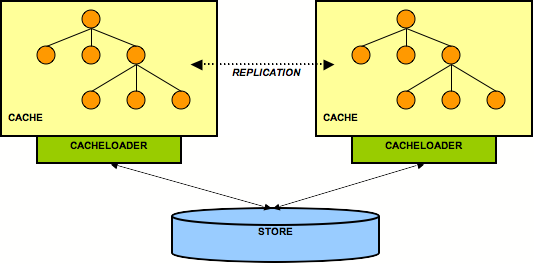
Figure 9.2. 2 nodes sharing a back end store
Both nodes have a cache loader that accesses a common shared back end store. This could for example be a shared file system (using the FileCacheLoader), or a shared database. Because both nodes access the same store, they do not necessarily need state transfer on start up.
Note
Of course they can enable state transfer, if they want to have a warm or hot cache after start up.
FetchInMemoryState attribute could be set to false, resulting in a 'cold' cache, that gradually warms up as elements are accessed and loaded for the first time. This would mean that individual caches in a cluster might have different in-memory state at any given time (largely depending on their preloading and eviction strategies).
When storing a value, the writer takes care of storing the change in the back end store. For example, if node1 made change C1 and node2 C2, then node1 would tell its cache loader to store C1, and node2 would tell its cache loader to store C2.
9.5.3. Replicated Caches With Only One Cache Having A Store
Copy linkLink copied to clipboard!
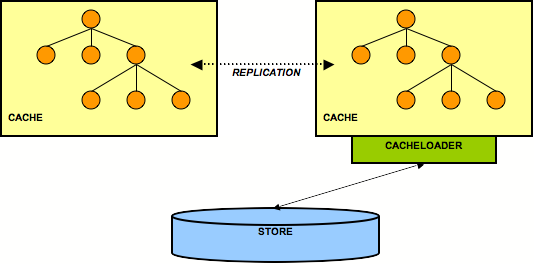
Figure 9.3. 2 nodes but only one accesses the back end store
This is a similar case to the previous one, but here only one node in the cluster interacts with a back end store via its cache loader. All other nodes perform in-memory replication. The idea here is all application state is kept in memory in each node, with the existence of multiple caches making the data highly available. (This assumes that a client that needs the data is able to somehow fail over from one cache to another.) The single persistent back end store then provides a backup copy of the data in case all caches in the cluster fail or need to be restarted.
Note that here it may make sense for the cache loader to store changes asynchronously, that is not on the caller's thread, in order not to slow down the cluster by accessing (for example) a database. This is a non-issue when using asynchronous replication.
A weakness with this architecture is that the cache with access to the cache loader becomes a single point of failure. Furthermore, if the cluster is restarted, the cache with the cache loader must be started first (easy to forget). A solution to the first problem is to configure a cache loader on each node, but set the
singletonStore configuration to true. With this kind of setup, one but only one node will always be writing to a persistent store. However, this complicates the restart problem, as before restarting you need to determine which cache was writing before the shutdown/failure and then start that cache first.
9.5.4. Replicated Caches With Each Cache Having Its Own Store
Copy linkLink copied to clipboard!
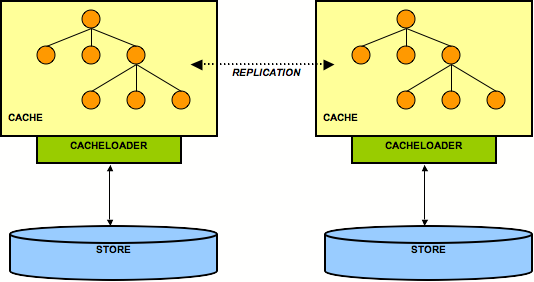
Figure 9.4. 2 nodes each having its own back end store
Here, each node has its own datastore. Modifications to the cache are (a) replicated across the cluster and (b) persisted using the cache loader. This means that all datastores have exactly the same state. When replicating changes synchronously and in a transaction, the two-phase commit protocol takes care that all modifications are replicated and persisted in each datastore, or none is replicated and persisted (atomic updates).
Note that JBoss Cache is not an XA Resource, that means it does not implement recovery. When used with a transaction manager that supports recovery, this functionality is not available.
The challenge here is state transfer: when a new node starts it needs to do the following:
- Tell the coordinator (oldest node in a cluster) to send it the state. This is always a full state transfer, overwriting any state that may already be present.
- The coordinator then needs to wait until all in-flight transactions have completed. During this time, it will not allow for new transactions to be started.
- Then the coordinator asks its cache loader for the entire state using
loadEntireState(). It then sends back that state to the new node. - The new node then tells its cache loader to store that state in its store, overwriting the old state. This is the
CacheLoader.storeEntireState()method - As an option, the transient (in-memory) state can be transferred as well during the state transfer.
- The new node now has the same state in its back end store as everyone else in the cluster, and modifications received from other nodes will now be persisted using the local cache loader.
9.5.5. Hierarchical Caches
Copy linkLink copied to clipboard!
If you need to set up a hierarchy within a single JVM, you can use the
LocalDelegatingCacheLoader . This type of hierarchy can currently only be set up programmatically.
Hierarchical caches could also be set up spanning more than one JVM or server, using the
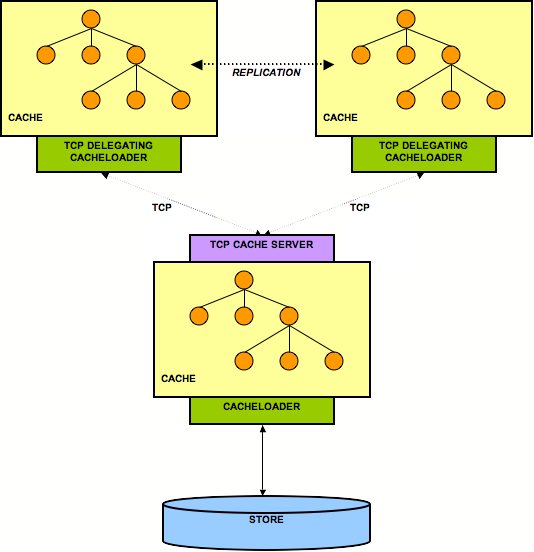
TcpDelegatingCacheLoader .
Figure 9.5. TCP delegating cache loader
9.5.6. Multiple Cache Loaders
Copy linkLink copied to clipboard!
You can set up more than one cache loader in a chain. Internally, a delegating
ChainingCacheLoader is used, with references to each cache loader you have configured. Use cases vary depending on the type of cache loaders used in the chain. One example is using a file system based cache loader, co-located on the same host as the JVM, used as an overflow for memory. This ensures data is available relatively easily and with low cost. An additional remote cache loader, such as a TcpDelegatingCacheLoader provides resilience between server restarts.

Figure 9.6. Multiple cache loaders in a chain
Chapter 10. Eviction
Copy linkLink copied to clipboard!
Eviction controls JBoss Cache's memory management by restricting how many nodes are allowed to be stored in memory, and for how long. Memory constraints on servers mean caches cannot grow indefinitely, so eviction needs to occur to prevent out of memory errors. Eviction is most often used alongside Chapter 9, Cache Loaders.
10.1. Design
Copy linkLink copied to clipboard!
Eviction in JBoss Cache is designed around four concepts:
In addition, Regions play a key role in eviction, as eviction is always configured on a per-region basis so that different subtrees in the cache can have different eviction characteristics.
- 1. Collecting statistics
- 2. Determining which nodes to evict
- 3. How nodes are evicted
- 4. Eviction threads.
10.1.1. Collecting Statistics
Copy linkLink copied to clipboard!
This is done on the caller's thread whenever anyone interacts with the cache. If eviction is enabled, an
EvictionInterceptor is added to the interceptor chain and events are recorded in an event queue. Events are denoted by the EvictionEvent class. Event queues are held on specific Regions so each region has its own event queue.
This aspect of eviction is not configurable, except that the
EvictionInterceptor is either added to the interceptor chain or not, depending on whether eviction is enabled.
10.1.2. Determining Which Nodes to Evict
Copy linkLink copied to clipboard!
An
EvictionAlgorithm implementation processes the eviction queue to decide which nodes to evict. JBoss Cache ships with a number of implementations, including FIFOAlgorithm, LRUAlgorithm, LFUAlgorithm, etc. Each implementation has a corresponding EvictionAlgorithmConfig implementation with configuration details for the algorithm.
Custom
EvictionAlgorithm implementations can be provided by implementing the interface or extending one of the provided implementations.
Algorithms are executed by calling its
process() method and passing in the event queue to process. This is typically done by calling Region.processEvictionQueues(), which will locate the Algorithm assigned to the region.
10.1.3. How Nodes are Evicted
Copy linkLink copied to clipboard!
Once the
EvictionAlgorithm decides which nodes to evict, it uses an implementation of EvictionActionPolicy to determine how to evict nodes. This is configurable on a per-region basis, and defaults to DefaultEvictionActionPolicy, which invokes Cache.evict() for each node that needs to be evicted.
JBoss Cache also ships with
RemoveOnEvictActionPolicy, which calls Cache.removeNode() for each node that needs to be evicted, instead of Cache.evict().
Custom
EvictionActionPolicy implementations can be used as well.
10.1.4. Eviction threads
Copy linkLink copied to clipboard!
By default, a single cache-wide eviction thread is used to periodically iterate through registered regions and call
Region.processEvictionQueues() on each region. The frequency with which this thread runs can be configured using the wakeUpInterval attribute in the eviction configuration element, and defaults to 5000 milliseconds if not specified.
The eviction thread can be disabled by setting
wakeUpInterval to 0. This can be useful if you have your own periodic maintenance thread running and would like to iterate through regions and call Region.processEvictionQueues() yourself.
10.2. Eviction Regions
Copy linkLink copied to clipboard!
The concept of regions and the
Region class were Section 7.6, “Class Loading and Regions” when talking about marshaling. Regions are also used to define the eviction behavior for nodes within that region. In addition to using a region-specific configuration, you can also configure default, cache-wide eviction behavior for nodes that do not fall into predefined regions or if you do not wish to define specific regions. It is important to note that when defining regions using the configuration XML file, all elements of the Fqn that defines the region are String objects.
For each region, you can define eviction parameters.
It's possible to define regions that overlap. In other words, one region can be defined for
/a/b/c, and another defined for /a/b/c/d (which is just the d subtree of the /a/b/c sub-tree). The algorithm, in order to handle scenarios like this consistently, will always choose the first region it encounters. In this way, if the algorithm needed to decide how to handle node /a/b/c/d/e, it would start from there and work its way up the tree until it hits the first defined region - in this case /a/b/c/d.
10.2.1. Resident Nodes
Copy linkLink copied to clipboard!
Nodes marked as resident (using
Node.setResident() API) will be ignored by the eviction policies both when checking whether to trigger the eviction and when proceeding with the actual eviction of nodes. E.g. if a region is configured to have a maximum of 10 nodes, resident nodes will not be counted when deciding whether to evict nodes in that region. In addition, resident nodes will not be considered for eviction when the region's eviction threshold is reached.
In order to mark a node as resident the
Node.setResident() API should be used. By default, the newly created nodes are not resident. The resident attribute of a node is neither replicated, persisted nor transaction-aware.
A sample use case for resident nodes would be ensuring "path" nodes do not add "noise" to an eviction policy. E.g.,:
In this example, the nodes
/a and /a/b are paths which exist solely to support the existence of node /a/b/c and do not hold any data themselves. As such, they are good candidates for being marked as resident. This would lead to better memory management as no eviction events would be generated when accessing /a and/a/b.
Note
When adding attributes to a resident node, e.g.
cache.put("/a", "k", "v") in the above example, it would make sense to mark the nodes as non-resident again and let them be considered for eviction.
10.3. Configuring Eviction
Copy linkLink copied to clipboard!
10.3.1. Basic Configuration
Copy linkLink copied to clipboard!
The basic eviction configuration element looks like:
wakeUpInterval- this required parameter defines how often the eviction thread runs, in milliseconds.eventQueueSize- this optional parameter defines the size of the bounded queue which holds eviction events. If your eviction thread does not run often enough, you may find that the event queue fills up. It may then be necessary to get your eviction thread to run more frequently, or increase the size of your event queue. This configuration is just the default event queue size, and can be overridden in specific eviction regions. If not specified, this defaults to200000.algorithmClass- this is required, unless you set individualalgorithmClassattributes on each and every region. This defines the default eviction algorithm to use if one is not defined for a region.- Algorithm configuration attributes - these are specific to the algorithm specified in
algorithmClass. See the section specific to the algorithm you are interested in for details.
10.3.2. Programmatic Configuration
Copy linkLink copied to clipboard!
Configuring eviction using the
Configuration object entails the use of the org.jboss.cache.config.EvictionConfig bean, which is passed into Configuration.setEvictionConfig(). See the Chapter 3, Configuration for more on building a Configuration programmatically.
The use of simple POJO beans to represent all elements in a cache's configuration also makes it fairly easy to programmatically add eviction regions after the cache is started. For example, assume we had an existing cache configured via XML with the EvictionConfig element shown above. Now at runtime we wished to add a new eviction region named "/org/jboss/fifo", using
LRUAlgorithm but a different number of maxNodes:
10.4. Shipped Eviction Policies
Copy linkLink copied to clipboard!
This section details the different algorithms shipped with JBoss Cache, and the various configuration parameters used for each algorithm.
10.4.1. LRUAlgorithm - Least Recently Used
Copy linkLink copied to clipboard!
org.jboss.cache.eviction.LRUAlgorithm controls both the node lifetime and age. This policy guarantees a constant order ( O (1) ) for adds, removals and lookups (visits). It has the following configuration parameters:
maxNodes- This is the maximum number of nodes allowed in this region. 0 denotes immediate expiry, -1 denotes no limit.timeToLive- The amount of time a node is not written to or read (in milliseconds) before the node is swept away. 0 denotes immediate expiry, -1 denotes no limit.maxAge- Lifespan of a node (in milliseconds) regardless of idle time before the node is swept away. 0 denotes immediate expiry, -1 denotes no limit.minTimeToLive- the minimum amount of time a node must be allowed to live after being accessed before it is allowed to be considered for eviction. 0 denotes that this feature is disabled, which is the default value.
10.4.2. FIFOAlgorithm - First In, First Out
Copy linkLink copied to clipboard!
org.jboss.cache.eviction.FIFOAlgorithm controls the eviction in a proper first in first out order. This policy guarantees a constant order ( O (1) ) for adds, removals and lookups (visits). It has the following configuration parameters:
maxNodes- This is the maximum number of nodes allowed in this region. 0 denotes immediate expiry, -1 denotes no limit.minTimeToLive- the minimum amount of time a node must be allowed to live after being accessed before it is allowed to be considered for eviction. 0 denotes that this feature is disabled, which is the default value.
10.4.3. MRUAlgorithm - Most Recently Used
Copy linkLink copied to clipboard!
org.jboss.cache.eviction.MRUAlgorithm controls the eviction in based on most recently used algorithm. The most recently used nodes will be the first to evict with this policy. This policy guarantees a constant order ( O (1) ) for adds, removals and lookups (visits). It has the following configuration parameters:
maxNodes- This is the maximum number of nodes allowed in this region. 0 denotes immediate expiry, -1 denotes no limit.minTimeToLive- the minimum amount of time a node must be allowed to live after being accessed before it is allowed to be considered for eviction. 0 denotes that this feature is disabled, which is the default value.
10.4.4. LFUAlgorithm - Least Frequently Used
Copy linkLink copied to clipboard!
org.jboss.cache.eviction.LFUAlgorithm controls the eviction in based on least frequently used algorithm. The least frequently used nodes will be the first to evict with this policy. Node usage starts at 1 when a node is first added. Each time it is visited, the node usage counter increments by 1. This number is used to determine which nodes are least frequently used. LFU is also a sorted eviction algorithm. The underlying EvictionQueue implementation and algorithm is sorted in ascending order of the node visits counter. This class guarantees a constant order ( O (1) ) for adds, removal and searches. However, when any number of nodes are added/visited to the queue for a given processing pass, a single quasilinear ( O (n * log n) ) operation is used to resort the queue in proper LFU order. Similarly if any nodes are removed or evicted, a single linear ( O (n) ) pruning operation is necessary to clean up the EvictionQueue. LFU has the following configuration parameters:
maxNodes- This is the maximum number of nodes allowed in this region. 0 denotes immediate expiry, -1 denotes no limit.minNodes- This is the minimum number of nodes allowed in this region. This value determines what the eviction queue should prune down to per pass. e.g. If minNodes is 10 and the cache grows to 100 nodes, the cache is pruned down to the 10 most frequently used nodes when the eviction timer makes a pass through the eviction algorithm.minTimeToLive- the minimum amount of time a node must be allowed to live after being accessed before it is allowed to be considered for eviction. 0 denotes that this feature is disabled, which is the default value.
10.4.5. ExpirationAlgorithm
Copy linkLink copied to clipboard!
org.jboss.cache.eviction.ExpirationAlgorithm is a policy that evicts nodes based on an absolute expiration time. The expiration time is indicated using the org.jboss.cache.Node.put() method, using a String key expiration and the absolute time as a java.lang.Long object, with a value indicated as milliseconds past midnight January 1st, 1970 UTC (the same relative time as provided by java.lang.System.currentTimeMillis() ).
This policy guarantees a constant order (
O (1) ) for adds and removals. Internally, a sorted set (TreeSet) containing the expiration time and Fqn of the nodes is stored, which essentially functions as a heap.
This policy has the following configuration parameters:
expirationKeyName- This is the Node key name used in the eviction algorithm. The configuration default isexpiration.maxNodes- This is the maximum number of nodes allowed in this region. 0 denotes immediate expiry, -1 denotes no limit.
The following listing shows how the expiration date is indicated and how the policy is applied:
Note that the expiration time of nodes is only checked when the region manager wakes up every
wakeUpIntervalSeconds , so eviction may happen a few seconds later than indicated.
10.4.6. ElementSizeAlgorithm - Eviction based on number of key/value pairs in a node
Copy linkLink copied to clipboard!
org.jboss.cache.eviction.ElementSizeAlgorithm controls the eviction based on the number of key/value pairs in the node. The most recently used nodes will be the first to evict with this policy. It has the following configuration parameters:
maxNodes- This is the maximum number of nodes allowed in this region. 0 denotes immediate expiry, -1 denotes no limit.maxElementsPerNode- This is the trigger number of attributes per node for the node to be selected for eviction. 0 denotes immediate expiry, -1 denotes no limit.minTimeToLive- the minimum amount of time a node must be allowed to live after being accessed before it is allowed to be considered for eviction. 0 denotes that this feature is disabled, which is the default value.
Chapter 11. Transactions and Concurrency
Copy linkLink copied to clipboard!
11.1. Concurrent Access
Copy linkLink copied to clipboard!
JBoss Cache is a thread safe caching API, and uses its own efficient mechanisms of controlling concurrent access. It uses an innovative implementation of multi-versioned concurrency control (MVCC) as the default locking scheme. Versions of JBoss Cache prior to 3.x offered Optimistic and Pessimistic Locking schemes, both of which are now deprecated in favor of MVCC.
11.1.1. Multi-Version Concurrency Control (MVCC)
Copy linkLink copied to clipboard!
MVCC is a locking scheme commonly used by modern database implementations to control fast, safe concurrent access to shared data.
11.1.1.1. MVCC Concepts
Copy linkLink copied to clipboard!
MVCC is designed to provide the following features for concurrent access:
- Readers that do not block writers
- Writers that fail fast
and achieves this by using data versioning and copying for concurrent writers. The theory is that readers continue reading shared state, while writers copy the shared state, increment a version id, and write that shared state back after verifying that the version is still valid (i.e., another concurrent writer has not changed this state first).
This allows readers to continue reading while not preventing writers from writing, and repeatable read semantics are maintained by allowing readers to read off the old version of the state.
11.1.1.2. MVCC Implementation
Copy linkLink copied to clipboard!
JBoss Cache's implementation of MVCC is based on a few features:
- Readers do not acquire any locks
- Only one additional version is maintained for shared state, for a single writer
- All writes happen sequentially, to provide fail-fast semantics
The extremely high performance of JBoss Cache's MVCC implementation for reading threads is achieved by not requiring any synchronization or locking for readers. For each reader thread, the
MVCCLockingInterceptor wraps state in a lightweight container object, which is placed in the thread's InvocationContext (or TransactionContext if running in a transaction). All subsequent operations on the state happens via the container object. This use of Java references allows for repeatable read semantics even if the actual state changes simultaneously.
Writer threads, on the other hand, need to acquire a lock before any writing can commence. Currently, we use lock striping to improve the memory performance of the cache, and the size of the shared lock pool can be tuned using the
concurrencyLevel attribute of the locking element. See the Chapter 12, Configuration References for details. After acquiring an exclusive lock on an Fqn, the writer thread then wraps the state to be modified in a container as well, just like with reader threads, and then copies this state for writing. When copying, a reference to the original version is still maintained in the container (for rollbacks). Changes are then made to the copy and the copy is finally written to the data structure when the write completes.
This way, subsequent readers see the new version while existing readers still hold a reference to the original version in their context.
If a writer is unable to acquire the write lock after some time, a
TimeoutException is thrown. This lock acquisition timeout defaults to 10000 milliseconds and can be configured using the lockAcquisitionTimeout attribute of the locking element. See the Chapter 12, Configuration References for details.
11.1.1.2.1. Isolation Levels
Copy linkLink copied to clipboard!
JBoss Cache 3.x supports two isolation levels: REPEATABLE_READ and READ_COMMITTED, which correspond in semantic to database-style isolation levels. Previous versions of JBoss Cache supported all 5 database isolation levels, and if an unsupported isolation level is configured, it is either upgraded or downgraded to the closest supported level.
REPEATABLE_READ is the default isolation level, to maintain compatibility with previous versions of JBoss Cache. READ_COMMITTED, while providing a slightly weaker isolation, has a significant performance benefit over REPEATABLE_READ.
11.1.1.2.2. Concurrent Writers and Write-Skews
Copy linkLink copied to clipboard!
Although MVCC forces writers to obtain a write lock, a phenomenon known as write skews may occur when using REPEATABLE_READ:
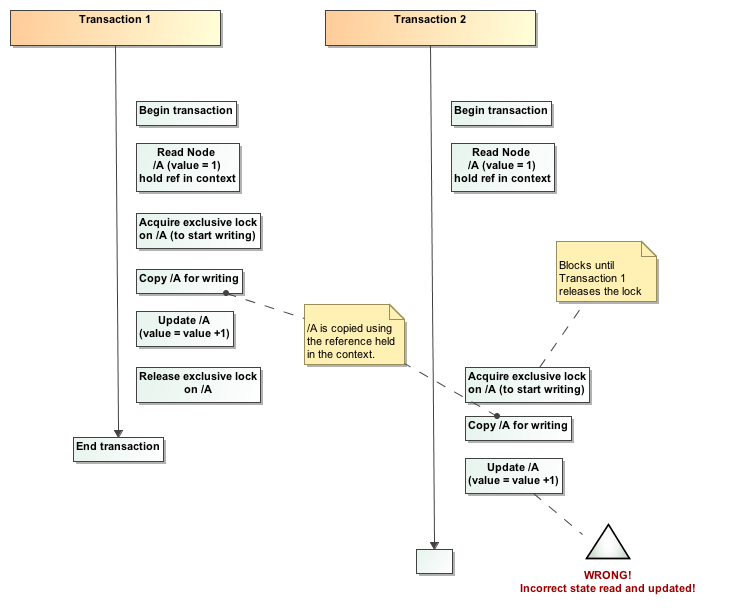
This happens when concurrent transactions performing a read and then a write, based on the value that was read. Since reads involve holding on to the reference to the state in the transaction context, a subsequent write would work off that original state read, which may now be stale.
The default behavior with dealing with a write skew is to throw a
DataVersioningException, when it is detected when copying state for writing. However, in most applications, a write skew may not be an issue (for example, if the state written has no relationship to the state originally read) and should be allowed. If your application does not care about write skews, you can allow them to happen by setting the writeSkewCheck configuration attribute to false. See the Chapter 12, Configuration References for details.
Note that write skews cannot happen when using READ_COMMITTED since threads always work off committed state.
11.1.1.3. Configuring Locking
Copy linkLink copied to clipboard!
Configuring MVCC involves using the
<locking /> configuration tag, as follows:
nodeLockingScheme- the node locking scheme used. Defaults to MVCC if not provided, deprecated schemes such aspessimisticoroptimisticmay be used but is not encouraged.isolationLevel- transaction isolation level. Defaults to REPEATABLE_READ if not provided.writeSkewCheck- defaults totrueif not provided.concurrencyLevel- defaults to 500 if not provided.lockAcquisitionTimeout- only applies to writers when using MVCC. Defaults to 10000 if not provided.
11.1.2. Pessimistic and Optimistic Locking Schemes
Copy linkLink copied to clipboard!
From JBoss Cache 3.x onwards, pessimistic and optimistic locking schemes are deprecated in favor of Section 11.1.1, “Multi-Version Concurrency Control (MVCC)”. It is recommended that existing applications move off these legacy locking schemes as support for them will eventually be dropped altogether in future releases.
Documentation for legacy locking schemes are not included in this user guide, and if necessary, can be referenced in previous versions of this document, which can be found on the JBoss Cache website.
11.2. JTA Support
Copy linkLink copied to clipboard!
JBoss Cache can be configured to use and participate in JTA compliant transactions. Alternatively, if transaction support is disabled, it is equivalent to using autocommit in JDBC calls, where modifications are potentially replicated after every change (if replication is enabled).
What JBoss Cache does on every incoming call is:
- Retrieve the current
javax.transaction.Transactionassociated with the thread - If not already done, register a
javax.transaction.Synchronizationwith the transaction manager to be notified when a transaction commits or is rolled back.
In order to do this, the cache has to be provided with a reference to environment's
javax.transaction.TransactionManager. This is usually done by configuring the cache with the class name of an implementation of the TransactionManagerLookup interface. When the cache starts, it will create an instance of this class and invoke its getTransactionManager() method, which returns a reference to the TransactionManager.
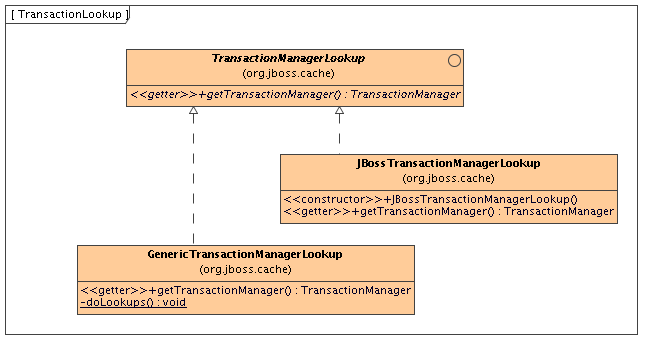
JBoss Cache ships with
JBossTransactionManagerLookup and GenericTransactionManagerLookup. The JBossTransactionManagerLookup is able to bind to a running EAP instance and retrieve a TransactionManager while the GenericTransactionManagerLookup is able to bind to most popular Java EE application servers and provide the same functionality. A dummy implementation - DummyTransactionManagerLookup - is also provided for unit tests. Being a dummy, this is not recommended for production use a it has some severe limitations to do with concurrent transactions and recovery.
An alternative to configuring a
TransactionManagerLookup is to programmatically inject a reference to the TransactionManager into the Configuration object's RuntimeConfig element:
   TransactionManager tm = getTransactionManager(); // magic method
   cache.getConfiguration().getRuntimeConfig().setTransactionManager(tm);
   TransactionManager tm = getTransactionManager(); // magic method
   cache.getConfiguration().getRuntimeConfig().setTransactionManager(tm);
Injecting the
TransactionManager is the recommended approach when the Configuration is built by some sort of IOC container that already has a reference to the TransactionManager.
When the transaction commits, we initiate either a one-phase or two-phase commit protocol. See Section 8.1.2.1, “Replicated Caches and Transactions” for details.
Part III. JBoss Cache Configuration References
Copy linkLink copied to clipboard!
This section contains technical references for easy looking up.
Chapter 12. Configuration References
Copy linkLink copied to clipboard!
12.1. Sample XML Configuration File
Copy linkLink copied to clipboard!
This is what a typical XML configuration file looks like. It is recommended that you use one of the configurations shipped with the JBoss Cache distribution and tweak according to your needs rather than write one from scratch.
12.1.1. XML validation
Copy linkLink copied to clipboard!
Configuration XML files are validated using an XSD schema. This schema is included in
jbosscache-core.jar and is also available online: http://www.jboss.org/jbosscache/jbosscache-config-3.0.xsd. Most IDEs and XML authoring tools will be able to use this schema to validate your configuration file as you write it.
JBoss Cache also validates your configuration file when you start up, and will throw an exception if it encounters an invalid file. You can suppress this behavior by passing in
-Djbosscache.config.validate=false to your JVM when you start up. Alternatively, you can point the validator to a different schema by passing in -Djbosscache.config.schemaLocation=url.
12.2. Configuration File Quick Reference
Copy linkLink copied to clipboard!
A list of definitions of each of the XML elements attributes used above, and their bean counterparts for programmatic configuration. If the description of an attribute states that it is dynamic, that means it can be changed after the cache is created and started.
The <jbosscache /> Element | |
|---|---|
|
Description
|
This is the root element for the JBoss Cache configuration file. This is the only mandatory element in a valid JBoss Cache configuration file.
|
|
Parent
|
none (is root element)
|
|
Children
|
Table 12.40, “The
<clustering /> Element”, Table 12.37, “The <customInterceptors /> Element”, Table 12.19, “The <eviction /> Element”, Table 12.15, “The <invocationBatching /> Element”, Table 12.7, “The <jmxStatistics /> Element”, Table 12.13, “The <listeners /> Element”, Table 12.27, “The <loaders /> Element”, Table 12.3, “The <locking /> Element”, Table 12.17, “The <serialization /> Element”, Table 12.11, “The <shutdown /> Element”, Table 12.9, “The <startup /> Element”, Table 12.5, “The <transaction /> Element”
|
|
Bean Equivalent
| Configuration
|
<jbosscache /> Attributes | ||||
|---|---|---|---|---|
| Attribute | Bean Field | Allowed | Default | Description |
| xmlns | - | urn:jboss:jbosscache-core:config:3.1 | urn:jboss:jbosscache-core:config:3.1 | Defines the XML namespace for all configuration entries. |
| xmlns:xsi | - | http://www.w3.org/2001/XMLSchema-instance | http://www.w3.org/2001/XMLSchema-instance | Defines the XML schema instance for the configuration. |
The <locking /> Element | |
|---|---|
|
Description
|
This element specifies locking behavior on the cache.
|
|
Parent
| |
|
Children
| |
|
Bean equivalent
| Configuration
|
<locking /> Attributes | ||||
|---|---|---|---|---|
| Attribute | Bean Field | Allowed | Default | Description |
| isolationLevel | isolationLevel | READ_COMMITTED, REPEATABLE_READ | REPEATABLE_READ | The isolation level used for transactions. |
| lockParentForChildInsertRemove | lockParentForChildInsertRemove | true, false | false | Specifies whether parent nodes are locked when inserting or removing children. This can also be configured on a per-node basis (see Node.setLockForChildInsertRemove() |
| lockAcquisitionTimeout | lockAcquisitionTimeout (dynamic) | Any positive long value | 10000 | Length of time, in milliseconds, that a thread will try and acquire a lock. A TimeoutException is usually thrown if a lock cannot be acquired in this given timeframe. Can be overridden on a per-invocation basis using Option.setLockAcquisitionTimeout() |
| nodeLockingScheme (deprecated) | nodeLockingScheme | mvcc, pessimistic, optimistic | mvcc | Specifies the node locking scheme to be used. |
| writeSkewCheck | writeSkewCheck | true, false | false | Specifies whether to check for write skews. Only used if nodeLockingScheme is mvcc and isolationLevel is REPEATABLE_READ. See the Section 11.1.1.2.2, “Concurrent Writers and Write-Skews” for a more detailed discussion. |
| useLockStriping | useLockStriping | true, false | true | Specifies whether lock striping is used. Only used if nodeLockingScheme is mvcc. Lock striping usually offers greater performance and better memory usage, although in certain cases deadlocks may occur where several Fqns map to the same shared lock. This can be mitigated by increasing your concurrency level, though the only concrete solution is to disable lock striping altogether. |
| concurrencyLevel | concurrencyLevel | Any positive integer; 0 not allowed. | 500 | Specifies the number of shared locks to use for write locks acquired. Only used if nodeLockingScheme is mvcc. See the Section 11.1.1.2, “MVCC Implementation” for a more detailed discussion. |
The <transaction /> Element | |
|---|---|
|
Description
|
This element specifies transactional behavior on the cache.
|
|
Parent
| |
|
Children
| |
|
Bean equivalent
| Configuration
|
<transaction /> Attributes | ||||
|---|---|---|---|---|
| Attribute | Bean Field | Allowed | Default | Description |
| transactionManagerLookupClass | transactionManagerLookupClass | A valid class that is available on the classpath | none | Specifies the TransactionManagerLookupClass implementation to use to obtain a transaction manager. If not specified (and a TransactionManager is not injected using RuntimeConfig.setTransactionManager()), the cache will not be able to participate in any transactions. |
| syncCommitPhase | syncCommitPhase (dynamic) | true, false | false | If enabled, commit messages that are broadcast around a cluster are done so synchronously. This is usually of little value since detecting a failure in broadcasting a commit means little else can be done except log a message, since some nodes in a cluster may have already committed and cannot rollback. |
| syncRollbackPhase | syncRollbackPhase (dynamic) | true, false | false | If enabled, rollback messages that are broadcast around a cluster are done so synchronously. This is usually of little value since detecting a failure in broadcasting a rollback means little else can be done except log a message, since some nodes in a cluster may have already committed and cannot rollback. |
The <jmxStatistics /> Element | |
|---|---|
|
Description
|
This element specifies whether cache statistics are gathered and reported via JMX.
|
|
Parent
| |
|
Children
| |
|
Bean equivalent
| Configuration
|
<jmxStatistics /> Attributes | ||||
|---|---|---|---|---|
| Attribute | Bean Field | Allowed | Default | Description |
| enabled | exposeManagementStatistics | true, false | true | Controls whether cache statistics are gathered and exposed via JMX. |
The <startup /> Element | |
|---|---|
|
Description
|
This element specifies behavior when the cache starts up.
|
|
Parent
| |
|
Children
| |
|
Bean equivalent
| Configuration
|
<startup /> Attributes | ||||
|---|---|---|---|---|
| Attribute | Bean Field | Allowed | Default | Description |
| regionsInactiveOnStartup | inactiveOnStartup | true, false | false | If Section 7.6, “Class Loading and Regions” is enabled, this attribute controls whether new regions created are inactive on start up. |
The <shutdown /> Element | |
|---|---|
|
Description
|
This element specifies behavior when the cache shuts down.
|
|
Parent
| |
|
Children
| |
|
Bean equivalent
| Configuration
|
<shutdown /> Attributes | ||||
|---|---|---|---|---|
| Attribute | Bean Field | Allowed | Default | Description |
| hookBehavior | shutdownHookBehavior | DEFAULT, DONT_REGISTER, REGISTER | DEFAULT | This attribute determines whether the cache registers a JVM shutdown hook so that it can clean up resources if the JVM is receives a shutdown signal. By default a shutdown hook is registered if no MBean server (apart from the JDK default) is detected. REGISTER forces the cache to register a shutdown hook even if an MBean server is detected, and DONT_REGISTER forces the cache NOT to register a shutdown hook, even if no MBean server is detected. |
The <listeners /> Element | |
|---|---|
|
Description
|
This element specifies behavior of registered cache listeners.
|
|
Parent
| |
|
Children
| |
|
Bean equivalent
| Configuration
|
<listeners /> Attributes | ||||
|---|---|---|---|---|
| Attribute | Bean Field | Allowed | Default | Description |
| asyncPoolSize | listenerAsyncPoolSize | integer | 1 | The size of the thread pool used to dispatch events to cache listeners that have registered as asynchronous listeners. If this number is less than 1, all asynchronous listeners will be treated as synchronous listeners and notified synchronously. |
| asyncQueueSize | listenerAsyncQueueSize | positive integer | 50000 | The size of the bounded queue used by the async listener thread pool. Only considered if asyncPoolSize is greater than 0. Increase this if you see a lot of threads blocking trying to add events to this queue. |
The <invocationBatching /> Element | |
|---|---|
|
Description
|
This element specifies behavior of invocation batching.
|
|
Parent
| |
|
Children
| |
|
Bean equivalent
| Configuration
|
<invocationBatching /> Attributes | ||||
|---|---|---|---|---|
| Attribute | Bean Field | Allowed | Default | Description |
| enabled | invocationBatchingEnabled | true, false | false | Whether invocation batching is enabled or not. See the chapter on Chapter 4, Batching API for details. |
The <serialization /> Element | |
|---|---|
|
Description
|
This element specifies behavior of object serialization in JBoss Cache.
|
|
Parent
| |
|
Children
| |
|
Bean equivalent
| Configuration
|
<serialization /> Attributes | ||||
|---|---|---|---|---|
| Attribute | Bean Field | Allowed | Default | Description |
| marshallerClass | marshallerClass | A valid class that is available on the classpath | VersionAwareMarshaller | Specifies the marshaler to use when serializing and deserializing objects, either for replication or persistence. |
| useLazyDeserialization | useLazyDeserialization | true, false | false | A mechanism by which serialization and deserialization of objects is deferred till the point in time in which they are used and needed. This typically means that any deserialization happens using the thread context class loader of the invocation that requires deserialization, and is an effective mechanism to provide classloader isolation. |
| useRegionBasedMarshalling (deprecated) | useRegionBasedMarshalling | true, false | false | An older mechanism by which classloader isolation was achieved, by registering classloaders on specific regions. |
| version | replicationVersion | Valid JBoss Cache version string | Current version | Used by the VersionAwareMarshaller in determining which version stream parser to use by default when initiating communications in a cluster. Useful when you need to run a newer version of JBoss Cache in a cluster containing older versions, and can be used to perform rolling upgrades. |
| objectInputStreamPoolSize | objectInputStreamPoolSize | Positive integer | 50 | Not used at the moment. |
| objectOutputStreamPoolSize | objectOutputStreamPoolSize | Positive integer | 50 | Not used at the moment. |
The <eviction /> Element | |
|---|---|
|
Description
|
This element controls how eviction works in the cache.
|
|
Parent
| |
|
Children
| |
|
Bean equivalent
| EvictionConfig
|
<eviction /> Attributes | ||||
|---|---|---|---|---|
| Attribute | Bean Field | Allowed | Default | Description |
| wakeUpInterval | wakeupInterval | integer | 5000 | The frequency with which the eviction thread runs, in milliseconds. If set to less than 1, the eviction thread never runs and is effectively disabled. |
The <default /> Element | |
|---|---|
|
Description
|
This element defines the default eviction region.
|
|
Parent
| |
|
Children
| |
|
Bean equivalent
| EvictionRegionConfig
|
<default /> Attributes | ||||
|---|---|---|---|---|
| Attribute | Bean Field | Allowed | Default | Description |
| algorithmClass | evictionAlgorithmConfig | A valid class that is available on the classpath | none | This attribute needs to be specified if this tag is being used. Note that if being configured programmatically, the eviction algorithm's corresponding EvictionAlgorithmConfig file should be used instead. E.g., where you would use LRUAlgorithm in XML, you would use an instance of LRUAlgorithmConfig programmatically. |
| actionPolicyClass | evictionActionPolicyClassName | A valid class that is available on the classpath | DefaultEvictionActionPolicy | The eviction action policy class, defining what happens when a node needs to be evicted. |
| eventQueueSize | eventQueueSize (dynamic | integer | 200000 | The size of the bounded eviction event queue. |
The <region /> Element | |
|---|---|
|
Description
|
This element defines an eviction region. Multiple instances of this tag can exist provided they have unique
name attributes.
|
|
Parent
| |
|
Children
| |
|
Bean equivalent
| EvictionRegionConfig
|
<region /> Attributes | ||||
|---|---|---|---|---|
| Attribute | Bean Field | Allowed | Default | Description |
| name | regionFqn | A String that could be parsed using Fqn.fromString() | none | This should be a unique name that defines this region. See the Section 10.2, “Eviction Regions” for details of eviction regions. |
| algorithmClass | evictionAlgorithmConfig | A valid class that is available on the classpath | none | This attribute needs to be specified if this tag is being used. Note that if being configured programmatically, the eviction algorithm's corresponding EvictionAlgorithmConfig file should be used instead. E.g., where you would use LRUAlgorithm in XML, you would use an instance of LRUAlgorithmConfig programmatically. |
| actionPolicyClass | evictionActionPolicyClassName | A valid class that is available on the classpath | DefaultEvictionActionPolicy | The eviction action policy class, defining what happens when a node needs to be evicted. |
| eventQueueSize | eventQueueSize (dynamic | integer | 200000 | The size of the bounded eviction event queue. |
The <property /> Element | |
|---|---|
|
Description
|
A mechanism of passing in name-value properties to the enclosing configuration element.
|
|
Parent
| |
|
Children
| |
|
Bean equivalent
|
Either direct setters or
setProperties() enclosing bean
|
<property /> Attributes | ||||
|---|---|---|---|---|
| Attribute | Bean Field | Allowed | Default | Description |
| name | Either direct setters or setProperties() enclosing bean | String | none | Property name |
| value | Either direct setters or setProperties() enclosing bean | String | none | Property value |
The <loaders /> Element | |
|---|---|
|
Description
|
Defines any cache loaders.
|
|
Parent
| |
|
Children
| Table 12.29, “The <preload /> Element”, Table 12.32, “The <loader /> Element” |
|
Bean equivalent
|
CacheLoaderConfig
|
<loaders /> Attributes | ||||
|---|---|---|---|---|
| Attribute | Bean Field | Allowed | Default | Description |
| passivation | passivation | true, false | false | If true, cache loaders are used in passivation mode. See the Chapter 9, Cache Loaders for a detailed discussion on this. |
| shared | shared | true, false | false | If true, cache loaders are used in shared mode. See the Chapter 9, Cache Loaders for a detailed discussion on this. |
The <preload /> Element | |
|---|---|
|
Description
|
Defines preloading of Fqn subtrees when a cache starts up. This element has no attributes.
|
|
Parent
| |
|
Children
| Table 12.30, “The <node /> Element” |
|
Bean equivalent
|
CacheLoaderConfig
|
The <node /> Element | |
|---|---|
|
Description
|
This element defines a subtree under which all content will be preloaded from the cache loaders when the cache starts. Multiple subtrees can be preloaded, although it only makes sense to define more than one subtree if they do not overlap.
|
|
Parent
| |
|
Children
| |
|
Bean equivalent
|
CacheLoaderConfig
|
<node /> Attributes | ||||
|---|---|---|---|---|
| Attribute | Bean Field | Allowed | Default | Description |
| fqn | preload | String | none | An Fqn to preload. This should be a String that can be parsed with Fqn.fromString(). When doing this programmatically, you should create a single String containing all of the Fqns you wish to preload, separated by spaces, and pass that into CacheLoaderConfig.setPreload(). |
The <loader /> Element | |
|---|---|
|
Description
|
This element defines a cache loader. Multiple elements may be used to create cache loader chains.
|
|
Parent
| |
|
Children
| Table 12.34, “The <properties /> Element”, Table 12.35, “The <singletonStore /> Element” |
|
Bean equivalent
|
IndividualCacheLoaderConfig
|
<loader /> Attributes | ||||
|---|---|---|---|---|
| Attribute | Bean Field | Allowed | Default | Description |
| class | className | A valid class that is available on the classpath | none | A cache loader implementation to use. |
| async | async | true, false | false | All modifications to this cache loader happen asynchronously, on a separate thread. |
| fetchPersistentState | fetchPersistentState | true, false | false | When a cache starts up, retrieve persistent state from the cache loaders in other caches in the cluster. Only one loader element may set this to true. Also, only makes sense if the Table 12.40, “The <clustering /> Element” tag is present. |
| purgeOnStartup | purgeOnStartup | true, false | false | Purges this cache loader when it starts up. |
The <properties /> Element | |
|---|---|
|
Description
|
This element contains a set of properties that can be read by a
java.util.Properties instance. This tag has no attributes, and the contents of this tag will be parsed by Properties.load().
|
|
Parent
| |
|
Children
| |
|
Bean equivalent
|
IndividualCacheLoaderConfig.setProperties()
|
The <singletonStore /> Element | |
|---|---|
|
Description
|
This element configures the enclosing cache loader as a Section 9.2.1, “Singleton Store Configuration”.
|
|
Parent
| |
|
Children
| Table 12.34, “The <properties /> Element” |
|
Bean equivalent
|
SingletonStoreConfig
|
<singletonStore /> Attributes | ||||
|---|---|---|---|---|
| Attribute | Bean Field | Allowed | Default | Description |
| class | className | A valid class that is available on the classpath | SingletonStoreCacheLoader | A singleton store wrapper implementation to use. |
| enabled | enabled | true, false | false | If true, the singleton store cache loader is enabled. |
The <customInterceptors /> Element | |
|---|---|
|
Description
|
This element allows you to define custom interceptors for the cache. This tag has no attributes.
|
|
Parent
| |
|
Children
| Table 12.38, “The <interceptor /> Element” |
|
Bean equivalent
|
None. At runtime, instantiate your own interceptor and pass it in to the cache using
Cache.addInterceptor().
|
The <interceptor /> Element | |
|---|---|
|
Description
|
This element allows you configure a custom interceptor. This tag may appear multiple times.
|
|
Parent
| |
|
Children
| Table 12.25, “The <property /> Element” |
|
Bean equivalent
|
None. At runtime, instantiate your own interceptor and pass it in to the cache using
Cache.addInterceptor().
|
<interceptor /> Attributes | ||||
|---|---|---|---|---|
| Attribute | Bean Field | Allowed | Default | Description |
| class | - | A valid class that is available on the classpath | none | An implementation of CommandInterceptor. |
| position | - | first, last | A position at which to place this interceptor in the chain. First is the first interceptor encountered when an invocation is made on the cache, last is the last interceptor before the call is passed on to the data structure. Note that this attribute is mutually exclusive with before, after and index. | |
| before | - | Fully qualified class name of an interceptor | Will place the new interceptor directly before the instance of the named interceptor. Note that this attribute is mutually exclusive with position, after and index. | |
| after | - | Fully qualified class name of an interceptor | Will place the new interceptor directly after the instance of the named interceptor. Note that this attribute is mutually exclusive with position, before and index. | |
| index | - | Positive integers | A position at which to place this interceptor in the chain, with 0 being the first position. Note that this attribute is mutually exclusive with position, before and after. |
The <clustering /> Element | |
|---|---|
|
Description
|
If this element is present, the cache is started in clustered mode. Attributes and child elements define clustering characteristics.
|
|
Parent
| |
|
Children
| Table 12.46, “The <stateRetrieval /> Element”, Table 12.42, “The <sync /> Element”, Table 12.44, “The <async /> Element”, Table 12.48, “The <buddy /> Element”, Table 12.54, “The <jgroupsConfig /> Element” |
|
Bean equivalent
|
Configuration
|
<clustering /> Attributes | ||||
|---|---|---|---|---|
| Attribute | Bean Field | Allowed | Default | Description |
| mode | cacheMode | replication, invalidation, r, i | replication | See the Chapter 8, Cache Modes and Clustering for the differences between replication and invalidation. When using the bean, synchronous and asynchronous communication is combined with clustering mode to give you the enumberation Configuration.CacheMode. |
| clusterName | clusterName | String | JBossCache-cluster | A cluster name which is used to identify the cluster to join. |
The <sync /> Element | |
|---|---|
|
Description
|
If this element is present, all communications are synchronous, in that whenever a thread sends a message sent over the wire, it blocks until it receives an acknowledgement from the recipient. This element is mutually exclusive with the Table 12.44, “The
<async /> Element” element.
|
|
Parent
| |
|
Children
| |
|
Bean equivalent
|
Configuration.setCacheMode()
|
<sync /> Attributes | ||||
|---|---|---|---|---|
| Attribute | Bean Field | Allowed | Default | Description |
| replTimeout | syncReplTimeout (dynamic) | positive integer | 15000 | This is the timeout used to wait for an acknowledgement when making a remote call, after which an exception is thrown. |
The <async /> Element | |
|---|---|
|
Description
|
If this element is present, all communications are asynchronous, in that whenever a thread sends a message sent over the wire, it does not wait for an acknowledgement before returning. This element is mutually exclusive with the Table 12.42, “The
<sync /> Element” element.
|
|
Parent
| |
|
Children
| |
|
Bean equivalent
|
Configuration.setCacheMode()
|
<async /> Attributes | ||||
|---|---|---|---|---|
| Attribute | Bean Field | Allowed | Default | Description |
| serializationExecutorPoolSize | serializationExecutorPoolSize | positive integer | 25 | In addition to replication happening asynchronously, even serialization of contents for replication happens in a separate thread to allow the caller to return as quickly as possible. This setting controls the size of the serializer thread pool. Setting this to any value less than 1 means serialization does not happen asynchronously. |
| serializationExecutorQueueSize | serializationExecutorQueueSize | positive integer | 50000 | This is used to define the size of the bounded queue that holds tasks for the serialization executor. This is ignored if a serialization executor is not used, such as when serializationExecutorPoolSize is less than 1. |
| useReplQueue | useReplQueue | true, false | false | If true, this forces all async communications to be queued up and sent out periodically as a batch. |
| replQueueInterval | replQueueInterval | positive integer | 5000 | If useReplQueue is set to true, this attribute controls how often the asynchronous thread used to flush the replication queue runs. This should be a positive integer which represents thread wake time in milliseconds. |
| replQueueMaxElements | replQueueMaxElements | positive integer | 1000 | If useReplQueue is set to true, this attribute can be used to trigger flushing of the queue when it reaches a specific threshold. |
The <stateRetrieval /> Element | |
|---|---|
|
Description
|
This tag controls ho state is retrieved from neighboring caches when this cache instance starts.
|
|
Parent
| |
|
Children
| |
|
Bean equivalent
|
Configuration
|
<stateRetrieval /> Attributes | ||||
|---|---|---|---|---|
| Attribute | Bean Field | Allowed | Default | Description |
| fetchInMemoryState | fetchInMemoryState | true, false | true | If true, this will cause the cache to ask neighboring caches for state when it starts up, so the cache starts "warm". |
| timeout | stateRetrievalTimeout | positive integer | 10000 | This is the maximum amount of time - in milliseconds - to wait for state from neighboring caches, before throwing an exception and aborting start up. |
| nonBlocking | useNonBlockingStateTransfer | true, false | false | This configuration switch enables the Non-Blocking State Transfer mechanism, new in 3.1.0. Note that this requires MVCC as a node locking scheme, and that STREAMING_STATE_TRANSFER is present in the JGroups stack used. |
The <buddy /> Element | |
|---|---|
|
Description
|
If this tag is present, then state is not replicated across the entire cluster. Instead, buddy replication is used to select cache instances to maintain backups on. See Section 8.1.2.2, “Buddy Replication” for details. Note that this is only used if the clustering mode is
replication, and not if it is invalidation.
|
|
Parent
| |
|
Children
| Table 12.50, “The <dataGravitation /> Element”, Table 12.52, “The <locator /> Element”, |
|
Bean equivalent
|
BuddyReplicationConfig
|
<buddy /> Attributes | ||||
|---|---|---|---|---|
| Attribute | Bean Field | Allowed | Default | Description |
| enabled | enabled | true, false | false | If true, buddy replication is enabled. |
| communicationTimeout | buddyCommunicationTimeout | positive integer | 10000 | This is the maximum amount of time - in milliseconds - to wait for buddy group organization communications from buddy caches. |
| poolName | buddyPoolName | String | This is used as a means to identify cache instances and provide hints to the buddy selection algorithms. More information on Section 8.1.2.2, “Buddy Replication”. |
The <dataGravitation /> Element | |
|---|---|
|
Description
|
This tag configures how data gravitation is conducted. See Section 8.1.2.2, “Buddy Replication” for details.
|
|
Parent
| |
|
Children
| |
|
Bean equivalent
|
BuddyReplicationConfig
|
<dataGravitation /> Attributes | ||||
|---|---|---|---|---|
| Attribute | Bean Field | Allowed | Default | Description |
| auto | autoDataGravitation | true, false | true | If true, when a get() is performed on a cache and nothing is found, a gravitation from neighboring caches is attempted. If this is false, then gravitations can only occur if the Option.setForceDataGravitation() option is provided. |
| removeOnFind | dataGravitationRemoveOnFind | true, false | true | If true, when gravitation occurs, the instance that requests the gravitation takes ownership of the state and requests that all other instances remove the gravitated state from memory. |
| searchBackupTrees | dataGravitationSearchBackupTrees | true, false | true | If true, incoming gravitation requests will cause the cache to search not just its primary data structure but its backup structure as well. |
The <locator /> Element | |
|---|---|
|
Description
|
This tag provides a pluggable mechanism for providing buddy location algorithms.
|
|
Parent
| |
|
Children
| Table 12.34, “The <properties /> Element” |
|
Bean equivalent
|
BuddyLocatorConfig
|
<locator /> Attributes | ||||
|---|---|---|---|---|
| Attribute | Bean Field | Allowed | Default | Description |
| class | className | A valid class that is available on the classpath | NextMemberBuddyLocator | A BuddyLocator implementation to use when selecting buddies from the cluster. Please refer to BuddyLocator javadocs for details. |
The <jgroupsConfig /> Element | |
|---|---|
|
Description
|
This tag provides a configuration which is used with JGroups to create a network communication channel.
|
|
Parent
| |
|
Children
| A series of elements representing JGroups protocols (see JGroups documentation). Note that there are no child elements if any of the element attributes are used instead. See section on attributes. |
|
Bean equivalent
|
Configuration
|
<jgroupsConfig /> Attributes | ||||
|---|---|---|---|---|
| Attribute | Bean Field | Allowed | Default | Description |
| configFile | clusterConfig | A JGroups configuration file on the classpath | udp.xml | If this attribute is used, then any JGroups elements representing protocols within this tag are ignored. Instead, JGroups settings are read from the file specified. Note that this cannot be used with the multiplexerStack attribute. |
| multiplexerStack | muxStackName | A valid multiplexer stack name that exists in the channel factory passed in to the RuntimeConfig | This can only be used with the RuntimeConfig, where you pass in a JGroups ChannelFactory instance using RuntimeConfig.setMuxChannelFactory(). If this attribute is used, then any JGroups elements representing protocols within this tag are ignored. Instead, the JGroups channel is created using the factory passed in. Note that this cannot be used with the configFile attribute. |
Chapter 13. JMX References
Copy linkLink copied to clipboard!
13.1. JBoss Cache Statistics
Copy linkLink copied to clipboard!
There is a whole wealth of information being gathered and exposed on to JMX for monitoring the cache. Some of these are detailed below:
| MBean | Attribute/Operation Name | Description |
|---|---|---|
| DataContainerImpl | getNumberOfAttributes() | Returns the number of attributes in all nodes in the data container |
| getNumberOfNodes() | Returns the number of nodes in the data container | |
| printDetails() | Prints details of the data container | |
| RPCManagerImpl | localAddressString | String representation of the local address |
| membersString | String representation of the cluster view | |
| statisticsEnabled | Whether RPC statistics are being gathered | |
| replicationCount | Number of successful replications | |
| replicationFailures | Number of failed replications | |
| successRatio | RPC call success ratio | |
| RegionManagerImpl | dumpRegions() | Dumps a String representation of all registered regions, including eviction regions depicting their event queue sizes |
| numRegions | Number of registered regions | |
| BuddyManager | buddyGroup | A String representation of the cache's buddy group |
| buddyGroupsIParticipateIn | String representations of all buddy groups the cache participates in | |
| TransactionTable | numberOfRegisteredTransactions | The number of registered, ongoing transactions |
| transactionMap | A String representation of all currently registered transactions mapped to internal GlobalTransaction instances | |
| MVCCLockManager | concurrencyLevel | The configured concurrency level |
| numberOfLocksAvailable | Number of locks in the shared lock pool that are not used | |
| numberOfLocksHeld | Number of locks in the shared lock pool that are in use | |
| testHashing(String fqn) | Tests the spreading of locks across Fqns. For a given (String based) Fqn, this method returns the index in the lock array that it maps to. | |
| ActivationInterceptor | Activations | Number of passivated nodes that have been activated. |
| CacheLoaderInterceptor | CacheLoaderLoads | Number of nodes loaded through a cache loader. |
| CacheLoaderMisses | Number of unsuccessful attempts to load a node through a cache loader. | |
| CacheMgmtInterceptor | Hits | Number of successful attribute retrievals. |
| Misses | Number of unsuccessful attribute retrievals. | |
| Stores | Number of attribute store operations. | |
| Evictions | Number of node evictions. | |
| NumberOfAttributes | Number of attributes currently cached. | |
| NumberOfNodes | Number of nodes currently cached. | |
| ElapsedTime | Number of seconds that the cache has been running. | |
| TimeSinceReset | Number of seconds since the cache statistics have been reset. | |
| AverageReadTime | Average time in milliseconds to retrieve a cache attribute, including unsuccessful attribute retrievals. | |
| AverageWriteTime | Average time in milliseconds to write a cache attribute. | |
| HitMissRatio | Ratio of hits to hits and misses. A hit is a get attribute operation that results in an object being returned to the client. The retrieval may be from a cache loader if the entry is not in the local cache. | |
| ReadWriteRatio | Ratio of read operations to write operations. This is the ratio of cache hits and misses to cache stores. | |
| CacheStoreInterceptor | CacheLoaderStores | Number of nodes written to the cache loader. |
| InvalidationInterceptor | Invalidations | Number of cached nodes that have been invalidated. |
| PassivationInterceptor | Passivations | Number of cached nodes that have been passivated. |
| TxInterceptor | Prepares | Number of transaction prepare operations performed by this interceptor. |
| Commits | Number of transaction commit operations performed by this interceptor. | |
| Rollbacks | Number of transaction rollbacks operations performed by this interceptor. | |
| numberOfSyncsRegistered | Number of synchronizations registered with the transaction manager pending completion and removal. |
13.2. JMX MBean Notifications
Copy linkLink copied to clipboard!
The following table depicts the JMX notifications available for JBoss Cache as well as the cache events to which they correspond. These are the notifications that can be received through the
CacheJmxWrapper MBean. Each notification represents a single event published by JBoss Cache and provides user data corresponding to the parameters of the event.
| Notification Type | Notification Data | CacheListener Event |
|---|---|---|
| org.jboss.cache.CacheStarted | String: cache service name | @CacheStarted |
| org.jboss.cache.CacheStopped | String: cache service name | @CacheStopped |
| org.jboss.cache.NodeCreated | String: fqn, boolean: isPre, boolean: isOriginLocal | @NodeCreated |
| org.jboss.cache.NodeEvicted | String: fqn, boolean: isPre, boolean: isOriginLocal | @NodeEvicted |
| org.jboss.cache.NodeLoaded | String: fqn, boolean: isPre | @NodeLoaded |
| org.jboss.cache.NodeModifed | String: fqn, boolean: isPre, boolean: isOriginLocal | @NodeModifed |
| org.jboss.cache.NodeRemoved | String: fqn, boolean: isPre, boolean: isOriginLocal | @NodeRemoved |
| org.jboss.cache.NodeVisited | String: fqn, boolean: isPre | @NodeVisited |
| org.jboss.cache.ViewChanged | String: view | @ViewChanged |
| org.jboss.cache.NodeActivated | String: fqn | @NodeActivated |
| org.jboss.cache.NodeMoved | String: fromFqn, String: toFqn, boolean: isPre | @NodeMoved |
| org.jboss.cache.NodePassivated | String: fqn | @NodePassivated |
Appendix A. Revision History
Copy linkLink copied to clipboard!
| Revision History | ||||
|---|---|---|---|---|
| Revision 5.2.0-100.400 | 2013-10-30 | |||
| ||||
| Revision 5.2.0-100 | Wed 23 Jan 2013 | |||
| ||||
| Revision 5.1.2-100 | Thu Dec 8 2011 | |||
| ||||
| Revision 5.1.1-100 | Mon Jul 18 2011 | |||
| ||||
| Revision 5.1.0-100 | Wed Sep 15 2010 | |||
| ||||
Legal Notice
Copy linkLink copied to clipboard!
Copyright © 2012 Red Hat, Inc.
This document is licensed by Red Hat under the Creative Commons Attribution-ShareAlike 3.0 Unported License. If you distribute this document, or a modified version of it, you must provide attribution to Red Hat, Inc. and provide a link to the original. If the document is modified, all Red Hat trademarks must be removed.
Red Hat, as the licensor of this document, waives the right to enforce, and agrees not to assert, Section 4d of CC-BY-SA to the fullest extent permitted by applicable law.
Red Hat, Red Hat Enterprise Linux, the Shadowman logo, JBoss, OpenShift, Fedora, the Infinity logo, and RHCE are trademarks of Red Hat, Inc., registered in the United States and other countries.
Linux® is the registered trademark of Linus Torvalds in the United States and other countries.
Java® is a registered trademark of Oracle and/or its affiliates.
XFS® is a trademark of Silicon Graphics International Corp. or its subsidiaries in the United States and/or other countries.
MySQL® is a registered trademark of MySQL AB in the United States, the European Union and other countries.
Node.js® is an official trademark of Joyent. Red Hat Software Collections is not formally related to or endorsed by the official Joyent Node.js open source or commercial project.
The OpenStack® Word Mark and OpenStack logo are either registered trademarks/service marks or trademarks/service marks of the OpenStack Foundation, in the United States and other countries and are used with the OpenStack Foundation's permission. We are not affiliated with, endorsed or sponsored by the OpenStack Foundation, or the OpenStack community.
All other trademarks are the property of their respective owners.

'%20d='M201.5%20305.5c-13.8%200-24.9-11.1-24.9-24.6%200-13.8%2011.1-24.9%2024.9-24.9%2013.6%200%2024.6%2011.1%2024.6%2024.9%200%2013.6-11.1%2024.6-24.6%2024.6zM504%20256c0%20137-111%20248-248%20248S8%20393%208%20256%20119%208%20256%208s248%20111%20248%20248zm-132.3-41.2c-9.4%200-17.7%203.9-23.8%2010-22.4-15.5-52.6-25.5-86.1-26.6l17.4-78.3%2055.4%2012.5c0%2013.6%2011.1%2024.6%2024.6%2024.6%2013.8%200%2024.9-11.3%2024.9-24.9s-11.1-24.9-24.9-24.9c-9.7%200-18%205.8-22.1%2013.8l-61.2-13.6c-3-.8-6.1%201.4-6.9%204.4l-19.1%2086.4c-33.2%201.4-63.1%2011.3-85.5%2026.8-6.1-6.4-14.7-10.2-24.1-10.2-34.9%200-46.3%2046.9-14.4%2062.8-1.1%205-1.7%2010.2-1.7%2015.5%200%2052.6%2059.2%2095.2%20132%2095.2%2073.1%200%20132.3-42.6%20132.3-95.2%200-5.3-.6-10.8-1.9-15.8%2031.3-16%2019.8-62.5-14.9-62.5zM302.8%20331c-18.2%2018.2-76.1%2017.9-93.6%200-2.2-2.2-6.1-2.2-8.3%200-2.5%202.5-2.5%206.4%200%208.6%2022.8%2022.8%2087.3%2022.8%20110.2%200%202.5-2.2%202.5-6.1%200-8.6-2.2-2.2-6.1-2.2-8.3%200zm7.7-75c-13.6%200-24.6%2011.1-24.6%2024.9%200%2013.6%2011.1%2024.6%2024.6%2024.6%2013.8%200%2024.9-11.1%2024.9-24.6%200-13.8-11-24.9-24.9-24.9z'/%3e%3c/svg%3e)