 Red Hat Summit
Development Guide Volume 3: Governance
Use this guide to define and maintain governance for Red Hat JBoss Fuse Service Works.
Abstract
Chapter 1. Governance
1.1. What is SOA Governance?
- Design Time Governance: Design Time Governance provides support for design, creation, and implementation of services. In addition to that, it also supports service testing, deployment, and versioning. It uses S-RAMP as the central repository for services including policies and documentation.
- Runtime Governance: Runtime Governance provides monitoring, control, auditing, and policy enforcement capabilities (both business and service level) to the services at runtime.
1.2. Features of SOA Governance
- Controls all the phases of a service lifecycle, not just the run-time management.
- Is extensible and caters to change requirements, as what needs to be monitored may change with time.
- Leverages existing monitoring capabilities, so you need not employ a separate approach for fault tolerance and reliability.
- Is SOA standard complaint and therefore enables you to replace components with other compatible implementations.
1.3. SOA Governance Activities
- Lifecycle Management, including planning, creation, and deployment of services
- Change Management of services
- Policy use to restrict service behavior to enforce conformance and compliance
- Monitoring services for uptime, performance, reliability, and security
- Impact analysis, service composition for complex scenarios
- Access Management to specify who can use a service for how many times
- Documentation, for both business and technical owners
1.4. SOA Governance Architecture
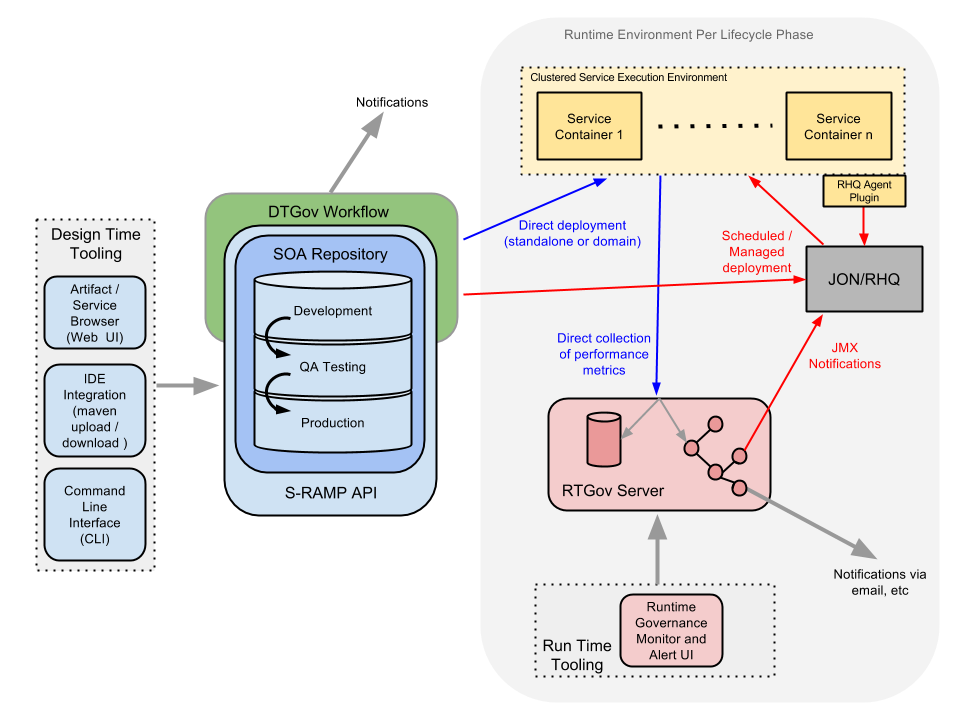
Figure 1.1. SOA Governance Architecture
1.5. SOA Governance Use Cases
- Design Time Governance
- A large insurance company may implement Design Time Governance to manage their services. They can search the shared assets and artifacts for existing services in the repository and use them in further developing composite services. They can create a new insurance policy definition, or update an existing one, and test and deploy them. In addition to services, they can also share schema. Say, if there is a need for accessing a new insurance policy quote, a developer can look up the schema and service definition and write a new service to access the information.An insurance company can also share Policy definitions across the enterprise. They can impose conditions on a policy based on access to the service. Some customers may only be permitted to access a service during certain time periods, and their usage may be dictated by their service level (for example, how many service calls they can make per day).In addition to these, with Design Time Governance, an insurance company can identify and keep track of the changes to existing, in-production services and artifacts. This ensures that the backward incompatible changes are introduced in a controlled way, to ensure they do not unexpectedly break existing applications.
- Runtime Governance
- An insurance company implementing Runtime Governance can monitor service response times and based on that, make business decisions in real-time. For example, based on the service response time, resources can be removed or added to the data center. Runtime Governance enables them to easily customize the analysis and presentation or real-time information. They can monitor load on the infrastructure and conclude on how much load can they handle. They can monitor service fulfillment times and find out how long does it take to process a new insurance policy application. Using policy enforcement, an insurance company can block a customer from placing any more orders until they have reduced their debt.Also, Runtime Governance may be applied in an insurance scenario to ensure regulations are being followed. For example, if a customer cancels a policy within 14 days, then it can ensure that the policy is actually canceled, as otherwise regulatory penalties may apply.
- S-RAMP
- The S-RAMP repository can be used by an insurance company implementing SOA Governance to store, extract, and derive content (artifacts) and Metadata used by the company. The S-RAMP repository also classifies the artifacts and provides rich query support.
1.6. Red Hat JBoss Governance Package
- S-RAMP
- SOA Repository Artifact Model and Protocol (based on the OASIS standard)
- Artifact repository
- Built on top of ModeShape
- Stores artifact content and meta-data including:
- Core properties (name, description, version, etc)
- Custom ad-hoc properties (name-value)
- Relationships between artifacts
- Hierarchical tagging system called Classifiers
- Rich XPath-like query language to search the repository
- Atom based REST API
- Automatic decomposition of artifacts based on type
- Built in support for common S-RAMP types (XSD, WSDL, etc)
- Extensible to support additional types (Teiid VDB, switchyard.xml, etc)
- Command Line Interface
- Supports interactive and batch modes
- Built-in commands to manage and search for artifacts in the repository
- Extensible to allow contributing custom commands
- Maven integration
- Can "mvn deploy" a deployment artifact directly into S-RAMP
- Able to use S-RAMP artifacts as dependencies in maven projects
- Web UI
- Based on Errai 2.4
- Allows granular management of content in the repository
- Can be used to manipulate all artifact meta-data
- DTGov
- Design Time Governance
- Built on top of the S-RAMP artifact repository
- Supports triggering Governance Workflows based on repository changes
- Embeds jBPM 6 to support workflow execution
- Maps an S-RAMP query to a workflow definition
- Includes an out-of-the-box Governance Workflow to handle Deployment Lifecycle Management
- Implements several REST services to support Governance Workflows
- General purpose Notification (email) Service
- Artifact meta-data Update Service (used to add meta-data to the S-RAMP artifact being governed)
- Deployment Service used to deploy binary artifacts into runtime EAP systems
- Supports RHQ
- Supports JBoss AS CLI
- Supports direct file copying
- Can also deploy into a Maven repository
- Supports multiple, configurable logical deployment targets (for example, DEV, TEST, PROD)
- Web UI
- Includes a Task Inbox for human tasks created by the Governance Workflows
- Provides a UI specific to the Deployment Lifecycle Governance Workflow
- Can drill into a deployment to see its contents
- Shows the change history for a deployment
- Provides a way to see which deployments are deployed to which environments
- RTGov
- Runtime Governance
- Activity Collector
- Activity events can be reported directly to the Activity Server via REST service, OR
- Embedded collector to intercept activities, pre-process the information to extract correlation details and business relevant properties, before batching events for distribution to the server.
- Events can be 'validated' using pluggable event processors, which can be used to block business transactions
- Activity Server
- Provides a REST interface to enable events to be reported
- Persists activity information
- Distributes reported events to subscribed components
- Event Processor Network
- Subscribes to the Activity Server, to receive reported activity events
- Distributes activity events through a series of registered networks, that consist of event processors to validate, transform and retransmit events. Processors can be specified using Java, Drools CEP rules and MVEL
- Maintaining Derived Results
- Information derived by the Event Processor Network can be presented as a set of 'active' collections
- Components can directly access these collections, or issue queries through a REST API
- Web UI
- Runtime governance information is provided through a set of gadgets
- Service Response Time Gadget - displays response time information per service and optionally operation
- Situations Gadget - table for displaying situations detected by the event processing (for example, SLA violation)
- Call Trace Gadget - provides a tree based visual display of the call stack associated with a business transaction
- Service Overview - graphical representation of the services and their dependencies, showing response time and invocation details
Chapter 2. Design Time Governance
- It must conform to the WS-I profile.
- A Quality Expert certifies that it is a tested version and is ready for production.
- Store and Govern artifacts
- Custom Governance Workflows
- Integrated Governance Human Task Management
2.1. Design Time Governance and S-RAMP
- Storage of all artifacts
- Monitor for changes to trigger business workflows
- Managing deployments
2.1.1. Running Design Time Governance in Non-Default Location
http://localhost:8080/*), the following bind and offset parameters are used:
-b <hostname/ip>
-Djboss.socket.binding.port-offset=<offset>https://www.s-ramp.org/s-ramp, you can use the config files to override this setting. This may also be useful if you run Design Time Governance on a server other then S-RAMP. To override the default settings, uncomment the following properties, which are commented out by default to follow the bind and offset method:
- s-ramp-server - configuration/sramp.properties#The address to which this s-ramp-server.war is bound#sramp.config.baseurl = https://www.sramp.org/s-ramp-server
- s-ramp-ui - configuration/sramp-ui.properties#The address of the S-RAMP server#s-ramp-ui.atom-api.endpoint=http://localhost:8080/s-ramp-server
- dtgov - configuration/dtgov.properties#The address of the S-RAMP server#sramp.repo.url=http://localhost:8080/s-ramp-server#The address to which this Design Time Governance server is bound#governance.url=http://localhost:8080/dtgov#The address where the Design Time Governance UI can be found#dtgov.ui.url=http://localhost:8080/dtgov-ui
- dtgov-ui - configuration/dtgov-ui.properties#The address where the S-RAMP server can be found#dtgov-ui.s-ramp.atom-api.endpoint=http://localhost:8080/s-ramp-server#The address where the Design Time Governance Task API can be found#dtgov-ui.task-api.endpoint=http://localhost:8080/dtgov/rest/tasks
2.1.2. Authentication Support
org.overlord.sramp.client.auth.AuthenticationProvider interface.
- BASIC:
org.overlord.sramp.governance.auth.BasicAuthenticationProvider - SAML Bearer Token:
org.overlord.sramp.governance.auth.SAMLBearerTokenAuthenticationProvider
dtgov.properties:
- sramp.repo.auth.provider
- BASIC:
org.overlord.dtgov.ui.server.services.sramp.BasicAuthenticationProvider - SAML Bearer Token:
org.overlord.dtgov.ui.server.services.sramp.SAMLBearerTokenAuthenticationProvider
dtgov-ui.properties:
- dtgov-ui.s-ramp.atom-api.authentication.provider
2.1.2.1. Configuring Authentication
dtgov.properties or dtgov-ui.properties:
- DTGov : S-RAMP Repository Monitoring (automated process that triggers workflows when repository changes are detected)
- DTGov : Governance Services Invoking the S-RAMP API (some of the Governance REST services invoke the S-RAMP API)
- DTGov UI : S-RAMP Invokes (the UI displays governance data that it gets from the S-RAMP repository)
- DTGov UI : Task Inbox Invokes (the UI queries a pluggable Task API to get human task data for display in the Task Inbox)
| Component | Provider Interface | Config Property | Config File |
|---|---|---|---|
| DTGov : S-RAMP Repository Monitor | org.overlord.sramp.client.auth.AuthenticationProvider | sramp.repo.auth.provider | dtgov.properties |
| DTGov : Governance Services > S-RAMP | org.overlord.sramp.client.auth.AuthenticationProvider | sramp.repo.auth.provider | dtgov.properties |
| DTGov UI : S-RAMP Invokes | org.overlord.sramp.client.auth.AuthenticationProvider | dtgov-ui.s-ramp.atom-api.authentication.provider | dtgov-ui.properties |
| DTGov UI : Task Inbox Invokes | org.overlord.dtgov.taskclient.auth.AuthenticationProvider | dtgov-ui.task-api.authentication.provider | dtgov-ui.properties |
2.1.2.2. Example
- Create a new Java class that implements
org.overlord.dtgov.taskclient.auth.AuthenticationProvider:package org.example.auth; import org.apache.http.HttpRequest; import org.overlord.dtgov.taskclient.auth.AuthenticationProvider; public class CustomAuthenticationProvider implements AuthenticationProvider { // Constructor. public NoAuthenticationProvider() { // Note, you may also choose to have a constructor that accepts an Apache Commons // Configuration object, which will allow you to access configuration properties // in the dtgov-ui.properties file: // org.apache.commons.configuration.Configuration } // Provide any custom authentication here. @Override public void provideAuthentication(HttpRequest request) { // Do custom authentication now. } } - Configure the provider in
dtgov-ui.properties:dtgov-ui.task-api.authentication.provider=org.example.auth.CustomAuthenticationProvider # Optional custom configuration properties dtgov-ui.task-api.authentication.custom.property1=some-value dtgov-ui.task-api.authentication.custom.property2=some-value
2.1.3. Design Time Governance and S-RAMP Integration
2.1.3.1. Overview
- Storage of all artifacts
- Monitor for changes to trigger business workflows
- Managing deployments
2.1.3.2. Configuration Properties
$jboss_home/standalone/configuration/overlord-apps.
- Design Time Governance Back-End Configuration for S-RAMP:
# S-RAMP Connection details sramp.repo.url sramp.repo.auth.provider sramp.repo.user sramp.repo.password sramp.repo.validating - Design Time Governance User Interface Configuration for S-RAMP:
# S-RAMP API connection endpoint dtgov-ui.s-ramp.atom-api.endpoint dtgov-ui.s-ramp.atom-api.authentication.provider dtgov-ui.s-ramp.atom-api.authentication.saml.issuer dtgov-ui.s-ramp.atom-api.authentication.saml.service dtgov-ui.s-ramp.atom-api.authentication.saml.sign-assertions dtgov-ui.s-ramp.atom-api.authentication.saml.keystore dtgov-ui.s-ramp.atom-api.authentication.saml.keystore-password dtgov-ui.s-ramp.atom-api.authentication.saml.key-alias dtgov-ui.s-ramp.atom-api.authentication.saml.key-password dtgov-ui.s-ramp.atom-api.validating dtgov-ui.s-ramp-browser.url-base - overlord-apps/*-overlordapp.properties Configuration:
overlordapp.href
2.1.3.3. Configuration Examples
- S-RAMP is installed on server sramp.example.org
- Design Time Governance is installed on server dtgov.example.org
srampui-overlordapp.propertiesdtgov-overlordapp.properties
Example 2.1. Example of srampui-overlordapp.properties
overlordapp.app-id=s-ramp-ui
overlordapp.href=http://sramp.example.org:8080/s-ramp-ui/
overlordapp.label=Repository
overlordapp.primary-brand=JBoss Overlord
overlordapp.secondary-brand=S-RAMP Repository
Example 2.2. Example of dtgov-overlordapp.properties
overlordapp.app-id=dtgov
overlordapp.href=http://dtgov.example.org:8080/dtgov-ui/
overlordapp.label=Design Time
overlordapp.primary-brand=JBoss Overlord
overlordapp.secondary-brand=Governancedtgov.properties file on the dtgov server.
Example 2.3. Example of dtgov.properties
sramp.repo.url=http://sramp.example.org:8080/s-ramp-server/
sramp.repo.auth.provider=org.overlord.sramp.governance.auth.BasicAuthenticationProvider
sramp.repo.user=dtgov
sramp.repo.password=DTG_PASSWORD
sramp.repo.validating=truedtgov-ui.properties file on the Design Time Governance server.
Example 2.4. Example for dtgov-ui.properties
dtgov-ui.s-ramp.atom-api.endpoint=http://sramp.example.org:8080/s-ramp-server
dtgov-ui.s-ramp.atom-api.authentication.provider=org.overlord.dtgov.ui.server.services.sramp.SAMLBearerTokenAuthenticationProvider
dtgov-ui.s-ramp.atom-api.authentication.saml.issuer=/dtgov-ui
dtgov-ui.s-ramp.atom-api.authentication.saml.service=/s-ramp-server
dtgov-ui.s-ramp.atom-api.authentication.saml.sign-assertions=true
dtgov-ui.s-ramp.atom-api.authentication.saml.keystore=${sys:jboss.server.config.dir}/overlord-saml.keystore
dtgov-ui.s-ramp.atom-api.authentication.saml.keystore-password=KEYSTORE_PASSWORD
dtgov-ui.s-ramp.atom-api.authentication.saml.key-alias=overlord
dtgov-ui.s-ramp.atom-api.authentication.saml.key-password=KEY_PASSWORD
dtgov-ui.s-ramp.atom-api.validating=true

dtgov-ui.s-ramp-browser.url-base=http://sramp.example.org:8080/s-ramp-ui2.1.3.4. Authentication
org.overlord.sramp.client.auth.AuthenticationProvider interface.
- BASIC: org.overlord.sramp.governance.auth.BasicAuthenticationProvider
- SAML Bearer Token: not supported
- BASIC: org.overlord.dtgov.ui.server.services.sramp.BasicAuthenticationProvider
- SAML Bearer Token: org.overlord.dtgov.ui.server.services.sramp.SAMLBearerTokenAuthenticationProvider
2.1.4. Design Time Governance Supporting Services
- Deployment Service
- Deploys a binary application artifact to a configured target and:
- Supports RHQ that provides a flexible architecture for deployment.
- Supports JBoss AS Command Line Interface (CLI)
- Supports direct file copying
- Can deploy into a Maven repository
- Supports multiple, configurable logical deployment targets (such as DEV, TEST, PROD)
- Meta-Data Update Service
- Allows simple modification of an artifact's meta-data.
- Notification Service
- Provides a simple way to send email notifications.
2.1.5. Design Time Governance User Management
add-user.bat script. Otherwise run the add-user.sh script. Both of these scripts can be found in EAP's bin directory.
There are several roles that the user must have in order to interact with Design Time Governance. These roles are as follows:
- overlorduser : users must have this role in order to access the DTGov user interface
- admin.sramp : users must have this role in order to access the S-RAMP repository (both read and write)
- dev : users with this role will be able to view and complete Dev environment and developer human tasks
- test : users with this role will be able to view and complete Test environment human tasks
- stage : users with this role will be able to view and complete Staging environment human tasks
- prod : users with this role will be able to view and complete Production environment human tasks
- ba : users with this role will be able to view and complete business analyst human tasks
- arch : users with this role will be able to view and complete architect human tasks
2.2. Governance Workflows
- Create a new workflow, or adapt a sample workflow.
- Deploy the workflow to S-RAMP.
- Map S-RAMP query to BPMN2 process name. That is, configure a workflow to execute when repository content changes.
2.2.1. Creating Workflows
2.2.2. Deploying Workflows
META-INF/kmodule.xml
SRAMPPackage/HttpClientWorkDefinitions.wid
SRAMPPackage/com.mybusiness.deploy.EARLifeCycle.bpmn2
SRAMPPackage/com.mybusiness.deploy.WARLifeCycle.bpmn2
SRAMPPackage/com.mybusiness.validate.NewSchemaReview.bpmn2
SRAMPPackage/run-build-install.png
SRAMPPackage/user-properties.png
SRAMPPackage/audio-input-microphone-3.pngkmodule.xml file is a jBPM artifact (which makes this a KIE Archive rather than just a JAR file). This file has the following content:
<?xml version="1.0" encoding="UTF-8"?>
<kmodule xmlns:xsi="http://www.w3.org/2001/XMLSchema-instance"
         xsi:schemaLocation="https://raw.github.com/droolsjbpm/droolsjbpm-knowledge/master/kie-api/src/main/resources/org/kie/api/kmodule.xsd"
         xmlns="http://jboss.org/kie/6.0.0/kmodule" >
    <kbase name="SRAMPPackage">
        <ksession name="ksessionSRAMP"/>
    </kbase>
</kmodule>kbase element found in the kmodule.xml file. This folder contains all the business process resources, primarily the BPMN2 files. There is a file called HttpClientWorkDefinitions.wid which contains the custom work items used by Governance Workflows. Contents of this files are:
import org.drools.process.core.datatype.impl.type.StringDataType;
[
  // the HttpClient work item
  [
    "name" : "HttpClientDeploy",
    "parameters" : [
      "Url" : new StringDataType(),
      "Method" : new StringDataType(),
      "Uuid" : new StringDataType(),
      "Target" : new StringDataType()
    ],
    "displayName" : "Deploy",
    "icon" : "run-build-install.png",
  ],

  // the HttpClient work item
  [
    "name" : "HttpClientNotify",
    "parameters" : [
      "Url" : new StringDataType(),
      "DTGovUrl" : new StringDataType(),
      "Method" : new StringDataType(),
      "Uuid" : new StringDataType(),
      "Target" : new StringDataType(),
      "Group" : new StringDataType(),
    ],
    "displayName" : "Notify",
    "icon" : "audio-input-microphone-3.png",
  ],

  // the HttpClient work item
  [
    "name" : "HttpClientUpdateMetaData",
    "parameters" : [
      "Url" : new StringDataType(),
      "Method" : new StringDataType(),
      "Name" : new StringDataType(),
      "Value" : new StringDataType(),
      "Uuid" : new StringDataType(),
    ],
    "displayName" : "UpdateMetaData",
    "icon" : "user-properties.png",
  ]
dtgov.properties. The following properties control exactly what KIE Archive artifact the embedded jBPM engine takes from S-RAMP:
dtgov.workflows.group=com.mybusiness
dtgov.workflows.name=governance-workflows
dtgov.workflows.version=1.0.7
dtgov.workflows.package=SRAMPPackage2.2.3. Query Configuration
dtgov.properties) is nothing but mapping an s-ramp query to a BPMN2 process name:
- Create a BPMN2 process.
- Deploy the BPMN2 process to S-RAMP.
- Create a query configured in Governance configuration file
dtgov.propertiesthat uses the new BPMN2 process.
governance.queries=/s-ramp/ext/JavaEnterpriseApplication[@maven.artifactId]|com.mybusiness.deploy.EARLifeCycle.bpmn2|DeploymentUrl={governance.url}/rest/deploy/{targction>et}/{uuid}::NotificationUrl={governance.url}/rest/notify/email/{group}/deployed/{target}/{uuid}
governance.queries=/s-ramp/xsd/XsdDocument|com.mybusiness.validate.NewSchemaReview.bpmn2|NotificationUrl={governance.url}/rest/notify/email/{group}/deployed/{target}/{uuid}::UpdateMetaDataUrl={governance.url}/rest/update/{name}/{value}/{uuid}
DeploymentUrl and NotificationUrl are passed to the process. The second query triggers the NewSchemaReview process whenever a new XML Schema document is added to the repository. The parameters NotificationUrl and UpdateMetaDataUrl are passed to this process.
2.2.4. Notification Service
jboss-eap-6.1/standalone/deployments/dtgov.war/WEB-INF/classes/governance-email-templates/. Note that these templates can not be customized.
2.2.5. Sample Workflows
2.2.5.1. Installing Sample Workflow
- Navigate to jboss-eap-6.1/dtgov-data and create a local
settings.xmlcontaining the user credentials for the S-RAMP repository. This file must also contain the Overlord admin password that you configured during installation. Here is an example:<settings xmlns="http://maven.apache.org/SETTINGS/1.0.0" xmlns:xsi="http://www.w3.org/2001/XMLSchema-instance" xsi:schemaLocation="http://maven.apache.org/SETTINGS/1.0.0 http://maven.apache.org/xsd/settings-1.0.0.xsd"> <servers> <server> <id>local-sramp-repo</id> <username>admin</username> <password>cust0mpwd</password> </server> <server> <id>local-sramp-repo-snapshots</id> <username>admin</username> <password>cust0mpwd</password> </server> </servers> </settings> - Ensure that the server is up and running, and deploy the "SimpleReleaseProcess" sample workflow to the server by running the following command:
mvn -s local-settings.xml deploy
2.2.5.2. Deploying the artifacts JAR to S-RAMP
pom.xml with artifactId called "project", starts a workflow of type overlord.demo.SimpleReleaseProcess. Here, "project" is an artifactId of a simple maven module called project.
- Ensure that the Design Time Governance server and the S-RAMP repository are up and running.
- You must set the credentials of your S-RAMP repository in the <servers> section of your maven settings.xml file. For details, see http://maven.apache.org/settings.html#Servers.
- Deploy all artifacts to S-RAMP using Maven. It configures the Maven distributionManagement to point to a local S-RAMP repository.
- Once the build completes successfully, a number of artifacts get stored in the S-RAMP repository. Deploy the S-RAMP-UI project and navigate to the S-RAMP-UI URL to verify the
<project>-VERSION.jarartifact in the S-RAMP repository.You can see that the<project>-VERSION.pomnow contains a custom property of maven.artifactId:project. And with the following query defined in thedtgov.propertiesfile, it starts a ProjectLifeCycle workflow when a MavenPom with artifactId of pom is saved in the repository:governance.queries=/s-ramp/ext/SwitchYardApplication|overlord.demo.SimpleReleaseProcess|DeploymentUrl={governance.url}/rest/deploy/{target}/{uuid}::NotificationUrl={governance.url}/rest/notify/email/{group}/deployed/{target}/{uuid}::UpdateMetaDataUrl={governance.url}/rest/update/{name}/{value}/{uuid}::DTGovUrl={dtgov.ui.url}Additionally, another custom property is created:workflowProcessId=overlord.demo.SimpleReleaseProcess_0:workflowParameters=DeploymentUrl=http://localhost:8080/dtgov/res...Note that the definition of the overlord.demo.SimpleReleaseProcess is present in the SRAMPPackage in the./data/target/dtgov-workflows-<version>.jar. If you want to update the workflow, you need to use eclipse tooling to modify the bpmn, build and upload a new dtgov-worflow.jar to S-RAMP.The workflow settings are defined in thedtgov.propertiesfile:dtgov.workflows.group- This is the group ID (usually a reversed domain name).dtgov.workflows.name- This is the artifact ID.dtgov.workflows.package- This is the name of the package.dtgov.workflows.version- This is the package version string.
SeeEAP_HOME/standalone/configuration/dtgov.propertiesfor an example of these settings.
2.3. Governance Human Tasks
2.3.1. Customizing the Task API
dtgov-ui.task-client.class property in the Design Time UI configuration file dtgov-ui.properties.
org.overlord.dtgov.ui.server.services.tasks.ITaskClient interface:
2.4. Deployment Management
2.4.1. Deploying Artifacts from Design Time Governance
dtgov.properties.
- Artifacts are deployed by Design Time Governance to a single Red Hat JBoss Fuse Service Works server.
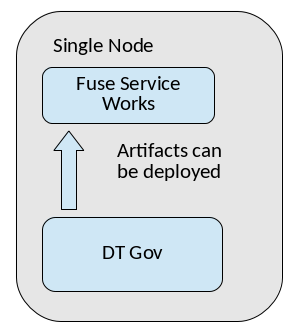
Figure 2.1. Design Time Governance and JBoss Fuse Service Works on one node/machine
- Artifacts are deployed by Design Time Governance to more than one JBoss Fuse Service Works servers.
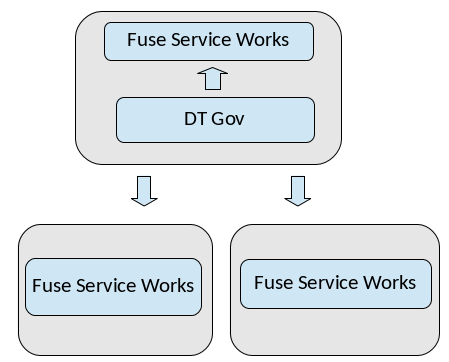
Figure 2.2. Design Time Governance and JBoss Fuse Service Works on more than one nodes/machines
Note
2.4.2. Invoking the Deployment Service
HttpClientDeploy task defined in the HttpClientWorkDefinitions.wid file. Within a BPMN2 process, the XML markup look like this:
<bpmn2:task id="Task_1" drools:taskName="HttpClientDeploy" drools:displayName="Deploy" drools:icon="run-build-install.png" name="Deploy to DEV">
  <bpmn2:incoming>bpmn20:SequenceFlow_9</bpmn2:incoming>
  <bpmn2:outgoing>bpmn20:SequenceFlow_10</bpmn2:outgoing>
  <bpmn2:ioSpecification id="_InputOutputSpecification_10">
    <bpmn2:dataInput id="_DataInput_47" itemSubjectRef="__NameInputItem" name="Url"/>
    <bpmn2:dataInput id="_DataInput_48" itemSubjectRef="__NameInputItem" name="Method"/>
    <bpmn2:dataInput id="_DataInput_49" itemSubjectRef="__NameInputItem" name="Uuid"/>
    <bpmn2:dataInput id="_DataInput_50" itemSubjectRef="__NameInputItem" name="Target"/>
    <bpmn2:inputSet id="_InputSet_10" name="Input Set 10">
      <bpmn2:dataInputRefs>_DataInput_47</bpmn2:dataInputRefs>
      <bpmn2:dataInputRefs>_DataInput_48</bpmn2:dataInputRefs>
      <bpmn2:dataInputRefs>_DataInput_49</bpmn2:dataInputRefs>
      <bpmn2:dataInputRefs>_DataInput_50</bpmn2:dataInputRefs>
    </bpmn2:inputSet>
    <bpmn2:outputSet id="_Oi0wdHenEeK6_ZZSVMnKcQ">
      <bpmn2:dataOutputRefs>_D1229038-83E0-44B7-AB75-8C46C2399E21_StatusOutput</bpmn2:dataOutputRefs>
    </bpmn2:outputSet>
  </bpmn2:ioSpecification>
  <bpmn2:dataInputAssociation id="_DataInputAssociation_47">
    <bpmn2:sourceRef>DeploymentUrl</bpmn2:sourceRef>
    <bpmn2:targetRef>_DataInput_47</bpmn2:targetRef>
  </bpmn2:dataInputAssociation>
  <bpmn2:dataInputAssociation id="_DataInputAssociation_48">
    <bpmn2:targetRef>_DataInput_48</bpmn2:targetRef>
    <bpmn2:assignment id="Assignment_1">
      <bpmn2:from xsi:type="bpmn2:tFormalExpression" id="FormalExpression_16">POST</bpmn2:from>
      <bpmn2:to xsi:type="bpmn2:tFormalExpression" id="FormalExpression_17">_DataInput_48</bpmn2:to>
    </bpmn2:assignment>
  </bpmn2:dataInputAssociation>
  <bpmn2:dataInputAssociation id="_DataInputAssociation_49">
    <bpmn2:sourceRef>ArtifactUuid</bpmn2:sourceRef>
    <bpmn2:targetRef>_DataInput_49</bpmn2:targetRef>
  </bpmn2:dataInputAssociation>
  <bpmn2:dataInputAssociation id="_DataInputAssociation_50">
    <bpmn2:targetRef>_DataInput_50</bpmn2:targetRef>
    <bpmn2:assignment id="Assignment_14">
      <bpmn2:from xsi:type="bpmn2:tFormalExpression" id="FormalExpression_17">dev</bpmn2:from>
      <bpmn2:to xsi:type="bpmn2:tFormalExpression" id="FormalExpression_18">_DataInput_50</bpmn2:to>
    </bpmn2:assignment>
  </bpmn2:dataInputAssociation>
</bpmn2:task>DeploymentUrl and ArtifactUuid parameters. These parameters were passed to the business process when it was invoked. It populates the inputs required by HttpClientDeploy method, including an input parameter called Target. The Target parameter maps to a configured Deployment Target. The target is a logical name and corresponds to a physical runtime environment configured in the Design Time Governance configuration file dtgov.properties.
2.4.3. Configuring Deployment Targets
/rest/deploy. In order to make logical Deployment Targets available, you must configure them in the Design Time Governance configuration file dtgov.properties. You may configure any number of Deployment Targets. Here is a list of some of the available Deployment Targets:
- dev: the development environment
- qa: the test environment
- stage: the staging environment
- prod: the final production environment
dtgov.properties configuration file:
governance.targets=  dev|http://www.jboss.org/overlord/deployment-status.owl#InDev|copy|/tmp/dev/jbossas7/standalone/deployments
governance.targets=   qa|http://www.jboss.org/overlord/deployment-status.owl#InQa|copy|/tmp/qa/jbossas7/standalone/deployments
governance.targets=stage|http://www.jboss.org/overlord/deployment-status.owl#InStage|copy|/tmp/stage/jbossas7/standalone/deployments
governance.targets= prod|http://www.jboss.org/overlord/deployment-status.owl#InProd|copy|/tmp/prod/jbossas7/standalone/deploymentsLogicalName|Classifier|DeploymentType|TypeSpecificParamsLogicalName: It is used in the BPMN process as the value of Target.Classifier: It is a classifier that must get added to the binary deployment artifact when deployed to the target environment, and removed when undeployed.DeploymentTypeIt specifies how to deploy to the environment. Valid values include copy, rhq, as_cli, and maven.
# Deploy using RHQ/JON (username, password, rhq url)
governance.targets=rhq|rhquser::rhqpassword::rhqbaseUrl
# Deploy using the JBoss AS CLI  (username, password, host, port)
governance.targets=as_cli|asuser::aspassword::ashost::asport
# Deploy to a Maven Repository (maven-url, is-release-enabled, is-snapshot-enabled
governance.targets=maven|scp://m2.example.com/m2/snapshot-repository::false::true
Note
dtgov.properties file. For example, the following deployment target expects a server group called fsw to be configured on the remote server and tries to deploy to that server group:
governance.targets= fsw|asuser::aspassword::ashost::asport
2.4.4. Undeployment
ext/UndeploymentInformation. The annotation artifact has a relationship called describesDeployment pointing from it back to the deployment artifact it annotates.
2.5. LDAP
org.jbpm.services.task.identity.JAASUserGroupCallbackImplIt directly uses JAAS login module defined on JBoss AS or EAP. It is independent of underlying configuration of the JAAS login module making LDAP integration transparent.org.jbpm.services.task.identity.LDAPUserGroupCallbackImplIt connects to defined LDAP server on its own. It requires property file that defines properties like location of the LDAP, credentials, and context definitions.
2.5.1. jBPM and LDAP
- jbpm consolejbpm console must be aware of the users and their roles to properly authenticate and grant them correct access in the console.
- human task serverHuman task server requires information on users and groups when assigning task to entities (either user or group). If notification mechanism is configured, it fetches more information about the entity (such as email address).
- Install and configure LDAP server.
- Ensure that when configuring your LDAP server, inetOrgPerson schema is included.
- Once the server is up and running, load it with users and groups information for jBPM to use.
2.5.2. Configure JBoss AS7 Security Domain to Use LDAP
Procedure 2.1. Task
- Configure application server that host jbpm console to authenticate users using LDAP instead of the default property file based security domain. There are no changes needed to jbpm console, but only to JBoss AS7 configuration. To use LDAP, replace the jbpm-console security domain inside standalone.xml file with:The console is capable of using any security domain that JBoss AS supports with just configuring its properly on application server, hence it is not limited to LDAP. For more advanced setup, refer JBoss AS7 documentation.
<security-domain name="jbpm-console">
      <authentication>
         <login-module code="org.jboss.security.auth.spi.LdapExtLoginModule" flag="required">
             <module-option name="baseCtxDN" value="ou=People,dc=jbpm,dc=org"/>
             <module-option name="baseFilter" value="(uid={0})"/>
             <module-option name="rolesCtxDN" value="ou=Roles,dc=jbpm,dc=org"/>
             <module-option name="roleFilter" value="(member=uid={0},ou=People,dc=jbpm,dc=org)"/>
             <module-option name="roleAttributeID" value="cn"/>
             <module-option name="allowEmptyPasswords" value="true"/>
         </login-module>
     </authentication>
 </security-domain>
2.5.3. Configure Human task server to Use LDAP
UserGroupCallback interface is responsible for providing user and group/role information to the task server. Hence, LDAP integration is done through implementation of this interface.
Configure LDAP Callback
Configure LDAP callback similar to the way you configure application server (for instance, with the property). Here is a sample configuration in the property file:ldap.user.ctx=ou\=People,dc\=jbpm,dc\=org ldap.role.ctx=ou\=Roles,dc\=jbpm,dc\=org ldap.user.roles.ctx=ou\=Roles,dc\=jbpm,dc\=org ldap.user.filter=(uid\={0}) ldap.role.filter=(cn\={0}) ldap.user.roles.filter=(member\={0})Configure Human Task Server
Human task server is deployed as web application on Jboss AS7. With this, you can configure the human task server by editing its web.xml file. Here is how LDAP callback is registered:<init-param> <param-name>user.group.callback.class</param-name> <param-value>org.jbpm.task.service.LDAPUserGroupCallbackImpl</param-value> </init-param>Register UserInfo Implementation
When using deadlines on your tasks together with notification, there is one more step to configure, so that user information (such as email address) can be retrieved from LDAP server.UserInfointerface provides this information to the deadline handler and thus it's implementation needs to registered as well. Similar to registering user group callback, you can register this viaweb.xmlof human task web application:You need to configure it via a property file that must be named<init-param> <param-name>user.info.class</param-name> <param-value>org.jbpm.task.service.LDAPUserInfoImpl</param-value> </init-param>jbpm.user.info.properties. Place the property file at the root of the class path.As it shares most of the properties with callback configuration, you can use a single file containing all required values and instruct both implementation where to find this file with system properties:-Djbpm.user.info.properties=classpath-location-and-file-name -Djbpm.usergroup.callback.properties=classpath-location-and-file-name
With these configurations, jBPM can utilize the LDAP server for users and groups information whenever it needs them.
Chapter 3. Runtime Governance
- Policy definition and enforcement
- Collection and exposure of runtime metrics for services and service references
- The Runtime Governance architecture, its components, and details on how these components integrate and process business information from the activity events.
- The activity events, and details on the types of activity events and their significance.
- The role of Activity Collector and Activity Server in collecting, validating, processing, and recording activity event information.
- The role of Event Processor Network and Event Processors in processing activity events.
- The Active Collection mechanism, its implementation, and details on how you can use Active Collection to store processed events and notify the end-users or applications.
$JBOSS_HOME/standalone/configuration/overlord-rtgov.properties file. By default, the value of the collectionEnabled is set to false.
3.1. Architecture Overview
- Activity Collector: Used to collect activity events.
- Activity Server and Store: Used for central activity event storage and querying.
- Event Processor Network: Used for generic event analysis to process the activity events.
- Active Collections: Used for active information management to post-process and cache information for end-user applications.
3.1.1. Activity Collection and Reporting
- The Activity Server API: This is used by Runtime Governance itself to communicate with a remote Runtime Governance server.
- The Active Collection API: This is used to query active collections.
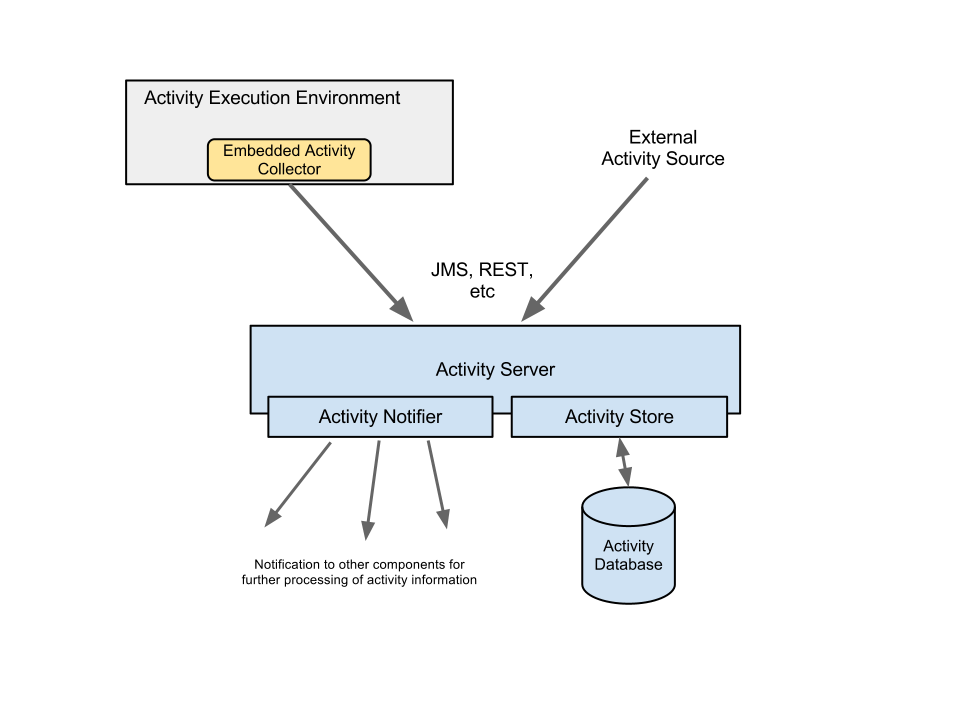
Figure 3.1. Activity Collection, Reporting, and Storage
Collection: The Activity Collector component of the architecture is optional and is responsible for collecting information from the execution infrastructure as efficiently as possible. It collects the activity events associated with a particular thread as a group, contained within an Activity Unit. This provides an implicit correlation of the activities that are associated with the same business transaction. You may also pre-process the activity events to extract relevant context and property information before it is reported to the Activity Server. Activity Units are then batched into further groups, and reported to the Activity Server at regular time intervals or when the batch gets too large. If the Activity Collector and Activity Server are co-located within the same execution environment, the Activity Units are reported directly. If the Activity Server is running remotely, then you can use suitable connectors to report the information via REST API.Activity Server: The Activity Server provides a public API for reporting a list of Activity Units. Remote components can access this API either directly (for example, as a CDI component), or remotely via REST. The Activity Server has the following main responsibilities:- To ensure Ids are set and consistent.
- To store the events in a repository.
- To notify other interested modules.
Storage:The Storage component records the activity events in a persistent data store.Notification: The Notification component is an API and keeps the other modules notified as and when the activity events are reported.
3.1.2. Event Processor Network
ActivityUnits) about activity events reported to the Activity Server. The following diagram illustrates how a node within an Event Processor Network functions to process the inbound event information.
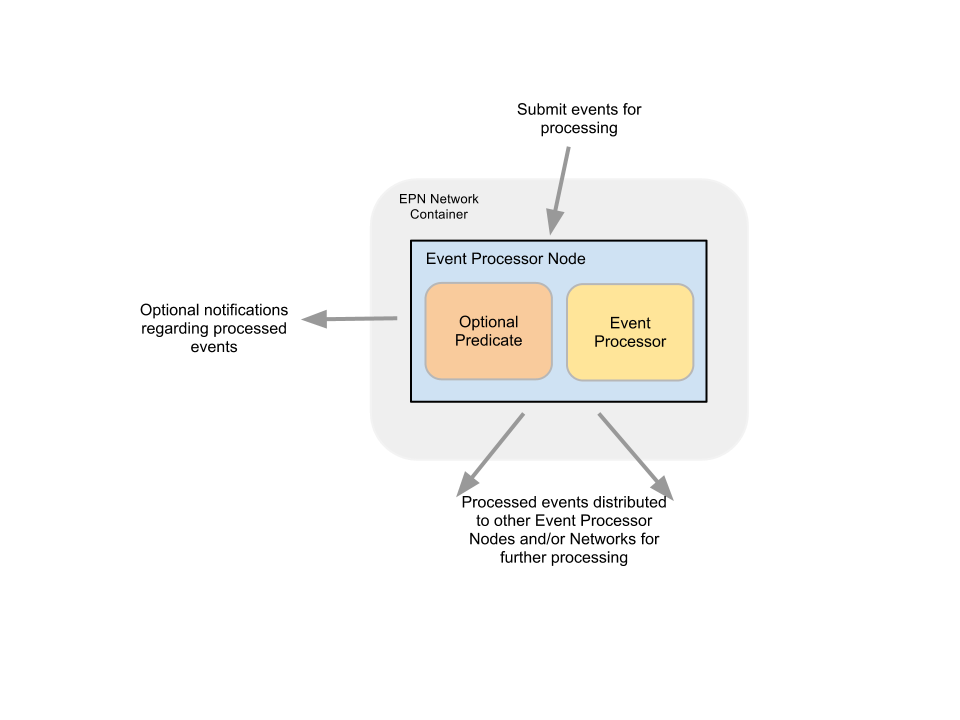
Figure 3.2. Runtime Governance Event Processor Network and Nodes
- An optional predicate to determine whether the event is of interest, and
- An event processor to perform the actual task of event processing.
3.1.3. Active Collections

Figure 3.3. Active Collections
- The ability to aggregate information which is then stored as a summary within the Active Collection.
- The ability to perform routine maintenance tasks.
- The ability to clear the collection entries based on configured criteria, such as maximum size of the collection, or maximum duration an item should exist in the collection.
3.1.4. Runtime Governance Topologies
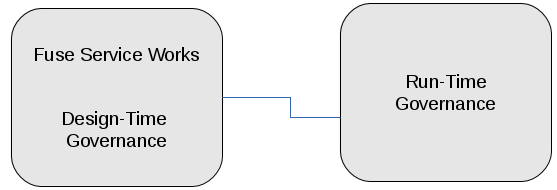
Figure 3.4. Runtime Governance on a Different Server

Figure 3.5. Runtime Governance on the Same Server as JBoss Fuse Service Works
3.1.4.1. Runtime Governance and S-RAMP in a Clustered Environment
3.2. Runtime Governance Managed Applications
3.2.1. Building a Runtime Governance Managed Application
Procedure 3.1. To build a Runtime Governance managed application:
- Deploy your SwitchYard application and enable Runtime Governance activity collection.
- To record any additional context (correlation) or properties with the activity information, define an Information Processor with the configuration details required to extract the information.
- To enforce policy decisions immediately (synchronously), define:
- An activity validator to contact the policy you wish to enforce.
- An interceptor in the SwitchYard application to trigger the validation.
Note
Activity Validators are only intended to validate the activities and raise exceptions where necessary to block the business transaction. - If policy decisions can be processed asynchronously, define an Event Processor Network which executes in the server.
Note
You can use the Event Processor Networks to derive further information (including Situations), enabling creation of multiple networks or nodes and building on previously processed information.
3.2.2. Customizing Your Runtime Governance Managed Application
Based on the out-of-the-box configuration, you have an option to define your own Event Processor Networks (EPN). You can use your EPNs to observe the basic activity information or derived response times to perform required actions (such as deriving further information, and identifying situations to create an alert). For more information, refer the policy-async quickstart.
To define intelligent policies, it is necessary to extract information from the message content or headers. This requires the definition of an Information Processor to define how each message type should be processed to extract the relevant context and property information. For more information, refer the order management quickstart with an ip artifact defining the information processor for the order management application.
Note
Activity validators are similar to EPNs, except that they operate in the SwitchYard environment, and can be used to block business transactions based on evaluation of a business policy. As the SwitchYard event collection is asynchronous, blocking a business transaction can only be achieved by performing the activity validation from within the SwitchYard application, with the use of an interceptor. For more information, refer the ordermgmt/app quickstart and the policy-sync quickstart, which defines the validator policy.
Note
3.3. Activity Events Collection
3.3.1. Activity Model
- Activity Unit
- The Activity Unit is the top-level and most important component of the Activity Model. The Activity Unit provides grouping capability. It aggregates a set of activities that relate to a particular transaction. The Activity Unit includes:
- Id: This uniquely identifies the activity unit for historical retrieval purposes.
- Origin: This information identifies the environment in which the activities were recorded.
- A set of contexts: This provides contextual information to help relate the activities with other activities recorded in other units.
- A group of activity types: This is the list of the actual activities or situations that occurred.
- Origin
- As mentioned above, Origin is a component of the Activity Unit. It represents information about the source of the activities associated with the Activity Unit. Origin provides the following information about an activity:
- Principal: This represents the user (if any) associated with the activities.
- Thread: This represents the execution path and is useful in diagnostic situations when used in conjunction with the host information.
- Host: This is the host name.
- Node: This is the name of the node, in the case when the server is part of a cluster.
- Context
- The Context items represent information used for correlating the activities within the unit against other Activity Units. It also provides identify information that may be useful when attempting to retrieve the unit. The Context contains the following information:
- type: This is the context type.
- value: This is the value of the context information.
- timeframe: This is an optional value used with a
Linkcontext type, to identify the time period in which the context is valid.
Here is the list of various context types you can define:Expand Table 3.1. Context Types Type Description Context.Type.Conversation The conversation id, which can be used to correlate activities across service boundaries. It is unique to a particular business transaction instance. Context.Type.Endpoint The endpoint id, which can be used to correlate activities within a service boundary such as a BPM process instance id. It is unique to a particular business transaction instance. Context.Type.Message The unique id for a message being sent or received. The message id may only be valid within the scope of an endpoint, as it's value may not be carried with the message contents to the recipient. A common usage is to correlate a response against the originating request within the same endpoint. Context.Type.Link This type represents a correlation between two activity events based on information that is unique and valid only for a limited time period. - Activity Type
- All activity events are derived from an Activity Type superclass. This class has the following information:
- Activity unit id
- Activity unit index
- Timestamp
- Principal
- A set of contexts
- A set of properties
Out of these, the only piece of information that the reporting component needs provide is the Timestamp, and optionally some activity type specific contexts. The other information are initialized by the infrastructure before persisting the Activity Unit, in order to make the specific Activity Type instance locatable.
3.3.2. BPM and SOA Specific Activity Events
- The specific XA transaction in which they are performed,
- The process instance that holds their state information in the BPM engine, and
- The conversation associated with the particular business transaction.
| Activity Type | Description |
|---|---|
| ProcessStarted | This activity type is recorded when a process instance is initially started. Attributes include: process type, instance id and version. |
| ProcessCompleted | This activity type is recorded when a process instance completes. Attributes include: process type, instance id and status (either success or fail) |
| ProcessVariableSet | This activity type is recorded when a process variable value is set or modified. Attributes include: process type, instance id and variable name/type/value. |
| Activity Type | Description |
|---|---|
| RequestReceived and RequestSent | This activity type is recorded when a service invocation (request) is received or sent. Attributes include: message type, content and message id. |
| ResponseReceived and ResponseSent | This activity type is recorded when a service invocation returns. Attributes include: message type, content, message id and replyTo id (used to correlate the response to the original request) |
3.3.3. Collecting Activity Events
- Integrating an Activity Collector into the execution environment.
- Manually report the activity information to the Runtime Governance Server through a publicly available API such as REST service.
3.3.4. Integrating an Activity Collector
3.3.4.1. Defining Information Processors
[{
        "name":"OrderManagementIP",
        "version":"1",
        "typeProcessors":{
                "{urn:switchyard-quickstart-demo:orders:1.0}submitOrder":{
                        "contexts":[{
                                "type":"Conversation",
                                "evaluator":{
                                        "type":"xpath",
                                        "expression":"order/orderId"
                                }
                        }],
                        "properties":[{
                                "name":"customer",
                                "evaluator":{
                                        "type":"xpath",
                                        "expression":"order/customer"
                                }
                        },{
                                "name":"item",
                                "evaluator":{
                                        "type":"xpath",
                                        "expression":"order/itemId"
                                }
                        }]
                },
                "{urn:switchyard-quickstart-demo:orders:1.0}submitOrderResponse":{
                        "contexts":[{
                                "type":"Conversation",
                                "evaluator":{
                                        "type":"xpath",
                                        "expression":"orderAck/orderId"
                                }
                        }],
                        "properties":[{
                                "name":"customer",
                                "evaluator":{
                                        "type":"xpath",
                                        "expression":"orderAck/customer"
                                }
                        },{
                                "name":"total",
                                "evaluator":{
                                        "type":"xpath",
                                        "expression":"orderAck/total"
                                }
                        }]
                },
                "org.switchyard.quickstarts.demos.orders.Order":{
                        "contexts":[{
                                "type":"Conversation",
                                "evaluator":{
                                        "type":"mvel",
                                        "expression":"orderId"
                                }
                        }],
                        "properties":[{
                                "name":"customer",
                                "evaluator":{
                                        "type":"mvel",
                                        "expression":"customer"
                                }
                        },{
                                "name":"itemId",
                                "evaluator":{
                                        "type":"mvel",
                                        "expression":"itemId"
                                }
                        }]
                },
                "org.switchyard.quickstarts.demos.orders.OrderAck":{
                        "contexts":[{
                                "type":"Conversation",
                                "evaluator":{
                                        "type":"mvel",
                                        "expression":"orderId"
                                }
                        }],
                        "properties":[{
                                "name":"customer",
                                "evaluator":{
                                        "type":"mvel",
                                        "expression":"customer"
                                }
                        },{
                                "name":"total",
                                "evaluator":{
                                        "type":"mvel",
                                        "expression":"total"
                                }
                        }]
                },
                "{urn:switchyard-quickstart-demo:orders:1.0}makePayment":{
                        "properties":[{
                                "name":"customer",
                                "evaluator":{
                                        "type":"xpath",
                                        "expression":"payment/customer"
                                }
                        },{
                                "name":"amount",
                                "evaluator":{
                                        "type":"xpath",
                                        "expression":"payment/amount"
                                }
                        }]
                },
                "{urn:switchyard-quickstart-demo:orders:1.0}makePaymentResponse":{
                        "properties":[{
                                "name":"customer",
                                "evaluator":{
                                        "type":"xpath",
                                        "expression":"receipt/customer"
                                }
                        },{
                                "name":"amount",
                                "evaluator":{
                                        "type":"xpath",
                                        "expression":"receipt/amount"
                                }
                        }]
                },
                "org.switchyard.quickstarts.demos.orders.Receipt":{
                        "properties":[{
                                "name":"customer",
                                "evaluator":{
                                        "type":"mvel",
                                        "expression":"customer"
                                }
                        },{
                                "name":"amount",
                                "evaluator":{
                                        "type":"mvel",
                                        "expression":"amount"
                                }
                        }]
                },
                "org.switchyard.quickstarts.demos.orders.ItemNotFoundException":{
                        "script":{
                                "type":"mvel",
                                "expression":"activity.fault = \"ItemNotFound\""
                        }
                }
        }
}]
| Field | Description |
|---|---|
| name | Name of the Information Processor. |
| version | Version of the Information Processor. If multiple versions Information Processor are installed with the same name, only the newest version is used. |
| typeProcesors | The map of type processors . There is one map per type, with the type name being the map key. |
| Field | Description |
|---|---|
| contexts | List of context evaluators. |
| properties | List of property evaluators. |
| script | An optional script evaluator that is used to do any other processing that may be required, such as setting additional properties in the activity event that are not necessarily derived from message content information. |
| transformer | An optional transformer that determines how this information type is represented in an activity event. |
| Field | Description |
|---|---|
| type | The context type, such as Conversation, Endpoint, Message, or Link. |
| timeframe | The number of milliseconds associated with a Link context type. If not specified, then the context is assumed to represent the destination of the link, so the source of the link must define the timeframe. |
| header | The optional header name. If not defined, then the expression is applied to the information content to obtain the context value. |
| evaluator | The expression evaluator used to derive the context value. |
| Context Type | Description |
|---|---|
| Conversation | A conversation identifier can be used to correlate activity events to a business transaction associated with a globally unique identifer such as an order id. |
| Endpoint | A globally unique identifier associated with one endpoint in a business transaction. For example, a process instance id associated with the business process executing within a service playing a particular role in the business transaction. |
| Message | A globally unique identifier of a message sent from one part to another. |
| Link | A temporal link between a source and a destination activity. The temporal nature of the association is intended to enable non-globally unique details to be used to correlate activities, where the id is considered unique within the defined timeframe. |
| Field | Description |
|---|---|
| name | The property name being initialized. |
| header | The optional header name. If not defined, then the expression is applied to the information content to obtain the property value. |
| evaluator | The expression evaluator used to derive the property value. |
| Field | Description |
|---|---|
| type | The type of expression evaluator to use. Only mvel or xpath are supported. |
| expression | The expression to evaluate. |
| optional | It indicates whether the value being extracted by the expression is optional. The default is false. If a value is not optional, but the expression fails to locate a value, then an error is reported. |
| Field | Description |
|---|---|
| type | The type of expression evaluator to use. Currently only mvel is supported. |
| expression | The expression to evaluate. |
- information: The information being processed.
- activity: - The activity event.The transformer field of the Type Processor has the following fields:
| Field | Descrition |
|---|---|
| type | The type of transformer to use. Currently only serialize and mvel are supported. . |
| Field | Descrition |
|---|---|
| expression | The mvel expression to transform the supplied information. |
3.3.4.2. Registering the Information Processors
warfile
|
|-META-INF
|    |- beans.xml
|
|-WEB-INF
|    |-classes
|    |    |-ip.json
|    |    |-<custom classes/resources>
|    |
|    |-lib
|       |-ip-loader-jee.jar
| |-<additional libraries>ip.json file contains the JSON representation of the Information Processor configuration. The ip-loader-jee.jar acts as a bootstrapper to load and register the Information Processors. If custom classes are defined, then the associated classes and resources can be defined in the WEB-INF/classes folder or within additional libraries located in the WEB-INF/lib folder. A maven pom.xml that creates this structure is shown below:
<project xmlns="http://maven.apache.org/POM/4.0.0" xmlns:xsi="http://www.w3.org/2001/XMLSchema-instance"
         xsi:schemaLocation="http://maven.apache.org/POM/4.0.0 http://maven.apache.org/maven-v4_0_0.xsd">
        <modelVersion>4.0.0</modelVersion>
        <groupId>....</groupId>
        <artifactId>....</artifactId>
        <version>....</version>
        <packaging>war</packaging>
        <name>....</name>

        <properties>
                <rtgov.version>....</rtgov.version>
        </properties>

        <dependencies>
                <dependency>
                        <groupId>org.overlord.rtgov.activity-management</groupId>
                        <artifactId>activity</artifactId>
                        <version>${rtgov.version}</version>
                        <scope>provided</scope>
                </dependency>
                <dependency>
                        <groupId>org.overlord.rtgov.activity-management</groupId>
                        <artifactId>ip-loader-jee</artifactId>
                        <version>${rtgov.version}</version>
                </dependency>
                ....
        </dependencies>

</project>.....
<build>
<finalName>....</finalName>
<plugins>
<plugin>
<artifactId>maven-war-plugin</artifactId>
<configuration>
<failOnMissingWebXml>false</failOnMissingWebXml>
<archive>
<manifestEntries>
<Dependencies>deployment.overlord-rtgov.war</Dependencies>
</manifestEntries>
</archive>
</configuration>
</plugin>
</plugins>
</build>
.....3.3.4.3. Defining the Activity Validators
[{
  "name" : "RestrictUsage",
  "version" : "1",
  "predicate" : {
    "@class" : "org.overlord.rtgov.ep.mvel.MVELPredicate",
    "expression" : "event instanceof org.overlord.rtgov.activity.model.soa.RequestReceived && event.serviceType == \"{urn:switchyard-quickstart-demo:orders:0.1.0}OrderService\""
  },
  "eventProcessor" : {
    "@class" : "org.overlord.rtgov.ep.mvel.MVELEventProcessor",
    "script" : "VerifyLastUsage.mvel",
    "services" : {
      "CacheManager" : {
        "@class" : "org.overlord.rtgov.common.infinispan.service.InfinispanCacheManager"
      }
    }
  }
}]| Field | Description |
|---|---|
| name | The name of the Activity Validator. |
| version | The version of the Activity Validator. If multiple versions of the same named Activity Validator are installed, only the newest version is used. Versions can be expressed using Numeric, Dot Format, or any alpha numeric and symbols scheme. |
| predicate | The optional implementation of the org.overlord.rtgov.ep.Predicate interface, used to determine if the activity event is relevant. If relevant, the event can be supplied to the event processor. |
| eventProcessor | Defines the details for the event processor implementation being used. At a minimum, the value for this field should define a @class property to specify the Java class name for the event process implementation to use. Another general field that can be configured is the map of services that can be used by the event processor. Depending upon which implementation is selected, the other fields within the value apply to the event processor implementation. |
3.3.4.4. Registering the Activity Validators
warfile
|
|-META-INF
|    |- beans.xml
|
|-WEB-INF
|    |-classes
|    |    |-av.json
|    |    |-<custom classes/resources>
|    |
|    |-lib
|       |-av-loader-jee.jar
| |-<additional libraries>av.json file contains the JSON representation of the Activity Validator configuration. The av-loader-jee.jar acts as a bootstrapper to load and register the Activity Validators. If custom classes are defined, then the associated classes and resources can be defined in the WEB-INF/classes folder or within additional libraries located in the WEB-INF/lib folder. A maven pom.xml that creates this structure is as shown below:
<project xmlns="http://maven.apache.org/POM/4.0.0" xmlns:xsi="http://www.w3.org/2001/XMLSchema-instance"
         xsi:schemaLocation="http://maven.apache.org/POM/4.0.0 http://maven.apache.org/maven-v4_0_0.xsd">
        <modelVersion>4.0.0</modelVersion>
        <groupId>....</groupId>
        <artifactId>....</artifactId>
        <version>....</version>
        <packaging>war</packaging>
        <name>....</name>

        <properties>
                <rtgov.version>....</rtgov.version>
        </properties>

        <dependencies>
                <dependency>
                        <groupId>org.overlord.rtgov.activity-management</groupId>
                        <artifactId>activity</artifactId>
                        <version>${rtgov.version}</version>
                        <scope>provided</scope>
                </dependency>
                <dependency>
                        <groupId>org.overlord.rtgov.activity-management</groupId>
                        <artifactId>av-loader-jee</artifactId>
                        <version>${rtgov.version}</version>
                </dependency>
                ....
        </dependencies>

</project>.....
<build>
<finalName>....</finalName>
<plugins>
<plugin>
<artifactId>maven-war-plugin</artifactId>
<configuration>
<failOnMissingWebXml>false</failOnMissingWebXml>
<archive>
<manifestEntries>
<Dependencies>deployment.overlord-rtgov.war</Dependencies>
</manifestEntries>
</archive>
</configuration>
</plugin>
</plugins>
</build>
.....3.3.5. Reporting and Querying Activity Events via Rest
3.3.5.1. Reporting Activity Information
<host>/overlord-rtgov/activity/store[{
"id":"TestId1",
"activityTypes":[{
"type":"RequestSent",
"context":[{
"value":"12345"
},{
"value":"abc123",
"type":"Endpoint"
},{
"value":"ABC123",
"type":"Message"
}],
"content":"....",
"serviceType":"{http://service}OrderService",
"operation":"buy",
"fault":"MyFault",
"messageType":"{http://message}OrderRequest",
"timestamp":1347028592880
},{
"type":"ResponseReceived",
"context":[{
"value":"12345"
},{
"value":"ABC124",
"type":"Message"
}],
"content":"....",
"serviceType":"{http://service}OrderService",
"operation":"buy",
"fault":"OutOfStock",
"messageType":"{http://message}OutOfStock",
"replyToId":"ABC123",
"timestamp":1347028593010
}],
"origin":{
"host":"Saturn",
"principal":"Fred",
"node":"Saturn1",
"thread":"Thread-1"
}
},{
.....
}]3.3.5.2. Querying Activity Events Using an Expression
<host>/overlord-rtgov/activity/query| Property | Description |
|---|---|
| fromTimestamp | Specifies (optionally) the start date/time for the activity units required. If not specified, then the query applies to the first recorded activity unit. |
| toTimestamp | Specifies (optionally) the end date/time for the activity units required. If not specified, then the query relates to the most recently recorded activity units. |
| expression | An expression (optional) that can be used to specify the activity events of interest. |
| format | Specifies (optionally) the format of the expression. The configured activity store must support this value. |
3.3.5.3. Retrieving an Activity Unit
<host>/overlord-rtgov/activity/unit?id=<unitId>unitId represents the identifier associated with the retrieved ActivityUnit.
3.3.5.4. Retrieve Activity Events Associated with a Context Value
<host>/overlord-rtgov/activity/events?type=<contextType>&value=<identifier>- The <contextType> represents the context type, such as Conversation, Endpoint, Message or Link. For more information, see the API documentation for
org.overlord.rtgov.activity.model.Context.Type. - The <identifier> represents the correlation value associated with the ActivityType(s) that are being retrieved.
start for the start timestamp, and end for the end timestamp. You can use these parameters to scope the time period of the query.
org.overlord.rtgov.activity.model.ActivityType.
3.4. Reporting Activity Event Information
3.4.1. Activity Collector
import org.overlord.rtgov.activity.collector.ActivityCollector;
import org.overlord.rtgov.activity.collector.ActivityCollectorAccessor;
....

ActivityCollector activityCollector = ActivityCollectorAccessor.getActivityCollector();
3.4.1.1. Processing the Activity Event Information
- Correlating events to a particular business transaction instance.
- Highlighting important properties that may be useful for business policies.
ActivityCollector API that provides a method to enable information associated with the activity event to be preprocessed. The ActivityCollector API does this with the help of information processors.
public String processInformation(String processor, String type,
        Object info, java.util.Map<String, Object> headers,
                ActivityType actType);
- The
processorparameter is an optional value that you can use to explicitly name the information processor. If not specified, then Activity Collector checks all registered information processors to determine if they are relevant for the supplied information type. - The
typeparameter represents the information type. This can be in any form, as long as it matches the registered type defined in the information processor configuration. - The
infoparameter represents the actual information that the Activity Collector will process. - The
headersparameter represents any header information that may have accompanied the information. - The
actTypeparameter represents the activity event that any extracted properties must be recorded against.
3.4.1.2. Validating the Activity Events
3.4.1.3. Managing the Activity Scope
3.4.1.4. Starting and Ending the Activity Scope
Starting an Activity Scope
To start the scope, invoke thestartScopemethod on the Activity Collector as shown below:activityCollector.startScope();If the application does not know whether a scope has already been started, and only wishes to start a single scope, then use the following condition:boolean started=false; if (!activityCollector.isScopeActive()) { activityCollector.startScope(); started = true; }Here, theisScopeActivemethod returns a boolean value to indicate whether the scope was previously started. If it returns true, then this component is also responsible for stopping the scope. If it returns false, then it means the scope has already been started, and therefore the component must not invoke theendScopemethod.Ending an Activity Scope
To stop the scope, invoke theendScopemethod on the Activity Collector as shown below:if (started) { activityCollector.endScope(); }
3.4.1.5. Reporting an Activity Type
Procedure 3.2. Reporting an Activity Event
- To report an event, create the specific Activity Type and invoke the record method as shown below:
org.overlord.rtgov.activity.model.RequestSent sentreq=new org.overlord.rtgov.activity.model.soa.RequestSent(); sentreq.setServiceType(serviceType); sentreq.setOperation(opName); sentreq.setContent(content); sentreq.setMessageType(mesgType); sentreq.setMessageId(messageId); activityCollector.record(sentreq); - For certain types of event, it may also be appropriate to invoke an information processor(s) to extract relevant context and property information, that can then be associated with the activity event. To achieve this, use the
processInformation() method as shown below:Object modifiedContent=_activityCollector.processInformation(null, mesgType, content, headers, sentreq); sentreq.setContent(modifiedContent);
3.4.1.6. Configuring an Activity Unit Logger
endScope method, the Activity Unit Logger component logs the activity unit that is generated as a result. The Activity Unit Logger interface has three methods:
init: This method initializes the activity unit logger implementationlog: This method is used for the Activity Unit logging.close: This method closes the activity unit logger implementation.
- Maximum Time Interval: If the time interval expires, then it sends the set of Activity Units to the server.
- Maximum Unit Count: If the number of Activity Units reaches this maximum value, then it sends the batch to the server.
import org.overlord.rtgov.activity.collector.ActivityCollector;
import org.overlord.rtgov.activity.collector.activity.server.ActivityServerLogger;
import org.overlord.rtgov.activity.server.rest.client.RESTActivityServer;

.....

        RESTActivityServer restc=new RESTActivityServer();
        restc.setServerURL(_activityServerURL);

        ActivityServerLogger activityUnitLogger=new ActivityServerLogger();
        activityUnitLogger.setActivityServer(restc);

        activityUnitLogger.init();

_collector.setActivityUnitLogger(activityUnitLogger);3.4.1.7. Collector Context Configuration
3.4.1.8. ActivityReporter Component for Simplified Reporting
@Service(InventoryService.class)
public class InventoryServiceBean implements InventoryService {

    private final Map<String, Item> _inventory = new HashMap<String, Item>();

    private org.overlord.rtgov.client.ActivityReporter _reporter=
                new org.overlord.rtgov.client.DefaultActivityReporter();

    public InventoryServiceBean() {
        ....
    }

    @Override
    public Item lookupItem(String itemId) throws ItemNotFoundException {
        Item item = _inventory.get(itemId);

        if (item == null) {

            if (_reporter != null) {
                _reporter.logError("No item found for id '"+itemId+"'");
            }

            throws new ItemNotFoundException("No item found for id " + itemId);
        }

        ....

        return item;
    }
}| Method | Description |
|---|---|
| logInfo(String mesg) | Log some information |
| logWarning(String meg) | Log a warning |
| logError(String mesg) | Log an error |
| report(String type, Map</String,String> props) | Record a custom activity with a particular type and associated properties |
| report(ActivityType activity) | Record an activity |
<dependency>
      <groupId>org.overlord.rtgov.integration</groupId>
      <artifactId>rtgov-client</artifactId>
      <version>${rtgov.version}</version>
</dependency>3.4.2. Activity Server
3.4.2.1. Recording Activity Units
- Direct InjectionThis is the simplest approach is to leverage CDI (for example within a JEE container) to directly inject the Activity Server implementation. Here is how you can use direct injection to get reference to the Activity Server:
import org.overlord.rtgov.activity.server.ActivityServer;

....

@Inject
private ActivityServer _activityServer=null;
Once you obtain the reference to the Activity Server, you can call the store method to record a list of Activity Units as shown below:import org.overlord.rtgov.activity.model.soa.RequestSent; import org.overlord.rtgov.activity.model.ActivityUnit; .... java.util.List<ActivityUnit> list=new .....; RequestSent act=new RequestSent(); act.setServiceType(...); ... list.add(act); _activityServer.store(list); - REST ServiceYou can access the Activity Server as RESTful service. here is an example:
import org.codehaus.jackson.map.ObjectMapper;
import org.overlord.rtgov.activity.model.ActivityUnit;


.....

        java.util.List<ActivityUnit> activities=........
        java.net.URL storeUrl = new java.net.URL(....);
        // <host>/overlord-rtgov/activity/store

        java.net.HttpURLConnection connection = (java.net.HttpURLConnection) storeUrl.openConnection();

        String userPassword = username + ":" + password;
        String encoding = org.apache.commons.codec.binary.Base64.encodeBase64String(userPassword.getBytes());

        connection.setRequestProperty("Authorization", "Basic " + encoding);

        connection.setRequestMethod("POST");
        connection.setDoOutput(true);
        connection.setDoInput(true);
        connection.setUseCaches(false);
        connection.setAllowUserInteraction(false);
        connection.setRequestProperty("Content-Type", "application/json");

        java.io.OutputStream os=connection.getOutputStream();

        ObjectMapper mapper=new ObjectMapper();
        // Use jackson to serialize the activity units
        mapper.writeValue(os, activities);

        os.flush();
        os.close();

        java.io.InputStream is=connection.getInputStream();

        byte[] result=new byte[is.available()];

        is.read(result);
        is.close();
Note
3.4.2.2. Querying Activity Types
- Direct InjectionThe simplest approach is to leverage CDI to obtain a reference to the Activity Server. Once you obtain a reference to the Activity Server, then build the query specification based on the relevant criteria, and call the query method to retrieve the list of Activity Types as shown below:
import org.overlord.rtgov.activity.model.ActivityType; import org.overlord.rtgov.activity.model.Context; import org.overlord.rtgov.activity.server.QuerySpec; .... QuerySpec qs=new QuerySpec() .setFromTimestamp(...) .setToTimestamp(...) .addContext(new Context(Context.CONVERSATION_ID,"txnId","123")); java.util.List<ActivityType> list=_activityServer.query(qs); - REST ServiceYou can access the Activity Server as RESTful service. here is an example:
import org.codehaus.jackson.map.ObjectMapper;
import org.codehaus.jackson.type.TypeReference;
import org.overlord.rtgov.activity.server.QuerySpec;
import org.overlord.rtgov.activity.model.ActivityType;


.....

        QuerySpec qs=........
        java.net.URL queryUrl = new java.net.URL(....);
        // <host>/overlord-rtgov/activity/query

        java.net.HttpURLConnection connection = (java.net.HttpURLConnection) queryUrl.openConnection();

        String userPassword = username + ":" + password;
        String encoding = org.apache.commons.codec.binary.Base64.encodeBase64String(userPassword.getBytes());

        connection.setRequestProperty("Authorization", "Basic " + encoding);

        connection.setRequestMethod("POST");
        connection.setDoOutput(true);
        connection.setDoInput(true);
        connection.setUseCaches(false);
        connection.setAllowUserInteraction(false);
        connection.setRequestProperty("Content-Type", "application/json");

        java.io.OutputStream os=connection.getOutputStream();

        ObjectMapper mapper=new ObjectMapper();
        // Use jackson to serialize the query spec
        mapper.writeValue(os, qs);

        os.flush();
        os.close();

        java.io.InputStream is=connection.getInputStream();

        java.util.List<ActivityType> activities = mapper.readValue(is, new TypeReference<java.util.List<ActivityType>>() {});

        is.close();
3.5. Processing Activity Events
3.5.1. Configuring an Event Processor Network
3.5.1.1. Defining the Event Processor Network
{
  "name" : "Overlord-RTGov-EPN",
  "version" : "1.0.0.Final",
  "subscriptions" : [ {
    "nodeName" : "SOAEvents",
    "subject" : "ActivityUnits"
  },
  {
    "nodeName" : "ServiceDefinitions",
    "subject" : "ActivityUnits"
  },
  {
    "nodeName" : "SituationsStore",
    "subject" : "Situations"
  } ],
  "nodes" : [
    {
      "name" : "SOAEvents",
      "sourceNodes" : [ ],
      "destinationSubjects" : [ "SOAEvents" ],
      "maxRetries" : 3,
      "retryInterval" : 0,
      "eventProcessor" : {
        "@class" : "org.overlord.rtgov.content.epn.SOAActivityTypeEventSplitter"
      },
      "predicate" : null,
      "notifications" : [ ]
    },{
      "name" : "ServiceDefinitions",
      "sourceNodes" : [ ],
      "destinationSubjects" : [ ],
      "maxRetries" : 3,
      "retryInterval" : 0,
      "eventProcessor" : {
        "@class" : "org.overlord.rtgov.content.epn.ServiceDefinitionProcessor"
      },
      "predicate" : null,
      "notifications" : [ {
        "type" : "Results",
        "subject" : "ServiceDefinitions"
      } ]
    },{
      "name" : "ServiceResponseTimes",
      "sourceNodes" : [ "ServiceDefinitions" ],
      "destinationSubjects" : [ "ServiceResponseTimes" ],
      "maxRetries" : 3,
      "retryInterval" : 0,
      "eventProcessor" : {
        "@class" : "org.overlord.rtgov.content.epn.ServiceResponseTimeProcessor"
      },
      "predicate" : null,
      "notifications" : [ {
        "type" : "Results",
        "subject" : "ServiceResponseTimes"
      } ]
    },{
      "name" : "SituationsStore",
      "maxRetries" : 3,
      "retryInterval" : 0,
      "eventProcessor" : {
        "@class" : "org.overlord.rtgov.ep.jpa.JPAEventProcessor",
        "entityManager" : "overlord-rtgov-epn-non-jta"
      }
    }
  ]
}3.5.1.2. Event Processor Network Example
{
  "name" : "AssessCreditPolicyEPN",
  "version" : "1",
  "subscriptions" : [ {
    "nodeName" : "AssessCredit",
    "subject" : "SOAEvents"
  } ],
  "nodes" : [
    {
      "name" : "AssessCredit",
      "sourceNodes" : [ ],
      "destinationSubjects" : [ ],
      "maxRetries" : 3,
      "retryInterval" : 0,
      "predicate" : {
        "@class" : "org.overlord.rtgov.ep.mvel.MVELPredicate",
        "expression" : "event.serviceProvider && !event.request && event.serviceType == \"{urn:switchyard-quickstart-demo:orders:0.1.0}OrderService\""
      },
      "eventProcessor" : {
        "@class" : "org.overlord.rtgov.ep.mvel.MVELEventProcessor",
        "script" : "AssessCredit.mvel",
        "services" : {
          "CacheManager" : {
            "@class" : "org.overlord.rtgov.common.infinispan.service.InfinispanCacheManager"
          }
        }
      }
    }
  ]
}| Filed | Description |
|---|---|
| name | The name of the network. |
| subscriptions | The list of subscriptions associated with the network. |
| nodes | The nodes that form the connected graph within the network. |
| version | The version of the network. |
- Subscriptions
- The subscription element is used to define a subject that the network is interested in, and the name of the node to which the events from that subject should be routed. This decoupled subscription approach enables multiple networks to register their interest in events from the same subject. Multiple nodes within the same network can subscribe to the same subject. The fields associated with this component are:
Expand Table 3.17. Fields Associated with Subscriptions Field Description subject The subject to subscribe to. nodeName The name of the node within the network to route the events to. This is a list of the subjects that are reserved for Red Hat JBoss Governance's use:Expand Table 3.18. Subjects Reserved for Governance Subject Purpose ActivityUnits This subject is used to publish events of the type org.overlord.rtgov.activity.model.ActivityUnit, produced when activity information is recorded with the Activity Server. - Node
- This element is used to define a particular node in the graph that forms the network. The fields associated with this component are:
Expand Table 3.19. Node Fields Field Description name The name of the node. sourceNodes A list of node names that represent the source nodes, within the same network that this node receives its events from. Therefore, if this list is empty, it means that the node is a root node and should be the target of a subscription. destinationSubjects A list of inter-EPN subjects to publish any resulting events to. These subjects are only of relevance to other networks. maxRetries The maximum number of times an event should be retried, following a failure, before giving up on the event. retryInterval The delay that should occur between retry attempts. This may not be supported in some environments. eventProcessor Defines the details for the event processor implementation being used. At a minimum, the value for this field should define a @class property to specify the Java class name for the event process implementation to use. Another general field that can be configured is the map of services that can be used by the event processor. Depending upon which implementation is selected, the other fields within the value apply to the event processor implementation. predicate This field is optional, but if specified, it defines a predicate implementation. As with the event processor, it must at a minimum define a @class field that specifies the Java class name for the implementation, with any additional fields be used to initialize the predicate implementation. notifications A list of notifications. A notification entry defines its type and the notification subject upon which the information should be published. Unlike the destinationSubjects, which are subjects for inter-EPN communication, these notification subjects are the mechanism for distribution information out of the EPN capability, for presentation to end-users through various means. The notify types field defines what type of notifications should be emitted from a node when processing an event. The notifications are the mechanism used by potentially interested applications to observe what information each node is processing, and the results they produce. The possible values for this field are:Expand Table 3.20. Notification Values Field Description Processed This type indicates that a notification should be created when an event is considered suitable for processing by the node. An event is suitable either if no predicate is defined, or if the predicate indicates the event is valid. Results This type indicates that a notification should be created for any information produced as the result of the event processor processing the event.
Note
3.5.1.3. Registering the Event Processor Network
warfile
|
|-META-INF
|    |- beans.xml
|
|-WEB-INF
|    |-classes
|    |    |-epn.json
|    |    |-<custom classes/resources>
|    |
|    |-lib
|       |-epn-loader-jee.jar
| |-<additional libraries>epn.json file contains the JSON representation of the Event Processor Network configuration. The epn-loader-jee.jar acts as a bootstrapper to load and register the Event Processor Network. If custom predicates or event processors are defined, then the associated classes and resources can be defined in the WEB-INF/classes folder or within additional libraries located in the WEB-INF/lib folder. A maven pom.xml that creates this structure is shown below:
<project xmlns="http://maven.apache.org/POM/4.0.0" xmlns:xsi="http://www.w3.org/2001/XMLSchema-instance"
         xsi:schemaLocation="http://maven.apache.org/POM/4.0.0 http://maven.apache.org/maven-v4_0_0.xsd">
        <modelVersion>4.0.0</modelVersion>
        <groupId>....</groupId>
        <artifactId>....</artifactId>
        <version>....</version>
        <packaging>war</packaging>
        <name>....</name>

        <properties>
                <rtgov.version>....</rtgov.version>
        </properties>

        <dependencies>
                <dependency>
                        <groupId>org.overlord.rtgov.event-processor-network</groupId>
                        <artifactId>epn-core</artifactId>
                        <version>${rtgov.version}</version>
                        <scope>provided</scope>
                </dependency>
                <dependency>
                        <groupId>org.overlord.rtgov.event-processor-network</groupId>
                        <artifactId>epn-loader-jee</artifactId>
                        <version>${rtgov.version}</version>
                </dependency>
                ....
        </dependencies>

</project>.....
<build>
<finalName>slamonitor-epn</finalName>
<plugins>
<plugin>
<artifactId>maven-war-plugin</artifactId>
<configuration>
<failOnMissingWebXml>false</failOnMissingWebXml>
<archive>
<manifestEntries>
<Dependencies>deployment.overlord-rtgov.war</Dependencies>
</manifestEntries>
</archive>
</configuration>
</plugin>
</plugins>
</build>
.....3.5.1.4. Supporting Multiple Versions of the Event Processor Network
3.5.2. Event Processor Implementations
3.5.2.1. Introduction
- Drools Event Processor
- JPA Event Processor
- Mail Event Processor
- MVEL Event Processor
3.5.2.2. Drools Event Processor
org.overlord.rtgov.ep.drools.DroolsEventProcessor ) enables events to be processed by a Complex Event Processing (CEP) rule. This implementation defines the following additional fields:
| Field | Description |
|---|---|
| ruleName | The name of the rule, used to locate the rule definition in a file called <ruleName>.drl |
import org.overlord.rtgov.activity.model.soa.RequestReceived
import org.overlord.rtgov.activity.model.soa.ResponseSent

global org.overlord.rtgov.ep.EPContext epc

declare RequestReceived
    @role( event )
    @timestamp( timestamp )
    @expires( 2m20s )
end

declare ResponseSent
    @role( event )
    @timestamp( timestamp )
    @expires( 2m20s )
end

rule "correlate request and response"
when
    $req : RequestReceived( $id : messageId ) from entry-point "Purchasing"
    $resp : ResponseSent( replyToId == $id, this after[0,2m20s] $req )  from entry-point "Purchasing"
then

    epc.logInfo("REQUEST: "+$req+" RESPONSE: "+$resp);

    java.util.Properties props=new java.util.Properties();
    props.put("requestId", $req.getMessageId());
    props.put("responseId", $resp.getMessageId());

    long responseTime=$resp.getTimestamp()-$req.getTimestamp();

    epc.logDebug("CORRELATION on id '"+$id+"' response time "+responseTime);

    props.put("responseTime", responseTime);

    epc.handle(props);

endglobal org.overlord.rtgov.ep.EPContext epchandle() method.
Warning
3.5.2.3. JPA Event Processor
org.overlord.rtgov.ep.jpa.JPAEventProcessor) enables events to be persisted. This implementation defines the following additional fields:
| Field | Description |
|---|---|
| entityManager | The name of the entity manager to be used. |
3.5.2.4. Mail Event Processor
org.overlord.rtgov.ep.mail.MailEventProcessor ) enables events to be transformed and sent as an email. This implementation defines the following additional fields:
| Field | Description |
|---|---|
| from | The from email address. |
| to | The list of to email addresses. |
| subjectScript | The location of the MVEL script, which may be relative to the classpath, used to define the email subject. |
| contentScript | The location of the MVEL script, which may be relative to the classpath, used to define the email content. |
| contentType | The optional type of the email content. By default it will be "text/plain". |
| jndiName | The optional JNDI name locating the JavaMail session. |
3.5.2.5. MVEL Event Processor
org.overlord.rtgov.ep.mvel.MVELEventProcessor ) enables events to be processed by a MVEL script. This implementation defines the following additional fields:
| Field | Description |
|---|---|
| script | The location of the MVEL script, which may be relative to the classpath. |
| Variable | Description |
|---|---|
| source | The name of the source node or subject upon which the event was received. |
| event | The event to be processed. |
| retriesLeft | The number of retries remaining. |
| epc | The EP context ( org.overlord.rtgov.ep.EPContext ), providing some utility functions for use by the script, including the handle method for pushing the result back into the network. |
handle() method.
3.5.2.6. Creating Custom Event Processors
org.overlord.rtgov.ep.EventProcessor abstract class is responsible for processing an event routed to a particular node within the Event Processor Network. To create a custom implementation, derive a class from the EventProcessor abstract class. This class provides the following methods:
| Method | Description |
|---|---|
java.util.Map<String,Service> getServices() | This method returns the map of services available to the Event Processor. |
void setServices(java.util.Map<String,Service> services) | This method sets the map of services available to the Event Processor. |
void init() | This method is called when the event processor is first initialized as part of the Event Processor Network. A custom implementation does not need to override this method if not required. |
Serializable process(String source, Serializable event, int retriesLeft) throws Exception | This method processes the supplied event, indicating the source of the event and how many retries are left (so that suitable error handling can be performed in no more retries remain. |
3.5.2.7. Support Service by Cache Manager
| Method | Description |
|---|---|
<K,V> Map<K,V> getCache(String name) | This method returns the cache associated with the supplied name. If the cache does not exist, then a null will be returned. |
boolean lock(String cacheName, Object key) | This method locks the item, associated with the supplied key, in the named cache. |
| Implementation | Class Name | Description |
|---|---|---|
| Infinispan | org.overlord.rtgov.common.infinispan.service.InfinispanCacheManager | This class provides an implementation based on Infinispan. It has a property called container which represents the optional JNDI name for the infinispan container defined in the standalone-full.xml or standalone-full-ha.xml file. |
- If the container is explicitly defined, then it is used.
- If the container is not defined, then a default container is obtained from the
$JBOSS_HOME/standalone/configuration/overlord-rtgov.propertiesfile for theinfinispan.containerproperty. - if no default container is defined, then a default cache manager is created.
3.5.2.8. Creating Custom Services
org.overlord.rtgov.common.service.Service abstract class is used to provide services for use by event processors, such as a CacheManager. To create a custom implementation, derive a class from the Service abstract class. This class provides the following methods:
| Method | Description |
|---|---|
void init() | This method is called when the service is first initialized. A custom implementation does not need to override this method if it is not required. |
3.5.3. Predicates
3.5.3.1. MVEL Predicate
org.overlord.rtgov.ep.mvel.MVELPredicate) enables events to be evaluated by a MVEL expression or script. This implementation defines the following additional fields:
| Field | Description |
|---|---|
| expression | The MVEL expression used to evaluate the event. |
| script | The location of the MVEL script, which may be relative to the classpath. |
Warning
3.5.3.2. Creating Custom Predicates
org.overlord.rtgov.ep.Predicate abstract class is responsible for determining whether an event is suitable to be processed by a particular node within the Event Processor Network. To create a custom implementation, derive a class from the Predicate abstract class. This class provides the following methods:
| Method | Description |
|---|---|
void init() | This method is called when the predicate is first initialized as part of the Event Processor Network. A custom implementation does not need to override this method if not required. |
boolean evaluate(Object event) | This method determines whether the supplied event must be processed by the node. |
3.5.4. Packaging
3.6. Accessing Derived Information through Active Collections
- Configure Active Collections
- Present Results from an Event Processor Network
- Publish Active Collection Contents as JMX Notifications
- Query Active Collections via REST
- Use Pre-Defined Active Collections
- Implement an Active Collection Source, which can be used to subscribe to a source of information which can result in data being inserted, updated and removed from an associated active collection.
- Implement an Active Change Listener that can associated with an Active Collection Source, and automatically notified of changes to an associated Active Collection.
- Write a custom application for accessing Active Collections.
3.6.1. Configuring Active Collections
3.6.1.1. Defining the Active Collection Source
[
  {
    "@class" : "org.overlord.rtgov.active.collection.epn.EPNActiveCollectionSource",
    "name" : "ServiceResponseTimes",
    "type" : "List",
    "itemExpiration" : 0,
    "maxItems" : 100,
    "subject" : "ServiceResponseTimes",
    "aggregationDuration" : 1000,
    "groupBy" : "serviceType + \":\" + operation + \":\" + fault",
    "aggregationScript" : "AggregateServiceResponseTime.mvel"
  },{
    "@class" : "org.overlord.rtgov.active.collection.epn.EPNActiveCollectionSource",
    "name" : "ServiceDefinitions",
    "type" : "Map",
    "itemExpiration" : 0,
    "maxItems" : 100,
    "subject" : "ServiceDefinitions",
    "scheduledScript" : "TidyServiceDefinitions.mvel",
    "scheduledInterval" : 60000,
    "properties" : {
        "maxSnapshots" : 5
    },
    "maintenanceScript" : "MaintainServiceDefinitions.mvel"
  },{
    "@class" : "org.overlord.rtgov.active.collection.epn.EPNActiveCollectionSource",
    "name" : "Situations",
    "type" : "List",
    "itemExpiration" : 40000,
    "maxItems" : 0,
    "subject" : "Situations",
    "activeChangeListeners" : [ {
        "@class" : "org.overlord.rtgov.active.collection.jmx.JMXNotifier",
        "objectName" : "overlord.rtgov.services:name=Situations",
        "descriptionScript" : "SituationDescription.mvel",
        "insertTypeScript" : "SituationType.mvel"
        } ],
        "derived": [ {
                "name": "FilteredSituations",
                "predicate": {
                        "type": "MVEL",
                        "expression": "map = context.getMap(\"IgnoredSituationSubjects\"); if (map == null) { return false; } return !map.containsKey(subject);"
                },
            "properties" : {
                "active" : false
            }
        } ]
  },{
    "@class" : "org.overlord.rtgov.active.collection.ActiveCollectionSource",
    "name" : "IgnoredSituationSubjects",
    "type" : "Map",
    "lazy" : true,
    "factory" : {
        "@class" : "org.overlord.rtgov.active.collection.infinispan.InfinispanActiveCollectionFactory",
        "cache" : "IgnoredSituationSubjects"
    }
  },{
    "@class" : "org.overlord.rtgov.active.collection.ActiveCollectionSource",
    "name" : "Principals",
    "type" : "Map",
    "lazy" : true,
    "visibility" : "Private",
    "factory" : {
        "@class" : "org.overlord.rtgov.active.collection.infinispan.InfinispanActiveCollectionFactory",
        "cache" : "Principals"
    }
  }
]| Field | Description |
|---|---|
| @class | This attribute defines the Java class implementing the Active Collection Source. This class must be directly or indirectly derived from org.overlord.rtgov.active.collection.ActiveCollectionSource. |
| name | The name of the Active Collection that will be created and associated with this source. |
| type | The type of active collection. The currently supported values (as defined in the org.overlord.rtgov.active.collection.ActiveCollectionType enum are List (default) and Map. |
| visibility | This value specifies the visibility of active collection, that is, whether an active collection is accessible via the remote access mechanisms such as REST or not. The currently supported values (as defined in the org.overlord.rtgov.active.collection.ActiveCollectionVisibility enum are Public (default) and Private. |
| lazy | This value specifies whether active collection must be created on startup, or instantiated upon first use. The default value is false. |
| itemExpiration | If not zero, then defines the number of milliseconds until an item in the collection expires and is removed. |
| maxItems | If not zero, defines the maximum number of items that the collection must hold. If an insertion causes the size of the collection to increase above this value, then the oldest item must be removed. |
| aggregationDuration | The duration (in milliseconds) over which the information is aggregated. |
| groupBy | An expression defining the key to be used to categorize the information being aggregated. The expression can use properties associated with the information being aggregated. |
| aggregationScript | The MVEL script used for aggregating the information. |
| scheduledInterval | The interval (in milliseconds) between the invocation of the scheduled script. |
| scheduledScript | The MVEL script invoked at a fixed interval to perform routine tasks on the collection. |
| maintenanceScript | By default, events received by the active collection source are inserted into the associated active collection. If a MVEL maintenance script is specified, then it is invoked to manage the way in which the received information is applied to the active collection. |
| properties | A set of properties that can be accessed by the various scripts. |
| derived | An optional list of definitions for derived collections that will be created with the top level active collection, and retained regardless of whether any users are currently accessing them. Normally when a derived collection is created dynamically on demand, once it has served its purpose, it is cleaned up. |
| activeChangeListeners | The list of active change listeners that must be instantiated and automatically registered with the Active Collection. The listeners must be derived from the Java class org.overlord.rtgov.active.collection.AbstractActiveChangeListener. |
| factory | The optional factory for creating the active collection, derived from the class org.overlord.rtgov.active.collection.ActiveCollectionFactory. |
- Scripts
- The aggregation script is used to aggregate information being provided by the source, before being applied to the collection. The values available to the MVEL script are:
Expand Table 3.33. Aggregate Script Values Variable Description events The list of events to be aggregated. The scheduled script is used to perform regular tasks on the active collection, independent of any information being applied to the collection. The values available to the MVEL script are:Expand Table 3.34. Scheduled Script Values Variable Description acs The active collection source. acs.properties The properties configured for the active collection source. variables A map associated with the active collection source that can be used by the scripts to cache information. The maintenance script is used to manage how new information presented to the source is applied to the active collection. If no script is defined, then the information is inserted by default. The values available to the MVEL script are:Expand Table 3.35. Scheduled Script Values Variable Description acs The active collection source. acs.properties The properties configured for the active collection source. key The key for the information being inserted. You can have null value for key. value The value for the information being inserted. variables A map associated with the active collection source that can be used by the scripts to cache information. Here is an example script, showing how you can use these variables :This example shows the script accessing the Active Collection Source and its properties, as well as accessing (and updating) the variables cache associated with the source.int maxSnapshots=acs.properties.get("maxSnapshots"); snapshots = variables.get("snapshots"); if (snapshots == null) { snapshots = new java.util.ArrayList(); variables.put("snapshots", snapshots); } // Update the current snapshot currentSnapshot = variables.get("currentSnapshot"); if (currentSnapshot == null) { currentSnapshot = new java.util.HashMap(); } snapshots.add(new java.util.HashMap(currentSnapshot)); currentSnapshot.clear(); // Remove any snapshots above the number configured while (snapshots.size() > maxSnapshots) { snapshot = snapshots.remove(0); } // Merge snapshots merged = org.overlord.rtgov.analytics.util.ServiceDefinitionUtil.mergeSnapshots(snapshots); // Update existing, and remove definitions no longer relevant foreach (entry : acs.activeCollection) { org.overlord.rtgov.analytics.service.ServiceDefinition sd=null; if (merged.containsKey(entry.key)) { acs.update(entry.key, merged.get(entry.key)); } else { acs.remove(entry.key, entry.value); } merged.remove(entry.key); } // Add new definitions for (key : merged.keySet()) { acs.insert(key, merged.get(key)); } - Active Change Listeners
- The activeChangeListeners element defines a list of Active Change Listener implementations that is instantiated and registered with the active collection. The fields associated with this component are:
Expand Table 3.36. Active Change Listener Fields Field Description @class The Java class that provides the listener implementation and is directly or indirectly derived from org.overlord.rtgov.active.collection.AbstractActiveChange. - Factory
- The factory element defines an Active Collection Factory implementation that will be used to create the active collection. The fields associated with this component are:
Expand Table 3.37. Active Collection Factory Fields Field Description @class The Java class that provides the factory implementation and is directly or indirectly derived from org.overlord.rtgov.active.collection.ActiveCollectionFactory.Factory implementation include Infinispan. The fields associated with theorg.overlord.rtgov.active.collection.infinispan.InfinispanActiveCollectionFactorycomponent are:Expand Table 3.38. Infinispan Fields Field Description cache The name of the cache to be presented as an Active Map. container The optional JNDI name used to obtain the cache container. If not defined, then the default container is obtained from the infinispan.container property from overlord- rtgov.propertiesfile in the$JBOSS_HOME/standalone/configurationfolder. If the default container is not defined, then a default cache manager is instantiated.
3.6.1.2. Registering the Active Collection Source
- JEE Container
- The Active Collection Source is deployed within the JEE container as a WAR file with the following structure:
warfile | |-META-INF | |- beans.xml | |-WEB-INF | |-classes | | |-acs.json | | |-<custom classes/resources> | | | |-lib | |-acs-loader-jee.jar | |-<additional libraries>Theacs.jsonfile contains the JSON representation of the Active Collection Source configuration. Theacs-loader-jee.jaracts as a bootstrapper to load and register the Active Collection Source.If custom active collection source or active change listeners are defined, then the associated classes and resources can be defined in theWEB-INF/classesfolder or within additional libraries located in theWEB-INF/libfolder. Amaven pom.xmlthat creates this structure is:<project xmlns="http://maven.apache.org/POM/4.0.0" xmlns:xsi="http://www.w3.org/2001/XMLSchema-instance" xsi:schemaLocation="http://maven.apache.org/POM/4.0.0 http://maven.apache.org/maven-v4_0_0.xsd"> <modelVersion>4.0.0</modelVersion> <groupId>....</groupId> <artifactId>....</artifactId> <version>....</version> <packaging>war</packaging> <name>....</name> <properties> <rtgov.version>....</rtgov.version> </properties> <dependencies> <dependency> <groupId>org.overlord.rtgov.active-queries</groupId> <artifactId>active-collection</artifactId> <version>${rtgov.version}</version> <scope>provided</scope> </dependency> <dependency> <groupId>org.overlord.rtgov.active-queries</groupId> <artifactId>acs-loader-jee</artifactId> <version>${rtgov.version}</version> </dependency> .... </dependencies> </project>If deploying in JBoss Application Server, then include the following fragment to define the dependency on the core Runtime Governance modules:..... <build> <finalName>....</finalName> <plugins> <plugin> <artifactId>maven-war-plugin</artifactId> <configuration> <failOnMissingWebXml>false</failOnMissingWebXml> <archive> <manifestEntries> <Dependencies>deployment.overlord-rtgov.war</Dependencies> </manifestEntries> </archive> </configuration> </plugin> </plugins> </build> .....
3.6.2. Presenting Results from an Event Processor Network
org.overlord.rtgov.active.collection.epn.EPNActiveCollectionSource implementation:
[[
  {
    "@class" : "org.overlord.rtgov.active.collection.epn.EPNActiveCollectionSource",
    "name" : "Situations",
    "type" : "List",
    "itemExpiration" : 40000,
    "maxItems" : 0,
    "subject" : "Situations",
    "activeChangeListeners" : [ {
        "@class" : "org.overlord.rtgov.active.collection.jmx.JMXNotifier",
        "objectName" : "overlord.rtgov.services:name=Situations",
        "descriptionScript" : "SituationDescription.mvel",
        "insertTypeScript" : "SituationType.mvel"
    } ],
    "derived": [ {
        "name": "FilteredSituations",
        "predicate": {
            "type": "MVEL",
            "expression": "map = context.getMap(\"IgnoredSituationSubjects\"); if (map == null) { return false; } return !map.containsKey(subject);"
        },
        "properties" : {
            "active" : false
        }
    } ]
  }
]| Field | Description |
|---|---|
| subject | The EPN subject upon which the information has been published. |
{
  "name" : "SLAMonitorEPN",
  "subscriptions" : [ {
    "nodeName" : "SLAViolations",
    "subject" : "ServiceResponseTimes"
  } ],
  "nodes" : [
    {
      "name" : "SLAViolations",
      "sourceNodes" : [ ],
      "destinationSubjects" : [ ],
      "maxRetries" : 3,
      "retryInterval" : 0,
      "eventProcessor" : {
        "@class" : "org.overlord.rtgov.ep.drools.DroolsEventProcessor",
        "ruleName" : "SLAViolation"
      },
      "predicate" : null,
      "notifications" : [ {
         "type" : "Processed",
         "subject" : "SituationsProcessed"
      },{
         "type" : "Results",
         "subject" : "Situations"
      } ]
    }
  ],
  "version" : "1"
}3.6.3. Publishing Active Collection Contents as JMX Notifications
[
  .....
 {
   .....
   "activeChangeListeners" : [ {
     "@class" : "org.overlord.rtgov.active.collection.jmx.JMXNotifier",
     "objectName" : "overlord.sample.slamonitor:name=SLAViolations",
     "insertType" : "SLAViolation"
   } ],
   .....
 }
]| Field | Description |
|---|---|
| objectName | The MBean (JMX) object name to be used to report the notification. |
| descriptionScript | The MVEL script that can be used to derive the description field on the notification. If not defined, then the information's toString() value is used. |
| insertType | The type field for the notification when performing an insert. |
| insertTypeScript | An optional MVEL script that can be used to derive the type field for an insert. |
| updateType | The optional type field for the notification when performing an update. |
| updateTypeScript | An optional MVEL script that can be used to derive the type field for an update. |
| removeType | The optional type field for the notification when performing a removal. |
| removeTypeScript | An optional MVEL script that can be used to derive the type field for a removal. |
3.6.4. Querying Active Collections via REST
<host>/overlord-rtgov/acm/query| Attribute | Description |
|---|---|
| collection | The active collection name. |
| predicate | Optional. If defined with the parent name, then can be used to derive a child collection that filters its parent's content (and notifications) based on the predicate. |
| parent | Optional. If deriving a child collection, this field defines the parent active collection from which it will be derived. |
| maxItems | Defines the maximum number of items that should be returned in the result, or 0 if unrestricted. |
| truncate | If a maximum number of items is specified, then this field can be used to indicate whether the Start or End of the collection should be truncated. |
| style | Allows control over how the results are returned. The value Normal means as it appears in the collection. The value Reversed means the order of the contents should be reversed. |
{
    "parent" : "ServiceResponseTime",
    "maxItems" : 5000,
    "collection" : "OrderService",
    "predicate" : {
        "type" : "MVEL",
        "expression" : "serviceType == \"{urn:switchyard-quickstart-demo:orders:0.1.0}OrderService\" && operation == \"submitOrder\""
    },
    "truncate" : "End",
    "style" : "Reversed"
}3.6.5. Pre-Defined Active Collections
3.6.5.1. ServiceResponseTimes Active Collection
3.6.5.2. Situations Active Collection
org.overlord.rtgov.analytics.situation.Situation objects.
[
  {
    ........
  },{
    "@class" : "org.overlord.rtgov.active.collection.epn.EPNActiveCollectionSource",
    "name" : "Situations",
    "type" : "List",
    "itemExpiration" : 40000,
    "maxItems" : 0,
    "subject" : "Situations",
    "activeChangeListeners" : [ {
        "@class" : "org.overlord.rtgov.active.collection.jmx.JMXNotifier",
        "objectName" : "overlord.rtgov:name=Situations",
        "descriptionScript" : "SituationDescription.mvel",
        "insertTypeScript" : "SituationType.mvel"
    } ],
    .......
  }
]3.6.5.3. ServiceDefinitions Active Collection
org.overlord.rtgov.analytics.service.ServiceDefinition objects. For more details on this class, see the API documentation.
{
    "serviceType":"{http://www.jboss.org/examples}OrderService",
    "operations":[{
        "name":"buy",
        "metrics":{
            "count":30,
            "average":1666,
            "min":500,
            "max":2500
        },
        "requestResponse":{
            "metrics":{
                "count":10,
                "average":1000,
                "min":500,
                "max":1500
            },
            "invocations":[{
                "serviceType":"{http://www.jboss.org/examples}CreditAgencyService",
                "metrics":{
                    "count":10,
                    "average":500,
                    "min":250,
                    "max":750
                },
                "operation":"checkCredit"
            }]
        },
        "requestFaults":[{
            "fault":"UnknownCustomer",
            "metrics":{
                "count":20,
                "average":2000,
                "min":1500,
                "max":2500
             }
        }]
    }],
    "metrics":{
        "count":30,
        "average":1666,
        "min":500,
        "max":2500
    }
}- scheduledInterval (in milliseconds): It dictates how often a snapshot of the current service definition information is stored.
- maxSnapshots: It defines the maximum number of snapshots that must be used.
3.6.5.4. Principals Active Collection
3.6.6. Implementing an Active Collection Source
org.overlord.rtgov.active.collection.ActiveCollectionSource class and implement the following methods:
| Method | Description |
|---|---|
void init() | This method is invoked when the Active Collection Source is registered, and should be used to create the subscription to the relevant source of information. The implementation of this method MUST call the init() method on the super class first. |
void close() | This method is invoked when the Active Collection Source is unregistered, and should be used to unsubscribe from the source of information. The implementation of this method MUST call the close() method on the super class first. |
| Method | Description |
|---|---|
public void insert(Object key, Object value) | This method is called to insert a new element into the collection. The value is the information to be inserted. The key is potentially optional, depending on the nature of the active collection (List or Map). For a List the key is optional. If specified, then it MUST be an integer representing the index where the value must be inserted. The Map key represents the map key to be associated with the value, and is therefore not optional. |
public void update(Object key, Object value) | This method is called to update an existing element within the collection. The value is the information to be updated. The key is potentially optional, depending on the nature of the active collection (List or Map). For a List the key is optional. If specified, then it MUST be an integer representing the index of the value to be updated. If not specified, then the value will be used to locate the index within the list. The Map key represents the map key associated with the value, and is therefore not optional. |
public void remove(Object key, Object value) | This method is called to remove an element from the collection. The value is the information to be updated. The key is potentially optional, depending on the nature of the active collection (List or Map). For a List the key is optional. If specified, then it MUST be an integer representing the index of the value to be removed. If not specified, then the value will be used to locate the index within the list. The Map key represents the map key associated with the value, and is therefore not optional. However in this situation, the value is optional. |
3.6.7. Implement an Active Change Listener
org.overlord.rtgov.active.collection.ActiveChangeListener interface. The Active Collection API supports add and remove methods to register and unregister these active change listeners. The methods that need to be implemented for an active change listener are:
| Method | Description |
|---|---|
void inserted(Object key, Object value) | This method is called when a new value is inserted into the collection, with the key being dependent upon the type of collection (List or Map). The optional List key is the index and the mandatory Map key. The List key is the index and the Map key is the key information used in the map's key/value pair. |
void updated(Object key, Object value) | This method is called when an existing value is updated within the collection, with the key being dependent upon the type of collection (List or Map). The optional List key is the index and the mandatory Map key. The List key is the index and the Map key is the key information used in the map's key/value pair. |
void removed(Object key, Object value) | This method is called when an existing value is removed from the collection, with the key being dependent upon the type of collection (List or Map). The optional List key is the index and the mandatory Map key. The List key is the index, and the Map key is the key information used in the map's key/value pair. |
org.overlord.rtgov.active.collection.AbstractActiveChangeListener abstract class, then it can be registered with the Active Collection Source configuration, and automatically initialized when the source is registered. The benefit of this approach is that it does not require the user to write custom code to register the Active Collection Listener against the Active Collection. An example of this type of implementation is the org.overlord.rtgov.active.collection.jmx.JMXNotifier, which automatically generates JMX notifications when an object is added to the associated active collection. The implementations derived from this abstract active change listener implementation are no different from other active change listener implementations, with the exception that they can be serialized as part of the Active Collection Source configuration. Also, they support the following lifecycle methods for initialization and closing:
| Method | Description |
|---|---|
void init() | This method can be overridden to initialize the active change listener implementation. The super class init() method MUST be called first. |
void close() | This method can be overridden to close the active change listener implementation. The super class close() method MUST be called first. |
3.6.8. Accessing Active Collections
3.6.8.1. Retrieving an Active Collection
- Directly accessing the ActiveCollectionManagerActive Collections are created as a bi-product of registering an Active Collection Source. The Active Collection Source is registered with an Active Collection Manager, which creates the collection to be updated from the source. This Active Collection then becomes available for applications to retrieve from the manager. here is an example:This approach is used to retrieve the top level active collections. These are the collections directly maintained by the Active Collection Manager, each with an associated Active Collection Source defining the origin of the collection changes. The maven dependency required to access the ActiveCollectionManager and active collections is:
import org.overlord.rtgov.active.collection.ActiveCollectionManager; import org.overlord.rtgov.active.collection.ActiveCollectionManagerAccessor; import org.overlord.rtgov.active.collection.ActiveList; ..... ActiveCollectionManager acmManager=ActiveCollectionManagerAccessor.getActiveCollectionManager(); ActiveList list = (ActiveList) acmManager.getActiveCollection(listName);<dependency> <groupId>org.overlord.rtgov.active-queries</groupId> <artifactId>active-collection</artifactId> <version>${rtgov.version}</version> <scope>provided</scope> </dependency> - Using Injectable Collection ManagerUsing Injectable Collection Manager approach is aimed at simplifying the use of active collections from within a client application. It offers a simple API, and associated default implementation, that can be injected using CDI. Here is an example:If injection is not possible (for example, when using SwitchYard Interceptors), then a default implementation can be directly instantiated with the class
@Inject private org.overlord.rtgov.client.CollectionManager _collectionManager=null; private org.overlord.rtgov.active.collection.ActiveMap _principals=null; protected void init() { if (_collectionManager != null) { _principals = _collectionManager.getMap(PRINCIPALS); } ....... }org.overlord.rtgov.client.DefaultCollectionManager. The maven dependencies required to access the CollectionManager, and the subsequent active collections are:<dependency> <groupId>org.overlord.rtgov.integration</groupId> <artifactId>rtgov-client</artifactId> <version>${rtgov.version}</version> </dependency> <dependency> <groupId>org.overlord.rtgov.active-queries</groupId> <artifactId>active-collection</artifactId> <version>${rtgov.version}</version> <scope>provided</scope> </dependency>
3.6.8.2. Creating a Derived Active Collection
- parent: The parent collection from which the child may be derived. Although this is generally the name of a top level collection, it is possible to derive a collection from another child collection, forming a tree.
- predicate: A predicate is specified to determine whether information in a parent collection (and subsequently its changes), are relevant to the child collection or not.
- properties: Properties are used to initialize the derived collection.
import org.overlord.rtgov.active.collection.predicate.Predicate;
import org.overlord.rtgov.active.collection.ActiveCollectionManager;
import org.overlord.rtgov.active.collection.ActiveList;

.....

Predicate predicate=.....;

ActiveList parent = (ActiveList)acmManager.getActiveCollection(parentName);

if (parent != null) {
        java.util.Map<String,Object> properties=.....;

        alist = (ActiveList)acmManager.create(childName,
                    parent, predicate, properties);
}}3.6.8.3. Registering for Active Change Notifications
addActiveChangeListener method on the collection, and similarly use the removeActiveChangeListener method to unregister for change notifications. Here is an example:
import org.overlord.rtgov.active.collection.ActiveList;
import org.overlord.rtgov.active.collection.ActiveChangeListener;

.....

ActiveList list=.....;

list.addActiveChangeListener(new ActiveChangeListener() {
    public void inserted(Object key, Object value) {
        ....
    }
    public void updated(Object key, Object value) {
        ....
    }
    public void removed(Object key, Object value) {
        ....
    }
});3.7. Report Server
3.7.1. Creating and Deploying a Report Definition
Specify a JSON representation of the
org.overlord.rtgov.reports.ReportDefinitionclassThe report definition only contains the name of the report, and the definition of the generator. Here is an example:[ { "name" : "SLAReport", "generator" : { "@class" : "org.overlord.rtgov.reports.MVELReportGenerator", "scriptLocation" : "SLAReport.mvel" } } ]In this case, theorg.overlord.rtgov.reports.MVELReportGeneratorimplementation of the report generator is used, which also includes a property to define the location of the report script (for example, SLAReport.mvel). This MVEL SLA report script is located atsamples/sla/reportfolder.For detals onorg.overlord.rtgov.reports.ReportDefinitionclass, see API documentation.Register the Report
The Report Definition is deployed within the JEE container as a WAR file with the following structure:warfile | |-META-INF | |- beans.xml | |-WEB-INF | |-classes | | |-reports.json | | |-<custom classes/resources> | | | |-lib | |-reports-loader-jee.jar | |-<additional libraries>Thereports.jsonfile contains the JSON representation of the report definition configuration. Thereports-loader-jee.jaracts as a bootstrapper to load and register the Report Definition. If custom report generators or scripts are defined, then the associated classes and resources can be defined in theWEB-INF/classesfolder or within additional libraries located in theWEB-INF/libfolder. Here is an example of the mavenpom.xmlthat creates this structure is:<project xmlns="http://maven.apache.org/POM/4.0.0" xmlns:xsi="http://www.w3.org/2001/XMLSchema-instance" xsi:schemaLocation="http://maven.apache.org/POM/4.0.0 http://maven.apache.org/maven-v4_0_0.xsd"> <modelVersion>4.0.0</modelVersion> <groupId>....</groupId> <artifactId>....</artifactId> <version>....</version> <packaging>war</packaging> <name>....</name> <properties> <rtgov.version>....</rtgov.version> </properties> <dependencies> <dependency> <groupId>org.overlord.rtgov.activity-analysis</groupId> <artifactId>reports-loader-jee</artifactId> <version>${project.version}</version> </dependency> <dependency> <groupId>org.overlord.rtgov.activity-analysis</groupId> <artifactId>reports</artifactId> <version>${project.version}</version> <scope>test</scope> </dependency> .... </dependencies> </project>If deploying in JBoss Application Server, then include the following fragment to define the dependency on the core Runtime Governance modules:..... <build> <finalName>slamonitor-epn</finalName> <plugins> <plugin> <artifactId>maven-war-plugin</artifactId> <configuration> <failOnMissingWebXml>false</failOnMissingWebXml> <archive> <manifestEntries> <Dependencies>deployment.overlord-rtgov.war</Dependencies> </manifestEntries> </archive> </configuration> </plugin> </plugins> </build> .....
3.7.2. Generating an Instance of the Report
Use the following URL for the service's REST GET request:
<host>/overlord-rtgov/report/generate?<parameters>
| Parameter | Description |
|---|---|
| report | The name of the report to be generated. This must match the previously deployed report definition name. |
| startDay/Month/Year | The optional start date for the report. If not defined, then the report will use all activities stored up until the end date. |
| endDay/Month/Year | The optional end date for the report. If not defined, then the report will use all activities up until the current date. |
| timezone | The optional timezone. |
| calendar | The optional business calendar name. A default called exists called Default which represents a working week of Monday to Friday, 9am to 5pm, excluding Christmas Day. |
org.overlord.rtgov.reports.model.Report class. See the API documentation for more details on the object model.
3.7.3. Providing a Custom Business Calendar
Define a Business Calendar
A custom Business Calendar can be defined as a JSON representation of theorg.overlord.rtgov.reports.mode.Calendarclass. See API documentation for details.Store it in the properties file
Store the calender in a file whose location is referenced using a property called calendar.<CalendarName> in theoverlord-rtgov.propertiesfile.
3.8. Situation Manager
- ignore operation
- observe operation
3.8.1. Ignoring Situations Related to a Service
3.8.2. Observing Situations Related to a Service
3.9. Policy Enforcement
samples/policy folder, demonstrates two approaches that can be used to provide "policy enforcement". This example makes uses of the example in Switchyard application, located in the samples/ordermgmt folder.
3.9.1. Synchronous Enforcement
3.9.1.1. The Policy
org.overlord.rtgov.quickstarts.demos.orders.interceptors.ExchangeValidator. This class is derived from an abstract base class that provides most of the required functionality for converting an Exchange message into an activity event. For example:
@Audit({Processors.TRANSFORMATION})
@Named("ExchangeValidator")
public class ExchangeValidator extends AbstractExchangeValidator implements Auditor {
/**
* {@inheritDoc}
*/
public void afterCall(Processors processor, org.apache.camel.Exchange exch) {
ExchangePhase phase=exch.getProperty("org.switchyard.bus.camel.phase", ExchangePhase.class);
if (phase == ExchangePhase.OUT) {
handleExchange(exch, phase);
}
}
/**
* {@inheritDoc}
*/
public void beforeCall(Processors processor, org.apache.camel.Exchange exch) {
ExchangePhase phase=exch.getProperty("org.switchyard.bus.camel.phase", ExchangePhase.class);
if (phase == ExchangePhase.IN) {
handleExchange(exch, phase);
}
}
}[{
"name" : "RestrictUsage",
"version" : "1",
"predicate" : {
"@class" : "org.overlord.rtgov.ep.mvel.MVELPredicate",
"expression" : "event instanceof org.overlord.rtgov.activity.model.soa.RequestReceived && event.serviceType == \"{urn:switchyard-quickstart-demo:orders:0.1.0}OrderService\""
},
"eventProcessor" : {
"@class" : "org.overlord.rtgov.ep.mvel.MVELEventProcessor",
"script" : "VerifyLastUsage.mvel",
"services" : {
"CacheManager" : {
"@class" : "org.overlord.rtgov.common.infinispan.service.InfinispanCacheManager"
}
}
}
}]VerifyLastUsage.mvel, which is:
String customer=event.properties.get("customer");
if (customer == null) {
return;
}
cm = epc.getService("CacheManager");
// Attempt to lock the entry
if (!cm.lock("Principals", customer)) {
epc.handle(new java.lang.RuntimeException("Unable to lock entry for principal '"+customer+"'"));
return;
}
// Access the cache of principals
principals = cm.getCache("Principals");
principal = principals.get(customer);
if (principal == null) {
principal = new java.util.HashMap();
}
java.util.Date current=principal.get(event.serviceType+"-lastaccess");
java.util.Date now=new java.util.Date();
if (current != null && (now.getTime()-current.getTime()) < 2000) {
epc.handle(new java.lang.RuntimeException("Customer '"+customer+"' cannot perform more than one request every 2 seconds"));
return;
}
principal.put(event.serviceType+"-lastaccess", now);
principals.put(customer, principal);
epc.logDebug("Updated principal '"+customer+"': "+principals.get(customer));handle() method on the EventProcessor context. This results in the exception being thrown back to the execution environment, interrupting the execution of the business transaction.
3.9.1.2. Quickstart Example
3.9.1.3. Installing the Example
- Start the Switchyard server using the following command from the bin folder:
./standalone.sh -c standalone-full.xml - Install the example Switchyard application by running the following command from the
${rtgov}/samples/ordermgmtfolder:mvn jboss-as:deploy - Change to the
${rtgov}/samples/policy/syncfolder and run the following command again:mvn jboss-as:deploy
3.9.1.4. Running the Example
<?xml version="1.0" encoding="UTF-8"?>
<soap:Envelope xmlns:soap="http://schemas.xmlsoap.org/soap/envelope/">
<soap:Body>
<orders:submitOrder xmlns:orders="urn:switchyard-quickstart-demo:orders:1.0">
<order>
<orderId>1</orderId>
<itemId>BUTTER</itemId>
<quantity>100</quantity>
<customer>Fred</customer>
</order>
</orders:submitOrder>
</soap:Body>
</soap:Envelope>mvn exec:java -Dreq=order1 -Dcount=2If the two requests are received within two seconds of each other, it results in the following response:
<soap:Envelope xmlns:soap="http://schemas.xmlsoap.org/soap/envelope/">
<soap:Body>
<soap:Fault>
<faultcode>soap:Server</faultcode>
<faultstring>org.switchyard.exception.SwitchYardException: Customer 'Fred' cannot perform more than one request every 2 seconds</faultstring>
</soap:Fault>
</soap:Body>
</soap:Envelope>3.9.2. Asynchronous Enforcement
- Activity event analysis, using the Event Processor Network mechanism, can be used to implement business policies
- Results from the business policies can be cached for reference by other applications
- Platform specific interceptors can reference the results to impact the behavior of the business transaction (for example, prevent suspended customers purchasing further items)
3.9.2.1. The Policy
The runtime governance infrastructure analyses the activity events generated by an executing business transaction using one or more Event Processor Networks (or EPN). A standard EPN is deployed within the infrastructure to isolate the SOA events (e.g. request/responses being sent or received). This quickstart deploys another EPN that subscribes to the events produced by the standard EPN:
{
"name" : "AssessCreditPolicyEPN",
"version" : "1",
"subscriptions" : [ {
"nodeName" : "AssessCredit",
"subject" : "SOAEvents"
} ],
"nodes" : [
{
"name" : "AssessCredit",
"sourceNodes" : [ ],
"destinationSubjects" : [ ],
"maxRetries" : 3,
"retryInterval" : 0,
"predicate" : {
"@class" : "org.overlord.rtgov.ep.mvel.MVELPredicate",
"expression" : "event.serviceProvider && !event.request && event.serviceType == \"{urn:switchyard-quickstart-demo:orders:0.1.0}OrderService\""
},
"eventProcessor" : {
"@class" : "org.overlord.rtgov.ep.mvel.MVELEventProcessor",
"script" : "AssessCredit.mvel",
"services" : {
"CacheManager" : {
"@class" : "org.overlord.rtgov.common.infinispan.service.InfinispanCacheManager"
}
}
}
}
]
}String customer=event.properties.get("customer");
if (customer == null) {
return;
}
cm = epc.getService("CacheManager");
// Attempt to lock the entry
if (!cm.lock("Principals", customer)) {
epc.handle(new Exception("Unable to lock entry for principal '"+customer+"'"));
return;
}
// Access the cache of principals
principals = cm.getCache("Principals");
principal = principals.get(customer);
if (principal == null) {
principal = new java.util.HashMap();
}
int current=principal.get("exposure");
if (current == null) {
current = 0;
}
if (event.operation == "submitOrder") {
double total=event.properties.get("total");
int newtotal=current+total;
if (newtotal > 150 && current <= 150) {
principal.put("suspended", Boolean.TRUE);
}
principal.put("exposure", newtotal);
} else if (event.operation == "makePayment") {
double amount=event.properties.get("amount");
int newamount=current-amount;
if (newamount <= 150 && current > 150) {
principal.put("suspended", Boolean.FALSE);
}
principal.put("exposure", newamount);
}
principals.put(customer, principal);
epc.logDebug("Updated principal '"+customer+"': "+principals.get(customer));The results derived from the previous policy are stored in an Infinispan implemented cache called "Principals". To make this information available to runtime governance clients, we use the Active Collection mechanism - more specifically we define an Active Collection, as part of the standard installation, that wraps the Infinispan cache. The configuration of the Active Collection Source is:
[
{
......
},{
"@class" : "org.overlord.rtgov.active.collection.ActiveCollectionSource",
"name" : "Principals",
"type" : "Map",
"lazy" : true,
"visibility" : "Private",
"factory" : {
"@class" : "org.overlord.rtgov.active.collection.infinispan.InfinispanActiveCollectionFactory",
"cache" : "Principals"
}
}
]The enforcement is provided by a specific Switchyard Auditor implementation (PolicyEnforcer) that is included with the order management application. The main part of this auditor is:
public void beforeCall(Processors processor, org.apache.camel.Exchange exch) {
....
if (_principals != null) {
org.switchyard.bus.camel.CamelMessage mesg=(org.switchyard.bus.camel.CamelMessage)exch.getIn();
if (mesg == null) {
LOG.severe("Could not obtain message for phase ("+phase+") and exchange: "+exch);
return;
}
org.switchyard.Context context=new org.switchyard.bus.camel.CamelCompositeContext(exch, mesg);
java.util.Set<Property> contextProps=context.getProperties(
org.switchyard.Scope.MESSAGE);
Property p=null;
for (Property prop : contextProps) {
if (prop.getName().equals("org.switchyard.contentType")) {
p = prop;
break;
}
}
if (p != null && p.getValue().toString().equals(
"{urn:switchyard-quickstart-demo:orders:1.0}submitOrder")) {
String customer=getCustomer(mesg);
if (customer != null) {
if (_principals.containsKey(customer)) {
@SuppressWarnings("unchecked")
java.util.Map<String,java.io.Serializable> props=
(java.util.Map<String,java.io.Serializable>)
_principals.get(customer);
// Check if customer is suspended
if (props.containsKey("suspended")
&& props.get("suspended").equals(Boolean.TRUE)) {
throw new RuntimeException("Customer '"+customer
+"' has been suspended");
}
}
if (LOG.isLoggable(Level.FINE)) {
LOG.fine("*********** Policy Enforcer: customer '"
+customer+"' has not been suspended");
LOG.fine("*********** Principal: "+_principals.get(customer));
}
} else {
LOG.warning("Unable to find customer name");
}
}
}3.9.2.2. Quickstart Example
3.9.2.3. Installing the Example
- To install the example, start the Switchyard server using the following command from the bin folder:
./standalone.sh -c standalone-full.xml - Install the example Switchyard application, achieved by running the following command from the ${rtgov}/samples/ordermgmt folder:
mvn jboss-as:deploy - Change to the
${rtgov}/samples/policy/asyncfolder and run the following command again:mvn jboss-as:deploy
3.9.2.4. Running the Example
<?xml version="1.0" encoding="UTF-8"?>
<soap:Envelope xmlns:soap="http://schemas.xmlsoap.org/soap/envelope/">
<soap:Body>
<orders:submitOrder xmlns:orders="urn:switchyard-quickstart-demo:orders:1.0">
<order>
<orderId>1</orderId>
<itemId>BUTTER</itemId>
<quantity>100</quantity>
<customer>Fred</customer>
</order>
</orders:submitOrder>
</soap:Body>
</soap:Envelope>mvn exec:java -Dreq=order1This results in the following response, indicating that the purchase was successful, as well as identifying the total cost of the purchase (that is 125).
<SOAP-ENV:Envelope xmlns:SOAP-ENV="http://schemas.xmlsoap.org/soap/envelope/">
<SOAP-ENV:Header/>
<SOAP-ENV:Body>
<orders:submitOrderResponse xmlns:orders="urn:switchyard-quickstart-demo:orders:1.0">
<orderAck>
<orderId>1</orderId>
<accepted>true</accepted>
<status>Order Accepted</status>
<customer>Fred</customer>
<total>125.0</total>
</orderAck>
</orders:submitOrderResponse>
</SOAP-ENV:Body>
</SOAP-ENV:Envelope><SOAP-ENV:Envelope xmlns:SOAP-ENV="http://schemas.xmlsoap.org/soap/envelope/">
<SOAP-ENV:Header/>
<SOAP-ENV:Body>
<SOAP-ENV:Fault>
<faultcode>SOAP-ENV:Server</faultcode>
<faultstring>Customer 'Fred' has been suspended</faultstring>
</SOAP-ENV:Fault>
</SOAP-ENV:Body>
</SOAP-ENV:Envelope>
<soapenv:Envelope xmlns:soapenv="http://schemas.xmlsoap.org/soap/envelope/" xmlns:urn="urn:switchyard-quickstart-demo:orders:1.0">
<soapenv:Header/>
<soapenv:Body>
<urn:makePayment>
<payment>
<customer>Fred</customer>
<amount>200</amount>
</payment>
</urn:makePayment>
</soapenv:Body>
</soapenv:Envelope>
mvn exec:java -Dreq=fredpay
3.10. SLA
3.10.1. Monitor
samples/sla/monitor folder demonstrates an approach to provide "Service Level Agreement" monitoring. This example makes uses of the example Switchyard application located in the samples/ordermgmt folder. This example will shows:
- activity event analysis, using the Event Processor Network mechanism, can be used to implement Service Level Agreements
- uses the Complex Event Processing (CEP) based event processor (using Drools Fusion)
- impending or actual SLA violations can be reported for the attention of end users, via
- JMX notifications
- REST service
- to build a custom application to access the analysis results
org.overlord.rtgov.analytics.situation.Situation object and initializes it with the appropriate description or severity information, before forwarding it back into the EPN. This results in the "Situation" object being published as a notification on the "Situations" subject.
import org.overlord.rtgov.analytics.service.ResponseTime
import org.overlord.rtgov.analytics.situation.Situation
global org.overlord.rtgov.ep.EPContext epc
declare ResponseTime
@role( event )
end
rule "check for SLA violations"
when
$rt : ResponseTime() from entry-point "ServiceResponseTimes"
then
if ($rt.getAverage() > 200) {
epc.logError("\r\n\r\n**** RESPONSE TIME "+$rt.getAverage()+"ms EXCEEDED SLA FOR "+$rt.getServiceType()+" ****\r\n");
Situation situation=new Situation();
situation.setType("SLA Violation");
situation.setSubject(Situation.createSubject($rt.getServiceType(), $rt.getOperation(),
$rt.getFault()));
situation.setTimestamp(System.currentTimeMillis());
situation.getProperties().putAll($rt.getProperties());
if ($rt.getRequestId() != null) {
situation.getActivityTypeIds().add($rt.getRequestId());
}
if ($rt.getResponseId() != null) {
situation.getActivityTypeIds().add($rt.getResponseId());
}
situation.getContext().addAll($rt.getContext());
String serviceName=$rt.getServiceType();
if (serviceName.startsWith("{")) {
serviceName = javax.xml.namespace.QName.valueOf(serviceName).getLocalPart();
}
if ($rt.getAverage() > 400) {
situation.setDescription(serviceName+" exceeded maximum response time of 400 ms");
situation.setSeverity(Situation.Severity.Critical);
} else if ($rt.getAverage() > 320) {
situation.setDescription(serviceName+" exceeded response time of 320 ms");
situation.setSeverity(Situation.Severity.High);
} else if ($rt.getAverage() > 260) {
situation.setDescription(serviceName+" exceeded response time of 260 ms");
situation.setSeverity(Situation.Severity.Medium);
} else {
situation.setDescription(serviceName+" exceeded response time of 200 ms");
situation.setSeverity(Situation.Severity.Low);
}
epc.handle(situation);
}
endorg.overlord.rtgov.analytics.situation.Situation objects, subscribing to the "Situations" subject from the Event Processor Network. Therefore any detected SLA violations will automatically be stored in this collection (accessible via a RESTful service), and reported to the associated JMX notifier.
3.10.1.1. Quickstart Example
3.10.1.2. Installing the Example
- Start the Switchyard server using the following command from the bin folder:
./standalone.sh -c standalone-full.xml - Install the example Switchyard application by running the following command from the
${rtgov}/samples/ordermgmtfolder:mvn jboss-as:deploy - Change to the
${rtgov}/samples/sla/epn and ${rtgov}/samples/sla/monitorfolder and run the following command again:mvn jboss-as:deploy
3.10.1.3. Running the Example
- To demonstrate a Service Level Agreement violation, send the following message to the example Switchyard application at http://localhost:8080/demo-orders/OrderService:The message can be sent using an appropriate SOAP client (for example, SOAP-UI) or by running the test client available with the Switchyard application, by running the following command from the
<soap:Envelope xmlns:soap="http://schemas.xmlsoap.org/soap/envelope/"> <soap:Body> <orders:submitOrder xmlns:orders="urn:switchyard-quickstart-demo:orders:1.0"> <order> <orderId>3</orderId> <itemId>JAM</itemId> <quantity>400</quantity> <customer>Fred</customer> </order> </orders:submitOrder> </soap:Body> </soap:Envelope>${rtgov}/samples/ordermgmt/appfolder:The itemId of "JAM" causes a delay to be introduced in the service, resulting in a SLA violation being detected. This violation can be viewed using the following approaches:mvn exec:java -Dreq=order3- REST Service
- JMX Console
3.10.1.3.1. REST Service
{
"collection" : "Situations"
}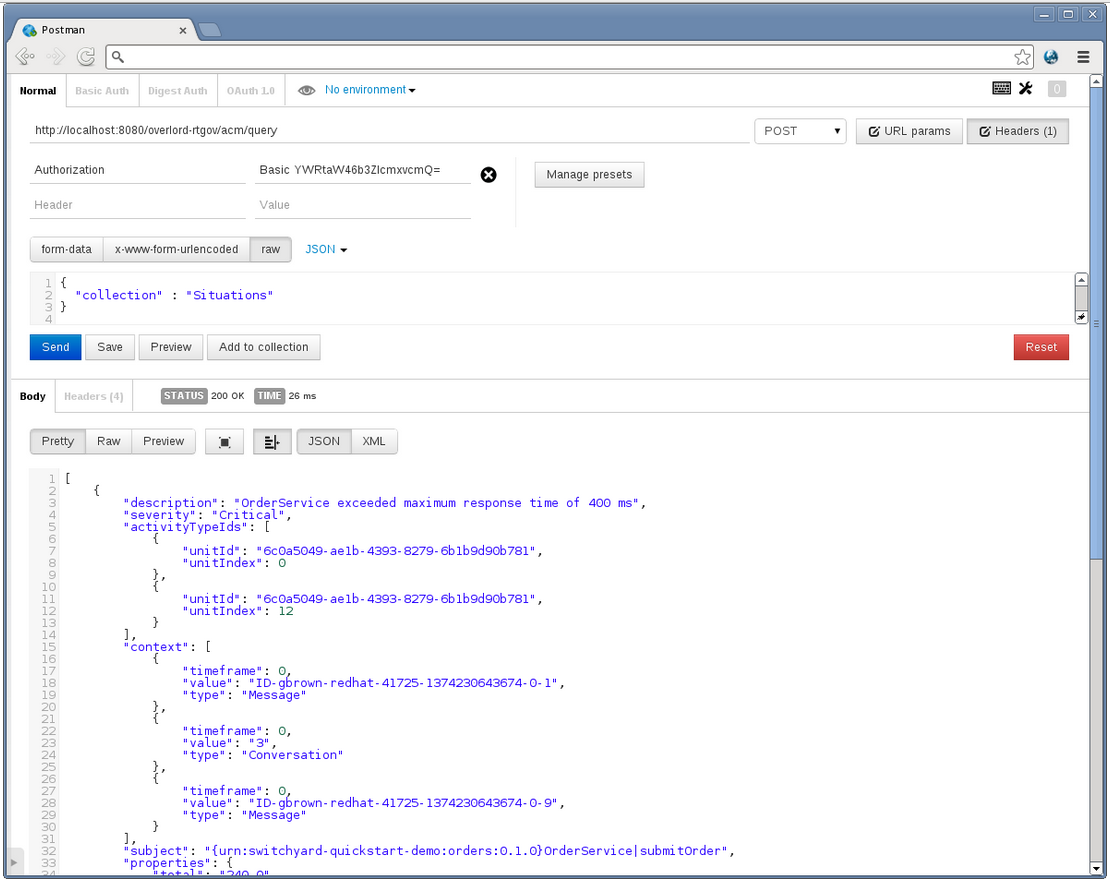
Figure 3.6. Response
3.10.1.3.2. JMX Console
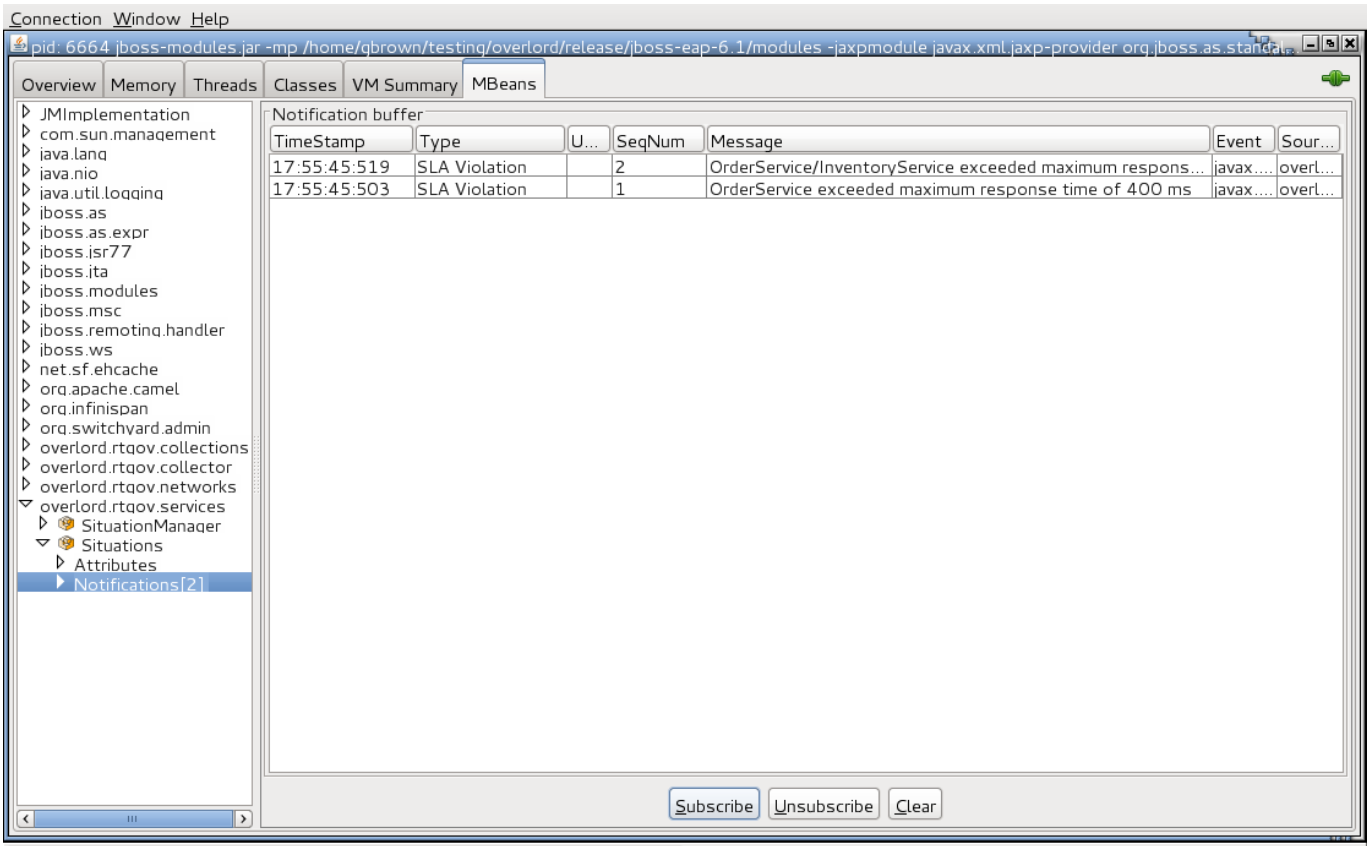
Figure 3.7. JMX Console
3.10.1.3.3. Accessing Results Within a Custom Application
${rtgov}/samples/sla/monitor folder.
@Path("/monitor")
@ApplicationScoped
public class SLAMonitor {
private static final String SERVICE_RESPONSE_TIMES = "ServiceResponseTimes";
private static final String SITUATIONS = "Situations";
private static final Logger LOG=Logger.getLogger(SLAMonitor.class.getName());
private ActiveCollectionManager _acmManager=null;
private ActiveList _serviceResponseTime=null;
private ActiveList _situations=null;
/**
* This is the default constructor.
*/
public SLAMonitor() {
try {
_acmManager = ActiveCollectionManagerAccessor.getActiveCollectionManager();
_serviceResponseTime = (ActiveList)
_acmManager.getActiveCollection(SERVICE_RESPONSE_TIMES);
_situations = (ActiveList)
_acmManager.getActiveCollection(SITUATIONS);
} catch (Exception e) {
LOG.log(Level.SEVERE, "Failed to initialize active collection manager", e);
}
}@GET
@Path("/situations")
@Produces("application/json")
public java.util.List<Situation> getSituations() {
java.util.List<Situation> ret=new java.util.ArrayList<Situation>();
for (Object obj : _situations) {
if (obj instanceof Situation) {
ret.add((Situation)obj);
}
}
return (ret);
}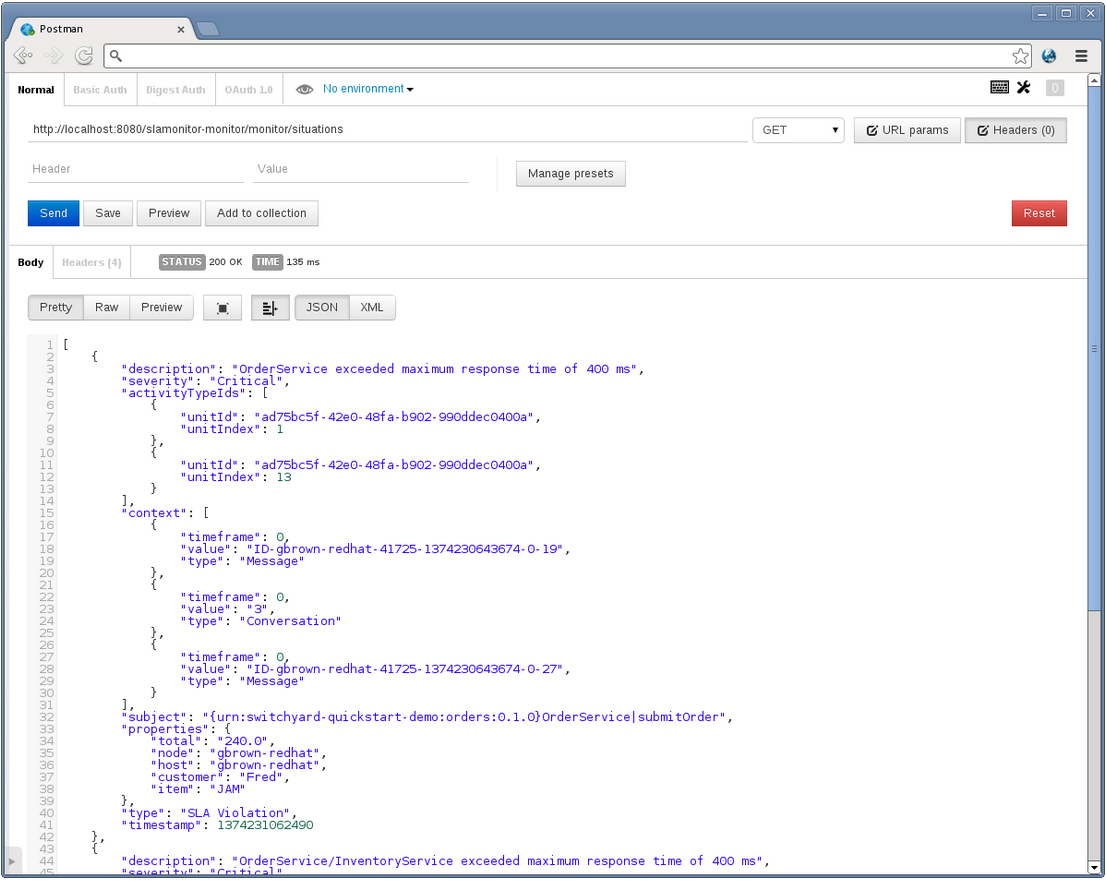
Figure 3.8. Response
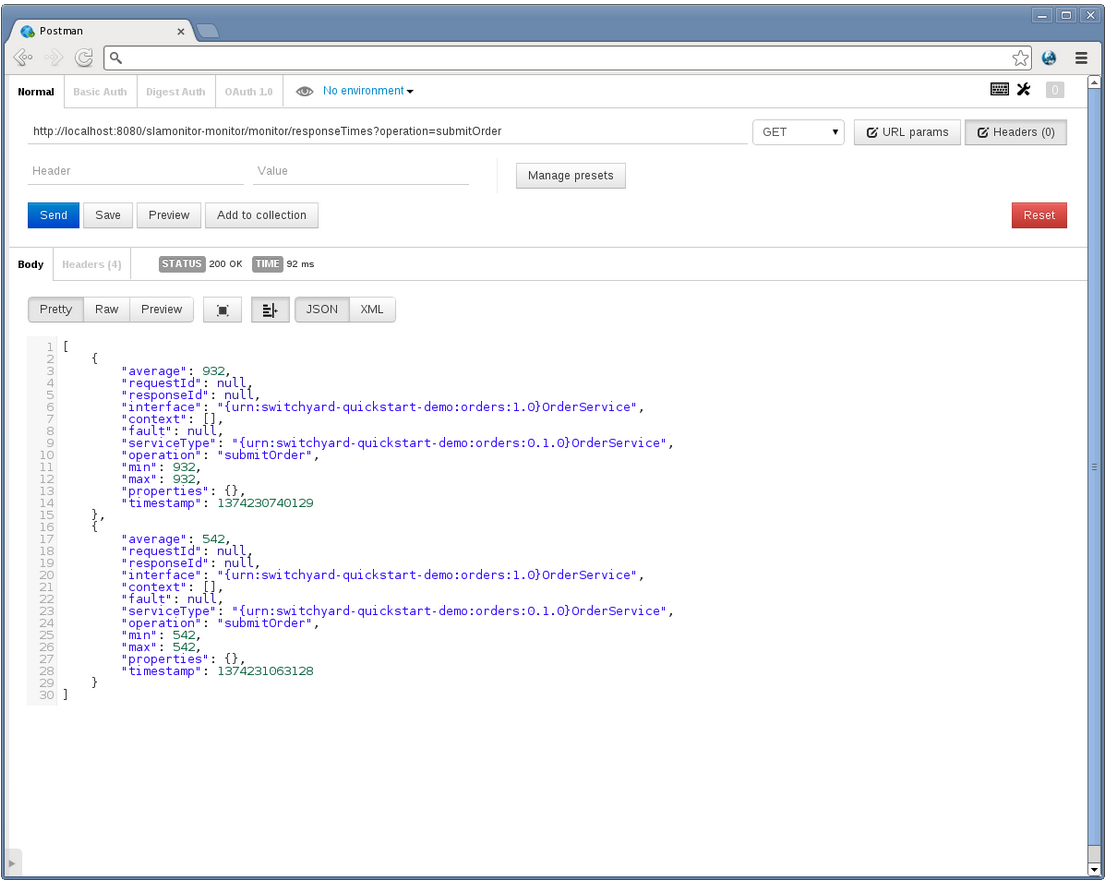
Figure 3.9. Response
Note
3.10.2. Report
samples/sla/report folder demonstrates how to provide pluggable reports that can access information in the activity store. This example uses the activity information to compile a Service Level Agreement report, highlighting violations above a specified response time.
- how to configure a pluggable report
- how to generate the report via a REST API
[  {
    "name" : "SLAReport",
    "generator" : {
      "@class" : "org.overlord.rtgov.reports.MVELReportGenerator",
       "scriptLocation" : "SLAReport.mvel"
    }
  }
]${rtgov}/samples/sla/report/src/main/resources folder.
Note
3.10.2.1. Quickstart Example
3.10.2.2. Installing the Example
- Start the Switchyard server using the following command from the bin folder:
./standalone.sh -c standalone-full.xml - Run the following mvn command from the
${rtgov}/samples/sla/reportfolder:mvn jboss-as:deploy
3.10.2.3. Running the Example
<soap:Envelope xmlns:soap="http://schemas.xmlsoap.org/soap/envelope/">
   <soap:Body>
      <orders:submitOrder xmlns:orders="urn:switchyard-quickstart-demo:orders:1.0">
         <order>
            <orderId>1</orderId>
            <itemId>BUTTER</itemId>
            <quantity>100</quantity>
            <customer>Fred</customer>
         </order>
      </orders:submitOrder>
   </soap:Body>
</soap:Envelope>

<soap:Envelope xmlns:soap="http://schemas.xmlsoap.org/soap/envelope/">
   <soap:Body>
      <orders:submitOrder xmlns:orders="urn:switchyard-quickstart-demo:orders:1.0">
         <order>
            <orderId>3</orderId>
            <itemId>JAM</itemId>
            <quantity>100</quantity>
            <customer>Fred</customer>
         </order>
      </orders:submitOrder>
   </soap:Body>
</soap:Envelope>${rtgov}/samples/ordermgmt/app folder:
mvn exec:java -Dreq=order1
mvn exec:java -Dreq=order3
http://localhost:8080overlordrtgovreportgeneratereport=SLAReport&startDay=1&startMonth=1&startYear=2013&endDay=31&endMonth=12&endYear=2013&maxResponseTime=400&averagedDuration=450&calendar=DefaultChapter 4. S-RAMP
- A foundation document that describes the core concepts.
- An Atom based protocol binding document that describes an Atom based API.
- Core Properties
- Custom Properties
- Classifiers
- Relationships
4.1. S-RAMP Working Samples
jboss-eap-6.1/quickstarts/sramp:
- s-ramp-demos-archive-package
- s-ramp-demos-classifications
- s-ramp-demos-custom-deriver
- s-ramp-demos-derived-artifacts
- s-ramp-demos-mvn-integration
- s-ramp-demos-ontologies
- s-ramp-demos-project
- s-ramp-demos-properties
- s-ramp-demos-query
- s-ramp-demos-relationships
- s-ramp-demos-shell-command
- s-ramp-demos-simple-client
- s-ramp-demos-switchyard
- s-ramp-demos-switchyard-multiapp
4.2. S-RAMP User Management
add-user.bat script. Otherwise run the add-user.sh script. Both of these scripts can be found in EAP's bin directory.
[user@host jboss-eap-6.1]$ pwd
/home/user/FSW6/jboss-eap-6.1
[user@host jboss-eap-6.1]$ ./bin/add-user.sh

What type of user do you wish to add?
 a) Management User (mgmt-users.properties)
 b) Application User (application-users.properties)
(a): b

Enter the details of the new user to add.
Realm (ApplicationRealm) : ApplicationRealm
Username : fitzuser
Password : P4SSW0RD!
Re-enter Password : P4SSW0RD!
What roles do you want this user to belong to? (Please enter a comma separated list, or leave blank for none)[  ]: overlorduser,admin.sramp
About to add user 'fitzuser' for realm 'ApplicationRealm'
Is this correct yes/no? yes
Added user 'fitzuser' to file '/home/user/FSW6/jboss-eap-6.1/standalone/configuration/application-users.properties'
Added user 'fitzuser' to file '/home/user/FSW6/jboss-eap-6.1/domain/configuration/application-users.properties'
Added user 'fitzuser' with roles overlorduser,admin.sramp to file '/home/user/FSW6/jboss-eap-6.1/standalone/configuration/application-roles.properties'
Added user 'fitzuser' with roles overlorduser,admin.sramp to file '/home/user/FSW6/jboss-eap-6.1/domain/configuration/application-roles.properties'
Is this new user going to be used for one AS process to connect to another AS process?
e.g. for a slave host controller connecting to the master or for a Remoting connection for server to server EJB calls.
yes/no? noTThere are several roles that the user must have in order to interact with the S-RAMP repository. These roles are as follows:
- overlorduser : users must have this role in order to access the S-RAMP user interface (browser)
- admin.sramp : users must have this role in order to access the S-RAMP repository (both read and write)
Note
standalone.xml file and set the new repository name in standalone/configuration/sramp.properties (under sramp.config.jcr.repository.jndi-path), make sure you modify the user's roles. If the role that grants users access to the ModeShape repository is admin.sramp, where the ModeShape role is admin on repository named sramp, ensure you change this value to admin.<new repository name> in the application-roles.properties file.
4.3. Artifact Metadata
4.3.1. Core Properties
Note
4.3.2. Custom Properties
4.3.3. Classifiers
World
  |-> North America
     |-> United States
         |-> Alabama
         |-> Alaska
     |-> Mexico
     |-> Canada
  |-> South America
|-> Australia4.3.4. Relationships
4.4. S-RAMP Data Models
4.4.1. Core Data Model
| Artifact Type | Parent Type | Properties |
|---|---|---|
| Document | contentType, contentSize, contentHash | |
| XmlDocument | Document | contentEncoding |
4.4.2. XML Schema Data Model
| Artifact Type | Parent Type | Properties |
|---|---|---|
| XsdDocument | XmlDocument | targetNamespace |
| AttributeDeclaration | <derived> | ncName, namespace |
| ElementDeclaration | <derived> | ncName, namespace |
| SimpleTypeDeclaration | <derived> | ncName, namespace |
| ComplexTypeDeclaration | <derived> | ncName, namespace |
4.4.3. WSDL Data Model
| Artifact Type | Parent Type | Properties |
|---|---|---|
| WsdlDocument | XmlDocument | targetNamespace, xsdTargetNamespaces |
| WsdlService | <derived> | ncName, namespace |
| Port | <derived> | ncName, namespace |
| WsdlExtension | <derived> | ncName, namespace |
| Part | <derived> | ncName, namespace |
| Message | <derived> | ncName, namespace |
| Fault | <derived> | ncName, namespace |
| PortType | <derived> | ncName, namespace |
| Operation | <derived> | ncName, namespace |
| OperationInput | <derived> | ncName, namespace |
| OperationOutput | <derived> | ncName, namespace |
| Binding | <derived> | ncName, namespace |
| BindingOperation | <derived> | ncName, namespace |
| BindingOperationInput | <derived> | ncName, namespace |
| BindingOperationOutput | <derived> | ncName, namespace |
| BindingOperationFault | <derived> | ncName, namespace |
4.4.4. Policy Data Model
| Artifact Type | Parent Type |
|---|---|
| PolicyDocument | XmlDocument |
| PolicyExpression | <derived> |
| PolicyAttachment | <derived> |
4.4.5. SOA Data Model
| Artifact Type |
|---|
| HumanActor |
| Choreography |
| ChoreographyProcess |
| Collaboration |
| CollaborationProcess |
| Composition |
| Effect |
| Element |
| Event |
| InformationType |
| Orchestration |
| OrchestrationProcess |
| Policy |
| PolicySubject |
| Process |
| Service |
| ServiceContract |
| ServiceComposition |
| ServiceInterface |
| System |
| Task |
4.4.6. Service Implementation Data Model
| Artifact Type | Properties |
|---|---|
| Organization | end |
| ServiceEndpoint | end, url |
| ServiceInstance | end, url |
| ServiceOperation | end, url |
4.4.7. Custom or Extension Data Models
ext model space defined by the S-RAMP specification. This allows clients to add documents with custom artifact types. For example, a client can add an artifact to /s-ramp/ext/PdfDocument. This provides a way for clients to define their own data models with their own properties and relationships. Note that the server does not have a definition of the model and it is up to the client to properly conform to their own implicit model. Custom properties and user-defined relationships allow clients to richly define their own models.
| Artifact Type | Parent Type | Properties |
|---|---|---|
| WebXmlDocument | ExtendedDocument | displayName |
| ServletFilter | ExtendedArtifactType | displayName, filterClass |
| Servlet | ExtendedArtifactType | servletClass, loadOnStartup |
4.5. Query Language
4.5.1. S-RAMP Query Language
- Core Properties
- Custom Properties
- Classifiers
- Relationships
/s-ramp/<artifactModel>/<artifactType>/[ <artifact-predicate> ]/relationship[ <target-artifact-predicate> ]
4.5.2. S-RAMP Query Examples
| Query | What It Selects |
|---|---|
/s-ramp | All artifacts. |
/s-ramp/core | All Core Model artifacts. |
/s-ramp/xsd/XsdDocument | All XsdDocument artifacts. |
/s-ramp/xsd/XsdDocument[@name='core.xsd'] | XsdDocument artifacts named core.xsd. |
/s-ramp/xsd/XsdDocument[@name='core.xsd' and @version='1.0'] | XsdDocument artifacts named core.xsd and versioned as 1.0. |
/s-ramp/soa[@myCustomProperty='foo'] | SOA artifacts with a custom property named myCustomProperty that has value foo. |
/s-ramp/core[classifiedByAnyOf(., Maine, Alaska)] | Core artifacts classified by either Maine or Alaska (presumably from the Regions ontology). |
/s-ramp/wsdl/PortType[@name='OrderServicePT']/operation | Artifacts related to any PortType artifact named OrderServicePT via a relationship named operation. This effectively returns all of the order service port type operations. |
/s-ramp/ext/ServletFilter[relatedDocument[@uuid='12345']] | All servlet filter artifacts derived from (that is, contain a relatedDocument relationship to) an artifact with UUID 12345. |
/s-ramp/wsdl/Message[xp2:matches(.,\'get.*\')]/part[element] | Element style WSDL parts from WSDL messages with names starting with get. |
/s-ramp/wsdl/Operation[xp2:matches(@name,\'submit.*\')] | All WSDL Operation elements whose names start with submit. |
Note
s-ramp> s-ramp:query "/s-ramp/xsd/XsdDocument[@name='core.xsd' and @version='1.0']"Note
\. For example, in the xp2:matches(@name,\'submit.*\') function call, you must use \'submit.*\' instead of 'submit.*'.
4.6. S-RAMP REST API
4.6.1. Atom Entry Document
- A summary Atom entry that appears in an Atom feed document. Summary entries do not include the S-RAMP structured extension element (S-RAMP foreign markup).
- A complete Atom entry which includes the S-RAMP structured extension element.
4.6.2. Atom Feed Document
4.6.3. Adding Artifacts
- Document Style ArtifactsThese artifacts are based on files or binary content. For the document style artifacts, the client must POST the binary content to the correct Atom Endpoint.
- Logical ArtifactsThese artifacts are direct instantiation artifacts. For the logical artifacts, there is no document content and the client must POST an Atom Entry containing an S-RAMP artifact XML entity to the appropriate endpoint. If successful, the server responds with an Atom Entry containing the full meta data of the newly created artifact.
POST /s-ramp/{model}/{type}4.6.4. Updating Artifacts
PUT /s-ramp/{model}/{type}/{uuid}4.6.5. Deleting Artifacts
DELETE /s-ramp/{model}/{type}/{uuid}4.6.6. S-RAMP Queries
4.6.6.1. Running an S-RAMP Query
4.6.6.2. S-RAMP GET and POST Query Parameters
GET /s-ramp| Parameter | Description |
|---|---|
| query | The S-RAMP query. |
| startPage | The page to start from. |
| startIndex | The index number to start from. |
| count | The number of artifacts to return. |
| orderBy | The sort order to use when creating the feed. |
| ascending | The sort direction to use when creating the feed. |
| propertyName | Additional custom property to return for each artifact in the feed. You can include this property multiple times. |
4.6.6.3. S-RAMP Feeds Parameters
GET /s-ramp/{model}
GET /s-ramp/{model}/{type}| Parameter | Description |
|---|---|
| startPage | The page to start from. |
| startIndex | The index number to start from. |
| count | The number of artifacts to return. |
| orderBy | The sort order to use when creating the feed. |
| ascending | The sort direction to use when creating the feed. |
| propertyName | Additional custom property to return for each artifact in the feed. This property can be included multiple times. |
4.6.6.4. Retrieving Full Metadata for an Artifact
GET /s-ramp/{model}/{type}/{uuid}4.6.6.5. Batch Changes to S-RAMP Archives
4.7. S-RAMP Implementation
4.7.1. S-RAMP Server
- JCR (ModeShape): Used as the persistence engine, where all S-RAMP data is stored. Artifacts and ontologies are both stored as nodes in a JCR tree. All S-RAMP queries are mapped to JCRSQL2 queries for processing by the JCR API. The ModeShape JCR implementation is used by default. However, the persistence layer is pluggable allowing alternative providers to be implemented in the future.
- AX-RS (RESTEasy): Used to provide the S-RAMP Atom based REST API. The S-RAMP specification documents an Atom based REST API that implementations must make available. The S-RAMP implementation uses JAX-RS (specifically RESTEasy) to expose all of the REST endpoints defined by the specification.
- JAXB: Used to expose a Java data model based on the S-RAMP data structures defined by the specification (S-RAMP XSD schemas).
4.7.1.1. Configuring Server
sramp.properties: You can provide this external file in the JBoss application server's configuration directory. An alternative location is the home directory of the user running the application server.- custom external file: You can specify a custom location for the
sramp.propertiesfile by starting the application server with the sramp.config.file.name system property set. This is typically done using-Dsramp.config.file.name=<pathToFile>on the application server's command line startup script (often in JAVA_OPTS). - On the classpath: If no external file is found, you can use the classpath to lookup a default configuration.
# The base URL of the S-RAMP server - can be useful in some advanced configurations where
# the incoming Request URL is not the canonical server address.
sramp.config.baseurl = http://host:port/context
# Turn on/off auditing of changes to S-RAMP artifacts
sramp.config.auditing.enabled = true
# Turn on/off auditing of changes to derived S-RAMP artifacts
sramp.config.auditing.enabled-derived = true4.7.1.2. Extending Custom Deriver
Procedure 4.1. Task
- Write a custom Deriver Java class. It must implement
ArtifactDeriver. - Create a
DeriverProvider(a class that implements DeriverProvider) used to map artifact types to implementations ofArtifactDeriver. - Provide a text file named
org.overlord.sramp.common.derived.DeriverProviderin the locationMETA-INF/services. The content of this file must be a single line containing the fully qualified classname of the class defined in the previous step. - Package everything into a JAR and make it available either on the classpath or in an external directory. Configure the external directory by setting property sramp.derivers.customDir.
4.7.2. S-RAMP Client
- S-RAMP Client Library (Jar)
- S-RAMP Interactive Shell (CLI)
- S-RAMP Browser (UI)
- S-RAP+Maven Integration (maven wagon)
- DTGov UI
- DTGov REST services
4.7.2.1. S-RAMP Client Usage Examples
pom.xml dependency:
<dependency>
      <groupId>org.overlord.sramp</groupId>
      <artifactId>s-ramp-client</artifactId>
      <version>${sramp.client.version}</version>
</dependency>SrampAtomApiClient class. Note that the client class supports pluggable authentication mechanisms, although BASIC auth is just a matter of including the username and password upon construction of the client. For details, refer to the javadoc of the required class. Here are some usage examples to help you get started:
- Upload an XSD document to S-RAMP
SrampAtomApiClient client = new SrampAtomApiClient(urlToSramp); String artifactFileName = getXSDArtifactName(); InputStream is = getXSDArtifactContentStream(); ArtifactType type = ArtifactType.XsdDocument(); BaseArtifactType artifact = client.uploadArtifact(ArtifactType.XsdDocument(), is, artifactFileName); - Create a custom artifact in S-RAMP (meta-data only, no file content)
SrampAtomApiClient client = new SrampAtomApiClient(urlToSramp); ExtendedArtifactType artifact = new ExtendedArtifactType(); artifact.setArtifactType(BaseArtifactEnum.EXTENDED_ARTIFACT_TYPE); artifact.setExtendedType("MyArtifactType"); artifact.setName("My Test Artifact #1"); artifact.setDescription("Description of my test artifact."); BaseArtifactType createdArtifact = client.createArtifact(artifact); - Retrieve full meta-data for an XSD artifact by its UUID
SrampAtomApiClient client = new SrampAtomApiClient(urlToSramp); String uuid = getArtifactUUID(); BaseArtifactType metaData = client.getArtifactMetaData(ArtifactType.XsdDocument(), uuid); - Retrieve artifact content
SrampAtomApiClient client = new SrampAtomApiClient(urlToSramp); String uuid = getArtifactUUID(); InputStream content = client.getArtifactContent(ArtifactType.XsdDocument(), uuid); - Query the S-RAMP repository (by artifact name)
SrampAtomApiClient client = new SrampAtomApiClient(urlToSramp);
String artifactName = getArtifactName();
QueryResultSet rset = client.buildQuery("/s-ramp/xsd/XsdDocument[@name = ?]")
        .parameter(artifactName)
        .count(10)
        .query();
4.7.2.2. Ontologies
4.7.2.3. Auditing
4.7.2.4. Custom Expander
ZipToSrampArchiveProvider. In order to inform the S-RAMP client about the custom provider, you need to put it in a JAR along with a file named META-INF/services/org.overlord.sramp.atom.archive.expand.registry.ZipToSrampArchiveProvider. The contents of this file must be a single line with the fully qualified Java classname of the provider implementation.
4.8. S-RAMP REST API Endpoints
| Endpoint | Name |
|---|---|
| GET /s-ramp/servicedocument | Get Service Document |
| POST /s-ramp/{model}/{type} | Publish Artifact |
| PUT /s-ramp/{model}/{type}/{uuid} | Update Artifact |
| PUT /s-ramp/{model}/{type}/{uuid}/media | Update Artifact Content |
| GET /s-ramp/{model}/{type}/{uuid} | Get Artifact |
| GET /s-ramp/{model}/{type}/{uuid}/media | Get Artifact Content |
| DELETE /s-ramp/{model}/{type}/{uuid} | Delete Artifact |
| GET /s-ramp/{model} | Get Artifact Feed (by model) |
| GET /s-ramp/{model}/{type} | Get Artifact Feed (by type) |
| GET /s-ramp | Query |
| POST /s-ramp | Query |
| POST /s-ramp | Batch Processing |
| POST /s-ramp/ontology | Add Ontology |
| GET /s-ramp/ontology | List Ontologies |
| PUT /s-ramp/ontology/{uuid} | Update Ontology |
| GET /s-ramp/ontology/{uuid} | Get Ontology |
| DELETE /s-ramp/ontology/{uuid} | Delete Ontology |
| GET /s-ramp/audit/artifact/{artifactUuid} | Get Artifact Audit History |
| GET /s-ramp/audit/user/{username} | Get User Audit History |
| POST /s-ramp/audit/artifact/{artifactUuid} | Add Artifact Audit Entry |
| GET /s-ramp/audit/artifact/{artifactUuid}/{auditEntryUuid} | Get Artifact Audit Entry |
4.8.1. Get Service Document API
/s-ramp/servicedocument) retrieves the service document. The service document contains a workspace for each of the S-RAMP data models supported by the server.
| HTTP Method | Request | Response |
|---|---|---|
| GET | N/A | Atom Service Document |
HTTP/1.1 200 OK

<?xml version="1.0" encoding="UTF-8" standalone="yes"?>
<app:service xmlns:atom="http://www.w3.org/2005/Atom" xmlns:app="http://www.w3.org/2007/app">
    <app:workspace>
        <atom:title>Core Model</atom:title>
        <app:collection href="http://example.org/s-ramp/core">
            <atom:title>Core Model Objects</atom:title>
            <app:accept>application/zip</app:accept>
            <app:categories fixed="yes">
                <atom:category label="Document" scheme="urn:x-s-ramp:v1:type" term="Document"/>
                <atom:category label="XML Document" scheme="urn:x-s-ramp:v1:type" term="XmlDocument"/>
            </app:categories>
        </app:collection>
        <app:collection href="http://example.org/s-ramp/core/Document">
            <atom:title>Documents</atom:title>
            <app:accept>application/octet-stream</app:accept>
            <app:categories fixed="yes">
                <atom:category label="Document" scheme="urn:x-s-ramp:v1:type" term="Document"/>
            </app:categories>
        </app:collection>
        <app:collection href="http://example.org/s-ramp/core/XmlDocument">
            <atom:title>XML Documents</atom:title>
            <app:accept>application/xml</app:accept>
            <app:categories fixed="yes">
                <atom:category label="XML Document" scheme="urn:x-s-ramp:v1:type" term="XmlDocument"/>
            </app:categories>
        </app:collection>
    </app:workspace>
</app:service>
Note
4.8.2. Publishing a New Artifact Into a Repository
4.8.2.1. Publish Artifact API
- Document Style Artifact
- Non-Document Style Artifact
- Document Style Artifact with Meta Data
4.8.2.2. Publish a Document Style Artifact
/s-ramp/{model}/{type}| HTTP Method | Request | Response |
|---|---|---|
| POST | Binary File | Atom Entry |
POST /s-ramp/core/Document HTTP/1.1

This is a simple text document, uploaded as an artifact
into S-RAMP.HTTP/1.1 200 OK
<?xml version="1.0" encoding="UTF-8" standalone="no"?>
<atom:entry xmlns:atom="http://www.w3.org/2005/Atom" xmlns:s-ramp="http://docs.oasis-open.org/s-ramp/ns/s-ramp-v1.0"
xmlns:xlink="http://www.w3.org/1999/xlink" s-ramp:derived="false">
<atom:title>test.txt</atom:title>
<atom:link
href="http://example.org/s-ramp/core/Document/05778de3-be85-4696-b5dc-d889a27f1f6e/media"
rel="alternate" type="text/plain" />
<atom:link href="http://example.org/s-ramp/core/Document/05778de3-be85-4696-b5dc-d889a27f1f6e"
rel="self" type="application/atom+xml;type="entry"" />
<atom:link
href="http://example.org/s-ramp/core/Document/05778de3-be85-4696-b5dc-d889a27f1f6e/media"
rel="edit-media" type="application/atom+xml;type="entry"" />
<atom:link href="http://example.org/s-ramp/core/Document/05778de3-be85-4696-b5dc-d889a27f1f6e"
rel="edit" type="application/atom+xml;type="entry"" />
<atom:category label="Document" scheme="x-s-ramp:2010:type" term="Document" />
<atom:category label="Document" scheme="x-s-ramp:2010:model" term="core" />
<atom:updated>2013-05-14T13:43:09.708-04:00</atom:updated>
<atom:id>05778de3-be85-4696-b5dc-d889a27f1f6e</atom:id>
<atom:published>2013-05-14T13:43:09.708-04:00</atom:published>
<atom:author>
<atom:name>ewittman</atom:name>
</atom:author>
<atom:content
src="http://example.org/s-ramp/core/Document/05778de3-be85-4696-b5dc-d889a27f1f6e/media"
type="text" />
<s-ramp:artifact>
<s-ramp:Document artifactType="Document" contentSize="69" contentType="text/plain"
createdBy="<anonymous>" createdTimestamp="2013-05-14T13:43:09.708-04:00" lastModifiedBy="<anonymous>"
lastModifiedTimestamp="2013-05-14T13:43:09.708-04:00" name="test.txt" uuid="05778de3-be85-4696-b5dc-d889a27f1f6e" />
</s-ramp:artifact>
</atom:entry>
4.8.2.3. Publish a Non-Document Style Artifact
/s-ramp/{model}/{type}| HTTP Method | Request | Response |
|---|---|---|
| POST | Atom Entry | Atom Entry |
POST /s-ramp/ext/MyArtifact HTTP/1.1

<?xml version="1.0" encoding="UTF-8" standalone="no"?>
<atom:entry xmlns:atom="http://www.w3.org/2005/Atom" xmlns:s-ramp="http://docs.oasis-open.org/s-ramp/ns/s-ramp-v1.0"
  xmlns:xlink="http://www.w3.org/1999/xlink" s-ramp:derived="false">
  <atom:title>Example Artifact</atom:title>
  <s-ramp:artifact>
    <s-ramp:ExtendedArtifactType extendedType="MyArtifact"
      artifactType="ExtendedArtifactType" name="My Artifact One" />
  </s-ramp:artifact>
</atom:entry>
HTTP/1.1 200 OK
<?xml version="1.0" encoding="UTF-8" standalone="yes"?>
<atom:entry xmlns:s-ramp="http://docs.oasis-open.org/s-ramp/ns/s-ramp-v1.0" xmlns:xlink="http://www.w3.org/1999/xlink"
xmlns:atom="http://www.w3.org/2005/Atom" s-ramp:derived="false" s-ramp:extendedType="MavenPom">
<atom:title>pom.xml</atom:title>
<atom:link href="http://example.org/s-ramp/ext/MavenPom/5f4cbf1e-cafb-4479-8867-fc5df5f21867/media"
rel="alternate" type="application/xml" />
<atom:link href="http://example.org/s-ramp/ext/MavenPom/5f4cbf1e-cafb-4479-8867-fc5df5f21867" rel="self"
type="application/atom+xml;type="entry"" />
<atom:link href="http://example.org/s-ramp/ext/MavenPom/5f4cbf1e-cafb-4479-8867-fc5df5f21867/media"
rel="edit-media" type="application/atom+xml;type="entry"" />
<atom:link href="http://example.org/s-ramp/ext/MavenPom/5f4cbf1e-cafb-4479-8867-fc5df5f21867" rel="edit"
type="application/atom+xml;type="entry"" />
<atom:category label="Extended Document" scheme="x-s-ramp:2010:type" term="MavenPom" />
<atom:category label="Extended Document" scheme="x-s-ramp:2010:model" term="ext" />
<atom:updated>2013-05-14T13:49:20.645-04:00</atom:updated>
<atom:id>5f4cbf1e-cafb-4479-8867-fc5df5f21867</atom:id>
<atom:published>2013-05-14T13:49:20.645-04:00</atom:published>
<atom:author>
<atom:name>ewittman</atom:name>
</atom:author>
<atom:content type="application/xml"
src="http://example.org/s-ramp/ext/MavenPom/5f4cbf1e-cafb-4479-8867-fc5df5f21867/media" />
<s-ramp:artifact>
<s-ramp:ExtendedDocument extendedType="MavenPom" contentType="application/xml"
contentSize="4748" artifactType="ExtendedDocument" name="pom.xml" createdBy="<anonymous>"
uuid="5f4cbf1e-cafb-4479-8867-fc5df5f21867" createdTimestamp="2013-05-14T13:49:20.645-04:00"
lastModifiedTimestamp="2013-05-14T13:49:20.645-04:00" lastModifiedBy="<anonymous>"
s-ramp:contentType="application/xml" s-ramp:contentSize="4748" />
</s-ramp:artifact>
</atom:entry>
4.8.2.4. Publish a Document Style Artifact with Meta-Data
/s-ramp/{model}/{type}| HTTP Method | Request | Response |
|---|---|---|
| POST | Multipart/Related | Atom Entry |
POST /s-ramp/core/Document HTTP/1.1
Content-Type: multipart/related;boundary="===============1605871705==";
type="application/atom+xml"
MIME-Version: 1.0

--===============1605871705==
Content-Type: application/atom+xml; charset="utf-8"
MIME-Version: 1.0

<?xml version="1.0"?>
<entry xmlns="http://www.w3.org/2005/Atom"
       xmlns:s-ramp="http://docs.oasis-open.org/s-ramp/ns/s-ramp-v1.0">
  <title type="text">myfile.txt</title>
  <summary type="text">The description of my text file.</summary>
  <category term="Document" label="Document"
            scheme="urn:x-s-ramp:2013urn:x-s-ramp:2013:type" />
  <s-ramp:artifact xmlns:s-ramp="http://docs.oasis-open.org/s-ramp/ns/s-ramp-v1.0"
                   xmlns:xsi="http://www.w3.org/2001/XMLSchema-instance">
    <s-ramp:Document name="myfile.txt" version="1.0"
                     description="The description of my text file." >
      <s-ramp:classifiedBy>
        http://example.org/ontologies/regions.owl/Maine
      </s-ramp:classifiedBy>
      <s-ramp:property>
        <propertyName>foo</propertyName>
        <propertyValue>pity him</propertyValue>
      </s-ramp:property>
    </s-ramp:Document>
  </s-ramp:artifact>
</entry>
--===============1605871705==
Content-Type: application/xml
MIME-Version: 1.0

This is a simple text document, uploaded as an artifact
into S-RAMP.
--===============1605871705==--
HTTP/1.1 200 OK
<?xml version="1.0" encoding="UTF-8" standalone="no"?>
<atom:entry xmlns:atom="http://www.w3.org/2005/Atom" xmlns:s-ramp="http://docs.oasis-open.org/s-ramp/ns/s-ramp-v1.0"
xmlns:xlink="http://www.w3.org/1999/xlink" s-ramp:derived="false">
<atom:title>test.txt</atom:title>
<atom:link
href="http://example.org/s-ramp/core/Document/05778de3-be85-4696-b5dc-d889a27f1f6e/media"
rel="alternate" type="text/plain" />
<atom:link href="http://example.org/s-ramp/core/Document/05778de3-be85-4696-b5dc-d889a27f1f6e"
rel="self" type="application/atom+xml;type="entry"" />
<atom:link
href="http://example.org/s-ramp/core/Document/05778de3-be85-4696-b5dc-d889a27f1f6e/media"
rel="edit-media" type="application/atom+xml;type="entry"" />
<atom:link href="http://example.org/s-ramp/core/Document/05778de3-be85-4696-b5dc-d889a27f1f6e"
rel="edit" type="application/atom+xml;type="entry"" />
<atom:category label="Document" scheme="x-s-ramp:2010:type" term="Document" />
<atom:category label="Document" scheme="x-s-ramp:2010:model" term="core" />
<atom:updated>2013-05-14T13:43:09.708-04:00</atom:updated>
<atom:id>05778de3-be85-4696-b5dc-d889a27f1f6e</atom:id>
<atom:published>2013-05-14T13:43:09.708-04:00</atom:published>
<atom:author>
<atom:name>ewittman</atom:name>
</atom:author>
<atom:content
src="http://example.org/s-ramp/core/Document/05778de3-be85-4696-b5dc-d889a27f1f6e/media"
type="text" />
<s-ramp:artifact>
<s-ramp:Document artifactType="Document" contentSize="69" contentType="text/plain"
name="myfile.txt" uuid="05778de3-be85-4696-b5dc-d889a27f1f6e">
description="The description of my text file." version="1.0"
createdBy="<anonymous>" createdTimestamp="2013-05-14T13:43:09.708-04:00"
lastModifiedBy="<anonymous>" lastModifiedTimestamp="2013-05-14T13:43:09.708-04:00"
<s-ramp:classifiedBy>
http://example.org/ontologies/regions.owl/Maine
</s-ramp:classifiedBy>
<s-ramp:property>
<propertyName>foo</propertyName>
<propertyValue>pity him</propertyValue>
</s-ramp:property>
</s-ramp:Document>
</s-ramp:artifact>
</atom:entry>
4.8.2.5. Update Artifact API
/s-ramp/{model}/{type}/{uuid}) updates an artifact's meta data.This endpoint is used to update a single artifact's meta data, including core properties, custom properties, classifiers, and relationships. Typically the client first retrieves the artifact (for example, by invoking the Get Artifact endpoint), makes changes to the artifact, and then issues a PUT request to the Update Artifact endpoint.
| HTTP Method | Request | Response |
|---|---|---|
| PUT | Atom Entry | N/A |
PUT /s-ramp/core/Document/098da465-2eae-49b7-8857-eb447f03ac02 HTTP/1.1

<?xml version="1.0" encoding="UTF-8" standalone="yes"?>
<atom:entry xmlns:s-ramp="http://docs.oasis-open.org/s-ramp/ns/s-ramp-v1.0" xmlns:xlink="http://www.w3.org/1999/xlink"
  xmlns:atom="http://www.w3.org/2005/Atom">
  <atom:title>pom.xml</atom:title>
  <atom:updated>2013-05-15T08:12:01.985-04:00</atom:updated>
  <atom:id>098da465-2eae-49b7-8857-eb447f03ac02</atom:id>
  <atom:published>2013-05-15T08:12:01.985-04:00</atom:published>
  <atom:author>
    <atom:name>ewittman</atom:name>
  </atom:author>
  <atom:summary>Sample description of my document.</atom:summary>
  <s-ramp:artifact>
    <s-ramp:Document contentType="text/plain" contentSize="4748" artifactType="Document"
      name="myfile.txt" description="Sample description of my document." createdBy="ewittman"
      uuid="098da465-2eae-49b7-8857-eb447f03ac02" createdTimestamp="2013-05-15T08:12:01.985-04:00"
      lastModifiedTimestamp="2013-05-15T08:12:01.985-04:00" lastModifiedBy="ewittman">
      <s-ramp:property>
        <s-ramp:propertyName>foo</s-ramp:propertyName>
        <s-ramp:propertyValue>bar</s-ramp:propertyValue>
      </s-ramp:property>
    </s-ramp:Document>
  </s-ramp:artifact>
</atom:entry>
4.8.2.6. Update Artifact Content API
/s-ramp/{model}/{type}/{uuid}/media) updates an artifact's content.
| HTTP Method | Request | Response |
|---|---|---|
| PUT | Binary Content | N/A |
PUT /s-ramp/core/Document/0f6f9b6b-9952-4059-ab70-7ee3442ddcf0/media HTTP/1.14.8.2.7. Get Artifact API
/s-ramp/{model}/{type}/{uuid}) retrieves an artifact's meta data.
| HTTP Method | Request | Response |
|---|---|---|
| Get | N/A | Atom Entry (full) |
PUT /s-ramp/xsd/ComplexTypeDeclaration/0104e848-fe91-4d93-a307-fb69ec9fd638 HTTP/1.1HTTP/1.1 200 OK
<?xml version="1.0" encoding="UTF-8" standalone="no"?>
<atom:entry xmlns:atom="http://www.w3.org/2005/Atom" xmlns:s-ramp="http://docs.oasis-open.org/s-ramp/ns/s-ramp-v1.0" xmlns:xlink="http://www.w3.org/1999/xlink" s-ramp:derived="true">
<atom:title>submitOrderResponseType</atom:title>
<atom:link href="http://localhost:8080/s-ramp-server/s-ramp/xsd/ComplexTypeDeclaration/0104e848-fe91-4d93-a307-fb69ec9fd638" rel="self" type="application/atom+xml;type="entry""/>
<atom:link href="http://localhost:8080/s-ramp-server/s-ramp/xsd/ComplexTypeDeclaration/0104e848-fe91-4d93-a307-fb69ec9fd638/media" rel="edit-media" type="application/atom+xml;type="entry""/>
<atom:link href="http://localhost:8080/s-ramp-server/s-ramp/xsd/ComplexTypeDeclaration/0104e848-fe91-4d93-a307-fb69ec9fd638" rel="edit" type="application/atom+xml;type="entry""/>
<atom:category label="XML Schema Complex Type Declaration" scheme="x-s-ramp:2010:type" term="ComplexTypeDeclaration"/>
<atom:category label="XML Schema Complex Type Declaration" scheme="x-s-ramp:2010:model" term="xsd"/>
<atom:updated>2013-07-22T12:19:23.554-04:00</atom:updated>
<atom:id>0104e848-fe91-4d93-a307-fb69ec9fd638</atom:id>
<atom:published>2013-07-22T12:19:22.630-04:00</atom:published>
<atom:author>
<atom:name>eric</atom:name>
</atom:author>
<s-ramp:artifact>
<s-ramp:ComplexTypeDeclaration artifactType="ComplexTypeDeclaration" createdBy="eric" createdTimestamp="2013-07-22T12:19:22.630-04:00" lastModifiedBy="eric" lastModifiedTimestamp="2013-07-22T12:19:23.554-04:00" name="submitOrderResponseType" namespace="urn:switchyard-quickstart-demo:multiapp:1.0" uuid="0104e848-fe91-4d93-a307-fb69ec9fd638">
<s-ramp:relatedDocument artifactType="XsdDocument">fe7b72ec-5ad9-436c-b7aa-0391da5cc972</s-ramp:relatedDocument>
</s-ramp:ComplexTypeDeclaration>
</s-ramp:artifact>
</atom:entry>4.8.2.8. Get Artifact Content API
/s-ramp/{model}/{type}/{uuid}/media) retrieves an artifact's content.
| HTTP Method | Request | Response |
|---|---|---|
| Get | N/A | Binary artifact content |
GET /s-ramp/core/Document/0f6f9b6b-9952-4059-ab70-7ee3442ddcf0/media HTTP/1.1HTTP/1.1 200 OK4.8.2.9. Delete Artifact API
/s-ramp/{model}/{type}/{uuid}) deletes an artifact.
| HTTP Method | Request | Response |
|---|---|---|
| DELETE | N/A | N/A |
DELETE /s-ramp/core/Document/0f6f9b6b-9952-4059-ab70-7ee3442ddcf0 HTTP/1.14.8.2.10. Get Artifact Feed (by Model) API
/s-ramp/{model})retrieves an Atom feed of all artifacts in a given model.
| HTTP Method | Request | Response |
|---|---|---|
| GET | N/A | Atom Feed |
GET /s-ramp/core HTTP/1.1HTTP/1.1 200 OK
<?xml version="1.0" encoding="UTF-8" standalone="no"?>
<atom:feed xmlns:atom="http://www.w3.org/2005/Atom" xmlns:s-ramp="http://docs.oasis-open.org/s-ramp/ns/s-ramp-v1.0"
s-ramp:itemsPerPage="100" s-ramp:provider="JBoss Overlord" s-ramp:startIndex="0" s-ramp:totalResults="5">
<atom:title>S-RAMP Feed</atom:title>
<atom:subtitle>Ad Hoc query feed</atom:subtitle>
<atom:updated>2013-07-22T12:50:16.605-04:00</atom:updated>
<atom:id>1647967f-a6f4-4e9c-82d3-ac422fb152f3</atom:id>
<atom:author>
<atom:name>anonymous</atom:name>
</atom:author>
<atom:entry s-ramp:derived="false">
<atom:title>sramp.sh</atom:title>
<atom:link href="http://localhost:8080/s-ramp/core/Document/0f6f9b6b-9952-4059-ab70-7ee3442ddcf0/media"
rel="alternate" type="application/x-sh" />
<atom:link href="http://localhost:8080/s-ramp/core/Document/0f6f9b6b-9952-4059-ab70-7ee3442ddcf0"
rel="self" type="application/atom+xml;type="entry"" />
<atom:link href="http://localhost:8080/s-ramp/core/Document/0f6f9b6b-9952-4059-ab70-7ee3442ddcf0/media"
rel="edit-media" type="application/atom+xml;type="entry"" />
<atom:link href="http://localhost:8080/s-ramp/core/Document/0f6f9b6b-9952-4059-ab70-7ee3442ddcf0"
rel="edit" type="application/atom+xml;type="entry"" />
<atom:category label="Document" scheme="x-s-ramp:2010:type" term="Document" />
<atom:category label="Document" scheme="x-s-ramp:2010:model" term="core" />
<atom:updated>2013-07-22T12:22:01.953-04:00</atom:updated>
<atom:id>0f6f9b6b-9952-4059-ab70-7ee3442ddcf0</atom:id>
<atom:published>2013-07-22T12:21:49.499-04:00</atom:published>
<atom:author>
<atom:name>eric</atom:name>
</atom:author>
<atom:content src="http://localhost:8080/s-ramp/core/Document/0f6f9b6b-9952-4059-ab70-7ee3442ddcf0/media"
type="application/x-sh" />
</atom:entry>
<atom:entry s-ramp:derived="false">
<atom:title>beans.xml</atom:title>
<atom:link href="http://localhost:8080/s-ramp/core/XmlDocument/20474032-9536-4cef-812c-4fea432fdebd/media"
rel="alternate" type="application/xml" />
<atom:link href="http://localhost:8080/s-ramp/core/XmlDocument/20474032-9536-4cef-812c-4fea432fdebd"
rel="self" type="application/atom+xml;type="entry"" />
<atom:link href="http://localhost:8080/s-ramp/core/XmlDocument/20474032-9536-4cef-812c-4fea432fdebd/media"
rel="edit-media" type="application/atom+xml;type="entry"" />
<atom:link href="http://localhost:8080/s-ramp/core/XmlDocument/20474032-9536-4cef-812c-4fea432fdebd"
rel="edit" type="application/atom+xml;type="entry"" />
<atom:category label="XML Document" scheme="x-s-ramp:2010:type" term="XmlDocument" />
<atom:category label="XML Document" scheme="x-s-ramp:2010:model" term="core" />
<atom:updated>2013-07-22T12:19:27.660-04:00</atom:updated>
<atom:id>20474032-9536-4cef-812c-4fea432fdebd</atom:id>
<atom:published>2013-07-22T12:19:27.644-04:00</atom:published>
<atom:author>
<atom:name>eric</atom:name>
</atom:author>
<atom:content src="http://localhost:8080/s-ramp/core/XmlDocument/20474032-9536-4cef-812c-4fea432fdebd/media"
type="application/xml" />
</atom:entry>
<atom:entry s-ramp:derived="false">
<atom:title>forge.xml</atom:title>
<atom:link href="http://localhost:8080/s-ramp/core/XmlDocument/2c21a9d3-0d09-41d8-8783-f3e795d8690d/media"
rel="alternate" type="application/xml" />
<atom:link href="http://localhost:8080/s-ramp/core/XmlDocument/2c21a9d3-0d09-41d8-8783-f3e795d8690d"
rel="self" type="application/atom+xml;type="entry"" />
<atom:link href="http://localhost:8080/s-ramp/core/XmlDocument/2c21a9d3-0d09-41d8-8783-f3e795d8690d/media"
rel="edit-media" type="application/atom+xml;type="entry"" />
<atom:link href="http://localhost:8080/s-ramp/core/XmlDocument/2c21a9d3-0d09-41d8-8783-f3e795d8690d"
rel="edit" type="application/atom+xml;type="entry"" />
<atom:category label="XML Document" scheme="x-s-ramp:2010:type" term="XmlDocument" />
<atom:category label="XML Document" scheme="x-s-ramp:2010:model" term="core" />
<atom:updated>2013-07-22T12:19:25.576-04:00</atom:updated>
<atom:id>2c21a9d3-0d09-41d8-8783-f3e795d8690d</atom:id>
<atom:published>2013-07-22T12:19:25.555-04:00</atom:published>
<atom:author>
<atom:name>eric</atom:name>
</atom:author>
<atom:content src="http://localhost:8080/s-ramp/core/XmlDocument/2c21a9d3-0d09-41d8-8783-f3e795d8690d/media"
type="application/xml" />
</atom:entry>
<atom:entry s-ramp:derived="false">
<atom:title>route.xml</atom:title>
<atom:link href="http://localhost:8080/s-ramp/core/XmlDocument/5b653bfe-4f58-451e-b738-394e61c0c5f9/media"
rel="alternate" type="application/xml" />
<atom:link href="http://localhost:8080/s-ramp/core/XmlDocument/5b653bfe-4f58-451e-b738-394e61c0c5f9"
rel="self" type="application/atom+xml;type="entry"" />
<atom:link href="http://localhost:8080/s-ramp/core/XmlDocument/5b653bfe-4f58-451e-b738-394e61c0c5f9/media"
rel="edit-media" type="application/atom+xml;type="entry"" />
<atom:link href="http://localhost:8080/s-ramp/core/XmlDocument/5b653bfe-4f58-451e-b738-394e61c0c5f9"
rel="edit" type="application/atom+xml;type="entry"" />
<atom:category label="XML Document" scheme="x-s-ramp:2010:type" term="XmlDocument" />
<atom:category label="XML Document" scheme="x-s-ramp:2010:model" term="core" />
<atom:updated>2013-07-22T12:19:25.602-04:00</atom:updated>
<atom:id>5b653bfe-4f58-451e-b738-394e61c0c5f9</atom:id>
<atom:published>2013-07-22T12:19:25.577-04:00</atom:published>
<atom:author>
<atom:name>eric</atom:name>
</atom:author>
<atom:content src="http://localhost:8080/s-ramp/core/XmlDocument/5b653bfe-4f58-451e-b738-394e61c0c5f9/media"
type="application/xml" />
</atom:entry>
<atom:entry s-ramp:derived="false">
<atom:title>beans.xml</atom:title>
<atom:link href="http://localhost:8080/s-ramp/core/XmlDocument/a3f9d4d7-0f95-4219-85f6-84df445ef270/media"
rel="alternate" type="application/xml" />
<atom:link href="http://localhost:8080/s-ramp/core/XmlDocument/a3f9d4d7-0f95-4219-85f6-84df445ef270"
rel="self" type="application/atom+xml;type="entry"" />
<atom:link href="http://localhost:8080/s-ramp/core/XmlDocument/a3f9d4d7-0f95-4219-85f6-84df445ef270/media"
rel="edit-media" type="application/atom+xml;type="entry"" />
<atom:link href="http://localhost:8080/s-ramp/core/XmlDocument/a3f9d4d7-0f95-4219-85f6-84df445ef270"
rel="edit" type="application/atom+xml;type="entry"" />
<atom:category label="XML Document" scheme="x-s-ramp:2010:type" term="XmlDocument" />
<atom:category label="XML Document" scheme="x-s-ramp:2010:model" term="core" />
<atom:updated>2013-07-22T12:19:21.498-04:00</atom:updated>
<atom:id>a3f9d4d7-0f95-4219-85f6-84df445ef270</atom:id>
<atom:published>2013-07-22T12:19:21.376-04:00</atom:published>
<atom:author>
<atom:name>eric</atom:name>
</atom:author>
<atom:content src="http://localhost:8080/s-ramp/core/XmlDocument/a3f9d4d7-0f95-4219-85f6-84df445ef270/media"
type="application/xml" />
</atom:entry>
</atom:feed>4.8.2.11. Get Artifact Feed (by Type) API
/s-ramp/{model}/{type})retrieves an Atom feed of all artifacts of a specific type.
| HTTP Method | Request | Response |
|---|---|---|
| GET | N/A | Atom Feed |
GET /s-ramp/core/Document HTTP/1.1HTTP/1.1 200 OK
<?xml version="1.0" encoding="UTF-8" standalone="no"?>
<atom:feed xmlns:atom="http://www.w3.org/2005/Atom" xmlns:s-ramp="http://docs.oasis-open.org/s-ramp/ns/s-ramp-v1.0"
s-ramp:itemsPerPage="100" s-ramp:provider="JBoss Overlord" s-ramp:startIndex="0" s-ramp:totalResults="5">
<atom:title>S-RAMP Feed</atom:title>
<atom:subtitle>Ad Hoc query feed</atom:subtitle>
<atom:updated>2013-07-22T12:50:16.605-04:00</atom:updated>
<atom:id>1647967f-a6f4-4e9c-82d3-ac422fb152f3</atom:id>
<atom:author>
<atom:name>anonymous</atom:name>
</atom:author>
<atom:entry s-ramp:derived="false">
<atom:title>sramp.sh</atom:title>
<atom:link href="http://localhost:8080/s-ramp/core/Document/0f6f9b6b-9952-4059-ab70-7ee3442ddcf0/media"
rel="alternate" type="application/x-sh" />
<atom:link href="http://localhost:8080/s-ramp/core/Document/0f6f9b6b-9952-4059-ab70-7ee3442ddcf0"
rel="self" type="application/atom+xml;type="entry"" />
<atom:link href="http://localhost:8080/s-ramp/core/Document/0f6f9b6b-9952-4059-ab70-7ee3442ddcf0/media"
rel="edit-media" type="application/atom+xml;type="entry"" />
<atom:link href="http://localhost:8080/s-ramp/core/Document/0f6f9b6b-9952-4059-ab70-7ee3442ddcf0"
rel="edit" type="application/atom+xml;type="entry"" />
<atom:category label="Document" scheme="x-s-ramp:2010:type" term="Document" />
<atom:category label="Document" scheme="x-s-ramp:2010:model" term="core" />
<atom:updated>2013-07-22T12:22:01.953-04:00</atom:updated>
<atom:id>0f6f9b6b-9952-4059-ab70-7ee3442ddcf0</atom:id>
<atom:published>2013-07-22T12:21:49.499-04:00</atom:published>
<atom:author>
<atom:name>eric</atom:name>
</atom:author>
<atom:content src="http://localhost:8080/s-ramp/core/Document/0f6f9b6b-9952-4059-ab70-7ee3442ddcf0/media"
type="application/x-sh" />
</atom:entry>
<atom:entry s-ramp:derived="false">
<atom:title>beans.xml</atom:title>
<atom:link href="http://localhost:8080/s-ramp/core/XmlDocument/20474032-9536-4cef-812c-4fea432fdebd/media"
rel="alternate" type="application/xml" />
<atom:link href="http://localhost:8080/s-ramp/core/XmlDocument/20474032-9536-4cef-812c-4fea432fdebd"
rel="self" type="application/atom+xml;type="entry"" />
<atom:link href="http://localhost:8080/s-ramp/core/XmlDocument/20474032-9536-4cef-812c-4fea432fdebd/media"
rel="edit-media" type="application/atom+xml;type="entry"" />
<atom:link href="http://localhost:8080/s-ramp/core/XmlDocument/20474032-9536-4cef-812c-4fea432fdebd"
rel="edit" type="application/atom+xml;type="entry"" />
<atom:category label="XML Document" scheme="x-s-ramp:2010:type" term="XmlDocument" />
<atom:category label="XML Document" scheme="x-s-ramp:2010:model" term="core" />
<atom:updated>2013-07-22T12:19:27.660-04:00</atom:updated>
<atom:id>20474032-9536-4cef-812c-4fea432fdebd</atom:id>
<atom:published>2013-07-22T12:19:27.644-04:00</atom:published>
<atom:author>
<atom:name>eric</atom:name>
</atom:author>
<atom:content src="http://localhost:8080/s-ramp/core/XmlDocument/20474032-9536-4cef-812c-4fea432fdebd/media"
type="application/xml" />
</atom:entry>
<atom:entry s-ramp:derived="false">
<atom:title>forge.xml</atom:title>
<atom:link href="http://localhost:8080/s-ramp/core/XmlDocument/2c21a9d3-0d09-41d8-8783-f3e795d8690d/media"
rel="alternate" type="application/xml" />
<atom:link href="http://localhost:8080/s-ramp/core/XmlDocument/2c21a9d3-0d09-41d8-8783-f3e795d8690d"
rel="self" type="application/atom+xml;type="entry"" />
<atom:link href="http://localhost:8080/s-ramp/core/XmlDocument/2c21a9d3-0d09-41d8-8783-f3e795d8690d/media"
rel="edit-media" type="application/atom+xml;type="entry"" />
<atom:link href="http://localhost:8080/s-ramp/core/XmlDocument/2c21a9d3-0d09-41d8-8783-f3e795d8690d"
rel="edit" type="application/atom+xml;type="entry"" />
<atom:category label="XML Document" scheme="x-s-ramp:2010:type" term="XmlDocument" />
<atom:category label="XML Document" scheme="x-s-ramp:2010:model" term="core" />
<atom:updated>2013-07-22T12:19:25.576-04:00</atom:updated>
<atom:id>2c21a9d3-0d09-41d8-8783-f3e795d8690d</atom:id>
<atom:published>2013-07-22T12:19:25.555-04:00</atom:published>
<atom:author>
<atom:name>eric</atom:name>
</atom:author>
<atom:content src="http://localhost:8080/s-ramp/core/XmlDocument/2c21a9d3-0d09-41d8-8783-f3e795d8690d/media"
type="application/xml" />
</atom:entry>
<atom:entry s-ramp:derived="false">
<atom:title>route.xml</atom:title>
<atom:link href="http://localhost:8080/s-ramp/core/XmlDocument/5b653bfe-4f58-451e-b738-394e61c0c5f9/media"
rel="alternate" type="application/xml" />
<atom:link href="http://localhost:8080/s-ramp/core/XmlDocument/5b653bfe-4f58-451e-b738-394e61c0c5f9"
rel="self" type="application/atom+xml;type="entry"" />
<atom:link href="http://localhost:8080/s-ramp/core/XmlDocument/5b653bfe-4f58-451e-b738-394e61c0c5f9/media"
rel="edit-media" type="application/atom+xml;type="entry"" />
<atom:link href="http://localhost:8080/s-ramp/core/XmlDocument/5b653bfe-4f58-451e-b738-394e61c0c5f9"
rel="edit" type="application/atom+xml;type="entry"" />
<atom:category label="XML Document" scheme="x-s-ramp:2010:type" term="XmlDocument" />
<atom:category label="XML Document" scheme="x-s-ramp:2010:model" term="core" />
<atom:updated>2013-07-22T12:19:25.602-04:00</atom:updated>
<atom:id>5b653bfe-4f58-451e-b738-394e61c0c5f9</atom:id>
<atom:published>2013-07-22T12:19:25.577-04:00</atom:published>
<atom:author>
<atom:name>eric</atom:name>
</atom:author>
<atom:content src="http://localhost:8080/s-ramp/core/XmlDocument/5b653bfe-4f58-451e-b738-394e61c0c5f9/media"
type="application/xml" />
</atom:entry>
<atom:entry s-ramp:derived="false">
<atom:title>beans.xml</atom:title>
<atom:link href="http://localhost:8080/s-ramp/core/XmlDocument/a3f9d4d7-0f95-4219-85f6-84df445ef270/media"
rel="alternate" type="application/xml" />
<atom:link href="http://localhost:8080/s-ramp/core/XmlDocument/a3f9d4d7-0f95-4219-85f6-84df445ef270"
rel="self" type="application/atom+xml;type="entry"" />
<atom:link href="http://localhost:8080/s-ramp/core/XmlDocument/a3f9d4d7-0f95-4219-85f6-84df445ef270/media"
rel="edit-media" type="application/atom+xml;type="entry"" />
<atom:link href="http://localhost:8080/s-ramp/core/XmlDocument/a3f9d4d7-0f95-4219-85f6-84df445ef270"
rel="edit" type="application/atom+xml;type="entry"" />
<atom:category label="XML Document" scheme="x-s-ramp:2010:type" term="XmlDocument" />
<atom:category label="XML Document" scheme="x-s-ramp:2010:model" term="core" />
<atom:updated>2013-07-22T12:19:21.498-04:00</atom:updated>
<atom:id>a3f9d4d7-0f95-4219-85f6-84df445ef270</atom:id>
<atom:published>2013-07-22T12:19:21.376-04:00</atom:published>
<atom:author>
<atom:name>eric</atom:name>
</atom:author>
<atom:content src="http://localhost:8080/s-ramp/core/XmlDocument/a3f9d4d7-0f95-4219-85f6-84df445ef270/media"
type="application/xml" />
</atom:entry>
</atom:feed>4.8.2.12. Query API
/s-ramp) performs an S-RAMP query and returns an Atom feed containing the matching artifacts.
| HTTP Method | Request | Response |
|---|---|---|
| GET | N/A | Atom Feed |
| POST | FormData | Atom Feed |
GET /s-ramp?query=/s-ramp/core/Document HTTP/1.1POST /s-ramp HTTP/1.1
--ac709f11-bfc5-48df-8918-e58b254d0490
Content-Disposition: form-data; name="query"
Content-Type: text/plain
core/Document
--ac709f11-bfc5-48df-8918-e58b254d0490
Content-Disposition: form-data; name="startIndex"
Content-Type: text/plain
0
--ac709f11-bfc5-48df-8918-e58b254d0490
Content-Disposition: form-data; name="count"
Content-Type: text/plain
100
--ac709f11-bfc5-48df-8918-e58b254d0490
Content-Disposition: form-data; name="orderBy"
Content-Type: text/plain
uuid
--ac709f11-bfc5-48df-8918-e58b254d0490
Content-Disposition: form-data; name="ascending"
Content-Type: text/plain
true
--ac709f11-bfc5-48df-8918-e58b254d0490--HTTP/1.1 200 OK
<?xml version="1.0" encoding="UTF-8" standalone="no"?>
<atom:feed xmlns:atom="http://www.w3.org/2005/Atom" xmlns:s-ramp="http://docs.oasis-open.org/s-ramp/ns/s-ramp-v1.0"
s-ramp:itemsPerPage="100" s-ramp:provider="JBoss Overlord" s-ramp:startIndex="0" s-ramp:totalResults="5">
<atom:title>S-RAMP Feed</atom:title>
<atom:subtitle>Ad Hoc query feed</atom:subtitle>
<atom:updated>2013-07-22T12:50:16.605-04:00</atom:updated>
<atom:id>1647967f-a6f4-4e9c-82d3-ac422fb152f3</atom:id>
<atom:author>
<atom:name>anonymous</atom:name>
</atom:author>
<atom:entry s-ramp:derived="false">
<atom:title>sramp.sh</atom:title>
<atom:link href="http://localhost:8080/s-ramp/core/Document/0f6f9b6b-9952-4059-ab70-7ee3442ddcf0/media"
rel="alternate" type="application/x-sh" />
<atom:link href="http://localhost:8080/s-ramp/core/Document/0f6f9b6b-9952-4059-ab70-7ee3442ddcf0"
rel="self" type="application/atom+xml;type="entry"" />
<atom:link href="http://localhost:8080/s-ramp/core/Document/0f6f9b6b-9952-4059-ab70-7ee3442ddcf0/media"
rel="edit-media" type="application/atom+xml;type="entry"" />
<atom:link href="http://localhost:8080/s-ramp/core/Document/0f6f9b6b-9952-4059-ab70-7ee3442ddcf0"
rel="edit" type="application/atom+xml;type="entry"" />
<atom:category label="Document" scheme="x-s-ramp:2010:type" term="Document" />
<atom:category label="Document" scheme="x-s-ramp:2010:model" term="core" />
<atom:updated>2013-07-22T12:22:01.953-04:00</atom:updated>
<atom:id>0f6f9b6b-9952-4059-ab70-7ee3442ddcf0</atom:id>
<atom:published>2013-07-22T12:21:49.499-04:00</atom:published>
<atom:author>
<atom:name>eric</atom:name>
</atom:author>
<atom:content src="http://localhost:8080/s-ramp/core/Document/0f6f9b6b-9952-4059-ab70-7ee3442ddcf0/media"
type="application/x-sh" />
</atom:entry>
<atom:entry s-ramp:derived="false">
<atom:title>beans.xml</atom:title>
<atom:link href="http://localhost:8080/s-ramp/core/XmlDocument/20474032-9536-4cef-812c-4fea432fdebd/media"
rel="alternate" type="application/xml" />
<atom:link href="http://localhost:8080/s-ramp/core/XmlDocument/20474032-9536-4cef-812c-4fea432fdebd"
rel="self" type="application/atom+xml;type="entry"" />
<atom:link href="http://localhost:8080/s-ramp/core/XmlDocument/20474032-9536-4cef-812c-4fea432fdebd/media"
rel="edit-media" type="application/atom+xml;type="entry"" />
<atom:link href="http://localhost:8080/s-ramp/core/XmlDocument/20474032-9536-4cef-812c-4fea432fdebd"
rel="edit" type="application/atom+xml;type="entry"" />
<atom:category label="XML Document" scheme="x-s-ramp:2010:type" term="XmlDocument" />
<atom:category label="XML Document" scheme="x-s-ramp:2010:model" term="core" />
<atom:updated>2013-07-22T12:19:27.660-04:00</atom:updated>
<atom:id>20474032-9536-4cef-812c-4fea432fdebd</atom:id>
<atom:published>2013-07-22T12:19:27.644-04:00</atom:published>
<atom:author>
<atom:name>eric</atom:name>
</atom:author>
<atom:content src="http://localhost:8080/s-ramp/core/XmlDocument/20474032-9536-4cef-812c-4fea432fdebd/media"
type="application/xml" />
</atom:entry>
<atom:entry s-ramp:derived="false">
<atom:title>forge.xml</atom:title>
<atom:link href="http://localhost:8080/s-ramp/core/XmlDocument/2c21a9d3-0d09-41d8-8783-f3e795d8690d/media"
rel="alternate" type="application/xml" />
<atom:link href="http://localhost:8080/s-ramp/core/XmlDocument/2c21a9d3-0d09-41d8-8783-f3e795d8690d"
rel="self" type="application/atom+xml;type="entry"" />
<atom:link href="http://localhost:8080/s-ramp/core/XmlDocument/2c21a9d3-0d09-41d8-8783-f3e795d8690d/media"
rel="edit-media" type="application/atom+xml;type="entry"" />
<atom:link href="http://localhost:8080/s-ramp/core/XmlDocument/2c21a9d3-0d09-41d8-8783-f3e795d8690d"
rel="edit" type="application/atom+xml;type="entry"" />
<atom:category label="XML Document" scheme="x-s-ramp:2010:type" term="XmlDocument" />
<atom:category label="XML Document" scheme="x-s-ramp:2010:model" term="core" />
<atom:updated>2013-07-22T12:19:25.576-04:00</atom:updated>
<atom:id>2c21a9d3-0d09-41d8-8783-f3e795d8690d</atom:id>
<atom:published>2013-07-22T12:19:25.555-04:00</atom:published>
<atom:author>
<atom:name>eric</atom:name>
</atom:author>
<atom:content src="http://localhost:8080/s-ramp/core/XmlDocument/2c21a9d3-0d09-41d8-8783-f3e795d8690d/media"
type="application/xml" />
</atom:entry>
<atom:entry s-ramp:derived="false">
<atom:title>route.xml</atom:title>
<atom:link href="http://localhost:8080/s-ramp/core/XmlDocument/5b653bfe-4f58-451e-b738-394e61c0c5f9/media"
rel="alternate" type="application/xml" />
<atom:link href="http://localhost:8080/s-ramp/core/XmlDocument/5b653bfe-4f58-451e-b738-394e61c0c5f9"
rel="self" type="application/atom+xml;type="entry"" />
<atom:link href="http://localhost:8080/s-ramp/core/XmlDocument/5b653bfe-4f58-451e-b738-394e61c0c5f9/media"
rel="edit-media" type="application/atom+xml;type="entry"" />
<atom:link href="http://localhost:8080/s-ramp/core/XmlDocument/5b653bfe-4f58-451e-b738-394e61c0c5f9"
rel="edit" type="application/atom+xml;type="entry"" />
<atom:category label="XML Document" scheme="x-s-ramp:2010:type" term="XmlDocument" />
<atom:category label="XML Document" scheme="x-s-ramp:2010:model" term="core" />
<atom:updated>2013-07-22T12:19:25.602-04:00</atom:updated>
<atom:id>5b653bfe-4f58-451e-b738-394e61c0c5f9</atom:id>
<atom:published>2013-07-22T12:19:25.577-04:00</atom:published>
<atom:author>
<atom:name>eric</atom:name>
</atom:author>
<atom:content src="http://localhost:8080/s-ramp/core/XmlDocument/5b653bfe-4f58-451e-b738-394e61c0c5f9/media"
type="application/xml" />
</atom:entry>
<atom:entry s-ramp:derived="false">
<atom:title>beans.xml</atom:title>
<atom:link href="http://localhost:8080/s-ramp/core/XmlDocument/a3f9d4d7-0f95-4219-85f6-84df445ef270/media"
rel="alternate" type="application/xml" />
<atom:link href="http://localhost:8080/s-ramp/core/XmlDocument/a3f9d4d7-0f95-4219-85f6-84df445ef270"
rel="self" type="application/atom+xml;type="entry"" />
<atom:link href="http://localhost:8080/s-ramp/core/XmlDocument/a3f9d4d7-0f95-4219-85f6-84df445ef270/media"
rel="edit-media" type="application/atom+xml;type="entry"" />
<atom:link href="http://localhost:8080/s-ramp/core/XmlDocument/a3f9d4d7-0f95-4219-85f6-84df445ef270"
rel="edit" type="application/atom+xml;type="entry"" />
<atom:category label="XML Document" scheme="x-s-ramp:2010:type" term="XmlDocument" />
<atom:category label="XML Document" scheme="x-s-ramp:2010:model" term="core" />
<atom:updated>2013-07-22T12:19:21.498-04:00</atom:updated>
<atom:id>a3f9d4d7-0f95-4219-85f6-84df445ef270</atom:id>
<atom:published>2013-07-22T12:19:21.376-04:00</atom:published>
<atom:author>
<atom:name>eric</atom:name>
</atom:author>
<atom:content src="http://localhost:8080/s-ramp/core/XmlDocument/a3f9d4d7-0f95-4219-85f6-84df445ef270/media"
type="application/xml" />
</atom:entry>
</atom:feed>HTTP/1.1 200 OK
<?xml version="1.0" encoding="UTF-8" standalone="no"?>
<atom:feed xmlns:atom="http://www.w3.org/2005/Atom" xmlns:s-ramp="http://docs.oasis-open.org/s-ramp/ns/s-ramp-v1.0"
s-ramp:itemsPerPage="100" s-ramp:provider="JBoss Overlord" s-ramp:startIndex="0" s-ramp:totalResults="5">
<atom:title>S-RAMP Feed</atom:title>
<atom:subtitle>Ad Hoc query feed</atom:subtitle>
<atom:updated>2013-07-22T12:50:16.605-04:00</atom:updated>
<atom:id>1647967f-a6f4-4e9c-82d3-ac422fb152f3</atom:id>
<atom:author>
<atom:name>anonymous</atom:name>
</atom:author>
<atom:entry s-ramp:derived="false">
<atom:title>sramp.sh</atom:title>
<atom:link href="http://localhost:8080/s-ramp/core/Document/0f6f9b6b-9952-4059-ab70-7ee3442ddcf0/media"
rel="alternate" type="application/x-sh" />
<atom:link href="http://localhost:8080/s-ramp/core/Document/0f6f9b6b-9952-4059-ab70-7ee3442ddcf0"
rel="self" type="application/atom+xml;type="entry"" />
<atom:link href="http://localhost:8080/s-ramp/core/Document/0f6f9b6b-9952-4059-ab70-7ee3442ddcf0/media"
rel="edit-media" type="application/atom+xml;type="entry"" />
<atom:link href="http://localhost:8080/s-ramp/core/Document/0f6f9b6b-9952-4059-ab70-7ee3442ddcf0"
rel="edit" type="application/atom+xml;type="entry"" />
<atom:category label="Document" scheme="x-s-ramp:2010:type" term="Document" />
<atom:category label="Document" scheme="x-s-ramp:2010:model" term="core" />
<atom:updated>2013-07-22T12:22:01.953-04:00</atom:updated>
<atom:id>0f6f9b6b-9952-4059-ab70-7ee3442ddcf0</atom:id>
<atom:published>2013-07-22T12:21:49.499-04:00</atom:published>
<atom:author>
<atom:name>eric</atom:name>
</atom:author>
<atom:content src="http://localhost:8080/s-ramp/core/Document/0f6f9b6b-9952-4059-ab70-7ee3442ddcf0/media"
type="application/x-sh" />
</atom:entry>
<atom:entry s-ramp:derived="false">
<atom:title>beans.xml</atom:title>
<atom:link href="http://localhost:8080/s-ramp/core/XmlDocument/20474032-9536-4cef-812c-4fea432fdebd/media"
rel="alternate" type="application/xml" />
<atom:link href="http://localhost:8080/s-ramp/core/XmlDocument/20474032-9536-4cef-812c-4fea432fdebd"
rel="self" type="application/atom+xml;type="entry"" />
<atom:link href="http://localhost:8080/s-ramp/core/XmlDocument/20474032-9536-4cef-812c-4fea432fdebd/media"
rel="edit-media" type="application/atom+xml;type="entry"" />
<atom:link href="http://localhost:8080/s-ramp/core/XmlDocument/20474032-9536-4cef-812c-4fea432fdebd"
rel="edit" type="application/atom+xml;type="entry"" />
<atom:category label="XML Document" scheme="x-s-ramp:2010:type" term="XmlDocument" />
<atom:category label="XML Document" scheme="x-s-ramp:2010:model" term="core" />
<atom:updated>2013-07-22T12:19:27.660-04:00</atom:updated>
<atom:id>20474032-9536-4cef-812c-4fea432fdebd</atom:id>
<atom:published>2013-07-22T12:19:27.644-04:00</atom:published>
<atom:author>
<atom:name>eric</atom:name>
</atom:author>
<atom:content src="http://localhost:8080/s-ramp/core/XmlDocument/20474032-9536-4cef-812c-4fea432fdebd/media"
type="application/xml" />
</atom:entry>
<atom:entry s-ramp:derived="false">
<atom:title>forge.xml</atom:title>
<atom:link href="http://localhost:8080/s-ramp/core/XmlDocument/2c21a9d3-0d09-41d8-8783-f3e795d8690d/media"
rel="alternate" type="application/xml" />
<atom:link href="http://localhost:8080/s-ramp/core/XmlDocument/2c21a9d3-0d09-41d8-8783-f3e795d8690d"
rel="self" type="application/atom+xml;type="entry"" />
<atom:link href="http://localhost:8080/s-ramp/core/XmlDocument/2c21a9d3-0d09-41d8-8783-f3e795d8690d/media"
rel="edit-media" type="application/atom+xml;type="entry"" />
<atom:link href="http://localhost:8080/s-ramp/core/XmlDocument/2c21a9d3-0d09-41d8-8783-f3e795d8690d"
rel="edit" type="application/atom+xml;type="entry"" />
<atom:category label="XML Document" scheme="x-s-ramp:2010:type" term="XmlDocument" />
<atom:category label="XML Document" scheme="x-s-ramp:2010:model" term="core" />
<atom:updated>2013-07-22T12:19:25.576-04:00</atom:updated>
<atom:id>2c21a9d3-0d09-41d8-8783-f3e795d8690d</atom:id>
<atom:published>2013-07-22T12:19:25.555-04:00</atom:published>
<atom:author>
<atom:name>eric</atom:name>
</atom:author>
<atom:content src="http://localhost:8080/s-ramp/core/XmlDocument/2c21a9d3-0d09-41d8-8783-f3e795d8690d/media"
type="application/xml" />
</atom:entry>
<atom:entry s-ramp:derived="false">
<atom:title>route.xml</atom:title>
<atom:link href="http://localhost:8080/s-ramp/core/XmlDocument/5b653bfe-4f58-451e-b738-394e61c0c5f9/media"
rel="alternate" type="application/xml" />
<atom:link href="http://localhost:8080/s-ramp/core/XmlDocument/5b653bfe-4f58-451e-b738-394e61c0c5f9"
rel="self" type="application/atom+xml;type="entry"" />
<atom:link href="http://localhost:8080/s-ramp/core/XmlDocument/5b653bfe-4f58-451e-b738-394e61c0c5f9/media"
rel="edit-media" type="application/atom+xml;type="entry"" />
<atom:link href="http://localhost:8080/s-ramp/core/XmlDocument/5b653bfe-4f58-451e-b738-394e61c0c5f9"
rel="edit" type="application/atom+xml;type="entry"" />
<atom:category label="XML Document" scheme="x-s-ramp:2010:type" term="XmlDocument" />
<atom:category label="XML Document" scheme="x-s-ramp:2010:model" term="core" />
<atom:updated>2013-07-22T12:19:25.602-04:00</atom:updated>
<atom:id>5b653bfe-4f58-451e-b738-394e61c0c5f9</atom:id>
<atom:published>2013-07-22T12:19:25.577-04:00</atom:published>
<atom:author>
<atom:name>eric</atom:name>
</atom:author>
<atom:content src="http://localhost:8080/s-ramp/core/XmlDocument/5b653bfe-4f58-451e-b738-394e61c0c5f9/media"
type="application/xml" />
</atom:entry>
<atom:entry s-ramp:derived="false">
<atom:title>beans.xml</atom:title>
<atom:link href="http://localhost:8080/s-ramp/core/XmlDocument/a3f9d4d7-0f95-4219-85f6-84df445ef270/media"
rel="alternate" type="application/xml" />
<atom:link href="http://localhost:8080/s-ramp/core/XmlDocument/a3f9d4d7-0f95-4219-85f6-84df445ef270"
rel="self" type="application/atom+xml;type="entry"" />
<atom:link href="http://localhost:8080/s-ramp/core/XmlDocument/a3f9d4d7-0f95-4219-85f6-84df445ef270/media"
rel="edit-media" type="application/atom+xml;type="entry"" />
<atom:link href="http://localhost:8080/s-ramp/core/XmlDocument/a3f9d4d7-0f95-4219-85f6-84df445ef270"
rel="edit" type="application/atom+xml;type="entry"" />
<atom:category label="XML Document" scheme="x-s-ramp:2010:type" term="XmlDocument" />
<atom:category label="XML Document" scheme="x-s-ramp:2010:model" term="core" />
<atom:updated>2013-07-22T12:19:21.498-04:00</atom:updated>
<atom:id>a3f9d4d7-0f95-4219-85f6-84df445ef270</atom:id>
<atom:published>2013-07-22T12:19:21.376-04:00</atom:published>
<atom:author>
<atom:name>eric</atom:name>
</atom:author>
<atom:content src="http://localhost:8080/s-ramp/core/XmlDocument/a3f9d4d7-0f95-4219-85f6-84df445ef270/media"
type="application/xml" />
</atom:entry>
</atom:feed>4.8.2.13. Batch Processing API
/s-ramp) performs an S-RAMP query and returns an Atom feed containing the matching artifacts.
| HTTP Method | Request | Response |
|---|---|---|
| POST | multipart/form-data | Atom Feed |
POST XX_TBD_XX HTTP/1.1HTTP/1.1 200 OK4.8.2.14. Add Ontology API
/s-ramp/ontology) adds a new ontology (*.owl file) to the repository. This allows artifacts to be classified using the classes defined in the ontology.
| HTTP Method | Request | Response |
|---|---|---|
| POST | application/rdf+xml | Atom Feed |
POST /s-ramp/ontology HTTP/1.1

<?xml version="1.0" encoding="UTF-8"?>
<rdf:RDF xmlns:rdfs="http://www.w3.org/2000/01/rdf-schema#"
    xmlns:rdf="http://www.w3.org/1999/02/22-rdf-syntax-ns#"
    xmlns:owl="http://www.w3.org/2002/07/owl#"
    xmlns:xsi="http://www.w3.org/2001/XMLSchema-instance"
    xml:base="http://www.example.org/sample-ontology-1.owl">

    <owl:Ontology rdf:ID="SampleOntology1">
        <rdfs:label>Sample Ontology 1</rdfs:label>
        <rdfs:comment>A sample ontology.</rdfs:comment>
    </owl:Ontology>

    <owl:Class rdf:ID="All">
        <rdfs:label>All</rdfs:label>
    </owl:Class>

    <owl:Class rdf:ID="King">
        <rdfs:subClassOf rdf:resource="http://www.example.org/sample-ontology-1.owl#All" />
        <rdfs:label>King</rdfs:label>
        <rdfs:comment>Feudal ruler.</rdfs:comment>
    </owl:Class>
    <owl:Class rdf:ID="Imperator">
        <rdfs:subClassOf rdf:resource="http://www.example.org/sample-ontology-1.owl#All" />
        <rdfs:label>Imperator</rdfs:label>
        <rdfs:comment>Roman ruler.</rdfs:comment>
    </owl:Class>

    <owl:Class rdf:ID="Baron">
        <rdfs:subClassOf rdf:resource="http://www.example.org/sample-ontology-1.owl#King" />
        <rdfs:label>Baron</rdfs:label>
    </owl:Class>
    <owl:Class rdf:ID="Rex">
        <rdfs:subClassOf rdf:resource="http://www.example.org/sample-ontology-1.owl#Imperator" />
        <rdfs:label>Imperator</rdfs:label>
    </owl:Class>

    <owl:Class rdf:ID="Knight">
        <rdfs:subClassOf rdf:resource="http://www.example.org/sample-ontology-1.owl#Baron" />
        <rdfs:label>Knight</rdfs:label>
    </owl:Class>
    <owl:Class rdf:ID="Dux">
        <rdfs:subClassOf rdf:resource="http://www.example.org/sample-ontology-1.owl#Rex" />
        <rdfs:label>Dux</rdfs:label>
    </owl:Class>

</rdf:RDF>HTTP/1.1 200 OK
<?xml version="1.0" encoding="UTF-8" standalone="no"?>
<atom:entry xmlns="http://www.w3.org/2000/01/rdf-schema#" xmlns:atom="http://www.w3.org/2005/Atom"
xmlns:ns2="http://www.w3.org/1999/02/22-rdf-syntax-ns#" xmlns:ns3="http://www.w3.org/2002/07/owl#">
<atom:title>Sample Ontology 1</atom:title>
<atom:id>e8fe74f3-c9c3-4678-ba76-d71158141ddd</atom:id>
<atom:author />
<atom:summary>A sample ontology.</atom:summary>
<ns2:RDF xml:base="http://www.example.org/sample-ontology-1.owl">
<ns3:Ontology ns2:ID="SampleOntology1">
<label>Sample Ontology 1</label>
<comment>A sample ontology.</comment>
</ns3:Ontology>
<ns3:Class ns2:ID="All">
<label>All</label>
</ns3:Class>
<ns3:Class ns2:ID="King">
<subClassOf ns2:resource="http://www.example.org/sample-ontology-1.owl#All" />
<label>King</label>
<comment>Feudal ruler.</comment>
</ns3:Class>
<ns3:Class ns2:ID="Imperator">
<subClassOf ns2:resource="http://www.example.org/sample-ontology-1.owl#All" />
<label>Imperator</label>
<comment>Roman ruler.</comment>
</ns3:Class>
<ns3:Class ns2:ID="Baron">
<subClassOf ns2:resource="http://www.example.org/sample-ontology-1.owl#King" />
<label>Baron</label>
</ns3:Class>
<ns3:Class ns2:ID="Knight">
<subClassOf ns2:resource="http://www.example.org/sample-ontology-1.owl#Baron" />
<label>Knight</label>
</ns3:Class>
<ns3:Class ns2:ID="Rex">
<subClassOf ns2:resource="http://www.example.org/sample-ontology-1.owl#Imperator" />
<label>Imperator</label>
</ns3:Class>
<ns3:Class ns2:ID="Dux">
<subClassOf ns2:resource="http://www.example.org/sample-ontology-1.owl#Rex" />
<label>Dux</label>
</ns3:Class>
</ns2:RDF>
</atom:entry>4.8.2.15. List Ontologies API
/s-ramp/ontology) retrieves all ontologies currently known to the repository as an Atom feed.
| HTTP Method | Request | Response |
|---|---|---|
| GET | N/A | Atom Feed |
GET /s-ramp/ontology HTTP/1.1HTTP/1.1 200 OK
<?xml version="1.0" encoding="UTF-8" standalone="no"?>
<atom:feed xmlns:atom="http://www.w3.org/2005/Atom">
<atom:title>S-RAMP ontology feed</atom:title>
<atom:updated>2013-07-23T10:58:40.356-04:00</atom:updated>
<atom:entry>
<atom:title>Sample Ontology 1</atom:title>
<atom:updated>2013-07-23T10:56:50.410-04:00</atom:updated>
<atom:id>e8fe74f3-c9c3-4678-ba76-d71158141ddd</atom:id>
<atom:published>2013-07-23T10:56:50.410-04:00</atom:published>
<atom:author>
<atom:name>eric</atom:name>
</atom:author>
<atom:source xml:base="http://www.example.org/sample-ontology-1.owl">
<atom:id>SampleOntology1</atom:id>
</atom:source>
<atom:summary>A sample ontology.</atom:summary>
</atom:entry>
<atom:entry>
<atom:title>Animal Kingdom</atom:title>
<atom:updated>2013-07-23T10:58:37.737-04:00</atom:updated>
<atom:id>fd0e5210-2567-409f-8df0-f851e1ce630d</atom:id>
<atom:published>2013-07-23T10:58:37.737-04:00</atom:published>
<atom:author>
<atom:name>eric</atom:name>
</atom:author>
<atom:source xml:base="http://www.example.org/sample-ontology-2.owl">
<atom:id>AnimalKingdom</atom:id>
</atom:source>
<atom:summary>Animal Kingdom Ontology</atom:summary>
</atom:entry>
</atom:feed>4.8.2.16. Update Ontology API
/s-ramp/ontology/{uuid}) updates an existing ontology by its UUID.
| HTTP Method | Request | Response |
|---|---|---|
| PUT | application/rdf+xml | N/A |
PUT /s-ramp/ontology/fd0e5210-2567-409f-8df0-f851e1ce630d HTTP/1.1

<?xml version="1.0" encoding="UTF-8"?>
<rdf:RDF xmlns:rdfs="http://www.w3.org/2000/01/rdf-schema#"
    xmlns:rdf="http://www.w3.org/1999/02/22-rdf-syntax-ns#"
    xmlns:owl="http://www.w3.org/2002/07/owl#"
    xmlns:xsi="http://www.w3.org/2001/XMLSchema-instance"
    xml:base="http://www.example.org/sample-ontology-1.owl">

    <owl:Ontology rdf:ID="SampleOntology1">
        <rdfs:label>Sample Ontology 1</rdfs:label>
        <rdfs:comment>A sample ontology.</rdfs:comment>
    </owl:Ontology>

    <owl:Class rdf:ID="All">
        <rdfs:label>All</rdfs:label>
    </owl:Class>

    <owl:Class rdf:ID="King">
        <rdfs:subClassOf rdf:resource="http://www.example.org/sample-ontology-1.owl#All" />
        <rdfs:label>King</rdfs:label>
        <rdfs:comment>Feudal ruler.</rdfs:comment>
    </owl:Class>
    <owl:Class rdf:ID="Imperator">
        <rdfs:subClassOf rdf:resource="http://www.example.org/sample-ontology-1.owl#All" />
        <rdfs:label>Imperator</rdfs:label>
        <rdfs:comment>Roman ruler.</rdfs:comment>
    </owl:Class>

    <owl:Class rdf:ID="Baron">
        <rdfs:subClassOf rdf:resource="http://www.example.org/sample-ontology-1.owl#King" />
        <rdfs:label>Baron</rdfs:label>
    </owl:Class>
    <owl:Class rdf:ID="Rex">
        <rdfs:subClassOf rdf:resource="http://www.example.org/sample-ontology-1.owl#Imperator" />
        <rdfs:label>Imperator</rdfs:label>
    </owl:Class>

    <owl:Class rdf:ID="Knight">
        <rdfs:subClassOf rdf:resource="http://www.example.org/sample-ontology-1.owl#Baron" />
        <rdfs:label>Knight</rdfs:label>
    </owl:Class>
    <owl:Class rdf:ID="Dux">
        <rdfs:subClassOf rdf:resource="http://www.example.org/sample-ontology-1.owl#Rex" />
        <rdfs:label>Dux</rdfs:label>
    </owl:Class>

</rdf:RDF>HTTP/1.1 200 OK
4.8.2.17. Get Ontology API
/s-ramp/ontology/{uuid}) returns the OWL representation of an ontology (wrapped in an Atom Entry).
| HTTP Method | Request | Response |
|---|---|---|
| GET | N/A | Atom Entry |
GET /s-ramp/ontology/fd0e5210-2567-409f-8df0-f851e1ce630d HTTP/1.1
HTTP/1.1 200 OK

<?xml version="1.0" encoding="UTF-8" standalone="no"?>
<atom:entry xmlns="http://www.w3.org/2000/01/rdf-schema#" xmlns:atom="http://www.w3.org/2005/Atom"
  xmlns:ns2="http://www.w3.org/1999/02/22-rdf-syntax-ns#" xmlns:ns3="http://www.w3.org/2002/07/owl#">
  <atom:title>Animal Kingdom</atom:title>
  <atom:updated>2013-07-23T10:58:37.737-04:00</atom:updated>
  <atom:id>fd0e5210-2567-409f-8df0-f851e1ce630d</atom:id>
  <atom:published>2013-07-23T10:58:37.737-04:00</atom:published>
  <atom:author>
    <atom:name>eric</atom:name>
  </atom:author>
  <atom:summary>Animal Kingdom Ontology</atom:summary>
  <ns2:RDF xml:base="http://www.example.org/sample-ontology-2.owl">
    <ns3:Ontology ns2:ID="AnimalKingdom">
      <label>Animal Kingdom</label>
      <comment>Animal Kingdom Ontology</comment>
    </ns3:Ontology>
    <ns3:Class ns2:ID="Animal">
      <label>Animal</label>
      <comment>All animals.</comment>
    </ns3:Class>
    <ns3:Class ns2:ID="UnicellularAnimal">
      <subClassOf ns2:resource="http://www.example.org/sample-ontology-2.owl#Animal" />
      <label>Unicellular Animal</label>
      <comment>Single-celled animal.</comment>
    </ns3:Class>
    <ns3:Class ns2:ID="MulticellularAnimal">
      <subClassOf ns2:resource="http://www.example.org/sample-ontology-2.owl#Animal" />
      <label>Multicellular Animal</label>
      <comment>Multi-celled animal.</comment>
    </ns3:Class>
    <ns3:Class ns2:ID="Protozoa">
      <subClassOf ns2:resource="http://www.example.org/sample-ontology-2.owl#UnicellularAnimal" />
      <label>Protozoa</label>
    </ns3:Class>
    <ns3:Class ns2:ID="Metazoa">
      <subClassOf ns2:resource="http://www.example.org/sample-ontology-2.owl#MulticellularAnimal" />
      <label>Metazoa</label>
    </ns3:Class>
    <ns3:Class ns2:ID="Invertebrate">
      <subClassOf ns2:resource="http://www.example.org/sample-ontology-2.owl#Metazoa" />
      <label>Invertebrate</label>
    </ns3:Class>
    <ns3:Class ns2:ID="Vertebrate">
      <subClassOf ns2:resource="http://www.example.org/sample-ontology-2.owl#Metazoa" />
      <label>Vertebrate</label>
    </ns3:Class>
  </ns2:RDF>
</atom:entry>4.8.2.18. Delete Ontology API
/s-ramp/ontology/{uuid}) deletes an ontology from the repository.
| HTTP Method | Request | Response |
|---|---|---|
| DELETE | N/A | N/A |
DELETE /s-ramp/ontology/fd0e5210-2567-409f-8df0-f851e1ce630d HTTP/1.1
HTTP/1.1 200 OK
4.8.2.19. Get Artifact Audit History API
/s-ramp/audit/artifact/{artifactUuid}) retrieves an Atom feed containing all of the audit entries for a single artifact.
| HTTP Method | Request | Response |
|---|---|---|
| GET | N/A | Atom Feed |
GET /s-ramp/audit/artifact/b086c558-58d6-4837-bb38-6c3da760ae80 HTTP/1.1HTTP/1.1 200 OK
<?xml version="1.0" encoding="UTF-8" standalone="no"?>
<atom:feed xmlns:atom="http://www.w3.org/2005/Atom" xmlns:s-ramp="http://docs.oasis-open.org/s-ramp/ns/s-ramp-v1.0"
s-ramp:itemsPerPage="100" s-ramp:provider="JBoss Overlord" s-ramp:startIndex="0" s-ramp:totalResults="2">
<atom:title>S-RAMP Audit Feed</atom:title>
<atom:subtitle>All Audit Entries for Artifact</atom:subtitle>
<atom:updated>2013-07-23T11:14:07.189-04:00</atom:updated>
<atom:id>bff03dd5-e55c-4528-b1aa-ee1eb471b899</atom:id>
<atom:entry>
<atom:title>artifact:update</atom:title>
<atom:updated>2013-07-23T11:14:03.225-04:00</atom:updated>
<atom:id>2947f90e-0f5a-4099-b3dc-29124c96c7d0</atom:id>
<atom:published>2013-07-23T11:14:03.225-04:00</atom:published>
<atom:author>
<atom:name>eric</atom:name>
</atom:author>
<atom:summary />
</atom:entry>
<atom:entry>
<atom:title>artifact:add</atom:title>
<atom:updated>2013-07-23T11:13:28.513-04:00</atom:updated>
<atom:id>e41404b3-9ec6-43f5-a6d8-aa6089bc6704</atom:id>
<atom:published>2013-07-23T11:13:28.513-04:00</atom:published>
<atom:author>
<atom:name>eric</atom:name>
</atom:author>
<atom:summary />
</atom:entry>
</atom:feed>4.8.2.20. Get User Audit History API
/s-ramp/audit/user/{username}) retrieves an Atom feed containing all of the audit entries for a specific user.
| HTTP Method | Request | Response |
|---|---|---|
| GET | N/A | Atom Feed |
GET /s-ramp/audit/user/eric HTTP/1.1HTTP/1.1 200 OK
<?xml version="1.0" encoding="UTF-8" standalone="no"?>
<atom:feed xmlns:atom="http://www.w3.org/2005/Atom" xmlns:s-ramp="http://docs.oasis-open.org/s-ramp/ns/s-ramp-v1.0"
s-ramp:itemsPerPage="100" s-ramp:provider="JBoss Overlord" s-ramp:startIndex="0" s-ramp:totalResults="2">
<atom:title>S-RAMP Audit Feed</atom:title>
<atom:subtitle>All Audit Entries for Artifact</atom:subtitle>
<atom:updated>2013-07-23T11:16:00.545-04:00</atom:updated>
<atom:id>d49057a2-2f84-48aa-9c79-078b1e86680a</atom:id>
<atom:entry>
<atom:title>artifact:update</atom:title>
<atom:updated>2013-07-23T11:14:03.225-04:00</atom:updated>
<atom:id>2947f90e-0f5a-4099-b3dc-29124c96c7d0</atom:id>
<atom:published>2013-07-23T11:14:03.225-04:00</atom:published>
<atom:author>
<atom:name>eric</atom:name>
</atom:author>
<atom:summary />
</atom:entry>
<atom:entry>
<atom:title>artifact:add</atom:title>
<atom:updated>2013-07-23T11:13:28.513-04:00</atom:updated>
<atom:id>e41404b3-9ec6-43f5-a6d8-aa6089bc6704</atom:id>
<atom:published>2013-07-23T11:13:28.513-04:00</atom:published>
<atom:author>
<atom:name>eric</atom:name>
</atom:author>
<atom:summary />
</atom:entry>
</atom:feed>4.8.2.21. Add Artifact Audit Entry API
/s-ramp/audit/artifact/{artifactUuid}) adds a user-defined (custom) audit entry to an artifact.
| HTTP Method | Request | Response |
|---|---|---|
| POST | application/auditEntry+xml | Atom Entry |
POST /s-ramp/audit/artifact/b086c558-58d6-4837-bb38-6c3da760ae80 HTTP/1.1HTTP/1.1 200 OK
<auditEntry type="custom:foo" uuid="" when="" who="">
<auditItem type="custom:item-type-1">
<property name="my-property-1" value="some-value" />
<property name="my-property-2" value="other-value" />
</auditItem>
<auditItem type="custom:item-type-2" />
</auditEntry>4.8.2.22. Get Artifact Audit Entry API
/s-ramp/audit/artifact/{artifactUuid}/{auditEntryUuid}) retrieves full detailed information about a single audit entry.
| HTTP Method | Request | Response |
|---|---|---|
| GET | N/A | Atom Entry |
GET /s-ramp/audit/artifact/b086c558-58d6-4837-bb38-6c3da760ae80/2947f90e-0f5a-4099-b3dc-29124c96c7d0 HTTP/1.1HTTP/1.1 200 OK
<?xml version="1.0" encoding="UTF-8" standalone="no"?>
<atom:entry xmlns="http://downloads.jboss.org/overlord/sramp/2013/auditing.xsd" xmlns:atom="http://www.w3.org/2005/Atom">
<atom:title>artifact:update</atom:title>
<atom:updated>2013-07-23T11:14:03.225-04:00</atom:updated>
<atom:id>2947f90e-0f5a-4099-b3dc-29124c96c7d0</atom:id>
<atom:published>2013-07-23T11:14:03.225-04:00</atom:published>
<atom:author>
<atom:name>eric</atom:name>
</atom:author>
<atom:summary />
<auditEntry type="artifact:update" uuid="2947f90e-0f5a-4099-b3dc-29124c96c7d0" when="2013-07-23T11:14:03.225-04:00"
who="eric">
<auditItem type="property:added">
<property name="sramp-properties:foo" value="bar" />
<property name="sramp-properties:hello" value="world" />
</auditItem>
<auditItem type="property:changed" />
<auditItem type="property:removed" />
</auditEntry>
</atom:entry>4.9. S-RAMP Command Line
4.9.1. Start the S-RAMP Shell
- Navigate to the
../bindirectory. - Run this command:
./s-ramp.sh
The following appears on the screen:
**********************************************************************
           _____       ______  ___ ___  ________
          /  ___|      | ___ \/ _ \|  \/  | ___ \
          \ `--. ______| |_/ / /_\ \ .  . | |_/ /
           `--. \______|    /|  _  | |\/| |  __/
          /\__/ /      | |\ \| | | | |  | | |
          \____/       \_| \_\_| |_|_|  |_|_|

  JBoss S-RAMP Kurt Stam and Eric Wittmann, Licensed under the
  Apache License, V2.0, Copyright 2012
**********************************************************************
s-ramp>
4.9.2. Connect to the S-RAMP Server
- Open a command terminal and navigate to
EAP_HOME/bindirectory. - Start the JBoss EAP server by entering following command:
$ ./standalone.sh - Open another terminal and type
connectand press Tab key. The command will auto-complete to says-ramp:connect http://localhost:8080/s-ramp-server.Enter username and password to connect via the S-RAMP shell. The username and password are defined in sramp.properties.
When you press Tab key, the command will auto-complete to say s-ramp:connect http://localhost:8080/s-ramp-server and when you press the return key the cursor will go from red to green indicating successful connection to S-ramp server.
4.9.3. Browse the S-RAMP Repository
- Run this command:
s-ramp:query /s-rampHere is an example of the output of this command:Querying the S-RAMP repository: /s-ramp Atom Feed (9 entries) Idx Type Name --- ---- ---- 1 ImageDocument user-properties.png 2 Document overlord.demo.CheckDeployment-taskform.flt 3 BrmsPkgDocument SRAMPPackage.pkg 4 ImageDocument overlord.demo.SimpleReleaseProcess-image.png 5 ImageDocument run-build-install.png 6 Document overlord.demo.SimpleReleaseProcess-taskform.flt 7 ImageDocument audio-input-microphone-3.png 8 BpmnDocument overlord.demo.SimpleReleaseProcess.bpmn 9 TextDocument HttpClientWorkDefinitions.wid - To obtain the metaData of overlord.demo.SimpleReleaseProcess.bpmn (which is number 8 in the list in the output example), issue this command:
s-ramp:getMetaData feed:8Meta Data for: 31b3acbc-cda8-4856-9e34-d3e645283035 -------------- -- Core S-RAMP Info -- Type: BpmnDocument Model: ext UUID: 31b3acbc-cda8-4856-9e34-d3e645283035 Name: overlord.demo.SimpleReleaseProcess.bpmn Derived: false Created By: anonymous Created On: 2013-03-08T14:00:37.036-05:00 Modified By: anonymous Modified On: 2013-03-18T14:58:46.328-04:00 s-ramp>
4.9.4. Update Artifact Metadata
- To update a property on the artifact, enter
s-ramp:property setand hit the tab key.This lists the properties that you can update.description name version - Add a description:
s-ramp:property set description "BPMN2 artifact representing the SimpleReleaseProcess".Successfully set property description. s-ramp> s-ramp:updateMetaData Successfully updated artifact overlord.demo.SimpleReleaseProcess.bpmn. - Verify the change, by entering
s-ramp:getMetaData feed:8.The change will appear at the bottom of the output:Meta Data for: 31b3acbc-cda8-4856-9e34-d3e645283035 -------------- -- Core S-RAMP Info -- Type: BpmnDocument Model: ext UUID: 31b3acbc-cda8-4856-9e34-d3e645283035 Name: overlord.demo.SimpleReleaseProcess.bpmn Derived: false Created By: anonymous Created On: 2013-03-08T14:00:37.036-05:00 Modified By: anonymous Modified On: 2013-03-18T16:09:56.879-04:00 -- Description -- BPMN2 artifact representing the SimpleReleaseProcess
4.9.5. Add Custom Properties
- To add a custom property, run the
s-ramp> s-ramp:property set month Decembercommand, where month is the name of the property and December is the value.Successfully set property month. - To update artifact, run the
s-ramp> s-ramp:updateMetaDatacommand.Successfully updated artifact overlord.demo.SimpleReleaseProcess.bpmn. - Verify the change, by entering
s-ramp:getMetaData feed:8.The change will appear at the bottom of the output:Meta Data for: 31b3acbc-cda8-4856-9e34-d3e645283035 -------------- -- Core S-RAMP Info -- Type: BpmnDocument Model: ext UUID: 31b3acbc-cda8-4856-9e34-d3e645283035 Name: overlord.demo.SimpleReleaseProcess.bpmn Derived: false Created By: anonymous Created On: 2013-03-08T14:00:37.036-05:00 Modified By: anonymous Modified On: 2013-03-18T16:21:16.119-04:00 -- Description -- BPMN2 artifact representing the SimpleReleaseProcess -- Custom Properties -- month: December - Now when you enter
s-ramp:property setand hit the tab key, you can see your newly added custom property:description month name version
4.9.6. Add Classifications
- To add a classification of deployment-status to your artifact, use the
s-ramp> s-ramp:classification add "http://www.jboss.org/overlord/deployment-status.owl#Dev"command.Successfully added classification 'http://www.jboss.org/overlord/deployment-status.owl#Dev'. - To update artifact, run the
s-ramp> s-ramp:updateMetaDatacommand.Successfully updated artifact overlord.demo.SimpleReleaseProcess.bpmn. - Verify the change, by entering
s-ramp:getMetaData feed:8.The change will appear at the bottom of the output:Meta Data for: 31b3acbc-cda8-4856-9e34-d3e645283035 -------------- -- Core S-RAMP Info -- Type: BpmnDocument Model: ext UUID: 31b3acbc-cda8-4856-9e34-d3e645283035 Name: overlord.demo.SimpleReleaseProcess.bpmn Derived: false Created By: anonymous Created On: 2013-03-08T14:00:37.036-05:00 Modified By: anonymous Modified On: 2013-03-18T16:30:42.641-04:00 -- Description -- BPMN2 artifact representing the SimpleReleaseProcess -- Classifications -- Classified By: http://www.jboss.org/overlord/deployment-status.owl#Dev -- Custom Properties -- month: December
4.9.7. Query the S-RAMP Repository using XPath2 Syntax
- S-RAMP supports an XPath2 Syntax for querying. For example, to obtain all WSDL models in the repository, use the
s-ramp:query /s-ramp/wsdl/WsdlDocumentcommand.Querying the S-RAMP repository: /s-ramp/wsdl/WsdlDocumenta Atom Feed (1 entries) Idx Type Name --- ---- ---- 1 WsdlDocument OrderService.wsdlWhen this WSDL file is uploaded, the derived information is extracted from it and stored a WSDL model. - To see the various data structures the WSDL file derives, enter
s-ramp:query /s-ramp/wsdlcommand and press the tab key.Binding BindingOperation BindingOperationFault BindingOperationInput BindingOperationOutput Fault Message Operation OperationInput OperationOutput Part Port PortType WsdlDocument WsdlExtension WsdlServiceThe derived data is read-only. - To obtain all Operations in this WSDL, use the
s-ramp:query /s-ramp/wsdl/Operationcommand.Querying the S-RAMP repository: /s-ramp/wsdl/Operation Atom Feed (1 entries) Idx Type Name --- ---- ---- 1 Operation submitOrderTo narrow down this query, add a condition that the name needs to start with submit:s-ramp:query "/s-ramp/wsdl/Operation[xp2:matches(@name, 'submit.*')]"Querying the S-RAMP repository: /s-ramp/wsdl/Operation[xp2:matches(@name, 'submit.*')] Atom Feed (1 entries) Idx Type Name --- ---- ---- 1 Operation submitOrderEnsure that you use the surrounding quotes, and a.(dot) aftersubmitas required by XPath2. - To obtain all the artifacts that were derived from an artifact, use the following command:In this case, you can use the uuid of a wsdl and get all the artifacts derived from the wsdl:
/s-ramp[relatedDocument[@uuid = '<uuid>'s-ramp:query "/s-ramp[relatedDocument[@uuid = '15a94308-a088-4a03-ad83-e60239af74e4']]" Querying the S-RAMP repository: /s-ramp[relatedDocument[@uuid = '15a94308-a088-4a03-ad83-e60239af74e4']] Atom Feed (16 entries) Idx Type Name --- ---- ---- 1 OperationInput submitOrder 2 WsdlService OrderService 3 SoapAddress soap:address 4 BindingOperationInput wsdl:input 5 SoapBinding soap:binding 6 Part parameters 7 Binding OrderServiceBinding 8 BindingOperationOutput wsdl:output 9 Message submitOrderResponse 10 OperationOutput submitOrderResponse 11 BindingOperation submitOrder 12 Message submitOrder 13 Operation submitOrder 14 Port OrderServicePort 15 Part parameters 16 PortType OrderService - To get a list of all artifacts that were extracted from another archive, use the following command:For example, if you uploaded a jar file containing switchyard artifacts, with uddi 67c6f2d3-0f10-4f0d-ada6-d85f92f02a33:
s-ramp:query "/s-ramp[expandedFromDocument[@uuid = '<uuid>']"s-ramp:query "/s-ramp[expandedFromDocument[@uuid = '67c6f2d3-0f10-4f0d-ada6-d85f92f02a33']]" Querying the S-RAMP repository: /s-ramp[expandedFromDocument[@uuid = '67c6f2d3-0f10-4f0d-ada6-d85f92f02a33']] Atom Feed (3 entries) Idx Type Name --- ---- ---- 1 XmlDocument switchyard.xml 2 XmlDocument beans.xml 3 XmlDocument faces-config.xml
4.9.8. Extending the S-RAMP CLI
META-INF/services/org.overlord.sramp.shell.api.ShellCommandProvider.
~/.s-ramp/commands directory.
4.10. S-RAMP Maven Integration
4.10.1. Enabling the S-RAMP Wagon
- In order to use the S-RAMP Wagon in a maven project, enable it in the
pom.xmlbuild section:<build> <extensions> <extension> <groupId>org.overlord.sramp</groupId> <artifactId>s-ramp-wagon</artifactId> <version>${s-ramp-wagon.version}</version> </extension> </extensions> </build>
4.10.2. Deploying to S-RAMP
pom.xml's distributionManagement section. For example:
<distributionManagement>
  <repository>
    <id>local-sramp-repo</id>
    <name>S-RAMP Releases Repository</name>
    <url>sramp://localhost:8080/s-ramp-server/</url>
  </repository>
  <snapshotRepository>
    <id>local-sramp-repo-snapshots</id>
    <name>S-RAMP Snapshots Repository</name>
    <url>sramp://localhost:8080/s-ramp-server/</url>
  </snapshotRepository>
</distributionManagement>pom.xml. For example:
<distributionManagement>
  <repository>
    <id>local-sramp-repo</id>
    <name>S-RAMP Releases Repository</name>
    <url>sramp://localhost:8080/s-ramp-server/?artifactType=SwitchYardApplication</url>
  </repository>
</distributionManagement>- Cd into the sample workflow directory.
- Create a file called
sramp-settings.xmlwith the following content:<settings xmlns="http://maven.apache.org/SETTINGS/1.0.0" xmlns:xsi="http://www.w3.org/2001/XMLSchema-instance" xsi:schemaLocation="http://maven.apache.org/SETTINGS/1.0.0 http://maven.apache.org/xsd/settings-1.0.0.xsd"> <servers> <server> <id>local-sramp-repo</id> <username>admin</username> <password>ADMIN_PASSWORD</password> </server> <server> <id>local-sramp-repo-snapshots</id> <username>admin</username> <password>ADMIN_PASSWORD</password> </server> </servers> </settings>Here, ADMIN_PASSWORD is the password that you chose during installation. - Run the following maven command:
mvn -s sramp-settings.xml deploy
4.10.3. Adding S-RAMP Artifacts as Dependencies
pom.xml:
<repositories>
<repository>
<id>local-sramp-repo</id>
<name>Local S-RAMP Repository</name>
<url>sramp://localhost:8080/s-ramp-server</url>
<layout>default</layout>
</repository>
</repositories>- If the artifact was added to S-RAMP using the maven integration to deploy it, then the artifact in S-RAMP will contain maven specific properties, allowing it to be referenced as a dependency using those maven specific properties. In this case, add the dependency as shown in this example:
<dependency> <groupId>org.overlord.sramp.wiki</groupId> <artifactId>s-ramp-wiki-example</artifactId> <version>1.0</version> </dependency> - If an artifact was added to the S-RAMP repository in some other way (and therefore does not have any maven specific properties), you can still use it as a dependency. In this case, you can reference the dependency by using its S-RAMP artifact model, type, and UUID. The model and type are used to make up a maven groupId, while the UUID becomes the maven artifactId. The version information is not used, but is still required in the
pom.xml). For example, if a JAR is added to the S-RAMP repository and you wish to use it as a dependency, yourpom.xmlmight contain the following dependency:<dependency> <groupId>ext.JavaArchive</groupId> <artifactId>8744-437487-4734525-382345-923424</artifactId> <version>1.0</version> </dependency>
4.10.4. Authentication
settings.xml file. If no credentials are found there, then you will be prompted to enter them when they are needed during the build. Here is an example of providing credentials in the settings.xml file:
<settings xmlns="http://maven.apache.org/SETTINGS/1.0.0"
   xmlns:xsi="http://www.w3.org/2001/XMLSchema-instance"
   xsi:schemaLocation="http://maven.apache.org/SETTINGS/1.0.0
                       http://maven.apache.org/xsd/settings-1.0.0.xsd">
   <servers>
     <server>
       <id>local-sramp-repo</id>
       <username>admin</username>
       <password>ADMIN_PASSWORD</password>
     </server>
     <server>
       <id>local-sramp-repo-snapshots</id>
       <username>admin</username>
       <password>ADMIN_PASSWORD</password>
     </server>
   </servers>
</settings>Appendix A. Revision History
| Revision History | |||
|---|---|---|---|
| Revision 6.0.0-36 | Wednesday October 21 2015 | ||
| |||
| Revision 6.0.0-35 | Thursday March 19 2015 | ||
| |||
| Revision 6.0.0-34 | Monday February 23 2015 | ||
| |||
| Revision 6.0.0-33 | Tuesday January 13 2015 | ||
| |||
| Revision 6.0.0-32 | Thursday November 20 2014 | ||
|
| |||

'%20d='M201.5%20305.5c-13.8%200-24.9-11.1-24.9-24.6%200-13.8%2011.1-24.9%2024.9-24.9%2013.6%200%2024.6%2011.1%2024.6%2024.9%200%2013.6-11.1%2024.6-24.6%2024.6zM504%20256c0%20137-111%20248-248%20248S8%20393%208%20256%20119%208%20256%208s248%20111%20248%20248zm-132.3-41.2c-9.4%200-17.7%203.9-23.8%2010-22.4-15.5-52.6-25.5-86.1-26.6l17.4-78.3%2055.4%2012.5c0%2013.6%2011.1%2024.6%2024.6%2024.6%2013.8%200%2024.9-11.3%2024.9-24.9s-11.1-24.9-24.9-24.9c-9.7%200-18%205.8-22.1%2013.8l-61.2-13.6c-3-.8-6.1%201.4-6.9%204.4l-19.1%2086.4c-33.2%201.4-63.1%2011.3-85.5%2026.8-6.1-6.4-14.7-10.2-24.1-10.2-34.9%200-46.3%2046.9-14.4%2062.8-1.1%205-1.7%2010.2-1.7%2015.5%200%2052.6%2059.2%2095.2%20132%2095.2%2073.1%200%20132.3-42.6%20132.3-95.2%200-5.3-.6-10.8-1.9-15.8%2031.3-16%2019.8-62.5-14.9-62.5zM302.8%20331c-18.2%2018.2-76.1%2017.9-93.6%200-2.2-2.2-6.1-2.2-8.3%200-2.5%202.5-2.5%206.4%200%208.6%2022.8%2022.8%2087.3%2022.8%20110.2%200%202.5-2.2%202.5-6.1%200-8.6-2.2-2.2-6.1-2.2-8.3%200zm7.7-75c-13.6%200-24.6%2011.1-24.6%2024.9%200%2013.6%2011.1%2024.6%2024.6%2024.6%2013.8%200%2024.9-11.1%2024.9-24.6%200-13.8-11-24.9-24.9-24.9z'/%3e%3c/svg%3e)