 Red Hat Summit
Configure Red Hat Quay
Customizing Red Hat Quay using configuration options
Abstract
Chapter 1. Getting started with Red Hat Quay configuration
Red Hat Quay can be deployed by an independent, standalone configuration, or by using the OpenShift Container Platform Red Hat Quay Operator.
How you create, retrieve, update, and validate the Red Hat Quay configuration varies depending on the type of deployment you are using. However, the core configuration options are the same for either deployment type. Core configuration can be set by one of the following options:
-
Directly, by editing the
config.yamlfile. See Editing the configuration file for more information. - Programmatically, by using the configuration API. See Using the configuration API for more information.
- Visually, by using the configuration tool UI. See Using the configuration tool for more information.
For standalone deployments of Red Hat Quay, you must supply the minimum required configuration parameters before the registry can be started. The minimum requirements to start a Red Hat Quay registry can be found in the Retrieving the current configuration section.
If you install Red Hat Quay on OpenShift Container Platform using the Red Hat Quay Operator, you do not need to supply configuration parameters because the Red Hat Quay Operator supplies default information to deploy the registry.
After you have deployed Red Hat Quay with the desired configuration, you should retrieve, and save, the full configuration from your deployment. The full configuration contains additional generated values that you might need when restarting or upgrading your system.
1.1. Configuration updates for Quay 3.7
1.1.1. New configuration fields for Red Hat Quay 3.7.7
| Field | Type | Description |
|---|---|---|
| REPO_MIRROR_ROLLBACK | Boolean |
When set to
Default: |
1.1.2. New configuration fields
The following configuration fields have been introduced with Red Hat Quay 3.7:
| Parameter | Description |
|---|---|
| FEATURE_QUOTA_MANAGEMENT | Quota management is now supported. With this feature, users have the ability to report storage consumption and to contain registry growth by establishing configured storage quota limits. For more information about quota management, see Red Hat Quay Quota management and enforcement. |
| DEFAULT_SYSTEM_REJECT_QUOTA_BYTES | The quota size to apply to all organizations and users. For more information about quota management, see Red Hat Quay Quota management and enforcement. |
| FEATURE_PROXY_CACHE | Using Red Hat Quay to proxy a remote organization is now supported. With this feature, Red Hat Quay will act as a proxy cache to circumvent pull-rate limitations from upstream registries. For more information about quota management, see Red Hat Quay as proxy cache for upstream registries. |
1.2. Configuration updates for Red Hat Quay 3.6
1.2.1. New configuration fields
The following configuration fields have been introduced with Red Hat Quay 3.6:
| Parameter | Description |
|---|---|
| FEATURE_EXTENDED_REPOSITORY_NAMES |
Support for nested repositories and extended repository names has been added. This change allows the use of |
| FEATURE_USER_INITIALIZE |
If set to true, the first |
| ALLOWED_OCI_ARTIFACT_TYPES |
Helm, cosign, and ztsd compression scheme artifacts are built into Red Hat Quay 3.6 by default. For any other Open Container Initiative (OCI) media types that are not supported by default, you can add them to the |
| CREATE_PRIVATE_REPO_ON_PUSH |
Registry users now have the option to set |
| CREATE_NAMESPACE_ON_PUSH | Pushing to a non-existent organization can now be configured to automatically create the organization. |
1.2.2. Deprecated configuration fields
The following configuration fields have been deprecated with Red Hat Quay 3.6:
| Parameter | Description |
|---|---|
| FEATURE_HELM_OCI_SUPPORT |
This option has been deprecated and will be removed in a future version of Red Hat Quay. In Red Hat Quay 3.6, Helm artifacts are supported by default and included under the |
1.3. Editing the configuration file
To deploy a standalone instance of Red Hat Quay, you must provide the minimal configuration information. The requirements for a minimal configuration can be found in Red Hat Quay minimal configuration.
After supplying the required fields, you can validate your configuration. If there are any issues, they will be highlighted.
It is possible to use the configuration API to validate the configuration, but this requires starting the Quay container in configuration mode. For more information, see Using the configuration tool.
For changes to take effect, the registry must be restarted.
1.4. Location of configuration file in a standalone deployment
For standalone deployments of Red Hat Quay, the config.yaml file must be specified when starting the Red Hat Quay registry. This file is located in the configuration volume. For example, the configuration file is located at $QUAY/config/config.yaml when deploying Red Hat Quay by the following command:
sudo podman run -d --rm -p 80:8080 -p 443:8443 \
   --name=quay \
   -v $QUAY/config:/conf/stack:Z \
   -v $QUAY/storage:/datastorage:Z \
   {productrepo}/{quayimage}:{productminv}
$ sudo podman run -d --rm -p 80:8080 -p 443:8443 \
   --name=quay \
   -v $QUAY/config:/conf/stack:Z \
   -v $QUAY/storage:/datastorage:Z \
{productrepo}/{quayimage}:{productminv}1.5. Minimal configuration
The following configuration options are required for a standalone deployment of Red Hat Quay:
- Server hostname
- HTTP or HTTPS
- Authentication type, for example, Database or Lightweight Directory Access Protocol (LDAP)
- Secret keys for encrypting data
- Storage for images
- Database for metadata
- Redis for build logs and user events
- Tag expiration options
1.5.1. Sample minimal configuration file
The following example shows a sample minimal configuration file that uses local storage for images:
The SETUP_COMPLETE field indicates that the configuration has been validated. You should use the configuration editor tool to validate your configuration before starting the registry.
1.5.2. Local storage
Using local storage for images is only recommended when deploying a registry for proof of concept purposes.
When configuring local storage, storage is specified on the command line when starting the registry. The following command maps a local directory, $QUAY/storage to the datastorage path in the container:
sudo podman run -d --rm -p 80:8080 -p 443:8443 \
   --name=quay \
   -v $QUAY/config:/conf/stack:Z \
   -v $QUAY/storage:/datastorage:Z \
   {productrepo}/{quayimage}:{productminv}
$ sudo podman run -d --rm -p 80:8080 -p 443:8443 \
   --name=quay \
   -v $QUAY/config:/conf/stack:Z \
   -v $QUAY/storage:/datastorage:Z \
{productrepo}/{quayimage}:{productminv}1.5.3. Cloud storage
Storage configuration is detailed in the Image storage section. For some users, it might be useful to compare the difference between Google Cloud Platform and local storage configurations. For example, the following YAML presents a Google Cloud Platform storage configuration:
$QUAY/config/config.yaml
When starting the registry using cloud storage, no configuration is required on the command line. For example:
sudo podman run -d --rm -p 80:8080 -p 443:8443 \
   --name=quay \
   -v $QUAY/config:/conf/stack:Z \
   {productrepo}/{quayimage}:{productminv}
$ sudo podman run -d --rm -p 80:8080 -p 443:8443 \
   --name=quay \
   -v $QUAY/config:/conf/stack:Z \
{productrepo}/{quayimage}:{productminv}Chapter 2. Configuration fields
This section describes the both required and optional configuration fields when deploying Red Hat Quay.
2.1. Required configuration fields
The fields required to configure Red Hat Quay are covered in the following sections:
2.2. Automation options
The following sections describe the available automation options for Red Hat Quay deployments:
2.3. Optional configuration fields
Optional fields for Red Hat Quay can be found in the following sections:
2.4. General required fields
The following table describes the required configuration fields for a Red Hat Quay deployment:
| Field | Type | Description |
|---|---|---|
|
AUTHENTICATION_TYPE | String |
The authentication engine to use for credential authentication. |
|
PREFERRED_URL_SCHEME | String |
The URL scheme to use when accessing Red Hat Quay. |
|
SERVER_HOSTNAME | String |
The URL at which Red Hat Quay is accessible, without the scheme. |
|
DATABASE_SECRET_KEY | String | Key used to encrypt sensitive fields within the database. This value should never be changed once set, otherwise all reliant fields, for example, repository mirror username and password configurations, are invalidated. |
|
SECRET_KEY | String | Key used to encrypt sensitive fields within the database and at run time. This value should never be changed once set, otherwise all reliant fields, for example, encrypted password credentials, are invalidated. |
|
SETUP_COMPLETE | Boolean |
This is an artefact left over from earlier versions of the software and currently it must be specified with a value of |
2.5. Database configuration
This section describes the database configuration fields available for Red Hat Quay deployments.
2.5.1. Database URI
With Red Hat Quay, connection to the database is configured by using the required DB_URI field.
The following table describes the DB_URI configuration field:
| Field | Type | Description |
|---|---|---|
|
DB_URI | String | The URI for accessing the database, including any credentials.
Example postgresql://quayuser:quaypass@quay-server.example.com:5432/quay |
2.5.2. Database connection arguments
Optional connection arguments are configured by the DB_CONNECTION_ARGS parameter. Some of the key-value pairs defined under DB_CONNECTION_ARGS are generic, while others are database specific.
The following table describes database connection arguments:
| Field | Type | Description |
|---|---|---|
| DB_CONNECTION_ARGS | Object | Optional connection arguments for the database, such as timeouts and SSL. |
| .autorollback | Boolean |
Whether to use thread-local connections. |
| .threadlocals | Boolean |
Whether to use auto-rollback connections. |
2.5.2.1. PostgreSQL SSL connection arguments
With SSL, configuration depends on the database you are deploying. The following example shows a PostgreSQL SSL configuration:
DB_CONNECTION_ARGS:
  sslmode: verify-ca
  sslrootcert: /path/to/cacert
DB_CONNECTION_ARGS:
  sslmode: verify-ca
  sslrootcert: /path/to/cacert
The sslmode option determines whether, or with, what priority a secure SSL TCP/IP connection will be negotiated with the server. There are six modes:
| Mode | Description |
|---|---|
| disable | Your configuration only tries non-SSL connections. |
| allow | Your configuration first tries a non-SSL connection. Upon failure, tries an SSL connection. |
|
prefer | Your configuration first tries an SSL connection. Upon failure, tries a non-SSL connection. |
| require | Your configuration only tries an SSL connection. If a root CA file is present, it verifies the certificate in the same way as if verify-ca was specified. |
| verify-ca | Your configuration only tries an SSL connection, and verifies that the server certificate is issued by a trusted certificate authority (CA). |
| verify-full | Only tries an SSL connection, and verifies that the server certificate is issued by a trusted CA and that the requested server host name matches that in the certificate. |
For more information on the valid arguments for PostgreSQL, see Database Connection Control Functions.
2.5.2.2. MySQL SSL connection arguments
The following example shows a sample MySQL SSL configuration:
DB_CONNECTION_ARGS:
  ssl:
    ca: /path/to/cacert
DB_CONNECTION_ARGS:
  ssl:
ca: /path/to/cacertInformation on the valid connection arguments for MySQL is available at Connecting to the Server Using URI-Like Strings or Key-Value Pairs.
2.6. Image storage
This section details the image storage features and configuration fields that are available with Red Hat Quay.
2.6.1. Image storage features
The following table describes the image storage features for Red Hat Quay:
| Field | Type | Description |
|---|---|---|
| FEATURE_REPO_MIRROR | Boolean |
If set to true, enables repository mirroring. |
| FEATURE_PROXY_STORAGE | Boolean |
Whether to proxy all direct download URLs in storage through NGINX. |
| FEATURE_STORAGE_REPLICATION | Boolean |
Whether to automatically replicate between storage engines. |
2.6.2. Image storage configuration fields
The following table describes the image storage configuration fields for Red Hat Quay:
| Field | Type | Description |
|---|---|---|
|
DISTRIBUTED_STORAGE_CONFIG | Object |
Configuration for storage engine(s) to use in Red Hat Quay. Each key represents an unique identifier for a storage engine. The value consists of a tuple of (key, value) forming an object describing the storage engine parameters. |
|
DISTRIBUTED_STORAGE_DEFAULT_LOCATIONS | Array of string |
The list of storage engine(s) (by ID in |
|
DISTRIBUTED_STORAGE_PREFERENCE | Array of string |
The preferred storage engine(s) (by ID in |
| MAXIMUM_LAYER_SIZE | String |
Maximum allowed size of an image layer. |
2.6.3. Local storage
The following YAML shows a sample configuration using local storage:
2.6.4. OCS/NooBaa
The following YAML shows a sample configuration using an Open Container Storage/NooBaa instance:
2.6.5. Ceph / RadosGW Storage / Hitachi HCP
The following YAML shows a sample configuration using Ceph/RadosGW and Hitachi HCP storage:
2.6.6. AWS S3 storage
The following YAML shows a sample configuration using AWS S3 storage:
2.6.7. Google Cloud Storage
The following YAML shows a sample configuration using Google Cloud Storage:
2.6.8. Azure Storage
The following YAML shows a sample configuration using Azure Storage:
- 1
- The
endpoint_urlparameter for Azure storage is optional and can be used with Microsoft Azure Government (MAG) endpoints. If left blank, theendpoint_urlwill connect to the normal Azure region.As of Red Hat Quay 3.7, you must use the Primary endpoint of your MAG Blob service. Using the Secondary endpoint of your MAG Blob service will result in the following error:
AuthenticationErrorDetail:Cannot find the claimed account when trying to GetProperties for the account whusc8-secondary.
2.6.9. Swift storage
The following YAML shows a sample configuration using Swift storage:
2.7. Redis configuration fields
This section details the configuration fields available for Redis deployments.
2.7.1. Build logs
The following build logs configuration fields are available for Redis deployments:
| Field | Type | Description |
|---|---|---|
|
BUILDLOGS_REDIS | Object | Redis connection details for build logs caching. |
|
.host | String |
The hostname at which Redis is accessible. |
|
.port | Number |
The port at which Redis is accessible. |
| .password | String |
The port at which Redis is accessible. |
|
.port | Number |
The port at which Redis is accessible. |
| ssl | Boolean | Whether to enable TLS communication between Redis and Quay. Defaults to false. |
2.7.2. User events
The following user event fields are available for Redis deployments:
| Field | Type | Description |
|---|---|---|
|
USER_EVENTS_REDIS | Object | Redis connection details for user event handling. |
|
.host | String |
The hostname at which Redis is accessible. |
|
.port | Number |
The port at which Redis is accessible. |
| .password | String |
The port at which Redis is accessible. |
| ssl | Boolean | Whether to enable TLS communication between Redis and Quay. Defaults to false. |
2.7.3. Example Redis configuration
The following YAML shows a sample configuration using Redis:
If your deployment uses Azure Cache for Redis and ssl is set to true, the port defaults to 6380.
2.8. ModelCache configuration options
The following options are available on Red Hat Quay for configuring ModelCache.
2.8.1. Memcache configuration option
Memcache is the default ModelCache configuration option. With Memcache, no additional configuration is necessary.
2.8.2. Single Redis configuration option
The following configuration is for a single Redis instance with optional read-only replicas:
2.8.3. Clustered Redis configuration option
Use the following configuration for a clustered Redis instance:
2.9. Tag expiration configuration fields
The following tag expiration configuration fields are available with Red Hat Quay:
| Field | Type | Description |
|---|---|---|
| FEATURE_GARBAGE_COLLECTION | Boolean |
Whether garbage collection of repositories is enabled. |
|
TAG_EXPIRATION_OPTIONS | Array of string |
If enabled, the options that users can select for expiration of tags in their namespace. |
|
DEFAULT_TAG_EXPIRATION | String |
The default, configurable tag expiration time for time machine. |
| FEATURE_CHANGE_TAG_EXPIRATION | Boolean |
Whether users and organizations are allowed to change the tag expiration for tags in their namespace. |
2.9.1. Example tag expiration configuration
The following YAML shows a sample tag expiration configuration:
2.10. Pre-configuring Red Hat Quay for automation
Red Hat Quay has several configuration options that support automation. These options can be set before deployment to minimize the need to interact with the user interface.
2.10.1. Allowing the API to create the first user
To create the first user using the /api/v1/user/initialize API, set the FEATURE_USER_INITIALIZE parameter to true. Unlike all other registry API calls which require an OAuth token that is generated by an OAuth application in an existing organization, the API endpoint does not require authentication.
After you have deployed Red Hat Quay, you can use the API to create a user, for example, quayadmin, assuming that no other users have already been created. For more information see Using the API to create the first user.
2.10.2. Enabling general API access
Set the config option BROWSER_API_CALLS_XHR_ONLY to false to allow general access to the Red Hat Quay registry API.
2.10.3. Adding a super user
After deploying Red Hat Quay, you can create a user. We advise that the first user be given administrator privileges with full permissions. Full permissions can be configured in advance by using the SUPER_USER configuration object. For example:
2.10.4. Restricting user creation
After you have configured a super user, you can restrict the ability to create new users to the super user group. Set the FEATURE_USER_CREATION to false to restrict user creation. For example:
2.10.5. Enabling new functionality
To use new Red Hat Quay 3.7 functionality, enable some or all of the following features:
2.10.6. Suggested configuration for automation
The following config.yaml parameters are suggested for automation:
2.10.7. Deploying the Red Hat Quay Operator using the initial configuration
Use the following procedure to deploy Red Hat Quay on OpenShift Container Platform using the initial configuration.
Prerequisites
-
You have installed the
ocCLI.
Procedure
Create a secret using the configuration file:
oc create secret generic -n quay-enterprise --from-file config.yaml=./config.yaml init-config-bundle-secret
$ oc create secret generic -n quay-enterprise --from-file config.yaml=./config.yaml init-config-bundle-secretCopy to Clipboard Copied! Toggle word wrap Toggle overflow Create a
quayregistry.yamlfile. Identify the unmanaged components and reference the created secret, for example:Copy to Clipboard Copied! Toggle word wrap Toggle overflow Deploy the Red Hat Quay registry:
oc create -n quay-enterprise -f quayregistry.yaml
$ oc create -n quay-enterprise -f quayregistry.yamlCopy to Clipboard Copied! Toggle word wrap Toggle overflow
Next Steps
2.10.8. Using the API to deploy Red Hat Quay
This section introduces using the API to deploy Red Hat Quay.
Prerequisites
-
The config option
FEATURE_USER_INITIALIZEmust be set totrue. - No users can already exist in the database.
For more information on pre-configuring your Red Hat Quay deployment, see the section Pre-configuring Red Hat Quay for automation
2.10.8.1. Using the API to create the first user
Use the following procedure to create the first user in your Red Hat Quay organization.
This procedure requests an OAuth token by specifying "access_token": true.
Using the
status.registryEndpointURL, invoke the/api/v1/user/initializeAPI, passing in the username, password and email address by entering the following command:curl -X POST -k https://example-registry-quay-quay-enterprise.apps.docs.quayteam.org/api/v1/user/initialize --header 'Content-Type: application/json' --data '{ "username": "quayadmin", "password":"quaypass123", "email": "quayadmin@example.com", "access_token": true}'$ curl -X POST -k https://example-registry-quay-quay-enterprise.apps.docs.quayteam.org/api/v1/user/initialize --header 'Content-Type: application/json' --data '{ "username": "quayadmin", "password":"quaypass123", "email": "quayadmin@example.com", "access_token": true}'Copy to Clipboard Copied! Toggle word wrap Toggle overflow If successful, the command returns an object with the username, email, and encrypted password. For example:
{"access_token":"6B4QTRSTSD1HMIG915VPX7BMEZBVB9GPNY2FC2ED", "email":"quayadmin@example.com","encrypted_password":"1nZMLH57RIE5UGdL/yYpDOHLqiNCgimb6W9kfF8MjZ1xrfDpRyRs9NUnUuNuAitW","username":"quayadmin"}{"access_token":"6B4QTRSTSD1HMIG915VPX7BMEZBVB9GPNY2FC2ED", "email":"quayadmin@example.com","encrypted_password":"1nZMLH57RIE5UGdL/yYpDOHLqiNCgimb6W9kfF8MjZ1xrfDpRyRs9NUnUuNuAitW","username":"quayadmin"}Copy to Clipboard Copied! Toggle word wrap Toggle overflow If a user already exists in the database, an error is returned:
{"message":"Cannot initialize user in a non-empty database"}{"message":"Cannot initialize user in a non-empty database"}Copy to Clipboard Copied! Toggle word wrap Toggle overflow If your password is not at least eight characters or contains whitespace, an error is returned:
{"message":"Failed to initialize user: Invalid password, password must be at least 8 characters and contain no whitespace."}{"message":"Failed to initialize user: Invalid password, password must be at least 8 characters and contain no whitespace."}Copy to Clipboard Copied! Toggle word wrap Toggle overflow
2.10.8.2. Using the OAuth token
After invoking the API, you can call out the rest of the Red Hat Quay API by specifying the returned OAuth code.
Prerequisites
-
You have invoked the
/api/v1/user/initializeAPI, and passed in the username, password, and email address.
Procedure
Obtain the list of current users by entering the following command:
curl -X GET -k -H "Authorization: Bearer 6B4QTRSTSD1HMIG915VPX7BMEZBVB9GPNY2FC2ED" https://example-registry-quay-quay-enterprise.apps.docs.quayteam.org/api/v1/superuser/users/
$ curl -X GET -k -H "Authorization: Bearer 6B4QTRSTSD1HMIG915VPX7BMEZBVB9GPNY2FC2ED" https://example-registry-quay-quay-enterprise.apps.docs.quayteam.org/api/v1/superuser/users/Copy to Clipboard Copied! Toggle word wrap Toggle overflow Example output:
Copy to Clipboard Copied! Toggle word wrap Toggle overflow In this instance, the details for the
quayadminuser are returned as it is the only user that has been created so far.
2.10.8.3. Using the API to create an organization
The following procedure details how to use the API to create a Red Hat Quay organization.
Prerequisites
-
You have invoked the
/api/v1/user/initializeAPI, and passed in the username, password, and email address. - You have called out the rest of the Red Hat Quay API by specifying the returned OAuth code.
Procedure
To create an organization, use a POST call to
api/v1/organization/endpoint:curl -X POST -k --header 'Content-Type: application/json' -H "Authorization: Bearer 6B4QTRSTSD1HMIG915VPX7BMEZBVB9GPNY2FC2ED" https://example-registry-quay-quay-enterprise.apps.docs.quayteam.org/api/v1/organization/ --data '{"name": "testorg", "email": "testorg@example.com"}'$ curl -X POST -k --header 'Content-Type: application/json' -H "Authorization: Bearer 6B4QTRSTSD1HMIG915VPX7BMEZBVB9GPNY2FC2ED" https://example-registry-quay-quay-enterprise.apps.docs.quayteam.org/api/v1/organization/ --data '{"name": "testorg", "email": "testorg@example.com"}'Copy to Clipboard Copied! Toggle word wrap Toggle overflow Example output:
"Created"
"Created"Copy to Clipboard Copied! Toggle word wrap Toggle overflow You can retrieve the details of the organization you created by entering the following command:
curl -X GET -k --header 'Content-Type: application/json' -H "Authorization: Bearer 6B4QTRSTSD1HMIG915VPX7BMEZBVB9GPNY2FC2ED" https://min-registry-quay-quay-enterprise.apps.docs.quayteam.org/api/v1/organization/testorg
$ curl -X GET -k --header 'Content-Type: application/json' -H "Authorization: Bearer 6B4QTRSTSD1HMIG915VPX7BMEZBVB9GPNY2FC2ED" https://min-registry-quay-quay-enterprise.apps.docs.quayteam.org/api/v1/organization/testorgCopy to Clipboard Copied! Toggle word wrap Toggle overflow Example output:
Copy to Clipboard Copied! Toggle word wrap Toggle overflow
2.11. Basic configuration fields
| Field | Type | Description |
|---|---|---|
| REGISTRY_TITLE | String |
If specified, the long-form title for the registry. |
| REGISTRY_TITLE_SHORT | String |
If specified, the short-form title for the registry. |
| BRANDING | Object | Custom branding for logos and URLs in the Red Hat Quay UI. |
|
.logo | String |
Main logo image URL. |
| .footer_img | String |
Logo for UI footer. |
| .footer_url | String |
Link for footer image. |
| CONTACT_INFO | Array of String | If specified, contact information to display on the contact page. If only a single piece of contact information is specified, the contact footer will link directly. |
| [0] | String |
Adds a link to send an e-mail. |
| [1] | String |
Adds a link to visit an IRC chat room. |
| [2] | String |
Adds a link to call a phone number.+ |
| [3] | String |
Adds a link to a defined URL. |
2.12. SSL configuration fields
| Field | Type | Description |
|---|---|---|
| PREFERRED_URL_SCHEME | String |
One of
+ Users must set their |
|
SERVER_HOSTNAME | String |
The URL at which Red Hat Quay is accessible, without the scheme |
| SSL_CIPHERS | Array of String |
If specified, the nginx-defined list of SSL ciphers to enabled and disabled |
| SSL_PROTOCOLS | Array of String |
If specified, nginx is configured to enabled a list of SSL protocols defined in the list. Removing an SSL protocol from the list disables the protocol during Red Hat Quay startup. |
| SESSION_COOKIE_SECURE | Boolean |
Whether the |
2.12.1. Configuring SSL
Copy the certificate file and primary key file to your configuration directory, ensuring they are named
ssl.certandssl.keyrespectively:cp ~/ssl.cert $QUAY/config cp ~/ssl.key $QUAY/config cd $QUAY/config
$ cp ~/ssl.cert $QUAY/config
$ cp ~/ssl.key $QUAY/config
$ cd $QUAY/config
Copy to Clipboard Copied! Toggle word wrap Toggle overflow Edit the
config.yamlfile and specify that you want Quay to handle TLS:config.yaml
...
SERVER_HOSTNAME: quay-server.example.com
...
PREFERRED_URL_SCHEME: https
...
...
SERVER_HOSTNAME: quay-server.example.com
...
PREFERRED_URL_SCHEME: https
...
Copy to Clipboard Copied! Toggle word wrap Toggle overflow -
Stop the
Quaycontainer and restart the registry
2.13. Adding TLS Certificates to the Red Hat Quay Container
To add custom TLS certificates to Red Hat Quay, create a new directory named extra_ca_certs/ beneath the Red Hat Quay config directory. Copy any required site-specific TLS certificates to this new directory.
2.13.1. Add TLS certificates to Red Hat Quay
View certificate to be added to the container
cat storage.crt
-----BEGIN CERTIFICATE-----
MIIDTTCCAjWgAwIBAgIJAMVr9ngjJhzbMA0GCSqGSIb3DQEBCwUAMD0xCzAJBgNV
[...]
-----END CERTIFICATE-----
$ cat storage.crt
-----BEGIN CERTIFICATE-----
MIIDTTCCAjWgAwIBAgIJAMVr9ngjJhzbMA0GCSqGSIb3DQEBCwUAMD0xCzAJBgNV
[...]
-----END CERTIFICATE-----
Copy to Clipboard Copied! Toggle word wrap Toggle overflow Create certs directory and copy certificate there
Copy to Clipboard Copied! Toggle word wrap Toggle overflow Obtain the
Quaycontainer’sCONTAINER IDwithpodman ps:sudo podman ps CONTAINER ID IMAGE COMMAND CREATED STATUS PORTS 5a3e82c4a75f <registry>/<repo>/quay:v3.7.10 "/sbin/my_init" 24 hours ago Up 18 hours 0.0.0.0:80->80/tcp, 0.0.0.0:443->443/tcp, 443/tcp grave_keller
$ sudo podman ps
CONTAINER ID        IMAGE                                COMMAND                  CREATED             STATUS              PORTS
5a3e82c4a75f        <registry>/<repo>/quay:v3.7.10 "/sbin/my_init"          24 hours ago        Up 18 hours         0.0.0.0:80->80/tcp, 0.0.0.0:443->443/tcp, 443/tcp   grave_keller
Copy to Clipboard Copied! Toggle word wrap Toggle overflow Restart the container with that ID:
sudo podman restart 5a3e82c4a75f
$ sudo podman restart 5a3e82c4a75fCopy to Clipboard Copied! Toggle word wrap Toggle overflow Examine the certificate copied into the container namespace:
sudo podman exec -it 5a3e82c4a75f cat /etc/ssl/certs/storage.pem
-----BEGIN CERTIFICATE-----
MIIDTTCCAjWgAwIBAgIJAMVr9ngjJhzbMA0GCSqGSIb3DQEBCwUAMD0xCzAJBgNV
$ sudo podman exec -it 5a3e82c4a75f cat /etc/ssl/certs/storage.pem
-----BEGIN CERTIFICATE-----
MIIDTTCCAjWgAwIBAgIJAMVr9ngjJhzbMA0GCSqGSIb3DQEBCwUAMD0xCzAJBgNV
Copy to Clipboard Copied! Toggle word wrap Toggle overflow
2.14. LDAP configuration fields
| Field | Type | Description |
|---|---|---|
|
AUTHENTICATION_TYPE | String |
Must be set to |
| FEATURE_TEAM_SYNCING | Boolean |
Whether to allow for team membership to be synced from a backing group in the authentication engine (LDAP or Keystone) |
| FEATURE_NONSUPERUSER_TEAM_SYNCING_SETUP | Boolean |
If enabled, non-superusers can setup syncing on teams using LDAP |
| LDAP_ADMIN_DN | String | The admin DN for LDAP authentication. |
| LDAP_ADMIN_PASSWD | String | The admin password for LDAP authentication. |
| LDAP_ALLOW_INSECURE_FALLBACK | Boolean | Whether or not to allow SSL insecure fallback for LDAP authentication. |
| LDAP_BASE_DN | Array of String | The base DN for LDAP authentication. |
| LDAP_EMAIL_ATTR | String | The email attribute for LDAP authentication. |
| LDAP_UID_ATTR | String | The uid attribute for LDAP authentication. |
| LDAP_URI | String | The LDAP URI. |
| LDAP_USER_FILTER | String | The user filter for LDAP authentication. |
| LDAP_USER_RDN | Array of String | The user RDN for LDAP authentication. |
| TEAM_RESYNC_STALE_TIME | String |
If team syncing is enabled for a team, how often to check its membership and resync if necessary |
2.14.1. LDAP configuration example
$QUAY/config/config.yaml
2.15. Mirroring configuration fields
| Field | Type | Description |
|---|---|---|
| FEATURE_REPO_MIRROR | Boolean |
Enable or disable repository mirroring |
| REPO_MIRROR_INTERVAL | Number |
The number of seconds between checking for repository mirror candidates |
| REPO_MIRROR_SERVER_HOSTNAME | String |
Replaces the |
| REPO_MIRROR_TLS_VERIFY | Boolean |
Require HTTPS and verify certificates of Quay registry during mirror. |
| REPO_MIRROR_ROLLBACK | Boolean |
When set to
Default: |
2.16. Security scanner configuration fields
| Field | Type | Description |
|---|---|---|
| FEATURE_SECURITY_SCANNER | Boolean |
Enable or disable the security scanner |
| FEATURE_SECURITY_NOTIFICATIONS | Boolean |
If the security scanner is enabled, turn on or turn off security notifications |
| SECURITY_SCANNER_V4_REINDEX_THRESHOLD | String |
This parameter is used to determine the minimum time, in seconds, to wait before re-indexing a manifest that has either previously failed or has changed states since the last indexing. The data is calculated from the |
| SECURITY_SCANNER_V4_ENDPOINT | String |
The endpoint for the V4 security scanner |
| SECURITY_SCANNER_V4_PSK | String | The generated pre-shared key (PSK) for Clair |
| SECURITY_SCANNER_INDEXING_INTERVAL | Number |
The number of seconds between indexing intervals in the security scanner |
| SECURITY_SCANNER_ENDPOINT | String |
The endpoint for the V2 security scanner |
| SECURITY_SCANNER_INDEXING_INTERVAL | String | This parameter is used to determine the number of seconds between indexing intervals in the security scanner. When indexing is triggered, Red Hat Quay will query its database for manifests that must be indexed by Clair. These include manifests that have not yet been indexed and manifests that previously failed indexing. |
The following is a special case for re-indexing:
When Clair v4 indexes a manifest, the result should be deterministic. For example, the same manifest should produce the same index report. This is true until the scanners are changed, as using different scanners will produce different information relating to a specific manifest to be returned in the report. Because of this, Clair v4 exposes a state representation of the indexing engine (/indexer/api/v1/index_state) to determine whether the scanner configuration has been changed.
Red Hat Quay leverages this index state by saving it to the index report when parsing to Quay’s database. If this state has changed since the manifest was previously scanned, Quay will attempt to re-index that manifest during the periodic indexing process.
By default this parameter is set to 30 seconds. Users might decrease the time if they want the indexing process to run more frequently, for example, if they did not want to wait 30 seconds to see security scan results in the UI after pushing a new tag. Users can also change the parameter if they want more control over the request pattern to Clair and the pattern of database operations being performed on the Quay database.
2.17. OCI and Helm configuration fields
Support for Helm is now supported under the FEATURE_GENERAL_OCI_SUPPORT property. If you need to explicitly enable the feature, for example, if it has previously been disabled or if you have upgraded from a version where it is not enabled by default, you need to add two properties in the Quay configuration to enable the use of OCI artifacts:
FEATURE_GENERAL_OCI_SUPPORT: true
FEATURE_HELM_OCI_SUPPORT: true
FEATURE_GENERAL_OCI_SUPPORT: true
FEATURE_HELM_OCI_SUPPORT: true| Field | Type | Description |
|---|---|---|
| FEATURE_GENERAL_OCI_SUPPORT | Boolean |
Enable support for OCI artifacts |
| FEATURE_HELM_OCI_SUPPORT | Boolean |
Enable support for Helm artifacts |
As of Red Hat Quay 3.6, FEATURE_HELM_OCI_SUPPORT has been deprecated and will be removed in a future version of Red Hat Quay. In Red Hat Quay 3.6, Helm artifacts are supported by default and included under the FEATURE_GENERAL_OCI_SUPPORT property. Users are no longer required to update their config.yaml files to enable support.
2.18. Action log configuration fields
2.18.1. Action log storage configuration
| Field | Type | Description |
|---|---|---|
| FEATURE_LOG_EXPORT | Boolean |
Whether to allow exporting of action logs |
| LOGS_MODEL | String |
Enable or disable the security scanner |
| LOGS_MODEL_CONFIG | Object | Logs model config for action logs |
LOGS_MODEL_CONFIG [object]: Logs model config for action logs
elasticsearch_config [object]: Elasticsearch cluster configuration
access_key [string]: Elasticsearch user (or IAM key for AWS ES)
-
Example:
some_string
-
Example:
host [string]: Elasticsearch cluster endpoint
-
Example:
host.elasticsearch.example
-
Example:
index_prefix [string]: Elasticsearch’s index prefix
-
Example:
logentry_
-
Example:
- index_settings [object]: Elasticsearch’s index settings
use_ssl [boolean]: Use ssl for Elasticsearch. Defaults to True
-
Example:
True
-
Example:
secret_key [string]: Elasticsearch password (or IAM secret for AWS ES)
-
Example:
some_secret_string
-
Example:
aws_region [string]: Amazon web service region
-
Example:
us-east-1
-
Example:
port [number]: Elasticsearch cluster endpoint port
-
Example:
1234
-
Example:
kinesis_stream_config [object]: AWS Kinesis Stream configuration
aws_secret_key [string]: AWS secret key
-
Example:
some_secret_key
-
Example:
stream_name [string]: Kinesis stream to send action logs to
-
Example:
logentry-kinesis-stream
-
Example:
aws_access_key [string]: AWS access key
-
Example:
some_access_key
-
Example:
retries [number]: Max number of attempts made on a single request
-
Example:
5
-
Example:
read_timeout [number]: Number of seconds before timeout when reading from a connection
-
Example:
5
-
Example:
max_pool_connections [number]: The maximum number of connections to keep in a connection pool
-
Example:
10
-
Example:
aws_region [string]: AWS region
-
Example:
us-east-1
-
Example:
connect_timeout [number]: Number of seconds before timeout when attempting to make a connection
-
Example:
5
-
Example:
producer [string]: Logs producer if logging to Elasticsearch
- enum: kafka, elasticsearch, kinesis_stream
-
Example:
kafka
kafka_config [object]: Kafka cluster configuration
topic [string]: Kafka topic to publish log entries to
-
Example:
logentry
-
Example:
- bootstrap_servers [array]: List of Kafka brokers to bootstrap the client from
max_block_seconds [number]: Max number of seconds to block during a
send(), either because the buffer is full or metadata unavailable-
Example:
10
-
Example:
2.18.2. Action log rotation and archiving configuration
| Field | Type | Description |
|---|---|---|
| FEATURE_ACTION_LOG_ROTATION | Boolean |
Enabling log rotation and archival will move all logs older than 30 days to storage |
| ACTION_LOG_ARCHIVE_LOCATION | String |
If action log archiving is enabled, the storage engine in which to place the archived data |
| ACTION_LOG_ARCHIVE_PATH | String |
If action log archiving is enabled, the path in storage in which to place the archived data |
| ACTION_LOG_ROTATION_THRESHOLD | String |
The time interval after which to rotate logs |
2.19. Build logs configuration fields
| Field | Type | Description |
|---|---|---|
| FEATURE_READER_BUILD_LOGS | Boolean |
If set to true, build logs may be read by those with read access to the repo, rather than only write access or admin access. |
| LOG_ARCHIVE_LOCATION | String |
The storage location, defined in DISTRIBUTED_STORAGE_CONFIG, in which to place the archived build logs |
| LOG_ARCHIVE_PATH | String |
The path under the configured storage engine in which to place the archived build logs in JSON form |
2.20. Dockerfile build triggers fields
| Field | Type | Description |
|---|---|---|
| FEATURE_BUILD_SUPPORT | Boolean |
Whether to support Dockerfile build. |
| SUCCESSIVE_TRIGGER_FAILURE_DISABLE_THRESHOLD | Number |
If not None, the number of successive failures that can occur before a build trigger is automatically disabled |
| SUCCESSIVE_TRIGGER_INTERNAL_ERROR_DISABLE_THRESHOLD | Number |
If not None, the number of successive internal errors that can occur before a build trigger is automatically disabled |
2.20.1. GitHub build triggers
| Field | Type | Description |
|---|---|---|
| FEATURE_GITHUB_BUILD | Boolean |
Whether to support GitHub build triggers |
|
|
|
|
| GITHUB_TRIGGER_CONFIG | Object | Configuration for using GitHub (Enterprise) for build triggers |
|
.GITHUB_ENDPOINT | String |
The endpoint for GitHub (Enterprise) |
| .API_ENDPOINT | String |
The endpoint of the GitHub (Enterprise) API to use. Must be overridden for |
|
.CLIENT_ID | String | The registered client ID for this Red Hat Quay instance; this cannot be shared with GITHUB_LOGIN_CONFIG. |
|
.CLIENT_SECRET | String | The registered client secret for this Red Hat Quay instance. |
2.20.2. BitBucket build triggers
| Field | Type | Description |
|---|---|---|
| FEATURE_BITBUCKET_BUILD | Boolean |
Whether to support Bitbucket build triggers |
|
|
|
|
| BITBUCKET_TRIGGER_CONFIG | Object | Configuration for using BitBucket for build triggers |
|
.CONSUMER_KEY | String | The registered consumer key (client ID) for this Quay instance |
|
.CONSUMER_SECRET | String | The registered consumer secret (client secret) for this Quay instance |
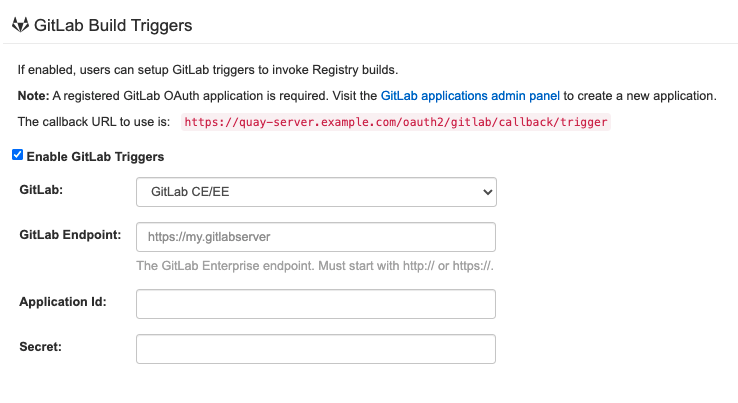
2.20.3. GitLab build triggers
| Field | Type | Description |
|---|---|---|
| FEATURE_GITLAB_BUILD | Boolean |
Whether to support GitLab build triggers |
|
|
|
|
| GITLAB_TRIGGER_CONFIG | Object | Configuration for using Gitlab for build triggers |
|
.GITLAB_ENDPOINT | String | The endpoint at which Gitlab (Enterprise) is running |
|
.CLIENT_ID | String | The registered client ID for this Quay instance |
|
.CLIENT_SECRET | String | The registered client secret for this Quay instance |
2.21. OAuth configuration fields
| Field | Type | Description |
|---|---|---|
| DIRECT_OAUTH_CLIENTID_WHITELIST | Array of String | A list of client IDs for Quay-managed applications that are allowed to perform direct OAuth approval without user approval. |
2.21.1. GitHub OAuth configuration fields
| Field | Type | Description |
|---|---|---|
| FEATURE_GITHUB_LOGIN | Boolean |
Whether GitHub login is supported |
| GITHUB_LOGIN_CONFIG | Object | Configuration for using GitHub (Enterprise) as an external login provider. |
| .ALLOWED_ORGANIZATIONS | Array of String | The names of the GitHub (Enterprise) organizations whitelisted to work with the ORG_RESTRICT option. |
| .API_ENDPOINT | String |
The endpoint of the GitHub (Enterprise) API to use. Must be overridden for github.com |
|
.CLIENT_ID | String |
The registered client ID for this Red Hat Quay instance; cannot be shared with GITHUB_TRIGGER_CONFIG |
|
.CLIENT_SECRET | String |
The registered client secret for this Red Hat Quay instance |
|
.GITHUB_ENDPOINT | String |
The endpoint for GitHub (Enterprise) |
| .ORG_RESTRICT | Boolean | If true, only users within the organization whitelist can login using this provider. |
2.21.2. Google OAuth configuration fields
| Field | Type | Description |
|---|---|---|
| FEATURE_GOOGLE_LOGIN | Boolean |
Whether Google login is supported |
| GOOGLE_LOGIN_CONFIG | Object | Configuration for using Google for external authentication |
|
.CLIENT_ID | String |
The registered client ID for this Red Hat Quay instance |
|
.CLIENT_SECRET | String |
The registered client secret for this Red Hat Quay instance |
2.22. Nested repositories configuration fields
With Red Hat Quay 3.6, support for nested repository path names has been added under the FEATURE_EXTENDED_REPOSITORY_NAMES property. This optional configuration is added to the config.yaml by default. Enablement allows the use of / in repository names.
FEATURE_EXTENDED_REPOSITORY_NAMES: true
FEATURE_EXTENDED_REPOSITORY_NAMES: true| Field | Type | Description |
|---|---|---|
| FEATURE_EXTENDED_REPOSITORY_NAMES | Boolean |
Enable support for nested repositories |
2.23. Adding other OCI media types to Quay
Helm, cosign, and ztsd compression scheme artifacts are built into Red Hat Quay 3.6 by default. For any other OCI media type that is not supported by default, you can add them to the ALLOWED_OCI_ARTIFACT_TYPES configuration in Quay’s config.yaml using the following format:
For example, you can add Singularity (SIF) support by adding the following to your config.yaml:
When adding OCI media types that are not configured by default, users will also need to manually add support for cosign and Helm if desired. The ztsd compression scheme is supported by default, so users will not need to add that OCI media type to their config.yaml to enable support.
2.24. Mail configuration fields
| Field | Type | Description |
|---|---|---|
| FEATURE_MAILING | Boolean |
Whether emails are enabled |
| MAIL_DEFAULT_SENDER | String |
If specified, the e-mail address used as the |
| MAIL_PASSWORD | String | The SMTP password to use when sending e-mails |
| MAIL_PORT | Number | The SMTP port to use. If not specified, defaults to 587. |
| MAIL_SERVER | String |
The SMTP server to use for sending e-mails. Only required if FEATURE_MAILING is set to true. |
| MAIL_USERNAME | String | The SMTP username to use when sending e-mails |
| MAIL_USE_TLS | Boolean |
If specified, whether to use TLS for sending e-mails |
2.25. User configuration fields
| Field | Type | Description |
|---|---|---|
| FEATURE_SUPER_USERS | Boolean |
Whether superusers are supported |
| FEATURE_USER_CREATION | Boolean |
Whether users can be created (by non-superusers) |
| FEATURE_USER_LAST_ACCESSED | Boolean |
Whether to record the last time a user was accessed |
| FEATURE_USER_LOG_ACCESS | Boolean |
If set to true, users will have access to audit logs for their namespace |
| FEATURE_USER_METADATA | Boolean |
Whether to collect and support user metadata |
| FEATURE_USERNAME_CONFIRMATION | Boolean |
If set to true, users can confirm their generated usernames |
| FEATURE_USER_RENAME | Boolean |
If set to true, users can rename their own namespace |
| FEATURE_INVITE_ONLY_USER_CREATION | Boolean |
Whether users being created must be invited by another user |
| FRESH_LOGIN_TIMEOUT | String |
The time after which a fresh login requires users to re-enter their password |
| USERFILES_LOCATION | String |
ID of the storage engine in which to place user-uploaded files |
| USERFILES_PATH | String |
Path under storage in which to place user-uploaded files |
| USER_RECOVERY_TOKEN_LIFETIME | String |
The length of time a token for recovering a user accounts is valid |
2.26. Recaptcha configuration fields
| Field | Type | Description |
|---|---|---|
| FEATURE_RECAPTCHA | Boolean |
Whether Recaptcha is necessary for user login and recovery |
| RECAPTCHA_SECRET_KEY | String | If recaptcha is enabled, the secret key for the Recaptcha service |
| RECAPTCHA_SITE_KEY | String | If recaptcha is enabled, the site key for the Recaptcha service |
2.27. ACI configuration fields
| Field | Type | Description |
|---|---|---|
| FEATURE_ACI_CONVERSION | Boolean |
Whether to enable conversion to ACIs |
| GPG2_PRIVATE_KEY_FILENAME | String | The filename of the private key used to decrypte ACIs |
| GPG2_PRIVATE_KEY_NAME | String | The name of the private key used to sign ACIs |
| GPG2_PUBLIC_KEY_FILENAME | String | The filename of the public key used to encrypt ACIs |
2.28. JWT configuration fields
| Field | Type | Description |
|---|---|---|
| JWT_AUTH_ISSUER | String |
The endpoint for JWT users |
| JWT_GETUSER_ENDPOINT | String |
The endpoint for JWT users |
| JWT_QUERY_ENDPOINT | String |
The endpoint for JWT queries |
| JWT_VERIFY_ENDPOINT | String |
The endpoint for JWT verification |
2.29. App tokens configuration fields
| Field | Type | Description |
|---|---|---|
| FEATURE_APP_SPECIFIC_TOKENS | Boolean |
If enabled, users can create tokens for use by the Docker CLI |
| APP_SPECIFIC_TOKEN_EXPIRATION | String |
The expiration for external app tokens. |
| EXPIRED_APP_SPECIFIC_TOKEN_GC | String |
Duration of time expired external app tokens will remain before being garbage collected |
2.30. Miscellaneous configuration fields
| Field | Type | Description |
|---|---|---|
| ALLOW_PULLS_WITHOUT_STRICT_LOGGING | String |
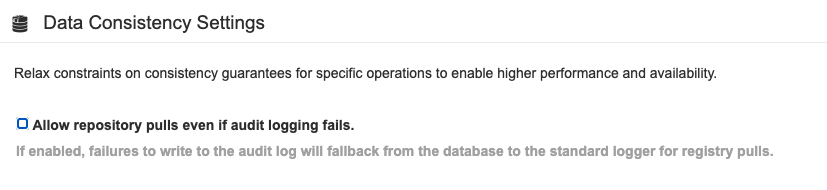
If true, pulls will still succeed even if the pull audit log entry cannot be written . This is useful if the database is in a read-only state and it is desired for pulls to continue during that time. |
| AVATAR_KIND | String |
The types of avatars to display, either generated inline (local) or Gravatar (gravatar) |
| BROWSER_API_CALLS_XHR_ONLY | Boolean |
If enabled, only API calls marked as being made by an XHR will be allowed from browsers |
| DEFAULT_NAMESPACE_MAXIMUM_BUILD_COUNT | Number |
The default maximum number of builds that can be queued in a namespace. |
| ENABLE_HEALTH_DEBUG_SECRET | String | If specified, a secret that can be given to health endpoints to see full debug info when not authenticated as a superuser |
| EXTERNAL_TLS_TERMINATION | Boolean |
Set to |
| FRESH_LOGIN_TIMEOUT | String |
The time after which a fresh login requires users to re-enter their password |
| HEALTH_CHECKER | String |
The configured health check |
| PROMETHEUS_NAMESPACE | String |
The prefix applied to all exposed Prometheus metrics |
| PUBLIC_NAMESPACES | Array of String | If a namespace is defined in the public namespace list, then it will appear on all users' repository list pages, regardless of whether the user is a member of the namespace. Typically, this is used by an enterprise customer in configuring a set of "well-known" namespaces. |
| REGISTRY_STATE | String |
The state of the registry |
| SEARCH_MAX_RESULT_PAGE_COUNT | Number |
Maximum number of pages the user can paginate in search before they are limited |
| SEARCH_RESULTS_PER_PAGE | Number |
Number of results returned per page by search page |
| V1_PUSH_WHITELIST | Array of String | The array of namespace names that support V1 push if FEATURE_RESTRICTED_V1_PUSH is set to true |
| V2_PAGINATION_SIZE | Number |
The number of results returned per page in V2 registry APIs |
| WEBHOOK_HOSTNAME_BLACKLIST | Array of String | The set of hostnames to disallow from webhooks when validating, beyond localhost |
| CREATE_PRIVATE_REPO_ON_PUSH | Boolean |
Whether new repositories created by push are set to private visibility |
| CREATE_NAMESPACE_ON_PUSH | Boolean |
Whether new push to a non-existent organization creates it |
| NON_RATE_LIMITED_NAMESPACES | Array of String |
If rate limiting has been enabled using |
2.31. Legacy configuration fields
Some fields are deprecated or obsolete:
| Field | Type | Description |
|---|---|---|
| FEATURE_BLACKLISTED_EMAILS | Boolean | If set to true, no new User accounts may be created if their email domain is blacklisted |
| BLACKLISTED_EMAIL_DOMAINS | Array of String |
The list of email-address domains that is used if FEATURE_BLACKLISTED_EMAILS is set to true |
| BLACKLIST_V2_SPEC | String |
The Docker CLI versions to which Red Hat Quay will respond that V2 is unsupported |
| DOCUMENTATION_ROOT | String | Root URL for documentation links |
| SECURITY_SCANNER_V4_NAMESPACE_WHITELIST | String | The namespaces for which the security scanner should be enabled |
Chapter 3. Environment variables
Red Hat Quay supports a limited number of environment variables for dynamic configuration.
3.1. Geo-replication
The exact same configuration should be used across all regions, with exception of the storage backend, which can be configured explicitly using the QUAY_DISTRIBUTED_STORAGE_PREFERENCE environment variable.
| Variable | Type | Description |
|---|---|---|
| QUAY_DISTRIBUTED_STORAGE_PREFERENCE | String | The preferred storage engine (by ID in DISTRIBUTED_STORAGE_CONFIG) to use. |
3.2. Database connection pooling
Red Hat Quay is composed of many different processes which all run within the same container. Many of these processes interact with the database.
If enabled, each process that interacts with the database will contain a connection pool. These per-process connection pools are configured to maintain a maximum of 20 connections. Under heavy load, it is possible to fill the connection pool for every process within a Red Hat Quay container. Under certain deployments and loads, this may require analysis to ensure Red Hat Quay does not exceed the database’s configured maximum connection count.
Overtime, the connection pools will release idle connections. To release all connections immediately, Red Hat Quay requires a restart.
Database connection pooling may be toggled by setting the environment variable DB_CONNECTION_POOLING={true|false}
| Variable | Type | Description |
|---|---|---|
| DB_CONNECTION_POOLING | Boolean | Enable or disable database connection pooling |
If database connection pooling is enabled, it is possible to change the maximum size of the connection pool. This can be done through the following config.yaml option:
config.yaml
...
DB_CONNECTION_ARGS:
  max_connections: 10
...
...
DB_CONNECTION_ARGS:
  max_connections: 10
...3.3. HTTP connection counts
It is possible to specify the quantity of simultaneous HTTP connections using environment variables. These can be specified as a whole, or for a specific component. The default for each is 50 parallel connections per process.
| Variable | Type | Description |
|---|---|---|
| WORKER_CONNECTION_COUNT | Number |
Simultaneous HTTP connections |
| WORKER_CONNECTION_COUNT_REGISTRY | Number |
Simultaneous HTTP connections for registry |
| WORKER_CONNECTION_COUNT_WEB | Number |
Simultaneous HTTP connections for web UI |
| WORKER_CONNECTION_COUNT_SECSCAN | Number |
Simultaneous HTTP connections for Clair |
3.4. Worker count variables
| Variable | Type | Description |
|---|---|---|
| WORKER_COUNT | Number | Generic override for number of processes |
| WORKER_COUNT_REGISTRY | Number |
Specifies the number of processes to handle Registry requests within the |
| WORKER_COUNT_WEB | Number |
Specifies the number of processes to handle UI/Web requests within the container |
| WORKER_COUNT_SECSCAN | Number |
Specifies the number of processes to handle Security Scanning (e.g. Clair) integration within the container |
Chapter 4. Using the config tool to reconfigure Quay on OpenShift
4.1. Accessing the config editor
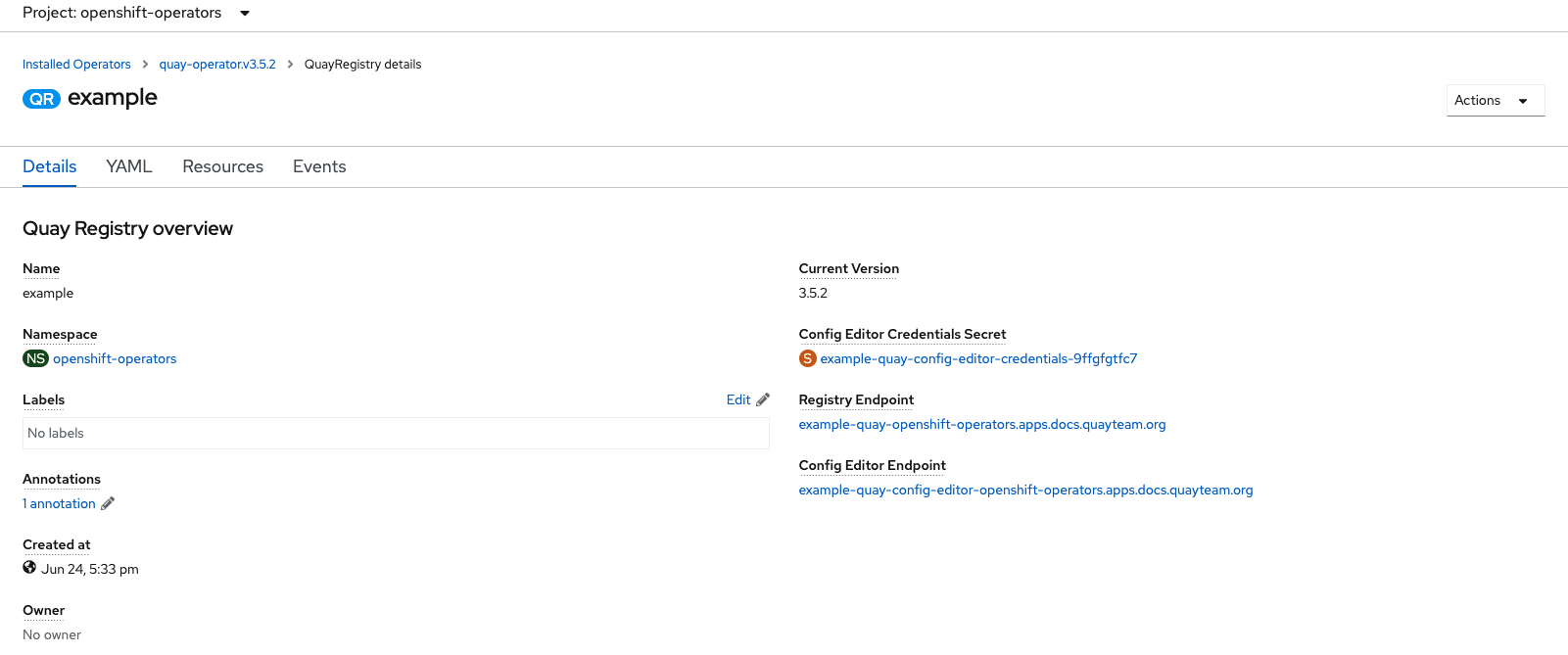
In the Details section of the QuayRegistry screen, the endpoint for the config editor is available, along with a link to the secret containing the credentials for logging into the config editor:
4.1.1. Retrieving the config editor credentials
Click on the link for the config editor secret:
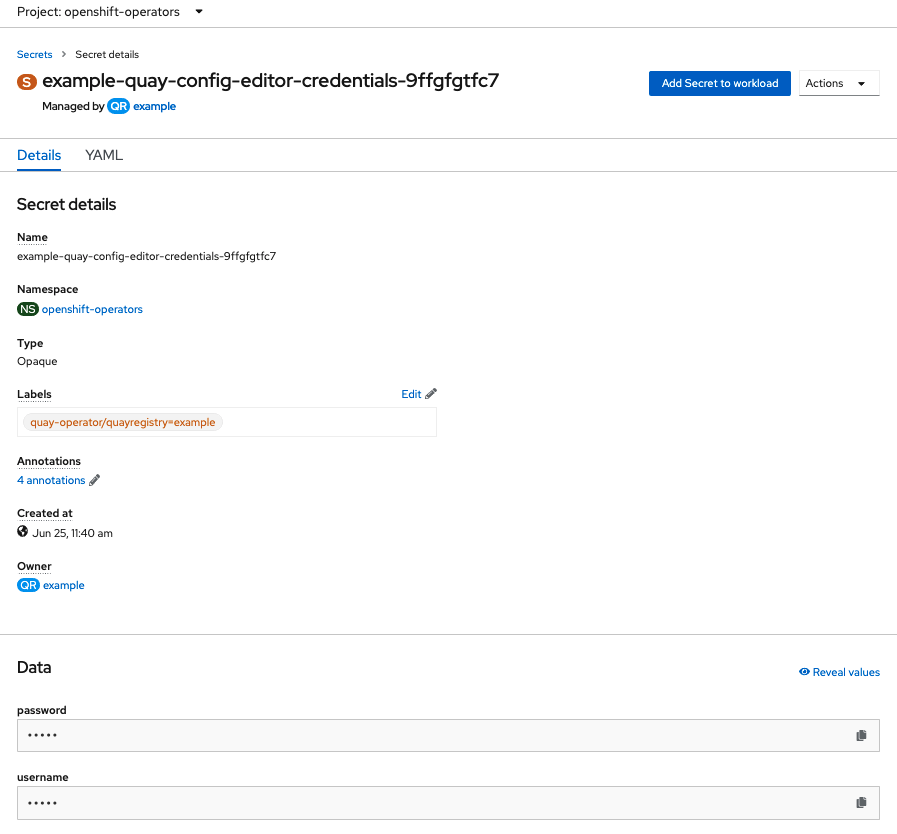
In the Data section of the Secret details screen, click
Reveal valuesto see the credentials for logging in to the config editor: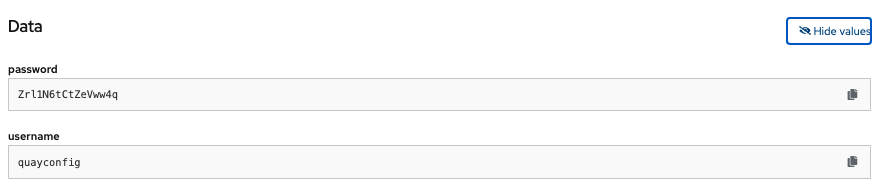
4.1.2. Logging in to the config editor
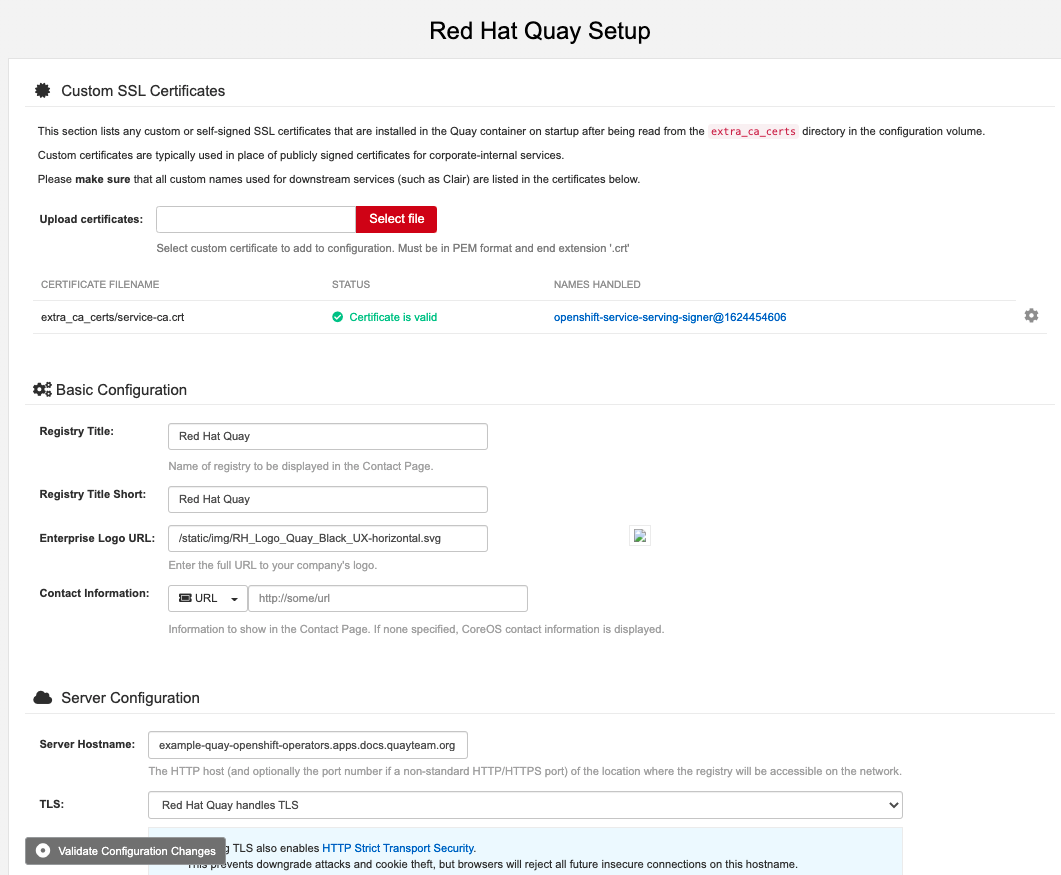
Browse to the config editor endpoint and then enter the username, typically quayconfig, and the corresponding password to access the config tool:
4.1.3. Changing configuration
In this example of updating the configuration, a superuser is added via the config editor tool:
Add an expiration period, for example
4w, for the time machine functionality: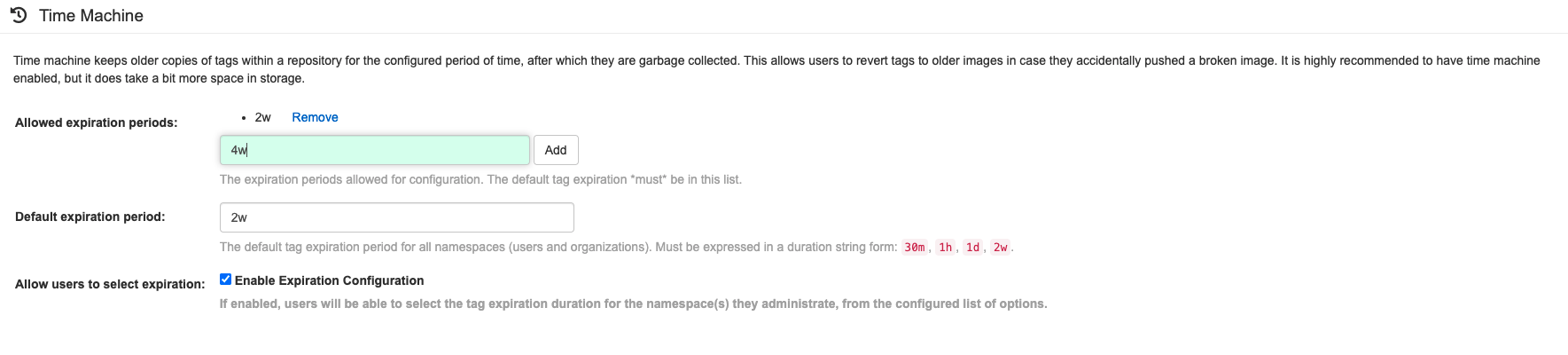
-
Select
Validate Configuration Changesto ensure that the changes are valid Apply the changes by pressing the
Reconfigure Quaybutton: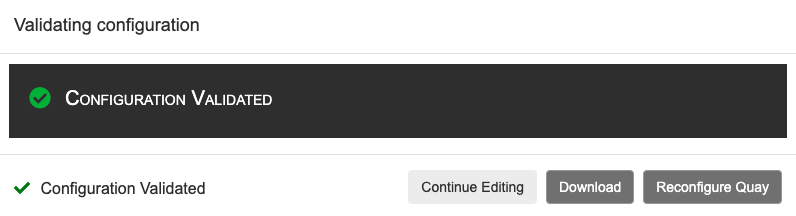
The config tool notifies you that the change has been submitted to Quay:
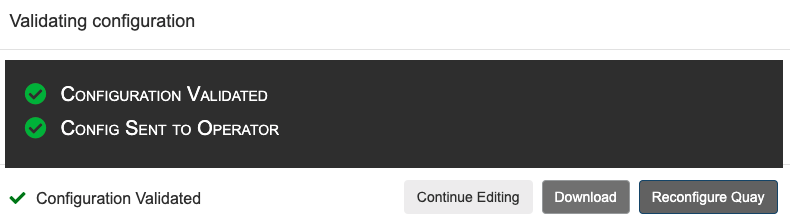
Reconfiguring Red Hat Quay using the config tool UI can lead to the registry being unavailable for a short time, while the updated configuration is applied.
4.2. Monitoring reconfiguration in the UI
4.2.1. QuayRegistry resource
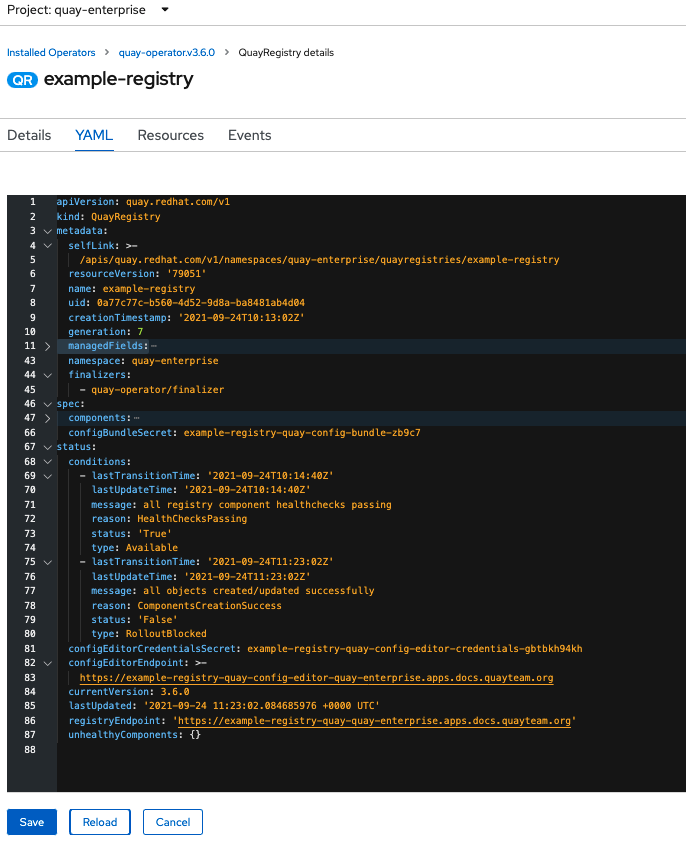
After reconfiguring the Operator, you can track the progress of the redeployment in the YAML tab for the specific instance of QuayRegistry, in this case, example-registry:
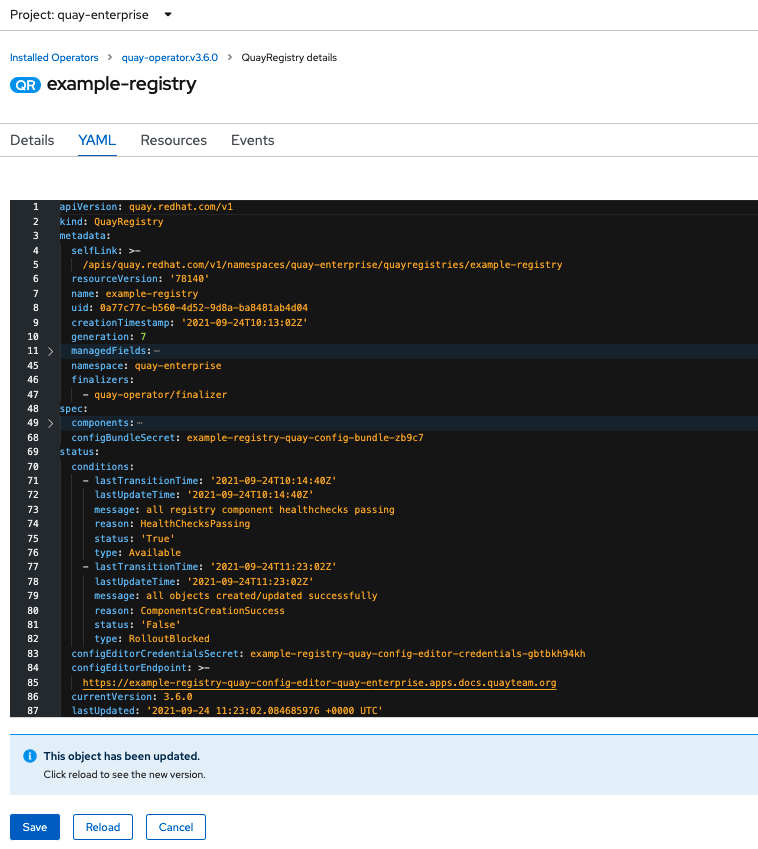
Each time the status changes, you will be prompted to reload the data to see the updated version. Eventually, the Operator will reconcile the changes, and there will be no unhealthy components reported.
4.2.2. Events
The Events tab for the QuayRegistry shows some events related to the redeployment:
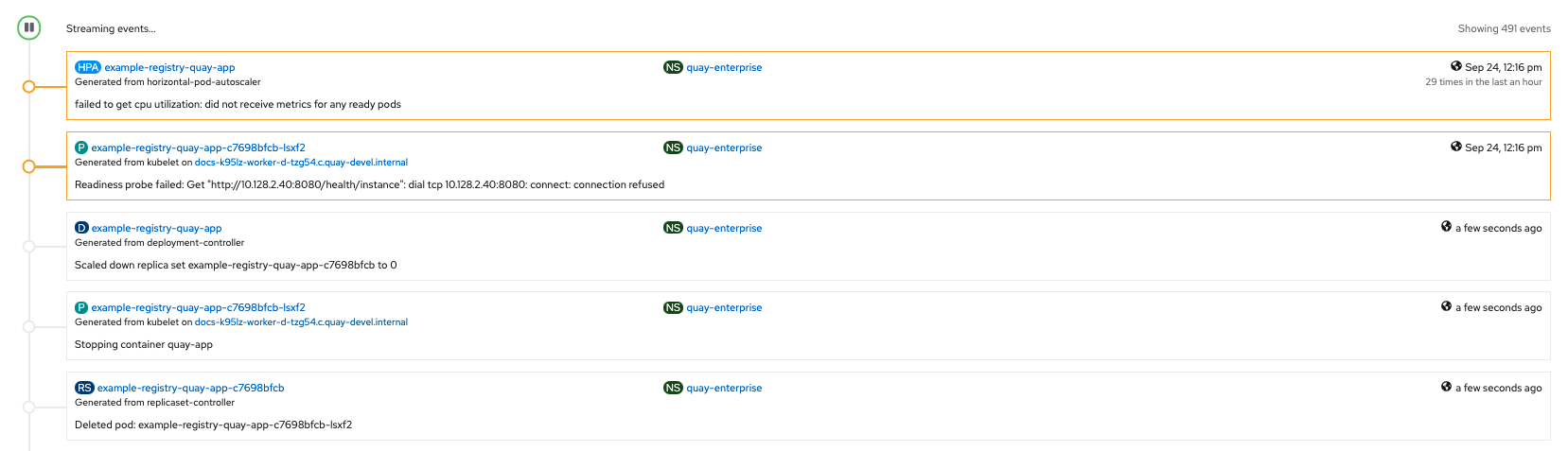
Streaming events, for all resources in the namespace that are affected by the reconfiguration, are available in the OpenShift console under Home → Events:
4.3. Accessing updated information after reconfiguration
4.3.1. Accessing the updated config tool credentials in the UI
With Red Hat Quay 3.7, reconfiguring Quay through the UI no longer generates a new login password. The password now generates only once, and remains the same after reconciling QuayRegistry objects.
4.3.2. Accessing the updated config.yaml in the UI
Use the config bundle to access the updated config.yaml file.
- On the QuayRegistry details screen, click on the Config Bundle Secret
-
In the Data section of the Secret details screen, click Reveal values to see the
config.yamlfile Check that the change has been applied. In this case,
4wshould be in the list ofTAG_EXPIRATION_OPTIONS:Copy to Clipboard Copied! Toggle word wrap Toggle overflow
Chapter 5. Quay Operator components
Quay is a powerful container registry platform and as a result, has a significant number of dependencies. These include a database, object storage, Redis, and others. The Quay Operator manages an opinionated deployment of Quay and its dependencies on Kubernetes. These dependencies are treated as components and are configured through the QuayRegistry API.
In the QuayRegistry custom resource, the spec.components field configures components. Each component contains two fields: kind - the name of the component, and managed - boolean whether the component lifecycle is handled by the Operator. By default (omitting this field), all components are managed and will be autofilled upon reconciliation for visibility:
5.1. Using managed components
Unless your QuayRegistry custom resource specifies otherwise, the Operator will use defaults for the following managed components:
- quay: Holds overrides for the Quay deployment, for example, environment variables and number of replicas. This component is new in Red Hat Quay 3.7 and cannot be set to unmanaged.
- postgres: For storing the registry metadata, uses a version of Postgres 10 from the Software Collections
- clair: Provides image vulnerability scanning
- redis: Handles Quay builder coordination and some internal logging
- horizontalpodautoscaler: Adjusts the number of Quay pods depending on memory/cpu consumption
-
objectstorage: For storing image layer blobs, utilizes the
ObjectBucketClaimKubernetes API which is provided by Noobaa/RHOCS - route: Provides an external entrypoint to the Quay registry from outside OpenShift
- mirror: Configures repository mirror workers (to support optional repository mirroring)
- monitoring: Features include a Grafana dashboard, access to individual metrics, and alerting to notify for frequently restarting Quay pods
- tls: Configures whether Red Hat Quay or OpenShift handles TLS
- clairpostgres: Configures a managed Clair database
The Operator will handle any required configuration and installation work needed for Red Hat Quay to use the managed components. If the opinionated deployment performed by the Quay Operator is unsuitable for your environment, you can provide the Operator with unmanaged resources (overrides) as described in the following sections.
5.2. Using unmanaged components for dependencies
If you have existing components such as Postgres, Redis or object storage that you would like to use with Quay, you first configure them within the Quay configuration bundle (config.yaml) and then reference the bundle in your QuayRegistry (as a Kubernetes Secret) while indicating which components are unmanaged.
The Quay config editor can also be used to create or modify an existing config bundle and simplifies the process of updating the Kubernetes Secret, especially for multiple changes. When Quay’s configuration is changed via the config editor and sent to the Operator, the Quay deployment will be updated to reflect the new configuration.
5.2.1. Using an existing Postgres database
Create a configuration file
config.yamlwith the necessary database fields:config.yaml:
DB_URI: postgresql://test-quay-database:postgres@test-quay-database:5432/test-quay-database
DB_URI: postgresql://test-quay-database:postgres@test-quay-database:5432/test-quay-databaseCopy to Clipboard Copied! Toggle word wrap Toggle overflow Create a Secret using the configuration file:
kubectl create secret generic --from-file config.yaml=./config.yaml config-bundle-secret
$ kubectl create secret generic --from-file config.yaml=./config.yaml config-bundle-secretCopy to Clipboard Copied! Toggle word wrap Toggle overflow Create a QuayRegistry YAML file
quayregistry.yamlwhich marks thepostgrescomponent as unmanaged and references the created Secret:quayregistry.yaml
Copy to Clipboard Copied! Toggle word wrap Toggle overflow - Deploy the registry as detailed in the following sections.
5.2.2. NooBaa unmanaged storage
- Create a NooBaa Object Bucket Claim in the console at Storage → Object Bucket Claims.
- Retrieve the Object Bucket Claim Data details including the Access Key, Bucket Name, Endpoint (hostname) and Secret Key.
Create a
config.yamlconfiguration file, using the information for the Object Bucket Claim:Copy to Clipboard Copied! Toggle word wrap Toggle overflow
5.2.3. Disabling the Horizontal Pod Autoscaler
HorizontalPodAutoscalers have been added to the Clair, Quay, and Mirror pods, so that they now automatically scale during load spikes.
As HPA is configured by default to be managed, the number of pods for Quay, Clair and repository mirroring is set to two. This facilitates the avoidance of downtime when updating / reconfiguring Quay via the Operator or during rescheduling events.
If you wish to disable autoscaling or create your own HorizontalPodAutoscaler, simply specify the component as unmanaged in the QuayRegistry instance:
5.3. Add certs when deployed on Kubernetes
When deployed on Kubernetes, Red Hat Quay mounts in a secret as a volume to store config assets. Unfortunately, this currently breaks the upload certificate function of the superuser panel.
To get around this error, a base64 encoded certificate can be added to the secret after Red Hat Quay has been deployed. Here’s how:
Begin by base64 encoding the contents of the certificate:
Copy to Clipboard Copied! Toggle word wrap Toggle overflow Use the
kubectltool to edit the quay-enterprise-config-secret.kubectl --namespace quay-enterprise edit secret/quay-enterprise-config-secret
$ kubectl --namespace quay-enterprise edit secret/quay-enterprise-config-secretCopy to Clipboard Copied! Toggle word wrap Toggle overflow Add an entry for the cert and paste the full base64 encoded string under the entry:
  custom-cert.crt:
c1psWGpqeGlPQmNEWkJPMjJ5d0pDemVnR2QNCnRsbW9JdEF4YnFSdVd3PT0KLS0tLS1FTkQgQ0VSVElGSUNBVEUtLS0tLQo=
  custom-cert.crt:
c1psWGpqeGlPQmNEWkJPMjJ5d0pDemVnR2QNCnRsbW9JdEF4YnFSdVd3PT0KLS0tLS1FTkQgQ0VSVElGSUNBVEUtLS0tLQo=
Copy to Clipboard Copied! Toggle word wrap Toggle overflow -
Finally, recycle all Red Hat Quay pods. Use
kubectl deleteto remove all Red Hat Quay pods. The Red Hat Quay Deployment will automatically schedule replacement pods with the new certificate data.
5.4. Configuring OCI and Helm with the Operator
Customizations to the configuration of Quay can be provided in a secret containing the configuration bundle. Execute the following command which will create a new secret called quay-config-bundle, in the appropriate namespace, containing the necessary properties to enable OCI support.
quay-config-bundle.yaml
As of Red Hat Quay 3.7, FEATURE_HELM_OCI_SUPPORT has been deprecated and will be removed in a future version of Red Hat Quay. In Red Hat Quay 3.6, Helm artifacts are supported by default and included under the FEATURE_GENERAL_OCI_SUPPORT property. Users are no longer required to update their config.yaml files to enable support.
Create the secret in the appropriate namespace, in this example quay-enterprise:
oc create -n quay-enterprise -f quay-config-bundle.yaml
$ oc create -n quay-enterprise -f quay-config-bundle.yaml
Specify the secret for the spec.configBundleSecret field:
quay-registry.yaml
Create the registry with the specified configuration:
oc create -n quay-enterprise -f quay-registry.yaml
$ oc create -n quay-enterprise -f quay-registry.yaml5.5. Volume size overrides
As of Red Hat Quay v3.6.2, you can specify the desired size of storage resources provisioned for managed components. The default size for Clair and Quay PostgreSQL databases is 50Gi. You can now choose a large enough capacity upfront, either for performance reasons or in the case where your storage backend does not have resize capability.
In the following example, the volume size for the Clair and the Quay PostgreSQL databases has been set to 70Gi:
Chapter 6. Using the configuration API
The configuration tool exposes 4 endpoints that can be used to build, validate, bundle and deploy a configuration. The config-tool API is documented at https://github.com/quay/config-tool/blob/master/pkg/lib/editor/API.md. In this section, you will see how to use the API to retrieve the current configuration and how to validate any changes you make.
6.1. Retrieving the default configuration
If you are running the configuration tool for the first time, and do not have an existing configuration, you can retrieve the default configuration. Start the container in config mode:
sudo podman run --rm -it --name quay_config \
  -p 8080:8080 \
  registry.redhat.io/quay/quay-rhel8:v3.7.10 config secret
$ sudo podman run --rm -it --name quay_config \
  -p 8080:8080 \
  registry.redhat.io/quay/quay-rhel8:v3.7.10 config secret
Use the config endpoint of the configuration API to get the default:
curl -X GET -u quayconfig:secret http://quay-server:8080/api/v1/config | jq
$ curl -X GET -u quayconfig:secret http://quay-server:8080/api/v1/config | jqThe value returned is the default configuration in JSON format:
6.2. Retrieving the current configuration
If you have already configured and deployed the Quay registry, stop the container and restart it in configuration mode, loading the existing configuration as a volume:
sudo podman run --rm -it --name quay_config \
  -p 8080:8080 \
  -v $QUAY/config:/conf/stack:Z \
  registry.redhat.io/quay/quay-rhel8:v3.7.10 config secret
$ sudo podman run --rm -it --name quay_config \
  -p 8080:8080 \
  -v $QUAY/config:/conf/stack:Z \
  registry.redhat.io/quay/quay-rhel8:v3.7.10 config secret
Use the config endpoint of the API to get the current configuration:
curl -X GET -u quayconfig:secret http://quay-server:8080/api/v1/config | jq
$ curl -X GET -u quayconfig:secret http://quay-server:8080/api/v1/config | jqThe value returned is the current configuration in JSON format, including database and Redis configuration data:
6.3. Validating configuration using the API
You can validate a configuration by posting it to the config/validate endpoint:
The returned value is an array containing the errors found in the configuration. If the configuration is valid, an empty array [] is returned.
6.4. Determining the required fields
You can determine the required fields by posting an empty configuration structure to the config/validate endpoint:
The value returned is an array indicating which fields are required:
Chapter 7. Using the configuration tool
7.1. Custom SSL certificates UI
The config tool can be used to load custom certificates to facilitate access to resources such as external databases. Select the custom certs to be uploaded, ensuring that they are in PEM format, with an extension .crt.
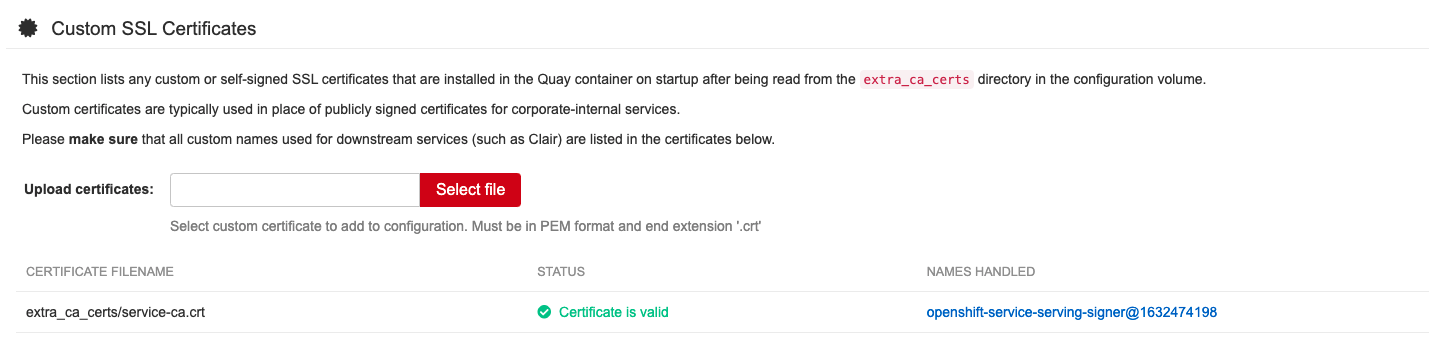
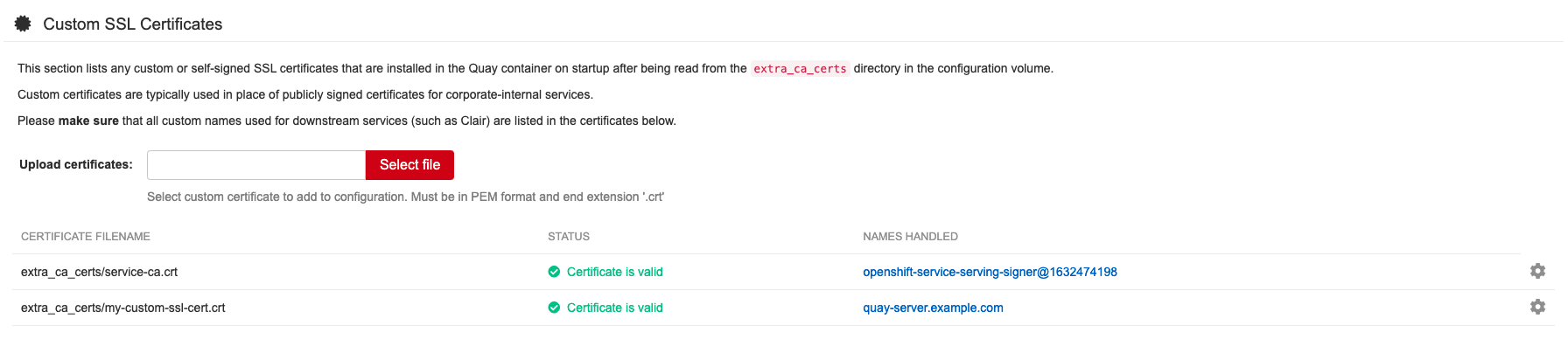
The config tool also displays a list of any uploaded certificates. Once you upload your custom SSL cert, it will appear in the list:
7.2. Basic configuration
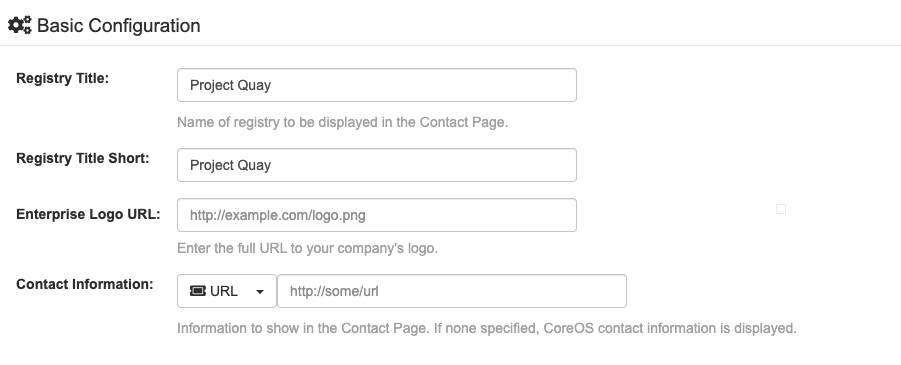
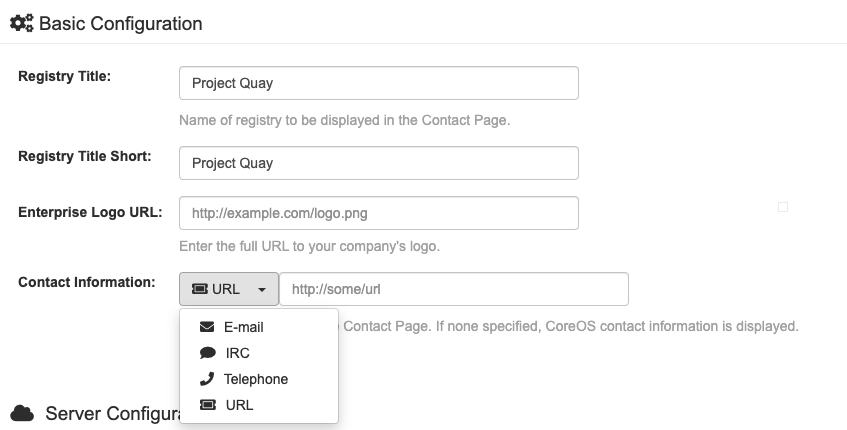
7.2.1. Contact information
7.3. Server configuration
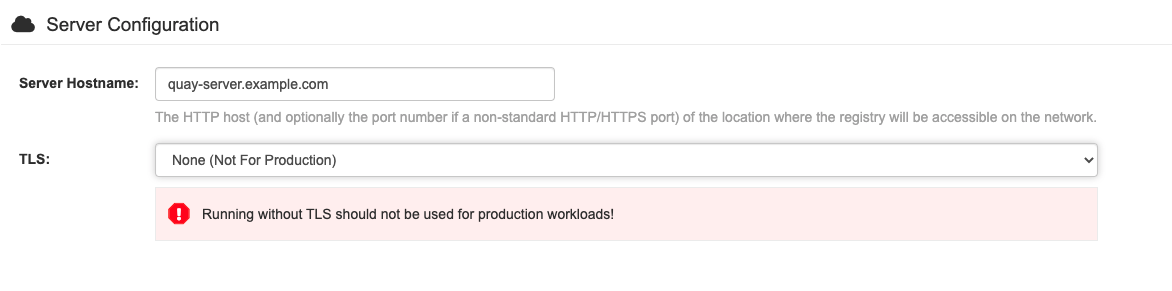
7.3.1. Server configuration choice
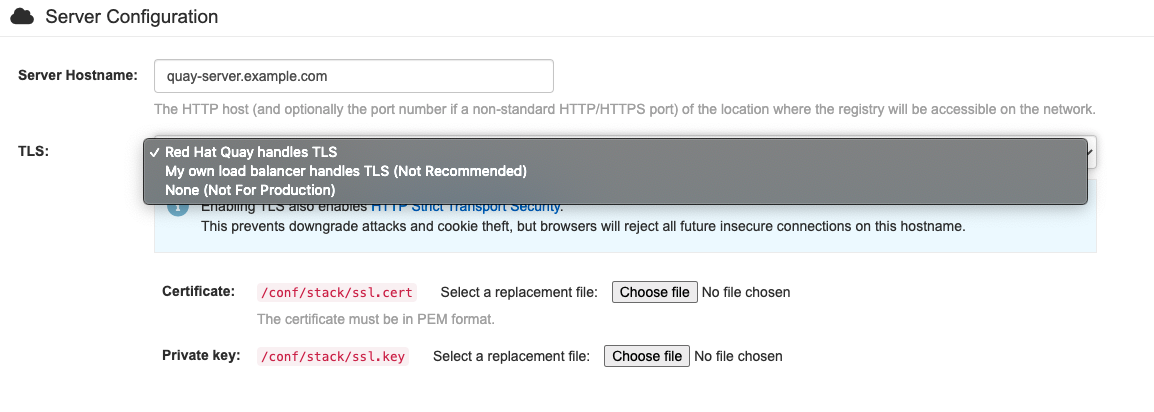
7.3.2. TLS configuration
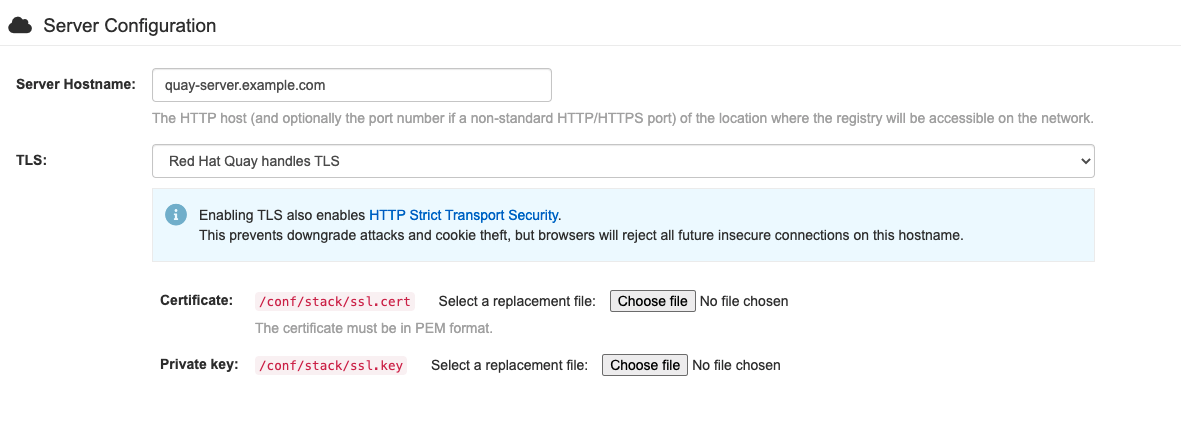
7.4. Database configuration
You can choose between PostGreSQL and MySQL:

The MySQL and MariaDB databases have been deprecated as of Red Hat Quay 3.6. Support for these databases will be removed in a future version of Red Hat Quay. If starting a new Red Hat Quay installation, it is strongly recommended to use PostgreSQL.
7.4.1. PostgreSQL configuration
Enter the details for connecting to the database:
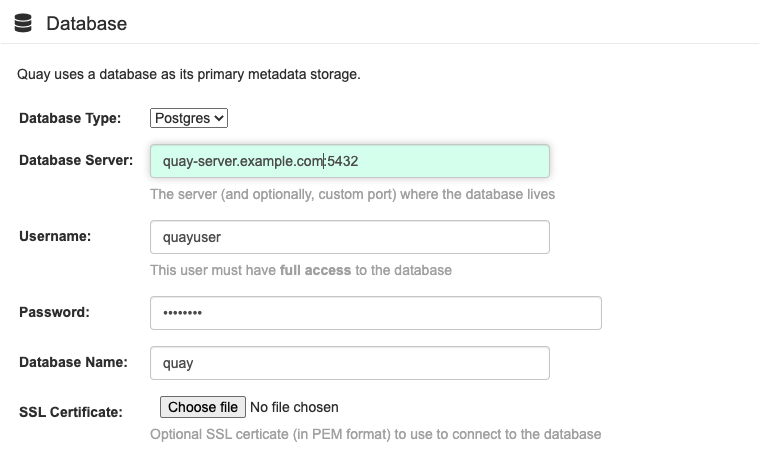
This will generate a DB_URI field of the form postgresql://quayuser:quaypass@quay-server.example.com:5432/quay.
If you need finer-grained control of the connection arguments, see the section "Database connection arguments" in the Configuration Guide.
7.5. Data consistency
7.6. Time machine configuration

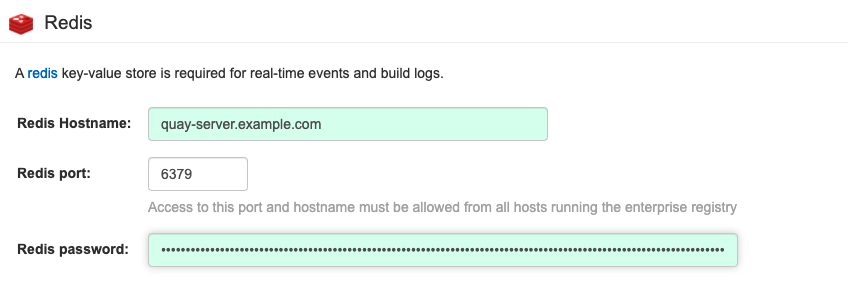
7.7. Redis configuration
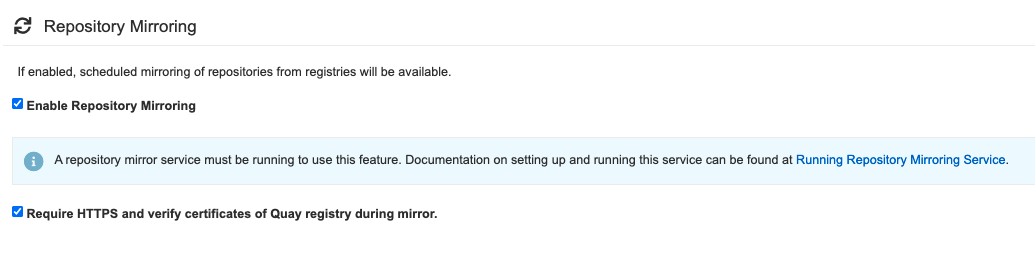
7.8. Repository mirroring configuration
7.9. Registry storage configuration
- Proxy storage
- Storage georeplication
- Storage engines
7.9.1. Enable storage replication - standalone Quay
-
Scroll down to the section entitled
Registry Storage. -
Click
Enable Storage Replication. - Add each of the storage engines to which data will be replicated. All storage engines to be used must be listed.
-
If complete replication of all images to all storage engines is required, under each storage engine configuration click
Replicate to storage engine by default. This will ensure that all images are replicated to that storage engine. To instead enable per-namespace replication, please contact support. -
When you are done, click
Save Configuration Changes. Configuration changes will take effect the next time Red Hat Quay restarts. After adding storage and enabling “Replicate to storage engine by default” for Georeplications, you need to sync existing image data across all storage. To do this, you need to
oc exec(or docker/kubectl exec) into the container and run:scl enable python27 bash python -m util.backfillreplication
# scl enable python27 bash
# python -m util.backfillreplication
Copy to Clipboard Copied! Toggle word wrap Toggle overflow This is a one time operation to sync content after adding new storage.
7.9.2. Storage engines
7.9.2.1. Local storage

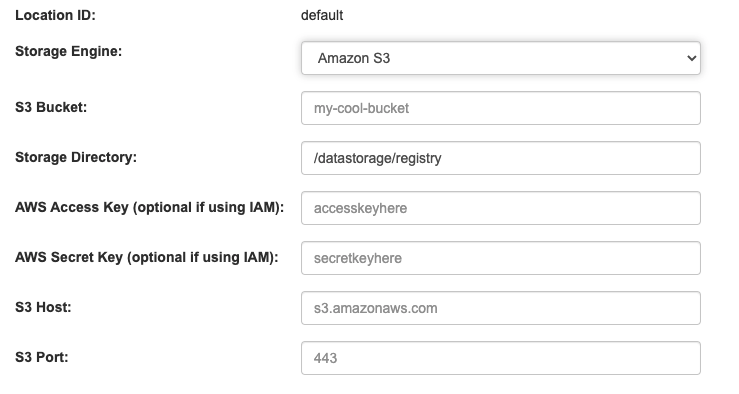
7.9.2.2. Amazon S3 storage
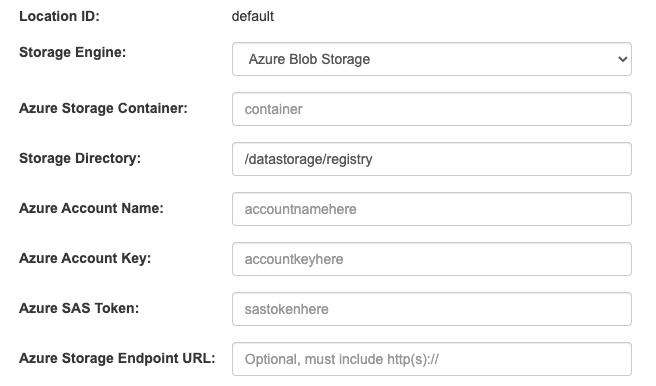
7.9.2.3. Azure blob storage
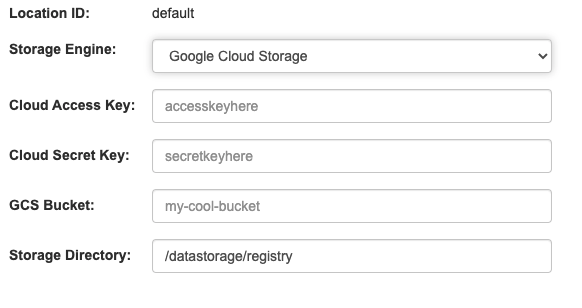
7.9.2.4. Google cloud storage
7.9.2.5. Ceph object gateway (RADOS) storage

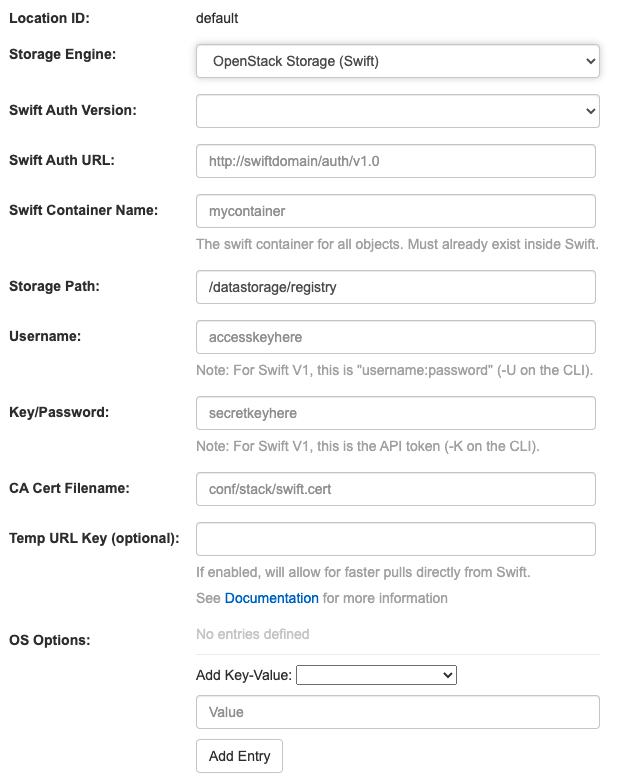
7.9.2.6. OpenStack (Swift) storage configuration
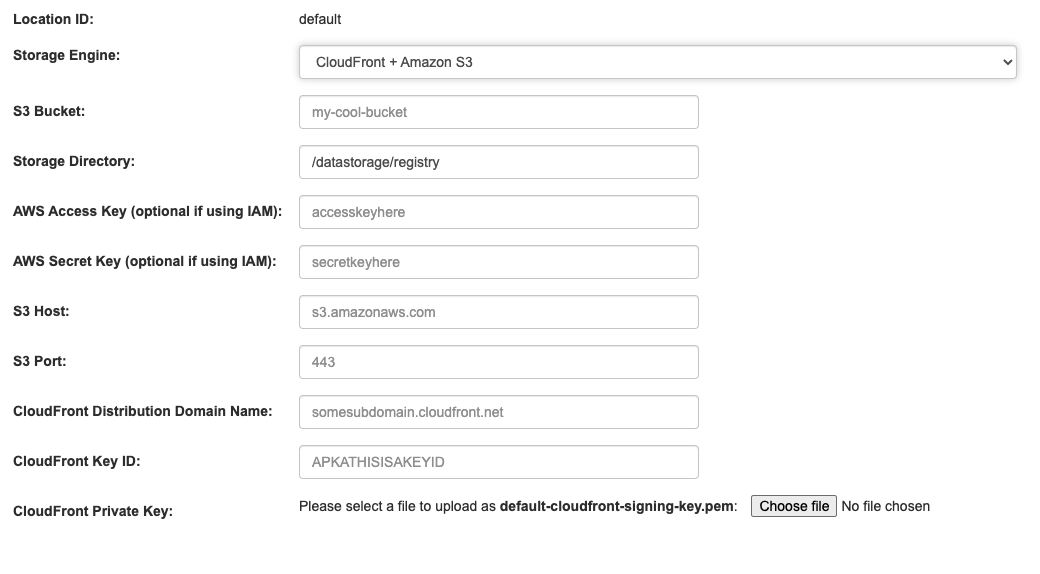
7.9.2.7. Cloudfront + Amazon S3 storage configuration
7.10. Action log configuration
7.10.1. Action log storage configuration
7.10.1.1. Database action log storage

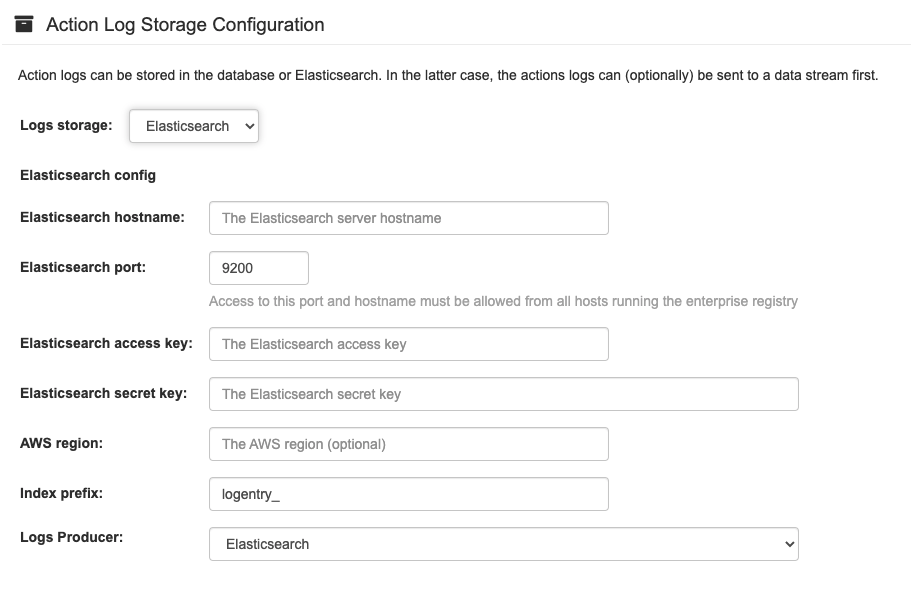
7.10.1.2. Elasticsearch action log storage
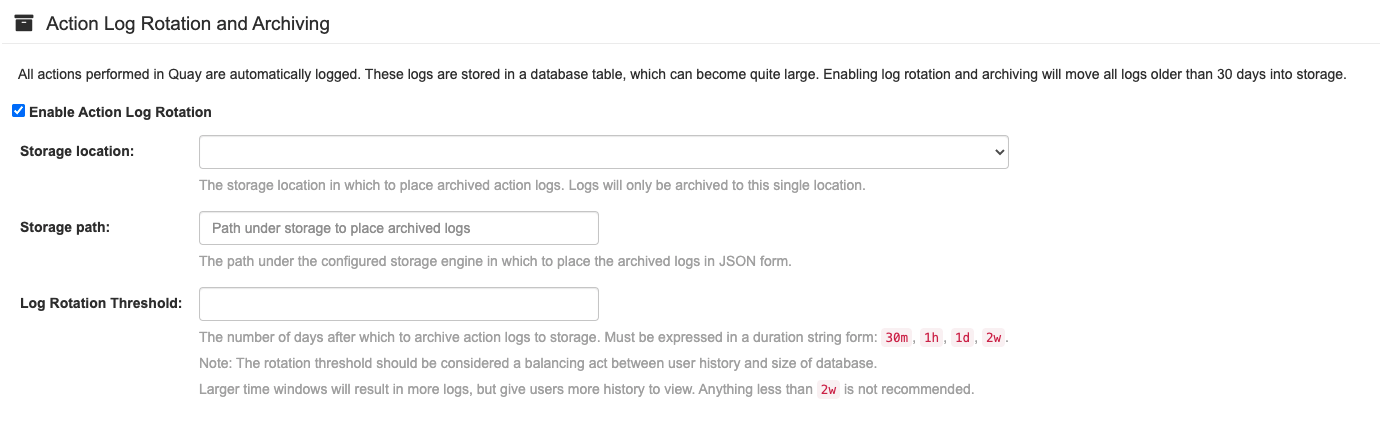
7.10.2. Action log rotation and archiving

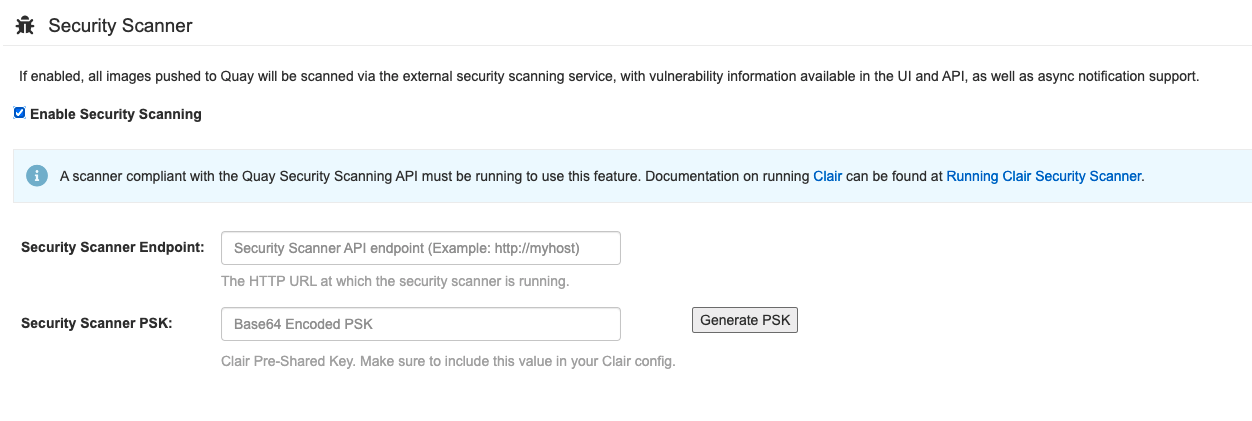
7.11. Security scanner configuration
7.12. Application registry configuration

7.13. Email configuration

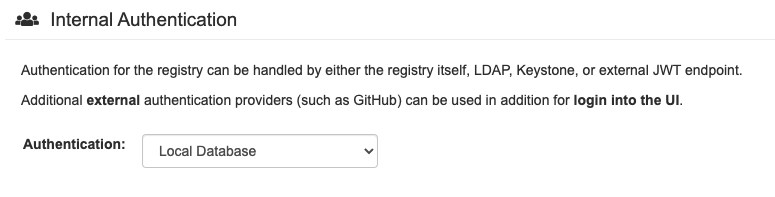
7.14. Internal authentication configuration

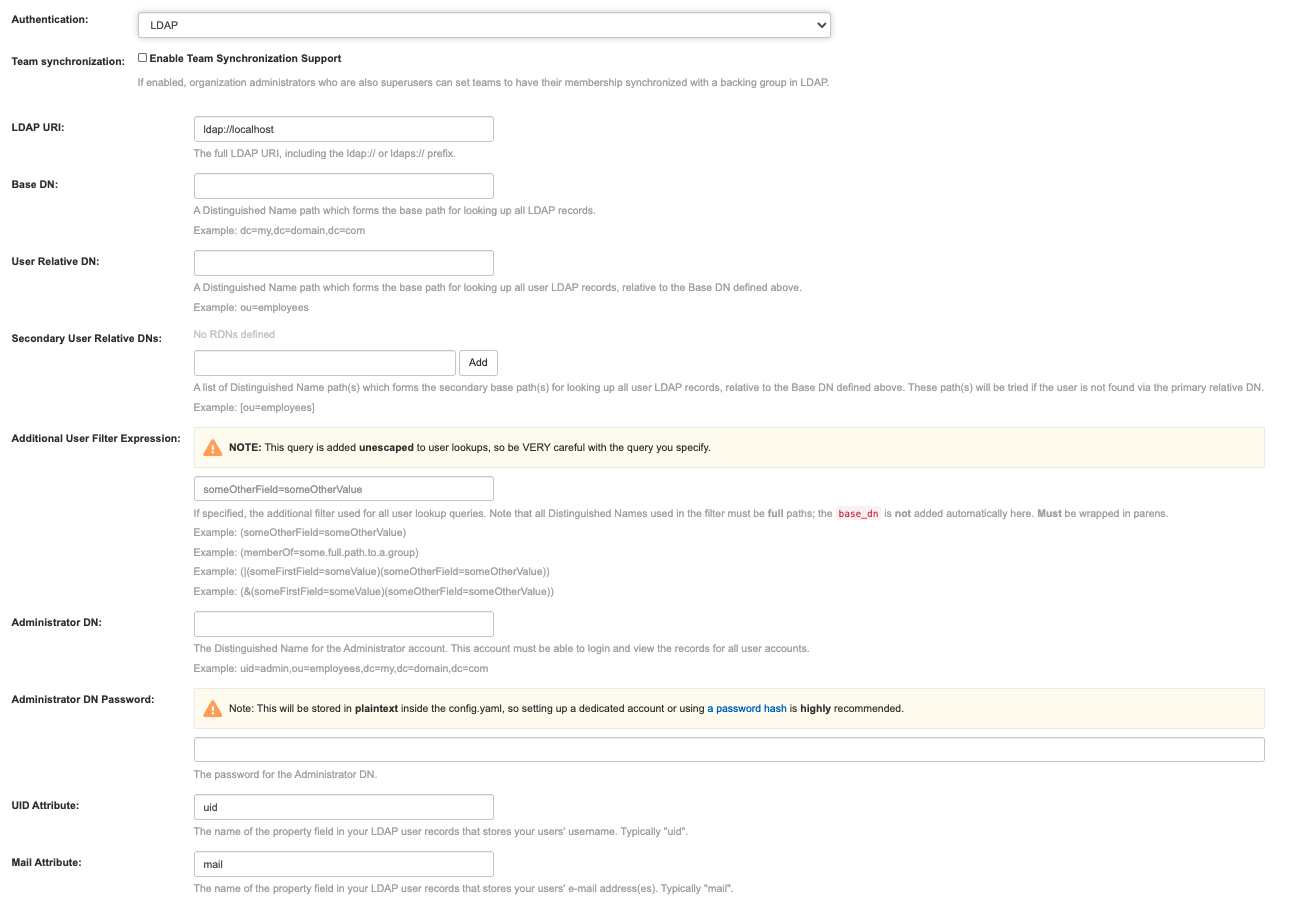
7.14.1. LDAP
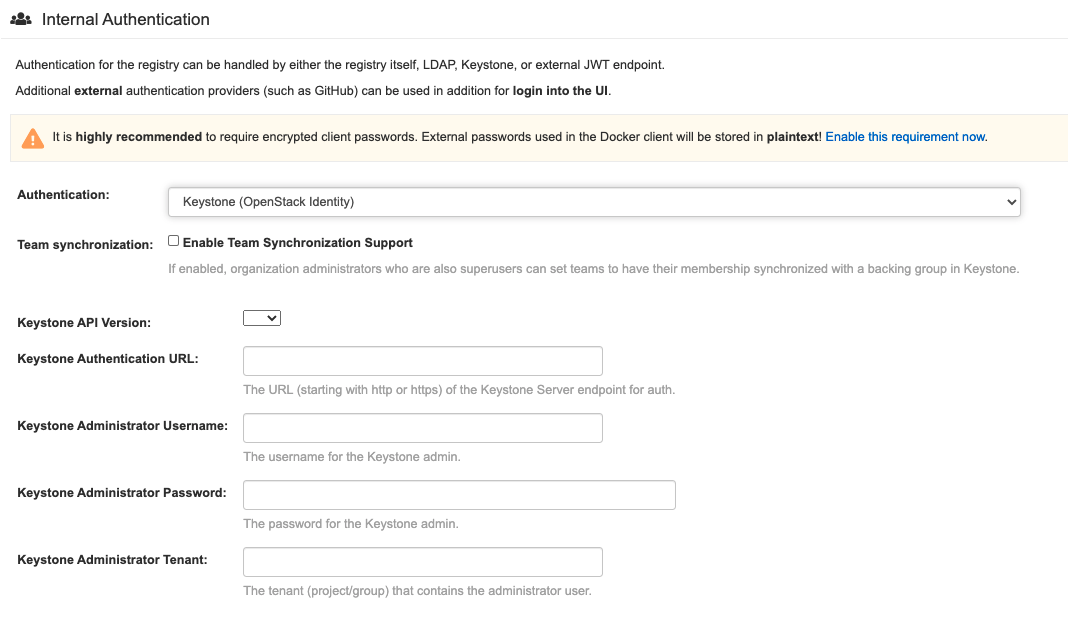
7.14.2. Keystone (OpenStack identity)
7.14.3. JWT custom authentication

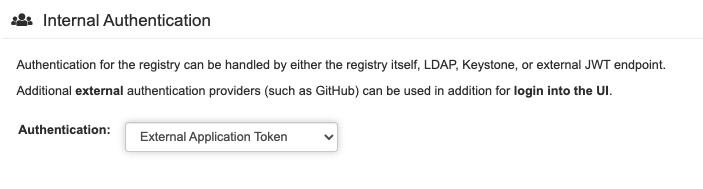
7.14.4. External application token
7.15. External authentication (OAUTH) configuration
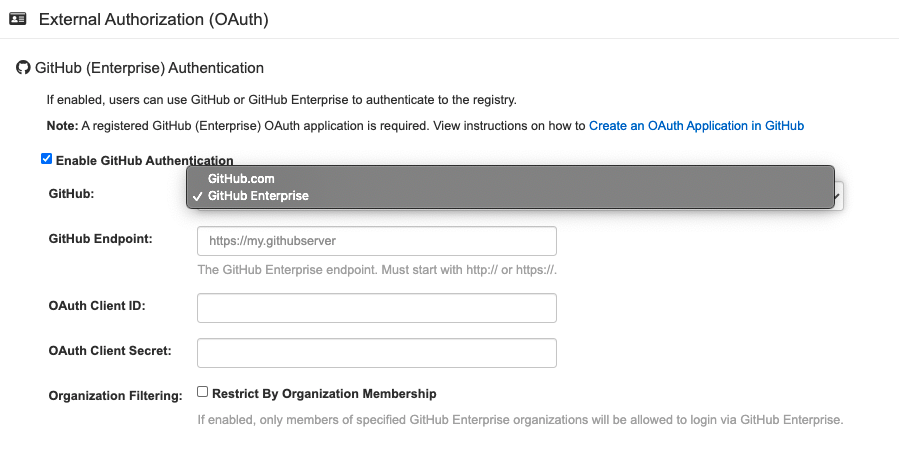
7.15.1. GitHub (Enterprise) authentication
7.15.2. Google authentication

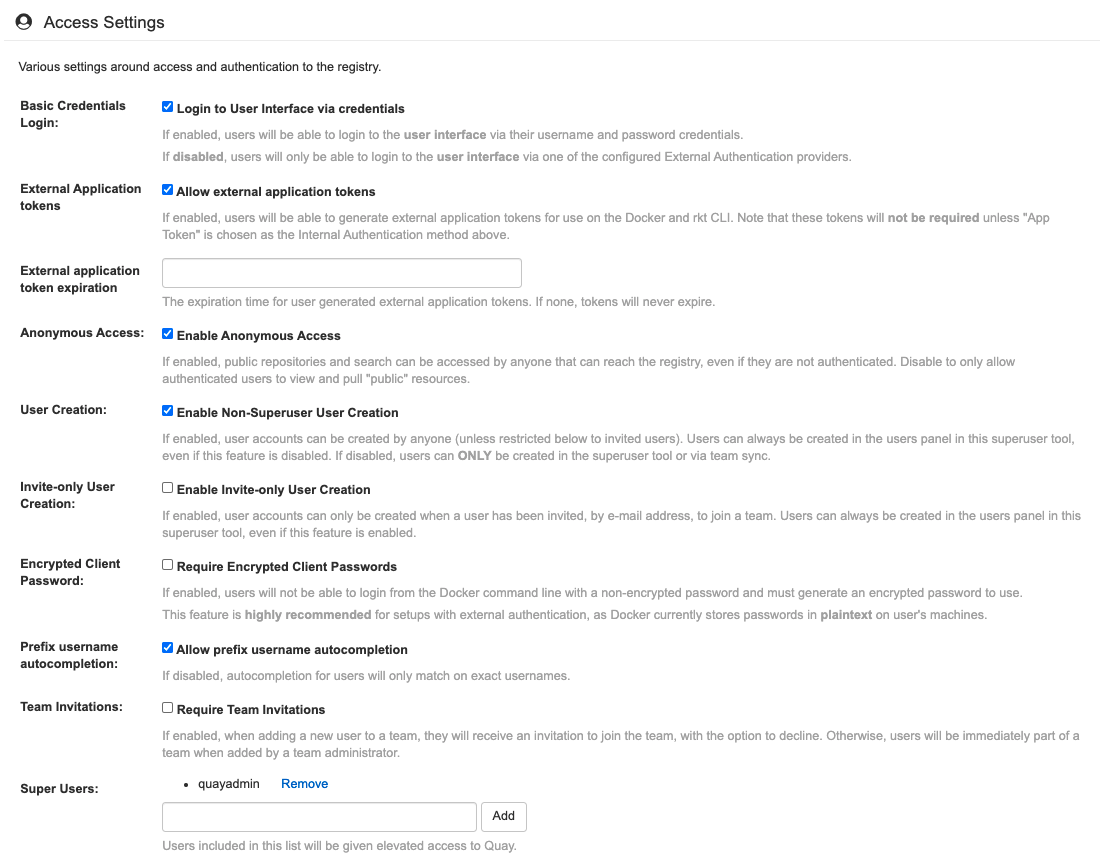
7.16. Access settings configuration
7.17. Dockerfile build support
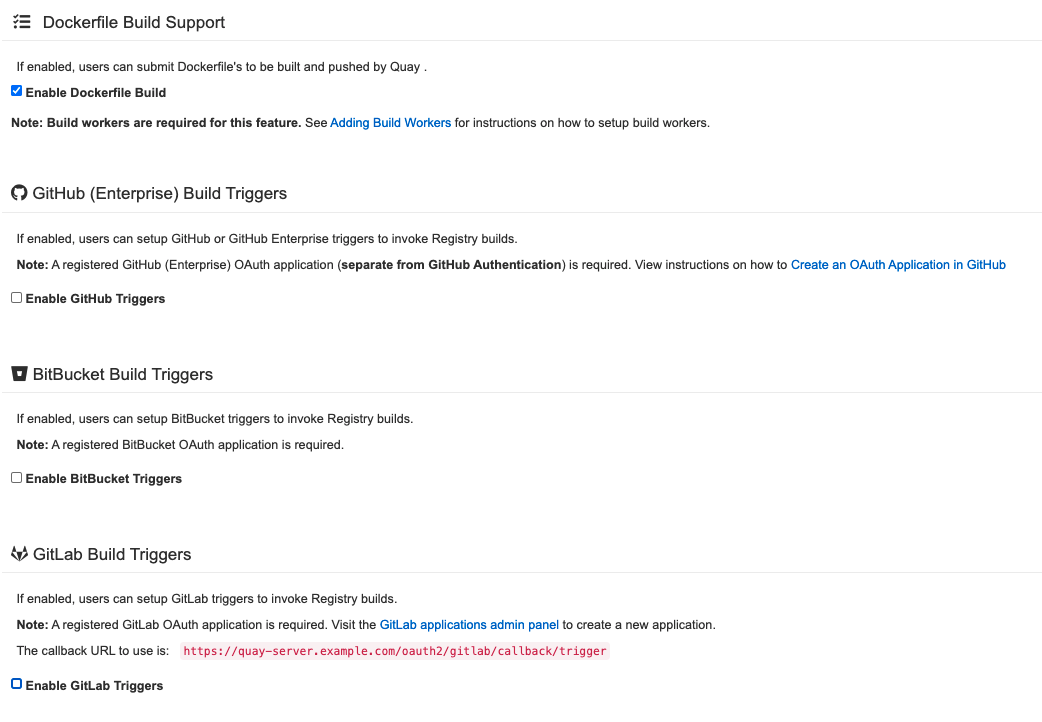
7.17.1. GitHub (Enterprise) Build Triggers

7.17.2. BitBucket Build Triggers

7.17.3. GitLab Build Triggers

'%20d='M201.5%20305.5c-13.8%200-24.9-11.1-24.9-24.6%200-13.8%2011.1-24.9%2024.9-24.9%2013.6%200%2024.6%2011.1%2024.6%2024.9%200%2013.6-11.1%2024.6-24.6%2024.6zM504%20256c0%20137-111%20248-248%20248S8%20393%208%20256%20119%208%20256%208s248%20111%20248%20248zm-132.3-41.2c-9.4%200-17.7%203.9-23.8%2010-22.4-15.5-52.6-25.5-86.1-26.6l17.4-78.3%2055.4%2012.5c0%2013.6%2011.1%2024.6%2024.6%2024.6%2013.8%200%2024.9-11.3%2024.9-24.9s-11.1-24.9-24.9-24.9c-9.7%200-18%205.8-22.1%2013.8l-61.2-13.6c-3-.8-6.1%201.4-6.9%204.4l-19.1%2086.4c-33.2%201.4-63.1%2011.3-85.5%2026.8-6.1-6.4-14.7-10.2-24.1-10.2-34.9%200-46.3%2046.9-14.4%2062.8-1.1%205-1.7%2010.2-1.7%2015.5%200%2052.6%2059.2%2095.2%20132%2095.2%2073.1%200%20132.3-42.6%20132.3-95.2%200-5.3-.6-10.8-1.9-15.8%2031.3-16%2019.8-62.5-14.9-62.5zM302.8%20331c-18.2%2018.2-76.1%2017.9-93.6%200-2.2-2.2-6.1-2.2-8.3%200-2.5%202.5-2.5%206.4%200%208.6%2022.8%2022.8%2087.3%2022.8%20110.2%200%202.5-2.2%202.5-6.1%200-8.6-2.2-2.2-6.1-2.2-8.3%200zm7.7-75c-13.6%200-24.6%2011.1-24.6%2024.9%200%2013.6%2011.1%2024.6%2024.6%2024.6%2013.8%200%2024.9-11.1%2024.9-24.6%200-13.8-11-24.9-24.9-24.9z'/%3e%3c/svg%3e)