 Red Hat Summit
Vulnerability reporting with Clair on Red Hat Quay
Vulnerability reporting with Clair on Red Hat Quay
Abstract
Preface
The contents within this guide provide an overview of Clair for Red Hat Quay, running Clair on standalone Red Hat Quay and Operator deployments, and advanced Clair configuration.
Part I. Vulnerability reporting with Clair on Red Hat Quay overview
The content in this guide explains the key purposes and concepts of Clair on Red Hat Quay. It also contains information about Clair releases and the location of official Clair containers.
Chapter 1. Clair security scanner
Clair is an open source security scanner that analyzes container images and reports vulnerabilities. You can use Clair to automatically scan images and identify security issues in your container registry.
Clair v4 (Clair) leverages static code analyses for parsing image content and reporting vulnerabilities affecting the content. Clair is packaged with Red Hat Quay and can be used in both standalone and Operator deployments. It can be run in highly scalable configurations, where components can be scaled separately as appropriate for enterprise environments.
1.1. About Clair
Clair uses Common Vulnerability Scoring System (CVSS) data from the National Vulnerability Database (NVD) to enrich vulnerability data, which is a United States government repository of security-related information, including known vulnerabilities and security issues in various software components and systems. Using scores from the NVD provides Clair the following benefits:
- Data synchronization. Clair can periodically synchronize its vulnerability database with the NVD. This ensures that it has the latest vulnerability data.
- Matching and enrichment. Clair compares the metadata and identifiers of vulnerabilities it discovers in container images with the data from the NVD. This process involves matching the unique identifiers, such as Common Vulnerabilities and Exposures (CVE) IDs, to the entries in the NVD. When a match is found, Clair can enrich its vulnerability information with additional details from NVD, such as severity scores, descriptions, and references.
- Severity Scores. The NVD assigns severity scores to vulnerabilities, such as the Common Vulnerability Scoring System (CVSS) score, to indicate the potential impact and risk associated with each vulnerability. By incorporating NVD’s severity scores, Clair can provide more context on the seriousness of the vulnerabilities it detects.
If Clair finds vulnerabilities from NVD, a detailed and standardized assessment of the severity and potential impact of vulnerabilities detected within container images is reported to users on the UI. CVSS enrichment data provides Clair the following benefits:
- Vulnerability prioritization. By utilizing CVSS scores, users can prioritize vulnerabilities based on their severity, helping them address the most critical issues first.
- Assess Risk. CVSS scores can help Clair users understand the potential risk a vulnerability poses to their containerized applications.
- Communicate Severity. CVSS scores provide Clair users a standardized way to communicate the severity of vulnerabilities across teams and organizations.
- Inform Remediation Strategies. CVSS enrichment data can guide Quay.io users in developing appropriate remediation strategies.
- Compliance and Reporting. Integrating CVSS data into reports generated by Clair can help organizations demonstrate their commitment to addressing security vulnerabilities and complying with industry standards and regulations.
1.1.1. Clair releases
New versions of Clair are regularly released. The source code needed to build Clair is packaged as an archive and attached to each release. Clair releases can be found at Clair releases.
Release artifacts also include the clairctl command line interface tool, which obtains updater data from the internet by using an open host.
1.1.1.1. Clair 4.9
Clair 4.9 was released on 25-12-10. For information about this release, see v4.9.0 Release.
1.1.1.2. Clair 4.8
Clair 4.8 was released on 24-10-28. The following changes have been made:
- Clair on Red Hat Quay now requires that you update the Clair PostgreSQL database from version 13 to version 15. For more information about this procedure, see Upgrading the Clair PostgreSQL database.
- This release deprecates the updaters that rely on the Red Hat OVAL v2 security data in favor of the Red Hat VEX data. This change includes a database migration to delete all the vulnerabilities that originated from the OVAL v2 feeds. Because of this, there could be intermittent downtime in production environments before the VEX updater complete for the first time when no vulnerabilities exist.
1.1.1.3. Clair 4.8.0 known issues
- When pushing Suse Enterprise Linux Images with HIGH image vulnerabilities, Clair 4.8.0 does not report these vulnerabilities. This is a known issue and will be fixed in a future version of Red Hat Quay.
1.1.1.4. Clair 4.7.4
Clair 4.7.4 was released on 2024-05-01. The following changes have been made:
- The default layer download location has changed. For more information, see Disk usage considerations.
1.1.1.5. Clair 4.7.3
Clair 4.7.3 was released on 2024-02-26. The following changes have been made:
- The minimum TLS version for Clair is now 1.2. Previously, servers allowed for 1.1 connections.
1.1.1.6. Clair 4.7.2
Clair 4.7.2 was released on 2023-10-09. The following changes have been made:
- CRDA support has been removed.
1.1.1.7. Clair 4.7.1
Clair 4.7.1 was released as part of Red Hat Quay 3.9.1. The following changes have been made:
With this release, you can view unpatched vulnerabilities from Red Hat Enterprise Linux (RHEL) sources. If you want to view unpatched vulnerabilities, you can the set
ignore_unpatchedparameter toFalse. For example:updaters: config: rhel: ignore_unpatched: falseTo disable this feature, you can set
ignore_unpatchedtoTrue.
1.1.1.8. Clair 4.7
Clair 4.7 was released as part of Red Hat Quay 3.9, and includes support for the following features:
- Native support for indexing Golang modules and RubeGems in container images.
Change to OSV.dev as the vulnerability database source for any programming language package managers.
- This includes popular sources like GitHub Security Advisories or PyPA.
- This allows offline capability.
- Use of pyup.io for Python and CRDA for Java is suspended.
- Clair now supports Java, Golang, Python, and Ruby dependencies.
1.1.2. Clair containers
Official downstream Clair containers bundled with Red Hat Quay can be found on the Red Hat Ecosystem Catalog.
Official upstream containers are packaged and released as a under the Clair project on Quay.io. The latest tag tracks the Git development branch. Version tags are built from the corresponding release.
1.2. Clair severity mapping
Clair offers a comprehensive approach to vulnerability assessment and management. One of its essential features is the normalization of security databases' severity strings. This process streamlines the assessment of vulnerability severities by mapping them to a predefined set of values. Through this mapping, clients can efficiently react to vulnerability severities without the need to decipher the intricacies of each security database’s unique severity strings. These mapped severity strings align with those found within the respective security databases, ensuring consistency and accuracy in vulnerability assessment.
1.2.1. Clair severity strings
Clair alerts users with the following severity strings:
- Unknown
- Negligible
- Low
- Medium
- High
- Critical
These severity strings are similar to the strings found within the relevant security database.
Alpine mapping
Alpine SecDB database does not provide severity information. All vulnerability severities will be Unknown.
| Alpine Severity | Clair Severity |
|---|---|
| * | Unknown |
AWS mapping
AWS UpdateInfo database provides severity information.
| AWS Severity | Clair Severity |
|---|---|
| low | Low |
| medium | Medium |
| important | High |
| critical | Critical |
Debian mapping
Debian Oval database provides severity information.
| Debian Severity | Clair Severity |
|---|---|
| * | Unknown |
| Unimportant | Low |
| Low | Medium |
| Medium | High |
| High | Critical |
Oracle mapping
Oracle Oval database provides severity information.
| Oracle Severity | Clair Severity |
|---|---|
| N/A | Unknown |
| LOW | Low |
| MODERATE | Medium |
| IMPORTANT | High |
| CRITICAL | Critical |
RHEL mapping
RHEL Oval database provides severity information.
| RHEL Severity | Clair Severity |
|---|---|
| None | Unknown |
| Low | Low |
| Moderate | Medium |
| Important | High |
| Critical | Critical |
SUSE mapping
SUSE Oval database provides severity information.
| Severity | Clair Severity |
|---|---|
| None | Unknown |
| Low | Low |
| Moderate | Medium |
| Important | High |
| Critical | Critical |
Ubuntu mapping
Ubuntu Oval database provides severity information.
| Severity | Clair Severity |
|---|---|
| Untriaged | Unknown |
| Negligible | Negligible |
| Low | Low |
| Medium | Medium |
| High | High |
| Critical | Critical |
OSV mapping
| Base Score | Clair Severity |
|---|---|
| 0.0 | Negligible |
| 0.1-3.9 | Low |
| 4.0-6.9 | Medium |
| 7.0-8.9 | High |
| 9.0-10.0 | Critical |
| Base Score | Clair Severity |
|---|---|
| 0.0-3.9 | Low |
| 4.0-6.9 | Medium |
| 7.0-10 | High |
Chapter 2. Clair concepts
The following sections provide a conceptual overview of how Clair works.
2.1. Clair in practice
A Clair analysis is broken down into three distinct parts: indexing, matching, and notification.
2.1.1. Indexing
Clair’s indexer service plays a crucial role in understanding the makeup of a container image. In Clair, container image representations called "manifests." Manifests are used to comprehend the contents of the image’s layers. To streamline this process, Clair takes advantage of the fact that Open Container Initiative (OCI) manifests and layers are designed for content addressing, reducing repetitive tasks.
During indexing, a manifest that represents a container image is taken and broken down into its essential components. The indexer’s job is to uncover the image’s contained packages, its origin distribution, and the package repositories it relies on. This valuable information is then recorded and stored within Clair’s database. The insights gathered during indexing serve as the basis for generating a comprehensive vulnerability report. This report can be seamlessly transferred to a matcher node for further analysis and action, helping users make informed decisions about their container images' security.
The IndexReport is stored in Clair’s database. It can be fed to a matcher node to compute the vulnerability report.
2.1.2. Matching
With Clair, a matcher node is responsible for matching vulnerabilities to a provided index report.
Matchers are responsible for keeping the database of vulnerabilities up to date. Matchers run a set of updaters, which periodically probe their data sources for new content. New vulnerabilities are stored in the database when they are discovered.
The matcher API is designed to always provide the most recent vulnerability report when queried. The vulnerability report summarizes both a manifest’s content and any vulnerabilities affecting the content.
New vulnerabilities are stored in the database when they are discovered.
The matcher API is designed to be used often. It is designed to always provide the most recent VulnerabilityReport when queried. The VulnerabilityReport summarizes both a manifest’s content and any vulnerabilities affecting the content.
2.1.3. Notifier service
Clair uses a notifier service that keeps track of new security database updates and informs users if new or removed vulnerabilities affect an indexed manifest.
When the notifier becomes aware of new vulnerabilities affecting a previously indexed manifest, it uses the configured methods in your config.yaml file to issue notifications about the new changes. Returned notifications express the most severe vulnerability discovered because of the change. This avoids creating excessive notifications for the same security database update.
When a user receives a notification, it issues a new request against the matcher to receive an up to date vulnerability report.
You can subscribe to notifications through the following mechanics:
- Webhook delivery
- AMQP delivery
- STOMP delivery
Configuring the notifier is done through the Clair YAML configuration file.
2.2. Clair authentication
In its current iteration, Clair v4 (Clair) handles authentication internally.
Previous versions of Clair used JWT Proxy to gate authentication.
Authentication is configured by specifying configuration objects underneath the auth key of the configuration. Multiple authentication configurations might be present, but they are used preferentially in the following order:
- PSK. With this authentication configuration, Clair implements JWT-based authentication using a pre-shared key.
Configuration. For example:
auth:
  psk:
    key: >-
      MDQ4ODBlNDAtNDc0ZC00MWUxLThhMzAtOTk0MzEwMGQwYTMxCg==
    iss: 'issuer'
In this configuration the
authfield requires two parameters:iss, which is the issuer to validate all incoming requests, andkey, which is a base64 coded symmetric key for validating the requests.
2.3. Clair updaters
Clair uses Go packages called updaters that contain the logic of fetching and parsing different vulnerability databases.
Updaters are usually paired with a matcher to interpret if, and how, any vulnerability is related to a package. Administrators might want to update the vulnerability database less frequently, or not import vulnerabilities from databases that they know will not be used.
2.4. Information about Clair updaters
The following table provides details about each Clair updater, including the configuration parameter, a brief description, relevant URLs, and the associated components that they interact with. This list is not exhaustive, and some servers might issue redirects, while certain request URLs are dynamically constructed to ensure accurate vulnerability data retrieval.
For Clair, each updater is responsible for fetching and parsing vulnerability data related to a specific package type or distribution. For example, the Debian updater focuses on Debian-based Linux distributions, while the AWS updater focuses on vulnerabilities specific to Amazon Web Services' Linux distributions. Understanding the package type is important for vulnerability management because different package types might have unique security concerns and require specific updates and patches.
If you are using a proxy server in your environment with Clair’s updater URLs, you must identify which URL needs to be added to the proxy allowlist to ensure that Clair can access them unimpeded. Use the following table to add updater URLs to your proxy allowlist.
| Updater | Description | URLs | Component |
|---|---|---|---|
|
| The Alpine updater is responsible for fetching and parsing vulnerability data related to packages in Alpine Linux distributions. |
| Alpine Linux SecDB database |
|
| The AWS updater is focused on AWS Linux-based packages, ensuring that vulnerability information specific to Amazon Web Services' custom Linux distributions is kept up-to-date. |
| Amazon Web Services (AWS) UpdateInfo |
|
| The Debian updater is essential for tracking vulnerabilities in packages associated with Debian-based Linux distributions. |
| Debian Security Tracker |
|
| The Clair Common Vulnerability Scoring System (CVSS) updater focuses on maintaining data about vulnerabilities and their associated CVSS scores. This is not tied to a specific package type but rather to the severity and risk assessment of vulnerabilities in general. |
| National Vulnerability Database (NVD) feed for Common Vulnerabilities and Exposures (CVE) data in JSON format |
|
| The Oracle updater is dedicated to Oracle Linux packages, maintaining data on vulnerabilities that affect Oracle Linux systems. |
| Oracle Oval database |
|
| The Photon updater deals with packages in VMware Photon OS. |
| VMware Photon OS oval definitions |
|
| The Red Hat Enterprise Linux (RHEL) updater is responsible for maintaining vulnerability data for packages in Red Hat’s Enterprise Linux distribution. |
| Red Hat Enterprise Linux (RHEL) Oval database |
|
| The Red Hat Container Catalog (RHCC) updater is connected to Red Hat’s container images. This updater ensures that vulnerability information related to Red Hat’s containerized software is kept current. |
| Resource Handler Configuration Controller (RHCC) database |
|
| The SUSE updater manages vulnerability information for packages in the SUSE Linux distribution family, including openSUSE, SUSE Enterprise Linux, and others. |
| SUSE Oval database |
|
| The Ubuntu updater is dedicated to tracking vulnerabilities in packages associated with Ubuntu-based Linux distributions. Ubuntu is a popular distribution in the Linux ecosystem. |
| Ubuntu Oval Database |
|
| The Open Source Vulnerability (OSV) updater specializes in tracking vulnerabilities within open source software components. OSV is a critical resource that provides detailed information about security issues found in various open source projects. |
| Open Source Vulnerabilities database |
|
| The CISA Known Exploited Vulnerabilities (KEV) updater retrieves data on CVEs that are confirmed to be actively exploited in the wild. This information helps prioritize remediation efforts by focusing on vulnerabilities that pose the greatest immediate risk. |
| CISA Known Exploited Vulnerabilities (KEV) catalog |
2.5. Configuring updaters
Updaters can be configured by the updaters.sets key in your clair-config.yaml file.
-
If the
setsfield is not populated, it defaults to using all sets. In using all sets, Clair tries to reach the URL or URLs of each updater. If you are using a proxy environment, you must add these URLs to your proxy allowlist. - If updaters are being run automatically within the matcher process, which is the default setting, the period for running updaters is configured under the matcher’s configuration field.
2.5.1. Selecting specific updater sets
Use the following references to select one, or multiple, updaters for your Red Hat Quay deployment.
Configuring Clair for multiple updaters
Multiple specific updaters
#...
updaters:
  sets:
    - alpine
    - aws
    - osv
#...
Configuring Clair for Alpine
Alpine config.yaml example
#...
updaters:
  sets:
    - alpine
#...
Configuring Clair for AWS
AWS config.yaml example
#...
updaters:
  sets:
    - aws
#...
Configuring Clair for Debian
Debian config.yaml example
#...
updaters:
  sets:
    - debian
#...
Configuring Clair for Clair CVSS
Clair CVSS config.yaml example
#...
updaters:
  sets:
    - clair.cvss
#...
Configuring Clair for Oracle
Oracle config.yaml example
#...
updaters:
  sets:
    - oracle
#...
Configuring Clair for Photon
Photon config.yaml example
#...
updaters:
  sets:
    - photon
#...
Configuring Clair for SUSE
SUSE config.yaml example
#...
updaters:
  sets:
    - suse
#...
Configuring Clair for Ubuntu
Ubuntu config.yaml example
#...
updaters:
  sets:
    - ubuntu
#...
Configuring Clair for OSV
OSV config.yaml example
#...
updaters:
  sets:
    - osv
#...
2.5.2. Selecting updater sets for full Red Hat Enterprise Linux (RHEL) coverage
For full coverage of vulnerabilities in Red Hat Enterprise Linux (RHEL), you must use the following updater sets:
-
rhel. This updater ensures that you have the latest information on the vulnerabilities that affect RHEL. -
rhcc. This updater keeps track of vulnerabilities related to Red hat’s container images. -
clair.cvss. This updater offers a comprehensive view of the severity and risk assessment of vulnerabilities by providing Common Vulnerabilities and Exposures (CVE) scores. -
osv. This updater focuses on tracking vulnerabilities in open-source software components. This updater is recommended due to how common the use of Java and Go are in RHEL products.
RHEL updaters example
#...
updaters:
  sets:
    - rhel
    - rhcc
    - clair.cvss
    - osv
#...
2.5.3. Advanced updater configuration
In some cases, users might want to configure updaters for specific behavior, for example, if you want to allowlist specific ecosystems for the Open Source Vulnerabilities (OSV) updaters.
Advanced updater configuration might be useful for proxy deployments or air gapped deployments. Configuration for specific updaters in these scenarios can be passed by putting a key underneath the config environment variable of the updaters object. Users should examine their Clair logs to double-check names.
The following YAML snippets detail the various settings available to some Clair updater
For more users, advanced updater configuration is unnecessary.
Configuring the alpine updater
#...
updaters:
  sets:
    - apline
  config:
    alpine:
      url: https://secdb.alpinelinux.org/
#...
Configuring the debian updater
#...
updaters:
  sets:
    - debian
  config:
    debian:
      mirror_url: https://deb.debian.org/
      json_url: https://security-tracker.debian.org/tracker/data/json
#...
Configuring the clair.cvss updater
#...
updaters:
  config:
    clair.cvss:
      url: https://nvd.nist.gov/feeds/json/cve/1.1/
#...
Configuring the oracle updater
#...
updaters:
  sets:
    - oracle
  config:
    oracle-2023-updater:
      url:
        - https://linux.oracle.com/security/oval/com.oracle.elsa-2023.xml.bz2
    oracle-2022-updater:
      url:
        - https://linux.oracle.com/security/oval/com.oracle.elsa-2022.xml.bz2
#...
Configuring the photon updater
#...
updaters:
  sets:
    - photon
  config:
    photon:
      url: https://packages.vmware.com/photon/photon_oval_definitions/
#...
Configuring the rhel updater
#...
updaters:
  sets:
    - rhel
  config:
    rhel:
      url: https://access.redhat.com/security/data/oval/v2/PULP_MANIFEST
      ignore_unpatched: true
#...- 1
- Boolean. Whether to include information about vulnerabilities that do not have corresponding patches or updates available.
Configuring the rhcc updater
#...
updaters:
  sets:
    - rhcc
  config:
    rhcc:
      url: https://access.redhat.com/security/data/metrics/cvemap.xml
#...
Configuring the suse updater
#...
updaters:
  sets:
    - suse
  config:
    suse:
      url: https://support.novell.com/security/oval/
#...
Configuring the ubuntu updater
#...
updaters:
  config:
    ubuntu:
      url: https://api.launchpad.net/1.0/
      name: ubuntu
      force:
- name: focal
version: 20.04
#...- 1
- Used to force the inclusion of specific distribution and version details in the resulting UpdaterSet, regardless of their status in the API response. Useful when you want to ensure that particular distributions and versions are consistently included in your updater configuration.
- 2
- Specifies the distribution name that you want to force to be included in the UpdaterSet.
- 3
- Specifies the version of the distribution you want to force into the UpdaterSet.
Configuring the osv updater
#...
updaters:
  sets:
    - osv
  config:
    osv:
      url: https://osv-vulnerabilities.storage.googleapis.com/
      allowlist:
        - npm
        - pypi
#...- 1
- The list of ecosystems to allow. When left unset, all ecosystems are allowed. Must be lowercase. For a list of supported ecosystems, see the documentation for defined ecosystems.
2.5.4. Disabling the Clair Updater component
In some scenarios, users might want to disable the Clair updater component. Disabling updaters is required when running Red Hat Quay in a disconnected environment.
In the following example, Clair updaters are disabled:
#...
matcher:
  disable_updaters: true
#...
2.6. CVE ratings from the National Vulnerability Database
As of Clair v4.2, Common Vulnerability Scoring System (CVSS) enrichment data is now viewable in the Red Hat Quay UI. Additionally, Clair v4.2 adds CVSS scores from the National Vulnerability Database for detected vulnerabilities.
With this change, if the vulnerability has a CVSS score that is within 2 levels of the distribution score, the Red Hat Quay UI present’s the distribution’s score by default. For example:

This differs from the previous interface, which would only display the following information:

2.7. Federal Information Processing Standard (FIPS) readiness and compliance
The Federal Information Processing Standard (FIPS) developed by the National Institute of Standards and Technology (NIST) is regarded as the highly regarded for securing and encrypting sensitive data, notably in highly regulated areas such as banking, healthcare, and the public sector. Red Hat Enterprise Linux (RHEL) and OpenShift Container Platform support FIPS by providing a FIPS mode, in which the system only allows usage of specific FIPS-validated cryptographic modules like openssl. This ensures FIPS compliance.
2.7.1. Enabling FIPS compliance
To enable FIPS compliance for your Red Hat Quay deployment, you can set the FEATURE_FIPS configuration field to True in your config.yaml file. This ensures that Red Hat Quay uses only FIPS-validated cryptographic modules for securing sensitive data.
Prerequisite
- If you are running a standalone deployment of Red Hat Quay, your Red Hat Enterprise Linux (RHEL) deployment is version 8 or later and FIPS-enabled.
- If you are deploying Red Hat Quay on OpenShift Container Platform, OpenShift Container Platform is version 4.10 or later.
- Your Red Hat Quay version is 3.5.0 or later.
If you are using the Red Hat Quay on OpenShift Container Platform on an IBM Power or IBM Z cluster:
- OpenShift Container Platform version 4.14 or later is required
- Red Hat Quay version 3.10 or later is required
- You have administrative privileges for your Red Hat Quay deployment.
Procedure
In your Red Hat Quay
config.yamlfile, set theFEATURE_FIPSconfiguration field toTrue. For example:# ... FEATURE_FIPS = true # ...With
FEATURE_FIPSset toTrue, Red Hat Quay runs using FIPS-compliant hash functions.
Part II. Clair on Red Hat Quay
This guide contains procedures for running Clair on Red Hat Quay in both standalone and OpenShift Container Platform Operator deployments.
Chapter 3. Setting up Clair on standalone Red Hat Quay deployments
For standalone Red Hat Quay deployments, you can set up Clair manually.
Procedure
In your Red Hat Quay installation directory, create a new directory for the Clair database data:
$ mkdir /home/<user-name>/quay-poc/postgres-clairv4Set the appropriate permissions for the
postgres-clairv4file by entering the following command:$ setfacl -m u:26:-wx /home/<user-name>/quay-poc/postgres-clairv4Deploy a Clair PostgreSQL database by entering the following command:
$ sudo podman run -d --name postgresql-clairv4 \
  -e POSTGRESQL_USER=clairuser \
  -e POSTGRESQL_PASSWORD=clairpass \
  -e POSTGRESQL_DATABASE=clair \
  -e POSTGRESQL_ADMIN_PASSWORD=adminpass \
  -p 5433:5432 \
  -v /home/<user-name>/quay-poc/postgres-clairv4:/var/lib/pgsql/data:Z \
  registry.redhat.io/rhel8/postgresql-15
Install the PostgreSQL
uuid-osspmodule for your Clair deployment:$ sudo podman exec -it postgresql-clairv4 /bin/bash -c 'echo "CREATE EXTENSION IF NOT EXISTS \"uuid-ossp\"" | psql -d clair -U postgres'Example output
CREATE EXTENSIONNoteClair requires the
uuid-osspextension to be added to its PostgreSQL database. For users with proper privileges, creating the extension will automatically be added by Clair. If users do not have the proper privileges, the extension must be added before start Clair.If the extension is not present, the following error will be displayed when Clair attempts to start:
ERROR: Please load the "uuid-ossp" extension. (SQLSTATE 42501).Stop the
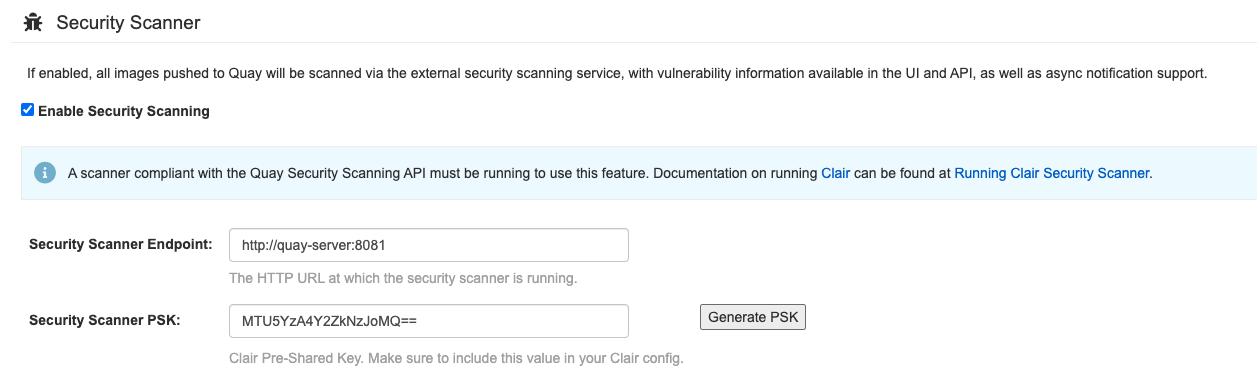
Quaycontainer if it is running and restart it in configuration mode, loading the existing configuration as a volume:$ sudo podman run --rm -it --name quay_config \ -p 80:8080 -p 443:8443 \ -v $QUAY/config:/conf/stack:Z \ registry.redhat.io/quay/quay-rhel9:v3.17.0 config secret- Log in to the configuration tool and click Enable Security Scanning in the Security Scanner section of the UI.
-
Set the HTTP endpoint for Clair using a port that is not already in use on the
quay-serversystem, for example,8081. Create a pre-shared key (PSK) using the Generate PSK button.
Security Scanner UI
-
Validate and download the
config.yamlfile for Red Hat Quay, and then stop theQuaycontainer that is running the configuration editor. Extract the new configuration bundle into your Red Hat Quay installation directory, for example:
$ tar xvf quay-config.tar.gz -d /home/<user-name>/quay-poc/Create a folder for your Clair configuration file, for example:
$ mkdir /etc/opt/clairv4/config/Change into the Clair configuration folder:
$ cd /etc/opt/clairv4/config/Create a Clair configuration file, for example:
http_listen_addr: :8081
introspection_addr: :8088
log_level: debug
indexer:
  connstring: host=quay-server.example.com port=5433 dbname=clair user=clairuser password=clairpass sslmode=disable
  scanlock_retry: 10
  layer_scan_concurrency: 5
  migrations: true
matcher:
  connstring: host=quay-server.example.com port=5433 dbname=clair user=clairuser password=clairpass sslmode=disable
  max_conn_pool: 100
  migrations: true
  indexer_addr: clair-indexer
notifier:
  connstring: host=quay-server.example.com port=5433 dbname=clair user=clairuser password=clairpass sslmode=disable
  delivery_interval: 1m
  poll_interval: 5m
  migrations: true
auth:
  psk:
    key: "MTU5YzA4Y2ZkNzJoMQ=="
    iss: ["quay"]
# tracing and metrics
trace:
  name: "jaeger"
  probability: 1
  jaeger:
    agent:
      endpoint: "localhost:6831"
    service_name: "clair"
metrics:
  name: "prometheus"
For more information about Clair’s configuration format, see Clair configuration reference.
Start Clair by using the container image, mounting in the configuration from the file you created:
$ sudo podman run -d --name clairv4 \ -p 8081:8081 -p 8088:8088 \ -e CLAIR_CONF=/clair/config.yaml \ -e CLAIR_MODE=combo \ -v /etc/opt/clairv4/config:/clair:Z \ registry.redhat.io/quay/clair-rhel9:v3.17.0NoteRunning multiple Clair containers is also possible, but for deployment scenarios beyond a single container the use of a container orchestrator like Kubernetes or OpenShift Container Platform is strongly recommended.
3.1. Upgrading the Clair PostgreSQL database
If you are upgrading Red Hat Quay to version 13, you must migrate your Clair PostgreSQL database version from PostgreSQL version 13 → version 15. This requires bringing down your Clair PostgreSQL 13 database and running a migration script to initiate the process.
Use the following procedure to upgrade your Clair PostgreSQL database from version 13 → to version 15.
Clair security scans might become temporarily disrupted after the migration procedure has succeeded.
Procedure
Stop the Red Hat Quay container by entering the following command:
$ sudo podman stop <quay_container_name>Stop the Clair container by running the following command:
$ sudo podman stop <clair_container_id>Run the following Podman process from SCLOrg’s Data Migration procedure, which allows for data migration from a remote PostgreSQL server:
$ sudo podman run -d --name <clair_migration_postgresql_database>1 -e POSTGRESQL_MIGRATION_REMOTE_HOST=<container_ip_address> \2 -e POSTGRESQL_MIGRATION_ADMIN_PASSWORD=remoteAdminP@ssword \ -v </host/data/directory:/var/lib/pgsql/data:Z> \3 [ OPTIONAL_CONFIGURATION_VARIABLES ] registry.redhat.io/rhel8/postgresql-15- 1
- Insert a name for your Clair PostgreSQL 15 migration database.
- 2
- Your new Clair PostgreSQL 15 database container IP address. Can obtained by running the following command:
sudo podman inspect -f "{{.NetworkSettings.IPAddress}}" postgresql-quay. - 3
- You must specify a different volume mount point than the one from your initial Clair PostgreSQL 13 deployment, and modify the access control lists for said directory. For example:
$ mkdir -p /host/data/clair-postgresql15-directory$ setfacl -m u:26:-wx /host/data/clair-postgresql15-directoryThis prevents data from being overwritten by the new container.
Stop the Clair PostgreSQL 13 container:
$ sudo podman stop <clair_postgresql13_container_name>After completing the PostgreSQL migration, run the Clair PostgreSQL 15 container, using the new data volume mount from Step 3, for example,
</host/data/clair-postgresql15-directory:/var/lib/postgresql/data>:$ sudo podman run -d --rm --name <postgresql15-clairv4> \ -e POSTGRESQL_USER=<clair_username> \ -e POSTGRESQL_PASSWORD=<clair_password> \ -e POSTGRESQL_DATABASE=<clair_database_name> \ -e POSTGRESQL_ADMIN_PASSWORD=<admin_password> \ -p 5433:5432 \ -v </host/data/clair-postgresql15-directory:/var/lib/postgresql/data:Z> \ registry.redhat.io/rhel8/postgresql-15Start the Red Hat Quay container by entering the following command:
$ sudo podman run -d --rm -p 80:8080 -p 443:8443 --name=quay \
-v /home/<quay_user>/quay-poc/config:/conf/stack:Z \
-v /home/<quay_user>/quay-poc/storage:/datastorage:Z \
{productrepo}/{quayimage}:{productminv}
Start the Clair container by entering the following command:
$ sudo podman run -d --name clairv4 \
-p 8081:8081 -p 8088:8088 \
-e CLAIR_CONF=/clair/config.yaml \
-e CLAIR_MODE=combo \
registry.redhat.io/quay/clair-rhel8:{productminv}
For more information, see Data Migration.
3.2. Using Clair with an upstream image for Red Hat Quay
For most users, independent upgrades of Clair from the current version (4.9) are unnecessary. In some cases, however, customers might want to pull an image of Clair from the upstream repository for various reasons, such as for specific bug fixes or to try new features that have not yet been released downstream. You can use the following procedure to run an upstream version of Clair with Red Hat Quay.
Upstream versions of Clair have not been fully tested for compatibility with Red Hat Quay. As a result, this combination might cause issues with your deployment.
Procedure
Enter the following command to stop Clair if it is running:
$ podman stop <clairv4_container_name>Navigate to the upstream repository, find the version of Clair that you want to use, and pull it to your local machine. For example:
$ podman pull quay.io/projectquay/clair:nightly-2024-02-03Start Clair by using the container image, mounting in the configuration from the file you created:
$ podman run -d --name clairv4 \
-p 8081:8081 -p 8088:8088 \
-e CLAIR_CONF=/clair/config.yaml \
-e CLAIR_MODE=combo \
-v /etc/opt/clairv4/config:/clair:Z \
quay.io/projectquay/clair:nightly-2024-02-03
Chapter 4. Clair on OpenShift Container Platform
The Red Hat Quay Operator automatically installs and configures Clair when you deploy Red Hat Quay on OpenShift Container Platform. This simplifies setup by eliminating the need for manual Clair configuration.
Chapter 5. Testing Clair
To verify that Clair is working correctly on your Red Hat Quay deployment, you can pull, tag, and push a sample image to your registry, then view the vulnerability report in the UI.
Prerequisites
- You have deployed the Clair container image.
Procedure
Pull a sample image by entering the following command:
$ podman pull ubuntu:20.04Tag the image to your registry by entering the following command:
$ sudo podman tag docker.io/library/ubuntu:20.04 <quay-server.example.com>/<user-name>/ubuntu:20.04Push the image to your Red Hat Quay registry by entering the following command:
$ sudo podman push --tls-verify=false quay-server.example.com/quayadmin/ubuntu:20.04- Log in to your Red Hat Quay deployment through the UI.
- Click the repository name, for example, quayadmin/ubuntu.
In the navigation pane, click Tags.

Click the image report, for example, 45 medium, to show a more detailed report:
 Note
NoteIn some cases, Clair shows duplicate reports on images, for example,
ubi8/nodejs-12orubi8/nodejs-16. This occurs because vulnerabilities with same name are for different packages. This behavior is expected with Clair vulnerability reporting and will not be addressed as a bug.
Part III. Advanced Clair configuration
Use this section to configure advanced Clair features.
Chapter 6. Unmanaged Clair configuration
Unmanaged Clair configuration lets you run a custom Clair setup or use an external Clair database with the Red Hat Quay Operator. You can use this configuration for geo-replicated environments where multiple Operator instances share the same database, or when you need a highly available database outside your cluster.
6.1. Running a custom Clair configuration with an unmanaged Clair database
To run a custom Clair configuration with an unmanaged Clair database, you can set the clairpostgres component to unmanaged in your QuayRegistry custom resource. This lets you use an external database for geo-replicated environments or highly available setups outside your cluster.
You must not use the same externally managed PostgreSQL database for both Red Hat Quay and Clair deployments. Your PostgreSQL database must also not be shared with other workloads, as it might exhaust the natural connection limit on the PostgreSQL side when connection-intensive workloads, like Red Hat Quay or Clair, contend for resources. Additionally, pgBouncer is not supported with Red Hat Quay or Clair, so it is not an option to resolve this issue.
Procedure
In the Quay Operator, set the
clairpostgrescomponent of theQuayRegistrycustom resource tomanaged: false:apiVersion: quay.redhat.com/v1 kind: QuayRegistry metadata: name: quay370 spec: configBundleSecret: config-bundle-secret components: - kind: objectstorage managed: false - kind: route managed: true - kind: tls managed: false - kind: clairpostgres managed: false
6.2. Configuring a custom Clair database with an unmanaged Clair database
To configure a custom Clair database with SSL/TLS certificates for your Red Hat Quay deployment, you can create a Quay configuration bundle secret that includes the clair-config.yaml file. This lets you use your own external database with secure connections for Clair vulnerability scanning.
The following procedure sets up Clair with SSL/TLS certifications. To view a similar procedure that does not set up Clair with SSL/TLS certifications, see "Configuring a custom Clair database with a managed Clair configuration".
Procedure
Create a Quay configuration bundle secret that includes the
clair-config.yamlby entering the following command:$ oc create secret generic --from-file config.yaml=./config.yaml --from-file extra_ca_cert_rds-ca-2019-root.pem=./rds-ca-2019-root.pem --from-file clair-config.yaml=./clair-config.yaml --from-file ssl.cert=./ssl.cert --from-file ssl.key=./ssl.key config-bundle-secretExample Clair
config.yamlfileindexer: connstring: host=quay-server.example.com port=5432 dbname=quay user=quayrdsdb password=quayrdsdb sslrootcert=/run/certs/rds-ca-2019-root.pem sslmode=verify-ca layer_scan_concurrency: 6 migrations: true scanlock_retry: 11 log_level: debug matcher: connstring: host=quay-server.example.com port=5432 dbname=quay user=quayrdsdb password=quayrdsdb sslrootcert=/run/certs/rds-ca-2019-root.pem sslmode=verify-ca migrations: true metrics: name: prometheus notifier: connstring: host=quay-server.example.com port=5432 dbname=quay user=quayrdsdb password=quayrdsdb sslrootcert=/run/certs/rds-ca-2019-root.pem sslmode=verify-ca migrations: trueNote-
The database certificate is mounted under
/run/certs/rds-ca-2019-root.pemon the Clair application pod in theclair-config.yaml. It must be specified when configuring yourclair-config.yaml. -
An example
clair-config.yamlcan be found at Clair on OpenShift config.
-
The database certificate is mounted under
Add the
clair-config.yamlfile to your bundle secret, for example:apiVersion: v1 kind: Secret metadata: name: config-bundle-secret namespace: quay-enterprise data: config.yaml: <base64 encoded Quay config> clair-config.yaml: <base64 encoded Clair config> extra_ca_cert_<name>: <base64 encoded ca cert> ssl.crt: <base64 encoded SSL certificate> ssl.key: <base64 encoded SSL private key>NoteWhen updated, the provided
clair-config.yamlfile is mounted into the Clair pod. Any fields not provided are automatically populated with defaults using the Clair configuration module.You can check the status of your Clair pod by clicking the commit in the Build History page, or by running
oc get pods -n <namespace>. For example:$ oc get pods -n <namespace>Example output
NAME                                               READY   STATUS    RESTARTS   AGE
f192fe4a-c802-4275-bcce-d2031e635126-9l2b5-25lg2   1/1     Running   0          7s
Chapter 7. Running a custom Clair configuration with a managed Clair database
Running a custom Clair configuration with a managed Clair database lets you customize Clair settings while the Operator manages the database. You can use this approach to disable specific updater resources or configure Clair for disconnected environments.
-
If you are running Red Hat Quay in an disconnected environment, the
airgapparameter of yourclair-config.yamlmust be set toTrue. - If you are running Red Hat Quay in an disconnected environment, you should disable all updater components.
7.1. Setting a Clair database to managed
To have the Red Hat Quay Operator manage your Clair database, you can set the clairpostgres component to managed in your QuayRegistry custom resource. This simplifies deployment and maintenance by letting the Operator handle database provisioning and configuration.
Procedure
In the Quay Operator, set the
clairpostgrescomponent of theQuayRegistrycustom resource tomanaged: true:apiVersion: quay.redhat.com/v1 kind: QuayRegistry metadata: name: quay370 spec: configBundleSecret: config-bundle-secret components: - kind: objectstorage managed: false - kind: route managed: true - kind: tls managed: false - kind: clairpostgres managed: true
7.2. Configuring a custom Clair database with a managed Clair configuration
To configure a custom Clair database while keeping the Clair configuration managed by the Operator, you can create a Quay configuration bundle secret that includes the clair-config.yaml file. This lets you use your own external database while the Operator continues to manage Clair settings.
Procedure
Create a Quay configuration bundle secret that includes the
clair-config.yamlby entering the following command:$ oc create secret generic --from-file config.yaml=./config.yaml --from-file extra_ca_cert_rds-ca-2019-root.pem=./rds-ca-2019-root.pem --from-file clair-config.yaml=./clair-config.yaml config-bundle-secretExample Clair
config.yamlfileindexer: connstring: host=quay-server.example.com port=5432 dbname=quay user=quayrdsdb password=quayrdsdb sslmode=disable layer_scan_concurrency: 6 migrations: true scanlock_retry: 11 log_level: debug matcher: connstring: host=quay-server.example.com port=5432 dbname=quay user=quayrdsdb password=quayrdsdb sslmode=disable migrations: true metrics: name: prometheus notifier: connstring: host=quay-server.example.com port=5432 dbname=quay user=quayrdsdb password=quayrdsdb sslmode=disable migrations: trueNote-
The database certificate is mounted under
/run/certs/rds-ca-2019-root.pemon the Clair application pod in theclair-config.yaml. It must be specified when configuring yourclair-config.yaml. -
An example
clair-config.yamlcan be found at Clair on OpenShift config.
-
The database certificate is mounted under
Add the
clair-config.yamlfile to your bundle secret, for example:apiVersion: v1 kind: Secret metadata: name: config-bundle-secret namespace: quay-enterprise data: config.yaml: <base64 encoded Quay config> clair-config.yaml: <base64 encoded Clair config>Note-
When updated, the provided
clair-config.yamlfile is mounted into the Clair pod. Any fields not provided are automatically populated with defaults using the Clair configuration module.
-
When updated, the provided
You can check the status of your Clair pod by clicking the commit in the Build History page, or by running
oc get pods -n <namespace>. For example:$ oc get pods -n <namespace>Example output
NAME                                               READY   STATUS    RESTARTS   AGE
f192fe4a-c802-4275-bcce-d2031e635126-9l2b5-25lg2   1/1     Running   0          7s
Chapter 8. Clair in disconnected environments
Clair supports disconnected environments where your Red Hat Quay deployment has no direct internet access. You can use the clairctl tool to transfer vulnerability database updates from an open host to your isolated environment, enabling Clair to scan images without internet connectivity.
Clair uses a set of components called updaters to handle the fetching and parsing of data from various vulnerability databases. Updaters are set up by default to pull vulnerability data directly from the internet and work for immediate use.
Currently, Clair enrichment data is CVSS data. Enrichment data is currently unsupported in disconnected environments.
For more information about Clair updaters, see "Clair updaters".
8.1. Setting up Clair in a disconnected OpenShift Container Platform cluster
To install the clairctl command line utility for disconnected OpenShift Container Platform deployments, you can extract the tool from a running Clair pod and set its execution permissions. This lets you use clairctl to manage vulnerability database updates in disconnected environments.
Procedure
Install the
clairctlprogram for a Clair deployment in an OpenShift Container Platform cluster by entering the following command:$ oc -n quay-enterprise exec example-registry-clair-app-64dd48f866-6ptgw -- cat /usr/bin/clairctl > clairctlNoteUnofficially, the
clairctltool can be downloadedSet the permissions of the
clairctlfile so that it can be executed and run by the user, for example:$ chmod u+x ./clairctl
8.1.1. Retrieving and decoding the Clair configuration secret for Clair deployments on OpenShift Container Platform
To configure Clair for disconnected environments on OpenShift Container Platform, you can retrieve and decode the Clair configuration secret, then update the clair-config.yaml file to set disable_updaters and airgap parameters to True. This prepares Clair to work without direct internet access.
Prerequisites
-
You have installed the
clairctlcommand line utility tool.
Procedure
Enter the following command to retrieve and decode the configuration secret, and then save it to a Clair configuration YAML:
$ oc get secret -n quay-enterprise example-registry-clair-config-secret -o "jsonpath={$.data['config\.yaml']}" | base64 -d > clair-config.yamlUpdate the
clair-config.yamlfile so that thedisable_updatersandairgapparameters are set toTrue, for example:# ... indexer: airgap: true # ... matcher: disable_updaters: true # ...
8.1.2. Exporting the updaters bundle from a connected Clair instance
To export vulnerability database updates from a connected Clair instance for use in disconnected environments, you can use the clairctl tool with your configuration file to export the updaters bundle. This creates a bundle file that you can transfer to your isolated environment.
Prerequisites
-
You have installed the
clairctlcommand line utility tool. -
You have retrieved and decoded the Clair configuration secret, and saved it to a Clair
config.yamlfile. -
The
disable_updatersandairgapparameters are set toTruein your Clairconfig.yamlfile.
Procedure
From a Clair instance that has access to the internet, use the
clairctlCLI tool with your configuration file to export the updaters bundle. For example:$ ./clairctl --config ./config.yaml export-updaters updates.gz
8.1.3. Configuring access to the Clair database in the disconnected OpenShift Container Platform cluster
To configure access to the Clair database in your disconnected OpenShift Container Platform cluster, you can determine the database service, forward the database port, and update your Clair config.yaml file to use localhost. This lets you import the updaters bundle into the database using the clairctl tool.
Prerequisites
-
You have installed the
clairctlcommand line utility tool. -
You have retrieved and decoded the Clair configuration secret, and saved it to a Clair
config.yamlfile. -
The
disable_updatersandairgapparameters are set toTruein your Clairconfig.yamlfile. - You have exported the updaters bundle from a Clair instance that has access to the internet.
Procedure
Determine your Clair database service by using the
ocCLI tool, for example:$ oc get svc -n quay-enterpriseExample output
NAME                                  TYPE           CLUSTER-IP       EXTERNAL-IP   PORT(S)                             AGE
example-registry-clair-app            ClusterIP      172.30.224.93    <none>        80/TCP,8089/TCP                     4d21h
example-registry-clair-postgres       ClusterIP      172.30.246.88    <none>        5432/TCP                            4d21h
...
Forward the Clair database port so that it is accessible from the local machine. For example:
$ oc port-forward -n quay-enterprise service/example-registry-clair-postgres 5432:5432Update your Clair
config.yamlfile, for example:indexer: connstring: host=localhost port=5432 dbname=postgres user=postgres password=postgres sslmode=disable layer_scan_concurrency: 5 migrations: true scanlock_retry: 10 airgap: true scanner: repo: rhel-repository-scanner: repo2cpe_mapping_file: /data/repository-to-cpe.json package: rhel_containerscanner: name2repos_mapping_file: /data/container-name-repos-map.jsonwhere:
connstring::Specifies the connection string for the database.rhel-repository-scanner::Specifies the repository scanner configuration.rhel_containerscanner::Specifies the container scanner configuration.
8.1.4. Importing the updaters bundle into the disconnected OpenShift Container Platform cluster
To import vulnerability database updates into your disconnected OpenShift Container Platform cluster, you can use the clairctl tool with your Clair configuration file to import the updaters bundle. This populates the Clair database with vulnerability data so Clair can scan images without internet access.
Prerequisites
-
You have installed the
clairctlcommand line utility tool. -
You have retrieved and decoded the Clair configuration secret, and saved it to a Clair
config.yamlfile. -
The
disable_updatersandairgapparameters are set toTruein your Clairconfig.yamlfile. - You have exported the updaters bundle from a Clair instance that has access to the internet.
- You have transferred the updaters bundle into your disconnected environment.
Procedure
Use the
clairctlCLI tool to import the updaters bundle into the Clair database that is deployed by OpenShift Container Platform. For example:$ ./clairctl --config ./clair-config.yaml import-updaters updates.gz
8.2. Setting up a self-managed deployment of Clair for a disconnected OpenShift Container Platform cluster
To install the clairctl command line utility for a self-managed Clair deployment on OpenShift Container Platform, you can copy the tool from a Clair container using podman and set its execution permissions. This lets you use clairctl to manage vulnerability database updates in disconnected environments.
Procedure
Install the
clairctlprogram for a self-managed Clair deployment by using thepodman cpcommand, for example:$ sudo podman cp clairv4:/usr/bin/clairctl ./clairctlSet the permissions of the
clairctlfile so that it can be executed and run by the user, for example:$ chmod u+x ./clairctl
8.2.1. Deploying a self-managed Clair container for disconnected OpenShift Container Platform clusters
To deploy a self-managed Clair container for disconnected OpenShift Container Platform clusters, you can create a configuration directory, configure a Clair configuration file with disable_updaters enabled, and start the container using podman. This lets you run Clair independently in environments without direct internet access.
Prerequisites
-
You have installed the
clairctlcommand line utility tool.
Procedure
Create a folder for your Clair configuration file, for example:
$ mkdir /etc/clairv4/config/Create a Clair configuration file with the
disable_updatersparameter set toTrue, for example:--- indexer: airgap: true --- matcher: disable_updaters: true ---Start Clair by using the container image, mounting in the configuration from the file you created:
$ sudo podman run -it --rm --name clairv4 \
-p 8081:8081 -p 8088:8088 \
-e CLAIR_CONF=/clair/config.yaml \
-e CLAIR_MODE=combo \
-v /etc/clairv4/config:/clair:Z \
registry.redhat.io/quay/clair-rhel9:v3.17.0
8.2.2. Exporting the updaters bundle from a connected Clair instance
To export vulnerability database updates from a connected self-managed Clair instance for use in disconnected environments, you can use the clairctl tool with your configuration file to export the updaters bundle. This creates a bundle file that you can transfer to your isolated environment.
Prerequisites
-
You have installed the
clairctlcommand line utility tool. - You have deployed Clair.
-
The
disable_updatersandairgapparameters are set toTruein your Clairconfig.yamlfile.
Procedure
From a Clair instance that has access to the internet, use the
clairctlCLI tool with your configuration file to export the updaters bundle. For example:$ ./clairctl --config ./config.yaml export-updaters updates.gz
8.2.3. Configuring access to the Clair database in the disconnected OpenShift Container Platform cluster
To configure access to the Clair database in your disconnected OpenShift Container Platform cluster for a self-managed deployment, you can determine the database service, forward the database port, and update your Clair config.yaml file to use localhost. This lets you import the updaters bundle into the database using the clairctl tool.
Prerequisites
-
You have installed the
clairctlcommand line utility tool. - You have deployed Clair.
-
The
disable_updatersandairgapparameters are set toTruein your Clairconfig.yamlfile. - You have exported the updaters bundle from a Clair instance that has access to the internet.
Procedure
Determine your Clair database service by using the
ocCLI tool, for example:$ oc get svc -n quay-enterpriseExample output
NAME                                  TYPE           CLUSTER-IP       EXTERNAL-IP   PORT(S)                             AGE
example-registry-clair-app            ClusterIP      172.30.224.93    <none>        80/TCP,8089/TCP                     4d21h
example-registry-clair-postgres       ClusterIP      172.30.246.88    <none>        5432/TCP                            4d21h
...
Forward the Clair database port so that it is accessible from the local machine. For example:
$ oc port-forward -n quay-enterprise service/example-registry-clair-postgres 5432:5432Update your Clair
config.yamlfile, for example:indexer: connstring: host=localhost port=5432 dbname=postgres user=postgres password=postgres sslmode=disable layer_scan_concurrency: 5 migrations: true scanlock_retry: 10 airgap: true scanner: repo: rhel-repository-scanner: repo2cpe_mapping_file: /data/repository-to-cpe.json package: rhel_containerscanner: name2repos_mapping_file: /data/container-name-repos-map.jsonwhere:
connstring::Specifies the connection string for the database.rhel-repository-scanner::Specifies the repository scanner configuration.rhel_containerscanner::Specifies the container scanner configuration.
8.2.4. Importing the updaters bundle into the disconnected OpenShift Container Platform cluster
To import vulnerability database updates into your disconnected OpenShift Container Platform cluster for a self-managed deployment, you can use the clairctl tool with your Clair configuration file to import the updaters bundle. This populates the Clair database with vulnerability data so Clair can scan images without internet access.
Prerequisites
-
You have installed the
clairctlcommand line utility tool. - You have deployed Clair.
-
The
disable_updatersandairgapparameters are set toTruein your Clairconfig.yamlfile. - You have exported the updaters bundle from a Clair instance that has access to the internet.
- You have transferred the updaters bundle into your disconnected environment.
Procedure
Use the
clairctlCLI tool to import the updaters bundle into the Clair database that is deployed by OpenShift Container Platform:$ ./clairctl --config ./clair-config.yaml import-updaters updates.gz
8.3. Common Product Enumeration mapping in Clair
Clair uses Common Product Enumeration (CPE) mapping files to map RPM packages to security data for accurate vulnerability scanning of Red Hat Enterprise Linux (RHEL) container images. Understanding how Clair utilizes these files ensures that your vulnerability reports remain accurate and comprehensive.
The scanner requires the CPE file to be present and accessible to process RPM packages properly. If these files are missing or inaccessible, RPM packages installed in the container image are skipped during the scanning process.
By default, the Clair indexer includes the repos2cpe and names2repos data files within the Clair container. This allows you to reference local paths such as /data/repository-to-cpe.json without additional external configuration.
While Red Hat Product Security updates CPE files regularly, the versions bundled within the Clair container are only updated during Red Hat Quay releases. This can lead to temporary discrepancies between the latest security data and the versions bundled with your current installation.
Additional resources
Chapter 9. Clair configuration overview
Clair is configured by a structured YAML file. Each Clair node needs to specify what mode it will run in and a path to a configuration file through CLI flags or environment variables. For example:
$ clair -conf ./path/to/config.yaml -mode indexeror
$ clair -conf ./path/to/config.yaml -mode matcherThe aforementioned commands each start two Clair nodes using the same configuration file. One runs the indexing facilities, while other runs the matching facilities.
If you are running Clair in combo mode, you must supply the indexer, matcher, and notifier configuration blocks in the configuration.
9.1. Information about using Clair in a proxy environment
Environment variables respected by the Go standard library can be specified if needed, for example:
HTTP_PROXY$ export HTTP_PROXY=http://<user_name>:<password>@<proxy_host>:<proxy_port>HTTPS_PROXY.$ export HTTPS_PROXY=https://<user_name>:<password>@<proxy_host>:<proxy_port>SSL_CERT_DIR$ export SSL_CERT_DIR=/<path>/<to>/<ssl>/<certificates>NO_PROXY$ export NO_PROXY=<comma_separated_list_of_hosts_and_domains>
If you are using a proxy server in your environment with Clair’s updater URLs, you must identify which URL needs to be added to the proxy allowlist to ensure that Clair can access them unimpeded. For example, the osv updater requires access to https://osv-vulnerabilities.storage.googleapis.com to fetch ecosystem data dumps. In this scenario, the URL must be added to the proxy allowlist. For a full list of updater URLs, see "Clair updater URLs".
You must also ensure that the standard Clair URLs are added to the proxy allowlist:
-
https://search.maven.org/solrsearch/select -
https://catalog.redhat.com/api/containers/ -
https://access.redhat.com/security/data/metrics/repository-to-cpe.json -
https://access.redhat.com/security/data/metrics/container-name-repos-map.json
When configuring the proxy server, take into account any authentication requirements or specific proxy settings needed to enable seamless communication between Clair and these URLs. By thoroughly documenting and addressing these considerations, you can ensure that Clair functions effectively while routing its updater traffic through the proxy.
9.2. Clair configuration reference
The following YAML shows an example Clair configuration:
http_listen_addr: ""
introspection_addr: ""
log_level: ""
tls: {}
indexer:
    connstring: ""
    scanlock_retry: 0
    layer_scan_concurrency: 5
    migrations: false
    scanner: {}
    airgap: false
matcher:
    connstring: ""
    indexer_addr: ""
    migrations: false
    period: ""
    disable_updaters: false
    update_retention: 2
matchers:
    names: nil
    config: nil
updaters:
    sets: nil
    config: nil
notifier:
    connstring: ""
    migrations: false
    indexer_addr: ""
    matcher_addr: ""
    poll_interval: ""
    delivery_interval: ""
    disable_summary: false
    webhook: null
    amqp: null
    stomp: null
auth:
  psk: nil
trace:
    name: ""
    probability: null
    jaeger:
        agent:
            endpoint: ""
        collector:
            endpoint: ""
            username: null
            password: null
        service_name: ""
        tags: nil
        buffer_max: 0
metrics:
    name: ""
    prometheus:
        endpoint: null
    dogstatsd:
url: ""The above YAML file lists every key for completeness. Using this configuration file as-is will result in some options not having their defaults set normally.
9.3. Clair general fields
The following table describes the general configuration fields available for a Clair deployment.
| Field | Typhttp_listen_ae | Description |
|---|---|---|
| http_listen_addr | String | Configures where the HTTP API is exposed.
Default: |
| introspection_addr | String | Configures where Clair’s metrics and health endpoints are exposed. |
| log_level | String | Sets the logging level. Requires one of the following strings: debug-color, debug, info, warn, error, fatal, panic |
| tls | String | A map containing the configuration for serving the HTTP API of TLS/SSL and HTTP/2. |
| .cert | String | The TLS certificate to be used. Must be a full-chain certificate. |
Example configuration for general Clair fields
The following example shows a Clair configuration.
Example configuration for general Clair fields
# ...
http_listen_addr: 0.0.0.0:6060
introspection_addr: 0.0.0.0:8089
log_level: info
# ...
9.4. Clair indexer configuration fields
The following table describes the configuration fields for Clair’s indexer component.
| Field | Type | Description |
|---|---|---|
| indexer | Object | Provides Clair indexer node configuration. |
| .airgap | Boolean | Disables HTTP access to the internet for indexers and fetchers. Private IPv4 and IPv6 addresses are allowed. Database connections are unaffected. |
| .connstring | String | A Postgres connection string. Accepts format as a URL or libpq connection string. |
| .index_report_request_concurrency | Integer |
Rate limits the number of index report creation requests. Setting this to
The API returns a |
| .scanlock_retry | Integer | A positive integer representing seconds. Concurrent indexers lock on manifest scans to avoid clobbering. This value tunes how often a waiting indexer polls for the lock. |
| .layer_scan_concurrency | Integer | Positive integer limiting the number of concurrent layer scans. Indexers will match a manifest’s layer concurrently. This value tunes the number of layers an indexer scans in parallel. |
| .migrations | Boolean | Whether indexer nodes handle migrations to their database. |
| .scanner | String | Indexer configuration. Scanner allows for passing configuration options to layer scanners. The scanner will have this configuration pass to it on construction if designed to do so. |
| .scanner.dist | String | A map with the name of a particular scanner and arbitrary YAML as a value. |
| .scanner.package | String | A map with the name of a particular scanner and arbitrary YAML as a value. |
| .scanner.repo | String | A map with the name of a particular scanner and arbitrary YAML as a value. |
Example indexer configuration
The following example shows a hypothetical indexer configuration for Clair.
Example indexer configuration
# ...
indexer:
  connstring: host=quay-server.example.com port=5433 dbname=clair user=clairuser password=clairpass sslmode=disable
  scanlock_retry: 10
  layer_scan_concurrency: 5
  migrations: true
# ...
9.5. Clair matcher configuration fields
The following table describes the configuration fields for Clair’s matcher component.
Differs from matchers configuration fields.
| Field | Type | Description |
|---|---|---|
| matcher | Object | Provides Clair matcher node configuration. |
| .cache_age | String | Controls how long users should be hinted to cache responses for. |
| .connstring | String | A Postgres connection string. Accepts format as a URL or libpq connection string. |
| .max_conn_pool | Integer | Limits the database connection pool size. Clair allows for a custom connection pool size. This number directly sets how many active database connections are allowed concurrently. This parameter will be ignored in a future version. Users should configure this through the connection string. |
| .indexer_addr | String | A matcher contacts an indexer to create a vulnerability report. The location of this indexer is required.
Defaults to |
| .migrations | Boolean | Whether matcher nodes handle migrations to their databases. |
| .period | String | Determines how often updates for new security advisories take place.
Defaults to |
| .disable_updaters | Boolean | Whether to run background updates or not.
Default: |
| .update_retention | Integer | Sets the number of update operations to retain between garbage collection cycles. This should be set to a safe MAX value based on database size constraints.
Defaults to
If a value of less than |
Example matcher configuration
Example matcher configuration
# ...
matcher:
  connstring: >-
    host=<DB_HOST> port=5432 dbname=<matcher> user=<DB_USER> password=D<B_PASS>
    sslmode=verify-ca sslcert=/etc/clair/ssl/cert.pem sslkey=/etc/clair/ssl/key.pem
    sslrootcert=/etc/clair/ssl/ca.pem
  indexer_addr: http://clair-v4/
  disable_updaters: false
  migrations: true
  period: 6h
  update_retention: 2
# ...
9.6. Clair matchers configuration fields
The following table describes the configuration fields for Clair’s matchers component.
Differs from matcher configuration fields.
| Field | Type | Description |
|---|---|---|
| matchers | Array of strings |
Provides configuration for the in-tree |
| .names | String |
A list of string values informing the matcher factory about enabled matchers. If value is set to |
| .config | String | Provides configuration to a specific matcher. A map keyed by the name of the matcher containing a sub-object which will be provided to the matchers factory constructor. For example: |
Example matchers configuration
The following example shows a hypothetical Clair deployment that only requires only the alpine, aws, debian, oracle matchers.
Example matchers configuration
# ...
matchers:
  names:
  - "alpine-matcher"
  - "aws"
  - "debian"
  - "oracle"
# ...
9.7. Clair updaters configuration fields
The following table describes the configuration fields for Clair’s updaters component.
| Field | Type | Description |
|---|---|---|
| updaters | Object | Provides configuration for the matcher’s update manager. |
| .sets | String | A list of values informing the update manager which updaters to run.
If value is set to If left blank, zero updaters run. |
| .config | String | Provides configuration to specific updater sets. A map keyed by the name of the updater set containing a sub-object which will be provided to the updater set’s constructor. For a list of the sub-objects for each updater, see "Advanced updater configuration". |
Example updaters configuration
In the following configuration, only the rhel set is configured. The ignore_unpatched variable, which is specific to the rhel updater, is also defined.
Example updaters configuration
# ...
updaters:
  sets:
    - rhel
  config:
    rhel:
      ignore_unpatched: false
# ...
9.8. Clair notifier configuration fields
The general notifier configuration fields for Clair are listed below.
| Field | Type | Description |
|---|---|---|
| notifier | Object | Provides Clair notifier node configuration. |
| .connstring | String | Postgres connection string. Accepts format as URL, or libpq connection string. |
| .migrations | Boolean | Whether notifier nodes handle migrations to their database. |
| .indexer_addr | String | A notifier contacts an indexer to create or obtain manifests affected by vulnerabilities. The location of this indexer is required. |
| .matcher_addr | String | A notifier contacts a matcher to list update operations and acquire diffs. The location of this matcher is required. |
| .poll_interval | String | The frequency at which the notifier will query a matcher for update operations. |
| .delivery_interval | String | The frequency at which the notifier attempts delivery of created, or previously failed, notifications. |
| .disable_summary | Boolean | Controls whether notifications should be summarized to one per manifest. |
Example notifier configuration
The following notifier snippet is for a minimal configuration.
Example notifier configuration
# ...
notifier:
  connstring: >-
    host=DB_HOST port=5432 dbname=notifier user=DB_USER password=DB_PASS
    sslmode=verify-ca sslcert=/etc/clair/ssl/cert.pem sslkey=/etc/clair/ssl/key.pem
    sslrootcert=/etc/clair/ssl/ca.pem
  indexer_addr: http://clair-v4/
  matcher_addr: http://clair-v4/
  delivery_interval: 5s
  migrations: true
  poll_interval: 15s
  webhook:
    target: "http://webhook/"
    callback: "http://clair-notifier/notifier/api/v1/notifications"
    headers: ""
  amqp: null
  stomp: null
# ...
9.8.1. Clair webhook configuration fields
The following webhook fields are available for the Clair notifier environment.
| .webhook | Object | Configures the notifier for webhook delivery. |
| .webhook.target | String | URL where the webhook will be delivered. |
| .webhook.callback | String | The callback URL where notifications can be retrieved. The notification ID will be appended to this URL. This will typically be where the Clair notifier is hosted. |
| .webhook.headers | String | A map associating a header name to a list of values. |
Example webhook configuration
Example webhook configuration
# ...
notifier:
# ...
  webhook:
    target: "http://webhook/"
    callback: "http://clair-notifier/notifier/api/v1/notifications"
# ...
9.8.2. Clair amqp configuration fields
The following Advanced Message Queuing Protocol (AMQP) fields are available for the Clair notifier environment.
| .amqp | Object | Configures the notifier for AMQP delivery. [NOTE] ==== Clair does not declare any AMQP components on its own. All attempts to use an exchange or queue are passive only and will fail. Broker administrators should setup exchanges and queues ahead of time. ==== |
| .amqp.direct | Boolean |
If |
| .amqp.rollup | Integer |
When |
| .amqp.exchange | Object | The AMQP exchange to connect to. |
| .amqp.exchange.name | String | The name of the exchange to connect to. |
| .amqp.exchange.type | String | The type of the exchange. Typically one of the following: direct, fanout, topic, headers. |
| .amqp.exchange.durability | Boolean | Whether the configured queue is durable. |
| .amqp.exchange.auto_delete | Boolean |
Whether the configured queue uses an |
| .amqp.routing_key | String | The name of the routing key each notification is sent with. |
| .amqp.callback | String |
If |
| .amqp.uris | String | A list of one or more AMQP brokers to connect to, in priority order. |
| .amqp.tls | Object | Configures TLS/SSL connection to an AMQP broker. |
| .amqp.tls.root_ca | String | The filesystem path where a root CA can be read. |
| .amqp.tls.cert | String | The filesystem path where a TLS/SSL certificate can be read.
[NOTE] ==== Clair also allows |
| .amqp.tls.key | String | The filesystem path where a TLS/SSL private key can be read. |
Example AMQP configuration
The following example shows a hypothetical AMQP configuration for Clair.
Example AMQP configuration
# ...
notifier:
# ...
  amqp:
    exchange:
        name: ""
        type: "direct"
        durable: true
        auto_delete: false
    uris: ["amqp://user:pass@host:10000/vhost"]
    direct: false
    routing_key: "notifications"
    callback: "http://clair-notifier/notifier/api/v1/notifications"
    tls:
     root_ca: "optional/path/to/rootca"
     cert: "madatory/path/to/cert"
     key: "madatory/path/to/key"
# ...
9.8.3. Clair STOMP configuration fields
The following Simple Text Oriented Message Protocol (STOMP) fields are available for the Clair notifier environment.
| .stomp | Object | Configures the notifier for STOMP delivery. |
|---|---|---|
| .stomp.direct | Boolean |
If |
| .stomp.rollup | Integer |
If |
| .stomp.callback | String |
If |
| .stomp.destination | String | The STOMP destination to deliver notifications to. |
| .stomp.uris | String | A list of one or more STOMP brokers to connect to in priority order. |
| .stomp.tls | Object | Configured TLS/SSL connection to STOMP broker. |
| .stomp.tls.root_ca | String | The filesystem path where a root CA can be read.
[NOTE] ==== Clair also respects |
| .stomp.tls.cert | String | The filesystem path where a TLS/SSL certificate can be read. |
| .stomp.tls.key | String | The filesystem path where a TLS/SSL private key can be read. |
| .stomp.user | String | Configures login details for the STOMP broker. |
| .stomp.user.login | String | The STOMP login to connect with. |
| .stomp.user.passcode | String | The STOMP passcode to connect with. |
Example STOMP configuration
The following example shows a hypothetical STOMP configuration for Clair.
Example STOMP configuration
# ...
notifier:
# ...
  stomp:
    desitnation: "notifications"
    direct: false
    callback: "http://clair-notifier/notifier/api/v1/notifications"
    login:
      login: "username"
      passcode: "passcode"
    tls:
     root_ca: "optional/path/to/rootca"
     cert: "madatory/path/to/cert"
     key: "madatory/path/to/key"
# ...
9.9. Clair authorization configuration fields
The following authorization configuration fields are available for Clair.
| Field | Type | Description |
|---|---|---|
| auth | Object |
Defines Clair’s external and intra-service JWT based authentication. If multiple |
| .psk | String | Defines pre-shared key authentication. |
| .psk.key | String | A shared base64 encoded key distributed between all parties signing and verifying JWTs. |
| .psk.iss | String | A list of JWT issuers to verify. An empty list accepts any issuer in a JWT claim. |
Example authorization configuration
The following authorization snippet is for a minimal configuration.
Example authorization configuration
# ...
auth:
  psk:
    key: MTU5YzA4Y2ZkNzJoMQ==
    iss: ["quay"]
# ...
9.10. Clair trace configuration fields
The following trace configuration fields are available for Clair.
| Field | Type | Description |
|---|---|---|
| trace | Object | Defines distributed tracing configuration based on OpenTelemetry. |
| .name | String | The name of the application traces will belong to. |
| .probability | Integer | The probability a trace will occur. |
| .jaeger | Object | Defines values for Jaeger tracing. |
| .jaeger.agent | Object | Defines values for configuring delivery to a Jaeger agent. |
| .jaeger.agent.endpoint | String |
An address in the |
| .jaeger.collector | Object | Defines values for configuring delivery to a Jaeger collector. |
| .jaeger.collector.endpoint | String |
An address in the |
| .jaeger.collector.username | String | A Jaeger username. |
| .jaeger.collector.password | String | A Jaeger password. |
| .jaeger.service_name | String | The service name registered in Jaeger. |
| .jaeger.tags | String | Key-value pairs to provide additional metadata. |
| .jaeger.buffer_max | Integer | The maximum number of spans that can be buffered in memory before they are sent to the Jaeger backend for storage and analysis. |
Example trace configuration
The following example shows a hypothetical trace configuration for Clair.
Example trace configuration
# ...
trace:
  name: "jaeger"
  probability: 1
  jaeger:
    agent:
      endpoint: "localhost:6831"
    service_name: "clair"
# ...
9.11. Clair metrics configuration fields
The following metrics configuration fields are available for Clair.
| Field | Type | Description |
|---|---|---|
| metrics | Object | Defines distributed tracing configuration based on OpenTelemetry. |
| .name | String | The name of the metrics in use. |
| .prometheus | String | Configuration for a Prometheus metrics exporter. |
| .prometheus.endpoint | String | Defines the path where metrics are served. |
Example metrics configuration
The following example shows a hypothetical metrics configuration for Clair.
Example metrics configuration
# ...
metrics:
  name: "prometheus"
  prometheus:
    endpoint: "/metricsz"
# ...
'%20d='M201.5%20305.5c-13.8%200-24.9-11.1-24.9-24.6%200-13.8%2011.1-24.9%2024.9-24.9%2013.6%200%2024.6%2011.1%2024.6%2024.9%200%2013.6-11.1%2024.6-24.6%2024.6zM504%20256c0%20137-111%20248-248%20248S8%20393%208%20256%20119%208%20256%208s248%20111%20248%20248zm-132.3-41.2c-9.4%200-17.7%203.9-23.8%2010-22.4-15.5-52.6-25.5-86.1-26.6l17.4-78.3%2055.4%2012.5c0%2013.6%2011.1%2024.6%2024.6%2024.6%2013.8%200%2024.9-11.3%2024.9-24.9s-11.1-24.9-24.9-24.9c-9.7%200-18%205.8-22.1%2013.8l-61.2-13.6c-3-.8-6.1%201.4-6.9%204.4l-19.1%2086.4c-33.2%201.4-63.1%2011.3-85.5%2026.8-6.1-6.4-14.7-10.2-24.1-10.2-34.9%200-46.3%2046.9-14.4%2062.8-1.1%205-1.7%2010.2-1.7%2015.5%200%2052.6%2059.2%2095.2%20132%2095.2%2073.1%200%20132.3-42.6%20132.3-95.2%200-5.3-.6-10.8-1.9-15.8%2031.3-16%2019.8-62.5-14.9-62.5zM302.8%20331c-18.2%2018.2-76.1%2017.9-93.6%200-2.2-2.2-6.1-2.2-8.3%200-2.5%202.5-2.5%206.4%200%208.6%2022.8%2022.8%2087.3%2022.8%20110.2%200%202.5-2.2%202.5-6.1%200-8.6-2.2-2.2-6.1-2.2-8.3%200zm7.7-75c-13.6%200-24.6%2011.1-24.6%2024.9%200%2013.6%2011.1%2024.6%2024.6%2024.6%2013.8%200%2024.9-11.1%2024.9-24.6%200-13.8-11-24.9-24.9-24.9z'/%3e%3c/svg%3e)