 Red Hat Summit
Packaging Guide
A guide to packaging Software Collections for Red Hat Enterprise Linux
Abstract
Chapter 1. Introducing Software Collections
1.1. Why Package Software with RPM?
With RPM, you can:
- Install, reinstall, remove, upgrade and verify packages.
- Users can use standard package management tools (for example Yum or PackageKit) to install, reinstall, remove, upgrade and verify your RPM packages.
- Use a database of installed packages to query and verify packages.
- Because RPM maintains a database of installed packages and their files, users can easily query and verify packages on their system.
- Use metadata to describe packages, their installation instructions, and so on.
- Each RPM package includes metadata that describes the package's components, version, release, size, project URL, installation instructions, and so on.
- Package pristine software sources into source and binary packages.
- RPM allows you to take pristine software sources and package them into source and binary packages for your users. In source packages, you have the pristine sources along with any patches that were used, plus complete build instructions. This design eases the maintenance of the packages as new versions of your software are released.
- Add packages to Yum repositories.
- You can add your package to a Yum repository that enables clients to easily find and deploy your software.
- Digitally sign your packages.
- Using a GPG signing key, you can digitally sign your package so that users are able to verify the authenticity of the package.
1.2. What Are Software Collections?
Software Collections:
- Do not overwrite system files
- Software Collections are distributed as a set of several components, which provide their full functionality without overwriting system files.
- Are designed to avoid conflicts with system files
- Software Collections make use of a special file system hierarchy to avoid possible conflicts between a single Software Collection and the base system installation.
- Require no changes to the RPM package manager
- Software Collections require no changes to the RPM package manager present on the host system.
- Need only minor changes to the spec file
- To convert a conventional package to a single Software Collection, you only need to make minor changes to the package spec file.
- Allow you to build a conventional package and a Software Collection package with a single spec file
- With a single spec file, you can build both the conventional package and the Software Collection package.
- Uniquely name all included packages
- With Software Collection's namespace, all packages included in the Software Collection are uniquely named.
- Do not conflict with updated packages
- Software Collection's namespace ensures that updating packages on your system causes no conflicts.
- Can depend on other Software Collections
- Because one Software Collection can depend on another, you can define multiple levels of dependencies.
1.3. Enabling Support for Software Collections
yum install scl-utils scl-utils-build
# yum install scl-utils scl-utils-buildImportant
Optional channel to install the scl-utils-build package.
1.4. Installing a Software Collection
software_collection_1, run the following command:
yum install software_collection_1
# yum install software_collection_11.5. Listing Installed Software Collections
scl --list
scl --list scl --list software_collection_1
scl --list software_collection_1 1.6. Enabling a Software Collection
scl action software_collection_1 software_collection_2 command
scl action software_collection_1 software_collection_2 command command with multiple arguments, remember to enclose the command and its arguments in quotes:
scl action software_collection_1 software_collection_2 'command --argument'
scl action software_collection_1 software_collection_2 'command --argument' -- command separator to run a command with multiple arguments:
scl action software_collection_1 software_collection_2 -- command --argument
scl action software_collection_1 software_collection_2 -- command --argument Remember that:
- When you run the scl tool, it creates a child process (subshell) of the current shell. Running the command again then creates a subshell of the subshell.
- You can list enabled Software Collections for the current subshell. See Section 1.7, “Listing Enabled Software Collections” for more information.
- You have to disable an enabled Software Collection first to be able to enable it again. To disable the Software Collection, exit the subshell created when enabling the Software Collections.
- When using the scl tool to enable a Software Collection, you can only perform one action with the enabled Software Collection at a time. The enabled Software Collection must be disabled first before performing another action.
1.6.1. Running an Application Directly
--version option in the Software Collection named software_collection_1, execute the following command:
scl enable software_collection_1 'perl --version'
scl enable software_collection_1 'perl --version' 1.6.2. Running a Shell with Multiple Software Collections Enabled
scl enable software_collection_1 software_collection_2 bash
scl enable software_collection_1 software_collection_2 bash 1.6.3. Running Commands Stored in a File
cat cmd | scl enable software_collection_1 -
cat cmd | scl enable software_collection_1 - cmd file, in the environment of the Software Collection named software_collection_1.
1.7. Listing Enabled Software Collections
$X_SCLS environment variable by running the following command:
echo $X_SCLS
echo $X_SCLS 1.8. Uninstalling a Software Collection
software_collection_1, run the following command:
yum remove software_collection_1\*
yum remove software_collection_1\* yum remove command to remove the scl utility.
Chapter 2. Packaging Software Collections
2.1. Creating Your Own Software Collections
- install all required Software Collections and packages manually and then deploy your application, or
- create a new Software Collection for your application.
When creating a new Software Collection for your application:
- Create a Software Collection metapackage
- Each Software Collection includes a metapackage, which installs a subset of the Software Collection's packages that are essential for the user to perform most common tasks with the Software Collection. See Section 2.7.1, “Metapackage” for more information on creating metapackages.
- Consider specifying the location of the Software Collection root directory
- You are advised to specify the location of the Software Collection root directory by setting the
%_scl_prefixmacro in the Software Collection spec file. For more information, see Section 2.3, “The Software Collection Root Directory”. - Consider prefixing the name of your Software Collection packages
- You are advised to prefix the name of your Software Collection packages with the vendor and Software Collection's name. For more information, see Section 2.4, “The Software Collection Prefix”.
- Specify all Software Collections and other packages required by your application as dependencies
- Ensure that all Software Collections and other packages required by your application are specified as dependencies of your Software Collection. For more information, see Section 2.11, “Making a Software Collection Depend on Another Software Collection”.
- Convert existing conventional packages or create new Software Collection packages
- Ensure that all macros in your Software Collection package spec files use conditionals. See Section 2.9, “Converting a Conventional Spec File” for more information on how to convert an existing package spec file.
- Build your Software Collection
- After you create the Software Collection metapackage and convert or create packages for your Software Collection, you can build the Software Collection with the rpmbuild utility. For more information, see Section 2.12, “Building a Software Collection”.
2.2. The File System Hierarchy
/opt/ directory to avoid possible conflicts between Software Collections and the base system installation. The use of the /opt/ directory is recommended by the Filesystem Hierarchy Standard (FHS).
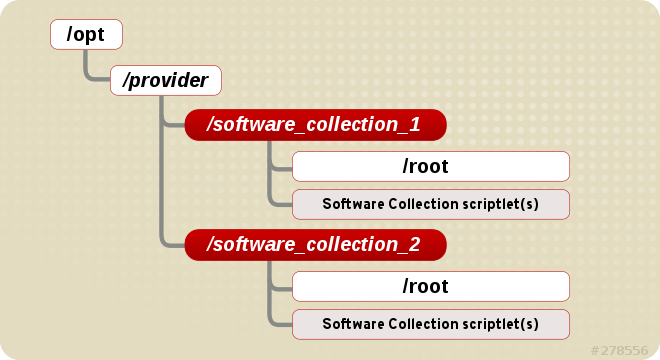
Figure 2.1. The Software Collection File System Hierarchy
2.3. The Software Collection Root Directory
%_scl_prefix macro in the spec file, as in the following example:
%global _scl_prefix /opt/provider
%global _scl_prefix /opt/provider/opt/provider/prefix-application-version/
/opt/provider/prefix-application-version/2.4. The Software Collection Prefix
- the provider part, which defines the provider's name, and
- the name of the Software Collection itself.
-), as in the following example:
myorganization-ruby193
myorganization-ruby1932.5. Software Collection Package Names
- the prefix part, discussed in Section 2.4, “The Software Collection Prefix”, and
- the name and version number of the application that is a part of the Software Collection.
-), as in the following example:
myorganization-ruby193-foreman-1.1
myorganization-ruby193-foreman-1.12.6. Software Collection Scriptlets
/opt/provider/software_collection/ directory in your Software Collection package. If you only need to distribute a single scriptlet in your Software Collection, it is highly recommended that you use enable as the name for that scriptlet. When the user runs a command in the Software Collection environment by executing scl enable software_collection command, the /opt/provider/software_collection/enable scriptlet is then used to update search paths, and so on.
scl enable command. The subshell is only active for the time the command is being performed.
2.7. Package Layout
2.7.1. Metapackage
- The main package: %scl
- The main package in the Software Collection contains dependencies of the base packages, which are included in the Software Collection. The main package does not contain any files.When specifying dependencies for your Software Collection's packages, ensure that no other package in your Software Collection depends on the main package. The purpose of the main package is to install only those packages that are essential for the user to perform most common tasks with the Software Collection.Normally, the main package does not specify any build time dependencies (for instance, packages that are only build time dependencies of another Software Collection's packages).For example, if the name of the Software Collection is
myorganization-ruby193, then the main package macro is expanded to:myorganization-ruby193
myorganization-ruby193Copy to Clipboard Copied! Toggle word wrap Toggle overflow - The runtime subpackage: name-runtime
- The runtime subpackage in the Software Collection owns the Software Collection's file system and delivers the Software Collection's scriptlets. This package needs to be installed for the user to be able to use the Software Collection.For example, if the name of the Software Collection is
myorganization-ruby193, then the runtime subpackage macro is expanded to:myorganization-ruby193-runtime
myorganization-ruby193-runtimeCopy to Clipboard Copied! Toggle word wrap Toggle overflow - The build subpackage: name-build
- The build subpackage in the Software Collection delivers the Software Collection's build configuration. It contains RPM macros needed for building packages into the Software Collection. The build subpackage is optional and can be excluded from the Software Collection.For example, if the name of the Software Collection is
myorganization-ruby193, then the build subpackage macro is expanded to:myorganization-ruby193-build
myorganization-ruby193-buildCopy to Clipboard Copied! Toggle word wrap Toggle overflow The contents of themyorganization-ruby193-buildsubpackage are shown below:cat /etc/rpm/macros.ruby193-config %scl myorganization-ruby193
$ cat /etc/rpm/macros.ruby193-config
%scl myorganization-ruby193
Copy to Clipboard Copied! Toggle word wrap Toggle overflow - The scldevel subpackage: name-scldevel
- The scldevel subpackage in the %scl Software Collection contains development files, which are useful when developing packages of another Software Collection that depends on the %scl Software Collection. The scldevel subpackage is optional and can be excluded from the %scl Software Collection.For example, if the name of the Software Collection is
myorganization-ruby193, then the scldevel subpackage macro is expanded to:myorganization-ruby193-scldevel
myorganization-ruby193-scldevelCopy to Clipboard Copied! Toggle word wrap Toggle overflow For more information about the scldevel subpackage, see Section 4.1, “Providing an scldevel Subpackage”.
2.7.2. Creating a Metapackage
When creating a new metapackage:
- You are advised to add
Requires: scl-utils-buildto the build subpackage. - Add any macros you need to use to the
macros.%{scl}-configfile in the build subpackage. - You are not required to use conditionals for Software Collection-specific macros in the metapackage.
- Consider specifying all packages in your Software Collection that are essential for the Software Collection run time as dependencies of the metapackage. That way you can ensure that the packages are installed with the Software Collection metapackage.
- Include any path redefinition that the packages in your Software Collection may require in the
enablescriptlet.For example, to run Software Collection binary files, addPATH=%{_bindir}\${PATH:+:\${PATH}}to theenablescriptlet. - Always make sure that the metapackage contains the
%setupmacro in the%prepsection, otherwise building the Software Collection will fail. If you do not need to use a particular option with the%setupmacro, add the%setup -c -Tcommand to the%prepsection.This is because the%setupmacro defines and creates the%buildsubdirdirectory, which is normally used for storing temporary files at build time. If you do not define%setupin your Software Collection packages, files in the%buildsubdirdirectory will be overwritten, causing the build to fail.
Example of the Metapackage
2.8. Software Collection Macros
scl defines where to relocate the Software Collection's file structure. The relocated file structure is a file system used exclusively by the Software Collection.
%scl_package macro defines files ownership for the Software Collection's metapackage and provides additional packaging macros to use in the Software Collection environment.
%{?scl:macro}, as in the following example:
%{?scl:Requires:%scl_runtime}
%{?scl:Requires:%scl_runtime}%scl_runtime macro is the value of the Requires tag. Both the macro and the tag use the %{?scl: prefix.
2.8.1. Macros Specific to a Software Collection
|
Macro
|
Description
|
Example value
|
|---|---|---|
%scl_name
|
name of the Software Collection
| software_collection_1
|
%scl_prefix
|
name of the Software Collection with a dash appended at the end
| software_collection_1-
|
%pkg_name
|
name of the original package
| perl
|
%_scl_prefix
|
root of the Software Collection (not package's root)
| /opt/provider/
|
%_scl_scripts
|
location of Software Collection's scriptlets
| /opt/provider/software_collection_1/
|
%_scl_root
|
installation root (install-root) of the package
| /opt/provider/software_collection_1/root/
|
%scl_require_package software_collection_1 package_2
|
depend on a particular package from a specific Software Collection
| software_collection_1-package_2
|
2.8.2. Macros Not Specific to a Software Collection
_root as a prefix.
|
Macro
|
Description
|
Relocated
|
Example value
|
|---|---|---|---|
%_root_prefix
|
Software Collection's
%_prefix macro
|
no
| /usr/
|
%_root_exec_prefix
|
Software Collection's
%_exec_prefix macro
|
no
| /usr/
|
%_root_bindir
|
Software Collection's
%_bindir macro
|
no
| /usr/bin/
|
%_root_sbindir
|
Software Collection's
%_sbindir macro
|
no
| /usr/sbin/
|
%_root_datadir
|
Software Collection's
%_datadir macro
|
no
| /usr/share/
|
%_root_sysconfdir
|
Software Collection's
%_sysconfdir macro
|
no
| /etc/
|
%_root_libexecdir
|
Software Collection's
%_libexecdir macro
|
no
| /usr/libexec/
|
%_root_sharedstatedir
|
Software Collection's
%_sharedstatedir macro
|
no
| /usr/com/
|
%_root_localstatedir
|
Software Collection's
%_localstatedir macro
|
no
| /usr/var/
|
%_root_includedir
|
Software Collection's
%_includedir macro
|
no
| /usr/include/
|
%_root_infodir
|
Software Collection's
%_infodir macro
|
no
| /usr/share/info/
|
%_root_mandir
|
Software Collection's
%_mandir macro
|
no
| /usr/share/man/
|
%_root_initddir
|
Software Collection's
%_initddir macro
|
no
| /etc/rc.d/init.d/
|
|
%
_root_libdir
|
Software Collection's
%_libdir macro, this macro does not work if Software Collection's metapackage is platform-independent
|
no
| /usr/lib/
|
2.8.3. The nfsmountable Macro
nfsmountable allows you to change values for the _sysconfdir, _sharedstatedir, and _localstatedir macros so that your Software Collection can have its state files and configuration files located outside the Software Collection's /opt file system hierarchy. This is useful when using your Software Collection over NFS. For more information, see Section 3.5, “Using Software Collections over NFS”.
2.9. Converting a Conventional Spec File
Procedure 2.1. Converting a conventional spec file into a Software Collection spec file
- Add the
%scl_packagemacro to the spec file. Place the macro in front of the spec file preamble as follows:%{?scl:%scl_package package_name}%{?scl:%scl_package package_name}Copy to Clipboard Copied! Toggle word wrap Toggle overflow - You are advised to define the
%pkg_namemacro in the spec file in case the package is not built for the Software Collection:%{!?scl:%global pkg_name %{name}}%{!?scl:%global pkg_name %{name}}Copy to Clipboard Copied! Toggle word wrap Toggle overflow Consequently, you can use the%pkg_namemacro to define the original name of the package wherever it is needed in the spec file that you can then use for building both the conventional package and the Software Collection. - Change the
Nametag in the spec file preamble as follows:Name: %{?scl_prefix}package_nameName: %{?scl_prefix}package_nameCopy to Clipboard Copied! Toggle word wrap Toggle overflow - If you are building or linking with other Software Collection packages, then prefix the names of those Software Collection packages in the
RequiresandBuildRequirestags with%{?scl_prefix}as follows:Requires: %{?scl_prefix}ifconfigRequires: %{?scl_prefix}ifconfigCopy to Clipboard Copied! Toggle word wrap Toggle overflow When depending on the system versions of packages, you should avoid using versionedRequiresorBuildRequires. If you need to depend on a package that could be updated by the system, consider including that package in your Software Collection, or remember to rebuild your Software Collection when the system package updates. - To check that all essential Software Collection's packages are dependencies of the main metapackage, add the following macro after the
BuildRequiresorRequirestags in the spec file:%{?scl:Requires: %scl_runtime}%{?scl:Requires: %scl_runtime}Copy to Clipboard Copied! Toggle word wrap Toggle overflow - Prefix the
Obsoletes,ConflictsandBuildConflictstags with%{?scl_prefix}. This is to ensure that the Software Collection can be used to deploy new packages to older systems without having the packages specified, for example, byObsoleteremoved from the base system installation. For example:Obsoletes: %{?scl_prefix}lesspipe < 1.0Obsoletes: %{?scl_prefix}lesspipe < 1.0Copy to Clipboard Copied! Toggle word wrap Toggle overflow - Prefix the
Providestag with%{?scl_prefix}, as in the following example:Provides: %{?scl_prefix}moreProvides: %{?scl_prefix}moreCopy to Clipboard Copied! Toggle word wrap Toggle overflow - For any subpackages that define their name with the
-noption, prefix their name with%{?scl_prefix}, as in the following example:%package -n %{?scl_prefix}more%package -n %{?scl_prefix}moreCopy to Clipboard Copied! Toggle word wrap Toggle overflow - Add or edit the
%setupmacro in the%prepsection of the spec file so that the macro can deal with a different package name in the Software Collection environment:%setup -q -n %{pkg_name}-%{version}%setup -q -n %{pkg_name}-%{version}Copy to Clipboard Copied! Toggle word wrap Toggle overflow Note that the%setupmacro is required and that you must always use the macro with the-noption to successfully build your Software Collection.
Example of the Converted Spec File
2.10. Uninstalling All Software Collection Directories
yum remove command does not uninstall directories provided by those Software Collection packages and subpackages that are removed after the Software Collection runtime subpackage is removed.
%{?scl:Requires: %{scl}-runtime}
%{?scl:Requires: %{scl}-runtime}2.11. Making a Software Collection Depend on Another Software Collection
BuildRequires and Requires tags in the dependent Software Collection's spec file so that these tags properly define the dependency.
BuildRequires: scl-utils-build
Requires: %scl_require software_collection_1
Requires: %scl_require software_collection_2
BuildRequires: scl-utils-build
Requires: %scl_require software_collection_1
Requires: %scl_require software_collection_2%scl_package macro in front of the spec file preamble, for example:
%{?scl:%scl_package less}
%{?scl:%scl_package less}%scl_package macro must be included in every spec file of your Software Collection.
%scl_require_package macro to define dependencies on a particular package from a specific Software Collection, as in the following example:
BuildRequires: scl-utils-build
Requires: %scl_require_package software_collection_1 package_name
BuildRequires: scl-utils-build
Requires: %scl_require_package software_collection_1 package_name2.12. Building a Software Collection
rpmbuild -ba package.spec --define 'scl name'
rpmbuild -ba package.spec --define 'scl name' rpmbuild -ba package.spec) is that you have to append the --define option to the rpmbuild command when building a Software Collection.
--define option defines the scl macro, which uses the Software Collection configured in the Software Collection spec file (package.spec).
rpmbuild -ba package.spec to build the Software Collection, specify the following in the package.spec file:
BuildRequires: software_collection-build
BuildRequires: software_collection-build2.12.1. Rebuilding a Software Collection without build Subpackages
rpmbuild -ba package.spec --define 'scl name' command.
rpmbuild command will fail.
2.12.2. Avoiding debuginfo File Conflicts
Source tag, and thus unpack source files into the same directory underneath the %_builddir directory, their debuginfo packages will have file conflicts. Due to these conflicts, the user will be unable to install both packages on the same system at the same time.
%_builddir directory. By doing so, the debuginfo package generation script produces debuginfo files that do not conflict with files from the other debuginfo package.
Chapter 3. Advanced Topics
3.1. Software Collection Automatic Provides and Requires and Filtering Support
Important
Provides and Requires and filtering. For example, for all Python libraries, RPM automatically adds the following Requires:
Requires: python(abi) = (version)
Requires: python(abi) = (version)Requires with %{?scl_prefix} when converting your conventional RPM package:
Requires: %{?scl_prefix}python(abi) = (version))
Requires: %{?scl_prefix}python(abi) = (version))Provides and Requires, add the following lines in the macros.%{scl}-config macro file:
%__python_provides /usr/lib/rpm/pythondeps-scl.sh --provides %{_scl_root} %{scl_prefix}
%__python_requires /usr/lib/rpm/pythondeps-scl.sh --requires %{_scl_root} %{scl_prefix}
%__python_provides /usr/lib/rpm/pythondeps-scl.sh --provides %{_scl_root} %{scl_prefix}
%__python_requires /usr/lib/rpm/pythondeps-scl.sh --requires %{_scl_root} %{scl_prefix}/usr/lib/rpm/pythondeps-scl.sh file is based on a pythondeps.sh file from the conventional package and adjusts search paths.
Provides or Requires that you need to adjust, for example, a pkg_config Provides, there are two ways to do it:
- Add the following lines in the
macros.%{scl}-configmacro file so that it applies to all packages in the Software Collection:Copy to Clipboard Copied! Toggle word wrap Toggle overflow - Or, alternatively, add the following lines after tag definitions in every spec file for which you want to filter
ProvidesorRequires:%{?scl:%filter_from_provides s|pkgconfig|%{?scl_prefix}pkgconfig|g} %{?scl:%filter_from_requires s|pkgconfig|%{?scl_prefix}pkgconfig|g} %{?scl:%filter_setup}%{?scl:%filter_from_provides s|pkgconfig|%{?scl_prefix}pkgconfig|g} %{?scl:%filter_from_requires s|pkgconfig|%{?scl_prefix}pkgconfig|g} %{?scl:%filter_setup}Copy to Clipboard Copied! Toggle word wrap Toggle overflow
Important
Requires: pkgconfig(package_1) and Requires: pkgconfig(package_2), and only package_2 is included in the Software Collection, ensure that you do not filter the Requires tag for package_1.
3.2. Software Collection Macro Files Support
%{?scl:%{_root_sysconfdir}}%{!?scl:%{_sysconfdir}}/rpm/ directory, which corresponds to the /etc/rpm/ directory for conventional packages. When shipping macro files, ensure that:
- You rename the macro files by appending
.%{scl}to their names so that they do not conflict with the files from the base system installation. - The macros in the macro files are either not expanded, or they are using conditionals, as in the following example:
%__python2 %{_bindir}/python
%python2_sitelib %(%{?scl:scl enable %scl '}%{__python2} -c "from distutils.sysconfig import get_python_lib; print(get_python_lib())"%{?scl:'})
%__python2 %{_bindir}/python %python2_sitelib %(%{?scl:scl enable %scl '}%{__python2} -c "from distutils.sysconfig import get_python_lib; print(get_python_lib())"%{?scl:'})Copy to Clipboard Copied! Toggle word wrap Toggle overflow
%{__python2} macro as in the above sample. This macro will evaluate to /opt/provider/mypython/root/usr/bin/python2, but the python2 binary is only available in the python26 Software Collection (/opt/provider/python26/root/usr/bin/python2).
- The
macros.python.python26macro file, which is a part of the python26-python-devel package, contains the following line:%__python26_python2 /opt/provider/python26/root/usr/bin/python2
%__python26_python2 /opt/provider/python26/root/usr/bin/python2Copy to Clipboard Copied! Toggle word wrap Toggle overflow - And the macro file in the python26-build subpackage, and also the build subpackage in any depending Software Collection, contains the following line:
%scl_package_override() {%global __python2 %__python26_python2}%scl_package_override() {%global __python2 %__python26_python2}Copy to Clipboard Copied! Toggle word wrap Toggle overflow
%{__python2} macro only if the build subpackage from a corresponding Software Collection is present, which usually means that you want to build software for that Software Collection.
3.3. Packaging Wrappers for Software Collections
/usr/bin/rubyscl-ruby and allows the user to run rubyscl-ruby command instead of scl enable rubyscl 'ruby command':
#!/bin/bash

COMMAND="ruby $@"
scl enable rubyscl "$COMMAND"
#!/bin/bash

COMMAND="ruby $@"
scl enable rubyscl "$COMMAND"
/usr/bin/ directory where the wrappers would otherwise be installed.
3.4. Converting Software Collection Scriptlets into Environment Modules
Important
enable scriptlet into an environment module with a script /usr/share/Modules/bin/createmodule.sh.
Procedure 3.1. Converting an enable scriptlet into an environment module
- Ensure that an environment-modules package is installed on your system:
yum install environment-modules
# yum install environment-modulesCopy to Clipboard Copied! Toggle word wrap Toggle overflow - Run the
/usr/share/Modules/bin/createmodule.shscript to convert your Software Collection'senablescriptlet into an environment module:/usr/share/Modules/bin/createmodule.sh /path/to/enable/scriptlet
/usr/share/Modules/bin/createmodule.sh /path/to/enable/scriptletCopy to Clipboard Copied! Toggle word wrap Toggle overflow Replace /path/to/enable/scriptlet with the file path of theenablescriptlet you want to convert. - Add the same command
/usr/share/Modules/bin/createmodule.sh /path/to/enable/scriptletin the%presection of your Software Collection metapackage, below the code generating yourenablescriptlet.In case you have theenablescriptlet packaged as a file in one of your Software Collection packages, add the command/usr/share/Modules/bin/createmodule.sh /path/to/enable/scriptletin the%postsection.
3.5. Using Software Collections over NFS
nfsmountable. If you define the macro when building a Software Collection, the resulting Software Collection has its state files and configuration files located outside the Software Collection's /opt file system hierarchy. This enables you to mount the /opt file system hierarchy over NFS as read-only.
nfsmountable macro defined, run the following command:
rpmbuild -ba software_collection.spec --define 'scl software_collection' --define 'nfsmountable 1'
rpmbuild -ba software_collection.spec --define 'scl software_collection' --define 'nfsmountable 1' _sysconfdir, _sharedstatedir, and _localstatedir macros. The changed values are detailed in the following table.
|
Macro
|
Original definition
|
Expanded value for the original definition
|
Changed definition
|
Expanded value for the changed definition
|
|---|---|---|---|---|
_sysconfdir
|
%{_scl_root}/etc
|
/opt/provider/%{scl}/root/etc
|
%{_root_sysconfdir}%{_scl_prefix}/scls/%{scl}
|
/etc/opt/provider/scls/%{scl}
|
_sharedstatedir
|
%{_scl_root}/var/lib
|
/opt/provider/%{scl}/root/var/lib
|
%{_root_localstatedir}%{_scl_prefix}/scls/%{scl}/lib
|
/var/opt/provider/scls/%{scl}/lib
|
_localstatedir
|
%{_scl_root}/var
|
/opt/provider/%{scl}/root/var
|
%{_root_localstatedir}%{_scl_prefix}/scls/%{scl}
|
/var/opt/provider/scls/%{scl}
|
/scls directory in their paths.
3.5.1. Changed Directory Structure and File Ownership
nfsmountable macro also has an impact on how the scl_install and scl_files macros create a directory structure and set the file ownership when you run the rpmbuild command.
3.5.2. Registering and Deregistering Software Collections
scl register command:
scl register /opt/provider/software_collection
$ scl register /opt/provider/software_collectionenable scriptlet and the root/ directory to be considered a valid Software Collection file system hierarchy.
deregister scriptet when running the scl command:
scl deregister software_collection
$ scl deregister software_collection3.5.2.1. Using (de)register Scriptlets in a Software Collection Metapackage
%file section of the metapackage spec file.
/etc/opt/ or /var/opt/.
3.6. Managing Services in Software Collections
service or chkconfig on Red Hat Enterprise Linux 5 and 6, or systemctl on Red Hat Enterprise Linux 7.
%install section of the spec file as follows to avoid possible name conflicts with the system versions of the services that are part of the Software Collection:
%install
install -p -c -m 644 %{SOURCE2} $RPM_BUILD_ROOT%{?scl:%_root_sysconfdir}%{!?scl:%_sysconfdir}/rc.d/init.d/%{?scl_prefix}service_name
%install
install -p -c -m 644 %{SOURCE2} $RPM_BUILD_ROOT%{?scl:%_root_sysconfdir}%{!?scl:%_sysconfdir}/rc.d/init.d/%{?scl_prefix}service_name%install section of the spec file as follows:
%install
install -p -c -m 644 %{SOURCE2} $RPM_BUILD_ROOT%{_unitdir}/%{?scl_prefix}service_name.service
%install
install -p -c -m 644 %{SOURCE2} $RPM_BUILD_ROOT%{_unitdir}/%{?scl_prefix}service_name.service%{?scl_prefix}service_name
%{?scl_prefix}service_name3.6.1. Configuring an Environment for Services
Procedure 3.2. Configuring an environment for services on Red Hat Enterprise Linux 5 and 6
- Create a configuration file in
/opt/provider/software_collection/service-environmentwith the following content:[SCLNAME]_SCLS_ENABLED="software_collection"
[SCLNAME]_SCLS_ENABLED="software_collection"Copy to Clipboard Copied! Toggle word wrap Toggle overflow Replace SCLNAME with a unique identifier for your Software Collection, for instance, your Software Collection's name written in capital letters.Replace software_collection with the name of your Software Collection as defined by the%scl_namemacro. - Add the following line at the beginning of the SysV init script:
source /opt/provider/software_collection/service-environment
source /opt/provider/software_collection/service-environmentCopy to Clipboard Copied! Toggle word wrap Toggle overflow - In the SysV init script, determine commands that run binaries located in the
/opt/provider/file system hierarchy. Prefix these commands withscl enable $[SCLNAME]_SCLS_ENABLED, similarly to when you run a command in the Software Collection environment.For example, replace the following line:/usr/bin/daemon_binary --argument-1 --argument-2
/usr/bin/daemon_binary --argument-1 --argument-2Copy to Clipboard Copied! Toggle word wrap Toggle overflow with:scl enable $[SCLNAME]_SCLS_ENABLED -- /usr/bin/daemon_binary --argument-1 --argument-2
scl enable $[SCLNAME]_SCLS_ENABLED -- /usr/bin/daemon_binary --argument-1 --argument-2Copy to Clipboard Copied! Toggle word wrap Toggle overflow - Some commands, like
suorrunuser, also clear environment variables. Thus, if these commands are used in the SysV init script, enable your Software Collection again after running these commands.For instance, replace the following line:su - user_name -c '/usr/bin/daemon_binary --argument-1 --argument-2'
su - user_name -c '/usr/bin/daemon_binary --argument-1 --argument-2'Copy to Clipboard Copied! Toggle word wrap Toggle overflow with:su - user_name -c '\ source /opt/provider/software_collection/service-environment \ scl enable $SCLNAME_SCLS_ENABLED -- /usr/bin/daemon_binary --argument-1 --argument-2'
su - user_name -c '\ source /opt/provider/software_collection/service-environment \ scl enable $SCLNAME_SCLS_ENABLED -- /usr/bin/daemon_binary --argument-1 --argument-2'Copy to Clipboard Copied! Toggle word wrap Toggle overflow
Procedure 3.3. Configuring an environment for services on Red Hat Enterprise Linux 7
- Create a configuration file in
/opt/provider/software_collection/service-environmentwith the following content:[SCLNAME]_SCLS_ENABLED="software_collection"
[SCLNAME]_SCLS_ENABLED="software_collection"Copy to Clipboard Copied! Toggle word wrap Toggle overflow Replace SCLNAME with a unique identifier for your Software Collection, for instance, your Software Collection's name written in capital letters.Replace software_collection with the name of your Software Collection as defined by the%scl_namemacro. - Add the following line in the systemd service file to load the configuration file:
EnvironmentFile=/opt/provider/software_collection/service-environment
EnvironmentFile=/opt/provider/software_collection/service-environmentCopy to Clipboard Copied! Toggle word wrap Toggle overflow - In the systemd service file, prefix all commands specified in
ExecStartPre,ExecStart, and similar directives withscl enable $[SCLNAME]_SCLS_ENABLED, similarly to when you run a command in the Software Collection environment:ExecStartPre=/usr/bin/scl enable $[SCLNAME]_SCLS_ENABLED -- /opt/provider/software_collection/root/usr/bin/daemon_helper_binary --argument-1 --argument-2 ExecStart=/usr/bin/scl enable $[SCLNAME]_SCLS_ENABLED -- /opt/provider/software_collection/root/usr/bin/daemon_binary --argument-1 --argument-2
ExecStartPre=/usr/bin/scl enable $[SCLNAME]_SCLS_ENABLED -- /opt/provider/software_collection/root/usr/bin/daemon_helper_binary --argument-1 --argument-2 ExecStart=/usr/bin/scl enable $[SCLNAME]_SCLS_ENABLED -- /opt/provider/software_collection/root/usr/bin/daemon_binary --argument-1 --argument-2Copy to Clipboard Copied! Toggle word wrap Toggle overflow
3.7. Software Collection Library Support
LD_LIBRARY_PATH environment variable in the enable scriptlet as follows:
export LD_LIBRARY_PATH=%{_libdir}${LD_LIBRARY_PATH:+:${LD_LIBRARY_PATH}}
export LD_LIBRARY_PATH=%{_libdir}${LD_LIBRARY_PATH:+:${LD_LIBRARY_PATH}}Note
DT_RUNPATH attribute instead of the LD_LIBRARY_PATH environment variable to make the private shared library accessible in the Software Collection environment.
3.7.1. Using a Library Outside of the Software Collection
/etc/ld.so.conf.d/ for this purpose.
Warning
/etc/ld.so.conf.d/ for libraries already available on the system. Using /etc/ld.so.conf.d/ is only recommended for a library that is not available on the system, as otherwise the version of the library in the Software Collection might get preference over the system version of the library. That could lead to undesired behavior of the system versions of the applications, including unexpected termination and data loss.
Procedure 3.4. Using /etc/ld.so.conf.d/ for libraries in the Software Collection
- Create a file named
%{?scl_prefix}libs.confand adjust the spec file configuration accordingly:SOURCE2: %{?scl_prefix}libs.confSOURCE2: %{?scl_prefix}libs.confCopy to Clipboard Copied! Toggle word wrap Toggle overflow - In the
%{?scl_prefix}libs.conffile, include a list of directories where the versions of the libraries associated with the Software Collection are located. For example:/opt/provider/software_collection_1/root/usr/lib64/
/opt/provider/software_collection_1/root/usr/lib64/Copy to Clipboard Copied! Toggle word wrap Toggle overflow In the example above, the/usr/lib64/directory that is part of the Software Collection software_collection_1 is included in the list. - Edit the
%installsection of the spec file, so the%{?scl_prefix}libs.conffile is installed as follows:%install install -p -c -m 644 %{SOURCE2} $RPM_BUILD_ROOT%{?scl:%_root_sysconfdir}%{!?scl:%_sysconfdir}/ld.so.conf.d/%install install -p -c -m 644 %{SOURCE2} $RPM_BUILD_ROOT%{?scl:%_root_sysconfdir}%{!?scl:%_sysconfdir}/ld.so.conf.d/Copy to Clipboard Copied! Toggle word wrap Toggle overflow
3.7.2. Prefixing the Library Major soname with the Software Collection Name
scl enable command when building an application against a library included in the Software Collection. Failing to do so may result in the application being executed in an incorrect environment, linked against the incorrect system version of the library.
Warning
LD_LIBRARY_PATH environment variable has not been set properly, change the major soname of the library included in the Software Collection. The recommended way to change the major soname is to prefix the major soname version number with the Software Collection name.
mysql55- prefix:
rpm -ql mysql55-mysql-libs | grep 'lib.*so'
/opt/provider/mysql55/root/usr/lib64/mysql/libmysqlclient.so.mysql55-18
/opt/provider/mysql55/root/usr/lib64/mysql/libmysqlclient.so.mysql55-18.0.0
$ rpm -ql mysql55-mysql-libs | grep 'lib.*so'
/opt/provider/mysql55/root/usr/lib64/mysql/libmysqlclient.so.mysql55-18
/opt/provider/mysql55/root/usr/lib64/mysql/libmysqlclient.so.mysql55-18.0.0rpm -ql mysql-libs | grep 'lib.*so' /usr/lib64/mysql/libmysqlclient.so.18 /usr/lib64/mysql/libmysqlclient.so.18.0.0
$ rpm -ql mysql-libs | grep 'lib.*so'
/usr/lib64/mysql/libmysqlclient.so.18
/usr/lib64/mysql/libmysqlclient.so.18.0.0
rpmbuild utility generates an automatic Provides tag for packages that include a versioned shared library. If you do not prefix the soname as described above, then an example of the Provides in case of the mysql package is libmysqlclient.so.18()(64bit). With this Provides, RPM can choose the incorrect RPM package, resulting in the application missing the requirement.
Provides in case of mysql is libmysqlclient.so.mysql55-18()(64bit). With this Provides, RPM chooses the correct RPM dependencies and the application's requirements are satisfied.
3.7.3. Software Collection Library Support in Red Hat Enterprise Linux 7
%__provides_exclude_from macro to prevent scanning certain files for automatically generated RPM symbols.
.so files in the %{_libdir} directory, add the following lines before the BuildRequires or Requires tags in your Software Collection spec file:
%if %{?scl:1}%{!?scl:0}
  # Do not scan .so files in %{_libdir}
  %global __provides_exclude_from ^%{_libdir}/.*.so.*$
%endif
%if %{?scl:1}%{!?scl:0}
  # Do not scan .so files in %{_libdir}
  %global __provides_exclude_from ^%{_libdir}/.*.so.*$
%endifProvides and Requires, see Section 3.1, “Software Collection Automatic Provides and Requires and Filtering Support” for more information.
3.8. Software Collection .pc Files Support
PKG_CONFIG_PATH environment variable. Depending on what is defined in your .pc files, update the PKG_CONFIG_PATH environment variable for the %{_libdir} macro (which expands to the library directory, typically /usr/lib/ or /usr/lib64/), or for the %{_datadir} macro (which expands to the share directory, typically /usr/share/).
PKG_CONFIG_PATH environment variable by adjusting the %install section of the Software Collection spec file as follows:
%install
cat >> %{buildroot}%{_scl_scripts}/enable << EOF
export PKG_CONFIG_PATH=%{_libdir}/pkgconfig:\$PKG_CONFIG_PATH
EOF
%install
cat >> %{buildroot}%{_scl_scripts}/enable << EOF
export PKG_CONFIG_PATH=%{_libdir}/pkgconfig:\$PKG_CONFIG_PATH
EOFPKG_CONFIG_PATH environment variable by adjusting the %install section of the Software Collection spec file as follows:
%install
cat >> %{buildroot}%{_scl_scripts}/enable << EOF
export PKG_CONFIG_PATH=%{_datadir}/pkgconfig:\$PKG_CONFIG_PATH
EOF
%install
cat >> %{buildroot}%{_scl_scripts}/enable << EOF
export PKG_CONFIG_PATH=%{_datadir}/pkgconfig:\$PKG_CONFIG_PATH
EOFenable scriptlet so that it ensures that the .pc files in the Software Collection are preferred over the .pc files available on the system if the Software Collection is enabled.
/usr/bin/ directory. In this case, ensure that the .pc files are visible to the system even if the Software Collection is disabled.
PKG_CONFIG_PATH environment variable with the paths to the .pc files associated with the Software Collection. Depending on what is defined in your .pc files, update the PKG_CONFIG_PATH environment variable for the %{_libdir} macro (which expands to the library directory), or for the %{_datadir} macro (which expands to the share directory).
Procedure 3.5. Updating the PKG_CONFIG_PATH environment variable for %{_libdir}
- To update the
PKG_CONFIG_PATHenvironment variable for the%{_libdir}macro, create a custom script/etc/profile.d/name.sh. The script is preloaded when a shell is started on the system.For example, create the following file:%{?scl_prefix}pc-libdir.sh%{?scl_prefix}pc-libdir.shCopy to Clipboard Copied! Toggle word wrap Toggle overflow - Use the
pc-libdir.shshort script that modifies thePKG_CONFIG_PATHvariable to refer to your .pc files:export PKG_CONFIG_PATH=%{_libdir}/pkgconfig:/opt/provider/software_collection/path/to/your/pc_filesexport PKG_CONFIG_PATH=%{_libdir}/pkgconfig:/opt/provider/software_collection/path/to/your/pc_filesCopy to Clipboard Copied! Toggle word wrap Toggle overflow - Add the file to your Software Collection package's spec file:
SOURCE2: %{?scl_prefix}pc-libdir.shSOURCE2: %{?scl_prefix}pc-libdir.shCopy to Clipboard Copied! Toggle word wrap Toggle overflow - Install this file into the system
/etc/profile.d/directory by adjusting the%installsection of the Software Collection package's spec file:%install install -p -c -m 644 %{SOURCE2} $RPM_BUILD_ROOT%{?scl:%_root_sysconfdir}%{!?scl:%_sysconfdir}/profile.d/%install install -p -c -m 644 %{SOURCE2} $RPM_BUILD_ROOT%{?scl:%_root_sysconfdir}%{!?scl:%_sysconfdir}/profile.d/Copy to Clipboard Copied! Toggle word wrap Toggle overflow
Procedure 3.6. Updating the PKG_CONFIG_PATH environment variable for %{_datadir}
- To update the
PKG_CONFIG_PATHenvironment variable for the%{_datadir}macro, create a custom script/etc/profile.d/name.sh. The script is preloaded when a shell is started on the system.For example, create the following file:%{?scl_prefix}pc-datadir.sh%{?scl_prefix}pc-datadir.shCopy to Clipboard Copied! Toggle word wrap Toggle overflow - Use the
pc-datadir.shshort script that modifies thePKG_CONFIG_PATHvariable to refer to your .pc files:export PKG_CONFIG_PATH=%{_datadir}/pkgconfig:/opt/provider/software_collection/path/to/your/pc_filesexport PKG_CONFIG_PATH=%{_datadir}/pkgconfig:/opt/provider/software_collection/path/to/your/pc_filesCopy to Clipboard Copied! Toggle word wrap Toggle overflow - Add the file to your Software Collection package's spec file:
SOURCE2: %{?scl_prefix}pc-datadir.shSOURCE2: %{?scl_prefix}pc-datadir.shCopy to Clipboard Copied! Toggle word wrap Toggle overflow - Install this file into the system
/etc/profile.d/directory by adjusting the%installsection of the Software Collection package's spec file:%install install -p -c -m 644 %{SOURCE2} $RPM_BUILD_ROOT%{?scl:%_root_sysconfdir}%{!?scl:%_sysconfdir}/profile.d/%install install -p -c -m 644 %{SOURCE2} $RPM_BUILD_ROOT%{?scl:%_root_sysconfdir}%{!?scl:%_sysconfdir}/profile.d/Copy to Clipboard Copied! Toggle word wrap Toggle overflow
3.9. Software Collection MANPATH Support
man command on the system to display manual pages from the enabled Software Collection, update the MANPATH environment variable with the paths to the manual pages that are associated with the Software Collection.
MANPATH environment variable, add the following to the %install section of the Software Collection spec file:
%install
cat >> %{buildroot}%{_scl_scripts}/enable << EOF
export MANPATH=%{_mandir}:\${MANPATH}
EOF
%install
cat >> %{buildroot}%{_scl_scripts}/enable << EOF
export MANPATH=%{_mandir}:\${MANPATH}
EOFenable scriptlet to update the MANPATH environment variable. The manual pages associated with the Software Collection are then not visible as long as the Software Collection is not enabled.
/usr/bin/ directory. In this case, ensure that the manual pages are visible to the system even if the Software Collection is disabled.
man command on the system to display manual pages from the disabled Software Collection, update the MANPATH environment variable with the paths to the manual pages associated with the Software Collection.
Procedure 3.7. Updating the MANPATH environment variable for the disabled Software Collection
- To update the
MANPATHenvironment variable, create a custom script/etc/profile.d/name.sh. The script is preloaded when a shell is started on the system.For example, create the following file:%{?scl_prefix}manpage.sh%{?scl_prefix}manpage.shCopy to Clipboard Copied! Toggle word wrap Toggle overflow - Use the
manpage.shshort script that modifies theMANPATHvariable to refer to your man path directory:export MANPATH=/opt/provider/software_collection/path/to/your/man_pages:${MANPATH}export MANPATH=/opt/provider/software_collection/path/to/your/man_pages:${MANPATH}Copy to Clipboard Copied! Toggle word wrap Toggle overflow - Add the file to your Software Collection package's spec file:
SOURCE2: %{?scl_prefix}manpage.shSOURCE2: %{?scl_prefix}manpage.shCopy to Clipboard Copied! Toggle word wrap Toggle overflow - Install this file into the system
/etc/profile.d/directory by adjusting the%installsection of the Software Collection package's spec file:%install install -p -c -m 644 %{SOURCE2} $RPM_BUILD_ROOT%{?scl:%_root_sysconfdir}%{!?scl:%_sysconfdir}/profile.d/%install install -p -c -m 644 %{SOURCE2} $RPM_BUILD_ROOT%{?scl:%_root_sysconfdir}%{!?scl:%_sysconfdir}/profile.d/Copy to Clipboard Copied! Toggle word wrap Toggle overflow
3.10. Software Collection cronjob Support
Procedure 3.8. Running periodic tasks with cronjobs
- To use cronjobs for running periodic tasks, place a
crontabfile for your Software Collection in the/etc/cron.d/directory with the Software Collection's name.For example, create the following file:%{?scl_prefix}crontab%{?scl_prefix}crontabCopy to Clipboard Copied! Toggle word wrap Toggle overflow - Ensure that the contents of the
crontabfile follow the standardcrontabfile format, as in the following example:0 1 * * Sun root scl enable software_collection '/opt/provider/software_collection/root/usr/bin/cron_job_name'
0 1 * * Sun root scl enable software_collection '/opt/provider/software_collection/root/usr/bin/cron_job_name'Copy to Clipboard Copied! Toggle word wrap Toggle overflow where software_collection is the name of your Software Collection, and/opt/provider/software_collection/root/usr/bin/cron_job_nameis the command you want to periodically run. - Add the file to your spec file of the Software Collection package:
SOURCE2: %{?scl_prefix}crontabSOURCE2: %{?scl_prefix}crontabCopy to Clipboard Copied! Toggle word wrap Toggle overflow - Install the file into the system directory
/etc/cron.d/by adjusting the%installsection of the Software Collection package's spec file:%install install -p -c -m 644 %{SOURCE2} $RPM_BUILD_ROOT%{?scl:%_root_sysconfdir}%{!?scl:%_sysconfdir}/cron.d/%install install -p -c -m 644 %{SOURCE2} $RPM_BUILD_ROOT%{?scl:%_root_sysconfdir}%{!?scl:%_sysconfdir}/cron.d/Copy to Clipboard Copied! Toggle word wrap Toggle overflow
3.11. Software Collection Log File Support
/opt/provider/software_collection/root/var/log/ directory. To make the log files more accessible and easier to manage, consider creating the log files outside of the Software Collection's file system hierarchy.
nfsmountable, you can configure the Software Collection to create the log files underneath the /var/opt/ directory. For more information on using the nfsmountable macro, see Section 3.5, “Using Software Collections over NFS”.
3.12. Software Collection logrotate Support
Procedure 3.9. Managing log files with logrotate
- To manage your log files with logrotate, place a custom logrotate file for your Software Collection in the system directory for the logrotate jobs
/etc/logrotate.d/.For example, create the following file:%{?scl_prefix}logrotate%{?scl_prefix}logrotateCopy to Clipboard Copied! Toggle word wrap Toggle overflow - Ensure that the contents of the
logrotatefile follow the standardlogrotatefile format as follows:Copy to Clipboard Copied! Toggle word wrap Toggle overflow - Add the file to your spec file of the Software Collection package:
SOURCE2: %{?scl_prefix}logrotateSOURCE2: %{?scl_prefix}logrotateCopy to Clipboard Copied! Toggle word wrap Toggle overflow - Install the file into the system directory
/etc/logrotate.d/by adjusting the%installsection of the Software Collection package's spec file:%install install -p -c -m 644 %{SOURCE2} $RPM_BUILD_ROOT%{?scl:%_root_sysconfdir}%{!?scl:%_sysconfdir}/logrotate.d/%install install -p -c -m 644 %{SOURCE2} $RPM_BUILD_ROOT%{?scl:%_root_sysconfdir}%{!?scl:%_sysconfdir}/logrotate.d/Copy to Clipboard Copied! Toggle word wrap Toggle overflow
3.13. Software Collection Lock File Support
/opt/provider/software_collection/ file system hierarchy, you can avoid any possible conflicts with the system versions of the applications or services that can be on the system.
/var/lock/ instead of the Software Collection's directory /opt/provider/software_collection/var/lock/. In this way, your applications or services' lock file will not be overwritten. The lock file will not be renamed and the name stays the same as the system version.
/opt/provider/software_collection/var/lock/.
3.14. Software Collection Configuration Files Support
/opt/provider/software_collection/ file system hierarchy, you can avoid any possible conflicts with the system versions of the configuration files that can be present on the system.
/opt/provider/software_collection/, then ensure that you properly configure an alternative location for the configuration files. For many programs, this can be usually done at build or installation time.
3.15. Software Collection Kernel Module Support
- the name of your kernel module package includes the kernel version,
- the tag
Requires, which can be found in your kernel module spec file, includes the kernel version and revision (in the formatkernel-version-revision).
3.16. Software Collection SELinux Support
semanage fcontext and restorecon commands to set up the SELinux labels.
/opt/provider/software_collection_1/root/usr/ directory in your Software Collection package imitates the /usr/ directory of your conventional package, set up the SELinux labels as follows:
semanage fcontext -a -e /usr /opt/provider/software_collection_1/root/usr
semanage fcontext -a -e /usr /opt/provider/software_collection_1/root/usrrestorecon -R -v /opt/provider/software_collection_1/root/usr
restorecon -R -v /opt/provider/software_collection_1/root/usr/opt/provider/software_collection_1/root/usr/ directory are labeled by SELinux as if they were located in the /usr/ directory.
3.16.1. SELinux Support in Red Hat Enterprise Linux 7
%post section in the Software Collection metapackage to set up the SELinux labels:
semanage fcontext -a -e /usr /opt/provider/software_collection_1/root/usr
semanage fcontext -a -e /usr /opt/provider/software_collection_1/root/usrrestorecon -R -v /opt/provider/software_collection_1/root/usr
restorecon -R -v /opt/provider/software_collection_1/root/usrselinuxenabled && load_policy || :
selinuxenabled && load_policy || :restorecon command in all packages in the Software Collection.
semanage fcontext command is provided by the policycoreutils-python package, therefore it is important that you include policycoreutils-python in Requires for the Software Collection metapackage.
3.16.2. SELinux Support in Red Hat Enterprise Linux 5
semanage -e command, which substitutes the source path for the destination path during labeling, is not supported in Red Hat Enterprise Linux 5.
Chapter 4. Extending Red Hat Software Collections
4.1. Providing an scldevel Subpackage
Procedure 4.1. Providing your own scldevel subpackage
- In your Software Collection's metapackage, add the scldevel subpackage by defining its name, summary, and description:
Copy to Clipboard Copied! Toggle word wrap Toggle overflow You are advised to use the virtualProvides: scldevel(%{scl_name_base})during the build of packages of dependent Software Collections. This will ensure availability of a version of the%{scl_name_base}Software Collection and its macros, as specified in the following step. - In the
%installsection of your Software Collection's metapackage, create themacros.%{scl_name_base}-scldevelfile that is part of the scldevel subpackage and contains:cat >> %{buildroot}%{_root_sysconfdir}/rpm/macros.%{scl_name_base}-scldevel << EOF %%scl_%{scl_name_base} %{scl} %%scl_prefix_%{scl_name_base} %{scl_prefix} EOFcat >> %{buildroot}%{_root_sysconfdir}/rpm/macros.%{scl_name_base}-scldevel << EOF %%scl_%{scl_name_base} %{scl} %%scl_prefix_%{scl_name_base} %{scl_prefix} EOFCopy to Clipboard Copied! Toggle word wrap Toggle overflow Note that between all Software Collections that share the same%{scl_name_base}name, the providedmacros.%{scl_name_base}-scldevelfiles must conflict. This is to disallow installing multiple versions of the%{scl_name_base}Software Collections. For example, in Red Hat Software Collections, the ruby193-scldevel subpackage cannot be installed when there is the ruby200-scldevel subpackage installed.
4.1.1. Using an scldevel Subpackage in a Dependent Software Collection
Procedure 4.2. Using your own scldevel subpackage in a dependent Software Collection
- Consider adding the following at the beginning of the metapackage's spec file:
%{!?scl_ruby:%global scl_ruby ruby200}
%{!?scl_prefix_ruby:%global scl_prefix_ruby %{scl_ruby}-}
%{!?scl_ruby:%global scl_ruby ruby200} %{!?scl_prefix_ruby:%global scl_prefix_ruby %{scl_ruby}-}Copy to Clipboard Copied! Toggle word wrap Toggle overflow These two lines are optional. They are only meant as a visual hint that the dependent Software Collection has been designed to depend on the ruby200 Software Collection. If there is no other scldevel subpackage available in the build root, then the ruby200-scldevel subpackage is used as a build requirement.You can substitute these lines with the following line:%{?scl_prefix_ruby}%{?scl_prefix_ruby}Copy to Clipboard Copied! Toggle word wrap Toggle overflow - Add the following build requirement to the metapackage:
BuildRequires: %{scl_prefix_ruby}scldevelBuildRequires: %{scl_prefix_ruby}scldevelCopy to Clipboard Copied! Toggle word wrap Toggle overflow By specifying this build requirement, you ensure that the scldevel subpackage is in the build root and that the default values are not in use. Omitting this package could result in broken requires at the subsequent packages' build time. - Ensure that the
%package runtimepart of the metapackage's spec file includes the following lines:%package runtime Summary: Package that handles %scl Software Collection. Requires: scl-utils Requires: %{scl_prefix_ruby}runtime%package runtime Summary: Package that handles %scl Software Collection. Requires: scl-utils Requires: %{scl_prefix_ruby}runtimeCopy to Clipboard Copied! Toggle word wrap Toggle overflow - Ensure that the
%package buildpart of the metapackage's spec file includes the following lines:%package build Summary: Package shipping basic build configuration Requires: %{scl_prefix_ruby}scldevel%package build Summary: Package shipping basic build configuration Requires: %{scl_prefix_ruby}scldevelCopy to Clipboard Copied! Toggle word wrap Toggle overflow SpecifyingRequires: %{scl_prefix_ruby}scldevelensures that macros are available in all packages of the Software Collection.
4.2. Extending the python27 and python33 Software Collections
%scl_package_override(), which allows for easier packaging of your own dependent Software Collection.
4.2.1. The vt191 Software Collection
vt191 and contains the versiontools Python package version 1.9.1.
- The vt191 Software Collection spec file has the following build dependency set:
BuildRequires: %{scl_prefix_python}scldevelBuildRequires: %{scl_prefix_python}scldevelCopy to Clipboard Copied! Toggle word wrap Toggle overflow This expands to, for example, python27-scldevel.The python27-scldevel subpackage ships two important macros,%scl_pythonand%scl_prefix_python. Note that these macros are defined at the top of the spec file. Although the definitions are not required, they provide a visual hint that the vt191 Software Collection has been designed to be built on top of the python27 Software Collection. They also serve as a fallback value. - To have a
site-packagesdirectory set up properly, use the value of the%python27python_sitelibmacro and replacepython27withvt191. Note that if you are building the Software Collection with a different provider (for example,/opt/myorganization/instead of/opt/rh/), you will need to change these, too.Important
Because the/opt/rh/provider is used to install Software Collections provided by Red Hat, it is strongly recommended to use a different provider to avoid possible conflicts. See Section 2.3, “The Software Collection Root Directory” for more information. - The vt191-build subpackage has the following dependency set:
Requires: %{scl_prefix_python}scldevelRequires: %{scl_prefix_python}scldevelCopy to Clipboard Copied! Toggle word wrap Toggle overflow This expands to, for example, python27-scldevel. The purpose of this dependency is to ensure that the macros are always present when building packages for the vt191 Software Collection. - The
enablescriptlet for the vt191 Software Collection uses the following line:. scl_source enable %{scl_python}. scl_source enable %{scl_python}Copy to Clipboard Copied! Toggle word wrap Toggle overflow Note the dot at the beginning of the line. This line makes the Python Software Collection start implicitly when the vt191 Software Collection is started so that the user can only typescl enable vt191 commandinstead ofscl enable python27 vt191 commandto run command in the Software Collection environment. - The macro file
macros.vt191-configcalls the%scl_package_overridefunction to properly override%__os_install_post, Python dependency generators, and certain Python-specific macros used in other packages' spec files.
4.2.2. The python-versiontools Package
- The
BuildRequirestags are prefixed with%{?scl_prefix_python}instead of%{scl_prefix}. - The
%installsection explictly specifies--install-purelib.
4.2.3. Building the vt191 Software Collection
- Install the python27-scldevel and python27-python-devel subpackages that are part of Red Hat Software Collections.
- Build
vt191.specand install the vt191-runtime and vt191-build packages. - Install the python27-python-setuptools package, which is a build requirement for versiontools.
- Build
python-versiontools.spec.
4.2.4. Testing the vt191 Software Collection
- Install the vt191-python-versiontools package.
- Run the following command:
scl enable vt191 "python -c 'import versiontools; print(versiontools.__file__)'"
$ scl enable vt191 "python -c 'import versiontools; print(versiontools.__file__)'"Copy to Clipboard Copied! Toggle word wrap Toggle overflow - Verify that the output contains the following line:
/opt/rh/vt191/root/usr/lib/python2.7/site-packages/versiontools/__init__.pyc
/opt/rh/vt191/root/usr/lib/python2.7/site-packages/versiontools/__init__.pycCopy to Clipboard Copied! Toggle word wrap Toggle overflow Note that the providerrhin the path may vary depending on your redefinition of the%_scl_prefixmacro. See Section 2.3, “The Software Collection Root Directory” for more information.
4.3. Extending the ruby193 and ruby200 Software Collections
4.3.1. The ror40 Software Collection
- The ror40 Software Collection spec file has the following build dependencies set:
BuildRequires: %{scl_prefix_ruby}scldevel
BuildRequires: %{scl_prefix_ruby}rubygems-devel
BuildRequires: %{scl_prefix_ruby}scldevel BuildRequires: %{scl_prefix_ruby}rubygems-develCopy to Clipboard Copied! Toggle word wrap Toggle overflow This expands to, for example, ruby200-scldevel and ruby200-rubygems-devel.The ruby200-scldevel subpackage contains two important macros,%scl_rubyand%scl_prefix_ruby. The ruby200-scldevel subpackage should be available in the build root. It specifies which of the available Ruby Software Collections you want to use. You can also replace it with the ruby193-scldevel subpackage.Note that the%scl_rubyand%scl_prefix_rubymacros are also defined at the top of the spec file. Although the definitions are not required, they provide a visual hint that the ror40 Software Collection has been designed to be built on top of the ruby200 Software Collection. They also serve as a fallback value. - The ror40-runtime subpackage must depend on the runtime subpackage of the Software Collection it depends on. This dependency is specified as follows:
%package runtime
Requires: %{scl_prefix_ruby}runtime
%package runtime Requires: %{scl_prefix_ruby}runtimeCopy to Clipboard Copied! Toggle word wrap Toggle overflow This expands to ruby200-runtime in the case of the ruby200 Software Collection, and to ruby193-runtime in the case when the package is built against the ruby193 Software Collection. - The ror40-build subpackage must depend on the scldevel subpackage of the Software Collection it depends on. This is to ensure that all other packages of this Software Collection will have the same macros defined, thus it is built against the same Ruby version.
%package build
Requires: %{scl_prefix_ruby}scldevel
%package build Requires: %{scl_prefix_ruby}scldevelCopy to Clipboard Copied! Toggle word wrap Toggle overflow In the case of the ruby200 Software Collection, this expands to ruby200-scldevel. - The
enablescriptlet for the ror40 Software Collection contains the following line:. scl_source enable %{scl_ruby}. scl_source enable %{scl_ruby}Copy to Clipboard Copied! Toggle word wrap Toggle overflow Note the dot at the beginning of the line. This line makes the Ruby Software Collection start implicitly when the ror40 Software Collection is started so that the user can only typescl enable ror40 commandinstead ofscl enable ruby200 ror40 commandto run command in the Software Collection environment. - The ror40-scldevel subpackage is provided so that it is available in case you need it to build a Software Collection which extends the ror40 Software Collection. The package provides the
%{scl_ror}and%{scl_prefix_ror}macros, which can be used to extend the ror40 Software Collection. - Because the ror40 Software Collection's gems are installed in a separate root directory structure, you need to ensure that the correct ownership for the rubygems directories is set. This is done by using a snippet to generate a file list rubygems_filesystem.list.You are advised to set the runtime package to own all directories which would, if located in the root file system, be owned by another package. One example of such directories in the case of the ror40 Software Collection is the Rubygem directory structure.
4.3.2. The ror40-rubygem-bcrypt-ruby Package
- The
BuildRequirestags are prefixed with%{?scl_prefix_ruby}instead of%{scl_prefix}.
4.3.3. Building the ror40 Software Collection
- Install the ruby200-scldevel subpackage which is a part of Red Hat Software Collections.
- Build
ror40.specand install the ror40-runtime and ror40-build packages. - Build
rubygem-bcrypt-ruby.spec.
4.3.4. Testing the ror40 Software Collection
- Install the ror40-rubygem-bcrypt-ruby package.
- Run the following command:
scl enable ror40 -- ruby -r bcrypt -e "puts BCrypt::Password.create('my password')"$ scl enable ror40 -- ruby -r bcrypt -e "puts BCrypt::Password.create('my password')"Copy to Clipboard Copied! Toggle word wrap Toggle overflow - Verify that the output contains the following line:
$2a$10$s./ReniLY.wXPHVBQ9npoeyZf5KzywfpvI5lhjG6Ams3u0hKqwVbW
$2a$10$s./ReniLY.wXPHVBQ9npoeyZf5KzywfpvI5lhjG6Ams3u0hKqwVbWCopy to Clipboard Copied! Toggle word wrap Toggle overflow
4.4. Extending the perl516 Software Collection
Important
- do not provide any Perl modules, and
- only depend on Perl modules provided by the perl516 Software Collection.
4.4.1. The h2m144 Software Collection
- The h2m144 Software Collection spec file has the following build dependency set:
BuildRequires: %{scl_prefix_perl}scldevelBuildRequires: %{scl_prefix_perl}scldevelCopy to Clipboard Copied! Toggle word wrap Toggle overflow This expands toperl516-scldevel.The perl516-scldevel subpackage contains two important macros,%scl_perland%scl_prefix_perl, and also provides Perl dependency generators. Note that the macros are defined at the top of the spec file. Although the definitions are not required, they provide a visual hint that the h2m144 Software Collection has been designed to be built on top of the perl516 Software Collection. They also serve as a fallback value. - The h2m144-build subpackage has the following dependency set:
Requires: %{scl_prefix_perl}scldevelRequires: %{scl_prefix_perl}scldevelCopy to Clipboard Copied! Toggle word wrap Toggle overflow This expands to perl516-scldevel. The purpose of this dependency is to ensure that the macros and dependency generators are always present when building packages for the h2m144 Software Collection. - The
enablescriptlet for the h2m144 Software Collection contains the following line:. scl_source enable %{scl_perl}. scl_source enable %{scl_perl}Copy to Clipboard Copied! Toggle word wrap Toggle overflow Note the dot at the beginning of the line. This line makes the Perl Software Collection start implicitly when the h2m144 Software Collection is started so that the user can only typescl enable h2m144 commandinstead ofscl enable perl516 h2m144 commandto run command in the Software Collection environment. - The macro file
macros.h2m144-configcalls the Perl dependency generators, and certain Perl-specific macros used in other packages' spec files.
4.4.2. The help2man Package
- The
BuildRequirestags are prefixed with%{?scl_prefix_perl}instead of%{scl_prefix}.
4.4.3. Building the h2m144 Software Collection
- Install the perl516-scldevel and perl516-perl-macros packages that are part of Red Hat Software Collections.
- Build h2m144.spec and install the h2m144-runtime and h2m144-build packages.
- Install the perl516-perl, perl516-perl-Text-ParseWords and perl516-perl-Getopt-Long packages, which are all build requirements for help2man.
- Build
help2man.spec.
4.4.4. Testing the h2m144 Software Collection
- Install the h2m144-help2man package.
- Run the following command:
scl enable h2m144 'help2man bash'
$ scl enable h2m144 'help2man bash'Copy to Clipboard Copied! Toggle word wrap Toggle overflow - Verify that the output is similar to the following lines:
Copy to Clipboard Copied! Toggle word wrap Toggle overflow
Chapter 5. Troubleshooting Software Collections
5.1. Error: line XX: Unknown tag: %scl_package software_collection_name
yum install scl-utils-build
# yum install scl-utils-build5.2. scl command does not exist
yum install scl-utils
# yum install scl-utils5.3. Unable to open /etc/scl/prefixes/software_collection_name
scl command you are calling. Check the scl command is correct and that you have not mistyped any of the arguments.
5.4. scl_source: command not found
yum update scl-utils
# yum update scl-utilsAppendix A. Getting More Information
A.1. Red Hat Enterprise Linux Developer Program
- Red Hat Enterprise Linux Developer Program – The Red Hat Enterprise Linux Developer Program delivers industry-leading developer tools, instructional resources, and an ecosystem of experts to help programmers maximize productivity in building Linux applications.
- Red Hat Developer Blog – The Red Hat Developer Blog contains up-to-date information, best practices, opinion, product and program announcements as well as pointers to sample code and other resources for those who are designing and developing applications based on Red Hat technologies.
A.2. Installed Documentation
- scl(1) – The manual page for the scl tool for enabling Software Collections and running programs in Software Collection's environment.
- scl --help – General usage information for the scl tool for enabling Software Collections and running programs in Software Collection's environment.
- rpmbuild(8) – The manual page for the rpmbuild utility for building both binary and source packages.
A.3. Accessing Red Hat Documentation
- Red Hat Software Collections 1.2 Release Notes – The Release Notes for Red Hat Software Collections 1.2 document the major features and contains other information about Red Hat Software Collections, a Red Hat offering that provides a set of dynamic programming languages, database servers, and various related packages.
- Red Hat Developer Toolset 3.0 User Guide – The User Guide for Red Hat Developer Toolset 3.0 contains information about Red Hat Developer Toolset, a Red Hat offering for developers on the Red Hat Enterprise Linux platform. Using Software Collections, Red Hat Developer Toolset provides current versions of the GCC compiler, GDB debugger and other binary utilities.
- Red Hat Enterprise Linux 7 Developer Guide – The Developer Guide for Red Hat Enterprise Linux 7 provides detailed description of Red Hat Developer Toolset features, as well as an introduction to Red Hat Software Collections, and information on libraries and runtime support, compiling and building, debugging, and profiling.
- Red Hat Enterprise Linux 6 Developer Guide – The Developer Guide for Red Hat Enterprise Linux 6 provides detailed description of Red Hat Developer Toolset features, as well as an introduction to Red Hat Software Collections, and information on libraries and runtime support, compiling and building, debugging, and profiling.
- Red Hat Enterprise Linux 7 System Administrator's Guide – The System Administrator's Guide for Red Hat Enterprise Linux 7 documents relevant information regarding the deployment, configuration, and administration of Red Hat Enterprise Linux 7.
- Red Hat Enterprise Linux 6 Deployment Guide – The Deployment Guide for Red Hat Enterprise Linux 6 documents relevant information regarding the deployment, configuration, and administration of Red Hat Enterprise Linux 6.
- Red Hat Enterprise Linux 5 Deployment Guide – The Deployment Guide for Red Hat Enterprise Linux 5 documents relevant information regarding the deployment, configuration, and administration of Red Hat Enterprise Linux 5.
Appendix B. Revision History
| Revision History | ||||
|---|---|---|---|---|
| Revision 2.2-5 | Fri 27 Mar 2015 | |||
| ||||
| Revision 2.2-4 | Fri Nov 21 2014 | |||
| ||||
| Revision 2.2-2 | Thu Oct 30 2014 | |||
| ||||
| Revision 2.2-1 | Tue Oct 07 2014 | |||
| ||||
| Revision 2.2-0 | Tue Sep 09 2014 | |||
| ||||
| Revision 2.1-29 | Wed Jun 04 2014 | |||
| ||||
| Revision 2.1-21 | Thu Mar 20 2014 | |||
| ||||
| Revision 2.1-18 | Tue Mar 11 2014 | |||
| ||||
| Revision 2.1-8 | Tue Feb 11 2014 | |||
| ||||
| Revision 2.0-12 | Tue Sep 10 2013 | |||
| ||||
| Revision 2.0-8 | Tue Aug 06 2013 | |||
| ||||
| Revision 2.0-3 | Tue May 28 2013 | |||
| ||||
| Revision 1.0-2 | Tue Apr 23 2013 | |||
| ||||
| Revision 1.0-1 | Tue Jan 22 2013 | |||
| ||||
| Revision 1.0-2 | Thu Nov 08 2012 | |||
| ||||
| Revision 1.0-1 | Wed Oct 10 2012 | |||
| ||||
| Revision 1.0-0 | Tue Jun 26 2012 | |||
| ||||
| Revision 0.0-2 | Tue Apr 10 2012 | |||
| ||||
| Revision 0.0-1 | Tue Mar 06 2012 | |||
| ||||

'%20d='M201.5%20305.5c-13.8%200-24.9-11.1-24.9-24.6%200-13.8%2011.1-24.9%2024.9-24.9%2013.6%200%2024.6%2011.1%2024.6%2024.9%200%2013.6-11.1%2024.6-24.6%2024.6zM504%20256c0%20137-111%20248-248%20248S8%20393%208%20256%20119%208%20256%208s248%20111%20248%20248zm-132.3-41.2c-9.4%200-17.7%203.9-23.8%2010-22.4-15.5-52.6-25.5-86.1-26.6l17.4-78.3%2055.4%2012.5c0%2013.6%2011.1%2024.6%2024.6%2024.6%2013.8%200%2024.9-11.3%2024.9-24.9s-11.1-24.9-24.9-24.9c-9.7%200-18%205.8-22.1%2013.8l-61.2-13.6c-3-.8-6.1%201.4-6.9%204.4l-19.1%2086.4c-33.2%201.4-63.1%2011.3-85.5%2026.8-6.1-6.4-14.7-10.2-24.1-10.2-34.9%200-46.3%2046.9-14.4%2062.8-1.1%205-1.7%2010.2-1.7%2015.5%200%2052.6%2059.2%2095.2%20132%2095.2%2073.1%200%20132.3-42.6%20132.3-95.2%200-5.3-.6-10.8-1.9-15.8%2031.3-16%2019.8-62.5-14.9-62.5zM302.8%20331c-18.2%2018.2-76.1%2017.9-93.6%200-2.2-2.2-6.1-2.2-8.3%200-2.5%202.5-2.5%206.4%200%208.6%2022.8%2022.8%2087.3%2022.8%20110.2%200%202.5-2.2%202.5-6.1%200-8.6-2.2-2.2-6.1-2.2-8.3%200zm7.7-75c-13.6%200-24.6%2011.1-24.6%2024.9%200%2013.6%2011.1%2024.6%2024.6%2024.6%2013.8%200%2024.9-11.1%2024.9-24.6%200-13.8-11-24.9-24.9-24.9z'/%3e%3c/svg%3e)