 Red Hat Summit
Version 3 REST API Guide
Using the Red Hat Virtualization Version 3 REST Application Programming Interface
Abstract
Chapter 1. Introduction
- Broad client support - Any programming language, framework, or system with support for HTTP protocol can use the API;
- Self descriptive - Client applications require minimal knowledge of the virtualization infrastructure as many details are discovered at runtime;
- Resource-based model - The resource-based REST model provides a natural way to manage a virtualization platform.
- Integrate with enterprise IT systems.
- Integrate with third-party virtualization software.
- Perform automated maintenance or error checking tasks.
- Automate repetitive tasks in a Red Hat Virtualization environment with scripts.
1.1. Representational State Transfer
GET, POST, PUT, and DELETE. This provides a stateless communication between the client and server where each request acts independent of any other request and contains all necessary information to complete the request.
1.2. Red Hat Virtualization REST API Prerequisites
Red Hat Virtualization REST API Prerequisites
- A networked installation of Red Hat Virtualization Manager, which includes the REST API.
- A client or programming library that initiates and receives HTTP requests from the REST API. For example:
- Python software development kit (SDK)
- Java software development kit (SDK)
- cURL command line tool
- RESTClient, a debugger for RESTful web services
- Knowledge of Hypertext Transfer Protocol (HTTP), which is the protocol used for REST API interactions. The Internet Engineering Task Force provides a Request for Comments (RFC) explaining the Hypertext Transfer Protocol at http://www.ietf.org/rfc/rfc2616.txt.
- Knowledge of Extensible Markup Language (XML) or JavaScript Object Notation (JSON), which the API uses to construct resource representations. The W3C provides a full specification on XML at http://www.w3.org/TR/xml/. ECMA International provide a free publication on JSON at http://www.ecma-international.org.
Chapter 2. Authentication and Security
2.1. TLS/SSL Certification
Important
Procedure 2.1. Obtaining a Certificate
- Method 1 - Use a command line tool to download the certificate from the Manager. Examples of command line tools include cURL and Wget, both of which are available on multiple platforms.
- If using cURL:
curl -o rhvm.cer http://[manager-fqdn]/ovirt-engine/services/pki-resource?resource=ca-certificate&format=X509-PEM-CA
$ curl -o rhvm.cer http://[manager-fqdn]/ovirt-engine/services/pki-resource?resource=ca-certificate&format=X509-PEM-CACopy to Clipboard Copied! Toggle word wrap Toggle overflow - If using Wget:
wget -O rhvm.cer http://[manager-fqdn]/ovirt-engine/services/pki-resource?resource=ca-certificate&format=X509-PEM-CA
$ wget -O rhvm.cer http://[manager-fqdn]/ovirt-engine/services/pki-resource?resource=ca-certificate&format=X509-PEM-CACopy to Clipboard Copied! Toggle word wrap Toggle overflow
- Method 2 - Use a web browser to navigate to the certificate located at:Depending on the chosen browser, the certificate either downloads or imports into the browser's keystore.
http://[manager-fqdn]/ovirt-engine/services/pki-resource?resource=ca-certificate&format=X509-PEM-CA
http://[manager-fqdn]/ovirt-engine/services/pki-resource?resource=ca-certificate&format=X509-PEM-CACopy to Clipboard Copied! Toggle word wrap Toggle overflow - If the browser downloads the certificate: save the file as
rhvm.cer.If the browser imports the certificate: export it from the browser's certification options and save it asrhvm.cer.
- Method 3 - Log in to the Manager, export the certificate from the truststore and copy it to your client machine.
- Log in to the Manager as the
rootuser. - Export the certificate from the truststore using the Java keytool management utility:
keytool -exportcert -keystore /etc/pki/ovirt-engine/.truststore -alias cacert -storepass mypass -file rhvm.cer
$ keytool -exportcert -keystore /etc/pki/ovirt-engine/.truststore -alias cacert -storepass mypass -file rhvm.cerCopy to Clipboard Copied! Toggle word wrap Toggle overflow This creates a certificate file calledrhvm.cer. - Copy the certificate to the client machine using the
scpcommand:scp rhvm.cer [username]@[client-machine]:[directory]
$ scp rhvm.cer [username]@[client-machine]:[directory]Copy to Clipboard Copied! Toggle word wrap Toggle overflow
rhvm.cer on your client machine. An API user imports this file into the certificate store of the client.
Procedure 2.2. Importing a Certificate to a Client
- Importing a certificate to a client relies on how the client itself stores and interprets certificates. This guide contains some examples on importing certificates. For clients not using Network Security Services (NSS) or Java KeyStore (JKS), see your client documentation for more information on importing a certificate.
2.2. HTTP Authentication
Authorization header, the API sends a 401 Authorization Required as a result:
Example 2.1. Access to the REST API without appropriate credentials
HEAD [base] HTTP/1.1 Host: [host] HTTP/1.1 401 Authorization Required
HEAD [base] HTTP/1.1
Host: [host]
HTTP/1.1 401 Authorization Required
Authorization header for the specified realm. An API user encodes an appropriate Red Hat Virtualization Manager domain and user in the supplied credentials with the username@domain:password convention.
| Item | Value |
|---|---|
| username | rhevmadmin |
| domain | domain.example.com |
| password | 123456 |
| unencoded credentials | rhevmadmin@domain.example.com:123456 |
| base64 encoded credentials | cmhldm1hZG1pbkBibGFjay5xdW1yYW5ldC5jb206MTIzNDU2 |
Example 2.2. Access to the REST API with appropriate credentials
Important
Important
2.3. Authentication Sessions
Procedure 2.3. Requesting an authenticated session
- Send a request with the
AuthorizationandPrefer: persistent-authCopy to Clipboard Copied! Toggle word wrap Toggle overflow This returns a response with the following header:Set-Cookie: JSESSIONID=5dQja5ubr4yvI2MM2z+LZxrK; Path=/ovirt-engine/api; Secure
Set-Cookie: JSESSIONID=5dQja5ubr4yvI2MM2z+LZxrK; Path=/ovirt-engine/api; SecureCopy to Clipboard Copied! Toggle word wrap Toggle overflow Note theJSESSIONID=value. In this example the value isJSESSIONID=5dQja5ubr4yvI2MM2z+LZxrK. - Send all subsequent requests with the
Prefer: persistent-authandcookieheader with theJSESSIONID=value. TheAuthorizationis no longer needed when using an authenticated session.Copy to Clipboard Copied! Toggle word wrap Toggle overflow - When the session is no longer required, perform a request to the sever without the
Prefer: persistent-authheader.Copy to Clipboard Copied! Toggle word wrap Toggle overflow
Chapter 3. REST API Quick Start Example
- A networked and configured Red Hat Virtualization Host;
- An ISO file containing a desired virtual machine operating system to install. This chapter uses Red Hat Enterprise Linux Server 6 for our installation ISO example; and
- Red Hat Virtualization's engine-iso-uploader tool to upload your chosen operating system ISO file.
Important
Host: and Authorization: fields. However, these fields are mandatory and require data specific to your installation of Red Hat Virtualization Manager.
Important
USER:PASS) and certificate location (CERT). Ensure all requests performed with cURL fulfill certification and authentication requirements.
Note
id attribute for each resource. Identifier codes in this example might appear different to the identifier codes in your Red Hat Virtualization environment.
3.1. Example: Access API Entry Point
Example 3.1. Access the API v3 entry point
GET /ovirt-engine/api HTTP/1.1 Version: 3 Accept: application/xml
GET /ovirt-engine/api HTTP/1.1
Version: 3
Accept: application/xml
GET /ovirt-engine/api/v3 HTTP/1.1 Accept: application/xml
GET /ovirt-engine/api/v3 HTTP/1.1
Accept: application/xml
curl -X GET -H "Accept: application/xml" -u [USER:PASS] \
--cacert [CERT] https://[RHEVM Host]:443/ovirt-engine/api
# curl -X GET -H "Accept: application/xml" -u [USER:PASS] \
--cacert [CERT] https://[RHEVM Host]:443/ovirt-engine/api
Important
4. You can change the default version using the ENGINE_API_DEFAULT_VERSION parameter:
echo "ENGINE_API_DEFAULT_VERSION=3" > \ /etc/ovirt-engine/engine.conf.d/99-set-default-version.conf systemctl restart ovirt-engine
# echo "ENGINE_API_DEFAULT_VERSION=3" > \
/etc/ovirt-engine/engine.conf.d/99-set-default-version.conf
# systemctl restart ovirt-engine
rel= attribute of each collection link provides a reference point for each link. The next step in this example examines the datacenter collection, which is available through the rel="datacenter" link.
product_info, special_objects and summary. This data is covered in chapters outside this example.
3.2. Example: List Data Center Collection
Default data center on installation. This example uses the Default data center as the basis for our virtual environment.
Example 3.2. List data center collection
GET /ovirt-engine/api/datacenters HTTP/1.1 Accept: application/xml
GET /ovirt-engine/api/datacenters HTTP/1.1
Accept: application/xml
curl -X GET -H "Accept: application/xml" -u [USER:PASS] \
--cacert [CERT] \
https://[RHEVM Host]:443/ovirt-engine/api/datacenters
# curl -X GET -H "Accept: application/xml" -u [USER:PASS] \
--cacert [CERT] \
https://[RHEVM Host]:443/ovirt-engine/api/datacenters
id code of your Default data center. This code identifies this data center in relation to other resources of your virtual environment.
storagedomains sub-collection. The data center uses this sub-collection to attach storage domains from the storagedomains main collection, which this example covers later.
3.3. Example: List Host Cluster Collection
Default host cluster on installation. This example uses the Default cluster to group resources in your Red Hat Virtualization environment.
Example 3.3. List host clusters collection
GET /ovirt-engine/api/clusters HTTP/1.1 Accept: application/xml
GET /ovirt-engine/api/clusters HTTP/1.1
Accept: application/xml
curl -X GET -H "Accept: application/xml" -u [USER:PASS] \
--cacert [CERT] \
https://[RHEVM Host]:443/ovirt-engine/api/clusters
# curl -X GET -H "Accept: application/xml" -u [USER:PASS] \
--cacert [CERT] \
https://[RHEVM Host]:443/ovirt-engine/api/clusters
id code of your Default host cluster. This code identifies this host cluster in relation to other resources of your virtual environment.
Default cluster is associated with the Default data center through a relationship using the id and href attributes of the data_center element.
networks sub-collection contains a list of associated network resources for this cluster. The next section examines the networks collection in more detail.
3.4. Example: List Logical Networks Collection
ovirtmgmt network on installation. This network acts as the management network for Red Hat Virtualization Manager to access hosts.
Default cluster and is a member of the Default data center. This example uses the ovirtmgmt network to connect our virtual machines.
Example 3.4. List logical networks collection
GET /ovirt-engine/api/networks HTTP/1.1 Accept: application/xml
GET /ovirt-engine/api/networks HTTP/1.1
Accept: application/xml
curl -X GET -H "Accept: application/xml" -u [USER:PASS] \
--cacert [CERT] \
https://[RHEVM Host]:443/ovirt-engine/api/networks
# curl -X GET -H "Accept: application/xml" -u [USER:PASS] \
--cacert [CERT] \
https://[RHEVM Host]:443/ovirt-engine/api/networks
ovirtmgmt network is attached to the Default data center through a relationship using the data center's id code.
ovirtmgmt network is also attached to the Default cluster through a relationship in the cluster's network sub-collection.
3.5. Example: List Host Collection
hypervisor registered with the virtualization environment.
Example 3.5. List hosts collection
GET /ovirt-engine/api/hosts HTTP/1.1 Accept: application/xml
GET /ovirt-engine/api/hosts HTTP/1.1
Accept: application/xml
curl -X GET -H "Accept: application/xml" -u [USER:PASS] \
--cacert [CERT] \
https://[RHEVM Host]:443/ovirt-engine/api/hosts
# curl -X GET -H "Accept: application/xml" -u [USER:PASS] \
--cacert [CERT] \
https://[RHEVM Host]:443/ovirt-engine/api/hosts
id code of your Default host. This code identifies this host in relation to other resources of your virtual environment.
Default cluster and accessing the nics sub-collection shows this host has a connection to the ovirtmgmt network.
3.6. Example: List CPU Profiles
Example 3.6. List CPU profiles
GET /ovirt-engine/api/cpuprofiles HTTP/1.1 Accept: application/xml
GET /ovirt-engine/api/cpuprofiles HTTP/1.1
Accept: application/xml
curl -X GET -H "Accept: application/xml" -u [USER:PASS] --cacert [CERT] https://[RHEVM Host]:443/ovirt-engine/api/cpuprofiles
# curl -X GET -H "Accept: application/xml" -u [USER:PASS] --cacert [CERT] https://[RHEVM Host]:443/ovirt-engine/api/cpuprofiles
3.7. Example: Create NFS Data Storage
POST request, with the storage domain representation included, sent to the URL of the storage domain collection.
<wipe_after_delete> in the POST request. This option can be edited after the domain is created, but doing so will not change the wipe after delete property of disks that already exist.
Example 3.7. Create an NFS data storage domain
data1 with an export path of 192.168.0.10:/data1 and sets access to the storage domain through the hypervisor host. The API also returns the following representation of the newly created storage domain resource.
3.8. Example: Create NFS ISO Storage
POST request, with the storage domain representation included, sent to the URL of the storage domain collection.
<wipe_after_delete> in the POST request. This option can be edited after the domain is created, but doing so will not change the wipe after delete property of disks that already exist.
Example 3.8. Create an NFS ISO storage domain
iso1 with an export path of 192.168.0.10:/iso1 and gets access to the storage domain through the hypervisor host. The API also returns the following representation of the newly created storage domain resource.
3.9. Example: Attach Storage Domains to Data Center
data1 and iso1 storage domains to the Default data center.
Example 3.9. Attach data1 storage domain to the Default data center
curl -X POST -H "Accept: application/xml" -H "Content-Type: application/xml" \
-u [USER:PASS] --cacert [CERT] \
-d "<storage_domain><name>data1</name></storage_domain>" \
https://[RHEVM Host]:443/ovirt-engine/api/datacenters/01a45ff0-915a-11e0-8b87-5254004ac988/storagedomains
# curl -X POST -H "Accept: application/xml" -H "Content-Type: application/xml" \
-u [USER:PASS] --cacert [CERT] \
-d "<storage_domain><name>data1</name></storage_domain>" \
https://[RHEVM Host]:443/ovirt-engine/api/datacenters/01a45ff0-915a-11e0-8b87-5254004ac988/storagedomains
Example 3.10. Attach iso1 storage domain to the Default data center
curl -X POST -H "Accept: application/xml" -H "Content-Type: application/xml" \
-u [USER:PASS] --cacert [CERT] \
-d "<storage_domain><name>iso1</name></storage_domain>" \
https://[RHEVM Host]:443/ovirt-engine/api/datacenters/01a45ff0-915a-11e0-8b87-5254004ac988/storagedomains
# curl -X POST -H "Accept: application/xml" -H "Content-Type: application/xml" \
-u [USER:PASS] --cacert [CERT] \
-d "<storage_domain><name>iso1</name></storage_domain>" \
https://[RHEVM Host]:443/ovirt-engine/api/datacenters/01a45ff0-915a-11e0-8b87-5254004ac988/storagedomains
POST requests place our two new storage_domain resources in the storagedomains sub-collection of the Default data center. This means the storagedomains sub-collection contains attached storage domains of the data center.
3.10. Example: Activate Storage Domains
data1 and iso1 storage domains for the Red Hat Virtualization Manager's use.
Example 3.11. Activate data1 storage domain
curl -X POST -H "Accept: application/xml" -H "Content-Type: application/xml" \
-u [USER:PASS] --cacert [CERT] \
-d "<action/>" \
https://[RHEVM Host]:443/ovirt-engine/api/datacenters/d70d5e2d-b8ad-494a-a4d2-c7a5631073c4/storagedomains/9ca7cb40-9a2a-4513-acef-dc254af57aac/activate
# curl -X POST -H "Accept: application/xml" -H "Content-Type: application/xml" \
-u [USER:PASS] --cacert [CERT] \
-d "<action/>" \
https://[RHEVM Host]:443/ovirt-engine/api/datacenters/d70d5e2d-b8ad-494a-a4d2-c7a5631073c4/storagedomains/9ca7cb40-9a2a-4513-acef-dc254af57aac/activate
Example 3.12. Activate iso1 storage domain
curl -X POST -H "Accept: application/xml" -H "Content-Type: application/xml" \
-u [USER:PASS] --cacert [CERT] \
-d "<action/>"
https://[RHEVM Host]:443/ovirt-engine/api/datacenters/d70d5e2d-b8ad-494a-a4d2-c7a5631073c4/storagedomains/00f0d9ce-da15-4b9e-9e3e-3c898fa8b6da/activate
# curl -X POST -H "Accept: application/xml" -H "Content-Type: application/xml" \
-u [USER:PASS] --cacert [CERT] \
-d "<action/>"
https://[RHEVM Host]:443/ovirt-engine/api/datacenters/d70d5e2d-b8ad-494a-a4d2-c7a5631073c4/storagedomains/00f0d9ce-da15-4b9e-9e3e-3c898fa8b6da/activate
3.11. Example: Create Virtual Machine
vm1 on the Default cluster using the virtualization environment's Blank template as a basis. The request also defines the virtual machine's memory as 512 MB and sets the boot device to a virtual hard disk.
Example 3.13. Create a virtual machine
curl -X POST -H "Accept: application/xml" -H "Content-Type: application/xml" -u [USER:PASS] --cacert [CERT] -d "<vm><name>vm1</name><cluster><name>default</name></cluster><template><name>Blank</name></template><memory>536870912</memory><os><boot dev='hd'/></os><cpu_profile id='0000001a-001a-001a-001a-00000000035e'/></vm>" https://[RHEVM Host]:443/ovirt-engine/api/vms
# curl -X POST -H "Accept: application/xml" -H "Content-Type: application/xml" -u [USER:PASS] --cacert [CERT] -d "<vm><name>vm1</name><cluster><name>default</name></cluster><template><name>Blank</name></template><memory>536870912</memory><os><boot dev='hd'/></os><cpu_profile id='0000001a-001a-001a-001a-00000000035e'/></vm>" https://[RHEVM Host]:443/ovirt-engine/api/vms
3.12. Example: Create Virtual Machine NIC
ovirtmgmt network.
Example 3.14. Create a virtual machine NIC
curl -X POST -H "Accept: application/xml" -H "Content-Type: application/xml" \
-u [USER:PASS] --cacert [CERT] \
-d "<nic><name>nic1</name><network><name>ovirtmgmt</name></network></nic>" \
https://[RHEVM Host]:443/ovirt-engine/api/vms/6efc0cfa-8495-4a96-93e5-ee490328cf48/nics
# curl -X POST -H "Accept: application/xml" -H "Content-Type: application/xml" \
-u [USER:PASS] --cacert [CERT] \
-d "<nic><name>nic1</name><network><name>ovirtmgmt</name></network></nic>" \
https://[RHEVM Host]:443/ovirt-engine/api/vms/6efc0cfa-8495-4a96-93e5-ee490328cf48/nics
3.13. Example: Create Virtual Machine Storage Disk
Example 3.15. Create a virtual machine storage disk
storage_domain element tells the API to store the disk on the data1 storage domain.
3.14. Example: Attach ISO Image to Virtual Machine
iso1 ISO domain for the virtual machines to use. Red Hat Virtualization Platform provides an uploader tool that ensures that the ISO images are uploaded into the correct directory path with the correct user permissions.
files sub-collection to view the file resource:
Example 3.16. View the files sub-collection in an ISO storage domain
GET /ovirt-engine/api/storagedomains/00f0d9ce-da15-4b9e-9e3e-3c898fa8b6da/files HTTP/1.1 Accept: application/xml
GET /ovirt-engine/api/storagedomains/00f0d9ce-da15-4b9e-9e3e-3c898fa8b6da/files HTTP/1.1
Accept: application/xml
curl -X GET -H "Accept: application/xml" -u [USER:PASS] --cacert [CERT] \
https://[RHEVM Host]:443/ovirt-engine/api/storagedomains/00f0d9ce-da15-4b9e-9e3e-3c898fa8b6da/files
# curl -X GET -H "Accept: application/xml" -u [USER:PASS] --cacert [CERT] \
https://[RHEVM Host]:443/ovirt-engine/api/storagedomains/00f0d9ce-da15-4b9e-9e3e-3c898fa8b6da/files
rhel-server-6.0-x86_64-dvd.iso to our example virtual machine. Attaching an ISO image is equivalent to using the Change CD button in the Administration or User Portal.
Example 3.17. Attach an ISO image to the virtual machine
curl -X POST -H "Accept: application/xml" -H "Content-Type: application/xml" \
-u [USER:PASS] --cacert [CERT] \
-d "<cdrom><file id='rhel-server-6.0-x86_64-dvd.iso'/></cdrom>" \
https://[RHEVM Host]:443/ovirt-engine/api/vms/6efc0cfa-8495-4a96-93e5-ee490328cf48/cdroms
# curl -X POST -H "Accept: application/xml" -H "Content-Type: application/xml" \
-u [USER:PASS] --cacert [CERT] \
-d "<cdrom><file id='rhel-server-6.0-x86_64-dvd.iso'/></cdrom>" \
https://[RHEVM Host]:443/ovirt-engine/api/vms/6efc0cfa-8495-4a96-93e5-ee490328cf48/cdroms
3.15. Example: Start Virtual Machine
start action.
Example 3.18. Start the virtual machine
curl -X POST -H "Accept: application/xml" -H "Content-Type: application/xml" \
-u [USER:PASS] --cacert [CERT] \
-d "<action><vm><os><boot dev='cdrom'/></os></vm></action>" \
https://[RHEVM Host]:443/ovirt-engine/api/vms/6efc0cfa-8495-4a96-93e5-ee490328cf48/start
# curl -X POST -H "Accept: application/xml" -H "Content-Type: application/xml" \
-u [USER:PASS] --cacert [CERT] \
-d "<action><vm><os><boot dev='cdrom'/></os></vm></action>" \
https://[RHEVM Host]:443/ovirt-engine/api/vms/6efc0cfa-8495-4a96-93e5-ee490328cf48/start
disk for all future boots.
3.16. Example: Check System Events
start action for the vm1 creates several entries in the events collection. This example lists the events collection and identifies events specific to the API starting a virtual machine.
Example 3.19. List the events collection
GET /ovirt-engine/api/events HTTP/1.1 Accept: application/xml
GET /ovirt-engine/api/events HTTP/1.1
Accept: application/xml
curl -X GET -H "Accept: application/xml" -u [USER:PASS] \
--cacert [CERT] \
https://[RHEVM Host]:443/ovirt-engine/api/events
# curl -X GET -H "Accept: application/xml" -u [USER:PASS] \
--cacert [CERT] \
https://[RHEVM Host]:443/ovirt-engine/api/events
id="101"- The API authenticates with theadminuser's user name and password.id="102"- The API, acting as theadminuser, startsvm1on thehypervisorhost.id="103"- The API logs out of theadminuser account.
Chapter 4. Entry Point
GET request on the entry point URI consisting of a host and base.
Example 4.1. Accessing the API Entry Point
www.example.com and the base is /ovirt-engine/api, the entry point appears with the following request:
Note
Host: and Authorization: request headers and assume the base is the default /ovirt-engine/api path. This base path differs depending on your implementation.
4.1. Product Information
product_info element to help an API user determine the legitimacy of the Red Hat Virtualization environment. This includes the name of the product, the vendor and the version.
Example 4.2. Verify a genuine Red Hat Virtualization environment
4.2. Link Elements
link elements and URIs for all of the resource collections the API exposes. Each collection uses a relation type to identify the URI a client needs.
| Relationship | Description |
|---|---|
capabilities | Supported capabilities of the Red Hat Virtualization Manager. |
datacenters | Data centers. |
clusters | Host clusters. |
networks | Virtual networks. |
storagedomains | Storage domains. |
hosts | Hosts. |
vms | Virtual machines. |
disks | Virtual disks. |
templates | Templates. |
vmpools | Virtual machine pools. |
domains | Identity service domains. |
groups | Imported identity service groups. |
roles | Roles. |
users | Users. |
tags | Tags. |
events | Events. |
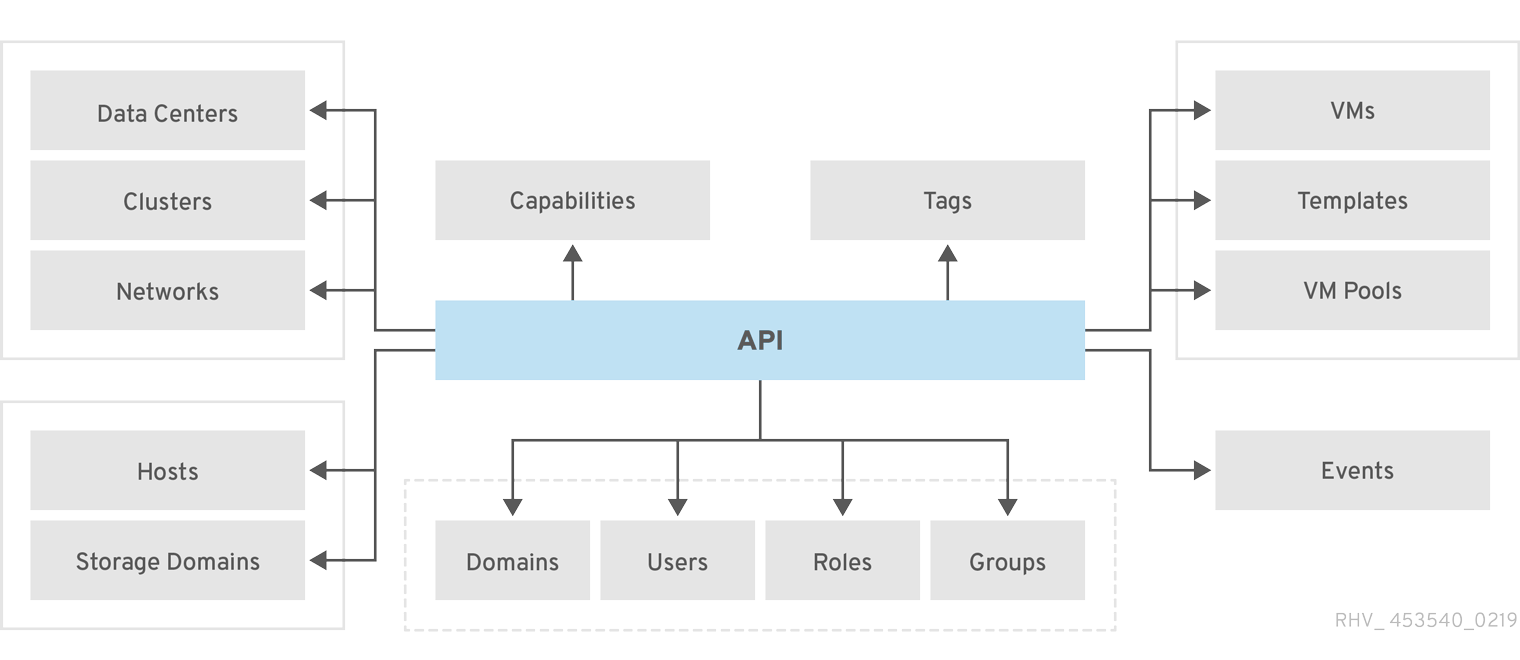
Figure 4.1. The relationship between the API entry point and the resource collections exposed by the API
Note
link element's href attribute, so clients are required to handle either form.
link elements also contain a set of search URIs for certain collections. These URIs use URI templates [4] to integrate search queries. The purpose of the URI template is to accept a search expression using the natural HTTP pattern of a query parameter. The client does not require prior knowledge of the URI structure. Thus clients should treat these templates as being opaque and access them with a URI template library.
"collection/search".
| Relationship | Description |
|---|---|
datacenters/search | Query data centers. |
clusters/search | Query host clusters. |
storagedomains/search | Query storage domains. |
hosts/search | Query hosts. |
vms/search | Query virtual machines. |
disks/search | Query disks. |
templates/search | Query templates. |
vmpools/search | Query virtual machine pools. |
events/search | Query events. |
users/search | Query users. |
4.3. Special Object Elements
| Relationship | Description |
|---|---|
templates/blank | The default blank virtual machine template for your virtualization environment. This template exists in every cluster as opposed to a standard template, which only exists in a single cluster. |
tags/root | The root tag that acts as a base for tag hierarchy in your virtualization environment. |
4.4. Summary Element
| Element | Description |
|---|---|
vms | Total number of vms and total number of active vms. |
hosts | Total number of hosts and total number of active hosts. |
users | Total number of users and total number of active users. |
storage_domains | Total number of storage domains and total number of active storage domains. |
4.5. RESTful Service Description Language (RSDL)
GET /ovirt-engine/api?rsdl HTTP/1.1 Accept: application/xml
GET /ovirt-engine/api?rsdl HTTP/1.1
Accept: application/xml
| Element | Description |
|---|---|
description | A plain text description of the RSDL document. |
version | The API version, including major release, minor release, build and revision. |
schema | A link to the XML schema (XSD) file. |
links | Defines each link in the API. |
link element contains the following a structure:
| Element | Description |
|---|---|
link | A URI for API requests. Includes a URI attribute (href) and a relationship type attribute (rel). |
request | Defines the request properties required for the link. |
http_method | The method type to access this link. Includes the standard HTTP methods for REST API access: GET, POST, PUT and DELETE. |
headers | Defines the headers for the HTTP request. Contains a series of header elements, which each contain a header name and value to define the header. |
body | Defines the body for the HTTP request. Contains a resource type and a parameter_set, which contains a sets of parameter elements with attributes to define whether they are required for a request and the data type. The parameter element also includes a name element to define the Red Hat Virtualization Manager property to modify and also a further parameter_set subset if type is set to collection. |
response | Defines the output for the HTTP request. Contains a type element to define the resource structure to output. |
4.6. Red Hat Virtualization Windows Guest VSS Support
4.7. QEMU Guest Agent Overview
guest-fsfreeze-freeze QMP command to the QEMU GA via the virtio-serial port. This command caused the guest agent to freeze all of the guest virtual machine's filesystems, via the FIFREEZE ioctl() kernel function. This ioctl() function is implemented by the Linux kernel in the guest virtual machine. The function flushes the filesystem cache in the guest virtual machine's kernel, brings the filesystem into a consistent state, and denies all userspace threads write access to the filesystem.
guest-fsfreeze-thaw QMP command to the QEMU GA over the virtio-serial port. This command tells the QEMU GA to issue a FITHAW ioctl(), which unblocks the userspace threads that were previously denied write access, and resumes normal processing. This process did not ensure that application-level data was in a consistent state when the virtual disk snapshot was taken. This was evident in cases where the fsck utility found no problems on filesystems restored from snapshots, and yet applications were not able to resume processing from the point where the snapshot was taken and userspace processes may not have written their internal buffers to files on the disk.
4.8. VSS Transaction Flow
Chapter 5. Compatibility Level Versions
compatibility level for each host, corresponding to the version of VDSM installed. A version element contains major and minor attributes, which describe the compatibility level.
version level appears under a supported_versions element. This indicates the cluster's version is now updatable to that level. Once the administrator updates all clusters within a data center to a given level, the data center is updatable to that level.
5.1. Upgrading Compatibility Levels
Example 5.1. Upgrading compatibility levels
3.5 and the API reports:
3.5. When the cluster is updated, the API reports:
3.5. Once upgraded, the API exposes features available in Red Hat Enterprise Virtualization 3.5 for this data center.
Chapter 6. Capabilities
capabilities collection provides information about the capabilities that versions of Red Hat Virtualization support. These capabilities include active features and available enumerated values for specific properties.
GET /ovirt-engine/api/capabilities/ HTTP/1.1 Content-Type: application/xml Accept: application/xml
GET /ovirt-engine/api/capabilities/ HTTP/1.1
Content-Type: application/xml
Accept: application/xml6.1. Version-Dependent Capabilities
capabilities element contains any number of version elements that describe capabilities dependent on a compatibility level.
version element includes attributes for major and minor version numbers. This indicates the current version level.
3.5, 3.6, and 4.0 respectively:
version contains a series of capabilities dependent on the version specified.
6.2. Current Version
current element signifies if the version specified is the most recent supported compatibility level. The value is a Boolean true or false.
6.3. Features
| Feature | Description |
|---|---|
| Transparent huge pages memory policy | Allows you to define the availability of transparent huge pages for hosts. Acceptable values are true or false. |
| Gluster support | This features provides support for using Gluster Volumes and Bricks as storage. |
| POSIX-FS storage type | This feature provides support for the POSIX-FS storage type. |
| Port mirroring | Allows you to define the availability of port mirroring for virtual network interface cards. Acceptable values are true or false. |
| Display server time | Displays the current date and time in the API. |
| Display host memory | Displays the total memory for a specific host. |
| Display host sockets | Allows you to define the topology of a host CPU. Takes three attributes - sockets, threads and cores - which define the number of host sockets displayed, the number of threads and the number of cores per socket. |
| Search case sensitivity | Allows you to specify whether a search query is case sensitive by providing the case-sensitive=true|false URL parameter. |
Maximum results for GET requests | Allows you to specify the maximum number of results returned from a GET request. |
| JSON content type | Allows you to define a header that makes it possible to set a correlation ID for POST and PUT requests. |
| Activate and deactivate disks | Allows you to activate or deactivate a disk by specifying activate or deactivate as an action on a specific virtual disk. |
| Activate and deactivate network interface cards | Allows you to activate or deactivate a network interface card by specifying activate or deactivate as an action on a specific network interface card. |
| Snapshot refactoring | Allows you to refactor snapshots for virtual machines. |
| Remove template disks from specified storage domain | Allows you to remove virtual machine template disks from a specific storage domain using a DELETE request. |
| Floating disks | Floating disks are disks that are not attached to any virtual machine. With this feature, such disks also appear in the root collection rather than under specific virtual machines. |
| Asynchronous deletion | Allows you to specify that DELETE requests are to be performed asynchronously by specifying the async URL parameter. |
| Session-based authentication | Allows you to maintain a client-server session by providing an appropriate header, eliminating the need to log in with each request. |
| Virtual machine applications | Allows you to view a list of applications installed on a specific virtual machine. This list is located in the applications element of a specific virtual machine. |
| VirtIO-SCSI support | This feature provides support for para-virtualized SCSI controller devices. |
| Custom resource comments | Allows you to add custom comments to data centers and other resources. |
| Refresh host capabilities | Allows you to synchronize data on hosts and refresh the list of network interfaces available to a specific host. |
| Memory snapshot | Allows you to include the memory state as part of a virtual machine snapshot. |
| Watchdog device | Allows you to create watchdog devices for virtual machines. |
| SSH authentication method | Allows you to authenticate with hosts over SSH using an administrative user password or SSH public key. |
| Force select SPM | Allows you to force the selection of a host as SPM. |
| Console device | Allows you to control the attachment of console devices in virtual machines. |
| Storage server connections for storage domains | Allows you to view storage server connections to or from a specific storage domain. |
| Attach and detach storage server connections | Allows you to attach or detach storage server connections to or from a specific storage domain. |
| Single PCI for Qxl | Allows you to view multiple video devices via a single PCI guest device. |
| Add virtual machine from OVF configuration | Allows you to add a virtual machine from a provided OVF configuration. |
| Virtual network interface card profiles | Allows you to configure a profile that defines quality of service, custom properties and port mirroring for a specific virtual network interface card. |
| Image storage domains (tech preview) | Allows you to import images from and export images to an image storage domain such as an OpenStack image service (Glance). |
| Virtual machine fully qualified domain names | Allows you to retrieve the fully qualified domain name of a specific virtual machine. |
| Attaching disk snapshots to virtual machines | This feature provides support for attaching disk snapshots to virtual machines. |
| Cloud-Init | Allows you to initialize a virtual machine using Cloud Init. |
| Gluster brick management | Allows you to delete gluster bricks with data migration using the actions migrate and DELETE. The migrate action and stopmigrate action allow you to migrate data and reuse the brick. |
| Copy and move back-end disks | Allows you to copy and move disks in additional contexts. |
| Network labels | Allows you to provision networks on hosts using labels. |
| Reboot virtual machines | Allows you to reboot virtual machines via a single action. |
Chapter 7. Common Features
7.1. Element Property Icons
Note
| Property | Description | Icon |
|---|---|---|
| Required for creation | These elements must be included in the client-provided representation of a resource on creation, but are not mandatory for an update of a resource. | 
|
| Non-updatable | These elements cannot have their value changed when updating a resource. Include these elements in a client-provided representation on update only if their values are not altered by the API user. If altered, the API reports an error. | 
|
| Read-only | These elements are read-only. Values for read-only elements are not created or modified. | 
|
7.2. Representations
7.2.1. Representations
7.2.2. Common Attributes to Resource Representations
| Attribute | Type | Description | Properties |
|---|---|---|---|
id | GUID | Each resource in the virtualization infrastructure contains an id, which acts as a globally unique identifier (GUID). The GUID is the primary method of resource identification. | |
href | string | The canonical location of the resource as an absolute path. |
7.2.3. Common Elements to Resource Representations
| Element | Type | Description | Properties |
|---|---|---|---|
name | string | A user-supplied human readable name for the resource. The name is unique across all resources of its type. | |
description | string | A free-form user-supplied human readable description of the resource. |
7.3. Collections
7.3.1. Collections
hosts collection which contains all virtualization hosts in the environment. An example of a sub-collection is the host.nics collection which contains resources for all network interface cards attached to a host resource.
7.3.2. Listing All Resources in a Collection
GET request on the collection URI obtained from the entry point.
Accept HTTP header to define the MIME type for the response format.
GET /ovirt-engine/api/[collection] HTTP/1.1 Accept: [MIME type]
GET /ovirt-engine/api/[collection] HTTP/1.1
Accept: [MIME type]7.3.3. Listing Extended Resource Sub-Collections
Accept header includes the detail parameter.
GET /ovirt-engine/api/collection HTTP/1.1 Accept: application/xml; detail=subcollection
GET /ovirt-engine/api/collection HTTP/1.1
Accept: application/xml; detail=subcollection
detail parameters:
GET /ovirt-engine/api/collection HTTP/1.1 Accept: application/xml; detail=subcollection1; detail=subcollection2
GET /ovirt-engine/api/collection HTTP/1.1
Accept: application/xml; detail=subcollection1; detail=subcollection2
detail parameter that separates the sub-collection with the + operator:
GET /ovirt-engine/api/collection HTTP/1.1 Accept: application/xml; detail=subcollection1+subcollection2+subcollection3
GET /ovirt-engine/api/collection HTTP/1.1
Accept: application/xml; detail=subcollection1+subcollection2+subcollection3
| Collection | Extended Sub-Collection Support |
|---|---|
hosts | statistics |
vms | statistics, nics, disks |
Example 7.1. A request for extended statistics, NICs and disks sub-collections in the vms collection
GET /ovirt-engine/api/vms HTTP/1.1 Accept: application/xml; detail=statistics+nics+disks
GET /ovirt-engine/api/vms HTTP/1.1
Accept: application/xml; detail=statistics+nics+disks
7.3.4. Searching Collections with Queries
GET request on a "collection/search" link results in a search query of that collection. The API only returns resources within the collection that satisfy the search query constraints.
7.3.5. Maximum Results Parameter
max URL parameter to limit the list of results. An API search query without specifying the max parameter will return all values. Specifying the max parameter is recommended to prevent API search queries from slowing UI performance.
7.3.6. Case Sensitivity
Example 7.2. Case insensitive search query
GET /ovirt-engine/api/collection;case-sensitive=false?search={query} HTTP/1.1
Accept: application/xml
GET /ovirt-engine/api/collection;case-sensitive=false?search={query} HTTP/1.1
Accept: application/xml
7.3.7. Query Syntax
query with a GET request:
GET /ovirt-engine/api/collection?search={query} HTTP/1.1
Accept: application/xml
GET /ovirt-engine/api/collection?search={query} HTTP/1.1
Accept: application/xml
query template value refers to the search query the API directs to the collection. This query uses the same format as Red Hat Virtualization Query Language:
(criteria) [sortby (element) asc|desc]
sortby clause is optional and only needed when ordering results.
| Collection | Criteria | Result |
|---|---|---|
hosts | vms.status=up | Displays a list of all hosts running virtual machines that are up. |
vms | domain=qa.company.com | Displays a list of all virtual machines running on the specified domain. |
vms | users.name=mary | Displays a list of all virtual machines belonging to users with the user name mary. |
events | severity>normal sortby time | Displays the list of all events with severity higher than normal and sorted by the time element values. |
events | severity>normal sortby time desc | Displays the list of all events with severity higher than normal and sorted by the time element values in descending order. |
query template to be URL-encoded to translate reserved characters, such as operators and spaces.
Example 7.3. URL-encoded search query
GET /ovirt-engine/api/vms?search=name%3Dvm1 HTTP/1.1 Accept: application/xml
GET /ovirt-engine/api/vms?search=name%3Dvm1 HTTP/1.1
Accept: application/xml
7.3.8. Wildcards
Example 7.4. Wildcard search query for name=vm*
GET /ovirt-engine/api/vms?search=name%3Dvm* HTTP/1.1 Accept: application/xml
GET /ovirt-engine/api/vms?search=name%3Dvm* HTTP/1.1
Accept: application/xml
vm, such as vm1, vm2, vma or vm-webserver.
Example 7.5. Wildcard search query for name=v*1
GET /ovirt-engine/api/vms?search=name%3Dv*1 HTTP/1.1 Accept: application/xml
GET /ovirt-engine/api/vms?search=name%3Dv*1 HTTP/1.1
Accept: application/xml
v and ending with 1, such as vm1, vr1 or virtualmachine1.
7.3.9. Pagination
page command.
Example 7.6. Paginating resources
GET /ovirt-engine/api/collection?search=page%201 HTTP/1.1 Accept: application/xml
GET /ovirt-engine/api/collection?search=page%201 HTTP/1.1
Accept: application/xml
page value to view the next page of results:
GET /ovirt-engine/api/collection?search=page%202 HTTP/1.1 Accept: application/xml
GET /ovirt-engine/api/collection?search=page%202 HTTP/1.1
Accept: application/xml
page command in conjunction with other commands in a search query. For example:
GET /ovirt-engine/api/collection?search=sortby%20element%20asc%20page%202 HTTP/1.1 Accept: application/xml
GET /ovirt-engine/api/collection?search=sortby%20element%20asc%20page%202 HTTP/1.1
Accept: application/xml
Important
7.3.10. Creating a Resource in a Collection
POST request to the collection URI containing a representation of the new resource.
POST request requires a Content-Type header. This informs the API of the representation MIME type in the body content as part of the request.
Accept HTTP header to define the MIME type for the response format.
POST /ovirt-engine/api/[collection] HTTP/1.1 Accept: [MIME type] Content-Type: [MIME type] [body]
POST /ovirt-engine/api/[collection] HTTP/1.1
Accept: [MIME type]
Content-Type: [MIME type]
[body]7.3.11. Asynchronous Requests
POST requests unless the user overrides them with an Expect: 201-created header.
202 Accepted status. The initial document structure for a 202 Accepted resource also contains a creation_status element and link for creation status updates. For example:
GET request to the creation_status link provides a creation status update:
Expect: 201-created header:
7.4. Resources
7.4.1. Resources
7.4.2. Retrieving a Resource
GET request on a URI obtained from a collection listing.
Accept HTTP header to define the MIME type for the response format.
GET /ovirt-engine/api/[collection]/[resource_id] HTTP/1.1 Accept: [MIME type]
GET /ovirt-engine/api/[collection]/[resource_id] HTTP/1.1
Accept: [MIME type]All-Content: true header. The RESTful Service Description Language describes which links support this header.
GET /ovirt-engine/api/[collection]/[resource_id] HTTP/1.1 Accept: [MIME type] All-Content: true
GET /ovirt-engine/api/[collection]/[resource_id] HTTP/1.1
Accept: [MIME type]
All-Content: true
7.4.3. Updating a Resource
PUT request containing an updated description from a previous GET request for the resource URI. Details on modifiable properties are found in the individual resource type documentation.
PUT request requires a Content-Type header. This informs the API of the representation MIME type in the body content as part of the request.
Accept HTTP header to define the MIME type for the response format.
PUT /ovirt-engine/api/collection/resource_id HTTP/1.1 Accept: [MIME type] Content-Type: [MIME type] [body]
PUT /ovirt-engine/api/collection/resource_id HTTP/1.1
Accept: [MIME type]
Content-Type: [MIME type]
[body]7.4.4. Deleting a Resource
DELETE request sent to its URI.
Accept HTTP header to define the MIME type for the response format.
DELETE /ovirt-engine/api/[collection]/[resource_id] HTTP/1.1 Accept: [MIME type]
DELETE /ovirt-engine/api/[collection]/[resource_id] HTTP/1.1
Accept: [MIME type]DELETE request to specify additional properties. A DELETE request with optional body content requires a Content-Type header to inform the API of the representation MIME type in the body content. If a DELETE request contains no body content, omit the Content-Type header.
7.4.5. Sub-Collection Relationships
- Where one parent resource can contain several child resources and vice versa. For example, a virtual machine can contain several disks and some disks are shared among multiple virtual machines.
- Where mapped resources are dependent on a parent resource. Without the parent resource, the dependent resource cannot exist. For example, the link between a virtual machine and snapshots.
- Where mapped resources exist independently from parent resources but data is still associated with the relationship. For example, the link between a cluster and a network.
link rel= attribute:
7.4.6. XML Element Relationships
- Backlinks from a resource in a sub-collection to a parent resource; or
- Links between resources with an arbitrary relationship.
Example 7.7. Backlinking from a sub-collection resource to a resource using an XML element
7.4.7. Actions
POST request to the supplied URI. The body of the POST requires an action representation encapsulating common and task-specific parameters.
| Element | Description |
|---|---|
async | true if the server responds immediately with 202 Accepted and an action representation contains a href link to be polled for completion. |
grace_period | a grace period in milliseconds, which must expire before the action is initiated. |
fault response.
Content-Type: application/xml header since the POST request requires an XML representation in the body content.
202 Accepted response provides a link to monitor the status of the task:
GET on the action URI provides an indication of the status of the asynchronous task.
| Status | Description |
|---|---|
pending | Task has not yet started. |
in_progress | Task is in operation. |
complete | Task completed successfully. |
failed | Task failed. The returned action representation would contain a fault describing the failure. |
GETs are 301 Moved Permanently redirected back to the target resource.
rel attribute:
| Type | Description |
|---|---|
parent | A link back to the resource of this action. |
replay | A link back to the original action URI. POSTing to this URI causes the action to be re-initiated. |
7.4.8. Permissions
permissions sub-collection. Each permission contains a user, an assigned role and the specified resource. For example:
POST request with a permission representation and a Content-Type: application/xml header to the resource's permissions sub-collection. Each new permission requires a role and a user:
7.4.9. Handling Errors
fault representation in the response entity body. The fault contains a reason and detail strings. Clients must accommodate failed requests via extracting the fault or the expected resource representation depending on the response status code. Such cases are clearly indicated in the individual resource documentation.
Chapter 8. The Backup and Restore API
8.1. Backing Up a Virtual Machine
Procedure 8.1. Backing Up a Virtual Machine
- Using the REST API, create a snapshot of the virtual machine to back up:
Copy to Clipboard Copied! Toggle word wrap Toggle overflow Note
When you take a snapshot of a virtual machine, a copy of the configuration data of the virtual machine as at the time the snapshot was taken is stored in thedataattribute of theconfigurationattribute ininitializationunder the snapshot.Important
You cannot take snapshots of disks that are marked as shareable or that are based on direct LUN disks. - Retrieve the configuration data of the virtual machine from the
dataattribute under the snapshot:GET /ovirt-engine/api/vms/11111111-1111-1111-1111-111111111111/snapshots/11111111-1111-1111-1111-111111111111 HTTP/1.1 Accept: application/xml Content-type: application/xml
GET /ovirt-engine/api/vms/11111111-1111-1111-1111-111111111111/snapshots/11111111-1111-1111-1111-111111111111 HTTP/1.1 Accept: application/xml Content-type: application/xmlCopy to Clipboard Copied! Toggle word wrap Toggle overflow - Identify the disk ID and snapshot ID of the snapshot:
GET /ovirt-engine/api/vms/11111111-1111-1111-1111-111111111111/snapshots/11111111-1111-1111-1111-111111111111/disks HTTP/1.1 Accept: application/xml Content-type: application/xml
GET /ovirt-engine/api/vms/11111111-1111-1111-1111-111111111111/snapshots/11111111-1111-1111-1111-111111111111/disks HTTP/1.1 Accept: application/xml Content-type: application/xmlCopy to Clipboard Copied! Toggle word wrap Toggle overflow - Attach the snapshot to the backup virtual machine and activate the disk:
Copy to Clipboard Copied! Toggle word wrap Toggle overflow - Use the backup software on the backup virtual machine to back up the data on the snapshot disk.
- Detach the snapshot disk from the backup virtual machine:
Copy to Clipboard Copied! Toggle word wrap Toggle overflow - Optionally, delete the snapshot:
DELETE /ovirt-engine/api/vms/11111111-1111-1111-1111-111111111111/snapshots/11111111-1111-1111-1111-111111111111 HTTP/1.1 Accept: application/xml Content-type: application/xml
DELETE /ovirt-engine/api/vms/11111111-1111-1111-1111-111111111111/snapshots/11111111-1111-1111-1111-111111111111 HTTP/1.1 Accept: application/xml Content-type: application/xmlCopy to Clipboard Copied! Toggle word wrap Toggle overflow
8.2. Restoring a Virtual Machine
Procedure 8.2. Restoring a Virtual Machine
- Attach the disk to the backup virtual machine:
Copy to Clipboard Copied! Toggle word wrap Toggle overflow - Use the backup software to restore the backup to the disk.
- Detach the disk from the backup virtual machine:
Copy to Clipboard Copied! Toggle word wrap Toggle overflow - Create a new virtual machine using the configuration data of the virtual machine being restored:
Copy to Clipboard Copied! Toggle word wrap Toggle overflow - Attach the disk to the new virtual machine:
Copy to Clipboard Copied! Toggle word wrap Toggle overflow
Chapter 9. Data Centers
9.1. Data Center Elements
datacenters collection provides information about the data centers in a Red Hat Virtualization environment. An API user accesses this information through the rel="datacenters" link obtained from the entry point URI.
| Element | Type | Description | Properties |
|---|---|---|---|
name | string | A plain text, human-readable name for the data center. The name is unique across all data center resources. |
|
description | string | A plain text, human-readable description of the data center | |
link rel="storagedomains" | relationship | A link to the sub-collection for storage domains attached to this data center. | |
link rel="clusters" | relationship | A link to the sub-collection for clusters attached to this data center. | |
link rel="networks" | relationship | A link to the sub-collection for networks available to this data center. | |
link rel="permissions" | relationship | A link to the sub-collection for data center permissions. | |
link rel="quotas" | relationship | A link to the sub-collection for quotas associated with this data center. | |
local | Boolean: true or false | Specifies whether the data center is a local data center, such as created in all-in-one instances. |
|
storage_format | enumerated | Describes the storage format version for the data center. A list of enumerated values are available in capabilities. | |
version major= minor= | complex | The compatibility level of the data center. | |
supported_versions | complex | A list of possible version levels for the data center, including version major= minor=. |
|
mac_pool | string | The MAC address pool associated with the data center. If no MAC address pool is specified the default MAC address pool is used. | |
status | see below | The data center status. |
|
status contains one of the following enumerated values: uninitialized, up, maintenance, not_operational, problematic and contend. These states are listed in data_center_states under capabilities.
9.2. XML Representation of a Data Center
Example 9.1. An XML representation of a data center
9.3. JSON Representation of a Data Center
Example 9.2. A JSON representation of a data center
9.4. Methods
9.4.1. Creating a New Data Center
name and local elements.
Example 9.3. Creating a data center
9.4.2. Updating a Data Center
name, description, storage_type, version, storage_format and mac_pool elements are updatable post-creation.
Example 9.4. Updating a data center
9.4.3. Removing a Data Center
DELETE request.
Example 9.5. Removing a data center
DELETE /ovirt-engine/api/datacenters/00000000-0000-0000-0000-000000000000 HTTP/1.1 HTTP/1.1 204 No Content
DELETE /ovirt-engine/api/datacenters/00000000-0000-0000-0000-000000000000 HTTP/1.1
HTTP/1.1 204 No Content
9.5. Sub-Collections
9.5.1. Storage Domains Sub-Collection
9.5.1.1. Storage Domains Sub-Collection
status and set of actions. States for the status element are listed in storage_domain_states under capabilities.
Important
9.5.1.2. Attaching and Detaching a Storage Domain
POSTs to the data center's storage domains sub-collection.
id or name must be supplied. An example of attaching a storage domain to a data center:
Example 9.6. Attach a storage domain to a data center
DELETE request. Include an optional async element for this request to be asynchronous.
Example 9.7. Detach a storage domain from a data center
9.5.1.3. Actions
9.5.1.3.1. Activate Storage Domain Action
Example 9.8. Action to active a storage domain on a datacenter
9.5.1.3.2. Deactivate Storage Domain Action
Example 9.9. Action to deactivate a storage domain on a datacenter
9.5.2. Network Sub-Collection
9.5.2.1. Networks Sub-Collection
networks sub-collection. The representation of a data center's network sub-collection contains the following elements:
| Element | Type | Description |
|---|---|---|
name | string | A plain text, human readable name for the network. |
description | string | A plain text, human readable description of the network. |
rel="permissions" | relationship | A link to the permissions sub-collection for the network. |
rel="vnicprofiles" | relationship | A link to the vnicprofiles sub-collection for the network. |
rel="labels" | relationship | A link to the labels sub-collection for the network. |
data_center id= | relationship | A reference to the data center of which the network is a member. |
stp | Boolean: true or false | Specifies whether spanning tree protocol is enabled for the network. |
mtu | integer | Specifies the maximum transmission unit for the network. |
usages | complex | Defines a set of usage elements for the network. Users can define networks as vm and display networks at this level. |
networks sub-collection with the standard REST methods. For example, the POST method can be used to update a network id or name
Example 9.10. Associating a network resource with a data center
PUT request. The maximum transmission unit of a network is set using a PUT request to specify the integer value of the mtu element.
Example 9.11. Setting the network maximum transmission unit
DELETE request to the appropriate element in the collection.
Example 9.12. Removing a network association from a data center
DELETE /ovirt-engine/api/datacenters/00000000-0000-0000-0000-000000000000/networks/00000000-0000-0000-0000-000000000000 HTTP/1.1 HTTP/1.1 204 No Content
DELETE /ovirt-engine/api/datacenters/00000000-0000-0000-0000-000000000000/networks/00000000-0000-0000-0000-000000000000 HTTP/1.1
HTTP/1.1 204 No Content9.5.3. Quotas Sub-Collection
9.5.3.1. Quotas Sub-Collection
GET method.
Example 9.13. An XML representation of a quota
name and description elements.
Example 9.14. Creating a quota
DELETE request.
Example 9.15. Removing a quota
DELETE /ovirt-engine/api/datacenters/01a45ff0-915a-11e0-8b87-5254004ac988/quotas/e13ff85a-b2ba-4f7b-8010-e0d057c03dfe HTTP/1.1 HTTP/1.1 204 No Content
DELETE /ovirt-engine/api/datacenters/01a45ff0-915a-11e0-8b87-5254004ac988/quotas/e13ff85a-b2ba-4f7b-8010-e0d057c03dfe HTTP/1.1
HTTP/1.1 204 No Content
9.6. Actions
9.6.1. Force Remove Data Center Action
force action to help with these situations.
DELETE method. The request body contains an action representation with the force parameter set to true. The request also requires an additional Content-type: application/xml header to process the XML representation in the body.
Example 9.16. Force remove action on a data center
- Deletes all database information for
datastorage domains associated the data center; - Deletes all database information for resources, such as virtual machines and templates, on
datastorage domains associated the data center; - Detaches
isoandexportstorage domains from the data center; and - Deletes the database information for the data center.
Important
data storage domains associated with the data center require manual format before reuse. Metadata for iso and export domains require manual cleaning prior to use on another data center.
Chapter 10. Clusters
10.1. Cluster Elements
clusters collection provides information about clusters in a Red Hat Virtualization environment. An API user accesses this information through the rel="clusters" link obtained from the entry point URI.
| Element | Type | Description | Properties |
|---|---|---|---|
name | string | A user-supplied, human-readable name for the cluster. The name is unique across all cluster resources. |
|
description | string | A free-form, user-supplied, human-readable description of the cluster. | |
link rel="networks" | relationship | A link to the sub-collection for networks associated with this cluster. | |
link rel="permissions" | relationship | A link to the sub-collection for cluster permissions. | |
link rel="glustervolumes" | relationship | A link to the sub-collection for Red Hat Gluster Storage volumes associated with this cluster. | |
link rel="glusterhooks" | relationship | A link to the sub-collection for Red Hat Gluster Storage volume hooks associated with this cluster. | |
link rel="affinitygroups" | relationship | A link to the sub-collection for virtual machine affinity groups associated with this cluster. | |
cpu id= | complex | A server CPU reference that defines the CPU type all hosts must support in the cluster. |
|
data_center id= | GUID | A reference to the data center membership of this cluster. |
|
memory_policy | complex | Defines the cluster's policy on host memory utilization. |
|
scheduling_policy | complex | Defines the load-balancing or power-saving modes for hosts in the cluster. |
|
version major= minor= | complex | The compatibility level of the cluster. |
|
supported_versions | complex | A list of possible version levels for the cluster. |
|
error_handling | complex/enumerated | Defines virtual machine handling when a host within a cluster becomes non-operational. Requires a single on_error element containing an enumerated type property listed in capabilities. | |
virt_service | Boolean | Defines whether to expose virtualization services for this cluster. | |
gluster_service | Boolean | Defines whether to expose Red Hat Gluster Storage services for this cluster. | |
threads_as_cores | Boolean | Defines whether hosts can run virtual machines with a total number of processor cores greater than the number of cores in the host. | |
tunnel_migration | Boolean | Defines whether virtual machines use a libvirt-to-libvirt tunnel during migration. | |
trusted_service | Boolean | Defines whether an OpenAttestation server is used to verify hosts. | |
ballooning_enabled | Boolean | Defines whether ballooning is enabled for the cluster. | |
ksm | Boolean | Defines whether ksm is enabled for the cluster. |
Note
mom.Controllers.Balloon - INFO Ballooning guest:half1 from 1096400 to 1991580 are logged to /etc/vdsm/mom.conf. /etc/vdsm/mom.conf is the Memory Overcommit Manager log file. An event will also be added to the event log if a virtual machine does not respect a balloon.
10.2. Memory Policy Elements
memory_policy element contains the following elements:
| Element | Type | Description | Properties |
|---|---|---|---|
overcommit percent= | complex | The percentage of host memory allowed in use before no more virtual machines can start on a host. Virtual machines can use more than the available host memory due to memory sharing under KSM. Recommended values include 100 (None), 150 (Server Load) and 200 (Desktop Load). |
|
transparent_hugepages | complex | Define the enabled status of Transparent Hugepages. The status is either true or false. Check capabilities feature set to ensure your version supports transparent hugepages. |
|
10.3. Scheduling Policy Elements
scheduling_policy element contains the following elements:
| Element | Type | Description | Properties |
|---|---|---|---|
policy | enumerated | The VM scheduling mode for hosts in the cluster. A list of enumerated types are listed in capabilities. |
|
thresholds low= high= duration= | complex | Defines CPU limits for the host. The high attribute controls the highest CPU usage percentage the host can have before being considered overloaded. The low attribute controls the lowest CPU usage percentage the host can have before being considered underutilized. The duration attribute refers to the number of seconds the host needs to be overloaded before the scheduler starts and moves the load to another host. |
|
10.4. XML Representation of a Cluster
Example 10.1. An XML representation of a cluster
10.5. JSON Representation of a Cluster
Example 10.2. A JSON representation of a cluster
10.6. Methods
10.6.1. Creating a Cluster
name, cpu id= and datacenter elements. Identify the datacenter with either the id attribute or name element.
Example 10.3. Creating a cluster
10.6.2. Updating a Cluster
name, description, cpu id= and error_handling elements are updatable post-creation.
Example 10.4. Updating a cluster
10.6.3. Removing a Cluster
DELETE request.
Example 10.5. Removing a cluster
DELETE /ovirt-engine/api/clusters/00000000-0000-0000-0000-000000000000 HTTP/1.1 HTTP/1.1 204 No Content
DELETE /ovirt-engine/api/clusters/00000000-0000-0000-0000-000000000000 HTTP/1.1
HTTP/1.1 204 No Content
10.7. Sub-Collections
10.7.1. Networks Sub-Collection
10.7.1.1. Networks Sub-Collection
networks sub-collection. Every host within a cluster connects to these associated networks.
network sub-collection is the same as a standard network resource except for the following additional elements:
| Element | Type | Description | Properties |
|---|---|---|---|
cluster id= | relationship | A reference to the cluster of which this network is a member. |
|
required | Boolean | Defines required or optional network status. | |
display | Boolean | Defines the display network status. Used for backward compatibility. | |
usages | complex | Defines a set of usage elements for the network. Users can define networks as VM and DISPLAY networks at this level. |
networks sub-collection with the standard REST methods. POSTing a network id or name reference to the networks sub-collection associates the network with the cluster.
Example 10.6. Associating a network resource with a cluster
PUT request.
Example 10.7. Setting the display network status
PUT request to specify the Boolean value (true or false) of the required element.
Example 10.8. Setting optional network status
DELETE request to the appropriate element in the collection.
Example 10.9. Removing a network association from a cluster
DELETE /ovirt-engine/api/clusters/99408929-82cf-4dc7-a532-9d998063fa95/networks/da05ac09-00be-45a1-b0b5-4a6a2438665f HTTP/1.1 HTTP/1.1 204 No Content
DELETE /ovirt-engine/api/clusters/99408929-82cf-4dc7-a532-9d998063fa95/networks/da05ac09-00be-45a1-b0b5-4a6a2438665f HTTP/1.1
HTTP/1.1 204 No Content
10.7.2. Storage Volumes Sub-Collection
10.7.2.1. Red Hat Gluster Storage Volumes Sub-Collection
glustervolumes sub-collection.
glustervolumes sub-collection is defined using the following elements:
| Element | Type | Description | Properties |
|---|---|---|---|
volume_type | enumerated | Defines the volume type. See the capabilities collection for a list of volume types. |
|
bricks | relationship | The sub-collection for the Red Hat Gluster Storage bricks. When creating a new volume, the request requires a set of brick elements to create and manage in this cluster. Requires the server_id of the Red Hat Gluster Storage server and a brick_dir element for the brick directory |
|
transport_types | complex | Defines a set of volume transport_type elements. See the capabilities collection for a list of available transport types. |
|
replica_count | integer | Defines the file replication count for a replicated volume. |
|
stripe_count | integer | Defines the stripe count for a striped volume |
|
options | complex | A set of additional Red Hat Gluster Storage option elements. Each option includes an option name and a value. |
|
Example 10.10. An XML representation of a Red Hat Gluster Storage volume
POST request with the required name, volume_type and bricks to the sub-collection.
Example 10.11. Creating a Red Hat Gluster Storage volume
DELETE request.
Example 10.12. Removing a Red Hat Gluster Storage volume
DELETE /ovirt-engine/api/clusters/99408929-82cf-4dc7-a532-9d998063fa95/glustervolumes/e199f877-900a-4e30-8114-8e3177f47651 HTTP/1.1 HTTP/1.1 204 No Content
DELETE /ovirt-engine/api/clusters/99408929-82cf-4dc7-a532-9d998063fa95/glustervolumes/e199f877-900a-4e30-8114-8e3177f47651 HTTP/1.1
HTTP/1.1 204 No Content
Important
glustervolumes sub-collection cannot be updated.
10.7.2.2. Bricks Sub-Collection
glustervolumes sub-collection contains its own bricks sub-collection to define individual bricks in a Red Hat Gluster Storage volume. Additional information can be retrieved for GET requests using the All-Content: true header.
bricks sub-collection is defined using the following elements:
| Element | Type | Description | Properties |
|---|---|---|---|
server_id | string | A reference to the Red Hat Gluster Storage server. |
|
brick_dir | string | Defines a brick directory on the Red Hat Gluster Storage server. |
|
replica_count | integer | Defines the file replication count for the brick in the volume. |
|
stripe_count | integer | Defines the stripe count for the brick in the volume |
|
POST request with the required server_id and brick_dir to the sub-collection.
Example 10.13. Adding a brick
DELETE request.
Example 10.14. Removing a brick
DELETE /ovirt-engine/api/clusters/99408929-82cf-4dc7-a532-9d998063fa95/glustervolumes/e199f877-900a-4e30-8114-8e3177f47651/bricks/0a473ebe-01d2-444d-8f58-f565a436b8eb HTTP/1.1 HTTP/1.1 204 No Content
DELETE /ovirt-engine/api/clusters/99408929-82cf-4dc7-a532-9d998063fa95/glustervolumes/e199f877-900a-4e30-8114-8e3177f47651/bricks/0a473ebe-01d2-444d-8f58-f565a436b8eb HTTP/1.1
HTTP/1.1 204 No Content
Important
bricks sub-collection cannot be updated.
10.7.2.3. Actions
10.7.2.3.1. Start Action
start action makes a Gluster volume available for use.
Example 10.15. Starting a Volume
force Boolean element to force the action for a running volume. This is useful for starting disabled brick processes in a running volume.
10.7.2.3.2. Stop Action
stop action deactivates a Gluster volume.
Example 10.16. Stopping a Volume
force Boolean element to brute force the stop action.
10.7.2.3.3. Set Option Action
setoption action sets a volume option.
Example 10.17. Set an option
10.7.2.3.4. Reset Option Action
resetoption action resets a volume option.
Example 10.18. Reset an option
10.7.2.3.5. Reset All Options Action
resetalloptions action resets all volume options.
Example 10.19. Reset all options
10.7.3. Affinity Groups Sub-Collection
10.7.3.1. Affinity Group Sub-Collection
affinitygroups sub-collection is defined using the following elements:
| Element | Type | Description | Properties |
|---|---|---|---|
name | string | A plain text, human readable name for the affinity group. |
|
cluster | relationship | A reference to the cluster to which the affinity group applies. | |
positive | Boolean: true or false | Specifies whether the affinity group applies positive affinity or negative affinity to virtual machines that are members of that affinity group. | |
enforcing | Boolean: true or false | Specifies whether the affinity group uses hard or soft enforcement of the affinity applied to virtual machines that are members of that affinity group. |
Example 10.20. An XML representation of a virtual machine affinity group
POST request with the required name attribute.
Example 10.21. Creating a virtual machine affinity group
DELETE request.
Example 10.22. Removing a virtual machine affinity group
DELETE https://XX.XX.XX.XX/ovirt-engine/api/clusters/00000000-0000-0000-0000-000000000000/affinitygroups/00000000-0000-0000-0000-000000000000 HTTP/1.1 HTTP/1.1 204 No Content
DELETE https://XX.XX.XX.XX/ovirt-engine/api/clusters/00000000-0000-0000-0000-000000000000/affinitygroups/00000000-0000-0000-0000-000000000000 HTTP/1.1
HTTP/1.1 204 No ContentChapter 11. Networks
11.1. Network Elements
networks collection provides information about the logical networks in a Red Hat Virtualization environment. An API user accesses this information through the rel="networks" link obtained from the entry point URI.
| Element | Type | Description | Properties |
|---|---|---|---|
link rel="vnicprofiles" | relationship | A link to the sub-collection for VNIC profiles attached to this logical network. | |
link rel="labels" | relationship | A link to the sub-collection for labels attached to this logical network. | |
data_center id= | GUID | A reference to the data center of which this cluster is a member. |
|
vlan id= | integer | A VLAN tag. | |
stp | Boolean: true or false | true if Spanning Tree Protocol is enabled on this network. | |
mtu | integer | Sets the maximum transmission unit for the logical network. If omitted, the logical network uses the default value. | |
status | One of operational or non_operational | The status of the network. These states are listed in network_states under capabilities. |
|
usages | complex | Defines a set of usage elements for the network. Users can define networks as VM networks at this level. |
Important
11.2. XML Representation of a Network Resource
Example 11.1. An XML representation of a network resource
11.3. JSON Representation of a Network Resource
Example 11.2. A JSON representation of a network resource
11.4. Methods
11.4.1. Creating a Network Resource
name and datacenter elements.
Example 11.3. Creating a network resource
11.4.2. Updating a Network Resource
name, description, ip, vlan, stp and display elements are updatable post-creation.
Example 11.4. Updating a network resource
11.4.3. Removing a Network Resource
DELETE request.
Example 11.5. Removing a network
DELETE /ovirt-engine/api/networks/00000000-0000-0000-0000-000000000000 HTTP/1.1 HTTP/1.1 204 No Content
DELETE /ovirt-engine/api/networks/00000000-0000-0000-0000-000000000000 HTTP/1.1
HTTP/1.1 204 No Content
11.5. Sub-collections
11.5.1. Network VNIC Profile Sub-Collection
vnicprofile contains the following elements:
| Element | Type | Description |
|---|---|---|
name | string | The unique identifier for the profile. |
description | string | A plain text description of the profile. |
network | string | The unique identifier of the logical network to which the profile applies. |
port_mirroring | Boolean: true or false | The default is false. |
Example 11.6. An XML representation of the network's vnicprofile sub-collection
11.5.2. Network Labels Sub-Collection
label contains the following elements:
| Element | Type | Description |
|---|---|---|
network | string | The href and id of the networks to which the label is attached. |
Example 11.7. An XML representation of the network's labels sub-collection
11.5.3. Methods
11.5.3.1. Attach Label to Logical Network Action
Example 11.8. Action to attach a label to a logical network
POST /ovirt-engine/api/networks/00000000-0000-0000-0000-000000000000/labels/ HTTP/1.1 Accept: application/xml Content-type: application/xml <label id="Label_001" />
POST /ovirt-engine/api/networks/00000000-0000-0000-0000-000000000000/labels/ HTTP/1.1
Accept: application/xml
Content-type: application/xml
<label id="Label_001" />11.5.3.2. Removing a Label From a Logical Network
DELETE request.
Example 11.9. Removing a label from a logical network
DELETE /ovirt-engine/api/networks/00000000-0000-0000-0000-000000000000/labels/[label_id] HTTP/1.1 HTTP/1.1 204 No Content
DELETE /ovirt-engine/api/networks/00000000-0000-0000-0000-000000000000/labels/[label_id] HTTP/1.1
HTTP/1.1 204 No Content
Chapter 12. Storage Domains
12.1. Storage Domain Elements
storagedomains collection provides information about the storage domains in a Red Hat Virtualization environment. An API user accesses this information through the rel="storagedomains" link obtained from the entry point URI.
| Element | Type | Description | Properties |
|---|---|---|---|
link rel="permissions" | relationship | A link to the sub-collection for storage domain permissions. | |
link rel="files" | relationship | A link to the files sub-collection for this storage domains. | |
link rel="vms" | relationship | A link to the vms sub-collection for a storage domain with type set to export. | |
link rel="templates" | relationship | A link to the templates sub-collection for a storage domain with type set to export. | |
type | enumerated | The storage domain type. A list of enumerated values are available in capabilities. |
|
external_status | complex/enumerated | The storage domain health status as reported by external systems and plug-ins. The state element contains an enumerated value of ok, info, warning, error, or failure. | |
master | Boolean: true or false | true if this is the master storage domain of a data center. |
|
host | complex | A reference to the host on which this storage domain should be initialized. The only restriction on this host is that it should have access to the physical storage specified. |
|
storage | complex | Describes the underlying storage of the storage domain. |
|
available | integer | Space available in bytes. |
|
used | integer | Space used in bytes. |
|
committed | integer | Space committed in bytes. |
|
storage_format | enumerated | Describes the storage format version for the storage domain. A list of enumerated values are available in capabilities. |
|
wipe_after_delete | Boolean: true or false | Sets the wipe after delete option by default on the storage domain. This option can be edited after the domain is created, but doing so will not change the wipe after delete property of disks that already exist. | |
warning_low_space_indicator | integer | A percentage value that sets the warning low space indicator option. If the free space available on the storage domain is below this percentage, warning messages are displayed to the user and logged. | |
critical_space_action_blocker | integer | A value in GB that sets the critical space action blocker option. If the free space available on the storage domain is below this value, error messages are displayed to the user and logged, and any new action that consumes space, even temporarily, will be blocked. |
Important
12.2. XML Representation of a Storage Domain
Example 12.1. An XML representation of a storage domain
12.3. JSON Representation of a Storage Domain
Example 12.2. A JSON representation of a storage domain
12.4. Methods
12.4.1. Creating a Storage Domain
name, type, host and storage elements. Identify the host element with the id attribute or name element.
<wipe_after_delete> in the POST request. This option can be edited after the domain is created, but doing so will not change the wipe after delete property of disks that already exist.
Example 12.3. Creating a storage domain
12.4.2. Updating a Storage Domain
name and wipe after delete elements are updatable post-creation. Changing the wipe after delete element will not change the wipe after delete property of disks that already exist.
Example 12.4. Updating a storage domain
12.4.3. Removing a Storage Domain
DELETE request.
Example 12.5. Removing a storage domain
DELETE /ovirt-engine/api/storagedomains/fabe0451-701f-4235-8f7e-e20e458819ed HTTP/1.1 HTTP/1.1 204 No Content
DELETE /ovirt-engine/api/storagedomains/fabe0451-701f-4235-8f7e-e20e458819ed HTTP/1.1
HTTP/1.1 204 No Content
12.5. Storage Types
12.5.1. Storage Types
storage element contains a type element, which is an enumerated value found under the capabilities collection.
type. The next few sections examine these additional storage type elements.
12.5.2. NFS Storage
nfs specific elements in a storage description.
| Element | Type | Description | Properties |
|---|---|---|---|
address | string | The host name or IP address of the NFS server. |
|
path | string | The path of NFS mountable directory on the server. |
|
12.5.3. PosixFS Storage
posixfs specific elements in a storage description.
| Element | Type | Description | Properties |
|---|---|---|---|
address | string | The host name or IP address of the PosixFS server. |
|
path | string | The path of PosixFS mountable directory on the server. |
|
vfs_type | string | The Linux-supported file system type of the PosixFS share. |
|
mount_options | string | The options for mounting the PosixFS share. |
|
12.5.4. iSCSI and FCP Storage
iscsi and fcp specific elements in a storage description.
| Element | Type | Description | Properties |
|---|---|---|---|
logical_unit id= | complex | The id of the logical unit. A storage domain also accepts multiple iSCSI or FCP logical units. |
|
override_luns | Boolean | Defines whether to replace all logical unit settings with new settings. Set to true to override. |
|
logical_unit contains a set of sub-elements.
| Element | Type | Description | Properties |
|---|---|---|---|
address | string | The address of the server containing the storage device. |
|
port | integer | The port number of the server. |
|
target | string | The target IQN for the storage device. |
|
username | string | A CHAP user name for logging into a target. |
|
password | string | A CHAP password for logging into a target. |
|
serial | string | The serial ID for the target. |
|
vendor_id | string | The vendor name for the target. |
|
product_id | string | The product code for the target. |
|
lun_mapping | integer | The Logical Unit Number device mapping for the target. |
|
logical_unit description also contains details of the iSCSI target with the LUN in question, the target performs an automatic login when the storage domain is created.
12.5.5. LocalFS Storage
localfs specific elements in a storage description are:
| Element | Type | Description | Properties |
|---|---|---|---|
path | string | The path of local storage domain on the host. |
|
localfs storage domain requires a data center with storage_type set to localfs. This data center only contains a single host cluster, and the host cluster only contains a single host.
12.6. Export Storage Domains
12.6.1. Export Storage Domains
Note
type set to export contain vms and templates sub-collections, which list the import candidate VMs and templates stored on that particular storage domain.
Example 12.6. Listing the virtual machines sub-collection of an export storage domain
storage_domain reference and an import action.
import action imports a virtual machine or a template from an export storage domain. The destination cluster and storage domain is specified with cluster and storage_domain references.
name element to give the virtual machine or template a specific name.
Example 12.7. Action to import a virtual machine from an export storage domain
Example 12.8. Action to import a template from an export storage domain
clone Boolean element to import the virtual machine as a new entity.
Example 12.9. Action to import a virtual machine as a new entity
disks element to choose which disks to import using individual disk id elements.
Example 12.10. Selecting disks for an import action
export storage domain with a DELETE request.
Example 12.11. Delete virtual machine from an export storage domain
12.7. Glance Image Storage Domains
12.7.1. Glance Image Storage Domains
Image represent instances of an OpenStack image service that has been added to the Red Hat Virtualization environment as an external provider. These Glance image storage domains contain an images sub-collection with virtual machine images that have been exported to or can be imported from that Glance image storage domain.
Example 12.12. Listing the images sub-collection of a Glance image storage domain
import action imports a virtual machine image from a Glance image storage domain. The destination storage domain is specified with a storage_domain reference, and the destination cluster with a cluster reference.
name element to give the virtual machine or template a specific name.
Example 12.13. Action to import a virtual machine from a Glance image storage domain
import_as_template reference:
Example 12.14. Action to import a virtual machine from a Glance image storage domain as a template
12.8. Importing a Block Storage Domain
12.8.1. Importing a Block Storage Domain
type set to iscsi or fcp can be imported to the engine using the REST API. The ability to import storage domains allows you to recover data in the event of a failure in the engine database, and to migrate data from one data center or environment to another.
Procedure 12.1. Importing a block storage domain
- Discover the targets on your iSCSI storage server:
Copy to Clipboard Copied! Toggle word wrap Toggle overflow - Get a list of storage domains that are candidates to be imported, using the iSCSI targets discovered in the previous step:
Copy to Clipboard Copied! Toggle word wrap Toggle overflow The response shows a list of storage domains not associated with a host, similar to the following:Copy to Clipboard Copied! Toggle word wrap Toggle overflow - Import the iSCSI storage domains to the host:
Copy to Clipboard Copied! Toggle word wrap Toggle overflow
Procedure 12.2. Attaching a block storage domain
- Attach the storage domain to your data center:
Copy to Clipboard Copied! Toggle word wrap Toggle overflow - Find the unregistered disks on the storage domain:
GET /ovirt-engine/api/storagedomains/6ab65b16-0f03-4b93-85a7-5bc3b8d52be0/disks;unregistered Accept: application/xml Content-Type: application/xml
GET /ovirt-engine/api/storagedomains/6ab65b16-0f03-4b93-85a7-5bc3b8d52be0/disks;unregistered Accept: application/xml Content-Type: application/xmlCopy to Clipboard Copied! Toggle word wrap Toggle overflow This will return information about any unregistered disks on the storage domain, with a response similar to:Copy to Clipboard Copied! Toggle word wrap Toggle overflow - Attach the disk to the storage domain:
Copy to Clipboard Copied! Toggle word wrap Toggle overflow
12.9. Sub-Collections
12.9.1. Files Sub-Collection
files sub-collection under each storage domain provides a way for clients to list available files. This sub-collection is specifically targeted to ISO storage domains, which contain ISO images and virtual floppy disks (VFDs) that an administrator uploads through Red Hat Virtualization Manager.
files sub-collection of an ISO storage domain.
Example 12.15. Listing the files sub-collection of an ISO storage domain
id and href attributes. The name element contains the filename.
12.10. Actions
12.10.1. Importing an Existing Storage Domain
Note
name is not specified.
Example 12.16. Importing an existing export storage domain
12.10.2. Deleting a Storage Domain
storage_domain reference is passed in the body of a DELETE request for a storage domain. The storage_domain reference is in the following form:
<storage_domain>
<host id="..."/>
</storage_domain>
<storage_domain>
<host id="..."/>
</storage_domain>
An API user provides a optional format element to specify whether or not to format the storage domain after deletion.
Example 12.17. Formatting a storage domain after deletion
<storage_domain>
<host id="..."/>
<format>true</format>
</storage_domain>
<storage_domain>
<host id="..."/>
<format>true</format>
</storage_domain>
format element is passed, the storage domain remains unformatted.
The API also provides a function for the logical removal of the storage domain. This retains the storage domain's data for import. Use the destroy element to logically remove the storage domain and retain the data.
Example 12.18. Logical removal of a storage domain
<storage_domain>
<host id="..."/>
<destroy>true</destroy>
</storage_domain>
<storage_domain>
<host id="..."/>
<destroy>true</destroy>
</storage_domain>
12.10.3. Refreshing the LUN Size
refreshluns action forces a rescan of the provided LUNs and updates the database with the new size if required.
Example 12.19. Refreshing the LUN Size
Chapter 13. Storage Connections
13.1. Storage Connection Elements
| Element | Type | Description | Properties |
|---|---|---|---|
type | One of nfs, posixfs, local, or iscsi | The type of storage domain. |
|
address | string | The hostname or IP address of the storage domain. |
(Only required for NFS and iSCSI)
|
host | string | The id or name of the hypervisor. The host is optional. Providing it will attempt a connection to the storage via the host; not providing it will lead to persisting storage details in the database. |
| Element | Type | Description | Properties |
|---|---|---|---|
path | string | The mounted file path of the storage domain. The path cannot be updated to one already used by a storage connection. |
|
mount_options | string | The options for mounting the PosixFS share. | |
vfs_type | string | The Linux-supported file system type of the PosixFS share. |
|
nfs_version | string | The version of NFS used. | |
nfs_timeo | integer | The amount of time, in deciseconds, the NFS client will wait for a request to complete. | |
nfs_retrans | integer | The number of retransmissions the NFS client will attempt to complete a request. |
| Element | Type | Description | Properties |
|---|---|---|---|
port | integer | The TCP port used for the iSCSI storage domain. |
|
target | string | The target IQN for the storage device. |
|
username | string | A CHAP user name for logging into a target. | |
password | string | A CHAP password for logging into a target. |
13.2. XML representation of a Storage Connection Resource
Example 13.1. An XML representation of a storage connection resource
13.3. Methods
13.3.1. Creating a New Storage Connection
POST request.
id or name is optional; providing it will attempt a connection to the storage via the host.
Example 13.2. Creating a New Storage Connection
13.3.2. Deleting a Storage Connection
DELETE request. A storage connection can only be deleted if neither storage domain nor LUN disks reference it.
name or id is optional; providing it unmounts the connection from that host.
Example 13.3. Deleting Storage Connection
13.3.3. Updating a Storage Connection
PUT request. The storage domain must be in either maintenance mode or unattached to successfully update the connection.
name or id is optional; if provided, the host attempts a connection to the updated storage details.
Example 13.4. Updating a Storage Connection
13.3.4. Updating an iSCSI Storage Connection
PUT request. An iSCSI storage domain must be in maintenance mode or unattached to successfully update the connection.
Example 13.5. Updating a Storage Connection
13.3.5. Adding New Storage Domain with Existing Storage Connection
POST request. This is only applicable with file-based storage domains: NFS, POSIX, and local.
Example 13.6. Adding a New Storage Domain with Existing Storage Connection
13.3.6. Attaching an Additional Storage Connection to iSCSI Storage
POST request.
Example 13.7. Attaching an Additional Storage Connection to iSCSI Storage
13.3.7. Detaching a Storage Connection from iSCSI Storage
DELETE request.
Example 13.8. Detaching a Storage Connection from iSCSI Storage
DELETE /ovirt-engine/api/storagedomains/iSCSI_Domain_ID/storageconnections/Storage_Connection_ID HTTP/1.1 Accept: application/xml Content-type: application/xml
DELETE /ovirt-engine/api/storagedomains/iSCSI_Domain_ID/storageconnections/Storage_Connection_ID HTTP/1.1
Accept: application/xml
Content-type: application/xml
13.3.8. Defining Credentials to an iSCSI Target
storageconnectionextensions element.
Example 13.9. Defining credentials to an iSCSI target
Chapter 14. Hosts
14.1. Host Elements
hosts collection provides information about the hosts in a Red Hat Virtualization environment. An API user accesses this information through the rel="hosts" link obtained from the entry point URI.
GET requests using the All-Content: true header.
| Element | Type | Description | Properties |
|---|---|---|---|
link rel="storage" | relationship | A link to the storage sub-collection for host storage. |
|
link rel="nics" | relationship | A link to the nics sub-collection for host network interfaces. | |
link rel="numanodes" | relationship | A link to the numanodes sub-collection for host NUMA nodes. | |
link rel="tags" | relationship | A link to the tags sub-collection for host tags. | |
link rel="permissions" | relationship | A link to the permissions sub-collection for host permissions. | |
link rel="statistics" | relationship | A link to the statistics sub-collection for host statistics. |
|
link rel="hooks" | relationship | A link to the hooks sub-collection for host hooks. | |
link rel="fenceagents" | relationship | A link to the fenceagents sub-collection for host fence agents. | |
link rel="katelloerrata" | relationship | A link to the katelloerrata sub-collection for host errata. | |
link rel="devices" | relationship | A link to the devices sub-collection for host devices. | |
link rel="networkattachments" | relationship | A link to the networkattachments sub-collection for host network configuration. | |
link rel="unmanagednetworks" | relationship | A link to the unmanagednetworks sub-collection for unmanaged networks on the host. | |
link rel="storageconnectionextensions" | relationship | A link to the storageconnectionextensions sub-collection for host storage connection extensions. | |
name | string | The unique identifier for the host. | |
root_password | string | The root password of this host, by convention only included in the client-provided host representation on creation. |
|
comment | string | Any comments regarding the host. | |
address | string | The IP address or hostname of the host. |
|
certificate | complex | A reference to the host certificate details, including organization and subject. |
|
status | See below | The host status. |
|
external_status | complex/enumerated | The host health status as reported by external systems and plug-ins. The state element contains an enumerated value of ok, info, warning, error, or failure. | |
cluster id= | GUID | A reference to the cluster that includes this host. | |
port | integer | The listen port of the VDSM daemon running on this host. |
|
type | One of rhel or ovirt_node | The host type. |
|
storage_manager priority= | Boolean: true or false | Specifies whether the host is a storage manager. |
|
version major= minor= build= revision= full_version= | complex | The compatibility level of the host. |
|
hardware_information | complex | Information regarding the hardware of the host, including manufacturer, version, serial_number, product_name, uuid, and family. | |
power_management type= | complex | Configuration options for host power management, including enabled, options, kdump_detection, automatic_pm_enabled, and agents. See Section 14.4, “Power Management Elements” for more information on the host power management options. | |
ksm | Boolean: true or false | true if Kernel SamePage Merging (KSM) is enabled. | |
transparent_hugepages | Boolean: true or false | true if Transparent Hugepages is enabled. | |
iscsi | complex | The SCSI initiator for the host. |
|
ssh | complex | Details regarding the SSH connection with the host, including port and fingerprint. | |
cpu | complex | Statistics for the host CPU. Includes sub-elements for the CPU's name, topology cores=, topology sockets=, topology threads= and speed. The topology cores= aggregates the total cores while the topology sockets= aggregates the total physical CPUs. The total cores available to virtual machines equals the number of sockets multiplied by the cores per socket. |
|
memory | integer | The total amount of host memory in bytes. |
|
max_scheduling_memory | integer | The maximum amount of memory that can be used in scheduling in bytes. |
|
summary | complex | Summary statistics of the virtual machines on the host. Includes sub-elements for numbers of active, migrating and total VMs. |
|
os type= | complex | Details regarding the operating system installed on the host, including version full_version=. |
|
libvirt_version major= minor= build= revision= full_version= | complex | The libvirt compatibility level of the host. |
|
status contains one of the following enumerative values: down, error, initializing, installing, install_failed, maintenance, non_operational, non_responsive, pending_approval, preparing_for_maintenance, connecting, reboot, unassigned and up. These states are listed in host_states under capabilities.
14.2. XML Representation of a Host
Example 14.1. An XML representation of a host
14.3. JSON Representation of a Host
Example 14.2. A JSON representation of a host
14.4. Power Management Elements
power_management element provides users with the ability to set a power management configuration, which is required for host fencing. Certain sub-elements are required when configuring power_management.
| Element | Type | Description | Properties |
|---|---|---|---|
type= | fencing device code | A list of valid fencing device codes are available in the capabilities collection. |
|
enabled | Boolean: true or false | Indicates whether power management configuration is enabled or disabled. |
|
address | string | The host name or IP address of the host. |
|
username | string | A valid user name for power management. | |
password | string | A valid, robust password for power management. | |
options | complex | Fencing options for the selected type= specified with the option name="" and value="" strings. | |
agents | complex | Specifies fence agent options when multiple fences are used. Use the order sub-element to prioritize the fence agents. Agents are run sequentially according to their order until the fence action succeeds. When two or more fence agents have the same order, they are run concurrently. Other sub-elements include type, ip, user, password, and options. | |
automatic_pm_enabled | Boolean: true or false | Toggles the automated power control of the host in order to save energy. When set to true, the host will be automatically powered down if the cluster's load is low, and powered on again when required. This is set to true when a host is created, unless disabled by the user. | |
kdump_detection | Boolean: true or false | Toggles whether to determine if kdump is running on the host before it is shut down. When set to true, the host will not shut down during a kdump process. This is set to true when a host has power management enabled, unless disabled by the user. |
options element requires a list of option sub-elements. Each option requires a name and type attributes. Certain options are only available for specific fencing types as defined in the capabilities collection.
power_management configuration when POSTing to the host resource. The power_management configuration is updatable using a PUT request.
Example 14.3. An XML representation of a host's power management configuration
14.5. Memory Management Elements
ksm element.
Example 14.4. Setting KSM memory management
transparent_hugepages element.
Example 14.5. Setting Transparent Hugepage memory management
capabilities collection.
14.6. Methods
14.6.1. Creating a Host
name, address and root_password elements.
Example 14.6. Creating a host
root_password element is only included in the client-provided initial representation and is not exposed in the representations returned from subsequent requests.
14.6.2. Updating a Host
name, description, cluster, power_management, transparent_hugepages and ksm elements are updatable post-creation.
Example 14.7. Updating a host
14.6.3. Removing a Host
DELETE request.
Example 14.8. Removing a host
DELETE /ovirt-engine/api/hosts/00000000-0000-0000-0000-000000000000 HTTP/1.1 HTTP/1.1 204 No Content
DELETE /ovirt-engine/api/hosts/00000000-0000-0000-0000-000000000000 HTTP/1.1
HTTP/1.1 204 No Content
14.7. Sub-Collections
14.7.1. Host Network Attachments Sub-Collection
network_attachments sub-collection represents the network configuration of the host. Each network_attachment element represents a network attached to the host and contains the following elements:
|
Element
|
Type
|
Description
|
Properties
|
|---|---|---|---|
network id=
|
GUID
|
A reference to the network to which the host is attached.
|
|
host_nic id=
|
GUID
|
A reference to the host network interface to which the network is attached.
|
|
ip_address_assignments
|
complex
|
The IP configuration of the network. Each
ip_address_assignment contains assignment_method and ip address= netmask= gateway= sub-elements.
| |
properties
|
complex
|
Defines custom property keys for the network. Each
property contains name and value sub-elements. See Section 14.7.2.3.2, “Network Attachment Custom Properties”.
| |
reported_configurations
|
complex
|
A read-only list of configuration properties for the network attachment. The
in_sync boolean is false when the network attachment is out of sync with the logical network definition of the data center. Each reported_configuration contains name, expected_value, actual_value, and in_sync sub-elements.
|
|
host id=
|
GUID
|
A reference to the host.
|
|
Example 14.9. An XML representation of a network attachment on a host
network and host_nic elements are required, with either an id or a name. The host_nic ID can refer to either an unused network interface card or a bond.
Example 14.10. Attach a network to a host
host_nic, ip_address_assignments, and properties elements are updatable post-creation. Changing the host_nic ID moves the network to a different network interface card.
Example 14.11. Modifying a host network attachment
DELETE request on the network attachment.
Example 14.12. Detach a network from a host
DELETE /ovirt-engine/api/hosts/00000000-0000-0000-0000-000000000000/nics/00000000-0000-0000-0000-000000000000/networkattachments/00000000-0000-0000-0000-000000000000 HTTP/1.1 Accept: application/xml Content-type: application/xml HTTP/1.1 204 No Content
DELETE /ovirt-engine/api/hosts/00000000-0000-0000-0000-000000000000/nics/00000000-0000-0000-0000-000000000000/networkattachments/00000000-0000-0000-0000-000000000000 HTTP/1.1
Accept: application/xml
Content-type: application/xml
HTTP/1.1 204 No ContentImportant
14.7.2. Host Network Interface Sub-Collection
14.7.2.1. Host Network Interface Sub-Collection
nics sub-collection represents a host's physical network interfaces. Additional information can be retrieved for GET requests using the All-Content: true header. Each host_nic element in the representation acts as a network interface and contains the following elements:
| Element | Type | Description | Properties |
|---|---|---|---|
name | string | The name of the host network interface, e.g. eth0. |
[a]
|
link rel="statistics" | relationship | A link to the statistics sub-collection for a host's network interface statistics. |
|
link rel="labels" | relationship | A link to the labels sub-collection for a host's network interface labels. | |
link rel="networkattachments" | relationship | A link to the networkattachments sub-collection for a host's network interface configuration. | |
link rel="master" | relationship | A reference to the master bonded interface, if this is a slave interface. |
|
host id= | GUID | A reference to the host. |
|
network id= | GUID | A reference to the network, if any, that the interface is attached. |
[b] |
mac address= | string | The MAC address of the interface. |
|
ip address= netmask= gateway= mtu= | complex | The IP level configuration of the interface. | |
mtu | complex | The maximum transmission unit for the interface. | |
boot_protocol | enumerated | The protocol for IP address assignment when the host is booting. A list of enumerated values is available in capabilities. | |
status | enumerated | The link status for the network interface. These states are listed in host_nic_states under capabilities. |
|
vlan id | integer | The VLAN which this interface represents. |
|
bonding | complex | A list of options and slave NICs for bonded interfaces. |
[c]
|
bridged | Boolean | Defines the bridged network status. Set to true for a bridged network and false for a bridgeless network. | |
[a]
Only required when adding bonded interfaces. Other interfaces are read-only and cannot be added.
[b]
Only required when adding bonded interfaces. Other interfaces are read-only and cannot be added.
[c]
Only required when adding bonded interfaces. Other interfaces are read-only and cannot be added.
| |||
Example 14.13. An XML representation of a network interface on a host
network, ip and boot_protocol elements.
PUT request.
DELETE request.
DELETE /ovirt-engine/api/hosts/00000000-0000-0000-0000-000000000000/nics/ 00000000-0000-0000-0000-000000000000 HTTP/1.1 HTTP/1.1 204 No Content
DELETE /ovirt-engine/api/hosts/00000000-0000-0000-0000-000000000000/nics/
00000000-0000-0000-0000-000000000000 HTTP/1.1
HTTP/1.1 204 No Content
14.7.2.2. Bonded Interfaces
host_nic resource containing a bonding element.
| Element | Type | Description | Properties |
|---|---|---|---|
options | complex | A list of option elements for a bonded interface. Each option contains property name and value attributes. |
[a]
|
slaves | complex | A list of slave host_nic id= elements for a bonded interface. |
[b]
|
[a]
Only required when adding bonded interfaces. Other interfaces are read-only and cannot be added.
[b]
Only required when adding bonded interfaces. Other interfaces are read-only and cannot be added.
| |||
host_nic (POST) or updating a host_nic (PUT). Use either the id or name elements to identify the slave host_nic elements. When adding a new network interface, the name and network elements are required. Identify the network element with the id attribute or name element.
Example 14.14. Creating a bonded interface
Important
bond0, bond1, bond2, bond3 and bond4 are the only valid names for a bonded interface.
Example 14.15. Removing a bonded interface
DELETE request.
DELETE /ovirt-engine/api/hosts/00000000-0000-0000-0000-000000000000/nics/00000000-0000-0000-0000-000000000000 HTTP/1.1 HTTP/1.1 204 No Content
DELETE /ovirt-engine/api/hosts/00000000-0000-0000-0000-000000000000/nics/00000000-0000-0000-0000-000000000000 HTTP/1.1
HTTP/1.1 204 No ContentImportant
14.7.2.3. Network Interface Network Attachments
14.7.2.3.1. Network Interface Network Attachments
network_attachments sub-collection representing the network interface card's network attachments. Each network_attachment represents a network attached to the network interface and contains the following elements:
|
Element
|
Type
|
Description
|
Properties
|
|---|---|---|---|
network id=
|
GUID
|
A reference to the network to which the interface is attached.
|
|
host_nic id=
|
GUID
|
A reference to the host network interface.
|
|
ip_address_assignments
|
complex
|
The IP configuration of the network. Each
ip_address_assignment contains assignment_method and ip address= netmask= gateway= sub-elements.
| |
properties
|
complex
|
Defines custom property keys for the network. Each
property contains name and value sub-elements.
| |
reported_configurations
|
complex
|
A read-only list of configuration properties for the network attachment. The
in_sync boolean is false when the network attachment contains uncommitted network configuration. Each reported_configuration contains name, expected_value, actual_value, and in_sync sub-elements.
|
|
Example 14.16. An XML representation of a network attachment on a network interface card
network element is required, with either an id or a name.
Example 14.17. Attach a network to a host network interface card
ip_address_assignments and properties elements are updatable post-creation.
Example 14.18. Modifying a network attachment
DELETE request on the network attachment.
Example 14.19. Detach a network from a host network interface card
DELETE /ovirt-engine/api/hosts/00000000-0000-0000-0000-000000000000/nics/00000000-0000-0000-0000-000000000000/networkattachments/00000000-0000-0000-0000-000000000000 HTTP/1.1 Accept: application/xml Content-type: application/xml HTTP/1.1 204 No Content
DELETE /ovirt-engine/api/hosts/00000000-0000-0000-0000-000000000000/nics/00000000-0000-0000-0000-000000000000/networkattachments/00000000-0000-0000-0000-000000000000 HTTP/1.1
Accept: application/xml
Content-type: application/xml
HTTP/1.1 204 No ContentImportant
14.7.2.3.2. Network Attachment Custom Properties
name and value sub-elements. To amend the custom properties, perform a PUT request on a network attachment, or a POST request with the setupnetworks action.
| Element | Type | Description |
|---|---|---|
name | string | The unique identifier for the property. Bridge options have the set name of bridge_opts. |
value | string | The bridge options, represented by a valid key and value with the following syntax: [key]=[value]. Separate multiple entries with a whitespace character. The following keys are valid, with the values provided as examples:
|
Example 14.20. An XML representation of a network attachment's properties sub-collection
14.7.2.4. Network Interface Labels
Example 14.21. Attaching a label to a network interface card
POST /ovirt-engine/api/hosts/00000000-0000-0000-0000-000000000000/nics/00000000-0000-0000-0000-000000000000/labels HTTP/1.1 Accept: application/xml Content-type: application/xml <label id="Label_001" />
POST /ovirt-engine/api/hosts/00000000-0000-0000-0000-000000000000/nics/00000000-0000-0000-0000-000000000000/labels HTTP/1.1
Accept: application/xml
Content-type: application/xml
<label id="Label_001" />DELETE request.
Example 14.22. Removing a label from a network interface card
DELETE /ovirt-engine/api/hosts/00000000-0000-0000-0000-000000000000/nics/00000000-0000-0000-0000-000000000000/labels/00000000-0000-0000-0000-000000000000 HTTP/1.1 HTTP/1.1 204 No Content
DELETE /ovirt-engine/api/hosts/00000000-0000-0000-0000-000000000000/nics/00000000-0000-0000-0000-000000000000/labels/00000000-0000-0000-0000-000000000000 HTTP/1.1
HTTP/1.1 204 No Content14.7.2.5. Network Interface Statistics
statistics sub-collection for a host's network interface statistics. Each statistic contains the following elements:
| Element | Type | Description |
|---|---|---|
name | string | The unique identifier for the statistic entry. |
description | string | A plain text description of the statistic. |
unit | string | The unit or rate to measure the statistical values. |
type | One of GAUGE or COUNTER | The type of statistic measures. |
values type= | One of INTEGER or DECIMAL | The data type for the statistical values that follow. |
value | complex | A data set that contains datum. |
datum | see values type | An individual piece of data from a value. |
host_nic id= | relationship | A relationship to the containing host_nic resource. |
|
Name
|
Description
|
|---|---|
data.current.rx |
The rate in bytes per second of data received.
|
data.current.tx |
The rate in bytes per second of data transmitted.
|
data.total.rx |
Total received data.
|
data.total.tx |
Total transmitted data.
|
errors.total.rx |
Total errors from receiving data.
|
errors.total.tx |
Total errors from transmitting data.
|
Example 14.23. An XML representation of a host's network interface statistics sub-collection
Note
statistics sub-collection is read-only.
14.7.3. Storage Sub-Collection
storage sub-collection provides a list of the iSCSI and FCP storage representations available on the host. This storage is used to create storage domains.
storage representation in the sub-collection represents a SCSI LUN.
Example 14.24. An XML representation of the storage sub-collection on a host
Note
host_storage collection is read-only.
Important
14.7.4. Host NUMA Nodes Sub-Collection
14.7.4.1. NUMA Nodes Sub-Collection
numanodes sub-collection represents the host's NUMA topology. Each host_numa_node element in the sub-collection represents a NUMA node.
Example 14.25. An XML representation of the numanodes sub-collection on a host
Note
host_numa_nodes sub-collection is read-only.
14.7.4.2. NUMA Node Statistics
statistics sub-collection for NUMA node statistics. Each statistic contains the following elements:
| Element | Type | Description |
|---|---|---|
name | string | The unique identifier for the statistic entry. |
description | string | A plain text description of the statistic. |
unit | string | The unit or rate to measure the statistical values. |
type | One of GAUGE or COUNTER | The type of statistic measures. |
values type= | One of INTEGER or DECIMAL | The data type for the statistical values that follow. |
value | complex | A data set that contains datum. |
datum | see values type | An individual piece of data from a value. |
host_numa_node id= | relationship | A relationship to the containing numanode resource. |
| Name | Description |
|---|---|
memory.total | Total memory in bytes on the NUMA node. |
memory.used | Memory in bytes used on the NUMA node. |
memory.free | Memory in bytes free on the NUMA node. |
cpu.current.user | Percentage of CPU usage for users. |
cpu.current.system | Percentage of CPU usage for the system. |
cpu.current.idle | Percentage of idle CPU usage. |
Example 14.26. An XML representation of the host NUMA node's statistics sub-collection
Note
statistics sub-collection is read-only.
14.7.5. Host Statistics Sub-Collection
14.7.5.1. Host Statistics Sub-Collection
statistics sub-collection for host-specific statistics. Each statistic contains the following elements:
| Element | Type | Description |
|---|---|---|
name | string | The unique identifier for the statistic entry. |
description | string | A plain text description of the statistic. |
unit | string | The unit or rate to measure the statistical values. |
type | One of GAUGE or COUNTER | The type of statistic measures. |
values type= | One of INTEGER or DECIMAL | The data type for the statistical values that follow. |
value | complex | A data set that contains datum. |
datum | see values type | An individual piece of data from a value. |
host id= | relationship | A relationship to the containing host resource. |
|
Name
|
Description
|
|---|---|
memory.total |
Total memory in bytes on the host.
|
memory.used |
Memory in bytes used on the host.
|
memory.free |
Memory in bytes free on the host.
|
memory.shared |
Memory in bytes shared on the host.
|
memory.buffers |
I/O buffers in bytes.
|
memory.cached |
OS caches in bytes.
|
swap.total |
Total swap memory in bytes on the host.
|
swap.free |
Swap memory in bytes free on the host.
|
swap.used |
Swap memory in bytes used on the host.
|
swap.cached |
Swap memory in bytes also cached in host's memory.
|
ksm.cpu.current |
Percentage of CPU usage for Kernel SamePage Merging.
|
cpu.current.user |
Percentage of CPU usage for users.
|
cpu.current.system |
Percentage of CPU usage for system.
|
cpu.current.idle |
Percentage of idle CPU usage.
|
cpu.load.avg.5m |
CPU load average per five minutes.
|
Example 14.27. An XML representation of the host's statistics sub-collection
Note
statistics sub-collection is read-only.
14.8. Actions
14.8.1. Install VDSM Action
Example 14.28. Action to install VDSM on a virtualization host
14.8.2. Activate Host Action
Example 14.29. Action to activate a host
14.8.3. Host Network Setup Action
setupnetworks action can be used for complex network configuration such as moving a network from one network interface to another.
Example 14.30. Action to edit host network configuration
| Element | Type | Description |
|---|---|---|
modified_bonds | complex | Creates or updates bonds. Each host_nic element contains standard bonding elements. See Section 14.7.2.2, “Bonded Interfaces”. |
removed_bonds | complex | An ID list of bonds to remove. |
modified_network_attachments | complex | Adds or updates network attachments on the host. Each network_attachment element contains standard host network_attachment elements. See Section 14.7.1, “Host Network Attachments Sub-Collection”. Changing the host_nic ID moves the network to a different network interface card. |
synchronized_network_attachments | complex | An ID list of out-of-sync network attachments to synchronize with the logical network definition of the data center. |
removed_network_attachments | complex | An ID list of network attachments to remove. |
modified_labels | complex | Creates or modifies labels. Each label element contains a label id (when creating a label) and a host_nic identified by a name or ID. Changing the host_nic ID moves the label to a different network interface card. |
removed_labels | complex | An ID list of labels to remove. |
checkConnectivity | Boolean | Set to true to verify connectivity between the host and the Red Hat Virtualization Manager. If the connectivity is lost, Red Hat Virtualization Manager reverts the settings. |
connectivityTimeout | integer | Defines the timeout for loss of connectivity. |
14.8.4. Fence Host Action
fence action. The capabilities lists available fence_type options.
Example 14.31. Action to fence a host
14.8.5. Deactivate Host Action
Example 14.32. Action to deactivate a host
14.8.6. Host iSCSI Login Action
iscsilogin action enables a host to login to an iSCSI target. Logging into a target makes the contained LUNs available in the host_storage collection.
Example 14.33. Action to enable a host to login to iSCSI target
14.8.7. Host iSCSI Discover Action
iscsidiscover action enables an iSCSI portal to be queried for its list of targets.
Example 14.34. Action to query a list of targets for iSCSI portal
14.8.8. Commit Host Network Configuration Action
Example 14.35. Action to commit network configuration
Important
14.8.9. Setting SPM
Example 14.36. Action to Set Host as SPM
Chapter 15. Virtual Machines
15.1. Virtual Machine Elements
vms collection provides information about virtual machines in a Red Hat Virtualization environment. An API user accesses this information through the rel="vms" link obtained from the entry point URI.
GET requests using the All-Content: true header.
| Element | Type | Description | Properties |
|---|---|---|---|
link rel="applications" | relationship | A link to the applications sub-collection for virtual machine resources, which shows the applications installed on the virtual machine. | |
link rel="disks" | relationship | A link to the disks sub-collection for virtual machine resources. | |
link rel="nics" | relationship | A link to the nics sub-collection for virtual machine resources. | |
link rel="numanodes" | relationship | A link to the numanodes sub-collection for virtual machine resources. | |
link rel="cdroms" | relationship | A link to the cdroms sub-collection for virtual machine resources. | |
link rel="snapshots" | relationship | A link to the snapshots sub-collection for virtual machine resources. | |
link rel="tags" | relationship | A link to the tags sub-collection for virtual machine resources. | |
link rel="permissions" | relationship | A link to the permissions sub-collection for virtual machine permissions. | |
link rel="statistics" | relationship | A link to the statistics sub-collection for virtual machine resources. |
|
link rel="reporteddevices" |
relationship
|
A link to the
reporteddevices sub-collection for virtual machine resources.
| |
link rel="watchdogs" |
relationship
|
A link to the
watchdogs sub-collection for virtual machine resources.
| |
link rel="sessions" |
relationship
|
A link to the
sessions sub-collection for virtual machine resources.
| |
type | enumerated | The virtual machine type. A list of enumerated values are available in capabilities. |
|
status | See below | The virtual machine status. |
|
memory | integer | The amount of memory allocated to the guest in bytes. | |
cpu | complex |
Defines CPU details for the virtual machine. The
topology sub-element sets number of logical sockets available to the guest and the number of cores per socket. The total cores available to the virtual machine equals the number of sockets multiplied by the cores per socket.
The
cputune sub-element maps virtual CPUs to physical host CPUs using a series of vcpupin elements. Each vcpupin elements contains a virtual CPU attribute (vcpu) and an attribute to define which physical to use (cpuset). Set the cpuset to either a single CPU (cpuset="0"), multiple CPUs (cpuset="0,2"), a CPU range (cpuset="0-3") or a CPU range with exclusion (cpuset="0-3,^2").
The
cpu_mode sub-element defines how closely the virtual CPU relates to the host CPU. It has three values: custom is the default if no mode is given, host_model copies the host CPU as best as libvirt can understand, and host_passthrough passes all aspects of the host to the guest, even those that libvirt does not recognize. However, host_passthrough will prevent migration of that virtual machine.
| |
os type= | string, e.g. RHEL5 or WindowsXP | The guest operating system type. | |
os boot dev= | enumerated | A list of boot devices described by a dev attribute on a boot element. A list of enumerated values are available in capabilities. | |
os kernel | string | A path to a kernel image the virtual machine is configured to boot. This option supports booting a Linux kernel directly rather than through the BIOS bootloader. | |
os initrd | string | A path to an initrd image to be used with the previously specified kernel. This option supports booting a Linux kernel directly rather than through the BIOS bootloader. | |
os cmdline | string | A kernel command line parameter string to be used with the defined kernel. This option supports booting a Linux kernel directly rather than through the BIOS bootloader. | |
high_availability | complex | Set enabled to true if the virtual machine should be automatically restarted if the virtual machine or its host crashes. A priority element controls the order in which virtual machines are re-started. | |
display | complex |
The display
type (either vnc or spice), port, and the number of monitors. The allow_reconnect Boolean value specifies if a client can reconnect to the machine via display.
The
smartcard_enabled sub-element is a Boolean (true or false) to specify if a Smartcard attached to a client is passed through to a virtual machine. The default is false.
| |
cluster id= | GUID | A reference to the virtual machine's host cluster. |
|
template id= | GUID | A reference to the template on which this virtual machine is based. |
|
domain id= | GUID | A reference to the virtual machine's domain. |
|
start_time | xsd:dateTime format: YYYY-MM-DDThh:mm:ss | The date and time at which this virtual machine was started. |
|
stop_time | xsd:dateTime format: YYYY-MM-DDThh:mm:ss | The date and time at which this virtual machine was stopped. |
|
creation_time | xsd:dateTime format: YYYY-MM-DDThh:mm:ss | The date and time at which this virtual machine was created. |
|
origin | One of rhev, ovirt, vmware or xen | The system from which this virtual machine originated. |
|
stateless | Boolean: true or false | true if the virtual machine is stateless. A stateless virtual machine contains a snapshot of its disk image taken at boot and deleted at shutdown. This means state changes do not persist after a reboot. | |
delete_protected | Boolean: true or false | If set to true, the virtual machine cannot be deleted. | |
sso | string | A reference to the method of single sign-on for the virtual machine. Includes a method element with an ip attribute. | |
placement_policy | complex | Sets the placement policy for virtual machine migration. Requires a default host= and an affinity (one of migratable, user_migratable or pinned). Leave the host element empty to set no preferred host. Use multiple host elements to specify a subset of preferred hosts within a cluster. | |
memory_policy | complex | Sets the memory policy for virtual machines. Defines the minimum amount of guaranteed memory on a host in order for the virtual machine to run. | |
quota id= | GUID | Sets a quota for the virtual machine. | |
custom_properties | complex | A set of user-defined environment variable passed as parameters to custom scripts. Each custom_property contains name and value attributes. A list of enumerated values are available in capabilities. | |
usb | complex | Defines the USB policy for a virtual machine. Requires an enabled element set to a Boolean value and a type element set to either native or legacy.
Important
The Legacy USB option has been deprecated and will be removed in Red Hat Virtualization 4.1.
| |
migration_downtime | integer | Represents the maximum number of milliseconds the virtual machine can be down during live migration. A value of 0 means that the VDSM default will be used. | |
cpu_profile id= | GUID | A reference to the virtual machine's cpu profile. | |
next_run_configuration | Boolean: true or false | true if changes to the virtual machine's configuration will be applied when the virtual machine is next restarted. | |
numa_tune_mode | string | Reference to the mode of memory allocation (interleave, strict, or preferred) of the host NUMA node. | |
guest_info | complex | A reference to the guest client information. Includes an ip element with an address= attribute. |
|
vmpool | complex | A reference to the virtual machine pool. This element only appears for virtual machines part of a pool. |
|
timezone | tz database format: Area/Location | The Sysprep timezone setting for a Windows virtual machine. | |
domain | complex | The Sysprep domain setting for a Windows virtual machine. Requires a name from the domains collection. | |
initialization | complex |
Defines a list of values applied to the virtual machine on boot using Cloud-Init for Linux-based virtual machines, or Sysprep for Windows-based virtual machines.
| |
payloads | complex |
Defines a set of
payload elements to deliver content to a virtual machine upon boot. Each payload requires a type attribute, either cdrom or floppy, and a set of file elements. Within each file element is a name element that specifies the name and location of the file, and a content element that defines the content to deliver to the file.
The
payloads element is used by the cloud-init feature. When cloud-init is used to configure a virtual machine, a payload is automatically created with the type attribute set to cd-rom and two file sub-elements, openstack/latest/meta_data.json and openstack/latest/user_data, which pass configuration parameters to the virtual machine.
|
status contains one of the following enumerative values: unassigned, down, up, powering_up, powered_down, paused, migrating_from, migrating_to, unknown, not_responding, wait_for_launch, reboot_in_progress, saving_state, restoring_state, suspended, image_illegal, image_locked or powering_down. These states are listed in vm_states under capabilities.
15.2. XML Representation of a Virtual Machine
Example 15.1. An XML representation of a virtual machine
15.3. XML Representation of Additional OVF Data for a Virtual Machine
GET request for a virtual machine with the All-Content: true header to include additional OVF data with the representation of the virtual machine.
Accept header defaults to application/xml if left blank, and the data is represented with HTML entities so as not to interfere with the XML tags. Specifying the Accept: application/json header will return the data in standard XML tagging. This example representation has been formatted from its standard block format to improve legibility.
Example 15.2. XML representation of additional ovf data for a virtual machine
15.4. JSON Representation of a Virtual Machine
Example 15.3. A JSON representation of a virtual machine
15.5. Methods
15.5.1. Creating a Virtual Machine
name, template, and cluster elements. Identify the template and cluster elements with the id attribute or name element. Identify the CPU profile ID with the cpuprofiles attribute.
Example 15.4. Creating a virtual machine with 512 MB that boots from CD-ROM
Example 15.5. Creating a virtual machine with 512 MB that boots from a virtual hard disk
Note
15.5.2. Updating a Virtual Machine
name, description, cluster, type, memory, cpu, os, high_availability, display, timezone, domain, stateless, placement_policy, memory_policy, usb, payloads, origin and custom_properties elements are updatable post-creation.
Example 15.6. Updating a virtual machine to contain 1 GB of memory
Note
Note
Example 15.7. Hot plugging vCPUs
Note
Example 15.8. Pinning a virtual machine to multiple hosts
15.5.3. Removing a Virtual Machine
DELETE request.
Example 15.9. Removing a virtual machine
DELETE /ovirt-engine/api/vms/082c794b-771f-452f-83c9-b2b5a19c0399 HTTP/1.1 HTTP/1.1 204 No Content
DELETE /ovirt-engine/api/vms/082c794b-771f-452f-83c9-b2b5a19c0399 HTTP/1.1
HTTP/1.1 204 No Content
15.5.4. Removing a Virtual Machine but not the Virtual Disk
DELETE request.
Example 15.10. Removing a virtual machine
15.6. Sub-Collections
15.6.1. Disks Sub-Collection
15.6.1.1. Disks Sub-Collection
disks sub-collection represents all virtual hard disk devices on a virtual machine. A disk representation contains the following elements:
| Element | Type | Description | Properties |
|---|---|---|---|
link rel="statistics" | relationship | A link to the statistics sub-collection for a virtual machine's disk statistics. |
|
link rel="permissions" | relationship | A link to the permissions sub-collection. |
|
alias | string | The unique identifier for the disk. Use alias instead of name. | |
image_id | string | A reference to the virtual machine image stored on the defined storage domain. | |
storage_domains | complex | The storage domains associated with this disk. Each storage_domain element contains an id attribute with the associated storage domain's GUID. Update this element with POST to perform live migration of a disk from one data storage domain to another. |
[a] |
size | integer | Size of the disk in bytes. Deprecated; replaced by provisioned_size. |
|
provisioned_size | integer | The provisioned size of the disk in bytes. |
|
actual_size | integer | Actual size of the disk in bytes. |
|
status | One of illegal, invalid, locked or ok | The status of the disk device. These states are listed in disk_states under capabilities. |
|
interface | enumerated | The type of interface driver used to connect to the disk device. A list of enumerated values is available in capabilities. | |
format | enumerated | The underlying storage format. A list of enumerated values is available in capabilities. Copy On Write (COW) allows snapshots, with a small performance overhead. Raw does not allow snapshots, but offers improved performance. |
|
sparse | Boolean: true or false | true if the physical storage for the disk should not be preallocated. |
|
bootable | Boolean: true or false | true if this disk is to be marked as bootable. | |
shareable | Boolean: true or false | true to share the disk with multiple virtual machines. | |
wipe_after_delete | Boolean: true or false | true if the underlying physical storage for the disk should be zeroed when the disk is deleted. This increases security but is a more intensive operation and may prolong delete times. | |
propagate_errors | Boolean: true or false | true if disk errors should not cause virtual machine to be paused and, instead, disk errors should be propagated to the guest OS. | |
vm id= | GUID | The ID of the containing virtual machine. |
|
quota id= | GUID | Sets a quota for the disk. | |
lun_storage | complex | A reference to a direct LUN mapping for storage usage. Requires a logical_unit element that contains iSCSI or FCP device details. |
|
active | Boolean | Defines if the disk is connected to the virtual machine. |
|
read_only | Boolean | Defines if the disk is read-only. | |
link rel="disk_profile" | relationship | A link to the disk_profile sub-collection. | |
[a]
This element is only required if the disk is being added to a virtual machine and not created from a virtual machine template.
| |||
Example 15.11. An XML representation of a disk device
provisioned_size element is required. Use the storage_domains element to specify in which storage domain the disk will be created. Multiple disks for the same virtual machine can reside in different storage domains.
Example 15.12. Creating a new disk device on a virtual machine
lun_storage element and the logical_unit element, which contains iSCSI or FCP device details.
Example 15.13. Creating a new direct LUN disk device on a virtual machine
alias, description, storage_domains, provisioned_size, interface, bootable, shareable, wipe_after_delete and propagate_errors elements are updatable post-creation.
Example 15.14. Updating a virtual disk
Example 15.15. Updating a virtual disk to 20GB
Note
Example 15.16. Renaming a virtual disk
DELETE request.
Example 15.17. Removing a virtual disk
DELETE /ovirt-engine/api/vms/cdc0b102-fbfe-444a-b9cb-57d2af94f401/disks/ed7feafe-9aaf-458c-809a-ed789cdbd5b4 HTTP/1.1 HTTP/1.1 204 No Content
DELETE /ovirt-engine/api/vms/cdc0b102-fbfe-444a-b9cb-57d2af94f401/disks/ed7feafe-9aaf-458c-809a-ed789cdbd5b4 HTTP/1.1
HTTP/1.1 204 No Content
15.6.1.2. Disk Cloning
clone element. Set the clone element to true within the disks sub-collection when creating a virtual machine. This clones a disk from the base template and attaches it to the virtual machine.
Example 15.18. Cloning a disk from a template
Important
alias search parameter instead of name.
15.6.1.3. Disk Statistics Sub-Collection
statistics sub-collection for disk-specific statistics. Each statistic contains the following elements:
| Element | Type | Description |
|---|---|---|
name | string | The unique identifier for the statistic entry. |
description | string | A plain text description of the statistic. |
unit | string | The unit or rate to measure the statistical values. |
type | One of GAUGE or COUNTER | The type of statistic measures. |
values type= | One of INTEGER or DECIMAL | The data type for the statistical values that follow. |
value | complex | A data set that contains datum. |
datum | see values type | An individual piece of data from a value. |
disk id= | relationship | A relationship to the containing disk resource. |
|
Name
|
Description
|
|---|---|
data.current.read |
The data transfer rate in bytes per second when reading from the disk.
|
data.current.write |
The data transfer rate in bytes per second when writing to the disk.
|
Example 15.19. An XML representation of a virtual machine's statistics sub-collection
Note
statistics sub-collection is read-only.
15.6.1.4. Floating Disk Attach and Detach Actions
rel="disks" collection using a POST request on the virtual machine's disks sub-collection. Include the id of the disk to attach.
Example 15.20. Attach a floating disk
disks sub-collection using a DELETE request on the disk resource but ensure to include a detach Boolean element so the disk is not destroyed.
Example 15.21. Detach a disk from a virtual machine
15.6.1.5. Disk Activate and Deactivate Actions
activate and deactivate actions to add and remove disks from a virtual machine.
Example 15.22. Action to activate a virtual disk
Example 15.23. Action to deactivate a virtual disk
Important
- Red Hat Enterprise Linux 6;
- Red Hat Enterprise Linux 5;
- Windows Server 2008; and,
- Windows Server 2003.
15.6.2. Network Interfaces Sub-Collection
15.6.2.1. Network Interfaces Sub-Collection
nics sub-collection represents all network interface devices on a virtual machine. A nic representation contains the following elements:
| Element | Type | Description | Properties |
|---|---|---|---|
link rel="statistics" | relationship | A link to the statistics sub-collection for a virtual machine's network interface statistics. |
|
network id= | GUID | A reference to the network which the interface should be connected. A blank network id is allowed. |
|
interface | enumerated | The type of driver used for the nic. A list of enumerated values is available in capabilities. | |
mac address= | string | The MAC address of the interface. |
|
port_mirroring | complex | Defines whether the NIC receives mirrored traffic. Define a networks element with a series of network id= references. | |
plugged | Boolean | Defines if the NIC is plugged in to the virtual machine. |
|
linked | Boolean | Defines if the NIC is linked to the virtual machine. |
|
Example 15.24. An XML representation of a network interface
name and network elements are required. Identify the network element with the id attribute or name element.
Example 15.25. Creating a virtual machine NIC
PUT request.
Example 15.26. Updating a virtual machine NIC
DELETE request.
Example 15.27. Deleting a virtual machine NIC
DELETE /ovirt-engine/api/vms/cdc0b102-fbfe-444a-b9cb-57d2af94f401/nics/ 7a3cff5e-3cc4-47c2-8388-9adf16341f5e HTTP/1.1 HTTP/1.1 204 No Content
DELETE /ovirt-engine/api/vms/cdc0b102-fbfe-444a-b9cb-57d2af94f401/nics/
7a3cff5e-3cc4-47c2-8388-9adf16341f5e HTTP/1.1
HTTP/1.1 204 No Content
Important
- Red Hat Enterprise Linux 6;
- Red Hat Enterprise Linux 5;
- Windows Server 2008; and,
- Windows Server 2003.
15.6.2.2. Network Interface Statistics Sub-Collection
statistics sub-collection for network interface statistics. Each statistic contains the following elements:
| Element | Type | Description |
|---|---|---|
name | string | The unique identifier for the statistic entry. |
description | string | A plain text description of the statistic. |
unit | string | The unit or rate to measure the statistical values. |
type | One of GAUGE or COUNTER | The type of statistic measures. |
values type= | One of INTEGER or DECIMAL | The data type for the statistical values that follow. |
value | complex | A data set that contains datum. |
datum | see values type | An individual piece of data from a value. |
nic id= | relationship | A relationship to the containing nic resource. |
|
Name
|
Description
|
|---|---|
data.current.rx |
The rate in bytes per second of data received.
|
data.current.tx |
The rate in bytes per second of data transmitted.
|
errors.total.rx |
Total errors from receiving data.
|
errors.total.tx |
Total errors from transmitting data.
|
Example 15.28. An XML representation of a virtual machine's NIC statistics sub-collection
Note
statistics sub-collection is read-only.
15.6.3. Virtual NUMA Nodes Sub-Collection
numanodes sub-collection represents all virtual NUMA nodes on a virtual machine. A vm_numa_node representation contains the following elements:
| Element | Type | Description | Properties |
|---|---|---|---|
index | integer | The index number of the virtual NUMA node. |
|
memory | integer | The amount of memory allocated to the virtual NUMA node, in MB. |
|
cpu | complex | The CPU topology associated with this virtual NUMA node. Each core element contains an index attribute with the associated core's index number. |
|
vm id= | GUID | The ID of the containing virtual machine. |
|
numa_node_pins | complex | Pins the virtual NUMA node to a host NUMA node. Each numa_node_pin element contains a pinned="true" boolean and the host NUMA node's index number. |
Example 15.29. An XML representation of a virtual NUMA node
index, memory, and cpu elements are required.
Example 15.30. Adding a new virtual NUMA node to a virtual machine
PUT request. You can use a PUT request to pin a virtual NUMA node to a physical NUMA node on a host.
Example 15.31. Updating a virtual NUMA node
DELETE request.
Example 15.32. Removing a virtual NUMA node
DELETE /ovirt-engine/api/vms/c7ecd2dc-dbd3-4419-956f-1249651c0f2b/numanodes/3290b973-ed3e-4f0b-bbf5-9be10d229e50 HTTP/1.1 HTTP/1.1 204 No Content
DELETE /ovirt-engine/api/vms/c7ecd2dc-dbd3-4419-956f-1249651c0f2b/numanodes/3290b973-ed3e-4f0b-bbf5-9be10d229e50 HTTP/1.1
HTTP/1.1 204 No Content15.6.4. CD-ROMs Sub-Collection
cdroms sub-collection represents the CD-ROM device on a virtual machine. A cdrom representation contains the following elements:
| Element | Type | Description | Properties |
|---|---|---|---|
file id= | string/filename | A reference to an ISO image. |
Example 15.33. An XML representation of a CD-ROM device
PUT request with a file id element to add a new CD-ROM resource.
Example 15.34. Adding a new CD-ROM file
PUT request:
Example 15.35. Changing a CD-ROM file
PUT request with an additional current URI argument:
Example 15.36. Changing a CD-ROM file during a current session
PUT request to the cdroms sub-collection of a virtual machine, adding the current=true matrix parameter:
Example 15.37. Ejecting a CD-ROM file during a current session
Note
PUT request to the cdroms sub-collection of a virtual machine:
Example 15.38. Ejecting a CD-ROM file permanently
Note
15.6.5. Snapshots Sub-Collection
15.6.5.1. Snapshots Sub-Collection
rel="snapshot" sub-collection that behaves similar to other collections.
snapshot element that contains the following sub-elements:
| Element | Type | Description | Properties |
|---|---|---|---|
vm id= | GUID | The ID and URI of the virtual machine to which this snapshot pertains. |
|
link rel="restore" | relationship | A link to restore the snapshot of the virtual machine. |
|
link rel="prev" | relationship | A link to the previous snapshot of this virtual machine. |
|
type | string | The type of the snapshot. For example, active or regular. |
|
date | xsd:dateTime format: YYYY-MM-DDThh:mm:ss | The date and time at which the snapshot was created. |
|
snapshot_status | string | The current status of the snapshot. |
|
persist_memorystate | Boolean | Defines whether the snapshot also includes the state of the memory of the virtual machine at the time the snapshot was taken. |
|
Note
PUT.
Example 15.39. An XML representation of a virtual machine snapshot
GET request for a virtual machine snapshot with the All-Content: true header to include additional OVF data with the representation of the snapshot.
Accept header defaults to application/xml if left blank, and the data is represented with HTML entities so as not to interfere with the XML tags. Specifying the Accept: application/json header will return the data in standard XML tagging. This example representation has been formatted from its standard block format to improve legibility.
Example 15.40. XML representation of additional ovf data for a snapshot
POST method:
Example 15.41. Creating a Virtual Machine Snapshot
Important
rel="restore" action link in the snapshot representation:
Example 15.42. Restoring a Virtual Machine Snapshot
15.6.5.2. Clone a Virtual Machine from a Snapshot
snapshots element to a standard representation of a virtual machine, which a user sends in a POST request to the vms collection.
snapshots element contains a snapshot id= element to define the specific snapshot to use as a basis for the virtual machine.
Example 15.43. Clone Virtual Machine from Snapshot
15.6.6. Statistics Sub-Collection
statistics sub-collection for virtual machine-specific statistics. Each statistic contains the following elements:
| Element | Type | Description |
|---|---|---|
name | string | The unique identifier for the statistic entry. |
description | string | A plain text description of the statistic. |
unit | string | The unit or rate to measure the statistical values. |
type | One of GAUGE or COUNTER | The type of statistic measures. |
values type= | One of INTEGER or DECIMAL | The data type for the statistical values that follow. |
value | complex | A data set that contains datum. |
datum | see values type | An individual piece of data from a value. |
vm id= | relationship | A relationship to the containing vm resource. |
|
Name
|
Description
|
|---|---|
memory.installed |
Total memory in bytes allocated for the virtual machine's use.
|
memory.used |
Current memory in bytes used by the virtual machine.
|
cpu.current.guest |
Percentage of CPU used by the guest.
|
cpu.current.hypervisor |
Percentage of CPU overhead on the hypervisor.
|
cpu.current.total |
Total percentage of the current CPU in use.
|
Example 15.44. An XML representation of a virtual machine's statistics sub-collection
Note
statistics sub-collection is read-only.
15.6.7. Displaying Virtual Machine Session Information
GET request for a virtual machine and use the session sub-collection to view the session information for the user that initiated the SPICE console session and the user logged in to the virtual machine.
session information of a virtual machine is listed as a sub-collection:
Example 15.45. Displaying the session information of a virtual machine
15.7. Actions
15.7.1. Start Virtual Machine Action
Example 15.46. Action to start a virtual machine
vm element to be provided as a parameter. If a vm element is provided, the virtual machine uses the values from the provided element and overrides system settings at start time. Using the start action with the vm element in REST API is equivalent to using the Run Once window in the Administration or User Portal. These settings persist until a user stops the virtual machine. Examples of these elements include os, domain, placement_policy, cdroms, stateless and display type.
Example 15.47. Action to start a virtual machine with overridden parameters
Note
- The
domainelement is used for Windows systems only for overriding parameters on boot with thestartaction. Thedomainelement determines the domain that the Windows virtual machine joins. If the domain does not exist in thedomainscollection, this element requires additionaluserauthentication details, including auser_nameandpassword. If the domain exists in thedomainscollection, the action requires no additionaluserauthentication details. - The CD image and floppy disk file must be available in the ISO domain already. If not, use the ISO uploader tool to upload the files. See The ISO Uploader Tool for more information.
15.7.2. Start Virtual Machine with Cloud-Init Action
custom_script tag to specify a custom script to run on the virtual machine when it boots.
Note
cloud-init element can only be used to start virtual machines with the cloud-init package installed. When the cloud-init element is used, any element within the initialization element but outside the cloud-init element will be ignored.
Example 15.48. Action to start a virtual machine using Cloud-Init
eth0 interface, configure DNS, and add an SSH key for the root user.
15.7.3. Stop Virtual Machine Action
Example 15.49. Action to stop a virtual machine
15.7.4. Shutdown Virtual Machine Action
Example 15.50. Action to send a shutdown request to a virtual machine
15.7.5. Suspend Virtual Machine Action
Example 15.51. Action to save virtual machine state and suspend the machine
15.7.6. Reboot Virtual Machine Action
Example 15.52. Action to send a reboot request to a virtual machine
15.7.7. Enable user logon to access a virtual machine from an external console
ovirt-guest-agent service to be running on the virtual machine.
Example 15.53. Logging onto a virtual machine
15.7.8. Detach Virtual Machine from Pool Action
Example 15.54. Action to detach a virtual machine
15.7.9. Migrate Virtual Machine Action
host element is an optional element as Red Hat Virtualization Manager automatically selects a default host for migration. If an API user requires a specific host, the user can specify the host with either an id or name parameter.
Example 15.55. Action to migrate a virtual machine to another host
15.7.10. Cancel Virtual Machine Migration Action
Example 15.56. Action to cancel migration of a virtual machine to another host
15.7.11. Export Virtual Machine Action
Note
export storage domain. A destination storage domain must be specified with a storage_domain reference.
exclusive parameter to true to change this behavior and overwrite any existing virtual machine.
discard_snapshots parameter to true.
Example 15.57. Action to export a virtual machine to an export storage domain
15.7.12. Virtual Machine Ticket Action
action optionally includes a ticket representation containing a value (if the token string needs to take on a particular form) and/or an expiry time in minutes. In any case, the response specifies the actual ticket value and expiry used.
Example 15.58. Action to generate authentication token for a virtual machine
15.7.13. Force Remove Virtual Machine Action
force action. This action requires a DELETE method. The request body contains an action representation with the force parameter set to true. The request also requires an additional Content-type: application/xml header to process the XML representation in the body.
Example 15.59. Force remove action on a virtual machine
15.7.14. Freeze Virtual Machine Filesystems Action
freezefilesystems action freezes a virtual machine's filesystems using the QEMU guest agent when taking a live snapshot of a running virtual machine. Normally, this is done automatically by the Manager, but this must be executed manually with the REST API for virtual machines using OpenStack Volume (Cinder) disks.
Example 15.60. Action to freeze a virtual machine's filesystems
15.7.15. Thaw Virtual Machine Filesystems Action
thawfilesystems action thaws a virtual machine's filesystems using the QEMU guest agent when taking a live snapshot of a running virtual machine. Normally, this is done automatically by the Manager, but this must be executed manually with the REST API for virtual machines using OpenStack Volume (Cinder) disks.
Example 15.61. Action to thaw a virtual machine's filesystems
Chapter 16. Floating Disks
16.1. Floating Disk Elements
disks collection provides information about all disks in a Red Hat Virtualization environment. A user attaches and detaches disks from any virtual machine and floats them between virtual machines. An API user accesses this information through the rel="disks" link obtained from the entry point URI.
disks resource representation.
| Element | Type | Description | Properties |
|---|---|---|---|
link rel="statistics" | relationship | A link to the statistics sub-collection for a virtual machine's disk statistics. |
|
image_id | GUID | A reference to the virtual machine image stored on the defined storage domain. |
|
storage_domains | Complex | The storage domains associated with this disk. Each storage_domain element contains an id attribute with the associated storage domain's GUID. Update this element with POST to perform live migration of a disk from one data storage domain to another. |
|
size | integer | Size of the disk in bytes. |
|
provisioned_size | integer | The provisioned size of the disk in bytes. |
|
actual_size | integer | Actual size of the disk in bytes. |
|
status | One of illegal, invalid, locked or ok | The status of the disk device. These states are listed in disk_states under capabilities. |
|
interface | enumerated | The type of interface driver used to connect to the disk device. A list of enumerated values is available in capabilities. | |
format | enumerated | The underlying storage format. A list of enumerated values is available in capabilities. Copy On Write (COW) allows snapshots, with a small performance overhead. Raw does not allow snapshots, but offers improved performance. |
|
sparse | Boolean: true or false | true if the physical storage for the disk should not be preallocated. |
|
bootable | Boolean: true or false | true if this disk is to be marked as bootable. | |
shareable | Boolean: true or false | true to share the disk with multiple virtual machines. | |
wipe_after_delete | Boolean: true or false | true if the underlying physical storage for the disk should be zeroed when the disk is deleted. This increases security but is a more intensive operation and may prolong delete times. | |
propagate_errors | Boolean: true or false | true if disk errors should not cause virtual machine to be paused and, instead, disk errors should be propagated to the guest OS. | |
quota id= | GUID | Sets a quota for the disk. | |
lunStorage | complex | A reference to a direct LUN mapping for storage usage. Requires a storage element that contains iSCSI or FCP device details. |
|
active | Boolean | Defines if the disk is connected to the virtual machine. |
|
Important
alias search parameter instead of name.
16.2. XML Representation of a Floating Disk
Example 16.1. An XML representation of a disk device
16.3. Methods
16.3.1. Creating a Floating Disk
size and storage_domains elements.
Example 16.2. Creating a new a floating disk device
16.4. Sub-Collections
16.4.1. Statistics Sub-Collection
statistics sub-collection for disk-specific statistics. Each statistic contains the following elements:
| Element | Type | Description |
|---|---|---|
name | string | The unique identifier for the statistic entry. |
description | string | A plain text description of the statistic. |
unit | string | The unit or rate to measure the statistical values. |
type | One of GAUGE or COUNTER | The type of statistic measures. |
values type= | One of INTEGER or DECIMAL | The data type for the statistical values that follow. |
value | complex | A data set that contains datum. |
datum | see values type | An individual piece of data from a value. |
disk id= | relationship | A relationship to the containing disk resource. |
|
Name
|
Description
|
|---|---|
data.current.read |
The data transfer rate in bytes per second when reading from the disk.
|
data.current.write |
The data transfer rate in bytes per second when writing to the disk.
|
Example 16.3. An XML representation of a virtual machine's statistics sub-collection
Note
statistics sub-collection is read-only.
16.5. Actions
16.5.1. Copying a Floating Disk
storage_domain element. The optional name element specifies an alias for the disk.
Example 16.4. Copying a Floating Disk
Chapter 17. Templates
17.1. Virtual Machine Template Elements
templates collection provides information about the virtual machine templates in a Red Hat Virtualization environment. An API user accesses this information through the rel="templates" link obtained from the entry point URI.
GET requests using the All-Content: true header.
| Element | Type | Description | Properties |
|---|---|---|---|
link rel="disks" | relationship | A link to the disks sub-collection for virtual machine template resources. |
|
link rel="nics" | relationship | A link to the nics sub-collection for virtual machine template resources. | |
link rel="cdroms" | relationship | A link to the cdroms sub-collection for virtual machine template resources. |
|
link rel="permissions" | relationship | A link to the permissions sub-collection for virtual machine template permissions. | |
type | enumerated | The type of virtual machine the template provides. A list of enumerated values are available in capabilities. | |
status | One of illegal, locked or ok | The template status. These states are listed in template_states under capabilities. |
|
memory | integer | The amount of memory allocated to the guest, in bytes. | |
cpu | complex | The CPU topology (i.e. number of sockets and cores) available to the guest. | |
os type= | string, e.g. RHEL5 or WindowsXP | The guest operating system type. | |
os boot dev= | enumerated | A list of boot devices, described by a dev attribute on a boot element. A list of enumerated values are available in capabilities. | |
os kernel | string | A path to a kernel image which the template is configured to boot from. | |
os initrd | string | A path to an initrd image to be used with the kernel above. | |
os cmdline | string | A kernel command line parameter string to be used with the kernel above. | |
cluster id= | GUID | A reference to the template's host cluster. |
|
vm id= | GUID | A reference to the VM on which this template is based. |
|
domain id= | GUID | A reference to the template's domain. |
|
creation_time | xsd:dateTime format: YYYY-MM-DDThh:mm:ss | The date and time at which this template was created. |
|
origin | One of rhev, ovirt, vmware or xen | The system from which this template originated. |
|
high_availability | complex | Set enabled to true if the VM should be automatically restarted if the host crashes. A priority element controls the order in which VMs are re-started. | |
display | complex | The display type (either vnc or spice), port, and the number of monitors. The allow_reconnect Boolean value specifies if a client can reconnect to the machine via display. | |
stateless | Boolean: true or false | A stateless template contains a snapshot of its disk image taken at boot and deleted at shutdown. This means state changes do not persist after a reboot. | |
usb | complex | Defines the USB policy for a virtual machine template. Requires an enabled element set to a Boolean value and a type element set to either native or legacy.
Important
The Legacy USB option has been deprecated and will be removed in Red Hat Virtualization 4.1.
| |
placement_policy | complex | Sets the placement policy for virtual machine migration. Requires a default host= and an affinity (one of migratable, user_migratable or pinned). Leave the host element empty to set no preferred host. | |
custom_properties | complex | A set of user-defined environment variable passed as parameters to custom scripts. Each custom_property contains name and value attributes. A list of enumerated values are available in capabilities. | |
timezone | tz database format: Area/Location | The the Sysprep timezone setting for a Windows virtual machine template. | |
domain | complex | The the Sysprep domain setting for a Windows virtual machine template. Requires a name from the domains collection. |
17.2. XML Representation of a Virtual Machine Template
Example 17.1. An XML representation of a virtual machine template
17.3. Methods
17.3.1. Creating a New Template
name and vm elements. Identify the vm with the id attribute or name element.
Example 17.2. Creating a template from a virtual machine
17.3.2. Creating a New Template Sub Version
name and vm elements for the new template, and the base_template and version_name elements for the new template version. The base_template and version_name elements must be specified within a version section enclosed in the template section. Identify the vm with the id attribute or name element.
Example 17.3. Creating a template sub version from a virtual machine
17.3.3. Updating a Template
name, description, type, memory, cpu topology, os, high_availability, display, stateless, usb and timezone elements can be updated after a template has been created.
Example 17.4. Updating a virtual machine template to contain 1 GB of memory
17.3.4. Updating a Template Sub Version
version_name element can be updated after a template sub version has been created.
Example 17.5. Updating a virtual machine template sub version name
17.3.5. Removing a Template
DELETE request.
Example 17.6. Removing a virtual machine template
DELETE /ovirt-engine/api/templates/00000000-0000-0000-0000-000000000000 HTTP/1.1 HTTP/1.1 204 No Content
DELETE /ovirt-engine/api/templates/00000000-0000-0000-0000-000000000000 HTTP/1.1
HTTP/1.1 204 No Content
17.4. Actions
17.4.1. Export Template Action
Note
templates collection contains an export action.
Export storage domain. A destination storage domain is specified with a storage_domain reference.
exclusive parameter to true to change this behavior and overwrite any existing virtual machine template.
Example 17.7. Action to export a template to an export storage domain
Chapter 18. Virtual Machine Pools
18.1. Virtual Machine Pool Elements
vmpools collection provides information about the virtual machine pools in a Red Hat Virtualization environment. An API user accesses this information through the rel="vmpools" link obtained from the entry point URI.
| Element | Type | Description | Properties |
|---|---|---|---|
name | string | A user-supplied, human readable name for the pool. The name is unique across all pool resources. |
|
description | string | A user-supplied, human readable description of the virtual machine pool. | |
link rel="permissions" | relationship | A link to the permissions sub-collection for virtual machine pool permissions. | |
size | integer | The number of virtual machines in the pool. | |
cluster id= | GUID | A reference to the cluster resource in which virtual machines in this pool run. |
|
template id= | GUID | A reference to the template resource on which virtual machines in this pool are based. |
|
prestarted_vms | integer | The number of prestarted virtual machines in the virtual machine pool. | |
max_user_vms | integer | The maximum number of virtual machines any one user can take from the virtual machine pool. |
Important
18.2. XML Representation of a Virtual Machine Pool
Example 18.1. An XML representation of a virtual machine pool
18.3. Methods
18.3.1. Creating a New Virtual Machine Pool
name, cluster and template elements. Identify the cluster and template with the id attribute or name element.
Example 18.2. Creating a virtual machine pool
18.3.2. Updating a Virtual Machine Pool
name, description, size, prestarted_vms and max_user_vms can be updated after the virtual machine has been created.
Example 18.3. Updating a virtual machine pool
18.3.3. Removing a Virtual Machine Pool
DELETE request.
Example 18.4. Removing a virtual machine
DELETE /ovirt-engine/api/vmpools/2d2d5e26-1b6e-11e1-8cda-001320f76e8e HTTP/1.1 HTTP/1.1 204 No Content
DELETE /ovirt-engine/api/vmpools/2d2d5e26-1b6e-11e1-8cda-001320f76e8e HTTP/1.1
HTTP/1.1 204 No Content
18.4. Actions
18.4.1. Allocate Virtual Machine Action
Example 18.5. Action to allocate a virtual machine from a virtual machine pool
POST /ovirt-engine/api/vmpools/2d2d5e26-1b6e-11e1-8cda-001320f76e8e/allocatevm HTTP/1.1 Accept: application/xml Content-type: application/xml <action/>
POST /ovirt-engine/api/vmpools/2d2d5e26-1b6e-11e1-8cda-001320f76e8e/allocatevm HTTP/1.1
Accept: application/xml
Content-type: application/xml
<action/>Chapter 19. Domains
19.1. Domain Elements
domains collection. Domain information is referenced with the rel="domains" link.
| Element | Type | Description |
|---|---|---|
name | string | The domain name. |
link rel="users" | relationship | A link to the sub-collection for users associated with this domain. |
link rel="groups" | relationship | A link to the sub-collection for groups associated with this domain. |
users and groups sub-collections also accept search queries.
Note
domains collection and its sub-collections are read-only.
19.2. XML Representation of a Domain Resource
Example 19.1. An XML representation of a domain resource
19.3. Sub-Collections
19.3.1. Domain Users Sub-Collection
users sub-collection contains all users in the directory service. This information is used to add new users to the Red Hat Virtualization environment.
| Element | Type | Description |
|---|---|---|
name | string | The name of the user. |
last_name | string | The surname of the user. |
user_name | string | The user name from directory service. |
domain id | GUID | The containing directory service domain. |
groups | complex | A list of directory service groups for this user. |
Example 19.2. An XML representation of a user in the users sub-collection
19.3.2. Domain Groups Sub-Collection
groups sub-collection contains all groups in the directory service. A domain group resource contains a set of elements.
| Element | Type | Description |
|---|---|---|
name | string | The name of the group. |
domain id | GUID | The containing directory service domain. |
Example 19.3. An XML representation of a group in the groups sub-collection
Chapter 20. Groups
20.1. Imported Group Elements
groups collection contains imported groups from directory services. A group resource contains a set of elements.
| Element | Type | Description |
|---|---|---|
link rel="tags" | relationship | A link to the tags sub-collection for tags attached to this group. |
link rel="permissions" | relationship | A link to the permissions sub-collection for permissions attached to this group. |
link rel="roles" | relationship | A link to the roles sub-collection for roles attached to this group. |
20.2. XML Representation of a Group Resource
Example 20.1. An XML representation of a group resource
20.3. Adding a Group from a Directory Service
POST request to the groups collection.
Example 20.2. Adding a group from a directory service
Chapter 21. Roles
21.1. Role Elements
rel="roles" link obtained from the entry point URI provides access to a static set of system roles. Each individual role element contains the following:
| Element | Type | Description | Properties |
|---|---|---|---|
link="permits" | relationship | A link to the permits sub-collection for role permits. |
|
mutable | Boolean: true or false | Defines the ability to update or delete the role. Roles with mutable set to false are roles built into the Red Hat Virtualization environment. |
|
administrative | Boolean: true or false | Defines the role as administrative-only. |
21.2. XML Representation of the Roles Collection
Example 21.1. An XML representation of the roles collection
21.3. Methods
21.3.1. Creating a Role
name, administrative and a list of initial permits.
Example 21.2. Creating a role
21.3.2. Updating a Role
name, description and administrative elements are updatable post-creation.
Example 21.3. Updating a role
21.3.3. Removing a Role
DELETE request.
Example 21.4. Removing a role
DELETE /ovirt-engine/api/roles/8de42ad7-f307-408b-80e8-9d28b85adfd7 HTTP/1.1 HTTP/1.1 204 No Content
DELETE /ovirt-engine/api/roles/8de42ad7-f307-408b-80e8-9d28b85adfd7 HTTP/1.1
HTTP/1.1 204 No Content
21.4. Roles Permits Sub-Collection
21.4.1. Roles Permits Sub-Collection
permits, which the API lists in capabilities.
permits are listed as a sub-collection:
Example 21.5. Listing a role's permits
21.4.2. Assign a Permit to a Role
permit to a role with a POST request to the permits sub-collection. Use either an id attribute or a name element to specify the permit to assign.
Example 21.6. Assign a permit to a role
21.4.3. Remove a Permit from a Role
permit from a role with a DELETE request to the permit resource.
Example 21.7. Remove a permit from a role
DELETE /ovirt-engine/api/roles/b67dfbe2-0dbc-41e4-86d3-a2fbef02cfa9/permits/1 HTTP/1.1 HTTP/1.1 204 No Content
DELETE /ovirt-engine/api/roles/b67dfbe2-0dbc-41e4-86d3-a2fbef02cfa9/permits/1 HTTP/1.1
HTTP/1.1 204 No Content
Chapter 22. Users
22.1. User Elements
rel="users" link. Individual user elements contain the following:
| Element | Type | Description | Properties |
|---|---|---|---|
user_name | string | The user principal name (UPN). The UPN is used as a more convenient identifier when adding a new user. |
|
link rel="tags" | relationship | A link to the tags sub-collection for user resources. | |
link rel="roles" | relationship | A link to the roles sub-collection for user resources. | |
name | string | A free-text name for the user. |
|
domain | string | The containing directory service domain. |
|
groups | complex | A list of directory service groups for this user. |
|
22.2. XML representation of a User Resource
Example 22.1. An XML representation of a user resource
22.3. Methods
22.3.1. Adding a User
POST request to the users collection. The client-provided new user representation includes an embedded roles list with at least one initial role to assign to the user. For example, the following request assigns two initial roles to the user joe@domain.example.com:
Example 22.2. Adding a user from directory service and assigning two roles
Note
domains collection prior to creation of the user.
22.3.2. Adding Roles to a User
POST or DELETE requests to the roles sub-collection of an individual user. The example below illustrates how the API adds the RHEVMVDIUser role to the role assignments for a particular user.
Note
user element is only used for the initial creation. All interactions post-creation with the user's role assignments go through the roles sub-collection.
Example 22.3. Adding roles to a user
Chapter 23. MAC Address Pools
23.1. MAC Address Pool Elements
macpools collection provides information about the MAC address pools in a Red Hat Virtualization environment. An API user accesses this information through the rel="macpools" link obtained from the entry point URI. The following table shows specific elements contained in a MAC address pool resource representation.
| Element | Type | Description | Properties |
|---|---|---|---|
name | string | A plain text, human-readable name for the MAC address pool. |
|
description | string | A plain text, human-readable description of the MAC address pool. | |
allow_duplicates | Boolean: true or false | Defines whether duplicate MAC addresses are permitted in the pool. If not specified, allow_duplicates defaults to false. | |
default_pool | Boolean: true or false | Defines whether this is the default pool. If not specified, default_pool defaults to false. |
|
ranges | complex | Defines the range of MAC addresses for the pool. Multiple ranges can be defined within the ranges element. |
|
23.2. XML Representation of the MAC Address Pools Collection
Example 23.1. An XML representation of the MAC address pools collection
23.3. Methods
23.3.1. Creating a MAC Address Pool
name and ranges.
Example 23.2. Creating a MAC address pool
23.3.2. Updating a MAC Address Pool
name, description, allow_duplicates, and ranges elements are updatable post-creation.
Example 23.3. Updating a MAC address pool
23.3.3. Removing a MAC Address Pool
DELETE request.
Example 23.4. Removing a MAC address pool
DELETE /ovirt-engine/api/macpools/ab39bbc1-1d64-4737-9b20-ce081f99b0e1 HTTP/1.1 HTTP/1.1 204 No Content
DELETE /ovirt-engine/api/macpools/ab39bbc1-1d64-4737-9b20-ce081f99b0e1 HTTP/1.1
HTTP/1.1 204 No Content
Chapter 24. Tags
24.1. Tag Elements
tags collection provides information about tags in a Red Hat Virtualization environment. An API user accesses this information through the rel="tags" link obtained from the entry point URI.
| Element | Type | Description | Properties |
|---|---|---|---|
host | GUID | A reference to the host which the tag is attached. |
|
user | GUID | A reference to the user which the tag is attached. |
|
vm | GUID | A reference to the VM which the tag is attached. |
|
parent | complex | A reference to the VM which the tag is attached. |
24.2. XML Representation of a Tag Resource
Example 24.1. An XML representation of a tag resource
24.3. Associating Tags
24.3.1. Associating Tags With a Host, User or VM
link rel="tags" from a host, user or vms represents the set of tags associated with the entity.
tag representations also contain a host id, user id or vm id reference to the entity in question.
POSTing a tag reference (identifying the tag either by its id or name) to the collection.
Example 24.2. Associating a tag with a virtual machine
24.3.2. Removing a Tag
DELETE request to the appropriate element in the collection.
Example 24.3. Removing a tag from a virtual machine
DELETE /ovirt-engine/api/vms/5114bb3e-a4e6-44b2-b783-b3eea7d84720/tags/f436ebfc-67f2-41bd-8ec6-902b6f7dcb5e HTTP/1.1 HTTP/1.1 204 No Content
DELETE /ovirt-engine/api/vms/5114bb3e-a4e6-44b2-b783-b3eea7d84720/tags/f436ebfc-67f2-41bd-8ec6-902b6f7dcb5e HTTP/1.1
HTTP/1.1 204 No Content
24.3.3. Querying a Collection for Tagged Resources
collection/search URI template for the appropriate collection should be used to search for entities matching tag=MyTag.
Example 24.4. Querying a collection for tagged resources
24.4. Parent Tags
24.4.1. Parent Tags
parent element to a tag to create a hierarchical link to a parent tag. The tags are presented as a flat collection, which descends from the root tag, with tag representations containing a link element to a parent tag
Note
root tag is a special pseudo-tag assumed as the default parent tag if no parent tag is specified. The root tag cannot be deleted nor assigned a parent tag.
Example 24.5. Tag Hierarchy
root (id: -1)
- Finance (id: f436ebfc-67f2-41bd-8ec6-902b6f7dcb5e)
- Billing (id: ac18dabf-23e5-12be-a383-a38b165ca7bd)
root (id: -1)
- Finance (id: f436ebfc-67f2-41bd-8ec6-902b6f7dcb5e)
- Billing (id: ac18dabf-23e5-12be-a383-a38b165ca7bd)
24.4.2. Setting a Parent Tag
POSTing a new tag with a parent element creates an association with a parent tag, using either the id attribute or the name element to reference the parent tag
Example 24.6. Setting an association with a parent tag with the id attribute
Example 24.7. Setting an association with a parent tag with the name element
24.4.3. Changing a Parent Tag
PUT request:
Example 24.8. Changing the parent tag
Chapter 25. Events
25.1. Event Elements
rel="events" link obtained from the entry point URI accesses the events collection and lists system events from Red Hat Virtualization Manager.
| Element | Type | Description |
|---|---|---|
description | string | A description of the system event |
code | integer | The integer event code. |
severity | One of normal, warning, error or alert | The level of severity for the event. |
time | xsd:dateTime format: YYYY-MM-DDThh:mm:ss | The timestamp indicating when the event happened. |
correlation_id | string | The identification string for an action that is spread across layers of Red Hat Virtualization. |
user id= | GUID | The identification code for the user who triggered the event. |
origin | string | The source of the event. Standard events are reported by oVirt. |
custom_id | integer | A custom identification number for custom events. Standard events have a custom_id of -1. |
flood_rate | integer | The time, in seconds, during which the same event cannot reoccur in the event list. The default value is 30. |
external_status | complex | The external health status of a host. Contains the state element, which can be one of ok, info, error, warning, or failure. |
25.2. XML Representation of the Events Collection
Example 25.1. An XML representation of the events collection
25.3. XML Representation of a Virtual Machine Creation Event
user, an event representation also contains a set of XML element relationships to resources relevant to the event.
Example 25.2. An XML representation of a virtual machine creation event
25.4. Methods
25.4.1. Searching Events
events collection provides search queries similar to other resource collections. An additional feature when searching the events collection is the ability to search from a certain event. This queries all of events since a specified event.
from parameter added before the search query. This from argument references an event id code.
Example 25.3. Searching from an event
GET /ovirt-engine/api/events;from=1012?search=type%3D30 HTTP/1.1 Accept: application/xml
GET /ovirt-engine/api/events;from=1012?search=type%3D30 HTTP/1.1
Accept: application/xml
type set to 30 since id="1012"
Example 25.4. Searching using a specific event severity
GET /ovirt-engine/api/events?search=severity>normal HTTP/1.1 Accept: application/xml
GET /ovirt-engine/api/events?search=severity>normal HTTP/1.1
Accept: application/xml
normal. Severity levels include normal, warning, error and alert.
25.4.2. Paginating Events
page command in a search query.
page value in combination with the sortby clause:
sortby time asc page 1
sortby clause defines the base element to order of the results and whether the results are ascending or descending. For search queries of events, set the base element to time and the order to ascending (asc) so the API displays all events from the creation of your virtualization environment.
page condition defines the page number. One page equals the default number of events to list. Pagination begins at page 1. To view more pages, increase the page value:
sortby time asc page 2
sortby time asc page 3
sortby time asc page 4
Example 25.5. Paginating events
event resources. The URL-encoded request is:
GET /ovirt-engine/api/events?search=sortby%20time%20asc%20page%201 HTTP/1.1 Accept: application/xml
GET /ovirt-engine/api/events?search=sortby%20time%20asc%20page%201 HTTP/1.1
Accept: application/xml
page value to view the next page of results.
GET /ovirt-engine/api/events?search=sortby%20time%20asc%20page%202 HTTP/1.1 Accept: application/xml
GET /ovirt-engine/api/events?search=sortby%20time%20asc%20page%202 HTTP/1.1
Accept: application/xml
from argument to set the starting id.
GET /ovirt-engine/api/events?search=sortby%20time%20asc%20page%202&from=30 HTTP/1.1 Accept: application/xml
GET /ovirt-engine/api/events?search=sortby%20time%20asc%20page%202&from=30 HTTP/1.1
Accept: application/xml
25.4.3. Adding Events
POST request to the events collection. A new event requires the description, severity, origin, and custom_id elements. Custom events can also include flood_rate, user id, and the id codes of any resources relevant to the event. host and storage_domain elements can contain the external_status element to set an external health status.
Example 25.6. Adding a custom event to the event list
25.4.4. Removing Events
DELETE request.
Example 25.7. Removing an event
DELETE /ovirt-engine/api/events/1705 HTTP/1.1 HTTP/1.1 204 No Content
DELETE /ovirt-engine/api/events/1705 HTTP/1.1
HTTP/1.1 204 No ContentAppendix A. API Usage with cURL
A.1. API Usage with cURL
A.2. Installing cURL
yum install curl
A.3. Using cURL
Usage: curl [options] uri
Usage: curl [options] uriuri refers to target HTTP address to send the request. This is a location on your Red Hat Virtualization Manager host within the API entry point path (/ovirt-engine/api).
cURL options
- -X COMMAND, --request COMMAND
- The request command to use. In the context of the REST API, use
GET,POST,PUTorDELETE.Example:-X GET - -H LINE, --header LINE
- HTTP header to include with the request. Use multiple header options if more than one header is required.Example:
-H "Accept: application/xml" -H "Content-Type: application/xml" - -u USERNAME:PASSWORD, --user USERNAME:PASSWORD
- The user name and password of the Red Hat Virtualization user. This attribute acts as a convenient replacement for the
Authorization:header.Example:-u admin@internal:p@55w0rd! - --cacert CERTIFICATE
- The location of the certificate file for SSL communication to the REST API. The certificate file is saved locally on the client machine. Use the
-kattribute to bypass SSL.Example:--cacert ~/Certificates/rhevm.cer - -d BODY, --data BODY
- The body to send for requests. Use with
POST,PUTandDELETErequests. Ensure to specify theContent-Type: application/xmlheader if a body exists in the request.Example:-d "<cdrom><file id='rhel-server-6.0-x86_64-dvd.iso'/></cdrom>"
A.4. Examples
A.4.1. GET Request with cURL
Example A.1. GET request
GET request lists the virtual machines in the vms collection. Note that a GET request does not contain a body.
GET /ovirt-engine/api/vms HTTP/1.1 Accept: application/xml
GET /ovirt-engine/api/vms HTTP/1.1
Accept: application/xml
GET), header (Accept: application/xml) and URI (https://[RHEVM-Host]:443/ovirt-engine/api/vms) into the following cURL command:
curl -X GET -H "Accept: application/xml" -u [USER:PASS] --cacert [CERT] https://[RHEVM-Host]:443/ovirt-engine/api/vms
$ curl -X GET -H "Accept: application/xml" -u [USER:PASS] --cacert [CERT] https://[RHEVM-Host]:443/ovirt-engine/api/vmsvms collection displays.
A.4.2. POST Request with cURL
Example A.2. POST request
POST request creates a virtual machine in the vms collection. Note that a POST request requires a body.
POST), headers (Accept: application/xml and Content-type: application/xml), URI (https://[RHEVM-Host]:443/ovirt-engine/api/vms) and request body into the following cURL command:
curl -X POST -H "Accept: application/xml" -H "Content-type: application/xml" -u [USER:PASS] --cacert [CERT] -d "<vm><name>vm1</name><cluster><name>default</name></cluster><template><name>Blank</name></template><memory>536870912</memory><os><boot dev='hd'/></os></vm>" https://[RHEVM-Host]:443/ovirt-engine/api/vms
$ curl -X POST -H "Accept: application/xml" -H "Content-type: application/xml" -u [USER:PASS] --cacert [CERT] -d "<vm><name>vm1</name><cluster><name>default</name></cluster><template><name>Blank</name></template><memory>536870912</memory><os><boot dev='hd'/></os></vm>" https://[RHEVM-Host]:443/ovirt-engine/api/vmsA.4.3. PUT Request with cURL
Example A.3. PUT request
PUT request updates the memory of a virtual machine resource. Note that a PUT request requires a body.
PUT), headers (Accept: application/xml and Content-type: application/xml), URI (https://[RHEVM-Host]:443/ovirt-engine/api/vms/082c794b-771f-452f-83c9-b2b5a19c0399) and request body into the following cURL command:
curl -X PUT -H "Accept: application/xml" -H "Content-type: application/xml" -u [USER:PASS] --cacert [CERT] -d "<vm><memory>1073741824</memory></vm>" https://[RHEVM-Host]:443//ovirt-engine/api/vms/082c794b-771f-452f-83c9-b2b5a19c039
$ curl -X PUT -H "Accept: application/xml" -H "Content-type: application/xml" -u [USER:PASS] --cacert [CERT] -d "<vm><memory>1073741824</memory></vm>" https://[RHEVM-Host]:443//ovirt-engine/api/vms/082c794b-771f-452f-83c9-b2b5a19c039A.4.4. DELETE Request with cURL
Example A.4. DELETE request
DELETE request removes a virtual machine resource.
DELETE /ovirt-engine/api/vms/082c794b-771f-452f-83c9-b2b5a19c0399 HTTP/1.1
DELETE /ovirt-engine/api/vms/082c794b-771f-452f-83c9-b2b5a19c0399 HTTP/1.1
DELETE) and URI (https://[RHEVM-Host]:443/ovirt-engine/api/vms/082c794b-771f-452f-83c9-b2b5a19c0399) into the following cURL command:
curl -X DELETE -u [USER:PASS] --cacert [CERT] https://[RHEVM-Host]:443//ovirt-engine/api/vms/082c794b-771f-452f-83c9-b2b5a19c039
$ curl -X DELETE -u [USER:PASS] --cacert [CERT] https://[RHEVM-Host]:443//ovirt-engine/api/vms/082c794b-771f-452f-83c9-b2b5a19c039Accept: application/xml request header is optional due to the empty result of DELETE requests.
A.4.5. DELETE Request Including Body with cURL
Example A.5. DELETE request with body
DELETE request force removes a virtual machine resource as indicated with the optional body.
DELETE), headers (Accept: application/xml and Content-type: application/xml), URI (https://[RHEVM-Host]:443/ovirt-engine/api/vms/082c794b-771f-452f-83c9-b2b5a19c0399) and request body into the following cURL command:
curl -X DELETE -H "Accept: application/xml" -H "Content-type: application/xml" -u [USER:PASS] --cacert [CERT] -d "<action><force>true</force></action>" https://[RHEVM-Host]:443//ovirt-engine/api/vms/082c794b-771f-452f-83c9-b2b5a19c039
$ curl -X DELETE -H "Accept: application/xml" -H "Content-type: application/xml" -u [USER:PASS] --cacert [CERT] -d "<action><force>true</force></action>" https://[RHEVM-Host]:443//ovirt-engine/api/vms/082c794b-771f-452f-83c9-b2b5a19c039
'%20d='M201.5%20305.5c-13.8%200-24.9-11.1-24.9-24.6%200-13.8%2011.1-24.9%2024.9-24.9%2013.6%200%2024.6%2011.1%2024.6%2024.9%200%2013.6-11.1%2024.6-24.6%2024.6zM504%20256c0%20137-111%20248-248%20248S8%20393%208%20256%20119%208%20256%208s248%20111%20248%20248zm-132.3-41.2c-9.4%200-17.7%203.9-23.8%2010-22.4-15.5-52.6-25.5-86.1-26.6l17.4-78.3%2055.4%2012.5c0%2013.6%2011.1%2024.6%2024.6%2024.6%2013.8%200%2024.9-11.3%2024.9-24.9s-11.1-24.9-24.9-24.9c-9.7%200-18%205.8-22.1%2013.8l-61.2-13.6c-3-.8-6.1%201.4-6.9%204.4l-19.1%2086.4c-33.2%201.4-63.1%2011.3-85.5%2026.8-6.1-6.4-14.7-10.2-24.1-10.2-34.9%200-46.3%2046.9-14.4%2062.8-1.1%205-1.7%2010.2-1.7%2015.5%200%2052.6%2059.2%2095.2%20132%2095.2%2073.1%200%20132.3-42.6%20132.3-95.2%200-5.3-.6-10.8-1.9-15.8%2031.3-16%2019.8-62.5-14.9-62.5zM302.8%20331c-18.2%2018.2-76.1%2017.9-93.6%200-2.2-2.2-6.1-2.2-8.3%200-2.5%202.5-2.5%206.4%200%208.6%2022.8%2022.8%2087.3%2022.8%20110.2%200%202.5-2.2%202.5-6.1%200-8.6-2.2-2.2-6.1-2.2-8.3%200zm7.7-75c-13.6%200-24.6%2011.1-24.6%2024.9%200%2013.6%2011.1%2024.6%2024.6%2024.6%2013.8%200%2024.9-11.1%2024.9-24.6%200-13.8-11-24.9-24.9-24.9z'/%3e%3c/svg%3e)