Private AI Code Assistant on Red Hat OpenShift
Deploy a private self-hosted AI coding assistant on OpenShift so developers get AI-powered IDEs while no code leaves your environment
This content is authored by Red Hat experts, but has not yet been tested on every supported configuration.
Private AI Code Assistant on Red Hat OpenShift
Deploy a private self-hosted AI coding assistant on OpenShift so developers get AI-powered IDEs while no code leaves your environment
Table of Contents
Detailed description
The challenge
Teams want IDE-integrated AI coding help without sending proprietary source to public model APIs. They also need governance: who can call the model, which model is served, and where data resides.
Our solution
This quickstart deploys:
- OpenShift Dev Spaces workspaces with OpenCode (Continue, Cline, Roo Code optional)
- On-cluster inference with vLLM behind llm-d intelligent routing — default model
Qwen/Qwen3.6-35B-A3B-FP8(you can change it to any open-source model you want) - An optional RHCL AI Gateway front door with per-developer API keys
- GitOps Helm charts (ROSA/ARO) or Helm-only install on an existing cluster
Features
- Source and inference stay inside your OpenShift network boundary when configured that way
- OpenAI-compatible
/v1API for IDE extensions - Prefix-cache–aware routing via llm-d Endpoint Picker (EPP)
- Multi-developer namespaces with ConfigMap-prewired extensions
- Optional observability (Grafana; Langfuse/OTel), guardrails, and MCP
Solution stack
| Layer | Technology |
|---|---|
| IDE | OpenShift Dev Spaces |
| Auth front door | RHCL AI Gateway (pca-ai-gateway) |
| Routing | llm-d + Gateway API + EPP |
| Serving | vLLM / KServe LLMInferenceService |
| Platform | Red Hat OpenShift AI, NVIDIA GPU Operator, NFD |
| Delivery | Unified Helm charts in charts/ (ArgoCD or make) |
Architecture diagrams
Developers → Dev Spaces → RHCL AI Gateway → llm-d → EPP → vLLM on NVIDIA GPU.
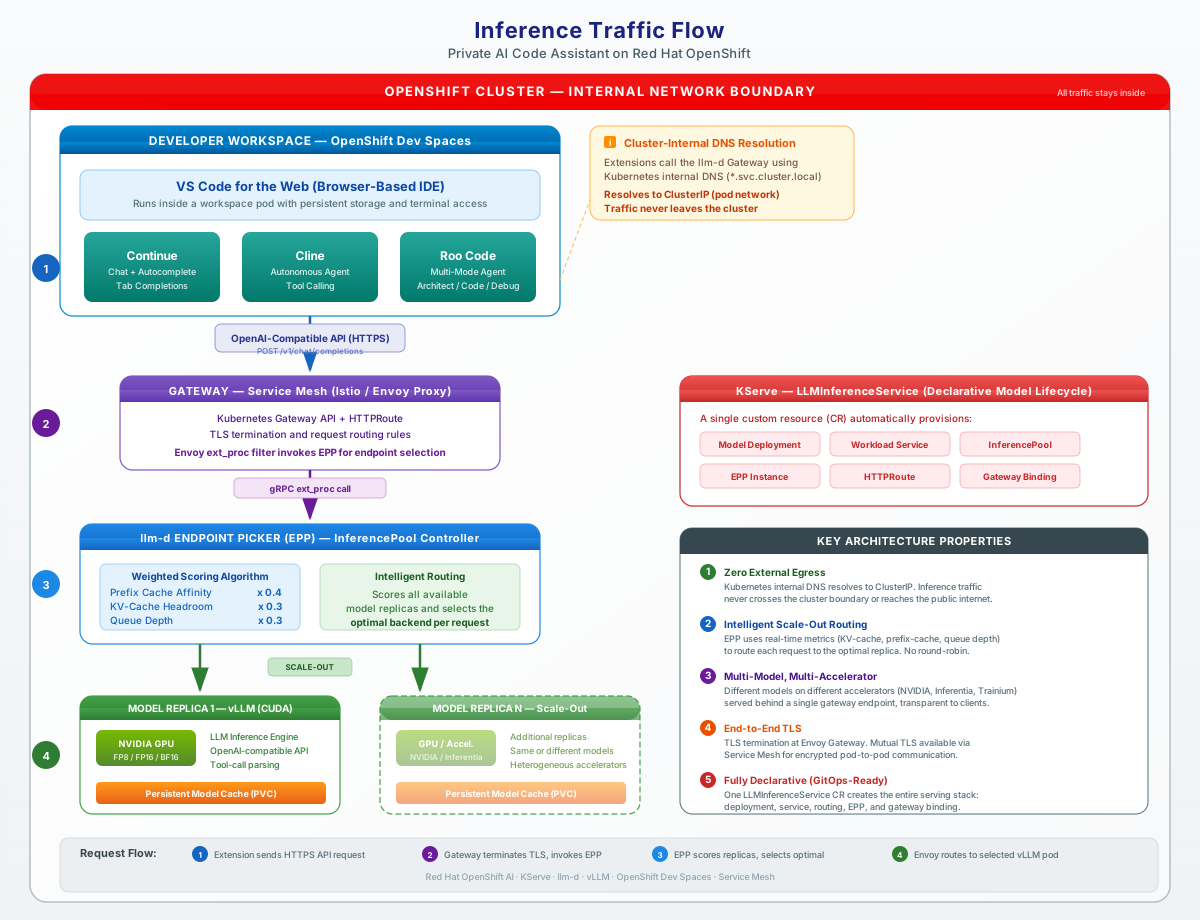
Full diagrams: docs/architecture.md.
Requirements
Minimum hardware requirements
- GPU: 1× NVIDIA GPU with enough VRAM for the model at FP8 (e.g. L40S 48 GB, A100 80 GB, or H100 NVL)
- Storage: PVC for model cache, typically 50–100+ Gi
- CPU / memory: enough for Dev Spaces workspaces plus platform operators (size for team concurrency)
Details: docs/requirements.md, docs/benchmarks.md.
Minimum software requirements
Pick one path.
All paths
- OpenShift 4.20+
- Red Hat OpenShift AI 3.4 (3.3 minimum)
- OpenShift Dev Spaces
- NVIDIA GPU Operator + NFD
- Hugging Face token
ocCLI
Existing OpenShift — operators above already installed, plus RHCL, helm v3. See deploy_existing_openshift/README.md.
ROSA — Terraform >= 1.4.6, AWS CLI, rosa CLI, ROSA entitlement. See PCA_Deployment_ROSA/README.md.
ARO — Terraform >= 1.4.6, Azure CLI, ARO + GPU quota. See PCA_Deployment_ARO/README.md.
Required user permissions
- ROSA / ARO: Cloud admin to create the cluster, then OpenShift
cluster-adminto install operators and sync GitOps. - Existing OpenShift: OpenShift
cluster-adminto deploy AI serving, DevSpaces, and (optional) the demo IDP.
Deploy
Choose one path. Do not mix ArgoCD GitOps (ROSA/ARO) with the existing-OpenShift Helm flow on the same cluster unless you know how ownership overlaps.
Option 1: ROSA (AWS)
Terraform provisions ROSA HCP and a GPU pool; ArgoCD syncs charts/ with values-rosa.yaml.
→ PCA_Deployment_ROSA/README.md
Option 2: ARO (Azure)
Terraform provisions ARO and a GPU MachineSet; ArgoCD syncs charts/ with values-aro.yaml.
→ PCA_Deployment_ARO/README.md
Option 3: Existing OpenShift
Cluster already has RHOAI, GPU Operator, and Dev Spaces. Install RHCL first, then:
# AI serving once
make ai-serving-deploy-existing-openshift HF_TOKEN=hf_xxx

# Each developer workspace
make devspace-deploy-existing-openshift DEV_NAMESPACE=<dev-ns>
# 2nd+ developers: HELM_ARGS='--set devspacesGlobalConfig.enabled=false'
→ deploy_existing_openshift/README.md
Validating the deployment
After deploy, run cluster smoke tests (not CI):
make smoke
make smoke AI_NAMESPACE=ai-serving DEV_NAMESPACE=<dev-ns>
→ tests/cluster-smoke/README.md
Delete
Existing OpenShift — remove with make:
make devspace-undeploy-existing-openshift DEV_NAMESPACE=<dev-ns>
make ai-serving-undeploy-existing-openshift
ARO — follow Destroying the Cluster.
ROSA — follow Destroying the Cluster.
Documentation
| Doc | Topic |
|---|---|
| docs/architecture.md | Stack, traffic path, diagrams |
| docs/requirements.md | Hardware, software, permissions |
| docs/ide-and-extensions.md | Dev Spaces, Continue / Cline / Roo |
| docs/models-and-routing.md | vLLM, llm-d, RHCL |
| docs/benchmarks.md | Performance highlights + links |
| docs/customization.md | Prompts, rules, MCP, quality gates |
| AGENTS.md | Maintainer chart / wave map |

'%20d='M201.5%20305.5c-13.8%200-24.9-11.1-24.9-24.6%200-13.8%2011.1-24.9%2024.9-24.9%2013.6%200%2024.6%2011.1%2024.6%2024.9%200%2013.6-11.1%2024.6-24.6%2024.6zM504%20256c0%20137-111%20248-248%20248S8%20393%208%20256%20119%208%20256%208s248%20111%20248%20248zm-132.3-41.2c-9.4%200-17.7%203.9-23.8%2010-22.4-15.5-52.6-25.5-86.1-26.6l17.4-78.3%2055.4%2012.5c0%2013.6%2011.1%2024.6%2024.6%2024.6%2013.8%200%2024.9-11.3%2024.9-24.9s-11.1-24.9-24.9-24.9c-9.7%200-18%205.8-22.1%2013.8l-61.2-13.6c-3-.8-6.1%201.4-6.9%204.4l-19.1%2086.4c-33.2%201.4-63.1%2011.3-85.5%2026.8-6.1-6.4-14.7-10.2-24.1-10.2-34.9%200-46.3%2046.9-14.4%2062.8-1.1%205-1.7%2010.2-1.7%2015.5%200%2052.6%2059.2%2095.2%20132%2095.2%2073.1%200%20132.3-42.6%20132.3-95.2%200-5.3-.6-10.8-1.9-15.8%2031.3-16%2019.8-62.5-14.9-62.5zM302.8%20331c-18.2%2018.2-76.1%2017.9-93.6%200-2.2-2.2-6.1-2.2-8.3%200-2.5%202.5-2.5%206.4%200%208.6%2022.8%2022.8%2087.3%2022.8%20110.2%200%202.5-2.2%202.5-6.1%200-8.6-2.2-2.2-6.1-2.2-8.3%200zm7.7-75c-13.6%200-24.6%2011.1-24.6%2024.9%200%2013.6%2011.1%2024.6%2024.6%2024.6%2013.8%200%2024.9-11.1%2024.9-24.6%200-13.8-11-24.9-24.9-24.9z'/%3e%3c/svg%3e)