 Red Hat Summit
Este contenido no está disponible en el idioma seleccionado.
Reference Architecture for deploying Red Hat OpenShift Container Platform on Red Hat OpenStack Platform
Guidelines for a validated, private cloud solution
Abstract
Providing feedback on Red Hat documentation
We appreciate your input on our documentation. Tell us how we can make it better.
Providing documentation feedback in Jira
Use the Create Issue form to provide feedback on the documentation. The Jira issue will be created in the Red Hat OpenStack Platform Jira project, where you can track the progress of your feedback.
- Ensure that you are logged in to Jira. If you do not have a Jira account, create an account to submit feedback.
- Click the following link to open a the Create Issue page: Create Issue
- Complete the Summary and Description fields. In the Description field, include the documentation URL, chapter or section number, and a detailed description of the issue. Do not modify any other fields in the form.
- Click Create.
Chapter 1. Purpose of this document
In this document, we offer a validated, private cloud solution for running Red Hat OpenShift Container Platform 4.12 on Red Hat OpenStack Platform 16.2.
Red Hat OpenShift Container Platform, Red Hat OpenStack Platform, and Red Hat Ceph Storage are the key architecture components of our solution.
This document is not an implementation guide, but a supplement to product documentation. You can find complete, supported, and fully tested individual product documentation for all three architecture components in the Additional documentation links section.
1.1. Red Hat tested solution
This document presents our recommended practices for an OpenShift on OpenStack solution. We analyse each component and explain the options. We then highlight that selection for implementation.
All recommendations made are tested together, in a lab, by Red Hat’s OpenShift on OpenStack Quality Engineering (QE) team.
This document reflects a truly working and tested solution.
For specific implementation steps and procedures, Red Hat product documentation has the details required for a successful deployment. Combined with the review and testing assurances from this solution document, we are able to provide a holistic and practical solution to form the basis of any OpenShift on OpenStack implementation.
1.1.1. Scaling and Performance Testing
While all efforts have been made to evaluate the solution against real world scenarios, we are unable to test against every possibility. You should view this solution as a baseline for deployment and it is recommended that you perform comprehensive performance testing for your specific workloads and usage patterns.
Control plane nodes should be sized carefully according to expected cluster size and growth and storage solutions implemented and tuned accordingly.
Where possible, this document has been updated to reflect customer experiences under real world conditions, combined with the best solutions from our global engineering and services teams.
For more information, see Recommended infrastructure practices or speak to your Red Hat account team.
1.2. OpenShift on OpenStack simplifies your cloud native journey
Red Hat’s tested solution for implementing OpenShift on OpenStack is a key component in simplifying your cloud native journey. We have engineered and fully tested the solution across both OpenShift and OpenStack to ensure reliability and interoperability. We support both platforms and ensure they work together to give you a flexible, production-grade foundation supporting your organization throughout your modernization journey and beyond. Running OpenShift on OpenStack will assist your business to:
- Migrate workloads over time. Running Red Hat OpenShift on Red Hat OpenStack Platform gives you the flexibility to run both virtualized and containerized applications side by side on the same integrated, supported foundation, helping to make migration and transformation projects easier.
- Build cloud-native skills and accelerate DevOps practices. By combining containers and virtual machines in a consistent solution IT operations staff and developers work in a unified platform helping teams to grow and develop cloud-native processes and methodologies together.
- Access proven expertise and support across both platforms. We support both platforms, simplifying and streamlining issue resolution with a single point of contact. Plus, we offer services and training to help your organization develop the practices, tools, and culture needed to more efficiently modernize existing applications and build new cloud-native ones.
Chapter 2. Technology overview
We offer a solution for running Red Hat OpenShift Container Platform 4.12 on Red Hat OpenStack Platform 16. Our solution deploys Red Hat OpenShift Container Platform 4.12 to physical servers that run Red Hat OpenStack Platform 16.2. We use Red Hat OpenStack Platform director to perform the initial OpenStack installation and Day 2 operations.
2.1. Relationship between OpenShift and OpenStack
The relationship between OpenStack and OpenShift is complementary.
- OpenStack exposes resources through an application programming interface (API) and OpenShift requests them.
- OpenStack provides OpenShift with compute, storage, and networking infrastructure, plus additional resources, such as self-service load balancers and encryption.
- OpenShift runs its containerized applications on the infrastructure provisioned by OpenStack.
The products are tightly integrated. OpenShift can consume OpenStack resources on demand and without user intervention.
2.1.1. Red Hat Enterprise Linux CoreOS (RHCOS)
Beginning with OpenShift 4, OpenShift nodes now run on Red Hat Enterprise Linux (RHEL) CoreOS (RHCOS). RHEL CoreOS combines the ease of over-the-air updates from Container Linux (formerly known as CoreOS) with the Red Hat Enterprise Linux kernel to deliver a more secure, easily managed container host.
In an installer-provisioned infrastructure based deployment, RHCOS is the supported operating system for all the OpenShift Container Platform nodes and is used by default for workers and controllers. It is also an OpenShift requirement that the controller nodes run RHCOS. Currently, RHCOS is only used with OpenShift, it is not provided for use as an independent operating system.
For more information see Red Hat Enterprise Linux (RHEL) CoreOS.
2.2. Solution overview
Although there are many available options for placing OpenShift on OpenStack, we provide one validated solution to ensure clarity, simplicity, and supportability. The Red Hat Tested Solution represents the components and integrations of this solution, which has been tested by QE and is a starting point for all enterprise deployments.
Figure 2.1. Diagram of the Red Hat solution

We made these key choices to complete the installation and setup shown in the Diagram of the Red Hat solution:
Installation
- OpenStack is installed using director.
- OpenStack is installed using external TLS encryption.
- OpenShift is installed using installer-provisioned infrastructure (IPI).
- OpenShift is installed from the director host using a non-privileged OpenStack tenant.
Storage
- OpenStack deploys Fileshare-as-a-Service (manila) usable with RWX container workloads.
- OpenStack deploys the Block Storage service (cinder) usable with RWO container workloads.
- OpenStack uses local storage for Compute (nova) ephemeral storage.
- OpenStack uses Red Hat Ceph Storage (RHCS) for Image (glance), Block Storage (cinder), Object (swift), and optionally Compute (nova).
- OpenStack uses RHCS with Ganesha for Fileshare-as-a-Service (manila).
- OpenShift uses a Container Storage Interface (CSI) driver to provide access to manila.
- OpenShift uses Object storage for the internal registry.
Compute
- OpenShift control-plane and worker VMs are deployed using nova availability zones to provide high availability.
Networking
- OpenStack uses Open Virtual Network (OVN) for its SDN.
- OpenShift networking is managed by OVN-Kubernetes.
- OpenStack deploys Load-Balancing-as-a-Service (Octavia) for OpenShift load balancing.
- OpenShift uses the Amphora driver for Octavia to provide load balancing.
Chapter 3. Design considerations
This section describes how our solution addresses design considerations for integrated solutions. You must consider each section in your architectural planning for an OpenShift on OpenStack implementation. In each section, we discuss key integrations, their various options, advantages, concerns, and overall requirements. We then conclude each section with an explanation of the design consideration we chose in our solution.
The recommendations in this solution were developed in conjunction with Red Hat Quality Engineering, Field Consultants, Engineers, and Product teams.
3.1. Support lifecycles
The release of Red Hat OpenShift Container Platform 4.12 is an Extended Update Support (EUS) release for OpenShift. Customers can now combine long-term support options from OpenStack with EUS for OpenShift. This integrated solution provides enterprise-essential support timeframes across the stack.
3.1.1. Red Hat OpenShift Container Platform
The 4.12 release of Red Hat OpenShift Container Platform Red Hat is designated as an Extended Update Support (EUS) release. Beginning with OpenShift 4.12, EUS releases provide customers with 24 months of support coverage for minor versions.
Support for EUS releases is offered in three distinct phases:
- Full Support (the first 6 months)
- Maintenance Support (the next 12 months)
- Extended Update Support (an additional 6 months)
Going forward Red Hat will denote all even numbered minor releases (4.12, 4.14, 4.16) as Extended Update Support with 24 months coverage. For more information on EUS for Red Hat OpenShift Container Platform, including life cycle updates and a list of covered components, see Red Hat OpenShift Container Platform Life Cycle Policy.
3.1.2. Red Hat OpenStack Platform
The 16.2 release of Red Hat OpenStack Platform is offered with two and a half years of production support and the option to purchase an extended lifecycle support (ELS) for an additional year. Support is offered in three distinct phases:
- Full Support (the first 18 months after the initial release)
- Maintenance Support (the next 12 months)
- Extended Life Support (an additional year for an extra subscription cost).
For information on the Red Hat OpenStack Platform life cycle with full details on the different support types, see Red Hat OpenStack Platform Life Cycle.
3.1.3. Red Hat tested solution: support lifecycle
Our solution uses Red Hat OpenShift Platform 4.12 on Red Hat OpenStack Platform 16.2. Both platforms have long-term support solutions.
3.2. Connectivity
You can deploy OpenShift to many different on-premises architectures. OpenShift can be run with a connected installation, via a proxied connection, and in a restricted, or air-gapped, network environment.
For more information, see Supported installation methods for different platforms.
3.2.1. Connected installation
Both the OpenStack and OpenShift installer can take advantage of direct internet access and an active subscription to Red Hat products. The installation processes are not self-contained and require access to external sources and DNS resolution to retrieve the following core assets:
- Containers for OpenStack services
- OpenShift control and worker node containers
- OpenShift’s RHCOS image
3.2.2. Proxied installation
An OpenShift deployment supports the implementation of an HTTP or HTTPS cluster-wide proxy. Details for setting up a cluster-wide proxy are in the Configuring the cluster-wide proxy section of the documentation.
3.2.3. Restricted network deployment (air-gapped)
Red Hat OpenShift Platform 4 on Red Hat OpenStack Platform 16.2 fully supports a restricted network deployment. Before performing a restricted network deployment, you must prepare the basic components required to bootstrap the installation.
Details for installation in a restricted network are in the Installing a cluster on OpenStack in a restricted network section of the documentation.
3.2.4. Red Hat tested solution: connected
In our solution we use the connected installation method for installation. We have used a direct connection to the Internet, including full DNS resolution for director and all OpenShift nodes.
3.3. Installation method and tooling
For best results, install Red Hat products and product integrations with the tools recommended and supported by Red Hat.
3.3.1. Red Hat OpenStack Platform director
Red Hat OpenStack Platform director is a management and installation tool based on the OpenStack TripleO project. TripleO stands for “OpenStack On OpenStack.” This solution uses director to install and manage the life cycle of Red Hat OpenStack Platform.
The fundamental concept behind Red Hat OpenStack Platform director is that there are two clouds: the undercloud and the overcloud. The undercloud is a standalone OpenStack deployment whose sole purpose is to manage another cloud. It can be deployed on a single physical server or a virtual machine. The administrator uses the undercloud’s OpenStack services to define and deploy the production OpenStack cloud. Director is also used for Day 2 management operations, such as applying software updates and upgrading between OpenStack versions.
The second cloud — called the overcloud — is the full-featured production environment deployed by the undercloud. The overcloud is comprised of physical servers with various roles:
- Controller nodes run the OpenStack API endpoints. They also store OpenStack’s stateful configuration database and messaging queues.
- Compute nodes run virtual machine hypervisors. They host the computing resources allocated for user workloads.
- Storage nodes provide block, object, or software defined storage for the user workloads.
OpenShift Container Platform runs within a project, or tenant, on the overcloud. Each tenant’s OpenShift cluster is isolated from each other.
Director is required for all production OpenStack Platform deployments. The configuration settings that are embedded into director’s deployment tooling are tested and validated by Red Hat engineering.
3.3.2. Red Hat OpenShift Container Platform 4 installation patterns
The OpenShift 4 installer offers flexibility through three basic types of Red Hat OpenShift Container Platform installations:
- Installer-Provisioned Infrastructure (IPI) or full stack automation
- User-Provided Infrastructure (UPI) or Pre-existing Infrastructure
- Platform Agnostic which was formerly referred to as Bare Metal installation.
3.3.2.1. Installer-provisioned infrastructure
With installer-provisioned infrastructure (IPI), the installer manages all aspects of the installation, including infrastructure provisioning with an opinionated best practices deployment of OpenShift. The installer is able to request, deploy, and manage the underlying infrastructure directly via an infrastructure-aware provider that has knowledge of that infrastructure. IPI results in production-ready installations from minimal configuration, which provides a managed service experience to deploying self-managed clusters.
IPI is also capable of using pre-existing networking infrastructure.
Figure 3.1. The OpenShift IPI workflow

3.3.2.1.1. Guided installation to generate a configuration file
The IPI install is a simplified guided workflow to create an install configuration file. The guided install prompts users for the majority of values needed for their OpenShift install. This results in a simple YAML file that describes the end state of the installation. The YAML file also allows an operator to add additional customisations to their installation within the IPI footprint.
3.3.2.2. User-provisioned infrastructure
With the user-provisioned infrastructure (UPI) installation method, administrators are responsible for creating and managing their own underlying infrastructure before installation. The installer uses an infrastructure-aware provider, but the administrator must prepare the components in advance. The OpenShift installer can then use the infrastructure provider to interact with the prepared infrastructure. For OpenShift on OpenStack, Red Hat provides sample Ansible scripts for this purpose.
3.3.2.3. Platform agnostic (formerly Bare Metal installation)
A platform agnostic installation can be used on any underlying infrastructure because it does not use any infrastructure provider. The installer is not able to control any of the underlying infrastructure operations, which means that an administrator must both prepare the infrastructure and orchestrate the installation via their own custom methods. This type of installation is the most flexible, but requires additional custom automation as it does not come with any cloud integration.
Installer-provisioned infrastructure, user-provisioned infrastructure, and platform agnostic installation methods are fully supported by Red Hat.
For a comprehensive overview of installation patterns and platforms, see Selecting a cluster installation method and preparing it for users in the official documentation.
3.3.3. Red Hat tested solution: installer-provisioned infrastructure (IPI)
This solution uses IPI for installing Red Hat OpenShift Platform onto Red Hat OpenStack Platform.
- For testing and flexibility we manually create the OpenShift installation configuration file.
- We use the file to guide the installer to programmatically create all required portions of the networking, machines, and operating systems via the OpenStack API while utilizing the infrastructure-aware OpenShift provider.
- This results in an architecture which is highly available, fully tested, and is an entirely supported solution suitable for production.
Full stack automation and installer-provisioned infrastructure (IPI), are interchangeable terms. This document primarily uses the term installer-provisioned infrastructure (IPI).
The IPI method for OpenShift is a highly prescriptive installation pattern which performs a best practice installation. This method of installation allows for minimal manual variance. In general, infrastructure changes for an IPI deployment should not be customised manually after deployment. All changes must be implemented by the installer through direct interaction with the underlying infrastructure and API’s. Day 2 operations, such as machine scale out, are possible and supported, but the low level result of an installation should be entirely installer driven.
3.4. High availability
High availability is a requirement for any production deployment. Our solution is highly available at the OpenStack, OpenShift, and Ceph layers.
3.4.1. OpenStack HA
Red Hat OpenStack Platform ensures high availability in the OpenStack control plane through the following actions:
- OpenStack Platform director deploys three controller nodes which run multiple instances of the OpenStack services and APIs simultaneously on all three controllers.
- HAproxy load balances connections across the controller API endpoints to ensure service availability.
- A Galera cluster protects the OpenStack state database.
- RabbitMQ queues are duplicated across all nodes to protect the message bus.
Full details for OpenStack are available in the High Availability Deployment and Usage guide.
3.4.2. OpenShift HA
The OpenShift IPI installer ensures OpenShift control plane high availability by deploying three control plane nodes by default. This ensures that the etcd state database meets stated minimum HA requirements and is collocated across at least three separate nodes.
3.4.2.1. Node HA
When you deploy OpenShift on OpenStack, you must consider the placement of OpenShift nodes carefully:
- To ensure control plane HA, place control plane nodes on different underlying OpenStack compute nodes.
- Space worker nodes evenly across the compute infrastructure.
3.4.2.2. Control Plane nodes placement
Red Hat offers a few supported ways to manage high availability for the OpenShift on OpenStack control plane VMs:
- Nova availability zones
- OpenStack anti-affinity policies
3.4.2.3. Nova availability zones
Using OpenStack availability zones is the preferred way to ensure that control plane nodes are properly managed for HA.
Figure 3.2. Placing OpenShift control plane nodes across compute hosts using nova availability zones.

In OpenStack, the concept of availability zones allow administrators to logically partition their cloud and provide a simple abstraction of the physical infrastructure for cloud tenants to easily use. Availability zones are very granular in OpenStack. Some OpenStack services, such as nova, cinder, and neutron, have their own availability zone implementations.
For an HA OpenShift control plane, an openstack cloud administrator must provide a minimum of three availability zones and ensure that compute resources offered are properly configured.
OpenShift 4.12 requires that the control plane nodes belong to the same L2 network. When distributing the control plane nodes across three availability zones, we typically connect them to a stretched L2 provider network. It usually involves configuring the infrastructure with a small and dedicated L2 network segmented with VLAN or VXLAN or Geneve protocols with failure domain fabrics able to interconnect this network. The latency between the zones has to be less than 100ms.
When using compute availability zones, you should have corresponding volume availability zones with the same name. This is a requirement when using CSI topology awareness, which is enabled in OpenShift 4.12.
For an IPI install, you must add control plane availability zones to the install-config.yaml file manually before installation as the guided install does not prompt for them. Zones are added to the configuration file as a YAML array.
Setting nova availability zones in the OpenShift installation configuration file.
controlPlane:
  name: master
  platform:
    openstack:
      zones: ['AZ0', 'AZ1', 'AZ2']
  replicas: 3
At install time, the OpenShift installer assigns each control plane node to a different AZ upon VM creation.
3.4.2.4. OpenStack anti-affinity policies
OpenStack supports the ability to deterministically place instances through affinity policies. Affinity rules are grouped together into detailed policies allowing an administrator to control placement. Through the use of these policies and OpenStack server groups, deployments without nova availability zones still remain HA.
The OpenShift on OpenStack installer creates server groups for both control-plane and compute nodes. These server groups are then used with an soft-anti-affinity policy to request the instances to land on different OpenStack compute hosts.
3.4.2.5. Worker nodes placement
There are two ways to use availability zones for worker nodes:
- At install time via the installation file
-
During Day 2 operations, via manually created machineSets using the
availabilityZoneproviderSpec values.
For worker nodes, the installer has the following placement rules:
- The installer creates a MachineSet per given availability zone.
- The installer places nodes and distributes the replicas as evenly as possible across zones.
- The installer creates a server group with anti-affinity to request the worker nodes to be placed on different hypervisors.
The following diagram shows one way that you can configure your nodes into availability zones:
Figure 3.3. An example of OpenShift control plane and worker nodes deployed across three nova availability zones.
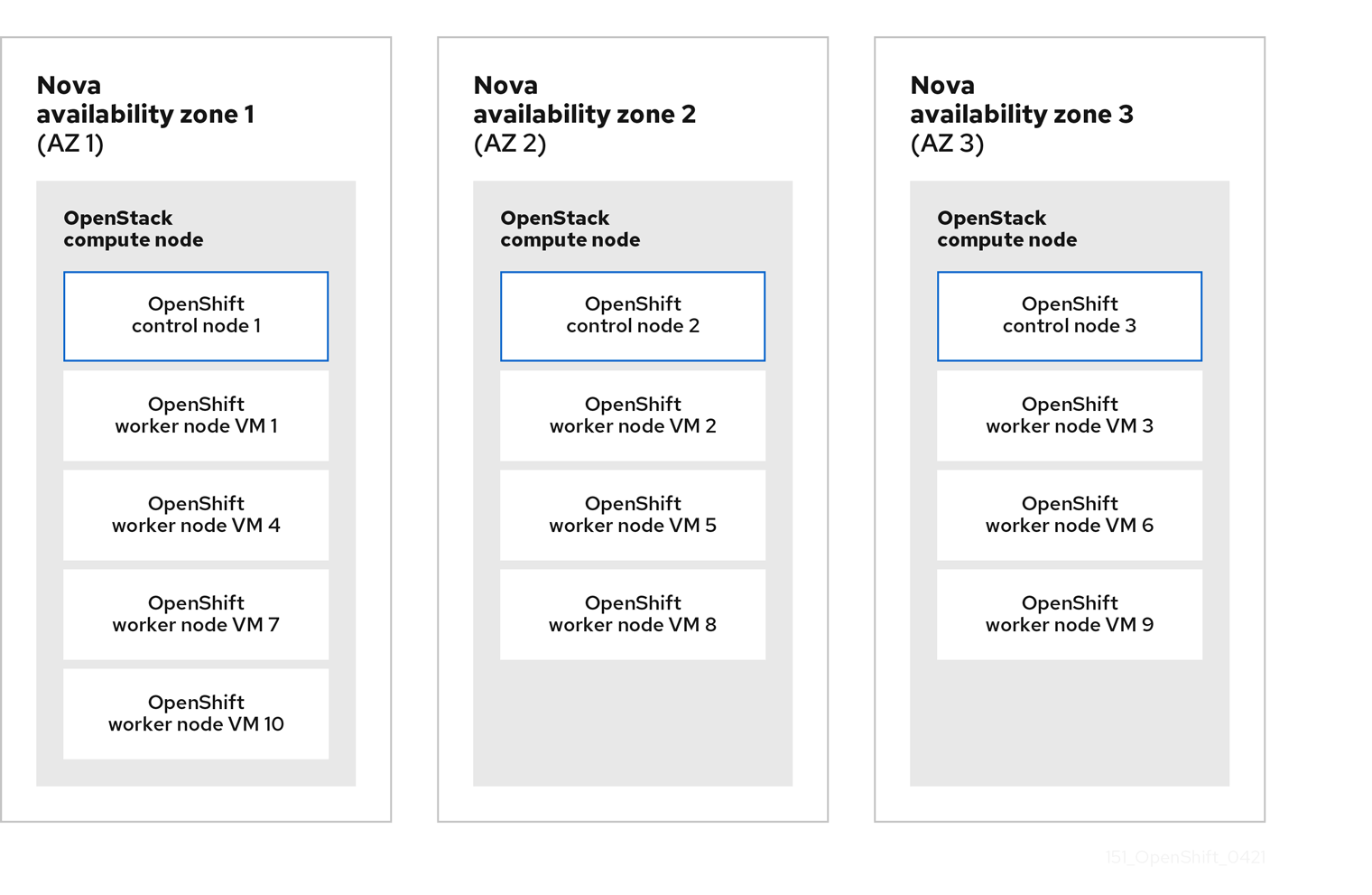
The worker nodes run different types of workload than the control-plane nodes which allows them to take advantage of root-volumes backed by Ceph.
To do this, explicitly set the rootVolume for the workers in the compute section of the OpenShift install-config.yaml installation file. This will instruct the installer to use Ceph and not ephemeral disks like the control plane nodes.
Additionally, volume zones should match the compute zones names:
Setting worker’s machine pool in the OpenShift installation configuration file.
compute:
- name: worker
  platform:
    openstack:
      zones: ['AZ0', 'AZ1', 'AZ2']
      rootVolume:
        size: 100
        zones: ['AZ0', 'AZ1', 'AZ2']
  replicas: 3
3.4.2.6. Storage layer HA
By default, a Red Hat Ceph Storage (RHCS) deployment is highly available. For this solution, we deploy RHCS with director. Deploying RHCS this way can automatically integrate and provide HA storage for the Compute, Image, Block Storage and Object Storage services.
3.4.2.6.1. OpenShift control plane instances
Configuring the OpenStack nova service with ceph is not recommended for the OpenShift control-plane nodes. Instead, for your OpenShift control plane instances we recommend using local storage for nova ephemeral to provide the best performance for etcd.
Additionally, etcd replicates the data between the control-plane nodes, and does not need another layer of redundancy offered by ceph.
3.4.3. Red Hat tested solution: high availability
3.4.3.1. OpenStack
Implementing high availability for our solution for OpenStack is done through multiple components:
- Red Hat OpenStack Platform director deploys three OpenStack controllers.
- For storage, we are using the Hyperconverged Infrastructure (HCI) deployment pattern where the Compute and storage services are collocated on three hyperconverged nodes.
- OpenStack services, such as Image, Block storage, and Object storage are deployed on Ceph, and provide storage layer resilience.
- The OpenStack cloud is deployed with three compute availability zones with at least one compute host in each zone.
- The OpenStack cloud is deployed with three volume availability zones, where the names are identical to the compute availability zones.
- Local ephemeral storage is used for OpenShift control plane instances and HA is provided through etcd’s native resilience capabilities.
- Ceph is used for OpenShift compute instances.
You must have at least three OpenStack computes hosts available to ensure that your OpenShift control plane can be adequately separated. You must also ensure that you have the ability to quickly replace a failed compute host or your control plane will not run as HA if an OpenStack compute host fails.
To implement external load balancing for your OpenShift applications, OpenStack provides the Octavia load balancing solution. Octavia is the fully supported and tested load balancing-as-a-service component for Red Hat OpenStack Platform 16.2.
3.4.3.2. OpenShift
We use nova availability zones and anti-affinity policies to implement high availability for our OpenShift solution. We place each controller node in a separate availability zone to ensure that they are never on the same physical servers.
Worker nodes are distributed as evenly as possible across the same availability zones, which ensures an even distribution across physical infrastructure. We use anti-affinity policies to request them to land on different physical servers. The worker nodes use root volumes with different types per failure domain. The cinder availability zone names match the nova availability zone names.
3.5. Storage
Select storage back ends that meet the needs of OpenShift applications while minimizing complexity. Both OpenStack Platform and OpenShift Container Platform have independent and mature storage solutions. However, combining solutions for each platform without planning can increase complexity and unwanted performance overhead.
Consider your workloads if you want to avoid duplicate storage components.
3.5.1. Overall storage back end
Red Hat Ceph Storage provides preferred, scalable, integrated, and supported cloud storage for OpenStack. Red Hat Ceph Storage is tightly integrated with the complete Red Hat cloud software stack. It provides block and object storage capabilities.
Ceph cluster servers are divided into Monitors and Object Storage Device (OSD) nodes.
- Ceph monitors run the monitor daemon, which keeps a main copy of the cluster topology.
- Clients calculate the location of the data via an algorithm, which determines how to store and retrieve data (referred to as a “CRUSH map”)
- Clients read or write the data directly to and from the OSDs.
- Monitors maintain cluster health, state, and topology.
- Clients interact directly with the OSDs. Clients only check with the Monitors to ensure the CRUSH map is up-to-date.
- Data is replicated across the physical disks within the nodes.
3.5.1.1. Ceph back ends
Red Hat OpenStack Platform 16.2 uses Red Hat Ceph Storage (RHCS) 4 as part of a director driven storage solution. The BlueStore back end is used by default. Installations of RHCS 4 and later only support the use of the more performant BlueStore back end.
For more information about the storage back ends supported by RHCS, see Ceph ObjectStore in the Architecture Guide.
For more information about configuring RHCS, see Supported Configurations.
3.5.2. Object Storage (OpenStack swift)
OpenStack supports access to Object Storage via the OpenStack Object Store service (swift).
By default, when installing Red Hat OpenStack Platform with director, a simple object storage deployment is placed on the controllers. This object storage is supported in production for minimal workloads, such as a back end for glance.
3.5.2.1. OpenShift registry
The OpenShift installer follows the recommended practice for a scaled registry and attempts to use OpenStack’s object storage service as the preferred location for the internal image registry back end. To do this, the installer checks for an accessible object storage location and uses that if found. If it cannot find one, it uses the recommended best practice for a non-scaled registry and creates a ReadWriteOnce (RWO) cinder volume.
3.5.3. Image Storage (OpenStack glance)
When deploying Red Hat Ceph Storage (RHCS) with director, the default installation of the OpenStack Image service (glance) uses RHCS as the back end. This allows images to be stored on redundant, fast storage, that provides copy-on-write cloning (CoW) for faster boot and optimal storage.
However, this also means that using QCOW2 formatted images is not advised. For more information, see Converting an image to RAW format. You must use RAW images to start instances from an ephemeral back end or volume.
The RHOCP installation program automatically downloads and uses a publicly available QCOW2-formatted image. You can change this by setting the clusterOSImage installation variable to the URL of an external RAW-formatted image, or to the name of an existing, pre-deployed RAW-formatted image already stored in the OpenStack Image Service. For OpenShift 4.12, get the OpenStack image from the official source.
The clusterOSImage variable is not available from the guided installation. You must manually add it to the install-config.yaml file.
The OpenShift installer uses the Image service for two purposes:
- To store the openshift ignition files that bring up the bootstrap cluster.
- To store the Red Hat Enterprise Linux CoreOS image.
3.5.4. Persistent storage for OpenShift
The Kubernetes persistent volume (PV) framework allows OpenShift users to request storage from the underlying storage subsystem without needing to have any knowledge of the storage architecture.
OpenShift supports many methods for providing access to storage back ends. For OpenShift 4.12 on OpenStack 16.2, we suggest the use of a storage back end that supports the Container Storage Interface (CSI) standard when possible. CSI provides a standardized way to provide access to underlying block and file systems to containerized workloads.
For more information about CSI, see the “Kubernetes CSI Developer” section in Kubernetes Container Storage Interface.
3.5.4.1. Manila-CSI for RWX PVs
OpenShift supports the OpenStack Manila CSI Driver Operator, so that OpenShift can interact with OpenStack’s Shared File Systems service (manila) to provision PVs from remote, shareable file systems.
Accessing remote shared file systems by using the Shared File Systems service means that container workloads can use a storage back end that allows simultaneous access for compute instances, bare metal nodes, and containers. This kind of access, known to an OpenShift PV as its access mode, is called ReadWriteMany (RWX), and is required for complex container use cases.
With Manila-CSI, an OpenShift user can consume a remote shared file system easily via the OpenStack API and the Shared File Systems service.
Figure 3.4. Using Manila for Container Workloads

The OpenShift installer creates a storage class automatically if OpenShift detects Manila in the underlying OpenStack cloud. The installer does not set that storage class as the default.
The storage classes created by the installer-provisioned infrastructure installation method
$ oc get sc
NAME                   PROVISIONER                RECLAIMPOLICY   VOLUMEBINDINGMODE      ALLOWVOLUMEEXPANSION   AGE
csi-manila-default     manila.csi.openstack.org   Delete          Immediate              false                  37d
standard-csi (default) cinder.csi.openstack.org   Delete          WaitForFirstConsumer   true                   37d
For more information on setting a default StorageClass, see Changing the default storage class.
3.5.4.2. Cinder and Block Storage for RWO PVs
Openshift supports the Cinder CSI driver to provision volumes. PVs provisioned with this driver are dynamically allocated. These volumes are typically used with ReadWriteOnce (RWO) Access Mode, although it is possible to attach the volumes to multiple instances at the same time provided they use a multiattach volume type. It is generally better for applications requiring block storage and/or lower latency.
This document takes this into account and uses the best options where available for their purpose.
3.5.5. Storage for OpenShift nodes
There are certain requirements and options for providing disk to OpenShift nodes that you need to be aware of, particularly for nodes running etcd. This section covers your options, but please contact a Red Hat Associate for more details.
When you install OpenShift, you must provide fast storage.
3.5.5.1. Minimum disk requirements for etcd
The control plane VMs must meet the known resource requirements to run the etcd key-value store. Low write latency is a requirement for etcd stability and performance. Red Hat requires that all controllers have access to fast disk (SSD or better) to ensure stability and guarantee supportability. Note that regardless of disk technology used by OSDs, using Ceph requires additional consideration when used with OpenShift control planes. If you require Ceph for your control plane instances please contact Red Hat support for guidance and supportability details.
To learn more about the etcd disk requirements, see the etcd documentation.
3.5.5.2. Options to provide disk to OpenShift nodes
You have several options for providing storage to your cluster. To help you make a decision, we highlight the following three options:
- Ephemeral on Computes
- Ceph-backed Ephemeral
- Volumes Provided by Cinder
3.5.5.2.1. Ephemeral on Computes
Running VMs with their disk hosted locally on a compute node is the easiest way to provide storage to the control plane. The volumes of the nova instances are stored directly on the compute hypervisor’s disk. To do this, the disk must be SSD or better. When using this method, be aware that the loss of a physical OpenStack compute node destroys the VM instances that use ephemeral storage on this hypervisor. It is important to provision your OpenShift control-plane nodes on different hypervisors using server groups with anti-affinity.
We use this method in our solution for the control plane nodes to provide the best performance for etcd.
3.5.5.2.2. Ceph-backed ephemeral
This is the default configuration for a Ceph environment deployed with director. This configuration method sets the variable NovaEnableRBDBackend to True. This setting instructs all nova back end disks to utilize Ceph RBD which has many advantages:
- The volumes are ephemeral but are sourced from the Ceph cluster.
- The Ceph storage cluster itself provides resilience.
The Ceph cluster is more customizable as Ceph can implement tiering options to define how its storage disks are used.
For important information on environmental stability and reliability for etcd-based workloads using Ceph backends, see this article on using Ceph with OpenStack.
This configuration method is easily implemented by default when using director to deploy Ceph:
The default values set when using director to deploy Ceph
# cat /usr/share/openstack-tripleo-heat-templates/environments/ceph-ansible/ceph-ansible.yaml
...
CinderEnableIscsiBackend: false
CinderEnableRbdBackend: true
CinderBackupBackend: ceph
NovaEnableRbdBackend: true
GlanceBackend: rbd
...
3.5.5.2.3. Volumes provided by cinder
Cinder is the OpenStack block storage service that provides an API front end for multiple back end storage providers, including Ceph.
Nova instances can request a volume from the Cinder API. Cinder then requests the storage, via the back end plug-in, to use it with the instance.
OpenStack deployments with Ceph create a default setup that you can use with the OpenShift installer to provide Ceph-backed Cinder volumes to OpenShift nodes. This method gives you a highly granular solution where you can do the following actions:
- Provision Ceph-backed Cinder volumes from a fast storage pool in Ceph to ensure etcd performance.
- Create complex and refined tiers (classes) of storage to present to the different nodes.
- Assign volumes from different back end storage tiers to control plane and worker nodes .
We use this solution for the worker nodes in our solution to provide flexibility and resiliency.
3.5.6. Red Hat tested solution: storage
In our solution, we use the built-in director templates provided by ceph-ansible to deploy Red Hat Ceph Storage (RHCS) 4 with director. We set the NovaEnableRbdBackend property to false in director to use local storage for nova ephemeral drives.
The deployment is tested using the hyperconverged infrastructure (HCI) mode. In the HCI deployment pattern compute and storage services are located on the same nodes (hyperconverged) and optimized for resource usage. This is functionally equivalent to having dedicated storage nodes but with less physical infrastructure required. For your own workloads you can choose the type of storage layout that best suits your requirements. Ceph Monitors are colocated on the OpenStack controllers.
This director deployment pattern configures local storage (ephemeral) as the backing store for control plane nodes and RHCS for worker nodes, cinder volumes, glance images, and object storage. This configuration ensures fast storage for the OpenShift control plane and utilizes etcd’s built in resilience for HA, while also providing redundancy to worker nodes and OpenStack services via RHCS.
We install the Shared File Systems service (manila) with director and configure it with an RHCS back end that uses Ganesha for NFS. For more information about CephFS NFS and Manila CSI, see the recommendations for Red Hat OSP 16.x.
For supported and certified third party storage drivers and vendors for Manila CSI, see the Red Hat Partner Ecosystem Catalog.
In our solution, Red Hat Ceph Storage supports the following services:
- Block (cinder)
- Image (glance)
- Object (swift) via radosgw (RGW), which is a gateway for the Ceph RADOS object store.
In our solution, OpenShift consumes storage for a variety of purposes.
- Storage for container workloads is provided by cinder (RWO) & manila (RWX).
- Storage for the OpenShift registry is provided by ceph RGW (object storage) and the OpenStack tenant is granted the swift operator role.
- The RHCOS image file and the bootstrap ignition files for each tenant’s cluster are stored in OpenStack’s image service, glance. Each RHCOS image remains until the cluster is removed. The ignition image is temporary and deleted by the installer at the end of the installation process.
3.6. Networking
Red Hat OpenStack Platform and Red Hat OpenShift Container Platform have independent and mature networking solutions.
Choosing the right solution is dependent on the specifics of your workloads. Try to select networking solutions that meet the needs of your OpenShift application and minimize complexity.
While these solutions can be layered, consider the requirements of your workloads to avoid duplicating networking functionality.
3.6.1. OpenStack networking
The OpenStack Neutron API provides a common abstraction layer for various back end network plug-ins. OpenStack Platform supports several back-end network plug-ins:
- ML2 OVS
- OVN
- Commercial SDNs
A provider network assigns a range of externally accessible floating IP addresses to tenant instances. Remote clients use the floating IP addresses to access the following services:
- OpenShift applications
- The OpenShift API endpoint
- The web console
For more information about OpenStack networking, see the Networking Guide.
3.6.1.1. OpenStack networking (neutron) back end plug-ins
Like many other OpenStack components, the networking subsystem (neutron) is pluggable so that customers can choose the solution that best fits their business and technological requirements. For Red Hat OpenStack Platform, customers can choose from supported options.
The default neutron back end implemented by Red Hat OpenStack Platform 16.2 is OVN.
3.6.1.1.1. Open vSwitch (OVS)
OVS is an open-source, multi-layer software switch designed to be used as a virtual switch in virtualized server environments and across multiple Red Hat products. OVS has been a default neutron back end in OSP for multiple releases and is fully tested and supported.
3.6.1.1.2. Open Virtual Network (OVN)
Red Hat OpenStack Platform 16.2 uses the Open Virtual Network (OVN) component of Open vSwitch by default. OVN is a network virtualization solution that is built into the Open vSwitch (OVS) project. OVN supports the Neutron API, and offers a clean and distributed implementation of the most common networking capabilities such as bridging, routing, security groups, NAT, and floating IPs.
When using OVN as a back end for neutron, Generic Network Virtualization Encapsulation (GENEVE) is used for network encapsulation. Using OVN and GENEVE has the following advantages:
- Increased flexibility through an extendable header format
- Distribution of L3 traffic by default.
Versions earlier than Red Hat OpenStack Platform 16.1 used OVS’s ML2 plug-in by default.
3.6.1.1.3. Third party SDN solution
Multiple networking vendors support their own plug-ins for Neutron. For future iterations of OpenShift on OpenStack, there might be increased partnerships and testing to support additional third party solutions.
3.6.1.2. Neutron back ends and Red Hat OpenStack Platform
You should choose a neutron back end that meets your unique circumstances.
When planning for OpenShift 4.12 on OpenStack 16.2, we strongly recommend the use of the default back end of OVN as it’s the most tested configuration and allows for using the Octavia OVN provider for LoadBalancer Services if desired.
To assist with choosing a neutron back end when deploying OpenShift on OpenStack, consider the following:
- OVN is fully tested and supported for OpenShift on OpenStack installations.
- OVN is the default neutron back end for Red Hat OpenStack Platform 16.1 and later.
3.6.1.3. OpenStack load balancing
Red Hat OpenStack Platform uses the Octavia project for its Load Balancing as a Service (LBaaS) implementation. In OSP 16.2 deployed with OVN there are two Octavia backends available, the default Amphora and OVN Provider. The main difference is that Amphora deploys each load balancer by creating a VM and configuring a HAProxy instance on it, while OVN Provider implements them using OpenFlow rules.
By default OpenShift will use Amphora as the Octavia backend.
For more details on the OVN Octavia Provider, including its limitations, review the upstream documentation and consult a Red Hat Solution Architect or Support Associate.
3.6.1.4. Red Hat tested solution: OpenStack networking
In our solution, we use the default neutron networking back end of Red Hat OpenStack Platform 16.2: OVN.
3.6.1.4.1. OpenShift networking
In previous releases of OpenShift on OpenStack we used the Kuryr SDN plugin for networking. Kuryr proved to be a performant and reliable solution and is used successfully in many production installations.
Over the last few releases of both OpenStack and OpenShift the requirements, and capabilities, of available SDN solutions has evolved dramatically offering more features, bigger scale, and higher reliability in more compact offerings.
Today, both products now offer, and use by default, Open Virtual Network (OVN) as their default choice for software defined network solution.
With these changes many of the use cases that Kuryr was used to resolve, such as potential performance overhead caused by double encapsulation at the SDN layer, are resolved. Additionally, some of the scalability and feature limitations observed in Kuryr are removed with the move to OVN.
The OVN-Kubernetes Container Network Interface (CNI) plug-in is the next generation SDN solution for OpenShift networking. Built to take advantage of OVN (Open Virtual Network) and supported by a large, upstream vendor-agnostic community, OVN-Kubernetes has the following characteristics:
- Uses OVN to manage network traffic flows
- Implements Kubernetes network policy support
- Introduces the Geneve (Generic Network Virtualization Encapsulation) protocol for overlay networking between nodes.
This allows for a more precise integration between the networking layers, reducing complexity, and ensuring more predictable outcomes.
To learn more about networking and OpenShift, see Understanding networking in the official documentation.
3.6.1.5. LoadBalancer services
LoadBalancer Services in OpenShift are handled by cloud-provider-openstack and OpenStack Octavia. For each service of type LoadBalancer, a load balancer will be created in Octavia. By default OpenShift uses Amphora backend as a more feature-rich solution. The downside of this is a higher resource consumption as Amphora creates a VM for each of the load balancers.
As load balancer services tend to be fairly static, we have found that Amphora is a good choice for most use cases.
Please also note that Amphora always sets the source IP for the traffic incoming to pods to the IP of the load balancer. This means that even with .spec.externalTrafficPolicy set to Local you will not be able to get the original source IP without using additional features such as PROXY protocol.
If resource consumption is a concern, you can configure to your Openshift cluster to use the OVN Octavia Provider. Before changing the Octavia Provider, you need to consider these limitations:
-
In OSP 16.2 OVN Octavia Provider does not support health monitors. This means that running Services with
.spec.externalTrafficPolicyset toLocalis unsupported. -
The
.spec.loadBalancerSourceRangesoption is ignored and traffic is always unrestricted when using OVN Octavia Provider.
With OSP 16.2 and OpenShift 4.12 we recommend that you use the default of Amphora as the Octavia backend used by cloud-provider-openstack.
3.6.1.6. Red Hat tested solution: OpenShift networking
For our solution, we use OVN-Kubernetes for OpenShift networking and Amphora as Octavia backend.
3.7. DNS
The OpenShift 4 installer greatly simplifies the DNS requirements seen in previous OpenShift on OpenStack installations. All internal DNS resolution for the cluster, certificate validation, and bootstrapping is provided through a self-hosted, installer-controlled solution.
With this solution, control plane nodes, worker nodes, and the bootstrap node do not need their IPs added, manually or dynamically, to any form of public DNS; it is entirely self-contained.
With this solution there is no need to run a self-hosted name server and no requirement for external solutions such as the Designate DNSaaS project.
3.7.1. DNS considerations
You must meet the following DNS requirements to complete the installation:
- The installation host must resolve the OpenShift API address.
- The nodes must be able to resolve the address of the container registry in order to download the container images.
You must meet the following DNS requirement after installation is complete:
- A wild card domain must resolve to the ingress port.
3.7.1.1. API DNS
A reachable IP address is required to be in DNS before you install the cluster. The following address spaces must resolve:
api.<cluster name>.<base domain>
The installer can automatically associate an existing floating IP to the API port via the apiFloatingIP value of the OpenStack platform section of install-config.yaml:
An example of how to assign the OpenShift’s API address to a specific Floating IP value.
platform:
  openstack:
...
    apiFloatingIP:     "10.46.43.176"
3.7.1.2. Apps DNS
This domain is used for access to the applications running in OpenShift. In your DNS, you create a wildcard entry to resolve the following naming structure:
*.apps.<cluster name>.<base domain>.
You can automatically associate this OpenShift apps IP to your cluster by using the ingressFloatingIP value in your install-config.yaml. Do not confuse ingressVIP with ingressFloatingIP: ingressVIP is for the Machine network and ingressFloatingIP is from the external network.
3.7.1.3. Bootstrap node
The bootstrap node must be able to resolve registry domain names directly because it retrieves the basic resources to stand up the bootstrap and production clusters.
3.7.1.4. Additional DNS capabilities
3.7.1.4.1. externalDNS
OpenStack tenants whose clouds do not automatically offer name resolution to tenant subnets can set this during an OpenShift installation by using the optional externalDNS value in install-config.yaml. externalDNS instructs the installer to add the DNS IPs to the OpenShift subnet it creates. This value is an array so it can contain multiple entries:
An example of how to set each installer-created subnets DNS value.
externalDNS: ["203.0.113.1", ”203.0.113.2”]
You must add externalDNS manually to the install file. externalDNS is not available from the guided installation.
3.7.2. Red Hat tested solution: DNS
In our solution, we pre-allocate and pre-configure two Floating IPs in DNS to provide an API address and an application address.
We also use the externalDNS parameter to allow the installer-built subnets to offer external DNS resolution to their instances.
3.8. Security and authentication
Both OpenShift and OpenStack support role-based access control and flexible options for integrating with existing user authentication systems. Additionally, both inherit the Red Hat Enterprise Linux native security features such as SELinux.
3.8.1. Authentication
The OpenStack identity service stores user credentials in two ways:
- In its local state database.
- In an external LDAP-compliant directory server.
OpenShift controller nodes issue tokens to authenticate user requests with the API. OpenShift supports various identity providers, including HTPassword and LDAP.
There is detailed integration between OpenShift and OpenStack identity providers. Administrators can configure the OpenShift keystone identity provider with the OpenStack Keystone service. This configuration allows users to log in to OpenShift Container Platform with their Keystone credentials. Full details are in the Configuring a Keystone identity provider section of the OpenShift documentation.
3.8.2. Security
Many of the security best practices are embedded into a default OpenStack Platform deployment. Red Hat OpenStack Platform meets various levels of standard security compliance such as ANSSI and FedRamp. This solution as documented here is not a comprehensive resource for securing OpenStack and assumes a relatively basic, but production supported, level of security. It might not be suitable for all enterprise requirements.
To learn more about the best practices for securing OpenStack, see Red Hat OpenStack Platform 16 Security and Hardening Guide.
3.8.2.1. OpenStack security groups
When installing OpenShift on OpenStack, the installer creates the necessary OpenStack security groups for a functional installation. The installer creates security groups for the control plane nodes and the worker nodes.
You should review the security groups for a clear understanding of how they might affect your own internal security requirements.
For details of the rules created, you can review the upstream code for both control plane nodes and worker nodes.
For details on how these groups are used, see Security Group Rules in the upstream Cluster API documentation for OpenStack.
To learn how to add additional security groups directly at install time review the Optional RHOSP configuration parameters section of the installation guide.
3.8.3. Red Hat tested solution: security and authentication
The installer-provisioned infrastructure method creates and manages all OpenStack security groups and rules necessary. These groups completely isolate the tenant’s OpenShift install from others on the cloud.
We use Transport Layer Security (TLS) to encrypt the OpenStack public API endpoints.
- We use a self signed certificate and a local certificate authority on the installation host.
- After we enable the OpenStack TLS public endpoint encryption, we import the certificates to any hosts issuing commands against the endpoints.
- Because we use the director host to run the installer, all interaction with encrypted endpoints is from the director host.
For more information about this procedure on OpenStack, see Creating an SSL/TLS Certificate Signing Request.
Chapter 4. Summary
With Red Hat OpenShift Platform 4, Red Hat OpenStack Platform 16.2, and Red Hat Ceph Storage 4, organizations have access to a comprehensive and prescriptive installation experience for their on-premises container infrastructure.
This Red Hat Tested Solution showcases a prescriptive and pre-validated private cloud solution from Red Hat that provides rapid provisioning and lifecycle management of containerized infrastructure, virtual machines (VMs), and associated application and infrastructure services.
The Red Hat Quality Engineering teams (QE) have tested and validated the implementation as presented in this solution. Organizations seeking to operationalize this solution quickly can be assured that all options represented are both fully tested as well as fully supported by Red Hat.
Red Hat OpenShift Container Platform, Red Hat OpenStack Platform, and Red Hat Ceph Storage are the key architectural components of this solution. This integration is a key component to hybrid and multi-cloud solutions with OpenShift Container Platform serving as the common container and platform across a variety of deployment footprints.
Chapter 5. Additional links and references
5.1. Previous Reference Architectures
5.2. Additional documentation links
5.2.1. Red Hat OpenShift Container Platform
5.2.2. Red Hat OpenStack Platform
5.2.3. Red Hat Ceph Storage
Appendix A. Contributors
Martin André, Matthew Booth, Jon Uriarte, Itzik Brown, Emilien Macchi, Eric Duen, Gil Rosenberg, Michal Dulko, Roger Heslop, August Simonelli & Ramón Lobillo

'%20d='M201.5%20305.5c-13.8%200-24.9-11.1-24.9-24.6%200-13.8%2011.1-24.9%2024.9-24.9%2013.6%200%2024.6%2011.1%2024.6%2024.9%200%2013.6-11.1%2024.6-24.6%2024.6zM504%20256c0%20137-111%20248-248%20248S8%20393%208%20256%20119%208%20256%208s248%20111%20248%20248zm-132.3-41.2c-9.4%200-17.7%203.9-23.8%2010-22.4-15.5-52.6-25.5-86.1-26.6l17.4-78.3%2055.4%2012.5c0%2013.6%2011.1%2024.6%2024.6%2024.6%2013.8%200%2024.9-11.3%2024.9-24.9s-11.1-24.9-24.9-24.9c-9.7%200-18%205.8-22.1%2013.8l-61.2-13.6c-3-.8-6.1%201.4-6.9%204.4l-19.1%2086.4c-33.2%201.4-63.1%2011.3-85.5%2026.8-6.1-6.4-14.7-10.2-24.1-10.2-34.9%200-46.3%2046.9-14.4%2062.8-1.1%205-1.7%2010.2-1.7%2015.5%200%2052.6%2059.2%2095.2%20132%2095.2%2073.1%200%20132.3-42.6%20132.3-95.2%200-5.3-.6-10.8-1.9-15.8%2031.3-16%2019.8-62.5-14.9-62.5zM302.8%20331c-18.2%2018.2-76.1%2017.9-93.6%200-2.2-2.2-6.1-2.2-8.3%200-2.5%202.5-2.5%206.4%200%208.6%2022.8%2022.8%2087.3%2022.8%20110.2%200%202.5-2.2%202.5-6.1%200-8.6-2.2-2.2-6.1-2.2-8.3%200zm7.7-75c-13.6%200-24.6%2011.1-24.6%2024.9%200%2013.6%2011.1%2024.6%2024.6%2024.6%2013.8%200%2024.9-11.1%2024.9-24.6%200-13.8-11-24.9-24.9-24.9z'/%3e%3c/svg%3e)