 Red Hat Summit
Accelerate enterprise software development with NVIDIA and MaaS
Optimize private app development using NVIDIA Nemotron models through Models-as-a-Service on your own multi-tenant infrastructure in Red Hat AI.
This content is authored by Red Hat experts, but has not yet been tested on every supported configuration.
Accelerate enterprise software development with NVIDIA and MaaS
Optimize private app development using NVIDIA Nemotron models through Models-as-a-Service on your own multi-tenant infrastructure in Red Hat AI.
Table of contents
Detailed description
Developing software with speed and efficiency is a competitive necessity. Developers are often overwhelmed and slowed down by repetitive code, complicated debugging and testing, and the constant need to learn new technologies. AI-powered coding assistance can help, but how do you leverage it securely and cost-effectively?
For organizations restricted by strict data privacy requirements, regulations, or specific performance needs, public AI hosted services often are not an option. As your usage expands, you also need to consider how to keep things as cost-efficient as possible. Models as a Service (MaaS) solves this by enabling centralized IT teams to host and manage private models that remote teams can consume easily and securely. This keeps proprietary data within the organization’s boundaries while providing developers access to the generative AI technology they need. By providing access to the models via API tokens, administrators can also implement specific rate limits and quotas. This approach doesn’t just simplify access and usage, it allows organizations to monitor metrics, forecast capacity and compute needs, and manage chargebacks with precision.
This quickstart demonstrates how you can easily deploy a private AI code assistant powered by NVIDIA Nemotron models and delivered through Red Hat AI's integrated Models as a Service (MaaS) offering. Developers access the assistant through OpenShift DevSpaces, a containerized cloud-native IDE included in OpenShift.
Architecture diagrams
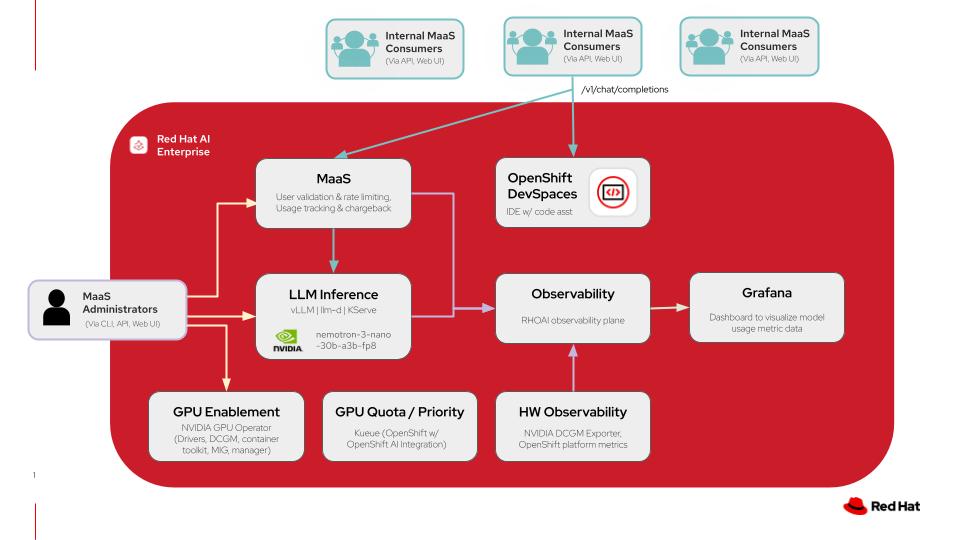
This diagram illustrates a models-as-a-service architecture on Red Hat AI including the model deployments in addition to the code assistant application with OpenShift DevSpaces. For more details click here.
| Layer/Component | Technology | Purpose/Description |
|---|---|---|
| Orchestration | Red Hat AI Enterprise | Container orchestration and comprehensive AI platform |
| Inference | vLLM and llm-d | High performance inference engine for Gen AI model deployment and kubernetes-native distributed inference capabilities with llm-d |
| LLM | nemotron-3-nano-30b-a3b-fp8 | A quantized 30B-parameter hybrid Mamba-Transformer MoE model with a 1M-token context window, designed for efficient reasoning, chat, and agentic AI applications |
| Models-as-a-Service | Red Hat AI Enterprise | Integrated LLM governance layer that provides rate-limited model access with usage tracking and chargeback across teams |
| GPU Acceleration | NVIDIA GPU Operator | Enables GPUs and manages drivers, DCGM, container toolkit, and MIG capabilities for GPU acceleration |
| Development Environment | OpenShift DevSpaces | Provides IDE instances for development teams to develop and deploy all on the same cluster |
| Observability | Prometheus Operator | Monitors model inference metrics and GPU telemetry |
| Dashboard | Grafana | Metrics scraped from Prometheus are then surfaced and shown visually in custom Grafana dashboards |
Requirements
Minimum hardware requirements
- One NVIDIA GPU node with at least 48GB VRAM for Nemotron model
- One NVIDIA GPU node with at least 48GB VRAM for gpt-oss model
Note: Models in this quickstart were tested with 2 L40S GPU instances on AWS (instance type g6e.2xlarge).
Minimum software requirements
- Red Hat OpenShift 4.20
- Helm CLI
- OpenShift Client CLI
- Bash shell available in PATH
- sed available in PATH (works with macOS/POSIX-only as well as common GNU versions)
Required user permissions
- Regular user permissions for usage of Models-as-a-Service enabled endpoint, access to DevSpaces workspace, and access to Grafana dashboard for viewing usage data.
- Cluster Admin access needed for any changes to model deployments or MaaS configurations.
Deploy
The following instructions will easily deploy the quickstart to your Red Hat AI environment using an auto-pilot script-based installation. This will configure the necessary prerequisites for your environment and wire everything together, removing the need for additional configuration.
Please see the advanced deployment section for details on setting up your own prerequisites and deploying the quickstart with more control.
Prerequisites
- OpenShift cluster (specific version is specified in the software requirements section)
- Optional (recommended): trusted certificates managed for the OpenShift Router, as documented
- A default StorageClass needs to be configured. If your cluster is on a cloud provider, this is probably available out of the box. If you're on bare metal or some hypervisor environments, you may need to install additional operators to enable a default StorageClass. See the documentation for OpenShift Data Foundation or the LVM Storage Operator documentation for installation on bare metal
- OpenShift cluster has GPUs available
- The NVIDIA GPU Operator is installed and configured with a ClusterPolicy (or other API) to configure the driver and make the resources available to Kubernetes to schedule
- You do not have other workloads or configurations in the cluster, meaning:
- An identity provider is not deployed or configured
- Red Hat OpenShift AI is not installed
- Red Hat Connectivity Link is not deployed or configured
- Red Hat OpenShift Dev Spaces is not deployed
Installation Steps
- git clone quickstart repository
git clone https://github.com/rh-ai-quickstart/maas-code-assistant.git
- cd into the directory
cd maas-code-assistant
- Ensure you’re logged into your cluster as a cluster-admin user, such as
kube:adminorsystem:admin:
oc whoami
- Run all-in-one.sh. Enter passwords for the admin and user accounts when prompted (these will be saved in the
.envfile after the first run of the script, and you won't be prompted again).
./all-in-one.sh
[!NOTE] This installation will leave the
kubeadminuser in your cluster, prompting you to select a source to log in from. Therhbkoption added to this menu is required to use the users and passwords specified above, and to be able to use MaaS models. If you would like to remove the prompt to select an identity provider and have it default to the Red Hat build of Keycloak, you can editenvironment.yaml.tpland setkeycloak.removeKubeAdmintotruebefore running the script.
Delete
To remove the core quickstart components (models, Dev Spaces workspaces, etc.) run the following:
helm uninstall maas-code-assistant
To clean up the dependencies, such as OpenShift AI, follow their documented uninstallation procedures by removing their Operands first, allowing the operators to reconcile and complete removal, before uninstalling the operators themselves.
References
- vLLM: The High-Throughput and Memory-Efficient inference and serving engine for LLMs.
- llm-d: a Kubernetes-native high-performance distributed LLM inference framework.
- Red Hat OpenShift DevSpaces: a container-based, in-browser development environment offered by Red Hat that facilitates cloud-native development directly within the OpenShift ecosystem. Included within the OpenShift product offering.
- NVIDIA Nemotron: a family of open models with open weights, training data, and recipes, delivering leading efficiency and accuracy for building specialized AI agents.
- NVIDIA GPU Operator: uses the operator framework within Kubernetes to automate the management of all NVIDIA software components needed to provision GPU.
Advanced Deployment
This advanced deployment option will allow you to control the deployment of all prerequisites separately and tailor it to your specific environment.
Use this deployment path if you:
- Have a configured cluster with some or all of the prerequisites already deployed.
- Prefer a different configuration path than the defaults set in the quickstart repository installation script.
- Are using the cluster for other workloads and therefore need to customize the installation to avoid conflict with existing cluster resources.
Prerequisites
The following prerequisites are required in your environment to prevent any conflicts with the quickstart:
- Users have been configured with OpenShift OAuth, backed by OIDC or some other auth method such as htpasswd, as documented.
- OpenShift cluster and user-workload monitoring is configured, as documented.
- Grafana is deployed and managed through the Grafana Operator, in the
grafananamespace.- An example Grafana operand, with all RBAC and resources wired up to User Workload Monitoring, is available in
docs/examples/grafana.yaml. It expects that your Grafana Operator installation was
namespace scoped, and deployed to the
grafananamespace, and that your in-cluster registry is configured as documented. You can configure it differently to not depend on the registry.
- An example Grafana operand, with all RBAC and resources wired up to User Workload Monitoring, is available in
docs/examples/grafana.yaml. It expects that your Grafana Operator installation was
namespace scoped, and deployed to the
- Red Hat OpenShift Dev Spaces is deployed,
as documented.
- A basic CheCluster resource is configured, as in steps 2 and 3 of the above.
- The cert-manager Operator for Red Hat OpenShift has been deployed as documented.
- The Leader Worker Set Operator has been deployed, as documented.
- Red Hat OpenShift AI version 3.3.0 has been deployed from the fast-3.x, stable-3.x, or stable-3.3 channels,
as documented.
- A Data Science Cluster has been created that enables at least the Dashboard, KServe, and Llama Stack Operator components, as documented.
- Note that using Manual approval mode with the startingCSV set to
rhods-operator.3.3.0is recommended to stay on the version tested with this code base.
- Red Hat Connectivity Link has been deployed from the stable channel,
as documented.
- A
Kuadrantresource has been installed in thekuadrant-systemnamespace, as documented. - The
Authorinoresource that gets created from thisKuadrantinstance has been modified with the following to enable TLS on the Authorino endpoint:oc annotate service -n kuadrant-system authorino-authorino-authorization service.beta.openshift.io/serving-cert-secret-name=authorino-server-cert --overwrite oc patch authorino -n kuadrant-system authorino --type=merge --patch '{"spec": {"listener": {"tls": {"enabled": true, "certSecretRef": {"name": "authorino-server-cert"}}}}}'
- A
- You have created the
openshift-defaultGatewayClass object for Gateway API in OpenShift, and are able to create Gateway instances using your cluster's load balancer and infrastructure configuration. See the documentation for more details about Gateway API in OpenShift. - You have created the
maas-default-gatewayGateway object in theopenshift-ingressnamespace using an infrastructure configuration that is supported for your environment and it shows that it is programmed, when verified as documented. It additionally needs theopendatahub.io/managed: "false"label and theopendadatahub.io/managed: "false"andsecurity.opendatahub.io/authorino-tls-bootstrap: "true"annotations set. Without these, policy enforcement will not work as expected.- An example of some possible
Gatewayconfigurations is available as a Helm template in this repository, at charts/dependency-operators/files/openshift-ai/gateway.yaml. You can use this template as the basis of a custom manifest by removing the templating syntax and configuring it to suit your environment.
- An example of some possible
Installation Steps
- Ensure you’re logged into your cluster as a cluster-admin user:
oc whoami
oc get nodes
- Copy
charts/maas-code-assistant/values.yamlto edit it:
cp charts/maas-code-assistant/values.yaml environment.yaml
Edit the file and update the following sections to match your environment:
global.wildcardDomainandglobal.wildcardCertName- You can recover the proper values by running the following:
oc get ingresscontroller -n openshift-ingress-operator default -ojsonpath='{.status.domain}{"\n"}'
oc get ingresscontroller -n openshift-ingress-operator default -ojsonpath='{.spec.defaultCertificate.name}{"\n"}'
If you are on a bare metal or non-cloud hypervisor environment, your integrated image registry might be disabled. If it is, update
global.toolsImageto refer to a container image that at least containsoc.- You can get one such image for your cluster by running the following:
oc adm release info --image-for=toolsgrafana.namespaceandgrafana.selectors- Use the Namespace of your
Grafanaresource for the Grafana Operator. - Set
selectorsto match labels on yourGrafanainstance. For example, if you get the following output:
oc get grafana grafana -n grafana -ojsonpath='{.metadata.labels}' | jq .{“app”: “grafana”}
You should setselectorstoapp: grafana.- Use the Namespace of your
Update the
tierssection to map your desired user/tier mapping for the default MaaS tiers.- For example, if you have users named “bob,” “sue,” and “tom,” and would like them all to be in the enterprise
tier, with user “sally” in the premium tier and “frank” in the free tier, use the following value for
tiers:
tiers: free: users: - frank premium: users: - sally enterprise: users: - bob - sue - tom- If you would like to change the request rates and token rates as well, feel free to do so.
- For example, if you have users named “bob,” “sue,” and “tom,” and would like them all to be in the enterprise
tier, with user “sally” in the premium tier and “frank” in the free tier, use the following value for
Complete any tweaks necessary to the
modelsarray to ensure the workloads will place on your GPU-enabled nodes. This may involve changing the tolerations, adjusting the resources, adding thenodeSelectorfield to each model and configuring it with a validnodeSelectorfor the pod template, etc.Install the quickstart with helm:
helm install maas-code-assistant ./charts/maas-code-assistant -f environment.yaml

'%20d='M201.5%20305.5c-13.8%200-24.9-11.1-24.9-24.6%200-13.8%2011.1-24.9%2024.9-24.9%2013.6%200%2024.6%2011.1%2024.6%2024.9%200%2013.6-11.1%2024.6-24.6%2024.6zM504%20256c0%20137-111%20248-248%20248S8%20393%208%20256%20119%208%20256%208s248%20111%20248%20248zm-132.3-41.2c-9.4%200-17.7%203.9-23.8%2010-22.4-15.5-52.6-25.5-86.1-26.6l17.4-78.3%2055.4%2012.5c0%2013.6%2011.1%2024.6%2024.6%2024.6%2013.8%200%2024.9-11.3%2024.9-24.9s-11.1-24.9-24.9-24.9c-9.7%200-18%205.8-22.1%2013.8l-61.2-13.6c-3-.8-6.1%201.4-6.9%204.4l-19.1%2086.4c-33.2%201.4-63.1%2011.3-85.5%2026.8-6.1-6.4-14.7-10.2-24.1-10.2-34.9%200-46.3%2046.9-14.4%2062.8-1.1%205-1.7%2010.2-1.7%2015.5%200%2052.6%2059.2%2095.2%20132%2095.2%2073.1%200%20132.3-42.6%20132.3-95.2%200-5.3-.6-10.8-1.9-15.8%2031.3-16%2019.8-62.5-14.9-62.5zM302.8%20331c-18.2%2018.2-76.1%2017.9-93.6%200-2.2-2.2-6.1-2.2-8.3%200-2.5%202.5-2.5%206.4%200%208.6%2022.8%2022.8%2087.3%2022.8%20110.2%200%202.5-2.2%202.5-6.1%200-8.6-2.2-2.2-6.1-2.2-8.3%200zm7.7-75c-13.6%200-24.6%2011.1-24.6%2024.9%200%2013.6%2011.1%2024.6%2024.6%2024.6%2013.8%200%2024.9-11.1%2024.9-24.6%200-13.8-11-24.9-24.9-24.9z'/%3e%3c/svg%3e)
