 Red Hat Summit
Ce contenu n'est pas disponible dans la langue sélectionnée.
High Availability Add-On Overview
Red Hat Enterprise Linux 6
Overview of the High Availability Add-On for Red Hat Enterprise Linux
Abstract
High Availability Add-On Overview provides an overview of the High Availability Add-On for Red Hat Enterprise Linux 6.
Introduction
This document provides a high-level overview of the High Availability Add-On for Red Hat Enterprise Linux 6.
Although the information in this document is an overview, you should have advanced working knowledge of Red Hat Enterprise Linux and understand the concepts of server computing to gain a good comprehension of the information.
For more information about using Red Hat Enterprise Linux see the following resources:
- Red Hat Enterprise Linux Installation Guide — Provides information regarding installation of Red Hat Enterprise Linux 6.
- Red Hat Enterprise Linux Deployment Guide — Provides information regarding the deployment, configuration and administration of Red Hat Enterprise Linux 6.
For more information about this and related products for Red Hat Enterprise Linux 6, see the following resources:
- Configuring and Managing the High Availability Add-On Provides information about configuring and managing the High Availability Add-On (also known as Red Hat Cluster) for Red Hat Enterprise Linux 6.
- Logical Volume Manager Administration — Provides a description of the Logical Volume Manager (LVM), including information on running LVM in a clustered environment.
- Global File System 2: Configuration and Administration — Provides information about installing, configuring, and maintaining Red Hat GFS2 (Red Hat Global File System 2), which is included in the Resilient Storage Add-On.
- DM Multipath — Provides information about using the Device-Mapper Multipath feature of Red Hat Enterprise Linux 6.
- Load Balancer Administration — Provides information on configuring high-performance systems and services with the Red Hat Load Balancer Add-On (Formerly known as Linux Virtual Server [LVS]).
- Release Notes — Provides information about the current release of Red Hat products.
Note
For information on best practices for deploying and upgrading Red Hat Enterprise Linux clusters using the High Availability Add-On and Red Hat Global File System 2 (GFS2) see the article "Red Hat Enterprise Linux Cluster, High Availability, and GFS Deployment Best Practices" on Red Hat Customer Portal at . https://access.redhat.com/kb/docs/DOC-40821.
This document and other Red Hat documents are available in HTML, PDF, and RPM versions online at https://access.redhat.com/documentation/en/red-hat-enterprise-linux/.
1. We Need Feedback!
Copier lienLien copié sur presse-papiers!
If you find a typographical error in this manual, or if you have thought of a way to make this manual better, we would love to hear from you! Please submit a report in Bugzilla: http://bugzilla.redhat.com/ against the product Red Hat Enterprise Linux 6, the component doc-High_Availability_Add-On_Overview and version number:
6.9.
If you have a suggestion for improving the documentation, try to be as specific as possible when describing it. If you have found an error, include the section number and some of the surrounding text so we can find it easily.
Chapter 1. High Availability Add-On Overview
Copier lienLien copié sur presse-papiers!
The High Availability Add-On is a clustered system that provides reliability, scalability, and availability to critical production services. The following sections provide a high-level description of the components and functions of the High Availability Add-On:
1.1. Cluster Basics
Copier lienLien copié sur presse-papiers!
A cluster is two or more computers (called nodes or members) that work together to perform a task. There are four major types of clusters:
- Storage
- High availability
- Load balancing
- High performance
Storage clusters provide a consistent file system image across servers in a cluster, allowing the servers to simultaneously read and write to a single shared file system. A storage cluster simplifies storage administration by limiting the installation and patching of applications to one file system. Also, with a cluster-wide file system, a storage cluster eliminates the need for redundant copies of application data and simplifies backup and disaster recovery. The High Availability Add-On provides storage clustering in conjunction with Red Hat GFS2 (part of the Resilient Storage Add-On).
High availability clusters provide highly available services by eliminating single points of failure and by failing over services from one cluster node to another in case a node becomes inoperative. Typically, services in a high availability cluster read and write data (by means of read-write mounted file systems). Therefore, a high availability cluster must maintain data integrity as one cluster node takes over control of a service from another cluster node. Node failures in a high availability cluster are not visible from clients outside the cluster. (High availability clusters are sometimes referred to as failover clusters.) The High Availability Add-On provides high availability clustering through its High Availability Service Management component,
rgmanager.
Load-balancing clusters dispatch network service requests to multiple cluster nodes to balance the request load among the cluster nodes. Load balancing provides cost-effective scalability because you can match the number of nodes according to load requirements. If a node in a load-balancing cluster becomes inoperative, the load-balancing software detects the failure and redirects requests to other cluster nodes. Node failures in a load-balancing cluster are not visible from clients outside the cluster. Load balancing is available with the Load Balancer Add-On.
High-performance clusters use cluster nodes to perform concurrent calculations. A high-performance cluster allows applications to work in parallel, therefore enhancing the performance of the applications. (High performance clusters are also referred to as computational clusters or grid computing.)
Note
The cluster types summarized in the preceding text reflect basic configurations; your needs might require a combination of the clusters described.
Additionally, the Red Hat Enterprise Linux High Availability Add-On contains support for configuring and managing high availability servers only. It does not support high-performance clusters.
1.2. High Availability Add-On Introduction
Copier lienLien copié sur presse-papiers!
The High Availability Add-On is an integrated set of software components that can be deployed in a variety of configurations to suit your needs for performance, high availability, load balancing, scalability, file sharing, and economy.
The High Availability Add-On consists of the following major components:
- Cluster infrastructure — Provides fundamental functions for nodes to work together as a cluster: configuration-file management, membership management, lock management, and fencing.
- High availability Service Management — Provides failover of services from one cluster node to another in case a node becomes inoperative.
- Cluster administration tools — Configuration and management tools for setting up, configuring, and managing the High Availability Add-On. The tools are for use with the Cluster Infrastructure components, the high availability and Service Management components, and storage.
You can supplement the High Availability Add-On with the following components:
- Red Hat GFS2 (Global File System 2) — Part of the Resilient Storage Add-On, this provides a cluster file system for use with the High Availability Add-On. GFS2 allows multiple nodes to share storage at a block level as if the storage were connected locally to each cluster node. GFS2 cluster file system requires a cluster infrastructure.
- Cluster Logical Volume Manager (CLVM) — Part of the Resilient Storage Add-On, this provides volume management of cluster storage. CLVM support also requires cluster infrastructure.
- Load Balancer Add-On — Routing software that provides IP-Load-balancing. the Load Balancer Add-On runs in a pair of redundant virtual servers that distributes client requests evenly to real servers that are behind the virtual servers.
1.3. Cluster Infrastructure
Copier lienLien copié sur presse-papiers!
The High Availability Add-On cluster infrastructure provides the basic functions for a group of computers (called nodes or members) to work together as a cluster. Once a cluster is formed using the cluster infrastructure, you can use other components to suit your clustering needs (for example, setting up a cluster for sharing files on a GFS2 file system or setting up service failover). The cluster infrastructure performs the following functions:
- Cluster management
- Lock management
- Fencing
- Cluster configuration management
Chapter 2. Cluster Management with CMAN
Copier lienLien copié sur presse-papiers!
Cluster management manages cluster quorum and cluster membership. CMAN (an abbreviation for cluster manager) performs cluster management in the High Availability Add-On for Red Hat Enterprise Linux. CMAN is a distributed cluster manager and runs in each cluster node; cluster management is distributed across all nodes in the cluster.
CMAN keeps track of membership by monitoring messages from other cluster nodes. When cluster membership changes, the cluster manager notifies the other infrastructure components, which then take appropriate action. If a cluster node does not transmit a message within a prescribed amount of time, the cluster manager removes the node from the cluster and communicates to other cluster infrastructure components that the node is not a member. Other cluster infrastructure components determine what actions to take upon notification that node is no longer a cluster member. For example, Fencing would disconnect the node that is no longer a member.
CMAN keeps track of cluster quorum by monitoring the count of cluster nodes. If more than half the nodes are active, the cluster has quorum. If half the nodes (or fewer) are active, the cluster does not have quorum, and all cluster activity is stopped. Cluster quorum prevents the occurrence of a "split-brain" condition — a condition where two instances of the same cluster are running. A split-brain condition would allow each cluster instance to access cluster resources without knowledge of the other cluster instance, resulting in corrupted cluster integrity.
2.1. Cluster Quorum
Copier lienLien copié sur presse-papiers!
Quorum is a voting algorithm used by CMAN.
A cluster can only function correctly if there is general agreement between the members regarding their status. We say a cluster has quorum if a majority of nodes are alive, communicating, and in agreement on the active cluster members. For example, in a thirteen-node cluster, quorum is only reached if seven or more nodes are communicating. If the seventh node dies, the cluster loses quorum and can no longer function.
A cluster must maintain quorum to prevent split-brain issues. If quorum was not enforced, a communication error on that same thirteen-node cluster may cause a situation where six nodes are operating on the shared storage, while another six nodes are also operating on it, independently. Because of the communication error, the two partial-clusters would overwrite areas of the disk and corrupt the file system. With quorum rules enforced, only one of the partial clusters can use the shared storage, thus protecting data integrity.
Quorum does not prevent split-brain situations, but it does decide who is dominant and allowed to function in the cluster. Should split-brain occur, quorum prevents more than one cluster group from doing anything.
Quorum is determined by communication of messages among cluster nodes by means of Ethernet. Optionally, quorum can be determined by a combination of communicating messages by means of Ethernet and through a quorum disk. For quorum by means of Ethernet, quorum consists of a simple majority (50% of the nodes + 1 extra). When configuring a quorum disk, quorum consists of user-specified conditions.
Note
By default, each node has one quorum vote. Optionally, you can configure each node to have more than one vote.
2.1.1. Quorum Disks
Copier lienLien copié sur presse-papiers!
A quorum disk or partition is a section of a disk that is set up for use with components of the cluster project. It has a couple of purposes.
As an example, suppose you have nodes A and B, and node A fails to get several of cluster manager's "heartbeat" packets from node B. Node A does not know why it has not received the packets, but there are several possibilities: either node B has failed, the network switch or hub has failed, node A's network adapter has failed, or node B was just too busy to send the packet. That can happen if your cluster is extremely large, your systems are extremely busy, or your network is unreliable.
Node A does not know which is the case, and it does not know whether the problem lies within itself or with node B. This is especially problematic in a two-node cluster because both nodes, out of touch with one another, can try to fence the other.
So before fencing a node, it would be nice to have another way to check if the other node is really alive, even though we cannot seem to contact it. A quorum disk gives you the ability to do just that. Before fencing a node that is out of touch, the cluster software can check whether the node is still alive based on whether it has written data to the quorum partition.
In the case of two-node systems, the quorum disk also acts as a tie-breaker. If a node has access to the quorum disk and the network, that counts as two votes.
A node that has lost contact with the network or the quorum disk has lost a vote, and therefore may safely be fenced.
Further information about configuring quorum disk parameters is provided in the chapters on Conga and
ccs administration in the Cluster Administration manual.
2.1.2. Tie-breakers
Copier lienLien copié sur presse-papiers!
Tie-breakers are additional heuristics that allow a cluster partition to decide whether or not it is quorate in the event of an even-split - prior to fencing. A typical tie-breaker construct is an IP tie-breaker, sometimes called a ping node.
With such a tie-breaker, nodes not only monitor each other, but also an upstream router that is on the same path as cluster communications. If the two nodes lose contact with each other, the one that wins is the one that can still ping the upstream router. Of course, there are cases, such as a switch-loop, where it is possible for two nodes to see the upstream router - but not each other - causing what is called a split brain. That is why, even when using tie-breakers, it is important to ensure that fencing is configured correctly.
Other types of tie-breakers include where a shared partition, often called a quorum disk, provides additional details. clumanager 1.2.x (Red Hat Cluster Suite 3) had a disk tie-breaker that allowed operation if the network went down as long as both nodes were still communicating over the shared partition.
More complex tie-breaker schemes exist, such as QDisk (part of linux-cluster). QDisk allows arbitrary heuristics to be specified. These allow each node to determine its own fitness for participation in the cluster. It is often used as a simple IP tie-breaker, however. See the qdisk(5) manual page for more information.
CMAN has no internal tie-breakers for various reasons. However, tie-breakers can be implemented using the API. This API allows quorum device registration and updating. For an example, look at the QDisk source code.
You might need a tie-breaker if you:
- Have a two node configuration with the fence devices on a different network path than the path used for cluster communication
- Have a two node configuration where fencing is at the fabric level - especially for SCSI reservations
However, if you have a correct network and fencing configuration in your cluster, a tie-breaker only adds complexity, except in pathological cases.
Chapter 3. RGManager
Copier lienLien copié sur presse-papiers!
RGManager manages and provides failover capabilities for collections of cluster resources called services, resource groups, or resource trees. These resource groups are tree-structured, and have parent-child dependency and inheritance relationships within each subtree.
How RGManager works is that it allows administrators to define, configure, and monitor cluster services. In the event of a node failure, RGManager will relocate the clustered service to another node with minimal service disruption. You can also restrict services to certain nodes, such as restricting
httpd to one group of nodes while mysql can be restricted to a separate set of nodes.
There are various processes and agents that combine to make RGManager work. The following list summarizes those areas.
- Failover Domains - How the RGManager failover domain system works
- Service Policies - RGManager's service startup and recovery policies
- Resource Trees - How RGManager's resource trees work, including start/stop orders and inheritance
- Service Operational Behaviors - How RGManager's operations work and what states mean
- Virtual Machine Behaviors - Special things to remember when running VMs in an RGManager cluster
- Resource Actions - The agent actions RGManager uses and how to customize their behavior from the
cluster.conffile. - Event Scripting - If RGManager's failover and recovery policies do not fit in your environment, you can customize your own using this scripting subsystem.
3.1. Failover Domains
Copier lienLien copié sur presse-papiers!
A failover domain is an ordered subset of members to which a service may be bound. Failover domains, while useful for cluster customization, are not required for operation.
The following is a list of semantics governing the configuration options that affect the behavior of a failover domain.
- preferred node or preferred member: The preferred node is the member designated to run a given service if the member is online. We can emulate this behavior by specifying an unordered, unrestricted failover domain of exactly one member.
- restricted domain: Services bound to the domain may only run on cluster members which are also members of the failover domain. If no members of the failover domain are available, the service is placed in the stopped state. In a cluster with several members, using a restricted failover domain can ease configuration of a cluster service (such as httpd), which requires identical configuration on all members that run the service. Instead of setting up the entire cluster to run the cluster service, you must set up only the members in the restricted failover domain that you associate with the cluster service.
- unrestricted domain: The default behavior, services bound to this domain may run on all cluster members, but will run on a member of the domain whenever one is available. This means that if a service is running outside of the domain and a member of the domain comes online, the service will migrate to that member, unless nofailback is set.
- ordered domain: The order specified in the configuration dictates the order of preference of members within the domain. The highest-ranking member of the domain will run the service whenever it is online. This means that if member A has a higher-rank than member B, the service will migrate to A if it was running on B if A transitions from offline to online.
- unordered domain: The default behavior, members of the domain have no order of preference; any member may run the service. Services will always migrate to members of their failover domain whenever possible, however, in an unordered domain.
- failback: Services on members of an ordered failover domain should fail back to the node that it was originally running on before the node failed, which is useful for frequently failing nodes to prevent frequent service shifts between the failing node and the failover node.
Ordering, restriction, and nofailback are flags and may be combined in almost any way (that is, ordered+restricted, unordered+unrestricted, and so on). These combinations affect both where services start after initial quorum formation and which cluster members will take over services in the event that the service has failed.
3.1.1. Behavior Examples
Copier lienLien copié sur presse-papiers!
Given a cluster comprised of this set of members: {A, B, C, D, E, F, G}.
- Ordered, restricted failover domain {A, B, C}
- With nofailback unset: A service 'S' will always run on member 'A' whenever member 'A' is online and there is a quorum. If all members of {A, B, C} are offline, the service will not run. If the service is running on 'C' and 'A' transitions online, the service will migrate to 'A'.With nofailback set: A service 'S' will run on the highest priority cluster member when a quorum is formed. If all members of {A, B, C} are offline, the service will not run. If the service is running on 'C' and 'A' transitions online, the service will remain on 'C' unless 'C' fails, at which point it will fail over to 'A'.
- Unordered, restricted failover domain {A, B, C}
- A service 'S' will only run if there is a quorum and at least one member of {A, B, C} is online. If another member of the domain transitions online, the service does not relocate.
- Ordered, unrestricted failover domain {A, B, C}
- With nofailback unset: A service 'S' will run whenever there is a quorum. If a member of the failover domain is online, the service will run on the highest-priority member, otherwise a member of the cluster will be chosen at random to run the service. That is, the service will run on 'A' whenever 'A' is online, followed by 'B'.With nofailback set: A service 'S' will run whenever there is a quorum. If a member of the failover domain is online at quorum formation, the service will run on the highest-priority member of the failover domain. That is, if 'B' is online (but 'A' is not), the service will run on 'B'. If, at some later point, 'A' joins the cluster, the service will not relocate to 'A'.
- Unordered, unrestricted failover domain {A, B, C}
- This is also called a "Set of Preferred Members". When one or more members of the failover domain are online, the service will run on a nonspecific online member of the failover domain. If another member of the failover domain transitions online, the service does not relocate.
3.2. Service Policies
Copier lienLien copié sur presse-papiers!
RGManager has three service recovery policies which may be customized by the administrator on a per-service basis.
Note
These policies also apply to virtual machine resources.
3.2.1. Start Policy
Copier lienLien copié sur presse-papiers!
RGManager by default starts all services when RGManager boots and a quorum is present. This behavior may be altered by administrators.
- autostart (default) - start the service when RGManager boots and a quorum forms. If set to '0', the cluster will not start the service and instead place it in to the disabled state.
3.2.2. Recovery Policy
Copier lienLien copié sur presse-papiers!
The recovery policy is the default action RGManager takes when a service fails on a particular node. There are four available options, defined in the following list.
- restart (default) - restart the service on the same node. If no other recovery policy is specified, this recovery policy is used. If restarting fails, RGManager falls back to relocate the service.
- relocate - Try to start the service on other node(s) in the cluster. If no other nodes successfully start the service, the service is then placed in the stopped state.
- disable - Do nothing. Place the service into the disabled state.
- restart-disable - Attempt to restart the service, in place. Place the service into the disabled state if restarting fails.
3.2.3. Restart Policy Extensions
Copier lienLien copié sur presse-papiers!
When the restart recovery policy is used, you may additionally specify a maximum threshold for how many restarts may occur on the same node in a given time. There are two parameters available for services called max_restarts and restart_expire_time which control this.
The max_restarts parameter is an integer which specifies the maximum number of restarts before giving up and relocating the service to another host in the cluster.
The restart_expire_time parameter tells RGManager how long to remember a restart event.
The use of the two parameters together creates a sliding window for the number of tolerated restarts in a given amount of time. For example:
<service name="myservice" max_restarts="3" restart_expire_time="300" ...>
  ...
</service>
The above service tolerance is 3 restarts in 5 minutes. On the fourth service failure in 300 seconds, RGManager will not restart the service and instead relocate the service to another available host in the cluster.
Note
You must specify both parameters together; the use of either parameter by itself is undefined.
3.3. Resource Trees - Basics / Definitions
Copier lienLien copié sur presse-papiers!
The following illustrates the structure of a resource tree, with a corresponding list that defines each area.
    <service name="foo" ...>
        <fs name="myfs" ...>
            <script name="script_child"/>
        </fs>
        <ip address="10.1.1.2" .../>
    </service>
- Resource trees are XML representations of resources, their attributes, parent/child and sibling relationships. The root of a resource tree is almost always a special type of resource called a service. Resource tree, resource group, and service are usually used interchangeably on this wiki. From RGManager's perspective, a resource tree is an atomic unit. All components of a resource tree are started on the same cluster node.
- fs:myfs and ip:10.1.1.2 are siblings
- fs:myfs is the parent of script:script_child
- script:script_child is the child of fs:myfs
3.3.1. Parent / Child Relationships, Dependencies, and Start Ordering
Copier lienLien copié sur presse-papiers!
The rules for parent/child relationships in the resource tree are fairly simple:
- Parents are started before children
- Children must all stop (cleanly) before a parent may be stopped
- From these two, you could say that a child resource is dependent on its parent resource
- In order for a resource to be considered in good health, all of its dependent children must also be in good health
3.4. Service Operations and States
Copier lienLien copié sur presse-papiers!
The following operations apply to both services and virtual machines, except for the migrate operation, which only works with virtual machines.
3.4.1. Service Operations
Copier lienLien copié sur presse-papiers!
The service operations are available commands a user may call to apply one of five available actions, defined in the following list.
- enable — start the service, optionally on a preferred target and optionally according to failover domain rules. In absence of either, the local host where clusvcadm is run will start the service. If the original start fails, the service behaves as though a relocate operation was requested (see below). If the operation succeeds, the service is placed in the started state.
- disable — stop the service and place into the disabled state. This is the only permissible operation when a service is in the failed state.
- relocate — move the service to another node. Optionally, the administrator may specify a preferred node to receive the service, but the inability for the service to run on that host (for example, if the service fails to start or the host is offline) does not prevent relocation, and another node is chosen. RGManager attempts to start the service on every permissible node in the cluster. If no permissible target node in the cluster successfully starts the service, the relocation fails and the service is attempted to be restarted on the original owner. If the original owner cannot restart the service, the service is placed in the stopped state.
- stop — stop the service and place into the stopped state.
- migrate — migrate the virtual machine to another node. The administrator must specify a target node. Depending on the failure, a failure to migrate may result with the virtual machine in the failed state or in the started state on the original owner.
3.4.1.1. The freeze Operation
Copier lienLien copié sur presse-papiers!
RGManager can freeze services. Doing so allows users to upgrade RGManager, CMAN, or any other software on the system while minimizing down-time of RGManager-managed services.
It also allows maintenance of parts of RGManager services. For example, if you have a database and a web server in a single RGManager service, you may freeze the RGManager service, stop the database, perform maintenance, restart the database, and unfreeze the service.
3.4.1.1.1. Service Behaviors when Frozen
Copier lienLien copié sur presse-papiers!
- status checks are disabled
- start operations are disabled
- stop operations are disabled
- Failover will not occur (even if you power off the service owner)
Important
Failure to follow these guidelines may result in resources being allocated on multiple hosts.
- You must not stop all instances of RGManager when a service is frozen unless you plan to reboot the hosts prior to restarting RGManager.
- You must not unfreeze a service until the reported owner of the service rejoins the cluster and restarts RGManager.
3.4.2. Service States
Copier lienLien copié sur presse-papiers!
The following list defines the states of services managed by RGManager.
- disabled — The service will remain in the disabled state until either an administrator re-enables the service or the cluster loses quorum (at which point, the autostart parameter is evaluated). An administrator may enable the service from this state.
- failed — The service is presumed dead. This state occurs whenever a resource's stop operation fails. An administrator must verify that there are no allocated resources (mounted file systems, and so on) prior to issuing a disable request. The only action which can take place from this state is disable.
- stopped — When in the stopped state, the service will be evaluated for starting after the next service or node transition. This is a very temporary measure. An administrator may disable or enable the service from this state.
- recovering — The cluster is trying to recover the service. An administrator may disable the service to prevent recovery if desired.
- started — If a service status check fails, recover it according to the service recovery policy. If the host running the service fails, recover it following failover domain and exclusive service rules. An administrator may relocate, stop, disable, and (with virtual machines) migrate the service from this state.
Note
Other states, such as
starting and stopping are special transitional states of the started state.
3.5. Virtual Machine Behaviors
Copier lienLien copié sur presse-papiers!
RGManager handles virtual machines slightly differently from other non-VM services.
3.5.1. Normal Operations
Copier lienLien copié sur presse-papiers!
VMs managed by RGManager should only be administered using clusvcadm or another cluster aware tool. Most of the behaviors are common with normal services. This includes:
- Starting (enabling)
- Stopping (disabling)
- Status monitoring
- Relocation
- Recovery
To learn more about highly available virtual services, see Chapter 7, Virtualization and High Availability.
3.5.2. Migration
Copier lienLien copié sur presse-papiers!
In addition to normal service operations, virtual machines support one behavior not supported by other services: migration. Migration minimizes downtime of virtual machines by removing the requirement for a start/stop in order to change the location of a virtual machine within a cluster.
There are two types of migration supported by RGManager which are selected on a per-VM basis by the migrate attribute:
- live (default) — the virtual machine continues to run while most of its memory contents are copied to the destination host. This minimizes the inaccessibility of the VM (typically well under 1 second) at the expense of performance of the VM during the migration and total amount of time it takes for the migration to complete.
- pause - the virtual machine is frozen in memory while its memory contents are copied to the destination host. This minimizes the amount of time it takes for a virtual machine migration to complete.
Which migration style you use is dependent on availability and performance requirements. For example, a live migration may mean 29 seconds of degraded performance and 1 second of complete unavailability while a pause migration may mean 8 seconds of complete unavailability and no otherwise degraded performance.
Important
A virtual machine may be a component of a service, but doing this disables all forms of migration and most of the below convenience features.
Additionally, the use of migration with KVM requires careful configuration of ssh.
3.5.3. RGManager Virtual Machine Features
Copier lienLien copié sur presse-papiers!
The following section lists the various ways RGManager eases use of managing virtual machines.
3.5.3.1. Virtual Machine Tracking
Copier lienLien copié sur presse-papiers!
Starting a virtual machine with
clusvcadm if the VM is already running will cause RGManager to search the cluster for the VM and mark the VM as started wherever it is found.
Administrators who accidentally migrate a VM between cluster nodes with non-cluster tools such as
virsh will cause RGManager to search the cluster for the VM and mark the VM as started wherever it is found.
Note
If the VM is running in multiple locations, RGManager does not warn you.
3.5.3.2. Transient Domain Support
Copier lienLien copié sur presse-papiers!
RGManager supports transient virtual machines which are supported by libvirt. This enables RGManager to create and remove virtual machines on the fly, helping reduce the possibility of accidental double-starts of virtual machines due to the use of non-cluster tools.
Support of transient virtual machines also enables you to store libvirt XML description files on a clustered file system so that you do not have to manually keep
/etc/libvirt/qemu in sync across the cluster.
3.5.3.2.1. Management Features
Copier lienLien copié sur presse-papiers!
Adding or removing a VM from cluster.conf will not start or stop the VM; it will simply cause RGManager to start or stop paying attention to the VM
Failback (moving to a more preferred node) is performed using migration to minimize downtime.
3.5.4. Unhandled Behaviors
Copier lienLien copié sur presse-papiers!
The following conditions and user actions are not supported in RGManager.
- Using a non-cluster-aware tool (such as virsh or xm) to manipulate a virtual machine's state or configuration while the cluster is managing the virtual machine. Checking the virtual machine's state is fine (for example, virsh list, virsh dumpxml).
- Migrating a cluster-managed VM to a non-cluster node or a node in the cluster which is not running RGManager. RGManager will restart the VM in the previous location, causing two instances of the VM to be running, resulting in file system corruption.
3.6. Resource Actions
Copier lienLien copié sur presse-papiers!
RGManager expects the following return actions to be implemented in resource agents:
- start - start the resource
- stop - stop the resource
- status - check the status of the resource
- metadata - report the OCF RA XML metadata
3.6.1. Return Values
Copier lienLien copié sur presse-papiers!
OCF has a wide range of return codes for the monitor operation, but since RGManager calls status, it relies almost exclusively on SysV-style return codes.
- 0 - success
- stop after stop or stop when not running must return successstart after start or start when running must return success
- nonzero - failure
- if the stop operation ever returns a nonzero value, the service enters the failed state and the service must be recovered manually.
Chapter 4. Fencing
Copier lienLien copié sur presse-papiers!
Fencing is the disconnection of a node from the cluster's shared storage. Fencing cuts off I/O from shared storage, thus ensuring data integrity. The cluster infrastructure performs fencing through the fence daemon,
fenced.
When CMAN determines that a node has failed, it communicates to other cluster-infrastructure components that the node has failed.
fenced, when notified of the failure, fences the failed node. Other cluster-infrastructure components determine what actions to take — that is, they perform any recovery that needs to be done. For example, DLM and GFS2, when notified of a node failure, suspend activity until they detect that fenced has completed fencing the failed node. Upon confirmation that the failed node is fenced, DLM and GFS2 perform recovery. DLM releases locks of the failed node; GFS2 recovers the journal of the failed node.
The fencing program determines from the cluster configuration file which fencing method to use. Two key elements in the cluster configuration file define a fencing method: fencing agent and fencing device. The fencing program makes a call to a fencing agent specified in the cluster configuration file. The fencing agent, in turn, fences the node by means of a fencing device. When fencing is complete, the fencing program notifies the cluster manager.
The High Availability Add-On provides a variety of fencing methods:
- Power fencing — A fencing method that uses a power controller to power off an inoperable node.
- storage fencing — A fencing method that disables the Fibre Channel port that connects storage to an inoperable node.
- Other fencing — Several other fencing methods that disable I/O or power of an inoperable node, including IBM Bladecenters, PAP, DRAC/MC, HP ILO, IPMI, IBM RSA II, and others.
Figure 4.1, “Power Fencing Example” shows an example of power fencing. In the example, the fencing program in node A causes the power controller to power off node D. Figure 4.2, “Storage Fencing Example” shows an example of storage fencing. In the example, the fencing program in node A causes the Fibre Channel switch to disable the port for node D, disconnecting node D from storage.
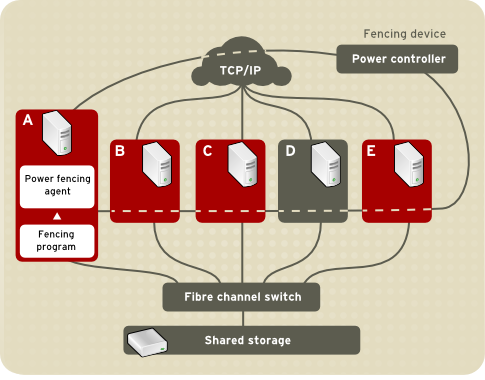
Figure 4.1. Power Fencing Example

Figure 4.2. Storage Fencing Example
Specifying a fencing method consists of editing a cluster configuration file to assign a fencing-method name, the fencing agent, and the fencing device for each node in the cluster.
The way in which a fencing method is specified depends on if a node has either dual power supplies or multiple paths to storage. If a node has dual power supplies, then the fencing method for the node must specify at least two fencing devices — one fencing device for each power supply (see Figure 4.3, “Fencing a Node with Dual Power Supplies”). Similarly, if a node has multiple paths to Fibre Channel storage, then the fencing method for the node must specify one fencing device for each path to Fibre Channel storage. For example, if a node has two paths to Fibre Channel storage, the fencing method should specify two fencing devices — one for each path to Fibre Channel storage (see Figure 4.4, “Fencing a Node with Dual Fibre Channel Connections”).
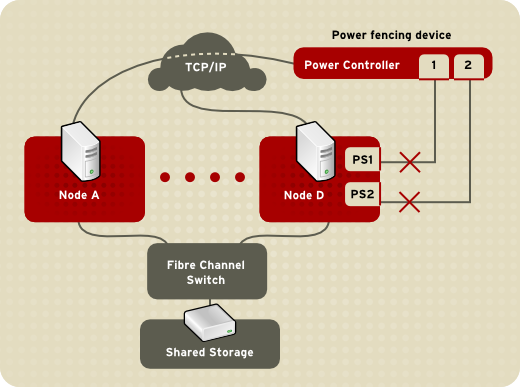
Figure 4.3. Fencing a Node with Dual Power Supplies
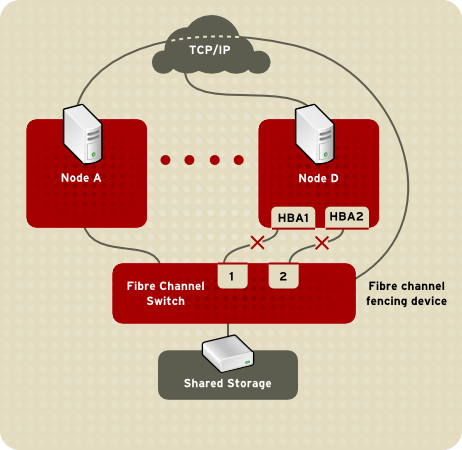
Figure 4.4. Fencing a Node with Dual Fibre Channel Connections
You can configure a node with one fencing method or multiple fencing methods. When you configure a node for one fencing method, that is the only fencing method available for fencing that node. When you configure a node for multiple fencing methods, the fencing methods are cascaded from one fencing method to another according to the order of the fencing methods specified in the cluster configuration file. If a node fails, it is fenced using the first fencing method specified in the cluster configuration file for that node. If the first fencing method is not successful, the next fencing method specified for that node is used. If none of the fencing methods is successful, then fencing starts again with the first fencing method specified, and continues looping through the fencing methods in the order specified in the cluster configuration file until the node has been fenced.
For detailed information on configuring fence devices, see the corresponding chapter in the Cluster Administration manual.
Chapter 5. Lock Management
Copier lienLien copié sur presse-papiers!
Lock management is a common cluster-infrastructure service that provides a mechanism for other cluster infrastructure components to synchronize their access to shared resources. In a Red Hat Enterprise Linux cluster, DLM (Distributed Lock Manager) is the lock manager.
A lock manager is a traffic cop who controls access to resources in the cluster, such as access to a GFS file system. You need it because without a lock manager, there would be no control over access to your shared storage, and the nodes in the cluster would corrupt each other's data.
As implied in its name, DLM is a distributed lock manager and runs in each cluster node; lock management is distributed across all nodes in the cluster. GFS2 and CLVM use locks from the lock manager. GFS2 uses locks from the lock manager to synchronize access to file system metadata (on shared storage). CLVM uses locks from the lock manager to synchronize updates to LVM volumes and volume groups (also on shared storage). In addition,
rgmanager uses DLM to synchronize service states.
5.1. DLM Locking Model
Copier lienLien copié sur presse-papiers!
The DLM locking model provides a rich set of locking modes and both synchronous and asynchronous execution. An application acquires a lock on a lock resource. A one-to-many relationship exists between lock resources and locks: a single lock resource can have multiple locks associated with it.
A lock resource can correspond to an actual object, such as a file, a data structure, a database, or an executable routine, but it does not have to correspond to one of these things. The object you associate with a lock resource determines the granularity of the lock. For example, locking an entire database is considered locking at coarse granularity. Locking each item in a database is considered locking at a fine granularity.
The DLM locking model supports:
- Six locking modes that increasingly restrict access to a resource
- The promotion and demotion of locks through conversion
- Synchronous completion of lock requests
- Asynchronous completion
- Global data through lock value blocks
The DLM provides its own mechanisms to support its locking features, such as inter-node communication to manage lock traffic and recovery protocols to re-master locks after a node failure or to migrate locks when a node joins the cluster. However, the DLM does not provide mechanisms to actually manage the cluster itself. Therefore the DLM expects to operate in a cluster in conjunction with another cluster infrastructure environment that provides the following minimum requirements:
- The node is a part of a cluster.
- All nodes agree on cluster membership and has quorum.
- An IP address must communicate with the DLM on a node. Normally the DLM uses TCP/IP for inter-node communications which restricts it to a single IP address per node (though this can be made more redundant using the bonding driver). The DLM can be configured to use SCTP as its inter-node transport which allows multiple IP addresses per node.
The DLM works with any cluster infrastructure environments that provide the minimum requirements listed above. The choice of an open source or closed source environment is up to the user.
5.2. Lock States
Copier lienLien copié sur presse-papiers!
A lock state indicates the current status of a lock request. A lock is always in one of three states:
- Granted — The lock request succeeded and attained the requested mode.
- Converting — A client attempted to change the lock mode and the new mode is incompatible with an existing lock.
- Blocked — The request for a new lock could not be granted because conflicting locks exist.
A lock's state is determined by its requested mode and the modes of the other locks on the same resource.
Chapter 6. Configuration and Administration Tools
Copier lienLien copié sur presse-papiers!
The cluster configuration file,
/etc/cluster/cluster.conf specifies the High Availability Add-On configuration. The configuration file is an XML file that describes the following cluster characteristics:
- Cluster name — Specifies the cluster name, cluster configuration file revision level, and basic fence timing properties used when a node joins a cluster or is fenced from the cluster.
- Cluster — Specifies each node of the cluster, specifying node name, node ID, number of quorum votes, and fencing method for that node.
- Fence Device — Specifies fence devices in the cluster. Parameters vary according to the type of fence device. For example for a power controller used as a fence device, the cluster configuration defines the name of the power controller, its IP address, login, and password.
- Managed Resources — Specifies resources required to create cluster services. Managed resources includes the definition of failover domains, resources (for example an IP address), and services. Together the managed resources define cluster services and failover behavior of the cluster services.
The cluster configuration is automatically validated according to the cluster schema at
/usr/share/cluster/cluster.rng during startup time and when a configuration is reloaded. Also, you can validate a cluster configuration any time by using the ccs_config_validate command.
An annotated schema is available for viewing at
/usr/share/doc/cman-X.Y.ZZ/cluster_conf.html (for example /usr/share/doc/cman-3.0.12/cluster_conf.html).
Configuration validation checks for the following basic errors:
- XML validity — Checks that the configuration file is a valid XML file.
- Configuration options — Checks to make sure that options (XML elements and attributes) are valid.
- Option values — Checks that the options contain valid data (limited).
6.1. Cluster Administration Tools
Copier lienLien copié sur presse-papiers!
Managing Red Hat High Availability Add-On software consists of using configuration tools to specify the relationship among the cluster components. The following cluster configuration tools are available with Red Hat High Availability Add-On:
- Conga — This is a comprehensive user interface for installing, configuring, and managing Red Hat High Availability Add-On. Refer to Configuring and Managing the High Availability Add-On for information about configuring and managing High Availability Add-On with Conga.
- Luci — This is the application server that provides the user interface for Conga. It allows users to manage cluster services and provides access to help and online documentation when needed.
- Ricci — This is a service daemon that manages distribution of the cluster configuration. Users pass configuration details using the Luci interface, and the configuration is loaded in to corosync for distribution to cluster nodes.
- As of the Red Hat Enterprise Linux 6.1 release and later, the Red Hat High Availability Add-On provides support for the
ccscluster configuration command, which allows an administrator to create, modify and view the cluster.conf cluster configuration file. Refer to the Cluster Administration manual for information about configuring and managing the High Availability Add-On with theccscommand.
Note
system-config-cluster is not available in Red Hat Enterprise Linux 6.
Chapter 7. Virtualization and High Availability
Copier lienLien copié sur presse-papiers!
Various virtualization platforms are supported in conjunction with Red Hat Enterprise Linux 6 using the High Availability and Resilient Storage Add-Ons. There are two supported use cases for virtualization in conjunction with Red Hat Enterprise Linux High Availability Add-on.
- VMs as Highly Available Resources/Services
- Guest Clusters
7.1. VMs as Highly Available Resources/Services
Copier lienLien copié sur presse-papiers!
This refers to Red Hat Enterprise Linux Cluster/HA running on bare metal hosts that are themselves usable as virtualization platforms. In this mode you can configure the cluster resource manager (RGManager) to manage virtual machines (guests) as highly available resources.
Both Red Hat Enterprise Linux HA and RHEV provide mechanisms to provide HA virtual machines. Given the overlap in functionality, care should be taken to chose the right product to fit your specific use case. Here are some guidelines to consider when choosing between Red Hat Enterprise Linux HA and RHEV for providing HA of VMs.
For virtual machine and physical host counts:
- If a large number of VMs are being made HA across a large number of physical hosts, using RHEV may be the better solution as it has more sophisticated algorithms for managing VM placement that take into consideration things like host CPU, memory, and load information.
- If a small number of VMs are being made HA across a small number of physical hosts, using Red Hat Enterprise Linux HA may be the better solution because less additional infrastructure is required. The smallest Red Hat Enterprise Linux HA VM solution needs two physical hosts for a 2 node cluster. The smallest RHEV solution requires 4 nodes: 2 to provide HA for the RHEVM server and 2 to act as VM hosts.
- There is no strict guideline for how many hosts or VMs would be considered a 'large number'. But keep in mind that the maximum number of hosts in a single Red Hat Enterprise Linux HA Cluster is 16, and that any Cluster with 8 or more hosts will need an architecture review from Red Hat to determine supportability.
Virtual machine usage:
- If your HA VMs are providing services that are using shared infrastructure, either Red Hat Enterprise Linux HA or RHEV can be used.
- If you need to provide HA for a small set of critical services that are running inside of VMs, Red Hat Enterprise Linux HA or RHEV can be used.
- If you are looking to provide infrastructure to allow rapid provisioning of VMs, RHEV should be used.
- RHEV VM HA is meant to be dynamic. Addition of new VMs to the RHEV 'cluster' can be done easily and is fully supported.
- Red Hat Enterprise Linux VM HA is not meant to be a highly dynamic environment. A cluster with a fixed set of VMs should be set up and then for the lifetime of the cluster it is not recommended to add or remove additional VMs
- Red Hat Enterprise Linux HA should not be used to provide infrastructure for creating cloud-like environments due to the static nature of cluster configuration as well as the relatively low physical node count maximum (16 nodes)
Red Hat Enterprise Linux 5 supports two virtualization platforms. Xen has been supported since Red Hat Enterprise Linux 5.0 release. In Red Hat Enterprise Linux 5.4 KVM was introduced.
Red Hat Enterprise Linux 6 only supports KVM as a virtualization platform.
Red Hat Enterprise Linux 5 AP Cluster supports both KVM and Xen for use in running virtual machines that are managed by the host cluster infrastructure.
Red Hat Enterprise Linux 6 HA supports KVM for use in running virtual machines that are managed by the host cluster infrastructure.
The following deployment scenarios are currently supporteddeployment scenarios are currently supported by Red Hat:
- Red Hat Enterprise Linux 5.0+ supports Xen in conjunction with Red Hat Enterprise Linux AP Cluster
- Red Hat Enterprise Linux 5.4 introduced support for KVM virtual machines as managed resources in Red Hat Enterprise Linux AP Cluster as a Technology Preview.
- Red Hat Enterprise Linux 5.5+ elevates support for KVM virtual machines to be fully supported.
- Red Hat Enterprise Linux 6.0+ supports KVM virtual machines as highly available resources in the Red Hat Enterprise Linux 6 High Availability Add-On.
- Red Hat Enterprise Linux 6.0+ does not support Xen virtual machines with the Red Hat Enterprise Linux 6 High Availability Add-On, since Red Hat Enterprise Linux 6 no longer supports Xen.
Note
For updated information and special notes regarding supported deployment scenarios, see the following Red Hat Knowledgebase entry:
The types of virtual machines that are run as managed resources does not matter. Any guest that is supported by either Xen or KVM in Red Hat Enterprise Linux can be used as a highly available guest. This includes variants of Red Hat Enterprise Linux (Red Hat Enterprise Linux, Red Hat Enterprise Linux, Red Het Enterprise Linux 5) and several variants of Microsoft Windows. Check the Red Hat Enterprise Linux documentation to find the latest list of supported guest operating systems under each hypervisor.
7.1.1. General Recommendations
Copier lienLien copié sur presse-papiers!
- In Red Hat Enterprise Linux 5.3 and below, RGManager utilized the native Xen interfaces for managing Xen domU's (guests). In Red Hat Enterprise Linux 5.4 this was changed to use libvirt for both the Xen and KVM hypervisors to provide a consistent interface between both hypervisor types. In addition to this architecture change there were numerous bug fixes released in Red Hat Enterprise Linux 5.4 and 5.4.z, so it is advisable to upgrade your host clusters to at least the latest Red Hat Enterprise Linux 5.5 packages before configuring Xen managed services.
- For KVM managed services you must upgrade to Red Hat Enterprise Linux 5.5 as this is the first version of Red Hat Enterprise Linux where this functionality is fully supported.
- Always check the latest Red Hat Enterprise Linux errata before deploying a Cluster to make sure that you have the latest fixes for known issues or bugs.
- Mixing hosts of different hypervisor types is not supported. The host cluster must either be all Xen or all KVM based.
- Host hardware should be provisioned such that they are capable of absorbing relocated guests from multiple other failed hosts without causing a host to overcommit memory or severely overcommit virtual CPUs. If enough failures occur to cause overcommit of either memory or virtual CPUs this can lead to severe performance degradation and potentially cluster failure.
- Directly using the xm or libvirt tools (virsh, virt-manager) to manage (live migrate, stop, start) virtual machines that are under RGManager control is not supported or recommended since this would bypass the cluster management stack.
- Each VM name must be unique cluster wide, including local-only / non-cluster VMs. Libvirtd only enforces unique names on a per-host basis. If you clone a VM by hand, you must change the name in the clone's configuration file.
7.2. Guest Clusters
Copier lienLien copié sur presse-papiers!
This refers to Red Hat Enterprise Linux Cluster/HA running inside of virtualized guests on a variety of virtualization platforms. In this use-case Red Hat Enterprise Linux Clustering/HA is primarily used to make the applications running inside of the guests highly available. This use-case is similar to how Red Hat Enterprise Linux Clustering/HA has always been used in traditional bare-metal hosts. The difference is that Clustering runs inside of guests instead.
The following is a list of virtualization platforms and the level of support currently available for running guest clusters using Red Hat Enterprise Linux Cluster/HA. In the below list, Red Hat Enterprise Linux 6 Guests encompass both the High Availability (core clustering) and Resilient Storage Add-Ons (GFS2, clvmd and cmirror).
- Red Hat Enterprise Linux 5.3+ Xen hosts fully support running guest clusters where the guest operating systems are also Red Hat Enterprise Linux 5.3 or above:
- Xen guest clusters can use either fence_xvm or fence_scsi for guest fencing.
- Usage of fence_xvm/fence_xvmd requires a host cluster to be running to support fence_xvmd and fence_xvm must be used as the guest fencing agent on all clustered guests.
- Shared storage can be provided by either iSCSI or Xen shared block devices backed either by host block storage or by file backed storage (raw images).
- Red Hat Enterprise Linux 5.5+ KVM hosts do not support running guest clusters.
- Red Hat Enterprise Linux 6.1+ KVM hosts support running guest clusters where the guest operating systems are either Red Hat Enterprise Linux 6.1+ or Red Hat Enterprise Linux 5.6+. Red Hat Enterprise Linux 4 guests are not supported.
- Mixing bare metal cluster nodes with cluster nodes that are virtualized is permitted.
- Red Hat Enterprise Linux 5.6+ guest clusters can use either fence_xvm or fence_scsi for guest fencing.
- Red Hat Enterprise Linux 6.1+ guest clusters can use either fence_xvm (in the
fence-virtpackage) or fence_scsi for guest fencing. - The Red Hat Enterprise Linux 6.1+ KVM Hosts must use fence_virtd if the guest cluster is using fence_virt or fence_xvm as the fence agent. If the guest cluster is using fence_scsi then fence_virtd on the hosts is not required.
- fence_virtd can operate in three modes:
- Standalone mode where the host to guest mapping is hard coded and live migration of guests is not allowed
- Using the Openais Checkpoint service to track live-migrations of clustered guests. This requires a host cluster to be running.
- Using the Qpid Management Framework (QMF) provided by the libvirt-qpid package. This utilizes QMF to track guest migrations without requiring a full host cluster to be present.
- Shared storage can be provided by either iSCSI or KVM shared block devices backed by either host block storage or by file backed storage (raw images).
- Red Hat Enterprise Virtualization Management (RHEV-M) versions 2.2+ and 3.0 currently support Red Hat Enterprise Linux 5.6+ and Red Hat Enterprise Linux 6.1+ clustered guests.
- Guest clusters must be homogeneous (either all Red Hat Enterprise Linux 5.6+ guests or all Red Hat Enterprise Linux 6.1+ guests).
- Mixing bare metal cluster nodes with cluster nodes that are virtualized is permitted.
- Fencing is provided by fence_scsi in RHEV-M 2.2+ and by both fence_scsi and fence_rhevm in RHEV-M 3.0. Fencing is supported using fence_scsi as described below:
- Use of fence_scsi with iSCSI storage is limited to iSCSI servers that support SCSI 3 Persistent Reservations with the PREEMPT AND ABORT command. Not all iSCSI servers support this functionality. Check with your storage vendor to ensure that your server is compliant with SCSI 3 Persistent Reservation support. Note that the iSCSI server shipped with Red Hat Enterprise Linux does not presently support SCSI 3 Persistent Reservations, so it is not suitable for use with fence_scsi.
- VMware vSphere 4.1, VMware vCenter 4.1, VMware ESX and ESXi 4.1 support running guest clusters where the guest operating systems are Red Hat Enterprise Linux 5.7+ or Red Hat Enterprise Linux 6.2+. Version 5.0 of VMware vSphere, vCenter, ESX and ESXi are also supported; however, due to an incomplete WDSL schema provided in the initial release of VMware vSphere 5.0, the fence_vmware_soap utility does not work on the default install. Refer to the Red Hat Knowledgebase https://access.redhat.com/knowledge/ for updated procedures to fix this issue.
- Guest clusters must be homogeneous (either all Red Hat Enterprise Linux 5.7+ guests or all Red Hat Enterprise Linux 6.1+ guests).
- Mixing bare metal cluster nodes with cluster nodes that are virtualized is permitted.
- The fence_vmware_soap agent requires the 3rd party VMware perl APIs. This software package must be downloaded from VMware's web site and installed onto the Red Hat Enterprise Linux clustered guests.
- Alternatively, fence_scsi can be used to provide fencing as described below.
- Shared storage can be provided by either iSCSI or VMware raw shared block devices.
- Use of VMware ESX guest clusters is supported using either fence_vmware_soap or fence_scsi.
- Use of Hyper-V guest clusters is unsupported at this time.
7.2.1. Using fence_scsi and iSCSI Shared Storage
Copier lienLien copié sur presse-papiers!
- In all of the above virtualization environments, fence_scsi and iSCSI storage can be used in place of native shared storage and the native fence devices.
- fence_scsi can be used to provide I/O fencing for shared storage provided over iSCSI if the iSCSI target properly supports SCSI 3 persistent reservations and the PREEMPT AND ABORT command. Check with your storage vendor to determine if your iSCSI solution supports the above functionality.
- The iSCSI server software shipped with Red Hat Enterprise Linux does not support SCSI 3 persistent reservations; therefore, it cannot be used with fence_scsi. It is suitable for use as a shared storage solution in conjunction with other fence devices like fence_vmware or fence_rhevm, however.
- If using fence_scsi on all guests, a host cluster is not required (in the Red Hat Enterprise Linux 5 Xen/KVM and Red Hat Enterprise Linux 6 KVM Host use cases)
- If fence_scsi is used as the fence agent, all shared storage must be over iSCSI. Mixing of iSCSI and native shared storage is not permitted.
7.2.2. General Recommendations
Copier lienLien copié sur presse-papiers!
- As stated above it is recommended to upgrade both the hosts and guests to the latest Red Hat Enterprise Linux packages before using virtualization capabilities, as there have been many enhancements and bug fixes.
- Mixing virtualization platforms (hypervisors) underneath guest clusters is not supported. All underlying hosts must use the same virtualization technology.
- It is not supported to run all guests in a guest cluster on a single physical host as this provides no high availability in the event of a single host failure. This configuration can be used for prototype or development purposes, however.
- Best practices include the following:
- It is not necessary to have a single host per guest, but this configuration does provide the highest level of availability since a host failure only affects a single node in the cluster. If you have a 2-to-1 mapping (two guests in a single cluster per physical host) this means a single host failure results in two guest failures. Therefore it is advisable to get as close to a 1-to-1 mapping as possible.
- Mixing multiple independent guest clusters on the same set of physical hosts is not supported at this time when using the fence_xvm/fence_xvmd or fence_virt/fence_virtd fence agents.
- Mixing multiple independent guest clusters on the same set of physical hosts will work if using fence_scsi + iSCSI storage or if using fence_vmware + VMware (ESX/ESXi and vCenter).
- Running non-clustered guests on the same set of physical hosts as a guest cluster is supported, but since hosts will physically fence each other if a host cluster is configured, these other guests will also be terminated during a host fencing operation.
- Host hardware should be provisioned such that memory or virtual CPU overcommit is avoided. Overcommitting memory or virtual CPU will result in performance degradation. If the performance degradation becomes critical the cluster heartbeat could be affected, which may result in cluster failure.
Appendix A. Revision History
Copier lienLien copié sur presse-papiers!
| Revision History | |||
|---|---|---|---|
| Revision 4-4 | Tue Apr 18 2017 | ||
| |||
| Revision 4-3 | Wed Mar 8 2017 | ||
| |||
| Revision 4-1 | Fri Dec 16 2016 | ||
| |||
| Revision 3-4 | Tue Apr 26 2016 | ||
| |||
| Revision 3-3 | Wed Mar 9 2016 | ||
| |||
| Revision 2-3 | Wed Jul 22 2015 | ||
| |||
| Revision 2-2 | Wed Jul 8 2015 | ||
| |||
| Revision 2-1 | Mon Apr 3 2015 | ||
| |||
| Revision 1-13 | Wed Oct 8 2014 | ||
| |||
| Revision 1-12 | Thu Aug 7 2014 | ||
| |||
| Revision 1-7 | Wed Nov 20 2013 | ||
| |||
| Revision 1-4 | Mon Feb 18 2013 | ||
| |||
| Revision 1-3 | Mon Jun 18 2012 | ||
| |||
| Revision 1-2 | Fri Aug 26 2011 | ||
| |||
| Revision 1-1 | Wed Nov 10 2010 | ||
| |||
Legal Notice
Copier lienLien copié sur presse-papiers!
Copyright © 2017 Red Hat, Inc.
This document is licensed by Red Hat under the Creative Commons Attribution-ShareAlike 3.0 Unported License. If you distribute this document, or a modified version of it, you must provide attribution to Red Hat, Inc. and provide a link to the original. If the document is modified, all Red Hat trademarks must be removed.
Red Hat, as the licensor of this document, waives the right to enforce, and agrees not to assert, Section 4d of CC-BY-SA to the fullest extent permitted by applicable law.
Red Hat, Red Hat Enterprise Linux, the Shadowman logo, JBoss, OpenShift, Fedora, the Infinity logo, and RHCE are trademarks of Red Hat, Inc., registered in the United States and other countries.
Linux® is the registered trademark of Linus Torvalds in the United States and other countries.
Java® is a registered trademark of Oracle and/or its affiliates.
XFS® is a trademark of Silicon Graphics International Corp. or its subsidiaries in the United States and/or other countries.
MySQL® is a registered trademark of MySQL AB in the United States, the European Union and other countries.
Node.js® is an official trademark of Joyent. Red Hat Software Collections is not formally related to or endorsed by the official Joyent Node.js open source or commercial project.
The OpenStack® Word Mark and OpenStack logo are either registered trademarks/service marks or trademarks/service marks of the OpenStack Foundation, in the United States and other countries and are used with the OpenStack Foundation's permission. We are not affiliated with, endorsed or sponsored by the OpenStack Foundation, or the OpenStack community.
All other trademarks are the property of their respective owners.

'%20d='M201.5%20305.5c-13.8%200-24.9-11.1-24.9-24.6%200-13.8%2011.1-24.9%2024.9-24.9%2013.6%200%2024.6%2011.1%2024.6%2024.9%200%2013.6-11.1%2024.6-24.6%2024.6zM504%20256c0%20137-111%20248-248%20248S8%20393%208%20256%20119%208%20256%208s248%20111%20248%20248zm-132.3-41.2c-9.4%200-17.7%203.9-23.8%2010-22.4-15.5-52.6-25.5-86.1-26.6l17.4-78.3%2055.4%2012.5c0%2013.6%2011.1%2024.6%2024.6%2024.6%2013.8%200%2024.9-11.3%2024.9-24.9s-11.1-24.9-24.9-24.9c-9.7%200-18%205.8-22.1%2013.8l-61.2-13.6c-3-.8-6.1%201.4-6.9%204.4l-19.1%2086.4c-33.2%201.4-63.1%2011.3-85.5%2026.8-6.1-6.4-14.7-10.2-24.1-10.2-34.9%200-46.3%2046.9-14.4%2062.8-1.1%205-1.7%2010.2-1.7%2015.5%200%2052.6%2059.2%2095.2%20132%2095.2%2073.1%200%20132.3-42.6%20132.3-95.2%200-5.3-.6-10.8-1.9-15.8%2031.3-16%2019.8-62.5-14.9-62.5zM302.8%20331c-18.2%2018.2-76.1%2017.9-93.6%200-2.2-2.2-6.1-2.2-8.3%200-2.5%202.5-2.5%206.4%200%208.6%2022.8%2022.8%2087.3%2022.8%20110.2%200%202.5-2.2%202.5-6.1%200-8.6-2.2-2.2-6.1-2.2-8.3%200zm7.7-75c-13.6%200-24.6%2011.1-24.6%2024.9%200%2013.6%2011.1%2024.6%2024.6%2024.6%2013.8%200%2024.9-11.1%2024.9-24.6%200-13.8-11-24.9-24.9-24.9z'/%3e%3c/svg%3e)