 Red Hat Summit
Ce contenu n'est pas disponible dans la langue sélectionnée.
Installation Guide
Red Hat JBoss Fuse
Installing Red Hat JBoss Fuse on a computer
Version 6.2
Copyright © 2011-2015 Red Hat, Inc. and/or its affiliates.
26 Sep 2017
Abstract
It is easy to install Red Hat JBoss Fuse and tailor the installation to a particular environment.
Chapter 1. Installation Prerequisites
Copier lienLien copié sur presse-papiers!
Abstract
Before attempting to install and use Red Hat JBoss Fuse, make sure your system meets the minimum requirements.
Supported platforms
Copier lienLien copié sur presse-papiers!
Red Hat tests and supports Fuse products in the configurations listed at Red Hat JBoss Fuse Supported Configurations.
Java Runtime
Copier lienLien copié sur presse-papiers!
For details of the Java runtimes supported by Red Hat JBoss Fuse, see Red Hat JBoss Fuse Supported Configurations.
Warning
Do not install the Java runtime under a directory path that includes whitespace. For example,
C:\Program Files\Java\jde7 is not an acceptable install path and will lead to unpredictable errors in Red Hat JBoss Fuse at run time.
Supported Standards
Copier lienLien copié sur presse-papiers!
Red Hat JBoss Fuse supports the standards and protocols listed at Red Hat JBoss Fuse Supported Standards.
Hardware requirements
Copier lienLien copié sur presse-papiers!
The minimum hardware requirements for installing Red Hat JBoss Fuse are:
- Full Installation
- 700 MB of free disk space
- 2 GB of RAM
In addition to the disk space required for the base installation, a running system will require space for caching, persistent message stores, and other functions.
Chapter 2. Installation Types
Copier lienLien copié sur presse-papiers!
2.1. Overview of Installation Types
Copier lienLien copié sur presse-papiers!
You can install Red Hat JBoss Fuse with the following feature sets:
- Full install—the package that is available for download from the Red Hat Customer Portal installs Apache Karaf, Apache Camel, Apache ActiveMQ, Apache CXF, and the Fuse Management Console (Hawtio).
- Custom assembly—it is possible to create your own custom assembly of JBoss Fuse 6.2, containing a customized subset of the JBoss Fuse features and bundles. You can use this approach to replace the Minimal and the Medium install types, which were available for versions of JBoss Fuse prior to 6.2. To create a custom assembly of JBoss Fuse, proceed as follows:
- Download and install the standard Full Install from the Red Hat Customer Portal, as described in Chapter 3, Installing.
- Go to the
InstallDir/quickstarts/customproject and read the instructions inInstallDir/quickstarts/custom/README.mdfor creating a custom assembly. - After customizing the configuration of the
quickstarts/customproject, build the project by entering the command:mvn clean install
mvn clean installCopy to Clipboard Copied! Toggle word wrap Toggle overflow - The result of building this project is a custom assembly file, in the following location:
InstallDir/quickstarts/custom/target/custom-distro-ProjectVersion-bin.zip
InstallDir/quickstarts/custom/target/custom-distro-ProjectVersion-bin.zipCopy to Clipboard Copied! Toggle word wrap Toggle overflow - You can now install the custom assembly by unzipping the
custom-distro-ProjectVersion-bin.zipfile into a convenient location on the file system.
NoteThequickstarts/customproject is based mainly on the following Maven plug-ins:features-maven-pluginandmaven-assembly-plugin. For more details about thefeatures-maven-pluginplug-in, see section "Generating a Custom Offline Repository" in "Deploying into the Container".
Chapter 3. Installing
Copier lienLien copié sur presse-papiers!
Abstract
Red Hat JBoss Fuse is installed by unpacking an archive system on a system. This provides an easy way for a developer to get up and running.
Getting the archive
Copier lienLien copié sur presse-papiers!
You can download the Red Hat JBoss Fuse archive from the Red Hat Customer Portal>Downloads>Red Hat JBoss Middleware>Downloads page, after you register and login to your customer account.
Once logged in:
- Select Fuse, listed under Integrated Platforms, in the sidebar menu.
- Select
6.2.0from the Version drop-down list on the Software Downloads page. - Click the Download button next to the Red Hat JBoss Fuse 6.2.0 distribution file you want to download.
Unpacking the archive
Copier lienLien copié sur presse-papiers!
Red Hat JBoss Fuse is packaged as a
.zip file. Using a suitable archive tool, such as Zip, unpack Red Hat JBoss Fuse into a directory to which you have full access.
Warning
Do not unpack the archive file into a folder that has spaces in its path name. For example, do not unpack into
C:\Documents and Settings\Greco Roman\Desktop\fusesrc.
Warning
Do not unpack the archive file into a folder that has any of the following special characters in its path name:
#, %, ^, ".
Chapter 4. Adding a Remote Console User
Copier lienLien copié sur presse-papiers!
Abstract
The server's remote command console is not configured with a default user. Before you can connect to the server's console remotely, you must add a user to the configuration.
4.1. Add a User
Copier lienLien copié sur presse-papiers!
Red Hat JBoss Fuse is not installed with a default user for the remote console. Before you can remotely manage a server, you must add a user by editing
InstallDir/etc/users.properties.
Important
The information in this file is unencrypted so it is not suitable for environments that require strict security.
To add a user:
- Open
InstallDir/etc/users.propertiesin your favorite text editor. - Locate the line
#admin=admin,admin,manager,viewer,Operator, Maintainer, Deployer, Auditor, Administrator, SuperUser.This line specifies a useradminwith the passwordadminand comma-separated list of roles. - Uncomment the line by removing the leading
#. - Change the first
adminto the desired user name. - Change the second
adminto the desired password. - Leave the role list,
admin,manager,viewer,Operator, Maintainer, Deployer, Auditor, Administrator, SuperUser, as is. - Save the changes.
Chapter 5. Offline Mode
Copier lienLien copié sur presse-papiers!
Abstract
You can run the JBoss Fuse container in offline mode (that is, without an Internet connection). But if you are planning to deploy custom applications to the container, it might be necessary to download additional dependencies (to a local Maven repository) before you can run the container in offline mode with these applications.
5.1. Supported Functionality
Copier lienLien copié sur presse-papiers!
If you want to run the JBoss Fuse container in offline mode, it is necessary to distinguish between the following kinds of dependency:
- Runtime dependencies—the dependencies required to run the JBoss Fuse container, in its default configuration.
- Build-time dependencies—the dependencies required to build a custom application (which might include third-party libraries).
Here is a summary of what can be done in offline mode and what needs to be done in online mode (with an Internet connection):
- Running the JBoss Fuse container in its default configuration—is supported in offline mode. The default configuration of the JBoss Fuse container is specified by the
featuresBootproperty in theetc/org.apache.karaf.features.cfgfile. The requisite dependencies are all provided in thesystem/sub-directory of the installation. - Installing additional features—is, in general, not supported in offline mode. In principle, you can use the
features:installcommand to install any of the features from the standard feature repositories (as specified by thefeaturesRepositoriesproperty in theetc/org.apache.karaf.features.cfgfile), but the majority of these features must be downloaded from the Internet and are thus not supported in offline mode. - Deploying custom applications—is, in general, not supported in offline mode. There may be some cases where an application with a minimal set of build-time dependencies is deployable offline, but in general, custom applications would have third-party dependencies that require an Internet connection (so that JAR files can be downloaded by Apache Maven).
If you do need to deploy an application with dependencies that are not available offline, you can use the Maven dependency plug-in to download the application's dependencies into a Maven offline repository. This customized Maven offline repository can then be distributed internally to any machines that do not have an Internet connection. For more details of this approach, see section "Offline Repository for a Maven Project" in "Fabric Guide".
Chapter 6. Monitoring Fuse Resources
Copier lienLien copié sur presse-papiers!
Abstract
Using Red Hat JBoss Operations Network (JON), you can discover, import, and monitor Red Hat JBoss Fuse.
6.1. Installation Procedure
Copier lienLien copié sur presse-papiers!
The Fuse Plugin Pack for JBoss ON 3.3 is not installed with the JON base distribution. You must download and install it separately after you have installed JON.
To install the
Fuse Plugin Pack for JBoss ON 3.3:
- Navigate to the Red Hat Software Downloads page on the Red Hat Customer Portal.
- Select JBoss ON for Fuse under Management in the sidebar menu (or using the drop-down menu for the Products field).
- Make sure
3.3appears in the Version drop-down list on the Software Downloads page. - Click Download next to Fuse Plugin Pack for Red Hat JBoss Operations Network 3.3 .
- Unzip the plugin package (
jon-plugin-pack-fuse-3.3.0.GA.zip) into a temporary directory (for example,/installDir/server/). - Install the jar files in one of two ways:
- Hot DeployCopy the unpacked jar files into the JBoss Operations Network's
/installDir/server/plugins/directory. For details, see the JBoss Operations Network Installation Guide. - JON Server UIFor details, see the JBoss Operations Network Installation Guide, or watch the video Installing JBoss Operations Network - Part 4, Installing JON Agent Plugins.
Chapter 7. Getting Started with SwitchYard on JBoss Fuse
Copier lienLien copié sur presse-papiers!
7.1. SwitchYard
Copier lienLien copié sur presse-papiers!
Important
SwitchYard on JBoss Fuse is currently provided as a technical preview only, not suitable for production environments. For details on what "technical preview" means, see https://access.redhat.com/solutions/21101. However, SwitchYard will be supported with the release of JBoss Fuse 6.2.1 with full documentation provided.
SwitchYard is a lightweight service delivery framework providing full lifecycle support for developing, deploying, and managing service-oriented applications.
It works with Apache Camel to provide a fast, simple, flexible integration runtime with comprehensive connectivity and transports.
A uniform application model augments Apache Camel, joining Java EE, BPM, rules, orchestration, and routing into a cohesive development model and runtime.
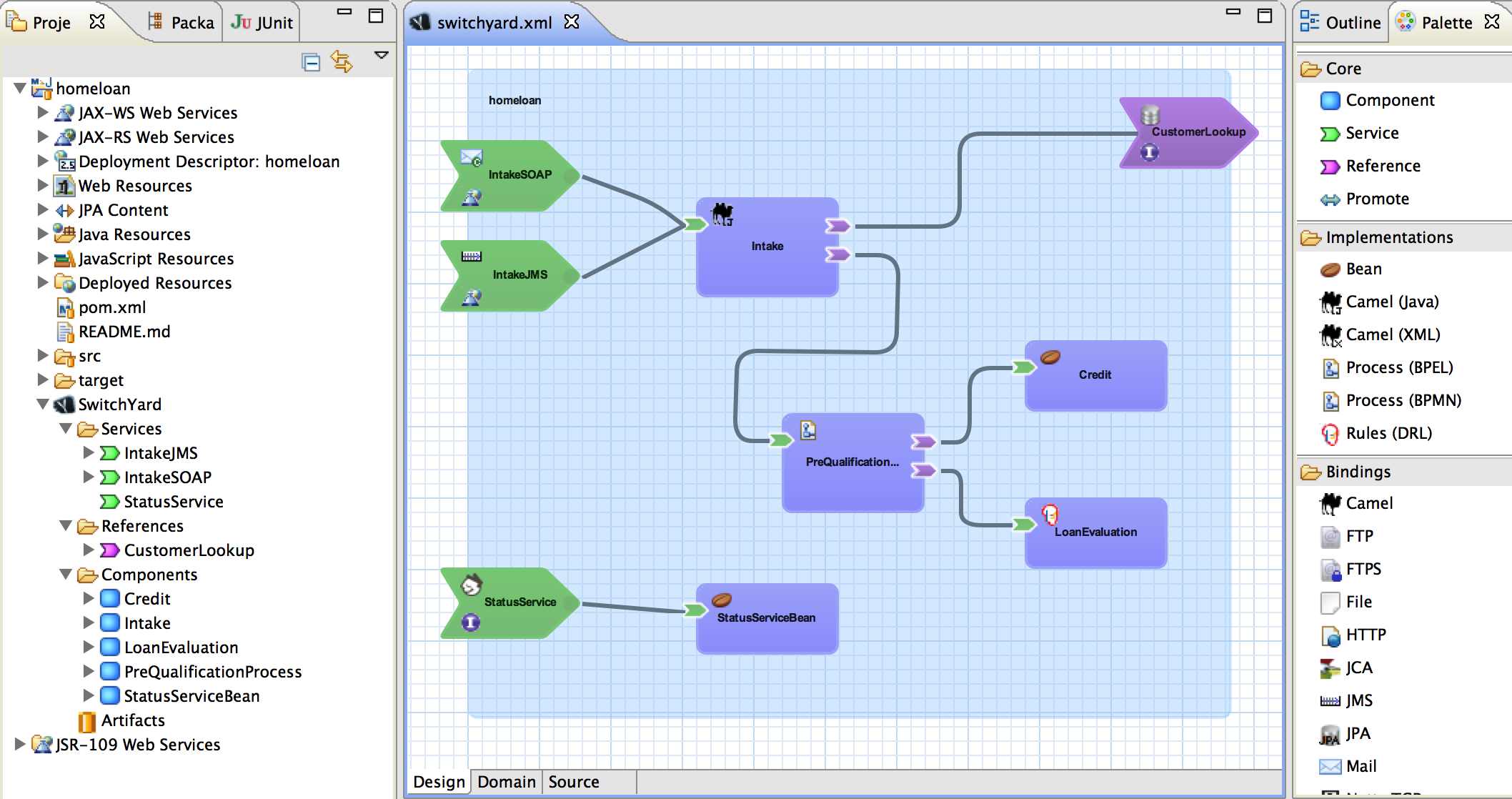
Common functionality and cross-cutting concerns (for example, validation, transformation and policy) are isolated from business logic and handled declaratively. This ensures consistency and eliminates duplication, offering developers a clear view of the structure and relationships of services in an integration application.
Figure 7.1. SwitchYard Visual Editor
Note
SwitchYard tooling is provided with installation of the Red Hat JBoss Developer Studio Integration Stack.
7.2. Installing SwitchYard on JBoss Fuse
Copier lienLien copié sur presse-papiers!
SwitchYard does not necessarily need to be installed on JBoss Fuse explicitly. When a SwitchYard application is installed, as long as its accompanying features file is defined correctly, its dependencies will be installed automatically if they are not already installed. This includes the core SwitchYard components.
You can confirm this by installing a quickstart application on a fresh installation of JBoss Fuse.
However, you can also install SwitchYard and its related components manually.
Note
Each SwitchYard component and application is provided as a feature. Packaged features (including quickstart applications) are defined in the SwitchYard features file located at
installDir/system/org/switchyard/karaf/switchyard/2.0.1.redhat-620117/switchyard-2.0.1.redhat-620117-core-features.xml.
Procedure 7.1. Install SwitchYard Manually
- Start JBoss Fuse:
./installDir/bin/fuse
./installDir/bin/fuseCopy to Clipboard Copied! Toggle word wrap Toggle overflow - List the available SwitchYard features by entering the following console command. If this is a fresh instance, they will all be uninstalled at this point.
JBossFuse:karaf@root> features:list | grep switchyard
JBossFuse:karaf@root> features:list | grep switchyardCopy to Clipboard Copied! Toggle word wrap Toggle overflow - Install the core SwitchYard components by entering the following console command:
JBossFuse:karaf@root> features:install switchyard
JBossFuse:karaf@root> features:install switchyardCopy to Clipboard Copied! Toggle word wrap Toggle overflow - List the SwitchYard features again. You will now see that SwitchYard (the switchyard feature) has been installed, along with its dependencies as defined by the SwitchYard features file.
7.3. SwitchYard Quickstart Applications
Copier lienLien copié sur presse-papiers!
You can find a variety of SwitchYard applications in
installDir/quickstarts/switchyard.
Quickstart applications are typically installed from the JBoss Fuse command line console as follows:
- Start JBoss Fuse:
./installDir/bin/fuse
./installDir/bin/fuseCopy to Clipboard Copied! Toggle word wrap Toggle overflow - Install the application by entering the following console command:
JBossFuse:karaf@root> features:install switchyard-quickstart-APP_NAME
JBossFuse:karaf@root> features:install switchyard-quickstart-APP_NAMECopy to Clipboard Copied! Toggle word wrap Toggle overflow
You can find out more about running each quickstart application by reading the accompanying
Readme.md file for each.
Note
There is no need to add the features URL as described by the
Readme.md file. SwitchYard features are already defined in installDir/system/org/switchyard/karaf/switchyard/2.0.1.redhat-620117/switchyard-2.0.1.redhat-620117-core-features.xml.
7.4. Installing Your First Quickstart Application
Copier lienLien copié sur presse-papiers!
The following procedure demonstrates how to install and run the
camel-quartz-binding quickstart application. This application makes use of the camel-quartz component which schedules a logging service to run every second.
- Start JBoss Fuse:
./installDir/bin/fuse
./installDir/bin/fuseCopy to Clipboard Copied! Toggle word wrap Toggle overflow - List the available SwitchYard features by entering the following console command. If this is a fresh instance, they will all be uninstalled at this point.
JBossFuse:karaf@root> features:list | grep switchyard
JBossFuse:karaf@root> features:list | grep switchyardCopy to Clipboard Copied! Toggle word wrap Toggle overflow Install thecamel-quartz-bindingapplication by entering the following console command:JBossFuse:karaf@root> features:install switchyard-quickstart-camel-quartz-binding
JBossFuse:karaf@root> features:install switchyard-quickstart-camel-quartz-bindingCopy to Clipboard Copied! Toggle word wrap Toggle overflow - List the SwitchYard features again. You will now see that the camel-quartz-binding application (the switchyard-quickstart-camel-quartz-binding feature) has been installed, along with its dependencies as defined by the SwitchYard features file.
- View the output from the installed (and running) application by entering the following console command:
JBossFuse:karaf@root> log:tail
JBossFuse:karaf@root> log:tailCopy to Clipboard Copied! Toggle word wrap Toggle overflow
Note
Find out more about this quickstart application in
installDir/quickstarts/switchyard/camel-quartz-binding/Readme.md.
7.5. What's Next?
Copier lienLien copié sur presse-papiers!
Find out more about SwitchYard.
Chapter 8. Integrating JBoss BRMS and JBoss BPM Suite with JBoss Fuse
Copier lienLien copié sur presse-papiers!
Red Hat JBoss Fuse integration allows users of JBoss Fuse to complement their integration solution with additional features provided by JBoss BPM Suite and JBoss BRMS. Integration is provided by two
features.xml files: one providing core JBoss BPM Suite and JBoss BRMS features, and the other providing additional support for integration with SwitchYard and Camel.
Important
SwitchYard integration is a Technical Preview in JBoss Fuse 6.2, and is therefore not currently supported.
Note
For users of JBoss Fuse 6.1, only the core JBoss BPM Suite and JBoss BRMS features, provided by the following features file, are supported. Customers who are using an earlier version of this file must update it.
Core JBoss BPM Suite and JBoss BRMS features are provided by
drools-karaf-features-6.2.0.Final-redhat-6-BZ1232486-features.xml:
- drools-common
- drools-module
- drools-templates
- drools-decisiontable
- drools-jpa
- kie
- kie-ci
- kie-spring
- kie-aries-blueprint
- jbpm-commons
- jbpm-human-task
- jbpm
- droolsjbpm-hibernate
- h2
This features file (and supporting repositories) is currently provided as a patch —
Integration Pack contains references related to non-supported jars — that you can download from the Red Hat Customer Portal under JBoss BRMS or JBoss BPM Suite.
The following table lists some sample use cases and the corresponding features that are required to support them.
| Use Case | Feature(s) |
|---|---|
| I need to use Drools engine for rules evaluation. I do not need persistence, processes, nor decision tables. | Install drools-module. |
| I need to use Drools engine for rules evaluation with persistence and transactions. I do not need processes, nor decision tables. | Install drools-jpa (which includes drools-module). You might also want to install the droolsjbpm-hibernate feature, or ensure there is a compatible hibernate bundle installed. |
| I need to use Drools engine with decision tables. | Install drools-decisiontable (which includes drools-module). If you need persistence, install drools-jpa as well. |
| I need to use jBPM engine (or Drools engine with processes). | Install jbpm feature (which includes drools-module and drools-jpa). You might also want to install droolsjbpm-hibernate feature, or ensure there is a compatible hibernate bundle installed. |
| I need to use jBPM engine (or Drools engine with processes) with Human Task. | Install jbpm and jbpm-human-task. |
| I need to use Drools/jBPM with KieScanner (KIE-CI) to be able to download kJARs from a Maven repository. | Install required core engine jars (see row above) and kie-ci. |
| I need to use KIE-Spring integration. | Install kie-spring. |
| I need to use KIE-Aries-Blueprint integration. | Install kie-spring and kie-aries-blueprint. |
The following additional features for integration with SwitchYard and Camel on JBoss Fuse are provided by
org/jboss/integration/fuse/karaf-features/1.0.0.redhat-620137/karaf-features-1.0.0.redhat-620137-features.xml:
- fuse-bxms-switchyard-common-knowledge
- fuse-bxms-switchyard-rules
- fuse-bxms-switchyard-bpm
- kie-camel
- jbpm-workitems-camel
This file (and supporting repositories) is located in http://repository.jboss.org/nexus/content/repositories/public/ which is already configured for use on JBoss Fuse 6.2 out of the box in
installDir/etc/org.ops4j.pax.url.mvn.cfg.
8.1. Install Core JBoss BRMS and JBoss BPM Suite Features
Copier lienLien copié sur presse-papiers!
Use the following procedure to add core features for JBoss BRMS and JBPM Suite.
Procedure 8.1.
- The lastest supported version of these features are provided as a patch —
Integration Pack contains references related to non-supported jars— that you can download from the Red Hat Customer Portal under JBoss BRMS or JBoss BPM Suite. Download and install this patch.- Download the patch and unzip it.
- Navigate to the unzipped
BZ-1232486directory. - Run the following console command:
mvn org.apache.maven.plugins:maven-install-plugin:2.5.2:install-file -Dfile=drools-karaf-features-6.2.0.Final-redhat-6-BZ1232486-features.xml -DgroupId=org.drools -DartifactId=drools-karaf-features -Dversion=6.2.0.Final-redhat-6-BZ1232486 -Dpackaging=xml -Dclassifier=features
$ mvn org.apache.maven.plugins:maven-install-plugin:2.5.2:install-file -Dfile=drools-karaf-features-6.2.0.Final-redhat-6-BZ1232486-features.xml -DgroupId=org.drools -DartifactId=drools-karaf-features -Dversion=6.2.0.Final-redhat-6-BZ1232486 -Dpackaging=xml -Dclassifier=featuresCopy to Clipboard Copied! Toggle word wrap Toggle overflow
- Configure the required repositories.
- Edit the
installDir/etc/org.ops4j.pax.url.mvn.cfgfile in your JBoss Fuse installation and add the following entry to theorg.ops4j.pax.url.mvn.repositoriesvariable, noting that entries are separated by ‘, \’:- http://maven.repository.redhat.com/techpreview/all/@id=bxms-product-repo
- Start JBoss Fuse:
./installDir/bin/fuse
$ ./installDir/bin/fuseCopy to Clipboard Copied! Toggle word wrap Toggle overflow - Add a reference to the core features file by running the following console command:
JBossFuse:karaf@root> features:addurl mvn:org.drools/drools-karaf-features/6.2.0.Final-redhat-6-BZ1232486/xml/features
JBossFuse:karaf@root> features:addurl mvn:org.drools/drools-karaf-features/6.2.0.Final-redhat-6-BZ1232486/xml/featuresCopy to Clipboard Copied! Toggle word wrap Toggle overflow - You can now install the features provided by this file by running, for example, the following console command:
JBossFuse:karaf@root> features:install drools-module
JBossFuse:karaf@root> features:install drools-moduleCopy to Clipboard Copied! Toggle word wrap Toggle overflow
8.2. Install SwitchYard and Camel Integration Features
Copier lienLien copié sur presse-papiers!
Use the following procedure to install features for JBoss BRMS and JBPM Suite integration with SwitchYard and Camel.
Important
SwitchYard integration is a Technical Preview in JBoss Fuse 6.2, and is therefore not currently supported.
Procedure 8.2.
- Add a reference to the features file by running the following console command:
JBossFuse:karaf@root> features:addurl mvn:org.jboss.integration.fuse/karaf-features/1.0.0.redhat-620137/xml/features
JBossFuse:karaf@root> features:addurl mvn:org.jboss.integration.fuse/karaf-features/1.0.0.redhat-620137/xml/featuresCopy to Clipboard Copied! Toggle word wrap Toggle overflow - You can now install the features provided for SwitchYard and Camel integration by running, for example, the following console command:
JBossFuse:karaf@root> features:install fuse-bxms-switchyard-rules
JBossFuse:karaf@root> features:install fuse-bxms-switchyard-rulesCopy to Clipboard Copied! Toggle word wrap Toggle overflow
8.3. Install JBoss Fuse Integration Quickstart Applications
Copier lienLien copié sur presse-papiers!
The following features for JBoss Fuse integration quickstart applications are provided by
org/jboss/integration/fuse/quickstarts/karaf-features/1.0.0.redhat-620137/karaf-features-1.0.0.redhat-620137-features.xml:
- fuse-bxms-switchyard-quickstart-bpm-service
- fuse-bxms-switchyard-quickstart-remote-invoker
- fuse-bxms-switchyard-quickstart-rules-camel-cbr
- fuse-bxms-switchyard-quickstart-rules-interview
- fuse-bxms-switchyard-quickstart-rules-interview-container
- fuse-bxms-switchyard-quickstart-rules-interview-dtable
- fuse-bxms-switchyard-demo-library
- fuse-bxms-switchyard-demo-helpdesk
This file (and supporting repositories) is located in http://repository.jboss.org/nexus/content/repositories/public/, which is already configured for use on JBoss Fuse 6.2 out of the box in
installDir/etc/org.ops4j.pax.url.mvn.cfg.
Procedure 8.3. Install JBoss Fuse Integration Quickstart Applications
- Add a reference to the features file by running the following console command:
JBossFuse:karaf@root> features:addurl mvn:org.jboss.integration.fuse.quickstarts/karaf-features/1.0.0.redhat-620137/xml/features
JBossFuse:karaf@root> features:addurl mvn:org.jboss.integration.fuse.quickstarts/karaf-features/1.0.0.redhat-620137/xml/featuresCopy to Clipboard Copied! Toggle word wrap Toggle overflow - You can now install the quickstart applications provided by this features file by running, for example, the following console command:
JBossFuse:karaf@root> features:install fuse-bxms-switchyard-quickstart-bpm-service
JBossFuse:karaf@root> features:install fuse-bxms-switchyard-quickstart-bpm-serviceCopy to Clipboard Copied! Toggle word wrap Toggle overflow
The Integration Pack for Red Hat JBoss Fuse 6.2, BRMS 6.1 and BPM Suite 6.1 (available from the JBoss Fuse Software Downloads page) provides source and test code for each quickstart application.
Procedure 8.4. Download and Install the Quickstart Application Source Files
- Download the quickstart application ZIP file.
- Unpack the contents of the quickstarts directory into your existing
installDir/quickstartsdirectory. - Unpack the contents of the system directory into your existing
installDir/systemdirectory. You can replace existing files if requested to do so.
8.4. Testing Your First Integration Quickstart Application
Copier lienLien copié sur presse-papiers!
Procedure 8.5.
- Start JBoss Fuse:
./installDir/bin/fuse
$ ./installDir/bin/fuseCopy to Clipboard Copied! Toggle word wrap Toggle overflow - Install and start the switchyard-bpm-service by running the following console command. Any dependent features specified by the application’s features file will be installed automatically.
JBossFuse:karaf@root> features:install fuse-bxms-switchyard-quickstart-bpm-service
JBossFuse:karaf@root> features:install fuse-bxms-switchyard-quickstart-bpm-serviceCopy to Clipboard Copied! Toggle word wrap Toggle overflow - Submit a webservice request to invoke the SOAP gateway.
- Open a terminal window and navigate to the associated quickstart directory that was unpacked from the quickstart application ZIP file (in this case, switchyard-bpm-service).
- Run the following command:
mvn clean install
$ mvn clean installCopy to Clipboard Copied! Toggle word wrap Toggle overflow NoteYou will need the following repositories configured in your Mavensettings.xmlfile:- http://maven.repository.redhat.com/techpreview/all/
- http://repository.jboss.org/nexus/content/repositories/public/
- https://repo.fusesource.com/nexus/content/groups/public/
- Run the following command:
mvn exec:java -Pkaraf
$ mvn exec:java -PkarafCopy to Clipboard Copied! Toggle word wrap Toggle overflow
- You will receive the following response:
Copy to Clipboard Copied! Toggle word wrap Toggle overflow NoteIf you have not restarted the server since working through the configuration procedures up to this point, you might receive the following response. If so, restart the server and run the command again.SOAP Reply: <html><body>No service was found.</body></html>
SOAP Reply: <html><body>No service was found.</body></html>Copy to Clipboard Copied! Toggle word wrap Toggle overflow
Appendix A. Installing the Apache Components
Copier lienLien copié sur presse-papiers!
Abstract
Red Hat JBoss Fuse includes standard distributions of Apache Camel and Apache CXF in the installation's
extras directory.
A.1. Zip Archives for the Apache Components
Copier lienLien copié sur presse-papiers!
If you want to use a standard distribution of Apache Camel or Apache CXF, without the OSGi container or Fuse Fabric, use the archived versions in the installation's
extras directory.
The following archives are provided for all supported platforms:
- apache-camel-2.15.1.redhat-620133.zip
- apache-cxf-3.0.4.redhat-620133.zip
You can copy these files to the desired location and decompress them using the appropriate utility for your platform.
Warning
Do not unpack an archive file into a folder that has spaces in its path name. For example, do not unpack into
C:\Documents and Settings\Greco Roman\Desktop\fusesrc.
Appendix B. Red Hat JBoss Fuse Maven Repositories
Copier lienLien copié sur presse-papiers!
Abstract
Red Hat JBoss Fuse and Red Hat JBoss Fuse strongly support Maven, an open source build system available from Apache Maven. To use Maven to build your projects, you need to specify, in a Maven
settings.xml file, where required artifacts are located.
For details on setting up Maven to work with Red Hat JBoss Fuse, see Building with Maven in Red Hat JBoss Fuse Deploying into the Container on the Red Hat Customer Portal.
B.1. Maven Repositories
Copier lienLien copié sur presse-papiers!
The following repositories contain artifacts your projects may need:
- JBoss Fuse repositoryProvides access to the artifacts in the Red Hat JBoss Fuse Maven repository. This repository is required.
https://repo.fusesource.com/nexus/content/groups/public/ - JBoss Fuse Snapshots repositoryProvides access to the artifacts in the Red Hat JBoss Fuse snapshot kit. This repository is not required, but it is useful if you want to experiment with building your project using different versions of the supplied archetypes.
https://repo.fusesource.com/nexus/content/groups/public-snapshots/ - Apache Public repositoryProvides access to the artifacts in the Apache Maven repository. This repository is not required, but it is useful to include as Red Hat JBoss Fuse depends on various Apache artifacts.
https://repository.apache.org/content/groups/public/
Legal Notice
Copier lienLien copié sur presse-papiers!
Trademark Disclaimer
The text of and illustrations in this document are licensed by Red Hat under a Creative Commons Attribution–Share Alike 3.0 Unported license ("CC-BY-SA"). An explanation of CC-BY-SA is available at http://creativecommons.org/licenses/by-sa/3.0/. In accordance with CC-BY-SA, if you distribute this document or an adaptation of it, you must provide the URL for the original version.
Red Hat, as the licensor of this document, waives the right to enforce, and agrees not to assert, Section 4d of CC-BY-SA to the fullest extent permitted by applicable law.
Red Hat, Red Hat Enterprise Linux, the Shadowman logo, JBoss, MetaMatrix, Fedora, the Infinity Logo, and RHCE are trademarks of Red Hat, Inc., registered in the United States and other countries.
Apache, ServiceMix, Camel, CXF, and ActiveMQ are trademarks of Apache Software Foundation. Any other names contained herein may be trademarks of their respective owners.

'%20d='M201.5%20305.5c-13.8%200-24.9-11.1-24.9-24.6%200-13.8%2011.1-24.9%2024.9-24.9%2013.6%200%2024.6%2011.1%2024.6%2024.9%200%2013.6-11.1%2024.6-24.6%2024.6zM504%20256c0%20137-111%20248-248%20248S8%20393%208%20256%20119%208%20256%208s248%20111%20248%20248zm-132.3-41.2c-9.4%200-17.7%203.9-23.8%2010-22.4-15.5-52.6-25.5-86.1-26.6l17.4-78.3%2055.4%2012.5c0%2013.6%2011.1%2024.6%2024.6%2024.6%2013.8%200%2024.9-11.3%2024.9-24.9s-11.1-24.9-24.9-24.9c-9.7%200-18%205.8-22.1%2013.8l-61.2-13.6c-3-.8-6.1%201.4-6.9%204.4l-19.1%2086.4c-33.2%201.4-63.1%2011.3-85.5%2026.8-6.1-6.4-14.7-10.2-24.1-10.2-34.9%200-46.3%2046.9-14.4%2062.8-1.1%205-1.7%2010.2-1.7%2015.5%200%2052.6%2059.2%2095.2%20132%2095.2%2073.1%200%20132.3-42.6%20132.3-95.2%200-5.3-.6-10.8-1.9-15.8%2031.3-16%2019.8-62.5-14.9-62.5zM302.8%20331c-18.2%2018.2-76.1%2017.9-93.6%200-2.2-2.2-6.1-2.2-8.3%200-2.5%202.5-2.5%206.4%200%208.6%2022.8%2022.8%2087.3%2022.8%20110.2%200%202.5-2.2%202.5-6.1%200-8.6-2.2-2.2-6.1-2.2-8.3%200zm7.7-75c-13.6%200-24.6%2011.1-24.6%2024.9%200%2013.6%2011.1%2024.6%2024.6%2024.6%2013.8%200%2024.9-11.1%2024.9-24.6%200-13.8-11-24.9-24.9-24.9z'/%3e%3c/svg%3e)