 Red Hat Summit
Secure Model Inference with F5 Distributed Cloud API Security
Secure AI-powered financial services applications against injection attacks, shadow APIs, and abuse while safeguarding sensitive financial data.
This content is authored by Red Hat experts, but has not yet been tested on every supported configuration.
Secure Model Inference with F5 Distributed Cloud API Security
Secure AI-powered financial services applications against injection attacks, shadow APIs, and abuse while safeguarding sensitive financial data.
Table of contents
Detailed description
Imagine a financial services team deploying an AI-powered assistant to help underwriters review policies, analyze risk documents, and answer questions about compliance guidelines. The assistant uses a large language model served on Red Hat® OpenShift® AI, with Retrieval-Augmented Generation (RAG) grounding its answers in the firm's own document corpus—underwriting manuals, regulatory filings, and internal procedures. Before moving the application to production, a compliance review reveals that the inference endpoint was configured incorrectly: a crafted prompt could trigger cross-site scripting or SQL injection, an undocumented API path may leak model metadata, and there is nothing stopping a single client from flooding the endpoint with thousands of requests.
This AI quickstart demonstrates a solution using F5 Distributed Cloud (XC) Web App & API Protection. It deploys a complete RAG chatbot on OpenShift AI and secures the model inference endpoints. You get a working application you can demonstrate to security, compliance, and risk stakeholders—complete with simulated attack scenarios that show exactly how each protection layer responds to threats from external attackers and internal misuse alike.
While the included demo content targets financial services, the same architecture applies to any industry handling sensitive data—healthcare organizations protecting patient records, government agencies securing citizen-facing AI services, or any enterprise that needs to lock down LLM endpoints before moving to production.
This quickstart allows you to explore security capabilities by:
- Querying financial documents through a RAG-powered chat assistant and seeing grounded, context-aware answers
- Simulating XSS and SQL injection attacks against the inference endpoint, then enabling a WAF policy to block them
- Uploading an OpenAPI specification to enforce API contracts and automatically block undocumented shadow APIs
- Configuring rate limiting to prevent endpoint abuse and ensure fair resource allocation across clients
- Walking through each scenario end-to-end with the included security use case guide
The solution is built on:
- Red Hat OpenShift AI – MLOps platform with KServe/vLLM model serving and GPU acceleration
- F5 Distributed Cloud API Security – WAF, API spec enforcement, rate limiting, and sensitive data controls
- LLaMA Stack + Streamlit – RAG chatbot interface backed by PGVector for semantic document retrieval
- Helm-based deployment – One-command install and teardown on any OpenShift cluster
Architecture diagrams
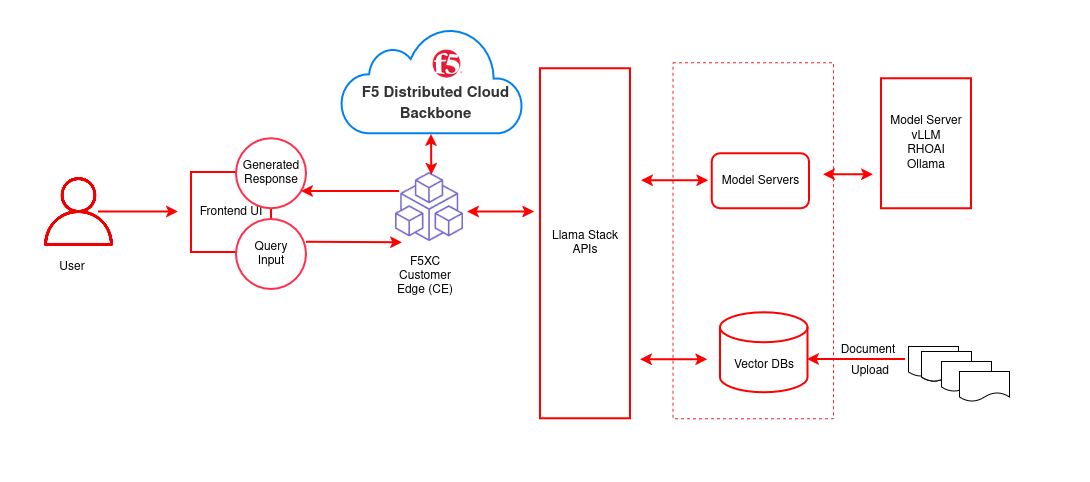
| Layer/Component | Technology | Purpose/Description |
|---|---|---|
| Orchestration | OpenShift AI | Container orchestration and GPU acceleration |
| Framework | LLaMA Stack | Core building blocks for AI application development |
| UI Layer | Streamlit | Chatbot interface for chat-based interaction |
| LLM | Llama-3.2-3B-Instruct | Generates contextual responses from retrieved documents |
| Embedding | all-MiniLM-L6-v2 | Text to vector embeddings |
| Vector DB | PostgreSQL + PGVector | Stores embeddings and semantic search |
| Retrieval | Vector Search | Retrieves relevant documents by similarity |
| Storage | S3 Bucket | Document source for enterprise content |
Requirements
Minimum hardware requirements
- LLM inference: GPU node (e.g. NVIDIA L4 or equivalent; see Supported Models table). The 70B model requires A100 x2 or equivalent.
- Embedding-only: CPU is sufficient for
all-MiniLM-L6-v2. - Cluster resources: minimum 8 vCPUs, 32 GB RAM, 100 GB disk for model weights and vector database.
Minimum software requirements
OpenShift Client CLI (oc)
Red Hat OpenShift Container Platform 4.18+
Red Hat OpenShift AI 2.16+ (tested with 2.22)
Helm CLI
Optional: huggingface-cli, Hugging Face token, jq for example scripts
Required user permissions
- Regular user for default deployment
- Cluster admin for advanced configurations (e.g. F5 XC integration)
Deploy
Prerequisites
- OpenShift cluster with OpenShift AI installed
oclogged into the cluster- Helm installed
- Hugging Face token and access to Meta Llama (and optionally Llama Guard for safety)
Supported models
| Function | Model Name | Hardware | AWS example |
|---|---|---|---|
| Embedding | all-MiniLM-L6-v2 |
CPU/GPU/HPU | — |
| Generation | meta-llama/Llama-3.2-3B-Instruct |
L4/HPU | g6.2xlarge |
| Generation | meta-llama/Llama-3.1-8B-Instruct |
L4/HPU | g6.2xlarge |
| Generation | meta-llama/Meta-Llama-3-70B-Instruct |
A100 x2/HPU | p4d.24xlarge |
| Safety | meta-llama/Llama-Guard-3-8B |
L4/HPU | g6.2xlarge |
The 70B model is not required for initial testing. Llama-Guard-3-8B is optional.
Installation steps
Log in to OpenShift
oc login --token=<your_sha256_token> --server=<cluster-api-endpoint>Clone and go to the deployment directory
git clone https://github.com/rh-ai-quickstart/f5-api-security.git
cd f5-api-security/deploy/helm
Configure and deploy
Start by creating your values file:
cp rag-values.yaml.example rag-values.yamlThen choose one of the two deployment methods below and edit
rag-values.yamlaccordingly.
Option A: Deploy models locally (GPU required)
Copy linkLink copied!Best when you have GPU nodes on your cluster and want to run models entirely on-premises.
In
rag-values.yaml, enable one or more local models by settingenabled: true:global: models: # Quantized — 1 GPU, ~2–3 GB VRAM llama-3-2-1b-instruct-quantized: id: RedHatAI/Llama-3.2-1B-Instruct-quantized.w8a8 enabled: true # Full precision — 1 GPU, ~6–8 GB VRAM llama-3-2-3b-instruct: id: meta-llama/Llama-3.2-3B-Instruct enabled: trueNote: If your GPU node has a taint (e.g.,
nvidia.com/gpu), add the corresponding toleration to the model's config block. Seerag-values.yamlfor examples.
Option B: Use a remote LLM (no local GPU required)
Copy linkLink copied!Best when you want to connect to an existing model server—such as an external vLLM instance, OpenAI-compatible endpoint, or another cluster's inference service—without provisioning local GPUs.
In
rag-values.yaml, enable the remote model and supply the connection details:global: models: # No local GPU required (runs on remote server) remoteLLM: id: <MODEL_ID> url: <MODEL_SERVER_URL> apiToken: <API_TOKEN> enabled: trueTip: You can combine both options—for example, run the embedding model locally while pointing the generation model at a remote server.
Once your values file is ready, deploy:
make install NAMESPACE=<NAMESPACE>The Makefile validates dependencies (
helm,oc), creates the namespace, and installs the Helm chart. A successful run ends with:[SUCCESS] rag installed successfullyVerify (optional)
List models:curl -sS http://llamastack-<NAMESPACE>.<YOUR_OPENSHIFT_CLUSTER>.com/v1/modelsTest chat (LlamaStack):
curl -sS http://llamastack-<NAMESPACE>.<YOUR_OPENSHIFT_CLUSTER>.com/v1/openai/v1/chat/completions \
  -H "Content-Type: application/json" \
  -d '{"model": "<MODEL_ID>", "messages": [{"role": "user", "content": "Say hello in one sentence."}], "max_tokens": 64, "temperature": 0}' | jq
For the secured vLLM endpoint, use your route and model ID in the same request format.
Next steps
Application access: Get the route with oc get route -n <NAMESPACE>, open the URL in a browser, and configure LLM settings (XC URL, model ID, API key) in the web UI.
Delete
Remove the quickstart from the cluster:
cd f5-api-security/deploy/helm
make uninstall NAMESPACE=<NAMESPACE>
This uninstalls the Helm release and removes pods, services, routes, and the pgvector PVC. To delete the namespace:
oc delete project <NAMESPACE>
References
Make commands:
make help             # Show all available commands
make install          # Deploy the application
make uninstall        # Remove the application
make clean            # Clean up all resources including namespace
make logs             # Show logs for all pods
make monitor          # Monitor deployment status
make validate-config  # Validate configuration values
Document management
Documents can be uploaded directly through the UI for RAG-based retrieval.
Supported formats:
- PDF documents — Underwriting guidelines, compliance policies, risk assessment reports
- Text files — Regulatory filings, internal procedure documents
Navigate to Settings → Vector Databases to create vector databases and upload documents.

'%20d='M201.5%20305.5c-13.8%200-24.9-11.1-24.9-24.6%200-13.8%2011.1-24.9%2024.9-24.9%2013.6%200%2024.6%2011.1%2024.6%2024.9%200%2013.6-11.1%2024.6-24.6%2024.6zM504%20256c0%20137-111%20248-248%20248S8%20393%208%20256%20119%208%20256%208s248%20111%20248%20248zm-132.3-41.2c-9.4%200-17.7%203.9-23.8%2010-22.4-15.5-52.6-25.5-86.1-26.6l17.4-78.3%2055.4%2012.5c0%2013.6%2011.1%2024.6%2024.6%2024.6%2013.8%200%2024.9-11.3%2024.9-24.9s-11.1-24.9-24.9-24.9c-9.7%200-18%205.8-22.1%2013.8l-61.2-13.6c-3-.8-6.1%201.4-6.9%204.4l-19.1%2086.4c-33.2%201.4-63.1%2011.3-85.5%2026.8-6.1-6.4-14.7-10.2-24.1-10.2-34.9%200-46.3%2046.9-14.4%2062.8-1.1%205-1.7%2010.2-1.7%2015.5%200%2052.6%2059.2%2095.2%20132%2095.2%2073.1%200%20132.3-42.6%20132.3-95.2%200-5.3-.6-10.8-1.9-15.8%2031.3-16%2019.8-62.5-14.9-62.5zM302.8%20331c-18.2%2018.2-76.1%2017.9-93.6%200-2.2-2.2-6.1-2.2-8.3%200-2.5%202.5-2.5%206.4%200%208.6%2022.8%2022.8%2087.3%2022.8%20110.2%200%202.5-2.2%202.5-6.1%200-8.6-2.2-2.2-6.1-2.2-8.3%200zm7.7-75c-13.6%200-24.6%2011.1-24.6%2024.9%200%2013.6%2011.1%2024.6%2024.6%2024.6%2013.8%200%2024.9-11.1%2024.9-24.6%200-13.8-11-24.9-24.9-24.9z'/%3e%3c/svg%3e)