 Red Hat Summit
Questo contenuto non è disponibile nella lingua selezionata.
Negotiation User Guide
for JBoss Enterprise Application Platform 5
Edition 5.2.0
Abstract
Chapter 1. Introduction
$JBOSS_HOME/jboss-as/common/lib/jboss-negotiation.jar
1.1. SPNEGO Authentication Process
- The application server authenticates itself against the KDC and obtains a ticket before it can authenticate the user.
- Only then, the server prompts the client to authenticate. The client responds with a SPNEGO token and the server uses its own ticket to decode client's ticket and then responds to the client.
- A client can request the server to authenticate itself if required.
- A client can delegate its credentials to the server so that the server can call other systems on behalf of the calling client.
- The user logs into a desktop computer with a log in that is governed by an Active Directory domain or FreeIPA.
- The user launches a web browser and accesses a web application that uses JBoss Negotiation.
- The web browser transfers the desktop credentials to the web application.
Important
1.2. Configuration Overview
- Configure your application server to use JBoss Negotiation (refer to Chapter 2, Application Server Configuration).
- Optionally configure Active Directory or FreeIPA to use JBoss Negotiation (refer to Chapter 5, Configuring Microsoft Active Directory or Chapter 6, Configuring FreeIPA).
- Configure client web browsers to use JBoss Negotiation (refer to Chapter 7, Configuring Web Browsers).
- Test the setup with Negotiation Toolkit (refer to Chapter 8, Negotiation Toolkit).
- Configure your web applications to use JBoss Negotiation (refer to Chapter 9, Configuring Web Applications).
Important
Chapter 2. Application Server Configuration
- Extend the core authentication mechanism to support JBoss Negotiation (add the SPNEGO authenticator).
- Define the application security domain, which allows an application to communicate with the application server through the SPNEGOLoginModule.
- Define the server security domain, which allows the application server to authenticate itself to the KDC for the first time.
2.1. Adding the SPNEGO Authenticator
SPNEGO authenticator to the core authentication mechanism, do the following:
- Open the
$JBOSS_HOME/server/PROFILE/deployers/jbossweb.deployer/META-INF/war-deployers-jboss-beans.xmlfile for editing. - Locate the property
authenticators. - Add the following entry to the property:
<property name="authenticators">
  <map class="java.util.Properties" keyClass="java.lang.String" valueClass="java.lang.String">
    <entry>
      <key>SPNEGO</key>
      <value>org.jboss.security.negotiation.NegotiationAuthenticator</value>
    </entry>
The key value is arbitrary; however, if you want to use the Negotiation Toolkit to test your server setup, make sure you use theSPNEGOvalue as the tool works only with the SPNEGO authenticator with this name.
2.2. Defining Server Security Domain
Important
- Open the
$JBOSS_HOME/server/$PROFILE/conf/login-config.xmlfile for editing. - Define the application policy element with the authentication element with the following options:
- storeKey
- If
truethe private key is cached in the Subject (set totrue). - useKeyTab
- If
truethe key is loaded from a keyTab file (set totrue). - principal
- The attribute needs to state the full name of the principal to obtain from the keyTab file.
- keyTab
- The attribute defines the full path to the keyTab file with the server key (key for encrypting the information between the server and KDC).
- doNotPrompt
- If
truepassword prompting is turned off (as this is a server, set totrue). - debug
- If
truethe system logs additional debug information to STDOUT.
Example 2.1. Server security domain
<application-policy name="host">
   <authentication>
      <login-module code="com.sun.security.auth.module.Krb5LoginModule"
         flag="required">
         <module-option name="storeKey">true</module-option>
         <module-option name="useKeyTab">true</module-option>
         <module-option name="principal">HTTP/testserver@KERBEROS.JBOSS.ORG</module-option>
         <module-option name="keyTab">/home/jboss_user/testserver.keytab</module-option>
         <module-option name="doNotPrompt">true</module-option>
         <module-option name="debug">true</module-option>
      </login-module>
   </authentication>
</application-policy>
2.3. Defining Application Security Domain
- Open the
$JBOSS_HOME/jboss-as/server/$PROFILE/conf/login-config.xmlfile for editing. - Define a new application policy with the following chained configuration:
- The SPNEGOLoginModule and its configuration with the following options:
- <module-option name="password-stacking">useFirstPass</module-option>
- The password-stacking option activates client-side authentication of clients with other login modules. Set the
password-stackingoption touseFirstPass, so the module looks first for a shared user name and password withjavax.security.auth.login.nameandjavax.security.auth.login.passwordrespectively (for further information refer to Password Stacking in the Security Guide). - <module-option name="serverSecurityDomain">DomainName</module-option>
- The serverSecurityDomain option defines the server security domain, which defines the authentication module (Kerberos) and server authentication properties (refer to Section 2.2, “Defining Server Security Domain”).
- The login module which returns the roles of the authenticated user and its configuration options. You can make use of the UsersRolesLoginModule that obtains the user roles from a properties file or AdvancedLdapLoginModule, which obtains user roles from an LDAP server following GSSAPI. For further information refer to Section 2.4, “Role Mapping”.
Example 2.2. Application Security Domain
<application-policy name="SPNEGO">
   <authentication>
      <login-module
         code="org.jboss.security.negotiation.spnego.SPNEGOLoginModule"
         flag="requisite">
         <module-option name="password-stacking">useFirstPass</module-option>
         <module-option name="serverSecurityDomain">host</module-option>
      </login-module>
      <login-module
         code="org.jboss.security.auth.spi.UsersRolesLoginModule"
         flag="required">
         <module-option name="password-stacking">useFirstPass</module-option>
         <module-option name="usersProperties">props/spnego-users.properties</module-option>
         <module-option name="rolesProperties">props/spnego-roles.properties</module-option>
      </login-module>
   </authentication>
</application-policy>
SPNEGO with two login modules:
org.jboss.security.negotiation.spnego.SPNEGOLoginModuleprovides SPNEGO user authentication;org.jboss.security.auth.spi.UsersRolesLoginModulereturns the roles of the user authenticated by the SPNEGOLoginModule (the roles are filtered from a users properties file).
2.4. Role Mapping
2.4.1. Setting up Role Mapping with a Roles Properties File
- In the application security domain, set the second login module of the SPNEGO authentication to
org.jboss.security.auth.spi.UsersRolesLoginModule(refer to Example 2.2, “Application Security Domain”) and provide the module options. Refer to UsersRolesLoginModule in the Security Guide). - If the application security domain is defined in the
$JBOSS_HOME/server/$PROFILE/conf/login-config.xmlfile, define the user roles in the$JBOSS_HOME/server/$PROFILE/conf/props/spnego-users.propertiesfile. Use the following pattern:fullyQualifiedUserName=comma-separatedListOfRolesExample 2.3. roles.properties file
# A roles.properties file for use with the UsersRolesLoginModule
darranl@KERBEROS.JBOSS.ORG=Users,Admins
2.4.2. Setting up Role Mapping with an LDAP Server
Note
org.jboss.security.negotiation.AdvancedLdapLoginModule (refer to Example 2.2, “Application Security Domain”).
- Define InitialLdapContext properties: these properties are used to obtain LDAP connection (refer to Section 2.4.2.1, “Defining Initial LDAP Context with GSSAPI”; for details on the Java API refer to http://download.oracle.com/javase/6/docs/api/javax/naming/ldap/InitialLdapContext.html).
- Define DN (Distinguished Name) properties: these properties are used to search for the authenticated user on the LDAP server (refer to Section 2.4.2.2, “Defining DN Search”).
- Define role search properties: these properties govern the role search on the LDAP server (Section 2.4.2.3, “Defining Role Search”).
2.4.2.1. Defining Initial LDAP Context with GSSAPI
- bindAuthentication
- defines the authentication type (set the property value to
GSSAPIto use GSSAPI-based authentication). - jaasSecurityDomain
- defines the security domain that is used to obtain the subject required for the connection (refer to Section 2.2, “Defining Server Security Domain” for information defining the required jaasSecurityDomain).
2.4.2.2. Defining DN Search
- baseCtxDN
- defines the fixed DN of the context to search for the user; consider that this is not the Distinguished Name of the location where the actual users are located but DN of the location where the objects containing the users are located (that is, for Active Directory, this is the DN with the user account).
- baseFilter
- defines the search filter used to locate the context of the user to authenticate; the input username/userDN as obtained from the login module callback substitutes the
{0}expression. This substitution behavior comes from the standard DirContext?.search(Name, String, Object[], SearchControls? cons) method. A common example search filter is(uid={0}) - searchTimeLimit
- defines the timeout for the user and role search in milliseconds (defaults to 10000, that is 10 seconds).
Note
baseCtxDN property; the provided username will be used as the DN in the login module.
2.4.2.2.1. User Authentication
- allowEmptyPassword
- If empty (length==0) passwords are passed to the LDAP server. An empty password is treated as an anonymous login by an LDAP servers. Set the property to
falseto reject empty passwords or totrueto allow the LDAP server to validate an empty password (the default isfalse).
2.4.2.3. Defining Role Search
Important
- rolesCtxDN
- defines the fixed DN of the context to search for user roles; consider that this is not the Distinguished Name of the location where the actual roles are but the DN of the location where the objects containing the user roles are (that is, for Active Directory, this is the DN where the user account is).
- roleFilter
- defines the search filter used to locate the roles of the authenticated user. The input username/userDN as obtained from the login module callback substitutes the
{0}expression in the filter definition. The authenticated userDN substitutes the{1}in the filter definition. An example search filter that matches the input username is(member={0}). An alternative that matches the authenticated userDN is(member={1}).Note
If you omit the roleFilter attribute, the role search will use the UserDN as the DN to obtain the roleAttributeID value. - roleAttributeID
- defines the name of the role attribute of the context that corresponds to the name of the role. If the roleAttributeIsDN property is set to
true, this property is the DN of the context to query for the roleNameAttributeID attribute. If the roleAttributeIsDN property is set tofalse, this property is the attribute name of the role name. - roleAttributeIsDN
- defines if the role attribute contains the fully distinguished name of a role object or the role name. If
false, the role name is taken from the value of the user's role attribute. Iftrue, the role attribute represents the distinguished name of a role object. The role name is taken from the value of the roleNameAttributeId attribute of the corresponding object. In certain directory schemas (for example, Microsoft Active Directory), role (group)attributes in the user object are stored as DNs to role objects and not as simple names. In such case, set this property totrue. The default value of this property isfalse. - roleNameAttributeID
- defines the role attribute of the context which corresponds to the name of the role. If the roleAttributeIsDN property is set to
true, this property is used to find the name attribute of the role object. If the roleAttributeIsDN property is set tofalse, this property is ignored. - recurseRoles
- defines if the recursive role search is enabled. The login module tracks already added roles to handle cyclic references.
- searchScope
- allows to limit the search scope to one of the following (the default value is
SUBTREE_SCOPE):- OBJECT_SCOPE - searches the named roles context only.
- ONELEVEL_SCOPE - searches directly in the named roles context.
- SUBTREE_SCOPE - searches only the object if the role context is not a DirContext?. If the roles context is a DirContext?, the subtree rooted at the named object and the named object itself are searched.
- searchTimeLimit
- defines the timeout for the user/role searches in milliseconds (defaults to 10000, that is 10 seconds).
Note
Both searches use the same searchTimeLimit setting.
2.4.3. Examples of LDAP Configuration with the SPNEGO Module
baseFilter value, which defines the name to search for in LDAP identified by the SPNEGOLoginModule (for the relevant ldiff dump refer to Section A.2.1, “Full LDAP Authentication for Active Directory” and Section A.2.2, “Full LDAP Authentication for Free IPA”).
password-stacking property is set to useFirstPass on both login modules to allow the SPNEGOLoginModule to pass the name of the authenticated user to the AdvancedLdapLoginModule.
2.4.3.1. Chained Configuration on FreeIPA
<application-policy name="SPNEGO_FREEIPA">
  <authentication>
    <login-module
       code="org.jboss.security.negotiation.spnego.SPNEGOLoginModule"
       flag="requisite">
       <module-option name="password-stacking">useFirstPass</module-option>
       <module-option name="serverSecurityDomain">host</module-option>
    </login-module>

    <login-module
      code="org.jboss.security.negotiation.spnego.AdvancedLdapLoginModule"
      flag="required">
      <module-option name="password-stacking">useFirstPass</module-option>

      <module-option name="bindAuthentication">GSSAPI</module-option>
      <module-option name="jaasSecurityDomain">host</module-option>
      <module-option name="java.naming.provider.url">ldap://kerberos.jboss.org:389</module-option>

      <module-option name="baseCtxDN">cn=users,cn=accounts,dc=jboss,dc=org</module-option>
      <module-option name="baseFilter">(krbPrincipalName={0})</module-option>

      <module-option name="roleAttributeID">memberOf</module-option>
      <module-option name="roleAttributeIsDN">true</module-option>
      <module-option name="roleNameAttributeID">cn</module-option>

      <module-option name="recurseRoles">true</module-option>
    </login-module>
  </authentication>
</application-policy>
2.4.3.2. Chained Configuration on Active Directory
<application-policy name="SPNEGO_AD">
  <authentication>
    <login-module
     code="org.jboss.security.negotiation.spnego.SPNEGOLoginModule"
     flag="requisite">
      <module-option name="password-stacking">useFirstPass</module-option>
      <module-option name="serverSecurityDomain">host</module-option>
    </login-module>

    <login-module
      code="org.jboss.security.negotiation.spnego.AdvancedLdapLoginModule"
      flag="required">
      <module-option name="password-stacking">useFirstPass</module-option>

      <module-option name="bindAuthentication">GSSAPI</module-option>
      <module-option name="jaasSecurityDomain">host</module-option>
      <module-option name="java.naming.provider.url">ldap://VM104:3268</module-option>

      <module-option name="baseCtxDN">CN=Users,DC=vm104,DC=gsslab,DC=rdu,DC=redhat,DC=com</module-option>
      <module-option name="baseFilter">(userPrincipalName={0})</module-option>

      <module-option name="roleAttributeID">memberOf</module-option>
      <module-option name="roleAttributeIsDN">true</module-option>
      <module-option name="roleNameAttributeID">cn</module-option>

      <module-option name="recurseRoles">true</module-option>
    </login-module>
  </authentication>
</application-policy>
Chapter 3. TRACE Logging
- Open the
$JBOSS_HOME/server/$PROFILE/conf/jboss-log4j.xml - Add the following to enable full TRACE logging for
org.jboss.security:<category name="org.jboss.security"> <priority value="TRACE"/> </category> - Optionally allow additional logging for the
com.sun.security.auth.module.Krb5LoginModulelogin module. To do so, set thedebugoption totrue:<module-option name="debug">true</module-option> - Set the system property
-Dsun.security.krb5.debug=trueto get verbose output of the entire GSSAPI negotiation process.
3.1. Configuring Message Tracing
org.jboss.security.negotiation.MessageTrace. If you enable TRACE logging for this category, all request and response messages are logged at the TRACE level in both Hex and in Base64 encoding.
Example 3.1. Configuration for tracking all messages
<category name="org.jboss.security.negotiation.MessageTrace">
  <priority value="TRACE"/>
</category>.Request or .Response to the category value.
Example 3.2. Configuration for tracking only request messages (messages are logged in both Hex and Base64)
<category name="org.jboss.security.negotiation.MessageTrace.Request">
  <priority value="TRACE"/>
</category>
Example 3.3. Configuration for tracking only response messages (messages are logged in both Hex and Base 64)
<category name="org.jboss.security.negotiation.MessageTrace.Response">
  <priority value="TRACE"/>
</category>.Hex or .Base64 to the category value.
Example 3.4. Message tracking with defined encoding
<category name="org.jboss.security.negotiation.MessageTrace.Request.Hex">
  <priority value="TRACE"/>
</category>

<category name="org.jboss.security.negotiation.MessageTrace.Request.Base64">
  <priority value="TRACE"/>
</category>

<category name="org.jboss.security.negotiation.MessageTrace.Response.Hex">
  <priority value="TRACE"/>
</category>

<category name="org.jboss.security.negotiation.MessageTrace.Response.Base64">
  <priority value="TRACE"/>
</category>
Chapter 4. Passing Authentication Properties to the Server
- java.security.krb5.realm
- the Kerberos realm the server authenticates against
- java.security.krb5.kdc
- KDC hostname
Note
4.1. Passing the Properties from the Command Line
run command with the respective Java properties:
- On Red Hat Enterprise Linux, run the following command:
./run.sh -Djava.security.krb5.realm=KERBEROS.JBOSS.ORG -Djava.security.krb5.kdc=kerberos.security.jboss.org - On Windows, run the following command:
run.bat Djava.security.krb5.realm=KERBEROS.JBOSS.ORG -Djava.security.krb5.kdc=kerberos.security.jboss.org
4.2. Adding the Properties to the System Properties
$JBOSS_HOME/server/$PROFILE/deploy/properties-service.xml descriptor. Make sure the properties are loaded before the first authentication attempt (JBoss does not allow any incoming HTTP connections before the server has started up fully).
jboss:type=Service,name=SystemProperties MBean:
<attribute name="Properties">
 java.security.krb5.kdc=kerberos.security.jboss.org
 java.security.krb5.realm=KERBEROS.JBOSS.ORG
</attribute>
4.2.1. Multiple KDCs
Example 4.1. Running a server with multiple KDCs
./run.sh -Djava.security.krb5.realm=KERBEROS.JBOSS.ORG:SLAVE_KDC.JBOSS.ORG -Djava.security.krb5.kdc=kerberos.security.jboss.org
Chapter 5. Configuring Microsoft Active Directory
Important
- Create a server user account and configure it as a Service Principal Name (SPN) account: the user of the Service Principal Name account (SPN account) acts as a connection between the Kerberos server, the Active Directory and the JBoss web server.
- Generate a keytab file for the server user and export it to the application server. The application server uses the keytab to authenticate to KDC in AD.
Important
Warning
5.1. User Account for the Application Server
5.1.1. Creating Server User
- Go to Start → →
- In the Active Directory Users and Computers window, go to → →
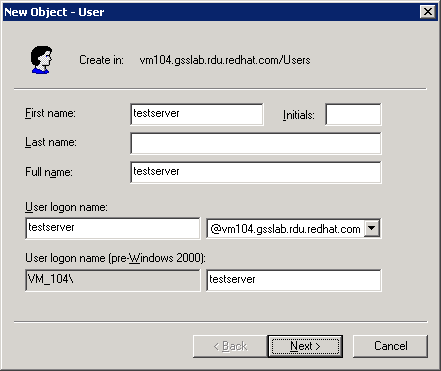
Figure 5.1. New User
- In the New User window, enter the user details and click Next. Figure 5.1, “New User” uses the server
@vm104.gsslab.rdu.redhat.comand defines a user calledtestserver. - Enter the password for the user and select the User cannot change password and Password never expires.
Important
Make sure you have entered a valid password as changing the password later can invalidate the keytab file and break your JBoss installations.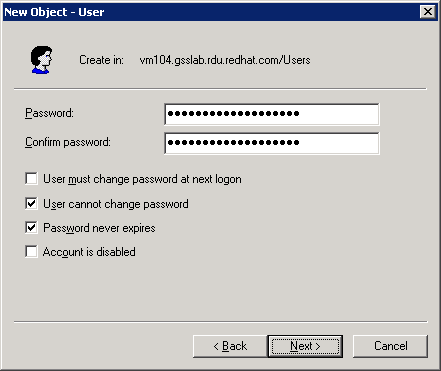
Figure 5.2. New User Password
- Click and .

Figure 5.3. New User Finish
- In the Active Directory Users and Computers window, right-click the user and click .
- In the user properties window, click the Account tab and make sure the Do not require Kerberos preauthentication and Use DES encryption types for this account are selected under Account Options.
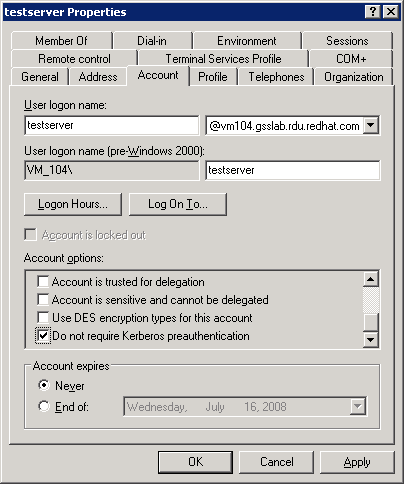
Figure 5.4. User Properties
5.2. Exporting Keytab
- Issue the ktpass command to map the created user as a trusted host and generate the keytab file. The
-princoption defines the service principal that is being mapped to and the-mapuseroption defines the user account being mapped to.ktpass -princ <service principal mapping> -out <target keytab file> -pass * -mapuser <user mapping>Example 5.1. ktpass command
ktpass -princ host/testserver@kerberos.jboss.org -out C:\testeserver.host.keytab -pass * -mapuser KERBEROS\testserver - When prompted, enter the user password.
- Issue the following command to display the available mappings and check if the new mapping is enlisted:
setspn.exe -l <user mapping>Example 5.2. setspn command
setspn.exe -l testserver
Chapter 6. Configuring FreeIPA
Warning
- Create a service principal for the server and add the HTTP service to it. The server user acts as a connection between FreeIPA and the JBoss web server.
- Generate a keytab file for the server user and export it to the application server. The application server uses the keytab to authenticate to KDC in FreeIPA.
Note
6.1. Creating Service Principal
Note
- The simplest way to create a service principal is through the FreeIPA WebUI: access the tool as an administrator.
- Click the
Add Service Principallink.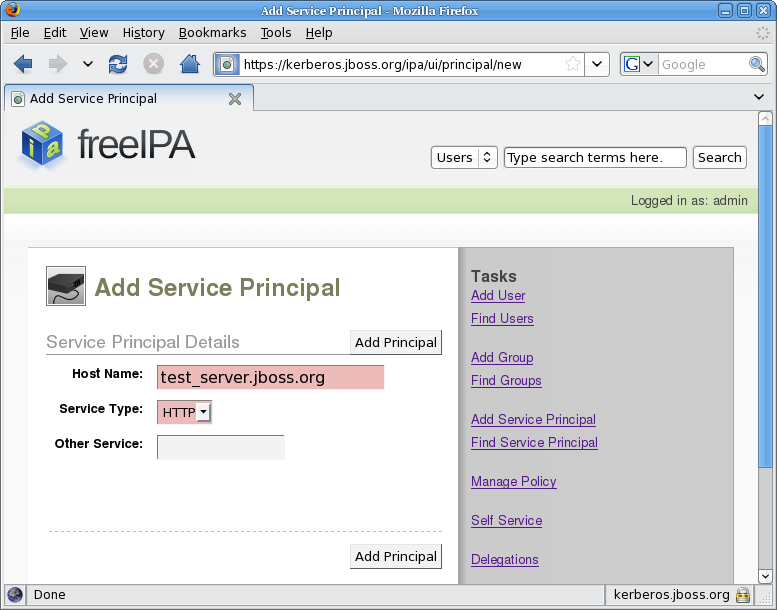
Figure 6.1. Adding Service Principal
- Set the hostname to the host name of your server (
test_server.jboss.org) and the service type toHTTP, and click .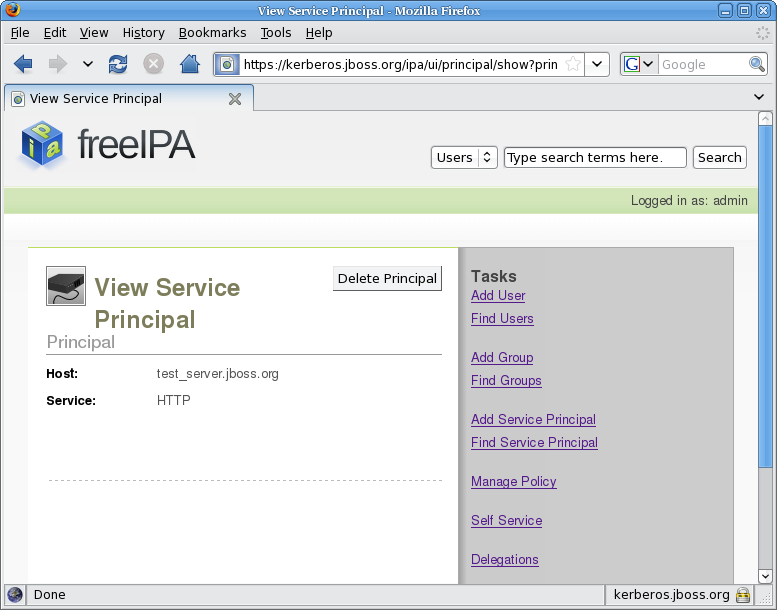
Figure 6.2. View Service Principal
Note
Creating the service principal requires the host name to be mapped with DNS. If this procedure fails, on the command line, issue the following command to create the principal:ipa-addservice HTTP/test_server.jboss.org@JBOSS.ORG --force
6.2. Exporting keytab
Warning
- Obtain the Kerberos ticket-granting ticket for an administrator: issue the command
kinit <admin>. - To obtain the keytab, issue the command
ipa-getkeytabwith the options:- -s
- FreeIPA server to obtain the keytab from
- -p
- Non-realm part of the full principal name
- -k
- File to append the keytab
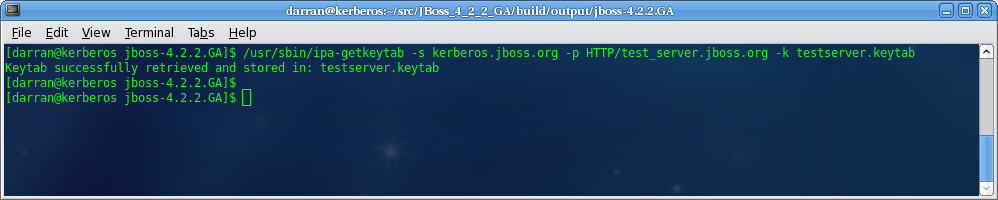
Figure 6.3. Get Keytab
Chapter 7. Configuring Web Browsers
Note
/etc/hosts file and make sure the file is used for host name lookups; on Windows edit C:\windows\system32\drivers\etc\hosts). You can make this change either on your DNS server or locally on the client machine.
KERBEROS.JBOSS.ORG and the server hosting JBoss is testserver then the IP address you need to add as a trusted host is testserver.kerberos.jboss.org.
7.1. Configuring Internet Explorer
Local intranet zone. To enable the SPNEGO negotiation, add the server URL to the Local intranet sites:
- On the menu, click .
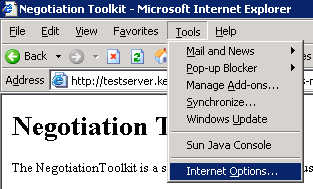
Figure 7.1. Tools - Internet Options
- In the
Internet Optionsdialog, click theSecuritytab label. - In the
Securitytab, make sure theLocal intraneticon is selected and click the button.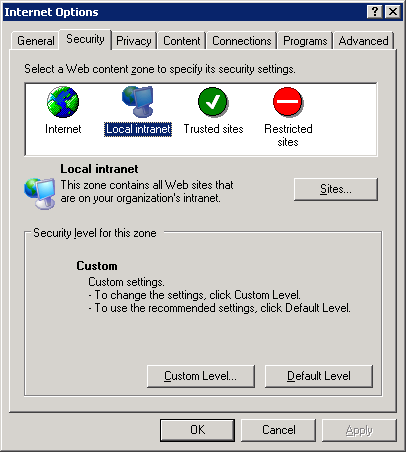
Figure 7.2. Internet Options
- In the
Local intranetdialog, enter the URL of the server with the JBoss installation and click .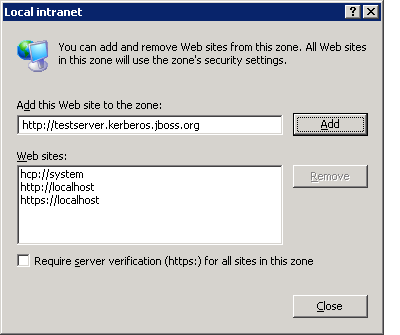
Figure 7.3. Local Intranet
Web sites list below. Internet Explorer now trusts the JBoss installation and performs the SPNEGO negotiation. Make sure to test the Negotiation with the Basic Negotiation servlet (refer to Section 8.2, “Basic Negotiation”).
7.2. Configuring Firefox
- Navigate to the about:config URL with the configuration options for Firefox.
- Set the filter to
network.negotiateto display the relevant options.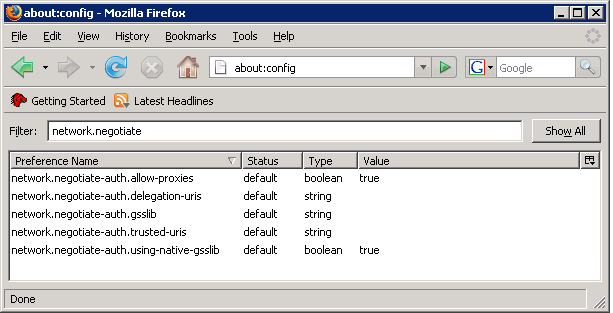
Figure 7.4. Firefox Configuration
- Double-click the
network.negotiate-auth.delegation-urisand in theEnter string valuedialog, enter the URI for SPNEGO negotiation. The URI can be entered as a partial URI, for examplehttp://ortestserveror a full URI, for examplehttp://testserver.jboss.org.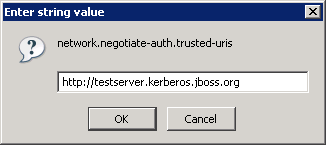
Figure 7.5. Firefox Configuration
Important
Thenetwork.negotiate-auth.delegation-urisoption specifies the URI the users credentials will be delegated to. In the JBoss Negotiation version, delegation is not yet supported.
Value column. Firefox now trusts the JBoss installation and performs the SPNEGO negotiation. Make sure to test the Negotiation with the Basic Negotiation servlet (refer to Section 8.2, “Basic Negotiation”.
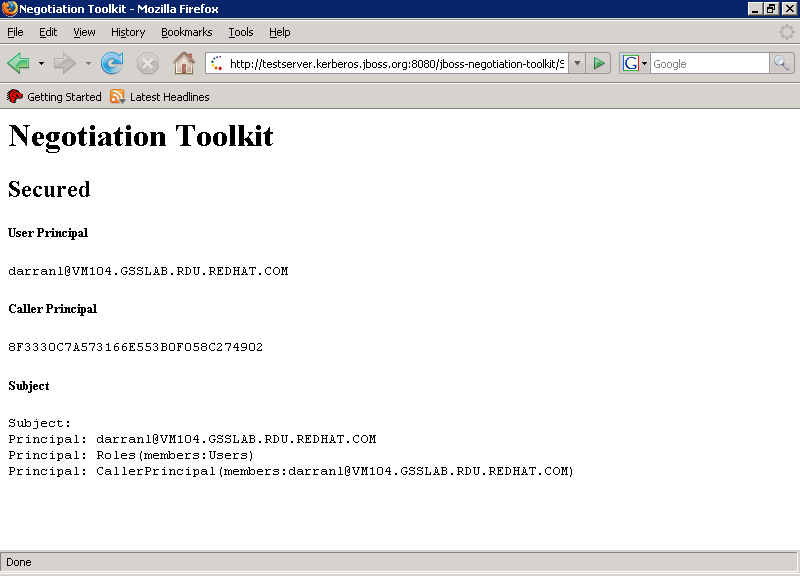
Figure 7.6. Firefox Negotiation Toolkit
Chapter 8. Negotiation Toolkit
jboss-negotiation-toolkit.war file is available at https://repository.jboss.org/nexus/content/groups/public/org/jboss/security/jboss-negotiation-toolkit/2.0.3.SP1/jboss-negotiation-toolkit-2.0.3.SP1.war. Copy the file to the $JBOSSHOME/server/$PROFILE/deploy directory to have the Negotiation Toolkit deployed.
SPNEGO and that the application security domain is named SPNEGO. If either of these have other names, deploy the web application as an exploded archive and modify web.xml and jboss-web.xml:
- In the
WEB-INF/web.xmlfile, update the authenticator key inauth-method(<auth-method>SPNEGO</auth-method>. - In the
WEB-INF/jboss-web.xmlfile, update the name of the security domain insecurity-domain(<security-domain>SPNEGO</security-domain>.
Note
8.1. Front Page

Figure 8.1. Negotiation Toolkit Front Page
Note
8.2. Basic Negotiation
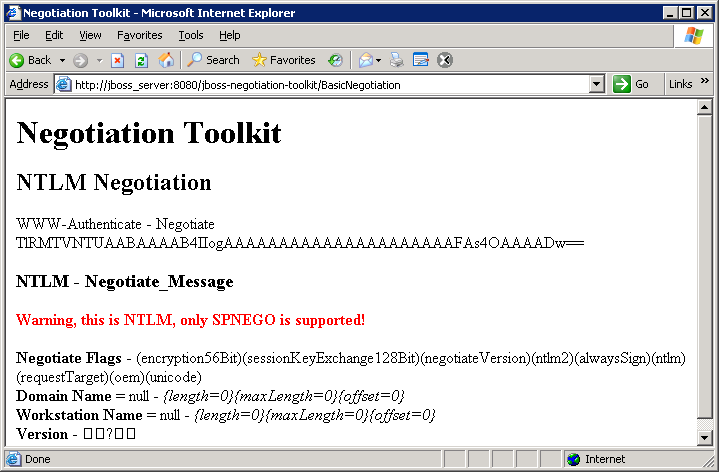
Figure 8.2. Basic Negotiation Failure
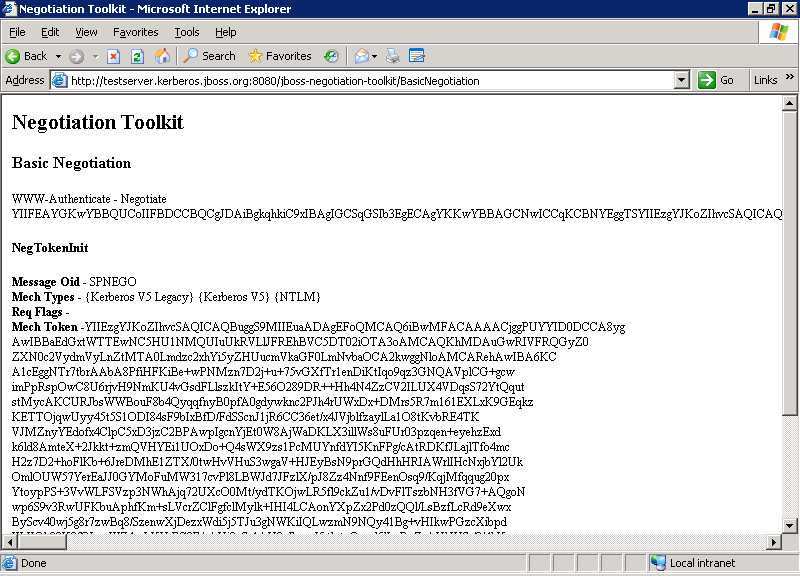
Figure 8.3. Basic Negotiation Success
8.3. Security Domain Test
host throughout this guide; the page is shown in Figure 8.4, “Security Domain Test”).
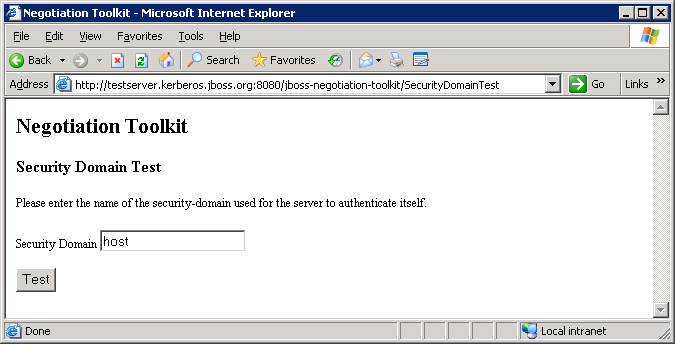
Figure 8.4. Security Domain Test
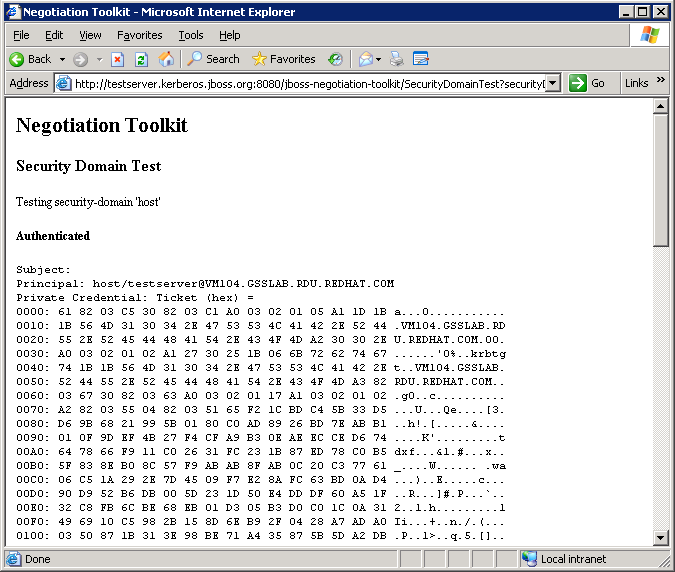
Figure 8.5. Security Domain Test - Authenticated
8.4. Secured
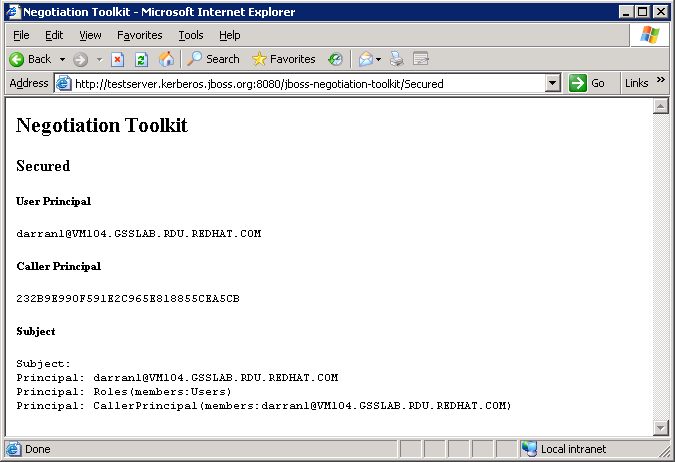
Figure 8.6. Secured
Chapter 9. Configuring Web Applications
- Add the SPNEGO security domain to the
WEB-INF/jboss-web.xmlfile:<jboss-web> <security-domain>java:/jaas/SPNEGO</security-domain> </jboss-web> - Configure the
login-config.xmlfile to use the SPNEGO authenticator:<login-config> <auth-method>SPNEGO</auth-method> <realm-name>SPNEGO</realm-name> </login-config>The auth-method maps the key used for the authenticator.
Appendix A. Advanced LDAP Login Module: Full LDAP Authentication
- The accumulated subject roles do no include the role name of the first matching context.
- When the roleAttributeIsDN module property is set to
false, the recursive role search is disabled even if the recurseRoles module option is set totrue.
A.1. Configuration
org.jboss.security.negotiation.AdvancedLdapLoginModule.
Warning
org.jboss.security.negotiation.spnego.AdvancedLdapLoginModule. The login module is still available under this name; however, it has been deprecated and will be removed in a future release.
useFirstPass.
A.1.1. Defining Initial LDAP Context
Note
- bindDN
- defines the DN used to bind to the LDAP server. This is a DN with read/search permissions to the defined baseCtxDN and rolesCtxDN.
- bindCredential
- defines the bindDN password. The password can be encrypted if the jaasSecurityDomain is specified.
- jaasSecurityDomain
- defines the JMX ObjectName of the jaasSecurityDomain. This is the jaasSecurityDomain used to decrypt the java.naming.security.principal. The JaasSecurityDomain#encrypt64(byte[]) method of the domain returns the encrypted form of the password. You can use also org.jboss.security.plugins.PBEUtils to generate the encrypted form.
A.1.2. Defining DN Search
- baseCtxDN
- defines the fixed DN of the context to search for user roles. Consider that this is not the Distinguished Name of where the actual roles are located but the DN of where the objects containing the user roles are located (that is, for active directory, this is the DN with the user account).
- baseFilter
- defines the search filter used to locate the context of the user to authenticate. The input username/userDN as obtained from the login module callback substitutes the
{0}expression. This substitution behavior comes from the standard DirContext?.search(Name, String, Object[], SearchControls? cons) method. An common example search filter is"(uid={0}) - searchTimeLimit
- defines the timeout for the user and role searches in milliseconds (defaults to 10000, that is 10 seconds).
Note
baseCtxDN property: the provided username will be used as the DN in this login module.
A.1.3. User Authentication
Note
- allowEmptyPassword
- If empty (length==0) passwords are passed to the LDAP server. An empty password is treated as an anonymous log in by an LDAP servers. Set the property to
falseto reject empty passwords or totrueto allow the LDAP server to validate an empty password (the default isfalse).
A.1.4. Defining Role Search
Important
- rolesCtxDN
- The fixed DN of the context to search for user roles. Consider that this is not the Distinguished Name of where the actual roles are; rather, this is the DN of where the objects containing the user roles are (e.g. for active directory, this is the DN where the user account is)
- roleFilter
- defines a search filter used to locate the roles associated with the authenticated user. The input username/userDN as obtained from the login module callback substitutes the
{0}expression in the filter definition. The authenticated userDN substitutes the{1}in the filter definition. An example search filter that matches the input username is(member={0}). An alternative that matches the authenticated userDN is(member={1}).Note
If you omit the roleFilter attribute, the role search will use the UserDN as the DN to obtain the roleAttributeID value. - roleAttributeID
- defines the role attribute of the context that corresponds to the name of the role. If the roleAttributeIsDN property is set to
true, this property is the DN of the context to query for the roleNameAttributeID attribute. If the roleAttributeIsDN property is set tofalse, this property is the attribute name of the role name. - roleAttributeIsDN
- defines if the role attribute contains the fully distinguished name of a role object or the role name. If
false, the role name is taken from the value of the user's role attribute. Iftrue, the role attribute represents the distinguished name of a role object. The role name is taken from the value of the roleNameAttributeId attribute of the corresponding object. In certain directory schemas (for example, Microsoft Active Directory), role (group)attributes in the user object are stored as DNs to role objects and not as simple names. In such case, set this property totrue. The default value of this property isfalse. - roleNameAttributeID
- defines the role attribute of the context which corresponds to the name of the role. If the roleAttributeIsDN property is set to
true, this property is used to find the name attribute of the role object. If the roleAttributeIsDN property is set tofalse, this property is ignored. - recurseRoles
- Enables a recursive role search. The login module tracks already added roles to handle cyclic references.
- searchScope
- sets the search scope to one of the following (the default value is
SUBTREE_SCOPE):- OBJECT_SCOPE - searches the named roles context only.
- ONELEVEL_SCOPE - searches directly in the named roles context.
- SUBTREE_SCOPE - searches only the object if the role context is not a DirContext?. If the roles context is a DirContext?, the subtree rooted at the named object and the named object itself are searched.
- searchTimeLimit
- defines the timeout for the user and role searches in milliseconds (defaults to 10000, that is 10 seconds).
Note
Both searches use the same searchTimeLimit setting.
A.2. Examples of Full LDAP Authentication
sAMAccountName attribute on Active Directory and uid attribute on FreeIPA.
cn is read from the group. The login module returns this role.
true so the DN from the located group is used to repeat the process so if a group is configured with the memberOf attribute then this is recursively used to locate all the roles.
A.2.1. Full LDAP Authentication for Active Directory
dn: CN=Darran Lofthouse,CN=Users,DC=vm104,DC=gsslab,DC=rdu,DC=redhat,DC=com
objectClass: top
objectClass: person
objectClass: organizationalPerson
objectClass: user
cn: Darran Lofthouse
distinguishedName:
 CN=Darran Lofthouse,CN=Users,DC=vm104,DC=gsslab,DC=rdu,DC=redhat,DC=com
memberOf: CN=Banker,CN=Users,DC=vm104,DC=gsslab,DC=rdu,DC=redhat,DC=com
name: Darran Lofthouse
sAMAccountName: darranl
userPrincipalName: darranl@vm104.gsslab.rdu.redhat.com

dn: CN=Banker,CN=Users,DC=vm104,DC=gsslab,DC=rdu,DC=redhat,DC=com
objectClass: top
objectClass: group
cn: Banker
member:
 CN=Darran Lofthouse,CN=Users,DC=vm104,DC=gsslab,DC=rdu,DC=redhat,DC=com
distinguishedName:
 CN=Banker,CN=Users,DC=vm104,DC=gsslab,DC=rdu,DC=redhat,DC=com
memberOf: CN=Trader,CN=Users,DC=vm104,DC=gsslab,DC=rdu,DC=redhat,DC=com
name: Banker
sAMAccountName: Banker

dn: CN=Trader,CN=Users,DC=vm104,DC=gsslab,DC=rdu,DC=redhat,DC=com
objectClass: top
objectClass: group
cn: Trader
member: CN=Banker,CN=Users,DC=vm104,DC=gsslab,DC=rdu,DC=redhat,DC=com
distinguishedName:
 CN=Trader,CN=Users,DC=vm104,DC=gsslab,DC=rdu,DC=redhat,DC=com
name: Trader
sAMAccountName: Trader<application-policy name="SPNEGO">
<authentication>
<login-module
code="org.jboss.security.negotiation.spnego.AdvancedLdapLoginModule"
flag="required">
<module-option name="bindAuthentication">GSSAPI</module-option>
<module-option name="jaasSecurityDomain">host</module-option>
<module-option name="java.naming.provider.url">ldap://VM104:3268</module-option>
<module-option name="baseCtxDN">CN=Users,DC=vm104,DC=gsslab,DC=rdu,DC=redhat,DC=com</module-option>
<module-option name="baseFilter">(sAMAccountName={0})</module-option>
<module-option name="roleAttributeID">memberOf</module-option>
<module-option name="roleAttributeIsDN">true</module-option>
<module-option name="roleNameAttributeID">cn</module-option>
<module-option name="recurseRoles">true</module-option>
</login-module>
</authentication>
</application-policy>A.2.2. Full LDAP Authentication for Free IPA
dn: uid=darranl,cn=users,cn=accounts,dc=jboss,dc=org
displayName: Darran Lofthouse
uid: darranl
title: Mr
objectClass: top
objectClass: person
objectClass: organizationalPerson
objectClass: inetOrgPerson
objectClass: inetUser
objectClass: posixAccount
objectClass: krbPrincipalAux
objectClass: radiusprofile
sn: Lofthouse
mail: darran.lofthouse@jboss.com
krbPrincipalName: darranl@JBOSS.ORG
givenName: Darran
cn: Darran Lofthouse
initials: DL
memberOf: cn=banker,cn=groups,cn=accounts,dc=jboss,dc=org
memberOf: cn=Trader,cn=groups,cn=accounts,dc=jboss,dc=org

dn: cn=Banker,cn=groups,cn=accounts,dc=jboss,dc=org
objectClass: top
objectClass: groupofnames
objectClass: posixGroup
objectClass: inetUser
cn: Banker
memberOf: cn=trader,cn=groups,cn=accounts,dc=jboss,dc=org
member: uid=darranl,cn=users,cn=accounts,dc=jboss,dc=org

dn: cn=Trader,cn=groups,cn=accounts,dc=jboss,dc=org
objectClass: top
objectClass: groupofnames
objectClass: posixGroup
objectClass: inetUser
cn: Trader
member: cn=Banker,cn=groups,cn=accounts,dc=jboss,dc=org
<application-policy name="SPNEGO">
  <authentication>
    <login-module
      code="org.jboss.security.negotiation.spnego.AdvancedLdapLoginModule"
      flag="required">
      <module-option name="bindAuthentication">GSSAPI</module-option>
      <module-option name="jaasSecurityDomain">host</module-option>
      <module-option name="java.naming.provider.url">ldap://kerberos.jboss.org:389</module-option>

      <module-option name="baseCtxDN">cn=users,cn=accounts,dc=jboss,dc=org</module-option>
      <module-option name="baseFilter">(uid={0})</module-option>

      <module-option name="roleAttributeID">memberOf</module-option>
      <module-option name="roleAttributeIsDN">true</module-option>
      <module-option name="roleNameAttributeID">cn</module-option>

      <module-option name="recurseRoles">true</module-option>
    </login-module>
  </authentication>
</application-policy>
Appendix B. Revision History
| Revision History | |||
|---|---|---|---|
| Revision 5.2.0-100.400 | 2013-10-31 | ||
| |||
| Revision 5.2.0-100 | Wed 23 Jan 2013 | ||
| |||
| Revision 5.1.2-109 | Wed 18 Jul 2012 | ||
| |||
| Revision 5.1.2-100 | Thu 8 Dec 2011 | ||
| |||

'%20d='M201.5%20305.5c-13.8%200-24.9-11.1-24.9-24.6%200-13.8%2011.1-24.9%2024.9-24.9%2013.6%200%2024.6%2011.1%2024.6%2024.9%200%2013.6-11.1%2024.6-24.6%2024.6zM504%20256c0%20137-111%20248-248%20248S8%20393%208%20256%20119%208%20256%208s248%20111%20248%20248zm-132.3-41.2c-9.4%200-17.7%203.9-23.8%2010-22.4-15.5-52.6-25.5-86.1-26.6l17.4-78.3%2055.4%2012.5c0%2013.6%2011.1%2024.6%2024.6%2024.6%2013.8%200%2024.9-11.3%2024.9-24.9s-11.1-24.9-24.9-24.9c-9.7%200-18%205.8-22.1%2013.8l-61.2-13.6c-3-.8-6.1%201.4-6.9%204.4l-19.1%2086.4c-33.2%201.4-63.1%2011.3-85.5%2026.8-6.1-6.4-14.7-10.2-24.1-10.2-34.9%200-46.3%2046.9-14.4%2062.8-1.1%205-1.7%2010.2-1.7%2015.5%200%2052.6%2059.2%2095.2%20132%2095.2%2073.1%200%20132.3-42.6%20132.3-95.2%200-5.3-.6-10.8-1.9-15.8%2031.3-16%2019.8-62.5-14.9-62.5zM302.8%20331c-18.2%2018.2-76.1%2017.9-93.6%200-2.2-2.2-6.1-2.2-8.3%200-2.5%202.5-2.5%206.4%200%208.6%2022.8%2022.8%2087.3%2022.8%20110.2%200%202.5-2.2%202.5-6.1%200-8.6-2.2-2.2-6.1-2.2-8.3%200zm7.7-75c-13.6%200-24.6%2011.1-24.6%2024.9%200%2013.6%2011.1%2024.6%2024.6%2024.6%2013.8%200%2024.9-11.1%2024.9-24.6%200-13.8-11-24.9-24.9-24.9z'/%3e%3c/svg%3e)