 Red Hat Summit
Questo contenuto non è disponibile nella lingua selezionata.
Operating 3scale
How to automate deployment, scale your environment, and troubleshoot issues
Abstract
Chapter 1. 3scale operations and scaling guide
This section describes operations and scaling tasks of a Red Hat 3scale API Management 2.7 installation.
Prerequisites
- An installed and initially configured 3scale On-premises instance on a supported OpenShift version.
This document is not intended for local installations on laptops or similar end user equipment.
To carry out 3scale operations and scaling tasks, perform the steps outlined in the following sections:
Additional resources
1.1. Redeploying APIcast
You can test and promote system changes through the 3scale Admin Portal.
Prerequisites
- A deployed instance of 3scale On-premises.
- You have chosen your APIcast deployment method.
By default, APIcast deployments on OpenShift, both embedded and on other OpenShift clusters, are configured to allow you to publish changes to your staging and production gateways through the 3scale Admin Portal.
To redeploy APIcast on OpenShift:
Procedure
- Make system changes.
- In the Admin Portal, deploy to staging and test.
- In the Admin Portal, promote to production.
By default, APIcast retrieves and publishes the promoted update once every 5 minutes.
If you are using APIcast on the Docker containerized environment or a native installation, configure your staging and production gateways, and indicate how often the gateway retrieves published changes. After you have configured your APIcast gateways, you can redeploy APIcast through the 3scale Admin Portal.
To redeploy APIcast on the Docker containerized environment or a native installations:
Procedure
- Configure your APIcast gateway and connect it to 3scale On-premises.
- Make system changes.
- In the Admin Portal, deploy to staging and test.
- In the Admin Portal, promote to production.
APIcast retrieves and publishes the promoted update at the configured frequency.
1.2. Scaling up 3scale on-premise
As your APIcast deployment grows, you may need to increase the amount of storage available. How you scale up storage depends on which type of file system you are using for your persistent storage.
1.2.1. Scaling up storage
If you are using a network file system (NFS), you can scale up your persistent volume using the oc edit pv command:
oc edit pv <pv_name>If you are using any other storage method, you must scale up your persistent volume manually using one of the methods listed in the following sections.
1.2.1.1. Method 1: Backing up and swapping persistent volumes
Procedure
- Back up the data on your existing persistent volume.
- Create and attach a target persistent volume, scaled for your new size requirements.
-
Create a pre-bound persistent volume claim, specify: The size of your new PVC The persistent volume name using the
volumeNamefield. - Restore data from your backup onto your newly created PV.
Modify your deployment configuration with the name of your new PV:
oc edit dc/system-app- Verify your new PV is configured and working correctly.
- Delete your previous PVC to release its claimed resources.
1.2.1.2. Method 2: Backing up and redeploying 3scale
Procedure
- Back up the data on your existing persistent volume.
- Shut down your 3scale pods.
- Create and attach a target persistent volume, scaled for your new size requirements.
- Restore data from your backup onto your newly created PV.
Create a pre-bound persistent volume claim. Specify:
- The size of your new PVC
-
The persistent volume name using the
volumeNamefield.
- Deploy your amp.yml.
- Verify your new PV is configured and working correctly.
- Delete your previous PVC to release its claimed resources.
1.2.2. Scaling up performance
Scaling up performance is done via the total number of pods. The more hardware resources you have, the more pods you deploy.
Use the following command to scale up performance via the number of pods:
oc scale dc dc-name --replicas=X1.2.3. Configuring 3scale on-premise deployments
The key deployment configurations to be scaled for 3scale are:
- APIcast production
- Backend listener
- Backend worker
1.2.4. Scaling via the OCP command line interface
Via the OpenShift Container Platform (OCP) command line interface (CLI), you can scale the deployment configuration either up or down.
To scale a particular deployment configuration, use the following:
Scale up an APIcast production deployment configuration with the following command:
oc scale dc apicast-production --replicas=XScale up the Backend listener deployment configuration with the following command:
oc scale dc backend-listener --replicas=YScale up the Backend worker deployment configuration with the following command:
oc scale dc backend-worker --replicas=Z
1.2.5. Vertical and horizontal hardware scaling
You can increase the performance of your 3scale deployment on OpenShift by adding resources. You can add more compute nodes as pods to your OpenShift cluster, as horizontal scaling or you can allocate more resources to existing compute nodes as vertical scaling.
Horizontal scaling
You can add more compute nodes as pods to your OpenShift. If the additional compute nodes match the existing nodes in your cluster, you do not have to reconfigure any environment variables.
Vertical scaling
You can allocate more resources to existing compute nodes. If you allocate more resources, you must add additional processes to your pods to increase performance.
Avoid the use of computing nodes with different specifications and configurations in your 3scale deployment.
1.2.6. Scaling up routers
As traffic increases, ensure your Red Hat OCP routers can adequately handle requests. If your routers are limiting the throughput of your requests, you must scale up your router nodes.
1.3. Operations troubleshooting
This section explains how to configure 3scale audit logging to display on OpenShift, and how to access 3scale logs and job queues on OpenShift.
1.3.1. Configuring 3scale audit logging on OpenShift
This enables all logs to be in one place for querying by Elasticsearch, Fluentd, and Kibana (EFK) logging tools. These tools provide increased visibility on changes made to your 3scale configuration, who made these changes, and when. For example, this includes changes to billing, application plans, API configuration, and more.
Prerequisites
- A 3scale 2.7 deployment.
Procedure
Configure audit logging to stdout to forward all application logs to standard OpenShift pod logs.
Some considerations:
-
By default, audit logging to
stdoutis disabled when 3scale is deployed on-premises; you need to configure this feature to have it fully functional. -
Audit logging to
stdoutis not available for 3scale hosted.
1.3.2. Enabling audit logging
3scale uses a features.xml configuration file to enable some global features. To enable audit logging to stdout, you must mount this file from a ConfigMap to replace the default file. The OpenShift pods that depend on features.xml are system-app and system-sidekiq.
Prerequisites
- You must have cluster administrator access on OpenShift.
Procedure
Enter the following command to enable audit logging to
stdout:oc patch configmap system -p '{"data": {"features.yml": "features: &default\n logging:\n audits_to_stdout: true\n\nproduction:\n <<: *default\n"}}'Export the following environment variable:
export PATCH_SYSTEM_VOLUMES='{"spec":{"template":{"spec":{"volumes":[{"emptyDir":{"medium":"Memory"},"name":"system-tmp"},{"configMap":{"items":[{"key":"zync.yml","path":"zync.yml"},{"key":"rolling_updates.yml","path":"rolling_updates.yml"},{"key":"service_discovery.yml","path":"service_discovery.yml"},{"key":"features.yml","path":"features.yml"}],"name":"system"},"name":"system-config"}]}}}}'Enter the following command to apply the updated deployment configuration to the relevant OpenShift pods:
oc patch dc system-app -p $PATCH_SYSTEM_VOLUMES
oc patch dc system-sidekiq -p $PATCH_SYSTEM_VOLUMES
1.3.3. Configuring EFK logging
When you have enabled audit logging to stdout to forward 3scale application logs to OpenShift, you can use EFK logging tools to monitor your 3scale applications.
For details on how to configure EFK logging on OpenShift, see the following:
1.3.4. Accessing your logs
Each component’s deployment configuration contains logs for access and exceptions. If you encounter issues with your deployment, check these logs for details.
Follow these steps to access logs in 3scale:
Procedure
Find the ID of the pod you want logs for:
oc get podsEnter
oc logsand the ID of your chosen pod:oc logs <pod>The system pod has two containers, each with a separate log. To access a container’s log, specify the
--containerparameter with thesystem-providerandsystem-developerpods:oc logs <pod> --container=system-provider oc logs <pod> --container=system-developer
1.3.5. Checking job queues
Job queues contain logs of information sent from the system-sidekiq pods. Use these logs to check if your cluster is processing data. You can query the logs using the OpenShift CLI:
oc get jobsoc logs <job>1.3.6. Preventing monotonic growth
To prevent monotonic growth, 3scale schedules by default, automatic purging of the following tables:
- user_sessions - clean up is triggered once a week, deletes records older than two weeks.
- audits - clean up is triggered once a day, deletes records older than three months.
- log_entries - clean up triggered once a day, deletes records older than six months.
- event_store_events - clean up is triggered once a week, deletes records older than a week.
With the exception of the above listed tables, the alerts table requires manual purging by the database administrator.
| Database type | SQL command |
|---|---|
| MySQL |
|
| PostgreSQL |
|
| Oracle |
|
For other tables not specified in this section, the database administrator must manually clean the tables that the system does not automatically purge.
Chapter 2. Using the 3scale toolbox
The 3scale toolbox is a Ruby client that enables you to manage 3scale products from the command line.
The 3scale toolbox does not support all API as a Product (APIaaP) features. For more details, see the Known issues in the 3scale Release Notes.
2.1. Installing the toolbox
The officially supported method of installing the 3scale toolbox is using the 3scale toolbox container image.
2.1.1. Installing the toolbox container image
Prerequisites
- See the 3scale toolbox image in the Red Hat Container Catalog.
- You must have a Red Hat registry service account.
- The examples in this topic assume that you have Docker installed and the daemon running.
Procedure
Log in to the Red Hat container registry:
$ docker login registry.redhat.io
Username: ${REGISTRY-SERVICE-ACCOUNT-USERNAME}
Password: ${REGISTRY-SERVICE-ACCOUNT-PASSWORD}
Login Succeeded!
Pull the toolbox container image:
$ docker pull registry.redhat.io/3scale-amp2/toolbox-rhel7:3scale2.7Verify the installation:
$ docker run registry.redhat.io/3scale-amp2/toolbox-rhel7:3scale2.7 3scale help
Additional resources
- For details on installing the toolbox image with OpenShift, Podman, or Docker, see the instructions on getting the image in the Red Hat Container Catalog.
-
See also the instructions for installing the 3scale toolbox on Kubernetes. You must use the correct image name and the
occommand instead ofkubectlon OpenShift.
2.1.2. Installing unsupported toolbox versions
Procedure
-
You can install unsupported toolbox versions on Fedora Linux, Ubuntu Linux, Windows, or macOS by downloading and installing the latest
.rpm,.deb,.msior.pkgfile from GitHub.
2.2. Using supported toolbox commands
Use the 3scale toolbox to manage your API from the command line tool (CLI).
The update command has been deprecated and replaced by the copy command. Red Hat discourages the use of deprecated features.
The following commands are supported:
COMMANDS
    account              account super command
    activedocs           activedocs super command
    application          application super command
    application-plan     application-plan super command
    copy                 copy super command
    help                 show help
    import               import super command
    method               method super command
    metric               metric super command
    policy-registry      policy-registry super command
    proxy-config         proxy-config super command
    remote               remotes super command
    service              services super command
    update               [DEPRECTATED] update super command

OPTIONS
    -c --config-file=<value>      3scale toolbox configuration file
                                  (default: $HOME/.3scalerc.yaml)
    -h --help                     show help for this command
    -k --insecure                 Proceed and operate even for server
                                  connections otherwise considered insecure
    -v --version                  Prints the version of this command
       --verbose                  Verbose mode
2.3. Importing services
Import services from a CSV file by specifying the following fields in this order (you also need to include these headers in your CSV file):
service_name,endpoint_name,endpoint_http_method,endpoint_path,auth_mode,endpoint_system_name,typeYou need the following information:
-
A 3scale admin account:
{3SCALE_ADMIN} The domain your 3scale instance is running on:
{DOMAIN_NAME}- If you are using hosted APICast this is 3scale.net
-
The access key of your account:
{ACCESS_KEY} -
The CSV file of services, for example:
examples/import_example.csv
Import the services by running:
Example
$ docker run -v $PWD/examples/import_example.csv:/tmp/import_example.csv registry.redhat.io/3scale-amp2/toolbox-rhel7:3scale2.7 3scale import csv --destination=https://{ACCESS_KEY}@{3SCALE_ADMIN}-admin.{DOMAIN_NAME} --file=/tmp/import_example.csv
This example uses a Docker volume to mount the resource file in the container. It assumes that the file is available in the current $PWD folder.
2.4. Copying services
Create a new service based on an existing one from the same account or from another account. When you copy a service, the relevant ActiveDocs are also copied.
You need the following information:
-
The service id you want to copy:
{SERVICE_ID} -
A 3scale admin account:
{3SCALE_ADMIN} The domain your 3scale instance is running on:
{DOMAIN_NAME}- If you are using hosted APICast this is 3scale.net
-
The access key of your account:
{ACCESS_KEY} -
The access key of the destination account if you are copying to a different account:
{DEST_KEY} -
The name for the new service:
{NEW_NAME}
Example
$ docker run registry.redhat.io/3scale-amp2/toolbox-rhel7:3scale2.7 3scale copy service {SERVICE_ID} --source=https://{ACCESS_KEY}@{3SCALE_ADMIN}-admin.{DOMAIN_NAME} --destination=https://{DEST_KEY}@{3SCALE_ADMIN}-admin.{DOMAIN_NAME} --target_system_name={NEW_NAME}If the service to be copied has custom policies, make sure that their respective custom policy definitions already exist in the destination where the service is to be copied. To learn more about copying custom policy definitions check out the Copying a policy registry.
2.5. Copying service settings only
You can bulk copy and update the service and proxy settings, metrics, methods, application plans, application plan limits, as well as mapping rules from a service to another existing service.
You need the following information:
-
The service id you want to copy:
{SERVICE_ID} -
The service id of the destination:
{DEST_ID} -
A 3scale admin account:
{3SCALE_ADMIN} The domain your 3scale instance is running on:
{DOMAIN_NAME}- If you are using hosted APICast this is 3scale.net
-
The access key of your account:
{ACCESS_KEY} -
The access key of the destination account:
{DEST_KEY}
Additionally, you can use the optional flags:
-
The
-fflag to remove existing target service mapping rules before copying. -
The
-rflag to copy only mapping rules to target service.
The update command has been deprecated and replaced by the copy command. The use of deprecated commands is not supported.
The following example command does a bulk update from one service to another existing service:
Example
$ docker run registry.redhat.io/3scale-amp2/toolbox-rhel7:3scale2.7 3scale update [opts] service --source=https://{ACCESS_KEY}@{3SCALE_ADMIN}-admin.{DOMAIN_NAME} --destination=https://{DEST_KEY}@{3SCALE_ADMIN}-admin.{DOMAIN_NAME} {SERVICE_ID} {DEST_ID}2.6. Importing OpenAPI definitions
To create a new service or to update an existing service, use the definitions from a local file or access credentials. If that service name already exists, it will be updated. Conversely, if the service name does not exist, it will be created.
The default service name for the import is taken from info.title in the OpenAPI definition. You can override this service name using --target_system_name=<NEW NAME>. If that service name already exists, it will be updated. Conversely, if the service name does not exist, it will be created.
The following rules apply to every import:
- Definitions are validated as OpenAPI 2.0.
- All mapping rules in the 3scale product are deleted.
-
In order to be replaced, all method names must be identical to methods defined in the OpenAPI definition (
operation.operationId) by using exact pattern matching. - Only methods included in the OpenAPI definition are modified.
-
All methods that were present only in the OpenAPI definition are attached to the
Hitsmetric. All mapping rules from the OpenAPI definition are imported.
- View these in API > Integration.
While there is no security requirement in swagger specifications, the service is considered as an OpenAPI. Toolbox will add a default_credentials policy, which is also known as an anonymous_policy, if it is not already in the policy chain. The default_credentials policy will be configured with the userkey provided in optional parameter --default-credentials-userkey.
Example
$ docker run registry.redhat.io/3scale-amp2/toolbox-rhel7:3scale2.7 3scale import openapi [opts] --destination=https://{DEST_KEY}@{3SCALE_ADMIN}-admin.{DOMAIN_NAME}2.6.1. Optional flags
-d --destination=<value>-
3scale target instance in format:
http[s]://<authentication>@3scale_domain. -t --target_system_name=<value>- Target system name.
2.7. Managing remote access credentials
To facilitate work with remote 3scale instances, define in a config file the remote web addresses (URLs) with authentication that you will use for accessing those instances. Refer to them by a short name in any 3scale toolbox command.
The default location for the config file is $HOME/.3scalerc.yaml but you can specify another location using the THREESCALE_CLI_CONFIG environment variable or the --config-file <config_file> option.
You can specify remotes using either an access_token or a provider_key:
-
http[s]://<access_token>@<3scale-instance-domain> -
http[s]://<provider_key>@<3scale-instance-domain>
2.7.1. Listing remote access credentials
3scale remote list [--config-file <config_file>]Shows the list of existing remotes (name, URL and authentication key).
Example
$ docker run registry.redhat.io/3scale-amp2/toolbox-rhel7:3scale2.7 3scale remote list
instance_a https://example_a.net 123456789
instance_b https://example_b.net 987654321
2.7.2. Adding remote access credentials
3scale remote add [--config-file <config_file>] <name> <url>
Adds a remote with short name <name> at <url>.
Example
$ docker run registry.redhat.io/3scale-amp2/toolbox-rhel7:3scale2.7 3scale remote add instance_a https://123456789@example_a.net2.7.3. Removing remote access credentials
3scale remote remove [--config-file <config_file>] <name>
Removes the remote woth short name <name>.
Example
$ docker run registry.redhat.io/3scale-amp2/toolbox-rhel7:3scale2.7 3scale remote remove instance_a2.7.4. Renaming remote access credentials
3scale remote rename [--config-file <config_file>] <old_name> <new_name>
Renames remote with short name <old_name> to <new_name>.
Example
$ docker run registry.redhat.io/3scale-amp2/toolbox-rhel7:3scale2.7 3scale remote rename instance_a instance_b2.8. Application plans
Use the 3scale toolbox to create, update, list, delete, show, or export/import application plans in your Developer Portal.
2.8.1. Creating a new application plan
Use the following steps to create a new application plan:
- You have to provide the application plan name.
-
To override the
system-name, use the optional parameter. - If an application plan with the same name already exists, you will see an error message.
-
Set as
defaultthe application plan by using the--defaultflag. Create a
publishedapplication plan by using the--publishflag.-
By default, it will be
hidden.
-
By default, it will be
Create a
disabledapplication plan by using the--disabledflag.-
By default, it will be
enabled.
-
By default, it will be
The
servicepositional argument is a service reference and can be either serviceidor servicesystem_name.- The toolbox uses either one.
The following command creates a new application plan:
3scale application-plan create [opts] <remote> <service> <plan-name>Use the following options while creating application plans:
Options
       --approval-required=<value>      The application requires approval: true or false
       --cost-per-month=<value>         Cost per month
    -d --default                        This will make the default application plan
       --disabled                       This will disable all methods and metrics in
                                        the application plan
       --end-user-required=<value>      End user required: true or false
    -p --published                      This will publish the application plan
       --setup-fee=<value>              Set-up fee
    -t --system-name=<value>            This will set application plan system name
       --trial-period-days=<value>      The trial period in days

Options for application-plan
    -c --config-file=<value>            3scale toolbox configuration file
                                        (default: $HOME/.3scalerc.yaml)
    -h --help                           show help for this command
    -k --insecure                       Proceed and operate even for server
                                        connections otherwise considered insecure
    -v --version                        This will print the version of this command
       --verbose                        Verbose mode
2.8.2. Creating or updating application plans
Use the following steps to create a new application plan if it does not exist, or to update an existing one:
-
Update the
defaultapplication plan by using the--defaultflag. -
Update the
publishedapplication plan by using the--publishflag. -
Update the
hiddenapplication plan by using the--hideflag. -
Update the
disabledapplication plan by using the--disabledflag. -
Update the
enabledapplication plan by using the--enabledflag.
The
servicepositional argument is a service reference and can be either serviceidor servicesystem_name.- The toolbox uses either one.
The
planpositional argument is a plan reference and can be either planidor plansystem_name.- The toolbox uses either one.
The following command updates the application plan:
3scale application-plan create [opts] <remote> <service> <plan>Use the following options while updating application plans:
Options
       --approval-required=<value>      The application requires approval: true or false
       --cost-per-month=<value>         Cost per month
       --default                        This will make the default application plan
       --disabled                       This will disable all methods and metrics in
                                        the application plan
       --enabled                        This will enable the application plan
       --end-user-required=<value>      End user required: true or false
       --hide                           This will hide the application plan
    -n --name=<value>                   This will set the plan name
    -p --publish                        This will publish the application plan
       --setup-fee=<value>              Set-up fee
       --trial-period-days=<value>      The trial period in days

Options for application-plan
    -c --config-file=<value>            3scale toolbox configuration file
                                        (default: $HOME/.3scalerc.yaml)
    -h --help                           show help for this command
    -k --insecure                       Proceed and operate even for server
                                        connections otherwise considered
                                        insecure
    -v --version                        This will print the version of this command
       --verbose                        Verbose mode
2.8.3. Listing application plans
The following command lists the application plan:
3scale application-plan list [opts] <remote> <service>Use the following options while listing application plans:
Options for application-plan
    -c --config-file=<value>      3scale toolbox configuration file
                                  (default:$HOME/.3scalerc.yaml)
    -h --help                     show help for this command
    -k --insecure                 Proceed and operate even for server
                                  connections otherwise considered insecure
    -v --version                  This will print the version of this command
       --verbose                  Verbose mode
2.8.4. Showing application plans
The following command shows the application plan:
3scale application-plan show [opts] <remote> <service> <plan>Use the following options while showing application plans:
Options for application-plan
    -c --config-file=<value>      3scale toolbox configuration file
                                  (default: $HOME/.3scalerc.yaml)
    -h --help                     show help for this command
    -k --insecure                 Proceed and operate even for server
                                  connections otherwise considered insecure
    -v --version                  This will print the version of this command
       --verbose                  Verbose mode
2.8.5. Deleting application plans
The following command deletes the application plan:
3scale application-plan delete [opts] <remote> <service> <plan>Use the following options while deleting application plans:
Options for application-plan
    -c --config-file=<value>      3scale toolbox configuration file
                                  (default: $HOME/.3scalerc.yaml)
    -h --help                     show help for this command
    -k --insecure                 Proceed and operate even for server
                                  connections otherwise considered insecure
    -v --version                  This will print the version of this command
       --verbose                  Verbose mode
2.8.6. Export/import application plans
You can export or import a single application plan to or from yaml content.
Note the following: * Limits defined in the application plan are included. * Pricing rules defined in the application plan are included. * Metrics/methods referenced by limits and pricing rules are included. * Features defined in the application plan are included. * Service can be referenced by id or system_name. * Application Plan can be referenced by id or system_name.
2.8.6.1. Exporting an application plan to a file
The following command exports the application plan:
3scale application-plan export [opts] <remote> <service_system_name> <plan_system_name>Example
$ docker run -u root -v $PWD:/tmp registry.redhat.io/3scale-amp2/toolbox-rhel7:3scale2.7 3scale application-plan export --file=/tmp/plan.yaml remote_name service_name plan_name
This example uses a Docker volume to mount the exported file in the container for output to the current $PWD folder.
Specific to the export command:
- Read only operation on remote service and application plan.
Command output can be
stdoutor file.-
If not specified by
-foption, by default,yamlcontent will be written onstdout.
-
If not specified by
Use the following options while exporting application plans:
Options
    -f --file=<value>             Write to file instead of stdout

Options for application-plan
    -c --config-file=<value>      3scale toolbox configuration file
                                  (default: $HOME/.3scalerc.yaml)
    -h --help                     show help for this command
    -k --insecure                 Proceed and operate even for server
                                  connections otherwise considered insecure
    -v --version                  Prints the version of this command
       --verbose                  Verbose mode
2.8.6.2. Importing an application plan from a file
The following command imports the application plan:
3scale application-plan import [opts] <remote> <service_system_name>Example
$ docker run -v $PWD/plan.yaml:/tmp/plan.yaml registry.redhat.io/3scale-amp2/toolbox-rhel7:3scale2.7 3scale application-plan import --file=/tmp/plan.yaml remote_name service_name
This example uses a Docker volume to mount the imported file in the container from the current $PWD folder.
2.8.6.3. Importing an application plan from URL
3scale application-plan import -f http[s]://domain/resource/path.yaml remote_name service_nameSpecific to import command:
Command input content can be
stdin, file or URL format.-
If not specified by
-foption, by default,yamlcontent will be read fromstdin.
-
If not specified by
- If application plan cannot be found in remote service, it will be created.
Optional param
-p,--planto override remote target application planidorsystem_name.-
If not specified by
-poption, by default, application plan will be referenced by plan attributesystem_namefromyamlcontent.
-
If not specified by
- Any metric or method from yaml content that cannot be found in remote service, will be created.
Use the following options while importing application plans:
Options
    -f --file=<value>                  Read from file or url instead of stdin
    -p --plan=<value>                  Override application plan reference

Options for application-plan
    -c --config-file=<value>           3scale toolbox configuration file
                                       (default: $HOME/.3scalerc.yaml)
    -h --help                          show help for this command
    -k --insecure                      Proceed and operate even for server
                                       connections otherwise considered
                                       insecure
    -v --version                       Prints the version of this command
       --verbose                       Verbose mode
2.9. Metrics
Use the 3scale toolbox to create, update, list, and delete metrics in your Developer Portal.
2.9.1. Creating metrics
Use the following steps for creating metrics:
- You have to provide the metric name.
-
To override the
system-name, use the optional parameter. - If metrics with the same name already exist, you will see an error message.
Create a
disabledmetric by using the--disabledflag.-
By default, it will be
enabled.
-
By default, it will be
The
servicepositional argument is a service reference and can be either serviceidor servicesystem_name.- The toolbox uses either one.
The following command creates metrics:
3scale metric create [opts] <remote> <service> <metric-name>Use the following options while creating metrics:
Options
       --description=<value>      This will set a metric description
       --disabled                 This will disable this metric in all application plans
    -t --system-name=<value>      This will set the application plan system name
       --unit=<value>             Metric unit: default hit

Option for metric
    -c --config-file=<value>      3scale toolbox configuration file
                                  (default: $HOME/.3scalerc.yaml)
    -h --help                     show help for this command
    -k --insecure                 Proceed and operate even for server
                                  connections otherwise considered insecure
    -v --version                  This will print the version of this command
       --verbose                  Verbose mode
2.9.2. Creating or updating metrics
Use the following steps to create new metrics if they do not exist, or to update an existing one:
- If metrics with the same name already exist, you will see an error message.
-
Update a
disabledmetric by using the--disabledflag. -
Update to
enabledmetric by using the--enabledflag.
The
servicepositional argument is a service reference and can be either serviceidor servicesystem_name.- The toolbox uses either one.
The
metricpositional argument is a metric reference and can be either metricidor metricsystem_name.- The toolbox uses either one.
The following commmand updates metrics:
3scale metric apply [opts] <remote> <service> <metric>Use the following options while updating metrics:
Options
       --description=<value>      This will set a metric description
       --disabled                 This will disable this metric in all application plans
       --enabled                  This will enable this metric in all application plans
    -n --name=<value>             This will set the metric name
       --unit=<value>             Metric unit: default hit

Options for metric
    -c --config-file=<value>      3scale toolbox configuration file
                                  (default: $HOME/.3scalerc.yaml)
    -h --help                     show help for this command
    -k --insecure                 Proceed and operate even for server
                                  connections otherwise considered insecure
    -v --version                  This will print the version of this command
       --verbose                  Verbose mode
2.9.3. Listing metrics
The following command lists metrics:
3scale metric list [opts] <remote> <service>Use the following options while listing metrics:
Options for metric
    -c --config-file=<value>      3scale toolbox configuration file
                                  (default: $HOME/.3scalerc.yaml)
    -h --help                     show help for this command
    -k --insecure                 Proceed and operate even for server
                                  connections otherwise considered insecure
    -v --version                  This will print the version of this command
       --verbose                  Verbose mode
2.9.4. Deleting metrics
The following command deletes metrics:
3scale metric delete [opts] <remote> <service> <metric>Use the following options while deleting metrics:
Options for metric
    -c --config-file=<value>      3scale toolbox configuration file
                                  (default: $HOME/.3scalerc.yaml)
    -h --help                     show help for this command
    -k --insecure                 Proceed and operate even for server
                                  connections otherwise considered insecure
    -v --version                  This will print the version of this command
       --verbose                  Verbose mode
2.10. Methods
Use the 3scale toolbox to create, apply, list, and delete methods in your Developer Portal.
2.10.1. Creating methods
- You have to provide the method name.
-
To override the
system-name, use the optional parameter. - If a method with the same name already exists, you will see an error message.
Create a
disabledmethod by--disabledflag.-
By default, it will be
enabled.
-
By default, it will be
The
servicepositional argument is a service reference and can be either serviceidor servicesystem_name.- The toolbox uses either one.
The following command creates a method:
3scale method create [opts] <remote> <service> <method-name>Use the following options while creating methods:
Option
       --description=<value>      This will set a method description
       --disabled                 This will disable this method in all
                                  application plans
    -t --system-name=<value>      This will set the method system name

Options for method
    -c --config-file=<value>      3scale toolbox configuration file (default:
                                  $HOME/.3scalerc.yaml)
    -h --help                     show help for this command
    -k --insecure                 Proceed and operate even for server
                                  connections otherwise considered insecure
    -v --version                  This will print the version of this command
       --verbose                  Verbose mode
2.10.2. Creating or updating methods
Use the following steps for creating new methods if they do not exist, or to update an existing ones:
- If a method with the same name already exists, command will fail.
-
Update to
disabledmethod by using--disabled flag. -
Update to
enabledmethod by using--enabled flag.
The
servicepositional argument is a service reference and can be either serviceidor servicesystem_name.- The toolbox uses either one.
The
methodpositional argument is a method reference and can be either methodidor methodsystem_name.- The toolbox uses either one.
The following command updates a method:
3scale method apply [opts] <remote> <service> <method>Use the following options while updating methods:
Options
       --description=<value>      This will set a method description
       --disabled                 This will disable this method in all
                                  application plans
       --enabled                  This will enable this method in all
                                  application plans
    -n --name=<value>             This will set the method name

Options for method
    -c --config-file=<value>      3scale toolbox configuration file
                                  (default: $HOME/.3scalerc.yaml)
    -h --help                     This will show help for this command
    -k --insecure                 Proceed and operate even for server
                                  connections otherwise considered insecure
    -v --version                  This will print the version of this command
       --verbose                  Verbose mode
2.10.3. Listing methods
The following command lists methods:
3scale method list [opts] <remote> <service>Use the following options while listing methods:
Options for method
    -c --config-file=<value>      3scale toolbox configuration file
                                  (default: $HOME/.3scalerc.yaml)
    -h --help                     show help for this command
    -k --insecure                 Proceed and operate even for server
                                  connections otherwise considered insecure
    -v --version                  This will print the version of this command
       --verbose                  Verbose mode
2.10.4. Deleting methods
The following command deletes methods:
3scale method delete [opts] <remote> <service> <metric>Use the following options while deleting methods:
Options for method
    -c --config-file=<value>      3scale toolbox configuration file
                                  (default: $HOME/.3scalerc.yaml)
    -h --help                     show help for this command
    -k --insecure                 Proceed and operate even for server
                                  connections otherwise considered insecure
    -v --version                  This will print the version of this command
       --verbose                  Verbose mode
2.11. Creating services
Use the 3scale toolbox to create, apply, list, show, or delete services in your Developer Portal.
2.11.1. Creating a new service
The following command creates a new service:
3scale service create [options] <remote> <service-name>Use the following options while creating services:
Options
    -a --authentication-mode=<value>      Specify authentication mode of the
                                          service ('1' for API key, '2' for
                                          App Id / App Key, 'oauth' for OAuth
                                          mode, 'oidc' for OpenID Connect)
    -d --deployment-mode=<value>          Specify the deployment mode of the
                                          service
       --description=<value>              Specify the description of the
                                          service
    -s --system-name=<value>              Specify the system-name of the
                                          service
       --support-email=<value>            Specify the support email of the
                                          service

Options for service
    -c --config-file=<value>              3scale toolbox configuration file
                                          (default:
                                          $HOME/.3scalerc.yaml)
    -h --help                             show help for this command
    -k --insecure                         Proceed and operate even for server
                                          connections otherwise considered
                                          insecure
    -v --version                          Prints the version of this command
       --verbose                          Verbose mode
2.11.2. Creating or updating services
Use the following to create new services if they do not exist, or to update an existing one:
service-id_or_system-namepositional argument is a service reference.-
It can be either service
id, or servicesystem_name. - Toolbox will automatically figure this out.
-
It can be either service
-
This command is
idempotent.
The following command updates services:
3scale service apply <remote> <service-id_or_system-name>Use the following options while updating services:
Options
    -a --authentication-mode=<value>      Specify authentication mode of the
                                          service ('1' for API key, '2' for
                                          App Id / App Key, 'oauth' for OAuth
                                          mode, 'oidc' for OpenID Connect)
    -d --deployment-mode=<value>          Specify the deployment mode of the
                                          service
       --description=<value>              Specify the description of the
                                          service
    -n --name=<value>                     Specify the name of the metric
       --support-email=<value>            Specify the support email of the
                                          service

Options for services
    -c --config-file=<value>              3scale toolbox configuration file
                                          (default: $HOME/.3scalerc.yaml)
    -h --help                             show help for this command
    -k --insecure                         Proceed and operate even for server
                                          connections otherwise considered
                                          insecure
    -v --version                          Prints the version of this command
       --verbose                          Verbose mode
2.11.3. Listing services
The following command lists services:
3scale service list <remote>Use the following options while listing services:
Options for services
    -c --config-file=<value>      3scale toolbox configuration file (default:
                                  $HOME/.3scalerc.yaml)
    -h --help                     show help for this command
    -k --insecure                 Proceed and operate even for server
                                  connections otherwise considered insecure
    -v --version                  Prints the version of this command
       --verbose                  Verbose mode
2.11.4. Showing services
The following command shows services:
3scale service show <remote> <service-id_or_system-name>Use the following options while showing services:
Options for services
    -c --config-file=<value>      3scale toolbox configuration file
                                  (default: $HOME/.3scalerc.yaml)
    -h --help                     show help for this command
    -k --insecure                 Proceed and operate even for server
                                  connections otherwise considered insecure
    -v --version                  Prints the version of this command
       --verbose                  Verbose mode
2.11.5. Deleting services
The following command deletes services:
3scale service delete <remote> <service-id_or_system-name>Use the following options while deleting services:
Options for services
    -c --config-file=<value>      3scale toolbox configuration file (default:
                                  $HOME/.3scalerc.yaml)
    -h --help                     show help for this command
    -k --insecure                 Proceed and operate even for server
                                  connections otherwise considered insecure
    -v --version                  Prints the version of this command
       --verbose                  Verbose mode
2.12. ActiveDocs
Use the 3scale toolbox to create, update, list, or delete ActiveDocs in your Developer Portal.
2.12.1. Creating new ActiveDocs
To create a new ActiveDocs from your OpenAPI / Swagger compliant API defintion:
Add your API defintion to 3scale, optionally giving it a name:
3scale activedocs create <remote> <activedocs-name> <spec>Use the following options while creating ActiveDocs:
Options -d --description=<value> Specify the description of the ActiveDocs -i --service-id=<value> Specify the Service ID associated to the ActiveDocs -p --published Specify it to publish the ActiveDoc on the Developer Portal. Otherwise it will be hidden -s --system-name=<value> Specify the system-name of the ActiveDocs --skip-swagger-validations Specify it to skip validation of the Swagger specification Options for ActiveDocs -c --config-file=<value> 3scale toolbox configuration file (default: $HOME/.3scalerc.yaml) -h --help show help for this command -k --insecure Proceed and operate even for server connections otherwise considered insecure -v --version Prints the version of this command --verbose Verbose mode- Publish the definition in your Developer Portal.
2.12.2. Creating or updating ActiveDocs
Use the following command to create new ActiveDoc if they do not exist, or to update existing ActiveDocs with a new API definition:
3scale activedocs apply <remote> <activedocs_id_or_system_name>Use the following options while updating ActiveDocs:
Options
    -d --description=<value>           Specify the description of the
                                       ActiveDocs
       --hide                          Specify it to hide the ActiveDocs on
                                       the Developer Portal
    -i --service-id=<value>            Specify the Service ID associated to
                                       the ActiveDocs
       --openapi-spec=<value>          Specify the swagger spec. Can be a
                                       file, an URL or '-' to read from
                                       stdin. This option is mandatory when
                                       applying the ActiveDoc for the first
                                       time
    -p --publish                       Specify it to publish the ActiveDocs
                                       on the Developer Portal. Otherwise it
                                       will be hidden
    -s --name=<value>                  Specify the name of the ActiveDocs
       --skip-swagger-validations      Specify it to skip validation of the
                                       Swagger specification

Options for ActiveDocs
    -c --config-file=<value>           3scale toolbox configuration file
                                       (default: $HOME/.3scalerc.yaml)
    -h --help                          show help for this command
    -k --insecure                      Proceed and operate even for server
                                       connections otherwise considered
                                       insecure
    -v --version                       Prints the version of this command
       --verbose                       Verbose mode
2.12.3. Listing ActiveDocs
Use the following command to get information about all ActiveDocs in the developer portal, including:
- id
- name
- system name
- description
- published (which means it can be shown in the developer portal)
- creation date
- latest updated date
The following command lists all defined ActiveDocs:
3scale activedocs list <remote>Use the following options while listing ActiveDocs:
Options for ActiveDocs
    -c --config-file=<value>      3scale toolbox configuration file
                                  (default: $HOME/.3scalerc.yaml)
    -h --help                     show help for this command
    -k --insecure                 Proceed and operate even for server
                                  connections otherwise considered insecure
    -v --version                  Prints the version of this command
       --verbose                  Verbose mode
2.12.4. Deleting ActiveDocs
The following command removes ActiveDocs:
3scale activedocs delete <remote> <activedocs-id_or-system-name>Use the following options while deleting ActiveDocs:
Options for ActiveDocs
    -c --config-file=<value>      3scale toolbox configuration file
                                  (default: $HOME/.3scalerc.yaml)
    -h --help                     show help for this command
    -k --insecure                 Proceed and operate even for server
                                  connections otherwise considered insecure
    -v --version                  Prints the version of this command
       --verbose                  Verbose mode
2.13. Proxy configurations
Use the 3scale toolbox to list, show, promote all defined proxy configurations in your Developer Portal.
2.13.1. Listing proxy configuration
The following command lists proxy configurations:
3scale proxy-config list <remote> <service> <environment>Use the following options while listing proxy configurations:
Options for proxy-config
    -c --config-file=<value>      3scale toolbox configuration file (default:
                                  /home/msoriano/.3scalerc.yaml)
    -h --help                     show help for this command
    -k --insecure                 Proceed and operate even for server
                                  connections otherwise considered insecure
    -v --version                  Prints the version of this command
       --verbose                  Verbose mode
2.13.2. Showing proxy configurations
The following command shows proxy configurations:
3scale proxy-config show <remote> <service> <environment>Use the following options while showing proxy configurations:
Options for proxy-config
    -c --config-file=<value>         3scale toolbox configuration file
                                     (default: /home/msoriano/.3scalerc.yaml)
    -h --help                        show help for this command
    -k --insecure                    Proceed and operate even for server
                                     connections otherwise considered
                                     insecure
    -v --version                     Prints the version of this command
       --verbose                     Verbose mode
2.13.3. Promoting proxy configurations
The following command promotes the latest staging proxy configuration to the production environment:
3scale proxy-config promote <remote> <service>Use the following options while promoting the latest staging proxy configurations to the production environment:
Options for proxy-config
    -c --config-file=<value>      3scale toolbox configuration file (default:
                                  /home/msoriano/.3scalerc.yaml)
    -h --help                     show help for this command
    -k --insecure                 Proceed and operate even for server
                                  connections otherwise considered insecure
    -v --version                  Prints the version of this command
       --verbose                  Verbose mode
2.14. Copying a policy registry (custom policies)
Use the toolbox command to copy a policy registry from a 3scale source account to a target account when:
- missing custom policies are being created in target account.
- matching custom policies are being updated in target account.
- this copy command is idempotent.
- Missing custom policies are defined as custom policies that exist in source account and do not exist in an account tenant.
- Matching custom policies are defined as custom policies that exists in both source and target account.
The following command copies a policy registry:
3scale policy-registry copy [opts] <source_remote> <target_remote>Option for policy-registry
-c --config-file=<value> 3scale toolbox configuration file (default:
$HOME/.3scalerc.yaml)
-h --help show help for this command
-k --insecure Proceed and operate even for server
connections otherwise considered insecure
-v --version Prints the version of this command
--verbose Verbose mode2.15. Applications
Use the 3scale toolbox to list, create, show, apply, or delete applications Developer Portal.
2.15.1. Listing applications
The following command lists applications:
3scale application list [opts] <remote>Use the following options while listing applications:
OPTIONS
       --account=<value>          Filter by account
       --plan=<value>             Filter by application plan.
                                  Service option required.
       --service=<value>          Filter by service
2.15.2. Creating applications
Use the create command to create one application linked to a given 3scale account and application plan.
The required positional paramaters are as follows:
-
<service>reference. It can be either serviceid, or servicesystem_name. <account>reference. It can be one of the following:-
Account
id -
username,email, oruser_idof the admin user of the account -
provider_key
-
Account
-
<application plan>reference. It can be either planid, or plansystem_name. -
<name>application name.
The following command creates applications:
3scale application create [opts] <remote> <account> <service> <application-plan> <name>Use the following options while creating applications:
Options
       --application-id=<value>       App ID or Client ID (for OAuth and
                                      OpenID Connect authentication modes) of
                                      the application to be created.
       --application-key=<value>      App Key(s) or Client Secret (for OAuth
                                      and OpenID Connect authentication
                                      modes) of the application to be
                                      created.
       --description=<value>          Application description
       --redirect-url=<value>         OpenID Connect redirect url
       --user-key=<value>             User Key (API Key) of the application
                                      to be created.
2.15.3. Showing applications
The following command shows applications:
3scale application show [opts] <remote> <application>Application parameters allow:
-
User_key- API key -
App_id- from app_id/app_key pair or Client ID for OAuth and OpenID Connect (OIDC) authentication modes -
Application internal
id
2.15.4. Creating or updating applications
Use the following command to create new applications if they do not exist, or to update existing applications:
3scale application apply [opts] <remote> <application>Application parameters allow:
-
User_key- API key -
App_id- from app_id/app_key pair or Client ID for OAuth and OIDC authentication modes -
Application internal
id accountoptional argument is required when application is not found and needs to be created. It can be one of the following:-
Account
id -
username,email, oruser_idof the administrator user of the 3scale account -
provider_key
-
Account
-
namecannot be used as unique identifier because application name is not unique in 3scale. -
Resume a suspended application by
--resumeflag. -
Suspends an application - changes the state to suspended by the
--suspendflag.
Use the following options while updating applications:
OPTIONS
       --account=<value>              Application's account. Required when
                                      creating
       --application-key=<value>      App Key(s) or Client Secret (for OAuth
                                      and OpenID Connect authentication
                                      modes) of the application to be
                                      created. Only used when application
                                      does not exist.
       --description=<value>          Application description
       --name=<value>                 Application name
       --plan=<value>                 Application's plan. Required when
                                      creating
       --redirect-url=<value>         OpenID Connect redirect url
       --resume                       Resume a suspended application
       --service=<value>              Application's service. Required when
                                      creating
       --suspend                      Suspends an application (changes the
                                      state to suspended)
       --user-key=<value>             User Key (API Key) of the application
                                      to be created.
2.15.5. Deleting applications
The following command deletes an application:
3scale application delete [opts] <remote> <application>Application parameters allow:
-
User_key- API key -
App_id- from app_id/app_key pair or Client ID for OAuth and OIDC authentication modes -
Application internal
id
2.16. Troubleshooting SSL issues
This section explains how to resolve issues with Secure Sockets Layer/Transport Layer Security (SSL/TLS).
2.16.1. Installing trusted certificates
If you are experiencing issues related to self-signed SSL certificates, you can download and use remote host certificates as described in this section. For example, typical errors include SSL certificate problem: self signed certificate or self signed certificate in certificate chain.
Procedure
Download the remote host certificate using
openssl. For example:$ echo | openssl s_client -showcerts -servername self-signed.badssl.com -connect self-signed.badssl.com:443 2>/dev/null | sed -ne '/-BEGIN CERTIFICATE-/,/-END CERTIFICATE-/p' > self-signed-cert.pemEnsure that the certificate is working correctly using
curl. For example:$ SSL_CERT_FILE=self-signed-cert.pem curl -v https://self-signed.badssl.comIf the certificate is working correctly, you will no longer get the SSL error.
Add the
SSL_CERT_FILEenvironment variable to your3scalecommands. For example:$ docker run --env "SSL_CERT_FILE=/tmp/self-signed-cert.pem" -v $PWD/self-signed-cert.pem:/tmp/self-signed-cert.pem egistry.redhat.io/3scale-amp2/toolbox-rhel7:3scale2.7 3scale service list https://{ACCESS_KEY}@{3SCALE_ADMIN}-admin.{DOMAIN_NAME}This example uses a Docker volume to mount the certificate file in the container. It assumes that the file is available in the current
$PWDfolder.An alternative approach would be to create your own toolbox image using the 3scale toolbox image as the base image and then install your own trusted certificate store.
Additional resources
- For more details on SSL certificates, see the Red Hat Certificate System documentation.
- For more details on using containers, see the Red Hat
- For more details on using Docker, see https://docs.docker.com/.
Chapter 3. Automating API lifecycle with 3scale toolbox
This topic explains the concepts of the API lifecycle with Red Hat 3scale API Management and shows how API providers can automate the deployment stage using Jenkins Continuous Integration/Continuous Deployment (CI/CD) pipelines with 3scale toolbox commands. It describes how to deploy the sample Jenkins CI/CD pipelines, how to create a custom Jenkins pipeline using the 3scale shared library, and how create a custom pipeline from scratch:
3.1. Overview of the API lifecycle stages
The API lifecycle describes all the required activities from when an API is created until it is deprecated. 3scale enables API providers to perform full API lifecycle management. This section explains each stage in the API lifecycle and describes its goal and expected outcome.
The following diagram shows the API provider-based stages on the left, and the API consumer-based stages on the right:
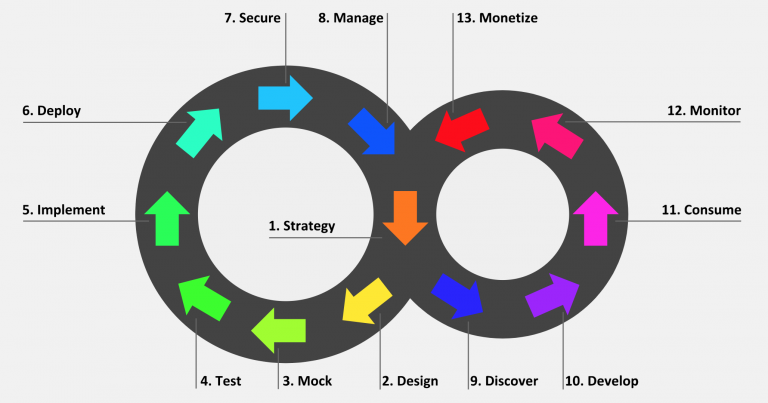
Red Hat currently supports the design, implement, deploy, secure, and manage phases of the API provider cycle, and all phases of the API consumer cycle.
3.1.1. API provider cycle
The API provider cycle stages are based on specifying, developing, and deploying your APIs. The following describes the goal and outcome of each stage:
| Stage | Goal | Outcome |
|---|---|---|
| 1. Strategy | Determine the corporate strategy for the APIs, including goals, resources, target market, timeframe, and make a plan. | The corporate strategy is defined with a clear plan to achieve the goals. |
| 2. Design | Create the API contract early to break dependencies between projects, gather feedback, and reduce risks and time to market (for example, using Apicurio Studio). | A consumer-focused API contract defines the messages that can be exchanged with the API. The API consumers have provided feedback. |
| 3. Mock | Further specify the API contract with real-world examples and payloads that can be used by API consumers to start their implementation. | A mock API is live and returns real-world examples. The API contract is complete with examples. |
| 4. Test | Further specify the API contract with business expectations that can be used to test the developed API. | A set of acceptance tests is created. The API documentation is complete with business expectations. |
| 5. Implement | Implement the API, using an integration framework such as Red Hat Fuse or a development language of your choice. Ensure that the implementation matches the API contract. | The API is implemented. If custom API management features are required, 3scale APIcast policies are also developed. |
| 6. Deploy | Automate the API integration, tests, deployment, and management using a CI/CD pipeline with 3scale toolbox. | A CI/CD pipeline integrates, tests, deploys, and manages the API to the production environment in an automated way. |
| 7. Secure | Ensure that the API is secure (for example, using secure development practices and automated security testing). | Security guidelines, processes, and gates are in place. |
| 8. Manage | Manage API promotion between environments, versioning, deprecation, and retirement at scale. | Processes and tools are in place to manage APIs at scale (for example, semantic versioning to prevent breaking changes to the API). |
3.1.2. API consumer cycle
The API consumer cycle stages are based on promoting, distributing, and refining your APIs for consumption. The following describes the goal and outcome of each stage:
| Stage | Goal | Outcome |
|---|---|---|
| 9. Discover | Promote the API to third-party developers, partners, and internal users. | A developer portal is live and up-to-date documentation is continuously pushed to this developer portal (for example, using 3scale ActiveDocs). |
| 10. Develop | Guide and enable third-party developers, partners, and internal users to develop applications based on the API. | The developer portal includes best practices, guides, and recommendations. API developers have access to a mock and test endpoint to develop their software. |
| 11. Consume | Handle the growing API consumption and manage the API consumers at scale. | Staged application plans are available for consumption, and up-to-date prices and limits are continuously pushed. API consumers can integrate API key or client ID/secret generation from their CI/CD pipeline. |
| 12. Monitor | Gather factual and quantified feedback about API health, quality, and developer engagement (for example, a metric for Time to first Hello World!). | A monitoring system is in place. Dashboards show KPIs for the API (for example, uptime, requests per minute, latency, and so on). |
| 13. Monetize | Drive new incomes at scale (this stage is optional). | For example, when targeting a large number of small API consumers, monetization is enabled and consumers are billed based on usage in an automated way. |
3.2. Deploying the sample Jenkins CI/CD pipelines
API lifecycle automation with 3scale toolbox focuses on the deployment stage of the API lifecycle and enables you to use CI/CD pipelines to automate your API management solution. This topic explains how to deploy the sample Jenkins pipelines that call the 3scale toolbox:
- Section 3.2.1, “Sample Jenkins CI/CD pipelines”
- Section 3.2.2, “Setting up your 3scale Hosted environment”
- Section 3.2.3, “Setting up your 3scale On-premises environment”
- Section 3.2.4, “Deploying Red Hat Single Sign-On for OpenID Connect”
- Section 3.2.5, “Installing the 3scale toolbox and enabling access”
- Section 3.2.6, “Deploying the API backends”
- Section 3.2.7, “Deploying self-managed APIcast instances”
- Section 3.2.8, “Installing and deploying the sample pipelines”
- Section 3.2.9, “Limitations of API lifecycle automation with 3scale toolbox”
3.2.1. Sample Jenkins CI/CD pipelines
The following samples are provided in the Red Hat Integration repository as examples of how to create and deploy your Jenkins pipelines for API lifecycle automation:
| Sample pipeline | Target environment | Security |
|---|---|---|
| 3scale Hosted | API key | |
| 3scale Hosted and 3scale On-premises with APIcast self-managed | None | |
| 3scale Hosted and 3scale On-premises with APIcast self-managed | OpenID Connect (OIDC) | |
| 3scale Hosted on development, test and production, with APIcast self-managed | API key | |
| 3scale Hosted on development, test and production, with APIcast self-managed | API key, none, OIDC |
These samples use a 3scale Jenkins shared library that calls the 3scale toolbox to demonstrate key API management capabilities. After you have performed the setup steps in this topic, you can install the pipelines using the OpenShift templates provided for each of the sample use cases in the Red Hat Integration repository.
The sample pipelines and applications are provided as examples only. The underlying APIs, CLIs, and other interfaces leveraged by the sample pipelines are fully supported by Red Hat. Any modifications that you make to the pipelines are not directly supported by Red Hat.
3.2.2. Setting up your 3scale Hosted environment
Setting up a 3scale Hosted environment is required by all of the sample Jenkins CI/CD pipelines.
The SaaS - API key, Multi-environment, and Semantic versioning sample pipelines use 3scale Hosted only. The Hybrid - open and Hybrid - OIDC pipelines also use 3scale On-premises. See also Section 3.2.3, “Setting up your 3scale On-premises environment”.
Prerequisites
- You must have a Linux workstation.
- You must have a 3scale Hosted environment.
You must have an OpenShift 3.11 cluster. OpenShift 4 is currently not supported.
- For more information about supported configurations, see the Red Hat 3scale API Management Supported Configurations page.
- Ensure that wildcard routes have been enabled on the OpenShift router, as explained in the OpenShift documentation.
Procedure
- Log in to your 3scale Hosted Admin Portal console.
- Generate a new access token with write access to the Account Management API.
Save the generated access token for later use. For example:
export SAAS_ACCESS_TOKEN=123...456Save the name of your 3scale tenant for later use. This is the string before
-admin.3scale.netin your Admin Portal URL. For example:export SAAS_TENANT=my_username- Navigate to Audience > Accounts > Listing in the Admin Portal.
- Click Developer.
Save the Developer Account ID. This is the last part of the URL after
/buyers/accounts/. For example:export SAAS_DEVELOPER_ACCOUNT_ID=123...456
3.2.3. Setting up your 3scale On-premises environment
Setting up a 3scale on-premises environment is required by the Hybrid - open and Hybrid - OIDC sample Jenkins CI/CD pipelines only.
If you wish to use these Hybrid sample pipelines, you must set up a 3scale On-premises environment and a 3scale Hosted environment. See also Section 3.2.2, “Setting up your 3scale Hosted environment”.
Prerequisites
- You must have a Linux workstation.
- You must have a 3scale on-premises environment. For details on installing 3scale on-premises using a template on OpenShift, see the 3scale installation documentation.
You must have an OpenShift 3.11 cluster. OpenShift 4 is currently not supported.
- For more information about supported configurations, see the Red Hat 3scale API Management Supported Configurations page.
- Ensure that wildcard routes have been enabled on the OpenShift router, as explained in the OpenShift documentation.
Procedure
- Log in to your 3scale On-premises Admin Portal console.
- Generate a new access token with write access to the Account Management API.
Save the generated access token for later use. For example:
export SAAS_ACCESS_TOKEN=123...456Save the name of your 3scale tenant for later use:
export ONPREM_ADMIN_PORTAL_HOSTNAME="$(oc get route system-provider-admin -o jsonpath='{.spec.host}')"Define your wildcard routes:
export OPENSHIFT_ROUTER_SUFFIX=app.openshift.test # Replace me! export APICAST_ONPREM_STAGING_WILDCARD_DOMAIN=onprem-staging.$OPENSHIFT_ROUTER_SUFFIX export APICAST_ONPREM_PRODUCTION_WILDCARD_DOMAIN=onprem-production.$OPENSHIFT_ROUTER_SUFFIXNoteYou must set the value of
OPENSHIFT_ROUTER_SUFFIXto the suffix of your OpenShift router (for example,app.openshift.test).Add the wildcard routes to your existing 3scale on-premises instance:
oc create route edge apicast-wildcard-staging --service=apicast-staging --hostname="wildcard.$APICAST_ONPREM_STAGING_WILDCARD_DOMAIN" --insecure-policy=Allow --wildcard-policy=Subdomain oc create route edge apicast-wildcard-production --service=apicast-production --hostname="wildcard.$APICAST_ONPREM_PRODUCTION_WILDCARD_DOMAIN" --insecure-policy=Allow --wildcard-policy=Subdomain- Navigate to Audience > Accounts > Listing in the Admin Portal.
- Click Developer.
Save the Developer Account ID. This is the last part of the URL after
/buyers/accounts/:export ONPREM_DEVELOPER_ACCOUNT_ID=5
3.2.4. Deploying Red Hat Single Sign-On for OpenID Connect
If you are using the Hybrid - OpenID Connect (OIDC) or Semantic versioning sample pipelines, perform the steps in this section to deploy Red Hat Single Sign-On (RH-SSO) with 3scale. This is required for OIDC authentication, which is used in both samples.
Procedure
Deploy RH-SSO 7.3 as explained in the RH-SSO documentation.
The following example commands provide a short summary:
oc replace -n openshift --force -f https://raw.githubusercontent.com/jboss-container-images/redhat-sso-7-openshift-image/sso73-dev/templates/sso73-image-stream.json

oc replace -n openshift --force -f https://raw.githubusercontent.com/jboss-container-images/redhat-sso-7-openshift-image/sso73-dev/templates/sso73-x509-postgresql-persistent.json

oc -n openshift import-image redhat-sso73-openshift:1.0

oc policy add-role-to-user view system:serviceaccount:$(oc project -q):default

oc new-app --template=sso73-x509-postgresql-persistent --name=sso -p DB_USERNAME=sso -p SSO_ADMIN_USERNAME=admin -p DB_DATABASE=sso
Save the host name of your RH-SSO installation for later use:
export SSO_HOSTNAME="$(oc get route sso -o jsonpath='{.spec.host}')"- Configure RH-SSO for 3scale as explained in the 3scale Developer Portal documentation.
Save the realm name, client ID, and client secret for later use:
export REALM=3scale

export CLIENT_ID=3scale-admin

export CLIENT_SECRET=123...456
3.2.5. Installing the 3scale toolbox and enabling access
This section describes how to install the toolbox, create your remote 3scale instance, and provision the secret used to access the Admin Portal.
Procedure
- Install the 3scale toolbox locally as explained in Chapter 2, Using the 3scale toolbox.
Run the appropriate toolbox command to create your 3scale remote instance:
3scale Hosted
3scale remote add 3scale-saas "https://$SAAS_ACCESS_TOKEN@$SAAS_TENANT-admin.3scale.net/"3scale On-premises
3scale remote add 3scale-onprem "https://$ONPREM_ACCESS_TOKEN@$ONPREM_ADMIN_PORTAL_HOSTNAME/"Run the following OpenShift command to provision the secret containing your 3scale Admin Portal and access token:
oc create secret generic 3scale-toolbox -n "$TOOLBOX_NAMESPACE" --from-file="$HOME/.3scalerc.yaml"
3.2.6. Deploying the API backends
This section shows how to deploy the example API backends provided with the sample pipelines. You can substitute your own API backends as needed when creating and deploying your own pipelines
Procedure
Deploy the example Beer Catalog API backend for use with the following samples:
-
SaaS - API key -
Hybrid - open Hybrid - OIDCoc new-app -n "$TOOLBOX_NAMESPACE" -i openshift/redhat-openjdk18-openshift:1.4 https://github.com/microcks/api-lifecycle.git --context-dir=/beer-catalog-demo/api-implementation --name=beer-catalog oc expose -n "$TOOLBOX_NAMESPACE" svc/beer-catalog
-
Save the Beer Catalog API host name for later use:
export BEER_CATALOG_HOSTNAME="$(oc get route -n "$TOOLBOX_NAMESPACE" beer-catalog -o jsonpath='{.spec.host}')"Deploy the example Red Hat Event API backend for use with the following samples:
-
Multi-environment Semantic versioningoc new-app -n "$TOOLBOX_NAMESPACE" -i openshift/nodejs:10 'https://github.com/nmasse-itix/rhte-api.git#085b015' --name=event-api oc expose -n "$TOOLBOX_NAMESPACE" svc/event-api
-
Save the Event API host name for later use:
export EVENT_API_HOSTNAME="$(oc get route -n "$TOOLBOX_NAMESPACE" event-api -o jsonpath='{.spec.host}')"
3.2.7. Deploying self-managed APIcast instances
This section is for use with APIcast self-managed instances in 3scale Hosted environments. It applies to all of the sample pipelines except SaaS - API key.
Procedure
Define your wildcard routes:
export APICAST_SELF_MANAGED_STAGING_WILDCARD_DOMAIN=saas-staging.$OPENSHIFT_ROUTER_SUFFIX

export APICAST_SELF_MANAGED_PRODUCTION_WILDCARD_DOMAIN=saas-production.$OPENSHIFT_ROUTER_SUFFIX
Deploy the APIcast self-managed instances in your project:
oc create secret generic 3scale-tenant --from-literal=password=https://$SAAS_ACCESS_TOKEN@$SAAS_TENANT-admin.3scale.net

oc create -f https://raw.githubusercontent.com/3scale/apicast/v3.5.0/openshift/apicast-template.yml

oc new-app --template=3scale-gateway --name=apicast-staging -p CONFIGURATION_URL_SECRET=3scale-tenant -p CONFIGURATION_CACHE=0 -p RESPONSE_CODES=true -p LOG_LEVEL=info -p CONFIGURATION_LOADER=lazy -p APICAST_NAME=apicast-staging -p DEPLOYMENT_ENVIRONMENT=sandbox -p IMAGE_NAME=registry.redhat.io/3scale-amp2/apicast-gateway-rhel7:3scale2.7

oc new-app --template=3scale-gateway --name=apicast-production -p CONFIGURATION_URL_SECRET=3scale-tenant -p CONFIGURATION_CACHE=60 -p RESPONSE_CODES=true -p LOG_LEVEL=info -p CONFIGURATION_LOADER=boot -p APICAST_NAME=apicast-production -p DEPLOYMENT_ENVIRONMENT=production -p IMAGE_NAME=registry.redhat.io/3scale-amp2/apicast-gateway-rhel7:3scale2.7

oc scale dc/apicast-staging --replicas=1

oc scale dc/apicast-production --replicas=1

oc create route edge apicast-staging --service=apicast-staging --hostname="wildcard.$APICAST_SELF_MANAGED_STAGING_WILDCARD_DOMAIN" --insecure-policy=Allow --wildcard-policy=Subdomain

oc create route edge apicast-production --service=apicast-production --hostname="wildcard.$APICAST_SELF_MANAGED_PRODUCTION_WILDCARD_DOMAIN" --insecure-policy=Allow --wildcard-policy=Subdomain
3.2.8. Installing and deploying the sample pipelines
After you have set up the required environments, you can install and deploy the sample pipelines using the OpenShift templates provided for each of the sample use cases in the Red Hat Integration repository. For example, this section shows the SaaS - API Key sample only.
Procedure
Use the provided OpenShift template to install the Jenkins pipeline:
oc process -f saas-usecase-apikey/setup.yaml \
           -p DEVELOPER_ACCOUNT_ID="$SAAS_DEVELOPER_ACCOUNT_ID" \
           -p PRIVATE_BASE_URL="http://$BEER_CATALOG_HOSTNAME" \
           -p NAMESPACE="$TOOLBOX_NAMESPACE" |oc create -f -
Deploy the sample as follows:
oc start-build saas-usecase-apikey
Additional resource
3.2.9. Limitations of API lifecycle automation with 3scale toolbox
The following limitations apply in this release:
- OpenShift support
- The sample pipelines are supported on OpenShift 3.11 only. OpenShift 4 is currently not supported. For more information about supported configurations, see the Red Hat 3scale API Management Supported Configurations page.
- Updating applications
-
You can use the
3scale application applytoolbox command for applications to both create and update applications. Create commands support account, plan, service, and application key. - Update commands do not support changes to account, plan, or service. If changes are passed, the pipelines will be triggered, no errors will be shown, but those fields will not be updated.
-
You can use the
- Copying services
-
When using the
3scale copy servicetoolbox command to copy a service with custom policies, you must copy the custom policies first and separately. - API as a Product
- The 3scale toolbox does not support all API as a Product (APIaaP) features. For more details, see the Known issues in the 3scale Release Notes.
3.3. Creating pipelines using the 3scale Jenkins shared library
This section provides best practices for creating a custom Jenkins pipeline that uses the 3scale toolbox. It explains how to write a Jenkins pipeline in Groovy that uses the 3scale Jenkins shared library to call the toolbox based on an example application. For more details, see Jenkins shared libraries.
Red Hat supports the Jenkins pipeline samples provided in the Red Hat Integration repository.
Any modifications made to these pipelines are not directly supported by Red Hat. Custom pipelines that you create for your environment are not supported.
Prerequisites
- Section 3.2, “Deploying the sample Jenkins CI/CD pipelines”.
- You must have an OpenAPI specification file for your API. For example, you can generate this using Apicurio Studio.
Procedure
Add the following to the beginning of your Jenkins pipeline to reference the 3scale shared library from your pipeline:
#!groovy

library identifier: '3scale-toolbox-jenkins@master',
   retriever: modernSCM([$class: 'GitSCMSource',
     remote: 'https://github.com/rh-integration/3scale-toolbox-jenkins.git'])
Declare a global variable to hold the
ThreescaleServiceobject so that you can use it from the different stages of your pipeline.def service = nullCreate the
ThreescaleServicewith all the relevant information:stage("Prepare") { service = toolbox.prepareThreescaleService( openapi: [ filename: "swagger.json" ], environment: [ baseSystemName: "my_service" ], toolbox: [ openshiftProject: "toolbox", destination: "3scale-tenant", secretName: "3scale-toolbox" ], service: [:], applications: [ [ name: "my-test-app", description: "This is used for tests", plan: "test", account: "<CHANGE_ME>" ] ], applicationPlans: [ [ systemName: "test", name: "Test", defaultPlan: true, published: true ], [ systemName: "silver", name: "Silver" ], [ artefactFile: "https://raw.githubusercontent.com/my_username/API-Lifecycle-Mockup/master/testcase-01/plan.yaml"], ] ) echo "toolbox version = " + service.toolbox.getToolboxVersion() }-
openapi.filenameis the path to the file containing the OpenAPI specification. -
environment.baseSystemNameis used to compute the finalsystem_name, based onenvironment.environmentNameand the API major version from the OpenAPI specificationinfo.version. -
toolbox.openshiftProjectis the OpenShift project in which Kubernetes jobs will be created. -
toolbox.secretNameis the name of the Kubernetes secret containing the 3scale toolbox configuration file, as shown in Section 3.2.5, “Installing the 3scale toolbox and enabling access”. -
toolbox.destinationis the name of the 3scale toolbox remote instance. -
applicationPlansis a list of application plans to create by using a.yamlfile or by providing application plan property details.
-
Add a pipeline stage to provision the service in 3scale:
stage("Import OpenAPI") {
  service.importOpenAPI()
  echo "Service with system_name ${service.environment.targetSystemName} created !"
}
Add a stage to create the application plans:
stage("Create an Application Plan") {
  service.applyApplicationPlans()
}
Add a global variable and a stage to create the test application:
stage("Create an Application") {
  service.applyApplication()
}
Add a stage to run your integration tests. When using APIcast Hosted instances, you must fetch the proxy definition to extract the staging public URL:
stage("Run integration tests") {
  def proxy = service.readProxy("sandbox")
  sh """set -e +x
  curl -f -w "ListBeers: %{http_code}\n" -o /dev/null -s ${proxy.sandbox_endpoint}/api/beer -H 'api-key: ${service.applications[0].userkey}'
  curl -f -w "GetBeer: %{http_code}\n" -o /dev/null -s ${proxy.sandbox_endpoint}/api/beer/Weissbier -H 'api-key: ${service.applications[0].userkey}'
  curl -f -w "FindBeersByStatus: %{http_code}\n" -o /dev/null -s ${proxy.sandbox_endpoint}/api/beer/findByStatus/   available -H 'api-key: ${service.applications[0].userkey}'
  """
}
Add a stage to promote your API to production:
stage("Promote to production") {
  service.promoteToProduction()
}
Additional resources
3.4. Creating pipelines using a Jenkinsfile
This section provides best practices for writing a custom Jenkinsfile from scratch in Groovy that uses the 3scale toolbox.
Red Hat supports the Jenkins pipeline samples provided in the Red Hat Integration repository.
Any modifications made to these pipelines are not directly supported by Red Hat. Custom pipelines that you create for your environment are not supported. This section is provided for reference only.
Prerequisites
- Section 3.2, “Deploying the sample Jenkins CI/CD pipelines”.
- You must have an OpenAPI specification file for your API. For example, you can generate this using Apicurio Studio.
Procedure
Write a utility function to call the 3scale toolbox. The following creates a Kubernetes job that runs the 3scale toolbox:
#!groovy

def runToolbox(args) {
  def kubernetesJob = [
    "apiVersion": "batch/v1",
    "kind": "Job",
    "metadata": [
      "name": "toolbox"
    ],
    "spec": [
      "backoffLimit": 0,
      "activeDeadlineSeconds": 300,
      "template": [
        "spec": [
          "restartPolicy": "Never",
          "containers": [
            [
             "name": "job",
             "image": "registry.redhat.io/3scale-amp2/toolbox-rhel7:3scale2.7",
             "imagePullPolicy": "Always",
             "args": [ "3scale", "version" ],
             "env": [
               [ "name": "HOME", "value": "/config" ]
             ],
             "volumeMounts": [
               [ "mountPath": "/config", "name": "toolbox-config" ],
               [ "mountPath": "/artifacts", "name": "artifacts" ]
              ]
            ]
          ],
          "volumes": [
            [ "name": "toolbox-config", "secret": [ "secretName": "3scale-toolbox" ] ],
            [ "name": "artifacts", "configMap": [ "name": "openapi" ] ]
          ]
        ]
      ]
    ]
  ]

  kubernetesJob.spec.template.spec.containers[0].args = args

  sh "rm -f -- job.yaml"
  writeYaml file: "job.yaml", data: kubernetesJob

  sh """set -e
  oc delete job toolbox --ignore-not-found
  sleep 2
  oc create -f job.yaml
  sleep 20 # Adjust the sleep duration to your server velocity
  """

  def logs = sh(script: "set -e; oc logs -f job/toolbox", returnStdout: true)
  echo logs
  return logs
}
Kubernetes object template
This function uses a Kubernetes object template to run the 3scale toolbox, which you can adjust to your needs. It sets the 3scale toolbox CLI arguments and writes the resulting Kubernetes job definition to a YAML file, cleans up any previous run of the toolbox, creates the Kubernetes job, and waits:
-
You can adjust the wait duration to your server velocity to match the time that a pod needs to transition between the
Createdand theRunningstate. You can refine this step using a polling loop. -
The OpenAPI specification file is fetched from a
ConfigMapnamedopenapi. -
The 3scale Admin Portal hostname and access token are fetched from a secret named
3scale-toolbox, as shown in Section 3.2.5, “Installing the 3scale toolbox and enabling access”. -
The
ConfigMapwill be created by the pipeline in step 3. However, the secret was already provisioned outside the pipeline and is subject to Role-Based Access Control (RBAC) for enhanced security.
-
You can adjust the wait duration to your server velocity to match the time that a pod needs to transition between the
Define the global environment variables to use with 3scale toolbox in your Jenkins pipeline stages. For example:
3scale Hosted
def targetSystemName = "saas-apikey-usecase"
def targetInstance = "3scale-saas"
def privateBaseURL = "http://echo-api.3scale.net"
def testUserKey = "abcdef1234567890"
def developerAccountId = "john"
3scale On-premises
When using self-managed APIcast or an on-premises installation of 3scale, you must declare two more variables:
def publicStagingBaseURL = "http://my-staging-api.example.test"
def publicProductionBaseURL = "http://my-production-api.example.test"
The variables are described as follows:
-
targetSystemName: The name of the service to be created. -
targetInstance: This matches the name of the 3scale remote instance created in Section 3.2.5, “Installing the 3scale toolbox and enabling access”. -
privateBaseURL: The endpoint host of your API backend. -
testUserKey: The user API key used to run the integration tests. It can be hardcoded as shown or generated from an HMAC function. -
developerAccountId: The ID of the target account in which the test application will be created. -
publicStagingBaseURL: The public staging base URL of the service to be created. -
publicProductionBaseURL: The public production base URL of the service to be created.
-
Add a pipeline stage to fetch the OpenAPI specification file and provision it as a
ConfigMapon OpenShift as follows:node() { stage("Fetch OpenAPI") { sh """set -e curl -sfk -o swagger.json https://raw.githubusercontent.com/microcks/api-lifecycle/master/beer-catalog-demo/api-contracts/beer-catalog-api-swagger.json oc delete configmap openapi --ignore-not-found oc create configmap openapi --from-file="swagger.json" """ }Add a pipeline stage that uses the 3scale toolbox to import the API into 3scale:
3scale Hosted
stage("Import OpenAPI") {
  runToolbox([ "3scale", "import", "openapi", "-d", targetInstance, "/artifacts/swagger.json", "--override-private-base-url=${privateBaseURL}", "-t", targetSystemName ])
}
3scale On-premises
When using self-managed APIcast or an on-premises installation of 3scale, you must also specify the options for the public staging and production base URLs:
stage("Import OpenAPI") {
  runToolbox([ "3scale", "import", "openapi", "-d", targetInstance, "/artifacts/swagger.json", "--override-private-base-url=${privateBaseURL}", "-t", targetSystemName, "--production-public-base-url=${publicProductionBaseURL}", "--staging-public-base-url=${publicStagingBaseURL}" ])
}
Add pipeline stages that use the toolbox to create a 3scale application plan and an application:
stage("Create an Application Plan") {
  runToolbox([ "3scale", "application-plan", "apply", targetInstance, targetSystemName, "test", "-n", "Test Plan", "--default" ])
}

stage("Create an Application") {
  runToolbox([ "3scale", "application", "apply", targetInstance, testUserKey, "--account=${developerAccountId}", "--name=Test Application", "--description=Created by Jenkins", "--plan=test", "--service=${targetSystemName}" ])
}
stage("Run integration tests") { def proxyDefinition = runToolbox([ "3scale", "proxy", "show", targetInstance, targetSystemName, "sandbox" ]) def proxy = readJSON text: proxyDefinition proxy = proxy.content.proxy sh """set -e echo "Public Staging Base URL is ${proxy.sandbox_endpoint}" echo "userkey is ${testUserKey}" curl -vfk ${proxy.sandbox_endpoint}/beer -H 'api-key: ${testUserKey}' curl -vfk ${proxy.sandbox_endpoint}/beer/Weissbier -H 'api-key: ${testUserKey}' curl -vfk ${proxy.sandbox_endpoint}/beer/findByStatus/available -H 'api-key: ${testUserKey}' """ }Add a stage that uses the toolbox to promote the API to your production environment.
stage("Promote to production") {
  runToolbox([ "3scale", "proxy", "promote", targetInstance,  targetSystemName ])
}
Chapter 4. Mapping API environments in 3scale
An API provider gives access to the APIs managed through the 3scale Admin Portal. You then deploy the API backends in many environments. API backend environments include the following:
- Different environments used for development, quality assurance (QA), staging, and production.
- Different environments used for teams or departments that manage their own set of API backends.
A Red Hat 3scale API Management product represents a single API or subset of an API, but it is also used to map and manage different API backend environments.
To find out about mapping API environments for your 3scale product, see the following sections:
4.1. Product per environment
This method uses a separate 3scale Product for each API backend environment. In each product, configure a production gateway and a staging gateway, so the changes to the gateway configuration can be tested safely and promoted to the production configuration as you would with your API backends.
Production Product => Production Product APIcast gateway => Production Product API upstream
Staging Product => Staging Product APIcast gateway => Staging Product API upstream
Configure the product for the API backend environment as follows:
- Create a backend with a base URL for the API backend for the environment.
- Add the backend to the product for the environment with a backend path /.
Development environment
Create development backend
- Name: Dev
- Private Base URL: URL of the API backend
Create Dev product
-
Production Public Base URL:
https://dev-api-backend.yourdomain.com -
Staging Public Base URL:
https://dev-api-backend.yourdomain.com - Add Dev Backend with a backend path /
-
Production Public Base URL:
QA environment
Create QA backend
- Name: QA
- Private Base URL: URL of the API backend
Create QA product
-
Production Public Base URL:
https://qa-api-backend.yourdomain.com -
Staging Public Base URL:
https://qa-api-backend.yourdomain.com - Add QA Backend with a backend path /
-
Production Public Base URL:
Production environment
Create production backend
- Name: Prod
- Private Base URL: URL of the API backend
Create Prod product
-
Production Public Base URL:
https://prod-api-backend.yourdomain.com -
Staging Public Base URL:
https://prod-api-backend.yourdomain.com - Add production Backend with a backend path /
-
Production Public Base URL:
Additional resources
- For more information about the 3scale product, see First steps with 3scale.
4.2. 3scale On-premises instances
For 3scale On-premises instances, there are multiple ways to set up 3scale to manage API backend environments.
- A separate 3scale instance for each API backend environment
- A single 3scale instance that uses the multitenancy feature
4.2.1. Separating 3scale instances per environment
In this approach a separate 3scale instance is deployed for each API backend environment. The benefit of this architecture is that each environment will be isolated from one another, therefore there are no shared databases or other resources. For example, any load testing being done in one environment will not impact the resources in other environments.
This separation of installations has benefits as described above, however, it would require more operational resources and maintenance. These additional resources would be required on the OpenShift administration layer and not necessarily on the 3scale layer.
4.2.2. Separating 3scale tenants per environment
This approach uses a single 3scale instance, but the multitenancy feature is utilized to support multiple API backends.
There are two options:
- Create a 1-to-1 mapping between environments and 3scale products within a single tenant.
Create a 1-to-1 mapping between environments and tenants with one or more product per tenant as required.
- There would be three tenants corresponding to API backend environments - dev-tenant, qa-tenant, prod-tenant. The benefit of this approach is that it allows for a logical separation of environments but uses shared physical resources.
Shared physical resources will ultimately need to be taken into consideration when analysing the best strategy for mapping API environments to a single installation with multiple tenants.
4.3. 3scale mixed approach
It is possible to combine approaches described in 3scale On-premises instances. For example:
- A separate 3scale instance for production.
- A separate 3scale instance with separate tenant for non-production environments in development and QA.
4.4. 3scale with APIcast gateways
For 3scale On-premises instances, there are two alternatives to set up 3scale to manage API backend environments:
- Each 3scale installation comes with two embedded APIcast gateways, for staging and production.
- Deploy additional APIcast gateways externally to the OpenShift cluster where 3scale is running.
4.4.1. Embedded APIcast default gateways
When embedded APIcast gateways are used, the API backend configured using the above approaches described in 3scale with APIcast gateways are handled automatically. When a 3scale Master Admin adds a tenant, a route is created for the tenant in production and staging embedded APIcast gateways. See Understanding multitenancy subdomains
-
<API_NAME>-<TENANT_NAME>-apicast.staging.<WILDCARD_DOMAIN> -
<API_NAME>-<TENANT_NAME>-apicast.production.<WIDLCARD_DOMAIN>
Therefore, each API backend environment mapped to a different tenant would get its own route. For example:
-
Developer:
<API_NAME>-dev-apicast.staging.<WILDCARD_DOMAIN> -
QA:
<API_NAME>-qa-apicast.staging.<WILDCARD_DOMAIN> -
Production:
<API_NAME>-prod-apicast.staging.<WILDCARD_DOMAIN>
4.4.2. Additional APIcast gateways
Additional APIcast gateways are those deployed on a different OpenShift cluster than the one on which 3scale instance is running. There is more than one way to set up and use additional APIcast gateways. The value of environment variable THREESCALE_PORTAL_ENDPOINT used when starting APIcast depends how the additional APIcast gateways are set up.
You can configure a separate APIcast gateway for each API backend environment. For example:
DEV_APICAST -> DEV_TENANT ; DEV_APICAST started with THREESCALE_PORTAL_ENDPOINT = admin portal for DEV_TENANT
QA_APICAST -> QA_TENANT ; QA_APICAST started with THREESCALE_PORTAL_ENDPOINT = admin portal for QA_APICAST
PROD_APICAST -> PROD_TENANT ; PROD_APICAST started with THREESCALE_PORTAL_ENDPOINT = admin portal for PROD_APICAST
The THREESCALE_PORTAL_ENDPOINT is used by APIcast to download the configuration. Each tenant that maps to an API backend environment uses a separate APIcast gateway. The THREESCALE_PORTAL_ENDPOINT is set to the Admin Portal for the tenant containing all the product configurations specific to that API backend environment.
It is possible to use a single APIcast gateway with multiple API backend environments. In this case THREESCALE_PORTAL_ENDPOINT is set to the Master Admin Portal.
Additional resources
- For more information about the API provider, see the glossary.
- For more information about the 3scale product, see the glossary.
Chapter 5. Capabilities: Provisioning 3scale services and configurations via the operator
This document contains information about 3scale operator for Capabilities, which involves provisioning 3scale products and configurations via the 3scale operator through the OpenShift Container Platform user interface.
3scale operator for Capabilities is a Technology Preview feature only. Technology Preview features are not supported with Red Hat production service level agreements (SLAs) and might not be functionally complete. Red Hat does not recommend using them in production. These features provide early access to upcoming product features, enabling customers to test functionality and provide feedback during the development process. For more information about the support scope of Red Hat Technology Preview features, see Technology Preview Features Support Scope.
5.1. Prerequisites
- A 3scale 2.7 On-Premises instance
- You must have the 3scale operator installed.
OpenShift Container Platform 4.x
- A user account with administrator privileges in the OpenShift cluster.
- Note: OCP 4 supports deployment of 3scale using the operator only.
- For more information about supported configurations, see the Red Hat 3scale API Management Supported Configurations page.
When using the 3scale operator to update API configurations in 3scale, the custom resource definitions (CRDs) are the source of truth. If changes are made in the Admin user interface, they will not persist and eventually be overridden by the definition in the CRD.
5.3. Deploying optional tenants custom resource
Optionally, you may create other tenants deploying Tenant custom resource objects.
Procedure
The menu structure depends on the OpenShift version you are using:
- For OCP 4.1, click Catalog > Installed Operators.
For OCP 4.2, click Operators > Installed Operators
- From the list of Installed Operators, click 3scale Operator.
- Click the Tenant tab.
- Click Create Tenant.
Clear the sample content and add the following YAML definitions to the editor, then click Create.
apiVersion: capabilities.3scale.net/v1alpha1
kind: Tenant
metadata:
  name: ecorp-tenant
spec:
  username: admin
  systemMasterUrl: https://master.<wildcardDomain>
  email: admin@ecorp.com
  organizationName: ECorp
  masterCredentialsRef:
    name: system-seed
  passwordCredentialsRef:
    name: ecorp-admin-secret
  tenantSecretRef:
    name: ecorp-tenant-secret
    namespace: operator-test
Tenant provider_key and admin domain URL will be stored in a secret. You can specify the secret location by using
tenantSecretReftenant spec key.NoteFor more information about the Tenant Custom Resource fields and possible values, refer to the Tenant CRD Reference documentation.
5.4. Deleting created custom resources
The following procedure details how to delete the custom resources.
Procedure
The menu structure depends on the OpenShift version you are using:
- For OCP 4.1, click Catalog > Installed Operators.
For OCP 4.2, click Operators > Installed Operators
- From the list of Installed Operators, click 3scale Operator.
Click the tab for the resource you wish to delete.
- You will see the resource listed if one has previously been created.
- Click the name to see the overview.
- Click Action > Delete.
- Confirm the deletion by clicking Delete or Cancel to return to the previous screen.
Alternatively, to delete the 3scale operator, its associated roles and service accounts, do the following.
Procedure
The menu structure depends on the OpenShift version you are using:
- For OCP 4.1, click Catalog > Installed Operators.
For OCP 4.2, click Operators > Installed Operators
- From the list of Installed Operators, click 3scale Operator.
- Click Action > Delete Cluster Service Version.
- Confirm the deletion by clicking Delete or Cancel to return to the previous screen.
Chapter 6. 3scale backup and restore
This section provides you, as the administrator of a Red Hat 3scale API Management installation, the information needed to:
- Set up the backup procedures for persistent data
- Perform a restore from backup of the persistent data
In case of a failure with one or more of the MySQL databases, you will be able to restore 3scale correctly to its previous operational state.
6.1. Prerequisites
- A 3scale 2.7 instance. For more information about how to install 3scale, see Installing 3scale on OpenShift.
An OpenShift Container Platform 4 user account with one of the following roles in the OpenShift cluster:
- cluster-admin
- admin
- edit
- For more information about supported configurations, see the Red Hat 3scale API Management Supported Configurations page.
A user with an edit cluster role locally binded in the namespace of a 3scale installation can perform backup and restore procedures.
6.2. Persistent volumes
In a 3scale deployment on OpenShift:
- A persistent volume (PV) provided to the cluster by the underlying infrastructure.
- Storage service external to the cluster. This can be in the same data center or elsewhere.
6.3. Considerations
The backup and restore procedures for persistent data vary depending on the storage type in use. To ensure the backups and restores preserve data consistency, it is not sufficient to backup the underlying PVs for a database. For example, do not capture only partial writes and partial transactions. Use the database’s backup mechanisms instead.
Some parts of the data are synchronized between different components. One copy is considered the source of truth for the data set. The other is a copy that is not modified locally, but synchronized from the source of truth. In these cases, upon completion, the source of truth should be restored, and copies in other components synchronized from it.
6.4. Using data sets
This section explains in more detail about different data sets in the different persistent stores, their purpose, the storage type used, and whether or not it is the source of truth.
The full state of a 3scale deployment is stored across the following DeploymentConfig objects and their PVs:
| Name | Description |
|---|---|
|
MySQL database ( | |
| Volume for Files | |
|
Redis database ( | |
|
Redis database ( |
6.4.1. Defining system-mysql
system-mysql is a relational database which stores information about users, accounts, APIs, plans, and more, in the 3scale Admin Console.
A subset of this information related to services is synchronized to the Backend component and stored in backend-redis. system-mysql is the source of truth for this information.
6.4.2. Defining system-storage
System can be scaled horizontally with multiple pods uploading and reading said static files, hence the need for a ReadWriteMany (RWX) PersistentVolume.
system-storage stores files to be read and written by the System component.
They fall into two categories:
-
Configuration files read by the
Systemcomponent at run-time - Static files, for example, HTML, CSS, JS, uploaded to system by its CMS feature, for the purpose of creating a Developer Portal
6.4.3. Defining backend-redis
backend-redis contains multiple data sets used by the Backend component:
-
Usages: This is API usage information aggregated by
Backend. It is used byBackendfor rate-limiting decisions and bySystemto display analytics information in the UI or via API. -
Config: This is configuration information about services, rate-limits, and more, that is synchronized from
Systemvia an internal API. This is not the source of truth of this information, howeverSystemandsystem-mysqlis. - Queues: This is queues of background jobs to be executed by worker processes. These are ephemeral and are deleted once processed.
6.4.4. Defining system-redis
system-redis contains queues for jobs to be processed in background. These are ephemeral and are deleted once processed.
6.5. Backup procedures
The following commands are used to back up and archive system databases.
6.5.1. Backing up system-mysql
Execute MySQL Backup Command:
oc rsh $(oc get pods -l 'deploymentConfig=system-mysql' -o json | jq -r '.items[0].metadata.name') bash -c 'export MYSQL_PWD=${MYSQL_ROOT_PASSWORD}; mysqldump --single-transaction -hsystem-mysql -uroot system' | gzip > system-mysql-backup.gz6.5.2. Backing up system-storage
Archive the system-storage files to another storage:
oc rsync $(oc get pods -l 'deploymentConfig=system-app' -o json | jq '.items[0].metadata.name' -r):/opt/system/public/system ./local/dir6.5.3. Backing up backend-redis
Backup the dump.rdb file from redis:
oc cp $(oc get pods -l 'deploymentConfig=backend-redis' -o json | jq '.items[0].metadata.name' -r):/var/lib/redis/data/dump.rdb ./backend-redis-dump.rdb6.5.4. Backing up system-redis
Backup the dump.rdb file from redis:
oc cp $(oc get pods -l 'deploymentConfig=system-redis' -o json | jq '.items[0].metadata.name' -r):/var/lib/redis/data/dump.rdb ./system-redis-dump.rdb6.5.5. Backing up zync-database
Backup the zync_production database:
oc rsh $(oc get pods -l 'deploymentConfig=zync-database' -o json | jq -r '.items[0].metadata.name') bash -c 'pg_dump zync_production' | gzip > zync-database-backup.gz6.5.6. Backing up OpenShift secrets and ConfigMaps
The following is the list of commands for OpenShift secrets and ConfigMaps:
6.5.6.1. OpenShift secrets
oc get secrets system-smtp -o json > system-smtp.json
oc get secrets system-seed -o json > system-seed.json
oc get secrets system-database -o json > system-database.json
oc get secrets backend-internal-api -o json > backend-internal-api.json
oc get secrets system-events-hook -o json > system-events-hook.json
oc get secrets system-app -o json > system-app.json
oc get secrets system-recaptcha -o json > system-recaptcha.json
oc get secrets system-redis -o json > system-redis.json
oc get secrets zync -o json > zync.json
oc get secrets system-master-apicast -o json > system-master-apicast.json
6.5.6.2. ConfigMaps
oc get configmaps system-environment -o json > system-environment.json
oc get configmaps apicast-environment -o json > apicast-environment.json
6.6. Procedures to restore databases
You can use the following commands to restore system databases after a system failure has occurred.
Prevent record creation by scaling down pods like system-app or disabling routes.
6.6.1. Restoring a template-based deployment
Use the following steps to restore a template-based deployment.
Procedure
Restore ConfigMaps before creating deploying template:
oc apply -f smtp.jsonTemplate parameters will be read from copied secrets and configmaps:
oc new-app --file /opt/amp/templates/amp.yml \
    --param APP_LABEL=$(cat system-environment.json | jq -r '.metadata.labels.app') \
    --param TENANT_NAME=$(cat system-seed.json | jq -r '.data.TENANT_NAME' | base64 -d) \
    --param SYSTEM_DATABASE_USER=$(cat system-database.json | jq -r '.data.DB_USER' | base64 -d) \
    --param SYSTEM_DATABASE_PASSWORD=$(cat system-database.json | jq -r '.data.DB_PASSWORD' | base64 -d) \
    --param SYSTEM_DATABASE=$(cat system-database.json | jq -r '.data.URL' | base64 -d | cut -d '/' -f4) \
    --param SYSTEM_DATABASE_ROOT_PASSWORD=$(cat system-database.json | jq -r '.data.URL' | base64 -d | awk -F '[:@]' '{print $3}') \
    --param WILDCARD_DOMAIN=$(cat system-environment.json | jq -r '.data.THREESCALE_SUPERDOMAIN') \
    --param SYSTEM_BACKEND_USERNAME=$(cat backend-internal-api.json | jq '.data.username' -r | base64 -d) \
    --param SYSTEM_BACKEND_PASSWORD=$(cat backend-internal-api.json | jq '.data.password' -r | base64 -d) \
    --param SYSTEM_BACKEND_SHARED_SECRET=$(cat system-events-hook.json | jq -r '.data.PASSWORD' | base64 -d) \
    --param SYSTEM_APP_SECRET_KEY_BASE=$(cat system-app.json | jq -r '.data.SECRET_KEY_BASE' | base64 -d) \
    --param ADMIN_PASSWORD=$(cat system-seed.json | jq -r '.data.ADMIN_PASSWORD' | base64 -d) \
    --param ADMIN_USERNAME=$(cat system-seed.json | jq -r '.data.ADMIN_USER' | base64 -d) \
    --param ADMIN_EMAIL=$(cat system-seed.json | jq -r '.data.ADMIN_EMAIL' | base64 -d) \
    --param ADMIN_ACCESS_TOKEN=$(cat system-seed.json | jq -r '.data.ADMIN_ACCESS_TOKEN' | base64 -d) \
    --param MASTER_NAME=$(cat system-seed.json | jq -r '.data.MASTER_DOMAIN' | base64 -d) \
    --param MASTER_USER=$(cat system-seed.json | jq -r '.data.MASTER_USER' | base64 -d) \
    --param MASTER_PASSWORD=$(cat system-seed.json | jq -r '.data.MASTER_PASSWORD' | base64 -d) \
    --param MASTER_ACCESS_TOKEN=$(cat system-seed.json | jq -r '.data.MASTER_ACCESS_TOKEN' | base64 -d) \
    --param RECAPTCHA_PUBLIC_KEY="$(cat system-recaptcha.json | jq -r '.data.PUBLIC_KEY' | base64 -d)" \
    --param RECAPTCHA_PRIVATE_KEY="$(cat system-recaptcha.json | jq -r '.data.PRIVATE_KEY' | base64 -d)" \
    --param SYSTEM_REDIS_URL=$(cat system-redis.json | jq -r '.data.URL' | base64 -d) \
    --param SYSTEM_MESSAGE_BUS_REDIS_URL="$(cat system-redis.json | jq -r '.data.MESSAGE_BUS_URL' | base64 -d)" \
    --param SYSTEM_REDIS_NAMESPACE="$(cat system-redis.json | jq -r '.data.NAMESPACE' | base64 -d)" \
    --param SYSTEM_MESSAGE_BUS_REDIS_NAMESPACE="$(cat system-redis.json | jq -r '.data.MESSAGE_BUS_NAMESPACE' | base64 -d)" \
    --param ZYNC_DATABASE_PASSWORD=$(cat zync.json | jq -r '.data.ZYNC_DATABASE_PASSWORD' | base64 -d) \
    --param ZYNC_SECRET_KEY_BASE=$(cat zync.json | jq -r '.data.SECRET_KEY_BASE' | base64 -d) \
    --param ZYNC_AUTHENTICATION_TOKEN=$(cat zync.json | jq -r '.data.ZYNC_AUTHENTICATION_TOKEN' | base64 -d) \
    --param APICAST_ACCESS_TOKEN=$(cat system-master-apicast.json | jq -r '.data.ACCESS_TOKEN' | base64 -d) \
    --param APICAST_MANAGEMENT_API=$(cat apicast-environment.json | jq -r '.data.APICAST_MANAGEMENT_API') \
    --param APICAST_OPENSSL_VERIFY=$(cat apicast-environment.json | jq -r '.data.OPENSSL_VERIFY') \
    --param APICAST_RESPONSE_CODES=$(cat apicast-environment.json | jq -r '.data.APICAST_RESPONSE_CODES') \
    --param APICAST_REGISTRY_URL=$(cat system-environment.json | jq -r '.data.APICAST_REGISTRY_URL')
6.6.2. Restoring an operator-based deployment
Use the following steps to restore operator-based deployments.
Procedure
- Install the 3scale operator on OpenShift.
Restore secrets before creating an APIManager resource:
oc apply -f system-smtp.json
oc apply -f system-seed.json
oc apply -f system-database.json
oc apply -f backend-internal-api.json
oc apply -f system-events-hook.json
oc apply -f system-app.json
oc apply -f system-recaptcha.json
oc apply -f system-redis.json
oc apply -f zync.json
oc apply -f system-master-apicast.json
Restore ConfigMaps before creating an APIManager resource:
oc apply -f system-environment.json oc apply -f apicast-environment.json- Deploy 3scale with the operator using the APIManager custom resource.
6.6.3. Restoring system-mysql
Copy the MySQL dump to the system-mysql pod:
oc cp ./system-mysql-backup.gz $(oc get pods -l 'deploymentConfig=system-mysql' -o json | jq '.items[0].metadata.name' -r):/var/lib/mysqlDecompress the Backup File:
oc rsh $(oc get pods -l 'deploymentConfig=system-mysql' -o json | jq -r '.items[0].metadata.name') bash -c 'gzip -d ${HOME}/system-mysql-backup.gz'Restore the MySQL DB Backup file:
oc rsh $(oc get pods -l 'deploymentConfig=system-mysql' -o json | jq -r '.items[0].metadata.name') bash -c 'export MYSQL_PWD=${MYSQL_ROOT_PASSWORD}; mysql -hsystem-mysql -uroot system < ${HOME}/system-mysql-backup'
6.6.4. Restoring system-storage
Restore the Backup file to system-storage:
oc rsync ./local/dir/system/ $(oc get pods -l 'deploymentConfig=system-app' -o json | jq '.items[0].metadata.name' -r):/opt/system/public/system6.6.5. Restoring zync-database
Instructions to restore zync-database depend on the deployment type applied for 3scale.
Template-based deployments
Scale down the zync DeploymentConfig to 0 pods:
oc scale dc zync --replicas=0
oc scale dc zync-que --replicas=0
Copy the Zync database dump to the
zync-databasepod:oc cp ./zync-database-backup.gz $(oc get pods -l 'deploymentConfig=zync-database' -o json | jq '.items[0].metadata.name' -r):/var/lib/pgsql/Decompress the backup file:
oc rsh $(oc get pods -l 'deploymentConfig=zync-database' -o json | jq -r '.items[0].metadata.name') bash -c 'gzip -d ${HOME}/zync-database-backup.gz'Restore the PostgreSQL DB backup file:
oc rsh $(oc get pods -l 'deploymentConfig=zync-database' -o json | jq -r '.items[0].metadata.name') bash -c 'psql -f ${HOME}/zync-database-backup'Restore to the original count of replicas, by replacing
${ZYNC_REPLICAS}with the number of replicas, in the commands below:oc scale dc zync --replicas=${ZYNC_REPLICAS} oc scale dc zync-que --replicas=${ZYNC_REPLICAS}
Follow the instructions under Deploying 3scale using the operator, in particular Deploying the APIManager custom resource to redeploy your 3scale instance.
Store the number of replicas, by replacing
${DEPLOYMENT_NAME}with the name you defined when you created your 3scale deployment:ZYNC_SPEC=`oc get APIManager/${DEPLOYMENT_NAME} -o json | jq -r '.spec.zync'`Scale down the zync DeploymentConfig to 0 pods:
oc patch APIManager/${DEPLOYMENT_NAME} --type merge -p '{"spec": {"zync": {"appSpec": {"replicas": 0}, "queSpec": {"replicas": 0}}}}'Copy the Zync database dump to the
zync-databasepod:oc cp ./zync-database-backup.gz $(oc get pods -l 'deploymentConfig=zync-database' -o json | jq '.items[0].metadata.name' -r):/var/lib/pgsql/Decompress the backup file:
oc rsh $(oc get pods -l 'deploymentConfig=zync-database' -o json | jq -r '.items[0].metadata.name') bash -c 'gzip -d ${HOME}/zync-database-backup.gz'Restore the PostgreSQL DB backup file:
oc rsh $(oc get pods -l 'deploymentConfig=zync-database' -o json | jq -r '.items[0].metadata.name') bash -c 'psql -f ${HOME}/zync-database-backup'Restore to the original count of replicas:
oc patch APIManager ${DEPLOYMENT_NAME} --type merge -p '{"spec": {"zync":'"${ZYNC_SPEC}"'}}'
6.6.6. Restoring 3scale options with backend-redis and system-redis
By restoring 3scale, you will restore backend-redis and system-redis. These components have the following functions:
*backend-redis: The database that supports application authentication and rate limiting in 3scale. It is also used for statistics storage and temporary job storage. *system-redis: Provides temporary storage for background jobs for 3scale and is also used as a message bus for Ruby processes of system-app pods.
The backend-redis component
The backend-redis component has two databases, data and queues. In default 3scale deployment, data and queues are deployed in the Redis database, but in different logical database indexes /0 and /1. Restoring data database runs without any issues, however restoring queues database can lead to duplicated jobs.
Regarding duplication of jobs, in 3scale the backend workers process background jobs in a matter of milliseconds. If backend-redis fails 30 seconds after the last database snapshot and you try to restore it, the background jobs that happened during those 30 seconds are performed twice because backend does not have a system in place to avoid duplication.
In this scenario, you must restore the backup as the /0 database index contains data that is not saved anywhere else. Restoring /0 database index means that you must also restore the /1 database index since one cannot be stored without the other.
When you choose to separate databases on different servers and not one database in different indexes, the size of the queue will be approximately zero, so it is preferable not to restore backups and lose a few background jobs. This will be the case in a 3scale Hosted setup you will need to therefore apply different backup and restore strategies for both.
The `system-redis`component
The majority of the 3scale system background jobs are idempotent, that is, identical requests return an identical result no matter how many times you run them.
The following is a list of examples of events handled by background jobs in system:
- Notification jobs such as plan trials about to expire, credit cards about to expire, activation reminders, plan changes, invoice state changes, PDF reports.
- Billing such as invoicing and charging.
- Deletion of complex objects.
- Backend synchronization jobs.
- Indexation jobs, for example with sphinx.
- Sanitisation jobs, for example invoice IDs.
- Janitorial tasks such as purging audits, user sessions, expired tokens, log entries, suspending inactive accounts.
- Traffic updates.
- Proxy configuration change monitoring and proxy deployments.
- Background signup jobs,
- Zync jobs such as Single sign-on (SSO) synchronization, routes creation.
If you are restoring the above list of background jobs, 3scale’s system maintains the state of each restored job. It is important to check the integrity of the system after the restoration is complete.
6.6.7. Ensuring information consistency between Backend and System
After restoring backend-redis a sync of the Config information from System should be forced to ensure the information in Backend is consistent with that in System, which is the source of truth.
6.6.7.1. Managing the deployment configuration for backend-redis
These steps are intended for running instances of backend-redis.
Edit the
redis-configconfigmap:oc edit configmap redis-configComment
SAVEcommands in theredis-configconfigmap:#save 900 1 #save 300 10 #save 60 10000Set
appendonlyto no in theredis-configconfigmap:appendonly noRedeploy
backend-redisto load the new configurations:oc rollout latest dc/backend-redisCheck the status of the rollout to ensure it has finished:
oc rollout status dc/backend-redisRename the
dump.rdbfile:oc rsh $(oc get pods -l 'deploymentConfig=backend-redis' -o json | jq '.items[0].metadata.name' -r) bash -c 'mv ${HOME}/data/dump.rdb ${HOME}/data/dump.rdb-old'Rename the
appendonly.aoffile:oc rsh $(oc get pods -l 'deploymentConfig=backend-redis' -o json | jq '.items[0].metadata.name' -r) bash -c 'mv ${HOME}/data/appendonly.aof ${HOME}/data/appendonly.aof-old'Move the Backup file to the POD:
oc cp ./backend-redis-dump.rdb $(oc get pods -l 'deploymentConfig=backend-redis' -o json | jq '.items[0].metadata.name' -r):/var/lib/redis/data/dump.rdbRedeploy
backend-redisto load the backup:oc rollout latest dc/backend-redisCheck the status of the rollout to ensure it has finished:
oc rollout status dc/backend-redisCreate the
appendonlyfile:oc rsh $(oc get pods -l 'deploymentConfig=backend-redis' -o json | jq '.items[0].metadata.name' -r) bash -c 'redis-cli BGREWRITEAOF'After a while, ensure that the AOF rewrite is complete:
oc rsh $(oc get pods -l 'deploymentConfig=backend-redis' -o json | jq '.items[0].metadata.name' -r) bash -c 'redis-cli info' | grep aof_rewrite_in_progress-
While
aof_rewrite_in_progress = 1, the execution is in progress. -
Check periodically until
aof_rewrite_in_progress = 0. Zero indicates that the execution is complete.
-
While
Edit the
redis-configconfigmap:oc edit configmap redis-configUncomment
SAVEcommands in theredis-configconfigmap:save 900 1 save 300 10 save 60 10000Set
appendonlyto yes in theredis-configconfigmap:appendonly yesRedeploy
backend-redisto reload the default configurations:oc rollout latest dc/backend-redisCheck the status of the rollout to ensure it has finished:
oc rollout status dc/backend-redis
6.6.7.2. Managing the deployment configuration for system-redis
These steps are intended for running instances of system-redis.
Edit the
redis-configconfigmap:oc edit configmap redis-configComment
SAVEcommands in theredis-configconfigmap:#save 900 1 #save 300 10 #save 60 10000Set
appendonlyto no in theredis-configconfigmap:appendonly noRedeploy
system-redisto load the new configurations:oc rollout latest dc/system-redisCheck the status of the rollout to ensure it has finished:
oc rollout status dc/system-redisRename the
dump.rdbfile:oc rsh $(oc get pods -l 'deploymentConfig=system-redis' -o json | jq '.items[0].metadata.name' -r) bash -c 'mv ${HOME}/data/dump.rdb ${HOME}/data/dump.rdb-old'Rename the
appendonly.aoffile:oc rsh $(oc get pods -l 'deploymentConfig=system-redis' -o json | jq '.items[0].metadata.name' -r) bash -c 'mv ${HOME}/data/appendonly.aof ${HOME}/data/appendonly.aof-old'Move the
Backupfile to the POD:oc cp ./system-redis-dump.rdb $(oc get pods -l 'deploymentConfig=system-redis' -o json | jq '.items[0].metadata.name' -r):/var/lib/redis/data/dump.rdbRedeploy
system-redisto load the backup:oc rollout latest dc/system-redisCheck the status of the rollout to ensure it has finished:
oc rollout status dc/system-redisCreate the
appendonlyfile:oc rsh $(oc get pods -l 'deploymentConfig=system-redis' -o json | jq '.items[0].metadata.name' -r) bash -c 'redis-cli BGREWRITEAOF'After a while, ensure that the AOF rewrite is complete:
oc rsh $(oc get pods -l 'deploymentConfig=system-redis' -o json | jq '.items[0].metadata.name' -r) bash -c 'redis-cli info' | grep aof_rewrite_in_progress-
While
aof_rewrite_in_progress = 1, the execution is in progress. -
Check periodically until
aof_rewrite_in_progress = 0. Zero indicates that the execution is complete.
-
While
Edit the
redis-configconfigmap:oc edit configmap redis-configUncomment
SAVEcommands in theredis-configconfigmap:save 900 1 save 300 10 save 60 10000Set
appendonlyto yes in theredis-configconfigmap:appendonly yesRedeploy
system-redisto reload the default configurations:oc rollout latest dc/system-redisCheck the status of the rollout to ensure it has finished:
oc rollout status dc/system-redis
6.6.8. Restoring backend-worker
Restore to the latest version of
backend-worker:oc rollout latest dc/backend-workerCheck the status of the rollout to ensure it has finished:
oc rollout status dc/backend-worker
6.6.9. Restoring system-app
Restore to the latest version of
system-app:oc rollout latest dc/system-appCheck the status of the rollout to ensure it has finished:
oc rollout status dc/system-app
6.6.10. Restoring system-sidekiq
Restore to the latest version of
system-sidekiq:oc rollout latest dc/system-sidekiqCheck the status of the rollout to ensure it has finished:
oc rollout status dc/system-sidekiq
6.6.11. Restoring system-sphinx
Restore to the latest version of
system-sphinx:oc rollout latest dc/system-sphinxCheck the status of the rollout to ensure it has finished:
oc rollout status dc/system-sphinx
6.6.12. Restoring OpenShift routes managed by Zync
Force Zync to recreate missing OpenShift routes:
oc rsh $(oc get pods -l 'deploymentConfig=system-sidekiq' -o json | jq '.items[0].metadata.name' -r) bash -c 'bundle exec rake zync:resync:domains'
Chapter 7. Troubleshooting
This guide aims to help you identify and fix the cause of issues with your API infrastructure.
API Infrastructure is a lengthy and complex topic. However, at a minimum, you will have three moving parts in your Infrastructure:
- The API gateway
- 3scale
- The API
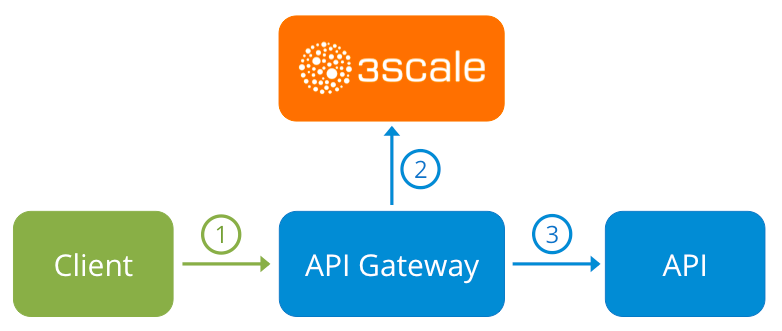
Errors in any of these three elements results in your clients being unable to access your API. However, it is difficult to find the component that caused the failure. This guide gives you some tips to troubleshoot your infrastructure to identify the problem.
7.1. Common issues
There are some evidences that can point to some very common issues with your integration with 3scale. These will vary depending on whether you are at the beginning of your API project, setting up your infrastructure, or are already live in production.
7.1.1. Integration issues
The following sections attempt to outline some common issues you may see in the APIcast error log during the initial phases of your integration with 3scale: at the beginning using APIcast Hosted and prior to go-live, running the self-managed APIcast.
7.1.1.1. APIcast Hosted
When you are first integrating your API with APIcast Hosted on the Service Integration screen, you might get some of the following errors shown on the page or returned by the test call you make to check for a successful integration.
Test request failed: execution expiredCheck that your API is reachable from the public internet. APIcast Hosted cannot be used with private APIs. If you do not want to make your API publicly available to integrate with APIcast Hosted, you can set up a private secret between APIcast Hosted and your API to reject any calls not coming from the API gateway.
The accepted format is 'protocol://address(:port)'`
Remove any paths at the end of your APIs private base URL. You can add these in the "mapping rules" pattern or at the beginning of the API test GET request.
Test request failed with HTTP code XXX-
405: Check that the endpoint accepts GET requests. APIcast only supports GET requests to test the integration. -
403: Authentication parameters missing: If your API already has some authentication in place, APIcast will be unable to make a test request. -
403: Authentication failed: If this is not the first service you have created with 3scale, check that you have created an application under the service with credentials to make the test request. If it is the first service you are integrating, ensure that you have not deleted the test account or application that you created on signup.
-
7.1.1.2. APIcast self-managed
After you have successfully tested the integration with APIcast self-managed, you might want to host the API gateway yourself. Following are some errors you may encounter when you first install your self-managed gateway and call your API through it.
upstream timed out (110: Connection timed out) while connecting to upstreamCheck that there are no firewalls or proxies between the API Gateway and the public Internet that would prevent your self-managed gateway from reaching 3scale.
failed to get list of services: invalid status: 403 (Forbidden)2018/06/04 08:04:49 [emerg] 14#14: [lua] configuration_loader.lua:134: init(): failed to load configuration, exiting (code 1) 2018/06/04 08:04:49 [warn] 22#22: *2 [lua] remote_v2.lua:163: call(): failed to get list of services: invalid status: 403 (Forbidden) url: https://example-admin.3scale.net/admin/api/services.json , context: ngx.timer ERROR: /opt/app-root/src/src/apicast/configuration_loader.lua:57: missing configurationCheck that the Access Token that you used in the
THREESCALE_PORTAL_ENDOINTvalue is correct and that it has the Account Management API scope. Verify it with acurlcommand:curl -v "https://example-admin.3scale.net/admin/api/services.json?access_token=<YOUR_ACCESS_TOKEN>"It should return a 200 response with a JSON body. If it returns an error status code, check the response body for details.
service not found for host apicast.example.com2018/06/04 11:06:15 [warn] 23#23: *495 [lua] find_service.lua:24: find_service(): service not found for host apicast.example.com, client: 172.17.0.1, server: _, request: "GET / HTTP/1.1", host: "apicast.example.com"This error indicates that the Public Base URL has not been configured properly. You should ensure that the configured Public Base URL is the same that you use for the request to self-managed APIcast. After configuring the correct Public Base URL:
-
Ensure that APIcast is configured for "production" (default configuration for standalone APIcast if not overriden with
THREESCALE_DEPLOYMENT_ENVvariable). Ensure that you promote the configuration to production. -
Restart APIcast, if you have not configured auto-reloading of configuration using
APICAST_CONFIGURATION_CACHEandAPICAST_CONFIGURATION_LOADERenvironment variables.
-
Ensure that APIcast is configured for "production" (default configuration for standalone APIcast if not overriden with
Following are some other symptoms that may point to an incorrect APIcast self-managed integration:
- Mapping rules not matched / Double counting of API calls: Depending on the way you have defined the mapping between methods and actual URL endpoints on your API, you might find that sometimes methods either don’t get matched or get incremented more than once per request. To troubleshoot this, make a test call to your API with the 3scale debug header. This will return a list of all the methods that have been matched by the API call.
- Authentication parameters not found: Ensure your are sending the parameters to the correct location as specified in the Service Integration screen. If you do not send credentials as headers, the credentials must be sent as query parameters for GET requests and body parameters for all other HTTP methods. Use the 3scale debug header to double-check the credentials that are being read from the request by the API gateway.
7.1.2. Production issues
It is rare to run into issues with your API gateway after you have fully tested your setup and have been live with your API for a while. However, here are some of the issues you might encounter in a live production environment.
7.1.2.1. Availability issues
Availability issues are normally characterised by upstream timed out errors in your nginx error.log; example:
upstream timed out (110: Connection timed out) while connecting to upstream, client: X.X.X.X, server: api.example.com, request: "GET /RESOURCE?CREDENTIALS HTTP/1.1", upstream: "http://Y.Y.Y.Y:80/RESOURCE?CREDENTIALS", host: "api.example.com"If you are experiencing intermittent 3scale availability issues, following may be the reasons for this:
You are resolving to an old 3scale IP that is no longer in use.
The latest version of the API gateway configuration files defines 3scale as a variable to force IP resolution each time. For a quick fix, reload your NGINX instance. For a long-term fix, ensure that instead of defining the 3scale backend in an upstream block, you define it as a variable within each server block; example:
server {
  # Enabling the Lua code cache is strongly encouraged for production use. Here it is enabled
  .
  .
  .
  set $threescale_backend "https://su1.3scale.net:443";
When you refer to it:
location = /threescale_authrep {
  internal;
  set $provider_key "YOUR_PROVIDER_KEY";

  proxy_pass $threescale_backend/transactions/authrep.xml?provider_key=$provider_key&service_id=$service_id&$usage&$credentials&log%5Bcode%5D=$arg_code&log%5Brequest%5D=$arg_req&log%5Bresponse%5D=$arg_resp;
}
You are missing some 3scale IPs from your whitelist. Following is the current list of IPs that 3scale resolves to:
- 75.101.142.93
- 174.129.235.69
- 184.73.197.122
- 50.16.225.117
- 54.83.62.94
- 54.83.62.186
- 54.83.63.187
54.235.143.255
The above issues refer to problems with perceived 3scale availability. However, you might encounter similar issues with your API availability from the API gateway if your API is behind an AWS ELB. This is because NGINX, by default, does DNS resolution at start-up time and then caches the IP addresses. However, ELBs do not ensure static IP addresses and these might change frequently. Whenever the ELB changes to a different IP, NGINX is unable to reach it.
The solution for this is similar to the above fix for forcing runtime DNS resolution.
-
Set a specific DNS resolver such as Google DNS, by adding this line at the top of the
httpsection:resolver 8.8.8.8 8.8.4.4;. -
Set your API base URL as a variable anywhere near the top of the
serversection.set $api_base "http://api.example.com:80"; -
Inside the
location /section, find theproxy_passline and replace it withproxy_pass $api_base;.
-
Set a specific DNS resolver such as Google DNS, by adding this line at the top of the
7.1.3. Post-deploy issues
If you make changes to your API such as adding a new endpoint, you must ensure that you add a new method and URL mapping before downloading a new set of configuration files for your API gateway.
The most common problem when you have modified the configuration downloaded from 3scale will be code errors in the Lua, which will result in a 500 - Internal server error such as:
curl -v -X GET "http://localhost/"
* About to connect() to localhost port 80 (#0)
*   Trying 127.0.0.1... connected
> GET / HTTP/1.1
> User-Agent: curl/7.22.0 (x86_64-pc-linux-gnu) libcurl/7.22.0 OpenSSL/1.0.1 zlib/1.2.3.4 libidn/1.23 librtmp/2.3
> Host: localhost
> Accept: */*
>
< HTTP/1.1 500 Internal Server Error
< Server: openresty/1.5.12.1
< Date: Thu, 04 Feb 2016 10:22:25 GMT
< Content-Type: text/html
< Content-Length: 199
< Connection: close
<

<head><title>500 Internal Server Error</title></head>

<center><h1>500 Internal Server Error</h1></center>
<hr><center>openresty/1.5.12.1</center>


* Closing connection #0
You can see the nginx error.log to know the cause, such as:
2016/02/04 11:22:25 [error] 8980#0: *1 lua entry thread aborted: runtime error: /home/pili/NGINX/troubleshooting/nginx.lua:66: bad argument #3 to '_newindex' (number expected, got nil)
stack traceback:
coroutine 0:
  [C]: in function '_newindex'
  /home/pili/NGINX/troubleshooting/nginx.lua:66: in function 'error_authorization_failed'
  /home/pili/NGINX/troubleshooting/nginx.lua:330: in function 'authrep'
  /home/pili/NGINX/troubleshooting/nginx.lua:283: in function 'authorize'
  /home/pili/NGINX/troubleshooting/nginx.lua:392: in function  while sending to client, client: 127.0.0.1, server: api-2445581381726.staging.apicast.io, request: "GET / HTTP/1.1", host: "localhost"
In the access.log this will look like the following:
127.0.0.1 - - [04/Feb/2016:11:22:25 +0100] "GET / HTTP/1.1" 500 199 "-" "curl/7.22.0 (x86_64-pc-linux-gnu) libcurl/7.22.0 OpenSSL/1.0.1 zlib/1.2.3.4 libidn/1.23 librtmp/2.3"The above section gives you a an overview of the most common, well-known issues that you might encounter at any stage of your 3scale journey.
If all of these have been checked and you are still unable to find the cause and solution for your issue, you should proceed to the more detailed [operational troubleshooting](#troubleshooting-checklists) sections below. Start at your API and work your way back to the client in order to try to identify the point of failure.
7.2. Troubleshooting 101
If you are experiencing failures when connecting to a server, whether that is the API gateway, 3scale, or your API, the following troubleshooting steps should be your first port of call:
7.2.1. 1. Can we connect?
Use telnet to check the basic TCP/IP connectivity telnet api.example.com 443
- Success
telnet echo-api.3scale.net 80
Trying 52.21.167.109...
Connected to tf-lb-i2t5pgt2cfdnbdfh2c6qqoartm-829217110.us-east-1.elb.amazonaws.com.
Escape character is '^]'.
Connection closed by foreign host.- Failure
telnet su1.3scale.net 443
Trying 174.129.235.69...
telnet: Unable to connect to remote host: Connection timed out
7.2.2. 2. Is it me or is it them?
Try to connect to the same server from different network locations, devices, and directions. For example, if your client is unable to reach your API, try to connect to your API from a machine that should have access such as the API gateway.
If any of the attempted connections succeed, you can rule out any problems with the actual server and concentrate your troubleshooting on the network between them, as this is where the problem will most likely be.
7.2.3. 3. Is it a DNS issue?
Try to connect to the server by using its IP address instead of its hostname e.g. telnet 94.125.104.17 80 instead of telnet apis.io 80
This will rule out any problems with the DNS.
You can get the IP address for a server using dig for example for 3scale dig su1.3scale.net or dig any su1.3scale.net if you suspect there may be multiple IPs that a host may resolve to.
NB: Some hosts block `dig any`
7.2.4. 4. Is it an SSL issue?
You can use OpenSSL to test:
Secure connections to a host or IP, such as from the shell prompt
openssl s_client -connect su1.3scale.net:443Output:
CONNECTED(00000003)
depth=1 C = US, O = GeoTrust Inc., CN = GeoTrust SSL CA - G3
verify error:num=20:unable to get local issuer certificate
---
Certificate chain
 0 s:/C=ES/ST=Barcelona/L=Barcelona/O=3scale Networks, S.L./OU=IT/CN=*.3scale.net
   i:/C=US/O=GeoTrust Inc./CN=GeoTrust SSL CA - G3
 1 s:/C=US/O=GeoTrust Inc./CN=GeoTrust SSL CA - G3
   i:/C=US/O=GeoTrust Inc./CN=GeoTrust Global CA
---
Server certificate
-----BEGIN CERTIFICATE-----
MIIE8zCCA9ugAwIBAgIQcz2Y9JNxH7f2zpOT0DajUjANBgkqhkiG9w0BAQsFADBE
...
TRUNCATED
...
3FZigX+OpWLVRjYsr0kZzX+HCerYMwc=
-----END CERTIFICATE-----
subject=/C=ES/ST=Barcelona/L=Barcelona/O=3scale Networks, S.L./OU=IT/CN=*.3scale.net
issuer=/C=US/O=GeoTrust Inc./CN=GeoTrust SSL CA - G3
---
Acceptable client certificate CA names
/C=ES/ST=Barcelona/L=Barcelona/O=3scale Networks, S.L./OU=IT/CN=*.3scale.net
/C=US/O=GeoTrust Inc./CN=GeoTrust SSL CA - G3
Client Certificate Types: RSA sign, DSA sign, ECDSA sign
Requested Signature Algorithms: RSA+SHA512:DSA+SHA512:ECDSA+SHA512:RSA+SHA384:DSA+SHA384:ECDSA+SHA384:RSA+SHA256:DSA+SHA256:ECDSA+SHA256:RSA+SHA224:DSA+SHA224:ECDSA+SHA224:RSA+SHA1:DSA+SHA1:ECDSA+SHA1:RSA+MD5
Shared Requested Signature Algorithms: RSA+SHA512:DSA+SHA512:ECDSA+SHA512:RSA+SHA384:DSA+SHA384:ECDSA+SHA384:RSA+SHA256:DSA+SHA256:ECDSA+SHA256:RSA+SHA224:DSA+SHA224:ECDSA+SHA224:RSA+SHA1:DSA+SHA1:ECDSA+SHA1
Peer signing digest: SHA512
Server Temp Key: ECDH, P-256, 256 bits
---
SSL handshake has read 3281 bytes and written 499 bytes
---
New, TLSv1/SSLv3, Cipher is ECDHE-RSA-AES256-GCM-SHA384
Server public key is 2048 bit
Secure Renegotiation IS supported
Compression: NONE
Expansion: NONE
No ALPN negotiated
SSL-Session:
    Protocol  : TLSv1.2
    Cipher    : ECDHE-RSA-AES256-GCM-SHA384
    Session-ID: A85EFD61D3BFD6C27A979E95E66DA3EC8F2E7B3007C0166A9BCBDA5DCA5477B8
    Session-ID-ctx:
    Master-Key: F7E898F1D996B91D13090AE9D5624FF19DFE645D5DEEE2D595D1B6F79B1875CF935B3A4F6ECCA7A6D5EF852AE3D4108B
    Key-Arg   : None
    PSK identity: None
    PSK identity hint: None
    SRP username: None
    TLS session ticket lifetime hint: 300 (seconds)
    TLS session ticket:
    0000 - a8 8b 6c ac 9c 3c 60 78-2c 5c 8a de 22 88 06 15   ..l..<`x,\.."...
    0010 - eb be 26 6c e6 7b 43 cc-ae 9b c0 27 6c b7 d9 13   ..&l.{C....'l...
    0020 - 84 e4 0d d5 f1 ff 4c 08-7a 09 10 17 f3 00 45 2c   ......L.z.....E,
    0030 - 1b e7 47 0c de dc 32 eb-ca d7 e9 26 33 26 8b 8e   ..G...2....&3&..
    0040 - 0a 86 ee f0 a9 f7 ad 8a-f7 b8 7b bc 8c c2 77 7b   ..........{...w{
    0050 - ae b7 57 a8 40 1b 75 c8-25 4f eb df b0 2b f6 b7   ..W.@.u.%O...+..
    0060 - 8b 8e fc 93 e4 be d6 60-0f 0f 20 f1 0a f2 cf 46   .......`.. ....F
    0070 - b0 e6 a1 e5 31 73 c2 f5-d4 2f 57 d1 b0 8e 51 cc   ....1s.../W...Q.
    0080 - ff dd 6e 4f 35 e4 2c 12-6c a2 34 26 84 b3 0c 19   ..nO5.,.l.4&....
    0090 - 8a eb 80 e0 4d 45 f8 4a-75 8e a2 06 70 84 de 10   ....ME.Ju...p...

    Start Time: 1454932598
    Timeout   : 300 (sec)
    Verify return code: 20 (unable to get local issuer certificate)
---
SSLv3 support (NOT supported by 3scale)
openssl s_client -ssl3 -connect su.3scale.net:443Output
CONNECTED(00000003)
140735196860496:error:14094410:SSL routines:ssl3_read_bytes:sslv3 alert handshake failure:s3_pkt.c:1456:SSL alert number 40
140735196860496:error:1409E0E5:SSL routines:ssl3_write_bytes:ssl handshake failure:s3_pkt.c:644:
---
no peer certificate available
---
No client certificate CA names sent
---
SSL handshake has read 7 bytes and written 0 bytes
---
New, (NONE), Cipher is (NONE)
Secure Renegotiation IS NOT supported
Compression: NONE
Expansion: NONE
No ALPN negotiated
SSL-Session:
    Protocol  : SSLv3
    Cipher    : 0000
    Session-ID:
    Session-ID-ctx:
    Master-Key:
    Key-Arg   : None
    PSK identity: None
    PSK identity hint: None
    SRP username: None
    Start Time: 1454932872
    Timeout   : 7200 (sec)
    Verify return code: 0 (ok)
---
For more details, see the OpenSSL man pages.
7.3. Troubleshooting checklists
To identify where an issue with requests to your API might lie, go through the following checks.
7.3.1. API
To confirm that the API is up and responding to requests, make the same request directly to your API (not going through the API gateway). You should ensure that you are sending the same parameters and headers as the request that goes through the API gateway. If you are unsure of the exact request that is failing, capture the traffic between the API gateway and your API.
If the call succeeds, you can rule out any problems with the API, otherwise you should troubleshoot your API further.
7.3.2. API Gateway > API
To rule out any network issues between the API gateway and the API, make the same call as before — directly to your API — from your API gateway server.
If the call succeeds, you can move on to troubleshooting the API gateway itself.
7.3.3. API gateway
There are a number of steps to go through to check that the API gateway is working correctly.
7.3.3.1. 1. Is the API gateway up and running?
Log in to the machine where the gateway is running. If this fails, your gateway server might be down.
After you have logged in, check that the NGINX process is running. For this, run ps ax | grep nginx or htop.
NGINX is running if you see nginx master process and nginx worker process in the list.
7.3.3.2. 2. Are there any errors in the gateway logs?
Following are some common errors you might see in the gateway logs, for example in error.log:
API gateway can’t connect to API
upstream timed out (110: Connection timed out) while connecting to upstream, client: X.X.X.X, server: api.example.com, request: "GET /RESOURCE?CREDENTIALS HTTP/1.1", upstream: "http://Y.Y.Y.Y:80/RESOURCE?CREDENTIALS", host: "api.example.com"API gateway cannot connect to 3scale
2015/11/20 11:33:51 [error] 3578#0: *1 upstream timed out (110: Connection timed out) while connecting to upstream, client: 127.0.0.1, server: , request: "GET /api/activities.json?user_key=USER_KEY HTTP/1.1", subrequest: "/threescale_authrep", upstream: "https://54.83.62.186:443/transactions/authrep.xml?provider_key=YOUR_PROVIDER_KEY&service_id=SERVICE_ID&usage[hits]=1&user_key=USER_KEY&log%5Bcode%5D=", host: "localhost"
7.3.4. API gateway > 3scale
Once you are sure the API gateway is running correctly, the next step is troubleshooting the connection between the API gateway and 3scale.
7.3.4.1. 1. Can the API gateway reach 3scale?
If you are using NGINX as your API gateway, the following message displays in the NGINX error logs when the gateway is unable to contact 3scale.
2015/11/20 11:33:51 [error] 3578#0: *1 upstream timed out (110: Connection timed out) while connecting to upstream, client: 127.0.0.1, server: , request: "GET /api/activities.json?user_key=USER_KEY HTTP/1.1", subrequest: "/threescale_authrep", upstream: "https://54.83.62.186:443/transactions/authrep.xml?provider_key=YOUR_PROVIDER_KEY&service_id=SERVICE_ID&usage[hits]=1&user_key=USER_KEY&log%5Bcode%5D=", host: "localhost"
Here, note the upstream value. This IP corresponds to one of the IPs that the 3scale product resolves to. This implies that there is a problem reaching 3scale. You can do a reverse DNS lookup to check the domain for an IP by calling nslookup.
For example, because the API gateway is unable to reach 3scale, it does not mean that 3scale is down. One of the most common reasons for this would be firewall rules preventing the API gateway from connecting to 3scale.
There may be network issues between the gateway and 3scale that could cause connections to timeout. In this case, you should go through the steps in troubleshooting generic connectivity issues to identify where the problem lies.
To rule out networking issues, use traceroute or MTR to check the routing and packet transmission. You can also run the same command from a machine that is able to connect to 3scale and your API gateway and compare the output.
Additionally, to see the traffic that is being sent between your API gateway and 3scale, you can use tcpdump as long as you temporarily switch to using the HTTP endpoint for the 3scale product ( su1.3scale.net.).
7.3.4.2. 2. Is the API gateway resolving 3scale addresses correctly?
Ensure you have the resolver directive added to your nginx.conf.
For example, in nginx.conf:
http {
  lua_shared_dict api_keys 10m;
  server_names_hash_bucket_size 128;
  lua_package_path ";;$prefix/?.lua;";
  init_by_lua 'math.randomseed(ngx.time()) ; cjson = require("cjson")';

  resolver 8.8.8.8 8.8.4.4;
You can substitute the Google DNS (8.8.8.8 and 8.8.4.4) with your preferred DNS.
To check DNS resolution from your API gateway, call nslookup as follows with the specified resolver IP:
nslookup su1.3scale.net 8.8.8.8
;; connection timed out; no servers could be reached
The above example shows the response returned if Google DNS cannot be reached. If this is the case, you must update the resolver IPs. You might also see the following alert in your nginx error.log:
2016/05/09 14:15:15 [alert] 9391#0: send() failed (1: Operation not permitted) while resolving, resolver: 8.8.8.8:53
Finally, run dig any su1.3scale.net to see the IP addresses currently in operation for the 3scale Service Management API. Note that this is not the entire range of IP addresses that might be used by 3scale. Some IP addresses may be swapped in and out for capacity reasons. Additionally, you may add more domain names for the 3scale service in the future. For this you should always test against the specific address that are supplied to you during integration, if applicable.
7.3.4.3. 3. Is the API gateway calling 3scale correctly?
If you want to check the request your API gateway is making to 3scale for troubleshooting purposes only you can add the following snippet to the 3scale authrep location in nginx.conf (/threescale_authrep for API Key and App\_id authentication modes):
body_filter_by_lua_block{
  if ngx.req.get_headers()["X-3scale-debug"] == ngx.var.provider_key then
    local resp = ""
    ngx.ctx.buffered = (ngx.ctx.buffered or "") .. string.sub(ngx.arg[1], 1, 1000)
    if ngx.arg[2] then
      resp = ngx.ctx.buffered
    end

    ngx.log(0, ngx.req.raw_header())
    ngx.log(0, resp)
  end
}
This snippet will add the following extra logging to the nginx error.log when the X-3scale-debug header is sent, e.g. curl -v -H 'X-3scale-debug: YOUR_PROVIDER_KEY' -X GET "https://726e3b99.ngrok.com/api/contacts.json?access_token=7c6f24f5"
This will produce the following log entries:
2016/05/05 14:24:33 [] 7238#0: *57 [lua] body_filter_by_lua:7: GET /api/contacts.json?access_token=7c6f24f5 HTTP/1.1
Host: 726e3b99.ngrok.io
User-Agent: curl/7.43.0
Accept: */*
X-Forwarded-Proto: https
X-Forwarded-For: 2.139.235.79

 while sending to client, client: 127.0.0.1, server: pili-virtualbox, request: "GET /api/contacts.json?access_token=7c6f24f5 HTTP/1.1", subrequest: "/threescale_authrep", upstream: "https://54.83.62.94:443/transactions/oauth_authrep.xml?provider_key=REDACTED&service_id=REDACTED&usage[hits]=1&access_token=7c6f24f5", host: "726e3b99.ngrok.io"
2016/05/05 14:24:33 [] 7238#0: *57 [lua] body_filter_by_lua:8: <?xml version="1.0" encoding="UTF-8"?><error code="access_token_invalid">access_token "7c6f24f5" is invalid: expired or never defined</error> while sending to client, client: 127.0.0.1, server: pili-virtualbox, request: "GET /api/contacts.json?access_token=7c6f24f5 HTTP/1.1", subrequest: "/threescale_authrep", upstream: "https://54.83.62.94:443/transactions/oauth_authrep.xml?provider_key=REDACTED&service_id=REDACTED&usage[hits]=1&access_token=7c6f24f5", host: "726e3b99.ngrok.io"
The first entry (2016/05/05 14:24:33 [] 7238#0: *57 [lua] body_filter_by_lua:7:) prints out the request headers sent to 3scale, in this case: Host, User-Agent, Accept, X-Forwarded-Proto and X-Forwarded-For.
The second entry (2016/05/05 14:24:33 [] 7238#0: *57 [lua] body_filter_by_lua:8:) prints out the response from 3scale, in this case: <error code="access_token_invalid">access_token "7c6f24f5" is invalid: expired or never defined</error>.
Both will print out the original request (GET /api/contacts.json?access_token=7c6f24f5) and subrequest location (/threescale_authrep) as well as the upstream request (upstream: "https://54.83.62.94:443/transactions/threescale_authrep.xml?provider_key=REDACTED&service_id=REDACTED&usage[hits]=1&access_token=7c6f24f5".) This last value allows you to see which of the 3scale IPs have been resolved and also the exact request made to 3scale.
7.3.5. 3scale
7.3.5.1. 1. Is 3scale available?
Check 3scale’s status page or @3scalestatus on Twitter.
7.3.5.2. 2. Is 3scale returning an error?
It is also possible that 3scale is available but is returning an error to your API gateway which would prevent calls going through to your API. Try to make the authorization call directly in 3scale and check the response. If you get an error, check the #troubleshooting-api-error-codes[Error Codes] section to see what the issue is.
7.3.5.3. 3. Use the 3scale debug headers
You can also turn on the 3scale debug headers by making a call to your API with the X-3scale-debug header, example:
curl -v -X GET "https://api.example.com/endpoint?user_key" X-3scale-debug: YOUR_SERVICE_TOKEN
This will return the following headers with the API response:
X-3scale-matched-rules: /, /api/contacts.json
< X-3scale-credentials: access_token=TOKEN_VALUE
< X-3scale-usage: usage[hits]=2
< X-3scale-hostname: HOSTNAME_VALUE
< X-3scale-matched-rules: /aos/internal/gate_status/v1/flights/histories
< X-3scale-credentials: user_key=b3ad95279b0600a2595165404fbae70c
< X-3scale-usage: usage%5Bhits%5D=1
< X-3scale-hostname: apicast-staging-3-nkhnn
< X-3scale-service-id: 2
< X-3scale-service-name: api
7.3.5.4. 4. Check the integration errors
To check for any issues about traffic to 3scale, see the integration errors in your Admin Portal here: https://YOUR_DOMAIN-admin.3scale.net/apiconfig/errors.
One of the reasons for integration errors can be sending credentials in the headers with underscores_in_headers directive not enabled in server block.
7.3.6. Client API gateway
7.3.6.1. 1. Is the API gateway reachable from the public internet?
Try directing a browser to the IP address (or domain name) of your gateway server. If this fails, ensure that you have opened the firewall on the relevant ports.
7.3.6.2. 2. Is the API gateway reachable by the client?
If possible, try to connect to the API gateway from the client using one of the methods outlined earlier (telnet, curl, etc.) If the connection fails, the problem lies in the network between the two.
Otherwise, you should move on to troubleshooting the client making the calls to the API.
7.3.7. Client
7.3.7.1. 1. Test the same call using a different client
If a request is not returning the expected result, test with a different HTTP client. For example, if you are calling an API with a Java HTTP client and you see something wrong, cross-check with cURL.
You can also call the API through a proxy between the client and the gateway to capture the exact parameters and headers being sent by the client.
7.3.7.2. 2. Inspect the traffic sent by client
Use a tool like Wireshark to see the requests being made by the client. This will allow you to identify if the client is making calls to the API and the details of the request.
7.4. Other Issues
7.4.1. ActiveDocs issues
Sometimes calls that work when you call the API from the command line fail when going through ActiveDocs.
To enable ActiveDocs calls to work, we send these out through a proxy on our side. This proxy will add certain headers that can sometimes cause issues on the API if they are not expected. To identify if this is the case, try the following steps:
7.4.1.1. 1. Use petstore.swagger.io
Swagger provides a hosted swagger-ui at petstore.swagger.io which you can use to test your Swagger spec and API going through the latest version of swagger-ui. If both swagger-ui and ActiveDocs fail in the same way, you can rule out any issues with ActiveDocs or the ActiveDocs proxy and focus the troubleshooting on your own spec. Alternatively, you can check the swagger-ui GitHub repo for any known issues with the current version of swagger-ui.
7.4.1.2. 2. Check that firewall allows connections from ActiveDocs proxy
We recommend to not whitelist IP address for clients using your API. The ActiveDocs proxy uses floating IP addresses for high availability and there is currently no mechanism to notify of any changes to these IPs.
7.4.1.3. 3. Call the API with incorrect credentials
One way to identify whether the ActiveDocs proxy is working correctly is to call your API with invalid credentials. This will help you to confirm or rule out any problems with both the ActiveDocs proxy and your API gateway.
If you get a 403 code back from the API call (or from the code you have configured on your gateway for invalid credentials), the problem lies with your API because the calls are reaching your gateway.
7.4.1.4. 4. Compare calls
To identify any differences in headers and parameters between calls made from ActiveDocs versus outside of ActiveDocs, it can sometimes be helpful to run your calls through some service (APItools on premise, Runscope, etc.) that allows you to inspect and compare your HTTP calls before sending them to your API. This will allow you to identify any potential headers and/or parameters in the request that could be causing issues on your side.
7.5. Creating equivalent Zync routes
To perform the creation of equivalent routes by Zync, force the resynchronization of all 3scale APIs and tenants that OpenShift routes with Zync:
oc exec -t $(oc get pods -l 'deploymentConfig=system-sidekiq' -o json | jq '.items[0].metadata.name' -r) -- bash -c "bundle exec rake zync:resync:domains"You will see the following output containing information about notifications to system:
No valid API key has been set, notifications will not be sent
ActiveMerchant MODE set to 'production'
[Core] Using http://backend-listener:3000/internal/ as URL
OpenIdAuthentication.store is nil. Using in-memory store.
[EventBroker] notifying subscribers of Domains::ProviderDomainsChangedEvent 59a554f6-7b3f-4246-9c36-24da988ca800
[EventBroker] notifying subscribers of ZyncEvent caa8e941-b734-4192-acb0-0b12cbaab9ca
Enqueued ZyncWorker#d92db46bdba7a299f3e88f14 with args: ["caa8e941-b734-4192-acb0-0b12cbaab9ca", {:type=>"Provider", :id=>1, :parent_event_id=>"59a554f6-7b3f-4246-9c36-24da988ca800", :parent_event_type=>"Domains::ProviderDomainsChangedEvent", :tenant_id=>1}]
[EventBroker] notifying subscribers of Domains::ProviderDomainsChangedEvent 9010a199-2af1-4023-9b8d-297bd618096f
…
New routes are created for all the existing tenants and services, after forcing Zync to reevaluate them. Route creation might take some minutes depending on the number of services and tenants.
7.6. Appendix
7.6.1. Logging in NGINX
For a comprehensive guide on this, see the NGINX Logging and Monitoring docs.
7.6.1.1. Enabling debugging log
To find out more about enabling debugging log, see the NGINX debugging log documentation.
7.6.2. 3scale error codes
To double-check the error codes that are returned by the 3scale Service Management API endpoints, see the 3scale API Documentation page by following these steps:
- Click the question mark (?) icon, which is in the upper-right corner of the Admin Portal.
- Choose 3scale API Docs.
The following is a list HTTP response codes returned by 3scale, and the conditions under which they are returned:
400: Bad request. This can be because of:
- Invalid encoding
- Payload too large
-
Content type is invalid (for POST calls). Valid values for the
Content-Typeheader are:application/x-www-form-urlencoded,multipart/form-data, or empty header.
403:
- Credentials are not valid
- Sending body data to 3scale for a GET request
- 404: Non-existent entity referenced, such as applications, metrics, etc.
409:
- Usage limits exceeded
- Application is not active
-
Application key is invalid or missing (for
app_id/app_keyauthentication method) - Referrer is not allowed or missing (when referrer filters are enabled and required)
- 422: Missing required parameters
Most of these error responses will also contain an XML body with a machine readable error category and a human readable explanation.
When using the standard API gateway configuration, any return code different from 200 provided by 3scale can result in a response to the client with one of the following codes:
- 403
- 404

'%20d='M201.5%20305.5c-13.8%200-24.9-11.1-24.9-24.6%200-13.8%2011.1-24.9%2024.9-24.9%2013.6%200%2024.6%2011.1%2024.6%2024.9%200%2013.6-11.1%2024.6-24.6%2024.6zM504%20256c0%20137-111%20248-248%20248S8%20393%208%20256%20119%208%20256%208s248%20111%20248%20248zm-132.3-41.2c-9.4%200-17.7%203.9-23.8%2010-22.4-15.5-52.6-25.5-86.1-26.6l17.4-78.3%2055.4%2012.5c0%2013.6%2011.1%2024.6%2024.6%2024.6%2013.8%200%2024.9-11.3%2024.9-24.9s-11.1-24.9-24.9-24.9c-9.7%200-18%205.8-22.1%2013.8l-61.2-13.6c-3-.8-6.1%201.4-6.9%204.4l-19.1%2086.4c-33.2%201.4-63.1%2011.3-85.5%2026.8-6.1-6.4-14.7-10.2-24.1-10.2-34.9%200-46.3%2046.9-14.4%2062.8-1.1%205-1.7%2010.2-1.7%2015.5%200%2052.6%2059.2%2095.2%20132%2095.2%2073.1%200%20132.3-42.6%20132.3-95.2%200-5.3-.6-10.8-1.9-15.8%2031.3-16%2019.8-62.5-14.9-62.5zM302.8%20331c-18.2%2018.2-76.1%2017.9-93.6%200-2.2-2.2-6.1-2.2-8.3%200-2.5%202.5-2.5%206.4%200%208.6%2022.8%2022.8%2087.3%2022.8%20110.2%200%202.5-2.2%202.5-6.1%200-8.6-2.2-2.2-6.1-2.2-8.3%200zm7.7-75c-13.6%200-24.6%2011.1-24.6%2024.9%200%2013.6%2011.1%2024.6%2024.6%2024.6%2013.8%200%2024.9-11.1%2024.9-24.6%200-13.8-11-24.9-24.9-24.9z'/%3e%3c/svg%3e)