 Red Hat Summit
Questo contenuto non è disponibile nella lingua selezionata.
Configuring InfiniBand and RDMA networks
Configuring and managing high-speed network protocols and RDMA hardware
Abstract
Providing feedback on Red Hat documentation
We are committed to providing high-quality documentation and value your feedback. To help us improve, you can submit suggestions or report errors through the Red Hat Jira tracking system.
Procedure
Log in to the Jira website.
If you do not have an account, select the option to create one.
- Click Create in the top navigation bar.
- Enter a descriptive title in the Summary field.
- Enter your suggestion for improvement in the Description field. Include links to the relevant parts of the documentation.
- Click Create at the bottom of the dialogue.
Chapter 1. Introduction to InfiniBand and RDMA
InfiniBand refers to two distinct components: the physical link-layer protocol for InfiniBand networks and the InfiniBand Verbs API, an implementation of the remote direct memory access (RDMA) technology.
RDMA provides access between the main memory of two computers without involving an operating system, cache, or storage. By using RDMA, data transfers with high-throughput, low-latency, and low CPU utilization.
In a typical IP data transfer, when an application on one machine sends data to an application on another machine, the following actions happen on the receiving end:
- The kernel must receive the data.
- The kernel must determine that the data belongs to the application.
- The kernel wakes up the application.
- The kernel waits for the application to perform a system call into the kernel.
- The application copies the data from the internal memory space of the kernel into the buffer provided by the application.
This process means that most network traffic is copied across the main memory of the system if the host adapter uses direct memory access (DMA) or otherwise at least twice. Additionally, the computer executes some context switches to switch between the kernel and application. These context switches can cause a higher CPU load with high traffic rates while slowing down the other tasks.
Unlike traditional IP communication, RDMA communication bypasses the kernel intervention in the communication process. This reduces the CPU overhead. After a packet enters a network, the RDMA protocol enables the host adapter to decide which application should receive it and where to store it in the memory space of that application. Instead of sending the packet for processing to the kernel and copying it into the memory of the user application, the host adapter directly places the packet contents in the application buffer. This process requires a separate API, the InfiniBand Verbs API, and applications need to implement the InfiniBand Verbs API to use RDMA.
Red Hat Enterprise Linux supports both the InfiniBand hardware and the InfiniBand Verbs API. Additionally, it supports the following technologies to use the InfiniBand Verbs API on non-InfiniBand hardware:
- iWARP: A network protocol that implements RDMA over IP networks
- RDMA over Converged Ethernet (RoCE), which is also known as InfiniBand over Ethernet (IBoE): A network protocol that implements RDMA over Ethernet networks
Chapter 2. Configuring the core RDMA subsystem
The rdma service configuration manages the network protocols and communication standards such as InfiniBand, iWARP, and RoCE.
Procedure
Install the
rdma-coreandopensmpackages:# dnf install rdma-core opensmEnable the
opensmservice:# systemctl enable opensmStart the
opensmservice:# systemctl start opensm
Verification
Install the
libibverbs-utilsandinfiniband-diagspackages:# dnf install libibverbs-utils infiniband-diagsList the available InfiniBand devices:
# ibv_devices

    device                 node GUID
    ------              ----------------
    mlx4_0              0002c903003178f0
    mlx4_1              f4521403007bcba0
Display the information of the
mlx4_1device:# ibv_devinfo -d mlx4_1 hca_id: mlx4_1 transport: InfiniBand (0) fw_ver: 2.30.8000 node_guid: f452:1403:007b:cba0 sys_image_guid: f452:1403:007b:cba3 vendor_id: 0x02c9 vendor_part_id: 4099 hw_ver: 0x0 board_id: MT_1090120019 phys_port_cnt: 2 port: 1 state: PORT_ACTIVE (4) max_mtu: 4096 (5) active_mtu: 2048 (4) sm_lid: 2 port_lid: 2 port_lmc: 0x01 link_layer: InfiniBand port: 2 state: PORT_ACTIVE (4) max_mtu: 4096 (5) active_mtu: 4096 (5) sm_lid: 0 port_lid: 0 port_lmc: 0x00 link_layer: EthernetDisplay the status of the
mlx4_1device:# ibstat mlx4_1 CA 'mlx4_1' CA type: MT4099 Number of ports: 2 Firmware version: 2.30.8000 Hardware version: 0 Node GUID: 0xf4521403007bcba0 System image GUID: 0xf4521403007bcba3 Port 1: State: Active Physical state: LinkUp Rate: 56 Base lid: 2 LMC: 1 SM lid: 2 Capability mask: 0x0251486a Port GUID: 0xf4521403007bcba1 Link layer: InfiniBand Port 2: State: Active Physical state: LinkUp Rate: 40 Base lid: 0 LMC: 0 SM lid: 0 Capability mask: 0x04010000 Port GUID: 0xf65214fffe7bcba2 Link layer: EthernetThe
ibpingutility pings an InfiniBand address and runs as a client/server by configuring the parameters.Start server mode
-Son port number-Pwith-CInfiniBand channel adapter (CA) name on the host:# ibping -S -C mlx4_1 -P 1Start client mode, send some packets
-con port number-Pby using-CInfiniBand channel adapter (CA) name with-LLocal Identifier (LID) on the host:# ibping -c 50 -C mlx4_0 -P 1 -L 2
Chapter 3. Configuring IPoIB
By default, InfiniBand does not use the internet protocol (IP) for communication. However, IP over InfiniBand (IPoIB) provides an IP network emulation layer on top of InfiniBand remote direct memory access (RDMA) networks.
With IPoIB, existing unmodified applications can transmit data over InfiniBand networks, but the performance is lower than if the application would use RDMA natively.
The Mellanox devices, starting from ConnectX-4 and above, on RHEL 8 and later use Enhanced IPoIB mode by default (datagram only). Connected mode is not supported on these devices.
3.1. The IPoIB communication modes
An IPoIB device is configurable in either Datagram or Connected mode.
The difference is the type of queue pair the IPoIB layer attempts to open with the machine at the other end of the communication:
In the
Datagrammode, the system opens an unreliable, disconnected queue pair.This mode does not support packages larger than Maximum Transmission Unit (MTU) of the InfiniBand link layer. During transmission of data, the IPoIB layer adds a 4-byte IPoIB header on top of the IP packet. As a result, the IPoIB MTU is 4 bytes less than the InfiniBand link-layer MTU. As
2048is a common InfiniBand link-layer MTU, the common IPoIB device MTU inDatagrammode is2044.In the
Connectedmode, the system opens a reliable, connected queue pair.This mode allows messages larger than the InfiniBand link-layer MTU. The host adapter handles packet segmentation and reassembly. As a result, in the
Connectedmode, the messages sent from Infiniband adapters have no size limits. However, there are limited IP packets due to thedatafield and TCP/IPheaderfield. For this reason, the IPoIB MTU in theConnectedmode is65520bytes.The
Connectedmode has a higher performance but consumes more kernel memory.
Though a system is configured to use the Connected mode, a system still sends multicast traffic by using the Datagram mode because InfiniBand switches and fabric cannot pass multicast traffic in the Connected mode. Also, when the host is not configured to use the Connected mode, the system falls back to the Datagram mode.
While running an application that sends multicast data up to the MTU on the interface, configure the interface in Datagram mode or configure the application to cap the send size of a packet that will fit in datagram-sized packets.
3.2. Understanding IPoIB hardware addresses
InfiniBand hardware addresses, often referred to as Globally Unique Identifiers (GUIDs), are unique identifiers assigned to each InfiniBand device, such as Host Channel Adapters (HCAs). These addresses are essential for routing, device identification, and network management.
IPoIB devices have a 20 byte hardware address that consists of the following parts:
- The first 4 bytes are flags and queue pair numbers
The next 8 bytes are the subnet prefix
The default subnet prefix is
0xfe:80:00:00:00:00:00:00. After the device connects to the subnet manager, the device changes this prefix to match with the configured subnet manager.- The last 8 bytes are the Globally Unique Identifier (GUID) of the InfiniBand port that attaches to the IPoIB device
As the first 12 bytes can change, do not use them in the udev device manager rules.
3.3. Renaming IPoIB devices by using systemd link file
By default, the kernel names Internet Protocol over InfiniBand (IPoIB) devices, for example, ib0, ib1, and so on. To avoid conflicts, create a systemd link file to create persistent and meaningful names such as mlx4_ib0.
Prerequisites
- You have installed an InfiniBand device.
Procedure
Display the hardware address of the device
ib0:# ip addr show ib0 7: ib0: <BROADCAST,MULTICAST,UP,LOWER_UP> mtu 65520 qdisc fq_codel state UP group default qlen 256 link/infiniband 80:00:0a:28:fe:80:00:00:00:00:00:00:f4:52:14:03:00:7b:e1:b1 brd 00:ff:ff:ff:ff:12:40:1b:ff:ff:00:00:00:00:00:00:ff:ff:ff:ff altname ibp7s0 altname ibs2 inet 172.31.0.181/24 brd 172.31.0.255 scope global dynamic noprefixroute ib0 valid_lft 2899sec preferred_lft 2899sec inet6 fe80::f652:1403:7b:e1b1/64 scope link noprefixroute valid_lft forever preferred_lft foreverFor naming the interface with MAC address
80:00:0a:28:fe:80:00:00:00:00:00:00:f4:52:14:03:00:7b:e1:b1tomlx4_ib0, create the/etc/systemd/network/70-custom-ifnames.linkfile with following contents:[Match] MACAddress=80:00:0a:28:fe:80:00:00:00:00:00:00:f4:52:14:03:00:7b:e1:b1 [Link] Name=mlx4_ib0This link file matches a MAC address and renames the network interface to the name set in the
Nameparameter.
Verification
Reboot the host:
# rebootVerify that the device with the MAC address you specified in the link file has been assigned to
mlx4_ib0:# ip addr show mlx4_ib0 7: mlx4_ib0: <BROADCAST,MULTICAST,UP,LOWER_UP> mtu 65520 qdisc fq_codel state UP group default qlen 256 link/infiniband 80:00:0a:28:fe:80:00:00:00:00:00:00:f4:52:14:03:00:7b:e1:b1 brd 00:ff:ff:ff:ff:12:40:1b:ff:ff:00:00:00:00:00:00:ff:ff:ff:ff altname ibp7s0 altname ibs2 inet 172.31.0.181/24 brd 172.31.0.255 scope global dynamic noprefixroute mlx4_ib0 valid_lft 2899sec preferred_lft 2899sec inet6 fe80::f652:1403:7b:e1b1/64 scope link noprefixroute valid_lft forever preferred_lft forever
3.4. Configuring an IPoIB connection by using nmcli
You can use the nmcli utility to create an IP over InfiniBand connection on the command line.
Prerequisites
- An InfiniBand device is installed on the server
- The corresponding kernel module is loaded
Procedure
Create the InfiniBand connection to use the
mlx4_ib0interface in theConnectedtransport mode and the maximum MTU of65520bytes:# nmcli connection add type infiniband con-name mlx4_ib0 ifname mlx4_ib0 transport-mode Connected mtu 65520Set a
P_Key, for example:# nmcli connection modify mlx4_ib0 infiniband.p-key 0x8002Configure the IPv4 settings:
To use DHCP, enter:
# nmcli connection modify mlx4_ib0 ipv4.method autoSkip this step if
ipv4.methodis already set toauto(default).To set a static IPv4 address, network mask, default gateway, DNS servers, and search domain, enter:
# nmcli connection modify mlx4_ib0 ipv4.method manual ipv4.addresses 192.0.2.1/24 ipv4.gateway 192.0.2.254 ipv4.dns 192.0.2.200 ipv4.dns-search example.com
Configure the IPv6 settings:
To use stateless address autoconfiguration (SLAAC), enter:
# nmcli connection modify mlx4_ib0 ipv6.method autoSkip this step if
ipv6.methodis already set toauto(default).To set a static IPv6 address, network mask, default gateway, DNS servers, and search domain, enter:
# nmcli connection modify mlx4_ib0 ipv6.method manual ipv6.addresses 2001:db8:1::fffe/64 ipv6.gateway 2001:db8:1::fffe ipv6.dns 2001:db8:1::ffbb ipv6.dns-search example.com
To customize other settings in the profile, use the following command:
# nmcli connection modify mlx4_ib0 <setting> <value>Enclose values with spaces or semicolons in quotes.
Activate the profile:
# nmcli connection up mlx4_ib0
Verification
Use the
pingutility to send ICMP packets to the remote host’s InfiniBand adapter, for example:# ping -c5 192.0.2.2
3.5. Configuring an IPoIB connection by using the network RHEL system role
To configure IP over InfiniBand (IPoIB), create a NetworkManager connection profile. You can automate this process by using the network RHEL system role and remotely configure connection profiles on hosts defined in a playbook.
You can use the network RHEL system role to configure IPoIB and, if a connection profile for the InfiniBand’s parent device does not exist, the role can create it as well.
Prerequisites
- You have prepared the control node and the managed nodes.
-
The account you use to connect to the managed nodes has
sudopermissions for these nodes. -
An InfiniBand device named
mlx4_ib0is installed in the managed nodes. - The managed nodes use NetworkManager to configure the network.
Procedure
Create a playbook file, for example,
~/playbook.yml, with the following content:--- - name: Configure the network hosts: managed-node-01.example.com tasks: - name: IPoIB connection profile with static IP address settings ansible.builtin.include_role: name: redhat.rhel_system_roles.network vars: network_connections: # InfiniBand connection mlx4_ib0 - name: mlx4_ib0 interface_name: mlx4_ib0 type: infiniband # IPoIB device mlx4_ib0.8002 on top of mlx4_ib0 - name: mlx4_ib0.8002 type: infiniband autoconnect: yes infiniband: p_key: 0x8002 transport_mode: datagram parent: mlx4_ib0 ip: address: - 192.0.2.1/24 - 2001:db8:1::1/64 state: upThe settings specified in the example playbook include the following:
type: <profile_type>- Sets the type of the profile to create. The example playbook creates two connection profiles: One for the InfiniBand connection and one for the IPoIB device.
parent: <parent_device>- Sets the parent device of the IPoIB connection profile.
p_key: <value>-
Sets the InfiniBand partition key. If you set this variable, do not set
interface_nameon the IPoIB device. transport_mode: <mode>-
Sets the IPoIB connection operation mode. You can set this variable to
datagram(default) orconnected.
For details about all variables used in the playbook, see the
/usr/share/ansible/roles/rhel-system-roles.network/README.mdfile on the control node.Validate the playbook syntax:
$ ansible-playbook --syntax-check ~/playbook.ymlNote that this command only validates the syntax and does not protect against a wrong but valid configuration.
Run the playbook:
$ ansible-playbook ~/playbook.yml
Verification
Display the IP settings of the
mlx4_ib0.8002device:# ansible managed-node-01.example.com -m command -a 'ip address show mlx4_ib0.8002' managed-node-01.example.com | CHANGED | rc=0 >> ... inet 192.0.2.1/24 brd 192.0.2.255 scope global noprefixroute ib0.8002 valid_lft forever preferred_lft forever inet6 2001:db8:1::1/64 scope link tentative noprefixroute valid_lft forever preferred_lft foreverDisplay the partition key (P_Key) of the
mlx4_ib0.8002device:# ansible managed-node-01.example.com -m command -a 'cat /sys/class/net/mlx4_ib0.8002/pkey' managed-node-01.example.com | CHANGED | rc=0 >> 0x8002Display the mode of the
mlx4_ib0.8002device:# ansible managed-node-01.example.com -m command -a 'cat /sys/class/net/mlx4_ib0.8002/mode' managed-node-01.example.com | CHANGED | rc=0 >> datagram
3.6. Configuring an IPoIB connection by using nmstatectl
You can use the declarative Nmstate API to configure an IP over InfiniBand (IPoIB). Nmstate ensures that the result matches the configuration file or rolls back the changes.
Prerequisites
- An InfiniBand device is installed on the server.
- The kernel module for the InfiniBand device is loaded.
Procedure
Create a YAML file, for example
~/create-IPoIB-profile.yml, with the following content:interfaces: - name: mlx4_ib0.8002 type: infiniband state: up ipv4: enabled: true address: - ip: 192.0.2.1 prefix-length: 24 dhcp: false ipv6: enabled: true address: - ip: 2001:db8:1::1 prefix-length: 64 autoconf: false dhcp: false infiniband: base-iface: "mlx4_ib0" mode: datagram pkey: "0x8002" routes: config: - destination: 0.0.0.0/0 next-hop-address: 192.0.2.254 next-hop-interface: mlx4_ib0.8002 - destination: ::/0 next-hop-address: 2001:db8:1::fffe next-hop-interface: mlx4_ib0.8002An IPoIB connection has now the following settings:
-
IPOIB device name:
mlx4_ib0.8002 -
Base interface (parent):
mlx4_ib0 -
InfiniBand partition key:
0x8002 -
Transport mode:
datagram -
Static IPv4 address:
192.0.2.1with the/24subnet mask -
Static IPv6 address:
2001:db8:1::1with the/64subnet mask -
IPv4 default gateway:
192.0.2.254 -
IPv6 default gateway:
2001:db8:1::fffe
-
IPOIB device name:
Apply the settings to the system:
# nmstatectl apply ~/create-IPoIB-profile.yml
Verification
Display the IP settings of the
mlx4_ib0.8002device:# ip address show mlx4_ib0.8002 ... inet 192.0.2.1/24 brd 192.0.2.255 scope global noprefixroute ib0.8002 valid_lft forever preferred_lft forever inet6 2001:db8:1::1/64 scope link tentative noprefixroute valid_lft forever preferred_lft foreverDisplay the partition key (P_Key) of the
mlx4_ib0.8002device:# cat /sys/class/net/mlx4_ib0.8002/pkey 0x8002Display the mode of the
mlx4_ib0.8002device:# cat /sys/class/net/mlx4_ib0.8002/mode datagram
3.7. Configuring an IPoIB connection by using nm-connection-editor
The nmcli-connection-editor application configures and manages network connections stored by NetworkManager by using the management console.
Prerequisites
- An InfiniBand device is installed on the server.
- The corresponding kernel module is loaded.
-
The
nm-connection-editorpackage is installed.
Procedure
Enter the command:
$ nm-connection-editor- Click the + button to add a new connection.
-
Select the
InfiniBandconnection type and click . On the
InfiniBandtab:- Change the connection name if you want to.
- Select the transport mode.
- Select the device.
- Set an MTU if needed.
-
On the
IPv4 Settingstab, configure the IPv4 settings. For example, set a static IPv4 address, network mask, default gateway, and DNS server:
-
On the
IPv6 Settingstab, configure the IPv6 settings. For example, set a static IPv6 address, network mask, default gateway, and DNS server: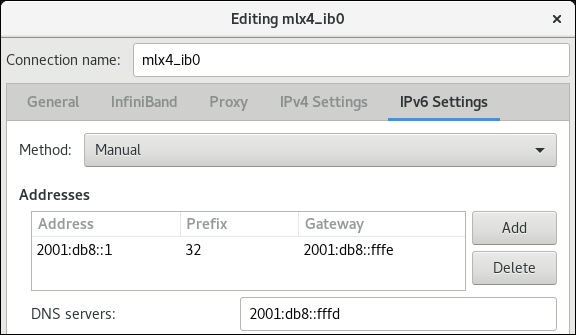
- Click to save the team connection.
-
Close
nm-connection-editor. You can set a
P_Keyinterface. As this setting is not available innm-connection-editor, you must set this parameter on the command line.For example, to set
0x8002asP_Keyinterface of themlx4_ib0connection:# nmcli connection modify mlx4_ib0 infiniband.p-key 0x8002
3.8. Testing an RDMA network by using iperf3 after IPoIB is configured
In the following example, the large buffer size is used to perform a 60 seconds test to measure maximum throughput and fully use the bandwidth and latency between two hosts by using the iperf3 utility.
Prerequisites
- You have configured IPoIB on both hosts.
Procedure
To run
iperf3as a server on a system, define a time interval to provide periodic bandwidth updates-ito listen as a server-sthat waits for the response of the client connection:# iperf3 -i 5 -sTo run
iperf3as a client on another system, define a time interval to provide periodic bandwidth updates-ito connect to the listening server-cof IP address192.168.2.2with-ttime in seconds:# iperf3 -i 5 -t 60 -c 192.168.2.2Use the following commands:
Display test results on the system that acts as a server:
# iperf3 -i 10 -s
-----------------------------------------------------------
Server listening on 5201
-----------------------------------------------------------
Accepted connection from 192.168.2.3, port 22216
[5] local 192.168.2.2 port 5201 connected to 192.168.2.3 port 22218
[ID] Interval           Transfer     Bandwidth
[5]   0.00-10.00  sec  17.5 GBytes  15.0 Gbits/sec
[5]  10.00-20.00  sec  17.6 GBytes  15.2 Gbits/sec
[5]  20.00-30.00  sec  18.4 GBytes  15.8 Gbits/sec
[5]  30.00-40.00  sec  18.0 GBytes  15.5 Gbits/sec
[5]  40.00-50.00  sec  17.5 GBytes  15.1 Gbits/sec
[5]  50.00-60.00  sec  18.1 GBytes  15.5 Gbits/sec
[5]  60.00-60.04  sec  82.2 MBytes  17.3 Gbits/sec
- - - - - - - - - - - - - - - - - - - - - - - - -
[ID] Interval           Transfer     Bandwidth
[5]   0.00-60.04  sec  0.00 Bytes    0.00 bits/sec  sender
[5]   0.00-60.04  sec   107 GBytes  15.3 Gbits/sec  receiver
Display test results on the system that acts as a client:
# iperf3 -i 1 -t 60 -c 192.168.2.2

Connecting to host 192.168.2.2, port 5201
[4] local 192.168.2.3 port 22218 connected to 192.168.2.2 port 5201
[ID] Interval           Transfer     Bandwidth       Retr  Cwnd
[4]   0.00-10.00  sec  17.6 GBytes  15.1 Gbits/sec    0   6.01 MBytes
[4]  10.00-20.00  sec  17.6 GBytes  15.1 Gbits/sec    0   6.01 MBytes
[4]  20.00-30.00  sec  18.4 GBytes  15.8 Gbits/sec    0   6.01 MBytes
[4]  30.00-40.00  sec  18.0 GBytes  15.5 Gbits/sec    0   6.01 MBytes
[4]  40.00-50.00  sec  17.5 GBytes  15.1 Gbits/sec    0   6.01 MBytes
[4]  50.00-60.00  sec  18.1 GBytes  15.5 Gbits/sec    0   6.01 MBytes
- - - - - - - - - - - - - - - - - - - - - - - - -
[ID] Interval           Transfer     Bandwidth       Retr
[4]   0.00-60.00  sec   107 GBytes  15.4 Gbits/sec    0   sender
[4]   0.00-60.00  sec   107 GBytes  15.4 Gbits/sec        receiver
Chapter 4. Configuring RoCE
Remote Direct Memory Access (RDMA) over Converged Ethernet (RoCE) is a network protocol that utilizes RDMA over an Ethernet network. For configuration, RoCE requires specific hardware and some of the hardware vendors are Mellanox, Broadcom, and QLogic.
4.1. Overview of RoCE protocol versions
Understanding the differences between the different RoCE versions is crucial for designing efficient and scalable network infrastructures.
The following are the different RoCE versions:
- RoCE v1
-
The RoCE version 1 protocol is an Ethernet link layer protocol with Ethertype
0x8915that enables the communication between any two hosts in the same Ethernet broadcast domain. - RoCE v2
-
The RoCE version 2 protocol exists on the top of either the UDP over IPv4 or the UDP over IPv6 protocol. For RoCE v2, the UDP destination port number is
4791.
The RDMA_CM sets up a reliable connection between a client and a server for transferring data. RDMA_CM provides an RDMA transport-neutral interface for establishing connections. The communication uses a specific RDMA device and message-based data transfers.
Using different versions like RoCE v2 on the client and RoCE v1 on the server is not supported. In such a case, configure both the server and client to communicate over RoCE v1.
RoCE v1 works at the Data Link layer (Layer 2) and only supports the communication of two machines in the same network. By default, RoCE v2 is available. It works at the Network Layer (Layer 3). RoCE v2 supports packet routing that provides a connection with multiple Ethernet.
4.2. Temporarily changing the default RoCE version
Using the RoCE v2 protocol on the client and RoCE v1 on the server is not supported. If the hardware in your server supports RoCE v1 only, configure your clients for RoCE v1 to communicate with the server.
For example, you can configure a client that uses the mlx5_0 driver for the Mellanox ConnectX-5 InfiniBand device that only supports RoCE v1.
The changes described here will remain effective until you reboot the host.
Prerequisites
- The client uses an InfiniBand device with RoCE v2 protocol.
- The server uses an InfiniBand device that only supports RoCE v1.
Procedure
Create the
/sys/kernel/config/rdma_cm/mlx5_0/directory:# mkdir /sys/kernel/config/rdma_cm/mlx5_0/Display the default RoCE mode:
# cat /sys/kernel/config/rdma_cm/mlx5_0/ports/1/default_roce_mode

RoCE v2
Change the default RoCE mode to version 1:
# echo "IB/RoCE v1" > /sys/kernel/config/rdma_cm/mlx5_0/ports/1/default_roce_mode
4.3. Configuring Soft-RoCE
Soft-RoCE is a software implementation of remote direct memory access (RDMA) over Ethernet, which is also called RXE. Use Soft-RoCE on hosts without RoCE host channel adapters (HCA).
The Soft-RoCE feature is deprecated and will be removed in RHEL 10.
Soft-RoCE is provided as a Technology Preview only. Technology Preview features are not supported with Red Hat production Service Level Agreements (SLAs), might not be functionally complete, and Red Hat does not recommend using them for production. These previews provide early access to upcoming product features, enabling customers to test functionality and provide feedback during the development process.
See Technology Preview Features Support Scope on the Red Hat Customer Portal for information about the support scope for Technology Preview features.
Prerequisites
- An Ethernet adapter is installed
Procedure
Install the
iproute,libibverbs,libibverbs-utils, andinfiniband-diagspackages:# dnf install iproute libibverbs libibverbs-utils infiniband-diagsDisplay the RDMA links:
# rdma link showAdd a new
rxedevice namedrxe0that uses theenp0s1interface:# rdma link add rxe0 type rxe netdev enp1s0
Verification
View the state of all RDMA links:
# rdma link show

link rxe0/1 state ACTIVE physical_state LINK_UP netdev enp1s0
List the available RDMA devices:
# ibv_devices

    device          	   node GUID
    ------          	----------------
    rxe0            	505400fffed5e0fb
You can use the
ibstatutility to display a detailed status:# ibstat rxe0 CA 'rxe0' CA type: Number of ports: 1 Firmware version: Hardware version: Node GUID: 0x505400fffed5e0fb System image GUID: 0x0000000000000000 Port 1: State: Active Physical state: LinkUp Rate: 100 Base lid: 0 LMC: 0 SM lid: 0 Capability mask: 0x00890000 Port GUID: 0x505400fffed5e0fb Link layer: Ethernet
Chapter 5. Increasing the amount of memory that users are allowed to pin in the system
Remote direct memory access (RDMA) operations require the pinning of physical memory. As a consequence, the kernel is not allowed to write memory into the swap space. If a user pins too much memory, the system can run out of memory, and the kernel terminates processes to free up more memory. Therefore, memory pinning is a privileged operation.
If non-root users need to run large RDMA applications, it is necessary to increase the amount of memory to maintain pages in primary memory pinned all the time.
Procedure
As the
rootuser, create the file/etc/security/limits.confwith the following contents:@rdma soft memlock unlimited @rdma hard memlock unlimitedFor further details, see the
limits.conf(5)man page on your system.
Verification
Log in as a member of the
rdmagroup after editing the/etc/security/limits.conffile.Note that Red Hat Enterprise Linux applies updated
ulimitsettings when the user logs in.Use the
ulimit -lcommand to display the limit:$ ulimit -l unlimitedIf the command returns
unlimited, the user can pin an unlimited amount of memory.
Chapter 6. Enabling NFS over RDMA on an NFS server
If both the NFS server and clients are connected over RDMA, clients can use NFS over Remote Direct Memory Access (NFSoRDMA) to mount an exported directory.
RDMA is a protocol that enables a client system to directly transfer data from the memory of a storage server into its own memory. This enhances storage throughput, decreases latency in data transfer between the server and client, and reduces CPU load on both ends.
Prerequisites
- The NFS service is running and configured
- An InfiniBand or RDMA over Converged Ethernet (RoCE) device is installed on the server.
- IP over InfiniBand (IPoIB) is configured on the server, and the InfiniBand device has an IP address assigned.
Procedure
Install the
rdma-corepackage:# dnf install rdma-coreIf the package was already installed, verify that the
xprtrdmaandsvcrdmamodules in the/etc/rdma/modules/rdma.conffile are uncommented:# NFS over RDMA client support xprtrdma # NFS over RDMA server support svcrdmaOptional: By default, NFS over RDMA uses port 20049. If you want to use a different port, set the
rdma-portsetting in the[nfsd]section of the/etc/nfs.conffile:rdma-port=<port>Open the NFSoRDMA port in
firewalld:# firewall-cmd --permanent --add-port={20049/tcp,20049/udp} # firewall-cmd --reloadAdjust the port numbers if you set a different port than 20049.
Restart the
nfs-serverservice:# systemctl restart nfs-server
Verification
On a client with InfiniBand hardware, perform the following steps:
Install the following packages:
# dnf install nfs-utils rdma-coreMount an exported NFS share over RDMA:
# mount -o rdma server.example.com:/nfs/projects/ /mnt/If you set a port number other than the default (20049), pass
port=<port_number>to the command:# mount -o rdma,port=<port_number> server.example.com:/nfs/projects/ /mnt/Verify that the share was mounted with the
rdmaoption:# mount | grep "/mnt" server.example.com:/nfs/projects/ on /mnt type nfs (...,proto=rdma,...)
Chapter 7. Configuring Soft-iWARP
Remote Direct Memory Access (RDMA) uses several libraries and protocols over an Ethernet such as iWARP, Soft-iWARP for performance improvement and aided programming interface.
The Soft-iWARP feature is deprecated and will be removed in RHEL 10.
Soft-iWARP is a Technology Preview feature only. Technology Preview features are not supported with Red Hat production service level agreements (SLAs) and might not be functionally complete. Red Hat does not recommend using them in production. These features provide early access to upcoming product features, enabling customers to test functionality and provide feedback during the development process. For more information about the support scope of Red Hat Technology Preview features, see https://access.redhat.com/support/offerings/techpreview.
7.1. Overview of iWARP and Soft-iWARP
Remote direct memory access (RDMA) uses the iWARP over Ethernet for converged and low latency data transmission over TCP. By using standard Ethernet switches and the TCP/IP stack, iWARP routes traffic across the IP subnets to utilize the existing infrastructure efficiently. In Red Hat Enterprise Linux, multiple providers implement iWARP for their hardware network interface cards. For example, cxgb4, irdma, qedr, and so on.
Soft-iWARP (siw) is a software-based iWARP kernel driver and user library for Linux. It is a software-based RDMA device that provides a programming interface to RDMA hardware when attached to network interface cards. It provides an easy way to test and validate the RDMA environment.
7.2. Configuring Soft-iWARP
Soft-iWARP (siw) implements the iWARP Remote direct memory access (RDMA) transport over the Linux TCP/IP network stack. It enables a system with a standard Ethernet adapter to interoperate with an iWARP adapter or with another system running the Soft-iWARP driver or a host with the hardware that supports iWARP.
The Soft-iWARP feature is deprecated and will be removed in RHEL 10.
The Soft-iWARP feature is provided as a Technology Preview only. Technology Preview features are not supported with Red Hat production Service Level Agreements (SLAs), might not be functionally complete, and Red Hat does not recommend using them for production. These previews provide early access to upcoming product features, enabling customers to test functionality and provide feedback during the development process.
See Technology Preview Features Support Scope on the Red Hat Customer Portal for information about the support scope for Technology Preview features.
To configure Soft-iWARP, you can use this procedure in a script to run automatically when the system boots.
Prerequisites
- An Ethernet adapter is installed
Procedure
Install the
iproute,libibverbs,libibverbs-utils, andinfiniband-diagspackages:# dnf install iproute libibverbs libibverbs-utils infiniband-diagsDisplay the RDMA links:
# rdma link showLoad the
siwkernel module:# modprobe siwAdd a new
siwdevice namedsiw0that uses theenp0s1interface:# rdma link add siw0 type siw netdev enp0s1
Verification
View the state of all RDMA links:
# rdma link show

link siw0/1 state ACTIVE physical_state LINK_UP netdev enp0s1
List the available RDMA devices:
# ibv_devices

 device                 node GUID
 ------              ----------------
 siw0                0250b6fffea19d61
You can use the
ibv_devinfoutility to display a detailed status:# ibv_devinfo siw0 hca_id: siw0 transport: iWARP (1) fw_ver: 0.0.0 node_guid: 0250:b6ff:fea1:9d61 sys_image_guid: 0250:b6ff:fea1:9d61 vendor_id: 0x626d74 vendor_part_id: 1 hw_ver: 0x0 phys_port_cnt: 1 port: 1 state: PORT_ACTIVE (4) max_mtu: 1024 (3) active_mtu: 1024 (3) sm_lid: 0 port_lid: 0 port_lmc: 0x00 link_layer: Ethernet
Chapter 8. InfiniBand subnet manager
All InfiniBand networks must have a subnet manager running for the network to function. This is true even if two machines are connected directly with no switch involved.
It is possible to have more than one subnet manager. In that case, one acts as a master and another subnet manager acts as a slave that will take over in case the master subnet manager fails.
Red Hat Enterprise Linux provides OpenSM, an implementation of an InfiniBand subnet manager. However, the features of OpenSM are limited and there is no active upstream development. Typically, embedded subnet managers in InfiniBand switches provide more features and support up-to-date InfiniBand hardware. For further details, see Installing and configuring the OpenSM InfiniBand subnet manager.

'%20d='M201.5%20305.5c-13.8%200-24.9-11.1-24.9-24.6%200-13.8%2011.1-24.9%2024.9-24.9%2013.6%200%2024.6%2011.1%2024.6%2024.9%200%2013.6-11.1%2024.6-24.6%2024.6zM504%20256c0%20137-111%20248-248%20248S8%20393%208%20256%20119%208%20256%208s248%20111%20248%20248zm-132.3-41.2c-9.4%200-17.7%203.9-23.8%2010-22.4-15.5-52.6-25.5-86.1-26.6l17.4-78.3%2055.4%2012.5c0%2013.6%2011.1%2024.6%2024.6%2024.6%2013.8%200%2024.9-11.3%2024.9-24.9s-11.1-24.9-24.9-24.9c-9.7%200-18%205.8-22.1%2013.8l-61.2-13.6c-3-.8-6.1%201.4-6.9%204.4l-19.1%2086.4c-33.2%201.4-63.1%2011.3-85.5%2026.8-6.1-6.4-14.7-10.2-24.1-10.2-34.9%200-46.3%2046.9-14.4%2062.8-1.1%205-1.7%2010.2-1.7%2015.5%200%2052.6%2059.2%2095.2%20132%2095.2%2073.1%200%20132.3-42.6%20132.3-95.2%200-5.3-.6-10.8-1.9-15.8%2031.3-16%2019.8-62.5-14.9-62.5zM302.8%20331c-18.2%2018.2-76.1%2017.9-93.6%200-2.2-2.2-6.1-2.2-8.3%200-2.5%202.5-2.5%206.4%200%208.6%2022.8%2022.8%2087.3%2022.8%20110.2%200%202.5-2.2%202.5-6.1%200-8.6-2.2-2.2-6.1-2.2-8.3%200zm7.7-75c-13.6%200-24.6%2011.1-24.6%2024.9%200%2013.6%2011.1%2024.6%2024.6%2024.6%2013.8%200%2024.9-11.1%2024.9-24.6%200-13.8-11-24.9-24.9-24.9z'/%3e%3c/svg%3e)