 Red Hat Summit
チューニングガイド
RHEL for Real Time でのレイテンシーを最適化する高度なチューニング手順
概要
前書き
第1章 Red Hat Enterprise Linux for Real Time システムのチューニングを開始する前に
Red Hat Enterprise Linux for Real Time カーネルの調整を行うに当たり重要なこと
- お待ちください。リアルタイムチューニングは反復的なプロセスで、いくつかの変数を微調整することはあまりできず、変更が最適であることに気がつくことはありません。システムに最適なチューニングセットを絞り込むためには、数日または数週間かかると思ってください。また、常に長いテストを実行します。あるチューニングパラメーターを変更してから 5 分間のテストを実行しても、チューニングのセットを適切に検証したとは言えません。テストの長さを調整可能にし、数分以上実行してください。テストが数時間実行した複数の異なるチューニングセットに絞り込みを試み、一度に数時間または数日間これらのセットを実行して、最大レイテンシーまたはリソース消費の隅をキャッチします。
- 正確にお願いします。アプリケーションに測定メカニズムを構築し、特定のチューニング変更がどのようにアプリケーションのパフォーマンスに与える影響を正確に測定できるようにします。マウスの方がスムーズに移動するという内容は正しくないことがほとんどで、人によって異なります。ハード測定を行い、後で分析するためにそれらを記録します。
- 順序だった手順を心がけるテストの実行間で変数のチューニングに複数の変更を加えがちです。ただし、これを実行することは、テスト結果に影響を及ぼすチューニングを絞り込むことができないことを意味します。テスト間のチューニング変更は、可能な限り小さく実行されるようにします。
- 保守的にまた、チューニング時に大きな変更を行うことを希望していますが、ほとんどの場合、増分変更を行う方が適切です。優先度の値が最小値から最大値に達すると、長期的に考えて結果がよくなることがわかります。
- 賢く利用可能なツールを使用します。Tuna グラフィカルチューニングツールを使用すると、スレッドと割り込み、スレッドの優先度、アプリケーションが使用するプロセッサーを分離できるプロセッサーを簡単に変更できます。taskset および chrt コマンドラインユーティリティーを使用すると、Tuna が実行するほとんどのことを実行できます。パフォーマンスの問題が発生した場合は、ftrace および perf ツールを使用してレイテンシーの問題を特定できます。
- 柔軟性にアプリケーションで値をハードコーディングするのではなく、外部ツールを使用してポリシー、優先度、アフィニティーを変更します。これにより、さまざまな組み合わせを試し、論理を簡素化できます。適切な結果を提供する設定が見つかったら、アプリケーションをアプリケーションに追加したり、アプリケーションの起動時に設定を実装する起動ロジックを設定できます。
スケジューリングポリシー
Linux では、以下の 3 つの主要なスケジューリングポリシーが使用されます。
- SCHED_OTHER (SCHED_NORMAL とも呼ばれます)
- これはデフォルトのスレッドポリシーで、カーネルが制御する動的な優先度を持ちます。優先度はスレッドアクティビティーに基づいて変更されます。このポリシーを持つスレッドは、リアルタイム優先度が 0 と見なされます。
- SCHED_FIFO (先入れ先出し)
- 優先度の範囲が 1 - 99 までのリアルタイムポリシー。ここでは、1 が最も低く、99 が最も高くなります。SCHED_FIFO スレッドは常に SCHED_OTHER スレッドよりも優先度が高くなります (たとえば、優先度が
1の SCHED_FIFO スレッドは、任意 の SCHED_OTHER スレッドよりも優先度が高くなります)。SCHED_FIFO スレッドとして作成されたスレッドの優先度はどれも固定され、優先度の高いスレッドによってブロックまたはプリエンプションされるまで実行されます。 - SCHED_RR (ラウンドロビン)
- SCHED_RR は、SCHED_FIFO を変更したものです。同じ優先度のスレッドにはクォンタムがあり、同じ優先度のすべての SCHED_RR スレッド間でラウンドロビン方式でスケジュールされます。このポリシーはほとんど使用されません。
1.1. レイテンシーテストの実行および結果を解釈
1.1.1. 主なステップ
手順1.1 システムをテストし、結果を解釈するには、以下を行います。
- 低レイテンシー操作に必要なチューニング手順については、ベンダーのドキュメントを参照してください。この手順は、システムを System Management Mode (SMM) に変換する System Management Interrupts を減らしたり、削除したりします。システムが SMM を使用している場合は、ファームウェアが実行されており、オペレーティングシステムコードを実行していません。つまり、SMM 内で期限切れになるタイマーは、システムが通常の動作に移行するまで待機する必要があります。これにより、SMI が Linux によってブロックされず、実際に SMI を実行したことがベンダー固有のパフォーマンスカウンターレジスターで確認されるため、説明できないレイテンシーが発生する可能性があります。警告致命的なハードウェア障害が発生する可能性があるため、Red Hat は SMI を完全に無効にしないことを強く推奨します。
- RHEL-RT および
rt-testsパッケージがインストールされていることを確認します。この手順では、システムを適切に調整したことを確認します。 - hwlatdetect プログラムを実行します。hwlatdetect は、クロックソースをポーリングして説明できないギャップを探すことで、ハードウェア/ファームウェアによって発生する遅延を検出します。通常、プログラムはハードウェアアーキテクチャーまたは BIOS/EFI ファームウェアによって導入される遅延を探すため、hwlatdetect の実行中にシステムに何らかの負荷をかける必要はありません。hwlatdetect の典型的な出力は次のようになります。
# hwlatdetect --duration=60s hwlatdetect: test duration 60 seconds detector: tracer parameters: Latency threshold: 10us Sample window: 1000000us Sample width: 500000us Non-sampling period: 500000us Output File: None Starting test test finished Max Latency: Below threshold Samples recorded: 0 Samples exceeding threshold: 0上記の結果は、ファームウェアからのシステム中断を最小限に抑えるために調整されたシステムです。ただし、以下に示すように、システム中断を最小限に抑えるためにすべてのシステムを調整することはできません。# hwlatdetect --duration=10s hwlatdetect: test duration 10 seconds detector: tracer parameters: Latency threshold: 10us Sample window: 1000000us Sample width: 500000us Non-sampling period: 500000us Output File: None Starting test test finished Max Latency: 18us Samples recorded: 10 Samples exceeding threshold: 10 SMIs during run: 0 ts: 1519674281.220664736, inner:17, outer:15 ts: 1519674282.721666674, inner:18, outer:17 ts: 1519674283.722667966, inner:16, outer:17 ts: 1519674284.723669259, inner:17, outer:18 ts: 1519674285.724670551, inner:16, outer:17 ts: 1519674286.725671843, inner:17, outer:17 ts: 1519674287.726673136, inner:17, outer:16 ts: 1519674288.727674428, inner:16, outer:18 ts: 1519674289.728675721, inner:17, outer:17 ts: 1519674290.729677013, inner:18, outer:17上記の結果は、システムクロックソースの連続読み取り中に、15 - 18 us の範囲で 10 回の遅延が発生したことを示しています。hwlatdetect は、原因不明の遅延を検出するためにディテクターとしてトレーサーメカニズムを使用していました。以前のバージョンでは、ftrace トレーサーではなくカーネルモジュールが使用されていました。パラメーターは、遅延と検出の実行方法を報告します。デフォルトのレイテンシーしきい値は 10 マイクロ秒 (10 ミリ秒) で、サンプルウィンドウは 1 秒で、サンプリングウィンドウは 0.5 秒でした。その結果、トレーサーは指定された期間の各秒の半分の間実行されるディテクタースレッドを実行しました。ディテクタースレッドは、次の疑似コードを実行するループを実行します。t1 = timestamp() loop: t0 = timestamp() if (t0 - t1) > threshold outer = (t0 - t1) t1 = timestamp if (t1 - t0) > threshold inner = (t1 - t0) if inner or outer: print if t1 > duration: goto out goto loop out:内部ループの比較では、t0 - t1 が指定されたしきい値 (デフォルトは 10 マイクロ秒) を超えないことがチェックされます。外側のループの比較では、ループの下部と上部の間の時間 t1 - t0 をチェックします。タイムスタンプレジスタの連続する読み取りの時間は、数十ナノ秒 (通常はレジスター読み取り、比較ジャンプ、条件付きジャンプ) である必要があります。したがって、連続する読み取り間の他の遅延がファームウェアによって導入されるか、システムコンポーネントの接続方法により行われます。注記hwlatdetector によって内側と外側に出力される値は、最良の場合の最大遅延です。レイテンシー値は、現在のシステムクロックソース(通常はタイムスタンプカウンターまたはTSCレジスターですが、HPETまたはACPI電源管理クロックの可能性もあります) の連続読み取り間の差分と、ハードウェアとファームウェアの組み合わせによって導入される連続読み取り間の遅延です。
1.1.2. 負荷によるシステムのリアルタイムパフォーマンスのテスト
SCHED_OTHER タスクの重いシステム負荷を開始し、各オンライン CPU のリアルタイム応答を測定します。ロードは、ループ内の Linux カーネルツリーと Hackbench 合成ベンチマークの並列 作成 です。
SCHED_FIFO リアルタイムスレッドを開始し、リアルタイムスケジューリング応答時間を測定します。各測定スレッドはタイムスタンプを取得し、ある間隔スリープした後、ウェイクアップ後に再度タイムスタンプを取得します。測定されるレイテンシーは t1 - (t0 + i) です。これは、実際のウェイクアップ時間 t1 と、最初のタイムスタンプ t0 の理論上のウェイクアップ時間にスリープ間隔 i を加えた時間との間の差です。
XML ファイルに書き込まれます。その後、rteval-<date>-N.tar.bz2 ファイルが生成されます。N は <date> の N 回目の実行を表すカウンターです。XML ファイルから生成された、以下のようなレポートが画面に出力されます。
System:
Statistics:
	Samples:           1440463955
	Mean:              4.40624790712us
	Median:            0.0us
	Mode:              4us
	Range:             54us
	Min:               2us
	Max:               56us
	Mean Absolute Dev: 1.0776661507us
	Std.dev:           1.81821060672us

CPU core 0       Priority: 95
Statistics:
	Samples:           36011847
	Mean:              5.46434910711us
	Median:            4us
	Mode:              4us
	Range:             38us
	Min:               2us
	Max:               40us
	Mean Absolute Dev: 2.13785341159us
Std.dev: 3.50155558554us#rteval --summarize rteval-<date>-n.tar.bz2 コマンド。
第2章 一般的なシステムチューニング
2.1. Tuna インターフェイスの使用
2.2. 永続的なチューニングパラメーターの設定
手順2.1 /etc/sysctl.conf ファイルの編集
/proc/sys/ で始まるパラメーターを /etc/sysctl.conf ファイルに含めると、そのパラメーターが永続的になります。
- 選択したテキストエディターで
/etc/sysctl.confファイルを開きます。 - コマンドから
/proc/sys/接頭辞を削除し、中央の / 文字を . 文字に置き換えます。たとえば、コマンド echo 0 >/proc/sys/kernel/hung_task_panic は kernel.hung_task_panic になります。 - 必要なパラメーターを使用して、新しいエントリーを
/etc/sysctl.confファイルに挿入します。# Enable gettimeofday(2) kernel.hung_task_panic = 0 - 新しい設定を更新するには、# sysctl -p を実行します。
~]# sysctl -p
...[output truncated]...
kernel.hung_task_panic = 0
手順2.2 /etc/rc.d/rc.local ファイルの編集
/etc/rc.d/rc.local メカニズムは、実稼働環境の起動コードには使用しないでください。これは、SysV Init 時代の起動スクリプトから名残であり、現在は systemd サービスによって実行されます。順序や依存関係を制御する方法がないため、起動コードのテストにのみ使用してください。
- コマンドを次のように調整します。手順2.1「
/etc/sysctl.confファイルの編集」説明書。 - 必要なパラメーターを使用して、新しいエントリーを
/etc/rc.d/rc.localファイルに挿入します。
2.3. BIOS パラメーターの設定
- 電源管理
- システムクロックの周波数を変更したり、CPU をさまざまなスリープ状態にすることで電力を節約しようとすることは、システムが外部イベントに応答する速度に影響を与える可能性があります。最適な応答時間は、BIOS の電源管理オプションを無効にします。
- エラー検出および修正 (EDAC) 単位
- EDAC ユニットは、Error Correcting Code (ECC) メモリーからシグナルされたエラーを検出して修正するために使用されるデバイスです。通常、EDAC オプションは、ECC チェックなしから、エラーに関するすべてのメモリーノードの定期的なスキャンまであります。EDAC レベルが高いほど、BIOS にかかる時間が長くなり、イベント期限が切れる可能性が高くなります。可能な場合は、EDAC をオフにします。それ以外の場合は、最低の機能レベルに切り替えます。
- System Management Interrupts (SMI)
- SMI は、ハードウェアベンダーによって使用される機能で、システムが正しく動作していることを確認します。SMI 割り込みは通常、実行中のオペレーティングシステムではなく、BIOS のコードにより処理されます。SMI は通常、温度管理、リモートコンソール管理 (IPMI)、EDAC チェック、およびその他のハウスキーピングタスクに使用されます。BIOS に SMI オプションが含まれている場合は、ベンダーと関連ドキュメントを確認して、どの程度無効にしても安全なかを確認してください。警告SMI を完全に無効にすることは可能ですが、これを行う必要がないことが強く推奨されます。SMI の生成およびサービス機能を削除すると、ハードウェアに致命的な障害が発生する可能性があります。
2.4. 割り込みおよびプロセスバインディング
00000000000000000000000000000001、10 進数として 1、16 進数として 0x00000001 となります。CPU 0 と 1 の両方の CPU マスクは、ビットマスクとして 00000000000000000000000000000011、10 進数として 3、16 進数として 0x00000003 となります。
手順2.3 irqbalance デーモンを無効にする
- irqbalance デーモンのステータスを確認します。
~]# systemctl status irqbalance irqbalance.service - irqbalance daemon Loaded: loaded (/usr/lib/systemd/system/irqbalance.service; enabled) Active: active (running) … - irqbalance デーモンが実行中の場合は停止します。
~]# systemctl stop irqbalance - 起動時に irqbalance が再起動しないことを確認します。
~]# systemctl disable irqbalance
手順2.4 IRQ バランスからの CPU の除外
/etc/sysconfig/irqbalance 設定ファイルには、CPU を IRQ バランスサービスによる考慮から除外できるようにする設定が含まれています。このパラメーターは IRQBALANCE_BANNED_CPUS という名前で、64 ビットの 16 進ビットマスクであり、マスクの各ビットは CPU コアを表します。
- 好みのテキストエディターで
/etc/sysconfig/irqbalanceを開き、IRQBALANCE_BANNED_CPUSというタイトルのファイルのセクションを見つけます。# IRQBALANCE_BANNED_CPUS # 64 bit bitmask which allows you to indicate which cpu's should # be skipped when reblancing irqs. Cpu numbers which have their # corresponding bits set to one in this mask will not have any # irq's assigned to them on rebalance # #IRQBALANCE_BANNED_CPUS= - 変数
IRQBALANCE_BANNED_CPUSのコメントを解除し、次のように値を設定して、CPU 8 - 15 を除外します。IRQBALANCE_BANNED_CPUS=0000ff00 - これにより、irqbalance プロセスはビットマスクにビットが設定されている CPU (この場合はビット 8 - 15) を無視するようになります。
- 最大 64 個の CPU コアを持つシステムを実行している場合は、それぞれ 8 桁の 16 進数の数値をコンマで区切ります。
IRQBALANCE_BANNED_CPUS=00000001,0000ff00上記のマスクは、CPU 8 から 15、および CPU 33 を IRQ バランシングから除外します。
/etc/sysconfig/irqbalance ファイルで IRQBALANCE_BANNED_CPUS が設定されていない場合、irqbalance ツールは isolcpus= カーネルパラメーターによって分離された CPU コア上の IRQ を自動的に回避します。
手順2.5 個々の IRQ への CPU アフィニティーの手動割り当て
/proc/interruptsファイルを表示して、各デバイスで使用されている IRQ を確認します。~]# cat /proc/interruptsこのファイルには IRQ のリストが含まれています。各行には、ISRQ 番号、各 CPU で発生した割り込みの数と、その後に IRQ タイプと説明が表示されます。CPU0 CPU1 0: 26575949 11 IO-APIC-edge timer 1: 14 7 IO-APIC-edge i8042 ...[output truncated]...- IRQ を 1 つのプロセッサーでのみ実行するように指示するには、echo コマンドを使用して、CPU マスクを 16 進数として特定の IRQ の
smp_affinityエントリーに書き込みます。この例では、IRQ 番号 142 の割り込みを CPU 0 でのみ実行するよう指示しています。~]# echo 1 > /proc/irq/142/smp_affinity - この変更は、割り込みが発生した場合にのみ有効になります。設定をテストするには、ディスクアクティビティーを生成し、
/proc/interruptsファイルの変更を確認します。割り込みが発生したと仮定すると、選択した CPU の割り込み数が増加し、他の CPU の番号が変更されていないことがわかります。
手順2.6 タスクセット ユーティリティーを使用してプロセスを CPU にバインドする
タスクセット ユーティリティーは、タスクのプロセス ID (PID) を使用してアフィニティーを表示または設定したり、選択した CPU アフィニティーを使用してコマンドを起動したりするために使用できます。アフィニティーを設定するには、タスクセットに 10 進数または 16 進数で表現された CPU マスクが必要です。マスクの引数は、コマンドまたは変更される PID に対して有効な CPU コアを指定するビットマスクです。
- 現在実行されていないプロセスのアフィニティーを設定するには、
tasksetを使用して CPU マスクとプロセスを指定します。この例では、my_embedded_processは CPU 3 のみを使用するように指示されています (CPU マスクの 10 進バージョンを使用)。~]# taskset 8 /usr/local/bin/my_embedded_process - ビットマスクで複数の CPU を指定することもできます。この例では、
my_embedded_processはプロセッサー 4、5、6、および 7 (CPU マスクの 16 進バージョンを使用) で実行するように指示されています。~]# taskset 0xF0 /usr/local/bin/my_embedded_process - さらに、変更するプロセスの CPU マスクと PID を指定した -p (--pid) オプションを使用して、すでに実行中のプロセスの CPU アフィニティーを設定することもできます。この例では、PID が 7013 のプロセスは CPU 0 でのみ実行するように指示されています。
~]# taskset -p 1 7013 - 最後に、-c パラメーターを使用して、CPU マスクの代わりに CPU リストを指定できます。たとえば、CPU 0、4、および CPU 7 - 11 を使用するには、コマンドラインに -c 0,4,7-11 が含まれます。ほとんどの場合、この呼び出しは便利です。
関連する man ページ
詳細は、以下の man ページは本セクションに記載の情報に関連しています。
- chrt(1)
- taskset(1)
- nice(1)
- renice(1)
- Linux スケジューリングスキームの説明の sched_setscheduler(2)。
2.5. ファイルシステムの決定的ヒント
xfs と呼ばれるジャーナリングファイルシステムです。ext2 と呼ばれるかなり以前のファイルシステムではジャーナリングは使用されません。組織でジャーナリングが特に必要とされていない限り、ext2 の使用を検討してください。当社の最良のベンチマーク結果の多くでは、ext2 ファイルシステムが活用されており、これを初期チューニングの推奨事項の 1 つと考えています。
xfs のようなジャーナリングファイルシステムは、ファイルが最後にアクセスされた時刻 (atime) を記録します。ext2 の使用がシステムに適したソリューションでない場合は、代わりに xfs で atime を無効にすることを検討してください。atime を無効にすると、ファイルシステムジャーナルへの書き込み回数が制限されるため、パフォーマンスが向上し、電力使用量が減少します。
手順2.7 atime を無効にする
- 選択したテキストエディターを使用して
/etc/fstabファイルを開き、ルートマウントポイントのエントリーを見つけます。/dev/mapper/rhel-root / xfs defaults… - オプションセクションを編集して、noatime および nodiratime という 用語を含めます。noatime は、ファイルの読み取り時にアクセスタイムスタンプが更新されるのを防ぎ、nodiratime はディレクトリー inode アクセス時間の更新を停止します。
/dev/mapper/rhel-root / xfs noatime,nodiratime…重要一部のアプリケーションは、atimeが更新されることを前提としています。したがって、このオプションは、このようなアプリケーションが使用されていないシステムでのみ妥当です。または、relatimeマウントオプションを使用することもできます。これにより、以前のアクセス時刻が現在の変更時刻よりも古い場合にのみアクセス時刻が更新されます。
関連する man ページ
詳細は、以下の man ページは本セクションに記載の情報に関連しています。
- mkfs.ext2(8)
- mkfs.xfs(8)
- mount(8) - atime、nodiratime、noatime に関する情報
2.6. システムタイムスタンプでのハードウェアクロックの使用
/sys/devices/system/clocksource/clocksource0/available_clocksource ファイルを参照してください。
~]# cat /sys/devices/system/clocksource/clocksource0/available_clocksource
tsc hpet acpi_pm
/sys/devices/system/clocksource/clocksource0/current_clocksource ファイルを読み取ることで検査できます。
~]# cat /sys/devices/system/clocksource/clocksource0/current_clocksource
tsc
クロックソースの変更
システムメインアプリケーションの最適なクロックは、クロックの既知の問題により使用されないことがあります。すべての問題のあるクロックを実行した後、システムはリアルタイムシステムの最低要件を満たすことができないハードウェアクロックで残すことができます。
/sys/devices/system/clocksource/clocksource0/available_clocksource ファイルに表示されるリストからクロックソースを選択し、クロックの名前を /sys/devices/system/clocksource/clocksource0/current_clocksource ファイルに書き込みます。たとえば、以下のコマンドは、使用中のクロックソースとして HPET を設定します。
~]# echo hpet > /sys/devices/system/clocksource/clocksource0/current_clocksourceTSC クロックの追加ブートパラメーターの設定
すべてのシステムに理想的なシングルクロックはありませんが、一般的に TSC が優先されるクロックソースです。TSC クロックの信頼性を最適化するには、カーネルのブート時に追加のパラメーターを設定します。以下に例を示します。
idle=poll: クロックがアイドル状態にならないように強制します。processor.max_cstate=1: クロックがより深い C ステート (省エネモード) に入るのを防ぎ、同期がずれないようにします。
電源管理移行の制御
最新のプロセッサーは、低からの省電力状態 (C-state) にアクティブに移行します。ただし、高い省電力状態から稼働状態に戻ると、リアルタイムアプリケーションの理想よりも多くの時間を消費してしまいます。アプリケーションは Power Management Quality of Service (PM QoS) インターフェイスを使用して、これらの移行を防ぐことができます。
idle=poll と processor.max_cstate=1 パラメーターの動作をエミュレートできます (TSC クロックの追加ブートパラメーターの設定) と同等ですが、省電力状態をより細かく制御できます。
が/dev/cpu_dma_latency ファイルを開いたままにすると、PM QoS インターフェイスはプロセッサーがディープスリープ状態に入るのを防ぎ、ディープスリープ状態から抜け出すときに予期しない遅延が発生します。ファイルが閉じられると、システムは省電力状態に戻ります。
/dev/cpu_dma_latencyファイルを開きます。ファイル記述子を低レイテンシー操作の期間中開いたままにします。- 32 ビットの数字を書き込みます。この数は、最大応答時間 (マイクロ秒単位) を表します。可能な限り最速の応答時間を得るには、
0を使用します。/dev/cpu_dma_latencyファイルの例は次のとおりです。static int pm_qos_fd = -1; void start_low_latency(void) { s32_t target = 0; if (pm_qos_fd >= 0) return; pm_qos_fd = open("/dev/cpu_dma_latency", O_RDWR); if (pm_qos_fd < 0) { fprintf(stderr, "Failed to open PM QOS file: %s", strerror(errno)); exit(errno); } write(pm_qos_fd, &target, sizeof(target)); } void stop_low_latency(void) { if (pm_qos_fd >= 0) close(pm_qos_fd); }アプリケーションは最初に start_low_latency() を呼び出し、必要なレイテンシーに敏感な処理を実行してから、stop_low_latency() を呼び出します。
関連する man ページ
詳細情報や参照文書は、以下の文書が、このセクションの情報に関連しています。
- 『Linux System Programming』 by Robert Love
2.7. 追加のアプリケーションが実行されないようにする
- グラフィカルデスクトップ特にサーバーでは、必要のないグラフィックスは実行しないでください。システムがデフォルトで GUI で起動するように設定されているかどうかを確認するには、以下のコマンドを実行します。
~]# systemctl get-defaultgraphical.targetが表示される場合は、システムを再設定してテキストモードで起動します。~]# systemctl set-default multi-user.target - メール転送エージェント (Sendmail、Postfix などの MTA)チューニングしているシステムで Sendmail をアクティブに使用している場合を除き、無効にしてください。必要な場合は、適切に調整されていることを確認するか、専用のマシンに移動することを検討してください。重要Sendmail は、cron などのプログラムで実行されるシステム生成メッセージを送信するために使用されます。これには、logwatch などのロギング関数によって生成されるレポートが含まれます。sendmail が無効になっていると、これらのメッセージは受信できなくなります。
- Remote Procedure Call (RPC)
- Network File System (NFS)
- マウスサービスGnome や KDE などのグラフィカルインターフェイスを使用していない場合には、マウスも必要でない可能性があります。ハードウェアを取り外し、
gpmをアンインストールします。 - 自動タスク自動化された
cronまたはパフォーマンスに影響を与える可能性のあるジョブを確認します。
関連する man ページ
詳細は、以下の man ページは本セクションに記載の情報に関連しています。
- rpc(3)
- nfs(5)
- gpm(8)
2.8. メモリーのヒントのスワップと不足
メモリースワップ
ページをディスクにスワップアウトすると、どの環境でもレイテンシーが発生する可能性があります。レイテンシーを低くするには、システムに十分なメモリーを使用するため、スワップが必要ありません。アプリケーションおよびシステム用に物理 RAM を常にサイズにします。vmstat を使用してメモリー使用量を監視し、si (スワップイン) フィールドと so (スワップアウト) フィールドを確認します。可能な限りゼロのままにすることが最適です。
手順2.8 OOM (out of Memory)
/proc/sys/仮想マシン/panic_on_oom には、OOM の動作を制御するスイッチがあります。1 に設定すると、カーネルは OOM 時にパニックになります。デフォルト設定は 0 で、カーネルに OOM で oom_killer という関数を呼び出すように指示します。通常、oom_killer は不正なプロセスを強制終了することができ、システムは存続します。
- これを変更する最も簡単な方法は、新しい値を
/proc/sys/仮想マシン/panic_on_oomに エコーする ことです。~]# cat /proc/sys/vm/panic_on_oom 0 ~]# echo 1 > /proc/sys/vm/panic_on_oom ~]# cat /proc/sys/vm/panic_on_oom 1注記OOM で Real time カーネルパニックを行うことが推奨されます。システムが OOM 状態になった場合、その状態は決定しなくなります。 - oom_killer スコアを調整することで、強制終了するプロセスを優先順位付けすることもできます。
/proc/PID/には、oom_adjとoom_scoreという 2 つのファイルがあります。oom_adjの有効なスコアの範囲は -16 - +15 です。この値は、プロセスが実行されている時間 (他の要因) を考慮するアルゴリズムを使用してプロセスの問題を計算するために使用されます。現在の oom_killer スコアを確認するには、プロセスのoom_scoreを表示します。oom_killer は、スコアが最も高いプロセスを最初に強制終了します。この例では、PID が 12465 のプロセスのoom_scoreを調整して、oom_killer によってそのプロセスが強制終了される可能性を低くします。~]# cat /proc/12465/oom_score 79872 ~]# echo -5 > /proc/12465/oom_adj ~]# cat /proc/12465/oom_score 78 - -17 という特別な値もあり、これはそのプロセスに対して oom_killer を無効にします。以下の例では、
oom_scoreはOの値を返し、このプロセスは強制終了されないことを示します。~]# cat /proc/12465/oom_score 78 ~]# echo -17 > /proc/12465/oom_adj ~]# cat /proc/12465/oom_score 0
関連する man ページ
詳細は、以下の man ページは本セクションに記載の情報に関連しています。
- swapon(2)
- swapon(8)
- vmstat(8)
2.9. ネットワーク決定のヒント
TCP (Transmission Control Protocol)
TCP はレイテンシーに大きな影響を及ぼす可能性があります。TCP は、効率を高め、輻輳を制御し、信頼できる配信を保証するためにレイテンシーを追加します。チューニング時には、以下の点を考慮してください。
- 順番どおりの配信が必要か。
- パケットロスに対して保護する必要があるか。複数回パケットを送信すると遅延が発生する可能性があります。
- TCP を使用する必要がある場合は、ソケットで TCP_NODELAY を使用して Nagle バッファリングアルゴリズムを無効にすることを検討してください。Nagle アルゴリズムはすべてを一度に送信するために小さな送信パケットを収集するので、レイテンシーに悪影響を及ぼす可能性があります。
ネットワークチューニング
- コアの割り込み
- 割り込みの量を減らすには、パケットを収集し、パケットのコレクションに対して単一の割り込みが生成されます。スループットが最優先である大容量のデータを転送するシステムでは、デフォルト値を使用するかコアレシーを増やし、スループットを高め、CPU にアクセスする割り込みの数を減らすことができます。ネットワークへの迅速な応答を必要とするシステムでは、コアレスを削減または無効化することが推奨されます。有効にするには、ethtool コマンドで -C (--coalesce) オプションを使用します。
- 輻輳
- 多くの場合、I/O スイッチは、フルバッファーの結果としてネットワークデータがビルドされるバックプレッシングの対象になることがあります。一時停止パラメーターを変更し、ネットワークの輻輳を回避するには、ethtool コマンドで -A (--pause) オプションを使用します。
- Infiniband (IB)
- InfiniBand は多くの場合、帯域幅を高め、サービスやフェイルオーバーの品質を提供するために使用される通信アーキテクチャーのタイプです。Remote Direct Memory Access (RDMA) 機能によるレイテンシーを改善するためにも使用できます。
- ネットワークプロトコルの統計
- ネットワークトラフィックを監視するには、netstat コマンドで -s (--statistics) オプションを使用します。
関連する man ページ
詳細は、以下の man ページは本セクションに記載の情報に関連しています。
- ethtool(8)
- netstat(8)
2.10. syslog チューニングのヒント
手順2.9 システムロギングに syslogd を使用します。
- リモートロギングを有効にするには、まずログを受信するマシンを設定する必要があります。詳細は、https://access.redhat.com/solutions/54363 を参照してください。
- リモートロギングサーバーでリモートロギングサポートを有効にすると、ログを送信する各システムは、そのログをローカルファイルシステムに書き込むのではなく、その syslog 出力をサーバーに送信するように設定する必要があります。これを行うには、各クライアントシステムの
/etc/rsyslog.confファイルを編集します。このファイルで定義されたさまざまなロギングルールについて、ローカルログファイルをリモートロギングサーバーのアドレスに置き換えることができます。# Log all kernel messages to remote logging host. kern.* @my.remote.logging.server上記の例では、クライアントシステムはすべてのカーネルメッセージを@my.remote.logging.serverのリモートマシンに記録します。 /etc/rsyslog.confファイルにワイルドカード行を追加することで、ローカルで生成されたすべてのシステムメッセージをログに記録するように syslogd を設定することもできます。# Log all messages to a remote logging server: *.* @my.remote.logging.server
関連する man ページ
詳細は、以下の man ページは本セクションに記載の情報に関連しています。
- syslog(3)
- rsyslog.conf(5)
- rsyslogd(8)
2.11. PC カードデーモン
手順2.10 pcscd デーモンを無効にする
- pcscd デーモンのステータスを確認します。
~]# systemctl status pcscd pcscd.service - PC/SC Smart Card Daemon Loaded: loaded (/usr/lib/systemd/system/pcscd.service; static) Active: active (running) … - pcscd デーモンが実行中の場合は停止します。
~]# systemctl stop pcscd - 起動時に pcscd が再起動しないことを確認します。
~]# systemctl disable pcscd
2.12. TCP パフォーマンスの急増減
、/proc/sys/net/ipv4/tcp_timestamps にあるタイムスタンプカーネルパラメーターを設定して、TCP 関連エントリーの値を制御します。
- 次のコマンドを実行してタイムスタンプをオフにします。
~]# sysctl -w net.ipv4.tcp_timestamps=0 net.ipv4.tcp_timestamps = 0 - 以下のコマンドを使用してタイムスタンプをオンにします。
~]# sysctl -w net.ipv4.tcp_timestamps=1 net.ipv4.tcp_timestamps = 1 - 以下のコマンドで現在の値を出力します。
~]# sysctl net.ipv4.tcp_timestamps net.ipv4.tcp_timestamps = 1値1 はタイムスタンプがオンであることを示し、値0はタイムスタンプがオフであることを示します。
2.13. システムのパーティション設定
lscpu および tuna ユーティリティーは、システム CPU トポロジーを決定するために使用されます。Tuna GUI を使用すると、CPU を動的に分離し、スレッドをある CPU から別の CPU に移動して、パフォーマンスへの影響を測定することができます。
~]# yum install tuned-profiles-realtimetuned リアルタイムプロファイルを提供します。2 つの設定ファイルにより、プロファイルの動作が制御されます。
/etc/tuned/リアルタイム変数.conf/usr/lib/tuned/realtime/tuned.conf
realtime-variables.conf ファイルは、分離する CPU コアのグループを指定します。CPU コアのグループをシステムから分離するには、次の例のように、isolated_cores オプションを使用します。
# Examples:
# isolated_cores=2,4-7
# isolated_cores=2-23
#
isolated_cores=1-3,5,9-14
isolated_cores 変数が設定されたら、tuned-adm コマンドでプロファイルをアクティブ化します。
~]# tuned-adm profile realtimeブートローダー プラグインを使用します。このプラグインを有効にすると、Linux カーネルコマンドラインに以下のブートパラメーターが追加されます。
- isolcpus
realtime-variables.confファイルにリストされている CPU を指定します- nohz
- アイドル状態の CPU のタイマーティックをオフにします。デフォルトでは
オフに設定されています。 - nohz_full
- CPU 上に実行可能なタスクが 1 つしかない場合に、CPU のタイマーティックをオフにします。nohz
をオンに設定する必要があります。 - intel_pstate=disable
- Intel のアイドルドライバーが電源状態および CPU 周波数を管理しないようにする
- nosoftlockup
- カーネルがユーザースレッドのソフトロックアップを検出しないようにする
isolcpus=1-3,5,9-14 nohz=on nohz_full=1-3,5,9-14 intel_pstate=disable nosoftlockuptuned.conf の [script] セクションで指定された script.sh シェルスクリプトを実行します。このスクリプトは、sysfs 仮想ファイルシステムの次のエントリーを調整します。
/sys/bus/workqueue/devices/writeback/cpumask/sys/devices/system/machinecheck/machinecheck*/ignore_ce
ワークキュー エントリーは分離された CPU マスクの逆に設定され、2 番目のエントリーはマシンチェック例外をオフにします。
、/etc/ sysctl.conf ファイルに次の変数も設定します。
kernel.hung_task_timeout_secs = 600
kernel.nmi_watchdog = 0
kernel.sched_rt_runtime_us = 1000000
vm.stat_interval = 10
Tuna インターフェイスを使用して、分離された CPU 番号上の非バインドスレッドを分離された CPU から移動します。
/usr/lib/tuned/realtime/script.sh をコピーして変更し、tuned.conf JSON ファイルを変更したスクリプトを指すように変更します。
2.14. CPU パフォーマンスの急増減
skew_tick は、レイテンシーに敏感なアプリケーションが実行される中規模から大規模のシステムでのジッターを平滑化するのに役立ちます。リアルタイム Linux システムでレイテンシーが急増する一般的なソースは、Linux カーネルタイマーティックハンドラーの共通のロックに複数の CPU が競合する場合です。競合の原因となる通常のロックは、タイムキーピングシステムによって使用される xtime_lock と、RCU (Read-Copy-Update) 構造ロックです。
skew_tick=1 ブートパラメーターを使用すると、これらのカーネルロックの競合が軽減されます。このパラメーターにより、CPU ごとのティックは、開始時間はスキュー (skewed) により同時に発生しません。CPU タイマーごとの開始時間を短縮すると、ロックの競合の可能性が低くなり、割り込み応答時間が短縮されます。
第3章 リアルタイム固有のチューニング
3.1. スケジューラーの優先順位の設定
| 優先度 | Threads | 説明 |
|---|---|---|
1 | 優先度の低いカーネルスレッド | 優先度 1 は通常、SCHED_OTHER の すぐ上に必要なタスク用に予約されています。 |
2 - 49 | 利用可能 | 一般的なアプリケーションの優先順位に使用される範囲 |
50 | ハード IRQ のデフォルト値 | |
51 - 98 | 優先度の高いスレッド | この範囲は、定期的に実行され、応答時間が短くなければならないスレッドに使用します。中断が不足するため、CPU にバインドされたスレッドにはこの範囲を使用しないでください。 |
99 | watchdogs および移行 | 最も優先度が高いシステムスレッド |
手順3.1 systemd を使用して優先順位を設定する
- 優先度は、
0(最低優先度) から99(最高優先度) までの一連のレベルを使用して設定されます。systemdサービスマネージャーを使用すると、カーネルのブート後にスレッドのデフォルトの優先順位を変更できます。実行中のスレッドのスケジュール優先順位を表示するには、tuna ユーティリティーを使用します。~]# tuna --show_threads thread ctxt_switches pid SCHED_ rtpri affinity voluntary nonvoluntary cmd 2 OTHER 0 0xfff 451 3 kthreadd 3 FIFO 1 0 46395 2 ksoftirqd/0 5 OTHER 0 0 11 1 kworker/0:0H 7 FIFO 99 0 9 1 posixcputmr/0 ...[output truncated]...
3.1.1. ブートプロセス中のサービスの優先度の変更
systemd を 使用すると、ブートプロセス中に起動されるサービスに対してリアルタイムの優先度を設定できます。
- CPUSchedulingPolicy=
- 実行したプロセスの CPU スケジューリングポリシーを設定します。Linux で利用可能なスケジューリングクラスの 1 つを取ります。
- その他
- バッチ
- idle
- fifo
- rr
- CPUSchedulingPriority=
- 実行したプロセスの CPU スケジューリングの優先度を設定します。利用可能な優先度の範囲は、選択した CPU スケジューリングポリシーにより異なります。リアルタイムスケジューリングポリシーでは、1 (最も低い優先度) から 99 (最も高い優先度) の整数を使用できます。
例3.1 mcelog サービスの優先度の変更
mcelog サービスを使用します。mcelog サービスの優先度を変更するには:
- 次のように、
/etc/systemd/system/mcelog.system.d/priority.conf に補足のmcelogサービス設定ディレクトリーファイルを作成します。# cat <<-EOF > /etc/systemd/system/mcelog.system.d/priority.conf - 以下を入力します。
[SERVICE] CPUSchedulingPolicy=fifo CPUSchedulingPriority=20 EOF systemdスクリプトの設定をリロードします。# systemctl daemon-reloadmcelogサービスを再起動します。# systemctl restart mcelogsystemdによって設定されたmcelog優先度を表示するには、次のコマンドを発行します。$ tuna -t mcelog -Pこのコマンドの出力は、以下のようになります。thread ctxt_switches pid SCHED_ rtpri affinity voluntary nonvoluntary cmd 826 FIFO 20 0,1,2,3 13 0 mcelog
systemdユニット設定ディレクティブの 変更の詳細は、システム管理者ガイドの 既存のユニットファイルの変更 の章を参照してください。
3.1.2. サービスの CPU 使用率の設定
systemd を 使用すると、どの CPU 上でサービスが実行できるかを指定できます。
例3.2 mcelog サービスの CPU 使用率の設定
mcelog サービスを CPU 0 および 1 で実行するように制限します。
- 次のように、
/etc/systemd/system/mcelog.system.d/affinity.conf に補足のmcelogサービス設定ディレクトリーファイルを作成します。# cat <<-EOF > /etc/systemd/system/mcelog.system.d/affinity.conf - 以下を入力します。
[SERVICE] CPUAffinity=0,1 EOF systemdスクリプトの設定をリロードします。# systemctl daemon-reloadmcelogサービスを再起動します。# systemctl restart mcelogmcelogサービスが制限されている CPU を表示します。$ tuna -t mcelog -Pこのコマンドの出力は、以下のようになります。thread ctxt_switches pid SCHED_ rtpri affinity voluntary nonvoluntary cmd 12954 FIFO 20 0,1 2 1 mcelog
systemdユニット設定ディレクティブの 変更の詳細は、システム管理者ガイドの 既存のユニットファイルの変更 の章を参照してください。
3.2. Red Hat Enterprise Linux でリアルタイムカーネル用の kdump と kexec を 使用する
kdump カーネルをロードします。カーネルパニックやその他の致命的なエラーが発生すると、kexec を使用して BIOS を経由せずに kdump カーネルを起動します。システムは、標準ブートカーネルによって予約されたメモリー空間に限定された kdump カーネルに再起動し、このカーネルはシステムメモリーのコピーまたはイメージを、設定ファイルで定義されたストレージメカニズムに書き込みます。kexec は BIOS を経由しないため、元のブートのメモリーが保持され、クラッシュダンプはより詳細になります。これが実行されると、カーネルが再起動し、マシンがリセットされ、ブートカーネルがバックアップされます。
必要な kdump パッケージのインストール
rt-setup-kdump ツールは 、rt-setup パッケージの一部です。kexec-tools と system-config-kdump も必要です。~]# yum install rt-setup kexec-tools system-config-kdumprt-setup-kdump を使用した基本的な kdump カーネルの作成
- rt-setup-kdump ツールを
rootとして実行します。~]# rt-setup-kdump --grub--GRUBパラメーターは、GRUB 設定にリストされているすべてのリアルタイムカーネルエントリーに必要な変更を追加します。 - システムを再起動して、予約メモリー容量を設定します。次に、kdump init スクリプトをオンにして、kdump サービスを開始します。
~]# systemctl enable kdump
~]# systemctl start kdump
system-config-kdumpで kdump を 有効にする- → から システムツールを選択するか、シェルプロンプトで以下のコマンドを使用します。
~]# system-config-kdump - カーネルダンプ設定画面 が表示されます。曲線で、 というラベルの付いたボタンをクリックします。Red Hat Enterprise Linux for Real Time カーネルは、kdump カーネルに対応するために必要なメモリー量を自動的に計算する
crashkernel=autoパラメーターをサポートしています。設計上、RAM が 4GB 未満の Red Hat Enterprise Linux 7 システムでは、crashkernel=auto はkdump カーネル用にメモリーを予約しません。この場合は、必要なメモリー量を手動で設定する必要があります。基本設定 タブの 新しい kdump メモリー フィールドに必要な値を入力してこれを実行できます。 注記kdump カーネルにメモリーを割り当てる別の方法は、GRUB 設定で
crashkernel= <value>パラメーターを手動で設定することです。 - ターゲット設定 タブをクリックし、ダンプファイルの場所を指定します。これはローカルのファイルシステムにファイルとして保存するか、デバイスに直接書き込むか、または NFS (Network File System) や SSH (Secure Shell) などのプロトコルを使ってネットワーク経由で送信することができます。
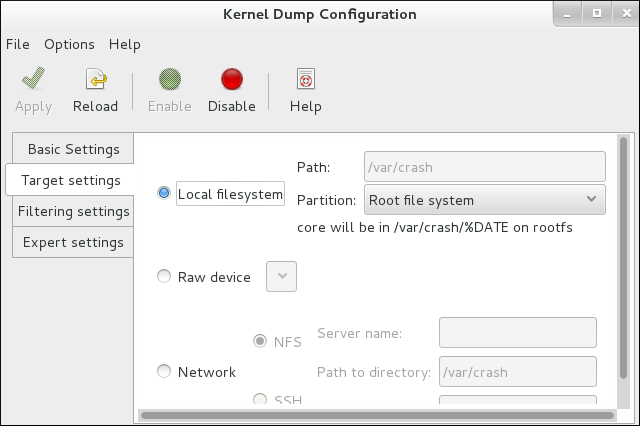 設定を保存するには、ツールバーの ボタンをクリックします。
 - kdump が適切に起動されていることを確認するためにシステムを再起動します。kdump が正しく動作していることを確認したい場合は、sysrq を使用してパニックをシミュレートできます。
~]# echo c > /proc/sysrq-triggerこれによりカーネルパニックが発生し、システムは kdump カーネルで起動します。システムをバックアップしたら、指定した場所でログファイルを確認できます。
/etc/sysconfig/kdump ファイルを編集し、KDUMP_COMMANDLINE_APPEND 変数に reset_devices=1 を 追加します。
irq 9: nobody cared (try booting with the "irqpoll" option) handlers:
[<ffffffff811660a0>] (acpi_irq+0x0/0x1b)
turning off IO-APIC fast mode.
関連する man ページ
詳細は、以下の man ページは本セクションに記載の情報に関連しています。
- kexec(8)
/etc/kdump.conf
3.3. Opteron CPU での TSC タイマーの同期
手順3.2 TSC タイマー同期の有効化
- 好みのテキストエディターで
/etc/default/grubファイルを開き、パラメーターclocksource=tsc powernow-k8.tscsync=1 をGRUB_CMDLINE_LINUX変数に追加します。これにより、TSC の使用が強制され、同時にコアプロセッサーの周波数遷移が有効になります。GRUB_CMDLINE_LINUX="rd.md=0 rd.lvm=0 rd.dm=0 $([ -x /usr/sbin/rhcrashkernel-param ] && /usr/sbin/rhcrashkernel-param || :) rd.luks=0 vconsole.keymap=us rhgb quiet clocksource=tsc powernow-k8.tscsync=1" - 変更を有効にするには、システムを再起動する必要があります。
関連する man ページ
詳細は、以下の man ページは本セクションに記載の情報に関連しています。
- gettimeofday(2)
3.4. Infiniband
3.5. RoCEE および高パフォーマンスのネットワーク
3.6. 非均一メモリーアクセス
タスクセット ユーティリティーを使用してプロセスを CPU にバインドする」タスクセット ユーティリティーは CPU アフィニティーのみで動作し、メモリーノードなどの他の NUMA リソースについては認識しません。NUMA と組み合わせてプロセスバインディングを実行する場合は、taskset ではなく numactl コマンドを使用します。
関連する man ページ
詳細は、以下の man ページは本セクションに記載の情報に関連しています。
- numactl(8)
3.7. TCP の遅延 ACK タイムアウトの削減
- クイック ACK
- このモードは TCP 接続の開始時に使用され、輻輳ウインドウがすぐに拡張できるようにします。
- 確認応答 (ACK) タイムアウト間隔 (ATO) は、最小タイムアウト値の tcp_ato_min に設定されます。
- デフォルトの TCP ACK タイムアウト値を変更するには、必要な値をミリ秒単位で
/proc/sys/net/ipv4/tcp_ato_minファイルに書き込みます。~]# echo 4 > /proc/sys/net/ipv4/tcp_ato_min
- ACK の遅延
- 接続が確立されると TCP は、複数の受信パケットの ACK を単一のパケットで送信できるこのモードを想定します。
- ATO は、タイマーを再起動またはリセットするために tcp_delack_min に設定されます。
- デフォルトの TCP 遅延 ACK 値を変更するには、必要な値をミリ秒単位で
/proc/sys/net/ipv4/tcp_delack_minファイルに書き込みます。~]# echo 4 > /proc/sys/net/ipv4/tcp_delack_min
3.8. debugfs の使用
/sys/kernel/debug/ ディレクトリーの下に自動的にマウントされます。
~]# mount | grep ^debugfs3.9. レイテンシーをトレースするための ftrace ユーティリティーの使用
手順3.3 ftrace ユーティリティーの使用
/sys/kernel/debug/tracing/ディレクトリーには、available_tracersという名前のファイルがあります。このファイルには、ftrace で使用可能なすべてのトレーサーが含まれています。利用可能なトレーサーのリストを表示するには、cat コマンドを使用してファイルの内容を表示します。~]# cat /sys/kernel/debug/tracing/available_tracers function_graph wakeup_rt wakeup preemptirqsoff preemptoff irqsoff function nopftrace のユーザーインターフェイスは、debugfs 内の一連のファイルです。ftrace ファイルも/sys/kernel/debug/tracing/ディレクトリーにあります。以下を入力します。~]# cd /sys/kernel/debug/tracingトレースを有効にするとシステムのパフォーマンスに影響する可能性があるため、このディレクトリー内のファイルはrootユーザーのみが変更できます。ftrace ファイル
このディレクトリー内のメインファイルは、以下のとおりです。
- trace
- ftrace トレースの出力を表示するファイル。これは、このファイルが読み込まれ、イベント読み取りを消費しないため、トレースを停止するため、実際にはトレースのスナップショットです。これは、ユーザーがトレースを無効にしてこのファイルを読み取ると、読み取り時に毎回同じ内容を報告します。
- トレースパイプ
- trace と似ていますが、トレースをライブで読み込むために使用されます。プロデューサー/コンシューマートレースで、各読み取りが読み取られるイベントを消費します。ただし、これにより、トレースが読み取られることなく、アクティブなトレースを確認することができます。
- available_tracers
- カーネルにコンパイルされた ftrace トレーサーのリスト。
- current_tracer
- ftrace トレーサーを有効または無効にします。
- events
- トレースするイベントが含まれ、イベントを有効または無効にするのに使用できるディレクトリーと、イベントのフィルターの設定を行うことができます。
- tracing_on
- ftrace バッファーへの録画を無効および有効にします。
tracing_onファイルを介してトレースを無効にしても、カーネル内で行われている実際のトレースは無効になりません。バッファーへの書き込みのみを無効にします。トレースを実行する作業は継続されますが、データはどこにも移動しません。
トレーサー
カーネルの設定方法によっては、指定のカーネルですべてのトレーサーが利用できるとは限りません。Red Hat Enterprise Linux for Real Time カーネルの場合、トレースカーネルとデバッグカーネルは、実稼働用のカーネルとは異なるトレーサーを持ちます。これは、トレーサーの一部にトレーサーがカーネルに設定され、アクティブではない場合に大きなオーバーヘッドが発生するためです。このトレーサーは、トレースおよびデバッグカーネルに対してのみ有効になります。
- function
- 最も広く適用されるトレーサーの 1 つ。カーネル内の関数呼び出しを追跡します。トレースされた関数の数によっては、認識可能なオーバーヘッドが発生する可能性があります。アクティブでない場合にオーバーヘッドがほとんど作成されます。
- function_graph
- function_graph トレーサーは、結果をより視覚的に魅力的な形式で表示するように設計されています。このトレーサーは、関数の終了を追跡し、カーネル内の関数呼び出しのフローを表示します。このトレーサーは、有効な場合は 関数 トレーサーよりもオーバーヘッドが大きくなりますが、無効な場合は同様に低いオーバーヘッドになることに注意してください。
- wakeup
- すべての CPU でアクティビティーが発生することを報告する完全な CPU トレーサー。リアルタイムタスクであるかに関わらず、システム内で最も優先度の高いタスクを起動するのにかかる時間を記録します。非リアルタイムタスクを起動するのにかかる最大時間の記録では、リアルタイムタスクを起動するのにかかる時間が非表示になります。
- wakeup_rt
- すべての CPU でアクティビティーが発生することを報告する完全な CPU トレーサー。現在の最も高い優先度タスクから、ウェイクアップ時間まで経過時間を記録します。リアルタイムタスクの時間を記録します。
- preemptirqsoff
- プリエンプションまたは割り込みを無効にするエリアを追跡し、プリエンプションまたは割り込みが無効となった最大時間を記録します。
- preemptoff
- preemptirqsoff トレーサーに似ていますが、プリエンプションが無効にされた最大間隔のみをトレースします。
- irqsoff
- preemptirqsoff トレーサーに似ていますが、割り込みが無効にされた最大間隔のみをトレースします。
- nop
- デフォルトのトレーサー。トレース機能自体は提供しませんが、イベントがトレーサーにインターリーブする可能性があるため、nop トレーサーは、イベントのトレースに特に関心がある場合に使用されます。
- トレースセッションを手動で開始するには、まず
available_tracersの一覧から使用するトレーサーを選択し、echo コマンドを使用してトレーサーの名前を/sys/kernel/debug/tracing/current_tracerに挿入します。~]# echo preemptoff > /sys/kernel/debug/tracing/current_tracer - function および function_graph トレースが有効になっているかどうかを確認するには、cat コマンドを使用して
/sys/kernel/debug/tracing/options/function-traceファイルを表示します。値が1の場合は有効になっていることを示し、値が 0 の場合は無効になっていることを示します。~]# cat /sys/kernel/debug/tracing/options/function-trace 1デフォルトでは、function および function_graph トレースは有効になっています。この機能をオンまたはオフにするには、適切な値を/sys/kernel/debug/tracing/options/function-traceファイルに エコーします。~]# echo 0 > /sys/kernel/debug/tracing/options/function-trace ~]# echo 1 > /sys/kernel/debug/tracing/options/function-trace重要echo コマンドを使用する場合は、値と > 文字の間に空白文字を配置するようにしてください。シェルプロンプトでは、0>、1>、2> (スペース文字なし) を使用すると、標準入力、標準出力、標準エラーを参照します。誤ってそれらを使用すると、トレースが予期せぬ出力になる可能性があります。function-trace オプションは、waitup_rt、preemptirqsoff などを使用してレイテンシーをトレースすると関数トレースが自動的に有効になり、オーバーヘッドが誇張される可能性があるため便利です。 /debugfs/tracing/ディレクトリー内のさまざまなファイルの値を変更して、トレーサーの詳細とパラメーターを調整します。たとえば、irqsoff、preemptoff、preempirqsoff、および wakeup トレーサーは、レイテンシーを継続的に監視します。tracing_max_latencyに記録されたレイテンシーよりも大きなレイテンシーを記録すると、そのレイテンシーのトレースが記録され、tracing_max_latency は新しい最大時間に更新されます。この方法では、tracing_max_latency は、最後にリセットされてから記録された最高のレイテンシーを常に表示します。最大レイテンシーをリセットするには、tracing_max_latencyファイルに0 をエコーします。設定された量を超えるレイテンシーのみを表示するには、その量をマイクロ秒単位で echo します。~]# echo 0 > /sys/kernel/debug/tracing/tracing_max_latencyトレースのしきい値を設定すると、最大レイテンシー設定が上書きされます。しきい値より大きいレイテンシーが記録されると、最大レイテンシーに関係なく記録されます。トレースファイルを確認すると、最後に記録されたレイテンシーのみが表示されます。しきい値を設定するには、それを超えるとレイテンシーを記録する必要があるマイクロ秒数 を指定します。~]# echo 200 > /sys/kernel/debug/tracing/tracing_thresh- トレースログを表示します。
~]# cat /sys/kernel/debug/tracing/trace - トレースログを保存するには、別のファイルにコピーします。
~]# cat /sys/kernel/debug/tracing/trace > /tmp/lat_trace_log - 関数のトレースは
、/sys/kernel/debug/tracing/set_ftrace_filterファイルの設定を変更することでフィルタリングできます。ファイルにフィルターが指定されていない場合、すべての関数がトレースされます。現在のフィルターを表示するには、cat を使用します。~]# cat /sys/kernel/debug/tracing/set_ftrace_filter - フィルターを変更するには、トレースする関数の名前 を echo します。フィルターでは、検索語の先頭または末尾に * ワイルドカードを使用できます。* ワイルドカードは、単語の先頭 と 末尾の両方で使用することもできます。たとえば、*irq* は 名前に irq が含まれるすべての関数を選択します。ただし、ワイルドカードは単語内で使用できません。検索用語とワイルドカード文字を二重引用符で囲むと、シェルが検索を現在の作業ディレクトリーに拡張しないようにします。フィルターの例を以下に示します。
スケジュール機能のみをトレースします。~]# echo schedule > /sys/kernel/debug/tracing/set_ftrace_filterlockで終わるすべての関数をトレースします。~]# echo "*lock" > /sys/kernel/debug/tracing/set_ftrace_filterspin_で始まるすべての関数をトレースします。~]# echo "spin_*" > /sys/kernel/debug/tracing/set_ftrace_filter- 名前に
cpuが含まれるすべての関数をトレースします。~]# echo "*cpu*" > /sys/kernel/debug/tracing/set_ftrace_filter
注記echo コマンドで単一の > を使用すると、ファイル内の既存の値がすべて上書きされます。ファイルに値を追加する場合は、代わりに >> を使用します。
3.10. trace-cmd を使用したレイテンシートレース
/sys/kernel/debug/tracing/ ディレクトリーに書き込むことなく、前述の ftrace の 相互作用を有効にすることができます。これは、特別なトレースカーネルバリアントなしでインストールでき、インストール時にはオーバーヘッドは追加されません。
- trace-cmd ツールをインストールするには、
rootとして次のコマンドを入力します。~]# yum install trace-cmd - ユーティリティーを起動するには、次の構文を使用して、シェルプロンプトで trace-cmd と必要なオプションを入力します。
~]# trace-cmd commandコマンドの例を以下に示します。~]# trace-cmd record -p function myappmyapp の実行中に、カーネル内で実行中の録画機能を有効にして開始します。これは、myapp に無関係なタスクであっても、すべての CPU およびすべてのタスクの関数を記録します。~]# trace-cmd report結果を表示します。~]# trace-cmd record -p function -l 'sched*' myappmyapp の 実行中にschedで始まる関数のみを記録します。~]# trace-cmd start -e irqすべての IRQ イベントを有効にします。~]# trace-cmd start -p wakeup_rtwaitup_rt トレーサーを開始します。~]# trace-cmd start -p preemptirqsoff -dpreemptirqsoff トレーサーを開始しますが、その際に関数のトレースを無効にします。注意: Red Hat Enterprise Linux 7 の trace-cmd のバージョンでは 、function-trace オプションを使用する代わりに ftrace_enabled を オフにします。trace-cmd start -p function で再度有効にすることができます。~]# trace-cmd start -p noptrace-cmd が システムの変更を開始する前の状態を復元します。これは、システムがその間に再起動されたかどうかに関係なく、trace-cmd を使用した後に debugfs ファイルシステムを使用する場合に重要です。
注記コマンドおよびオプションの完全なリストは、man ページの trace-cmd(1) を参照してください。すべての個々のコマンドには、独自の man ページ trace-cmd-コマンド もあります。イベントトレースと関数トレーサーの詳細は、以下を参照してください。付録A イベントトレースそして付録B Ftrace の詳細説明。 - この例では、trace-cmd ユーティリティーは単一のトレースポイントをトレースします。
~]# trace-cmd record -e sched_wakeup ls /bin
3.11. sched_nr_migrate を使用して SCHED_OTHER タスクの移行を制限します。
手順3.4 sched_nr_migrate 変数の値を調整する
- sched_nr_migrate 変数を増やすと、リアルタイムのレイテンシーを犠牲にして、多数のタスクを生成する SCHED_OTHER スレッドのパフォーマンスが向上します。SCHED_OTHER タスクのパフォーマンスを犠牲にしてリアルタイムタスクの待ち時間を短縮するには、値を下げる必要があります。デフォルト値は 8 です。
- sched_nr_migrate 変数の値を調整するには、値を
/proc/sys/kernel/sched_nr_migrateに直接 エコーする ことができます。~]# echo 2 > /proc/sys/kernel/sched_nr_migrate
3.12. リアルタイムのスロットリング
リアルタイムスケジューリングの問題
Red Hat Enterprise Linux for Real Time の 2 つのリアルタイムスケジューリングポリシーには、主要な特性が 1 つあります。これらは、優先度の高いスレッドによってプリエンプティブされるか、スリープまたは I/O を実行することによって待機するまで、実行される特性です。SCHED_RR の場合、同じ SCHED_RR 優先度を持つ別のスレッドが実行されるように、スレッドがオペレーティングシステムによってプリエンプトされることがあります。このようないずれの場合も、POSIX 仕様では、優先度の低いスレッドが CPU 時間を取得できるようにするポリシーを定義するプロビジョニングはありません。
SCHED_FIFO スレッドによって独占されると、ハウスキーピングタスクを実行できなくなり、最終的にはシステム全体が不安定になり、クラッシュが発生する可能性があります。
SCHED_FIFO 優先度 (デフォルト: 50) を持つスレッドとして実行されます。割り込み ハンドラー スレッドよりも高い SCHED_FIFO または SCHED_RR ポリシーを持つ CPU を占有するスレッドは、割り込みハンドラーの実行を妨げ、それらの割り込みによって通知されるデータを待機しているプログラムが不足して失敗する可能性があります。
リアルタイムスケジューラーのスロットリング
Red Hat Enterprise Linux for Real Time には、システム管理者がリアルタイムタスクで使用できる帯域幅を割り当てる安全なメカニズムが含まれています。この安全機構は リアルタイムスケジューラースロットリング と呼ばれ、/proc ファイルシステム内の 2 つのパラメーターによって制御されます。
/proc/sys/kernel/sched_rt_period_us- CPU 帯域幅の 100% と見なされる μ (マイクロ秒) の期間を定義します。デフォルト値は、1,000,000 μs (1 秒) です。期間の値の変更は、期間が長すぎるか、または小さすぎると、非常に大きな影響を及ぼす必要があります。
/proc/sys/kernel/sched_rt_runtime_us- すべてのリアルタイムタスクで利用可能な合計帯域幅。デフォルト値は 950,000 μs (0.95 秒)、つまり CPU 帯域幅の 95% です。値を -1 に設定すると、リアルタイムタスクで CPU 時刻が 100% になる可能性があることを意味します。これは、リアルタイムタスクが良好で、無制限のポーリングループなどの明確な注意がない場合にのみ適切です。
SCHED_OTHER および同様のスケジューリングポリシーで実行されるタスク) に割り当てられます。1 つのリアルタイムタスクが CPU タイムスロットの 95% を占有している場合、その CPU 上の残りのリアルタイムタスクは実行されないことに注意してください。CPU 時間の残りの 5% は、リアルタイム以外のタスクでのみ使用されます。
RT_RUNTIME_GREED 機能
RT_RUNTIME_GREED を 有効にします。
# echo RT_RUNTIME_GREED > /sys/kernel/debug/sched_featuresNO_RT_RUNTIME_SHARE ロジックを無効にします。
# echo NO_RT_RUNTIME_SHARE > /sys/kernel/debug/sched_features参考資料
kernel-rt-doc パッケージで入手可能なカーネルドキュメントから引用します。
/usr/share/doc/kernel-rt-doc-3.10.0/Documentation/scheduler/sched-rt-group.txt
3.13. Tuned-profiles-realtime を使用した CPU の分離
- ユーザー空間スレッドをすべて削除
- バインドされていないカーネルスレッドの削除 (バインドされたカーネルスレッドは特定の CPU に関連付けられ、移動できない)
- システム内の各割り込み要求 (IRQ) 番号 N の
/proc/irq/N/smp_affinityプロパティーを変更して割り込みを削除します。
isolated_cores= cpulist 設定オプションを使用してこれらの操作を自動化する方法を示します。
分離する CPU の選択
- スレッドがキャッシュを共有して相互に通信する必要があるマルチスレッドアプリケーションがある場合、同じ NUMA ノードまたは物理ソケットでスレッドを保持する必要がある場合があります。
- 関連のない複数の real-time アプリケーションを実行すると、NUMA ノードまたはソケットごとに CPU を分離することができます。
- 物理パッケージで使用可能な CPU のレイアウトを表示するには、lstopo-no-graphics --no-io --no-legend --of txt コマンドを使用します。
図3.1 lstopo-no-graphics を使用して CPU のレイアウトを表示する
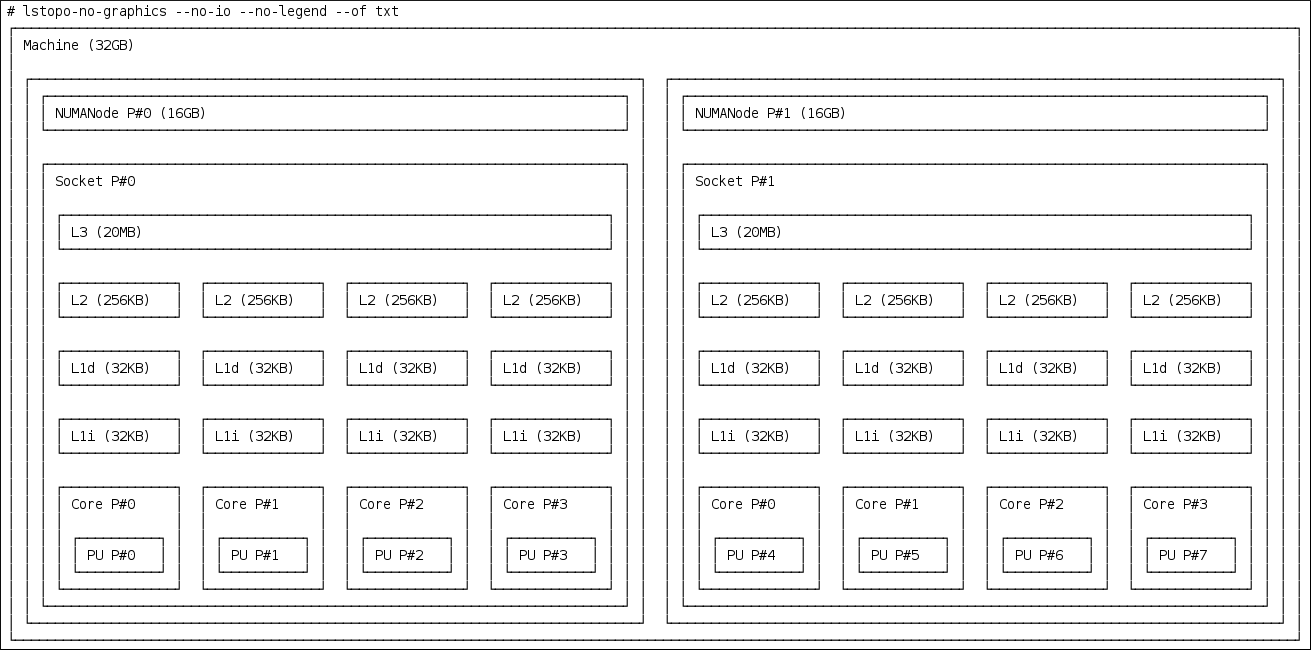 上記のコマンドは、利用可能なコアとソケットの数と NUMA ノードの論理距離を表示するため、マルチスレッドアプリケーションに役立ちます。さらに、hwloc-gui パッケージは、グラフィカル出力を生成する lstopo コマンドを提供します。
 - ノード間の距離など、CPU に関する詳細情報を取得するには、numactl --hardware コマンドを使用します。
~]# numactl --hardware
available: 2 nodes (0-1)
node 0 cpus: 0 1 2 3
node 0 size: 16159 MB
node 0 free: 6323 MB
node 1 cpus: 4 5 6 7
node 1 size: 16384 MB
node 1 free: 10289 MB
node distances:
node   0   1
  0:  10  21
  1:  21  10
hwloc(7) man ページを参照してください。
Tuned の isolated_cores オプションを使用して CPU を分離する
isolcpus= cpulist を 指定することです。Red Hat Enterprise Linux for Real Time でこれを行うための推奨方法は、tuned デーモンとその tuned-profiles-realtime パッケージを使用することです。
isolcpus ブートパラメーターを指定するには、次の手順に従います。
- 調整済み パッケージと 調整済みプロファイル - リアルタイム パッケージをインストールします。
~]# yum install tuned tuned-profiles-realtime - ファイル
/etc/tuned/realtime-variables.confで、設定オプションisolation_cores= cpulistを設定します。ここで、cpulist は 分離する CPU のリストです。このリストはコンマで区切られ、CPU 番号または範囲を 1 つ含めることができます。以下に例を示します。isolated_cores=0-3,5,7上記の行では、CPU 0、1、1、2、3、5、および 7 を分離します。例3.3 通信スレッドでの CPU の分離
8 個のコアを持つ 2 ソケットシステムで、NUMA ノード 0 にコア 0 - 3 があり、NUMA ノード 1 にコア 4 - 7 がある場合、マルチスレッドアプリケーションに 2 つのコアを割り当てるには、次の行を追加します。isolated_cores=4,5tuned-profiles-realtimeプロファイルがアクティブになると、isolcpus=4,5パラメーターがブートコマンドラインに追加されます。これにより、ユーザー空間スレッドが CPU 4 および 5 に割り当てられなくなります。例3.4 通信していないスレッドでの CPU の分離
関係のないアプリケーションの別の NUMA ノードから CPU を選択する場合は、以下を指定できます。isolated_cores=0,4これにより、ユーザー空間スレッドが CPU 0 および 4 に割り当てられるのを防ぎます。 - tuned-adm ユーティリティーを使用して、
調整されたプロファイルをアクティブ化し、再起動します。~]# tuned-adm profile realtime ~]# reboot - 再起動後、ブートコマンドラインで
isolcpusパラメーターを検索して、選択した CPU が分離されていることを確認します。~]$ cat /proc/cmdline | grep isolcpus BOOT_IMAGE=/vmlinuz-3.10.0-394.rt56.276.el7.x86_64 root=/dev/mapper/rhel_foo-root ro crashkernel=auto rd.lvm.lv=rhel_foo/root rd.lvm.lv=rhel_foo/swap console=ttyS0,115200n81 isolcpus=0,4
nohz および nohz_full パラメーターを使用して CPU を分離する
nohz および nohz_full カーネルブートパラメーターを有効にするには、realtime-virtual-host、realtime-virtual-guest、または cpu-partitioning の いずれかのプロファイルを使用する必要があります。
- nohz=on
- 特定の CPU セットのタイマーアクティビティーを減らすために使用できます。
nohzパラメーターは主に、アイドル状態の CPU で発生するタイマー割り込みを減らすために使用されます。これにより、アイドル状態の CPU を低電力モードで実行させることにより、バッテリーのライフサイクルが容易になります。nohzパラメーターはリアルタイム応答時間には直接役立ちませんが、リアルタイム応答時間に直接悪影響を与えることはなく、リアルタイムパフォーマンスにプラスの影響を与える次のパラメーターをアクティブ化するために必要です。 - nohz_full= プロセッサー
nohz_fullパラメーターは、タイマーティックに関して CPU のリストを異なる方法で処理するために使用されます。CPU が nohz_full CPU としてリスト表示され、CPU に実行可能なタスクが 1 つしかない場合、カーネルはその CPU へのタイマーティックの送信を停止するため、アプリケーションの実行に費やす時間が少なくなり、割り込みとコンテキストの切り替えに費やされた時間が短縮されます。
3.14. RCU コールバックのオフロード
rcu_nocbs および rcu_nocb_poll カーネルパラメーターを使用してオフロードできます。
- RCU コールバックを実行する候補から 1 つ以上の CPU を削除するには、
rcu_nocbsカーネルパラメーターで CPU のリストを指定します。次に例を示します。rcu_nocbs=1,4-6orrcu_nocbs=32 つ目の例では、CPU 3 が no-callback CPU であることをカーネルに指示します。これは、RCU コールバックが CPU 3 に固定されたrcuc/$CPUスレッドではなく、ハウスキーピング CPU に移動できるrcuo/$CPUスレッドで実行されることを意味し、CPU 3 は RCU コールバックジョブの実行から解放されます。RCU コールバックスレッドをハウスキーピング CPU に移動するには、tuna -t rcu* -c X -m コマンドを使用します。ここで、X は ハウスキーピング CPU を示します。たとえば、CPU 0 がハウスキーピング CPU のシステムでは、以下のコマンドを使用してすべての RCU コールバックスレッドを CPU 0 に移動できます。~]# tuna -t rcu* -c 0 -mこれは、CPU 0 以外のすべての CPU が RCU の動作に依存します。 - RCU オフロードスレッドは別の CPU の RCU コールバックを実行できますが、各 CPU は対応する RCU オフロードスレッド起動を処理する必要があります。各 CPU の RCU オフロードスレッドを起動する責任を軽減するには、
rcu_nocb_pollカーネルパラメーターを設定します。rcu_nocb_pollrcu_nocb_pollが設定されている場合、実行するコールバックがあるかどうかを確認するために、RCU オフロードスレッドがタイマーによって定期的に起動されます。
rcu_nocbs=cpulistを使用して、ユーザーがすべての RCU オフロードスレッドをハウスキーピング CPU に移動できるようにします。rcu_nocb_pollを設定すると、各 CPU の RCU オフロードスレッドを起動する責任が軽減されます。
第4章 アプリケーションのチューニングとデプロイメント
詳細はこちら
独自の Red Hat Enterprise Linux for Real Time アプリケーションの開発に関する詳細をお読みいただくには、RTW の記事をお読みください。
4.1. リアルタイムアプリケーションでのシグナル処理
詳細はこちら
詳細は、以下のリンクは本セクションに記載の情報に関連しています。
4.2. sched_yield とその他の同期メカニズムの使用
関連する man ページ
詳細は、以下の man ページは本セクションに記載の情報に関連しています。
- pthread.h(P)
- sched_yield(2)
- sched_yield(3p)
4.3. mutex オプション
手順4.1 標準のミューテックス作成
- 標準属性を使用して pthread_mutex_t オブジェクトを初期化すると、プライベート、非再帰、非堅牢、非優先度継承対応のミューテックスが作成されます。
- pthreads の下で、ミューテックスは以下の文字列で初期化できます。
pthread_mutex_t my_mutex; pthread_mutex_init(&my_mutex, NULL); - この場合、アプリケーションは pthreads API および Red Hat Enterprise Linux for Real Time カーネルが提供する利点はありません。アプリケーションの書き込みまたはポート時に考慮する必要のある mutex オプションは複数あります。
手順4.2 高度なミューテックスオプション
- mutex オブジェクトを作成します。
pthread_mutex_t my_mutex; pthread_mutexattr_t my_mutex_attr; pthread_mutexattr_init(&my_mutex_attr); - 共有およびプライベートのミューテックス:共有ミューテックスはプロセス間で使用できますが、オーバーヘッドを大きくすることができます。
pthread_mutexattr_setpshared(&my_mutex_attr, PTHREAD_PROCESS_SHARED); - リアルタイム優先度の継承:優先度の反転の問題は、優先度継承を使用して回避できます。
pthread_mutexattr_setprotocol(&my_mutex_attr, PTHREAD_PRIO_INHERIT); - 強固なミューテックス:所有者の終了時には堅牢なミューテックがリリースされますが、オーバーヘッドのコストも高くなる場合があります。この文字列の _NP は、このオプションが POSIX 非準拠または移植可能ではないことを示します。
pthread_mutexattr_setrobust_np(&my_mutex_attr, PTHREAD_MUTEX_ROBUST_NP); - mutex の初期化:属性が設定されたら、これらのプロパティーを使用して mutex を初期化します。
pthread_mutex_init(&my_mutex, &my_mutex_attr); - attributes オブジェクトをクリーンアップします。mutex を作成したら、属性オブジェクトを保持して同じタイプのミューテックスを初期化したり、クリーンアップしたりできます。ミューテックスはいずれの場合も影響を受けません。属性オブジェクトをクリーンアップするには、_destroy コマンドを使用します。
pthread_mutexattr_destroy(&my_mutex_attr);ミューテックスは、通常の pthread_mutex として動作するようになり、通常どおりロック、ロック解除、破棄できるようになります。
関連する man ページ
詳細は、以下の man ページは本セクションに記載の情報に関連しています。
- futex(7)
- pthread_mutex_destroy(P)pthread_mutex_t と pthread_mutex_init の詳細は、
- pthread_mutexattr_setprotocol(3p)pthread_mutexattr_setprotocol と pthread_mutexattr_getprotocol の詳細は、
- pthread_mutexattr_setprioceiling(3p)pthread_mutexattr_setprioceiling と pthread_mutexattr_getprioceiling の詳細は、
4.4. TCP_NODELAY と小さなバッファー書き込み
手順4.3 TCP_NODELAY と TCP_CORK を使用してネットワーク遅延を改善する
- 送信されるすべてのパケットのレイテンシーを低く抑える必要があるアプリケーションは、TCP_NODELAY が有効になっているソケットで実行する必要があります。これは、ソケット API を使用した
setsockoptコマンドを通じて有効にできます。# int one = 1; # setsockopt(descriptor, SOL_TCP, TCP_NODELAY, &one, sizeof(one)); - これを効果的に使用するには、アプリケーションは、小規模で論理的に関連するバッファー書き込みを実行しないようにする必要があります。TCP_NODELAY が有効になっているため、これらの小さな書き込みにより TCP は複数のバッファーを個別のパケットとして送信することになり、全体的なパフォーマンスが低下する可能性があります。アプリケーションに論理的に関連する複数のバッファーがあり、それらを 1 つのパケットとして送信する場合は、メモリー内に連続したパケットを構築し、その論理パケットを TCP_NODELAY で設定されたソケット上の TCP に送信することが可能です。または、I/O ベクトルを作成し、TCP_NODELAY で設定されたソケットで writev を使用してカーネルに渡します。
- もう 1 つのオプションは TCP_CORK を 使用することです。これは、パケットを送信する前にアプリケーションがコルクを除去するまで TCP に待機するように指示します。このコマンドにより、受信するバッファーが既存のバッファーに追加されます。これにより、アプリケーションはカーネル領域にパケットを構築できます。これは、レイヤーの抽象化を提供する異なるライブラリーを使用する場合は必要です。TCP_CORK を 有効にするには、
setsockoptソケット API を使用して値を1に設定します (これはソケットの閉鎖と呼ばれます)。# int one = 1; # setsockopt(descriptor, SOL_TCP, TCP_CORK, &one, sizeof(one)); - アプリケーションの各種コンポーネントで論理パケットがカーネルにビルドされたら、コードを削除するように TCP に指示します。TCP は、アプリケーションからのパケットをこれ以上待たずに、累積された論理パケットをすぐに送信します。
# int zero = 0;

# setsockopt(descriptor, SOL_TCP, TCP_CORK, &zero, sizeof(zero));
関連する man ページ
詳細は、以下の man ページは本セクションに記載の情報に関連しています。
- tcp(7)
- setsockopt(3p)
- setsockopt(2)
4.5. リアルタイムスケジューラーの優先度の設定
非特権ユーザーのリアルタイム優先度の設定
一般的には、root ユーザーのみが優先順位やスケジューリングの情報を変更できます。権限のないユーザーがこれらの設定を調整できるようにする必要がある場合は、ユーザーを リアルタイム グループに追加するのが最適です。
/etc/security/limits.conf ファイルを編集してユーザー特権を変更することもできます。これにより重複が発生する可能性があり、通常のユーザーにシステムが使用できなくなる可能性があります。このファイルを編集する場合は、必ず変更を 行う 前にコピーを作成してください。
4.6. 動的ライブラリーの読み込み
ld.so で LD_ バインド _NOW 変数を設定することにより、アプリケーションの起動時に動的ライブラリーをロードするように指示できます。
1 の LD_ バインド _NOW 変数をエクスポートし、スケジューラーポリシーが FIFO で優先度が 1 の プログラムを実行します。
#!/bin/sh

LD_BIND_NOW=1
export LD_BIND_NOW

chrt --fifo 1 /opt/myapp/myapp-server &
関連する man ページ
詳細は、以下の man ページは本セクションに記載の情報に関連しています。
- ld.so(8)
4.7. アプリケーションのタイムスタンプに _COARSE POSIX クロックを使用
POSIX クロック
POSIX クロックは、タイムソースを実装して表すための標準です。POSIX クロックは、システムの他のアプリケーションに影響を及ぼさずに、各アプリケーションで選択できます。これは、ハードウェアクロックとは対照的である。「システムタイムスタンプでのハードウェアクロックの使用」これはカーネルによって選択され、システム全体に実装されます。
<time.h> で定義されている clock_gettime() です。clock_gettime() に は、システムコールの形式でカーネル内に対応するものがあります。ユーザープロセスが clock_gettime() を呼び出すと、対応する C ライブラリー (glibc) が sys_clock_gettime() システムコールを呼び出し、要求された操作を実行して結果をユーザープログラムに返します。
CLOCK_MONOTONIC_COARSE および CLOCK_REALTIME_COARSE POSIX クロックのサポートが VDSO ライブラリー関数の形式で作成されました。
_COARSE クロックバリアントの 1 つを使用して clock_gettime() によって実行される時間の読み取りは、カーネルの介入を必要とせず、完全にユーザー空間で実行されるため、パフォーマンスが大幅に向上します。_COARSE クロックの時間読み取りにはミリ秒 (ms) の解像度があるため、1 ミリ秒未満の時間間隔は記録されません。POSIX クロックの _COARSE バリアントは、ミリ秒のクロック解像度に対応できるあらゆるアプリケーションに適しており、読み取りコストの高いハードウェアクロックを使用するシステムではその利点がより顕著になります。
_COARSE 接頭辞の有無で POSIX クロックを読み取る場合のコストと解像度を比較するには、Red Hat Enterprise Linux for Real Time の Red Hat Enterprise Linux for Real Time リファレンスガイドを 参照してください。
例4.1 clock_gettime で _COARSE クロックバリアントを使用する
#include <time.h>

main()
{
	int rc;
	long i;
	struct timespec ts;

	for(i=0; i<10000000; i++) {
		rc = clock_gettime(CLOCK_MONOTONIC_COARSE, &ts);
	}
}
rc 変数の値を検証したり、ts 構造体の内容が信頼できることを確認したりすることができます。clock_gettime() man ページは、より信頼性の高いアプリケーションを作成するのに役立つ詳細な情報を提供します。
gcc コマンドラインに '-lrt' を追加して rt ライブラリーにリンクする必要があります。
~]$ gcc clock_timing.c -o clock_timing -lrt関連する man ページ
詳細は、以下の man ページと書籍は本セクションに記載の情報に関連しています。
- clock_gettime()
- 『Linux System Programming』 by Robert Love
- 『Understanding The Linux Kernel』 by Daniel P. Bovet and Marco Cesati
4.8. perf について
perf_events インターフェイスに基づいています。
root として次のコマンドを実行して perf パッケージをインストールします。
~]# yum install perf例4.2 perf オプションの例
]# perf

 usage: perf [--version] [--help] COMMAND [ARGS]

 The most commonly used perf commands are:
   annotate        Read perf.data (created by perf record) and display annotated code
   archive         Create archive with object files with build-ids found in perf.data file
   bench           General framework for benchmark suites
   buildid-cache   Manage build-id cache.
   buildid-list    List the buildids in a perf.data file
   diff            Read two perf.data files and display the differential profile
   evlist          List the event names in a perf.data file
   inject          Filter to augment the events stream with additional information
   kmem            Tool to trace/measure kernel memory(slab) properties
   kvm             Tool to trace/measure kvm guest os
   list            List all symbolic event types
   lock            Analyze lock events
   record          Run a command and record its profile into perf.data
   report          Read perf.data (created by perf record) and display the profile
   sched           Tool to trace/measure scheduler properties (latencies)
   script          Read perf.data (created by perf record) and display trace output
   stat            Run a command and gather performance counter statistics
   test            Runs sanity tests.
   timechart       Tool to visualize total system behavior during a workload
   top             System profiling tool.
   trace           strace inspired tool
   probe           Define new dynamic tracepoints

See 'pert help COMMAND' for more information on a specific command.
例4.3 perf レコード
~]# perf record -a
^C[ perf record: Woken up 1 times to write data ]
[ perf record: Captured and wrote 0.725 MB perf.data (~31655 samples) ]
-a で指定されており、プロセスは数秒後に終了しました。その結果は、0.725 MB のデータを収集し、以下の結果ファイルを作成していることが示されています。
~]# ls
perf.data
例4.4 perf レポートおよびアーカイブ機能の例
~/.debug/ キャッシュなどの分析システムにすでに存在している場合や、両方のシステムに同じバイナリーセットがある場合、これは必ずしも必要ではありません。
~]# perf archive~]# tar xvf perf.data.tar.bz2 -C ~/.debug~]# perf report、[kernel.kallsyms] という表記でマークされます。カーネルサンプルがカーネルモジュール内で実行されている場合、[module]、[ext4] としてマークされます。ユーザー空間のプロセスでは、プロセスにリンクされた共有ライブラリーが結果に表示される可能性があります。
[.] はユーザー空間を示し、[k] は カーネル空間を示します。経験のある perf 開発者に適したデータなど、詳細を確認することができます。
例4.5 perf list および stat 機能の例
~]# perf stat -e context-switches -a sleep 5
Performance counter stats for 'sleep 5':

            15,619 context-switches

       5.002060064 seconds time elapsed
~]# for i in {1..100}; do touch /tmp/$i; sleep 1; done~]# perf stat -e ext4:ext4_request_inode -a sleep 5
Performance counter stats for 'sleep 5':
5 ext4:ext4_request_inode
5.002253620 seconds time elapsed
List of pre-defined events (to be used in -e):
  cpu-cycles OR cycles                               [Hardware event]
  stalled-cycles-frontend OR idle-cycles-frontend    [Hardware event]
  stalled-cycles-backend OR idle-cycles-backend      [Hardware event]
  instructions                                       [Hardware event]
  cache-references                                   [Hardware event]
  cache-misses                                       [Hardware event]
  branch-instructions OR branches                    [Hardware event]
  branch-misses                                      [Hardware event]
  bus-cycles                                         [Hardware event]

  cpu-clock                                          [Software event]
  task-clock                                         [Software event]
  page-faults OR faults                              [Software event]
  minor-faults                                       [Software event]
  major-faults                                       [Software event]
  context-switches OR cs                             [Software event]
  cpu-migrations OR migrations                       [Software event]
  alignment-faults                                   [Software event]
  emulation-faults                                   [Software event]
...[output truncated]...第5章 詳細情報
5.1. バグの報告
バグの診断
バグレポートを作成する前に、以下の手順に従って、問題発生場所を診断します。これにより、問題解決に大きくサポートします。
- Red Hat Enterprise Linux 7 カーネルの最新バージョンがインストールされていることを確認し、GRUB メニューから起動します。問題を標準カーネルで再現してみてください。問題が解決しない場合は、Red Hat Enterprise Linux 7 にバグを報告してください。
- 標準カーネルの使用時に問題が発生しなかった場合は、Red Hat Enterprise Linux for Real Time 固有の機能拡張 Red Hat がベースライン (3.10.0) カーネルに適用したバグにより、バグにより変更が加えられる可能性があります。
バグの報告
バグが Red Hat Enterprise Linux for Real Time に固有であると判断した場合は、以下の手順に従ってバグレポートを入力します。
- Bugzilla アカウントがまだない場合には作成します。
- Enter A New Bug Report をクリックします。必要に応じてログインします。
Red Hat分類を選択します。Red Hat Enterprise Linux 7製品を選択します。- カーネルの問題の場合は、コンポーネントとして
kernel-rtと入力します。それ以外の場合は、影響を受けるユーザー空間コンポーネントの名前(trace-cmdなど) を入力します。 - 問題を詳細に説明して、バグ情報の入力を継続します。問題の説明を入力する際には、標準の Red Hat Enterprise Linux 7 カーネルで問題を再現できるかどうかの詳細情報が含まれるようにします。
付録A イベントトレース
付録B Ftrace の詳細説明
ftrace - Linux kernel internal tracer
Introduction
------------
Ftrace is an internal tracer for the Linux kernel. It is designed to
follow the processing of what happens within the kernel as that is
normally a black box. It allows the user to trace kernel functions
that are called in real time, as well as to see various events like
tasks scheduling, interrupts, disk activity and other services that
the kernel provides.
Ftrace was intorduced to Linux in the 2.6.27 kernel, and has increased
in functionality ever since. It is not meant to trace what is happening
inside user applications, but can be used to trace within system calls
that user applications make.
The Debug File System
---------------------
The user interface for ftrace is a series of files within the debug
file system that is usually mounted at /sys/kernel/debug. The ftrace
files are in the tracing directory that can be accessed at
/sys/kernel/debug/tracing.
Note, there is also a user interface tool called trace-cmd. See later
in this document for more information about that tool.
In order to mount the debug filesystem, perform the following:
mount -t debugfs nodev /sys/kernel/debug
Then you can change directory into the ftrace tracing location:
cd /sys/kernel/debug/tracing
Note, all these files can only be modified by root user, as enabling
tracing can have an impact on the performance of the system.
Ftrace files
------------
The main files within this directory are:
trace - the file that shows the output of a ftrace trace. This is
really a snapshot of the trace in time, as it stops tracing as
this file is read, and it does not consume the events read.
That is, if the user disabled tracing and read this file, it
will always report the same thing every time its read.
Also, to clear the trace buffer, simply write into this file.
># echo > trace
This will erase the entire contents of the trace buffer.
trace_pipe - like "trace" but is used to read the trace live. It is
a producer / consumer trace, where each read will consume the
event that is read. But this can be used to see an active trace
without stopping the trace as it is read.
available_tracers - a list of ftrace tracers that have been compiled
into the kernel.
current_tracer - enables or disables a ftrace tracer
events - a directory that contains events to trace and can be used
to enable or disable events as well as set filters for the events
tracing_on - disable and enable recording to the ftrace buffer.
Note, disabling tracing via the tracing_on file does not disable
the actual tracing that is happening inside the kernel. It only
disables writing to the buffer. The work to do the trace still
happens, but the data does not go anywhere.
There are several other files, but we will get to them as they come
up with functionalities of the tracers.
Tracers and Events
------------------
Tracers have specific functionality within the kernel, where as events
are just some kind of data that is recorded into the ftrace buffer.
To understand this more, we need to take a look at the tracers themselves
and the events as well.
nop
---
The default tracer is called "nop". It is just a nop tracer, and does not
provide any tracing facility itself. But, as events may interleave into
any tracer, the "nop" tracer is what is used if you are only interested
in tracing events.
When the "nop" tracer is active and the trace buffer is empty, the "trace"
file shows the following:
># cat trace
# tracer: nop
#
# entries-in-buffer/entries-written: 0/0 #P:8
#
# _-------=> irqs-off
# / _------=> need-resched
# |/ _-----=> need-resched_lazy
# ||/ _----=> hardirq/softirq
# |||/ _---=> preempt-depth
# ||||/ _--=> preempt-lazy-depth
# ||||| / _-=> migrate-disable
# |||||| / delay
# TASK-PID CPU# ||||||| TIMESTAMP FUNCTION
# | | | ||||||| | |
It starts with what tracer is active and then gives a default header.
Now to enable an event, you must write an ASCII '1' into the "enable"
file for the particular event.
># echo 1 > events/sched/sched_switch/enable
># cat trace
# tracer: nop
#
# entries-in-buffer/entries-written: 463/463 #P:8
#
# _-------=> irqs-off
# / _------=> need-resched
# |/ _-----=> need-resched_lazy
# ||/ _----=> hardirq/softirq
# |||/ _---=> preempt-depth
# ||||/ _--=> preempt-lazy-depth
# ||||| / _-=> migrate-disable
# |||||| / delay
# TASK-PID CPU# ||||||| TIMESTAMP FUNCTION
# | | | ||||||| | |
bash-1367 [007] d...... 11927.750484: sched_switch: prev_comm=bash prev_pid=1367 prev_prio=120 prev_state=S ==> next_comm=kworker/7:1 next_pid=121 next_prio=120
kworker/7:1-121 [007] d...... 11927.750514: sched_switch: prev_comm=kworker/7:1 prev_pid=121 prev_prio=120 prev_state=S ==> next_comm=swapper/7 next_pid=0 next_prio=120
<idle>-0 [000] d...... 11927.750531: sched_switch: prev_comm=swapper/0 prev_pid=0 prev_prio=120 prev_state=R ==> next_comm=sshd next_pid=1365 next_prio=120
<idle>-0 [007] d...... 11927.750555: sched_switch: prev_comm=swapper/7 prev_pid=0 prev_prio=120 prev_state=R ==> next_comm=kworker/7:1 next_pid=121 next_prio=120
kworker/7:1-121 [007] d...... 11927.750575: sched_switch: prev_comm=kworker/7:1 prev_pid=121 prev_prio=120 prev_state=S ==> next_comm=swapper/7 next_pid=0 next_prio=120
sshd-1365 [000] d...... 11927.750673: sched_switch: prev_comm=sshd prev_pid=1365 prev_prio=120 prev_state=S ==> next_comm=swapper/0 next_pid=0 next_prio=120
<idle>-0 [001] d...... 11927.752568: sched_switch: prev_comm=swapper/1 prev_pid=0 prev_prio=120 prev_state=R ==> next_comm=kworker/1:1 next_pid=57 next_prio=120
<idle>-0 [002] d...... 11927.752589: sched_switch: prev_comm=swapper/2 prev_pid=0 prev_prio=120 prev_state=R ==> next_comm=rcu_sched next_pid=10 next_prio=120
kworker/1:1-57 [001] d...... 11927.752590: sched_switch: prev_comm=kworker/1:1 prev_pid=57 prev_prio=120 prev_state=S ==> next_comm=swapper/1 next_pid=0 next_prio=120
rcu_sched-10 [002] d...... 11927.752610: sched_switch: prev_comm=rcu_sched prev_pid=10 prev_prio=120 prev_state=S ==> next_comm=swapper/2 next_pid=0 next_prio=120
<idle>-0 [007] d...... 11927.753548: sched_switch: prev_comm=swapper/7 prev_pid=0 prev_prio=120 prev_state=R ==> next_comm=rcu_sched next_pid=10 next_prio=120
rcu_sched-10 [007] d...... 11927.753568: sched_switch: prev_comm=rcu_sched prev_pid=10 prev_prio=120 prev_state=S ==> next_comm=swapper/7 next_pid=0 next_prio=120
<idle>-0 [007] d...... 11927.755538: sched_switch: prev_comm=swapper/7 prev_pid=0 prev_prio=120 prev_state=R ==> next_comm=kworker/7:1 next_pid=121 next_prio=120
As you can see there is quite a lot of information that is displayed
by simply enabling the sched_switch event.
Events
------
The events are broken up into "systems". Each system of events has its
own directory under the "events" directory located in the ftrace "tracing"
directory in the debug file system.
># ls -F events
block/ header_event lock/ printk/ skb/ vsyscall/
compaction/ header_page mce/ random/ sock/ workqueue/
drm/ i915/ migrate/ raw_syscalls/ sunrpc/ writeback/
enable irq/ module/ rcu/ syscalls/
ext4/ jbd2/ napi/ rpm/ task/
ftrace/ kmem/ net/ sched/ timer/
hda/ kvm/ oom/ scsi/ udp/
hda_intel/ kvmmmu/ power/ signal/ vmscan/
Each of these directories represent a system or group of events. Notice that
there's three files in this directory:
enable
header_event
header_page
The only one you should be concerned about is the "enable" file, as that
will enable all events when an ASCII '1' is written into it and disable
all events when an ASCII '0' is written into it.
The header_event and header_page provides information necessary for
the trace-cmd tool.
Each of these directories shows the events that are within that system:
># ls -F events/sched
enable sched_process_exit/ sched_stat_sleep/
filter sched_process_fork/ sched_stat_wait/
sched_kthread_stop/ sched_process_free/ sched_switch/
sched_kthread_stop_ret/ sched_process_wait/ sched_wait_task/
sched_migrate_task/ sched_stat_blocked/ sched_wakeup/
sched_pi_setprio/ sched_stat_iowait/ sched_wakeup_new/
sched_process_exec/ sched_stat_runtime/
Each directory here represents a single event. Notice that there's two
files in the system directory:
enable
filter
The "enable" file here can enable or disable all events within the system
when an ASCII '1' or '0', respectively, is written to this file.
The "filter" file will be described shortly.
Within the individual event directories exist control files:
># ls -F events/sched/sched_wakeup/
enable filter format id
We already used the "enable" file. Now to explain the other files.
The "format" file shows the fields that are written when the event
is enabled, as well as the fields that can be used for the filter.
The "id" file is used by the perf tool and is not something that needs
to be delt with here.
># cat events/sched/sched_wakeup/format
name: sched_wakeup
ID: 249
format:
field:unsigned short common_type; offset:0; size:2; signed:0;
field:unsigned char common_flags; offset:2; size:1; signed:0;
field:unsigned char common_preempt_count; offset:3; size:1; signed:0;
field:int common_pid; offset:4; size:4; signed:1;
field:unsigned short common_migrate_disable; offset:8; size:2; signed:0;
field:unsigned short common_padding; offset:10; size:2; signed:0;
field:char comm[16]; offset:16; size:16; signed:1;
fieldid_t pid; offset:32; size:4; signed:1;
field:int prio; offset:36; size:4; signed:1;
field:int success; offset:40; size:4; signed:1;
field:int target_cpu; offset:44; size:4; signed:1;
print fmt: "comm=%s pid=%d prio=%d success=%d target_cpu=%03d", REC->comm, REC->pid, REC->prio, REC->success, REC->target_cpu
This file is also used by perf and trace-cmd to tell how to read the
raw binary output from the tracing buffers for the event. But what you
need to know is the field names, as they are used by the filtering.
The first set of fields before the blank line are the common fields that
exist for all events. The specific fields for the event come after the
blank line and here it starts with "comm".
Filtering events
----------------
There are times when you may not want to trace all events, but only
events where one of the event's fields contains a certain value.
The "filter" file allows for this.
The filter provides the following predicates:
For numerical fields:
==, !=, <, <=, >, >=
For string fields:
==, !=, ~
Logical && and || as well as parenthesis are also acceptable.
The syntax is
<filter> = FIELD <pred-num> | FIELD <pred-string> |
'(' <filter> ')' | <filter> '&&' <filter> | <filter> '||' <filter>
<pred-num> = <num-op> <number>
<pred-string> = <string-op> <string>
<num-op> = '==' | '!=' | '<' | '<=' | '>' | '>='
<string-op> = '==' | '!=' | '~'
<number> = <digits> | '0x'<hex-number>
<digits> = [0-9] | <digits><digits>
<hex-number> = [0-9] | [a-f] | [A-F] | <hex-number><hex-number>
<string> = '"' VALUE '"'
The glob expression '~' is a very simple glob. it can only be:
<glob> = VALUE | '*' VALUE | VALUE '*' | '*' VALUE '*'
That is, anything more complex will not be valid. Such as:
VALUE '*' VALUE
What the glob does is to match a string with wild cards at the beginning
or end or both, of a value:
comm ~ "kwork*"
Example:
To trace all schedule switches to a real time task:
># echo 'next_prio < 100' > events/sched/sched_switch/filter
># cat events/sched/sched_switch/filter
next_prio < 100
># cat trace
# tracer: nop
#
# entries-in-buffer/entries-written: 11/11 #P:8
#
# _-------=> irqs-off
# / _------=> need-resched
# |/ _-----=> need-resched_lazy
# ||/ _----=> hardirq/softirq
# |||/ _---=> preempt-depth
# ||||/ _--=> preempt-lazy-depth
# ||||| / _-=> migrate-disable
# |||||| / delay
# TASK-PID CPU# ||||||| TIMESTAMP FUNCTION
# | | | ||||||| | |
<idle>-0 [001] d...... 14331.192687: sched_switch: prev_comm=swapper/1 prev_pid=0 prev_prio=120 prev_state=R ==> next_comm=rtkit-daemon next_pid=992 next_prio=0
<idle>-0 [001] d...... 14333.737030: sched_switch: prev_comm=swapper/1 prev_pid=0 prev_prio=120 prev_state=R ==> next_comm=watchdog/1 next_pid=12 next_prio=0
<idle>-0 [000] d...... 14333.738023: sched_switch: prev_comm=swapper/0 prev_pid=0 prev_prio=120 prev_state=R ==> next_comm=watchdog/0 next_pid=11 next_prio=0
<idle>-0 [002] d...... 14333.751985: sched_switch: prev_comm=swapper/2 prev_pid=0 prev_prio=120 prev_state=R ==> next_comm=watchdog/2 next_pid=17 next_prio=0
<idle>-0 [003] d...... 14333.765947: sched_switch: prev_comm=swapper/3 prev_pid=0 prev_prio=120 prev_state=R ==> next_comm=watchdog/3 next_pid=22 next_prio=0
<idle>-0 [004] d...... 14333.779933: sched_switch: prev_comm=swapper/4 prev_pid=0 prev_prio=120 prev_state=R ==> next_comm=watchdog/4 next_pid=27 next_prio=0
<idle>-0 [005] d...... 14333.794114: sched_switch: prev_comm=swapper/5 prev_pid=0 prev_prio=120 prev_state=R ==> next_comm=watchdog/5 next_pid=32 next_prio=0
Task priorities
---------------
This is a good time to explain task priorities, as the tracer reports them
differently than the way user processes see priorities. A task has priority
policies that are SCHED_OTHER, SCHED_FIFO and SCHED_RR. By default
tasks are assigned SCHED_OTHER which runs under the kernels Completely
Fail Scheduler (CFS), where as SCHED_FIFO and SCHED_RR runs under
the real-time scheduler. The real-time scheduler has 99 different priorities
ranging from 1 - 99, where 99 is the highest priority and 1 is the lowest.
This is set by sched_setscheduler(2).
If you noticed above, to show real time tasks, the filter used
"next_prio < 100". Ftrace reports the internal kernel version of priorities
for tasks and not the priority that a task sees. This can be a little
confusing. For user real-time priorities of 1 through 99 are mapped
internally as 98 to 0, where 0 is the highest priority and 98 is the lowest
of the real time priorities. All non real-time tasks show a priority of 120,
as CFS does not use the priority to determine which tasks to run, although
it does use a nice value, but that's not represented by the prio field
reported in the traces.
Tracers
-------
Depending on how the kernel was configured, not all tracers may be available
for a given kernel.For the Red Hat Enterprise Linux for Real Time kernels, the trace and debug kernels have
different tracers than the production kernel does. This is because some
of the tracers have a noticeable overhead when the tracer is configured
into the kernel but not active. Those tracers are only enabled for
the trace and debug kernels.
To see what tracers are available for the kernel, cat out the contents
of "available_tracers":
># cat available_tracers
function_graph wakeup_rt wakeup preemptirqsoff preemptoff irqsoff function nop
The "nop" tracer has already been discussed and is available in all
kernels.
The "function" tracer
---------------------
The most popular tracer aside from the "nop" tracer is the "function"
tracer. This tracer traces the function calls within the kernel.
Depending on how many functions are tracer or which specific functions,
it can cause a very noticeable overhead when tracing is active.
Note, due to a clever trick with code modification, the function tracer
induces very little overhead when not active. This is because the
hooks in the function calls to be traced are converted into nops on
boot, and are only converted back to hooks into the tracer when activated.
># echo function > current_tracer
># cat trace
# tracer: function
#
# entries-in-buffer/entries-written: 319338/253106705 #P:8
#
# _-------=> irqs-off
# / _------=> need-resched
# |/ _-----=> need-resched_lazy
# ||/ _----=> hardirq/softirq
# |||/ _---=> preempt-depth
# ||||/ _--=> preempt-lazy-depth
# ||||| / _-=> migrate-disable
# |||||| / delay
# TASK-PID CPU# ||||||| TIMESTAMP FUNCTION
# | | | ||||||| | |
kworker/5:1-58 [005] ....... 32462.200700: smp_call_function_single <-cpufreq_get_measured_perf
kworker/5:1-58 [005] d...... 32462.200700: read_measured_perf_ctrs <-smp_call_function_single
kworker/5:1-58 [005] ....... 32462.200701: cpufreq_cpu_put <-__cpufreq_driver_getavg
kworker/5:1-58 [005] ....... 32462.200702: module_put <-cpufreq_cpu_put
kworker/5:1-58 [005] ....... 32462.200702: od_check_cpu <-dbs_check_cpu
kworker/5:1-58 [005] ....... 32462.200702: usecs_to_jiffies <-od_dbs_timer
kworker/5:1-58 [005] ....... 32462.200703: schedule_delayed_work_on <-od_dbs_timer
kworker/5:1-58 [005] ....... 32462.200703: queue_delayed_work_on <-schedule_delayed_work_on
kworker/5:1-58 [005] d...... 32462.200704: __queue_delayed_work <-queue_delayed_work_on
kworker/5:1-58 [005] d...... 32462.200704: get_work_gcwq <-__queue_delayed_work
kworker/5:1-58 [005] d...... 32462.200704: get_cwq <-__queue_delayed_work
kworker/5:1-58 [005] d...... 32462.200705: add_timer_on <-__queue_delayed_work
kworker/5:1-58 [005] d...... 32462.200705: _raw_spin_lock_irqsave <-add_timer_on
kworker/5:1-58 [005] d...... 32462.200705: internal_add_timer <-add_timer_on
Filtering on functions
----------------------
As tracing all functions can be induce a substantial overhead, as well
as adding a lot of noise to the trace (you may not be interested in every
function call), ftrace provides a way to limit what functions can be
traced. There are two files for this purpose:
set_ftrace_filter
set_ftrace_notrace
For a list of functions that can be traced, as well as added to these files:
available_filter_functions
By writing a name of a function into the "set_ftrace_filter" file, the
function tracer will only trace that function.
># echo schedule_delayed_work > set_ftrace_filter
># cat set_ftrace_filter
schedule_delayed_work
># cat trace
# tracer: function
#
# entries-in-buffer/entries-written: 8/8 #P:8
#
# _-------=> irqs-off
# / _------=> need-resched
# |/ _-----=> need-resched_lazy
# ||/ _----=> hardirq/softirq
# |||/ _---=> preempt-depth
# ||||/ _--=> preempt-lazy-depth
# ||||| / _-=> migrate-disable
# |||||| / delay
# TASK-PID CPU# ||||||| TIMESTAMP FUNCTION
# | | | ||||||| | |
kworker/0:2-1586 [000] ....... 32820.361913: schedule_delayed_work <-vmstat_update
kworker/2:1-62 [002] ....... 32820.370891: schedule_delayed_work <-vmstat_update
kworker/3:2-5004 [003] ....... 32820.373881: schedule_delayed_work <-vmstat_update
kworker/0:2-1586 [000] ....... 32820.448658: schedule_delayed_work <-do_cache_clean
kworker/4:1-61 [004] ....... 32820.537541: schedule_delayed_work <-vmstat_update
kworker/4:1-61 [004] ....... 32820.537546: schedule_delayed_work <-sync_cmos_clock
kworker/7:1-121 [007] ....... 32820.897372: schedule_delayed_work <-vmstat_update
kworker/1:1-57 [001] ....... 32820.898361: schedule_delayed_work <-vmstat_update
Note, modifications to these files follows shell concatenation rules:
># cat set_ftrace_filter
schedule_delayed_work
># echo do_IRQ > set_ftrace_filter
># cat set_ftrace_filter
do_IRQ
Notice that writing with '>' into set_ftrace_filter cleared what was
currently in the file and replaced it with the new contents. Just
writing into the file will clear it:
># cat set_ftrace_filter
do_IRQ
># echo > set_ftrace_filter
># cat set_ftrace_filter
#### all functions enabled ####
To append to the list, use the shell append operation '>>':
># cat set_ftrace_filter
do_IRQ
># echo schedule_delayed_work >> set_ftrace_filter
># cat set_ftrace_filter
schedule_delayed_work
do_IRQ
Note, the order of functions displayed has nothing to do with how they
were added. Their order is dependent upon how the functions are layed
out in the kernel internal function list table.
Globs
-----
Functions can be added to these files with the same type of glob
expressions described in the event filtering section. The format is
identical:
<glob> = VALUE | '*' VALUE | VALUE '*' | '*' VALUE '*'
If you want to trace all functions that start with "sched":
># echo 'sched*' > set_ftrace_filter
># cat set_ftrace_filter
schedule_delayed_work_on
schedule_delayed_work
schedule_work_on
schedule_work
schedule_on_each_cpu
sched_feat_open
sched_feat_show
[...]
># echo function > current_tracer
># cat trace
# tracer: function
#
# entries-in-buffer/entries-written: 1270/1270 #P:8
#
# _-------=> irqs-off
# / _------=> need-resched
# |/ _-----=> need-resched_lazy
# ||/ _----=> hardirq/softirq
# |||/ _---=> preempt-depth
# ||||/ _--=> preempt-lazy-depth
# ||||| / _-=> migrate-disable
# |||||| / delay
# TASK-PID CPU# ||||||| TIMESTAMP FUNCTION
# | | | ||||||| | |
bash-1367 [001] ....... 34240.654888: schedule_work <-tty_flip_buffer_push
bash-1367 [001] .N..... 34240.654902: schedule <-sysret_careful
kworker/1:1-57 [001] ....... 34240.654921: schedule <-worker_thread
<idle>-0 [000] .N..... 34240.654949: schedule <-cpu_idle
bash-1367 [001] ....... 34240.655069: schedule_work <-tty_flip_buffer_push
bash-1367 [001] .N..... 34240.655079: schedule <-sysret_careful
sshd-1365 [000] ....... 34240.655087: schedule_timeout <-wait_for_common
sshd-1365 [000] ....... 34240.655088: schedule <-schedule_timeout
set_ftrace_notrace
------------------
There are cases were you may want to trace everything except for various
functions that you don't care about. Perhaps there's functions that cause
too much noise in the trace, for example, perhaps locks are showing
up in the trace and you don't care about them:
># echo '*lock*' > set_ftrace_notrace
># cat set_ftrace_notrace
update_persistent_clock
read_persistent_clock
set_task_blockstep
user_enable_block_step
read_hv_clock
__acpi_acquire_global_lock
__acpi_release_global_lock
cpu_hotplug_driver_lock
cpu_hotplug_driver_unlock
[...]
But notice that you also included functions that have "clock" and "block"
in their names. To remove them but still keep the "lock" functions, use
the '!' symbol:
># echo '!*clock*' >> set_ftrace_notrace
># echo '!*block*' >> set_ftrace_notrace
># cat set_ftrace_notrace
__acpi_acquire_global_lock
__acpi_release_global_lock
cpu_hotplug_driver_lock
cpu_hotplug_driver_unlock
lock_vector_lock
unlock_vector_lock
console_lock
console_trylock
console_unlock
is_console_locked
kmsg_dump_get_line_nolock
[...]
But remember to use '>>' instead of '>', as that will clear out all
functions in the file.
Latency tracers
---------------
As stated, the difference between events and tracers, is that events
just enable recording some specific information within the kernel.
Traces have a bit more impact. Function tracing, in essence, also
just records information, but it requires a bit more work than enabling
a static tracepoint (event). Also, to limit what function tracing can
trace, requires writing into control files for the function tracer.
Another type of tracer is the latency tracers. These record a snapshot
of the trace when the latency is greater than the previously recorded
latency. There are two types of latency tracers, one kind records the
length of time when activities within the kernel are disabled, and the
other records the time it takes from when a task is woken from sleep
to the time it gets scheduled.
tracing_max_latency
-------------------
A latency tracer will just keep track of a snapshot of a trace when a new
max latency is hit. To see the current max latency time, cat the contents
of the file "tracing_max_latency". This file can also be used to set
the max time. Either to reset it back to zero or some lesser number to
trigger new snapshots of latencies, or to set it to a greater number to
not record anything unless a latency has exceeded some given time.
The unit of time that "tracing_max_latency" uses (as well as all other
tracing files, unless otherwise specified) is microseconds.
irqsoff tracer
--------------
A common use of the tracing facility is to see how long interrupts have
been disabled for. When interrupts are disabled, the system cannot
respond to external events, which can include a packet coming in on the
network card, or perhaps a task on another CPU woke up a task on the current
CPU and sent an interprocessor interrupt (IPI) to tell the current CPU
to run the new task. With interrupts disabled, the current CPU will
ignore all external events, which is a source of latencies. This is why
monitorying how long interrupts are disabled can show why the system
did not react in a proper time that was expected.
The irqsoff tracer traces the time interrupts are disabled to the time
they are enabled again. If the time interrupts were disabled is larger
than the time specified by "tracing_max_latency" has, then it will
save the current trace off to a "snapshot" buffer, reset the current
buffer and continue tracing looking for the next time interrupts
are off for a long time.
Here's an example of how to use irqsoff tracer:
># echo 0 > tracing_max_latency
># echo irqsoff > current_tracer
># sleep 10
># cat trace
# tracer: irqsoff
#
# irqsoff latency trace v1.1.5 on 3.8.13-test-mrg-rt9+
# --------------------------------------------------------------------
# latency: 523 us, #1301/1301, CPU#2 | (Mreempt VP:0, KP:0, SP:0 HP:0 #P:8)
# -----------------
# | task: swapper/2-0 (uid:0 nice:0 policy:0 rt_prio:0)
# -----------------
# => started at: cpu_idle
# => ended at: cpu_idle
#
#
# _--------=> CPU#
# / _-------=> irqs-off
# | / _------=> need-resched
# || / _-----=> need-resched_lazy
# ||| / _----=> hardirq/softirq
# |||| / _---=> preempt-depth
# ||||| / _--=> preempt-lazy-depth
# |||||| / _-=> migrate-disable
# ||||||| / delay
# cmd pid |||||||| time | caller
# \ / |||||||| \ | /
<idle>-0 2dN..1.. 0us : tick_nohz_idle_exit <-cpu_idle
<idle>-0 2dN..1.. 1us : menu_hrtimer_cancel <-tick_nohz_idle_exit
<idle>-0 2dN..1.. 1us : ktime_get <-tick_nohz_idle_exit
<idle>-0 2dN..1.. 1us : tick_do_update_jiffies64 <-tick_nohz_idle_exit
<idle>-0 2dN..1.. 2us : update_cpu_load_nohz <-tick_nohz_idle_exit
<idle>-0 2dN..1.. 2us : _raw_spin_lock <-update_cpu_load_nohz
<idle>-0 2dN..1.. 3us : add_preempt_count <-_raw_spin_lock
<idle>-0 2dN..2.. 3us : __update_cpu_load <-update_cpu_load_nohz
<idle>-0 2dN..2.. 4us : sub_preempt_count <-update_cpu_load_nohz
<idle>-0 2dN..1.. 4us : calc_load_exit_idle <-tick_nohz_idle_exit
<idle>-0 2dN..1.. 5us : touch_softlockup_watchdog <-tick_nohz_idle_exit
<idle>-0 2dN..1.. 5us : hrtimer_cancel <-tick_nohz_idle_exit
[...]
<idle>-0 2dN..1.. 521us : account_idle_time <-irqtime_account_process_tick.isra.2
<idle>-0 2dN..1.. 521us : irqtime_account_process_tick.isra.2 <-account_idle_ticks
<idle>-0 2dN..1.. 521us : nsecs_to_jiffies64 <-irqtime_account_process_tick.isra.2
<idle>-0 2dN..1.. 522us : nsecs_to_jiffies64 <-irqtime_account_process_tick.isra.2
<idle>-0 2dN..1.. 522us : account_idle_time <-irqtime_account_process_tick.isra.2
<idle>-0 2dN..1.. 522us : irqtime_account_process_tick.isra.2 <-account_idle_ticks
<idle>-0 2dN..1.. 522us : nsecs_to_jiffies64 <-irqtime_account_process_tick.isra.2
<idle>-0 2dN..1.. 523us : nsecs_to_jiffies64 <-irqtime_account_process_tick.isra.2
<idle>-0 2dN..1.. 523us : account_idle_time <-irqtime_account_process_tick.isra.2
<idle>-0 2dN..1.. 523us : tick_nohz_idle_exit <-cpu_idle
<idle>-0 2dN..1.. 524us+: trace_hardirqs_on <-cpu_idle
<idle>-0 2dN..1.. 537us : <stack trace>
=> tick_nohz_idle_exit
=> cpu_idle
=> start_secondary
By default, the irqsoff tracer enables function tracing to show what functions
are being called while interrupts were disabled. But as you can see, it
can produce a lot of output (the total line count of the above trace
was 1,327 lines. Most of that was cut to not waste space in this document).
The problem with the function tracer is that it incurs a substantial overhead
and exagerates the actual latency.
The reported latency above is 523 microseconds. The trace ends at 537
microseconds, but that's because it took 14 microseconds to produce the
stack trace.
The end of the trace does a stack dump to show where the latency occurred.
The above happened in tick_nohz_idle_exit(), and even though we can blame
the function tracer for exagerating the latency, this trace shows
that using NO HZ idle can have issues with a real time system. When a
system with NO HZ set is idle, the timer tick is stopped. When the system
resumes from idle, the timer must catch up to the current time and executes
all the ticks it missed in the loop. This is done with interrupts disabled.
Looking at the latency field "2dN..1.." you can see that this loop
ran on CPU 2, had interrupts disabled "d". The scheduler needed to run
"N" (for NEED_RESCHED). Preemption was disabled, as the preempt_count
counter was set to "1".
Ideally, when coming out of NO HZ, the accounting could be done in a single
step, but as that is tricky to get right, the current method is to just
run the current code in a loop as if the timer went off each time.
No function tracing
-------------------
As function tracing can exaggerate the latency, you can either
limit what functions are traced via the "set_ftrace_filter" and
"set_ftrace_notrace" files as described above in the function tracing
section. But you can also disable tracing totally via the tracing
option function-trace.
># echo 0 > /sys/kernel/debug/tracing/options/function-trace
This disables function tracing by all the ftrace tracers. Including
the function tracer, which would make it rather pointless because
the function tracer would act just like the "nop" tracer.
># echo 0 > options/function-trace
># echo 0 > tracing_max_latency
># echo irqsoff > current_tracer
># sleep 10
># cat trace
# tracer: irqsoff
#
# irqsoff latency trace v1.1.5 on 3.8.13-test-mrg-rt9+
# --------------------------------------------------------------------
# latency: 80 us, #4/4, CPU#6 | (M:preempt VP:0, KP:0, SP:0 HP:0 #P:8)
# -----------------
# | task: swapper/6-0 (uid:0 nice:0 policy:0 rt_prio:0)
# -----------------
# => started at: cpu_idle
# => ended at: cpu_idle
#
#
# _--------=> CPU#
# / _-------=> irqs-off
# | / _------=> need-resched
# || / _-----=> need-resched_lazy
# ||| / _----=> hardirq/softirq
# |||| / _---=> preempt-depth
# ||||| / _--=> preempt-lazy-depth
# |||||| / _-=> migrate-disable
# ||||||| / delay
# cmd pid |||||||| time | caller
# \ / |||||||| \ | /
<idle>-0 6dN..1.. 0us+: tick_nohz_idle_exit <-cpu_idle
<idle>-0 6dN..1.. 81us : tick_nohz_idle_exit <-cpu_idle
<idle>-0 6dN..1.. 81us+: trace_hardirqs_on <-cpu_idle
<idle>-0 6dN..1.. 87us : <stack trace>
=> tick_nohz_idle_exit
=> cpu_idle
=> start_secondary
This time the latency is much more compact and accurate (80 microseconds
is still a lot, but much lower than 523). Here the backtrace is much more
important as its now the only real information to know where the latency
occurred.
preemptoff tracer
-----------------
There are points in the kernel that disables preemption but not interrupts.
That is, an interrupt can still interrupt the current process but that
process cannot be scheduled out for a higher priority process.
This tracer records the time that preemption is disabed via the
kernel internal "preempt_disable()" function.
># echo 0 > /sys/kernel/debug/tracing/options/function-trace
># echo 0 > tracing_max_latency
># echo preemptoff > current_tracer
># sleep 10
># cat trace
# tracer: preemptoff
#
# preemptoff latency trace v1.1.5 on 3.8.13-test-mrg-rt9+
# --------------------------------------------------------------------
# latency: 65 us, #4/4, CPU#6 | (M:preempt VP:0, KP:0, SP:0 HP:0 #P:8)
# -----------------
# | task: swapper/6-0 (uid:0 nice:0 policy:0 rt_prio:0)
# -----------------
# => started at: cpuidle_enter
# => ended at: start_secondary
#
#
# _--------=> CPU#
# / _-------=> irqs-off
# | / _------=> need-resched
# || / _-----=> need-resched_lazy
# ||| / _----=> hardirq/softirq
# |||| / _---=> preempt-depth
# ||||| / _--=> preempt-lazy-depth
# |||||| / _-=> migrate-disable
# ||||||| / delay
# cmd pid |||||||| time | caller
# \ / |||||||| \ | /
<idle>-0 6d...1.. 1us+: intel_idle <-cpuidle_enter
<idle>-0 6.N..1.. 65us : cpu_idle <-start_secondary
<idle>-0 6.N..1.. 66us+: trace_preempt_on <-start_secondary
<idle>-0 6.N..1.. 71us : <stack trace>
=> sub_preempt_count
=> cpu_idle
=> start_secondary
There's not much interesting in this trace except that preemption was
disabled for 65 microseconds.
preemptirqsoff tracer
---------------------
Knowing when interrupts are disabled or how long preemption is disabled
via the preempt_disable() kernel interface is not as interesting as
knowing how long true preemption is disabled. That is, if we have the
following scenario:
A) preempt_disable()
[...]
B) irqs_disable()
[...]
C) preempt_enable();
[...]
D) irqs_enable();
"irqsoff" tracer will give you the time from B to D
"preemptoff" tracer will give you the time from A to C.
But the current task cannot be preempted from A to D which is what we
really care about. When a task cannot be preempted, a new task can
no execute when it is woken up if it is to run on the same CPU as the
task that has true preemption disabled (either interrupts disabled or
preemption disabled). The "preemptirqsoff" tracer will handle this.
"preemptirqsoff" tracer will give you the time from A to D
># echo 1 > /sys/kernel/debug/tracing/options/function-trace
># echo 0 > tracing_max_latency
># echo preemptirqsoff > current_tracer
># sleep 10
># cat trace
# tracer: preemptirqsoff
#
# preemptirqsoff latency trace v1.1.5 on 3.8.13-test-mrg-rt9+
# --------------------------------------------------------------------
# latency: 377 us, #1289/1289, CPU#1 | (M:preempt VP:0, KP:0, SP:0 HP:0 #P:8)
# -----------------
# | task: swapper/1-0 (uid:0 nice:0 policy:0 rt_prio:0)
# -----------------
# => started at: cpuidle_enter
# => ended at: start_secondary
#
#
# _--------=> CPU#
# / _-------=> irqs-off
# | / _------=> need-resched
# || / _-----=> need-resched_lazy
# ||| / _----=> hardirq/softirq
# |||| / _---=> preempt-depth
# ||||| / _--=> preempt-lazy-depth
# |||||| / _-=> migrate-disable
# ||||||| / delay
# cmd pid |||||||| time | caller
# \ / |||||||| \ | /
<idle>-0 1d...1.. 0us : intel_idle <-cpuidle_enter
<idle>-0 1d...1.. 1us : ktime_get <-cpuidle_wrap_enter
<idle>-0 1d...1.. 2us : smp_reschedule_interrupt <-reschedule_interrupt
<idle>-0 1d...1.. 3us : scheduler_ipi <-smp_reschedule_interrupt
<idle>-0 1d...1.. 3us : irq_enter <-scheduler_ipi
<idle>-0 1d...1.. 4us : rcu_irq_enter <-irq_enter
<idle>-0 1d...1.. 4us : rcu_eqs_exit_common.isra.45 <-rcu_irq_enter
<idle>-0 1d...1.. 5us : tick_check_idle <-irq_enter
<idle>-0 1d...1.. 5us : tick_check_oneshot_broadcast <-tick_check_idle
<idle>-0 1d...1.. 5us : ktime_get <-tick_check_idle
<idle>-0 1d...1.. 6us : tick_nohz_stop_idle <-tick_check_idle
<idle>-0 1d...1.. 6us : update_ts_time_stats <-tick_nohz_stop_idle
<idle>-0 1d...1.. 7us : nr_iowait_cpu <-update_ts_time_stats
<idle>-0 1d...1.. 7us : touch_softlockup_watchdog <-sched_clock_idle_wakeup_event
<idle>-0 1d...1.. 7us : tick_do_update_jiffies64 <-tick_check_idle
<idle>-0 1d...1.. 8us : touch_softlockup_watchdog <-tick_check_idle
<idle>-0 1d...1.. 8us : irqtime_account_irq <-irq_enter
<idle>-0 1d...1.. 9us : in_serving_softirq <-irqtime_account_irq
<idle>-0 1d...1.. 9us : add_preempt_count <-irq_enter
<idle>-0 1d..h1.. 9us : sched_ttwu_pending <-scheduler_ipi
<idle>-0 1d..h1.. 10us : _raw_spin_lock <-sched_ttwu_pending
<idle>-0 1d..h1.. 10us : add_preempt_count <-_raw_spin_lock
<idle>-0 1d..h2.. 11us : sub_preempt_count <-sched_ttwu_pending
<idle>-0 1d..h1.. 11us : raise_softirq_irqoff <-scheduler_ipi
<idle>-0 1d..h1.. 12us : do_raise_softirq_irqoff <-raise_softirq_irqoff
<idle>-0 1d..h1.. 12us : irq_exit <-scheduler_ipi
<idle>-0 1d..h1.. 12us : irqtime_account_irq <-irq_exit
<idle>-0 1d..h1.. 13us : sub_preempt_count <-irq_exit
<idle>-0 1d...2.. 13us : wakeup_softirqd <-irq_exit
<idle>-0 1d...2.. 14us : wake_up_process <-wakeup_softirqd
<idle>-0 1d...2.. 14us : try_to_wake_up <-wake_up_process
[...]
<idle>-0 1d...4.. 18us : dequeue_rt_stack <-enqueue_task_rt
<idle>-0 1d...4.. 19us : cpupri_set <-enqueue_task_rt
<idle>-0 1d...4.. 20us : update_rt_migration <-enqueue_task_rt
<idle>-0 1d...4.. 20us : ttwu_do_wakeup <-ttwu_do_activate.constprop.90
<idle>-0 1d...4.. 20us : check_preempt_curr <-ttwu_do_wakeup
<idle>-0 1d...4.. 21us : resched_task <-check_preempt_curr
<idle>-0 1dN..4.. 21us : task_woken_rt <-ttwu_do_wakeup
<idle>-0 1dN..4.. 22us : sub_preempt_count <-try_to_wake_up
<idle>-0 1dN..3.. 22us : ttwu_stat <-try_to_wake_up
<idle>-0 1dN..3.. 23us : _raw_spin_unlock_irqrestore <-try_to_wake_up
<idle>-0 1dN..3.. 23us : sub_preempt_count <-_raw_spin_unlock_irqrestore
[...]
<idle>-0 1dN..1.. 376us : nsecs_to_jiffies64 <-irqtime_account_process_tick.isra.2
<idle>-0 1dN..1.. 376us : nsecs_to_jiffies64 <-irqtime_account_process_tick.isra.2
<idle>-0 1dN..1.. 376us : account_idle_time <-irqtime_account_process_tick.isra.2
<idle>-0 1dN..1.. 377us : irqtime_account_process_tick.isra.2 <-account_idle_ticks
<idle>-0 1dN..1.. 377us : nsecs_to_jiffies64 <-irqtime_account_process_tick.isra.2
<idle>-0 1dN..1.. 377us : nsecs_to_jiffies64 <-irqtime_account_process_tick.isra.2
<idle>-0 1dN..1.. 377us : account_idle_time <-irqtime_account_process_tick.isra.2
<idle>-0 1.N..1.. 378us : cpu_idle <-start_secondary
<idle>-0 1.N..1.. 378us+: trace_preempt_on <-start_secondary
<idle>-0 1.N..1.. 391us : <stack trace>
=> sub_preempt_count
=> cpu_idle
=> start_secondary
The above is a much more interesting trace. Although we enabled function
tracing again, it allows us to see more of what is happening during
the trace.
The trace starts out at intel_idle() which on the box the trace was run on
is the idle function. Idle function usually disable preemption and
sometimes interrupts when the system is put to sleep, although an
interrupt will wake up the processor, the interrupt will not be serviced
until the processor re-enables interrupts again.
As interrupts and preemption is disabled across a full idle, the tracer
must account for this, as it is pretty useless to trace how long the
CPU has been idle. Thus, immediately exiting the idle state, the
latency tracers are re-enabled. This is where the start of the trace
occurred.
Then we can see that an interrupt is triggered after interrupts were
enabled (schedule_ipi). An interprocessor interrupt happened to wake up
a process that is on the current CPU.
Next the irq_enter() is called. This tells the system (including the
tracing system) that the kernel is now int interrupt mode. Notice that
'h' is not set until after "add_preempt_count" is called. That's because
the irq accounting is shared with the preempt_count code. A lot has happened
before that got set, as NO HZ and RCU must perform activities immediately
when coming out of idle via an interrupt.
A softirq was raised while in the interrupt and as the Red Hat Enterprise Linux for Real Time kernel runs
soft interrupts as threads, the corresponding softirq was woken up
on exiting the interrupt (irq_exit).
This wakeup also triggered the NEED_RESCHED flag "N" to be set, to let
the system know that the kernel needs to call schedule as soon as
preemption is re-enabled.
Finally the NO HZ accounting ran again with interrupts and preemption
disabled. Finally, interrupts were enabled and so was the preemption.
wakeup tracer
-------------
The previous tracers ("irqsoff", "preemptoff", and "preemptirqsoff")
were single CPU tracers. That is, they only reported the activities
on a single CPU, as interrupts only occurred there.
Both "wakeup" and "wakeup_rt" tracers are full CPU tracers. That is,
they report the activities of what happens across all CPUs. This is
because a task may be woken from one CPU but get scheduled on another
CPU.
The "wakeup" tracer is not that interresting from a real-time perspective,
as it records the time it takes to wake up the highest priority task
in the system even if that task does not happen to be a real time task.
Non real-time tasks may be delayed due scheduling balacing, and not
immediately scheduled for throughput reasons. Real-time tasks are scheduled
immediately after they are woken. Recording the max time it takes to
wake up a non real-time task will hide the times it takes to wake up
a real-time task. Because of this, we will focus on the "wakeup_rt" tracer
instead.
wakeup_rt tracer
----------------
The "wakeup" tracer records the time it takes from the current highest
priority task to wake up to the time it is scheduled. Because non real-time
tasks may take much longer to wake up than a real-time task, and that
the latency tracers only record the longest time, "wakeup" tracer is not
that suitable for seeing how long a real-time task takes to be scheduled
from the time it is woken. For that, we use the "wakeup_rt" tracer.
The "wakeup_rt" tracer only records the time for real-time tasks and
ignores the time for non real-time tasks.
># echo 0 > tracing_max_latency
># echo preemptirqsoff > current_tracer
># sleep 10
># cat trace
# tracer: wakeup_rt
#
# wakeup_rt latency trace v1.1.5 on 3.8.13-test-mrg-rt9+
# --------------------------------------------------------------------
# latency: 385 us, #1339/1339, CPU#7 | (M:preempt VP:0, KP:0, SP:0 HP:0 #P:8)
# -----------------
# | task: ksoftirqd/7-51 (uid:0 nice:0 policy:1 rt_prio:1)
# -----------------
#
# _--------=> CPU#
# / _-------=> irqs-off
# | / _------=> need-resched
# || / _-----=> need-resched_lazy
# ||| / _----=> hardirq/softirq
# |||| / _---=> preempt-depth
# ||||| / _--=> preempt-lazy-depth
# |||||| / _-=> migrate-disable
# ||||||| / delay
# cmd pid |||||||| time | caller
# \ / |||||||| \ | /
<idle>-0 7d...5.. 0us : 0:120:R + [007] 51: 98:R ksoftirqd/7
<idle>-0 7d...5.. 2us : ttwu_do_activate.constprop.90 <-try_to_wake_up
<idle>-0 7d...4.. 2us : check_preempt_curr <-ttwu_do_wakeup
<idle>-0 7d...4.. 3us : resched_task <-check_preempt_curr
<idle>-0 7dN..4.. 3us : task_woken_rt <-ttwu_do_wakeup
<idle>-0 7dN..4.. 4us : sub_preempt_count <-try_to_wake_up
<idle>-0 7dN..3.. 4us : ttwu_stat <-try_to_wake_up
<idle>-0 7dN..3.. 4us : _raw_spin_unlock_irqrestore <-try_to_wake_up
<idle>-0 7dN..3.. 5us : sub_preempt_count <-_raw_spin_unlock_irqrestore
<idle>-0 7dN..2.. 5us : idle_cpu <-irq_exit
<idle>-0 7dN..2.. 5us : rcu_irq_exit <-irq_exit
<idle>-0 7dN..2.. 6us : rcu_eqs_enter_common.isra.47 <-rcu_irq_exit
[...]
<idle>-0 7dN..1.. 53us : nsecs_to_jiffies64 <-irqtime_account_process_tick.isra.2
<idle>-0 7dN..1.. 53us : nsecs_to_jiffies64 <-irqtime_account_process_tick.isra.2
<idle>-0 7dN..1.. 54us : account_idle_time <-irqtime_account_process_tick.isra.2
<idle>-0 7dN..1.. 54us : irqtime_account_process_tick.isra.2 <-account_idle_ticks
<idle>-0 7dN..1.. 54us : nsecs_to_jiffies64 <-irqtime_account_process_tick.isra.2
<idle>-0 7dN..1.. 54us : nsecs_to_jiffies64 <-irqtime_account_process_tick.isra.2
<idle>-0 7dN..1.. 55us : account_idle_time <-irqtime_account_process_tick.isra.2
<idle>-0 7dN..1.. 55us : irqtime_account_process_tick.isra.2 <-account_idle_ticks
<idle>-0 7dN..1.. 55us : nsecs_to_jiffies64 <-irqtime_account_process_tick.isra.2
<idle>-0 7dN..1.. 55us : nsecs_to_jiffies64 <-irqtime_account_process_tick.isra.2
<idle>-0 7dN..1.. 56us : account_idle_time <-irqtime_account_process_tick.isra.2
<idle>-0 7dN..1.. 56us : irqtime_account_process_tick.isra.2 <-account_idle_ticks
<idle>-0 7dN..1.. 56us : nsecs_to_jiffies64 <-irqtime_account_process_tick.isra.2
<idle>-0 7dN..1.. 56us : nsecs_to_jiffies64 <-irqtime_account_process_tick.isra.2
<idle>-0 7dN..1.. 57us : account_idle_time <-irqtime_account_process_tick.isra.2
<idle>-0 7dN..1.. 57us : irqtime_account_process_tick.isra.2 <-account_idle_ticks
[...]
<idle>-0 7dN.h1.. 377us : tick_program_event <-hrtimer_interrupt
<idle>-0 7dN.h1.. 378us : clockevents_program_event <-tick_program_event
<idle>-0 7dN.h1.. 378us : ktime_get <-clockevents_program_event
<idle>-0 7dN.h1.. 378us : lapic_next_deadline <-clockevents_program_event
<idle>-0 7dN.h1.. 379us : irq_exit <-smp_apic_timer_interrupt
<idle>-0 7dN.h1.. 379us : irqtime_account_irq <-irq_exit
<idle>-0 7dN.h1.. 379us : sub_preempt_count <-irq_exit
<idle>-0 7dN..2.. 379us : wakeup_softirqd <-irq_exit
<idle>-0 7dN..2.. 380us : idle_cpu <-irq_exit
<idle>-0 7dN..2.. 380us : rcu_irq_exit <-irq_exit
<idle>-0 7dN..2.. 380us : sub_preempt_count <-irq_exit
<idle>-0 7.N..1.. 381us : sub_preempt_count <-cpu_idle
<idle>-0 7.N..... 381us : __schedule <-preempt_schedule
<idle>-0 7.N..... 382us : add_preempt_count <-__schedule
<idle>-0 7.N..1.. 382us : rcu_note_context_switch <-__schedule
<idle>-0 7.N..1.. 382us : _raw_spin_lock_irq <-__schedule
<idle>-0 7dN..1.. 382us : add_preempt_count <-_raw_spin_lock_irq
<idle>-0 7dN..2.. 383us : update_rq_clock <-__schedule
<idle>-0 7dN..2.. 383us : put_prev_task_idle <-__schedule
<idle>-0 7dN..2.. 383us : pick_next_task_stop <-__schedule
<idle>-0 7dN..2.. 384us : pick_next_task_rt <-__schedule
<idle>-0 7dN..2.. 384us : dequeue_pushable_task <-pick_next_task_rt
<idle>-0 7d...3.. 385us : __schedule <-preempt_schedule
<idle>-0 7d...3.. 385us : 0:120:R ==> [007] 51: 98:R ksoftirqd/7
And once again we can see that NO HZ affects the wake up time of a
real time task (this case it was ksoftirqd).
Notice the first traced item:
0:120:R + [007] 51: 98:R ksoftirqd/7
This is in the format of:
<pid>:<prio>:<process-state> + [<CPU#>] <pid>:<prio>:<process-state>
The first pid, prio and process-state is for the task performing the
wake up. Again, the prio is the internal kernel prio, where 120 is for
SCHED_OTHER. The "+" represents a wake up is happening. The CPU# the
CPU waking task in currently assigned to (and being woken up on).
The second set of pid, prio and process-state is for the task being
woken up. The prio of 98 is internal to the kernel, and to get the real
real-time priority for the task you must subtract it from 99.
(99 - 98 = real-time priority of 1 - low priority)
The process-state should be always in the "R" (running) state, and
can be ignored. The original location to record the trace when waking
up was before the task was actually woken. Due to changes in the wake
up code, the trace hook had to be moved to after the wake up, which
means the task being woken up will have already been set to running
and the trace will reflect that.
The last line of the trace:
0:120:R ==> [007] 51: 98:R ksoftirqd/7
Represents the scheduling of a task.
<pid>:<prio>:<process-state> ==> [CPU#] <pid>:<prio><process-state>
The first set of pid, prio and process-state belongs to the task that
is being scheduled out. The second set is for the task that is being
scheduled in. The "==>" represents a task scheduling switch, and the
CPU# should always match the current CPU that is on (7 in this case).
The first process-state here is of more importance than that of the
wake up trace. If the previous task is in the running state (as it is
in this case), that means it has been preempted (still wants to run
but must yield for the new task).
Using events in tracers
-----------------------
With the "wakeup_rt" tracer, as with all tracers, function tracing can
exaggerate the latency times. But disabling the function tracing for
"wakeup_rt" is not very useful.
># echo 0 > /sys/kernel/debug/tracing/options/function-trace
># echo 0 > tracing_max_latency
># echo wakeup_rt > current_tracer
># sleep 10
># cat trace
# tracer: wakeup_rt
#
# wakeup_rt latency trace v1.1.5 on 3.8.13-test-mrg-rt9+
# --------------------------------------------------------------------
# latency: 64 us, #18446744073709512109/18446744073709512109, CPU#5 | (M:preempt VP:0, KP:0, SP:0 HP:0 #P:8)
# -----------------
# | task: irq/43-em1-878 (uid:0 nice:0 policy:1 rt_prio:50)
# -----------------
#
# _--------=> CPU#
# / _-------=> irqs-off
# | / _------=> need-resched
# || / _-----=> need-resched_lazy
# ||| / _----=> hardirq/softirq
# |||| / _---=> preempt-depth
# ||||| / _--=> preempt-lazy-depth
# |||||| / _-=> migrate-disable
# ||||||| / delay
# cmd pid |||||||| time | caller
# \ / |||||||| \ | /
<idle>-0 0d..h4.. 0us : 0:120:R + [005] 878: 49:R irq/43-em1
<idle>-0 0d..h4.. 2us+: ttwu_do_activate.constprop.90 <-try_to_wake_up
<idle>-0 5d...3.. 63us : __schedule <-preempt_schedule
<idle>-0 5d...3.. 64us : 0:120:R ==> [005] 878: 49:R irq/43-em1
The irq thread was woken up by a task on CPU 0, and it scheduled on
CPU 5.
As function tracing causes a large overhead, with the wakeup tracers, you
can still get information by using events, and events are sparse enough
to not cause much overhead even when enabled.
># echo 0 > /sys/kernel/debug/tracing/options/function-trace
># echo 1 > events/enable
># echo 0 > tracing_max_latency
># echo wakeup_rt > current_tracer
># sleep 10
># cat trace
# tracer: wakeup_rt
#
# wakeup_rt latency trace v1.1.5 on 3.8.13-test-mrg-rt9+
# --------------------------------------------------------------------
# latency: 67 us, #15/15, CPU#1 | (M:preempt VP:0, KP:0, SP:0 HP:0 #P:8)
# -----------------
# | task: irq/43-em1-878 (uid:0 nice:0 policy:1 rt_prio:50)
# -----------------
#
# _--------=> CPU#
# / _-------=> irqs-off
# | / _------=> need-resched
# || / _-----=> need-resched_lazy
# ||| / _----=> hardirq/softirq
# |||| / _---=> preempt-depth
# ||||| / _--=> preempt-lazy-depth
# |||||| / _-=> migrate-disable
# ||||||| / delay
# cmd pid |||||||| time | caller
# \ / |||||||| \ | /
<idle>-0 0d..h4.. 0us : 0:120:R + [001] 878: 49:R irq/43-em1
<idle>-0 0d..h4.. 1us : ttwu_do_activate.constprop.90 <-try_to_wake_up
<idle>-0 0d..h4.. 1us+: sched_wakeup: comm=irq/43-em1 pid=878 prio=49 success=1 target_cpu=001
<idle>-0 0....2.. 5us : power_end: cpu_id=0
<idle>-0 0....2.. 6us+: cpu_idle: state=4294967295 cpu_id=0
<idle>-0 0d...2.. 9us : power_start: type=1 state=3 cpu_id=0
<idle>-0 0d...2.. 10us+: cpu_idle: state=3 cpu_id=0
<idle>-0 1.N..2.. 25us+: power_end: cpu_id=1
<idle>-0 1.N..2.. 27us+: cpu_idle: state=4294967295 cpu_id=1
<idle>-0 1dN..3.. 30us : hrtimer_cancel: hrtimer=ffff88011ea4cf40
<idle>-0 1dN..3.. 31us+: hrtimer_start: hrtimer=ffff88011ea4cf40 function=tick_sched_timer expires=9670689000000 softexpires=9670689000000
<idle>-0 1.N..2.. 64us : rcu_utilization: Start context switch
<idle>-0 1.N..2.. 65us+: rcu_utilization: End context switch
<idle>-0 1d...3.. 66us : __schedule <-preempt_schedule
<idle>-0 1d...3.. 67us : 0:120:R ==> [001] 878: 49:R irq/43-em1
The above trace is much more accurate to a real latency, but this time
we get a lot more information. The task being woken up in on CPU 1, and
the first time we see CPU 1 is at the 25 microsecond time. The "power_end"
trace point shows that the CPU is coming out of a deep power state, which
explains why the time took so long. The high resolution timer has been
reinitialized, and we can assume from our other traces that the NO HZ
code is running again to catch up on the tick, although no trace points
currently represent that. This process took 33 microseconds, where we
see RCU handling a context switch, and eventually the schedule takes place.
function_graph
--------------
The "function" tracer is extremely informative, albeit invasive, but
it is a bit difficult for a human to read.
<idle>-0 [000] ....1.. 10698.878897: sub_preempt_count <-__schedule
less-3062 [006] ....... 10698.878897: add_preempt_count <-migrate_disable
cat-3061 [007] d...... 10698.878897: add_preempt_count <-_raw_spin_lock
<idle>-0 [000] ....... 10698.878897: add_preempt_count <-cpu_idle
less-3062 [006] ....11. 10698.878897: pin_current_cpu <-migrate_disable
<idle>-0 [000] ....1.. 10698.878898: tick_nohz_idle_enter <-cpu_idle
cat-3061 [007] d...1.. 10698.878898: sub_preempt_count <-__raw_spin_unlock
less-3062 [006] ....111 10698.878898: sub_preempt_count <-migrate_disable
<idle>-0 [000] ....1.. 10698.878898: set_cpu_sd_state_idle <-tick_nohz_idle_enter
cat-3061 [007] ....... 10698.878898: free_delayed <-__slab_alloc.isra.60
less-3062 [006] .....11 10698.878898: migrate_disable <-get_page_from_freelist
less-3062 [006] .....11 10698.878898: add_preempt_count <-migrate_disable
<idle>-0 [000] d...1.. 10698.878898: __tick_nohz_idle_enter <-tick_nohz_idle_enter
less-3062 [006] ....112 10698.878898: sub_preempt_count <-migrate_disable
<idle>-0 [000] d...1.. 10698.878898: ktime_get <-__tick_nohz_idle_enter
cat-3061 [007] ....... 10698.878898: __rt_mutex_init <-tracing_open
The "function_graph" tracer is a bit more easy on the eyes, and lets
the developer follow the code in much more detail.
># echo function_graph > current_tracer
># cat trace
# tracer: function_graph
#
# CPU DURATION FUNCTION CALLS
# | | | | | | |
5) 0.125 us | source_load();
5) 0.137 us | idle_cpu();
5) 0.105 us | source_load();
5) 0.110 us | idle_cpu();
5) 0.132 us | source_load();
5) 0.134 us | idle_cpu();
5) 0.127 us | source_load();
5) 0.144 us | idle_cpu();
5) 0.132 us | source_load();
5) 0.112 us | idle_cpu();
5) 0.120 us | source_load();
5) 0.130 us | idle_cpu();
5) + 20.812 us | } /* find_busiest_group */
5) + 21.905 us | } /* load_balance */
5) 0.099 us | msecs_to_jiffies();
5) 0.120 us | __rcu_read_unlock();
5) | _raw_spin_lock() {
5) 0.115 us | add_preempt_count();
5) 1.115 us | }
5) + 46.645 us | } /* idle_balance */
5) | put_prev_task_rt() {
5) | update_curr_rt() {
5) | cpuacct_charge() {
5) 0.110 us | __rcu_read_lock();
5) 0.110 us | __rcu_read_unlock();
5) 2.111 us | }
5) 0.100 us | sched_avg_update();
5) | _raw_spin_lock() {
5) 0.116 us | add_preempt_count();
5) 1.151 us | }
5) 0.122 us | balance_runtime();
5) 0.110 us | sub_preempt_count();
5) 8.165 us | }
5) 9.152 us | }
5) 0.148 us | pick_next_task_fair();
5) 0.112 us | pick_next_task_stop();
5) 0.117 us | pick_next_task_rt();
5) 0.123 us | pick_next_task_fair();
5) 0.138 us | pick_next_task_idle();
------------------------------------------
5) ksoftir-39 => <idle>-0
------------------------------------------
5) | finish_task_switch() {
5) | _raw_spin_unlock_irq() {
5) 0.260 us | sub_preempt_count();
5) 1.289 us | }
5) 2.309 us | }
5) 0.132 us | sub_preempt_count();
5) ! 151.784 us | } /* __schedule */
5) 0.272 us | } /* sub_preempt_count */
The "function" tracer only traces the start of the function where as the
"function_graph" tracer also traces the exit of the function, allowing
to show a flow of function calls in the kernel. As one function calls
the next function, it is indented in the trace and C code curly brackets
are placed around them. When there's a leaf function (a function that
does not call any other function, or any function that happens to be
traced), it is simply finished with a ";".
This tracer has a different format than the other tracers, to help
ease the reading of the trace. The first number "5)" represents the
CPU that the trace happened on. The second number is the time the
function took to execute. Note, this time also include the overhead
of the "function_graph" tracer itself, so for functions that have
several other functions traced within it, its time will be rather
exaggerated. For leaf functions, the time is rather accurate.
When a schedule switch is detected (does not require the sched_switch
event enabled, as all traces record the pid), it shows up as separately
displayed.
------------------------------------------
5) ksoftir-39 => <idle>-0
------------------------------------------
The name is cropped to 7 characters (from "ksoftirqd" to "ksoftir").
Follow a function
-----------------
Because the "function_graph" tracer records both the start and exit
of a function, several more features are possible. One of these features
is to graph only a specific function. That is, to see what a specific
function calls and ignore all other functions.
For example, if you are interested in what the sys_read() function
calls, you can use the "set_graph_function" file in the tracing
debug file system.
># echo sys_read > set_graph_function
># echo function_graph > current_tracer
># sleep 10
># cat trace
# tracer: function_graph
#
# CPU DURATION FUNCTION CALLS
# | | | | | | |
0) | sys_read() {
0) 0.126 us | fget_light();
0) | vfs_read() {
0) | rw_verify_area() {
0) | security_file_permission() {
0) 0.077 us | cap_file_permission();
0) 0.076 us | __fsnotify_parent();
0) 0.100 us | fsnotify();
0) 2.001 us | }
0) 2.608 us | }
0) | tty_read() {
0) 0.070 us | tty_paranoia_check();
0) | tty_ldisc_ref_wait() {
0) | tty_ldisc_try() {
0) | _raw_spin_lock_irqsave() {
0) 0.130 us | add_preempt_count();
0) 0.759 us | }
0) | _raw_spin_unlock_irqrestore() {
0) 0.132 us | sub_preempt_count();
0) 0.774 us | }
0) 2.576 us | }
0) 3.161 us | }
0) | n_tty_read() {
0) | _mutex_lock_interruptible() {
0) 0.087 us | rt_mutex_lock_interruptible();
0) 0.694 us | }
0) | add_wait_queue() {
0) | migrate_disable() {
0) 0.100 us | add_preempt_count();
0) 0.073 us | pin_current_cpu();
0) 0.085 us | sub_preempt_count();
0) 1.829 us | }
0) 0.060 us | rt_spin_lock();
0) 0.065 us | rt_spin_unlock();
0) | migrate_enable() {
0) 0.077 us | add_preempt_count();
0) 0.070 us | unpin_current_cpu();
0) 0.077 us | sub_preempt_count();
0) 1.847 us | }
0) 5.899 us | }
The above shows the flow of functions called by sys_read().
To reset the "set_graph_function" simply write into that file like
the "set_ftrace_filter" file is done.
># echo > set_graph_function
Time a function
---------------
As the "function_graph" tracer is associated to the "function" tracer
it is also affected by the "set_ftrace_filter", "set_ftrace_notrace"
as well as the sysctl feature "kernel.ftrace_enabled".
As mentioned previously, only the leaf functions contain the most accurate
times of execution. By filtering on a specific function, you can see
the time it takes to execute a single function.
># echo do_IRQ > set_ftrace_filter
># echo function_graph > current_tracer
># sleep 10
># cat trace
# tracer: function_graph
#
# CPU DURATION FUNCTION CALLS
# | | | | | | |
4) ==========> |
4) 6.486 us | do_IRQ();
0) ==========> |
0) 3.801 us | do_IRQ();
4) ==========> |
4) 3.221 us | do_IRQ();
0) ==========> |
0) + 11.153 us | do_IRQ();
0) ==========> |
0) + 10.968 us | do_IRQ();
6) ==========> |
6) 9.280 us | do_IRQ();
0) ==========> |
0) 9.467 us | do_IRQ();
0) ==========> |
0) + 11.238 us | do_IRQ();
The "==========>" show when an interrupt entered. The "<==========" is
missing because it is associated with the exit part of the trace.
As "do_IRQ" is a leaf function here, the exit arrow was folded into
the function and does not appear in the trace.
Events in function graph tracer
-------------------------------
As explained previously, events can be enabled with all tracers.
But with the "function_graph" tracer, they are displayed a little
differently.
># echo 1 > events/irq/enable
># echo do_IRQ > set_ftrace_filter
># echo function_graph > current_tracer
># sleep 10
># cat trace
# tracer: function_graph
#
# CPU DURATION FUNCTION CALLS
# | | | | | | |
5) ==========> |
5) | do_IRQ() {
5) | /* irq_handler_entry: irq=43 name=em1 */
5) | /* irq_handler_exit: irq=43 ret=handled */
5) + 15.721 us | }
5) <========== |
3) | /* softirq_raise: vec=3 [action=NET_RX] */
3) | /* softirq_entry: vec=3 [action=NET_RX] */
3) | /* softirq_exit: vec=3 [action=NET_RX] */
0) ==========> |
0) | do_IRQ() {
0) | /* irq_handler_entry: irq=43 name=em1 */
0) | /* irq_handler_exit: irq=43 ret=handled */
0) 8.915 us | }
0) <========== |
3) | /* softirq_raise: vec=3 [action=NET_RX] */
3) | /* softirq_entry: vec=3 [action=NET_RX] */
3) | /* softirq_exit: vec=3 [action=NET_RX] */
0) | /* softirq_raise: vec=1 [action=TIMER] */
0) | /* softirq_raise: vec=9 [action=RCU] */
------------------------------------------
0) <idle>-0 => ksoftir-3
------------------------------------------
0) | /* softirq_entry: vec=1 [action=TIMER] */
0) | /* softirq_exit: vec=1 [action=TIMER] */
0) | /* softirq_entry: vec=9 [action=RCU] */
0) | /* softirq_exit: vec=9 [action=RCU] */
------------------------------------------
0) ksoftir-3 => <idle>-0
------------------------------------------
Keeping with the C formatting, events in the "function_graph" tracer
appear as comments. Recording the interrupt events gives more detail
to what interrupts are occurring when "do_IRQ()" is called. As the
"do_IRQ()" exit trace is not folded, the "<==========" appears to
display that the interrupt is over.
Annotations
-----------
In the traces, including the "function_graph" tracer, you may see
annotations around the times. "+" and "!". A "+" appears when the
time between events is greater than 10 microseconds, and a "!" appears
when that time is greater than 100 microseconds. You can see this in the
above tracers:
<idle>-0 0d..h4.. 2us+: ttwu_do_activate.constprop.90 <-try_to_wake_up
<idle>-0 5d...3.. 63us : __schedule <-preempt_schedule
5) + 20.812 us | } /* find_busiest_group */
5) + 21.905 us | } /* load_balance */
5) ! 151.784 us | } /* __schedule */
Buffer size
-----------
When tracing functions, you will almost always use events. This is because
the amount of functions being traced will quickly fill the ring buffer
faster than anything can read from it. The amount lost can be minimized
with filtering the trace as well as increasing the size of the buffer.
The size of the buffer is controlled by the "buffer_size_kb" file.
As the name suggests, the size is in kilobytes. When you first boot up,
as tracing is used by only a small minority of users, the trace buffer
is compressed. The first time you use any of the tracing features,
the tracing buffer will automatically increase to a decent size.
># cat buffer_size_kb
7 (expanded: 1408)
Note, for efficiency reasons, the buffer is split into multiple buffers
per CPU. The size displayed by "buffer_size_kb" is the size of each
CPU buffer. To see the total size of all buffers look at
"buffer_total_size_kb"
># cat buffer_total_size_kb
56 (expanded: 11264)
After running any trace, the buffer will expand to the size that is
denoted by the "expanded" value.
># echo 1 > events/enable
># cat buffer_size_kb
1408
To change the size of the buffer, simply echo in a number.
># echo 10000 > buffer_size_kb
># cat buffer_size_kb
10000
Note, if you change the size before using any tracer, the buffers
will go to that size, and the expanded value will then be ignored.
Buffer size per CPU
-------------------
If there's a case you care about activity on one CPU more than another
CPU, and you need to save memory, you can change the sizes of the
ring buffers per CPU. These files exist in a "per_cpu/cpuX/" directory.
># cat per_cpu/cpu1/buffer_size_kb
10000
># echo 100 > per_cpu/cpu1/buffer_size_kb
># cat per_cpu/cpu1/buffer_size_kb
100
When the per CPU buffers differ in size, the top level buffer_size_kb
will display an "X".
># cat buffer_size_kb
X
But the total size will still display the amount allocated.
># cat buffer_total_size_kb
70100
Trace Marker
------------
It is sometimes useful to synchronize actions in userspace with events
within the kernel. The "trace_marker" allows userspace to write into
the ftrace buffer.
># echo hello world > trace_marker
># cat trace
# tracer: nop
#
# entries-in-buffer/entries-written: 1/1 #P:8
#
# _-------=> irqs-off
# / _------=> need-resched
# |/ _-----=> need-resched_lazy
# ||/ _----=> hardirq/softirq
# |||/ _---=> preempt-depth
# ||||/ _--=> preempt-lazy-depth
# ||||| / _-=> migrate-disable
# |||||| / delay
# TASK-PID CPU# ||||||| TIMESTAMP FUNCTION
# | | | ||||||| | |
bash-1086 [001] .....11 21351.346541: tracing_mark_write: hello world
Writing into the kernel is very light weight. User programs can take
advantage of this with the following C code:
static int trace_fd = -1;
void trace_write(const char *fmt, ...)
{
va_list ap;
char buf[256];
int n;
if (trace_fd < 0)
return;
va_start(ap, fmt);
n = vsnprintf(buf, 256, fmt, ap);
va_end(ap);
write(trace_fd, buf, n);
}
[...]
trace_fd = open("trace_marker", WR_ONLY);
and later use the "trace_write()" function to record into the ftrace
buffer.
trace_write("record this event\n");
tracer options
--------------
There are several options that can affect the formating of the trace
output as well as how the tracers behave. Some trace options only exist
for a given tracer and their control file appears only when the tracer
is activated.
The trace option control files exist in the "options" directory.
># ls options
annotate graph-time print-parent sym-userobj
bin hex raw test_nop_accept
block irq-info record-cmd test_nop_refuse
branch latency-format sleep-time trace_printk
context-info markers stacktrace userstacktrace
disable_on_free overwrite sym-addr verbose
ftrace_preempt printk-msg-only sym-offset
The "function_graph" tracer adds several of its own.
># echo function_graph > current_tracer
># ls options
annotate funcgraph-cpu irq-info sleep-time
bin funcgraph-duration latency-format stacktrace
block funcgraph-irqs markers sym-addr
branch funcgraph-overhead overwrite sym-offset
context-info funcgraph-overrun printk-msg-only sym-userobj
disable_on_free funcgraph-proc print-parent trace_printk
ftrace_preempt graph-time raw userstacktrace
funcgraph-abstime hex record-cmd verbose
annotate - It is sometimes confusing when the CPU buffers are full
and one CPU buffer had a lot of events recently, thus
a shorter time frame, were another CPU may have only had
a few events, which lets it have older events. When
the trace is reported, it shows the oldest events first,
and it may look like only one CPU ran (the one with the
oldest events). When the annotate option is set, it will
display when a new CPU buffer started:
<idle>-0 [005] d...1.. 910.328077: cpuidle_wrap_enter <-cpuidle_enter_tk
<idle>-0 [005] d...1.. 910.328077: ktime_get <-cpuidle_wrap_enter
<idle>-0 [005] d...1.. 910.328078: intel_idle <-cpuidle_enter
<idle>-0 [005] d...1.. 910.328078: leave_mm <-intel_idle
##### CPU 7 buffer started ####
<idle>-0 [007] d...1.. 910.360866: tick_do_update_jiffies64 <-tick_check_idle
<idle>-0 [007] d...1.. 910.360866: _raw_spin_lock <-tick_do_update_jiffies64
<idle>-0 [007] d...1.. 910.360866: add_preempt_count <-_raw_spin_lock
bin - This will print out the formats in raw binary.
block - When set, reading trace_pipe will not block when polled.
context-info - Show only the event data. Hides the comm, PID,
timestamp, CPU, and other useful data.
disable_on_free - When the free_buffer is closed, tracing will
stop (tracing_on set to 0).
ftrace_preempt - Normally the function tracer disables interrupts as
the recursion protection will hide interrupts from being
traced if the interrupt happened while another function
was being traced. If this option is enabled, then it
will not disable interrupts but will only disable
preemption. But note, if an interrupt were to arrive
when another function is being traced, all functions
within that interrupt will not be traced, as function
tracing is temporarily disablde for recursion protection.
graph-time - When running function graph tracer, to include the
time to call nested functions. When this is not set,
the time reported for the function will only include
the time the function itself executed for, not the time
for functions that it called.
hex - Similar to raw, but the numbers will be in a hexadecimal
format.
irq-info - Shows the interrupt, preempt count, need resched data.
When disabled, the trace looks like:
# tracer: function
#
# entries-in-buffer/entries-written: 319494/4972382 #P:8
#
# TASK-PID CPU# TIMESTAMP FUNCTION
# | | | | |
<idle>-0 [004] 983.062800: lock_hrtimer_base.isra.25 <-__hrtimer_start_range_ns
<idle>-0 [004] 983.062801: _raw_spin_lock_irqsave <-lock_hrtimer_base.isra.25
<idle>-0 [004] 983.062801: add_preempt_count <-_raw_spin_lock_irqsave
<idle>-0 [004] 983.062801: __remove_hrtimer <-__hrtimer_start_range_ns
<idle>-0 [004] 983.062801: hrtimer_force_reprogram <-__remove_hrtimer
latency-format - This option changes the trace. When
it is enabled, the trace displays
additional information about the
latencies, as described in "Latency
trace format".
markers - When set, the trace_marker is writable (only by root).
When disabled, the trace_marker will error with EINVAL
on write.
overwrite - This controls what happens when the trace buffer is
full. If "1" (default), the oldest events are
discarded and overwritten. If "0", then the newest
events are discarded.
(see per_cpu/cpu0/stats for overrun and dropped)
printk-msg-only - When set, trace_printk()s will only show the format
and not their parameters (if trace_bprintk() or
trace_bputs() was used to save the trace_printk()).
print-parent - On function traces, display the calling (parent)
function as well as the function being traced.
print-parent:
bash-1423 [006] 1755.774709: msecs_to_jiffies <-idle_balance
noprint-parent:
bash-1423 [006] 1755.774709: msecs_to_jiffies
raw - This will display raw numbers. This option is best for
use with user applications that can translate the raw
numbers better than having it done in the kernel.
record-cmd - When any event or tracer is enabled, a hook is enabled
in the sched_switch trace point to fill comm cache
with mapped pids and comms. But this may cause some
overhead, and if you only care about pids, and not the
name of the task, disabling this option can lower the
impact of tracing.
sleep-time - When running function graph tracer, to include
the time a task schedules out in its function.
When enabled, it will account time the task has been
scheduled out as part of the function call.
stacktrace - This is one of the options that changes the trace
itself. When a trace is recorded, so is the stack
of functions. This allows for back traces of
trace sites.
sym-addr - this will also display the function address as well
as the function name.
sym-offset - Display not only the function name, but also the
offset in the function. For example, instead of
seeing just "ktime_get", you will see
"ktime_get+0xb/0x20".
sym-offset:
bash-1423 [006] 1755.774709: msecs_to_jiffies+0x0/0x20
sym-addr:
bash-1423 [006] 1755.774709: msecs_to_jiffies <ffffffff8106b5f0>
sym-userobj - when user stacktrace are enabled, look up which
object the address belongs to, and print a
relative address. This is especially useful when
ASLR is on, otherwise you don't get a chance to
resolve the address to object/file/line after
the app is no longer running
The lookup is performed when you read
trace,trace_pipe. Example:
a.out-1623 [000] 40874.465068: /root/a.out[+0x480] <-/root/a.out[+0x494] <- /root/a.out[+0x4a8] <- /lib/libc-2.7.so[+0x1e1a6]
trace_printk - Can disable trace_printk() from writing into the buffer.
userstacktrace - This option changes the trace. It records a
stacktrace of the current userspace thread at each event.
verbose - This deals with the trace file when the
latency-format option is enabled.
bash 4000 1 0 00000000 00010a95 [58127d26] 1720.415ms \
(+0.000ms): simple_strtoul (strict_strtoul)
This has been quite an in depth look at how to use ftrace via the
debug file system. But it can be quite daunting to handle all these
different files. Luckily, there's a tool that can do most of this
work for you. It's called "trace-cmd".
Using trace-cmd
---------------
trace-cmd is a tool that interacts with the ftrace tracing facility.
It reads and writes to the same files that are described above as
well as reading the files that can transfer the binary data of
the kernel tracing buffers in an efficient manner to be read later.
The tool is very simple and easy to use.
There are several man pages for trace-cmd. First look at
man trace-cmd
to find out more information on the other commands. All of trace-cmd's
commands also have their own man pages in the format of:
man trace-cmd-<command>
For example, the "record" command's man page is under trace-cmd-record.
This document will describe all the options for each command, but
instead will briefly discuss how to use trace-cmd and describe most of
its commands.
trace-cmd record and report
---------------------------
To use ftrace tracers and events you must first have to start tracing
by either echoing a name of a tracer into the "current_tracer" file
or by echoing "1" into one of the event "enable" files.
For trace-cmd, the record option starts the tracing and will also save
the traced data into a file. Let's start with an example:
># cd ~
># trace-cmd record -p function
plugin 'function'
Hit Ctrl^C to stop recording
(^C)
Kernel buffer statistics:
Note: "entries" are the entries left in the kernel ring buffer and are not
recorded in the trace data. They should all be zero.
CPU: 0
entries: 0
overrun: 38650181
commit overrun: 0
bytes: 3060
oldest event ts: 15634.891771
now ts: 15634.953219
dropped events: 0
CPU: 1
entries: 0
overrun: 38523960
commit overrun: 0
bytes: 1368
oldest event ts: 15634.891771
now ts: 15634.953938
dropped events: 0
CPU: 2
entries: 0
overrun: 41461508
commit overrun: 0
bytes: 1872
oldest event ts: 15634.891773
now ts: 15634.954630
dropped events: 0
CPU: 3
entries: 0
overrun: 38246206
commit overrun: 0
bytes: 36
oldest event ts: 15634.891785
now ts: 15634.955263
dropped events: 0
CPU: 4
entries: 0
overrun: 32730902
commit overrun: 0
bytes: 432
oldest event ts: 15634.891716
now ts: 15634.955952
dropped events: 0
CPU: 5
entries: 0
overrun: 33264601
commit overrun: 0
bytes: 2952
oldest event ts: 15634.891769
now ts: 15634.956630
dropped events: 0
CPU: 6
entries: 0
overrun: 30974204
commit overrun: 0
bytes: 2484
oldest event ts: 15634.891772
now ts: 15634.957249
dropped events: 0
CPU: 7
entries: 0
overrun: 32374274
commit overrun: 0
bytes: 3564
oldest event ts: 15634.891652
now ts: 15634.957938
dropped events: 0
CPU0 data recorded at offset=0x302000
146325504 bytes in size
CPU1 data recorded at offset=0x8e8e000
148217856 bytes in size
CPU2 data recorded at offset=0x11be8000
148066304 bytes in size
CPU3 data recorded at offset=0x1a91d000
146219008 bytes in size
CPU4 data recorded at offset=0x2348f000
145940480 bytes in size
CPU5 data recorded at offset=0x2bfbd000
145403904 bytes in size
CPU6 data recorded at offset=0x34a68000
141570048 bytes in size
CPU7 data recorded at offset=0x3d16b000
147513344 bytes in size
The "-p" is for ftrace tracers (use to be known as 'plugins' and the name
is kept for historical reasons). In this case we started the
"function" tracer. Since we did not add a command to execute, by
default, trace-cmd will just start the tracing and record the data
and wait for the user to hit Ctrl^C to stop.
When the trace stops, it prints out status of each of the kernel's
per cpu trace buffers. The are:
entries: - Which is the number of entries still in the kernel buffer.
Ideally this should be zero, as trace-cmd would consume them
all and put them into the data file.
overrun: - As tracing can be much faster than the saving of data,
events can be lost due to overwriting of the old events
that were not consumed yet when the buffer filled up.
This is the number of events that were lost.
The "function" tracer can fill up the buffer extremely fast
it is not uncommon to lose millions of events when
tracing functions for any length of time.
commit overrun: - This should always be zero, and if it is not, then
the buffer size is way too small or something went wrong
with the tracer.
bytes: - The number of bytes consumed (not read as pages). This is
more a status for developers of the tracing utitily.
oldest event ts: - The timestamp for the oldest event still in the ring
buffer. Unless it gets overwritten, it will be the timestamp
of the next event read.
now ts: The current timestamp used by the tracing facility.
dropped events: - If the buffer has overwrite mode disabled (from the
trace options), then this will show the number of events that
were lost due to not being able to write to the buffer because
it was full. This is similar to the overrun field except that
those are events that made it into the buffer but were overwritten.
By default, the file used to record the trace is called "trace.dat".
You can override the output file with the -o option.
To read the trace.dat file, simply run the trace-cmd report command:
># trace-cmd report
version = 6
cpus=8
trace-cmd-3735 [003] 15618.722889: function: __hrtimer_start_range_ns
trace-cmd-3734 [002] 15618.722889: function: _mutex_unlock
<idle>-0 [000] 15618.722889: function: cpuidle_wrap_enter
trace-cmd-3735 [003] 15618.722890: function: lock_hrtimer_base.isra.25
trace-cmd-3734 [002] 15618.722890: function: rt_mutex_unlock
<idle>-0 [000] 15618.722890: function: ktime_get
trace-cmd-3735 [003] 15618.722890: function: _raw_spin_lock_irqsave
trace-cmd-3735 [003] 15618.722891: function: add_preempt_count
trace-cmd-3734 [002] 15618.722891: function: __fsnotify_parent
<idle>-0 [000] 15618.722891: function: intel_idle
trace-cmd-3735 [003] 15618.722891: function: idle_cpu
trace-cmd-3734 [002] 15618.722891: function: fsnotify
<idle>-0 [000] 15618.722891: function: leave_mm
trace-cmd-3735 [003] 15618.722891: function: ktime_get
trace-cmd-3734 [002] 15618.722891: function: __srcu_read_lock
<idle>-0 [000] 15618.722891: function: __phys_addr
trace-cmd-3734 [002] 15618.722891: function: add_preempt_count
trace-cmd-3735 [003] 15618.722891: function: enqueue_hrtimer
trace-cmd-3735 [003] 15618.722892: function: _raw_spin_unlock_irqrestore
trace-cmd-3734 [002] 15618.722892: function: sub_preempt_count
trace-cmd-3735 [003] 15618.722892: function: sub_preempt_count
trace-cmd-3734 [002] 15618.722892: function: __srcu_read_unlock
trace-cmd-3735 [003] 15618.722892: function: schedule
trace-cmd-3734 [002] 15618.722892: function: add_preempt_count
trace-cmd-3735 [003] 15618.722893: function: __schedule
trace-cmd-3734 [002] 15618.722893: function: sub_preempt_count
trace-cmd-3735 [003] 15618.722893: function: add_preempt_count
trace-cmd-3735 [003] 15618.722893: function: rcu_note_context_switch
trace-cmd-3734 [002] 15618.722893: function: __audit_syscall_exit
trace-cmd-3735 [003] 15618.722893: function: _raw_spin_lock_irq
trace-cmd-3735 [003] 15618.722894: function: add_preempt_count
trace-cmd-3734 [002] 15618.722894: function: path_put
trace-cmd-3735 [003] 15618.722894: function: deactivate_task
trace-cmd-3734 [002] 15618.722894: function: dput
trace-cmd-3735 [003] 15618.722894: function: dequeue_task
trace-cmd-3734 [002] 15618.722894: function: mntput
trace-cmd-3735 [003] 15618.722894: function: update_rq_clock
trace-cmd-3734 [002] 15618.722894: function: unroll_tree_refs
To filter out a CPU, use the --cpu option.
># trace-cmd report --cpu 1
version = 6
cpus=8
<idle>-0 [001] 15618.723287: function: ktime_get
<idle>-0 [001] 15618.723288: function: smp_apic_timer_interrupt
<idle>-0 [001] 15618.723289: function: irq_enter
<idle>-0 [001] 15618.723289: function: rcu_irq_enter
<idle>-0 [001] 15618.723289: function: rcu_eqs_exit_common.isra.45
<idle>-0 [001] 15618.723289: function: tick_check_idle
<idle>-0 [001] 15618.723290: function: tick_check_oneshot_broadcast
<idle>-0 [001] 15618.723290: function: ktime_get
<idle>-0 [001] 15618.723290: function: tick_nohz_stop_idle
<idle>-0 [001] 15618.723290: function: update_ts_time_stats
<idle>-0 [001] 15618.723290: function: nr_iowait_cpu
<idle>-0 [001] 15618.723291: function: touch_softlockup_watchdog
<idle>-0 [001] 15618.723291: function: tick_do_update_jiffies64
<idle>-0 [001] 15618.723291: function: touch_softlockup_watchdog
<idle>-0 [001] 15618.723291: function: irqtime_account_irq
<idle>-0 [001] 15618.723292: function: in_serving_softirq
<idle>-0 [001] 15618.723292: function: add_preempt_count
<idle>-0 [001] 15618.723292: function: exit_idle
<idle>-0 [001] 15618.723292: function: atomic_notifier_call_chain
<idle>-0 [001] 15618.723293: function: __atomic_notifier_call_chain
<idle>-0 [001] 15618.723293: function: __rcu_read_lock
Notice how the functions are indented similar to the function_graph
tracer. This is because trace-cmd can post process the trace data
with more complex algorithms than are acceptable to implement in the
kernel. It uses the parent function to follow which function is called
by other functions and be able to deduce a call graph.
To disable the indentation, use the -O report option.
># trace-cmd report --cpu 1 -O indent=0
version = 6
cpus=8
<idle>-0 [001] 15618.723287: function: ktime_get
<idle>-0 [001] 15618.723288: function: smp_apic_timer_interrupt
<idle>-0 [001] 15618.723289: function: irq_enter
<idle>-0 [001] 15618.723289: function: rcu_irq_enter
<idle>-0 [001] 15618.723289: function: rcu_eqs_exit_common.isra.45
<idle>-0 [001] 15618.723289: function: tick_check_idle
<idle>-0 [001] 15618.723290: function: tick_check_oneshot_broadcast
<idle>-0 [001] 15618.723290: function: ktime_get
<idle>-0 [001] 15618.723290: function: tick_nohz_stop_idle
<idle>-0 [001] 15618.723290: function: update_ts_time_stats
<idle>-0 [001] 15618.723290: function: nr_iowait_cpu
<idle>-0 [001] 15618.723291: function: touch_softlockup_watchdog
<idle>-0 [001] 15618.723291: function: tick_do_update_jiffies64
<idle>-0 [001] 15618.723291: function: touch_softlockup_watchdog
To add back the parent:
># trace-cmd report --cpu 1 -O indent=0 -O parent=1
version = 6
cpus=8
<idle>-0 [001] 15618.723287: function: ktime_get <-- cpuidle_wrap_enter
<idle>-0 [001] 15618.723288: function: smp_apic_timer_interrupt <-- apic_timer_interrupt
<idle>-0 [001] 15618.723289: function: irq_enter <-- smp_apic_timer_interrupt
<idle>-0 [001] 15618.723289: function: rcu_irq_enter <-- irq_enter
<idle>-0 [001] 15618.723289: function: rcu_eqs_exit_common.isra.45 <-- rcu_irq_enter
<idle>-0 [001] 15618.723289: function: tick_check_idle <-- irq_enter
<idle>-0 [001] 15618.723290: function: tick_check_oneshot_broadcast <-- tick_check_idle
<idle>-0 [001] 15618.723290: function: ktime_get <-- tick_check_idle
<idle>-0 [001] 15618.723290: function: tick_nohz_stop_idle <-- tick_check_idle
<idle>-0 [001] 15618.723290: function: update_ts_time_stats <-- tick_nohz_stop_idle
<idle>-0 [001] 15618.723290: function: nr_iowait_cpu <-- update_ts_time_stats
<idle>-0 [001] 15618.723291: function: touch_softlockup_watchdog <-- sched_clock_idle_wakeup_event
<idle>-0 [001] 15618.723291: function: tick_do_update_jiffies64 <-- tick_check_idle
<idle>-0 [001] 15618.723291: function: touch_softlockup_watchdog <-- tick_check_idle
<idle>-0 [001] 15618.723291: function: irqtime_account_irq <-- irq_enter
<idle>-0 [001] 15618.723292: function: in_serving_softirq <-- irqtime_account_irq
<idle>-0 [001] 15618.723292: function: add_preempt_count <-- irq_enter
<idle>-0 [001] 15618.723292: function: exit_idle <-- smp_apic_timer_interrupt
<idle>-0 [001] 15618.723292: function: atomic_notifier_call_chain <-- exit_idle
<idle>-0 [001] 15618.723293: function: __atomic_notifier_call_chain <-- atomic_notifier_call_chain
Now the trace looks similar to the debug file system output.
Use the "-e" option to record events:
># trace-cmd record -e sched_switch
/sys/kernel/debug/tracing/events/sched_switch/filter
/sys/kernel/debug/tracing/events/*/sched_switch/filter
Hit Ctrl^C to stop recording
(^C)
[...]
># trace-cmd report
version = 6
cpus=8
<idle>-0 [006] 21642.751755: sched_switch: swapper/6:0 [120] R ==> trace-cmd:4876 [120]
<idle>-0 [002] 21642.751776: sched_switch: swapper/2:0 [120] R ==> sshd:1208 [120]
trace-cmd-4875 [005] 21642.751782: sched_switch: trace-cmd:4875 [120] D ==> swapper/5:0 [120]
trace-cmd-4869 [001] 21642.751792: sched_switch: trace-cmd:4869 [120] S ==> swapper/1:0 [120]
trace-cmd-4873 [003] 21642.751819: sched_switch: trace-cmd:4873 [120] S ==> swapper/3:0 [120]
<idle>-0 [005] 21642.751835: sched_switch: swapper/5:0 [120] R ==> trace-cmd:4875 [120]
trace-cmd-4877 [007] 21642.751847: sched_switch: trace-cmd:4877 [120] D ==> swapper/7:0 [120]
sshd-1208 [002] 21642.751875: sched_switch: sshd:1208 [120] S ==> swapper/2:0 [120]
<idle>-0 [007] 21642.751880: sched_switch: swapper/7:0 [120] R ==> trace-cmd:4877 [120]
trace-cmd-4874 [004] 21642.751885: sched_switch: trace-cmd:4874 [120] S ==> swapper/4:0 [120]
<idle>-0 [001] 21642.751902: sched_switch: swapper/1:0 [120] R ==> irq/43-em1:865 [49]
trace-cmd-4876 [006] 21642.751903: sched_switch: trace-cmd:4876 [120] D ==> swapper/6:0 [120]
<idle>-0 [006] 21642.751926: sched_switch: swapper/6:0 [120] R ==> trace-cmd:4876 [120]
irq/43-em1-865 [001] 21642.751927: sched_switch: irq/43-em1:865 [49] S ==> swapper/1:0 [120]
trace-cmd-4875 [005] 21642.752029: sched_switch: trace-cmd:4875 [120] S ==> swapper/5:0 [120]
Notice that only the "sched_switch" name was used. trace-cmd will
search for a match of "-e"'s option for trace event systems, or single
trace events themselves. To trace all interrupt events:
># trace-cmd record -e irq sleep 10
/sys/kernel/debug/tracing/events/irq/filter
/sys/kernel/debug/tracing/events/*/irq/filter
[...]
Notice that when a command is passed to trace-cmd, it will just run that
command and exit the trace when complete.
># trace-cmd report
version = 6
cpus=8
<idle>-0 [002] 21767.342089: softirq_raise: vec=9 [action=RCU]
sleep-4917 [007] 21767.342089: softirq_raise: vec=9 [action=RCU]
<idle>-0 [006] 21767.342089: softirq_raise: vec=9 [action=RCU]
ksoftirqd/0-3 [000] 21767.342096: softirq_entry: vec=1 [action=TIMER]
ksoftirqd/4-33 [004] 21767.342096: softirq_entry: vec=1 [action=TIMER]
ksoftirqd/3-27 [003] 21767.342097: softirq_entry: vec=1 [action=TIMER]
ksoftirqd/7-51 [007] 21767.342097: softirq_entry: vec=1 [action=TIMER]
ksoftirqd/4-33 [004] 21767.342097: softirq_exit: vec=1 [action=TIMER]
To get the status information of events similar to what the debug
file system provides, add the "-l" (think "latency") option to the report.
># trace-cmd report -l
version = 6
cpus=8
<idle>-0 3d.h20 21767.341545: softirq_raise: vec=8 [action=HRTIMER]
ksoftirq-27 3...11 21767.341552: softirq_entry: vec=8 [action=HRTIMER]
ksoftirq-27 3...11 21767.341554: softirq_exit: vec=8 [action=HRTIMER]
<idle>-0 4d.h20 21767.342085: softirq_raise: vec=7 [action=SCHED]
<idle>-0 0d.h20 21767.342086: softirq_raise: vec=7 [action=SCHED]
<idle>-0 3d.h20 21767.342086: softirq_raise: vec=7 [action=SCHED]
sleep-4917 7d.h10 21767.342086: softirq_raise: vec=7 [action=SCHED]
<idle>-0 6d.h20 21767.342087: softirq_raise: vec=7 [action=SCHED]
<idle>-0 2d.h20 21767.342087: softirq_raise: vec=1 [action=TIMER]
<idle>-0 1d.h20 21767.342087: softirq_raise: vec=1 [action=TIMER]
Tracing all events
------------------
As mentioned above, the "-e" option to trace-cmd record is to choose
what event should be traced. You can specify either an individual event,
or a trace system:
># trace-cmd record -e irq
The above enables all tracepoints within the "irq" system.
># trace-cmd record -e irq_handler_enter
># trace-cmd record -e irq:irq_handler_enter
The commands above are equivalent and will enable the tracepoint
event "irq_handler_enter".
But then there is the case where you want to trace all events.
To do this, use the keyword "all".
># trace-cmd record -e all
This will enable all events.
Tracing tracers and events
--------------------------
As events can be enabled within any tracer, it makes sense that trace-cmd
would allow this as well. This is indeed the case. You may use both
the "-p" and the "-e" options at the same time.
># trace-cmd record -p function_graph -e all
[...]
># trace-cmd report
version = 6
cpus=8
trace-cmd-1698 [002] 2724.485397: funcgraph_entry: | kmem_cache_alloc() {
trace-cmd-1699 [007] 2724.485397: funcgraph_entry: 0.073 us | find_vma();
trace-cmd-1696 [000] 2724.485397: funcgraph_entry: | lg_local_lock() {
trace-cmd-1698 [002] 2724.485397: funcgraph_entry: 0.033 us | add_preempt_count();
trace-cmd-1696 [000] 2724.485397: funcgraph_entry: | migrate_disable() {
trace-cmd-1699 [007] 2724.485398: funcgraph_entry: | handle_mm_fault() {
trace-cmd-1696 [000] 2724.485398: funcgraph_entry: 0.027 us | add_preempt_count();
trace-cmd-1698 [002] 2724.485398: funcgraph_entry: 0.034 us | sub_preempt_count();
trace-cmd-1699 [007] 2724.485398: funcgraph_entry: | __mem_cgroup_count_vm_event() {
trace-cmd-1696 [000] 2724.485398: funcgraph_entry: 0.031 us | pin_current_cpu();
trace-cmd-1699 [007] 2724.485398: funcgraph_entry: 0.029 us | __rcu_read_lock();
trace-cmd-1698 [002] 2724.485398: kmem_cache_alloc: (return_to_handler+0x0) call_site=ffffffff81662345 ptr=0xffff880114e260f0 bytes_req=240 bytes_alloc=240 gfp_flags=G
FP_KERNEL
trace-cmd-1696 [000] 2724.485398: funcgraph_entry: 0.034 us | sub_preempt_count();
trace-cmd-1699 [007] 2724.485398: funcgraph_entry: 0.028 us | __rcu_read_unlock();
trace-cmd-1698 [002] 2724.485398: funcgraph_exit: 0.758 us | }
trace-cmd-1698 [002] 2724.485398: funcgraph_entry: 0.029 us | __rt_mutex_init();
trace-cmd-1696 [000] 2724.485398: funcgraph_exit: 0.727 us | }
trace-cmd-1699 [007] 2724.485398: funcgraph_exit: 0.466 us | }
Notice here that trace-cmd report does not disply the function graph
tracer any different than any other trace, like the "trace" file does.
Function filtering
------------------
The "set_ftrace_filter" and "set_ftrace_notrace" is very useful in
filtering out functions that you do not care about. These can be done
with trace-cmd as well.
The "-l" and "-n" are used the same as "set_ftrace_filter" and
"set_ftrace_notrace" respectively. Think of "limit functions" for
"-l" as the "-f" is used for event filtering.
To add more than one function to the list, either used the glob expressions
described previously, or use multiple "-l" or "-n" options.
># trace-cmd record -p function -l "sched*" -n "*stat*"
The above traces all functions that start with "sched" except those that
have "stat" in their names.
Event filtering
---------------
To filter events the same way as writing to the "filter" file inside
the "events" directory (see "Filtering events" above), use the "-f"
option. This option must follow the event that it will filter.
># trace-cmd record -e sched_switch -f "prev_prio < 100" \
-e sched_wakeup -f 'comm == "bash"'
Graph a function
----------------
To perform a graph of a specific function using "function_graph" tracer,
trace-cmd provides the "-g" option.
># trace-cmd record -p function_graph -g sys_read ls /
[...]
># trace-cmd report
version = 6
CPU 3 is empty
CPU 4 is empty
CPU 5 is empty
cpus=8
trace-cmd-2183 [006] 4689.643252: funcgraph_entry: | sys_read() {
trace-cmd-2183 [006] 4689.643253: funcgraph_entry: 0.147 us | fget_light();
trace-cmd-2183 [006] 4689.643254: funcgraph_entry: | vfs_read() {
trace-cmd-2183 [006] 4689.643254: funcgraph_entry: | rw_verify_area() {
trace-cmd-2183 [006] 4689.643255: funcgraph_entry: | security_file_permission() {
trace-cmd-2183 [006] 4689.643255: funcgraph_entry: 0.068 us | cap_file_permission();
trace-cmd-2183 [006] 4689.643256: funcgraph_entry: 0.064 us | __fsnotify_parent();
trace-cmd-2183 [006] 4689.643256: funcgraph_entry: 0.095 us | fsnotify();
trace-cmd-2183 [006] 4689.643257: funcgraph_exit: 1.792 us | }
trace-cmd-2183 [006] 4689.643257: funcgraph_exit: 2.328 us | }
trace-cmd-2183 [006] 4689.643257: funcgraph_entry: | seq_read() {
trace-cmd-2183 [006] 4689.643257: funcgraph_entry: | _mutex_lock() {
trace-cmd-2183 [006] 4689.643258: funcgraph_entry: 0.062 us | rt_mutex_lock();
trace-cmd-2183 [006] 4689.643258: funcgraph_exit: 0.584 us | }
trace-cmd-2183 [006] 4689.643259: funcgraph_entry: | m_start() {
trace-cmd-2183 [006] 4689.643259: funcgraph_entry: | rt_down_read() {
trace-cmd-2183 [006] 4689.643259: funcgraph_entry: | rt_mutex_lock() {
Modify trace buffer size via trace-cmd
--------------------------------------
The trace-cmd record "-b" option lets you change the size of the
ftrace buffer before recording the trace. Note, currently trace-cmd
does not support per-cpu resize. The size is what is entered into
"buffer_size_kb" at the top level.
># trace-cmd record -b 10000 -p function
trace-cmd start, stop and extract
---------------------------------
The trace-cmd start command takes almost all the options as the trace-cmd
record command does. The difference between the two is that "start"
will only enable ftrace, it will not do any recording. It is equivalent
to enabling ftrace via the debug file system.
># trace-cmd start -p function -e all
># cat /sys/kernel/debug/tracing/trace
# tracer: function
#
# entries-in-buffer/entries-written: 1544167/2039168 #P:8
#
# _-------=> irqs-off
# / _------=> need-resched
# |/ _-----=> need-resched_lazy
# ||/ _----=> hardirq/softirq
# |||/ _---=> preempt-depth
# ||||/ _--=> preempt-lazy-depth
# ||||| / _-=> migrate-disable
# |||||| / delay
# TASK-PID CPU# ||||||| TIMESTAMP FUNCTION
# | | | ||||||| | |
trace-cmd-2390 [003] ....... 5946.816132: _mutex_unlock <-rb_simple_write
trace-cmd-2390 [003] ....... 5946.816133: rt_mutex_unlock <-_mutex_unlock
trace-cmd-2390 [003] ....... 5946.816134: __fsnotify_parent <-vfs_write
trace-cmd-2390 [003] ....... 5946.816134: fsnotify <-vfs_write
trace-cmd-2390 [003] ....... 5946.816135: __srcu_read_lock <-fsnotify
trace-cmd-2390 [003] ....... 5946.816135: add_preempt_count <-__srcu_read_lock
trace-cmd-2390 [003] ....1.. 5946.816135: sub_preempt_count <-__srcu_read_lock
trace-cmd-2390 [003] ....... 5946.816135: __srcu_read_unlock <-fsnotify
trace-cmd-2390 [003] ....... 5946.816136: add_preempt_count <-__srcu_read_unlock
trace-cmd-2390 [003] ....1.. 5946.816136: sub_preempt_count <-__srcu_read_unlock
trace-cmd-2390 [003] ....... 5946.816137: syscall_trace_leave <-int_check_syscall_exit_work
trace-cmd-2390 [003] ....... 5946.816137: __audit_syscall_exit <-syscall_trace_leave
trace-cmd-2390 [003] ....... 5946.816137: path_put <-__audit_syscall_exit
trace-cmd-2390 [003] ....... 5946.816137: dput <-path_put
trace-cmd-2390 [003] ....... 5946.816138: mntput <-path_put
trace-cmd-2390 [003] ....... 5946.816138: unroll_tree_refs <-__audit_syscall_exit
trace-cmd-2390 [003] ....... 5946.816138: kfree <-__audit_syscall_exit
trace-cmd-2390 [003] ....1.. 5946.816139: kfree: call_site=ffffffff810eaff0 ptr= (null)
trace-cmd-2390 [003] ....1.. 5946.816139: sys_exit: NR 1 = 1
trace-cmd-2390 [003] d...... 5946.816140: sys_write -> 0x1
trace-cmd-2390 [003] d...... 5946.816151: do_page_fault <-page_fault
trace-cmd-2390 [003] d...... 5946.816151: __do_page_fault <-do_page_fault
trace-cmd-2390 [003] ....... 5946.816152: rt_down_read_trylock <-__do_page_fault
trace-cmd-2390 [003] ....... 5946.816152: rt_mutex_trylock <-rt_down_read_trylock
Running trace-cmd stop is exactly the same as echoing "0" into the
"tracing_on" file in the debug file system. This only stops writing to
the trace buffers, it does not stop all the tracing mechanisms inside
the kernel and still adds some overhead to the system.
># cat /sys/kernel/debug/tracing/tracing_on
1
># trace-cmd stop
># cat /sys/kernel/debug/tracing/tracing_on
0
Finally, if you want to create a "trace.dat" file from the ftrace
kernel buffers you use the "extract" command. The tracing could
have started with the "start" command or by manually modifying the
ftrace debug file system files. This is useful if you found a trace
and want to save it off where you can send it to other people, and
also have the full features of the trace-cmd "report" command.
># trace-cmd extract
># trace-cmd report
version = 6
cpus=8
CPU:6 [2544372 EVENTS DROPPED]
ksoftirqd/6-45 [006] 6192.717580: function: rcu_note_context_switch
ksoftirqd/6-45 [006] 6192.717580: rcu_utilization: ffffffff819e743b
ksoftirqd/6-45 [006] 6192.717580: rcu_utilization: ffffffff819e7450
ksoftirqd/6-45 [006] 6192.717581: function: add_preempt_count
ksoftirqd/6-45 [006] 6192.717581: function: kthread_should_stop
ksoftirqd/6-45 [006] 6192.717581: function: kthread_should_park
ksoftirqd/6-45 [006] 6192.717581: function: ksoftirqd_should_run
ksoftirqd/6-45 [006] 6192.717582: function: sub_preempt_count
ksoftirqd/6-45 [006] 6192.717582: function: schedule
ksoftirqd/6-45 [006] 6192.717582: function: __schedule
ksoftirqd/6-45 [006] 6192.717582: function: add_preempt_count
ksoftirqd/6-45 [006] 6192.717582: function: rcu_note_context_switch
ksoftirqd/6-45 [006] 6192.717583: rcu_utilization: ffffffff819e743b
ksoftirqd/6-45 [006] 6192.717583: rcu_utilization: ffffffff819e7450
ksoftirqd/6-45 [006] 6192.717583: function: _raw_spin_lock_irq
ksoftirqd/6-45 [006] 6192.717583: function: add_preempt_count
ksoftirqd/6-45 [006] 6192.717584: function: deactivate_task
ksoftirqd/6-45 [006] 6192.717584: function: dequeue_task
ksoftirqd/6-45 [006] 6192.717584: function: update_rq_clock
The "extract" command takes a "-o" option to save the trace in a different
name like the "record" command does. By default it just saves it into
a file called "trace.dat".
Resetting the trace
-------------------
As mentioned, the "stop" command does not lower the overhead of ftrace.
It simply disables writing to the ftrace buffer. There's two ways of
resetting ftrace with trace-cmd.
The first way is with the "reset" command.
># trace-cmd reset
This disables practically everything in ftrace. It also sets the
"tracing_on" file to "0". It also erases everything inside the buffers,
so make sure to do your "extract" before running the "reset" command.
The "reset" command also takes a "-b" option that lets you resize the
buffer as well. This is useful to free the allocated buffers when you
are finished tracing.
># trace-cmd reset -b 0
># cat /sys/kernel/debug/tracing/buffer_total_size_kb
8
The problem with the "reset" command is that it may make it hard to
use the debug file system tracing files directly. It may disable various
parts of tracing that may give unexpected results when trying to use
the files directly. If you plan to use ftrace's files directly after
using trace-cmd, the trick is to start the "nop" tracer.
># trace-cmd start -p nop
This sets up ftrace to run the "nop" tracer, which does no tracing and
has no overhead when enabled, and disables all events, and clears out
the "trace" file. After running this command, the system should be
set up to use the ftrace files directly as they are expected.
Using trace-cmd over the network
--------------------------------
If the target system to trace is limited on disk space, or perhaps
the disk usage is what is being traced, it can be prudent to record
the trace via another median than to the hard drive. The "listen"
command sets up a way for trace-cmd to record over the network.
[Server]
>$ mkdir traces
>$ cd traces
>$ trace-cmd listen -p 55577
Notice that the prompt above is "$". This denotes that the listen command
does not need to be root if the listening port is not a privileged port.
[Target]
># trace-cmd record -e all -N Server:55577 ls /
[Server]
connected!
Connected with Target:50671
cpus=8
pagesize=4096
version = 6
CPU0 data recorded at offset=0x3a7000
0 bytes in size
CPU1 data recorded at offset=0x3a7000
8192 bytes in size
CPU2 data recorded at offset=0x3a9000
8192 bytes in size
CPU3 data recorded at offset=0x3ab000
8192 bytes in size
CPU4 data recorded at offset=0x3ad000
8192 bytes in size
CPU5 data recorded at offset=0x3af000
8192 bytes in size
CPU6 data recorded at offset=0x3b1000
4096 bytes in size
CPU7 data recorded at offset=0x3b2000
8192 bytes in size
connected!
(^C)
>$ ls
trace.Target:50671.dat
>$ trace-cmd report trace.Target:50671.dat
version = 6
CPU 0 is empty
cpus=8
<...>-2976 [007] 8865.266143: mm_page_alloc: page=0xffffea00007e8740 pfn=8292160 order=0 migratetype=0 gfp_flags=GFP_KERNEL|GFP_REPEAT|GFP_ZERO|GFP_NOTRACK
<...>-2976 [007] 8865.266145: kmalloc: (pte_lock_init+0x2c) call_site=ffffffff8116d78c ptr=0xffff880111e40d00 bytes_req=48 bytes_alloc=64 gfp_flags=GFP_KERNEL
<...>-2976 [007] 8865.266152: mm_page_alloc: page=0xffffea00034a50c0 pfn=55201984 order=0 migratetype=0 gfp_flags=GFP_KERNEL|GFP_REPEAT|GFP_ZERO|GFP_NOTRACK
<...>-2976 [007] 8865.266153: kmalloc: (pte_lock_init+0x2c) call_site=ffffffff8116d78c ptr=0xffff880111e40e40 bytes_req=48 bytes_alloc=64 gfp_flags=GFP_KERNEL
<...>-2976 [007] 8865.266155: mm_page_alloc: page=0xffffea000307d380 pfn=50844544 order=0 migratetype=2 gfp_flags=GFP_HIGHUSER_MOVABLE
<...>-2976 [007] 8865.266167: mm_page_alloc: page=0xffffea000323f900 pfn=52689152 order=0 migratetype=2 gfp_flags=GFP_HIGHUSER_MOVABLE
<...>-2976 [007] 8865.266171: mm_page_alloc: page=0xffffea00032cda80 pfn=53271168 order=0 migratetype=2 gfp_flags=GFP_HIGHUSER_MOVABLE
<...>-2976 [007] 8865.266192: hrtimer_cancel: hrtimer=0xffff88011ebccf40
<idle>-0 [006] 8865.266193: hrtimer_cancel: hrtimer=0xffff88011eb8cf40
<...>-2976 [007] 8865.266193: hrtimer_expire_entry: hrtimer=0xffff88011ebccf40 now=8905356001470 function=tick_sched_timer/0x0
<idle>-0 [006] 8865.266194: hrtimer_expire_entry: hrtimer=0xffff88011eb8cf40 now=8905356002620 function=tick_sched_timer/0x0
<...>-2976 [007] 8865.266196: sched_stat_runtime: comm=trace-cmd pid=2976 runtime=228684 [ns] vruntime=2941412131 [ns]
<idle>-0 [006] 8865.266197: softirq_raise: vec=1 [action=TIMER]
<idle>-0 [006] 8865.266197: rcu_utilization: ffffffff819e740d
<...>-2976 [007] 8865.266198: softirq_raise: vec=1 [action=TIMER]
<idle>-0 [006] 8865.266198: softirq_raise: vec=9 [action=RCU]
<...>-2976 [007] 8865.266199: rcu_utilization: ffffffff819e740d
By default, the data is transfered via UDP. This is very efficient but
it is possible to lose data and not know it. If you are worried about
a full connection, then use the TCP protocol. The "-t" option
on the "record" command forces trace-cmd to send the data over a TCP
connection instead of a UDP one.
Summary
-------
This document just highlighted the most common features of ftrace and
trace-cmd. For more in depth look at what trace-cmd can do, read
the man pages:
trace-cmd
trace-cmd-record
trace-cmd-report
trace-cmd-start
trace-cmd-stop
trace-cmd-extract
trace-cmd-reset
trace-cmd-listen
trace-cmd-split
trace-cmd-restore
trace-cmd-list
trace-cmd-stack
付録C 更新履歴
| 改訂履歴 | |||
|---|---|---|---|
| 改訂 1-8 | Tue Sep 29 2020 | ||
| |||
| 改訂 1-7 | Tue Mar 31 2020 | ||
| |||
| 改訂 1-6 | Tue Aug 6 2019 | ||
| |||
| 改訂 1-5 | Fri Oct 19 2018 | ||
| |||
| 改訂 1-4 | Mon Mar 26 2018 | ||
| |||
| 改訂 1-3 | Tue Jul 25 2017 | ||
| |||
| 改訂 1-2 | Mon Nov 3 2016 | ||
| |||
| 改訂 1-1 | Fri Nov 06 2015 | ||
| |||
| 改訂 1-0 | Fri Feb 13 2015 | ||
| |||

'%20d='M201.5%20305.5c-13.8%200-24.9-11.1-24.9-24.6%200-13.8%2011.1-24.9%2024.9-24.9%2013.6%200%2024.6%2011.1%2024.6%2024.9%200%2013.6-11.1%2024.6-24.6%2024.6zM504%20256c0%20137-111%20248-248%20248S8%20393%208%20256%20119%208%20256%208s248%20111%20248%20248zm-132.3-41.2c-9.4%200-17.7%203.9-23.8%2010-22.4-15.5-52.6-25.5-86.1-26.6l17.4-78.3%2055.4%2012.5c0%2013.6%2011.1%2024.6%2024.6%2024.6%2013.8%200%2024.9-11.3%2024.9-24.9s-11.1-24.9-24.9-24.9c-9.7%200-18%205.8-22.1%2013.8l-61.2-13.6c-3-.8-6.1%201.4-6.9%204.4l-19.1%2086.4c-33.2%201.4-63.1%2011.3-85.5%2026.8-6.1-6.4-14.7-10.2-24.1-10.2-34.9%200-46.3%2046.9-14.4%2062.8-1.1%205-1.7%2010.2-1.7%2015.5%200%2052.6%2059.2%2095.2%20132%2095.2%2073.1%200%20132.3-42.6%20132.3-95.2%200-5.3-.6-10.8-1.9-15.8%2031.3-16%2019.8-62.5-14.9-62.5zM302.8%20331c-18.2%2018.2-76.1%2017.9-93.6%200-2.2-2.2-6.1-2.2-8.3%200-2.5%202.5-2.5%206.4%200%208.6%2022.8%2022.8%2087.3%2022.8%20110.2%200%202.5-2.2%202.5-6.1%200-8.6-2.2-2.2-6.1-2.2-8.3%200zm7.7-75c-13.6%200-24.6%2011.1-24.6%2024.9%200%2013.6%2011.1%2024.6%2024.6%2024.6%2013.8%200%2024.9-11.1%2024.9-24.6%200-13.8-11-24.9-24.9-24.9z'/%3e%3c/svg%3e)