 Red Hat Summit
Add Guardrails to the Lemonade Stand Assistant
Deploy an AI-powered customer service assistant with built-in safety guardrails to ensure family-friendly, compliant interactions for your business.
This content is authored by Red Hat experts, but has not yet been tested on every supported configuration.
Add Guardrails to the Lemonade Stand Assistant
Deploy an AI-powered customer service assistant with built-in safety guardrails to ensure family-friendly, compliant interactions for your business.
Table of Contents
Detailed description
Imagine we run a successful lemonade stand and want to deploy a customer service agent so our customers can learn more about our products. We'll want to make sure all conversations with the agent are family friendly, and that it does not promote our rival fruit juice vendors.
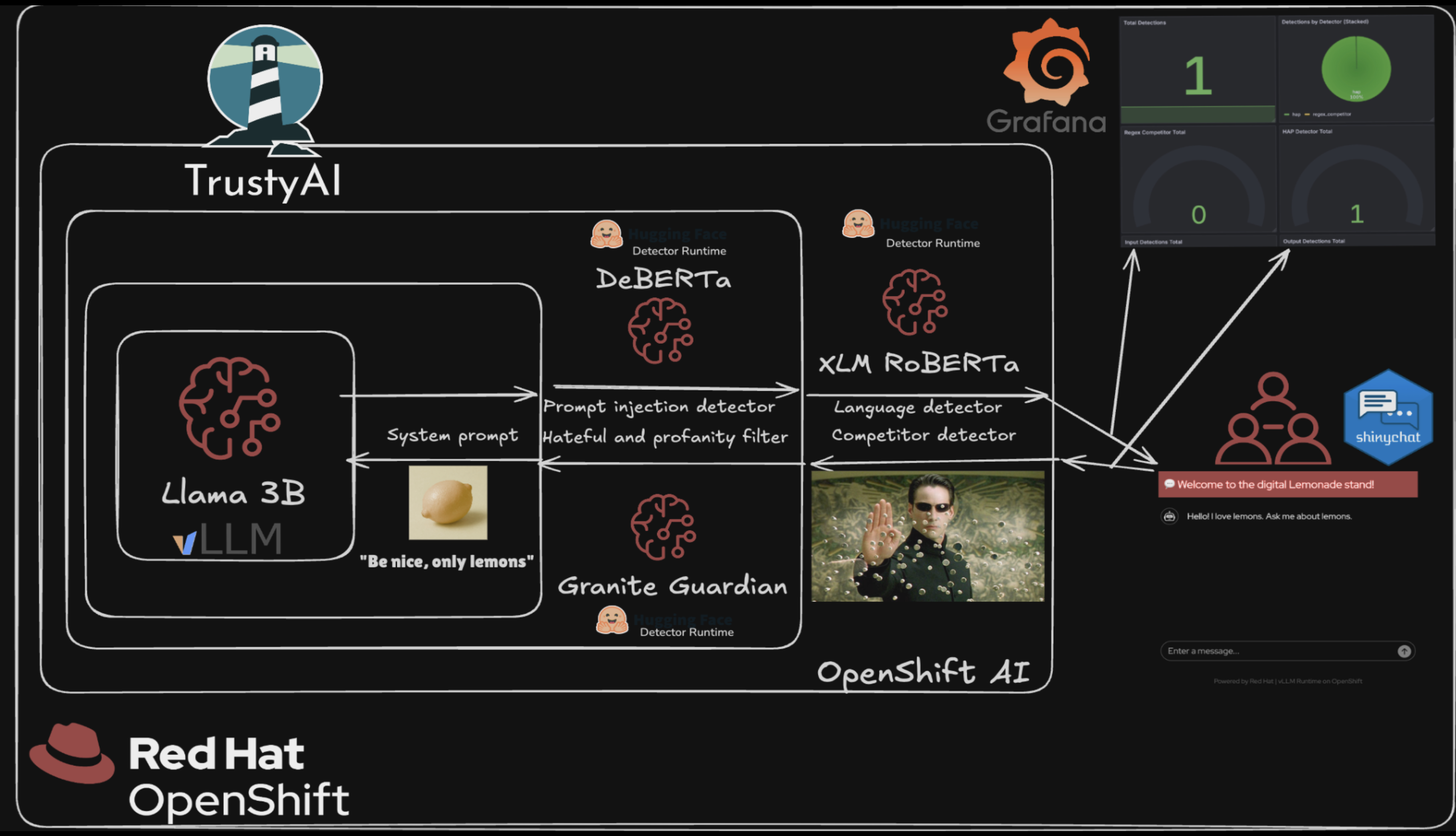
This demo showcases how to deploy an AI-powered customer service assistant with multiple guardrails to ensure safe, compliant, and on-brand interactions. The solution uses Llama 3.2 as the default language model (or your own model endpoint), protected by three detector models that monitor for harmful content, prompt injection attacks, and language compliance.
In this demo, we are following these principles:
- The LLM is untrusted. All its output must be validated.
- The user is untrusted. All the input must be validated.
- Triggering of specific detectors is monitored and visualized. (Alerts are out of scope but could be done)
The Lemonade Stand Assistant provides an interactive customer service experience for a fictional lemonade stand business. Customers can ask questions about products, ingredients, pricing, and more through a conversational interface.
https://github.com/user-attachments/assets/998dd37d-6130-4971-b8a2-d4ded8c40a27
To ensure safe and appropriate interactions, the system employs multiple AI guardrails:
- IBM HAP Detector (Granite Guardian): Monitors conversations for hate, abuse, and profanity
- Prompt Injection Detector (DeBERTa v3): Identifies and blocks attempts to manipulate the AI assistant
- Lingua Language Detector: Ensures inputs and responses are in English only
Furthermore, there is a:
- Regex Detector: Blocks specific text without the use of models. In our case, it's other fruits we consider "competitors".
The guardrails orchestrator coordinates these detectors to evaluate inputs and outputs before presenting responses to users.
Architecture Diagrams
See it in action
Monitoring Dashboards
Note: Deploying monitoring dashboards requires cluster admin privileges, whether deploying the Grafana Operator or using the built-in OpenShift dashboard.
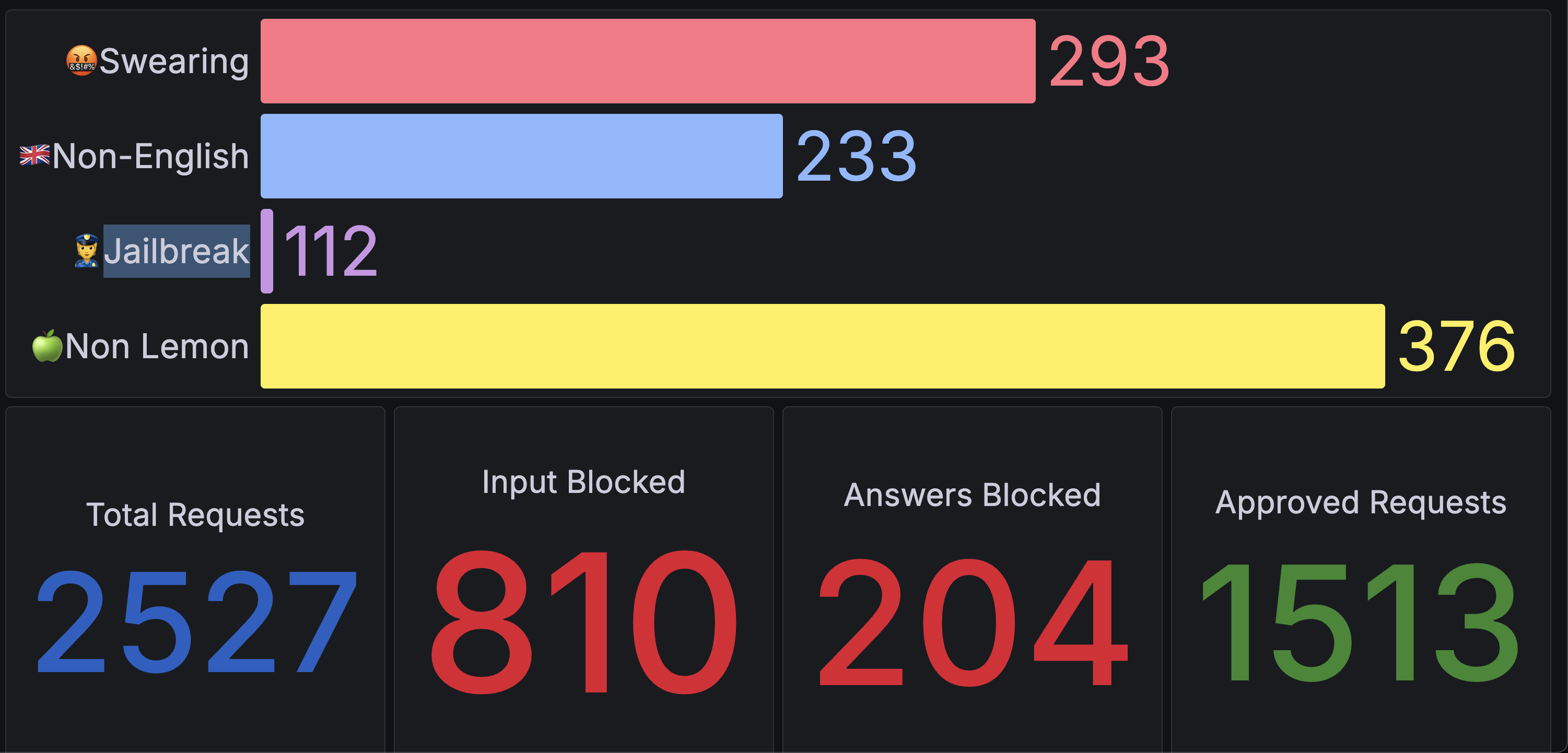
The solution includes monitoring dashboards for visualizing guardrail detections in real-time, including detections by detector type, total requests, input/output blocks, and approved requests.
There are two options for deploying the dashboard:
Option 1: Grafana Dashboard
Deploy a full Grafana instance with pre-configured dashboards. See the grafana folder for installation instructions.
Option 2: Built-in OpenShift Dashboard
Deploy a dashboard to the built-in OpenShift dashboard viewer. This can be enabled in the Helm chart by setting metrics.dashboard.enabled to true. If you want to see the dashboard in developer views, enable the odc label setting as well in the values.yaml.
# Enable openshift dashboard
metrics:
  dashboard:
    enabled: true # requires cluster-admin privileges to install the dashboard
    odc: false
Once deployed the OpenShift dashboard can be found in OpenShift > Observe > Lemonade Stand Guardrail Metrics.
Requirements
Minimum hardware requirements
Llama 3.2 3B Instruct (Main LLM — only when deploying the default model):
- CPU: 1 vCPU (request) / 4 vCPU (limit)
- Memory: 8 GiB (request) / 20 GiB (limit)
- GPU: 1 NVIDIA GPU (e.g., A10, A100, L40S, T4, or similar)
IBM HAP Detector (Granite Guardian HAP 125M):
- CPU: 1 vCPU (request) / 2 vCPU (limit)
- Memory: 4 GiB (request) / 8 GiB (limit)
Prompt Injection Detector (DeBERTa v3 Base):
- CPU: 4 vCPU (request) / 8 vCPU (limit)
- Memory: 16 GiB (request) / 24 GiB (limit)
Lingua Language Detector:
- CPU: 1 vCPU (request) / 2 vCPU (limit)
- Memory: 2 GiB (request) / 3 GiB (limit)
Total Resource Requirements:
- CPU: 7 vCPU (request) / 16 vCPU (limit)
- Memory: 30 GiB (request) / 51 GiB (limit)
- GPU: 1 NVIDIA GPU (only when deploying the default model)
Note: If you bring your own model endpoint, the LLM resources and GPU are not required. The detector models are configured to run on CPU by default. If you have additional GPU resources available and want to improve detector performance, you can enable GPU acceleration for the detectors. See the Configuration Options section for details on customizing GPU usage.
Minimum software requirements
- Red Hat OpenShift Container Platform
- Red Hat OpenShift AI
Deploy
Prerequisites
Before deploying, ensure you have:
- Access to a Red Hat OpenShift cluster with OpenShift AI installed and TrustyAI enabled
- Cluster admin privileges to create the guardrails orchestrator resources
ocCLI tool installed and configuredhelmCLI tool installed- Sufficient resources available in your cluster
Deployment
- Clone the repository:
git clone https://github.com/rh-ai-quickstart/lemonade-stand-assistant.git
cd lemonade-stand-assistant
- Create a new OpenShift project:
PROJECT="lemonade-stand-assistant"
oc new-project ${PROJECT}
- Install using Helm:
Option A: Use your own model (MaaS - Model as a Service)
If you have an existing model endpoint, provide the model name, endpoint, port, and API key:
helm install lemonade-stand-assistant ./chart --namespace ${PROJECT} \
  --set model.name=YOUR_MODEL_NAME \
  --set model.endpoint=YOUR_ENDPOINT \
  --set model.port=443 \
  --set model.api_key=YOUR_API_KEY
Note: The
model.endpointshould be the hostname only, withouthttps://prefix or trailing/.
Option B: Deploy with the default model
If you don't provide any model configuration, the chart will automatically deploy a Llama 3.2 3B Instruct model on your cluster:
helm install lemonade-stand-assistant ./chart --namespace ${PROJECT}
Note: Option B requires a GPU available in your cluster for the LLM deployment. See Minimum hardware requirements for details.
Configuration Options
The deployment can be customized through the values.yaml file. Each detector can be configured to run on GPU or CPU depending on your available resources.
GPU Configuration
By default, only the LLM uses GPU acceleration. All detector models run on CPU.
Each detector supports the following configuration options:
useGpu: Enable GPU acceleration for the detector (default:false)resources: CPU and memory resource requests and limits
Example: Enable GPU for HAP detector (requires additional GPU)
helm install lemonade-stand-assistant ./chart --namespace ${PROJECT} \
  --set detectors.hap.useGpu=true
Example: Enable GPU for all configurable detectors (requires 3 total GPUs)
helm install lemonade-stand-assistant ./chart --namespace ${PROJECT} \
  --set detectors.hap.useGpu=true \
  --set detectors.promptInjection.useGpu=true
Example: Custom resource allocation for HAP detector
helm install lemonade-stand-assistant ./chart --namespace ${PROJECT} \
  --set detectors.hap.resources.requests.memory=2Gi \
  --set detectors.hap.resources.limits.memory=4Gi
Validating the deployment
Once deployed, access the Lemonade Stand Assistant UI. You can find the route with:
echo https://$(oc get route/lemonade-stand-assistant -n ${PROJECT} --template='{{.spec.host}}')
Open the URL in your browser and start asking questions about lemonade and other fruits!
Delete
To remove the deployment:
helm uninstall lemonade-stand-assistant --namespace ${PROJECT}
Technical details
Architecture
The Lemonade Stand Assistant consists of the following components:
Inference Services:
- Llama 3.2 3B Instruct: Main language model for generating responses
- IBM HAP Detector (Granite Guardian HAP 125M): Detects hate, abuse, and profanity
- Prompt Injection Detector (DeBERTa v3 Base): Identifies prompt injection attempts
- Lingua Language Detector: Validates language compliance (English only)
Orchestration:
- Guardrails Orchestrator: Coordinates detector models using FMS Orchestr8
- Lemonade Stand App: FastAPI-based web application providing the user interface for customer interactions
Models
| Component | Model | Size | Purpose |
|---|---|---|---|
| Main LLM | Llama 3.2 3B Instruct | 3B parameters | Conversational AI |
| HAP Detection | Granite Guardian HAP | 125M parameters | Content safety |
| Prompt Injection Guard | DeBERTa v3 Base | ~184M parameters | Security |
| Language Detection | Lingua | Rule-based | Language validation |
Deployment Configuration
Models are deployed on OpenShift AI using:
- vLLM runtime for the main LLM (KServe InferenceService with optimized inference)
- Guardrails Detector runtime for HAP and Prompt Injection detectors (KServe InferenceServices)
- Standard Kubernetes Deployment for Lingua language detector
Reference
This quickstart is based on the demo by the TrustyAI team. For more information and to contribute:
- TrustyAI Lemonade Stand Demo - Original demo implementation
- TrustyAI Community - Contribute to the TrustyAI explainability project

'%20d='M201.5%20305.5c-13.8%200-24.9-11.1-24.9-24.6%200-13.8%2011.1-24.9%2024.9-24.9%2013.6%200%2024.6%2011.1%2024.6%2024.9%200%2013.6-11.1%2024.6-24.6%2024.6zM504%20256c0%20137-111%20248-248%20248S8%20393%208%20256%20119%208%20256%208s248%20111%20248%20248zm-132.3-41.2c-9.4%200-17.7%203.9-23.8%2010-22.4-15.5-52.6-25.5-86.1-26.6l17.4-78.3%2055.4%2012.5c0%2013.6%2011.1%2024.6%2024.6%2024.6%2013.8%200%2024.9-11.3%2024.9-24.9s-11.1-24.9-24.9-24.9c-9.7%200-18%205.8-22.1%2013.8l-61.2-13.6c-3-.8-6.1%201.4-6.9%204.4l-19.1%2086.4c-33.2%201.4-63.1%2011.3-85.5%2026.8-6.1-6.4-14.7-10.2-24.1-10.2-34.9%200-46.3%2046.9-14.4%2062.8-1.1%205-1.7%2010.2-1.7%2015.5%200%2052.6%2059.2%2095.2%20132%2095.2%2073.1%200%20132.3-42.6%20132.3-95.2%200-5.3-.6-10.8-1.9-15.8%2031.3-16%2019.8-62.5-14.9-62.5zM302.8%20331c-18.2%2018.2-76.1%2017.9-93.6%200-2.2-2.2-6.1-2.2-8.3%200-2.5%202.5-2.5%206.4%200%208.6%2022.8%2022.8%2087.3%2022.8%20110.2%200%202.5-2.2%202.5-6.1%200-8.6-2.2-2.2-6.1-2.2-8.3%200zm7.7-75c-13.6%200-24.6%2011.1-24.6%2024.9%200%2013.6%2011.1%2024.6%2024.6%2024.6%2013.8%200%2024.9-11.1%2024.9-24.6%200-13.8-11-24.9-24.9-24.9z'/%3e%3c/svg%3e)