 Red Hat Summit
Red Hat AMQ 6
As of February 2025, Red Hat is no longer supporting Red Hat AMQ 6. If you are using AMQ 6, please upgrade: Migrating to AMQ 7.Este conteúdo não está disponível no idioma selecionado.
Client Connectivity Guide
Creating and tuning clients connections to message brokers
Copyright © 2013 Red Hat, Inc. and/or its affiliates.
Abstract
Chapter 1. Introduction
Abstract
Transports and protocols
- Simple Text Orientated Messaging Protocol(STOMP)—allows developers to use a wide variety of client APIs to connect to a broker.
- Discovery—allows clients to connect to one or more brokers without knowing the connection details for a specific broker. See Using Networks of Brokers.
- VM—allows clients to directly communicate with other clients in the same virtual machine. See Chapter 4, Intra-JVM Connections.
- Peer—allows clients to communicate with each other without using an external message broker. See Chapter 5, Peer Protocol.
Supported Client APIs
- C clients
- C++ clients
- C# and .NET clients
- Delphi clients
- Flash clients
- Perl clients
- PHP clients
- Pike clients
- Python clients
Configuration
- transport options—configured on the connection. These options are configured using the connection URI and may be set by the broker. They apply to all clients using the connection.
- destination options—configured on a per destination basis. These options are configured when the destination is created and impact all of the clients that send or receive messages using the destination. They are always set by clients.
Chapter 2. Connecting to a Broker
Abstract
- Get an instance of the Red Hat JBoss A-MQ connection factory.Depending on the environment, the application can create a new instance of the connection factory or use JNDI, or another mechanism, to look up the connection factory.
- Use the connection factory to create a connection.
- Get an instance of the destination used for sending or receiving messages.Destinations are administered objects that are typically created by the broker. The JBoss A-MQ allows clients to create destinations on-demand. You can also look up destinations using JNDI or another mechanism.
- Use the connection to create a session.The session is the factory for creating producers and consumers. The session also is a factory for creating messages.
- Use the session to create the message consumer or message producer.
- Start the connection.
2.1. Connecting with the Java API
Overview
The connection factory
ActiveMQConnectionFactory, is used to create connections to brokers and does not need to be looked up using JNDI. Instances are created using a broker URI that specifies one of the transport connectors configured on a broker and the connection factory will do the heavy lifting.
ActiveMQConnectionFactory constructors.
Example 2.1. Connection Factory Constructors
ActiveMQConnectionFactory(String brokerURI);ActiveMQConnectionFactory(URI brokerURI);ActiveMQConnectionFactory(String username,
String password,
String brokerURI);ActiveMQConnectionFactory(String username,
String password,
URI brokerURI);The connection
Connection object will suffice. However, JBoss A-MQ does provide an implementation, ActiveMQConnection, that provides a number of additional methods for working with the broker. Using ActiveMQConnection will make your client code less portable between JMS providers.
The session
Example
EXAMPLE.FOO.
Example 2.2. JMS Producer Connection
2.2. Connecting with the C++ API
Overview
The connection factory
ConnectionFactory. A ConnectionFactory allows you to create connections which maintain a connection to a message broker.
ConnectionFactory is to use the static createCMSConnectionFactory() method that all CMS provider libraries are required to implement. Example 2.3, “Creating a Connection Factory” demonstrates how to obtain a new ConnectionFactory.
Example 2.3. Creating a Connection Factory
std::auto_ptr<cms::ConnectionFactory> connectionFactory(
        cms::ConnectionFactory::createCMSConnectionFactory( "tcp://127.0.0.1:61616" ) );
std::auto_ptr<cms::ConnectionFactory> connectionFactory(
cms::ConnectionFactory::createCMSConnectionFactory( "tcp://127.0.0.1:61616" ) );createCMSConnectionFactory() takes a single string parameter which a URI that defines the connection that will be created by the factory. Additionally configuration information can be encoded in the URI. For details on how to construct a broker URI see the Connection Reference.
The connection
Connection is a object that manages the client's connection to the broker. Example 2.4, “Creating a Connection” shows the code to create a connection.
Example 2.4. Creating a Connection
std::auto_ptr<cms::Connection> connection( connectionFactory->createConnection() );
std::auto_ptr<cms::Connection> connection( connectionFactory->createConnection() );CMSException is thrown with a description of the error that occurred stored in its message property.
- It encapsulates an open connection with a JMS provider. It typically represents an open TCP/IP socket between a client and a provider service daemon.
- Its creation is where client authentication takes place.
- It can specify a unique client identifier.
- It provides a
ConnectionMetaDataobject. - It supports an optional
ExceptionListenerobject.
The session
Example 2.5. Creating a Session
std::auto_ptr<cms::Session> session( connection->createSession(cms::Session::CLIENT_ACKNOWLEDGE) );
std::auto_ptr<cms::Session> session( connection->createSession(cms::Session::CLIENT_ACKNOWLEDGE) );| Acknowledge Mode | Description |
|---|---|
AUTO_ACKNOWLEDGE | The session automatically acknowledges a client's receipt of a message either when the session has successfully returned from a call to receive or when the message listener the session has called to process the message successfully returns. |
CLIENT_ACKNOWLEDGE | The client acknowledges a consumed message by calling the message's acknowledge method. Acknowledging a consumed message acknowledges all messages that the session has consumed. |
DUPS_OK_ACKNOWLEDGE | The session to lazily acknowledges the delivery of messages. This is likely to result in the delivery of some duplicate messages if the broker fails, so it should only be used by consumers that can tolerate duplicate messages. Use of this mode can reduce session overhead by minimizing the work the session does to prevent duplicates. |
SESSION_TRANSACTED | The session is transacted and the acknowledge of messages is handled internally. |
INDIVIDUAL_ACKNOWLEDGE | Acknowledges are applied to a single message only. |
AUTO_ACKNOWLEDGE.
- It is a factory for producers and consumers.
- It supplies provider-optimized message factories.
- It is a factory for temporary topics and temporary queues.
- It provides a way to create a queue or a topic for those clients that need to dynamically manipulate provider-specific destination names.
- It supports a single series of transactions that combine work spanning its producers and consumers into atomic units.
- It defines a serial order for the messages it consumes and the messages it produces.
- It retains messages it consumes until they have been acknowledged.
- It serializes execution of message listeners registered with its message consumers.
Resources
Example
EXAMPLE.FOO.
Example 2.6. CMS Producer Connection
2.3. Connecting with the .Net API
Overview
Resources
Example
EXAMPLE.FOO.
Example 2.7. NMS Producer Connection
Chapter 3. Stomp Heartbeats
Abstract
Stomp 1.1 heartbeats
CONNECT
heart-beat:CltSend,CltRecv

CONNECTED:
heart-beat:SrvSend,SrvRecv
CONNECT
heart-beat:CltSend,CltRecv

CONNECTED:
heart-beat:SrvSend,SrvRecv- CltSend
- Indicates the minimum frequency of messages sent from the client, expressed as the maximum time between messages in units of milliseconds. If the client does not send a regular Stomp message within this time limit, it must send a special heartbeat message, in order to keep the connection alive.A value of zero indicates that the client does not send heartbeats.
- CltRecv
- Indicates how often the client expects to receive message from the server, expressed as the maximum time between messages in units of milliseconds. If the client does not receive any messages from the server within this time limit, it would time out the connection.A value of zero indicates that the client does not expect heartbeats and will not time out the connection.
- SrvSend
- Indicates the minimum frequency of messages sent from the server, expressed as the maximum time between messages in units of milliseconds. If the server does not send a regular Stomp message within this time limit, it must send a special heartbeat message, in order to keep the connection alive.A value of zero indicates that the server does not send heartbeats.
- SrvRecv
- Indicates how often the server expects to receive message from the client, expressed as the maximum time between messages in units of milliseconds. If the server does not receive any messages from the client within this time limit, it would time out the connection.A value of zero indicates that the server does not expect heartbeats and will not time out the connection.
Stomp 1.0 heartbeat compatibility
transport.defaultHeartBeat option in the broker's transportConnector element, as follows:
<transportConnector name="stomp" uri="stomp://0.0.0.0:0?transport.defaultHeartBeat=5000,0" />
<transportConnector name="stomp" uri="stomp://0.0.0.0:0?transport.defaultHeartBeat=5000,0" />CONNECT heart-beat:5000,0
CONNECT
heart-beat:5000,00, indicates that the client does not expect to receive any heartbeats from the server (which makes sense, because Stomp 1.0 clients do not understand heartbeats).
transport.defaultHeartBeat such that the connection will stay alive, as long as the Stomp 1.0 clients are sending messages at their normal rate.
Chapter 4. Intra-JVM Connections
Abstract
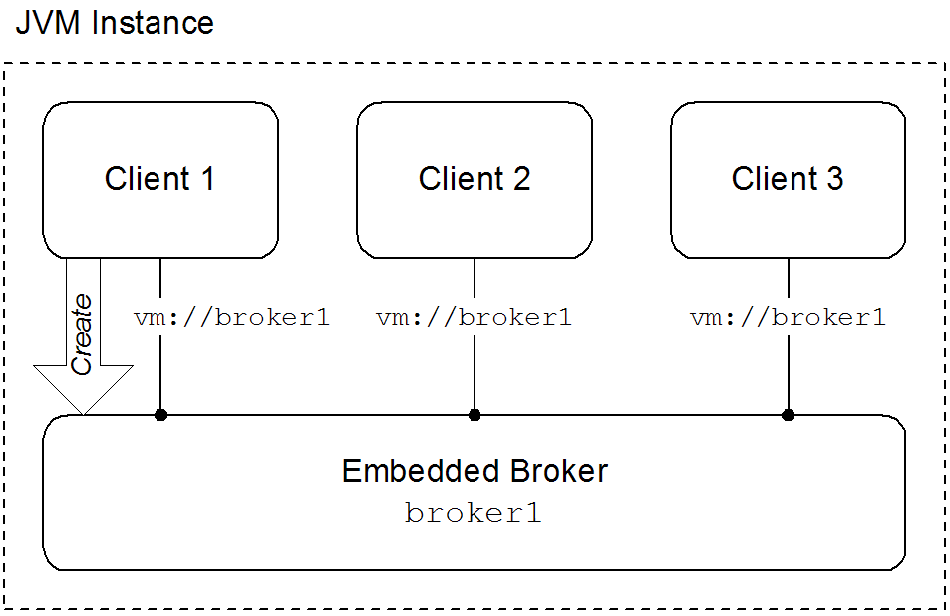
Overview
Figure 4.1. Clients Connected through the VM Transport
Embedded brokers
- explicitly defining the broker in the application's configuration
- explicitly creating the broker using the Java APIs
- automatically when the first client attempts to connect to it using the VM transport
waitForStart option or the create=false option to manage how the VM transport determines when to create a new embedded broker.
Using the VM transport
- simpleThe simple VM URI is used in most situations. It allows you to specify the name of the embedded broker to which the client will connect. It also allows for some basic broker configuration.Example 4.1, “Simple VM URI Syntax” shows the syntax for a simple VM URI.
Example 4.1. Simple VM URI Syntax
vm://BrokerName?TransportOptions
vm://BrokerName?TransportOptionsCopy to Clipboard Copied! Toggle word wrap Toggle overflow - BrokerName specifies the name of the embedded broker to which the client connects.
- TransportOptions specifies the configuration for the transport. They are specified in the form of a query list. For details about the available options see the Connection Reference.ImportantThe broker configuration options specified on the VM URI are only meaningful if the client is responsible for instantiating the embedded broker. If the embedded broker is already started, the transport will ignore the broker configuration properties.
- advancedThe advanced VM URI provides you full control over how the embedded broker is configured. It uses a broker configuration URI similar to the one used by the administration tool to configure the embedded broker.Example 4.2, “Advanced VM URI Syntax” shows the syntax for an advanced VM URI.
Example 4.2. Advanced VM URI Syntax
vm://(BrokerConfigURI)?TransportOptions
vm://(BrokerConfigURI)?TransportOptionsCopy to Clipboard Copied! Toggle word wrap Toggle overflow - BrokerConfigURI is a broker configuration URI.
- TransportOptions specifies the configuration for the transport. They are specified in the form of a query list. For details about the available options see the Connection Reference.
Examples
broker1.
Example 4.3. Basic VM URI
vm://broker1
vm://broker1Example 4.4. Simple URI with broker options
vm://broker1?broker.persistent=false
vm://broker1?broker.persistent=falseExample 4.5. Advanced VM URI
vm:(broker:(tcp://localhost:6000)?persistent=false)?marshal=false
vm:(broker:(tcp://localhost:6000)?persistent=false)?marshal=falseChapter 5. Peer Protocol
Abstract
Overview
Figure 5.1. Peer Protocol Endpoints with Embedded Brokers
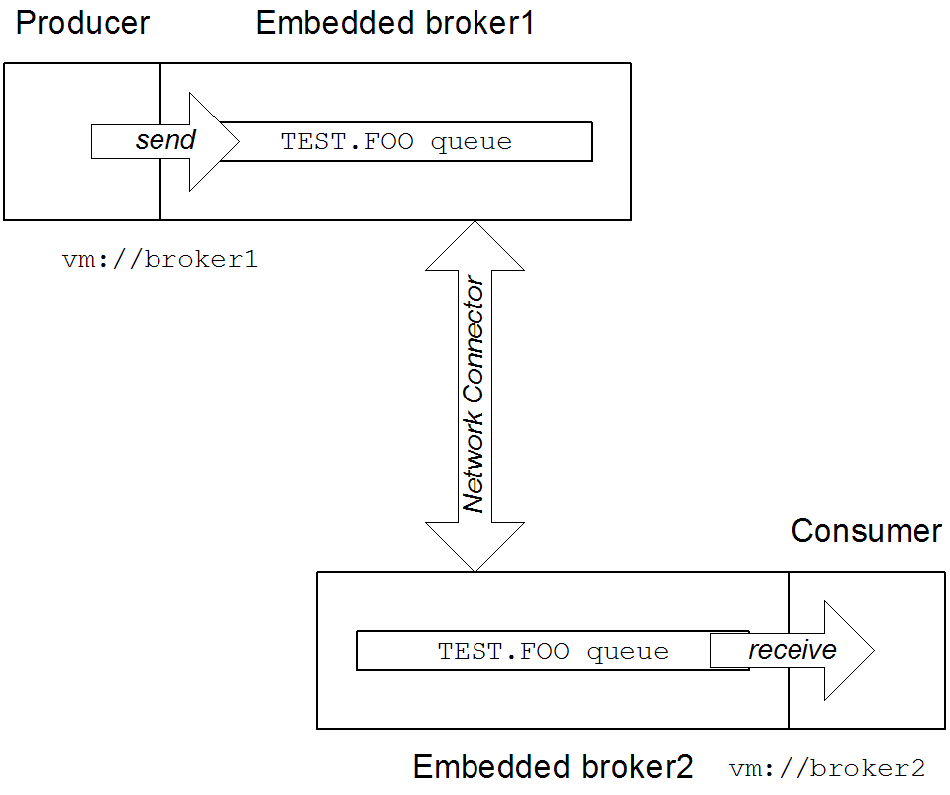
broker1, by connecting to the local VM endpoint, vm://broker1. The embedded brokers, broker1 and broker2, are linked together using a network connector which allows messages to flow in either direction between the brokers. When the producer sends a message to the queue, broker1 pushes the message across the network connector to broker2. The consumer receives the message from broker2.
Peer endpoint discovery
URI syntax
peer URI must conform to the following syntax:
peer://PeerGroup/BrokerName?BrokerOptions
peer://PeerGroup/BrokerName?BrokerOptionsSample URI
groupA, and creates an embedded broker with broker name, broker1:
peer://groupA/broker1?persistent=false
peer://groupA/broker1?persistent=falseChapter 6. Message Prefetch Behavior
Overview
Figure 6.1. Consumer Prefetch Limit
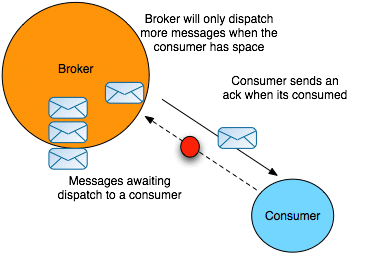
Consumer specific prefetch limits
| Consumer Type | Property | Default |
|---|---|---|
| Queue consumer | queuePrefetch | 1000 |
| Queue browser | queueBrowserPrefetch | 500 |
| Topic consumer | topicPrefetch | 32766 |
| Durable topic subscriber | durableTopicPrefetch | 100 |
Setting prefetch limits per broker
destinationPolicy element as a child of the broker element in the broker's configuration, as shown in Example 6.1, “Configuring a Destination Policy”.
Example 6.1. Configuring a Destination Policy
queue. is set to 1 (the > character is a wildcard symbol that matches one or more name segments); and the topic prefetch limit for all topics whose names start with topic. is set to 1000.
Setting prefetch limits per connection
ActiveMQConnectionFactory instance. Example 6.2, “Setting Prefetch Limit Properties Per Connection” shows how to specify the prefetch limits for all consumer types on a connection factory.
Example 6.2. Setting Prefetch Limit Properties Per Connection
Setting prefetch limits per destination
TEST.QUEUE with a prefetch limit of 10. The option is set as a destination option as part of the URI used to create the queue.
Example 6.3. Setting the Prefect Limit on a Destination
Queue queue = new ActiveMQQueue("TEST.QUEUE?consumer.prefetchSize=10");

MessageConsumer consumer = session.createConsumer(queue);
Queue queue = new ActiveMQQueue("TEST.QUEUE?consumer.prefetchSize=10");

MessageConsumer consumer = session.createConsumer(queue);Disabling the prefetch extension logic
Example 6.4. Disabling the Prefetch Extension
Chapter 7. Message Redelivery
Overview
- A transacted session is used and
rollback()is called. - A transacted session is closed before commit is called.
- A session is using
CLIENT_ACKNOWLEDGEandSession.recover()is called.
- On the broker, using the broker's redelivery plug-in,
- On the connection factory, using the connection URI,
- On the connection, using the
RedeliveryPolicy, - On destinations, using the connection's
RedeliveryPolicyMap.
Redelivery properties
| Option | Default | Description |
|---|---|---|
collisionAvoidanceFactor | 0.15 | Specifies the percentage of range of collision avoidance. |
maximumRedeliveries | 6 | Specifies the maximum number of times a message will be redelivered before it is considered a poisoned pill and returned to the broker so it can go to a dead letter queue. -1 specifies an infinite number of redeliveries. |
maximumRedeliveryDelay | -1 | Specifies the maximum delivery delay that will be applied if the useExponentialBackOff option is set. -1 specifies that no maximum be applied. |
initialRedeliveryDelay | 1000 | Specifies the initial redelivery delay in milliseconds. |
redeliveryDelay | 1000 | Specifies the delivery delay, in milliseconds, if initialRedeliveryDelay is 0. |
useCollisionAvoidance | false | Specifies if the redelivery policy uses collision avoidance. |
useExponentialBackOff | false | Specifies if the redelivery time out should be increased exponentially. |
backOffMultiplier | 5 | Specifies the back-off multiplier. |
Configuring the broker's redelivery plug-in
maximumRedeliveries to 0 on the destination).
redeliveryPlugin element. As shown in Example 7.1, “Configuring the Redelivery Plug-In” this element is a child of the broker's plugins element and contains a policy map defining the desired behavior.
Example 7.1. Configuring the Redelivery Plug-In
- 1
- The
redeliveryPolicyEntrieselement contains a list ofredeliveryPolicyelements that configures redelivery policies on a per-destination basis. - 2
- The
defaultEntryelement contains a singleredeliveryPolicyelement that configures the redelivery policy used by all destinations that do not match the one with a specific policy.
Configuring the redelivery using the broker URI
Example 7.2. Setting the Redelivery Policy using a Connection URI
ActiveMQConnectionFactory connectionFactory =
  new ActiveMQConnectionFactory("tcp://localhost:61616?jms.redeliveryPolicy.maximumRedeliveries=4");
ActiveMQConnectionFactory connectionFactory =
new ActiveMQConnectionFactory("tcp://localhost:61616?jms.redeliveryPolicy.maximumRedeliveries=4");Setting the redelivery policy on a connection
ActiveMQConnection class' getRedeliveryPolicy() method allows you to configure the redelivery policy for all consumer's using that connection.
getRedeliveryPolicy() returns a RedeliveryPolicy object that controls the redelivery policy for the connection. The RedeliveryPolicy object has setters for each of the properties listed in Table 7.1, “Redelivery Policy Options”.
Example 7.3. Setting the Redelivery Policy for a Connection
Setting the redelivery policy on a destination
ActiveMQConnection class' getRedeliveryPolicyMap() method returns a RedeliveryPolicyMap object that is a map of RedeliveryPolicy objects with destination names as the key.
RedeliveryPolicy object controls the redelivery policy for all destinations whose name match the destination name specified in the map's key.
FRED.JOE can only be redelivered 4 times.
Example 7.4. Setting the Redelivery Policy for a Destination
Index
A
- ActiveMQConnection, The connection, Setting the redelivery policy on a connection, Setting the redelivery policy on a destination
- ActiveMQConnectionFactory, The connection factory
B
- backOffMultiplier, Redelivery properties
C
- collisionAvoidanceFactor, Redelivery properties
- Connection, The connection
- ConnectionFactory, The connection factory
D
- durableTopicPrefetch, Consumer specific prefetch limits
E
- embedded broker, Embedded brokers
G
- getRedeliveryPolicy(), Setting the redelivery policy on a connection
- getRedeliveryPolicyMap(), Setting the redelivery policy on a destination
I
- initialRedeliveryDelay, Redelivery properties
M
- maximumRedeliveries, Redelivery properties
- maximumRedeliveryDelay, Redelivery properties
P
- prefetch
- per broker, Setting prefetch limits per broker
- per connection, Setting prefetch limits per connection
- per destination, Setting prefetch limits per destination
Q
- queueBrowserPrefetch, Consumer specific prefetch limits
- queuePrefetch, Consumer specific prefetch limits
R
- redeliveryDelay, Redelivery properties
- redeliveryPlugin, Configuring the broker's redelivery plug-in
- RedeliveryPolicy, Setting the redelivery policy on a connection, Setting the redelivery policy on a destination
- RedeliveryPolicyMap, Setting the redelivery policy on a destination
T
- topicPrefetch, Consumer specific prefetch limits
U
- useCollisionAvoidance, Redelivery properties
- useExponentialBackOff, Redelivery properties
- usePrefetchExtension, Disabling the prefetch extension logic
V
- VM
- advanced URI, Using the VM transport
- broker name, Using the VM transport
- create, Embedded brokers
- embedded broker, Embedded brokers
- simple URI, Using the VM transport
- waitForStart, Embedded brokers
- VM URI
- advanced, Using the VM transport
- simple, Using the VM transport
Legal Notice
Trademark Disclaimer
Legal Notice
Third Party Acknowledgements
- JLine (http://jline.sourceforge.net) jline:jline:jar:1.0License: BSD (LICENSE.txt) - Copyright (c) 2002-2006, Marc Prud'hommeaux
mwp1@cornell.eduAll rights reserved.Redistribution and use in source and binary forms, with or without modification, are permitted provided that the following conditions are met:- Redistributions of source code must retain the above copyright notice, this list of conditions and the following disclaimer.
- Redistributions in binary form must reproduce the above copyright notice, this list of conditions and the following disclaimer in the documentation and/or other materials provided with the distribution.
- Neither the name of JLine nor the names of its contributors may be used to endorse or promote products derived from this software without specific prior written permission.
THIS SOFTWARE IS PROVIDED BY THE COPYRIGHT HOLDERS AND CONTRIBUTORS "AS IS" AND ANY EXPRESS OR IMPLIED WARRANTIES, INCLUDING, BUT NOT LIMITED TO, THE IMPLIED WARRANTIES OF MERCHANTABILITY AND FITNESS FOR A PARTICULAR PURPOSE ARE DISCLAIMED. IN NO EVENT SHALL THE COPYRIGHT OWNER OR CONTRIBUTORS BE LIABLE FOR ANY DIRECT, INDIRECT, INCIDENTAL, SPECIAL, EXEMPLARY, OR CONSEQUENTIAL DAMAGES (INCLUDING, BUT NOT LIMITED TO, PROCUREMENT OF SUBSTITUTE GOODS OR SERVICES; LOSS OF USE, DATA, OR PROFITS; OR BUSINESS INTERRUPTION) HOWEVER CAUSED AND ON ANY THEORY OF LIABILITY, WHETHER IN CONTRACT, STRICT LIABILITY, OR TORT (INCLUDING NEGLIGENCE OR OTHERWISE) ARISING IN ANY WAY OUT OF THE USE OF THIS SOFTWARE, EVEN IF ADVISED OF THE POSSIBILITY OF SUCH DAMAGE. - Stax2 API (http://woodstox.codehaus.org/StAX2) org.codehaus.woodstox:stax2-api:jar:3.1.1License: The BSD License (http://www.opensource.org/licenses/bsd-license.php)Copyright (c) <YEAR>, <OWNER> All rights reserved.Redistribution and use in source and binary forms, with or without modification, are permitted provided that the following conditions are met:
- Redistributions of source code must retain the above copyright notice, this list of conditions and the following disclaimer.
- Redistributions in binary form must reproduce the above copyright notice, this list of conditions and the following disclaimer in the documentation and/or other materials provided with the distribution.
THIS SOFTWARE IS PROVIDED BY THE COPYRIGHT HOLDERS AND CONTRIBUTORS "AS IS" AND ANY EXPRESS OR IMPLIED WARRANTIES, INCLUDING, BUT NOT LIMITED TO, THE IMPLIED WARRANTIES OF MERCHANTABILITY AND FITNESS FOR A PARTICULAR PURPOSE ARE DISCLAIMED. IN NO EVENT SHALL THE COPYRIGHT HOLDER OR CONTRIBUTORS BE LIABLE FOR ANY DIRECT, INDIRECT, INCIDENTAL, SPECIAL, EXEMPLARY, OR CONSEQUENTIAL DAMAGES (INCLUDING, BUT NOT LIMITED TO, PROCUREMENT OF SUBSTITUTE GOODS OR SERVICES; LOSS OF USE, DATA, OR PROFITS; OR BUSINESS INTERRUPTION) HOWEVER CAUSED AND ON ANY THEORY OF LIABILITY, WHETHER IN CONTRACT, STRICT LIABILITY, OR TORT (INCLUDING NEGLIGENCE OR OTHERWISE) ARISING IN ANY WAY OUT OF THE USE OF THIS SOFTWARE, EVEN IF ADVISED OF THE POSSIBILITY OF SUCH DAMAGE. - jibx-run - JiBX runtime (http://www.jibx.org/main-reactor/jibx-run) org.jibx:jibx-run:bundle:1.2.3License: BSD (http://jibx.sourceforge.net/jibx-license.html) Copyright (c) 2003-2010, Dennis M. Sosnoski.All rights reserved.Redistribution and use in source and binary forms, with or without modification, are permitted provided that the following conditions are met:
- Redistributions of source code must retain the above copyright notice, this list of conditions and the following disclaimer.
- Redistributions in binary form must reproduce the above copyright notice, this list of conditions and the following disclaimer in the documentation and/or other materials provided with the distribution.
- Neither the name of JiBX nor the names of its contributors may be used to endorse or promote products derived from this software without specific prior written permission.
THIS SOFTWARE IS PROVIDED BY THE COPYRIGHT HOLDERS AND CONTRIBUTORS "AS IS" AND ANY EXPRESS OR IMPLIED WARRANTIES, INCLUDING, BUT NOT LIMITED TO, THE IMPLIED WARRANTIES OF MERCHANTABILITY AND FITNESS FOR A PARTICULAR PURPOSE ARE DISCLAIMED. IN NO EVENT SHALL THE COPYRIGHT OWNER OR CONTRIBUTORS BE LIABLE FOR ANY DIRECT, INDIRECT, INCIDENTAL, SPECIAL, EXEMPLARY, OR CONSEQUENTIAL DAMAGES (INCLUDING, BUT NOT LIMITED TO, PROCUREMENT OF SUBSTITUTE GOODS OR SERVICES; LOSS OF USE, DATA, OR PROFITS; OR BUSINESS INTERRUPTION) HOWEVER CAUSED AND ON ANY THEORY OF LIABILITY, WHETHER IN CONTRACT, STRICT LIABILITY, OR TORT (INCLUDING NEGLIGENCE OR OTHERWISE) ARISING IN ANY WAY OUT OF THE USE OF THIS SOFTWARE, EVEN IF ADVISED OF THE POSSIBILITY OF SUCH DAMAGE. - JavaAssist (http://www.jboss.org/javassist) org.jboss.javassist:com.springsource.javassist:jar:3.9.0.GA:compileLicense: MPL (http://www.mozilla.org/MPL/MPL-1.1.html)
- HAPI-OSGI-Base Module (http://hl7api.sourceforge.net/hapi-osgi-base/) ca.uhn.hapi:hapi-osgi-base:bundle:1.2License: Mozilla Public License 1.1 (http://www.mozilla.org/MPL/MPL-1.1.txt)

'%20d='M201.5%20305.5c-13.8%200-24.9-11.1-24.9-24.6%200-13.8%2011.1-24.9%2024.9-24.9%2013.6%200%2024.6%2011.1%2024.6%2024.9%200%2013.6-11.1%2024.6-24.6%2024.6zM504%20256c0%20137-111%20248-248%20248S8%20393%208%20256%20119%208%20256%208s248%20111%20248%20248zm-132.3-41.2c-9.4%200-17.7%203.9-23.8%2010-22.4-15.5-52.6-25.5-86.1-26.6l17.4-78.3%2055.4%2012.5c0%2013.6%2011.1%2024.6%2024.6%2024.6%2013.8%200%2024.9-11.3%2024.9-24.9s-11.1-24.9-24.9-24.9c-9.7%200-18%205.8-22.1%2013.8l-61.2-13.6c-3-.8-6.1%201.4-6.9%204.4l-19.1%2086.4c-33.2%201.4-63.1%2011.3-85.5%2026.8-6.1-6.4-14.7-10.2-24.1-10.2-34.9%200-46.3%2046.9-14.4%2062.8-1.1%205-1.7%2010.2-1.7%2015.5%200%2052.6%2059.2%2095.2%20132%2095.2%2073.1%200%20132.3-42.6%20132.3-95.2%200-5.3-.6-10.8-1.9-15.8%2031.3-16%2019.8-62.5-14.9-62.5zM302.8%20331c-18.2%2018.2-76.1%2017.9-93.6%200-2.2-2.2-6.1-2.2-8.3%200-2.5%202.5-2.5%206.4%200%208.6%2022.8%2022.8%2087.3%2022.8%20110.2%200%202.5-2.2%202.5-6.1%200-8.6-2.2-2.2-6.1-2.2-8.3%200zm7.7-75c-13.6%200-24.6%2011.1-24.6%2024.9%200%2013.6%2011.1%2024.6%2024.6%2024.6%2013.8%200%2024.9-11.1%2024.9-24.6%200-13.8-11-24.9-24.9-24.9z'/%3e%3c/svg%3e)