 Red Hat Summit
Dieser Inhalt ist in der von Ihnen ausgewählten Sprache nicht verfügbar.
1.4. Seam and jBPM: the todo list example
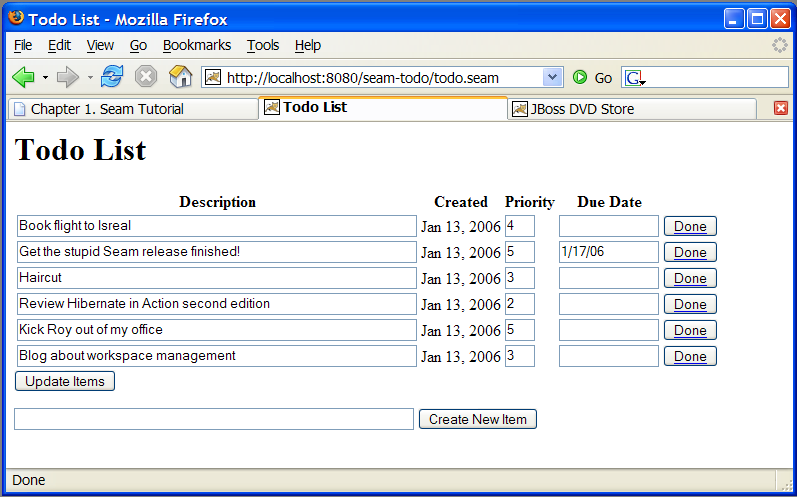
jBPM provides sophisticated functionality for workflow and task management. As an example of jBPM's integration with Seam, what follows is a simple "todo list" application. Managing task lists is a core function of jBPM, so little Java is required in this example.
1.4.1. Understanding the code
Link kopierenLink in die Zwischenablage kopiert!
This example revolves around the jBPM process definition. It also uses two JSPs and two basic JavaBeans. (Session beans are not required here since they would not access the database or have any transactional behavior.) We will start with the process definition:
Example 1.16. todo.jpdl.xml
<process-definition name="todo">

  <start-state name="start">
    <transition to="todo"/>
  </start-state>

  <task-node name="todo">
    <task name="todo" description="#{todoList.description}">
      <assignment actor-id="#{actor.id}"/>
    </task>
    <transition to="done"/>
  </task-node>

  <end-state name="done"/>

</process-definition>
|
The <start-state> node represents the logical start of the process. When the process starts, it immediately transitions to the todo node.
|
|
The <task-node> node represents a wait state, where business process execution pauses, waiting for one or more tasks to be performed.
|
|
The <task> element defines a task to be performed by a user. Since there is only one task defined on this node, when it is complete, execution resumes, and we transition to the end state. The task gets its description from a Seam component named todoList (one of the JavaBeans).
|
|
Tasks need to be assigned to a user or group of users when they are created. In this case, the task is assigned to the current user, which we get from a built-in Seam component named actor. Any Seam component may be used to perform task assignment.
|
|
The <end-state> node defines the logical end of the business process. When execution reaches this node, the process instance is destroyed.
|


Viewed with the process definition editor provided by JBossIDE, the process definition looks like this:

This document defines our business process as a graph of nodes. This is the simplest possible business process: there is one task to be performed, and when that task is complete, the business process ends.
The first JavaBean handles the login screen,
login.jsp. Here, it simply initializes the jBPM actor ID with the actor component. In a real application, it would also need to authenticate the user.
Example 1.17. Login.java
@Name("login")
public class Login {
    @In
    private Actor actor;

    private String user;

    public String getUser() {
        return user;
    }

    public void setUser(String user) {
        this.user = user;
    }

    public String login() {
        actor.setId(user);
        return "/todo.jsp";
    }
}
Here we see the use of
@In to inject the built-in Actor component.
The JSP itself is trivial:
Example 1.18. login.jsp
<%@ taglib uri="http://java.sun.com/jsf/html" prefix="h"%>
<%@ taglib uri="http://java.sun.com/jsf/core" prefix="f"%>
<html>
  <head>
    <title>Login</title>
  </head>
  <body>
    <h1>Login</h1>
    <f:view>
      <h:form>
        <div>
          <h:inputText value="#{login.user}"/>
          <h:commandButton value="Login" action="#{login.login}"/>
        </div>
      </h:form>
    </f:view>
  </body>
</html>
The second JavaBean is responsible for starting business process instances, and ending tasks.
Example 1.19. TodoList.java
@Name("todoList")
public class TodoList
{
   private String description;

   public String getDescription()
   {
      return description;
   }

   public void setDescription(String description)
   {
      this.description = description;
   }

   @CreateProcess(definition="todo")
   public void createTodo() {}

   @StartTask @EndTask
   public void done() {}

}
|
The description property accepts user input from the JSP page, and exposes it to the process definition, allowing the task description to be set.
|
|
The Seam @CreateProcess annotation creates a new jBPM process instance for the named process definition.
|
|
The Seam @StartTask annotation starts work on a task. The @EndTask ends the task, and allows the business process execution to resume.
|
In a more realistic example,
@StartTask and @EndTask would not appear on the same method, because some work would need to be done with the application in order to complete the task.
Finally, the core of the application is in
todo.jsp:
Example 1.20. todo.jsp
<%@ taglib uri="http://java.sun.com/jsf/html" prefix="h" %>
<%@ taglib uri="http://java.sun.com/jsf/core" prefix="f" %>
<%@ taglib uri="http://jboss.com/products/seam/taglib" prefix="s" %>
<html>
  <head>
    <title>Todo List</title>
  </head>
  <body>
    <h1>Todo List</h1>
    <f:view>
      <h:form id="list">
        <div>
          <h:outputText value="There are no todo items."
                        rendered="#{empty taskInstanceList}"/>
          <h:dataTable value="#{taskInstanceList}" var="task"
                       rendered="#{not empty taskInstanceList}">
            <h:column>
              <f:facet name="header">
                <h:outputText value="Description"/>
              </f:facet>
              <h:inputText value="#{task.description}"/>
            </h:column>
            <h:column>
              <f:facet name="header">
                <h:outputText value="Created"/>
              </f:facet>
              <h:outputText value=
                            "#{task.taskMgmtInstance.processInstance.start}">
                <f:convertDateTime type="date"/>
              </h:outputText>
            </h:column>
            <h:column>
              <f:facet name="header">
                <h:outputText value="Priority"/>
              </f:facet>
              <h:inputText value="#{task.priority}" style="width: 30"/>
            </h:column>
            <h:column>
              <f:facet name="header">
                <h:outputText value="Due Date"/>
              </f:facet>
              <h:inputText value="#{task.dueDate}" style="width: 100">
                <f:convertDateTime type="date" dateStyle="short"/>
              </h:inputText>
            </h:column>
            <h:column>
              <s:button value="Done" action="#{todoList.done}"
                        taskInstance="#{task}"/>
            </h:column>
          </h:dataTable>
        </div>
        <div>
          <h:messages/>
        </div>
        <div>
          <h:commandButton value="Update Items" action="update"/>
        </div>
      </h:form>
      <h:form id="new">
        <div>
          <h:inputText value="#{todoList.description}"/>
          <h:commandButton value="Create New Item"
                           action="#{todoList.createTodo}"/>
        </div>
      </h:form>
    </f:view>
  </body>
</html>
For simplicity's sake, we will look at this once section at a time.
The page renders a list of tasks, which it retrieves from a built-in Seam component named
taskInstanceList. The list is defined inside a JSF form.
Example 1.21. todo.jsp (taskInstanceList)
<h:form id="list">
  <div>
    <h:outputText value="There are no todo items."
                  rendered="#{empty taskInstanceList}"/>
    <h:dataTable value="#{taskInstanceList}" var="task"
                 rendered="#{not empty taskInstanceList}">
      ...
    </h:dataTable>
  </div>
</h:form>
Each element of the list is an instance of the jBPM class
TaskInstance. The following code displays certain properties for every task in the list. Input controls are used for description, priority, and due date to allow users to update these values.
Example 1.22. TaskInstance List Properties
<h:column>
  <f:facet name="header">
    <h:outputText value="Description"/>
  </f:facet>
  <h:inputText value="#{task.description}"/>
</h:column>
<h:column>
  <f:facet name="header">
    <h:outputText value="Created"/>
  </f:facet>
  <h:outputText value="#{task.taskMgmtInstance.processInstance.start}">
    <f:convertDateTime type="date"/>
  </h:outputText>
</h:column>
<h:column>
  <f:facet name="header">
    <h:outputText value="Priority"/>
  </f:facet>
  <h:inputText value="#{task.priority}" style="width: 30"/>
</h:column>
<h:column>
  <f:facet name="header">
    <h:outputText value="Due Date"/>
  </f:facet>
  <h:inputText value="#{task.dueDate}" style="width: 100">
    <f:convertDateTime type="date" dateStyle="short"/>
  </h:inputText>
</h:column>
Note
Seam provides a default JSF date converter for converting a string into a date, so no converter is necessary for the field bound to
#{task.dueDate}.
This button ends the task by calling the action method annotated
@StartTask @EndTask. It passes the task ID to Seam as a request parameter:
<h:column>
  <s:button value="Done" action="#{todoList.done}"
            taskInstance="#{task}"/>
</h:column>
Note that this uses a Seam
<s:button> JSF control from the seam-ui.jar package. This button updates the properties of the tasks. When the form is submitted, Seam and jBPM will make any changes to the tasks persistent. There is no need for any action listener method:
<h:commandButton value="Update Items" action="update"/>
A second form on the page creates new items with the action method annotated
@CreateProcess.
 <h:form id="new">
   <div>
      <h:inputText value="#{todoList.description}"/>
      <h:commandButton value="Create New Item"
         action="#{todoList.createTodo}"/>
    </div>
</h:form>
'%20d='M201.5%20305.5c-13.8%200-24.9-11.1-24.9-24.6%200-13.8%2011.1-24.9%2024.9-24.9%2013.6%200%2024.6%2011.1%2024.6%2024.9%200%2013.6-11.1%2024.6-24.6%2024.6zM504%20256c0%20137-111%20248-248%20248S8%20393%208%20256%20119%208%20256%208s248%20111%20248%20248zm-132.3-41.2c-9.4%200-17.7%203.9-23.8%2010-22.4-15.5-52.6-25.5-86.1-26.6l17.4-78.3%2055.4%2012.5c0%2013.6%2011.1%2024.6%2024.6%2024.6%2013.8%200%2024.9-11.3%2024.9-24.9s-11.1-24.9-24.9-24.9c-9.7%200-18%205.8-22.1%2013.8l-61.2-13.6c-3-.8-6.1%201.4-6.9%204.4l-19.1%2086.4c-33.2%201.4-63.1%2011.3-85.5%2026.8-6.1-6.4-14.7-10.2-24.1-10.2-34.9%200-46.3%2046.9-14.4%2062.8-1.1%205-1.7%2010.2-1.7%2015.5%200%2052.6%2059.2%2095.2%20132%2095.2%2073.1%200%20132.3-42.6%20132.3-95.2%200-5.3-.6-10.8-1.9-15.8%2031.3-16%2019.8-62.5-14.9-62.5zM302.8%20331c-18.2%2018.2-76.1%2017.9-93.6%200-2.2-2.2-6.1-2.2-8.3%200-2.5%202.5-2.5%206.4%200%208.6%2022.8%2022.8%2087.3%2022.8%20110.2%200%202.5-2.2%202.5-6.1%200-8.6-2.2-2.2-6.1-2.2-8.3%200zm7.7-75c-13.6%200-24.6%2011.1-24.6%2024.9%200%2013.6%2011.1%2024.6%2024.6%2024.6%2013.8%200%2024.9-11.1%2024.9-24.6%200-13.8-11-24.9-24.9-24.9z'/%3e%3c/svg%3e)