 Red Hat Summit
Dieser Inhalt ist in der von Ihnen ausgewählten Sprache nicht verfügbar.
Chapter 7. Assessing and analyzing applications with MTA
You can use the Migration Toolkit for Applications (MTA) user interface to assess and analyze applications:
- When assessing applications, MTA estimates the risks and costs involved in preparing applications for containerization, including time, personnel, and other factors. You can use the results of an assessment for discussions between stakeholders to determine whether applications are suitable for containerization.
- When analyzing applications, MTA uses rules to determine which specific lines in an application must be modified before the application can be migrated or modernized.
7.1. The Assessment module features
The Migration Toolkit for Applications (MTA) Assessment module offers the following features for assessing and analyzing applications:
- Assessment hub
- The Assessment hub integrates with the Application inventory.
- Enhanced assessment questionnaire capabilities
In MTA 7.0, you can import and export assessment questionnaires. You can also design custom questionnaires with a downloadable template by using the YAML syntax, which includes the following features:
- Conditional questions: You can include or exclude questions based on the application or archetype if a certain tag is present on this application or archetype.
- Application auto-tagging based on answers: You can define tags to be applied to applications or archetypes if a certain answer was provided.
- Automated answers from tags in applications or archetypes.
For more information, see The custom assessment questionnaire.
You can customize and save the default questionnaire. For more information, see The default assessment questionnaire.
- Multiple assessment questionnaires
- The Assessment module supports multiple questionnaires, relevant to one or more applications.
- Archetypes
You can group applications with similar characteristics into archetypes. This allows you to assess multiple applications at once. Each archetype has a shared taxonomy of tags, stakeholders, and stakeholder groups. All applications inherit assessment and review from their assigned archetypes.
For more information, see Working with archetypes.
7.2. MTA assessment questionnaires
The Migration Toolkit for Applications (MTA) uses an assessment questionnaire, either default or custom, to assess the risks involved in containerizing an application.
The assessment report provides information about applications and risks associated with migration. The report also generates an adoption plan informed by the prioritization, business criticality, and dependencies of the applications submitted for assessment.
7.2.1. The default assessment questionnaire
Legacy Pathfinder is the default Migration Toolkit for Applications (MTA) questionnaire. Pathfinder is a questionnaire-based tool that you can use to evaluate the suitability of applications for modernization in containers on an enterprise Kubernetes platform.
Through interaction with the default questionnaire and the review process, the system is enriched with application knowledge exposed through the collection of assessment reports.
You can export the default questionnaire to a YAML file:
Example 7.1. The Legacy Pathfinder YAML file
name: Legacy Pathfinder
description: ''
sections:
- order: 1
name: Application details
questions:
- order: 1
text: >-
Does the application development team understand and actively develop
the application?
explanation: >-
How much knowledge does the team have about the application's
development or usage?
answers:
- order: 2
text: >-
Maintenance mode, no SME knowledge or adequate documentation
available
risk: red
rationale: ''
mitigation: ''
- order: 0
text: unknown
risk: unknown
rationale: ''
mitigation: ''
- order: 1
text: >-
Little knowledge, no development (example: third-party or
commercial off-the-shelf application)
risk: red
rationale: ''
mitigation: ''
- order: 3
text: Maintenance mode, SME knowledge is available
risk: yellow
rationale: ''
mitigation: ''
- order: 4
text: Actively developed, SME knowledge is available
risk: green
rationale: ''
mitigation: ''
- order: 5
text: greenfield application
risk: green
rationale: ''
mitigation: ''
- order: 2
text: How is the application supported in production?
explanation: >-
Does the team have sufficient knowledge to support the application in
production?
answers:
- order: 3
text: >-
Multiple teams provide support using an established escalation
model
risk: yellow
rationale: ''
mitigation: ''
- order: 0
text: unknown
risk: unknown
rationale: ''
mitigation: ''
- order: 1
text: >-
External support provider with a ticket-driven escalation process;
no inhouse support resources
risk: red
rationale: ''
mitigation: ''
- order: 2
text: >-
Separate internal support team, separate from the development
team, with little interaction between the teams
risk: red
rationale: ''
mitigation: ''
- order: 4
text: >-
SRE (Site Reliability Engineering) approach with a knowledgeable
and experienced operations team
risk: green
rationale: ''
mitigation: ''
- order: 5
text: >-
DevOps approach with the same team building the application and
supporting it in production
risk: green
rationale: ''
mitigation: ''
- order: 3
text: >-
How much time passes from when code is committed until the application
is deployed to production?
explanation: What is the development latency?
answers:
- order: 3
text: 2-6 months
risk: yellow
rationale: ''
mitigation: ''
- order: 0
text: unknown
risk: unknown
rationale: ''
mitigation: ''
- order: 1
text: Not tracked
risk: red
rationale: ''
mitigation: ''
- order: 2
text: More than 6 months
risk: red
rationale: ''
mitigation: ''
- order: 4
text: 8-30 days
risk: green
rationale: ''
mitigation: ''
- order: 5
text: 1-7 days
risk: green
rationale: ''
mitigation: ''
- order: 6
text: Less than 1 day
risk: green
rationale: ''
mitigation: ''
- order: 4
text: How often is the application deployed to production?
explanation: Deployment frequency
answers:
- order: 3
text: Between once a month and once every 6 months
risk: yellow
rationale: ''
mitigation: ''
- order: 0
text: unknown
risk: unknown
rationale: ''
mitigation: ''
- order: 1
text: Not tracked
risk: red
rationale: ''
mitigation: ''
- order: 2
text: Less than once every 6 months
risk: red
rationale: ''
mitigation: ''
- order: 4
text: Weekly
risk: green
rationale: ''
mitigation: ''
- order: 5
text: Daily
risk: green
rationale: ''
mitigation: ''
- order: 6
text: Several times a day
risk: green
rationale: ''
mitigation: ''
- order: 5
text: >-
What is the application's mean time to recover (MTTR) from failure in
a production environment?
explanation: Average time for the application to recover from failure
answers:
- order: 5
text: Less than 1 hour
risk: green
rationale: ''
mitigation: ''
- order: 0
text: unknown
risk: unknown
rationale: ''
mitigation: ''
- order: 1
text: Not tracked
risk: red
rationale: ''
mitigation: ''
- order: 3
text: 1-7 days
risk: yellow
rationale: ''
mitigation: ''
- order: 2
text: 1 month or more
risk: red
rationale: ''
mitigation: ''
- order: 4
text: 1-24 hours
risk: green
rationale: ''
mitigation: ''
- order: 6
text: Does the application have legal and/or licensing requirements?
explanation: >-
Legal and licensing requirements must be assessed to determine their
possible impact (cost, fault reporting) on the container platform
hosting the application. Examples of legal requirements: isolated
clusters, certifications, compliance with the Payment Card Industry
Data Security Standard or the Health Insurance Portability and
Accountability Act. Examples of licensing requirements: per server,
per CPU.
answers:
- order: 1
text: Multiple legal and licensing requirements
risk: red
rationale: ''
mitigation: ''
- order: 0
text: unknown
risk: unknown
rationale: ''
mitigation: ''
- order: 2
text: 'Licensing requirements (examples: per server, per CPU)'
risk: red
rationale: ''
mitigation: ''
- order: 3
text: >-
Legal requirements (examples: cluster isolation, hardware, PCI or
HIPAA compliance)
risk: yellow
rationale: ''
mitigation: ''
- order: 4
text: None
risk: green
rationale: ''
mitigation: ''
- order: 7
text: Which model best describes the application architecture?
explanation: Describe the application architecture in simple terms.
answers:
- order: 3
text: >-
Complex monolith, strict runtime dependency startup order,
non-resilient architecture
risk: yellow
rationale: ''
mitigation: ''
- order: 0
text: unknown
risk: unknown
rationale: ''
mitigation: ''
- order: 5
text: Independently deployable components
risk: green
rationale: ''
mitigation: ''
- order: 1
text: >-
Massive monolith (high memory and CPU usage), singleton
deployment, vertical scale only
risk: yellow
rationale: ''
mitigation: ''
- order: 2
text: >-
Massive monolith (high memory and CPU usage), non-singleton
deployment, complex to scale horizontally
risk: yellow
rationale: ''
mitigation: ''
- order: 4
text: 'Resilient monolith (examples: retries, circuit breakers)'
risk: green
rationale: ''
mitigation: ''
- order: 2
name: Application dependencies
questions:
- order: 1
text: Does the application require specific hardware?
explanation: >-
OpenShift Container Platform runs only on x86, IBM Power, or IBM Z
systems
answers:
- order: 3
text: 'Requires specific computer hardware (examples: GPUs, RAM, HDDs)'
risk: yellow
rationale: ''
mitigation: ''
- order: 0
text: unknown
risk: unknown
rationale: ''
mitigation: ''
- order: 1
text: Requires CPU that is not supported by red Hat
risk: red
rationale: ''
mitigation: ''
- order: 2
text: 'Requires custom or legacy hardware (example: USB device)'
risk: red
rationale: ''
mitigation: ''
- order: 4
text: Requires CPU that is supported by red Hat
risk: green
rationale: ''
mitigation: ''
- order: 2
text: What operating system does the application require?
explanation: >-
Only Linux and certain Microsoft Windows versions are supported in
containers. Check the latest versions and requirements.
answers:
- order: 4
text: Microsoft Windows
risk: yellow
rationale: ''
mitigation: ''
- order: 0
text: unknown
risk: unknown
rationale: ''
mitigation: ''
- order: 1
text: >-
Operating system that is not compatible with OpenShift Container
Platform (examples: OS X, AIX, Unix, Solaris)
risk: red
rationale: ''
mitigation: ''
- order: 2
text: Linux with custom kernel drivers or a specific kernel version
risk: red
rationale: ''
mitigation: ''
- order: 3
text: 'Linux with custom capabilities (examples: seccomp, root access)'
risk: yellow
rationale: ''
mitigation: ''
- order: 5
text: Standard Linux distribution
risk: green
rationale: ''
mitigation: ''
- order: 3
text: >-
Does the vendor provide support for a third-party component running in
a container?
explanation: Will the vendor support a component if you run it in a container?
answers:
- order: 2
text: No vendor support for containers
risk: red
rationale: ''
mitigation: ''
- order: 0
text: unknown
risk: unknown
rationale: ''
mitigation: ''
- order: 1
text: Not recommended to run the component in a container
risk: red
rationale: ''
mitigation: ''
- order: 3
text: >-
Vendor supports containers but with limitations (examples:
functionality is restricted, component has not been tested)
risk: yellow
rationale: ''
mitigation: ''
- order: 4
text: >-
Vendor supports their application running in containers but you
must build your own images
risk: yellow
rationale: ''
mitigation: ''
- order: 5
text: Vendor fully supports containers, provides certified images
risk: green
rationale: ''
mitigation: ''
- order: 6
text: No third-party components required
risk: green
rationale: ''
mitigation: ''
- order: 4
text: Incoming/northbound dependencies
explanation: Systems or applications that call the application
answers:
- order: 3
text: >-
Many dependencies exist, can be changed because the systems are
internally managed
risk: green
rationale: ''
mitigation: ''
- order: 0
text: unknown
risk: unknown
rationale: ''
mitigation: ''
- order: 4
text: Internal dependencies only
risk: green
rationale: ''
mitigation: ''
- order: 1
text: >-
Dependencies are difficult or expensive to change because they are
legacy or third-party
risk: red
rationale: ''
mitigation: ''
- order: 2
text: >-
Many dependencies exist, can be changed but the process is
expensive and time-consuming
risk: yellow
rationale: ''
mitigation: ''
- order: 5
text: No incoming/northbound dependencies
risk: green
rationale: ''
mitigation: ''
- order: 5
text: Outgoing/southbound dependencies
explanation: Systems or applications that the application calls
answers:
- order: 3
text: Application not ready until dependencies are verified available
risk: yellow
rationale: ''
mitigation: ''
- order: 0
text: unknown
risk: unknown
rationale: ''
mitigation: ''
- order: 1
text: >-
Dependency availability only verified when application is
processing traffic
risk: red
rationale: ''
mitigation: ''
- order: 2
text: Dependencies require a complex and strict startup order
risk: yellow
rationale: ''
mitigation: ''
- order: 4
text: Limited processing available if dependencies are unavailable
risk: green
rationale: ''
mitigation: ''
- order: 5
text: No outgoing/southbound dependencies
risk: green
rationale: ''
mitigation: ''
- order: 3
name: Application architecture
questions:
- order: 1
text: >-
How resilient is the application? How well does it recover from
outages and restarts?
explanation: >-
If the application or one of its dependencies fails, how does the
application recover from failure? Is manual intervention required?
answers:
- order: 0
text: unknown
risk: unknown
rationale: ''
mitigation: ''
- order: 1
text: >-
Application cannot be restarted cleanly after failure, requires
manual intervention
risk: red
rationale: ''
mitigation: ''
- order: 2
text: >-
Application fails when a soutbound dependency is unavailable and
does not recover automatically
risk: red
rationale: ''
mitigation: ''
- order: 3
text: >-
Application functionality is limited when a dependency is
unavailable but recovers when the dependency is available
risk: yellow
rationale: ''
mitigation: ''
- order: 4
text: >-
Application employs resilient architecture patterns (examples:
circuit breakers, retry mechanisms)
risk: green
rationale: ''
mitigation: ''
- order: 5
text: >-
Application containers are randomly terminated to test resiliency;
chaos engineering principles are followed
risk: green
rationale: ''
mitigation: ''
- order: 2
text: How does the external world communicate with the application?
explanation: >-
What protocols do external clients use to communicate with the
application?
answers:
- order: 0
text: unknown
risk: unknown
rationale: ''
mitigation: ''
- order: 1
text: 'Non-TCP/IP protocols (examples: serial, IPX, AppleTalk)'
risk: red
rationale: ''
mitigation: ''
- order: 2
text: TCP/IP, with host name or IP address encapsulated in the payload
risk: red
rationale: ''
mitigation: ''
- order: 3
text: 'TCP/UDP without host addressing (example: SSH)'
risk: yellow
rationale: ''
mitigation: ''
- order: 4
text: TCP/UDP encapsulated, using TLS with SNI header
risk: green
rationale: ''
mitigation: ''
- order: 5
text: HTTP/HTTPS
risk: green
rationale: ''
mitigation: ''
- order: 3
text: How does the application manage its internal state?
explanation: >-
If the application must manage or retain an internal state, how is
this done?
answers:
- order: 0
text: unknown
risk: unknown
rationale: ''
mitigation: ''
- order: 3
text: State maintained in non-shared, non-ephemeral storage
risk: yellow
rationale: ''
mitigation: ''
- order: 1
text: Application components use shared memory within a pod
risk: yellow
rationale: ''
mitigation: ''
- order: 2
text: >-
State is managed externally by another product (examples:
Zookeeper or red Hat Data Grid)
risk: yellow
rationale: ''
mitigation: ''
- order: 4
text: Disk shared between application instances
risk: green
rationale: ''
mitigation: ''
- order: 5
text: Stateless or ephemeral container storage
risk: green
rationale: ''
mitigation: ''
- order: 4
text: How does the application handle service discovery?
explanation: How does the application discover services?
answers:
- order: 0
text: unknown
risk: unknown
rationale: ''
mitigation: ''
- order: 1
text: >-
Uses technologies that are not compatible with Kubernetes
(examples: hardcoded IP addresses, custom cluster manager)
risk: red
rationale: ''
mitigation: ''
- order: 2
text: >-
Requires an application or cluster restart to discover new service
instances
risk: red
rationale: ''
mitigation: ''
- order: 3
text: >-
Uses technologies that are compatible with Kubernetes but require
specific libraries or services (examples: HashiCorp Consul,
Netflix Eureka)
risk: yellow
rationale: ''
mitigation: ''
- order: 4
text: Uses Kubernetes DNS name resolution
risk: green
rationale: ''
mitigation: ''
- order: 5
text: Does not require service discovery
risk: green
rationale: ''
mitigation: ''
- order: 5
text: How is the application clustering managed?
explanation: >-
Does the application require clusters? If so, how is clustering
managed?
answers:
- order: 0
text: unknown
risk: unknown
rationale: ''
mitigation: ''
- order: 1
text: 'Manually configured clustering (example: static clusters)'
risk: red
rationale: ''
mitigation: ''
- order: 2
text: Managed by an external off-PaaS cluster manager
risk: red
rationale: ''
mitigation: ''
- order: 3
text: >-
Managed by an application runtime that is compatible with
Kubernetes
risk: green
rationale: ''
mitigation: ''
- order: 4
text: No cluster management required
risk: green
rationale: ''
mitigation: ''
- order: 4
name: Application observability
questions:
- order: 1
text: How does the application use logging and how are the logs accessed?
explanation: How the application logs are accessed
answers:
- order: 0
text: unknown
risk: unknown
rationale: ''
mitigation: ''
- order: 1
text: Logs are unavailable or are internal with no way to export them
risk: red
rationale: ''
mitigation: ''
- order: 2
text: >-
Logs are in a custom binary format, exposed with non-standard
protocols
risk: red
rationale: ''
mitigation: ''
- order: 3
text: Logs are exposed using syslog
risk: yellow
rationale: ''
mitigation: ''
- order: 4
text: Logs are written to a file system, sometimes as multiple files
risk: yellow
rationale: ''
mitigation: ''
- order: 5
text: 'Logs are forwarded to an external logging system (example: Splunk)'
risk: green
rationale: ''
mitigation: ''
- order: 6
text: 'Logs are configurable (example: can be sent to stdout)'
risk: green
rationale: ''
mitigation: ''
- order: 2
text: Does the application provide metrics?
explanation: >-
Are application metrics available, if necessary (example: OpenShift
Container Platform collects CPU and memory metrics)?
answers:
- order: 0
text: unknown
risk: unknown
rationale: ''
mitigation: ''
- order: 1
text: No metrics available
risk: yellow
rationale: ''
mitigation: ''
- order: 2
text: Metrics collected but not exposed externally
risk: yellow
rationale: ''
mitigation: ''
- order: 3
text: 'Metrics exposed using binary protocols (examples: SNMP, JMX)'
risk: yellow
rationale: ''
mitigation: ''
- order: 4
text: >-
Metrics exposed using a third-party solution (examples: Dynatrace,
AppDynamics)
risk: green
rationale: ''
mitigation: ''
- order: 5
text: >-
Metrics collected and exposed with built-in Prometheus endpoint
support
risk: green
rationale: ''
mitigation: ''
- order: 3
text: >-
How easy is it to determine the application's health and readiness to
handle traffic?
explanation: >-
How do we determine an application's health (liveness) and readiness
to handle traffic?
answers:
- order: 0
text: unknown
risk: unknown
rationale: ''
mitigation: ''
- order: 1
text: No health or readiness query functionality available
risk: red
rationale: ''
mitigation: ''
- order: 3
text: Basic application health requires semi-complex scripting
risk: yellow
rationale: ''
mitigation: ''
- order: 4
text: Dedicated, independent liveness and readiness endpoints
risk: green
rationale: ''
mitigation: ''
- order: 2
text: Monitored and managed by a custom watchdog process
risk: red
rationale: ''
mitigation: ''
- order: 5
text: Health is verified by probes running synthetic transactions
risk: green
rationale: ''
mitigation: ''
- order: 4
text: What best describes the application's runtime characteristics?
explanation: >-
How would the profile of an application appear during runtime
(examples: graphs showing CPU and memory usage, traffic patterns,
latency)? What are the implications for a serverless application?
answers:
- order: 0
text: unknown
risk: unknown
rationale: ''
mitigation: ''
- order: 1
text: >-
Deterministic and predictable real-time execution or control
requirements
risk: red
rationale: ''
mitigation: ''
- order: 2
text: >-
Sensitive to latency (examples: voice applications, high frequency
trading applications)
risk: yellow
rationale: ''
mitigation: ''
- order: 3
text: Constant traffic with a broad range of CPU and memory usage
risk: yellow
rationale: ''
mitigation: ''
- order: 4
text: Intermittent traffic with predictable CPU and memory usage
risk: green
rationale: ''
mitigation: ''
- order: 5
text: Constant traffic with predictable CPU and memory usage
risk: green
rationale: ''
mitigation: ''
- order: 5
text: How long does it take the application to be ready to handle traffic?
explanation: How long the application takes to boot
answers:
- order: 0
text: unknown
risk: unknown
rationale: ''
mitigation: ''
- order: 1
text: More than 5 minutes
risk: red
rationale: ''
mitigation: ''
- order: 2
text: 2-5 minutes
risk: yellow
rationale: ''
mitigation: ''
- order: 3
text: 1-2 minutes
risk: yellow
rationale: ''
mitigation: ''
- order: 4
text: 10-60 seconds
risk: green
rationale: ''
mitigation: ''
- order: 5
text: Less than 10 seconds
risk: green
rationale: ''
mitigation: ''
- order: 5
name: Application cross-cutting concerns
questions:
- order: 1
text: How is the application tested?
explanation: >-
Is the application is tested? Is it easy to test (example: automated
testing)? Is it tested in production?
answers:
- order: 0
text: unknown
risk: unknown
rationale: ''
mitigation: ''
- order: 1
text: No testing or minimal manual testing only
risk: red
rationale: ''
mitigation: ''
- order: 2
text: Minimal automated testing, focused on the user interface
risk: yellow
rationale: ''
mitigation: ''
- order: 3
text: >-
Some automated unit and regression testing, basic CI/CD pipeline
testing; modern test practices are not followed
risk: yellow
rationale: ''
mitigation: ''
- order: 4
text: >-
Highly repeatable automated testing (examples: unit, integration,
smoke tests) before deploying to production; modern test practices
are followed
risk: green
rationale: ''
mitigation: ''
- order: 5
text: >-
Chaos engineering approach, constant testing in production
(example: A/B testing + experimentation)
risk: green
rationale: ''
mitigation: ''
- order: 2
text: How is the application configured?
explanation: >-
How is the application configured? Is the configuration method
appropriate for a container? External servers are runtime
dependencies.
answers:
- order: 0
text: unknown
risk: unknown
rationale: ''
mitigation: ''
- order: 1
text: >-
Configuration files compiled during installation and configured
using a user interface
risk: red
rationale: ''
mitigation: ''
- order: 2
text: >-
Configuration files are stored externally (example: in a database)
and accessed using specific environment keys (examples: host name,
IP address)
risk: red
rationale: ''
mitigation: ''
- order: 3
text: Multiple configuration files in multiple file system locations
risk: yellow
rationale: ''
mitigation: ''
- order: 4
text: >-
Configuration files built into the application and enabled using
system properties at runtime
risk: yellow
rationale: ''
mitigation: ''
- order: 5
text: >-
Configuration retrieved from an external server (examples: Spring
Cloud Config Server, HashiCorp Consul)
risk: yellow
rationale: ''
mitigation: ''
- order: 6
text: >-
Configuration loaded from files in a single configurable location;
environment variables used
risk: green
rationale: ''
mitigation: ''
- order: 4
text: How is the application deployed?
explanation: >-
How the application is deployed and whether the deployment process is
suitable for a container platform
answers:
- order: 0
text: unknown
risk: unknown
rationale: ''
mitigation: ''
- order: 3
text: Simple automated deployment scripts
risk: yellow
rationale: ''
mitigation: ''
- order: 1
text: Manual deployment using a user interface
risk: red
rationale: ''
mitigation: ''
- order: 2
text: Manual deployment with some automation
risk: red
rationale: ''
mitigation: ''
- order: 4
text: >-
Automated deployment with manual intervention or complex promotion
through pipeline stages
risk: yellow
rationale: ''
mitigation: ''
- order: 5
text: >-
Automated deployment with a full CI/CD pipeline, minimal
intervention for promotion through pipeline stages
risk: green
rationale: ''
mitigation: ''
- order: 6
text: Fully automated (GitOps), blue-green, or canary deployment
risk: green
rationale: ''
mitigation: ''
- order: 5
text: Where is the application deployed?
explanation: Where does the application run?
answers:
- order: 0
text: unknown
risk: unknown
rationale: ''
mitigation: ''
- order: 1
text: Bare metal server
risk: green
rationale: ''
mitigation: ''
- order: 2
text: 'Virtual machine (examples: red Hat Virtualization, VMware)'
risk: green
rationale: ''
mitigation: ''
- order: 3
text: 'Private cloud (example: red Hat OpenStack Platform)'
risk: green
rationale: ''
mitigation: ''
- order: 4
text: >-
Public cloud provider (examples: Amazon Web Services, Microsoft
Azure, Google Cloud Platform)
risk: green
rationale: ''
mitigation: ''
- order: 5
text: >-
Platform as a service (examples: Heroku, Force.com, Google App
Engine)
risk: yellow
rationale: ''
mitigation: ''
- order: 7
text: Other. Specify in the comments field
risk: yellow
rationale: ''
mitigation: ''
- order: 6
text: Hybrid cloud (public and private cloud providers)
risk: green
rationale: ''
mitigation: ''
- order: 6
text: How mature is the containerization process, if any?
explanation: If the team has used containers in the past, how was it done?
answers:
- order: 0
text: unknown
risk: unknown
rationale: ''
mitigation: ''
- order: 1
text: Application runs in a container on a laptop or desktop
risk: red
rationale: ''
mitigation: ''
- order: 3
text: Some experience with containers but not yet fully defined
risk: yellow
rationale: ''
mitigation: ''
- order: 4
text: >-
Proficient with containers and container platforms (examples:
Swarm, Kubernetes)
risk: green
rationale: ''
mitigation: ''
- order: 5
text: Application containerization has not yet been attempted
risk: green
rationale: ''
mitigation: ''
- order: 3
text: How does the application acquire security keys or certificates?
explanation: >-
How does the application retrieve credentials, keys, or certificates?
External systems are runtime dependencies.
answers:
- order: 0
text: unknown
risk: unknown
rationale: ''
mitigation: ''
- order: 1
text: Hardware security modules or encryption devices
risk: red
rationale: ''
mitigation: ''
- order: 2
text: >-
Keys/certificates bound to IP addresses and generated at runtime
for each application instance
risk: red
rationale: ''
mitigation: ''
- order: 3
text: Keys/certificates compiled into the application
risk: yellow
rationale: ''
mitigation: ''
- order: 4
text: Loaded from a shared disk
risk: yellow
rationale: ''
mitigation: ''
- order: 5
text: >-
Retrieved from an external server (examples: HashiCorp Vault,
CyberArk Conjur)
risk: yellow
rationale: ''
mitigation: ''
- order: 6
text: Loaded from files
risk: green
rationale: ''
mitigation: ''
- order: 7
text: Not required
risk: green
rationale: ''
mitigation: ''
thresholds:
red: 5
yellow: 30
unknown: 5
riskMessages:
red: ''
yellow: ''
green: ''
unknown: ''
builtin: true7.2.2. The custom assessment questionnaire
You can use the Migration Toolkit for Applications (MTA) to import a custom assessment questionnaire by using a custom YAML syntax to define the questionnaire. The YAML syntax supports the following features:
- Conditional questions
The YAML syntax supports including or excluding questions based on tags existing on the application or archetype, for example:
If the application or archetype has the
Language/Javatag, theWhat is the main JAVA framework used in your application?question is included in the questionnaire:... questions: - order: 1 text: What is the main JAVA framework used in your application? explanation: Identify the primary JAVA framework used in your application. includeFor: - category: Language tag: Java ...If the application or archetype has the
Deployment/ServerlessandArchitecture/Monolithtag, theAre you currently using any form of container orchestration?question is excluded from the questionnaire:... questions: - order: 4 text: Are you currently using any form of container orchestration? explanation: Determine if the application utilizes container orchestration tools like Kubernetes, Docker Swarm, etc. excludeFor: - category: Deployment tag: Serverless - category: Architecture tag: Monolith ...
- Automated answers based on tags present on the assessed application or archetype
Automated answers are selected based on the tags existing on the application or archetype. For example, if an application or archetype has the
Runtime/Quarkustag, theQuarkusanswer is automatically selected, and if an application or archetype has theRuntime/Spring Boottag, theSpring Bootanswer is automatically selected:... text: What is the main technology in your application? explanation: Identify the main framework or technology used in your application. answers: - order: 1 text: Quarkus risk: green autoAnswerFor: - category: Runtime tag: Quarkus - order: 2 text: Spring Boot risk: green autoAnswerFor: - category: Runtime tag: Spring Boot ...- Automatic tagging of applications based on answers
During the assessment, tags are automatically applied to the application or archetype based on the answer if this answer is selected. Note that the tags are transitive. Therefore, the tags are removed if the assessment is discarded. Each tag is defined by the following elements:
-
category: Category of the target tag (
String). -
tag: Definition for the target tag as (
String).
For example, if the selected answer is
Quarkus, theRuntime/Quarkustag is applied to the assessed application or archetype. If the selected answer isSpring Boot, theRuntime/Spring Boottag is applied to the assessed application or archetype:... questions: - order: 1 text: What is the main technology in your application? explanation: Identify the main framework or technology used in your application. answers: - order: 1 text: Quarkus risk: green applyTags: - category: Runtime tag: Quarkus - order: 2 text: Spring Boot risk: green applyTags: - category: Runtime tag: Spring Boot ...-
category: Category of the target tag (
7.2.2.1. The YAML template for the custom questionnaire
You can use the following YAML template to build your custom questionnaire. You can download this template by clicking Download YAML template on the Assessment questionnaires page.
Example 7.2. The YAML template for the custom questionnaire
name: Uploadable Cloud Readiness Questionnaire Template
description: This questionnaire is an example template for assessing cloud readiness. It serves as a guide for users to create and customize their own questionnaire templates.
required: true
sections:
  - order: 1
    name: Application Technologies
    questions:
      - order: 1
        text: What is the main technology in your application?
        explanation: Identify the main framework or technology used in your application.
        includeFor:
          - category: Language
            tag: Java
        answers:
          - order: 1
            text: Quarkus
            risk: green
            rationale: Quarkus is a modern, container-friendly framework.
            mitigation: No mitigation needed.
            applyTags:
              - category: Runtime
                tag: Quarkus
            autoAnswerFor:
              - category: Runtime
                tag: Quarkus
          - order: 2
            text: Spring Boot
            risk: green
            rationale: Spring Boot is versatile and widely used.
            mitigation: Ensure container compatibility.
            applyTags:
              - category: Runtime
                tag: Spring Boot
            autoAnswerFor:
              - category: Runtime
                tag: Spring Boot
          - order: 3
            text: Legacy Monolithic Application
            risk: red
            rationale: Legacy monoliths are challenging for cloud adaptation.
            mitigation: Consider refactoring into microservices.
      - order: 2
        text: Does your application use a microservices architecture?
        explanation: Assess if the application is built using a microservices architecture.
        answers:
          - order: 1
            text: Yes
            risk: green
            rationale: Microservices are well-suited for cloud environments.
            mitigation: Continue monitoring service dependencies.
          - order: 2
            text: No
            risk: yellow
            rationale: Non-microservices architectures may face scalability issues.
            mitigation: Assess the feasibility of transitioning to microservices.
          - order: 3
            text: Unknown
            risk: unknown
            rationale: Lack of clarity on architecture can lead to unplanned issues.
            mitigation: Conduct an architectural review.

      - order: 3
        text: Is your application's data storage cloud-optimized?
        explanation: Evaluate if the data storage solution is optimized for cloud usage.
        includeFor:
          - category: Language
            tag: Java
        answers:
          - order: 1
            text: Cloud-Native Storage Solution
            risk: green
            rationale: Cloud-native solutions offer scalability and resilience.
            mitigation: Ensure regular backups and disaster recovery plans.
          - order: 2
            text: Traditional On-Premises Storage
            risk: red
            rationale: Traditional storage might not scale well in the cloud.
            mitigation: Explore cloud-based storage solutions.
          - order: 3
            text: Hybrid Storage Approach
            risk: yellow
            rationale: Hybrid solutions may have integration complexities.
            mitigation: Evaluate and optimize cloud integration points.
thresholds:
  red: 1
  yellow: 30
  unknown: 15
riskMessages:
  red: Requires deep changes in architecture or lifecycle
  yellow: Cloud friendly but needs minor changes
  green: Cloud Native
unknown: More information needed7.2.2.2. The custom questionnaire fields
Every custom questionnaire field marked as required is mandatory and must be completed. Otherwise, the YAML syntax will not validate on upload. Each subsection of the field defines a new structure or object in YAML, for example:
...
name: Testing
thresholds:
    red: 30
    yellow: 45
    unknown: 5
...| Questionnaire field | Description |
|---|---|
|
| The name of the questionnaire. This field must be unique for the entire MTA instance. |
|
| A short description of the questionnaire. |
|
| The definition of a threshold for each risk category of the application or archetype that is considered to be affected by that risk level. The threshold values can be the following:
The higher risk level always takes precedence. For example, if the |
|
| Messages to be displayed in reports for each risk category. The risk_messages map is defined by the following fields:
|
|
| A list of sections that the questionnaire must include.
|
7.3. Managing assessment questionnaires
By using the MTA user interface, you can perform the following actions on assessment questionnaires:
- Display the questionnaire. You can also diplay the answer choices and their associated risk weight.
- Export the questionnaire to the desired location on your system.
Import the questionnaire from your system.
WarningThe name of the imported questionnaire must be unique. If the name, which is defined in the YAML syntax (
name:<name of questionnaire>), is duplicated, the import will fail with the following error message:UNIQUE constraint failed: Questionnaire.Name.Delete an assessment questionnaire.
WarningWhen you delete the questionnaire, its answers for all applications that use it in all archetypes are also deleted.
ImportantYou cannot delete the Legacy Pathfinder default questionnaire.
Procedure
Depending on your scenario, perform one of the following actions:
Display the quest the assessment questionnaire:
- In the Administration view, select Assessment questionnaires.
-
Click the Options menu (
 ).
).
- Select View for the questionnaire you want to display.
- Optional: Click the arrow to the left from the question to display the answer choices and their risk weight.
Export the assessment questionnaire:
- In the Administration view, select Assessment questionnaires.
- Select the desired questionnaire.
-
Click the Options menu (
).
- Select Export.
- Select the location of the download.
- Click Save.
Import the assessment questionnaire:
- In the Administration view, select Assessment questionnaires.
- Click Import questionnaire.
- Click Upload.
- Navigate to the location of your questionnaire.
- Click Open.
- Import the desired questionnaire by clicking Import.
Delete the assessment questionnaire:
- In the Administration view, select Assessment questionnaires.
- Select the questionnaire you want to delete.
-
Click the Options menu (
).
- Select Delete.
- Confirm deleting by entering on the Name of the questionnaire.
7.4. Assessing an application
You can estimate the risks and costs involved in preparing applications for containerization by performing application assessment. You can assess an application and display the currently saved assessments by using the Assessment module.
The Migration Toolkit for Applications (MTA) assesses applications according to a set of questions relevant to the application, such as dependencies.
To assess the application, you can use the default Legacy Pathfinder MTA questionnaire or import your custom questionnaires.
You can assess only one application at a time.
Prerequisites
- You are logged in to an MTA server.
Procedure
- In the MTA user interface, select the Migration view.
- Click Application inventory in the left menu bar. A list of the available applications appears in the main pane.
- Select the application you want to assess.
-
Click the Options menu (
) at the right end of the row and select Assess from the drop-down menu.
- From the list of available questionnaires, click Take for the desired questionnaire.
Select Stakeholders and Stakeholder groups from the lists to track who contributed to the assessment for future reference.
NoteYou can also add Stakeholder Groups or Stakeholders in the Controls pane of the Migration view. For more information, see Seeding an instance.
- Click Next.
- Answer each Application assessment question and click Next.
- Click Save to review the assessment and proceed with the steps in Reviewing an application.
7.5. Reviewing an application
You can use the Migration Toolkit for Applications (MTA) user interface to determine the migration strategy and work priority for each application.
You can review only one application at a time.
Procedure
- In the Migration view, click Application inventory.
- Select the application you want to review.
Review the application by performing either of the following actions:
- Click Save and Review while assessing the application. For more information, see Assessing an application.
Click the Options menu (
) at the right end of the row and select Review from the drop-down list. The application Review parameters appear in the main pane.
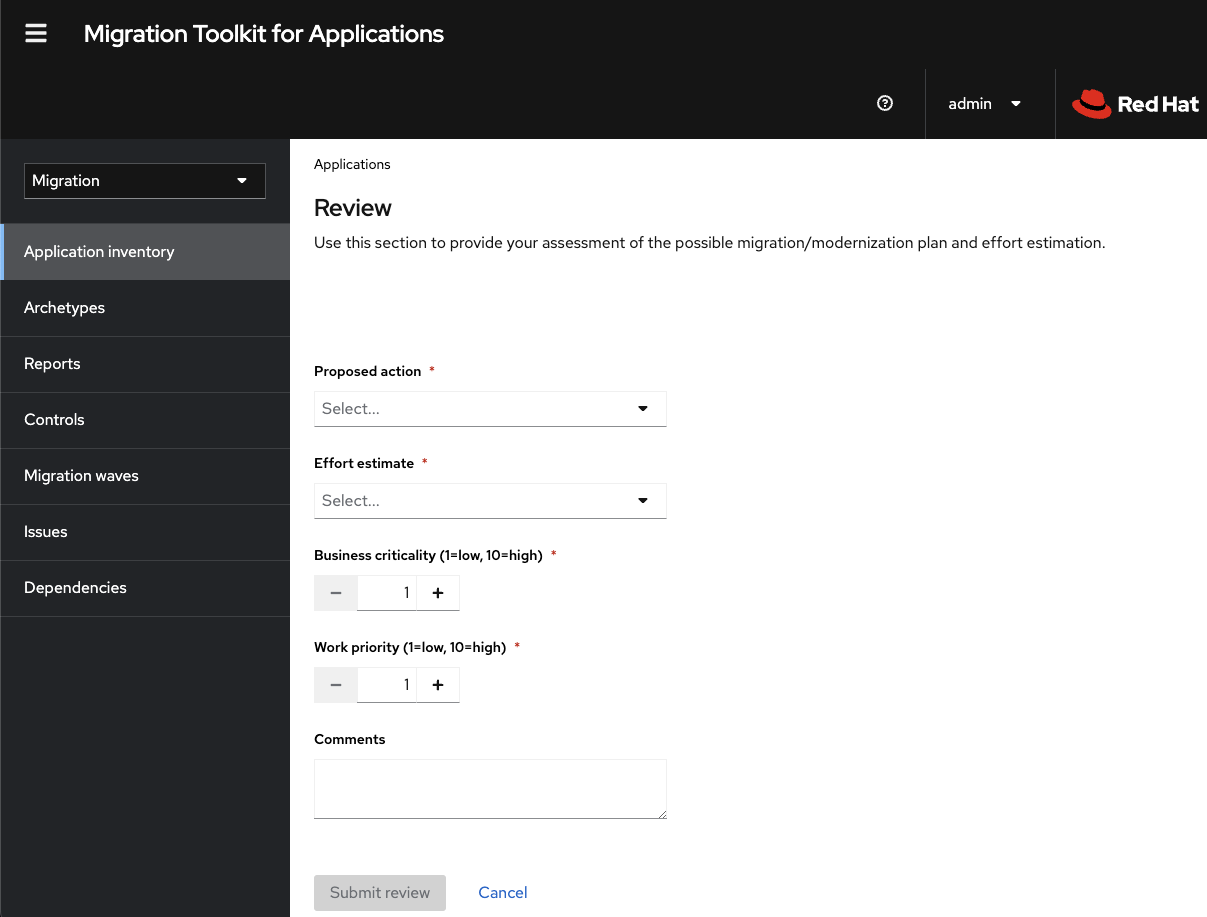
- Click Proposed action and select the action.
- Click Effort estimate and set the level of effort required to perform the assessment with the selected questionnaire.
- In the Business criticality field, enter how critical the application is to the business.
- In the Work priority field, enter the application’s priority.
- Optional: Enter the assessment questionnaire comments in the Comments field.
Click Submit review.
The fields from Review are now populated on the Application details page.
7.6. Reviewing an assessment report
An MTA assessment report displays an aggregated assessment of the data obtained from multiple questionnaires for multiple applications.
Procedure
In the Migration view, click Reports. The aggregated assessment report for all applications is displayed.
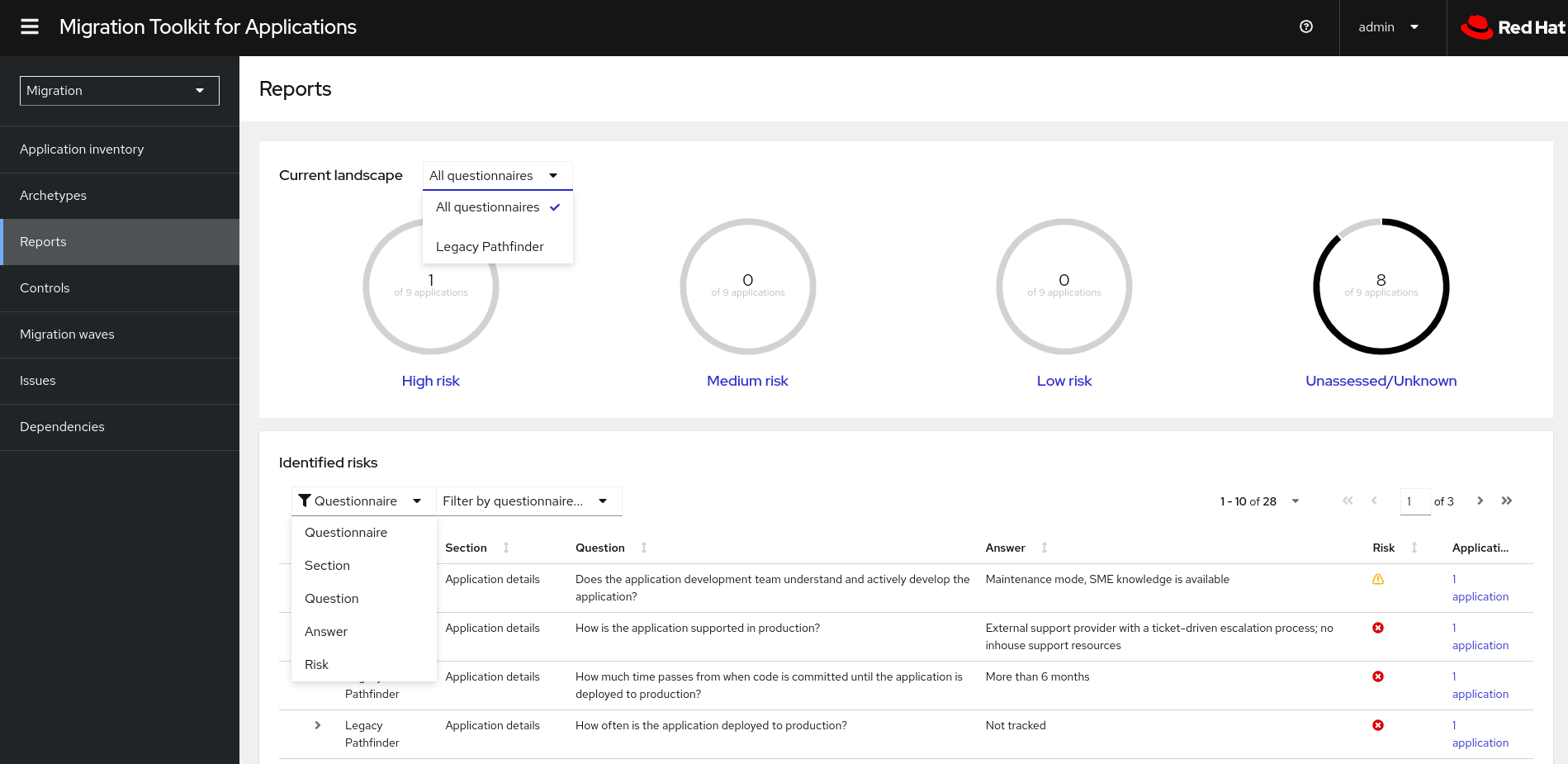
Depending on your scenario, perform one of the following actions:
Display a report on the data from a particular questionnaire:
- Select the required questionnaire from a drop-down list of all questionnaires in the Current landscape pane of the report. By default, all questionnaires are selected.
- In the Identified risks pane of the report, sort the displayed list by application name, level of risk, questionnaire, questionnaire section, question, and answer.
Display a report for a specific application:
- Click the link in the Applications column in the Identified risks pane of the report. The Application inventory page opens. The applications included in the link are displayed as a list.
Click the required application. The Assessment side pane opens.
- To see the assessed risk level for the application, open the Details tab.
- To see the details of the assessment, open the Reviews tab.
7.7. Tagging an application
You can attach various tags to the application that you are analyzing. You can use tags to classify applications and instantly identify application information, for example, an application type, data center location, and technologies used within the application. You can also use tagging to associate archetypes to applications for automatic assessment. For more information about archetypes, see Working with archetypes.
Tagging can be done automatically during the analysis manually at any time.
Not all tags can be assigned automatically. For example, an analysis can only tag the application based on its technologies. If you want to tag the application also with the location of the data center where it is deployed, you need to tag the application manually.
7.7.1. Creating application tags
You can create custom tags for applications that MTA assesses or analyzes.
Procedure
- In the Migration view, click Controls.
- Click the Tags tab.
- Click Create tag.
- In the Name field in the opened dialogue, enter a unique name for the tag.
- Click the Tag category field and select the category tag to associate with the tag.
- Click Create.
Optional: Edit the created tag or tag category:
Edit the tag:
- In the list of tag categories under the Tags tab, open the list of tags in the desired category.
- Select Edit from the drop-down menu and edit the tag name in the Name field.
- Click the Tag category field and select the category tag to associate with the tag.
- Click Save.
Edit the tag category:
- Under the Tags tab, select a defined tag category and click Edit.
- Edit the tag category’s name in the Name field.
- Edit the category’s Rank value.
- Click the Color field and select a color for the tag category.
- Click Save.
7.7.2. Manually tagging an application
You can tag an application manually, both before or after you run an application analysis.
Procedure
- In the Migration view, click Application inventory.
-
In the row of the required application, click Edit (
 ). The Update application window opens.
- Select the desired tags from the Select a tag(s) drop-down list.
- Click Save.
7.7.3. Automatic tagging
MTA can automatically add tags to the application based on the application analysis. Automatic tagging is especially useful when dealing with large portfolios of applications.
Automatic tagging of applications is enabled by default. You can disable automatic tagging by deselecting the Enable automated tagging checkbox in the Advanced section of the Analysis configuration wizard.
To tag an application automatically, make sure that the Enable automated tagging checkbox is selected before you run an application analysis.
7.7.4. Displaying application tags
You can display the tags attached to a particular application.
You can display the tags that were attached automatically only after you have run an application analysis.
Procedure
- In the Migration view, click Application inventory.
- Click the name of the required application. A side pane opens.
- Click the Tags tab. The tags attached to the application are displayed.
7.8. Working with archetypes
An archetype is a group of applications with common characteristics. You can use archetypes to assess multiple applications at once. By using archetypes, the Migration Toolkit for Applications (MTA) can apply questionnaires populated with questions that apply to common application characteristics.
Application archetypes are defined by criteria tags and the application taxonomy. Each archetype defines how the assessment module assesses the application according to the characteristics defined in that archetype. If the tags of an application match the criteria tags of an archetype, the application is associated with the archetype.
Creation of an archetype is defined by a series of tags, stakeholders, and stakeholder groups. The tags include the following types:
Criteria tags are tags that the archetype requires to include an application as a member.
NoteIf the archetype criteria tags match an application only partially, this application cannot be a member of the archetype. For example, if the application a only has tag a, but the archetype a criteria tags include tags a AND b, the application a will not be a member of the archetype a.
- Archetype tags are tags that are applied to the archetype entity.
All applications associated with the archetype inherit the assessment and review from the archetype groups to which these applications belong. This is the default setting. You can override inheritance for the application by completing an individual assessment and review.
7.8.1. Creating an archetype
When you create an archetype, an application in the inventory is automatically associated to that archetype if this application has the tags that match the tags of the archetype.
Procedure
- Open the MTA web console.
- In the left menu, click Archetypes.
- Click Create new archetype.
In the form that opens, enter the following information for the new archetype:
- Name: A name of the new archetype (mandatory).
- Description: A description of the new archetype (optional).
- Criteria Tags: Tags that associate the assessed applications with the archetype (mandatory). If criteria tags are updated, the process to calculate the applications, which the archetype is associated with, is triggered again.
- Archetype Tags: Tags that the archetype assesses in the application (mandatory).
- Stakeholder(s): Specific stakeholders involved in the application development and migration (optional).
- Stakeholders Group(s): Groups of stakeholders involved in the application development and migration (optional).
- Click Create.
7.8.2. Archetype assessment
An archetype is considered assessed when all required questionnaires have been answered.
An archetype is considered reviewed when it has been reviewed once even if multiple questionnaires have been marked as required.
If an application is associated with archetypes, this application is considered assessed when all associated archetypes have been assessed.
7.8.3. Deleting an archetype
Deleting an archetype deletes any associated assessment. All associated applications move to the Unassessed state.
7.9. Analyzing an application
You can use the Migration Toolkit for Applications (MTA) user interface to configure and run an application analysis. The analysis determines which specific lines in the application must be modified before the application can be migrated or modernized.
7.9.1. Configuring and running an application analysis
You can analyze more than one application at a time against more than one transformation target in the same analysis.
Procedure
- In the Migration view, click Application inventory.
- Select an application that you want to analyze.
- Review the credentials assigned to the application.
- Click Analyze.
Select the Analysis mode from the list:
- Binary
- Source code
- Source code and dependencies
- Upload a local binary. This option only appears if you are analyzing a single application. If you chose this option, you are prompted to Upload a local binary. Either drag a file into the area provided or click Upload and select the file to upload.
- Click Next.
Select one or more target options for the analysis:
Application server migration to either of the following platforms:
- JBoss EAP 7
- JBoss EAP 8
- Containerization
- Quarkus
- OracleJDK to OpenJDK
OpenJDK. Use this option to upgrade to either of the following JDK versions:
- OpenJDK 11
- OpenJDK 17
- OpenJDK 21
- Linux. Use this option to ensure that there are no Microsoft Windows paths hard-coded into your applications.
- Jakarta EE 9. Use this option to migrate from Java EE 8.
- Spring Boot on Red Hat Runtimes
- Open Liberty
- Camel. Use this option to migrate from Apache Camel 2 to Apache Camel 3 or from Apache Camel 3 to Apache Camel 4.
- Azure App Service
- Click Next.
Select one of the following Scope options to better focus the analysis:
- Application and internal dependencies only.
- Application and all dependencies, including known Open Source libraries.
- Select the list of packages to be analyzed manually. If you choose this option, type the file name and click Add.
- Exclude packages. If you choose this option, type the name of the package and click Add.
- Click Next.
In Advanced, you can attach additional custom rules to the analysis by selecting the Manual or Repository mode:
- In the Manual mode, click Add Rules. Drag the relevant files or select the files from their directory and click Add.
In the Repository mode, you can add rule files from a Git or Subversion repository.
ImportantAttaching custom rules is optional if you have already attached a migration target to the analysis. If you have not attached any migration target, you must attach rules.
Optional: Set any of the following options:
- Target
- Source(s)
- Excluded rules tags. Rules with these tags are not processed. Add or delete as needed.
Enable automated tagging. Select the checkbox to automatically attach tags to the application. This checkbox is selected by default.
NoteAutomatically attached tags are displayed only after you run the analysis.
You can attach tags to the application manually instead of enabling automated tagging or in addition to it.
NoteAnalysis engines use standard rules for a comprehensive set of migration targets, but if the target is not included or is a customized framework, custom rules can be added. Only manually uploaded custom rule files are validated.
- Click Next.
- In Review, verify the analysis parameters.
Click Run.
The analysis status is
Scheduledas MTA downloads the image for the container to execute. When the image is downloaded, the status changes toIn-progress.NoteAnalysis takes minutes to hours to run depending on the size of the application and the capacity and resources of the cluster.
TipMTA relies on Kubernetes scheduling capabilities to determine how many analyzer instances are created based on cluster capacity. If several applications are selected for analysis, by default, only one analyzer can be provisioned at a time. With more cluster capacity, more analysis processes can be executed in parallel.
- When analysis is complete, click the Report link to see the results of the analysis.
Optional: Display the details of the analysis:
-
Click the Options menu (
).
- Select Analysis details. You can choose either the YAML or JSON format.
-
Click the Options menu (
7.9.2. Reviewing an analysis report
An MTA analysis report contains a number of sections, including a listing of the technologies used by the application, the dependencies of the application, and the lines of code that must be changed to successfully migrate or modernize the application.
For more information about the contents of an MTA analysis report, see Reviewing the reports.
Procedure
- In the Migration view, click Application inventory.
- Expand the application with a completed analysis.
- Click Reports.
- Click the dependencies or source links.
- Click the tabs to review the report.
7.9.3. Downloading an analysis report
For your convenience, you can download analysis reports. Note that by default this option is disabled.
Procedure
- In Administration view, click General.
- Toggle the Allow reports to be downloaded after running an analysis. switch.
- Go to the Migration view and click Application inventory.
- Open the page of the application for which you ran an analysis.
- Click Reports.
Click either the HTML or YAML link:
-
By clicking the HTML link, you download the compressed
analysis-report-app-<application_name>.tarfile. Extracting this file creates a folder with the same name as the application. -
By clicking the YAML link, you download the uncompressed
analysis-report-app-<application_name>.yamlfile.
-
By clicking the HTML link, you download the compressed
7.10. Creating custom migration targets
Architects or users with admin permissions can create and maintain custom rulesets associated with custom migration targets. Architects can upload custom rule files and assign them to various custom migration targets. The custom migration targets can then be selected in the analysis configuration wizard.
By using ready-made custom migration targets, you can avoid configuring custom rules for each analysis run. This simplifies analysis configuration and execution for non-admin users or third-party developers.
Prerequisites
-
You are logged in as a user with
adminpermissions.
Procedure
- In the Administration view, click Custom migration targets.
- Click Create new.
- Enter the name and description of the target.
- In the Image section, upload an image file for the target’s icon. The file can be in either the PNG or JPEG format, up to 1 MB. If you do not upload any file, a default icon is used.
In the Custom rules section, select either Upload manually or Retrieve from a repository:
- If you selected Upload manually, upload or drag and drop the required rule files from your local drive.
If you selected Retrieve from a repository, complete the following steps:
- Choose Git or Subversion.
- Enter the Source repository, Branch, and Root path fields.
- If the repository requires credentials, enter these credentials in the Associated credentials field.
Click Create.
The new migration target appears on the Custom migration targets page. It can now be used by non-admin users in the Migration view.
Revised on 2024-05-23 14:02:28 UTC

'%20d='M201.5%20305.5c-13.8%200-24.9-11.1-24.9-24.6%200-13.8%2011.1-24.9%2024.9-24.9%2013.6%200%2024.6%2011.1%2024.6%2024.9%200%2013.6-11.1%2024.6-24.6%2024.6zM504%20256c0%20137-111%20248-248%20248S8%20393%208%20256%20119%208%20256%208s248%20111%20248%20248zm-132.3-41.2c-9.4%200-17.7%203.9-23.8%2010-22.4-15.5-52.6-25.5-86.1-26.6l17.4-78.3%2055.4%2012.5c0%2013.6%2011.1%2024.6%2024.6%2024.6%2013.8%200%2024.9-11.3%2024.9-24.9s-11.1-24.9-24.9-24.9c-9.7%200-18%205.8-22.1%2013.8l-61.2-13.6c-3-.8-6.1%201.4-6.9%204.4l-19.1%2086.4c-33.2%201.4-63.1%2011.3-85.5%2026.8-6.1-6.4-14.7-10.2-24.1-10.2-34.9%200-46.3%2046.9-14.4%2062.8-1.1%205-1.7%2010.2-1.7%2015.5%200%2052.6%2059.2%2095.2%20132%2095.2%2073.1%200%20132.3-42.6%20132.3-95.2%200-5.3-.6-10.8-1.9-15.8%2031.3-16%2019.8-62.5-14.9-62.5zM302.8%20331c-18.2%2018.2-76.1%2017.9-93.6%200-2.2-2.2-6.1-2.2-8.3%200-2.5%202.5-2.5%206.4%200%208.6%2022.8%2022.8%2087.3%2022.8%20110.2%200%202.5-2.2%202.5-6.1%200-8.6-2.2-2.2-6.1-2.2-8.3%200zm7.7-75c-13.6%200-24.6%2011.1-24.6%2024.9%200%2013.6%2011.1%2024.6%2024.6%2024.6%2013.8%200%2024.9-11.1%2024.9-24.6%200-13.8-11-24.9-24.9-24.9z'/%3e%3c/svg%3e)