 Red Hat Summit
Dieser Inhalt ist in der von Ihnen ausgewählten Sprache nicht verfügbar.
Chapter 25. OVN-Kubernetes network plugin
25.1. About the OVN-Kubernetes network plugin
The OpenShift Container Platform cluster uses a virtualized network for pod and service networks.
Part of Red Hat OpenShift Networking, the OVN-Kubernetes network plugin is the default network provider for OpenShift Container Platform. OVN-Kubernetes is based on Open Virtual Network (OVN) and provides an overlay-based networking implementation.
For a cloud controller manager (CCM) with the --cloud-provider=external option set to cloud-provider-vsphere, a known issue exists for a cluster that operates in a networking environment with multiple subnets.
When you upgrade your cluster from OpenShift Container Platform 4.12 to OpenShift Container Platform 4.13, the CCM selects a wrong node IP address and this operation generates an error message in the namespaces/openshift-cloud-controller-manager/pods/vsphere-cloud-controller-manager logs. The error message indicates a mismatch with the node IP address and the vsphere-cloud-controller-manager pod IP address in your cluster.
The known issue might not impact the cluster upgrade operation, but you can set the correct IP address in both the nodeNetworking.external.networkSubnetCidr and the nodeNetworking.internal.networkSubnetCidr parameters for the nodeNetworking object that your cluster uses for its networking requirements.
A cluster that uses the OVN-Kubernetes plugin also runs Open vSwitch (OVS) on each node. OVN configures OVS on each node to implement the declared network configuration.
OVN-Kubernetes is the default networking solution for OpenShift Container Platform and single-node OpenShift deployments.
OVN-Kubernetes, which arose from the OVS project, uses many of the same constructs, such as open flow rules, to determine how packets travel through the network. For more information, see the Open Virtual Network website.
OVN-Kubernetes is a series of daemons for OVS that translate virtual network configurations into OpenFlow rules. OpenFlow is a protocol for communicating with network switches and routers, providing a means for remotely controlling the flow of network traffic on a network device, allowing network administrators to configure, manage, and monitor the flow of network traffic.
OVN-Kubernetes provides more of the advanced functionality not available with OpenFlow. OVN supports distributed virtual routing, distributed logical switches, access control, DHCP and DNS. OVN implements distributed virtual routing within logic flows which equate to open flows. So for example if you have a pod that sends out a DHCP request on the network, it sends out that broadcast looking for DHCP address there will be a logic flow rule that matches that packet, and it responds giving it a gateway, a DNS server an IP address and so on.
OVN-Kubernetes runs a daemon on each node. There are daemon sets for the databases and for the OVN controller that run on every node. The OVN controller programs the Open vSwitch daemon on the nodes to support the network provider features; egress IPs, firewalls, routers, hybrid networking, IPSEC encryption, IPv6, network policy, network policy logs, hardware offloading and multicast.
25.1.1. OVN-Kubernetes purpose
The OVN-Kubernetes network plugin is an open-source, fully-featured Kubernetes CNI plugin that uses Open Virtual Network (OVN) to manage network traffic flows. OVN is a community developed, vendor-agnostic network virtualization solution. The OVN-Kubernetes network plugin:
- Uses OVN (Open Virtual Network) to manage network traffic flows. OVN is a community developed, vendor-agnostic network virtualization solution.
- Implements Kubernetes network policy support, including ingress and egress rules.
- Uses the Geneve (Generic Network Virtualization Encapsulation) protocol rather than VXLAN to create an overlay network between nodes.
The OVN-Kubernetes network plugin provides the following advantages over OpenShift SDN.
- Full support for IPv6 single-stack and IPv4/IPv6 dual-stack networking on supported platforms
- Support for hybrid clusters with both Linux and Microsoft Windows workloads
- Optional IPsec encryption of intra-cluster communications
- Offload of network data processing from host CPU to compatible network cards and data processing units (DPUs)
25.1.2. Supported network plugin feature matrix
Red Hat OpenShift Networking offers two options for the network plugin, OpenShift SDN and OVN-Kubernetes, for the network plugin. The following table summarizes the current feature support for both network plugins:
| Feature | OpenShift SDN | OVN-Kubernetes |
|---|---|---|
| Egress IPs | Supported | Supported |
| Egress firewall | Supported | Supported [1] |
| Egress router | Supported | Supported [2] |
| Hybrid networking | Not supported | Supported |
| IPsec encryption for intra-cluster communication | Not supported | Supported |
| IPv4 single-stack | Supported | Supported |
| IPv6 single-stack | Not supported | Supported [3] |
| IPv4/IPv6 dual-stack | Not Supported | Supported [4] |
| IPv6/IPv4 dual-stack | Not supported | Supported [5] |
| Kubernetes network policy | Supported | Supported |
| Kubernetes network policy logs | Not supported | Supported |
| Hardware offloading | Not supported | Supported |
| Multicast | Supported | Supported |
- Egress firewall is also known as egress network policy in OpenShift SDN. This is not the same as network policy egress.
- Egress router for OVN-Kubernetes supports only redirect mode.
- IPv6 single-stack networking on a bare-metal platform.
- IPv4/IPv6 dual-stack networking on bare-metal, VMware vSphere (installer-provisioned infrastructure installations only), IBM Power®, and IBM Z® platforms. On VMware vSphere, dual-stack networking limitations exist.
- IPv6/IPv4 dual-stack networking on bare-metal and IBM Power® platforms.
25.1.3. OVN-Kubernetes IPv6 and dual-stack limitations
The OVN-Kubernetes network plugin has the following limitations:
For clusters configured for dual-stack networking, both IPv4 and IPv6 traffic must use the same network interface as the default gateway. If this requirement is not met, pods on the host in the
ovnkube-nodedaemon set enter theCrashLoopBackOffstate. If you display a pod with a command such asoc get pod -n openshift-ovn-kubernetes -l app=ovnkube-node -o yaml, thestatusfield contains more than one message about the default gateway, as shown in the following output:I1006 16:09:50.985852 60651 helper_linux.go:73] Found default gateway interface br-ex 192.168.127.1 I1006 16:09:50.985923 60651 helper_linux.go:73] Found default gateway interface ens4 fe80::5054:ff:febe:bcd4 F1006 16:09:50.985939 60651 ovnkube.go:130] multiple gateway interfaces detected: br-ex ens4The only resolution is to reconfigure the host networking so that both IP families use the same network interface for the default gateway.
For clusters configured for dual-stack networking, both the IPv4 and IPv6 routing tables must contain the default gateway. If this requirement is not met, pods on the host in the
ovnkube-nodedaemon set enter theCrashLoopBackOffstate. If you display a pod with a command such asoc get pod -n openshift-ovn-kubernetes -l app=ovnkube-node -o yaml, thestatusfield contains more than one message about the default gateway, as shown in the following output:I0512 19:07:17.589083 108432 helper_linux.go:74] Found default gateway interface br-ex 192.168.123.1 F0512 19:07:17.589141 108432 ovnkube.go:133] failed to get default gateway interfaceThe only resolution is to reconfigure the host networking so that both IP families contain the default gateway.
25.1.4. Session affinity
Session affinity is a feature that applies to Kubernetes Service objects. You can use session affinity if you want to ensure that each time you connect to a <service_VIP>:<Port>, the traffic is always load balanced to the same back end. For more information, including how to set session affinity based on a client’s IP address, see Session affinity.
Stickiness timeout for session affinity
The OVN-Kubernetes network plugin for OpenShift Container Platform calculates the stickiness timeout for a session from a client based on the last packet. For example, if you run a curl command 10 times, the sticky session timer starts from the tenth packet not the first. As a result, if the client is continuously contacting the service, then the session never times out. The timeout starts when the service has not received a packet for the amount of time set by the timeoutSeconds parameter.
25.2. OVN-Kubernetes architecture
25.2.1. Introduction to OVN-Kubernetes architecture
The following diagram shows the OVN-Kubernetes architecture.
Figure 25.1. OVK-Kubernetes architecture

The key components are:
- Cloud Management System (CMS) - A platform specific client for OVN that provides a CMS specific plugin for OVN integration. The plugin translates the cloud management system’s concept of the logical network configuration, stored in the CMS configuration database in a CMS-specific format, into an intermediate representation understood by OVN.
-
OVN Northbound database (
nbdb) - Stores the logical network configuration passed by the CMS plugin. -
OVN Southbound database (
sbdb) - Stores the physical and logical network configuration state for OpenVswitch (OVS) system on each node, including tables that bind them. -
ovn-northd - This is the intermediary client between
nbdbandsbdb. It translates the logical network configuration in terms of conventional network concepts, taken from thenbdb, into logical data path flows in thesbdbbelow it. The container name isnorthdand it runs in theovnkube-masterpods. -
ovn-controller - This is the OVN agent that interacts with OVS and hypervisors, for any information or update that is needed for
sbdb. Theovn-controllerreads logical flows from thesbdb, translates them intoOpenFlowflows and sends them to the node’s OVS daemon. The container name isovn-controllerand it runs in theovnkube-nodepods.
The OVN northbound database has the logical network configuration passed down to it by the cloud management system (CMS). The OVN northbound Database contains the current desired state of the network, presented as a collection of logical ports, logical switches, logical routers, and more. The ovn-northd (northd container) connects to the OVN northbound database and the OVN southbound database. It translates the logical network configuration in terms of conventional network concepts, taken from the OVN northbound Database, into logical data path flows in the OVN southbound database.
The OVN southbound database has physical and logical representations of the network and binding tables that link them together. Every node in the cluster is represented in the southbound database, and you can see the ports that are connected to it. It also contains all the logic flows, the logic flows are shared with the ovn-controller process that runs on each node and the ovn-controller turns those into OpenFlow rules to program Open vSwitch.
The Kubernetes control plane nodes each contain an ovnkube-master pod which hosts containers for the OVN northbound and southbound databases. All OVN northbound databases form a Raft cluster and all southbound databases form a separate Raft cluster. At any given time a single ovnkube-master is the leader and the other ovnkube-master pods are followers.
25.2.2. Listing all resources in the OVN-Kubernetes project
Finding the resources and containers that run in the OVN-Kubernetes project is important to help you understand the OVN-Kubernetes networking implementation.
Prerequisites
-
Access to the cluster as a user with the
cluster-adminrole. -
The OpenShift CLI (
oc) installed.
Procedure
Run the following command to get all resources, endpoints, and
ConfigMapsin the OVN-Kubernetes project:$ oc get all,ep,cm -n openshift-ovn-kubernetesExample output
NAME                       READY   STATUS    RESTARTS      AGE
pod/ovnkube-master-9g7zt   6/6     Running   1 (48m ago)   57m
pod/ovnkube-master-lqs4v   6/6     Running   0             57m
pod/ovnkube-master-vxhtq   6/6     Running   0             57m
pod/ovnkube-node-9k9kc     5/5     Running   0             57m
pod/ovnkube-node-jg52r     5/5     Running   0             51m
pod/ovnkube-node-k8wf7     5/5     Running   0             57m
pod/ovnkube-node-tlwk6     5/5     Running   0             47m
pod/ovnkube-node-xsvnk     5/5     Running   0             57m

NAME                            TYPE        CLUSTER-IP   EXTERNAL-IP   PORT(S)             AGE
service/ovn-kubernetes-master   ClusterIP   None         <none>        9102/TCP            57m
service/ovn-kubernetes-node     ClusterIP   None         <none>        9103/TCP,9105/TCP   57m
service/ovnkube-db              ClusterIP   None         <none>        9641/TCP,9642/TCP   57m

NAME                            DESIRED   CURRENT   READY   UP-TO-DATE   AVAILABLE   NODE SELECTOR                                                 AGE
daemonset.apps/ovnkube-master   3         3         3       3            3           beta.kubernetes.io/os=linux,node-role.kubernetes.io/master=   57m
daemonset.apps/ovnkube-node     5         5         5       5            5           beta.kubernetes.io/os=linux                                   57m

NAME                              ENDPOINTS                                                        AGE
endpoints/ovn-kubernetes-master   10.0.132.11:9102,10.0.151.18:9102,10.0.192.45:9102               57m
endpoints/ovn-kubernetes-node     10.0.132.11:9105,10.0.143.72:9105,10.0.151.18:9105 + 7 more...   57m
endpoints/ovnkube-db              10.0.132.11:9642,10.0.151.18:9642,10.0.192.45:9642 + 3 more...   57m

NAME                                 DATA   AGE
configmap/control-plane-status       1      55m
configmap/kube-root-ca.crt           1      57m
configmap/openshift-service-ca.crt   1      57m
configmap/ovn-ca                     1      57m
configmap/ovnkube-config             1      57m
configmap/signer-ca                  1      57m
There are three
ovnkube-mastersthat run on the control plane nodes, and two daemon sets used to deploy theovnkube-masterandovnkube-nodepods. There is oneovnkube-nodepod for each node in the cluster. Theovnkube-configConfigMaphas the OpenShift Container Platform OVN-Kubernetes configurations started by online-master andovnkube-node.List all the containers in the
ovnkube-masterpods by running the following command:$ oc get pods ovnkube-master-9g7zt \ -o jsonpath='{.spec.containers[*].name}' -n openshift-ovn-kubernetesExpected output
northd nbdb kube-rbac-proxy sbdb ovnkube-master ovn-dbcheckerThe
ovnkube-masterpod is made up of several containers. It is responsible for hosting the northbound database (nbdbcontainer), the southbound database (sbdbcontainer), watching for cluster events for pods, egressIP, namespaces, services, endpoints, egress firewall, and network policy and writing them to the northbound database (ovnkube-masterpod), as well as managing pod subnet allocation to nodes.List all the containers in the
ovnkube-nodepods by running the following command:$ oc get pods ovnkube-node-jg52r \ -o jsonpath='{.spec.containers[*].name}' -n openshift-ovn-kubernetesExpected output
ovn-controller ovn-acl-logging kube-rbac-proxy kube-rbac-proxy-ovn-metrics ovnkube-nodeThe
ovnkube-nodepod has a container (ovn-controller) that resides on each OpenShift Container Platform node. Each node’sovn-controllerconnects the OVN northbound to the OVN southbound database to learn about the OVN configuration. Theovn-controllerconnects southbound toovs-vswitchdas an OpenFlow controller, for control over network traffic, and to the localovsdb-serverto allow it to monitor and control Open vSwitch configuration.List the currently elected OVN-Kubernetes master leader by running the following command:
$ oc get lease -n openshift-ovn-kubernetesExpected output
NAME                    HOLDER                               AGE
ovn-kubernetes-master   ci-ln-gz990pb-72292-rthz2-master-2   50m
25.2.3. Listing the OVN-Kubernetes northbound database contents
To understand logic flow rules you need to examine the northbound database and understand what objects are there to see how they are translated into logic flow rules. The up to date information is present on the OVN Raft leader and this procedure describes how to find the Raft leader and subsequently query it to list the OVN northbound database contents.
Prerequisites
-
Access to the cluster as a user with the
cluster-adminrole. -
The OpenShift CLI (
oc) installed.
Procedure
Find the OVN Raft leader for the northbound database.
NoteThe Raft leader stores the most up to date information.
List the pods by running the following command:
$ oc get po -n openshift-ovn-kubernetesExample output
NAME                   READY   STATUS    RESTARTS       AGE
ovnkube-master-7j97q   6/6     Running   2 (148m ago)   149m
ovnkube-master-gt4ms   6/6     Running   1 (140m ago)   147m
ovnkube-master-mk6p6   6/6     Running   0              148m
ovnkube-node-8qvtr     5/5     Running   0              149m
ovnkube-node-fqdc9     5/5     Running   0              149m
ovnkube-node-tlfwv     5/5     Running   0              149m
ovnkube-node-wlwkn     5/5     Running   0              142m
Choose one of the master pods at random and run the following command:
$ oc exec -n openshift-ovn-kubernetes ovnkube-master-7j97q \
-- /usr/bin/ovn-appctl -t /var/run/ovn/ovnnb_db.ctl \
--timeout=3 cluster/status OVN_Northbound
Example output
Defaulted container "northd" out of: northd, nbdb, kube-rbac-proxy, sbdb, ovnkube-master, ovn-dbchecker
1c57
Name: OVN_Northbound
Cluster ID: c48a (c48aa5c0-a704-4c77-a066-24fe99d9b338)
Server ID: 1c57 (1c57b6fc-2849-49b7-8679-fbf18bafe339)
Address: ssl:10.0.147.219:9643
Status: cluster member
Role: follower
1 Term: 5 Leader: 2b4f2 Vote: unknown Election timer: 10000 Log: [2, 3018] Entries not yet committed: 0 Entries not yet applied: 0 Connections: ->0000 ->0000 <-8844 <-2b4f Disconnections: 0 Servers: 1c57 (1c57 at ssl:10.0.147.219:9643) (self) 8844 (8844 at ssl:10.0.163.212:9643) last msg 8928047 ms ago 2b4f (2b4f at ssl:10.0.242.240:9643) last msg 620 ms ago3 Find the
ovnkube-masterpod running on IP Address10.0.242.240using the following command:$ oc get po -o wide -n openshift-ovn-kubernetes | grep 10.0.242.240 | grep -v ovnkube-nodeExample output
ovnkube-master-gt4ms 6/6 Running 1 (143m ago) 150m 10.0.242.240 ip-10-0-242-240.ec2.internal <none> <none>The
ovnkube-master-gt4mspod runs on IP Address 10.0.242.240.
Run the following command to show all the objects in the northbound database:
$ oc exec -n openshift-ovn-kubernetes -it ovnkube-master-gt4ms \
-c northd -- ovn-nbctl show
The output is too long to list here. The list includes the NAT rules, logical switches, load balancers and so on.
Run the following command to display the options available with the command
ovn-nbctl:$ oc exec -n openshift-ovn-kubernetes -it ovnkube-master-mk6p6 \ -c northd ovn-nbctl --helpYou can narrow down and focus on specific components by using some of the following commands:
Run the following command to show the list of logical routers:
$ oc exec -n openshift-ovn-kubernetes -it ovnkube-master-gt4ms \
-c northd -- ovn-nbctl lr-list
Example output
f971f1f3-5112-402f-9d1e-48f1d091ff04 (GR_ip-10-0-145-205.ec2.internal) 69c992d8-a4cf-429e-81a3-5361209ffe44 (GR_ip-10-0-147-219.ec2.internal) 7d164271-af9e-4283-b84a-48f2a44851cd (GR_ip-10-0-163-212.ec2.internal) 111052e3-c395-408b-97b2-8dd0a20a29a5 (GR_ip-10-0-165-9.ec2.internal) ed50ce33-df5d-48e8-8862-2df6a59169a0 (GR_ip-10-0-209-170.ec2.internal) f44e2a96-8d1e-4a4d-abae-ed8728ac6851 (GR_ip-10-0-242-240.ec2.internal) ef3d0057-e557-4b1a-b3c6-fcc3463790b0 (ovn_cluster_router)NoteFrom this output you can see there is router on each node plus an
ovn_cluster_router.Run the following command to show the list of logical switches:
$ oc exec -n openshift-ovn-kubernetes -it ovnkube-master-gt4ms \
-c northd -- ovn-nbctl ls-list
Example output
82808c5c-b3bc-414a-bb59-8fec4b07eb14 (ext_ip-10-0-145-205.ec2.internal) 3d22444f-0272-4c51-afc6-de9e03db3291 (ext_ip-10-0-147-219.ec2.internal) bf73b9df-59ab-4c58-a456-ce8205b34ac5 (ext_ip-10-0-163-212.ec2.internal) bee1e8d0-ec87-45eb-b98b-63f9ec213e5e (ext_ip-10-0-165-9.ec2.internal) 812f08f2-6476-4abf-9a78-635f8516f95e (ext_ip-10-0-209-170.ec2.internal) f65e710b-32f9-482b-8eab-8d96a44799c1 (ext_ip-10-0-242-240.ec2.internal) 84dad700-afb8-4129-86f9-923a1ddeace9 (ip-10-0-145-205.ec2.internal) 1b7b448b-e36c-4ca3-9f38-4a2cf6814bfd (ip-10-0-147-219.ec2.internal) d92d1f56-2606-4f23-8b6a-4396a78951de (ip-10-0-163-212.ec2.internal) 6864a6b2-de15-4de3-92d8-f95014b6f28f (ip-10-0-165-9.ec2.internal) c26bf618-4d7e-4afd-804f-1a2cbc96ec6d (ip-10-0-209-170.ec2.internal) ab9a4526-44ed-4f82-ae1c-e20da04947d9 (ip-10-0-242-240.ec2.internal) a8588aba-21da-4276-ba0f-9d68e88911f0 (join)NoteFrom this output you can see there is an ext switch for each node plus switches with the node name itself and a join switch.
Run the following command to show the list of load balancers:
$ oc exec -n openshift-ovn-kubernetes -it ovnkube-master-gt4ms \
-c northd -- ovn-nbctl lb-list
Example output
UUID LB PROTO VIP IPs f0fb50f9-4968-4b55-908c-616bae4db0a2 Service_default/ tcp 172.30.0.1:443 10.0.147.219:6443,10.0.163.212:6443,169.254.169.2:6443 0dc42012-4f5b-432e-ae01-2cc4bfe81b00 Service_default/ tcp 172.30.0.1:443 10.0.147.219:6443,169.254.169.2:6443,10.0.242.240:6443 f7fff5d5-5eff-4a40-98b1-3a4ba8f7f69c Service_default/ tcp 172.30.0.1:443 169.254.169.2:6443,10.0.163.212:6443,10.0.242.240:6443 12fe57a0-50a4-4a1b-ac10-5f288badee07 Service_default/ tcp 172.30.0.1:443 10.0.147.219:6443,10.0.163.212:6443,10.0.242.240:6443 3f137fbf-0b78-4875-ba44-fbf89f254cf7 Service_openshif tcp 172.30.23.153:443 10.130.0.14:8443 174199fe-0562-4141-b410-12094db922a7 Service_openshif tcp 172.30.69.51:50051 10.130.0.84:50051 5ee2d4bd-c9e2-4d16-a6df-f54cd17c9ac3 Service_openshif tcp 172.30.143.87:9001 10.0.145.205:9001,10.0.147.219:9001,10.0.163.212:9001,10.0.165.9:9001,10.0.209.170:9001,10.0.242.240:9001 a056ae3d-83f8-45bc-9c80-ef89bce7b162 Service_openshif tcp 172.30.164.74:443 10.0.147.219:6443,10.0.163.212:6443,10.0.242.240:6443 bac51f3d-9a6f-4f5e-ac02-28fd343a332a Service_openshif tcp 172.30.0.10:53 10.131.0.6:5353 tcp 172.30.0.10:9154 10.131.0.6:9154 48105bbc-51d7-4178-b975-417433f9c20a Service_openshif tcp 172.30.26.159:2379 10.0.147.219:2379,169.254.169.2:2379,10.0.242.240:2379 tcp 172.30.26.159:9979 10.0.147.219:9979,169.254.169.2:9979,10.0.242.240:9979 7de2b8fc-342a-415f-ac13-1a493f4e39c0 Service_openshif tcp 172.30.53.219:443 10.128.0.7:8443 tcp 172.30.53.219:9192 10.128.0.7:9192 2cef36bc-d720-4afb-8d95-9350eff1d27a Service_openshif tcp 172.30.81.66:443 10.128.0.23:8443 365cb6fb-e15e-45a4-a55b-21868b3cf513 Service_openshif tcp 172.30.96.51:50051 10.130.0.19:50051 41691cbb-ec55-4cdb-8431-afce679c5e8d Service_openshif tcp 172.30.98.218:9099 169.254.169.2:9099 82df10ba-8143-400b-977a-8f5f416a4541 Service_openshif tcp 172.30.26.159:2379 10.0.147.219:2379,10.0.163.212:2379,169.254.169.2:2379 tcp 172.30.26.159:9979 10.0.147.219:9979,10.0.163.212:9979,169.254.169.2:9979 debe7f3a-39a8-490e-bc0a-ebbfafdffb16 Service_openshif tcp 172.30.23.244:443 10.128.0.48:8443,10.129.0.27:8443,10.130.0.45:8443 8a749239-02d9-4dc2-8737-716528e0da7b Service_openshif tcp 172.30.124.255:8443 10.128.0.14:8443 880c7c78-c790-403d-a3cb-9f06592717a3 Service_openshif tcp 172.30.0.10:53 10.130.0.20:5353 tcp 172.30.0.10:9154 10.130.0.20:9154 d2f39078-6751-4311-a161-815bbaf7f9c7 Service_openshif tcp 172.30.26.159:2379 169.254.169.2:2379,10.0.163.212:2379,10.0.242.240:2379 tcp 172.30.26.159:9979 169.254.169.2:9979,10.0.163.212:9979,10.0.242.240:9979 30948278-602b-455c-934a-28e64c46de12 Service_openshif tcp 172.30.157.35:9443 10.130.0.43:9443 2cc7e376-7c02-4a82-89e8-dfa1e23fb003 Service_openshif tcp 172.30.159.212:17698 10.128.0.48:17698,10.129.0.27:17698,10.130.0.45:17698 e7d22d35-61c2-40c2-bc30-265cff8ed18d Service_openshif tcp 172.30.143.87:9001 10.0.145.205:9001,10.0.147.219:9001,10.0.163.212:9001,10.0.165.9:9001,10.0.209.170:9001,169.254.169.2:9001 75164e75-e0c5-40fb-9636-bfdbf4223a02 Service_openshif tcp 172.30.150.68:1936 10.129.4.8:1936,10.131.0.10:1936 tcp 172.30.150.68:443 10.129.4.8:443,10.131.0.10:443 tcp 172.30.150.68:80 10.129.4.8:80,10.131.0.10:80 7bc4ee74-dccf-47e9-9149-b011f09aff39 Service_openshif tcp 172.30.164.74:443 10.0.147.219:6443,10.0.163.212:6443,169.254.169.2:6443 0db59e74-1cc6-470c-bf44-57c520e0aa8f Service_openshif tcp 10.0.163.212:31460 tcp 10.0.163.212:32361 c300e134-018c-49af-9f84-9deb1d0715f8 Service_openshif tcp 172.30.42.244:50051 10.130.0.47:50051 5e352773-429b-4881-afb3-a13b7ba8b081 Service_openshif tcp 172.30.244.66:443 10.129.0.8:8443,10.130.0.8:8443 54b82d32-1939-4465-a87d-f26321442a7a Service_openshif tcp 172.30.12.9:8443 10.128.0.35:8443NoteFrom this truncated output you can see there are many OVN-Kubernetes load balancers. Load balancers in OVN-Kubernetes are representations of services.
25.2.4. Command-line arguments for ovn-nbctl to examine northbound database contents
The following table describes the command-line arguments that can be used with ovn-nbctl to examine the contents of the northbound database.
| Argument | Description |
|---|---|
|
| An overview of the northbound database contents. |
|
| Show the details associated with the specified switch or router. |
|
| Show the logical routers. |
|
|
Using the router information from |
|
| Show network address translation details for the specified router. |
|
| Show the logical switches |
|
|
Using the switch information from |
|
| Get the type for the logical port. |
|
| Show the load balancers. |
25.2.5. Listing the OVN-Kubernetes southbound database contents
Logic flow rules are stored in the southbound database that is a representation of your infrastructure. The up to date information is present on the OVN Raft leader and this procedure describes how to find the Raft leader and query it to list the OVN southbound database contents.
Prerequisites
-
Access to the cluster as a user with the
cluster-adminrole. -
The OpenShift CLI (
oc) installed.
Procedure
Find the OVN Raft leader for the southbound database.
NoteThe Raft leader stores the most up to date information.
List the pods by running the following command:
$ oc get po -n openshift-ovn-kubernetesExample output
NAME                   READY   STATUS    RESTARTS       AGE
ovnkube-master-7j97q   6/6     Running   2 (134m ago)   135m
ovnkube-master-gt4ms   6/6     Running   1 (126m ago)   133m
ovnkube-master-mk6p6   6/6     Running   0              134m
ovnkube-node-8qvtr     5/5     Running   0              135m
ovnkube-node-bqztb     5/5     Running   0              117m
ovnkube-node-fqdc9     5/5     Running   0              135m
ovnkube-node-tlfwv     5/5     Running   0              135m
ovnkube-node-wlwkn     5/5     Running   0              128m
Choose one of the master pods at random and run the following command to find the OVN southbound Raft leader:
$ oc exec -n openshift-ovn-kubernetes ovnkube-master-7j97q \
-- /usr/bin/ovn-appctl -t /var/run/ovn/ovnsb_db.ctl \
--timeout=3 cluster/status OVN_Southbound
Example output
Defaulted container "northd" out of: northd, nbdb, kube-rbac-proxy, sbdb, ovnkube-master, ovn-dbchecker
1930
Name: OVN_Southbound
Cluster ID: f772 (f77273c0-7986-42dd-bd3c-a9f18e25701f)
Server ID: 1930 (1930f4b7-314b-406f-9dcb-b81fe2729ae1)
Address: ssl:10.0.147.219:9644
Status: cluster member
Role: follower
1 Term: 3 Leader: 70812 Vote: unknown Election timer: 16000 Log: [2, 2423] Entries not yet committed: 0 Entries not yet applied: 0 Connections: ->0000 ->7145 <-7081 <-7145 Disconnections: 0 Servers: 7081 (7081 at ssl:10.0.163.212:9644) last msg 59 ms ago3 1930 (1930 at ssl:10.0.147.219:9644) (self) 7145 (7145 at ssl:10.0.242.240:9644) last msg 7871735 ms agoFind the
ovnkube-masterpod running on IP Address10.0.163.212using the following command:$ oc get po -o wide -n openshift-ovn-kubernetes | grep 10.0.163.212 | grep -v ovnkube-nodeExample output
ovnkube-master-mk6p6 6/6 Running 0 136m 10.0.163.212 ip-10-0-163-212.ec2.internal <none> <none>The
ovnkube-master-mk6p6pod runs on IP Address 10.0.163.212.
Run the following command to show all the information stored in the southbound database:
$ oc exec -n openshift-ovn-kubernetes -it ovnkube-master-mk6p6 \
-c northd -- ovn-sbctl show
Example output
Chassis "8ca57b28-9834-45f0-99b0-96486c22e1be"
    hostname: ip-10-0-156-16.ec2.internal
    Encap geneve
        ip: "10.0.156.16"
        options: {csum="true"}
    Port_Binding k8s-ip-10-0-156-16.ec2.internal
    Port_Binding etor-GR_ip-10-0-156-16.ec2.internal
    Port_Binding jtor-GR_ip-10-0-156-16.ec2.internal
    Port_Binding openshift-ingress-canary_ingress-canary-hsblx
    Port_Binding rtoj-GR_ip-10-0-156-16.ec2.internal
    Port_Binding openshift-monitoring_prometheus-adapter-658fc5967-9l46x
    Port_Binding rtoe-GR_ip-10-0-156-16.ec2.internal
    Port_Binding openshift-multus_network-metrics-daemon-77nvz
    Port_Binding openshift-ingress_router-default-64fd8c67c7-df598
    Port_Binding openshift-dns_dns-default-ttpcq
    Port_Binding openshift-monitoring_alertmanager-main-0
    Port_Binding openshift-e2e-loki_loki-promtail-g2pbh
    Port_Binding openshift-network-diagnostics_network-check-target-m6tn4
    Port_Binding openshift-monitoring_thanos-querier-75b5cf8dcb-qf8qj
    Port_Binding cr-rtos-ip-10-0-156-16.ec2.internal
    Port_Binding openshift-image-registry_image-registry-7b7bc44566-mp9b8
This detailed output shows the chassis and the ports that are attached to the chassis which in this case are all of the router ports and anything that runs like host networking. Any pods communicate out to the wider network using source network address translation (SNAT). Their IP address is translated into the IP address of the node that the pod is running on and then sent out into the network.
In addition to the chassis information the southbound database has all the logic flows and those logic flows are then sent to the
ovn-controllerrunning on each of the nodes. Theovn-controllertranslates the logic flows into open flow rules and ultimately programsOpenvSwitchso that your pods can then follow open flow rules and make it out of the network.Run the following command to display the options available with the command
ovn-sbctl:$ oc exec -n openshift-ovn-kubernetes -it ovnkube-master-mk6p6 \ -c northd -- ovn-sbctl --help
25.2.6. Command-line arguments for ovn-sbctl to examine southbound database contents
The following table describes the command-line arguments that can be used with ovn-sbctl to examine the contents of the southbound database.
| Argument | Description |
|---|---|
|
| Overview of the southbound database contents. |
|
| List the contents of southbound database for a the specified port . |
|
| List the logical flows. |
25.2.7. OVN-Kubernetes logical architecture
OVN is a network virtualization solution. It creates logical switches and routers. These switches and routers are interconnected to create any network topologies. When you run ovnkube-trace with the log level set to 2 or 5 the OVN-Kubernetes logical components are exposed. The following diagram shows how the routers and switches are connected in OpenShift Container Platform.
Figure 25.2. OVN-Kubernetes router and switch components
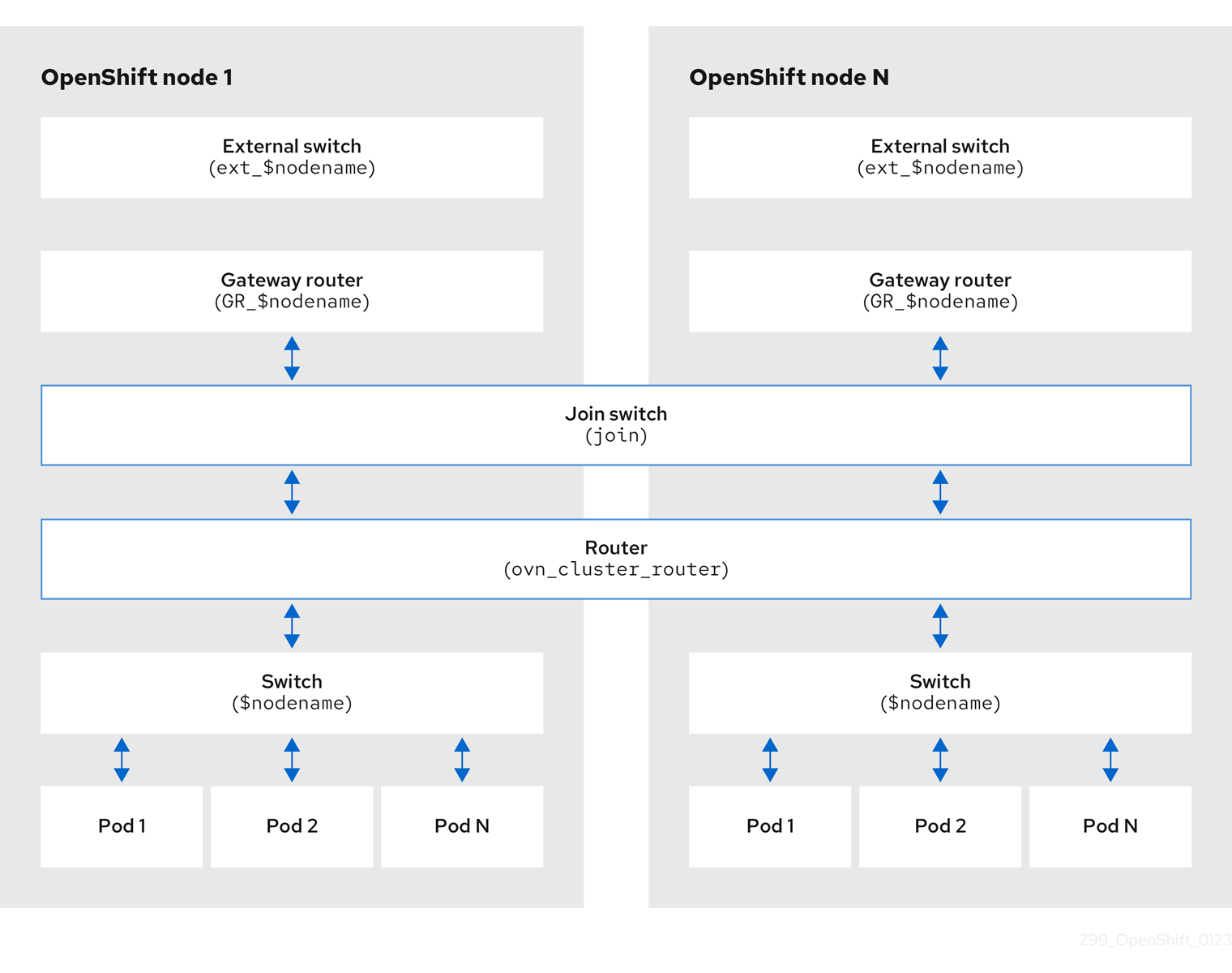
The key components involved in packet processing are:
- Gateway routers
-
Gateway routers sometimes called L3 gateway routers, are typically used between the distributed routers and the physical network. Gateway routers including their logical patch ports are bound to a physical location (not distributed), or chassis. The patch ports on this router are known as l3gateway ports in the ovn-southbound database (
ovn-sbdb). - Distributed logical routers
- Distributed logical routers and the logical switches behind them, to which virtual machines and containers attach, effectively reside on each hypervisor.
- Join local switch
- Join local switches are used to connect the distributed router and gateway routers. It reduces the number of IP addresses needed on the distributed router.
- Logical switches with patch ports
- Logical switches with patch ports are used to virtualize the network stack. They connect remote logical ports through tunnels.
- Logical switches with localnet ports
- Logical switches with localnet ports are used to connect OVN to the physical network. They connect remote logical ports by bridging the packets to directly connected physical L2 segments using localnet ports.
- Patch ports
- Patch ports represent connectivity between logical switches and logical routers and between peer logical routers. A single connection has a pair of patch ports at each such point of connectivity, one on each side.
- l3gateway ports
-
l3gateway ports are the port binding entries in the
ovn-sbdbfor logical patch ports used in the gateway routers. They are called l3gateway ports rather than patch ports just to portray the fact that these ports are bound to a chassis just like the gateway router itself. - localnet ports
-
localnet ports are present on the bridged logical switches that allows a connection to a locally accessible network from each
ovn-controllerinstance. This helps model the direct connectivity to the physical network from the logical switches. A logical switch can only have a single localnet port attached to it.
25.2.7.1. Installing network-tools on local host
Install network-tools on your local host to make a collection of tools available for debugging OpenShift Container Platform cluster network issues.
Procedure
Clone the
network-toolsrepository onto your workstation with the following command:$ git clone git@github.com:openshift/network-tools.gitChange into the directory for the repository you just cloned:
$ cd network-toolsOptional: List all available commands:
$ ./debug-scripts/network-tools -h
25.2.7.2. Running network-tools
Get information about the logical switches and routers by running network-tools.
Prerequisites
-
You installed the OpenShift CLI (
oc). -
You are logged in to the cluster as a user with
cluster-adminprivileges. -
You have installed
network-toolson local host.
Procedure
List the routers by running the following command:
$ ./debug-scripts/network-tools ovn-db-run-command ovn-nbctl lr-listExample output
Leader pod is ovnkube-master-vslqm
5351ddd1-f181-4e77-afc6-b48b0a9df953 (GR_helix13.lab.eng.tlv2.redhat.com)
ccf9349e-1948-4df8-954e-39fb0c2d4d06 (GR_helix14.lab.eng.tlv2.redhat.com)
e426b918-75a8-4220-9e76-20b7758f92b7 (GR_hlxcl7-master-0.hlxcl7.lab.eng.tlv2.redhat.com)
dded77c8-0cc3-4b99-8420-56cd2ae6a840 (GR_hlxcl7-master-1.hlxcl7.lab.eng.tlv2.redhat.com)
4f6747e6-e7ba-4e0c-8dcd-94c8efa51798 (GR_hlxcl7-master-2.hlxcl7.lab.eng.tlv2.redhat.com)
52232654-336e-4952-98b9-0b8601e370b4 (ovn_cluster_router)
List the localnet ports by running the following command:
$ ./debug-scripts/network-tools ovn-db-run-command \
ovn-sbctl find Port_Binding type=localnet
Example output
Leader pod is ovnkube-master-vslqm
_uuid               : 3de79191-cca8-4c28-be5a-a228f0f9ebfc
additional_chassis  : []
additional_encap    : []
chassis             : []
datapath            : 3f1a4928-7ff5-471f-9092-fe5f5c67d15c
encap               : []
external_ids        : {}
gateway_chassis     : []
ha_chassis_group    : []
logical_port        : br-ex_helix13.lab.eng.tlv2.redhat.com
mac                 : [unknown]
nat_addresses       : []
options             : {network_name=physnet}
parent_port         : []
port_security       : []
requested_additional_chassis: []
requested_chassis   : []
tag                 : []
tunnel_key          : 2
type                : localnet
up                  : false
virtual_parent      : []

_uuid               : dbe21daf-9594-4849-b8f0-5efbfa09a455
additional_chassis  : []
additional_encap    : []
chassis             : []
datapath            : db2a6067-fe7c-4d11-95a7-ff2321329e11
encap               : []
external_ids        : {}
gateway_chassis     : []
ha_chassis_group    : []
logical_port        : br-ex_hlxcl7-master-2.hlxcl7.lab.eng.tlv2.redhat.com
mac                 : [unknown]
nat_addresses       : []
options             : {network_name=physnet}
parent_port         : []
port_security       : []
requested_additional_chassis: []
requested_chassis   : []
tag                 : []
tunnel_key          : 2
type                : localnet
up                  : false
virtual_parent      : []

[...]
List the
l3gatewayports by running the following command:$ ./debug-scripts/network-tools ovn-db-run-command \ ovn-sbctl find Port_Binding type=l3gatewayExample output
Leader pod is ovnkube-master-vslqm
_uuid               : 9314dc80-39e1-4af7-9cc0-ae8a9708ed59
additional_chassis  : []
additional_encap    : []
chassis             : 336a923d-99e8-4e71-89a6-12564fde5760
datapath            : db2a6067-fe7c-4d11-95a7-ff2321329e11
encap               : []
external_ids        : {}
gateway_chassis     : []
ha_chassis_group    : []
logical_port        : etor-GR_hlxcl7-master-2.hlxcl7.lab.eng.tlv2.redhat.com
mac                 : ["52:54:00:3e:95:d3"]
nat_addresses       : ["52:54:00:3e:95:d3 10.46.56.77"]
options             : {l3gateway-chassis="7eb1f1c3-87c2-4f68-8e89-60f5ca810971", peer=rtoe-GR_hlxcl7-master-2.hlxcl7.lab.eng.tlv2.redhat.com}
parent_port         : []
port_security       : []
requested_additional_chassis: []
requested_chassis   : []
tag                 : []
tunnel_key          : 1
type                : l3gateway
up                  : true
virtual_parent      : []

_uuid               : ad7eb303-b411-4e9f-8d36-d07f1f268e27
additional_chassis  : []
additional_encap    : []
chassis             : f41453b8-29c5-4f39-b86b-e82cf344bce4
datapath            : 082e7a60-d9c7-464b-b6ec-117d3426645a
encap               : []
external_ids        : {}
gateway_chassis     : []
ha_chassis_group    : []
logical_port        : etor-GR_helix14.lab.eng.tlv2.redhat.com
mac                 : ["34:48:ed:f3:e2:2c"]
nat_addresses       : ["34:48:ed:f3:e2:2c 10.46.56.14"]
options             : {l3gateway-chassis="2e8abe3a-cb94-4593-9037-f5f9596325e2", peer=rtoe-GR_helix14.lab.eng.tlv2.redhat.com}
parent_port         : []
port_security       : []
requested_additional_chassis: []
requested_chassis   : []
tag                 : []
tunnel_key          : 1
type                : l3gateway
up                  : true
virtual_parent      : []

[...]
List the patch ports by running the following command:
$ ./debug-scripts/network-tools ovn-db-run-command \
ovn-sbctl find Port_Binding type=patch
Example output
Leader pod is ovnkube-master-vslqm
_uuid               : c48b1380-ff26-4965-a644-6bd5b5946c61
additional_chassis  : []
additional_encap    : []
chassis             : []
datapath            : 72734d65-fae1-4bd9-a1ee-1bf4e085a060
encap               : []
external_ids        : {}
gateway_chassis     : []
ha_chassis_group    : []
logical_port        : jtor-ovn_cluster_router
mac                 : [router]
nat_addresses       : []
options             : {peer=rtoj-ovn_cluster_router}
parent_port         : []
port_security       : []
requested_additional_chassis: []
requested_chassis   : []
tag                 : []
tunnel_key          : 4
type                : patch
up                  : false
virtual_parent      : []

_uuid               : 5df51302-f3cd-415b-a059-ac24389938f7
additional_chassis  : []
additional_encap    : []
chassis             : []
datapath            : 0551c90f-e891-4909-8e9e-acc7909e06d0
encap               : []
external_ids        : {}
gateway_chassis     : []
ha_chassis_group    : []
logical_port        : rtos-hlxcl7-master-1.hlxcl7.lab.eng.tlv2.redhat.com
mac                 : ["0a:58:0a:82:00:01 10.130.0.1/23"]
nat_addresses       : []
options             : {chassis-redirect-port=cr-rtos-hlxcl7-master-1.hlxcl7.lab.eng.tlv2.redhat.com, peer=stor-hlxcl7-master-1.hlxcl7.lab.eng.tlv2.redhat.com}
parent_port         : []
port_security       : []
requested_additional_chassis: []
requested_chassis   : []
tag                 : []
tunnel_key          : 4
type                : patch
up                  : false
virtual_parent      : []

[...]
25.3. Troubleshooting OVN-Kubernetes
OVN-Kubernetes has many sources of built-in health checks and logs.
25.3.1. Monitoring OVN-Kubernetes health by using readiness probes
The ovnkube-master and ovnkube-node pods have containers configured with readiness probes.
Prerequisites
-
Access to the OpenShift CLI (
oc). -
You have access to the cluster with
cluster-adminprivileges. -
You have installed
jq.
Procedure
Review the details of the
ovnkube-masterreadiness probe by running the following command:$ oc get pods -n openshift-ovn-kubernetes -l app=ovnkube-master \ -o json | jq '.items[0].spec.containers[] | .name,.readinessProbe'The readiness probe for the northbound and southbound database containers in the
ovnkube-masterpod checks for the health of the Raft cluster hosting the databases.Review the details of the
ovnkube-nodereadiness probe by running the following command:$ oc get pods -n openshift-ovn-kubernetes -l app=ovnkube-master \ -o json | jq '.items[0].spec.containers[] | .name,.readinessProbe'The
ovnkube-nodecontainer in theovnkube-nodepod has a readiness probe to verify the presence of the ovn-kubernetes CNI configuration file, the absence of which would indicate that the pod is not running or is not ready to accept requests to configure pods.Show all events including the probe failures, for the namespace by using the following command:
$ oc get events -n openshift-ovn-kubernetesShow the events for just this pod:
$ oc describe pod ovnkube-master-tp2z8 -n openshift-ovn-kubernetesShow the messages and statuses from the cluster network operator:
$ oc get co/network -o json | jq '.status.conditions[]'Show the
readystatus of each container inovnkube-masterpods by running the following script:$ for p in $(oc get pods --selector app=ovnkube-master -n openshift-ovn-kubernetes \ -o jsonpath='{range.items[*]}{" "}{.metadata.name}'); do echo === $p ===; \ oc get pods -n openshift-ovn-kubernetes $p -o json | jq '.status.containerStatuses[] | .name, .ready'; \ doneNoteThe expectation is all container statuses are reporting as
true. Failure of a readiness probe sets the status tofalse.
25.3.2. Viewing OVN-Kubernetes alerts in the console
The Alerting UI provides detailed information about alerts and their governing alerting rules and silences.
Prerequisites
- You have access to the cluster as a developer or as a user with view permissions for the project that you are viewing metrics for.
Procedure (UI)
-
In the Administrator perspective, select Observe
Alerting. The three main pages in the Alerting UI in this perspective are the Alerts, Silences, and Alerting Rules pages. -
View the rules for OVN-Kubernetes alerts by selecting Observe
Alerting Alerting Rules.
25.3.3. Viewing OVN-Kubernetes alerts in the CLI
You can get information about alerts and their governing alerting rules and silences from the command line.
Prerequisites
-
Access to the cluster as a user with the
cluster-adminrole. -
The OpenShift CLI (
oc) installed. -
You have installed
jq.
Procedure
View active or firing alerts by running the following commands.
Set the alert manager route environment variable by running the following command:
$ ALERT_MANAGER=$(oc get route alertmanager-main -n openshift-monitoring \
-o jsonpath='{@.spec.host}')
Issue a
curlrequest to the alert manager route API with the correct authorization details requesting specific fields by running the following command:$ curl -s -k -H "Authorization: Bearer \ $(oc create token prometheus-k8s -n openshift-monitoring)" \ https://$ALERT_MANAGER/api/v1/alerts \ | jq '.data[] | "\(.labels.severity) \(.labels.alertname) \(.labels.pod) \(.labels.container) \(.labels.endpoint) \(.labels.instance)"'
View alerting rules by running the following command:
$ oc -n openshift-monitoring exec -c prometheus prometheus-k8s-0 -- curl -s 'http://localhost:9090/api/v1/rules' | jq '.data.groups[].rules[] | select(((.name|contains("ovn")) or (.name|contains("OVN")) or (.name|contains("Ovn")) or (.name|contains("North")) or (.name|contains("South"))) and .type=="alerting")'
25.3.4. Viewing the OVN-Kubernetes logs using the CLI
You can view the logs for each of the pods in the ovnkube-master and ovnkube-node pods using the OpenShift CLI (oc).
Prerequisites
-
Access to the cluster as a user with the
cluster-adminrole. -
Access to the OpenShift CLI (
oc). -
You have installed
jq.
Procedure
View the log for a specific pod:
$ oc logs -f <pod_name> -c <container_name> -n <namespace>where:
-f- Optional: Specifies that the output follows what is being written into the logs.
<pod_name>- Specifies the name of the pod.
<container_name>- Optional: Specifies the name of a container. When a pod has more than one container, you must specify the container name.
<namespace>- Specify the namespace the pod is running in.
For example:
$ oc logs ovnkube-master-7h4q7 -n openshift-ovn-kubernetes$ oc logs -f ovnkube-master-7h4q7 -n openshift-ovn-kubernetes -c ovn-dbcheckerThe contents of log files are printed out.
Examine the most recent entries in all the containers in the
ovnkube-masterpods:$ for p in $(oc get pods --selector app=ovnkube-master -n openshift-ovn-kubernetes \ -o jsonpath='{range.items[*]}{" "}{.metadata.name}'); \ do echo === $p ===; for container in $(oc get pods -n openshift-ovn-kubernetes $p \ -o json | jq -r '.status.containerStatuses[] | .name');do echo ---$container---; \ oc logs -c $container $p -n openshift-ovn-kubernetes --tail=5; done; doneView the last 5 lines of every log in every container in an
ovnkube-masterpod using the following command:$ oc logs -l app=ovnkube-master -n openshift-ovn-kubernetes --all-containers --tail 5
25.3.5. Viewing the OVN-Kubernetes logs using the web console
You can view the logs for each of the pods in the ovnkube-master and ovnkube-node pods in the web console.
Prerequisites
-
Access to the OpenShift CLI (
oc).
Procedure
-
In the OpenShift Container Platform console, navigate to Workloads
Pods or navigate to the pod through the resource you want to investigate. -
Select the
openshift-ovn-kubernetesproject from the drop-down menu. - Click the name of the pod you want to investigate.
-
Click Logs. By default for the
ovnkube-masterthe logs associated with thenorthdcontainer are displayed. - Use the down-down menu to select logs for each container in turn.
25.3.5.1. Changing the OVN-Kubernetes log levels
The default log level for OVN-Kubernetes is 2. To debug OVN-Kubernetes set the log level to 5. Follow this procedure to increase the log level of the OVN-Kubernetes to help you debug an issue.
Prerequisites
-
You have access to the cluster with
cluster-adminprivileges. - You have access to the OpenShift Container Platform web console.
Procedure
Run the following command to get detailed information for all pods in the OVN-Kubernetes project:
$ oc get po -o wide -n openshift-ovn-kubernetesExample output
NAME                   READY   STATUS    RESTARTS      AGE   IP             NODE                           NOMINATED NODE   READINESS GATES
ovnkube-master-84nc9   6/6     Running   0             50m   10.0.134.156   ip-10-0-134-156.ec2.internal   <none>           <none>
ovnkube-master-gmlqv   6/6     Running   0             50m   10.0.209.180   ip-10-0-209-180.ec2.internal   <none>           <none>
ovnkube-master-nhts2   6/6     Running   1 (48m ago)   50m   10.0.147.31    ip-10-0-147-31.ec2.internal    <none>           <none>
ovnkube-node-2cbh8     5/5     Running   0             43m   10.0.217.114   ip-10-0-217-114.ec2.internal   <none>           <none>
ovnkube-node-6fvzl     5/5     Running   0             50m   10.0.147.31    ip-10-0-147-31.ec2.internal    <none>           <none>
ovnkube-node-f4lzz     5/5     Running   0             24m   10.0.146.76    ip-10-0-146-76.ec2.internal    <none>           <none>
ovnkube-node-jf67d     5/5     Running   0             50m   10.0.209.180   ip-10-0-209-180.ec2.internal   <none>           <none>
ovnkube-node-np9mf     5/5     Running   0             40m   10.0.165.191   ip-10-0-165-191.ec2.internal   <none>           <none>
ovnkube-node-qjldg     5/5     Running   0             50m   10.0.134.156   ip-10-0-134-156.ec2.internal   <none>           <none>
Create a
ConfigMapfile similar to the following example and use a filename such asenv-overrides.yaml:Example
ConfigMapfilekind: ConfigMap apiVersion: v1 metadata: name: env-overrides namespace: openshift-ovn-kubernetes data: ip-10-0-217-114.ec2.internal: |1 # This sets the log level for the ovn-kubernetes node process: OVN_KUBE_LOG_LEVEL=5 # You might also/instead want to enable debug logging for ovn-controller: OVN_LOG_LEVEL=dbg ip-10-0-209-180.ec2.internal: | # This sets the log level for the ovn-kubernetes node process: OVN_KUBE_LOG_LEVEL=5 # You might also/instead want to enable debug logging for ovn-controller: OVN_LOG_LEVEL=dbg _master: |2 # This sets the log level for the ovn-kubernetes master process as well as the ovn-dbchecker: OVN_KUBE_LOG_LEVEL=5 # You might also/instead want to enable debug logging for northd, nbdb and sbdb on all masters: OVN_LOG_LEVEL=dbgApply the
ConfigMapfile by using the following command:$ oc apply -n openshift-ovn-kubernetes -f env-overrides.yamlExample output
configmap/env-overrides.yaml createdRestart the
ovnkubepods to apply the new log level by using the following commands:$ oc delete pod -n openshift-ovn-kubernetes \ --field-selector spec.nodeName=ip-10-0-217-114.ec2.internal -l app=ovnkube-node$ oc delete pod -n openshift-ovn-kubernetes \ --field-selector spec.nodeName=ip-10-0-209-180.ec2.internal -l app=ovnkube-node$ oc delete pod -n openshift-ovn-kubernetes -l app=ovnkube-master
25.3.6. Checking the OVN-Kubernetes pod network connectivity
The connectivity check controller, in OpenShift Container Platform 4.10 and later, orchestrates connection verification checks in your cluster. These include Kubernetes API, OpenShift API and individual nodes. The results for the connection tests are stored in PodNetworkConnectivity objects in the openshift-network-diagnostics namespace. Connection tests are performed every minute in parallel.
Prerequisites
-
Access to the OpenShift CLI (
oc). -
Access to the cluster as a user with the
cluster-adminrole. -
You have installed
jq.
Procedure
To list the current
PodNetworkConnectivityCheckobjects, enter the following command:$ oc get podnetworkconnectivitychecks -n openshift-network-diagnosticsView the most recent success for each connection object by using the following command:
$ oc get podnetworkconnectivitychecks -n openshift-network-diagnostics \
-o json | jq '.items[]| .spec.targetEndpoint,.status.successes[0]'
View the most recent failures for each connection object by using the following command:
$ oc get podnetworkconnectivitychecks -n openshift-network-diagnostics \
-o json | jq '.items[]| .spec.targetEndpoint,.status.failures[0]'
View the most recent outages for each connection object by using the following command:
$ oc get podnetworkconnectivitychecks -n openshift-network-diagnostics \
-o json | jq '.items[]| .spec.targetEndpoint,.status.outages[0]'
The connectivity check controller also logs metrics from these checks into Prometheus.
View all the metrics by running the following command:
$ oc exec prometheus-k8s-0 -n openshift-monitoring -- \
promtool query instant  http://localhost:9090 \
'{component="openshift-network-diagnostics"}'
View the latency between the source pod and the openshift api service for the last 5 minutes:
$ oc exec prometheus-k8s-0 -n openshift-monitoring -- \
promtool query instant  http://localhost:9090 \
'{component="openshift-network-diagnostics"}'
25.4. Tracing Openflow with ovnkube-trace
OVN and OVS traffic flows can be simulated in a single utility called ovnkube-trace. The ovnkube-trace utility runs ovn-trace, ovs-appctl ofproto/trace and ovn-detrace and correlates that information in a single output.
You can execute the ovnkube-trace binary from a dedicated container. For releases after OpenShift Container Platform 4.7, you can also copy the binary to a local host and execute it from that host.
The binaries in the Quay images do not currently work for Dual IP stack or IPv6 only environments. For those environments, you must build from source.
25.4.1. Installing the ovnkube-trace on local host
The ovnkube-trace tool traces packet simulations for arbitrary UDP or TCP traffic between points in an OVN-Kubernetes driven OpenShift Container Platform cluster. Copy the ovnkube-trace binary to your local host making it available to run against the cluster.
Prerequisites
-
You installed the OpenShift CLI (
oc). -
You are logged in to the cluster with a user with
cluster-adminprivileges.
Procedure
Create a pod variable by using the following command:
$ POD=$(oc get pods -n openshift-ovn-kubernetes -l app=ovnkube-master -o name | head -1 | awk -F '/' '{print $NF}')Run the following command on your local host to copy the binary from the
ovnkube-masterpods:$ oc cp -n openshift-ovn-kubernetes $POD:/usr/bin/ovnkube-trace ovnkube-traceMake
ovnkube-traceexecutable by running the following command:$ chmod +x ovnkube-traceDisplay the options available with
ovnkube-traceby running the following command:$ ./ovnkube-trace -helpExpected output
I0111 15:05:27.973305  204872 ovs.go:90] Maximum command line arguments set to: 191102
Usage of ./ovnkube-trace:
  -dst string
    	dest: destination pod name
  -dst-ip string
    	destination IP address (meant for tests to external targets)
  -dst-namespace string
    	k8s namespace of dest pod (default "default")
  -dst-port string
    	dst-port: destination port (default "80")
  -kubeconfig string
    	absolute path to the kubeconfig file
  -loglevel string
    	loglevel: klog level (default "0")
  -ovn-config-namespace string
    	namespace used by ovn-config itself
  -service string
    	service: destination service name
  -skip-detrace
    	skip ovn-detrace command
  -src string
    	src: source pod name
  -src-namespace string
    	k8s namespace of source pod (default "default")
  -tcp
    	use tcp transport protocol
  -udp
    	use udp transport protocol
The command-line arguments supported are familiar Kubernetes constructs, such as namespaces, pods, services so you do not need to find the MAC address, the IP address of the destination nodes, or the ICMP type.
The log levels are:
- 0 (minimal output)
- 2 (more verbose output showing results of trace commands)
- 5 (debug output)
25.4.2. Running ovnkube-trace
Run ovn-trace to simulate packet forwarding within an OVN logical network.
Prerequisites
-
You installed the OpenShift CLI (
oc). -
You are logged in to the cluster with a user with
cluster-adminprivileges. -
You have installed
ovnkube-traceon local host
Example: Testing that DNS resolution works from a deployed pod
This example illustrates how to test the DNS resolution from a deployed pod to the core DNS pod that runs in the cluster.
Procedure
Start a web service in the default namespace by entering the following command:
$ oc run web --namespace=default --image=nginx --labels="app=web" --expose --port=80List the pods running in the
openshift-dnsnamespace:oc get pods -n openshift-dnsExample output
NAME                  READY   STATUS    RESTARTS   AGE
dns-default-467qw     2/2     Running   0          49m
dns-default-6prvx     2/2     Running   0          53m
dns-default-fkqr8     2/2     Running   0          53m
dns-default-qv2rg     2/2     Running   0          49m
dns-default-s29vr     2/2     Running   0          49m
dns-default-vdsbn     2/2     Running   0          53m
node-resolver-6thtt   1/1     Running   0          53m
node-resolver-7ksdn   1/1     Running   0          49m
node-resolver-8sthh   1/1     Running   0          53m
node-resolver-c5ksw   1/1     Running   0          50m
node-resolver-gbvdp   1/1     Running   0          53m
node-resolver-sxhkd   1/1     Running   0          50m
Run the following
ovn-kube-tracecommand to verify DNS resolution is working:$ ./ovnkube-trace \ -src-namespace default \1 -src web \2 -dst-namespace openshift-dns \3 -dst dns-default-467qw \4 -udp -dst-port 53 \5 -loglevel 06 Expected output
I0116 10:19:35.601303 17900 ovs.go:90] Maximum command line arguments set to: 191102 ovn-trace source pod to destination pod indicates success from web to dns-default-467qw ovn-trace destination pod to source pod indicates success from dns-default-467qw to web ovs-appctl ofproto/trace source pod to destination pod indicates success from web to dns-default-467qw ovs-appctl ofproto/trace destination pod to source pod indicates success from dns-default-467qw to web ovn-detrace source pod to destination pod indicates success from web to dns-default-467qw ovn-detrace destination pod to source pod indicates success from dns-default-467qw to webThe ouput indicates success from the deployed pod to the DNS port and also indicates that it is successful going back in the other direction. So you know bi-directional traffic is supported on UDP port 53 if my web pod wants to do dns resolution from core DNS.
If for example that did not work and you wanted to get the ovn-trace, the ovs-appctl ofproto/trace and ovn-detrace, and more debug type information increase the log level to 2 and run the command again as follows:
$ ./ovnkube-trace \
  -src-namespace default \
-src web \
-dst-namespace openshift-dns \
-dst dns-default-467qw \
-udp -dst-port 53 \
-loglevel 2The output from this increased log level is too much to list here. In a failure situation the output of this command shows which flow is dropping that traffic. For example an egress or ingress network policy may be configured on the cluster that does not allow that traffic.
Example: Verifying by using debug output a configured default deny
This example illustrates how to identify by using the debug output that an ingress default deny policy blocks traffic.
Procedure
Create the following YAML that defines a
deny-by-defaultpolicy to deny ingress from all pods in all namespaces. Save the YAML in thedeny-by-default.yamlfile:kind: NetworkPolicy apiVersion: networking.k8s.io/v1 metadata: name: deny-by-default namespace: default spec: podSelector: {} ingress: []Apply the policy by entering the following command:
$ oc apply -f deny-by-default.yamlExample output
networkpolicy.networking.k8s.io/deny-by-default createdStart a web service in the
defaultnamespace by entering the following command:$ oc run web --namespace=default --image=nginx --labels="app=web" --expose --port=80Run the following command to create the
prodnamespace:$ oc create namespace prodRun the following command to label the
prodnamespace:$ oc label namespace/prod purpose=productionRun the following command to deploy an
alpineimage in theprodnamespace and start a shell:$ oc run test-6459 --namespace=prod --rm -i -t --image=alpine -- sh- Open another terminal session.
In this new terminal session run
ovn-traceto verify the failure in communication between the source podtest-6459running in namespaceprodand destination pod running in thedefaultnamespace:$ ./ovnkube-trace \ -src-namespace prod \ -src test-6459 \ -dst-namespace default \ -dst web \ -tcp -dst-port 80 \ -loglevel 0Expected output
I0116 14:20:47.380775   50822 ovs.go:90] Maximum command line arguments set to: 191102
ovn-trace source pod to destination pod indicates failure from test-6459 to web
Increase the log level to 2 to expose the reason for the failure by running the following command:
$ ./ovnkube-trace \
 -src-namespace prod \
 -src test-6459 \
 -dst-namespace default \
 -dst web \
 -tcp -dst-port 80 \
 -loglevel 2
Expected output
ct_lb_mark /* default (use --ct to customize) */
------------------------------------------------
 3. ls_out_acl_hint (northd.c:6092): !ct.new && ct.est && !ct.rpl && ct_mark.blocked == 0, priority 4, uuid 32d45ad4
    reg0[8] = 1;
    reg0[10] = 1;
    next;
 4. ls_out_acl (northd.c:6435): reg0[10] == 1 && (outport == @a16982411286042166782_ingressDefaultDeny), priority 2000, uuid f730a887
1 ct_commit { ct_mark.blocked = 1; };- 1
- Ingress traffic is blocked due to the default deny policy being in place
Create a policy that allows traffic from all pods in a particular namespaces with a label
purpose=production. Save the YAML in theweb-allow-prod.yamlfile:kind: NetworkPolicy apiVersion: networking.k8s.io/v1 metadata: name: web-allow-prod namespace: default spec: podSelector: matchLabels: app: web policyTypes: - Ingress ingress: - from: - namespaceSelector: matchLabels: purpose: productionApply the policy by entering the following command:
$ oc apply -f web-allow-prod.yamlRun
ovnkube-traceto verify that traffic is now allowed by entering the following command:$ ./ovnkube-trace \ -src-namespace prod \ -src test-6459 \ -dst-namespace default \ -dst web \ -tcp -dst-port 80 \ -loglevel 0Expected output
I0116 14:25:44.055207   51695 ovs.go:90] Maximum command line arguments set to: 191102
ovn-trace source pod to destination pod indicates success from test-6459 to web
ovn-trace destination pod to source pod indicates success from web to test-6459
ovs-appctl ofproto/trace source pod to destination pod indicates success from test-6459 to web
ovs-appctl ofproto/trace destination pod to source pod indicates success from web to test-6459
ovn-detrace source pod to destination pod indicates success from test-6459 to web
ovn-detrace destination pod to source pod indicates success from web to test-6459
In the open shell run the following command:
wget -qO- --timeout=2 http://web.defaultExpected output
<!DOCTYPE html>
<html>
<head>
<title>Welcome to nginx!</title>
<style>
html { color-scheme: light dark; }
body { width: 35em; margin: 0 auto;
font-family: Tahoma, Verdana, Arial, sans-serif; }
</style>
</head>
<body>
<h1>Welcome to nginx!</h1>
<p>If you see this page, the nginx web server is successfully installed and
working. Further configuration is required.</p>

<p>For online documentation and support please refer to
<a href="http://nginx.org/">nginx.org</a>.<br/>
Commercial support is available at
<a href="http://nginx.com/">nginx.com</a>.</p>

<p><em>Thank you for using nginx.</em></p>
</body>
</html>
25.5. Migrating from the OpenShift SDN network plugin
As a cluster administrator, you can migrate to the OVN-Kubernetes network plugin from the OpenShift SDN network plugin.
You can use the offline migration method for migrating from the OpenShift SDN network plugin to the OVN-Kubernetes plugin. The offline migration method is a manual process that includes some downtime.
25.5.1. Migration to the OVN-Kubernetes network plugin
Migrating to the OVN-Kubernetes network plugin is a manual process that includes some downtime during which your cluster is unreachable.
Before you migrate your OpenShift Container Platform cluster to use the OVN-Kubernetes network plugin, update your cluster to the latest z-stream release so that all the latest bug fixes apply to your cluster.
Although a rollback procedure is provided, the migration is intended to be a one-way process.
A migration to the OVN-Kubernetes network plugin is supported on the following platforms:
- Bare metal hardware
- Amazon Web Services (AWS)
- Google Cloud
- IBM Cloud®
- Microsoft Azure
- Red Hat OpenStack Platform (RHOSP)
- Red Hat Virtualization (RHV)
- {vmw-first}
Migrating to or from the OVN-Kubernetes network plugin is not supported for managed OpenShift cloud services such as Red Hat OpenShift Dedicated, Azure Red Hat OpenShift(ARO), and Red Hat OpenShift Service on AWS (ROSA).
Migrating from OpenShift SDN network plugin to OVN-Kubernetes network plugin is not supported on Nutanix.
25.5.1.1. Considerations for migrating to the OVN-Kubernetes network plugin
If you have more than 150 nodes in your OpenShift Container Platform cluster, then open a support case for consultation on your migration to the OVN-Kubernetes network plugin.
The subnets assigned to nodes and the IP addresses assigned to individual pods are not preserved during the migration.
While the OVN-Kubernetes network plugin implements many of the capabilities present in the OpenShift SDN network plugin, the configuration is not the same.
If your cluster uses any of the following OpenShift SDN network plugin capabilities, you must manually configure the same capability in the OVN-Kubernetes network plugin:
- Namespace isolation
- Egress router pods
-
If your cluster or surrounding network uses any part of the
100.64.0.0/16address range, you must choose another unused IP range by specifying thev4InternalSubnetspec under thespec.defaultNetwork.ovnKubernetesConfigobject definition. OVN-Kubernetes uses the IP range100.64.0.0/16internally by default. -
If your
openshift-sdncluster with Precision Time Protocol (PTP) uses the User Datagram Protocol (UDP) for hardware time stamping and you migrate to the OVN-Kubernetes plugin, the hardware time stamping cannot be applied to primary interface devices, such as an Open vSwitch (OVS) bridge. As a result, UDP version 4 configurations cannot work with abr-exinterface.
The following sections highlight the differences in configuration between the aforementioned capabilities in OVN-Kubernetes and OpenShift SDN network plugins.
Primary network interface
The OpenShift SDN plugin allows application of the NodeNetworkConfigurationPolicy (NNCP) custom resource (CR) to the primary interface on a node. The OVN-Kubernetes network plugin does not have this capability.
If you have an NNCP applied to the primary interface, you must delete the NNCP before migrating to the OVN-Kubernetes network plugin. Deleting the NNCP does not remove the configuration from the primary interface, but with OVN-Kubernetes, the Kubernetes NMState cannot manage this configuration. Instead, the configure-ovs.sh shell script manages the primary interface and the configuration attached to this interface.
Namespace isolation
OVN-Kubernetes supports only the network policy isolation mode.
For a cluster using OpenShift SDN that is configured in either the multitenant or subnet isolation mode, you can still migrate to the OVN-Kubernetes network plugin. Note that after the migration operation, multitenant isolation mode is dropped, so you must manually configure network policies to achieve the same level of project-level isolation for pods and services.
Egress IP addresses
OpenShift SDN supports two different Egress IP modes:
- In the automatically assigned approach, an egress IP address range is assigned to a node.
- In the manually assigned approach, a list of one or more egress IP addresses is assigned to a node.
The migration process supports migrating Egress IP configurations that use the automatically assigned mode.
The differences in configuring an egress IP address between OVN-Kubernetes and OpenShift SDN is described in the following table:
| OVN-Kubernetes | OpenShift SDN |
|---|---|
|
|
For more information on using egress IP addresses in OVN-Kubernetes, see "Configuring an egress IP address".
Egress network policies
The difference in configuring an egress network policy, also known as an egress firewall, between OVN-Kubernetes and OpenShift SDN is described in the following table:
| OVN-Kubernetes | OpenShift SDN |
|---|---|
|
|
Because the name of an EgressFirewall object can only be set to default, after the migration all migrated EgressNetworkPolicy objects are named default, regardless of what the name was under OpenShift SDN.
If you subsequently rollback to OpenShift SDN, all EgressNetworkPolicy objects are named default as the prior name is lost.
For more information on using an egress firewall in OVN-Kubernetes, see "Configuring an egress firewall for a project".
Egress router pods
OVN-Kubernetes supports egress router pods in redirect mode. OVN-Kubernetes does not support egress router pods in HTTP proxy mode or DNS proxy mode.
When you deploy an egress router with the Cluster Network Operator, you cannot specify a node selector to control which node is used to host the egress router pod.
Multicast
The difference between enabling multicast traffic on OVN-Kubernetes and OpenShift SDN is described in the following table:
| OVN-Kubernetes | OpenShift SDN |
|---|---|
|
|
For more information on using multicast in OVN-Kubernetes, see "Enabling multicast for a project".
Network policies
OVN-Kubernetes fully supports the Kubernetes NetworkPolicy API in the networking.k8s.io/v1 API group. No changes are necessary in your network policies when migrating from OpenShift SDN.
25.5.1.2. How the migration process works
The following table summarizes the migration process by segmenting between the user-initiated steps in the process and the actions that the migration performs in response.
| User-initiated steps | Migration activity |
|---|---|
|
Set the |
|
|
Update the |
|
| Reboot each node in the cluster. |
|
If a rollback to OpenShift SDN is required, the following table describes the process.
You must wait until the migration process from OpenShift SDN to OVN-Kubernetes network plugin is successful before initiating a rollback.
| User-initiated steps | Migration activity |
|---|---|
| Suspend the MCO to ensure that it does not interrupt the migration. | The MCO stops. |
|
Set the |
|
|
Update the |
|
| Reboot each node in the cluster. |
|
| Enable the MCO after all nodes in the cluster reboot. |
|
25.5.1.3. Using an Ansible playbook to migrate to the OVN-Kubernetes network plugin
As a cluster administrator, you can use an Ansible collection, network.offline_migration_sdn_to_ovnk, to migrate from the OpenShift SDN Container Network Interface (CNI) network plugin to the OVN-Kubernetes plugin for your cluster. The Ansible collection includes the following playbooks:
-
playbooks/playbook-migration.yml: Includes playbooks that execute in a sequence where each playbook represents a step in the migration process. -
playbooks/playbook-rollback.yml: Includes playbooks that execute in a sequence where each playbook represents a step in the rollback process.
Prerequisites
-
You installed the
python3package, minimum version 3.10. -
You installed the
jmespathandjqpackages. - You logged in to the Red Hat Hybrid Cloud Console and opened the Ansible Automation Platform web console.
-
You created a security group rule that allows User Datagram Protocol (UDP) packets on port
6081for all nodes on all cloud platforms. If you do not do this task, your cluster might fail to schedule pods. Check if your cluster uses static routes or routing policies in the host network.
-
If true, a later procedure step requires that you set the
routingViaHostparameter totrueand theipForwardingparameter toGlobalin thegatewayConfigsection of theplaybooks/playbook-migration.ymlfile.
-
If true, a later procedure step requires that you set the
-
If the OpenShift-SDN plugin uses the
100.64.0.0/16and100.88.0.0/16address ranges, you patched the address ranges. For more information, see "Patching OVN-Kubernetes address ranges" in the Additional resources section.
Procedure
Install the
ansible-corepackage, minimum version 2.15. The following example command shows how to install theansible-corepackage on Red Hat Enterprise Linux (RHEL):$ sudo dnf install -y ansible-coreCreate an
ansible.cfgfile and add information similar to the following example to the file. Ensure that file exists in the same directory as where theansible-galaxycommands and the playbooks run.$ cat << EOF >> ansible.cfg [galaxy] server_list = automation_hub, validated [galaxy_server.automation_hub] url=https://console.redhat.com/api/automation-hub/content/published/ auth_url=https://sso.redhat.com/auth/realms/redhat-external/protocol/openid-connect/token token= #[galaxy_server.release_galaxy] #url=https://galaxy.ansible.com/ [galaxy_server.validated] url=https://console.redhat.com/api/automation-hub/content/validated/ auth_url=https://sso.redhat.com/auth/realms/redhat-external/protocol/openid-connect/token token= EOFFrom the Ansible Automation Platform web console, go to the Connect to Hub page and complete the following steps:
- In the Offline token section of the page, click the Load token button.
- After the token loads, click the Copy to clipboard icon.
-
Open the
ansible.cfgfile and paste the API token in thetoken=parameter. The API token is required for authenticating against the server URL specified in theansible.cfgfile.
Install the
network.offline_migration_sdn_to_ovnkAnsible collection by entering the followingansible-galaxycommand:$ ansible-galaxy collection install network.offline_migration_sdn_to_ovnkVerify that the
network.offline_migration_sdn_to_ovnkAnsible collection is installed on your system:$ ansible-galaxy collection list | grep network.offline_migration_sdn_to_ovnkExample output
network.offline_migration_sdn_to_ovnk 1.0.2The
network.offline_migration_sdn_to_ovnkAnsible collection is saved in the default path of~/.ansible/collections/ansible_collections/network/offline_migration_sdn_to_ovnk/.Configure migration features in the
playbooks/playbook-migration.ymlfile:# ... migration_interface_name: eth0 migration_disable_auto_migration: true migration_egress_ip: false migration_egress_firewall: false migration_multicast: false migration_routing_via_host: true migration_ip_forwarding: Global migration_cidr: "10.240.0.0/14" migration_prefix: 23 migration_mtu: 1400 migration_geneve_port: 6081 migration_ipv4_subnet: "100.64.0.0/16" # ...migration_interface_name-
If you use an
NodeNetworkConfigurationPolicy(NNCP) resource on a primary interface, specify the interface name in themigration-playbook.ymlfile so that the NNCP resource gets deleted on the primary interface during the migration process. migration_disable_auto_migration-
Disables the auto-migration of OpenShift SDN CNI plug-in features to the OVN-Kubernetes plugin. If you disable auto-migration of features, you must also set the
migration_egress_ip,migration_egress_firewall, andmigration_multicastparameters tofalse. If you need to enable auto-migration of features, set the parameter tofalse. migration_routing_via_host-
Set to
trueto configure local gateway mode orfalseto configure shared gateway mode for nodes in your cluster. The default value isfalse. In local gateway mode, traffic is routed through the host network stack. In shared gateway mode, traffic is not routed through the host network stack. migration_ip_forwarding-
If you configured local gateway mode, set IP forwarding to
Globalif you need the host network of the node to act as a router for traffic not related to OVN-Kubernetes. migration_cidr-
Specifies a Classless Inter-Domain Routing (CIDR) IP address block for your cluster. You cannot use any CIDR block that overlaps the
100.64.0.0/16CIDR block, because the OVN-Kubernetes network provider uses this block internally. migration_prefix- Ensure that you specify a prefix value, which is the slice of the CIDR block apportioned to each node in your cluster.
migration_mtu- Optional parameter that sets a specific maximum transmission unit (MTU) to your cluster network after the migration process.
migration_geneve_port-
Optional parameter that sets a Geneve port for OVN-Kubernetes. The default port is
6081. migration_ipv4_subnet-
Optional parameter that sets an IPv4 address range for internal use by OVN-Kubernetes. The default value for the parameter is
100.64.0.0/16.
To run the
playbooks/playbook-migration.ymlfile, enter the following command:$ ansible-playbook -v playbooks/playbook-migration.yml
25.5.2. Migrating to the OVN-Kubernetes network plugin
As a cluster administrator, you can change the network plugin for your cluster to OVN-Kubernetes. During the migration, you must reboot every node in your cluster.
While performing the migration, your cluster is unavailable and workloads might be interrupted. Perform the migration only when an interruption in service is acceptable.
Prerequisites
- You have a cluster configured with the OpenShift SDN CNI network plugin in the network policy isolation mode.
-
You installed the OpenShift CLI (
oc). -
You have access to the cluster as a user with the
cluster-adminrole. - You have a recent backup of the etcd database.
- You can manually reboot each node.
- You checked that your cluster is in a known good state without any errors.
-
You created a security group rule that allows User Datagram Protocol (UDP) packets on port
6081for all nodes on all cloud platforms.
Procedure
To backup the configuration for the cluster network, enter the following command:
$ oc get Network.config.openshift.io cluster -o yaml > cluster-openshift-sdn.yamlVerify that the
OVN_SDN_MIGRATION_TIMEOUTenvironment variable is set and is equal to0sby running the following command:#!/bin/bash if [ -n "$OVN_SDN_MIGRATION_TIMEOUT" ] && [ "$OVN_SDN_MIGRATION_TIMEOUT" = "0s" ]; then unset OVN_SDN_MIGRATION_TIMEOUT fi #loops the timeout command of the script to repeatedly check the cluster Operators until all are available. co_timeout=${OVN_SDN_MIGRATION_TIMEOUT:-1200s} timeout "$co_timeout" bash <<EOT until oc wait co --all --for='condition=AVAILABLE=True' --timeout=10s && \ oc wait co --all --for='condition=PROGRESSING=False' --timeout=10s && \ oc wait co --all --for='condition=DEGRADED=False' --timeout=10s; do sleep 10 echo "Some ClusterOperators Degraded=False,Progressing=True,or Available=False"; done EOTRemove the configuration from the Cluster Network Operator (CNO) configuration object by running the following command:
$ oc patch Network.operator.openshift.io cluster --type='merge' \
--patch '{"spec":{"migration":null}}'
Delete the
NodeNetworkConfigurationPolicy(NNCP) custom resource (CR) that defines the primary network interface for the OpenShift SDN network plugin by completing the following steps:Check that the existing NNCP CR bonded the primary interface to your cluster by entering the following command:
$ oc get nncpExample output
NAME          STATUS      REASON
bondmaster0   Available   SuccessfullyConfigured
Network Manager stores the connection profile for the bonded primary interface in the
/etc/NetworkManager/system-connectionssystem path.Remove the NNCP from your cluster:
$ oc delete nncp <nncp_manifest_filename>
To prepare all the nodes for the migration, set the
migrationfield on the CNO configuration object by running the following command:$ oc patch Network.operator.openshift.io cluster --type='merge' \ --patch '{ "spec": { "migration": { "networkType": "OVNKubernetes" } } }'NoteThis step does not deploy OVN-Kubernetes immediately. Instead, specifying the
migrationfield triggers the Machine Config Operator (MCO) to apply new machine configs to all the nodes in the cluster in preparation for the OVN-Kubernetes deployment.Check that the reboot is finished by running the following command:
$ oc get mcpCheck that all cluster Operators are available by running the following command:
$ oc get coAlternatively: You can disable automatic migration of several OpenShift SDN capabilities to the OVN-Kubernetes equivalents:
- Egress IPs
- Egress firewall
- Multicast
To disable automatic migration of the configuration for any of the previously noted OpenShift SDN features, specify the following keys:
$ oc patch Network.operator.openshift.io cluster --type='merge' \
  --patch '{
    "spec": {
      "migration": {
        "networkType": "OVNKubernetes",
        "features": {
          "egressIP": <bool>,
          "egressFirewall": <bool>,
          "multicast": <bool>
        }
      }
    }
  }'
where:
bool: Specifies whether to enable migration of the feature. The default istrue.
Optional: You can customize the following settings for OVN-Kubernetes to meet your network infrastructure requirements:
Maximum transmission unit (MTU). Consider the following before customizing the MTU for this optional step:
- If you use the default MTU, and you want to keep the default MTU during migration, this step can be ignored.
- If you used a custom MTU, and you want to keep the custom MTU during migration, you must declare the custom MTU value in this step.
This step does not work if you want to change the MTU value during migration. Instead, you must first follow the instructions for "Changing the cluster MTU". You can then keep the custom MTU value by performing this procedure and declaring the custom MTU value in this step.
NoteOpenShift-SDN and OVN-Kubernetes have different overlay overhead. MTU values should be selected by following the guidelines found on the "MTU value selection" page.
- Geneve (Generic Network Virtualization Encapsulation) overlay network port
- OVN-Kubernetes IPv4 internal subnet
To customize either of the previously noted settings, enter and customize the following command. If you do not need to change the default value, omit the key from the patch.
$ oc patch Network.operator.openshift.io cluster --type=merge \
  --patch '{
    "spec":{
      "defaultNetwork":{
        "ovnKubernetesConfig":{
          "mtu":<mtu>,
          "genevePort":<port>,
          "v4InternalSubnet":"<ipv4_subnet>"
    }}}}'
where:
mtu-
The MTU for the Geneve overlay network. This value is normally configured automatically, but if the nodes in your cluster do not all use the same MTU, then you must set this explicitly to
100less than the smallest node MTU value. port-
The UDP port for the Geneve overlay network. If a value is not specified, the default is
6081. The port cannot be the same as the VXLAN port that is used by OpenShift SDN. The default value for the VXLAN port is4789. ipv4_subnet-
An IPv4 address range for internal use by OVN-Kubernetes. You must ensure that the IP address range does not overlap with any other subnet used by your OpenShift Container Platform installation. The IP address range must be larger than the maximum number of nodes that can be added to the cluster. The default value is
100.64.0.0/16.
Example patch command to update
mtufield$ oc patch Network.operator.openshift.io cluster --type=merge \ --patch '{ "spec":{ "defaultNetwork":{ "ovnKubernetesConfig":{ "mtu":1200 }}}}'As the MCO updates machines in each machine config pool, it reboots each node one by one. You must wait until all the nodes are updated. Check the machine config pool status by entering the following command:
$ oc get mcpA successfully updated node has the following status:
UPDATED=true,UPDATING=false,DEGRADED=false.NoteBy default, the MCO updates one machine per pool at a time, causing the total time the migration takes to increase with the size of the cluster.
Confirm the status of the new machine configuration on the hosts:
To list the machine configuration state and the name of the applied machine configuration, enter the following command:
$ oc describe node | egrep "hostname|machineconfig"Example output
kubernetes.io/hostname=master-0
machineconfiguration.openshift.io/currentConfig: rendered-master-c53e221d9d24e1c8bb6ee89dd3d8ad7b
machineconfiguration.openshift.io/desiredConfig: rendered-master-c53e221d9d24e1c8bb6ee89dd3d8ad7b
machineconfiguration.openshift.io/reason:
machineconfiguration.openshift.io/state: Done
Verify that the following statements are true:
-
The value of
machineconfiguration.openshift.io/statefield isDone. -
The value of the
machineconfiguration.openshift.io/currentConfigfield is equal to the value of themachineconfiguration.openshift.io/desiredConfigfield.
-
The value of
To confirm that the machine config is correct, enter the following command:
$ oc get machineconfig <config_name> -o yaml | grep ExecStartwhere
<config_name>is the name of the machine config from themachineconfiguration.openshift.io/currentConfigfield.The machine config must include the following update to the systemd configuration:
ExecStart=/usr/local/bin/configure-ovs.sh OVNKubernetesIf a node is stuck in the
NotReadystate, investigate the machine config daemon pod logs and resolve any errors.To list the pods, enter the following command:
$ oc get pod -n openshift-machine-config-operatorExample output
NAME                                         READY   STATUS    RESTARTS   AGE
machine-config-controller-75f756f89d-sjp8b   1/1     Running   0          37m
machine-config-daemon-5cf4b                  2/2     Running   0          43h
machine-config-daemon-7wzcd                  2/2     Running   0          43h
machine-config-daemon-fc946                  2/2     Running   0          43h
machine-config-daemon-g2v28                  2/2     Running   0          43h
machine-config-daemon-gcl4f                  2/2     Running   0          43h
machine-config-daemon-l5tnv                  2/2     Running   0          43h
machine-config-operator-79d9c55d5-hth92      1/1     Running   0          37m
machine-config-server-bsc8h                  1/1     Running   0          43h
machine-config-server-hklrm                  1/1     Running   0          43h
machine-config-server-k9rtx                  1/1     Running   0          43h
The names for the config daemon pods are in the following format:
machine-config-daemon-<seq>. The<seq>value is a random five character alphanumeric sequence.Display the pod log for the first machine config daemon pod shown in the previous output by enter the following command:
$ oc logs <pod> -n openshift-machine-config-operatorwhere
podis the name of a machine config daemon pod.- Resolve any errors in the logs shown by the output from the previous command.
To start the migration, configure the OVN-Kubernetes network plugin by using one of the following commands:
To specify the network provider without changing the cluster network IP address block, enter the following command:
$ oc patch Network.config.openshift.io cluster \
  --type='merge' --patch '{ "spec": { "networkType": "OVNKubernetes" } }'
To specify a different cluster network IP address block, enter the following command:
$ oc patch Network.config.openshift.io cluster \
  --type='merge' --patch '{
    "spec": {
      "clusterNetwork": [
        {
          "cidr": "<cidr>",
          "hostPrefix": <prefix>
        }
      ],
      "networkType": "OVNKubernetes"
    }
  }'
where
cidris a CIDR block andprefixis the slice of the CIDR block apportioned to each node in your cluster. You cannot use any CIDR block that overlaps with the100.64.0.0/16CIDR block because the OVN-Kubernetes network provider uses this block internally.ImportantYou cannot change the service network address block during the migration.
Verify that the Multus daemon set rollout is complete before continuing with subsequent steps:
$ oc -n openshift-multus rollout status daemonset/multusThe name of the Multus pods is in the form of
multus-<xxxxx>where<xxxxx>is a random sequence of letters. It might take several moments for the pods to restart.Example output
Waiting for daemon set "multus" rollout to finish: 1 out of 6 new pods have been updated...
...
Waiting for daemon set "multus" rollout to finish: 5 of 6 updated pods are available...
daemon set "multus" successfully rolled out
To complete changing the network plugin, reboot each node in your cluster. You can reboot the nodes in your cluster with either of the following approaches:
ImportantThe following scripts reboot all of the nodes in the cluster at the same time. This can cause your cluster to be unstable. Another option is to reboot your nodes manually one at a time. Rebooting nodes one-by-one causes considerable downtime in a cluster with many nodes.
Cluster Operators will not work correctly before you reboot the nodes.
With the
oc rshcommand, you can use a bash script similar to the following:#!/bin/bash readarray -t POD_NODES <<< "$(oc get pod -n openshift-machine-config-operator -o wide| grep daemon|awk '{print $1" "$7}')" for i in "${POD_NODES[@]}" do read -r POD NODE <<< "$i" until oc rsh -n openshift-machine-config-operator "$POD" chroot /rootfs shutdown -r +1 do echo "cannot reboot node $NODE, retry" && sleep 3 done doneWith the
sshcommand, you can use a bash script similar to the following. The script assumes that you have configured sudo to not prompt for a password.#!/bin/bash for ip in $(oc get nodes -o jsonpath='{.items[*].status.addresses[?(@.type=="InternalIP")].address}') do echo "reboot node $ip" ssh -o StrictHostKeyChecking=no core@$ip sudo shutdown -r -t 3 done
Confirm that the migration succeeded:
To confirm that the network plugin is OVN-Kubernetes, enter the following command. The value of
status.networkTypemust beOVNKubernetes.$ oc get network.config/cluster -o jsonpath='{.status.networkType}{"\n"}'To confirm that the cluster nodes are in the
Readystate, enter the following command:$ oc get nodesTo confirm that your pods are not in an error state, enter the following command:
$ oc get pods --all-namespaces -o wide --sort-by='{.spec.nodeName}'If pods on a node are in an error state, reboot that node.
To confirm that all of the cluster Operators are not in an abnormal state, enter the following command:
$ oc get coThe status of every cluster Operator must be the following:
AVAILABLE="True",PROGRESSING="False",DEGRADED="False". If a cluster Operator is not available or degraded, check the logs for the cluster Operator for more information.
Complete the following steps only if the migration succeeds and your cluster is in a good state:
To remove the migration configuration from the CNO configuration object, enter the following command:
$ oc patch Network.operator.openshift.io cluster --type='merge' \
  --patch '{ "spec": { "migration": null } }'
To remove custom configuration for the OpenShift SDN network provider, enter the following command:
$ oc patch Network.operator.openshift.io cluster --type='merge' \
  --patch '{ "spec": { "defaultNetwork": { "openshiftSDNConfig": null } } }'
To remove the OpenShift SDN network provider namespace, enter the following command:
$ oc delete namespace openshift-sdnAfter a successful migration operation, remove the
network.openshift.io/network-type-migration-annotation from thenetwork.configcustom resource by entering the following command:$ oc annotate network.config cluster network.openshift.io/network-type-migration-
Next steps
- Optional: After cluster migration, you can convert your IPv4 single-stack cluster to a dual-network cluster network that supports IPv4 and IPv6 address families. For more information, see "Converting to IPv4/IPv6 dual-stack networking".
25.5.4. Understanding changes to external IP behavior in OVN-Kubernetes
When migrating from OpenShift SDN to OVN-Kubernetes (OVN-K), services that use external IPs might become inaccessible across namespaces due to network policy enforcement.
In OpenShift SDN, external IPs were accessible across namespaces by default. However, in OVN-K, network policies strictly enforce multitenant isolation, preventing access to services exposed via external IPs from other namespaces.
To ensure access, consider the following alternatives:
- Use an ingress or route: Instead of exposing services by using external IPs, configure an ingress or route to allow external access while maintaining security controls.
-
Adjust the
NetworkPolicycustom resource (CR): Modify aNetworkPolicyCR to explicitly allow access from required namespaces and ensure that traffic is allowed to the designated service ports. Without explicitly allowing traffic to the required ports, access might still be blocked, even if the namespace is allowed. -
Use a
LoadBalancerservice: If applicable, deploy aLoadBalancerservice instead of relying on external IPs. For more information about configuring see "NetworkPolicy and external IPs in OVN-Kubernetes".
25.6. Rolling back to the OpenShift SDN network provider
As a cluster administrator, you can rollback to the OpenShift SDN from the OVN-Kubernetes network plugin only after the migration to the OVN-Kubernetes network plugin is completed and successful.
25.6.1. Migrating to the OpenShift SDN network plugin
Cluster administrators can roll back to the OpenShift SDN Container Network Interface (CNI) network plugin by using the offline migration method. During the migration you must manually reboot every node in your cluster. With the offline migration method, there is some downtime, during which your cluster is unreachable.
You must wait until the migration process from OpenShift SDN to OVN-Kubernetes network plugin is successful before initiating a rollback.
Prerequisites
-
Install the OpenShift CLI (
oc). -
Access to the cluster as a user with the
cluster-adminrole. - A cluster installed on infrastructure configured with the OVN-Kubernetes network plugin.
- A recent backup of the etcd database is available.
- A reboot can be triggered manually for each node.
- The cluster is in a known good state, without any errors.
Procedure
Stop all of the machine configuration pools managed by the Machine Config Operator (MCO):
Stop the
masterconfiguration pool by entering the following command in your CLI:$ oc patch MachineConfigPool master --type='merge' --patch \ '{ "spec": { "paused": true } }'Stop the
workermachine configuration pool by entering the following command in your CLI:$ oc patch MachineConfigPool worker --type='merge' --patch \ '{ "spec":{ "paused": true } }'
To prepare for the migration, set the migration field to
nullby entering the following command in your CLI:$ oc patch Network.operator.openshift.io cluster --type='merge' \ --patch '{ "spec": { "migration": null } }'Check that the migration status is empty for the
Network.config.openshift.ioobject by entering the following command in your CLI. Empty command output indicates that the object is not in a migration operation.$ oc get Network.config cluster -o jsonpath='{.status.migration}'Apply the patch to the
Network.operator.openshift.ioobject to set the network plugin back to OpenShift SDN by entering the following command in your CLI:$ oc patch Network.operator.openshift.io cluster --type='merge' \ --patch '{ "spec": { "migration": { "networkType": "OpenShiftSDN" } } }'ImportantIf you applied the patch to the
Network.config.openshift.ioobject before the patch operation finalizes on theNetwork.operator.openshift.ioobject, the Cluster Network Operator (CNO) enters into a degradation state and this causes a slight delay until the CNO recovers from the degraded state.Confirm that the migration status of the network plugin for the
Network.config.openshift.io clusterobject isOpenShiftSDNby entering the following command in your CLI:$ oc get Network.config cluster -o jsonpath='{.status.migration.networkType}'Apply the patch to the
Network.config.openshift.ioobject to set the network plugin back to OpenShift SDN by entering the following command in your CLI:$ oc patch Network.config.openshift.io cluster --type='merge' \ --patch '{ "spec": { "networkType": "OpenShiftSDN" } }'Optional: Disable automatic migration of several OVN-Kubernetes capabilities to the OpenShift SDN equivalents:
- Egress IPs
- Egress firewall
- Multicast
To disable automatic migration of the configuration for any of the previously noted OpenShift SDN features, specify the following keys:
$ oc patch Network.operator.openshift.io cluster --type='merge' \ --patch '{ "spec": { "migration": { "networkType": "OpenShiftSDN", "features": { "egressIP": <bool>, "egressFirewall": <bool>, "multicast": <bool> } } } }'where:
bool: Specifies whether to enable migration of the feature. The default istrue.Optional: You can customize the following settings for OpenShift SDN to meet your network infrastructure requirements:
- Maximum transmission unit (MTU)
- VXLAN port
To customize either or both of the previously noted settings, customize and enter the following command in your CLI. If you do not need to change the default value, omit the key from the patch.
$ oc patch Network.operator.openshift.io cluster --type=merge \ --patch '{ "spec":{ "defaultNetwork":{ "openshiftSDNConfig":{ "mtu":<mtu>, "vxlanPort":<port> }}}}'mtu-
The MTU for the VXLAN overlay network. This value is normally configured automatically, but if the nodes in your cluster do not all use the same MTU, then you must set this explicitly to
50less than the smallest node MTU value. port-
The UDP port for the VXLAN overlay network. If a value is not specified, the default is
4789. The port cannot be the same as the Geneve port that is used by OVN-Kubernetes. The default value for the Geneve port is6081.
Example patch command
$ oc patch Network.operator.openshift.io cluster --type=merge \ --patch '{ "spec":{ "defaultNetwork":{ "openshiftSDNConfig":{ "mtu":1200 }}}}'Reboot each node in your cluster. You can reboot the nodes in your cluster with either of the following approaches:
With the
oc rshcommand, you can use a bash script similar to the following:#!/bin/bash readarray -t POD_NODES <<< "$(oc get pod -n openshift-machine-config-operator -o wide| grep daemon|awk '{print $1" "$7}')" for i in "${POD_NODES[@]}" do read -r POD NODE <<< "$i" until oc rsh -n openshift-machine-config-operator "$POD" chroot /rootfs shutdown -r +1 do echo "cannot reboot node $NODE, retry" && sleep 3 done doneWith the
sshcommand, you can use a bash script similar to the following. The script assumes that you have configured sudo to not prompt for a password.#!/bin/bash for ip in $(oc get nodes -o jsonpath='{.items[*].status.addresses[?(@.type=="InternalIP")].address}') do echo "reboot node $ip" ssh -o StrictHostKeyChecking=no core@$ip sudo shutdown -r -t 3 done
Wait until the Multus daemon set rollout completes. Run the following command to see your rollout status:
$ oc -n openshift-multus rollout status daemonset/multusThe name of the Multus pods is in the form of
multus-<xxxxx>where<xxxxx>is a random sequence of letters. It might take several moments for the pods to restart.Example output
Waiting for daemon set "multus" rollout to finish: 1 out of 6 new pods have been updated... ... Waiting for daemon set "multus" rollout to finish: 5 of 6 updated pods are available... daemon set "multus" successfully rolled outAfter the nodes in your cluster have rebooted and the multus pods are rolled out, start all of the machine configuration pools by running the following commands::
Start the master configuration pool:
$ oc patch MachineConfigPool master --type='merge' --patch \ '{ "spec": { "paused": false } }'Start the worker configuration pool:
$ oc patch MachineConfigPool worker --type='merge' --patch \ '{ "spec": { "paused": false } }'
As the MCO updates machines in each config pool, it reboots each node.
By default the MCO updates a single machine per pool at a time, so the time that the migration requires to complete grows with the size of the cluster.
Confirm the status of the new machine configuration on the hosts:
To list the machine configuration state and the name of the applied machine configuration, enter the following command in your CLI:
$ oc describe node | egrep "hostname|machineconfig"Example output
kubernetes.io/hostname=master-0 machineconfiguration.openshift.io/currentConfig: rendered-master-c53e221d9d24e1c8bb6ee89dd3d8ad7b machineconfiguration.openshift.io/desiredConfig: rendered-master-c53e221d9d24e1c8bb6ee89dd3d8ad7b machineconfiguration.openshift.io/reason: machineconfiguration.openshift.io/state: DoneVerify that the following statements are true:
-
The value of
machineconfiguration.openshift.io/statefield isDone. -
The value of the
machineconfiguration.openshift.io/currentConfigfield is equal to the value of themachineconfiguration.openshift.io/desiredConfigfield.
-
The value of
To confirm that the machine config is correct, enter the following command in your CLI:
$ oc get machineconfig <config_name> -o yamlwhere
<config_name>is the name of the machine config from themachineconfiguration.openshift.io/currentConfigfield.
Confirm that the migration succeeded:
To confirm that the network plugin is OpenShift SDN, enter the following command in your CLI. The value of
status.networkTypemust beOpenShiftSDN.$ oc get Network.config/cluster -o jsonpath='{.status.networkType}{"\n"}'To confirm that the cluster nodes are in the
Readystate, enter the following command in your CLI:$ oc get nodesIf a node is stuck in the
NotReadystate, investigate the machine config daemon pod logs and resolve any errors.To list the pods, enter the following command in your CLI:
$ oc get pod -n openshift-machine-config-operatorExample output
NAME READY STATUS RESTARTS AGE machine-config-controller-75f756f89d-sjp8b 1/1 Running 0 37m machine-config-daemon-5cf4b 2/2 Running 0 43h machine-config-daemon-7wzcd 2/2 Running 0 43h machine-config-daemon-fc946 2/2 Running 0 43h machine-config-daemon-g2v28 2/2 Running 0 43h machine-config-daemon-gcl4f 2/2 Running 0 43h machine-config-daemon-l5tnv 2/2 Running 0 43h machine-config-operator-79d9c55d5-hth92 1/1 Running 0 37m machine-config-server-bsc8h 1/1 Running 0 43h machine-config-server-hklrm 1/1 Running 0 43h machine-config-server-k9rtx 1/1 Running 0 43hThe names for the config daemon pods are in the following format:
machine-config-daemon-<seq>. The<seq>value is a random five character alphanumeric sequence.To display the pod log for each machine config daemon pod shown in the previous output, enter the following command in your CLI:
$ oc logs <pod> -n openshift-machine-config-operatorwhere
podis the name of a machine config daemon pod.- Resolve any errors in the logs shown by the output from the previous command.
To confirm that your pods are not in an error state, enter the following command in your CLI:
$ oc get pods --all-namespaces -o wide --sort-by='{.spec.nodeName}'If pods on a node are in an error state, reboot that node.
Complete the following steps only if the migration succeeds and your cluster is in a good state:
To remove the migration configuration from the Cluster Network Operator configuration object, enter the following command in your CLI:
$ oc patch Network.operator.openshift.io cluster --type='merge' \ --patch '{ "spec": { "migration": null } }'To remove the OVN-Kubernetes configuration, enter the following command in your CLI:
$ oc patch Network.operator.openshift.io cluster --type='merge' \ --patch '{ "spec": { "defaultNetwork": { "ovnKubernetesConfig":null } } }'To remove the OVN-Kubernetes network provider namespace, enter the following command in your CLI:
$ oc delete namespace openshift-ovn-kubernetes
25.6.2. Using an Ansible playbook to roll back to the OpenShift SDN network plugin
As a cluster administrator, you can use the playbooks/playbook-rollback.yml from the network.offline_migration_sdn_to_ovnk Ansible collection to roll back from the OVN-Kubernetes plugin to the OpenShift SDN Container Network Interface (CNI) network plugin.
Prerequisites
-
You installed the
python3package, minimum version 3.10. -
You installed the
jmespathandjqpackages. - You logged in to the Red Hat Hybrid Cloud Console and opened the Ansible Automation Platform web console.
-
You created a security group rule that allows User Datagram Protocol (UDP) packets on port
6081for all nodes on all cloud platforms. If you do not do this task, your cluster might fail to schedule pods.
Procedure
Install the
ansible-corepackage, minimum version 2.15. The following example command shows how to install theansible-corepackage on Red Hat Enterprise Linux (RHEL):$ sudo dnf install -y ansible-coreCreate an
ansible.cfgfile and add information similar to the following example to the file. Ensure that file exists in the same directory as where theansible-galaxycommands and the playbooks run.$ cat << EOF >> ansible.cfg [galaxy] server_list = automation_hub, validated [galaxy_server.automation_hub] url=https://console.redhat.com/api/automation-hub/content/published/ auth_url=https://sso.redhat.com/auth/realms/redhat-external/protocol/openid-connect/token token= #[galaxy_server.release_galaxy] #url=https://galaxy.ansible.com/ [galaxy_server.validated] url=https://console.redhat.com/api/automation-hub/content/validated/ auth_url=https://sso.redhat.com/auth/realms/redhat-external/protocol/openid-connect/token token= EOFFrom the Ansible Automation Platform web console, go to the Connect to Hub page and complete the following steps:
- In the Offline token section of the page, click the Load token button.
- After the token loads, click the Copy to clipboard icon.
-
Open the
ansible.cfgfile and paste the API token in thetoken=parameter. The API token is required for authenticating against the server URL specified in theansible.cfgfile.
Install the
network.offline_migration_sdn_to_ovnkAnsible collection by entering the followingansible-galaxycommand:$ ansible-galaxy collection install network.offline_migration_sdn_to_ovnkVerify that the
network.offline_migration_sdn_to_ovnkAnsible collection is installed on your system:$ ansible-galaxy collection list | grep network.offline_migration_sdn_to_ovnkExample output
network.offline_migration_sdn_to_ovnk 1.0.2The
network.offline_migration_sdn_to_ovnkAnsible collection is saved in the default path of~/.ansible/collections/ansible_collections/network/offline_migration_sdn_to_ovnk/.Configure rollback features in the
playbooks/playbook-migration.ymlfile:# ... rollback_disable_auto_migration: true rollback_egress_ip: false rollback_egress_firewall: false rollback_multicast: false rollback_mtu: 1400 rollback_vxlanPort: 4790 # ...rollback_disable_auto_migration-
Disables the auto-migration of OVN-Kubernetes plug-in features to the OpenShift SDN CNI plug-in. If you disable auto-migration of features, you must also set the
rollback_egress_ip,rollback_egress_firewall, androllback_multicastparameters tofalse. If you need to enable auto-migration of features, set the parameter tofalse. rollback_mtu- Optional parameter that sets a specific maximum transmission unit (MTU) to your cluster network after the migration process.
rollback_vxlanPort-
Optional parameter that sets a VXLAN (Virtual Extensible LAN) port for use by OpenShift SDN CNI plug-in. The default value for the parameter is
4790.
To run the
playbooks/playbook-rollback.ymlfile, enter the following command:$ ansible-playbook -v playbooks/playbook-rollback.yml
25.7. Migrating from the Kuryr network plugin to the OVN-Kubernetes network plugin
Migration from Kuryr to OVN-Kubernetes is a Technology Preview feature only. Technology Preview features are not supported with Red Hat production service level agreements (SLAs) and might not be functionally complete. Red Hat does not recommend using them in production. These features provide early access to upcoming product features, enabling customers to test functionality and provide feedback during the development process.
For more information about the support scope of Red Hat Technology Preview features, see Technology Preview Features Support Scope.
As the administrator of a cluster that runs on Red Hat OpenStack Platform (RHOSP), you can migrate to the OVN-Kubernetes network plugin from the Kuryr SDN network plugin.
To learn more about OVN-Kubernetes, read About the OVN-Kubernetes network plugin.
25.7.1. Migration to the OVN-Kubernetes network provider
You can manually migrate a cluster that runs on Red Hat OpenStack Platform (RHOSP) to the OVN-Kubernetes network provider.
Migration to OVN-Kubernetes is a one-way process. During migration, your cluster will be unreachable for a brief time.
25.7.1.1. Considerations when migrating to the OVN-Kubernetes network provider
Kubernetes namespaces are kept by Kuryr in separate RHOSP networking service (Neutron) subnets. Those subnets and the IP addresses that are assigned to individual pods are not preserved during the migration.
25.7.1.2. How the migration process works
The following table summarizes the migration process by relating the steps that you perform with the actions that your cluster and Operators take.
| User-initiated steps | Migration activity |
|---|---|
|
Set the |
|
|
Update the |
|
| Reboot each node in the cluster. |
|
| Clean up remaining resources Kuryr controlled. |
|
25.7.2. Migrating to the OVN-Kubernetes network plugin
As a cluster administrator, you can change the network plugin for your cluster to OVN-Kubernetes.
During the migration, you must reboot every node in your cluster. Your cluster is unavailable and workloads might be interrupted. Perform the migration only if an interruption in service is acceptable.
Prerequisites
-
You installed the OpenShift CLI (
oc). -
You have access to the cluster as a user with the
cluster-adminrole. - You have a recent backup of the etcd database is available.
- You can manually reboot each node.
- The cluster you plan to migrate is in a known good state, without any errors.
- You installed the Python interpreter.
-
You installed the
openstacksdkpython package. -
You installed the
openstackCLI tool. - You have access to the underlying RHOSP cloud.
Procedure
Back up the configuration for the cluster network by running the following command:
$ oc get Network.config.openshift.io cluster -o yaml > cluster-kuryr.yamlTo set the
CLUSTERIDvariable, run the following command:$ CLUSTERID=$(oc get infrastructure.config.openshift.io cluster -o=jsonpath='{.status.infrastructureName}')To prepare all the nodes for the migration, set the
migrationfield on the Cluster Network Operator configuration object by running the following command:$ oc patch Network.operator.openshift.io cluster --type='merge' \ --patch '{ "spec": { "migration": { "networkType": "OVNKubernetes" } } }'NoteThis step does not deploy OVN-Kubernetes immediately. Specifying the
migrationfield triggers the Machine Config Operator (MCO) to apply new machine configs to all the nodes in the cluster. This prepares the cluster for the OVN-Kubernetes deployment.Optional: Customize the following settings for OVN-Kubernetes for your network infrastructure requirements:
- Maximum transmission unit (MTU)
- Geneve (Generic Network Virtualization Encapsulation) overlay network port
- OVN-Kubernetes IPv4 internal subnet
- OVN-Kubernetes IPv6 internal subnet
To customize these settings, enter and customize the following command:
$ oc patch Network.operator.openshift.io cluster --type=merge \ --patch '{ "spec":{ "defaultNetwork":{ "ovnKubernetesConfig":{ "mtu":<mtu>, "genevePort":<port>, "v4InternalSubnet":"<ipv4_subnet>", "v6InternalSubnet":"<ipv6_subnet>" }}}}'where:
mtu-
Specifies the MTU for the Geneve overlay network. This value is normally configured automatically, but if the nodes in your cluster do not all use the same MTU, then you must set this explicitly to
100less than the smallest node MTU value. port-
Specifies the UDP port for the Geneve overlay network. If a value is not specified, the default is
6081. The port cannot be the same as the VXLAN port that is used by Kuryr. The default value for the VXLAN port is4789. ipv4_subnet-
Specifies an IPv4 address range for internal use by OVN-Kubernetes. You must ensure that the IP address range does not overlap with any other subnet used by your OpenShift Container Platform installation. The IP address range must be larger than the maximum number of nodes that can be added to the cluster. The default value is
100.64.0.0/16. ipv6_subnet-
Specifies an IPv6 address range for internal use by OVN-Kubernetes. You must ensure that the IP address range does not overlap with any other subnet used by your OpenShift Container Platform installation. The IP address range must be larger than the maximum number of nodes that can be added to the cluster. The default value is
fd98::/48.
If you do not need to change the default value, omit the key from the patch.
Example patch command to update
mtufield$ oc patch Network.operator.openshift.io cluster --type=merge \ --patch '{ "spec":{ "defaultNetwork":{ "ovnKubernetesConfig":{ "mtu":1200 }}}}'Check the machine config pool status by entering the following command:
$ oc get mcpWhile the MCO updates machines in each machine config pool, it reboots each node one by one. You must wait until all the nodes are updated before continuing.
A successfully updated node has the following status:
UPDATED=true,UPDATING=false,DEGRADED=false.NoteBy default, the MCO updates one machine per pool at a time. Large clusters take more time to migrate than small clusters.
Confirm the status of the new machine configuration on the hosts:
To list the machine configuration state and the name of the applied machine configuration, enter the following command:
$ oc describe node | egrep "hostname|machineconfig"Example output
kubernetes.io/hostname=master-0 machineconfiguration.openshift.io/currentConfig: rendered-master-c53e221d9d24e1c8bb6ee89dd3d8ad7b1 machineconfiguration.openshift.io/desiredConfig: rendered-master-c53e221d9d24e1c8bb6ee89dd3d8ad7b2 machineconfiguration.openshift.io/reason: machineconfiguration.openshift.io/state: DoneReview the output from the previous step. The following statements must be true:
-
The value of
machineconfiguration.openshift.io/statefield isDone. -
The value of the
machineconfiguration.openshift.io/currentConfigfield is equal to the value of themachineconfiguration.openshift.io/desiredConfigfield.
-
The value of
To confirm that the machine config is correct, enter the following command:
$ oc get machineconfig <config_name> -o yaml | grep ExecStartwhere:
- <config_name>
Specifies the name of the machine config from the
machineconfiguration.openshift.io/currentConfigfield.The machine config must include the following update to the systemd configuration:
Example output
ExecStart=/usr/local/bin/configure-ovs.sh OVNKubernetes
If a node is stuck in the
NotReadystate, investigate the machine config daemon pod logs and resolve any errors:To list the pods, enter the following command:
$ oc get pod -n openshift-machine-config-operatorExample output
NAME READY STATUS RESTARTS AGE machine-config-controller-75f756f89d-sjp8b 1/1 Running 0 37m machine-config-daemon-5cf4b 2/2 Running 0 43h machine-config-daemon-7wzcd 2/2 Running 0 43h machine-config-daemon-fc946 2/2 Running 0 43h machine-config-daemon-g2v28 2/2 Running 0 43h machine-config-daemon-gcl4f 2/2 Running 0 43h machine-config-daemon-l5tnv 2/2 Running 0 43h machine-config-operator-79d9c55d5-hth92 1/1 Running 0 37m machine-config-server-bsc8h 1/1 Running 0 43h machine-config-server-hklrm 1/1 Running 0 43h machine-config-server-k9rtx 1/1 Running 0 43hThe names for the config daemon pods are in the following format:
machine-config-daemon-<seq>. The<seq>value is a random five character alphanumeric sequence.Display the pod log for the first machine config daemon pod shown in the previous output by enter the following command:
$ oc logs <pod> -n openshift-machine-config-operatorwhere:
- <pod>
- Specifies the name of a machine config daemon pod.
- Resolve any errors in the logs shown by the output from the previous command.
To start the migration, configure the OVN-Kubernetes network plugin by using one of the following commands:
To specify the network provider without changing the cluster network IP address block, enter the following command:
$ oc patch Network.config.openshift.io cluster \ --type='merge' --patch '{ "spec": { "networkType": "OVNKubernetes" } }'To specify a different cluster network IP address block, enter the following command:
$ oc patch Network.config.openshift.io cluster \ --type='merge' --patch '{ "spec": { "clusterNetwork": [ { "cidr": "<cidr>", "hostPrefix": "<prefix>" } ] "networkType": "OVNKubernetes" } }'where:
- <cidr>
- Specifies a CIDR block.
- <prefix>
Specifies a slice of the CIDR block that is apportioned to each node in your cluster.
ImportantYou cannot change the service network address block during the migration.
You cannot use any CIDR block that overlaps with the
100.64.0.0/16CIDR block because the OVN-Kubernetes network provider uses this block internally.
Verify that the Multus daemon set rollout is complete by entering the following command:
$ oc -n openshift-multus rollout status daemonset/multusThe name of the Multus pods is in the form of
multus-<xxxxx>, where<xxxxx>is a random sequence of letters. It might take several moments for the pods to restart.Example output
Waiting for daemon set "multus" rollout to finish: 1 out of 6 new pods have been updated... ... Waiting for daemon set "multus" rollout to finish: 5 of 6 updated pods are available... daemon set "multus" successfully rolled outTo complete the migration, reboot each node in your cluster. For example, you can use a bash script similar to the following example. The script assumes that you can connect to each host by using
sshand that you have configuredsudoto not prompt for a password:#!/bin/bash for ip in $(oc get nodes -o jsonpath='{.items[*].status.addresses[?(@.type=="InternalIP")].address}') do echo "reboot node $ip" ssh -o StrictHostKeyChecking=no core@$ip sudo shutdown -r -t 3 doneNoteIf SSH access is not available, you can use the
openstackcommand:$ for name in $(openstack server list --name ${CLUSTERID}\* -f value -c Name); do openstack server reboot $name; doneAlternatively, you might be able to reboot each node through the management portal for your infrastructure provider. Otherwise, contact the appropriate authority to either gain access to the virtual machines through SSH or the management portal and OpenStack client.
Verification
Confirm that the migration succeeded, and then remove the migration resources:
To confirm that the network plugin is OVN-Kubernetes, enter the following command.
$ oc get network.config/cluster -o jsonpath='{.status.networkType}{"\n"}'The value of
status.networkTypemust beOVNKubernetes.To confirm that the cluster nodes are in the
Readystate, enter the following command:$ oc get nodesTo confirm that your pods are not in an error state, enter the following command:
$ oc get pods --all-namespaces -o wide --sort-by='{.spec.nodeName}'If pods on a node are in an error state, reboot that node.
To confirm that all of the cluster Operators are not in an abnormal state, enter the following command:
$ oc get coThe status of every cluster Operator must be the following:
AVAILABLE="True",PROGRESSING="False",DEGRADED="False". If a cluster Operator is not available or degraded, check the logs for the cluster Operator for more information.ImportantDo not proceed if any of the previous verification steps indicate errors. You might encounter pods that have a
Terminatingstate due to finalizers that are removed during clean up. They are not an error indication.
If the migration completed and your cluster is in a good state, remove the migration configuration from the CNO configuration object by entering the following command:
$ oc patch Network.operator.openshift.io cluster --type='merge' \
  --patch '{ "spec": { "migration": null } }'
25.7.3. Cleaning up resources after migration
After migration from the Kuryr network plugin to the OVN-Kubernetes network plugin, you must clean up the resources that Kuryr created previously.
The clean up process relies on a Python virtual environment to ensure that the package versions that you use support tags for Octavia objects. You do not need a virtual environment if you are certain that your environment uses at minimum: * openstacksdk version 0.54.0 * python-openstackclient version 5.5.0 * python-octaviaclient version 2.3.0
Prerequisites
-
You installed the OpenShift Container Platform CLI (
oc). - You installed a Python interpreter.
-
You installed the
openstacksdkPython package. -
You installed the
openstackCLI. - You have access to the underlying RHOSP cloud.
-
You can access the cluster as a user with the
cluster-adminrole.
Procedure
Create a clean-up Python virtual environment:
Create a temporary directory for your environment. For example:
$ python3 -m venv /tmp/venvThe virtual environment located in
/tmp/venvdirectory is used in all clean up examples.Enter the virtual environment. For example:
$ source /tmp/venv/bin/activateUpgrade the
pipcommand in the virtual environment by running the following command:(venv) $ pip install pip --upgradeInstall the required Python packages by running the following command:
(venv) $ pip install openstacksdk==0.54.0 python-openstackclient==5.5.0 python-octaviaclient==2.3.0
In your terminal, set variables to cluster and Kuryr identifiers by running the following commands:
Set the cluster ID:
(venv) $ CLUSTERID=$(oc get infrastructure.config.openshift.io cluster -o=jsonpath='{.status.infrastructureName}')Set the cluster tag:
(venv) $ CLUSTERTAG="openshiftClusterID=${CLUSTERID}"Set the router ID:
(venv) $ ROUTERID=$(oc get kuryrnetwork -A --no-headers -o custom-columns=":status.routerId"|head -n 1)
Create a Bash function that removes finalizers from specified resources by running the following command:
(venv) $ function REMFIN {
    local resource=$1
    local finalizer=$2
    for res in $(oc get $resource -A --template='{{range $i,$p := .items}}{{ $p.metadata.name }}|{{ $p.metadata.namespace }}{{"\n"}}{{end}}'); do
        name=${res%%|*}
        ns=${res##*|}
        yaml=$(oc get -n $ns $resource $name -o yaml)
        if echo "${yaml}" | grep -q "${finalizer}"; then
            echo "${yaml}" | grep -v  "${finalizer}" | oc replace -n $ns $resource $name -f -
        fi
    done
}
The function takes two parameters: the first parameter is name of the resource, and the second parameter is the finalizer to remove. The named resource is removed from the cluster and its definition is replaced with copied data, excluding the specified finalizer.
To remove Kuryr finalizers from services, enter the following command:
(venv) $ REMFIN services kuryr.openstack.org/service-finalizerTo remove the Kuryr
service-subnet-gateway-ipservice, enter the following command:(venv) $ if $(oc get -n openshift-kuryr service service-subnet-gateway-ip &>/dev/null); then oc -n openshift-kuryr delete service service-subnet-gateway-ip fiTo remove all tagged RHOSP load balancers from Octavia, enter the following command:
(venv) $ for lb in $(openstack loadbalancer list --tags $CLUSTERTAG -f value -c id); do
    openstack loadbalancer delete --cascade $lb
done
To remove Kuryr finalizers from all
KuryrLoadBalancerCRs, enter the following command:(venv) $ REMFIN kuryrloadbalancers.openstack.org kuryr.openstack.org/kuryrloadbalancer-finalizersTo remove the
openshift-kuryrnamespace, enter the following command:(venv) $ oc delete namespace openshift-kuryrTo remove the Kuryr service subnet from the router, enter the following command:
(venv) $ openstack router remove subnet $ROUTERID ${CLUSTERID}-kuryr-service-subnetTo remove the Kuryr service network, enter the following command:
(venv) $ openstack network delete ${CLUSTERID}-kuryr-service-networkTo remove Kuryr finalizers from all pods, enter the following command:
(venv) $ REMFIN pods kuryr.openstack.org/pod-finalizerTo remove Kuryr finalizers from all
KuryrPortCRs, enter the following command:(venv) $ REMFIN kuryrports.openstack.org kuryr.openstack.org/kuryrport-finalizerThis command deletes the
KuryrPortCRs.To remove Kuryr finalizers from network policies, enter the following command:
(venv) $ REMFIN networkpolicy kuryr.openstack.org/networkpolicy-finalizerTo remove Kuryr finalizers from remaining network policies, enter the following command:
(venv) $ REMFIN kuryrnetworkpolicies.openstack.org kuryr.openstack.org/networkpolicy-finalizerTo remove subports that Kuryr created from trunks, enter the following command:
(venv) $ read -ra trunks <<< $(python -c "import openstack; n = openstack.connect().network; print(' '.join([x.id for x in n.trunks(any_tags='$CLUSTERTAG')]))") && \
i=0 && \
for trunk in "${trunks[@]}"; do
    i=$((i+1))
    echo "Processing trunk $trunk, ${i}/${#trunks[@]}."
    subports=()
    for subport in $(python -c "import openstack; n = openstack.connect().network; print(' '.join([x['port_id'] for x in n.get_trunk('$trunk').sub_ports if '$CLUSTERTAG' in n.get_port(x['port_id']).tags]))"); do
        subports+=("$subport");
    done
    args=()
    for sub in "${subports[@]}" ; do
        args+=("--subport $sub")
    done
    if [ ${#args[@]} -gt 0 ]; then
        openstack network trunk unset ${args[*]} $trunk
    fi
done
To retrieve all networks and subnets from
KuryrNetworkCRs and remove ports, router interfaces and the network itself, enter the following command:(venv) $ mapfile -t kuryrnetworks < <(oc get kuryrnetwork -A --template='{{range $i,$p := .items}}{{ $p.status.netId }}|{{ $p.status.subnetId }}{{"\n"}}{{end}}') && \ i=0 && \ for kn in "${kuryrnetworks[@]}"; do i=$((i+1)) netID=${kn%%|*} subnetID=${kn##*|} echo "Processing network $netID, ${i}/${#kuryrnetworks[@]}" # Remove all ports from the network. for port in $(python -c "import openstack; n = openstack.connect().network; print(' '.join([x.id for x in n.ports(network_id='$netID') if x.device_owner != 'network:router_interface']))"); do ( openstack port delete $port ) & # Only allow 20 jobs in parallel. if [[ $(jobs -r -p | wc -l) -ge 20 ]]; then wait -n fi done wait # Remove the subnet from the router. openstack router remove subnet $ROUTERID $subnetID # Remove the network. openstack network delete $netID doneTo remove the Kuryr security group, enter the following command:
(venv) $ openstack security group delete ${CLUSTERID}-kuryr-pods-security-groupTo remove all tagged subnet pools, enter the following command:
(venv) $ for subnetpool in $(openstack subnet pool list --tags $CLUSTERTAG -f value -c ID); do
    openstack subnet pool delete $subnetpool
done
To check that all of the networks based on
KuryrNetworkCRs were removed, enter the following command:(venv) $ networks=$(oc get kuryrnetwork -A --no-headers -o custom-columns=":status.netId") && \ for existingNet in $(openstack network list --tags $CLUSTERTAG -f value -c ID); do if [[ $networks =~ $existingNet ]]; then echo "Network still exists: $existingNet" fi doneIf the command returns any existing networks, intestigate and remove them before you continue.
To remove security groups that are related to network policy, enter the following command:
(venv) $ for sgid in $(openstack security group list -f value -c ID -c Description | grep 'Kuryr-Kubernetes Network Policy' | cut -f 1 -d ' '); do
    openstack security group delete $sgid
done
To remove finalizers from
KuryrNetworkCRs, enter the following command:(venv) $ REMFIN kuryrnetworks.openstack.org kuryrnetwork.finalizers.kuryr.openstack.orgTo remove the Kuryr router, enter the following command:
(venv) $ if $(python3 -c "import sys; import openstack; n = openstack.connect().network; r = n.get_router('$ROUTERID'); sys.exit(0) if r.description != 'Created By OpenShift Installer' else sys.exit(1)"); then
    openstack router delete $ROUTERID
fi
25.8. Converting to IPv4/IPv6 dual-stack networking
As a cluster administrator, you can convert your IPv4 single-stack cluster to a dual-network cluster network that supports IPv4 and IPv6 address families. After converting to dual-stack, all newly created pods are dual-stack enabled.
A dual-stack network is supported on clusters provisioned on bare metal, VMware vSphere, IBM Power, IBM Z infrastructure, and single node OpenShift clusters.
While using dual-stack networking, you cannot use IPv4-mapped IPv6 addresses, such as ::FFFF:198.51.100.1, where IPv6 is required.
25.8.1. Converting to a dual-stack cluster network
As a cluster administrator, you can convert your single-stack cluster network to a dual-stack cluster network.
After converting to dual-stack networking only newly created pods are assigned IPv6 addresses. Any pods created before the conversion must be recreated to receive an IPv6 address.
Prerequisites
-
You installed the OpenShift CLI (
oc). -
You are logged in to the cluster with a user with
cluster-adminprivileges. - Your cluster uses the OVN-Kubernetes network plugin.
- The cluster nodes have IPv6 addresses.
- You have configured an IPv6-enabled router based on your infrastructure.
Procedure
To specify IPv6 address blocks for the cluster and service networks, create a file containing the following YAML:
- op: add
  path: /spec/clusterNetwork/-
  value:
1 cidr: fd01::/48 hostPrefix: 64 - op: add path: /spec/serviceNetwork/- value: fd02::/1122 - 1
- Specify an object with the
cidrandhostPrefixparameters. The host prefix must be64or greater. The IPv6 Classless Inter-Domain Routing (CIDR) prefix must be large enough to accommodate the specified host prefix. - 1 2
- Specify an IPv6 CIDR with a prefix of
112. Kubernetes uses only the lowest 16 bits. For a prefix of112, IP addresses are assigned from112to128bits.
To patch the cluster network configuration, enter the following command:
$ oc patch network.config.openshift.io cluster \
  --type='json' --patch-file <file>.yaml
where:
fileSpecifies the name of the file you created in the previous step.
Example output
network.config.openshift.io/cluster patched
Verification
Complete the following step to verify that the cluster network recognizes the IPv6 address blocks that you specified in the previous procedure.
Display the network configuration:
$ oc describe networkExample output
Status:
  Cluster Network:
    Cidr:               10.128.0.0/14
    Host Prefix:        23
    Cidr:               fd01::/48
    Host Prefix:        64
  Cluster Network MTU:  1400
  Network Type:         OVNKubernetes
  Service Network:
    172.30.0.0/16
    fd02::/112
25.8.2. Converting to a single-stack cluster network
As a cluster administrator, you can convert your dual-stack cluster network to a single-stack cluster network.
If you originally converted your IPv4 single-stack cluster network to a dual-stack cluster, you can convert only back to the IPv4 single-stack cluster and not an IPv6 single-stack cluster network. The same restriction applies for converting back to an IPv6 single-stack cluster network.
Prerequisites
-
You installed the OpenShift CLI (
oc). -
You are logged in to the cluster with a user with
cluster-adminprivileges. - Your cluster uses the OVN-Kubernetes network plugin.
- The cluster nodes have IPv6 addresses.
- You have enabled dual-stack networking.
Procedure
Edit the
networks.config.openshift.iocustom resource (CR) by running the following command:$ oc edit networks.config.openshift.io-
Remove the IPv4 or IPv6 configuration that you added to the
cidrand thehostPrefixparameters from completing the "Converting to a dual-stack cluster network " procedure steps.
25.9. Logging for egress firewall and network policy rules
As a cluster administrator, you can configure audit logging for your cluster and enable logging for one or more namespaces. OpenShift Container Platform produces audit logs for both egress firewalls and network policies.
Audit logging is available for only the OVN-Kubernetes network plugin.
25.9.1. Audit logging
The OVN-Kubernetes network plugin uses Open Virtual Network (OVN) ACLs to manage egress firewalls and network policies. Audit logging exposes allow and deny ACL events.
You can configure the destination for audit logs, such as a syslog server or a UNIX domain socket. Regardless of any additional configuration, an audit log is always saved to /var/log/ovn/acl-audit-log.log on each OVN-Kubernetes pod in the cluster.
You can enable audit logging for each namespace by annotating each namespace configuration with a k8s.ovn.org/acl-logging section. In the k8s.ovn.org/acl-logging section, you must specify allow, deny, or both values to enable audit logging for a namespace.
A network policy does not support setting the Pass action set as a rule.
The ACL-logging implementation logs access control list (ACL) events for a network. You can view these logs to analyze any potential security issues.
Example namespace annotation
kind: Namespace
apiVersion: v1
metadata:
  name: example1
  annotations:
    k8s.ovn.org/acl-logging: |-
      {
        "deny": "info",
        "allow": "info"
      }
To view the default ACL logging configuration values, see the policyAuditConfig object in the cluster-network-03-config.yml file. If required, you can change the ACL logging configuration values for log file parameters in this file.
The logging message format is compatible with syslog as defined by RFC5424. The syslog facility is configurable and defaults to local0. The following example shows key parameters and their values outputted in a log message:
Example logging message that outputs parameters and their values
<timestamp>|<message_serial>|acl_log(ovn_pinctrl0)|<severity>|name="<acl_name>", verdict="<verdict>", severity="<severity>", direction="<direction>": <flow>Where:
-
<timestamp>states the time and date for the creation of a log message. -
<message_serial>lists the serial number for a log message. -
acl_log(ovn_pinctrl0)is a literal string that prints the location of the log message in the OVN-Kubernetes plugin. -
<severity>sets the severity level for a log message. If you enable audit logging that supportsallowanddenytasks then two severity levels show in the log message output. -
<name>states the name of the ACL-logging implementation in the OVN Network Bridging Database (nbdb) that was created by the network policy. -
<verdict>can be eitherallowordrop. -
<direction>can be eitherto-lportorfrom-lportto indicate that the policy was applied to traffic going to or away from a pod. -
<flow>shows packet information in a format equivalent to theOpenFlowprotocol. This parameter comprises Open vSwitch (OVS) fields.
The following example shows OVS fields that the flow parameter uses to extract packet information from system memory:
Example of OVS fields used by the flow parameter to extract packet information
<proto>,vlan_tci=0x0000,dl_src=<src_mac>,dl_dst=<source_mac>,nw_src=<source_ip>,nw_dst=<target_ip>,nw_tos=<tos_dscp>,nw_ecn=<tos_ecn>,nw_ttl=<ip_ttl>,nw_frag=<fragment>,tp_src=<tcp_src_port>,tp_dst=<tcp_dst_port>,tcp_flags=<tcp_flags>Where:
-
<proto>states the protocol. Valid values aretcpandudp. -
vlan_tci=0x0000states the VLAN header as0because a VLAN ID is not set for internal pod network traffic. -
<src_mac>specifies the source for the Media Access Control (MAC) address. -
<source_mac>specifies the destination for the MAC address. -
<source_ip>lists the source IP address -
<target_ip>lists the target IP address. -
<tos_dscp>states Differentiated Services Code Point (DSCP) values to classify and prioritize certain network traffic over other traffic. -
<tos_ecn>states Explicit Congestion Notification (ECN) values that indicate any congested traffic in your network. -
<ip_ttl>states the Time To Live (TTP) information for an packet. -
<fragment>specifies what type of IP fragments or IP non-fragments to match. -
<tcp_src_port>shows the source for the port for TCP and UDP protocols. -
<tcp_dst_port>lists the destination port for TCP and UDP protocols. -
<tcp_flags>supports numerous flags such asSYN,ACK,PSHand so on. If you need to set multiple values then each value is separated by a vertical bar (|). The UDP protocol does not support this parameter.
For more information about the previous field descriptions, go to the OVS manual page for ovs-fields.
Example ACL deny log entry for a network policy
Defaulting container name to ovn-controller.
Use 'oc describe pod/ovnkube-node-hdb8v -n openshift-ovn-kubernetes' to see all of the containers in this pod.
2021-06-13T19:33:11.590Z|00005|acl_log(ovn_pinctrl0)|INFO|name="verify-audit-logging_ingressDefaultDeny", verdict=drop, severity=alert: icmp,vlan_tci=0x0000,dl_src=0a:58:0a:80:02:39,dl_dst=0a:58:0a:80:02:37,nw_src=10.128.2.57,nw_dst=10.128.2.55,nw_tos=0,nw_ecn=0,nw_ttl=64,icmp_type=8,icmp_code=0
2021-06-13T19:33:12.614Z|00006|acl_log(ovn_pinctrl0)|INFO|name="verify-audit-logging_ingressDefaultDeny", verdict=drop, severity=alert: icmp,vlan_tci=0x0000,dl_src=0a:58:0a:80:02:39,dl_dst=0a:58:0a:80:02:37,nw_src=10.128.2.57,nw_dst=10.128.2.55,nw_tos=0,nw_ecn=0,nw_ttl=64,icmp_type=8,icmp_code=0
2021-06-13T19:44:10.037Z|00007|acl_log(ovn_pinctrl0)|INFO|name="verify-audit-logging_allow-from-same-namespace_0", verdict=allow, severity=alert: icmp,vlan_tci=0x0000,dl_src=0a:58:0a:80:02:3b,dl_dst=0a:58:0a:80:02:3a,nw_src=10.128.2.59,nw_dst=10.128.2.58,nw_tos=0,nw_ecn=0,nw_ttl=64,icmp_type=8,icmp_code=0
2021-06-13T19:44:11.037Z|00008|acl_log(ovn_pinctrl0)|INFO|name="verify-audit-logging_allow-from-same-namespace_0", verdict=allow, severity=alert: icmp,vlan_tci=0x0000,dl_src=0a:58:0a:80:02:3b,dl_dst=0a:58:0a:80:02:3a,nw_src=10.128.2.59,nw_dst=10.128.2.58,nw_tos=0,nw_ecn=0,nw_ttl=64,icmp_type=8,icmp_code=0
The following table describes namespace annotation values:
| Field | Description |
|---|---|
|
|
Blocks namespace access to any traffic that matches an ACL rule with the |
|
|
Permits namespace access to any traffic that matches an ACL rule with the |
|
|
A |
25.9.2. Audit configuration
The configuration for audit logging is specified as part of the OVN-Kubernetes cluster network provider configuration. The following YAML illustrates the default values for the audit logging:
Audit logging configuration
apiVersion: operator.openshift.io/v1
kind: Network
metadata:
  name: cluster
spec:
  defaultNetwork:
    ovnKubernetesConfig:
      policyAuditConfig:
        destination: "null"
        maxFileSize: 50
        rateLimit: 20
        syslogFacility: local0
The following table describes the configuration fields for audit logging.
| Field | Type | Description |
|---|---|---|
|
| integer |
The maximum number of messages to generate every second per node. The default value is |
|
| integer |
The maximum size for the audit log in bytes. The default value is |
|
| integer | The maximum number of log files that are retained. |
|
| string | One of the following additional audit log targets:
|
|
| string |
The syslog facility, such as |
25.9.3. Configuring egress firewall and network policy auditing for a cluster
As a cluster administrator, you can customize audit logging for your cluster.
Prerequisites
-
Install the OpenShift CLI (
oc). -
Log in to the cluster with a user with
cluster-adminprivileges.
Procedure
To customize the audit logging configuration, enter the following command:
$ oc edit network.operator.openshift.io/clusterTipYou can alternatively customize and apply the following YAML to configure audit logging:
apiVersion: operator.openshift.io/v1
kind: Network
metadata:
  name: cluster
spec:
  defaultNetwork:
    ovnKubernetesConfig:
      policyAuditConfig:
        destination: "null"
        maxFileSize: 50
        rateLimit: 20
        syslogFacility: local0
Verification
To create a namespace with network policies complete the following steps:
Create a namespace for verification:
$ cat <<EOF| oc create -f -
kind: Namespace
apiVersion: v1
metadata:
  name: verify-audit-logging
  annotations:
    k8s.ovn.org/acl-logging: '{ "deny": "alert", "allow": "alert" }'
EOF
Example output
namespace/verify-audit-logging createdCreate network policies for the namespace:
$ cat <<EOF| oc create -n verify-audit-logging -f -
apiVersion: networking.k8s.io/v1
kind: NetworkPolicy
metadata:
  name: deny-all
spec:
  podSelector:
    matchLabels:
  policyTypes:
  - Ingress
  - Egress
---
apiVersion: networking.k8s.io/v1
kind: NetworkPolicy
metadata:
  name: allow-from-same-namespace
  namespace: verify-audit-logging
spec:
  podSelector: {}
  policyTypes:
   - Ingress
   - Egress
  ingress:
    - from:
        - podSelector: {}
  egress:
    - to:
       - namespaceSelector:
          matchLabels:
            kubernetes.io/metadata.name: verify-audit-logging
EOF
Example output
networkpolicy.networking.k8s.io/deny-all created
networkpolicy.networking.k8s.io/allow-from-same-namespace created
Create a pod for source traffic in the
defaultnamespace:$ cat <<EOF| oc create -n default -f - apiVersion: v1 kind: Pod metadata: name: client spec: containers: - name: client image: registry.access.redhat.com/rhel7/rhel-tools command: ["/bin/sh", "-c"] args: ["sleep inf"] EOFCreate two pods in the
verify-audit-loggingnamespace:$ for name in client server; do cat <<EOF| oc create -n verify-audit-logging -f - apiVersion: v1 kind: Pod metadata: name: ${name} spec: containers: - name: ${name} image: registry.access.redhat.com/rhel7/rhel-tools command: ["/bin/sh", "-c"] args: ["sleep inf"] EOF doneExample output
pod/client created
pod/server created
To generate traffic and produce network policy audit log entries, complete the following steps:
Obtain the IP address for pod named
serverin theverify-audit-loggingnamespace:$ POD_IP=$(oc get pods server -n verify-audit-logging -o jsonpath='{.status.podIP}')Ping the IP address from the previous command from the pod named
clientin thedefaultnamespace and confirm that all packets are dropped:$ oc exec -it client -n default -- /bin/ping -c 2 $POD_IPExample output
PING 10.128.2.55 (10.128.2.55) 56(84) bytes of data.

--- 10.128.2.55 ping statistics ---
2 packets transmitted, 0 received, 100% packet loss, time 2041ms
Ping the IP address saved in the
POD_IPshell environment variable from the pod namedclientin theverify-audit-loggingnamespace and confirm that all packets are allowed:$ oc exec -it client -n verify-audit-logging -- /bin/ping -c 2 $POD_IPExample output
PING 10.128.0.86 (10.128.0.86) 56(84) bytes of data.
64 bytes from 10.128.0.86: icmp_seq=1 ttl=64 time=2.21 ms
64 bytes from 10.128.0.86: icmp_seq=2 ttl=64 time=0.440 ms

--- 10.128.0.86 ping statistics ---
2 packets transmitted, 2 received, 0% packet loss, time 1001ms
rtt min/avg/max/mdev = 0.440/1.329/2.219/0.890 ms
Display the latest entries in the network policy audit log:
$ for pod in $(oc get pods -n openshift-ovn-kubernetes -l app=ovnkube-node --no-headers=true | awk '{ print $1 }') ; do
    oc exec -it $pod -n openshift-ovn-kubernetes -- tail -4 /var/log/ovn/acl-audit-log.log
  done
Example output
Defaulting container name to ovn-controller.
Use 'oc describe pod/ovnkube-node-hdb8v -n openshift-ovn-kubernetes' to see all of the containers in this pod.
2021-06-13T19:33:11.590Z|00005|acl_log(ovn_pinctrl0)|INFO|name="verify-audit-logging_ingressDefaultDeny", verdict=drop, severity=alert: icmp,vlan_tci=0x0000,dl_src=0a:58:0a:80:02:39,dl_dst=0a:58:0a:80:02:37,nw_src=10.128.2.57,nw_dst=10.128.2.55,nw_tos=0,nw_ecn=0,nw_ttl=64,icmp_type=8,icmp_code=0
2021-06-13T19:33:12.614Z|00006|acl_log(ovn_pinctrl0)|INFO|name="verify-audit-logging_ingressDefaultDeny", verdict=drop, severity=alert: icmp,vlan_tci=0x0000,dl_src=0a:58:0a:80:02:39,dl_dst=0a:58:0a:80:02:37,nw_src=10.128.2.57,nw_dst=10.128.2.55,nw_tos=0,nw_ecn=0,nw_ttl=64,icmp_type=8,icmp_code=0
2021-06-13T19:44:10.037Z|00007|acl_log(ovn_pinctrl0)|INFO|name="verify-audit-logging_allow-from-same-namespace_0", verdict=allow, severity=alert: icmp,vlan_tci=0x0000,dl_src=0a:58:0a:80:02:3b,dl_dst=0a:58:0a:80:02:3a,nw_src=10.128.2.59,nw_dst=10.128.2.58,nw_tos=0,nw_ecn=0,nw_ttl=64,icmp_type=8,icmp_code=0
2021-06-13T19:44:11.037Z|00008|acl_log(ovn_pinctrl0)|INFO|name="verify-audit-logging_allow-from-same-namespace_0", verdict=allow, severity=alert: icmp,vlan_tci=0x0000,dl_src=0a:58:0a:80:02:3b,dl_dst=0a:58:0a:80:02:3a,nw_src=10.128.2.59,nw_dst=10.128.2.58,nw_tos=0,nw_ecn=0,nw_ttl=64,icmp_type=8,icmp_code=0
25.9.4. Enabling egress firewall and network policy audit logging for a namespace
As a cluster administrator, you can enable audit logging for a namespace.
Prerequisites
-
Install the OpenShift CLI (
oc). -
Log in to the cluster with a user with
cluster-adminprivileges.
Procedure
To enable audit logging for a namespace, enter the following command:
$ oc annotate namespace <namespace> \
  k8s.ovn.org/acl-logging='{ "deny": "alert", "allow": "notice" }'
where:
<namespace>- Specifies the name of the namespace.
TipYou can alternatively apply the following YAML to enable audit logging:
kind: Namespace
apiVersion: v1
metadata:
  name: <namespace>
  annotations:
    k8s.ovn.org/acl-logging: |-
      {
        "deny": "alert",
        "allow": "notice"
      }
Example output
namespace/verify-audit-logging annotated
Verification
Display the latest entries in the audit log:
$ for pod in $(oc get pods -n openshift-ovn-kubernetes -l app=ovnkube-node --no-headers=true | awk '{ print $1 }') ; do
    oc exec -it $pod -n openshift-ovn-kubernetes -- tail -4 /var/log/ovn/acl-audit-log.log
  done
Example output
Defaulting container name to ovn-controller.
Use 'oc describe pod/ovnkube-node-hdb8v -n openshift-ovn-kubernetes' to see all of the containers in this pod.
2021-06-13T19:33:11.590Z|00005|acl_log(ovn_pinctrl0)|INFO|name="verify-audit-logging_ingressDefaultDeny", verdict=drop, severity=alert: icmp,vlan_tci=0x0000,dl_src=0a:58:0a:80:02:39,dl_dst=0a:58:0a:80:02:37,nw_src=10.128.2.57,nw_dst=10.128.2.55,nw_tos=0,nw_ecn=0,nw_ttl=64,icmp_type=8,icmp_code=0
2021-06-13T19:33:12.614Z|00006|acl_log(ovn_pinctrl0)|INFO|name="verify-audit-logging_ingressDefaultDeny", verdict=drop, severity=alert: icmp,vlan_tci=0x0000,dl_src=0a:58:0a:80:02:39,dl_dst=0a:58:0a:80:02:37,nw_src=10.128.2.57,nw_dst=10.128.2.55,nw_tos=0,nw_ecn=0,nw_ttl=64,icmp_type=8,icmp_code=0
2021-06-13T19:44:10.037Z|00007|acl_log(ovn_pinctrl0)|INFO|name="verify-audit-logging_allow-from-same-namespace_0", verdict=allow, severity=alert: icmp,vlan_tci=0x0000,dl_src=0a:58:0a:80:02:3b,dl_dst=0a:58:0a:80:02:3a,nw_src=10.128.2.59,nw_dst=10.128.2.58,nw_tos=0,nw_ecn=0,nw_ttl=64,icmp_type=8,icmp_code=0
2021-06-13T19:44:11.037Z|00008|acl_log(ovn_pinctrl0)|INFO|name="verify-audit-logging_allow-from-same-namespace_0", verdict=allow, severity=alert: icmp,vlan_tci=0x0000,dl_src=0a:58:0a:80:02:3b,dl_dst=0a:58:0a:80:02:3a,nw_src=10.128.2.59,nw_dst=10.128.2.58,nw_tos=0,nw_ecn=0,nw_ttl=64,icmp_type=8,icmp_code=0
25.9.5. Disabling egress firewall and network policy audit logging for a namespace
As a cluster administrator, you can disable audit logging for a namespace.
Prerequisites
-
Install the OpenShift CLI (
oc). -
Log in to the cluster with a user with
cluster-adminprivileges.
Procedure
To disable audit logging for a namespace, enter the following command:
$ oc annotate --overwrite namespace <namespace> k8s.ovn.org/acl-logging-where:
<namespace>- Specifies the name of the namespace.
TipYou can alternatively apply the following YAML to disable audit logging:
kind: Namespace
apiVersion: v1
metadata:
  name: <namespace>
  annotations:
    k8s.ovn.org/acl-logging: null
Example output
namespace/verify-audit-logging annotated
25.10. Configuring IPsec encryption
With IPsec enabled, all pod-to-pod network traffic between nodes on the OVN-Kubernetes cluster network is encrypted with IPsec Transport mode.
IPsec is disabled by default. It can be enabled either during or after installing the cluster. For information about cluster installation, see OpenShift Container Platform installation overview. If you need to enable IPsec after cluster installation, you must first resize your cluster MTU to account for the overhead of the IPsec ESP IP header.
The following support limitations exist for IPsec on a OpenShift Container Platform cluster:
- You must disable IPsec before updating to OpenShift Container Platform 4.15. After disabling IPsec, you must also delete the associated IPsec daemonsets. There is a known issue that can cause interruptions in pod-to-pod communication if you update without disabling IPsec. (OCPBUGS-43323)
The following documentation describes how to enable and disable IPSec after cluster installation.
25.10.1. Prerequisites
-
You have decreased the size of the cluster MTU by
46bytes to allow for the additional overhead of the IPsec ESP header. For more information on resizing the MTU that your cluster uses, see Changing the MTU for the cluster network.
25.10.2. Types of network traffic flows encrypted by IPsec
With IPsec enabled, only the following network traffic flows between pods are encrypted:
- Traffic between pods on different nodes on the cluster network
- Traffic from a pod on the host network to a pod on the cluster network
The following traffic flows are not encrypted:
- Traffic between pods on the same node on the cluster network
- Traffic between pods on the host network
- Traffic from a pod on the cluster network to a pod on the host network
The encrypted and unencrypted flows are illustrated in the following diagram:
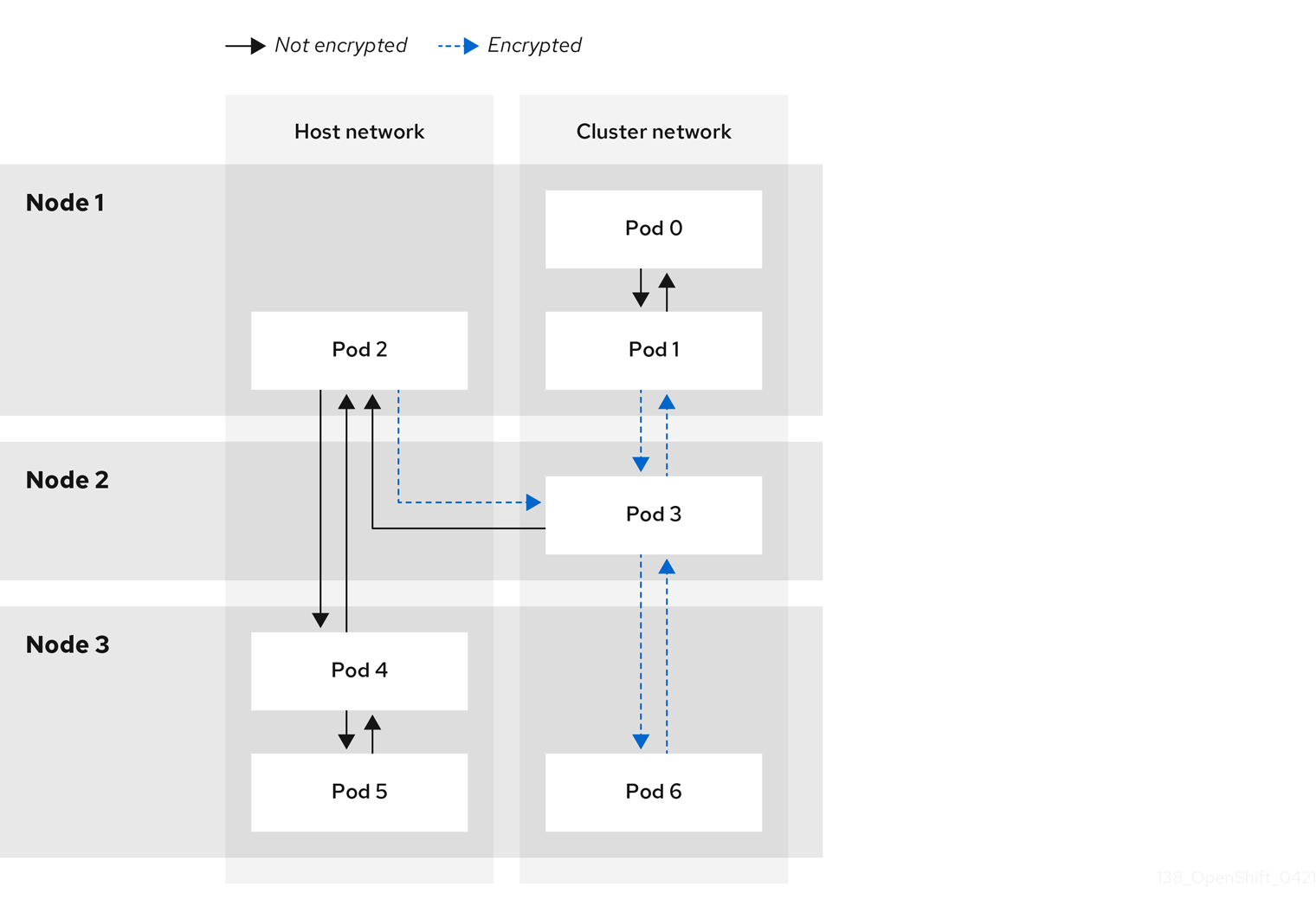
25.10.2.1. Network connectivity requirements when IPsec is enabled
You must configure the network connectivity between machines to allow OpenShift Container Platform cluster components to communicate. Each machine must be able to resolve the hostnames of all other machines in the cluster.
| Protocol | Port | Description |
|---|---|---|
| UDP |
| IPsec IKE packets |
|
| IPsec NAT-T packets | |
| ESP | N/A | IPsec Encapsulating Security Payload (ESP) |
25.10.3. Encryption protocol and IPsec mode
The encrypt cipher used is AES-GCM-16-256. The integrity check value (ICV) is 16 bytes. The key length is 256 bits.
The IPsec mode used is Transport mode, a mode that encrypts end-to-end communication by adding an Encapsulated Security Payload (ESP) header to the IP header of the original packet and encrypts the packet data. OpenShift Container Platform does not currently use or support IPsec Tunnel mode for pod-to-pod communication.
25.10.4. Security certificate generation and rotation
The Cluster Network Operator (CNO) generates a self-signed X.509 certificate authority (CA) that is used by IPsec for encryption. Certificate signing requests (CSRs) from each node are automatically fulfilled by the CNO.
The CA is valid for 10 years. The individual node certificates are valid for 5 years and are automatically rotated after 4 1/2 years elapse.
25.10.5. Enabling IPsec encryption
As a cluster administrator, you can enable IPsec encryption after cluster installation.
Prerequisites
-
Install the OpenShift CLI (
oc). -
Log in to the cluster as a user with
cluster-adminprivileges. -
You have reduced the size of your cluster maximum transmission unit (MTU) by
46bytes to allow for the overhead of the IPsec ESP header.
Procedure
To enable IPsec encryption, enter the following command:
$ oc patch networks.operator.openshift.io cluster --type=merge \
-p '{"spec":{"defaultNetwork":{"ovnKubernetesConfig":{"ipsecConfig":{ }}}}}'
Verification
To find the names of the OVN-Kubernetes control plane pods, enter the following command:
$ oc get pods -l app=ovnkube-master -n openshift-ovn-kubernetesExample output
NAME                   READY   STATUS    RESTARTS   AGE
ovnkube-master-fvtnh   6/6     Running   0          122m
ovnkube-master-hsgmm   6/6     Running   0          122m
ovnkube-master-qcmdc   6/6     Running   0          122m
Verify that IPsec is enabled on your cluster by entering the following command. The command output must state
trueto indicate that the node has IPsec enabled.$ oc -n openshift-ovn-kubernetes rsh ovnkube-master-<pod_number_sequence> \1 ovn-nbctl --no-leader-only get nb_global . ipsec- 1
- Replace
<pod_number_sequence>with the random sequence of letters,fvtnh, for a data plane pod from the previous step.
25.10.6. Disabling IPsec encryption
As a cluster administrator, you can disable IPsec encryption only if you enabled IPsec after cluster installation.
After disabling IPsec, you must delete the associated IPsec daemonsets pods. If you do not delete these pods, you might experience issues with your cluster.
Prerequisites
-
Install the OpenShift CLI (
oc). -
Log in to the cluster with a user with
cluster-adminprivileges.
Procedure
To disable IPsec encryption, enter the following command:
$ oc patch networks.operator.openshift.io/cluster --type=json \
  -p='[{"op":"remove", "path":"/spec/defaultNetwork/ovnKubernetesConfig/ipsecConfig"}]'
To find the name of the OVN-Kubernetes data plane pod that exists on the
masternode in your cluster, enter the following command:$ oc get pods -n openshift-ovn-kubernetes -l=app=ovnkube-masterExample output
ovnkube-master-5xqbf                      8/8     Running   0              28m
...
Verify that the
masternode in your cluster has IPsec disabled by entering the following command. The command output must statefalseto indicate that the node has IPsec disabled.$ oc -n openshift-ovn-kubernetes -c nbdb rsh ovnkube-master-<pod_number_sequence> \1 ovn-nbctl --no-leader-only get nb_global . ipsec- 1
- Replace
<pod_number_sequence>with the random sequence of letters, such as5xqbf, for the data plane pod from the previous step.
To remove the IPsec
ovn-ipsecdaemonset pod from theopenshift-ovn-kubernetesnamespace on the node, enter the following command:$ oc delete daemonset ovn-ipsec -n openshift-ovn-kubernetes1 - 1
- The
ovn-ipsecdaemonset configures IPsec connections for east-west traffic on the node.
Verify that the
ovn-ipsecdaemonset pod was removed from the all nodes in your cluster by entering the following command. If the command output does not list the pod, the removal operation is successful.$ oc get pods -n openshift-ovn-kubernetes -l=app=ovn-ipsecNoteYou might need to re-run the command for deleting the pod because sometimes the initial command attempt might not delete the pod.
-
Optional: You can increase the size of your cluster MTU by
46bytes because there is no longer any overhead from the IPsec ESP header in IP packets.
25.10.7. Additional resources
25.11. Configuring an egress firewall for a project
As a cluster administrator, you can create an egress firewall for a project that restricts egress traffic leaving your OpenShift Container Platform cluster.
25.11.1. How an egress firewall works in a project
As a cluster administrator, you can use an egress firewall to limit the external hosts that some or all pods can access from within the cluster. An egress firewall supports the following scenarios:
- A pod can only connect to internal hosts and cannot start connections to the public internet.
- A pod can only connect to the public internet and cannot start connections to internal hosts that are outside the OpenShift Container Platform cluster.
- A pod cannot reach specified internal subnets or hosts outside the OpenShift Container Platform cluster.
- A pod can connect to only specific external hosts.
For example, you can allow one project access to a specified IP range but deny the same access to a different project. Or you can restrict application developers from updating from Python pip mirrors, and force updates to come only from approved sources.
Egress firewall does not apply to the host network namespace. Egress firewall rules do not impact any pods that have host networking enabled.
You configure an egress firewall policy by creating an EgressFirewall custom resource (CR) object. The egress firewall matches network traffic that meets any of the following criteria:
- An IP address range in CIDR format
- A DNS name that resolves to an IP address
- A port number
- A protocol that is one of the following protocols: TCP, UDP, and SCTP
If your egress firewall includes a deny rule for 0.0.0.0/0, the rule blocks access to your OpenShift Container Platform API servers. You must either add allow rules for each IP address or use the nodeSelector type allow rule in your egress policy rules to connect to API servers.
The following example illustrates the order of the egress firewall rules necessary to ensure API server access:
apiVersion: k8s.ovn.org/v1
kind: EgressFirewall
metadata:
  name: default
  namespace: <namespace>
spec:
  egress:
  - to:
      cidrSelector: <api_server_address_range>
    type: Allow
# ...
  - to:
      cidrSelector: 0.0.0.0/0
type: Deny
To find the IP address for your API servers, run oc get ep kubernetes -n default.
For more information, see BZ#1988324.
Egress firewall rules do not apply to traffic that goes through routers. Any user with permission to create a Route CR object can bypass egress firewall policy rules by creating a route that points to a forbidden destination.
25.11.1.1. Limitations of an egress firewall
An egress firewall has the following limitations:
- No project can have more than one EgressFirewall object.
- A maximum of one EgressFirewall object with a maximum of 8,000 rules can be defined per project.
-
If you use the OVN-Kubernetes network plugin and you configured
falsefor theroutingViaHostparameter in theNetworkcustom resource for your cluster, egress firewall rules impact the return ingress replies. If the egress firewall rules drop the ingress reply destination IP, the traffic is dropped.
Violating any of these restrictions results in a broken egress firewall for the project. As a result, all external network traffic drops, which can cause security risks for your organization.
You can create an Egress Firewall resource in the kube-node-lease, kube-public, kube-system, openshift and openshift- projects.
25.11.1.2. Matching order for egress firewall policy rules
The OVN-Kubernetes network plugin evaluates egress firewall policy rules based on the first-to-last order of how you defined the rules. The first rule that matches an egress connection from a pod applies. The plugin ignores any subsequent rules for that connection.
25.11.1.3. Domain Name Server (DNS) resolution
If you use DNS names in any of your egress firewall policy rules, proper resolution of the domain names is subject to the following restrictions:
- Domain name updates are polled based on a time-to-live (TTL) duration. By default, the duration is 30 minutes. When the egress firewall controller queries the local name servers for a domain name, if the response includes a TTL and the TTL is less than 30 minutes, the controller sets the duration for that DNS name to the returned value. Each DNS name is queried after the TTL for the DNS record expires.
- The pod must resolve the domain from the same local name servers when necessary. Otherwise the IP addresses for the domain known by the egress firewall controller and the pod can be different. If the IP addresses for a hostname differ, consistent enforcement of the egress firewall does not apply.
- Because the egress firewall controller and pods asynchronously poll the same local name server, the pod might obtain the updated IP address before the egress controller does, which causes a race condition. Due to this current limitation, domain name usage in EgressFirewall objects is only recommended for domains with infrequent IP address changes.
Using DNS names in your egress firewall policy does not affect local DNS resolution through CoreDNS.
If your egress firewall policy uses domain names, and an external DNS server handles DNS resolution for an affected pod, you must include egress firewall rules that allow access to the IP addresses of your DNS server.
25.11.2. EgressFirewall custom resource (CR) object
You can define one or more rules for an egress firewall. A rule is either an Allow rule or a Deny rule, with a specification for the traffic that the rule applies to.
The following YAML describes an EgressFirewall CR object:
EgressFirewall object
apiVersion: k8s.ovn.org/v1
kind: EgressFirewall
metadata:
  name: <name>
spec:
  egress:
...25.11.2.1. EgressFirewall rules
The following YAML describes an egress firewall rule object. The user can select either an IP address range in CIDR format, a domain name, or use the nodeSelector to allow or deny egress traffic. The egress stanza expects an array of one or more objects.
Egress policy rule stanza
egress:
- type: <type>
to:
cidrSelector: <cidr>
dnsName: <dns_name>
nodeSelector: <label_name>: <label_value>
ports:
...- 1
- The type of rule. The value must be either
AlloworDeny. - 2
- A stanza describing an egress traffic match rule that specifies the
cidrSelectorfield or thednsNamefield. You cannot use both fields in the same rule. - 3
- An IP address range in CIDR format.
- 4
- A DNS domain name.
- 5
- Labels are key/value pairs that the user defines. Labels are attached to objects, such as pods. The
nodeSelectorallows for one or more node labels to be selected and attached to pods. - 6
- Optional: A stanza describing a collection of network ports and protocols for the rule.
Ports stanza
ports:
- port: <port>
protocol: <protocol> 25.11.2.2. Example EgressFirewall CR objects
The following example defines several egress firewall policy rules:
apiVersion: k8s.ovn.org/v1
kind: EgressFirewall
metadata:
  name: default
spec:
  egress:
  - type: Allow
    to:
      cidrSelector: 1.2.3.0/24
  - type: Deny
    to:
cidrSelector: 0.0.0.0/0- 1
- A collection of egress firewall policy rule objects.
The following example defines a policy rule that denies traffic to the host at the 172.16.1.1/32 IP address, if the traffic is using either the TCP protocol and destination port 80 or any protocol and destination port 443.
apiVersion: k8s.ovn.org/v1
kind: EgressFirewall
metadata:
  name: default
spec:
  egress:
  - type: Deny
    to:
      cidrSelector: 172.16.1.1/32
    ports:
    - port: 80
      protocol: TCP
    - port: 443
25.11.2.3. Example nodeSelector for EgressFirewall
As a cluster administrator, you can allow or deny egress traffic to nodes in your cluster by specifying a label using nodeSelector. Labels can be applied to one or more nodes. The following is an example with the region=east label:
apiVersion: k8s.ovn.org/v1
kind: EgressFirewall
metadata:
  name: default
spec:
    egress:
    - to:
        nodeSelector:
          matchLabels:
            region: east
type: AllowInstead of adding manual rules per node IP address, use node selectors to create a label that allows pods behind an egress firewall to access host network pods.
25.11.3. Creating an egress firewall policy object
As a cluster administrator, you can create an egress firewall policy object for a project.
If the project already has an EgressFirewall object defined, you must edit the existing policy to make changes to the egress firewall rules.
Prerequisites
- A cluster that uses the OVN-Kubernetes network plugin.
-
Install the OpenShift CLI (
oc). - You must log in to the cluster as a cluster administrator.
Procedure
Create a policy rule:
-
Create a
<policy_name>.yamlfile where<policy_name>describes the egress policy rules. - In the file you created, define an egress policy object.
-
Create a
Enter the following command to create the policy object. Replace
<policy_name>with the name of the policy and<project>with the project that the rule applies to.$ oc create -f <policy_name>.yaml -n <project>In the following example, a new EgressFirewall object is created in a project named
project1:$ oc create -f default.yaml -n project1Example output
egressfirewall.k8s.ovn.org/v1 created-
Optional: Save the
<policy_name>.yamlfile so that you can make changes later.
25.12. Viewing an egress firewall for a project
As a cluster administrator, you can list the names of any existing egress firewalls and view the traffic rules for a specific egress firewall.
25.12.1. Viewing an EgressFirewall object
You can view an EgressFirewall object in your cluster.
Prerequisites
- A cluster using the OVN-Kubernetes network plugin.
-
Install the OpenShift Command-line Interface (CLI), commonly known as
oc. - You must log in to the cluster.
Procedure
Optional: To view the names of the EgressFirewall objects defined in your cluster, enter the following command:
$ oc get egressfirewall --all-namespacesTo inspect a policy, enter the following command. Replace
<policy_name>with the name of the policy to inspect.$ oc describe egressfirewall <policy_name>Example output
Name:		default
Namespace:	project1
Created:	20 minutes ago
Labels:		<none>
Annotations:	<none>
Rule:		Allow to 1.2.3.0/24
Rule:		Allow to www.example.com
Rule:		Deny to 0.0.0.0/0
25.13. Editing an egress firewall for a project
As a cluster administrator, you can modify network traffic rules for an existing egress firewall.
25.13.1. Editing an EgressFirewall object
As a cluster administrator, you can update the egress firewall for a project.
Prerequisites
- A cluster using the OVN-Kubernetes network plugin.
-
Install the OpenShift CLI (
oc). - You must log in to the cluster as a cluster administrator.
Procedure
Find the name of the EgressFirewall object for the project. Replace
<project>with the name of the project.$ oc get -n <project> egressfirewallOptional: If you did not save a copy of the EgressFirewall object when you created the egress network firewall, enter the following command to create a copy.
$ oc get -n <project> egressfirewall <name> -o yaml > <filename>.yamlReplace
<project>with the name of the project. Replace<name>with the name of the object. Replace<filename>with the name of the file to save the YAML to.After making changes to the policy rules, enter the following command to replace the EgressFirewall object. Replace
<filename>with the name of the file containing the updated EgressFirewall object.$ oc replace -f <filename>.yaml
25.14. Removing an egress firewall from a project
As a cluster administrator, you can remove an egress firewall from a project to remove all restrictions on network traffic from the project that leaves the OpenShift Container Platform cluster.
25.14.1. Removing an EgressFirewall object
As a cluster administrator, you can remove an egress firewall from a project.
Prerequisites
- A cluster using the OVN-Kubernetes network plugin.
-
Install the OpenShift CLI (
oc). - You must log in to the cluster as a cluster administrator.
Procedure
Find the name of the EgressFirewall object for the project. Replace
<project>with the name of the project.$ oc get -n <project> egressfirewallEnter the following command to delete the EgressFirewall object. Replace
<project>with the name of the project and<name>with the name of the object.$ oc delete -n <project> egressfirewall <name>
25.15. Configuring an egress IP address
As a cluster administrator, you can configure the OVN-Kubernetes Container Network Interface (CNI) network plugin to assign one or more egress IP addresses to a namespace, or to specific pods in a namespace.
In an installer-provisioned infrastructure cluster, do not assign egress IP addresses to the infrastructure node that already hosts the ingress VIP. For more information, see the Red Hat Knowledgebase solution POD from the egress IP enabled namespace cannot access OCP route in an IPI cluster when the egress IP is assigned to the infra node that already hosts the ingress VIP.
25.15.1. Egress IP address architectural design and implementation
By using the OpenShift Container Platform egress IP address functionality, you can ensure that the traffic from one or more pods in one or more namespaces has a consistent source IP address for services outside the cluster network.
For example, you might have a pod that periodically queries a database that is hosted on a server outside of your cluster. To enforce access requirements for the server, a packet filtering device is configured to allow traffic only from specific IP addresses. To ensure that you can reliably allow access to the server from only that specific pod, you can configure a specific egress IP address for the pod that makes the requests to the server.
An egress IP address assigned to a namespace is different from an egress router, which is used to send traffic to specific destinations.
In some cluster configurations, application pods and ingress router pods run on the same node. If you configure an egress IP address for an application project in this scenario, the IP address is not used when you send a request to a route from the application project.
Egress IP addresses must not be configured in any Linux network configuration files, such as ifcfg-eth0.
25.15.1.1. Platform support
The Egress IP address feature that runs on a primary host network is supported on the following platforms:
| Platform | Supported |
|---|---|
| Bare metal | Yes |
| VMware vSphere | Yes |
| Red Hat OpenStack Platform (RHOSP) | Yes |
| Amazon Web Services (AWS) | Yes |
| Google Cloud | Yes |
| Microsoft Azure | Yes |
| IBM Z and IBM® LinuxONE | Yes |
| IBM Z and IBM® LinuxONE for Red Hat Enterprise Linux (RHEL) KVM | Yes |
| IBM Power | Yes |
The Egress IP address feature that runs on secondary host networks is supported on the following platform:
| Platform | Supported |
|---|---|
| Bare metal | Yes |
The assignment of egress IP addresses to control plane nodes with the EgressIP feature is not supported on a cluster provisioned on Amazon Web Services (AWS). (BZ#2039656)
25.15.1.2. Public cloud platform considerations
Typically, public cloud providers place a limit on egress IPs. This means that there is a constraint on the absolute number of assignable IP addresses per node for clusters provisioned on public cloud infrastructure. The maximum number of assignable IP addresses per node, or the IP capacity, can be described in the following formula:
IP capacity = public cloud default capacity - sum(current IP assignments)While the Egress IPs capability manages the IP address capacity per node, it is important to plan for this constraint in your deployments. For example, if a public cloud provider limits IP address capacity to 10 IP addresses per node, and you have 8 nodes, the total number of assignable IP addresses is only 80. To achieve a higher IP address capacity, you would need to allocate additional nodes. For example, if you needed 150 assignable IP addresses, you would need to allocate 7 additional nodes.
To confirm the IP capacity and subnets for any node in your public cloud environment, you can enter the oc get node <node_name> -o yaml command. The cloud.network.openshift.io/egress-ipconfig annotation includes capacity and subnet information for the node.
The annotation value is an array with a single object with fields that provide the following information for the primary network interface:
-
interface: Specifies the interface ID on AWS and Azure and the interface name on Google Cloud. -
ifaddr: Specifies the subnet mask for one or both IP address families. -
capacity: Specifies the IP address capacity for the node. On AWS, the IP address capacity is provided per IP address family. On Azure and Google Cloud, the IP address capacity includes both IPv4 and IPv6 addresses.
Automatic attachment and detachment of egress IP addresses for traffic between nodes are available. This allows for traffic from many pods in namespaces to have a consistent source IP address to locations outside of the cluster. This also supports OpenShift SDN and OVN-Kubernetes, which is the default networking plugin in Red Hat OpenShift Networking in OpenShift Container Platform 4.13.
When an RHOSP cluster administrator assigns a floating IP to the reservation port, OpenShift Container Platform cannot delete the reservation port. The CloudPrivateIPConfig object cannot perform delete and move operations until an RHOSP cluster administrator unassigns the floating IP from the reservation port.
The following examples illustrate the annotation from nodes on several public cloud providers. The annotations are indented for readability.
Example cloud.network.openshift.io/egress-ipconfig annotation on AWS
cloud.network.openshift.io/egress-ipconfig: [
  {
    "interface":"eni-078d267045138e436",
    "ifaddr":{"ipv4":"10.0.128.0/18"},
    "capacity":{"ipv4":14,"ipv6":15}
  }
]
Example cloud.network.openshift.io/egress-ipconfig annotation on Google Cloud
cloud.network.openshift.io/egress-ipconfig: [
  {
    "interface":"nic0",
    "ifaddr":{"ipv4":"10.0.128.0/18"},
    "capacity":{"ip":14}
  }
]
The following sections describe the IP address capacity for supported public cloud environments for use in your capacity calculation.
25.15.1.2.1. Amazon Web Services (AWS) IP address capacity limits
On AWS, constraints on IP address assignments depend on the instance type configured. For more information, see IP addresses per network interface per instance type
25.15.1.2.2. Google Cloud IP address capacity limits
On Google Cloud, the networking model implements additional node IP addresses through IP address aliasing, rather than IP address assignments. However, IP address capacity maps directly to IP aliasing capacity.
The following capacity limits exist for IP aliasing assignment:
- Per node, the maximum number of IP aliases, both IPv4 and IPv6, is 100.
- Per VPC, the maximum number of IP aliases is unspecified, but OpenShift Container Platform scalability testing reveals the maximum to be approximately 15,000.
For more information, see Per instance quotas and Alias IP ranges overview.
25.15.1.2.3. Microsoft Azure IP address capacity limits
On Azure, the following capacity limits exist for IP address assignment:
- Per NIC, the maximum number of assignable IP addresses, for both IPv4 and IPv6, is 256.
- Per virtual network, the maximum number of assigned IP addresses cannot exceed 65,536.
For more information, see Networking limits.
25.15.1.3. Assignment of egress IPs to pods
To assign one or more egress IPs to a namespace or specific pods in a namespace, the following conditions must be satisfied:
-
At least one node in your cluster must have the
k8s.ovn.org/egress-assignable: ""label. -
An
EgressIPobject exists that defines one or more egress IP addresses to use as the source IP address for traffic leaving the cluster from pods in a namespace.
If you create EgressIP objects prior to labeling any nodes in your cluster for egress IP assignment, OpenShift Container Platform might assign every egress IP address to the first node with the k8s.ovn.org/egress-assignable: "" label.
To ensure that egress IP addresses are widely distributed across nodes in the cluster, always apply the label to the nodes you intent to host the egress IP addresses before creating any EgressIP objects.
25.15.1.4. Assignment of egress IPs to nodes
When creating an EgressIP object, the following conditions apply to nodes that are labeled with the k8s.ovn.org/egress-assignable: "" label:
- An egress IP address is never assigned to more than one node at a time.
- An egress IP address is equally balanced between available nodes that can host the egress IP address.
If the
spec.EgressIPsarray in anEgressIPobject specifies more than one IP address, the following conditions apply:- No node will ever host more than one of the specified IP addresses.
- Traffic is balanced roughly equally between the specified IP addresses for a given namespace.
- If a node becomes unavailable, any egress IP addresses assigned to it are automatically reassigned, subject to the previously described conditions.
When a pod matches the selector for multiple EgressIP objects, there is no guarantee which of the egress IP addresses that are specified in the EgressIP objects is assigned as the egress IP address for the pod.
Additionally, if an EgressIP object specifies multiple egress IP addresses, there is no guarantee which of the egress IP addresses might be used. For example, if a pod matches a selector for an EgressIP object with two egress IP addresses, 10.10.20.1 and 10.10.20.2, either might be used for each TCP connection or UDP conversation.
25.15.1.5. Architectural diagram of an egress IP address configuration
The following diagram depicts an egress IP address configuration. The diagram describes four pods in two different namespaces running on three nodes in a cluster. The nodes are assigned IP addresses from the 192.168.126.0/18 CIDR block on the host network.
Both Node 1 and Node 3 are labeled with k8s.ovn.org/egress-assignable: "" and thus available for the assignment of egress IP addresses.
The dashed lines in the diagram depict the traffic flow from pod1, pod2, and pod3 traveling through the pod network to egress the cluster from Node 1 and Node 3. When an external service receives traffic from any of the pods selected by the example EgressIP object, the source IP address is either 192.168.126.10 or 192.168.126.102. The traffic is balanced roughly equally between these two nodes.
The following resources from the diagram are illustrated in detail:
NamespaceobjectsThe namespaces are defined in the following manifest:
Namespace objects
apiVersion: v1 kind: Namespace metadata: name: namespace1 labels: env: prod --- apiVersion: v1 kind: Namespace metadata: name: namespace2 labels: env: prodEgressIPobjectThe following
EgressIPobject describes a configuration that selects all pods in any namespace with theenvlabel set toprod. The egress IP addresses for the selected pods are192.168.126.10and192.168.126.102.EgressIPobjectapiVersion: k8s.ovn.org/v1 kind: EgressIP metadata: name: egressips-prod spec: egressIPs: - 192.168.126.10 - 192.168.126.102 namespaceSelector: matchLabels: env: prod status: items: - node: node1 egressIP: 192.168.126.10 - node: node3 egressIP: 192.168.126.102For the configuration in the previous example, OpenShift Container Platform assigns both egress IP addresses to the available nodes. The
statusfield reflects whether and where the egress IP addresses are assigned.
25.15.2. EgressIP object
The following YAML describes the API for the EgressIP object. The scope of the object is cluster-wide; it is not created in a namespace.
EgressIP selected pods cannot serve as backends for services with externalTrafficPolicy set to Local. If you try this configuration, service ingress traffic that targets the pods gets incorrectly rerouted to the egress node that hosts the EgressIP. This situation negatively impacts the handling of incoming service traffic and causes connections to drop. This leads to unavailable and non-functional services.
apiVersion: k8s.ovn.org/v1
kind: EgressIP
metadata:
  name: <name>
spec:
  egressIPs:
  - <ip_address>
  namespaceSelector:
    ...
  podSelector:
...- 1
- The name for the
EgressIPsobject. - 2
- An array of one or more IP addresses.
- 3
- One or more selectors for the namespaces to associate the egress IP addresses with.
- 4
- Optional: One or more selectors for pods in the specified namespaces to associate egress IP addresses with. Applying these selectors allows for the selection of a subset of pods within a namespace.
The following YAML describes the stanza for the namespace selector:
Namespace selector stanza
namespaceSelector:
  matchLabels:
<label_name>: <label_value>- 1
- One or more matching rules for namespaces. If more than one match rule is provided, all matching namespaces are selected.
The following YAML describes the optional stanza for the pod selector:
Pod selector stanza
podSelector:
  matchLabels:
<label_name>: <label_value>- 1
- Optional: One or more matching rules for pods in the namespaces that match the specified
namespaceSelectorrules. If specified, only pods that match are selected. Others pods in the namespace are not selected.
In the following example, the EgressIP object associates the 192.168.126.11 and 192.168.126.102 egress IP addresses with pods that have the app label set to web and are in the namespaces that have the env label set to prod:
Example EgressIP object
apiVersion: k8s.ovn.org/v1
kind: EgressIP
metadata:
  name: egress-group1
spec:
  egressIPs:
  - 192.168.126.11
  - 192.168.126.102
  podSelector:
    matchLabels:
      app: web
  namespaceSelector:
    matchLabels:
      env: prod
In the following example, the EgressIP object associates the 192.168.127.30 and 192.168.127.40 egress IP addresses with any pods that do not have the environment label set to development:
Example EgressIP object
apiVersion: k8s.ovn.org/v1
kind: EgressIP
metadata:
  name: egress-group2
spec:
  egressIPs:
  - 192.168.127.30
  - 192.168.127.40
  namespaceSelector:
    matchExpressions:
    - key: environment
      operator: NotIn
      values:
      - development
25.15.3. The egressIPConfig object
As a feature of egress IP, the reachabilityTotalTimeoutSeconds parameter configures the EgressIP node reachability check total timeout in seconds. If the EgressIP node cannot be reached within this timeout, the node is declared down.
You can set a value for the reachabilityTotalTimeoutSeconds in the configuration file for the egressIPConfig object. Setting a large value might cause the EgressIP implementation to react slowly to node changes. The implementation reacts slowly for EgressIP nodes that have an issue and are unreachable.
If you omit the reachabilityTotalTimeoutSeconds parameter from the egressIPConfig object, the platform chooses a reasonable default value, which is subject to change over time. The current default is 1 second. A value of 0 disables the reachability check for the EgressIP node.
The following egressIPConfig object describes changing the reachabilityTotalTimeoutSeconds from the default 1 second probes to 5 second probes:
apiVersion: operator.openshift.io/v1
kind: Network
metadata:
  name: cluster
spec:
  clusterNetwork:
  - cidr: 10.128.0.0/14
    hostPrefix: 23
  defaultNetwork:
    ovnKubernetesConfig:
      egressIPConfig:
reachabilityTotalTimeoutSeconds: 5
      gatewayConfig:
        routingViaHost: false
genevePort: 6081- 1
- The
egressIPConfigholds the configurations for the options of theEgressIPobject. By changing these configurations, you can extend theEgressIPobject. - 2
- The value for
reachabilityTotalTimeoutSecondsaccepts integer values from0to60. A value of0disables the reachability check of the egressIP node. Setting a value from1to60corresponds to the timeout in seconds for a probe to send the reachability check to the node.
25.15.4. Labeling a node to host egress IP addresses
You can apply the k8s.ovn.org/egress-assignable="" label to a node in your cluster so that OpenShift Container Platform can assign one or more egress IP addresses to the node.
Prerequisites
-
Install the OpenShift CLI (
oc). - Log in to the cluster as a cluster administrator.
Procedure
To label a node so that it can host one or more egress IP addresses, enter the following command:
$ oc label nodes <node_name> k8s.ovn.org/egress-assignable=""1 - 1
- The name of the node to label.
TipYou can alternatively apply the following YAML to add the label to a node:
apiVersion: v1
kind: Node
metadata:
  labels:
    k8s.ovn.org/egress-assignable: ""
  name: <node_name>
25.15.5. Next steps
25.16. Assigning an egress IP address
As a cluster administrator, you can assign an egress IP address for traffic leaving the cluster from a namespace or from specific pods in a namespace.
25.16.1. Assigning an egress IP address to a namespace
You can assign one or more egress IP addresses to a namespace or to specific pods in a namespace.
Prerequisites
-
Install the OpenShift CLI (
oc). - Log in to the cluster as a cluster administrator.
- Configure at least one node to host an egress IP address.
Procedure
Create an
EgressIPobject:-
Create a
<egressips_name>.yamlfile where<egressips_name>is the name of the object. In the file that you created, define an
EgressIPobject, as in the following example:apiVersion: k8s.ovn.org/v1 kind: EgressIP metadata: name: egress-project1 spec: egressIPs: - 192.168.127.10 - 192.168.127.11 namespaceSelector: matchLabels: env: qa
-
Create a
To create the object, enter the following command.
$ oc apply -f <egressips_name>.yaml1 - 1
- Replace
<egressips_name>with the name of the object.
Example output
egressips.k8s.ovn.org/<egressips_name> created-
Optional: Store the
<egressips_name>.yamlfile so that you can make changes later. Add labels to the namespace that requires egress IP addresses. To add a label to the namespace of an
EgressIPobject defined in step 1, run the following command:$ oc label ns <namespace> env=qa1 - 1
- Replace
<namespace>with the namespace that requires egress IP addresses.
Verification
To show all egress IPs that are in use in your cluster, enter the following command:
$ oc get egressip -o yamlNoteThe command
oc get egressiponly returns one egress IP address regardless of how many are configured. This is not a bug and is a limitation of Kubernetes. As a workaround, you can pass in the-o yamlor-o jsonflags to return all egress IPs addresses in use.Example output
# ...
spec:
  egressIPs:
  - 192.168.127.10
  - 192.168.127.11
# ...
25.17. Considerations for the use of an egress router pod
25.17.1. About an egress router pod
The OpenShift Container Platform egress router pod redirects traffic to a specified remote server from a private source IP address that is not used for any other purpose. An egress router pod can send network traffic to servers that are set up to allow access only from specific IP addresses.
The egress router pod is not intended for every outgoing connection. Creating large numbers of egress router pods can exceed the limits of your network hardware. For example, creating an egress router pod for every project or application could exceed the number of local MAC addresses that the network interface can handle before reverting to filtering MAC addresses in software.
The egress router image is not compatible with Amazon AWS, Azure Cloud, or any other cloud platform that does not support layer 2 manipulations due to their incompatibility with macvlan traffic.
25.17.1.1. Egress router modes
In redirect mode, an egress router pod configures iptables rules to redirect traffic from its own IP address to one or more destination IP addresses. Client pods that need to use the reserved source IP address must be configured to access the service for the egress router rather than connecting directly to the destination IP. You can access the destination service and port from the application pod by using the curl command. For example:
$ curl <router_service_IP> <port>The egress router CNI plugin supports redirect mode only. This is a difference with the egress router implementation that you can deploy with OpenShift SDN. Unlike the egress router for OpenShift SDN, the egress router CNI plugin does not support HTTP proxy mode or DNS proxy mode.
25.17.1.2. Egress router pod implementation
The egress router implementation uses the egress router Container Network Interface (CNI) plugin. The plugin adds a secondary network interface to a pod.
An egress router is a pod that has two network interfaces. For example, the pod can have eth0 and net1 network interfaces. The eth0 interface is on the cluster network and the pod continues to use the interface for ordinary cluster-related network traffic. The net1 interface is on a secondary network and has an IP address and gateway for that network. Other pods in the OpenShift Container Platform cluster can access the egress router service and the service enables the pods to access external services. The egress router acts as a bridge between pods and an external system.
Traffic that leaves the egress router exits through a node, but the packets have the MAC address of the net1 interface from the egress router pod.
When you add an egress router custom resource, the Cluster Network Operator creates the following objects:
-
The network attachment definition for the
net1secondary network interface of the pod. - A deployment for the egress router.
If you delete an egress router custom resource, the Operator deletes the two objects in the preceding list that are associated with the egress router.
25.17.1.3. Deployment considerations
An egress router pod adds an additional IP address and MAC address to the primary network interface of the node. As a result, you might need to configure your hypervisor or cloud provider to allow the additional address.
- Red Hat OpenStack Platform (RHOSP)
If you deploy OpenShift Container Platform on RHOSP, you must allow traffic from the IP and MAC addresses of the egress router pod on your OpenStack environment. If you do not allow the traffic, then communication will fail:
$ openstack port set --allowed-address \ ip_address=<ip_address>,mac_address=<mac_address> <neutron_port_uuid>- Red Hat Virtualization (RHV)
- If you are using RHV, you must select No Network Filter for the Virtual network interface controller (vNIC).
- VMware vSphere
- If you are using VMware vSphere, see the VMware documentation for securing vSphere standard switches. View and change VMware vSphere default settings by selecting the host virtual switch from the vSphere Web Client.
Specifically, ensure that the following are enabled:
25.17.1.4. Failover configuration
To avoid downtime, the Cluster Network Operator deploys the egress router pod as a deployment resource. The deployment name is egress-router-cni-deployment. The pod that corresponds to the deployment has a label of app=egress-router-cni.
To create a new service for the deployment, use the oc expose deployment/egress-router-cni-deployment --port <port_number> command or create a file like the following example:
apiVersion: v1
kind: Service
metadata:
  name: app-egress
spec:
  ports:
  - name: tcp-8080
    protocol: TCP
    port: 8080
  - name: tcp-8443
    protocol: TCP
    port: 8443
  - name: udp-80
    protocol: UDP
    port: 80
  type: ClusterIP
  selector:
app: egress-router-cni25.18. Deploying an egress router pod in redirect mode
As a cluster administrator, you can deploy an egress router pod to redirect traffic to specified destination IP addresses from a reserved source IP address.
The egress router implementation uses the egress router Container Network Interface (CNI) plugin.
25.18.1. Egress router custom resource
Define the configuration for an egress router pod in an egress router custom resource. The following YAML describes the fields for the configuration of an egress router in redirect mode:
apiVersion: network.operator.openshift.io/v1
kind: EgressRouter
metadata:
  name: <egress_router_name>
  namespace: <namespace>  <.>
spec:
  addresses: [  <.>
    {
      ip: "<egress_router>",  <.>
      gateway: "<egress_gateway>"  <.>
    }
  ]
  mode: Redirect
  redirect: {
    redirectRules: [  <.>
      {
        destinationIP: "<egress_destination>",
        port: <egress_router_port>,
        targetPort: <target_port>,  <.>
        protocol: <network_protocol>  <.>
      },
      ...
    ],
    fallbackIP: "<egress_destination>" <.>
  }
<.> Optional: The namespace field specifies the namespace to create the egress router in. If you do not specify a value in the file or on the command line, the default namespace is used.
<.> The addresses field specifies the IP addresses to configure on the secondary network interface.
<.> The ip field specifies the reserved source IP address and netmask from the physical network that the node is on to use with egress router pod. Use CIDR notation to specify the IP address and netmask.
<.> The gateway field specifies the IP address of the network gateway.
<.> Optional: The redirectRules field specifies a combination of egress destination IP address, egress router port, and protocol. Incoming connections to the egress router on the specified port and protocol are routed to the destination IP address.
<.> Optional: The targetPort field specifies the network port on the destination IP address. If this field is not specified, traffic is routed to the same network port that it arrived on.
<.> The protocol field supports TCP, UDP, or SCTP.
<.> Optional: The fallbackIP field specifies a destination IP address. If you do not specify any redirect rules, the egress router sends all traffic to this fallback IP address. If you specify redirect rules, any connections to network ports that are not defined in the rules are sent by the egress router to this fallback IP address. If you do not specify this field, the egress router rejects connections to network ports that are not defined in the rules.
Example egress router specification
apiVersion: network.operator.openshift.io/v1
kind: EgressRouter
metadata:
  name: egress-router-redirect
spec:
  networkInterface: {
    macvlan: {
      mode: "Bridge"
    }
  }
  addresses: [
    {
      ip: "192.168.12.99/24",
      gateway: "192.168.12.1"
    }
  ]
  mode: Redirect
  redirect: {
    redirectRules: [
      {
        destinationIP: "10.0.0.99",
        port: 80,
        protocol: UDP
      },
      {
        destinationIP: "203.0.113.26",
        port: 8080,
        targetPort: 80,
        protocol: TCP
      },
      {
        destinationIP: "203.0.113.27",
        port: 8443,
        targetPort: 443,
        protocol: TCP
      }
    ]
  }
25.18.2. Deploying an egress router in redirect mode
You can deploy an egress router to redirect traffic from its own reserved source IP address to one or more destination IP addresses.
After you add an egress router, the client pods that need to use the reserved source IP address must be modified to connect to the egress router rather than connecting directly to the destination IP.
Prerequisites
-
Install the OpenShift CLI (
oc). -
Log in as a user with
cluster-adminprivileges.
Procedure
- Create an egress router definition.
To ensure that other pods can find the IP address of the egress router pod, create a service that uses the egress router, as in the following example:
apiVersion: v1
kind: Service
metadata:
  name: egress-1
spec:
  ports:
  - name: web-app
    protocol: TCP
    port: 8080
  type: ClusterIP
  selector:
    app: egress-router-cni <.>
<.> Specify the label for the egress router. The value shown is added by the Cluster Network Operator and is not configurable.
After you create the service, your pods can connect to the service. The egress router pod redirects traffic to the corresponding port on the destination IP address. The connections originate from the reserved source IP address.
Verification
To verify that the Cluster Network Operator started the egress router, complete the following procedure:
View the network attachment definition that the Operator created for the egress router:
$ oc get network-attachment-definition egress-router-cni-nadThe name of the network attachment definition is not configurable.
Example output
NAME                    AGE
egress-router-cni-nad   18m
View the deployment for the egress router pod:
$ oc get deployment egress-router-cni-deploymentThe name of the deployment is not configurable.
Example output
NAME                           READY   UP-TO-DATE   AVAILABLE   AGE
egress-router-cni-deployment   1/1     1            1           18m
View the status of the egress router pod:
$ oc get pods -l app=egress-router-cniExample output
NAME READY STATUS RESTARTS AGE egress-router-cni-deployment-575465c75c-qkq6m 1/1 Running 0 18m- View the logs and the routing table for the egress router pod.
Get the node name for the egress router pod:
$ POD_NODENAME=$(oc get pod -l app=egress-router-cni -o jsonpath="{.items[0].spec.nodeName}")Enter into a debug session on the target node. This step instantiates a debug pod called
<node_name>-debug:$ oc debug node/$POD_NODENAMESet
/hostas the root directory within the debug shell. The debug pod mounts the root file system of the host in/hostwithin the pod. By changing the root directory to/host, you can run binaries from the executable paths of the host:# chroot /hostFrom within the
chrootenvironment console, display the egress router logs:# cat /tmp/egress-router-logExample output
2021-04-26T12:27:20Z [debug] Called CNI ADD
2021-04-26T12:27:20Z [debug] Gateway: 192.168.12.1
2021-04-26T12:27:20Z [debug] IP Source Addresses: [192.168.12.99/24]
2021-04-26T12:27:20Z [debug] IP Destinations: [80 UDP 10.0.0.99/30 8080 TCP 203.0.113.26/30 80 8443 TCP 203.0.113.27/30 443]
2021-04-26T12:27:20Z [debug] Created macvlan interface
2021-04-26T12:27:20Z [debug] Renamed macvlan to "net1"
2021-04-26T12:27:20Z [debug] Adding route to gateway 192.168.12.1 on macvlan interface
2021-04-26T12:27:20Z [debug] deleted default route {Ifindex: 3 Dst: <nil> Src: <nil> Gw: 10.128.10.1 Flags: [] Table: 254}
2021-04-26T12:27:20Z [debug] Added new default route with gateway 192.168.12.1
2021-04-26T12:27:20Z [debug] Added iptables rule: iptables -t nat PREROUTING -i eth0 -p UDP --dport 80 -j DNAT --to-destination 10.0.0.99
2021-04-26T12:27:20Z [debug] Added iptables rule: iptables -t nat PREROUTING -i eth0 -p TCP --dport 8080 -j DNAT --to-destination 203.0.113.26:80
2021-04-26T12:27:20Z [debug] Added iptables rule: iptables -t nat PREROUTING -i eth0 -p TCP --dport 8443 -j DNAT --to-destination 203.0.113.27:443
2021-04-26T12:27:20Z [debug] Added iptables rule: iptables -t nat -o net1 -j SNAT --to-source 192.168.12.99
The logging file location and logging level are not configurable when you start the egress router by creating an
EgressRouterobject as described in this procedure.From within the
chrootenvironment console, get the container ID:# crictl ps --name egress-router-cni-pod | awk '{print $1}'Example output
CONTAINER
bac9fae69ddb6
Determine the process ID of the container. In this example, the container ID is
bac9fae69ddb6:# crictl inspect -o yaml bac9fae69ddb6 | grep 'pid:' | awk '{print $2}'Example output
68857Enter the network namespace of the container:
# nsenter -n -t 68857Display the routing table:
# ip routeIn the following example output, the
net1network interface is the default route. Traffic for the cluster network uses theeth0network interface. Traffic for the192.168.12.0/24network uses thenet1network interface and originates from the reserved source IP address192.168.12.99. The pod routes all other traffic to the gateway at IP address192.168.12.1. Routing for the service network is not shown.Example output
default via 192.168.12.1 dev net1
10.128.10.0/23 dev eth0 proto kernel scope link src 10.128.10.18
192.168.12.0/24 dev net1 proto kernel scope link src 192.168.12.99
192.168.12.1 dev net1
25.19. Enabling multicast for a project
25.19.1. About multicast
With IP multicast, data is broadcast to many IP addresses simultaneously.
- At this time, multicast is best used for low-bandwidth coordination or service discovery and not a high-bandwidth solution.
-
By default, network policies affect all connections in a namespace. However, multicast is unaffected by network policies. If multicast is enabled in the same namespace as your network policies, it is always allowed, even if there is a
deny-allnetwork policy. Cluster administrators should consider the implications to the exemption of multicast from network policies before enabling it.
Multicast traffic between OpenShift Container Platform pods is disabled by default. If you are using the OVN-Kubernetes network plugin, you can enable multicast on a per-project basis.
25.19.2. Enabling multicast between pods
You can enable multicast between pods for your project.
Prerequisites
-
Install the OpenShift CLI (
oc). -
You must log in to the cluster with a user that has the
cluster-adminrole.
Procedure
Run the following command to enable multicast for a project. Replace
<namespace>with the namespace for the project you want to enable multicast for.$ oc annotate namespace <namespace> \ k8s.ovn.org/multicast-enabled=trueTipYou can alternatively apply the following YAML to add the annotation:
apiVersion: v1
kind: Namespace
metadata:
  name: <namespace>
  annotations:
    k8s.ovn.org/multicast-enabled: "true"
Verification
To verify that multicast is enabled for a project, complete the following procedure:
Change your current project to the project that you enabled multicast for. Replace
<project>with the project name.$ oc project <project>Create a pod to act as a multicast receiver:
$ cat <<EOF| oc create -f -
apiVersion: v1
kind: Pod
metadata:
  name: mlistener
  labels:
    app: multicast-verify
spec:
  containers:
    - name: mlistener
      image: registry.access.redhat.com/ubi9
      command: ["/bin/sh", "-c"]
      args:
        ["dnf -y install socat hostname && sleep inf"]
      ports:
        - containerPort: 30102
          name: mlistener
          protocol: UDP
EOF
Create a pod to act as a multicast sender:
$ cat <<EOF| oc create -f -
apiVersion: v1
kind: Pod
metadata:
  name: msender
  labels:
    app: multicast-verify
spec:
  containers:
    - name: msender
      image: registry.access.redhat.com/ubi9
      command: ["/bin/sh", "-c"]
      args:
        ["dnf -y install socat && sleep inf"]
EOF
In a new terminal window or tab, start the multicast listener.
Get the IP address for the Pod:
$ POD_IP=$(oc get pods mlistener -o jsonpath='{.status.podIP}')Start the multicast listener by entering the following command:
$ oc exec mlistener -i -t -- \
    socat UDP4-RECVFROM:30102,ip-add-membership=224.1.0.1:$POD_IP,fork EXEC:hostname
Start the multicast transmitter.
Get the pod network IP address range:
$ CIDR=$(oc get Network.config.openshift.io cluster \
    -o jsonpath='{.status.clusterNetwork[0].cidr}')
To send a multicast message, enter the following command:
$ oc exec msender -i -t -- \
    /bin/bash -c "echo | socat STDIO UDP4-DATAGRAM:224.1.0.1:30102,range=$CIDR,ip-multicast-ttl=64"
If multicast is working, the previous command returns the following output:
mlistener
25.20. Disabling multicast for a project
25.20.1. Disabling multicast between pods
You can disable multicast between pods for your project.
Prerequisites
-
Install the OpenShift CLI (
oc). -
You must log in to the cluster with a user that has the
cluster-adminrole.
Procedure
Disable multicast by running the following command:
$ oc annotate namespace <namespace> \1 k8s.ovn.org/multicast-enabled-- 1
- The
namespacefor the project you want to disable multicast for.
TipYou can alternatively apply the following YAML to delete the annotation:
apiVersion: v1
kind: Namespace
metadata:
  name: <namespace>
  annotations:
    k8s.ovn.org/multicast-enabled: null
25.21. Tracking network flows
As a cluster administrator, you can collect information about pod network flows from your cluster to assist with the following areas:
- Monitor ingress and egress traffic on the pod network.
- Troubleshoot performance issues.
- Gather data for capacity planning and security audits.
When you enable the collection of the network flows, only the metadata about the traffic is collected. For example, packet data is not collected, but the protocol, source address, destination address, port numbers, number of bytes, and other packet-level information is collected.
The data is collected in one or more of the following record formats:
- NetFlow
- sFlow
- IPFIX
When you configure the Cluster Network Operator (CNO) with one or more collector IP addresses and port numbers, the Operator configures Open vSwitch (OVS) on each node to send the network flows records to each collector.
You can configure the Operator to send records to more than one type of network flow collector. For example, you can send records to NetFlow collectors and also send records to sFlow collectors.
When OVS sends data to the collectors, each type of collector receives identical records. For example, if you configure two NetFlow collectors, OVS on a node sends identical records to the two collectors. If you also configure two sFlow collectors, the two sFlow collectors receive identical records. However, each collector type has a unique record format.
Collecting the network flows data and sending the records to collectors affects performance. Nodes process packets at a slower rate. If the performance impact is too great, you can delete the destinations for collectors to disable collecting network flows data and restore performance.
Enabling network flow collectors might have an impact on the overall performance of the cluster network.
25.21.1. Network object configuration for tracking network flows
The fields for configuring network flows collectors in the Cluster Network Operator (CNO) are shown in the following table:
| Field | Type | Description |
|---|---|---|
|
|
|
The name of the CNO object. This name is always |
|
|
|
One or more of |
|
|
| A list of IP address and network port pairs for up to 10 collectors. |
|
|
| A list of IP address and network port pairs for up to 10 collectors. |
|
|
| A list of IP address and network port pairs for up to 10 collectors. |
After applying the following manifest to the CNO, the Operator configures Open vSwitch (OVS) on each node in the cluster to send network flows records to the NetFlow collector that is listening at 192.168.1.99:2056.
Example configuration for tracking network flows
apiVersion: operator.openshift.io/v1
kind: Network
metadata:
  name: cluster
spec:
  exportNetworkFlows:
    netFlow:
      collectors:
        - 192.168.1.99:2056
25.21.2. Adding destinations for network flows collectors
As a cluster administrator, you can configure the Cluster Network Operator (CNO) to send network flows metadata about the pod network to a network flows collector.
Prerequisites
-
You installed the OpenShift CLI (
oc). -
You are logged in to the cluster with a user with
cluster-adminprivileges. - You have a network flows collector and know the IP address and port that it listens on.
Procedure
Create a patch file that specifies the network flows collector type and the IP address and port information of the collectors:
spec:
  exportNetworkFlows:
    netFlow:
      collectors:
        - 192.168.1.99:2056
Configure the CNO with the network flows collectors:
$ oc patch network.operator cluster --type merge -p "$(cat <file_name>.yaml)"Example output
network.operator.openshift.io/cluster patched
Verification
Verification is not typically necessary. You can run the following command to confirm that Open vSwitch (OVS) on each node is configured to send network flows records to one or more collectors.
View the Operator configuration to confirm that the
exportNetworkFlowsfield is configured:$ oc get network.operator cluster -o jsonpath="{.spec.exportNetworkFlows}"Example output
{"netFlow":{"collectors":["192.168.1.99:2056"]}}View the network flows configuration in OVS from each node:
$ for pod in $(oc get pods -n openshift-ovn-kubernetes -l app=ovnkube-node -o jsonpath='{range@.items[*]}{.metadata.name}{"\n"}{end}'); do ; echo; echo $pod; oc -n openshift-ovn-kubernetes exec -c ovnkube-node $pod \ -- bash -c 'for type in ipfix sflow netflow ; do ovs-vsctl find $type ; done'; doneExample output
ovnkube-node-xrn4p _uuid : a4d2aaca-5023-4f3d-9400-7275f92611f9 active_timeout : 60 add_id_to_interface : false engine_id : [] engine_type : [] external_ids : {} targets : ["192.168.1.99:2056"] ovnkube-node-z4vq9 _uuid : 61d02fdb-9228-4993-8ff5-b27f01a29bd6 active_timeout : 60 add_id_to_interface : false engine_id : [] engine_type : [] external_ids : {} targets : ["192.168.1.99:2056"]- ...
25.21.3. Deleting all destinations for network flows collectors
As a cluster administrator, you can configure the Cluster Network Operator (CNO) to stop sending network flows metadata to a network flows collector.
Prerequisites
-
You installed the OpenShift CLI (
oc). -
You are logged in to the cluster with a user with
cluster-adminprivileges.
Procedure
Remove all network flows collectors:
$ oc patch network.operator cluster --type='json' \ -p='[{"op":"remove", "path":"/spec/exportNetworkFlows"}]'Example output
network.operator.openshift.io/cluster patched
25.22. Configuring hybrid networking
As a cluster administrator, you can configure the Red Hat OpenShift Networking OVN-Kubernetes network plugin to allow Linux and Windows nodes to host Linux and Windows workloads, respectively.
25.22.1. Configuring hybrid networking with OVN-Kubernetes
You can configure your cluster to use hybrid networking with the OVN-Kubernetes network plugin. This allows a hybrid cluster that supports different node networking configurations.
This configuration is necessary to run both Linux and Windows nodes in the same cluster.
Prerequisites
-
Install the OpenShift CLI (
oc). -
Log in to the cluster as a user with
cluster-adminprivileges. - Ensure that the cluster uses the OVN-Kubernetes network plugin.
Procedure
To configure the OVN-Kubernetes hybrid network overlay, enter the following command:
$ oc patch networks.operator.openshift.io cluster --type=merge \ -p '{ "spec":{ "defaultNetwork":{ "ovnKubernetesConfig":{ "hybridOverlayConfig":{ "hybridClusterNetwork":[ { "cidr": "<cidr>", "hostPrefix": <prefix> } ], "hybridOverlayVXLANPort": <overlay_port> } } } } }'where:
cidr- Specify the CIDR configuration used for nodes on the additional overlay network. This CIDR must not overlap with the cluster network CIDR.
hostPrefix-
Specifies the subnet prefix length to assign to each individual node. For example, if
hostPrefixis set to23, then each node is assigned a/23subnet out of the givencidr, which allows for 510 (2^(32 - 23) - 2) pod IP addresses. If you are required to provide access to nodes from an external network, configure load balancers and routers to manage the traffic. hybridOverlayVXLANPort-
Specify a custom VXLAN port for the additional overlay network. This is required for running Windows nodes in a cluster installed on vSphere, and must not be configured for any other cloud provider. The custom port can be any open port excluding the default
4789port. For more information on this requirement, see the Microsoft documentation on Pod-to-pod connectivity between hosts is broken.
NoteWindows Server Long-Term Servicing Channel (LTSC): Windows Server 2019 is not supported on clusters with a custom
hybridOverlayVXLANPortvalue because this Windows server version does not support selecting a custom VXLAN port.Example output
network.operator.openshift.io/cluster patchedTo confirm that the configuration is active, enter the following command. It can take several minutes for the update to apply.
$ oc get network.operator.openshift.io -o jsonpath="{.items[0].spec.defaultNetwork.ovnKubernetesConfig}"

'%20d='M201.5%20305.5c-13.8%200-24.9-11.1-24.9-24.6%200-13.8%2011.1-24.9%2024.9-24.9%2013.6%200%2024.6%2011.1%2024.6%2024.9%200%2013.6-11.1%2024.6-24.6%2024.6zM504%20256c0%20137-111%20248-248%20248S8%20393%208%20256%20119%208%20256%208s248%20111%20248%20248zm-132.3-41.2c-9.4%200-17.7%203.9-23.8%2010-22.4-15.5-52.6-25.5-86.1-26.6l17.4-78.3%2055.4%2012.5c0%2013.6%2011.1%2024.6%2024.6%2024.6%2013.8%200%2024.9-11.3%2024.9-24.9s-11.1-24.9-24.9-24.9c-9.7%200-18%205.8-22.1%2013.8l-61.2-13.6c-3-.8-6.1%201.4-6.9%204.4l-19.1%2086.4c-33.2%201.4-63.1%2011.3-85.5%2026.8-6.1-6.4-14.7-10.2-24.1-10.2-34.9%200-46.3%2046.9-14.4%2062.8-1.1%205-1.7%2010.2-1.7%2015.5%200%2052.6%2059.2%2095.2%20132%2095.2%2073.1%200%20132.3-42.6%20132.3-95.2%200-5.3-.6-10.8-1.9-15.8%2031.3-16%2019.8-62.5-14.9-62.5zM302.8%20331c-18.2%2018.2-76.1%2017.9-93.6%200-2.2-2.2-6.1-2.2-8.3%200-2.5%202.5-2.5%206.4%200%208.6%2022.8%2022.8%2087.3%2022.8%20110.2%200%202.5-2.2%202.5-6.1%200-8.6-2.2-2.2-6.1-2.2-8.3%200zm7.7-75c-13.6%200-24.6%2011.1-24.6%2024.9%200%2013.6%2011.1%2024.6%2024.6%2024.6%2013.8%200%2024.9-11.1%2024.9-24.6%200-13.8-11-24.9-24.9-24.9z'/%3e%3c/svg%3e)