 Red Hat Summit
Dieser Inhalt ist in der von Ihnen ausgewählten Sprache nicht verfügbar.
Chapter 3. Reference design specifications
3.1. Telco core and RAN DU reference design specifications
The telco core reference design specification (RDS) describes OpenShift Container Platform 4.16 clusters running on commodity hardware that can support large scale telco applications including control plane and some centralized data plane functions.
The telco RAN RDS describes the configuration for clusters running on commodity hardware to host 5G workloads in the Radio Access Network (RAN).
3.1.1. Reference design specifications for telco 5G deployments
Red Hat and certified partners offer deep technical expertise and support for networking and operational capabilities required to run telco applications on OpenShift Container Platform 4.16 clusters.
Red Hat’s telco partners require a well-integrated, well-tested, and stable environment that can be replicated at scale for enterprise 5G solutions. The telco core and RAN DU reference design specifications (RDS) outline the recommended solution architecture based on a specific version of OpenShift Container Platform. Each RDS describes a tested and validated platform configuration for telco core and RAN DU use models. The RDS ensures an optimal experience when running your applications by defining the set of critical KPIs for telco 5G core and RAN DU. Following the RDS minimizes high severity escalations and improves application stability.
5G use cases are evolving and your workloads are continually changing. Red Hat is committed to iterating over the telco core and RAN DU RDS to support evolving requirements based on customer and partner feedback.
3.1.2. Reference design scope
The telco core and telco RAN reference design specifications (RDS) capture the recommended, tested, and supported configurations to get reliable and repeatable performance for clusters running the telco core and telco RAN profiles.
Each RDS includes the released features and supported configurations that are engineered and validated for clusters to run the individual profiles. The configurations provide a baseline OpenShift Container Platform installation that meets feature and KPI targets. Each RDS also describes expected variations for each individual configuration. Validation of each RDS includes many long duration and at-scale tests.
The validated reference configurations are updated for each major Y-stream release of OpenShift Container Platform. Z-stream patch releases are periodically re-tested against the reference configurations.
3.1.3. Deviations from the reference design
Deviating from the validated telco core and telco RAN DU reference design specifications (RDS) can have significant impact beyond the specific component or feature that you change. Deviations require analysis and engineering in the context of the complete solution.
All deviations from the RDS should be analyzed and documented with clear action tracking information. Due diligence is expected from partners to understand how to bring deviations into line with the reference design. This might require partners to provide additional resources to engage with Red Hat to work towards enabling their use case to achieve a best in class outcome with the platform. This is critical for the supportability of the solution and ensuring alignment across Red Hat and with partners.
Deviation from the RDS can have some or all of the following consequences:
- It can take longer to resolve issues.
- There is a risk of missing project service-level agreements (SLAs), project deadlines, end provider performance requirements, and so on.
Unapproved deviations may require escalation at executive levels.
NoteRed Hat prioritizes the servicing of requests for deviations based on partner engagement priorities.
3.2. Telco RAN DU reference design specification
3.2.1. Telco RAN DU 4.16 reference design overview
The Telco RAN distributed unit (DU) 4.16 reference design configures an OpenShift Container Platform 4.16 cluster running on commodity hardware to host telco RAN DU workloads. It captures the recommended, tested, and supported configurations to get reliable and repeatable performance for a cluster running the telco RAN DU profile.
3.2.1.1. Deployment architecture overview
You deploy the telco RAN DU 4.16 reference configuration to managed clusters from a centrally managed RHACM hub cluster. The reference design specification (RDS) includes configuration of the managed clusters and the hub cluster components.
Figure 3.1. Telco RAN DU deployment architecture overview

3.2.2. Telco RAN DU use model overview
Use the following information to plan telco RAN DU workloads, cluster resources, and hardware specifications for the hub cluster and managed single-node OpenShift clusters.
3.2.2.1. Telco RAN DU application workloads
DU worker nodes must have 3rd Generation Xeon (Ice Lake) 2.20 GHz or better CPUs with firmware tuned for maximum performance.
5G RAN DU user applications and workloads should conform to the following best practices and application limits:
- Develop cloud-native network functions (CNFs) that conform to the latest version of the CNF best practices guide.
- Use SR-IOV for high performance networking.
Use exec probes sparingly and only when no other suitable options are available
-
Do not use exec probes if a CNF uses CPU pinning. Use other probe implementations, for example,
httpGetortcpSocket. - When you need to use exec probes, limit the exec probe frequency and quantity. The maximum number of exec probes must be kept below 10, and frequency must not be set to less than 10 seconds.
-
Do not use exec probes if a CNF uses CPU pinning. Use other probe implementations, for example,
- Avoid using exec probes unless there is absolutely no viable alternative.
Startup probes require minimal resources during steady-state operation. The limitation on exec probes applies primarily to liveness and readiness probes.
3.2.2.2. Telco RAN DU representative reference application workload characteristics
The representative reference application workload has the following characteristics:
- Has a maximum of 15 pods and 30 containers for the vRAN application including its management and control functions
-
Uses a maximum of 2
ConfigMapand 4SecretCRs per pod - Uses a maximum of 10 exec probes with a frequency of not less than 10 seconds
Incremental application load on the
kube-apiserveris less than 10% of the cluster platform usageNoteYou can extract CPU load can from the platform metrics. For example:
query=avg_over_time(pod:container_cpu_usage:sum{namespace="openshift-kube-apiserver"}[30m])- Application logs are not collected by the platform log collector
- Aggregate traffic on the primary CNI is less than 1 MBps
3.2.2.3. Telco RAN DU worker node cluster resource utilization
The maximum number of running pods in the system, inclusive of application workloads and OpenShift Container Platform pods, is 120.
- Resource utilization
OpenShift Container Platform resource utilization varies depending on many factors including application workload characteristics such as:
- Pod count
- Type and frequency of probes
- Messaging rates on primary CNI or secondary CNI with kernel networking
- API access rate
- Logging rates
- Storage IOPS
Cluster resource requirements are applicable under the following conditions:
- The cluster is running the described representative application workload.
- The cluster is managed with the constraints described in "Telco RAN DU worker node cluster resource utilization".
- Components noted as optional in the RAN DU use model configuration are not applied.
You will need to do additional analysis to determine the impact on resource utilization and ability to meet KPI targets for configurations outside the scope of the Telco RAN DU reference design. You might have to allocate additional resources in the cluster depending on your requirements.
3.2.2.4. Hub cluster management characteristics
Red Hat Advanced Cluster Management (RHACM) is the recommended cluster management solution. Configure it to the following limits on the hub cluster:
- Configure a maximum of 5 RHACM policies with a compliant evaluation interval of at least 10 minutes.
- Use a maximum of 10 managed cluster templates in policies. Where possible, use hub-side templating.
Disable all RHACM add-ons except for the
policy-controllerandobservability-controlleradd-ons. SetObservabilityto the default configuration.ImportantConfiguring optional components or enabling additional features will result in additional resource usage and can reduce overall system performance.
For more information, see Reference design deployment components.
| Metric | Limit | Notes |
|---|---|---|
| CPU usage | Less than 4000 mc – 2 cores (4 hyperthreads) | Platform CPU is pinned to reserved cores, including both hyperthreads in each reserved core. The system is engineered to use 3 CPUs (3000mc) at steady-state to allow for periodic system tasks and spikes. |
| Memory used | Less than 16G |
3.2.2.5. Telco RAN DU RDS components
The following sections describe the various OpenShift Container Platform components and configurations that you use to configure and deploy clusters to run telco RAN DU workloads.
Figure 3.2. Telco RAN DU reference design components
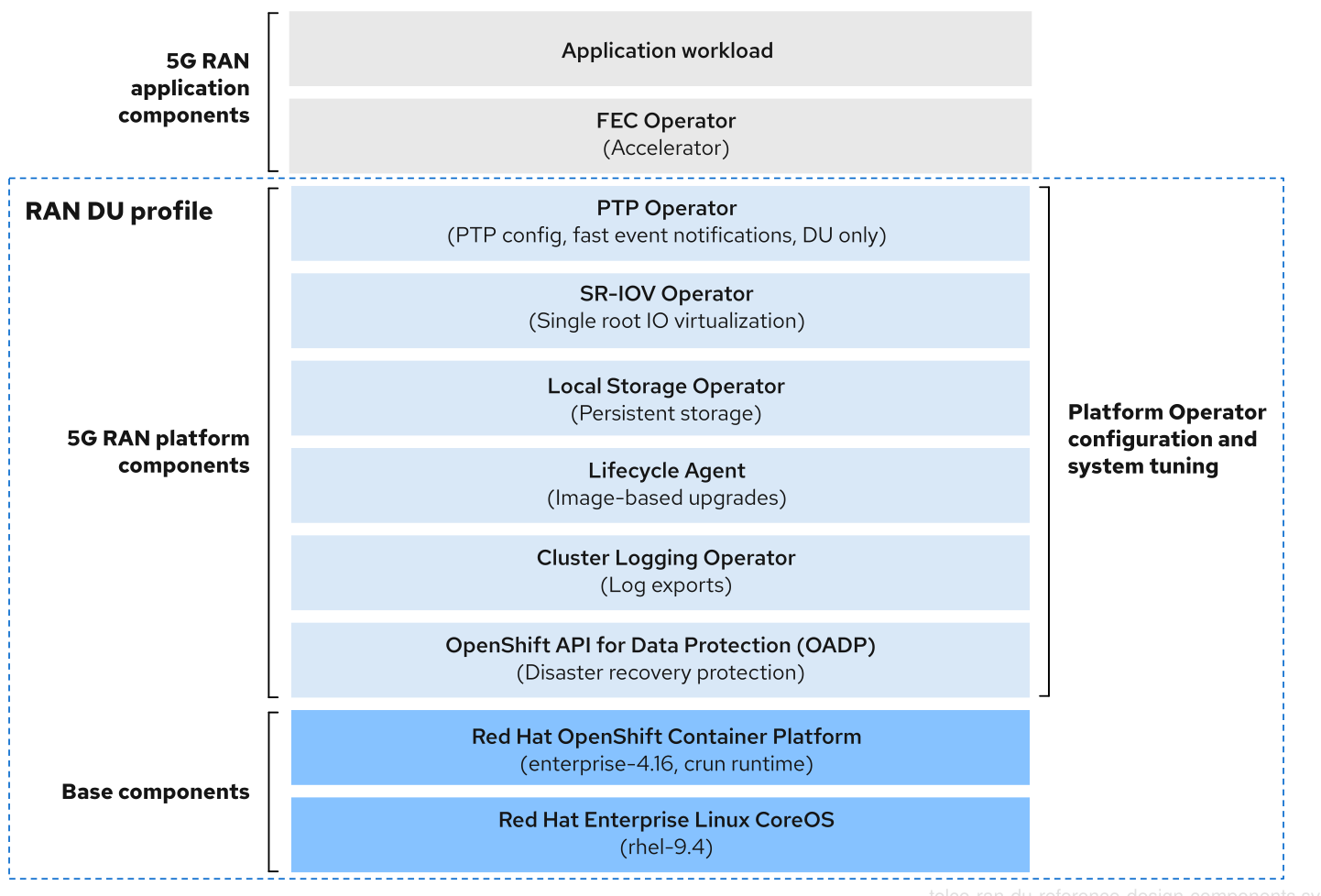
Ensure that components that are not included in the telco RAN DU profile do not affect the CPU resources allocated to workload applications.
Out of tree drivers are not supported.
3.2.3. Telco RAN DU 4.16 reference design components
The following sections describe the various OpenShift Container Platform components and configurations that you use to configure and deploy clusters to run RAN DU workloads.
3.2.3.1. Host firmware tuning
- New in this release
- No reference design updates in this release
- Description
Configure system level performance. See Configuring host firmware for low latency and high performance for recommended settings.
If Ironic inspection is enabled, the firmware setting values are available from the per-cluster
BareMetalHostCR on the hub cluster. You enable Ironic inspection with a label in thespec.clusters.nodesfield in theSiteConfigCR that you use to install the cluster. For example:nodes: - hostName: "example-node1.example.com" ironicInspect: "enabled"NoteThe telco RAN DU reference
SiteConfigdoes not enable theironicInspectfield by default.- Limits and requirements
- Hyperthreading must be enabled
- Engineering considerations
Tune all settings for maximum performance
NoteYou can tune firmware selections for power savings at the expense of performance as required.
3.2.3.2. Node Tuning Operator
- New in this release
-
With this release, the Node Tuning Operator supports setting CPU frequencies in the
PerformanceProfilefor reserved and isolated core CPUs. This is an optional feature that you can use to define specific frequencies. Use this feature to set specific frequencies by enabling theintel_pstateCPUFreqdriver in the Intel hardware. You must follow Intel’s recommendations on frequencies for FlexRAN-like applications, which requires the default CPU frequency to be set to a lower value than default running frequency. -
Previously, for the RAN DU-profile, setting the
realTimeworkload hint totruein thePerformanceProfilealways disabled theintel_pstate. With this release, the Node Tuning Operator detects the underlying Intel hardware usingTuneDand appropriately sets theintel_pstatekernel parameter based on the processor’s generation. - In this release, OpenShift Container Platform deployments with a performance profile now default to using cgroups v2 as the underlying resource management layer. If you run workloads that are not ready for this change, you can still revert to using the older cgroups v1 mechanism.
-
With this release, the Node Tuning Operator supports setting CPU frequencies in the
- Description
You tune the cluster performance by creating a performance profile. Settings that you configure with a performance profile include:
- Selecting the realtime or non-realtime kernel.
-
Allocating cores to a reserved or isolated
cpuset. OpenShift Container Platform processes allocated to the management workload partition are pinned to reserved set. - Enabling kubelet features (CPU manager, topology manager, and memory manager).
- Configuring huge pages.
- Setting additional kernel arguments.
- Setting per-core power tuning and max CPU frequency.
- Reserved and isolated core frequency tuning.
- Limits and requirements
The Node Tuning Operator uses the
PerformanceProfileCR to configure the cluster. You need to configure the following settings in the RAN DU profilePerformanceProfileCR:- Select reserved and isolated cores and ensure that you allocate at least 4 hyperthreads (equivalent to 2 cores) on Intel 3rd Generation Xeon (Ice Lake) 2.20 GHz CPUs or better with firmware tuned for maximum performance.
-
Set the reserved
cpusetto include both hyperthread siblings for each included core. Unreserved cores are available as allocatable CPU for scheduling workloads. Ensure that hyperthread siblings are not split across reserved and isolated cores. - Configure reserved and isolated CPUs to include all threads in all cores based on what you have set as reserved and isolated CPUs.
- Set core 0 of each NUMA node to be included in the reserved CPU set.
- Set the huge page size to 1G.
You should not add additional workloads to the management partition. Only those pods which are part of the OpenShift management platform should be annotated into the management partition.
- Engineering considerations
You should use the RT kernel to meet performance requirements.
NoteYou can use the non-RT kernel if required.
- The number of huge pages that you configure depends on the application workload requirements. Variation in this parameter is expected and allowed.
- Variation is expected in the configuration of reserved and isolated CPU sets based on selected hardware and additional components in use on the system. Variation must still meet the specified limits.
- Hardware without IRQ affinity support impacts isolated CPUs. To ensure that pods with guaranteed whole CPU QoS have full use of the allocated CPU, all hardware in the server must support IRQ affinity. For more information, see About support of IRQ affinity setting.
cgroup v1 is a deprecated feature. Deprecated functionality is still included in OpenShift Container Platform and continues to be supported; however, it will be removed in a future release of this product and is not recommended for new deployments.
For the most recent list of major functionality that has been deprecated or removed within OpenShift Container Platform, refer to the Deprecated and removed features section of the OpenShift Container Platform release notes.
3.2.3.3. PTP Operator
- New in this release
- Configuring linuxptp services as grandmaster clock (T-GM) for dual Intel E810 Westport Channel NICs is now a generally available feature.
-
You can configure the
linuxptpservicesptp4landphc2sysas a highly available (HA) system clock for dual PTP boundary clocks (T-BC).
- Description
See PTP timing for details of support and configuration of PTP in cluster nodes. The DU node can run in the following modes:
- As an ordinary clock (OC) synced to a grandmaster clock or boundary clock (T-BC)
- As a grandmaster clock synced from GPS with support for single or dual card E810 Westport Channel NICs.
- As dual boundary clocks (one per NIC) with support for E810 Westport Channel NICs
- Allow for High Availability of the system clock when there are multiple time sources on different NICs.
- Optional: as a boundary clock for radio units (RUs)
Events and metrics for grandmaster clocks are a Tech Preview feature added in the 4.14 telco RAN DU RDS. For more information see Using the PTP hardware fast event notifications framework.
You can subscribe applications to PTP events that happen on the node where the DU application is running.
- Limits and requirements
- Limited to two boundary clocks for dual NIC and HA
- Limited to two WPC card configuration for T-GM
- Engineering considerations
- Configurations are provided for ordinary clock, boundary clock, grandmaster clock, or PTP-HA
-
PTP fast event notifications uses
ConfigMapCRs to store PTP event subscriptions - Use Intel E810-XXV-4T Westport Channel NICs for PTP grandmaster clocks with GPS timing, minimum firmware version 4.40
3.2.3.4. SR-IOV Operator
- New in this release
-
With this release, you can use the SR-IOV Network Operator to configure QinQ (802.1ad and 802.1q) tagging. QinQ tagging provides efficient traffic management by enabling the use of both inner and outer VLAN tags. Outer VLAN tagging is hardware accelerated, leading to faster network performance. The update extends beyond the SR-IOV Network Operator itself. You can now configure QinQ on externally managed VFs by setting the outer VLAN tag using
nmstate. QinQ support varies across different NICs. For a comprehensive list of known limitations for specific NIC models, see Configuring QinQ support for SR-IOV enabled workloads in the Additional resources section. - With this release, you can configure the SR-IOV Network Operator to drain nodes in parallel during network policy updates, dramatically accelerating the setup process. This translates to significant time savings, especially for large cluster deployments that previously took hours or even days to complete.
-
With this release, you can use the SR-IOV Network Operator to configure QinQ (802.1ad and 802.1q) tagging. QinQ tagging provides efficient traffic management by enabling the use of both inner and outer VLAN tags. Outer VLAN tagging is hardware accelerated, leading to faster network performance. The update extends beyond the SR-IOV Network Operator itself. You can now configure QinQ on externally managed VFs by setting the outer VLAN tag using
- Description
-
The SR-IOV Operator provisions and configures the SR-IOV CNI and device plugins. Both
netdevice(kernel VFs) andvfio(DPDK) devices are supported. - Limits and requirements
- Use OpenShift Container Platform supported devices
- SR-IOV and IOMMU enablement in BIOS: The SR-IOV Network Operator will automatically enable IOMMU on the kernel command line.
- SR-IOV VFs do not receive link state updates from the PF. If link down detection is needed you must configure this at the protocol level.
-
You can apply multi-network policies on
netdevicedrivers types only. Multi-network policies require theiptablestool, which cannot managevfiodriver types.
- Engineering considerations
-
SR-IOV interfaces with the
vfiodriver type are typically used to enable additional secondary networks for applications that require high throughput or low latency. -
Customer variation on the configuration and number of
SriovNetworkandSriovNetworkNodePolicycustom resources (CRs) is expected. -
IOMMU kernel command-line settings are applied with a
MachineConfigCR at install time. This ensures that theSriovOperatorCR does not cause a reboot of the node when adding them. - SR-IOV support for draining nodes in parallel is not applicable in a single-node OpenShift cluster.
-
If you exclude the
SriovOperatorConfigCR from your deployment, the CR will not be created automatically. - In scenarios where you pin or restrict workloads to specific nodes, the SR-IOV parallel node drain feature will not result in the rescheduling of pods. In these scenarios, the SR-IOV Operator disables the parallel node drain functionality.
-
SR-IOV interfaces with the
3.2.3.5. Logging
- New in this release
- Cluster Logging Operator 6.0 is new in this release. Update your existing implementation to adapt to the new version of the API. You must remove the old Operator artifacts by using policies. For more information, see Additional resources.
- Description
- Use logging to collect logs from the far edge node for remote analysis. The recommended log collector is Vector.
- Engineering considerations
- Handling logs beyond the infrastructure and audit logs, for example, from the application workload requires additional CPU and network bandwidth based on additional logging rate.
As of OpenShift Container Platform 4.14, Vector is the reference log collector.
NoteUse of fluentd in the RAN use model is deprecated.
3.2.3.6. SRIOV-FEC Operator
- New in this release
- No reference design updates in this release
- Description
- SRIOV-FEC Operator is an optional 3rd party Certified Operator supporting FEC accelerator hardware.
- Limits and requirements
Starting with FEC Operator v2.7.0:
-
SecureBootis supported -
The
vfiodriver for thePFrequires the usage ofvfio-tokenthat is injected into Pods. Applications in the pod can pass theVFtoken to DPDK by using the EAL parameter--vfio-vf-token.
-
- Engineering considerations
-
The SRIOV-FEC Operator uses CPU cores from the
isolatedCPU set. - You can validate FEC readiness as part of the pre-checks for application deployment, for example, by extending the validation policy.
-
The SRIOV-FEC Operator uses CPU cores from the
3.2.3.7. Local Storage Operator
- New in this release
- No reference design updates in this release
- Description
-
You can create persistent volumes that can be used as
PVCresources by applications with the Local Storage Operator. The number and type ofPVresources that you create depends on your requirements. - Engineering considerations
-
Create backing storage for
PVCRs before creating thePV. This can be a partition, a local volume, LVM volume, or full disk. Refer to the device listing in
LocalVolumeCRs by the hardware path used to access each device to ensure correct allocation of disks and partitions. Logical names (for example,/dev/sda) are not guaranteed to be consistent across node reboots.For more information, see the RHEL 9 documentation on device identifiers.
-
Create backing storage for
3.2.3.8. LVMS Operator
- New in this release
- No reference design updates in this release
LVMS Operator is an optional component.
When you use the LVMS Operator as the storage solution, it replaces the Local Storage Operator, and the CPU required will be assigned to the management partition as platform overhead. The reference configuration must include one of these storage solutions but not both.
- Description
The LVMS Operator provides dynamic provisioning of block and file storage. The LVMS Operator creates logical volumes from local devices that can be used as
PVCresources by applications. Volume expansion and snapshots are also possible.The following example configuration creates a
vg1volume group that leverages all available disks on the node except the installation disk:StorageLVMCluster.yaml
apiVersion: lvm.topolvm.io/v1alpha1 kind: LVMCluster metadata: name: storage-lvmcluster namespace: openshift-storage annotations: ran.openshift.io/ztp-deploy-wave: "10" spec: storage: deviceClasses: - name: vg1 thinPoolConfig: name: thin-pool-1 sizePercent: 90 overprovisionRatio: 10- Limits and requirements
- In single-node OpenShift clusters, persistent storage must be provided by either LVMS or local storage, not both.
- Engineering considerations
- Ensure that sufficient disks or partitions are available for storage requirements.
3.2.3.9. Workload partitioning
- New in this release
- No reference design updates in this release
- Description
Workload partitioning pins OpenShift platform and Day 2 Operator pods that are part of the DU profile to the reserved
cpusetand removes the reserved CPU from node accounting. This leaves all unreserved CPU cores available for user workloads.The method of enabling and configuring workload partitioning changed in OpenShift Container Platform 4.14.
- 4.14 and later
Configure partitions by setting installation parameters:
cpuPartitioningMode: AllNodes-
Configure management partition cores with the reserved CPU set in the
PerformanceProfileCR
- 4.13 and earlier
-
Configure partitions with extra
MachineConfigurationCRs applied at install-time
-
Configure partitions with extra
- Limits and requirements
-
NamespaceandPodCRs must be annotated to allow the pod to be applied to the management partition - Pods with CPU limits cannot be allocated to the partition. This is because mutation can change the pod QoS.
- For more information about the minimum number of CPUs that can be allocated to the management partition, see Node Tuning Operator.
-
- Engineering considerations
- Workload Partitioning pins all management pods to reserved cores. A sufficient number of cores must be allocated to the reserved set to account for operating system, management pods, and expected spikes in CPU use that occur when the workload starts, the node reboots, or other system events happen.
3.2.3.10. Cluster tuning
- New in this release
- No reference design updates in this release
- Description
- See the section Cluster capabilities section for a full list of optional components that you enable or disable before installation.
- Limits and requirements
- Cluster capabilities are not available for installer-provisioned installation methods.
You must apply all platform tuning configurations. The following table lists the required platform tuning configurations:
Expand Table 3.2. Cluster capabilities configurations Feature Description Remove optional cluster capabilities
Reduce the OpenShift Container Platform footprint by disabling optional cluster Operators on single-node OpenShift clusters only.
- Remove all optional Operators except the Marketplace and Node Tuning Operators.
Configure cluster monitoring
Configure the monitoring stack for reduced footprint by doing the following:
-
Disable the local
alertmanagerandtelemetercomponents. -
If you use RHACM observability, the CR must be augmented with appropriate
additionalAlertManagerConfigsCRs to forward alerts to the hub cluster. Reduce the
Prometheusretention period to 24h.NoteThe RHACM hub cluster aggregates managed cluster metrics.
Disable networking diagnostics
Disable networking diagnostics for single-node OpenShift because they are not required.
Configure a single OperatorHub catalog source
Configure the cluster to use a single catalog source that contains only the Operators required for a RAN DU deployment. Each catalog source increases the CPU use on the cluster. Using a single
CatalogSourcefits within the platform CPU budget.Disable the Console Operator
If the cluster was deployed with the console disabled, the
ConsoleCR (ConsoleOperatorDisable.yaml) is not needed. If the cluster was deployed with the console enabled, you must apply theConsoleCR.
- Engineering considerations
- In this release, OpenShift Container Platform deployments use Control Groups version 2 (cgroup v2) by default. As a consequence, performance profiles in a cluster use cgroups v2 for the underlying resource management layer. If workloads running on the cluster require cgroups v1, you can configure nodes to use cgroups v1. You can make this configuration as part of the initial cluster deployment.
3.2.3.11. Machine configuration
- New in this release
- No reference design updates in this release
- Limits and requirements
The CRI-O wipe disable
MachineConfigassumes that images on disk are static other than during scheduled maintenance in defined maintenance windows. To ensure the images are static, do not set the podimagePullPolicyfield toAlways.Expand Table 3.3. Machine configuration options Feature Description Container runtime
Sets the container runtime to
crunfor all node roles.kubelet config and container mount hiding
Reduces the frequency of kubelet housekeeping and eviction monitoring to reduce CPU usage. Create a container mount namespace, visible to kubelet and CRI-O, to reduce system mount scanning resource usage.
SCTP
Optional configuration (enabled by default) Enables SCTP. SCTP is required by RAN applications but disabled by default in RHCOS.
kdump
Optional configuration (enabled by default) Enables kdump to capture debug information when a kernel panic occurs.
CRI-O wipe disable
Disables automatic wiping of the CRI-O image cache after unclean shutdown.
SR-IOV-related kernel arguments
Includes additional SR-IOV related arguments in the kernel command line.
RCU Normal systemd service
Sets
rcu_normalafter the system is fully started.One-shot time sync
Runs a one-time system time synchronization job for control plane or worker nodes.
3.2.3.12. Lifecycle Agent
- New in this release
- Use the Lifecycle Agent to enable image-based upgrades for single-node OpenShift clusters.
- Description
- The Lifecycle Agent provides local lifecycle management services for single-node OpenShift clusters.
- Limits and requirements
- The Lifecycle Agent is not applicable in multi-node clusters or single-node OpenShift clusters with an additional worker.
- Requires a persistent volume.
3.2.3.13. Reference design deployment components
The following sections describe the various OpenShift Container Platform components and configurations that you use to configure the hub cluster with Red Hat Advanced Cluster Management (RHACM).
3.2.3.13.1. Red Hat Advanced Cluster Management (RHACM)
- New in this release
-
You can now use
PolicyGeneratorresources and Red Hat Advanced Cluster Management (RHACM) to deploy polices for managed clusters with GitOps ZTP. This is a Technology Preview feature.
-
You can now use
- Description
RHACM provides Multi Cluster Engine (MCE) installation and ongoing lifecycle management functionality for deployed clusters. You declaratively specify configurations and upgrades with
PolicyCRs and apply the policies to clusters with the RHACM policy controller as managed by Topology Aware Lifecycle Manager.- GitOps Zero Touch Provisioning (ZTP) uses the MCE feature of RHACM
- Configuration, upgrades, and cluster status are managed with the RHACM policy controller
During installation RHACM can apply labels to individual nodes as configured in the
SiteConfigcustom resource (CR).- Limits and requirements
-
A single hub cluster supports up to 3500 deployed single-node OpenShift clusters with 5
PolicyCRs bound to each cluster.
-
A single hub cluster supports up to 3500 deployed single-node OpenShift clusters with 5
- Engineering considerations
- Use RHACM policy hub-side templating to better scale cluster configuration. You can significantly reduce the number of policies by using a single group policy or small number of general group policies where the group and per-cluster values are substituted into templates.
-
Cluster specific configuration: managed clusters typically have some number of configuration values that are specific to the individual cluster. These configurations should be managed using RHACM policy hub-side templating with values pulled from
ConfigMapCRs based on the cluster name. - To save CPU resources on managed clusters, policies that apply static configurations should be unbound from managed clusters after GitOps ZTP installation of the cluster.
3.2.3.13.2. Topology Aware Lifecycle Manager (TALM)
- New in this release
- No reference design updates in this release
- Description
- Managed updates
TALM is an Operator that runs only on the hub cluster for managing how changes (including cluster and Operator upgrades, configuration, and so on) are rolled out to the network. TALM does the following:
-
Progressively applies updates to fleets of clusters in user-configurable batches by using
PolicyCRs. -
Adds
ztp-donelabels or other user configurable labels on a per-cluster basis
-
Progressively applies updates to fleets of clusters in user-configurable batches by using
- Precaching for single-node OpenShift clusters
TALM supports optional precaching of OpenShift Container Platform, OLM Operator, and additional user images to single-node OpenShift clusters before initiating an upgrade.
A
PreCachingConfigcustom resource is available for specifying optional pre-caching configurations. For example:apiVersion: ran.openshift.io/v1alpha1 kind: PreCachingConfig metadata: name: example-config namespace: example-ns spec: additionalImages: - quay.io/foobar/application1@sha256:3d5800990dee7cd4727d3fe238a97e2d2976d3808fc925ada29c559a47e2e - quay.io/foobar/application2@sha256:3d5800123dee7cd4727d3fe238a97e2d2976d3808fc925ada29c559a47adf - quay.io/foobar/applicationN@sha256:4fe1334adfafadsf987123adfffdaf1243340adfafdedga0991234afdadfs spaceRequired: 45 GiB1 overrides: preCacheImage: quay.io/test_images/pre-cache:latest platformImage: quay.io/openshift-release-dev/ocp-release@sha256:3d5800990dee7cd4727d3fe238a97e2d2976d3808fc925ada29c559a47e2e operatorsIndexes: - registry.example.com:5000/custom-redhat-operators:1.0.0 operatorsPackagesAndChannels: - local-storage-operator: stable - ptp-operator: stable - sriov-network-operator: stable excludePrecachePatterns:2 - aws - vsphere
- Limits and requirements
- TALM supports concurrent cluster deployment in batches of 400
- Precaching and backup features are for single-node OpenShift clusters only.
- Engineering considerations
-
The
PreCachingConfigCR is optional and does not need to be created if you just wants to precache platform related (OpenShift and OLM Operator) images. ThePreCachingConfigCR must be applied before referencing it in theClusterGroupUpgradeCR.
-
The
3.2.3.13.3. GitOps and GitOps ZTP plugins
- New in this release
- No reference design updates in this release
- Description
GitOps and GitOps ZTP plugins provide a GitOps-based infrastructure for managing cluster deployment and configuration. Cluster definitions and configurations are maintained as a declarative state in Git. ZTP plugins provide support for generating installation CRs from the
SiteConfigCR and automatic wrapping of configuration CRs in policies based onPolicyGenTemplateCRs.You can deploy and manage multiple versions of OpenShift Container Platform on managed clusters using the baseline reference configuration CRs. You can also use custom CRs alongside the baseline CRs.
- Limits
-
300
SiteConfigCRs per ArgoCD application. You can use multiple applications to achieve the maximum number of clusters supported by a single hub cluster. -
Content in the
/source-crsfolder in Git overrides content provided in the GitOps ZTP plugin container. Git takes precedence in the search path. Add the
/source-crsfolder in the same directory as thekustomization.yamlfile, which includes thePolicyGenTemplateas a generator.NoteAlternative locations for the
/source-crsdirectory are not supported in this context.
-
300
- Engineering considerations
-
To avoid confusion or unintentional overwriting of files when updating content, use unique and distinguishable names for user-provided CRs in the
/source-crsfolder and extra manifests in Git. -
The
SiteConfigCR allows multiple extra-manifest paths. When files with the same name are found in multiple directory paths, the last file found takes precedence. This allows you to put the full set of version-specific Day 0 manifests (extra-manifests) in Git and reference them from theSiteConfigCR. With this feature, you can deploy multiple OpenShift Container Platform versions to managed clusters simultaneously. -
The
extraManifestPathfield of theSiteConfigCR is deprecated from OpenShift Container Platform 4.15 and later. Use the newextraManifests.searchPathsfield instead.
-
To avoid confusion or unintentional overwriting of files when updating content, use unique and distinguishable names for user-provided CRs in the
3.2.3.13.4. Agent-based installer
- New in this release
- No reference design updates in this release
- Description
Agent-based installer (ABI) provides installation capabilities without centralized infrastructure. The installation program creates an ISO image that you mount to the server. When the server boots it installs OpenShift Container Platform and supplied extra manifests.
NoteYou can also use ABI to install OpenShift Container Platform clusters without a hub cluster. An image registry is still required when you use ABI in this manner.
Agent-based installer (ABI) is an optional component.
- Limits and requirements
- You can supply a limited set of additional manifests at installation time.
-
You must include
MachineConfigurationCRs that are required by the RAN DU use case.
- Engineering considerations
- ABI provides a baseline OpenShift Container Platform installation.
- You install Day 2 Operators and the remainder of the RAN DU use case configurations after installation.
3.2.4. Telco RAN distributed unit (DU) reference configuration CRs
Use the following custom resources (CRs) to configure and deploy OpenShift Container Platform clusters with the telco RAN DU profile. Some of the CRs are optional depending on your requirements. CR fields you can change are annotated in the CR with YAML comments.
You can extract the complete set of RAN DU CRs from the ztp-site-generate container image. See Preparing the GitOps ZTP site configuration repository for more information.
3.2.4.1. Day 2 Operators reference CRs
| Component | Reference CR | Optional | New in this release |
|---|---|---|---|
| Cluster logging | No | No | |
| Cluster logging | No | No | |
| Cluster logging | No | No | |
| Cluster logging | No | No | |
| Cluster logging | No | No | |
| Lifecycle Agent | Yes | Yes | |
| Lifecycle Agent | Yes | Yes | |
| Lifecycle Agent | Yes | Yes | |
| Lifecycle Agent | Yes | Yes | |
| Local Storage Operator | Yes | No | |
| Local Storage Operator | Yes | No | |
| Local Storage Operator | Yes | No | |
| Local Storage Operator | Yes | No | |
| Local Storage Operator | Yes | No | |
| LVM Storage | No | Yes | |
| LVM Storage | No | Yes | |
| LVM Storage | No | Yes | |
| LVM Storage | No | Yes | |
| LVM Storage | No | Yes | |
| Node Tuning Operator | No | No | |
| Node Tuning Operator | No | No | |
| PTP fast event notifications | Yes | Yes | |
| PTP fast event notifications | Yes | Yes | |
| PTP fast event notifications | Yes | Yes | |
| PTP fast event notifications | Yes | Yes | |
| PTP fast event notifications | Yes | No | |
| PTP Operator | No | No | |
| PTP Operator | No | No | |
| PTP Operator | No | No | |
| PTP Operator | No | Yes | |
| PTP Operator | No | No | |
| PTP Operator | No | No | |
| PTP Operator | No | No | |
| PTP Operator | No | No | |
| PTP Operator | No | No | |
| PTP Operator | No | No | |
| SR-IOV FEC Operator | Yes | No | |
| SR-IOV FEC Operator | Yes | No | |
| SR-IOV FEC Operator | Yes | No | |
| SR-IOV FEC Operator | Yes | No | |
| SR-IOV Operator | No | No | |
| SR-IOV Operator | No | No | |
| SR-IOV Operator | No | No | |
| SR-IOV Operator | No | Yes | |
| SR-IOV Operator | No | No | |
| SR-IOV Operator | No | No | |
| SR-IOV Operator | No | No |
3.2.4.2. Cluster tuning reference CRs
| Component | Reference CR | Optional | New in this release |
|---|---|---|---|
| Cluster capabilities | No | No | |
| Console Operator disable | No | No | |
| Disabling network diagnostics | No | No | |
| Monitoring configuration | No | No | |
| OperatorHub | No | No | |
| OperatorHub | No | No | |
| OperatorHub | No | No | |
| OperatorHub | No | No | |
| OperatorHub | Yes | No |
3.2.4.3. Machine configuration reference CRs
| Component | Reference CR | Optional | New in this release |
|---|---|---|---|
| Container runtime (crun) | No | No | |
| Container runtime (crun) | No | No | |
| Disabling CRI-O wipe | No | No | |
| Disabling CRI-O wipe | No | No | |
| Enabling kdump | No | No | |
| Enabling kdump | No | No | |
| Kubelet configuration and container mount hiding | No | No | |
| Kubelet configuration and container mount hiding | No | No | |
| One-shot time sync | No | No | |
| One-shot time sync | No | No | |
| SCTP | No | No | |
| SCTP | No | No | |
| Set RCU Normal | No | No | |
| Set RCU Normal | No | No | |
| SR-IOV related kernel arguments | No | Yes | |
| SR-IOV related kernel arguments | No | No |
3.2.4.4. YAML reference
The following is a complete reference for all the custom resources (CRs) that make up the telco RAN DU 4.16 reference configuration.
3.2.4.4.1. Day 2 Operators reference YAML
ClusterLogForwarder.yaml
apiVersion: "logging.openshift.io/v1"
kind: ClusterLogForwarder
metadata:
  name: instance
  namespace: openshift-logging
  annotations: {}
spec:
#  outputs: $outputs
#  pipelines: $pipelines

#apiVersion: "logging.openshift.io/v1"
#kind: ClusterLogForwarder
#metadata:
#  name: instance
#  namespace: openshift-logging
#spec:
#  outputs:
#    - type: "kafka"
#      name: kafka-open
#      url: tcp://10.46.55.190:9092/test
#  pipelines:
#  - inputRefs:
#    - audit
#    - infrastructure
#    labels:
#      label1: test1
#      label2: test2
#      label3: test3
#      label4: test4
#    name: all-to-default
#    outputRefs:
#    - kafka-open
ClusterLogging.yaml
apiVersion: logging.openshift.io/v1
kind: ClusterLogging
metadata:
  name: instance
  namespace: openshift-logging
  annotations: {}
spec:
  managementState: "Managed"
  collection:
    type: "vector"
ClusterLogNS.yaml
---
apiVersion: v1
kind: Namespace
metadata:
  name: openshift-logging
  annotations:
    workload.openshift.io/allowed: management
ClusterLogOperGroup.yaml
---
apiVersion: operators.coreos.com/v1
kind: OperatorGroup
metadata:
  name: cluster-logging
  namespace: openshift-logging
  annotations: {}
spec:
  targetNamespaces:
    - openshift-logging
ClusterLogSubscription.yaml
apiVersion: operators.coreos.com/v1alpha1
kind: Subscription
metadata:
  name: cluster-logging
  namespace: openshift-logging
  annotations: {}
spec:
  channel: "stable"
  name: cluster-logging
  source: redhat-operators-disconnected
  sourceNamespace: openshift-marketplace
  installPlanApproval: Manual
status:
  state: AtLatestKnown
ImageBasedUpgrade.yaml
apiVersion: lca.openshift.io/v1
kind: ImageBasedUpgrade
metadata:
  name: upgrade
spec:
  stage: Idle
  # When setting `stage: Prep`, remember to add the seed image reference object below.
  # seedImageRef:
  #   image: $image
  #   version: $version
LcaSubscription.yaml
apiVersion: operators.coreos.com/v1alpha1
kind: Subscription
metadata:
  name: lifecycle-agent
  namespace: openshift-lifecycle-agent
  annotations: {}
spec:
  channel: "stable"
  name: lifecycle-agent
  source: redhat-operators-disconnected
  sourceNamespace: openshift-marketplace
  installPlanApproval: Manual
status:
  state: AtLatestKnown
LcaSubscriptionNS.yaml
apiVersion: v1
kind: Namespace
metadata:
  name: openshift-lifecycle-agent
  annotations:
    workload.openshift.io/allowed: management
  labels:
    kubernetes.io/metadata.name: openshift-lifecycle-agent
LcaSubscriptionOperGroup.yaml
apiVersion: operators.coreos.com/v1
kind: OperatorGroup
metadata:
  name: lifecycle-agent
  namespace: openshift-lifecycle-agent
  annotations: {}
spec:
  targetNamespaces:
    - openshift-lifecycle-agent
StorageClass.yaml
apiVersion: storage.k8s.io/v1
kind: StorageClass
metadata:
  annotations: {}
  name: example-storage-class
provisioner: kubernetes.io/no-provisioner
reclaimPolicy: Delete
StorageLV.yaml
apiVersion: "local.storage.openshift.io/v1"
kind: "LocalVolume"
metadata:
  name: "local-disks"
  namespace: "openshift-local-storage"
  annotations: {}
spec:
  logLevel: Normal
  managementState: Managed
  storageClassDevices:
    # The list of storage classes and associated devicePaths need to be specified like this example:
    - storageClassName: "example-storage-class"
      volumeMode: Filesystem
      fsType: xfs
      # The below must be adjusted to the hardware.
      # For stability and reliability, it's recommended to use persistent
      # naming conventions for devicePaths, such as /dev/disk/by-path.
      devicePaths:
        - /dev/disk/by-path/pci-0000:05:00.0-nvme-1
#---
## How to verify
## 1. Create a PVC
# apiVersion: v1
# kind: PersistentVolumeClaim
# metadata:
#   name: local-pvc-name
# spec:
#   accessModes:
#   - ReadWriteOnce
#   volumeMode: Filesystem
#   resources:
#     requests:
#       storage: 100Gi
#   storageClassName: example-storage-class
#---
## 2. Create a pod that mounts it
# apiVersion: v1
# kind: Pod
# metadata:
#   labels:
#     run: busybox
#   name: busybox
# spec:
#   containers:
#   - image: quay.io/quay/busybox:latest
#     name: busybox
#     resources: {}
#     command: ["/bin/sh", "-c", "sleep infinity"]
#     volumeMounts:
#     - name: local-pvc
#       mountPath: /data
#   volumes:
#   - name: local-pvc
#     persistentVolumeClaim:
#       claimName: local-pvc-name
#   dnsPolicy: ClusterFirst
#   restartPolicy: Always
## 3. Run the pod on the cluster and verify the size and access of the `/data` mount
StorageNS.yaml
apiVersion: v1
kind: Namespace
metadata:
  name: openshift-local-storage
  annotations:
    workload.openshift.io/allowed: management
StorageOperGroup.yaml
apiVersion: operators.coreos.com/v1
kind: OperatorGroup
metadata:
  name: openshift-local-storage
  namespace: openshift-local-storage
  annotations: {}
spec:
  targetNamespaces:
    - openshift-local-storage
StorageSubscription.yaml
apiVersion: operators.coreos.com/v1alpha1
kind: Subscription
metadata:
  name: local-storage-operator
  namespace: openshift-local-storage
  annotations: {}
spec:
  channel: "stable"
  name: local-storage-operator
  source: redhat-operators-disconnected
  sourceNamespace: openshift-marketplace
  installPlanApproval: Manual
status:
  state: AtLatestKnown
LVMOperatorStatus.yaml
# This CR verifies the installation/upgrade of the Sriov Network Operator
apiVersion: operators.coreos.com/v1
kind: Operator
metadata:
  name: lvms-operator.openshift-storage
  annotations: {}
status:
  components:
    refs:
      - kind: Subscription
        namespace: openshift-storage
        conditions:
          - type: CatalogSourcesUnhealthy
            status: "False"
      - kind: InstallPlan
        namespace: openshift-storage
        conditions:
          - type: Installed
            status: "True"
      - kind: ClusterServiceVersion
        namespace: openshift-storage
        conditions:
          - type: Succeeded
            status: "True"
            reason: InstallSucceeded
StorageLVMCluster.yaml
apiVersion: lvm.topolvm.io/v1alpha1
kind: LVMCluster
metadata:
  name: lvmcluster
  namespace: openshift-storage
  annotations: {}
spec: {}
#example: creating a vg1 volume group leveraging all available disks on the node
#         except the installation disk.
#  storage:
#    deviceClasses:
#    - name: vg1
#      thinPoolConfig:
#        name: thin-pool-1
#        sizePercent: 90
#        overprovisionRatio: 10
StorageLVMSubscription.yaml
apiVersion: operators.coreos.com/v1alpha1
kind: Subscription
metadata:
  name: lvms-operator
  namespace: openshift-storage
  annotations: {}
spec:
  channel: "stable"
  name: lvms-operator
  source: redhat-operators-disconnected
  sourceNamespace: openshift-marketplace
  installPlanApproval: Manual
status:
  state: AtLatestKnown
StorageLVMSubscriptionNS.yaml
apiVersion: v1
kind: Namespace
metadata:
  name: openshift-storage
  labels:
    workload.openshift.io/allowed: "management"
    openshift.io/cluster-monitoring: "true"
  annotations: {}
StorageLVMSubscriptionOperGroup.yaml
apiVersion: operators.coreos.com/v1
kind: OperatorGroup
metadata:
  name: lvms-operator-operatorgroup
  namespace: openshift-storage
  annotations: {}
spec:
  targetNamespaces:
    - openshift-storage
PerformanceProfile.yaml
apiVersion: performance.openshift.io/v2
kind: PerformanceProfile
metadata:
  # if you change this name make sure the 'include' line in TunedPerformancePatch.yaml
  # matches this name: include=openshift-node-performance-${PerformanceProfile.metadata.name}
  # Also in file 'validatorCRs/informDuValidator.yaml':
  # name: 50-performance-${PerformanceProfile.metadata.name}
  name: openshift-node-performance-profile
  annotations:
    ran.openshift.io/reference-configuration: "ran-du.redhat.com"
spec:
  additionalKernelArgs:
    - "rcupdate.rcu_normal_after_boot=0"
    - "efi=runtime"
    - "vfio_pci.enable_sriov=1"
    - "vfio_pci.disable_idle_d3=1"
    - "module_blacklist=irdma"
  cpu:
    isolated: $isolated
    reserved: $reserved
  hugepages:
    defaultHugepagesSize: $defaultHugepagesSize
    pages:
      - size: $size
        count: $count
        node: $node
  machineConfigPoolSelector:
    pools.operator.machineconfiguration.openshift.io/$mcp: ""
  nodeSelector:
    node-role.kubernetes.io/$mcp: ''
  numa:
    topologyPolicy: "restricted"
  # To use the standard (non-realtime) kernel, set enabled to false
  realTimeKernel:
    enabled: true
  workloadHints:
    # WorkloadHints defines the set of upper level flags for different type of workloads.
    # See https://github.com/openshift/cluster-node-tuning-operator/blob/master/docs/performanceprofile/performance_profile.md#workloadhints
    # for detailed descriptions of each item.
    # The configuration below is set for a low latency, performance mode.
    realTime: true
    highPowerConsumption: false
    perPodPowerManagement: false
TunedPerformancePatch.yaml
apiVersion: tuned.openshift.io/v1
kind: Tuned
metadata:
  name: performance-patch
  namespace: openshift-cluster-node-tuning-operator
  annotations: {}
spec:
  profile:
    - name: performance-patch
      # Please note:
      # - The 'include' line must match the associated PerformanceProfile name, following below pattern
      #   include=openshift-node-performance-${PerformanceProfile.metadata.name}
      # - When using the standard (non-realtime) kernel, remove the kernel.timer_migration override from
      #   the [sysctl] section and remove the entire section if it is empty.
      data: |
        [main]
        summary=Configuration changes profile inherited from performance created tuned
        include=openshift-node-performance-openshift-node-performance-profile
        [scheduler]
        group.ice-ptp=0:f:10:*:ice-ptp.*
        group.ice-gnss=0:f:10:*:ice-gnss.*
        group.ice-dplls=0:f:10:*:ice-dplls.*
        [service]
        service.stalld=start,enable
        service.chronyd=stop,disable
  recommend:
    - machineConfigLabels:
        machineconfiguration.openshift.io/role: "$mcp"
      priority: 19
      profile: performance-patch
PtpConfigBoundaryForEvent.yaml
apiVersion: ptp.openshift.io/v1
kind: PtpConfig
metadata:
  name: boundary
  namespace: openshift-ptp
  annotations: {}
spec:
  profile:
    - name: "boundary"
      ptp4lOpts: "-2 --summary_interval -4"
      phc2sysOpts: "-a -r -m -n 24 -N 8 -R 16"
      ptpSchedulingPolicy: SCHED_FIFO
      ptpSchedulingPriority: 10
      ptpSettings:
        logReduce: "true"
      ptp4lConf: |
        # The interface name is hardware-specific
        [$iface_slave]
        masterOnly 0
        [$iface_master_1]
        masterOnly 1
        [$iface_master_2]
        masterOnly 1
        [$iface_master_3]
        masterOnly 1
        [global]
        #
        # Default Data Set
        #
        twoStepFlag 1
        slaveOnly 0
        priority1 128
        priority2 128
        domainNumber 24
        #utc_offset 37
        clockClass 248
        clockAccuracy 0xFE
        offsetScaledLogVariance 0xFFFF
        free_running 0
        freq_est_interval 1
        dscp_event 0
        dscp_general 0
        dataset_comparison G.8275.x
        G.8275.defaultDS.localPriority 128
        #
        # Port Data Set
        #
        logAnnounceInterval -3
        logSyncInterval -4
        logMinDelayReqInterval -4
        logMinPdelayReqInterval -4
        announceReceiptTimeout 3
        syncReceiptTimeout 0
        delayAsymmetry 0
        fault_reset_interval -4
        neighborPropDelayThresh 20000000
        masterOnly 0
        G.8275.portDS.localPriority 128
        #
        # Run time options
        #
        assume_two_step 0
        logging_level 6
        path_trace_enabled 0
        follow_up_info 0
        hybrid_e2e 0
        inhibit_multicast_service 0
        net_sync_monitor 0
        tc_spanning_tree 0
        tx_timestamp_timeout 50
        unicast_listen 0
        unicast_master_table 0
        unicast_req_duration 3600
        use_syslog 1
        verbose 0
        summary_interval 0
        kernel_leap 1
        check_fup_sync 0
        clock_class_threshold 135
        #
        # Servo Options
        #
        pi_proportional_const 0.0
        pi_integral_const 0.0
        pi_proportional_scale 0.0
        pi_proportional_exponent -0.3
        pi_proportional_norm_max 0.7
        pi_integral_scale 0.0
        pi_integral_exponent 0.4
        pi_integral_norm_max 0.3
        step_threshold 2.0
        first_step_threshold 0.00002
        max_frequency 900000000
        clock_servo pi
        sanity_freq_limit 200000000
        ntpshm_segment 0
        #
        # Transport options
        #
        transportSpecific 0x0
        ptp_dst_mac 01:1B:19:00:00:00
        p2p_dst_mac 01:80:C2:00:00:0E
        udp_ttl 1
        udp6_scope 0x0E
        uds_address /var/run/ptp4l
        #
        # Default interface options
        #
        clock_type BC
        network_transport L2
        delay_mechanism E2E
        time_stamping hardware
        tsproc_mode filter
        delay_filter moving_median
        delay_filter_length 10
        egressLatency 0
        ingressLatency 0
        boundary_clock_jbod 0
        #
        # Clock description
        #
        productDescription ;;
        revisionData ;;
        manufacturerIdentity 00:00:00
        userDescription ;
        timeSource 0xA0
  recommend:
    - profile: "boundary"
      priority: 4
      match:
        - nodeLabel: "node-role.kubernetes.io/$mcp"
PtpConfigForHAForEvent.yaml
apiVersion: ptp.openshift.io/v1
kind: PtpConfig
metadata:
  name: boundary-ha
  namespace: openshift-ptp
  annotations: {}
spec:
  profile:
    - name: "boundary-ha"
      ptp4lOpts: " "
      phc2sysOpts: "-a -r -m -n 24 -N 8 -R 16"
      ptpSchedulingPolicy: SCHED_FIFO
      ptpSchedulingPriority: 10
      ptpSettings:
        logReduce: "true"
        haProfiles: "$profile1,$profile2"
  recommend:
    - profile: "boundary-ha"
      priority: 4
      match:
        - nodeLabel: "node-role.kubernetes.io/$mcp"
PtpConfigMasterForEvent.yaml
# The grandmaster profile is provided for testing only
# It is not installed on production clusters
apiVersion: ptp.openshift.io/v1
kind: PtpConfig
metadata:
  name: grandmaster
  namespace: openshift-ptp
  annotations: {}
spec:
  profile:
    - name: "grandmaster"
      # The interface name is hardware-specific
      interface: $interface
      ptp4lOpts: "-2 --summary_interval -4"
      phc2sysOpts: "-a -r -m -n 24 -N 8 -R 16"
      ptpSchedulingPolicy: SCHED_FIFO
      ptpSchedulingPriority: 10
      ptpSettings:
        logReduce: "true"
      ptp4lConf: |
        [global]
        #
        # Default Data Set
        #
        twoStepFlag 1
        slaveOnly 0
        priority1 128
        priority2 128
        domainNumber 24
        #utc_offset 37
        clockClass 255
        clockAccuracy 0xFE
        offsetScaledLogVariance 0xFFFF
        free_running 0
        freq_est_interval 1
        dscp_event 0
        dscp_general 0
        dataset_comparison G.8275.x
        G.8275.defaultDS.localPriority 128
        #
        # Port Data Set
        #
        logAnnounceInterval -3
        logSyncInterval -4
        logMinDelayReqInterval -4
        logMinPdelayReqInterval -4
        announceReceiptTimeout 3
        syncReceiptTimeout 0
        delayAsymmetry 0
        fault_reset_interval -4
        neighborPropDelayThresh 20000000
        masterOnly 0
        G.8275.portDS.localPriority 128
        #
        # Run time options
        #
        assume_two_step 0
        logging_level 6
        path_trace_enabled 0
        follow_up_info 0
        hybrid_e2e 0
        inhibit_multicast_service 0
        net_sync_monitor 0
        tc_spanning_tree 0
        tx_timestamp_timeout 50
        unicast_listen 0
        unicast_master_table 0
        unicast_req_duration 3600
        use_syslog 1
        verbose 0
        summary_interval 0
        kernel_leap 1
        check_fup_sync 0
        clock_class_threshold 7
        #
        # Servo Options
        #
        pi_proportional_const 0.0
        pi_integral_const 0.0
        pi_proportional_scale 0.0
        pi_proportional_exponent -0.3
        pi_proportional_norm_max 0.7
        pi_integral_scale 0.0
        pi_integral_exponent 0.4
        pi_integral_norm_max 0.3
        step_threshold 2.0
        first_step_threshold 0.00002
        max_frequency 900000000
        clock_servo pi
        sanity_freq_limit 200000000
        ntpshm_segment 0
        #
        # Transport options
        #
        transportSpecific 0x0
        ptp_dst_mac 01:1B:19:00:00:00
        p2p_dst_mac 01:80:C2:00:00:0E
        udp_ttl 1
        udp6_scope 0x0E
        uds_address /var/run/ptp4l
        #
        # Default interface options
        #
        clock_type OC
        network_transport L2
        delay_mechanism E2E
        time_stamping hardware
        tsproc_mode filter
        delay_filter moving_median
        delay_filter_length 10
        egressLatency 0
        ingressLatency 0
        boundary_clock_jbod 0
        #
        # Clock description
        #
        productDescription ;;
        revisionData ;;
        manufacturerIdentity 00:00:00
        userDescription ;
        timeSource 0xA0
  recommend:
    - profile: "grandmaster"
      priority: 4
      match:
        - nodeLabel: "node-role.kubernetes.io/$mcp"
PtpConfigSlaveForEvent.yaml
apiVersion: ptp.openshift.io/v1
kind: PtpConfig
metadata:
  name: du-ptp-slave
  namespace: openshift-ptp
  annotations: {}
spec:
  profile:
    - name: "slave"
      # The interface name is hardware-specific
      interface: $interface
      ptp4lOpts: "-2 -s --summary_interval -4"
      phc2sysOpts: "-a -r -m -n 24 -N 8 -R 16"
      ptpSchedulingPolicy: SCHED_FIFO
      ptpSchedulingPriority: 10
      ptpSettings:
        logReduce: "true"
      ptp4lConf: |
        [global]
        #
        # Default Data Set
        #
        twoStepFlag 1
        slaveOnly 1
        priority1 128
        priority2 128
        domainNumber 24
        #utc_offset 37
        clockClass 255
        clockAccuracy 0xFE
        offsetScaledLogVariance 0xFFFF
        free_running 0
        freq_est_interval 1
        dscp_event 0
        dscp_general 0
        dataset_comparison G.8275.x
        G.8275.defaultDS.localPriority 128
        #
        # Port Data Set
        #
        logAnnounceInterval -3
        logSyncInterval -4
        logMinDelayReqInterval -4
        logMinPdelayReqInterval -4
        announceReceiptTimeout 3
        syncReceiptTimeout 0
        delayAsymmetry 0
        fault_reset_interval -4
        neighborPropDelayThresh 20000000
        masterOnly 0
        G.8275.portDS.localPriority 128
        #
        # Run time options
        #
        assume_two_step 0
        logging_level 6
        path_trace_enabled 0
        follow_up_info 0
        hybrid_e2e 0
        inhibit_multicast_service 0
        net_sync_monitor 0
        tc_spanning_tree 0
        tx_timestamp_timeout 50
        unicast_listen 0
        unicast_master_table 0
        unicast_req_duration 3600
        use_syslog 1
        verbose 0
        summary_interval 0
        kernel_leap 1
        check_fup_sync 0
        clock_class_threshold 7
        #
        # Servo Options
        #
        pi_proportional_const 0.0
        pi_integral_const 0.0
        pi_proportional_scale 0.0
        pi_proportional_exponent -0.3
        pi_proportional_norm_max 0.7
        pi_integral_scale 0.0
        pi_integral_exponent 0.4
        pi_integral_norm_max 0.3
        step_threshold 2.0
        first_step_threshold 0.00002
        max_frequency 900000000
        clock_servo pi
        sanity_freq_limit 200000000
        ntpshm_segment 0
        #
        # Transport options
        #
        transportSpecific 0x0
        ptp_dst_mac 01:1B:19:00:00:00
        p2p_dst_mac 01:80:C2:00:00:0E
        udp_ttl 1
        udp6_scope 0x0E
        uds_address /var/run/ptp4l
        #
        # Default interface options
        #
        clock_type OC
        network_transport L2
        delay_mechanism E2E
        time_stamping hardware
        tsproc_mode filter
        delay_filter moving_median
        delay_filter_length 10
        egressLatency 0
        ingressLatency 0
        boundary_clock_jbod 0
        #
        # Clock description
        #
        productDescription ;;
        revisionData ;;
        manufacturerIdentity 00:00:00
        userDescription ;
        timeSource 0xA0
  recommend:
    - profile: "slave"
      priority: 4
      match:
        - nodeLabel: "node-role.kubernetes.io/$mcp"
PtpOperatorConfigForEvent.yaml
apiVersion: ptp.openshift.io/v1
kind: PtpOperatorConfig
metadata:
  name: default
  namespace: openshift-ptp
  annotations: {}
spec:
  daemonNodeSelector:
    node-role.kubernetes.io/$mcp: ""
  ptpEventConfig:
    enableEventPublisher: true
    transportHost: "http://ptp-event-publisher-service-NODE_NAME.openshift-ptp.svc.cluster.local:9043"
PtpConfigBoundary.yaml
apiVersion: ptp.openshift.io/v1
kind: PtpConfig
metadata:
  name: boundary
  namespace: openshift-ptp
  annotations: {}
spec:
  profile:
    - name: "boundary"
      ptp4lOpts: "-2"
      phc2sysOpts: "-a -r -n 24"
      ptpSchedulingPolicy: SCHED_FIFO
      ptpSchedulingPriority: 10
      ptpSettings:
        logReduce: "true"
      ptp4lConf: |
        # The interface name is hardware-specific
        [$iface_slave]
        masterOnly 0
        [$iface_master_1]
        masterOnly 1
        [$iface_master_2]
        masterOnly 1
        [$iface_master_3]
        masterOnly 1
        [global]
        #
        # Default Data Set
        #
        twoStepFlag 1
        slaveOnly 0
        priority1 128
        priority2 128
        domainNumber 24
        #utc_offset 37
        clockClass 248
        clockAccuracy 0xFE
        offsetScaledLogVariance 0xFFFF
        free_running 0
        freq_est_interval 1
        dscp_event 0
        dscp_general 0
        dataset_comparison G.8275.x
        G.8275.defaultDS.localPriority 128
        #
        # Port Data Set
        #
        logAnnounceInterval -3
        logSyncInterval -4
        logMinDelayReqInterval -4
        logMinPdelayReqInterval -4
        announceReceiptTimeout 3
        syncReceiptTimeout 0
        delayAsymmetry 0
        fault_reset_interval -4
        neighborPropDelayThresh 20000000
        masterOnly 0
        G.8275.portDS.localPriority 128
        #
        # Run time options
        #
        assume_two_step 0
        logging_level 6
        path_trace_enabled 0
        follow_up_info 0
        hybrid_e2e 0
        inhibit_multicast_service 0
        net_sync_monitor 0
        tc_spanning_tree 0
        tx_timestamp_timeout 50
        unicast_listen 0
        unicast_master_table 0
        unicast_req_duration 3600
        use_syslog 1
        verbose 0
        summary_interval 0
        kernel_leap 1
        check_fup_sync 0
        clock_class_threshold 135
        #
        # Servo Options
        #
        pi_proportional_const 0.0
        pi_integral_const 0.0
        pi_proportional_scale 0.0
        pi_proportional_exponent -0.3
        pi_proportional_norm_max 0.7
        pi_integral_scale 0.0
        pi_integral_exponent 0.4
        pi_integral_norm_max 0.3
        step_threshold 2.0
        first_step_threshold 0.00002
        max_frequency 900000000
        clock_servo pi
        sanity_freq_limit 200000000
        ntpshm_segment 0
        #
        # Transport options
        #
        transportSpecific 0x0
        ptp_dst_mac 01:1B:19:00:00:00
        p2p_dst_mac 01:80:C2:00:00:0E
        udp_ttl 1
        udp6_scope 0x0E
        uds_address /var/run/ptp4l
        #
        # Default interface options
        #
        clock_type BC
        network_transport L2
        delay_mechanism E2E
        time_stamping hardware
        tsproc_mode filter
        delay_filter moving_median
        delay_filter_length 10
        egressLatency 0
        ingressLatency 0
        boundary_clock_jbod 0
        #
        # Clock description
        #
        productDescription ;;
        revisionData ;;
        manufacturerIdentity 00:00:00
        userDescription ;
        timeSource 0xA0
  recommend:
    - profile: "boundary"
      priority: 4
      match:
        - nodeLabel: "node-role.kubernetes.io/$mcp"
PtpConfigDualCardGmWpc.yaml
# The grandmaster profile is provided for testing only
# It is not installed on production clusters
# In this example two cards $iface_nic1 and $iface_nic2 are connected via
# SMA1 ports by a cable and $iface_nic2 receives 1PPS signals from $iface_nic1
apiVersion: ptp.openshift.io/v1
kind: PtpConfig
metadata:
  name: grandmaster
  namespace: openshift-ptp
  annotations: {}
spec:
  profile:
    - name: "grandmaster"
      ptp4lOpts: "-2 --summary_interval -4"
      phc2sysOpts: -r -u 0 -m -w -N 8 -R 16 -s $iface_nic1 -n 24
      ptpSchedulingPolicy: SCHED_FIFO
      ptpSchedulingPriority: 10
      ptpSettings:
        logReduce: "true"
      plugins:
        e810:
          enableDefaultConfig: false
          settings:
            LocalMaxHoldoverOffSet: 1500
            LocalHoldoverTimeout: 14400
            MaxInSpecOffset: 1500
          pins: $e810_pins
          #  "$iface_nic1":
          #    "U.FL2": "0 2"
          #    "U.FL1": "0 1"
          #    "SMA2": "0 2"
          #    "SMA1": "2 1"
          #  "$iface_nic2":
          #    "U.FL2": "0 2"
          #    "U.FL1": "0 1"
          #    "SMA2": "0 2"
          #    "SMA1": "1 1"
          ublxCmds:
            - args: #ubxtool -P 29.20 -z CFG-HW-ANT_CFG_VOLTCTRL,1
                - "-P"
                - "29.20"
                - "-z"
                - "CFG-HW-ANT_CFG_VOLTCTRL,1"
              reportOutput: false
            - args: #ubxtool -P 29.20 -e GPS
                - "-P"
                - "29.20"
                - "-e"
                - "GPS"
              reportOutput: false
            - args: #ubxtool -P 29.20 -d Galileo
                - "-P"
                - "29.20"
                - "-d"
                - "Galileo"
              reportOutput: false
            - args: #ubxtool -P 29.20 -d GLONASS
                - "-P"
                - "29.20"
                - "-d"
                - "GLONASS"
              reportOutput: false
            - args: #ubxtool -P 29.20 -d BeiDou
                - "-P"
                - "29.20"
                - "-d"
                - "BeiDou"
              reportOutput: false
            - args: #ubxtool -P 29.20 -d SBAS
                - "-P"
                - "29.20"
                - "-d"
                - "SBAS"
              reportOutput: false
            - args: #ubxtool -P 29.20 -t -w 5 -v 1 -e SURVEYIN,600,50000
                - "-P"
                - "29.20"
                - "-t"
                - "-w"
                - "5"
                - "-v"
                - "1"
                - "-e"
                - "SURVEYIN,600,50000"
              reportOutput: true
            - args: #ubxtool -P 29.20 -p MON-HW
                - "-P"
                - "29.20"
                - "-p"
                - "MON-HW"
              reportOutput: true
            - args: #ubxtool -P 29.20 -p CFG-MSG,1,38,300
                - "-P"
                - "29.20"
                - "-p"
                - "CFG-MSG,1,38,300"
              reportOutput: true
      ts2phcOpts: " "
      ts2phcConf: |
        [nmea]
        ts2phc.master 1
        [global]
        use_syslog  0
        verbose 1
        logging_level 7
        ts2phc.pulsewidth 100000000
        #cat /dev/GNSS to find available serial port
        #example value of gnss_serialport is /dev/ttyGNSS_1700_0
        ts2phc.nmea_serialport $gnss_serialport
        leapfile  /usr/share/zoneinfo/leap-seconds.list
        [$iface_nic1]
        ts2phc.extts_polarity rising
        ts2phc.extts_correction 0
        [$iface_nic2]
        ts2phc.master 0
        ts2phc.extts_polarity rising
        #this is a measured value in nanoseconds to compensate for SMA cable delay
        ts2phc.extts_correction -10
      ptp4lConf: |
        [$iface_nic1]
        masterOnly 1
        [$iface_nic1_1]
        masterOnly 1
        [$iface_nic1_2]
        masterOnly 1
        [$iface_nic1_3]
        masterOnly 1
        [$iface_nic2]
        masterOnly 1
        [$iface_nic2_1]
        masterOnly 1
        [$iface_nic2_2]
        masterOnly 1
        [$iface_nic2_3]
        masterOnly 1
        [global]
        #
        # Default Data Set
        #
        twoStepFlag 1
        priority1 128
        priority2 128
        domainNumber 24
        #utc_offset 37
        clockClass 6
        clockAccuracy 0x27
        offsetScaledLogVariance 0xFFFF
        free_running 0
        freq_est_interval 1
        dscp_event 0
        dscp_general 0
        dataset_comparison G.8275.x
        G.8275.defaultDS.localPriority 128
        #
        # Port Data Set
        #
        logAnnounceInterval -3
        logSyncInterval -4
        logMinDelayReqInterval -4
        logMinPdelayReqInterval 0
        announceReceiptTimeout 3
        syncReceiptTimeout 0
        delayAsymmetry 0
        fault_reset_interval -4
        neighborPropDelayThresh 20000000
        masterOnly 0
        G.8275.portDS.localPriority 128
        #
        # Run time options
        #
        assume_two_step 0
        logging_level 6
        path_trace_enabled 0
        follow_up_info 0
        hybrid_e2e 0
        inhibit_multicast_service 0
        net_sync_monitor 0
        tc_spanning_tree 0
        tx_timestamp_timeout 50
        unicast_listen 0
        unicast_master_table 0
        unicast_req_duration 3600
        use_syslog 1
        verbose 0
        summary_interval -4
        kernel_leap 1
        check_fup_sync 0
        clock_class_threshold 7
        #
        # Servo Options
        #
        pi_proportional_const 0.0
        pi_integral_const 0.0
        pi_proportional_scale 0.0
        pi_proportional_exponent -0.3
        pi_proportional_norm_max 0.7
        pi_integral_scale 0.0
        pi_integral_exponent 0.4
        pi_integral_norm_max 0.3
        step_threshold 2.0
        first_step_threshold 0.00002
        clock_servo pi
        sanity_freq_limit  200000000
        ntpshm_segment 0
        #
        # Transport options
        #
        transportSpecific 0x0
        ptp_dst_mac 01:1B:19:00:00:00
        p2p_dst_mac 01:80:C2:00:00:0E
        udp_ttl 1
        udp6_scope 0x0E
        uds_address /var/run/ptp4l
        #
        # Default interface options
        #
        clock_type BC
        network_transport L2
        delay_mechanism E2E
        time_stamping hardware
        tsproc_mode filter
        delay_filter moving_median
        delay_filter_length 10
        egressLatency 0
        ingressLatency 0
        boundary_clock_jbod 1
        #
        # Clock description
        #
        productDescription ;;
        revisionData ;;
        manufacturerIdentity 00:00:00
        userDescription ;
        timeSource 0x20
  recommend:
    - profile: "grandmaster"
      priority: 4
      match:
        - nodeLabel: "node-role.kubernetes.io/$mcp"
PtpConfigThreeCardGmWpc.yaml
# In this example, the three cards are connected via SMA cables:
# - $iface_nic1 has the GNSS signal input
# - $iface_nic2 SMA1 is connected to $iface_nic1 SMA1
# - $iface_nic3 SMA1 is connected to $iface_nic1 SMA2
apiVersion: ptp.openshift.io/v1
kind: PtpConfig
metadata:
  name: grandmaster
  namespace: openshift-ptp
  annotations:
    {}
spec:
  profile:
  - name: grandmaster
    ptp4lOpts: -2 --summary_interval -4
    phc2sysOpts: -r -u 0 -m -N 8 -R 16 -s $iface_nic1 -n 24
    ptpSchedulingPolicy: SCHED_FIFO
    ptpSchedulingPriority: 10
    ptpSettings:
      logReduce: "true"
    plugins:
      e810:
        enableDefaultConfig: false
        settings:
          LocalHoldoverTimeout: 14400
          LocalMaxHoldoverOffSet: 1500
          MaxInSpecOffset: 1500
        pins:
          # Syntax guide:
          # - The 1st number in each pair must be one of:
          #    0 - Disabled
          #    1 - RX
          #    2 - TX
          # - The 2nd number in each pair must match the channel number
          $iface_nic1:
            SMA1: 2 1
            SMA2: 2 2
            U.FL1: 0 1
            U.FL2: 0 2
          $iface_nic2:
            SMA1: 1 1
            SMA2: 0 2
            U.FL1: 0 1
            U.FL2: 0 2
          $iface_nic3:
            SMA1: 1 1
            SMA2: 0 2
            U.FL1: 0 1
            U.FL2: 0 2
        ublxCmds:
          - args: #ubxtool -P 29.20 -z CFG-HW-ANT_CFG_VOLTCTRL,1
              - "-P"
              - "29.20"
              - "-z"
              - "CFG-HW-ANT_CFG_VOLTCTRL,1"
            reportOutput: false
          - args: #ubxtool -P 29.20 -e GPS
              - "-P"
              - "29.20"
              - "-e"
              - "GPS"
            reportOutput: false
          - args: #ubxtool -P 29.20 -d Galileo
              - "-P"
              - "29.20"
              - "-d"
              - "Galileo"
            reportOutput: false
          - args: #ubxtool -P 29.20 -d GLONASS
              - "-P"
              - "29.20"
              - "-d"
              - "GLONASS"
            reportOutput: false
          - args: #ubxtool -P 29.20 -d BeiDou
              - "-P"
              - "29.20"
              - "-d"
              - "BeiDou"
            reportOutput: false
          - args: #ubxtool -P 29.20 -d SBAS
              - "-P"
              - "29.20"
              - "-d"
              - "SBAS"
            reportOutput: false
          - args: #ubxtool -P 29.20 -t -w 5 -v 1 -e SURVEYIN,600,50000
              - "-P"
              - "29.20"
              - "-t"
              - "-w"
              - "5"
              - "-v"
              - "1"
              - "-e"
              - "SURVEYIN,600,50000"
            reportOutput: true
          - args: #ubxtool -P 29.20 -p MON-HW
              - "-P"
              - "29.20"
              - "-p"
              - "MON-HW"
            reportOutput: true
          - args: #ubxtool -P 29.20 -p CFG-MSG,1,38,248
              - "-P"
              - "29.20"
              - "-p"
              - "CFG-MSG,1,38,248"
            reportOutput: true
    ts2phcOpts: " "
    ts2phcConf: |
      [nmea]
      ts2phc.master 1
      [global]
      use_syslog  0
      verbose 1
      logging_level 7
      ts2phc.pulsewidth 100000000
      #example value of nmea_serialport is /dev/gnss0
      ts2phc.nmea_serialport (?<gnss_serialport>[/\w\s/]+)
      leapfile /usr/share/zoneinfo/leap-seconds.list
      [$iface_nic1]
      ts2phc.extts_polarity rising
      ts2phc.extts_correction 0
      [$iface_nic2]
      ts2phc.master 0
      ts2phc.extts_polarity rising
      #this is a measured value in nanoseconds to compensate for SMA cable delay
      ts2phc.extts_correction -10
      [$iface_nic3]
      ts2phc.master 0
      ts2phc.extts_polarity rising
      #this is a measured value in nanoseconds to compensate for SMA cable delay
      ts2phc.extts_correction -10
    ptp4lConf: |
      [$iface_nic1]
      masterOnly 1
      [$iface_nic1_1]
      masterOnly 1
      [$iface_nic1_2]
      masterOnly 1
      [$iface_nic1_3]
      masterOnly 1
      [$iface_nic2]
      masterOnly 1
      [$iface_nic2_1]
      masterOnly 1
      [$iface_nic2_2]
      masterOnly 1
      [$iface_nic2_3]
      masterOnly 1
      [$iface_nic3]
      masterOnly 1
      [$iface_nic3_1]
      masterOnly 1
      [$iface_nic3_2]
      masterOnly 1
      [$iface_nic3_3]
      masterOnly 1
      [global]
      #
      # Default Data Set
      #
      twoStepFlag 1
      priority1 128
      priority2 128
      domainNumber 24
      #utc_offset 37
      clockClass 6
      clockAccuracy 0x27
      offsetScaledLogVariance 0xFFFF
      free_running 0
      freq_est_interval 1
      dscp_event 0
      dscp_general 0
      dataset_comparison G.8275.x
      G.8275.defaultDS.localPriority 128
      #
      # Port Data Set
      #
      logAnnounceInterval -3
      logSyncInterval -4
      logMinDelayReqInterval -4
      logMinPdelayReqInterval 0
      announceReceiptTimeout 3
      syncReceiptTimeout 0
      delayAsymmetry 0
      fault_reset_interval -4
      neighborPropDelayThresh 20000000
      masterOnly 0
      G.8275.portDS.localPriority 128
      #
      # Run time options
      #
      assume_two_step 0
      logging_level 6
      path_trace_enabled 0
      follow_up_info 0
      hybrid_e2e 0
      inhibit_multicast_service 0
      net_sync_monitor 0
      tc_spanning_tree 0
      tx_timestamp_timeout 50
      unicast_listen 0
      unicast_master_table 0
      unicast_req_duration 3600
      use_syslog 1
      verbose 0
      summary_interval -4
      kernel_leap 1
      check_fup_sync 0
      clock_class_threshold 7
      #
      # Servo Options
      #
      pi_proportional_const 0.0
      pi_integral_const 0.0
      pi_proportional_scale 0.0
      pi_proportional_exponent -0.3
      pi_proportional_norm_max 0.7
      pi_integral_scale 0.0
      pi_integral_exponent 0.4
      pi_integral_norm_max 0.3
      step_threshold 2.0
      first_step_threshold 0.00002
      clock_servo pi
      sanity_freq_limit 200000000
      ntpshm_segment 0
      #
      # Transport options
      #
      transportSpecific 0x0
      ptp_dst_mac 01:1B:19:00:00:00
      p2p_dst_mac 01:80:C2:00:00:0E
      udp_ttl 1
      udp6_scope 0x0E
      uds_address /var/run/ptp4l
      #
      # Default interface options
      #
      clock_type BC
      network_transport L2
      delay_mechanism E2E
      time_stamping hardware
      tsproc_mode filter
      delay_filter moving_median
      delay_filter_length 10
      egressLatency 0
      ingressLatency 0
      boundary_clock_jbod 1
      #
      # Clock description
      #
      productDescription ;;
      revisionData ;;
      manufacturerIdentity 00:00:00
      userDescription ;
      timeSource 0x20
    ptpClockThreshold:
      holdOverTimeout: 5
      maxOffsetThreshold: 100
      minOffsetThreshold: -100
  recommend:
  - profile: grandmaster
    priority: 4
    match:
    - nodeLabel: node-role.kubernetes.io/$mcp
PtpConfigForHA.yaml
apiVersion: ptp.openshift.io/v1
kind: PtpConfig
metadata:
  name: boundary-ha
  namespace: openshift-ptp
  annotations: {}
spec:
  profile:
    - name: "boundary-ha"
      ptp4lOpts: ""
      phc2sysOpts: "-a -r -n 24"
      ptpSchedulingPolicy: SCHED_FIFO
      ptpSchedulingPriority: 10
      ptpSettings:
        logReduce: "true"
        haProfiles: "$profile1,$profile2"
  recommend:
    - profile: "boundary-ha"
      priority: 4
      match:
        - nodeLabel: "node-role.kubernetes.io/$mcp"
PtpConfigGmWpc.yaml
# The grandmaster profile is provided for testing only
# It is not installed on production clusters
apiVersion: ptp.openshift.io/v1
kind: PtpConfig
metadata:
  name: grandmaster
  namespace: openshift-ptp
  annotations: {}
spec:
  profile:
    - name: "grandmaster"
      ptp4lOpts: "-2 --summary_interval -4"
      phc2sysOpts: -r -u 0 -m -w -N 8 -R 16 -s $iface_master -n 24
      ptpSchedulingPolicy: SCHED_FIFO
      ptpSchedulingPriority: 10
      ptpSettings:
        logReduce: "true"
      plugins:
        e810:
          enableDefaultConfig: false
          settings:
            LocalMaxHoldoverOffSet: 1500
            LocalHoldoverTimeout: 14400
            MaxInSpecOffset: 1500
          pins: $e810_pins
          #  "$iface_master":
          #    "U.FL2": "0 2"
          #    "U.FL1": "0 1"
          #    "SMA2": "0 2"
          #    "SMA1": "0 1"
          ublxCmds:
            - args: #ubxtool -P 29.20 -z CFG-HW-ANT_CFG_VOLTCTRL,1
                - "-P"
                - "29.20"
                - "-z"
                - "CFG-HW-ANT_CFG_VOLTCTRL,1"
              reportOutput: false
            - args: #ubxtool -P 29.20 -e GPS
                - "-P"
                - "29.20"
                - "-e"
                - "GPS"
              reportOutput: false
            - args: #ubxtool -P 29.20 -d Galileo
                - "-P"
                - "29.20"
                - "-d"
                - "Galileo"
              reportOutput: false
            - args: #ubxtool -P 29.20 -d GLONASS
                - "-P"
                - "29.20"
                - "-d"
                - "GLONASS"
              reportOutput: false
            - args: #ubxtool -P 29.20 -d BeiDou
                - "-P"
                - "29.20"
                - "-d"
                - "BeiDou"
              reportOutput: false
            - args: #ubxtool -P 29.20 -d SBAS
                - "-P"
                - "29.20"
                - "-d"
                - "SBAS"
              reportOutput: false
            - args: #ubxtool -P 29.20 -t -w 5 -v 1 -e SURVEYIN,600,50000
                - "-P"
                - "29.20"
                - "-t"
                - "-w"
                - "5"
                - "-v"
                - "1"
                - "-e"
                - "SURVEYIN,600,50000"
              reportOutput: true
            - args: #ubxtool -P 29.20 -p MON-HW
                - "-P"
                - "29.20"
                - "-p"
                - "MON-HW"
              reportOutput: true
            - args: #ubxtool -P 29.20 -p CFG-MSG,1,38,300
                - "-P"
                - "29.20"
                - "-p"
                - "CFG-MSG,1,38,300"
              reportOutput: true
      ts2phcOpts: " "
      ts2phcConf: |
        [nmea]
        ts2phc.master 1
        [global]
        use_syslog  0
        verbose 1
        logging_level 7
        ts2phc.pulsewidth 100000000
        #cat /dev/GNSS to find available serial port
        #example value of gnss_serialport is /dev/ttyGNSS_1700_0
        ts2phc.nmea_serialport $gnss_serialport
        leapfile  /usr/share/zoneinfo/leap-seconds.list
        [$iface_master]
        ts2phc.extts_polarity rising
        ts2phc.extts_correction 0
      ptp4lConf: |
        [$iface_master]
        masterOnly 1
        [$iface_master_1]
        masterOnly 1
        [$iface_master_2]
        masterOnly 1
        [$iface_master_3]
        masterOnly 1
        [global]
        #
        # Default Data Set
        #
        twoStepFlag 1
        priority1 128
        priority2 128
        domainNumber 24
        #utc_offset 37
        clockClass 6
        clockAccuracy 0x27
        offsetScaledLogVariance 0xFFFF
        free_running 0
        freq_est_interval 1
        dscp_event 0
        dscp_general 0
        dataset_comparison G.8275.x
        G.8275.defaultDS.localPriority 128
        #
        # Port Data Set
        #
        logAnnounceInterval -3
        logSyncInterval -4
        logMinDelayReqInterval -4
        logMinPdelayReqInterval 0
        announceReceiptTimeout 3
        syncReceiptTimeout 0
        delayAsymmetry 0
        fault_reset_interval -4
        neighborPropDelayThresh 20000000
        masterOnly 0
        G.8275.portDS.localPriority 128
        #
        # Run time options
        #
        assume_two_step 0
        logging_level 6
        path_trace_enabled 0
        follow_up_info 0
        hybrid_e2e 0
        inhibit_multicast_service 0
        net_sync_monitor 0
        tc_spanning_tree 0
        tx_timestamp_timeout 50
        unicast_listen 0
        unicast_master_table 0
        unicast_req_duration 3600
        use_syslog 1
        verbose 0
        summary_interval -4
        kernel_leap 1
        check_fup_sync 0
        clock_class_threshold 7
        #
        # Servo Options
        #
        pi_proportional_const 0.0
        pi_integral_const 0.0
        pi_proportional_scale 0.0
        pi_proportional_exponent -0.3
        pi_proportional_norm_max 0.7
        pi_integral_scale 0.0
        pi_integral_exponent 0.4
        pi_integral_norm_max 0.3
        step_threshold 2.0
        first_step_threshold 0.00002
        clock_servo pi
        sanity_freq_limit  200000000
        ntpshm_segment 0
        #
        # Transport options
        #
        transportSpecific 0x0
        ptp_dst_mac 01:1B:19:00:00:00
        p2p_dst_mac 01:80:C2:00:00:0E
        udp_ttl 1
        udp6_scope 0x0E
        uds_address /var/run/ptp4l
        #
        # Default interface options
        #
        clock_type BC
        network_transport L2
        delay_mechanism E2E
        time_stamping hardware
        tsproc_mode filter
        delay_filter moving_median
        delay_filter_length 10
        egressLatency 0
        ingressLatency 0
        boundary_clock_jbod 0
        #
        # Clock description
        #
        productDescription ;;
        revisionData ;;
        manufacturerIdentity 00:00:00
        userDescription ;
        timeSource 0x20
  recommend:
    - profile: "grandmaster"
      priority: 4
      match:
        - nodeLabel: "node-role.kubernetes.io/$mcp"
PtpConfigSlave.yaml
apiVersion: ptp.openshift.io/v1
kind: PtpConfig
metadata:
  name: ordinary
  namespace: openshift-ptp
  annotations: {}
spec:
  profile:
    - name: "ordinary"
      # The interface name is hardware-specific
      interface: $interface
      ptp4lOpts: "-2 -s"
      phc2sysOpts: "-a -r -n 24"
      ptpSchedulingPolicy: SCHED_FIFO
      ptpSchedulingPriority: 10
      ptpSettings:
        logReduce: "true"
      ptp4lConf: |
        [global]
        #
        # Default Data Set
        #
        twoStepFlag 1
        slaveOnly 1
        priority1 128
        priority2 128
        domainNumber 24
        #utc_offset 37
        clockClass 255
        clockAccuracy 0xFE
        offsetScaledLogVariance 0xFFFF
        free_running 0
        freq_est_interval 1
        dscp_event 0
        dscp_general 0
        dataset_comparison G.8275.x
        G.8275.defaultDS.localPriority 128
        #
        # Port Data Set
        #
        logAnnounceInterval -3
        logSyncInterval -4
        logMinDelayReqInterval -4
        logMinPdelayReqInterval -4
        announceReceiptTimeout 3
        syncReceiptTimeout 0
        delayAsymmetry 0
        fault_reset_interval -4
        neighborPropDelayThresh 20000000
        masterOnly 0
        G.8275.portDS.localPriority 128
        #
        # Run time options
        #
        assume_two_step 0
        logging_level 6
        path_trace_enabled 0
        follow_up_info 0
        hybrid_e2e 0
        inhibit_multicast_service 0
        net_sync_monitor 0
        tc_spanning_tree 0
        tx_timestamp_timeout 50
        unicast_listen 0
        unicast_master_table 0
        unicast_req_duration 3600
        use_syslog 1
        verbose 0
        summary_interval 0
        kernel_leap 1
        check_fup_sync 0
        clock_class_threshold 7
        #
        # Servo Options
        #
        pi_proportional_const 0.0
        pi_integral_const 0.0
        pi_proportional_scale 0.0
        pi_proportional_exponent -0.3
        pi_proportional_norm_max 0.7
        pi_integral_scale 0.0
        pi_integral_exponent 0.4
        pi_integral_norm_max 0.3
        step_threshold 2.0
        first_step_threshold 0.00002
        max_frequency 900000000
        clock_servo pi
        sanity_freq_limit 200000000
        ntpshm_segment 0
        #
        # Transport options
        #
        transportSpecific 0x0
        ptp_dst_mac 01:1B:19:00:00:00
        p2p_dst_mac 01:80:C2:00:00:0E
        udp_ttl 1
        udp6_scope 0x0E
        uds_address /var/run/ptp4l
        #
        # Default interface options
        #
        clock_type OC
        network_transport L2
        delay_mechanism E2E
        time_stamping hardware
        tsproc_mode filter
        delay_filter moving_median
        delay_filter_length 10
        egressLatency 0
        ingressLatency 0
        boundary_clock_jbod 0
        #
        # Clock description
        #
        productDescription ;;
        revisionData ;;
        manufacturerIdentity 00:00:00
        userDescription ;
        timeSource 0xA0
  recommend:
    - profile: "ordinary"
      priority: 4
      match:
        - nodeLabel: "node-role.kubernetes.io/$mcp"
PtpOperatorConfig.yaml
apiVersion: ptp.openshift.io/v1
kind: PtpOperatorConfig
metadata:
  name: default
  namespace: openshift-ptp
  annotations: {}
spec:
  daemonNodeSelector:
    node-role.kubernetes.io/$mcp: ""
PtpSubscription.yaml
---
apiVersion: operators.coreos.com/v1alpha1
kind: Subscription
metadata:
  name: ptp-operator-subscription
  namespace: openshift-ptp
  annotations: {}
spec:
  channel: "stable"
  name: ptp-operator
  source: redhat-operators-disconnected
  sourceNamespace: openshift-marketplace
  installPlanApproval: Manual
status:
  state: AtLatestKnown
PtpSubscriptionNS.yaml
---
apiVersion: v1
kind: Namespace
metadata:
  name: openshift-ptp
  annotations:
    workload.openshift.io/allowed: management
  labels:
    openshift.io/cluster-monitoring: "true"
PtpSubscriptionOperGroup.yaml
apiVersion: operators.coreos.com/v1
kind: OperatorGroup
metadata:
  name: ptp-operators
  namespace: openshift-ptp
  annotations: {}
spec:
  targetNamespaces:
    - openshift-ptp
AcceleratorsNS.yaml
apiVersion: v1
kind: Namespace
metadata:
  name: vran-acceleration-operators
  annotations: {}
AcceleratorsOperGroup.yaml
apiVersion: operators.coreos.com/v1
kind: OperatorGroup
metadata:
  name: vran-operators
  namespace: vran-acceleration-operators
  annotations: {}
spec:
  targetNamespaces:
    - vran-acceleration-operators
AcceleratorsSubscription.yaml
apiVersion: operators.coreos.com/v1alpha1
kind: Subscription
metadata:
  name: sriov-fec-subscription
  namespace: vran-acceleration-operators
  annotations: {}
spec:
  channel: stable
  name: sriov-fec
  source: certified-operators
  sourceNamespace: openshift-marketplace
  installPlanApproval: Manual
status:
  state: AtLatestKnown
SriovFecClusterConfig.yaml
apiVersion: sriovfec.intel.com/v2
kind: SriovFecClusterConfig
metadata:
  name: config
  namespace: vran-acceleration-operators
  annotations: {}
spec:
  drainSkip: $drainSkip # true if SNO, false by default
  priority: 1
  nodeSelector:
    node-role.kubernetes.io/master: ""
  acceleratorSelector:
    pciAddress: $pciAddress
  physicalFunction:
    pfDriver: "vfio-pci"
    vfDriver: "vfio-pci"
    vfAmount: 16
    bbDevConfig: $bbDevConfig
#Recommended configuration for Intel ACC100 (Mount Bryce) FPGA here: https://github.com/smart-edge-open/openshift-operator/blob/main/spec/openshift-sriov-fec-operator.md#sample-cr-for-wireless-fec-acc100
#Recommended configuration for Intel N3000 FPGA here: https://github.com/smart-edge-open/openshift-operator/blob/main/spec/openshift-sriov-fec-operator.md#sample-cr-for-wireless-fec-n3000
SriovNetwork.yaml
apiVersion: sriovnetwork.openshift.io/v1
kind: SriovNetwork
metadata:
  name: ""
  namespace: openshift-sriov-network-operator
  annotations: {}
spec:
  #  resourceName: ""
  networkNamespace: openshift-sriov-network-operator
#  vlan: ""
#  spoofChk: ""
#  ipam: ""
#  linkState: ""
#  maxTxRate: ""
#  minTxRate: ""
#  vlanQoS: ""
#  trust: ""
#  capabilities: ""
SriovNetworkNodePolicy.yaml
apiVersion: sriovnetwork.openshift.io/v1
kind: SriovNetworkNodePolicy
metadata:
  name: $name
  namespace: openshift-sriov-network-operator
  annotations: {}
spec:
  # The attributes for Mellanox/Intel based NICs as below.
  #     deviceType: netdevice/vfio-pci
  #     isRdma: true/false
  deviceType: $deviceType
  isRdma: $isRdma
  nicSelector:
    # The exact physical function name must match the hardware used
    pfNames: [$pfNames]
  nodeSelector:
    node-role.kubernetes.io/$mcp: ""
  numVfs: $numVfs
  priority: $priority
  resourceName: $resourceName
SriovOperatorConfig.yaml
apiVersion: sriovnetwork.openshift.io/v1
kind: SriovOperatorConfig
metadata:
  name: default
  namespace: openshift-sriov-network-operator
  annotations: {}
spec:
  configDaemonNodeSelector:
    "node-role.kubernetes.io/$mcp": ""
  # Injector and OperatorWebhook pods can be disabled (set to "false") below
  # to reduce the number of management pods. It is recommended to start with the
  # webhook and injector pods enabled, and only disable them after verifying the
  # correctness of user manifests.
  #   If the injector is disabled, containers using sr-iov resources must explicitly assign
  #   them in the  "requests"/"limits" section of the container spec, for example:
  #    containers:
  #    - name: my-sriov-workload-container
  #      resources:
  #        limits:
  #          openshift.io/<resource_name>:  "1"
  #        requests:
  #          openshift.io/<resource_name>:  "1"
  enableInjector: false
  enableOperatorWebhook: false
  logLevel: 0
SriovOperatorConfigForSNO.yaml
apiVersion: sriovnetwork.openshift.io/v1
kind: SriovOperatorConfig
metadata:
  name: default
  namespace: openshift-sriov-network-operator
  annotations: {}
spec:
  configDaemonNodeSelector:
    "node-role.kubernetes.io/$mcp": ""
  # Injector and OperatorWebhook pods can be disabled (set to "false") below
  # to reduce the number of management pods. It is recommended to start with the
  # webhook and injector pods enabled, and only disable them after verifying the
  # correctness of user manifests.
  #   If the injector is disabled, containers using sr-iov resources must explicitly assign
  #   them in the  "requests"/"limits" section of the container spec, for example:
  #    containers:
  #    - name: my-sriov-workload-container
  #      resources:
  #        limits:
  #          openshift.io/<resource_name>:  "1"
  #        requests:
  #          openshift.io/<resource_name>:  "1"
  enableInjector: false
  enableOperatorWebhook: false
  # Disable drain is needed for Single Node Openshift
  disableDrain: true
  logLevel: 0
SriovSubscription.yaml
apiVersion: operators.coreos.com/v1alpha1
kind: Subscription
metadata:
  name: sriov-network-operator-subscription
  namespace: openshift-sriov-network-operator
  annotations: {}
spec:
  channel: "stable"
  name: sriov-network-operator
  source: redhat-operators-disconnected
  sourceNamespace: openshift-marketplace
  installPlanApproval: Manual
status:
  state: AtLatestKnown
SriovSubscriptionNS.yaml
apiVersion: v1
kind: Namespace
metadata:
  name: openshift-sriov-network-operator
  annotations:
    workload.openshift.io/allowed: management
SriovSubscriptionOperGroup.yaml
apiVersion: operators.coreos.com/v1
kind: OperatorGroup
metadata:
  name: sriov-network-operators
  namespace: openshift-sriov-network-operator
  annotations: {}
spec:
  targetNamespaces:
    - openshift-sriov-network-operator
3.2.4.4.2. Cluster tuning reference YAML
example-sno.yaml
# example-node1-bmh-secret & assisted-deployment-pull-secret need to be created under same namespace example-sno
---
apiVersion: ran.openshift.io/v1
kind: SiteConfig
metadata:
  name: "example-sno"
  namespace: "example-sno"
spec:
  baseDomain: "example.com"
  pullSecretRef:
    name: "assisted-deployment-pull-secret"
  clusterImageSetNameRef: "openshift-4.16"
  sshPublicKey: "ssh-rsa AAAA..."
  clusters:
    - clusterName: "example-sno"
      networkType: "OVNKubernetes"
      # installConfigOverrides is a generic way of passing install-config
      # parameters through the siteConfig.  The 'capabilities' field configures
      # the composable openshift feature.  In this 'capabilities' setting, we
      # remove all the optional set of components.
      # Notes:
      # - OperatorLifecycleManager is needed for 4.15 and later
      # - NodeTuning is needed for 4.13 and later, not for 4.12 and earlier
      # - Ingress is needed for 4.16 and later
      installConfigOverrides: |
        {
          "capabilities": {
            "baselineCapabilitySet": "None",
            "additionalEnabledCapabilities": [
              "NodeTuning",
              "OperatorLifecycleManager",
              "Ingress"
            ]
          }
        }
      # It is strongly recommended to include crun manifests as part of the additional install-time manifests for 4.13+.
      # The crun manifests can be obtained from source-crs/optional-extra-manifest/ and added to the git repo ie.sno-extra-manifest.
      # extraManifestPath: sno-extra-manifest
      clusterLabels:
        # These example cluster labels correspond to the bindingRules in the PolicyGenTemplate examples
        du-profile: "latest"
        # These example cluster labels correspond to the bindingRules in the PolicyGenTemplate examples in ../policygentemplates:
        # ../policygentemplates/common-ranGen.yaml will apply to all clusters with 'common: true'
        common: true
        # ../policygentemplates/group-du-sno-ranGen.yaml will apply to all clusters with 'group-du-sno: ""'
        group-du-sno: ""
        # ../policygentemplates/example-sno-site.yaml will apply to all clusters with 'sites: "example-sno"'
        # Normally this should match or contain the cluster name so it only applies to a single cluster
        sites: "example-sno"
      clusterNetwork:
        - cidr: 1001:1::/48
          hostPrefix: 64
      machineNetwork:
        - cidr: 1111:2222:3333:4444::/64
      serviceNetwork:
        - 1001:2::/112
      additionalNTPSources:
        - 1111:2222:3333:4444::2
      # Initiates the cluster for workload partitioning. Setting specific reserved/isolated CPUSets is done via PolicyTemplate
      # please see Workload Partitioning Feature for a complete guide.
      cpuPartitioningMode: AllNodes
      # Optionally; This can be used to override the KlusterletAddonConfig that is created for this cluster:
      #crTemplates:
      #  KlusterletAddonConfig: "KlusterletAddonConfigOverride.yaml"
      nodes:
        - hostName: "example-node1.example.com"
          role: "master"
          # Optionally; This can be used to configure desired BIOS setting on a host:
          #biosConfigRef:
          #  filePath: "example-hw.profile"
          bmcAddress: "idrac-virtualmedia+https://[1111:2222:3333:4444::bbbb:1]/redfish/v1/Systems/System.Embedded.1"
          bmcCredentialsName:
            name: "example-node1-bmh-secret"
          bootMACAddress: "AA:BB:CC:DD:EE:11"
          # Use UEFISecureBoot to enable secure boot
          bootMode: "UEFI"
          rootDeviceHints:
            deviceName: "/dev/disk/by-path/pci-0000:01:00.0-scsi-0:2:0:0"
          # disk partition at `/var/lib/containers` with ignitionConfigOverride. Some values must be updated. See DiskPartitionContainer.md for more details
          ignitionConfigOverride: |
            {
              "ignition": {
                "version": "3.2.0"
              },
              "storage": {
                "disks": [
                  {
                    "device": "/dev/disk/by-id/wwn-0x6b07b250ebb9d0002a33509f24af1f62",
                    "partitions": [
                      {
                        "label": "var-lib-containers",
                        "sizeMiB": 0,
                        "startMiB": 250000
                      }
                    ],
                    "wipeTable": false
                  }
                ],
                "filesystems": [
                  {
                    "device": "/dev/disk/by-partlabel/var-lib-containers",
                    "format": "xfs",
                    "mountOptions": [
                      "defaults",
                      "prjquota"
                    ],
                    "path": "/var/lib/containers",
                    "wipeFilesystem": true
                  }
                ]
              },
              "systemd": {
                "units": [
                  {
                    "contents": "# Generated by Butane\n[Unit]\nRequires=systemd-fsck@dev-disk-by\\x2dpartlabel-var\\x2dlib\\x2dcontainers.service\nAfter=systemd-fsck@dev-disk-by\\x2dpartlabel-var\\x2dlib\\x2dcontainers.service\n\n[Mount]\nWhere=/var/lib/containers\nWhat=/dev/disk/by-partlabel/var-lib-containers\nType=xfs\nOptions=defaults,prjquota\n\n[Install]\nRequiredBy=local-fs.target",
                    "enabled": true,
                    "name": "var-lib-containers.mount"
                  }
                ]
              }
            }
          nodeNetwork:
            interfaces:
              - name: eno1
                macAddress: "AA:BB:CC:DD:EE:11"
            config:
              interfaces:
                - name: eno1
                  type: ethernet
                  state: up
                  ipv4:
                    enabled: false
                  ipv6:
                    enabled: true
                    address:
                      # For SNO sites with static IP addresses, the node-specific,
                      # API and Ingress IPs should all be the same and configured on
                      # the interface
                      - ip: 1111:2222:3333:4444::aaaa:1
                        prefix-length: 64
              dns-resolver:
                config:
                  search:
                    - example.com
                  server:
                    - 1111:2222:3333:4444::2
              routes:
                config:
                  - destination: ::/0
                    next-hop-interface: eno1
                    next-hop-address: 1111:2222:3333:4444::1
                    table-id: 254
ConsoleOperatorDisable.yaml
apiVersion: operator.openshift.io/v1
kind: Console
metadata:
  name: cluster
spec:
  managementState: Removed
DisableSnoNetworkDiag.yaml
apiVersion: operator.openshift.io/v1
kind: Network
metadata:
  name: cluster
  annotations: {}
spec:
  disableNetworkDiagnostics: true
ReduceMonitoringFootprint.yaml
apiVersion: v1
kind: ConfigMap
metadata:
  name: cluster-monitoring-config
  namespace: openshift-monitoring
  annotations: {}
data:
  config.yaml: |
    alertmanagerMain:
      enabled: false
    telemeterClient:
      enabled: false
    prometheusK8s:
       retention: 24h
09-openshift-marketplace-ns.yaml
# Taken from https://github.com/operator-framework/operator-marketplace/blob/53c124a3f0edfd151652e1f23c87dd39ed7646bb/manifests/01_namespace.yaml
# Update it as the source evolves.
apiVersion: v1
kind: Namespace
metadata:
  annotations:
    openshift.io/node-selector: ""
    workload.openshift.io/allowed: "management"
  labels:
    openshift.io/cluster-monitoring: "true"
    pod-security.kubernetes.io/enforce: baseline
    pod-security.kubernetes.io/enforce-version: v1.25
    pod-security.kubernetes.io/audit: baseline
    pod-security.kubernetes.io/audit-version: v1.25
    pod-security.kubernetes.io/warn: baseline
    pod-security.kubernetes.io/warn-version: v1.25
  name: "openshift-marketplace"
DefaultCatsrc.yaml
apiVersion: operators.coreos.com/v1alpha1
kind: CatalogSource
metadata:
  name: default-cat-source
  namespace: openshift-marketplace
  annotations:
    target.workload.openshift.io/management: '{"effect": "PreferredDuringScheduling"}'
spec:
  displayName: default-cat-source
  image: $imageUrl
  publisher: Red Hat
  sourceType: grpc
  updateStrategy:
    registryPoll:
      interval: 1h
status:
  connectionState:
    lastObservedState: READY
DisableOLMPprof.yaml
apiVersion: v1
kind: ConfigMap
metadata:
  name: collect-profiles-config
  namespace: openshift-operator-lifecycle-manager
  annotations: {}
data:
  pprof-config.yaml: |
    disabled: True
DisconnectedICSP.yaml
apiVersion: operator.openshift.io/v1alpha1
kind: ImageContentSourcePolicy
metadata:
  name: disconnected-internal-icsp
  annotations: {}
spec:
#    repositoryDigestMirrors:
#    - $mirrors
OperatorHub.yaml
apiVersion: config.openshift.io/v1
kind: OperatorHub
metadata:
  name: cluster
  annotations: {}
spec:
  disableAllDefaultSources: true
3.2.4.4.3. Machine configuration reference YAML
enable-crun-master.yaml
apiVersion: machineconfiguration.openshift.io/v1
kind: ContainerRuntimeConfig
metadata:
  name: enable-crun-master
spec:
  machineConfigPoolSelector:
    matchLabels:
      pools.operator.machineconfiguration.openshift.io/master: ""
  containerRuntimeConfig:
    defaultRuntime: crun
enable-crun-worker.yaml
apiVersion: machineconfiguration.openshift.io/v1
kind: ContainerRuntimeConfig
metadata:
  name: enable-crun-worker
spec:
  machineConfigPoolSelector:
    matchLabels:
      pools.operator.machineconfiguration.openshift.io/worker: ""
  containerRuntimeConfig:
    defaultRuntime: crun
99-crio-disable-wipe-master.yaml
# Automatically generated by extra-manifests-builder
# Do not make changes directly.
apiVersion: machineconfiguration.openshift.io/v1
kind: MachineConfig
metadata:
  labels:
    machineconfiguration.openshift.io/role: master
  name: 99-crio-disable-wipe-master
spec:
  config:
    ignition:
      version: 3.2.0
    storage:
      files:
        - contents:
            source: data:text/plain;charset=utf-8;base64,W2NyaW9dCmNsZWFuX3NodXRkb3duX2ZpbGUgPSAiIgo=
          mode: 420
          path: /etc/crio/crio.conf.d/99-crio-disable-wipe.toml
99-crio-disable-wipe-worker.yaml
# Automatically generated by extra-manifests-builder
# Do not make changes directly.
apiVersion: machineconfiguration.openshift.io/v1
kind: MachineConfig
metadata:
  labels:
    machineconfiguration.openshift.io/role: worker
  name: 99-crio-disable-wipe-worker
spec:
  config:
    ignition:
      version: 3.2.0
    storage:
      files:
        - contents:
            source: data:text/plain;charset=utf-8;base64,W2NyaW9dCmNsZWFuX3NodXRkb3duX2ZpbGUgPSAiIgo=
          mode: 420
          path: /etc/crio/crio.conf.d/99-crio-disable-wipe.toml
06-kdump-master.yaml
# Automatically generated by extra-manifests-builder
# Do not make changes directly.
apiVersion: machineconfiguration.openshift.io/v1
kind: MachineConfig
metadata:
  labels:
    machineconfiguration.openshift.io/role: master
  name: 06-kdump-enable-master
spec:
  config:
    ignition:
      version: 3.2.0
    systemd:
      units:
        - enabled: true
          name: kdump.service
  kernelArguments:
    - crashkernel=512M
06-kdump-worker.yaml
# Automatically generated by extra-manifests-builder
# Do not make changes directly.
apiVersion: machineconfiguration.openshift.io/v1
kind: MachineConfig
metadata:
  labels:
    machineconfiguration.openshift.io/role: worker
  name: 06-kdump-enable-worker
spec:
  config:
    ignition:
      version: 3.2.0
    systemd:
      units:
        - enabled: true
          name: kdump.service
  kernelArguments:
    - crashkernel=512M
01-container-mount-ns-and-kubelet-conf-master.yaml
# Automatically generated by extra-manifests-builder
# Do not make changes directly.
apiVersion: machineconfiguration.openshift.io/v1
kind: MachineConfig
metadata:
  labels:
    machineconfiguration.openshift.io/role: master
  name: container-mount-namespace-and-kubelet-conf-master
spec:
  config:
    ignition:
      version: 3.2.0
    storage:
      files:
        - contents:
            source: data:text/plain;charset=utf-8;base64,IyEvYmluL2Jhc2gKCmRlYnVnKCkgewogIGVjaG8gJEAgPiYyCn0KCnVzYWdlKCkgewogIGVjaG8gVXNhZ2U6ICQoYmFzZW5hbWUgJDApIFVOSVQgW2VudmZpbGUgW3Zhcm5hbWVdXQogIGVjaG8KICBlY2hvIEV4dHJhY3QgdGhlIGNvbnRlbnRzIG9mIHRoZSBmaXJzdCBFeGVjU3RhcnQgc3RhbnphIGZyb20gdGhlIGdpdmVuIHN5c3RlbWQgdW5pdCBhbmQgcmV0dXJuIGl0IHRvIHN0ZG91dAogIGVjaG8KICBlY2hvICJJZiAnZW52ZmlsZScgaXMgcHJvdmlkZWQsIHB1dCBpdCBpbiB0aGVyZSBpbnN0ZWFkLCBhcyBhbiBlbnZpcm9ubWVudCB2YXJpYWJsZSBuYW1lZCAndmFybmFtZSciCiAgZWNobyAiRGVmYXVsdCAndmFybmFtZScgaXMgRVhFQ1NUQVJUIGlmIG5vdCBzcGVjaWZpZWQiCiAgZXhpdCAxCn0KClVOSVQ9JDEKRU5WRklMRT0kMgpWQVJOQU1FPSQzCmlmIFtbIC16ICRVTklUIHx8ICRVTklUID09ICItLWhlbHAiIHx8ICRVTklUID09ICItaCIgXV07IHRoZW4KICB1c2FnZQpmaQpkZWJ1ZyAiRXh0cmFjdGluZyBFeGVjU3RhcnQgZnJvbSAkVU5JVCIKRklMRT0kKHN5c3RlbWN0bCBjYXQgJFVOSVQgfCBoZWFkIC1uIDEpCkZJTEU9JHtGSUxFI1wjIH0KaWYgW1sgISAtZiAkRklMRSBdXTsgdGhlbgogIGRlYnVnICJGYWlsZWQgdG8gZmluZCByb290IGZpbGUgZm9yIHVuaXQgJFVOSVQgKCRGSUxFKSIKICBleGl0CmZpCmRlYnVnICJTZXJ2aWNlIGRlZmluaXRpb24gaXMgaW4gJEZJTEUiCkVYRUNTVEFSVD0kKHNlZCAtbiAtZSAnL15FeGVjU3RhcnQ9LipcXCQvLC9bXlxcXSQvIHsgcy9eRXhlY1N0YXJ0PS8vOyBwIH0nIC1lICcvXkV4ZWNTdGFydD0uKlteXFxdJC8geyBzL15FeGVjU3RhcnQ9Ly87IHAgfScgJEZJTEUpCgppZiBbWyAkRU5WRklMRSBdXTsgdGhlbgogIFZBUk5BTUU9JHtWQVJOQU1FOi1FWEVDU1RBUlR9CiAgZWNobyAiJHtWQVJOQU1FfT0ke0VYRUNTVEFSVH0iID4gJEVOVkZJTEUKZWxzZQogIGVjaG8gJEVYRUNTVEFSVApmaQo=
          mode: 493
          path: /usr/local/bin/extractExecStart
        - contents:
            source: data:text/plain;charset=utf-8;base64,IyEvYmluL2Jhc2gKbnNlbnRlciAtLW1vdW50PS9ydW4vY29udGFpbmVyLW1vdW50LW5hbWVzcGFjZS9tbnQgIiRAIgo=
          mode: 493
          path: /usr/local/bin/nsenterCmns
    systemd:
      units:
        - contents: |
            [Unit]
            Description=Manages a mount namespace that both kubelet and crio can use to share their container-specific mounts

            [Service]
            Type=oneshot
            RemainAfterExit=yes
            RuntimeDirectory=container-mount-namespace
            Environment=RUNTIME_DIRECTORY=%t/container-mount-namespace
            Environment=BIND_POINT=%t/container-mount-namespace/mnt
            ExecStartPre=bash -c "findmnt ${RUNTIME_DIRECTORY} || mount --make-unbindable --bind ${RUNTIME_DIRECTORY} ${RUNTIME_DIRECTORY}"
            ExecStartPre=touch ${BIND_POINT}
            ExecStart=unshare --mount=${BIND_POINT} --propagation slave mount --make-rshared /
            ExecStop=umount -R ${RUNTIME_DIRECTORY}
          name: container-mount-namespace.service
        - dropins:
            - contents: |
                [Unit]
                Wants=container-mount-namespace.service
                After=container-mount-namespace.service

                [Service]
                ExecStartPre=/usr/local/bin/extractExecStart %n /%t/%N-execstart.env ORIG_EXECSTART
                EnvironmentFile=-/%t/%N-execstart.env
                ExecStart=
                ExecStart=bash -c "nsenter --mount=%t/container-mount-namespace/mnt \
                    ${ORIG_EXECSTART}"
              name: 90-container-mount-namespace.conf
          name: crio.service
        - dropins:
            - contents: |
                [Unit]
                Wants=container-mount-namespace.service
                After=container-mount-namespace.service

                [Service]
                ExecStartPre=/usr/local/bin/extractExecStart %n /%t/%N-execstart.env ORIG_EXECSTART
                EnvironmentFile=-/%t/%N-execstart.env
                ExecStart=
                ExecStart=bash -c "nsenter --mount=%t/container-mount-namespace/mnt \
                    ${ORIG_EXECSTART} --housekeeping-interval=30s"
              name: 90-container-mount-namespace.conf
            - contents: |
                [Service]
                Environment="OPENSHIFT_MAX_HOUSEKEEPING_INTERVAL_DURATION=60s"
                Environment="OPENSHIFT_EVICTION_MONITORING_PERIOD_DURATION=30s"
              name: 30-kubelet-interval-tuning.conf
          name: kubelet.service
01-container-mount-ns-and-kubelet-conf-worker.yaml
# Automatically generated by extra-manifests-builder
# Do not make changes directly.
apiVersion: machineconfiguration.openshift.io/v1
kind: MachineConfig
metadata:
  labels:
    machineconfiguration.openshift.io/role: worker
  name: container-mount-namespace-and-kubelet-conf-worker
spec:
  config:
    ignition:
      version: 3.2.0
    storage:
      files:
        - contents:
            source: data:text/plain;charset=utf-8;base64,IyEvYmluL2Jhc2gKCmRlYnVnKCkgewogIGVjaG8gJEAgPiYyCn0KCnVzYWdlKCkgewogIGVjaG8gVXNhZ2U6ICQoYmFzZW5hbWUgJDApIFVOSVQgW2VudmZpbGUgW3Zhcm5hbWVdXQogIGVjaG8KICBlY2hvIEV4dHJhY3QgdGhlIGNvbnRlbnRzIG9mIHRoZSBmaXJzdCBFeGVjU3RhcnQgc3RhbnphIGZyb20gdGhlIGdpdmVuIHN5c3RlbWQgdW5pdCBhbmQgcmV0dXJuIGl0IHRvIHN0ZG91dAogIGVjaG8KICBlY2hvICJJZiAnZW52ZmlsZScgaXMgcHJvdmlkZWQsIHB1dCBpdCBpbiB0aGVyZSBpbnN0ZWFkLCBhcyBhbiBlbnZpcm9ubWVudCB2YXJpYWJsZSBuYW1lZCAndmFybmFtZSciCiAgZWNobyAiRGVmYXVsdCAndmFybmFtZScgaXMgRVhFQ1NUQVJUIGlmIG5vdCBzcGVjaWZpZWQiCiAgZXhpdCAxCn0KClVOSVQ9JDEKRU5WRklMRT0kMgpWQVJOQU1FPSQzCmlmIFtbIC16ICRVTklUIHx8ICRVTklUID09ICItLWhlbHAiIHx8ICRVTklUID09ICItaCIgXV07IHRoZW4KICB1c2FnZQpmaQpkZWJ1ZyAiRXh0cmFjdGluZyBFeGVjU3RhcnQgZnJvbSAkVU5JVCIKRklMRT0kKHN5c3RlbWN0bCBjYXQgJFVOSVQgfCBoZWFkIC1uIDEpCkZJTEU9JHtGSUxFI1wjIH0KaWYgW1sgISAtZiAkRklMRSBdXTsgdGhlbgogIGRlYnVnICJGYWlsZWQgdG8gZmluZCByb290IGZpbGUgZm9yIHVuaXQgJFVOSVQgKCRGSUxFKSIKICBleGl0CmZpCmRlYnVnICJTZXJ2aWNlIGRlZmluaXRpb24gaXMgaW4gJEZJTEUiCkVYRUNTVEFSVD0kKHNlZCAtbiAtZSAnL15FeGVjU3RhcnQ9LipcXCQvLC9bXlxcXSQvIHsgcy9eRXhlY1N0YXJ0PS8vOyBwIH0nIC1lICcvXkV4ZWNTdGFydD0uKlteXFxdJC8geyBzL15FeGVjU3RhcnQ9Ly87IHAgfScgJEZJTEUpCgppZiBbWyAkRU5WRklMRSBdXTsgdGhlbgogIFZBUk5BTUU9JHtWQVJOQU1FOi1FWEVDU1RBUlR9CiAgZWNobyAiJHtWQVJOQU1FfT0ke0VYRUNTVEFSVH0iID4gJEVOVkZJTEUKZWxzZQogIGVjaG8gJEVYRUNTVEFSVApmaQo=
          mode: 493
          path: /usr/local/bin/extractExecStart
        - contents:
            source: data:text/plain;charset=utf-8;base64,IyEvYmluL2Jhc2gKbnNlbnRlciAtLW1vdW50PS9ydW4vY29udGFpbmVyLW1vdW50LW5hbWVzcGFjZS9tbnQgIiRAIgo=
          mode: 493
          path: /usr/local/bin/nsenterCmns
    systemd:
      units:
        - contents: |
            [Unit]
            Description=Manages a mount namespace that both kubelet and crio can use to share their container-specific mounts

            [Service]
            Type=oneshot
            RemainAfterExit=yes
            RuntimeDirectory=container-mount-namespace
            Environment=RUNTIME_DIRECTORY=%t/container-mount-namespace
            Environment=BIND_POINT=%t/container-mount-namespace/mnt
            ExecStartPre=bash -c "findmnt ${RUNTIME_DIRECTORY} || mount --make-unbindable --bind ${RUNTIME_DIRECTORY} ${RUNTIME_DIRECTORY}"
            ExecStartPre=touch ${BIND_POINT}
            ExecStart=unshare --mount=${BIND_POINT} --propagation slave mount --make-rshared /
            ExecStop=umount -R ${RUNTIME_DIRECTORY}
          name: container-mount-namespace.service
        - dropins:
            - contents: |
                [Unit]
                Wants=container-mount-namespace.service
                After=container-mount-namespace.service

                [Service]
                ExecStartPre=/usr/local/bin/extractExecStart %n /%t/%N-execstart.env ORIG_EXECSTART
                EnvironmentFile=-/%t/%N-execstart.env
                ExecStart=
                ExecStart=bash -c "nsenter --mount=%t/container-mount-namespace/mnt \
                    ${ORIG_EXECSTART}"
              name: 90-container-mount-namespace.conf
          name: crio.service
        - dropins:
            - contents: |
                [Unit]
                Wants=container-mount-namespace.service
                After=container-mount-namespace.service

                [Service]
                ExecStartPre=/usr/local/bin/extractExecStart %n /%t/%N-execstart.env ORIG_EXECSTART
                EnvironmentFile=-/%t/%N-execstart.env
                ExecStart=
                ExecStart=bash -c "nsenter --mount=%t/container-mount-namespace/mnt \
                    ${ORIG_EXECSTART} --housekeeping-interval=30s"
              name: 90-container-mount-namespace.conf
            - contents: |
                [Service]
                Environment="OPENSHIFT_MAX_HOUSEKEEPING_INTERVAL_DURATION=60s"
                Environment="OPENSHIFT_EVICTION_MONITORING_PERIOD_DURATION=30s"
              name: 30-kubelet-interval-tuning.conf
          name: kubelet.service
99-sync-time-once-master.yaml
# Automatically generated by extra-manifests-builder
# Do not make changes directly.
apiVersion: machineconfiguration.openshift.io/v1
kind: MachineConfig
metadata:
  labels:
    machineconfiguration.openshift.io/role: master
  name: 99-sync-time-once-master
spec:
  config:
    ignition:
      version: 3.2.0
    systemd:
      units:
        - contents: |
            [Unit]
            Description=Sync time once
            After=network-online.target
            Wants=network-online.target
            [Service]
            Type=oneshot
            TimeoutStartSec=300
            ExecCondition=/bin/bash -c 'systemctl is-enabled chronyd.service --quiet && exit 1 || exit 0'
            ExecStart=/usr/sbin/chronyd -n -f /etc/chrony.conf -q
            RemainAfterExit=yes
            [Install]
            WantedBy=multi-user.target
          enabled: true
          name: sync-time-once.service
99-sync-time-once-worker.yaml
# Automatically generated by extra-manifests-builder
# Do not make changes directly.
apiVersion: machineconfiguration.openshift.io/v1
kind: MachineConfig
metadata:
  labels:
    machineconfiguration.openshift.io/role: worker
  name: 99-sync-time-once-worker
spec:
  config:
    ignition:
      version: 3.2.0
    systemd:
      units:
        - contents: |
            [Unit]
            Description=Sync time once
            After=network-online.target
            Wants=network-online.target
            [Service]
            Type=oneshot
            TimeoutStartSec=300
            ExecCondition=/bin/bash -c 'systemctl is-enabled chronyd.service --quiet && exit 1 || exit 0'
            ExecStart=/usr/sbin/chronyd -n -f /etc/chrony.conf -q
            RemainAfterExit=yes
            [Install]
            WantedBy=multi-user.target
          enabled: true
          name: sync-time-once.service
03-sctp-machine-config-master.yaml
# Automatically generated by extra-manifests-builder
# Do not make changes directly.
apiVersion: machineconfiguration.openshift.io/v1
kind: MachineConfig
metadata:
  labels:
    machineconfiguration.openshift.io/role: master
  name: load-sctp-module-master
spec:
  config:
    ignition:
      version: 2.2.0
    storage:
      files:
        - contents:
            source: data:,
            verification: {}
          filesystem: root
          mode: 420
          path: /etc/modprobe.d/sctp-blacklist.conf
        - contents:
            source: data:text/plain;charset=utf-8,sctp
          filesystem: root
          mode: 420
          path: /etc/modules-load.d/sctp-load.conf
03-sctp-machine-config-worker.yaml
# Automatically generated by extra-manifests-builder
# Do not make changes directly.
apiVersion: machineconfiguration.openshift.io/v1
kind: MachineConfig
metadata:
  labels:
    machineconfiguration.openshift.io/role: worker
  name: load-sctp-module-worker
spec:
  config:
    ignition:
      version: 2.2.0
    storage:
      files:
        - contents:
            source: data:,
            verification: {}
          filesystem: root
          mode: 420
          path: /etc/modprobe.d/sctp-blacklist.conf
        - contents:
            source: data:text/plain;charset=utf-8,sctp
          filesystem: root
          mode: 420
          path: /etc/modules-load.d/sctp-load.conf
08-set-rcu-normal-master.yaml
# Automatically generated by extra-manifests-builder
# Do not make changes directly.
apiVersion: machineconfiguration.openshift.io/v1
kind: MachineConfig
metadata:
  labels:
    machineconfiguration.openshift.io/role: master
  name: 08-set-rcu-normal-master
spec:
  config:
    ignition:
      version: 3.2.0
    storage:
      files:
        - contents:
            source: data:text/plain;charset=utf-8;base64,IyEvYmluL2Jhc2gKIwojIERpc2FibGUgcmN1X2V4cGVkaXRlZCBhZnRlciBub2RlIGhhcyBmaW5pc2hlZCBib290aW5nCiMKIyBUaGUgZGVmYXVsdHMgYmVsb3cgY2FuIGJlIG92ZXJyaWRkZW4gdmlhIGVudmlyb25tZW50IHZhcmlhYmxlcwojCgojIERlZmF1bHQgd2FpdCB0aW1lIGlzIDYwMHMgPSAxMG06Ck1BWElNVU1fV0FJVF9USU1FPSR7TUFYSU1VTV9XQUlUX1RJTUU6LTYwMH0KCiMgRGVmYXVsdCBzdGVhZHktc3RhdGUgdGhyZXNob2xkID0gMiUKIyBBbGxvd2VkIHZhbHVlczoKIyAgNCAgLSBhYnNvbHV0ZSBwb2QgY291bnQgKCsvLSkKIyAgNCUgLSBwZXJjZW50IGNoYW5nZSAoKy8tKQojICAtMSAtIGRpc2FibGUgdGhlIHN0ZWFkeS1zdGF0ZSBjaGVjawpTVEVBRFlfU1RBVEVfVEhSRVNIT0xEPSR7U1RFQURZX1NUQVRFX1RIUkVTSE9MRDotMiV9CgojIERlZmF1bHQgc3RlYWR5LXN0YXRlIHdpbmRvdyA9IDYwcwojIElmIHRoZSBydW5uaW5nIHBvZCBjb3VudCBzdGF5cyB3aXRoaW4gdGhlIGdpdmVuIHRocmVzaG9sZCBmb3IgdGhpcyB0aW1lCiMgcGVyaW9kLCByZXR1cm4gQ1BVIHV0aWxpemF0aW9uIHRvIG5vcm1hbCBiZWZvcmUgdGhlIG1heGltdW0gd2FpdCB0aW1lIGhhcwojIGV4cGlyZXMKU1RFQURZX1NUQVRFX1dJTkRPVz0ke1NURUFEWV9TVEFURV9XSU5ET1c6LTYwfQoKIyBEZWZhdWx0IHN0ZWFkeS1zdGF0ZSBhbGxvd3MgYW55IHBvZCBjb3VudCB0byBiZSAic3RlYWR5IHN0YXRlIgojIEluY3JlYXNpbmcgdGhpcyB3aWxsIHNraXAgYW55IHN0ZWFkeS1zdGF0ZSBjaGVja3MgdW50aWwgdGhlIGNvdW50IHJpc2VzIGFib3ZlCiMgdGhpcyBudW1iZXIgdG8gYXZvaWQgZmFsc2UgcG9zaXRpdmVzIGlmIHRoZXJlIGFyZSBzb21lIHBlcmlvZHMgd2hlcmUgdGhlCiMgY291bnQgZG9lc24ndCBpbmNyZWFzZSBidXQgd2Uga25vdyB3ZSBjYW4ndCBiZSBhdCBzdGVhZHktc3RhdGUgeWV0LgpTVEVBRFlfU1RBVEVfTUlOSU1VTT0ke1NURUFEWV9TVEFURV9NSU5JTVVNOi0wfQoKIyMjIyMjIyMjIyMjIyMjIyMjIyMjIyMjIyMjIyMjIyMjIyMjIyMjIyMjIyMjIyMjIyMjIyMjIwoKd2l0aGluKCkgewogIGxvY2FsIGxhc3Q9JDEgY3VycmVudD0kMiB0aHJlc2hvbGQ9JDMKICBsb2NhbCBkZWx0YT0wIHBjaGFuZ2UKICBkZWx0YT0kKCggY3VycmVudCAtIGxhc3QgKSkKICBpZiBbWyAkY3VycmVudCAtZXEgJGxhc3QgXV07IHRoZW4KICAgIHBjaGFuZ2U9MAogIGVsaWYgW1sgJGxhc3QgLWVxIDAgXV07IHRoZW4KICAgIHBjaGFuZ2U9MTAwMDAwMAogIGVsc2UKICAgIHBjaGFuZ2U9JCgoICggIiRkZWx0YSIgKiAxMDApIC8gbGFzdCApKQogIGZpCiAgZWNobyAtbiAibGFzdDokbGFzdCBjdXJyZW50OiRjdXJyZW50IGRlbHRhOiRkZWx0YSBwY2hhbmdlOiR7cGNoYW5nZX0lOiAiCiAgbG9jYWwgYWJzb2x1dGUgbGltaXQKICBjYXNlICR0aHJlc2hvbGQgaW4KICAgIColKQogICAgICBhYnNvbHV0ZT0ke3BjaGFuZ2UjIy19ICMgYWJzb2x1dGUgdmFsdWUKICAgICAgbGltaXQ9JHt0aHJlc2hvbGQlJSV9CiAgICAgIDs7CiAgICAqKQogICAgICBhYnNvbHV0ZT0ke2RlbHRhIyMtfSAjIGFic29sdXRlIHZhbHVlCiAgICAgIGxpbWl0PSR0aHJlc2hvbGQKICAgICAgOzsKICBlc2FjCiAgaWYgW1sgJGFic29sdXRlIC1sZSAkbGltaXQgXV07IHRoZW4KICAgIGVjaG8gIndpdGhpbiAoKy8tKSR0aHJlc2hvbGQiCiAgICByZXR1cm4gMAogIGVsc2UKICAgIGVjaG8gIm91dHNpZGUgKCsvLSkkdGhyZXNob2xkIgogICAgcmV0dXJuIDEKICBmaQp9CgpzdGVhZHlzdGF0ZSgpIHsKICBsb2NhbCBsYXN0PSQxIGN1cnJlbnQ9JDIKICBpZiBbWyAkbGFzdCAtbHQgJFNURUFEWV9TVEFURV9NSU5JTVVNIF1dOyB0aGVuCiAgICBlY2hvICJsYXN0OiRsYXN0IGN1cnJlbnQ6JGN1cnJlbnQgV2FpdGluZyB0byByZWFjaCAkU1RFQURZX1NUQVRFX01JTklNVU0gYmVmb3JlIGNoZWNraW5nIGZvciBzdGVhZHktc3RhdGUiCiAgICByZXR1cm4gMQogIGZpCiAgd2l0aGluICIkbGFzdCIgIiRjdXJyZW50IiAiJFNURUFEWV9TVEFURV9USFJFU0hPTEQiCn0KCndhaXRGb3JSZWFkeSgpIHsKICBsb2dnZXIgIlJlY292ZXJ5OiBXYWl0aW5nICR7TUFYSU1VTV9XQUlUX1RJTUV9cyBmb3IgdGhlIGluaXRpYWxpemF0aW9uIHRvIGNvbXBsZXRlIgogIGxvY2FsIHQ9MCBzPTEwCiAgbG9jYWwgbGFzdENjb3VudD0wIGNjb3VudD0wIHN0ZWFkeVN0YXRlVGltZT0wCiAgd2hpbGUgW1sgJHQgLWx0ICRNQVhJTVVNX1dBSVRfVElNRSBdXTsgZG8KICAgIHNsZWVwICRzCiAgICAoKHQgKz0gcykpCiAgICAjIERldGVjdCBzdGVhZHktc3RhdGUgcG9kIGNvdW50CiAgICBjY291bnQ9JChjcmljdGwgcHMgMj4vZGV2L251bGwgfCB3YyAtbCkKICAgIGlmIFtbICRjY291bnQgLWd0IDAgXV0gJiYgc3RlYWR5c3RhdGUgIiRsYXN0Q2NvdW50IiAiJGNjb3VudCI7IHRoZW4KICAgICAgKChzdGVhZHlTdGF0ZVRpbWUgKz0gcykpCiAgICAgIGVjaG8gIlN0ZWFkeS1zdGF0ZSBmb3IgJHtzdGVhZHlTdGF0ZVRpbWV9cy8ke1NURUFEWV9TVEFURV9XSU5ET1d9cyIKICAgICAgaWYgW1sgJHN0ZWFkeVN0YXRlVGltZSAtZ2UgJFNURUFEWV9TVEFURV9XSU5ET1cgXV07IHRoZW4KICAgICAgICBsb2dnZXIgIlJlY292ZXJ5OiBTdGVhZHktc3RhdGUgKCsvLSAkU1RFQURZX1NUQVRFX1RIUkVTSE9MRCkgZm9yICR7U1RFQURZX1NUQVRFX1dJTkRPV31zOiBEb25lIgogICAgICAgIHJldHVybiAwCiAgICAgIGZpCiAgICBlbHNlCiAgICAgIGlmIFtbICRzdGVhZHlTdGF0ZVRpbWUgLWd0IDAgXV07IHRoZW4KICAgICAgICBlY2hvICJSZXNldHRpbmcgc3RlYWR5LXN0YXRlIHRpbWVyIgogICAgICAgIHN0ZWFkeVN0YXRlVGltZT0wCiAgICAgIGZpCiAgICBmaQogICAgbGFzdENjb3VudD0kY2NvdW50CiAgZG9uZQogIGxvZ2dlciAiUmVjb3Zlcnk6IFJlY292ZXJ5IENvbXBsZXRlIFRpbWVvdXQiCn0KCnNldFJjdU5vcm1hbCgpIHsKICBlY2hvICJTZXR0aW5nIHJjdV9ub3JtYWwgdG8gMSIKICBlY2hvIDEgPiAvc3lzL2tlcm5lbC9yY3Vfbm9ybWFsCn0KCm1haW4oKSB7CiAgd2FpdEZvclJlYWR5CiAgZWNobyAiV2FpdGluZyBmb3Igc3RlYWR5IHN0YXRlIHRvb2s6ICQoYXdrICd7cHJpbnQgaW50KCQxLzM2MDApImgiLCBpbnQoKCQxJTM2MDApLzYwKSJtIiwgaW50KCQxJTYwKSJzIn0nIC9wcm9jL3VwdGltZSkiCiAgc2V0UmN1Tm9ybWFsCn0KCmlmIFtbICIke0JBU0hfU09VUkNFWzBdfSIgPSAiJHswfSIgXV07IHRoZW4KICBtYWluICIke0B9IgogIGV4aXQgJD8KZmkK
          mode: 493
          path: /usr/local/bin/set-rcu-normal.sh
    systemd:
      units:
        - contents: |
            [Unit]
            Description=Disable rcu_expedited after node has finished booting by setting rcu_normal to 1

            [Service]
            Type=simple
            ExecStart=/usr/local/bin/set-rcu-normal.sh

            # Maximum wait time is 600s = 10m:
            Environment=MAXIMUM_WAIT_TIME=600

            # Steady-state threshold = 2%
            # Allowed values:
            #  4  - absolute pod count (+/-)
            #  4% - percent change (+/-)
            #  -1 - disable the steady-state check
            # Note: '%' must be escaped as '%%' in systemd unit files
            Environment=STEADY_STATE_THRESHOLD=2%%

            # Steady-state window = 120s
            # If the running pod count stays within the given threshold for this time
            # period, return CPU utilization to normal before the maximum wait time has
            # expires
            Environment=STEADY_STATE_WINDOW=120

            # Steady-state minimum = 40
            # Increasing this will skip any steady-state checks until the count rises above
            # this number to avoid false positives if there are some periods where the
            # count doesn't increase but we know we can't be at steady-state yet.
            Environment=STEADY_STATE_MINIMUM=40

            [Install]
            WantedBy=multi-user.target
          enabled: true
          name: set-rcu-normal.service
08-set-rcu-normal-worker.yaml
# Automatically generated by extra-manifests-builder
# Do not make changes directly.
apiVersion: machineconfiguration.openshift.io/v1
kind: MachineConfig
metadata:
  labels:
    machineconfiguration.openshift.io/role: worker
  name: 08-set-rcu-normal-worker
spec:
  config:
    ignition:
      version: 3.2.0
    storage:
      files:
        - contents:
            source: data:text/plain;charset=utf-8;base64,IyEvYmluL2Jhc2gKIwojIERpc2FibGUgcmN1X2V4cGVkaXRlZCBhZnRlciBub2RlIGhhcyBmaW5pc2hlZCBib290aW5nCiMKIyBUaGUgZGVmYXVsdHMgYmVsb3cgY2FuIGJlIG92ZXJyaWRkZW4gdmlhIGVudmlyb25tZW50IHZhcmlhYmxlcwojCgojIERlZmF1bHQgd2FpdCB0aW1lIGlzIDYwMHMgPSAxMG06Ck1BWElNVU1fV0FJVF9USU1FPSR7TUFYSU1VTV9XQUlUX1RJTUU6LTYwMH0KCiMgRGVmYXVsdCBzdGVhZHktc3RhdGUgdGhyZXNob2xkID0gMiUKIyBBbGxvd2VkIHZhbHVlczoKIyAgNCAgLSBhYnNvbHV0ZSBwb2QgY291bnQgKCsvLSkKIyAgNCUgLSBwZXJjZW50IGNoYW5nZSAoKy8tKQojICAtMSAtIGRpc2FibGUgdGhlIHN0ZWFkeS1zdGF0ZSBjaGVjawpTVEVBRFlfU1RBVEVfVEhSRVNIT0xEPSR7U1RFQURZX1NUQVRFX1RIUkVTSE9MRDotMiV9CgojIERlZmF1bHQgc3RlYWR5LXN0YXRlIHdpbmRvdyA9IDYwcwojIElmIHRoZSBydW5uaW5nIHBvZCBjb3VudCBzdGF5cyB3aXRoaW4gdGhlIGdpdmVuIHRocmVzaG9sZCBmb3IgdGhpcyB0aW1lCiMgcGVyaW9kLCByZXR1cm4gQ1BVIHV0aWxpemF0aW9uIHRvIG5vcm1hbCBiZWZvcmUgdGhlIG1heGltdW0gd2FpdCB0aW1lIGhhcwojIGV4cGlyZXMKU1RFQURZX1NUQVRFX1dJTkRPVz0ke1NURUFEWV9TVEFURV9XSU5ET1c6LTYwfQoKIyBEZWZhdWx0IHN0ZWFkeS1zdGF0ZSBhbGxvd3MgYW55IHBvZCBjb3VudCB0byBiZSAic3RlYWR5IHN0YXRlIgojIEluY3JlYXNpbmcgdGhpcyB3aWxsIHNraXAgYW55IHN0ZWFkeS1zdGF0ZSBjaGVja3MgdW50aWwgdGhlIGNvdW50IHJpc2VzIGFib3ZlCiMgdGhpcyBudW1iZXIgdG8gYXZvaWQgZmFsc2UgcG9zaXRpdmVzIGlmIHRoZXJlIGFyZSBzb21lIHBlcmlvZHMgd2hlcmUgdGhlCiMgY291bnQgZG9lc24ndCBpbmNyZWFzZSBidXQgd2Uga25vdyB3ZSBjYW4ndCBiZSBhdCBzdGVhZHktc3RhdGUgeWV0LgpTVEVBRFlfU1RBVEVfTUlOSU1VTT0ke1NURUFEWV9TVEFURV9NSU5JTVVNOi0wfQoKIyMjIyMjIyMjIyMjIyMjIyMjIyMjIyMjIyMjIyMjIyMjIyMjIyMjIyMjIyMjIyMjIyMjIyMjIwoKd2l0aGluKCkgewogIGxvY2FsIGxhc3Q9JDEgY3VycmVudD0kMiB0aHJlc2hvbGQ9JDMKICBsb2NhbCBkZWx0YT0wIHBjaGFuZ2UKICBkZWx0YT0kKCggY3VycmVudCAtIGxhc3QgKSkKICBpZiBbWyAkY3VycmVudCAtZXEgJGxhc3QgXV07IHRoZW4KICAgIHBjaGFuZ2U9MAogIGVsaWYgW1sgJGxhc3QgLWVxIDAgXV07IHRoZW4KICAgIHBjaGFuZ2U9MTAwMDAwMAogIGVsc2UKICAgIHBjaGFuZ2U9JCgoICggIiRkZWx0YSIgKiAxMDApIC8gbGFzdCApKQogIGZpCiAgZWNobyAtbiAibGFzdDokbGFzdCBjdXJyZW50OiRjdXJyZW50IGRlbHRhOiRkZWx0YSBwY2hhbmdlOiR7cGNoYW5nZX0lOiAiCiAgbG9jYWwgYWJzb2x1dGUgbGltaXQKICBjYXNlICR0aHJlc2hvbGQgaW4KICAgIColKQogICAgICBhYnNvbHV0ZT0ke3BjaGFuZ2UjIy19ICMgYWJzb2x1dGUgdmFsdWUKICAgICAgbGltaXQ9JHt0aHJlc2hvbGQlJSV9CiAgICAgIDs7CiAgICAqKQogICAgICBhYnNvbHV0ZT0ke2RlbHRhIyMtfSAjIGFic29sdXRlIHZhbHVlCiAgICAgIGxpbWl0PSR0aHJlc2hvbGQKICAgICAgOzsKICBlc2FjCiAgaWYgW1sgJGFic29sdXRlIC1sZSAkbGltaXQgXV07IHRoZW4KICAgIGVjaG8gIndpdGhpbiAoKy8tKSR0aHJlc2hvbGQiCiAgICByZXR1cm4gMAogIGVsc2UKICAgIGVjaG8gIm91dHNpZGUgKCsvLSkkdGhyZXNob2xkIgogICAgcmV0dXJuIDEKICBmaQp9CgpzdGVhZHlzdGF0ZSgpIHsKICBsb2NhbCBsYXN0PSQxIGN1cnJlbnQ9JDIKICBpZiBbWyAkbGFzdCAtbHQgJFNURUFEWV9TVEFURV9NSU5JTVVNIF1dOyB0aGVuCiAgICBlY2hvICJsYXN0OiRsYXN0IGN1cnJlbnQ6JGN1cnJlbnQgV2FpdGluZyB0byByZWFjaCAkU1RFQURZX1NUQVRFX01JTklNVU0gYmVmb3JlIGNoZWNraW5nIGZvciBzdGVhZHktc3RhdGUiCiAgICByZXR1cm4gMQogIGZpCiAgd2l0aGluICIkbGFzdCIgIiRjdXJyZW50IiAiJFNURUFEWV9TVEFURV9USFJFU0hPTEQiCn0KCndhaXRGb3JSZWFkeSgpIHsKICBsb2dnZXIgIlJlY292ZXJ5OiBXYWl0aW5nICR7TUFYSU1VTV9XQUlUX1RJTUV9cyBmb3IgdGhlIGluaXRpYWxpemF0aW9uIHRvIGNvbXBsZXRlIgogIGxvY2FsIHQ9MCBzPTEwCiAgbG9jYWwgbGFzdENjb3VudD0wIGNjb3VudD0wIHN0ZWFkeVN0YXRlVGltZT0wCiAgd2hpbGUgW1sgJHQgLWx0ICRNQVhJTVVNX1dBSVRfVElNRSBdXTsgZG8KICAgIHNsZWVwICRzCiAgICAoKHQgKz0gcykpCiAgICAjIERldGVjdCBzdGVhZHktc3RhdGUgcG9kIGNvdW50CiAgICBjY291bnQ9JChjcmljdGwgcHMgMj4vZGV2L251bGwgfCB3YyAtbCkKICAgIGlmIFtbICRjY291bnQgLWd0IDAgXV0gJiYgc3RlYWR5c3RhdGUgIiRsYXN0Q2NvdW50IiAiJGNjb3VudCI7IHRoZW4KICAgICAgKChzdGVhZHlTdGF0ZVRpbWUgKz0gcykpCiAgICAgIGVjaG8gIlN0ZWFkeS1zdGF0ZSBmb3IgJHtzdGVhZHlTdGF0ZVRpbWV9cy8ke1NURUFEWV9TVEFURV9XSU5ET1d9cyIKICAgICAgaWYgW1sgJHN0ZWFkeVN0YXRlVGltZSAtZ2UgJFNURUFEWV9TVEFURV9XSU5ET1cgXV07IHRoZW4KICAgICAgICBsb2dnZXIgIlJlY292ZXJ5OiBTdGVhZHktc3RhdGUgKCsvLSAkU1RFQURZX1NUQVRFX1RIUkVTSE9MRCkgZm9yICR7U1RFQURZX1NUQVRFX1dJTkRPV31zOiBEb25lIgogICAgICAgIHJldHVybiAwCiAgICAgIGZpCiAgICBlbHNlCiAgICAgIGlmIFtbICRzdGVhZHlTdGF0ZVRpbWUgLWd0IDAgXV07IHRoZW4KICAgICAgICBlY2hvICJSZXNldHRpbmcgc3RlYWR5LXN0YXRlIHRpbWVyIgogICAgICAgIHN0ZWFkeVN0YXRlVGltZT0wCiAgICAgIGZpCiAgICBmaQogICAgbGFzdENjb3VudD0kY2NvdW50CiAgZG9uZQogIGxvZ2dlciAiUmVjb3Zlcnk6IFJlY292ZXJ5IENvbXBsZXRlIFRpbWVvdXQiCn0KCnNldFJjdU5vcm1hbCgpIHsKICBlY2hvICJTZXR0aW5nIHJjdV9ub3JtYWwgdG8gMSIKICBlY2hvIDEgPiAvc3lzL2tlcm5lbC9yY3Vfbm9ybWFsCn0KCm1haW4oKSB7CiAgd2FpdEZvclJlYWR5CiAgZWNobyAiV2FpdGluZyBmb3Igc3RlYWR5IHN0YXRlIHRvb2s6ICQoYXdrICd7cHJpbnQgaW50KCQxLzM2MDApImgiLCBpbnQoKCQxJTM2MDApLzYwKSJtIiwgaW50KCQxJTYwKSJzIn0nIC9wcm9jL3VwdGltZSkiCiAgc2V0UmN1Tm9ybWFsCn0KCmlmIFtbICIke0JBU0hfU09VUkNFWzBdfSIgPSAiJHswfSIgXV07IHRoZW4KICBtYWluICIke0B9IgogIGV4aXQgJD8KZmkK
          mode: 493
          path: /usr/local/bin/set-rcu-normal.sh
    systemd:
      units:
        - contents: |
            [Unit]
            Description=Disable rcu_expedited after node has finished booting by setting rcu_normal to 1

            [Service]
            Type=simple
            ExecStart=/usr/local/bin/set-rcu-normal.sh

            # Maximum wait time is 600s = 10m:
            Environment=MAXIMUM_WAIT_TIME=600

            # Steady-state threshold = 2%
            # Allowed values:
            #  4  - absolute pod count (+/-)
            #  4% - percent change (+/-)
            #  -1 - disable the steady-state check
            # Note: '%' must be escaped as '%%' in systemd unit files
            Environment=STEADY_STATE_THRESHOLD=2%%

            # Steady-state window = 120s
            # If the running pod count stays within the given threshold for this time
            # period, return CPU utilization to normal before the maximum wait time has
            # expires
            Environment=STEADY_STATE_WINDOW=120

            # Steady-state minimum = 40
            # Increasing this will skip any steady-state checks until the count rises above
            # this number to avoid false positives if there are some periods where the
            # count doesn't increase but we know we can't be at steady-state yet.
            Environment=STEADY_STATE_MINIMUM=40

            [Install]
            WantedBy=multi-user.target
          enabled: true
name: set-rcu-normal.service3.2.5. Telco RAN DU reference configuration software specifications
The following information describes the telco RAN DU reference design specification (RDS) validated software versions.
3.2.5.1. Telco RAN DU 4.16 validated software components
The Red Hat telco RAN DU 4.16 solution has been validated using the following Red Hat software products for OpenShift Container Platform managed clusters and hub clusters.
| Component | Software version |
|---|---|
| Managed cluster version | 4.16 |
| Cluster Logging Operator | 6.0 |
| Local Storage Operator | 4.16 |
| PTP Operator | 4.16 |
| SRIOV Operator | 4.16 |
| Node Tuning Operator | 4.16 |
| Logging Operator | 4.16 |
| SRIOV-FEC Operator | 2.9 |
| Component | Software version |
|---|---|
| Hub cluster version | 4.16 |
| GitOps ZTP plugin | 4.16 |
| Red Hat Advanced Cluster Management (RHACM) | 2.10, 2.11 |
| Red Hat OpenShift GitOps | 1.16 |
| Topology Aware Lifecycle Manager (TALM) | 4.16 |
3.3. Telco core reference design specification
3.3.1. Telco core 4.16 reference design overview
The telco core reference design specification (RDS) configures a OpenShift Container Platform cluster running on commodity hardware to host telco core workloads.
3.3.2. Telco core 4.16 use model overview
The Telco core reference design specification (RDS) describes a platform that supports large-scale telco applications including control plane functions such as signaling and aggregation. It also includes some centralized data plane functions, for example, user plane functions (UPF). These functions generally require scalability, complex networking support, resilient software-defined storage, and support performance requirements that are less stringent and constrained than far-edge deployments like RAN.
Telco core use model architecture

The networking prerequisites for telco core functions are diverse and encompass an array of networking attributes and performance benchmarks. IPv6 is mandatory, with dual-stack configurations being prevalent. Certain functions demand maximum throughput and transaction rates, necessitating user plane networking support such as DPDK. Other functions adhere to conventional cloud-native patterns and can use solutions such as OVN-K, kernel networking, and load balancing.
Telco core clusters are configured as standard three control plane clusters with worker nodes configured with the stock non real-time (RT) kernel. To support workloads with varying networking and performance requirements, worker nodes are segmented using MachineConfigPool CRs. For example, this is done to separate non-user data plane nodes from high-throughput nodes. To support the required telco operational features, the clusters have a standard set of Operator Lifecycle Manager (OLM) Day 2 Operators installed.
3.3.2.1. Common baseline model
The following configurations and use model description are applicable to all telco core use cases.
- Cluster
The cluster conforms to these requirements:
- High-availability (3+ supervisor nodes) control plane
- Non-schedulable supervisor nodes
-
Multiple
MachineConfigPoolresources
- Storage
- Core use cases require persistent storage as provided by external OpenShift Data Foundation. For more information, see the "Storage" subsection in "Reference core design components".
- Networking
Telco core clusters networking conforms to these requirements:
- Dual stack IPv4/IPv6
- Fully disconnected: Clusters do not have access to public networking at any point in their lifecycle.
- Multiple networks: Segmented networking provides isolation between OAM, signaling, and storage traffic.
- Cluster network type: OVN-Kubernetes is required for IPv6 support.
Core clusters have multiple layers of networking supported by underlying RHCOS, SR-IOV Operator, Load Balancer, and other components detailed in the following "Networking" section. At a high level these layers include:
Cluster networking: The cluster network configuration is defined and applied through the installation configuration. Updates to the configuration can be done at day-2 through the NMState Operator. Initial configuration can be used to establish:
- Host interface configuration
- Active/Active Bonding (Link Aggregation Control Protocol (LACP))
Secondary or additional networks: OpenShift CNI is configured through the Network
additionalNetworksor NetworkAttachmentDefinition CRs.- MACVLAN
- Application Workload: User plane networking is running in cloud-native network functions (CNFs).
- Service Mesh
- Use of Service Mesh by telco CNFs is very common. It is expected that all core clusters will include a Service Mesh implementation. Service Mesh implementation and configuration is outside the scope of this specification.
3.3.2.1.1. Engineering Considerations common use model
The following engineering considerations are relevant for the common use model.
- Worker nodes
- Intel 3rd Generation Xeon (IceLake) CPUs or better when supported by OpenShift Container Platform, or CPUs with the silicon security bug (Spectre and similar) mitigations turned off. Skylake and older CPUs can experience 40% transaction performance drops when Spectre and similar mitigations are enabled.
- AMD EPYC Zen 4 CPUs (Genoa, Bergamo) or AMD EPYC Zen 5 CPUs (Turin) when supported by OpenShift Container Platform.
- Intel Sierra Forest CPUs when supported by OpenShift Container Platform.
-
IRQ Balancing is enabled on worker nodes. The
PerformanceProfilesetsgloballyDisableIrqLoadBalancing: false. Guaranteed QoS Pods are annotated to ensure isolation as described in "CPU partitioning and performance tuning" subsection in "Reference core design components" section.
- All nodes
- Hyper-Threading is enabled on all nodes
-
CPU architecture is
x86_64only - Nodes are running the stock (non-RT) kernel
- Nodes are not configured for workload partitioning
The balance of node configuration between power management and maximum performance varies between MachineConfigPools in the cluster. This configuration is consistent for all nodes within a MachineConfigPool.
- CPU partitioning
-
CPU partitioning is configured using the PerformanceProfile and applied on a per
MachineConfigPoolbasis. See the "CPU partitioning and performance tuning" subsection in "Reference core design components".
3.3.2.1.2. Application workloads
Application workloads running on core clusters might include a mix of high-performance networking CNFs and traditional best-effort or burstable pod workloads.
Guaranteed QoS scheduling is available to pods that require exclusive or dedicated use of CPUs due to performance or security requirements. Typically pods hosting high-performance and low-latency-sensitive Cloud Native Functions (CNFs) utilizing user plane networking with DPDK necessitate the exclusive utilization of entire CPUs. This is accomplished through node tuning and guaranteed Quality of Service (QoS) scheduling. For pods that require exclusive use of CPUs, be aware of the potential implications of hyperthreaded systems and configure them to request multiples of 2 CPUs when the entire core (2 hyperthreads) must be allocated to the pod.
Pods running network functions that do not require the high throughput and low latency networking are typically scheduled with best-effort or burstable QoS and do not require dedicated or isolated CPU cores.
- Description of limits
- CNF applications should conform to the latest version of the Red Hat Best Practices for Kubernetes guide.
For a mix of best-effort and burstable QoS pods.
-
Guaranteed QoS pods might be used but require correct configuration of reserved and isolated CPUs in the
PerformanceProfile. - Guaranteed QoS Pods must include annotations for fully isolating CPUs.
- Best effort and burstable pods are not guaranteed exclusive use of a CPU. Workloads might be preempted by other workloads, operating system daemons, or kernel tasks.
-
Guaranteed QoS pods might be used but require correct configuration of reserved and isolated CPUs in the
Exec probes should be avoided unless there is no viable alternative.
- Do not use exec probes if a CNF is using CPU pinning.
-
Other probe implementations, for example
httpGet/tcpSocket, should be used.
NoteStartup probes require minimal resources during steady-state operation. The limitation on exec probes applies primarily to liveness and readiness probes.
- Signaling workload
- Signaling workloads typically use SCTP, REST, gRPC, or similar TCP or UDP protocols.
- The transactions per second (TPS) is in the order of hundreds of thousands using secondary CNI (multus) configured as MACVLAN or SR-IOV.
- Signaling workloads run in pods with either guaranteed or burstable QoS.
3.3.3. Telco core reference design components
The following sections describe the various OpenShift Container Platform components and configurations that you use to configure and deploy clusters to run telco core workloads.
3.3.3.1. CPU partitioning and performance tuning
- New in this release
- In this release, OpenShift Container Platform deployments use Control Groups version 2 (cgroup v2) by default. As a consequence, performance profiles in a cluster use cgroups v2 for the underlying resource management layer.
- Description
-
CPU partitioning allows for the separation of sensitive workloads from generic purposes, auxiliary processes, interrupts, and driver work queues to achieve improved performance and latency. The CPUs allocated to those auxiliary processes are referred to as
reservedin the following sections. In hyperthreaded systems, a CPU is one hyperthread. - Limits and requirements
The operating system needs a certain amount of CPU to perform all the support tasks including kernel networking.
- A system with just user plane networking applications (DPDK) needs at least one Core (2 hyperthreads when enabled) reserved for the operating system and the infrastructure components.
- A system with Hyper-Threading enabled must always put all core sibling threads to the same pool of CPUs.
- The set of reserved and isolated cores must include all CPU cores.
- Core 0 of each NUMA node must be included in the reserved CPU set.
Isolated cores might be impacted by interrupts. The following annotations must be attached to the pod if guaranteed QoS pods require full use of the CPU:
cpu-load-balancing.crio.io: "disable"
cpu-quota.crio.io: "disable"
irq-load-balancing.crio.io: "disable"
When per-pod power management is enabled with
PerformanceProfile.workloadHints.perPodPowerManagementthe following annotations must also be attached to the pod if guaranteed QoS pods require full use of the CPU:cpu-c-states.crio.io: "disable" cpu-freq-governor.crio.io: "performance"
- Engineering considerations
-
The minimum reserved capacity (
systemReserved) required can be found by following the guidance in "Which amount of CPU and memory are recommended to reserve for the system in OpenShift 4 nodes?" - The actual required reserved CPU capacity depends on the cluster configuration and workload attributes.
- This reserved CPU value must be rounded up to a full core (2 hyper-thread) alignment.
- Changes to the CPU partitioning will drain and reboot the nodes in the MCP.
- The reserved CPUs reduce the pod density, as the reserved CPUs are removed from the allocatable capacity of the OpenShift node.
- The real-time workload hint should be enabled if the workload is real-time capable.
- Hardware without Interrupt Request (IRQ) affinity support will impact isolated CPUs. To ensure that pods with guaranteed CPU QoS have full use of allocated CPU, all hardware in the server must support IRQ affinity.
-
OVS dynamically manages its
cpusetconfiguration to adapt to network traffic needs. You do not need to reserve additional CPUs for handling high network throughput on the primary CNI. - If workloads running on the cluster require cgroups v1, you can configure nodes to use cgroups v1. You can make this configuration as part of initial cluster deployment. For more information, see Enabling Linux cgroup v1 during installation in the Additional resources section.
-
The minimum reserved capacity (
3.3.3.2. Service Mesh
- Description
- Telco core CNFs typically require a service mesh implementation. The specific features and performance required are dependent on the application. The selection of service mesh implementation and configuration is outside the scope of this documentation. The impact of service mesh on cluster resource utilization and performance, including additional latency introduced into pod networking, must be accounted for in the overall solution engineering.
3.3.3.3. Networking
OpenShift Container Platform networking is an ecosystem of features, plugins, and advanced networking capabilities that extend Kubernetes networking with the advanced networking-related features that your cluster needs to manage its network traffic for one or multiple hybrid clusters.
3.3.3.3.1. Cluster Network Operator
- New in this release
- No reference design updates in this release
- Description
The Cluster Network Operator (CNO) deploys and manages the cluster network components including the default OVN-Kubernetes network plugin during cluster installation. The CNO allows for configuring primary interface MTU settings, OVN gateway configurations to use node routing tables for pod egress, and additional secondary networks such as MACVLAN.
In support of network traffic separation, multiple network interfaces are configured through the CNO. Traffic steering to these interfaces is configured through static routes applied by using the NMState Operator. To ensure that pod traffic is properly routed, OVN-K is configured with the
routingViaHostoption enabled. This setting uses the kernel routing table and the applied static routes rather than OVN for pod egress traffic.The Whereabouts CNI plugin is used to provide dynamic IPv4 and IPv6 addressing for additional pod network interfaces without the use of a DHCP server.
- Limits and requirements
- OVN-Kubernetes is required for IPv6 support.
- Large MTU cluster support requires connected network equipment to be set to the same or larger value.
-
MACVLAN and IPVLAN cannot co-locate on the same main interface due to their reliance on the same underlying kernel mechanism, specifically the
rx_handler. This handler allows a third-party module to process incoming packets before the host processes them, and only one such handler can be registered per network interface. Since both MACVLAN and IPVLAN need to register their ownrx_handlerto function, they conflict and cannot coexist on the same interface. See ipvlan/ipvlan_main.c#L82 and net/macvlan.c#L1260 for details. Alternative NIC configurations include splitting the shared NIC into multiple NICs or using a single dual-port NIC.
ImportantSplitting the shared NIC into multiple NICs or using a single dual-port NIC has not been validated with the telco core reference design.
- Single-stack IP cluster not validated.
- Engineering considerations
-
Pod egress traffic is handled by kernel routing table with the
routingViaHostoption. Appropriate static routes must be configured in the host.
-
Pod egress traffic is handled by kernel routing table with the
3.3.3.3.2. Load balancer
- New in this release
-
In OpenShift Container Platform 4.17,
frr-k8sis now the default and fully supported Border Gateway Protocol (BGP) backend. The deprecatedfrrBGP mode is still available. You should upgrade clusters to use thefrr-k8sbackend.
-
In OpenShift Container Platform 4.17,
- Description
MetalLB is a load-balancer implementation that uses standard routing protocols for bare-metal clusters. It enables a Kubernetes service to get an external IP address which is also added to the host network for the cluster.
NoteSome use cases might require features not available in MetalLB, for example stateful load balancing. Where necessary, use an external third party load balancer. Selection and configuration of an external load balancer is outside the scope of this document. When you use an external third party load balancer, ensure that it meets all performance and resource utilization requirements.
- Limits and requirements
- Stateful load balancing is not supported by MetalLB. An alternate load balancer implementation must be used if this is a requirement for workload CNFs.
- The networking infrastructure must ensure that the external IP address is routable from clients to the host network for the cluster.
- Engineering considerations
- MetalLB is used in BGP mode only for core use case models.
-
For core use models, MetalLB is supported with only when you set
routingViaHost=truein theovnKubernetesConfig.gatewayConfigspecification of the OVN-Kubernetes network plugin. - BGP configuration in MetalLB varies depending on the requirements of the network and peers.
- Address pools can be configured as needed, allowing variation in addresses, aggregation length, auto assignment, and other relevant parameters.
-
MetalLB uses BGP for announcing routes only. Only the
transmitIntervalandminimumTtlparameters are relevant in this mode. Other parameters in the BFD profile should remain close to the default settings. Shorter values might lead to errors and impact performance.
3.3.3.3.3. SR-IOV
- New in this release
-
With this release, you can use the SR-IOV Network Operator to configure QinQ (802.1ad and 802.1q) tagging. QinQ tagging provides efficient traffic management by enabling the use of both inner and outer VLAN tags. Outer VLAN tagging is hardware accelerated, leading to faster network performance. The update extends beyond the SR-IOV Network Operator itself. You can now configure QinQ on externally managed VFs by setting the outer VLAN tag using
nmstate. QinQ support varies across different NICs. For a comprehensive list of known limitations for specific NIC models, see the official documentation. - With this release, you can configure the SR-IOV Network Operator to drain nodes in parallel during network policy updates, dramatically accelerating the setup process. This translates to significant time savings, especially for large cluster deployments that previously took hours or even days to complete.
-
With this release, you can use the SR-IOV Network Operator to configure QinQ (802.1ad and 802.1q) tagging. QinQ tagging provides efficient traffic management by enabling the use of both inner and outer VLAN tags. Outer VLAN tagging is hardware accelerated, leading to faster network performance. The update extends beyond the SR-IOV Network Operator itself. You can now configure QinQ on externally managed VFs by setting the outer VLAN tag using
- Description
- SR-IOV enables physical network interfaces (PFs) to be divided into multiple virtual functions (VFs). VFs can then be assigned to multiple pods to achieve higher throughput performance while keeping the pods isolated. The SR-IOV Network Operator provisions and manages SR-IOV CNI, network device plugin, and other components of the SR-IOV stack.
- Limits and requirements
- The network interface controllers supported are listed in Supported devices
- SR-IOV and IOMMU enablement in BIOS: The SR-IOV Network Operator automatically enables IOMMU on the kernel command line.
- SR-IOV VFs do not receive link state updates from PF. If link down detection is needed, it must be done at the protocol level.
-
MultiNetworkPolicyCRs can be applied tonetdevicenetworks only. This is because the implementation uses theiptablestool, which cannot managevfiointerfaces.
- Engineering considerations
-
SR-IOV interfaces in
vfiomode are typically used to enable additional secondary networks for applications that require high throughput or low latency. -
If you exclude the
SriovOperatorConfigCR from your deployment, the CR will not be created automatically.
-
SR-IOV interfaces in
3.3.3.3.4. NMState Operator
- New in this release
- No reference design updates in this release
- Description
- The NMState Operator provides a Kubernetes API for performing network configurations across the cluster’s nodes. It enables network interface configurations, static IPs and DNS, VLANs, trunks, bonding, static routes, MTU, and enabling promiscuous mode on the secondary interfaces. The cluster nodes periodically report on the state of each node’s network interfaces to the API server.
- Limits and requirements
- Not applicable
- Engineering considerations
-
The initial networking configuration is applied using
NMStateConfigcontent in the installation CRs. The NMState Operator is used only when needed for network updates. -
When SR-IOV virtual functions are used for host networking, the NMState Operator using
NodeNetworkConfigurationPolicyis used to configure those VF interfaces, for example, VLANs and the MTU.
-
The initial networking configuration is applied using
3.3.3.4. Logging
- New in this release
- Cluster Logging Operator 6.0 is new in this release. Update your existing implementation to adapt to the new version of the API. You must remove the old Operator artifacts by using policies. For more information, see Additional resources.
- Description
- The Cluster Logging Operator enables collection and shipping of logs off the node for remote archival and analysis. The reference configuration ships audit and infrastructure logs to a remote archive by using Kafka.
- Limits and requirements
- Not applicable
- Engineering considerations
- The impact of cluster CPU use is based on the number or size of logs generated and the amount of log filtering configured.
- The reference configuration does not include shipping of application logs. Inclusion of application logs in the configuration requires evaluation of the application logging rate and sufficient additional CPU resources allocated to the reserved set.
3.3.3.5. Power Management
- New in this release
- No reference design updates in this release
- Description
- The Performance Profile can be used to configure a cluster in a high power, low power, or mixed mode. The choice of power mode depends on the characteristics of the workloads running on the cluster, particularly how sensitive they are to latency. Configure the maximum latency for a low-latency pod by using the per-pod power management C-states feature.
For more information, see Configuring power saving for nodes.
- Limits and requirements
- Power configuration relies on appropriate BIOS configuration, for example, enabling C-states and P-states. Configuration varies between hardware vendors.
- Engineering considerations
-
Latency: To ensure that latency-sensitive workloads meet their requirements, you will need either a high-power configuration or a per-pod power management configuration. Per-pod power management is only available for
GuaranteedQoS Pods with dedicated pinned CPUs.
-
Latency: To ensure that latency-sensitive workloads meet their requirements, you will need either a high-power configuration or a per-pod power management configuration. Per-pod power management is only available for
3.3.3.6. Storage
- Overview
Cloud native storage services can be provided by multiple solutions including OpenShift Data Foundation from Red Hat or third parties.
OpenShift Data Foundation is a Ceph based software-defined storage solution for containers. It provides block storage, file system storage, and on-premises object storage, which can be dynamically provisioned for both persistent and non-persistent data requirements. Telco core applications require persistent storage.
NoteAll storage data may not be encrypted in flight. To reduce risk, isolate the storage network from other cluster networks. The storage network must not be reachable, or routable, from other cluster networks. Only nodes directly attached to the storage network should be allowed to gain access to it.
3.3.3.6.1. OpenShift Data Foundation
- New in this release
- No reference design updates in this release
- Description
- Red Hat OpenShift Data Foundation is a software-defined storage service for containers. For Telco core clusters, storage support is provided by OpenShift Data Foundation storage services running externally to the application workload cluster. OpenShift Data Foundation supports separation of storage traffic using secondary CNI networks.
- Limits and requirements
- In an IPv4/IPv6 dual-stack networking environment, OpenShift Data Foundation uses IPv4 addressing. For more information, see Support OpenShift dual stack with OpenShift Data Foundation using IPv4.
- Engineering considerations
- OpenShift Data Foundation network traffic should be isolated from other traffic on a dedicated network, for example, by using VLAN isolation.
3.3.3.6.2. Other Storage
Other storage solutions can be used to provide persistent storage for core clusters. The configuration and integration of these solutions is outside the scope of the telco core RDS. Integration of the storage solution into the core cluster must include correct sizing and performance analysis to ensure the storage meets overall performance and resource utilization requirements.
3.3.3.7. Monitoring
- New in this release
- No reference design updates in this release
- Description
The Cluster Monitoring Operator (CMO) is included by default on all OpenShift clusters and provides monitoring (metrics, dashboards, and alerting) for the platform components and optionally user projects as well.
Configuration of the monitoring operator allows for customization, including:
- Default retention period
- Custom alert rules
The default handling of pod CPU and memory metrics is based on upstream Kubernetes
cAdvisorand makes a tradeoff that prefers handling of stale data over metric accuracy. This leads to spiky data that will create false triggers of alerts over user-specified thresholds. OpenShift supports an opt-in dedicated service monitor feature creating an additional set of pod CPU and memory metrics that do not suffer from the spiky behavior. For additional information, see this solution guide.In addition to default configuration, the following metrics are expected to be configured for telco core clusters:
- Pod CPU and memory metrics and alerts for user workloads
- Limits and requirements
- Monitoring configuration must enable the dedicated service monitor feature for accurate representation of pod metrics
- Engineering considerations
- The Prometheus retention period is specified by the user. The value used is a tradeoff between operational requirements for maintaining historical data on the cluster against CPU and storage resources. Longer retention periods increase the need for storage and require additional CPU to manage the indexing of data.
3.3.3.8. Scheduling
- New in this release
- No reference design updates in this release
- Description
- The scheduler is a cluster-wide component responsible for selecting the right node for a given workload. It is a core part of the platform and does not require any specific configuration in the common deployment scenarios. However, there are few specific use cases described in the following section. NUMA-aware scheduling can be enabled through the NUMA Resources Operator. For more information, see Scheduling NUMA-aware workloads.
- Limits and requirements
The default scheduler does not understand the NUMA locality of workloads. It only knows about the sum of all free resources on a worker node. This might cause workloads to be rejected when scheduled to a node with Topology manager policy set to
single-numa-nodeorrestricted.- For example, consider a pod requesting 6 CPUs and being scheduled to an empty node that has 4 CPUs per NUMA node. The total allocatable capacity of the node is 8 CPUs and the scheduler will place the pod there. The node local admission will fail, however, as there are only 4 CPUs available in each of the NUMA nodes.
-
All clusters with multi-NUMA nodes are required to use the NUMA Resources Operator. The
machineConfigPoolSelectorof the NUMA Resources Operator must select all nodes where NUMA aligned scheduling is needed.
- All machine config pools must have consistent hardware configuration for example all nodes are expected to have the same NUMA zone count.
- Engineering considerations
- Pods might require annotations for correct scheduling and isolation. For more information on annotations, see CPU partitioning and performance tuning.
-
You can configure SR-IOV virtual function NUMA affinity to be ignored during scheduling by using the
excludeTopologyfield inSriovNetworkNodePolicyCR.
3.3.3.9. Installation
- New in this release
- No reference design updates in this release
- Description
Telco core clusters can be installed using the Agent Based Installer (ABI). This method allows users to install OpenShift Container Platform on bare metal servers without requiring additional servers or VMs for managing the installation. The ABI installer can be run on any system for example a laptop to generate an ISO installation image. This ISO is used as the installation media for the cluster supervisor nodes. Progress can be monitored using the ABI tool from any system with network connectivity to the supervisor node’s API interfaces.
- Installation from declarative CRs
- Does not require additional servers to support installation
- Supports install in disconnected environment
- Limits and requirements
- Disconnected installation requires a reachable registry with all required content mirrored.
- Engineering considerations
- Networking configuration should be applied as NMState configuration during installation in preference to day-2 configuration by using the NMState Operator.
3.3.3.10. Security
- New in this release
- No reference design updates in this release
- Description
Telco operators are security conscious and require clusters to be hardened against multiple attack vectors. Within OpenShift Container Platform, there is no single component or feature responsible for securing a cluster. This section provides details of security-oriented features and configuration for the use models covered in this specification.
- SecurityContextConstraints: All workload pods should be run with restricted-v2 or restricted SCC.
-
Seccomp: All pods should be run with the
RuntimeDefault(or stronger) seccomp profile. - Rootless DPDK pods: Many user-plane networking (DPDK) CNFs require pods to run with root privileges. With this feature, a conformant DPDK pod can be run without requiring root privileges. Rootless DPDK pods create a tap device in a rootless pod that injects traffic from a DPDK application to the kernel.
- Storage: The storage network should be isolated and non-routable to other cluster networks. See the "Storage" section for additional details.
- Limits and requirements
Rootless DPDK pods requires the following additional configuration steps:
-
Configure the TAP plugin with the
container_tSELinux context. -
Enable the
container_use_devicesSELinux boolean on the hosts.
-
Configure the TAP plugin with the
- Engineering considerations
-
For rootless DPDK pod support, the SELinux boolean
container_use_devicesmust be enabled on the host for the TAP device to be created. This introduces a security risk that is acceptable for short to mid-term use. Other solutions will be explored.
-
For rootless DPDK pod support, the SELinux boolean
3.3.3.11. Scalability
- New in this release
- No reference design updates in this release
- Description
Clusters will scale to the sizing listed in the limits and requirements section.
Scaling of workloads is described in the use model section.
- Limits and requirements
- Cluster scales to at least 120 nodes
- Engineering considerations
- Not applicable
3.3.3.12. Additional configuration
3.3.3.12.1. Disconnected environment
- Description
Telco core clusters are expected to be installed in networks without direct access to the internet. All container images needed to install, configure, and operator the cluster must be available in a disconnected registry. This includes OpenShift Container Platform images, day-2 Operator Lifecycle Manager (OLM) Operator images, and application workload images. The use of a disconnected environment provides multiple benefits, for example:
- Limiting access to the cluster for security
- Curated content: The registry is populated based on curated and approved updates for the clusters
- Limits and requirements
- A unique name is required for all custom CatalogSources. Do not reuse the default catalog names.
- A valid time source must be configured as part of cluster installation.
- Engineering considerations
- Not applicable
3.3.3.12.2. Kernel
- New in this release
- No reference design updates in this release
- Description
The user can install the following kernel modules by using
MachineConfigto provide extended kernel functionality to CNFs:- sctp
- ip_gre
- ip6_tables
- ip6t_REJECT
- ip6table_filter
- ip6table_mangle
- iptable_filter
- iptable_mangle
- iptable_nat
- xt_multiport
- xt_owner
- xt_REDIRECT
- xt_statistic
- xt_TCPMSS
- Limits and requirements
- Use of functionality available through these kernel modules must be analyzed by the user to determine the impact on CPU load, system performance, and ability to sustain KPI.
NoteOut of tree drivers are not supported.
- Engineering considerations
- Not applicable
3.3.4. Telco core 4.16 reference configuration CRs
Use the following custom resources (CRs) to configure and deploy OpenShift Container Platform clusters with the telco core profile. Use the CRs to form the common baseline used in all the specific use models unless otherwise indicated.
3.3.4.1. Extracting the telco core reference design configuration CRs
You can extract the complete set of custom resources (CRs) for the telco core profile from the telco-core-rds-rhel9 container image. The container image has both the required CRs, and the optional CRs, for the telco core profile.
Prerequisites
-
You have installed
podman.
Procedure
Extract the content from the
telco-core-rds-rhel9container image by running the following commands:$ mkdir -p ./out$ podman run -it registry.redhat.io/openshift4/openshift-telco-core-rds-rhel9:v4.16 | base64 -d | tar xv -C out
Verification
The
outdirectory has the following folder structure. You can view the telco core CRs in theout/telco-core-rds/directory.Example output
out/
└── telco-core-rds
    ├── configuration
    │   └── reference-crs
    │       ├── optional
    │       │   ├── logging
    │       │   ├── networking
    │       │   │   └── multus
    │       │   │       └── tap_cni
    │       │   ├── other
    │       │   └── tuning
    │       └── required
    │           ├── networking
    │           │   ├── metallb
    │           │   ├── multinetworkpolicy
    │           │   └── sriov
    │           ├── other
    │           ├── performance
    │           ├── scheduling
    │           └── storage
    │               └── odf-external
    └── install
3.3.4.2. Resource Tuning reference CRs
| Component | Reference CR | Optional | New in this release |
|---|---|---|---|
| System reserved capacity | Yes | No |
3.3.4.3. Storage reference CRs
| Component | Reference CR | Optional | New in this release |
|---|---|---|---|
| External ODF configuration | No | No | |
| External ODF configuration | No | No | |
| External ODF configuration | No | No | |
| External ODF configuration | No | No | |
| External ODF configuration | No | No |
3.3.4.4. Networking reference CRs
| Component | Reference CR | Optional | New in this release |
|---|---|---|---|
| Baseline | No | No | |
| Baseline | Yes | Yes | |
| Load balancer | No | No | |
| Load balancer | No | No | |
| Load balancer | No | No | |
| Load balancer | No | No | |
| Load balancer | Yes | Yes | |
| Load balancer | No | No | |
| Load balancer | Yes | No | |
| Load balancer | Yes | No | |
| Load balancer | No | No | |
| Multus - Tap CNI for rootless DPDK pod | No | No | |
| NMState Operator | No | Yes | |
| NMState Operator | No | Yes | |
| NMState Operator | No | Yes | |
| NMState Operator | No | Yes | |
| SR-IOV Network Operator | Yes | No | |
| SR-IOV Network Operator | No | No | |
| SR-IOV Network Operator | No | No | |
| SR-IOV Network Operator | No | No | |
| SR-IOV Network Operator | No | No | |
| SR-IOV Network Operator | No | No |
3.3.4.5. Scheduling reference CRs
| Component | Reference CR | Optional | New in this release |
|---|---|---|---|
| NUMA-aware scheduler | No | No | |
| NUMA-aware scheduler | No | No | |
| NUMA-aware scheduler | No | No | |
| NUMA-aware scheduler | No | No | |
| NUMA-aware scheduler | No | No | |
| NUMA-aware scheduler | No | Yes |
3.3.4.6. Other reference CRs
| Component | Reference CR | Optional | New in this release |
|---|---|---|---|
| Additional kernel modules | Yes | No | |
| Additional kernel modules | Yes | No | |
| Additional kernel modules | Yes | No | |
| Cluster logging | No | No | |
| Cluster logging | No | No | |
| Cluster logging | No | No | |
| Cluster logging | No | No | |
| Cluster logging | No | No | |
| Disconnected configuration | No | No | |
| Disconnected configuration | No | No | |
| Disconnected configuration | No | No | |
| Monitoring and observability | Yes | No | |
| Power management | No | No |
3.3.4.7. YAML reference
3.3.4.7.1. Resource Tuning reference YAML
control-plane-system-reserved.yaml
# optional
# count: 1
apiVersion: machineconfiguration.openshift.io/v1
kind: KubeletConfig
metadata:
  name: autosizing-master
spec:
  autoSizingReserved: true
  machineConfigPoolSelector:
    matchLabels:
      pools.operator.machineconfiguration.openshift.io/master: ""
3.3.4.7.2. Storage reference YAML
01-rook-ceph-external-cluster-details.secret.yaml
# required
# count: 1
---
apiVersion: v1
kind: Secret
metadata:
  name: rook-ceph-external-cluster-details
  namespace: openshift-storage
type: Opaque
data:
  # encoded content has been made generic
  external_cluster_details: eyJuYW1lIjoicm9vay1jZXBoLW1vbi1lbmRwb2ludHMiLCJraW5kIjoiQ29uZmlnTWFwIiwiZGF0YSI6eyJkYXRhIjoiY2VwaHVzYTE9MS4yLjMuNDo2Nzg5IiwibWF4TW9uSWQiOiIwIiwibWFwcGluZyI6Int9In19LHsibmFtZSI6InJvb2stY2VwaC1tb24iLCJraW5kIjoiU2VjcmV0IiwiZGF0YSI6eyJhZG1pbi1zZWNyZXQiOiJhZG1pbi1zZWNyZXQiLCJmc2lkIjoiMTExMTExMTEtMTExMS0xMTExLTExMTEtMTExMTExMTExMTExIiwibW9uLXNlY3JldCI6Im1vbi1zZWNyZXQifX0seyJuYW1lIjoicm9vay1jZXBoLW9wZXJhdG9yLWNyZWRzIiwia2luZCI6IlNlY3JldCIsImRhdGEiOnsidXNlcklEIjoiY2xpZW50LmhlYWx0aGNoZWNrZXIiLCJ1c2VyS2V5IjoiYzJWamNtVjAifX0seyJuYW1lIjoibW9uaXRvcmluZy1lbmRwb2ludCIsImtpbmQiOiJDZXBoQ2x1c3RlciIsImRhdGEiOnsiTW9uaXRvcmluZ0VuZHBvaW50IjoiMS4yLjMuNCwxLjIuMy4zLDEuMi4zLjIiLCJNb25pdG9yaW5nUG9ydCI6IjkyODMifX0seyJuYW1lIjoiY2VwaC1yYmQiLCJraW5kIjoiU3RvcmFnZUNsYXNzIiwiZGF0YSI6eyJwb29sIjoib2RmX3Bvb2wifX0seyJuYW1lIjoicm9vay1jc2ktcmJkLW5vZGUiLCJraW5kIjoiU2VjcmV0IiwiZGF0YSI6eyJ1c2VySUQiOiJjc2ktcmJkLW5vZGUiLCJ1c2VyS2V5IjoiIn19LHsibmFtZSI6InJvb2stY3NpLXJiZC1wcm92aXNpb25lciIsImtpbmQiOiJTZWNyZXQiLCJkYXRhIjp7InVzZXJJRCI6ImNzaS1yYmQtcHJvdmlzaW9uZXIiLCJ1c2VyS2V5IjoiYzJWamNtVjAifX0seyJuYW1lIjoicm9vay1jc2ktY2VwaGZzLXByb3Zpc2lvbmVyIiwia2luZCI6IlNlY3JldCIsImRhdGEiOnsiYWRtaW5JRCI6ImNzaS1jZXBoZnMtcHJvdmlzaW9uZXIiLCJhZG1pbktleSI6IiJ9fSx7Im5hbWUiOiJyb29rLWNzaS1jZXBoZnMtbm9kZSIsImtpbmQiOiJTZWNyZXQiLCJkYXRhIjp7ImFkbWluSUQiOiJjc2ktY2VwaGZzLW5vZGUiLCJhZG1pbktleSI6ImMyVmpjbVYwIn19LHsibmFtZSI6ImNlcGhmcyIsImtpbmQiOiJTdG9yYWdlQ2xhc3MiLCJkYXRhIjp7ImZzTmFtZSI6ImNlcGhmcyIsInBvb2wiOiJtYW5pbGFfZGF0YSJ9fQ==
02-ocs-external-storagecluster.yaml
# required
# count: 1
---
apiVersion: ocs.openshift.io/v1
kind: StorageCluster
metadata:
  name: ocs-external-storagecluster
  namespace: openshift-storage
spec:
  externalStorage:
    enable: true
  labelSelector: {}
status:
  phase: Ready
odfNS.yaml
# required: yes
# count: 1
---
apiVersion: v1
kind: Namespace
metadata:
  name: openshift-storage
  annotations:
    workload.openshift.io/allowed: management
  labels:
    openshift.io/cluster-monitoring: "true"
odfOperGroup.yaml
# required: yes
# count: 1
---
apiVersion: operators.coreos.com/v1
kind: OperatorGroup
metadata:
  name: openshift-storage-operatorgroup
  namespace: openshift-storage
spec:
  targetNamespaces:
    - openshift-storage
odfSubscription.yaml
# required: yes
# count: 1
---
apiVersion: operators.coreos.com/v1alpha1
kind: Subscription
metadata:
  name: odf-operator
  namespace: openshift-storage
spec:
  channel: "stable-4.14"
  name: odf-operator
  source: redhat-operators-disconnected
  sourceNamespace: openshift-marketplace
  installPlanApproval: Automatic
status:
  state: AtLatestKnown
3.3.4.7.3. Networking reference YAML
Network.yaml
# required
# count: 1
apiVersion: operator.openshift.io/v1
kind: Network
metadata:
  name: cluster
spec:
  defaultNetwork:
    ovnKubernetesConfig:
      gatewayConfig:
        routingViaHost: true
  # additional networks are optional and may alternatively be specified using NetworkAttachmentDefinition CRs
  additionalNetworks: [$additionalNetworks]
  # eg
  #- name: add-net-1
  #  namespace: app-ns-1
  #  rawCNIConfig: '{ "cniVersion": "0.3.1", "name": "add-net-1", "plugins": [{"type": "macvlan", "master": "bond1", "ipam": {}}] }'
  #  type: Raw
  #- name: add-net-2
  #  namespace: app-ns-1
  #  rawCNIConfig: '{ "cniVersion": "0.4.0", "name": "add-net-2", "plugins": [ {"type": "macvlan", "master": "bond1", "mode": "private" },{ "type": "tuning", "name": "tuning-arp" }] }'
  #  type: Raw

  # Enable to use MultiNetworkPolicy CRs
  useMultiNetworkPolicy: true
networkAttachmentDefinition.yaml
# optional
# copies: 0-N
apiVersion: "k8s.cni.cncf.io/v1"
kind: NetworkAttachmentDefinition
metadata:
  name: $name
  namespace: $ns
spec:
  nodeSelector:
    kubernetes.io/hostname: $nodeName
  config: $config
  #eg
  #config: '{
  #  "cniVersion": "0.3.1",
  #  "name": "external-169",
  #  "type": "vlan",
  #  "master": "ens8f0",
  #  "mode": "bridge",
  #  "vlanid": 169,
  #  "ipam": {
  #    "type": "static",
  #  }
  #}'
addr-pool.yaml
# required
# count: 1-N
apiVersion: metallb.io/v1beta1
kind: IPAddressPool
metadata:
  name: $name # eg addresspool3
  namespace: metallb-system
  annotations:
    metallb.universe.tf/address-pool: $name # eg addresspool3
spec:
  ##############
  # Expected variation in this configuration
  addresses: [$pools]
  #- 3.3.3.0/24
  autoAssign: true
  ##############
bfd-profile.yaml
# required
# count: 1-N
apiVersion: metallb.io/v1beta1
kind: BFDProfile
metadata:
  name: bfdprofile
  namespace: metallb-system
spec:
  ################
  # These values may vary. Recommended values are included as default
  receiveInterval: 150 # default 300ms
  transmitInterval: 150 # default 300ms
  #echoInterval: 300 # default 50ms
  detectMultiplier: 10 # default 3
  echoMode: true
  passiveMode: true
  minimumTtl: 5 # default 254
  #
  ################
bgp-advr.yaml
# required
# count: 1-N
apiVersion: metallb.io/v1beta1
kind: BGPAdvertisement
metadata:
  name: $name # eg bgpadvertisement-1
  namespace: metallb-system
spec:
  ipAddressPools: [$pool]
  # eg:

  #  - addresspool3
  peers: [$peers]
  # eg:

  #    - peer-one
  #
  communities: [$communities]
  # Note correlation with address pool, or Community
  # eg:

  #    - bgpcommunity
  #    - 65535:65282
  aggregationLength: 32
  aggregationLengthV6: 128
  localPref: 100
bgp-peer.yaml
# required
# count: 1-N
apiVersion: metallb.io/v1beta2
kind: BGPPeer
metadata:
  name: $name
  namespace: metallb-system
spec:
  peerAddress: $ip # eg 192.168.1.2
  peerASN: $peerasn # eg 64501
  myASN: $myasn # eg 64500
  routerID: $id # eg 10.10.10.10
  bfdProfile: bfdprofile
  passwordSecret: {}
community.yaml
---
apiVersion: metallb.io/v1beta1
kind: Community
metadata:
  name: bgpcommunity
  namespace: metallb-system
spec:
  communities: [$comm]
metallb.yaml
# required
# count: 1
apiVersion: metallb.io/v1beta1
kind: MetalLB
metadata:
  name: metallb
  namespace: metallb-system
spec:
  nodeSelector:
    node-role.kubernetes.io/worker: ""
metallbNS.yaml
# required: yes
# count: 1
---
apiVersion: v1
kind: Namespace
metadata:
  name: metallb-system
  annotations:
    workload.openshift.io/allowed: management
  labels:
    openshift.io/cluster-monitoring: "true"
metallbOperGroup.yaml
# required: yes
# count: 1
---
apiVersion: operators.coreos.com/v1
kind: OperatorGroup
metadata:
  name: metallb-operator
  namespace: metallb-system
metallbSubscription.yaml
# required: yes
# count: 1
---
apiVersion: operators.coreos.com/v1alpha1
kind: Subscription
metadata:
  name: metallb-operator-sub
  namespace: metallb-system
spec:
  channel: stable
  name: metallb-operator
  source: redhat-operators-disconnected
  sourceNamespace: openshift-marketplace
  installPlanApproval: Automatic
status:
  state: AtLatestKnown
mc_rootless_pods_selinux.yaml
apiVersion: machineconfiguration.openshift.io/v1
kind: MachineConfig
metadata:
  labels:
    machineconfiguration.openshift.io/role: worker
  name: 99-worker-setsebool
spec:
  config:
    ignition:
      version: 3.2.0
    systemd:
      units:
        - contents: |
            [Unit]
            Description=Set SELinux boolean for tap cni plugin
            Before=kubelet.service

            [Service]
            Type=oneshot
            ExecStart=/sbin/setsebool container_use_devices=on
            RemainAfterExit=true

            [Install]
            WantedBy=multi-user.target graphical.target
          enabled: true
          name: setsebool.service
NMState.yaml
apiVersion: nmstate.io/v1
kind: NMState
metadata:
  name: nmstate
spec: {}
NMStateNS.yaml
apiVersion: v1
kind: Namespace
metadata:
  name: openshift-nmstate
  annotations:
    workload.openshift.io/allowed: management
NMStateOperGroup.yaml
apiVersion: operators.coreos.com/v1
kind: OperatorGroup
metadata:
  name: openshift-nmstate
  namespace: openshift-nmstate
spec:
  targetNamespaces:
    - openshift-nmstate
NMStateSubscription.yaml
apiVersion: operators.coreos.com/v1alpha1
kind: Subscription
metadata:
  name: kubernetes-nmstate-operator
  namespace: openshift-nmstate
spec:
  channel: "stable"
  name: kubernetes-nmstate-operator
  source: redhat-operators-disconnected
  sourceNamespace: openshift-marketplace
  installPlanApproval: Automatic
status:
  state: AtLatestKnown
sriovNetwork.yaml
# optional (though expected for all)
# count: 0-N
apiVersion: sriovnetwork.openshift.io/v1
kind: SriovNetwork
metadata:
  name: $name # eg sriov-network-abcd
  namespace: openshift-sriov-network-operator
spec:
  capabilities: "$capabilities" # eg '{"mac": true, "ips": true}'
  ipam: "$ipam" # eg '{ "type": "host-local", "subnet": "10.3.38.0/24" }'
  networkNamespace: $nns # eg cni-test
  resourceName: $resource # eg resourceTest
sriovNetworkNodePolicy.yaml
# optional (though expected in all deployments)
# count: 0-N
apiVersion: sriovnetwork.openshift.io/v1
kind: SriovNetworkNodePolicy
metadata:
  name: $name
  namespace: openshift-sriov-network-operator
spec: {} # $spec
# eg
#deviceType: netdevice
#nicSelector:
#  deviceID: "1593"
#  pfNames:
#  - ens8f0np0#0-9
#  rootDevices:
#  - 0000:d8:00.0
#  vendor: "8086"
#nodeSelector:
#  kubernetes.io/hostname: host.sample.lab
#numVfs: 20
#priority: 99
#excludeTopology: true
#resourceName: resourceNameABCD
SriovOperatorConfig.yaml
# required
# count: 1
---
apiVersion: sriovnetwork.openshift.io/v1
kind: SriovOperatorConfig
metadata:
  name: default
  namespace: openshift-sriov-network-operator
spec:
  configDaemonNodeSelector:
    node-role.kubernetes.io/worker: ""
  enableInjector: true
  enableOperatorWebhook: true
  disableDrain: false
  logLevel: 2
SriovSubscription.yaml
# required: yes
# count: 1
apiVersion: operators.coreos.com/v1alpha1
kind: Subscription
metadata:
  name: sriov-network-operator-subscription
  namespace: openshift-sriov-network-operator
spec:
  channel: "stable"
  name: sriov-network-operator
  source: redhat-operators-disconnected
  sourceNamespace: openshift-marketplace
  installPlanApproval: Automatic
status:
  state: AtLatestKnown
SriovSubscriptionNS.yaml
# required: yes
# count: 1
apiVersion: v1
kind: Namespace
metadata:
  name: openshift-sriov-network-operator
  annotations:
    workload.openshift.io/allowed: management
SriovSubscriptionOperGroup.yaml
# required: yes
# count: 1
apiVersion: operators.coreos.com/v1
kind: OperatorGroup
metadata:
  name: sriov-network-operators
  namespace: openshift-sriov-network-operator
spec:
  targetNamespaces:
    - openshift-sriov-network-operator
3.3.4.7.4. Scheduling reference YAML
nrop.yaml
# Optional
# count: 1
apiVersion: nodetopology.openshift.io/v1
kind: NUMAResourcesOperator
metadata:
  name: numaresourcesoperator
spec:
  nodeGroups:
    - config:
        # Periodic is the default setting
        infoRefreshMode: Periodic
      machineConfigPoolSelector:
        matchLabels:
          # This label must match the pool(s) you want to run NUMA-aligned workloads
          pools.operator.machineconfiguration.openshift.io/worker: ""
NROPSubscription.yaml
# required
# count: 1
apiVersion: operators.coreos.com/v1alpha1
kind: Subscription
metadata:
  name: numaresources-operator
  namespace: openshift-numaresources
spec:
  channel: "4.14"
  name: numaresources-operator
  source: redhat-operators-disconnected
  sourceNamespace: openshift-marketplace
NROPSubscriptionNS.yaml
# required: yes
# count: 1
apiVersion: v1
kind: Namespace
metadata:
  name: openshift-numaresources
  annotations:
    workload.openshift.io/allowed: management
NROPSubscriptionOperGroup.yaml
# required: yes
# count: 1
apiVersion: operators.coreos.com/v1
kind: OperatorGroup
metadata:
  name: numaresources-operator
  namespace: openshift-numaresources
spec:
  targetNamespaces:
    - openshift-numaresources
sched.yaml
# Optional
# count: 1
apiVersion: nodetopology.openshift.io/v1
kind: NUMAResourcesScheduler
metadata:
  name: numaresourcesscheduler
spec:
  #cacheResyncPeriod: "0"
  # Image spec should be the latest for the release
  imageSpec: "registry.redhat.io/openshift4/noderesourcetopology-scheduler-rhel9:v4.14.0"
  #logLevel: "Trace"
  schedulerName: topo-aware-scheduler
Scheduler.yaml
apiVersion: config.openshift.io/v1
kind: Scheduler
metadata:
  name: cluster
spec:
  # non-schedulable control plane is the default. This ensures
  # compliance.
  mastersSchedulable: false
  policy:
    name: ""
3.3.4.7.5. Other reference YAML
control-plane-load-kernel-modules.yaml
# optional
# count: 1
apiVersion: machineconfiguration.openshift.io/v1
kind: MachineConfig
metadata:
  labels:
    machineconfiguration.openshift.io/role: master
  name: 40-load-kernel-modules-control-plane
spec:
  config:
    # Release info found in https://github.com/coreos/butane/releases
    ignition:
      version: 3.2.0
    storage:
      files:
        - contents:
            source: data:,
          mode: 420
          overwrite: true
          path: /etc/modprobe.d/kernel-blacklist.conf
        - contents:
            source: data:text/plain;charset=utf-8;base64,aXBfZ3JlCmlwNl90YWJsZXMKaXA2dF9SRUpFQ1QKaXA2dGFibGVfZmlsdGVyCmlwNnRhYmxlX21hbmdsZQppcHRhYmxlX2ZpbHRlcgppcHRhYmxlX21hbmdsZQppcHRhYmxlX25hdAp4dF9tdWx0aXBvcnQKeHRfb3duZXIKeHRfUkVESVJFQ1QKeHRfc3RhdGlzdGljCnh0X1RDUE1TUwo=
          mode: 420
          overwrite: true
          path: /etc/modules-load.d/kernel-load.conf
sctp_module_mc.yaml
# optional
# count: 1
apiVersion: machineconfiguration.openshift.io/v1
kind: MachineConfig
metadata:
  labels:
    machineconfiguration.openshift.io/role: worker
  name: load-sctp-module
spec:
  config:
    ignition:
      version: 2.2.0
    storage:
      files:
        - contents:
            source: data:,
            verification: {}
          filesystem: root
          mode: 420
          path: /etc/modprobe.d/sctp-blacklist.conf
        - contents:
            source: data:text/plain;charset=utf-8;base64,c2N0cA==
          filesystem: root
          mode: 420
          path: /etc/modules-load.d/sctp-load.conf
worker-load-kernel-modules.yaml
# optional
# count: 1
apiVersion: machineconfiguration.openshift.io/v1
kind: MachineConfig
metadata:
  labels:
    machineconfiguration.openshift.io/role: worker
  name: 40-load-kernel-modules-worker
spec:
  config:
    # Release info found in https://github.com/coreos/butane/releases
    ignition:
      version: 3.2.0
    storage:
      files:
        - contents:
            source: data:,
          mode: 420
          overwrite: true
          path: /etc/modprobe.d/kernel-blacklist.conf
        - contents:
            source: data:text/plain;charset=utf-8;base64,aXBfZ3JlCmlwNl90YWJsZXMKaXA2dF9SRUpFQ1QKaXA2dGFibGVfZmlsdGVyCmlwNnRhYmxlX21hbmdsZQppcHRhYmxlX2ZpbHRlcgppcHRhYmxlX21hbmdsZQppcHRhYmxlX25hdAp4dF9tdWx0aXBvcnQKeHRfb3duZXIKeHRfUkVESVJFQ1QKeHRfc3RhdGlzdGljCnh0X1RDUE1TUwo=
          mode: 420
          overwrite: true
          path: /etc/modules-load.d/kernel-load.conf
ClusterLogForwarder.yaml
# required
# count: 1
apiVersion: logging.openshift.io/v1
kind: ClusterLogForwarder
metadata:
  name: instance
  namespace: openshift-logging
spec:
  outputs:
    - type: "kafka"
      name: kafka-open
      url: tcp://10.11.12.13:9092/test
  pipelines:
    - inputRefs:
        - infrastructure
        #- application
        - audit
      labels:
        label1: test1
        label2: test2
        label3: test3
        label4: test4
        label5: test5
      name: all-to-default
      outputRefs:
        - kafka-open
ClusterLogging.yaml
# required
# count: 1
apiVersion: logging.openshift.io/v1
kind: ClusterLogging
metadata:
  name: instance
  namespace: openshift-logging
spec:
  collection:
    type: vector
  managementState: Managed
ClusterLogNS.yaml
---
apiVersion: v1
kind: Namespace
metadata:
  name: openshift-logging
  annotations:
    workload.openshift.io/allowed: management
ClusterLogOperGroup.yaml
---
apiVersion: operators.coreos.com/v1
kind: OperatorGroup
metadata:
  name: cluster-logging
  namespace: openshift-logging
spec:
  targetNamespaces:
    - openshift-logging
ClusterLogSubscription.yaml
apiVersion: operators.coreos.com/v1alpha1
kind: Subscription
metadata:
  name: cluster-logging
  namespace: openshift-logging
spec:
  channel: "stable"
  name: cluster-logging
  source: redhat-operators-disconnected
  sourceNamespace: openshift-marketplace
  installPlanApproval: Automatic
status:
  state: AtLatestKnown
catalog-source.yaml
# required
# count: 1..N
apiVersion: operators.coreos.com/v1alpha1
kind: CatalogSource
metadata:
  name: redhat-operators-disconnected
  namespace: openshift-marketplace
spec:
  displayName: Red Hat Disconnected Operators Catalog
  image: $imageUrl
  publisher: Red Hat
  sourceType: grpc
#  updateStrategy:
#    registryPoll:
#      interval: 1h
status:
  connectionState:
    lastObservedState: READY
icsp.yaml
# required
# count: 1
apiVersion: operator.openshift.io/v1alpha1
kind: ImageContentSourcePolicy
metadata:
  name: disconnected-internal-icsp
spec:
  repositoryDigestMirrors: []
#    - $mirrors
operator-hub.yaml
# required
# count: 1
apiVersion: config.openshift.io/v1
kind: OperatorHub
metadata:
  name: cluster
spec:
  disableAllDefaultSources: true
monitoring-config-cm.yaml
# optional
# count: 1
---
apiVersion: v1
kind: ConfigMap
metadata:
  name: cluster-monitoring-config
  namespace: openshift-monitoring
data:
  config.yaml: |
    prometheusK8s:
      retention: 15d
      volumeClaimTemplate:
        spec:
          storageClassName: ocs-external-storagecluster-ceph-rbd
          resources:
            requests:
              storage: 100Gi
    alertmanagerMain:
      volumeClaimTemplate:
        spec:
          storageClassName: ocs-external-storagecluster-ceph-rbd
          resources:
            requests:
              storage: 20Gi
PerformanceProfile.yaml
# required
# count: 1
apiVersion: performance.openshift.io/v2
kind: PerformanceProfile
metadata:
  name: $name
  annotations:
    # Some pods want the kernel stack to ignore IPv6 router Advertisement.
    kubeletconfig.experimental: |
      {"allowedUnsafeSysctls":["net.ipv6.conf.all.accept_ra"]}
spec:
  cpu:
    # node0 CPUs: 0-17,36-53
    # node1 CPUs: 18-34,54-71
    # siblings: (0,36), (1,37)...
    # we want to reserve the first Core of each NUMA socket
    #
    # no CPU left behind! all-cpus == isolated + reserved
    isolated: $isolated # eg 1-17,19-35,37-53,55-71
    reserved: $reserved # eg 0,18,36,54
  # Guaranteed QoS pods will disable IRQ balancing for cores allocated to the pod.
  # default value of globallyDisableIrqLoadBalancing is false
  globallyDisableIrqLoadBalancing: false
  hugepages:
    defaultHugepagesSize: 1G
    pages:
      # 32GB per numa node
      - count: $count # eg 64
        size: 1G
  machineConfigPoolSelector:
    # For SNO: machineconfiguration.openshift.io/role: 'master'
    pools.operator.machineconfiguration.openshift.io/worker: ''
  nodeSelector:
    # For SNO: node-role.kubernetes.io/master: ""
    node-role.kubernetes.io/worker: ""
  workloadHints:
    realTime: false
    highPowerConsumption: false
    perPodPowerManagement: true
  realTimeKernel:
    enabled: false
  numa:
    # All guaranteed QoS containers get resources from a single NUMA node
    topologyPolicy: "single-numa-node"
  net:
    userLevelNetworking: false
3.3.5. Telco core reference configuration software specifications
The following information describes the telco core reference design specification (RDS) validated software versions.
3.3.5.1. Software stack
The following software versions were used for validating the telco core reference design specification:
| Component | Software version |
|---|---|
| Cluster Logging Operator | 6.0 |
| OpenShift Data Foundation | 4.16 |
| SR-IOV Operator | 4.16 |
| MetalLB | 4.16 |
| NMState Operator | 4.16 |
| NUMA-aware scheduler | 4.16 |

'%20d='M201.5%20305.5c-13.8%200-24.9-11.1-24.9-24.6%200-13.8%2011.1-24.9%2024.9-24.9%2013.6%200%2024.6%2011.1%2024.6%2024.9%200%2013.6-11.1%2024.6-24.6%2024.6zM504%20256c0%20137-111%20248-248%20248S8%20393%208%20256%20119%208%20256%208s248%20111%20248%20248zm-132.3-41.2c-9.4%200-17.7%203.9-23.8%2010-22.4-15.5-52.6-25.5-86.1-26.6l17.4-78.3%2055.4%2012.5c0%2013.6%2011.1%2024.6%2024.6%2024.6%2013.8%200%2024.9-11.3%2024.9-24.9s-11.1-24.9-24.9-24.9c-9.7%200-18%205.8-22.1%2013.8l-61.2-13.6c-3-.8-6.1%201.4-6.9%204.4l-19.1%2086.4c-33.2%201.4-63.1%2011.3-85.5%2026.8-6.1-6.4-14.7-10.2-24.1-10.2-34.9%200-46.3%2046.9-14.4%2062.8-1.1%205-1.7%2010.2-1.7%2015.5%200%2052.6%2059.2%2095.2%20132%2095.2%2073.1%200%20132.3-42.6%20132.3-95.2%200-5.3-.6-10.8-1.9-15.8%2031.3-16%2019.8-62.5-14.9-62.5zM302.8%20331c-18.2%2018.2-76.1%2017.9-93.6%200-2.2-2.2-6.1-2.2-8.3%200-2.5%202.5-2.5%206.4%200%208.6%2022.8%2022.8%2087.3%2022.8%20110.2%200%202.5-2.2%202.5-6.1%200-8.6-2.2-2.2-6.1-2.2-8.3%200zm7.7-75c-13.6%200-24.6%2011.1-24.6%2024.9%200%2013.6%2011.1%2024.6%2024.6%2024.6%2013.8%200%2024.9-11.1%2024.9-24.6%200-13.8-11-24.9-24.9-24.9z'/%3e%3c/svg%3e)