 Red Hat Summit
Dieser Inhalt ist in der von Ihnen ausgewählten Sprache nicht verfügbar.
Chapter 9. Advanced migration options
This section describes advanced options for automating your migration and for modifying the migration plan.
Additional resources
9.1. MTC custom resources
This section describes the custom resources (CRs) that are used by the Migration Toolkit for Containers (MTC).
9.1.1. About MTC custom resources
The Migration Toolkit for Containers (MTC) creates the following custom resources (CRs):
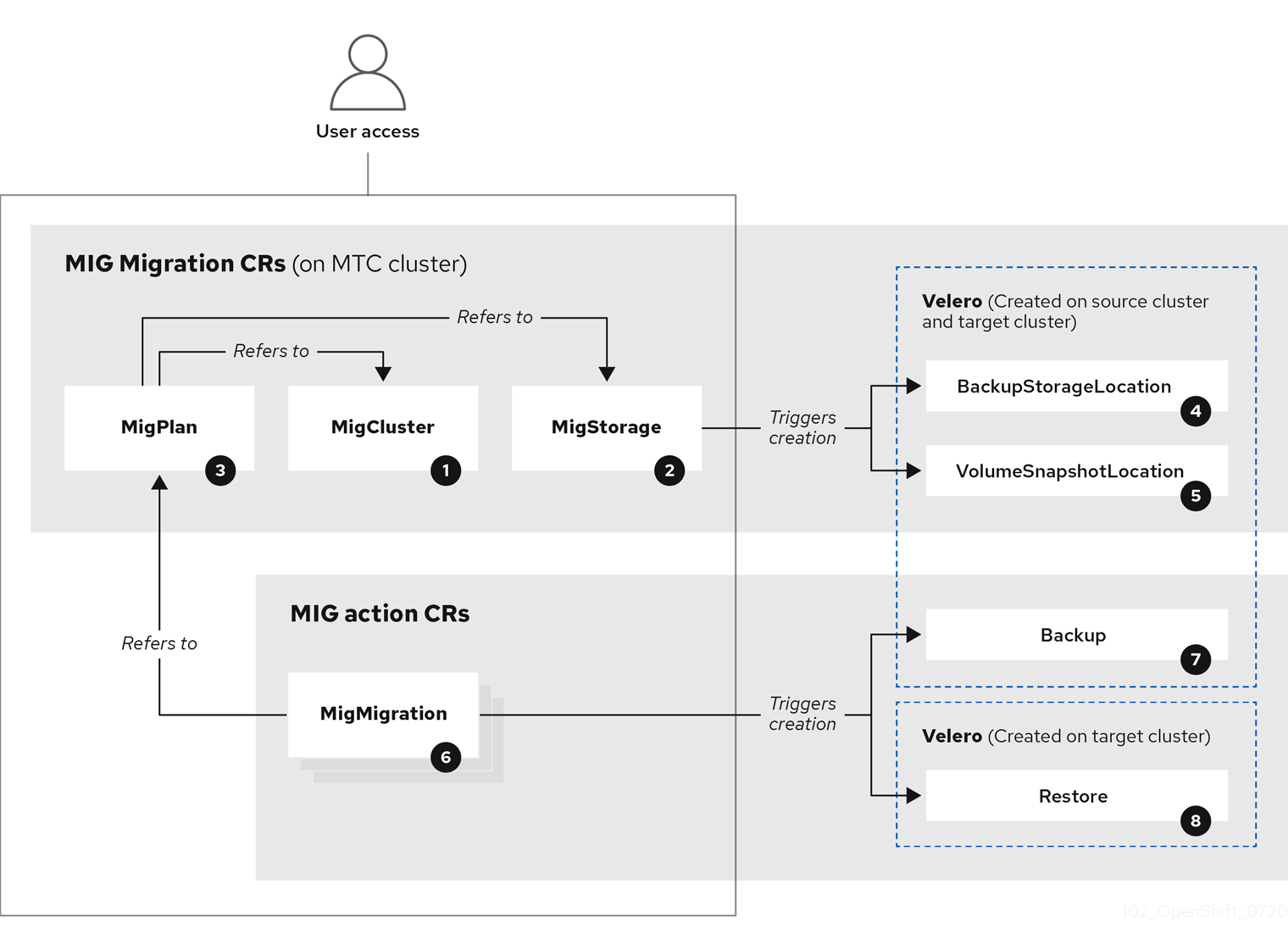
 MigCluster (configuration, MTC cluster): Cluster definition
 MigStorage (configuration, MTC cluster): Storage definition
 MigPlan (configuration, MTC cluster): Migration plan
The MigPlan CR describes the source and target clusters, replication repository, and namespaces being migrated. It is associated with 0, 1, or many MigMigration CRs.
Deleting a MigPlan CR deletes the associated MigMigration CRs.
 BackupStorageLocation (configuration, MTC cluster): Location of
 Velero backup objects
 VolumeSnapshotLocation (configuration, MTC cluster): Location of
 Velero volume snapshots
 MigMigration (action, MTC cluster): Migration, created every time you stage or migrate data. Each
 MigMigration CR is associated with a MigPlan CR.
 Backup (action, source cluster): When you run a migration plan, the
 MigMigration CR creates two Velero backup CRs on each source cluster:
- Backup CR #1 for Kubernetes objects
- Backup CR #2 for PV data
 Restore (action, target cluster): When you run a migration plan, the
 MigMigration CR creates two Velero restore CRs on the target cluster:
- Restore CR #1 (using Backup CR #2) for PV data
- Restore CR #2 (using Backup CR #1) for Kubernetes objects
9.1.2. MTC custom resource manifests
Migration Toolkit for Containers (MTC) uses the following custom resource (CR) manifests for migrating applications.
9.1.2.1. DirectImageMigration
The DirectImageMigration CR copies images directly from the source cluster to the destination cluster.
apiVersion: migration.openshift.io/v1alpha1
kind: DirectImageMigration
metadata:
  labels:
    controller-tools.k8s.io: "1.0"
  name: <direct_image_migration>
spec:
  srcMigClusterRef:
    name: <source_cluster>
    namespace: openshift-migration
  destMigClusterRef:
    name: <destination_cluster>
    namespace: openshift-migration
  namespaces:
    - <source_namespace_1>
- <source_namespace_2>:<destination_namespace_3> 9.1.2.2. DirectImageStreamMigration
The DirectImageStreamMigration CR copies image stream references directly from the source cluster to the destination cluster.
apiVersion: migration.openshift.io/v1alpha1
kind: DirectImageStreamMigration
metadata:
  labels:
    controller-tools.k8s.io: "1.0"
  name: <direct_image_stream_migration>
spec:
  srcMigClusterRef:
    name: <source_cluster>
    namespace: openshift-migration
  destMigClusterRef:
    name: <destination_cluster>
    namespace: openshift-migration
  imageStreamRef:
    name: <image_stream>
    namespace: <source_image_stream_namespace>
  destNamespace: <destination_image_stream_namespace>
9.1.2.3. DirectVolumeMigration
The DirectVolumeMigration CR copies persistent volumes (PVs) directly from the source cluster to the destination cluster.
apiVersion: migration.openshift.io/v1alpha1
kind: DirectVolumeMigration
metadata:
  name: <direct_volume_migration>
  namespace: openshift-migration
spec:
  createDestinationNamespaces: false
deleteProgressReportingCRs: false
  destMigClusterRef:
    name: <host_cluster>
    namespace: openshift-migration
  persistentVolumeClaims:
  - name: <pvc>
    namespace: <pvc_namespace>
  srcMigClusterRef:
    name: <source_cluster>
namespace: openshift-migration- 1
- Set to
trueto create namespaces for the PVs on the destination cluster. - 2
- Set to
trueto deleteDirectVolumeMigrationProgressCRs after migration. The default isfalseso thatDirectVolumeMigrationProgressCRs are retained for troubleshooting. - 3
- Update the cluster name if the destination cluster is not the host cluster.
- 4
- Specify one or more PVCs to be migrated.
9.1.2.4. DirectVolumeMigrationProgress
The DirectVolumeMigrationProgress CR shows the progress of the DirectVolumeMigration CR.
apiVersion: migration.openshift.io/v1alpha1
kind: DirectVolumeMigrationProgress
metadata:
  labels:
    controller-tools.k8s.io: "1.0"
  name: <direct_volume_migration_progress>
spec:
  clusterRef:
    name: <source_cluster>
    namespace: openshift-migration
  podRef:
    name: <rsync_pod>
    namespace: openshift-migration
9.1.2.5. MigAnalytic
The MigAnalytic CR collects the number of images, Kubernetes resources, and the persistent volume (PV) capacity from an associated MigPlan CR.
You can configure the data that it collects.
apiVersion: migration.openshift.io/v1alpha1
kind: MigAnalytic
metadata:
  annotations:
    migplan: <migplan>
  name: <miganalytic>
  namespace: openshift-migration
  labels:
    migplan: <migplan>
spec:
  analyzeImageCount: true <.>
  analyzeK8SResources: true <.>
  analyzePVCapacity: true <.>
  listImages: false <.>
  listImagesLimit: 50 <.>
  migPlanRef:
    name: <migplan>
    namespace: openshift-migration
<.> Optional: Returns the number of images. <.> Optional: Returns the number, kind, and API version of the Kubernetes resources. <.> Optional: Returns the PV capacity. <.> Returns a list of image names. The default is false so that the output is not excessively long. <.> Optional: Specify the maximum number of image names to return if listImages is true.
9.1.2.6. MigCluster
The MigCluster CR defines a host, local, or remote cluster.
apiVersion: migration.openshift.io/v1alpha1
kind: MigCluster
metadata:
  labels:
    controller-tools.k8s.io: "1.0"
  name: <host_cluster>
  namespace: openshift-migration
spec:
  isHostCluster: true
# The 'azureResourceGroup' parameter is relevant only for Microsoft Azure.
  azureResourceGroup: <azure_resource_group>
caBundle: <ca_bundle_base64>
insecure: false
refresh: false
# The 'restartRestic' parameter is relevant for a source cluster.
  restartRestic: true
# The following parameters are relevant for a remote cluster.
  exposedRegistryPath: <registry_route>
url: <destination_cluster_url>
  serviceAccountSecretRef:
    name: <source_secret>
namespace: openshift-config- 1
- Update the cluster name if the
migration-controllerpod is not running on this cluster. - 2
- The
migration-controllerpod runs on this cluster iftrue. - 3
- Microsoft Azure only: Specify the resource group.
- 4
- Optional: If you created a certificate bundle for self-signed CA certificates and if the
insecureparameter value isfalse, specify the base64-encoded certificate bundle. - 5
- Set to
trueto disable SSL verification. - 6
- Set to
trueto validate the cluster. - 7
- Set to
trueto restart theResticpods on the source cluster after theStagepods are created. - 8
- Remote cluster and direct image migration only: Specify the exposed secure registry path.
- 9
- Remote cluster only: Specify the URL.
- 10
- Remote cluster only: Specify the name of the
SecretCR.
9.1.2.7. MigHook
The MigHook CR defines a migration hook that runs custom code at a specified stage of the migration. You can create up to four migration hooks. Each hook runs during a different phase of the migration.
You can configure the hook name, runtime duration, a custom image, and the cluster where the hook will run.
The migration phases and namespaces of the hooks are configured in the MigPlan CR.
apiVersion: migration.openshift.io/v1alpha1
kind: MigHook
metadata:
  generateName: <hook_name_prefix>
name: <mighook>
  namespace: openshift-migration
spec:
  activeDeadlineSeconds: 1800
custom: false
image: <hook_image>
playbook: <ansible_playbook_base64>
targetCluster: source - 1
- Optional: A unique hash is appended to the value for this parameter so that each migration hook has a unique name. You do not need to specify the value of the
nameparameter. - 2
- Specify the migration hook name, unless you specify the value of the
generateNameparameter. - 3
- Optional: Specify the maximum number of seconds that a hook can run. The default is
1800. - 4
- The hook is a custom image if
true. The custom image can include Ansible or it can be written in a different programming language. - 5
- Specify the custom image, for example,
quay.io/konveyor/hook-runner:latest. Required ifcustomistrue. - 6
- Base64-encoded Ansible playbook. Required if
customisfalse. - 7
- Specify the cluster on which the hook will run. Valid values are
sourceordestination.
9.1.2.8. MigMigration
The MigMigration CR runs a MigPlan CR.
You can configure a Migmigration CR to run a stage or incremental migration, to cancel a migration in progress, or to roll back a completed migration.
apiVersion: migration.openshift.io/v1alpha1
kind: MigMigration
metadata:
  labels:
    controller-tools.k8s.io: "1.0"
  name: <migmigration>
  namespace: openshift-migration
spec:
  canceled: false
rollback: false
stage: false
quiescePods: true
keepAnnotations: true
verify: false
  migPlanRef:
    name: <migplan>
namespace: openshift-migration- 1
- Set to
trueto cancel a migration in progress. - 2
- Set to
trueto roll back a completed migration. - 3
- Set to
trueto run a stage migration. Data is copied incrementally and the pods on the source cluster are not stopped. - 4
- Set to
trueto stop the application during migration. The pods on the source cluster are scaled to0after theBackupstage. - 5
- Set to
trueto retain the labels and annotations applied during the migration. - 6
- Set to
trueto check the status of the migrated pods on the destination cluster are checked and to return the names of pods that are not in aRunningstate.
9.1.2.9. MigPlan
The MigPlan CR defines the parameters of a migration plan.
You can configure destination namespaces, hook phases, and direct or indirect migration.
By default, a destination namespace has the same name as the source namespace. If you configure a different destination namespace, you must ensure that the namespaces are not duplicated on the source or the destination clusters because the UID and GID ranges are copied during migration.
apiVersion: migration.openshift.io/v1alpha1
kind: MigPlan
metadata:
  labels:
    controller-tools.k8s.io: "1.0"
  name: <migplan>
  namespace: openshift-migration
spec:
  closed: false
  srcMigClusterRef:
    name: <source_cluster>
    namespace: openshift-migration
  destMigClusterRef:
    name: <destination_cluster>
    namespace: openshift-migration
  hooks:
- executionNamespace: <namespace>
phase: <migration_phase>
      reference:
        name: <hook>
namespace: <hook_namespace>
serviceAccount: <service_account>
indirectImageMigration: true
indirectVolumeMigration: false
  migStorageRef:
    name: <migstorage>
    namespace: openshift-migration
  namespaces:
    - <source_namespace_1>
    - <source_namespace_2>
    - <source_namespace_3>:<destination_namespace_4>
refresh: false - 1
- The migration has completed if
true. You cannot create anotherMigMigrationCR for thisMigPlanCR. - 2
- Optional: You can specify up to four migration hooks. Each hook must run during a different migration phase.
- 3
- Optional: Specify the namespace in which the hook will run.
- 4
- Optional: Specify the migration phase during which a hook runs. One hook can be assigned to one phase. Valid values are
PreBackup,PostBackup,PreRestore, andPostRestore. - 5
- Optional: Specify the name of the
MigHookCR. - 6
- Optional: Specify the namespace of
MigHookCR. - 7
- Optional: Specify a service account with
cluster-adminprivileges. - 8
- Direct image migration is disabled if
true. Images are copied from the source cluster to the replication repository and from the replication repository to the destination cluster. - 9
- Direct volume migration is disabled if
true. PVs are copied from the source cluster to the replication repository and from the replication repository to the destination cluster. - 10
- Specify one or more source namespaces. If you specify only the source namespace, the destination namespace is the same.
- 11
- Specify the destination namespace if it is different from the source namespace.
- 12
- The
MigPlanCR is validated iftrue.
9.1.2.10. MigStorage
The MigStorage CR describes the object storage for the replication repository.
Amazon Web Services (AWS), Microsoft Azure, Google Cloud Storage, Multi-Cloud Object Gateway, and generic S3-compatible cloud storage are supported.
AWS and the snapshot copy method have additional parameters.
apiVersion: migration.openshift.io/v1alpha1
kind: MigStorage
metadata:
  labels:
    controller-tools.k8s.io: "1.0"
  name: <migstorage>
  namespace: openshift-migration
spec:
  backupStorageProvider: <backup_storage_provider>
volumeSnapshotProvider: <snapshot_storage_provider>
  backupStorageConfig:
    awsBucketName: <bucket>
awsRegion: <region>
    credsSecretRef:
      namespace: openshift-config
      name: <storage_secret>
awsKmsKeyId: <key_id>
awsPublicUrl: <public_url>
awsSignatureVersion: <signature_version>
  volumeSnapshotConfig:
    awsRegion: <region>
    credsSecretRef:
      namespace: openshift-config
      name: <storage_secret>
refresh: false - 1
- Specify the storage provider.
- 2
- Snapshot copy method only: Specify the storage provider.
- 3
- AWS only: Specify the bucket name.
- 4
- AWS only: Specify the bucket region, for example,
us-east-1. - 5
- Specify the name of the
SecretCR that you created for the storage. - 6
- AWS only: If you are using the AWS Key Management Service, specify the unique identifier of the key.
- 7
- AWS only: If you granted public access to the AWS bucket, specify the bucket URL.
- 8
- AWS only: Specify the AWS signature version for authenticating requests to the bucket, for example,
4. - 9
- Snapshot copy method only: Specify the geographical region of the clusters.
- 10
- Snapshot copy method only: Specify the name of the
SecretCR that you created for the storage. - 11
- Set to
trueto validate the cluster.
9.2. Migrating your applications with the MTC API
This section describes how to migrate your applications with the MTC API from the command line interface (CLI).
9.2.1. About migrating applications
You can migrate applications from a local cluster to a remote cluster, from a remote cluster to a local cluster, and between remote clusters.
9.2.1.1. Terminology
- Source cluster
- Cluster from which the applications are migrated.
- Destination cluster
- Cluster to which the applications are migrated.
- Replication repository
- Object storage.
- Requires network access to all clusters.
- Indirect migration
- Images, volumes, and Kubernetes objects are copied from the source cluster to the replication repository and then from the replication repository to the destination cluster.
- Direct volume migration
- Volumes are copied directly from the source cluster to the destination cluster.
- Significantly faster than indirect migration.
- Direct image migration
- Images are copied directly from the source cluster to the destination cluster.
- Significantly faster than indirect migration.
- Host cluster
-
Cluster on which the
migration-controllerpod and the web console run. - Usually the same as the destination cluster and the local cluster but this is not a requirement.
- Does not require an exposed secure registry route for direct image migration.
-
Cluster on which the
- Remote cluster
- Usually the same as the source cluster but this is not a requirement.
- Requires an exposed secure registry route for direct image migration.
-
Requires a
SecretCR containing themigration-controllerservice account token.
9.2.1.2. Mapping destination namespaces in the MigPlan custom resource (CR)
If you map destination namespaces in the MigPlan CR, you must ensure that the namespaces are not duplicated on the source or the destination clusters because the UID and GID ranges of the namespaces are copied during migration.
Two source namespaces mapped to the same destination namespace
spec:
  namespaces:
    - namespace_2
    - namespace_1:namespace_2
If you want the source namespace to be mapped to a namespace of the same name, you do not need to create a mapping. By default, a source namespace and a target namespace have the same name.
Incorrect namespace mapping
spec:
  namespaces:
    - namespace_1:namespace_1
Correct namespace reference
spec:
  namespaces:
    - namespace_1
9.2.1.3. Stage migration, migration cancellation, and migration rollback
You can create and associate multiple MigMigration custom resources (CRs) with the same MigPlan CR for the following use cases:
- To perform a stage migration, which copies all available data without stopping the application pods. Running a stage migration reduces the cutover time.
- To cancel a migration in progress.
- To roll back a completed migration.
9.2.1.4. Creating a registry route for direct image migration
For direct image migration, you must create a route to the exposed internal registry on all remote clusters.
Prerequisites
The internal registry must be exposed to external traffic on all remote clusters.
The OpenShift Container Platform 4 registry is exposed by default.
The OpenShift Container Platform 3 registry must be exposed manually.
Procedure
To create a route to an OpenShift Container Platform 3 registry, run the following command:
$ oc create route passthrough --service=docker-registry --port=5000 -n defaultTo create a route to an OpenShift Container Platform 4 registry, run the following command:
$ oc create route passthrough --service=image-registry --port=5000 -n openshift-image-registry
9.2.2. Migration prerequisites
-
You must be logged in as a user with
cluster-adminprivileges on all clusters.
Direct image migration
- You must ensure that the secure internal registry of the source cluster is exposed.
- You must create a route to the exposed registry.
Direct volume migration
- If your clusters use proxies, you must configure an Stunnel TCP proxy.
Internal images
If your application uses internal images from the
openshiftnamespace, you must ensure that the required versions of the images are present on the target cluster.You can manually update an image stream tag in order to use a deprecated OpenShift Container Platform 3 image on an OpenShift Container Platform 4.5 cluster.
Clusters
- The source cluster must be upgraded to the latest MTC z-stream release.
- The MTC version must be the same on all clusters.
Network
- The clusters have unrestricted network access to each other and to the replication repository.
-
If you copy the persistent volumes with
move, the clusters must have unrestricted network access to the remote volumes. You must enable the following ports on an OpenShift Container Platform 3 cluster:
-
8443(API server) -
443(routes) -
53(DNS)
-
You must enable the following ports on an OpenShift Container Platform 4 cluster:
-
6443(API server) -
443(routes) -
53(DNS)
-
-
You must enable port
443on the replication repository if you are using TLS.
Persistent volumes (PVs)
- The PVs must be valid.
- The PVs must be bound to persistent volume claims.
If you use snapshots to copy the PVs, the following additional prerequisites apply:
- The cloud provider must support snapshots.
- The PVs must have the same cloud provider.
- The PVs must be located in the same geographic region.
- The PVs must have the same storage class.
9.2.2.1. Configuring an Stunnel proxy for direct volume migration
If you are performing direct volume migration from a source cluster behind a proxy, you must configure an Stunnel proxy in the MigrationController custom resource (CR). Stunnel creates a transparent tunnel between the source and target clusters for the TCP connection without changing the certificates.
Direct volume migration supports only one proxy. The source cluster cannot access the route of the target cluster if the target cluster is also behind a proxy.
Prerequisites
-
You must be logged in as a user with
cluster-adminprivileges on all clusters.
Procedure
-
Log in to the cluster on which the
MigrationControllerpod runs. Get the
MigrationControllerCR manifest:$ oc get migrationcontroller <migration_controller> -n openshift-migrationAdd the
stunnel_tcp_proxyparameter:apiVersion: migration.openshift.io/v1alpha1 kind: MigrationController metadata: name: <migration-controller> namespace: openshift-migration ... spec: stunnel_tcp_proxy: <stunnel_proxy>1 - 1
- Specify the Stunnel proxy:
http://<user>:<password>@<ip_address>:<port>.
-
Save the manifest as
migration-controller.yaml. Apply the updated manifest:
$ oc replace -f migration-controller.yaml -n openshift-migration
9.2.3. Migrating your applications from the command line
You can migrate your applications from the command line with the Migration Toolkit for Containers (MTC) API.
Procedure
Create a
MigClusterCR manifest for the host cluster:$ cat << EOF | oc apply -f - apiVersion: migration.openshift.io/v1alpha1 kind: MigCluster metadata: name: <host_cluster> namespace: openshift-migration spec: isHostCluster: true EOFCreate a
SecretCR manifest for each remote cluster:$ cat << EOF | oc apply -f - apiVersion: v1 kind: Secret metadata: name: <cluster_secret> namespace: openshift-config type: Opaque data: saToken: <sa_token>1 EOF- 1
- Specify the base64-encoded
migration-controllerservice account (SA) token of the remote cluster. You can obtain the token by running the following command:
$ oc sa get-token migration-controller -n openshift-migration | base64 -w 0Create a
MigClusterCR manifest for each remote cluster:$ cat << EOF | oc apply -f - apiVersion: migration.openshift.io/v1alpha1 kind: MigCluster metadata: name: <remote_cluster> <.> namespace: openshift-migration spec: exposedRegistryPath: <exposed_registry_route> <.> insecure: false <.> isHostCluster: false serviceAccountSecretRef: name: <remote_cluster_secret> <.> namespace: openshift-config url: <remote_cluster_url> <.> EOF<.> Specify the
ClusterCR of the remote cluster. <.> Optional: For direct image migration, specify the exposed registry route. <.> SSL verification is enabled iffalse. CA certificates are not required or checked iftrue. <.> Specify theSecretCR of the remote cluster. <.> Specify the URL of the remote cluster.Verify that all clusters are in a
Readystate:$ oc describe cluster <cluster>Create a
SecretCR manifest for the replication repository:$ cat << EOF | oc apply -f - apiVersion: v1 kind: Secret metadata: namespace: openshift-config name: <migstorage_creds> type: Opaque data: aws-access-key-id: <key_id_base64>1 aws-secret-access-key: <secret_key_base64>2 EOFAWS credentials are base64-encoded by default. For other storage providers, you must encode your credentials by running the following command with each key:
$ echo -n "<key>" | base64 -w 01 - 1
- Specify the key ID or the secret key. Both keys must be base64-encoded.
Create a
MigStorageCR manifest for the replication repository:$ cat << EOF | oc apply -f - apiVersion: migration.openshift.io/v1alpha1 kind: MigStorage metadata: name: <migstorage> namespace: openshift-migration spec: backupStorageConfig: awsBucketName: <bucket>1 credsSecretRef: name: <storage_secret>2 namespace: openshift-config backupStorageProvider: <storage_provider>3 volumeSnapshotConfig: credsSecretRef: name: <storage_secret>4 namespace: openshift-config volumeSnapshotProvider: <storage_provider>5 EOF- 1
- Specify the bucket name.
- 2
- Specify the
SecretsCR of the object storage. You must ensure that the credentials stored in theSecretsCR of the object storage are correct. - 3
- Specify the storage provider.
- 4
- Optional: If you are copying data by using snapshots, specify the
SecretsCR of the object storage. You must ensure that the credentials stored in theSecretsCR of the object storage are correct. - 5
- Optional: If you are copying data by using snapshots, specify the storage provider.
Verify that the
MigStorageCR is in aReadystate:$ oc describe migstorage <migstorage>Create a
MigPlanCR manifest:$ cat << EOF | oc apply -f - apiVersion: migration.openshift.io/v1alpha1 kind: MigPlan metadata: name: <migplan> namespace: openshift-migration spec: destMigClusterRef: name: <host_cluster> namespace: openshift-migration indirectImageMigration: true1 indirectVolumeMigration: true2 migStorageRef: name: <migstorage>3 namespace: openshift-migration namespaces: - <application_namespace>4 srcMigClusterRef: name: <remote_cluster>5 namespace: openshift-migration EOF- 1
- Direct image migration is enabled if
false. - 2
- Direct volume migration is enabled if
false. - 3
- Specify the name of the
MigStorageCR instance. - 4
- Specify one or more source namespaces. By default, the destination namespace has the same name.
- 5
- Specify a destination namespace if it is different from the source namespace.
- Specify the name of the source cluster
MigClusterinstance.
Verify that the
MigPlaninstance is in aReadystate:$ oc describe migplan <migplan> -n openshift-migrationCreate a
MigMigrationCR manifest to start the migration defined in theMigPlaninstance:$ cat << EOF | oc apply -f - apiVersion: migration.openshift.io/v1alpha1 kind: MigMigration metadata: name: <migmigration> namespace: openshift-migration spec: migPlanRef: name: <migplan>1 namespace: openshift-migration quiescePods: true2 stage: false3 rollback: false4 EOFVerify the migration by watching the
MigMigrationCR progress:$ oc watch migmigration <migmigration> -n openshift-migrationThe output resembles the following:
Example output
Name:         c8b034c0-6567-11eb-9a4f-0bc004db0fbc
Namespace:    openshift-migration
Labels:       migration.openshift.io/migplan-name=django
Annotations:  openshift.io/touch: e99f9083-6567-11eb-8420-0a580a81020c
API Version:  migration.openshift.io/v1alpha1
Kind:         MigMigration
...
Spec:
  Mig Plan Ref:
    Name:       migplan
    Namespace:  openshift-migration
  Stage:        false
Status:
  Conditions:
    Category:              Advisory
    Last Transition Time:  2021-02-02T15:04:09Z
    Message:               Step: 19/47
    Reason:                InitialBackupCreated
    Status:                True
    Type:                  Running
    Category:              Required
    Last Transition Time:  2021-02-02T15:03:19Z
    Message:               The migration is ready.
    Status:                True
    Type:                  Ready
    Category:              Required
    Durable:               true
    Last Transition Time:  2021-02-02T15:04:05Z
    Message:               The migration registries are healthy.
    Status:                True
    Type:                  RegistriesHealthy
  Itinerary:               Final
  Observed Digest:         7fae9d21f15979c71ddc7dd075cb97061895caac5b936d92fae967019ab616d5
  Phase:                   InitialBackupCreated
  Pipeline:
    Completed:  2021-02-02T15:04:07Z
    Message:    Completed
    Name:       Prepare
    Started:    2021-02-02T15:03:18Z
    Message:    Waiting for initial Velero backup to complete.
    Name:       Backup
    Phase:      InitialBackupCreated
    Progress:
      Backup openshift-migration/c8b034c0-6567-11eb-9a4f-0bc004db0fbc-wpc44: 0 out of estimated total of 0 objects backed up (5s)
    Started:        2021-02-02T15:04:07Z
    Message:        Not started
    Name:           StageBackup
    Message:        Not started
    Name:           StageRestore
    Message:        Not started
    Name:           DirectImage
    Message:        Not started
    Name:           DirectVolume
    Message:        Not started
    Name:           Restore
    Message:        Not started
    Name:           Cleanup
  Start Timestamp:  2021-02-02T15:03:18Z
Events:
  Type    Reason   Age                 From                     Message
  ----    ------   ----                ----                     -------
  Normal  Running  57s                 migmigration_controller  Step: 2/47
  Normal  Running  57s                 migmigration_controller  Step: 3/47
  Normal  Running  57s (x3 over 57s)   migmigration_controller  Step: 4/47
  Normal  Running  54s                 migmigration_controller  Step: 5/47
  Normal  Running  54s                 migmigration_controller  Step: 6/47
  Normal  Running  52s (x2 over 53s)   migmigration_controller  Step: 7/47
  Normal  Running  51s (x2 over 51s)   migmigration_controller  Step: 8/47
  Normal  Ready    50s (x12 over 57s)  migmigration_controller  The migration is ready.
  Normal  Running  50s                 migmigration_controller  Step: 9/47
  Normal  Running  50s                 migmigration_controller  Step: 10/47
9.3. Migration hooks
You can use migration hooks to run custom code at certain points during a migration.
9.3.1. About migration hooks
You can add up to four migration hooks to a single migration plan, with each hook running at a different phase of the migration. Migration hooks perform tasks such as customizing application quiescence, manually migrating unsupported data types, and updating applications after migration.
A migration hook runs on a source or a target cluster at one of the following migration steps:
-
PreBackup: Before resources are backed up on the source cluster. -
PostBackup: After resources are backed up on the source cluster. -
PreRestore: Before resources are restored on the target cluster. -
PostRestore: After resources are restored on the target cluster.
You can create a hook by creating an Ansible playbook that runs with the default Ansible image or with a custom hook container.
Ansible playbook
The Ansible playbook is mounted on a hook container as a config map. The hook container runs as a job, using the cluster, service account, and namespace specified in the MigPlan custom resource. The job continues to run until it reaches the default limit of 6 retries or a successful completion. This continues even if the initial pod is evicted or killed.
The default Ansible runtime image is registry.redhat.io/rhmtc/openshift-migration-hook-runner-rhel7:1.4. This image is based on the Ansible Runner image and includes python-openshift for Ansible Kubernetes resources and an updated oc binary.
Custom hook container
You can use a custom hook container instead of the default Ansible image.
9.3.2. Writing an Ansible playbook for a migration hook
You can write an Ansible playbook to use as a migration hook. The hook is added to a migration plan by using the MTC web console or by specifying values for the spec.hooks parameters in the MigPlan custom resource (CR) manifest.
The Ansible playbook is mounted onto a hook container as a config map. The hook container runs as a job, using the cluster, service account, and namespace specified in the MigPlan CR. The hook container uses a specified service account token so that the tasks do not require authentication before they run in the cluster.
9.3.2.1. Ansible modules
You can use the Ansible shell module to run oc commands.
Example shell module
- hosts: localhost
  gather_facts: false
  tasks:
  - name: get pod name
    shell: oc get po --all-namespaces
You can use kubernetes.core modules, such as k8s_info, to interact with Kubernetes resources.
Example k8s_facts module
- hosts: localhost
  gather_facts: false
  tasks:
  - name: Get pod
    k8s_info:
      kind: pods
      api: v1
      namespace: openshift-migration
      name: "{{ lookup( 'env', 'HOSTNAME') }}"
    register: pods

  - name: Print pod name
    debug:
      msg: "{{ pods.resources[0].metadata.name }}"
You can use the fail module to produce a non-zero exit status in cases where a non-zero exit status would not normally be produced, ensuring that the success or failure of a hook is detected. Hooks run as jobs and the success or failure status of a hook is based on the exit status of the job container.
Example fail module
- hosts: localhost
  gather_facts: false
  tasks:
  - name: Set a boolean
    set_fact:
      do_fail: true

  - name: "fail"
    fail:
      msg: "Cause a failure"
    when: do_fail
9.3.2.2. Environment variables
The MigPlan CR name and migration namespaces are passed as environment variables to the hook container. These variables are accessed by using the lookup plug-in.
Example environment variables
- hosts: localhost
  gather_facts: false
  tasks:
  - set_fact:
      namespaces: "{{ (lookup( 'env', 'migration_namespaces')).split(',') }}"

  - debug:
      msg: "{{ item }}"
    with_items: "{{ namespaces }}"

  - debug:
      msg: "{{ lookup( 'env', 'migplan_name') }}"
9.4. Increasing limits for large migrations
You can increase the limits on migration objects and container resources for large migrations with the Migration Toolkit for Containers (MTC).
You must test these changes before you perform a migration in a production environment.
Procedure
Edit the
MigrationControllercustom resource (CR) manifest:$ oc edit migrationcontroller -n openshift-migrationUpdate the following parameters:
...
mig_controller_limits_cpu: "1"
1 mig_controller_limits_memory: "10Gi"2 ... mig_controller_requests_cpu: "100m"3 mig_controller_requests_memory: "350Mi"4 ... mig_pv_limit: 1005 mig_pod_limit: 1006 mig_namespace_limit: 107 ...- 1
- Specifies the number of CPUs available to the
MigrationControllerCR. - 2
- Specifies the amount of memory available to the
MigrationControllerCR. - 3
- Specifies the number of CPU units available for
MigrationControllerCR requests.100mrepresents 0.1 CPU units (100 * 1e-3). - 4
- Specifies the amount of memory available for
MigrationControllerCR requests. - 5
- Specifies the number of persistent volumes that can be migrated.
- 6
- Specifies the number of pods that can be migrated.
- 7
- Specifies the number of namespaces that can be migrated.
Create a migration plan that uses the updated parameters to verify the changes.
If your migration plan exceeds the
MigrationControllerCR limits, the MTC console displays a warning message when you save the migration plan.
9.5. Excluding resources from a migration plan
You can exclude resources, for example, image streams, persistent volumes (PVs), or subscriptions, from a Migration Toolkit for Containers (MTC) migration plan in order to reduce the resource load for migration or to migrate images or PVs with a different tool.
By default, the MTC excludes service catalog resources and Operator Lifecycle Manager (OLM) resources from migration. These resources are parts of the service catalog API group and the OLM API group, neither of which is supported for migration at this time.
Procedure
Edit the
MigrationControllercustom resource manifest:$ oc edit migrationcontroller <migration_controller> -n openshift-migrationUpdate the
specsection by adding a parameter to exclude specific resources or by adding a resource to theexcluded_resourcesparameter if it does not have its own exclusion parameter:apiVersion: migration.openshift.io/v1alpha1 kind: MigrationController metadata: name: migration-controller namespace: openshift-migration spec: disable_image_migration: true1 disable_pv_migration: true2 ... excluded_resources:3 - imagetags - templateinstances - clusterserviceversions - packagemanifests - subscriptions - servicebrokers - servicebindings - serviceclasses - serviceinstances - serviceplans - operatorgroups - events- 1
- Add
disable_image_migration: trueto exclude image streams from the migration. Do not edit theexcluded_resourcesparameter.imagestreamsis added toexcluded_resourceswhen theMigrationControllerpod restarts. - 2
- Add
disable_pv_migration: trueto exclude PVs from the migration plan. Do not edit theexcluded_resourcesparameter.persistentvolumesandpersistentvolumeclaimsare added toexcluded_resourceswhen theMigrationControllerpod restarts. Disabling PV migration also disables PV discovery when you create the migration plan. - 3
- You can add OpenShift Container Platform resources to the
excluded_resourceslist. Do not delete the default excluded resources. These resources are problematic to migrate and must be excluded.
-
Wait two minutes for the
MigrationControllerpod to restart so that the changes are applied. Verify that the resource is excluded:
$ oc get deployment -n openshift-migration migration-controller -o yaml | grep EXCLUDED_RESOURCES -A1The output contains the excluded resources:
Example output
    - name: EXCLUDED_RESOURCES
      value:
      imagetags,templateinstances,clusterserviceversions,packagemanifests,subscriptions,servicebrokers,servicebindings,serviceclasses,serviceinstances,serviceplans,imagestreams,persistentvolumes,persistentvolumeclaims

'%20d='M201.5%20305.5c-13.8%200-24.9-11.1-24.9-24.6%200-13.8%2011.1-24.9%2024.9-24.9%2013.6%200%2024.6%2011.1%2024.6%2024.9%200%2013.6-11.1%2024.6-24.6%2024.6zM504%20256c0%20137-111%20248-248%20248S8%20393%208%20256%20119%208%20256%208s248%20111%20248%20248zm-132.3-41.2c-9.4%200-17.7%203.9-23.8%2010-22.4-15.5-52.6-25.5-86.1-26.6l17.4-78.3%2055.4%2012.5c0%2013.6%2011.1%2024.6%2024.6%2024.6%2013.8%200%2024.9-11.3%2024.9-24.9s-11.1-24.9-24.9-24.9c-9.7%200-18%205.8-22.1%2013.8l-61.2-13.6c-3-.8-6.1%201.4-6.9%204.4l-19.1%2086.4c-33.2%201.4-63.1%2011.3-85.5%2026.8-6.1-6.4-14.7-10.2-24.1-10.2-34.9%200-46.3%2046.9-14.4%2062.8-1.1%205-1.7%2010.2-1.7%2015.5%200%2052.6%2059.2%2095.2%20132%2095.2%2073.1%200%20132.3-42.6%20132.3-95.2%200-5.3-.6-10.8-1.9-15.8%2031.3-16%2019.8-62.5-14.9-62.5zM302.8%20331c-18.2%2018.2-76.1%2017.9-93.6%200-2.2-2.2-6.1-2.2-8.3%200-2.5%202.5-2.5%206.4%200%208.6%2022.8%2022.8%2087.3%2022.8%20110.2%200%202.5-2.2%202.5-6.1%200-8.6-2.2-2.2-6.1-2.2-8.3%200zm7.7-75c-13.6%200-24.6%2011.1-24.6%2024.9%200%2013.6%2011.1%2024.6%2024.6%2024.6%2013.8%200%2024.9-11.1%2024.9-24.6%200-13.8-11-24.9-24.9-24.9z'/%3e%3c/svg%3e)