 Red Hat Summit
Red Hat AMQ 6
As of February 2025, Red Hat is no longer supporting Red Hat AMQ 6. If you are using AMQ 6, please upgrade: Migrating to AMQ 7.Dieser Inhalt ist in der von Ihnen ausgewählten Sprache nicht verfügbar.
Chapter 8. Connect Page
Abstract
You view and manage local and remote connections in the Connect page. You can connect to a remote server with a running jolokia agent, or connect to a local server if you have a local JVM with a jolokia agent.
For more information about Jolokia JMX agents, see the Jolokia Web site at the following address: http://www.jolokia.org/
Overview
Link kopierenLink in die Zwischenablage kopiert!
You access the Connect page from the Container perspective. By default, this page opens to the Remote tab.
The following image shows an example of the Remote tab:
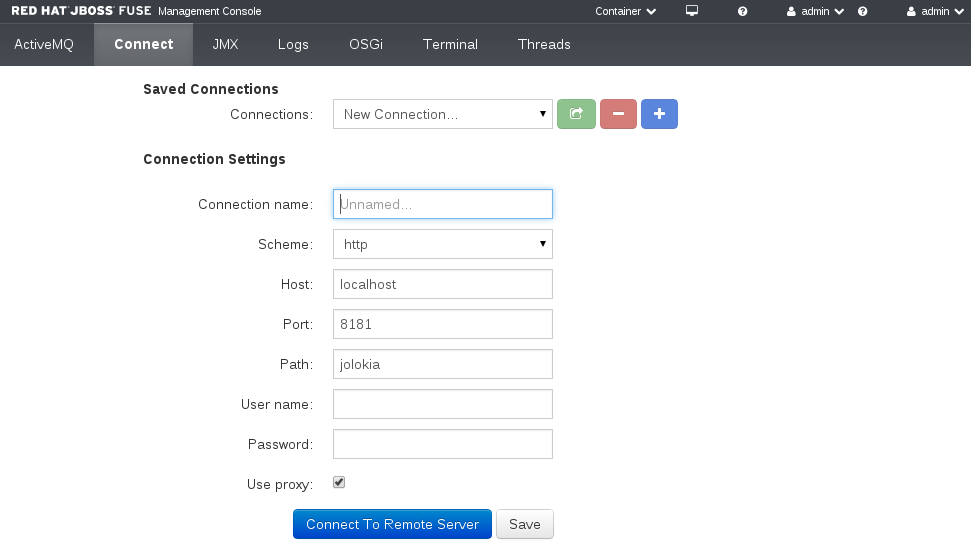
The Connect page contains the following sections:
- Navigation Bar
- Tabbed view of available connection types. The Remote tab always appears. If you have a local JVM with a jolokia agent, the Local tab also appears. You can tab between the connection types or click the Refresh button to update the Saved Connections list.
- Saved Connections List
- Drop-down list of default and custom connections. You can select a connection from the list and connect to the server or delete the connection. You can also select New Connection and click the + icon to create a new connection.
- Connection Settings
- User credentials and connection properties, such as the connection name and host properties. When you save the connection a new browser window opens and connects to the remote server. If you select a saved connection you can edit the connection properties in this section.

'%20d='M201.5%20305.5c-13.8%200-24.9-11.1-24.9-24.6%200-13.8%2011.1-24.9%2024.9-24.9%2013.6%200%2024.6%2011.1%2024.6%2024.9%200%2013.6-11.1%2024.6-24.6%2024.6zM504%20256c0%20137-111%20248-248%20248S8%20393%208%20256%20119%208%20256%208s248%20111%20248%20248zm-132.3-41.2c-9.4%200-17.7%203.9-23.8%2010-22.4-15.5-52.6-25.5-86.1-26.6l17.4-78.3%2055.4%2012.5c0%2013.6%2011.1%2024.6%2024.6%2024.6%2013.8%200%2024.9-11.3%2024.9-24.9s-11.1-24.9-24.9-24.9c-9.7%200-18%205.8-22.1%2013.8l-61.2-13.6c-3-.8-6.1%201.4-6.9%204.4l-19.1%2086.4c-33.2%201.4-63.1%2011.3-85.5%2026.8-6.1-6.4-14.7-10.2-24.1-10.2-34.9%200-46.3%2046.9-14.4%2062.8-1.1%205-1.7%2010.2-1.7%2015.5%200%2052.6%2059.2%2095.2%20132%2095.2%2073.1%200%20132.3-42.6%20132.3-95.2%200-5.3-.6-10.8-1.9-15.8%2031.3-16%2019.8-62.5-14.9-62.5zM302.8%20331c-18.2%2018.2-76.1%2017.9-93.6%200-2.2-2.2-6.1-2.2-8.3%200-2.5%202.5-2.5%206.4%200%208.6%2022.8%2022.8%2087.3%2022.8%20110.2%200%202.5-2.2%202.5-6.1%200-8.6-2.2-2.2-6.1-2.2-8.3%200zm7.7-75c-13.6%200-24.6%2011.1-24.6%2024.9%200%2013.6%2011.1%2024.6%2024.6%2024.6%2013.8%200%2024.9-11.1%2024.9-24.6%200-13.8-11-24.9-24.9-24.9z'/%3e%3c/svg%3e)