 Red Hat Summit
Dieser Inhalt ist in der von Ihnen ausgewählten Sprache nicht verfügbar.
Chapter 2. Automating Network Intrusion Detection and Prevention Systems (IDPS) with Ansible
You can use Ansible to automate your Intrusion Detection and Prevention System (IDPS). For the purpose of this guide, we use Snort as the IDPS. Use Ansible automation hub to consume content collections, such as tasks, roles, and modules to create automated workflows.
2.1. Requirements and prerequisites
Before you begin automating your IDPS with Ansible, ensure that you have the proper installations and configurations necessary to successfully manage your IDPS.
- You have installed Ansible 2.9 or later.
- SSH connection and keys are configured.
- IDPS software (Snort) is installed and configured.
- You have access to the IDPS server (Snort) to enforce new policies.
2.1.1. Verifying your IDPS installation
To verify that Snort has been configured successfully, call it via sudo and ask for the version:
  $ sudo snort --version

   ,,_     -*> Snort! <*-
  o"  )~   Version 2.9.13 GRE (Build 15013)
  ""    By Martin Roesch & The Snort Team: http://www.snort.org/contact#team
        Copyright (C) 2014-2019 Cisco and/or its affiliates. All rights reserved.
        Copyright (C) 1998-2013 Sourcefire, Inc., et al.
        Using libpcap version 1.5.3
        Using PCRE version: 8.32 2012-11-30
        Using ZLIB version: 1.2.7
Verify that the service is actively running via sudo systemctl:
$ sudo systemctl status snort
● snort.service - Snort service
   Loaded: loaded (/etc/systemd/system/snort.service; enabled; vendor preset: disabled)
   Active: active (running) since Mon 2019-08-26 17:06:10 UTC; 1s ago
  Main PID: 17217 (snort)
   CGroup: /system.slice/snort.service
           └─17217 /usr/sbin/snort -u root -g root -c /etc/snort/snort.conf -i eth0 -p -R 1 --pid-path=/var/run/snort --no-interface-pidfile --nolock-pidfile
[...]
If the Snort service is not actively running, restart it with systemctl restart snort and recheck the status.
Once you confirm the service is actively running, exit the Snort server by simultaneously pressing CTRL and D, or by typing exit on the command line. All further interaction will be done through Ansible from the Ansible control host.
2.2. Automating your IDPS rules with Ansible
To automate your IDPS, use the ids_rule role to create and change Snort rules. Snort uses rule-based language that analyzes your network traffic and compares it against the given rule set.
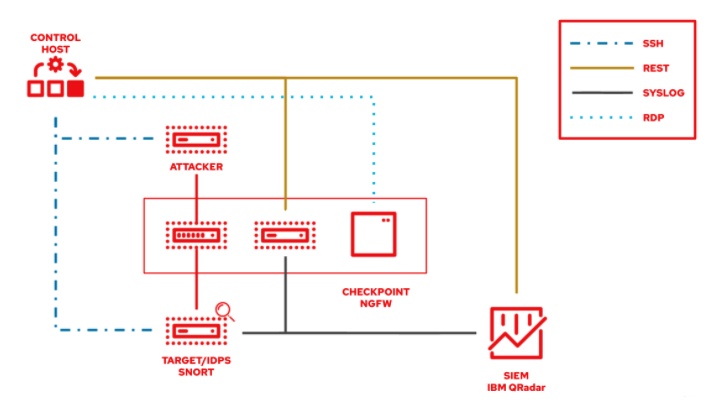
The following lab environment demonstrates what an Ansible security automation integration would look like. A machine called “Attacker” simulates a potential attack pattern on the target machine on which the IDPS is running.
Keep in mind that a real world setup will feature other vendors and technologies.

'%20d='M201.5%20305.5c-13.8%200-24.9-11.1-24.9-24.6%200-13.8%2011.1-24.9%2024.9-24.9%2013.6%200%2024.6%2011.1%2024.6%2024.9%200%2013.6-11.1%2024.6-24.6%2024.6zM504%20256c0%20137-111%20248-248%20248S8%20393%208%20256%20119%208%20256%208s248%20111%20248%20248zm-132.3-41.2c-9.4%200-17.7%203.9-23.8%2010-22.4-15.5-52.6-25.5-86.1-26.6l17.4-78.3%2055.4%2012.5c0%2013.6%2011.1%2024.6%2024.6%2024.6%2013.8%200%2024.9-11.3%2024.9-24.9s-11.1-24.9-24.9-24.9c-9.7%200-18%205.8-22.1%2013.8l-61.2-13.6c-3-.8-6.1%201.4-6.9%204.4l-19.1%2086.4c-33.2%201.4-63.1%2011.3-85.5%2026.8-6.1-6.4-14.7-10.2-24.1-10.2-34.9%200-46.3%2046.9-14.4%2062.8-1.1%205-1.7%2010.2-1.7%2015.5%200%2052.6%2059.2%2095.2%20132%2095.2%2073.1%200%20132.3-42.6%20132.3-95.2%200-5.3-.6-10.8-1.9-15.8%2031.3-16%2019.8-62.5-14.9-62.5zM302.8%20331c-18.2%2018.2-76.1%2017.9-93.6%200-2.2-2.2-6.1-2.2-8.3%200-2.5%202.5-2.5%206.4%200%208.6%2022.8%2022.8%2087.3%2022.8%20110.2%200%202.5-2.2%202.5-6.1%200-8.6-2.2-2.2-6.1-2.2-8.3%200zm7.7-75c-13.6%200-24.6%2011.1-24.6%2024.9%200%2013.6%2011.1%2024.6%2024.6%2024.6%2013.8%200%2024.9-11.1%2024.9-24.6%200-13.8-11-24.9-24.9-24.9z'/%3e%3c/svg%3e)