 Red Hat Summit
Dieser Inhalt ist in der von Ihnen ausgewählten Sprache nicht verfügbar.
1.3. Certificates and Authentication
1.3.1. A Certificate Identifies Someone or Something
Link kopierenLink in die Zwischenablage kopiert!
A certificate is an electronic document used to identify an individual, a server, a company, or other entity and to associate that identity with a public key. Like a driver's license or passport, a certificate provides generally recognized proof of a person's identity. Public-key cryptography uses certificates to address the problem of impersonation.
To get personal ID such as a driver's license, a person has to present some other form of identification which confirms that the person is who he claims to be. Certificates work much the same way. Certificate authorities (CAs) validate identities and issue certificates. CAs can be either independent third parties or organizations running their own certificate-issuing server software, such as Certificate System. The methods used to validate an identity vary depending on the policies of a given CA for the type of certificate being requested. Before issuing a certificate, a CA must confirm the user's identity with its standard verification procedures.
The certificate issued by the CA binds a particular public key to the name of the entity the certificate identifies, such as the name of an employee or a server. Certificates help prevent the use of fake public keys for impersonation. Only the public key certified by the certificate will work with the corresponding private key possessed by the entity identified by the certificate.
In addition to a public key, a certificate always includes the name of the entity it identifies, an expiration date, the name of the CA that issued the certificate, and a serial number. Most importantly, a certificate always includes the digital signature of the issuing CA. The CA's digital signature allows the certificate to serve as a valid credential for users who know and trust the CA but do not know the entity identified by the certificate.
For more information about the role of CAs, see Section 1.3.6, “How CA Certificates Establish Trust”.
1.3.2. Authentication Confirms an Identity
Link kopierenLink in die Zwischenablage kopiert!
Authentication is the process of confirming an identity. For network interactions, authentication involves the identification of one party by another party. There are many ways to use authentication over networks. Certificates are one of those way.
Network interactions typically take place between a client, such as a web browser, and a server. Client authentication refers to the identification of a client (the person assumed to be using the software) by a server. Server authentication refers to the identification of a server (the organization assumed to be running the server at the network address) by a client.
Client and server authentication are not the only forms of authentication that certificates support. For example, the digital signature on an email message, combined with the certificate that identifies the sender, can authenticate the sender of the message. Similarly, a digital signature on an HTML form, combined with a certificate that identifies the signer, can provide evidence that the person identified by that certificate agreed to the contents of the form. In addition to authentication, the digital signature in both cases ensures a degree of nonrepudiation; a digital signature makes it difficult for the signer to claim later not to have sent the email or the form.
Client authentication is an essential element of network security within most intranets or extranets. There are two main forms of client authentication:
- Password-based authentication
- Certificate-based authentication
1.3.2.1. Password-Based Authentication
Link kopierenLink in die Zwischenablage kopiert!
Figure 1.4, “Using a Password to Authenticate a Client to a Server” shows the process of authenticating a user using a user name and password. This example assumes the following:
- The user has already trusted the server, either without authentication or on the basis of server authentication over SSL/TLS.
- The user has requested a resource controlled by the server.
- The server requires client authentication before permitting access to the requested resource.
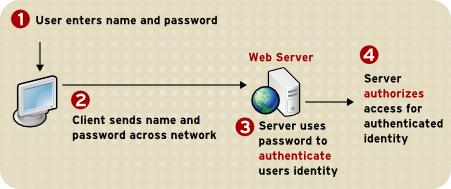
Figure 1.4. Using a Password to Authenticate a Client to a Server
These are the steps in this authentication process:
- When the server requests authentication from the client, the client displays a dialog box requesting the user name and password for that server.
- The client sends the name and password across the network, either in plain text or over an encrypted SSL/TLS connection.
- The server looks up the name and password in its local password database and, if they match, accepts them as evidence authenticating the user's identity.
- The server determines whether the identified user is permitted to access the requested resource and, if so, allows the client to access it.
With this arrangement, the user must supply a new password for each server accessed, and the administrator must keep track of the name and password for each user.
1.3.2.2. Certificate-Based Authentication
Link kopierenLink in die Zwischenablage kopiert!
One of the advantages of certificate-based authentication is that it can be used to replace the first three steps in authentication with a mechanism that allows the user to supply one password, which is not sent across the network, and allows the administrator to control user authentication centrally. This is called single sign-on.
Figure 1.5, “Using a Certificate to Authenticate a Client to a Server” shows how client authentication works using certificates and SSL/TLS. To authenticate a user to a server, a client digitally signs a randomly generated piece of data and sends both the certificate and the signed data across the network. The server authenticates the user's identity based on the data in the certificate and signed data.
Like Figure 1.4, “Using a Password to Authenticate a Client to a Server”, Figure 1.5, “Using a Certificate to Authenticate a Client to a Server” assumes that the user has already trusted the server and requested a resource and that the server has requested client authentication before granting access to the requested resource.

Figure 1.5. Using a Certificate to Authenticate a Client to a Server
Unlike the authentication process in Figure 1.4, “Using a Password to Authenticate a Client to a Server”, the authentication process in Figure 1.5, “Using a Certificate to Authenticate a Client to a Server” requires SSL/TLS. Figure 1.5, “Using a Certificate to Authenticate a Client to a Server” also assumes that the client has a valid certificate that can be used to identify the client to the server. Certificate-based authentication is preferred to password-based authentication because it is based on the user both possessing the private key and knowing the password. However, these two assumptions are true only if unauthorized personnel have not gained access to the user's machine or password, the password for the client software's private key database has been set, and the software is set up to request the password at reasonably frequent intervals.
Note
Neither password-based authentication nor certificate-based authentication address security issues related to physical access to individual machines or passwords. Public-key cryptography can only verify that a private key used to sign some data corresponds to the public key in a certificate. It is the user's responsibility to protect a machine's physical security and to keep the private-key password secret.
These are the authentication steps shown in Figure 1.5, “Using a Certificate to Authenticate a Client to a Server”:
- The client software maintains a database of the private keys that correspond to the public keys published in any certificates issued for that client. The client asks for the password to this database the first time the client needs to access it during a given session, such as the first time the user attempts to access an SSL/TLS-enabled server that requires certificate-based client authentication.After entering this password once, the user does not need to enter it again for the rest of the session, even when accessing other SSL/TLS-enabled servers.
- The client unlocks the private-key database, retrieves the private key for the user's certificate, and uses that private key to sign data randomly-generated from input from both the client and the server. This data and the digital signature are evidence of the private key's validity. The digital signature can be created only with that private key and can be validated with the corresponding public key against the signed data, which is unique to the SSL/TLS session.
- The client sends both the user's certificate and the randomly-generated data across the network.
- The server uses the certificate and the signed data to authenticate the user's identity.
- The server may perform other authentication tasks, such as checking that the certificate presented by the client is stored in the user's entry in an LDAP directory. The server then evaluates whether the identified user is permitted to access the requested resource. This evaluation process can employ a variety of standard authorization mechanisms, potentially using additional information in an LDAP directory or company databases. If the result of the evaluation is positive, the server allows the client to access the requested resource.
Certificates replace the authentication portion of the interaction between the client and the server. Instead of requiring a user to send passwords across the network continually, single sign-on requires the user to enter the private-key database password once, without sending it across the network. For the rest of the session, the client presents the user's certificate to authenticate the user to each new server it encounters. Existing authorization mechanisms based on the authenticated user identity are not affected.
1.3.3. Uses for Certificates
Link kopierenLink in die Zwischenablage kopiert!
The purpose of certificates is to establish trust. Their usage varies depending on the kind of trust they are used to ensure. Some kinds of certificates are used to verify the identity of the presenter; others are used to verify that an object or item has not been tampered with.
1.3.3.1. SSL/TLS
Link kopierenLink in die Zwischenablage kopiert!
The Transport Layer Security/Secure Sockets Layer (SSL/TLS) protocol governs server authentication, client authentication, and encrypted communication between servers and clients. SSL/TLS is widely used on the Internet, especially for interactions that involve exchanging confidential information such as credit card numbers.
SSL/TLS requires an SSL/TLS server certificate. As part of the initial SSL/TLS handshake, the server presents its certificate to the client to authenticate the server's identity. The authentication uses public-key encryption and digital signatures to confirm that the server is the server it claims to be. Once the server has been authenticated, the client and server use symmetric-key encryption, which is very fast, to encrypt all the information exchanged for the remainder of the session and to detect any tampering.
Servers may be configured to require client authentication as well as server authentication. In this case, after server authentication is successfully completed, the client must also present its certificate to the server to authenticate the client's identity before the encrypted SSL/TLS session can be established.
For an overview of client authentication over SSL/TLS and how it differs from password-based authentication, see Section 1.3.2, “Authentication Confirms an Identity”.
1.3.3.2. Signed and Encrypted Email
Link kopierenLink in die Zwischenablage kopiert!
Some email programs support digitally signed and encrypted email using a widely accepted protocol known as Secure Multipurpose Internet Mail Extension (S/MIME). Using S/MIME to sign or encrypt email messages requires the sender of the message to have an S/MIME certificate.
An email message that includes a digital signature provides some assurance that it was sent by the person whose name appears in the message header, thus authenticating the sender. If the digital signature cannot be validated by the email software, the user is alerted.
The digital signature is unique to the message it accompanies. If the message received differs in any way from the message that was sent, even by adding or deleting a single character, the digital signature cannot be validated. Therefore, signed email also provides assurance that the email has not been tampered with. This kind of assurance is known as nonrepudiation, which makes it difficult for the sender to deny having sent the message. This is important for business communication. For information about the way digital signatures work, see Section 1.2, “Digital Signatures”.
S/MIME also makes it possible to encrypt email messages, which is important for some business users. However, using encryption for email requires careful planning. If the recipient of encrypted email messages loses the private key and does not have access to a backup copy of the key, the encrypted messages can never be decrypted.
1.3.3.3. Single Sign-on
Link kopierenLink in die Zwischenablage kopiert!
Network users are frequently required to remember multiple passwords for the various services they use. For example, a user might have to type a different password to log into the network, collect email, use directory services, use the corporate calendar program, and access various servers. Multiple passwords are an ongoing headache for both users and system administrators. Users have difficulty keeping track of different passwords, tend to choose poor ones, and tend to write them down in obvious places. Administrators must keep track of a separate password database on each server and deal with potential security problems related to the fact that passwords are sent over the network routinely and frequently.
Solving this problem requires some way for a user to log in once, using a single password, and get authenticated access to all network resources that user is authorized to use-without sending any passwords over the network. This capability is known as single sign-on.
Both client SSL/TLS certificates and S/MIME certificates can play a significant role in a comprehensive single sign-on solution. For example, one form of single sign-on supported by Red Hat products relies on SSL/TLS client authentication. A user can log in once, using a single password to the local client's private-key database, and get authenticated access to all SSL/TLS-enabled servers that user is authorized to use-without sending any passwords over the network. This approach simplifies access for users, because they do not need to enter passwords for each new server. It also simplifies network management, since administrators can control access by controlling lists of certificate authorities (CAs) rather than much longer lists of users and passwords.
In addition to using certificates, a complete single-sign on solution must address the need to interoperate with enterprise systems, such as the underlying operating system, that rely on passwords or other forms of authentication.
1.3.3.4. Object Signing
Link kopierenLink in die Zwischenablage kopiert!
Many software technologies support a set of tools called object signing. Object signing uses standard techniques of public-key cryptography to let users get reliable information about code they download in much the same way they can get reliable information about shrink-wrapped software.
Most important, object signing helps users and network administrators implement decisions about software distributed over intranets or the Internet-for example, whether to allow Java applets signed by a given entity to use specific computer capabilities on specific users' machines.
The objects signed with object signing technology can be applets or other Java code, JavaScript scripts, plug-ins, or any kind of file. The signature is a digital signature. Signed objects and their signatures are typically stored in a special file called a JAR file.
Software developers and others who wish to sign files using object-signing technology must first obtain an object-signing certificate.
1.3.4. Types of Certificates
Link kopierenLink in die Zwischenablage kopiert!
The Certificate System is capable of generating different types of certificates for different uses and in different formats. Planning which certificates are required and planning how to manage them, including determining what formats are needed and how to plan for renewal, are important to manage both the PKI and the Certificate System instances.
This list is not exhaustive; there are certificate enrollment forms for dual-use certificates for LDAP directories, file-signing certificates, and other subsystem certificates. These forms are available through the Certificate Manager's end-entities page, at
https://server.example.com:8443/ca/ee/ca.
When the different Certificate System subsystems are installed, the basic required certificates and keys are generated; for example, configuring the Certificate Manager generates the CA signing certificate for the self-signed root CA and the internal OCSP signing, audit signing, SSL/TLS server, and agent user certificates. During the KRA configuration, the Certificate Manager generates the storage, transport, audit signing, and agent certificates. Additional certificates can be created and installed separately.
| Certificate Type | Use | Example |
|---|---|---|
| Client SSL/TLS certificates | Used for client authentication to servers over SSL/TLS. Typically, the identity of the client is assumed to be the same as the identity of a person, such as an employee. See Section 1.3.2.2, “Certificate-Based Authentication” for a description of the way SSL/TLS client certificates are used for client authentication. Client SSL/TLS certificates can also be used as part of single sign-on. |
A bank gives a customer an SSL/TLS client certificate that allows the bank's servers to identify that customer and authorize access to the customer's accounts.
A company gives a new employee an SSL/TLS client certificate that allows the company's servers to identify that employee and authorize access to the company's servers.
|
| Server SSL/TLS certificates | Used for server authentication to clients over SSL/TLS. Server authentication may be used without client authentication. Server authentication is required for an encrypted SSL/TLS session. For more information, see Section 1.3.3.1, “SSL/TLS”. | Internet sites that engage in electronic commerce usually support certificate-based server authentication to establish an encrypted SSL/TLS session and to assure customers that they are dealing with the web site identified with the company. The encrypted SSL/TLS session ensures that personal information sent over the network, such as credit card numbers, cannot easily be intercepted. |
| S/MIME certificates | Used for signed and encrypted email. As with SSL/TLS client certificates, the identity of the client is assumed to be the same as the identity of a person, such as an employee. A single certificate may be used as both an S/MIME certificate and an SSL/TLS certificate; see Section 1.3.3.2, “Signed and Encrypted Email”. S/MIME certificates can also be used as part of single sign-on. | A company deploys combined S/MIME and SSL/TLS certificates solely to authenticate employee identities, thus permitting signed email and SSL/TLS client authentication but not encrypted email. Another company issues S/MIME certificates solely to sign and encrypt email that deals with sensitive financial or legal matters. |
| CA certificates | Used to identify CAs. Client and server software use CA certificates to determine what other certificates can be trusted. For more information, see Section 1.3.6, “How CA Certificates Establish Trust”. | The CA certificates stored in Mozilla Firefox determine what other certificates can be authenticated. An administrator can implement corporate security policies by controlling the CA certificates stored in each user's copy of Firefox. |
| Object-signing certificates | Used to identify signers of Java code, JavaScript scripts, or other signed files. | Software companies frequently sign software distributed over the Internet to provide users with some assurance that the software is a legitimate product of that company. Using certificates and digital signatures can also make it possible for users to identify and control the kind of access downloaded software has to their computers. |
1.3.4.1. CA Signing Certificates
Link kopierenLink in die Zwischenablage kopiert!
Every Certificate Manager has a CA signing certificate with a public/private key pair it uses to sign the certificates and certificate revocation lists (CRLs) it issues. This certificate is created and installed when the Certificate Manager is installed.
Note
For more information about CRLs, see Section 2.4.4, “Revoking Certificates and Checking Status”.
The Certificate Manager's status as a root or subordinate CA is determined by whether its CA signing certificate is self-signed or is signed by another CA. Self-signed root CAs set the policies they use to issue certificates, such as the subject names, types of certificates that can be issued, and to whom certificates can be issued. A subordinate CA has a CA signing certificate signed by another CA, usually the one that is a level above in the CA hierarchy (which may or may not be a root CA). If the Certificate Manager is a subordinate CA in a CA hierarchy, the root CA's signing certificate must be imported into individual clients and servers before the Certificate Manager can be used to issue certificates to them.
The CA certificate must be installed in a client if a server or user certificate issued by that CA is installed on that client. The CA certificate confirms that the server certificate can be trusted. Ideally, the certificate chain is installed.
1.3.4.2. Other Signing Certificates
Link kopierenLink in die Zwischenablage kopiert!
Other services, such as the Online Certificate Status Protocol (OCSP) responder service and CRL publishing, can use signing certificates other than the CA certificate. For example, a separate CRL signing certificate can be used to sign the revocation lists that are published by a CA instead of using the CA signing certificate.
Note
For more information about OCSP, see Section 2.4.4, “Revoking Certificates and Checking Status”.
1.3.4.3. SSL/TLS Server and Client Certificates
Link kopierenLink in die Zwischenablage kopiert!
Server certificates are used for secure communications, such as SSL/TLS, and other secure functions. Server certificates are used to authenticate themselves during operations and to encrypt data; client certificates authenticate the client to the server.
Note
CAs which have a signing certificate issued by a third-party may not be able to issue server certificates. The third-party CA may have rules in place which prohibit its subordinates from issuing server certificates.
1.3.4.4. User Certificates
Link kopierenLink in die Zwischenablage kopiert!
End user certificates are a subset of client certificates that are used to identify users to a server or system. Users can be assigned certificates to use for secure communications, such as SSL/TLS, and other functions such as encrypting email or for single sign-on. Special users, such as Certificate System agents, can be given client certificates to access special services.
1.3.4.5. Dual-Key Pairs
Link kopierenLink in die Zwischenablage kopiert!
Dual-key pairs are a set of two private and public keys, where one set is used for signing and one for encryption. These dual keys are used to create dual certificates. The dual certificate enrollment form is one of the standard forms listed in the end-entities page of the Certificate Manager.
When generating dual-key pairs, set the certificate profiles to work correctly when generating separate certificates for signing and encryption.
1.3.4.6. Cross-Pair Certificates
Link kopierenLink in die Zwischenablage kopiert!
The Certificate System can issue, import, and publish cross-pair CA certificates. With cross-pair certificates, one CA signs and issues a cross-pair certificate to a second CA, and the second CA signs and issues a cross-pair certificate to the first CA. Both CAs then store or publish both certificates as a
crossCertificatePair entry.
Bridging certificates can be done to honor certificates issued by a CA that is not chained to the root CA. By establishing a trust between the Certificate System CA and another CA through a cross-pair CA certificate, the cross-pair certificate can be downloaded and used to trust the certificates issued by the other CA.
1.3.5. Contents of a Certificate
Link kopierenLink in die Zwischenablage kopiert!
The contents of certificates are organized according to the X.509 v3 certificate specification, which has been recommended by the International Telecommunications Union (ITU), an international standards body.
Users do not usually need to be concerned about the exact contents of a certificate. However, system administrators working with certificates may need some familiarity with the information contained in them.
1.3.5.1. Certificate Data Formats
Link kopierenLink in die Zwischenablage kopiert!
Certificate requests and certificates can be created, stored, and installed in several different formats. All of these formats conform to X.509 standards.
1.3.5.1.1. Binary
Link kopierenLink in die Zwischenablage kopiert!
The following binary formats are recognized:
- DER-encoded certificate. This is a single binary DER-encoded certificate.
- PKCS #7 certificate chain. This is a PKCS #7
SignedDataobject. The only significant field in theSignedDataobject is the certificates; the signature and the contents, for example, are ignored. The PKCS #7 format allows multiple certificates to be downloaded at a single time. - Netscape Certificate Sequence. This is a simpler format for downloading certificate chains in a PKCS #7
ContentInfostructure, wrapping a sequence of certificates. The value of thecontentTypefield should benetscape-cert-sequence, while the content field has the following structure:CertificateSequence ::= SEQUENCE OF CertificateThis format allows multiple certificates to be downloaded at the same time.
1.3.5.1.2. Text
Link kopierenLink in die Zwischenablage kopiert!
Any of the binary formats can be imported in text form. The text form begins with the following line:
-----BEGIN CERTIFICATE-----
Following this line is the certificate data, which can be in any of the binary formats described. This data should be base-64 encoded, as described by RFC 1113. The certificate information is followed by this line:
-----END CERTIFICATE-----1.3.5.2. Distinguished Names
Link kopierenLink in die Zwischenablage kopiert!
An X.509 v3 certificate binds a distinguished name (DN) to a public key. A DN is a series of name-value pairs, such as
uid=doe, that uniquely identify an entity. This is also called the certificate subject name.
This is an example DN of an employee for Example Corp.:
uid=doe, cn=John Doe,o=Example Corp.,c=US
In this DN,
uid is the user name, cn is the user's common name, o is the organization or company name, and c is the country.
DNs may include a variety of other name-value pairs. They are used to identify both certificate subjects and entries in directories that support the Lightweight Directory Access Protocol (LDAP).
The rules governing the construction of DNs can be complex; for comprehensive information about DNs, see A String Representation of Distinguished Names at http://www.ietf.org/rfc/rfc4514.txt.
1.3.5.3. A Typical Certificate
Link kopierenLink in die Zwischenablage kopiert!
Every X.509 certificate consists of two sections:
- The data section
- This section includes the following information:
- The version number of the X.509 standard supported by the certificate.
- The certificate's serial number. Every certificate issued by a CA has a serial number that is unique among the certificates issued by that CA.
- Information about the user's public key, including the algorithm used and a representation of the key itself.
- The DN of the CA that issued the certificate.
- The period during which the certificate is valid; for example, between 1:00 p.m. on November 15, 2004, and 1:00 p.m. November 15, 2020.
- The DN of the certificate subject, which is also called the subject name; for example, in an SSL/TLS client certificate, this is the user's DN.
- Optional certificate extensions, which may provide additional data used by the client or server. For example:
- the Netscape Certificate Type extension indicates the type of certificate, such as an SSL/TLS client certificate, an SSL/TLS server certificate, or a certificate for signing email
- the Subject Alternative Name (SAN) extension links a certificate to one or more host names
Certificate extensions can also be used for other purposes.
- The signature section
- This section includes the following information:
- The cryptographic algorithm, or cipher, used by the issuing CA to create its own digital signature.
- The CA's digital signature, obtained by hashing all of the data in the certificate together and encrypting it with the CA's private key.
Here are the data and signature sections of a certificate shown in the readable pretty-print format:
Certificate:
Data:
   Version: v3 (0x2)
   Serial Number: 3 (0x3)
   Signature Algorithm: PKCS #1 MD5 With RSA Encryption
   Issuer: OU=Example Certificate Authority, O=Example Corp, C=US
   Validity:
    Not Before: Fri Oct 17 18:36:25 1997
    Not  After: Sun Oct 17 18:36:25 1999
   Subject: CN=Jane Doe, OU=Finance, O=Example Corp, C=US
   Subject Public Key Info:
    Algorithm: PKCS #1 RSA Encryption
    Public Key:
       Modulus:
          00:ca:fa:79:98:8f:19:f8:d7:de:e4:49:80:48:e6:2a:2a:86:
          ed:27:40:4d:86:b3:05:c0:01:bb:50:15:c9:de:dc:85:19:22:
          43:7d:45:6d:71:4e:17:3d:f0:36:4b:5b:7f:a8:51:a3:a1:00:
          98:ce:7f:47:50:2c:93:36:7c:01:6e:cb:89:06:41:72:b5:e9:
          73:49:38:76:ef:b6:8f:ac:49:bb:63:0f:9b:ff:16:2a:e3:0e:
          9d:3b:af:ce:9a:3e:48:65:de:96:61:d5:0a:11:2a:a2:80:b0:
          7d:d8:99:cb:0c:99:34:c9:ab:25:06:a8:31:ad:8c:4b:aa:54:
          91:f4:15
       Public Exponent: 65537 (0x10001)
   Extensions:
    Identifier: Certificate Type
      Critical: no
      Certified Usage:
      TLS Client
    Identifier: Authority Key Identifier
      Critical: no
      Key Identifier:
        f2:f2:06:59:90:18:47:51:f5:89:33:5a:31:7a:e6:5c:fb:36:
        26:c9
   Signature:
    Algorithm: PKCS #1 MD5 With RSA Encryption
   Signature:
 6d:23:af:f3:d3:b6:7a:df:90:df:cd:7e:18:6c:01:69:8e:54:65:fc:06:
 30:43:34:d1:63:1f:06:7d:c3:40:a8:2a:82:c1:a4:83:2a:fb:2e:8f:fb:
 f0:6d:ff:75:a3:78:f7:52:47:46:62:97:1d:d9:c6:11:0a:02:a2:e0:cc:
 2a:75:6c:8b:b6:9b:87:00:7d:7c:84:76:79:ba:f8:b4:d2:62:58:c3:c5:
 b6:c1:43:ac:63:44:42:fd:af:c8:0f:2f:38:85:6d:d6:59:e8:41:42:a5:
 4a:e5:26:38:ff:32:78:a1:38:f1:ed:dc:0d:31:d1:b0:6d:67:e9:46:a8:
 d:c4
Here is the same certificate in the base-64 encoded format:
-----BEGIN CERTIFICATE-----
MIICKzCCAZSgAwIBAgIBAzANBgkqhkiG9w0BAQQFADA3MQswCQYDVQQGEwJVUzER
MA8GA1UEChMITmV0c2NhcGUxFTATBgNVBAsTDFN1cHJpeWEncyBDQTAeFw05NzEw
MTgwMTM2MjVaFw05OTEwMTgwMTM2MjVaMEgxCzAJBgNVBAYTAlVTMREwDwYDVQQK
EwhOZXRzY2FwZTENMAsGA1UECxMEUHViczEXMBUGA1UEAxMOU3Vwcml5YSBTaGV0
dHkwgZ8wDQYJKoZIhvcNAQEFBQADgY0AMIGJAoGBAMr6eZiPGfjX3uRJgEjmKiqG
7SdATYazBcABu1AVyd7chRkiQ31FbXFOGD3wNktbf6hRo6EAmM5/R1AskzZ8AW7L
iQZBcrXpc0k4du+2Q6xJu2MPm/8WKuMOnTuvzpo+SGXelmHVChEqooCwfdiZywyZ
NMmrJgaoMa2MS6pUkfQVAgMBAAGjNjA0MBEGCWCGSAGG+EIBAQQEAwIAgDAfBgNV
HSMEGDAWgBTy8gZZkBhHUfWJM1oxeuZc+zYmyTANBgkqhkiG9w0BAQQFAAOBgQBt
I6/z07Z635DfzX4XbAFpjlRl/AYwQzTSYx8GfcNAqCqCwaSDKvsuj/vwbf91o3j3
UkdGYpcd2cYRCgKi4MwqdWyLtpuHAH18hHZ5uvi00mJYw8W2wUOsY0RC/a/IDy84
hW3WWehBUqVK5SY4/zJ4oTjx7dwNMdGwbWfpRqjd1A==
-----END CERTIFICATE-----
1.3.6. How CA Certificates Establish Trust
Link kopierenLink in die Zwischenablage kopiert!
CAs validate identities and issue certificates. They can be either independent third parties or organizations running their own certificate-issuing server software, such as the Certificate System.
Any client or server software that supports certificates maintains a collection of trusted CA certificates. These CA certificates determine which issuers of certificates the software can trust, or validate. In the simplest case, the software can validate only certificates issued by one of the CAs for which it has a certificate. It is also possible for a trusted CA certificate to be part of a chain of CA certificates, each issued by the CA above it in a certificate hierarchy.
The sections that follow explains how certificate hierarchies and certificate chains determine what certificates software can trust.
1.3.6.1. CA Hierarchies
Link kopierenLink in die Zwischenablage kopiert!
In large organizations, responsibility for issuing certificates can be delegated to several different CAs. For example, the number of certificates required may be too large for a single CA to maintain; different organizational units may have different policy requirements; or a CA may need to be physically located in the same geographic area as the people to whom it is issuing certificates.
These certificate-issuing responsibilities can be divided among subordinate CAs. The X.509 standard includes a model for setting up a hierarchy of CAs, shown in Figure 1.6, “Example of a Hierarchy of Certificate Authorities”.

Figure 1.6. Example of a Hierarchy of Certificate Authorities
The root CA is at the top of the hierarchy. The root CA's certificate is a self-signed certificate; that is, the certificate is digitally signed by the same entity that the certificate identifies. The CAs that are directly subordinate to the root CA have CA certificates signed by the root CA. CAs under the subordinate CAs in the hierarchy have their CA certificates signed by the higher-level subordinate CAs.
Organizations have a great deal of flexibility in how CA hierarchies are set up; Figure 1.6, “Example of a Hierarchy of Certificate Authorities” shows just one example.
1.3.6.2. Certificate Chains
Link kopierenLink in die Zwischenablage kopiert!
CA hierarchies are reflected in certificate chains. A certificate chain is series of certificates issued by successive CAs. Figure 1.7, “Example of a Certificate Chain” shows a certificate chain leading from a certificate that identifies an entity through two subordinate CA certificates to the CA certificate for the root CA, based on the CA hierarchy shown in Figure 1.6, “Example of a Hierarchy of Certificate Authorities”.

Figure 1.7. Example of a Certificate Chain
A certificate chain traces a path of certificates from a branch in the hierarchy to the root of the hierarchy. In a certificate chain, the following occur:
- Each certificate is followed by the certificate of its issuer.
- Each certificate contains the name (DN) of that certificate's issuer, which is the same as the subject name of the next certificate in the chain.In Figure 1.7, “Example of a Certificate Chain”, the
Engineering CAcertificate contains the DN of the CA,USA CA, that issued that certificate.USA CA's DN is also the subject name of the next certificate in the chain. - Each certificate is signed with the private key of its issuer. The signature can be verified with the public key in the issuer's certificate, which is the next certificate in the chain.In Figure 1.7, “Example of a Certificate Chain”, the public key in the certificate for the
USA CAcan be used to verify theUSA CA's digital signature on the certificate for theEngineering CA.
1.3.6.3. Verifying a Certificate Chain
Link kopierenLink in die Zwischenablage kopiert!
Certificate chain verification makes sure a given certificate chain is well-formed, valid, properly signed, and trustworthy. The following description of the process covers the most important steps of forming and verifying a certificate chain, starting with the certificate being presented for authentication:
- The certificate validity period is checked against the current time provided by the verifier's system clock.
- The issuer's certificate is located. The source can be either the verifier's local certificate database on that client or server or the certificate chain provided by the subject, as with an SSL/TLS connection.
- The certificate signature is verified using the public key in the issuer's certificate.
- The host name of the service is compared against the Subject Alternative Name (SAN) extension. If the certificate has no such extension, the host name is compared against the subject's CN.
- The system verifies the Basic Constraint requirements for the certificate, that is, whether the certificate is a CA and how many subsidiaries it is allowed to sign.
- If the issuer's certificate is trusted by the verifier in the verifier's certificate database, verification stops successfully here. Otherwise, the issuer's certificate is checked to make sure it contains the appropriate subordinate CA indication in the certificate type extension, and chain verification starts over with this new certificate. Figure 1.8, “Verifying a Certificate Chain to the Root CA” presents an example of this process.

Figure 1.8. Verifying a Certificate Chain to the Root CA
Figure 1.8, “Verifying a Certificate Chain to the Root CA” illustrates what happens when only the root CA is included in the verifier's local database. If a certificate for one of the intermediate CAs, such as
Engineering CA, is found in the verifier's local database, verification stops with that certificate, as shown in Figure 1.9, “Verifying a Certificate Chain to an Intermediate CA”.

Figure 1.9. Verifying a Certificate Chain to an Intermediate CA
Expired validity dates, an invalid signature, or the absence of a certificate for the issuing CA at any point in the certificate chain causes authentication to fail. Figure 1.10, “A Certificate Chain That Cannot Be Verified” shows how verification fails if neither the root CA certificate nor any of the intermediate CA certificates are included in the verifier's local database.

Figure 1.10. A Certificate Chain That Cannot Be Verified
1.3.7. Certificate Status
Link kopierenLink in die Zwischenablage kopiert!
For more information on Certificate Revocation List (CRL), see Section 2.4.4.2.1, “CRLs”
For more information on Online Certificate Status Protocol (OCSP), see Section 2.4.4.2.2, “OCSP Services”

'%20d='M201.5%20305.5c-13.8%200-24.9-11.1-24.9-24.6%200-13.8%2011.1-24.9%2024.9-24.9%2013.6%200%2024.6%2011.1%2024.6%2024.9%200%2013.6-11.1%2024.6-24.6%2024.6zM504%20256c0%20137-111%20248-248%20248S8%20393%208%20256%20119%208%20256%208s248%20111%20248%20248zm-132.3-41.2c-9.4%200-17.7%203.9-23.8%2010-22.4-15.5-52.6-25.5-86.1-26.6l17.4-78.3%2055.4%2012.5c0%2013.6%2011.1%2024.6%2024.6%2024.6%2013.8%200%2024.9-11.3%2024.9-24.9s-11.1-24.9-24.9-24.9c-9.7%200-18%205.8-22.1%2013.8l-61.2-13.6c-3-.8-6.1%201.4-6.9%204.4l-19.1%2086.4c-33.2%201.4-63.1%2011.3-85.5%2026.8-6.1-6.4-14.7-10.2-24.1-10.2-34.9%200-46.3%2046.9-14.4%2062.8-1.1%205-1.7%2010.2-1.7%2015.5%200%2052.6%2059.2%2095.2%20132%2095.2%2073.1%200%20132.3-42.6%20132.3-95.2%200-5.3-.6-10.8-1.9-15.8%2031.3-16%2019.8-62.5-14.9-62.5zM302.8%20331c-18.2%2018.2-76.1%2017.9-93.6%200-2.2-2.2-6.1-2.2-8.3%200-2.5%202.5-2.5%206.4%200%208.6%2022.8%2022.8%2087.3%2022.8%20110.2%200%202.5-2.2%202.5-6.1%200-8.6-2.2-2.2-6.1-2.2-8.3%200zm7.7-75c-13.6%200-24.6%2011.1-24.6%2024.9%200%2013.6%2011.1%2024.6%2024.6%2024.6%2013.8%200%2024.9-11.1%2024.9-24.6%200-13.8-11-24.9-24.9-24.9z'/%3e%3c/svg%3e)